Shared posts

04 Mar 02:27

Sentence gradients to see the space between two sentences

by Nathan Yau

In a project he calls Sentence Space, Robin Sloan implemented a neural network so that you can enter two sentences and get a gradient of the sentences in between.

I’d never even bothered to imagine an interpolation between sentences before encountering the idea in a recent academic paper. But as soon as I did, I found it captivating, both for the thing itself—a sentence… gradient?—and for the larger artifact it suggested: a dense cloud of sentences, all related; a space you might navigate and explore.

The project is open source on GitHub if you want to have at it.

Tags: neural network, sentence

04 Mar 02:26

Fragment – Reversing History

by Tony Hirst

A trick I learned from Brian Kelly – reverse history.

Imagine, today:

  • the dream of a technology driven institution providing a scaleable alternative to HE provision, open at the point of access and providing a lifelong learning opportunity to widen access to HE and make HE level learning available to those who need it for career progression throughout their life or who may be able to benefit or draw benefit from ideas transported out of the academy and into wider society. The reality? Creating an institution as a direct competitor to already existing institutions, chasing school leaver undergrads with full length named degrees, adopting a similar pricing model that makes second degrees of top up learning throughout life unaffordable in terms of both time and money; access to educational materials for a limited period associated with a course registration period via controlled online access; broadcast of primetime “factual” programming with a remit to inform and entertain. But mainly entertain.
  • scroll forward / back another 5-10 years: a move away from named degrees with formal pathways to open degree programmes where learners can take affordable courses / modules that reflect their own learning needs and educational histories throughout their life, irrespective of the previous educational attainment levels, over a period of months rather than years;
  • scroll forward / back 5-10 years: a move away from full qualifications to a more modular offering where learners can take single modules, affordably, on specialist subjects that help them meet a current need in upskilling to a new technology (in the widest sense) at any stage in a person’s career or enriching their cultural life at any point in a lifetime, irrespective of previous educational attainment levels; free and universal access to course materials through deposits of print material to education-establishment libraries; embrace emerging technologies through in an-house software house producing innovative, high quality educational software in direct support of teaching;
  • scroll forward / back and 5-10 years: an institution offering large numbers of courses, freely selected as part of open programmes, allowing freedom of choice reflective of, and sympathetic to, personal life histories and current educational needs; as a side-effect, large enough numbers of learners take courses that clear pathways across several courses become evident (“people who took this course also took that one”). Innovations in curriculum offering courses providing systems level, socio-technological views that contextualise advances with social understanding and seek to broaden curricula rather than narrow them down. Free universal access to broadcast lecture style tutorials delivered as educational, rather than entertainment, programming.
04 Mar 02:26

An historic Trump hotel in Vancouver

by pricetags

The one that helped bring bring down Ivanka and Jared?

From CNN:

The FBI has been looking closely at the international business entanglements of both Ivanka Trump and her husband, Jared Kushner, to determine whether any of those deals could leave them vulnerable to pressure from foreign agents, including China, according to a US official. 
 .
The development — a 616-foot beacon dotting the Vancouver skyline and featuring a trademarked Ivanka Trump spa — opened in February 2017, just after Trump took office.
 .
The Trump Organization does not own the building. Instead, like other Trump projects, it receives licensing and marketing fees from the developer, Joo Kim Tiah. A scion of one of Malaysia’s wealthiest families, Tiah runs his family’s Canada-based development company Holborn Group. President Trump’s June financial disclosure form said the Trump Organization made more than $5 million in royalties and $21,500 in management fees from the Vancouver property.
 .
The $360 million project, which features 147 guest rooms and 217 luxury residences, quickly became a magnet for foreign buyers.
 .
In the case of Vancouver, it’s not clear why investigators are examining this particular deal. The timing of the deal — as one of the few Trump-branded properties to open since Trump took office — could be of interest. The flow of foreign money, either from the developer or international condo buyers, could also be sparking scrutiny. …
 .
Another addition to our ‘Vancouver Model’ reputation?


04 Mar 02:26

Photo


04 Mar 02:25

Perspective

by pricetags

As Neal Lamontagne tweets (perhaps after noting the controversy over changing the parking on Yaletown streets): While we argue about parking …

High-speed trains at a depot in Wuhan Xinhua, China

Could be us. Probably won’t be us.

04 Mar 02:25

UBC School of Planning Symposium March 16

by Sandy James Planner
group_3
Join UBC’s School of Community and Regional Planning students for a full day of discussion on planning issues related to this year’s theme, Encompass. Encompass is about embracing unexpected connections and taking planning in new directions. At the 10th annual UBC SCARP Symposium we gather inspiration from diverse sources, finding fresh ideas by looking within – and beyond – the traditional boundaries of planning. Come prepared to challenge assumptions, connect innovative ideas, and broaden your scope of planning.
 
When: Friday, March 16, 2018  from 8:00am – 7:00pm
Where: The Great Hall, AMS Nest, 6133 University Boulevard, UBC
Cost: General $105 | Students $45
04 Mar 02:25

The Friday File: Carwalking in Germany, Peatonito in Mexico City

by Sandy James Planner

55b39803c461888d1b8b462a

Yes, carwalking is a  thing, and surprisingly became popular with Michael Hartmann in Munich Germany back in the 1980’s. He took this kind of thing seriously, climbing over hoods of cars that were in his way. Think back to the 1970’s and 1980’s, when motordom reigned supreme and everything was just a freeway ride away. Of course vehicles took advantage of their use of space and parked just about anywhere.

Besides Michael Hartmann other creative individuals have also carwalked, including the legendary Peatonito in Mexico City. Wearing a wrestler’s mask and superhero cape he “works tirelessly” through humour and other pedestrians to draw attention to cars that are in pedestrians’ way. This link from citylab shows Peatonito’s actions in New York City traffic a few years back.


peatonito

And here is the link to Michael Hartmann’s Autoschreck video from 1993  describing why he carwalks. Has much changed in 25 years  in the relationship between pedestrians and vehicles in the pursuit of safe and equitable space?


And one more with Mission Impossible music, from Honduras, to complete the Friday file. This can also be viewed here.


04 Mar 02:25

Empire Landmark Hotel — Down, Then Up [Updated]

by Ken Ohrn

Vancouver’s 40+ year-old Empire Landmark hotel is slowly going down, starting this month.  It’s 42 storeys will be demolished in situ, which will take a year using snazzy hi-tech new Swedish equipment involving robotics, called the Brokk system (video).

Find out more about the demolition project and its unique tech:

  • Friday March 9
  • 4 pm to 6:30 pm
  • Listel Hotel, 1300 Robson St.

The job is in the hands of JMX Contracting, and the owner/developer, Asia Standard Americas.  Asia Standard is based in Hong Kong, and HERE is their 2017 Annual Report.

From the 2017 Annual Report:

Business Model and Strategies:  Build on our reputation and track record of premium property development in Hong Kong and China.

. . .  In Canada, our Empire Landmark Hotel will be redeveloped into a mixed-use development that comprise mainly residential condominium. We expect the pre-sale of this development to be commenced in the second half of the financial year ending March 2018.

[Update] More pix from architects PDP London (thanks to Changing City).

The resulting boring, generic condo development will bring 388,000 s.f. (FSR 9.47) of new residential space to Vancouver, both commercial and social.  As to the commercial units, Asia Standard describes their other residential properties with terms like:  luxury, elite, manicured, prestigious, low-density, world-class designs, exceptional details, customized amenities and so on.  I do get the picture, very clearly.

The City Development Permit Board approved THIS report June 12, 2017 for proposed  work at 1488 Robson Street (Empire Landmark Hotel).  Submitted by Musson Cattell Mackey Partnership (designers of the Vancouver Trump tower).  The project is to develop 2 mixed-use buildings (31 and 32 storey towers) that include 300 dwelling units.  Proposed are 237 market units (or is that investment opportunities), plus 63 social housing, since increased to 82. With retail use on ground floor, and office use on the second and third floors, all over three levels of underground parking accessed from the lane and also requesting an increase in the Floor Space Ratio using a Heritage Density Transfer from a donor site at 12 Water Street (providing 35,800 sq. ft.).   The project envisions around 300 parking spaces for cars and 362 for bicycles.

On Nov 28, 2017, Council heard, and subsequently approved, a REPORT recommending purchase of air space at the site, intended to increase social housing to 82 units.

04 Mar 02:25

Do we need yet another phone?

by Volker Weber

I am getting links for the Light Phone 2. Nice pitch, watch it.

I have a product like this and it lives on my wrist. More often than ever before I am leaving my iPhone behind. And when it did not have LTE, it already made me look at my phone a lot less.

IMG 1002

04 Mar 02:24

This week in references: Tom Tom Club

by russell davies

04 Mar 02:22

Broadcasting From the Mac Without Nicecast

by Paul Kafasis

As you may have seen, our internet radio tool Nicecast has been retired. While the app will continue to function on existing systems, it will no longer be supported after 2018.

We know that there are still plenty of people who wish to broadcast audio across the internet, and Nicecast’s retirement post touched on a few alternatives. After feedback from users, it’s clear that a deeper look at these alternatives is worthwhile.

Broadcasting Background

Nicecast contained two key components: A broadcaster and a built-in server. The broadcaster made it possible to send audio from a Mac to a streaming server, where listeners could tune in. The built-in server provided one option for making a stream accessible to listeners, with minimal setup required.

We’re not aware of any tools to make running a local streaming server on the Mac as easy as Nicecast did. However, there are several Mac broadcasting tools to send audio out to a remote streaming server. Much like purchasing web hosting, companies such as Fast Serv can provide a remote streaming server for a small monthly fee. You can also look at dedicated streaming services like Live365 and Shoutcast.com.

Once you have a remote streaming server, you’ll need a broadcasting tool to send audio to it from your Mac. This post uses a free tool called Ladiocast for illustrative purposes, but the Icecast website maintains a useful list of third-party broadcast tools to consider. The techniques shown below will work with any standard broadcasting tool.

Broadcasting to an External Server

Setting up a broadcasting tool like Ladiocast is fairly straightforward. To start, enter the details for your external server. Here’s the connection window in Ladiocast, connecting to a Live365 server:

Once you’re able to connect to the remote server, you need to select your audio source. Ladiocast features a Mixer window, which enables you to choose one or more audio devices to broadcast:

Here, we’ve selected a microphone (“USB Ear-Microphone”), and are now on the air. Ladiocast is taking audio from the mic and sending it to the remote Live365 streaming server. Listeners can then tune in to hear the stream.

Feeding Application Audio Into Your Broadcast With Loopback

On their own, Ladiocast and other tools are unable to broadcast audio played in apps like iTunes or djay. Instead, these broadcast tools are limited to pulling audio from microphones and other devices. This is where our audio routing app Loopback comes in. Using its virtual audio devices, you can get application-based audio into your broadcasting tool, and on to your listeners.

Here’s a very basic virtual audio device made with Loopback. It will take audio from djay Pro 2, and make it available through a virtual audio device called “LB: djay Audio”.

Once created, this virtual audio device can be selected as an audio source in a broadcasting tool like Ladiocast:

As you can see, audio from djay Pro 2 is now flowing directly into Ladiocast, which is then broadcasting it to a remote server. Virtual audio devices made by Loopback enable you to get any audio sources into your broadcasting tool, instead of being limited to physical audio devices.

More Powerful Broadcasting With Audio Hijack and Loopback

Loopback can assist in broadcasting application audio, but it doesn’t offer advanced controls such as audio effects, level adjustments, and more. For that, we’ll turn to Audio Hijack. Audio Hijack is generally aimed at recording audio, but it also offers tremendous flexibility to create the exact audio stream you want for a broadcast.

Below, we’ve created a complex audio chain in Audio Hijack. Audio from a mic, the DJ app MegaSeg, and our own soundboard app Farrago is all being pulled in, then audio effects are applied, before sending it on to multiple outputs.

As you can see, Audio Hijack lets you customize an audio stream in nearly limitless ways. At the end of the chain, you can see audio flowing on to “LB: Pass-Thru Device”. When we select that same device as the source in Ladiocast, the audio passing through our Audio Hijack session will be picked up by Ladiocast and broadcast to the selected remote server.

Closing

The setups shown above require a bit more setup than Nicecast, but they will enable you to continue broadcasting audio from your Mac. We encourage new and old users alike to utilize these techniques to transition away from the now-retired Nicecast.

04 Mar 02:21

How to Back Up Your Computer

by Richard Adcock
How to Back Up Your Computer

When was the last time you backed up all your important documents and photos? Last month? Last year? Never? Setting up a good backup system can seem time-consuming and intimidating, but it’s neither. Anyone can do it, and everyone should. In less than 15 minutes you can have a system that backs up your files automatically—both to an external drive and to encrypted cloud storage—without any regular action from you.

04 Mar 02:21

Tidbits for Your Weekend Reading

by Ms. Jen
Encounter with the Infinite: How Did the Minimally Trained, Isolated Srinivasa Ramanujan, with Little More than an Out-of-Date Elementary Textbook, Anticipate Some of the Deepest Theoretical Problems of Mathematics—Including Concepts Discovered Only after His Death? Ms. Jen says – Well written article on Srinivasa Ramanujan, culture, math, and life by Robert Schneider Gut Microbes Combine... Read more »
04 Mar 02:21

How Strength Training Can Boost Your Cycling Speed and Quality of Life

by Average Joe Cyclist

How Strength Training Can Boost Your Cycling Speed and Quality of Life.Strength training is very beneficial for cyclists, and can help you to improve your stability and your cycling efficiency. More importantly, it is not just about being faster – strength training ultimately enables us to maintain an active lifestyle with a good quality of life longer.

The post How Strength Training Can Boost Your Cycling Speed and Quality of Life appeared first on Average Joe Cyclist.

04 Mar 02:21

The story behind the viral photo of a teacher in Ghana showing students Windows on a blackboard

files/images/blackboard_compiter.PNG

Kwasi Gyamfi Asiedu, Quartz, Mar 05, 2018


Icon

This story has made it to CNN so it's likely that teacher Richard Appiah Akoto will have a proper computer shortly. So he will be able to use this computer to teach computer science, instead of drawing computer screens on a blackboard. But the key message is this: "While Akoto has been described as an inspiration for teachers in Africa, what he does is symptomatic of an under-resourced dysfunctional public school system. Across the continent, many poor parents are forced to choose private schools over free public primary schools due to this lack of resources in government-owned schools."

Web: [Direct Link] [This Post]
04 Mar 02:20

SotD: I’m a Man!

“Wait…” you say, “that’s two Steve Winwood songs in a row!” Indeed. Only, this one is shorter and hotter. And anyhow, it’s a Spencer Davis Group song, so there.

You have to feel a little sorry for Spencer, he’ll always be known as The Guy Who Had Steve In His Band. So, the world owes him one.

This is the most primitive major-progression rave-up imaginable, which shouldn’t be surprising since Winwood was still a teenager; he was 14 when the Davis band launched. And the lyrics, well, don’t go there: Well, if I had my choice of matter I would rather be with cats / All engrossed in mental chatter showin’ where our minds are at is a high point.

“I’m a Man” on Finnish TV

This is part of the Song of the Day series (background).

Links

Spotify playlist. This tune on Spotify, iTunes, Amazon. Now, as for live video, here’s a good one from Finnish TV. Get up and dance!

04 Mar 02:20

Script Debugger 7

Script Debugger has long been the secret weapon of people who write AppleScript scripts — and now it’s at version 7. Better than ever!

Plus really cool new icons!

Evergreen is AppleScript-able. So are Omni’s Mac apps. So is Acorn. And MarsEdit. And so many others.

(Bonus tip: FastScripts is a great utility for running AppleScript scripts. I use it all day every day.)

04 Mar 02:20

Jack Dorsey proposes to measure the health of Twitter. But he won’t fix it.

by Josh Bernoff

Jack Dorsey posted a tweetstorm about what’s wrong with Twitter and how the company will start to fix it. It’s too late, and probably too little, but it’s a start. Here’s what he posted: We’re committing Twitter to help increase the collective health, openness, and civility of public conversation, and to hold ourselves publicly accountable … Continued

The post Jack Dorsey proposes to measure the health of Twitter. But he won’t fix it. appeared first on without bullshit.

04 Mar 02:17

Google Store offers $50 credit on Pixel 2 XL purchases

by Rose Behar
Pixel 2 XL

The Google Pixel 2 XL, a stellar Android device that nevertheless had its fair share of display issues, is now $50 off online through the Google Store.

The Google Pixel 2 XL is usually $1,159 CAD and is now $1,109. The promotion started March 1st, 2018 and ends March 17th, at 11:59 pm PT, or March 18th 2:59 am ET, as long as supplies last.

It’s not quite as good an offer as the current American deal — $100 USD of the device, but it still makes the offer a little more tempting than usual.

Find the offer and full fine-print here.

The post Google Store offers $50 credit on Pixel 2 XL purchases appeared first on MobileSyrup.

04 Mar 02:17

Alexa really loses its voice as Amazon Web services suffer brief outage

by Patrick O'Rourke

Update 03/2/18: AWS services and Amazon Alexa functionality are now back online.

It looks like Amazon’s clever Alexa Super Bowl ad where Alexa, the company’s voice-activated assistant, loses its voice, has come to life.

Alexa has gone quiet unintended today as a regional outage impacts the retail giant’s services. This has caused Alexa to become unresponsive with Echo products, as well as other devices that support the assistant — like the Ecobee4, for example.

If your Alexa device is affected by the issue a red ring should displayed on the top of the device. MobileSyrup has reached out to Amazon for details on when Alexa will be up and running again.

Is your Alexa device experiencing issues? Let us know in the comments section.

Via: The Verge 

The post Alexa really loses its voice as Amazon Web services suffer brief outage appeared first on MobileSyrup.

04 Mar 02:17

Nokia’s banana phone and the S9: Everything you missed at MWC 2018

by Dean Daley
Nokia Banana phone

This past week at Mobile World Congress (MWC) 2018 manufacturers from around the world gave us a glimpse at their smartphone plans for 2018.

Here’s a roundup of some of the coolest mobile devices that were unveiled during MWC.

HMD Global

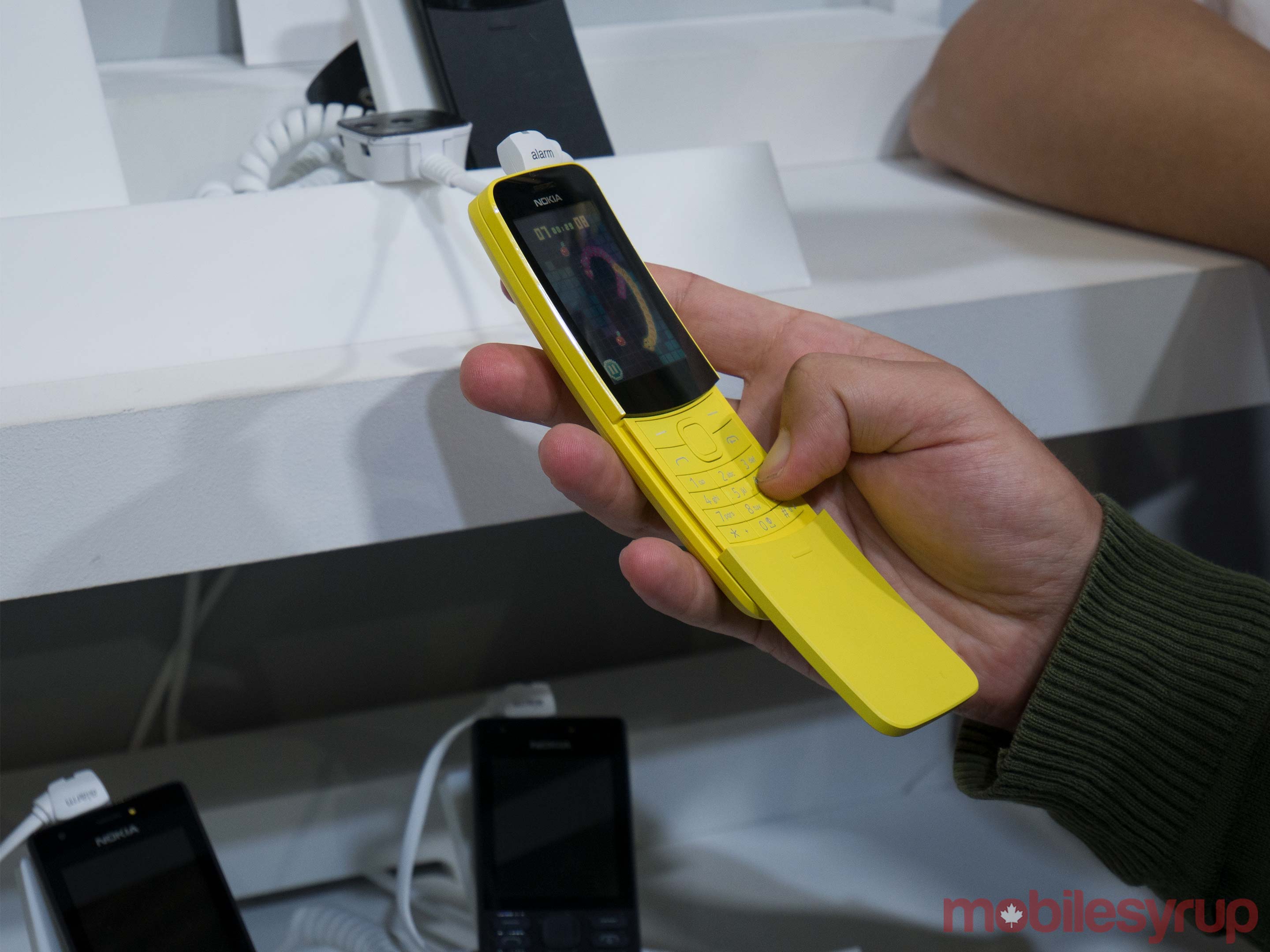
This wouldn’t be a good roundup if we didn’t start with the Nokia 8110 4G.

HMD Global, the Finnish company that manufactures Nokia smartphones, unveiled its retro Nokia 8110 4G, which features Google Assistant and Google Maps. The iconic banana phone, so-called because of the shape, can be seen in the movie The Matrix. It got reinvented with an appropriate colour scheme of black and banana yellow.

For more on the Nokia 8110 4G click here.


HMD Global also unveiled the Nokia 1, 6 (2018), 7 Plus and 8 Sirocco handsets at MWC. Each of these handsets feature Android One, which ensures that the phones recieve security and Android updates quickly.

For more on the 2018 Nokia lineup click here.


Samsung

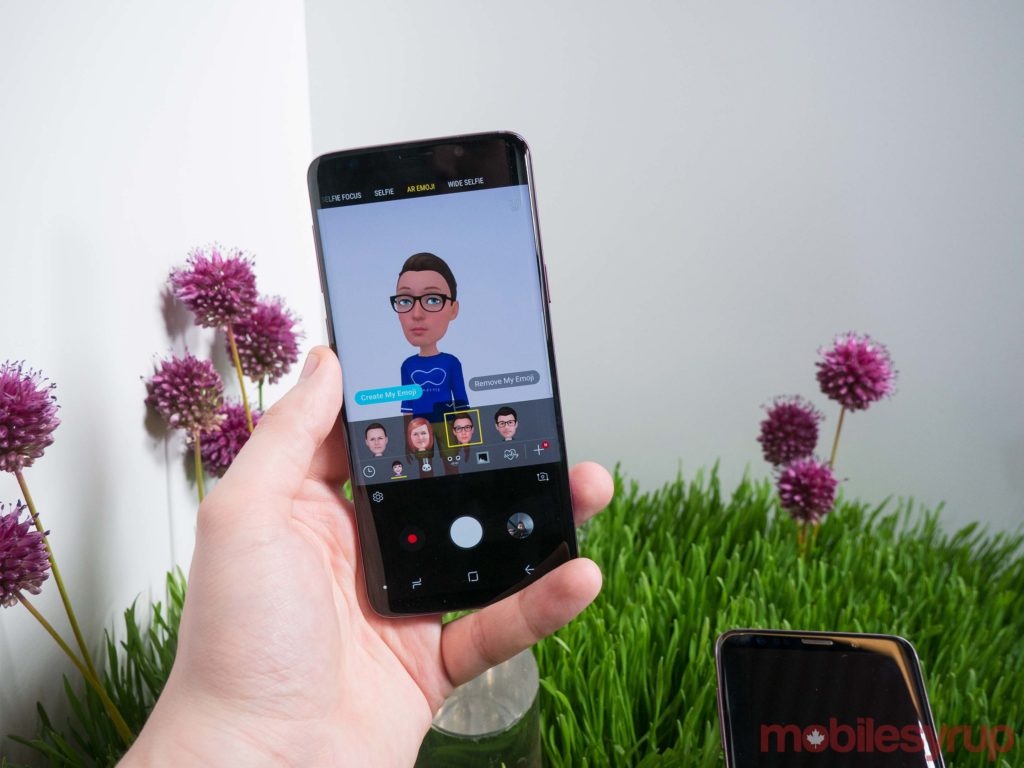
Samsung, the king of the Android smartphone world, unveiled the Samsung Galaxy S9 and S9+. Both of these smartphones will come out on March 16th in Canada.

For more on the Samsung Galaxy S9 and S9+, click here.


Samsung also announced the new DeX Pad at MWC this week. The new DeX Pad uses the S9 or S9+ as a laptop-like trackpad, instead of standing the phone up vertically. The accessory is also backwards compatible with the S8/S8+ and Note 8.

For more on the new Samsung DeX Pad, click here.


Asus

Asus unveiled its new ZenFone 5 series of smartphones. The higher-end ZenFone 5 handsets feature an iPhone X-inspired notch as well as a 19:9 aspect ratio. The ZenFone 5Z uses Qualcomm’s Snapdragon 845 and in the U.S. retails for $499.99 USD.

For more on the ZenFone 5 series click here.


Vivo

Vivo unveiled its Vivo Apex FullView prototype. The odd-looking smartphone features small bezels, allegedly the world’s highest screen-to-body ratio, as well as a camera that slides out of the top.

For more on the Vivo Apex FullView click here.

The Vivo Apex smartphone

Photo via Vivo Apex press release


Xiaomi

The Chinese company announced and unveiled its Mi Mix 2S. The phone features Qualcomm’s Snapdragon 845 and will come out on March 27th.

For more on the Xiaomi Mi Mix 2S click here.


Huawei

At Mobile World Congres Huawei had several announcements.

First, the company unveiled its new MediaPad 5 tablets. The tablets feature a 2.5D display with a Kirin 960 chipset. As of right now, they are not coming to Canada in Huawei’s first wave of release starting in March 2018.

For more on the MediaPad 5 tablets click here.


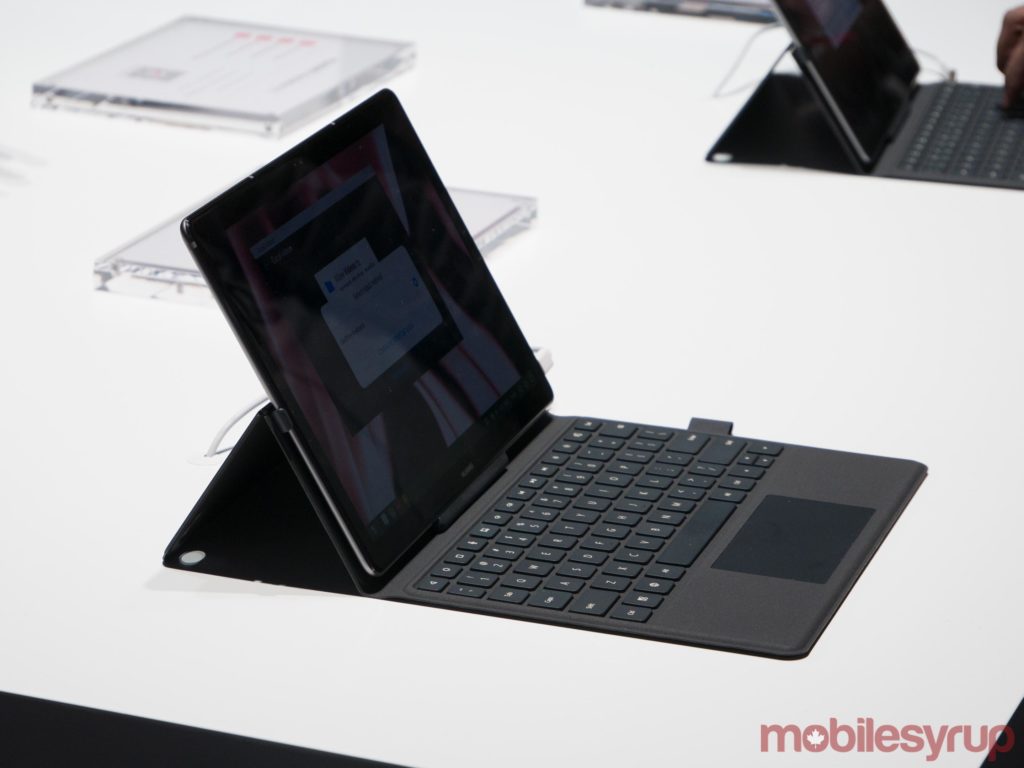
Huawei also unveiled its newest laptop, the Matebook X Pro. The laptop’s display features a 91 percent screen-to-body ratio and has its own pop-up camera. The 4.9mm manages to fit two USB-C ports and a USB-A port with a headphone jack.

For more on the Matebook X Pro click here.


In addition, Huawei revealed its first commercial 5Gmodem, Balong 5G01, with a 5G device that will power wireless-to-the home service and is currently in trials with Telus.

For more on Huawei’s 5G fixed wireless modems click here.


Huawei also showed off how its Kirin 970 chipset can be used to drive a car.

The post Nokia’s banana phone and the S9: Everything you missed at MWC 2018 appeared first on MobileSyrup.

04 Mar 02:17

Android P might support blocking calls from unknown and private numbers

by Rose Behar

Android P might feature enhanced call blocking features that let you restrict what types of numbers are allowed to call you.

A recent set of commits in the Android Open Source Project (AOSP) code review tool from a Sony engineer shows the ability to block calls from unknown numbers, private numbers, pay phones or any numbers not in a user’s contact list.

Currently, users can block calls on a per-number basis, meaning they have to know the number they want to block before they can block it. This allows for blocking before the user gets bothered in the first place. As of right now, that’s possible through third-party apps, though those often raise privacy concerns.

XDA Developers spotted the commits, noting that though the changes haven’t been merged with AOSP yet, a Googler reviewing the change stated they were “very much in favor of this change as a whole.”

Recent AOSP activity has also revealed possible native iris scanner support, privacy tweaks such as blocking camera and microphone access from idle apps.

Source: AOSP Via: XDA Developers

The post Android P might support blocking calls from unknown and private numbers appeared first on MobileSyrup.

02 Mar 07:18

SotD: Cream

This my fave Prince song, by a mile. I suspect that makes me a heretic, and is also wildly inconsistent because it’s got none of his guitar shredding on it, which always makes me grin ear-to-ear. But it’s a pure pop gem, a thing no song should ever apologize for in any company, no matter how august.

That show

I’m no Prince-ologist. I never managed to catch a live show, but wouldn’t have missed the chance. What else can I say? His Super Bowl half-time show was maybe the coolest ten-minute musical performance by anyone ever. To quote myself on the day: “I get the feeling that Prince decided some heavy rain would help his visuals and he had so much mojo going into this particular Sunday that God took his call and set it up.”

I hated most of his slow-jam moaners, and the extra-stupid sequences in his movies and films, notably the way-too-long opening section in the official Cream video, which I’ll link to anyhow because, you know, official. But I mostly loved Purple Rain anyhow, even the ridiculous parts, just because he was clearly a guy with a vision; it wasn’t that he was out of fucks to give what anyone else thought, he never had any.

This is part of the Song of the Day series (background).

Links

Spotify playlist. This tune on Spotify, iTunes, Amazon. Now, as for live video, here’s (yawwwwn) the official video. Here’s something way better, a live MTV take. Prince is having a blast, giving the audience a hard time for their clap-along ineptitude, cracking jokes. And it’s just him and an acoustic guitar, but somehow the room is 100% full of music. And he gets pretty good rhythm out of the audience by the third verse. The first 2:45 are Cream, then there’s more good acoustic music, stay for the show.

02 Mar 07:06

The iPhone's Turning Point

by Neil Cybart

Later this year, Apple will unveil a 6.5-inch screen that runs iOS. Five years ago, such a product would have been introduced as the newest member of the iPad family. However, Apple finds itself on the verge of releasing its largest iPhone to date. In fact, the device will likely be one of the largest smartphones in the market. Upon closer examination, such a dramatic change in product strategy was ultimately driven by Apple's realization that iPad mini was the wrong bet. It marked a turning point for iPhone. 

An iPad World

The iPad was a rocket ship like nothing Apple had ever seen. It's difficult envisioning a future Apple product that will outsell iPad out of the gate. Three million iPads were sold in the first 80 days. During the first year on the market, 22 million iPads were sold. 

As seen in Exhibit 1, iPad sales outpaced iPhone sales by nearly 3x after three years of sales. The iPad made the iPhone look mediocre. Some people even thought the iPad would become a bigger deal than iPhone. One has to wonder if at least a few Apple executives viewed iPad, not iPhone, as the product most capable of changing the world. We were truly living in an iPad world in the early 2010s. 

Exhibit 1: iPad and iPhone Sales Out of the Gate

Screen Shot 2018-02-28 at 3.30.10 PM.png

There were a number of factors behind the iPad's astronomical rise overnight. One of the more obvious was Apple's success in making the case that a device like iPad was needed. Apple positioned iPad as a device that sat between an iPhone and Mac. The juxtaposition elevated iPad at the expense of iPhone and Mac. The iPhone was positioned as a small, mobile device that wasn't great for things like web browsing, email, and consuming photos and video. Meanwhile, the Mac was positioned as a heavy beast blown out of the water by iPad for certain tasks. 

iPad Mini Rationale

Despite strong iPad sales out of the gate, the early iPad years were also a period of immense anxiety and worry for Apple. Much of this fear was born from Apple's paranoia around competition. A $499 9.7-inch iPad left a price umbrella, so manufacturers can potentially undercut Apple with cheaper and smaller tablets running Android.

In late 2010, Apple was so worried about these 7-inch Android tablets that Steve Jobs made a rare appearance on Apple's earnings conference call to downplay the threat. This is when he gave the now infamous comment about having to sandpaper your fingers to one quarter of their present size in order to use a 7-inch touchscreen. Much of this was posturing as other Apple executives were making the case to Steve that Apple should do a smaller iPad. 

Ultimately, it was this fear of cheap Android tablets that pushed Apple to launch iPad mini two years later in 2012. While the product was a rare defensive move from Apple, management also saw something intriguing about the 6-inch to 7-inch screen form factor. Instead of pursuing that interest with a larger iPhone, Apple saw the iPad as the better-suited product. It was increasingly looking like an iPad world after all, and smartphones were all about mobility. This turned out to be a mistake. 

Flat-Footed

Just as Apple launched iPad mini, something was brewing over in smartphone land. Samsung was grabbing buzz by shipping smartphones with larger screens. It caught Apple's attention. 

In March 2013, on the eve of Samsung's Galaxy S4 unveiling in NYC, Apple SVP Worldwide Marketing Phil Schiller sat down for an exclusive interview with The Wall Street Journal to throw punches at Samsung and downplay the momentum found with larger smartphones. Here's Schiller: 

"Given the iPhone 5 is so thin and light, the reason that people are making their devices bigger is to get up to the battery life the iPhone 5 offers."

According to Schiller, large smartphones were being sold simply because manufacturers were able to use the additional size to fit a bigger battery. The devices were not being launched because they provided a better experience, according to Schiller. In reality, Apple was worried. They had just placed a big bet on iPad mini as a way to prevent Android from gaining share in the tablet space. However, the competition wasn't found with smaller Android tablets. Instead, it was found with 5-inch and 6-inch smartphones running Android. Having just launched the 4-inch iPhone 5, Schiller knew that Apple wouldn't have an adequate answer to these larger smartphones for at least another year and a half. Apple was caught flat-footed due to betting on iPad mini.

Turning Point

At some point in 2013, Apple likely made the decision that iPhones had to become larger in a big way. Giving the next major iPhone a small step up in screen size wasn't going to cut it. While Apple was likely pushed in that direction by market forces, the realization that such a move was needed was still a crucial one for management to make. In particular, Apple had to accept the fact that the iPad mini may not have too bright of a future despite just being launched and seeing remarkable strong sales out of the gate. There wasn't going to be a compelling use case for a 7.9-inch iPad in a world with larger smartphones. 

What Happened?

My theory as to how all of this came together is that Apple executives were initially mesmerized by iPad's rocket sales out of the gate. It seemed like consumers would own and use both a smartphone and an iPad. Even if iPhone's market share remained on the low side, Apple would be able to sell iPads to feature phone, Blackberry, Windows, and Android users. This outcome would materialize as long as two factors were true: 

  1. iOS was the tablet platform of choice for developers. This is why Apple was so concerned about 7-inch Android tablets. 
  2. Smartphone screens were small. Larger smartphones would throw a wrench in Apple's strategy as the iPad would lose quite a bit of its value proposition.

Apple had an incentive to keep a sizable screen size differentiation between iPhone and iPad. As a result, Apple downplayed the phablet threat while dragging its feet in terms of shipping larger iPhone screens.

Based on Jony Ive's recollection of events, Apple tested larger iPhone prototypes with screens ranging from 4 inches to 6 inches as early as 2011. Apple designers thought a 5.7-inch screen felt good for iPhone, but the size was later deemed too large. It would end up taking another three years for Apple to launch iPhone 6 and 6 Plus with 4.7-inch and 5.5-inch screens, respectively. 

Annual iPad sales peaked at 74M units at the end of 2013. According to my estimates, strong iPad mini sales played a big role in establishing that sales peak. In fact, iPad mini sales likely exceeded 35M units on an annual basis at their high point. However, the realization that the most formidable competition was found with larger smartphones rather than smaller tablets pushed Apple. The company was no longer hesitant to run with larger iPhones even if it meant weaker iPad fundamentals weren't too far behind.

As seen in Exhibit 2, which breaks out 7.9-inch iPad sales, iPad mini sales were decimated following Apple's move into larger iPhones.

Exhibit 2: iPad Unit Sales (TTM)

We now see Apple becoming extremely aggressive with larger iPhones. A 6.5-inch screen iPhone will launch less than a year after a 5.8-inch screen. A 6.5-inch iPhone would have been unfathomable during the early iPad years. Such a device would have decimated Apple's iPad strategy. Today, Apple is comfortable ceding a much larger portion of the market to iPhone at the expense of iPad. This has led to a much stronger iPhone franchise. 

Earlier this week, Samsung unveiled its latest flagship smartphones, the Galaxy S9 and S9+. Unlike five years ago, when Schiller nervously tried to upstage Samsung's keynote, it is doubtful Apple even blinked an eye this time around. Apple removed Samsung's key advantage when it began to ship larger iPhones in 2014. The iPhone versus Samsung dynamic has never been the same since. 

Lessons

There are a few lessons to be taken from this situation. 

  1. Cannibalization is OK. Cannibalizing a product is OK as long as you are the one doing the cannibalizing. For Apple, the thought of severely damaging iPad mini, which looks to be the best-selling iPad size out of the gate, wasn't easy. It would be the equivalent of Apple deciding to give AirPods health and fitness monitoring even if it meant Apple Watch would be permanently impacted as a result. However, Apple found itself with a much stronger iPhone business as a result of cannibalizing a portion of the iPad line. A 6.5-inch iPhone will likely sell for $1,199 while the original 7.9-inch iPad mini retailed for just $329. 
  2. Admit Mistakes and Embrace Change. There is this attitude that Apple doesn't make mistakes and instead the company needs to possess the right strategy out of the gate to be a winner. Reality is quite different. Apple is willing to admit to mistakes and then make needed changes to get back on course. Apple's decision to set aside iPad cannibalization fears and launch larger smartphones fundamentally changed both the iPhone and iPad businesses. 
  3. Get Rid of Dogma. Throwing away the dogma that smartphones derived value from small screens was crucial in uncapping iPhone's potential. In what may be hard to believe, we are likely still underestimating the trend found with larger smartphones. Apple has seen growing momentum with its 5.5-inch iPhone Plus models over the years. In fact, the iPhone 8 Plus is the best-selling 5.5-inch iPhone relative to its 4.7-inch sibling. Meanwhile, Apple will sell tens of millions of the 5.8-inch iPhone X in 2018. A 6.5-inch iPhone may outsell an iPad mini despite selling for 4x more.

Ultimately, the iPad mini's demise at the hand of larger iPhones led Apple to view the iPhone and iPad as siblings on the same computing spectrum. In such a vision, smartphones are allowed to possess increasingly large screens (6+ inches) while iPad screens trend larger (10.5-inch and 12.9-inch) in an attempt to stand out from increasingly larger smartphones. 

Receive my analysis and perspective on Apple throughout the week via exclusive daily updates. To sign up, visit the subscription page.

02 Mar 06:57

The DAM Book 3.0 now available for pre-order!

by admin

We are pleased to announce that The DAM Book 3.0 is now available for pre-order! As with our previous books, you can pre-order the book for at a discount.

Here are the details:

  • Electronic book:  Regular price $34.95
  • Pre-order discount price:  $31.46
  • All pre-orders will get an advance copy of Chapter 1, Visually Speaking at the time of purchase.
  • We will deliver at least 7 of the additional 11 chapters by March 31st, 2018.
  • Additional chapters will deliver in April 2018.
(Click for larger view)

Print Copies
Print copies will be available over the summer. Your purchase of an electronic copy can be applied to a print copy, once it’s available.
More Info: Click The DAM Book 3.0 product page here.

The post The DAM Book 3.0 now available for pre-order! appeared first on The DAM Book.

02 Mar 06:50

Hoppeltour übers Stuttgarter Pflaster

by noreply@blogger.com (Christine Lehmann)
mkalus shared this story from Radfahren in Stuttgart.

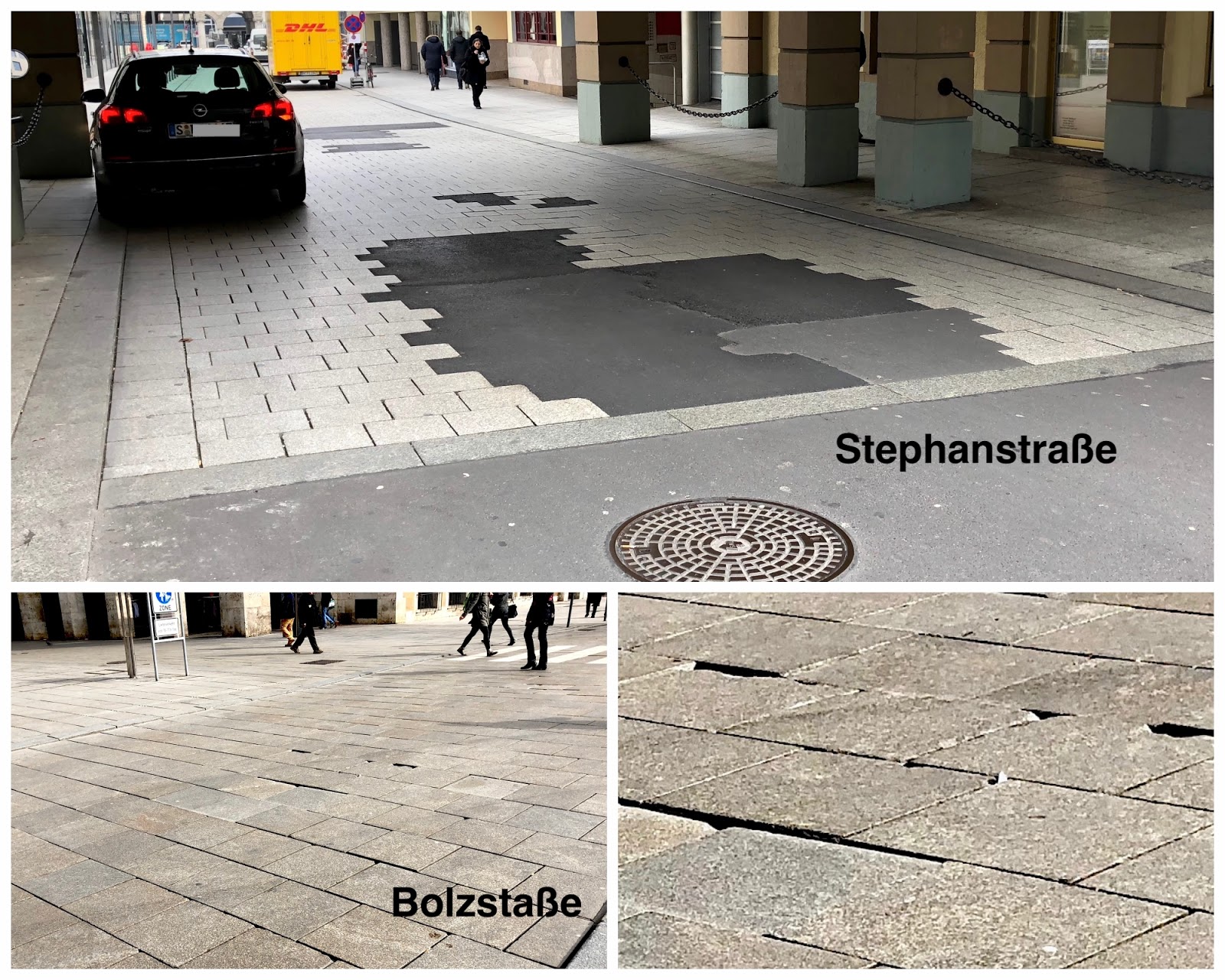
Autos sind schwer. Vor allem in Kurven drehen ihre Reifen die Schmuckpflastersteine aus der Verankerung. 

Die Folge sind schief stehende Steine, Kanten und Spalten, die für Fußgänger/innen und Radfahrende gefährlich werden können.

Autos macht der Schaden nichts, den sie anrichten, sie rollen in der Tübinger Straße beim Gerber oder in der Lautenschlagerstraße über klappernde Steine. Für Rennradreifen können die hochstehenden Steinkanten und die sich immer weiter auftuenden Spalten zwischen den Steinen aber sturzgefährlich werden. Zu Fuß gehende können mit Absätzen hängen bleiben (Frauen in Pömps) oder über eine Kante stolpern. Mal abgesehen davon, dass es potthässlich aussieht, ungepflegt und so, als lasse die Stadt alles verlottern.


Dieser Stein - weder in Grau, noch in Gelb - taugt nicht für Flächen, die eigentlich für einen leichten und leisen Rad- und Fußgängerverkehr gedacht sind, aber von Autofahrenden mit benutzt werden dürfen oder auch einfach illegal genutzt werden. Und es wird nicht besser, sondern schlimmer in der Tübinger Straße.
Wacklig und schief stehen die Steine auch bei den Zebrastreifen auf der Bolzstraße. Für junge Menschen kein Problem, für ältere aber durchaus gefährliche Fußangeln.

Übrigens, falls sich jemand fragt, warum diese Steine nicht zügig ersetzt werden: Der zuständige Bürgermeister Thürnau erklärt, er habe keine Lagerkapzität für diese Steine und es es sei wirtschaftlicher, sie in größeren Mengen zu bestellen. Also wartet man jeweils darauf, dass sie die Bestellung auch lohnt.

Kronprinzenstraße
Für viel Geld hat die Stadt im vergangenen Jahr die Kronprinzenstraße saniert, die vorher eine reine Flickenpiste war, weil viel zu viele schwere Fahrzeuge hier drauf fahren. Die Steine sehen robuster aus als das übliche Stuttgarter Pflaster (sie sollen auch Stickoxide absorbieren), aber sie liegen da auch erst seit ein paar Monaten. Man sieht an den Reifenspuren auf dem Pflaster, dass auch hier ungeniert Autos herumkurven. Sie parken sogar, obgleich sie das nicht dürfen. Ich nehme aber mal an, dass diese Steine besser halten, so wie auch das Steinpflaster auf der Königstraße.

Lautenschlagerstraße
Dieser Abschnitt der Lautenschlagerstraße aber muss dringend saniert und dann endgültig für den Autoverkehr gesperrt werden. Offensichtlich kommt die Stadt mit dem Flicken nicht mehr nach, die Steine sind eingebrochen, stehen schräg und produzieren tiefe und viel zu breite Spalten. Es klappert beim Drüberfahren, die Radreifen rutschen von den Kanten ab, man schlingert leicht. Und das nach gerade Mal gut vier Jahren. Ohnehin hat man in der Straße 2013 eine Chance für Radfahrende vertan.

Billiger und weniger gefährlich wäre Asphalt, der gerne auch mal hell gefärbt sein kann. Übrigens ungefährlicher leider nur für zu Fuß Gehende und für Radfahrende. Wer mit vier Autoreifen darüber klappert, stolpert nicht. Und solange Autos nicht stolpern, kann man zuwarten. Oder?


02 Mar 06:50

Of Course I Want a Self-Driving Car

by Rex Hammock

(Via AdAge.comA Gallup poll recently released…shows that plenty of Americans are still freaked out by the concept (or a self-driving car). Fifty-four percent of the U.S. respondents say they’re unlikely to use self-driving cars, according to “Americans Hit the Brakes on Self-Driving Cars,” which was released last week. The findings came from a larger Northeastern University/Gallup survey of Americans’ attitudes on artificial intelligence. People ages 66 and older have the greatest resistance, not surprisingly, with 69 percent saying they’re unlikely to use self-driving cars. Acceptance grows the younger the generation. People ages 18 to 35 are fairly split at 36 percent likely and 41 percent unlikely.


Are they kidding? When the reality of self-driving cars replaces the vehicles imagined by these surveyed older people, they will view self-driving cars as a means to retain their independence and freedom.

I recall that when my father was in his late 70s and still driving, he was in a wreck and had his driver’s license taken away. As driving back and forth to a gym was the central focus of his routine, he was determined to regain his license, or, more accurately, his independence.

This was not a goal anyone else endorsed. He had never been a good driver. For example, he never figured out that cars had side-view mirrors that could be used when changing lanes on an interstate highway. He just changed lanes when he felt it was time to change lanes.

But somehow, he was able to pass a drivers test and regained his license for a while, at least.

Autonomous autos have the potential of providing more mobility to older people or people with vision problems, even blindness, or people like me who hate to drive so much I ride a bike whenever possible.

Here’s a 360-degree video that Alphabet’s Waymo posted on YouTube today that is trying to persuade the masses that self-driving cars will be a lot less scary after we get to ride around in them. I can’t wait.

02 Mar 06:50

The Yaletown Street

by pricetags
02 Mar 06:50

Things Automation: Building a “Natural Language” Parser in Workflow

by Federico Viticci

One of the Todoist features I miss the most as a Things user is the service's natural language parser. Available in the Quick Add field of Todoist for iOS, web, and macOS, this feature is, effectively, Fantastical for tasks. Instead of having to manually select task fields such as projects, tags, or dates, you can take advantage of an easy-to-remember syntax and quickly type them out. As you do that, Todoist will highlight the parts it understands in red, indicating that it knows how to parse them. I entered hundreds of tasks in Todoist using this system, and I think it's an aspect of task creation that every other task manager should implement as well. It makes perfect sense, and it saves a lot of time.

Aside from a half-baked attempt at supporting natural language entry in its date assignment UI, Things doesn't unfortunately offer a quick entry feature comparable to Todoist's. So, of course, I set out to make my own using the app's latest automation features.

Well, kind of. For starters, as much as I'd love to, automation doesn't mean I can make my own interfaces in Things, supplementing the app with my custom UI to more easily create tasks. Things' new URL scheme only lets us send data from other apps such as Workflow or Drafts. More importantly though, the workflow I'm sharing today isn't based on a complex natural language engine such as the one used by Todoist or, say, the Chrono JS parser; I'm just using some special characters sprinkled with some delicious regex to make sure Workflow knows what constitutes a task title, a project, or a due date. Thus the quoted "natural language" in the headline of this story: it's only natural as long as you don't forego the special syntax required to make the workflow run.

That said, I'm quite happy with how this workflow lets me add multiple tasks to Things at once. I've been finding it especially useful at the end of the work day or during my weekly review, when I make a list of all the things I'm supposed to do next and want an easy way to add them all to Things. For this reason, rather than restricting this workflow to Club MacStories members, I thought every MacStories reader could benefit from it and modify it to their needs.

If you're a Club member, you can still look forward to advanced Things workflows over the next few issues of MacStories Weekly; this one, however, has been too useful for me not to share with everyone.

The Syntax

Here's the basic idea: I wanted to build a workflow that would take a sentence formatted in a special way and turn it into a todo object (with metadata) understood by Things. And I wanted to repeat this for multiple sentences in a row, so that instead of launching Things multiple times, Workflow would only open the app once, passing JSON data for all the sentences I had typed.

In simpler terms: I want a workflow that turns this sentence...

Buy 10 hard drives ++A test note here #123 Workflows "Tests" \\tomorrow at 6 pm @admin

...into this item in Things:

And not only that, but I also want this group of lines...

Test new workflow #123 Workflows "Tests" @Research \\today ++A link for reference: https://www.regular-expressions.info/lookaround.html

Send "video" to Myke ==Friends \\next Thursday at 1 am #123 Workflows "Tests" @research

Ping John via email @admin #123 Workflows "Tests" ==Friends ++I don't know why "lol" 😎  \\tomorrow @Reading

WatchKit sweet solution post @Articles @Writing ++ https://marco.org/2018/02/26/watchkit-baby-apps Reference: https://www.macstories.net/linked/why-there-are-no-standalone-apple-watch-podcast-players/ \\today at 6 pm #123 Workflows "Tests" @"Test Tag" ==Articles

...to become all these tasks in Things:

And, I want this to happen by launching Things just once, not dozens of times with x-callback-url. The workflow should act as a template processing script that iterates over multiple lines of text in one go, avoiding the dance of opening apps back and forth typically involved with complex URL scheme automations.

Let's start with the syntax. One of the limitations of this workflow is that the title of the task should always be at the very beginning of the line. While I can imagine that some may want to enter dates or tags first, it made more sense (and it was easier for me) to do it this way. In the examples I've included above, you can see how task titles are always the first items on each line; you should do the same when testing the workflow on your devices.

Individual pieces of metadata are then marked up using special characters that are somewhat related to their type. Here's a list of all the supported fields:

  • #Project Name
  • @Tag Name
  • ==Heading
  • ++Task note
  • \\natural date and time string

There is one important rule that is fairly easy to memorize: special markup characters have to be placed exactly before their associated text without a space. That's it. You can insert these variables anywhere in a line (but always after the task title), omit them, include spaces in the name of projects and tags, or write as much as you want in the note field. You can even include URLs and emoji in a task's note with this system. You can enter multiple tags, but only one project and one heading per line.

Again, for context, here's what some actual lines of text I used for my Things setup look like:

Things parser: write Syntax section #Editorial @Writing \\tomorrow at 2 pm ==Writing
Things parser: write Workflow section #Editorial @Writing \\tomorrow at 3 pm ==Writing
Things parser: write conclusion #Editorial @Writing \\tomorrow at 4 pm ==Writing
Things parser: first edit @Editing \\tomorrow at 6 pm #Editorial ==Editing
Things parser: send to Ryan @Editing \\tomorrow at 10 pm #Editorial ==Editing
Things parser: publish to MS @Editing \\Thursday at 4 PM #Editorial ==Publish

And here's the resulting set of tasks in Things:

There are three minor limitations I should point out. Projects or tags with emoji in their names are not supported because I couldn't figure out a way to encode them reliably in JSON using Workflow. In addition, using special characters reserved for formatting of task metadata (@, #, \, =, and +) elsewhere in a line may result in regex issues. Wherever possible, don't use those in fields other than the ones they already mark up.

Perhaps more importantly, the natural language date parsing is subject to Workflow's built-in date and time recognition feature. Generally speaking, the Workflow team has done an amazing job at recognizing a variety of English date strings such as "tomorrow at 1 PM", "next Wednesday at noon", or "in 2 days". However, there may be edge cases when a complex date or a non-English sentence returns an error.

For instance, "tra 3 giorni" (which means "in 3 days" in Italian) throws up an error in Workflow: "in 3 giorni" (which is grammatically incorrect) does not, suggesting that support for non-English dates has only been implemented at a basic level in Workflow. I've had great results with all my typical dates in English, but your mileage may vary. I recommend using this workflow to test natural language dates and times in Workflow.

I tried to come up with a syntax that would feel familiar to TaskPaper users (who have been relying on similar workflows for years), while retaining the simplicity of Todoist's Quick Add panel. I've been typing lists of tasks in Bear using this syntax for about a week now, and the system is pretty natural for me at this point. It's not as clever as I'd like it to be, but I think it strikes a good balance of legibility and the customization granted by TaskPaper.

The Workflow

Now onto the good stuff. The underlying concept of my workflow is that, by the end of a repeat loop that iterates over multiple lines of text, we should end up with a JSON array containing tasks we can send to Things. This is largely made possible by Match Text actions that use regular expressions to isolate different parts of a line and assign them to different attributes of a task. At a high level, this is what the workflow does: it repeats a series of regular expressions for each line, generates JSON, and packages everything up to send data to Things in bulk.

The workflow starts by splitting input text at new lines, creating a list of lines ready for a repeat loop. You're free to choose the kind of input text you want to use: you may type lines of text directly in Workflow, get the contents of the clipboard, or use the workflow as an action extension, reading input from another app. Personally, I just copy lines of text from Drafts and use a Text action with a Clipboard variable to read whatever is in the system pasteboard. I usually run the workflow from a widget.

Change the variable in this Text action to modify the workflow's input text.

Change the variable in this Text action to modify the workflow's input text.

Once the workflow has split the text in multiple lines, it discards the empty ones with a conditional block. This is done by counting the characters contained on each line; if the count is 0, it means a line is empty and shouldn't be parsed. Lines with text in them are saved to a Lines variable that the workflow then begins to process.

Once it has at least one line of text, the workflow starts using a variety of similarly constructed regular expressions to extract task attributes. Now, I know that my regex skills are merely average, and I'm open to suggestions for improvements, but here's the general idea: using positive lookbehinds and negative lookaheads, Workflow's regex engine matches text items that are preceded by a specific character but not followed by other characters. This enables us to match a multi-word @Tag Name until it is followed by a #Project Name, for example, or a ++Note that contains a URL as long as it's not interrupted by a ==Heading. There's probably a better, more elegant way to do this, but I haven't been able to break my system yet, and it seems to get the job done.1

An example of how the regex engine extracts specific portions of a line.

An example of how the regex engine extracts specific portions of a line.

I want to call out a few things you'll likely notice in scrolling through the Workflow. Double quotes are always escaped as \" to avoid JSON errors. The date is formatted using YYYY-MM-dd@h:mma, as required by the Things URL scheme spec. If you don't enter a time, Workflow will add 12 PM as a default time string, thus setting a reminder in Things. If you prefer to create tasks in Things for specific days but without time-based reminders, I suggest removing the @h:mma bit from the Format Date action.

Under the hood, JSON is constructed using a simple Text action that contains plain text and variables previously generated by the workflow. At the end, before launching Things, the workflow generates a complete JSON object that looks something like this:

Scary-looking, but still legible. You won't have to deal with any of this, but it's what goes on behind the scenes.

Scary-looking, but still legible. You won't have to deal with any of this, but it's what goes on behind the scenes.

Finally, after using the things:///add-json command, Things will launch, importing all the tasks you've passed to the app with the correct attributes and fields.

To give you an idea of how this complex automation results in just a few seconds of footage, here's a video of the workflow in action:

You can download the workflow here.


I'm having fun with Things' latest automation features. This workflow is helping me better plan the week ahead thanks to its support for batch processing tasks in the app: instead of creating one task after another in Things, slowly tapping around to select projects and dates, I can just prepare a list of formatted tasks in Drafts or Bear, hit a button, and import everything in Things. It takes two seconds to run and everything ends up in the right place.

I'm not done though. There's more I want to build for Things, such as Markdown-based templates that generate entire projects in Things. As I argued last week, Cultured Code has created a versatile URL scheme that, in addition to developers, can be used by tinkerers and power users to extend Things in powerful, fun new ways.

If you have ideas on how to improve this workflow, let me know on Twitter. And in case you haven't played with it yet, you can read more about Things automation here.


  1. As a side note: lookbehinds and lookaheads are one of the most interesting features of regex, and they're ideal for this kind of text extraction based on a specific markup. You can read more about them here↩︎

Support MacStories Directly

Club MacStories offers exclusive access to extra MacStories content, delivered every week; it's also a way to support us directly.

Club MacStories will help you discover the best apps for your devices and get the most out of your iPhone, iPad, and Mac. Plus, it's made in Italy.

Join Now
02 Mar 06:48

Nintendo pulls user Switch game reviews a week after they went live

by Bradly Shankar
Nintendo Switch Mario Kart

Last week, Nintendo began allowing users to submit reviews for Switch games on its website.

Users were encouraged to leave reviews of 50 words or more detailing what they liked or didn’t like about their Switch games.

However, as spotted by Polygon, Nintendo has since removed the ability for users to leave reviews.

Now, a message on the site states that “customer reviews have been taken offline as we evaluate this feature and its functionality.” Additionally, the company says it “currently [has] no estimated date on when an update will be provided,” although it “appreciate[s] the positive response and thank the reviewers who provided such thoughtful commentary on the games.”

Therefore, it’s unclear if Nintendo is looking to make any changes to user reviews before reinstating them or if it plans to scrap the feature entirely.

Via: Polygon

The post Nintendo pulls user Switch game reviews a week after they went live appeared first on MobileSyrup.