
Capitalists.

The Low Spark of High Heeled Boys was the album and the song, and it’s a song that’ll never die. It was recorded by Traffic, written by Winwood/Capaldi, and last time I checked, Winwood still goes out on the road and plays it for people. Play it for yourself, but sit back and listen carefully, there’s a lot happening.

OK, John Barleycorn may be more coherent, but Low Spark is the Traffic album (and the song) for me. The melody is memorable, the singing is strong, and the piano foundation is dreamy, but for me it’s the sax line from Chris Wood that brings it home.
Wood is another chapter in the sad old rock-n-roll drink/drugs/death story, but he left some fine music behind. I have an obscure 2008 album called Vulcan; then there was a later, apparently distinct, compilation called Moon Child Vulcan.
Anyhow: If you see something that looks like a star / And it's shooting up out of the ground / And your head is spinning from a loud guitar…
This is part of the Song of the Day series (background).
Spotify playlist. This tune on Amazon, iTunes (album only), Spotify. This live video from 1972 is a little unfortunate in that the audio mix loses the percussion entirely (and is that Larry Wall on drums?) but it does highlight a big Chris Woods solo. There’s lots more video, mostly from one of Winwood’s other touring bands, each of which has a sax player, and they all sound like they listened to Chris a whole lot.

Designed to give a smooth, cushy ride at higher speeds and over uneven terrain, jogging strollers are preferred not just by runners, but also by parents who simply like how easy they are to push and maneuver in everyday use. After testing a half dozen models, we found that the Thule Urban Glide 2 is the best jogging stroller for people who are mostly traversing paved terrain, and the BOB Revolution Pro is better for parents who regularly run off-road.

Today, our internet radio tool Nicecast is being retired from active development. Nicecast is no longer available for purchase, and we do not plan any further updates. Nicecast will be supported on MacOS 10.10 through 10.13 until the end of 2018, after which it will be fully deprecated.
Please read on for more details.

Nicecast was one of Rogue Amoeba’s earliest apps, first released way back in 2003, and receiving more than sixty updates since then. Soon after Audio Hijack provided the ability to record any audio on the Mac, users asked us to make it possible to broadcast any audio to the world. At the time, it was very difficult to create an online radio station.
So it was that we decided to join our powerful audio capture with a simple user interface on top of the open-source command-line icecast MP3 streaming server. With Nicecast, even novices could get started streaming audio from their Macs to listeners around the globe.
In short order, Nicecast users were providing hundreds of different streams for the world. Hobbyists were able to live out their DJ fantasies, while terrestrial radio stations could easily provide online access to their content as well. It was very exciting, and we improved the app significantly in the first few years.
However, Nicecast never gained widespread popularity, and thus has always been a junior player in our product lineup. As well, after a brief ascendancy, internet radio has not continued to grow. While it is certainly still in use today, it is small niche compared to the promise it originally showed. The vast majority of listeners rock out with streaming music services like Spotify, Apple Music, Pandora, and many others.
Our customers are best served when we optimize our limited resources, and so the time has come to put Nicecast out to pasture. The waning popularity of internet radio, coupled with pending changes to MacOS which will break 32-bit apps, are leading us to retire the product.

If you’re an existing user of Nicecast, you can of course continue to use it on supported systems (that’s MacOS 10.10 – 10.13). Nothing will change for you in the short-term. If you need to download the software again, the last planned version, 1.11.13, is available from our Legacy page. Technical support will be continued for licensed users through the end of 2018, after which the application will be fully deprecated.
Due to Nicecast’s 32-bit nature, we expect that changes Apple plans for future MacOS updates will render the two wholly incompatible. As such, you should be extremely cautious with any production environments running Nicecast, and avoid updating them past MacOS 10.13.

We encourage our existing users, as well as any new users looking for Nicecast, to find alternate solutions for broadcasting content online. Other solutions for creating an internet radio station do exist. To run a local streaming server on your Mac, installation of the command-line icecast is possible using Homebrew or MacPorts.
Feeding audio into any streaming server, local or remote, is possible with several different tools. The icecast website maintains a useful list of third party apps, with Mac tools like Ladiocast and broadcast using this tool (aka “butt”) being of special note. It’s also worth mentioning that our audio routing tool Loopback will enable you to feed any audio from your Mac into these tools for broadcasting.
Update (March 2nd, 2018): We got a lot of questions from users, so we’ve taken the time to expand on the above in a separate blog post. Please see “Broadcasting From the Mac Without Nicecast” for more complete instructions to help you transition away from Nicecast.
While Nicecast is now retired, we are considering future solutions to help users broadcast to more modern streaming options. In particular, we know many podcasters provide a live stream using Nicecast, and hope to eventually provide a more comprehensive solution for that use case. Following this blog is the best way to stay up to date with our latest news.
It’s sad to retire an application, particularly one that’s been developed for almost fifteen years. Nicecast solved a real problem in a fun, useful way. Unfortunately, that problem space just wasn’t big enough, and the world passed the app by. We’re sad to see Nicecast go, but excited to dedicate our energies to more modern projects which will help even more users.
If you’re an existing Nicecast owner with further questions, please get in touch directly.


With this post we begin a series of articles about our Service Oriented Architecture components at Dropbox, and the approaches we took in designing them. Bandaid, our service proxy, is one of these components. Follow along as we discuss Bandaid’s internal design and the approaches we chose for the implementation.
Bandaid started as a reverse proxy that compensated for inefficiencies in our server-side services. Later we developed it into a service proxy that accelerated adoption of Service Oriented Architecture at Dropbox.
A reverse proxy is a device or service that forwards requests from multiple clients to servers (i.e. backends). The most common use of reverse proxy is to provide load balancing for web applications. Additional uses for reverse proxies include web acceleration, SSL termination and various security features.
Although there are many reverse proxy implementations available, companies with private clouds that manage significant volumes of traffic often build their own reverse proxy solutions. Here are some of the reasons why they build their own:
Bandaid supports:
Like many of the core infrastructure components at Dropbox, Bandaid is written in Go. Selecting Go allowed for tight integration with services and a shortened development cycle. Bandaid’s primary components are shown in the image below. The Request Handler sends requests to a Queue. The queues pop requests to Workers (goroutines) and the workers process them and send them one-by-one to sets of hosts we’ll refer to as Upstream/Upstreams.

It is important to discuss how our queueing mechanism functions in order to understand the request handling workflow in Bandaid.
Request queueing implemented inside the proxy allows for better management of overloaded backends. Bandaid always processes requests in Last In, First Out (LIFO) order. When the system is not overloaded, the queue will be empty (or almost empty). Thus there’s no real difference between popping requests from the front of the queue or the back of the queue. Where LIFO processing reduces overhead is when the system is overloaded. By processing the newest requests first—since the oldest requests are likely to time out soon—we avoid spending CPU cycles on expiring requests.
Bandaid queueing can also support dropping requests once the queue reaches a configurable maximum capacity threshold. However, we don’t recommend this since it’s hard to distinguish whether a queue is full due to system overload or because of bursty traffic.
Bandaid queues have two additional options that control how many requests from the same queue can be processed concurrently, and how quickly requests can leave the queue for processing.
Because Bandaid always accepts TCP connections and pushes read requests into its own queues executed in the user-space, the kernel TCP accept queue [1] is always empty. One of the reasons for this decision is that clients may trigger a connection close unexpectedly, while the backend application is still processing the data. This consumes resources unnecessarily. Keeping the kernel accept queue empty and tracking the timing of connections in Bandaid queues allows to detect and propagate connection closure sooner, freeing up backend server resources. To do this, Bandaid simply fails those requests that are in the queue for more than the configurable timeout. Instead it forwards newly sent requests that have a lower probability of being closed by the client.
We found it’s much easier to manage connections in the user-space queue; it gives us more control over both the queue and requests. See the scenario below for more details.
FIN-ACK flags) because no response is received from the server.accept() call. It doesn’t detect that connection is already closed, since it was closed normally (via FIN, instead of RST), and continues to the request step.RST after the first write() call as the connection is already closed on the client side. The next write call will raise SIGPIPE signal or return broken pipe error when the signal is ignored.
Aggressive retries from the client side make the situation worse since the server is already overloaded and cannot process the extra requests. These requests will keep the kernel accept queue full, exhausting it with already closed connections.
There are multiple ways to solve this problem; here are a few:
At times it may be difficult to control timeouts between retry attempts on the client side (e.g. a third-party application accessing the server through an API).
Bandaid implements connection management in the user-space LIFO queue by keeping the kernel queue empty. Old connections that sit in the queue for more than a specified amount of time are closed without being processed. New requests will go through for processing.

Since Bandaid supports multiple queues it needs a mechanism to determine which queue to push requests to; this is done by the Request handler. Currently, the Request handler can only distinguish requests by their URL and hostname. It matches this information with a configurable list of URL patterns and hostnames that belongs to each queue. In the future we’ll have additional matching methods.
Bandaid has a fixed-size pool of workers that process requests. This approach (as opposed to running an unlimited number of worker goroutines) makes it possible to precisely control upstream concurrency. The number of workers is configurable, but depends on the size of the serving set (number of healthy upstream hosts). Oversubscription occurs when this number is set much higher than number of healthy upstream hosts.
In each worker loop iteration a worker pops a request from the queue, and calls the current request processor to handle the request. Since the number of workers controls how many concurrent requests can be processed, the number should be tuned so that there is enough workers to utilize the full upstream capacity. This configuration option should be chosen carefully because oversubscription will reduce the effectiveness of graceful degradation. When services in an upstream are overloaded sending more requests to that upstream will result in increased rate of failed requests or add latency. To mitigate this Bandaid drops these extra requests, keeping the load on the upstream at an appropriate level.
Upstreams are composed of the following components: queues that receive incoming requests; a single dequeuer that serves as multiplexer; and a request processing work pool. Note that it’s possible to have multiple upstreams. The role of dequeuer is discussed in the section below where we talk about the various use cases made possible by Bandaid.
This is an important Bandaid feature that enables canary deployments of services at Dropbox. This makes it possible to route a configurable percentage of traffic to a deployment with particular version of software (for example, send 10% of traffic to a new deployment).
In the design of Bandaid multiple queues may belong to a single upstream. Each queue may have its own properties such as weight, queue size, rate limit, priority level and number of concurrent connections. There are also two extra enqueueing and dequeueing interfaces built on top of queues. These features enable weighted traffic management and prioritization functionalities in Bandaid.

The enqueuer interface makes decisions about where to push requests based on queue weights. Queues with higher weights are more likely to take new requests. This allows us to implement traffic shifting as it’s shown in the next picture: 90% of traffic goes to one upstream (production) and 10% to another (canary). As mentioned earlier Bandaid supports hot config-reloading (dynamic reconfiguration without a restart). A new configuration can be applied without having to restart Bandaid. This simplifies development operations and allows us to see results within a few seconds from the push of a new configuration.

The dequeuer determines dequeueing order based on the queue’s priority level. Requests are popped from higher priority queues sooner than from lower priority queues. Hence, when the system is overloaded, low priority requests are more likely to be slowed down than high priority requests.
Multiple queues can share the same priority level. To ensure fairness among these equal priority queues, the priority dequeuer will semi-randomly shuffle them and will pop requests in the shuffled order.
Strict priority-based dequeuing can result in starvation (i.e., requests with lower priority will never be served because there are always requests in higher priority queues). To combat this, Bandaid provides another option that controls how fairly queues are popped. At one extreme, queues are treated as if they all have the same priority; at the other extreme, the priority dequeuer will always favor high priority requests over low priority requests.
Some backends may serve critical and non-critical routes from the same host. In this case performance degradation on non-critical routes may affect the responsiveness of critical routes. This is because the number of requests each individual host can handle is limited, so if it spends all its resources on serving non-critical routes, then it won’t be able to handle critical routes.
One solution for this problem is to serve critical and non-critical routes from different hosts. Another approach involves performing isolation at the proxy level. This helps reduce operational overhead and minimizes the number of hardware instances.
Bandaid allows configuring the following properties to control the behavior of critical and non-critical routes: rate limiting, number of concurrent connections, and queue priority.

The image shows two queues in use, but there is no such limit in Bandaid—the same upstream may handle requests from multiple queues.
This is a classic load-balancing use case. See the section on load balancing methods below for more details.

Backend servers may have a limitation on the number of supported concurrent connections. In this case Bandaid handles all incoming connections (which can be a large number) and controls the number of connections (typically a much smaller number) forwarded to each backend process. Bandaid can be configured to reply with a specific status code when the limit of concurrent connections is reached.

Below, outgoing TCP connections are being reduced by multiplexing them using Bandaid. Each host in the picture has multiple instances of clients and each client is establishing its own TCP connection with Bandaid. Bandaid reduces the number of concurrent connections when it communicates with the service by reusing inactive connections (keep-alive, http2).

Some of the services still use HTTP 1.0 and Bandaid can be used to translate the newest version of HTTP protocol to the oldest, or vice-versa.

The current version of Bandaid supports multiple load balancing methods. Unfortunately, there is no perfect method that works equally efficiently in all cases. Different scenarios require different load-balancing approaches.
This is a well known load-balancing method that is simple to implement. When configured, Bandaid will send the same number of connections to each host. This method doesn’t take into consideration hosts/services or connection slowness. It is likely to cause a slight imbalance when hosts perform differently. This situation is schematically shown in the image below. Red hosts perform more slowly than the green hosts. In the Round Robin implementation the number of connections processed by the red hosts will continue growing because Bandaid will send new requests to these hosts even if they are not done processing old requests.

Let’s take a closer look at the following scenario: the round robin load-balancing method is used with various ratios between the number of slow and healthy backends. The probability that a worker will get stuck serving slow hosts can be found as V = KR/(1 + K*(R-1)) where
C – number of backends in bad state
Lc – average latency across C machines (time between accepting the connection and finishing processing)
P – number of backends in normal state
T – total number of machines or T = C + P
Lp – average latency across P machines.
K – [0, 1] ratio between C (bad hosts) and T (total number of hosts). K = C/T, or C = KT, or P = (1-K)T
R – ratio between Lc and Lp → R = Lc/Lp or Lc=R*Lp

The graph at right shows a few examples of V for different ratios between slow backends and the total number of backends in upstream for various R values:
You can see in the figure the rapid increase of the green line which means that slow hosts performing 50 times slower than others may consume ~70% of all capacity, even in cases when only 5% of these slow/bad machines are present.
This is an effective method for backends that do not perform equally in terms of the time it takes them to process requests. Here, the load balancer needs to send a smaller number of requests to a slow host and a greater number of requests to faster/healthy hosts. The load balancing method that allows us to do so is least connections of N random choices [2].
The image below shows the main principle and the steps for the method.
In this example N=2 (i.e. two random choices).

An adverse situation can exist where an upstream host is failing requests at a high rate (especially in the case of a small serving set) and is selected as the one with the least connections. This is because the algorithm is not aware of server health or resource utilization and only cares about the number of concurrent connections.
A derivative of this load-balancing technique is the Absolute Least Connections method. Because the number of connections could change while we search, we freeze (lock) the current state while Bandaid searches for the host with the least number of connections. Once found Bandaid will direct new connections to this host.

In addition to this, Bandaid randomizes starting positions to add distribution across hosts that have the same least number of connections. This is done to avoid establishing all the connections with the first host from the serving set that has the smallest number of connections.

For this method each worker (goroutine) belongs to a specific host in the upstream. The worker takes the next request from the queue only after the previous request has been processed by the host. This automatically reduces the load on slow hosts because each Bandaid worker is directly limited by the performance of the host.
Seeing how each load-balancing method behaves and getting additional evidence that the theory works as expected is key before trying it in production. Testing requires an additional time investment in building a test environment that simulates sets of backends. Long term, testing allows us to validate code much faster and helps identify the right load-balancing method.
Results of synthetic tests for load-balancing methods implemented in the current version of Bandaid are shown below. The test environment had the following conditions:
Each backend host had its own processing latency shown on the following graph:

The next graph shows the distribution of requests across backend servers in the upstream for each load-balancing method. As expected, the distribution of requests for the round-robin method is almost the same for each backend and doesn’t depend on their processing time. Other methods (absolute least connections, least connections of N random choices and pinning peer) send more requests to the backends with smaller processing times.

Better distribution when using random choices and pinning-peer methods reduces total processing time and increases the total request rate across all backends.

It is important to support the exclusion of backends that were previously tried during retry attempts. Otherwise there is some probability that future retry attempts could be made with the same bad/unhealthy hosts.
The next graph shows the ratio of failed requests to total requests for each load-balancing method, with and without exclusions. In this scenario 20% of all hosts were failing hosts. A maximum of four retry attempts were configured. A failed/unhealthy host in this test environment was a host that immediately replied with an error status code.

As you can see from the results in the graph above, enabling exclusions reduced the error rate for all tested methods except pinning peer. This was expected because retry attempts in the case of pinning peer won’t make much difference—the worker is host bound and will attempt all retries with one host.
That’s all for this post! In the future, look out for further posts on Bandaid, including:
[1] How TCP backlog works in Linux
[2] The Power of Two Random Choices: A Survey of Techniques and Results [pdf]

There are an estimated 8,000 electric vehicles in BC. These numbers may seem small compared with the millions of vehicles registered, but growth is tracking in the double-digits on a year-over-year basis. With significantly fewer emissions and lower operating costs, electric vehicles have the potential to benefit climate change and affordability – two important goals in our region.
· Eve Hou, Air Quality Planner, Air Quality and Climate Change, Parks, Planning and Environment, Metro Vancouver
· Chris Frye, Acting Director, Communities and Transportation Branch, Electricity and Alternative Energy, Ministry of Energy, Mines and Petroleum Resources, Province of BC
· Anthonia Ogundele, Manager, Environmental Sustainability and Business Continuity, Facility & Environmental Management, Vancity
From Stephen Wilkinson, as he explores this extraordinary country:


An interesting way to change the nature of traffic is written in this article by The Standard. Imagine Walthamstow England (in East London) which introduced partial road closures along twelve main roads. Traffic which was over 20,000 vehicles per day was cut by 50 per cent. The aim of the project was to reduce short cutting through the neighbourhoods, making roads safer for pedestrians and cyclists.
This project was part of past Mayor of London Boris Johnson’s plan to bring cycling culture to the suburbs, with 30 million pounds available to run these types of projects in Waltham, Kingston and Enfield. And surprise! “Traffic evaporation” occurred, where fewer trips were taken by car and less rat running happened in neighbourhoods.
Collisions were also reduced with none being reported after the partial closures, compared with 15 in a three-year period. The project was backed by local residents but had some pushback from some businesses that feared it would reduce their commercial trade. The “full results — including an expected large increase in the number of people cycling and walking — will be released by the council early next year.”
And the take away? As Simon Munk of the London Cycling Campaign observed ““It’s very clear that this is a replicable approach and other areas can do it. There is not some kind of ‘magic dust’ that means only Walthamstow can do it…It doesn’t cause chaos, despite what some people say. It’s capable of making our town centres and city centres, and communities where people live and work, work much better.”


Activity rings are a great motivation to stay active. I have closed them for years, every single day. But with the latest major watchOS update Apple introduced new challenges, and they are complete and utter b/s. Current example:
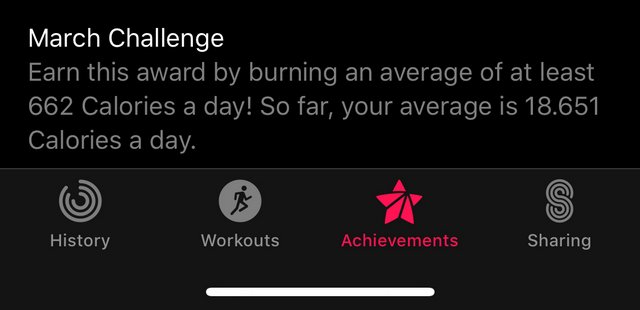
That is quite obviously a calendar problem. This average will go down to more sensible levels and at the end of the month I will not earn this award, no matter how many calories I burn, since the math is broken. It's not the only place that is completely wacky. Compare these three numbers:
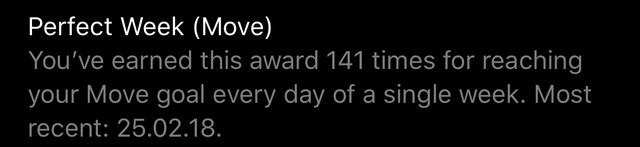
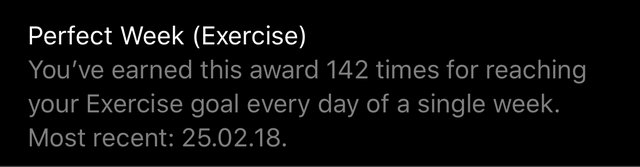
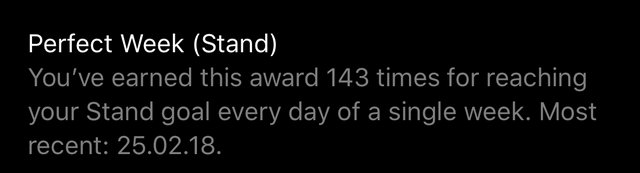
Looking good. How many weeks can I have been awarded all three goals? Max 141, only if I failed Exercise in the same week as Move. Otherwise it would be 140. Apple however awards me 188 weeks of reaching all three goals.
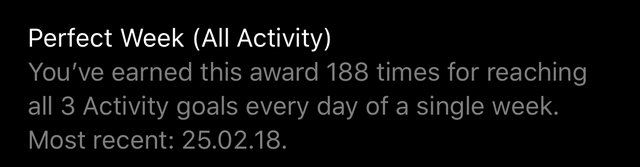
188 weeks times 7 days is 1316 days. 25. Feb 2018 minus 1316 days is 20 Jul 2014. I have had my Apple Watch since the end of June 2015, once month after it was officially released. I have to assume they started testing in June 2014 and those "reaching all activity goals" is actually pretty accurate for me, since I started my #dontbreakthechain program in the spring of 2014, tracking into Apple Health with all kinds of of fitness bands. It would save my life three years later. For that I am forever grateful.

There are many articles out there about being an effective remote worker. Most of them focus on the basics, like building the ideal home office, following strategies for effective video conferencing, managing cabin fever, avoiding becoming a remote developer black box or improving self-discipline, motivation and communication.
But where do you go from there? People often ask me that. Julia Evans at Stripe has done a great job writing about this, and I’d like to give you my take as well.
I have over 20 years of experience as an engineer or engineering manager. I’ve spent the last seven years working for The New York Times, and have been remote for the past three years. How do I keep myself constantly learning and growing, both personally and professionally, while at the same employer, especially now that I’m a remote worker?
As an engineer, you’re not paid to write code; you’re paid to solve problems. It’s also not enough to just solve any problems. You need to be solving the right ones. You should constantly make sure there’s alignment between what you want and what the business needs, as organizational context and business priorities are constantly changing. It’s the path with the greatest rewards:
Consistency is one of the main traits of a senior engineer. Even if you are solving the right problems, there are different classes of right problems to solve: standardization, performance, resiliency, quality, innovation, developer productivity and so on. Explicitly choosing a class of problems you want to tackle and defining what your world will look like when you have some solutions in place bodes well for your career:

As you progress in your career, you will learn that you have to prioritize both pragmatism in how you work and maintainability for the code you write. One of the most direct paths to achieve those objectives is by focusing on simple solutions:
For some engineers with many years of experience, it’s as if each one of those years were the same, repeated over and over again, like a perpetual Groundhog Day. One of the best ways to learn is to challenge yourself, and one of the best ways to challenge yourself is to switch teams:
This is sometimes counterintuitive: grow professionally by making yourself dispensable. By making yourself dispensable, you show that you can take on larger or more complex challenges:
Being on call is one of the most powerful ways to learn more about the system you are responsible for. You don’t have to take just my word for it. Most importantly, when things break, figuring out what broke helps you to decide where improvements are most needed:
In much of the work you do, you’ll grow faster if you work with others. What better way to do this than to create groups of people who have a common goal or interest? Show to your manager that you can lead others in becoming better professionals and better people outside as much as you do inside your own team:

If you’re an engineer in a fairly well-run team, you most likely have 1:1 meetings with your manager regularly. Why not have 1:1s with a couple of your peers as well? Or meet regularly with managers and engineers outside your team, folks from different backgrounds or who have mastered different skills, like designers or product managers?
One of the hallmarks of engineering seniority is the ability to mentor others. As you grow professionally, it’s important to allow yourself to be continually mentored by others and to make yourself vulnerable, open to accept and act on feedback from folks at all levels of experience.
Most senior engineers are passionate about something related to their work. You can almost see a twinkle in their eyes when the subject comes up. It’s not a requirement for growing professionally, though, as there are great engineers who are just happy to do the best job they can, efficiently and reliably, while their true passion lies elsewhere. Also, there’s some confusion about what being passionate about your work really means:
Empathy is the ingredient that will give you the greatest return on investment for your personal and professional growth. You need empathy toward past mistakes and technical debt. You need empathy toward everyone you work with, no matter what role. You also need it toward the people who will have to face the consequences of the decisions you make today. Ultimately you need to remember that software engineering is more about people and their relationships to their work and others than it is about coding.
It takes quite a bit of conscious effort to work toward your own professional growth, whether you work remotely or not. Being a remote worker might even give you some extra super powers, if you work thoughtfully enough to achieve them.
Thanks to Sara Simon, Julia Evans, Deep Kapadia, Jose Muanis Castro, Phil Calçado, Willian Molinari and others for their feedback.
How to Grow as an Engineer (Working Remotely) was originally published in Times Open on Medium, where people are continuing the conversation by highlighting and responding to this story.

With different projects scattered across storage buckets, apps, and devices, we’re constantly forced to take extra steps to get work done. Over the past year, we’ve been focusing on how we can solve this problem for individuals and teams by delivering a unified home for work. And today, we’re announcing a new partnership with Google Cloud that will bring Dropbox and G Suite users one step closer to a world where our work comes together.
We’ll soon begin rolling out a series of integrations that will help you use Dropbox more effectively with Google productivity and collaboration tools. Here’s what you can look forward to:
We couldn’t be happier to bring Dropbox to more of the tools you use every day. Ritcha Ranjan, Director, Product Management at Google Cloud, shares our enthusiasm, saying, “Our goal is to make G Suite accessible no matter what tools you bring to work, and these integrations help our shared customers better collaborate in the tools they use every day. Working with Dropbox to make our apps work better together helps our customers focus their time on work that matters.”
This new partnership—along with recent Microsoft Outlook and Adobe XD CC integrations—is part of our mission to help you cut through the noise and focus on what matters. Our new Google Cloud integrations will begin launching later this year. To learn more about our partnerships with companies like Apple, Microsoft, Adobe, and Facebook, check out our app integration posts.

For many of us, commuting is our only discretionary time of day. In between work and home responsibilities, this margin can feel like an obstacle or an opportunity, depending on how we spend it. When you use your commute to generate energy, creativity, and delight, it can help you be more effective and satisfied in every other dimension of your life and work.
A solid morning routine helps you become proactive instead of reactive. And it can set the tone for the rest of your day—starting with your commute. Try this before leaving home:
• Fill your cup
Wake up your body by stretching, meditating, doing yoga, going for a run, or fueling up with a breakfast of champions. For extra credit, you could even bike or run to work.
• Express yourself
Wake up your creativity with an activity that delights you. Write, paint, play an instrument, sing, or dance. By expressing yourself, just for the fun of it, you will become more receptive to new ideas and possibilities.
• Tend your family
Delight in your family by sharing unhurried time at the start of the day. Discuss intentions with your partner, play with your kids, pet the cat, eat a hearty breakfast together. Notice and appreciate how your work helps you provide for your family.
Don’t think you have time for anything more than grabbing a shower, a bagel, and your briefcase as you run out the door? Try setting the alarm five minutes earlier, then use that time for one new practice: meditation, maybe. Once you are doing this regularly, you could start stacking habits. Add five more minutes—to make a kale smoothie or write morning pages. And so on. Even a small investment in your well-being can help fill your tanks for the rest of the day.
With 76 percent of people driving alone to work according to the US Bureau of the Census, most of us have a wedge of solitude to leverage during our commute. Here are some ways to make good use of this white space—without compromising safety.
• Tune in without tuning out
As we hurtle through space strapped into our personal sound studios, we can listen to music, podcasts, and audio books to help us learn, get inspired, or train to be karaoke superstars—all of which energize us for the day ahead.
• Keep in touch
Use your hands-free option to catch up with family and friends by phone, make after-work plans, and schedule family appointments. Handling what matters to you personally while in transit can clear your mind for what matters to you professionally when you arrive at work.
• Speak it out loud
The car may be the only place where you can speak without being heard. Whether you need to blow off steam with some uncensored commentary, rehearse a presentation, or talk yourself down from some virtual ledge, the car gives you the privacy to say it out loud. You might even consider talking to yourself in the second or third person (“You have the chops to make a great pitch, Bob!” or “Bob is the smartest guy in this car!”), a strategy proven by research to boost confidence and performance.
• Practice mindfulness
Stillness is built into driving. And so is awareness. You can amplify both with mindfulness practice: by noticing your breath, your thoughts, your body, your dashboard, the scenery. Focusing your attention in this way helps quiet the din of distraction. So you have greater access to you.
• Get ready, get set…
Your commute can also help you get emotionally and logistically ready for your day. Whether you’re strategizing about negotiating a raise or capturing a to-do list on voice recorder, you can use driving time to visualize, intend, plan, and affirm your capacity to go get it.
• Keep it fresh
Driving itself can be a creative practice that keeps your mind stimulated. You can challenge yourself to find different routes to work that are more scenic, speedy, or direct (or that bring you to the best drive-through lattes). Or you could engage your mind by practicing math equations, recounting geological facts, or memorizing poems.
If you’re traveling by public transportation or carpool, you have some additional options for making your commute count. Without your eyes on the road and the hands on the wheel, you could:
• Connect with others
Are you an extrovert who refuels in conversation? Enjoy the company of the people you’re traveling with and arrive at work primed for more engagement.
• Settle in to yourself
Prefer anonymity? Public transportation is great for that. You could meditate, nap, look out the window, and space out. Headphones have the double benefit of allowing you to listen to something meaningful while communicating to others that you’re not available for conversation.
• Engage in your world
Reading newspapers, journals and blogs can keep you current about your industry, interests, and the world at large. By getting informed about issues that may impact your work and inspired about what’s possible, you can begin your day with a global perspective.
• Get ahead
The white noise of public transit can also be ideal for getting a head start on work. Some people are mobilized by handling the most difficult task first; others prefer clearing their inbox. While in transit, take on whatever gives you the greatest feeling of accomplishment, then let this momentum energize your day.
The ride home from work is a great time to reflect on your day, digest your discoveries, celebrate your accomplishments, and declare yourself complete. Here are some prompts to guide you in this inquiry.
• Did you meet your top three goals for the day?
• What didn’t get done, and what will you do about it?
• What went well?
• What could have gone better?
• Who and what did you enjoy?
• What are your top three goals for tomorrow?
• What are you looking forward to when you arrive home?
• What do you need to do to be fully present when you walk in the door?
You could write your answers in your planner, voice record them, discuss with your travel companion, or simply ruminate. Even if you do nothing more than shout “I’m finished working!” as you step out of the car and then do a victory lap around the driveway, you are signaling to your mind and body that your workday is a wrap and clearing the way for a replenishing evening at home.
Whether you’re getting a head start on a high-impact day or winding down from one, your commute gives you the space to reflect on where you’ve been and prepare for where you’re headed. Use this margin intentionally and creatively to cultivate the work and the life you want.
Sage Cohen is the author of Fierce on the Page, The Productive Writer, Writing the Life Poetic, and the poetry collection Like the Heart, the World. As Chief Executive Storyteller of Sage Cohen Global since 1997, she develops communication, education, and empowerment solutions that help people and businesses change the conversation.

In its day, Google has produced some truly bizarre hardware products. (Remember the Nexus Q, Google’s “set-top sphere”? Me neither.)
Well, don’t look now, but here comes the company’s weirdest hardware yet: Google Clips ($250).
It’s a tiny, thin camera, about the size of two stacked Triscuits, that combines elements of a spy camera, GoPro camera, and cellphone camera.

The Clips is designed for parents (of children or pets). Of course, we all have perfectly good cameras in our phones — actually, better cameras. But using only our phones presents a few problems:
The Clips is just thick enough that it can balance on its edge. It also comes with a rubbery holder/case, which can act either as a kickstand or a clothespin, so you can clip it to things to get cool angles. (The name “Clips” is a pun, involving both the rubbery clip and the short videos that the camera captures. More on that in a moment.)

When something adorable starts happening, you pull out the Clips; rotate its black lens to turn it on; and set it down (or clip it) between three feet and eight feet from the action.
At this point, of course, there’s nobody pressing the shutter, and there’s no self-timer. Instead — this is the Clips’s headline feature — the camera uses artificial intelligence to decide what and when to capture. Whatever it grabs shows up on your phone, in the Clips app (iPhone or Android).
The camera supposedly learns, over time, who’s in your family, by seeing which faces appear most often. (The camera’s ability to recognize people, dogs, and cats is brought to you buy the AI built into Google Photos. In fact, if you’ve used Google Photos to tag faces with names, the Clips treats those people as familiar faces, and favors them in its photography.)
There’s one button on the camera, too, which you can use to snap portraits manually, as a way of telling it, “This is one of the people I care about.”
Once you’ve turned the lens to turn on the Clips, it watches the room for three hours on a charge. An LED indicator gently blinks to tell you that the camera is watching, but you get no indication when it’s actually capturing.
Clearly, there’s a creep factor to a camera that decides on its own what to shoot and doesn’t tell you when it’s rolling. For that reason, Google has gone to extremes in trying to reassure you about privacy:
Man, that one hurts. No sound? So what does it record? Like so much about the Clips, this part requires some explanation.
The Clips snaps bursts of 105 photos, which it insta-stitches together into what Google calls a Motion Photo — basically, a seven-second silent video clip. One that plays a not-very-smooth 15 frames a second. (TV, for comparison, shows you 30 frames a second.)
Weird, right?
What’s impressive is how fast the camera sends fresh recordings to the corresponding Clips app on your phone (it uses a private Wi-Fi Direct connection).
Here’s what else you can do in the app:

The app is really well done. The actual photos are another story.
Despite the cool idea of an AI camera, the results are disappointing.
The photos don’t look as good as your phone’s. In low light, they’re grainy; indoors, there’s often motion blur.
The camera has a fixed-focus, very wide-angle (130-degrees) lens. As a result, anything closer than three feet is out of focus, and anything farther than eight feet looks really tiny. And anything near the edge of the frame gets bizarrely stretched and distorted.

But the bigger issue is that the AI doesn’t work especially well. It captures things, all right, but I’m not sure that its artificial intelligence is any match for your intelligence.
I spent a morning with my adorable five-month-old friend Cody and his mom Lauren. The Clips caught plenty of cute clips — but not always the great ones. At one point, Cody managed to flip himself from back to front. “Good job!” his mom exclaimed. “Did it record that?” she asked me.
No, it did not.
At my own house, I love tossing cat treats for Wilbur the Wonder Cat. He bounds across the slippery floors, chasing it like a cat out of hell, and then pounces on the treat, skidding hilariously three or four feet. I set up the Clips at the right spot for the landing and tossed the treat on target over and over again. The Clips couldn’t get the Wilburdive.
Then there’s also the central concept of trusting the capture. Yes, it’s AI, but what does that mean?
Google says that the camera is waiting for the right combination of lighting, composition, and smiling faces. But do you want photos (or silent video clips) only of the happy moments in your life? Is it possible that you might sometimes want to capture an unhappy moment — say, the tragicomic moment when your 4-year-old’s ice-cream scoop falls off its cone? Google’s AI won’t capture that. (The company says that it plans to offer preference settings for emotional tone in a future update.)
I love the idea of a camera that uses AI to capture the good stuff all by itself. And I do love the freshness of the angles and positions that the Clips’s clip permits.

I just don’t think that much of the Clips’s clips.
You’re paying $250 for a camera that can’t directly take stills and can’t capture video with sound. It doesn’t work as an “ambient camera,” like a security camera that’s rolling all the time. It doesn’t work as a GoPro-type camera, either; its super wide angle means that if it’s clipped to, for example, your body, the video is unwatchably jerky. And its AI-only sort of works.
I’m glad that Google did the Clips experiment, because there are some really good ideas here, and real-world problems to be solved. I just don’t think you should buy it.
David Pogue, tech columnist for Yahoo Finance, welcomes non-toxic comments in the Comments below. On the Web, he’s davidpogue.com. On Twitter, he’s @pogue. On email, he’s poguester@yahoo.com. You can sign up to get his stuff by email, here.
Read more
Why I bought Honda’s plug-in hybrid mystery car

A good carry-on backpack doesn’t get in your way when you’re on the go, but a great pack should feel like a home away from home. We spent more than 6 months researching 60 bags, testing 22, and flying across the country with all our picks. In the end, we found two—the large Tortuga Outbreaker 45L and the smaller Cotopaxi Allpa 35L—that set the standard for all travel backpacks for comfort, durability, organization, and style.

We spent more than 50 hours researching 100 mummy-style sleeping bags and testing 15 of them during the fall and winter in California, Hawaii, and Colorado. There will never be one perfect sleeping bag for everyone, but we think the Marmot Women’s Teton is the best bag for humans with narrower shoulders and for people who get cold at night. The unisex Montbell Down Hugger 650 #1 is best for people with broader shoulders or those who tend to sleep warm. Of all the bags we tested, these two models offer the best combination of comfort, price, warranty, durability, versatility, and compression for hike-in camping.

Andrew J. Hoffman,
The Conversation,
Mar 04, 2018

I'm not sure I agree with the premise of this article. Andrew J. Hoffman suggests that " Many Americans are ignoring the conclusions of scientists on a variety of issues including climate change and natural selection." The suggestion is based on a Pew study arguing that while Americans value scientific research, they often disagree on politicized issues such as evolution or climate change. I don't think they disagree with scientists per se. I think they disagree with what they are told about science. They distrust the messenger. This explains why they embrace what might be called "alternative science". I do think that the best response is for scientists to speak directly to the public about their work.
Web: [Direct Link] [This Post]Here’s the five-step plan for what to do when you get a piece of writing back with infuriating comments: Read comments and suggestions from editor. Get annoyed that editor is finding fault and making stupid suggestions on how to change perfectly good prose. Figure out what problem set the editor off. Rewrite to fix the … Continued
The post How to deal with infuriating editors appeared first on without bullshit.
when a business listing & front door decal make it official! ?#COMINGSOON #SPRING2018
A post shared by Reclaim Video ? (@reclaimvideo) on
The idea of running a video rental store has been bouncing around at Reclaim Hosting for over a year now. When we started renovating the CoWork space/Reclaim Headquarters over a year ago we realized we would soon have a vacant strip mall storefront at our disposal. I started floating the idea of a video rental store to Tim, but given he was knee-deep in actually designing and building CoWork with Lauren, those discussions were postponed. At this point it was not clear how it related to anything else we already do, namely run Reclaim Hosting and CoWork—it was just a fun idea.

Tim and Lauren in a recently completed CoWork
Regardless of the fact, I was still toying with the idea throughout the Spring and Summer, and during my sojourn to Los Angeles last June I was bouncing the idea off my good friend Mikhail Gershovich, who being as much an 80s culture nerd as me was all Gung Ho—not the movie though*—which may have been a false sense of security. Feeling confident I broached the idea at a dinner with their friends, one being an Art History graduate student, who were quick to remind me that fetishizing the material culture of the past is not art, but rather myopic nostalgia. Which kinda killed my claim this would be something akin to an art installation, but reinforced the fact I was on the right track 

People’s reaction to our building a 1980s video rental store was mixed to say the least. It was pretty much just a dream until November when the entire Reclaim Hosting team was on a company retreat in New York City. In many ways Reclaim Video lived apart from Reclaim Hosting as a kind of oddity, it was Tim who finally made the link between the two the made it all real. He noted we don’t do any advertising, and why don’t we use the Reclaim Video to anachronistically promote Reclaim Hosting. It is inline with our whole vision of web hosting as trailing-edge technology, and tries to put the long history of recent media revolutions in some perspective. It’s also an extension of the work that went into the UMW Living Room Console, which might have been one of the funnest things I was ever involved with.

But more then anything, we all agreed it was time for us to have a little fun. We’ve been working hard the last few years, and the video store provides a welcome distraction. What’s more its pretty cheap and easy, we already have the space and VHS tapes and paraphernalia are still common enough that none of it is too expensive. So, in November Reclaim Video went from fantasy to impending reality, and we started planning in earnest.
..and so begins the renovation for the second half of CoWork! Stay tuned for @reclaimvideo!
A post shared by CoWork (@coworkfxbg) on
As already noted in two blog posts, the work on the space has begun. In fact, it is really coming along nicely.


We’ve been working with Bryan Mathers to subtly rebrand Reclaim Hosting from record store to VHS store:



He’s a genius. But we wanted to work collectively on the Reclaim Video aesthetic. So while the Reclaim Hosting’s site will keep a consistent aesthetic with a nod to the expansion from record to video store, Reclaim Video as an aesthetic will be distinct. We wanted to keep it separate because this was part of the fun we wanted to reclaim —and we started with a logo which I am pretty fired up about. The first we worked on was a long, horizontal visual for the storefront sign. We spent an hour or so in the CoWork conference room bouncing around ideas three weeks back, and it was a blast. We were playing with the Red Green Blue (RGB) chromatic that defined the VHS/VCR era, and we wanted to also nod to video games with the Sega-inspired font.

From there we got a more compact/vertical icon for Reclaim Video that brings together the RGB color bar with the TV snow static. Masterful!

There’s more where that came from, but we’re gonna to have to save that for the Reclaim Video unveiling at #OER18. Oh yeah, that’s right, Reclaim Video, not Reclaim Hosting, is sponsoring OER18. The whole crew will be there in force, and we are very much looking forward to introducing those textbook wonks to the future of media!

That’s more a history of how we got to the brink of actually opening a VHS video rental store in 2018, what the store is actually going to do and how it will operate is still very much a work in progress. We want it to be equally accessible online as it is offline, and we are strongly considering renting old school gaming consoles and video games as well as the standard video fare such as VCRs, betamax players, VHS/Beta tapes, etc. We will also have a healthy laserdisc selection, as well as laserdisc players. The details of inventory are evolving, and we are going to make a real push here soon for donations as well.

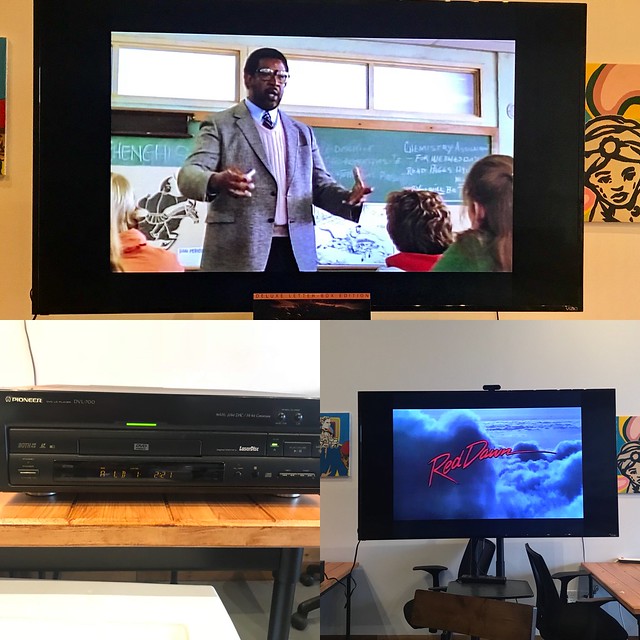
Another idea Tim had that I think is awesome is creating actual memberships folks can get locally or online that will include a laminated Reclaim Hosting rental card, a t-shirt, free web hosting space with a movie review SPLOT, access to programming the in-store Reclaim Video TV remotely, and much, much more. The actual store will be an ongoing work in progress, and we’re planning to invite folks to help us think through how we make this space interactive and equally accessible remotely through the web as it would be locally in the storefront.

Anyway, I think you get the idea, Reclaim Video is a way for us to try and have some fun. It’s really that simple. It’s indulgent, it’s vestigial, and it’s definitely nostalgic. All that said, if the experience of planning it is any indicator of how much joy it could result in, it’s gonna be worth every FBI warning we have to sit through.
*Actually, the 1986 film Gung Ho about Japanese factory culture in the U.S. would be an awesome VHS donation to Reclaim Video for anyone out their feeling both nostalgic and generous.

We’ve all been in this situation before: we’ll take to Google with a question in mind, but instead of writing it out properly, we’ll use a bit of shorthand that makes the question ambiguous. The result, more often than not, is that Google will deliver an answer that doesn’t get at the heart of what we want to know.
Were Google’s search engine a human, it might, using context, be able to parse out the intent behind our search query. Alas, the company’s search engine doesn’t have human-like intelligence — at least not yet — but in the meantime, Google is rolling out a new Search feature called multifaceted featured snippets.
Simply put, Google will provide multiple answers to ambiguously phrased questions, attempting to account for the most common interpretations of search queries like “garden needs full sun” or “tooth pain after a filling”.

In the latter case, the search engine will provide answers to “why does my tooth still hurt after a filling?” and “how long should a tooth hurt after a filling?” all on one page.
Google says it’s starting with these “multi-intent” queries, which have several different intentions or purposes associated with them, before working its way to other so-called nuanced queries.
Like with its previous search feature additions, Google is gradually rolling out multifaceted featured snippets to users.
Source: Google
The post Google’s featured snippets will now attempt to tackle ambiguous search queries appeared first on MobileSyrup.

A passenger is in hospital after a cellphone reportedly caught fire on an Air Canada flight departing Toronto’s Pearson international airport to Vancouver Thursday morning.
According to an Air Canada spokesperson, flight AC1010 was preparing to depart to Vancouver when a customer’s cellphone began to burn.
“The fire was immediately extinguished by our crew and there was no damage to the aircraft, however the owner of the phone suffered injuries and was treated by emergency services who attended the aircraft,” said an Air Canada spokesperson, in an email to MobileSyrup.
A Toronto Pearson airport representative confirmed to MobileSyrup that “Fire & Emergency Services responded to the call.”
680 News reported that the passenger was treated for minor burns on one hand.
Air Canada told MobileSyrup that the customer was “able to walk off the plane and the person’s present condition is not known.”
The flight was delayed for two hours but eventually departed to Vancouver. The aircraft was a Boeing 787-9 with 266 passengers onboard.
According to CBC News, Peel police confirmed that an LG phone was responsible.
Update 01/03/2018 (12:07pm ET): Story updated with comment from Air Canada.
Update 01/03/2018 (1:01pm ET): Story updated with additional reporting.
The post LG phone catches fire on Air Canada flight departing Toronto Pearson airport appeared first on MobileSyrup.

A New York-based phone manufacturer Light has launched an Indiegogo campaign to crowdfund its latest phone, the Light Phone 2.
An alternative to modern smartphones, the Light Phone 2 attempts to strip away apps and other distractions to make the phone more of a tool. Light came out of a Google startup incubator in 2014.
“In a time when we have grown accustomed to seeing our existence and self-worth through a hyper-connected portal of social affirmations, disconnecting is profound, and more important than ever,” reads an excerpt from the company’s March 1st, 2018 media release.
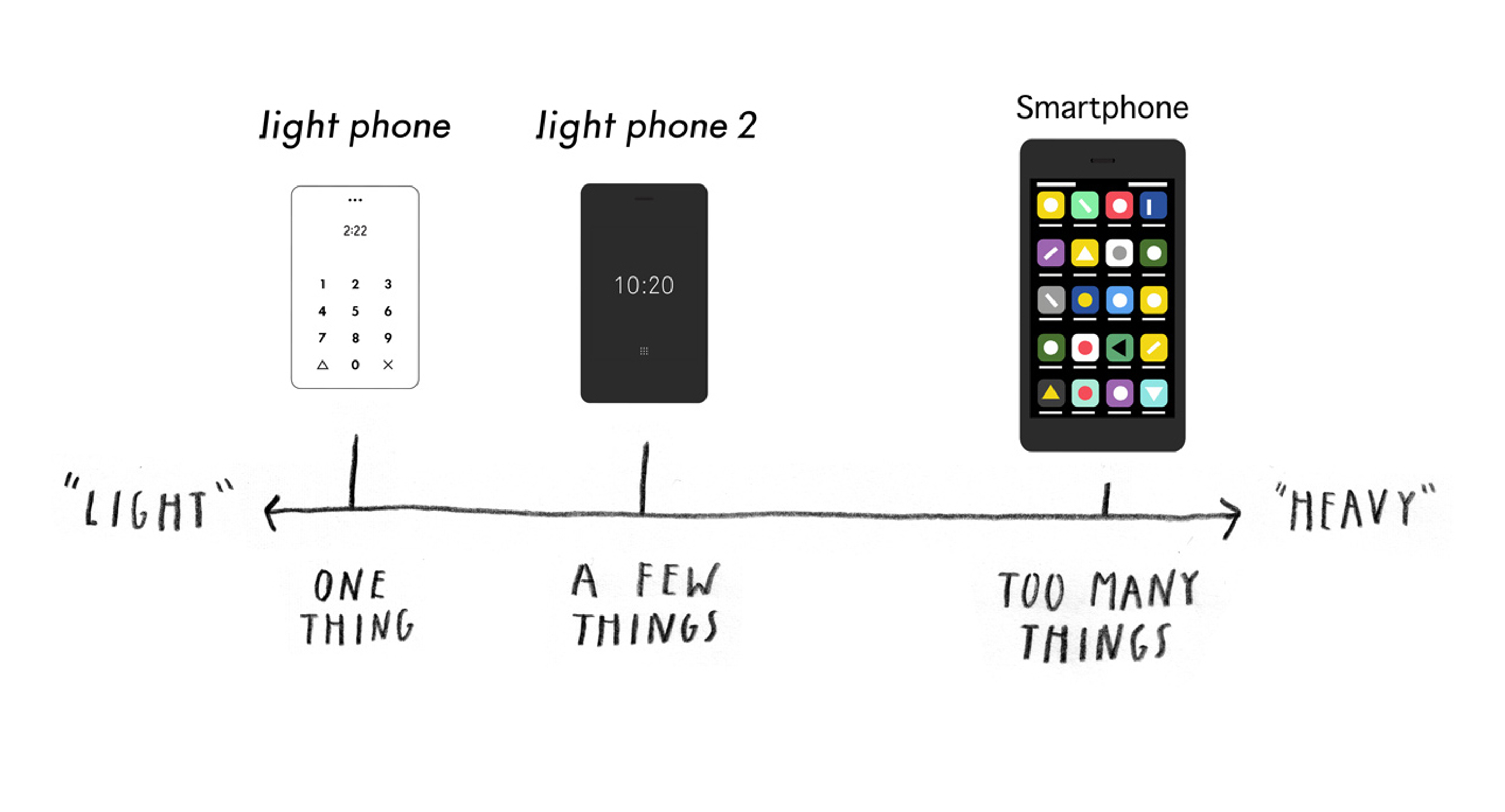
The Light Phone 2 can make calls, send and receive messages and set alarms. It also includes a contact list and an auto-reply feature.
Light launched the Light Phone 2 today on Indiegogo. The phone is currently priced at $250 USD, $175 USD cheaper than the $400 USD the phone will sell for once it’s officially available.
The campaign ends on March 23rd. Backers can choose the phone in either white or black.

The Light Phone 2 enhances on the original Light Phone in numerous ways. While the original Light Phone only let users save nine numbers to speed dial, the new phone hopes to act more like a traditional phone with an e-ink display and 4G connectivity.
The basic specs of the phone are subject to change, but as it stands the Light Phone 2 features 1GB of DDR3 RAM, 8GB of eMMC storage, a Qualcomm MSM8909W processor, headphone jack and a USB-C port for charging.

There are a number of more advanced feature that Light is considering adding to the phone but hasn’t committed to yet.
The phone could potentially have music, maps, weather, calculator and dictionary apps, as well as support for voice commands. In addition, Light is looking at ways to make the phone waterproof.
These “tools that do not take away from the ‘light’ experience, but make it even easier use daily, or as your only phone,” reads an excerpt from a Light Phone media release.
The Light Phone 2 is still in the prototype phase and won’t ship until April 2019.
Source: Light
The post The Light Phone 2 wants to be a distraction-free alternative to your smartphone appeared first on MobileSyrup.

Samsung has finally released the changelog for its Experience 9.0 with Android Oreo update.
The update will make managing notifications easier with notification categories. It also brings more Edge screen customizations to Galaxy S8 and S8+, as well as ‘Smart View’, a feature which lets a user’s phone screen go dark when mirroring to another display.
The company released Android Oreo for the S8 in certain regions around the world at the beginning of February. Samsung halted the rollout due to a bug which caused the phones to unexpectantly restart. Less than a week later, Samsung restarted the Oreo rollout.
The rollout started with unlocked European S8 handsets first.
MobileSyrup has reached out to Samsung to find out when S8 owners in Canada can expect Oreo to reach their device.
Here is the full list of updates hitting S8 and S8+handsets.
Biometrics
Quick Panel
Home Screen
Samsung Keyboard
System Performance
Edge Screen
Lock Screen and Always On Display
Smart View
Samsung Account
Samsung Cloud
Samsung Dual Messenger
Find My Mobile
Samsung DeX
Other improvements
Source: Samsung
The post Here are Samsung’s official Galaxy S8 and S8+ Oreo update notes appeared first on MobileSyrup.

Netflix has plans to bring its total number of original programs to 700 by spending $8 billion in 2018.
The company has been adding to it growing base of original content since 2012, when it partly funded the show Lillyhammer.
Soon after, it created hits like Orange is the New Black and House of Cards, which started Netflix on a path to creating an increasingly large suite of original programming.
In 2017, it spent $6 billion on content and either created or brought 86 new shows and movies to the service.
It’s putting even more effort into making new content in 2018 by making more significant investments in original programming all over the world.
“Let’s continue to add content — it’s working, it’s driving growth,” said CFO David Wells in a press statement.
Netflix has plans to release 80 original movies and around 70 new TV shows under the ‘Netflix Originals’ banner this year.
This $8 billion investment finally brings Netflix up to par in non-sports programming with the likes of Disney, Fox and Time Warner, who all spent about $8 billion in 2017.
Netflix also dwarfs content spending by Hulu, Amazon and Apple, who all spent less than $2.5 billion last year.
Netfix currently has over 117.6 million users around the world.
The post Netflix to spend $8 billion on original programming in 2018 appeared first on MobileSyrup.
So I’ve had my eyes out, watching for bugfixes that are landing in the Firefox code base that will speed it up for our users.
But I can’t do it alone. So I have a request: Have you seen a bugfix land recently that’ll likely impact Firefox’s performance in a positive way for our users? If so, I want to hear about it, and you should fill in this form to let me know!
Here’s that link again, just in case you missed it.
Anyhow, without further ado – here’s a small selection of interesting bugs that have been fixed recently that should improve Firefox performance!
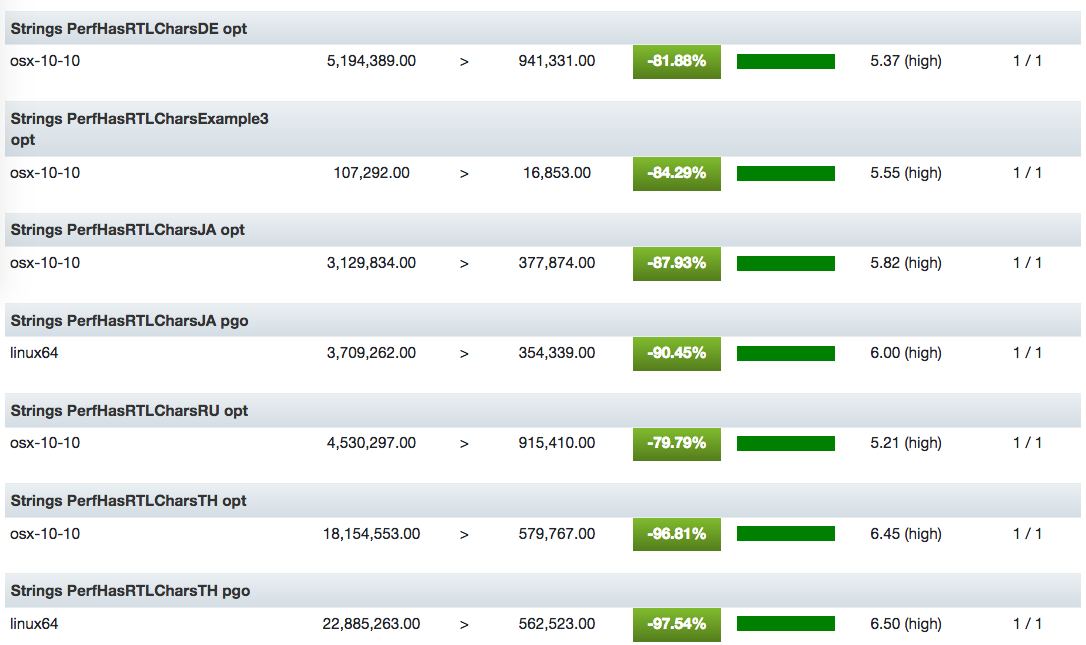
Substantial!
The Ruiz brothers at Adafruit have used Phillip Burgess’s PixieDust code to turn a 64×64 LED Matrix and a Raspberry Pi Zero into an awesome sand toy that refuses to defy the laws of gravity. Here’s how to make your own.
BIG LED Sand Toy – Raspberry Pi RGB LED Matrix
Simulated LED Sand Physics! These LEDs interact with motion and looks like they’re affect by gravity. An Adafruit LED matrix displays the LEDs as little grains of sand which are driven by sampling an accelerometer with Raspberry Pi Zero!
As the latest addition to their online learning system, Adafruit have produced the BIG LED Sand Toy, or as I like to call it, Have you seen this awesome thing Adafuit have made?

The build uses a Raspberry Pi Zero, a 64×64 LED matrix, the Adafruit RGB Matrix Bonnet, 3D-printed parts, and a few smaller peripherals. Find the entire tutorial, including downloadable STL files, on their website.
Alongside the aforementioned ingredients, the project utilises the Adafruit LIS3DH Triple-Axis Accelerometer. This sensor is packed with features, and it allows the Raspberry Pi to control the virtual sand depending on how the toy is moved.

The Ruiz brothers inserted an SD card loaded with Raspbian Lite into the Raspberry Pi Zero, installed the LED Matrix driver, cloned the Adafruit_PixieDust library, and then just executed the code. They created some preset modes, but once you’re comfortable with the project code, you’ll be able to add your own take on the project.
This isn’t the first time a Raspberry Pi has met an accelerometer: the two Raspberry Pis aboard the International Space Station for the Astro Pi mission both have accelerometers thanks to their Sense HATs.

Comprised of a bundle of sensors, an LED matrix, and a five-point joystick, the Sense HAT is a great tool for exploring your surroundings with the Raspberry Pi, as well as for using your surroundings to control the Pi. You can find a whole variety of Sense HAT–based projects and tutorials on our website.
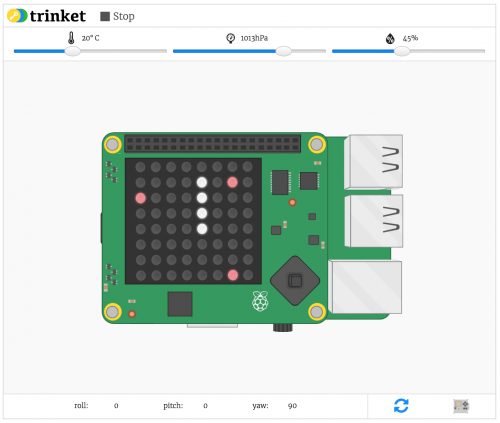
And if you’d like to try out the Sense HAT, including its onboard accelerometer, without purchasing one, head over to our online emulator, or use the emulator preinstalled on Raspbian.
The post Simulate sand with Adafruit’s newest project appeared first on Raspberry Pi.

Aaron Smith, Monica Anderson,
Pew,
Mar 04, 2018

Facebook and YouTube dominate, while younger users are embracing a wide range of platforms. Other services making the headlines: Pinterest, Twitter, WhatsApp, Instagramm, LinkedIn. Interestingly, according to this Pew Report (17 page PDF), "Even as a majority of Americans now use social platforms of various kinds, a relatively large share of these users feel that they could give up social media without much difficulty." And not surprisingly, "just 3% of social media users indicate that they have a lot of trust in the information they find on these sites. And relatively few have confidence in these platforms to keep their personal information safe from bad actors."
Web: [Direct Link] [This Post]
No, it’s not a piece by Ken Lum destined for the art gallery. Instead, it’s quite an advanced little shelter on the edge of a piece of commercial property that’s been vacant for years.

Toronto-based developer First Gulf is trying to create Canada’s biggest office project in Toronto’s East Harbour neighbourhood.
This new site could house 50,000 workers and cost $8 billion to build. The company plans to build a mix of office, retail and institutional spaces.
First Gulf has worked on several award-winning office buildings in the city, including the Coca-Cola Canada head office and the Globe and Mail building at 351 King Street East.
The company is hoping to get planning approval by June so it can start developing the East Harbour site.
First Gulf is planning on building East Harbour over and around the former Unilever soap factory. The city initially pitched this area to Amazon for its HQ2 project.
This new development will be First Gulf’s most significant project yet and the company will need to overcome some hurdles to get it started.
Raising capital is difficult with such a massive project and the company will likely have to pull together multiple banks to achieve its financing needed.
First Gulf is also hoping that the city will build a transit station for the site that will link the suburbs and downtown to the East Harbour complex.
The city has approved the transit station and construction is planned to start before the end of 2023. However, funding for the project still needs to be reconfirmed this April.
If all the pieces fall into place, the first phase of the 15 to 20 year project will begin with First Gulf converting the soap factory into new office spaces for an estimated $200 to 300 million.
Since the development site is so large and will take so much time to build, First Gulf vice president of development Derek Goring said that if Amazon decides to move to Toronto, the site could still accommodate the company and it would speed up the some of the development.
Source: BNN
The post Amazon’s potential HQ2 site in Toronto could be used for an ambitious new office complex appeared first on MobileSyrup.


