Shared posts

28 Mar 17:35

Different units, different patterns

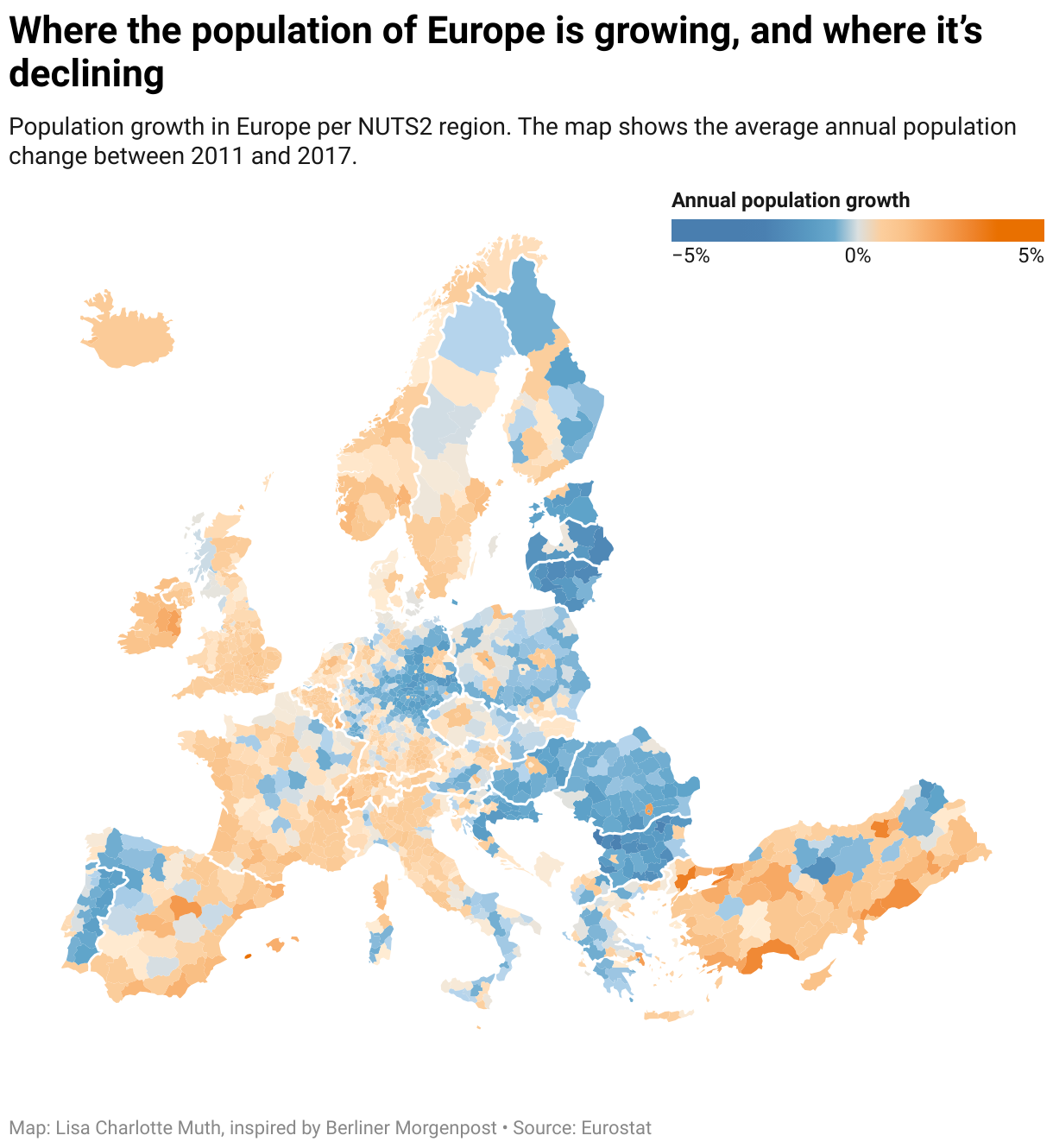
In the last few days, I thought a lot about choropleth maps: these maps where regions are filled with colors that represent a certain value, like unemployment, life expectancy, votes for a certain party. On Tuesday, I published an article explaining what to consider when creating choropleth maps. Today, nothing makes more sense than to create one for this week’s Weekly Chart:

Yes, it’s true: I copied this map. If you’ve read my “What to consider” article, you noticed it right at the bottom of the map, where I give good examples of choropleth maps. The original map is by the super talented peeps at Berliner Morgenpost, a local newspaper here in Berlin, a few kilometers away from the Datawrapper office. They showed the average annual population growth in all European municipalities, which is a crazy high level of detail! Datawrapper doesn’t offer a municipalities map of Europe, so I decided to show the data in the so-called NUTS-3 regions; still a pretty small unit.

Different patterns become visible depending on the unit you choose, and the differences are fascinating. For comparison, here are five maps that show the same data with the same color palette[1] but with a decreasing level of detail. We start with the map by the Berliner Morgenpost; the other four maps I created with Datawrapper:

Berliner Morgenpost map with municipalitiesMunicipalities: In Germany and Poland, cities are the lone orange wolfs. France and UK seem like a mixed bag.

nuts2NUTS-3: The Berlin area that grows in population seems far bigger now. In Poland, we can still see metropolitan areas thanks to nicely drawn region borders. France is still a mixed bag, but the UK shows a clear growth now.

nuts2NUTS-2: Berlin is a lone wolf again, with an averaged-out state around it. In Poland, the cities disappear and get averaged with bigger regions. France seems to get more and more orange.

nuts1NUTS-1: Almost all regions get more washed out. Only regions in which sub-areas have the same kind of extreme increase or decrease in population stand out, e.g. Ireland, Luxembourg or center Germany.

nuts1Countries: Aaand all the nuance is gone. Only Ireland and Luxembourg stand out. However, it’s the only map that shows us if a country population has increased or decreased in the last two decades.

Most of the time, we can’t choose: We only get the data in one specific unit. But if we can choose, we should be aware that the level of detail can have a big impact on the statement we want to make. And we should remind ourselves regularly: There’s always more nuance in reality than a map or chart can show us.


If you’re not aware of their work, make sure to check out the Interactive team and their portfolio at the Berliner Morgenpost. I see you again next week!


  1. At least the colors are the same. However, the range of values becomes wider the smaller we choose our unit: The country map has a range of a population growth between -13% and +18%. In the interactive map with the NUTS-3 level up there, the range is between -36% and +43%. That means that our darkest color (reserved for our extreme values) will be used in different areas, depending on the unit. It also means that even if we choose “Quartiles” stops for each map, different values and a different number of values will fall in between the stops.

23 Mar 20:58

Wired shownotes: thumbs

by russell davies

I think I mostly made this up out of my own head. Which is why it's two very slight observations bolted together.

The best outcome is this idea from Henry, which is absolutely brilliant and necessary:

Screenshot 2018-03-22 12.46.09


23 Mar 20:58

Beyond the Tree Octopus – Why we need a new view of k12 (digital) literacy in a Cambridge Analytica world

by dave

I’ve been very fortunate the last few weeks to have the opportunity to co-design (with learners who happen to be master teachers) a course on digital practices for education. It’s kind of like cheating. Small classes, very engaged and intelligent people, with a real desire to get to the bottom of what the digital means to the education system. These are the folks who write the curriculum, work with principals on school goals and work with teachers on their teaching practice here on Prince Edward Island. The digital strategy committee has done a ton of work here getting the systems part of things ready for a digital world and have developed some interesting ‘shiny projects‘ but the work of this course is where the important stuff happens. The day to day. If we’re going to prepare our students for the world that they live in, if we’re going to give them the habits of mind for a generation that has so many new demands on it, these are the kind of people who are going to figure it out. It’s been a real privilege.

Session 1&2 – Abundance and trust
The core premise of the course is that the digital moves us from a societal position of scarcity to one of abundance. There was a time not so long ago that a student (in a school) could only access the information from his teacher, from books within arms reach and from their friends. A teacher could only access the resources they had squirrelled away, their own experience, the experience of their colleagues and the hours of professional development that could be provided by their educational authority. This is no longer true. I can reach into my pocket right now and get just about any ‘information’ that I want.

Or can I?

There are any number of structures that were in place in the pre-digital world that made it so that ‘a’ piece of information became ‘the’ piece of information. And that’s a critical distinction. It used to be that our publishing industry, our faculties of education and our educational authority had a near stranglehold on information in our system. And I don’t mean this in a bad way. The advent of paper, of schools and of education systems did amazing things for our culture, they allowed us to take the human voice and move it around in a way that changed us from mostly illiterate farmers at constant risk of losing most of the knowledge we had (see. Dark Ages, fall of Mayan cities etc…) to groups of cultures that can build upon the past. That’s awesome.

But the controls that were in place, the publishing cycle, the education and selection of faculty, the balances of an education system, meant that the information that made it to the classroom was heavily filtered. That’s good and bad. It meant that tons of smart people had looked at the things you were going to use before you used it. That’s good. It also meant that you got less practice (and your students even less) learning how to filter. (it also means that dominant narratives stayed dominant, but that’s a discussion for a different day)

There’s a ton more to ‘learning how to filter’ than just picking information, its also about learning who to trust. If you’re information comes to you through limited sources, finding out how to evaluate those sources is fairly standardized. National Enquirer – uh… probably not. New York Times – uh… sure. That guy at the conference who everyone said was a nutball (mostly referring to myself here :)) might want to take that with a grain of salt. The professor that won all the awards? Sure, I’ll trust her. That approach has weaknesses, but on the whole, it works.

In a world of abundance, those filters are no longer in place. Pre-digital systems of adjudication for turning ‘a piece of information’ to ‘the piece of information that i need’ simply don’t work anymore. The processes that we did have for filtering were not built to handle the onslaught of stuff that we receive on a daily (or minute by minute) basis on facebook, from our google searches or in our increasingly splintered media. We retweet without thinking about it. We post a comment by reflex on something that makes us mad – thereby increasing the noise. And people are taking advantage of us.

Cambridge Analytica
I’m not suggesting that people have just started taking advantage of us. Robocalling during elections apparently started in the sixties where people would call you during an election and ask questions like “if your candidate was a murderer, would you still vote for them?” This kind of nudge suggestion doesn’t necessarily work on each individual, but it can start rumours, start conversations and suddenly a candidate has a reputation that was totally fabricated. Advertising IS the attempt of people to try and shape your opinion about things. That’s what’s happening now, the difference is the scale or, to put it in the language of this post, the difference is abundance.

Cambridge Analytica is a election data firm in the news when this post was written for helping shape the feelings voters during the US election and the British Brexit vote. Information like the things you ‘like’ on facebook and the results of personality tests you do create a profile for you. It tells the database what kind of things attract your attention. Companies like CA use this data to target you with the exact message that is likely to impact your feelings in the way they’ve been paid to do that. Take a look at how they made ‘Crooked Hillary‘ a thing. Unlike the robocalling, these approaches can affect millions of users at the same time creating a web of messages that look like something that ‘could’ be true.

It’s much, much easier for us to just pretend this is an internet thing that doesn’t effect our lives. The Trump election should convince you that this isn’t the case. Cambridge Analytica isn’t alone… not even close. There are simple tools at work like remarketing (think of how all your ads start to match up with what you last viewed on amazon). There are also much deeper tools that are constantly trying to ‘nudge’ (see Behavioural Economics) your attitudes in one direction or another. They’re not trying to make you believe that something is ‘true’ they’re trying to move opinions by 5%. That 5% gets you elected. It shapes public policy.

Why the tree octopus is not helping
In 1998 a website called the Tree Octopus was created to help students identify real information on the internet. Thousands of school children (millions?) have been assigned this activity as a way of building their skills in identifying what’s ‘true’ on the internet. It’s an initial step to building the kinds of skills that will allow students to identify ‘reliable’ data. They are going to judge ‘is it the piece of information’ is it ‘true’ or is it something that I can safely ignore. It is, in a sense, a digital ‘book’ that they are going to add to their library or not. This is an analogue view of information.

Think of it this way. Most kids will say that the wikipedia is not a trusted source. For that matter, so will most teachers. It was not created using the filters that created the items of trust from before the digital era. “anyone can just go on there and edit it.” It’s not been validated by a publisher, by a professor or by another system. Here’s the thing, wikipedia is neither ‘true’ nor ‘false’. Its a place in a large network of bits of information. It’s part of a wide abundance of information around any topic you might have a question about. No particular entry is likely to be perfectly good or perfectly bad. It’s a really great place, however, to get started building your own thread of knowing. You can read the introduction, if you’re fancy you can look at the history of the edits, but most importantly you can look at the references page to get a sense of what others have said. It’s a FANTASTIC tool if your in a world of abundance. It doesn’t pass muster if you’re still using the filtering tools of world of scarcity.

Our friend the tree octopus is one page. Isolated. Artificially created to make a point. It’s not part of a larger ecosystem of knowing, its not connected to other things that help you understand it’s background. That connection to understand, that ability to build a path of knowing IS THE 21ST CENTURY LITERACY. I would suggest that the octopus takes us down an analogue path, building habits were just going to have to break when we’re doing ‘real’ work on the Internet. We’re not building the skills that will allow the students in our system to deal with the world of nudging and data that is shaping our world.

What does this mean for the classroom?
That’s the real question here. How does this change what we actually do on a regular basis in our school systems? I’m going to leave the two questions we’re working on now here. Feel free to help us with your thoughts.

1. How does this change the interaction between faculties of education/educational authorities and teachers? How do they account for the loss of hidden controls (again, no blame here in the word hidden) that they had over the information teachers had access to?

2. How does it change how a teacher should filter information that goes to students? If we accept that students need to build their own tools to deal with a world of abundance, how does that change the way we work with our students?

The world has changed around us. You can forget teaching students for a future world of whatever. We’re going to struggle to teach them for the world we are currently in right now.

Note: a huge debt goes out to all my colleagues working on this, but especially @holden who’s work has been central to our course. Check out his book

23 Mar 20:58

Nothing significant will change at Facebook

by Josh Bernoff

In the wake of the Cambridge Analytica scandal, Facebook and its CEO Mark Zuckerberg appear to be in trouble. Zuckerberg published an explanation, participated in an interview with The New York Times, and appeared on CNN. People are upset and some Facebook users are quitting Facebook. But nothing is going to change — Facebook will … Continued

The post Nothing significant will change at Facebook appeared first on without bullshit.

23 Mar 20:58

The Seattle Freeway Revolt

by pricetags

The Great Freeway Fight is one of the key mythologies of post-war Vancouver, still referenced as a key to understanding this place.  But at exactly the same time – late 1960s to 1972 – a parallel fight was happening in Seattle.  While I-5 had been built (and was used explicitly by the Vancouver Planning Commission to oppose the Chinatown Freeway), Seattle citizens were organizing to oppose two more freeways.

From NextCity:

The so-called Freeway Revolt didn’t just determine the fate of Seattle’s built environment — halting the development of the proposed R.H. Thomson Expressway and Bay Freeway — it was also a galvanizing force in local politics, according to a new directory released by the Seattle Public Library.

Seattle’s Freeway Revolt: A Citizen Movement that Shaped Seattle

In the late 1960s and 1970s, a broad coalition of activists in Seattle challenged plans for a dense network of freeways traversing and girdling the city. Seattle’s freeway revolt was remarkable in its scope and diversity, uniting geographically, ethnically and socioeconomically diverse groups across the city. Their collective actions over a multi-year period succeeded in halting two major freeways and significantly downsizing a third, saving parks, shoreline and thousands of homes and businesses. …

The freeway revolt was part of a unique period of activism and social change in Seattle, from the anti-war, environmental and Black Power movements to transformation of the Seattle City Council with a “new wave” of political leaders. The well-known “Save the Pike Place Market” initiative passed at the ballot only a few months before voters defeated the R.H. Thomson and Bay Freeways; leaders of the two movements were collaborators and colleagues.

Organizations such as the Seattle Model Cities program, Central Seattle Community Council Federation, Choose an Effective City Council and the Forward Thrust campaign came into being around this time and intersected with the freeway revolt around issues of community empowerment, civic leadership and mass transit.

23 Mar 20:57

Erasing Complexity: The Comfort of Apple’s Ecosystem

by Federico Viticci

Every year soon after WWDC, I install the beta of the upcoming version of iOS on my devices and embark on an experiment: I try to use Apple's stock apps and services as much as possible for three months, then evaluate which ones have to be replaced with third-party alternatives after September. My reasoning for going through these repetitive stages on an annual basis is simple: to me, it's the only way to build the first-hand knowledge necessary for my iOS reviews.

I also spent the past couple of years testing and switching back and forth between non-Apple hardware and services. I think every Apple-focused writer should try to expose themselves to different tech products to avoid the perilous traps of preconceptions. Plus, besides the research-driven nature of my experiments, I often preferred third-party offerings to Apple's as I felt like they provided me with something Apple was not delivering.

Since the end of last year, however, I've been witnessing a gradual shift that made me realize my relationship with Apple's hardware and software has changed. I've progressively gotten deeper in the Apple ecosystem and I don't feel like I'm being underserved by some aspects of it anymore.

Probably for the first time since I started MacStories nine years ago, I feel comfortable using Apple's services and hardware extensively not because I've given up on searching for third-party products, but because I've tried them all. And ultimately, none of them made me happier with my tech habits. It took me years of experiments (and a lot of money spent on gadgets and subscriptions) to notice how, for a variety of reasons, I found a healthy tech balance by consciously deciding to embrace the Apple ecosystem.


This shift didn't come out of nowhere. After a stressful 2017 that brought several new responsibilities in my life along with a persistent sense of overwhelmedness, I accepted the fact that I no longer tolerate any unwarranted friction in the technology I use. I understood that the busier I was, the less I wanted to remember the trade-offs I was imposing on myself by trying to fit ecosystems from competing tech companies around the iPhone and iPad.

iOS has long been my platform of choice. However, by a combination of curiosity and fear of missing out, I spent the past few years adding layers of complexity (in the form of audio gadgets, set top boxes, web services, digital assistants, etc.) that almost kept me from enjoying the technology I had.

Put simply: I tried too much, for too long, and it was time for a reset.

A couple of months ago, I came to the conclusion that I needed to go back to basics. A technological cleanse, if you will. This was a process that simmered for months and matured alongside my motivation to make 2018 a more relaxed and positive year for me.

In a surprising twist, I had ended up in a similar place to where MacStories started in 2009: surrounded by tech I found too complex and yearning for something simpler and consistent. And just like nine years ago, today I find comfort in using Apple products I like, which run software that is sometimes great, often good enough for me, and which are by no means perfect and should still be improved. I spent years obsessively pursuing a fleeting, idealistic version of "the absolute best tech"; now I'm just comfortable where I am and I want to make the most of it.

I'm fully aware of how abstract this may sound. Finding technology that, despite its imperfections, "just works" for you is a personal topic that can't be used to make blanket statements about the state of tech ecosystems. But I want to explain my process and ongoing themes of simplification and cohesiveness in the technology I use, as they'll be reflected on this website going forward. Thus to get a little more specific, I'm going to examine three defining moments that played an essential role in this story, and how they fit the bigger topic of re-approaching the Apple ecosystem.

AirPods

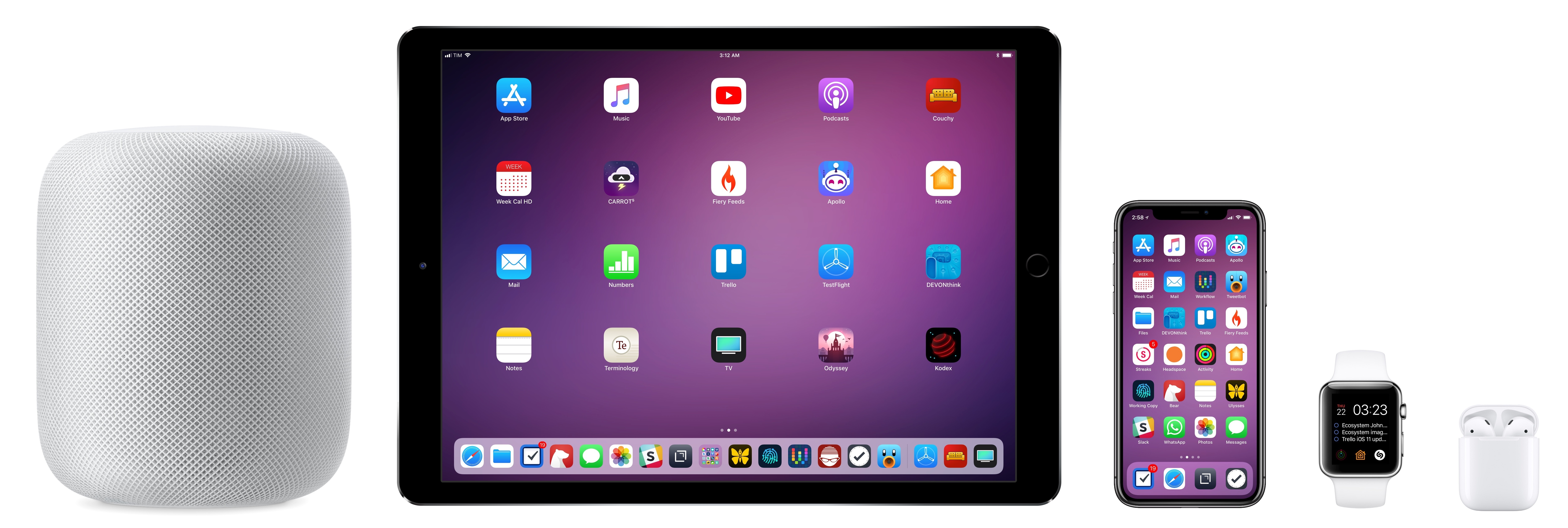
It's a popular sentiment to consider AirPods the best Apple product in recent years. For me, that would be a close-run race between the 12.9" iPad Pro and the iPhone X. But I feel confident saying that AirPods are the best audio accessory I've ever owned in my entire life.

It's important, of course, to judge a pair of headphones or earbuds by several factors such as sound quality, comfort, and price. In the case of wireless headphones, battery life and reliability also come into play. Over the years (partly because of Marco), I've accumulated a decent collection of mid-level (some would say "prosumer") headphones and earbuds; to name a few, I currently own the Audio Technica ATH-M50x, B&O H6 (2nd gen), Beats Studio2 and Solo3, Senneiheiser Momentum 2.0, Pioneer Rayz Plus, and Beoplay E8. There are probably more I don't remember, some of which I have given to close friends. All of them sound better than the AirPods. But none of them are as convenient, intuitive, or consistently trustworthy as my AirPods.

This is something I've been thinking about a lot since I started working out every day and having a more active lifestyle. I use my AirPods every day, multiple times throughout the day, in contexts when I feel like I want to listen to audio without disturbing other people. Unless I'm extremely focused on writing, complete silence freaks me out. If I'm around other people, or if I don't want to listen to music or a podcast on my HomePod, I put my AirPods on. And they always work. They're never out of battery, they never get out of range when I walk around the house, and they support all the basic controls I need. Combined with my Apple Watch, the AirPods fit so seamlessly in my lifestyle without requiring additional thought, they have become second nature.

For me, the best headphones aren't necessarily the ones that sound "the best". Sure, there is a time and place for sitting down, putting on a great pair of quality over-ear headphones, and just listening to music. I still do this with the H6 and Momentum Wireless, and it's exactly why I hope Apple is indeed working on their own over-ear headphones. But over time I've realized that the absolute best sound reproduction isn't my priority. Simplicity, reliability, and fast access to audio in my ears is what I'm looking for.

AirPods deliver on all these fronts: the combination of good-enough sound and deep integration with iOS means I'm free to listen to music or podcasts in more places or situations that would otherwise be problematic (or downright unfeasible) for other types of headphones or earbuds. I can summon Siri with a quick double-tap on the left AirPod and transfer phone calls from my iPhone without having to worry about cables, range, or hidden gestures. AirPods give me independence while also being intrinsically tied to the iPhone.

The Beoplay E8 wireless buds are emblematic of my relationship with AirPods and Bluetooth headphones. A few months ago, I decided that I wanted to play videogames on my new 4K TV and listen to game audio with an AirPods-like product. I didn't want standard headphones or wired earbuds; I also didn't want to buy another pair of AirPods because it seemed redundant. And I didn't want to switch pairing on my existing AirPods either; I was looking for AirPods-like earbuds that would just connect to my TV and nothing else. I was curious, so I bought the E8.

The E8 have a bigger footprint than AirPods too.

The E8 have a bigger footprint than AirPods too.

I was expecting some of the simplicity of AirPods in these "truly wireless" earbuds; instead, I feel like I've never been as frustrated or confused with any Bluetooth headphones as I am with the E8. Yes, they sound "better" than AirPods: the bass is warmer; the soundstage wider. But they don't sound that much better than AirPods and, more importantly, using them requires learning a confusing set of gestures (just look at the manual!) for activation and playback controls that often results in accidentally turning them off or not seeing them in my TV's pairing UI. When they do work, audio in the left earbud gets consistently cut off despite sitting two meters away from my TV. Even putting them back in the case isn't intuitive. And of course they use Micro-USB charging instead of Lightning or USB-C, so connecting a cable to the case can be cumbersome too. I'm going to sell the E8 and I've gone back to using wired headphones to play videogames at night.

When I want to listen to music or podcasts or have phone calls with my AirPods on iOS devices and my Apple TV, I don't have to think about any of these incongruences and technical issues. There is no pairing and no audio interruptions; if I need to manually switch to AirPods from another device, I can do so from Control Center, even from the Apple Watch. This is something that I've only been able to appreciate by using AirPods for over a year and listening to more music and podcasts every day for the past three months. AirPods have made me forget about the annoying issues of standard Bluetooth accessories. I put them on every day without thinking about them anymore.

By freeing me from the need to think about audio management, AirPods liberate sound. They may not be "the best", and they can still be improved, but I wouldn't trade the astounding simplicity of AirPods for anything else.

Apple Watch: Workouts and HomeKit

I've owned an Apple Watch since the first version released in 2015, but I only started truly appreciating some of its core functionalities over the past three months. The two Apple Watch features that I wouldn't be able to give up now (fitness tracking and HomeKit controls) aren't directly related to each other, but they're part of the overarching theme of getting more value out of Apple's multifaceted ecosystem.

As I touched upon in my New Apps story last month, over the holidays I decided that I would take better care of myself in 2018. I started the new year with the modest goal of working out at least three times a week; in early February (in part because of Apple's Heart Month activity challenge) I upgraded to exercising and closing my rings every day. It's been 44 days now, and I haven't missed a single day. I've lost 10 pounds since the beginning of 2018, I feel stronger than ever, and I largely attribute this renewed mindset to the motivation the Apple Watch and Activity app give me on a daily basis.

I'm a cancer survivor, and for the past couple of years I've felt ashamed of the fact that I wasn't spending enough time exercising and thinking about my "second life". Thankfully, the Apple Watch combined with Apple's Workout and Activity apps make it extremely easy (and almost fun) to get back into an exercise routine that feels rewarding and not condescending.

Due to my lack of regular physical activity, my initial Move goal was low – around 300 calories per day. As soon as I started working out and being more active during the day, the Watch helpfully offered to bump up the goal a little for the following week. Then it asked again a couple of weeks later. And when I started working out every day, it offered a higher jump. More than a month later, my Move goal is now at 680 calories and I'm planning on raising it to 780 soon given how I'm consistently hitting ~750 calories every day.

It's not just about numbers though. A lot of people assume that Apple's regular Activity Challenge events are just marketing campaigns to remind users about the Activity app and iMessage stickers. I strongly disagree with that idea as I've experienced the practical benefits of two Apple Watch challenges myself.

The first challenge I participated in (the Heart Month one) required me to close my Exercise ring seven days in a row. After the first week, I had gotten so used to dedicating an hour each morning to workouts, I figured it made no sense to stop. That first challenge encouraged me to work out every day but, indirectly, it also pushed me to rethink my schedule around carving a chunk of time for myself in the morning, thus waking up earlier and getting more done throughout the day. It's astonishing how the effects of an Activity achievement badge rippled through my daily routine.

I'm quite happy with my collection so far.

I'm quite happy with my collection so far.

The second challenge (International Women's Day) required me to build endurance and work out for longer than 30 minutes. The challenge involved doubling your Move goal, and at the time mine was sitting at 660 calories. I knew that attempting a 60-minute workout was the only way to hit 1,320 calories in a single day. To prepare for the challenge, I started indoor cycling sessions of 35, 45, and eventually 50 minutes.

To complete a longer workout, I used segments to split it up in different levels of intensity.

To complete a longer workout, I used segments to split it up in different levels of intensity.

I was confident that I was going to win the challenge if I followed a specific pattern of intensity during the workout – which I did thanks to real-time heart rate data measured by the Polar H10 chest strap I connect directly to the Watch when I work out. I bought this sensor specifically because it can be paired with the Apple Watch via Bluetooth without using a third-party app in the middle.

I unlocked the achievement, and thanks to the challenge I've begun experimenting with different workout lengths and varying levels of intensity. All of this because of a challenge that some people would dismiss as a "silly" marketing campaign.

Different approaches to segments and intensity.

Different approaches to segments and intensity.

Apple's achievement-based system in the Activity app drove me back to the built-in Workout app on the Watch, too. One of the achievements required logging workouts in the Workout app every day for a week, so, even though I preferred the personalization features of Workouts++, I temporarily switched to Apple's Workout. In doing so, I discovered that the Workout app included the ability to create segments for workouts (double-tap on the screen) and, more importantly for me, an embedded Now Playing widget on the right side of a workout's stats page.

Apple's Workout app in watchOS 4.

Apple's Workout app in watchOS 4.

Once again, I want to point out the fascinating halo effect that an Activity achievement had on my habits. To unlock the badge, I switched to Apple's Workout app, where I found a native Now Playing screen to control audio playback. I like to listen to podcasts while I'm working out, so I thought that I could easily control episodes playing on Overcast without leaving the Workout app. However, I was running into issues with Overcast, which wouldn't respond to pause and skip commands issued from the Watch's Now Playing widget (both when streaming via my AirPods and HomePod). So I switched to Apple's Podcasts app, whose controls worked fine on watchOS.

From there, I remembered that Podcasts supported native Siri controls for episodes and stations via the HomePod, so I kept using Apple's Podcasts app even after I earned the Workout-exclusive badge. I now frequently invoke Siri when I'm cooking or doing things around the house to listen to short shows such as Subnet and 9to5Mac Daily, or to resume episodes I previously started on my iPhone. I miss Overcast's Audio Boost and Smart Speed, but the convenience of having reliable podcast controls on the wrist, Siri commands around the house, and playback position synced with iCloud is too useful to give up.

I've been using Apple's Podcasts app every day for over a month now, and it can all be traced back to unlocking an Apple Watch achievement. This kind of deep integration across multiple apps and platforms strikes me as something that can only happen within the Apple ecosystem.


Besides helping me get back in shape and lose weight, I've also rediscovered the utility of the Watch as a HomeKit remote I can whisper commands to.

I've been buying a few HomeKit-compatible accessories as well as re-purposing old devices for HomeKit compatibility through Homebridge. While I think Apple's Home app is an interface disaster that needs a complete redesign and revamp of its navigation, I love the cohesiveness of the underlying HomeKit framework.

HomeKit lets me issue the same requests from my iPhone, wrist, kitchen, bedroom, and even my iPad's keyboard thanks to Type to Siri. With Siri on the Apple Watch, I can speak quietly into the microphone on my wrist when everybody has gone to bed to dim the lights or turn off the air purifier. When I'm playing with the dogs outside and the HomePod can't hear me, I can quickly raise my Apple Watch and say "turn on the coffee maker" so that when I'm back in the kitchen, the espresso machine is ready for me. Siri has become my primary input method for HomeKit on Apple Watch without forcing me to learn a new vocabulary of commands.

Apple has done an admirable job in integrating HomeKit controls in all their products1, with deep ties that range from remote access through hubs (Apple TV and HomePod) to rich notifications with camera snapshots and Siri on watchOS. In my experience, HomeKit is faster, better integrated, and more versatile than any other third-party home automation system available to iOS users. The Apple Watch makes for an excellent HomeKit remote when coupled with Siri – something that I wouldn't have been able to enjoy had I continued using the Google Assistant or Alexa.

HomePod(s)

In just over a month, the HomePod has become a central point of interaction with Siri in our apartment. In fact, limitations of a 1.0 product notwithstanding, I liked the sound quality and Siri integration of the HomePod so much, I quickly bought a second one and placed it in our bedroom. We now own two HomePods – one stays in the living room, the other on my nightstand – and both my girlfriend and I use it to control HomeKit, ask questions to Siri, and play music dozens of times each day.

What surprised me the most about Apple's HomePod is that, despite some obvious weaknesses and problems with Siri, what it does today is enough to make us appreciate the device's role in our household.

For instance, I still haven't been able to get any third-party SiriKit integration to work and I've come across questions that Siri on HomePod can't answer, but which the iPhone handles just fine (such as TV trivia). Lack of multi-user identification is another glaring deficiency of HomePod today. There is a clear fragmentation problem with Siri and I would urge Apple to reconsider their stance on tying HomePod integrations to apps locally installed on an iPhone (they should be services hosted in iCloud instead). And yet, even with these problems that Apple has to fix (I can't stress this enough), the value we get from a pair of HomePods is more than enough to justify the expense and placement of two medium-sized speakers in our apartment.

It all comes down to HomePod's integration with an ecosystem we're deeply embedded in. My girlfriend and I are Apple Music subscribers; she's a dancer and choreographer, so she needs to listen to old songs and new releases every day. We also like to relax and play with the dogs at the end of the day while listening to music, so we share a few playlists where we can each add new songs. The HomePod, both at 80% and 40% volume, sounds fantastic and allows us to a) fill the bedroom with music and b) hear the finer details of sounds that Silvia needs for her choreographies.

As Apple Music subscribers without the baggage of an old iTunes library, being able to request playlists, manage our Up Next queue and see lyrics on iOS, and control playback from the Apple Watch is an intuitive and integrated setup that I was never able to achieve with the Amazon Echo, Google Home speaker, Plex servers, or Android TV (I tried them all). I don't have to worry about the limitations of third-party music services because, for better or worse, Siri and HomePod are accessible everywhere, including our Apple TV and iOS' Control Center. When I want to nerd out – and I am extremely serious about this – I can add songs to our shared Family playlist using a workflow because, yes, the Workflow app natively integrates with Apple Music too.

The same is true for podcast playback. As I mentioned above, I miss the audio effects of Overcast and its superior show note design, but I'm effectively forced to use Apple Podcasts if I want the ability to resume playback via Siri on the kitchen HomePod or play one of my stations with a single command. I could use Overcast with AirPlay, but streaming from the iPhone has been unreliable in my experience, and I would lose the Siri integration that lets me control podcasts hands-free.

There's a common pattern here: as with other services, third-party alternatives offer superior features that are compelling when considered individually; taken as a whole, however, Apple's native offerings are consistent, ubiquitous, and integrated in a way that their limitations and problems aren't – at least for me – severe enough to undermine their core functionality.

Lastly, HomePod – perhaps even more than music and podcasts – has been a resounding success for HomeKit controls. This is one of the aspects of smart speakers that I appreciated with Alexa and Google before; I remain convinced that the utility and accessibility of smart speakers for the smart home is something Apple should continue to invest in.

I don't buy the idea that the HomePod is "just a music speaker" when I can ask Siri to manage my lights, set a speed for my air purifier, or turn on specific scenes. Once you try these actions along with other Siri features, it's obvious that there's more to the HomePod than music playback alone. There absolutely is value in being able to shout out commands to a stationary speaker as you're walking and doing things around the house. In that case, the HomePod's Siri fills a role left vacant by other instances of Siri on iOS and Apple Watch. It becomes a true hands-free home assistant.

With two HomePods in our apartment, I can ask Siri to do something in the living room and my girlfriend can ask the bedroom one to turn on the television and switch its HDMI input2 to the Apple TV; the more I use our HomePods for smart home controls, the more I'm thinking of new HomeKit devices and automations that could make interacting with appliances and sensors faster and more convenient in everyday life. And as I do this, I can see how a vibrant and reliable third-party Siri skill ecosystem (unlike the current SiriKit chaos) is a key aspect of the smart speaker experience that Apple should pursue and nurture going forward.

Even though there are several gaps to be filled, our HomePods have made Siri a pervasive presence around the house that helps us on a daily basis. While Siri has a long road ahead to catch up with certain aspects of other assistants, HomePod's integration with the Apple ecosystem is already proving its worth. I'm optimistic about the HomePod, and I hope that, beyond the marketing and PR, Apple knows it's more than an Apple Music speaker. Parts of the experience already prove as much.

There and Back Again

There are two takeaways from this story: I was looking for simplicity in my tech life, which led me to appreciate Apple products at a deeper level; as a consequence, I've gained a fresh perspective on the benefits of Apple's ecosystem, as well as its flaws and areas where the company still needs to grow.

I've spent the past couple of years as a sort of digital nomad, traversing ecosystems, testing accessories or services made by different companies, and hoping they'd all somehow fit my iPhone and iPad. The result was a Rube Goldberg machine of tech gadgets that gave me the peace of mind of knowing I had dipped my toes in every pond I could find.

I don't regret it: I'm glad I used an Android phone for two months, a Sonos PLAY:1 for an entire year, and an Nvidia Shield TV for six months, because all those experiments taught me something about the modern state of technology. But I feel confident in my decision to let go of them: I was craving the simplicity and integration of apps, services, and hardware in Apple's ecosystem. I needed to distance myself from it to realize that I'm more comfortable when computers around me can seamlessly collaborate with each other.

At the same time, I'm not blind, and I'm aware of the shortcomings of Apple's ecosystem. I want to take advantage of this position to advocate for better OS features and services for Apple's customers here on MacStories. We are at a unique moment in Apple's history as the company has expanded its reach to home automation, health tracking and medical research, wearable computers, and augmented reality. There will inevitably be missteps; I want to use my past experiences to keep an open mind and understand them.

It's possible to like something and still point out its flaws. This is an unpopular opinion both among those who think Apple can do no wrong, as well as folks who think they've done nothing important after Steve Jobs. I strongly believe that both extremist camps are misguided.

More than ever, consumer technology choices come down to picking the compromises we're willing to accept and the best overall experience for us. These two sides aren't mutually exclusive. For instance, you can love the Nintendo Switch and still think that the lack of a Virtual Console and cloud saves is downright user hostile. You can be a fan of Spotify's remarkable intelligence, but also find its user interface design uninspired. You can recognize the fact that Siri should be substantially improved – if not rebuilt altogether – but also like it for the things it gets right today.

Over time, I've come to understand that it's important for me to have all my devices work together without micromanaging them. And after years of experiments, I've realized that the Apple ecosystem, despite the occasional stumble, gets rid of the complexities and limitations that stressed me out in other products that are not as integrated as Apple's.

This doesn't mean that I'm going to use Apple apps everywhere: I still seek out alternatives in the areas where I feel Apple is not delivering enough value. However, especially for hardware and the all-encompassing iCloud service3, today I'm okay treating the Apple ecosystem as my baseline.

Interestingly, products orbiting the iPhone are what pushed me to reconsider the role of Apple's ecosystem in my life. With the iPhone (and, to a lesser extent, the iPad) as the new hub, devices such as AirPods, Apple Watch, Apple TV, HomePod, and services like Apple Music or even the TV app gain power from the tight integration and feed their value back into the entire chain. The iPhone may be at the center of it all, but, holistically speaking, the strength of Apple's ecosystem is the harmony through which all components create a unified experience greater than the sum of its parts.

It took me years to understand that the value I get from Apple's ecosystem far outweighs its shortcomings. While not infallible, Apple still creates products that abstract complexity, are nice, and work well together. In hindsight, compulsively chasing the "best tech" was unhealthy and only distracting me from the real goal: finding technology that works well for me and helps me live a better, happier life.

As it turns out, I had the answer years ago. I just needed to be reminded of it to appreciate what I have again.


  1. Well, except the Mac, which doesn't make any sense. ↩︎
  2. Thanks, Homebridge↩︎
  3. Funnily enough, I wrote about this in 2011↩︎

Support MacStories Directly

Club MacStories offers exclusive access to extra MacStories content, delivered every week; it's also a way to support us directly.

Club MacStories will help you discover the best apps for your devices and get the most out of your iPhone, iPad, and Mac. Plus, it's made in Italy.

Join Now
23 Mar 20:57

How Hover Supports Women in Tech with she++

by Samantha Lloyd

Hover is proud to participate in the she++ Summit for their #include Fellowship Program happening April 4th – 6th this year. For their Summit, she++ will be providing a three day, all expenses paid trip to the Bay Area for 30 hard working high school students and 10 college ambassadors to act as mentors. She++ is a non-profit organization that “works to empower underrepresented groups in technology by dismantling negative stereotypes surrounding technical careers.” They focus on high school and college students, with the aim to dispel the myth that computer science is not a career for women and minorities. she++ is led by Katherine Van Kirk and Vrinda Vasavada and they have successfully paired young women with mentors in their field, and inspired a younger generation of women to achieve their goals in tech.

Here at Hover we understand the importance of supporting women in tech. Hover is a division of Tucows, which offers an abundance of opportunity for women who love the tech industry – especially one as booming as Toronto’s. Tucows, the umbrella company of Hover, Ting, OpenSRS, and Enom, may seem to have their hands full, but they take the opportunity to work with each of their companies to inspire innovation and promote women across the company. Tucows offers their companies a Women in Leadership Group, where the Toronto office brings in guest speakers, and aims to bring in women requested by the group. Tucows’ Women in Leadership also organizes events to celebrate women in the company, and coffee talks to discuss current issues that impact women in the workplace, and otherwise. Tucows also offers paid personal days and maternity and paternity leave top-up (for adoption, too). Finally, Hover itself attends and often has a booth at awesome, local, and diverse events – including Hackernest and TechTO, which provide the opportunity for different members of their team to network with other individuals in the field and learn how they can grow their careers.

she plus plus

Hover is excited to promote women in the tech industry and supporting she++ in their Summit is one of the best way we can think to do so. Grab tickets to their gala to support women in tech! We want to encourage and inspire all women to pursue their dreams and obtain their career goals. We make sure to listen to our audience and bring about partnerships that showcase our values as a company. That’s why we are so proud to be working with she++ and participating in their Summit. It’s happening in a couple weeks, and we know that you will have an incredible time – plus you’ll find some exciting Hover swag and a voucher to redeem for a domain name in your gift bag! We look forward to seeing what these awesome women create with their new domains.

23 Mar 20:57

Daily Durning: Why we drive the way we do

by pricetags
mkalus shared this story from Price Tags.

An insightful video passed on by Durning, featuring “Fighting Traffic” author Tim Norton.

Given its analysis of risk as a consequence of individually driven vehicles, it may mark the end of an era as automation increasingly takes over. One day we will look back, astonished that there was a time when individuals, in whatever state of consciousness, were able to independently power a ton of metal at high speed in unsafe conditions, at a staggering cost in mortality and money.


23 Mar 20:56

Time flies

by yelvington

Time flies when you're busy.

Since my last blog post, I've been through more than a few changes:

23 Mar 20:56

Finally, Some Good News

by Eugene Wallingford

It's been a tough semester. On top of the usual business, there have been a couple of extra stresses. First, I've been preparing for the departure of a very good friend, who is leaving the university and the area for family and personal reasons. Second, a good friend and department colleague took an unexpected leave that turned into a resignation. Both departures cast a distant pall over my workdays. This week, though, has offered a few positive notes to offset the sadness.

Everyone seems to complain about email these days, and I certainly have been receiving and sending more than usual this semester, as our students and I adjust to the change in our faculty. But sometimes an email message makes my day better. Exhibit 1, a message from a student dealing with a specific issue:

Thank you for your quick and helpful response!
Things don't look so complicated or hopeless now.

Exhibit 2, a message from a student who has been taming the bureaucracy that arises whenever two university systems collide:

I would like to thank you dearly for your prompt and thorough responses to my numerous emails. Every time I come to you with a question, I feel as though I am receiving the amount of respect and attention that I wish to be given.

Compliments like these make it a lot easier to muster the energy to deal with the next batch of email coming in.

There has also been good news on the student front. I received email from a rep at a company in Madison, Wisconsin, where one of our alumni works. They are looking for developers to work in a functional programming environment and are having a hard time filling the positions locally, despite the presence of a large and excellent university in town. Our alum is doing well enough that the company would like to hire more from our department, which is doing a pretty good job, too.

Finally, today I spoke in person with two students who had great news about their futures. One has accepted an offer to join the Northwestern U. doctoral program and work in the lab of Kenneth Forbus. I studied Forbus's work on qualitative reasoning and analogical reasoning as a part of my own Ph.D. work and learned a lot from him. This is a fantastic opportunity. The other student has accepted an internship to work at PlayStation this summer, working on the team that develops the compilers for its game engines. He told me, "I talked a lot about the project I did in your course last semester during my interview, and I assume that's part of the reason I got an offer." I have to admit, that made me smile.

I had both of these students in my intro class a few years back. They would have succeeded no matter who taught their intro course, or the compiler course, for that matter, so I can't take any credit for their success. But they are outstanding young men, and I have had the pleasure of getting to know over the last four years. News of the next steps in their careers makes me feel good, too.

I think I have enough energy to make it to the end of the semester now.

23 Mar 20:56

Tablet vs Laptop

by Volker Weber

I love Lauren Goode's work. She is smart and charming and funny. It's a bit over the top for European taste, but it captures the discussion that people have with themselves. Can you do everything with a tablet? Increasingly so. Do you need a laptop? Most people do. But do you really need to have both? The killer is at the very end:

It's as if there isn't something inbetween.

That is where I landed. But the Surface Laptop in Cobalt Blue in that video is sweet. If you could only use it as a tablet. There we go again.

23 Mar 20:55

Importing Functions From DevTesting Jupyter Notebooks

by Tony Hirst

One of the ways I use Jupyter notebooks is as sketchbooks in which some code cells are used to develop useful functions and other are used as “in-passing” develop’n’test cells that include code fragments on the way to becoming useful as part of a larger function.

Once a function has been developed, it can be a pain getting it into a form where I can use it in other notebooks. One way is to copy the function code into a separate python file that can be imported into another notebook, but if the function code needs updating, this means changing it in the python file and the documenting notebook, which can lead to differences arising between the two versions of the function.

Recipes such as Importing Jupyter Notebooks as Modules provide a means for importing the contents of a notebook as a module, but they do so by executing all code cells.

So how can we get round this, loading – and executing – just the “exportable” cells, such as the ones containing “finished” functions, and ignoring the cruft?

I was thinking it might be handy to define some code cell metadata (‘exportable’:boolean, perhaps), that I could set on a code cell to say whether that cell was exportable as a notebook-module function or just littering a notebook as a bit of development testing.

The notebook-as-module recipe would then test to see whether a notebook cell was not just a code cell, but an exportable code cell, before running it. The metadata could also hook into a custom template that could export the notebook as python with the code cells set to exportable:False commented out.

But this is overly complicating and hides the difference between exportable and extraneous code cells in the metadata field. Because as Johannes Feist pointed out to me in the Jupyter Google group, we can actually use a feature of the import recipe machinery to mask out the content of certain code cells. As Johannes suggested:

what I have been doing for this case is the “standard” python approach, i.e., simply guard the part that shouldn’t run upon import with if __name__=='__main__': statements. When you execute a notebook interactively, __name__ is defined as '__main__', so the code will run, but when you import it with the hooks you mention, __name__is set to the module name, and the code behind the if doesn’t run.

Johannes also comments that “Of course it makes the notebook look a bit more ugly, but it works well, allows to develop modules as notebooks with included tests, and has the advantage of being immediately visible/obvious (as opposed to metadata).”

In my own workflow, I often make use of the ability to display as code cell output whatever value is returned from the last item in a code cell. Guarding code with the if statement prevents the output of the last code item in the guarded block from being displayed. However, passing a variable to the display() function as the last line of the guarded block displays the output as before.

Charts_-_Split_Sector_Delta

So now I have a handy workflow for writing sketch notebooks containing useful functions + cruft from which I can just load in the useful functions into another notebook. Thanks, Johannes :-)

PS see also this hint from Doug Blank about building up a class across several notebook code cells:

Cell 1:

class MyClass():
def method1(self):
print("method1")

Cell 2:

class MyClass(MyClass):
def method2(self):
print("method2")

Cell 3:

instance = MyClass()
instance.method1()
instance.method2()


See also: https://github.com/ipython/ipynb

23 Mar 20:55

Firefox Performance Update #4

by Mike

Another week, another slew of Firefox performance updates for you fine folks!

Firefox contributors have been hacking away to make Firefox faster in a bunch of different ways. Have you seen a bug land recently that improved Firefox performance? Let me know so I can include it in an upcoming post and give these contributors the recognition they deserve!

So let’s get to it – here’s what’s been happening lately:

23 Mar 20:51

Samsung Galaxy S9 Running Stock Android 8.1 Oreo Thanks to Project Treble

by Rajesh Pandey
With Android Oreo, Google unveiled Project Treble. This new project from the company was aimed at making Android updates quicker by making core parts of the OS modular. Sadly, not many Project Treble-compatible devices have hit the market so far so it is unclear if the project is a success or not. However, Project Treble has made it incredibly easy to boot an AOSP build of Android on compatible devices. The Galaxy S9 is compatible with Google’s Project Treble. Continue reading →
22 Mar 20:37

8 gains from a week without meetings

by Sage Cohen
Illustration for blog post on gains from declining meetings
Illustration by Justin Tran

“If you had to identify, in one word, the reason why the human race has not achieved, and never will achieve, its full potential, that word would be meetings.” —­Dave Barry

Meetings bring teams together to help them move forward. But sometimes, they inhibit progress. In a recent study by Salary.com, 47 percent of respondents said attending too many meetings was their biggest waste of time at work. To see for myself the ratio of gain-to-drain, I declined every meeting this week. Here’s what happened.

1. Became proactive instead of reactive

Instead of squeezing in work between big blocks of meetings, I was able to organize each day around my top priorities—dedicating the time I needed to make them happen. My ability to be accountable to myself in this way was hugely energizing.

2. Met my deadlines

Because I often leave meetings with a long list of other people’s urgent matters to address, this can derail my focus and disperse my energy. Without constant interruption or breaking emergencies to handle, I sustained my creative flow and stayed focused on mission-critical tasks. This helped me complete a draft of a white paper in a single three-hour writing session—instead of spending many more hours of fragmented time throughout the week.

3. Learned to delegate

For the first time, I asked other people on my team to stand in for me at the meetings I declined. As a result, my colleagues were empowered to have more authority. I micromanaged less. All of us were happier with our roles, contributions, and each other. And no work slipped through the cracks.

4. Got the information I needed faster

Sitting through a meeting is one way to get informed. But when someone is dedicated to capturing takeaways, tuning in afterwards can sometimes work even better. My delegates used Dropbox Paper to take and share meeting minutes. This equipped everyone (including those who attended the meeting and those who didn’t) to take next steps. I joined the conversation by asking a few questions via comments in our shared document and got the answers I needed fast.

Keep your whole team on the same page with Dropbox Paper

5. Saved my employer money

In a time budgeting study of large corporations, Bain & Company found that a single weekly meeting was costing one organization $15M a year. With this in mind, I took the opportunity to focus on getting my work done, rather than spending that time in a conference room.

6. Clarified what meetings are essential

While I was not missed in information-gathering meetings, my absence limited my team’s ability to do collaborative and generative work. Now that I understand where I’m truly needed, I’ll know which invites to accept moving forward.

7. Committed to two meeting-free days every week

After experiencing the creative flow of meeting-free days, I blocked every Tuesday and Thursday on my calendar for the rest of the year for my high-stakes work. Knowing I have dedicated time every week to get in the zone, and stay there, helps give ballast to the days I’m in back-to-back meetings.

8. Advocated for better meetings

Discovering that I wanted to attend fewer and more meaningful meetings, I researched best practices. These tips on mastering the 15-minute meeting inspired my team to try standing meetings, odd starting times, and reducing our invites. We were all more engaged as a result.

While declining all meetings is not sustainable for the long-term, it was a valuable exercise in understanding where my time is best spent on a daily and weekly basis. Experimenting with the ratio of contribution, delegation, input, and output helped me get a better sense of how to sustain my creative energy and do my best work.

Sage Cohen is the author of Fierce on the Page, The Productive Writer, Writing the Life Poetic, and the poetry collection Like the Heart, the World. As Chief Executive Storyteller of Sage Cohen Global since 1997, she develops communication, education, and empowerment solutions that help people and businesses change the conversation.

The easiest way to create and share early ideas, together | Check out Dropbox Paper

22 Mar 20:37

Google Chrome version 66 will prevent videos from autoplaying

by Dean Daley
Google Chrome Android

The next major release of Google Chrome, version 66, will block autoplaying videos that start with sound.

Chrome will now only play videos if the sound doesn’t play by default, if the user clicks or interacts with the site or has “shown an interest in media on the site,” according to the company’s Chromium blog.

Google says the update will reduce unexpected video playbacks with sound when a user opens a web page.

According to The Verge, Google had originally planned to implement these changes with the release of Chrome 64 back in January. Chrome 64, however, arrived with the option to permanently mute specific annoying websites that abuse autoplay videos with sound on by default.

These changes are now appearing within the beta channel for Chrome, before the public release in April.

Google has also made efforts in blocking specific ads on websites. Since February 15th, 2018, Google has prevented disruptive ads from showing after they have been flagged by the search company.

Source: Chromium Blog

The post Google Chrome version 66 will prevent videos from autoplaying appeared first on MobileSyrup.

22 Mar 16:03

Tree Plea

by pricetags
22 Mar 15:59

PIEfection Slides Up

by James Socol

I put the slides for my ManhattanJS talk, "PIEfection" up on GitHub the other day (sans images, but there are links in the source for all of those).

I completely neglected to talk about the Maillard reaction, which is responsible for food tasting good, and specifically for browning pie crusts. tl;dr: Amino acid (protein) + sugar + ~300°F (~150°C) = delicious. There are innumerable and poorly understood combinations of amino acids and sugars, but this class of reaction is responsible for everything from searing steaks to browning crusts to toasting marshmallows.

Above ~330°F, you get caramelization, which is also a delicious part of the pie and crust, but you don't want to overdo it. Starting around ~400°F, you get pyrolysis (burning, charring, carbonization) and below 285°F the reaction won't occur (at least not quickly) so you won't get the delicious compounds.

(All of these are, of course, temperatures measured in the material, not in the air of the oven.)

So, instead of an egg wash on your top crust, try whole milk, which has more sugar to react with the gluten in the crust.

I also didn't get a chance to mention a rolling technique I use, that I learned from a cousin of mine, in whose baking shadow I happily live.

When rolling out a crust after it's been in the fridge, first roll it out in a long stretch, then fold it in thirds; do it again; then start rolling it out into a round. Not only do you add more layer structure (mmm, flaky, delicious layers) but it'll fill in the cracks that often form if you try to roll it out directly, resulting in a stronger crust.

Those pepper flake shakers, filled with flour, are a great way to keep adding flour to the workspace without worrying about your buttery hands.

For transferring the crust to the pie plate, try rolling it up onto your rolling pin and unrolling it on the plate. Tapered (or "French") rolling pins (or wine bottles) are particularly good at this since they don't have moving parts.

Finally, thanks again to Jenn for helping me get pies from one island to another. It would not have been possible without her!

22 Mar 15:58

Results of the MDN “Duplicate Pages” SEO experiment

by sheppy

Following in the footsteps of MDN’s “Thin Pages” SEO experiment done in the autumn of 2017, we completed a study to test the effectiveness and process behind making changes to correct cases in which pages are perceived as “duplicates” by search engines. In SEO parlance, “duplicate” is a fuzzy thing. It doesn’t mean the pages are identical—this is actually pretty rare on MDN in particular—but that the pages are similar enough that they are not easily differentiated by the search engine’s crawling technology.

This can happen when two pages are relatively short but are about a similar topic, or on reference pages which are structurally and content-wise quite similar to one another. From a search engine’s standpoint, if you create articles about the background-position and background-origin CSS attributes, you have two pages based on the same template (a CSS reference page) whose contents are easily prone to being identical. This is especially true given how common it is to start a new page by copying content from another, similar, page and making the needed changes, and sometimes even only the barest minimum changes needed.

All that means that from an SEO perspective, we actually have tons of so-called “duplicate” pages on MDN. As before, we selected a number of pages that were identified as duplicates by our SEO contractor and made appropriate changes to them per their recommendations, which we’ll get into briefly in a moment.

Once the changes were made, we waited a while, then compared the before and after analytics to see what the effects were.

The content updates

We wound up choosing nine pages to update for this experiment. We actually started with ten but one of them wound up being removed from the set after the fact when I realized it wasn’t a usable candidate. Unsurprisingly, essentially all duplicate pages were found in reference documentation. Guides and tutorials were with almost no exceptions immune to the phenomenon.

The pages were scattered through various areas of the open web reference documentation under https://developer.mozilla.org/docs/Web.

Things to fix or improve

Each page was altered as much as possible in an attempt to differentiate it from the pages which were found to be similar. Tactics to accomplish this included:

  • Make sure the page is complete. If it’s a stub, write the page’s contents up completely, including all relevant information, sections, etc.
  • Ensure all content on the page is accurate. Look out for places where copy-and-pasted information wasn’t corrected as well as any other errors.
  • Make sure the page has appropriate in-content (as opposed to sidebar or “See also”) links to other pages on MDN. Feel free to also include links in the “See also” section, but in-content links are a must. At least the first mention of any term, API, element, property, attribute, technology, or idea should have a link to relevant documentation (or to an entry in MDN’s Glossary). Sidebar links are not generally counted when indexing web sites, so relying on them entirely for navigation will wreak utter havoc on SEO value.
  • If there are places in which the content can be expanded upon in a sensible way, do so. Are there details not mentioned or not covered in as much depth as they could be? Think about the content from the perspective of the first-time reader, or a newcomer to the technology in question. Will they be able to answer all possible questions they might have by reading this page or pages that the page links to through direct, in-content links?
  • What does the article assume the reader knows that they might not yet? Add the missing information. Anything that’s skimmed over, leaving out details and assuming the reader can figure it out from context needs to be fleshed out with more information.
  • Ensure that all of the API’s features are covered by examples. Ideally, every attribute on an element, keyword for a CSS property’s value, parameter for a method, and so forth should be used in at least one example.
  • Ensure that each example is accompanied by descriptive text. There should be an introduction explaining what the example does and what feature or features of the technology or API are demonstrated as well as any text that explains how the example works. For example, on an HTML element reference page, simply listing the properties then providing an example that only uses a subset of those properties isn’t enough.  Add more examples that cover the other properties, or at least the ones that are likely to be used by anyone who isn’t a deeply advanced user.
  • Do not simply add repetitive or unhelpful text. Beefing up the word count just to try to differentiate the page from other content is actually going to do more harm than good.
  • It’s frequently helpful to also change the pages which are considered to be duplicate pages. By making different changes to each of the similar pages, you can create more variations than by changing one page alone.

Pages to be updated

The pages we selected to update:

  • https://developer.mozilla.org/en-US/docs/Web/API/CanvasRenderingContext2D/fillText
  • https://developer.mozilla.org/en-US/docs/Web/API/Window/pageYOffset
  • https://developer.mozilla.org/en-US/docs/Web/API/MouseEvent/pageX
  • https://developer.mozilla.org/en-US/docs/Web/API/WebGLRenderingContext/getUniformLocation
  • https://developer.mozilla.org/en-US/docs/Web/API/WebGLRenderingContext/enableVertexAttribArray
  • https://developer.mozilla.org/en-US/docs/Web/API/GlobalEventHandlers/onpointerdown
  • https://developer.mozilla.org/en-US/docs/Web/SVG/Attribute/x1
  • https://developer.mozilla.org/en-US/docs/Web/CSS/max-block-size
  • https://developer.mozilla.org/en-US/docs/Web/API/MediaTrackSupportedConstraints/frameRate

In most if not all of these cases, the pages which are similar are obvious.

The results

After making appropriate changes to the pages listed above as well as certain other pages which were similar to them, we allowed 60 days to pass. This is less than the ideal 90 days, or, better, six months, but time was short. We will check the data again in a few months to see how things change given more time.

The changes made were not always as extensive as would normally be preferred, again due to time constraints created by the one-person experimental model. When we do this work on a larger scale, it will be done by a larger community of contributors. In addition, much of this work will be done from the beginning of the writing process as we will be revising our contributor guide to incorporate the recommendations as appropriate after these experiments are complete.

Pre-experiment unvisited pages

As was the case with the “thin pages” experiment, pages which were getting literally zero—or even close to zero— traffic before the changes continued to not get much traffic. Those pages were:

  • https://developer.mozilla.org/en-US/docs/Web/API/GlobalEventHandlers/onpointerdown
  • https://developer.mozilla.org/en-US/docs/Web/SVG/Attribute/x1
  • https://developer.mozilla.org/en-US/docs/Web/CSS/max-block-size
  • https://developer.mozilla.org/en-US/docs/Web/API/MediaTrackSupportedConstraints/frameRate

For what it’s worth, we did learn from this eventually and experiments that were begun after the “thin pages” results were in no longer included pages which got no traffic during the period leading up to the start of the experiment, but this experiment had already begun running by then.

Post-experiment unvisited pages

There were also two pages which had a small amount of traffic before the changes were made but no traffic afterward. This is likely a statistical anomaly or fluctuation, so we’re discounting these pages for now:

  • https://developer.mozilla.org/en-US/docs/Web/API/WebGLRenderingContext/getUniformLocation
  • https://developer.mozilla.org/en-US/docs/Web/API/WebGLRenderingContext/enableVertexAttribArray

The outcome

The remaining three pages had useful data. This is a small data set but is what we have, so let’s take a look.

 Page URL Sept. 16-Oct. 16 Nov. 18 – Dec 18
Clicks Impressions Clicks Impressions Clicks Chg. % Impressions Chg. %
https://developer.mozilla.org/en-US/docs/Web/API/CanvasRenderingContext2D/fillText 678 8,751 862 13,435 27.14% 34.86%
https://developer.mozilla.org/en-US/docs/Web/API/Window/pageYOffset 1,193 3,724 1,395 7,700 14.48% 51.64%
https://developer.mozilla.org/en-US/docs/Web/API/MouseEvent/pageX 447 2,961 706 7,906 36.69% 62.55%

For each of these three pages, the results are promising. Both click and impression counts are up for each of them, with click counts increasing by anywhere from 14% to 36% and impression counts increasing between 34% and 62% (yes, I rounded down for each of these values, since this is pretty rough data anyway). We’ll check the results again soon and see if the results changed further.

Uncertainties

Because of certain implementation specifics of this experiment, there are obviously some uncertainties in the results:

  • We didn’t allow as much time as is recommended for the changes to fully take effect in search data before measuring the results. This was due to time constraints for the experiment being performed, but, as previously mentioned, we’ll look at the data again later to double-check our results.
  • The set of pages with useful results was very small, and even the original set of pages was fairly small.
  • There was substantial overall site growth during this period, so it’s likely the results are affected by this. However, the size of the improvements seen here suggests that even with that in mind, the outcome was significant.

Decisions

After a team review of these results, we came to some conclusions. We’ll revisit them later, of course, if we decide that a review of the data later suggests changes be made.

  1. The amount of improvement seen strongly suggests we should prioritize fixing duplicate pages, at least in cases where at least one of the pages which are considered duplicates of one another is getting at least a low-to-moderate amount of traffic.
  2. The MDN meta-documentation, in particular the writer’s guide and the guides to writing each of the types of reference content, will be updated to incorporate the recommendations into the general guidelines for contributing to MDN. Additionally, the article on MDN about writing SEO-friendly content will be updated to include this information.
  3. It turns out that many of the changes needed to fix “thin” pages also applies when fixing “duplicate” pages.
  4. We’ll re-evaluate prioritization after reviewing the latest data after more time has passed.

The most interesting thing I’m learning about SEO, I think, is that it’s really about making great content. If the content is really top-notch, SEO practically attends to itself. It’s all about having thorough, accurate content with solid internal and external links.

Discussion?

If you have comments or questions about this experiment or the changes we’ll be making, please feel free to follow-up or comment on this thread on Mozilla’s Discourse site.

22 Mar 15:58

Mid-program reflections #1 — the story so far

It’s week 6 out of 12 so I figured I’d write a bit about how this 3 month startup program works, and what I’m learning from it.

The “#1” in the title is entirely aspirational. I'm writing this with my thumb on the tube between Moorgate and London Bridge on my way to a morning meeting. I used to write and look at email on my commute, but in 2018 I've been either reading books or running. The first due to a successful new years resolution, the second a thinly veiled response to turning 40. So let's see how much time I actually get to write these reflections.

In case you missed it, I’m Managing Director of the R/GA IoT Venture Studio which is a three month program here in London, aimed at startups in the general area of the Internet of Things, and it includes investment and hands-on support. This is the second time the program has been run in London, though there have been many more programs along the same lines in the US.

R/GA is a global digital agency.


Mostly, the startups we work with sit with us in the office.

The London program works like this:

The first three weeks are dedicated to meeting mentors and people from the sponsors and around R/GA. The goals are to get feedback on how the founders are building their businesses, and to build personal relationships between the founders and the "mentors." (I dislike the term mentors because it sets up a power imbalance with respect to "wisdom" and this is often inaccurate and usually unhelpful. Instead I prefer to call people what they are, which is experts, advisors, investors, and potential customers. But that's cumbersome so mentors it is.)

The next five weeks, the second phase, is called Services, and it's what we're in the middle of now. A team from the agency side of R/GA, which is much larger than the newer Ventures side, works with each company to refine and professionalise its offer via brand, visual identity, and copy work. Often but not always there are sub-projects focused on areas like the user experience of particular dashboard, or the design of communications at the point of sale.

The idea, which I buy, is that by presenting in a more professional way, you can close more customers, get more traction, and therefore build the value of the company. Professionalising means making decisions and nailing down brand, etc, to deepen appeal to particular customer segments by highlighting particular benefits of the product or service. So the trick is to only nail things down where there is already positive customer traction. You have to avoid carving in stone anything speculative. Untested ideas do not—or at least, should not—survive contact with real customers. Putting work into untested ideas reduces your ability to iterate them. This is toxic for a startup, because a startup is a machine for learning. All of which means there is a knack to Services.

We also lend a hand with more future-facing or operational tasks. Examples of topics hit in the Office Hours sessions (I meet with each company for an hour each week) and in meetings with our program team:

  • Addressable market sizing
  • Outlining the employee onboarding deck, including processes and values
  • Reviewing the sales process, tools, and collateral
  • Calculating unit economics
  • Putting together the direct sales funnel, identifying relevant metrics, and setting the agenda for growth meetings

These meetings happen throughout the 12 weeks, alongside the odd workshop and fireside chat with guests.

The third phase is called Presentations and it’s about refining the pitch, the story, and the deck. R/GA New York has a dedicated presentations team, and they visit to work directly with the cohort.

There’s a demo event at the end which is a kind of finish line for the formal programming, at which point we move into a continuous phase which is internally called Engagement. This simply means that we make sure people in the R/GA agency know of all the startups, and we look for opportunities to make connections that could lead to work.

Other programs—there have been a dozen or so—have a more active strand of building collaborations between corporate partners and the startups in the cohort.


We’re working with nine companies in the 2018 cohort. R/GA Ventures investments to date number in the mid 80s. Here we have our first circular economy startup. We have our first applied biochemistry startup.

I spoke with Fast Company and they did a great write-up of all nine.

We invest £75,000 in each company, in addition to the in-kind investment of the three program phases, in return for equity.


Here’s what W6 involves, for me:

  • Monday was Office Hours in the morning. You never know what a session will be about until you’re in it. These three were: a tactical look at closing sales; a question about a focus on product build; identifying the current soft spot in the future pitch deck. Those were the topics, but my overall goal for Office Hours is remove barriers to growth and to build a habit of momentum. In the afternoon we were insanely lucky to have Joshua Edwards visit from Lab126 which is Amazon’s super secretive hardware division. He took us through their new product development process and also how Amazon makes decisions. We weren’t allowed to record it, or invite anyone in from outside the program (we asked). In the afternoon I met with the Head of Marketing from one of last year’s cohort to discuss how they are taking their product to the US.
  • Tuesday included more Office Hours, and also meetings. One with an accountancy firm, and one with and Stephen about plans for future programs in London. Stephen is the global COO of R/GA and Managing Partner of R/GA Ventures. I have learnt a ton from him.
  • Wednesday is today, which is the day after I started writing this post. I’ve met with investor friends for breakfast, discussed plans for various program events, and hosted the weekly call named “IoT18 - legal sync” in my calendar. I use Outlook. I coordinate the investment deals with the startups, which means that I’m often talking through paperwork and terms with founders, and also working with the legal team on this end. Deal work is fascinating: you move between the macro of commercial intention and the micro of clauses; there’s project management, negotiation and negotiation strategy, and sitting with Excel to model scenarios and so educate one’s intuition.

What I’m not saying is that most of the time I’m not with startups or in a meeting, I’m working with Lisa Ritchie. Lisa is the Program Director here, which means she runs operations, the budget, and the program team. Lisa has been my single hire (for this program she has hired or selected everyone else), from back before the first London program, and we run this thing together. She is even more excellent than I had hoped.

  • Thursday is tomorrow. In the morning we have five “mentors” visiting to spend time with the companies. Usually I would debrief with the mentors over lunch, but I’m in Office Hours sessions instead so Lisa will do that. Then, looking at my calendar, I’ll be sitting down with the program team to review any small projects we might run to unblock progress for any of our companies; I’ll be meeting with Bob Greenberg who is the founder of R/GA and this week visiting the London office; and finally I’ll be doing a fireside chat with Bethany Koby (CEO and founder of Technology Will Save Us) who is visiting to share her story with the cohort. In the afternoon there is a workshop about the implications and opportunities of GDPR.
  • On Friday, I’m not in the office. For the past few years I’ve kept one day a week back to develop future work. Never sell Fridays. That means I go to art galleries and read; it also means I take meetings around more speculative directions; I meet with the companies where I’m an advisor. But this Friday I’ll be on the train to Nottingham because I have a reservation at Restaurant Sat Bains for their tasting menu. I understand it’s pretty experimental. One of the courses is named after the restaurant’s postcode. The name of the course, and the postcode, is NG7 2SA. There are either seven or ten courses in the tasting menu. There are approximately 1,700,000 postcodes in the UK.

When I say “we” I mean any of R/GA, R/GA Ventures, the Ventures team in New London, this program, and the program team. The program team is me, Lisa, Soala, and Amanda. Each "we" is great, but considering this program team in particular, I couldn’t be happier to work with them.

My intention is to write more words like this.

22 Mar 15:58

Best Buy Will Stop Selling Huawei Smartphones in the U.S.

by Rajesh Pandey
Huawei’s ambitions to sell smartphones in the U.S. has received another major blow. After AT&T and Verizon backed out from selling its smartphones in the country due to political pressure, Best Buy has now also stopped ordering new smartphones from the Chinese smartphone giant.  Continue reading →
22 Mar 15:58

Zuckerberg Takes Full Responsibility

by noreply@blogger.com (BOB HOFFMAN)

MENLO PARK, CA - Acknowledging serious allegations, Facebook CEO Mark Zuckerberg today released a statement taking full responsibility for a multitude of issues concerning the company.
"Today, I would like to address several matters that have arisen recently about Facebook that affect our worldwide community.
Unbeknownst to me and our management team, it appears that millions of people have been putting cat pictures on our platform. I want to make it clear that the posting of pictures of cats is forbidden by our user agreement and that these pictures appeared without our knowledge or consent. Our user agreement makes our policy on this matter very clear...
"...by accepting these terms, the user agrees not to post any fucking pictures of her fucking cat, or of any other fucking cats, including but not limited to, cats playing the fucking piano."
While we acknowledge that this breach of our policy...wait a minute, it wasn't a breach, it was a screech or a bleach or something... well, anyway, we hope to reassure our community that we are taking steps to end this unacceptable practice by people unauthorized to do anything except what we tell them to do which we never do because we are not responsible for anything.
We have also recently learned that a large number of people -- presumably unauthorized hackers -- have posted alarmingly annoying pictures of middle school soccer teams eating pizza. When we learned of this we immediately notified federal authorities and tried to shut the whole fucking company down and go into the dry cleaning business. But as Sheryl said to me yesterday, "...let's not shit ourselves, kid, it's hard to make a quick billion in dry cleaning." She's a pistol, that one.
Next, I would like to address the "thumbs up" symbol that has come to represent our company. Where the hell did that thing come from? I have no recollection of approving that symbol and have gone back to our shareholders' agreement and found that in Section VII, Paragraph X2 x π-(N+105) it states clearly...
"...no person, or representative of a person, or mere shadow of a person, shall at any time put anything on our page that looks like a goddamn fucking thumb."
See what I mean about these dipshits not listening to me?
Yes, my friends, despite my commitment to "folks, family, and fun," we still have a lot of work to do. But we hope these new policies that we are pretending to adopt will convince our community that when the cameras are running we take your welfare very seriously.
Remember, our first priority is to make sure that when you are part of the Facebook community your personal private information is tucked away safely in our vaults. Right next to your money.
22 Mar 15:57

Ed picked up Yoga

by Volker Weber

subseries-feature-yoga-720-13-2

When Ed Brill left IBM he had to return his MacBook and his iPad. Then something happened that I did not expect. He went to a store (!) completely open minded on what to get. And he ended up with a Lenovo Yoga 720:

How things have changed in 30 days.

This is my new home computer - a Lenovo Yoga 720 2-in-1. Yes, running Windows. And Outlook. And SharePoint. And Teams.

I’m as surprised as you to have walked away from Apple. I’ve still got a MacBook Air I am using for Zwift indoor cycling and historical stuff. There are two other MacBooks in the house. And iPhones and iPads.

But at Press Ganey we’re a Microsoft shop (file under: things I deliberately did *not* ask anyplace I interviewed during 2017). And in the dozen years I’ve been Microsoft-free, the kit is much improved.

My iPad was IBM’s also so I had two devices to replace. As some pointed out, I was carrying both anyway. Now? This two-in-one has a great touchscreen AND keyboard, and only weighs three pounds. It was also cheaper than any new MacBook, much less a MacBook and an iPad together.

Further, I am candidly disappointed that Apple hasn’t even scheduled me for an iPhone battery replacement, seven weeks after I opened a request. They tried to stem the PR crisis but still haven’t delivered.

I need to buy a pen and explore this new machine further. But Office 365 “just works”, and we are using so much cloud that I can do some key work tasks on this device in addition to my company issued Dell.

I loved all the products I worked on. This isn’t about that. It’s about how I can do what I need today. And for that, I am learning to love Yoga.

I was always afraid there would be drama, when Ed had to walk away from his Notes heritage. But there isn't any. Life just goes on. A tool is a tool is a tool.

Microsoft has changed a lot in the last five years. Windows 10 is getting better twice a year. If you are still holding on to your old beliefs you would be surprised.

22 Mar 15:56

Benutzt hier jemand Slack?Under the new rules, Slack ...

mkalus shared this story from Fefes Blog.

Benutzt hier jemand Slack?
Under the new rules, Slack customers who pay for certain premium services will be able to download all the data from their workspace–both public and private–apparently without informing members of the community. Which is to say: Information from both private messages and room chats are fair game if the owner of the Slack wants it.
22 Mar 15:55

Samsung’s latest chipset brings high-end camera features to mid-range phones

by Igor Bonifacic
Samsung's new mid-range Exynos 9610 chipset

Samsung has announced its latest application processor (AP), the Exynos 7 Series 9610.

Built on the company’s 10-nanometre FinFET process, the chipset is set to arrive inside Samsung’s midrange smartphones later this year.

The Exynos 9610 features an eight-core design with four Cortex-A73 cores running at 2.3GHz and four Cortex-A53 cores clocked at 1.6GHz. It also has a second-generation Bitfrost-based ARM Mali-G72 GPU, making it a capable chipset all around.

The chip’s main strength, however, is image and video capture. According to Samsung, the image signal processor on the 9610 is 1.6 times faster than the one found on its predecessor, the Exynos 7  7885.

It’s also capable of producing protrait depth of field effects with a single camera and can capture Full HD slow-motion video at 480 frames per second. What’s more, the AI-powered facial recognition functionality built into the chip can focus in on faces even when they’re partially obstructed by hair or headwear, as well as when they’re not facing the camera head-on.

The 9610 is no slouch when it comes to connectivity, either. With support for Cat.12 and three carrier aggregation, Samsung says the chipset’s LTE modem is capable of achieving theoretical download speeds of 600Mbps and upload speeds of 150Mbps.

Source: Samsung

The post Samsung’s latest chipset brings high-end camera features to mid-range phones appeared first on MobileSyrup.

22 Mar 15:55

Happiness


Happiness

22 Mar 15:55

Mozilla Presses Pause on Facebook Advertising

by Denelle Dixon

Mozilla is pressing pause on our Facebook advertising. Facebook knows a great deal about their two billion users — perhaps more intimate information than any other company does. They know everything we click and like on their site, and know who our closest friends and relationships are. Because of its scale, Facebook has become one of the most convenient platforms to reach an audience for all companies and developers, whether a multibillion corporation or a not-for-profit.

We understand that Facebook took steps to limit developer access to friends’ data beginning in 2014. This was after Facebook started its relationship with Cambridge University Professor Aleksandr Kogan, whose decision to share data he collected from Facebook with Cambridge Analytica is currently in the news. This news caused us to take a closer look at Facebook’s current default privacy settings given that we support the platform with our advertising dollars. While we believe there is still more to learn, we found that its current default settings leave access open to a lot of data – particularly with respect to settings for third party apps.

We are encouraged that Mark Zuckerberg has promised to improve the privacy settings and make them more protective. When Facebook takes stronger action in how it shares customer data, specifically strengthening its default privacy settings for third party apps, we’ll consider returning.

We look forward to Facebook instituting some of the things that Zuckerberg promised today

The post Mozilla Presses Pause on Facebook Advertising appeared first on The Mozilla Blog.

22 Mar 15:55

Images of rectangular BlackBerry Ghost Pro surface

by Dean Daley
blackberry logo

A little less than a month ago prolific leaker Evan Blass revealed the BlackBerry Ghost, a rumoured upcoming smartphone from licensee Optiemus. Now the always reliable Blass has taken to Twitter to unveil a render of the BlackBerry Ghost Pro.

While Blass didn’t give any details about the handset, it’s clear that the phone features sharper, squared angles. In the render, you can also spot the volume rocker and the phone’s possibly-textured power button. The Ghost Pro also appears to feature an 18:9 aspect ratio.

Optiemus happens to be one of the three companies that have purchased the rights to build BlackBerry-branded handsets.

The phone will likely come out alongside the BlackBerry Ghost which is “coming soon to India,” according to Blass.

Previously the BlackBerry KEYone was not available in India. However, TCL and Optiemus worked together to supply the smartphone to consumers in India.

It’s possible that Optiemus may work alongside TCL so that the Ghost and Ghost Pro become available to Canadian consumers and consumers from other countries.

Source: Evan Blass

The post Images of rectangular BlackBerry Ghost Pro surface appeared first on MobileSyrup.

22 Mar 15:54

Gates Carbon Drive vs Single-Speed Chain, Long Term Lifespan and Maintenance

by James Martin

I'm looking to get a new bike which will require the smallest amount of maintenance.

The bike will have an internally-geared hub and I have the choice of single speed chain or belt drive.

I have been looking at the Gates Carbon Drive and investigating maintenance costs: A CDX belt is around 8 times more expensive than a chain where I live. Also the chainring and rear sprocket are round 4 times more expensive.

What is the lifespan of a Gates belt against a Single Speed chain? I've looked up online but peoples opinions are conflicting. Some say in similar conditions a belt will have a similar lifespan, while others claim up to 10 times longer use. What is the actual lifespan of a belt compared to a well maintained single speed chain in similar conditions?

I understand a belt drive is not maintenance free but much less than a chain. If a belt can last 4 times longer than chain then I would consider this worth the investment.


Also is there an expected life difference between 11 speed and single speed chains? As comparison to my current bike.

22 Mar 15:54

Netflix launching bug bounty that could net users up to $15,000

by Brad Bennett
Netflix

Netflix has launched a new ‘bug bounty’ program that aims to pay users rewards amounting to between $100 and $15,000 USD per discovered vulnerability.

The company previously operated a private ‘bug bounty’ program but is now launching a public version through the Bugcrowd platform.

Netflix is hoping that expanding its ‘bug bounty’ program will help make Netflix a safer place and improve the security of the streaming platform.

Since the original vulnerability program launched in 2013, 190 important issues have been reported and solved, says Netflix.

In order to earn a $15,000 payout, users have to point out a critical vulnerability to Netflix that will then be judged by a Netflix security engineer to see if it meets the criteria that’s posted on Bugcrowd.

Netflix says that all reported issues will be acknowledged within seven days, though it hopes the average will be 2.7 days in most cases. Unique issues will also be added to Netflix’s security researcher hall of fame, according to the company.

Source: Netflix

The post Netflix launching bug bounty that could net users up to $15,000 appeared first on MobileSyrup.