Shared posts

06 Apr 02:04

Millennials destroyed the rules of written English – and created something better

files/images/https_2F2Fblueprint-api-production.s3.amazonaws.com2Fuploads2Fcard2Fimage2F7338672F5120c938-ad5a-4265-b40b-58cffa220cee.png

Rachel Thompson, Mashable, Apr 07, 2018


Icon

I have written in the past (in Speaking in LOLcats) how internet users have created a new online language of their own using (for example) images. This article describes how English-speaking internet users (not just 'millennials' and not all 'millennials') have reshaped some of the conventions of written language as well, using punctuation, capitalization, and abbreviation in non-standard ways. This isn't new to the most recent generation of internet users :) and probably won't stop happening.

Web: [Direct Link] [This Post]
06 Apr 02:04

How babies learn – and why robots can’t compete

files/images/baby_robot.PNG

Alex Beard, The Guardian, Apr 07, 2018


Icon

This article blends to major streams of thought: the first, as suggested in the title, describing how children actually learn (hint: it's not the encoding of content knowledge; that's how robots learn, not people), and the second, relating this to failed attempts to 'school' children from lower socio-economic backgrounds by cramming them and force-feeding them. "Erika Christakis, early-childhood expert and author of The Importance of Being Little, charts the slow descent in preschool learning from a multidimensional, ideas-based approach to a two-dimensional naming-and-labeling curriculum." I would add the word "yet" at the end of the title. Robots are not yet adaptive and interactive, but they will be. And that's when they'll slowly begin to assist learning.

Web: [Direct Link] [This Post]
06 Apr 02:03

The Mirrorless Prisoners' Dilemma

Game play has all kinds of interesting applications to real life. It's one reason why I love to play games, especially those that involve strategy over just straight out skill: it makes me think about and test strategies.

06 Apr 02:03

Psst, Hey Kid, Need Some Toe Clips?

by noreply@blogger.com (VeloOrange)
by Igor

As we near the April 14th and 15th Eroica California event, we wanted to remind you all that if you're looking to outfit your vintage or vintage-inspired bike for the ride, we have the goods.


There are a few requirements for bikes that want to participate in the vintage ride. Namely, toe clips, straps, non-aero brake levers, low profile box section rims, and shift levers. What happens if you violate these rules? Expect old school punishment.

Road pedals, toe clips, and straps are one of the most iconic and ubiquitous components on any vintage racing and touring bike. They're effective at comfortably retaining your foot without the need for special shoes. In my experience, low profile soccer shoes like the Adidas Samba are the best, affordable fit for this classic pedal and clip combo. Side note, the Samba has actually been around since the 1950s, affording soccer players grip and support on icy turf.


Don't forget those toe strap buttons! They make it a simple grab to cinch up your strap when starting off.

Non-aero brake levers are still popular for tourists and randonneurs for their ease of maintenance and quick, on-the-fly adjustment. My personal preference is the Gran Compe Drilled Levers. Not only do they look classy, but the drilling actually provides additional grip when slowing down through long descents. They also include nifty barrel adjustors.


Our PBP Rims have been crowd favorites for those looking to refit their vintage road bikes with new clincher rims. They're lightweight, sturdy, beautiful, and available in both 32 and 36 holes drilling. An added bonus is that we also offer a 27" version in 36 hole.


Unless you're looking for a specific NOS Campagnolo, Simplex, or Suntour shifter set, Dia-Compe's offerings are exceptionally good. Both the downtube and bar-end variants feature micro-ratchets for easy shifting and smooth operation whether you're going up the gear cluster for an impending climb, or dumping multiple gears while descending.


Lastly, you'll need something to carry your repair gear, extra layer, and film, if you're so inclined. The Day Tripper Saddle Bag is the perfect size for an all day ride, is compatible with any road bike, and would look splendid on a vintage racer.

Ready to roll up some Ilford Pan F 50
See you at Eroica California!
06 Apr 02:03

No Mayor For Vision

by Ken Ohrn

Vision Vancouver has announced that the party will not run a candidate for Vancouver Mayor in the upcoming October civic election.   The party will endorse an independent for the slot.  This will help to ensure that the lefty-progressive vote is not split as it was during the recent council seat by-election, won by Hector Bremner of the NPA with 27% of the vote.

As Patrick Johnston writes in PostMedia outlet the Vancouver Sun:

Party co-chair Sheena Sargeant said Vision will likely endorse an independent candidate for mayor. It’s all about keeping the Non-Partisan Association away from leadership.

“There has been a lot of talk about the need for Vancouver’s progressive parties to work together to keep the NPA out of office. With this in mind, we’re creating an opportunity to collaborate with other parties for an independent or partisan mayoral candidate to seek the support of our members,” she said.

06 Apr 02:02

The Wavicle Theory of Work

3 Techniques of Journaling Work and the Slipperyness of Tasks I have been using Flow (getflow.com)...
06 Apr 02:02

Why Not Now?

by Marissa Jasso

On February 14th, 2018 one of the world’s most deadliest school shootings occurred in Parkland, Florida. Seventeen individuals were killed, and seventeen were wounded. This massacre sparked the March For Our Lives movement which in turn has created hundreds of rallies and marches across the country. Student-led efforts are dominating this political warfare in attempts to raise awareness of gun violence issues.

March For Our Lives

“I thought that this rally was one of the most emotional experiences I have ever witnessed, so I had to express that.” Two of Hayden Korr’s biggest fears are “not documenting the right things and not documenting enough.” This has propelled her deep into the work of a true artist with wholesome intentions and daunting challenges.

March For Our Lives

Hayden has only been taking pictures for two years, but her talent is obvious. Influenced by her father, also an artist, she has been creating art in the form of photography and creative prose since she was as young as five. She received her first DSLR when she turned 16, in 2016. Soon after an online photography course and a teacher who recognized her talent, she started shooting.

March For Our Lives

Flickr may not be the newest or the hippest platform for youth, yet Hayden has been a dedicated Flickr member since the beginning of her photography journey.

“Flickr is the best way for me to share my photos with my clients at their best quality, where they can save them. I put pictures from their photoshoots in respective albums and send it to them so they can have them forever. I find Flickr the easiest to use for this function. My photography teacher suggested it as a place to share my photos, and I’ve been using it ever since.”

The appeal of Flickr also comes in fairly physical form, as its interface and sharing features do what other mainstream social media platforms cannot. “The way I see photographers of my generation using Flickr is to share their completed photos on an easy to use interface with their clients. I would recommend it to my photographer friends for this very reason.”

March For Our Lives

Hayden elaborates on her experiences photographing the youth-led March For Our Lives rally: “It was moving to see so many people congregate from all over the world not just for my school, but for other places that have been ruined by gun violence. It is amazing to see what a group of teenagers like me and my friends can really do. I think photography is the way that we will immortalize these kinds of events forever, in history books and archives for ages to come. When you look back on the Civil Rights Movement of the 60’s, you can see the story told by just one photograph of the freedom riders. Photography tells a story that writing can’t, it gives the narrative a more emotional twist.”

She believes one of the benefits of more Flickr members with the same demographic as she joining the community is that it allows people from different generations to get a new perspective on political events- essentially a furthering of understanding through art and photography. Part of the problem, she thinks, is this inability to perceive other opinions as respectable or intelligent, especially when these thoughts are voiced from youth.

March For Our Lives

The final answer to her interview was simply a statement, “The saying goes ‘I believe the children are our future.’ We were going to change the world some time or another, so why not now?”

For more of Hayden’s personal photos, check out her Photostream and be sure to follow her on Twitter!

06 Apr 02:02

Vancouver Mayoral Speculation

by Ken Ohrn

Alan Garr in the Vancouver Courier speculates (with a little more certainty than most) about various possibilities in the Vancouver Mayoral race coming to a vote in October.

Shauna Sylvester — rumoured April 5 announcement

. . .  Shauna Sylvester could very well be the first female mayor elected in the Vancouver’s history. For weeks now this neophyte in the world of public electoral politics has been saying publicly that she is actively considering running as an “independent candidate.”

. . . Sylvester confirmed to me a few days ago she was also in conversation with various civic political power brokers and three of the four centre-left parties — Vision, OneCity and the Greens — expressing her ambitions and seeking support.

Adriane Carr — probably will stay as a council candidate, tacitly conceding to Sylvester

NPA — lots of room for change, especially with new-gen council candidates knocking on the door, looking for an NPA policy upheaval. Currently, it’s a three-way race, with two viable mayoral choices.

Wai Young — an independent candidate and vote-taker on the right.

Patrick Condon — COPE (with thanks to Carlito Pablo in the Georgia Straight)

Coalition of Progressive Electors (COPE) and the team of anti-poverty warrior Jean Swanson are actively encouraging Condon to run for mayor of Vancouver in the October 2018 municipal election.

. . . Condon is not a fan of costly transportation projects like the planned subway underneath Broadway, preferring instead trams and trolley buses.

06 Apr 02:02

The Wavicle Theory of Work

by Stowe Boyd

3 Techniques of Journaling Work and the Slipperyness of Tasks

I have been using Flow (getflow.com) as a work management/work journaling platform for months.

However, Flow is trending more toward features suited to larger team project management, which don’t really match my focus. That focus is journaling my work, and lightweight task and project sharing with smaller teams. I am not knocking implementation of Gantt charts and Kanban cards, but they’re not central to my needs.

Secondly, I recently came upon a better set of techniques to manage my work journaling, and the features of Todoist line up really well for that, better than Flow does.

3 Techniques for Journaling Work

I basically employ three styles of work journaling:

  1. On a daily basis, I plan and track my work with the ‘1, 2, 3′ technique.
  2. On a weekly basis, I plan and track using the ‘must, should, might’ technique.
  3. On ‘agenda’ projects, I plan and track using the ‘do, do, do’ technique. I use the term ‘agenda’ to distinguish with the short-range calendar orientation of daily and weekly projects. This will make more sense, later on.

Daily: 1, 2, 3

A long time ago, I realized that for whatever reasons, I really am able to only accomplish a handful of tasks per day. This leaves out the maintenance of reading and writing emails, and other minor annoyances, but does include things like meetings, working on client and internal projects, and all larger-grained work activities.

Specifically, I have learned that I can do the following:

  1. One major activity, such as working for a few hours on client research, or writing for a few hours. This is the ‘1′ in the ‘1, 2, 3′.
  2. Two medium sized activities, like a 45 minute phone call, or doing an hour-long webinar. This is the ‘2′ in the ‘1, 2, 3′.
  3. Three short activities, taking less than 45 minutes. This is the ‘3′ in the ‘1, 2, 3′.

In Todoist, I have defined a template that I use each day to create a daily project whose name is the date, as in 2018–04–04. The template doesn’t do much, but includes sections for the three categories, and then I add tasks either prospectively (at the start of the day, when planning), in process (while doing the activities themselves), or retrospectively (at the end of the day, perhaps, or after performing some work):

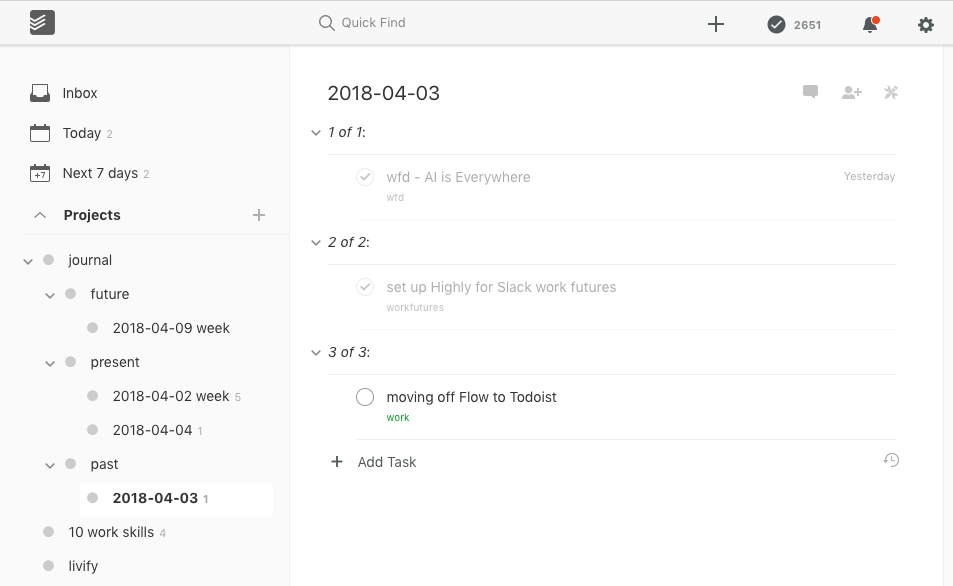
figure 1 — Daily Journal project

Note the various specific features of Todoist on display. The three categories, like ‘1 of 1:’ are represented with section headings, which in Todoist are tasks whose title ends with a ‘:’. That Todoist convention leads to the tasks acting as a section heading: with no checkbox, and instead having a caret prefix used to accordion the tasks in the section. Section heads also have the great side effect of holding onto checked tasks: checked tasks don’t fade away into completed (hidden) mode. They just are grayed out, like the top two above.

Note that my journaling involves a lot of intentional duplication and moving tasks around. For example, after writing yesterday’s Work Futures Daily, AI is Everywhere, I added the post title to the task (I knew in the morning I was going to write something, but not the title). If I wanted to take notes on that I would add as a comment to the task (in this case I didn’t).

And then, before I checked it off, I made a duplicate of the task, and dragged that to my Work Futures project. I will show that later, in the ‘do, do, do’ section, below.

Then I checked off the task in 2018–04–03. (By the way, a nice feature of Todoist is that comments can be added to checked tasks. The lack of that capability in Flow caused me a great deal of annoyance and time wasting.)

On the left hand side you can see that 2018–04–03 is now a subproject of the project named Past, but yesterday it was a sub of Present. I moved it from Present to Past this morning, when I created 2018–04–04. A sibling project in Present is 2018–04–02 week, which brings me to the second of the three sorts of journal techniques.

Weekly: Must, Should, Might, Didn’t

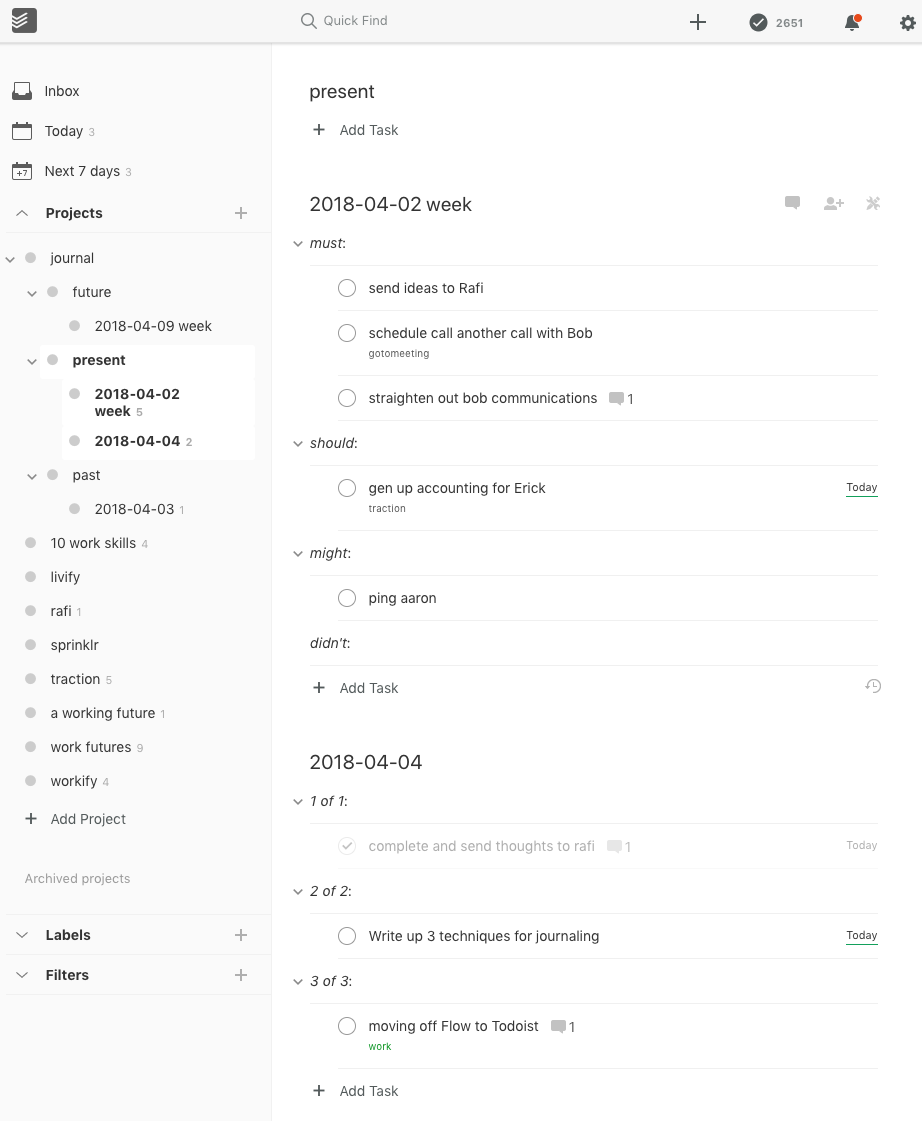
If I select the Present project, it displays tasks and subprojects. This is what I am usually looking at when I use Todoist. In this case I see the Present title at the top with the opportunity to add tasks directly to that project. Below that are the two subprojects, 2018–04–02 week and 2018–04–04, with their respective tasks and sections.

figure 2 — Present project with subprojects

Note that the Week project has four headings: must:, should:, might:, and didn’t:. At the start of each week I try to plan out what I hope to be working on, or activities I know will be happening, like travel, phone calls, meetings, and deadlines. This often involves copying tasks from other projects. Didn’t is a category for activities that might have been planned, but which are no longer relevant, for example, when two alternatives are researched and one is selected. The rejected activity might be placed in didn’t.

(Some people might want to take the thinking behind week projects and apply them to months, or years. Go for it. Those scales don’t work for me, but they may for you.)

Note that my goal with copying and/or linking in general is that tasks should be distributed out to whatever sort of project timeframe makes sense. An activity that involves me working on a client project part of five days in April might lead to five tasks in daily journal projects, appearing in one or more weekly projects, and one or more tasks in the client project.

Also note that if I think it is worth the effort — like when I want to account for my time on a project — I can use the task links that Todoist provides so that these various fragments can be linked together, with those links captured in the client project task, referencing the many linked tasks sprinkled among the days. I have an example, below.

Projects: Do, Do, Do

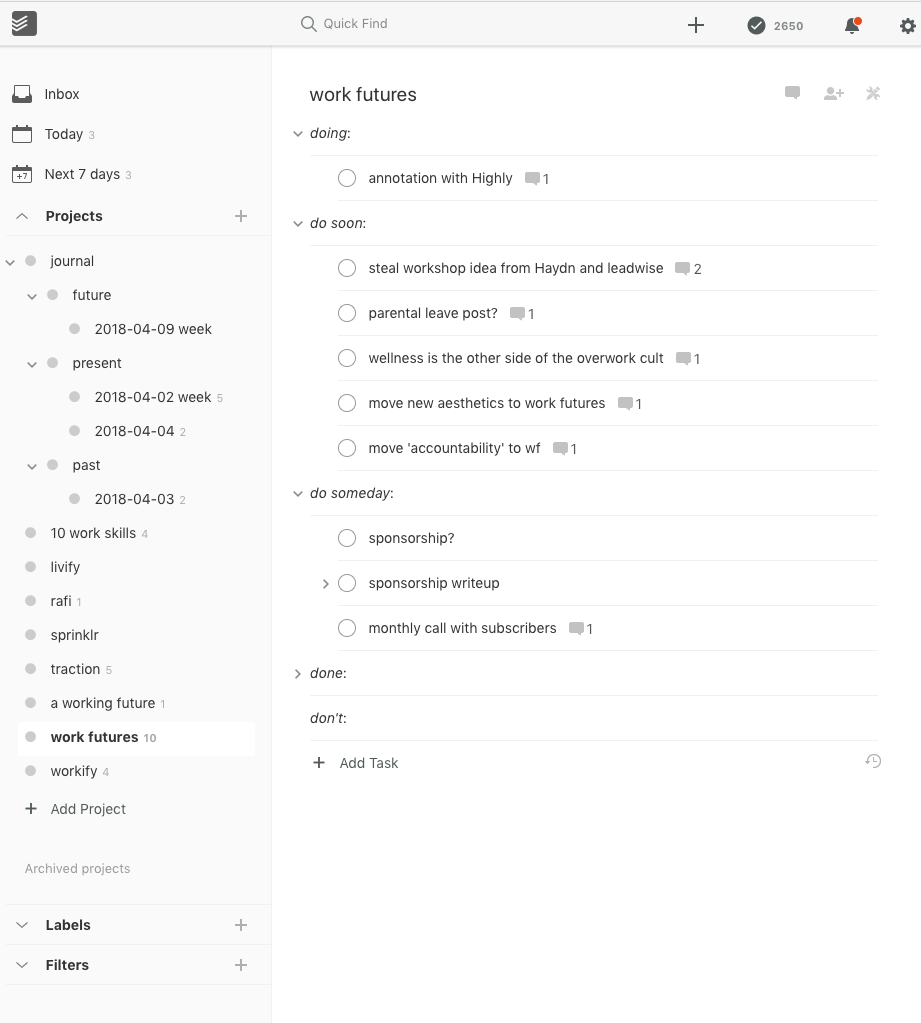
For the agenda projects, those that are intended to cover the life-cycle of a project that will persist longer than a day or week, I use the ‘do, do, do’ technique. Here is Work Futures, an agenda project:

figure 3 — Work Futures Agenda project

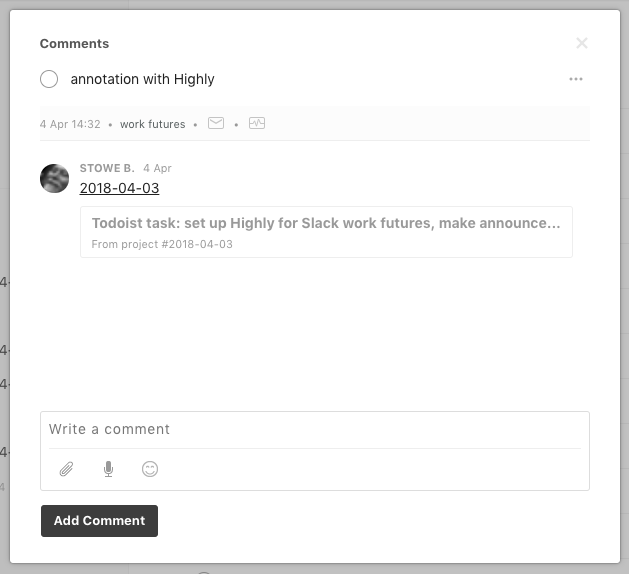
At the top of the tasks, you can see the annotation with Highly task, with a folder icon that means a comment has been created. When I click on that icon you’ll see this:

figure 4 — Comment with link to another task

I created that comment, one that contains a link back to the completed task in the 2018–04–04 daily journal project, referencing the set up Highly for Slack work futures, make announcement task. As I take on and accomplish other subtasks in support of the agenda task of annotation with Highly, I can add additional comments of this sort, referencing tasks in other daily and weekly journal projects.

[Note: Todoist supports a subset of Markdown in comments, including bold, italics, links, and other styling. It does not support quotes, lists, footnotes, or tables, I am sorry to say. The link above was coded as ‘2018–04–03’, for example.]

This linking approach allows me to keep track of the various daily and weekly journal tasks, the days when I worked on them, and to access their respective comments, as well. For example, for a given client engagement I might comment in each daily task how much time I had spent that day, and on a weekly basis I could add those hours up, and provide them to my client in an invoice.

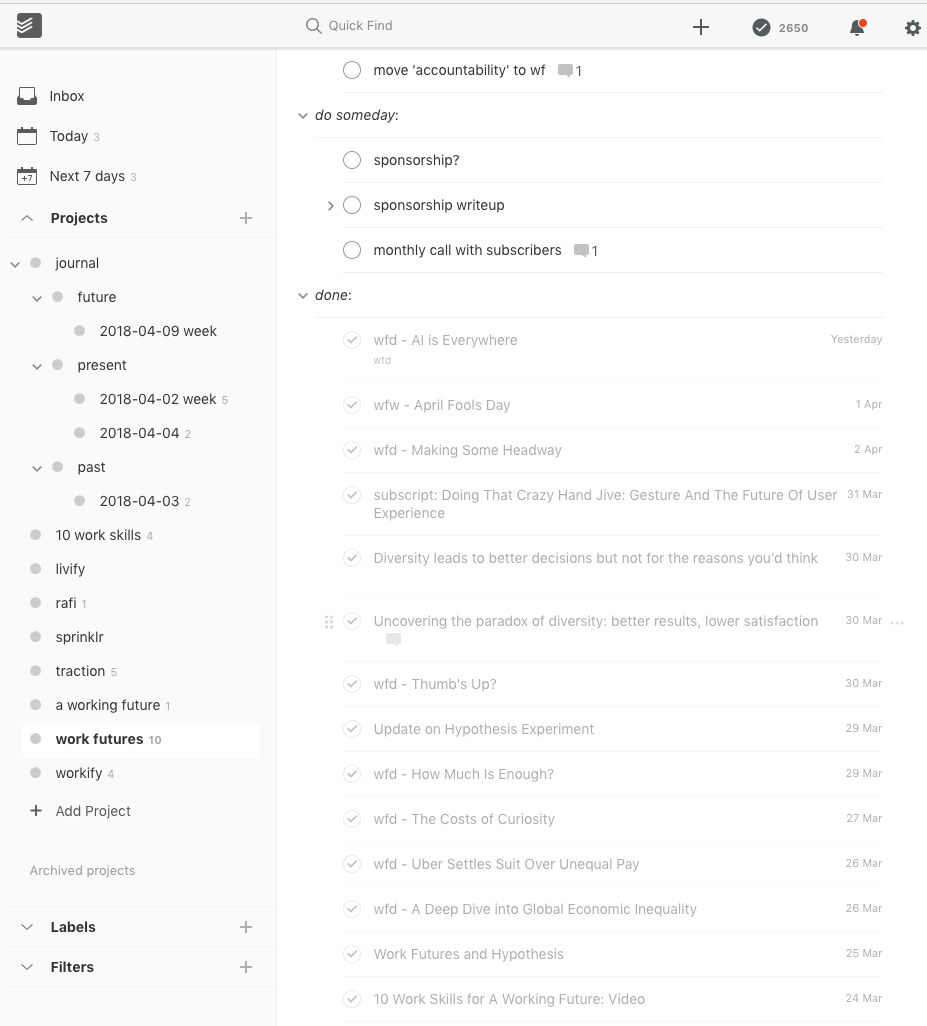
The sections of these long-range projects are ‘doing’, ‘do soon’, ‘do someday’, ‘done’, and ‘don’t’. In my approach, these time domains mean this:

  • doing — actively doing at the present time, meaning activities are going on in the present week, and perhaps weeks to come.
  • do soon — activities that are not on-going at present, but soon will be, meaning, in the next week or so.
  • do someday — activities that need to be done, but not in the immediate future, namely, after the next few weeks.
  • done — tasks that have already been accomplished.
  • don’t — things that were considered, and perhaps even started, but which are now not going to be pursued.

In this example, I had hidden the tasks in the ‘done:’ group, because it is too long. It includes all the posts made at Work Futures, for example:

figure 5 — Expanded to show done tasks

I have found these three techniques, when used together, accomplish the different sort of focus, or lenses, appropriate for the three time domains involved.

On a daily basis, I want to catch the salient information for planning during the day, and and recalling the day’s activities later on. The ‘1, 2, 3′ technique is principally oriented toward planning, and specifically to avoid overcommitting to more than a reasonable number of things to do each day.

On most days, I shift my focus to the medium-term weekly project quite frequently, which is why I have set up the Present project as it is. That’s also why I move each day’s project from the Future to the Present each morning, and also, move yesterday’s project out to the Past (after duplicating tasks that are of continuing interest, today).

Several times a day I refer to the longer-range agenda projects, like the Work Futures example. I refer to these as agenda projects because the agenda technique is intended to cover the entire lifetime of the project, not just a defined duration like a day, week, or month. It presents the entire agenda of the project, of whatever duration.

It is often at the end of the day that I find myself creating links from today’s tasks to ongoing tasks in the agenda projects. I confess that sometimes I skip a few days, and do that project ‘bookkeeping’ at the end or start of the week, or when today’s work has led to a reappraisal of the work-to-come in that project.

Another observation is perhaps one that might have been made at the beginning: the daily and weekly journals hold tasks rooted in many longer-range goals, all mixed together. But agenda projects only contain tasks dedicated to that project.

The purpose of these techniques together is to make sense of the two-sided nature of our work.

On one side, as I am working on some activity — like writing this post — I am inevitably grounded in the moment. It is Wednesday, 4 April 2018 at 4:18pm Eastern Time. I am in a small chunk of time, doing a defined and delimited task. I am in a small particle of time, independent of others. And so I want to capture that reality, which I do in the daily journal for 2018–04–04 (and the weekly, too).

But, on the other side, writing this post is part of a greater, longer-term objective, the care and feeding of Work Futures, growing the community there, and one of an on-going series of writing and other activities. This activity is part of a greater fabric of other more general activities. It is part of a wave of Work Futures work, dependent on them and connected to them, contextualized by them.

So, this approach balances and unites the paradoxically opposed particle and wave sides of how we work, and how we think about work. It allows us to see it both ways, one at a time, or both at once. That’s the wavicle theory — or reality — of work.

Originally published at stoweboyd.com.

06 Apr 02:01

Good talk

by Marek Pawlowski
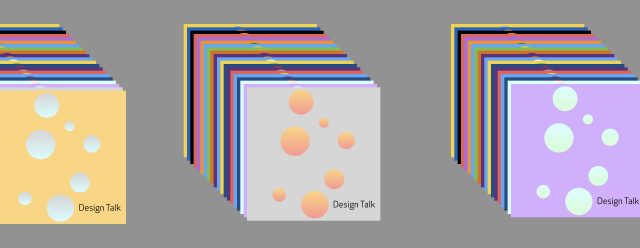
Design Talk podcast graphics

Keep talking, I say.

Hosting the MEX podcast gives me an opportunity for in-depth conversations with diverse practitioners from all over the world. Sometimes I know my guests already, but in the 45 episodes we’ve recorded, I’ve never failed to be surprised by the stories of careers, design challenges and inspirations which emerge from an hour or so of discussion.

It’s been a little while since my last newsletter and in that time I’ve recorded conversations with two design pioneers who epitomise this spirit of wide ranging interests and deep experience of user-centred practices.

My chat with Eric Kim, co-founder and now VP of Design at Modo Labs, started with a look back at the varied routes into digital experience design for those whose careers began before the advent of ‘UX’ as a defined specialism. In Eric’s case, his path began was an interest in architecture and a degree in ‘visual and environmental studies’. He described how, even before he began focusing on digital, this training grounded him in user-centred design values:

“My professors admonished constantly that ‘you don’t know if a design works until you put a human being into it’ – whether in a drawing or a scale figure in a model – and you think about how people will inhabit that space.”

These days, of course, the human experience is significantly influenced by inhabiting virtual as much as physical spaces, but that ability to empathise with the varied relationships users might have with a space is as important as ever.

Eric and I went on to talk about his role as a design-focused co-founder and how this has influenced the growth and investment strategy for Modo Labs – which has now had several rounds of VC funding from prominent investors. In particular, we discussed a challenge which will be familiar to design teams of all sizes: how to maximise impact with limited resources.

“We look not just at what we can do as a small design team, but how can we make design a ‘force multiplier’? So we consider how we can infuse our way of thinking into the processes and product decisions of a much larger group within the company.”

You can listen to the full conversation with Eric Kim in episode 45 of the MEX podcast.

On the other side of the Atlantic, I had a chance to speak with Maarten Pieters, Head of Co-Creation and People Insights at Philips Lighting. Maarten was introduced to me by a long-time friend of MEX, Patrizia Bertini, and shares her interests in Lego Serious Play (LSP) as a facilitation method (you can hear Patrizia talking about LSP in the very first episode of the MEX podcast).

When I spoke to Maarten he had just taken delivery of a book he co-authored with Stephanie Jansen, entitled ‘The 7 Principles of Complete Co-Creation’. We talked at some length about the types of designers best suited to facilitating co-creation sessions and the many subtleties of achieving an effective co-creation output:

“In essence it [the co-creation facilitator] is a very hospitable type of role, but it is also an analytical role. You have to be able to understand what’s happening in the room and make different connections. It is conceptual, it is abstract…you have to have feel comfortable with those things and looking for the softer, emotional elements in what people are saying and how they are behaving.”

We also talked about the balance of respect and ongoing relationships between companies, facilitators and participants when committing to co-creation as a major part of company strategy, as Philips have done by appointing Maarten to this dedicated role.

“It’s about proper communication and being transparent. You’re continuously aligning with stakeholders because these things [co-creation strategies] are very different and even scary for people. Maybe they don’t believe in it, or they think it is too expensive, or they think they already know the answer or it will take too much time… People are scared of sharing things, so they say ‘we need to have it finished first, we’ll throw it into the market and then we’ll learn…’ I say to them ‘this a waste of money, why do you want to wait until then instead of doing it right from the beginning’…”

You can listen to the full conversation with Maarten Pieters in episode 44 of the MEX podcast.

There’s an archive of all the podcasts episodes on the MEX site, or you can listen and subscribe via:

If you have a suggestion for a future guest or would like to come on the show for a chat yourself, just drop me a line.

06 Apr 02:01

Building An Online Community: From Getting Started To A Community-First Organization

by Richard Millington

It’s hard to work in an industry without a clear roadmap for what you should be doing.

It’s quite likely you’re unsure how to benchmark how well you’re doing today or figure out what you should be working on next.

Even many of the community managers behind the web’s largest and most successful communities aren’t sure what they should be working on next. For example:

Should you move to a new platform?
Should you build subgroups for connecting members?
Should you find ways to integrate the community with the product?

In this post, we’re going to try an answer most of these problems by sharing an updated community template with reference points to guide your actions.

This post will hopefully help you figure out where you are now, what you need to do next, and avoid most of the common mistakes.


Benchmarks For Your Online Community

It’s common to find community managers toiling away developing a premium platform or a complex MVP program without having enough members to use it or plenty of questions to answer.

This ends up being a distraction. You should only be working on the activities which take you to the next stage of the community lifecycle.

It’s really easy to plot a path forward when you know where you are now.

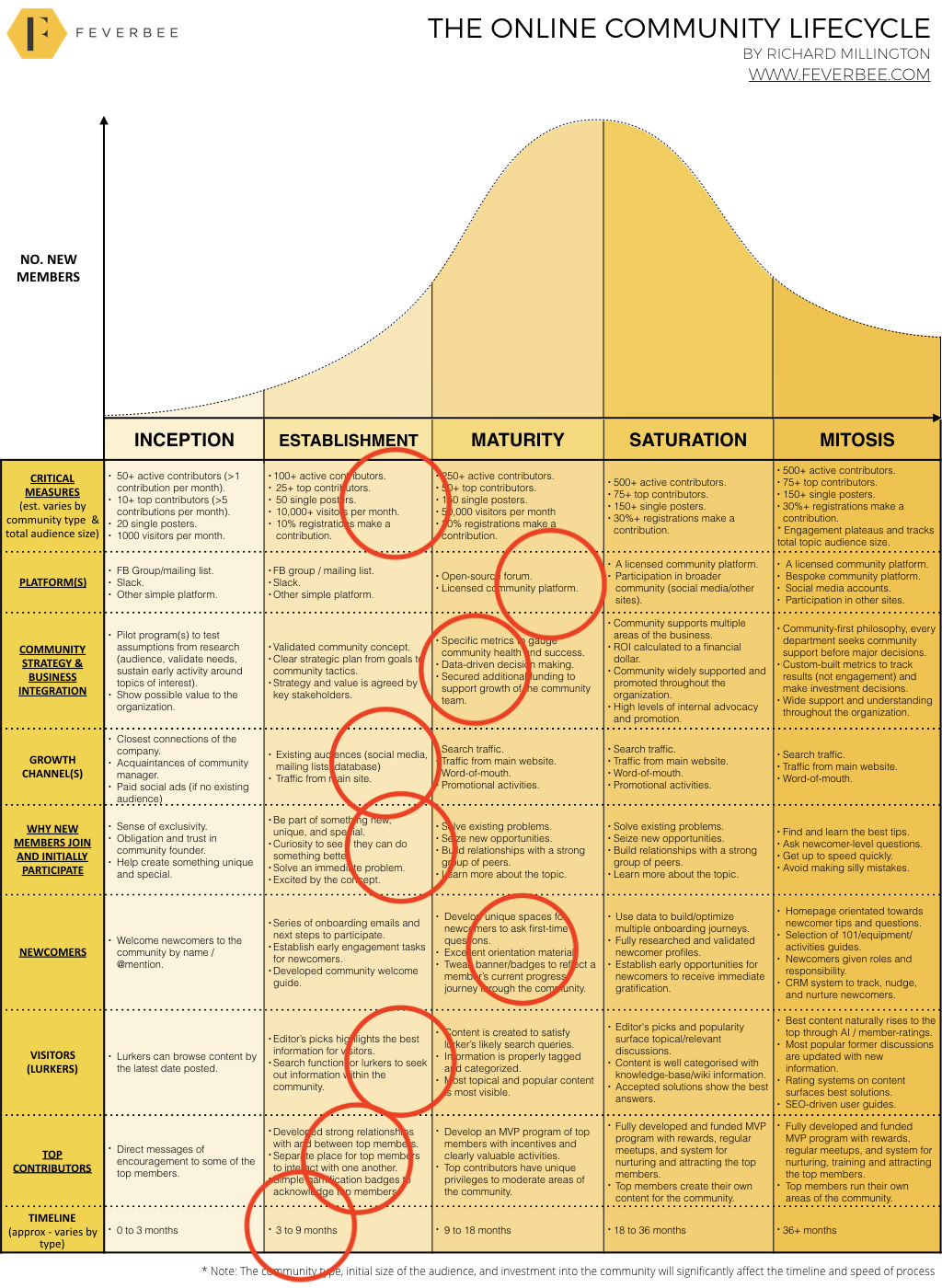
This means benchmarking your community against others and general principles of growth and development. To accomplish this, you can use the updated community lifecycle below:


[click here to view the full image / download the PDF]

In each category of the lifecycle (on the left), you can identify approximately where you are now and what to work on next.

It’s not an exact science (and you’re probably going to be further along the lifecycle in some areas than others) but it’s a broad guide to help you develop your next steps.

For example, a client of ours is at the stage below:

Now this gives us a broad idea of what to work on next. You generally don’t want to be too far ahead or behind your current average in any single category.

We want to focus on the highest priority areas first to move everything into the maturity stage. Then we might work on advancing further. This would mean (by approximate order of priority):

  1. Add a simple gamification and reward system for great contributions.
  2. Develop an MVP program for top community members.
  3. Create content to satisfy likely search queries for the topic.
  4. Better categorize the best community content to be easy to browse.
  5. Aligning the community website copy to solve existing problems/seize new opportunities.
  6. Build a system for members to vote/rate the best content.
  7. Ensuring the community is better featured on the main company site.
  8. Driving specific promotional activities.
  9. Securing additional funding for the community team.
  10. Develop specific metrics to measure health and success.
  11. Building a data-driven framework for making engagement decisions.
  12. Improve the community newcomer spaces.

You wouldn’t try to tackle all of these at once, there could be 6 to 12 months of work here. But you would want to build a roadmap to tackle the first 3 to 6 tasks over the next few months.

You need to balance everything out and make consistent, steady, progress.


Avoiding The Biggest Mistakes When Developing A Community

1) Understanding the influence of the curve.

The curve is the absolute number of new members who join the community.

Under normal conditions, you start slow, gradually speed up, hit a peak, and then reach a maintenance level where you have a consistent number of new members which reflects the topic itself.

Be very aware here the total size of the audience and broader interest in the topic will have a bigger impact upon the community’s growth and development than any activity you undertake.

This is usually beyond your control. Your rate of new members will look more like a hockey stick if the popularity of the topic is exploding. Likewise, if you’re a private community, the rate of new members will probably flatline much earlier without a peak.


2) Critical Metrics

The number of active members, newcomers, and traffic above is a simple mean from studies of a few hundred communities. The standard deviation is extremely high however, so treat these as a rough guide rather than fixed rules.

If you’re looking to benchmark and track success, this is a simple way of doing it. Some organizations with million of customers should easily surpass this.

As you grow, you should have a rising number of active contributors, single posters, and visitors. Visitors tends to be 100x of the active members. If you run a private/closed community, these metrics will be completely different.

Avoid setting metrics over which you have no control. Notice how slowly growth happens in the early stages of the community and plan for it.


3) Platforms

With a few exceptions for customer support communities, you should begin with a simple platform that is already a habit for your target audience and try to drive activity there. This will usually mean a mailing list, slack, or (more likely today) Facebook groups.

As you grow, you might move to a hosted, licensed, community platform. This is largely to take advantage of lurkers who will want to find the useful information from your community and a handful of other unique features.

Some of the largest organizations also tend to develop their own bespoke platform to satisfy unique needs, but this comes after several years of work. Try to avoid using a premium platform or bespoke platform until you have a huge base of members eager to use it.


4) Strategy/Business Integration

You begin with a simple pilot program to validate the research you undertook in the concept stage. If that works, then you develop a complete strategic plan and start building more support for the community. Over time you should align the community to multiple benefits within the organization.

Eventually you become more specific about the ROI metrics, proving clear value, and becoming a community-first organization. This means seeking community support for initiatives and ideas before announcing them elsewhere.

For example, imagine you want to get a strategy approved by multiple stakeholders. You need to spend more time building relationships, understanding their needs, and adapting the strategy to ensure they feel they’ve had some control over the process.

Remember that building support will take a lot of time. Don’t try to force the community upon people. Instead figure out what your colleagues need and align the community to help. This is the simple secret to getting the support you want.


5) Growth Channels

The common mistake is to do a mass promotion of the community to the entire mailing list before validating the concept.

You don’t want the majority of your potential audience to see the community until it’s a fantastic hub of activity. This means initially you work from direct invites and biggest fans then expand gradually.

If you don’t have an existing audience, you can usually aim to attract members via paid social ads at around $1 per visit and up to $10 to $15 per conversion into a registered member.

Once the community has taken off, you want to ensure better placement for referral traffic, develop content and activities for search traffic, and try to drive word of mouth from existing members. Just don’t promote the community too widely, too soon.


6) Why New Members Join And Initially Participate

This changes over time. With the exception of customer support communities, people usually join to be part of something unique, different, and exclusive. They have a strong connection to the founder(s) and comprise the most hardcore fans or customers.

Over time this shifts as the community jumps from the most topic enthusiasts to those who have problems they want solved or want to be better within the field. This group requires more instant gratification to their problems.

The most common mistake here is to use copy in your touchpoints which doesn’t match what members need. For example, promoting the size or success of a community to members still seeking something unique, special, and exclusive. The second biggest mistake is never changing or adapting the copy as the community develops.

Eventually, most of the newcomers to the community will inevitably be newcomers to the field as well. This means you need to adjust the copy and content people see when they first visit your community to match.


7) Newcomers

The process for turning newcomers into active participants also shifts over time.

You might begin by @mentioning every member to the community as a personal welcome. But this doesn’t scale well (and it’s too effective). You gradually develop automated systems for converting members with welcome emails, an automation series, and volunteers.

You might also figure out a system to give newcomers unique roles and responsibilities within the community.

Avoid trying to develop advanced systems too early. In the early stages you can manually welcome every member. But beyond a certain scale this feels impersonal (e.g. mass welcomes) or simply doesn’t work. Make sure you slowly adapt your systems to do this automatically.


8) Visitors (lurkers)

Most people don’t do anywhere near enough to support the lurkers to their community. Most of the time, lurkers are restricted to browsing the latest posts or using the search box to find the information they want.

You need to build systems to highlight the best content for your members. This begins with editor’s picks and eventually goes one level further to create content that members can search for. You need to make sure this content is properly tagged and categorized so other members can quickly find it.

At the more mature level, you need to have accepted solutions, a knowledge-base, and a system for regularly updated old content to keep it fresh. Rating systems are also useful here.


9) Top Contributors

Don’t start jumping into your perfectly designed MVP system until you have a highly active, mature, community. Start by getting to know your top members and building good relationships with them.

Over time, you want to have them interact with each other and solicit their ideas and feedback on community content and activities.

Once you have a good group of top members, you might want to build an incentive program with gamification and unique privileges.


10) Timeline

This is probably the most variable part of the process. But, generally, you can expect the inception stage to take up to 3 months.

If it takes longer, you probably need to rethink the concept. The establishment stage will usually last 3 to 9 months (in total) – this largely depends on developing diversified sources of growth.

The maturity stages and beyond may take a few years.


Steady, Monthly, Improvement

There is rarely a silver bullet that will change anything. The successful communities on the web today were the result of steady, monthly improvement, with community managers tackling the next thing on the list.

When you begin working tomorrow, or move to a new job, benchmark where the community is now using this resource and design your plan of action to steadily improve the community. It isn’t easy work, but it’s exactly what you’ve been hired to do.

Good luck.

06 Apr 02:00

Day of the year companies stop paying women

by Nathan Yau

One way to think about gender pay gap is to imagine women receive the same pay as men each working day until they reach their salary. At some point during the year, women effectively work for free. With a new law that requires companies in Great Britain with 250 or more employees to report pay gap, The Guardian provides a calendar view into the newly reported data that shows the day of the year the free work starts.

The scroller shows companies as you move down the calendar. The information feels less overwhelming than seeing it all at once, and a running counter keeps track of what you already saw.

See also The Guardian’s breakdown by sector.

Tags: calendar, Guardian, pay gap

06 Apr 02:00

Is ‘Reproducibility Crisis’ Overblown?

files/images/doggie.jpg

Rachael Pells, Inside Higher Ed, Apr 08, 2018


Icon

A new study has failed to reproduce the reproducibility crisis. "A review of more than 40 recent studies on reproducibility has led Daniele Fanelli, a fellow in methodology at the London School of Economics and Political Science, to conclude that, although misconduct and questionable research methods do occur in 'relatively small' frequencies, there is “no evidence” that the issue is growing." This summary illustrates the problem perfectly. Different metastudies produce different results, depending on the studies they accept as valid. The phrase 'relatively small' is subject to interprtation. And the assertion that it is 'not growing' is very different from 'it does not exist'.

Web: [Direct Link] [This Post]
06 Apr 01:57

Bell goes live with all-fibre optic internet network in Toronto

by Rose Behar
fibre cables

Bell has gone live with an all-fibre optic internet network in Toronto.

The network, which Bell is calling ‘pure fibre internet,’ provides a 100 percent fibre connection to the premises. One of the major benefits of this new service is that it provides matching upload and download speeds at any tier, up to 1Gbps.

Bell says the speeds will increase to at least 5Gbps next year and ultimately to 40Gbps “and beyond” in the future.

In the meantime, the carrier promises the speeds of its Gigabit fibre-to-the-premises (FTTP) network will provide customers the ability to download a 3GB HD movie in 24 seconds or upload a 500MB file to the cloud in 4 seconds.

“The Bell team is proud to light up North America’s largest fibre network right here in Toronto. Bell’s all-fibre network will deliver the best Internet, TV and business connectivity services to Torontonians while enabling Canada’s largest city to innovate and compete at a global level with next-generation connectivity,” said George Cope, president and CEO of BCE Inc. and Bell Canada in a statement.

The Toronto fibre project represents a $1.5 billion investment from Bell. The carrier began the Toronto project in 2015, and says it worked closely with the City of Toronto and Toronto Hydro while using “innovative installation techniques” and new heavy equipment to minimize disruption.

The build consists of over 10,000 kilometres of new fibre installed to date on approximately 90,000 Bell and Toronto Hydro poles and underground via more than 10,000 manhole access points, as well as technology enhancements to 27 Bell central offices in the city.

All of this will also help with Bell’s future 5G wireless deployments, since fibre backhaul will be necessary to meet 5G’s network performance goals.

To promote this deployment, Bell is offering a limited-time bundle promo for pure fibre internet, TV and home phone from $99.85, a savings of $53 per month off the current in-market price for two years.

Bell reports its fibre optic network spans 240,000 total kilometres, running across the four Atlantic provinces, Quebec, Ontario and Manitoba. The carrier serves 3.7 million locations with FTTP connections, and expects that to grow to 4.5 million by the end of 2018.

To celebrate its new all-fibre network, Bell is lighting up the Toronto skies with a “blue light spectacle” tonight, April 5th, at Yonge-Dundas Square along with performances by Arkells and City and Colour.

Source: Bell

The post Bell goes live with all-fibre optic internet network in Toronto appeared first on MobileSyrup.

04 Apr 16:29

Google Drive is revamping its sharing permissions

by Brad Bennett

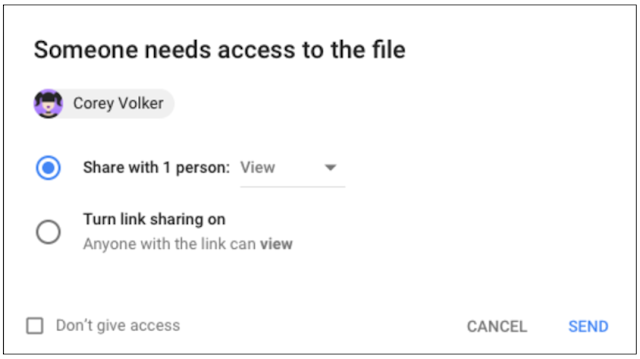
Google is starting to update its ‘Access Checker’ feature to allow users to keep tabs on who they have shared documents from Google Drive and Gmail with.

The main update now comes by scaling back and changing the way the users give out permissions. Previously users could turn on link sharing and anyone with the link could access the file.

Now, Google will notify the original creator when the file is accessed, giving the creator more control over who can use the file.

In addition to the changing sharing permissions, the ‘Access Checker’ has also been slightly redesigned to make it more user friendly. It now displays the user names of everyone that wants access to the document as well.

Source: Google Via: The Verge

The post Google Drive is revamping its sharing permissions appeared first on MobileSyrup.

04 Apr 16:29

SotD: Up On Cripple Creek

This is a chestnut from The Band, written by Robbie Robertson and sung by Levon Helm. It’s from 1969 but sounds like it’s hundreds of years old, part of the underlying fabric of everything. I suppose nearly everyone’s heard it, but it’s worth another listen.

There’s nothing ground-breaking or innovative here, just a straightforward verse/chorus thing like you might have heard around a campfire or in a tavern in my grandparents’ grandparents’ grandparents’ time. Well, there is the funky wah-wah on Garth Hudson’s Hammond, and the swirling instrumental polyphony, but really it’s a just a good old-fashioned singalong tune. And Levon Helm sounds like the guy at the next table over, assuming that guy was always flawlessly in tune.

The Band by The Band

And that chorus, it’s so heart-warming: Up on Cripple Creek she sends me / If I spring a leak she mends me / I don’t have to speak she defends me / A drunkard’s dream if I ever did see one.

Mind you, the narrator’s not a 100% honorable man, I bet his Big Mama doesn’t know about Little Bessie. And I suppose many women would be unhappy at being described as a drunkard’s dream; but we all feel like drunkards sometimes, a few too many drinks of life and just not able to handle it, hoping to be defended and mended, for mercy not justice.

This is part of the Song of the Day series (background).

Links

Spotify playlist. This tune on iTunes Spotify, Amazon. As for live video, you can’t beat the the opening of the Last Waltz.

04 Apr 16:29

Farrago Fools

by Lee Falin

I imagine that most geek parents have used the old “talking computer” trick on their kids at some point.


You can’t argue with machine learning.

I’ve used it enough that whenever my children hear any robotic voice coming from a device, they completely ignore the voice and search the house for me instead.1

Rather than resorting to my usual April Fool’s Day joke2, I decided to up the ante a bit this year. Inspired by one mischievous user, I decided to prank my kids with Rogue Amoeba’s newest app Farrago. Ultimately, I wound up using three of our apps for this prank, a record the marketing department wants me to tell you to try and break.

The Setup

To start, I downloaded a clip from Studio Ghibli’s “The Secret World of Arrietty”. This movie is about a family of tiny people who secretly live in a house of ordinary humans, sneaking around the house and scavenging from them while they sleep.

I then used our audio editor Fission to divide the clip up into segments containing various sound effects (such as footsteps, climbing noises, etc.), as well as dialogue parts. I saved those out, so I had over a dozen different sounds.


Isolating clips in Fission.

Once I had my individual files, I loaded them into Farrago for playback. Next, I configured Airfoil to capture Farrago’s audio to Airfoil Satellite running on my phone.


Do you hear footsteps?

The Delivery

I first tried this on the girls. While saying goodnight, I secretly slipped the phone under one of their beds. Then I snuck back downstairs and began playing audio in Farrago. After a few minutes of no response, I wondered if something had gone wrong. When I went back upstairs to check, I discovered they hadn’t heard anything. Apparently, the volume was low enough that it couldn’t be heard over the noise of their fan.

Undaunted, I explained the prank to them and recruited them to help me try it out on the boys. I repeated the same setup with the phone, making sure the volume was turned up, then snuck back to the girl’s room where we started playing clips.

The boys responded immediately, searching under their bed to find the source of the “footsteps” and talking. Once they found it they ran into the girls’ room, where we were all laughing a bit too loudly to be stealthy.

Next Time

If I were to do this again next year, aside from making sure the volume was turned up on the phone, I’d come up with a way to hide the phone better. Even better would be hiding multiple devices in the same room and alternating transmitting between them.

Hopefully, this prank will last longer than the talking computer trick.


Footnotes:

  1. I’m not sure how this will affect their odds of survival in the event of a robot uprising. ↩︎

  2. Wherein I hold a dollop of ketchup in my hand and pretend to cut myself while slicing an apple at the breakfast table. This trick honestly worked for about seven years straight. ↩︎

04 Apr 16:29

Apple could be considering iPhone ‘hover gestures’ and curved displays: Report

by Patrick O'Rourke
iPhone X

If you didn’t think the iPhone X was a substantial enough shift in terms of design, it looks like Apple has a more significant revamp in store.

A new Bloomberg report from the often reliable Mark Gurman details two major changes that could be on the horizon for Apple’s upcoming smartphone.

The report specifically cites that Apple is testing an iPhone display capable of detecting gestures from finger movements without actually touching the display. It’s unclear exactly how this feature would work, but it likely involves ‘hovering’ over specific user-interface elements and won’t be the core way of interacting with the smartphone.

This would mark a significant shift away from the touchscreen interaction that smartphone users are familiar with. These “air gestures” would add another layer of interaction to the iPhone. Apple introduced pressure-sensitive displays with the addition of 3D Touch following the release of the iPhone 6s and the Apple Watch, though few apps take advantage of the feature in a way that makes sense. I find myself often forgetting that 3D Touch even exists given that few apps I use feature the tech.

Those familiar with Samsung’s Galaxy line will likely remember that the South Korean manufacturer has played with simple hand gesture controls in the past, most notably with the Galaxy S4 and S6.  What makes Apple’s approach to the technology different is the fact that the tech giant would rely on sensitivity built into the display, rather than an external camera.

The second experimental feature in Bloomberg’s report relates to Apple designing iPhones with a display that curves inwards in the middle. This would involve a screen where the actual middle of the display is lower than the top and bottom edges, resembling LG’s Flex smartphone to an extent. Apple’s current iPhones curve out slightly around its edges.

That said, it’s important to note that both these projects are tentative, experimental and many years away from actually shipping — if they ever do.

Bloomberg says that these features are likely two years away from release.

Source: Bloomberg

The post Apple could be considering iPhone ‘hover gestures’ and curved displays: Report appeared first on MobileSyrup.

04 Apr 16:28

Working in the open…

by princiya

Last week I attended LibrePlanet. Out of the many talks, ‘Diversity in Free Software’ by Marina, Outreachy co-organiser was my favorite <3. Here is an attempt to write sketchnotes from the talk. Yes, sketchnotes is a thing.

libreplanet_full
Diversity in free software

I used to fancy having an all-green Github dashboard 🙂

I have always wanted to contribute to opensource and last year I wanted to ensure that this task from my long pending todos was checked off. With Outreachy this was possible, which has been a great experience overall. I had earlier applied to the program in 2015 but didn’t get through. I then made sure to do the homework and it paid off last year.

The current round of Outreachy applications are closed. While most of you are awaiting results, don’t get disappointed if you do not get through.

There is always another chance for your hard work!

What is unique about Outreachy?

The application process asks you to make an initial contribution to the project you wish to apply. This gives you ample time to learn, understand about the project, get a feel of what it is to working in the open and with your mentor.

Selected applicants are encouraged to blog their activity every 2 weeks and here is curated list from Outreachy alumni. This is my most favorite reading list and all of my blogging motivation and inspiration comes from there.

Diversity in opensource

The diversity count for opensource is definitely improving! While Outreachy is one such medium to increase diversity in opensource, there are other initiatives too which you can see listed in the above cartoon.

The best thing what each one of us can do is to uplift each other. As the saying goes ‘Charity begins at home’. I like the quote from this article –

Little time for charity? Consider contributing to Open Source

What is it like to work in the open?

I still remember the days how I used to fret when I was sitting next to my boss during the first few weeks of my first job as a Programmer. I used to be constantly conscious during our pair programming sessions. As with anything else, with practice and time I got through this fear and anxiety.

Do something that you were never comfortable doing! That’s called getting over fear!!

Contributing to opensource was also something similar experience to start with. Our code is out for the public. When I made my first PR, I was both excited and nervous. I have written here how I overcame the Imposter Syndrome.

Practice makes one perfect!

One thing I must say, the opensource community is very welcoming. We are all on one shared mission – to learn && grow!

What next?

Working in the open has definitely made me more confident from what I started. There is no looking back from this point. My journey has just begun and I have a long way to go forward….

Screen Shot 2018-04-04 at 16.58.47

Here is a list of my opensource work so far.

04 Apr 16:28

How to Adjust iOS’ Volume via Workflow When Streaming Audio to HomePod

by Federico Viticci

One of Workflow's least known functionalities is its ability to get details about the hardware it's running on and control some system features. Among these, Workflow can both retrieve an iOS device's current volume level and set the volume. A few days ago, I realized I could make a workflow to quickly adjust my iPhone's volume when streaming music to one of our HomePods. Unlike other automations I've crafted over the years, this workflow was quite a success in our household and I felt like it was worth sharing with the wider MacStories audience.

It all started with a problem: my girlfriend and I like to listen to music at night before we go to sleep (usually around 1 AM) but we don't want to disturb our neighbors downstairs. We've discovered that when we listen to the bedroom HomePod late at night, even moving from 20% volume to 17% or from 15% to 22% makes a difference for certain songs. Some songs are too loud and we need to lower the volume; others are too quiet and we don't mind taking it up a notch.

Currently, iOS 11 and the Home app (where the HomePod's main controls live) don't offer a precise way to control system volume as a numeric value. I could use the built-in volume sliders, but they're sloppy and don't show you the volume percentage at all. I could use Siri, but I don't want to talk every time I need to tweak the volume. Alternatively, I could tap the HomePod's volume buttons, but those only adjust the speaker's volume in 5% increments. By now you've probably realized that I'm a little particular about my nocturnal volume levels. And particular problems on iOS are often fixed with a familiar solution: automation via Workflow.

The workflow I put together consists of six actions that allow me to pick a new volume level from a list of presets, represented as values that range from 1 to 10. This workflow takes a second to run and it can be used directly from a widget without having to open the Workflow app. When you're streaming audio to the HomePod, the volume change is instantly mirrored to the speaker.

This is accomplished by preparing a List action that contains your favorite volume presets. Because Workflow's Set Volume action accepts any number between 0 and 1, all we need to do is divide the number by 10 to obtain a compatible value; 2 (which equals 20% volume) becomes 0.2, 1.75 becomes 0.175, and so forth. Thanks to the Choose from List action and Magic Variables, we can even display the current volume level in the title of the alert before picking a new value.

Changing system volume on iOS using presets in a List action.

Changing system volume on iOS using presets in a List action.

Unfortunately, the workflow comes with one big limitation. Currently, the Workflow app cannot connect directly to a HomePod and change its volume independently from an iOS device. Unlike iOS 11's Control Center, which lets you switch output devices and have a separate audio stream on the HomePod that doesn't interfere with system audio on your iOS device, Workflow can only change the system volume for the device it's running on. This means that the workflow is only useful when you're streaming audio directly to the HomePod; you can do this by tapping iOS' AirPlay icon (either in apps or Control Center) and selecting the HomePod as output. This will be confirmed in the UI with a label such as 'iPhone ⇾ LIVING ROOM', where 'Living Room' is the name you've assigned to the HomePod.

You can stream audio directly to the HomePod by selecting it as the main output device.

You can stream audio directly to the HomePod by selecting it as the main output device.

Ideally, Workflow (which is owned by Apple) should be capable of controlling the HomePod's volume separately from an iOS device, just like Control Center can. But then again Workflow should also come with HomeKit and Siri integrations, and we're still waiting for its next big step. Despite this limitation, I've found my workaround to be good enough when I want to stream some music from my iPhone to the HomePod and have fine-grained volume controls that don't involve voice commands. Plus, you can use this workflow to quickly adjust system volume when listening through any speaker or pair of headphones. I highly recommend installing it as a widget, which allows you to change volume through presets from anywhere on iOS, including Cover Sheet and the Lock screen.

You can download the workflow here.


Support MacStories Directly

Club MacStories offers exclusive access to extra MacStories content, delivered every week; it's also a way to support us directly.

Club MacStories will help you discover the best apps for your devices and get the most out of your iPhone, iPad, and Mac. Plus, it's made in Italy.

Join Now
04 Apr 16:28

Scanbot 7 Adds Customizable Filters, Document Merging, Improved Search, and New Themes

by Ryan Christoffel

Scanbot 7 was released today, the latest update to the popular document scanning app for iOS. This is the first major version bump for Scanbot since Apple introduced its own scanning feature into the built-in Notes app, making it especially of interest. Every time Apple introduces a free app or feature that competes with existing third-party options, the impetus falls on those developers to prove their app's continued value. Scanbot already offered a variety of features that Notes' scanning doesn't, but it adds to those in today's update with a handful of thoughtful enhancements that make a great app even better.

In Scanbot 7, each of the app's five color filters for scans can be tweaked to your exact preferences. There are sliders included to make three types of adjustments for each filter. On most filters, those options are Brightness, Color, and Contrast, and with the Gray filter they're Brighter, Darker, and Color. Not every scan is the same; a good scan depends on the type of document being captured and your lighting conditions, so it's great having more control over filters to make every scan look as good as possible.

A second new feature is the ability to merge multiple existing scans into a single PDF. This is done by hitting the checkmark in the top-right corner when browsing previous scans, then selecting multiple scans and hitting Merge. You'll then be able to rearrange the page order of the soon-to-be-merged documents, and choose whether to replace the original documents altogether, or keep them intact post-merge. This kind of task can be accomplished in other apps, such as PDF Expert, but it's nice to bring it in-app, especially in situations when you need to consolidate scans to send to someone else.

Search has been upgraded in Scanbot 7, with auto-complete suggestions that appear even before you've typed a single character. These make Scanbot's search screen one of the best I've used in any app. Also added in today's update are five new theme options, my favorite of which is High Contrast: it uses true black and white to provide beautiful contrast in the interface, especially on the iPhone X's OLED display.

If you're in the market for a scanning solution, and want more power and customizability that Apple Notes provides, Scanbot 7 makes the app a better option than ever. All its power features are easy to use, and the app is full of thoughtful design touches that make for a delightful experience.

Scanbot 7 is available on the App Store.


Support MacStories Directly

Club MacStories offers exclusive access to extra MacStories content, delivered every week; it's also a way to support us directly.

Club MacStories will help you discover the best apps for your devices and get the most out of your iPhone, iPad, and Mac. Plus, it's made in Italy.

Join Now
04 Apr 16:28

LG V30 users report receiving Android 8.0 Oreo update in Canada

by Dean Daley
LG V30

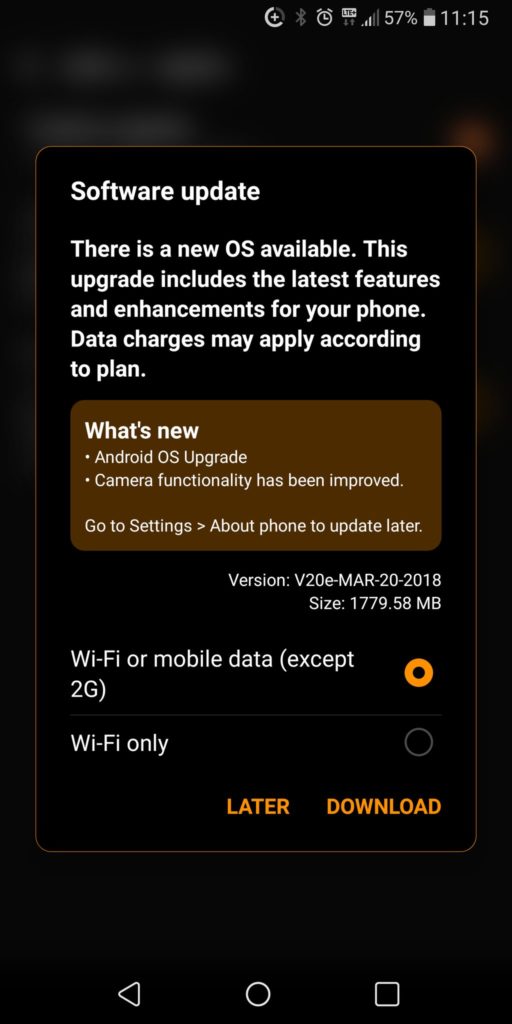
Some LG V30 users have reported receiving an update for Android 8.0 Oreo.

MobileSyrup has received tips from users with Rogers, Bell and Telus regarding the update.

Thanks Chris!

Currently, the operating system update schedule for Bell, Telus and Koodo doesn’t mention the V30. Meanwhile, Rogers doesn’t have a date for the V30 and Fido says the phone will get the update sometime in April 2018. Although the company’s update page had originally said the update would come in March.

Android 8.0 comes with an updated settings app and changes to the notification pane. The update also typically comes with picture-in-picture for apps like Netflix and Chrome, as well as Android Instant Apps.

The LG V30’s software update page says that the phone’s camera functionality has been improved as well. Camera functionality is possibly an update to the AI ThinQ software found on the LG V30s ThinQ — a device that LG says will not make its way to Canada.

MobileSyrup has reached out to LG to for official comment on the Android 8.0 update.

If your LG V30 has received an update notification for Android 8.0, let us know in the comments below.

The post LG V30 users report receiving Android 8.0 Oreo update in Canada appeared first on MobileSyrup.

04 Apr 14:26

Cities like yours

by Nathan Yau

There are many ways to estimate how similar two cities are — weather, demographics, taxes, etc. Jed Kolko from job site Indeed and Josh Katz for The Upshot used the distribution of job offerings. Just enter your city or a nearby metro, and you get something like this:

I punched in cities I’ve lived in or visited, and the results looked pretty good.

The analysis is based on job postings on Indeed, but I wonder if this would work with Census data. And can we apply this similarity index or some form of it to, say, individuals? Just think of the possibilities, Match.com.

Tags: demographics, jobs, Upshot

04 Apr 14:26

These Weeks in Firefox: Issue 35

by kit

Highlights

Activity Stream

“Custom Image URL” is new!

  • The doorhanger for an extension-controlled homepage now links to a SUMO article, and the doorhanger for an extension-controlled New Tab page now shows the extension name.

No more “wait, which extension was that again?”

Graph showing drop in median (35ms to 2.5ms) and mean (60ms to 20ms) switch time

Median down from 35ms to 2.5ms, mean down from 60ms to 20ms.

  • We’ve released Facebook Container, a WebExtension that makes it easier for you to keep all of your Facebook activity in a single container. See the blog post for details on how this helps you preserve your privacy!
  • Voice Fill & Snooze Tabs Test Pilot experiments are being graduated to AMO! Min Vid is going to be turned into a SHIELD experiment.

Friends of the Firefox team

Project Updates

Add-ons

  • Listeners to the tabs.onUpdated event may now supply a filter to avoid overhead for unwanted events.
  • A bug that caused tab IDs to change when tabs were moved between windows was fixed.
  • A few bugs in the bookmarks API were fixed.
  • Page actions are now much more efficient.  Some other bugs with page actions and browser actions were also fixed.
  • There is now a preference that requires language packs to be signed (which currently defaults to false, but will eventually be switched to true).
  • Kris removed some old code related to legacy extensions (bootstrap.js, we’re coming for you soon).
  • Zhengyi implemented theming the toolbar inputs focused background, text and border.

Activity Stream

Screenshot of Activity Stream dark theme spec

A work-in-progress UX spec…shiny!

Browser Architecture

Lint

Policy Engine

Performance

Graph showing drop in mean time to first paint from 4.3s to 2.5s

Mean time to first paint dropped from 4.3s to 2.5s

Privacy/Security

Search and Navigation

Address Bar & Search

Places

More

Sync / Firefox Accounts

Test Pilot

  • Work continues on Firefox Accounts integration for Screenshots, as well as a Chrome WebExtension, Telemetry-based engagement dashboard, and many minor bug fixes.

Web Payments

  • Reviewed user research on our current flow, “unhappy path” user testing
  • Continuing to land UI in Nightly as we build out the payment flow, behind the dom.payments.request.enabled pref.

Below the fold

  • (Osmose) We have a working prototype collecting browser chrome JS errors on the Nightly channel (tracking bug 1426479). We’re evaluating if collecting these errors is useful enough to do on a permanent basis, but we need your help in using the data to find/fix bugs! If you’re interested, see the wiki page for instructions on how to get access (limited to employees only for now).
  • [mconley] We collect hang reports on pre-release channels using BHR. That information is available at arewesmoothyet.com, which you should use. Search for main thread hangs involving your scripts!
    • dthayer is working on improving the performance of arewesmoothyet.com. I can confirm that the irony is not lost on him.
  • florian has combined the infrastructure for our performance tests so that we can test for flickering and reflows at the same time. This should make it easier to write performance tests, since test writers will mostly have to worry about scripting the actions to be tested. And this has significantly expanded our flicker test coverage.
04 Apr 14:26

City of St. Catharines is adding public Wi-Fi to its downtown core

by Brad Bennett

Bell Canada and the City of St. Catharines are partnering to bring smart kiosks, free Wi-Fi and USB charging stations to downtown St. Catharines in a new smart city pilot project.

St. Catharines city council agreed to the partnership last week. The goal is to bring smart kiosks to populated public areas.

“These connected and interactive kiosks will put St. Catharines on the Smart Cities map and they are just the beginning. We can upgrade the kiosks and services available as we learn more about how the community uses them through the pilot project,” said Karthik Venkataraman the City’s manager of information technology, in an April 3rd press release.

The first kiosk is set to be installed by the end of May 2018 near St. Catharines City Hall and Public Library. Two more kiosks will follow and will be placed near Montebello Park’s rose garden and in the King Street area of Market Square.

The aluminum kiosks will be just over three metres high and about a metre wide. Each kiosk will come installed with two 55-inch touch screens, two USB ports for charging and a 9-1-1 button.

According to the same April media release, Wi-Fi will work from an approximate distance of 70 metres.

Source: City of St. Catharines 

The post City of St. Catharines is adding public Wi-Fi to its downtown core appeared first on MobileSyrup.

04 Apr 14:26

Kindle Oasis :: Extras, die ich nicht benutze

by Volker Weber

IMG 20180404 081444

Gestern ist es passiert. Ich habe der Scheffin den Kindle Oasis entführt und habe endlich "Ready Player One" von Ernest Cline (weniger als 7 € in englisch oder für 10 € auf deutsch ) gelesen. Das ganze Buch an einer Nacht. Heute lese ich noch das Nadella-Buch. Dafür brauche ich höchstens einen halben Tag. Wenn ich einmal im Flow bin, dann höre ich erst wieder auf, wenn ich fertig bin. Dafür schlafe ich dann halt mal nur ein paar Stunden, so wie diese Nacht:

IMG 2843

Heute habe ich mich dann mal mit den Extras beschäftigt, die ich vorerst nicht verwenden werde. Oasis hat weder Lautsprecher noch einen Kopfhöreranschluss. Dafür kann man Blueooth-Geräte anschließen, sei es ein Kopfhörer wie der Plantronics 8200 hier oder ein UE Boom 2. Wozu braucht man das? Oasis ist nicht nur ein Lesegerät, sondern kann auch Hörbücher von Audible abspielen. Hat man sowohl ein Kindle Buch als auch das gleiche Audible Hörbuch, dann kann man jederzeit umschalten. Also etwa auf den Nachhauseweg hören und dann zu Hause weiterlesen. Natürlich kann man seine Audibles auch auf dem Smartphone hören, aber das Umschalten zwischen Lesen und Vorlesen scheint mir sexy. Funktioniert bei mir aber nicht: Bei Hörbüchern brauchte ich eine Totmannbremse. Ich schlafe ein, wenn mir jemand vorliest.

Oasis ist wasserdicht mit IPX8 Rating. Das Rating verlangt, dass das Gerät in zwei Meter Tiefe eine Stunde liegen kann. Mit anderen Worten, es kann in die Badewanne fallen, ohne kaputt zu gehen. Das gehört nicht zu meinen Use Cases, ist also auch ein Extra, das ich vermutlich nie brauchen werde.

IMG 20180404 081644

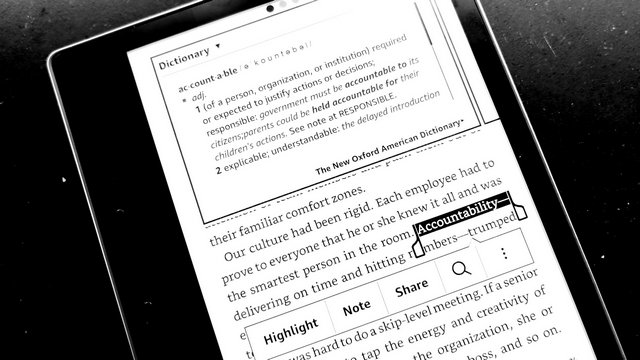
Während man Bücher liest, kann man Lesezeichen setzen, Wörter nachschlagen, Zitate teilen, Anmerkungen notieren, Inhalte clippen, usw. usf. All diese Tätigkeiten holen mich aus dem Flow. Ich lese auf dem Kindle nur Fiction. Für Sachbücher nehme ich lieber Surface.

IMG 20180404 130542

Die Fähigkeit, Wörter im Dictionary nachzuschlagen, liebt die Scheffin dagegen über alles. Das hat ihr beim Bookeen Ocean gefehlt. Ich treffe selten auf englische Wörter, die ich nicht kenne. Sollte es doch passieren, verstehe ich sie oft aus dem Zusammenhang.

Was ich sehr praktisch finde, ist die Integration in den Amazon Store. Man kann sich mal schnell Leseproben herunterladen und Bücher ohne Umweg erwerben. Das ist keine Eigenschaft des Oasis, sondern bei allen Kindle so. Oasis kommt in drei Konfigurationen: 8 GB WLAN, 32 GB WLAN und 32 GB WLAN+Gratis 3G. Die 32 GB braucht man nur, wenn man auch Audible nutzen will. Die 8 GB reichen bereits für Tausende von Büchern. "Gratis 3G" heißt, man braucht keinen Mobilfunkvertrag abzuschließen, um unterwegs Inhalte nachzuladen, wenn kein WLAN zur Verfügung steht. Jeder Kindle hat eine Email-Adresse, an die man persönliche Dokumente, etwa auch PDF-Dateien schicken kann. Wenn man das häufig macht, dann könnte sich die 3G-Variante lohnen. Ansonsten reicht es auch, wenn man sein Smartphone zum Access Point macht. Mein Kindle Reader der dritten Generation hat so eine Mobilfunkverbindung, aber ich habe sie nur selten genutzt.

04 Apr 14:26

Probier's mal aus!

by noreply@blogger.com (Christine Lehmann)
mkalus shared this story from Radfahren in Stuttgart.

Es würde klappen. Wenn Unternehmen ihren Angestellten ein Pedelec zur Verfügung stellen, steigt die Hälfte aufs Fahrrad um. 
Das hat einem Bericht von SWR 2 zufolge ein Test des Difu mit Berliner Unternehmen ergeben. Und selbst, wenn es nur ein Drittel wäre oder ein Viertel, so wäre der morgendliche Berufsverkehr in Stuttgart um 25 bis 33 Prozent entlastet. Das ist irre viel. Wobei wir in Stuttgart durchaus einige Fragen lösen müssten. Zum Beispiel, wo stellen Pedelec-Nutzer im Westen oder Osten oder Süden die teuren Fahrräder nachts hin, wenn sie keine Garage oder keinen halbwegs sicheren Hinterhof haben? Und wie schaffen wir Vertrauen in unsere Radinfrastruktur?

Viele, die nicht Rad fahren, sind nämlich überzeugt, dass es lebensgefährlich sei, in Stuttgart Rad zu fahren. Was übrigens tatsächlich nur die sagen, die nicht im Kessel Rad fahren. Denn das ist es definitiv nicht. Man muss sich nur sehr gut auskennen, um die Wege zu finden, die Spaß machen.

Der Frühling ist da. Ein guter Zeitpunkt, mal mit dem Fahrrad zur Arbeit fahren. 

Um herauszufinden, wie gut man in Stuttgart Rad fahren kann, muss man allerdings anfangen, mit dem Rad zu fahren: zum Einkaufen, zur Arbeit, zu Freund/innen. Man muss es probieren, nicht nur einmal, nicht nur, um eine Begründung dafür zu finden, warum es nicht geht. Die meisten Menschen, die entdecken, dass Rad fahren in Stuttgart viel besser geht als man gedacht hat, bleiben dabei, weil die Gefühle, mit denen man auf der Arbeit oder zu Hause ankommt, viel schöner sind als wenn man im Auto gefahren wäre. Das lässt sich gar nicht verhindern, denn allein die Bewegung bringt den Kreislauf in Schwung und hebt die Stimmung. Menschen bewegen sich gern, weil sich sich hinterher besser fühlen. Das Fahrrad ist ein einfaches Mittel, sich jeden Tag gute Gefühle zu verschaffen. Darum bleiben auch viele, die es ausprobiert haben, beim Fahrrad für den Weg zur Arbeit, zumal, wenn der nicht länger als 10 km ist, was man mit dem Pedelec locker zurücklegt.
Und je mehr das tun, desto eher schaffen wir es, dass unsere Stadtpolitiker/innen erkennen, wie dringend nötig es ist, die Weg zu gestalten, auf denen Radfahrende unterwegs sind. Derzeit werden Radfahrende als störend wahrgenommen, weil sie entweder Fußgänger auf Gehwegen stressen (über die sie geleitet werden) oder Autofahrer auf Fahrbahnen ausbremsen, weil Radstreifen und Radwege fehlen. Eine gute Radinfrastruktur schafft Frieden. Auch wenn sie hier und dort dem Autoverkehr etwas wegnimmt. Doch trennt man die Geschwindigkeiten von Radfahrenden und Autofahrenden, dann kommen auch Autos letztlich genauso schnell vorwärts wir vor dem Radstreifen, oft sogar schneller. 
So zun Beispiel sollte ein Weg zur Arbeit nicht aussehen. Das ist die Strecke, die man radeln muss, wenn man von Degerloch über die Epplestraße zum Pressezentrum in Möhringen oder zu Daimler radeln möchte. Es gibt keine durchgehende Radroute. Wer so nicht radeln will, muss spürbare Umwege fahren. (Planung für eine Radführung ist übrigens bei den Haushaltsberatungen  beantragt worden.)

Ebenso soll es sichere Fahrradabstellanlagen im Westen oder Süden geben, wenn sich mindestens vier Anwohner-Parteien zusammentun, die insgesamt acht Räder unterbringen wollen und eine ihrer Parkgenehmigungen abgeben. An der Umsetzung wird noch gearbeitet. Ich hoffe, ich kann bald mehr berichten. 
04 Apr 14:26

Exploring R-Bloggers Posts with the Feedly API

by hrbrmstr

There’s a yuge chance you’re reading this post (at least initially) on R-Bloggers right now (though you should also check out R Weekly and add their live feed to your RSS reader pronto!). It’s a central “watering hole” for R folks and is read by many (IIRC over 20,000 Feedly users have it in their OPML).

I’m addicted to Feedly and waited years for them to publish their API. They have and there will eventually be a package for it (go for it if you want to get’er done before me since I won’t have time to do it justice for a while). As just parenthetically noted, I’ve started work on one and have scaffolded just enough to give R folks a present: almost 5 years of R-Bloggers data — posts, engagement rates, authors, etc). But, you’ll have to put up with some expository, first.

Digging In

We’ll need some packages to help this expository and extraction. Plus, you’ll need to go to https://developer.feedly.com/ to get your developer token (NOTE: this requires a “Pro” account or a regular account and you manually doing the OAuth dance to get an access token; any final “Feedly package” by myself or others will likely use OAuth) and store it in your ~/.Renviron in FEEDLY_ACCESS_TOKEN.

I’ve sliced and diced bits from the (non-published) fledgling package to give a peek behind the API covers. There’s plenty of exposition in the following code block comment header to describe what it does:

#' Simplifying some example package setup for this non-pkg example
.pkgenv <- new.env(parent=emptyenv())
.pkgenv$token <- Sys.getenv("FEEDLY_ACCESS_TOKEN")

#' In reality, this is more complex since the non-toy example has to
#' refresh tokens when they expire.
.feedly_token <- function() {
  return(.pkgenv$token)
}

#' Get a chunk of a Feedly "stream"
#'
#' For the purposes of this short example, consider a
#' "stream" to be all the historical items in a feed.
#' (Note: the definition is more complex than that)
#'
#' Max "page size" (mad numbner of items returned in a single call)
#' is 1,000. For example simplicity, there's a blanket assumption
#' that if `continuation` is actually present, the caller is
#' savvy and asked for a large number of items (e.g. 10,000).
#' Therefore, assume we're paging by the thousands.
#'
#' @md
#' @param feed_id the id of the stream (for this examplea feed id)
#' @param ct numnber of items to retrieve (API will only return 1,000
#'        items for a single response and populate `continuation`
#'        with a value that should be passed to subsequent calls
#'        to page through the results; `ct` will be reset to 1,000
#'        internally if this is the case)
#' @param continuation see `ct`
#' @references <https://developer.feedly.com/v3/streams/>
#' @return for this example, an ugly `list`
feedly_stream <- function(stream_id, ct=100L, continuation=NULL) {

  ct <- as.integer(ct)

  if (!is.null(continuation)) ct <- 1000L

  httr::GET(
    url = "https://cloud.feedly.com/v3/streams/contents",
    httr::add_headers(
      `Authorization` = sprintf("OAuth %s", .feedly_token())
    ),
    query = list(
      streamId = stream_id,
      count = ct,
      continuation = continuation
    )
  ) -> res

  httr::stop_for_status(res)

  res <- httr::content(res, as="text")
  res <- jsonlite::fromJSON(res)

  res

}

We’ll grab 10,000 Feedly entries for the R-Bloggers feed stream:

r_bloggers_feed_id <- "feed/http://feeds.feedburner.com/RBloggers"

rb_stream <- feedly_stream(r_bloggers_feed_id, 10000L)

# preallocate space
streams <- vector("list", 10)
streams[1L] <- list(rb_stream)

# gotta catch'em all!
idx <- 2L
while(length(rb_stream$continuation) > 0) {
  cat(".", sep="") # poor dude's progress par
  feedly_stream(
    stream_id = r_bloggers_feed_id,
    ct = 1000L,
    continuation = rb_stream$continuation
  ) -> rb_stream
  streams[idx] <- list(rb_stream)
  idx <- idx + 1L
}
cat("\n")

For those who aren’t used to piecing together bits from API’s like this (and for those who do not have a Pro account, those who didn’t want to write OAuth code or those who don’t use Feedly and cannot reproduce the post example), here’s some dissection:

str(streams, 1)
## List of 12
##  $ :List of 7
##  $ :List of 7
##  $ :List of 7
##  $ :List of 7
##  $ :List of 7
##  $ :List of 7
##  $ :List of 7
##  $ :List of 7
##  $ :List of 7
##  $ :List of 7
##  $ :List of 7
##  $ :List of 6 # No "continuation" in this one

str(streams[[1]], 1)
## List of 7
##  $ id          : chr "feed/http://feeds.feedburner.com/RBloggers"
##  $ title       : chr "R-bloggers"
##  $ direction   : chr "ltr"
##  $ updated     : num 1.52e+12
##  $ alternate   :'data.frame':	1 obs. of  2 variables:
##  $ continuation: chr "15f457e2b66:160d6e:8cbd7d4f"
##  $ items       :'data.frame':	1000 obs. of  22 variables:

glimpse(streams[[1]]$items)
## Observations: 1,000
## Variables: 22
## $ id             <chr> "XGq6cYRY3hH9/vdZr0WOJiPdAe0u6dQ2ddUFEsTqP10=_1628f55fc26:7feb...
## $ keywords       <list> ["R bloggers", "R bloggers", "R bloggers", "R bloggers", "R b...
## $ originId       <chr> "https://tjmahr.github.io/ridgelines-in-bayesplot-1-5-0-releas...
## $ fingerprint    <chr> "f96c93f7", "9b2344db", "ca3762c8", "980635d0", "fbd60fac", "6...
## $ content        <data.frame> c("<p><div><div><div><div data-show-faces=\"false\" dat...
## $ title          <chr> "Ridgelines in bayesplot 1.5.0", "Mathematical art in R", "R a...
## $ published      <dbl> 1.522732e+12, 1.522796e+12, 1.522714e+12, 1.522714e+12, 1.5227...
## $ crawled        <dbl> 1.522823e+12, 1.522809e+12, 1.522794e+12, 1.522793e+12, 1.5227...
## $ canonical      <list> [<https://www.r-bloggers.com/ridgelines-in-bayesplot-1-5-0/, ...
## $ origin         <data.frame> c("feed/http://feeds.feedburner.com/RBloggers", "feed/h...
## $ author         <chr> "Higher Order Functions", "David Smith", "R Views", "rOpenSci ...
## $ alternate      <list> [<http://feedproxy.google.com/~r/RBloggers/~3/O5DIWloFJO8/, t...
## $ summary        <data.frame> c("At the end of March, Jonah Gabry and I released\nbay...
## $ visual         <data.frame> c("feedly-nikon-v3.1", "feedly-nikon-v3.1", "feedly-nik...
## $ unread         <lgl> TRUE, TRUE, FALSE, FALSE, FALSE, FALSE, FALSE, FALSE, FALSE, F...
## $ categories     <list> [<user/c45e5b02-5a96-464c-bf77-4eea75409c3d/category/big data...
## $ engagement     <int> 9, 37, 52, 15, 78, 35, 31, 9, 28, 2, 21, 8, 25, 11, 21, 29, 12...
## $ engagementRate <dbl> 0.41, 1.37, 1.58, 0.45, 2.23, 0.97, 0.84, 0.23, 0.72, 0.05, 0....
## $ recrawled      <dbl> NA, NA, NA, NA, NA, NA, NA, NA, 1.522807e+12, NA, NA, NA, NA, ...
## $ tags           <list> [NULL, NULL, NULL, NULL, NULL, NULL, NULL, NULL, NULL, NULL, ...
## $ decorations    <data.frame> c("NA", "NA", "NA", "NA", "NA", "NA", "NA", "NA", "NA",...
## $ enclosure      <list> [NULL, NULL, NULL, NULL, NULL, NULL, NULL, NULL, NULL, NULL, ...

That entries structure is defined in the Feedly API docs.

We’ll extract the bits we want to use for the rest of the post and clean it up a bit:

map_df(streams, ~{
  select(.x$items, title, author, published, engagement) %>%
    mutate(published = anytime::anydate(published / 1000)) %>% # overly-high-resolution timestamp
    tbl_df()
}) -> xdf

glimpse(xdf)
## Observations: 11,421
## Variables: 4
## $ title      <chr> "Ridgelines in bayesplot 1.5.0", "Mathematical art in R", "R and T...
## $ author     <chr> "Higher Order Functions", "David Smith", "R Views", "rOpenSci - op...
## $ published  <date> 2018-04-03, 2018-04-03, 2018-04-02, 2018-04-02, 2018-04-03, 2018-...
## $ engagement <int> 9, 37, 52, 15, 78, 35, 31, 9, 28, 2, 21, 8, 25, 11, 21, 29, 12, 11...

Using an arbitrary “10,000” extract didn’t give us full months:

range(xdf$published)
## [1] "2013-05-31" "2018-04-03"

so we’ll filter out the incomplete bits and add in some additional temporal metadata:

xdf %>%
  filter(
    published > as.Date("2013-05-31"),  # complete months
    published < as.Date("2018-04-01")
  ) %>%
  mutate(
    year = as.integer(lubridate::year(published)),
    month = lubridate::month(published, label=TRUE, abbr=TRUE),
    wday = lubridate::wday(published, label=TRUE, abbr=TRUE),
    ym = as.Date(format(published, "%Y-%m-01"))
  ) -> xdf

I’m only going to do some light analysis work with engagement data (how “popular” a post was) but the full post summary and body content is available in the data dump you’re going to get at the end (this is reminding me of the Sesame Street “Monster at the End of This Book” story). That means enterprising folk can do some tidy text mining to cluster away some additional insights.

Thankfully, there’s not a ton of missing engagement data:

sum(is.na(xdf$engagement)) / nrow(xdf)
## [1] 0.06506849

broom::tidy((summary(xdf$engagement)))
##   minimum q1 median     mean q3 maximum  na
## 1       0  5     20 69.27219 75    4785 741

Let’s look at post count over time, first:

count(xdf, ym) %>%
  arrange(ym) %>%
  ggplot(aes(ym, n)) +
  ggforce::geom_bspline0(color="lightslategray") +
  scale_x_date(expand=c(0,0.5)) +
  labs(
    x=NULL, y="Post count",
    title="R-Bloggers Post Count",
    subtitle="June 2013 — March 2018"
  ) +
  theme_ipsum_ps(grid="XY")

It’ll be interesting to watch that over this year and compare 2017 to 2018 given how “hot” 2017 seems to have been. To turn a Mythbuster phrase: a neat “try this at home” exercise would be to tease out some “whys” for various spikes (which likely means some post content spelunking).

Let’s see if any days are more popular than others:

count(xdf, wday) %>%
  ggplot(aes(wday, n)) +
  geom_col(fill="lightslategray", width=0.65) +
  scale_y_comma() +
  labs(
    x=NULL, y="Post count",
    title="R-Bloggers Aggregate Post Count By Day of Week"
  ) +
  theme_ipsum_ps(grid="Y")

Weekends are sleepy and there are some “go-getters” at the beginning of the week. More “try this at home” would be to see if any individuals have “patterns” by day of week (or even time of day, since that’s also available in the published time stamp).

The summary() above told us we have a pretty skewed engagement distribution, but it’s always nice to visualise just how bad it is:

ggplot(xdf, aes(engagement)) +
  geom_density(aes(y=calc(count)), fill="lightslategray", alpha=2/3) +
  scale_x_comma() +
  scale_y_comma() +
  labs(
    x=NULL, y="Engagement",
    title = "R-Bloggers Post Engagement Distribution",
    subtitle = "June 2013 — March 2018"
  ) +
  theme_ipsum_ps(grid="XY")

That graph is the story of my daily life dealing with internet data. Couldn’t even get a break when trying to have some fun. #sigh

We’ll close with the “all time top 10” based on total engagement:

count(xdf, author, wt=engagement, sort=TRUE)
## # A tibble: 1,065 x 2
##    author               n
##  1 David Smith      87381
##  2 Tal Galili       29302
##  3 Joseph Rickert   16846
##  4 DataCamp Blog    14402
##  5 DataCamp         14208
##  6 John Mount       13274
##  7 Francis Smart     8506
##  8 hadleywickham     8129
##  9 hrbrmstr          7855
## 10 Sharp Sight Labs  7620
## # ... with 1,055 more rows

@revodavid is a blogging machine, and that top-spot is well-deserved given the plethora of interesting, useful and fun content he shares. And, it looks like someone only needs to blog a bit more this year to overtake @hadley (I’m comin’ fer ya, Hadley!).

FIN

As promised, you can get the data in a ~30MB RDS file via https://rud.is/dl/r-bloggers-feedly-streams.rds and can then use the extraction-to-data-frame example from above to work with the bits you care about.

Hopefully folks will have some fun with this and share their results!

04 Apr 14:25

Will Cambridge Analytica Spark a Data Reformation?

by David Banks

several steeples with different world religion symbols atop each peak with the highest one with the facebook F

Colin Koopman, an associate professor of philosophy and director of new media and culture at the University of Oregon, wrote an opinion piece in the New York Times last month that situated the recent Cambridge Analytica debacle within a larger history of data ethics. Such work is crucial because, as Koopman argues, we are increasingly living with the consequences of unaccountable algorithmic decision making in our politics and the fact that “such threats to democracy are now possible is due in part to the fact that our society lacks an information ethics adequate to its deepening dependence on data.” It shouldn’t be a surprise that we are facing massive, unprecedented privacy problems when we let digital technologies far outpace discussions around ethics or care for data.

For Koopman the answer to our Big Data Problems is a society-spanning change in our relationship to data:

It would also establish cultural expectations, fortified by extensive education in high schools and colleges, requiring us to think about data technologies as we build them, not after they have already profiled, categorized and otherwise informationalized millions of people. Students who will later turn their talents to the great challenges of data science would also be trained to consider the ethical design and use of the technologies they will someday unleash.

Koopman is right, in my estimation, that the response to widespread mishandling of data is an equally broad corrective. Something that is baked into everyone’s socializing, not just professionals or regulators. There’s still something that itches though. Something that doesn’t feel quite right. Let me get at it with a short digression.

One of the first and foremost projects Cyborgology ever undertook was a campaign to stop thinking of what happens online as separate and distinct from a so-called “real world.” Nathan Jurgenson originally called this fallacy “digital dualism” and for the better part of a decade all of us have tried to show the consequences for adopting digital dualism. Most of these arguments involved preserving the dignity of individuals and pointing out the condescending, often ablest and ahistorical precepts that one had to accept in order to agree with digital dualists’ arguments. (I’ve included what I think is a fairly inclusive list of all of our writing on this below.) What was endlessly frustrating was that in doing so, we were often, to put it in my co-editor Jenny Davis’ words, “find [our]selves in the position of technological apologist, enthusiast, or utopian.”

Today I must admit that I’m haunted by how much time was wasted in this debate. That we and many others had to advocate for the reality of digital sociality before we could get to its consequences and now those consequences are here and everyone was caught flat-footed. I don’t mean to over-state my case here. I do not think that eye roll-worthy Atlantic articles are directly responsible for why so many people were ignoring obvious signs that Silicon Valley was building a business model based on mass surveillance for hire. What I would argue though, is that it is easy to go from “Google makes us stupid and Facebook makes us lonely” to “Google and Facebook can do anything to anyone.”  Social media has gone from inauthentic sociality to magical political weapons. Neither condition reckons with the digital in a nuanced, thoughtful way. Instead it foregrounds technology as a deterministic force and relegates human decision-making to good intentions gone bad and hapless end users.

This is all the more frustrating, or even anger-inducing when you think about the fact that so many disconnectionists weren’t doing much more than hocking a corporate-friendly self-help regimen that put the onus on individuals to change and left management off the hook. Nowhere in Turkle, Carr, and now Twenge’s work will you find, for example, stories about bosses expecting their young social media interns to use their private accounts or do work outside of normal business hours.

All this makes it feel really easy to blame the victims when it comes to near-future autopsies of Cambridge Analytica. How many times are we going to hear about people not having the right data “diet” or “hygiene” regimen?  How often are writers going to take the motivations and intentions of Facebook as immutable and go directly to what individuals can or should do? You can also expect parents to be brow beaten into taking full responsibility for their children’s data too.

Which brings me back to Koopman’s prescription. I’m always reticent to add another thing to teachers’ full course loads and syllabi. In my work on engineering pedagogy I make a point of saying that pedagogical content has to be changed or replaced, not added. And so here I want to focus on the part that Koopman understandably side-steps: the change in cultural expectations. Where is the bulk of that change going to be placed? Who will do that work? Who will be held responsible?

I’m reminded of the Atomic Priesthood, one of several admittedly “out there” ideas from the Human Interference Task Force whose job it was to assure that people 10 to 24 thousand years later would stay away from buried fissile material. It is one of the ultimate communication problems because you cannot reliably assume any shared meaning. Instead of a physical sign or monument, linguist Thomas Sebeok suggested an institution modeled off organized religion. Religions, after all, are probably the oldest and most robust means of projecting complex information into the future.

A Data Priesthood sounds overwrought and a bit, dramatic? But I think the kernel of the idea is sound: the best way we know how to relate complex ethical ideas is to build ritual and myth around core tenets. If we do such a thing, might I suggest we try to involve everybody but keep the majority of critical concern on those that are looking to use data, not the subjects of that data. This Data Reformation, if you will, has to increase scrutiny in proportion to power. If everyone is equally responsible then those that play with and profit off of the data can always hide behind an individualistic moral code that blames the victim for not doing enough to keep their own data secure.

David is on Twitter

Past Works on Digital Dualism:

What if Facebook but Too Religious image credit: Universal Life Church Monastery

04 Apr 14:25

No easy answers

by Doug Belshaw

In the early days of new ‘disruptive’ technologies (see MOOCs, blockchain, Open Badges…) the rhetoric is always about how one thing will replace something else, democratise a system, and/or reduce costs. While the latter is usually true, unfortunately what tends to happen is that existing power dynamics, far from being disrupted, are reinforced.

I’m thinking about these things after conversations with a whole range of people about Project MoodleNet — including one with Stephen Downes yesterday. There’s no such thing as a neutral system, so every time you design a new technology-based system, you’re designing to reinforce or subvert existing power structures.

Take, for example, private schools and elite universities. There’s a vested interest for almost everyone in their ecosystem to maintain their status. After all, if the reputation of the school or university is tarnished, the value of the credential earned by an individual from that institution could be reduced by implication.

That reduction in a credential’s value wouldn’t be so significant if the time for which it is deemed relevant were shorter than, say, a lifetime. I earned a doctorate from a top-tier university just over five years ago, a Masters degree fifteen years ago, and a Bachelor of Arts degree a year before that. At what point should these be deemed to have ‘expired’. Should they? It’s an interesting question, and may depend on discipline.

Back to designing technological systems, and the immediate and pressing question is over how to gain traction. The easiest way of doing this, of course, is to appeal to existing and entrenched privilege. You scratch my back and I’ll scratch yours: I’ll give you privileged status in my new system if you allow me to lean on your existing reputation.

What’s the opposite of that? Well, I guess it’s the approach that was attempted in the early days of Open Badges. In other words, create an ecosystem that puts everyone on an equal playing field, and see what happens. Interestingly, while the existing status quo (awarding bodies, universities, professional organisations) have used it to shore-up their position, there’s also new players.

Ideally, I’d like Project MoodleNet to work for everyone. I’d like the teacher in a developing country with few resources to be able to get the same amount of kudos and recognition as the educator in an elite university. The difficulty, of course, is designing a system that doesn’t feel like it’s stacked in favour of one over the other…


Image: Levelling the Playing Field by Bryan Mathers shared under a CC BY-ND license