Shared posts

05 Jun 08:44

The Best Shoes for Indoor Cycling

by Amy Roberts
The Best Shoes for Indoor Cycling

After a dozen hours of research, we learned that “indoor cycling shoes” aren’t really a thing yet—and that surprised us, since having your own shoes with cleats aligned for your body mechanics can go a long way toward reducing hip and knee injury. So we took a dozen indoor cycling classes and conducted multiple interviews with experts and laypeople alike, and we concluded that the Louis Garneau Multi Air Flex cycling shoes (available in men’s and women’s versions) are the best shoes for most people to use in spin classes. They’re breathable and comfortable, and they’re both efficient on the bike and safe to walk in.

05 Jun 08:42

iOS 12 brings iPhone X-like gestures to Apple’s iPad

by Patrick O'Rourke
iPad Pro

It looks like, despite the fact that Apple didn’t announce a new, notch-featuring iPad Pro today at WWDC, that iOS 12 is still set to bring the iPhone X’s gestures to Apple’s tablet.

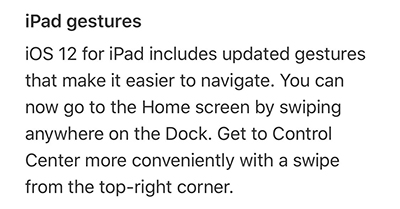
With iOS 12, iPad users will be able to swipe up to get back to the home screen and open the control centre by swiping from the top right corner of the display, according to Apple’s list of iOS 12 features.


Further, while Apple’s list of iOS 12 features doesn’t explicitly state that iPhone X-like multi-tasking is coming to the iPad, it’s likely that the smartphone’s swipe-up-and-hold multi-tasking gesture is also coming to Apple’s tablet.

9to5Mac also notes that the time in the status bar on the iPad has also been moved to the left side of the display. What’s more interesting about this news, however, is that it effectively confirms that a nearly bezel-less iPad Pro is on the way at some point in the near future.

It’s likely that we’ll learn more about Apple’s next-generation iPad Pro at the company’s annual September hardware launch event.

Via: 9to5Mac

The post iOS 12 brings iPhone X-like gestures to Apple’s iPad appeared first on MobileSyrup.

05 Jun 08:42

City Guide: Vancouver's Main Street

by Alison Mazurek
Us in Liberty by Modern Nest Photography

Us in Liberty by Modern Nest Photography

I love when locals tell me where to eat, play and shop in their neighbourhood when I'm travelling. So I realized what is the point of a blog if you don't give a guide for your own city! So here is my neighbourhood at a glance.  If you like it, I'll try and do a few more around Vancouver. Would recommend visiting in the summer if you can but late spring and early fall is nice too. Please comment below with other ideas and places you love in the neighbourhood!


EAT

La Taqueria // 2521 Main Street

A taco shop I have been frequenting at many of their locations for years and now they've moved onto my street (dangerous!). Their tacos truly remind me of Mexico.

Don’t Argue! Pizzeria // 3240 Main Street

On a Friday evening with the sun streaming through the windows we can bring the kids and grab slices or a pie and a glass of cider/beer.  Feels like we can still get out and enjoy ourselves (with kids).

Burdock and Co. // 2702 Main Street

On the rare occasion we have a sitter, I love that we can walk a block and feel like we are in another world.  Drinking natural wines and eating whatever they are serving because it never disappoints.

Earnest Ice Cream // 1829 Quebec Street

Probably should be considered in an Olympic Village guide but we all make the trek down the hill and wait for 45 mins for this ice cream because it is that good. 

(This list could go on... a few more mentions The Fish Counter (best oceanwise fish and chips), Ahn and Chi (modern vietnamese), Budgies Burritos (cheapest, best kids meals, veggie burritos), The Acorn (date night vegetarian), Toshi Sushi (worth the lineup)


DRINK

Liberty Bakery // 3699 Main Street

Most beautiful space to have a coffee and baked good or sandwich. It is owned and designed by artists and every detail has been considered. Still need to find out the source of their pottery. Also they have wifi and is the dreamiest spot to work for an hour or two.

Elysian Coffee // 2301 Ontario Street

It’s a beautiful, minimal space with light wood, concrete and felt topped metal stools.  I love their coffee but they also hire the most wonderful people who are always kind to me and my kids even if we aren’t always the perfect guests (ie. spilled coffee, too many strollers, no-cookie-today tantrums). And then pop over across the street to 7e7 and Wildbunch Florist to grab a bunch of artful flowers and be inspired by the visionary Janaki Larsen.

33 Acres // 15 West 8th Avenue

Main Street is full of breweries (you can do an entire tour within a few blocks) but 33 is the place for me.  I like their Sunshine beer and their white walls and plants. 


PLAY

Collage Collage // 3697 Main Street

One of my favourite shops for anything kid related (and art for me!).  It is also the only art class that can keep my very physical boy to sit still.  The owner Erin has the best taste in kids books.  The shop and classes are run by artists and I am constantly inspired by the projects they put together.

Mount Pleasant Park // 3161 Ontario Street

We go to pretty much every park within a 15 block radius but our favourite is Mount Pleasant with a newer playground, skate park, basketball courts, community garden and grass fields.


SHOP

Much and Little // 2541 Main Street

I have been buying most of my gifts here for years and sometimes something special for me.  The owner Sarah has impeccable taste and carries home wares, accessories, a small assortment for kids and an expanding line of ethical clothes for women.  If my home and closet were from Much and Little, I would be in heaven.

Vancouver Special // 3612 Main Street

Carrying all the Scandinavian and modern designs of my dreams (Hay, Muuto, Ferm Living and on and on).  I save up and purchase items here that are beautiful, timeless and high quality.

Woo To See You // 3671 Main Street

I love this shop for unique stylish clothes that are well-made. Most of these pieces are in the oversized style but somehow I can still wear them even though I'm short. It's a gem.

Welk's General Store // 3511 Main Street

I'm here more than I should admit for soap, toothpaste, plants, chips... They really capture Vancouver in one store. Would be a good stop for anyone travelling and missing essentials.

Modern Nest Photography

Modern Nest Photography

Please comment below with other ideas and places you love in the neighbourhood. It was so tough to narrow down favourites and I'm sure I missed a few!

05 Jun 08:38

Microsoft Is Said to Have Agreed to Acquire GitHub

by Rui Carmo

Around two years ago, a high-ranking exec turned to me at a dinner party and asked me what the heck I was doing at Microsoft with my OpenSource background and (I quote) “actual tech experience”.

I’m prone to wondering that myself sometimes, but stuff like this gives me heart.

On the other hand, it feels totally unreal. It’s as if a million repositories suddenly cried out…

Ah well. Let’s see how things pan out.

Update: Official blog post, presentation. $7.5B–not bad at all…

HackerNews, of course, has gone ballistic at least twice.

05 Jun 08:38

macOS Mojave

by Rui Carmo

Well, dark mode and the preliminary UIKit ports seem nice, and I wasn’t really expecting any new hardware, but bringing Stacks back a decade later and neutering CoverFlow seems, well… Not very imaginative, really.

Best takeaways from the keynote for me? The committment to iOS 12 support across the entire current range (which is impressive) and with performance increases (which I hope will actually happen), plus the rebirth of Workflow as Shortcuts.

Hopefully there’ll be a migration path that lets me re-build all the workflows I have with third-party apps–otherwise, it’ll be more than a little awkward.

Also, kind of sad to see Podcasts show up on the Watch and semi-Sherlock Overcast. I’ve avoided the built-in app so far because Overcast has very neat audio processing (and will likely keep using it), but…

05 Jun 08:37

Transmit 5: The Gold-Standard of macOS File Transfer Apps [Sponsor]

by John Voorhees

Transmit 5 by Panic takes the hassle out of managing files on a server and locally. For 20 years, Mac users have relied on Transmit for FTP and SFTP file transfers. That remains one of Transmit’s core strengths, but the app has evolved into much more.

Transmit’s power starts with its design. The clean, two-pane design makes it easy to understand which files are on your local drive and where they’re going. With version 5, Panic focused on every element, refining and modernizing its design, while remaining familiar to long-time users.

The app still works with FTP, SFTP, WebDAV, and S3, but it also works with Amazon Drive, Backblaze B2, Box.com, DreamObjects, Dropbox, Google Drive, Microsoft OneDrive and Azure, OpenStack Swift, Rackspace Cloud Files, and more, bringing a native Mac app experience to every service.

The new cloud support opens up all sorts of possibilities. For example, Transmit can see your entire Dropbox, even if you sync only a subset of your files to your Mac. That means if you’re short on storage space, you can turn off Dropbox sync for a folder full of large files with the peace of mind of knowing you can still access them with Transmit.

Transmit 5 has other great features too. It supports:

  • Panic Sync, which provides secure, encrypted sync of your data across all of the Panic products you use;
  • File Sync, which keeps your files in sync across local and remote computers, or even multiple local machines;
  • Batch file renaming; and
  • Yubikey devices and the Krypton iOS app for easy, secure password-less connections.

Transmit is also much, much faster than its predecessor.

Whether you’re managing a server, or even just local files across multiple drives, Transmit 5 is the tool with the flexibility and power you need to get the job done quickly, safely, and securely.

MacStories readers can purchase Transmit directly from Panic using this link to receive 20% off automatically at checkout through June 11, 2018. As announced earlier today, Transmit will be returning to the Mac App Store later this year as a subscription-based app. You will still be able to buy Transmit directly from Panic for an up-front payment, but whether you buy now or subscribe later, be sure to visit Panic’s website to learn more about Transmit 5.


Support MacStories Directly

Club MacStories offers exclusive access to extra MacStories content, delivered every week; it's also a way to support us directly.

Club MacStories will help you discover the best apps for your devices and get the most out of your iPhone, iPad, and Mac. Plus, it's made in Italy.

Join Now
05 Jun 08:37

Apple Redesigns Mac App Store with iOS-like Editorial Focus, New Product Pages, and More

by John Voorhees

During the WWDC keynote today, Apple announced a redesigned Mac App Store, elements of which leaked this past Saturday in a 30-second Mac App Store preview video for Xcode 10.1 The video was discovered by Steve Troughton-Smith:

Unlike the iOS App Store, the Mac App Store has never included preview videos, which indicated additional Mac App Store improvements were likely.

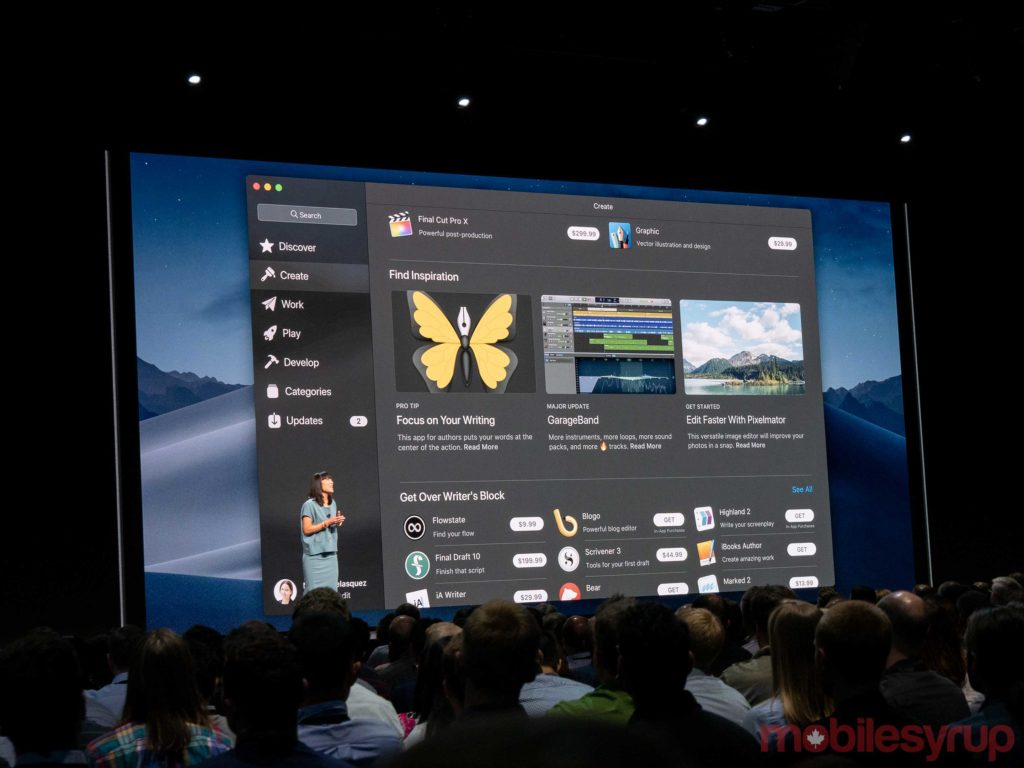
Those suspicions were confirmed during the keynote this morning when Apple revealed an ambitious redesign of the Mac App Store. The update takes several cues from the iOS App Store, implementing lessons learned from that store’s successful update in iOS 11.

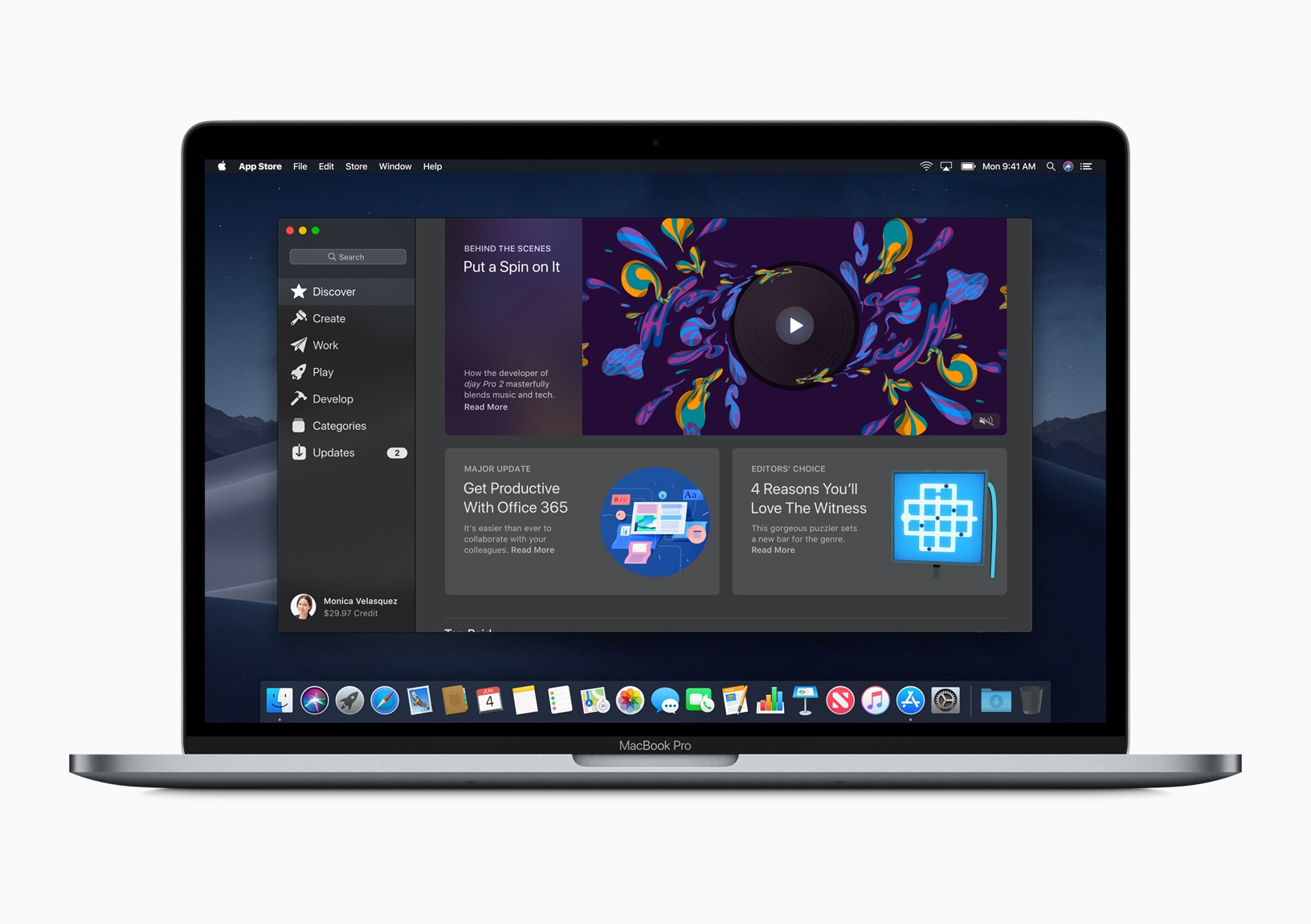
The redesign of the upcoming Mac App Store includes functionality similar in many respects to the iOS App Store. The app is divided into several new sections in a panel along the left side of the window including:

  • Discover
  • Create
  • Work
  • Play
  • Develop

The Discover section is where most of the new editorial content will be found along with top charts. The Create, Work, Play, and Develop sections will feature collections, tips, and app recommendations themed to correspond with each section.

The video previews are part of new product pages that focus on screenshots and videos to showcase each app. Like the iOS App Store, the new Mac App Store will include information about whether an app is charting, whether it’s been picked by Apple as an Editor’s Choice, and more prominent ratings.

As the changes announced implicitly acknowledge though, the problems with the Mac App Store run deeper than its design. The Mac App Store has suffered since its inception from editorial neglect, a lack of feature parity with its iOS counterpart, the lack of access to TestFlight beta testing, and restrictive sandboxing that has made selling outside the store more attractive to many developers.

With the update to the Mac App Store in the fall, Apple is addressing some of those issues including sandboxing restrictions. According to Panic, which is bringing Transmit back to the Mac App Store and is sponsoring MacStories’ WWDC coverage this week:

Those sandboxing changes, along with the redesigned store and other changes have attracted several apps that have never been on the Mac App Store or previously left the Mac App Store including:

  • Microsoft’s Office 365
  • Adobe’s Lightroom CC
  • Panic’s Transmit
  • Bare Bones’ BBEdit
  • Snap’s Live Studio
  • Houseparty

The changes to the Mac App Store previewed by Apple today are encouraging, especially given the success the iOS App Store has enjoyed since iOS 11’s release. Still, the update needs to be successfully executed by Apple and accepted by Mac developers, many of whom have lost faith in its viability. Apple seems to understand the success of the Mac App Store is dependent on both, which is why today’s presentation included the announcement that well-known apps from big corporations and independent developers are participating in the redesigned store this fall. Only time will tell whether the changes announced today will be enough to revitalize the Mac App Store.


You can also follow all of our WWDC coverage through our WWDC 2018 hub, or subscribe to the dedicated WWDC 2018 RSS feed.


  1. The short video, which leaked via the iTunes Search API, also revealed a system-wide macOS dark mode and an Apple News app, which are discussed in detail elsewhere in our WWDC coverage. ↩︎

Support MacStories Directly

Club MacStories offers exclusive access to extra MacStories content, delivered every week; it's also a way to support us directly.

Club MacStories will help you discover the best apps for your devices and get the most out of your iPhone, iPad, and Mac. Plus, it's made in Italy.

Join Now
05 Jun 08:37

Microsoft to acquire GitHub for $7.5 billion

files/images/IMG_0329-Edit-868x1024.jpg

Microsoft, Jun 07, 2018


Icon

This is an announcement that will send shockwaves through the developer community. Here's the promise (we'll see if it's actually kept): " GitHub will retain its developer-first ethos and will operate independently to provide an open platform for all developers in all industries. Developers will continue to be able to use the programming languages, tools and operating systems of their choice for their projects — and will still be able to deploy their code to any operating system, any cloud and any device."

Web: [Direct Link] [This Post]
05 Jun 08:36

Recommended on Medium: GitHub, Glitch and the Future of Social Coding

Here’s the short version: We’re excited about GitHub becoming part of Microsoft, and think it’ll be good news for developers. But based on the huge adoption we’re seeing for Glitch and our own decade of experience in building version control tools, it’s clear many developers also think it’s time to explore new approaches, so we want to build on this milestone for the coding community by articulating a new vision for social coding.

GitHub + Microsoft = Good 👍

Let’s put it short and sweet: Microsoft buying GitHub is likely to be good news for developers. There’s no better evidence of how Microsoft has been revitalized under the leadership of Satya Nadella than to point to bold moves like this, which would have seemed incredible (and also not seemed credible!) in the past. Old-timers can remember when Microsoft was often described as the Evil Empire, but their moves to embrace open source and non-Windows platforms have seemed sincere and sustained, and we’re happy to see that flourish.

Similarly, GitHub has earned its place as an indispensable developer platform through breaking ground as the first large-scale social coding experience over 10 years ago. Having strong leadership from Microsoft can only be good news, especially for developers using Microsoft platforms.

But if we have a concern, it’s that there hasn’t been a huge leap forward in social coding in the last decade. We simply haven’t seen enough innovation in recent years in the way that coders collaborate, and since every developer will be thinking about these big ideas right now, we wanted to paint a picture of what social coding could look like over the next decade. A lot of people will (understandably) be thinking about backing up their GitHub projects just in case, and we think you should use that opportunity to look at Glitch and consider if it’s time to rethink traditional views on version control entirely.

(Spoilers: If you’re using Glitch, you’ve already got a preview of where we’re headed. If you’re not, here’s how to import a GitHub repo to Glitch. If you have a Node app that you’ve built or like to use, start with that!)

https://medium.com/media/17f9f8d2912a60aae8760e46815c41bf/href

A Decade of Building Better Version Control ⏪

First, some background. Many developers may not know this, but at Fog Creek, we have a deep background in distributed version control systems. We launched Kiln (now available as an integrated version control system in Manuscript) almost a decade ago with a number of groundbreaking features for teams to collaborate on coding. Our path was to take great project management and add version control to it, and this approach taught us a lot about how people can do their best coding together.

We learned exactly what parts of the typical commit-pull request-merge workflow were still far too difficult and complex to understand.

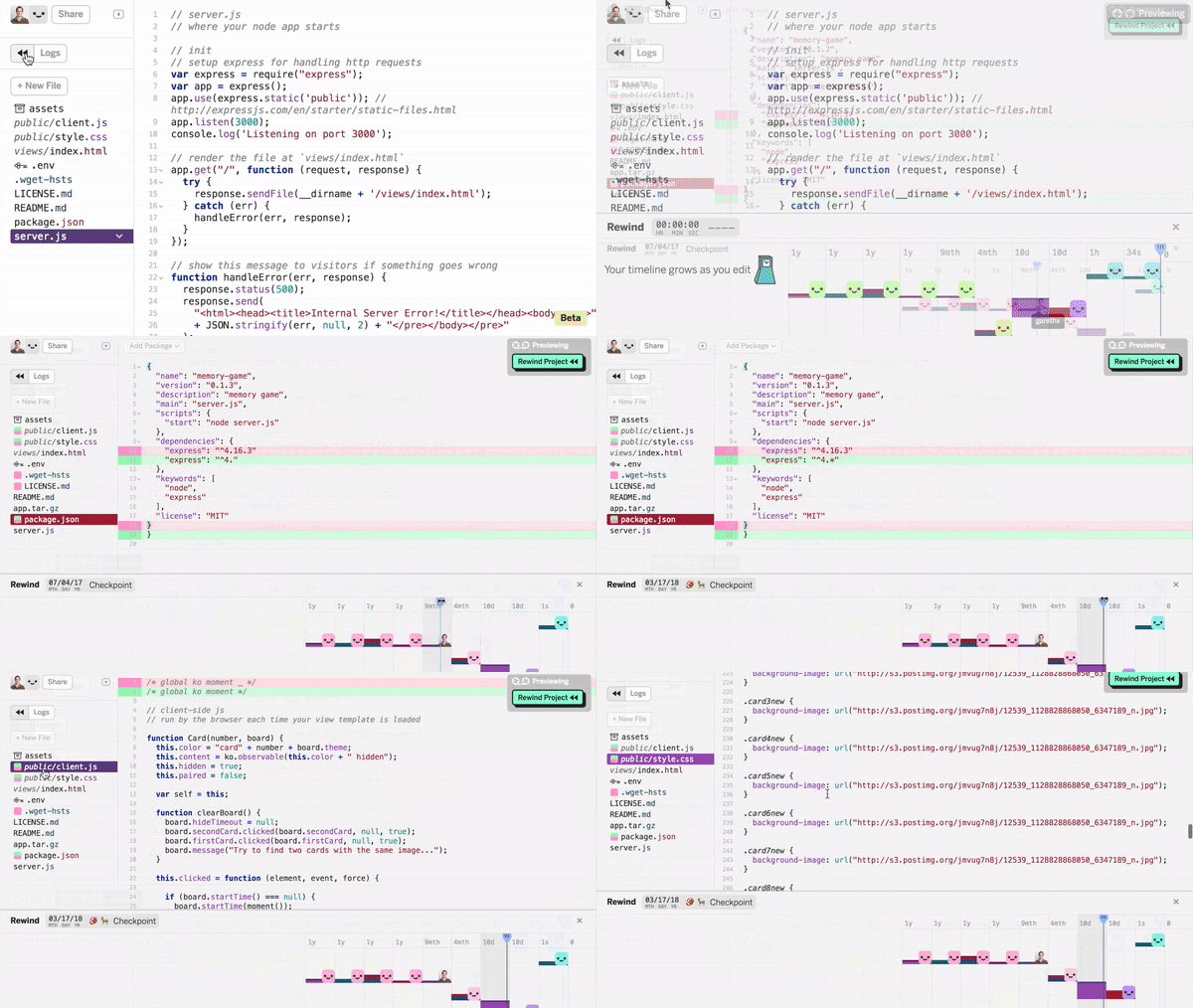
Based on what we had learned, and what we heard from the developer community, we started rethinking some of the assumptions about workflow and collaboration that everyone was taking for granted in version control. Then, earlier this year, we brought Glitch out of beta with a complete re-imagining of version control, and we called it Glitch Rewind. It uses regular git under the hood, but the user experience is a huge leap forward.

Rewinding code commits in Glitch

Glitch Rewind & Reinventing Social Coding 💡

Glitch does a few things nobody’s pulled off before:

  • Glitch automatically commits your changes while you work to a git repo in the background — even with multiple simultaneous people editing the same file at the same time. Imagine if the basic commit process was as easy, and as multi-player, as editing in Google Docs. Even non-devs can do it instantly.
  • Glitch Rewind lets you roll back commits on a project just by moving back a slider like you’re rewinding a video. If you want to work from that older version, just hit play and keep working. You’ll get a live preview of your changes as you slide around the timeline. Anybody who can play a YouTube video can revert git commits now. Even if you do know the arcane git command line options, you’ll prefer working this way most of the time.
  • Under the hood, it’s all just git. This means your tools, processes, workflows, integrations and automations can move seamlessly over to projects on Glitch.
  • We’re building on Glitch’s “remix” feature that lets you clone live, running, code and will make merging changes from remixes as easy as rewinding commits is today.
  • Glitch’s project pages and user profiles are an open source project maintained on Glitch itself. That means if you want the community features and social networking features on Glitch to evolve, you can make it happen yourself, and become part of a vibrant new community when you do so.
  • The business tools you use to collaborate on code should be a seamlessly connected part of the larger network where everyone codes together. Glitch for Teams is bringing all the power of Glitch’s collaboration to your work, but without the complexity of having to go through an enterprise procurement process.
  • Glitch is also trying to be a better, more inclusive community with everything from a friendly and approachable design, to built-in tools for managing codes of conduct and licensing, to our unique Glitch Help feature — if you get stuck coding on Glitch, you can just raise your hand to ask for help!

We’ve got more coming, but you have to see it in action to really understand the magic.

https://medium.com/media/f27fc26801d26440786a543addf8ccb2/href

What about other tools? 🤔

The skeptics among you must be thinking, “Well, that’s all fine, but we’ve got GitLab or BitBucket as alternatives now, why not just use those?” And those are great tools! But they make the same fundamental assumptions about workflow that all the older generation of tools — including our own — had settled upon.

We now think those assumptions didn’t try hard enough. This is where we want to raise the bar:

  • The basic building block of social coding should be an app, not a commit. The default state of a project should be a functional, running app or site or bot, not a pile of code that you then have to figure out how to get running. (“Start from something that works.”)
  • Creativity is enabled when everyone can make changes to code and try new things out without fear, thanks to automatically being able to undo any change.
  • Every member of your team should be able to commit to a project, even if they’ve never coded before, don’t know what git is, or haven’t even heard of git.
  • Even experienced developers shouldn’t have to memorize obscure command line tools for common tasks like reverting a commit. Very, very few developers feel confident about their expertise in git, yet nearly all have to make use of it. This mismatch helps make coding more stressful, less inclusive, and less fun.
  • The social network where we show off our code should be as delightful and creative as networks where we find great photos or videos or music.
  • The community platform that coders use to share their work should be open source, so that we can all improve it together. The business model behind a coding community should be transparent and sustainable, so we can trust it. And the company behind a coding community should be credible, with a track record of being accountable.

There’s a lot more — in fact, we wrote a whole list of the principles behind Glitch if you want to check it out. But the bottom line is simple: GitHub has radically changed coding in the last 10 years, and we should all celebrate this milestone for Microsoft and for the community. It’s a validation of an important idea: We don’t code alone.

This is also the perfect time to ask ourselves as coders and as creators, how we can set our sights far higher than merely being social while we code, and truly bring community and culture into the heart of how we create together.

That’s what Glitch is all about. We can’t wait to see what you create!


GitHub, Glitch and the Future of Social Coding was originally published in Glitch on Medium, where people are continuing the conversation by highlighting and responding to this story.

05 Jun 08:34

Twitter Favorites: [joshtpm] Anyone have a comprehensive Pinyin spelling version of the traditional Chinese restaurant menu of the generally fak… https://t.co/InJNAJl54r

Josh Marshall @joshtpm
Anyone have a comprehensive Pinyin spelling version of the traditional Chinese restaurant menu of the generally fak… twitter.com/i/web/status/1…
05 Jun 08:33

Alto’s Odyssey takes home Apple Design Award at WWDC 2018

by Patrick O'Rourke
Apple Design Awards 2018

During Apple’s 2018 design awards at the company’s annual Worldwide Developers Conference (WWDC), the tech giant highlighted a number of noteworthy iOS apps released over the course of 2018.

In past years, notable Canadian-developed video games like Vancouver-based RAC7’s inventive platformer SplitterCritters and Toronto-based Drinkbox Studios’ Severed, a port of a critically acclaimed classic dungeon crawler originally released for Sony’s PlayStation Portable (PSP), have taken home Apple Design Awards.

Below is a list of all of this year’s Apple Design Award winners and a quick summary of each app/game:

Bandimal, developed by Yatatoy: Bandimal is a simple music creation app designed to streamline the process of putting together great sounding beats and simple tracks.

Agenda, developed by Momenta B.V: Agenda is a new take on note taking that combines standard notes, calendar and tasks, in an effort to create a comprehensive app that’s still deeply integrated into Apple’s ecosystem of services.

Alto’s Odyssey, developed by Snowman: With Alto’s OdysseySnowman, a development studio with ties to Toronto and Canada, built on the endless runner foundation the company created Alto’s Adventure. The game features the same relaxing, intuitive sandboarding as its predecessor, but with an added layer of difficulty and verticality.

Apple Design Awards 2018

iTranslate Converse, developed by iTranslate: iTranslate aims to make it possible for two people who speak completely different languages to communicate easily.

Inside, developed by Playdead: With Inside, Players take on the roll of a young boy travelling through a dystopian world. With obvious similarities to the studio’s first critically-acclaimed two-dimensional sidescroller Limbo, Playdead’s Inside features console quality graphics and surreal visuals that feel like they belong on a standard video game console, rather than an iPhone or iPad.

Florence, developed by Mountains: Florence offers players a cinematic story told through comic book style story panels. While not a traditional mobile game, the game’s take on the monotony of adult life, as well as human relationships that actually feel real, is both fascinating and moving.

Calzy 3, developed by WapleStuff: Putting a new spin on the classic calculator app, Calzy aims to rethink how the conventional calculator actually works. The app combines solid user interface design, coupled with iOS features like 3D Touch and haptic feedback.

Frost, developed by Kunabi brother GmbH: After winning an Apple Design Award back in 2014 for Blek, Frost is a gorgeous and inventive mobile game that tasks players with maneuvering swarms to specific locations by tapping an swiping on the display.

Triton Sponge, developer by Gauss Surgical: Triton Sponge is actually capable of analyzing the amount of blood on a sponge and calculating exactly how much blood a person may have lost.

Oddmar, developed by Mobge: While not a reinvention of the platformer genre, Oddmar was built from the ground-up with the mobile platform in mind — and it really shows. The game’s visuals are stunning and help it stand out from the wash of other iOS sidescrollers.

The post Alto’s Odyssey takes home Apple Design Award at WWDC 2018 appeared first on MobileSyrup.

04 Jun 21:42

The Nikon Mirrorless Wish List

I’ve been communicating with a lot of Nikon DSLR (and some former) users lately about what Nikon might do with their eventual re-entry into the mirrorless camera market. (The Nikon 1 lineup last had any changes three years ago, and recently we’ve been seeing a lot of  “discontinued” or “not available” listings online; even NikonUSA’s store lists

04 Jun 21:42

Monitoring tools: One tool to rule them all

by Peter Meckiffe

Shared dashboards.

It’s a nice dream. But in reality, everyone trying to work off one dashboard can turn into an inefficient nightmare.

Trying to decide what monitoring tools should be used can be a controversial topic. Here at Zopa, we’ve had many discussions about which monitoring tool should be used where and why.

Many.

Different people want different things from a monitoring tool, and monitoring needs to change depending on what you’re working on and your role within an organisation. And what you want will likely be unimportant to the other stakeholders.

Can we find the monitoring tool to rule them all?

Unfortunately, a shared dashboard is not a silver bullet.

It’s tempting to think that you can create one dashboard to rule them all, but it’s very difficult to pull off and, practically speaking, just not sensible. The consequences can range from poor selection of tools, to misinterpretation of system health and major loss of productivity.

Don’t admit defeat. There is a way.

First off, clear communication of goals is essential. Treat the requirements gathering as you would for any other user story. You need clear specifications from all stakeholders. This means identifying exactly what they need out of a prospective monitoring solution. Then we can make informed decisions about what to use where.

These specifications should be clarified at the outset before doing any research into prospective tools.


Finding the right monitoring tools

Let’s try and find a tool that analysts and an SRE (Site Reliability Engineering) team can both use.

Typically, you’ll find that an analyst will care more about the ability to visualise and aggregate periodic business data, whereas the SRE team might want a high level up/down summary of system health.

We have their specifications, so now we can take a quick look into the tools available. We can find tools that handle each of these use cases well, but they have very little functional overlap. Womp womp…

If we take a tool like Tableau… Tableau does allow us to set alerts (a key requirement for our SRE team), and Tableau is also able to visualize data beautifully (a key requirement for our analyst). However, Tableau data must be structured, which, when we’re thinking about system health metrics, is often not the case.

So, even though it is arguably one of the best tools available to analysts, it’s not going to satisfy all of the SRE team’s specifications.

Monitoring tools for different use cases

The problem isn’t just trying to find something that works for people in different business roles, you need monitoring tools that work for different tasks as well.

As an engineer, I may have multiple systems that require vastly different monitoring solutions. Let’s take Kafka for example. Here at Zopa, we make extensive use of Kafka Streams and run several Kafka brokers. These brokers are likely where we will see warning signs of problems manifest if something goes wrong. Fortunately, Confluent have built many useful metrics into JMX, which we are able to expose with incredible ease using Prometheus, and to graph in Grafana.

But what about Use Case 2…

Our pipeline is distributed across multiple microservices, and we need to keep track of transactions across these various systems. While Grafana/Prometheus works for the Kafka use case, it’s not at all useful for distributed transaction tracing. So the tool that works for use case 1, leaves us struggling on use case 2. But, we do have other options.

At Zopa, we’ve explored using open-tracing with Jaeger, we pass correlation IDs around between our systems, and we’ve investigated paid solutions. Each of these has advantages and disadvantages, and each of them is infinitely more suited to the job of distributed transaction tracing than Grafana. So why shoe-horn?!

Shoe-horning into one solution isn’t the way

The requirement to shoe-horn all use cases into one solution is usually an artificial one, and it’s important to understand why the desire to do so exists. If it’s a general desire to standardise tooling across an organisation, that’s still possible. You just need to standardise based on use case, as opposed to a general “monitoring tooling” catchall.

This is also often a reflection of the fact that those responsible for consuming alerts and dashboards are not responsible for creating them. They don’t want to be jumping around through different tools and don’t understand the needs of a dev.

My take on this, is that if we gather our requirements as outlined above, we should have all the information required to find the best solution for each stake holder.

How to escape Mordor

Find what works best for you instead of trying find the one tool to rule them all. There are plenty of ways to create a generalised or aggregated view, even if it’s just a web page that you write yourself.

Don’t do that though. Use Sensu or something.

Destroy the dashboard Mr. Froto

The post Monitoring tools: One tool to rule them all appeared first on Zopa Blog.

04 Jun 21:42

How Microsoft's acquisition of GitHub impacts the cloud wars

by Dries
Microsoft acquires GitHub

Today, Microsoft announced it is buying GitHub in a deal that will be worth $7.5 billion. GitHub hosts 80 million source code repositories, and is used by almost 30 million software developers around the world. It is one of the most important tools used by software organizations today.

As the leading cloud infrastructure platforms — Amazon, Google, Microsoft, etc — mature, they will likely become functionally equivalent for the vast majority of use cases. In the future, it won't really matter whether you use Amazon, Google or Microsoft to deploy most applications. When that happens, platform differentiators will shift from functional capabilities, such as multi-region databases or serverless application support, to an increased emphasis on ease of use, the out-of-the-box experience, price, and performance.

Given multiple functionally equivalent cloud platforms at roughly the same price, the simplest one will win. Therefore, ease of use and out-of-the-box experience will become significant differentiators.

This is where Microsoft's GitHub acquisition comes in. Microsoft will most likely integrate its cloud services with GitHub; each code repository will get a button to easily test, deploy, and run the project in Microsoft's cloud. A deep and seamless integration between Microsoft Azure and GitHub could result in Microsoft's cloud being perceived as simpler to use. And when there are no other critical differentiators, ease of use drives adoption.

If you ask me, Microsoft's CEO, Satya Nadella, made a genius move by buying GitHub. It could take another ten years for the cloud wars to mature, and for us to realize just how valuable this acquisition was. In a decade, $7.5 billion could look like peanuts.

While I trust that Microsoft will be a good steward of GitHub, I personally would have preferred to see GitHub remain independent. I suspect that Amazon and Google will now accelerate the development of their own versions of GitHub. A single, independent GitHub would have maximized collaboration among software projects and developers, especially those that are Open Source. Having a variety of competing GitHubs will most likely introduce some friction.

Over the years, I had a few interactions with GitHub's co-founder, Chris Wanstrath. He must be happy with this acquisition as well; it provides stability and direction for GitHub, ends a 9-month CEO search, and is a great outcome for employees and investors. Chris, I want to say congratulations on building the world's biggest software collaboration platform, and thank you for giving millions of Open Source developers free tools along the way.

04 Jun 21:42

Ohrn Image — Spyglass Place Dock

by Ken Ohrn

On my way from here to there, and heard this guy playing the summer public piano at Spyglass Dock. It’s one of Vancouver’s unique places.

Click to enlarge

04 Jun 21:41

Searching for Scooter, Man — It’s For the Birds

by colinmstein

From Slate, a fun take on one Santa Monica resident’s attempt to make a buck as an electric scooter charger.

These little suckers from Bird (not unlike LimeBike, pictured above in San Francisco) could be considered dock-less, as they can be picked up and dropped off anywhere, within prescribed boundaries.

However, they do need docks, for charging. And that’s where you can earn a little side cash. Take a stroll, scoop up some scoots, take them to a charging station, and there’s a little side cash.

It’s a fun article because of how it’s written. And we don’t have to feel his pain, because unlike an Uber driver, it’s not making light of someone’s career choice. We certainly don’t have any of these issues here in Vancouver.

Or do we? Wait a minute, something sounds familiar…

“...the charging system is akin to a real-life Pokémon Go, albeit one rife with cheating. The app purports to tell you where nearby chargeable scooters are, but in reality that’s rarely the case.

Like hunting for a car2go, the 1-way car-share that some people — occasionally, in certain areas, and usually when you desperately need that vehicle to be there — is treated like a 2-way system.

Duplicitous collectors have created a thriving ecosystem of stockpiling, hiding, and decoying that makes it well-nigh impossible to find a scooter.

Or a car that’s small enough to lock up with the recycle bins. Just a conspiracy theory.

But let me know if you’ve had the same one.

04 Jun 21:41

Let’s Get Passive Aggressive: New Standards for the Single Family House

by colinmstein

One of the issues cities across North America are grappling with (at least those that are not yet moving on progressive housing legislation, such as California’s SB 828) is the fact that, with single family home zoning, the only thing a ‘teardown’ can be replaced with is another single family home.

Mathematician, data analyst and notorious census mapper Jens von Bergmann points this out, noting that which is dominating the political landscape in Metro Vancouver these days — that when we look at single family home (SFH) development from an affordability perspective, it doesn’t look good.

And from an emissions perspective too — things look mixed at best for entire swaths of SFH neighbourhoods, all across the region.

If replacement homes are built to current, minimal energy standards, we come out carbon negative. If we build to City of Vancouver 2025 standards, or even ‘passive house’ (often referred to in Europe as passivhaus), we recoup the energy debt accrued during teardown/rebuild within about 30 years. But that only works for the first iteration in the teardown cycle.

Frequent Price Tags contributor Ian Robertson illustrates this with a handy analogy:

It is often quoted unthinkingly that ‘the greenest building is the one that still exists’ … to which the only reasonable response is yes, but perhaps only in the very short term. Just as it is reasonable to replace an old dirty car with a new efficient one, so it is with houses.

Essentially, teardowns have a carbon footprint that cannot be ignored, even if, as von Bergmann concedes, “we ignore affordability concerns, [that] we are the centre of a growing metropolitan area.”

(And we can do this, academically at least, and only until October 20th.)

So yes, we know we have to get better about how we accommodate our growth and allow more density. Let’s park that.

But what to do about the fact that from an emissions perspective, as Robertson and von Bergmann calculate, the payback for a code-minimum house in BC is 164 years, more than five times that of the aforementioned CoV or passive house standards?

In a new paper recently published by von Bergmann, with Joseph Dahmena and Misha Dasc, entitled, “Teardown Index: Impact of property values on carbon dioxide emissions of single family housing in Vancouver“, the de facto standard should be to require passive house building standards for all new single family homes.

And that, considering we currently tear down 1 home for every 5 we build in CoV (1 in 7 in Metro Vancouver), we should begin this practice now.

But according to Robertson:

The press talking about the article immediately took exactly the wrong impression of the article, that it suggests we shouldn’t replace existing SFH with multi-family units, whereas the point intended by the authors was specifically that replacement should be done well (and yes, dense).

Robertson extended the car analogy — that the energy used by a typical BC single family house is almost identical to that of a typical car, so the scale of energy savings can also be similar.

An older house is a Hummer, and a passive house is even better than a Prius. And nobody would say ‘the greenest car is the Hummer that still exists’, and thus should they not necessarily say the same for houses. Replacing Hummer Houses should be a virtue, not a vice.

He goes on to note that Vancouverites tend to venerate pre-1940 houses, “as if they were built only with old growth timber by unfathomably skilled hands, and the sine qua non of houses. The reality is that many were quite simply bought from Sears and have been damaged by illegal/unpermitted renovations and rot over the years, and are very likely to have significant structural and other life-safety issues.”

You can read more of Robertson’s thoughts on this topic on the blog Dynamic Cities Project.

And if you’ve got a head for CO2 emissions payback and statistical analysis of energy modeling for residential buildings, check out the UBC paper by von Bergmann et al; once the free version if locked down by Elsevier, it will still be available for purchase.

But the abstract alone is worth a read, by just about anyone interested in building efficiency and the true costs of new construction.

Or you could just consider the following, again courtesy of Robertson:

Keep what is good, replace what isn’t with that which is much better, and if you’re replacing something good, make sure the replacement is the best you can make it. This shouldn’t be a bitter debate.

04 Jun 21:41

All the volcano eruptions

by Nathan Yau

Slowly becoming the person who charts the past century of natural disaster events, Lazaro Gamio for Axios uses a pictogram to depict all known volcano eruptions since 1883. The vertical position represents elevation, color represents number of eruptions since 1883, and the shape represents volcano type.

I wonder if you get anything out of looking at eruptions over time. This view is more compendium than pattern revealer. You can grab the data from the Global Volcanism Program to check it out yourself.

Tags: Axios, volcano

04 Jun 21:41

The Week of Expensive Roaming Mistakes

by Martin

Since we moved a step closer last year to a single European telecommunication market by (almost) treating voice calls and data use in the EU the same as in the home country, traveling in the EU has become so much more convenient. No need anymore for local pre-paid SIMs, extra phones and cumbersome setup procedures to keep costs down. But even a small step outside what is currently included painfully reminds one that we are nowhere near a single telecommunication market yet and network operators are using every opportunity to massively overcharge for their services.

Gotcha 1: EU Calls from the Home Country

When being in other EU countries frequently, one quite easily forgets that international calls with a mobile phone are only included in the monthly subscription when already abroad. While in the home country, calls to other destinations in the EU are NOT included in the monthly voice subscription and prices between 40 to 60 euros for a phone call to a destination in a neighboring country per hour are not the exception. That tiny mistake added 35 euros to the overall family telecommunication bill last month.

Gotacha 2: Be Sure Of The Country That Airport Is In

Unfortunately, not all countries in Europe are part of the EU. Switzerland is an example. In some places, Switzerland shares the border with two other countries (e.g. France and Germany) and it gets a bit messy on the airwaves. Also, when space it at a premium, airports are built across country borders. Basel in Switzerland is such an example. Basel airport is at the border and when you leave the airport building, there are two doors, one to enter France and one to enter Switzerland. Totally bizarre from today’s perspective. Unfortunately, mobile networks do not care and if your mobile device decides to use the ‘wrong’ network, voice calls are not free but we are talking again about 40-60 euros per hour. Add another 10 euros extra on the monthly bill.

Gotcha 3: Being in Switzerland for a Week

While my current mobile contract treats Switzerland, the US and a couple of other destinations like I was in my home country, other family members are not so fortunate. With their subscription, they pay €1.49 per minute (!!!) for phone calls from Switzerland back home. That is 90 euros per hour. No business from us then I guess. Well not quite, we at least took that 10 euro bolt-on to get a few MB of data to keep the messaging client, email and mobile surfing going on the phone.

For phone calls we used the French subscription instead. Phone calls on that subscription were 6 cents a minute to Germany but data was charged. So we went for the 35 euros option for free calls in Switzerland to the EU and 2GB of data per month. Another 35 euros on the bill… Just for comparison, the monthly fee for that subscription is 19 euros with all voice calls included and 20 GB of data.

And needless to say that while activating the option was easily done via the web portal, there is no similarly simple way to deactivate it again. Instead, we had to call customer support.

Still a lot to do here…

04 Jun 21:41

Hax

files/images/hax.JPG

Jun 07, 2018


Icon

Phil Barker writes in an email, "have a look at what the HAX team are doing, they are making a universal front-end authoring interface. It allows you to do things like write Schema into your content as you go, or drop in pre-made chunks with metadata provided. And then publish the html to git pages (not quite automatic yet, but it works)." The source is available on GitHub. It looks a lot like my PLE, but with better finding and a focus on content creation. There are outputs for Drupal, Backdrop, and more. Here's a presentation on the Hax authoring experience. There are many reasons to love this, and I do!

Web: [Direct Link] [This Post]
04 Jun 21:40

Ein paar Gedanken zur Apple Keynote

by Volker Weber

Letzte Woche habe ich mich schon darüber amüsiert, dass einige Zeitgenossen versuchten, Apple irgendwelche Hardware-Neuigkeiten für die WWDC anzudichten. Und dann kam es so, wie ich mir das gedacht habe. Tim Cook: "Today is all about software."

Sprechen wir über Software. Ich werde jetzt nicht alles runterrasseln, was Apple vorgestellt hat, sondern nur die Sachen, die ich besonders gut oder besonders langweilig finde.

iOS 12 läuft auf allen Geräte, auf denen iOS 11 läuft. Damit kriegt das iPhone 5S noch ein Jahr dazu. Vorgestellt 2013, aktuelle Software-Updates bis mindestens 2019. Das ist doppelt so lang, wie sich Google das für Android wünscht.

  • Top: Apple arbeitet an der Performance. Bereits verkaufte iOS-Geräte werden also nicht langsamer, sondern schneller.
  • Überzeugt mich nicht: AR.
  • Naja: Nach Animoji nun auch Memoji. Man baut sich einen eigenen Avatar.
  • Top: Group Facetime. Endlich nicht mehr nur 1:1 sondern eine echte Videokonferenz, natürlich verbunden mit Groupchat in iMessage. Gilt auch für macOS Mojave.
  • Top: Siri Shortcuts. Man kann für eigene Workflows eigene Befehle registrieren. Developer können das auch in ihre Apps einbauen. Spannend wird die Frage, wann das zum Beispiel auch auf Homepod kommt.
  • Überfällig: Besseres Handling von Benachrichtigungen. Hier hat iOS viel gegenüber Android aufzuholen.
  • Top: Screentime hilft dabei, iOS-Geräte in Maßen zu nutzen. Nicht nur für sich selbst, sondern auch für die Kids. Das neue Taschengeld!

watchOS 5 läuft auf Series 1 und neuer. Die "Series 0", also die erste Apple Watch, wird abgehängt. Finde ich akzeptabel. Der Unterschied zur aktuellem Series 3 ist gewaltig.

  • Überfällig: Automatische Workout-Erkennung. Man muss nicht mehr vorher sagen, dass man sich jetzt auf's Rad schwingt. Und man muss den Workout auch nicht von Hand beenden.
  • Top: Walkie Talkie. Sprachnachrichten von Apple Watch zu Apple Watch. Einfach per Push-to-talk. Das simuliere ich bisher per iMessage auf iPhone, will es aber eigentlich auf der Uhr.
  • Fun stuff: Mehr Workouts, Wettbewerbe, bessere Unterstützung für Läufer.

tvOS läuft auf Apple TV 4K und Apple TV 4th gen. Wenig Neues.

  • Top: Neuer Screensaver mit Filmen von der ISS. Die Erde von oben in 4K. Da werde ich stundenlang hingucken.
  • Produktpflege: Dolby Atmos.

macOS Mojave läuft auf Macs ab Mitte 2012.

  • Hübsch: Dark Mode. Nutze ich auch auf Windows 10.
  • Produktpflege: Desktop und Finder werden immer besser und holen Featuers aus den Apps direkt auf den Desktop. Das ist meinem Windows 10 weit überlegen.
  • Notwendig: Mehr Tracking-Schutz in Safari.
  • Überfällig: Sprachnotizen, Aktien, Home. Was man leicht übersieht: Das sind iOS-Apps. die Apple auf macOS portiert hat. Nächstes Jahr können das auch andere Entwickler. In diesem Bereich muss Apple unglaublich Gas geben, damit die Softwareentwicklung für den Mac nicht verhungert. Gäbe es doch bloß Multitouch und Pen Support.
  • Skeptisch: Neuer Mac App Store. Bisher funktioniert der gar nicht, und ich befürchte, das wird sich auch nicht ändern.

Was mir komplett gefehlt hat, sind Infos zu iCloud. Apple gerät meiner Ansicht nach gegenüber Google und Microsoft weiter ins Hintertreffen. Allein wie Google Photos Apple das Wasser abgräbt. Das Bedarf einer Antwort von Apple. 5 GB freien Speicher für Backups von 256 GB iPhones? Hallo Cupertino, da muss was passieren.

Und da wäre dann noch Siri. Ganz klar ein Software-Problem. Shortcuts, also eigene Sprachbefehle, reichen nicht aus.

Developer Betas gibt es jetzt. Public Betas nächsten Monat. Wenn ich was raten darf: Warten bis September.

04 Jun 21:39

iOS 12 will be available on all the same devices that support iOS 11

by Igor Bonifacic

Apple today announced at WWDC 2018 that iOS 12, the next version of its mobile operating system, will be available on all the same devices that support iOS 11.

What’s more, according to Apple senior vice president of software engineering Craig Federighi, iOS 11 significantly improves performance on those older devices. On a smartphone like the iPhone 6 Plus — soon to turn four years old later this year — apps open twice as fast as they do on iOS 11.

The full list of devices that support iOS 11 (and iOS 12 later this year) are as follows: iPhone 5S, iPhone 6, iPhone 6 Plus, iPhone 6S, iPhone 6S Plus, iPhone SE, iPhone 7, iPhone 7 Plus, iPhone 8 iPhone 8 Plus, iPhone X, iPod Touch, iPod Touch (6th generation), iPad Air, iPad Air 2, iPad (2017), iPad (2018), iPad Mini 2, iPad Mini 3, iPad Mini 4 and iPad Pro.

The post iOS 12 will be available on all the same devices that support iOS 11 appeared first on MobileSyrup.

04 Jun 21:39

Apple announces new Measure app to measure real world items

by Dean Daley

At Apple’s Worldwide Developer Conference, the company has announced a new app, called ‘Measure.’

With the help of augmented reality (AR) and Apple’s new USDZ software, users can measure dimensions of items in the real world.

Users just have to tell the app where you want to start and follow it down to measure a dimension. The app will measure how long each dimension is of a 3D product, allowing the app to measure full 3D objects.

Measure can also automatically detect the dimensions of certain items that have clearly defined edges, such as photographs.

The post Apple announces new Measure app to measure real world items appeared first on MobileSyrup.

04 Jun 21:38

Apple tvOS update delivers support for TV app in iOS Control Center

by Dean Daley

Today at WWDC Apple announced new enhancements and updates for its tvOS set-top box operating system.

First and foremost, Apple is adding Dolby Atmos surround sound to the Apple TV 4K. According to Apple, the Apple TV 4K is the first streaming platform that supports both Dolby Vision and Dolby Atmos.

The Apple TV remote app is getting automatically added to the iOS Control Center, while the set-top box is set to soon support third-party hardware remotes.

Further, Apple’s Aerial screensavers are set to receive an update. With a tap of the Apple TV remote, users will be able to find out the locations of specific Aerial screensavers. Users can also swipe to see a different Aerial.

Apple also announced a new Aerial of planet Earth, that was filmed by astronauts from the International Space Station (ISS).

Apple is also working with a variety of TV providers in order to increase the amount of content available to Apple TV users. Unfortunately Apple didn’t announce any Canadian TV providers.

Finaly, the Apple TV platform is set to receive ‘Zero Sign On,’ a service that will allow users to sign Apple TV without credentials, if the set-top box is connected to their TV provider’s broadband network.

According to the Cupertino computing giant, more TV providers over time are set to be added to Apple TV over time.

The post Apple tvOS update delivers support for TV app in iOS Control Center appeared first on MobileSyrup.

04 Jun 21:38

Apple announces macOS Mojave, redesigned app store, dark mode, improved finder and more

by Sameer Chhabra

Cupertino computing giant Apple has announced the latest version of its macOS desktop platform: macOS Mojave.

The latest version of macOS features a number of improvements over its predecessor, including a dark mode that completely changes the operating system to suit a darker theme.

Not only are default macOS apps — like Photos and Calendar — changed by the darker theme, but so are third-party app windows — like Google Chrome.

“It starts with the desktop…”

Desktop Stacks arrange content on the desktop into manipulatable stacks. Users can arrange their stacks by file type, date modified or tags.

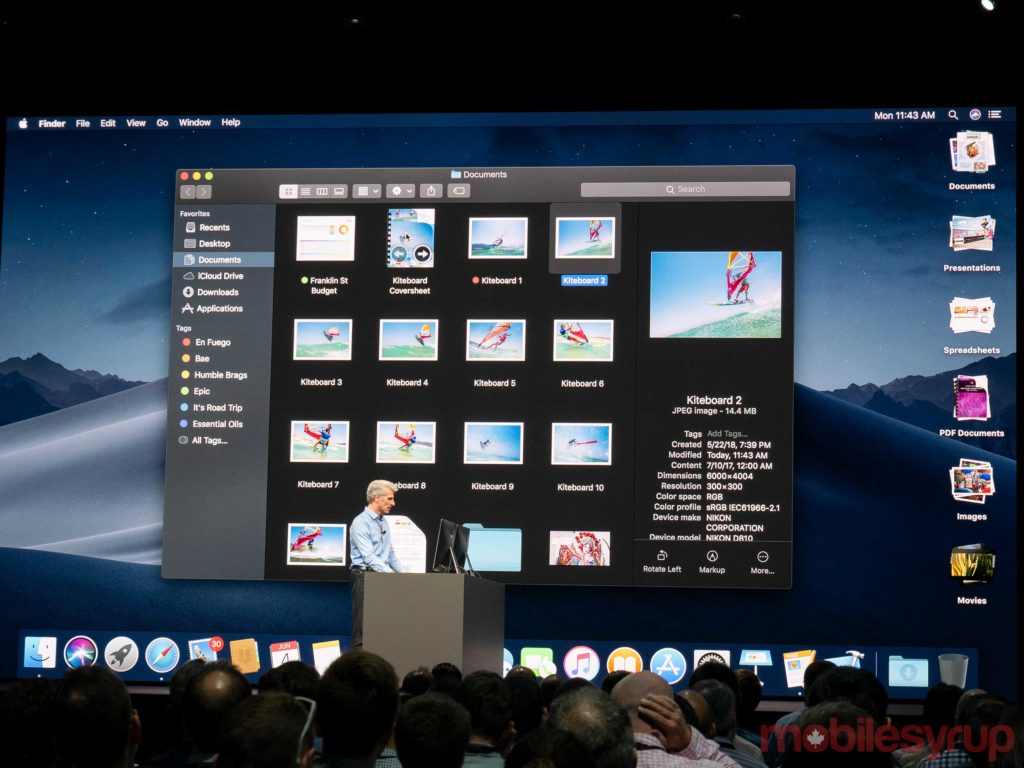
The revised Finder app also provides users with a new ‘Gallery’ view and an improved sidebar that provides users with complete information on metadata.

The Finder app also provides users with ‘Quick Actions,’ that allow the manipulation of documents right within Finder — rather than needing to open up a separate app.

Users can even create custom automated actions such as adding a watermark to documents and photos.

A new screenshot process allows users to access the Markup annotation tool directly within a screen shot.

Users will also be able to screen shot videos to create GIFs.

Improved Continuity and Continuity Camera

Certain apps will allow users to use the ‘Continuity Camera’ feature, which not only gives users the option of taking photos using their iOS devices and manipulate those photos on their macOS device, but Continuity Camera also allows for improved text capture.

A revised App Store

Apple’s manager of App Store product management Ann Thai used the macOS presentation to announce a completely revised Mac App Store.

The new App Store not only makes it easier for users to find new and noteworthy apps, it also improves the commenting and user navigation experience.

For instance, the Mac App Store’s product pages now offer video previews, as well as tips and tricks for apps you’ve already installed.

Microsoft will be bringing Office 365 to the Mac App Store, while Adobe will be bringing Lightroom CC to the store as well.

Privacy, security and other interesting features

Apple’s senior vice president of software engineering — and resident Superman — Craig Federighi announced that macOS Mojave would provide users with improved protections.

Federighi said that Voice Memos will be coming to macOS. Users will be able to record voice memos and manipulate them within apps like Garage Band.

Safari will allow users to customize the ways in which ads track user data across multiple websites.

Mojave will also provide websites with a “simplified system configuration” that will prevent sites from accessing complex information, like fonts and computer specs.

This will reportedly make it more difficult for websites to track users.

The post Apple announces macOS Mojave, redesigned app store, dark mode, improved finder and more appeared first on MobileSyrup.

04 Jun 21:38

Apple isn’t merging macOS and iOS, but it is bringing some iOS apps to Mac

by Sameer Chhabra

At the company’s 2018 WWDC developers’ conference, Apple’s senior vice president of software engineer Craig Federighi announced that the company doesn’t plan on merging its macOS and iOS operating systems.

MacOS is Apple’s desktop operating system, while iOS is Apple’s mobile operating system.

However, Federighi did announce that the company plans on porting over some iOS apps to the macOS platform.

Some of these apps, like ‘News’ and ‘Home,’ for example, will be coming to macOS with macOS X Mojave.

Developers will be able to start experimenting with iOS apps on macOS in 2019.

The post Apple isn’t merging macOS and iOS, but it is bringing some iOS apps to Mac appeared first on MobileSyrup.

04 Jun 21:38

Safari is making it harder for users to be tracked across the web

by Brad Bennett

Apple is shutting down share buttons and comment fields on websites with a new version of Safari.

If a user wants to use these buttons or features, macOS X Mojave will ask if they want the feature to be enabled. If a user never clicks on the dialogue, then it will remain inactive, keeping users’ information private.

Another new feature that’s being added is ‘Fingerprinting.’

Ads typically track a user by profiling their computer and what they do on it. Apple has added a new way to hide a users digital fingerprint so that their Mac seems just like everyone else’s Mac online.

These protections are also coming to iOS 12, according to Apple.

The post Safari is making it harder for users to be tracked across the web appeared first on MobileSyrup.

04 Jun 21:38

University of Waterloo joins Ripple-funded blockchain research initiative

by Jonathan Lamont
University of Waterloo website

The University of Waterloo announced today it is one of 17 partner schools joining a blockchain research initiative.

Ripple, a San Francisco-based technology company, is backing the initiative. Called the University Blockchain Research Initiative (UBRI), Ripple will commit over $50 million USD in funding to the schools for blockchain-related research.

Waterloo is the only Canadian university in the initiative. Each university in the initiative is able to determine its own research topics.

Each university will also collaborate with Ripple on research and technical development. The goal is to expand blockchain understanding and improve innovation in the technology.

Ripple will also work with universities to help develop curriculum to help educate students on blockchain and cryptocurrency.

Finally, the initiative will help to stimulate dialogue between students, faculty, business leaders and technologists about topics around blockchain.

“We know from recent world events and the experience of many of our partners that blockchain technologies will increasingly disrupt the way the world does business,” said Pearl Sullivan, dean of the faculty of engineering.

Blockchain is relatively new. Cryptocurrencies commonly use it to manage transaction records. Blockchain is effectively a digital leger that contains records of transactions made using a currency. It’s secure and easy to track.

The technology could be the next big thing in the financial industry and potentially other industries as well. However, the full potential of blockchain has yet to be realized.

Due to this, a partnership with universities — places where ideas can flourish and the workforce of tomorrow is trained — will help insure blockchain technology continues to innovate.

Source: University of Waterloo

The post University of Waterloo joins Ripple-funded blockchain research initiative appeared first on MobileSyrup.

04 Jun 21:38

Google Lens is now available on the Play Store

by Dean Daley

Google Lens is software that works hand-in-hand with Google Assistant and the Google Photos app.

Users of Google Lens can look up products, identify meals and get information about certain landmarks.

The app is available natively within Photos and Assistant on devices like the Google Pixel 2 and Pixel 2 XL. the Huawei P20 Pro, the HTC U12+ and the LG G7 ThinQ. However, some smartphones, like the Moto G6 and the Samsung Galaxy S9, only have Google Lens within Assistant.

While it was previously only available in limited capacities, users can now download Google Lens through the Google Play Store.

Google Lens, while available on the Google Photos app for iOS, is still not available directly via the iOS App Store.

To download Google Lens, click here.

The post Google Lens is now available on the Play Store appeared first on MobileSyrup.

04 Jun 21:37

Here are the 10 most exciting iOS 12 features

by Igor Bonifacic

Apple’s annual Worldwide Developer Conference (WWDC) eschewed hardware and flashy updates for mainly sensible iOS improvements and long-desired app tweaks.

But while there might not have been many jaw-dropping moments, there were many noteworthy standouts from WWDC 2018.

Memoji

While performance improvements and app tweaks may do more to materially benefit iOS users, the addition of personalized ‘Memoji’ will no doubt stand out as one of the most important announcements to consumers. The feature follows in the footsteps of Bitmoji and Samsung’s personalized emoji figures, allowing users to gain an animated version of themselves that, as with regular Animoji, can act out your own facial expressions.

Additionally, you can now stick out your tongue with Animoji (this should be a boon for text-based flirting) and there are now ghost, koala, tiger and t-rex dinosaur Animoji.

Read more here.

Screentime

Like archival Google, Apple is adding a digital well-being component to the next version of mobile OS. Dubbed Screentime, the feature will provide a dashboard that breaks down how much time you’ve been spending on your iOS device, as well as detail specific app usage.

Additionally, Screentime will provide an overview of which apps are sending you the most notifications, and provide a weekly outline of your usage habits.

Read more here.

Siri Shortcuts
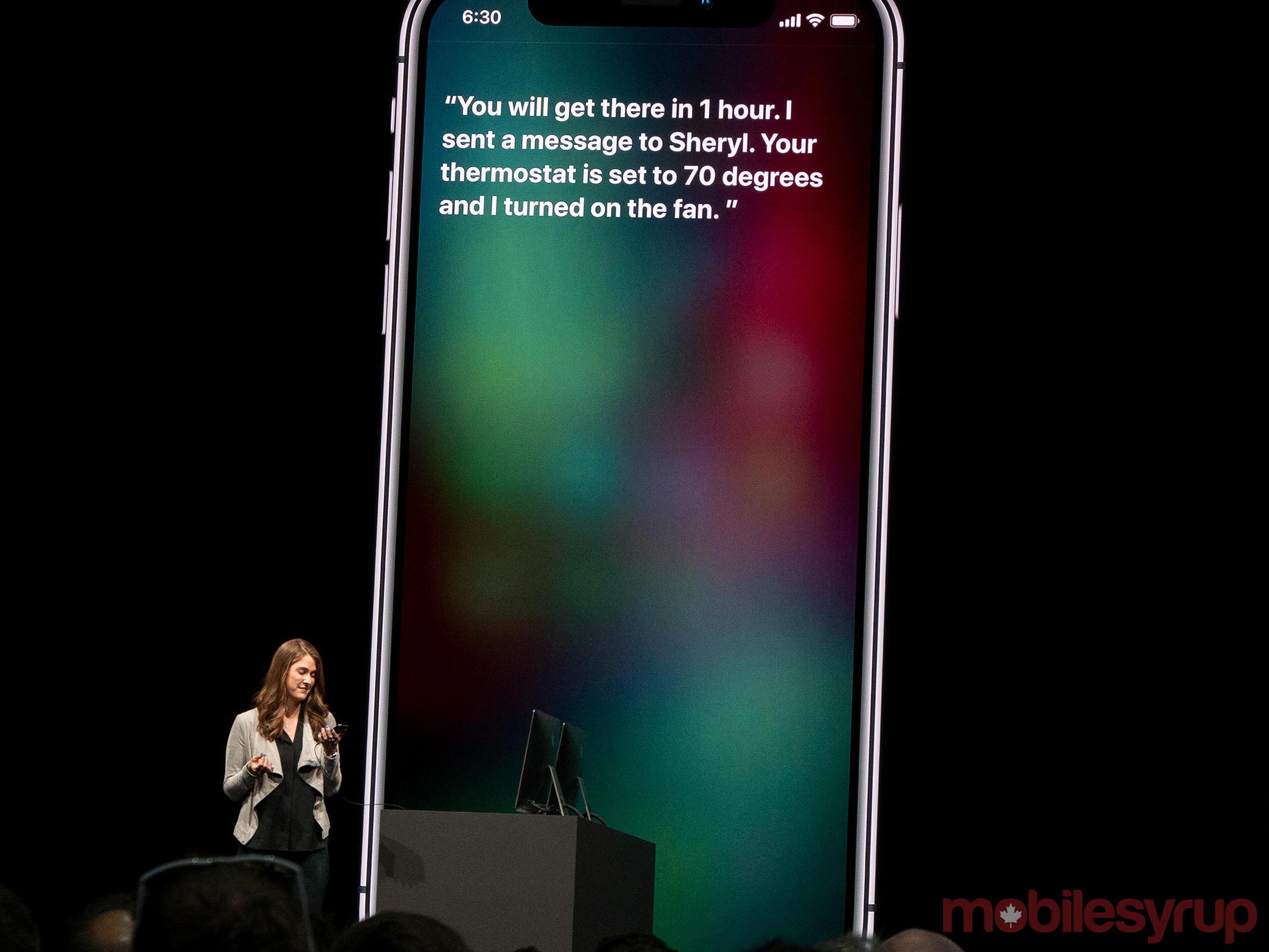
In competition with a search and AI giant like Google, Siri has been mainly overshadowed of late. This year’s WWDC announcements, however, have taken some steps to put Siri back in the race with Google Assistant. Most notably, Apple revealed ‘Shortcuts,’ an app that lets users set their own app-specific Siri activation phrases. For instance, users with the Tile app could set a command to find their keys.

Additionally, with iOS 12, Shortcuts will work with Siri’s Suggestions feature, which is also getting updates. Suggestions prompt users to remember certain things. When watching a movie, Siri will suggest turning your phone on Do Not Disturb mode.

Read more here.

Performance improvements for older devices

In one of the few surprise announcements to come out of WWDC, Apple said iOS 12 will support the same devices as iOS 11. This means even the iPhone 5S, set to turn five-years-old this September, is among the long list of past Apple smartphones and tablets set to gain access to the new operating system.

Better yet, Apple is promising performance enhancements for all those same devices. Using the iPhone 6 as an example, Apple’s Craig Federighi said running iOS 12 the almost four-year-old was able to launch apps 40 percent faster and take a photo 70 percent faster, among other enhancements.

Read more here.

ARKit 2

One of the major focuses of iOS 12 is augmented reality. Not only is there a new real-life 3D measurement app, Apple also officially revealed ARKit 2, which includes improved face tracking, 3D object detection and shared experiences.

In a (fun-looking) demo using AR-compatible Lego Assembly Square, two players were able to create and play in a shared augmented reality world together. When an in-game building caught fire, one player added a fire truck to the world while the other used a helicopter to save the Lego people trapped inside.

Read more here.

Enhancements to Photos app

While it’s unlikely iOS’s first-party Photos app will ever match Google Photos at this point, Apple is introducing several notable enhancements to its image and video gallery app. With iOS 12, the company is enhancing Photos’ search functionality, as well as adding robust new sharing features courtesy of a new ‘For You’ tab.

Moving forward, Photos will offer sharing suggestions, as well as prompt other users to share photos with you.

Read more here.

Google Maps and Waze for CarPlay

Sometimes small features are the most important.

Apple’s CarPlay is getting an update many users have long desired. In iOS 12, CarPlay will support more third-party apps, most notably Google Maps and Waze.

Admission of defeat on behalf of Apple Maps? Perhaps. Win for the consumer? Definitely.

Read more here.

Group FaceTime

Group chat is coming to FaceTime with support for up to 32 users simultaneously. Moreover, both iOS and macOS will support the feature.

In a fun twist, FaceTime will also support all the Animoji and Memoji features Apple announced earlier in the keynote, so users will be able to take part in video chat as a tiger or unicorn. Video chat will never be the same.

Read more here.

Grouped notifications

Group Notifications

Apple is finally solving one of the biggest headaches when it comes to using iOS over Android. When iOS 12 arrives this fall, the company will finally add grouped notifications to its operating system.

Starting with iOS 12, iOS will display notifications from the same app in one stack, which the users can then expand to interact with each notification individually. Alternatively, users will also be able to dismiss a group of notifications all at the same time.

Read more here.

Parental controls

Apple’s focus on digital well-being extends to new parental controls, designed to let parents set custom hours for device and app usage, while providing both child and parent a usage breakdown.

The feature is part of Screentime, mentioned above, and will sync across iOS devices, meaning users can’t circumvent app usage limits.

Read more here.

The developer preview of iOS 12 is available to Apple Developer Program members starting today, and a public beta program will be available to iOS users later this month.

iOS 12 will be available this fall as a free software update for iPhone 5s and later, all iPad Air and iPad Pro models, iPad 5th generation, iPad 6th generation, iPad mini 2 and later and iPod touch 6th generation.

Photography by Patrick O’Rourke. 

The post Here are the 10 most exciting iOS 12 features appeared first on MobileSyrup.