Shared posts

13 Dec 08:32

The myth of continuity

The myth of continuity

Part one

Earlier this week, I was part of the The Mythologies of Museums panel at MCN 2021, alongside Susan Chun, Sherri Wasserman and Bruce Wyman. The panel was pitched as a need to understand our shared mythologies about museums, practical examples of how we can do things differently, and the ripple effect across the organization for our most basic decisions. I was asked to speak to this idea in the context of digital technologies in museums. These are the notes I wrote for the panel and used as a kind of opening statement.

I'd like to talk about the myth of continuity, specifically the myth of achieving continuity in our endeavours. In order to talk about this it is necessary to talk about platforms as vehicles of distribution and of the very important distinction between the web and the larger internet, even though the two are often understood as being the same thing.

There is a reason that companies like Facebook and Snap are talking about virtual, augmented and mixed realities: Simply put they are trying to create and control a new means of distribution that is not a mobile phone. They are doing this because there are exactly two mobile computing platforms and they are the choke point for enabling or disabling features, functionality and revenue.

It is important to understand the web, the thing that Tim Berners-Lee created and released unencumbered of any restrictions in the early 1990s, in this light. The web is simply a set of protocols that sit on top of the internet that define the means by which any two people, one with a server and the other with a client, can exchange documents. That's basically the sum total of the web and that simplicity, coupled with absence of control by any one platform vendor, is what makes it so important.

The web does not do everything, it is not a magic pony. What it does do, however, is enable two things: One, the ability to project an idea beyond the range of any one individual's voice, beyond the limitations imposed by physical space and other geographies. Two, it allows for the asynchronous recall of those ideas outside the determination of someone else's schedule or editorial bent.

It's not hard to see why this should be important to the cultural heritage sector. One only has to remember, or imagine, the world that preceded the web. It was a world where access to and awareness of our collections was bounded by geography, the constraints of book publishing and the occasional documentary film. The exhibition catalog was the unit of currency in the cultural heritage sector. A bookshelf of catalogs was the only proof of the arc of an institution's history and work.

In 2021, the myth of continuity suggests this is still largely the case.

The promise of the web, of the internet as a whole but specifically the web because of its effects on the power dynamics of distribution, was not only that we could reach an audience outside of geography but that it could bridge all those exhibition catalogs, and all the materials used to create those catalogs. That bridge would create first a network, a web, of ideas and relationships greater than the sum of its parts and, second, serve as the building blocks for new ways of understanding and interpreting our collections. It would do so not absent of economics but absent the economics of someone else's business model which rarely, if ever, align with the goals of the cultural heritage sector.

That hasn't happened because we are unable or unwilling to believe that we can and should control the means to make these things possible. We are still largely unable to break free of the "fire and forget" model of developing exhibitions and exhibition catalogs. We are largely unable to retain the staff and the institutional knowledge necessary to make any given digital project possible beyond its launch.

Exascerbating this problem is the belief that digital infrastructure is more like a book than, say, a garden. That, within the limits of aging, it can simply sit unattended on a shelf and be revisited only by brushing off any accumulated dust. Just to be clear about something: I love books. Books are amazing. But a field guide of plants is not the same thing as a living, breathing garden and no one pretends that a garden left unattended will flourish.

Exascerbating that problem is the belief that the only way to address these digital and technological short-comings is to adopt the methodologies of the private sector ignoring the simple fact that the private sectors operates at a scale of staffing the cultural heritage sector is unlikely to ever enjoy, at least not in our lifetime. So we compound the problem of staffing, and more specifically of retention, by adopting means and methods designed to tackle a problem we'll never have.

Part two

This is the long-form version of some of the things that I said when the panel moved to an open conversation.

Until recently, the web was still more exciting than not. This fact intersected with the cultural heritage sector's need or desire to be associated with cool, new technologies. It has been a marriage of convenience where, almost by happenstance, the hot new technology (the web) aligned with the values and the mission the sector claims as its own. At the end of 2021, the web is seen by many as boring and there is a lot of effort being focused on different forms of augmented reality environments and immersive experiences. It is, some people say, the future of museums. Perhaps it is, or can be, but there are a couple of issues worth addressing before the cultural heritage sector begins this new adventure.

The first is that not even Facebook, which is hiring literally tens of thousands of engineers to build these environments, thinks the ideas they are imagining are within reach right now. So not only are they willing to hire large teams dedicated to an ambitious betting-on-the-future project they are committing to sustaining those teams for years to come. Museums and libraries, on the other hand, can still barely keep their own websites running for more than five or ten years before they are rebuilt from scratch as part of whatever new initiative is being advanced by the organization.

In 2018, at a the Conference on Mobile Position Awareness Systems and Solutions, I talked about this phenomenon by saying ...that Disney is to the museum sector what Google is to the technology sector.

What I mean to say is that using Disney as a frame of reference when discussing what is possible in the museum space in 2018 is an unhelpful distraction. Saying "But Disney does it..." has become the trickle-down economic theory of technology development in the museum sector.

It also does a real disservice to the genuinely hard work these companies have done and continue to accomplish. Google and Disney exist in universes of their own creation, complete with air that we don't breathe, but it is important to recognize that they have (mostly) earned it.

It is important to recognize that there is a network effect in each of their individual efforts and that those efforts play themselves out over multiple projects often spanning years and many failures. The museum sector, both individually and collectively, remains unable or unwilling to make those kinds of investments or to take equivalent risks and the results are predictably un-Disney-esque.

I wish the museum sector would endeavour to create Disney-scale infrastructures and tooling in service of cultural heritage. Until it does though maybe we can just admit that talking about Disney does nothing to address the needs and concerns we face on a day-to-day basis?

The second issue that we, operating in the not-for-profit or notionally not-entirely-for-profit sector, need to address is whether or not we are responsible for considering the consequence of our participation in the technologies we choose to embrace. We go where the eyeballs are, is the excuse we make for engaging on and with platforms whose motivations and behaviours are increasingly difficult to reconcile with anything other than short-term, profit-driven decisions that benefit the few to the cost of the many.

These same platforms are now embarking on efforts to replace the common playing field they were forced to operate on, the web, with environments that they control from end to end. Again, the dilemma that companies like Facebook face being forced to operate within Apple or Google's mobile platforms is instructive. It has always been in Apple's interest to preference native applications over equivalent web-based applications. The former ensures that the device itself is a means of control and so Facebook, being forced to develop and promote native applications, is always subject to someone else's decisions whether they are made out of negligence or malice.

What we are witnessing now is a concerted effort, by a number of different actors, to replace the dominant means of enforcing that control. It remains to be seen whether it will happen any time soon and it remains to be seen whether that control will be used merely to extract new profits or to influence behaviour, assuming their is any difference between those two things anymore.

Absent from all of these discussions is anything like the vision that Tim Berners Lee espoused for the web as an open platform, free of licensing constraints. One that was simple enough to guarantee it could be implemented and operated with limited resources. When we talk about virtual worlds we are not only talking about walled gardens governed by the whim and folly of shareholder value. We are also talking about infrastructures that only a few enterprises are in a position to operate.

It is true that cultural heritage institutions should go where the people are in order to better raise awareness of and share our collections. At least in principle. At some point, though, we need to ask ourselves whether participating with platforms whose benefits, however real and tangible they may be, are increasingly being dwarfed by their consequences is something that undermines our mission as civic-minded organizations for the common good.

Part three

Almost none of what follows made it in to the panel. We were asked to think about meaningful suggestions of things people might do to address the questions we'd been talking about. What follows is what I would have liked to say if we'd had more time.

Define what digital means

Define what digital means for your organization. My own definition of digital is expansive and that is why I put so much weight on the value and importance of the web. My definition doesn't need to be your definition but we owe it to ourselves, and to our colleagues, to articulate what we mean when we talk about digital. For too long important differences in that understanding have been lumped together under the same umbrella term and it is one of the reasons the sector has difficulty implementing any of its goals.

Make the web your baseline

Make the web your baseline, in particular a web of documents and links rather than one of interactions or transactions or experiences. This is the profoundly boring web but that is the point. It is the web that, structurally, has a better guarantee of outlasting the machinations of third-party vendors. In the time between the panel at MCN and this blog post Google has updated its Chrome browser engine to make it possible to prevent viewing the source of any given web page violating one of the core principles, what Tim Bray has called the View Source lesson, of the web.

Adding the ability to block View Source is antithetical to what the web used to stand for. It is profoundly fucking evil, and everyone responsible should be ashamed. I don't care how many times you say the word "enterprise" as an excuse for your decision.

jwz

I have joked nervously that one day we would all have to start compiling our own browsers from source again to account for nonsense like Google's changes. I have always hoped I was being paranoid. Maybe, maybe not. It does serve to make my point that we should remember that what the made the web different, what distinguished it from the past, was not a lot of fancy interactivity but the ability for common resources (text and images, even video) to hold hands across the internet using a model so simple that it could be built with only modest effort.

No one can pretend that web browsers are simple anymore, but that's not really my point. Neither is it that we should do away with all the complex and sophisticated interactivity we've developed over the years. I am not suggesting that we return to the web of the mid-1990s with its grey backgrounds and blue and purple links. I am suggesting however that we ensure that web is our guaranteed failure scenario, should it ever be necessary, and that we layer everything on top of it.

This is as much about safe-guarding against other people's browser decisions as it is giving the cultural heritage sector the freedom to engage with the walled gardens of platform vendors, without that participation turning in to a black hole from which it is impossible to escape.

I am suggesting that we evaluate all of our technological choices through a lens that forces us to unravel and understand layers and layers of abstractions and conveniences so that we preserve the technological, conceptual and economic freedom that the web made possible.

Publish data first

Publish data first, and then build on top of it. I spoke about this, at Museums and the Web 2019, in the context of the work SFO Museum is doing with its websites:

Historically the model for most digital or web-based initiatives has been to first export data from an internal collections management system. Second, that data is massaged in to an intermediate form for use by the project at hand and then third, exported again in to a typically bespoke machine-readable format.

We have changed the order of things to publish the open data representation first and then, from there, to build our own websites and services on top of that.

Everything I've described so far has been built using the same raw materials that we've made available for you to do something with. This introduces a non-zero cost in the build process for the public-facing museum efforts but we believe it's worth the cost.

First of all we want other people to build new interfaces and new services, new "experiences" even, on top of our collection so this is a way to keep ourselves honest. If we can't build something with this stuff why should we imagine you will?

Second, we want to ensure that the data we release and the manner in which it is published, is actually robust and flexible enough to engender a variety of interfaces and uses because we need that variety. It is important to the museum because I don't believe there is, or should be, only one master narrative in to the collection.

In many ways this is just the actual implementation of everything I described in the last section. This is the boring web of documents and links. It is the boring web that makes all the other experiences and interactions possible.

Small focused tools.

Make the extra effort, whenever possible, to extract those pieces in the bespoke tools written by and for an organization in to smaller pieces that can be shared with others. It's hard to overstate how important this is for the cultural heritage sector, at least in the near-term. The sector is still a long ways from finding any kind of meaningful solutions to the problems of first hiring and then retaining the staff who can build and maintain its digital systems. Until that problem is resolved every institution is going to be operating with too few people, doing too many different things. They will be developing infrastructures and scaffoldings that are purpose-fit to the realities of their situation, often cutting corners out of necessity.

None of these things can or will be designed from first principles or a conceptual framework that supports anything but the institution where they were built. The staffing realities of the cultural heritage sector dictate that simple, unfortunate reality. That doesn't mean we can't or shouldn't share resources, though. It simply means we need to think differently about how and what we share. We need to develop the practice of thinking about our tools as layers of components where those components that can be shared are simple enough for someone at a different instituion, someone who is just as busy and distracted as you are, to quickly understand what something does or doesn't do.

The emphasis here is on quickly because the reality is that other people will be looking at whatever you've shared over lunch or on the train going home. The emphasis needs to be on quickly because the ultimate goal is to have something that can be understood with sufficient ease that it can be filed away to be remembered at some later date when there is a need to address a specific problem. If the goal is to build a common kit of parts that can be re-used across the cultural heritage sector the first step is to make awareness of those tools, and their conceptual boundaries, a practical and tangible reality.

I've been trying to do this, and writing about it, with the toolchain we're building at SFO Museum.

Write about it.

Write about it, whatever it is, and publish it on the web for the future to find. In the same way that we need small focused tools the sector needs to tell itself the stories, good and bad, of its work. The sector needs to demonstrate to itself, and to its broader audiences, that there is proof of life in its work.

Be generous with your thoughts have confidence that someone will find value in your work, whatever it is. Share your experience with the understanding that the value in what you are doing is in the act of sharing itself. The measure need not be attracting eyeballs but in participating and giving back to the common resource that the web can be.

If you have ever benefited from something someone else has shared online it stands to reason that someone else, in turn, will benefit from what you have to share. Weeks or months, years even, may pass before someone else finds what you've written but it's important to understand: This is what separates the web from what came before it.

The web has made it possible, both technologically and economically, to allow thoughts and ideas to survive the long-term. The web is the means by which an idea outlasts the reluctance of the present. It is one way that we might realize the myth of continuity.


13 Dec 08:30

The Close of the 2021 Cycle-Canoe Season

by peter@rukavina.net (Peter Rukavina)

It was an unseasonable 14ºC today, sunny with just a little wind, and so I took the opportunity to cycle my canoe out to Andrews Pond for one last paddle before winter.

Selfie from my bicycle, showing my canoe towed behind me.

It turned out to be a lovely day for it: just the right temperature for a more-grueling-than-everyday bicycle ride that’s mostly-uphill on the way there, calm enough on the water that I didn’t get blown around a lot.

I’m not a strong cyclist, and towing the canoe out to East Royalty remains at the edge of what I feel physically capable of; it’s good training for the mind, however: the last push uphill from Kensington Road to St. Peters Road is hard and the only way I can do it is to avoid thinking of the destination and, instead, just focusing a few metres ahead of me.

My canoe in the water by the dock at Andrews Pond North in the later afternoon sun.

Autumn on Andrews Pond has a whole different feel than summer: the leaves are falling, the ducklings of summer are now full-fledged ducks, the sun hangs lower in the sky.

Sun through the trees at Andrews Pond South.

Fall on Andrews Pond.

Selfie in the canoe, on Andrews Pond.

My gift to the pond today was to fish an Island Coastal traffic cone from the bank and load it into the canoe. I left it at the dock for them to pick up.

Island Coastal traffic cone inside my canoe.

I’m still finessing the canoe-wrangling part of the process: it’s relatively easy to get the canoe into the water and out of the water; getting it back on its trailer is still something that takes a lot of fussing and cursing.

Beyond the joy of the cycle and the paddle, cycling along Riverside Drive towing a canoe continues to bring joy simply from the reaction of others: some are blasé, some do a double-take, some honk their horns in solidarity, and one person stopped their car on the side of the road and shot video.

Feeling confident paddling a canoe solo has been one of my great personal accomplishments of 2021, both on the metaphorical and practical levels. I look forward to getting back on the water next summer.

13 Dec 08:30

Reverse-engineering the Yamaha DX7

by Rui Carmo

Excellent weekend reading if you’re into both electronics and synthesizers. The amount of tricks that went into the design of early digital electronics is just fascinating.


13 Dec 08:30

It’s OK That You’re Not OK

by peter@rukavina.net (Peter Rukavina)

Some books are worth acquiring simply for the title; It’s OK That You’re Not OK, by Megan Devine, is one: being released from the pressure to be OK is a great gift.

Devine’s central thesis regarding grief boils down to “you’re fucked up, get used to it” or, more gently, “grief isn’t something you recover from, get over, or move through, it’s something you learn to carry.” Despite how depressing that seems on first reading, it’s liberating metaphysics for someone in my position.

Our culture sees grief as a kind of malady: a terrifying, messy emotion that needs to be cleaned up and put behind us as soon as possible. As a result, we have outdated beliefs around how long grief should last and what it should look like. We see it as something to overcome, something to fix, rather than something to tend or support. Even our clinicians are trained to see grief as a disorder rather than a natural response to deep loss. When the professionals don’t know how to handle grief, the rest of us can hardly be expected to respond with skill and grace.

Reading the book unlocked a realization of just how much I’ve been trying to shape an “I’m OK” narrative, with deep hope that it would be true (or might become true on repeated telling).

On a personal level, repressing pain and hardship creates an internally unsustainable condition, wherein we must medicate and manage our true sadness and grief in order to maintain an outer semblance of “happiness.” We don’t lie to ourselves well. Unaddressed and unacknowledged pain doesn’t go away. It attempts to be heard in any way it can, often manifesting in substance addiction, anxiety and depression, and social isolation. Unheard pain helps perpetuate cycles of abuse by trapping victims in a pattern of living out or displacing their trauma onto others.

Writing I am not OK makes me feel like such a failure.

But it’s also such a relief.

13 Dec 08:30

Selecting a programming language can be a form of premature optimization

by Brett Cannon

Have you ever been told that Python couldn't be used for a project because it wouldn't be fast enough? I have, and I find it a bit frustrating as big banks, YouTube, Instagram, and plenty of other places that are performance-sensitive still manage to select Python and be happy.

And that's when it dawned on me that the problem is people are not treating language selection as a potential form of premature optimization: if you select a programming language based on your preconceived notions of how a language performs, you will never know if the language that might be a better, more productive fit for your developers would have actually worked out.

And so this blog post is going to argue that Python makes sense to select even for projects with performance concerns and how to work towards better performance in an iterative fashion if your first attempt isn't fast enough. The general steps, which you can stop at any point your needs are met, and should include profiling between steps, are:

  1. Prototype in Python.
  2. Optimize your data structures and algorithms.
  3. Try another Python implementation (that doesn't require many code changes).
  4. Use Python's language bindings to optimize using another language.

While this might seem like a lot of work, do remember that Python is oriented towards productivity. This is what leads to numerous anecdotes of where someone implemented something in Python in 1/3 the time a competing team did creating the same thing in e.g. C++ or Java. By the time the competing team completes their v1 to a beta level, the Python implementation is often on v3 in production with extensive testing and has been optimized enough to match the initial performance of the other implementation that chose a "faster" programming language.

Prototype in Python

You have to start somewhere. 😉 Thanks to Python being designed to make you productive, you should hopefully be able to get something working pretty quickly. It's actually possible this will be fast enough and you're already done. 😁

Optimize your data structures and algorithms

If your performance isn't where you want it to be, there's always making your code simply more efficient (after profiling). This is beneficial as it cascades into the following steps (if they are needed). Using a profiler to figure out where to optimize can be enough to get the performance gains you're after.

Try another Python implementation

Now when I say "implementation", I'm using the term very loosely. What I mean here is something which doesn't require rewriting code in order to get your performance improvement but does go beyond the Python implementation you initially chose; something that's extremely cheap and simple to try out to see if it gets you the performance improvement you're after. This includes things like:

  • PyPy
  • Numba
  • mypyc (if you added type hints to your code anyway, else this goes in the next section)

As before, you will want to profile your code to see which options may work best (e.g., if your hot spots are not numeric then Numba is probably not a good fit).

Use language bindings

This blog post came about because of a tweet about using Rust to speed up some Python code. Thanks to Python's long history of being great "glue" code, it has ended up with a myriad of ways to call out to other languages that may be able to operate faster than Python itself:

... and the list goes on for various languages and tools. The key difference compared to the previous option is you will have to write a bit of code. But if your performance needs are that critical, this should get you what you need (after your profile; you want to minimize how much code you feel the need to rewrite). Heck, you can start down this road and eventually replace all of your Python code, but you will have validated the algorithms, design, and potentially already have a test suite written in Python that you can use to validate your work indefinitely thanks to your initial Python version.

Consider optimizing for developer time, not computation costs

I think the jump to selecting a programming language based on potential performance needs often comes from a place where people think their computation costs are more important to optimize for than their developer time. I don't think that always holds, though, as software developers are expensive. If you look at your cloud hosting costs, for instance, and then look at how many developers that could have paid for, my guess is that if you selected a programming language that required less staff you would save more by lowering your payroll than by trying to squeeze out every bit of your hosting costs.

Another way to look at it is computation cost is a race to zero while developer salaries are going in the opposite direction. Cloud hosting firms want your business, and so they have incentives to make their services as cheap as possible while providing you the services you want. But developers want as much money as you're willing to pay, and unfortunately for employers there is massive demand for developers; salaries are not going to be dropping any time soon.

You also have to realize that Python and all the libraries I mentioned above are continuously improving. For instance, CPython 3.11 is already faster than 3.10 by a good amount. That trend will continue, so in October 2022 you will very likely get a performance increase automatically once you upgrade (and if you would like to see that continue, please consider donating to the PSF). The same can't be said about what you pay developers and getting more, better code out of them.

All of this is to say while some companies do extract massive value from squeezing every CPU cycle out of their code, those companies also typically build data centres. So if you don't need a dedicated building to host your machines, please consider doing the math to see if it's truly worth making your developers less productive in the name of computational efficiency when you don't even know if that perceived efficiency is even necessary.

13 Dec 08:25

Extract Data from HTML/XML/JSON using Xidel

by Thejesh GN

As you would know, I scrape a lot of web pages as a Data Archivist at DataMeet. I usually use BS4 for this, and it's beautiful, simple, and works. But often don't want to write a python script to do that, and I need a simple tool to get data out of HTML.

I want to curl or wget the HTML and pipe to a tool to get the data I want. Xidel is what I use then. Xidel is an old (since 2012) CLI tool that helps you extract data from HTML, XML, or JSON documents. Xidel goes one more step; you don't even need to do a curl or wget. Xidel does that also for you.

This quick one-paragraph feature list explains what it can do. Visit the tutorial page to learn more.

  • Extract expressions:
    • CSS 3 Selectors: to extract simple elements
    • XPath 3.0: to extract values and calculate things with them
    • XQuery 3.0: to create new documents from the extracted values
    • JSONiq: to work with JSON apis
    • Templates: to extract several expressions in an easy way using a annotated version of the page for pattern-matching
    • XPath 2.0/XQuery 1.0: compatibility mode for the old XPath/XQuery version

  • Following:
    • HTTP Codes: Redirections like 30x are automatically followed, while keeping things like cookies
    • Links: It can follow all links on a page as well as some extracted values
    • Forms: It can fill in arbitrary data and submit the form

  • Output formats:
    • Adhoc: just prints the data in a human readable format
    • XML: encodes the data as XML
    • HTML: encodes the data as HTML
    • JSON: encodes the data as JSON
    • bash/cmd: exports the data as shell variables

  • Connections: HTTP / HTTPS as well as local files or stdin

  • Systems: Windows (using wininet), Linux (using synapse+openssl), Mac (synapse)

Here is an example. I want to get the Total Vaccination Count from mygov.in the covid dashboard. This specific data item comes embedded in the HTML, and for Xidel, it's not a problem.

Firefox developer console view - Copy CSS Selector

I open the Dev console, select and right-click on HTML node. Then I will copy the CSS selector.

Get the data using CSS selectors.

$xidel https://www.mygov.in/covid-19 --css="div.total-vcount:nth-child(5) > strong:nth-child(1)"
**** Retrieving (GET): https://www.mygov.in/covid-19 ****
**** Processing: https://www.mygov.in/covid-19 ****
1,12,34,30,478

I don't want any extra logs. Here you go

$xidel https://www.mygov.in/covid-19 --css="div.total-vcount:nth-child(5) > strong:nth-child(1)" --silent
1,12,34,30,478

I want JSON output, no problem.

$xidel https://www.mygov.in/covid-19 --css="div.total-vcount:nth-child(5) > strong:nth-child(1)" --silent --output-format=json-wrapped
[
"1,12,34,30,478"
]

XML output

$xidel https://www.mygov.in/covid-19 --css="div.total-vcount:nth-child(5) > strong:nth-child(1)" --silent --output-format=xml-wrapped
<?xml version="1.0" encoding="UTF-8"?>
<seq>
<e>1,12,34,30,478</e>
</seq>

Even HTML

$xidel https://www.mygov.in/covid-19 --css="div.total-vcount:nth-child(5) > strong:nth-child(1)" --silent --output-format=html
<!DOCTYPE html>
<strong>1,12,34,30,478</strong>

Reading and Parsing JSON is also easy. Here I am using JSONiq notation to extract

$xidel https://www.mygov.in/sites/default/files/covid/covid_state_counts_ver1.json --input-format=json  --extract='$json("Death")("15")' --silent
38145

Note: "15" is a string is a key. It's not an array index

Using dot notation

$xidel https://www.mygov.in/sites/default/files/covid/covid_state_counts_ver1.json --input-format=json --extract='($json).Death.15' --silent
38145

There are lots of features that I am yet to explore. I will write more later.

You can read this blog using RSS Feed. But if you are the person who loves getting emails, then you can join my readers by signing up.

Join 2,138 other subscribers

Email Address

Subscribe

The post Extract Data from HTML/XML/JSON using Xidel first appeared on Thejesh GN.
13 Dec 08:24

Setting Up a New Project

I recently helped a group of about fifteen people set up a new research software engineering project (where by “new” I mean “restart something that was in bits and pieces scattered across half the internet”). They all had GitHub accounts already, and a couple of them had read Research Software Engineering with Python, but only one had any formal training as a programmer (a 12-week bootcamp four years ago). Here’s what we did in order—I’d be grateful for suggestions about what we missed or what you would reprioritize.

  1. Create a mailing list for the project.
    • The team voted 2:1 for email over Slack because they want better search and fewer interruptions.
  2. Create a new GitHub organization for the project and add everyone to it.
    • So that nothing belonging to the project is under a personal account.
  3. Create a new repo within that GitHub organization.
    • Everything is in one repo for now, but that might change.
  4. Redefine the tags in that repo.
    • Governance: discussion (including questions) and proposal (for votable items).
    • Issues: bug and request.
    • Pull requests: fix, enhancement, docs, and refactor.
    • Meta: paused, helped wanted, good first issue.
  5. Add README, LICENSE, CODE_OF_CONDUCT, GOVERNANCE, Makefile, and .gitignore to the repo.
    • We settled on Make because nobody could agree on what to use instead.
  6. Create two pip requirements files:
    • requirements.txt is a minimal setup for using the software.
    • development.txt sources that and adds everything needed for building, testing, and documenting.
  7. Create socks, docs, and tests directories in the root of the repo along with a setup.py file.
    • Pretty standard structure for a pip-installable Python package (and no, “socks” isn’t its real name).
  8. Set up pytest for running tests and pdoc for building documentation.
    • tests/conftest.py for pytest.
    • A docstring in every __init__.py file (rather than leaving it empty) to make pdoc happy.
    • Use Google-style docstrings.
  9. Add targets to Makefile to:
    • Build the package.
    • Run the tests.
    • Run the tests with coverage and display the coverage report (to identify untested code).
    • Rebuild the documentation.
    • Run flake8, black, and isort to check that the code meets style guidelines.
  10. Add a workflow.yml file with pre-commit checks.
  11. Add a script that uses Jinja2 to turn hand-written documentation into HTML.
    • The team has Markdown design notes and the beginnings of a tutorial that they want to put beside the pdoc docs.
    • And a glossary.md file in glosario format.
  12. Add a data directory with sample data for testing and a couple of real datasets.
    • Each dataset is in its own subdirectory with a MANIFEST.yml file describing files, columns, provenance, etc.
  13. Add a CITATION.cff file with citation information.
    • And make sure every contributor has an ORCID.
  14. Add a bin directory at the top level with various utility scripts.
    • Most of which use the code in the socks directory directly (rather than through a local install of the package).
  15. Add a results directory at the top level with one sub-directory for each paper the team intends to produce.
    • Each sub-directory under results has its own Makefile.
    • make all in the project sub-directory regenerates everything.
    • We haven’t added a cookiecutter template yet, but we will.
  16. Add another Jinja2 script to convert CSV results files into HTML pages.
  17. Add a static directory with some CSS and JavaScript files.
    • Because everyone wants their HTML tables to be dynamically sortable…
  18. Add a BibTeX file to the root results directory to be used by all project papers.
  19. Write a short code review checklist.
    • How to run pre-commit checks, how and why to use the logging library, what exceptions to use for what, etc.
  20. Add a small utility script for loading program configurations.
    • In order: system config, personal config, project config, config file specified on the command line, command-line flags.
  21. Choose a project logo.
    • Which made discussion of build tools look calm and rational…

Later: things people have suggested that we didn’t include:

  • a list of supported platforms (FlavorOfLinux, OS X Version, etc.)
  • a list of supported Python versions
  • instructions for setting up, say, virtualenv, to make sure users are all on the same Python version </em>
13 Dec 08:22

Do stuff you’re bad at

by Josh Bernoff

It was dark in my old home town and I’d just run over a curb. I was piloting the Nissan Rogue Sport SUV I’d rented earlier in the day, driving through Ambler, Pennsylvania, a half-mile from where I went to high school and 400 miles from where I live now. You know how, when you … Continued

The post Do stuff you’re bad at appeared first on without bullshit.

13 Dec 07:39

New Trains coming! https://buzzer.translink.ca/...

by illustratedvancouver
13 Dec 07:39

On Outlines Outliners and Outline Processing

by Ton Zijlstra

Drummers by Alper Çuğun, license CC BY

Drummer

Drummer is a new outliner tool for blogging launched last month, created by Dave Winer. As it is popping up in various places, connections are built to other tools (like Microblog), I found myself rolling the topic of outlines around in my head.

I have an somewhat ambivalent attitude towards outlining. Actually I need to split that up in being ambivalent on outlining, on outliners, and on OPML, the standard for exchanging outline files. Some remarks on all three things.

Outlines

Outlines are very useful. I use them for braindumps, idea generation, project plannning and design, and when making the storyline for my presentations. They’re great because you can quickly write out many points and then start shifting things around, changing the order, placing items in branches (or chapters) etc.

Outlines are limited as well, because they are hierarchical and linear in nature. This is similar for me with mind maps. They require a beginning and an end, main or central points with sub points etc. Even though you could link or include other outlines on a branch it still is just another part of a tree structure. A large amount of the information I work with is not like that, and a lot of my work processes (especially those where structure needs to emerge from the information, not to be applied to information) are not like that. Stuff is always linked, but those links can loop back, unlike in outlines. In my description of my personal knowledge management system last year I wrote about the distinction between the parts of it that are organised as networks, and the parts that are hierarchical. This is the same thing, at a lower level of aggregation.

Fast Drummer by Hsing Wei, license CC BY

Outliners

Outliners are great tools, and I use them regularly. When done well you can seamlessly move items around, changing the order, nesting them, or moving them several levels up. Dave Winer talks about moving things around ‘on rails’, and indeed that is what it feels like in a well working outliner, an almost frictionless rearranging of things.

I have used a variety of outliner tools over the years. E.g. I used to make my presentation outlines in Cloudliner, which could sync with Evernote. Once the outline was there, I’d move to Evernote to flesh out the story in more detail.
Currently I mostly work in Obsidian, which isn’t a full outliner in the sense that it lacks the ‘on rails’ features, although by now it is way better at outlining than earlier through the use of hotkeys. (See this video by Nick Milo on outlining with Obsidian)
Tinderbox is also an outliner I use, which is also able to work non-hierarchically: I can start there with adding notes visually, and then switching to an outline view of the same information to do the ordering and branching I want.

Where outliners are less great in my eyes is how they generally imply that all outlines are glorified shopping lists. When writing anything it is about creating prose. Sentences need to flow into each other. Outliners in their interface however suggest that every item in an outline is short. A brief statement at most, definitely not something like a full sentence or even a paragraph. This is where for me friction originates, outliner UIs imply bullet lists. The mental model of a bullet list clashes with that of a text, even if well structured. I don’t think outlines need to be bullet lists, but outliner tools apparently do. Obsidian is the only exception, as it works fully in notes, and you can mix up longer pieces of prose with lists of short items, and have bullets as long as a novel if you want. (This is what I gain for Obsidian not having the ‘on rails’ experience)

Even the original demonstration of an outliner, in Doug Engelbart’s famous 1968 demo, shows that clash to me. It demonstrates the power of outliners: rearranging items at will, moving an item to become a sub-item or a sub-item to become a main item, stacking lists multiple levels deep, as well as adding the link to another outline as item in an outline and it being navigable. But the content of the outline demonstrated is short, a shopping list and a task list.

Drummers by George N, license CC BY

OPML

Dave Winer has been developing outliners for a long time, and we also have to thank him for the OPML standard, meant to exchange outlines in XML. Most people that use RSS readers are familiar with OPML because it is the common format in which you can export and import lists of RSS subscriptions.

Outliners are usually capable of exporting OPML. Most outliner tools however only export to OPML, and don’t store them in files that way or in some other text based format (for the ‘on rails’ effect they regularly keep outlines not as files but in an internal database. Obsidian works on files, and thus doesn’t have the ‘on rails’ style). This means there’s no seamless transition from an outliner tool to another tool, or vice versa, nor a good way to switch between different text based formats such as markdown or OPML. Drummer is an exception, it natively stores everything in OPML files.

Another issue I have with outliners is in how they deal with importing OPML. OPML is an extensible format, which allows adding data attributes to the text information in the outline. This allows me to attach meaning to content that is machine readable. It’s what I did for my book lists for instance. Outliners however in general never attempt to check if such data attributes are present. OPML is short for Outline Processor Markup Language, yet outliners never do some actual processing upon import.

I don’t expect general outliners to be able to do something with such attributes, but I would expect general outliners to at least alert me to their presence in an import, and if possible ask me if I’d like to explore them or do something with them. That general outliners only look at the mandatory parts of the OPML file means they never even look if there’s other semantic information present in the OPML file, though the standard supports it.

Yes, you could create your own outliner tool that reads specific additional data attributes but no regular user would be able to. Tinderbox that I mentioned, allows me to set a wide variety of attributes to notes, and I can create an OPML template in Tinderbox that includes (parts of) them in OPML exports. As far as I can tell though it doesn’t support templating OPML imports. Without this there’s no chance of an OPML using ecosystem evolving, and there hasn’t. The lack of interoperability means novel use cases for OPML always need to come with their own bespoke outliner. This is why I add XSLT to my OPML files for RSS subscriptions and for books, basically packaging a reader right inside the file: it makes them human readable in their entirety and independent from outliners.

Hear The Drummer Get Wicked

I think this is how Dave blogs: He opens up an outline at the start of the day and adds items (thoughts, annotated links, bookmarks, comments) to it during the day which get pushed to his blog. Every line has its own permalink, but it’s a single post for the day, evolving during the day and fixed thereafter. I like the ease of use I can imagine that brings to him.

This is much like how I create my day logs in my personal notes. I open it up first thing behind my laptop in the morning, and during the day it’s my jumping off point as well as where I write things down first. What gets bigger or has more permanent value is then split off in its own note, with the note linked in the day log it sprouted from. (I create my weekly notes on this blog from collating the day logs and then picking the things I want to mention from). I wouldn’t post my day logs though, they’re not fit for publication.

Does Dave also have a personal day log, or is that another branch on his daily outline that doesn’t get published?

The reduction of friction between note making and blogging Dave Winer’s workflow suggests sounds valuable though, and Drummer therefore a tool to watch.


Drummer by Jonas Bengtsson, license CC BY

13 Dec 07:39

Right-handed Keyboard Ninja

by Ton Zijlstra

Bookmarked Obsidian Outlining (video by Nick Milo)

While watching the bookmarked video Nick Milo’s remark about being a left-handed keyboard ninja stood out. He has the mouse in his right hand, and so wants his hotkeys best positioned for his left hand. Using the keyboard without needing to leave the mouse speeds up your usage. This is akin to how I increased my gaming skills in the early PC era, keys optimised for one hand, mouse in the other. I have a Wacom pen tablet on the left hand side, yet do most keyboard shortcuts also with my left hand (perhaps a holdover from when I had the mouse on the right, but I also had the mouse on the left longtime). I now mapped some hotkeys also to combinations on the right hand side (some are already mapped to both sides, as they rely on things like shift, command and option keys), and started practicing them. Let’s see how long it takes for me to train the other hand, and I become a right-handed keyboard ninja!

it’s important to become a left-handed keyboard ninja

Nick Milo

13 Dec 07:38

Favorited Personal Taxonomy (Part 2) by Joost P...

by Ton Zijlstra

Favorited Personal Taxonomy (Part 2) by Joost Plattel

Joost Plattel is writing about his note making routines. I’m always interested in seeing the routines of others, to see how I can tweak mine. Timely as well, as I hope he’ll be at the Dutch language Obsidian meet-up coming weekend.

In the previous part I highlighted how I managed my notes in folders. In this part I would like to explain a bit more on how I make the decision between tags & a linked note.

Joost Plattel

03 Dec 00:51

Opening of the Esplanade and Mill St cycle tracks

by jnyyz

Toronto Centre Cyclists (TCC) hosted a celebration of the opening of cycle tracks on the Esplanade and Mill St today. There are now protected bike lanes extending east from Sherbourne to Corktown Commons, and beyond to Bayview.

Arthur is our MC today.

Just before we get started, this incredible bike and trailer combination arrives.

Peter and Julia show off the shirts that Peter designed for the occasion.

Councillor Wong Tam reminds us of all of the members of the community that worked together with the city and city staff to get this project done after many years of advocacy. She says that this is another step towards making the whole city safer for non-motorized transport. She also acknowledges the close collaboration with Councillor Cressy.

Donna speaks on behalf of TCC and the many community volunteers that did bike counts and surveyed road safety in this neighbourhood to demonstrate to city councillors the need for this infrastructure.

Owen from city staff reminded us that this was just phase one of the project. Next year, these cycle tracks will extend further west to Jarvis, and there will eventually be a connection to Yonge St once the reconstruction of part of the St. Lawrence Market is complete.

Janet Joy Wilson spoke next on behalf of the Toronto Community Bikeways Coalition. She reminded us of the need to have similar infrastructure all across the city. (sorry but the only photo I got was very out of focus).

Next was Stewart, president of the St. Lawrence Neighbourhood Association. He talked about all of the hard work that was done to make this change. He said that there were still some teething problems to be sorted out, but that this was a positive addition to the neighbourhood. He also noted that the non-cyclists present all had umbrellas, whereas the cyclists were all standing in the rain.

Finally, former president Suzanne also thanked everyone present who came to celebrate this enhancement to the neighbourhood.

The ceremonial cutting of the ribbon.

And we’re off, starting out towards Sherbourne.

Turning back at Sherbourne.

This section is along the existing multiuse path, but I was told that Metrolinx is developing the lot to the left, and they have granted enough right of way so that a separate cycle path will be added here.

Biking by the Distillery.

Waiting for the light at Cherry St.

Now headed to Corktown Commons.

We were thankful to have Owen along for the ride as he noted some signalling problems that needed to be sorted out on our ride westbound at Cherry St.

Thanks to Arthur, Donna, and the other TCC members for organizing this event, and to all who actually made this happen.

Update: the discussion about signalling at Cherry St. Thanks to Brian for the video.

https://www.facebook.com/groups/TorontoCyclists/posts/4319021211540388/


View attached file (26.8 MB, video/quicktime)
12 Nov 03:23

Panic’s crank-featuring Playdate handheld won’t release until early 2022

by Patrick O'Rourke
Panic's Playdate handheld

Panic's funky little Playdate handheld that features a crank, has been delayed until early 2022.

According to the company, early Playdate units shipped with batteries that weren't up to par with its standards, resulting in the company sending the devices back to Malaysia.

Panic says that it was also hit by the global chip shortage and that more units of the Playdate's CPU won't be available for two years. However, the company has plans to revise the handheld's main board to utilize a different CPU.

If you pre-ordered a Playdate, you've likely received an email with a new estimated shipping date. That said, Panic says this estimated date could change.

In other handheld console-related news, Valve's Steam Deck was also recently delayed to a February 2022 release following supply chain issues. Further, Nintendo has cut its Switch sales estimates and Sony is rumoured to be manufacturing less PlayStation 5 consoles.

You can find Panic's blog post about the Playdate's delay here.

Image credit: Panic 

Source: Panic

12 Nov 03:22

A Firefox mobile product manager on her favorite corners of the internet

by Rebecca Smith

Here at Mozilla, we are the first to admit the internet isn’t perfect, but we are also quick to point out that the internet is pretty darn magical. The internet opens up doors and opportunities, allows for people to connect with others, and lets everyone find where they belong — their corners of the internet. We all have an internet story worth sharing. In My Corner Of The Internet, we talk with people about the online spaces they can’t get enough of, what we should save in Pocket to read later, and what sites and forums shaped them.

First up is Vesta Zare, a staff product manager at Firefox Mobile here at Mozilla on the parts of the internet she can’t stop talking about (and, yes, that includes Firefox).

What is your favorite corner of the internet?

I love exploring podcasts where I learn something new or feel inspired. I also enjoy browsing the instagram feed of talented photographers and local artists.

What is an internet deep dive that you can’t wait to jump back into?

I can’t wait to go back and finish this super long yet fascinating blogpost on “The history of us” on waitbutwhy.com

What is the one tab you always regret closing?

Just like most people, I sometimes keep tabs open as a way of remembering things I want to get back to and read, research, listen to, or buy. If I accidentally close any tab that I am not yet done with, then I experience momentarily regret until I remember that Firefox makes it super easy to access and open a recently closed tab. 

What can you not stop talking about on the internet right now?

I love how the internet has made it so easy and accessible for anyone to learn about anything, connect with people globally, be entertained, or find a product. However, there is too much content competing for our attention, and so much noise to sort through, that we often end up just going back to the same apps or sites, prioritizing convenience and familiarity over variety and diversity of content, or even our own privacy. But what if it felt just as convenient and familiar to explore the whole web and not just a tiny slice of it? That’s what Firefox Mobile is set out to create and I am really excited about some of the initial steps we’ve taken to remove clutter and highlight content that people care about. I look forward to feedback from our users that will help us stay on track for building a personalized and joyful, yet private experience of the whole web. 

What was the first online community you engaged with?

I used to write blog posts about film and photography and I remember how exciting it was to see people comment on my posts and engage with them. It was the first time that I experienced the global collective power of the web.

What articles and videos are in your Pocket waiting to be read/watched right now?

There are so many! I love exploring new ideas and perspectives and always found it difficult to keep track of all the articles I wanted to save and read later. Then I was introduced to Pocket, even before joining Mozilla, and it was just the perfect solution for me. Now when I open Pocket, there is usually a good mix of articles about Tech, Entertainment, and Food waiting for me.

If you could create your own corner of the internet what would it look like?

I’m passionate about creating experiences that help people stay in the moment and not feel like they need to multitask all the time, nurturing their creativity and long-term happiness.

Vesta Zare is a staff product manager at Firefox Mobile where she is currently focused on empowering mobile users to have joyful, diverse and private browsing journeys through the web. Since majoring in cognitive science in university, Vesta became passionate about creating human-technology interfaces that support people’s mental models and solve real everyday problems. She has worked on mobile apps that made financial planning less complicated, advocated for safe community engagement platforms, and built optimized workflows for film and media management. Vesta sees a lot of opportunities to innovate within the mobile space and she likes to stay closely connected with mobile consumers to anticipate their ever-changing needs and create experiences that support them.

The post A Firefox mobile product manager on her favorite corners of the internet appeared first on The Mozilla Blog.

12 Nov 02:06

Guelph, Elora, Fergus loop

by jnyyz

I played hooky one day this week and drove to Guelph for what will probably be my last out of town ride for the year. A few km out of town on Silvercreek Parkway is the eastern end of the Guelph to Goderich rail trail.

I was not looking forward to climbing the stairs at Katherine St, but look here is a new feature.

This bypass brings you to Katherine St, whereas earlier this summer you had to use the stairs that are just visible at centre right just in front of the overpass.

Definitely my last ride across this bridge for the year.

I’ve wanted to visit the variety store just off of the west end of the bridge, but it was always closed on Sundays. I was able to go in today, and it was definitely an old school variety store packed floor to ceiling with all manner of goods.

I asked the proprietor if there was a small sweet snack since I was on a bike ride, and she very kindly sold me a single butter tart. It was tasty and had the most filling of any such tart that I’ve had.

A nice view from the David St bridge in Elora. Note that this was a side branch of the gorge.

I was not careful in plotting my route through Elora, and so I missed the trestle bridge. Oh well, it will give me a reason to go back. Also there were a lot of charming old buildings in the central area.

Church St ends at the start of this trail.

Passing through the neighbourhoods.

At Gerrie Rd, the trail officially becomes the western end of the Elora Cataract Rail Trail.

There is a gap in the trail through Fergus. Here is here I rejoined the trail off of Gzowski St.

This public toilet (at Gertshore St.) sponsored by Centry 21 is a new one on me.

First dam of the day, at Lake Belwood.

Lake level was lower than the last time I was here.

Going southeast from Belwood Lake Conservation Area, Third line has nice fast gravel.

Just started spitting rain a bit,

Guelph Lake.

From the dam, I took the Grand Trunk Trail, which is easy single track, and then the Speed River Trail the rest of the way back to near the starting point.

This is what passed for a bike lane in some parts of Guelph. This is Woolrich St.

The route that I used is here. 72 km distance.

Update: the next time, I’m going to use this variation of the route that goes across the trestle trail, and also starts out of town. However, it does skip both the Belwood Lake Conservation Area, and the nice trails south of Guelph Lake.

12 Nov 02:01

Jabra Evolve 2: Die Familie ist komplett

by Volker Weber

Ich bin bekanntermaßen ein großer Freund des Jabra Evolve2 65 und war super gespannt auf das Evolve2 75. Und doch habe ich den Launch-Event verpasst und musste jetzt lange warten, bis ich ein Gerät ergattern konnte. Und so viel vorweg: Das Warten hat sich gelohnt.

Wichtig ist bei dieser Baureihe die 2 im Namen Evolve2. Sie lösen die ältere Baureihe Evolve ab. Ich spare mir das ab jetzt und spreche nur noch von 65, 75 und 85. Das 65 hatte ich zuerst und ich fand es am Anfang etwas “blass”. Anders als die alte Baureihe hat die neue keinerlei Bling. Aber der Klang ist durch die Bank deutlich besser. Das gilt für die eigene Stimmaufnahme und auch für den Klang auf den eigenen Ohren. Alle drei taugen nicht nur zum Telefonieren, sondern auch zum Musikhören.

Jabra Evolve2 65, Jabra Evolve2 75, Jabra Evolve2 85

Das Evolve2 85 erschien mir als das ideale Headset: Ähnlich aufgebaut wie das Elite 85h, aber mit ausklappbarem Mikrofonarm, der so wichtig für eine gute Stimme ist. Over-Ear für eine kräftige Geräuschunterdrückung, bequem, vielleicht auch etwas warm um die Ohren. Aber dann war mir der Mikrofonarm so sehr im Weg, dass er immer an meiner Wange schabte. Mein Schädel ist einfach zu lang.

Das 65 dagegen ist leicht, On-Ear und für mich stundenlang zu tragen. Das wurde mein Clubhouse-Headset. (https://bit.ly/clubhouse-headset) Nachteile hat das Gerät gar keine. Und sowas ist selten. Man sieht halt immer wie ein Callcenter-Mitarbeiter aus, aber das merkt man ja nur, wenn man oft in den Spiegel guckt.

Jabra Evolve2 65, Jabra Evolve2 75, Jabra Evolve2 85

Das 75 ist ebenfalls ein On-Ear-Headset, aber wie das 85 mit einer sanften Geräuschunterdrückung und einem ebenfalls in der rechten Muschel verschwindenden Mikrofonarm. Und diesmal passt alles. Der Arm ist kürzer, hat kein Drehgelenk in der Mitte und passt aufgeklappt perfekt auf meinen Kopf.

Das Dock ist ähnlich wie beim 85, hält das Headset aber deutlich stabiler fest. Das ist eine erkennbare Verbesserung. Auch hier wird das Headset über zwei Pins der linken Ohrmuschel geladen.

Jabra Evolve2 75 Dock, Jabra Evolve2 85 Dock

Von mir wenig genutzt, mag ich die Softcases mehr als das Hardcase des 85. Besonders gefallen hat mir das filzartige Material, das viel angenehmer ist als das Kunstleder. Was weiterhin fehlt, ist eine Extratasche für ein Ladekabel. Das ist Jammern auf höchstem Niveau, da man ein USB-C Kabel wohl ohnehin schon woanders verstaut hat und das Headset derart lang mit einer Ladung läuft, das an Laden ohnehin nicht zu denken ist. Und wenn es mal so weit ist, dann sind binnen 15 Minuten genug Saft für 4 Stunden drin. Headsets haben kleine Akkus.

Jabra Evolve2 65, Jabra Evolve2 75, Jabra Evolve2 85 (von oben nach unten)

Ich werde mir noch etwas Zeit lassen, bis ich was über den Klang schreibe. Vorab kann ich sagen, dass ich eine Verbesserung gegenüber 65 und 85 erwarte. Ich habe bereits die Wiedergabe an mein Hörprofil angepasst (“tippen Sie, wenn es piept”), das Monitorsignal meiner eigenen Stimme angehoben und den ANC-Schalter auf alle drei Modi programmiert: An-Aus-Transparent. Die erste Aufnahme meiner eigenen Stimme war tadellos und immer in der gleichen Lautstärke, egal wie leise oder laut ich selbst gesprochen habe.

Ein paar Worte zum ANC. Man darf hier keine Geräuschunterdrückung wie bei Apple, Bose oder Sony erwarten, die beim Telefonieren äußerst hinderlich wäre. Man kann noch alles wahrnehmen, aber es nervt nicht mehr.

Ganz spannend wird die Frage, wie gut Nebengeräusche in der Aufnahme unterdrückt werden. Das 65 ist zum Beispiel windempfindlich. Da hoffe ich auf Besserung. Dazu ist der Mikrofonarm kürzer, aber das 75 ist viel smarter. Das wird alles sehr spannend und ist einen eigenen Beitrag wert.

12 Nov 01:59

There’s Better Places To Distribute News

by Richard Millington

Many organisations post product news on the community homepage.

These announcements often take up prime real estate on the community’s homepage.

This isn’t usually a good idea. The overwhelming majority of members don’t visit to read news and those that do probably aren’t the right people you want to engage in the community. When you begin posting news in the community, the community can quickly become a dumping ground of announcements.

I’d suggest you either create a group for people specifically interested in news and post it there or simply don’t post it at all. Instead include a link where people can get news and keep the majority of the site there for what people want to do most – exchange useful information with each other.

The post There’s Better Places To Distribute News first appeared on FeverBee.

12 Nov 01:59

The Spanish Oasis

by peter@rukavina.net (Peter Rukavina)

Five years ago today Catherine headed to Spain. The trip was something of a miracle, an oasis in the middle of cancer-times that, despite myriad worries about myriad things, turned out wonderfully.

She was gone, after extending the trip mid-stream, for almost a month, starting in San Sebastian with our friend Cindy for the Global Forum on Modern Direct Democracy, then on to Seville, and ending in Bilbao.

Her last week in Bilbao was, by all reports, transcendent: she was befriended by the owner of a high-end clothing boutique, and through that connection introduced to a fascinating slice of the city’s creative class. She ate tapas at every turn, spent time at the Guggenheim, and just wandered and wandered.

There were more reasons not to take that trip than there were reasons to go, including that she had only the most basic travel medical insurance, and that her back was in constant severe pain. But it was something she needed to do; I think we both knew it was going to be her last great trip, and, despite the challenges, I think we both knew from the beginning there was no way she wasn’t going to do it.

Here at home the trip served another role, a preview, of a sort, for the inevitable time when Olivia and I would be living on without her. It was a trial by fire, but we did it, and in doing the fear of what life would be like after Catherine died was lessened just a tiny bit: we knew we could survive, at least logistically, on our own.

12 Nov 01:58

What to Learn and Practice Before TSHTF

by Dave Pollard


image by fellow Canadian blogger Alan Levine on flickr, CC-BY-2.0

Because we cannot hope to predict how, when, how fast, or in what stages, civilization’s collapse is going to proceed, it’s pretty much impossible to “prepare” for it. In any case, collapse will continue to look very different from place to place — in the suburbs vs the inner city, in rich countries vs poor ones etc. And if some systems are just going to fall apart at some point, it’s awfully difficult to learn how to replace them when they’re still hanging in there (eg health care and education systems, and a lot of infrastructure and services).

So what is the concerned collapsnik supposed to do in the meantime?

Merlyn, in TH White’s The Once and Future King, says “The best thing for being sad is to learn something new.” But who has the time, or enthusiasm, to learn some challenging new survival skill, when the realization it will soon be needed just fills you with despair?

I’ve often found that the best way to get something into someone’s busy agenda is to make it easy, or make it fun. So what are some things that would be fun and easy to learn, and would also probably be useful as collapse deepens? Here are a few thoughts:

  1. The lessons of history (especially the history of collapse) — learn how the collapse of previous civilizations played out, and how their citizens dealt with collapse.
  2. Conversational skills (Dialogue, listening, articulation, interviewing, getting and focusing attention etc) — In a polarized world, where trust has been largely lost and people are desperate and distracted, we’re going to need to relearn the art of conversation, as a prerequisite to learning how to live together in new, radically relocalized communities.
  3. How to design, make, alter, and repair your own clothes — During the Great Depression, this was an important means by which people reduced their dependence on faltering systems and increased their resilience.
  4. How to repair your bicycle — Similarly, learning to do this for yourself will ensure that, even when cheap energy runs out, you’ll be able to get around safely, reliably and comfortably.
  5. Facilitation skills (helping groups function better together: consensus, “helping imagine”, conflict resolution, process management, self-organizing etc) — This is perhaps the most important ‘soft’ skill we can all learn. Here’s a tool I was involved in developing that can get you started.
  6. Wellness self-management — The firehose of information, and misinformation, on health matters is making it harder for us to take charge of our own health and wellness, but investing in learning how to diagnose your own symptoms, and doing some obvious interventions (eg improving your diet, exercising), can at least make you a useful partner with health professionals in managing your health.
  7. Furniture crafting — Lots of local community college courses are available on how to do this, that will keep stuff out of landfills and may also provide you with a new outlet for your creativity.
  8. Mentoring skills (guiding someone else’s learning: demonstration, research, questioning, being a useful sounding board etc) — The rigidity of formal education is gradually and sensibly being replaced by self-directed learning and education, making mentors (selected by, not imposed on, the student) more important than teachers. Learning mentoring skills will make you a better parent and community member as well. And showing people is often far more effective and enjoyable than telling them what to do.
  9. Improvisational skills — Whether in an amateur theatre group or a musical band, the art of improv can not only improve your artistic skills, it can increase your personal resilience, your listening skills, your capacity to adapt to new situations, and your compassion for others.
  10. About the place where you live (learning about the local ecology, orienteering, wildcrafting etc) — This is not about survival, but rather about understanding the interrelationships in the place you call home, and the resources that place has to offer, which may soon come to replace a lot of ‘imported’ foods and other resources. It can also improve your attention skills, your appreciation of nature and of where you live, and your sense of personal security.

Or you could self-assess your thinking skills (eg creative vs inductive vs deductive, sensemaking, cognitive biases, comfort with uncertainty and dissonance) and/or your relational skills (eg openness to new and diverse ideas, capacity to be vulnerable, and overcoming defensiveness), and practice getting better at them.

It’s not enough to learn these skills once, or in the abstract. Useful learning and skill-building requires practicing. Even better if you can find a group of colleagues (or students) who share your enthusiasm, with whom you can practice together. You may not need 10,000 hours, but the more you practice, the deeper your skill and the more value it will be to you and others when TSHTF. And having others on the same learning track can keep you at it when you’re tempted to give up.

If you’re initially interested but you lose that interest, step back and figure out why you’ve stalled. My experience has been that finding a way to make things easier or more fun is an effective means of keeping your field of study enjoyable and manageable when other demands on your time and energy intervene.


Thanks to Alberta Pedroja for prompting the writing of this article.

12 Nov 01:58

An early Berlin Christmas

by Margaux Bourdon

Hi there! I’m Margaux, from the support team here at Datawrapper. For this Weekly Chart, I’ve decided to take up an (almost) seasonal subject — but no climate change, promise. Read on below!

Berliners, rejoice! For the Christmas market season is upon us, and this year it’s for real. The Berlin Senate has given approval for them to open — providing, of course, that they respect the current COVID-19 regulations, which means “2G” (vaccinated or recovered) for a lot of them, and compulsory masks for the others. A small price to pay for being able to enjoy mulled wine and stroll through the stalls of smoky sausages and tacky baubles.

When I arrived in Berlin four years ago, I was thrilled to discover how much Germans love Christmas markets. Which makes sense, since it turns out they originate from Germany! The first “real” Christmas market was held in Dresden in 1434, and the first one recorded in Berlin was in 1530. Phew, that’s a lot of time to perfect those mulled wine recipes! Now they’ve conquered the world, with versions in the U.K., Spain, Romania, and the United States. So without further ado, here is where you’ll find Glühwein and Bratwurst in Berlin this year:

This year Berlin boasts around 50 markets, compared to around 80 in previous years. The pandemic is understandably slowing things down, but we still have a huge diversity of markets to choose from. There's well-known, traditional options like the one at the Memorial Church near Tiergarten, as well as more recent additions like LGBTIQ* Christmas Avenue in Nollendorf Platz, a queer-friendly market with talks, film screenings, drag shows, and a host of other events during the whole holiday season. And that one opens tomorrow — so this post isn't a minute too soon!

Berlin being Berlin, there are also markets centered around organic products, like the Advent Eco Market at Kollwitzkiez near Datawrapper's office. And last but not least, if you happen to have a four-legged friend, there's the Dog Christmas Market in Grünewald, full of dog treats and miniature Santa hats!

To show all these choices, I decided to use one of our locator maps. They offer a wider range of symbols than symbol maps do, and I like the fact that you can see the roads and natural elements for context. Since embedded locator maps are not zoomable (we explain why here, incidentally with another Christmassy example), I've used a bit of a workaround to show a closer view of the city center. A simple trick using HTML and CSS allows me to add a second map tab; you can try it yourself by following the instructions here.


That's it for me this time! Whichever ones you celebrate, I hope you'll enjoy the holiday season as much as I do! And if you've never tried Glühwein (and are of age), I highly encourage you to do so (in moderation). Hope you enjoyed this edition, and look out for next week's Weekly Chart by our newest team member Rebecca!

12 Nov 01:57

Firefox’s Private Browsing mode upleveled for you

by Mozilla

There are plenty of reasons why you might want to keep something you are doing on the web to yourself. You might be looking for a ring for your soon-to-be fiance, looking up what those mysterious skin rashes could be, or reading a salacious celebrity gossip blog. That’s where Private Browsing mode comes in handy. This year, we upleveled and added new advanced features to our Private Browsing mode. Before we share more about these new features we wanted to share some of the misconceptions about Private Browsing. 

One of the top common myths about Private Browsing (in any major web browser) is that it makes you anonymous on the Internet. The Private Browsing mode on Chrome, Safari, Edge and Firefox are primarily designed to keep your activity private from other users on the same computer, but websites and Internet service providers can still gather information about your visit, even if you are not signed in. To learn more about other Common Myths, visit our site. You should know though, that Firefox offers something that other browsers don’t, which is advanced privacy protections. Read on to learn more about our unique tracking protections.

How we upgraded Private Browsing mode

Firefox’s Private Browsing was built to give you extra protection. We believe it’s vitally important to do what we can to protect your private browsing history from internet tracking companies. These companies’ trackers are ubiquitous, hiding in web pages to follow you around the web and build detailed profiles about you based on your browsing habits. To combat this problem, Firefox introduced Tracker Blocking for Private Browsing Windows. Tracker Blocking prevents tracking content (images and scripts engineered to spy on you) from a long list of tracking companies from being loaded into your browser.

This year, the Firefox team added new privacy protections to Private Browsing Mode and strengthened the ones we have. We were determined to deliver extra strong privacy protections in Private Browsing mode. Here’s a list of the advanced privacy protections we added to Private Browsing:

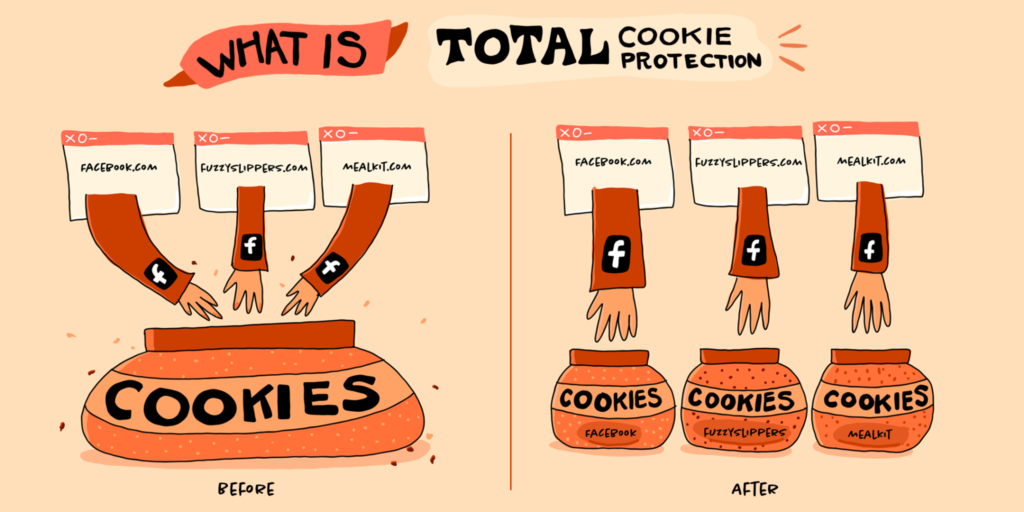
Total Cookie Protection – Stop cookie tracking with separate cookie jars

Total Cookie Protection stops cookies from tracking you around the web. Total Cookie Protection joins our suite of privacy protections called ETP (Enhanced Tracking Protection). In combining Total Cookie Protection with supercookie protections, Firefox is now armed with very strong protection against cookie tracking. Total Cookie Protection works by maintaining a separate “cookie jar” for each website you visit. Any time a website, or third-party content embedded in a website, deposits a cookie in your browser, that cookie is confined to the cookie jar assigned to that website, such that it is not allowed to be shared with any other website.

Total Cookie Protection works by maintaining a separate “cookie jar” for each website you visit

Smart Block – Ensuring smoother logins, even in Facebook

SmartBlock, our advanced tracker blocking mechanism combines a great web browsing experience with robust privacy protection, by ensuring that you can still use third-party login buttons, including Facebook, to sign in to websites, while providing strong defenses against cross-site tracking. SmartBlock provides local stand-ins for blocked third-party tracking scripts. These stand-in scripts behave just enough like the original ones to make sure that the website works properly. They allow sites relying on the original scripts to load with their functionality intact. The SmartBlock stand-ins are bundled with Firefox, so the chances for third-party content from the trackers to load and track you is very slim, unless you interact with the buttons to sign into Facebook. Additionally, the stand-ins themselves do not contain any code that would support tracking functionality.

HTTPS by Default – Automatically establish a secure, encrypted connection over HTTPS 

Insecure connections are not only a risk to your online security, they also reveal the full content of the websites you are browsing to anyone who can monitor your internet traffic, including your ISP. In Private Browsing Windows, Firefox will favor secure connections to the web by default for every website you visit. Firefox’s HTTPS by Default policy in Private Browsing Windows represents a major improvement in the way the browser handles insecure web page addresses. As illustrated in the Figure below, whenever you enter an insecure (HTTP) URL in Firefox’s address bar, or you click on an insecure link on a web page, Firefox will now first try to establish a secure, encrypted HTTPS connection to the website. In the cases where the website does not support HTTPS, Firefox will automatically fall back and establish a connection using the legacy HTTP protocol instead:

Firefox will now first try to establish a secure, encrypted HTTPS connection to the website

You’re still protected even when you’re not in Private Browsing mode

In addition to our protections in Private Browsing, we strive to combat tracking in everyday browsing in Firefox overall, and have brought many protections to normal windows. Our Enhanced Tracking Protection feature blocks many of the worst cookies, fingerprinters and social media tracking cookies by default in all windows. 
Anyone familiar with Mozilla knows that caring about your privacy is at the heart of our mission.

For more on Firefox:

Firefox browser privacy features explained

Superhero passwords may be your kryptonite wherever you go online

Latest Firefox release includes Multiple Picture-in-Picture and Total Cookie Protection

The post Firefox’s Private Browsing mode upleveled for you appeared first on The Mozilla Blog.

12 Nov 01:55

Privatization Is Always A Ripoff

mkalus shared this story from Ian Welsh.

b'Story 504364746

Water edition, from the UK

\n

Analysis in 2020 found that privatised (sic) water companies paid \xc2\xa357bn in dividends to shareholders since their foundation in 1991 to 2019. Now they say they need better infrastructure to stop piping sewage into rivers, lakes, and sea.

\n

Up here in Toronto, Canada, we privatized half our trash collection, dividing the city in half. The West has private collection, the East has public. When it went into force, the arguments were strong: private was cheaper. Now, a few years later:

\n\n

Oh, hey, what a surprise. It costs more and they pay workers less than the City does.

\n

Let’s keep this simple, as free market fundamentalists who usually understand nothing about markets often say, “There is no such thing as a free lunch.” TANSTAAFL.

\n

Private companies have to make a profit. Public companies do not. Private companies are not miraculously more efficient, to be cheaper than public companies, they have cut costs. Often that is wages, other times it is not paying to maintain or upgrade infrastructure required to keep sewage out of the water.

\n

For anything where we know how to do it; where there is actually little room for innovation, and where the service provided is about the same for everyone (this includes almost all universal or near universal insurance, all utilities including water and power and internet) public provision is more efficient and private provision can only be cheaper by cutting costs you don’t want cut. That includes, of course, pushing costs into the future: the trash company in Toronto knew it’d raise prices in the future, it undercut for a few years to get its foot in the door.

\n

Once you do privatize it can be difficult to take something back public. You’ve sold the assets, and the people you sold them to are making money and don’t want to sell back. Especially at lower levels of government you may not be able to force them to, or force them to at a reasonable price. In addition, they now have a constituency of rich people who need them to continue (investors, executives) and who can use their money to lobby and bribe officials.

\n

As a rule, most privatizations are fraud, and the politicians who do them are corrupt, helping out friends and donors and doing well out of the process. Most politicians who do this should be treated as criminals and thrown in prison for defrauding the public, corruption and fraud.

\n

(About half of the neoliberal agenda initiated by Thatcher and Reagan was and is just “privatize everything you can so the rich can get richer.” It’s not capitalism, it’s rentierism and corruption and makes economies weaker, not stronger.)

\n

TANSTAAFL. There is no free lunch, if a private company can make money off a public asset, it’s been sold to them for less than its worth, and the people who will pay in the end are taxpayers.

\n

If it is a public good, it should be provided publicly.

\n
\n

(My writing helps pay my rent and buys me food. So please consider subscribing or donating if you like my writing.)

\n


\n


\n
\nFacebook \nTwitter \nWhatsApp\nLinkedIn\n
'
10 Nov 02:15

No Slack

by Jonathan Libov

At Antimatter we’ve made the choice to work without Slack or any other enterprise group chat product. We’re doing this for two reasons:

  1. We’re here to work
  2. We trade in fully-formed ideas

Let’s take those in turn. We’re here to work. Many of my old blog posts have not held up well, but Literally Social Insurance has:

Slack provides a functional service, but in many ways promises fulfillment through shared experience. In a world where shared experiences are scarcer, and meatspace grows less social, Slack helps fill the void by making work, a rare shared experience, funnier and more social.

Slack is the online version of WeWork. They're materially different but share a Job to Be Done. They also share another important trait: Much as people increasingly rely on their employer to pay the premium for health insurance, many people now rely on their employer to pay the premium for insurance against the erosion of their social life.

I wrote this in 2019, pre-pandemic, when it was becoming apparent that our social lives were increasingly originating on our phones, instead of bars, churches, or anywhere else where your odds of striking up a conversation with someone was greater because your head wasn’t tilted down. That’s not even debatable now, here in late-pandemic: WFH has dramatically increased our reliance on our co-workers for socializing (where the socializing happens online, in Slack).

What has certainly changed, though, is that there’s now so much liquidity in online groups and communities, let alone flexibility in what part of the world you work from, that the need for Slack as an employer-sponsored supplement to one’s independent social life seems a lot less necessary. This is liberating for Antimatter: We get to focus more exclusively on finding people who love being productive and making Antimatter the most valuable thing they can do with their productivity time.

The second reason is that at Antimatter we trade in fully-formed ideas as much as possible. Of course we share observations that aren’t ideas and half-baked concepts in meetings, but doing so in Slack elongates the lifespan of those half-baked ideas and concepts. It allows you to leave meetings without clear to-do’s because you can always make up for it by “taking it offline”, a vicious misnomer for taking a topic more online and chopping it up into a chat that could spread over hours or days. Conversely, the freedom to not finish the agenda when the meeting time ends increases all of our anticipation that further details will roll in, which we will need to be online to receive. And because Slack reduces inhibition to post something that is half-baked, you get a lot of sharing-a-URL this-is-interesting type posts that don’t pertain to any to-do’s. It’s the work version of Zeno’s Achilles and the Tortoise paradox.

Achilles and the Tortoise Achilles and the Tortoise
At Antimatter we’re striving to distill merely interesting references and observations to fully-formed and well-argued ideas. We aggregate product-related observations and discussions in our issue tracker rather than group chat because that places the observation into a purposeful environment. Our most important productivity driver is a weekly email that describes what we accomplished in the week prior, what we plan to accomplish in the week ahead, and whatever artifacts from our work or readings we discovered feel important to share with the benefit of a few days’ distance. On a 1:1 level, we aim to align people’s flow state as closely as possible with their to-do’s.

Our productivity / communication tooling looks like this:

  • Notion / Google Docs for aggregating large ideas in text
  • Figma / Teamflow for aggregating large ideas in visuals
  • Linear for anything potentially actionable
  • To each his own for communicating with other team members

Antimatter's Design Room in Teamflow Our Design Room in Teamflow

The last point is the most uncertain. We encourage team members not to use their most personal messenger for inter-personal communication. I communicate with team members over Telegram and Whatsapp. If team members felt the lack of a Slack were encroaching on their personal space, we’d have a problem that we’d have to rectify, most likely with a Slack. Similarly, if team members felt they needed a space to discuss company matters in group chat form, they’re also welcome to open whatever chat service they’d like to use; if everyone opted into an independent Slack, we would of course prefer to host it.

A major caveat for all this is that as a team we are single-digit in size and haven’t accomplished anything great (yet). It’s possible we’ll find that as we grow it will be impossible or unwise to be laissez-faire when it comes to messaging.

So this is a record of how we’re approaching things with no evidence that it’s working besides our internal evaluation for our pace and thoughtfulness in the last few months as a company. We're still very early, but to that end, pointers to why this setup will become unwise or impossible are very welcome, as are inquiries if you’re interested in joining Antimatter. We’re hiring engineers, designers and a community manager.

10 Nov 02:14

Etsy’s Journey to TypeScript

by Salem Hilal

Over the past few years, Etsy’s Web Platform team has spent a lot of time bringing our frontend code up to date. It was only a year and a half ago that we modernized our Javascript build system in order to enable advanced features, things like arrow functions and classes, that have been added to the language since 2015. And while this upgrade meant that we had futureproofed our codebase and could write more idiomatic and scalable Javascript, we knew that we still had room for improvement.

Etsy has been around for over sixteen years. Naturally, our codebase has become quite large; our monorepo has over seventeen thousand JavaScript files in it, spanning many iterations of the site. It can be hard for a developer working in our codebase to know what parts are still considered best practice, and which parts follow legacy patterns or are considered technical debt. The JavaScript language itself complicates this sort of problem even further — in spite of the new syntax features added to the language over the past few years, JavaScript is very flexible and comes with few enforceable limitations on how it is used. This makes it notoriously challenging to write JavaScript without first researching the implementation details of any dependencies you use. While documentation can help alleviate this problem somewhat, it can only do so much to prevent a JavaScript library from being used improperly, which can ultimately lead to unreliable code.

All of these problems (and many more!) were ones that we felt TypeScript might be able to solve for us. TypeScript bills itself as a “superset of Javascript.” In other words,  TypeScript is everything in Javascript with the optional addition of types. Types, in programming, are basically ways to declare expectations about the data that moves through code: what kinds of input can be used by a function, what sorts of values a variable can hold. (If you’re not familiar with the concept of types, TypeScript’s handbook has a fantastic introduction.) TypeScript is designed to be easily adopted incrementally in existing Javascript projects, particularly in large codebases where shifting to a new language can be an impossibility. It is exceptionally good at inferring types from the code you’ve already written, and it has a type syntax nuanced enough to properly describe all of the quirks that are common in Javascript. Plus, it’s developed by Microsoft, it’s already in use at companies like Slack and AirBnB, and is by far the most used and loved flavor of Javascript according to last year’s “State of JS” survey. If we were going to use types to bring some amount of order to our codebase, TypeScript seemed like a really solid bet.

This is why, hot on the heels of a migration to ES6, we started investigating a path to adopting TypeScript. This post is all about how we designed our approach, some of the fun technical challenges that resulted, and what it took to educate an Etsy-sized company in a new programming language.

Adopting TypeScript, at a high level

I don’t want to spend a lot of time selling TypeScript to you because there are plenty of other articles and talks that do a really good job of exactly that. Instead, I want to talk about the effort it took to roll out TypeScript support at Etsy, which involved technical implementations beyond turning Javascript into TypeScript. It also included a great deal of planning, educating, and coordinating. In hindsight, all of these ingredients seem obvious, but getting the details right surfaced a bunch of learning experiences worth sharing. To start, let’s talk about what we wanted our adoption to look like.

Strategies for adoption

TypeScript can be more or less “strict” about checking the types in your codebase. To quote the TypeScript handbook, a stricter TypeScript configuration “results in stronger guarantees of program correctness.” You can adopt TypeScript’s syntax and its strictness as incrementally as you’d like, by design. This feature makes it possible to add TypeScript to all sorts of codebases, but it also makes “migrating a file to TypeScript” a bit of a loosely-defined target. Many files need to be annotated with types in order for TypeScript to fully understand them. There are also plenty of Javascript files that can be turned into valid TypeScript just by changing their extension from .js to .ts. However, even if TypeScript understands a file just fine, that file might benefit from even more specific types which could improve its usefulness to other developers.

There are countless articles from companies of all sizes on their approach to migrating to TypeScript, and all of them provide compelling arguments for different migration strategies. For example, AirBnB automated as much of their migration as possible. Other companies enabled less-strict TypeScript across their projects, adding types to code over time.

Deciding the right approach for Etsy meant answering a few questions about our migration:

  • How strict do we want our flavor of TypeScript to be?
  • How much of our codebase do we want to migrate?
  • How specific do we want the types we write to be?

We decided that strictness was a priority; it is a lot of effort to adopt a new language, and if we’re using TypeScript, we may as well take full advantage of its type system (plus, TypeScript’s checker performs better with stricter types). We also knew that Etsy’s codebase is quite large; migrating every single file was probably not a good use of our time, but ensuring we had types for new and frequently updated parts of our site was important. And of course, we wanted our types to be as helpful and as easy to use as possible.

What we went with

Our adoption strategy looked like this:

  1. Make TypeScript as strict as reasonably possible, and migrate the codebase file-by-file.
  2. Add really good types and really good supporting documentation to all of the utilities, components, and tools that product developers use regularly.
  3. Spend time teaching engineers about TypeScript, and enable TypeScript syntax team by team.

Let’s look at each of these points a little more closely.

Gradually migrate to strict TypeScript

Strict TypeScript can prevent a lot of very common errors, so we figured being as strict as possible made the most sense. The downside of this decision is that most of our existing Javascript would need type annotations. It also required us to migrate our codebase file-by-file. If we had tried to convert everything all at once using strict TypeScript, we would have ended up with a lengthy backlog of issues to be addressed. As I mentioned before, our monorepo has over seventeen thousand Javascript files in it, many of which don’t change very often. We chose to focus our efforts on typing actively-developed areas of the site, clearly delineating between which files had reliable types and which ones didn’t using .js and .ts file extensions respectively.

Migrating all at once could make improving existing types logistically difficult, especially in a monorepo. If you import a TypeScript file with an existing suppressed type error in it, should you fix the error? Does it mean that your file’s types need to be different to accommodate potential problems from this dependency? Who owns that dependency, and is it safe to edit? As our team has learned, every bit of ambiguity that can be removed enables an engineer to make an improvement on their own. With an incremental migration, any file ending in .ts or .tsx can be trusted to have reliable types.

Make sure utilities and tools have good TypeScript support

Before our engineers started writing TypeScript, we wanted all of our tooling to support TypeScript and all of our core libraries to have usable, well-defined types. Using an untyped dependency in a TypeScript file can make code hard to work with and can introduce type errors; while TypeScript will try its best to infer the types in a non-TypeScript file, it defaults to “any” if it can’t. Put another way, if an engineer is taking the time to write TypeScript, they should be able to trust that the language is catching their type errors as they write code. Plus, forcing engineers to write types for common utilities while they’re trying to learn a new language and keep up with their team’s roadmap is a good way to get people to resent TypeScript. This was not a trivial amount of work, but it paid off massively. I’ll get into the details about this in the “Technical Details” section below.

Educate and onboard engineers team by team

We spent quite a bit of time on education around TypeScript, and that is the single best decision we made during our migration. Etsy has several hundred engineers, and very few of them had TypeScript experience before this migration (myself included). We realized that, in order for our migration to be successful, people would have to learn how to use TypeScript first. Turning on the switch and telling everyone to have at it would probably leave people confused, overwhelm our team with questions, and hurt the velocity of our product engineers. By onboarding teams gradually, we could work to refine our tooling and educational materials. It also meant that no engineer could write TypeScript without their teammates being able to review their code. Gradual onboarding gave our engineers time to learn TypeScript and to factor it into their roadmaps.

Technical details (the fun stuff)

There were plenty of fun technical challenges during the migration. Surprisingly, the easiest part of adopting TypeScript was adding support for it to our build process. I won’t go into a ton of details about this because build systems come in many different flavors, but in short:

  • We use Webpack to build our Javascript. Webpack transpiles our modern Javascript into older, more compatible Javascript using Babel.
  • Babel has a lovely plugin called babel-preset-typescript that quickly turns TypeScript into Javascript, but expects you to do your own type-checking.
  • To check our types, we run the TypeScript compiler as part of our test suite, and configure it not to actually transpile any files using its noEmit option.

All of the above took a week or two, and most of that time was spent validating that TypeScript we sent to production didn’t behave strangely. The rest of our tooling around TypeScript took much more time and turned out to be a lot more interesting.

Improving type specificity with typescript-eslint

At Etsy, we make heavy use of custom ESLint linting rules. They catch all sorts of bad patterns for us, help us deprecate old code, and keep our pull request comments on-topic and free of nitpicks. If it’s important, we try to write a lint rule for it. One place that we found an opportunity for linting was in enforcing type specificity, which I generally use to mean “how accurately a type fits the thing it is describing”. 

For example, imagine a function that takes in the name of an HTML tag and returns an HTML element. The function could accept any old string as an argument, but if it uses that string to create an element, then it would be nice to make sure that the string was in fact the name of a real HTML element.

// This function type-checks, but I could pass in literally any string in as an argument.
function makeElement(tagName: string): HTMLElement {
   return document.createElement(tagName);
}

// This throws a DOMException at runtime
makeElement("literally anything at all");

If we put in a little effort to make our types more specific, it’ll be a lot easier for other developers to use our function properly. 

// This function makes sure that I pass in a valid HTML tag name as an argument.
// It makes sure that ‘tagName’ is one of the keys in 
// HTMLElementTagNameMap, a built-in type where the keys are tag names 
// and the values are the types of elements.
function makeElement(tagName: keyof HTMLElementTagNameMap): HTMLElement {
   return document.createElement(tagName);
}

// This is now a type error.
makeElement("literally anything at all");

// But this isn't. Excellent!
makeElement("canvas");

Moving to TypeScript meant that we had a lot of new practices we needed to think about and lint for. The typescript-eslint project provided us with a handful of TypeScript-specific rules to take advantage of. For instance, the ban-types rule let us warn against using the generic Element type in favor of the more specific HTMLElement type.

We also made the (somewhat controversial) decision not to allow non-null assertions and type assertions in our codebase. The former allows a developer to tell TypeScript that something isn’t null when TypeScript thinks it might be, and the latter allows a developer to treat something as whatever type they choose.

// This is a constant that might be ‘null’.
const maybeHello = Math.random() > 0.5 ? "hello" : null;

// The `!` below is a non-null assertion. 
// This code type-checks, but fails at runtime.
const yellingHello = maybeHello!.toUpperCase()
 
// This is a type assertion.
const x = {} as { foo: number };
// This code type-checks, but fails at runtime.
x.foo;

Both of these syntax features allow a developer to override TypeScript’s understanding about the type of something. In many cases, they both imply a deeper problem with a type that probably needs to be fixed. By doing away with them, we force our types to be more specific about what they’re describing. For instance, you might be able to use “as” to turn an Element into an HTMLElement, but you likely meant to use an HTMLElement in the first place. TypeScript itself has no way of disabling these language features, but linting allows us to identify them and keep them from being deployed. 

Linting is really useful as a tool to deter folks from bad patterns, but that doesn’t mean that these patterns are universally bad — with every rule, there are exceptions. The nice thing about linting is that it provides a reasonable escape hatch. Should we really, really need to use “as”, we can always add a one-off linting exception.

// NOTE: I promise there is a very good reason for us to use `as` here.
// eslint-disable-next-line @typescript-eslint/consistent-type-assertions
const x = {} as { foo: number };

Adding types to our API

We wanted our developers to write effective TypeScript code, so we needed to make sure that we provided types for as much of the development environment as possible. At first glance, this meant adding types to our reusable design components, helper utilities, and other shared code. But ideally any data a developer might need to access should come with its own types. Almost all of the data on our site passes through the Etsy API, so if we could provide types there, we’d get coverage for much of our codebase very quickly. 

Etsy’s API is implemented in PHP, and we generate both PHP and Javascript configurations for each endpoint to help simplify the process of making a request. In Javascript, we use a light wrapper around the fetch API called EtsyFetch to help facilitate these requests. That all looks loosely like this:

// This function is generated automatically.
function getListingsForShop(shopId, optionalParams = {}) {
   return {
       url: `apiv3/Shop/${shopId}/getLitings`,
       optionalParams,
   };
}

// This is our fetch() wrapper, albeit very simplified.
function EtsyFetch(config) {
   const init = configToFetchInit(config);
   return fetch(config.url, init);
}
 
// Here's what a request might look like (ignoring any API error handling).
const shopId = 8675309;
EtsyFetch(getListingsForShop(shopId))
   .then((response) => response.json())
   .then((data) => {
       alert(data.listings.map(({ id }) => id));
   });

This sort of pattern is common throughout our codebase. If we didn’t generate types for our API responses, developers would have to write them all out by hand and hope that they stayed in sync with the actual API. We wanted strict types, but we also didn’t want our developers to have to bend over backwards to get them.

We ended up taking advantage of some work that our own developer API uses to turn our endpoints into OpenAPI specifications. OpenAPI specs are standardized ways to describe API endpoints in a format like JSON. While our developer API used these specs to generate public-facing documentation, we could also take advantage of them to generate TypeScript types for our API’s responses. We spent a lot of time writing and refining an OpenAPI spec generator that would work across all of our internal API endpoints, and then used a library called openapi-typescript to turn those specs into TypeScript types.
Once we had TypeScript types generated for all of our endpoints, we still needed to get them into the codebase in a usable way. We decided to weave the generated response types into our generated configs, and then to update EtsyFetch to use these types in the Promise that it returned. Putting all of that together looks roughly like this:

// These types are globally available:
interface EtsyConfig<JSONType> {
   url: string;
}
 
interface TypedResponse<JSONType> extends Response {
   json(): Promise<JSONType>;
}
 
// This is roughly what a generated API config file looks like:
import OASGeneratedTypes from "api/oasGeneratedTypes";
type JSONResponseType = OASGeneratedTypes["getListingsForShop"];
 
function getListingsForShop(shopId): EtsyConfig<JSONResponseType> {
   return {
       url: `apiv3/Shop/${shopId}/getListings`,
   };
}
 
// This is (looooosely) what EtsyFetch looks like:
function EtsyFetch<JSONType>(config: EtsyConfig<JSONType>) {
   const init = configToFetchInit(config);
   const response: Promise<TypedResponse<JSONType>> = fetch(config.url, init);
   return response;
}
 
// And this is what our product code looks like:
EtsyFetch(getListingsForShop(shopId))
   .then((response) => response.json())
   .then((data) => {
       data.listings; // "data" is fully typed using the types from our API
   });

The results of this pattern were hugely helpful. Existing calls to EtsyFetch now had strong types out-of-the-box, no changes necessary. Plus, if we were to update our API in a way that would cause a breaking change in our client-side code, our type-checker would fail and that code would never make it to production. 

Typing our API also opened the door for us to use the API as a single source of truth between the backend and the browser. For instance, if we wanted to make sure we had a flag emoji for all of the locales our API supported, we could enforce that using types:

​​type Locales  OASGeneratedTypes["updateCurrentLocale"]["locales"];
 
const localesToIcons : Record<Locales, string> = {
   "en-us": "🇺🇸",
   "de": "🇩🇪",
   "fr": "🇫🇷",
   "lbn": "🇱🇧",
   //... If a locale is missing here, it would cause a type error.
}
Best of all, none of these features required changes to the workflows of our product engineers. As long as they used a pattern they were already familiar with, they got types for free.

Improving the dev experience by profiling our types 

A big part of rolling out TypeScript was paying really close attention to complaints coming from our engineers. While we were still early in our migration efforts, a few folks mentioned that their editors were sluggish when providing type hints and code completions. Some told us they were waiting almost half a minute for type information to show up when hovering over a variable, for example. This problem was extra confusing considering we could run the typechecker across all of our TS files in well under a minute; surely type information for a single variable shouldn’t be that expensive.

We were lucky enough to get a meeting with some of the maintainers of the TypeScript project. They were interested in seeing TypeScript be successful in a unique codebase like Etsy’s. They were also quite surprised to hear about our editor challenges, and were even more surprised when TypeScript took almost 10 full minutes to check our whole codebase, unmigrated files and all.

After some back-and-forth to make sure we weren’t including more files than we needed, they pointed me to the performance tracing feature that they had just introduced at the time. The trace made it pretty apparent that TypeScript had a problem with one of our types when it tried to typecheck an unmigrated Javascript file. Here is the trace for that file (width here represents time).

As it turned out, we had a circular dependency in our types for an internal utility that helps us create immutable objects. These types had worked flawlessly for all the code we had worked with so far, but had problems with some of its uses in yet-to-be-migrated parts of the codebase that created an infinite type loop. When someone would open a file in those parts of the codebase, or when we ran the typechecker on all of our code, TypeScript would hit the infinite loop, spend a lot of time trying to make sense of that type, and would then give up and log a type error. Fixing that type reduced the time it took to check that one file from almost 46 seconds to less than 1.

This type caused problems in other places as well. After applying the fix, checking the entire codebase took about a third of the time and reduced our memory usage by a whole gig:

If we hadn’t caught this problem, it would have eventually made our tests (and therefore our production deploys) a whole lot slower. It also would have made writing TypeScript really, really unpleasant for everyone.

Education

The biggest hurdle to adopting TypeScript is, without question, getting everyone to learn TypeScript. TypeScript works better the more types there are. If engineers aren’t comfortable writing TypeScript code, fully adopting the language becomes an uphill battle. As I mentioned above, we decided that a team-by-team rollout would be the best way to build some institutional TypeScript muscles.

Groundwork 

We started our rollout by working directly with a small number of teams. We looked for teams that were about to start new projects with relatively flexible deadlines and asked them if they were interested in writing them in TypeScript. While they worked, our only job was to review their pull requests, implement types for modules that they needed, and pair with them as they learned.

During this time, we were able to refine our types and develop documentation tailored specifically to tricky parts of Etsy’s codebase. Because there were only a handful of engineers writing TypeScript, it was easy to get direct feedback from them and untangle issues they ran into quickly. These early teams informed a lot of our linting rules, and they helped make sure our documentation was clear and useful. It also gave us the time we needed to complete some of the technical portions of our migration, like adding types to the API.

Getting teams educated

Once we felt that most of the kinks had been ironed out, we decided to onboard any team that was both interested and ready. In order to prepare teams to write TypeScript, we asked them to first complete some training. We found a course from ExecuteProgram that we thought did a good job of teaching the basics of TypeScript in an interactive and effective way. All members of a team would need to complete this course (or have some amount of equivalent experience) before we considered them ready to onboard. 

To entice people into taking a course on the internet, we worked to get people excited for TypeScript in general. We got in touch with Dan Vanderkam, the author of Effective TypeScript, to see if he’d be interested in giving an internal talk (he said yes, and his talk and book were both superb). Separately, I designed some extremely high-quality virtual badges that we gave to people at the midpoint and at the end of their coursework, just to keep them motivated (and to keep an eye on how quickly people were learning TypeScript).

We then encouraged newly onboarded teams to set some time aside to migrate JS files that their team was responsible for. We found that migrating a file that you’re already familiar with is a great way to learn how to use TypeScript. It’s a direct, hands-on way to work with types that you can then immediately use elsewhere. In fact, we decided against using more sophisticated automatic migration tools (like the one AirBnB wrote) in part because it took away some of these learning opportunities. Plus, an engineer with a little bit of context can migrate a file much more effectively than a script could.

The logistics of a “team-by-team roll-out”

Onboarding teams one at a time meant that we had to prevent individual engineers from writing TypeScript before the rest of their team was ready. This happened more often than you’d think; TypeScript is a really cool language and people were eager to try it out, especially after seeing it being used in corners of our codebase. To prevent this sort of premature adoption, we wrote a simple git commit hook to disallow TypeScript changes from users who weren’t part of a safelist. When a team was ready, we’d simply add them to the safelist.

Separately, we worked hard to develop direct communications with the engineering managers on every team. It’s easy to send out an email to the whole engineering department, but working closely with each manager helped to ensure no one was surprised by our rollout. It also gave us a chance to work through concerns that some teams had, like finding the time to learn a new language. It can be burdensome to mandate a change, especially in a large company, but a small layer of direct communication went a long way (even if it did require a sizable spreadsheet to keep track of all the teams).

Supporting teams after onboarding

Reviewing PRs proved to be a really good way to catch problems early, and it informed a lot of our subsequent linting rules. To help with the migration, we decided to explicitly review every PR with TypeScript in it until the rollout was well underway. We scoped our reviews to the syntax itself and, as we grew, solicited help from engineers who had successfully onboarded. We called the group the TypeScript Advisors, and they became an invaluable source of support to newly-minted TypeScript Engineers.

One of the coolest parts about the rollout was how organically a lot of the learning process happened. Unbeknownst to us, teams held big pairing sessions where they worked through problems or tried to migrate a file together. A few even started book clubs to read through TypeScript books. Migrations like these are certainly a lot of work, but it’s easy to forget how much of that work is done by passionate coworkers and teammates.

Where are we now?

As of earlier this fall, we started requiring all new files to be written in TypeScript. About 25% of our files have types, and that number doesn’t account for deprecated features, internal tools, and dead code. Every team has been successfully onboarded to TypeScript at the time of writing.

“Finishing a migration to TypeScript” isn’t something with a clear definition, especially for a large codebase. While we’ll likely have untyped Javascript files in our repo for a while yet, almost every new feature we ship from here on will be typed. All of that aside, our engineers are already writing and using TypeScript effectively, developing their own tooling, starting really thoughtful conversations about types, and sharing articles and patterns that they found useful. It’s hard to know for sure, but people seem to be enjoying a language that almost no one had experience with this time last year. To us, that feels like a successful migration.

Appendix: A list of learning resources

If our adventure with TypeScript has left you interested in adopting it in your own codebase, here are some resources that I found useful.

  • TypeScript’s Handbook is a fantastic resource if you’re brand new to TypeScript.
  • I personally learned a lot about TypeScript, both the language and its adoption, from Effective TypeScript by Dan Vanderkam.
  • The TypeScript project’s Performance wiki is a trove of useful advice for ensuring a performant TypeScript environment.
  • If you want to get really good at writing complex types for your codebase’s weird libraries, the type-challenges repo is a great way to get experience.

10 Nov 02:14

2021-11-06/7/8 General

by Ducky

Disease

As I mentioned back in May 2020, they discovered a new coronavirus in Malaysia in samples from 2017 and 2018 which appears to have jumped directly from dogs to humans. They found this coronavirus because someone decided to go looking for unknown coronaviruses, and whaddayaknow, there one is! There wasn’t a big fuss because there didn’t seem to be human-to-human transmission; it was more like, “huh, that’s interesting, I wonder how many other coronaviruses that jump from animals at a low enough level that nobody has ever bothered to look”.

WELL. They just found the same coronavirus, HuPn-2018, in samples from 2017 from Haiti. Given that Malaysian dogs don’t vacation in Haiti very often, it seems likely to me that this is likely to have come from human-to-human transmission. I suspect that there isn’t a lot of human travel directly between Haiti and Malaysia, either, which suggests to me that this is more widespread than just those two countries.

Should you be worried about HuPn-2018? Probably not. First, the Haiti people had basically a cold. (The patients were only tested because of concerns that it might be Zika.) So it isn’t dangerous… yet. Second, there are efforts right now to come up with a pan-coronavirus vaccines. Third, if the canine coronavirus does mutate and become dangerous, well, we know a lot more about how to test for, vaccinate against, and treat coronaviruses now. I expect that we’d have a highly effective vaccine for it within six months, and some of the anti-COVID oral therapies might work against it. Finally, the mitigation measures we took against COVID-19 might well have killed off the canine coronavirus.


In researching the canine coronavirus, I stumbled across this paper from March 2021 which said that they found pig coronavirus (Hu-PDCoV) in three kids in Haiti. This is still interesting, but probably even less concerning than the dog coronavirus because it’s only been seen in three kids in Haiti.

One thing that is slightly worrying about the porcine strain is that it’s relatively distantly related to the other coronaviruses that we’ve come to know and love. The “common cold” coronaviruses are all alpha- or beta-coronaviruses; the scary coronaviruses are all beta-coronaviruses. Hu-PDCoV is a deltacoronavirus, which means humans don’t have much practice getting rid of it.

For those of you who are counting along at home, the porcine coronavirus makes nine coronaviruses which have been seen infecting at least one human:

  • “common cold” coronaviruses:
    • betacoronavirus OC43, related to cow coronavirus
    • betacoronavirus HKU1, related to mouse coronavirus
    • alphacoronavirus 229E
    • alphacoronavirus NL63, probably from bats or civet cats centuries ago
  • unusual but not very scary viruses which recently jumped from animals
    • alphacoronavirus HuPn-2018, definitely from dog coronavirus
    • deltacoronavirus Hu-PDCoV, definitely from pig coronavirus
  • more deadly ones:
    • betacoronavirus SARS-CoV-1, probably from bats via civet cats
    • betacoronavirus MERS, probably from bats or camels
    • betacoronavirus SARS-CoV-2, probably from bats

Demographics

This article reports that StatCan says that 19K+ (5.2%) more people died in Canada than would have without the pandemic.


This article says that children under 12 are now the largest cohort of COVID-19 patients.

Mitigation Measures

As this article reports, today is the day that Canadians can resume going to the US via land or sea.

You do have to have a PCR test to return to Canada, but there are rumblings that that might change. I am not the only person who thinks it is completely stupid that you can take a PCR test in Canada, then go to the US for a day or two, and come back on the strength of the PCR test you took in Canada.

Variants

This study found that there was 70% more spread among household members of Delta cases than of Alpha cases.

Recommended Reading

This article talks about why you (unless you are immunocompromised) probably don’t need a booster.


OMG the new nanopore technology can read individual DNA molecule’s nucleotides (letters) in real-time! Here’s a manufacturer’s explanation of how it works.


This article talks about the promise of protein-based vaccines, especially six which are in late stages.


This article about how maybe Long COVID will help with other Long X conditions (like ME/CFS) is interesting, but be advised that I didn’t learn anything from it.


This article is about Fast Grants, an American idea for radically reducing the amount of time scientists spend on grants (which also means less oversight).


This article says that the brain controls some immune system responses.

10 Nov 02:13

Pi OS moves to Debian Bullseye

by Rui Carmo

The compositing window manager is a nice touch for boards with at least 2GB of RAM, but the video drivers and other kernel updates are the nicest feature.

Even though most of my Pis are headless, the improvements are welcome, and I look forward to playing with the 64bit version (it wasn’t there yet).

It is still somewhat amazing that we can run a full blown UNIX desktop on a machine the size of a baby shoe with this degree of sophistication.


10 Nov 02:12

Flickr Release Notes, October 2021

by Carol Benovic-Bradley

Hello, Flickr members! Here’s a summary of what our team worked on in October 2021.

What’s changed

  • Apple Pay is now available as a payment option on desktop and mobile web in Safari.
  • The Flickr iOS app now has a new photo editor! You should recognize it as the same photo editor that we currently make available when you’re using Flickr from a desktop computer.
  • Since we launched the new notifications center and settings to all Flickr members, we’ve been working on improving the experience based on everyone’s feedback. In our first update, we’ve added the total number of comments to the comment pop-up in the Notification Center.
The comment pop-up now shows the total number of comments

Bug fixes

  • We fixed some issues with login, to help members that need to transition off of Yahoo Login.
  • We made some progress to improve loading of the Notifications bell. And we have more work upcoming to monitor and improve page performance on Flickr.

Some notable improvements from September

  • The iOS app now has an onboarding experience, specifically for new Flickr members, that surfaces some recommended photographers to follow.
  • The … menu on profile and group pages now includes all interaction options:
    • On your profile page, the … menu includes the options to change your cover photo, username, or real name.
    • If you’re visiting the profile of another Flickr member, the … menu includes the options to send them a FlickrMail, block or report the member to our Trust and Safety team, give Pro, or to designate someone you follow as a friend or family member.
    • On group pages, the … menu gives you several options based on whether or not you’re a member of the group, including the option to hide the group from your activity feed, to mute notifications from the group, and to report the group to our Trust and Safety team. If you’re an admin of the group, you’ll also have the option to update the group’s cover photo.
Visit the ... menu on group and profile pages

We’re planning to share these release notes on a monthly basis. Please look out for them and write to our Support Heroes team if you have any questions about these updates. If you’re a Pro member, you’ll hear back from us within a couple of hours!

10 Nov 02:11

Welcome Eric Muhlheim, our incoming Chief Financial Officer

by Mitchell Baker

I am excited to announce that Eric Muhlheim has joined Mozilla Corporation as our Chief Financial Officer (CFO).

As our CFO Eric will be a key member of our steering committee reporting to me. He will lead our continued strategy to scale our mission impact by growing and diversifying our revenue through new investments, product offerings and business opportunities that allow us to better serve our users and advance our agenda for a healthier, more joyful internet. 

Eric stood out as a candidate because of his deep operational expertise in both developing and leading organizations, strategic planning, and in growing revenue streams through operations, acquisitions and partnerships. He’s passionate about contributing to broader business issues outside of finance and has demonstrated a strong commitment to our mission and values.

“I’ve long admired Mozilla’s mission to shape the internet as a force for the public good, give people more control over their lives online, and build products that deliver on these promises,” said Muhlheim. “People are looking today more than ever for a trusted guide to help them navigate the web with safety and joy, and Mozilla has the perspective, technology, and products to be this guide. I look forward to putting my background and skills to work to help Mozilla achieve greater impact and build a better internet for everyone.”

Most recently, Eric provided strategic financial and operating services as an independent consultant to a variety of early stage and privately-funded startups. Prior to that, he served as Chief Financial and Administrative Officer at BuzzFeed where he oversaw the restructuring of the company to drive impact, creating a unified sales organization and managing Finance, Accounting, HR, Legal, IT, Facilities, and Security as an integrated operational support team. 

Eric started his career at The Walt Disney Company, where he held various leadership roles over more than 15 years, including spending three years as an expatriate in China managing the expansion of Disney English, the company’s China-based learning center business. Following his tenure at Disney, Eric was CFO at Helix Education, a provider of technologies and services to power data-driven higher education growth, and at the programmatic advertising exchange OpenX Technologies.

Eric currently serves on the boards of the Independent Shakespeare Co. of Los Angeles and Temple Emanuel of Beverly Hills. He graduated from Princeton University cum laude in Mathematics and holds an MBA from The Stanford Graduate School of Business. He’s based in Los Angeles, California. 

Please join me in welcoming Eric to Mozilla.

The post Welcome Eric Muhlheim, our incoming Chief Financial Officer appeared first on The Mozilla Blog.

10 Nov 02:10

Firefox: the first major browser to be available in the Windows Store

by Mozilla

As of today, Firefox desktop is the first major browser to become available in the Windows Store for Windows 10 and Windows 11 users. Previously, if you were on Windows and wanted to use Firefox, you had to download it from the internet and go through a clunky process from Microsoft. Now that Microsoft has changed its Store policies, choosing Firefox as your desktop browser is even more seamless – and it comes with all the latest Firefox features.

screenshot of Firefox available in the Windows Store

On Windows? Download Firefox directly from the Windows Store

Why choose Firefox?

The core of a web browser is what’s called a “browser engine”. The engine is responsible for loading web pages from sites and displaying them on your screen so that you can see and interact with them. Until recently, Microsoft’s store policies required that all web browsers use the engine that Microsoft had built into their platform which meant we were unable to ship the Firefox you know and love in the Windows Store. This was not only bad for you but bad for the web because it meant that the web on Windows 11 would only have the features Microsoft was willing to provide. People deserve choice and we’re glad there is an easier option to download Firefox on Windows.

Now that Microsoft has changed their policies, we are finally able to ship Firefox with our industry-leading Gecko engine in the Windows Store. This lets us make your experience of the web joyful, safe, private, and fast with unique features like:

  • Personalizing your experience with seasonal Colorways.

When you choose to use Firefox, you help us advocate for a web that is safer, more private and fast. You signal that you want a choice and the freedom to experience the web on your own terms. We’re excited to make Firefox available in the Windows Store. Try it out!

The post Firefox: the first major browser to be available in the Windows Store appeared first on The Mozilla Blog.