
I read through this in a state of eerie fascination, because it is still the way a lot of computing is done in some places. Not ones I want to be, but certainly some that want to move to the cloud.
It’s going to be painful as hell.
I read through this in a state of eerie fascination, because it is still the way a lot of computing is done in some places. Not ones I want to be, but certainly some that want to move to the cloud.
It’s going to be painful as hell.
As it turned out, the last week was a lot busier than anticipated, even considering the sweltering heat. Climate change is here, and it’s ugly, with a 4AM break on a balcony last week turning into an eerie (and noisy, and hot, and humid) echo of Jurassic Park, clocking in at well over 39C.
Home computing was, obviously, not a priority (although getting AC for my home office is now very near the top of the list). But a couple of things made it through the cracks:
github.com prefixes) I shudder at how poorly thought out that is.Other than that, the usual race to get something intellectually satisfying done during Summer break is now officialy on.
The past few weeks have been fun in a business sense but surprisingly frustrating in terms of personal fulfillment, and in between the heat, my personal backlog of stuff to learn from and experiment with and the stack of books I’ve been meaning to go through, the upcoming holidays already seem frustratingly short in comparison.
A three-to-six-month sabbatical would be just the ticket, but I suspect a more profound change is in order.
Either way, I plan to be completely work-free (including any hints of company tech) for at least two weeks. Living off a mosh session to some box someplace sounds pretty much like heaven at this point, and I intend to make the most of it.
The Raspberry Pi community is wonderfully collaborative, with people all over the world supporting each other to make things they care about. It’s part of a much wider maker movement, and a new project from seismic industries, called spink0, brings the power of Raspberry Pi to another DIY community in the music world: modular synthesizer enthusiasts.
Modular synthesizers are dedicated machines for creating and controlling electrically generated sounds. Unlike the ubiquitous electronic keyboards, they don’t offer pre-set sounds. Instead, they allow players to deeply manipulate the nature of sounds: by connecting different modules with each other via cables, players use signals from one module to affect and alter the sounds from another, and generally get very creative with not just the musical notes but the sound itself.
.jpg)
A low to middling number of cables
Recent developments in technology, and enterprising module creators, have made these machines much more accessible, largely through a modular synth format called eurorack. A thriving DIY community has also grown, with people assembling their own modular synths using kits or even building their own modules from scratch.
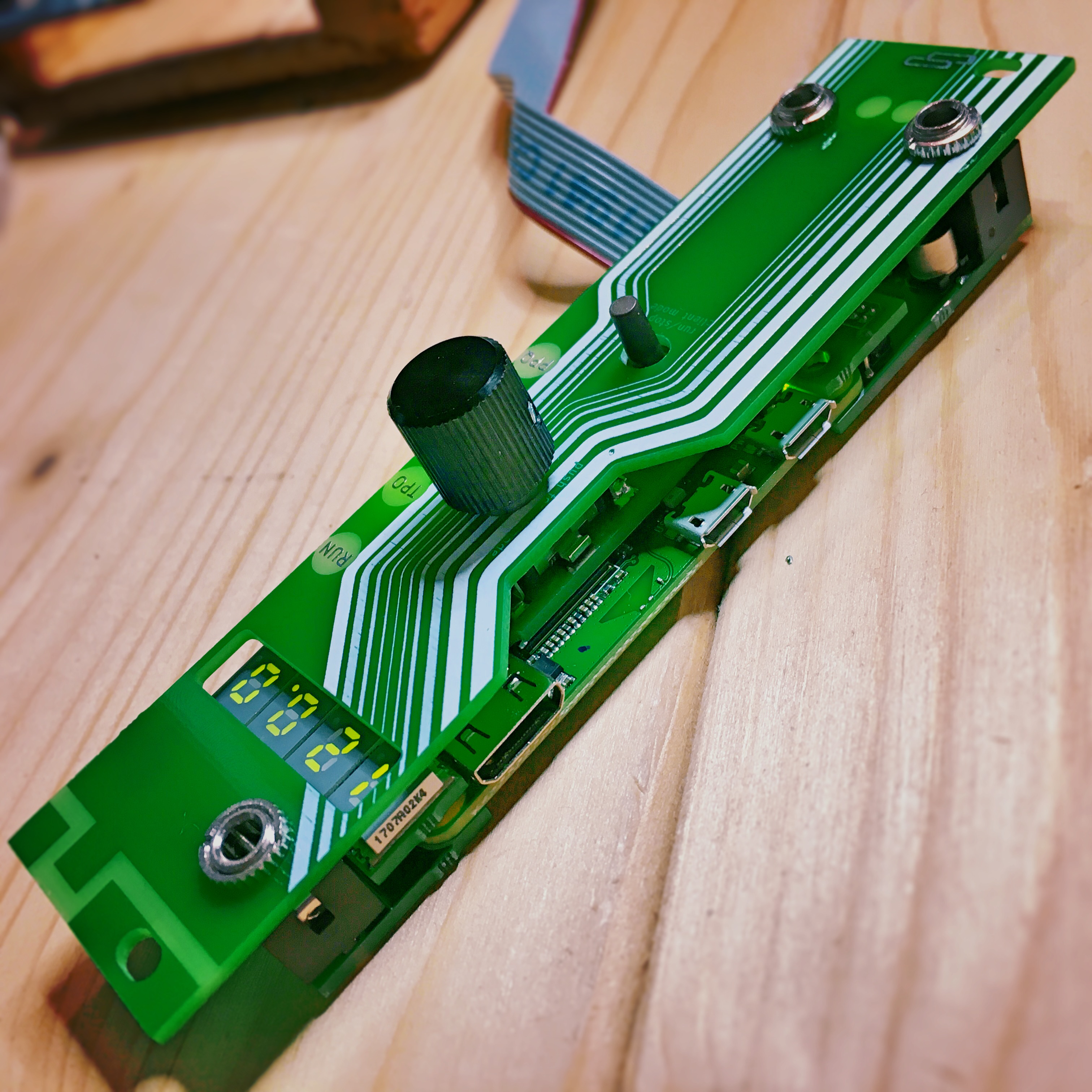
Enter the Raspberry Pi Zero W, just the right size for adding sophisticated computing power to a eurorack module. The spink0 eurorack module uses the power of a Zero W to allow musicians to keep their eurorack synth music in time with music created with more common electronic instruments like drum machines and computers. The Zero W connects to a wireless network and uses the Ableton Link protocol to share timing information across this network. It converts this digital data into the analogue square wave clock pulses that modular synths use for musical timing.
spink-0 jam with launchpad and ableton
jam with spink-0. launchpad, the two spinks and ableton are synchronized with their integrated LINK protocol via a WLAN accesspoint provided by the 2nd spink module. Tempochange in Ableton at 0:37
With spink0, seismic industries have developed shaduzLABS’ original prototype pink-0 into an open-source DIY kit including PCBs and a panel that rather neatly integrate a Pi Zero into a eurorack module (a CLK/RST generator, to be exact).
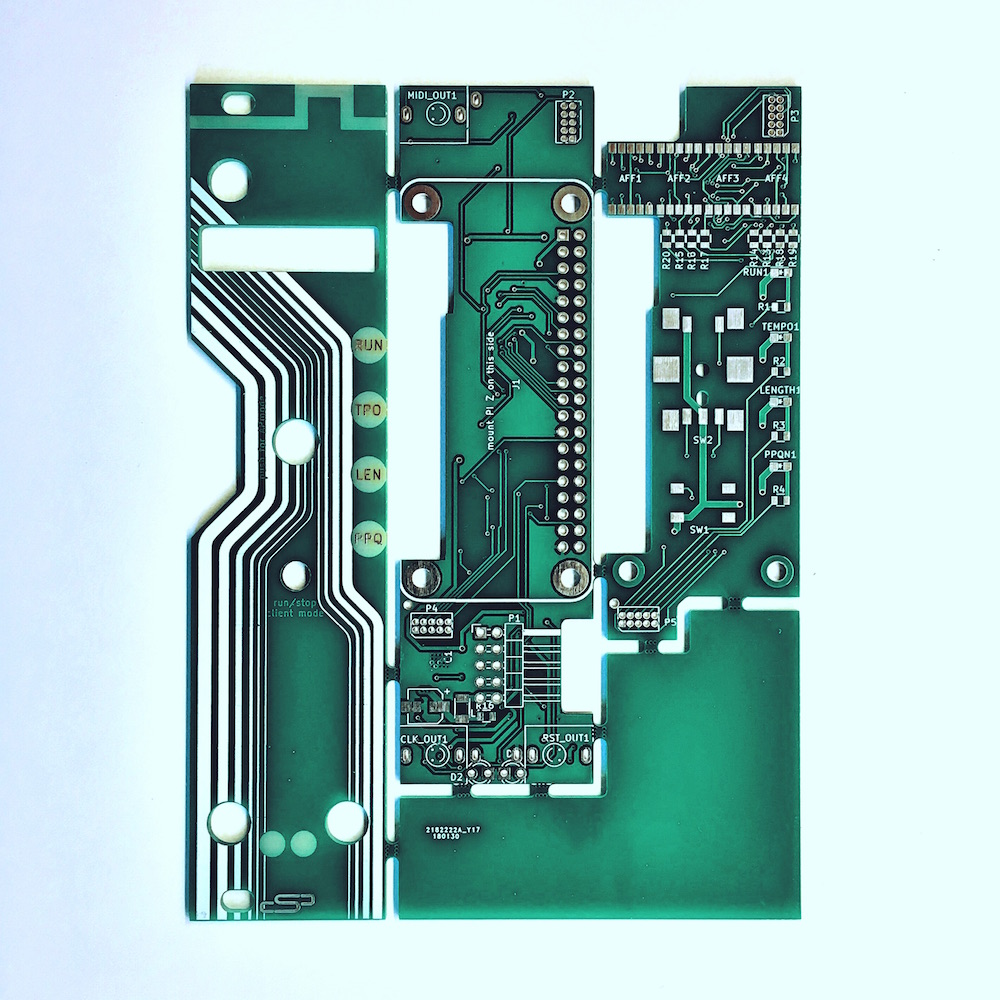
The PCBs that seismic industries designed for spink0
This opens up a whole world of jamming potential to musicians who use these esoteric machines to make their sounds. A group of electronic musicians can get together, connect over a wireless network, and improvise ideas, all kept in time across the network. Thanks to spink0, eurorack synths can coexist with computers and even iPads and other tablets.
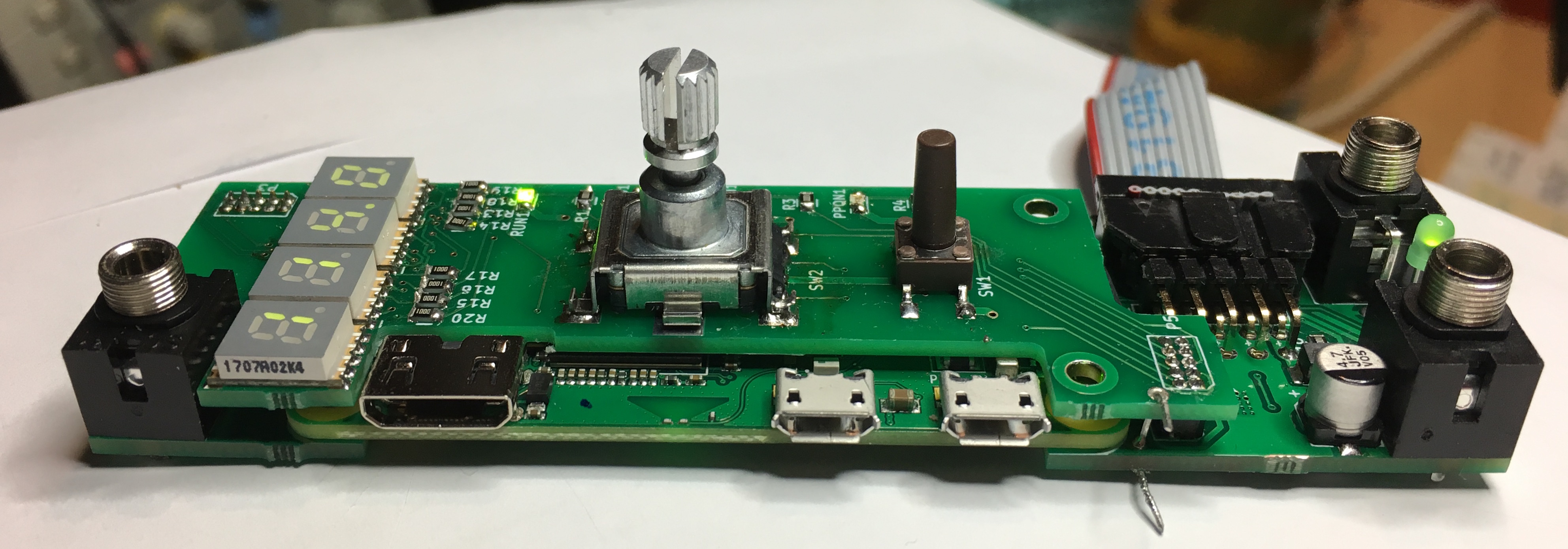
spink0 without its top panel
Now anyone can link their modular synth with other music machines and computers for collaborative jams! Seismic industries offer the DIY kit, plus full instructions and code, so you can solder yours at home, or you can buy spink0 preassembled if you wish.
The post Sync modular synths and electronic instruments with a DIY kit appeared first on Raspberry Pi.
The internet today is often like being on a guided tour bus in an unfamiliar city. You end up getting off at the same places that everyone else does. While it’s convenient and doesn’t require a lot of planning, sometimes you want to get a little off the beaten path.
With the latest Firefox experiment, Advance, you can explore more of the web efficiently, with real-time recommendations based on your current page and your most recent web history.
With Advance we’re taking you back to our Firefox roots and the experience that started everyone surfing the web. That time when the World Wide Web was uncharted territory and we could freely discover new topics and ideas online. The Internet was a different place.
We wondered, is it possible to recapture that serependitious moment of discovery, that opens people’s eyes to greater awareness of the topic they were seeking? We explored the idea of a ‘forward button’ to improve the way content is discovered, and launched our Context Graph initiative. It resulted in our first Context Graph feature, Activity Stream, which initially tested in Test Pilot, and shipped in November with our new Firefox Quantum browser. With today’s Advance experiment, we hope to bring the concept of the recommender system more to life. At a point where people no longer need to go backwards in search to move forward to discover new, relevant content.
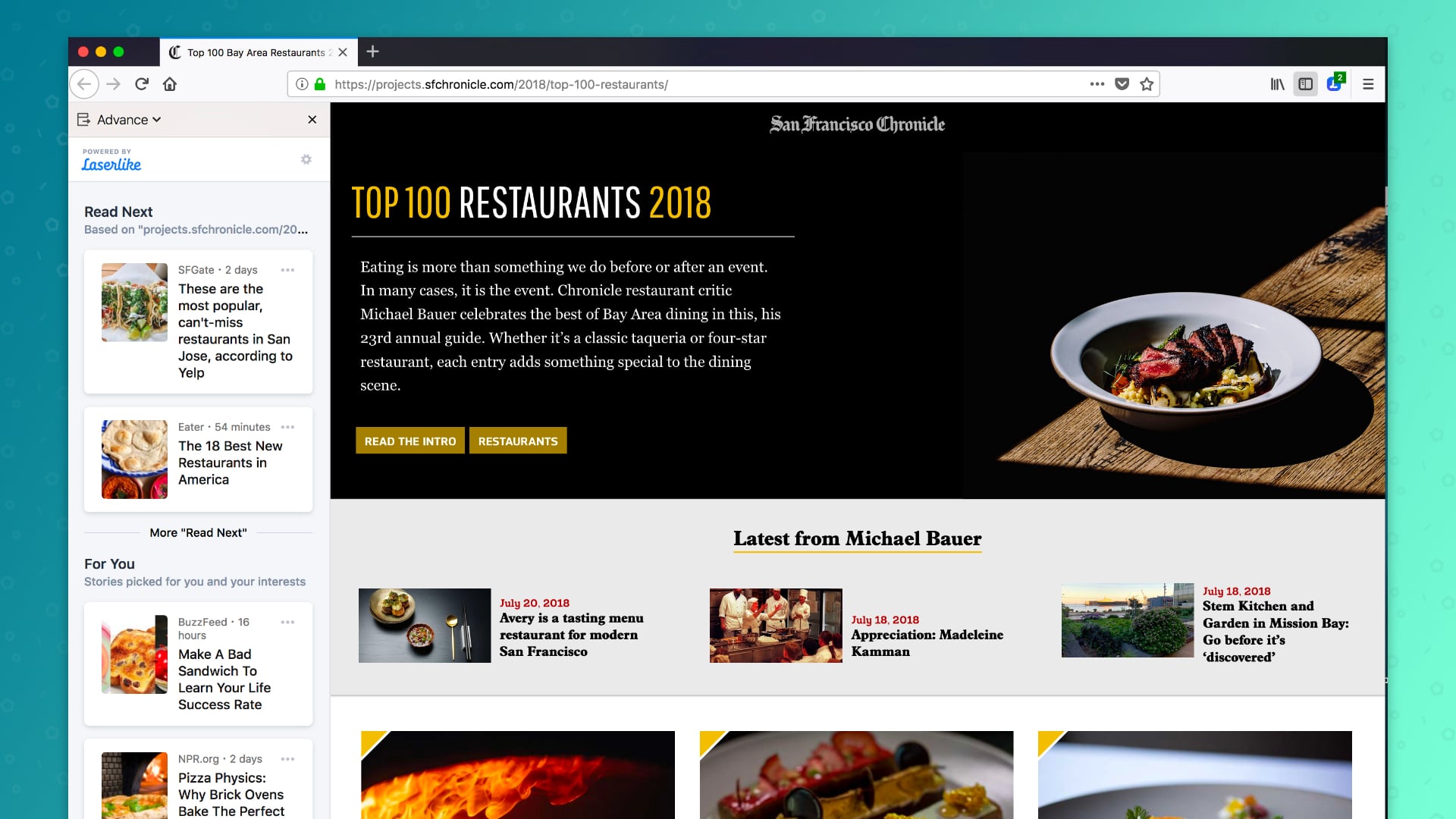
Advance Recommendations listed on the left side
For example, you’re just browsing the internet, and come across a page with a list of the hottest restaurants. Advance starts to recommend similar content around the most popular restaurants so that you can start comparing without having to do all the research on your own. These are based on the trusted sites you’ve already visited, new sites are recommended for you to explore. If there’s a recommendation you don’t want, you have the option to flag it as “Not interesting, off topic/spam, block sites,” or give direct feedback. The recommendations are personalized for you.
Not a foodie? If you’re a sports fan, an opera fan, or into the news, Advance makes current and relevant recommendations so that it’s easy to hop off the bus to explore. Just browse the web normally and keep the sidebar open when you’re feeling adventurous.
The Advance experiment is available for download on Test Pilot and powered by Laserlike, a machine learning startup that has built a web scale Content Search, Discovery and Personalization platform. It enables content discovery based on web browsing activity and getting diverse perspectives on any topic. At Mozilla, we believe browser history is sensitive information and we want people to clearly understand that Laserlike will receive their web browsing history before installing the experiment. We have also included controls so that participants can pause the experiment, see what browser history Laserlike has about them, or request deletion of that information. We’re interested in seeing how our users respond to their browsers having a more active role in helping them explore the web, and we’ll experiment with different methods of providing these recommendations if we see enough interest.
The Test Pilot program is open to all Firefox users. Your feedback helps us test and evaluate a variety of potential Firefox features. We have more than 100,000 daily participants, and if you’re interested in helping us build the future of Firefox, visit testpilot.firefox.com to learn more.
If you’re familiar with Test Pilot then you know all our projects are experimental, so we’ve made it easy to give us feedback or disable features at any time from testpilot.firefox.com.
Check out the new Advance extension. We’d love to hear your feedback!
The post Firefox Offers Recommendations with Latest Test Pilot Experiment: Advance appeared first on The Mozilla Blog.

When Instapaper Premium was introduced, it was a paid subscription that added several advanced features to the service. Later, the app and service were purchased by Pinterest, and Instapaper Premium was made available for free to all users.
Last month, Instapaper announced that it was separating from Pinterest and becoming an independent company. Today Instapaper, which turned 10 years old this year, outlined a plan for sustaining the service for the next 10 years. At the heart of Instapaper’s plan is a return to a paid subscription model. Premium features – full-text search, unlimited notes, text-to-speech playlists on mobile devices, speed reading functionality, removal of ads on the web, and the ability to send articles to Amazon’s Kindle reader – will only be available going forward for a $2.99/month or $29.99/year subscription. Currently, subscriptions are available via the web only, but the company plans to add an In-App Purchase to the app in the future.
Instapaper also announced that it is returning to the European Union. When the EU’s GDPR legislation became effective at the end of May, Instapaper wasn’t ready and blocked access to EU citizens. As an apology for the extended downtime, Instapaper is providing its premium service to EU users for six months.
I recently switched back to Instapaper from Pocket because I was encouraged by its new independence from Pinterest, where the app got little attention over the past two years. With no new features added to Instapaper Premium as part of its relaunch as a paid subscription, convincing users to sign up may be difficult. It’s still early days in Instapaper’s newfound independence though, so I remain optimistic that there’s more to come from the Instapaper team, and I plan to stick with the app as my read-it-later service for the foreseeable future.
Instapaper is available as a free download on the App Store.
Club MacStories offers exclusive access to extra MacStories content, delivered every week; it's also a way to support us directly.
Club MacStories will help you discover the best apps for your devices and get the most out of your iPhone, iPad, and Mac. Plus, it's made in Italy.
Join Now
Logitech has announced that later this month, it will debut a wireless Qi charger called the Logitech Powered that the company designed in collaboration with Apple.
The charger delivers 7.5W of power, is vertically-oriented, and will work with the iPhone 8, 8 Plus, and X, which sit in the charger's U-shaped cradle. Logitech says that the iPhone doesn’t need to be precisely placed in the dock to charge. An iPhone will also charge even if set in landscape mode across the top of the cradle. Although Logitech’s press release says the Powered will be sold for $69.99, its website currently offers the charger for pre-order for $79.99.

I’ve been using a vertical Qi charger for about a month and love how well it works with Face ID, which makes it easy to check something quickly on my iPhone when I’m at my desk. Although it’s on the pricey end of the spectrum, the ability of the Powered to charge in portrait or landscape and its vertical orientation makes it a tempting addition to a desk, countertop, or nightstand.
The Logitech Powered will be available at Apple Stores and directly from Logitech, where it can be pre-ordered now.
Club MacStories offers exclusive access to extra MacStories content, delivered every week; it's also a way to support us directly.
Club MacStories will help you discover the best apps for your devices and get the most out of your iPhone, iPad, and Mac. Plus, it's made in Italy.
Join Now

In the City Fix three researchers from WRI Ross Centre for Sustainable Cities have been examining what cities need to do to adopt TDM (Transport Demand Management) systems. And they have come up with some compelling points.
In 2002, the average London driver spent half their travel time sitting in traffic, and road transport accounted for 95 percent of fine particle pollution in the city center. To combat these problems, Greater London’s first mayor, Ken Livingstone, turned to congestion charging…. Unlike in Stockholm, where prices differ during peak and off-peak hours and tolls charge drivers every time they pass a control point, London drivers face a simple, one-time charge of £11.50 ($15.90) to enter the zone, measuring 13 square miles (21 kilometers).
Since the congestion charge introduction in 2003, pedestrian space has increased and car usage has declined. This is due to three factors~ a “centralized institutional structure and strong political will, extensive public communication and consultation, and improved public transport and fare integration.”
With 33 boroughs in London the establishment of Transport for London by Mayor Ken Livingstone established a framework to implement congestion charging. The Mayor framed less congestion as improving “economic competitiveness and livability”.
Public outreach on congestion charges was assisted with a network of people who understood the policy and supported it, and public information was readily available. “The team initiated an intensive program of advertisements, using TfL’s website, newspapers, public radio and television to educate the public about how it worked and what it would mean for residents and commuters. They addressed questions like, what is the congestion charging, how much is it, and how do you pay.” They also integrated many of the suggestions from public outreach into the design and roll out of the congestion charges.
Lastly, knowing that “the more you invest in roads, the more congestion you create” Transport for London added 300 new buses on the day the congestion charges began, rolled out the “Oyster” transit cards, and made it easy to pay fares through different applications. “The strategy was to engage both the supply and demand sides of transport simultaneously.”
Revenue from the congestion charging which is estimated to be approximately 2.5 billion in the first 15 years has been “strictly reinvested in London’s transport improvements, especially for public and non-motorized transport.”
In the first year of implementation of congestion charges private car usage fell by 30 per cent and bus usage increased by 20 per cent. Low transit fares meant a 40 per cent increase in rush hour passengers entering the congestion charge area by bus. Cycling use increased by 230 per cent since 2000. Crashes involving cyclists decreased, and carbon emissions decreased by 20 per cent.
The benefits to the city are evident. “One estimate suggests the net economic benefits of congestion charging in London’s first year of implementation reached £50 million ($78 million in 2004).
While services like Uber and delivery vans are new transport challenges, enhanced pedestrian areas and protected bike lanes claim space previously used by cars. London is now considering expanding the congestion charging zone city-wide and expanding electronic tolls to charge motorists on time of day and amount of mileage.
The newly released Mayor’s Transport Strategy now strives for an 80 per cent modal split of walkers, cyclists and transport users by 2041. In fifteen years London has demonstrated the effectiveness of congestion charges in achieving a greener, healthier city with a policy understood and embraced by its residents.
The takeaway? The need for Metro Vancouver to be strongly supported by all municipalities in congestion pricing strategies, the necessity for good public outreach, and the ramping up of better and more consistent transit service. London has shown that their road pricing model works.


The power of the orange cone
Inspired by the Urban Repair Squad, the Bike Lane Bouncers create a virtual bike lane for cyclists who have to ride around cars parked in the bike lane
by Jun Nogami
Cars and other motor vehicles parking in bike lanes has been a problem all over the city. A group of concerned citizens decided to draw some attention to this issue by staging an intervention during a balmy Friday evening in July. The idea was that on a given block of the Bloor bike lane, if a car parked in the lane, then we would create a virtual bike lane during the time the car was blocking the real bike lane. This action was partially inspired by a similar action called "a guaranteed bike lane" done by members of Advocacy for Respect for Cyclists (ARC) and the urban repair squad a few years ago.
Friday evening was chosen as a time when there would be plenty of activity on the street. As it turns out, there was also plenty of bike traffic at that time. We were on the north side of Bloor between Brunswick and Albany.
Even before we could get fully set up, a car parked in the lane, and it was gone before we could react.

Ironically after that, it was a while before another "customer" came along. We took this as a positive sign that there is some awareness, at least in this neighbourhood, that you shouldn't park in the bike lane.

Several of the stops were by Uber drivers. It is our understanding that taxis are allowed to drop off or pick up on painted bike lanes such as this particular section of the Bloor bike lane, but not on cycle tracks such as the bollard protected section that was across the street from us. What is not clear is whether Uber of Lyft drivers have the same rights to stop.
This fellow saw what we were doing and came to talk to us about the lack of parking for Uber food drivers. He was doing a food pickup, and was parked correctly across the street, but he said that the removal of some street parking had made his job much more difficult. He was civil about it, and understood our point of view as well.

This van was parked along enough that we were able to give it the full treatment. Cones were set up around it, and traffic was stopped to ensure safety for the cyclists that would skirt the car. 

This video shows two interventions.
We got many positive whoops from cyclist, and only a little honking from cars that had to stop. Flyers were also handed out to those drivers who would take them. We also attracted a crowd across the street that was enjoying this little bit of street theatre.
Here is a picture of the whole crew. You might call us "The Bike Lane Bouncers."

And here is a picture with a few of our additional volunteer cyclists that we had on hand.
A shorter version of the video posted on Twitter the day after the event has attracted 30,000 views and almost 500 retweets. One hopes that the message that you shouldn't park in a bike lane is slowly getting out there.
Related on dandyhorsemagazine.com:
You're not allowed to park there
dandyARCHIVE: Street Fighters (from issue one)
Arch Daily: The Oldest Building in Every US State.
“The United States is a comparatively young country, but one with a rich and diverse history. From the ancient villages of New Mexico’s Pueblo people and the early Spanish settlers in Florida, to the Russian traders of Alaska and 19th-century missionaries in Utah, each of the 50 states has its own story to tell.
There’s no better way to trace this history than through buildings, which is why we’ve mapped out the oldest intact building in each US state. Whether they’re cottages, grand mansions, fortresses or churches, these historic sites offer us a glimpse into the early days of the regions. They help us to understand what brought early inhabitants to the state – and what their lives might have been like.”
Of the buildings mentioned, I’ve been to these:
Link via MetaFilter.

Newton, which began life as CloudMagic in 2013, will shut down its email subscription service on September 25, 2018. According to the company’s CEO, Rohit Nadhani:
We explored various business models but couldn’t successfully figure out profitability & growth over the long term. It was hard; the market for premium consumer mail apps is not big enough, and it faces stiff competition from high quality free apps from Google, Microsoft, and Apple. We put up a hard and honest fight, but it was not enough to overcome the bundling & platform default advantages enjoyed by the large tech companies.
CloudMagic was relaunched as a subscription email service and renamed Newton in 2016. According to Nadhani’s post, the company, which offered iOS, Mac, Android, and Windows versions of its email client, served over 4 million customers, 40,000 of whom signed up as paying subscribers.
In anticipation of the shutdown, the company has disabled signups to its service and is working with the App Store and Google Play Store to offer pro-rata refunds to annual subscribers whose subscriptions are set to expire after September 25th. Nadhani says that CloudMagic will continue to work on new projects.
Email is a tough category in which to compete. Default applications like Apple’s Mail app don’t give most users a reason to look elsewhere, and users that do want to try a different email client have many excellent free options from big companies like Google and Microsoft. For the remaining users willing to consider a paid email service or app, the competition is fierce with excellent choices like Airmail and Spark. The end of Newton is a reminder that no business model is a safe bet and even those apps and services you may be willing to pay for can’t last if others don’t feel the same as you.
Club MacStories offers exclusive access to extra MacStories content, delivered every week; it's also a way to support us directly.
Club MacStories will help you discover the best apps for your devices and get the most out of your iPhone, iPad, and Mac. Plus, it's made in Italy.
Join NowGerv was Mozilla’s first intern. He arrived in the summer of 2001, when Mozilla staff was still AOL employees. It was a shock that AOL had allocated an intern to the then-tiny Mozilla team, and we knew instantly that our amazingly effective volunteer in the UK would be our choice.
When Gerv arrived a few things about him jumped out immediately. The first was a swollen, shiny, bright pink scar on the side of his neck. He quickly volunteered that the scar was from a set of surgeries for his recently discovered cancer. At the time Gerv was 20 or so, and had less than a 50% chance of reaching 35. He was remarkably upbeat.
The second thing that immediately became clear was Gerv’s faith, which was the bedrock of his response to his cancer. As a result the scar was a visual marker that led straight to a discussion of faith. This was the organizing principle of Gerv’s life, and nearly everything he did followed from his interpretation of how he should express his faith.
Eventually Gerv felt called to live his faith by publicly judging others in politely stated but damning terms. His contributions to expanding the Mozilla community would eventually become shadowed by behaviors that made it more difficult for people to participate. But in 2001 all of this was far in the future.
Gerv was a wildly active and effective contributor almost from the moment he chose Mozilla as his university-era open source project. He started as a volunteer in January 2000, doing QA for early Gecko builds in return for plushies, including an early program called the Gecko BugAThon. (With gratitude to the Internet Archive for its work archiving digital history and making it publicly available.)
Gerv had many roles over the years, from volunteer to mostly-volunteer to part-time, to full-time, and back again. When he went back to student life to attend Bible College, he worked a few hours a week, and many more during breaks. In 2009 or so, he became a full time employee and remained one until early 2018 when it became clear his cancer was entering a new and final stage.
Gerv’s work varied over the years. After his start in QA, Gerv did trademark work, a ton of FLOSS licensing work, supported Thunderbird, supported Bugzilla, Certificate Authority work, policy work and set up the MOSS grant program, to name a few areas. Gerv had a remarkable ability to get things done. In the early years, Gerv was also an active ambassador for Mozilla, and many Mozillians found their way into the project during this period because of Gerv.
Gerv’s work life was interspersed with a series of surgeries and radiation as new tumors appeared. Gerv would methodically inform everyone he would be away for a few weeks, and we would know he had some sort of major treatment coming up.
Gerv’s default approach was to see things in binary terms — yes or no, black or white, on or off, one or zero. Over the years I worked with him to moderate this trait so that he could better appreciate nuance and the many “gray” areas on complex topics. Gerv challenged me, infuriated me, impressed me, enraged me, surprised me. He developed a greater ability to work with ambiguity, which impressed me.
Gerv’s faith did not have ambiguity at least none that I ever saw. Gerv was crisp. He had very precise views about marriage, sex, gender and related topics. He was adamant that his interpretation was correct, and that his interpretation should be encoded into law. These views made their way into the Mozilla environment. They have been traumatic and damaging, both to individuals and to Mozilla overall.
The last time I saw Gerv was at FOSDEM, Feb 3 and 4. I had seen Gerv only a few months before in December and I was shocked at the change in those few months. Gerv must have been feeling quite poorly, since his announcement about preparing for the end was made on Feb 16. In many ways, FOSDEM is a fitting final event for Gerv — free software, in the heart of Europe, where impassioned volunteer communities build FLOSS projects together.
To memorialize Gerv’s passing, it is fitting that we remember all of Gerv — the full person, good and bad, the damage and trauma he caused, as well as his many positive contributions. Any other view is sentimental. We should be clear-eyed, acknowledge the problems, and appreciate the positive contributions. Gerv came to Mozilla long before we were successful or had much to offer besides our goals and our open source foundations. As Gerv put it, he’s gone home now, leaving untold memories around the FLOSS world.
There is a chapter in "Surely You're Joking, Mr. Feynman" about Feynman's work with biologists over summers and sabbaticals at Princeton and Cal Tech. He used a sabbatical year to work in a colleague's lab on bacteriophages, ribosomes, and RNA. After describing how he had ruined a potentially "fantastic and vital discovery" through sloppiness, he writes:
The other work on the phage I never wrote up -- Edgar kept asking me to write it up, but I never got around to it. That's the trouble with not being in your own field: You don't take it seriously.
I did write something informally on it. I sent it to Edgar, who laughed when he read it. It wasn't in the standard form that biologists use -- first, procedures, and so forth. I spent a lot of time explaining things that all the biologists knew. Edgar made a shortened version, but I couldn't understand it. I don't think they ever published it. I never published it directly.
Too bad Feynman didn't have a blog. I'll bet I could have learned something from his write-up. Not being a biologist, I generally can use some explanation intended for a lay reader, and Feynman's relaxed style might pull me through a biology paper. (Of all the sciences, biology is usually the biggest chore for me to learn.)
These days, scientists can post their informal writings on their blogs with little or no fuss. Standard form and formal style are for journals and conferences. Blog readers prefer relaxed writing and, for the most part, whatever form works best for the writer in order to get the ideas out to the world.
Imagine what a trove of stories Feynman could have told on his blog! He did tell them, of course, but in books like "Surely You're Joking, Mr. Feynman". But not everyone is going to write books, or have books written for them, so I'm glad to have the blogs of scientists, economists, and writers from many disciplines in my newsreader. For those who want something more formal before, or instead of, taking on the journal grind, we have arXiv.org. What a time to be alive.
Of course, when you read on in the chapter, you learn that James Watson (of Watson & Crick fame) heard about Feynman's work, thought it was interesting, invited Feynman to give a seminar talk at Harvard, and then went into the lab with him to conduct an experiment that very same week. I guess it all worked out for Feynman in the end.
Whilst I might succumb in my crazier evangelical moments to the idea that academic authors (other than those who speak LateX natively) and media developers might engage in the raw circuitikz authoring described Reproducible Diagram Generators – First Thoughts on Electrical Circuit Diagrams, the reality is that it’s probably just way too clunky, and a little bit too far removed from the everyday diagrams educators are likely to want to create, to get much, if any, take up.
However, understanding something of the capabilities of quite low level drawing packages, and reflecting (as in the last post) on some of the strategies we might adopt for creating reusable, maintainable, revisable with modification and extensible diagram scripts puts us in good stead for looking out for more usable approaches.
One such example is the Python lcapy package, a linear circuit analysis package that supports:
circuitikz circuit creation model;circuitikz;Here are some quick examples to give a taste of what’s possible.
You can run the notebook (albeit subject to significant changes) that contains the original working for examples used in this post on Binderhub: 
Here’s a simple circuit:

And here’s how we can create it in lcapy from a netlist, annotated with cues for the underlying circuitikz generator about how to lay out the diagram.
from lcapy import Circuit

cct = Circuit()
cct.add("""
Vi 1 0_1 step 20; down
C 1 2; right, size=1.5
R 2 0; down
W 0_1 0; right
W 0 0_2; right, size=0.5
P1 2_2 0_2; down
W 2 2_2;right, size=0.5""")

cct.draw(style='american')
The things to the right of the semicolon on each line are the optional layout elements – they’re not required when defining the actual circuit itself.
The display of nodes and numbered nodes are all controllable, and the symbol styles are selectable between american, british and european stylings.
The lcapy/schematic.py package describes the various stylings as composites of circuitikz regionalisations, and could be easily extended to support a named house style, or perhaps accommodate a regionalisation passed in as an explicit argument value.
if style == 'american':
    style_args = 'american currents, american voltages'
elif style == 'british':
    style_args = 'american currents, european voltages'
elif style == 'european':
    style_args = ('european currents, european voltages, european inductors, european resistors')
As well as constructing circuits from netlist descriptions, we can also create them from network style descriptions:
from lcapy import R, C, L

cct2= (R(1e6) + L(2e-3)) | C(3e-6)
#For some reason, the style= argument is not respected
cct2.draw()

The diagrams generated from networks are open linear circuits rather than loops, which may not be quite what we want. But these circuits are quicker to write, so we can use them to draft netlists for us that we may then want to tidy up a bit further.
print(cct2.netlist())

'''
W 1 2; right=0.5
W 2 4; up=0.4
W 3 5; up=0.4
R 4 6 1000000.0; right
W 6 7; right=0.5
L 7 5 0.002; right
W 2 8; down=0.4
W 3 9; down=0.4
C 8 9 3e-06; right
W 3 0; right=0.5
'''
Circuit descriptions can also be loaded in from a named text file, which is handy for course material maintenance as well as reuse of circuits across materials: it’s easy enough to imagine a library of circuit descriptions.
#Create a file containing a circuit netlist
sch='''
Vi 1 0_1 {sin(t)}; down
R1 1 2 22e3; right, size=1.5
R2 2 0 1e3; down
P1 2_2 0_2; down, v=V_{o}
W 2 2_2; right, size=1.5
W 0_1 0; right
W 0 0_2; right
'''

fn="voltageDivider.sch"
with open(fn, "w") as text_file:
    text_file.write(sch)

#Create a circuit from a netlist file
cct = Circuit(fn)

The ability to create – and share – circuit diagrams in a Python context that plays nicely with Jupyter notebooks is handy, but the lcapy approach becomes really useful if we want to produce other assets around the circuit we’ve just created.
For example, in the case of the above circuit, how do the various voltage levels across the resistors respond when we switch on the sinusoidal source?
import numpy as np
t = np.linspace(0, 5, 1000)
vr = cct.R2.v.evaluate(t)
from matplotlib.pyplot import figure, savefig
fig = figure()
ax = fig.add_subplot(111, title='Resistor R2 voltage')
ax.plot(t, vr, linewidth=2)
ax.plot(t, cct.Vi.v.evaluate(t), linewidth=2, color='red')
ax.plot(t, cct.R1.v.evaluate(t), linewidth=2, color='green')
ax.set_xlabel('Time (s)')
ax.set_ylabel('Resistor voltage (V)');

Not the best example, admittedly, but you get the idea!
Here’s another example, where I’ve created a simple interactive to let me see the effect of changing one of the component values on the response of a circuit to a step input:

(The nice plotting of the diagram gets messed up unfortunately, at least in the way I’ve set things up for this example…)
As the code below shows, the @interact decorator from ipywidgets makes it trivial to create a set of interactive controls based around the arguments passed into a function:
import numpy as np
from matplotlib.pyplot import figure, savefig

@interact(R=(1,10,1))
def response(R=1):
    cct = Circuit()

    cct.add('V 0_1 0 step 10;down')
    cct.add('L 0_1 0_2 1e-3;right')
    cct.add('C 0_2 1 1e-4;right')
    cct.add('R 1 0_4 {R};down'.format(R=R))
    cct.add('W 0_4 0; left')

    t = np.linspace(0, 0.01, 1000)
    vr = cct.R.v.evaluate(t)

    fig = figure()
    #Note that we can add Greek symbols from LaTex into the figure text
    ax = fig.add_subplot(111, title='Resistor voltage (R={}$\Omega$)'.format(R))
    ax.plot(t, vr, linewidth=2)
    ax.set_xlabel('Time (s)')
    ax.set_ylabel('Resistor voltage (V)')
    ax.grid(True)

    cct.draw()
Using the network description of a circuit, it only takes a couple of lines to define a circuit and then get the transient response to step function for it:

Again, it doesn’t take much more effort to create an interactive that lets us select component values and explore the effect they have on the damping:

As well as the numerical analysis, lcapy also supports a range of symbolic analysis functions. For example, given a parallel resistor circuit, defined using a network description, we can find the overall resistance in simplest terms:

Or for parallel capacitors:

Some other elementary transformations we can apply – providing expressions for the an input voltage in the time or Laplace/s domain:

We can also create pole-zero plots quite straightforwardly, directly from an expression in the s-domain:

This is just a quick skim through of some of what’s possible with lcapy. So how and why might it be useful as part of a reproducible educational resource production process?
One reason is that several of the functions can reduce the “production distance” between different likely components of a set of educational materials.
For example, given a particular circuit description as a netlist, we can annotate it with direction cribs in order to generate a visual circuit diagram, and we can use a circuit created from it directly (or from the direction annotated script) to generate time or frequency response charts. (We can also obtain symbolic transfer functions.)
When trying to plot things like pole zero charts, where it is important that the chart matches a particular s-domain expression, we can guarantee that the chart is correct by deriving it directly from the s-domain expression, and then rendering that expression in pretty LaTeX equation form in the materials.
The ability to simplify expressions – as in the example of the simplified expressions for overall capacitance or resistance in the parallel circuit examples above – directly from a circuit description whilst at the same time using that circuit description to render the circuit diagram, also reduces the amount of separation between those two outputs to zero – they are both generated from the self-same source item.
You can run the notebook (albeit subject to significant changes) that contains the original working for examples used in this post on Binderhub:
Out early on a beautiful sunny Monday and found the 2018 Vancouver Mural Festival, these murals and even a few artists at work.
It’s another great event, ready for you to wander and appreciate. Guided tours, too.


Don’t forget the EVENTS, especially the Street Party:

Finalists are ready for your vote after the 450 proposed designs are now whittled down to a nifty 6. Learn more about the process and contest HERE and HERE.
I’m hoping for the best for my favourite (“Guard Bird”), but there are merits in practicality and aesthetics to all of the finalists.
Of 450 submissions, 30 shortlisted designs, and much deliberation, a jury panel has narrowed down the final 6 designs to be prototyped and available for testing!
Visit them and vote at:
Monday, August 13, 3pm to 7pm
Adanac and Vernon Plaza
Tuesday, August 14, 3pm to 7pm
Arbutus Greenway and 10th Ave
Wednesday, August 15, 3pm to 7pm
800 Robson St
Thursday, August 16, 11am to 2pm
Helena Gutteridge Plaza in front of City Hall
You want new customers to find your community as quickly as possible.
This is one of the biggest missed opportunities for communities around products and services.
New members are going to have a lot of questions, face a lot of uncertainty, and are your most likely segment of customers to drop out. Small increases in retention rates have a big increase in profit.
Two approaches work well. First, in the onboarding material, product information, and new customer emails add places where members can ask questions about any challenges they face. Show links to relevant questions in the past, include a top 3 questions about this area in each email and provide a specific category for newcomers to ask questions about their uncertainty.
Even better, invite your new customers from the past month into a new cohort group. Each group is mentored by one of 12 expert members. In these groups, members can ask questions, get advice from mentors, and get to know other people going through the same challenges as them.
After three months, you can have a graduation where they join the rest of the community. Welcome and mention them by name (within reason). You might be surprised how powerful this approach can be.
It’s been quite a while since I’ve given any type of update, so I thought it was about time. If you’ve been following my social media accounts, you’ve probably learned that I’m in the process of moving to Spain.
Why, you might ask? Well, first, where I live (near Cultus Lake, BC) is a beautiful, exciting location in the summer. But in the winter, especially as a single guy who works from home, it’s a bit depressing. After spending last winter mostly looking out the window dreaming of somewhere warmer, I decided then to not make the same mistake this winter.
Second: there are a bunch of boxes I’d like to start checking off in terms of my long term plan, and moving to Spain (and Europe in general) helps with a lot of them. For example, in 2012 I learned how to sail from Penny Whiting, MBE, in Auckland, New Zealand, but haven’t really had many opportunities to continue sailing since then. So I figure moving somewhere close to the Mediterranean would help with that.
Third: I started learning how to speak Spanish in 2011 when I visited Buenos Aires. I can usually understand bits and pieces of a conversation, but have been stuck at essentially the same level for the last few years. So I figured it’s time to finally make some effort and finish learning Spanish. And what better place to do that than in Spain?
I haven’t really set my permanent sights on any particular location in Spain yet, but I’m leaning towards living near Valencia. Most people want to go to Barcelona, which is great. But I’ve been there a few times now, and it’s starting to be overrun with tourists. Valencia, even though it’s still a tourist destination, still has its unique Spanish charm, and I like a lot of things about it. Also, I spent the month of May in the town of Javéa, Spain, working out of a great co-working space called Sun and Co. I met some great people there, and fell in love with some of the landscape, so it would be nice to at least be close enough to pop by there from time to time.

Drinks with some friends in Javea
I’m the type of person that when I commit to something, I usually go all-in. In my experience, when confronted with a bunch of different difficult decisions to make, all with various pros and cons, the only sure path to failure is to not make any decision. So for me I’d much rather make a decision and then iterate on it when it’s not entirely working out the way I thought, than to spend months and months debating internally which decision is best.
To that end, I decided to rent my cottage out for a full year, starting August 15th. That basically means I don’t really have anything to come back to, at least not for a year. In some ways though I find that exciting – when I arrive to Spain I have to make it work for a year.
I spent a few weeks debating what to do about my vehicle when I’m gone – on previous three month trips I would simply park it at my sister’s house. But after coming back last time and having my rotors mostly rusted up, I decided it wasn’t really a good idea to leave it sitting much longer. That, coupled with the fact that my vehicle will likely depreciate $4,000 next year while I’m away led me to decide the best thing to do was to sell it. Which I recently did. So in a few days I’m kind of homeless and totally carless. But it feels pretty good.
The good news is between selling my vehicle and purging some expensive items that were mostly sitting around, I have most of my next year’s expenses already sitting in my Spanish bank account waiting for my arrival. While I certainly won’t be living like a king next year, I have enough saved that I’m sure I’ll be able to have some fun, and get back to building out some new products and services without worrying about expenses during that time. Having a fixed amount in a bank account is actually mentally great for me, since I know by the time it runs out I need to have figured out something sustainable for self-producing income again, or to find a plan B, which may mean seeking out interesting opportunities working for someone else.
I started a blog recently detailing my experiences with obtaining Spanish temporary residency at TapasForever.com – follow along there for updates on the process of moving to Spain. I submitted my application for a non-lucrative visa about 5 weeks ago, so I suspect it’ll be processed something in the next four weeks or so. After that, I can pack my suitcase, and likely a guitar, and head to Spain for the year.
I’m definitely looking forward to living in a bigger city again and being a part of their local technology and co-working scenes. I feel like I’ve sort of been deprived of exciting professional growth due to my location in the last few years, so it’ll be nice to meet new and interesting people and be exposed to new ideas.
I’ll keep everyone up to date with my progress, but fully expect to be in Spain sometime before the start of October.
Through Stewart Brand’s work, beginning with How Buildings Learn (one of my favorite books) and his work with the Long Now Foundation, I learned to look at time differently, and technology differently, and to think about how time is cooked into everything we do today, especially as regards the ephemeral nature of all the time spent on computers and in online media.
I often refer to this diagram from Brand’s book, The Clock of the Long Now when talking about how we think about time and our world:

So I was interested to learn of Jussi Parikka’s book The Anthrobscene. It is reviewed by Nora Khan, and explained on the Minnesota press site, its publisher:
“Smartphones, laptops, tablets, and e-readers all at one time held the promise of a more environmentally healthy world not dependent on paper and deforestation. The result of our ubiquitous digital lives is, as we see in The Anthrobscene, actually quite the opposite: not ecological health but an environmental wasteland, where media never die. Jussi Parikka critiques corporate and human desires as a geophysical force, analyzing the material side of the earth as essential for the existence of media and introducing the notion of an alternative deep time in which media live on in the layer of toxic waste we will leave behind as our geological legacy.”
— child labor and human trafficking is behind much of the labor providing the ores and minerals used in the making of our machines. The geology behind what we do is usually invisible to us, as so much is. It is important to be reminded. Time and responsibility, indeed.

There are many mistakes you can make when you first get into visualization. Yan Holtz and Conor Healy catalog the common pitfalls as part of their project From Data to Viz. While there are a lot, keep in mind that you’ll learn these as you go. But it’s good to at least be aware of them from the start.
Tags: pitfalls
 The Galaxy Note 9 leaks just don’t stop. After the handset’s marketing video leaked, the marketing materials of Note 9 have also leaked that detail the new S Pen and camera features of the handset.
Continue reading →
The Galaxy Note 9 leaks just don’t stop. After the handset’s marketing video leaked, the marketing materials of Note 9 have also leaked that detail the new S Pen and camera features of the handset.
Continue reading →

If you were busy enjoying the August long weekend in Ontario and other parts of the country, you may have missed the big news.
On Monday, Google pushed out the final build of Android 9.0, now officially known as Android Pie, to its lineup of Pixel smartphones. Just minutes later, Essential did the same for the Essential Phone. The feat makes Andy Rubin’s outfit the first third-party Android OEM to push the latest version of Google’s mobile operating system to one of its devices.
If you own the PH-1, you can update to 9.0 now.
We’re proud to bring Android 9 Pie to Essential Phone the same day it’s released! Check your phone now for the update.
pic.twitter.com/pniUDl9yr8
— Essential (@essential) August 6, 2018
Essential says Android P beta users will be able to update their device to the official release with an OTA like everyone else.
The company also posted a Q&A that details what it took to release Android P on the Essential Phone on the same day it came out on the Pixels.
Source: Essential
The post Android P now available on Essential Phone appeared first on MobileSyrup.

Google Pixel, Pixel XL, Pixel 2 and Pixel 2 XL devices that have received the over-the-air (OTA) update for Google’s latest Android 9 Pie operating system, can officially sign up for the Digital Wellbeing beta now.
Digital Wellbeing refers to a suite of features designed to inform users about their device and app usage, while also providing mechanisms to limit smartphone and internet addiction.
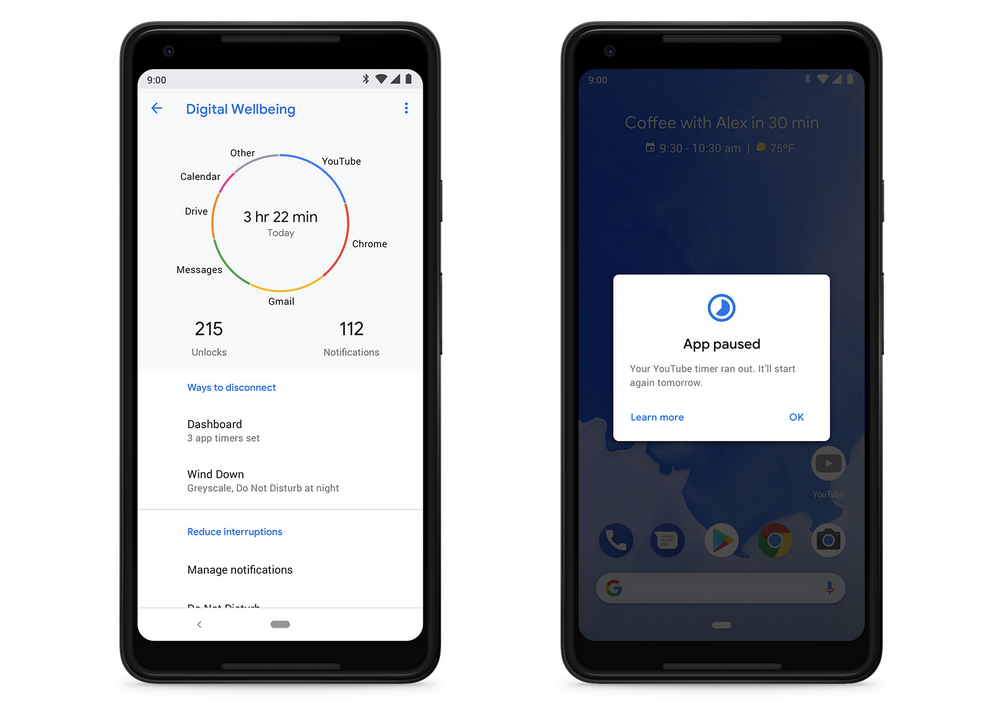
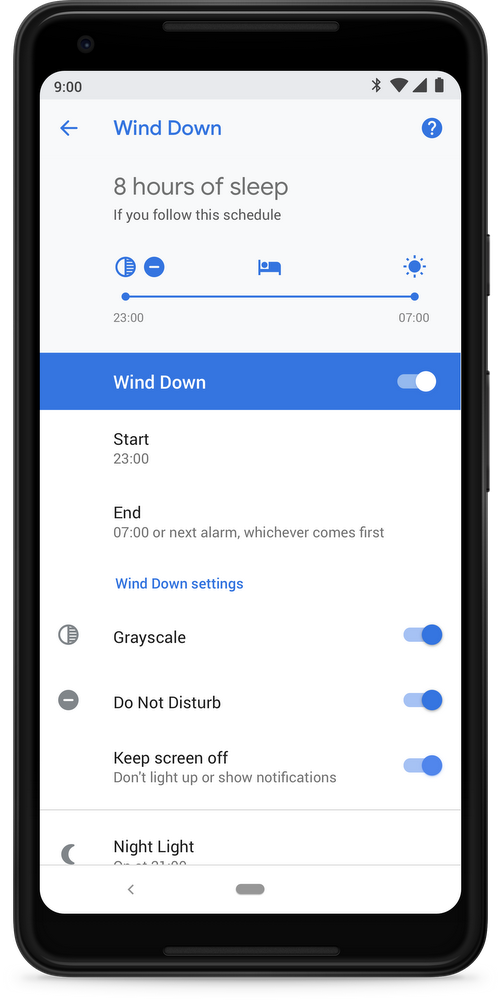
Included in the Digital Wellbeing portfolio is a device usage ‘Dashboard’; app timers; a Do Not Disturb feature; and ‘Wind Down, which allows users to slowly limit their device activity as they approach bedtime.
Google officially launched Android 9 Pie on August 6th, 2018, but the Digital Wellbeing suite was notably absent from the operating system update.
Instead, Google said that users will be able to access Digital Wellbeing in an update expected to arrive in a future Android release.
Rumours are swirling that Google plans on launching its upcoming Pixel 3 and Pixel 3 XL smartphones in October 2018, so it’s possible that the Mountain View-based search giant hopes to release Digital Wellbeing at the same time.
It’s worth noting that Android Police has confirmed that a Digital Wellbeing Android package (APK) is currently available on APK Mirror.
Android Police has also confirmed that the APK will still work on devices not enrolled in the beta, like the Essential Phone.
Additionally, the APK can be installed on non-Pixel devices, but the Digital Wellbeing setting isn’t visible without a Pixel device.
Interested Google Pixel users can try out Digital Wellbeing by signing up for the beta here.
Source: Google Via: Android Police
The post Google Pixel devices running Android Pie can sign up for the Digital Wellbeing beta now appeared first on MobileSyrup.

One of the biggest changes in Android Pie is the new navigation system.
Instead of the standard three button system, Android Pie allows people to use a gesture navigation system. Love it or hate it, that system is here to stay.
For devices upgrading from Oreo, there’s a settings option to switch to gesture navigation. However, if you’re getting the Pixel 3 you may not get that option, according to Google’s EK Chung. Chung, who recently sat down with Android Central for an interview, is the UX lead and manager for Pixel and Android mobile.
Initially, the Android Central interview indicated that there would be no option to switch back to the three button layout. However, the article was updated to clarify that Chung said gestures would be the default on Android Pie devices like the Pixel 3.
However, she did not clarify whether there would be an option to switch back.
The reasoning for this, according to Chung, is that people find the three button layout more confusing — especially if they haven’t used Android before. It’s a reasonable explanation, especially when you compare the two navigation modes. Google’s gestures narrow it down to one button most of the time — a home button. The button does multiple things, but it’s easy to learn. One tap takes you home and holding it opens Assistant, both actions are fairly simple to learn.
Additionally, Android provides users with a back button only when there’s an opportunity to go back. This can be confusing for some people however. I can already hear people asking me why their buttons disappear.
Finally, the swipe-up gesture to open multitasking builds on behaviour incorporated previously in Android. For at least the last year, a number of devices have had a swipe-up gesture to open the app drawer. Android Pie builds on this known gesture. Swiping up opens part of the app drawer as well as the recent apps. Furthermore, that top row of suggested apps are often all anyone needs. According to Chung, users picked an app from that suggested row 60 percent of the time.
While all that is well and good, the problem is this change isn’t standardized. Manufacturers have the option to ship Pie phones with the three button layout or even their own navigation gestures.
Ultimately, the Pixel 3 should offer users a choice. Having gestures as the default is fine, especially if new users find it easier to use. However, the three button layout has been the standard since 2011’s Galaxy Nexus. Google shouldn’t force long-time users away from that system.
Source: Android Central Via: Android Police
The post Pixel 3 will ship with gesture navigation turned on by default appeared first on MobileSyrup.

It looks like Logitech wants in on the wireless smartphone charging action.
The accessory manufacturer has revealed a new $69 USD ($90 CAD) iPhone X and iPhone 8/8 Plus wireless charger called the Powered Wireless Charging Stand.
The pad is constructed of somewhat sticky plastic, propping Apple’s most recently released smartphones up on an angle that prevents them from sliding around, while still taking advantage of the smartphones’ Qi wireless charging.
The charging stand is also set at an angle that allows the iPhone X’s FaceID functionality to still work, which is an added bonus for anyone looking to use the charging stand on their desk at work.
Technically, the stand will work with Android devices since it’s Qi-compatible, but it definitely seems to be designed with the iPhone in mind — particularly because of its Apple-like white colour. The chargers also features the slower 7.5W wireless fast-charging standard utilized by the latest versions of the iPhone.
Further, the stand works with the iPhone in either portrait or landscape mode, which is rare when it comes to wireless chargers.
With Apple’s official AirPower charging pad — an upcoming accessory that’s capable of charging the Apple Watch, iPhone and AirPods (with a wireless charging case) all simultaneously — likely just around the corner in September, this stand could be a tough sell for most.
Still, if you’re in the market for a Qi charging stand that lets you easily view notification, as well as situates the phone on a decent angle for watching movies and television shows, Logitech’s Powered Wireless Charging Stand could be a good option for you.
Source: Logitech
The post Logitech reveals sleek new wireless charger for Apple’s iPhone X and iPhone 8 appeared first on MobileSyrup.

Google’s Pixelbook looks like it will support Windows, potentially sometime soon.
Rumours of support for Microsoft’s operating system began when a feature called AltOS first surfaced on the Pixelbook. While users speculated at the time that the feature would allow booting into a different operating system, it looks like that OS is Windows.
A recent tweet from XDA Developers editor-in-chief Mishaal Rahman showed evidence of the upcoming Windows support.
A commit on the Chromium Gerrit related to keyboard mapping contained the insightful tidbit. One comment on the commit revealed that Windows typically used one set of keyboard mapping code and Linux used another. No one uses the third set.
This comment is a pretty solid clue that the Pixelbook will support Windows. There’s no reason to support Windows keyboard mapping otherwise.
Hopefully the feature comes to Pixelbooks soon. The ability to boot into Windows would be incredibly useful on the Pixelbook. One of the device’s main complaints is that its too much power for what it is.
When you’re spending $1,299 on a laptop as powerful as a Pixelbook, you likely want that hardware to do some heavy lifting. Unfortunately the lack of programs for Chrome OS makes it not ideal.
Support for Windows would fix that issue by allowing users to switch to Windows when they certain programs that can’t be found on Chrome OS.
Source: Chromium Gerrit Via: Twitter
The post Pixelbook developers are working on supporting Windows appeared first on MobileSyrup.

Apple has joined a smart home coalition of multiple companies called ‘The Thread Group.’
It’s unclear what Apple’s involvement in the group specifically is, though the tech giant is now listed as an official member on The Thread Group’s website. Interestingly, Apple is listed in the member’s section without a company logo.
Thread is a new mesh network standard that makes it easier for various smart home platforms to communicate with each other. The technology supports a variety of smart home devices such appliances, lights, security systems, smart thermostats and a variety of other IoT devices.
“It’s hard to get devices to talk to one another. And once they do, the connection is often spotty and power hungry. Thread changes all that. It’s a mesh network designed to securely and reliably connect hundreds of products around the home – without blowing through battery life,” reads text on The Thread Group’s website.
To put this move into perspective, Nest (which is owned by Google) and Amazon already support Thread. Apple finally joining the group could mean the tech giant has plans to shift its typical walled-garden approach to hardware to be more open when it comes to its HomeKit platform.
The Thread Group includes notable tech companies like Qualcomm, LG and even Asus. A full list of companies that are part of the group is available on its official website.
As it stands, HomeKit accessories are required to work over either Bluetooth or Wi-Fi. It’s possible Apple could have plans to bolster the number of IoT smart home devices the HomePod is capable of connecting to with Thread.
As always, this is all just speculation since it’s currently unknown what Apple intends to do with The Thread Group’s technology.
Via: 9to5Mac
The post Apple joining ‘The Thread Group’ hints at the company’s future HomeKit expansion plans appeared first on MobileSyrup.

Newton email service is shutting down this September.
The premium, subscription-based email platform, which launched in 2016, will shut down on September 25th. The company behind the app, CloudMagic, struggled against free apps from Google, Microsoft and Apple.
“We explored various business models but couldn’t successfully figure out profitability and growth over the long term,” wrote Newton’s founder Rohit Nadhani in a Medium post.
Newton isn’t the only victim. Other premium email services like Sparrow and Mailbox have fallen prey to free apps like Gmail.
Newton will certainly be missed. According to Nadhani, Newton had over 40,000 paid subscribers and was often declared the best email app.
I used Newton for a short time while writing about it for MobileSyrup’s App of the Week. Newton was incredibly good.
It looked great and had some powerful features, including Recap, which helped remind you of emails you forgot about, Snooze, and the ability to schedule emails were invaluable. Unfortunately, those weren’t enough to keep Newton afloat.
Effective immediately, the company is disabling new sign-ups. Additionally, it won’t renew monthly subscriptions. Finally, annual subscriptions will be refunded proportionally. Newton is working with App Store and Play Store authorities to set up partial refunds.
The company will post instructions on how to claim those refunds no later than September 18th, 2018.
This isn’t an end for CloudMagic, however. The company will continue to operate and the Newton team will focus on new projects.
Newton will join a number of other great email apps — and I’ll join those searching for a replacement.
The post Premium email service Newton is shutting down in September appeared first on MobileSyrup.

Japanese casual wear brand Uniqlo has finally started operating an online store in Canada.
Starting today, Canadian consumers can shop online for items from Uniqlo via its mobile website and Uniqlo CA Android and iOS apps.
To celebrate the launch, Uniqlo is offering free shipping on orders over $49 until Sunday, August 19th. In addition, iPhone and Android users who download the Uniqlo CA app and register as a member will receive a $5 coupon towards their next purchase. Similarly, customers who spend more than $50 in-store will also receive a $5 discount off their next purchase. The two coupons are redeemable both in-store and online.
Besides making its clothing more widely available, Uniqlo says there are two perks to shopping on its online store. To start, the online store carries popular items in extended sizes, including XXS and 2XL. Second, there are a couple of mobile store exclusive items, such as a women’s chiffon printed long sleeve dress.
“Since announcing the launch of our first store we’ve been inundated with requests for e-commerce from people across Canada and we are thrilled to be able to serve everyone now, especially locations where we do not have stores,” said Yasuhiro Hayashi, chief operating officer of Uniqlo Canada, in an August 2nd press release.
Uniqlo currently operates five stories in Canada, with plans to open four more later in the year.
Source: Uniqlo
The post Uniqlo opens online store in Canada appeared first on MobileSyrup.

Clients at nine City-run shelters and homelessness program sites will soon be able to access free Wi-Fi 24 hours a day thanks to a new partnership between the City of Toronto, OnX and Cisco.
According to an August 3rd, 2018 media release, clients at Robertson House, Bellwood House, Women’s Residence, Fort York Residence, Family Residence, Birkdale Residence, Birchmount Residence, Adelaide Resource Centre for Women and the Streets to Homes Assessment & Referral Centre will be able to access the service.
“In today’s world of rapidly changing technologies, access is everything,” said James Pasternak, councillor of Ward 10, York Centre, in the same August 3rd media release.
“Yet those who are unable to share in ever-evolving information are at a disadvantage. It’s called the digital divide and the City is committed to preventing it from widening.”
Robertson House, a women’s and children shelter, will be the first site to receive the new service.
According to homelessness not-for-profit Raising the Roof, approximately 235,000 Canadians experience homelessness each year.
Approximately 35,000 Canadians experience homelessness on any given night.
Source: City of Toronto
The post City of Toronto brings free Wi-Fi to nine shelters through Cisco, OnX partnership appeared first on MobileSyrup.

