Shared posts

15 Aug 01:45

A long overdue announcement

by Julie Moronuki and Chris Martin

What is happening

We’ll try to keep this brief. What happened is this:

  1. In late 2016, Julie knew she wanted to write another Haskell book, one she had been calling “the Haskell enchiridion” in her mind as well as in her Gitlab account. An enchiridion is a manual, a guide. Julie envisioned a practical reference manual for intermediate Haskell users. She asked Chris Martin to work with her because of his track record of writing small but illustrative examples.

  2. In February 2017, we announced the project.

  3. We began writing a build process for the book that was almost certainly overkill but allowed us to incorporate diagrams built with the diagrams package directly into the LaTeX-set text as well as parse Haskell source code files, compile and test them, and then render them in the LaTeX files. That has been a lot of fun and allows us to continuously test the code that will be in the book.

  4. The outline kept growing and growing, as we wanted to cover both the history of logic, mathematics, and computing that eventually led to Haskell as well as the practical matters, such as compiler pragmas and important libraries. We wanted to emphasize the joy of Haskell and the places where it really shines but also be a solid intermediate guide for Haskellers who don’t really care about Leibniz or category theory.

  5. Chris said, “we should not write a 1200-page book.” Julie said, “but writing 1200-page books is what I know.”

  6. In November 2017, we decided the sprawl of all we wanted to cover would be easier to manage on a web site, where links allow topic interconnections better than a physical book can, and we started working on typeclasses.com. At some point we decided it would be best if that site had Haskell and Nix courses and projects in addition to the writing we’ve been doing for the book.

  7. In June 2018, we launched Type Classes with a course, a project, and some articles. We are trying to get to where we can offer a new course each month, but there have been the usual growing pains.

And now

Lately, we’ve been looking at all we have to write – the partially finished parts as well as the bare stubs populating the book repository and have made a decision: Joy of Haskell is properly two books, not one.

One will be the original “enchiridion” idea: a desktop manual or reference to the ins and outs of using GHC Haskell and some of the more important libraries. The Joy of Haskell: Desktop Reference, perhaps.

The other will be The Joy of Haskell: Haskell in Context, or something along those lines and will tell the story, from Aristotle to “the Simons” of how Haskell came to be and where it might go from here. This one is by far the more ambitious project, and it’s going to take more time. Also, we have no idea if anyone wants this book other than us, but we will write it anyway.

The reference version of Joy is well underway. Early subscribers to Type Classes will watch it progress and grow as we fill it out. Subscribers will have access to the PDF, before it’s released to the public, as well.

We’re very grateful to our subscribers who came in early and have been sticking with us as we’ve gone through this development and continue working out rough spots. We believe having the content in longer, more interconnected forms on the site and also in a somewhat condensed, linear format for a print book will allow us to cover everything we want to cover and allow readers some options in how and how much they read about a given topic.

We didn’t want to go on being silent about what’s happening with Joy. We hope the community will ultimately be richer for having more materials available, and we’re grateful for all the support we’ve had as we figure out the best ways to make it.

15 Aug 01:44

Bayern Munich: a shining example of a well-run club with nobody left to conquer in their own land

by Andy Mitten
February 6, 2018. A group of Manchester United fans have organised a memorial in Munich to mark the 60th anniversary of the Munich Air Disaster which decimated Sir Matt Busby’s great side.Bayern Munich, Germany’s leading football club are approached by fans and agree, without hesitation, to send their top two officials, club president and chairman Karl-Heinz Rummenigge and Uli Hoeness. Both were legendary players, stars of the Bayern side which won three successive European Cups in the 1970s…
15 Aug 01:34

“On top of all the inequality in our country, we are going...


“On top of all the inequality in our country, we are going overseas and murdering people. Everything was rigged, and while we were all complaining that the system is corrupt, we just went on with our lives, feeling powerless. Of course I still have class rage. I have never had money.” | Mickey Smith, Occupy Wall Street protester, photographed in 2011 and interviewed in 2018.


Frank Rich on the 2008 Financial Crisis

That loose civic concept known as the American Dream — initially popularized during the Great Depression by the historian James Truslow Adams in his Epic of America— has been shattered. No longer is lip service paid to the credo, however sentimental, that a vast country, for all its racial and sectarian divides, might somewhere in its DNA have a shared core of values that could pull it out of any mess. Dead and buried as well is the companion assumption that over the long term a rising economic tide would lift all Americans in equal measure. When that tide pulled back in 2008 to reveal the ruins underneath, the country got an indelible picture of just how much inequality had been banked by the top one percent over decades, how many false promises to the other 99 percent had been broken, and how many central American institutions, whether governmental, financial, or corporate, had betrayed the trust the public had placed in them. And when we went down, we took much of the West with us. The American Kool-Aid we’d exported since the Marshall Plan, that limitless faith in progress and profits, had been exposed as a cruel illusion.

Unlike 9/11, which prompted an orgy of recriminations and investigations, the Great Recession never yielded a reckoning that might have helped restore that faith. The Wall Street bandits escaped punishment, as did most of the banking houses where they thrived. Everyone else was stuck with the bill. Millennials, crippled by debt and bereft of Horatio Alger paths out of it, mock the traditional American tenet that each generation will be better off than the one before. At the other end of the actuarial spectrum, boomers have little confidence that they can scrape together the wherewithal needed to negotiate old age. The American workers in the middle have seen their wages remain stagnant as necessities like health care become unaffordable.

In the Digital Century, unlike the preceding American Century, the largest corporations are not admired as sources of jobs, can-do-ism, and tangible goods that might enrich and empower all. They’re seen instead as impenetrable black boxes where our most intimate personal secrets are bought and sold to further fatten a shadowy Über-class of obscene wealth and privilege trading behind velvet ropes in elite cryptocurrencies. Though only a tiny percentage of Americans are coal miners, many more Americans feel like coal miners in terms of their beleaguered financial status and future prospects. It’s a small imaginative leap to think of yourself as a serf in a society where Facebook owns and markets your face and Alphabet does the same with your language (the alphabet, literally) while paying bogus respects to the dying right to privacy.

[…]

Perhaps the sole upside to the 2008 crash was that it discredited the Establishment of both parties by exposing its decades-long collusion with a kleptocratic economic order. If the corporation that introduced the lightbulb [GE] was a sham ripping off its employees, shareholders, and consumers, not to mention America’s taxpayers, you had to wonder who at the top was not. The moral abdication of would-be liberal reformers, who failed to police such powerful economic actors, only added to the national disgust with elites.

15 Aug 01:34

PowerPhotos – The Ultimate Toolbox for Photos on the Mac [Sponsor]

by MacStories Team

PowerPhotos is a powerful utility for the Mac that lets you merge or split Photos libraries and eliminate duplicate photos. People use multiple Photos libraries for all sorts of reasons, but one of the most common is to break an enormous library of tens of thousands of photos into smaller more manageable sub-libraries.

PowerPhotos is just the tool you need to manage all of your photos across libraries. From the creator of iPhoto Library Manager, PowerPhotos provides the same sophisticated toolset and more for Apple’s Photos app.

You can store photo libraries on external or networked drives and copy photos while maintaining and preserving albums and related metadata like keywords, titles, dates, locations, and descriptions. Not only can PowerPhotos help by splitting up your Photos library into multiple libraries, it can merge them too. The app also makes it easy to find and eliminate duplicate photos.

One of the most powerful features is the ability to search across multiple libraries at one time. It’s a great feature that allows you to search as though all you photos were in one library even when they aren’t. Finally, PowerPhotos can ease the transition to Photos helping you migrate multiple iPhoto or Aperture libraries to Photos.

We have a special limited-time deal just for MacStories readers. Receive 20% off at checkout by using the coupon code MACSTORIES18. Even if you haven’t had time to set up multiple Photos libraries yet, grab this deal now so you have PowerPhotos’ tools at your disposal when you’re ready take the plunge.

Our thanks to PowerPhotos for sponsoring MacStories this week.


Support MacStories Directly

Club MacStories offers exclusive access to extra MacStories content, delivered every week; it's also a way to support us directly.

Club MacStories will help you discover the best apps for your devices and get the most out of your iPhone, iPad, and Mac. Plus, it's made in Italy.

Join Now
15 Aug 01:34

"Technology does only one thing - it tends toward efficiency. It has no aesthetics. It has no ethics...."

“Technology does only one thing - it tends toward efficiency. It has no aesthetics. It has no...
15 Aug 01:33

I found Trump’s “Rigged Witch Hunt”

by Josh Bernoff

Donald Trump has repeatedly described special counsel Robert Mueller’s investigation into his presidential campaign a “rigged witch hunt.” He’s right about one thing: there is clear evidence of a rigged witch hunt in Washington. But it’s not the one he thinks it is. Here’s a typical Trump tweet, one of many that cite the Rigged … Continued

The post I found Trump’s “Rigged Witch Hunt” appeared first on without bullshit.

15 Aug 01:33

Good News!

by Tanja Goldstein
15 Aug 01:33

Apple Books: A Love Letter to Readers

by Ryan Christoffel

When iOS 12 launches this fall, it will introduce a newly redesigned iBooks app simply named Books. Though the reading experience in Books is largely the same as before, the rest of the app is drastically different, offering the biggest app redesign on iOS since last year's App Store.

Modern design is a clear centerpiece of Books, but the app also includes new features, big and small, that make it feel all-new. From tools that borrow from Goodreads, to more robust collections, to dark mode, and much more. There's a lot to explore here, so let's dive in.

Design

Left: Apple Books; Right: iBooks

Left: Apple Books; Right: iBooks

Apple Books is the latest in a line of updated and newly debuted media apps that Apple has produced recently. Apple Music set the initial trajectory with its redesign in 2016; its look and feel was adopted by Apple's new TV app later that year, then redesigned Podcasts and App Store apps in 2017. iBooks was Apple's only major media app to not yet score a new look, so it was only a matter of time before that changed. iBooks getting a redesign was no surprise; however, the extent of that redesign took me completely by surprise.

Apple could have easily taken the look of apps like Music and Podcasts and slapped it on Books, and it would have been fine. The company did nothing of the sort, though; instead, Apple Books offers one of the most drastic departures from existing iOS design norms available on the platform.

It all begins with a serif variation of Apple's San Francisco font. You might not think a header font tweak could make much of a difference, but it truly does. It doesn't just look different from Apple's media apps – it's distinct from every other first-party iOS app. Books' hallmark new typeface fits perfectly with the app's theme, honoring literary tradition and showing a different side to Apple design.

Left: Apple Books; Right: iBooks

Left: Apple Books; Right: iBooks

The other major design highlights in Books are similarly distinct in our post-iOS 7 world. Skeuomorphism is present app-wide in the way book covers look. Unlike in recent versions of iBooks, the cover of each book isn't simply a flat image; instead, there's now a skeuomorphic effect on the left edge of each book cover that denotes a spine. This design recalls the earliest days of iBooks' life, where imitation spines were prominent. Another detail present in those early days and resurrected here is the heavy use of shadows to create a sense of depth. Every book in the new Books app is haloed by a shadow that makes it pop off the screen, providing the illusion that you can just pick it up to start reading.

Books' design isn't entirely foreign to other iOS apps – there are some similarities, such as the abundant use of white space – but overall its differences far outweigh any commonalities. And those differences prove that there's still plenty of room to expand the accepted design norms on iOS.

Left: Apple Books; Right: iBooks

Left: Apple Books; Right: iBooks

The detail view for book listings has an entirely new look. Title information now pops into view in the form of a modal card that can be scrolled through, or swiped down on to dismiss – perfect for one-handed iPhone use. These cards contain all the same information as before – ratings, reviews from Apple's editorial team and Books users, publisher descriptions, length, genre, and related titles. In iBooks this information was split into three separate panels, while here it's all in one place. Also, in iBooks different information types tended to all look the same, making for a bland visual experience; the new design, however, calls attention to each distinct data element, inviting you to engage with it all.

Structure

While Books' visuals may differ greatly from Apple's other media apps, its navigation tabs follow the pattern established by apps like TV and Podcasts.

Reading Now

Just like Listen Now in Podcasts and Watch Now in TV, Reading Now is the main place you'll spend your time in Books. It contains all the titles you're currently reading, plus books you want to read (more on that in a moment), and some collections of recommended titles to check out. During the beta cycle, these recommended titles have fallen under two categories for me: a themed collection curated by Apple's editorial team, and a For You section containing books related to those I've already purchased or loved (like in Apple Music, you can now love or dislike titles).

A few other quick details about Reading Now: whenever you purchase a new book, it goes straight to your Want to Read section. Like before, the book is marked 'New' until you start reading it, but fortunately the redesigned tag for purchased titles is less obtrusive than before – in iBooks I would aggressively clear the 'New' designation as soon as possible, but with the subtler design I don't feel that impulse anymore.

Throughout the new Books app, including in the Reading Now tab, sections of books are presented as horizontally-scrolling lists, similar to the way iOS 11's App Store is laid out. This makes it easy to navigate different areas of the app without having to travel far.

Library

Library is the new version of the My Books tab, and it's one of the places that's seen the least amount of change in iOS 12. Like before, you can see your full collection of books either in a grid layout or a list, except now you have sorting options no matter which view you use – iBooks only let you modify sort type in list view. Books can be sorted manually, which employs drag and drop, or by title, author, or how recent they are. Also, as was true in iBooks, Library enables creating your own custom collections to sort books into.

Book Store

Rather than dividing the store into different tabs like iBooks did, previously-divided sections like featured titles and top charts are all contained in the new Book Store tab. More Apple-curated collections can be found here than ever before, and the app uses beautiful visuals both for collections and different sections to present an attractive storefront. Genre pages now include their own Apple-featured collections, and following the design trend of the App Store, each genre has its own custom icon – I'm especially partial to the nonfiction icon signaling 'No unicorns allowed.'

As if Apple's beefed up crop of editorial collections wasn't enough, Book Store now also hosts a For You section, which is an expanded version of what's present in Reading Now. For You contains a new Weekly Top 5 feature, highlighting five titles per week that Books' algorithms think you'll love. Inside For You you'll also find suggested new authors to check out, unread books from authors you already love, and book recommendations based on your purchase history.

Audiobooks

In the new Books app, audiobooks get their own dedicated storefront and tab. While audiobooks you own will still live alongside other books in Reading Now and Library, when you want to find something new to listen to, the Audiobooks tab is the place to go. Like Book Store, the Audiobooks tab is littered with curated collections of recommended books. Some of these are ported from Book Store, but most are audiobook-specific, like the ones titled Great Narrators and Long Books for Roadtrips.

Search

Search now has its own dedicated tab, which features both trending searches as well as searches you've performed recently. Start typing in the search box and results from your own library will slide in across the top, with results from the Book Store and Audiobooks storefronts placed underneath.

Reading Tracker

The most significant feature addition to Books is a Goodreads-style system for tracking your reading history and titles you want to read. Books' implementation of this system is simple, taking the existing collections feature and creating two auto-generated collections with special benefits: Finished and Want to Read.

Whenever you've made it most of the way through a book, you'll see a 'Finished' button to mark it complete, and it's added to the Finished collection; alternatively, you can hit the ellipsis next to any title to open a menu that includes the option 'Mark as Finished.' This menu is the same way you add a book to your Want to Read queue; as I mentioned earlier, your Want to Read titles are displayed in the Reading Now section of the app, or you can access them from your Library.

People use Goodreads as a record, both of which books they've read in the recent past, and of which books they want to read next. Books' new features serve both of those purposes well – visiting the Finished collection in your library displays a chronological, dated timeline of books you've recently completed, and Want to Read is conveniently located right where you'd want it: just below the assortment of books you're currently reading.

One of the nice things about Goodreads is that it's platform-agnostic. Despite the fact that Amazon now owns the service, and has created special integrations with Kindle, you can still track books of any medium in Goodreads – whether you're reading a paper book, listening to an audiobook, or reading within Kindle or Apple Books. When Apple first showed off the revamped Books app, I feared that its features to mark titles 'Finished' or 'Want to Read' would be exclusive to titles in your Apple Books library. Fortunately, that's not the case.

Any book or audiobook, whether you own it or not, can be given the 'Finished' and 'Want to Read' designations – provided the title's available in the Books app's stores. This should cover nearly any book you'd read or want to read, but I have occasionally discovered that some obscure titles are not available inside Apple Books, and thus nothing can be done with them there. But for the most part, whether you read something on paper, or in Kindle or Audible, you can still mark the title 'Finished' in Apple Books, or save it in 'Want to Read,' despite ultimately reading it elsewhere.

One thing Goodreads offers that Apple Books does not is a social component. An Apple Music-style social sharing feature would be a nice fit for Books, but there's nothing of the sort here. If you're like me and use Goodreads for reference purposes rather than as a social network, that may be fine by you, but it's worth considering.

Another detail to consider if you're thinking about replacing Goodreads is that Apple Books offers less fine-grained controls over how 'Finished' books are saved. In Goodreads you can modify the date a title was completed, but Books doesn't provide that option. I've found this particularly troublesome because currently, in the beta version of Books, marking a title from the Book Store as complete assigns it a random finish date I have no control over. Even if that bug wasn't present, though, it'd be nice to be able to essentially import my reading history from Goodreads by manually selecting the dates I finished past books.

Everything Else New

True Black Reading Mode. The reading experience in Books is entirely unchanged from iBooks, save one key exception: the app's dark reading theme is now true black on the iPhone X's OLED display. It looks gorgeous, and offers battery savings to boot.

More Robust Collections. User-created collections are very much an optional feature that most users will never take advantage of; however, if you do use them, Books introduces a few nice enhancements. First, you can now add a custom description to accompany each collection. Simply open a collection, hit the Edit button, then a description field will appear near the top of the screen. Second, just as any title from the Book Store can be added to your Finished or Want to Read collections, you can also now add unpurchased titles to any other collection in your library. And finally, view type and sorting method are collection-specific, so you can have one collection remain in list view, with custom sorting, while the other parts of your library are in grid view with a different sort type; in iBooks, view changes would persist app-wide. Here's hoping the Books team can share their code with the Files team before long, as I'd love to have different views and sorting types for different folders in Files.

Dark Mode. Distinct from Books' true black reading mode, the app now also includes a dark mode for the entire non-reading interface. Based on the ambient lighting in the room, Books will automatically switch to using a dark mode app-wide when the environment suits it. It looks beautiful, and I hope Books becomes just the first of many apps to offer dark modes in the future.

Book Samples. In iBooks, downloading a book sample would save it to your library, but that is no longer the case. Now when you open a sample from a book's detail page, the sample opens immediately where you are, and when you close the sample, you'll land right back on the detail page again.

Drag and Drop. In Books for iPad, you can use drag and drop to move titles from any Apple-recommended collections into your Want to Read queue in Reading Now, or into any other collection you'd like inside Library. This works particularly well when Apple recommends a title in Reading Now that you want to check out, and with a quick drag you can drop it into the Want to Read section just above.

Books also includes support for cross-app drag and drop. Dropping a title from the Book Store into a text-based app provides an iTunes link to that book, while dropping a book that you own provides the book's title and author. And if you want to add external files to Books, like a PDF or ePub, you can drop them in using drag and drop.


From its design to the myriad of feature improvements, it's clear that Apple Books was crafted by people who love reading. None but avid readers would beef up the likely-underutilized collections feature, nor create such a useful Reading Now hub, nor go to the trouble of designing an app that feels so unique.

Apple left alone what needed to be left alone – namely, the reading experience – while leaving no stone unturned in improving the rest of the app. The finished product is impressive.

Books is a love letter to readers. And just like last year's new App Store, it proves once again that fresh, unique app design is alive and well at Apple.


Support MacStories Directly

Club MacStories offers exclusive access to extra MacStories content, delivered every week; it's also a way to support us directly.

Club MacStories will help you discover the best apps for your devices and get the most out of your iPhone, iPad, and Mac. Plus, it's made in Italy.

Join Now
15 Aug 01:33

@jhagel

@jhagel: Look back to look ahead - @stoweboyd suggests that by reaching back to older writing we...
15 Aug 01:33

What’s New in Thunderbird 60

by Ryan Sipes

Thunderbird 60, the newest stable release of everyone’s favorite desktop Email client, has been released. This version of Thunderbird is packed full of great new features, fixes, and changes that improve the user experience and make for a worthwhile upgrade. I’ll highlight three of the biggest changes in Thunderbird 60 in this post. For more information on the release check out the list over on the support website and the full release notes over on our website.

Thunderbird’s Photon Look

Like Firefox, Thunderbird now has a new “Photon” look. Tabs are square, the title bar can be toggled on and off, resulting in some saved pixels so your Email can shine. There are also new light and dark themes that ship with Thunderbird by default. Additionally, there are multiple chat themes now available. WebExtension themes are now enabled in Thunderbird as well.

Thunder 57 “Photon” Visual Refresh

Thunder 60 “Photon” Visual Refresh

Also, Thunderbird has a new logo accompanying the new release! We’re very pleased with the new branding that mirrors the Quantum-y upgrade of our sister project Firefox. You can see all the branding updates on Identihub. Identihub is run by Ura Design and they have been a great design partner for Thunderbird, spearheading the logo update as well as helping out in various other ways.

New Thunderbird Logo

New Thunderbird Logo

Attachment Management Improvements

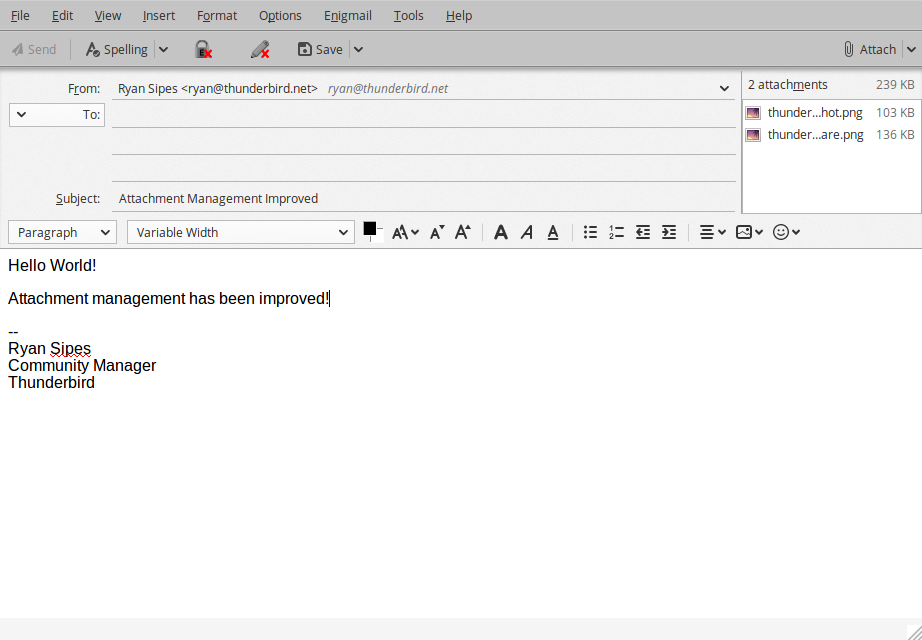
Thunderbird 60 features several improvements to attachment handling in the compose window. Attachments can now be reordered using a dialog, keyboard shortcuts, or drag and drop. The “Attach” button has been moved to the right side of the compose window, above the attachment pane. The localized access key of the attachment pane (e.g. Alt+M for English) now also works to show or hide the pane (on Mac, it’s always Ctrl+M). Hiding a non-empty attachment pane will now show a placeholder paperclip to indicate the presence of attachments and avoid sending them accidentally. The attachment pane can also be shown initially when composing a new message: Right-click on the pane header to enable this option.

Attachment Management in Thunderbird 60

Attachment Management in Thunderbird 60


Calendar Improvements

In this new version of Thunderbird there are various improvements to the Calendar. For instance, the calendar allows for copying, cutting or deleting a selected occurrence or the entire series for recurring events. Calendar provides an option to display locations for events in calendar day and week views. Calendar now has the ability to send meeting notifications directly instead of showing a popup. When pasting an event or task, calendar lets the user select a target calendar. Finally, email scheduling is now possible when using CalDAV servers supporting server-side scheduling.

Other Changes

Outside of the changes described above there are many other improvements and bug fixes in Thunderbird 60. To get an idea of the full scope you can check out the great list over at the Mozilla Support site or the release notes.

Lastly, you can give Thunderbird 60 a try by downloading it here. If you want to support the development of Thunderbird, please consider making a donation.

15 Aug 01:33

Docker Container and Vagrant / Virtualbox 101s

by Tony Hirst

Some simple recipes for getting started with running some demo virtual applications in variety of ways.

Docker and Zeit Now – flaskdemo

This first demo creates a simple flask app and a Dockerfile with just enough to get it running; it runs locally if you have docker installed locally, and will also run on Zeit Now.

Create a new directory – flaskdemo – and create a couple of files in it, specifically:

flaskdemo.py

from flask import Flask
app = Flask(__name__)

@app.route('/')
def hello_world():
    return 'Hello, World!'

if __name__ == "__main__":
    app.run(host='0.0.0.0', port=5005)

Dockerfile

FROM python:3.6-slim-stretch

RUN pip3 install flask

EXPOSE 5005
COPY ./flaskdemo.py /var/flaskdemo.py
CMD ["python3","/var/flaskdemo.py"]

Download and run the Zeit Now application, then on the command line cd into the flaskdemo folder and type: now to launch the application and now ls to lookup the URL where it’s running.

If you prefer, and have docker installed locally:

  • on the command line, cd into the directory and then build the Docker container with the command docker build -t myflaskdemo . (the dot / . is important – it says “the path to the Dockerfile is the current directory)
  • run the container with: docker run -d -p 8087:5005 myflaskdemo and you should see a hello message on port 8087.

Compare this with what I had to do to get a flask app running via the Reclaim CPanel.

Note that as well as deploying to my local docker instance, the docker-machine command line application also allows me to launch remote servers (for example, on Digital Ocean) and then build/deploy the container there (old example). It’s not quite as easy as Zeit Now though…

Docker demo – Jupyter notebook powered API

This demo shows how to knock up an API server where the API is defined in a Jupyter notebook and published using the Jupyter Kernel Gateway (see also Building a JSON API Using Jupyter Notebooks in Under 5 Minutes). This is probably all overkill but it make for a literate definition of your API defining code…

Create a new directory – jupyterkgdemo and copy the following Jupyter notebook into it (gist/psychemedia/jupyterkgdemo.ipynb):

jupyterkgdemo.ipynb

Add the following Dockerfile:

FROM python:3.5-slim-stretch

RUN pip3 install jupyter_kernel_gateway

EXPOSE 5055

COPY ./jupyterkgdemo.ipynb /var/jupyterkgdemo.ipynb
CMD ["/usr/local/bin/jupyter","kernelgateway","--ip=0.0.0.0","--KernelGatewayApp.api='kernel_gateway.notebook_http'","--KernelGatewayApp.seed_uri='/var/jupyterkgdemo.ipynb'", "--port=5055"]

With Docker installed locally:

  • on the command line, cd into the directory and then build the Docker container with the command docker build -t myjupyyterapidemo . (the dot / . is important – it says “the path to the Dockerfile is the current directory)
  • run the container with: docker run -d -p 8089:5055 myjupyyterapidemo and you should see a message on port 8089; go to localhost:8089/hello/whoever and you should get a message personalised to whoever.

Note that this doesn’t seem to run on Zeit Now; another port seems to be detected that I think breaks things?

Vagrant Demo

Vagrant is a tool that helps automate the deployment of virtual machines using Virtualbox. In some senses, it’s overkill; in others, it means we don’t have to provide instructions about setting up various Virtualbox bits and bobs…

Install vagrant and then add the following files to a vagrantdemo folder:

First, the simple flask app demo code we used before:

flaskdemo.py

from flask import Flask
app = Flask(__name__)

@app.route('/')
def hello_world():
    return 'Hello, World!'

if __name__ == "__main__":
    app.run(host='0.0.0.0', port=5005)

We can run this as a Linux service inside the VM – we means we need to provide a service definition file:

flaskservice.service

[Unit]
Description=Demo Flask Server

After=network.target

[Service]

Type=simple
PIDFile=/run/flaskdemo.pid

WorkingDirectory=/var/flaskdemo
ExecStart=/usr/bin/python3 flaskdemo.py

Restart=always
RestartSec=10

[Install]
WantedBy=multi-user.target

To install the packages we need, and copy the local files into the correct locations inside the VM, we can define a config shell script:

flaskserver.sh

#!/usr/bin/env bash

apt-get update && apt-get install -y python3 python3-dev python3-pip && apt-get clean

pip3 install flask

THISDIR="$( cd "$( dirname "${BASH_SOURCE[0]}" )" && pwd )"

mkdir -p /var/flaskdemo
cp $THISDIR/flaskdemo.py /var/flaskdemo/
cp $THISDIR/flaskserver.service /lib/systemd/system/flaskserver.service

# Enable autostart
systemctl enable flaskserver.service

# Refresh service config
systemctl daemon-reload

systemctl restart flaskserver

Now we need a Vagrantfile to marshal the VM:

Vagrantfile

Vagrant.configure("2") do |config|
  config.vm.box = "bento/ubuntu-16.04"

  config.vm.network :forwarded_port, guest: 5005, host: 8077, auto_correct: true
  config.vm.synced_folder ".", "/vagrant"

  config.vm.provision :shell, :inline => <<-SH
    cd /vagrant/
    source ./flaskserver.sh
  SH
end

On the command line, cd into the folder and run vagrant up. You should be able to see the hello world on localhost:8077.

Note that as well as using vagrant to provision a VM using Virtualbox, other provisioners are available that would let me automatically fire up a server on a remote host (such as Digital Ocean using the Digital Ocean provisioner) and then run the same set-up script to build the machine there.

PS an example of running a crappy shiny demo (a file uploader) can be found via here. I'll add a demo to this post at some point, though not sure when… In testing, the R/shiny server image is too big to run under the Zeit Now free plan (The built image size (452.8M) exceeds the 100MiB limit).

15 Aug 01:32

Reclaim’s Dedicated to Virtual Infrastructure

by Reverend

Tim and I did a Reclaim Today show to celebrate the fact our infrastructure is now entirely hosted on virtual servers, and predominantly Digital Ocean at this point. We talked a bit about where we’ve been, where we are, and where we are going in terms of infrastructure, and I love the idea of capturing some of this more formally as it happens. The final to dedicated server migrations this weekend (Joy Division and Beat Happening) turned out to be more cumbersome than we imagined, but that’s behind us and we are now closer than ever to the Lawnmower Man infrastructure we’ve been dreaming of! I guess the next step is serverless, to quote an awesome post by Tony Hirst—want to get him on an episode of Reclaim Today this week to talk about BinderHub and more. So, it feels to me that Reclaim Today is kinda finding it stride, and like anything it’s all about laying the bricks and doing the work.

15 Aug 01:32

The train jingles of Tokyo.

by illustratedvancouver


The train jingles of Tokyo.

15 Aug 01:32

“Heißzeit”

by Andrea

Deutsche Welle: Domino effect could heat up Earth by 5 degrees Celsius — despite Paris climate deal. “Even if the Paris Agreement is successfully implemented, the planet could still heat up by 5 degrees Celsius, scientists warn. This “hothouse” climate would make parts of the world uninhabitable.”

“The global average temperature in such a case would in the long-term settle between 4 to 5 degrees warmer compared to pre-industrial levels, their study found.

Sea levels would rise 10 to 60 meters (33 to 197 feet), flooding numerous islands and coastal cities such as Venice, New York, Tokyo and Sydney. Such major population centers would have to be abandoned.

Scientists call this a “hothouse Earth” climate scenario.”

Deutsche Welle: Domino-Effekt könnte Erde um fünf Grad aufheizen – trotz Pariser Klimavertrag. “Selbst wenn das Pariser Abkommen erfolgreich umgesetzt würde, könnte sich die Erde wegen eines Domino-Effekts um vier bis fünf Grad erwärmen, warnen Wissenschaftler. Teile der Welt wären dann unbewohnbar.”

“Die globale Durchschnittstemperatur würde sich in diesem Fall auf lange Sicht zwischen vier bis fünf Grad über dem Durchschnitt der vorindustriellen Zeit einpendeln. Meeresspiegel würden um 10 bis 60 Meter steigen. Zahlreiche Inseln und Küstenstädte wie Venedig, New York, Tokio und Sydney würden überschwemmt, Teile der Erde unbewohnbar werden. Wissenschaftler nennen dieses Szenario “Heißzeit”.”

15 Aug 01:32

One File for the Price of Three: Catching Cheating Servers in Decentralized Storage Networks

by Ethan Cecchetti and Ian Miers and Ari Juels

Hundreds of millions of dollars are riding on the solution to a really hard problem. Here we offer a solution.

Decentralized Storage Networks (DSNs) such as Filecoin want to store your files on strangers spare disk space. To do it properly, you need to store the file in multiple places since you don't trust any individual stranger's computer. But how do you differentiate between three honest servers with one copy each and three cheating servers with one copy total? Anything you ask one server about the file it can get from its collaborator.

We are pleased to serve up the world's first provably secure, practical Public Incompressible Encoding (PIE). A PIE lets you encode a file in multiple different ways such that anyone can decode it, but nobody can efficiently use one encoding to answer questions about another. Using known techniques, you can ask simple questions to see if someone is storing an encoded replica, giving you a Proof of Replication (PoRep). With a PoRep, it's just a hop, skip, and a jump to secure decentralized storage and much more. But we're excited and getting way ahead of ourselves. Let's start from the beginning.

The Pitch

The world has an insatiable hunger for storage. We're using more and more storage, and we're doing it much faster than we can build more But tons of storage devices—laptop and desktop hard drives, standalone storage systems, flash memory on mobile phones, and more, and more, and more—are sitting idle.

Wouldn't it be nice if all of this unused storage could be tapped? And wouldn't it be nicer still if its owners could profit from it? We may never know why Ethan configured his desktop with 6 TB of space despite needing less than 500 GB, but given his grad student stipend, it would be great to see him get something out of it.

The Billion-Dollar Token: Decentralized Storage Networks (DSNs), such as Sia, Storj, MaidSafe, and the soon-to-be-released Filecoin, promise to do exactly this. They offer users tokens for renting out their own unused storage. Yes, you can turn your hard drive into an AirBnB for bits.

Of course, you need a mechanism to make sure users actually store what they say they are storing. This is fairly easy at least in concept: to check that someone a copy of the file, ask them for small pieces of it at random periodically.

The Billion-Dollar Problem: If you store your data with Amazon or Google or Microsoft, they promise to store your file multiple times. That way if a hard drive fails, your pictures aren't gone. Our DSN needs to do the same thing. After all, the average home computer is not reliable. To store our pictures on three computers, we need to pay each one of them, but that's a small price to pay if it makes the data safe, right? Unfortunately, you are unlikely to get what you pay for.

Once there is money involved, people take shortcuts for profits. Instead of storing one file three times at $1 per copy, a set of servers can pretend to do so and only keep one copy between all three of them. Whenever anyone checks if one of their computers has a copy, they can use the single shared copy to pass any test asked of them. As a result, they can free up space to store two more files which they also falsely claim to have replicated. This nets them 3X as much money. It also means there's only one copy of your pictures and it's probably on the least reliable computer they could find (those are cheaper, after all). The only practical way around this is to make the three copies entirely distinct.

Sia, Storj, MaidSafe, etc. do this by encrypting your pictures three times and distributing those encrypted copies. This strategy solves the problem perfectly if you're the one encrypting your photos and someone else is storing them.

The Challenge: But what happens if the data isn't your family photos? What happens if it's a public good like blockchain state? Blockchains are getting huge—Ethereum is over 75 GB and growing fast—and it's really expensive to have everyone store everything. But who encrypts the blockchain state? Everyone needs to read it. And worse, we don't trust anyone to encrypt it properly. We need something totally different that anyone can check and anyone can decode.

We need a Public Incompressible Encoding. In fact, this is needed for many settings, for example if you want some mining process that depends on miners storing arbitrary files.

Making PIEs is Hard

https://hackingdistributed.com/images/2017-bitcoin/pie1.jpg

If anyone can decode data and we can't trust anyone to encode it properly, then how, you might ask, could we possibly prevent the attack we described above? Assume we have a malicious server, Mallory, who tries to store as little as possible. Sure, we can encode a file in three different ways, but if everything is public, our cheating storage server Mallory can still just store one copy. When we query her for an encoding, she can re-encode her one copy to whichever encoding was asked for. It seems impossible to stop.

Indeed, without secret information, we need some other way to restrict Mallory. We can do this with time. If re-encoding any piece of the file takes a few minutes, we can probably tell if we ask for the file and Mallory responds in two minutes instead of two seconds. At the same time, if we don't do the encoding piecemeal, we can make encoding an entire file reasonably efficient.

This idea isn't new. Filecoin suggested using timing, as did van Dijk et al. for some related mechanisms. So what's the problem?

Well, van Dijk et al. mix data blocks together in a configuration that makes recomputing discarded data really slow...if Mallory is pulling all of her data from the same rotational hard drive. These days that's probably not a good assumption, especially if she's cheating with custom hardware. Filecoin suggested something simpler: a long repeated chain of operations over the whole file. Unfortunately, van Dijk et al. anticipated this construction and showed that Mallory can save most of the storage and almost all of the computation by storing carefully-selected intermediate values.

So Filecoin's approach is broken and van Dijk et al. makes assumptions about hardware that no longer hold. Given the ability to build ASICs, we need to be extremely careful about what assumptions we use. Indeed, many things that were billed as ASIC resistant—such as Equihash and Ethhash—now have ASICs.

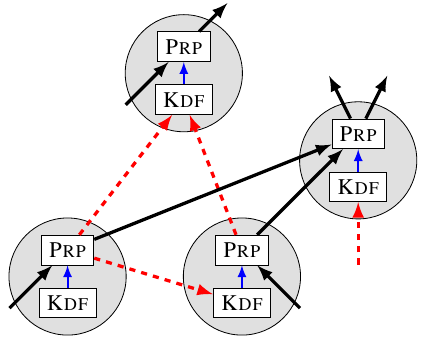
Rather than finding some new hardware assumption for storage, we build our PIE around some fairly slow key derivation function (KDF)—what non-cryptographers might refer to as a kind of hash function. For the prototype, we use scrypt, which exploits the fact that it appears hard to accelerate sequential memory access without advances in commodity RAM, but if that turns out to be false, any moderately slow KDF will do. To make things really slow, we force Mallory to run our KDF a large number of times in sequence.

This, of course, raises the all-important question: how do we force that work to be sequential? Enter graph theory.

Computation as a DAG: To understand data dependencies within our computation, we represent it as a directed acyclic graph (DAG). Each vertex represents an operation with two steps: first we derive a key using KDF, and then we encrypt some data using that key. Edges are either data edges, representing the inputs and outputs of the encryption, or key edges, representing the data used by KDF to derive the key. In the below graph red dashed edges are key edges, while solid black edges are data edges.

https://hackingdistributed.com/images/2017-bitcoin/pie2.jpg

We can use this formulation to track how much sequential work needs to happen. Because we need the output from one vertex in order to compute the values at any of its children, a path in the graph corresponds to inherently sequential work. Any key edges in that path require inherently sequential calls to KDF. Therefore, if the graph has long paths of key edges, encoding will require a lot of sequential work.

But we don't just care about encoding the whole file. We need Mallory to do a lot of work even if she only throws away some of the data. Worse, Filecoin's original proposal was broken by storing intermediate values, so we need to watch out for that as well. Since every piece of data in our computation is the output of a vertex in our graph representation, we can view Mallory storing data (intermediate or not) as removing vertices from the graph. We now need to check that even if Mallory removes a bunch of carefully-selected vertices, there is still a path with a lot of key edges.

Depth-robust graphs: A depth-robust graph (DRG) is a DAG with almost exactly this property: even if a (potentially sizable) fraction of the vertices are removed, it retains a long path. This is a very useful property. Even if Mallory stores a lot of data, she can't remove all of the long paths. Ben Fisch first suggested applying this insight to PoReps in a manner similar to how Mahmoody et al. applied it to prove inherently sequential work.

The obvious way to build a PIE using a DRG is to cut the file into one piece per vertex and then scramble it one vertex at a time. The edges of the DRG become key edges, so the output of one vertex is needed (along with the relevant file block) to compute the next. Now, if Mallory throws away too much of the file, there will be a long path left in the DRG and she'll have to do a lot of sequential work to recompute the discarded data.

Unfortunately, this doesn't quite solve our problem. Mallory will need a lot of sequential work to recompute some of the discarded data, but not all of it. Some pieces will be easy to encode. Mallory can simply not store those pieces, instead opting to re-encode them on-the-fly. The first vertex in the path, for example, needs only one call to KDF.

In talks on possible approaches in early 2018, Fisch proposed this approach and suggested addressing this concern using erasure coding, making the file internally redundant. The idea was that at least some of the redundancy would be hard to re-encode. That approach, however, has several downsides. First, it expands the size of the file, potentially substantially. Second, it still allows cheating servers to gain some storage advantage over honest ones since they can discard some of the redundant data. This is a practical problem if storage providers are compensated for the full size of the expanded file. Finally, because each encoded block is required to recover not only its own plaintext but that of each of its children in the DRG, there was no clear technique for detecting a server that discarded enough data to make the file unrecoverable, nor a formal definition of what that would mean. [1]

We opted for a different, and we believe cleaner, approach. We want to force Mallory to do a long sequential computation for any block of data she's thrown away. Ensuring this while providing ASIC resistance is the critical challenge that any solution must confront.

Dagwood Sandwich Graphs (DSaGs)

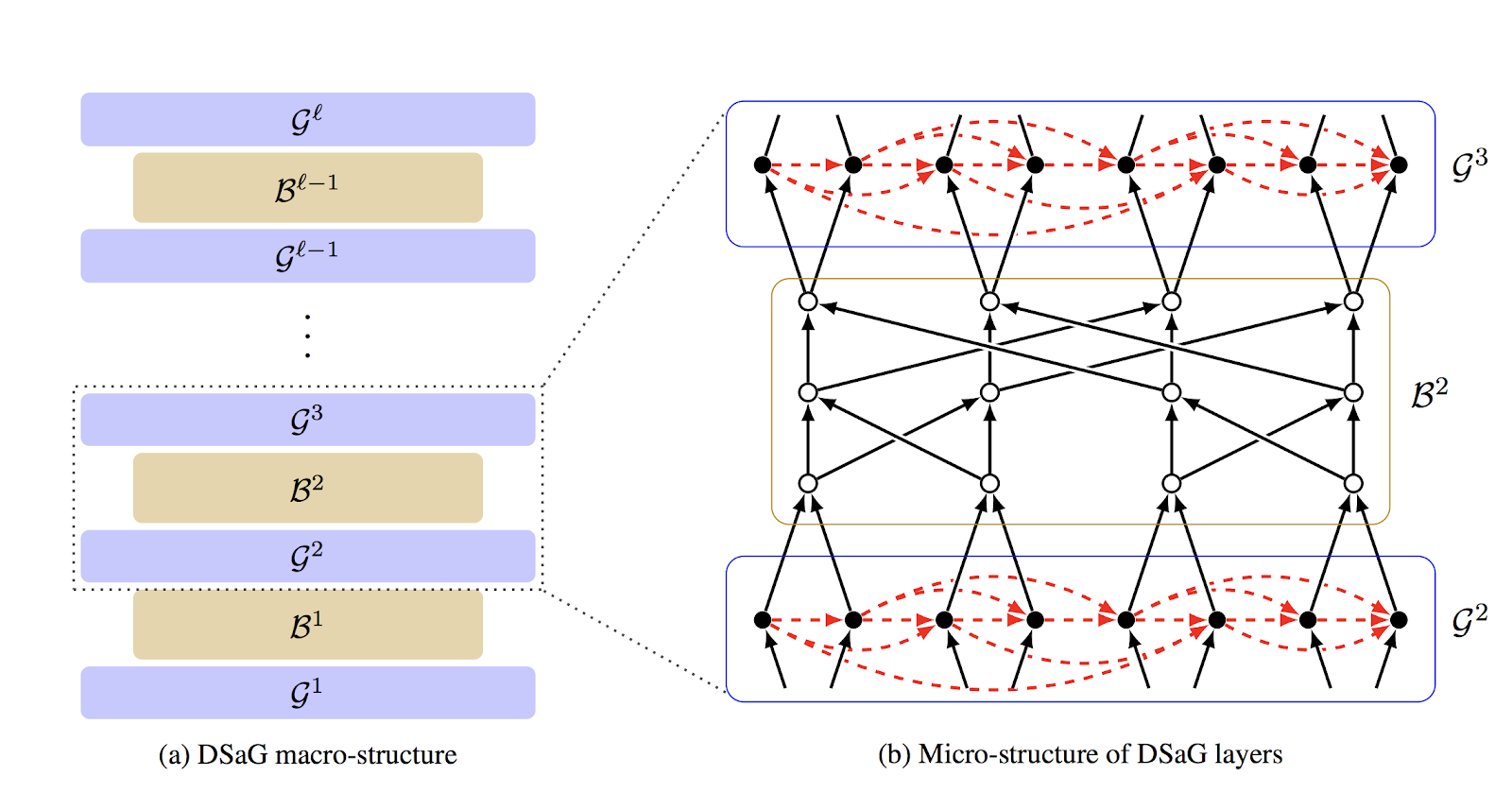
The approach we take involves feeding the outputs of a depth-robust graph into a second type of graph called butterfly graph, which has the property that there's a path from every input node to every output node. This graph, with its dependency of every output on every input, helps ensure, roughly speaking, that Mallory must compute every input node, and therefore cannot avoid computing along the long sequential path in the depth-robust graph. In actual fact, to ensure this dependency, we must layer a sequence of depth-robust graphs and butterfly graphs, something like this (where the Gs are depth-robust graphs and the Bs are butterfly graphs):

https://hackingdistributed.com/images/2017-bitcoin/pie3.png

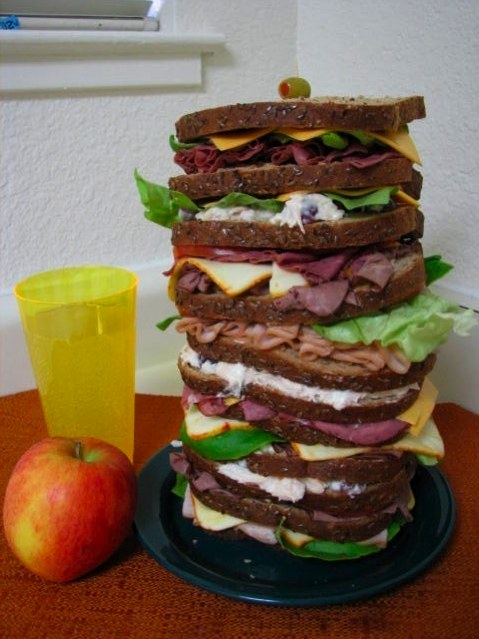
We think this construction looks like the famous Dagwood sandwiches from the cartoon strip Blondie, dramatized by the following lunch:

https://hackingdistributed.com/images/2017-bitcoin/pie4.jpg

Yes, indeed. As if things weren't confusing enough, our PIE is made from a terrifying sandwich.

From PIE to DSN

https://hackingdistributed.com/images/2017-bitcoin/pie5.png

Given a PIE, a potentially malicious storage provider like Mallory can prove that she's honestly replicating files. But how do you build a DSN using a PIE?

Pretty much any PIE-based DSN architecture involves two steps for a given file:

  1. Prove once that the file is encoded correctly.
  2. Audit by verifying continuously that the file is intact.

Let's start with (1). Storage providers in the DSN must prove to somebody—the file owner or the network—that an encoding G of a file F is a correct PIE. Given an authenticated version of F, such as a hash stored in a trusted place, it's easy to verify that a PIE is correct. It is public, after all, so anyone can decode G to recover F. Decoding is an expensive operation, though, so it would be nice to have an efficient way to prove correctness. We propose a different approach in our work, showing how to efficiently prove that G is incorrect. This creates conditions for various "cryptoeconomic" approaches to verification, such as slashing a provider proven to be cheating. Alternatively, SNARKs offer efficient means to verify, if not prove, correctness.

As for (2), it's not much help for G to be correct if it goes missing. It's critical to continuously check that storage providers are still storing G and haven't thrown data away. There are a number of efficient, well established techniques for this purpose. A simple one used by existing DSNs is to build a Merkle tree on G whose leaves are G's blocks and publish the root. A storage provider can then be challenged to provide a random leaf and prove its correctness by furnishing a path to the published root.

A blockchain can then perform the auditing. This could be an existing blockchain like Ethereum or, as with schemes like Sia, a new one whose consensus algorithm is independent of its storage goals. A particularly intriguing option, though, is to create a new blockchain where audit = mining.

The allure is an escape from the waste and environmental destruction of Proof of Work (PoW). Mining via useful storage was first proposed in 2014 in Permacoin. Permacoin required that nodes store a large, predetermined, public archive, however, and was only slightly less wasteful than conventional PoW.

PIEs completely change the game. Because they are incompressible, we eliminate any clever tricks a malicious miner could pull by specially crafting the files. Even if the file is all zeros, the miner must store the full encoded version. PIEs enable use of any files, even those owned by miners themselves, for mining = audit. This is the idea proposed in Filecoin, for example. Ultimately, PIEs may enable a secure and efficient consensus protocol whose main resource is storage devoted useful data, rather than wasted electricity. Provably secure, efficient PIEs are a first step in this direction, and parallel work by other teams happily promises to provide a stable of complementary, evolving techniques.

Creating a provably secure and minimal-waste scheme for mining = audit is the next step. IC3 is beavering away at it. We're happy to hear from partners who'd like to help create the next generation of DSN.

A full copy of this work can be found on the IACR Cryptology ePrint Archive.

Backstory and Acknowledgements

We would like to give a special thanks to Ben Fisch and Joe Bonneau for alerting us to the utility of depth-robust graphs. We had been working concurrently on the proof of replication problem initially using an approach based on hourglass functions, and butterfly graphs. We had several approaches that looked promising but, when we tried to prove them secure, turned out to be subtly but completely broken. We learned an important lesson: This problem space is deceptively hard. We therefore chose to hold off talking about results until we had a concrete construction and security proof. Only now have we gotten there.

After Ben's January 2018 talk on their approach, we had very useful discussions with both Ben and Joe about what security they could potentially achieve. This communication helped us identify the need for strong definitions that neither allowed a cheating server to discard any of the file risk-free nor required file expansion. It was not clear, though, how to adapt the construction Ben presented—effectively the strawman DRG construction given earlier in this post—to satisfy these properties. We got the idea of using depth-robust graphs in a different manner, combining them with hourglass functions. It took some time and very different definitions, but we ultimately arrived at a solution that provably achieved our desired properties.

We would also like to thank Juan Benet and Nicola Greco at Protocol Labs for helping clarify the motivation and practical requirements of the context.

Footnotes

[1] Since we submitted this work, Fisch et al. have released three different articles with in-depth descriptions of constructions and formal theory that differs significantly from his talks. At the time of posting we had not had a chance to read and digest these.
15 Aug 01:32

Castro Adds iCloud Drive Sideloading and Chapter Playback Pre-Selection

by John Voorhees

Supertop has released another solid update to its podcast player, Castro. In today’s update, Castro adds file sideloading for Plus subscribers, significantly adding to the app’s utility as general purpose audio player. Subscribers can also pre-select the chapters of a podcast they want to play too.

For plus subscribers, the update adds a ‘Castro’ folder in iCloud Drive. Add an MP3 or AAC file into the ‘Sideloads’ folder, and it shows up in your Castro inbox (or wherever else you designate in settings) ready for playback.

Adding audio to Castro is equally simple on a Mac or iOS device. On a Mac, open the Finder and drag in the audio files you want to add. On iOS, use the Files app to add files to your Sideloads folder from any file provider like Dropbox, Box, or Google Drive.

Once added, audio files show up in your Castro Inbox by default where they can be added to your listening queue like any podcast to which you subscribe. Instead of your Inbox, you can also add sideloaded audio to the front or back of your Queue or Castro’s Archive from the app’s settings.

Sideloading opens up exciting possibilities, especially when combined with other apps. For example, you can add DRM-free audiobooks, audio from lectures or conferences recorded from YouTube or other sources using an app like Audio Hijack, or add downloaded bonus podcast episodes like the AppStories Unplugged episodes that we’ve created for Club MacStories members. Podcasters can also use sideloading as a way to listen to draft episodes before publishing them. With one straightforward feature, Castro has become a far more flexible, general-purpose audio player.

Overcast has a similar feature for subscribers, but it’s web-based and limited to 2 GB of storage. Overall, I prefer Castro’s implementation, which doesn’t require navigating to a website. Though Overcast’s 2 GB limit hasn’t been an issue for me, the lack of a cap in Castro is a definite advantage for anyone who wants access to lots of sideloaded audio.

Sideloading a draft episode of AppStories and deselecting chapters for playback.

Sideloading a draft episode of AppStories and deselecting chapters for playback.

The second feature added to Castro is what Supertop calls Chapter Pre-Selection. In Castro, if you tap on the current chapter in a podcast episode, it displays a list of all the chapters so you can skip around inside the episode. With today’s update, Castro adds checkboxes to each chapter. By default, all of the chapters are selected. If there are chapters in the list to which you don’t want to listen, tap the checkmark icon to deselect the chapter, and only the selected chapters will play.

The convenience of selecting chapters in advance is greater than I had imagined. By pre-selecting chapters, I can, for example, head out for a run or walk without having to fiddle with skipping chapters on the go, which means fewer distractions and opportunities to drop my iPhone.

Supertop continues to regularly update Castro with interesting features. If you haven’t tried Castro in a while, it’s worth another look. The app is free to download on the App Store and you can try the Plus features, including sideloading, free for one week, after which they are $2.99 every three months or $8.99 per year.


Support MacStories Directly

Club MacStories offers exclusive access to extra MacStories content, delivered every week; it's also a way to support us directly.

Club MacStories will help you discover the best apps for your devices and get the most out of your iPhone, iPad, and Mac. Plus, it's made in Italy.

Join Now
15 Aug 01:32

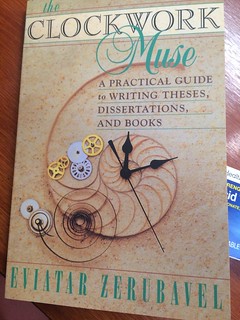
The Clockwork Muse: A Practical Guide to Writing Theses, Dissertations, and Books (my reading notes)

by Raul Pacheco-Vega

The Clockwork MuseAs many people who follow me on Twitter know, I’ve been reading numerous books on how to write, and particularly in the past few months, how my doctoral students can write their doctoral dissertations. My goal with all this reading is not only to improve my own writing, but also to learn better techniques to help my students get through the finish line. Doing a PhD isn’t easy and I want to make sure that as a PhD advisor I am doing the best I can. Someone on Twitter recommended The Clockwork Muse: A Practical Guide to Writing Theses, Dissertations, and Books, and I absolutely LOVE IT. The Clockwork Muse is THE PhDJourney book that everyone should read. It’s an incredibly fast and agile read and will help those who write PhD theses-as-books or 3-paper-dissertations. I’m impressed Eviatar Zerubavel is so concise and precise.

I wish I had read Zerubavel as a doctoral student, and I keep it handy in my campus office now that I am a professor.

One of the most important elements from Zerubavel’s book is his emphasis on what Scandinavian authors call the Red Thread (Pat Thomson discusses this concept in her post, the Red Thread being a coherent line of thought that goes throughout the entire manuscript and makes the argument entirely coherent). William Germano calls it the Throughline. But very few authors of writing volumes seem to place much attention on this idea, that there is one line of argument, one Red Thread or Throughline that should be discernible as you read a book, or dissertation.

Strongly recommended, both for doctoral students AND for authors (prospective and published) of books.

15 Aug 01:32

Week 181 of chemo complete: Take dexamethasone with food

by tyfn

As previously stated, my July blood test results showed that my cancer levels (m-protein) have spiked to very high levels (May = 20; June = 25; July = 31 – 32). So my Myeloma Specialist has added dexamethasone (dex) to my chemo treatment of Ninlaro and Pomalyst. If m-protein = 0, then no cancer/myeloma is detected in my bloodstream. From January 2015 – July 2017, dex was very effective in keeping my cancer levels low and stable. It was stopped, due to eye damage, as my eyes are sensitive to steroids.

On the recommendation of my Glaucoma Specialist, I now have an Optometrist to regularly monitor my eye pressure and help ensure that dex doesn’t cause further eye damage from long-term use. I also remain on Lumigan eye drops, prescribed by my Glaucoma Specialist to help keep my eye pressure normal.

I’m not a fan of dex. I don’t like my moon face or how it enhances my chronic fatigue. Dex makes everyday thinking and doing much more challenging. However, I believe it will my lower cancer levels, so I’m ready for anything.

Feeling optimistic!

Week 181 of chemo complete: Take dexamethasone with food

On Sunday, July 29th, I completed Cycle 46 Week 1. I have multiple myeloma and anemia, a rare cancer of the immune system. Multiple myeloma affects the plasma cells, a type of immune cell that produces antibodies to fight infection. These plasma cells are found in the bone marrow. As a blood cancer, it is incurable, but treatable. Since February 9th 2015, I have been on Pomalyst and Dexamethasone chemo treatment (Pom/Dex). On July 16th 2017, my Dexamethasone treatment ended, due to right eye damage, reported by my Glaucoma Specialist, from long-term use. On January 9th, 2018 I began Ninlaro chemo to combat steadily rising cancer levels. On July 23rd, dexamethasone (40mg) was added to my Ninlaro and Pomalyst chemo treatment, due to excessively high cancer levels.

Weekly chemo-inspired self-portraits can be viewed in my flickr album.

Waiting on letters from a friendMay 2014: Granville Island – Vancouver

The post Week 181 of chemo complete: Take dexamethasone with food appeared first on Fade to Play.

15 Aug 01:32

Relaunching FeverBee’s Strategic Community Management Course (2018)

by Richard Millington

Two years ago, we launched the Strategic Community Management course. So far the course has helped 200+ community professionals to rethink how they approach building their community and achieve phenomenal results.

Today we’re opening registration for the fall semester of the course.

The course will run for six weeks from Sept 17th to October 26th and feature a combination of 6 live lessons, 20+ recorded videos, access to our entire vault of materials, and the same resources we use on our client projects.

The course, updated for this semester, is designed to help you and your team approach your community differently. We want you to stop losing time on tasks that don’t achieve good enough results and double down on the tasks that help you achieve your big wins.

During this course you will learn how to:

  • Create a community strategy from scratch (or check and revamp your existing strategy).
  • Establish your ‘biggest win’ goals and design a roadmap to get there.
  • Build community segments and develop unique journeys to deepen engagement with each of them.
  • Design a strategy based upon proven principles from social psychology and principles of motivation to ensure people participate.
  • Drastically cut your community tactics to the core few which move the needle on metrics that matter.
  • Build community dashboards which measure your specific strategic plan and not generic engagement metrics.

If you’re just getting started, looking to take your community to the next level, or get unstuck from your current quagmire, this course will probably help.

The fee for the course is $675 USD and this includes:

  • Access to all of the material mentioned above.
  • Updated detailed strategy templates we’ve used for our own clients.
  • Our exact interview scripts and questions list for stakeholders to uncover and refine the community goal.
  • Our survey templates which help us test, validate, and refine unique member segments.
  • The dashboards and measurement templates we use.
  • Access to our project plans detailing each stage of building a strategy along with time recommendations and job responsibilities.
  • An invitation to our private FeverBee Experts group to share problems privately with a smaller, more dedicated, group of people.

If you want to sign up with your colleagues, we offer group rates for 3+ people.

We hope you can join us, we would love to work with you.

Click here to learn more.

15 Aug 01:32

The First Principle Of Advertising

by noreply@blogger.com (BOB HOFFMAN)

When you come to bat in a baseball game the first principle is to hit the ball. What happens after you hit the ball is out of your control. Where the ball happens to land and what the defense does is secondary. First you have to hit the ball.

If you can't hit the ball the rest is irrelevant. It doesn't matter how strong you are, or how fast you run, or how beautiful your swing is. If you can't hit the ball, you are useless.

In advertising there is also a first principle. The first principle of advertising is to attract someone's attention.

If your ad doesn't attract someone's attention, everything else is moot. It doesn't matter how lovely it is, how wonderfully it is written, how strategically brilliant it is, or how precisely it is targeted. If nobody notices it, it is a complete waste and utterly worthless.

Sadly, most advertising is invisible. Most advertising is ignored largely because it looks and sounds exactly like advertising -- and usually like someone else's advertising. This is not good. But there is one place where invisible advertising has found a welcome and comforting home -- online.

In other media, invisible advertising is recognized as a failure. Not online. Online advertising is judged by how precisely it is targeted, not how widely it is noticed.

In traditional media even awful advertising usually gets noticed. This is because it's often big, loud, annoying and relentless. Online, even the rare excellent ad gets ignored. This is because it's small, quiet, and interactive -- and consumers are about a thousand times more likely to "interact" by clicking away from it than clicking in to it.

The unmistakable fact is that essentially nobody notices online advertising. As a rule, it gains no attention. Have there been some cases of online advertising attracting a lot of attention? Sure there have. But the likelihood of it happening is alarmingly remote.

The religion of precision targeting and one-to-one communication tries very hard to ignore the fact that online advertising has scandalously low impact. The science of how dreadful online ads are at attracting attention is available (a few examples here and here) but the science is mostly ignored because most marketers don't understand the difference between science and data.

The truth is most advertisers and most marketers don't really want to know the facts. They have already put a large stack of chips on online advertising. Fear of finding out (FOFO) that they have been wasting large sums of money on a medium that is corrupt, fraud-ridden, dangerous, and largely invisible keeps them in a state of nervous denial.

The proliferation of media types has made attracting attention a much more difficult task than it's ever been. And much more important. To a large degree, marketing communication has become a contest to garner attention.

Those who believe the primary objective of advertising is to engage an individual do not understand the first principle of advertising. Engaging an individual is the slow bus to nowhere. Advertising's first objective is to gain the attention of a lot of people.

If it doesn't, you'll never get to first base.


14 Aug 20:35

Do you think we have time to go to the beach today?

by peter@rukavina.net (Peter Rukavina)

The text came in just before 12 noon yesterday: “do you think we have time to go to the beach today?”, asked Catherine.

Detail from an SMS chat with Catherine about going to the beach

It was a rainy Sunday, not beach weather. But when the call comes, small details like that are irrelevant. Our crew was in the Jetta and out the door, heading east, within 15 minutes.

Our first stop was the Morell Farmers’ Market (not the beach, but one needs sustenance). We arrived too late, just before closing, but some beef jerky and some apple juice were secured, some old acquaintances renewed. And we were off again.

With promise of a 2:00 p.m. Farmers’ Market up the road in St. Peters Bay, we continued to head east, only to find ourselves dropped into the midst of the final day of the St. Peters Blueberry Festival. Our arrival coincided with the start time for The Great Blueberry Roll in the Catholic church parking lot, wherein 500 blueberry-coloured ping-pong balls were to be rolled down the hill, with the first one through the gate winning its owner a $1000 cash prize.

As it happened, the wind at 1:30 p.m. was blowing strongly from the west, with a force almost exactly opposite to that of the gravitational force exerted on a flock of ping-pong balls. So, rather than rolling down the hill, they vacillated between staying stuck in place and rolling up the hill. Emergency organizing committee meetings were held and a Plan B developed: they gathered up the balls again and restarted the race from halfway down the hill, where the wind was a little gentler, and the rise of the hill a little steeper. It just barely worked, the result being more a molasses roll than a blueberry roll.

We continued east.

With the Morell Plan for eating lunch having been dashed, we drove up toward Greenwich and stopped at Lin’s Takeout, where all manner of fried foods were consumed, all very well-prepared, and in a location that cannot be beat.

To this point the rain had held off, but just as we were putting our lunch waste in to the recycling and the compost it started up, and by the time we were out the driveway it was in full force.

At which point I rediscovered that the windshield wipers in our 18 year old VW Jetta get seized up from lack of use, and while they worked, they worked in a way that was very much in the spirit of the blueberry roll, and not with the force required to wipe water from the windshield effectively.

We continued east.

When we came to the sign, pointing up a clay road, for Cable Head West, we followed, as promises of Cable Head East being somewhere thereafter were too great to resist. Just after we made the turn, I noticed an interesting looking building off to the right and looped back around to take a closer look. It appeared to be a schoolhouse, and it was beautiful.

Schoolhouse near Greenwich

Schoolhouse from the side

We continued along to Cable Head West, and then reached the Turret Bell Road, which led to the beach.

The beach having been our goal all along, we set the rain aside (Oliver was unwilling, so stayed in the car with Ethan) and Catherine, cane in hand, navigated through the sand and the rocks and the slippery muck and made it down to an empty (and stunning) expanse of the shore (therein violating multiple palliative care regulations save the “continue to live life to the fullest” one).

We recoiled back to the car and continued east.

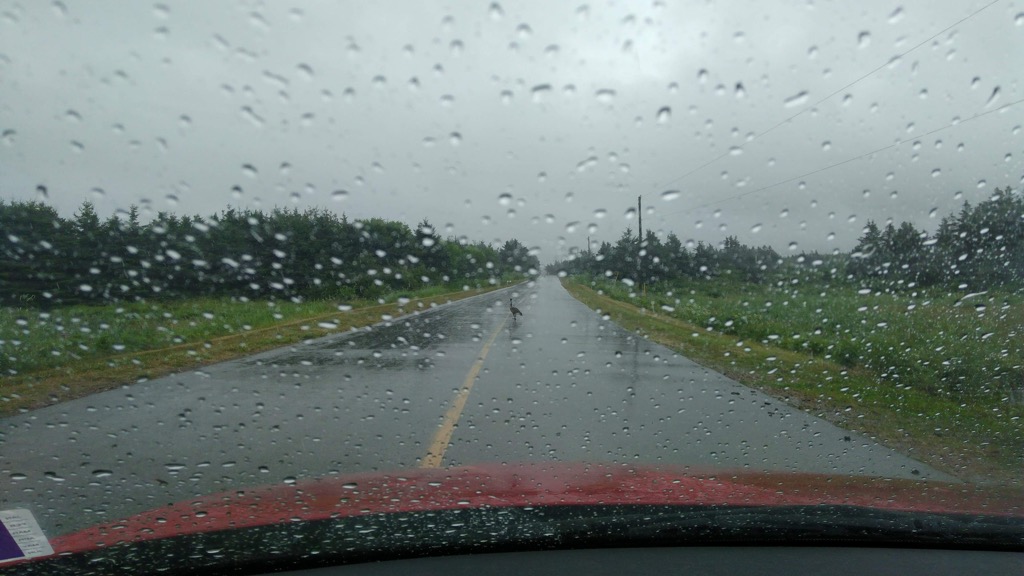
We passed through Cable Head West and then, just before Goose River, we came to a handmade sign on the road that said “Goose Crossing” and, sure enough, there was a goose in the middle of the road. Crossing.

Goose in the Middle of the Road

As my family has a history of shaky relations with the goose kingdom, I proceeded gingerly. This ginger passing gave me pause to reflect that I had a can of spray lubricant in the trunk, so I stopped (once well-clear of the goose) and spritzed the windshield wiper motors; they immediately sprang to life with youthful exuberance.

We eventually came to Naufrage. As mere minutes earlier Catherine had said “you know what would make this day perfect… ice cream!”, a brand new ice cream stand, Red Rock Adventures, sprang up before us, on the shore side just past the Shipwreck Point Café. Where we secured two ice creams, plus a coffee, for less than the cost of a chichi city ice cream.

We also learned about the Turret Bell, and why there is a road called the Turret Bell Road, from a helpful plaque just inside the front door; further research elaborated:

The ship “Turret Bell” was launched from Newcastle-on-Tyne, England in 1894. On 2 November 1906 the ship was blown off course and onto rocks off Cable Head, Prince Edward Island. The ship was a local viewing attraction for three years, until it was salvaged on 31 July 1909. The ship was towed to Charlottetown, then to Quebec for repairs, after which she returned to her work in coastal shipping and trading.

The Turret Bell Road was built to accommodate the needs of the interested viewing public, and has been there ever since.

From Naufrage we continued even farther east, eventually turning toward Souris when we got to the Hermanville/Clear Spring windmill site. The drive to Souris, along the Souris Line Road, was the rainiest of the day, with rain coming down harder than we’d seen all year. Fortunately our windshield wipers were, by this time, in peak operating condition.

As we pulled into Souris, it occurred to Catherine that someone had told her to watch out for something should she find herself in Souris, but she couldn’t remember what it was. So we stopped to see the newly-renovated boardwalk along the causeway, tucked in to Chef Michael’s Smith’s Flavour Shack, let Ethan out for a walk, and gathered our horses. At which point Catherine recalled that it was the selfsame boardwalk that had been recommended to her.

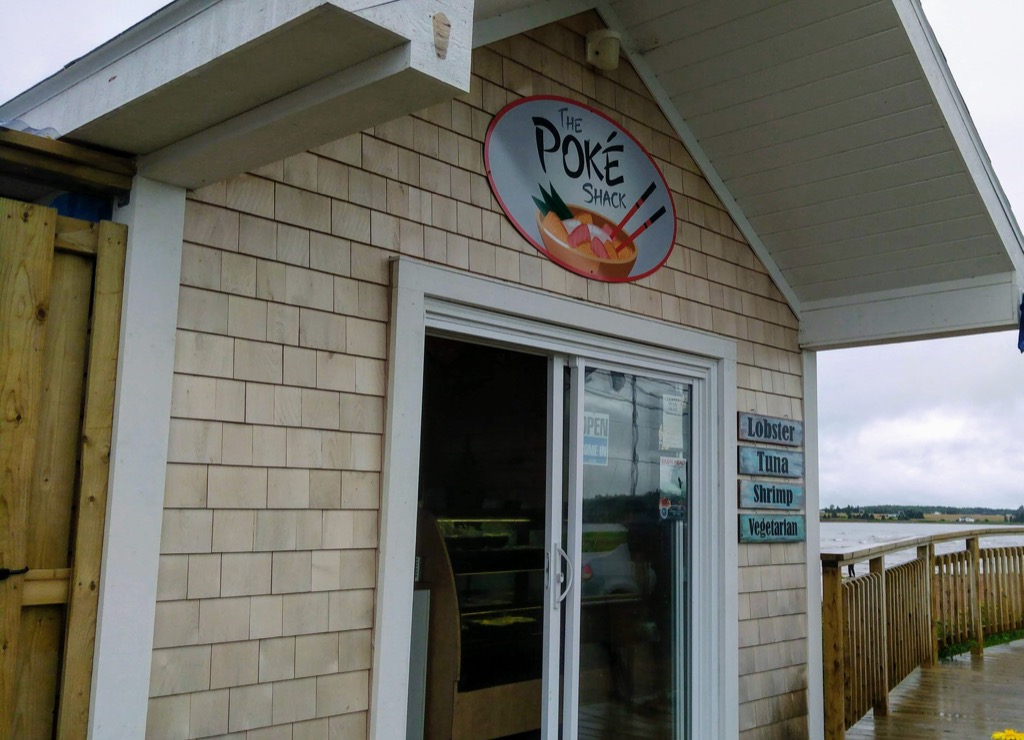
We then got back in the car, and as I was signalling to re-enter the highway Catherine saw a sign for fresh oysters, and expressed some interest, which she then quickly backed away from; “you guys don’t want to sit around watching me eat oysters,” she said. Of course we did. So I wheeled the car around, and found a new place to park. Directly in front of The Poké Shack.

Finding Hawaiian poké bowls on the beach in Souris defied all my assumptions about Souris, and there was absolutely no way we weren’t going to sample some.

So Catherine headed off for oysters, and Oliver and I headed off for poké bowls.

The Poké Shack in Souris

Oliver had the “farmer” poké (chicken) and I had the vegetarian (double rice); both were tasty and well-prepared, and we’ll be back, all the more for their unexpectedness. We finished them off with some tinned unsweetened Japanese green tea.

Poké bowls in Souris

Catherine returned, sated, from her feed of oysters and, before we left again, she and Oliver went for a walk on the beach while I took photos. Google later concocted this panoramic impossibility of their walk:

Pano of Catherine and Oliver

The rain had dried up almost completely by this point. We got back in the car to pick up where we left off; with the windows rolled down all the way (miraculously, given the week’s heat, to the point where it was even a little chilly), we barreled back to town, pulling into our driveway just before 7:30 p.m.

A day well spent.

14 Aug 20:08

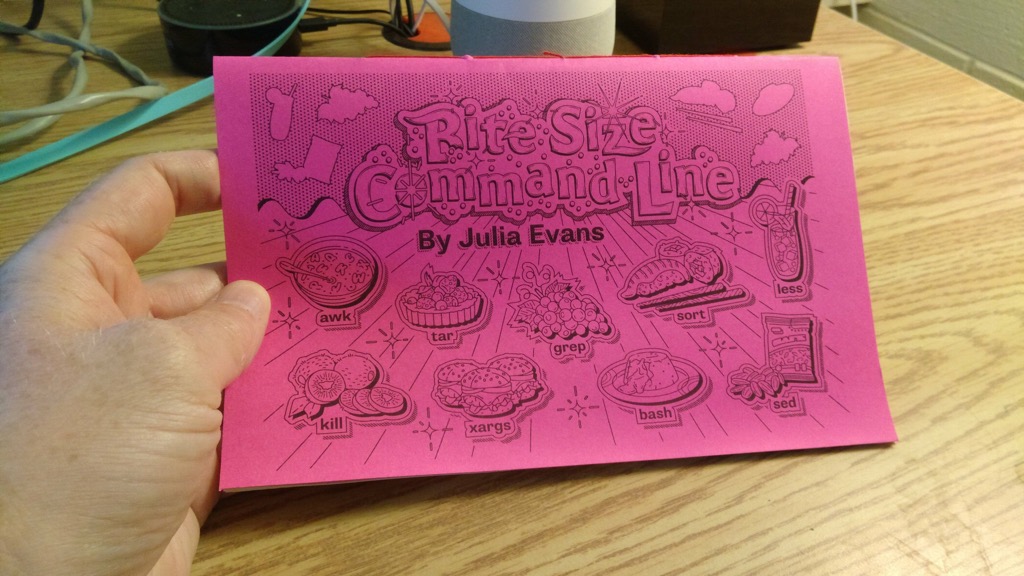
Bite Size Command Line

by peter@rukavina.net (Peter Rukavina)

I’ve been using the Unix command line for 34 years, but there are still a lot of things I don’t know. Fortunately, there is Julia Evans, comic zine maker of all topics technology, newly out with Bite Size Command Line.

I purchased, printed and bound a copy for myself this afternoon.

Bound copy of Bite Size Command Line

14 Aug 18:21

After years of playing 3D Tetris ...

by Volker Weber

Russian architect Peter Kostelov and his artist wife, Olga Feshina, wanted private rooms to work from home in their aging New York City apartment so they tore down the interior walls and rebuilt the 700-square-foot space with not just a living room, kitchen, bathroom and master bedroom, but two flex spaces which serve for work and guests (via slide-out beds).

With the help of Kostelov’s carpenter father Vladimir (who flew in from Russia to help) they used plywood to craft sliding tables, benches and beds, as well as cabinets, closets and some walls and ceiling finishes. “This is the biggest advantage of plywood: you can make shapes that are custom made… this is how you can save your budget and use as much space as you can."

Very impressive work!

More >

14 Aug 18:21

I started using Apple Music and I have a question

by Volker Weber

df232460075876ba1897fb753ced67fc 908fdc1b173c9460e5bcc7d077e42db9

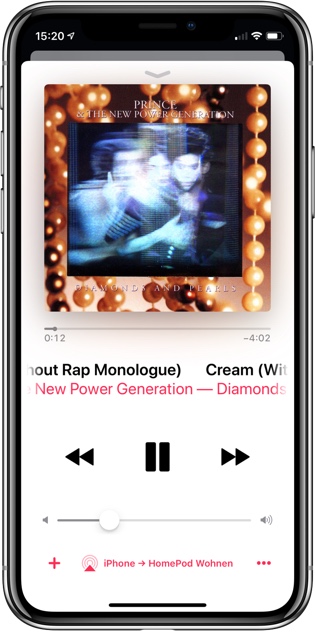
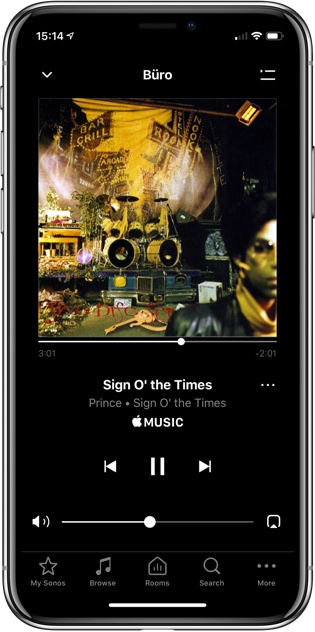
Setting up Apple Music is quite easy. Both in the Music app on your iPhone (left) and my Sonos system (right). But I have a question that is best answered by people who know both Apple Music and Spotify. The question is: how do I remove the iPhone between the Apple Music service and a smart speaker?

Let me explain how integration in Spotify works, and then we can find out what to do with Apple Music. With Sonos there are three ways to use Spotify:

  1. You add your Spotify accounts to your Sonos. That is right, there can be more than one. If you have a family account with five people, you can add all five Spotify accounts to your Sonos. And on your iPhone (or other controller) you can select which of those is yours. This way you avoid pollution of a different account with your preferred music. When you start playing music from the Sonos controller, the media flows from the Spotify service directly to the speaker. A technicality: there is always a designated speaker in your household that handles the connection. That means, even if you have only one Spotify account, you can play different streams in different rooms without them being counted as more than one user. That is a Sonos bonus because Spotify is guarding the one user, one stream rule very aggressively.
  2. You play music from your Spotify client on your iPhone (or other computer). Then you tell it to cast this stream via Airplay to a speaker in your home, be it a HomePod or one of the recently enabled Sonos speaker. That is the dumb way to do it, since your iPhone stays in the loop. Media is sent from the service to the phone and then forwarded to the speaker. If you remove the iPhone from the net, the music will eventually stop playing when the buffer in the player runs dry.
  3. The right way to do number 2 is to use Spotify Connect. Within the app you can select a player that is supposed to take over. Every Sonos player can do that. As do many other Connect-enabled devices. (Homepod cannot.) When you direct the stream to play on a particular player, your iPhone (or other computer) is removed from the loop. It does not matter whether you shut it down. Other computers logged into the same account will show what is playing where, very similar to what a Sonos controller does. However, with Spotify Connect you can only play one stream per user.

This is easier to understand if you separate control flow from media streaming. A Sonos controller only deals with the control flow, the Spotify client can be a media player and/or a controller. If you use Alexa to control the flow (Alexa, play Discover Weekly in Studio), the music travels from the service to the player in Studio and does not go through the Alexa device that controlled this flow.

With Apple Music I can do #1. Added the account to Sonos and the controller handles everything just fine. I can also do #2, that is play music on my iPhone and then cast it via Airplay to a Sonos player or Homepod. As expected, the iPhone stays in the loop. If I remove it from the network, the player dies off.

I cannot figure out if Apple can do something like #3. Start playing on iPhone and then transfer the media stream to HomePod, relieving the iPhone from its duty. I can ask Siri on HomePod to start playing, and HomePod can handle the media stream all by itself. What I have not figured out so far is how I do it from the iPhone.

Update: Adrian has explained how to do #3 with Apple Music and HomePod:

6aee08807114bceed5150ac34d175939 046e6e617499ca89cbae1de988897ba7

You have to change the AirPlay context. If you select the HomePod first and then start playing within that context, HomePod will handle this all by itself (left iPhone). You can also add other AirPlay-enabled devices. Please note, that a AirPlay-enabled third-party device like a Sonos player cannot do it by itself. You can however add one to the HomePod context and then remove the HomePod itself. It will continue to serve as the intermediary to terminate the Apple Music stream and then transfer the audio over your LAN to the Sonos player (right iPhone).

When you do it this way, your setup survives the beer test. You can leave the party to fetch more beer without the music stopping. Will anybody ever notice how to do this properly?

14 Aug 18:21

Android Pie is here

by Volker Weber

apple-pie-3381728 640

Photo CC0

The latest release of Android is here! And it comes with a heaping helping of artificial intelligence baked in to make your phone smarter, simpler and more tailored to you. Today we’re officially introducing Android 9 Pie.

We’ve built Android 9 to learn from you—and work better for you—the more you use it. From predicting your next task so you can jump right into the action you want to take, to prioritizing battery power for the apps you use most, to helping you disconnect from your phone at the end of the day, Android 9 adapts to your life and the ways you like to use your phone.

Here isn't actually here though. If these were iPhones, you could download the new O/S right now. Unfortunately this is Android. Some phones, like the Pixels will get it now. Some phones will get it later. And most will never get it at all.

More >

09 Aug 14:03

Samsung Galaxy Note 9’s Camera App will Pack AI Features; S Pen to be Sold Separately

by Rajesh Pandey
Another day, another Galaxy Note 9 leak. Thankfully, this time around, the leak does reveal something new about the handset. It reveals that Samsung will be bundling a $299 AKG Bluetooth headphones with the Galaxy Note 9 as a pre-order gift. Continue reading →
09 Aug 14:03

Android 9.0 Pie Officially Rolling Out to Google Pixel and Pixel 2

by Rajesh Pandey
Google today announced that it has started rolling out the final version of Android P to its compatible Pixel devices. It has also revealed that Android P will be referred to as Android 9.0 Pie. Continue reading →
09 Aug 14:03

Essential Phone is Already Getting the Android 9.0 Pie Update

by Rajesh Pandey
Hot on the heels of Google announcing the release of Android 9.0 Pie for its Pixel devices, Essential has announced that it is also rolling out the latest version of Android to the PH-1. The Essential Phone might not have exactly topped the sales chart but the company has still ensured that it updates the device with the latest security update or Android version soon after Google. Continue reading →
09 Aug 14:01

Android 9 is officially called ‘Pie’

by Ian Hardy
Android 9 Pie

Google has officially revealed the name of its latest Android operating system — Android 9 Pie.

This name follows previous OS dessert-themed Android names Cupcake, Donut, Eclair, Froyo, Gingerbread, Honeycomb, Ice Cream Sandwich, Jelly Bean, KitKat, Lollipop, Marshmallow, and of course, Nougat.

Android 9 Pie is available now through an over-the-air (OTA) update on Pixel devices and also smartphones that are part of Google’s beta program, including manufacturers like Sony, Xiaomi, HMD Global, Oppo, Vivo, OnePlus and the Essential Phone.

Android One devices will receive the update to Android 9 Pie “this fall,” according to Google.

What are your thoughts on the Android 9 Pie name? Let us know in the comment section below.

The post Android 9 is officially called ‘Pie’ appeared first on MobileSyrup.

09 Aug 14:00

Pixel 3 release date tipped to be October 4th

by Ian Hardy

Google may have unleashed some details about the Pixel 3 and Pixel 3XL release date.

According to the “This Is Tech Today” YouTube channel, October 4th is the official date of the Pixel 3 and Pixel 3 XL.

This was revealed in a job listing by Canadian-based Famebit, which Google acquired October 11th, 2016. Famebit allows YouTubers to earn extra cash by promoting products or services to its viewership. The listing is “looking for Canadian creators ONLY” and is asking the promoted video to showcase the experience and what it’s like to switch to the Pixel from another device.

pixel

This October 4th date is nothing new for Google. This date was the original launch date for the Pixel and Pixel XL in 2016, which was also followed up by the Pixel 2 and Pixel 2 XL in 2017.

The Pixel 3 is expected to feature a 5.3-inch display with no screen cut out, while the Pixel 3 XL will feature a 6.2-inch display, both running Android Pie.

Source: BI

The post Pixel 3 release date tipped to be October 4th appeared first on MobileSyrup.