Over the past 4 weeks (or a month, if you prefer), we’ve been adding the finishing touches to the long-awaited Pixelmator Photo. And it turns out those finishing touches are pretty significant! Today, we’re making the final Pixelmator Photo beta available to our exclusive group of beta testers and opening up 400 additional beta testing spots.
Pixelmator Photo has come a loooong way since the very first beta and many thanks for that go to all our diligent beta testers. Thank you, really! We hope this will help make sure that the public release of Pixelmator Photo is as solid as possible.
In our last Pixelmator Photo blog post, we said there’s one more big thing we want to add before releasing the app into the wild. And that big thing is the brand new photo browser. We think it’s gorgeous and makes it much easier to browse and import images from your Photos library. But this update has a whole lot more, like localizations into 10 languages, an initial in-app Help guide, preset collection descriptions, and more. For a beta, this update is huge.
If you aren’t yet a part of our beta team, see if you can grab one of those 400 additional spots and, if you are, take the time to check out these changes and let us know what you think!
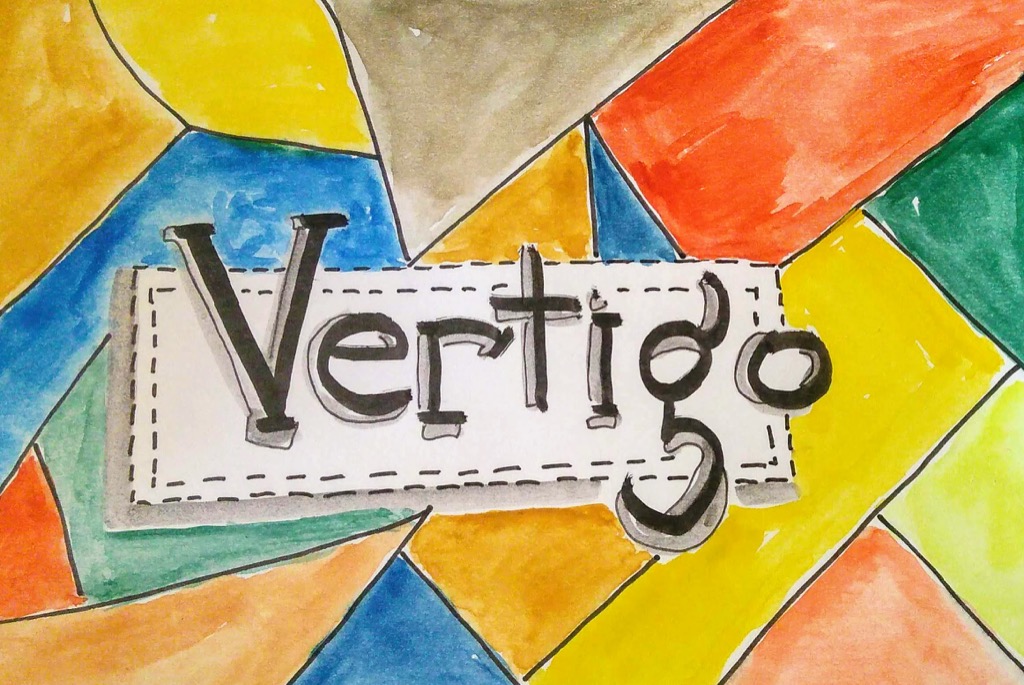
I don’t think I managed to capture the essence of what vertigo feels like in this sketch, but I like it anyway.
I’ve been surfing along the edges of a kind of “background vertigo-like sense” for the last two years: the room isn’t spinning, but everything’s not 100% in focus either.
In the summer of 2017 I consulted a physiotherapist and she walked me through the Epley manoeuvre, which proved ineffective, perhaps because it’s not BPPV that ails me.
In what appears to be an otherwise unrelated development, though, earlier this week I woke up with the room actually spinning in a whole new kind of annoying, and although that subsided as the day went on, it seemed like something new was up, so I tried the Epley manoeuvre before bed and it turns out–very, very conclusively–that in this case it was BPPV, as the kind of vertigo I experienced was a deep-down-holy-shit-what-the-hell-us-going-on kind of vertigo that I didn’t even know was possible.
Fortunately it seems like the Epley manoeuvre did exactly what it was supposed to do, and the BPPV has cleared. Leaving me with my vague, background, vertigo-like-sensation and an abject fear that what I experienced with the full-on vertigo might ever become a permanent condition.
Is this year’s UN motto for the International Women’s Day. And we find it quite fitting. It suits our own concerns, our own philosophies.
In Purism, we care about rights. Digital rights concern everybody, touch most people’s lives, and carry a heavy societal weight when it comes to women. In spite of that, the gender gap in Tech is abyssal – and women are almost nowhere to be seen.
So Happy Women’s Day.
To say women are under-represented in the IT sector is an understatement; the situation in Free Software development is not much better, although some steps have been taken to improve the gender gap. There is, for example, the Debian Woman project, with its own mentoring program; or Outreachy, inviting cis and trans women, trans men and genderqueer people to apply – and, if you have a sense of humor, there’s also WoMan.
But we all need more, and we need it sustained and sustainable. Women matter. History repeats itself in forgetting those without a voice – and we all lose, collectively. Women in technology were only somewhere between 2% and 5% of all programmers a decade ago; and are only about 10% now. At Purism, as of this writing, our nine-person independent board comprises 33% women – in addition to being racially and geographically diverse; our full team is over 20% women, and once again racially and geographically diverse. Groups that are little-represented urgently need to be able to create, and give feedback on, what is created by other groups. Women and girls must contribute to making real change in tech as well, help shape how it impacts their lives. And it does impact their lives immensely.
Consider, in no particular order and among many others, the work (and legend) of Hypatia of Alexandria; remember Grace Hopper, who found that bug; Ada Lovelace, who got you your first computer program (and the Analytical Engine); Muriel Cooper and the information architecture that led to digital interfaces; Hedy Lamarr, movie star and wireless encryption specialist; Katherine Johnson, for allowing (manned) space exploration; Carol Shaw and Super Breakout, because playing games matters; think about Margaret Rock and the Enigma Machine, Karen Sandler and the Software Freedom Conservancy.
And our very own Dorota Czaplejewicz, Heather Ellsworth, Nicole Færber, Teresa Hill, Petra Kirchner, Kim Kuan-Louie, yours truly, Andrea Schäfer, Jennifer Stoddart, Helen Vasilevski and Nikki Zinman.
Diversity is an asset, and creates safe workplace environments. If you want a safe workplace environment that respects diversity, we are hiring.
We’re only a few weeks away from Firefox 67 merging from the Nightly channel to Beta, and since my last update, a number of things have landed.
It’s the end of a long week for me, so I apologize for the brevity here. Let’s check it out!
Document Splitting Foundations for WebRender (In-Progress by Doug Thayer)
dthayer is still trucking along here – he’s ironed out a number of glitches, and kats is giving feedback on some APZ-related changes. dthayer is also working on a WebRender API endpoint for generating frames for multiple documents in a single transaction, which should help reduce the window of opportunity for nasty synchronization bugs.
Warm-up Service (In-Progress by Doug Thayer)
dthayer is pressing ahead with this experiment to warm up a number of critical files for Firefox shortly after the OS boots. He is working on a prototype that can be controlled via a pref that we’ll be able to test on users in a lab-setting (and perhaps in the wild as a SHIELD experiment).
Startup Cache Telemetry (In-Progress by Doug Thayer)
dthayer landed this Telemetry early in the week, and data has started to trickle in. After a few more days, it should be easier for us to make inferences on how the startup caches are operating out in the wild for our Nightly users.
Smoother Tab Animations (In-Progress by Felipe Gomes)
After a few rounds of landings and backouts, this appears to have stuck! The hidden window is now created after the main window has finished painting, and this has resulted in a nice ts_paint (startup paint) win on our Talos benchmark!
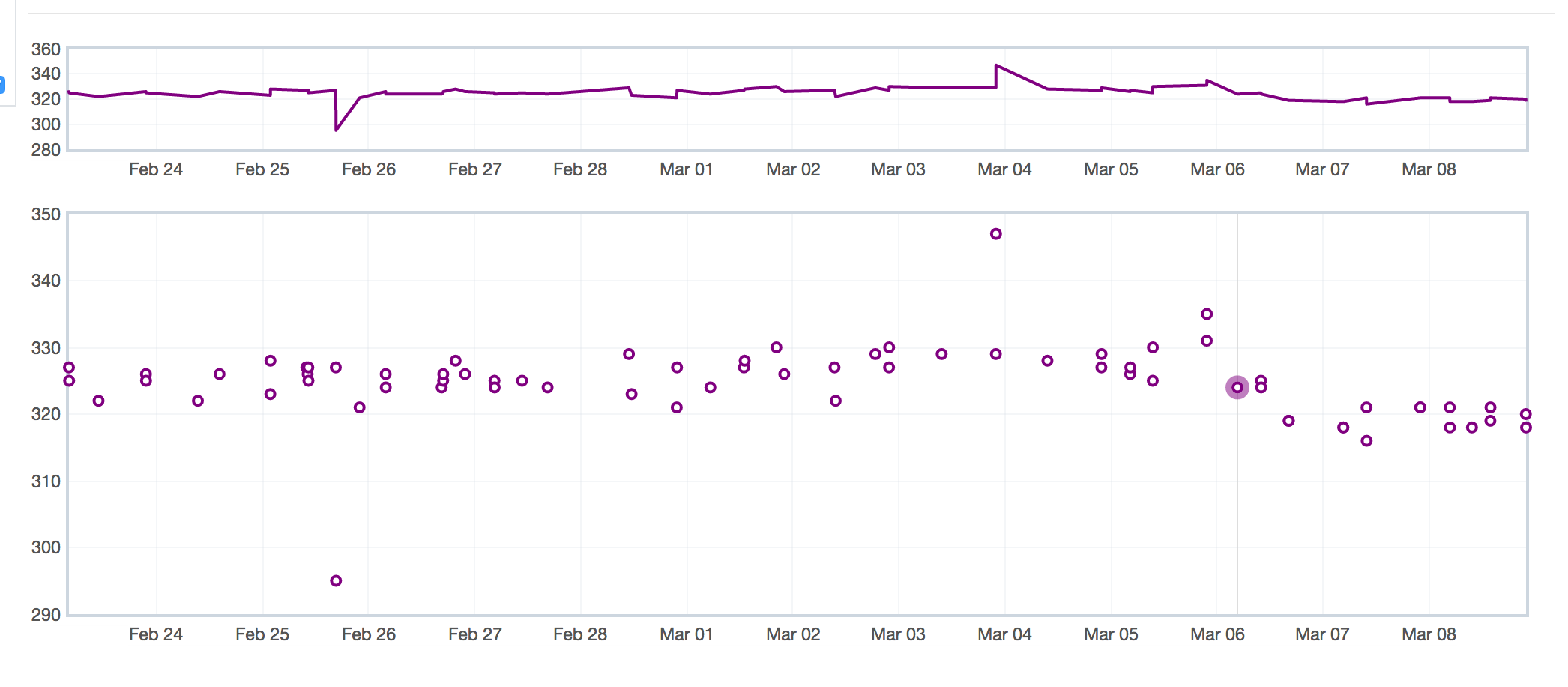
This is a graph of the ts_paint startup paint Talos benchmark. The highlighted node is the first mozilla-central build with the hidden window work. Lower is better, so this looks like a nice win!
Browser Adjustment Project (In-Progress by Gijs Kruitbosch)
This project appears to be reaching its conclusion, but with rather unsatisfying results. Denis Palmeiro from Vicky Chin’s team has done a bunch of testing of both the original set of patches that Gijs landed to lower the global frame rate (painting and compositing) from 60fps to 30fps for low-end machines, as well as the new patches that decrease the frequency of main-thread painting (but not compositing) to 30fps. Unfortunately, this has not yielded the page load wins that we wanted1. We’re still waiting to see if there’s a least a power-usage win here worth pursuing, but we’re almost ready the pull the plug on this one.
Better about:newtab Preloading (In-Progress by Gijs Kruitbosch)
Unfortunately, there’s a small snag with a test failure in automation, but Gijs is on the case.
Experiments with the Process Priority Manager (In-Progress by Mike Conley)
The Process Priority Manager has been enabled in Nightly for a number of weeks now, and no new bugs have been filed against it. I filed a bug earlier this week to run a pref-flip experiment on Beta after the Process Priority Manager patches are uplifted later this month. Our hope is that this has a neutral or positive impact on both page load time and user retention!
Make the PageStyleChild load lazily (Completed by Mike Conley)
There’s an infrequently used feature in Firefox that allows users to switch between different CSS stylesheets that a page might offer. I’ve made the component that scans the document for alternative stylesheets much lazier, and also made it skip non web-pages, which means (at the very least) less code running when loading about:home and about:newtab
This was unexpected – we ran an experiment late in 2018 where we noticed that lowering the frame rate manually via the layout.frame_rate pref had a positive impact on page load time… unfortunately, this effect is no longer being observed. This might be due to other refresh driver work that has occurred in the meantime. ↩
Welp, that was fast. We couldn't thank you all enough for supporting us through another year of celebrating cycling in the Mission District of San Francisco. 2018 had its challenges laid out for us, but overall it's definitely been a definite success thanks to the support of all our friends and loyal customers.
We do have some super exciting news to share with you early next year, but for now we'd like to take a little trip down memory lane and share a few of our favorite photos/moments from this past year...
Nick n' Josh getting stoked during the photo shoot for our 2018 city guide.
A mellow day spent shooting photos around the lesser traveled ends of the city with our buddy Joseph.
Nick's bike looking tough down in Santa Barbara at the World Hill Climb Championships.
Looking over the shoulder of an artist as he paints the changing facades along Mission Street.
Marigolds littering 24th Street in the Mission during Dia de los Muertos 2018
Jeff Geerling@geerlingguy
Are you friggin’ kidding me? /me was one of the few comforts I had after being forced over from IRC.
Heck, even *i… twitter.com/i/web/status/1…
QA Engineer Milda on what she loves about tech and why she’d encourage other women to work in the industry.
I realised I wanted to work in tech when…
I had felt some pressure to go straight into university after school, and I attempted several courses in different fields, to see if any of them “fit”. I tried chemistry, physics and graphic design, but I felt like none of them were a good match. I like both creativity as well as logic, so I wanted to find a career where I could use both. I investigated programming and tech. It clicked! I felt like it was a perfect combination of both creative and critical thinking, and it went from there.
In my current role…
I’m a QA (Quality Assurance) Engineer. I’m responsible for the work quality on my team, which involves ensuring best practices are followed, as well as verifying our product works as expected.
I got into tech…
I signed up for a programming course with the Open University. After two years of full-time studies and work, I had the chance to move to London and get into a tech career, working as a test consultant.
Tech interests me…
Because it constantly changes. This means my work is different every day, and because it’s ever-changing, I’m learning continuously.
My first impression of Zopa…
Great! People around me were very motivated and hard working. The atmosphere in the company was buzzing– a lot was getting done – and it made me want to add value where I can immediately.
I’m inspired by…
I spent my twenties with a great deal of depression and anxiety. Getting out of it took time, was demanding and immensely worth it. I’m inspired by not wanting to feel like that again. Having a job that I love and people who support me is pushing me to do better daily, for which I am incredibly thankful.
The best thing about my role…
Is that I’m grateful to work with very smart and motivated people. It pushes me to hold myself to a higher standard and contribute to the overall success of the company, especially as a QA engineer. My work directly relates to the business being confident about what goes out to the customers.
People make or break a company, and Zopa has, by far, the best people I’ve had the pleasure of working with.
My most memorable moment at Zopa…
Obtaining a banking licence! It was a very joyous and momentous occasion, many people worked extremely hard for a very long time to get to this point, and I was lucky enough to be in the company when it finally happened.
The advice I’d give to other women looking to work in tech…
Is that it’s never too late. Technology is now ubiquitous in our lives, there are many ways you could approach a career in tech. Do not feel like you need to have started programming in your teens! Resources are plentiful and are easily accessible. Go for it!
Working in tech has been the most rewarding part of my professional life so far. I hope more women will think about it as a potential career path for them.
Milda Abromaviciute is a QA Engineer at Zopa. When she’s not putting products through their paces at Zopa, she can be found going to gigs, visiting galleries and playing video games.
On International Women’s Day, and during open education week I want to highlight an initiative that I am involved in for with a group of inspirational women, who are amazingly supportive colleagues and friends as part of the OER19 conference. The post below was written by Lorna and Frances and was posted as a guest post on the OER19 conference website early this week.
Finding space for diverse voices is core to #femedtech and so I hope that many people will use the space we have created to share stories, links, photos, videos sparked by the questions we are specifically addressing at our session during the OER19 conference. We also hope that this space will evolve and that others can use it to highlight their perspectives and voices.
femedtech Open Space
By Lorna M. Campbell, @lornamcampbell, and Frances Bell,
@francesbell
One of the real strengths of the
OER Conferences is that in recent years they have increasingly facilitated an
ongoing critical discourse that seeks to question and renegotiate what openness
means to educators, teachers and learners within different contexts and
perspectives. This discourse ripples out
from the physical and temporal boundaries of the conferences in the form of
blogs posts, twitter conversations, research papers and discussions that enable
us to trace the evolution of narratives of open from year to year. OER17 The Politics of Open explored the challenges current
political movements posed for Open Education and how they might further or
hinder values of inclusivity, sharing, connectedness, equity, voice, agency,
and openness. OER18Open For All sparked discussions
around power and marginality, inclusivity, diversity, identity, decolonisation
and respect, and these themes will be explored further during OER19. When Co-Chair Catherine Cronin
introduced the themes of OER19 Recentering Open: Critical and Global Perspectives at the end of
OER18 in Bristol she stressed
the imperative of moving beyond hero narratives and including marginalised
voices.
These themes and values align strongly with those of
femedtech, an open, inclusive and voluntary network of education technology
practitioners informed by feminist principles.
Femedtech is committed to creating inclusive online spaces where
marginalised voices can speak and be heard. We acknowledge that this is an
ongoing work in progress and a learning experience for all of us.
With this in mind, the femedtech network will be
facilitating an inclusive Open Space session around OER19 to explore themes and
conversations that have emerged from previous OER conferences around power,
marginality, equality, diversity and inclusion.
We’ll be seeking to question dominant narratives of “open”, explore
whose voices are included and whose are excluded from our open spaces and open
practices, whose voices we choose to amplify and whose are silenced.
Questions we hope to consider before, during and after the
OER19 session include;
How do we balance privacy,
openness and personal ethics?
How do we mediate our place in the
open community, aspects of which might conflict with our personal ethics?
Is openness an act of conformance
and / or defiance? And are there performative aspects to openness?
Do we feel pressured to be more
open than we are comfortable with, or do our boundaries constrain us?
How do we manage sustainable
spaces for exploring challenging issues around open?
In order to facilitate these discussions and to ensure the
widest participation from the community, we are building an online femedtech
Open Space, http://femedtech.net/, to gather stories, thoughts,
reflections, responses and reactions, in the form of written content, images,
audio, and media. We welcome reflections
on all aspects and experiences of openness from feminist perspectives and we
encourage participants to raise their own questions and tell their own stories. We acknowledge that our understanding of openness
is highly personal and contextualised, and appreciate that there is no standard
definition of openness to which we must comply.
In order to ensure that engaging with the #femedtech Open Space will be
as widely accessible and inclusive as possible, participants are able to
contribute to these conversations anonymously if they choose.
Through the femedtech Open Space, we also aim to explore
how we build our communities and practices here and elsewhere in the #femedtech
network, and evaluate whether this is a sustainable model for growing the
#femedtech community and network. Inspired by Dignazio & Klein (2018), we
will develop our inclusive values statement iteratively in conjunction with
activities on the Open Space and across the femedtech community.
During the conference session, we will briefly introduce
the Open Space for those who haven’t seen it before, and invite delegates and
virtual participants to contribute and discuss their own ideas and reflections.
We’ll summarise progress to date, invite feedback from session participants,
outline future plans, and encourage participants to engage with others’
contributions after the conference. We also hope to encourage remote
participation in the conference session.
We invite you to visit the femedtech Open Space to
contribute your thoughts, reflections, comments, stories and ideas:
This is an extra-institutional project taking place within
the broad venture of the femedtech network.
The femedtech Open Space is generously hosted by Reclaim Hosting. Reclaim Hosting
provides educators and institutions with an easy way to offer their students
domains and web hosting that they own and control. The site uses the open source TRU Writer SPLOT WordPress theme developed by Alan Levine
and available on Github.
Our Code of Conduct is adapted with permission from PressED Conference run by Natalie Lafferty and Pat Lockley. It incorporates elements from
ukmedchat and FOAMed and is intended to be interpreted according to feminist
principles.
Sleepy. My daughter had just been born a few months prior and was spending her time pooping, crying, and not sleeping (as babies do).
Busy. I was working at Research in Motion (it would be three years before it would be renamed BlackBerry) on the BlackBerry Browser for BlackBerry 6.0. It was a big shift for us since that release was the first one using WebKit instead of the in-house “mango” rendering engine written in BlackBerry-mobile-dialect Java.
Yeah. I had completely forgotten about this. Apparently while reading my RSS feeds in Google Reader (that doesn’t make me old, does it?) taking in news from Dragonmount about the Wheel of Time (so I guess I’ve always been a nerd, then) the text would sometimes just fail to render. I even caught it happening on the old Bugzilla “possible duplicate finder” UI (see above).
The only reason I was reminded this exists was because I received bugmail on my personal email address when someone accidentally added and removed themselves from the Cc list.
Pretty sure this bug, being no longer reproducible, still in UNCONFIRMED state, and filed against a pre-rapid-release version Firefox is something I should close. Yeah, I’ll just go and do that.
If you’re using Google Chrome, you should update your browser right away.
The Chrome team recently released a critical update that fixes a zero-day vulnerability that they say attackers are “actively exploiting.”
Chrome security engineer Justin Schuh explained why updating is essential with this particular vulnerability in a series of tweets. According to Schuh, past zero-day vulnerabilities targetted Chrome through Flash.
Chrome handles Flash as a plugin component, which means the team could update it separately from Chrome and switch the browser to the new plugin version without any user interaction.
This link has more context on the 0day attack observed against Chrome. Separately, I want to expand on why it was important to call out this attack more prominently than previous 0day attacks against Chrome. [1/3] https://t.co/9rGkXa6BoI
Schuh says this exploit targets Chrome code directly, instead of going through Flash. As such, the patch comes through a Chrome update and requires a browser restart.
Google pushed the update out to all Chrome platforms on March 1st, so your browser should already have the update. You may still need to restart your browser to apply it, however.
To check, click on the menu button in the top right of the browser (the three dots). Go down to ‘Help,’ then click ‘About Google Chrome.’ Make sure it says ‘Chrome is up to date’ and lists version number 72.0.3626.121 or higher. If it does, you’re good to go. If not, you can update Chrome from this menu and restart the browser to apply the update.
Google also reported a second zero-day vulnerability in Microsoft Windows that attackers were using in tandem with the Chrome vulnerability.
This newest exploit is different, in that initial chain targeted Chrome code directly, and thus required the user to have restarted the browser after the update was downloaded. For most users the update download is automatic, but restart is a usually a manual action. [3/3]
Google strongly believes the Windows security flaw can only be exploited in Windows 7, thanks to new exploit protections added in later versions of Windows. Further, the company has only observed active exploitation against Windows 7 32-bit systems.
As per Google’s vulnerability disclosure policy, the company reported the Windows exploit to Microsoft when they discovered it. Further, Google has now disclosed the existence of the vulnerability as per its policy. Microsoft is working on a fix for the flaw.
Ultimately, Google suggests the best way to protect yourself is to upgrade to Windows 10. As for the Chrome flaw, make sure you’re up to date on that front as well, and you should be fine.
You can buy your own office phone booth for $3495. Here is a picture. This is “The Room,” which has apparently been written up in The New York Times, Time, and Business Insider. It is soundproof, ventilated with a “discreet fan,” mobile, and made out of recycled plastic bottles. Two people can put it together … Continued
We’ve covered the rejection by the District of North Vancouver Council of the Delbrook affordable housing proposal, CHAC funding and previous consultation processes. Here’s another:
Hollyburn Family Services project killed in camera
Hollyburn Family Services operates two safe houses/transition houses for young people on Mount Seymour Parkway, in two single-family homes that house six young people each. Hollyburn leases the land from the DNV.
Hollyburn put some resources into crafting a proposal to redevelop the sites into a larger, multi-family style facility with approximately 40 units.
Additional density on Mount Seymour Parkway was not acceptable to the majority on DNV Council, so they rejected the proposal. They were able to kill the project in camera because it was a decision re: the disposition of DNV land.
Die schnellere Funkeinheit mit 5 GHz dient zur Verbindung von Fritzbox und Repeater. Der Setup ist super-einfach: Man drückt für eine Sekunde auf die WPS-Taste des Repeaters, dann für ein bis 6 Sekunden auf die WLAN-Taste des Routers. Aktuell muss man noch in der Fritzbox das 5 GHz-WLAN auf einen Kanal über 100 fest einstellen, damit die Verbindung mit 4x4 zustandekommt. Als Gegenstelle braucht man eine Fritzbox, die diese Übertragungsleistung überhaupt liefert, aktuell also 7590, 6590 und 6890.
Der Repeater hat insgesamt acht Antennen, damit er diese Leistung übertragen kann. Man kann auch wahlweise eine LAN-Verbindung zwischen Router und Repeater nutzen. Dazu stellt man nach der Aufnahme in das Mesh einfach die Betriebsart von WLAN- auf LAN-Brücke um.
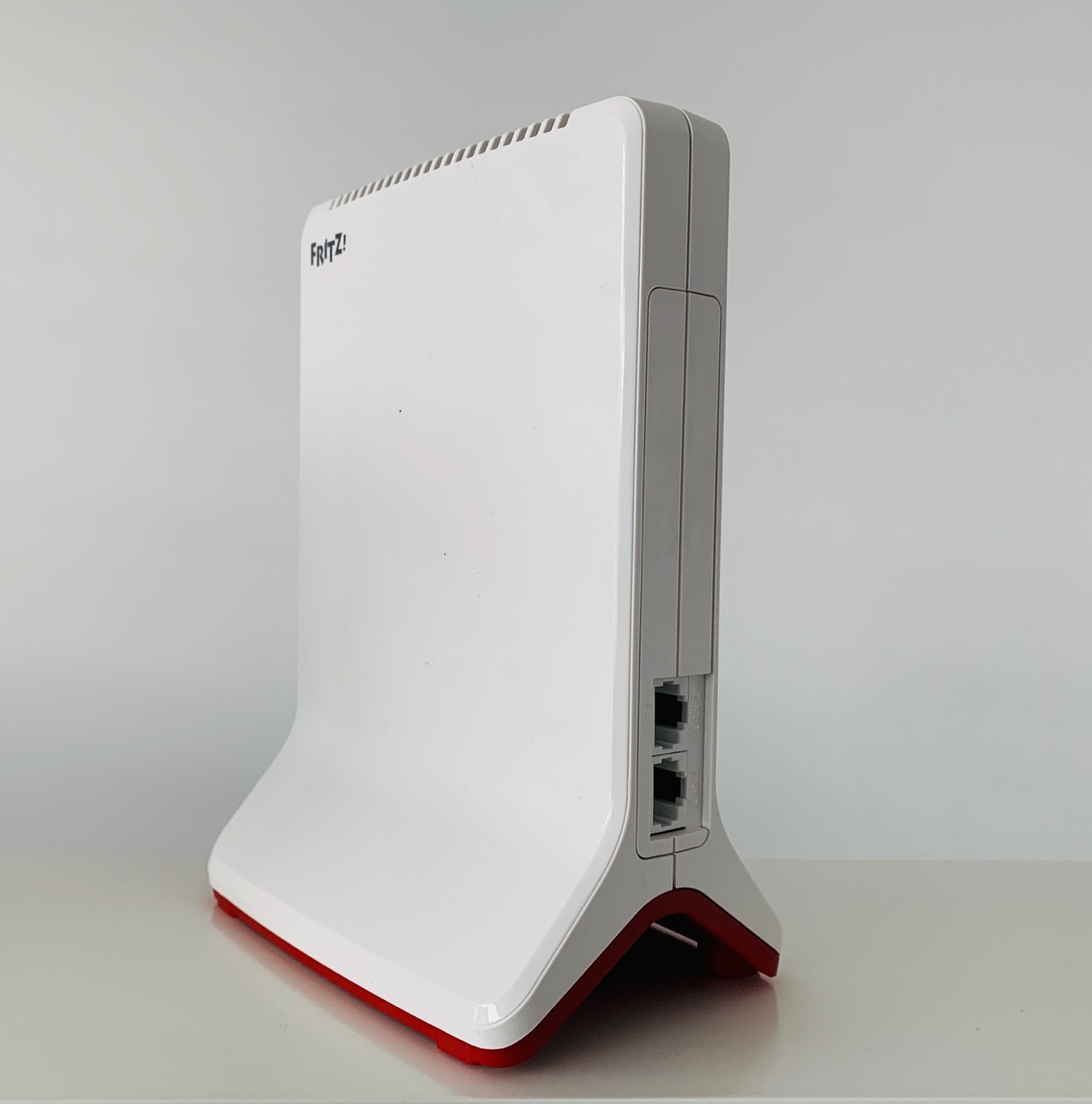
Das Gerät trägt ein bisschen mehr auf als der 1750E links im Bild aber deutlich kleiner als die 7580, die ich bisher an gleicher Stelle benutzt habe. Nutzt man die WLAN-Brücke, kann man zwei Endgeräte per Ethernet anschließen, als LAN-Brücke fällt natürlich einer der Ports weg.
Mit dem 3000 verbinden sich bei mir mehr Clients als mit den 1750E. Ich schreibe das der besseren WLAN-Performance zu, werde das aber noch beobachten.
Texture, a magazine distribution app now owned by Apple, has received a mysterious new update.
What the update actually does is a mystery, as Apple hasn’t outlined any details in its release notes.
In the ‘What’s New’ section, the update’s notes simply read, ‘as always, we want your feedback. It’ll help make Texture even better. Please email us at support@texture.com.’
This seems pretty strange, as the release notes don’t feature the typical ‘minor bug fixes’ outline included in many Apple app updates.
Texture is still available for both iOS and Android, though the app hasn’t been updated since July 2018.
Along with its new magazine subscription service, Apple is also expected to finally reveal its streaming video and television platform at the company’s March 25th keynote.
Behold these very amazing red plaid pants! They had a couple of pockets but also had fake front pockets and zippers that seemed to promise pockets but had none. Thanks to the awesome alterations ladies at my local dry cleaners there are now 7 functional pockets, 3 of them behind zippers! They are used to my bringing in jeans to them for the Deep Pocket treatment – partly that I just like having good pockets but partly influenced by the fact that I’m sitting down in a wheelchair lots of the time while I’m out of the house and dont’ want my phone, keys, lip balm, and handkerchiefs to fall out. Anyway, this time they came out giggling and pleased with themselves as they put in a whole EXTRA pocket and also, the pocket fabric is (unasked for, but awesomely) deep purple!
I have added a spuriously punk wallet chain, which I also find very satisfying.
No one may question my authenticity and I will wear stupid shit like this till the day I die!
The workplace messaging and collaboration platform added the new interface option in its iOS app beta.
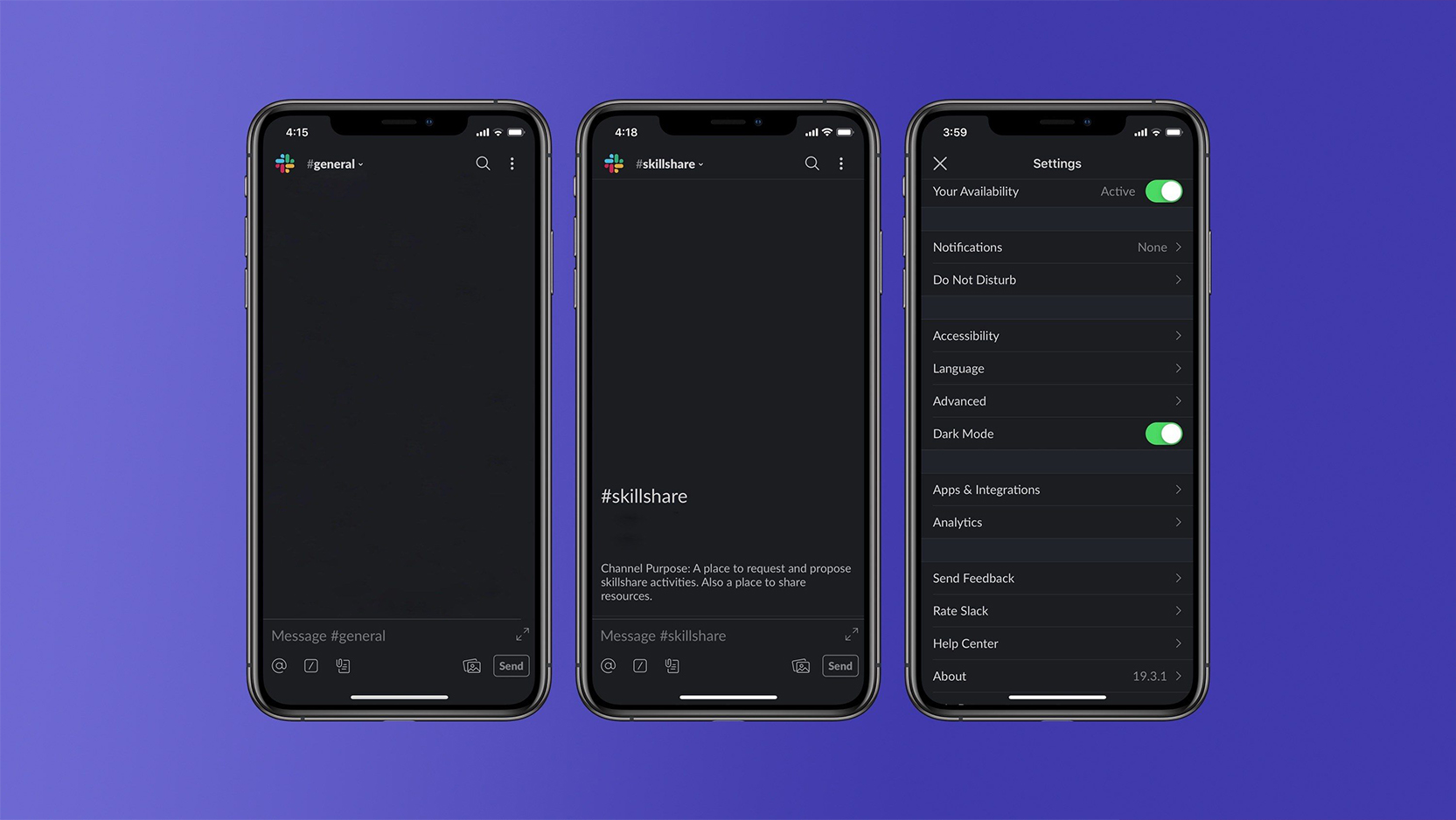
If you have the beta, you can tap the menu button (three dots) in the top, right corner of the Slack app, tap ‘Settings’ and then flip the dark mode toggle.
Like the dark modes of other apps, Slack’s turns the primarily white interface a dark grey instead. The text turns white or a light grey to maintain readability.
Unfortunately, it’s not a true-black interface like Facebook Messenger’s dark mode, which helps save battery on phones with OLED screens.
That said, it’s a welcome feature for sure. I use Slack often for work, and a dark interface I find helps me with eye strain. I currently use a browser extension to darken Slack on my laptop, but I have no such option on my phone.
With iOS 13 rumoured to bring a system-wide dark mode to iPhones, and Android Q rumoured to do the same, Slack may be trying to get out ahead with its dark mode. Hopefully more apps follow so I can enjoy just about every app in some form of dark mode.
If you want to try out the Slack beta, you can sign up here.
Today, we’re pleased to announce two important updates that deepen Flickr’s commitment to our members and to the worldwide photography community.
All public Creative Commons works on Flickr are now protected from deletion.
Creative Commons licenses have been an important part of Flickr since we introduced them on our platform in 2004. We’ve made it simple for Flickr members to license any photos in their account under any of the Creative Commons licenses and designations, which has resulted in Flickr being the largest single repository of freely licensed material anywhere in the world. We now host more than 500 million public CC-licensed works, with many more uploaded every day.
When we recently announced updates to Flickr Free accounts, we stated that freely licensed public photos (Creative Commons, public domain, U.S. government works, etc.) as of November 1, 2018 in excess of the free account limit would not be deleted. We wanted to make sure we didn’t disrupt the hundreds of millions of stories across the global internet that link to freely licensed Flickr images. We know the cost of storing and serving these images is vastly outweighed by the value they represent to the world.
In this spirit, today we’re going further and now protecting all public, freely licensed images on Flickr, regardless of the date they were uploaded. We want to make sure we preserve these works and further the value of the licenses for our community and for anyone who might benefit from them.
In conjunction with this announcement, we’ve disabled bulk license change tools in the Settings, the Camera Roll, and the Organizr for Flickr Free accounts. We’ve done this to prevent community members from flipping all their images to a new license without first understanding the significant implications of the various free licenses we support. Any member (Free or Pro) can still change the license of any of their photos on the photo page.
We’ve supported Creative Commons for as long as we’ve been around and we’re thrilled to do so for newly-uploaded content as well.
“In memoriam” accounts for deceased members.
Since we announced changes to Flickr’s Free and Pro accounts on November 1, we’ve heard from members who are concerned about what will happen to accounts owned by deceased members, and what will happen to their own accounts when they die. We’re photography lovers here at Flickr, too, and we love the idea of photographers’ legacies living on in memoriam—that’s why we’re pleased to announce today that we’re offering “in memoriam” accounts to existing Flickr members who have passed away.
In memoriam accounts will preserve all public content in a deceased member’s account, even if their Pro subscription lapses. The account’s username will be updated to reflect the “in memoriam” status and login for the account be locked, preventing anyone from signing in.
We’d love your help to identify any existing accounts that deserve in memoriam status so we can make sure their contributions to the community are preserved. To nominate an account, please read this article in the Flickr Help Center. If our Support Heroes can verify the required details, we will preserve the account in memoriam.
Microsoft will reportedly refresh its entry-level 13.5-inch Surface Book 2 with a faster quad-core Intel Kaby Lake processor and more.
According to a WinFuturereport, Microsoft will upgrade the current Intel Core i5-7300U dual-core processor to a quad-core i5-8350U. This chip runs at 1.7GHz base clock and turbos up to 3.6GHz.
That upgrade will reportedly boost the Surface Book 2’s performance by over 50 percent.
Further, the refreshed model will have 8GB of RAM, and start with 256GB of storage, instead of 128GB like before.
Unfortunately, Microsoft won’t include an embedded Nvidia graphics chip like it does with some of the higher-end Surface Book 2 models.
Additionally, Microsoft won’t change other features. This means the refreshed Surface Book 2 will still have the 13.5-inch PixelSense display in a 3:2 format with a resolution of 3,000 x 2,000 pixels. It’ll also have two USB 3.1 ports, a USB-C port and an SD card reader.
The refresh will reportedly bring a price increase as well. A German dealer lists a price of €1,569 EUR, while a U.S. dealer lists it at $1,499 USD (about $2,010 CAD).
To compare, the current cheapest Surface Book 2 model retails for $1,599 CAD.
The refresh will reportedly be available in the coming weeks.
It’s always exciting to discover a book that generates a cascade of “aha” moments. I certainly didn’t pick up Sonke Ahrens’s *How to Take Smart Notes* expecting that result.
I’ve kept notebooks and journals in various forms for decades. They’ve contributed significantly to the quality of the work I’ve been able to do. Nonetheless, Ahrens convinces me that I have left a lot of value on the table. More importantly, he makes the case that I can recover and extract much of that value with a change of perspective and some manageable adjustments in my practices and workflow. I don’t need a wholesale reengineering of my systems or infrastructure and I don’t face a massive conversion of previous work. I do face adjustments and the usual discomfort of building new habits, but on a clearly manageable scale and timeframe.
Notes as first class knowledge assets
The first aha moment is the notion of thinking of some notes at least as a permanent and evolving knowledge asset. Ahrens argues that there are three categories of notes:
1. Fleeting notes, which are only reminders of information, can be written in any kind of way and will end up in the trash within a day or two.
2. Permanent notes, which will never be thrown away and contain the necessary information in themselves in a permanently understandable way. They are always stored in the same way in the same place, either in the reference system or, written as if for print, in the slip-box.
3. Project notes, which are only relevant to one particular project. They are kept within a project-specific folder and can be discarded or archived after the project is finished.
The first and third categories have been a part of my work practices for as long as I can remember. It is this middle category and the approach to building and maintaining it that I find intriguing and promising. It promises a solution to some enduring frustrations. Those frustrations may not be evidence of limits imposed by my ADD or fundamental moral failures. Instead, they result from some missing ideas and practices those ideas enable.
During my doctoral student days and consulting years I kept chronological notebooks as part of my work practices. I did that based on the advice and example of Jerry Pournelle and Jerry Weinberg, both of whom turned out prodigious amounts of quality work and were gracious in reflecting on and sharing elements of their work practices. As computing technology became personal and portable, I began to do much of my note taking and writing development at the keyboard. As part of that practice, I used WordPress to create a blog as a commonplace book on my local computer. These notebooks and their digital equivalents have been useful enough that they have remained components in my current work.
A corpus of notes is its own knowledge asset
If the notion of a permanent note is the first aha moment, the second is to view the growing body of notes as a separate knowledge asset. Until now, specific projects have provided my primary organizing structure. Blogging is a step in the direction of a prospective knowledge asset, but only partially so. Blogging is a kind of ongoing project whose outputs I have thought of and treated as final deliverables.
I’ve struggled with what to do with ideas that are still “cooking” and don’t yet have an obvious home. I’ve used various tools with varying levels of success but tools don’t dictate good practices or how best to use raw materials.
Maybe I missed school that day, but I never encountered good examples of how the leap from random ideas to finished product might work better. Way back in the day, people talked about index cards and cutting manuscripts into little pieces to be rearranged. Never made sense to me. Later, text editors and word processors made the mechanics of writing easier. I became and remain a fan of outliners and mindmapping tools but they didn’t offer guidance about how to think about the contents they contained.
What I lacked was a good data model. One of my advisors in my doctoral days talked about journal articles as “bricks” in the wall of knowledge. I never got what went into making a brick much less where it went on the wall. Ahrens concept of a permanent note is derived from the paper-based system of German sociologist Niklas Luhmann he labeled a Zettelkasten. Luhmann developed an interesting system for maintaining and working with his ever-expanding corpus of notes. There is, of course, a thriving Internet sub-culture devoted to divining the whys and wherefores of this strategy and adapting it to a technological world–it’s easy to see how a Zettelkasten maps naturally into a world of hypertext.
The risk to avoid is the tempting rabbit-hole of experimenting with new tools and debating the arcana of indexing and branching strategies. Seeing a note as a permanent and fundamental knowledge “particle” is the aha moment. It’s certainly a more fine-grained level that now exists in its own right. These notes are not a temporary container that is only useful until the final product is finished. A collection of permanent notes becomes a thinking tool to work out and develop new thoughts and lines of thought.
As such, notes can’t simply be pointers back to a piece of secondary research or the barest sketch of an argument to be fleshed out in the draft of a larger deliverable. Permanent notes “are no longer reminders of thoughts or ideas, but contain the actual thought or idea in written form.”
If I still kept physical books, this one would already be dog-eared. Instead, I’m developing and exercising new skills for extracting the thoughts from this container and using them to expand my own thinking. Right now, I’m clumsy and unskilled but I can see how to get better.
Peter Meuser kommentierte meinen Artikel zu den Surface Headphones:
Microsoft legt seinen Mitarbeitern intern nahe für Skype und Co. nur kabelgebundene Headsets zu verwenden...
Das konnte ich zunächst nicht nachvollziehen, aber eine Nachfrage bestätigte, dass dies für WLAN-only Büros gilt. Ansonsten gibt es eine ganze Bandbreite von Technologien, von DECT über Bluetooth bis kabelgebunden.
Marco Schirmer gab einige konkrete Empfehlungen:
Auch wenn es teuer ist finde ich für Büroumgebungen das Jabra Engage 75 gut. An die Basisstation kann ich im Büro alle Endgeräte (Softphone, 2xBluetooth, Deskphone) anschließen und die Basis kommuniziert mit dem Headset per DECT. Somit habe ich typischerweise keine Reichweitenprobleme oder Störungen. Das ist auch für Shared Desk Szenarien interessant. Überall eine solche Basisstation und jeder bringt sein Headset mit. Alternative ist ein schnurgebundenes Plantronics Blackwire 710/720, die auch noch Bluetooth unterstützen.
Für Microsoft Teams Umgebungen finde ich das Plantronics Elara 60 interessant. Tastatur, Wireless Charger und ggf. Speakerphone. Bisher habe ich es allerdings noch nicht im Langzeittest genutzt.
Bluetooth Headset im Büro natürlich immer nur mit dem Originalhersteller Bluetooth Dongle. Alles andere ist Schrott (und nicht zertifiziert), da die Standard Bluetooth Chips/Stacks in den Notebooks nicht für 2-Way Audio ausgelegt sind. Bei Headsets auch immer auf die passende Zertifizierung (Lync/SfB, Cisco, Avaya, etc.) achten.
Für unterwegs mit Smartphone oder Tablet nutzt man dann sein persönliches Wohlfühl Headset. Da hat der vowe ja immer gute Tipps. Ich persönlich mag ja auch die Plantronics Voyager 6200 UC. Ach ja Sennheiser hat auch ein paar sehr schöne Headsets. Für den Besprechungsraum nutzt man dann noch eines der Speakerphones Jabra Speak 710, Plantronics Calisto oder Sennheiser SP20.
Gedränge im Bluetooth-Spektrum kenne ich nicht, deshalb kam mir die Empfehlung "kabelgebunden" komisch vor. Aber das ist nicht von der Hand zu weisen. Sicherlich auch interessant: DECT/Bluetooth-Headsets wie das Plantronics Savi 8200.
A group of German authors, comedians and academics have added fuel to the flames of an increasingly bad-tempered culture war over language bias by calling for a fightback against “ridiculous linguistic constructions” designed to make German more gender-neutral.
In an open letter published by the Dortmund-based German Language Association, signatories including the philosopher Rüdiger Safranski, novelist Peter Schneider, comedian Dieter Hallervorden and the former head of the country’s domestic intelligence Hans-Georg Maassen, hit back against calls for more gender-neutral generic nouns.
In German, where nouns have either a male, female or neuter gender, words for mixed groups of people are traditionally based on the masculine form. If you are talking about a group of teachers, for example, you would say die Lehrer, not die Lehrerinnen.
Feminist linguists have made various proposals to make the language more inclusive, either by typographic trickery, such as LehrerInnen, Lehrer(innen) or Lehrer*innen, or by replacing them with nouns that make the gender more invisible.
In recent years, such proposals have been picked up by a number of academic institutions and municipal authorities: since January this year, officials in the city of Hanover no longer use the generic noun Lehrer in their correspondence, but the more neutral Lehrende, or “teaching ones”.
The protest letter, headed “An end to gender nonsense!” and published shortly before International Women’s Day, argues that the distribution of gender to generic nouns in German is too arbitrary for there to be a systemic sexist bias. In German, lions are male while giraffes are female and horses neuter, the letter’s authors argue. “And no one has been bothered by the fact that everything feminine has for 1,000 years been based on the [neuter] word das Weib.”
Further, the signatories dispute that masculine generic pronouns discourage women from entering certain professions: the fact that Germany’s constitution has 13 mentions of the “chancellor” in its masculine form “did not prevent the repeated rise of Angela Merkel to the post of chancellor”.
Unlike France, Germany has no official central body tasked with arbitrating on linguistic matters: while Dortmund’s German Language Association boasts over 36,000 members, it is only one of several institutions that try to set standards on grammar and spelling.
The association, which publishes an index of anglicisms that have entered the German language alongside German-language alternatives, has gained an increasingly conservative profile in recent years, leading one critic to dub it “Pegida for linguists”.
… and we want to tell you about it. We made a choice which means our journalism now reaches record numbers around the world and more than a million people have supported our reporting. We continue to face financial challenges but, unlike many news organisations, we have chosen not to put up a paywall. We want our journalism to remain accessible to all, regardless of where they live or what they can afford.
This is The Guardian’s model for open, independent journalism: available for everyone, funded by our readers. We depend on contributions from our readers. Will you support our choice?
Readers’ support powers our work, safeguarding our essential editorial independence. This means the responsibility of protecting independent journalism is shared, enabling us all to feel empowered to bring about real change in the world. Your support gives Guardian journalists the time, space and freedom to report with tenacity and rigour, to shed light where others won’t. It emboldens us to challenge authority and question the status quo. And by keeping all of our journalism free and open to all, we can foster inclusivity, diversity, make space for debate, inspire conversation – so more people have access to accurate information with integrity at its heart.
Guardian journalism is rooted in facts with a progressive perspective on the world. We are editorially independent, meaning we set our own agenda. Our journalism is free from commercial bias and not influenced by billionaire owners, politicians or shareholders. No one steers our opinion. At a time when there are so few sources of information you can really trust, this is vital as it enables us to give a voice to those less heard, challenge the powerful and hold them to account. Your support means we can keep investigating and exploring the critical issues of our time.
Our model allows people to support us in a way that works for them. Every time a reader like you makes a contribution to The Guardian, no matter how big or small, it goes directly into funding our journalism. But we need to build on this support for the years ahead. Support The Guardian from as little as CA$1 – and it only takes a minute. Thank you.



 On June 30, 2010 I was:
 (@justinschuh)







 Ahrens, Sönke. 2017.
 ottocrat on Twitter.


 The Guardian.
