Shared posts

23 Mar 07:41

Feed Discovery with Feed Compass

Maurice Parker, who’s contributed a lot to NetNewsWire, has started working on a directory app for feeds: Feed Compass.

It’s still at the proof-of-concept phase — very early days. The idea is that it can read OPML files from the web, show you a list of feeds, and show a preview of what’s in a feed when you select one. Most importantly, there’s a big Subscribe button so you can add the feed to your RSS reader.

The subscribe button should work with any Mac RSS reader that supports the feed protocol (which is probably all of them). It’s not just NetNewsWire-specific, in other words — it should work with Reeder, ReadKit, and others. (I haven’t tested this, though.)

* * *

This isn’t all of what needs to be done to make feed discovery easier and better. It’s a step, though, and it can be combined with other steps.

Some things I like about it:

  • It’s decentralized. It doesn’t rely on any one server, since servers may come and go.
  • It’s open source, which means you can contribute and/or fork. The code can’t go away.
  • It’s free, which means there’s no barrier to use.
  • It works (as I mentioned) with any Mac RSS reader, not any one in particular.
  • It could be ported to iOS.
  • It means we don’t need to include a feed directory built-in to NetNewsWire. (This helps keep NetNewsWire focused.)

* * *

Again, this is just the start of something. It’s not the one and only true answer to the problem of feed discovery — but it could be part of a collection of solutions that work together.

For more about discovery… When Maurice was doing research on the topic, he found this thread on Dave Winer’s GitHub enlightening, and I recommend reading it.

* * *

I had posted, to the NetNewsWire Slack group (email me for an invitation), a list of RSS app ideas. These are apps that could use NetNewsWire code to get a head start (though you wouldn’t have to).

The below is what I posted…

Here are some ideas for apps I’d love to write, that could use some NetNewsWire code, but that I’m too busy to write — but that would be cool if someone else wrote!

Big Internet Backup — discussed earlier. Give it a bunch of feeds, and it keeps everything forver. Searchable. Smart feeds. Etc.

Timeline/river-of-news reader - RSS presented as in a Twitter client. Reverse-chronological list. Super simple. Probably doesn’t even track read/unread (just position in timeline).

Microblog client as productivity app — multiple accounts, standard sidebar. Features like drafts. Scriptable. Searchable. Keeps items for a long time. Possibly even a detail pane that shows linked-to web pages. Connection to MarsEdit.

Feed creator — makes it easy to create feeds, including podcast and appcast feeds. (For instance: I do the appcast feed for NetNewsWire by hand, which is crazy. There should be an app for this.)

Feed debugger - given a feed, this app tells you about the issues. Is it a valid feed? Does it support conditional GET? Are attributes missing? Misspelled? Etc. This is especially important as it appears that feedvalidator.org may be down for the count.

Feed directory - reads in OPML from various sources on the web (such as Dave Verwer’s and Dave Winer’s collections) and creates a directory. When you select a feed, it downloads it and shows a preview of what you’d get. One-click subscribe to the default reader (whether it’s NetNewsWire or another app).

Though ideally these would be open source apps, they don’t have to be. (You can use NetNewsWire code in commercial apps, as long as you credit NetNewsWire in the about box or somewhere appropriate.)

I don’t claim that any of these are money-makers. Maybe some of them? Depends. I do think they’d all be very useful, and that you have a leg up since you can start with NetNewsWire code.

23 Mar 07:41

The One About Process

by rands

In this episode, we talk about process being documented culture. How do we keep all the plates spinning? Who are good plate spinners? Why are there plates in the first place? This and more is answered in this episode of The Important Thing.

Enjoy it now or download for later. Here’s a handy feed or subscribe via Overcast or iTunes.

11 Mar 22:07

Not another award!

by Stephen Rees

The Daily Hive reports “Vancouver has been ranked as the second best city for public transit in Canada.”

While some residents (particularly transit users) may be surprised, the new ranking comes from Redfin, a tech-powered real estate brokerage.

You have to do a bit of digging but by following the links you do finally get the methodology of the transit score

“The value of a route is defined as the service level (frequency per week) multiplied by the mode weight (heavy/light rail is weighted 2X, ferry/cable car/other are 1.5X, and bus is 1X) multiplied by a distance penalty.”

So basically they use the schedule to determine frequency. Not actual performance.

Note too that even if you had a bus system that had exclusive right of way, or signal priority and lots of bus lanes, it would still score less than rail – no matter if that is grade separated or in mixed traffic. That’s how “modern streetcars” get such a good press, I guess. Just pay no attention to video shot from a bus in Boston whipping past congested traffic. Or to Jarrett Walker who is adamant that the choice of steel or rubber wheels is not really significant.

For the actual experience of using two of Translink’s “high frequency” routes – see the previous post.

The reason I groan at these awards is the effect they can have on Management. Far too often they did not want to hear anything that sounded like criticism – or the need for improvement. What they wanted staff to be were cheer leaders. “We’re Number 1” (in a contest that was no contest at all) was their mantra. I think there has been some change in recent years.

While I’m reposting video from Twitter take a look at this one from Brent Toderian. This is a modern light rail system in Nice, France crossing the Place Massena – and using its batteries. Elsewhere in the city it raises its pantograph to collect power, but what struck me about this delightful urban space is the total absence of overhead wires. While the trolleybuses we now have here can operate on their batteries, it is not an everyday occurrence because the bus is then much slower, has a short range and requires someone to lower and raise each pole individually. So to divert the  #14,  #16 and #17 during Millennium Line extension construction under Broadway new wire is now being strung along 12th Avenue.

Screen Shot 2019-03-23 at 11.45.18 AM

Diagram from Translink via the Facebook group ELMTOT

Hopefully the next batch of electric buses that get bought for Translink will have better off wire capabilities.

11 Mar 22:07

Small Tech Provides Agency, Big Tech Takes It Away

by Ton Zijlstra

Aral Balkan talks about how to design tools and find ways around the big social media platforms. He calls for the design and implementation of Small Tech. I fully agree. Technology to provide us with agency needs to be not just small, but smaller than us, i.e. within the scope of control of the group of people deploying a technology or method.

My original fascination with social media, back in the ’00s when it was blogs and wikis mostly, was precisely because it was smaller than us, it pushed publication and sharing in the hands of all of us, allowing distributed conversations. The concentration of our interaction in the big tech platforms made social media ‘bigger than us’ again. We don’t decide what FB shows us, breaking out of your own bubble (vital in healthy networks) becomes harder because sharing is based on pre-existing ‘friendships’ and discoverability has been removed. The erosion has been slow, but very visible. Networked Agency, to me, is only possible with small tech, and small methods. It’s why I find most ‘digital transformation’ efforts disappointing, and feel we need to focus much more on human digital networks, on distributed digital transformation. Based on federated small tech, networks of small tech instances. Where our tools are useful on their own, and more useful in concert with others.

Aral’s posting (and blog in general) is worth a read, and as he is a coder and designer, he acts on those notions too.

11 Mar 22:06

Digital Witness

by Randall Amster

Image By Al Ibrahim

I want all of your mind
People turn the TV on, it looks just like a window…

Digital witnesses
What’s the point of even sleeping?

— St. Vincent, “Digital Witness” (2014)


Each day seemingly brings new revelations as to the extent of our Faustian bargain with the purveyors of the digital world in which we find ourselves. Our movements, moods, and monies are tracked with relentless precision, yielding the ability to not only predict future behaviors but to actively direct them. Permissions are sometimes given with pro forma consent, while other times they’re simply baked into the baseline of the shiniest and newest hardware and software alike. Back doors, data breaches, cookies and trackers, smart everything, always-on devices, and so much more — to compare Big Tech to Big Brother is trite by now, even as we might soon look back on the latter as a quaint form of social control.

While data breaches and privacy incursions are very serious and have tangible consequences, debates over user rights and platform regulation barely scratch the surface. Deeper questions about power, autonomy, and what it means to be human still loom, largely uncovered.  And when these concerns are even voiced at all they can often seem retrogressive, as if they represent mere longings for a bygone (pre-internet) time when children played outside, politics was honorable, and everyone was a great conversationalist. Despite ostensible consternation when something goes egregiously wrong (like influencing an election, let’s say), the public and political conversation around mass data collection and its commercialization never goes far enough: why do so many seemingly reasonable and critical people accept a surveillance-for-profit economy (with all of us as the primary commodity) as tolerable at all?

To answer this question, we have to look at privacy from an entirely different angle, one that sees the advent of omnipresent, omniscient technology as satisfying basic human needs rather than violating them. In this view, perhaps the reason for the mostly uncritical acceptance of technopolistic trends is that on some level it actually resonates for people. Yes, we know that many of the products are engineered to tap into fundamental desires to be liked, to be seen, to feel important, to be reaffirmed (in carefully doled out neurological doses), to register and be recognized. Yet the tendencies predate the technologies, and if it wasn’t this it would be something else.

For instance, the totalized gaze of the narrator/viewer in most movies and programs is so engrained that we rarely notice it, casually enjoying the voyeuristic ride we take on the backs of characters assembled. In film the viewer is there for every mundane moment, every disappointment and poignant revelation, every coincidence, every interaction — at least those that make the cut from idea to script to broadcast. This leaves viewers in a paradoxical state of apparent omniscience and susceptibility to manipulation, and is part of the artifice of good storytelling. This duality of power and persuasion applies to new media as well, where any viral video is notable for what it captures and what it omits. In both realms, we become a kind of co-pilot, a witness to everything in the field of vision, a validator of conduct and an accomplice in artifice. We decide when a character (fact or fiction) is being misjudged, acting deviously, driven to extremes, or doing something quietly heroic. We sign off on the solidity of their perspective.

Humans have conceived of external observers for a long time, whether in the form of authorities among us or gods above. Consider how many of us (secular and religious alike) may long for such an audience on our solitary journey, someone who sees all the little moments that define us and is invested in the trajectory of our lives. This virtual road buddy is by definition on our side, at least in terms of point of view if not viewpoint, serving as a recorder of our struggles and triumphs, keeping the ledger on how we will ultimately be judged. We can’t really rely on other people for this, after all, since they’re too consumed with their own myriad insecurities, internal dialogues, and obsessions with impression management. Whereas others only see the outward moments that we carefully curate and/or blithely forward, the omniscient viewer — the one whose affirmations and likes we really covet — is with us all the way. And even when the data gleaned by our digital companions is used to target us for advertising or worse, it still affirms the basic notion that someone cares, and that we matter.

In this sense, it often appears that we have come to crave publicity more than we value privacy. This surely is not by happenstance, since it taps into a basic human desire to be recognized. But the modern version is subtler and more sinister, with technology not merely recording our desires but shaping them as well. Everything from images of beauty and measures of success to the taste of food and the cadence of broadcasting is cultivated through a combination of repetition and reinforcement. When it comes to privacy in the social media era, the stakes are even higher than simply guiding what we consume; now it is about how we are being consumed by others, how we create our own brand and become promoters and marketers with ourselves as the principal commodity. Privacy is the antithesis of this, serving to keep parts of us from being recognized and thus failing to maximize the potential for growth and gain.

Regardless of how long people have desired being seen, we still have to evaluate carefully whether the version of Big Brother that Silicon Valley built is meeting this basic need without leading us down a road on which there is no exit and no return. As we fully enter into this era, it is important to consider how the escalating network of devices and data streams is more than merely the object of our consumerist affection. In short order it is becoming our digital witness, our personal seal of approval, and our novel hope for understanding if not outright absolution. The science (or is it mysticism?) of chronicling our every thought and movement may soon yield a world where literally nothing is truly private anymore, and where this realization actually brings a sense of comfort and confirmation.

In his classical formulation of the panopticon over two centuries ago, Jeremy Bentham conceived an all-seeing vantage point that would leave those within its ambit susceptible to being watched at any time. While this seems like an ominous harbinger given the surveillance society as it has evolved, Bentham’s notion was somewhat more benign in its intentions if not its implications. In essence, the panopticon was designed to inculcate the arbiter’s gaze within those exposed to it, cultivating self-reflection and moral behavior out of fear of being caught by the omniscient observer but without having to use actual force to impose discipline. The net effect was minimal external pressure yielding inner transformation.

Today’s manifestations may be more like a tranopticon, a term I’ve coined to describe a scenario that isn’t just all-seeing but ever-evolving. Unlike the traditional panopticon, it isn’t passive or fixed; rather, it is transactional, intelligent, dynamic, and capable of being dialed up to prove a point, reach a decision, explain an action, or magnify a transgression. It is less about the totalizing gaze of the watcher and more so about the myriad of gazes that includes ourselves. While its gleanings don’t represent the truth (since others will have their own POV-molded realities), it will loyally capture our verities by being there for all things great and small. In this sense, our consciences will move from the remoteness of an “eye in the sky” to the applications sparked by an “AI in the Wi-Fi” that helps to shape present and future behavior based on the opulent tapestry of our past, compiled every nanosecond across a thousand points of data.

With the careful guidance of our alter egos and the unvarnished reflection of ourselves in hand, perhaps humankind will learn to optimize not only efficiency but ethicality as well. As in Orwell’s archaic parable, attempting to shield oneself from this omnibenevolent gaze would be transgressive — not only illogical, but immoral. Human beings have tried for thousands, perhaps millions, of years with marginal success to project forces above us that might elicit moral behavior — deities, leviathans, solons, panopticons, prosecutors, and more. Now we will finally have the means to install the one power source that cannot be gainsaid: ourselves. And in this understanding, perhaps we may truly come to love Big Tech after all.

Randall Amster, Ph.D., is a teaching professor in justice and peace studies at Georgetown University in Washington, DC, and is the author of books including Peace Ecology. All typos and errata in his writings are obviously the product of intransigent tech issues. He cannot be reached on Twitter @randallamster.

11 Mar 22:05

The Daily Promo – Cody O’Loughlin

by A Photo Editor

Cody O’Loughlin

Who printed it?
I used Smartpress to print this set. They’re great to work with during the proofing and mock up process, and offer plenty of quality paper options.

Who designed it?
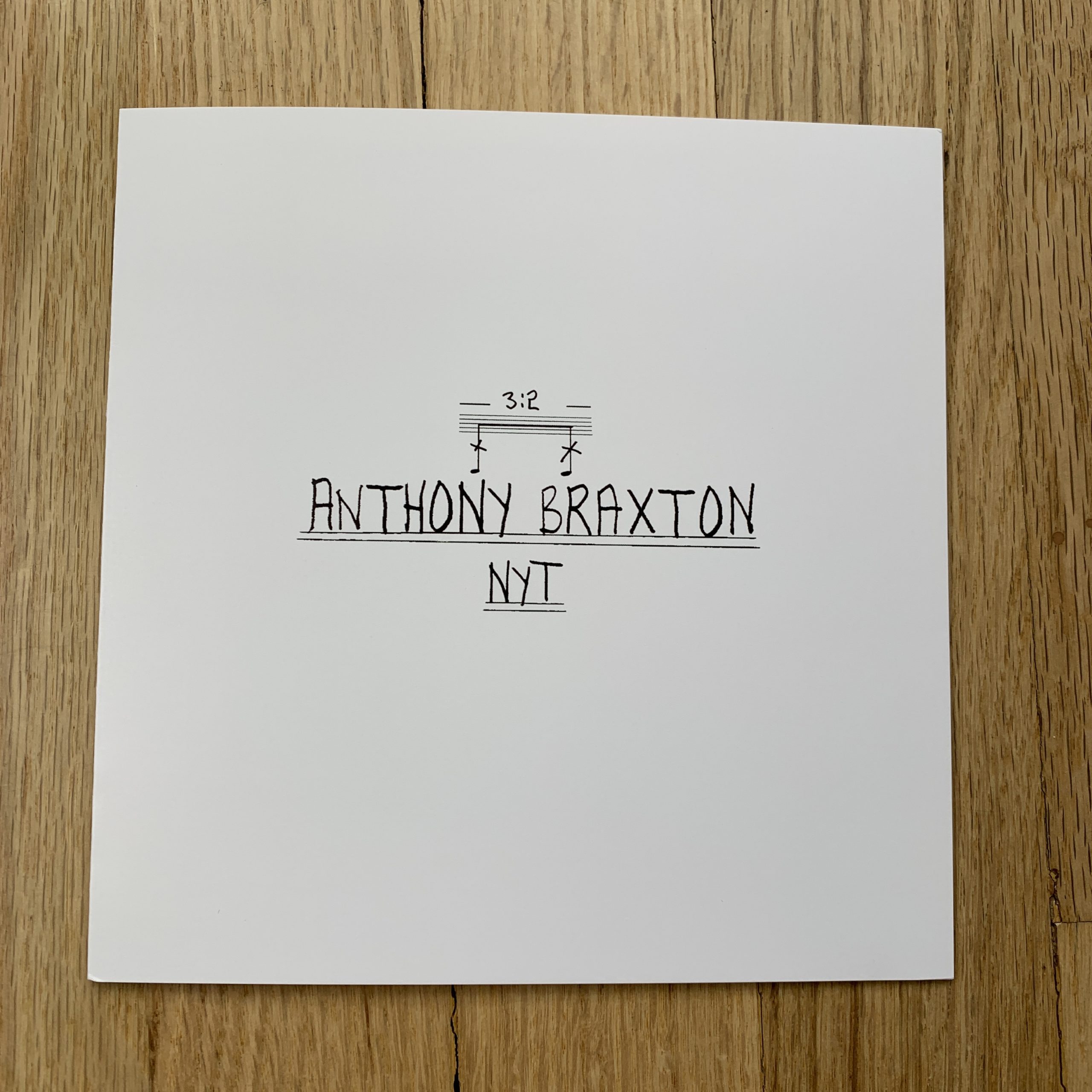
I designed the promo myself with the help of my wife, Nicole, who has an excellent eye for design. I wanted to do a tri-fold in square format because it sequences a bit like a book. I also thought it was neat to have the portrait of Braxton in a diptych as well as a tryptic when the promo is fully unfolded.

Tell me about the images?
This promo was from a shoot I did with Laura O’Neil at the New York Times featuring jazz-legend and composer Anthony Braxton. Braxton is in his fourth year of writing an opera at his home studio in CT. He’s composing and transcribing the opera on hundreds of oversized, handwritten pages that are meticulously stacked in his studio. I photographed the score and rearranged Braxton’s own handwriting for the font and text in my promo. I love how precise and unique his style is and thought using his own penmanship would help tell his story.

How many did you make?
150

How many times a year do you send out promos?
I send out promos two or three times a year, or when I have new projects I’m excited about sharing. I write personal notes for each one and send them out to specific editors I’m keen to work with.

Do you think printed promos are effective for marketing your work?
I have found that over time thoughtful printed pieces do go a long way with editors. I’ve received lots of positive feedback and think marketing this way has been a big part in landing gigs for clients like the Times. I’m always grateful when editors take the time to reach out in response to my promos – it’s a great way to build relationships and collaborate on assignments.

The post The Daily Promo – Cody O’Loughlin appeared first on A Photo Editor.

------------------------

Visit our sponsor Photo Folio, providing websites to professional photographers for over 10 years. Featuring the only customizable template in the world.

------------------------

11 Mar 22:05

I Don’t Have the Bandwidth

by Sophie Haigney

BAD METAPHORS is an ongoing series that takes a critical look at the figures of speech that shuttle between technology and everyday life. 


I don’t have the bandwidth for that.

People say this and often they mean something like, “I don’t have time for that.” They might say this to their boss, about a work project they don’t really feel like they can add to their metaphorical plate. Or else maybe it’s in the context of a romantic relationship that’s getting a little more serious than they originally thought it would, that’s coming with some of the snarls inherent to relationships, like feelings and fights, and it’s all starting to take up a lot more time than expected. Or perhaps they say it to a friend about another friend, who has been going through the same sad break-up for what feels like too long, whose daily phone calls are running up against the limits of their schedule and sympathy. Or rather, their bandwidth.

The expression is not exactly about time, or not about time in the sense of space on the schedule, which likely could be cleared or changed if it needed to be. Of course, this is not always true, but one of the strange realities about our time is that we often can rearrange it or add to it so that we can squeeze another something into the waking hours of our day. This is a reality that capitalism exploits; it’s something bad friends and boyfriends ignore. “Bandwidth” allows you to opt out of the great sleight of hand of modern life: “making time.”

Bandwidth, the literal kind, can refer to a number of things, but it encompasses boundaries. When used in computing, “bandwidth” refers to a fixed rate of data transfer — a capacity, really. It is the maximum amount of data that can be transferred from one point to another over a computer network or an internet connection in a given period of time. It is expressed as a rate: bits per second, or megabits per second. Generally, bandwidth is a fixed amount; you can pay for more or less of it.

“Bandwidth” allows you to opt out of the great sleight of hand of modern life: “making time”

Though bandwidth was of great concern in the early days of the internet — a higher bandwidth had a lot of marketing power — these days, most people paying for wi-fi in the United States have pretty high bandwidth. (Broadband, as they say!) Indeed, it’s probably not something you think about very often, unless you’re running up against its limits — say, for instance, when you’re streaming a video and it’s freezing. Perhaps someone else on your wi-fi is also watching Netflix, and the network is clogged up by the volume of data it’s processing in real time.

In electronics, bandwidth can also mean the distance between the upper and lower frequencies on a spectrum of transmission; in radio, this would be the “width” of electromagnetic frequency range at which a station can operate. You can look at the United States Radio Frequency Allocation Chart, and see the spectrum of frequencies chopped up by the FCC into brightly-colored and pastel bands of different widths. Many of the bands look squeezed, razor-thin and almost layered on top of each other; others are big chunks of blue or pink.

This visual is useful in thinking about bandwidth, the metaphor: Many of our lives probably feel a bit like this spectrum, sliced not only into strips of time on Google Calendars, but extremely nebulous things that manage to take up abstract “space” — emotions, physical energy, a tangled web of friendships, anxiety. “Bandwidth” becomes a catch-all of sorts for the immaterial obstacles we face in doing what we feel we’re supposed to. Perhaps our commute was longer and more trying than usual, or we got a phone call with some surprising bad news. This might chip away at some of our emotional bandwidth. We may not quite know what it is, but we know when we’re running out of it.

We almost never talk about “having the bandwidth” for something; it is usually in the negative. The “bandwidth” metaphor plays on the concept of hard limits, set and managed by forces outside our control — fate, or, in the literal sense, internet providers or the FCC. It is inelastic, and also not our fault. It allows us to do a bit of tacit blame-shifting, which can be useful (a way to say “no” that’s more failsafe than “I don’t have time”) and can also be permission for selfishness (a way to turn away from a friend in need because we simply don’t feel like it). In the gentle shrugging off of blame, “bandwidth” as metaphor becomes a useful distortion, since there is no regulatory body assigning us an emotional frequency spectrum. There is no wi-fi company we can pay for more or less of it. We manage our own bandwidth. We set the limits. And that’s a lot of pressure.

In the gentle shrugging off of blame, “bandwidth” as metaphor becomes a useful distortion, since there is no regulatory body assigning us an emotional frequency spectrum

Another, old technological metaphor that’s newly in vogue is “burnout” — by the gig economy, the 24/7 news cycle, student loan payments, being constantly plugged in. Metaphors of “time” and “space” seem of little use in setting boundaries, as we’re asked to do more with less; admitting to the limits of our own capacities feels a little like failure. “Bandwidth” presents a workaround: having “limited bandwidth” is an objective, if regrettable, state of affairs, about which there is little to be done. Most of us can still remember our frustration at, say, the stutter of a still-downloading movie, mid-scene, and the total futility of any attempt to make it go faster. It’s out of our hands.

Using it comes at a cost, however: By using a word for the transfer of data to describe our inner lives and capabilities, even in attempting to care for ourselves, we are extending the logic of computing into our lives. When we discuss feelings and relationships in terms of “bandwidth” we are treating them like megabits of information. At work, the phrase “I don’t have the bandwidth” might be a handy way of pointing out, rightly, that we deserve better compensation for what we’re asked to do. But applied to the basic stuff of living — feelings, friends’ problems — it turns personal responsibilities into indistinguishable units of space. At best, they become something to be crunched, finished at the highest rate possible, like the upload or download of a file.

Personal “bandwidth” implies that we must move through the world like machines; and that experience is, to use a different metaphor, something that we need to process, and process, and, process, up until we hit some kind of capacity. It implies that beyond that capacity, we have nothing left.

11 Mar 22:05

Running Microsoft VS Code Remotely – In a Browser Using XPRA and Via a Remote Desktop Application Using RDP

by Tony Hirst

If you’re a new student with a bright new Chromebook or other netbook style computer, what do you do other than panic, or cry, when you’re expected to download and install a desktop application — even a cross-platform one — when you start your course?

A month or so ago I posted some notes on Viewing Dockerised Desktops via an X11 Bridge, novnc and RDP, Sort of… where I found a recipe for running a graphical application running in one container via a browser using a “bridge” application in another container.

(The bridge application container exposed a graphical desktop using http via a browser. The bridge connected to the application container via an X11 connection and then exposed the graphical UI using X11.)

As a building block, this is useful in a couple of ways:

  • the application can be remotely hosted and used to expose a graphical application via a browser (so no installation required);
  • the same recipe can be used to set up a “hub” on a local machine to let you run arbitrary graphical applications on your own computer and access them via a browser.

It can be a bit fiddly though and requires plumbing the application container to the bridge, although Docker Compose can handle that for you.

But it’s still one more thing to go wrong.

And it doesn’t help the student with a Chromebook and no local installation route (let’s set aside the ability to run containers on a Chromebook – the same is probably not true of other netbooks, plus it requires a good spec Chromebook).

One of the problems I’ve found with the browser based approach is that you don’t necessarily get sound… So for our student hoping to rely on accessing an application via a remote server, that could be an issue too…

So here are a couple more recipes for creating simple containerised applications that can be used to provide access to remote desktops, whether they’re remote over the internet, or running “remotely” in a container on your own machine.

To demonstrate, I’ll use the Microsoft VSCode application. This electron app will run cross platform, but that doesn’t directly help if you need to access it remotely…

Method the First: An XPRA Container

Via lanrat/docker-xpra-html5, a base container that includes an XRDP server.

Via the CoCalc Docker container recipe, I cribbed this Dockerfile installation command for VSCode that needs to be added in to the Dockerfile:

#From cocalc-docker
# Microsoft's VS Code
RUN apt-get update && apt-get install -y curl && apt-get clean && \
     curl https://packages.microsoft.com/keys/microsoft.asc | gpg --dearmor > microsoft.gpg \
  && install -o root -g root -m 644 microsoft.gpg /etc/apt/trusted.gpg.d/ \
  && sh -c 'echo "deb [arch=amd64] https://packages.microsoft.com/repos/vscode stable main" > /etc/apt/sources.list.d/vscode.list' \
  && DEBIAN_FRONTEND=noninteractive apt-get install -y apt-transport-https \
  && apt-get update \
  && DEBIAN_FRONTEND=noninteractive apt-get install -y code

We can use a simple Dockerfile bootstrapped with FROM lanrat/docker-xpra-html5) and then add in the VSCode layer, or we can add it to a cloned copy of the original repository Dockerfile and build our own container from scratch.

I also made a couple of other tweaks to the Dockerfile so that it could use my own command file. But first, we need to create another file (vscode.sh) for our own start command that will launch VSCode, rather than the infinityTerminal, on start:

#! /usr/bin/env bash

#Start the VSCode app
code

#Keep the container running...
tail -f /dev/null

Then copy the file into the container, and set the permissions, via these Dockerfile instructions:

ADD vscode.sh /usr/local/bin/vscode
RUN chmod +x /usr/local/bin/vscode

I also made a change to the CMD, replacing --start-child=infinityTerm with the --start-child=vscode value and using the new CMD line in my Dockerfile:

CMD xpra start --bind-tcp=0.0.0.0:10000 --html=on --start-child=vscode --exit-with-children --daemon=no --xvfb="/usr/bin/Xvfb +extension Composite -screen 0 1920x1080x24+32 -nolisten tcp -noreset" --pulseaudio=no --notifications=no --bell=no

If you’re creating your own Dockerfile bootstrapped from the original Docker image, rather than built from the raw Dockerfile, you’ll need to add the revised CMD command in too. (The CMD statement also looks to have a wide range of other settings that could be useful and that may provide a better experience.)

Building a local copy of the container with docker build -t psychemedia/xpra-vscode . (yes, the . is part of that: it tells the builder to look in the local (.) directory for the Dockerfile) and running it with docker run --rm -d -p 8822:10000 psychemedia/xpra-vscode, the fan on my laptop goes in to overdrive but I can now work in VSCode via my browser:

So that seems to work…

(I also pushed the image to Dockerhub, so you should be able to run the docker run command directly yourself… Alternatively, you can run the command in a new Digital Ocean Docker droplet (see steps 1-5 of the recipe here).)

Method the Second: An RDP Container

In this second example, let’s add the VSCode editor to an image published at danielguerra69/ubuntu-xrdp. Bootstrapping from that container, all we need to do is pull in a VSCode layer:

FROM danielguerra/ubuntu-xrdp

RUN apt-get update && apt-get install -y curl && apt-get clean

RUN curl https://packages.microsoft.com/keys/microsoft.asc | gpg --dearmor > microsoft.gpg \
  && install -o root -g root -m 644 microsoft.gpg /etc/apt/trusted.gpg.d/ \
  && sh -c 'echo "deb [arch=amd64] https://packages.microsoft.com/repos/vscode stable main" > /etc/apt/sources.list.d/vscode.list' \
  && DEBIAN_FRONTEND=noninteractive apt-get install -y apt-transport-https \
  && apt-get update \
  && DEBIAN_FRONTEND=noninteractive apt-get install -y code

Building this with docker build -t psychemedia/rdp-vscode . and then running it with docker run --rm -d --name uxrdp --hostname terminalserver --shm-size 1g -p 3399:3389 psychemedia/rdp-vscode I can now connect to it on localhost:3399 using a Microsoft Remote Desktop app (available for Windows, Android, iOS and macOS) and login with default credentials (user: ubuntu, password: ubuntu) and access it via a remote desktop window.

(One issue is that resizing the RDP app window doesn’t resize the desktop to fit; there’s perhaps a setting I’m missing somewhere that might help with that…?)

(As before, I also pushed the image to Dockerhub, so you should be able to run the docker run command directly yourself…)

Looking at the Dockerfile, it also looks as if something is exposed on port 9001. If we add -p 9001:9001 (remember, the pattern is -p HOST_PORT:PORT_INSIDE_CONTAINER into the docker start command, and then go to the mapped port, we see a supervisor control panel:

Supervisor_Status

Something like that could be a handy thing to add in to the TM351 VM… Here’s the corresponding supervisor.d config file… (Looks like we can use it as a basis for further monitoring, eg of memory usage. See here.)

I can also confirm that audio (as well as video) works…

Sort of…

Launching a 2GB Digital Ocean Docker droplet with the following user data / startup command:

When I connected to the public IP address for the droplet with port 3389, the RDP worked fine but when I tried to play a Youtube video in Firefox, the buffering garbled the audio really badly. (Maybe a larger droplet instance would have been better…)

Summary

These two simple recipes provide a way for sharing simple GUI apps either via a browser (without audio) or via RDP, with sound available if required. Microsoft provide cross-platform clients for Windows, Mac, Android and IoS.

If the Android client in the Google Play store works for Chromebooks, then a student with a Chromebook should be able to fully access a remotely hosted application over RDP, including support for audio and video.

There is a huge gulf, of course, between being able to get things working, sort of, and getting them working at scale in an educational environment.

The experience may be a bit ropey at times, but if we have one or two students with real issues getting software working, I don’t see why we can’t try to pull together a homebrew solution to provide them with a remotely hosted software environment, albeit perhaps a temporary one.

And each time we try, we’ll maybe figure out a way to smooth it out and improve the experience a bit more.

Or we could teach folk how to launch their own remote server instances  which could be kept running with some sort of file persistence over the life of a course, whether by leaving the server switched on or mounting user files to a storage volume somewhere . (We’d probably have to improve the security layer a bit, at least by showing students how to create their own user credentials. But that’s a problem we’d only have to figure out a recipe for once.)

What keeps winding me up is how folk are so resistant to using computers to do computery things…

PS here’s something else I learned today, ish via @mickaelistria on the Twitterz. The original tweet pointed to a repo that provides access to an Eclipse IDE via a browser: https://github.com/ws-skeleton/eclipse-broadway/ From which I then learned that the GDK Broadway backend provides support for displaying GTK+ applications in a web browser, using HTML5 and web sockets. So that’s another route?

Also via Twitter, @olberger pointed me to https://janitor.technology/ https://github.com/JanitorTechnology/janitor, which looks like it provides an online development environment built around https://github.com/theia-ide/theia .

I’m thoroughly out of my depth with this development environment stuff…

All I’m trying to do is identify the small pieces that can be used to make applications available to students.

For two reasons…

Firstly, so I can experiment with the pieces and get a feel for how they work / what their limitations are / what sorts of richer environments might come to be built on their foundations.

Secondly, so when folk pitch whizzy start-up solutions to us at “only” $X per student seat, I have some mental filters in place so that I can filter out the shiny glare and get a feeling for what’s actually being offered, and maybe what technology it’s built on (or at least, seed me questions so I can try to figure out what it’s built on). And from that, what the limitations and benefits might be. We generally don’t get to hear, make time for, or understand detailed technical sales pitches, but at the end of the day, the tech is a large part of what you’re buying, wrapped up in user experience chrome.

PS here’s an online service that looks like it’s over a ‘native’ web hosted version of VS Code:  StackBlitz; and here’s another, coder.com , with a repo: codercom/code-server.

PPS By the by, VS Code looks like it’s built using this browser based text editor from Microsoft: Monaco.

PPPS @betatim show’s how it’s done… the codercom/code-server running in a Binder container proxied in a Jupyer notebook environment using jupyter-server-proxy: https://github.com/betatim/vscode-binder.

11 Mar 21:49

What is machine learning? A psychedelic graphical journey

by Josh Bernoff

You must always treat the reader’s time as more valuable than your own. That’s the Iron Imperative, and it’s just as valid for graphics as it is for text. If you find yourself endlessly fiddling with with an elaborate diagram, ask yourself, “Is this really helping?” Then get help from a decent graphic artist. When … Continued

The post What is machine learning? A psychedelic graphical journey appeared first on without bullshit.

11 Mar 21:49

Wegen Artikel 13: Wikipedia wird am 21. März abgeschaltet

by Carsten Thomas
Artikel 13 hat viele Gegner, die immer wieder auf die Straßen gehen, um ihrem Unmut Luft zu machen. Die Urheberrechtsreform sieht eine strengere Regulierung des Inhalts vor, welchen User hochladen. Mittels des sogenannten Upload-Filters sind [...]
11 Mar 21:49

Huh?


Huh?

11 Mar 21:49

Facebook says the future is private messaging, not public posts

Mathew Ingram, Columbia Journalism Review, Mar 11, 2019
Icon

If you want to understand Facebook's pivot to a private messaging system, think of it as being like email, except that it's all on one centralized platform, and where the platform owners can mine the contents of the email more marketing purposes or whatever. Nothing would happen in public, of course, and targeted FaceMail(tm) advertising campaigns would take place completely under the radar. Journalists concerned about how they will reach their markets should be more concerned about the wider social implications.

Web: [Direct Link] [This Post]
11 Mar 21:49

Today I learned about the Dutch Reach and am go...

Today I learned about the Dutch Reach and am going to try to put it into practice. Getting doored isn’t the only danger urban cyclists face, but it’s high on the list.

11 Mar 21:49

Speed Cameras Destroyed, Road Deaths Rise in France

by Sandy James Planner

8014518-0-French_yellow_vest_protesters_have_run_out_of_speed_cameras_to_d-a-1_1546342872920

8014518-0-French_yellow_vest_protesters_have_run_out_of_speed_cameras_to_d-a-1_1546342872920

Last month I wrote about the prudent initiative in France where the speed on secondary roads has now been cut back from 90 km/h to 80 km/h on the 400,000 kilometers of these roads. “Fifty-five percent of  all road deaths occur on these Class “B”  roads that have no central divider or guard rail. In 32 percent of the fatalities  on these secondary roads the major factor was speed.” 

And if you were wondering, France has 5.1 road deaths per 100,000 population; Canada has more at 6.0 road deaths per 100,000.

As The Guardian observed “The government has compared the 80 km/h limit…to the laws enacted since 1973 requiring the use of seat belts, and the installation of automatic speed radars in 2002. Those laws also drew the ire of thousands of drivers, but contributed to nearly four decades of declines in automobile deaths in France, which reached a historic low of 3,268 in 2013.” 

The reaction in France was mixed, with motoring and car clubs vehemently against the speed reductions, and in December 60 percent of the speed cameras had been vandalised.

It has now been estimated that 75 percent of the cameras have been tampered with. And no surprise, the French government has now been able to show a “direct link” between the destruction of the cameras and  increased road carnage deaths on French highways.

France’s Minister of the Interior bluntly stated that  hidden radar while not photographing vehicles continued to record speed, showing a 400 percent increase in speed in December, with four times more speed violations. That resulted in 238 people dying on French highways in January 2019 an increase of nine deaths from  road crash fatalities of January 2018.The vandalism of the speed cameras is estimated to cost 50 million euros to repair, and the government estimates a loss of 500 million euros in fines.

It is a crime to vandalize a speed camera, resulting in a fine up to 100,000 euros and seven years in jail.  The reduced speed initiative was challenged  with the “yellow vest” protests which started in November. While France was celebrating a “historic low” of  3,259 road deaths in 2018, reduced from 3,448 deaths in 2017, road carnage is  now increasing commensurate with increased speed on secondary roads. No one is putting a price on the increased lives lost as a result of the vandalism.

7777381840_des-vehicules-sur-l-autoroute-a1-illustration

7777381840_des-vehicules-sur-l-autoroute-a1-illustrationImages: Dailymail.uk, rtl.fr.
11 Mar 21:48

Metro Sustainability Breakfast – Mar 14

by Gordon Price

On average, we buy three times more clothes than we did in the 80’s, and it is estimated that one garbage truck full of clothing is landfilled globally every second. Cheaper clothing, fast fashion trends, and an overall increase in consumption is resulting in more and more clothing waste. In Metro Vancouver we threw away 44 million pounds of clothing last year!

Join us to learn about Metro Vancouver’s new textiles waste reduction campaign that supports the transition of fashion to the circular economy.

  • Larina Lopez, Division Manager, Corporate Communications, Metro Vancouver
  • Sybille Kissling, Sales, Western Canada, KenDor Textiles Ltd.
  • Joy Lapka Mauro, Founder and Owner, Turnabout
  • Jill Fullan, Store Manager, Turnabout Granville


March 14

7:30 – 9 am – Presentations start at 7:30 am.  Continental breakfast available at 7:00 am

BCIT downtown campus, 8th Floor Atrium, 555 Seymour Street

Register Now

11 Mar 21:48

Tidal is bringing ‘Master’ quality audio to iOS now too

by Brad Bennett

Tidal announced that the coveted ‘Master’ quality audio — supposedly as good as hearing it live — is now available on iOS devices.

The streaming service added Master quality to its Android app at CES in January, and now Apple users can listen to the crystal clear audio too.

The company is using the Master Quality Authenticated (MQA) encoder to fold down the size of its studio-quality music files, so they’re streamable over the internet. MQA calls this Process ‘Music Origami.’ MQA files deliver full sound frequencies instead of the 10 percent MP3 files support according to MQA.

Only Tidal Hi-Fi subscribers can take advantage of this top-of-the-line quality option, and then only for certain songs and albums. Tidal has partnered with the big three music labels, Warner, Sony and Universal, as well as Merlin, which represent some independent artists, to support MQA.

Now that Tidal has brought iOS into the Master Quality fold, users can listen to the high-quality files across Tidal’s Android, desktop and iOS apps.

Tidal’s standard ‘HiFi’ audio option is a 16-bit/44.1 kHz, while Master quality generally has a sound resolution of around 24-bit/96 kHz

Users may also need to make sure their audio settings are set to support Master quality and not limited to standard HiFi.

Source: MQA

The post Tidal is bringing ‘Master’ quality audio to iOS now too appeared first on MobileSyrup.

11 Mar 21:48

What we learned about Spatial Computing by visiting Niantic, the #1 mobile Augmented Reality business

by Robert Scoble

You know Pokemon-Go, right? It has hundreds of millions of users. It’s the number one most-used example of mobile AR that’s out there. It was built by Niantic Labs, a company that was started by the team behind Google Earth.

So, to kick off the video series that our new Spatial Computing Agency, Infinite Retina, will do with business leaders in the space, we visited Niantic to talk with Ross Finman. He runs augmented reality research there, and his team is readying a new platform that will first see the light of day in “Harry Potter Wizards Unite”, a new mobile game that will come this year.

  1. They are patient and are taking a data vs flash approach. Niantic started life building a game very few knew, or played. I was familiar with it, because back when Google + was just starting out, and gaining some popularity, it was popular with that crowd. People would go out, and play the game in the real world on their mobile phones. That gave them the data about the real world, like where parks were, where real users wanted to play the game, etc. That helped them land the contract to do Pokemon-Go, and also, let them work through the early challenges of figuring out the user experience, and scaling the databases, etc, up, in relative obscurity before the millions of users showed up thanks to the Pokemon brand. They now are planning to leverage all that into a bigger Harry Potter event, and, then, into a platform for developers to build their own world-scale apps on top. Some in the Spatial Computing community don’t like talking about Niantic, seeing it as a weak example of AR/Spatial Computing. They are right, and Finman and his team doesn’t care about being the sexiest user of augmented reality, just that he sees new opportunities to use technology to improve game dynamics and collect even more data to make the game better.
  2. This company is thinking about world-scale from its first breath. Many companies in the Spatial Computing space start out by building marketing activations, or immersive games, that make sense in a living room context, or a booth context. Niantic started by thinking about a game you play while walking or moving around the real world. Listening to Finman you hear that focus and core competency everywhere. They don’t want to just figure out what you are doing in your Living Room, they want to figure out the real world and how to apply that to making their World-Scale platform and games better. But don’t underestimate where they are going from here. Last year Niantic bought Finman’s firm, Escher Reality, because they were building an AR Cloud, so look for lots of new AR features in its future games.
  3. It avoids privacy concerns by focusing on user utility. Both on and off camera I peppered Finman with all sorts of questions about how they were going to ingest data from their users. Soon we’ll be wearing cameras, microphones, 3D sensors, eye sensors, and more. Some are looking for ways to ingest everything, but that attitude will, I believe, eventually run into major trouble with not just regulators, but a new, astute customer base (my nine year old son and I talk regularly about the data that’s being collected by the devices and social networks in our world and how that data might be used for, or against, us). Finman says Niantic will be very measured and particular about the data it collects, only doing so to make the game more interesting. So users will get deep utility in trade for the data that they are giving the system and the system won’t do an overreach, grabbing for data the user doesn’t expect it to (or doing something unexpected with that data).
  4. Planning on new technology, like 5G, and augmented reality glasses. Finman, especially off camera, knows deeply the technology coming (he had cofounded a company, Escher Reality, which Niantic bought) and is building his systems to take advantage of 5G, and Augmented Reality/Spatial Computing glasses, like Magic Leap or Hololens, when those get popular with consumers over the next few years. He knows expectations on entertainment, and, even, things like robots and autonomous cars, will change and that Niantic has to keep pushing the technology to show consumers mind-blowing new entertainment, and other apps, that keep it ahead of the rest of the industry.
  5. Understanding the real world is key. Where Finman lights up the most is when you talk about artificial intelligence and its use in understanding the real world. He came out of the robot/autonomous car world, where technology has to be taught to “see” and understand the world. He’s applying that kind of computer science to bear in entertainment instead of moving a robot around the world. He is seeing systems that will “look around” the world, understand you are in a forest, say, and present the right virtual beings and right entertainment for that environment. He shows that Pokemon-Go already does some of that. If you are near water, he says, the system will present different Pokemon characters to you than if you are, say, in a shopping mall. He says that AR Cloud technology is just about to make that much more important. He asked “what if you could know you are on a sidewalk, vs. walking on grass in a park?” He posits that games could present much better experiences if they understood the world a lot better.

This is the start of a new video series called “Spatial Computing Catalyst” that Infinite Retina and Irena Cronin, CEO, and me, Chief Strategy Officer, will be doing. We also are doing a new Podcast series, as well, which we will do a few times a month.

Instead of doing a lot of focus on consumer stuff, like VR games, since there are plenty of others out there who do that, we retweet the best over on our Twitter account, we will be focusing on the businesses underneath these products and on the ecosystem that helps build these businesses, whether it’s the VCs, the PR people who help these companies build their stories, or the lawyers who help these companies set up and protect intellectual property.

Please let us know who you would like us to interview next by dropping us a line on Facebook or on Twitter.

11 Mar 21:48

Lenovo vs Apple laptops

by Volker Weber

Makes you go "doh". Function should always beat looks. The current Apple laptop keyboard's reliability is nowhere near where it should be. I wonder what would happen if he tried the slicker Yoga C930. This is what you get for 1999 €:

  • MacBook Pro
    13.3" 2560 x 1600 Pixel
    8th gen Core i5
    8 GB 2133 MHz DDR3
    256 GB SSD
    1.37 kg
  • Yoga C930
    13.9" 3840 x 2160 Pixel Multi-Touch + Pen
    8th gen Core i7
    16 GB 2400 MHz DDR4
    512 GB HD
    1.38 kg

The Yoga i5/8/256/FHD lists for 1499 €. There are some pretty good notebooks out there now. Not only from Lenovo.

11 Mar 21:48

Apple Announces March 25th Event at the Steve Jobs Theater

by John Voorhees

Today Apple announced a special event at the Steve Jobs Theater for March 25, 2019, at 10:00 am Pacific time. Matthew Panzarino of TechCrunch posted an image of the press invitation to Twitter:

According to Panzarino’s tweet, the email invitation, which says simply 'It's show time,' played a short film reel countdown animation, which suggests the event will be used to announce Apple’s much-anticipated video streaming service. In addition to a video service, there have been rumors that the company will use the event to announce a magazine service that will expand on its existing Apple News product.


Support MacStories Directly

Club MacStories offers exclusive access to extra MacStories content, delivered every week; it's also a way to support us directly.

Club MacStories will help you discover the best apps for your devices and get the most out of your iPhone, iPad, and Mac. Plus, it's made in Italy.

Join Now
11 Mar 21:47

Running a Minimal OU Customised Personal Jupyter Notebook Server on Digital Ocean

by Tony Hirst

In words and pictures, how to create a simple throwaway server, on a cheap, commercial web host, that automatically runs a personal Jupyter notebook server, with a light covering of OU branding., via a prebuilt Docker container image… (More significant customisations are, of course, possible…)

Step 1 (you only need to do this once)

Get a Digital Ocean account.

A downside of this is that you probably have to give you credit card details to get an account. The upside is that this link should get you $100 free credit that you won’t ever get round to spending anyway.

At this point, I realise many people won’t get past this step… If you’re in HE, your institution should really be able to give you access to online servers that can spin up as required. If they don’t, hassle the Library, because they should be providing you access to this sort of environment if your department can’t or won’t.

[I speak in terms of ideals, of course, which is why I am using a personal Digital Ocean account…]

There are alternative routes, exemplified in posts throughout this blog, but naysayers will just pick grief with those too… At the end of the day, things like Digital Ocean offer commodity compute, and folk in computing education at least should be aware of them, what sorts of thing they offer, and how to work with them in general…

Step 2

Select your own Docker server environment type. Digital Ocean calls servers droplets and the Docker server can be found in the marketplace:

Pedants I work with would probably claim that’s four steps and that it’s already too hard.

Step 3

Select the server size. Some applications require grunt, but for now let’s be a cheapskate with something that approximates an OU min spec machine. (This sort of discipline is also good for academics with fast/whizzy machines so they can see how the rest of the world has to get by…)

Step 4

Select where in the world you want your server to start up.

Step 5

We’re going to get our server to automatically download and run a very lightly customised Jupyter notebook server:

Copy and paste both the following lines into the user data area.

The first one tells the start-up-er-er what sort of script it is. If you have trouble remembering the order of symbols at the start, it reads hash (#) bang (!). The /bin/bash says it’s a bash script.

#!/bin/bash
​​​​​​​​​​​​docker run -p 80:8888 -e JUPYTER_TOKEN=MyP45SwerD ousefulcoursecontainers/oubrandednotebook

The second line is a Docker run command. What it does is download a minimally branded, basic Jupyter notebook server Docker image (ousefulcoursecontainers/oubrandednotebook) and launch a container from it, exposing it to the default http port 80.

If you have Docker installed on your own computer, you should be able to run something like: ​​​​​​​​​​​​​docker run -p HOSTPORT:8888 -e JUPYTER_TOKEN=MyP45SwerD ousefulcoursecontainers/oubrandednotebook ​ , where  HOSTPORT is the port number on host you want to visit the notebook server on in your browser at http://localhost:HOSTPORT or http://127.0.0.1:HOSTPORT.

As part of the command, we specify a default plain text password like token that will add a small level of security. In this case, I’m setting the token to MyP45SWerD.

Step 6

Optionally set a server name and then create your server:

Step 7

Wait for the server to boot…

When the server is launched, you should see a public IP address for it that you can copy if you hover your mouse cursor over it…

It’s probably not quite ready to use yet, though… It will need a minute or two to download the Docker container we told it to start up with…

Step 8

In your browser, paste in the server IP address. If you don’t get a response, it’s still sorting its bits out. Refresh the browser page every so often if the page load appears to stop.

After a minute or two, you should see your notebook login page:

Log in to the server using the password you set in the user data area (for example, MyP45SwerD). You can either use the token to set a browser cookie on the notebook to let you in, or use it set a new password on the notebook.

Step 9

Play with your notebook…

Step 10

When you’re done playing, you can delete the kill the server / droplet so you don’t keep paying for it (it’s metered by the hour or part thereof).

You’ll lose everything inside the server, so the confirmation prompt is in your own best interest…


And that’s it…

If we want to create custom notebook environments, seeded with notebooks and with a more complex environment installed (specific Python packages, for examples, or other servers we want running, we can create another container on top of our minimal container and launch that. (You can see the repo that adds the basic OU branding to the official Jupyter base notebook image here.)

We can also version containers (for example, for specific modules, modules presentations, tutorials, etc).

And as I demonstrated in the previous blogpost, we can also use a similar technique to provide a view of a desktop application via a browser or remote desktop connection.

11 Mar 21:47

Lockdown Mode on the Librem 5: Beyond Hardware Kill Switches

by Kyle Rankin

When I tell people I work for Purism and I’m asked what Purism does, the explanation I give to the average person is along the lines of: “we make privacy and security respecting hardware that runs free software.” Immediately after that, I almost always point to our hardware kill switches to demonstrate how we take a different approach from most other hardware out there. To me it’s a great example of a simple, easy-to-understand security measure that provides a tangible benefit to everyone.

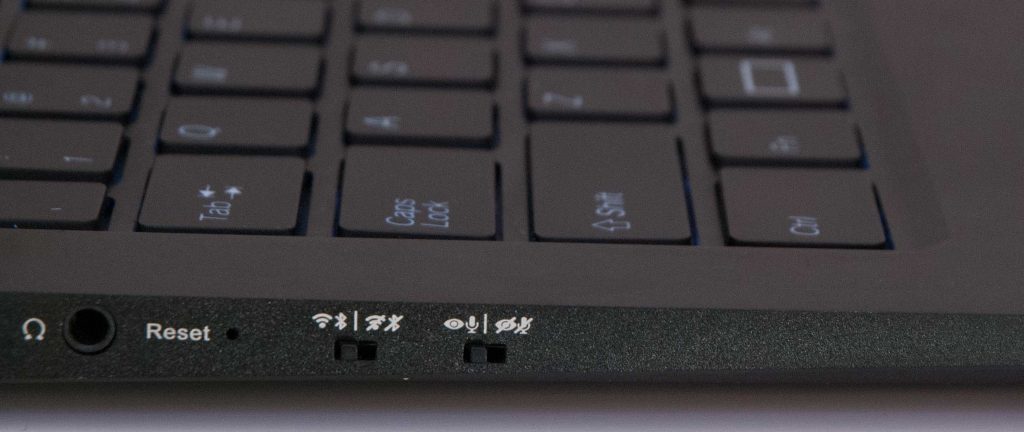
Like with our Librem laptops, our Librem 5 smartphone will also feature kill switches; but unlike the laptops it will have three kill switches, not just two:

  1. cameras and microphone
  2. WiFi and Bluetooth
  3. cellular baseband

Later in this post I’m going to describe an exciting new feature for our Librem 5 phone we are calling “Lockdown Mode” that extends our normal kill switches to provide even more security and privacy; but first I will explain the existing use, and reasons behind, each kill switch – as well as talk about some of the privacy and security risks with other sensors on the phone that have led us to implement Lockdown Mode.

Cameras and Microphone Kill Switch

The cameras and microphone kill switch is arguably even more important on a phone than on a laptop. While the webcam / microphone kill switch on our laptop can help protect you from malware that might snoop on you through the webcam without your knowing, at least it could only snoop on you while you are around your laptop. Most people tend to carry their phones with them everywhere so the privacy risks are much greater if your microphone and cameras are always on.

WiFi and Bluetooth Kill Switch

Like with the camera and microphone, the WiFi and Bluetooth kill switch has even greater significance on a phone than on a laptop. Disabling WiFi and Bluetooth can protect you from external over-the-air attacks if you are in a high-risk area (or a vulnerability comes out for your WiFi or Bluetooth card). Protecting against remote attacks isn’t the only benefit of this kill switch though, disabling WiFi in particular can also protect you from tracking.

Since your phone is in your pocket, your WiFi hardware detects compatible networks nearby as you move around. Even if you don’t associate with the networks around you, the mere fact that your hardware can see them allows the phone (and apps on it) to know you are near those devices. As you move, your distance to those devices changes, which changes the strength of the signal and helps triangulate where you are for any company like Google that has a database of WiFi access points, along with their location. By removing power from your WiFi hardware, you can ensure that any applications that might try to track your location with WiFi are blocked.

Cellular Baseband Kill Switch

The cellular baseband kill switch is unique to the Librem 5 and completely removes power from the cellular modem in the Librem 5. Even if you aren’t concerned by the risks due to the fact that cellular modems run mystery code and have access to all communications that go over them, you still should be aware of, and concerned by, the tracking and privacy concerns. To route calls and data to your phone, your cellular provider needs to triangulate your position with respect to the towers in your area. As a result, as long as your cellular modem is on, your provider knows where you are. Your phone’s OS also uses this tracking data to supplement (or in place of) GPS so apps on your phone can also know where you are.

Putting a kill switch in the Librem 5 meant a design unlike many of the existing phones out there that combine the CPU and cellular modem into a single chip. We intentionally split out the baseband onto a replaceable M.2 card. This not only lets you physically remove the baseband altogether, but lets you power it off with a kill switch. If you want to know for sure that your cellphone isn’t tracking you, you can flip the switch and know for certain that it’s off.

So Many Sensors

One big challenge when protecting your privacy on a phone is that, unlike an average laptop, a phone is full of more sensors and other hardware that could be used for tracking and spying. A lot of security research over the past decade has demonstrated just how much information can be derived by seemingly harmless sensors that are included on a phone.

GNSS

GNSS, which supports GPS, GLONASS, Galileo and Beidou – as well as SBAS augmentation services like WAAS, EGNOS, GAGAN and MSAS – is useful for navigation software, as it provides your accurate coordinates wherever you are on Earth. Despite what some people might think, the GNSS is a passive device. By itself, it can’t transmit your location to anyone, it can only pick up signals from GNSS satellites and use them to calculate your current position. That said, if your GNSS is on, even if your network is disabled, any software on your system with access to the GNSS can log your location, and transmit that log later.

IMU

The IMU chip provides a phone with a compass and accelerometer it can use along with a GNSS to tell what direction you are heading. An accelerometer is also a useful sensor to provide extra phone features such as detecting the orientation of the phone so that it can rotate the screen, provide metadata to the camera, and even detect when you pick it up, put it in your pocket, or flip it over and place it back on the night stand.

There are some privacy and security risks with the accelerometer, however. Security researchers over the years have discovered ways to detect what you are typing on the screen simply by looking at variations in the accelerometer. Also, being able to log the speed and direction of your phone, combined with detecting nearby WiFi access points could (in theory) provide a pretty accurate tracking device even with GNSS disabled.

Ambient Light and Proximity Sensors

The ambient light and proximity sensors on a phone provide a number of useful features we use every day. Among them the light sensor helps the phone adjust the backlight brightness based on the available ambient light, which can help with power savings. The proximity sensor helps detect when you place the phone up to your face, so it can lock the screen and prevent you from accidentally triggering touchscreen button presses with your face. These sensors seem pretty harmless, but security researchers have demonstrated how the light sensor can be used to fingerprint a particular user and even to map out the arrangement and size of their home.

Introducing Lockdown Mode

So we have three kill switches, yet there are so many other sensors that we might want to turn off. It’s true that people could disable hardware within the OS and since PureOS is free software and Purism is an ethical company, you have more reason to trust that disabling the hardware with software actually works. That said, the whole idea of the hardware kill switch is to provide you that additional assurance that a piece of hardware is truly off.

While we could add kill switches for every individual piece of hardware, having three kill switches already pushes the limits with respect to space on the phone, the complexity of the hardware and the overall user experience. So if you set the upper limit on kill switches to three, there are a number of different ways you can address the problem with these extra sensors including:

  • Only disable those sensors with software
  • Group sensors with one or more existing kill switches
  • Lockdown Mode

We have thought through all of these different options, among others, and we decided that it was better to offer the option for extra security to those who really need it. We have selected a solution we are calling Lockdown Mode, that gives people who need this extra level of protection the option to turn all sensors off easily, without imposing extra complexity on an average user.

How Lockdown Mode Works

To trigger Lockdown Mode, just switch all three kill switches off. When in Lockdown Mode, in addition to powering off the cameras, microphone, WiFi, Bluetooth and cellular baseband we also cut power to GNSS, IMU, and ambient light and proximity sensors. Lockdown Mode leaves you with a perfectly usable portable computer, just with all tracking sensors and other hardware disabled. If you switch any of the hardware kill switches back on, the hardware that corresponds to that switch powers on along with GNSS, IMU, and ambient light and proximity sensors.

What About Offline Navigation?

One of the most obvious side effects of Lockdown Mode is the ability to use the GNSS with purely offline maps. Note that you still can do this on the Librem 5 in a few different ways, by flipping any one of the kill switches back on and then disabling the corresponding hardware in software. For instance, if your biggest concern was transmitting your location, you could leave the WiFi / Bluetooth and cellular baseband off, turn on the cameras and microphone and disable those in software instead. Those who need a offline navigation but have such a high level of risk that they can’t accept the risk of disabling the cameras and microphone in software, could physically remove the cellular baseband hardware from the phone and leave that kill switch on.

The Future of Lockdown Mode

There is a lot of potential to extend Lockdown Mode past just disabling hardware into software, and we are exploring some of those options now. For instance, the OS could detect when Lockdown Mode is enabled and automatically lock your screen. Those who are under even greater threats could potentially have Lockdown Mode enable extra defenses inside the OS, disable certain services, or even shut down or wipe the phone (although I’d suggest you set up some kind of PIN prompt for that last one, in case you trigger all the switches by accident). There are a lot of possibilities for this new feature and I’m looking forward to seeing how our customers extend it on their own phones.


About Purism

Purism offers high-quality privacy, security, and freedom-focused computers, phones, and software. Our platform is meant to empower everyone, including privacy-conscious users, entrepreneurs, business people, developers, writers, digital artists, activists, geeks and defenders of freedom all around the world.

The post Lockdown Mode on the Librem 5: Beyond Hardware Kill Switches appeared first on Purism.

11 Mar 21:46

How to Charge Your iPhone Twice As Fast

by Ganda Suthivarakom
How to Charge Your iPhone Twice As Fast

A version of this post was sent to our weekly newsletter mailing list. If you’d like to receive this in your inbox, subscribe here.

The iPhone 8 and higher all support the Qi wireless-charging standard. I have to admit—I am not yet a convert to wireless charging, despite having a phone with the capability.

But Nick Guy, senior staff writer and iPhone accessories fanatic, makes a good case for having both wired and wireless chargers handy. He says wired charging is best when you’re short on time. In our tests, the fastest wired charger was able to get a drained phone to 56 percent charged after a 30-minute plug-in. Wired is also better if you want to use your phone while it’s charging—say, for live-tweeting a storm during the next ep of RuPaul’s Drag Race, season 11.

Wireless charging, on the other hand, is dead simple—just drop the phone on the charger and go. It is considerably slower than the fastest wired chargers, though. Wireless makes perfect sense for an easy overnight charge, when you can drop the phone and have plenty of time to get to full power. Stand-style Qi chargers are also excellent for simple, hands-free viewing. In our tests, the Ravpower RP-PC069 wireless charging stand actually juiced an iPhone a little faster than the standard wired 5-watt Apple charger that’s included in the box. Wireless also makes sense on a car charger mount, when you don’t have two hands to fiddle with a cable. (We’ve just finished testing and we’ve got new picks: Kenu Airbase Wireless Qi for dash/windshield mount and the Kenu Airframe Wireless Qi for vent mount.)

Also, did you know that you can charge your iPhone twice as fast if you get a fast charger (vs. the standard that comes in the box)? It shouldn’t damage your phone battery as the phone draws only what it needs. In fact, Apple Support has a page on which adapters are fine to use for fast charging. By the way, if you’ve ever wondered who the obsessives behind all of these recommendations are, please subscribe to our YouTube channel while you’re there. We’ll make it worth your time.

P.S. When we did the call for questions about home repair, many of you sent in questions about gutter troubles. We’ve got answers.

New this week

The Best Infant Car Seat
Updated March 4

The Best Gas Stoves and Ranges
Updated March 4

The Best USB Audio Interface
Updated March 5

Ask Wirecutter: How Do I Keep the Gutters Clear of Ice and Leaves?
Published March 5

The Best Gas Credit Cards
Published March 6

The Best Storage Containers
Updated March 6

How to Choose Between Wired and Wireless Charging
Published March 6

The Best microSD Cards
Updated March 6

The Best Water Filter Pitcher
Updated March 7

The Best Mini Desktop PCs
Updated March 8

Credit Card Terms and Conditions in Plain English
Published March 8

List: Everything You Need to Block Light and Noise From Your Bedroom
Published March 8

Things we’ve been enjoying lately

Some good listening, watching, and reading you may like

Watch: PEN15 [Hulu]

“I could not stop watching this once I started it. I cringed during the first episodes but then fully embraced the weirdness. It’s like Strangers with Candy meets Freaks and Geeks, but in the late ’90s.”

—Daniela Gorny, associate managing editor

Weekend ‘catch-up sleep’ is a lie [The Washington Post]

“As someone who feels chronically under-slept, I’d always hoped that catching up over the weekend would be enough to counter the well established long-term health effects of being under-rested. Unfortunately, not so much.”

—Tim Barribeau, lead editor

Uplifting Diverse Genders: Beyond “Women and Non-Binary” [Medium]

From the article: “A primer on using inclusive language in your career programs, initiatives, and networking groups to better welcome all diverse genders.”

Recommended by Kaitlyn Wells, staff writer and Black@NYT co-chair

11 Mar 21:40

Android Q beta likely to launch later today

by Igor Bonifacic
Android Q

Google has launched a new public bug tracker for Android Q, suggesting the company plans to release the first publicly accessible beta for Android 10 within the next few hours.

The bug tracker was first spotted by XDA Developers‘ Mishaal Rahman. Visiting the tracker and switching to OEM submissions allows one to see all the Android Q bugs that have already been reported. Filtering by date further reveals that only reports from today forward can be seen. This strongly suggests the beta will launch later today.

Over the weekend, a Google engineer revealed that more third-party manufacturers will take part in this year’s Android Q beta than last year’s Android P beta.

Source: Twitter, Google Via: Android Police

The post Android Q beta likely to launch later today appeared first on MobileSyrup.

11 Mar 21:39

Roku devices are reportedly on track to get AirPlay 2 support

by Brad Bennett

Roku and Apple are finalizing talks of bringing AirPlay 2 support to Roku’s platform, according to a source that filed information to MacRumors.

Roku will reportedly add support for the wireless content streaming feature through a software update to TVs and streaming devices running its operating system. Specifically, users can stream audio, video, pictures and other content from their Apple devices to devices that support AirPlay 2.

It’s still unclear if Roku TVs will support Apple’s HomeKit framework as well. If it did, this would allow Siri to turn the television on and off, along with some other hardware controls. The support might come later, as Roku is still ironing out support for Google Assistant and Alexa that can do this for its TVs.

Earlier reports suggest that the public won’t get its hands on Apple’s streaming service until the summer, so Roku likely still has time to squeeze in an AirPlay 2 update before then.

For a list of which TVs already support AirPlay 2, check out MobileSyrup’s previous reporting.

Source: MacRumors

The post Roku devices are reportedly on track to get AirPlay 2 support appeared first on MobileSyrup.

11 Mar 21:39

Porsche to introduce next-generation batteries in its electric vehicles in 2020

by Andrew Mohan

Porsche will gradually introduce a newer version of batteries in its electric vehicles (EV) next year, the company announced at the 2019 Geneva Motor Show.

Oliver Blume, Porsche’s CEO, said that its next-generation battery cells will last up to 47 hours, a 10-hour increase from previous models. This will allow its EVs to travel longer distances.

Blume also repeated the automaker’s commitment in the EV market, saying, “Porsche is committed to [bringing] several new plug-in vehicles to market and those new cells will start getting into the lineup next year.”

Porsche also announced its increasing production of the Taycan, its first fully-electric electric sportscar, since it reached over 20,000 pre-orders.

“This is a significantly higher figure than we expected,” said Blume. “We usually only see ordering peaks after the first driving reports are available, when the vehicle is presented, and when customers have been able to sit in the car in real life.”

The Taycan will be available for purchase in 2020, along with a fully-electric Macan, which was the company’s best selling vehicle in 2018.

Source: electrek

The post Porsche to introduce next-generation batteries in its electric vehicles in 2020 appeared first on MobileSyrup.

11 Mar 21:39

Donald Trump says he was saving ‘time & words’ when he called Tim Cook ‘Tim Apple’

by Igor Bonifacic
Tim Cook changed his Twitter handle to Tim Apple

The Tim Apple saga has come to its seemingly inevitable conclusion.

On Monday morning, U.S. President Donald Trump sent out a Twitter missive to clarify why he called Apple CEO Tim Cook “Tim Apple” during a recent White House meeting of the American Workforce Policy Advisory Board. As he often does, Trump described the story as another attempt by the “Fake News” media to disparage his character.

“At a recent round table meeting of business executives, & long after formally introducing Tim Cook of Apple, I quickly referred to Tim + Apple as Tim/Apple as an easy way to save time & words,” Trump tweeted on March 11th. “The Fake News was disparagingly all over this, & it became yet another bad Trump story!”

Presumably, part of what promoted Trump to tweet about the episode was that Tim Cook had changed his Twitter handle to “Tim 🍎”.

As a variety of articles have pointed out, last week wasn’t the first time the current president had conflated the name of an executive with the company they represent. In 2018, Trump called Marillyn Hewson, the CEO of aerospace firm Lockheed Martin, “Marillyn Lockheed.”

Source: Twitter

The post Donald Trump says he was saving ‘time & words’ when he called Tim Cook ‘Tim Apple’ appeared first on MobileSyrup.

11 Mar 21:39

Canadian government invests $300,000 in P.E.I’s electric vehicle fast chargers

by Andrew Mohan
solar-powered

The Canadian government will invest $300,000 to build level 3 electric vehicle (EV) fast chargers in Prince Edward Island’s, the provincial government of PEI and federal government announced on Monday.

The province will build six level 3 chargers as part of the investment. The chargers, the first of their kind in P.E.I, are set to start operating later this year.

“The construction of our island’s first level 3 electric vehicle chargers is bringing cleaner transportation options to P.E.I.,” said Sean Casey, Charlottetown MP. “Our government will continue to work with municipal and provincial governments to support green infrastructure projects to encourage widespread adoption.”

The $300,000 is part of a larger $182.5 million investment to build out electric vehicle charging infrastructure across Canada.

For those unfamiliar with level 3 chargers (also known as DCFC), it is currently the fastest method to quick-charge EVs, taking up to 20 minutes to an hour to recharge an empty battery.

However, it’s important to note that some EVs do not support DCFC. Level 3 chargers will also not quick-charge your vehicle if it’s over 80 percent.

Petro-Canada plans to build 50 EV charging stations across Canada.

Source: Natural Resources Canada

The post Canadian government invests $300,000 in P.E.I’s electric vehicle fast chargers appeared first on MobileSyrup.

11 Mar 21:39

Apple makes its March 25th event official, invites say ‘It’s show time’

by Jonathan Lamont
Apple March event

It’s happening: Apple is hosting a special event on March 25th at its Steve Jobs Theatre in Cupertino, California.

Apple announced the event via an email invite including a short ‘film reel countdown’ animation and the tagline: ‘It’s show time.’

As for what the event will be about, rumours suggest it’ll be about software and services, including the original content video service and its new magazine and new subscription service.

Given the style of the invite, the video service rumour certainly seems accurate.

Apple Canada recently posted job positions for video projects, further suggesting a streaming service was coming.

As for the Apple News magazine service, the company purchased digital magazine service Texture around this time last year. Further, a recent mystery update to Texture’s iOS app fueled speculation it could be involved in a potential Apple News magazine service.

Apple News only came to Canada recently, so it’s not clear if these new services will come to Canada right away.

Along with the services, Apple is expected to provide more information about iOS 12.2, including support for new HomeKit TVs that work with Siri and Apple’s Home app.

Finally, this marks the first time the company will use its Apple Park venue for something other than a flagship iPhone announcement. That could mean Apple thinks these new subscription services are just as essential as its premiere product.

As always, MobileSyrup will have full coverage of the upcoming Apple event, so keep your eyes on our homepage, Twitter and Facebook for the latest updates.

Source: Twitter Via: 9to5Mac

The post Apple makes its March 25th event official, invites say ‘It’s show time’ appeared first on MobileSyrup.

11 Mar 21:39

Slack’s mobile apps get official dark mode, desktop coming later

by Jonathan Lamont
Slack dark mode

Just a few days after testing its dark mode in beta, Slack released dark mode for its stable iOS and Android apps.

An update rolling out via the App Store and Google Play on March 11th brings an official dark mode to the popular business communications platform.

To turn it on, simply open the Settings menu by tapping the three dots in the top right corner and selecting the Settings option. About two thirds down the next menu page is the dark mode toggle. Flip the switch to turn out the lights.

Unfortunately, the feature only appears on mobile for now. Desktop doesn’t have it yet — although Slack says it’s coming to desktop later.

Also, you may find it takes a bit longer for the update to come to Android. My OnePlus 6T doesn’t have it yet, despite my coworkers having the feature.

In the meanwhile, if you use Slack in your browser, this Chrome extension can give you a dark mode as well.

While some might think dark mode is a trivial feature, It’s a rather substantial addition in my book. Not only does it feel better for my eyes, but it saves battery life too.

This follows a recent slew of updates for Slack’s app icon, changing the logo first and later removing the pleasant purple background to make it look like just about every other app.

Source: Slack

The post Slack’s mobile apps get official dark mode, desktop coming later appeared first on MobileSyrup.

11 Mar 21:39

Google brings Snapchat-like augmented reality filters to YouTube Stories

by Bradly Shankar
YouTube is rolling out skippable ad breaks

Google has introduced Snapchat-inspired augmented reality-powered Stories to YouTube.

Now, those using YouTube on Android and iOS can create short videos enhanced by various augmented reality filters, such as masks, glasses and 3D hats.

The filters, which are also available in Google’s ARCore platform, leverage the Augmented Faces API to offer more realistic AR filters. For example, Google’s AR glasses filter can simulate light reflection and cast a virtual shadow on the user’s face to appear as though real glasses are being worn.

To demonstrate this, Google has released the following GIF of a woman “wearing” augmented reality glasses:

YouTube AR glasses

Google is offering the new AR filters to developers, creators and users who download the latest ARCore SDK.

YouTube Stories will expire after seven days, rather than the 24-hour duration of Snapchat and Instagram’s ephemeral Stories.

Source: Google Via: Cnet

The post Google brings Snapchat-like augmented reality filters to YouTube Stories appeared first on MobileSyrup.