A new bike is born.
Feature content:
No
While your riding experience is the sum of the bike's many parts, handlebars have a big impact on posture, stability, even power transfer into each pedal stroke.
So if different bars offer different benefits (and have different drawbacks), are you riding the bars best suited to your commute? Let's break it down...

Café style bars come in a variety of shapes, but all have a swept back hand position and most have a rise. Those two features in combination tend to put you more upright, with your hands closer to your body. The result is a relaxed ride with a straight back.
Good for those who like to stay in the saddle and prefer an easier, more leisurely ride.

Riser bars are usually wider than bullhorns or drops (we'll get there), making them more stable, but not as upright or set back as café bars. They're utilitarian and work for a lot of riders and a lot of city bikes. Risers only offer a single hand position, but generally allow a wider variety of riding styles than café bars. What the riser bar lacks in power, it makes up for in comfort.
Good for those who prioritize stability and only need moderate power.

Flat bars typically come standard on mountain bikes, but make an excellent option for city riding too. Usually a tad wider than your standard riser bar, they incorporate (as the name implies) zero rise and have quickly become a favorite of fixed gear riders as they offer more torque when locking up for a skid.
Good for those who want a super stable and wide grip on their bike, with a very slight forward lean.

Bullhorns offer two hand positions. The forward position out front on the "horns" allows for more aggressive riding, but often requires a stretch. When out of the saddle it's a particularly strong position from which to pull, creating a lot of power for climbing or sprinting. On the flats - the area to each side of the stem - your torso will be more upright, but the narrow grasp can feel less stable for some riders.
Good for those who ride hard and fast and like to be out of the saddle.

This is the classic road style bar. The drop bars best feature - multiple hand positions - often goes unused in city riding. While you'll have 2 to 3 places to put your hands, many riders stay up top on the flats for shorter commutes. If you're looking for power, getting down in the drops allows you to lean into position for the most effective power distribution while pedaling. This also reduces wind resistance substantially when coasting down hill. Since your torso is stretched out over the frame however visibility in traffic is slightly reduced.
Good for those who ride hard, or take longer rides particularly in hilly or windy areas.
1. Are there other bar styles than these?
Yeah of course, but these are what you'll pass most of the time on the street.
2. Can I replace my existing handlebar with one of these styles?
Totally doable, but you may have to replace some other components (like brake levers) as well, depending on the style.
3. Will the particulars of my bike affect how any one bar will fit me?
Definitely, but these descriptions are a safe place to start. Visit our shop at 766 Valencia (or your local bike shop) for specific advice.

What’s that, you say? You’ve become tired of regular old boring paper checklists? Well, my friend, today is your lucky day! You, yes, you, can become the proud owner of a brand-spanking-new automatic interactive pre-commit hook checklist! You’re gonna love this! Your life will be so much easier! Just wait until your friends see you.
Did you know that nearly 1 out of 5 coders are too embarrassed to ask this question? Don’t worry, it’s perfectly normal. In the next 60 seconds we’ll tell you all you need to know to pre-commit with confidence.
A Git hook is a feature of Git that triggers custom scripts at useful moments. They can be used for all kinds of reasons to help you automate your work, and best of all, you already have them! In every repository that you initialize with git init, you’ll have a set of example scripts living in .git/hooks. They all end with .sample and activating them is as easy as renaming the file to remove the .sample part.
Git hooks are not copied when a repository is cloned, so you can make them as personal as you like.
The useful moment in particular that we’ll talk about today is the pre-commit. This hook is run after you do git commit, and before you write a commit message. Exiting this hook with a non-zero status will abort the commit, which makes it extremely useful for last-minute quality checks. Or, a bit of fun. Why not both!
I only want the best for my family and my commits, and that’s why I choose an interactive pre-commit checklist. Not only is it fun to use, it helps to keep my projects safe from unexpected off-spec mistakes!
It’s so easy! I just write a bash script that can read user input, and plop it into .git/hooks as a file named pre-commit. Then I do chmod +x .git/hooks/pre-commit to make it executable, and I’m done!
Oh look, here comes an example bash script now!
#!/bin/sh

echo "Would you like to play a game?"
# Read user input, assign stdin to keyboard
exec < /dev/tty
while read -p "Have you double checked that only relevant files were added? (Y/n) " yn; do
case $yn in
[Yy] ) break;;
[Nn] ) echo "Please ensure the right files were added!"; exit 1;;
* ) echo "Please answer y (yes) or n (no):" && continue;
esac
done
while read -p "Has the documentation been updated? (Y/n) " yn; do
case $yn in
[Yy] ) break;;
[Nn] ) echo "Please add or update the docs!"; exit 1;;
* ) echo "Please answer y (yes) or n (no):" && continue;
esac
done
while read -p "Do you know which issue or PR numbers to reference? (Y/n) " yn; do
case $yn in
[Yy] ) break;;
[Nn] ) echo "Better go check those tracking numbers!"; exit 1;;
* ) echo "Please answer y (yes) or n (no):" && continue;
esac
done
exec <&-Don’t delay! Take advantage right now of this generous one-time offer! An interactive pre-commit hook checklist can be yours, today, for the low, low price of… free? Wait, who wrote this script?

It’s been a while since I’ve written on this blog about a real ‘aha!’ moment. Thanks to Kate Raworth, I just had one.
Kate is the author of The Doughnut Economy, an astonishingly simple economic model that captures our current predicament, and the inadequacy of the current economy, perfectly. It’s illustrated in the diagram above, and explained in this one-minute animation, the full text of which is as follows:
In the 20th century, economics lost its purpose, and started chasing the false goal of GDP growth, pushing us to deepening inequality, and pushing us all towards ecological collapse. This century calls for a new goal: meeting the needs of all, within the means of the planet. It’s time to get into the doughnut: the sweet spot for humanity [green area of the diagram below]. But that’s no easy task: Today billions of people still fall short of their daily needs, from food, housing and energy to health care and education, and yet we’ve already overshot our capacity in some of earth’s most critical life support systems, driving climate change and the breakdown of biodiversity [red areas of the diagram].
What we do in the next 50 years will shape the next 10,000. So let’s replace that last-century goal of endless growth with the goal of thriving in balance, and if we’re to have half a chance of getting there, what economic mindset will be fit for the task?
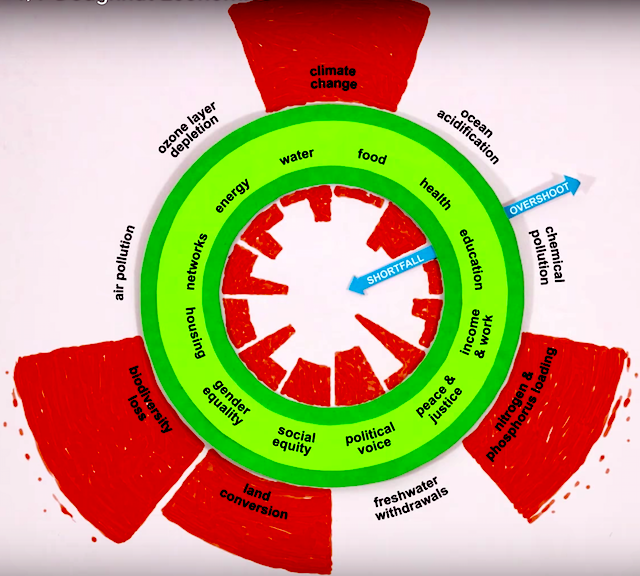
As for any predicament, this one has no solutions, only adaptations and coping mechanisms. Our technology-fuelled capitalist, industrial-growth economy only encourages overshoot. But this economy is the evolving result of the actions of billions of people: No small group created this economy, no one is to blame for it, and no group has the power to change or replace it. We just have to acknowledge its reality, and its inevitable collapse, and adapt ourselves to its unfolding as best we can.
That doesn’t mean doing nothing. Kate’s website has many ideas on how to deal with the apparent Hobson’s choice of reducing overshoot by eliminating growth at the global scale (hence increasing inequality, scarcity and suffering for most), or reducing inequality, scarcity and suffering by accelerating even more quickly towards economic collapse. In our current economy, we can’t do both. But in small ways we can (and must) reduce both scarcities and overshoot, even if our actions are unrecognized and merely what Joanna Macy has called “holding actions”. Even if we will have no idea whether they did any good.
We could quibble about which essential human needs belong in the inner circle of the diagram (Michael Dowd’s new video based in part on one of my articles summarizes what I think are eight essential human needs that deserve a place in this centre circle):
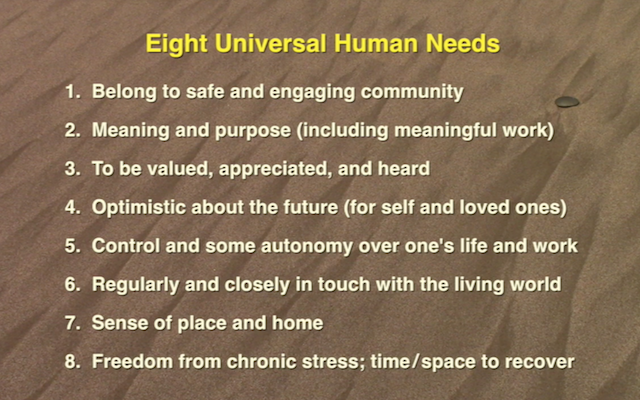
And we could quibble about the dimensions of overshoot in the outer circle. But what is important, I think, is that we start to think of human activity as a balancing act, the ultimately impossible task of reducing the red areas in both the inner and outer circles, so that we ultimately live at least a bit more in “the safe and just space for humanity”. In other words, we must learn to live within our means, as we did brilliantly during the first million (“prehistoric”) years of our time on earth.
The chart also shows that we don’t have to worry about other creatures in striving to do this. It’s hubris to think that we are responsible for stewarding this planet. If we take care not to be in overshoot (and when we are no longer around), the rest of life on earth will take care of itself, as it has always done.
Another feature of this model is that it clarifies the role that human overpopulation plays. The more humans on this planet, the more potential shortfall/scarcity we create trying to accommodate them, and the greater the risk of overshoot in doing so. Population is the denominator in the equation, but it is not the only cause of overshoot, and not the only thing we must reign in to reduce it. Waste, inequality, and the vast inefficiencies of scale that globalization (in its well-intended but ill-conceived attempt to reproduce first world wealth) contribute much more to both the inner and outer red areas on the diagram, than raw human numbers.
Finally, this amazing and simple model really presents a blueprint for what any proposed Green New Deal must try to accomplish. Their goals are the same.
So as a joyful pessimist, a student of our culture, and as a collapsnik, I love this new model. We cannot prevent collapse, but this model shows us what we did wrong, and what we continue to do wrong, and how we can at least moderate some of the most devastating effects of our economy and human activity, before collapse makes all our efforts moot. It is a predicament, and as such it is far too late to “get the red out” and restore our economy and ecology to health and balance. But at least, and at last, this gives us a picture, and a useful, meaningful scorecard, as our civilization enters its final decades, to chronicle its, and our, demise, and our attempts to reduce and undo what cannot be undone.
Thanks to Jae Mather for pointing me to David Suzuki’s reference to this model, to the Rockstrom team who developed the first iteration of the model, and to Kate for saying so eloquently what should always have been obvious.
TL;DR: Pretending to be successful is the new status quo. To break free of this damaging illusion, stop paying attention—and instead concentrate on offering value to a few. It happened so quietly that few noticed it. The machines won—and it was the perfect victory. It started with the innovators. They created the virus, thinking it […]
The post How to Keep Yourself Sane, in Faketopia appeared first on Eric Karjaluoto.
Joseph Planta, a podcaster who interviews notable people in public life, once posted the list of films he had watched over the course of the year.
The list I've been keeping since January 1st of films I've seen/finished in 2016. Up to 102 as of today. pic.twitter.com/c1PCVu2aiA
— Joseph Planta (@Planta) August 26, 2016
Recalling this at the end of 2017, I had made added to my yearly list of New Year's Intentions the idea to carve out time to watch more movies. I decided that Friday would be movie night, and that as part of my Sunday routine, I would pick a film to watch the following week. As 2018 progressed, it was obvious that I couldn't rely on Friday night to be the specific night for watching a movie, but my conscious effort paid off in making good on a promise to watch a movie almost every week.
It certainly helps that I live two blocks from a commercial cinema and the TIFF Bell Lightbox, not to mention subscribing to Netflix and Amazon Prime. I'm a Bronze member of The Revue Cinema in Roncesvalles, and have had a fun time at their Drunken Cinema series, where hooting and hollering is encouraged. It is not often that I rent a DVD, the closest store being an hour round trip, but the Toronto Public Library has a good selection, so I include them on my list. Only as a very last resort do I secretly and illegally download a film. I tend to turn on captions for movies, especially if people with British accents are speaking, but also because almost always captions capture what is said at low volume in the background, adding colour to the scenes. I'm not sure I'm willing to use the captioning display unit that Cineplex theatres offer, but that's without having tried it.
I'm particularly interested in movies in which a character’s understanding and effective internalization of the content of a systematic moral theory is a major driver of the story, films that showcase Los Angeles, and movies directed by women.
I post my movie-watching activity to my profile on Letterboxd, and have even been known to add a movie or two to the database it pulls from. For 2019, I switched from Friday being movie night to having at least one movie night sometime during the week. My watchlist on Letterboxd is plenty long, so I shouldn't lack for films to watch over the coming months.
One thing that has been lacking has been my ability to talk about film. It is common across all media, that is, my inability to tell people why I think something is good. When I come across the course for film appreciation that I lost track of, I'll sign up for it.
(header image via MDN Web Docs)
The past two posts have used R to look at the safety/security (just assume those terms are in scare quotes from now on in every post) of web-y thing-ys. We’ll continue that theme with this post where we focus on a [sadly unused] HTTP server header: Content Security Policy (referred to as CSP in the remainder of the post).
To oversimplify things, the CSP header instructs a browser on what you’ve authorized to be part of your site. You supply directives for different types of content which tell browsers what sites can load content into the current page in an effort to prevent things like cross-site scripting attacks, malicious iframes, clickjacking, cryptojacking, and more. If you think this doesn’t happen, think again.
The web is awash in resources (some aforelinked) on how to configure CSPs and doesn’t need another guide (and this post is about working with CSPs as a data source in R). However, if you aren’t currently using CSPs on any sites you own and want a fairly easy way to develop a policy, grab a copy of the latest Firefox, install Mozilla’s own CSP Toolkit extension and just browse your site with that plugin active. It will generate as minimal of a policy as possible as it looks at all the resource requests your site makes. Another method is to use Content-Security-Policy-Report-Only header vs the Content-Security-Policy header since the former one will just report potential resource loading issues instead of blocking the resource loading.
Even if you do not have CSPs of your own they’re easy to find since they come along for the ride (when they exist) in HTTP server response headers. To make it easier to see if a site has a CSP and also load a CSP I’ve put together a small package (installation instructions & source locations are on that link) which can do this for us. (If you visit that page you’ll see a failed image load for the CRAN Status Badge. Open up Developer Tools or the javascript console in your browser and you’ll see the CSP rules hard at work:

The cspy package is based on Shape Security’s spiffy Java library which implements a bona fide parser for CSP rules (as opposed to hacky-string-slicing which we’re also going to do in this post) and has a set of safety checker rules written in R but based on ones defined by Google. I violated the “supporting JARs in one pkg; actual functionality in another pkg” “rule” since Shape Security only does ~1.5 releases a year and it’s a super small JAR with no dependencies.
Let’s find an R-focused site with a CSP we can work with (assume the tidyverse and stringi are loaded into the R session). We’ll start with a super spiffy R org: RStudio!:
cspy::has_csp("https://www.rstudio.com/")
## [1] FALSE
Oh, um… well, what about another super spiffy R org: Mango Solutions!:
cspy::has_csp("http://mango-solutions.com/")
## [1] FALSE
Heh. Well… ah… Hrm. What about Data Camp! They have tons of great R things:
cspy::has_csp("https://www.datacamp.com/")
## [1] TRUE
W00t!
To be fair, the main brand sites for both RStudio and Mango use WordPress and WordPress makes it super hard to write a decent CSP. However, (IMO) that’s kinda no excuse for not having one (since I run WordPress and have one). But, Data Camp does! So, let’s fetch it and take a look:
(dc_csp <- cspy::fetch_csp("https://www.datacamp.com/"))
## default-src 'self' *.datacamp.com *.datacamp-staging.com
## base-uri 'self'
## connect-src 'self' *.datacamp.com *.datacamp-staging.com https://com-datacamp.mini.snplow.net https://www2.profitwell.com https://www.facebook.com https://www.optimalworkshop.com https://in.hotjar.com https://stats.g.doubleclick.net https://*.google-analytics.com https://frstre.com https://onesignal.com https://*.algolia.net https://*.algolianet.com https://wootric-eligibility.herokuapp.com https://d8myem934l1zi.cloudfront.net https://production.wootric.com
## font-src 'self' *.datacamp.com *.datacamp-staging.com https://fonts.gstatic.com data:
## form-action 'self' *.datacamp.com *.datacamp-staging.com https://*.paypal.com https://www.facebook.com
## frame-ancestors 'self' *.datacamp.com *.datacamp-staging.com
## frame-src 'self' *.datacamp.com *.datacamp-staging.com *.zuora.com https://www.google.com https://vars.hotjar.com https://beacon.tapfiliate.com https://b.frstre.com https://onesignal.com https://tpc.googlesyndication.com https://*.facebook.com https://*.youtube.com
## img-src 'self' *.datacamp.com *.datacamp-staging.com https://s3.amazonaws.com https://checkout.paypal.com https://cdnjs.cloudflare.com https://www.gstatic.com https://maps.googleapis.com https://maps.gstatic.com https://www.facebook.com https://q.quora.com https://bat.bing.com https://*.ads.linkedin.com https://www.google.com https://*.g.doubleclick.net https://*.google-analytics.com https://www.googletagmanager.com blob data:
## script-src 'self' 'unsafe-inline' 'unsafe-eval' *.datacamp.com *.datacamp-staging.com https://*.googletagmanager.com https://*.google-analytics.com https://browser.sentry-cdn.com https://js.braintreegateway.com https://*.zuora.com https://*.paypal.com https://js-agent.newrelic.com https://bam.nr-data.net https://maps.googleapis.com https://assets.calendly.com http://com-datacamp.mini.snplow.net https://cdn.jsdelivr.net https://*.algolia.net https://www.gstatic.com https://www.google.com https://cdnjs.cloudflare.com https://static.tapfiliate.com https://cdn.onesignal.com https://onesignal.com https://static.hotjar.com https://script.hotjar.com https://*.linkedin.com https://sjs.bizographics.com/insight.min.js https://bat.bing.com/bat.js https://a.quora.com/qevents.js https://connect.facebook.net https://www.googleadservices.com https://www.googletagmanager.com https://*.googlesyndication.com https://dna8twue3dlxq.cloudfront.net/js/profitwell.js https://disutgh7q0ncc.cloudfront.net/beacon.js data:
## style-src 'self' 'unsafe-inline' *.datacamp.com *.datacamp-staging.com https://cdnjs.cloudflare.com https://fonts.googleapis.com https://assets.calendly.com
## worker-src 'self'
## report-uri https://infra-reporter.datacamp.com/csp-report
Wow. Literally: wow. We’ll let their recent breach and lack of 2FA for logins slide for a bit b/c this is a robust CSP so it’s obvious they do care about you (regardless of whatever CSP helper tools are out there these CSPs are kind of a pain to setup so the fact that this one is so thorough is in indicator they “get it”).
R folks are likely looking at that untidy mess and cringing, though. We’ll tidy it right up, soon, but let’s make sure it’s a valid CSP:
glimpse(validate_csp(dc_csp))
## Observations: 1
## Variables: 8
## $ message      <chr> "A draft of the next version of CSP deprecates report-uri in favour …
## $ type         <chr> "INFO"
## $ start_line   <int> 1
## $ start_column <int> 2680
## $ start_offset <int> 2679
## $ end_line     <int> 1
## $ end_column   <int> 2690
## $ end_offset   <int> 2689
The validator only noted that a soon-to-be deprecated directive is being used (but that’s just informational and perfectly fine until CSP v3 is out of Draft and browsers support it) and the validation output has positional values for where the violations occur (which shows the benefits of using a true parser vs string splitter).
The custom print method for these csp objects puts each directive on a separate line and has left the resource values intact. As noted, it’s ugly and untidy so let’s take care of that:
(csp_df <- as.data.frame(dc_csp))
## # A tibble: 111 x 3
##    directive   value                                origin
##    <chr>       <chr>                                <chr>
##  1 default-src 'self'                               https://www.datacamp.com/
##  2 default-src *.datacamp.com                       https://www.datacamp.com/
##  3 default-src *.datacamp-staging.com               https://www.datacamp.com/
##  4 base-uri    'self'                               https://www.datacamp.com/
##  5 connect-src 'self'                               https://www.datacamp.com/
##  6 connect-src *.datacamp.com                       https://www.datacamp.com/
##  7 connect-src *.datacamp-staging.com               https://www.datacamp.com/
##  8 connect-src https://com-datacamp.mini.snplow.net https://www.datacamp.com/
##  9 connect-src https://www2.profitwell.com          https://www.datacamp.com/
## 10 connect-src https://www.facebook.com             https://www.datacamp.com/
## # … with 101 more rows
Now we have one row for each directive/value pair. The origin (where the policy came from) also comes along for the ride in the event you want to bind a bunch of these together.
Let’s see how many third-party sites they had to catch and add to this policy:
filter(csp_df, stri_detect_fixed(value, ".")) %>%
  pull(value) %>%
  stri_replace_all_fixed("*.", "") %>%
  urltools::url_parse() %>%
  distinct(domain) %>%
  filter(!stri_detect_regex(domain, "(datacamp\\.com|datacamp-staging\\.com)$")) %>%
  arrange(domain) %>%
  pull(domain)
##  [1] "a.quora.com"                       "ads.linkedin.com"                  "algolia.net"
##  [4] "algolianet.com"                    "assets.calendly.com"               "b.frstre.com"
##  [7] "bam.nr-data.net"                   "bat.bing.com"                      "beacon.tapfiliate.com"
## [10] "browser.sentry-cdn.com"            "cdn.jsdelivr.net"                  "cdn.onesignal.com"
## [13] "cdnjs.cloudflare.com"              "checkout.paypal.com"               "com-datacamp.mini.snplow.net"
## [16] "connect.facebook.net"              "d8myem934l1zi.cloudfront.net"      "disutgh7q0ncc.cloudfront.net"
## [19] "dna8twue3dlxq.cloudfront.net"      "facebook.com"                      "fonts.googleapis.com"
## [22] "fonts.gstatic.com"                 "frstre.com"                        "g.doubleclick.net"
## [25] "google-analytics.com"              "googlesyndication.com"             "googletagmanager.com"
## [28] "in.hotjar.com"                     "js-agent.newrelic.com"             "js.braintreegateway.com"
## [31] "linkedin.com"                      "maps.googleapis.com"               "maps.gstatic.com"
## [34] "onesignal.com"                     "paypal.com"                        "production.wootric.com"
## [37] "q.quora.com"                       "s3.amazonaws.com"                  "script.hotjar.com"
## [40] "sjs.bizographics.com"              "static.hotjar.com"                 "static.tapfiliate.com"
## [43] "stats.g.doubleclick.net"           "tpc.googlesyndication.com"         "vars.hotjar.com"
## [46] "wootric-eligibility.herokuapp.com" "www.facebook.com"                  "www.google.com"
## [49] "www.googleadservices.com"          "www.googletagmanager.com"          "www.gstatic.com"
## [52] "www.optimalworkshop.com"           "www2.profitwell.com"               "youtube.com"
## [55] "zuora.com"
That list is one big reason these CSPs can be gnarly to configure and also why some argue there’s potentially little benefit in them. Why little benefit? Let’s see what sites they’ve allowed browsers to load and execute javascript content from:
filter(csp_df, directive == "script-src") %>%
  select(value) %>%
  filter(!stri_detect_regex(value, "(datacamp\\.com$|datacamp-staging\\.com$|'|data:)")) %>%
  pull(value)
##  [1] "https://*.googletagmanager.com"                        "https://*.google-analytics.com"
##  [3] "https://browser.sentry-cdn.com"                        "https://js.braintreegateway.com"
##  [5] "https://*.zuora.com"                                   "https://*.paypal.com"
##  [7] "https://js-agent.newrelic.com"                         "https://bam.nr-data.net"
##  [9] "https://maps.googleapis.com"                           "https://assets.calendly.com"
## [11] "http://com-datacamp.mini.snplow.net"                   "https://cdn.jsdelivr.net"
## [13] "https://*.algolia.net"                                 "https://www.gstatic.com"
## [15] "https://www.google.com"                                "https://cdnjs.cloudflare.com"
## [17] "https://static.tapfiliate.com"                         "https://cdn.onesignal.com"
## [19] "https://onesignal.com"                                 "https://static.hotjar.com"
## [21] "https://script.hotjar.com"                             "https://*.linkedin.com"
## [23] "https://sjs.bizographics.com/insight.min.js"           "https://bat.bing.com/bat.js"
## [25] "https://a.quora.com/qevents.js"                        "https://connect.facebook.net"
## [27] "https://www.googleadservices.com"                      "https://www.googletagmanager.com"
## [29] "https://*.googlesyndication.com"                       "https://dna8twue3dlxq.cloudfront.net/js/profitwell.js"
## [31] "https://disutgh7q0ncc.cloudfront.net/beacon.js"
Some of those are specified all the way down to the .js file but others work across entire CDN networks. Granted, there’s nothing super bad like Amazon’s S3 apex domains (wildcarded or not) but there’s alot of trust going on in that list. The good thing about CSPs is that if Data Camp learns about an issue with any of those sites it can quickly zap them from the header since they’ve already done the hard enumeration work. Plus, if one of those sites is compromised and loads a resource that tries to execute code from a domain not in that list, a policy error will be generated and Data Camp’s excellent SOC (they responded super well to the breach) can take active measures to inform their downstream provider that there’s something wrong.
We can also do some safety checks:
check_script_unsafe_inline(csp_df)
## Category: script-unsafe-inline
## Severity: HIGH
##  Message: 'unsafe-inline' allows the execution of unsafe in-page scripts and event handlers.
##
##     directive           value                    origin
## 67 script-src 'unsafe-inline' https://www.datacamp.com/

check_script_unsafe_eval(csp_df)
## Category: script-unsafe-eval
## Severity: HIGH
##  Message: 'unsafe-eval' allows the execution of code injected into DOM APIs such as eval().
##
##     directive         value                    origin
## 68 script-src 'unsafe-eval' https://www.datacamp.com/

check_plain_url_schemes(csp_df)
## Category: unsafe-execution
## Severity: HIGH
##  Message: URI(s) found that allow the exeution of unsafe scripts.
##
##      directive value                    origin
## 102 script-src data: https://www.datacamp.com/

check_wildcards(csp_df)

check_missing_directives(csp_df)
## Category: missing-directive
## Severity: HIGH
##  Message: Missing object-src allows the injection of plugins which can execute JavaScript. Can you set it to 'none'?
##
##    directive value
## 1 object-src  <NA>

check_ip_source(csp_df)

check_deprecated(csp_df)
## Category: deprecated-directive
## Severity: INFO
##  Message: Found deprecated directive(s). See  https://developer.mozilla.org/en-US/docs/Web/HTTP/Headers/Content-Security-Policy for more information.
##
##      directive                                          value
## 111 report-uri https://infra-reporter.datacamp.com/csp-report
##                        origin
## 111 https://www.datacamp.com/

check_nonce_length(csp_df)

check_src_http(csp_df)
## Category: http-src
## Severity: MEDIUM
##  Message: Use HTTPS vs HTTP.
##
##     directive                               value
## 81 script-src http://com-datacamp.mini.snplow.net
##                       origin
## 81 https://www.datacamp.com/
Along with pretty printing they return data frames of potentially problematic rules.
For some pages, Data Camp does what you likely do when you knit an R markdown document: save it as a self-contained page. Because of that it is absolutely necessary to use 'unsafe-inline', 'unsafe-eval', and data: directive values for a few directives. It just can’t be helped. We already knew about the report-uri deprecation. While object-src isn’t in the CSP-proper, there is a default-src and that will take effect. But, the checker knows it’s not set to 'none' which means plugins can still load from Data Camp’s own domains (which may be perfectly fine depending on the type of embeds they use).
The one finding I’ll have to side with the checker on is the one at the end (the output of check_src_http()). They seem to allow one of the many analytics providers for the site (I think it’s this org) use http:// vs https://. If they really do load javascript content from that site via plain http:// then it would be possible for an attacker to hijack the content and insert malicious javascript. Yet another good reason to use DNS-based (e.g. pi-hole) or uBlock Origin to prevent any trackers or analytics scripts from loading at all.
One further thing to note is that Data Camp uses Amazon AWS for their site hosting and you kinda have to jump through hoops to get this header added there so they have seriously done a decent job thinking about your safety.
The cspy package is fine for casual/light inspection but it’s uses a Java shim which means marshaling of data between R and the JVM and that’s  at-scale. Depending on what you’re trying to do, some basic string wrangling may suffice.
At $DAYJOB we perform many HTTP scans. One scan we have internally (I don’t think it’s part of Open Data but I’ll check Monday) is a regular grab of the Alexa Top 1m named hosts. In the most recent scan we found ~65K sites with a CSP header. You can grab a CSV containing the virtual host name and the found CSP policy string here.
Once you download that we can just use string ops to get to a tidy data frame:
read_csv("top1m-csp.csv.gz", col_types = "cc") %>% # use the location where you stored it
  mutate(csp = stri_trans_tolower(csp)) -> top1m_csp

stri_split_regex(top1m_csp$csp, ";[[:space:]]*", simplify = FALSE) %>%                      # split directives for each policy
  map2_df(top1m_csp$vhost, ~{                                                               # we want to keep the origin
    stri_match_first_regex(.x, "([[:alpha:]\\-]+)[[:space:]]+(.*)$|([[:alpha:]\\-]+)") %>%  # get the directive
      as.data.frame(stringsAsFactors = FALSE) %>%
      mutate(origin = sprintf("https://%s/", .y)) %>%
      mutate(raw = .x)                                                                      # save the raw CSP
  }) %>%
  mutate(V2 = ifelse(is.na(V2), V4, V2)) %>%                                                # figure out directive
  mutate(V3 = ifelse(is.na(V3), "", V3)) %>%                                                # and value (keeping in mind no-value directives)
  select(directive = V2, value = V3, origin, raw) %>%
  as_tibble() %>%
  separate_rows(value, sep="[[:space:]]+") -> top1m_csp                                     # tidy it up with each row being directive|value|origin like the above
That took just about 2 minutes for me and that’s two minutes too long to spread around to intrepid readers who may be trying this at home so an RDS of the result is also available.
So, only ~65K out of the top 1m sites have a CSP header (~6.5%) but that doesn’t mean they’re good. Let’s take a look at the invalid directives they’ve used:
top1m_csp %>%
  filter(!is.na(directive)) %>%
  count(directive, sort = TRUE) %>%
  mutate(is_valid = directive %in% valid_csp_directives) %>%
  filter(!is_valid) %>%
  select(-is_valid) %>%
  print(n=65)
## # A tibble: 65 x 2
##    directive                               n
##    <chr>                               <int>
##  1 referrer                               69
##  2 reflected-xss                          58
##  3 t                                      50
##  4 self                                   34
##  5 tscript-src                            22
##  6 tframe-src                             17
##  7 timg-src                               16
##  8 content-security-policy                14
##  9 default                                10
## 10 policy-definition                       9
## 11 allow                                   8
## 12 defalt-src                              8
## 13 tstyle-src                              8
## 14 https                                   7
## 15 nosniff                                 7
## 16 null                                    7
## 17 tfont-src                               6
## 18 unsafe-inline                           6
## 19 http                                    5
## 20 allow-same-origin                       4
## 21 content                                 4
## 22 defaukt-src                             4
## 23 default-scr                             4
## 24 defaut-src                              4
## 25 data                                    3
## 26 frame-ancestor                          3
## 27 policy                                  3
## 28 self-ancestors                          3
## 29 defualt-src                             2
## 30 jivosite                                2
## 31 mg-src                                  2
## 32 none                                    2
## 33 object                                  2
## 34 options                                 2
## 35 policy-uri                              2
## 36 referrer-policy                         2
## 37 tconnect-src                            2
## 38 tframe-ancestors                        2
## 39 xhr-src                                 2
## 40 -                                       1
## 41 -report-only                            1
## 42 ahliunited                              1
## 43 anyimage                                1
## 44 blok-all-mixed-content                  1
## 45 content-security-policy-report-only     1
## 46 default-sec                             1
## 47 disown-opener                           1
## 48 dstyle-src                              1
## 49 frame-ancenstors                        1
## 50 frame-ancestorss                        1
## 51 frame-ancestros                         1
## 52 mode                                    1
## 53 navigate-to                             1
## 54 origin                                  1
## 55 plugin-type                             1
## 56 same-origin                             1
## 57 strict-dynamic                          1
## 58 tform-action                            1
## 59 tni                                     1
## 60 upgrade-insecure-request                1
## 61 v                                       1
## 62 value                                   1
## 63 worker-sc                               1
## 64 x-frame-options                         1
## 65 yandex                                  1
Spelling errors are more common than one might have hoped (another reason CSPs are hard since humans tend to have to make them).
We can also see the directives that are most used:
top1m_csp %>%
  filter(!is.na(directive)) %>%
  count(directive, sort = TRUE) %>%
  mutate(is_valid = directive %in% valid_csp_directives) %>%
  filter(is_valid) %>%
  select(-is_valid) %>%
  print(n=25)
## # A tibble: 25 x 2
##    directive                     n
##    <chr>                     <int>
##  1 script-src                57636
##  2 frame-ancestors           47685
##  3 upgrade-insecure-requests 47515
##  4 block-all-mixed-content   38038
##  5 report-uri                37483
##  6 default-src               36369
##  7 img-src                   35093
##  8 style-src                 23005
##  9 connect-src               22415
## 10 frame-src                 15827
## 11 font-src                  12878
## 12 media-src                  6718
## 13 child-src                  5043
## 14 object-src                 4235
## 15 worker-src                 3076
## 16 form-action                1522
## 17 base-uri                    861
## 18 manifest-src                374
## 19 sandbox                      79
## 20 script-src-elem              54
## 21 plugin-types                 47
## 22 report-to                    32
## 23 prefetch-src                 22
## 24 require-sri-for              14
## 25 style-src-elem                6
Curious readers should load up urltools and see what domains those script-src directives are allowing. Remember, every value entry that points to an third-party site means it’s OK for that site to mess with your browser or spy on you.
And, take a look at where folks are doing their CSP error reporting:
filter(top1m_csp, directive %in% c("report-uri", "report-to")) %>%
  mutate(report_host = case_when(
    !grepl("^http[s]*://", value) ~ origin,
    TRUE ~ value
  )) %>%
  select(report_host) %>%
  mutate(report_host = sub('"$', "", report_host)) %>%
  pull(report_host) %>%
  urltools::url_parse() %>%
  as_tibble() %>%
  count(domain, sort=TRUE) %>%
  print(n=20)
## # A tibble: 18,565 x 2
##    domain                                             n
##    <chr>                                          <int>
##  1 csp.medium.com                                   113
##  2 sentry.io                                         43
##  3 de.forumhome.com                                  40
##  4 report-uri.highwebmedia.com                       33
##  5 csp.yandex.net                                    23
##  6 99designs.report-uri.io                           20
##  7 endpoint1.collection.us2.sumologic.com            20
##  8 capture.condenastdigital.com                      17
##  9 secure.booked.net                                 14
## 10 bimbobakeriesusa.com                              10
## 11 oroweat.com                                       10
## 12 ponyfoo.com                                        8
## 13 monzo.report-uri.com                               6
## 14 19jrymqg65.execute-api.us-east-1.amazonaws.com     5
## 15 app.getsentry.com                                  5
## 16 csp-report.airfrance.fr                            5
## 17 csp.nic.cz                                         5
## 18 myklad.org                                         5
## 19 reports-api.sqreen.io                              5
## 20 tracker.report-uri.com                             5
## # … with 1.854e+04 more rows
The list (18K!) is far more diverse than I had anticipated.
You can do tons more (especially since the wrangling has been done for you :-).
A future post will show how to process CSP error reports in R and there will likely be more security/safety-themed posts as well.
The cspy CINC repo has Windows and macOS binary versions and you can get the source in all the usual places, so kick the tyres, file issues/PRs and start exploring the content security policies of the websites you frequent (and blog about your results!).
One other fun exercise is to grab the R Weekly or R-bloggers blog rolls and see how many of those blogs have CSPs.

Dieses Wochenende habe ich alle zehn Folgen von "Formula 1: Drive to Survive" geschaut. Nicht auf dem TV, nicht auf dem iPad Pro, sondern in 4k auf dem Lenovo Yoga C930. Ich werde diese Maschine einmal sehr vermissen!
Das Yoga C930 ist ein Convertible. Man kann es nicht nur wie ein Notebook aufklappen, sondern auch komplett nach hinten umlegen. Um 270 Grad aufgeklappt lege ich mir die Tastatur auf den Bauch, wenn ich auf dem Sofa herumliege und habe dann einen hochauflösenden Bildschirm direkt vor der Nase und den mitdrehenden Lautsprecher unter dem Bild. Sitze ich am Tisch, dann bleibt das Gerät ebenfalls nach hinten gefaltet, diesmal aber mit dem Scharnier nach oben. Tent Mode nennt Lenovo das.
Ich mag das Gerät, die Haptik, die Qualität, die Bedienung. Nichts scheint überflüssig. Den Touchscreen benutze ich dauernd, den im Gehäuse geparkten Stift aber nur selten. Als Tablet ist mir das Gerät dann doch zu schwer. Kauftipp: Lieber das HD-Modell nehmen. Das spart viel Geld und der Akku hält noch mal Stunden länger. Vielleicht sogar den einfacheren, aber ebenso guten Yoga 730.
Windows 10 ist total unauffällig, wenn man erst mal den ganzen Mist gelöscht hat, den Lenovo da vorinstalliert. Das McAfee-Paket ist wie der Intel-Aufkleber bezahlte Werbung. Beides braucht man nicht.
Die Ausstattung mit einem USB-A und zwei USB-C/Thunderbolt-Anschlüssen hat sich bewährt. Ich lade das Gerät einfach mit meiner tizi Tankstation. Nur die LED im Einschalter rechts verwirrt mich. Die blinkt immer munter vor sich hin, egal ob Yoga gerade schläft oder geladen wird. Aus heißt aus, an heißt an. Blinken heißt schlafen oder laden. Aber in welche Frequenz es mir was mitteilt, kann ich mir nicht merken.
Ganz starke Konkurrenz zu meinem geliebten Surface Pro. Es kommt nicht oft vor, dass mich ein PC so begeistert.
Andy Ko, in SIGCSE 2019 report:
I always have to warn my students before they attend SIGCSE that it's not a place for deep and nuanced discussions about learning, nor is it a place to get critical feedback about their ideas.
It is, however, a wonderful place to be immersed in the concerns of CS teachers and their perceptions of evidence.
I'm not sure I agree that one can't have deep, nuanced discussions about learning at SIGCSE, but it certainly is not a research conference. It is a great place to talk to and learn from people in the trenches teaching CS courses, with a strong emphasis on the early courses. I have picked up a lot of effective, creative, and inspiring ideas at SIGCSE over the years. Putting them onto sure scientific footing is part of my job when I get back.
~~~~~
Stephen Kell, in Some Were Meant for C (PDF), an Onward! 2017 essay:
Unless we can understand the real reasons why programmers continue to use C, we risk researchers continuing to solve a set of problems that is incomplete and/or irrelevant, while practitioners continue to use flawed tools.
For example,
... "faster safe languages" is seen as the Important Research Problem, not better integration.
... whereas Kell believes that C's superiority in the realm of integration is one of the main reasons that C remains a dominant, essential systems language.
Even with the freedom granted by tenure, academic culture tends to restrict what research gets done. One cause is a desire to publish in the best venues, which encourages work that is valued by certain communities. Another reason is that academic research tends to attract people who are interested in a certain kind of clean problem. CS isn't exactly "round, spherical chickens in a vacuum" territory, but... Language support for system integration, interop, and migration can seem like a grungier sort of work than most researchers envisioned when they went to grad school.
"Some Were Meant for C" is an elegant paper, just the sort of work, I imagine, that Richard Gabriel had when envisioned the essays track at Onward. Well worth a read.
A designer knows he has achieved
perfection not when there is nothing left to add,
but when there is nothing left to take away. —Antoine
de Saint-Exupery
The perfect targeted advertising business model has been discovered. I have seen it. Maybe you have seen it too.
Identify users likely to be enraged by a particular issue.
Run rage-provoking targeted ads on that issue, with a call to action to sign a petition or complete a survey.
Upsell a fraction of the people to make a donation, automatically billed to their credit cards monthly.
Actually deliver the petitions or surveys or
whatever, but keep most of the money for yourself
by paying it to your data-driven marketing
consulting
company.
It's data-driven. It's sticky. It's social. It's got everything that a surveillance marketing business needs, and nothing it doesn't. No manufacturing. No support. Not even any drop-shipping.
If you don't get these ads, yay for you. Your eyeballs are probably too expensive on the ad impressions market, or you don't seem like the kind of person who would get enraged about any issue that they have a landing page for.
The funny thing is that the model works because people made so much noise about the Citizens United decision and shadowy political groups. So the people who are paying into these things will probably never even feel ripped off.
The Geography of Partisan Prejudice
New Documents Show That Facebook Has Never Deserved Your Trust
Google Facing Complaints of GDPR Violations From Consumer Groups in 7 Countries


Commutativity is an algebraic property that means that order doesn’t matter. Because network messages arrive out of order, it’s the perfect property for distributed systems. In this episode, you’ll learn what it is (with some real world examples), why it’s useful, and 3 ways you can make an existing operation commutative.
Eric Normand: What is commutativity and why is commutativity so useful in distributed systems? By the end of this episode, you will have three ways to use commutativity to make your distributed systems more reliable, faster and easier to scale. My name is Eric Normand, and I help people thrive with functional programming.
Commutativity is important for a number of reasons. You could say, “Eric, you’re getting all math-theta on me again, I don’t want to go back to algebra class. Why commutativity?” Well, listen, commutativity is just a name that mathematicians have made up.
I’m sorry if you had a bad experience in math class. Commutativity is super important for distributed systems. When you have distributed systems, one of the most costly, expensive things you can do between those nodes and the system is to communicate, so that you can coordinate.
You don’t want to be waiting for each other. You don’t want to be waiting for messages to travel across the network. The whole point is that you can work independently. If you didn’t want to work independently, you’d be on the same machine.
We want to reduce the interdependence of the ordering of our operations. We want to make it so that the order the work gets done in doesn’t matter. That’s what commutativity is.
Let’s go over the what. Commutativity is an algebraic property of certain operations. By extension, we can say it’s also a property of certain actions, certain effects. Not just mathematical functions, but also effects on the world.
You can do them in different orders and get the same result.
What it means is that order doesn’t matter. In some things, the order does matter. If you’re making a sandwich, the order matters. You got to start with the bread, then put something on the bread, and then put something else on.
If you did it in a different order, you’ll get a different sandwich. It might fall apart. Might not even be a sandwich anymore. If you put the meat on the outside, it wouldn’t be a sandwich.
In some operations, the order doesn’t matter. That’s very nice. One example that we use all the time is adding stuff to a set. If you’ve got a set data structure in your language and you start adding things to it, it doesn’t matter what order you put them in. If you have a set of numbers and you put one, two, three, or three, two, one, it doesn’t matter.
The data structure is effectively the same. They might be stored differently in memory, but the semantics of the data structure are such that in a set, the order doesn’t matter. When you’re comparing to, it doesn’t look at the order of when they were added.
That’s a nice thing. It means that I can use a set and guarantee that it doesn’t matter what order. It means that different threads can be adding to the same set at the same time. It doesn’t matter how the threads are interleaved, if one is slower than the other, if one thread skips some numbers, and decides to do it in a different order from what you gave it. It doesn’t matter. They’re free to work in an uncoordinated fashion, which is very nice for distributed systems.
Why is this so nice? Once you’re on a network, the order of messages between nodes is just not guaranteed. If I make two requests to a web server, I cannot guarantee which one will arrive first, and I cannot guarantee which one will send its response back first. There’s so many things going on between my computer and the other computer, that there’s no way to guarantee that ordering.
Especially, if there’s a lot of processing that you have to do. If the other computer is going to do a little bit of computation, sometimes, computation takes longer than another time. There’s no way to do it. When you have two computers that are working together to work on a bigger job, so that each have a sub-job to do, you don’t know which sub-job is going to happen first, is going to finish first. You want to make sure that you can work out of order. It just helps things.
Order is actually something that we have to think about a lot in distributed systems. I’m going to give you three things that you can do to, hopefully, eliminate the stranglehold that order has on your system. If you want to get the right answer, you want to make it so that you get the same answer, regardless of the order that stuff happens in.
Number one. If you want to make something commutative, you can easily do that by using an existing data structure that has a commutative operation. We already talked about sets. Adding stuff to sets is commutative.
Here’s an example — if I want to count the number of people at the conference. They’re already there. They’re already in the conference. There’s different rooms that they’re in. They’re listening to different speakers. They’re moving around between rooms.
It takes a while to count them. By the time you’re counting them and you get to a person, he might have left and gone to another room. Sometimes, you’ve counted someone — I’ve counted the same person as you counted. We’re in different rooms.
People are moving around. You might count the same person twice. If what I do instead of just counting the number of people I see in the room, I scan their badges. I just remember every badge ID that I’ve seen, and you do the same. You’re remembering every badge ID.
Then we have a list of badge IDs that we’ve seen. Then we dump them all into a set. It doesn’t matter what order the people were counted or anything like that. All of that goes away. We know how many people were there because we can just count the number of elements in that set.
You could also have a central set that everyone is writing to. We can write to it in an uncoordinated manner. You write to the set. I write to the set. We don’t talk to each other. You can see a real-time count as people come in. If people are counted twice, it doesn’t matter, and the order doesn’t matter even.
That one actually, now that I think about this example, it also confuses idempotence because you’re not counting the same person twice. Just know that the order doesn’t matter. The final set is going to be the same, no matter what order people are counted in. That’s what’s important.
There are other commutative operations on data structures that you’ve got. If you are working with numbers, obviously, addition and multiplication are going to be commutative. It doesn’t matter what order you multiply your numbers in. You can pick the order that makes the most sense.
If you’re counting page hits on your website, you’re just adding one. That’s a commutative operation. You can do that in a distributed manner. My web server and your web server were load balanced behind the same load balancer. I can count web hits. You can count web hits to the same central server in whatever order. It doesn’t matter. That’s nice.
Another thing, and I hinted at this in the example. Number two is another way to add commutativity is to think about identity. Do I identify some kind of identity for your operations?
In this case, the identity was the badge ID. The badge ID was saying…That’s also for idempotence. It’s allowing you to count people and not worry about the order because the ID is separating people. It’s not like I say plus, you say plus one. That’s really confusing it with idempotence. These properties are often used in combination.
Another kind of identity is the index. Let’s say you do have some order imposed. For instance, I’m sending you packets on TCP packets of a file, they have to go in the right order. I can’t guarantee that they will arrive in the right order.
There’s going to be some packets dropped. I’m going to have to retry and so the order is just totally messed up. How do you get them back in order? How do you make it so that the order doesn’t matter when it really does?
Well, each packet is numbered. Each packet has its order as part of the payload, so you on the other side can reassemble them in the correct order. It doesn’t matter what order they arrived in, you can always reorder them to the correct order later. That’s another useful thing.
This is called an index because it’s like you have an array and you say, “Well, there’s zero chunk of work in the first, and the one chunk of work, the two chunk of work, they go into this array. I’m going to send them out, they’re going to come back in different orders, but I know where the answer is, go. Then I can tell when I’m done, and then I’ll have them in the right order.
Another thing is you could capture the time. If you have, say events where this user’s clicking buttons and that user’s clicking buttons, and they’re going to arrive at different times on the server. If you capture when they happened on the individual machines, you can reassemble a timeline of the actual order they occurred in.
That’s hard when you’ve got time on a distributed-system. I’m not going to go into that. You can fudge time if you need to, and that can give you a consistent way of reordering them when you need to.
The third thing is to think about partitions, are also known as sharding. If you have a bank, the bank’s operations depend on order a little bit, but you know that my account and your account are completely independent. We don’t have to focus on, if you have a check get withdrawn, I have a check get withdrawn.
It doesn’t matter if you withdraw mine first or you withdraw yours first from your account or from mine. It doesn’t matter because they’re totally independent. We only have a smaller problem to deal with, which is ordering the checks from my account and ordering the checks from your account.
They’re totally independent unless we do a transfer between us but please don’t take my money. Usually most bank accounts are not transferring money between the others all the time, so you can partition them.
We do this a lot with, say user accounts on online services. The users largely are not. The operation for a single user, do not affect the other users. My account is totally partitioned from your account, and so with that, “Lets us do,” is not worry about the order between the different users, we just have to worry about the order for one user.
That is much simplified because if it’s one user, it’s usually one person. They have one tab open at a time, and so the problem is much more tractable.
On the other hand, if you actually look at the traffic, the web server is getting thousands of web requests a minute in random order. You can have peace of mind that as long as you know what user account that that web request is for, you can figure out that there’s not that many per user coming in at the same time.
Let me give you some examples of existing commutative operations that you’d be familiar with. I talked about adding to a set. I talked about addition and multiplication of numbers. You also have AND and OR on bullions. These are commutative, which is a really nice thing to have.
There’s a commutativity that I call conditional commutativity, which is where you have, let’s say you have two hash maps, typically merge depends on the order. The order does matter. What is going to merge over what, because you might have the same key with different values. If you have the same key with different values, the one on the right is going to merge over the one on the left.
However, if you know that there’s no keys in common, because typically when we’re using hash maps, we do know the keys. When we’re treating it like an entity, we do know the keys. If we know that there’s no keys in common, then it is a commutative operation. You’re going to get the same answer with, A merged with B and B merged with A.
There’s that notion of conditional commutativity, and so I’d also like you to think about whether your operation can have some condition on it that you can satisfy. There’s also this idea of commutativity on effects. Can be like, let’s say I’m sending emails to customers. I’m sending, I don’t know what it is, like a yearly newsletter to every customer.
I’m just sending one newsletter to each email address I have on a list, does it matter what order they get sent out in? The effect is that they’re all going to wind up in the user’s inbox, or their spam box, or whatever. It doesn’t matter because they’re not going to call each other up like, “Did you get that at 6:01 or 6:02? Was mine first?” They don’t care.
Effectively, they do get sent out in some order, but it doesn’t matter, the effect is the same. That’s different from if you send the same person two different emails. Then the order does matter. The mail server is going to, or the mail client is going to show them in a particular order.
Maybe it wouldn’t make sense. The first email they get is like the second one, so it’s going to say, “Hey, I just sent you this thing. Did you get it?”
Then a minute later, they get one that’s like, “Hey, this is the first email.” It doesn’t make sense. The order does matter for an individual person but not across people. It’s nice to think about stuff like this this way. Let me recap real quick.
Distributed systems like commutativity because it lets things work in an uncoordinated fashion, just sending answers as soon as they have them. They can be combined out of order and you’re going to get the right answer. That’s awesome.
It’s really about independence. It’s this essence of independence. It’s decoupling the answer from the order that you got the sub-answers in. It means order doesn’t matter. It’s an algebraic property. Talked about that.
The how. One, use existing commutative operations on existing data structures. Two, think about order, bundling the order, an identity, or a time with the question and with the answers, so that they can be reordered on the other side. That’s helpful. This is how TCP works.
Also, think about partitioning, so that you can independently evaluate the order, like in the case of user accounts where users aren’t affecting each other, so the order that the operations happen between users doesn’t matter. Makes it much easier to reason about.
I gave some examples. I think that it would be good for you — for yourself — if you found some existing operations. You can use the ones I listed, find some others and play with them. Test them out, like at a rappel or in a little test program.
Think about how these work, and how they achieve commutativity. If you want to go further, you can look at stuff that you need to be distributed and see how you can make the order not matter.
If you can make the order not matter, you often can eliminate a lot of coordination code. Make your system more scalable, more performant, etc. If you found this episode useful, I would very much appreciate if you shared it with other people. They could find it useful too.
You could get a little bit of…a couple of good karma points from them, for that. Like, Comment, do what you do in your app. Also, subscribe, because if you found this one useful, the next episode is going to be similarly useful. You’ll be notified and you’ll have it on your device when it comes down the pipe.
If you’d like to ask any questions or get in touch with me, suggest another topic, you can email me eric@lispcast.com. I’m also available on Twitter @ericnormand with a D. You can find me on LinkedIn if that’s what you use, and we can connect there. Awesome. See you later.
The post What is commutativity and why is it so useful in distributed systems? appeared first on LispCast.

The camera makers have fixed your problems. But have you fixed any, yourself?
I'm old enough to say that I started in the do-it-all-yourself world when it comes to photography. Manual exposure (no built-in camera meter, either), manual focus, manual frame advance, and keep it steady yourself.
…
Warning: I'm going to include some compact and all-in-one cameras in this mirrorless article. After all, they don't have a mirror ;~). Note that I also consider anything released in the two weeks prior to CP+ as being CP+ related. …

Nikon's roadmap for Z mount lenses keeps getting small adjustments. At the moment, Nikon is showing charts with three unidentified lenses to be released in 2020, eight in 2021. The operative question is what do we want those lenses to be, and what are they likely to be?
…

We don't really have a lens roadmap from Canon like we do for most of the other companies. The lenses we know about so far give us this picture by focal length:
Photographers, videographers, creatives from all disciplines, and our fellow citizens of the blue planet, we are pleased to announce today, on the twelfth of February, that from this day hence, Picr shall be known by, and branded as Bloom!
Enter trumpets, drums and champagne ?????
Several years ago, when Picr was first conceived, we had envisioned a marketplace-first approach to the product. But as we learned more about the needs of freelancers and creatives the focus shifted towards creating the ultimate all-in-one CRM.
We do not take our brand identity lightly and after contemplating for a year about changing the name, we decided that now is the time to do so. Here’s why:
Why Bloom?
Our mission is to empower talented creatives to run a blooming independent business; to help artists focus on their craft instead of spending all of their time on admin.
Most independent artists struggle to make a living because business and admin tasks are overwhelming, complicated, and simply boring. The unfortunate irony, is that the artistic skills required for being a creative are completely different from the skills required to make money with a creative skills.
Bloom exists to help creatives run an efficient and profitable online business. To accomplish this, we have built a powerful business management and growth toolset, giving creatives access to modern and robust technology, all in one place.
Bloom is all about enabling creatives focus on their craft and putting freedom back into freelancing.

Why is this important?
The online revolution has put millions of talented artists at a massive disadvantage. Consumers expect to interact with and make buying decisions online but creatives are not equipped to meet them on the web.
Unfortunately, most online services are built for small and medium-size businesses, not solopreneurs. Independent creatives are forced to juggle online services which are expensive, difficult to manage, and oftentimes don’t work.
This struggle results in burnout and exhaustion. For example, an average full-time photographer subscribes to at least 10 disjointed services, such as a website builder, lead capture tools, lead management and sales, contract signing, scheduling, invoicing, task management, image delivery, and communication.
Bloom is re-envisioning what it looks like for creatives and artists to run a business in a digital world.

Why now?
For the past several years our focus has been completely on developing the product. We conducted an extensive beta during which we closely listened to our users and continued to tweak the product.
Now we are transitioning to growth and scale. While our brand is still relatively new, we decided that now was the time to change the name and advance into 2019 with vigor and excitement.
What makes Bloom different?
While there are many different CRM systems on the market, Bloom is the only all-in-one CRM that combines customer management with robust marketing tools. Bloom is focused on your online client journey from the first contact on your website, all the way through email capture, lead management, invoicing, communication, and even digital asset delivery—all in one beautiful place.
No one else does it like Bloom.

Who is Bloom for?
The online business cycle, outlined in an earlier blog post, is the same for nearly all freelancers. While we started by focusing on the photography industry, in 2019 we will gradually expand to many other industries.
Starting with videography, event planners, florists, and musicians, and even expanding to consultants, lawyers, and small agencies. The fundamental business cycle is the same for all and Bloom is best all-in-one CRM available today.
Join us for our webinar announcement of bloom on February 12th where we will outline recent developments and show you what to expect in 2019!
If you have not already signed up. Click here to start your free 14-day trial.
Yours truly,
-Bloom Co-founders.
The post The BIG announcement: Picr is now Bloom.io appeared first on Bloom.
How members respond to short-term punishments (posts being removed, suspensions etc…) is a strong indicator of whether they have a long-term future in your community.
As one study notes, members who apologise, are less likely to break the rules again (at least in the short term).
Members who directly question the punishment or complain the punishment is unfair are more likely to cause future problems.
Of course, how you deliver a punishment plays a significant role in whether they’re likely to respond. If you assume bad intent, say they made a mistake, and use formal, direct, language…you’re more likely to get a negative response.
For example, this is a common post used in the Facebook help community.

Can you think of a more antagonistic way to remove someone’s post for an unintentional infraction?
I’d rewrite this to something closer to this:

If you want members to apologise (and reform), you need to deliver punishment with empathy, understanding, and assume good intent.
p.s. Hosting a platform optimization workshop with CMX this week, please join us!
And jumping right from the last science fiction book review to the next one. I could have gone for the sequel of ‘The Sleeping Giants’ but decided to do that later and go for something else first. My choice fell on “We Are Legion, We Are Bob” by Dennis E. Taylor.
The story promised to be exceptional: Rich geek gets run over by a car, his brain is frozen until medicine advances enough to wake him up again, which he indeed is in the future. But he’s no longer in a biological body. Instead, he now lives as a ‘replicant’ in a computer owned by the successor to what we know as the United States today. His new job: Be the brain of a new kind of self replicating spaceship. I’ve never read anything quite like it before and though I’m not sure whether this story is utopian or dystopian, it was hard to put this book down to get some sleep. Again, fully recommended as it’s a great mixture of action, fun and some serious thoughts behind it all!

When a productivity app feels like it's reached maturity, it's in a dangerous position: if active development is neglected, the app will start to stagnate amidst a changing world, but on the other hand, if change is pursued for its own sake, the app can easily become bloated and an inferior product overall.
Ulysses 15 for Mac and iOS deftly navigates those potential dangers by offering thoughtful enhancements to existing features, plus new features that truly serve to enhance the core task of writing. There are improvements to image previews, writing goals, export previews, and keywords, plus big upgrades to how the editor can be set up on both the Mac and iPad.
The core app remains largely the same, but it's now more compelling than ever before.

Since the Mac is the Mac, previous versions of Ulysses already allowed viewing and working in multiple documents at once. You could open two or more sheets side by side in separate windows, or even if you just needed to switch between two sheets quickly, you had tabs for that. None of those options were, or are, available on the iPad.
In version 15, Ulysses for Mac adds to its wealth of multitasking options with a powerful new Split View feature.
Split View enables opening two sheets side-by-side in the same window, which may not sound all that different from placing two windows next to each other, but in reality it's a much nicer experience, particularly thanks to the thoughtful, full-featured ways Ulysses' team has implemented Split View.
To initiate a Split View with two sheets, you can right-click on a sheet and click 'Open in Second Editor,' or you can toggle the second editor on with a keyboard shortcut, ⌘⌥3, or via the menu bar's View menu. Once you have two editors open, you can change the sheet in each one by simply ensuring the correct sheet is currently active, then selecting a sheet to replace it from your sheet list.
When you click into a sheet in Split View, an indicator icon in the top-left corner of the screen depicting two overlapping circles denotes that it's now the active sheet. Clicking this indicator exposes options to close the second editor, swap the two editors, toggle between vertical and horizontal splits, and choose whether the active editor should be highlighted or not. By default Ulysses dims the non-active sheet at all times, which can be a helpful focus aid for some, but I quickly disabled this option so both sheets display normally at all times.

As I just mentioned, it's possible to view your two sheets in both horizontal and vertical splits. I prefer the default vertical split, but the option for a top-bottom rather than left-right layout is nice to have too. No matter which orientation you choose, the space dedicated to each sheet can be resized by clicking and moving the divide in the middle. Unlike the Split View feature found on iOS, where two apps can be on-screen in either a 50-50 or 66-33 split, with Ulysses on the Mac you can adjust the layout much more flexibly and minutely: each side can be as big or small as suits your needs.
When you need to switch back and forth often between your two sheets, you can do that using the convenient keyboard shortcuts of ⌘⌥→ and ⌘⌥←. And finally, if you're using Split View to compare the differences between two versions of the same text, whether for translation, or to review edits perhaps, you can hold down ⌥ while scrolling to cause both sheets to scroll in sync with each other.
Split View editing is a well-built feature that adds significant value to the Mac app, despite the fact that there were plenty of Mac multitasking options available before.
When Ulysses added image preview support in version 12, I loved the idea but could never benefit from it myself. All of the images I use in MacStories articles live in the body of text as mere links to image files that have been uploaded to our CDN. And formerly, Ulysses' image preview feature was only compatible with images saved locally inside the app. It couldn't fetch previews of linked images from the web to display in the app – that is, until now.
Ulysses 15 enables automatic detection and previewing of linked images in your sheets. What this means is that no matter where your images are stored, you can view them in the body of your text both in the editor and in PDF and DOCX exporter previews.

This change seems minor, but it's a huge one for me. As much as possible I like to get my articles publish-ready while in Ulysses, and seeing in real-time what those articles will look like online, complete with images, helps me lay out my text and images the ideal way from the start.
Remote image previews come with an implementation detail that I absolutely love: if a linked image's URL is on your clipboard, you can simply paste into Ulysses and that URL will instantly be tagged with the proper Markdown formatting and automatically display its image preview. This reminds me of another favorite Ulysses feature – that you can paste on selected text to add a link to it. Being able to paste an image link directly into my sheet, with no other work required, saves seconds worth of unnecessary taps every time it happens. And the fact that I get rewarded with a beautiful image preview instantly is just a cherry on top.
In light of the many ways Ulysses for Mac enables multitasking, the iPad version is lagging far behind its older brother. Hopefully that changes later this year, when Apple is rumored to debut in-app Split View with iOS 13. Until then, however, there is one improvement Ulysses' team has made to the iPad version.
Formerly, Ulysses' editor could only be used in an iPad Split View when it occupied the entire space of the app. For example, if you had Ulysses side-by-side with Safari, then no matter how much of the display Ulysses occupied, you could only actively write in the app's editor if the library and sheet list were both hidden. The editor had to take up the full space allotted to Ulysses in order to receive input.

In Ulysses 15 running on a 12.9-inch iPad Pro, you can now type in the editor and have your sheet list on-screen while in a 66/33 Split View with a second app. In 50-50 Split View Ulysses still doesn't have enough on-screen space to display the two columns of the editor and sheet list at once, but if it's the larger app in a 66-33 split, now it can.
Ultimately this is a small change, but it can make a big difference over the long run in your day-to-day writing – particularly if an iPad is your primary writing device.
Dark export previews. If you're a heavy dark mode user, you've no doubt been blinded a few times upon hitting Ulysses' export button when it loaded your export preview in blazing white. Fear no more. Now if you're using dark mode, the export screen will display a sunglasses icon in the top-right corner, which upon activation will make your future dark mode exports preview in dark versions as well.

Writing goal history. If you have a goal set for any of your Ulysses groups, now you'll be able to see not only your progress for the current day, but a full history of statistics for that goal as well. I love this change, because before I felt like the thrill of a particularly prolific writing day could be stolen the next day by the pressure to again hit my static goal. Now, however, if my goal is 700 words per day and I write 1,500 one day, then struggle to hit 300 a couple days later, it won't discourage me because I'll take comfort in my recent accomplishment and know that on average, I'm still exceeding my expected pace.

Keyword management and search on Mac. Users of Ulysses' keyword feature will find a couple noteworthy improvements in this update on the Mac. First, there's a new interface for viewing and managing all of your existing keywords. You can access it by right-clicking on any keyword and selecting 'Manage Keywords.' From here you'll see every keyword you've ever created, and have the ability to rename or recolor them, or simply load all sheets associated with each one.

Joining the new keyword management interface, you can now search for keywords more easily than ever. When searching inside a particular group, a new tag icon will appear which displays all the tags used in that group, and all tag colors used as well. Clicking either a tag or color will filter the group down to show only the matching sheets.
Statistics on iOS. A small change, but a welcome one: when you select an excerpt of text on iOS, you'll now see a new Statistics button in the contextual menu that appears. This provides the full roster of available Ulysses statistics – word count, character count, reading time, and so on – for the highlighted text. Even if you only care about the one default statistic shown in the editor, this update is a welcome improvement for the iPhone, because that statistic only appeared when the keyboard was off-screen, and you can't make a text selection on iPhone without the keyboard popping up, so viewing statistics for a limited selection of text was impossible before. Now, with the new Statistics option from the contextual menu, you can view any and all stats for highlighted text regardless of device.
Resizing images. One last improvement worth mentioning is that you can now set an individual image to automatically resize upon export. Simply open the image's detail view, hit the plus button near the bottom, and you'll find options to set a specific width or height to resize the image to.
Ulysses is a writing app in its prime. Though version 15's headline features aren't revolutionary, they take what was available before and make it markedly better, offering improvements that serve writers in practical ways.
Split View on the Mac is a full-featured, thoughtfully implemented tool with a variety of use cases; remote image previews are a small feature that have made my own writing experience so much better; an enhancement to iPad multitasking offers greater flexibility to iPad users; and finally, dark export previews, writing history statistics, keyword upgrades, and all the other small features each benefit the day-to-day writing grind.
My only source of disappointment in this release is the feature disparity between Mac and iPad versions. I applaud the development team for making many of version 15's improvements available on both platforms, but I'm unsure why keyword improvements were only implemented on the Mac, not iOS. Also, I know it's a big ask, but in-app Split View would be incredible on the iPad. I have no doubt that for the latter feature at least, a big part of the hang-up is Apple. With rumors that iOS 13 will offer developers approved methods of adding tabs and Split View to their apps, it makes sense for Ulysses' team to focus on Mac Split View for now. I just hope we see iPad improvements in this space before long. For now, the Mac version has a clear upper hand.
Ulysses 15 finds my favorite writing app in its best form to date. I was already an avid user of the app, and this release merely strengthens my confidence that it's the best tool for me.
Ulysses is available on iOS and the Mac.
Club MacStories offers exclusive access to extra MacStories content, delivered every week; it's also a way to support us directly.
Club MacStories will help you discover the best apps for your devices and get the most out of your iPhone, iPad, and Mac. Plus, it's made in Italy.
Join NowThis weekend an online virtual IndieWebCamp took place. One of the topics discussed and worked upon has my strong interest: making it possible to authorise selective access to posts.
Imagine me writing here about my intended travel. This I would want to share with my network, but not necessarily announce publicly until after the fact. Similarly, let’s say I want some of those reading here to get an update about our little one, then I’d want to be able to indicate who can have access to that posting.
In a platform like FB, and previously on Google plus with its circles, you can select audiences for specific postings. Especially the circles in Google allowed fine grained control. On my blog it is much less obvious how to do that. Yet, there are IndieWeb components that would allow this. For instance IndieAuth already allows you to log-in to this website and other platforms using your own URL (much like Facebook’s login can be used on multiple sites, although you really don’t want to do that as it lets FB track you across other sites you use). However, for reading individual postings that have restricted access, it would require an action made by a human (accepting the authorisation request), which makes it impractical. Enter AutoAuth, based on IndieAuth, that allows your site to log-in to mine without human intervention.
Martijn van de Ven and Sven Knebel worked on this, as sketched out in the graph below.
Selective access to content inside a posting
Now, once this is working, I’d like to take it one step further still. The above still assumes I have postings for all and postings for some, and that implies writing entire postings with a specific audience in mind. More often I find I am deliberately vague on some details in my public postings, even though I know some of my network reading here can be trusted with the specifics. Like names, places, photos etc. In those instances writing another posting with that detailed info for restricted access does not make much sense. I’d want to be able to restrict access to specific sentences, paragraphs or details in an otherwise public posting.
This is akin to the way government document management systems are slowly being adapted, where specific parts in a document are protected by data protection laws, while the document itself is public by law. Currently balancing those two obligations means human intervention before sharing, but slowly systems are being adapted to knowing where in documents restricted access material is located. Ideally I want a way of marking up text in a posting like this so that it is only send out by the webserver when an authorisation like sketched above is available.
So that a posting like this is entirely possible:
“Today we went to the zoo with the < general access > little one < / general access > < friends only > our little one’s name < / friends only >
< general access > general IMAGE of zoo visit< / general access >
< friends only > IMAGE with little one’s face< / friends only >


Some Canadian carriers have started offering low-cost data-only plans in accordance with a commitment to the CRTC to make these plans available by the end of March 2019.
Telus flanker brands Koodo and Public Mobile, along with Bell-owned Virgin Mobile and Lucky Mobile now have data-only plans.
At the time of writing, Rogers flankers Fido and Chatr did not have the data-only plans the carrier submitted to the CRTC. Chatr did, however, have a $25 per month 500MB data-only plan — less than the proposed $25 1GB option but more than the other $15 250MB plan. Likely, the Fido and Chatr’s low-cost data-only plans are on the way, and will surface before the end of the month.

Koodo kept its offering the same as that submitted to the CRTC last year. That means customers can sign up for a $30 per month 1GB plan with LTE data speed. The plan offers pay-per-use (PPU) access to voice and outgoing SMS messages (incoming messages are free). The plan is postpaid.

Those looking for prepaid options can sign-up with Public Mobile’s $30 1GB plan with LTE. The plan is similar to Koodo’s, but users can only add voice options through plan add-ons and not through PPU means.
Public also offers a $20 per month 250MB plan with 3G speed, which wasn’t part of the submission to the CRTC.

Virgin Mobile’s offering is $28 per month for 1GB of LTE data, available as either a postpaid or prepaid plan. It also offers access to PPU calling and texting.
Lucky Mobile offers a $15 per month prepaid plan with 500MB of 3G data. The website notes that calling and texting, automatic top-ups and data add-ons, among other things, are not available on this plan.

Despite the CRTC’s choice to go through with these plans, several public interest advocates have derided the offerings, calling them a “slap in the face.” Others have called for the removal of Ian Scott as chair of the CRTC over the disappointing low-cost plans.
Regardless, these low-cost data-only options are now available for customers. If these plans fit your needs, you can sign up online or in-store now.
The post Some carriers now offer low-cost data-only plans requested by CRTC appeared first on MobileSyrup.

It looks like Tesla and CEO Elon Musk are a few steps ahead of the rest of us — including tech YouTuber Marques Brownlee.
Brownlee shared a short video on Twitter revealing a hidden message in the email invite for Tesla’s upcoming Model Y event.
The invitation included a shadowy picture of the Model Y. In the video, Brownlee saved the image to his iPhone, then used the Photos app to increase the exposure and shadows in the picture.
Ok well played @elonmusk @Tesla pic.twitter.com/7VeYtw6eke
— Marques Brownlee (@MKBHD) March 9, 2019
Instead of getting a clearer view of the vehicle, Brownlee was met with a cheeky message hidden in the photo: “Nice try.”
Thankfully, those eagerly awaiting the Model Y reveal won’t have to wait much longer. Tesla is holding the event on March 14th and will unveil detailed specs and pricing, along with the design of the vehicle.
Source: Twitter
The post Tesla’s event invites hide a message for those eager to see the Model Y appeared first on MobileSyrup.

Last year, we were pleasantly surprised by the seven manufacturers that joined Google and its Pixel line in supporting the Android P beta. However, we may see even more support for the Q beta this year.
Last year, Google announced at I/O 2018 that select Essential, Nokia, OnePlus, Oppo, Sony, Vivo and Xiaomi devices could participate in the Android P beta. That participation mostly relied on Project Treble, Google’s effort to make Android easier to update.
One of the engineers working on Project Treble, Iliyan Malchev, recently went on the Android Developers Backstage podcast, where he revealed more companies would participate in the Q beta than in last year’s P beta. You can listen to Malchev’s comments yourself in episode 110 of the podcast at 14:15.
Unfortunately, Malchev doesn’t mention the exact number, nor does he elaborate on which companies would join the beta.
Typically, the beta comes with the release of the second Developer Preview, usually announced at Google’s I/O event. We already know Google I/O 2019 will start on May 7th this year, so we’ve still got a few months to go before we officially know which manufacturers will join the beta.
Early speculation suggests we’ll see some of the Android One manufacturers, potentially LG or Motorola.
Unfortunately, other manufacturers like Huawei and Samsung are much less likely to participate. Anything could happen, but I would keep my expectations low for some of the bigger companies.
Source: Android Developers Backstage Via: Reddit, Android Police
The post More phones will have access to Android Q beta than last year’s P beta appeared first on MobileSyrup.

If you have an Instagram account, I’m sure you’ve run into a few difficulties with photo editing.
For starters, Instagram has a limited editor, allowing you to change the brightness, contrast, warmth and more of an image, but without any clear direction on the effects.
Filters are the same. Though Instagram has a decent selection to choose from, none of them screams originality.
You can’t make a photo collage in Instagram either, as it requires the user to download an additional app: Layout from Instagram: Collage.
And let’s face it, for the average person, getting into Adobe Photoshop Express can be quite daunting.
That’s where PicsArt comes in, aiming to be accessible to every day users without skipping out on the depth that comes with photo customization.
Getting started on editing is quite simple due to the app’s interface.
There are a couple of categories to choose from, Photos, Collages, Drawings, Cameras and Colour Backgrounds.
Choosing photos will get you straight into the photo editing studio, where you can add different visual effects, touch-ups and other edits to it.
The Collage section does exactly what the name suggests, but PicsArt gives you a few more options.
You can either use Grids, the standard collage layout; Freestyle, which gives you the freedom to make your own collage by moving photos in your set desire; and Frames, which gives you a set-layout with numerous themes to boot.
Drawing lets you choose a blank slate or a canvas, where you can select what background to draw on and the sheet size. From there, you can just use your finger or a stylus on the screen.
Cameras allows you to take photos using your camera straight through the app itself, where you can use pre-downloaded frames like on Instagram and Snapchat.

Colour Backgrounds allow you add a background to your photos, allowing you to even make your own with its Colour Picker.
These selections gives the average user all they need to create more interesting social media photos.
When you get to the actual photo editing section, a lot of tools and effects open up to you.
The Tool bar is reminiscent of Photoshop, allowing the user to create their own effects and touch-ups to their photos.
However, there are pre-selected options that are very useful for both newcomers and experienced photo editors out there.
The Effects tab opens up a huge list of filters that one can choose. There are two sections, specifically, that make your photos more unique, Magic and Artistic. These sections completely change your photography, such as making it look like pastel art or straight from a cartoon.
Using these effects adds another dimension to regular pictures and it’s cool to find new ways to make certain objects more aesthetically pleasing.
Another great option that PicsArt adds is to tweak the selected filter down to a tee, changing things like the density, fade and lighting.
There are other additions that you can put in your photos, such as stickers, text bubbles, backgrounds, masks, and more.
Along with that, there are a bunch of touch-up tools, such as red-eye correction, skin tone, blemish fixes and even a teeth whitening option.
All of these options add an extra layer to standard photo editing software, making it easy for people not familiar with technical tools to play around with.
Overall, PicsArt does a really good job introducing casual users who want to enhance their social media photos, while keeping tools that experienced photo editors are used to.
PicsArt is free on iOS and Android devices. However, there is an upgrade called PicsArt Gold that costs $59.99 per year, which removes ads and gives members additional content (filters, effects, backgrounds, etc.) and video editing.
The post PicsArt allows you to easily turn photos into art on your smartphone [App of the Week] appeared first on MobileSyrup.

Cats are Cute is a city building/cat caretaking game in the vein of Neko Atsume, from the South Korean-based Kkiruk Studio.
The game isn’t hard by any means since you merely level up by interacting with your cats and tapping the screen. However, it’s this simple premise combined with a charming design and surprising depth that makes Cats are Cute worth your time.
The game begins with a single cat who tasks you with building a town full of its feline friends. There isn’t much direction, but that’s the point. It’s a very passive game where most of the joy comes from upgrading your buildings and buying new cats.

Your level represents how many cats you can have in your town at one time, so higher level players will have more cats. Every time you get a new cat, it also comes with its own building. To level up, you interact with the game. Tapping the screen is equivalent to one ‘Heart’ and your level progress bar tells you how many Hearts you need to reach the next level. This process can be sped up by levelling up your cats so they provide more Hearts per interaction.
You buy cats using two forms of in-game currency,’Fish’ and ‘Catgrass. Fish comes from your buildings and Catgrass from missions and bonuses. There’s a list of 11 missions per day that reset at 4AM and another list of 11 goals that never reset, but rather grow to become more challenging. For example, when you start the game, one goal is to “find five cats.” Once you accomplish that it becomes “find 20 cats” and so on.

Buildings produce a specific amount of Fish per hour. For example, my Post Office produces 200 Fish an hour and can store a maximum of 400 Fish. So over two hours, that building generates 400 Fish.
There’s a third type of currency called ‘Toys’ and it’s the most difficult currency to gather. Cats come in loot boxes, so if you get a cat from a draw that you already have, the game rewards you with five to 40 toys.
Buildings can be upgraded to produce and store more fish. Plus, you can decorate them, but the decorations cost a combination of Toys and Fish.
As I mentioned, your cats are upgradable which rewards players with more Hearts when they interact with them. Beyond that, you can unlock new skills for your cat that provides them with extra animations. The cat’s stat card also has a ‘Mating’ section, however that feature isn’t available yet.
Periodically the cats appear with yellow speech bubbles over their heads. This means that you can interact with them. There are four different interactions: ‘hide and seek,’ ‘feed,’ ‘talk’ and ‘watch.’
There are also some other animals you can find from accomplishing hidden tasks. I don’t want to spoil them, but if you tap on the lake in the bottom left of the map 200 times you get a feathery friend.
That’s about all there is for gameplay, but on the settings side of things, users can save their town to the cloud, and there’s a sepia filter called ‘Colour Mode’ that makes the game easier to play in the dark.
Cats are Cute offers microtransactions, yet in my time with the game I haven’t felt the need to buy anything.
Overall I’d have to give Cats are Cute an outstanding 10 out of 10 meows.
You can download Cats are cute for free on both iOS and Android.
The post Cats are cute, what else do I have to say? [Game of the Week] appeared first on MobileSyrup.