Shared posts

21 Mar 23:07

Assumptions Matter More Than Dependencies

by hrbrmstr

There’s been alot of talk about “dependencies” in the R universe of late. This is not really a post about that but more of a “really, don’t do this” if you decide you want to poke the dependency bear by trying to build a deeply flawed model off of CRAN package metadata.

CRAN packages undergo checks. Here’s one for akima (I :heart: me some gridded interpolation functions, plus this package is not in any hot-button R tribe right now):

Flavor Version Tinstall Tcheck Ttotal Status Flags
r-devel-linux-x86_64-debian-clang 0.6-2 9.83 32.67 42.50 OK
r-devel-linux-x86_64-debian-gcc 0.6-2 8.53 26.56 35.09 OK
r-devel-linux-x86_64-fedora-clang 0.6-2 53.33 NOTE
r-devel-linux-x86_64-fedora-gcc 0.6-2 51.03 NOTE
r-devel-windows-ix86+x86_64 0.6-2 53.00 76.00 129.00 OK
r-patched-linux-x86_64 0.6-2 9.26 28.32 37.58 OK
r-patched-solaris-x86 0.6-2 66.20 OK
r-release-linux-x86_64 0.6-2 8.59 28.25 36.84 OK
r-release-windows-ix86+x86_64 0.6-2 39.00 69.00 108.00 OK
r-release-osx-x86_64 0.6-2 OK
r-oldrel-windows-ix86+x86_64 0.6-2 28.00 71.00 99.00 OK
r-oldrel-osx-x86_64 0.6-2 OK
Check Details
Version: 0.6-2
  Check: compiled code
 Result: NOTE

    File ‘akima/libs/akima.so’:
      Found no call to: ‘R_useDynamicSymbols’

    It is good practice to register native routines and to disable symbol search.

    See ‘Writing portable packages’ in the ‘Writing R Extensions’ manual.

The Status field can be “OK”, “NOTE”, “WARN[ING]”, “ERROR”, or “FAIL”.

You’ll also note that there are checks for a future, even cooler R (“devel”), spiffy R (“release”/”patched”) and :yawn: R (“oldrel”). Remember those, they are important.

Now, let’s say you wanted to perform an honest appraisal of whether packages with more dependencies are more likely to have one or more “bad” CRAN check conditions. You’d likely lump “NOTE” with “OK” and not mark that particular check against the package. That leaves “WARN[ING]” (the reason for the [ING] is that different check RDS files include/forego the [ING]…yay consistency?) “ERROR” and “FAIL”. Obviously we can just use those without further concern, right?

WARN[ING] Will Robinson!

You can get a copy of the check details at https://cran.r-project.org/web/checks/check_details.rds. I happen to have a local copy (used “Mar 18 02:47” version) now that my CRAN mirror is re-humming along nicely again. Let’s make sure it’s being read in OK:

library(tidyverse)

det <- as_tibble(readRDS("check_details.rds")) # it's got tons of classes & I like readable data frame prints

nrow(distinct(det, Package))
## [1] 13094

OK, that number tracks with the count as of the last rsync. So, what do these WARN[ING]s look like?

filter(det, Status == "WARNING") %>% 
  select(Output)
## # A tibble: 2,299 x 1
##    Output                                                             
##    <chr>                                                              
##  1 "Found the following significant warnings:\n  Warning: unable to r…
##  2 "Found the following significant warnings:\n  Warning: unable to r…
##  3 "Found the following significant warnings:\n  Warning: unable to r…
##  4 "Warning in parse(file = files, n = -1L) :\n  invalid input found …
##  5 "Warning in parse(file = files, n = -1L) :\n  invalid input found …
##  6 "Found the following significant warnings:\n  Warning: unable to r…
##  7 "Found the following significant warnings:\n  Warning: unable to r…
##  8 "Found the following significant warnings:\n  Warning: unable to r…
##  9 "Found the following significant warnings:\n  track_methods.cpp:22…
## 10 "Found the following significant warnings:\n  Warning: unable to r…
## # … with 2,289 more rows

EEK! Well, actually not really. The checks are automated and we can use some substring machinations to try to get better groups:

filter(det, Status == "WARNING") %>% 
  mutate(bits = substring(trimws(Output), 1, 30)) %>% 
  count(bits, sort=TRUE) %>% 
  mutate(pct = n/sum(n))
## # A tibble: 29 x 3
##    bits                                  n     pct
##    <chr>                             <int>   <dbl>
##  1 Found the following significan     1316 0.572  
##  2 Error in re-building vignettes      702 0.305  
##  3 Error(s) in re-building vignet       90 0.0391 
##  4 Output from running autoreconf       56 0.0244 
##  5 Warning in parse(file = files,       37 0.0161 
##  6 Missing link or links in docum       15 0.00652
##  7 "network.dyadcount:\n  function("    10 0.00435
##  8 Found the following executable        9 0.00391
##  9 dyld: Library not loaded: /Bui        8 0.00348
## 10 Errors in running code in vign        8 0.00348
## # … with 19 more rows

OK, so some “eeking” is warranted for those “significant” ones but thirty percent of these findings are about vignettes. Sure, vignettes are important and ideally they build fine but there are tons of reasons they don’t on CRAN’s ever-changing infrastructure. I say they need to be excluded. Drop a note in the comments with a different opinion since this is an analyst’s opinion. But I happen to know CRAN really well and would seriously suggest that in the context of the question regarding high dependency package efficacy that this should be ignored unless further investigated individually.

So, where are these “significant” WARN[ING]s?

filter(det, Status == "WARNING") %>% 
  filter(grepl("significant", Output, ignore.case = TRUE)) %>%
  mutate(flavor_flav = case_when(
    grepl("devel", Flavor) ~ "devel",
    grepl("oldrel", Flavor) ~ "oldrel",
    TRUE ~ "current"
  )) %>% 
  count(flavor_flav, sort=TRUE) %>% 
  mutate(pct = n/sum(n))
## # A tibble: 3 x 3
##   flavor_flav     n   pct
##   <chr>       <int> <dbl>
## 1 devel         904 0.686
## 2 current       280 0.213
## 3 oldrel        133 0.101

I posit that if the goal really is to create a model to help decide whether you should take on the risk of packages with multiple++ dependencies you cannot include “devel”. Nobody sane runs “devel” in production and that’s the real goal: a safe production environment. So you literally have to throw out 68% of these, too (some folks are stuck on :yawn: “oldrel” R in orgs with draconian IT practices or fragile workflow systems). We’re not at “0” yet so what are some of these issues?

filter(det, Status == "WARNING") %>% 
  filter(grepl("significant", Output, ignore.case = TRUE)) %>%
  mutate(flavor_flav = case_when(
    grepl("devel", Flavor) ~ "devel",
    grepl("oldrel", Flavor) ~ "oldrel",
    TRUE ~ "current"
  )) %>% 
  filter(flavor_flav != "devel") %>% 
  mutate(Output = gsub("Found the following significant warnings:\n  ", "", trimws(Output))) %>% 
  mutate(bits = substring(trimws(Output), 1, 50)) %>% 
  count(bits, sort=TRUE) %>% 
  mutate(pct = n/sum(n))
## # A tibble: 110 x 3
##    bits                                                      n     pct
##    <chr>                                                 <int>   <dbl>
##  1 "Warning: S3 methods '[.fun_list', '[.grouped_df', "    158 0.383  
##  2 Warning: 'rgl_init' failed, running with rgl.useNU       60 0.145  
##  3 "Found the following significant warnings:\n\n  Warn…     9 0.0218 
##  4 Warning: package ‘dplyr’ was built under R version        9 0.0218 
##  5 "bgc_hmm.c:241:31: warning: ‘, ’ directive writing "      4 0.00969
##  6 driver.c:381:26: warning: cast from pointer to int        4 0.00969
##  7 hash.c:144:5: warning: ‘strncpy’ specified bound 2        4 0.00969
##  8 RngStream.c:347:4: warning: ‘strncpy’ specified bo        4 0.00969
##  9 Warning: ‘__var_1_mmb.offset’ is used uninitialize        4 0.00969
## 10 /home/hornik/tmp/R.check/r-patched-gcc/Work/build/        3 0.00726
## # … with 100 more rows

Fun fact: a re-run of this with a 2019-03-19 RDS pulled from CRAN shows 79 vs 158 (and those 79 packages were’t magically re-submitted). This is usually a CRAN check “hiccup” on Windows:

filter(det, Status == "WARNING") %>% 
  filter(grepl("significant", Output, ignore.case = TRUE)) %>%
  mutate(flavor_flav = case_when(
    grepl("devel", Flavor) ~ "devel",
    grepl("oldrel", Flavor) ~ "oldrel",
    TRUE ~ "current"
  )) %>% 
  filter(flavor_flav != "devel") %>% 
  mutate(Output = gsub("Found the following significant warnings:\n  ", "", trimws(Output))) %>% 
  mutate(bits = substring(trimws(Output), 1, 50)) %>% 
  filter(grepl("S3 methods", bits)) %>% 
  count(bits, Flavor, sort=TRUE) %>% 
  mutate(pct = n/sum(n))
## # A tibble: 6 x 4
##   bits                               Flavor                  n     pct
##   <chr>                              <chr>               <int>   <dbl>
## 1 "Warning: S3 methods '[.fun_list'… r-oldrel-windows-i…    79 0.485  
## 2 "Warning: S3 methods '[.fun_list'… r-release-windows-…    79 0.485  
## 3 Warning: S3 methods 'as_mapper.ch… r-oldrel-windows-i…     2 0.0123 
## 4 Warning: S3 methods '.DollarNames… r-oldrel-windows-i…     1 0.00613
## 5 Warning: S3 methods 'as.promise.F… r-release-windows-…     1 0.00613
## 6 Warning: S3 methods 'format.stati… r-oldrel-windows-i…     1 0.00613

Yep! So, we really have to ignore some portion of these but not many (remember, these are test counts, not package counts).

Perhaps we’ll have better luck ginning up the analysis focusing on “ERROR”!

To ERROR Is Definitely Human When Assumptions Are Flawed

Let’s see about these ERRORs:

filter(det, Status == "ERROR") %>%
  mutate(flavor_flav = case_when(
    grepl("devel", Flavor) ~ "devel",
    grepl("oldrel", Flavor) ~ "oldrel",
    TRUE ~ "current"
  )) %>% 
  filter(flavor_flav != "devel") %>% 
  mutate(bits = substring(trimws(Output), 1, 20)) %>% 
  count(bits, sort=TRUE) %>% 
  print(n=66)
## # A tibble: 66 x 2
##    bits                        n
##    <chr>                   <int>
##  1 Installation failed.      437
##  2 "Running examples in "    424
##  3 Package required but      213
##  4 Running ‘testthat.R’      150
##  5 Packages required bu      102
##  6 Running 'testthat.R'       58
##  7 Package required and       31
##  8 Running ‘test-all.R’       17
##  9 Packages required an       12
## 10 Errors in running co        7
## 11 Running ‘spelling.R’        6
## 12 Running ‘test-that.R        5
## 13 Running 'activate_te        4
## 14 Running 'test-all.R'        4
## 15 Running ‘activate_te        3
## 16 Running 'Bernstein-E        2
## 17 Running 'Class+Meth.        2
## 18 Running 'dist_matrix        2
## 19 Running 'Frechet-tes        2
## 20 Running 'spelling.R'        2
## 21 Running 'test-as-dgC        2
## 22 Running 'valued_fit.        2
## 23 Running ‘allier.R’ [        2
## 24 Running ‘aunitizer.R        2
## 25 Running ‘autoprint.R        2
## 26 "Running ‘bdstest.R’ "      2
## 27 Running ‘build-tools        2
## 28 Running ‘exporting-m        2
## 29 Running ‘restfulr_un        2
## 30 Running ‘run_test.R’        2
## 31 Running ‘test_change        2
## 32 Running ‘test-as-dgC        2
## 33 Running ‘testGBHProc        2
## 34 Running ‘tests-nlgam        2
## 35 Running ‘testthat-pr        2
## 36 Running ‘TimeIn_Data        2
## 37 Running '000.session        1
## 38 Running '001.setupEx        1
## 39 Running 'bug1.R' [1s        1
## 40 "Running 'failure.R' "      1
## 41 Running 'fold.R' [5s        1
## 42 Running 'Rgui.R' [3s        1
## 43 Running 'Rgui.R' [4s        1
## 44 Running 'SP500-ex.R'        1
## 45 Running ‘aggregate.R        1
## 46 Running ‘as.edgelist        1
## 47 "Running ‘bdstest.R’\n"     1
## 48 Running ‘Class+Meth.        1
## 49 "Running ‘config.R’\n "     1
## 50 Running ‘cX-ui-funct        1
## 51 Running ‘DevEvalFile        1
## 52 "Running ‘emTests.R’\n"     1
## 53 "Running ‘group01.R’ "      1
## 54 Running ‘loop_genera        1
## 55 Running ‘LTS-special        1
## 56 Running ‘rsolr_unit_        1
## 57 "Running ‘run-all.R’\n"     1
## 58 Running ‘runTests.R’        1
## 59 "Running ‘sleep.R’\n  "     1
## 60 Running ‘SP500-ex.R’        1
## 61 Running ‘test_bccaq.        1
## 62 Running ‘test_scs.R’        1
## 63 Running ‘test-cluste        1
## 64 "Running ‘test.R’\nRun"     1
## 65 Running ‘tests.R’ [4        1
## 66 Running ‘testthat.r’        1

We need to investigate more so let’s make some groups:

filter(det, Status == "ERROR") %>%
  mutate(flavor_flav = case_when(
    grepl("devel", Flavor) ~ "devel",
    grepl("oldrel", Flavor) ~ "oldrel",
    TRUE ~ "current"
  )) %>% 
  filter(flavor_flav != "devel") %>% 
  mutate(Output = trimws(Output)) %>% 
  mutate(output_grp = case_when(
    grepl("^Running ", Output) ~ "Test/example run",
    grepl("^Installation fail", Output) ~ "Install failed",
    grepl("Package[s]* requir", Output) ~ "Missing pacakge(s)",
    grepl("Errors in running code in vig", Output) ~ "Vignette issue",
    TRUE ~ Output
  )) %>% 
  count(output_grp, sort=TRUE)
## # A tibble: 4 x 2
##   output_grp             n
##   <chr>              <int>
## 1 Test/example run     743
## 2 Install failed       437
## 3 Missing pacakge(s)   358
## 4 Vignette issue         7

Much better. Now, let see where those are:

filter(det, Status == "ERROR") %>%
  mutate(flavor_flav = case_when(
    grepl("devel", Flavor) ~ "devel",
    grepl("oldrel", Flavor) ~ "oldrel",
    TRUE ~ "current"
  )) %>% 
  filter(flavor_flav != "devel") %>% 
  mutate(Output = trimws(Output)) %>% 
  mutate(output_grp = case_when(
    grepl("^Running ", Output) ~ "Test/example run",
    grepl("^Installation fail", Output) ~ "Install failed",
    grepl("Package[s]* requir", Output) ~ "Missing package(s)",
    grepl("Errors in running code in vig", Output) ~ "Vignette issue",
    TRUE ~ Output
  )) %>% 
  filter(!grepl("solaris", Flavor)) %>%  # I love ya Solaris, but you're not relevant anymore
  count(output_grp, Flavor, sort=TRUE) %>% 
  mutate(pct = n/sum(n))
## # A tibble: 16 x 4
##    output_grp         Flavor                            n     pct
##    <chr>              <chr>                         <int>   <dbl>
##  1 Install failed     r-oldrel-osx-x86_64             256 0.197  
##  2 Test/example run   r-oldrel-windows-ix86+x86_64    218 0.168  
##  3 Missing package(s) r-oldrel-osx-x86_64             156 0.120  
##  4 Missing package(s) r-release-osx-x86_64            133 0.102  
##  5 Test/example run   r-oldrel-osx-x86_64             110 0.0847 
##  6 Test/example run   r-release-osx-x86_64             80 0.0616 
##  7 Install failed     r-release-windows-ix86+x86_64    73 0.0562 
##  8 Test/example run   r-patched-linux-x86_64           57 0.0439 
##  9 Test/example run   r-release-linux-x86_64           57 0.0439 
## 10 Install failed     r-oldrel-windows-ix86+x86_64     46 0.0354 
## 11 Test/example run   r-release-windows-ix86+x86_64    46 0.0354 
## 12 Install failed     r-release-osx-x86_64             36 0.0277 
## 13 Missing package(s) r-oldrel-windows-ix86+x86_64     19 0.0146 
## 14 Missing package(s) r-release-windows-ix86+x86_64     5 0.00385
## 15 Vignette issue     r-release-osx-x86_64              4 0.00308
## 16 Vignette issue     r-oldrel-osx-x86_64               3 0.00231

Let’s poke a bit more, but let’s also be aware of the fact that some (many) ERRORs on “oldrel” are due to conditions like this where the package specifies that it can only be used in release++ versions of R. So we kinda have to go all Columbo on every ERROR or exclude “oldrel” (we’ll do the latter since this post is already long) and we should also ignore the missing packages ones since that’s more than likely a CRAN issue.

filter(det, Status == "ERROR") %>%
  mutate(flavor_flav = case_when(
    grepl("devel", Flavor) ~ "devel",
    grepl("oldrel", Flavor) ~ "oldrel",
    TRUE ~ "current"
  )) %>% 
  filter(!(flavor_flav %in% c("oldrel", "devel"))) %>% 
  filter(!grepl("solaris", Flavor)) %>%  
  mutate(Output = trimws(Output)) %>% 
  mutate(output_grp = case_when(
    grepl("^Running ", Output) ~ "Test/example run",
    grepl("^Installation fail", Output) ~ "Install failed",
    grepl("Package[s]* requir", Output) ~ "Missing package(s)",
    grepl("Errors in running code in vig", Output) ~ "Vignette issue",
    TRUE ~ Output
  )) %>% 
  filter(output_grp != "Missing package(s)") %>% 
  distinct(Package)
## # A tibble: 254 x 1
##    Package          
##    <chr>            
##  1 AER              
##  2 archdata         
##  3 atlantistools    
##  4 BAMBI            
##  5 biglmm           
##  6 biglm            
##  7 BIOMASS          
##  8 blockingChallenge
##  9 broom            
## 10 clusternomics    
## # … with 244 more rows

Now we have a target package list (+ ~26 in “FAIL”) that can very likely legitimately have issues. We’ll let more practical data scientists than I am figure out the dependency tree member count for them and then determine proper features and model selection to come up with a far more legitimate “risk metric”.

Just One More Thing

Did you read the bit about the 03-18 RDS having some serious differences from 03-19 one? Yeah, so perhaps any model needs to be run a few times or the data collected over the course of time to ensure we’re working with as clean a dataset as possible. Y’know, ask practical data science questions like:

  • What data is available to me?
  • Will it help me solve the problem?
  • Is it enough?
  • Is the data quality good enough?

FIN

Never contrive an analysis just to fit your preferred message.

Assumptions matter. Analysis setup matters. Domain expertise matters. Dataset knowledge matters.

I can sum that up as mindfulness matters, and if you approach a project that way then go forth and LIBRARY ALL THE THINGS you need to accomplish your goals.

21 Mar 23:07

Diagrams as Graphs, and an Aside on Reading Equations

by Tony Hirst

I woke up this morning thing about the mechanics (?!) of creating trolley diagrams and the like using TikX / LaTeX:

These diagrams can be made up from single blocks, or multiple blocks…

In the experiments I tried creating these documents, the LaTex is a bit fiddly and still too hard to “just write”.

I quickly discounted trying to come up with a graphical editor to assemble blocks and generate the LaTex (GUI / canvas coding is still one of the things I don’t know really know how to do at all) and then pondered an object model. Perhaps writing something like:

wall.add('trolley', by=['spring','damper']).add('right_arrow'), orient='LR'

that would build up a list of assets (wall, spring, damper, trolley) to include in the diagram, construct a Tikz script based on the assets and how they join together (the hard part…) then maybe generate a __repr_html__ output to render the output in a notebook.

But I think the wiring the blocks together sensibly using an arbitrary number of connections could be challenging.

This all got me thinking about the grammar of the diagram, in part in the sense of Leland Wilkinson’s The Grammar of Graphics, but also in the sense of grammars that can be used to write electrical circuit diagrams and then reason about them (that is, generate mathematical systems that can be calculated as well as graphical ones that can be displayed). Things like the lcapy package for creating a Circuit, for example.

In turn, this got me thinking that the trolley diagrams are graphs. For example, probably abusing Graphviz dot notation, we could write something like:

T = trolley[label=m]
W = wall[vertical]
S = spring[horizontal]
D = damper[horizontal]
A = arrow[right] #Or should that be: F = force[right]
W - S - T
W - D - T
T - A

In terms of layout, there’ d still be the issue of locating the registration points of the connectors, but assembling the equations should be straightforward. For example, cribbing some notes on the Free vibration of a damped, single degree of freedom, linear spring mass system from an Introduction to Dynamics and Vibrations course from the School of Engineering at Brown University:

we see how the mathematical model can be built up from the graphical model: each connection, each edge in the diagram graph, represents a separate component in the mathematical model.

This is good for teaching and learning too, because learning to read (and write) the diagram also helps us learn to read (and write) the mathematical model.

I think learners often underappreciate that in many cases what look like complex mathematical models are actually constructed from smaller parts (grouped terms and +/- signs are often a giveaway that the equation comprises multiple components and that you can often read the equation as a statement of what physical components each corresponds to). If you can see an equation as an assembly of component parts, it often makes it easier to read.

For example:

k(s-L_0)+\lambda\frac{ds}{dt} = ma

may look scary but it follows from the diagram:

spring + damper = force

in which we model the spring as:

spring \sim k(s-L_0)

which is to say, a constant (k) times the amount the spring has stretched ((s-L_0)), which is to say the difference (-) between the distance between the wall and the trolley (s) and the original length of the spring (L_0).

And the damper as:

damper \sim \lambda\frac{ds}{dt}

You can also read into the component parts of that too, of course: \frac{ds}{dt} presumably reads as something like the rate at which the distance between the wall and the trolley changes or the speed with which the trolley moves towards and away from the wall. And \lambda (greek symbol, pronounced as lambda) is another constant material property of the damper.

People know this stuff…  They get the idea of constants, but they don’t realise it. Rubber balls are squeezy in the way that bricks aren’t. Squeeziness is a constant, and the ball and the brick have different values, peculiar to them, that are both associated with that same notion, that same constant, same property, of squeeziness. Similarly, folk know speed is something to do with the relationship between distance and time, and may even know that speed is distance over time, but they don’t know how to see it and read it (don’t know how to spot it or recognise it) as such when presented with an equation…

We don’t teach people how to read equations…

…nor do we teach them how to read diagrams and charts…

[Scurries away quickly in case I read the spring-damper equation incorrectly…!;-)]

Anyway, like I said, I need to think about representing stuff as graphs a bit more… A lot more…

PS I hadn’t appreciated before now that WordPress lets you write simple LaTex, albeit at the non-accessible expense of generating a PDF of the resulting expression… h/t @econproph for pointing that out…

21 Mar 23:07

Work like you’re driving

by df897FDRIORhjflkgfd
We’ve been sold the idea that notifications are always important and we should allow them to constantly distract us. I refuse to accept that, just as I refuse to text or use my phone while I’m driving. My work is as important as paying attention to the road, so I treat it the exact same way—by not allowing distractions while I’m paying attention to it.
21 Mar 23:07

Microsoft @ Pixels Camp

by Rui Carmo

I really like how the copy turned out on this one–I miss writing for events, even though it can be a grind when you’re asked to do 20 posts a week.

And it’s a great challenge too, since the MxChip AZ3166 is an awesome piece of hardware–I’ve had one since last year to tinker with, and it’s just perfect for prototyping with Azure IoT Hub, as well as a great way to get started with Arduino in general.


21 Mar 23:07

You are not a commodity

Recently a reader wrote in with a question:

I’ll be going to [a coding boot camp]. [After I graduate], my current view is to try hard to negotiate for whatever I can and then get better for my second job, but both of those steps are based on the assumption that I understand what an acceptable range for pay, benefits, etc are, and I feel like it’s leaving money (or time) on the table.

I’m not even sure if entry level jobs should be negotiated since they seem to be such a commodity. Do you have any advice for someone standing on the edge of the industry, looking to jump in?

What I told him, and what I’d like to share with you as well, is this:

  • Don’t think of yourself as a commodity—you’re just undermining yourself.
  • Don’t present yourself as a commodity—it’s bad marketing.
  • You are not a commodity—because no one is.

This is perhaps more obvious if you have lots of experience, but it’s just as true for someone looking for their first job.

We all have different strengths, different weaknesses, different experiences and background. So when it comes to finding a job, you should be highlighting your strengths, instead of all the ways you’re the same as everyone else.

In the rest of this article I’ll show just a few of the ways this can be applied by someone who is switching careers into the tech industry; elsewhere I talk more about the more theoretical side of marketing yourself.

Negotiating as a bootcamp graduate

Since employment is a negotiated relationship, negotiation starts not when you’re discussing your salary with a particular company, but long before that when you start looking for a job.

Here are just some of the ways you can improve your negotiating strength.

1. Highlight your previous experience

If you’re going to a coding bootcamp chances are you’ve had previous job experience. Many of those job skills will translate to your new career as a software developer: writing software as an employee isn’t just about writing code.

Whether you worked as a marketer or a carpenter, your resume and interviews should highlight the relevant skills you learned in your previous career. Those skills will make you far more competent than the average college graduate.

This might include people management, project management, writing experience, knowing when to cut corners and when not to, attention to detail, knowing how to manage your time, and so on.

And if you can apply to jobs where your business knowledge is relevant, even better: if you used to work in insurance, you’ll have an easier time getting a programming job at an insurance company.

2. Do your research

Research salaries in advance. There are a number of online salary surveys—e.g. StackOverlow has one—which should give you some sense of what you should be getting.

Keep in mind that top companies like Google or some of the big name startups use stock and bonuses as a large part of total compensation, and salary doesn’t reflect that. Glassdoor has per-company salary surveys but they often tend to be skewed and lower than actual salaries.

3. Get multiple job offers if you can

Imagine candidate A and candidate B: as far as the hiring manager is concerned they seem identical. However, if candidate B has another job offer already, that is evidence that someone elsewhere has decided they like them. So candidate B is no longer seen as a commodity.

Try to apply to multiple jobs at once, and not to say “yes” immediately to the first job offer you can get. If you can get two offers at the same time, chances you’ll be able to get better terms from one or the other.

In fact, even just saying “I’m in the middle of interviewing elsewhere” can be helpful.

You are not a commodity, so don’t act like one

Notice how all of the suggestions above aren’t about that final conversation about salary. There’s a reason: by the time you’ve reached that point, most of the decisions about your salary range have already been made. You still need to ask for more, but there’s only a limited upside at that point.

So it’s important to present your unique strengths and capabilities from the start: you’re not a commodity, and you shouldn’t market yourself like one.


Tired of scrambling to get your job done?

If you were a productive enough programmer, you could take the afternoon off, confident you'd produced high value work. You too can learn the secret skills of productive programmers.

21 Mar 23:06

2019-02-08 Uncle Francis’s review on the movie “Roma”

by tychay

From Uncle Francis:

After thinking the movie over this afternoon, it is a good movie after all. Writer & director Alfonso Cuarón is telling us about a woman’s story – mostly sad without explicitly saying so.

Namely,
1. mistreatment & abandonment by her boyfriend;
2. pain of losing her baby before birth; and
3. camaraderie of humanity irrespective of the race & age as depicted by saving two children from the sea.

I especially liked the last scene after rescuing two young children abd getting holding shoulder to shoulder with children around the bonfire.

merlin_146950056_edd65611-23f2-45f7-8909-a1b7d9942d0f-superJumbo-1

I think it may win the best picture academy award – a beautiful cinematography anyway.

21 Mar 23:06

Passwordless Web Authentication Support via Windows Hello

by J.C. Jones

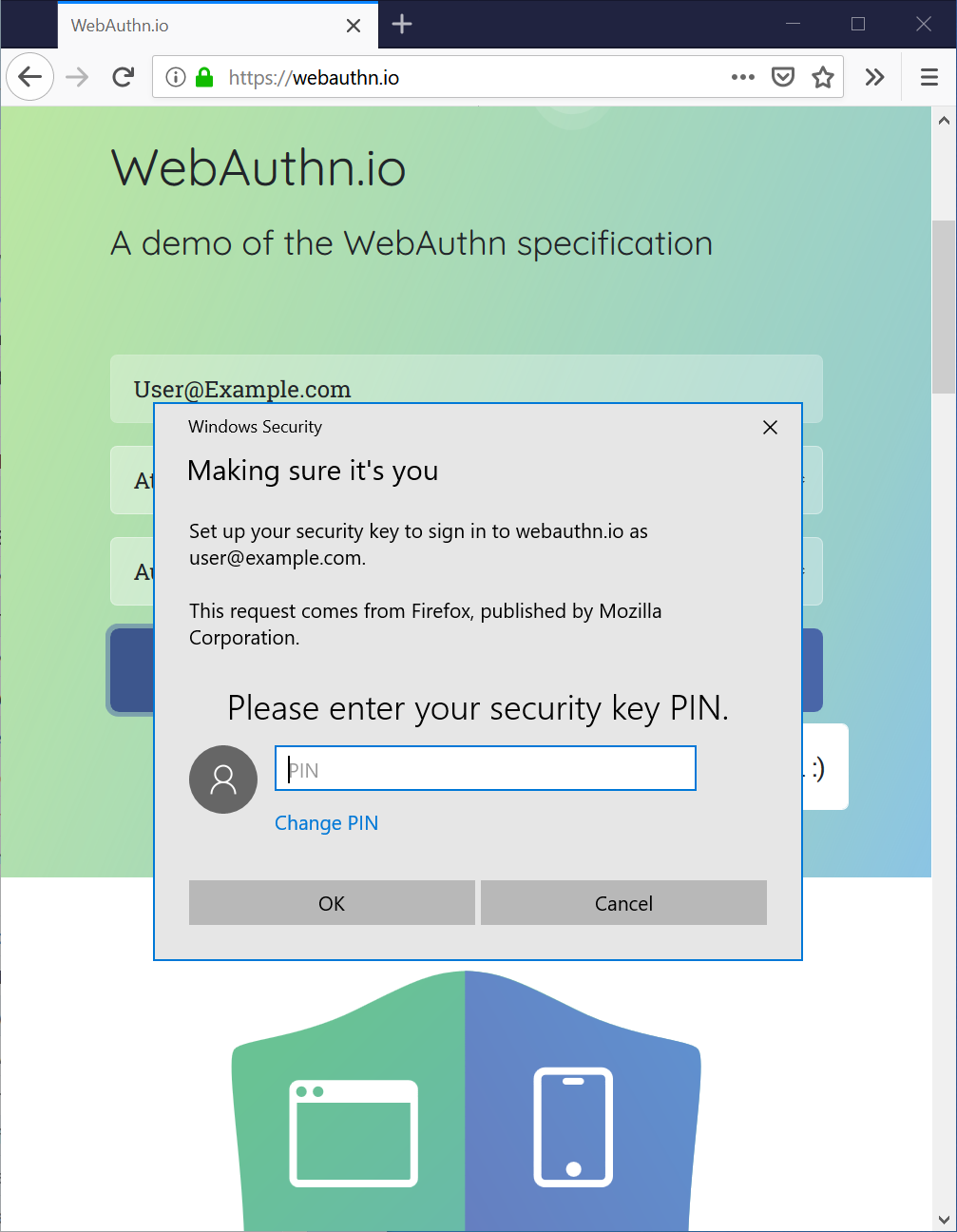
Firefox 66, being released this week, supports using the Windows Hello feature for Web Authentication on Windows 10, enabling a passwordless experience on the web that is hassle-free and more secure. Firefox has supported Web Authentication for all desktop platforms since version 60, but Windows 10 marks our first platform to support the new FIDO2 “passwordless” capabilities for Web Authentication.

A Windows 10 dialog box prompting for a Web Authentication credential

PIN Prompt on Windows 10 2019 April release

As of today, Firefox users on the Windows Insider Program’s fast ring can use any authentication mechanism supported by Windows for websites via Firefox. That includes face or fingerprint biometrics, and a wide range of external security keys via the CTAP2 protocol from FIDO2, as well as existing deployed CTAP1 FIDO U2F-style security keys. Try it out and give us feedback on your experience.

For the rest of Firefox users on Windows 10, the upcoming update this spring will enable this automatically.

Akshay Kumar from Microsoft’s Windows Security Team contributed this support to Firefox. We thank him for making this feature happen, and the Windows team for ensuring that all the Web Authentication features of Windows Hello were available to Firefox users.

For Firefox users running older versions of Windows, Web Authentication will continue to use our Rust-implemented CTAP1 protocol support for U2F-style USB security keys. We will continue work toward providing CTAP2/FIDO2 support on all of our other platforms, including older versions of Windows.

For Firefox ESR users, this Windows Hello support is currently planned for ESR 60.0.7, being released mid-May.

If you haven’t used Web Authentication yet, adoption by major websites is underway. You can try it out at a variety of demo sites: https://webauthn.org/, https://webauthn.io/, https://webauthn.me/https://webauthndemo.appspot.com/, or learn more about it on MDN.

If you want to try the Windows Hello support in Firefox 66 on Windows 10 before the April 2019 update is released, you can do so via the Windows Insider program. You’ll need to use the “fast” ring of updates.

The post Passwordless Web Authentication Support via Windows Hello appeared first on Mozilla Security Blog.

21 Mar 23:06

How did I not know about Settings Sync for keep...

How did I not know about Settings Sync for keeping the configuration of of VisualStudio Code on different machines in sync?

Thanks @holtbt for the info!

19 Mar 20:02

CC Search: A New Vision, Strategy & Roadmap for 2019

Mar 19, 2019
Icon

In a project that may well impact the world of open educational resources (OER), Creative Commons (CC) is engaged in developing a new search service, releasing a new roadmap for the project today. "The vision centers on reuse," writes Jane Park. " CC will prioritize and build for users who seek to not only discover free resources in the commons, but who seek to reuse these resources with greater ease and confidence." This means a change in emphasis on the content side. "CC will shift from its “quantity first” approach (front door to 1.4 billion works) to prioritizing content that is more relevant and engaging to creators."

Web: [Direct Link] [This Post]
19 Mar 19:37

Chasing the Sunset

by peter@rukavina.net (Peter Rukavina)

We flew Charlottetown-Montreal-Vancouver today; we didn’t leave Charlottetown until 4:00 p.m. and we’re in bed in Vancouver at 11:00 p.m. Such is the wonder of the rotating Earth.

We had but one airport security passage today, in Charlottetown, and it went swimmingly. And the rest of the trip was uneventful.

Upon arrival at YVR we went on a scavenger hunt for the official Dog Relief Area and found it cleverly disguised as a bunch of potted evergreens on a traffic island outside international arrivals. Ethan was unperturbed and had a five minute long pee.

We found our way to the SkyTrain, navigated to the Yaletown station, walked up the hill to Burrard. And are now ensconced inside The Burrard.

We’re exhausted but happy travelers, ready to take on the Pacific Northwest. After a good sleep.

19 Mar 19:36

Canadian video game exec Jade Raymond to lead Google’s Stadia game studio

by Jonathan Lamont
Jade Raymond

Google announced that Jade Raymond will head its Stadia Games and Entertainment studio at its GDC conference in San Francisco, California.

Raymond is a Canadian video game producer and executive. She’s also an industry veteran, having founded Ubisoft Toronto and Motive Studios, and has worked at Sony and EA in the past.

Raymond’s division at Stadia will work with big and small game developers, sharing key tools and technology to help improve games.

Additionally, Raymond will help in Google’s push to create its own games for Stadia.

The company says more than 100 studios already have dev kits for Stadia. On top of that, more than 1,000 creatives and engineers have already started building titles that will work with the service.

You can learn more about Stadia here.

The post Canadian video game exec Jade Raymond to lead Google’s Stadia game studio appeared first on MobileSyrup.

19 Mar 18:25

L16_02769 added as a favorite.

by Jeff Camphens
Jeff Camphens added this as a favorite.

L16_02769

19 Mar 18:25

What’s good ‘evidence-based’ practice for classrooms? We asked the teachers, here’s what they said

Nicole Mockler, Meghan Stacey, EduResearch Matters, Mar 19, 2019
Icon

This article doesn't go into a lot of detail but it does raise a core issue in our (or any!) profession: what counts as good evidence? "Too often, calls for ‘evidence-based practice’ in education ignore the evidence that really counts," write the authors. "Narrow definitions of evidence where it is linked to external testing are highly problematic." Looking at what teachers actually value as evidence in their practice, we see things like teachers' own classroom observations ranked at the top of the list and standardized test results (such as Australia's NAPLAN) at the bottom. So how do we support teachers with evidence? From where I sit, it seems to me that support helping teachers create their own assessments would best address the need. If teachers depend on their own observations, let's help make sure those observations are good ones. Via Aaron Davis.

Web: [Direct Link] [This Post]
19 Mar 18:24

Solving PEI's Internet Access Problem

by peter@rukavina.net (Peter Rukavina)

Exciting news from the provincial government: PEI Transformation From Canada’s Smallest Province To Canada’s Smartest Province:

From high-speed Internet access and full-motion videoconferencing, to remote curriculum delivery and collaborative multimedia software development, this new infrastructure will transform the province into an ideal information technology testbed. Partnerships are being pursued with networking hardware and software firms and content creators. More importantly, unlike broadband networks in other provinces and states, PEI’s will deliver top-speed connections into all parts of the province, not just a neighbourhood here and an industrial park there.

Oh, wait, that’s from 1997.

Here’s the 2019 version of the fantasy:

“This project will allow Prince Edward Island residents and businesses to better connect to the world, do business, and learn,” Premier Wade MacLauchlan said. “It will make our province a national leader in internet quality, and fulfill a promise we made to Islanders in 2017.”

Every government since 1997 has had its own take on addressing this issue; all have failed. I don’t question the motivations of those who’ve tried; I simply believe, with significant historical evidence to support me, that ubiquitous Internet infrastructure is not a problem the market economy has the skills to solve.

19 Mar 18:24

Today’s Firefox Aims to Reduce Your Online Annoyances

by Nick Nguyen

Almost a hundred years ago, John Maynard Keynes suggested that the industrial revolution would effectively end work for humans within a couple of generations, and our biggest challenge would be figuring what to do with that time. That definitely hasn’t happened, and we always seem to have lots to do, much of it online. When you’re on the web, you’re trying to get stuff done, and therefore online annoyances are just annoyances. Whether it’s autoplaying videos, page jumps or finding a topic within all your multiple tabs, Firefox can help. Today’s Firefox release minimizes those online inconveniences, and puts you back in control.

Download Firefox

Block autoplaying content by default

Ever open a new page and all of a sudden get bombarded with noise? Well, worry no more. Starting next week, we will be rolling out the peace that silence brings with our latest feature, block autoplay. Here’s how to use block autoplay:

  • Scenario #1 – For anyone who wants peace and quiet on the web:  Go to a site that plays videos or audio, it could be a news site or site known for hosting movies and television shows, the Block Autoplay feature will stop the audio and video from automatically playing. If you want to view the video, simply click on the play button to watch it.

There will be instances where there are some sites, like social media, that automatically mute the sound but will continue to play the video. In this case, the new Block Autoplay Feature will not stop the video from playing.

  • Scenario #2 – For the binge-watcher: If your weekend plans involve catching up on your favorite TV series, you’ll want to make it interruption-free. To play the videos continuously, hit play and all subsequent videos will play automatically, just as the site intended. This will apply to all streaming sites including Netflix, Hulu and YouTube. To continue to autoplay from the first video, you should add those sites to your permissions list.

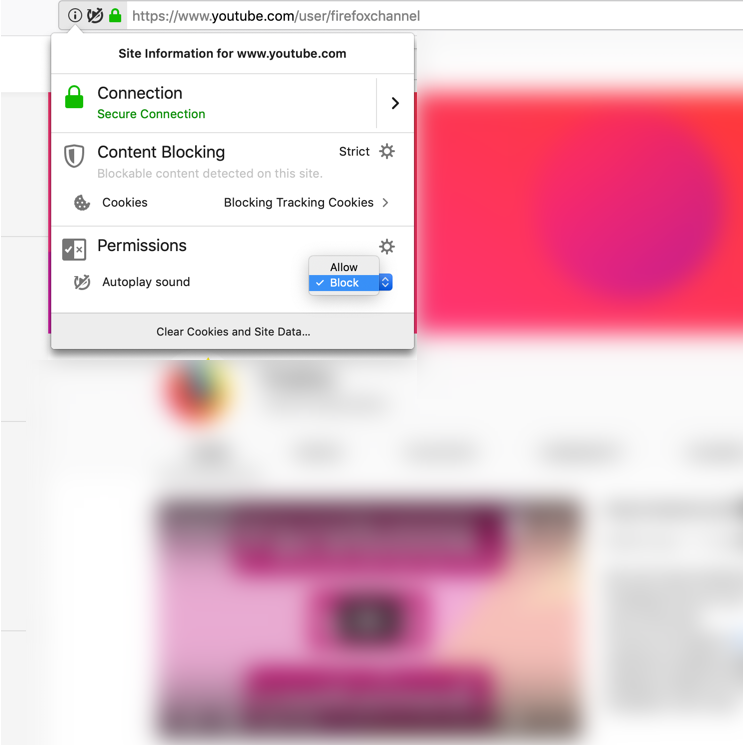
To enable autoplay on your favorite websites, add them to your permissions list by visiting the control center — which can be found by clicking the lowercase “i” with a circle in the address bar. From there go to Permissions and select “allow” in the drop down to automatically play media with sound.

From Permissions, you can choose to allow or block

No more annoying page jumps with smoother scrolling

Do you ever find yourself immersed in an online article, then all of a sudden an image or ad loads from the top of the page and you lose your place. Images or ads load slower than the written content on a page, and without scroll anchoring in place, you’re left bouncing around the page. Today’s release features scroll anchoring. Now, the page remembers where you are so that you aren’t interrupted by slow loading images or ads.

Search made easier and faster

Search is one of the most common activities that people do whenever they go online, so we are always looking for ways to streamline that experience. Today, we’re improving the search experience to make it faster, easier and more convenient by enabling:

  • Searching within Multiple Tabs – Did you know that if you enter a ‘%’ in your Awesome Bar, you can search the tabs on your computer? If you have more than one device on Firefox Sync, you can search the tabs on your other devices as well. Now you can search from the tab overflow menu, which appears when you have a large number of tabs open in a window. When this happens, you’ll see on the right side of the plus sign (where you typically open a new tab) a down arrow. This is called the tab overflow menu. Simply click on it to find the new box for searching your tabs.
  • Searching in Private Browsing – Sometimes you’d prefer your search history to not be saved, like those times when you’re planning a surprise party or gift. Now, when you open a new tab in Private Browsing, you’ll see a search bar with your default search engine – Google, Bing, Amazon.com, DuckDuckGo, eBay, Twitter or Wikipedia. You can set your default search engine when you go to Preferences, Search, then Default Search Engine.


Additional features in today’s Firefox release include:

  • Keeping you safe with easy-to-understand security warnings – Whenever you visit a site, it’s our job to make sure the site is safe. We review a security certificate, a proof of their identity, before letting you visit the site. If something isn’t right, you’ll get a security warning. We’ve updated these warnings to be simple and straightforward on why the site might not be safe.To read more about how we created these warnings, visit here.
  • Web Authentication support for Windows Hello –  For the security-minded early adopters, we’re providing biometric support for Web Authentication using Windows Hello on Windows 10. With the upcoming release for Windows 10, users will be able to sign in to compatible websites using fingerprint or facial recognition, a PIN, or a security key. To learn more, visit our Security blog.
  • Improved experience for extension users – Previously, extensions stored their settings in individual files (commonly referred to as a JSON file) which took some time to load a page. We made changes so that the extensions now store their settings in a Firefox database. This makes it faster to get you to the sites you want to visit.

For the complete list of what’s new or what we’ve changed, you can review today’s full release notes.

Check out and download the latest version of Firefox Quantum, available here.


Get the latest Firefox

Stop audio and video content from automatically playing, and say goodbye to jumpy pages, interrupted by ad and image loading, with smoother scrolling.

Firefox is made by Mozilla, the not-for-profit champions of a healthy internet.

Download Firefox

The post Today’s Firefox Aims to Reduce Your Online Annoyances appeared first on The Mozilla Blog.

19 Mar 18:24

The New 21.5 and 27-inch iMacs: The MacStories Overview

by John Voorhees

Today, Apple has updated its online store with improved iMacs. Although the iMac Pro models were updated in December 2017, the non-Pro version hadn’t seen an update since June 2017, the longest time ever between iMac revisions according to MacRumors. The new iMacs, which were announced via a press release, include new base models and custom-build options for the 21.5 and 27-inch models that will allow customers to configure an iMac that rivals the specs of the lower-end iMac Pro models.

The 21.5-Inch iMac

The base configuration of the 21.5-inch iMac now includes quad-core and 6-core models, which Apple says deliver up to 60 percent faster performance. The base model CPUs start with a 2.3GHz dual-core Intel Core i5 processor, a 3.6GHz quad-core Intel Core i3 that can be upgraded to a 3.2GHz 6-core Intel Core i7, and a 3.0GHz 6-core Intel Core i5 that can be updated to a 3.2GHz 6-core Intel Core i7 processor. All the of the processors except for the i3 model also feature Intel’s Turbo Boost technology that lets them run at faster speeds for limited periods of time.

The amount of memory, as well as storage and graphics configurations are the same on the base models but come with new options. The base configuration of each model includes 8GB of 2133MHz DDR4 memory and a 1TB 5400-rpm hard drive. Up to 16GB of RAM can be added to the 2.3GHz i5 iMac. The other 21.5-inch models can be upgraded to 16 or 32GB of memory. Only the inclusion of a 32GB option on the mid-tier model is new.

The 2.3GHz i5 model can be upgraded with a 1TB Fusion Drive or a 256GB SSD. The mid-tier model has the same option along with a 512GB or 1TB SSD and the highest-tier option has 256GB, 512GB, and 1TB SSD options. Base model graphics options remain the same, though the 3.0GHz i5 model’s graphics can be swapped for a Radeon Pro Vega 20 card with 4GB of VRAM, which is new.

The 27-inch iMac

The new options for the 21.5-inch iMac are a welcome refresh of the model, but Apple reserved the bigger update for the 27-inch iMac. The new 27-inch iMac features new base CPU configurations. Gone are the quad-core options, replaced with 6-core CPUs across the lineup.

The entry-level 27-inch model now starts with 3.0GHz, 3.1 GHz, and 3.7GHz 6-core i5 processor options. The 3.1GHz and 3.7GHz models can be upgraded to a 3.6GHz 8-core i9 CPU. Like the 21.5-inch model, the i9 processors also feature Intel’s Turbo Boost technology.

Memory, storage, and graphics have been updated too. The options for memory start at 8GB of 2666MHz DDR4 memory that is user accessible. All three models can be upgraded to 16 or 32GB of memory, with the 3.1GHz and 3.7GHz models having a 64GB option too. Storage options include a 1TB Fusion Drive for the 3.0GHz and 3.1GHz models and a 2TB Fusion Drive in the 3.7GHz model. Those are upgradable to a 2TB Fusion Drive, or 256GB, 512GB, or 1TB SSDs in the low and mid-tier models. The highest-tier 27-inch iMac can be upgraded to a 3TB Fusion Drive or 512GB, 1TB, or 2TB SSD.

Before today’s update, the 27-inch iMac came with a Radeon Pro 570 graphics card with 4GB of VRAM, a Radeon Pro 575 with 4GB of VRAM, or a Radeon Pro 580 with 8GB of VRAM. Today refresh adds the option of a Radeon Pro Vega 48 card with 8GB of VRAM to the 3.7GHz iMac model.

Pricing

The 21.5-inch iMac starts at $1099 for the 2.3GHz model. The 3.6GHz and 3.0 GHz models are $1299 and $1499 respectively. The 27-inch iMac starts at $1799 for the 3.0GHz model with the 3.1GHz model coming in at $1999 and the 3.7GHz at $2299. Fully-loaded with all the hardware options, the top-end 27-inch iMac can be configured to cost $5249.


After nearly two years without an update, the existing iMacs were in need of a refresh. The new models deliver with excellent new options for the 21.5-inch line and an impressive revamp of the entire 27-inch line that puts the top-end iMac close to the specs of a base-model iMac Pro.

I wouldn’t have been surprised if Apple had held a special event for the iPads announced yesterday and the iMacs announced today. As Ryan noted in our overview of the iPads, hardware releases this close to the March 25th event suggests that there will be no hardware released next week at all, which today’s additional hardware announcement reinforces.


Support MacStories Directly

Club MacStories offers exclusive access to extra MacStories content, delivered every week; it's also a way to support us directly.

Club MacStories will help you discover the best apps for your devices and get the most out of your iPhone, iPad, and Mac. Plus, it's made in Italy.

Join Now
19 Mar 18:23

Instagram Announces In-App Checkout Feature

by John Voorhees

Instagram has announced a new in-app checkout feature that will allow consumers to purchase items from brands they follow from within the app.

In a press release, Instagram explains that when you tap on a product from a participating brand, you’ll see a new ‘Checkout on Instagram’ button that displays options like colors and size when tapped. After any necessary selections are made, the app advances to a payment view where you enter billing and shipping information.

You’ll only need to enter billing and shipping information once. Instagram says it will store that information securely to make future checkouts faster. The new feature also tracks the progress of shipments from within the app itself providing alerts about status changes.

The advantage to Instagram and retailers is obvious. It will be easier for brands to make a sale if users don’t have to leave the Instagram app, which, of course, is in Instagram’s interest too. Currently, Instagram lists 23 brand-partners including companies like Nike, Prada, Zara, Michael Kors, H&M, Adidas, Burberry, Dior, and Warby Parker.

Instagram says the checkout feature is currently in closed beta and limited to the US Instagram users. The company hasn’t provided a launch date or indicated when it might be available in more countries.


Support MacStories Directly

Club MacStories offers exclusive access to extra MacStories content, delivered every week; it's also a way to support us directly.

Club MacStories will help you discover the best apps for your devices and get the most out of your iPhone, iPad, and Mac. Plus, it's made in Italy.

Join Now
19 Mar 18:23

Essentials for Eroica California

by noreply@blogger.com (VeloOrange)
by Igor

This year's Eroica CA is April 6th and 7th. Last year's ride and show was a ton of fun, and we're looking forward to another great event. If you're getting your bike buttoned up and more comfortable, we have what you need to get your ride rolling!
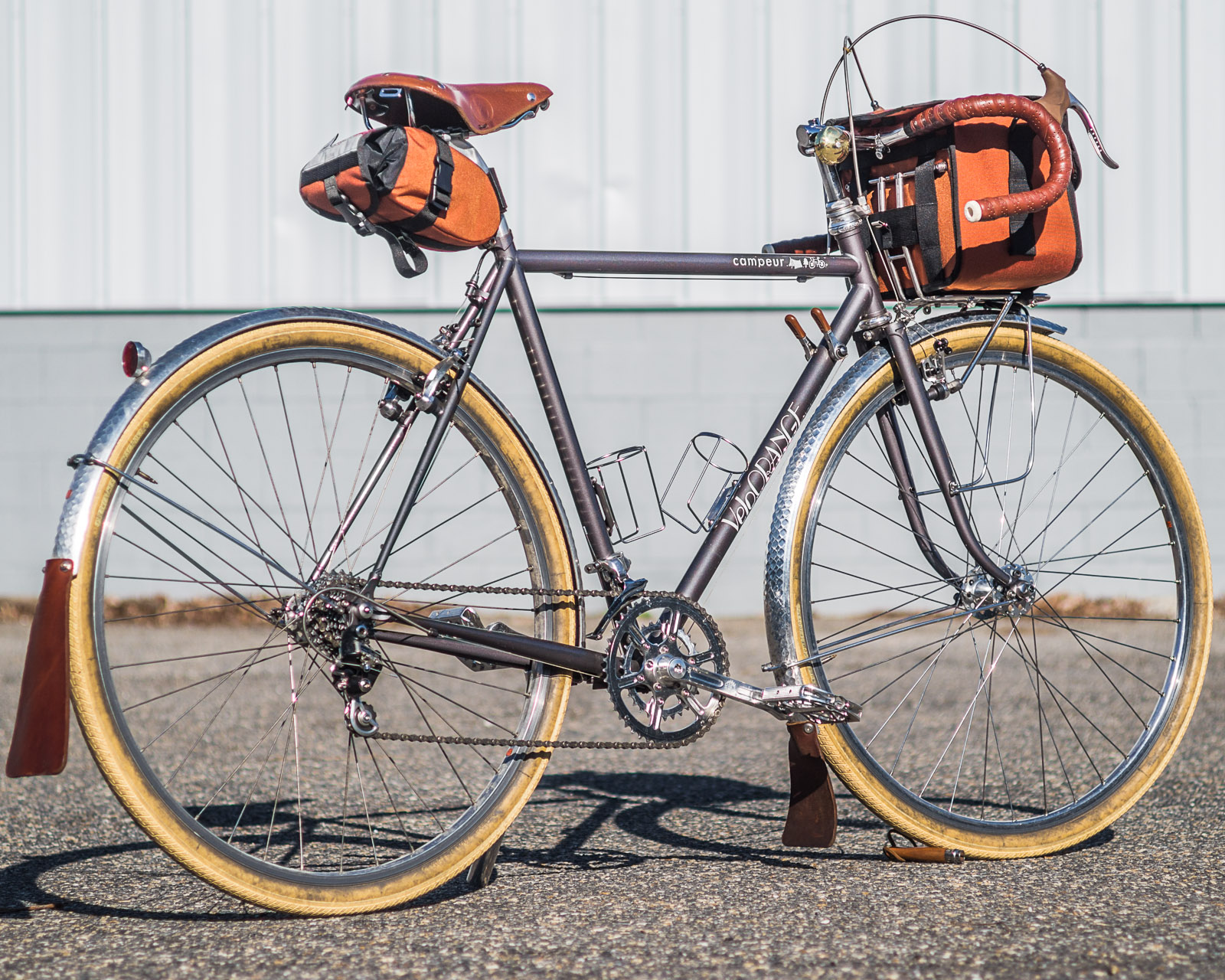
Here's my Campeur that I'm going to riding this year for the new course. While it isn't a vintage road racing bike, it is allowed because it is vintage-inspired. Every component complies with the rules, fits right in along with the peloton, but stands out just enough to raise the interest of fellow riders.


Some of these climbs are pretty darn steep and sandy and you'll spend more time pushing your bike up the hill instead of conquering it. I get it, your bike looks really cool when it is fitted with a 53/43 crankset and 11-21 corncob cluster. But I guarantee you're going to feel like a million bucks when you ride up the hill past your buddies who are waving their fists into the air.

Depending on your aesthetic preferences, I'd recommend either our 50.4 crankset with 46/30 chainrings, or our Drillium with 48/34 chainrings. Either one will make your ride a lot more comfortable without losing anything on the top end.


Good tires are vital for mixed terrain rides like these. If your ride can fit them, the Fairweather For Cruise, 700x38 tires are a great choice for those loose climbs and washboard, gravel roads. There are also some narrower 32mm and 28mm options with slight, herringbone tread.


This may sound like sacrilege, but I don't ride with foot retention. My feet like the freedom of being able to move around and the Sabot Pedals makes this a reality. They're chunky, spinny, shiny, and toe-clip and strap compatible. What else could you want?


One of the cornerstones of bike fit is a proper stem position. The Grand Cru Quill Stem uses a -17 degree angle for a classic number 7 look. It also has a bell mount! For a more upright position, check out the VO Quill. It has a +17 degree rise and will make your back happy.


Last year I saw lots of ways to carry gear. Of course there's the classic "stuff in jersey pockets", but I also saw tube sock, the Sunday Funnies, and sewed up t-shirt sleeve. For a more, ehm, "put-together" look, our Day Tripper Saddle Bag can take everything you need for a day-trip into the country. Sound familiar?


See you at Eroica CA!
19 Mar 18:21

Now is a good time to buy a new iMac

by Volker Weber

Apple has announced new iMacs today, with upgraded CPUs and graphics card. This has been a long time coming. Right after new machines come out is usually the best time to get one.

What I find disappointing is that Apple still uses spinning hard disks instead of SSDs in their standard configuration.

iMacs today, iPads yesterday. Apple is clearing the pipeline to not dilute the message they want to convey next week. Remember, Apple never announces a mixed bag of news on the same day.

19 Mar 18:21

Open source, cognitive surplus, and precarity

(edit 28 May 2019: fix some awkward or unclear sentences.)

Someone once remarked (paraphrased) that as long as there has been a scene, there have been people complaining that it is no longer the true scene. (citation needed)

Of course the open source scene is changing, but how much of that is the unavoidable transformation that a healthy scene goes through, and how much is fundamental?

The Free Software movement as we know it started by capturing the tremendous cognitive surplus that was just there for the taking from university students and from employees of conventional, slothful corporations. Back in the 1980s and early 1990s, barriers to cooperation were transactional: licensing and communications technologies. Patches on a mailing list seem like a high-overhead collaboration method today, but by the standards of the time, diff(1), patch(1) and Free command-line tools were transformational. And of course the classic free software licenses are practically zero-overhead for participants with uncomplicated sharing or reciprocity goals.

So, all that cognitive surplus was just sitting there between classes or TPS Reports or whatever, and the software freedom scene was set up to capture it. Before long, Tim O'Reilly and friends branded it as a software business trend called Open Source, and the modern software business emerged.

Sounds great—why isn't it continuing to work like that? Two reasons.

Less cognitive surplus in the world

  • The kind of university experiences that include substantial cognitive surpluses are less widely available, because of increases in the cost of higher education and how those costs are allocated.

  • The work environment is better at capturing cognitive surplus.

Precarity is a thing. Compared to the early days of open source, the rent is too damn high.

Internet adoption by people with less "free" time

There's a whole complex privilege thread here, but the main point is that open source as we know it began when a lot of people who had a lot of free time got on the Internet. They (fine, fine, we) had the opportunity to participate in open source and other cognitive-surplus-capturing activities (such as MMORGs). Many new people joining are not coming in with the same economic and time advantages, even if they have access to the same or better creative and collaborative tools.

More competition to capture available cognitive surplus

Open source is no longer the only practical, low-overhead way to do collaborative projects. Now people can do

  • crowdfunding

  • gig sites

  • native app stores (mobile, Steam...)

  • software as a service

It's no longer a choice between low-overhead, low-incentivization (open source) or accepting high overhead if you want to get paid.

What next?

Open source advantages in transaction costs are still there. But people looking for open source contributors do have to realize that we're going to have to keep increasing the number of people who consider open source as a possible valuable use of their time (remuneration issues are blockers) or see open source lose contributors as we get stuck competing with more outlets for less already-unmonetized time and attention.

Bonus links

Someone's Going to Get Killed Charging Those E-Scooters

The Cloud and Open Source Powder Keg

7 Secondary Diseases that Kill Innovation: The Departments of No

Understanding LF's New “Community Bridge”

A belief in meritocracy is not only false: it’s bad for you

The Federation Fallacy

Spotify and Amazon ‘sue songwriters’ with appeal against 44% royalty rise in the United States

Fantasy’s widow: The fight over the legacy of Dungeons & Dragons

19 Mar 18:21

Brexiteers are subverting language to obscure the truth, Trump-style | Bobby McDonagh | Opinion

mkalus shared this story from The Guardian.

“A lie can travel halfway around the world while the truth is still putting on its shoes,” Mark Twain is said to have warned. In this era of social media, let’s make that all the way round the world while the truth is still looking for its socks.

Every day, including in the present Brexit chaos, we witness a phenomenon that subverts the truth yet remains nameless. Since naming things can sometimes help, I suggest we call the phenomenon a “thought incinerator”. The phrase may sound a bit Orwellian but then sometimes it feels like we are living in his 1984. Let me offer a definition and then give you an example. My definition of a thought incinerator is a phrase that public figures use to dismiss – out of hand and without any need for reflection – ideas they don’t like. The most obvious example I can give you is the phrase “fake news”.

The reality of fake news, that is the deliberate dissemination of falsehood to manipulate public opinion, is of course one of the greatest threats to democracy. However, President Trump has hijacked the phrase to give it an entirely different meaning. When he proclaims something to be fake news, it doesn’t matter in the slightest to him whether the information he refers to is true or false. In fact the more true it is the more likely he is to call it fake. He has even been known to label his own statements fake news if they become inconvenient for him. For Trump the phrase fake news is simply a convenient verbal rubbish bin for arguments he wants to dismiss. In short, fake news is the perfect thought incinerator.

There are many other ways of attacking the truth. Some are brutal, such as the killing or intimidation of journalists. Then there are personalised attacks and there is barefaced lying. A thought incinerator is more subtle. It is a simple phrase that serves as a rubbish bin for uncomfortable ideas. No further action or arguments are required in response to rational argument. Just pop it on the truth dump.

Some of the most egregious thought incinerators have played a significant part in driving Brexit forward. The concept of “the elite”, for example, has been imported into the Brexit debate as a handy phrase to dismiss the arguments of remainers. It avoids the need to come up with competing arguments or even to address the issues raised. It doesn’t matter that, when used at European level, the term elite usually refers primarily to the 27 democratically elected governments; or that, when used at domestic level in Britain, it embraces huge numbers of ordinary people as well as parliament and the courts. Criticism of elites coming from mouths that started out with silver spoons in them is beyond parody.

Project Fear was a particularly wonderful invention. Hats off to the leave campaign for dreaming it up. Remainers had profound concerns and excellent arguments. The fears were real; a few of the arguments may have been exaggerated. However, the Brexiteers had no need to engage with the damage that leaving the EU would do to the UK. The phrase Project Fear was the perfect incinerator for all the best political judgment and economic advice. Why listen to the most respected British organisations or experts when a simple verbal rubbish dump was to hand?

Many other phrases have been invented into which the Brexit facts can conveniently be disappeared. For example, the term “Brussels bureaucrats”, a thought incinerator that has been around for a long time, helped to bring the UK to this pretty pass. There are, of course, bureaucrats in Brussels, albeit on a more modest scale than at national level. But the term has consistently been deployed to obfuscate reality. It doesn’t matter that most European decisions are taken by democratically elected governments and a directly elected parliament. Or that the UK has been particularly successful in shaping those decisions. There is no need for analysis. No need to understand the system. Just take everything the EU does and chuck it in the most convenient thought incinerator available.

During the recent febrile weeks in London, Brussels bureaucracy has been superseded by “Brussels bullying” and “Brussels blackmail”, two fictional creations invented with a view to dismissing the reasonable compromise negotiated by Theresa May.

The fiction that the EU wants to “punish Britain” conceals both the EU’s right to defend its own interests and the harm the UK is inflicting on itself.

When Macbeth asks the weird sisters what they are doing, one of them replies “a deed without a name”. Their macabre activity is all the more threatening because it has no name. As Trump and Nigel Farage stir their populist cauldrons, as they mix truth and our children’s futures in with their newts and frogs, let us at least give what they are up to a name.

• Bobby McDonagh was Ireland’s ambassador to the UK from 2009 to 2013

19 Mar 18:20

Colors of Tintin

by Nathan Yau

Marian Eerens charted the colors of each Adventures of Tintin book cover. The only thing missing is the actual covers on the mouseover.

It’s a straightforward thing, but I find these sort of abstract color charts calming for whatever reason. See also the colors of: campaign logos, LEGO kits, Game of Thrones episodes, Mister Rogers’ cardigans, Western films, Avengers comic book covers, science fiction book covers, and more.

Tags: color, Tintin

19 Mar 18:20

DC International & the forgotten audio cassette format war

by Techmoan
mkalus shared this story from Techmoan's YouTube Videos.

From: Techmoan
Duration: 22:54

When is a cassette not a Cassette? When it's a DC International Cassette. The odd tale of a Philips' project that turned against them.

The single spool (Einloch) cassette prototype from 1962 mentioned in the video can be seen here:
https://philips-cassetten-recorder.beepworld.de

The Comedy Outro Video can be viewed on its own here https://youtu.be/NtmtFkxOnrg

---------------SUBSCRIBE------------------
http://www.youtube.com/user/Techmoan?sub_confirmation=1

-------------Merchandise-----------------
https://teespring.com/stores/techmoan-merch

-------------SUPPORT---------------
This channel can be supported through Patreon
https://www.patreon.com/techmoan
****PATRONS USUALLY HAVE EARLY ACCESS TO VIDEOS****

----------Outro Music-----------
Over Time - Vibe Tracks https://youtu.be/VSSswVZSgJw

------Outro Sound Effect------
ThatSFXGuy - https://youtu.be/5M3-ZV5-QDM

19 Mar 18:19

Apple announces 21.5-inch and 27-inch iMac ‘Coffee Lake’ processor hardware refresh

by Patrick O'Rourke
iMac

Apple’s iPad Air and iPad Mini aren’t the only older Apple products getting a hardware refresh.

The tech giant has announced that both its 21.5-inch and 27-inch iMac models are set to get processor, graphics card and RAM upgrades.

The 21.5-inch iMac now features Intel’s quad-core and 6-core ‘Coffee Lake’ 8th-generation processor, along with the option for Radeon Pro Vega graphics card. This results in a 60 percent performance boost over the 7th-generation ‘Kaby Lake’ Intel processor featured in its predecessor. Graphics card wise, Apple says the Radeon Vega is an 80 percent performance boost over the Radeon Pro 555.

The 27-inch iMac, on the other hand, is also getting a spec bump up to 6-core and 8-core Intel 9th-generation processors, resulting in a performance boost of 2.4 times over the current 8th-generation processors included in its predecessor. Regarding graphics cards, the Radeon Pro Vega, which includes 8GB of high bandwidth memory, is also available in the 27-inch iMac. Apple says this new graphics card results in a 50 percent performance improvement over the Radeon Pro 580.

Across both the 21.5-inch and 27-inch iMac all RAM has been upgraded to DDR4 memory.

Interestingly, the price of all configurations of the 21.5-inch and 27-inch iMac remain almost the same across the board despite the hardware update. As a result, the 21.5-inch iMac still starts at $1,699 CAD, with the 27-inch iMac coming in at $2,399 CAD

Also, to be clear, these hardware upgrades only apply to Apple’s retina iMacs. This means that the base level $1,099 iMac isn’t getting these hardware improvements. Apple is also still selling the ‘work station’ level iMac Pro.

Concerning other specs and the overall build of the 21.5-inch and 27-inch iMac, everything else remains identical to the Kaby Lake version of both desktops. Though this iMac hardware upgrade is a little overdue at this point, it’s nice to see Apple paying attention to the iMac for a change.

Both the 21.5-inch and 27-inch iMac are available to order now on Apple’s Canadian website as well as at Apple Stores.

The post Apple announces 21.5-inch and 27-inch iMac ‘Coffee Lake’ processor hardware refresh appeared first on MobileSyrup.

19 Mar 18:19

New report corroborates Pixel 3a and Pixel 3a XL names

by Igor Bonifacic

Late last week, XDA Developers published a report in which it said snippets of code in the first Android Q developer preview suggest Google plans to market its upcoming pair mid-range smartphones as the “Pixel 3a” and “Pixel 3a XL.”

Now, a new report from 9to5Google corroborates that information. Citing a source “familiar with the phones,” 9to5Google‘s Stephen Hall writes that Pixel 3a and Pixel 3a XL are the go-to-market names for Google’s upcoming pair of smartphones.

Additionally, Hall reports that his source says the renders OnLeaks shared are an accurate representation of what the phones. Hall says Google plans to release the phones in at least two colours: ‘Clearly White’ and ‘Just Black.’ Google could also release the phones in a third, as of yet unknown, colour.

What’s more, it looks like the new Pixels will include a variety of high-end features it seemed Google likely planned to cut to make the devices more affordable.

Hall reports both devices will feature Google’s Active Edge technology, which allows users to squeeze the phone to launch Assistant, as well as the company’s Titan M security chip and eSIM support. Moreover, Halls says the phones will feature 64GB of internal storage, not 32GB as some earlier reports had suggested.

In a subsequent update, the report adds that the Pixel 3a will feature a 5.6-inch OLED display with 2220 x 1080 pixel resolution, a Snapdragon 670 chipset, 4GB of RAM and a 3,000mAh battery.

By all accounts, it looks like Google will launch the Pixel 3a and Pixel 3a XL soon, so expect to learn more about the two phones, including whether they’re coming to Canada, soon.

Source: 9to5Google

The post New report corroborates Pixel 3a and Pixel 3a XL names appeared first on MobileSyrup.

19 Mar 18:19

Tesla delays price increase due to high volume order

by Ian Hardy

Tesla has announced that it is extending its promotion for customers interested in securing a discount on the company’s electric vehicles.

On Twitter, Telsa announced: “Due to unusually high volume, Tesla was unable to process all orders by midnight on Monday, so the slight price rise on vehicles is postponed to midnight Wednesday.”

The company previously stated this price increase will not impact the Model 3’s base price, which will continue to cost $47,600 CAD. However, Tesla is increasing the prices of the more expensive Model 3 variants, as well as the Model S and Model X by three percent.

The newly revealed Model Y won’t see a price change. It’s currently available to order with an expected delivery timeframe of ‘early 2021.’

There is no indication from Tesla on how many vehicles were purchased that caused the ‘unusually high volume.’ The company is expected to deliver 400,000 by the end of this year.

Related: This is the Tesla Model Y

The post Tesla delays price increase due to high volume order appeared first on MobileSyrup.

19 Mar 18:19

iPhone prototype board is a reminder Apple fit an entire computer in a phone

by Patrick O'Rourke

Though you’d think the majority of the iPhone’s lengthy creation process would have been uncovered by now, that isn’t the case.

The Verge recently got its hands on an original iPhone prototype board used for what is commonly referred to as an ‘engineering validation test’ (EVT). The ‘M68’ board dates back to 2006-2007, the time period when the first iPhone was in production and then eventually released.

On the board itself, the iPhone’s parts are laid out in a way that’s very similar to a standard PC motherboard, allowing faulty components to be replaced or swapped out. The red M68 board also features a variety of connectors for testing the prototype iPhone’s various features.

According to The Verge, the sample iPhone board includes a display, giving the engineer using it an idea of what the final version of the phone will look like. That said, there were also reportedly other versions of the EVT board that didn’t include a display in order to better keep the project under wraps.

The EVT board is a fascinating look at one of the most influential tech devices to release in the last two decades. It’s also a reminder that Apple managed to squeeze an entire computer in a device the size of a phone. This is the first time a prototype iPhone board has been photographed publically.

The board made it into The Verge’s hands courtesy of an anonymous source that goes by ‘Red M Sixity’ (@theredm68).

For more information on the M68 board as well as a gallery of pictures, check out The Verge’s story about the historic hardware.

Image credit: The Verge, Twitter (@theredm68)

Source: The Verge Via: 9to5Mac

The post iPhone prototype board is a reminder Apple fit an entire computer in a phone appeared first on MobileSyrup.

19 Mar 18:19

Here’s what’s coming to Netflix Canada in April 2019

by Dean Daley
Netflix

In April, Netflix Canada is set to get Chilling Adventures of Sabrina: part 2, Fifty Shades Darker, Split and the Ingress: The Animation based off the popular Niantic game Ingress. 

April 1st

  • Ultraman (Netflix Anime)
  • Annie
  • Boyz n the Hood
  • Fifty Shades Darker
  • Les Misérables (1998) 
  • Memoirs of a Geisha
  • Monty Python Best Bits (mostly): season 1
  • Monty Python: The Meaning of Live
  • Resident Evil Extinction
  • Snatched
  • Split

April 2nd

  • Kevin Hart: Irresponsible (Netflix Original)
  • Sleepless

April 3rd

  • Billy Elliot
  • Hulk
  • Suzzanna: Buried Alive (Netflix Film) 

April 4th

  • Pope Francis: A Man of His Word
  • Star: season 3

April 5th

  • Chilling Adventures of Sabrina: part 2 (Netflix Original) 
  • Our Planet (Netflix Original) 
  • Persona: Collection (Netflix Original)
  • Roman Empire Callgula: The Mad Emperor (Netflix Original)
  • Spirit Riding Free: season 8 (Netflix Original)
  • Tijuana (Netflix Original)
  • Unicorn Store (Netflix Original)

April 8th

  • The Oath

April 9th

  • Trolls: The Beat Goes Oni: season 6

April 10th

  • You vs Wild (Netflix Original)

April 11th

  • Black Summer (Netflix Original)

April 12th

  • A Land Imagine (Netflix Film)
  • Colette
  • Huge in France (Netflix Original)
  • Mighty Little Bheem (Netflix Original)
  • The Perfect Date (Netflix Film)
  • The Silence (Netflix Film) 
  • Special (Netflix Original)
  • What They Had
  • Who Would You Take to a Deserted Island (Netflix Film)

April 15th

  • Happy Feet Two
  • Luis Miguel – The Series: season 1
  • No Good Nick (Netflix Original)

April 16th

  • Super Monsters Furever Friends (Netflix Original)

April 18th

April 19th

  • A Fortunate Man (Netflix Film)
  • Brene Brown: The Call to Courage (Netflix Original)
  • Cuckoo: season 5 (Netflix Original)
  • Music Teacher (Netflix Film)
  • Rilakkuma and Kaoru (Netflix Anime)
  • Someone Great (Netflix Film)

420

  • Grass is Greener
  • Weed the People

April 22nd

  • Pinky Malinky: part 2 (Netflix Original)
  • Selection Day – New Episodes – (Netflix Original)

April 23rd

  • I Think You Should Leave with Tim Robinson (Netflix Original)

April 24th

  • The Protector: season 2 (Netflix Original)
  • ReMastered: Devil at the Crossroads (Netflix Original)
  • She-Ra and the Princesses of Power: season 2 (Netflix Original)
  • Street Food (Netflix Original)
  • Yankee (Netflix Original)

April 28th

(My Birthday)

  • Little Woman (1994)

April 29th

  • Burning
  • Wonder Woman

April 30th

  • Anthony Jeselnik: The Fire in the Maternity Ward (Netflix Original)
  • Baki: part 2 (Netflix Anime) 
  • Ingress: The Animation (Netflix Anime)

Chambers (Netflix Original) is also coming in April, however, the date is yet to be announced.

What’s Leaving Netflix

  • Downtown Abbey: series 1-6 ( 04/01/2019)
  • The Gift (04/01/19)
  • Dawn of the Dead (04/03/19)
  • Star Wars: The Clone Wars: season 1-5 (04/07/19)
  • Star Wars: The Clone Wars: The Lost Missions (o4/07/19)
  • Big Eyes (04/24/19)
  • Captain America: The Winter Soldier (04/24/19)

The post Here’s what’s coming to Netflix Canada in April 2019 appeared first on MobileSyrup.

19 Mar 18:19

Google’s Kitchener-Waterloo, Ontario team helped create Stadia’s controller

by Andrew Mohan

Google has announced a specially-made video game controller along with Stadia, its gaming streaming service, during a press conference at GDC 2019. 

This controller can be used when streaming a video game to your preferred device, whether it’s a smartphone, PC or TV with built-in Chromecast functionality.

Google Canada’s Kitchener-Waterloo, Ontario office also contributed to the development of the Stadia controller and streaming service.

According to Google Canada, the Ontario-based team worked on the software for the controller and the Stadia experience for developers and publishers.

The Stadia controller connects via Wi-Fi directly to the game through Google’s Stadia data centre.

The Stadia controller layout is similar to the PlayStation’s DualShock 4, which features two joysticks at the bottom, d-pad on the left side, buttons on the right side and shoulder pads on the front.

However, there are two key buttons located in the middle of the gamepad specifically designed with Google’s gaming platform in mind.

The left button activates Google Assistant, which lets the user ask questions using the controller’s built-in microphone regarding the game they are playing. What is fascinating is that players are able to ask in-game questions answered by the game’s developers, according to Google.

The right button is the controller’s sharing button, which allows players to record footage, upload and livestream it directly to YouTube.

Update 19/03/2019 4:55pm ET: Article was updated with information regarding the involvement of Google’s Kitchener-Waterloo office in the creation of the Stadia controller and platform.

The post Google’s Kitchener-Waterloo, Ontario team helped create Stadia’s controller appeared first on MobileSyrup.

19 Mar 14:40

We've Been House Hunting Lately....

by Alison Mazurek
The kids in their small shared bedroom standing beside their wall bunk beds with their library carrying up the wall.

The kids in their small shared bedroom standing beside their wall bunk beds with their library carrying up the wall.

So we’ve been house hunting a bit lately. And it’s got me thinking about EVERYTHING. Oh and I should clarify, by house I mean 2 bedroom apartment hunting. And by hunting I mean casually looking and peeking in open houses to get an idea of what’s out there. After tossing around a bunch of ideas we are re-committed to staying in Vancouver and ideally in our neighbourhood (Mount Pleasant) but willing to go further east or west and further south. I love hearing about other people’s needs/wants when it comes to their home so I thought it would be fun to share ours here with the disclaimer that these are still all ideas and we may change our mind. We also may stay in this apartment for a few more years but thought our thought process for why and why not to move might be interesting to share. I know for me, when others breakdown why they love or don’t love their home and what they are missing, it can help highlight things I love or don’t love about my home or ways I might be taking things for granted.

I should also clarify that we are very comfortable in our place at the moment. We are at this sweet spot where the kids are sharing the bedroom and getting along (for the most part). But we are looking towards the next couple of years where it might start getting tight and privacy becomes more crucial.

Our Next Small Space?

I want to share our logic or philosophy for our next place as it may be a bit unexpected or strange to some. We aren’t looking for our forever home, we are looking for the next 5 years or so. We see each home as a stepping stone to meet our minimum needs at that time. I feel that conventional wisdom would say to find your forever home as soon as you become pregnant with your first baby. For us and the the expensive city we choose to live in… finding and owning our forever home isn’t a realistic option for us. Instead we are prioritizing other values over the traditional freestanding home with a backyard. We have already been able to stay in a one bedroom for much longer than any of us expected which helped us pay off more of our mortgage, travel often and find this amazing small space community ;). So for our next move we are looking for a 2 bedroom that checks off a few more boxes than our current place does. We hope to find a 2 bedroom so that eventually we could give each kid their own bedroom and we could still have our wall bed in the living room. We are also hoping for a little more room separation than 600 square feet currently offers. There’s so much we love about our current apartment but we think there will come a time when it doesn’t fulfill our growing family’s needs.

Here are the top loves of our current apartment:

High Ceilings
Lots of Natural Light
Open Floorplan
Ground Level Access
Small Green Space and Patio
Entry Way
Walkable Neighbourhood

What we don’t love:

Busy Street Corner
One Bedroom
Kitchen in the middle of the living space

Needs for our next place:

2nd bedroom
Lots of Natural Light
Wall space for wall bed
Quiet Street
Walkable City Neighbourhood

Wants for our next place:

High Ceilings
Outdoor Green Space
2nd bathroom/powder room
Close to parks

After sharing all this here we may instead decide to stay for 5 more years! Or we might move in a couple months. Regardless it all has me thinking about my love of small spaces and how much of my identity as a person and a mother is wrapped up in it but I think that is for another post, on another day. Thanks for letting me share! Would love to hear what you are looking for in your next place!