Shared posts

30 Mar 22:56

Matthew Panzarino Explains How the Apple Card Will Work

by John Voorhees

The Apple Card has been the subject of a lot of attention and speculation since it was announced at Monday’s Apple event. The US-only card won’t be out until this summer, but Matthew Panzarino, TechCrunch’s Editor-in-Chief, has details on exactly how the card will work that weren’t covered during the keynote.

Panzarino sums up the card’s benefits nicely:

Overall the Apple Card has some relatively unique and interesting takes on data transparency for users, who are getting what appears to be an information rich but easy to interpret interface that rivals the best apps (like the AMEX app) out there for consumer cards. It’s also got a solid set of security features that are missing only a couple of small improvements like per-merchant or per-transaction numbers that would make them the best offering in the industry.

The security and financial tracking the card will enable is attractive and the cash benefits are competitive, but there are limitations that may be an issue for some potential customers. For instance, the Apple Card is a single-user card, which means multiple family members cannot use the same account.

Panzarino’s piece clears up misinformation that has spread since the keynote and uncovers other tidbits that make it easier to compare the new card side-by-side with competing offerings. If what you’ve heard about the Apple Card interests you, Panzarino’s article is an excellent one-stop destination to learn more.

→ Source: techcrunch.com

30 Mar 22:56

Twitter Favorites: [shawnmicallef] The JWR tapes are of a much higher quality than the Nixon tapes. We have come a long way.

Bercow for America @shawnmicallef
The JWR tapes are of a much higher quality than the Nixon tapes. We have come a long way.
30 Mar 22:55

Empire Stores [Flickr]

by vanderwal

vanderwal posted a photo:

Empire Stores

I'm at Empire Stores! 4sq.com/Rlsz6n

30 Mar 22:55

Brand shedding

by russell davies

I learned about bike-shedding at GDS. I've told a few organisations about it since, I think it's been useful.

I wrote about it for the Marketing Society:

"I was once in a meeting about a software project. It was like meetings I’d been in my whole life - aimless, drifting, pointless. Then suddenly one of the developers said “Hang on we’re bike-shedding”. “Ah yes” said another “we are”. The meeting immediately shifted gear. Decisions were quickly taken or dismissed and we all got back to work. I was a little shellshocked so I went back to my desk and googled “bike-shedding”. Reading that wikipedia entry was one of the things that convinced me that the practises of agile, user-centric software and web development will eventually displace those of most creative industries. “Bike-shedding” comes from a story by C. Northcote Parkinson (he of Parkinson’s Law). He tells the tale of a committee that has to approve the plans for a nuclear power station. Since they know very little about nuclear power stations they talk about it briefly and then just approve the recommendation put in front of them. Next they have to approve the plans for a bike shed. They all know about bike sheds. They’ve all seen one and used one. So they talk about the bike shed for hours, arguing about construction methods and paint choice and everything. This is why bike-shedding is also known as The Law of Triviality: “ members of an organisation give disproportionate weight to trivial issues”. I’m sure this observation is familiar to you. Most branding conversations seem, to me, to be one long bike-shedding session. It’s not so terrible, it’s human nature. The difference is that software people have identified and named the pattern. That naming is an organisational hack that allows them to break out of it and get on with something more useful. (See also: Fredkin’s Paradox)"

As I say above, it seems to me that most conversations about 'branding' drift into bike-shedding pretty quickly.

Then, the other week, I was preparing for a panel I'm going to be on and I thought I remind myself of some history, so I dug out John Murphy's book about Interbrand and the weekend when he invented brand valuation. It's a great read.

And I was reminded of a story from the beginning of the book, a naming project he did while at Dunlop. He recommended the name Denovo and then recounts the story of his boss telling him about the meeting:

"...He then expanded on how the decision had been taken. He told me that the Dunlop Pirelli Union, which was still nominally in existence, was proving so disastrous that Dunlop was having to write down its huge investment in Pirelli to zero. The extraordinary board meeting had been called to write-off hundreds of millions of pounds, possibly £5 billion or so at current values. He told me that the special board meeting had lasted for two hours and that the board had taken five minutes to write off the hundreds of millions and one hour and fifty-five minutes to approve the choice of the name Denovo.

My business idea was born."

Interbrand, the company that coined the word 'branding' (in a non-cattle context) and invented brand valuation, sprang from a textbook 'brand-shedding' session. Nice. 


30 Mar 05:18

Apple could probably start a massive cycle of M...

Apple could probably start a massive cycle of MacBook Pro sales by building their Magic Keyboard into the next version. Done.

I’d buy one myself in a heartbeat. The Magic Keyboard is one of my all-time favorites at this point. So much so that I’m considering getting a Studio Neat Canopy so that I can use one with my iPad.

Yes, I know of a few people who prefer or have adapted to the current generation of MacBook keyboards. But, count up the number of people who are holding onto an older laptop and add them to the number of people who have complained vocally about the current generation.

Draw your own conclusions.

30 Mar 05:04

Firefox services experiments on SUMO

by Madalina

Over the last week or so, we’ve been promoting Firefox services on support.mozilla.org.

In this experiment, which we’re running for the next two weeks, we are promoting the free services Sync, Send and Monitor. These services fit perfectly into our mission: to help people create take control of their online lives.

  • Firefox Sync allows Firefox users to instantly share preferences, bookmarks, history, passwords, open tabs and add-ons to other devices.
  • Firefox Send is a free encrypted file transfer service that allows people to safely share files from any browser.
  • Firefox Monitor allows you to check your email address against known data breaches across the globe. Optionally you can sign up to receive a full report of past breaches and new breach alerts.

The promotions are minimal and intended to not distract people from getting help with Firefox. So why promote anything at all on a support website when people are there to get help? People visit the support site when they have a problem, sure. But just as many are there to learn. Of the top articles that brought Firefox users to support.mozilla.org in the past month, half were about setting up Firefox and understanding its features.

This experiment is about understanding whether Firefox users on the support site can discover our connected services and find value in them. We are also monitoring whether the promotions are too distracting or interfere with the mission of support.mozilla.org. This experiment is about understanding whether Firefox users on the support site can discover our connected services and find value in them. We are also monitoring whether the promotions are too distracting or interfere with the mission of support.mozilla.org. In the meantime, if you find issues with the content please report it.

The test will run for the next two weeks and we will report back here and in our weekly SUMO meeting on the results and next steps.

30 Mar 05:04

On learning new technologies: why breadth beats depth

As a programmer you face an ever-growing stream of new technologies: new frameworks, new libraries, new tools, new languages, new paradigms. Keeping up is daunting.

  • How can you find the time to learn how to use every relevant tool?
  • How do you keep your skills up-to-date without using up all your free time?
  • How can you even learn all the huge number of existing technologies?

The answer, of course, is that you can’t learn them all—in depth. What you can do is learn about the tools’ existence, and learn just enough about them to know when it might be worth learning more.

Quite often, spending 5 minutes learning about a new technology will give you 80% of the benefit you’d get from spending 5 days on it.

In the rest of this article I’ll cover:

  1. The cost of unnecessary in-depth learning.
  2. Why breadth of knowledge is so useful.
  3. Some easy ways to gain breadth of knowledge.

The cost of in-depth learning

Having a broad range of tools and techniques to reach for is a valuable skill both at your job and when looking for a new job. But there are different levels of knowledge you can have: you can be an expert, or you can have some basic understanding of what the tool does and why you might use it.

The problem with becoming an expert is that it’s time consuming, and you don’t want to put that level of effort into every new tool you encounter.

  1. Some new technologies will die just as quickly as they were born; there’s no point wasting time on a dead end.
  2. Most technologies just aren’t relevant to your current situation. GitHub keeps recommending I look at a library for analyzing pulsar data, and not being an astrophysicist I’m going to assume I can safely ignore it.
  3. Software changes over time: even if you end up using a new library in a year or two, by that point the API may have changed. Time spent learning the current API would be wasted.

If you try to spend a few days—or even hours—on every intriguing new technology you hear about, you’re going to waste a lot of time.

The alternative: shallow breadth of knowledge

Most of the time you don’t actually need to use new tools and techniques. As long as you know a tool exists you’ll be able to learn more about it when you need to.

For example, there is a tool named Logstash that takes your logs and sends them to a central location. That’s pretty much all you have to remember about it, and it took you just a few seconds to read that previous sentence.

Maybe you’ll never use that information… or maybe one day you’ll need to get logs from a cluster of machines to a centralized location. At that point you’ll remember the name “Logstash”, look it up, and have the motivation to actually go read the documentation and play around with it.

This is also true when it comes to finding a new job. I was once asked in a job interview about the difference between NoSQL and traditional databases. At the time I’d never used MongoDB or any other NoSQL database, but I knew enough to answer satisfactorily. Being able to answer that question told the interviewer I’d be able to use that tool, if necessary, even if I hadn’t done it before.

Gaining breadth of knowledge

Learning about the existence of tools can be a fairly fast process. And since this knowledge will benefit your employer and you don’t need to spend significant time on it, you can acquire it during working hours.

You’re never actually working every single minute of your day, you always have some time when you’re slacking off on the Internet. Perhaps you’re doing so right now! You can use that time to expand your knowledge.

Here are a couple ways you can get pointers to new tools and techniques:

Newsletters

A great way to learn new tools and techniques are weekly email newsletters. There are newsletters on many languages and topics, from DevOps to PostgreSQL: here’s one fairly detailed list of potential newsletters you can sign up for.

Conferences and Meetups (you don’t have to go!)

Another good source of new tools and techniques are conferences and Meetups. Good conferences and Meetups will aim for a broad range of talks, on topics both new and classic.

But you don’t have to go to the conference or Meetup to benefit, or even watch a recording of the talks to learn something. Just skimming talk topics will give you a sense of what the community is talking and thinking about—and if something sounds particularly relevant to your interests you can spend the extra time to learn more.

Of course, if you can convince your employer to send you to a conference that’s even better: you’ll learn more, and you’ll do it on the company’s dime and time.

Your time is valuable—use it accordingly

There are only so many hours in the day, so many days in a year. That means you need to work efficiently, spending your limited time in ways that have the most impact:

  1. Spend an hour a week learning about new tools, just enough to know when they might be useful.
  2. Keep a record of these tools so you can find them when you need to: star them on GitHub, or add them your bookmarks or note-taking system.
  3. Only spend the extra time and effort needed to gain more in-depth understanding once you actually need to use the tool. And when you do learn a new tool, do it at your job if you can.


Tired of scrambling to get your job done?

If you were productive enough, you could take the afternoon off, confident you’d produced high value work. Not to mention having an easier time finding a new job when you need one.

Learn the secret skills of productive programmers.

30 Mar 05:03

Samsung Galaxy S10 and S10+ Camera Review: Maybe next generation

by Ted Kritsonis

Samsung touted the Galaxy S10 and S10+ as ‘next-generation’ smartphones, including camera performance in that assessment. There’s little doubt these latest flagships feature stellar shooters, especially with three lenses on board, but engineers didn’t push the bar far enough.

By now, it’s easy to predict the basis for Samsung’s camera approach. Borrow from both the Galaxy S and Note lines, iterate, and add a big piece where possible. That piece is the third ultra-wide lens, which figures prominently beyond shooting with it standalone, as I’ll explain later.

What’s debatable is the pursuit toward better low-light photography. Google and Huawei have both raised the bar considerably in that regard. Apple failed to come close with its newest iPhone, and Samsung has opted not to let users try and close the gap for themselves.

There’s a night mode, but it’s an AI that only seems to work on the standard wide lens. It is something you can toggle on or off, but you can’t control it when shooting.

For the first time in the last few years, a combination of factors made a high-end Galaxy handset a challenge to shoot with. For all the other features and performance the phones have to offer, MobileSyrup’s Patrick O’Rourke covers all the those details.

What’s familiar — and different

Samsung Galaxy S10 camera

If Samsung used a different image sensor for its standard wide and telephoto lenses, it’s not immediately apparent. Both use 12-megapixel sensors, matching the size in the Galaxy S9+ and Note 9. The telephoto lens sticks to the 2x optical zoom, and you also get optical image stabilization in that and the standard lens.

The mechanical aperture is back with the same two stops: f/1.5 and f/2.4. Scene Optimizer returns to help identify scenery and subjects to compose photos better, though Samsung expanded it to 30 scenes (from 20) total in the S10/S10+. In case you’re wondering, the news ones are: Baby, Vehicle, Stage, Cat, Dog, Drinks, People, Clothing, Faces and Shoe. I’ll get to AR Emoji and Bixby Vision later, but those are back, too.

The Time of Flight (ToF) sensor that looks so promising for detecting depth of field in an image didn’t make it into these variants. Only the Galaxy S10 5G gets it. A ‘bright light’ AI was thrown in to help with low-light photos, except it’s not elective, nor is it evident when it’s working.

Then there’s the 16-megapixel ultra-wide lens, which shoots at 123-degrees. It’s definitely ultra wide, squeezing a lot into one frame. It’s a tighter aperture at f/2.4, and lacks the colour gamut of the standard lens. Despite that, Samsung chose to put it to work by using it in Live Focus and Super Steady mode for video.

Bokeh photos in the former are easier to shoot because of the wider frame, and you can get closer to a subject to get the effect. Super Steady mode lessens the shake and jitter shooting video by using the same lens, naturally reducing it because there’s no zoom at all.

HDR10+ also figures into video recording, though it’s off by default because not every device or app recognizes the HEVC format it saves files in.

What’s surprisingly stayed the same is the Super Slo-Mo mode, which continues to shoot clips at 720p, not 1080p. When other vendors are already doing that, it just seems like a waste.

Going wide

Samsung hyped the ultra-wide lens when it launched the Galaxy S10/S10+, when a little humility was really called for. LG offered it in the G5 back in 2016, and subsequently supported it ever since. Asus and Huawei soon jumped on the bandwagon. Now, it’s Samsung’s turn.

The good thing is that the lens comes with stellar optics and software to shoot with. While duller than shots with the other two lenses, I’d argue there’s more artistic licence available with the ultra-wide. Use it to shoot anything from a variety of angles and something cool is likely to come out of it.

My one gripe was that Samsung didn’t make it available to Pro mode — an inexcusable miss for a flagship device. Again, LG made that available starting three years ago with the G5, and Huawei most recently did with the Mate 20 Pro. To tout a phone’s photography prowess, yet limit access to the tools, makes for an otherwise avoidable nuisance.

Just to be clear, that also goes for the telephoto lens. Even when I tried switching lenses under the regular Photo mode, to then switch to Pro, it always relegated back to the standard wide lens. Scene Optimizer is also limited to that lens, meaning there’s no way to take advantage of any AI in either of the other two lenses.

This is a real shame because the ultra-wide lens is convenient to wield. Any scene too tight to shoot is a simple tap away. Capturing big groups or sizeable architecture is infinitely easier with such a wide angle. It’s just that there was little I could do with it in tougher conditions. The tighter aperture and smaller pixels already makes low-light shots hard, as is, but to lack any option to try and remedy that was disappointing.

Samsung made a smart move by adding the ultra-wide lens into the existing Panorama mode. Previously, panoramic shots were thin and wide, whereas they now include considerably more in the upper and lower portions of the scene. I’ve never been big on panoramic modes, but this one was pretty neat to test.

Digging deeper

Like Apple, Samsung seems to have taken the approach of trying to automate things, so users have less to tinker with or think about when snapping photos. Scene Optimizer is elective as a feature, though you have no control over it when you enable it. It seems to work reasonably well. It’s just that I couldn’t always be sure when it wasn’t. That’s not as intuitive as I’d like, personally.

It’s equally unclear to me if Samsung managed to get around the false positives issue I pointed out last year. If a subject or place has two scenes the AI recognizes, it may choose one over the other, leading to a poorer image. The resulting image should clue you in on whether to reshoot, but it is something to consider when focusing on a specific point.

To its credit, Samsung includes useful tools in the camera settings menu. Reordering the modes is convenient. In fact, you can hide whichever ones you want. Voice control is surprisingly good. Tracking auto-focus isn’t bad. Shooting in RAW is important for Pro mode. You even have the option to save images in HEIF format to save storage on your phone. Automatically flip selfies,

I liked ‘Keep using the last mode,’ for the simple fact it took me to Pro more often without having to swipe for it. Toggling that on also means it will keep it on the last mode you used when quick launching the camera from the lock screen or by double-clicking the power button.

Flaw detection is back, with no real performance boost. I found it more handy in the two moments it told me my lens was affected by smudges. It does catch blinking, albeit when eyes are fully closed. Anything less than that passes the censor. Shot Suggestion is also worth using if you’re not as comfortable composing a scene because it will indicate the best moment to shoot with a distinct yellow ball in the middle.

One thing I fail to understand is Samsung’s decision not to make the aperture accessible in Photo mode. You have to go into Pro to switch it first before shooting with it in Photo. It’s a needless step that can be costly when trying to quickly shoot something in both f stops.

Instagram mode, which is not available on the S10e, thereby making it exclusive to the other two, is a good idea that should gain some traction with the influencers of the world. It’s particularly useful for posting stories directly to the platform, though you must have the Instagram app installed and be logged in.

Image quality

It’s a testament to how good a camera is when it doesn’t move the needle forward enough, yet still stands out as one of the best phones to shoot with. That has more to do with carrying over legacy than innovating to push the envelope.

The Galaxy S10/S10+ shoots a lot like the Note 9 and Galaxy S9/S9+ do, save for the extra lens and its role in other modes. I’m not referring to the familiarity of the interface or the modes, just the output. There is a marginal improvement in low-light shots (when shot with the standard wide lens), but not enough to match what the Pixel 3 and Mate 20 Pro are able to do with their dedicated night modes.

For the most part, I’ll take a night shot from the Galaxy S10/S10+ over an iPhone XS, but the gap between them should be wider. Samsung was already doing better, yet didn’t burst ahead like it could have. Without changing the image sensor or expanding the micron pixels, software had to do the heavy lifting. Bright light would have been more intriguing if Samsung gave shooters a greater level of manual control over it, not unlike Huawei’s Night mode.

Despite my gripes on that, I can trust to get good photos in a vast majority of scenarios, especially for static subjects. There are no weird sharpening effects kicking in, and Photo mode holds up well in daylight or well-lit shots. Scene Optimizer seems to do its job, though I found when conditions are already ideal, there was little difference when it was turned on or off.

Pro mode is still the benchmark for me, while Food mode needlessly blurred too much of an image for what appeared to be dramatic effect. I found Live Focus to offer a softer tone for dishes, with more natural colour to boot. If you’re a self-professed ‘foodie,’ those modes are worth experimenting with.

For selfie lovers, dual cameras on the front (for the S10+) produce Live Focus images, too. I’m not one for selfies, so I didn’t really make use of it, but the effect will probably be more effective on the S10+ over the S10, which only has one front lens.

Video, fast and slow

Super Steady mode promised to reduce or eliminate shaky clips, thanks to a combination of factors. The sensor captures a 115-degree field of view, but the output video is ultimately cropped to 75.6 degrees, which enables the VDIS (virtual digital image stabilization) to align the frames.

The result is a clip that is far steadier than it otherwise would be. It makes sense because the ultra-wide lens doesn’t have OIS, so digital stabilization fills in instead. Clips are okay, but using the wider lens dulls the colour and limits contrast.

That, and HDR10+ are the only major changes to video. They’re not insignificant, mind you, since HDR10+ can certainly make clips look better. You just have to make sure they’re playable on whatever device you share them with. I had run into this problem when LG supported HDR video with the G7. For example, I shot a clip with HDR10+ and tried to share it on Instagram after, only to be forced to convert it in the Gallery app before I could do so.

I would love to see Pro mode controls for video, like LG has done for years, along with the option to shoot in 24fps. Samsung has shown little appetite to offer them.

Super Slo-Mo mode really needs a resolution boost. It’s a cool thing to show off, but any drop in lighting becomes a snowfall of grain, rendering the mode moot in a variety of situations.

AR Emoji, something Samsung hyped a lot when it launched the S9 last year, barely got a nod at the keynote launch. The company’s engineers tried to make it more interesting, adding masks, body motions, extra facial details and improved tracking, but the mode still needs work. We’ll see if AR World, a marketplace to download more custom choices, makes a difference.

Bixby Vision

Bixby Vision is back, but it comes with a big caveat. When first setting it up, there’s a user agreement featuring a list of partners. You have to agree to all of them to get Vision’s full performance gamut and the functionality those partners offer. I was hesitant because I’m not fond of Foursquare nor the food portion of the agreement.

As a result, the feature didn’t work when trying to recognize places or measure calories in a dish. Vision has always been a bit hokey to me anyway, but I didn’t mind it as much for translating text. Still, I could use Google Lens to do the same thing, in that instance.

Familiar ground

The Galaxy S10/S10+ camera came off to me as a cautious, if not complacent, collection of features and output. No doubt that adding the ultra-wide lens changes how you can shoot, but Samsung didn’t go far enough to integrate it.

Nor did it do that for modes and features that could’ve made a bigger difference. Google can advertise the Pixel 3 specifically for its low-light shooting. Samsung simply can’t, nor shouldn’t, based on what’s in here.

It’s still early in the year, and I suspect the S10 camera’s lustre will start to weaken as competitors vie for supremacy. When the Note 10 launches six months from now or so, it will be interesting to see if Samsung learned a few lessons and upped the ante.

The post Samsung Galaxy S10 and S10+ Camera Review: Maybe next generation appeared first on MobileSyrup.

30 Mar 05:02

Connected, Episode 236: Rosencrantz Says

by Federico Viticci

After announcing tickets for their live WWDC show and judging their predictions for Apple's media event and breaking a score between Stephen and Myke, the guys share their impressions of the new AirPods, Apple News+ and more.

On this week's episode of Connected, we grade our predictions for Apple's media event and discuss some of the news related to services and AirPods. You can listen here.

Sponsored by:

  • Luna Display: The only hardware solution that turns your iPad into a wireless display for your Mac. Use promo code CONNECTED at checkout for 10% off.
  • Away: Travel smarter with the suitcase that charges your phone. Get $20 off with the code ‘connected’.
  • Squarespace: Make your next move. Enter offer code CONNECTED at checkout to get 10% off your first purchase.

→ Source: relay.fm

30 Mar 05:02

Ink is for Content of All Types – Digital and Print

by Guest Author

We’ve had a number of surprises running the .INK domain name extension. Perhaps the biggest was that we got the target market wrong! What drew us to .INK was the creative nature of the word. Whatever you would be using it for, it would be an artistic, creative, and engaging brand. Even at its most literal application, such as for ink manufacturers or printers, those businesses supply the raw goods to make art happen. Ink is the medium and the fuel behind so much art, from poetry to painting.

Still, when we launched .INK, we thought our biggest user base would be tattoo artists. After all, not only is “ink” a slang-term for tattoos themselves but it is some of the most prevalent art that relies solely on ink. It is shareable, interesting, and an industry unto itself. We didn’t get that wrong – there are many tattoo artists and studios using .INK. What we didn’t expect though, was that they would be outnumbered by the writers!

wordsmith.ink

Bonnie McDermid’s editing and publishing website, wordsmith.ink that helps you get your book done from beginning strategy stages to publication. She works to organize your ideas, edits and proofs your work, and so much more. Her focus on your writing was perfectly suited to a creative and self-explanatory domain name as she helps ink your book idea into a reality.

Yes, the most common application for a .INK domain name for a website surprised us. Did you think of writers, bloggers, poets, and storytellers when you were thinking of .INK? It’s okay if you did – we’re glad that this group was smarter than we were!

techth.ink

Tech Think is a blog about everything tech, living on techth.ink. The blog provides helpful tips and tricks to readers. It also plays host to articles on industry news and much more. Allister, the writer, provides all sorts of technical commentary. He uses the .INK domain name as a “domain hack” with the work “think” – rather than just an extension, the extension is part of his brand name.

What we know now about .INK is that those that find and match with this unique, new extension tend to love it. It’s a creative and evocative TLD, more fun and playful than many of the more literal new domain options. Perhaps that was our issue when we imagined tattooists as our biggest market was that we too were thinking too literally. It’s absolutely perfect that those that are using .INK in a more loosely creative way helped us cue into this creative spirit for the domain and the people that use it.

More and more of the creative process is digital, just consider how drafts are typed and how sketches happen on touch screens. Many of the writers on .INK are using their website and eBooks to promote their first work and look for a publisher. Ink, for them, is evocative of the process, even if their first readers will not hold their writing on an actual inked page. In that way, it’s poetic. The ink domain playfully and poetically references the historic art of writing even if the site is a blog, or the writer remains unpublished. The written word and printing and now digital distribution have all been monumental cultural achievements and .INK is a unique way to reference that. It is fun to see individual bloggers, writers, poets, and story-tellers create a new way that we can interact with “ink” and their words on .INK domain names.

ANDREW MERRIAM – DIRECTOR OF BUSINESS DEV, TOP LEVEL DESIGN

This blog was written by Andrew Merriam of Top Level Design Registry. His knowledge of ICANN and the DNS industry comes from years with ICANNWiki, where he managed the site, including its fundraising and content, and represented the project at every ICANN meeting since 2011. While still active in ICANN policy development, he now leads corporate and TLD specific strategies. He is in awe of the Internet and values the chance to contribute to its continued development.

30 Mar 05:02

Oakridge Development

by Stephen Rees

Walking through the mall this morning I passed this illustration of what the new mall development will look like. I then crossed the 41st Ave and Cambie Street intersection to take a photo from the diagonally opposite corner for comparison purposes. You will note that the rendering adopts a much higher viewpoint than street level.

fullsizeoutput_292bfullsizeoutput_292aThe rendering also eliminates the overhead wires for the 41st Avenue trolleybus.

Preparatory work for the development is already underway, hence the traffic control officer and the bollards in the street.

If you also follow me on flickr you will already have seen the following photos there. The exhibit is still open in the mall as part of the marketing effort for the condos.

Oakridge Exhibit

Oakridge Exhibit

Oakridge Exhibit

Note the brewing vessels top centre.

Oakridge Exhibit

The view below shows the proposed brewpub

Oakridge Exhibit

This will not be like the usual mall food court. No franchisees allowed. Guest chefs from all over will be showing off their skills here.

Oakridge Exhibit

This is a sample of the Green Walls that will be a feature of the new buildings.

Oakridge Exhibit

30 Mar 05:01

New: Good mixes

by Zoya

In each Stack newsletter, we share a long mix we’re enjoying that week. We’ve collected them all on our new Mixes page, for times when you just want to sit back and listen. There are artist guest mixes, radio show archives, DJ sets, and more; categorized very roughly by energy (Up, Down, Weird, like our playlists). That’s over 100 hours of uninterrupted music. Perfect for your next cross-continent drive.

30 Mar 05:01

Instapaper Liked: The Knowledge, London’s Legendary Taxi-Driver Test, Puts Up a Fight in the Age of GPS

The examination to become a London cabby is possibly the most difficult test in the world — demanding years of study to memorize the labyrinthine city’s 25,000…
30 Mar 05:01

Twitter Favorites: [Sean_YYZ] By illegally following a streetcar on King Street, this doofus manages to block the crosswalk. But remember pedestr… https://t.co/3tEY9kPBnd

Bonanza at or below the rate of inflation @Sean_YYZ
By illegally following a streetcar on King Street, this doofus manages to block the crosswalk. But remember pedestr… twitter.com/i/web/status/1…
30 Mar 05:01

Japan: Hikikomori - Mehr als 600.000 Menschen über 40 sind sozial isoliert

mkalus shared this story from SPIEGEL ONLINE - Schlagzeilen.

In Japan leben Hunderttausende Menschen über 40 Jahren extrem zurückgezogen. Die Regierung in Tokio hat Zahlen veröffentlicht, laut denen mehr als 600.000 Menschen in dieser Altersklasse sozial isoliert sind. Bisher galt das Phänomen der sogenannten Hikikomori vor allem unter Jugendlichen und jungen Erwachsenen als verbreitet.

Als Hikikomori gilt, wer mindestens sechs Monate lang nicht zur Schule oder zur Arbeit geht und keinen Kontakt mit Menschen außerhalb der engen Familie hat. Nach Einschätzung der Regierung trifft das auf 613.000 Japaner zwischen 40 und 64 Jahren zu. Fast drei Viertel von ihnen sind Männer. Etwa die Hälfte der Betroffenen lebt bereits seit mehr als sieben Jahren in sozialer Isolation.

Ein Regierungsmitglied sagte, die Zahl sei höher als erwartet. "Hikikomori ist nicht nur bei jüngeren Menschen ein Thema", hieß es weiter. Eine ähnliche Untersuchung war im Jahr 2016 zu dem Schluss gekommen, dass rund 541.000 Japaner unter 39 die Definition eines Hikikomori erfüllen. (Lesen Sie hier mehr über das Phänomen Hikikomori.)

"Schwierig, in der japanischen Gesellschaft zu leben"

Experten vermuten, dass viele Betroffene deshalb so zurückgezogen leben, weil sie finanziell von ihren alternden Eltern abhängig sind. Rika Ueda, die bei einer Hilfsorganisation für Eltern von Hikikomori-Kindern arbeitet, sieht auch gesellschaftliche Umstände in Japan als einen möglichen Grund - etwa den hohen Leistungsdruck oder den Zwang, sich an Normen anzupassen.

Die Zahlen zeigten, "dass es schwierig ist, in der japanischen Gesellschaft zu leben", sagte Ueda. Dass das allerdings auch Menschen über 60 betreffe, habe sie überrascht.

Für die Studie wurden 5000 Japaner zwischen 40 und 64 Jahren kontaktiert, 65 Prozent von ihnen nahmen an der anschließenden Umfrage zu ihrem Lebenswandel teil. Befragt wurden außerdem knapp 3000 weitere Erwachsene, die mit Menschen aus der eigentlichen Zielgruppe zusammenleben.

29 Mar 22:05

The point of view of the Commission now. twitter.com/albertonardell…

by piris_jc
mkalus shared this story from piris_jc on Twitter.

The point of view of the Commission now. twitter.com/albertonardell…

EU response: “A “no-deal” scenario on 12 April is now a likely scenario.”

buzzfeed.com/alexspence/bre… pic.twitter.com/65ZNEbRlFW


Posted by AlbertoNardelli on Friday, March 29th, 2019 2:55pm


132 likes, 149 retweets

Posted by piris_jc on Friday, March 29th, 2019 6:18pm


8 likes, 4 retweets
29 Mar 22:04

The Digital Expansion of the Mind Gone Wrong in Education

Daniel T.Willingham, Journal of Applied Research in Memory and Cognition, Mar 29, 2019
Icon

This is another article from what I previously described as the other side of the 'scientific evidence' debate. In this article Daniel Willingham looks at three proposed effects of digital technology - less memorization, flipped classroom and personalized learning - in order to argue "that the suggested education reforms are founded on a misunderstanding of the cognitive processes involved." What follows is (in my view) intellectually questionable. There isn't room here to break it down, but you can't prove a trend by citing a survey from 19 years ago, or cite a single paper to show that "college students attending a selective university use a feeble strategy" in search. Nor is it reasonable to cite Marissa Mayer to represent the position you are opposing, or to say it draws on a set of factors that hadn't been published yet.

Web: [Direct Link] [This Post]
29 Mar 22:04

Work Futures Daily-Welcome to Elsewhere

by Stowe Boyd

Beacon NY — 2019–03–23 — Adding a new feature to Work Futures Daily called Elsewhere, found below the quote of the day. Basically, a few…

Continue reading on Work Futures Institute »

29 Mar 22:04

Work Futures Daily-The Manager’s Job

by Stowe Boyd

Beacon NY — 2019–03–26 — Interesting contrasts in the stories below. On one side, managers ask the wrong questions of candidates thereby…

Continue reading on Work Futures Institute »

29 Mar 21:29

Apple Officially Cancels AirPower

by Federico Viticci

Image via Todd Vaziri.

In a statement first reported by TechCrunch's Matthew Panzarino, Apple has confirmed that AirPower, the wireless charger with support for multiple devices first announced in September 2017, has been cancelled.

“After much effort, we’ve concluded AirPower will not achieve our high standards and we have cancelled the project. We apologize to those customers who were looking forward to this launch. We continue to believe that the future is wireless and are committed to push the wireless experience forward,” said Dan Riccio, Apple’s senior vice president of Hardware Engineering in an emailed statement today.

On September 12, 2017, Apple unveiled the iPhone X, iPhone 8 and 8 Plus, Apple Watch Series 3, Apple TV 4K, and related OS updates. Alongside the iPhone X’s introduction, Apple’s Senior Vice President of Worldwide Marketing, Phil Schiller, presented a sneak peek at a new wireless charging mat Apple was developing, named AirPower, which could charge an iPhone, Apple Watch, and AirPods simultaneously. At the time, Apple said the AirPower charger would be available in 2018.

In theory, AirPower, which was an Apple-patented technology, allowed an iPhone, Apple Watch, and AirPods – which each have different charging needs – to be charged at the same time. While charging, the status of each device on the mat was supposed to be displayed on your iPhone. Those features, and the fact that the three devices did not need to be as precisely placed on the charger as other Qi chargers, were touted as the main benefits of the AirPower mat over Qi-based competitors.

As 2018 drew to a close and Apple kept quiet about the status of AirPower, the mystery surrounding the project left the press speculating about development struggles and suspicious appearances of AirPower on product boxes, trademark registration databases, iOS source code, and patent filings. Most recently, following the announcement of AirPods with a Qi wireless charging option (itself, in hindsight, a departure from the original announcement), a new image of AirPower was found hiding on Apple's servers; AirPower is also depicted and mentioned on the packaging of second-generation AirPods that Apple announced last week. In the past 18 months, AirPower became a recurring joke among Apple observers given the company's famous penchant for not pre-announcing unreleased products to avoid the kind of embarrassing cancellation that sealed AirPower's fate.

Hopefully, AirPower will be a learning opportunity for Apple, a company that traditionally prides itself on underpromising and overdelivering with products that surprise and delight customers. In this case, unfortunately, the only disappointing surprise is that we'll never get to experience a wireless charger with support for multiple Apple devices and deep integration with the iPhone's software.

Third-party chargers that promise AirPower-like functionality do exist today (personally, I'm considering this premium charging pad by Nomad), but they can't achieve the level of seamless integration and multi-device charging that set AirPower apart. And at this point, that's probably for the best.


Support MacStories Directly

Club MacStories offers exclusive access to extra MacStories content, delivered every week; it's also a way to support us directly.

Club MacStories will help you discover the best apps for your devices and get the most out of your iPhone, iPad, and Mac. Plus, it's made in Italy.

Join Now
29 Mar 21:28

Freedom Mobile to introduce new ‘Nationwide’ coverage and prepaid plans

by Jonathan Lamont

Freedom Mobile is making some changes to its wireless plans that might benefit subscribers, according to internal documents obtained by MobileSyrup.

Starting on Aril 4th, 2019, the Shaw-owned carrier will introduce its new ‘Freedom Nationwide’ plans.

Freedom Nationwide should make things easier for customers, as it does away with the ‘Home’ and ‘Away’ network monickers and merges several plan features across both networks.

Freedom has long offered customers lower-cost plans with the compromise of limited use outside of specific regional areas. For example, a Freedom user in the GTA would have full access to all features of their plan — such as data, picture messaging and more — as they’re in the ‘Home’ network.

However, if that same subscriber travels out of the GTA — say, to Uxbridge or Orillia, Ontario — their phone would switch to ‘Away,’ which runs on partner networks.

Starting April 4th, Freedom’s ‘Nationwide’ coverage will replace the Away coverage. Users will still be on partner networks, but things will work a little differently.

For one, subscribers will get to keep almost all their plan features. Currently, Freedom users on an Away network will see some texting options, such as picture and video messaging, removed. That’s no longer the case. Talk and text features will remain the same regardless if you’re on Freedom or Nationwide networks.

Additionally, Freedom is making changes to how customers access data on Nationwide networks. Previously, plans included a varying amount of Away data for use when not on the Home network.

While that’s not changing, Freedom will allow customers to use up their Nationwide data allotment on the Freedom network if they use all their Freedom data first. For example, if your plan has 5GB of Freedom data and 500MB of Nationwide data, if you use up all 5GB of Freedom data before your cycle resets, you’ll use up the 500MB of Nationwide data before Freedom starts throttling your plan.

What are these changes going to cost me?

The short answer is probably nothing.

According to the internal document, Freedom’s Data + Talk, Data and ‘Freedom’ plans aren’t changing in price. The only exception here is the company’s $25 CAD 1GB Data plan, which doesn’t appear in the document.

It appears new Freedom Prepaid options will replace that plan.

The first is a $14 per month ‘Freedom Nationwide Text’ plan with unlimited global text, picture, and video messaging. This plan doesn’t have a calling package, so users will pay $1.50 per minute for outgoing and incoming calls to Canada, the U.S. and internationally.

There’s also a $24 per month ‘Nationwide Talk + Text’ plan that’s the same as the $14 plan but with unlimited Canada-wide calling. Finally, there’s a ‘Nationwide Talk + Text + 1GB’ plan that adds 1GB of Freedom data to the offer.

All of these are compatible with Freedom’s $5 Digital Discount, meaning you can get a plan for as low as $9 per month.

The only other significant change in the internal document is to throttling.

Freedom’s Fair Usage policy outlines how the carrier will throttle users who go over their monthly allotment. Freedom doesn’t charge overage fees for customers who go over their data cap. Instead, it just slows things down.

If you’re on the Freedom network, the slowest Freedom will make your data is still 32Kbps download and 16Kbps upload. However, if you’re on Nationwide or U.S. networks, the slowest Freedom will throttle you is 1Kbps download and upload.

Further, if you sign up for one of the new Freedom Prepaid plans, you won’t have access to data outside of what’s included in your plan unless you purchase more.

If you need more data, it’ll cost you

The internal documents list three new ‘One-Time Use Packages’ that subscribers can purchase, which are compatible with the new Freedom Nationwide and Freedom Prepaid plans.

All three offer 1GB of data for $15. Further, the 1GB is valid for 30 days.

The three packages offer users either Freedom data, Nationwide data or Freedom Nationwide data. The latter is for the new plans, while the former options will work for grandfathered plans.

Finally, the document notes that all of Freedom’s core in-market rate plans will be available to both new and existing post and prepaid customers. The new Freedom Prepaid plans are only available to new and existing prepaid customers.

Existing customers can switch to any in-market plan as long as their account is active and current. However, Freedom notes that it may charge customers the remainder of their MyTab difference if they downgrade their plan to one with different MyTab eligibility.

These changes are set to go live April 4th, and all relevant details will be on Freedom Mobile’s website.

Freedom did not provide comment to MobileSyrup regarding the upcoming changes.

The post Freedom Mobile to introduce new ‘Nationwide’ coverage and prepaid plans appeared first on MobileSyrup.

29 Mar 21:28

Freedom Mobile ‘coming soon’ to Prince George, Medicine Hat

by Bradly Shankar

Freedom Mobile has announced it will soon launch in several new cities across Canada.

On its website, the Shaw-owner carrier confirms that it is bringing its Big Gig plans and fast Extended Range LTE to the following Canadian cities:

  • Lethbridge, Alberta
  • Medicine Hat, Alberta
  • Nanaimo, British Columbia
  • Prince George, British Columbia

Freedom did not provide a specific launch date beyond “coming soon.”

The Big Gig plans offer customers several gigabytes of data on top of various talk and text service, starting at 5GB + talk plans for $50/month. Extended Range LTE, meanwhile, offers a better network that can reach farther and even penetrate walls for improved indoor coverage.

Source: Freedom Mobile

The post Freedom Mobile ‘coming soon’ to Prince George, Medicine Hat appeared first on MobileSyrup.

29 Mar 21:28

Apple officially cancels AirPower

by Igor Bonifacic
AirPower

Apple has officially cancelled its AirPower wireless charging mat.

The company shared the news on Friday in an official statement.

“After much effort, we’ve concluded AirPower will not achieve our high standards and we have cancelled the project. We apologize to those customers who were looking forward to this launch. We continue to believe that the future is wireless and are committed to push the wireless experience forward,” said Apple senior vice president of hardware engineering in a statement emailed to TechCrunch.

Apple first announced AirPower at its 2017 iPhone X launch event. The company’s Phil Schiller said the accessory would be capable of simultaneously charging an Apple Watch, iPhone and AirPods charging case all at once.

Aside from the occasional product packaging misstep, in the time between when it first announced AirPower and now, Apple had been notoriously tightlipped about AirPower, sharing few updates on its launch status.

That said, as recently as last week, it appeared the company was on track to release AirPower in the near future. Most notably, the packaging of the new second-generation AirPods feature references to AirPower.

Most reports, including one published by Bloomberg‘s Mark Gurman, suggested Apple experienced engineering issues related to the mat overheating.

Source: TechCrunch

The post Apple officially cancels AirPower appeared first on MobileSyrup.

29 Mar 21:28

Sony planning to cut half of its smartphone division by 2020: report

by Bradly Shankar
Sony Xperia SZ1

Sony is planning to slash 50 percent of its smartphone division’s workforce by March 2020, according to a new report from Nikkei Asian Review.

The reported layoffs could see up to 2,000 Sony employees without a job, although some staff may be transferred to other departments. The shake-up is as part of the Japanese tech giant’s larger effort to reduce costs in the ever-saturated mobile space.

Overall, Sony’s smartphone division has struggled over the past several years to compete with market leaders like Samsung, Apple and Huawei.

As a result, Sony’s mobile market share now sits at a mere one percent, down from more than three percent in 2010, according to research portal Statista. Further, Sony’s worldwide smartphone sales for fiscal 2018 are projected to come in at a paltry 6.5 million units — down 50 percent from the previous fiscal year and one-sixth that of five years prior.

Sony isn’t abandoning smartphones entirely, however. The company launched its latest pair of mid-range smartphones, the Xperia 10 and 10 Plus, in the U.S., although there’s been no word yet on Canadian availability.

Additionally, Sony has its upcoming Xperia 1 flagship, which focuses on 4K HDR media. A release date has yet to be confirmed, however. At the same time, Sony is developing a 5G phone, a prototype of which was shown off to Mobile World Congress attendees last month.

In the meantime, Sony has turned to its music, film and gaming divisions to generate the majority of its profits. In particular, Sony’s most recent quarterly earnings report for Q3 2018 revealed that its music business helped drive the company to a record-high quarterly profit of $3.46 billion USD.

Source: Nikkei Asian Review Via: Engadget

The post Sony planning to cut half of its smartphone division by 2020: report appeared first on MobileSyrup.

29 Mar 21:28

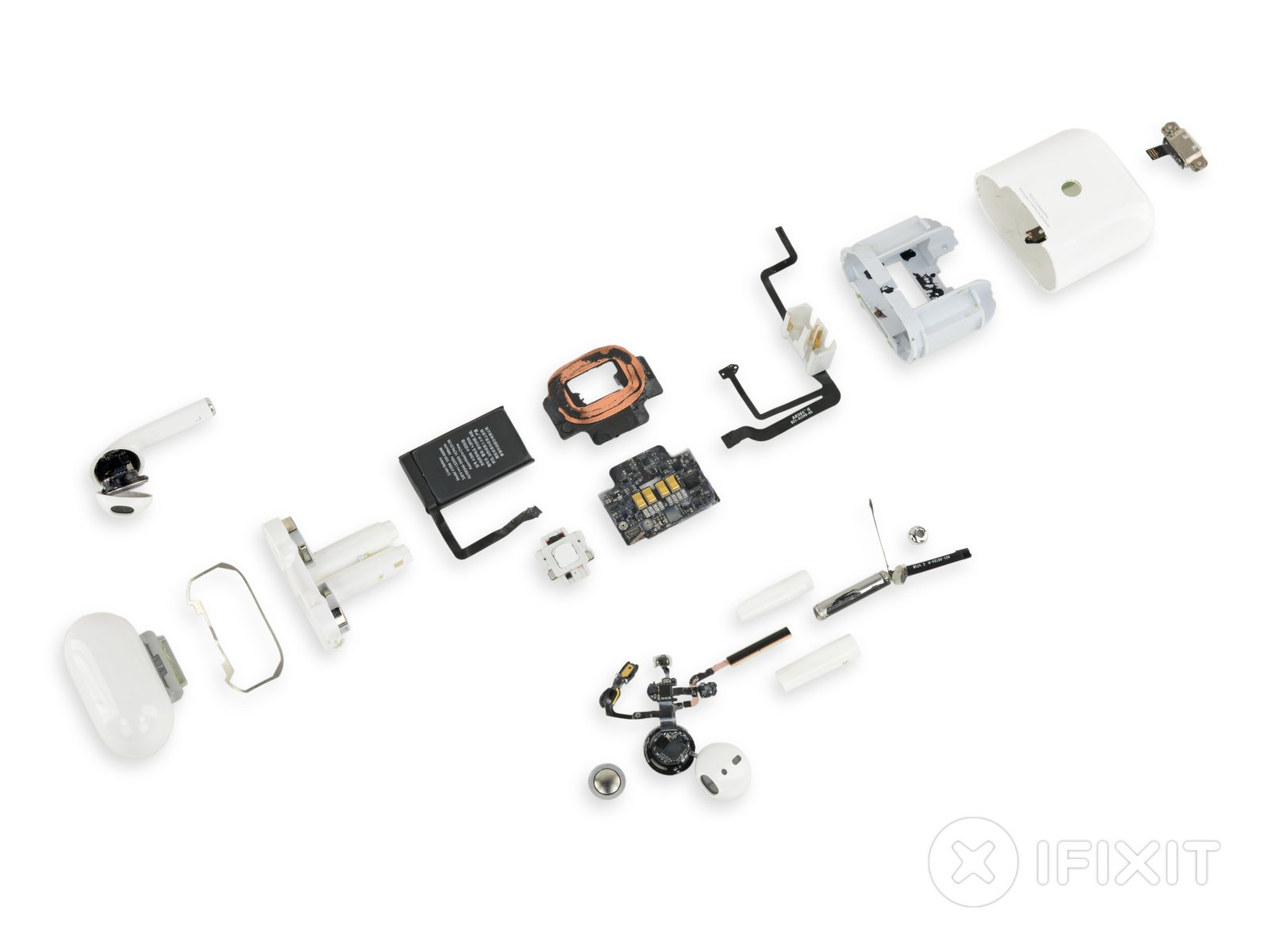
Apple’s second-generation AirPods are just as difficult to repair as their predecessor

by Patrick O'Rourke

Unsurprisingly, a recent iFixit teardown indicates that Apple’s second-generation AirPods are just as difficult to repair as the first-generation version of the earbuds.

Everything from taking apart the AirPods, to popping open their charging case, is a complicated process that requires heat, rubbing alcohol and slicing plastic, according to iFixit.

That said, iFixit does mention that the second-gen AirPods new wireless charging case is more durable than its predecessor thanks to an improved hinge and a motherboard covered in water-resistant goop.

AirPods iFixit teardownThe battery featured in the new AirPods is also the same size as the one included in their predecessor, coming in at just 93mAh. The same can be said about the charging case and its 398mAh capacity battery.

In the end, iFixit gave Apple’s new AirPods a rare zero out of ten repair rating, indicating that it really isn’t possible for the headphones to be repaired in any way.

To put the second-generation AirPods in perspective, iFixit also gave Apple’s first Bluetooth earbuds a zero out of 10 rating. The publication then went on to describe them as disposable tech that is too difficult to repair effectively.

For a complete look at iFixit’s second-gen AirPods teardown, follow this link.

Image credit: iFixit 

Source: iFixit

The post Apple’s second-generation AirPods are just as difficult to repair as their predecessor appeared first on MobileSyrup.

29 Mar 21:28

Google leaks new smart display called Nest Hub Max with 10-inch display

by Brad Bennett

It looks like Google is following up the Home Hub with a 10-inch HD display with Nest Branding.

The leaked smart display is called the Nest Home Hub Max, suggesting that it will take components from Nest and the massive Google Home Max speaker.

The Google page that leaked the device says:

  • “Keep an eye on things at home with Nest Hub Max’s built-in Nest Cam and get motion and sound alerts.”
  • “Make video calls with Duo to friends and family on Nest Hub Max.”
  • “Everything looks and sounds great on Nest Hub max’s 10-inch HD screen and stereo speakers.”

One of the largest issues with the regular Home Hub is that its integrated speaker are lacking in sound output. Therefore combining a smart display with Google Home Max type speakers should solve that issue.

Note that the Canadian version of the Google Store doesn’t feature the new product. It’s only on the U.S. store –you may have to go to the bottom of the page and change your region.

Source: Google Store (U.S.)

The post Google leaks new smart display called Nest Hub Max with 10-inch display appeared first on MobileSyrup.

29 Mar 21:28

Samsung Galaxy S8 series and Note 8 on Rogers to get Android Pie April 1st

by Brad Bennett
Samsung Galaxy S8 on a fence

Rogers subscribers who own the Galaxy S8, S8+ or the Note 8 are set to get Android 9 Pie on the first day of April.

Samsung’s version of Android Pie is called One UI, and it adds quite a few new features and a visual overhaul to the South Korean tech giant’s first-party apps. You can find out more about the new user interface here. 

Notably, the Note 8 is also getting support for voice over LTE (VoLTE) roaming.

On the same day, a handful of other Android devices on Rogers are getting the March and April security updates. For example, Google’s Pixel phones are all getting the April update. Further, the Galaxy S7 and S7+ are receiving the March Android security update as well.

Source: Rogers

The post Samsung Galaxy S8 series and Note 8 on Rogers to get Android Pie April 1st appeared first on MobileSyrup.

29 Mar 17:15

Project Isolation

The other day I read about another new Mozilla project that decided to go with GitHub issues instead of our Bugzilla installation (BMO). The author’s arguments make a lot of sense: GitHub issues are much simpler and faster, and if you keep your code in GitHub, you get tighter integration. The author notes that a downside is the inability to file security or confidential bugs, for which Bugzilla has a fine-grained permission system, and that he’d just put those (rare) issues on BMO.
29 Mar 17:11

Just one raging hypocrisy, among millions via @DanTheFact) telegraph.co.uk/news/2017/03/2… pic.twitter.com/f4i6pIrMBh

by IanDunt
mkalus shared this story from iandunt on Twitter.

Just one raging hypocrisy, among millions via @DanTheFact) telegraph.co.uk/news/2017/03/2… pic.twitter.com/f4i6pIrMBh


Posted by IanDunt on Friday, March 29th, 2019 9:13am


404 likes, 235 retweets
29 Mar 17:11

#DrupalOriginStories

by webchick

For DrupalCamp Belarus in mid-May, I'll be giving a talk entitled "Tales of Drupal Past: Origin Stories of Drupal Contributors." My goal is to feature folks from the Drupal community and share their stories of coming into Drupal, with the goal to help inform and inspire others about our community, coming from a wide range of diverse perspectives/backgrounds.

How about... YOU? What were you doing before Drupal? How'd you get your start? What are you doing now? How has Drupal changed/impacted your life?

I would really appreciate any responses, whether in the comments here, on your own blogs, and/or on social media (with the #DrupalOriginStories tag, please). (Especially if you're based in Eastern Europe, I would love to hear from you!)

I can share mine, as a start... (Feel free to make yours shorter than this, however! :))


I first encountered Drupal because I'm one of those people who runs around "viewing-source" on websites I visit to see what's ticking under the hood. I first saw Drupal in the source of Spread Firefox, where fans of the Firefox web browser crowd-sourced marketing/promotion materials/events, and ran across it sometime later (2005) in the list of Google Summer of Code mentoring organizations.

I was a huge fan of FLOSS/open source for many years prior to this (first installed Linux in 1995 when Debian fit on like 7 floppy disks, lol), but always believed I was not "smart" enough nor "skilled" enough to actually participate in an open source project. GSoC was important for breaking down this belief, because I surmised that if it was for students, they probably expected we didn't know everything yet.

So, I applied. And somewhat miraculously, got accepted (thanks, robertDouglass!) and assigned a mentor (thanks, @chx!). Thankfully, there is not a single shred of any of my original code left in Quiz module these days, but it's kind of rad that it's still kicking around out there almost 14 years later! :)

Once I got on "this" side of my imaginary "you must be THIS smart to contribute" wall, I began to realize that...

  • Making change in an open source project is truly a collaborative process, with many different people and many different skills (dev, testing, ux, a11y, design, dev, security, promotion) all putting forth what they know to arrive at the optimal solution.
  • There are no rockstar experts sitting about barfing out perfect code. ;) In fact, I've reviewed code from most of the "Drupal rockstars" you know, and they're all pretty crap the first time through. ;) (Very much including myself!)
  • If you can demonstrate through your words/actions that you are one of the "helpers," (versus someone complaining/trying to get other people to do work for you for free/etc.) you will get near INFINITE amount of patience and mentorship and other support from the community. (Because there are not many "helpers" out there relative to the amount of users and complainers.)

So, I began to throw myself into contributing wherever I could: core and contrib development, patch reviews, QA, Drupal.org webmaster stuff, security team, UX team, Drupal Association, core committer, etc. (Note: This was highly unsustainable, and I do not necessarily recommend this course of action, LOL. ;))

These days, I am hugely fortunate to be paid full-time to work on Drupal by Acquia, as part of their Drupal Acceleration Team. My main focus is in supporting, unblocking, and accelerating community efforts around Drupal's strategic initiatives, as well as my role as a product manager on the core committer team (setting roadmaps, keeping an eye on what our competitors are up to, and brutally-but-kindly-as-possible WebchickTestCase-ing unsuspecting patches :P).

Over the course of my time with Drupal, I've gained an incredible amount... learning new things every day, numerous friendships-that-feel-like-extended-family (some of literally a decade or more), travel to all corners of the globe, hearing and taking in numerous diverse ideas and perspectives, and more. Thank you so much to everyone who makes this possible. <3