Shared posts

12 May 05:35

The User Liberation Front

by Jonathan Edwards

From the beginning this blog had the subtitle “Dispatches from the Programmer Liberation Front”. I have changed it to the User Liberation Front. Really this change has been building for years now. I started out wanting to fix programming, to help realize its full potential, and to uplift our tribe of nerdy misfits. I slowly realized that the heart of the problem is not our technology but our culture itself. Programming sucks because we like it that way. It entertains us with puzzles; it affirms our differences from the outgroup; it rewards us with power and wealth. Enough. I am now an anti-programmer.

The User Liberation Front works to put the power of computers into the hands of users, freeing them from the domination of technologists and corporations. Spreadsheets do this today. We will spread the freedom of spreadsheets to other domains of software, so that, users no more, all can create the software they need.

I am not alone in this. Are you with us?

12 May 05:35

Twitter Now Allows Images, Videos, and GIFs in Quote Tweets

by Ryan Christoffel

Chris Welch of The Verge, reporting on a new Twitter feature rolling out today:

Beginning today, Twitter users can add images, videos, and GIFs to their retweets / quoted tweets. The company is rolling out this new feature across Android, iOS, and Twitter’s mobile website; it’s not on desktop quite yet, however. Adding media to a retweet works just like you’d expect: tap the “retweet with comment” option and then choose the image or GIF icon in the toolbar.

This feature is long overdue for the service, and Twitter’s design implementation appears solid. Displaying media when quoting a tweet that doesn’t have any seems like it wouldn’t have been particularly hard, but the real challenge is in media tweets quoting media tweets. Twitter’s solution works well: when a tweet containing media is quoted, and you add media to your retweet, the original tweet’s content is condensed to fill a space that’s not much bigger than before, ensuring timelines don’t get too cluttered with endless stacks of media tweets quoting media tweets.

Left: Twitter, Center: Tweetbot, Right: Twitterrific

Left: Twitter, Center: Tweetbot, Right: Twitterrific

Presumably, third-party apps like Tweetbot and Twitterrific will be granted the ability to create quote tweets with media as well. Currently, each app has its own way of displaying these tweets: in tweets with media that quote more media, Tweetbot shows the original media, while Twitterrific shows that of the retweet; however, Tweetbot does display both forms of media when viewing a tweet’s Detail screen.

In addition to bringing media retweets to more platforms, it sounds like Twitter has some other enhancements already in the works for the new feature, such as increased interactivity with quoted tweets.

Twitter already enables you to tap media thumbnails in quoted tweets to load that media in full, so it will be interesting to see what other interactivity the company plans to add in the future.

→ Source: theverge.com

12 May 05:35

There are so many new geeky announcements this ...

There are so many new geeky announcements this week coming out of Microsoft’s Build Conference.

My favorites are, in no particular order: VS Code Remote Development, which will enable cloud hosted development environments; Windows Subsystem for Linux 2, which will bring a full Linux kernel into Windows (What? No way!) and massively speed up the experience; and a new Windows Terminal with a modern interface and a new font, complete with programming ligatures!

12 May 05:35

“Why did everyone else get bus deregulation and London did not?”

by Stephen Rees

The quote comes from an article in the Observer yesterday.

I wrote a letter to the Editor today:  it does appear. I thought readers here might also like to know the answer.

Because Professor Christopher Foster of the London School of Economics wrote a paper describing the impact of competition between bus companies in London in the 1920s and 30s which lead to the creation of the London Passenger Transport Board. Traffic congestion has always been bad, especially in Central London, but the behaviour of bus drivers trying to beat each other to the bus stops to scoop up as many fares as possible had become downright dangerous. Mrs Thatcher clearly took a narrow view, and decided that this was a risk she was not prepared to take – in London. Chaos did indeed hit most of Britain’s larger cities after bus deregulation.

By the way, Her Majesty’s Inspector of Railways was more effective with his advice on the privatisation of the railways. He told her that people would be killed. He was also right, but that did not happen on Thatcher’s watch but later under John Major who was notably less intelligent.

I went looking for a suitable picture and found one of the “Chocolate Express” which was accompanied by some useful text. So instead of using a copyright image I am sending you to that page.

12 May 05:35

Before You Launch That New Feature In Your Community

by Richard Millington

Does it have any chance of doubling any metric that matters to you? (growth, activity, call deflection etc…?)

Does it strategically reinforce whatever it is that makes your audience unique? And thus is something any other community would struggle to replicate?

Have members expressed an overwhelming (unprompted) demand for it?

Will failure to do it cause the death of your community?

Have you decided what you will stop doing to invest the resources to make the new feature a success?

You better have a compelling reason to distract yourself from making your current community features better, divide your time and resources into smaller chunks, and expend precious audience attention on something that might not work.

(p.s. because someone else is doing it is both the most common and very worst reason to do it).

12 May 05:34

Remixing the grocery receipt with data visualization

by Nathan Yau

In prototyping mode, Susie Lu incorporated visualization into the common receipt from the grocery store. It gives a price breakdown for money spent on an actual receipt-sized paper using the same thermal printer you might see at the store.

It reminds me of the redesigned nutrition facts on a milk carton. Whatever happened to that trend of sticking visualization on everyday things? I think it’s comeback time.

Tags: receipt, remake

10 May 05:54

Update to Piezo 1.6 Now

by Paul Kafasis

We’ve just posted a fresh update for our charmingly simple audio recorder Piezo, now up to version 1.6. Piezo remains the easiest way to record audio from any application on your Mac, as well as from input devices like microphones. Read on to see what’s changed in our one-click recording tool.

Enhancements in Piezo 1.6

There are several small, but worthwhile, improvements in this update. Most importantly, we’ve worked to make recording even more robust under very heavy loads. Piezo has always worked well even when your CPU is burdened by other tasks, but with this update, even the busiest Mac will produce perfect recordings free from skips or dropouts.

As part of work we’re doing across our product line, we’ve also made small refinements to Piezo’s Source selector. This includes new organization and an enhanced look, as well as an update for the input device icon. These changes and more will be coming to the rest of our line-up soon.

Finally, the Audio Capture Engine (ACE) backend has been updated to version 10.0.1, for the most robust and reliable audio capture. We’re constantly refining and fine-tuning ACE, so be sure you’re running the latest version by checking “Install Extras” in the Piezo menu.

Bug Fixes

This update also fixed a couple small bugs. On MacOS 10.14 (Mojave), Piezo’s popover could get a little…funky. While, the connector should point toward the Gear button, Mojave has some issues which meant that with enough clicking and dragging, you could get the popover looking like this:


The old Piezo, misbehaving on Mojave

Once we discovered this issue, we couldn’t sleep until it was corrected. Thankfully, we were able to work around these Mojave issues, and all is again right with Piezo’s popover:


Piezo 1.6, looking great on Mojave

We also fixed a very rare bug, where some unlucky timing could cause the aforementioned popover to get stuck out of position. Internally, we dubbed this the “wiggle freeze”, as it required a lot of wiggling to make the popover freeze.

We’re not aware of any users actually running in to this issue in the wild, but it’s worth mentioning because it has a fun name.

Update Now

This is a free update for existing users, so if you already own Piezo, just open it up and select “Check for Update” from the Piezo menu to download the latest. If you’ve never used Piezo before, now’s a great time to learn more about it, and download the free trial.

Looking for More Power?

Piezo is incredibly easy to use, but you might be looking for additional features from your recording tool. We’ve got you covered there too, with Piezo’s big brother Audio Hijack. Piezo is great for simple recordings, while Audio Hijack is great for users who need more power.

You can always review our brief comparison between Piezo and Audio Hijack, then download a free trial of both apps to test things out.

10 May 05:53

Always-Better Bikeways

by Gordon Price

While the focus on cycling infrastructure is, as it should be, on expanding the network (#ungapthemap) or on the latest controversy, continual progress is being made on existing routes, typically in conjunction with new development – like here:

This small stretch of the Central Valley Greenway is adjacent to 339 East 1st Avenue on the False Creek Flats, where there is a proposal for a four-building complex, including a small hotel.

There’s another project near completion at the east end of this stretch on the Emily Carr campus, to provide cyclists and greenway users (more electric scooters noticeable now) with a necessary fuel: coffee.

And at the west end: beer.

So Mount Pleasant: bikes, beer, art and industry.

10 May 05:52

A PL Design Challenge from Alan Kay

by Eugene Wallingford

In an answer on Quora from earlier this year:

There are several modern APL-like languages today -- such as J and K -- but I would criticize them as being too much like the classic APL. It is possible to extract what is really great from APL and use it in new language designs without being so tied to the past. This would be a great project for some grad students of today: what does the APL perspective mean today, and what kind of great programming language could be inspired by it?

The APL perspective was more radical even twenty years ago, before MapReduce became a thing and before functional programming ascended. When I was an undergrad, though, it seemed otherworldly: setting up a structure, passing it through a sequence of operators that changed its shape, and then passing it through a sequence of operators that folded up a result. We knew we weren't programming in Fortran anymore.

I'm still fascinated by APL, but I haven't done a lot with it in the intervening years. These days I'm still thinking about concatenative programming in languages like Forth, Factor, and Joy, a project I reinitiated (and last blogged about) three summers ago. Most concatenative languages work with an implicit stack, which gives it a very different feel from APL's dataflow style. I can imagine, though, that working in the concision and abstraction of concatenative languages for a while will spark my interest in diving back into APL-style programming some day.

Kay's full answer is worth a read if only for the story in which he connects Iverson's APL notation, and its effect on how we understand computer systems, to the evolution of Maxwell's equations. Over the years, I've heard Kay talk about McCarthy's Lisp interpreter as akin to Maxwell's equations, too. In some ways, the analogy works even better with APL, though it seems that the lessons of Lisp have had a larger historical effect to date.

Perhaps that will change? Alas, as Kay says in the paragraph that precedes his challenge:

As always, time has moved on. Programming language ideas move much slower, and programmers move almost not at all.

Kay often comes off as pessimistic, but after all the computing history he has lived through (and created!), he has earned whatever pessimism he feels. As usual, reading one of his essays makes me want to buckle down and do something that would make him proud.

10 May 05:51

Unexpected impacts of climate change

by Stephen Rees

Talking this morning to a company that imports stuff from Europe. It is currently very late arriving here. Originally it was destined for the port of Montreal, but there have been strikes there, so the container was diverted. It was now to be delivered by ship into Vancouver via the Panama Canal. But for the first time in its history there has been a three month drought, and the canal is short of water. To get containers through in smaller vessels, they have to be transhipped in Cartagena. The port of Montreal is currently unable to handle ships due to flooding and the consequent shortage of railcars.

POSTSCRIPT
Maybe I should be more incredulous. Here is a recent picture of a container train leaving the Port of Montreal May 6, 2019 – with plenty of space for a second container on every car!
CN 9547

Photo Credit: Michael Berry on Flickr

In the other direction, a container full of door furniture (“knobs and knockers”) destined for a new development in Vancouver was lost at sea when a ship from China was hit by an unprecedented  cyclone.

This is going to be the new normal, and will require some rethinking of the trade patterns that have developed in recent years. While there might be comparative advantages in labour cost, the perils of shipping may make manufacturing at at home rather than abroad a more attractive proposition.

10 May 05:51

WeTransfer File Transfer Now Available in Thunderbird

by Ryan Sipes

WeTransfer’s file-sharing service is now available within Thunderbird for sending large files (up to 2GB) for free, without signing up for an account.

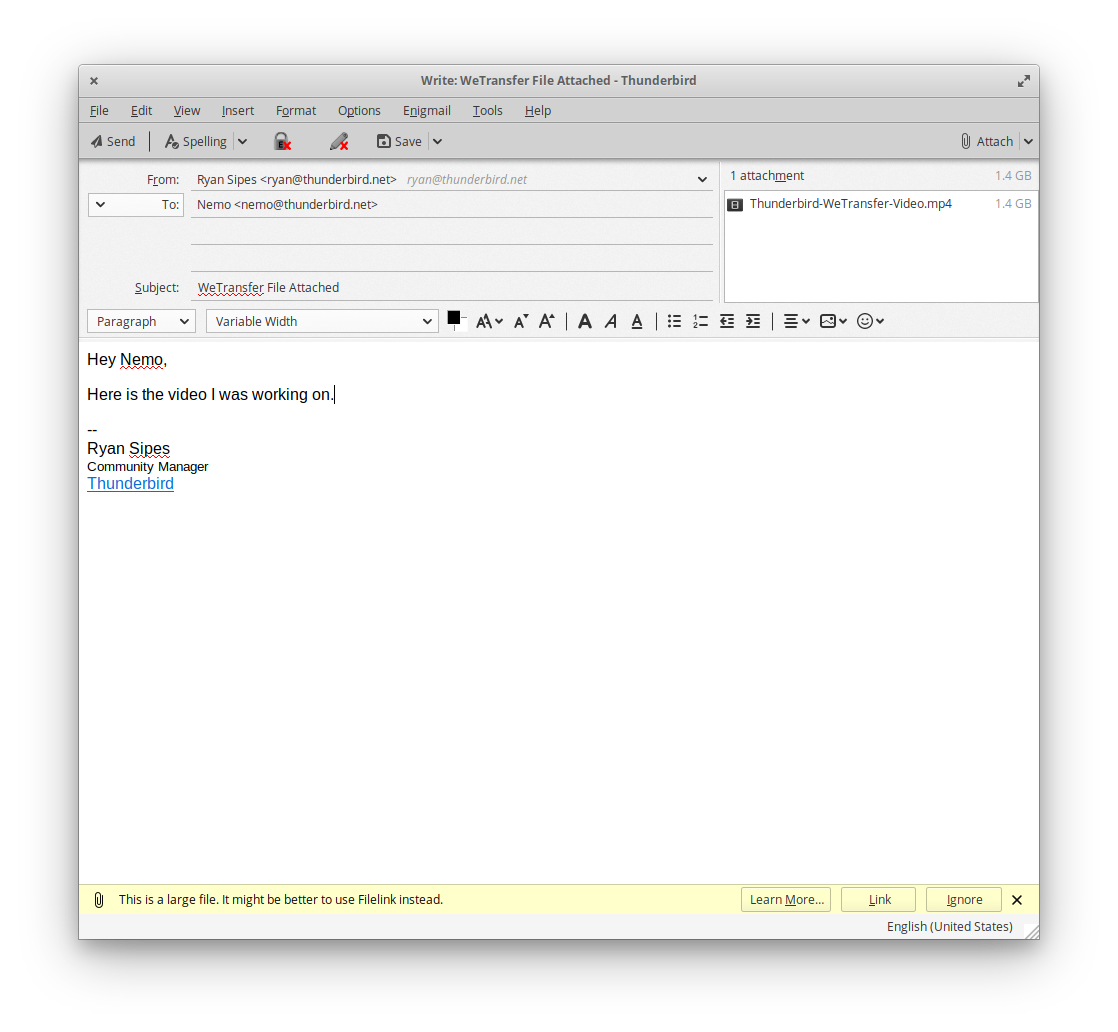
Even better, sharing large files can be done without leaving the composer. While writing an email, just attach a large file and you will be prompted to choose whether you want to use file link, which will allow you to share a large file with a link to download it. Via this prompt you can select to use WeTransfer.

Filelink prompt in Thunderbird

Filelink prompt in Thunderbird

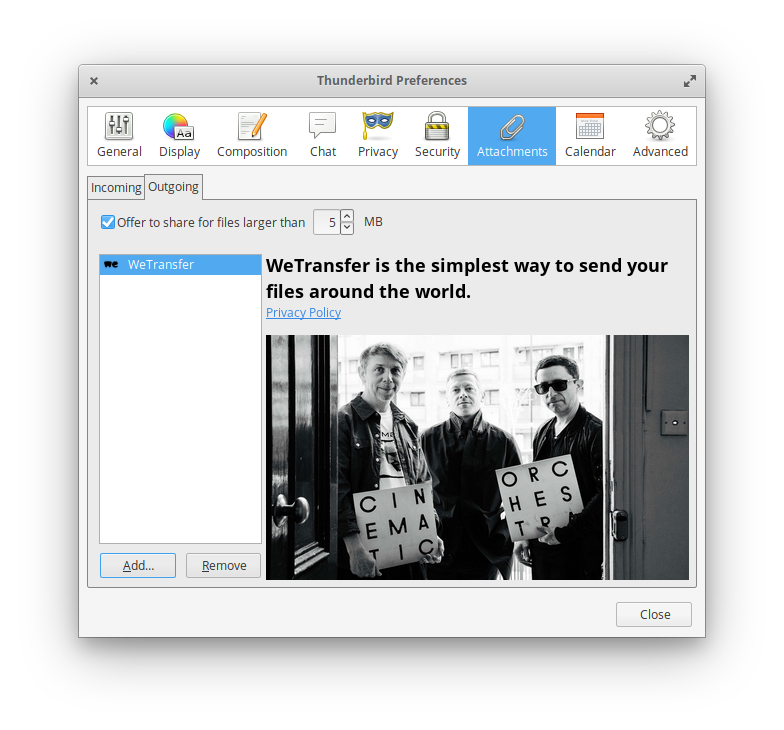
You can also enable File Link through the Preferences menu, under the attachments tab and the Outgoing page. Click “Add…” and choose “WeTransfer” from the drop down menu.

WeTransfer in Preferences

Once WeTransfer is set up in Thunderbird it will be the default method of linking for files over the size that you have specified (you can see that is set to 5MB in the screenshot above).

WeTransfer and Thunderbird are both excited to be able to work together on this great feature for our users. The Thunderbird team thinks that this will really improve the experience of collaboration and and sharing for our users.

WeTransfer is also proud of this feature. Travis Brown, WeTransfer VP of Business Development says about the collaboration:

“Mozilla and WeTransfer share similar values. We’re focused on the user and on maintaining our user’s privacy and an open internet. We’ll continue to work with their team across multiple areas and put privacy at the front of those initiatives.”

We hope that all our users will give this feature a try and enjoy being able to share the files they want with co-workers, friends, and family – easily.

The post WeTransfer File Transfer Now Available in Thunderbird appeared first on The Thunderbird Blog.

10 May 05:51

7th May, 3:57 pm

by nobody@domain.com (Cal Henderson)

It turns out you can make a browser based chat client without using any JS or forcing page reloads. Truly amazing/evil. Probably not practical, but does show a clever mechanism for allowing some dynamic data flow with JS disabled.

10 May 05:50

Replied to a post by Frank Meeuwsen Wat me bi...

by Ton Zijlstra
Replied to a post by Frank Meeuwsen
Wat me bij deze diensten toch erg interesseert is de kosten van overstap voor de overige gebruikers. Met name de mentale overstap. Ik kan me voorstellen dat je huidige conversatiepartners in Slack zelf ook meer Slack-koppelingen hebben. Dan is het handig om alles bij elkaar in één Slack app te hebben. Rocketchat voelt dan als "weer een extra app" wat transitie en acceptatie lastiger kan maken. Ik ben benieuwd hoe je daar mee om gaat!

Well, yes, some of that social ‘cost of leaving’ plays a role. Yet:

It’s part of my company’s journey to better information security and data protection. Leaving silo’s, and Slack is just as much one as is Facebook, although with a different business model, is part of that. Similarly we’re starting to use our own cloud, in order to not use Google docs, Onedrive and the like. Our clients have different (and contradictory) rules against some of those silos, and we want to offer our own environment in which we can collaborate with clients as well. So our cloud and our Slack replacement run on our own server in a Dutch data center. This makes it easier to show GDPR compliance as well.

Within the company I’m the only heavy Slack user, taking part in about half a dozen Slack spaces. Still 90% of my Slack interaction is within my company.

Importing our Slack history into Rocket.chat, as well as that the URL of our Rocket.chat space is called Slack, help make a soft landing. Similarly Rocket.chat’s interface is similar to Slack’s.

Our cloud integrates well with Rocket, better than with Slack.

For mobile having another app on it is hardly an issue, given we all have half a dozen chat apps on it already.
For desktop it will be less automatic to make the switch, but adding Rocketchat to the dock will help.

So, there will be an adaption cost, but I’m optimistic it will be low, given our starting point. Over time I’ll reflect on how it went.


Screenshot of Rocketchat with previous Slack historty loaded

10 May 05:49

Amount of fish to raise a big fish

by Nathan Yau

Raising living things requires resources. In the case of fish, it requires more fish so that another can grow larger. Artists Chow and Lin calculated how much. The surrounding small fish are required to grow the three yellow carp in the middle. [via kottke]

Tags: environment, fish, sustainability

09 May 17:56

Huawei P30 Pro Review: Impressive, Inconsistent Flagship!

by Rajesh Pandey
Huawei is in the news for either all the wrong reasons — stealing tech secrets of U.S. companies, helping create backdoors in its products to aid the Chinese government spying activities — or for its impressive smartphones. After the Mate 20 Pro from last year, Huawei is back with an equally impressive Huawei P30 Pro which takes on Samsung’s equally excellent Galaxy S10 series. Huawei has managed to outdone Samsung in terms of the hardware and camera department with the P30 Pro but does that make it a better phone than the Galaxy S10. Find out in our review. Continue reading →
09 May 17:52

Canadian Tesla shuttle service Wroute suspends service

by Brad Bennett

The Canadian shuttle service that ran trips between Hamilton, Kitchener, Burlington and Waterloo using Tesla vehicles has called it quits.

The company says that “market conditions proved insufficient to support its operation, ” but it is “confident that with the right partnerships, regulatory environment and continuing evolution of sustainable transport” its goals can be met.

The company has been running since September 2018 and it suspended its service on May 2nd, 2019.

Source: Wroute

The post Canadian Tesla shuttle service Wroute suspends service appeared first on MobileSyrup.

09 May 17:52

Freedom Mobile security flaw leaks personal data of customers

by Patrick O'Rourke
Freedom Mobile

Shaw-owned carrier Freedom Mobile has experienced a security flaw, leaking sensitive data related to the carrier’s customers. However, it remains unclear exactly how many subscribers are affected by the breach.

Freedom Mobile claims that the security breach resulted in the data of 15,000 customers being exposed.

“Our investigation has revealed that a very limited amount of Freedom Mobile customer data was exposed as the result of a misconfigured server managed by Apptium, a new third-party service provider Freedom Mobile has engaged to streamline our retail customer support processes,” reads a statement from Freedom regarding the data breach.

On the other hand, the security researchers that first uncovered the flaw, Noam Rotem and Ran Locar, claim that the number of customers affected is in the 1.5 million range.

The breach is related to what is known as an Elasticsearch sever that leaked five million logs containing Freedom Mobile customer data, according to the security researchers. This data was not protected with a password, giving anyone access to the information, according to the security researcher’s findings.

Rotem and Locar claim this security flaw is similar to when China-based e-commerce giant Gearbest inadvertently exposed the data of millions of customer orders.

The security researchers first published their findings through virtual private network provider vpnMentor. The report states that it took Freedom Mobile roughly a week to fix the security flaw following being notified of its existence.

Further, the report states that customer email addresses, phone numbers, postal codes, date of birth, customer type, account numbers and even full names, leaked. Equifax credit check customer information is also included in the leak, along with complete credit card numbers, including verification numbers and expiry dates, all stored in plaintext and unencrypted.

Freedom Mobile has more than 1.5 million customers across Canada, according to Shaw’s recent Q2 2019 earnings report.

Freedom Mobile isn’t the only Canadian telecom giant to suffer from a major security breach. Back in January of 2018 Bell confirmed that “fewer than 100,000” customers had their private information illegally accessed by hackers.

MobileSyrup has reached out to the Office of the Privacy Commissioner of Canada for comment regarding the breach. We have also contacted the security researchers that uncovered the leak for more information regarding the discrepancy between the number of affected subscribers.

This story will be updated with additional information as it is received.

Freedom Mobile’s full statement regarding the security breach can be read below:

“We can confirm that two cybersecurity researchers contacted the Freedom Mobile Privacy Office on April 18 to advise they had located a security gap that affected a very small percentage of all Freedom Mobile customers, whose data is processed by a new external third-party vendor, Apptium Technologies.

We’ve assessed that data from approximately 15,0000 Freedom Mobile customers was affected.

We have no evidence to date that any data exposed has been misused in any way and we are conducting a full forensic investigation to determine the full scope of impact. Once the legitimacy of the researchers’ emails was verified, the third party vendor rectified the situation identified by the cybersecurity researchers and we began an investigation immediately.

Our investigation is ongoing. All affected customers will be contacted, and we will provide them with a solution that best suits their needs.

We have discovered that the data that was exposed was contained to a very small number of customers who had opened or made any changes to their accounts at 17 Freedom Mobile retail locations from March 25 to April 15, and any customers who made changes or opened accounts on April 16. The data exposure was discovered and rectified on April 23.

Our investigation has revealed that a very limited amount of Freedom Mobile customer data was exposed as the result of a misconfigured server managed by Apptium, a new third-party service provider Freedom Mobile has engaged to streamline our retail customer support processes.

The internal systems of Freedom Mobile or Shaw Communications were not compromised as part of this third party vendor security exposure.

Freedom Mobile has filed a notification to the Office of the Privacy Commissioner of Canada (OPC) and we are continuing our investigation into the matter.”

Update 07/05/2019: The story has been updated with more information regarding Freedom Mobile’s claim that only 15,000 subscribers were affected by the security breach.

Image credit: vpnMentor

Source: vpnMentor 

The post Freedom Mobile security flaw leaks personal data of customers appeared first on MobileSyrup.

09 May 17:51

GM’s self-driving division Cruise raises $1.15 billion

by Brad Bennett
GM Cruise

General Motor’s self-driving division Cruise has raised $1.15 billion USD (roughly $1.5 billion CAD).

The investment came from accounts advised by T. Rowe Price Associates and existing paProbrtners General Motors, SoftBank Vision Fund and Honda, said Cruise to The VergeThis raises its cost to $19 billion USD (roughly $25.6 billion CAD), according to The Verge. 

GM bought the self-driving company in 2016 for one billion USD (roughly, $1.3 billion CAD).

The company has the same goal as Tesla and hopes to develop a fully autonomous ride-sharing fleet of cars without steering wheels and pedals.

Tesla and GM aren’t the only companies that are gunning for self-driving cars. Waymo has already deployed robot-taxis in Phenoix Arizona and, Apple possibly working on something too, but it’s being much more secretive.

Source: The Verge

The post GM’s self-driving division Cruise raises $1.15 billion appeared first on MobileSyrup.

09 May 17:51

Google replaces phone version of Android Auto with ‘Driving Mode’

by Brad Bennett

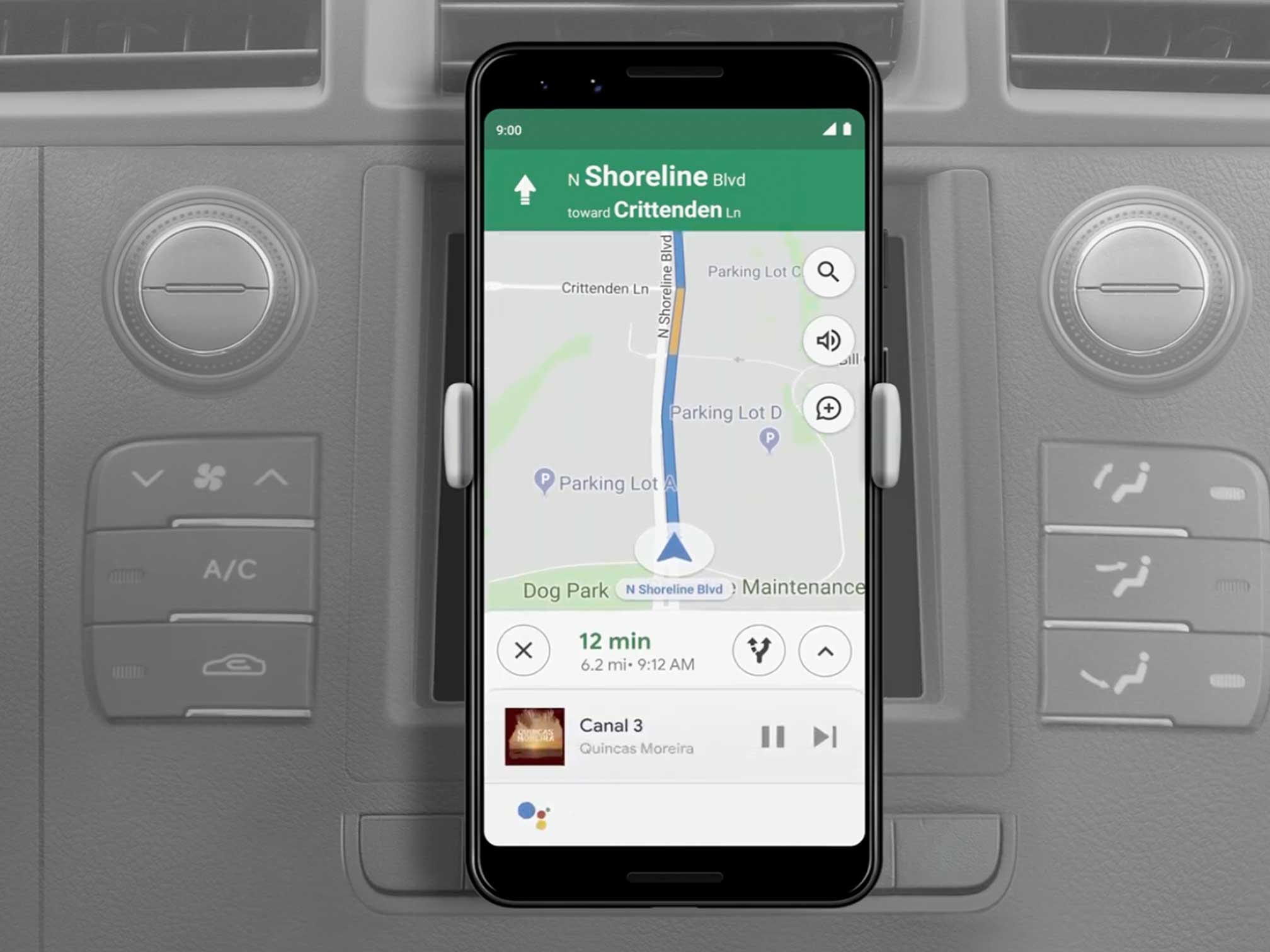
Driving Mode is a new Google Assistant feature that looks to replace the phone-based version of Android Auto with a similar function built into the Google Assistant app.

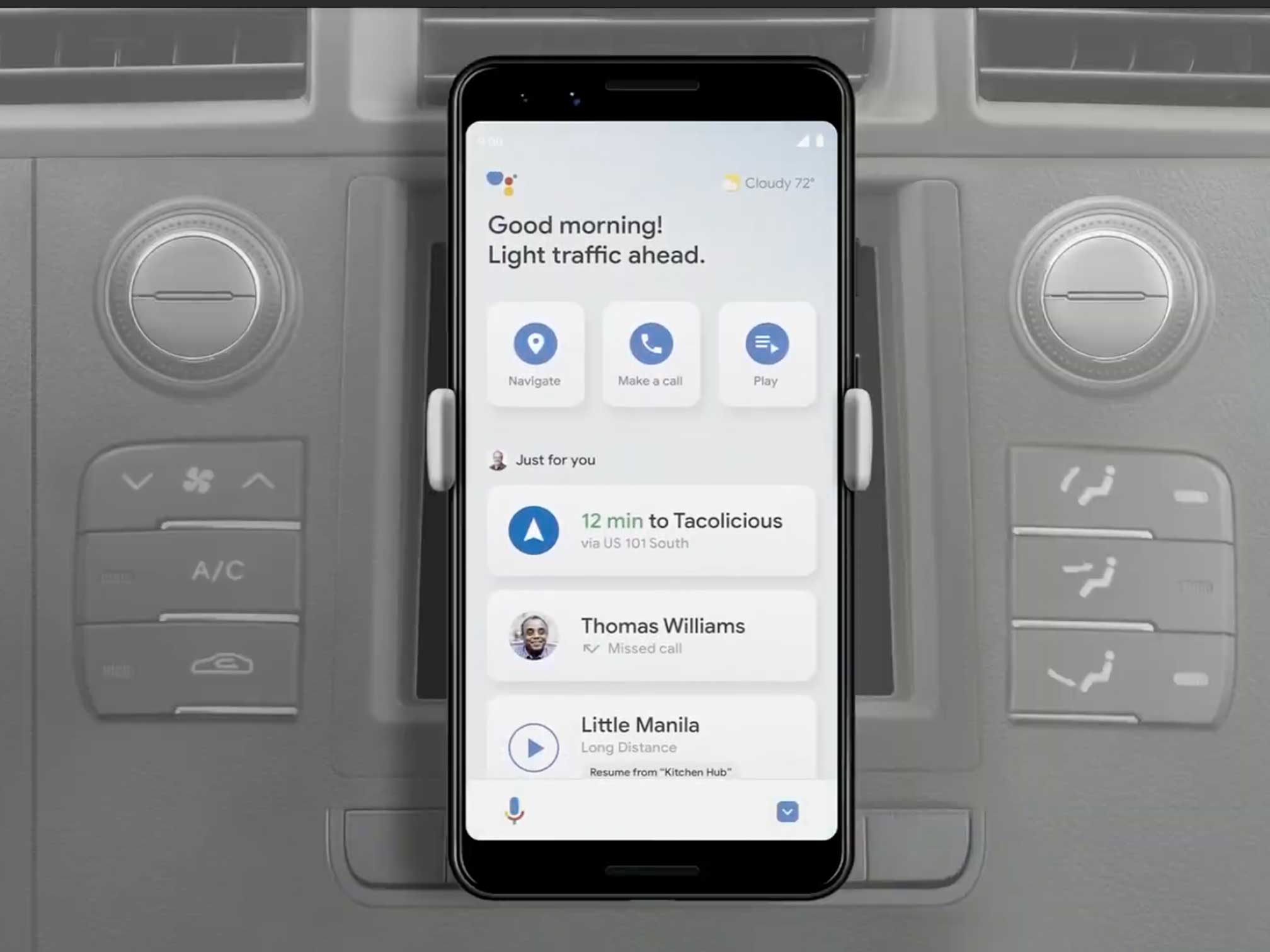
Now, when you hop into your car, your Android phone — as long as you have the Assistant app — will launch ‘Driving Mode.’

This section looks like Android Auto does when it’s running on your phone, but instead of its colours being dark it uses the white design that is prevalent in Google Assistant.

Google showed off a few key functions included in the new mode at I/O 2019. In Driving Mode your phone stays in landscape orientation and has a few buttons at the top: ‘Navigate,’ ‘Make a Call’ and ‘Play.’

Just above these Assistant tells you about the traffic and the weather. It seems like this section will change based on what the user is doing or where they’re going, but so far that’s unclear.

When you scroll down the driving list, there are a bunch of other functions that are easy to use.

In Google’s example, the first section features directions to somewhere the user has recently searched for in Google Maps. Below that, it displays missed calls and a button to pick up playing music where you left off on another device.

The next section is dedicated to recent places. The example shows three locations.

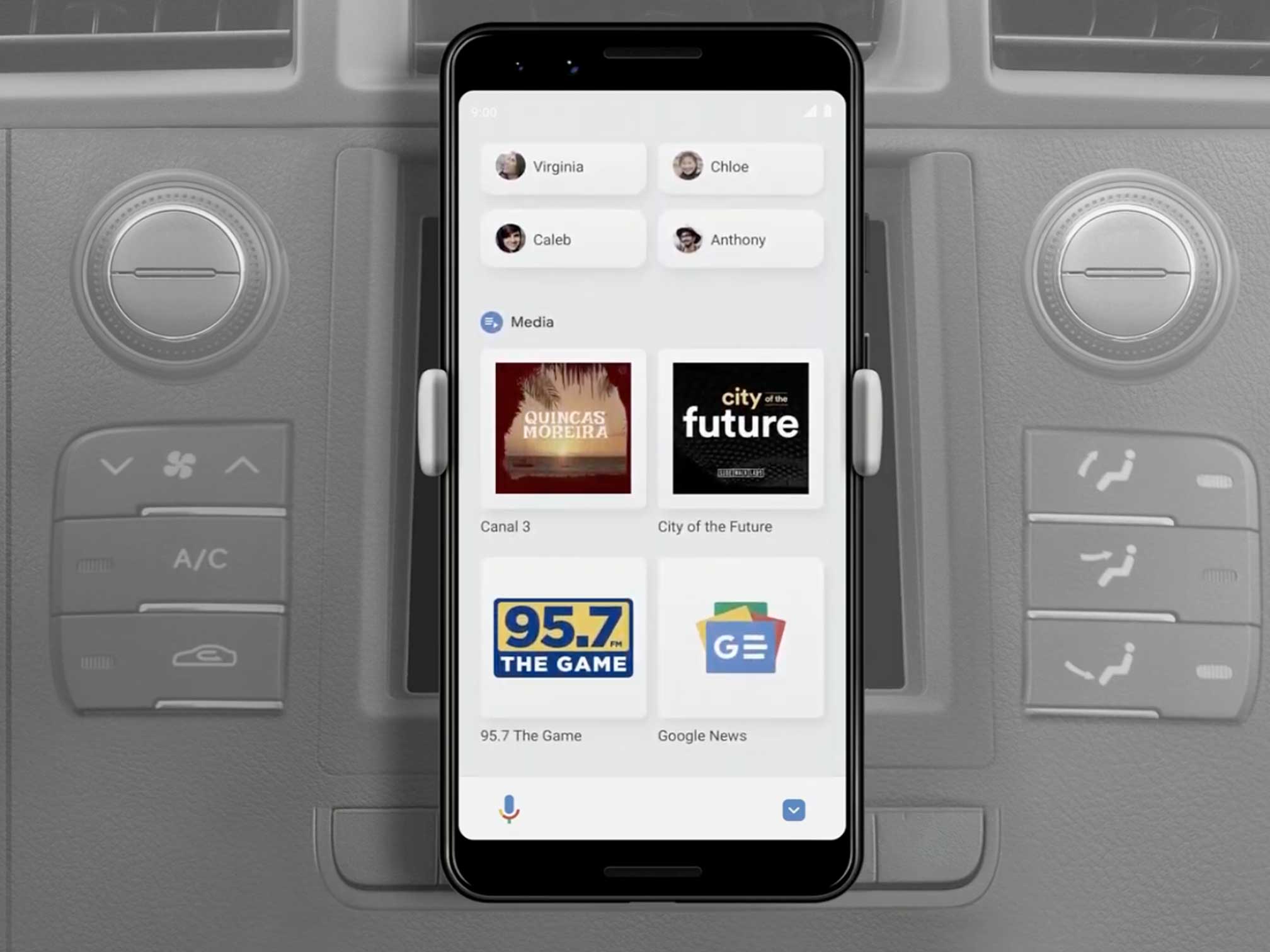
Below that there are four recent or favourite contacts, so it’s easy to call or message them.

At the bottom of Driving Mode is the ‘Media Section.’ Google Assistant fills this grid with four different media sources. The example shows off Google News, a radio station, a podcast and some music.

While the company has added all these buttons, the company designed the whole interface to be navigated by voice. For example, while you’re in any part of Driving Mode, you can say “Ok Google, play some Jazz” and then it begins playing.

Notably, the play/pause button and the skip forward buttons and album art stay on the screen without bumping Maps away.

This is a huge update or replacement to Android Auto and Google says it’s going to be available on all Android phones with the Google Assistant app this summer.

More to come…

The post Google replaces phone version of Android Auto with ‘Driving Mode’ appeared first on MobileSyrup.

09 May 17:51

Google announces dark theme, will launch with Android Q

by Jonathan Lamont

At its I/O 2019 conference in Mountain View, California, Google confirmed that a much-anticipated feature is coming in Android 10.0 Q: dark theme.

Dark theme will launch with Q and act as you’d expect: tap the dark mode toggle, or turn on battery saver, and Android turns off the lights. Further, apps will turn black, not grey like we’ve seen on some apps, or the weird blue Twitter uses.

However, dark mode will only be as effective as the apps that use it, so the company plans to take the lead. It promises that every first-party Android app it makes will work with dark mode.

Google is also offering developers an API to help them switch to over to dark mode.

The search giant is also offering a simple ‘inversion’ option for developers who don’t want to code an actual dark mode. This option simply inverts the colours of an app.

The post Google announces dark theme, will launch with Android Q appeared first on MobileSyrup.

09 May 17:51

Google announces Nest Hub Max with 10-inch display at I/O 2019

by Patrick O'Rourke
Google Home Hub Max

At I/O 2019 Google officially revealed the Nest Hub Max, an upgraded Google Assistant-powered smart home assistant with a 10-inch display. Further, the tech giant changed the standard Google Home Hub’s name to Nest Hub, and confirmed that the device is set to release in Canada shortly.

The Nest Hub Max features a camera and a larger 10-inch display. Further, Google says the Hub Max pulls together all of users smart home devices into one device, giving a quick, at-a-glance look at all of your connected smart home devices in one location.

The device can also be used like a standard Nest camera thanks to its built-in camera, says Google.

Google Nest Hub Max

  • 10-inch 1280 x 800 pixel resolution display
  • Front-facing Nest camera with 127-degree field-of-view
  • 2-channel speaker setup (2 tweeters and a woofer)
  • 2 far-field microphones

Other technical specifications include a wide-angle camera that is compatible with Google Duo, allowing users to make phone calls with the smart home device. During the keynote, Google emphasized that users will easily be able to tell when the camera is on because of a green light on the front of the device. The camera can also be disabled with a physical switch on the rear of the device.

What’s most interesting about the Hub Max is that it’s designed to be used by multiple users in the same home. Along with Voice Match, which launched last year, the Hub Max is also capable of recognizing users through a new feature called ‘Face Match’ that utilizes local facial recognition technology. Finally, music can also be stopped by raising your hand in front of the Hub Max’s camera.

Google confirmed to MobileSyrup that the Nest Hub Max is not coming to Canada later this summer when it launches in the United States. The nest Hub Max is priced at $229 USD (roughly $308 CAD).

The tech giant confirmed that the standard Nest Hub is finally making its way to Canada.

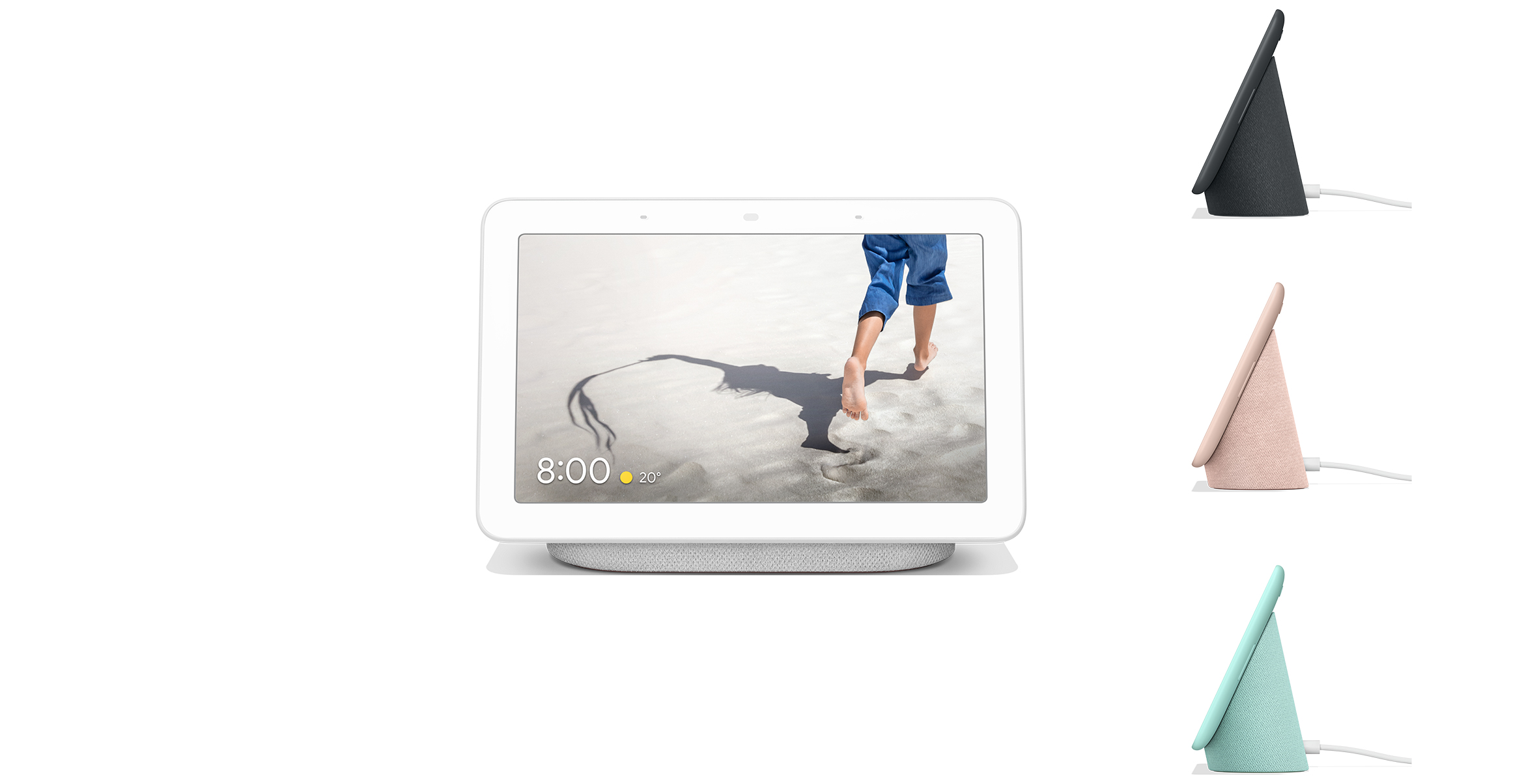
Nest Hub

The standard Hub features a 7-inch 1024 x 600 pixel resolution display, 2 far-field microphones and a ‘full-range speaker.’ The Nest Hub was first released in the U.S. on October 22nd, 2018 under the name Google Home Hub.

The Nest Hub is priced at $169 CAD and is now available for pre-order now through the Google Store. If you pre-order between May 7th and May 27th, a Nest Hub purchase includes a free Google Home Mini. Google says that the Nest Hub will be available at “select retailers” on May 28th. The Nest Hub is available four colours, including ‘Sand,’ ‘Charcoal,’ ‘Chalk,’ and ‘Aqua.’

Towards the end of the smart home portion of its I/O 2019 keynote, Google confirmed that it is bringing its Nest and Google Home teams under one banner in an effort to simplify its smart home offerings. The tech giant also published what it calls “privacy commitments” to its smart home products that explain what data they pull from users and how it is used.

Update 07/05/2019: The story has been updated with Canadain pricing and availability for the Nest Hub.

The post Google announces Nest Hub Max with 10-inch display at I/O 2019 appeared first on MobileSyrup.

09 May 17:51

Google Pixel 3a Review: A new Nexus

by Igor Bonifacic
Google Pixel 3a

It was almost three years ago that Google said goodbye to the Nexus brand and, in the process, affordable handsets.

Despite their flaws, devices like the Nexus 5 won well-earned acclaim for delivering robust feature sets at affordable prices. Now, amid a global downturn in smartphone demand, Google is releasing a phone that is reminiscent of its earlier efforts in all the best ways possible.

With the Pixel 3a and Pixel 3a XL, the company has created a pair of smartphones that price conscious and savvy consumers will love. Best of all, unlike the Nexus phones of yesteryear, the Pixel 3a and Pixel 3a XL feature an excellent camera.

As I did in my Pixel 3 review, to make this piece more concise and easier to read, I often refer to the Pixel 3a and Pixel 3a XL using the singular ‘Pixel 3a’. Where applicable, I note any differences between the two phones. Google didn’t provide an XL unit to test, so I can’t speak to some specific aspects of the device.

Conspiracy theorists finally get their Pixel 3 Ultra

Next to the Pixel 3 and Pixel 3 XL, what’s most noticeable about the Pixel 3a and 3a XL is that the latter doesn’t feature the deep notch of its more expensive sibling. It’s a better look, even if, compared to the current crop of high-end flagships, the Pixel 3a and 3a XL look dated.

Less apparent is that the Pixel 3a and 3a XL feature different dimensions from their high-end counterparts.

Compared to the Pixel 3’s 145.6 x 68.2 x 7.9mm dimensions, the Pixel 3a measures in 151.3 x 70.1 x 8.2mm. At 147g, compared to 148g, it’s also a touch lighter than the Pixel 3.

The Pixel 3a XL, meanwhile, measures in at 160.1 x 76.1 x 8.2 mm, instead 158 x 76.7 x 7.9 mm. Similar to the Pixel 3a, it’s lighter than its more expensive sibling, weighing in at 167g as opposed to 184g.

A byproduct of their different sizes is that case designed for the Pixel 3 and Pixel 3 XL don’t fit the Pixel 3a and Pixel 3a XL.

Google Pixel 3a display

Likewise, the Pixel 3a and 3a XL feature different sized displays compared to the Pixel 3 and Pixel 3 XL. The Pixel 3a’s display measures in at 5.6-inches diagonally, instead of 5.5-inches, while the Pixel 3a XL measures in at 6.0-inches diagonally instead of 6.3 inches.

Physical differences aside, functionally the displays are identical with one exception: the Pixel 3 XL features a QHD resolution panel, instead of a Full HD panel like the Pixel 3, Pixel 3a and Pixel 3a XL. Otherwise, all four displays support HDR playback on YouTube and Netflix (but don’t get bright enough to support HDR10 or Dolby Vision) and DCI-P3 wide colour gamut support.

One annoyance is that Google moved the Pixel 3a and 3a XL’s stereo speakers. Instead of facing towards you, they now fire from the bottom of the phone. It’s a perplexing design choice, particularly since both the Pixel 3a and Pixel 3a XL have more than enough bezel to accommodate front-firing speakers. Neither phone is waterproof either, but one thing the new Pixels have over their older siblings is a headphone jack.
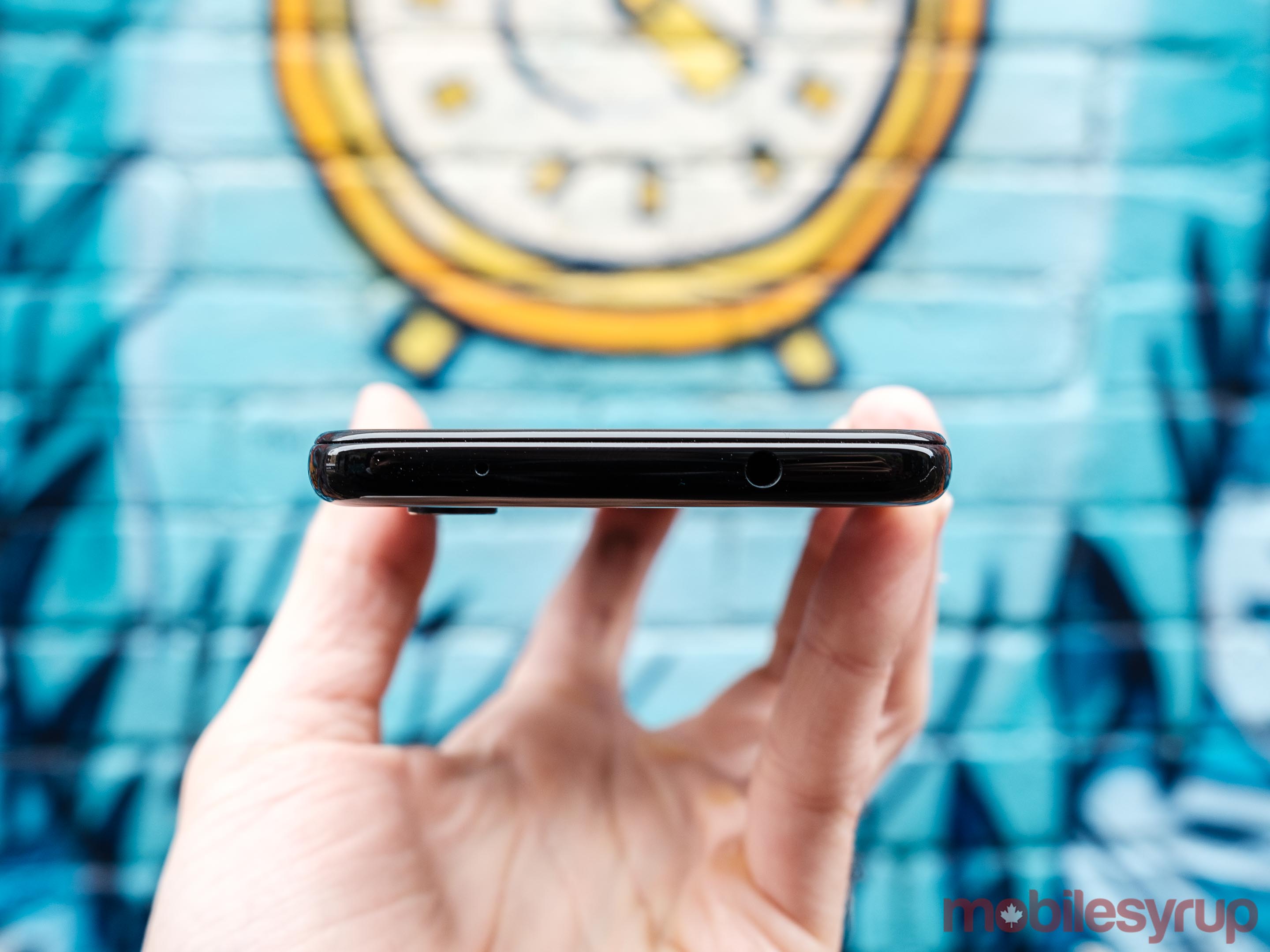
At launch, the Pixel 3a and 3a XL are only available in a single configuration with 64GB of internal storage. What’s more, the Pixel 3a and 3a XL don’t include a microSD slot, a feature that’s found on almost every smartphone at this price point. That means the only way to expand their storage is to use cloud-based services like Google Photos.

After I downloaded my entire Spotify library (all 28GB worth at high quality) and installed all the apps I use frequently, I had 14.35GB of available storage left on the phone.

That said, what works for me is unlikely to work for someone else, and if storage is a significant concern, there are better options available. For example, the Huawei P30 Lite (approximately $480 outright, depending on the carrier) ships with 128GB of internal storage, and includes a microSD card slot.

A great processor

Going into this review, I wasn’t sure what to expect of the Pixel 3a’s Snapdragon 670 processor. In hindsight, it has turned out to be one of the highlights of using the phone.

Without getting into too many technical details, the Pixel 3a’s Snapdragon 670 chipset is more high-end processor than its 600-series designation suggests. The 670 and 845 share several of the same characteristics. To start, both the 670 and 845 are 10nm chipsets. Moreover, the 670 features, like the 845, a 600-series Adreno GPU. To protect users, Google has also included its Titan M security chip.

It’s also worth noting both the Pixel 3a and Pixel 3 have the same amount of RAM at their disposal: 4GB.

In Geekbench 4, the Pixel 3a earned a single-core score of 1657 and a multi-core of 5164. In the same benchmark, the Pixel 3 obtained a single-core score of 2373 and a multi-core of 8263. Put another way: the Pixel 3a performs 30 and 38 percent worse in a benchmarking environment. 

In use, however, I didn’t find the Pixel 3a felt noticeable slower or less responsive than my Pixel 3. It was only when I put the two phones side by side that I was able to discern a difference, and then even then the Pixel 3 was only a touch faster at navigating Android, launching apps and multi-tasking.

Modem performance was similarly excellent. Using a Fido SIM, the Pixel 3a consistently hit days download speeds of 100Mbps when I used Ookla Speedtest to test its modem across several different days at MobileSyrup‘s downtown Toronto office.

In short, when it comes to performance, the Pixel 3a doesn’t feel like a mid-range smartphone.

Same great Pixel 3 camera

One aspect of the Pixel 3’s design Google hasn’t changed with the Pixel 3a is the main camera. Like the Pixel 3, the Pixel 3a features a 12.2-megapixel camera with f/1.8 aperture lens.

Where the cameras of the two phones differ from one another is that the Pixel 3a doesn’t include Pixel 3’s ultra-wide selfie camera. The one lone front-facing camera of the Pixel 3a has a slower lens that captures one-third of a stop less light.

Not one to take many selfies, I didn’t particularly miss the absence of the Pixel 3’s extra-wide front-facing camera while I was reviewing the Pixel 3a. That said, I’m sure I would miss it if I were to take the phone on a trip with me.

The Pixel 3a also doesn’t include Google’s Pixel Visual Core custom silicon. The company says it was able to code all of the Pixel 3’s camera features to work without issue on the Pixel 3a without the chip.

Significantly, Google hasn’t limited the Pixel 3a’s camera by withholding any of the software features that made the Pixel 3’s camera so compelling. Whether it’s Super Res Zoom, Motion Auto Focus, or, most notably, Night Sight, all of the Pixel 3’s best camera features are available and work just as great on the Pixel 3a as they did on the Pixel 3.

Otherwise, there’s not much left to say about the Pixel 3a’s camera that hasn’t already been said about the Pixel 3’s camera.

Even with the release of phones like the Galaxy S10 and Huawei’s P30 Pro — that is, devices that cost at least twice as much as the Pixel 3a — the Pixel 3a features among the best smartphone cameras on the market currently. Obviously, with just two individual cameras, the Pixel 3a’s camera isn’t as versatile as the cameras on the S10 and P30 Pro. However, the important point here is that it’s significantly more expensive to obtain a more versatile smartphone camera.

Put another way: at its price point, the Pixel 3a’s camera is nearly unmatched.

A bigger battery

Both the Pixel 3a and Pixel 3a XL include higher capacity batteries than their high-end counterparts.

The Pixel 3a features a 3,000mAh — instead of 2,915mAh — battery, while the Pixel 3a XL features a 3,700mAh — instead of 3,430mAh — battery. Relative to one another, that means the Pixel 3a features a three percent higher capacity battery than the Pixel 3, and the Pixel 3a XL an almost eight percent higher capacity battery than the Pixel 3 XL.

With the help of Android’s Adaptive Battery functionality, Google claims the Pixel 3a and Pixel 3a XL’s batteries can last up to 30 hours on a single charge when users disable the phones’ ambient display feature.

In practice, with ambient display enabled, I found I was able to comfortably get a full day of battery life out of the Pixel 3a.

For instance, on my first full day with the Pixel 3a, the phone had 36 percent battery power remaining as I was about to go to bed at 10:40 pm. My usage that day involved two-and-a-half hours of screentime and several hours of listening to music through Bluetooth headphones.

When its battery isn’t acting up, that’s about what I get from the Pixel 3 on a typical day. As I mentioned earlier, Google did not provide MobileSyrup with a Pixel 3a XL to test, so I can’t speak to how much better or worse it performs in a battery test compared to the Pixel 3 XL.

When it comes time to top up the Pixel 3a’s battery, the phone ships with the same 18W power adapter Google includes with the Pixel 3. In total, it takes about an hour to charge the phone using the included power adapter.

I’ll note here that neither Pixel 3a nor the Pixel 3a XL features Qi wireless charging.

This is the one feature I’ve consistently missed in my time with the Pixel 3a. Not only because its absence has made it less convenient to keep the phone topped up throughout the day, but also because I came to love the Pixel Stand’s digital frame functionality.

You’ll have this phone for a while with Google support

The Pixel 3a offers few surprises when it comes to its software experience. Overall, what’s here is intuitive and easy to use.

That said, I haven’t had enough time with the device to see whether it’s affected by some of the same frequent issues that crop up in any discussion of the Pixel 3 and 3 XL.

The good news, however, is that should any issues come up, Google is ready to support the Pixel 3a for the long haul.

As with Pixel 3, Google promises it will support the Pixel 3a with a minimum of three years of platform and security software updates. What’s more, the company says it will update the 3a and 3a XL at the same time it updates the Pixel 3 and 3 XL.

All of that to say: in the context of other mid-range devices, Google will furnish the Pixel 3a and 3a XL with an unprecedented level of software support.

With most mid-range devices, consumers can typically expect the OEM that made their handset to provide one major Android platform update (sometimes two, if they’re lucky). Moreover, if it’s not an Android One device, major updates take weeks and sometimes months longer to arrive than they do on high-end devices.

The post Google Pixel 3a Review: A new Nexus appeared first on MobileSyrup.

09 May 17:50

Android Q’s latest beta now available on 15 non-Pixel devices

by Dean Daley

Google released a new blog post revealing that the Android Q beta 3 is now available.

The new update is available on the original Google Pixel, Pixel 2 and Pixel 3 series. That said, the full list is longer than we expected.

Here are all the devices that will get the Android Q beta.

  • Asus ZenFone 5Z
  • Essential PH-1
  • Huawei Mate 20 Pro
  • LG G8 ThinQ
  • OnePlus 6T
  • HMD Global’s Nokia 8.1
  • Oppo Reno
  • Realme 3 Pro
  • Sony Xperia XZ3
  • Tecno Spark 3Pro
  • Vivo X27
  • Vivo Nex S
  • Vivo Nex A
  • Xiaomi Mi Mix 3 5G
  • Xiaomi Mi 9

The update brings along a native dark theme, new iPhone-like gesture navigation and more. To download the beta follow this link.

The fact that these devices are getting the latest beta is a good sign. It shows that Google is working with other manufacturers to get Android updates out faster.

Hopefully, this means we’ll see Q roll out quicker than any previous version of Android.

The post Android Q’s latest beta now available on 15 non-Pixel devices appeared first on MobileSyrup.

09 May 17:50

Google drops Home, Home Max prices by $50 and $100 respectively

by Jonathan Lamont
Google Home Max

Google unveiled a slew of new features and products at its I/O conference in Mountain View, California, including a small price drop on some of its Google Home products.

According to a throw-away line at the bottom of a blog post from Google Canada, the company announced that Google Home would now cost $129 CAD in Canada, and the Home Max would drop to $399.

Previously, the Home and Home Max retailed for $179 and $499 respectively.

That’s a significant drop in price. If you’ve been on the fence about picking up one of these smart speakers, now might be the time.

To learn more, you can read MobileSyrup’s reviews of the Google Home and Home Max.

The new pricing is already live on the Google Store and at other Canadian retailers, like Best Buy.

Source: Google Canada

The post Google drops Home, Home Max prices by $50 and $100 respectively appeared first on MobileSyrup.

09 May 17:50

Kiwi Browser app vanishes from Google Play Store

by Aisha Malik

Google recently removed the Kiwi Browser app from its Play Store.

Android Police reports that the app was removed because it allowed users to listen to YouTube videos in the background.

The ability to play YouTube videos in the background is a feature that is supposed to only be available to users subscribed to YouTube Premium.

Some users thought the app was removed because of its ability to support desktop Chrome extensions.

Arnaud Granal, the developer of the app, spoke about the removal to Android Police. He believes that the app was pulled because Google wants to protect the Chrome market. He does not think it was removed due to a policy violation.

Granal mentioned that Google Chrome allows users to play YouTube videos in the background. Users just have to select the Desktop feature to do so.

He also thinks that any apps capable of playing YouTube videos in the background should be removed. Other apps that can do so are Mozilla Firefox and Opera.

Google notified Granal that it is looking into the removal of the app.

Source: Android Police

The post Kiwi Browser app vanishes from Google Play Store appeared first on MobileSyrup.

09 May 17:50

Focals update version 1.91 brings new personal teleprompter feature

by Dean Daley

An update to North’s ‘Focals’ smartglasses brings a new personal teleprompter feature. 

Together with Focals Connect and Google Slides, Focal users will be able to have a personal teleprompter scroll across the wearable lenses.

To get the feature, install Focal Connect’s Google Chrome Extensions and generate a ‘Connect Code’ for the presentation. After, navigate to Focals Connect on the smart glasses and click with the Loop ring to connect to Chrome.

Following that, it’ll prompt you to enter the ‘Connect Code.’

Open a tab with Google Slides and then you can start presenting.

You’ll be able to use the Loop ring to navigate through your presentation as illustrated in the picture below:

North has also added multiple ‘Now Moments’ available to the user at any time.

“Whether it’s the next bus departure or what’s playing on Spotify, Now Moments on Focals show you what’s most important for what you’re doing or about to do,” according to the North press release.

The Now Moments will also help with calendar events, how long it’ll take to get to work and more.

With version 1.91, North has also implemented fixes to the performance, stability and memory issues that some users had experienced.

The post Focals update version 1.91 brings new personal teleprompter feature appeared first on MobileSyrup.

09 May 17:50

Microsoft Edge for Mac available online due to server leak

by Andrew Mohan

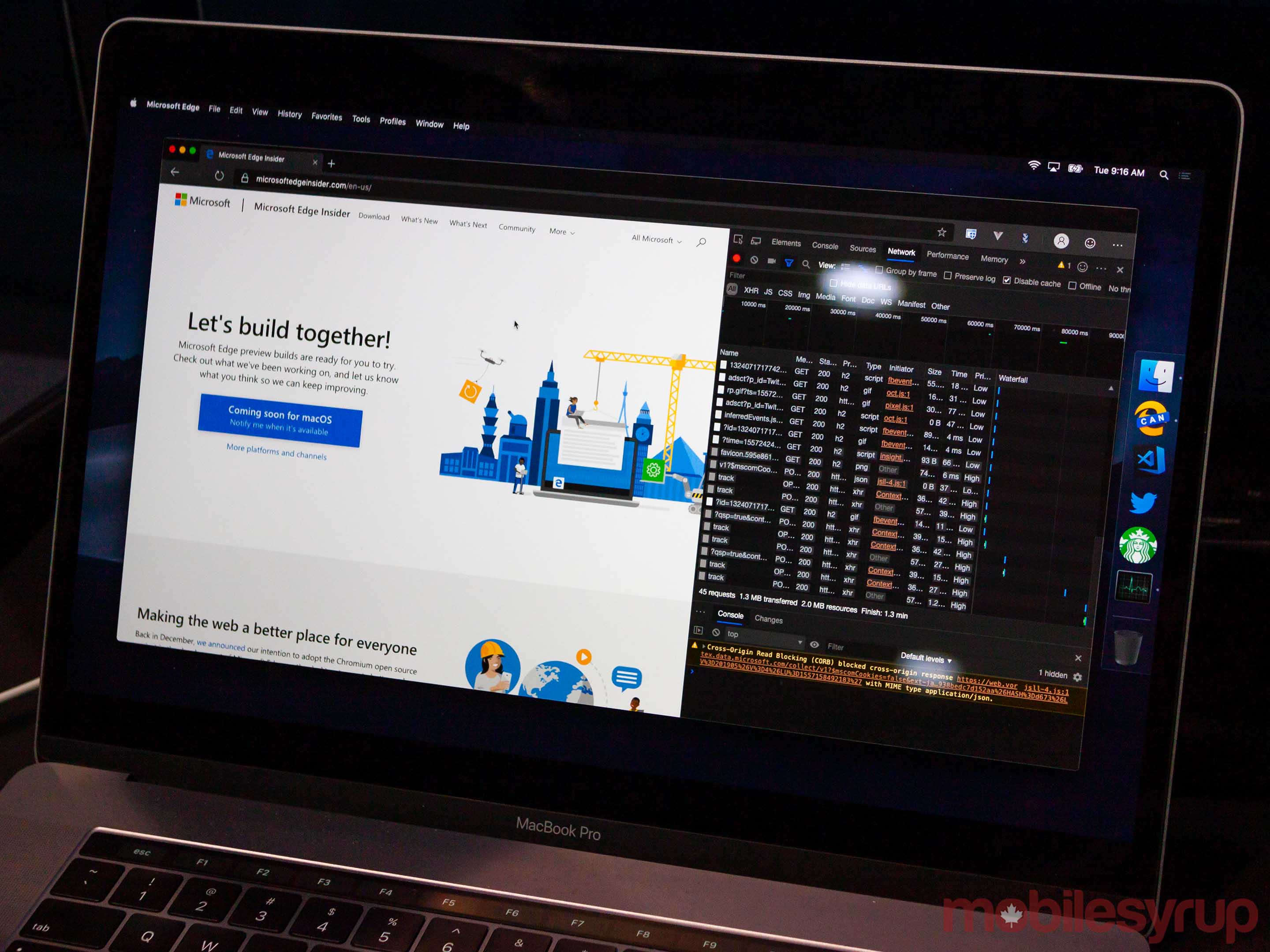
For Mac users who want to try out a new web browser, you’re in luck as the macOS version of Microsoft Edge has been leaked online.

Twitter user @h0x0d discovered and posted two Edge download links that are from Microsoft’s servers — one is the Chromium-powered Canary build and the other being the weekly developer version.

The difference between the two versions is that the Canary build is updated daily and is less stable, while the weekly developer build is more stable but is updated less frequently.

The overall look of the browser is the same as the Windows 10 version, with the speed (for the weekly developer build) being similar to Chrome for Mac.

Gizmodo also reported that the Edge extension store is functional, with plug-ins such as Grammarly available to download.

Like the Chromium-based Edge beta for Windows 10 version, you can also install Chrome extensions and transfer it over to the Edge browser.

If you’re itching to give the new Edge browser a try, you download the Canary or the weekly developer version via @h0x0d’s tweets.

However, if you’re not willing to risk your Mac, an official version should be released soon.

Source: The Verge via Gizmodo

The post Microsoft Edge for Mac available online due to server leak appeared first on MobileSyrup.

09 May 17:50

Explore the block-filled world of ‘Minecraft’ right on your browser

by Andrew Mohan
Minecraft Classic

To celebrate Minecraft‘s upcoming 10 year anniversary, its developer Mojang has released a ‘classic’ version of the game that’s playable on web browsers.

Minecraft Classic is strictly based off the game’s 2009 release.

As such, it features its basic user interface, 32 block limit, and bugs and glitches that were present in the original.

Minecraft involves users to explore and create their own personalized area in a 3D sandbox world.

The game has seen numerous releases on different video game platforms such as PlayStation 4, PC, Xbox One and Nintendo Switch.

Microsoft also teased a Minecraft augmented reality (AR) experience to celebrate the game’s anniversary on May 17th.

However, it’s not known whether this will be an actual game or just a short experience.

Minecraft Classic is available to play on web browsers here.

Source: Minecraft via The Verge

The post Explore the block-filled world of ‘Minecraft’ right on your browser appeared first on MobileSyrup.

09 May 17:50

Microsoft’s vision for the future of web browsing: Edge on Chromium

by Jonathan Lamont

If you browse the internet today, chances are you aren’t using a browser from the company behind Windows.

That wasn’t always the case. For a while, Microsoft’s Internet Explorer (IE) was the king of web browsers. In some ways, it still is. Businesses rely on IE for legacy apps. After it fell out of popularity — and modernity — IE became a tool for companies that preferred to keep using the tools that worked for them.

In 2015, Microsoft tried to reclaim its title as the king with its completely new Edge browser. Over the next four years, Edge would improve drastically, boasting better power and resource management alongside a host of unique features for Windows users. From inking, to ‘Set Aside,’ which let users save groups of tabs to come back to later, Edge was full of great stuff.

Unfortunately, the browser misstepped with both consumers and businesses. It didn’t offer enough to draw consumers away from popular alternatives like Firefox and the new titan of browsers, Google Chrome. Nor did Edge offer the legacy solution businesses relied on in IE.

Now, Microsoft is trying again. And the early signs are promising.

Chromium-based Edge, a browser for everyone

The new Edge has been available for some time as a developer preview. If you haven’t tried it out, I’d recommend it because Edge is excellent. However, Edge so far has felt like Chrome, but with the Google stripped out.

While that isn’t necessarily a bad thing, that is about to change.

At Build 2019 in Seattle, Washington, Microsoft unveiled several new features coming to Edge on Chromium — or as some Microsoft people like to call it, ‘Credge.’

Many of these new features bring Microsoft flair back to Edge, while also improving that already solid foundation. First up, the Redmond, Washington-based tech giant is making Edge a true browser for all in two major ways.

The first way is in availability. Credge will be on everything; macOS, Android, iOS and several versions of Windows. While there will be some limitations — Edge on iOS will still use WebKit as per Apple restrictions — the goal here is consistency. According to Edge personnel on the show floor at Build, the team is planning to update the mobile versions of Edge to match the new Chromium-based desktop app in terms of visuals and feel. It’s also worth noting that Edge on Android is already Chromium-based.

The second major feature is the new IE mode for Edge. Enterprise users will be able to open legacy, IE-reliant apps in a Credge tab. This is huge, as it finally brings IE into a modern container while also unifying the experience across a single browser.

Firefox-level privacy, Chrome-level compatibility

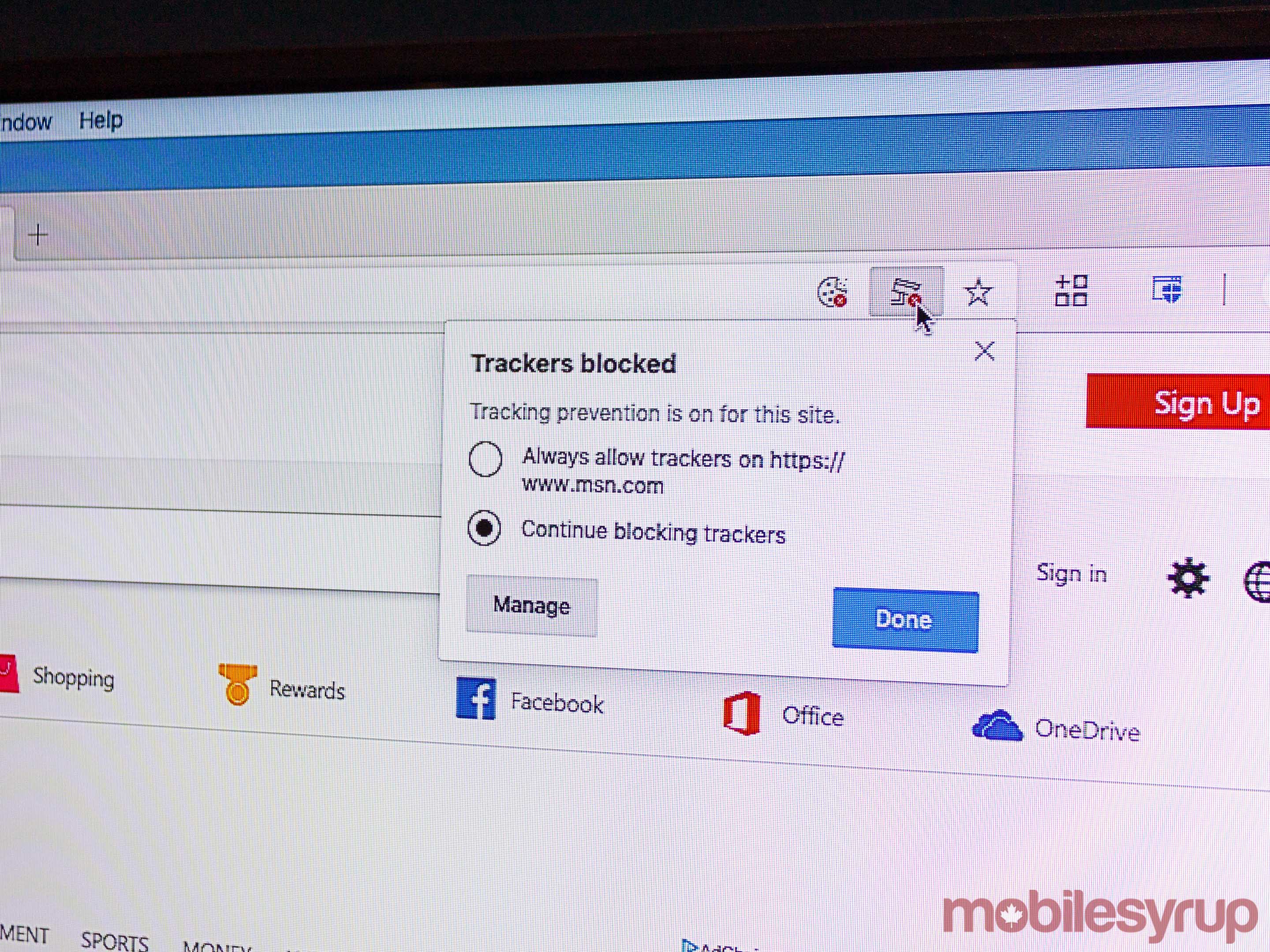
Tracker blocking in Edge

An early version of tracker blocking in Edge

As someone who bounces around different browsers a lot, I’ve come to learn a few things. For example, Firefox offers excellent privacy settings for users who would rather not be tracked. Unfortunately, these settings can break some parts of the web.

Worse, Firefox has some compatibility issues. In my experience, these are few and far between, but they still exist. Chrome is the popular browser, so web developers tend to prioritize it when testing. Sometimes, non-Chromium browsers, like Firefox and Edge, get left behind.

On the flip side, Chrome and Chromium-based browsers tend to work with everything but don’t offer great privacy options. Chrome is especially bad with this.

Chromium Edge hopes to fill that middle ground. IE mode solves compatibility issues with legacy apps while the Chromium base does the same for the modern web.

On the privacy front, one of the new features announced at Build is multi-level privacy options. Credge will soon offer users three tiers of privacy: ‘Basic,’ which lets most trackers have free reign, ‘Balanced,’ which keeps the malicious trackers out and ‘Restricted,’ which really clamps down on all trackers.

However, the Edge development team wants these features to work without causing users grief. In other words, the team is putting in extra effort to ensure turning on privacy settings won’t break things.

Right now, Restricted may break some websites, but Balanced — the recommended setting — shouldn’t.

A Fluent future and Collections

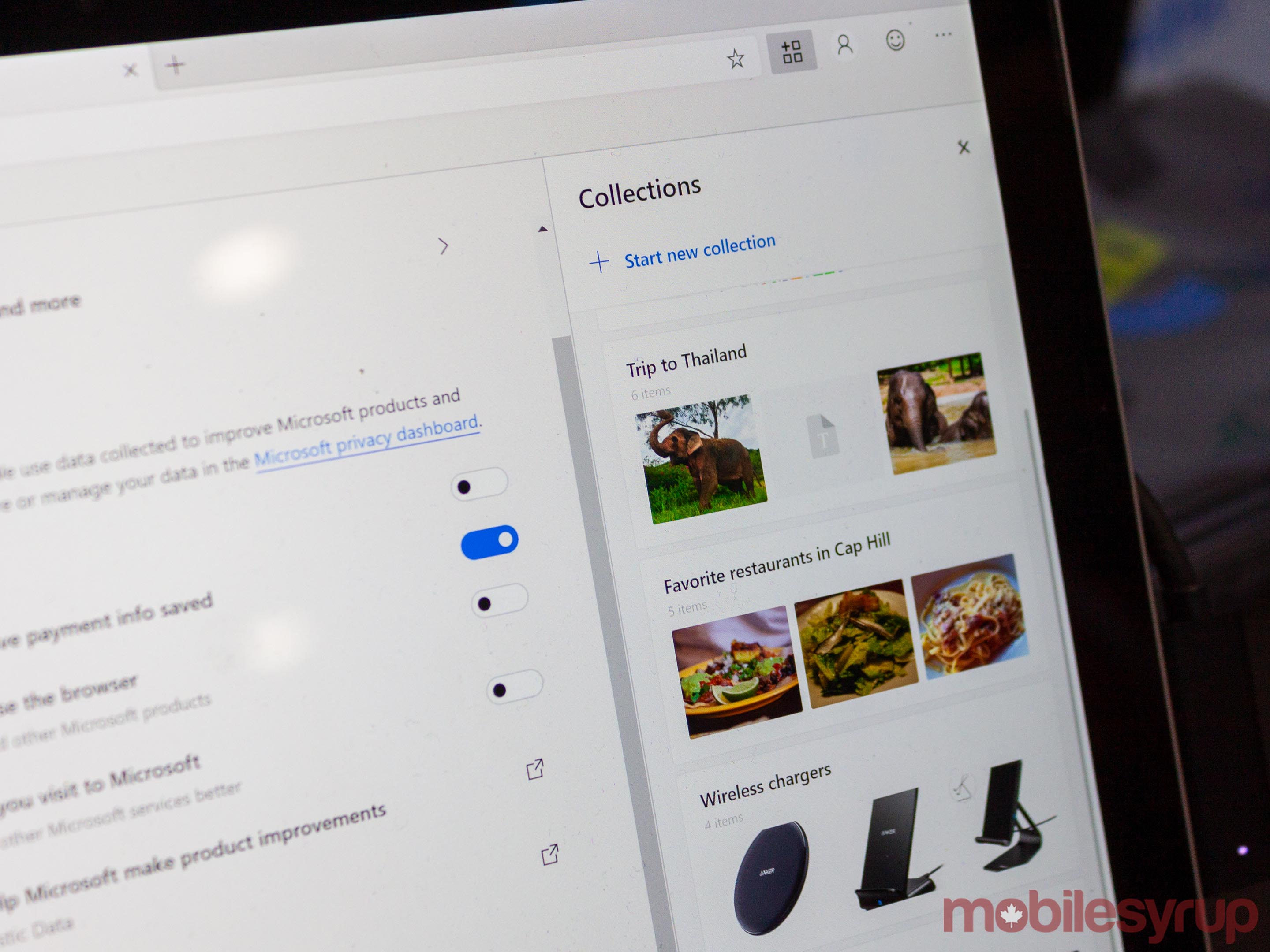
Collections in Edge

I spent some time at the Edge booth on the Build show floor, where several product managers were answering questions and demoing the new features in Edge. Two of the product managers (PM) — and fellow Canadians — Scott Low and Candace Poon alluded to plans with Edge, such as incorporating Microsoft’s Fluent design into the browser.

“That’s in the future,” Poon said. “We’re focussed on the foundation now.”

Along with bringing the visuals in line with Microsoft’s design vision, the PMs spoke to Credge’s feature set. The development team keeps a list of old Edge and new Edge features and thinks a lot about what to bring over. The developers are already integrating or planning to incorporate features like improved touch support and inking. Other features, like Set Aside, may not make a return.

“We’re asked about that a lot,” Poon told me. “We’re thinking about it.”

As much as I’d like to see Set Aside make a return, Credge offers the Edge team opportunities to expand and improve on old ideas. The new Collections feature introduced at Build 2019, for example, could cover the same needs at Set Aside but in a unique new way.

The internet offers a lot of information and resources, but condensing it and saving it can be a challenge. Microsoft is trying to solve this with Collections. Essentially, Collections is a side panel in Edge where users can drag and drop web content.

Researching cameras in preparation for purchasing a new one? Create a Camera Collection and then fill it with information — snippets from reviews of different models, pictures, stores where you can make the purchase and more.

Plus, you can easily export from Collections into Office apps like Word. When you do, Collections automatically adds the source of the content to your document. Whether you’re an average person, a student or a business user, Collections is a promising new feature to help save parts of the web.

You can make Edge better

Microsoft is trying to achieve a lot with Edge. It’s a platform for corporations relying on both modern and legacy apps, it’s privacy focussed, it’s set to be the new ‘default’ in Windows and the company is building it in Google’s house. But out of that challenge, Edge is shaping into a promising new browser.

However, there are still a lot of questions and doubts around the browser. Will it do enough to convince consumers to ditch Chrome? Will businesses get on board? By adopting Chromium, has Microsoft doomed non-Chrome browsers like Firefox? Can Microsoft achieve its vision for the future of Edge?

When I first heard the rumours of Edge built on Chromium, I was skeptical. Now, it looks like Microsoft is on the right path, and if it keeps on that path, Edge could be the Chrome we always wanted.

But to make that happen, Microsoft also needs your input. Since the launch of its preview, Credge has sported a small smiley face in the top right-hand corner of the browser. Clicking it opens a window to send feedback directly to the team.

“We take user feedback seriously,” Poon said. She urges users to send feedback so the team can make the browser that people want.

The post Microsoft’s vision for the future of web browsing: Edge on Chromium appeared first on MobileSyrup.

09 May 17:49

Google is prototyping a foldable display smartphone

by Igor Bonifacic

On Tuesday, Google detailed Android Q, the next version of its mobile operating system. One of the new additions to Android Q the company highlighted is support for foldable display smartphones.

In an interview with CNET ahead of the start of I/O, Pixel chief Mario Queiroz revealed Google’s interest in foldable smartphones isn’t limited to software support.

“We’re definitely prototyping the technology. We’ve been doing it for a long time,” said Queiroz, but, critically, added, “I don’t think there’s a clear use case yet.”

Queiroz went on to note foldable display smartphones need to offer more than only a bigger screen.

“I think it needs to be more innovative than that,” he said. “The use case is going to need to be something where you go, ‘Hey, I definitely need to have this.’ Right now, you don’t need to have a foldable. It’s kind of a ‘nice-to-have.'”

Queiroz’s comments come after what was supposed to be the first foldable display smartphone, the eye-watering expensive Galaxy Fold, missed its release date. Samsung indefinitely delayed the launch of the Galaxy Fold after the foldable display on numerous early review devices broke. Despite promising that it would share a new release date soon, as of Tuesday, the company could not provide Reuters with a revised launch date.

On the same day, Huawei told MobileSyrup it was pushing back the Canadian release of the Mate X to ensure “good” quality.

Source: CNET

The post Google is prototyping a foldable display smartphone appeared first on MobileSyrup.