Four years ago, I spent some weeks in Calgary and in addition to exploring all of the great bike infrastructure in town, one of the highlights was visiting bikebike, a store that promotes family biking, and cargo bikes in particular. We were passing through Calgary again this past weekend, so I had just a few minutes to check out their new location in the Inglewood neighbourhood.
lots of e-assisted cargo bike goodness out front
The new store is smaller than the old location. They had an extensive selection of e-bikes; in fact more than half of their inventory on the floor were e-bikes.
Still they had some very nice regular bikes, like this VO Polyvalent frame hanging on the wall.
There was also this Breezer Doppler team, a 650b tired bike that looked like the way that I would set up something for gravel riding. Owner Sean said that this had become one of his personal favourites.
I regretting only having a very short time to look over all of the stuff that they had in the shop. I was told that the e-bikes are selling well, and that it has been good for their business to specialize in this segment of the market. If you are in the area, and are looking for an e-bike, a cargobike, a Brompton, or someone to set up your dream touring bike, this is the place to go.
When you start a business, you need to reach profitability as quickly as possible. If you’re a company of one, you’re not relying on massive influxes of cash from investors, so every minute you spend getting set up and started is a minute when you aren’t making money.
Canada’s mainstream conservative biz paper The Financial Post recently published
The NDP’s
new tax-the-rich plan is terrible, even by their standards and it is stuffed with white-hot stupidity and bad
arithmetic. Arguing against any given tax is sane — that’s what conservatives are for,
innit? — but if they’re going to use math that would get you an “F” in Grade 8, they deserve a
whack with the cluestick.
Here’s a Post out-take:
The proposal is for an annual one per cent tax on wealth over $20 million. This means that if an Ontario resident to
whom this tax applies invests $100,000 in a 1.5 per cent GIC for one year (about the rate currently offered by big banks), he or she
will earn a $1,500 nominal return on which will be owed $1,833 in tax — $833 in income tax, including the higher top marginal income
tax rate, plus another $1,000 for the wealth tax.
The effective tax rate on the GIC return is 122 per cent, which is what the NDP now calls “tax fairness.”
Let’s enumerate some facts:
Canada has a reasonably-typical developed-world tax regime; in the
top income bracket, you pay a little over 50% in tax.
Wealthy people do not put their money in 1.5% GICs, they pay investment professionals to manage it. Typically, the wealthier they
are, the better returns they can get because they can hire better money managers. (There’s interesting data on this in Piketty.)
Let’s say they’re going to realize 4% or so, because in fact most wealthy people do better than that. I’m a one-percenter
but nowhere near the hypothetical twenty-millioner in the narrative, and I do better.
A little arithmetic reveals that Mr $20M will pull in about $800K in investment income, $400K net after tax. Actually, he’ll
do better because some investment income will be capital gains, taxed at half the rate, and he’ll probably do better than 4%
too. But then there’s the 1% wealth tax, so subtract that for a worst-case net income of $200K if he refuses to spend any of his
capital.
Now, people with that kind of money usually have other wealth-generating activities (how else did they get there?),
which is on top of the $200K. Until they retire. The conventional wisdom says that a retiree can extract 4-5% of their capital per
annum, which for this person would be pushing a million, except for there are lots of tax dodges open to retirees, so while they’d
still be stuck with the $200K wealth tax, they could keep more of that million.
So, the things that were wrong about that $100K-deposit story:
It’s completely bogus to combine the wealth tax and the income tax and say it’s “on the GIC return”. I’d say “Data fail” but
that’s too kind; the 122% figure is a filthy, stinking lie.
And anyhow, the whole scenario is science fiction, the “$20 million” part just doesn’t go with the “$100K GIC” part. If a
conservative advocating lower taxes has to resort to this kind of specious bullshit, you have to wonder if it’s because they can’t
find better arguments.
Take-away
I think a small wealth tax, maybe starting in the low-double-digit millions, is a fine idea. I think that people subject to it
will in practice remain extremely affluent. Their fortune would erode slowly over the years — having
trouble seeing what’s wrong with that — but there’ll be plenty left to
give their kids’ careers a rocket boost.
It’s perfectly reasonable to disagree with me. But if you’re going to resort to numerical flummery I’m going to think just you’re a
greedy asshole with no intellectual legs to stand on.
Hello from a train. It’s mid July in the greater Tokyo area and I am wearing a long sleeve shirt and carrying a jacket and I can’t remember a July ever in the history of my many Julys here that has been this chilly. Which I LOVE. I am a winterbody. Onsens and wool hats and December-bare mountain hikes, please. The hardest part — I find — about living in Japan is suffering the relentless summers.
Initially, we did not see the web server or video-on posture as significant risks to our customers and, in fact, felt that these were essential to our seamless join process. But in hearing the outcry from some of our users and the security community in the past 24 hours, we have decided to make the updates to our service.
In 5 to 10 years time, what will still be standing in your community?
This is harder to do than it often seems.
Right now you have to respond to aggravated members, create the latest report, ensure discussions are being responded to, remove the bad members, train a new staff member etc…
The first step is giving yourself some breathing room by cutting down on tasks which are useful but not game-changing. Think welcome emails, most webinars, and promoting members to participate.
The second step is to invest this spare time, even if it’s just a few hours a week, to designing social or technological systems which do as much of your work as possible. It’s far better, for example, to have members interviewing other members for webinars, having a welcome committee to welcome newcomers, and removing bad posts.
The third is to identify the really game-changing wins. Ask your members, in a perfect world, what would be the most ideal/useful thing for you? And start building those things.
It’s a safe bet that your technology will be different in a decade, but the culture you create, the network you build between members, and the resources you create (constantly updated) will still be around.
This news anchor absolutely went bananas on the air cussing out Vladimir Putin. (Full video: https://www.youtube.com/watch?v=tfTCNniSy-8)
“Giorgi Gabunia, a presenter on the main commercial TV channel in Georgia, used highly offensive language in a message to Vladimir Putin on Sunday. He went on to insult Mr Putin’s mother.”
Now undoubtedly he had good reason to be a hero and let his anger fly on national television, now reported all over the world. And it seems likely he will suffer for it. I wish him luck. To honor his anger I went looking for translation of his speech. The best clue I had was that part of it was “walrus c—” which surely would be, as the 1811 Dictionary of the Vulgar Tongue calls it, “the Monosyllable”. Googling “walrus cunt” got me several interesting leads!
Here’s the first translation:
Good evening, dear viewers. You are watching the main Georgian TV channel Rustavi 2. We start the program “P. S.“, and I am the host of this program George Gabunia. First of all, I would like to say a huge, huge Hello to our great friend — Russian President Vladimir Putin.
Vovochka, bitch you podzabornaya. You dog shit. You fucking walrus’s pussy. There is no place on our beautiful earth for such a wretched creature. A freak like you. You’re a stinking payback. Fuck you, Volodya. Fuck you and your slaves. I fucked your mother. Oh, your mother’s dead. Oh, sorry. Oh, please. So let her burn in hell with you and your father. I wanted to shit on your grave. Amen.
There’s some awkward bits in there!
Here’s another translation I found deep in some forum:
Good evening, dear viewers. You are watching Georgia’s main TV channel Rustavi 2. We are beginning the program Post-Sciptum and I am the presenter Georgiy Gabuniya. First of all I want to send a gigantic – gigantic hello to our big friend President of Russia Vladimir Vladimirovich Putin. Vovochka (dimunitive and disrespectful way of addressing someone named Vladimir), you bitch who sleeps under fences, piece of dog shit you, you walrus’ cunt, in our beautiful land there is no land for such a miserable creature, for such a freak such as yourself. You are a stinking occupant. Go to asshole, Volodya. Go to hell together with your slaves. I fucked your mommy. Oy! Your mommy is dead. Very bad. Oy let’s not talk about it. Let her burn in hell together with you and your father. I want to shit on your graves. Amen.
While I don’t know a word of Russian… I bet that “stinking [something]” is something like occupier or invader.
For context, here is a Washington Post article that goes a bit further than the BBC, illustrated at top with a photo of a protestor yelling while burning a photo of Putin.
“The on-air rant, broadcast Sunday evening, came after two weeks of violent anti-Russian demonstrations in the Georgian capital, Tbilisi, culminating in a Russian government ban on direct flights between the two countries. The ban took effect Monday, disrupting travel for thousands of passengers.”
and let’s not forget the actual recent war,
“Ties between the neighbors are at their worst point in years. In 2008, hostilities erupted into a brief war when Russia backed the breakaway South Ossetia region, and Russian troops invaded Georgia proper. Relations gradually got back on track, with trade and tourism between the two fully reestablished by 2013. ”
In the aftermath of yesterday’s MacBook Air and MacBook Pro announcements, Apple has added the 2019 iMac models to its Canadian online refurbished store.
As per usual, the store offers a 15 percent discount on the equivalent price of a brand new model. Each and every Apple device sold through the refurbished store comes with the company’s standard one-year warranty, which Canadian consumers can extend by purchasing AppleCare+ for $199 CAD.
Apple also ensures that each and every refurbished unit is fully working. Lastly, each unit comes in a new box with all the correct cables and accessories, as well as a manual.
As Toronto-based YouTuber Dave (2D) Lee points out, there’s really no reason to buy a brand new Mac unless you need to spec it in a specific way.
A vulnerability in the Mac Zoom Client allows any malicious website to enable your camera without your permission. The flaw potentially exposes up to 750,000 companies around the world that use Zoom to conduct day-to-day business.
CVE-Numbers
DOS Vulnerability — Fixed in Client version 4.4.2 — CVE-2019–13449
Information Disclosure (Webcam) — Unpatched —CVE-2019–13450
UPDATE — July 9th (am)
As far as I can tell this vulnerability also impacts Ringcentral. Ringcentral for their web conference system is a white labeled Zoom system.
UPDATE — July 9th (pm)
According to Zoom, they will have a fix shipped by midnight tonight pacific time removing the hidden web server; hopefully this patches the most glaring parts of this vulnerability. The Zoom CEO has also assured us that they will be updating their application to further protect users privacy.
Foreword
This vulnerability allows any website to forcibly join a user to a Zoom call, with their video camera activated, without the user's permission.
On top of this, this vulnerability would have allowed any webpage to DOS (Denial of Service) a Mac by repeatedly joining a user to an invalid call.
Additionally, if you’ve ever installed the Zoom client and then uninstalled it, you still have a localhost web server on your machine that will happily re-install the Zoom client for you, without requiring any user interaction on your behalf besides visiting a webpage. This re-install ‘feature’ continues to work to this day.
Yep, no joke.
This vulnerability leverages the amazingly simple Zoom feature where you can just send anyone a meeting link (for example https://zoom.us/j/492468757) and when they open that link in their browser their Zoom client is magically opened on their local machine. I was curious about how this amazing bit of functionality was implemented and how it had been implemented securely. Come to find out, it really hadn’t been implemented securely. Nor can I figure out a good way to do this that doesn’t require an additional bit of user interaction to be secure.
This vulnerability was originally responsibly disclosed on March 26, 2019. This initial report included a proposed description of a ‘quick fix’ Zoom could have implemented by simply changing their server logic. It took Zoom 10 days to confirm the vulnerability. The first actual meeting about how the vulnerability would be patched occurred on June 11th, 2019, only 18 days before the end of the 90-day public disclosure deadline. During this meeting, the details of the vulnerability were confirmed and Zoom’s planned solution was discussed. However, I was very easily able to spot and describe bypasses in their planned fix. At this point, Zoom was left with 18 days to resolve the vulnerability. On June 24th after 90 days of waiting, the last day before the public disclosure deadline, I discovered that Zoom had only implemented the ‘quick fix’ solution originally suggested.
Ultimately, Zoom failed at quickly confirming that the reported vulnerability actually existed and they failed at having a fix to the issue delivered to customers in a timely manner. An organization of this profile and with such a large user base should have been more proactive in protecting their users from attack.
Timeline
Mar 8, 2019 — Requested security contact via Twitter (no response).
Mar 26, 2019 — Contacted Zoom Inc via email with 90-day public disclosure deadline. Offered a “quick fix” solution.
Mar 27, 2019 - Requested confirmation of reception. - Informed that Zoom Security Engineer was Out of Office. - Offered and declined a financial bounty for the report due to policy on not being able to publicly disclose even after the vulnerability was patched.
Apr 1, 2019 — Requested confirmation of vulnerability.
Apr 5, 2019 — Response from Zoom Security Engineer confirming and discussing severity. Settled on CVSSv3 score of 5.2/10.
Apr 10, 2019 — Vulnerability disclosed to Chromium security team.
Apr 18, 2019 — Updated Zoom with the suggestion from Chromium team.
Apr 19, 2019 — Vulnerability disclosed to Mozilla FireFox security team.
Apr 26, 2019 — Video call with Mozilla and Zoom Security Teams Disclosed details of impending DNS expiration.
June 7, 2019 —Email from Zoom about a video call to discuss fix.
June 11, 2019 — Video call with Zoom Security team about impending disclosure. Discussed how Zoom’s planned patch was incomplete.
June 20, 2019 — Contacted about having another video call with Zoom Security Team. Declined by me due to calendar conflicts.
June 21, 2019 — Zoom reports vulnerability was fixed.
June 24, 2019 — 90-day public disclosure deadline ends. Vulnerability confirmed fixed with ‘quick fix’ solution.
July 7, 2019 — Regression in the fix causes the video camera vulnerability to work again.
July 8, 2019 - Regression fixed. - Workaround discovered & disclosed. - Public Disclosure.
Details
On Mac, if you have ever installed Zoom, there is a web server on your local machine running on port 19421. You can confirm this server is present by running lsof -i :19421 in your terminal.
First off, let me start off by saying having an installed app that is running a web server on my local machine with a totally undocumented API feels incredibly sketchy to me. Secondly, the fact that any website that I visit can interact with this web server running on my machine is a huge red flag for me as a Security Researcher.
Here’s the code on the Zoom site that tipped me off to this localhost server.
My original thoughts when I learned that this web server existed was that if there is a buffer overflow anywhere in the parameter handling of this web server, someone could achieve RCE on my machine. That’s not what I’ve found, but that was my original thought process.
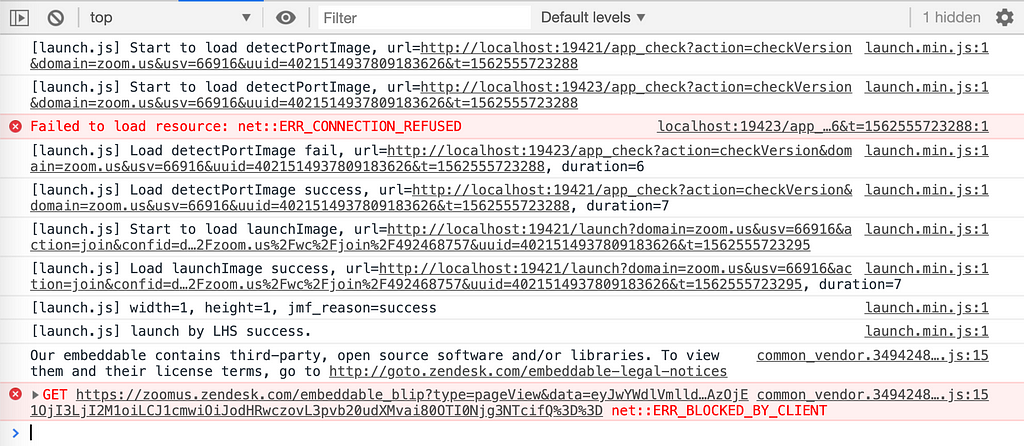
If you look at what’s logged to the web developer console when visiting one of those Zoom ‘join’ links, you should see something like this:
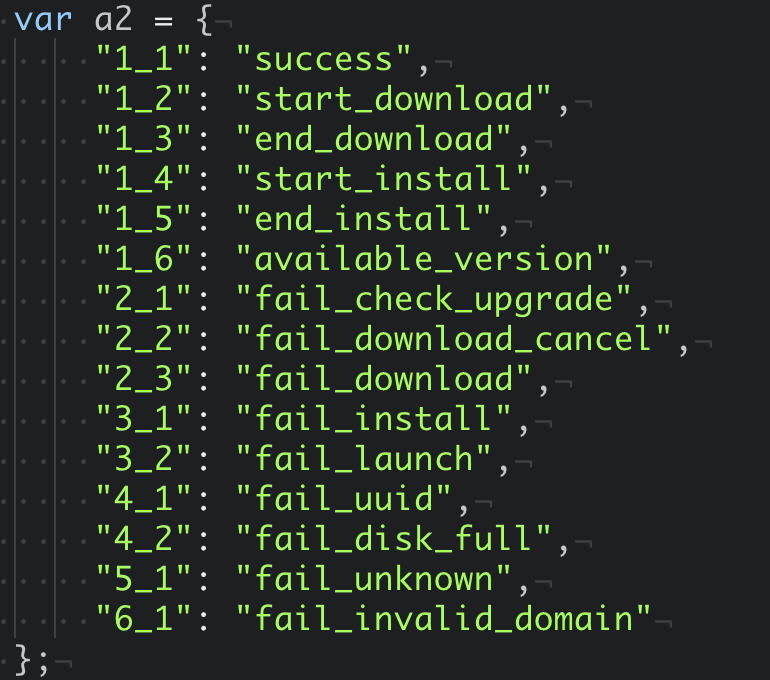
I also found that, instead of making a regular AJAX request, this page instead loads an image from the Zoom web server that is locally running. The different dimensions of the image dictate the error/status code of the server. You can see that case-switch logic here.
The two numbers are the pixel dimensions of the image returned by the web server.
The scary thing is that this enum seemed to indicate that this web server can do far more than just launch a Zoom meeting. What I found out was that this web server can also re-install the Zoom app if a user has uninstalled it, more on that later.
One question I asked is, why is this web server returning this data encoded in the dimensions of an image file? The reason is, it’s done to bypass Cross-Origin Resource Sharing (CORS). For very intentional reasons, the browser explicitly ignores any CORS policy for servers running on localhost.
I’m guessing that this is intentionally done for security reasons. Regardless, it seems that Zoom is abusing a hack to bypass CORS protection. More on that later.
The Video Call Vulnerability
I created a personal meeting with a different account and cracked open Postman and started to remove parameters to see what the minimal GET request was that was required to launch a Zoom meeting.
There are a lot of random parameters that are sent to the localhost web server but the only ones that seem to matter are the following.
action=join
confno=[whatever the conference number is]
Using the following GET request from Postman I was successfully able to get my computer to join the Zoom call that the other account had created.
Once I had this, I started tinkering with what other “action” parameters I might be able to pass to get the client to do other things. I wasn’t able to find anything even after searching through the various public documents and the public ProtoBuff schema for hints about what hidden functionality may exist. Again, this webserver’s API is completely undocumented as far as I can tell and I’ve spent several hours searching for any mention of this Desktop web server in the official and unofficial documentation.
So now I had a minimal POC that I could use to maliciously get any user into a call, however, the default setting for the “New Meeting” is to allow the user to choose whether to join their Audio/Video. I would consider this alone a security vulnerability.
The above-described behavior continues to work to this day! You can still use this exploit to launch someone into a call without their permission.
I read about the Tenable Remote Code Execution in Zoom security vulnerability which was only patched within the last 6 months. Had the Tenable vulnerability been combined with this vulnerability it would have allowed RCE against any computer with the Zoom Mac client installed. If a similar future vulnerability were to be found, it would allow any website on the internet to achieve RCE on the user’s machine.
I advised Zoom that if they have any users that are still using Zoom 4.1.33259.0925 versions or lower, this would be a very potent attack.
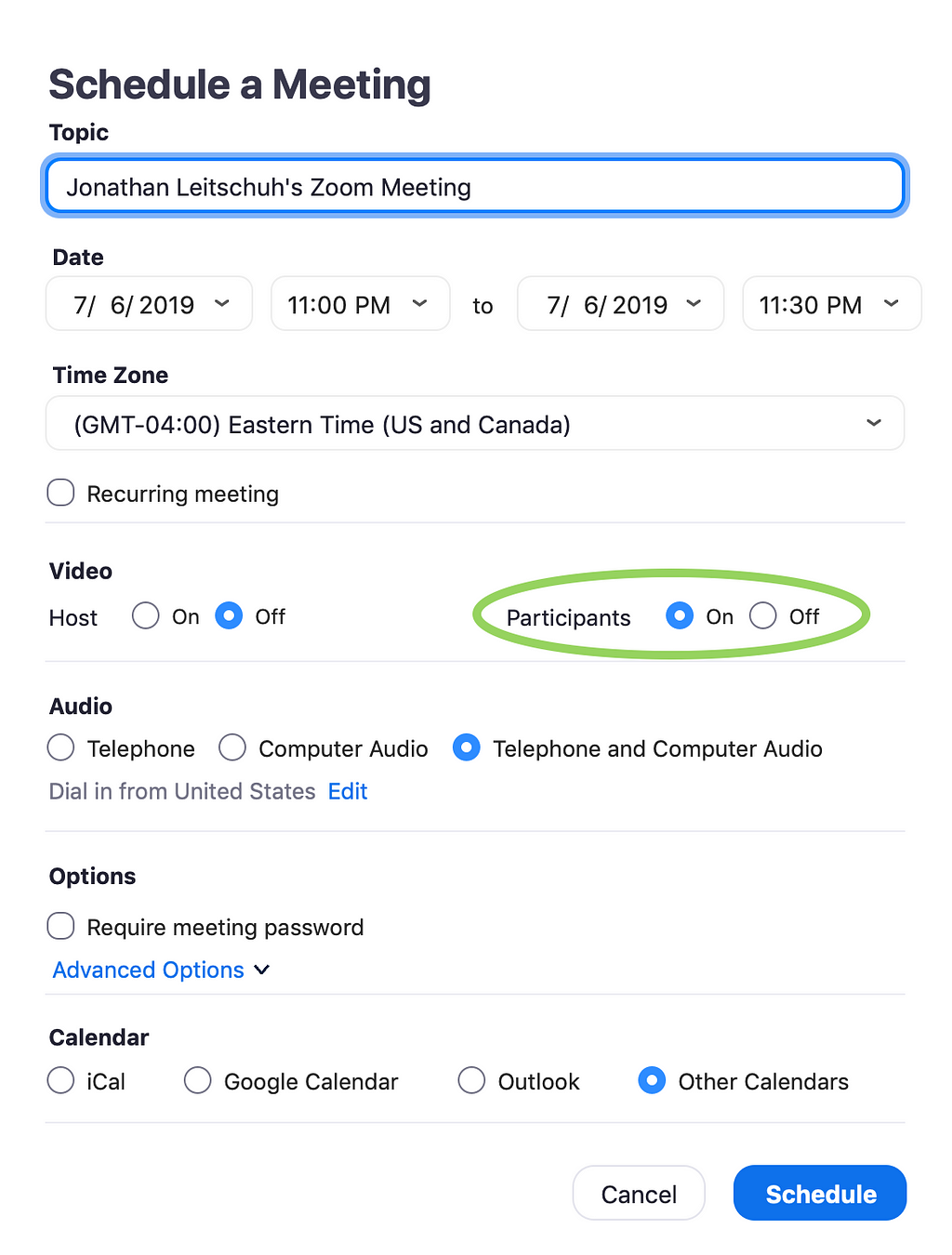
So far, I could only achieve getting a user into a call without their permission. Although this has hypothetical security implications, I didn’t have a true exploit. I started tinkering with figuring out how to get someone’s camera activated. When setting up a meeting for work I was greeted with this screen.
You can choose to enable a participant’s video camera when they join the call.
Enabling “Participants: On” when setting up a meeting, I discovered that anyone joining my meeting automatically had their video connected.
When I got back to my personal machine, I tried this same functionality and found that it worked exactly the same.
This prompted me to create the Proof Of Concept below.
Proof Of Concept
The local client Zoom web server is running as a background process, so to exploit this, a user doesn’t even need to be “running” (in the traditional sense) the Zoom app to be vulnerable.
All a website would need to do is embed the above in their website and any Zoom user will be instantly connected with their video running. This is still true today!
This could be embedded in malicious ads, or it could be used as a part of a phishing campaign. If I were actually an attacker, I’d probably invest some time to also include the incrementing port logic that the code in the Javascript running on Zoom’s site.
A fully working POC that you can test out yourself can be found at the link below. Warning: Clicking this link on Mac will launch you into a Zoom call! https://jlleitschuh.org/zoom_vulnerability_poc/
A fully working POC that will launch you into a call with your video camera active can be found here. Warning: Clicking this link on Mac will launch you into a Zoom call with your camera activated! https://jlleitschuh.org/zoom_vulnerability_poc/zoompwn_iframe.html
Quick Fix
To fix the “auto join with video” part of the vulnerability, I advised Zoom on their backend server they immediately disable a meeting creator’s ability to automatically enable a participants video by default. I advised that this was 100%, not a complete fix. However, it could serve as a quick way to protect users from the invasion of privacy component of this attack.
I also advised that if there is hidden functionality where a meeting host can forcibly join computer audio (perhaps something I’m not seeing because I don’t have a Pro account), this should also be disabled.
I commented that allowing a host to choose whether or not a participant will automatically join with video should be considered it’s own standalone security vulnerability.
To this advisement, I received the following response:
Zoom believes in giving our customers the power to choose how they want to Zoom. This includes whether they want a seamless experience in joining a meeting with microphone and video automatically enabled, or if they want to manually enable these input devices after joining a meeting. Such configuration options are available in the Zoom Meeting client audio and video settings.
However, we also recognize the desire by some customers to have a confirmation dialog before joining a meeting. Based on your recommendations and feature requests from other customers, the Zoomteam [sic] is evaluating options for such a feature, as well as additional account level controls over user input device settings. We will be sure to keep you informed of our plans in this regard.
When responding to responsible disclosure, don’t go into PR spin mode. It’s counterproductive.
It’s important to note that the default configuration for Zoom is to allow a host to choose whether or not your camera is enabled or not by default.
Zoom did end up patching this vulnerability, but all they did was prevent the attacker from turning on the user’s video camera. They did not disable the ability for an attacker to forcibly join to a call anyone visiting a malicious site.
UPDATE: July 7th, 2019: There has been a regression in the fix implemented by Zoom thus allowing this vulnerability to be exploited with the video camera activated.
The Denial Of Service (DOS) Vulnerability
This same vulnerability also allowed the attacker to DOS any user’s machine. By simply sending repeated GET requests for a bad number, Zoom app would constantly request ‘focus’ from the OS. The following simple POC demonstrated this vulnerability.
This DOS vulnerability was patched in version 4.4.2 of the Zoom client.
The Install Vulnerability
If you have ever installed Zoom on your computer, this web server is installed. It continues to run if you uninstall Zoom from your computer.
This server also supports updating and installing a new version of Zoom in addition to launching a call. I did some additional decompilation of the Zoom web server to see the code path that these endpoints seemed to call.
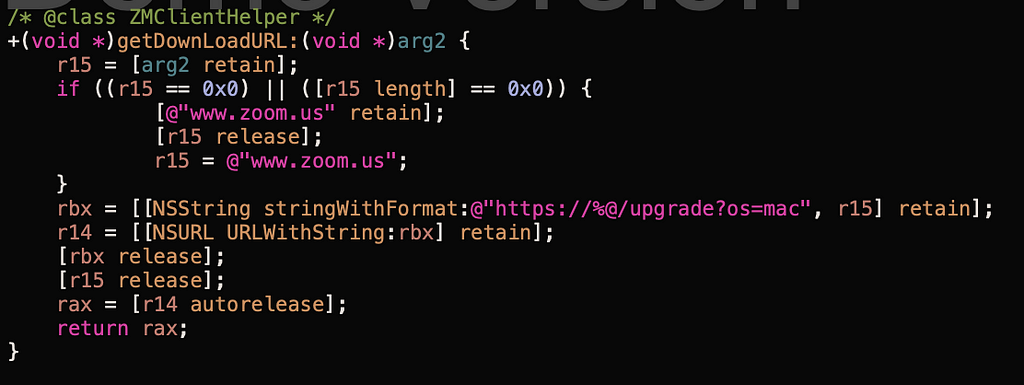
Using Hopper Disassembler to disassemble the Objective-C bytecode of the web server I found the following method.
Takes arguments from some API request and uses it to craft a download URL used to upgrade the version of Zoom installed?
This method is gated by the following logic.
Ensures the download URL is only under ‘trusted’ subdomains.
One of the API’s inside of this web server running on all Macs with Zoom installed is an endpoint that allows the current version of Zoom that’s installed to be updated or re-installed by this server.
You can confirm that this logic does indeed exist by doing the following:
Install the Zoom client on your computer if you don’t already have it installed.
Open the Zoom client, then shut it down.
Uninstall the Zoom client from your computer by dragging the Applications/zoom.us.app file to the trash.
Open any Zoom join link and Zoom will ‘helpfully’ be re-installed for you in the Applications folder and will be launched by this web server.
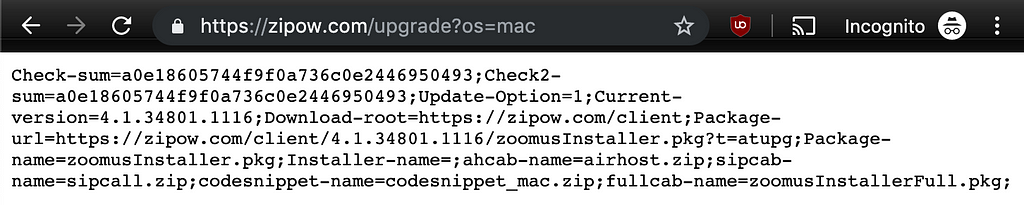
Using the list of domains listed inside of the application that could be used to download updates for the Zoom app, I decided to check and see what each of the sites returned when visited. For example, here’s the result of visiting https://zipow.com/upgrade?os=mac
You can clearly see the URL to be used to download the zoom installer if Zoom needs to be re-installed.
Doing a whois lookup on all of the domains listed in the source code returned some interesting results. For example, the domain zoomgov.com was scheduled to expire on May 1st, 2019. Had this domain registration been allowed to lapse, the takeover of this domain would have allowed an attacker to host an infected version of the Zoom installer from this site and infected users who had uninstalled Zoom from their computers. Essentially, this would have made this vulnerability a Remote Code Execution (RCE) vulnerability. I disclosed this bit of information to the Zoom team during my call with the Mozilla security team on April 26th, 2019. Within 5 hours of the end of that call that domain had been registered out to May 1st, 2024.
Fundamental Security Vulnerability
In my opinion, websites should not be talking to Desktop applications like this. There is a fundamental sandbox that browsers are supposed to enforce to prevent malicious code from being executed on users machines.
Having every Zoom user have a web server that accepts HTTP GET requests that trigger code outside of the browser sandbox is painting a huge target on the back of Zoom. It’s important to note that if you try to pull off the same exploit directly with a Javascript AJAX request, you are greeted with the following exception.
All localhost request from Javascript are forbidden by browsers.
CORS-RFC1918
In discussing this vulnerability with both the Chromium and Mozilla Firefox security team they both said that they couldn’t do anything about this vulnerability. The Chromium team pointed me to CORS-RFC1918 which is a proposal that will require browser vendors to query users for permission before allowing sites to make requests against local resources like localhost and the 192.168.1.* address space.
Linked in that RFC is a wonderful and fun to read bug report where Tavis Ormandy of Google’s Project Zero found a similar vulnerability in TrendMicro’s Password Manager allowing remote code execution via the browser and the exfiltration of a user’s passwords from a password vault. That story is well worth the read.
When this same vulnerability was reported to the Mozilla Firefox team, they closed it as it wasn’t considered a vulnerability against Firefox. However, they soon reopened the report as a vulnerability against their internal infrastructure. As a result, I was invited into a call with the Zoom and Mozilla Firefox team to discuss the vulnerability on April 26th, 2019. During this call, they promised Mozilla and me that this vulnerability would be patched well before the end of the 90-day disclosure deadline. This turned out to be false.
Zoom’s Proposed Fixes
The fix proposed by the Zoom team was to digitally ‘sign’ the request made to the client. However, this simply means that an attacker would have to have a backend server that makes requests to the Zoom site first to gain a valid signature before forwarding the signature on to the client.
They also proposed locking the signature to the IP that made the request. This would mean that as long as the attacker’s server was behind the same NAT router as the victim, the attack would still work.
I described to the Zoom team how both of these solutions were not enough to fully protect their users. Unfortunately, this left the Zoom team with only 18 days before public disclosure to come up with some better solution.
Unfortunately, even after my warning, this was the solution they chose to go with. This new signature or token is embedded in a new parameter called confid. The simplest way to bypass this new confid check was to simply use the iframe workaround described above. Alternatively, if you and the victim are behind the same NAT router, you can make a request for the join page, extract the #lhs_launch_parames field from the HTML document and embed it in the HTML response from the malicious page.
Conclusion
As of 2015 Zoom had over 40 million users. Given that Macs are 10% of the PC market and Zoom has had significant growth since 2015 we can assume that at least 4 million of Zoom’s users are on Mac. Tools like Zoom, Google Meet or Skype for Business is a staple of today's modern office.
Any vulnerability in an application with this many users must be considered a serious threat to all those users. All of the vulnerabilities described in this report can be exploited via “drive-by attack” methodologies. Many times during my conversation with the Zoom security team they seemed to argue that the seriousness of this vulnerability was limited because it would require “user interaction” to exploit these. My response to this was finally “I would highly suggest that you not hang your hat on ‘user interaction required’ for protecting your users given that this ‘user interaction’ is simply clicking a link or visiting a webpage.”
I believe that in order to fully protect users, I truly believe that this localhost web server solution needs to be removed. Alternative methodologies like registering custom URI handlers (for example, a zoom:// URI handler) with the browsers is a more secure solution. When these URI handlers are triggered, the browser explicitly prompts the user for confirmation about opening the app. According to the Zoom team, the only reason this localhost server continues to exist is that Apple’s Safari doesn’t support URI handlers.
Consequences
This is essentially a Zero Day. Unfortunately, Zoom has not fixed this vulnerability in the allotted 90-day disclosure window I gave them, as is the industry standard. As such, the 4+ million users of Zoom on Mac are now vulnerable to an invasion of their privacy by using this service.
Additionally, due to a lack of sufficient auto-update capabilities, many users continue to run outdated versions of Zoom for months after new releases are shipped leaving them vulnerable to exploits like these.
Patch Yourself
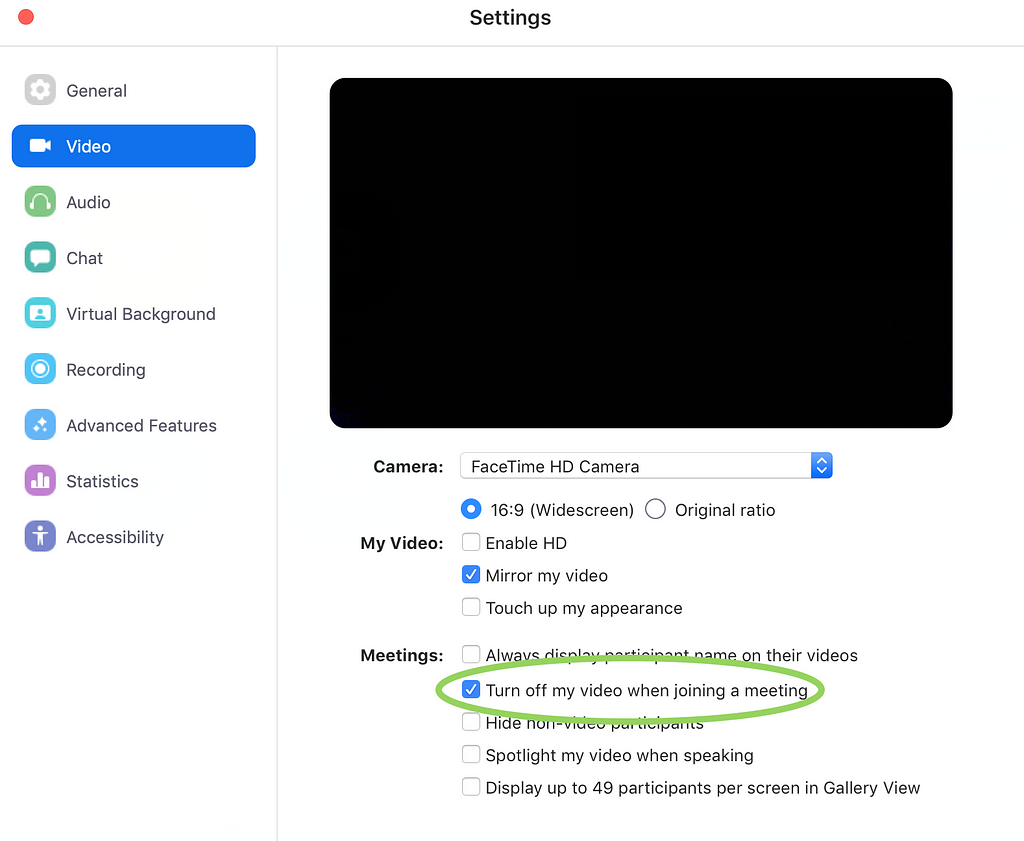
If you want to patch this vulnerability for yourself you can do the following. Disable the ability for Zoom to turn on your webcam when joining a meeting.
To shut down the web server, run lsof -i :19421 to get the PID of the process, then do kill -9 [process number]. Then you can delete the ~/.zoomus directory to remove the web server application files.
To prevent this server from being restored after updates you can execute the following in your terminal:
Given the massive install base for Zoom, I highly recommend that other researchers take the time to explore this Zoom web server to see what other vulnerabilities exist. This being said, I also recommend that any researcher that finds a vulnerability in Zoom’s software does not directly report the vulnerability to Zoom. Instead, I recommend that researchers report these vulnerabilities via the Zero Day Initiative (ZDI). The ZDI disclosure program gives vendors 120 days to resolve the vulnerability, the ZDI will pay researchers for their work, and researchers have the ability to publicly disclose their findings.
If you want to decompile the Zoom client application for yourself, it’s located in the ~/.zoomus directory on your computer.
Shake Shack fans in Hong Kong, the wait is over.The American fast food chain’s burger created in a collaboration with fine-dining Chinese restaurant The Chairman was revealed on Wednesday. Called The Chairman Shack (HK$80), the burger features an Angus beef patty topped with 12-hour slow-cooked caramelised onion, griddled ox tongue, pickled radish, Sichuan pepper, fermented bean sauce and butter lettuce.The ox tongue has been braised with five spice powder, and the beef patty is brushed with…
Core Services Tribe Lead, Christian, on his experience at Zopa and his career moves so far.
When I was younger, I wanted to be…
When I was really
little, taller. When I was not-so-little, a (taller) music journo…
I studied…
I studied both arts and sciences. Academics wasn’t ever a route to career for me – but for the pure enjoyment of understanding, and different ways of thinking.
I got where I am today by…
A catalogue of
accidents, and if I’m honest a healthy dose of naivety.
I stumbled into the
world of technology and operations in my first job for a consultancy. It was
very focused on IT transformation for government. Clear process, patterns and
repeatability seemed to be a demand everywhere, which probably played to my love
of calculus and algebra as a kid. The methods were horribly flawed, however…
I worked for a
microfinance charity and found that model fascinating, so although I never had
much interest in consumer finance, it wasn’t such a big leap to consumer
peer-to-peer.
The combination of
these two experiences, and a speculative conversation with a recruiter, led me
to Zopa.
I am in my second incarnation at Zopa…
My first incarnation
was back in 2008. I was one of 11 people and I had no idea what I was getting
myself into! Zopa was three years old and still very nascent.
I did a bit of everything: answering phones (yep, I’ve done those 1-hour calls with investors!), emails, fixing technical bugs, making sure all the payments were moving. Then in week six I was asked by a board member to ‘build vintage analysis for our loan book’ – which sounded like gibberish to me. That’s when I knew I had a big challenge in front of me!
These days I…
Look after the Core
Services tribe. We think about the landscape of our Zopa products and find
opportunities to help Zopa deliver them in efficient, safe and scalable ways.
That means I have the
privilege of finding fantastic talent and working out with them what great
stuff we can enable for Zopa. Most of the time I am thinking about how to help
people in the tribe find those opportunities, and then doing something
constructive in service of that.
Sometimes that means
getting very involved, but equally important is to trust them to get on with it
and help people to reconcile what they do with the bigger picture.
The thing I like most about Zopa is…
I think we are very sincere about our sense of care to our customers. It manifests in different ways in different disciplines, but it’s remarkably constant.
Because of the above, I find equally we can be very sincere with each other. That means it’s possible to have constructive, tough conversations with people you usually rant to enthusiastically about last night’s episode of GoT.
I don’t think that
would be possible if only a minority were minded that way, so it has to be
cultural.
In my spare time I like to…
I’m an arts student
first and foremost, so I enjoy exploring all facets of creative output. I worry
less about being good and revel in the act of discovery. I’ve just started a
sculpture course: I have no clue what I’m doing but it really makes you look at
things differently, and I get a real kick out of that!
If you asked me how Zopa’s influenced my career…
I’d say that there’s
no shortage of ambition here, so really, it’s up to me to think about what I
want from a career. If I can articulate an opportunity clearly that makes sense
to the business, I believe the company is very willing to realise that
opportunity.
That willingness should not be taken for granted, but it does mean you as an individual have to think hard about what career genuinely means to you.
I get inspired by…
I constantly come back
to the wonder of small things we take for granted.
An example: recently I spent a year back at university obsessing over how we perceive music – to an incredibly nerdy level – but I still marvel at the inexhaustible pleasure of listening to a simple sequence of sounds repeated over and over.
An appeals court affirmed a ruling that Donald Trump’s Twitter account can’t block people. Let’s take a look at what that means. First question: is Trump’s account a part of the public record of government or an activity undertaken by a private citizen? It’s clear from what he posts that it’s intended to public activity. … Continued
Cyclists aren’t the ‘scourge of the streets’. They are mothers, fathers, grandparents and children all doing their bit to make Britain a healthier, greener and more liveable place.
Share this video from @Chris_Boardman to help us make our message loud and clear to @channel5_tv pic.twitter.com/PDkRGEjsRi
Posted by
BritishCycling
on Tuesday, July 9th, 2019 4:00pm
Retweeted by
ottocrat
on Wednesday, July 10th, 2019 6:56am
After months of rumours, on Wednesday Nintendo announced the Switch Lite, a new version of the company’s incredibly popular Switch console that is only capable of playing games in handheld mode.
To that end, the smaller Switch Lite doesn’t feature removable Joy-Con controllers, instead the console’s controls are built directly into the device. It also doesn’t include a kickstand, nor does it have the original Switch’s HD Rumble haptic feedback. Lastly, Nintendo has removed the console’s ability to output to a TV via an HDMI cable.
In Canada, the Nintendo Switch Lite will retail for $260 CAD, with the console launching on September 20th. It will be available in three vibrant new colours: yellow, grey and turquoise. By comparison, the original Switch, which launched in Canada in 2017, currently retails for $380 CAD.
Nintendo also plans to release a special Pokémon Sword and Shield edition of the Switch when that game launches on November 8th, 2019.
A new study revealed that over 1,300 Android apps can scrape certain personal data anyway, even if a user explicitly denied access to it.
Researchers at the International Computer Science Institute (ICSI) created a controlled environment to test 88,000 apps downloaded from the US Google Play Store. They peeked at what data the apps were sending back, compared it to what users were permitting and - surprise - 1,325 apps were forking over specific user data they shouldnt have.
What is Google going to do about it?
No fixes coming until Android Q starting in August
I am sure everybody will get Android Q right away. Not.
Add your emergency contacts, allergies, and medical conditions to Medical ID on your iPhone, just in case anyone needs to access them without your passcode.
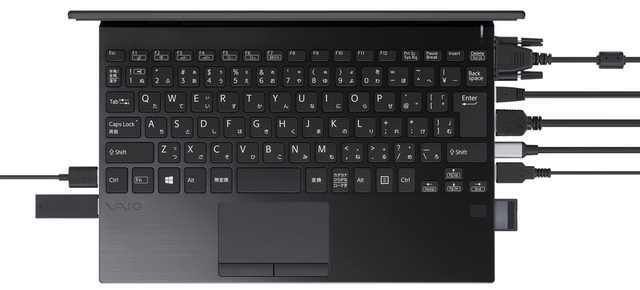
3x USB Type A, USB Type C, Ethernet, HDMI, VGA, full size SD card, headphones and mic. You can fit everything into a tiny notebook if you try hard enough.
Since our last Firefox release, we’ve been working on features to make the Firefox Quantum browser work better for you. We added by default Enhanced Tracking Protection which blocks known “third-party tracking cookies” from following your every move. With this latest Firefox release we’ve added new features so you can browse the web the way you want — unfettered and free. We’ve also made improvements for IT managers who want more flexibility when using Firefox in the workplace.
Key highlights for today’s update includes:
Blackout shades come to Firefox Reader View: One of the most popular ways that people use our Reader View is by changing the contrast from light to dark. Initially, this only covered the text area. Now, when a user moves the contrast to dark all the sections of the site — including the sidebars and toolbars will be completely in dark mode.
All sections of the site will be completely in dark mode
Firefox Recommended Extensions and more: We curated a list of recommended extensions that have been thoroughly reviewed for security, usability and usefulness. You can find the list on the “Get Add-ons” page in the Firefox Add-ons Manager (about:addons). Plus we are making it even easier to report any bad extensions you come across. You can do this directly through your Firefox Add-ons Manager to ensure others’ safety. This new feature is part of the larger effort to make the add-ons ecosystem safer.
Popular User Requested Features added to Firefox for iOS: Users are at the center of everything we do, and most of the features we’ve added to Firefox for iOS in the past have been requests straight from our community. Today, we’re adding two new features which have been asked for the most. They include:
Bookmark editing – We added a new ‘Recently Bookmarked’ section to bookmarks and also added support for editing all bookmarks. Now users can reorder, rename, or update the URL for bookmarks.
Set sites to always open with Desktop Version – We know that some sites aren’t optimized for mobile, and for users the desktop version of a site is the better and preferred experience. Today, users can set sites to always open in desktop mode, and we’re also introducing a badge to help you identify when a site is being displayed in desktop mode.
Reorder, rename, or update the URL for bookmarks
More customization for IT Pros
Since the launch of Firefox Quantum for Enterprise last year, we’ve received feedback from IT (information technology) professionals who wanted to make Firefox Quantum more flexible and easier to use so they can meet their workplace needs. Today we’re adding a number of new enterprise policies for IT leads who want to customize Firefox for their employees.
The new policies for today’s Firefox Quantum for Enterprise will help IT managers configure their company’s infrastructure in the best way to meet their own personalized needs. This includes adding a support menu so enterprise users can easily contact their internal support teams and configuring or removing the new tab page so companies can bring their intranet or other sites front and center for employees. For shared machines and protecting employees’ privacy, IT managers can turn off search suggestions. You can look here to see a complete list of policies supported by Firefox.
We are always looking for ways to improve Firefox Quantum for Enterprise, our Extended Support Release. For organizations that need access to specific preferences, we’ve already started a list in our GitHub repository, and we will continue to add based on the requests we receive. Feel free to submit at the GitHub link on specific preferences you need.
To read the complete list of new items or see what we’ve changed in today’s release, you can check out our release notes.
We hope you try out and download the latest version of Firefox Quantum for desktop, iOS and Enterprise.
The tiny laptop, which Apple first launched in 2015, is no longer listed on the company’s Apple.com/ca website. Apple had not updated the 12-inch MacBook since 2017.
The MacBook wasn’t today’s only casualty. Apple also discontinued the MacBook Pro ‘Escape.’ This is the only MacBook Pro that featured a standard escape button and a row of physical function keys instead of a Touch Bar.
We’ve reached out to Apple to confirm the news. We’ll update this article with the company’s response.
In the meantime, the death of the 12-inch MacBook shouldn’t come as too much of a surprise. After Apple finally updated the MacBook Air with a new design back in 2018, it felt like the MacBook’s days were numbered.
With its single USB-C port and, for a time, underpowered Intel Core M processors, the MacBook always felt like the odd duck in Apple’s laptop lineup. It also didn’t help that the MacBook was, even in the context of other Apple computers, far too expensive for what it offered. Apple is still selling the 12-inch MacBook in its refurbished store starting at $1,099 CAD.
Today in conjunction with the kickoff of its Back to School promotion, Apple has announced significant changes to its laptop lineup, updating the MacBook Air and entry-level MacBook Pro while discontinuing the smallest Mac laptop, the 12-inch MacBook.
The MacBook Air, which Apple recently introduced a modern update to, has added True Tone to its display, but received no other changes of note. However, the bigger news for the MacBook Air is that it's receiving a price cut: formerly starting at $1,199, the new model begins at $1,099, and shoppers qualifying for an Apple education discount can purchase the device for $999.
The MacBook Pro is seeing more substantial changes. Apple no longer sells a MacBook Pro without Touch Bar; the entry-level 13-inch model, which still starts at $1,299, now includes both the Touch Bar and Touch ID. The device has also been updated to include the latest 8th-generation quad-core Intel processors, True Tone, improved stereo speakers, and Apple's T2 Security Chip, which continues making its way across the entire Mac product line. Education buyers can purchase the MacBook Pro starting at $1,199.
It's rare to see such significant upgrades for an entry-level Mac model, but the changes make sense when considering how Apple has reconfigured its laptop line as a whole. The former entry-level MacBook Pro was originally positioned by Apple as a successor to the MacBook Air. That identity clearly didn't stick, however, as after years of neglect Apple breathed new life into the Air model last fall. With a modern MacBook Air available, the 13-inch MacBook Pro without Touch Bar merely added confusion to the laptop lineup.
Now, Apple's lineup of notebooks is simplified and more cohesive to the average buyer. The MacBook Air is the most affordable, best all-purpose machine at $1,099, while the entry-level MacBook Pro at $1,299 includes attributes of the higher-end Pro line such as the Touch Bar. There remain more expensive 13-inch Pro models, as well as the existing 15-inch models, but laptop shoppers now have much clearer options before them.
This new simplicity in the product line would have been incomplete apart from the third big change today: the death of the 12-inch MacBook. Ironically, the device that pushed the design ethos of the Air line even further – being the thinnest, lightest laptop Apple made – has been rendered irrelevant by Apple now that the Air line has been revitalized.
As must be noted in any coverage of new Apple laptops, it's important to state that the new MacBook Air and MacBook Pro models both retain the butterfly mechanism keyboard. They have officially been added to Apple's keyboard service program, along with all other butterfly keyboard laptops.
If you're interested in purchasing a MacBook Air or MacBook Pro for school, not only are education discounts available, but Apple's Back to School promotion is also offering free accessories with qualifying purchases, such as a pair of Beats Studio 3 Wireless headphones.
Support MacStories Directly
Club MacStories offers exclusive access to extra MacStories content, delivered every week; it's also a way to support us directly.
Club MacStories will help you discover the best apps for your devices and get the most out of your iPhone, iPad, and Mac. Plus, it's made in Italy.
Continuing Peter’s work on hooking up FreshRSS with Drupal to “like” posts, I wanted to do the same on my WordPress site. Knowing nothing about FreshRSS nor WordPress, and unable to peer into the FreshRSS database (the .sqlite file is encrypted?), I went the route (lol) less travelled by, and ...
But luckily all is not lost. Apple still sells the tiny fanless computer in its online refurbished store.
The tech giant is selling all three processor variants, but it’s unclear how many units are in stock.
The lowest end m3 version starts at $1,459, but if you’d rather 16GB of RAM instead, it’ll cost you $1,689.
The mid-tier i5 Y series version starts at $1,579 for the base spec with 8GB of Ram and 256GB of storage. The next step up costs $1,699 and has 8GB of RAM and a 512GB harddrive. There’s a third tier of this model that comes with 16GB of RAM and 256GB of onboard memory and it costs $1,809. The best i5 model comes with 16GB of RAM and 512GB of storage and comes in at $1,909.
Finally, there is an i7 version. The base model is priced at $1,859 and comes with 8GB of RAM and 512GB of storage. The step-up costs $1,659 and Apple packed it with 16GB of RAM and 256GB of memory.The top tier costs 2,069 and comes with 16GB of RAM and 512GB of memory.
While the MacBook isn’t Apple’s most powerful computer, it makes top for it with a beautiful Retina Display, portable size and fanless design make it an appealing option, especially at these low prices.
Apple streicht ein paar Macs: 12" MacBook, altes MacBook Air und das MacBook Pro ohne Touchbar. Nun gibt es nur noch MacBook Air und MacBook Pro. Das finde ich richtig. Allerdings sind die Einstiegspreise geschönt. Man muss von 128 auf 256 GB aufrüsten als praktisches Minimum. Damit kostet das MacBook Air ab 1500 Euro und das MacBook Pro ab 1750 Euro. Allerdings würde ich kein Gerät mit Butterfly Keyboard kaufen.
1500 Euro kann man sinnvoller für Apple Hardware einsetzen. Das kostet auch ein iPad Pro mit allem drum und dran. Die Tastatur geht nicht kaputt, und wenn, dann muss das Gerät nicht in die Werkstatt. Da sie versiegelt ist, kann man sogar Kaffee drüber schütten. Dabei hat sie ein wunderbares Schreibgefühl. Einen Pencil kann man beim MacBook gar nicht nutzen und auch die Tablet-Nutzung ist nicht drin.
Für 1500 Euro kriegt man den Pencil, die Tastaturhülle und sogar 512 GB Speicher. Das ist mehr als luxuriös. Und mit der Ausnahme Software-Entwicklung kann man heute mit dem iPad Pro eigentlich alles machen. Ich komme damit bestens zurecht. 11 Zoll oder 12.9 Zoll kann ich nicht entscheiden, das sieht jeder anders.
With Apple’s upcoming earnings report fast approaching, notable technology industry financial analysts are beginning to publish their predictions for the remainder of the year.
In a new report published by Wedbush and first reported by 9to5Mac, the firm states that iPhone demand is set to remain stable and that Apple will sell roughly 180 million units of the smartphone in 2019.
The more exciting portion of the report indicates that Apple plans to launch yet another AirPods revision later this year. The aptly named AirPods 3 are tipped to feature a more sporty design and some level of waterproofing. As expected, the upcoming ‘AirPods Pro’ version of Apple’s wireless, Bluetooth earbuds will feature a higher price point than the current 2nd-generation AirPods.
Apple first launched its AirPods (2019) back in March. The second version of its popular earbuds featured a new H1 chip that allows for faster connectivity and improved talk time, along with a Qi-compatible wireless charging case.
Development of the 2nd-gen AirPods is rumoured to have been completed for several months, possibly extending up to a year, before their release. Apple reportedly planned to release its now dead AirPower charging mat alongside the wireless, Bluetooth earbuds, leading to their delay.
The AirPods (2019) are priced at $269 CAD, with the standard AirPods coming in at $219. The AirPods’ wireless charging case can also be purchased on its own for $99.
A fellow nonfiction author recently shared that he’d written 18 drafts of his book. That’s probably too many. But how many is the right number? I’ll answer that question, but first, let’s talk about what a draft is. You have a chapter written. You go through and make a change. You save it under a … Continued
The easiest and most obvious use case for blockchain in education is blockchain-based credentials. This article discuses one such project being undertaken by Arisonza State University. "Arizona State has completed the “first big chunk of work” -- providing the tool to view student data such as transfer date, grades, projected graduation, etc." The danger, though, is that each university system will develop its own credentials blockchain and that we'll have dozens of different ways of doing it. "Creating a universal system for reverse transfer, and more broadly student data, would be monumental, said Moreau. But it would mean that colleges would have to give up some autonomy on how they collect and share data."
Along with rumours surrounding Apple’s AirPods 3 launching before the end of 2019, the tech giant also seems to have big upcoming plans for its iPhone lineup.
JP Morgan analyst Smik Chatterjee stated in a recent note that Apple could launch four new iPhones that include features like OLED displays, 5G modem support and new AR/VR functionality, as first reported by CNBC and MacRumors.
The report states Apple will release three high-end 5G iPhones in September, including a 5.4-inch, 6.1-inch and 6.7-inch device. Two of these iPhones will include new rear camera 3D sensing technology. Chatterjee also goes on to say that Apple will launch a fourth lower-cost iPhone that measures in at the same 4.7-inch size as the iPhone 8, but without 5G connectivity and an OLED screen.
Apple’s current iPhone lineup, including the iPhone XS, iPhone XS Max and iPhone XR, include 3D sensing technology in the front camera. According to this report, this same technology is also coming to the iPhone’s rear shooter, allowing the camera to scan objects up to 4.6 metres (15-feet) from the smartphone through the use of new laser technology.
The report also states that Apple’s lower-end iPhone for 2019 is set to be more affordable than the current iPhone XR. These predictions backup notable Apple analyst Ming-Chi Kuo’s predictions to an extent — though there are some discrepancies — regarding Apple switching to a three camera rear shooter setup for its 2019 iPhone line, along with the tech giant releasing three devices: 5.4-inch and 6.7-inch models with OLED displays, and a 6.1-inch lower-end version that also features an OLED screen.
Various case leaks, including renders based on alleged specs from Steve Hemmerstoffer (@OnLeaks), also corroborate these claims.
Given 5G networks aren’t expected to launch in Canada until 2021 at the earliest, it’s likely Apple will manufacture specific versions of its higher-end iPhones that don’t feature at 5G modem.













 ottocrat on Twitter.


 mrjamesob on Twitter.



 OliverNorgrove on Twitter.