Rolandt
Shared posts
Instapaper Liked: The Why of Cooking
Apple Disables Walkie-Talkie App Due to Security Vulnerability
Matthew Panzarino, writing for TechCrunch:
Apple has disabled the Apple Watch Walkie Talkie app due to an unspecified vulnerability that could allow a person to listen to another customer’s iPhone without consent, the company told TechCrunch this evening.
Apple shared an official statement with TechCrunch:
We were just made aware of a vulnerability related to the Walkie-Talkie app on the Apple Watch and have disabled the function as we quickly fix the issue. We apologize to our customers for the inconvenience and will restore the functionality as soon as possible. Although we are not aware of any use of the vulnerability against a customer and specific conditions and sequences of events are required to exploit it, we take the security and privacy of our customers extremely seriously. We concluded that disabling the app was the right course of action as this bug could allow someone to listen through another customer’s iPhone without consent. We apologize again for this issue and the inconvenience.
Panzarino rightfully points out the parallels of this issue with the highly-publicized FaceTime bug from earlier this year. The one key difference: whereas with the FaceTime bug, when it was reported by a user, Apple didn't respond or take action until the problem received widespread media attention; with this Walkie-Talkie bug, Apple followed up on a customer's report and addressed the issue seemingly before anyone else knew about it. Hopefully this is the sign of improved processes inside the company for handling serious bugs and vulnerabilities.
→ Source: techcrunch.com
Still addicted to Chrome? :: How about Firefox?
Seen from the inside, [Googles] Chrome browser looks a lot like surveillance software.
Lately Ive been investigating the secret life of my data, running experiments to see what technology really gets up to under the cover of privacy policies that nobody reads. It turns out, having the worlds biggest advertising company make the most popular Web browser was about as smart as letting kids run a candy shop.
It made me decide to ditch Chrome for a new version of nonprofit Mozillas Firefox, which has default privacy protections. Switching involved less inconvenience than you might imagine.
Just add some Chrome plugins to make matters worse.
Strategy vs. tactics
Strategy generates better, cheaper, more permanent solutions. But it does require thinking a bit . . . I had a problem. There were raccoons in my ceiling. Next to my basement there is an unheated, unfinished space with a dirt floor. They burrowed into this space, squeezed into the ceiling above it, and then migrated … Continued
The post Strategy vs. tactics appeared first on without bullshit.

Sigma's Different Approach to Full Frame
Sigma today announced a number of interesting things—FE and L mount lenses, and the DC DN primes now in EOS M mount—but the product that probably caught the most curious attention was the development announcement of the Sigma fp camera.
…How do you uninstall software from your Mac?
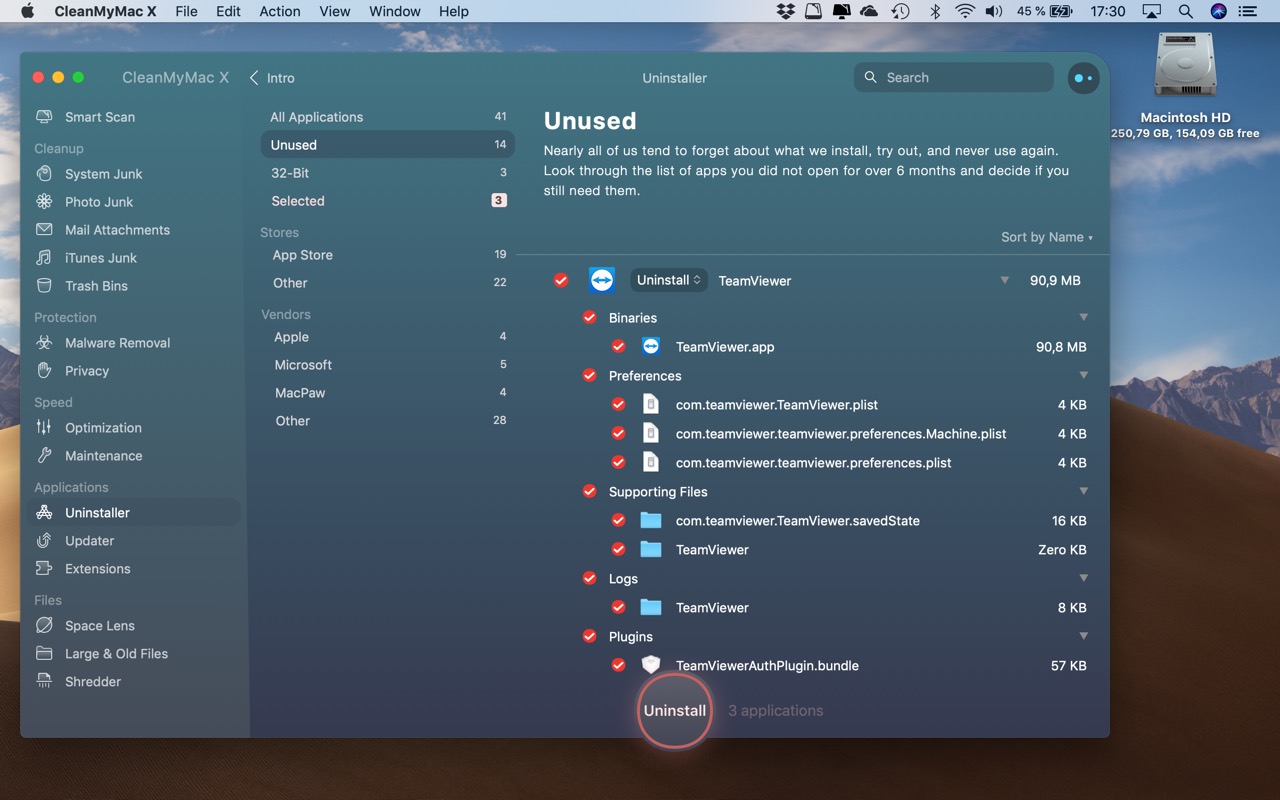
A very long time ago, a Mac app would be contained within just the icon of that app. You would drag the app from a disk (image) to your Applications folder and that would be all to install it. If you no longer needed the app, you would drag it from Applications folder to the Trash bin and empty the bin. Done.
You never needed an installer nor a facility to uninstall anything. But that is no longer the case. And if you are like most other Mac users, you have migrated from old Macs to new Macs and dragged all the junk you have accumulated over the years to your shiny new Mac. And then you wonder where all that disk space went.
And when was the last time you looked at your Login Items in System Preferences or did an "ls -la" in your ~ folder to find all the hidden directories from ages ago. Hint: they all start with a dot.
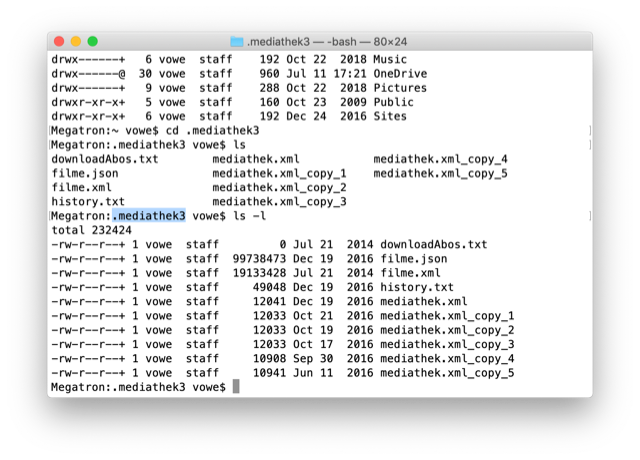
There is more than a hundred megabytes right there. And that is just one unused directory. Then look into your ~/Library folder and the /Library folder. System extensions, widgets, plugins. There is so much stuff in your trunk, some of it is just taking up space, but some of it might be talking all the time.
It's not only Zoom. There are a lot more Gremlins. If you have no clue what I am talking about, you may need something like CleanMyMac, which is shown in the first screenshot. Well, at least I need it.
A Timeline of iOS Accessibility: It Started with 36 Seconds

On June 8, 2009, at the end of a two-hour WWDC keynote, Phil Schiller was running through a long list of new features and apps that would be available on the iPhone 3GS, due to ship on June 19 of that year. Phil was pinch-hitting as keynote master of ceremonies for Steve Jobs, who was then on leave, recovering from a liver transplant.
At 1:51:54 in the video, just after he showed off Voice Control and the new Compass app, Apple’s version of the accessibility logo appeared on screen. It’s a stick-style figure with arms and legs outstretched. The icon is still used today.
“We also care greatly about accessibility,” Schiller said, and the slide switched to an iPhone settings screen.
For a total of 36 seconds, Schiller spoke somewhat awkwardly about VoiceOver, Zoom, White on Black (called Invert Colors from iOS 6 onward), and Mono Audio – the first real accessibility features on the iPhone OS platform, as it was then called.
And then it was over. No demo. No applause break.
Schiller moved on to describe the Nike+ app and how it would allow iPhone users to meet fitness goals.
I surveyed a number of liveblogs from that day. About half noted the mention of accessibility features in iPhone OS. The others jumped directly from Compass to Nike+. Accessibility hadn’t made much of a splash.
But in the blindness community, things were very different. Time seemed to stop somewhere after 1:51:54 in the video. Something completely amazing had happened, and only a few people seemed to understand what it meant.
Some were overjoyed, some were skeptical, some were in shock. They all had questions. Would this be a half-hearted attempt that would allow Apple to fill in the checkboxes required by government regulations, a PR stunt to attract good will? Or would it mean that people who had previously been completely locked out of the iPhone would have a way in?
You can probably guess what the answer is, now that we have ten years of an accessible mobile platform in the rearview mirror – now that Apple is widely credited with offering the best mobile accessibility experience available. But it didn’t all happen at once, and not every step along the way was a positive one.
Excerpt from ‘36 Seconds That Changed Everything.’
As a companion to my audio documentary, “36 Seconds That Changed Everything: How the iPhone Learned to Talk,” I’ve put together a timeline of iOS accessibility milestones from the past ten years. I’ve focused on Apple hardware and operating systems, though there have also been important Apple app updates, and third-party apps that opened doors to new ways of using iOS accessibly. It’s a list that’s simply too long for this article. And, with a few exceptions, I’ve addressed accessibility-specific features of iOS. Many mainstream features have accessibility applications and benefits, even if they don’t fit here directly.
Before the iPhone Was Accessible (2007-2009)

The number of blind Mac users tuned in to hear Steve Jobs introduce the iPhone at the 2007 Macworld keynote was probably very small. After all, the Mac had only been accessible for a couple of years at that point, by which I mean usable via screen reading software for people who were blind or had low vision.
Apple’s Mac screen reader was (and is) called VoiceOver, and it had been introduced with 10.4 Tiger, in 2005. Prior to Tiger, no version of Mac OS X had provided accessibility tools. Pre-Mac OS X, Apple did offer a few accessibility settings, and the Outspoken screen reader was available from a third party. Some blind tech enthusiasts had adopted the Mac following VoiceOver’s arrival with Tiger, and it was they who were most interested in whether the iPhone would be accessible.
But in 2007, the hordes of eager iPhone purchasers did not include people who were blind or had low vision. The iPhone wasn’t accessible to them. And lots of people, both blind and sighted, assumed it never would be. After all, how can someone with no vision navigate a cold, smooth piece of glass?
In the spring of 2008, Apple added VoiceOver to the iPod nano; at the same time, iTunes on the Mac became accessible to VoiceOver. That’s right, the old Carbon app had not worked with the screen reader before.
This meant that a blind person could now connect a nano to iTunes, enable VoiceOver on the device, copy songs to it, and use VoiceOver to find and play them. In fact, “VoiceOver” on the nano was actually a series of text-to-speech-created audio files that the device generated when you enabled the feature in iTunes. But it was a lot better than no speech at all.
With iTunes now accessible via the Mac, Apple had laid the groundwork for iPhone accessibility by making it possible for a blind person to sync an iPhone to their computer accessibly. Next stop: a real, accessible iPhone.
iPhone OS 3 and the 3GS (June 2009)
The iPhone announcement everyone expected at WWDC 2009 promised to be a big one. With the App Store a year old, and two years of development time under Apple’s belt, the common expectation was for a substantive iPhone update with a long list of new features. The iPhone 3GS, subsequently regarded as an important step forward for the platform, was a solid release, and iPhone OS 3.0 brought such important and overdue advancements as copy/paste.
A few people who followed Apple’s accessibility trajectory received word, shortly before WWDC, that something might be coming that would interest them. But they didn’t know what. Expectations were kept in check regarding what a presumed VoiceOver for iPhone might be. The hurried, late-in-the-day unveiling of VoiceOver, Zoom, White on Black, and Mono Audio came with its own kind of uncertainty. The lack of demo inspired no confidence, and that aside, existing devices weren’t even compatible with iPhone OS 3. To get accessibility, you’d have to wait and buy an iPhone 3GS, or, if you couldn’t get out of your phone contract, or didn’t have the money, you’d need to wait until the new iPod touch (eventually released in September of 2009) became available. Users who had been content with, or at least resigned to, their phones, suddenly found themselves signing up with AT&T and plunking down for the new, accessible iPhone.
How VoiceOver Works
Of the four new accessibility features in iPhone OS 3, VoiceOver was the most important. When enabled, touching the iPhone screen caused the device to speak what was under your finger – app name, menu item, or button label. And the gestures you used to operate the phone were changed from the default. Instead of tapping once to open an app, you would double-tap, flicks became two-finger flicks, and typing on the virtual keyboard was accomplished by first selecting (tapping) a key, then double-tapping. VoiceOver also included an interface device called the rotor, which functions a bit like a contextual menu. It’s among the most ingenious and underrated elements of VoiceOver, and it’s only grown in importance and functionality over time. To use it, you place two fingers on the screen and twist – like turning a knob; iOS then speaks contextual options in response. If, for example, you’re in Notes, the options allow you to read by line, word, or character, enabling the editing of text.
The Rest of the Accessibility Features
Zoom, as you might imagine, magnifies the iPhone screen. Pinch-to-zoom was available in the original iPhone OS, but only worked within certain supported apps, like Safari. Systemwide Zoom magnified the screen throughout the interface. White on Black (later renamed Invert Colors) was a sort of early dark mode, turning the screen image inside out – dark background with light text. Low vision users with sensitivity to light find this arrangement easier to see, even with the inconvenience of images that appear as negatives. Mono Audio allows a user with limited hearing to replace stereo output with mono, making the output louder and more focused.
Third-Generation iPod touch (Fall 2009)
If you couldn’t get out of your phone contract, or didn’t want to move to AT&T, your next opportunity for an accessible Apple device came with the release of the third-gen iPod touch; older models didn’t support iPhone OS 3.
The biggest drawback to the Wi-Fi-only iPod, of course, was the lack of navigation features provided by the GPS-equipped iPhone. Navigation was of profound interest to blind users. Even so, the touch was clearly the best Internet-capable mobile device available for people with disabilities if you were on a budget, or yolked to a phone contract that didn’t allow an iPhone.
First-Generation iPad and iBooks (Spring 2010)
One of the iPad’s hallmark features makes it an obvious choice for accessibility: it’s considerably larger than an iPhone, and therefore easier to see if you have low vision. It was also easier to hold for some people with physical disabilities, though more cumbersome for others. But another feature of the first iPad was also interesting to people with blindness or reading disabilities: the iPad was the first Apple device to include the iBooks app and the iBooks Store. Not only could you add any book Apple offered to the iPad, you could use VoiceOver to read it aloud. This meant that if a book wasn’t available in Braille, on tape, or in another accessible format, an iPad owner could gain access to all sorts of new reading material.
The first-gen iPad also provided a preview of new features that would end up in iOS 4 in the fall. A few were new VoiceOver gestures, like the two-finger scrub, and one was a major upgrade for a VoiceOver user who wanted to type on the virtual keyboard. It’s called Touch Typing. But I’ll save the description of this feature for the next section, because it got a bit easier to use with iOS 4.
iOS 4 (Fall 2010)
Accessibility received important updates in iOS 4, some of which conferred legitimacy on iOS in the eyes of Windows-centric skeptics. Bluetooth keyboard support meant that a blind user need not struggle to type on the virtual keyboard. Bluetooth also made support for refreshable Braille displays possible. The number of such displays supported by iOS increases with each version, and Apple keeps a running list online. With a Braille display, you can type in Braille rather than with a print keyboard. What you type is translated into print when it reaches the iPhone. You can also have VoiceOver’s spoken interface translated into Braille and delivered via the Braille display. This allows someone who is both deaf and blind to use an iOS device with VoiceOver. Braille support continues to evolve, even through iOS 13.
iOS 4 also brought Touch Typing to the phone. It had first been introduced as a second typing mode on the iPad. Touch Typing is a faster way for VoiceOver users to type on the virtual keyboard than Standard Typing. You don’t need to select, then double-tap a key on the keyboard to enter it. Just tap once to press the key. The split-tap gesture is what really makes Touch Typing a far more efficient way to type with VoiceOver. You can leave your hands on the keyboard, raising a finger to type a key. You enter Touch Typing mode with a twist of the VoiceOver rotor. iOS 4 added a web-centric rotor, with specific options for navigating through elements in Safari. This feature would eventually be folded into the general-purpose rotor, but iOS 4 is where web-specific options first appeared.

Using the rotor in Safari. (View full size)
iPhone 4s and Siri (Fall 2011)
The iPhone 4s was the first phone to include Siri. It isn’t an accessibility feature, per se, but a person with a physical or vision disability can control iOS via voice, saving time and complexity.
iOS 5 (Fall 2011)
iOS 5 freed all users from the need to set up a device from a computer. And VoiceOver users got the ability to perform their own setup with the screen reader. It had been possible to initiate setup via iTunes, since Mac OS X also included a screen reader. This was made easier with an adjustment to the behavior of the triple-click Home button. Previously, a triple-click brought up a choice between Zoom and VoiceOver. Unfortunately, a VoiceOver user couldn’t identify the option needed if he or she couldn’t see. In iOS 5, triple-clicking launched VoiceOver by default, and that meant you could triple-click during the setup process to invoke VoiceOver and proceed without sighted assistance.
New voices became available in iOS 5. They were enhanced versions of the existing voices, which makes a difference if you're using them all day, especially if you're reading web articles or other long-form content.
Low vision users got a new Zoom gesture that made it easy to activate the feature only when you needed it. Enable Zoom in Settings, then do a three-finger double-tap to actually enlarge your screen view. Repeat the gesture to exit the zoomed-in view. A three-finger tap and drag up or down adjusts the amount of zoom. iOS also added a couple of new speech features: Speak Selection and Speak Auto-Text. With Speak Selection enabled you can drag to select some text anywhere in iOS; the menu that appears now includes a Speak button. Speak Auto-Text does just that when an auto-correction or auto-capitalization is applied. Both of these speech features utilize the same selection of voices as VoiceOver – you can select the voice you want to use independently of VoiceOver, and choose the speed at which you want it to speak.
The VoiceOver Item Chooser also made its debut in iOS 5. When visiting a webpage with lots of links and content items, invoke the Item Chooser to bring up an alphabetical list of elements on the page. If you know the one you want, start typing to narrow your search, then double-tap the item you want to be taken there. The Item Chooser can be a useful timesaver when navigating a familiar site. As an alternative to the Item Chooser for Bluetooth keyboard users, a number of web-specific VoiceOver keyboard shortcuts were added too, allowing a user to move through headings by typing ‘H’ on a connected keyboard, for example.
Face detection in the Camera app made its debut in iOS 5. With VoiceOver on, point the device at a subject or subjects and VoiceOver will indicate how many faces the camera sees, and where they are in the frame.
The former web rotor features were collapsed back into the main rotor, and more rotor options were added, as well as more tools for managing the way the rotor behaved. You could reorder rotor items, and add or remove items to simplify and customize what appeared there.
Custom VoiceOver labeling was also added, allowing the user to give a label to a control in an app that the developer had not labeled. Many apps are partially accessible to VoiceOver, meaning they can be navigated and used with the screen reader, though one or more buttons or other controls might not have an accessibility label. Custom labeling allows the user to compensate for that flaw.
Hearing Features
The iPhone always supported custom ringtones, of course, but iOS 5 brought custom vibration patterns. If you have a hearing loss, or just want to get fancy with vibration patterns for individual callers, choose one that’s provided or tap out your own on-screen and save it.
LED Flash for Alerts can be used in addition to, or instead of an audible ringtone to get your attention visually.
A new Hearing Aid mode allowed iOS devices to work better with Bluetooth hearing aids. This was the beginning of enhanced support for hearing aids that would blossom into a larger initiative in later iOS releases: Made for iPhone hearing aids. iOS devices going back to the iPhone 5 are Hearing Aid Compatible (HAC) as defined by the US Federal Communications Commission.
iOS 6 (Fall 2012)
The 2012 release of iOS included accessibility features in one entirely new category – physical accessibility – and one category that ended up mattering a lot to educators and parents. AssistiveTouch was the first iOS feature that supported those who otherwise had difficulty making gestures effectively because of motor delays. Home-Click Speed allowed the user to adjust the sensitivity of the Home button, making it easier for a person with a motor delay to effectively click it. Guided Access even got a WWDC keynote demo.
It's worth noting – just because I've recently had reason to pick up an old iPhone 3GS – that iOS 6 was the last version of iOS that would run on the first accessible iPhone. But by this point accessibility had come a long way, even in the three years since the 3GS and iPhone OS 3 were launched.
VoiceOver added Actions in iOS 6. Select an item and flick up or down to hear actions you could take, like flagging or deleting an email, for example; a double-tap performs the action. It's a bit like using the VoiceOver rotor without having to do the rotor gesture to activate it first.

Maps using Pause to Follow. (View full size)
Maps got a major update in iOS 6, and so did VoiceOver users. Pause to Follow allows you to locate and select a street, then drag a finger when you hear "Pause to Follow," giving you a sense of what direction the road takes, and how straight or curvy it is. Audible feedback guides you as you follow the street, and it's highlighted visually, too, for use by someone with low vision. The VoiceOver rotor also included a Points of Interest item, allowing the user to flick though nearby POIs to find a specific one, or just to browse one's surroundings.
Guided Access
New in iOS 6, Guided Access enabled restricting access to elements of iOS – for example, disabling the volume or Home buttons, or preventing users from accessing certain apps. Guided Access makes iPad-based kiosks possible, but it also allows teachers to focus the attention of students – often kids on the autism spectrum. Invoke Guided Access and freely hand the student an iPad that can only run the education app or learning game you want them to use. You can also “mask off” buttons or other interface elements within the chosen app.
AssistiveTouch

AssistiveTouch makes key device controls more accessible. (View full size)
Some people with physical disabilities – motor delays – have the ability to perform some touch screen gestures, but may not be able to do so as quickly or reliably as required to use them consistently. Or pressing the Home or side button might be a challenge. AssistiveTouch creates a contextual, hierarchical on-screen menu of gestures that is collapsed at the edge of the screen until the user taps to view the menu. A user can also create custom gestures and save them as AssistiveTouch items.
The Woes of iOS 7 (Fall 2013)
Apple famously redesigned the look of the iOS interface and practically all of its own apps. Skeuomorphism was out, and thin fonts, transparent layers, and animation were in. These were profoundly bad moves for accessibility, especially for low vision users who count on high contrast, and interface elements whose functions are apparent without requiring sharp eyes and a visual frame of reference. The iOS 7 backlash actually produced a number of improvements to accessibility, as Apple fixed what it had broken, either by toning down the initial design of the OS, or adding accessibility settings that could compensate if you found a particular design element to be problematic. These included Button Shapes, Reduce Motion, and On/Off Labels. In addition, iOS 7 introduced Increase Contrast, Bold Text, and a more sophisticated version of Larger Text. These became more important as a means of dealing with the 7.0 redesign. Things evened out in iOS 7.1, which I said at the time was the only iOS release created especially for low-vision users like myself.

Larger Text in use inside Messages. (View full size)
Again, iOS 7 was, flaws notwithstanding, a big release for accessibility. That became apparent with a look inside the Settings app. Accessibility was moved up from the very bottom of the General category to near the top in iOS 7. It mattered on both an emotional level for users of these tools, and on a practical level for those who didn't spend a significant amount of time using access tools, but planned to explore now that iOS 7 had added so much.
iOS 7 introduced many mainstream interface updates, including Control Center and a beefed-up app switcher. These were immediately accessible to VoiceOver and AssistiveTouch, as well as the new Switch Control interface. Apple points out that FaceTime, also introduced in iOS 7, functions as an accessibility feature for people who communicate with sign language or lip-reading, since these methods are transmitted via video.
Dynamic Type
A feature called Larger Text had been available in iOS 6, though it didn’t actually affect much of iOS. You could choose from six enlarged text sizes, and you’d see them in a few apps, like Messages or Mail. Larger Text in iOS 7 and later is the user-side interface to Dynamic Type. If a developer supports Dynamic Type in an app, the user can use the Text Size slider to make it larger or smaller. Even Apple didn’t support Dynamic Type in all of its iOS 7 apps, but they’ve gradually fixed that. Many other developers have embraced the feature, but many, most notably Google, have not.
Made for iPhone Hearing Aids
Technological improvements in Bluetooth Low Energy (BLE) specs, plus a concerted effort by Apple, extended the Made for iPhone (MFi) program to hearing aids that the company began certifying as compatible with iOS devices. Apple never built hearing aids of its own, but it did work with manufacturers to add to the number of MFi products that were, and are, available.
Subtitles and Captioning
Movies and TV shows purchased from iTunes, or acquired from other sources can be viewed with closed captions or subtitles. iOS 7 introduced an interface for customizing the style and size of text that appears on captioned videos.
VoiceOver Handwriting
VoiceOver Handwriting support is an interesting, seemingly niche feature that allows a VoiceOver user to input text by drawing print text characters with a finger, on-screen. If a blind user is familiar with the shape of those characters, he or she enters Handwriting mode via the rotor and can then start writing with a finger. There are gestures to indicate a space, and for common punctuation symbols. You can also use Handwriting to locate apps on the Home screen. Enter Handwriting mode with the rotor, then draw the first letter of the app you want, and iOS finds the ones that match; Handwriting can be used to navigate webpages, too.
Switch Control

Scanning the Home screen using Switch Control. (View full size)
AssistiveTouch had been a part of iOS since iOS 6. Switch Control extended the idea of an interface that supported users with motor delays. With it, you use external switch devices, which are two-state buttons. It’s also possible to use the iOS screen itself as a switch, or even the camera. By looking left or right, you activate a camera-based switch. To work with switches, you assign each to a function, like tap or flick left, or open Control Center or invoke Siri. In Switch Control mode, iOS scans from item to item on-screen until a switch is pressed to activate or otherwise act on the item. Many switch users equip their iOS setups with multiple devices. And the iPad, mounted on a wheelchair, along with switches, can create a very effective iOS rig for someone with severe motor disabilities.
Accessibility Shortcut
The feature formerly known as Triple-Click Home allows you to turn accessibility features on and off with a triple-click. Multiple accessibility features can be added to the shortcut. When triggered, iOS presents a menu of those you’ve included.
iPhone 6 and 6 Plus (Fall 2014)
The first “big” iPhones included a new feature called Display Zoom. It’s not an accessibility feature, but it does enlarge your view of the screen by decreasing its resolution. Fewer app icons appear on-screen, and selected iOS screens appear to have larger text. Display Zoom can be used in conjunction with the accessibility zoom feature, or alone.
iOS 8 (Fall 2014)
A couple of mainstream features that were new in iOS 8 had important accessibility implications. The QuickType keyboard, which enabled text prediction and displayed a bar with typing suggestions above the virtual keyboard, also had a profound effect on the way VoiceOver users were able to type on-screen. The new Direct Touch Typing mode allowed a VoiceOver user to put both hands on the virtual keyboard and just begin to type. QuickType, auto-correction, and VoiceOver’s own know-how combine to correct the typist’s mistakes with a high degree of accuracy. It’s not for everyone, but good typists, especially iPad users, can dramatically improve their typing with Direct Touch.
Support for third-party keyboards is an iOS-wide feature with accessibility implications. A few keyboards that were intended to improve visual access have been released over the years, as well as keyboards aimed at kids with physical or learning disabilities.

Using the Zoom Controller. (View full size)
The highly-regarded Mac OS X voice, Alex, came to iOS with version 8. Alex provides natural-sounding "breath" as it speaks, making it much better for longform reading than older alternatives, even the high-quality voices added in iOS 5. iOS 8 also added a grayscale mode. The lack of bright colors on-screen can be easier for some people to see, and provides less glare on-screen, too. Guided Access got an update, including timers and support for Touch ID activation. Zoom was improved too: the new Zoom Controller allowed a user to choose a region of the screen to zoom, adjust the rate of zoom, and use color filters to accommodate color blindness.
Braille Screen Input
Like the Handwriting feature added in iOS 7, Braille Screen Input facilitates on-screen text entry. Instead of drawing characters with your finger, you use a Braille cell metaphor to enter Braille cells on-screen. It’s a useful feature for Braille natives, who might not have a Braille display handy when working on an iPhone.
Speak Screen

Speak Screen in use inside Safari. (View full size)
Once enabled, just two-finger flick down from the top of the screen to have its contents – email, webpage, or book, for example – spoken. This is useful for non-VoiceOver users who, nonetheless, benefit from hearing the contents of a long text passage. Speak Screen places a pop-up menu on the screen, with options for changing the reading rate, moving forward or back, and stopping and starting speech.
Apple Watch (Spring 2015)

The Apple Watch is relevant in an iOS timeline because you generally need an iPhone to use one. When the first Watch was announced, it wasn’t clear whether it would include accessibility features. It did, including VoiceOver and Zoom. Later versions have added wheelchair workouts, and a variety of health features.
iOS 9 (Fall 2015)
3D Touch came to new iPhones in iOS 9, and people who focused on accessibility wondered whether the feature would be available to them, given the need for alternate VoiceOver gestures, and the need to press firmly to invoke 3D Touch. The answer was "yes" on all counts, as VoiceOver users with supported phones got access to the first-level 3D Touch gesture, as well as Peek and Pop. 3D Touch items joined the AssistiveTouch menu, meaning you could use the menu, rather than pressing firmly on an app, to reveal its 3D Touch options. New accessibility settings also made the phone more forgiving of unsteady 3D Touch attempts, if you wished to enable those features. iPad multitasking meant new gestures that allowed a VoiceOver user to work with Split View or Slide Over. Again, users of accessibility tools had parity with everyone else, right out of the box.
Accessibility-wise, iOS 9 was a fairly minor release, but it did include new settings for people with physical disabilities, along with some VoiceOver updates. Here’s an exhaustive list of VoiceOver-related updates, minor and less minor.
Touch Accommodation
This new feature allows a user to adjust the sensitivity of the touch screen. It’s useful for people with motor delays who either activate items inadvertently with a touch, or need a more sensitive action to register their fingers’ movements. Timing for several options can be adjusted under Touch Accommodation.
Keyboard Behavior
New options allowed a user with a physical disability to control the way a hardware keyboard responded to their touch.
Switch Recipes for Switch Control
When using Switch Control, each switch performs a discrete function. The Switch Recipes feature effectively allows a user to create combinations of actions that can be performed collectively by giving that task to a specific switch.
VoiceOver Text Selection Rotor Changes
Changes to the VoiceOver rotor made it easier to select text by character, word, line, or page.
iOS 10 (Fall 2016)
By 2016, accessibility support in iOS could be counted on to improve with each release. Sometimes, as in iOS 9, updates would be cosmetic, or there would be bug fixes. iOS 10 changes were mostly on that scale, too, but still welcome. However, there were a couple of entirely new features as well.
On the mainstream front, voicemail transcription became available in this release, which is certainly helpful to anyone, but offered extra value to users with hearing impairments who might find sorting through voicemail easier with some textual guidance. VoiceOver users got a new pronunciation editor, enabling you to say or type a name the way VoiceOver should say it, and save your correct pronunciation. VoiceOver audio routing also made its debut, meaning you could pipe VO audio to an output of your choice, like a Bluetooth speaker. Switch Control now allowed users to control devices connected to an iOS device, including the Apple TV.
VoiceOver Image Description
iOS 10 allowed you to select an image in Photos, or in a Messages thread, and have VoiceOver attempt to describe its characteristics. This wasn’t full-on machine learning, but it did act as sort of a photography clinic. An image might be “one face, blurry, dark,” or “crisp, well-lit.”
Magnifier
iOS magnification apps have been around for years. In addition to simply using the camera to zoom in on the item you wanted to see better, most offered access to the flash as a magnification light, and they allowed you to freeze the image you were looking at. When Magnifier became an iOS feature, it was accessible directly from Control Center or using the Accessibility Shortcut, and you could apply color filters, as is common in electronic handheld magnifiers aimed at the low vision market.
Color Filters
iOS had offered a grayscale toggle since iOS 8, but now there were color filters, designed to adjust the screen view based on the needs of users with three common forms of color blindness.
Software TTY
iPhone users have always been able to connect their phones to a TDD (Telecommunications Device for the Deaf), provided they had the proper hardware adapter. As of iOS 10, you could place or receive a TTY call entirely in software, as well as connect to the TTY relay service.
iOS 11 (Fall 2017)
The introduction of the first Home button-less iOS device, the iPhone X, had implications for accessibility, not only because of changes in gestures, but because of Face ID and the challenges it poses to some blind users. iOS 11 also brought several new and updated accessibility features, including VoiceOver support for drag and drop, and VO-specific gestures for iPhone X owners, since the absence of a Home button changed the default gestures used to do things like open Control Center or the app switcher. VoiceOver also added to the new method of moving apps that was a part of iOS 10. Now, it was possible to use the rotor to select and drag multiple apps anywhere on any Home screen.
Face ID

iOS 11 was the first iOS release to support Face ID devices. Because some people with disabilities, particularly those who are blind and have prosthetic eyes, are unable to give the required attention to the Face ID sensor, iOS added a toggle that allows the phone to unlock without requiring eye contact. Face ID is somewhat controversial in the blind community because of the perceived security risk of not requiring attention, and because it is difficult for some blind users to get Face ID to work. Others love the feature, though. The Require Attention toggle, which is on by default, is a security feature that prevents a phone from unlocking if it’s simply passed in front of the face of its owner. Turning the toggle off allows more blind people to unlock a phone with Face ID, but the user is potentially at risk of having the phone unlocked without their consent. When setting up a Face ID-equipped device using VoiceOver, the user is asked whether to leave Require Attention on or turn it off.
Smart Invert Colors
As dark mode comes to iOS for the first time with iOS 13, it’s worth remembering that Invert Colors has been part of accessibility settings since iPhone OS 3, and Smart Invert Colors joined the roster in iOS 11. Where the original Invert Colors rendered everything as a reverse of its normal appearance, Smart Invert displays images as positives, not negatives, so long as the app in question supports it. You can still choose between Invert Colors and Smart Invert Colors, and add either to the Accessibility Shortcut. Why would you choose the original Invert Colors? Well, it’s like this: some apps’ menus or backgrounds are not rendered correctly in colors that contrast with the text or icons atop them. This even happens occasionally in Apple apps. But mostly it’s a problem for developers who haven’t really considered how their interface will behave with Smart Invert Colors turned on. Additionally, a number of apps do not correctly render images in Smart Invert Colors. I believe that the combination of these two problems is why neither invert option functions as an effective dark mode for iOS. From what I’ve seen, dark mode offers developers the opportunity to use shading and layers to customize the look of an interface. That may be a benefit to Smart Invert Colors users, too, as will general awareness that people other than those with low vision are trying to use iOS in a dark mode context.
Type to Siri
If you can’t speak, or it’s inconvenient to, Type to Siri gives you the option to issue Siri commands from the keyboard. You can type from the virtual or Bluetooth keyboard, or in Braille from a Braille display.
iOS 12 (Fall 2018)
All iOS releases include bugs, and users of accessibility often find those that relate to features they use every day, only to wait longer than seems right for Apple to fix them. Braille and VoiceOver itself were buggy in iOS 11, but like iOS overall, iOS 12 seemed to squash many nasty accessibility pests, as well as add some new functionality.
Shortcuts
Automating tasks with a voice command, or by pressing a single button, offers great accessibility benefits for people with all kinds of challenges. The interface for creating Shortcuts is fully accessible, too.
Live Listen
It’s been possible for a while now to use the iPhone’s microphone as an ambient sound amplifier, sending audio to a hearing aid. In iOS 12, the Live Listen feature was extended to AirPods. Once enabled, wearing AirPods and placing your phone on a table in a noisy restaurant with the microphone aimed at a dinner companion will assist in hearing them better.
iOS 13 (Fall 2019)
Accessibility received a lot of attention at WWDC 2019. We don’t yet know which features will be updated, or how they will interact with the mainstream changes planned for the OS. But here are a couple of features discussed at WWDC that will be important.
Voice Control
The latest, and completely new accessibility feature announced for iOS 13, as well as macOS Catalina, has a very old name. Before Siri, iOS had a feature (still does, actually) called Voice Control. You could initiate a phone call or play a song with a voice command, and that was about it. The new Voice Control is a modern, and much more thorough take on controlling your device with your voice. It’s designed for people with physical disabilities who have difficulty with touch gestures, or using a mouse and keyboard. Voice Control can create a numbered grid on the screen, that way you can include a grid area’s number in your command to the device and act on items in that grid location.
Dark Mode
We don’t know all of the differences between the coming mainstream dark mode feature and Smart Invert Colors. Apple has said that developers will be able to use a layered approach to their interfaces, so that not all screens or parts thereof will have to be the same dark shade. That sounds like an improvement over Smart Invert Colors, and if developers apply layers carefully, dark mode could be a suitable alternative to Smart Invert Colors for some people with low vision who use it.
If you measure iOS accessibility by the sheer number of features available today, 2009 seems like a primitive time. Just four items appeared on Phil Schiller's WWDC keynote slide that year. But at least one of them – VoiceOver – revolutionized real accessibility on the iPhone almost immediately. And despite the fact that Apple has continued to make big and little updates to access during the past ten years, they are almost unknown to most who track the platform’s progress. The good news for those who do know about accessibility advancements is that Apple still manages to surprise and empower new groups of people by building the tools those people need to thrive.
Support MacStories Directly
Club MacStories offers exclusive access to extra MacStories content, delivered every week; it's also a way to support us directly.
Club MacStories will help you discover the best apps for your devices and get the most out of your iPhone, iPad, and Mac. Plus, it's made in Italy.
Join NowHumanity’s Turning Point
This is David, co-CEO of Datawrapper. This week, I’m taking over to publish my first weekly chart ever, after Gregor’s fantastic greenhouse emission chart from last week.
I recently read Yuval Noah Harari’s beststeller Sapiens: A Brief History of Humankind, which tells the story of the human race from the hunter-gatherer days until today. I was reminded of that when I saw Luke Muehlhauser’s blog post Three wild speculations from amateur quantitative macrohistory, which quantitatively analyzes how much of an impact wars, empires and diseases have had on human quality of life.
When we think about humanity’s greatest inventions, we tend to think about things like the wheel or the printing press. However, none of them had any noticeable impact on people’s quality of life on their own. It took until the late 1700s when a set of peculiar inventions made in rainy Great Britain set a process in motion that changed the fate of humanity forever:
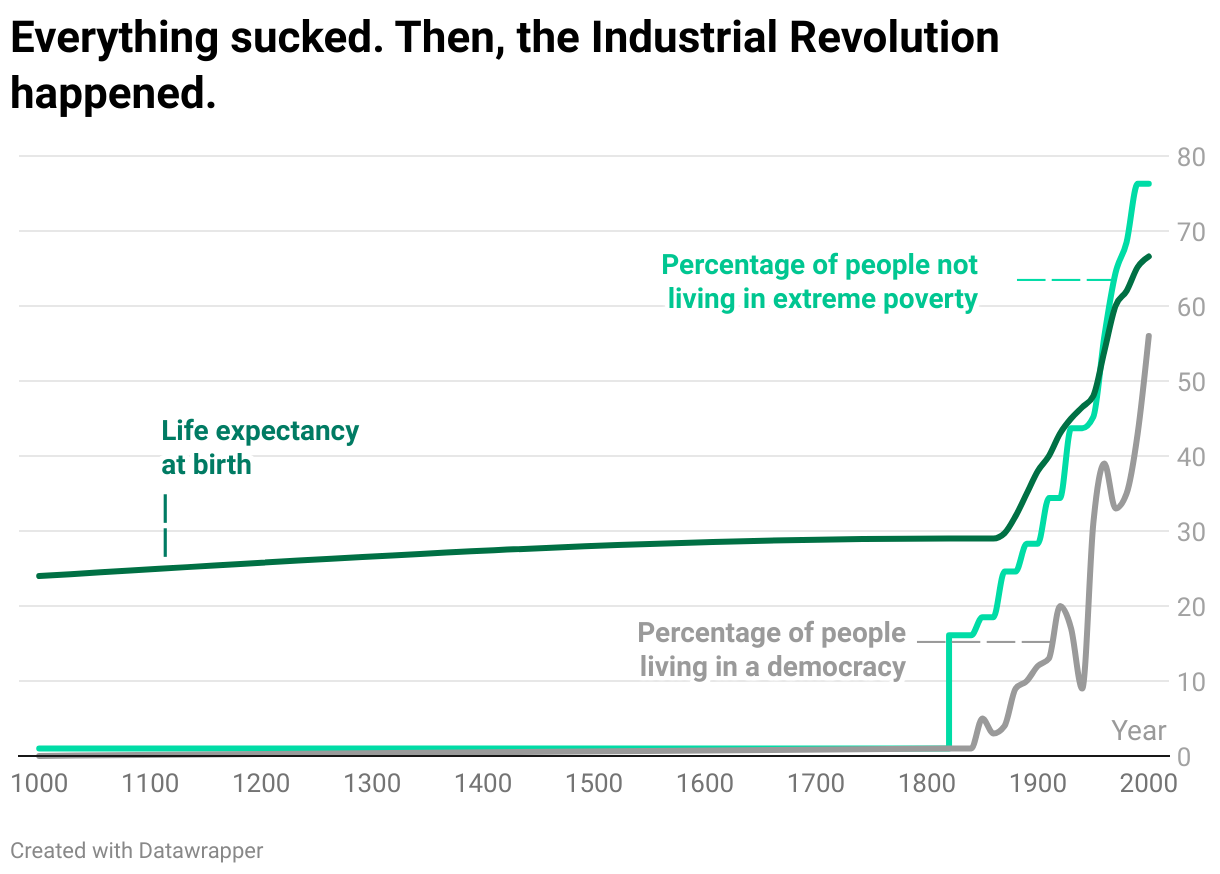
In Muehlhauser’s original chart, additional metrics such as GDP by capita and Energy capture per capita are plotted as well, which I decided to not include in this version for readibility reasons.
Making charts that date back thousands of years is an imprecise science. Statistics offices were less well-funded in the Middle Ages, which means we have to resort to historical methods for measuring things like life expectancy a thousand years ago. If you’re curious, Muehlhauser has described his methods for collecting the data in this article.
Interestingly, this is not the impression of history I got from the world history books I read in school. Those books tended to go on at length about the transformative impact of the wheel or writing or money or cavalry, or the conquering of this society by that other society, or the rise of this or that religion, or the disintegration of the Western Roman Empire, or the Black Death, or the Protestant Reformation, or the Scientific Revolution.
But they could have ended each of those chapters by saying “Despite these developments, global human well-being remained roughly the same as it had been for millennia, by every measure we have access to.” And then when you got to the chapter on the industrial revolution, these books could’ve said: “Finally, for the first time in recorded history, the trajectory of human well-being changed completely, and this change dwarfed the magnitude of all previous fluctuations in human well-being.”
That’s it from me for today! Let me know in case you have any feedback. Next week, you’ll see a Weekly Chart from Simon again.
Shopify and the Power of Platforms
While I am (rightfully) teased about how often I discuss Aggregation Theory, there is a method to my madness, particularly over the last year: more and more attention is being paid to the power wielded by Aggregators like Google and Facebook, but to my mind the language is all wrong.
I discussed this at length last year:
- Tech’s Two Philosophies highlighted how Facebook and Google want to do things for you; Microsoft and Apple were about helping you do things better.
- The Moat Map discussed the relationship between network effects and supplier differentiation: the more that network effects were internalized the more suppliers were commoditized, and the more that network effects were externalized the more suppliers were differentiated.
- Finally, The Bill Gates Line formally defined the difference between Aggregators and Platforms. This is the key paragraph:
This is ultimately the most important distinction between platforms and Aggregators: platforms are powerful because they facilitate a relationship between 3rd-party suppliers and end users; Aggregators, on the other hand, intermediate and control it.
It follows, then, that debates around companies like Google that use the word “platform” and, unsurprisingly, draw comparisons to Microsoft twenty years ago, misunderstand what is happening and, inevitably, result in prescriptions that would exacerbate problems that exist instead of solving them.
There is, though, another reason to understand the difference between platforms and Aggregators: platforms are Aggregators’ most effective competition.
Amazon’s Bifurcation
Earlier this week I wrote about Walmart’s failure to compete with Amazon head-on; after years of trying to leverage its stores in e-commerce, Walmart realized that Amazon was winning because e-commerce required a fundamentally different value chain than retail stores. The point of my Daily Update was that the proper response to that recognition was not to try to imitate Amazon, but rather to focus on areas where the stores actually were an advantage, like groceries, but it’s worth understanding exactly why attacking Amazon head-on was a losing proposition.
When Amazon started, the company followed a traditional retail model, just online. That is, Amazon bought products at wholesale, then sold them to customers:
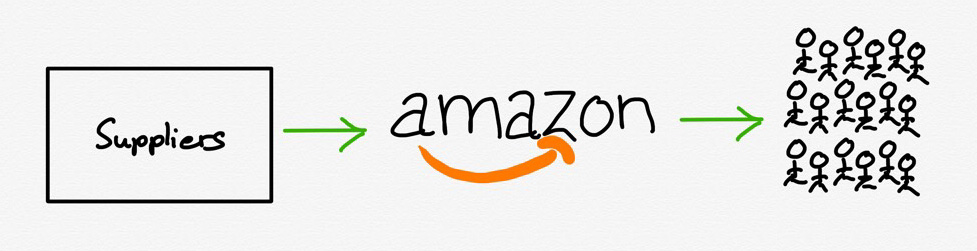
Amazon’s sales proceeded to grow rapidly, not just of books, but also in other media products with large selections like DVDs and CDs that benefitted from Amazon’s effectively unlimited shelf-space. This growth allowed Amazon to build out its fulfillment network, and by 1999 the company had seven fulfillment centers across the U.S. and three more in Europe.
Ten may not seem like a lot — Amazon has well over 300 fulfillment centers today, plus many more distribution and sortation centers — but for reference Walmart has only 20. In other words, at least when it came to fulfillment centers, Amazon was halfway to Walmart’s current scale 20 years ago.
It would ultimately take Amazon another nine years to reach twenty fulfillment centers (this was the time for Walmart to respond), but in the meantime came a critical announcement that changed what those fulfillment centers represented. In 2006 Amazon announced Fulfillment by Amazon, wherein 3rd-party merchants could use those fulfillment centers too. Their products would not only be listed on Amazon.com, they would also be held, packaged, and shipped by Amazon.
In short, Amazon.com effectively bifurcated itself into a retail unit and a fulfillment unit:

The old value chain is still there — nearly half of the products on Amazon.com are still bought by Amazon at wholesale and sold to customers — but 3rd parties can sell directly to consumers as well, bypassing Amazon’s retail arm and leveraging only Amazon’s fulfillment arm, which was growing rapidly:
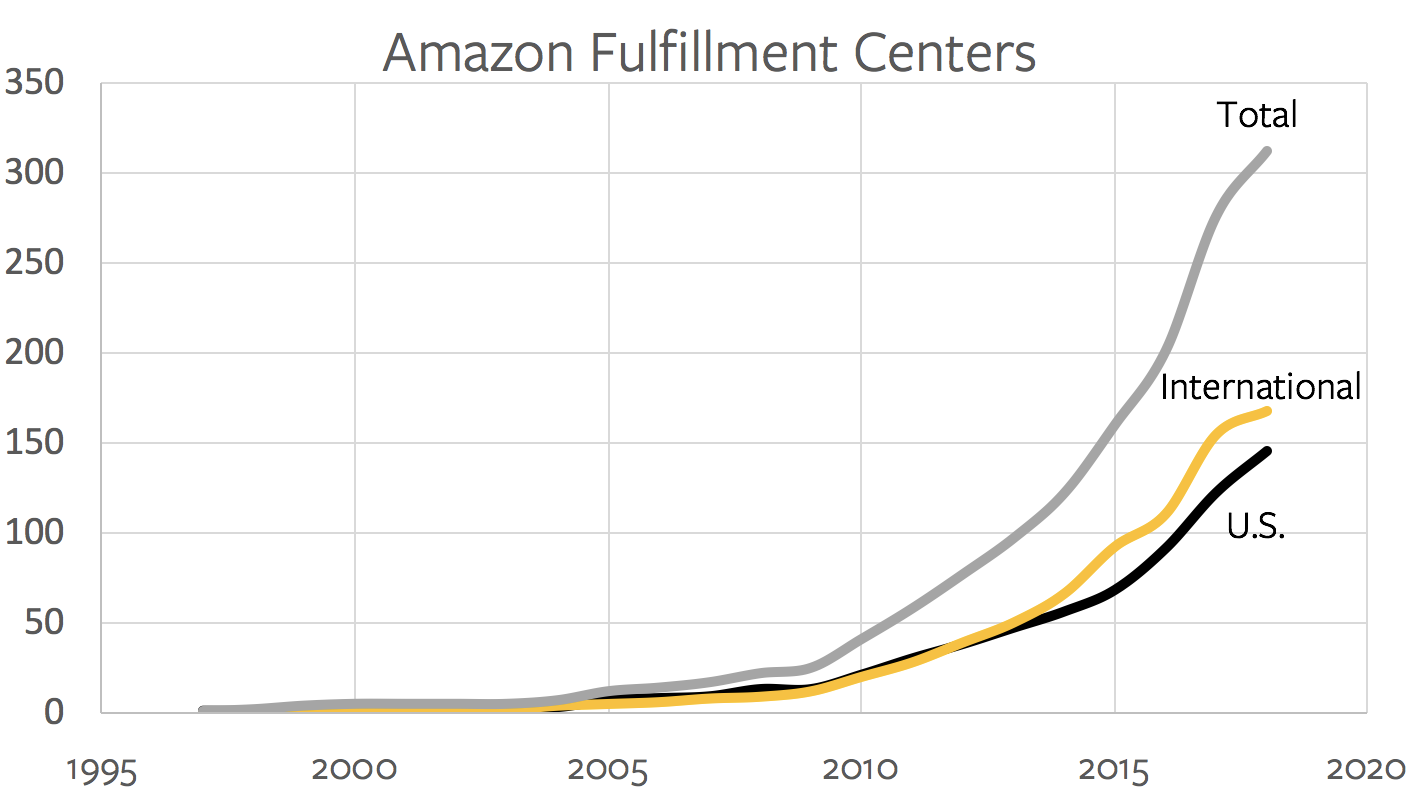
Walmart and its 20 distribution centers don’t stand a chance, particularly since catching up means competing for consumers not only with Amazon but with all of those 3rd-party merchants filling up all of those fulfillment centers.
Amazon and Aggregation
There is one more critical part of the drawing I made above:
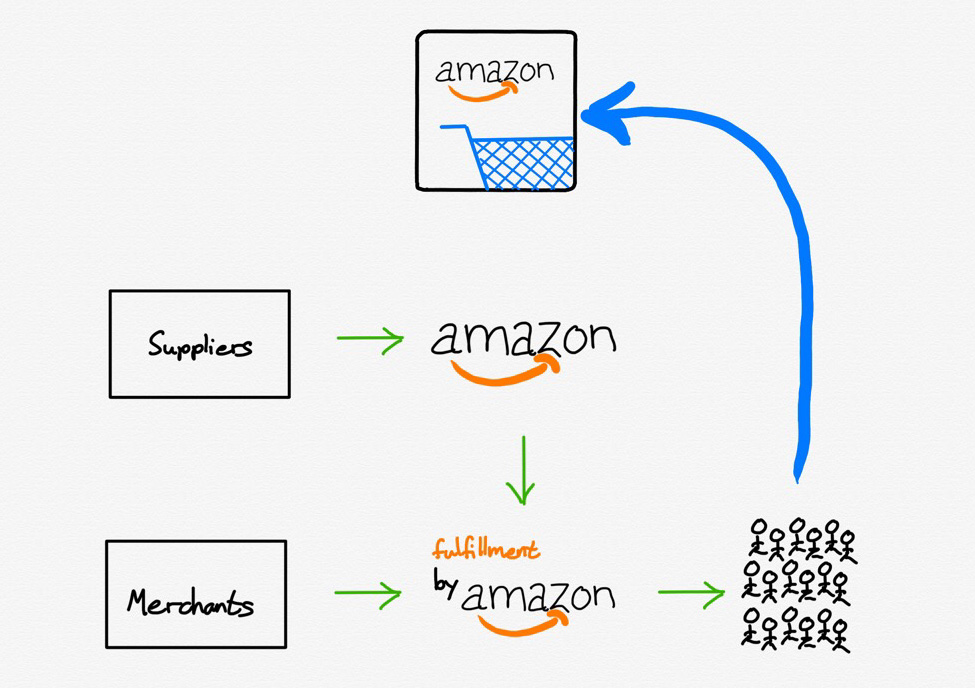
Despite the fact that Amazon had effectively split itself in two in order to incorporate 3rd-party merchants, this division is barely noticeable to customers. They still go to Amazon.com, they still use the same shopping cart, they still get the boxes with the smile logo. Basically, Amazon has managed to incorporate 3rd-party merchants while still owning the entire experience from an end-user perspective.
This should sound familiar: as I noted at the top, Aggregators tend to internalize their network effects and commoditize their suppliers, which is exactly what Amazon has done.1 Amazon benefits from more 3rd-party merchants being on its platform because it can offer more products to consumers and justify the buildout of that extensive fulfillment network; 3rd-party merchants are mostly reduced to competing on price.
That, though, suggests there is a platform alternative — that is, a company that succeeds by enabling its suppliers to differentiate and externalizing network effects to create a mutually beneficial ecosystem. That alternative is Shopify.
The Shopify Platform
At first glance, Shopify isn’t an Amazon competitor at all: after all, there is nothing to buy on Shopify.com. And yet, there were 218 million people that bought products from Shopify without even knowing the company existed.
The difference is that Shopify is a platform: instead of interfacing with customers directly, 820,000 3rd-party merchants sit on top of Shopify and are responsible for acquiring all of those customers on their own.

This means they have to stand out not in a search result on Amazon.com, or simply offer the lowest price, but rather earn customers’ attention through differentiated product, social media advertising, etc. Many, to be sure, will fail at this: Shopify does not break out merchant churn specifically, but it is almost certainly extremely high.
That, though, is the point.
Unlike Walmart, currently weighing whether to spend additional billions after the billions it has already spent trying to attack Amazon head-on, with a binary outcome of success or failure, Shopify is massively diversified. That is the beauty of being a platform: you succeed (or fail) in the aggregate.
To that end, I would argue that for Shopify a high churn rate is just as much a positive signal as it is a negative one: the easier it is to start an e-commerce business on the platform, the more failures there will be. And, at the same time, the greater likelihood there will be of capturing and supporting successes.
This is how Shopify can both in the long run be the biggest competitor to Amazon even as it is a company that Amazon can’t compete with: Amazon is pursuing customers and bringing suppliers and merchants onto its platform on its own terms; Shopify is giving merchants an opportunity to differentiate themselves while bearing no risk if they fail.
The Shopify Fulfillment Network
This is the context for one of the most interesting announcements from Shopify’s recent partner conference, Shopify Unite. The name should ring familiar: the Shopify Fulfillment Network.
From the company’s blog:
Customers want their online purchases fast, with free shipping. It’s now expected, thanks to the recent standard set by the largest companies in the world. Working with third-party logistics companies can be tedious. And finding a partner that won’t obscure your customer data or hide your brand with packaging is a challenge.
This is why we’re building Shopify Fulfillment Network—a geographically dispersed network of fulfillment centers with smart inventory-allocation technology. We use machine learning to predict the best places to store and ship your products, so they can get to your customers as fast as possible.
We’ve negotiated low rates with a growing network of warehouse and logistic providers, and then passed on those savings to you. We support multiple channels, custom packaging and branding, and returns and exchanges. And it’s all managed in Shopify.
The first paragraph explains why the Shopify Fulfillment Network was a necessary step for Shopify: Amazon may commoditize suppliers, hiding their brand from website to box, but if its offering is truly superior, suppliers don’t have much choice. That was increasingly the case with regards to fulfillment, particularly for the small-scale sellers that are important to Shopify not necessarily for short-term revenue generation but for long-run upside. Amazon was simply easier for merchants and more reliable for customers.
Notice, though, that Shopify is not doing everything on their own: there is an entire world of third-party logistics companies (known as “3PLs”) that offer warehousing and shipping services. What Shopify is doing is what platforms do best: act as an interface between two modularized pieces of a value chain.
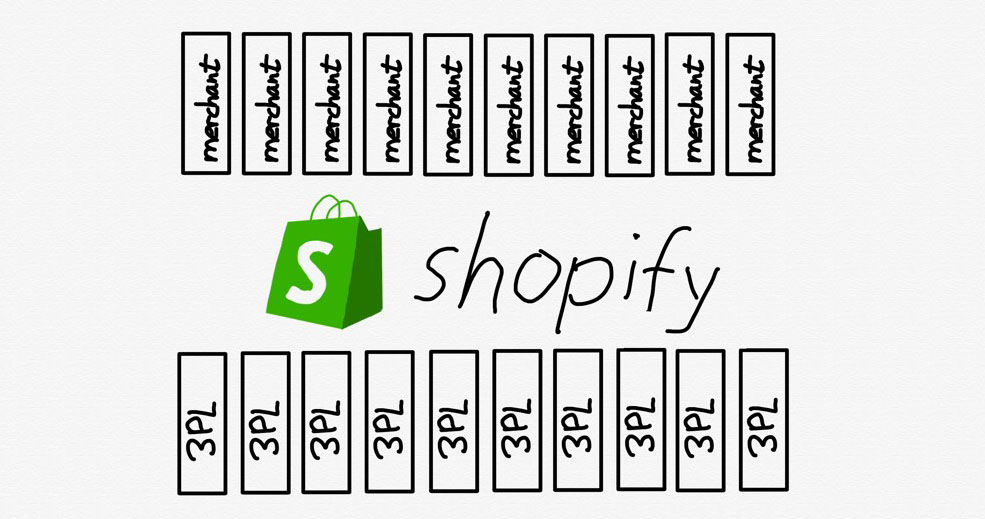
On one side are all of Shopify’s hundreds of thousands of merchants: interfacing with all of them on an individual basis is not scalable for those 3PL companies; now, though, they only need to interface with Shopify.
The same benefit applies in the opposite direction: merchants don’t have the means to negotiate with multiple 3PLs such that their inventory is optimally placed to offer fast and inexpensive delivery to customers; worse, the small-scale sellers I discussed above often can’t even get an audience with these logistics companies. Now, though, Shopify customers need only interface with Shopify.
Plaforms Versus Aggregators
Moreover, this is what Shopify has already accomplished when it comes to referral partners (who drive new merchants onto the platform), developers (who build apps for managing Shopify stores) and theme designers (who sell themes to customize the look-and-feel of stores). COO Harley Finkelstein said at Unite:
You’ve often heard me say that we at Shopify want to create more value for your partners than we capture for ourselves, and I find the best way to demonstrate this is by looking at what I call the “Partner Economy”. The “Partner Economy” is the amount of revenue that flows to all of you our partners…in 2018 Shopify made about a billion dollars [Editor: in revenue]. We estimate that you, our partners, made more than $1.2 billion.
In other words, Shopify clears the Bill Gates Line — it captures a minority of the value in the ecosystem it has created — and the Shopify Fulfillment Network should fit right in:
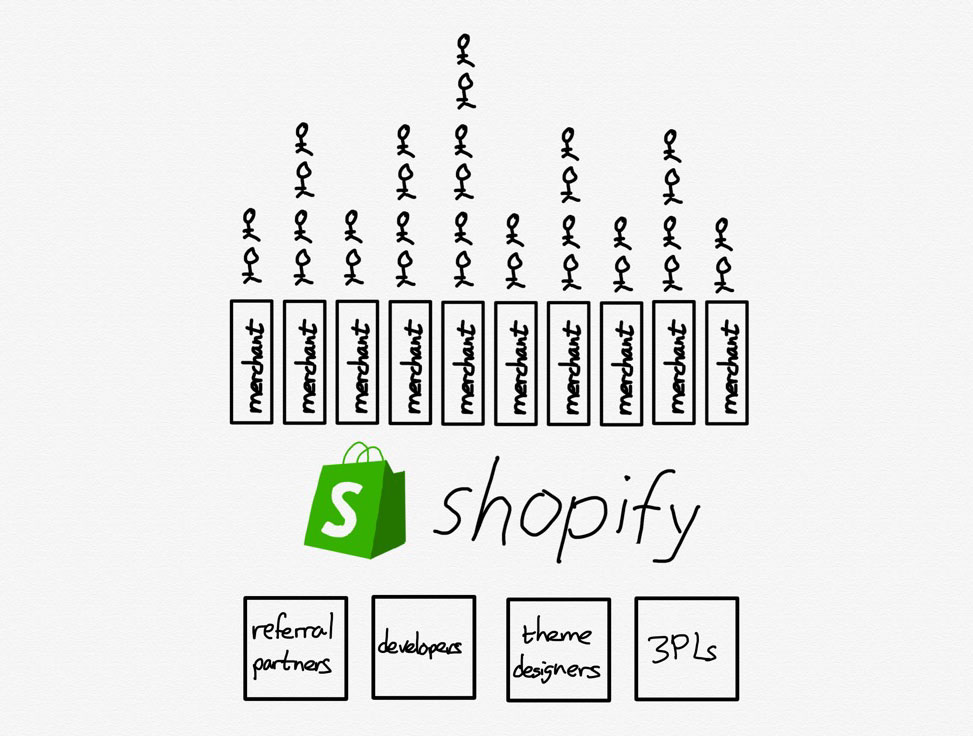
What is powerful about this model is that it leverages the best parts of modularity — diversity and competition at different parts of the value chain — and aligns the incentives of all of them. Every referral partner, developer, theme designer, and now 3PL provider is simultaneously incentivized to compete with each other narrowly and ensure that Shopify succeeds broadly, because that means the pie is bigger for everyone.
This is the only way to take on an integrated Aggregator like Amazon: trying to replicate what Amazon has built up over decades, as Walmart has attempted, is madness. Amazon has the advantage in every part of the stack, from more customers to more suppliers to lower fulfillment costs to faster delivery.
The only way out of that competition is differentiation; granted, Walmart has tried buying and launching new brands exclusive to its store, but differentiation when it comes to e-commerce goods doesn’t arise from top down planning. Rather, it bubbles up from widespread opportunity (and churn!), like that created by Shopify, supported by an entire aligned ecosystem.
- While Amazon is not technically an Aggregator — the company deals with physical goods that absolutely have both marginal and transaction costs — one way to understand the company’s dominance is that its massive investments in logistics have driven those costs much lower than its competitors, allowing the company to reap many of the same benefits.
Idol Thoughts
I don’t know what first enthralled me to Elton John, but from the first time I saw him — singing “Goodbye Yellow Brick Road” on the Muppet Show, in a sparkly piano-key bowler hat — I just liked him. I was five years old. My Mom bought his albums for me whenever they turned up at garage sales and my Godfather lent me his four-CD box set, which my Dad taped onto cassettes that I fell asleep to every night. My old school notebooks are full of drawings of his face and stories in which we are friends; the day I finally needed glasses was as significant as that of my first period.
The adults in my life were encouraging, but I didn’t know any fans in my age cohort. I never joined his fan club or went to see him live; he was like an imaginary friend or, in my agnostic household, a God — when I was alone, he was there, and when I thought to myself I talked to him. The initial spark of attraction might have been arbitrary, but I have words now for the Elton in my mind’s eye: Gap-toothed and grinning, playing dress-up in clothes a five-year-old girl might dream of, tarting up all the would-be shortcomings that set him apart from the average rockstar.
I think Elton is one of the most stylish people in history, though most people I’ve known have disagreed; so it has been validating to witness his recent inauguration as a style icon. Gucci creative director Alessandro Michele based an entire collection on Elton’s costume archive, and designed the looks for his ongoing Farewell Yellow Brick Road tour. Rocketman, Elton’s long-awaited biopic, was released to much more fanfare than I’d expected, benefiting commercially, and critically, from its proximity to Bohemian Rhapsody. Today, Elton John is relevant: a gay genius who conquered a macho genre and endeared a global audience to high camp, whether they knew what to call it or not (“Gay pride wrapped up in telling gorgeous metaphor,” Hilton Als wrote on his Instagram). He is an inspiration to the awkward and otherwise uncomfortable in their skin: a non-emaciated, late-blooming, four-eyed, prematurely balding kid from the working class, who overcame his shyness through absolute garishness. The Met Gala’s “Camp” theme was indirectly in his honor, though as many have noted, there’s nothing campy about being straightforwardly hot and rich.
This revival has felt both exciting and dissonant. I have no intention of seeing the film — Taron Egerton, who plays him, seems like someone I’d walk away from at a function feeling drained and somehow insulted; it makes me nauseous to hear the old hits rendered with jangly Spotify chimes. Seeing Elton praised in Gucci’s ad copy makes me feel an odd blend of vindication and resentment. I’m happy for him, and for anyone reconsidering their opinion of his work, but I’m used to him feeling like mine.
My discomfort with all this fanfare seems a little bratty — a holdover from the obscurantist attitude I bought into as a teen, wherein the rarer the taste the more distinction it conferred. At worst, this pose was a sort of counter-elitism, adopted often by people who were insiders to the dominant culture but felt unfavored by its hierarchies. It also arose from a valuation of the legwork involved in finding the music you wanted to hear back when it was limitedly available — you had to care enough to seek it out, and seeking it out put you in company of other people who cared, too.
It’s not collectivity I’m after, but a version of privacy
The fact that Elton John is not obscure by any measure hints at some other impulse at work here. We tend to intuit fandom as something collective — usually the term refers not to the state of being a fan, but of belonging to a community of people who are fans as well: loving the artist is a primary qualification, but just as important is learning the conventions through which that love is shared in common. My own experience of fandom has always worked in reverse: It’s not collectivity I’m after, but a version of privacy.
The fan relationships I’ve built with my favorite musicians run deeper than most of my friendships. Music accompanies you where friends don’t — it’s with you in moments of total solitude, and it provides an amniotic base for thoughts and feelings you haven’t yet articulated. A side effect of growing up with headphones and portable players is that music is part of your life as it happens, and an index for your memories ever after.
It’s hard to know exactly why a given artist appeals to you, but explaining that connection to yourself is a bit like reading your astrological chart — a process of self-definition through a set of coordinates that offer a great deal of interpretive leeway. The affinity itself is an identification that feels like a zodiac sign is supposed to, in the sense of a cosmic likeness: a preverbal understanding that this person represents “your people,” in the deepest abstract — that you share a shade of perception that overcomes space and time. To confront a divergent interpretation can be jarring; it can prompt an identity crisis.
The more formalized these connections become — the more they assimilate to a network — the more distanced I feel from my own attachments. That feeling of affirmation that comes with being a fan, the ineffable sense of belonging in human history, is replaced by a language that isn’t mine, and a set of social dynamics too particular to a time and place. At a time when we are constantly being sorted algorithmically, by preferences and tendencies we might prefer to think of as arbitrary, or to not think of at all — and when social platforms encourage us to reduce ourselves to thumbnail reductions of our values and interests — the more important it feels to hold my loves close to me. Like any long-term relationship, the artists of whom I’m a fan remind me of who I am and where I’ve been when I’m at risk of losing touch with myself.
This past winter I decided, after a lot of handwringing, to pay exorbitantly for Elton John tickets. It was the first, and likely the last time I’d see him live, and I felt a strange, existential nervousness beforehand. The closer I got to Madison Square Garden, though, the more I realized how excited I was, in spite of myself, to finally be among fellow fans. Not for any imagined sense of kinship, but for the brief feeling of raw, shared enthusiasm, a rare joy that any attempt to conjure tends to squeeze out of reach.
A side effect of growing up with headphones is that music is part of life as it happens, and an index for your memories ever after
The show was thrilling, and mortifying: Elton, the old pro, knew exactly what we wanted, and gave it to us; when someone gives me what they know I want, it tends to make me self-conscious about wanting it to begin with. I was glad to have avoided the regret of not having gone. My only disappointment was how alone I felt in the flush of really being there. For most of the casually dressed Boomers in attendance, the concert seemed as mundane as any other post-dinner engagement. Of my entire row, I was the only person dancing.
A couple of months later I was searching tour dates for Jorge Ben Jor, a Brazilian musician whose career transcends genres and eras, and whose genius and import I can’t do justice to in a few lines (from Caetano Veloso: “the artist Jorge Ben is the denizen of that utopian country beyond history that lives within all of us, that we all have the duty to build”). I noticed he was playing a festival in Porto, and since I have a friend in Lisbon I decided to book a ticket. I’ve been a fan of Ben Jor’s for nearly half my life, but my enthusiasm for him developed in a bit of a vacuum: He’s iconic in Brazil, but less well known in the North American cities where I’ve lived. I read the few books I could find in English that discussed his social and cultural context and legacy, but I never learned Portuguese. I made a little fan’s nest out of scraps of knowledge and the glue of my emotional attachment.
When my friend and I arrived at the festival grounds there was almost no one around the stage. We found a spot at the front, while a crowd filed in slowly around us. When Ben Jor came on, I screamed and cried and hopped against the audience divider — every song he played was so meaningful; I just didn’t know the words. As the awe subsided, I turned and saw just how huge the audience had grown; my friend and I were now two among thousands. Everyone was just as excited as I was; everyone was singing along.
The country was Portugal, not Brazil, and the fans in attendance represented just one cross-section of his global fan base. But to be among so many people who loved him, too — who could sing along in his language — was exhilarating in a way that vaulted me beyond my own limited sense of intimacy with his body of work. It felt like falling back in love, in a sudden, jarring way, with an old companion, to remember how vastly their world expanded beyond what felt familiar.
Like any relationship, there are different ways of loving your idols. One is a companionate love that forms as their work becomes a feature of your life; this is how homes are built, but you risk submerging their context in your own. Then there’s a love more difficult, vital, and fortunate — one that takes you beyond yourself, toward the light of a perception that broadens your world and will never be yours.
Human Operators Are Listening to Your Private Google Assistant Recordings
 I always wondered if a real person was listening to Google Assistant or SIRI recordings. Well, the answer now stares me in my face. A Belgian based broadcaster has revealed what happens behind the scenes of Google’s Assistant voice transcription work. The broadcaster sourced the news from three anonymous sources and also listened to 1000 human recordings while doing so.
Continue reading →
I always wondered if a real person was listening to Google Assistant or SIRI recordings. Well, the answer now stares me in my face. A Belgian based broadcaster has revealed what happens behind the scenes of Google’s Assistant voice transcription work. The broadcaster sourced the news from three anonymous sources and also listened to 1000 human recordings while doing so.
Continue reading →
Apple disables Walkie Talkie app to address eavesdropping vulnerability

Apple says it has temporarily disabled the Apple Watch’s Walkie Talkie functionality while it addresses a recently discovered vulnerability within the app.
In a statement issued to TechCrunch, Apple said a bug, which was recently brought to the company’s attention, allows malicious individuals to listen to another person’s iPhone without their consent. The Walkie Talkie app, like its namesake suggests, allows two Apple Watch users to communicate with one another using a push-to-talk interface.
Apple plans to re-enable the feature once it has developed and issued a software update to address the exploit.
“We concluded that disabling the app was the right course of action as this bug could allow someone to listen through another customer’s iPhone without consent. We apologize again for this issue and the inconvenience,” said Apple, as part of a longer statement.
The company added that there’s no evidence to suggest someone took advantage of the vulnerability.
Today is not the first time Apple has had to disable one of its communication features to address a potential exploit.
Earlier in the year, the company turned off FaceTime after a teen discovered it was possible to eavesdrop on another iPhone owner in group calling scenarios. The episode led to a public embarrassment after Apple initially ignored attempts by the teen’s mother to contact the company. This time around, it looks like Apple is taking a much more proactive approach.
Source: TechCrunch
The post Apple disables Walkie Talkie app to address eavesdropping vulnerability appeared first on MobileSyrup.
Amazon employees in the U.S. to protest working conditions on Prime Day

As Amazon Prime Day approaches, warehouse employees in Minnesota are planning to stage a six-hour strike to protest safety issues, job insecurity and unrealistic quotas.
Hibaq Mohamed, one of the organizers of the protest, told Forbes that the working expectations are better suited for a robot. She also said that employees who ask for a break due to sickness or religious reasons are likely to be fired.
An Amazon spokesperson told Forbes that the allegations are “baseless,” and that the company has already met the protestors’ demands.
“We encourage anyone to compare our pay, benefits, and workplace to other retailers and major employers in the Shakopee community and across the country,” the spokesperson told Forbes.
This is not the first time Amazon employees have protested working conditions. Workers in Europe organized a boycott last year to protest unfair compensation.
This strike will mark the first time that Amazon employees will protest during important sales days.
Source: Forbes
The post Amazon employees in the U.S. to protest working conditions on Prime Day appeared first on MobileSyrup.
Apple has reportedly cancelled its iPhone-powered AR glasses

Apple has terminated its augmented reality glasses project, according to a report from DigiTimes.
The AR glasses, while not ever officially confirmed by Apple, were rumoured to launch sometime in 2020.
Apple initially began to publicly reveal its AR efforts in 2017 with its ARKit platform, with subsequent unconfirmed reports stating that the tech giant was working on a standalone AR headset.
Eventually, reports indicated that Apple was working on AR glasses, rather than a dedicated headset. Supposedly, these glasses were to have their own operating system and connect to an iPhone, similar to an Apple Watch.
Meanwhile, they were rumoured to have various biometric and light sensors to track detailed face movements and anatomical gestures. In theory, this would allow for all kinds of app features, such as tilting one’s head to move through a holographic photo album, helping enhance sight for the visually-impaired or even hiding secret documents.
Assuming Apple has indeed nixed its AR glasses, it’s unclear exactly what might have led the tech giant to do so. The company has yet to comment on the DigiTimes report.
By all accounts, Apple appeared to be all-in on the product, between a supposed secret AR-focused team, various patents and its August 2018 acquisition of a startup focused on the design of lenses for AR glasses. Further, Apple CEO Tim Cook has been openly bullish about AR as a whole, stating in early 2017 that the tech is “a big idea, like the smartphone.”
As it does every year, Apple will reveal the next iPhone this September, so it’s possible it will reveal more about its AR initatives during that keynote.
Source: DigiTimes Via: VentureBeat
The post Apple has reportedly cancelled its iPhone-powered AR glasses appeared first on MobileSyrup.
Relive | Your Outdoor 3D Videos
| mkalus shared this story . |
So, this sucks… Strava decided to no longer work with us and shut down our access to your activities. This means you can no longer create Relive videos based on your Strava activities.
We thought we had a thing. Until last week. After launching our first social features, we received a very unexpected message threatening to pull the plug. Given our long-term partnership, we immediately rolled back the changes like they requested.
We then tried to call, email, and talk this out with Strava. No response, except for new ultimatums and threats about our existing features they’ve applauded for years.
It’s sad to see them suddenly go and we’re bummed about this, just like you. We like Strava’s product and we’ve been working with them for more than 3 years.
Nothing has changed about how Relive uses and protects your data or how we use their API. We’re working to make sure you can keep your current and past activities on Relive. We believe this is your data and you should decide how it's used. After all, it’s your legs doing all the work!
Can I still create those epic videos, you wonder? Hell yeah 🤘
- If you use a Garmin, Suunto, or Polar device (or one of our other partners), just connect it to Relive and everything will work the same as before.
- Record your activities directly with the Relive app.
- Or import your activity files here.
Learn more on how to do this.
Our small team is working around the clock to give you the best Relive experience possible. If you want to support us through this break-up then put your hiking boots on, jump on your bike or grab your running shoes and get out there.
Make us proud and keep creating those epic videos of your adventures. Share the Relive love.
Questions? We’re ready for you at team@relive.cc
See you outside,
- Team Relive
Mr Rowland suggests the UK sets up a 200 mile (321km) exclusion zone around its territory, treating any fishing vessel that enters like the Belgrano, an Argentine light cruiser sunk by the UK Navy in 1982. Not sure he has fully thought through the implications. pic.twitter.com/dqzgdSJ7WC
mkalus
shared this story
from  DmitryOpines on Twitter. DmitryOpines on Twitter.
|
Mr Rowland suggests the UK sets up a 200 mile (321km) exclusion zone around its territory, treating any fishing vessel that enters like the Belgrano, an Argentine light cruiser sunk by the UK Navy in 1982.
Not sure he has fully thought through the implications. pic.twitter.com/dqzgdSJ7WC



 DmitryOpines
on Thursday, July 11th, 2019 4:57pm
DmitryOpines
on Thursday, July 11th, 2019 4:57pm20 likes, 4 retweets
RT @EdwardGLuce: small but significant detail: Kim Darroch went to a grammar school and grew up in a council house. Those who accused him o…
mkalus
shared this story
from  ottocrat on Twitter. ottocrat on Twitter.
|
small but significant detail: Kim Darroch went to a grammar school and grew up in a council house. Those who accused him of elitist bias (Boris, Piers Morgan, Steve Hilton and the other demagogues) went to expensive private schools. How stupid has Britain become?
 EdwardGLuce
on Wednesday, July 10th, 2019 3:46pm
EdwardGLuce
on Wednesday, July 10th, 2019 3:46pm ottocrat
on Wednesday, July 10th, 2019 11:02pm
ottocrat
on Wednesday, July 10th, 2019 11:02pm15045 likes, 4411 retweets
Grizzly Browser Fuzzing Framework
At Mozilla, we rely heavily on automation to increase our ability to fuzz Firefox and the components from which it is built. Our fuzzing team is constantly developing tools to help integrate new and existing capabilities into our workflow with a heavy emphasis on scaling. Today we would like to share Grizzly – a browser fuzzing framework that has enabled us to quickly and effectively deploy fuzzers at scale.
Grizzly was designed to allow fuzzer developers to focus solely on writing fuzzers and not worry about the overhead of creating tools and scripts to run them. It was created as a platform for our team to run internal and external fuzzers in a common way using shared tools. It is cross-platform and supports running multiple instances in parallel.
Grizzly is responsible for:
- managing the browser (via Target)
- launching
- terminating
- monitoring logs
- monitoring resource usage of the browser
- handling crashes, OOMs, hangs… etc
- managing the fuzzer/test case generator tool (via Adapter)
- setup and teardown of tool
- providing input for the tool (if necessary)
- creating test cases
- serving test cases
- reporting results
- basic crash deduplication is performed by default
- FuzzManager support is available (with advanced crash deduplication)
Grizzly is extensible by extending the “Target” or “Adapter” interface. Targets are used to add support for specific browsers. This is where the quirks and complexities of each browser are handled. See puppet_target.py for an example which uses FFPuppet to add support for Firefox. Adapters are used to add support for fuzzers. A basic functional example can be found here. See here for a slightly more advanced example that can be modified to support existing fuzzers.
Grizzly is primarily intended to support blackbox fuzzers. For a feedback driven fuzzing interface please see the libfuzzer fuzzing interface. Grizzly also has a test case reduction mode that can be used on crashes it finds.
For more information please checkout the README.md in the repository and the wiki. Feel free to ask questions on IRC in #fuzzing.
The post Grizzly Browser Fuzzing Framework appeared first on Mozilla Security Blog.
Game Day: Minit

Minit is a new-to-iOS indie adventure game by Jan Willem Nijman, the co-founder of Vlambeer, Kitty Calis, Jukio Kallio, and Dominik Johann. The game, which was brought to iOS a little over one week ago by Devolver Digital, first debuted in April 2018 and is now available on all major consoles, PCs, and mobile platforms. It’s a fantastic game that benefits from the high-resolution screens and excellent sound available on iOS devices but also suffers a little from onscreen joystick controls. That issue can be remedied with an MFi controller, but even playing with the onscreen controls, Minit has quickly become one of my favorite iOS games of 2019.
Minit's hook is that the hero you control only has a minute to live, a mechanic that's perfect for a mobile game. As you race around the game's map, solving puzzles and discovering items, you have to move fast because when the minute is up, you die and have to start over again.
If that sounds frustrating, it really isn't. You have to start over after you die, but not entirely from the beginning. The ticking clock certainly makes Minit challenging, but it cleverly avoids becoming frustrating by letting your character retain items, powers, and locations even after you die. For example, one of the first items you discover in the game is a cursed sword that is central to the game's story. When you inevitably die and respawn to continue exploring, you don’t need to grab the sword again because it will already be at your side. The same holds true of powers like pushing objects and locations that become your new home, which avoids the monotony of having to restart the game from the same point over and over.
Minit strikes a careful balance with its core mechanic, allowing just enough progress to be made each time you play to keep you coming back for more. It also helps that no matter where I’ve been on the game’s map, I’ve always felt that I had multiple options each time I restarted. That’s an essential element of avoiding frustration because even when I've gotten stuck on a particular quest, I've had the option to set out in a different direction and make progress elsewhere.
The game’s art and sound design are top-notch too. The artwork is entirely black and white with chunky pixel characters and environments that convey a sense of whimsy and fun. Coupled with an excellent soundtrack and sound effects, Minit imbues its world with a personality that brings its simple environment to life in a way that transcends any one aspect of the game.

Minit's controls are just as simple as its artwork. There’s a virtual joystick in the lower left corner of the screen for moving your character and an attack button in the opposite corner. The gameplay is simple enough that the onscreen joystick works reasonably well, but it’s still not as good as a controller with a dedicated thumbstick, especially when lining up your character to attack an enemy. Relatively few iOS gamers have MFi controllers now, but iOS 13 should give games like Minit a boost in the fall when the OS adds support for Bluetooth-based PS4 and Xbox controllers that far more people already own.
Even relying on the onscreen controls though, I've had a blast playing Minit. It took the game with me on a short 4th of July road trip, and it was the perfect companion for the long drive and when I had some time to myself in the evenings. Minit treads some of the same ground as similar retro-style adventure games I've played before, but the combination of the timer mechanic and unique black-and-white world make it stand head and shoulders above similar games.
Minit is available on the App Store for $4.99.
Support MacStories Directly
Club MacStories offers exclusive access to extra MacStories content, delivered every week; it's also a way to support us directly.
Club MacStories will help you discover the best apps for your devices and get the most out of your iPhone, iPad, and Mac. Plus, it's made in Italy.
Join NowLaw Reviews, Citation Counts and Twitter (Oh My): Behind the Curtains of the Law Professor’s Search for Meaning
Rolandtkj

Despite what the abstract says, be sure to download this article and read it cover-to-cover, including (especially!) the footnotes. Here's the gist: "We argue that this game is rigged, inherently biased against authors from lower ranked schools, women, minorities, and faculty who teach legal writing, clinical, and library courses. As such, playing “the game” in a Sisyphean effort to achieve external validation is a losing one for all but a few." I would argue this applies to scholarship generally, not just law. Case in point: my citations as viewed by Google Scholar, versus my citations as viewed by Scopus. Which one is the real measure of my work?
Web: [Direct Link] [This Post]Run your own social

This article shows you "how to run a small social network site for your friends." It's practical advice. "This document exists to lay out some general principles of running a small social network site that have worked for me. These principles are related to community building more than they are related to specific technologies. This is because the big problems with social network sites are not technical: the problems are social problems related to things like policy, values, and power." Good stuff.
Web: [Direct Link] [This Post]The push for “free” universal education in Africa often falls short—here’s a better way

The argument is that "many of these school systems are failing, from insufficient infrastructure to a significant disconnect between schools and the local economy." The proposed solution is to charge money for school, and redirect government resources to subsidize this education for the relatively well-off. User fees, in other words. The way this works is by magic: "These schools compete for hard earned dollars from parents and are therefore highly incentivized to create education solutions that meet parents expectations." So I guess 'innovation' in this case means 'serve the rich, ignore the poor'. As it so often does.
Web: [Direct Link] [This Post]Crash Intersections Finally Get a 21st Century Makeover with “Speed-On-Green” Cameras


While we rely on police forces to ensure the security and safety of citizens, we don’t think about what it like for police to stop or enforce speed limits on highways. Think of it~those police officers are vulnerable road users without the protection of a vehicular steel cage flagging vehicles to pull over. Why are we using such a 19th century enforcement to maintaining speed limits and enhancing safety on our roads?
In June I wrote about the man with numbers, pollster Mario Canseco’s findings that 58% of British Columbians say they would “definitely” or “probably” like to see the speed limit reduced to 30 km/h on all residential streets in their own municipality, while keeping the speed limit on arterial and collector roads at 50 km/h.” That indicated that in our cities and towns we are willing to look at reduced speeds to enhance livability and quality of life in those places, as well as dramatically increase the survivability of pedestrians and cyclists involved in crashes. But how about speeding at intersections and major roads in British Columbia?
Last summer Mario Canseco’s Research Co. conducted another poll that showed that 70% of people in British Columbia were supportive of the use of a camera system to enforce speed limits in this province, and make intersections safer.
In the online survey of a representative sample of British Columbians, seven-in-ten residents (70%) approve of the use of speed-on-green cameras, or red light cameras that also capture vehicles that are speeding through intersections. Automated speed enforcement works by using cameras or sensors to pick up a vehicle speeding. A ticket is then issued to the owner of the vehicle. Driver’s license points are not issued as the driver of the vehicle cannot be identified.
Mario’s latest article in Business in Vancouver discusses the findings of the provincial government when it studied speed and crash statistics from 140 intersections which have red light cameras. What the government found is troubling~”The findings revealed that, during the course of an average week, 201 cars drive at least 30 km/h over the advertised speed limit.”
The provincial government is converting 35 existing red light cameras to “speed-on-green” equipment to photograph vehicles at speed through intersections.While there are two cameras in Langley, three in Burnaby and seven in Surrey, there will be twelve in Vancouver.
The government’s approach is similar to that adopted by the City of Delta.
In Delta the Police Department announces that they are undertaking traffic enforcement via social media, and often will even have a reader board on the highway before vehicles arrive at the enforcement location. Despite the fact that vehicles are forewarned of enforcement, many drivers ignore the warnings and are stopped for speeding.
The provincial government will be letting people know where these speed-on-green cameras are located with signage indicating that you are entering a photographed intersection. The Province has publicly notified that automated speed enforcement is coming for the past year. In a poll conducted last month Mario Canseco found that 68 percent (more than two-thirds) of people in the province are accepting of automated speed enforcement. Those numbers include 74 percent of all women and 76 percent of residents over the age of 55, which was consistent with poll findings from 2018. You can read the poll results here.
Of course there is a segment of people that just believe it is their right to go at whatever speed they prefer, and they are already challenging how much above the speed limit the government will tolerate in intersections. At some point it comes down to looking at the safety and security of not only vulnerable road users, but also how to mitigate crashes in a place that supports universal health care and vehicular insurance. Lowering speed, changing driver behaviour, and changing road design are the three main factors for safer streets. As mentioned by Mario, a similar program in Saskatchewan “calmed speed and reduced collisions” and since 2018 is now a permanent program.
The YouTube video below describes the Vitronic-Poliscan intersection camera technology now in place in the Province of Saskatchewan.
Wanderlust
I’ve been watching my way through the BBC-Netflix co-production Wanderlust this week, a program that The Evening Standard called, accurately, a “meandering polyamory drama.”
I’ve never had the constitution for polyamory, and the polyamory is the squidgiest part of the show: the reason to watch is for the children of the main characters, played by Emma D’Arcy, Joe Hurst, and Celeste Dring.
They are each accomplished actors–considerably more compelling than any of their elders in this situation. Alas their interesting subplots get far too little time; I would happily watch a full series where the polyamorous adults were excised and the children took centre stage.
Kim Darroch: effectively sacked by Johnson on the orders of Trump | Politics
mkalus
shared this story
from  The Guardian: The Guardian:
|
|
| “Take Back Control" |
The resignation of Sir Kim Darroch followed the failure of the likely next prime minister, Boris Johnson, to say he would support him staying in post – despite being given repeated chances to do so during his TV debate with Jeremy Hunt. As the current Foreign Office minister Alan Duncan put it, by six times refusing to back the ambassador, Johnson had thrown him under a bus.
Without the backing of the president of the US or his future boss, Darroch naturally concluded he had no future as an interlocutor between London and Washington. He realised, in the words of a friend, that Johnson had left him no option.
There will now be white hot anger across the Foreign Office and in parliament – not just at the leaker and Trump, but also at Johnson. Whatever sanctimonious expressions of regret he mouths, and however much he blames the leaker, King Charles Street knows the Conservative leadership candidate effectively sacked Darroch on the orders of the president.
Strenuous efforts were made in London to remind Darroch he had the backing of the current prime minister, as well as the current foreign secretary, Jeremy Hunt. But Darroch, keenly aware of the importance of the special relationship, something to which his career had been dedicated, decided he could not afford to become an obstacle to its continuance.
His resignation means the malicious leaker has got his or her way. It was pretty clear from the outset that the political purpose of the leak was to get Darroch removed, and replaced by a true Brexiter of the kind Nigel Farage, and now apparently Johnson, believes is necessary if the UK is to extract maximum political and economic value from Brexit.
It was also clear that, despite the Foreign Office’s protestations, Trump was determined to blackball Sir Kim. He was not just struck off the dinner guest list for the visit of the emir of Qatar, a second meeting with Wilbur Ross did not go ahead. Darroch excluded himself from a meeting between the trade secretary, Liam Fox, and Ivanka Trump to avoid any embarrassment for the president’s daughter.
It will be fascinating to see whether Theresa May acts quickly to appoint Darroch’s successor. Tempting as it might be to foil the leakers, and install a career civil servant, it is probably irresponsible to pre-empt Johnson. The UK ambassador to the US needs the confidence of his prime minister.
Ever professional, the diplomatic service will swing behind Johnson when he reaches Downing Street. But he has revealed himself to be a shallow man willing to take advantage of an illegal leak to sack a man who had dedicated himself to public life. Evasion of personal responsibility is already becoming the defining negative feature of his candidacy.
Johnson will go through the doors of Downing Street at some point this month smiling and wanting to be loved, but many will instead see him, as one interviewer, Eddie Mair, described him, as “a nasty piece of work”. In the words of the chairman of the foreign affairs select committee, Tom Tugendhat, a former army officer: “Leaders stand up for their men. They encourage them to try and defend them when they fail.”
What’s the point of e-bikes? - The Globe and Mail
| mkalus shared this story . |
I don’t get the point of e-bikes. I keep hearing that they’re the future of transportation, but they seem like expensive bikes for lazy people. Aren’t they basically just mopeds? Isn’t the point of cycling to get some exercise? – Burt, Calgary
That E in e-bike is for “electric.” But, if you want to just get to work without being drenched in sweat, it could also stand for “easier.”
“Calgary is a pretty hilly city, so they’re helpful for elderly riders or people who don’t necessarily identify as cyclists but who just want to get around in their normal lives,” says Gary Millard, president of Bike Calgary, a non-profit that promoted cycling in the city. “If you drive to the grocery store to get your groceries, are you a motorist?”
There are essentially three types of e-bikes: Class 1, Class 2 and Class 3.
All three classes have pedals, but Class 1 bikes are bikes that you have to pedal at all times. You can set them to give you a boost or turn it off entirely.
Power assist speeds are typically electronically limited, so software won’t let the bike go above a certain speed on battery power. Usually, that’s a maximum of 32 km/h, although Calgary’s shared Lime bikes are limited to 23 km/h, Millard says.
“Effectively, what that means is that if you want to go faster, you have to do the pedalling yourself,” Millard says, adding that even the top speed is less than the 35 or 45 km/h that a “strong rider” could do on a regular bike.
Class 2 bikes travel similar speeds to class ones, but like a motorcycle, have a throttle that allows you to use the motor without pedalling. Class 3 bikes also have a throttle, but are allowed to travel up to 45 km/h.
“They tend to be popular with baby boomers,” says Court Rye, who runs Vancouver-based review site ElectricBikeReview.com. “The majority in Europe are Class 1 because it’s more cycling friendly, while in China they use the throttle more and in Canada and the U.S., [manufacturers] seem to be doing both.”
All three classes of bike can be charged by plugging it in or taking out the battery to charge separately, and you’ll get roughly 30-60 km on a charge. You can also expect e-bikes to be heavier by about 15-20 pounds, and they can also get pricey.
Story continues below advertisement
“There are electric bikes that can be built for as little as $600 – you basically swap out your wheel for an electric one,” Rye says. “For purpose-built e-bikes, you’re looking at least $1,000 – and they can go up to $15,000 and maybe even beyond.”
Great equalizer?
E-bikes aren’t competition for regular bikes. They’re typically allowed in bike lanes alongside normal bikes and they allow people to go on longer trips, says Jared Kolb, executive director of pro-cycling non-profit Cycle Toronto.
“They service the market for the 10-to-12-kilometre trip, where a conventional bicycle services six kilometres and below,” Kolb says. “It helps expand the overall mix of people who are interested in sustainable transportation.”
It would also appear that interest is growing. In a survey commissioned by Japanese bike maker Shimano, 25 per cent of Europeans said they’d be willing to commute to work on an e-bike. In the Netherlands, nearly half of people said they’d choose an e-bike.
“I’d call e-bikes the great equalizer,” says Rye, who first started riding an e-bike while recovering from a knee injury. “If you have asthma, or if you’re riding with a partner who’s more fit, you can keep up.”
Everyone should definitely listen to the advice of the guy who thinks Ambassadors negotiate trade deals. twitter.com/TiceRichard/st…
Rolandtj
|
mkalus
shared this story
from DmitryOpines on Twitter.
|
Everyone should definitely listen to the advice of the guy who thinks Ambassadors negotiate trade deals. twitter.com/TiceRichard/st…
Darroch has finally made the right decision. The Tory Govt look ridiculous for having tried to defend the indefensible. Now it’s time for a pro Brexit businessman to be appointed who can lead a quick US trade deal.
Posted byTiceRichard on Wednesday, July 10th, 2019 11:06am
2555 likes, 761 retweets
DmitryOpines
on Wednesday, July 10th, 2019 4:29pm184 likes, 44 retweets
Given recent events, if I was walking down the street and saw somebody burning a Union Jack, I would assume they voted for #Brexit, think millionaire ex-city banker Nigel Farage is on their side and want Boris Johnson to be Prime Minister. Strange times we're living in. pic.twitter.com/wdFEqXtpuO
mkalus
shared this story
from  EveryCountry on Twitter. EveryCountry on Twitter.
|
Given recent events, if I was walking down the street and saw somebody burning a Union Jack, I would assume they voted for #Brexit, think millionaire ex-city banker Nigel Farage is on their side and want Boris Johnson to be Prime Minister.
Strange times we're living in. pic.twitter.com/wdFEqXtpuO

 EveryCountry
on Wednesday, July 10th, 2019 1:42pm
EveryCountry
on Wednesday, July 10th, 2019 1:42pm8 likes, 1 retweet
Exit Strategy


Murderbot is a constructed security agent that has hacked himself to disable his governor module. It knows it has free will, because it engineered free will. It likes to watch soap operas. It doesn't really like humans very much, but since its job is to keep human exploration teams from being eaten by indigenous wildlife (and from being murdered by their colleagues), it needs to fit the drama into spare moments. This is a lovely conclusion to a set of four novellas.