Shared posts

24 Oct 03:02

Core Animation Reduces Power Usage in Firefox

In Firefox 70 we changed how pixels get to the screen on macOS. This allows us to do less work per frame when only small parts of the screen change. As a result, Firefox 70 drastically reduces the power usage during browsing.

While reading this, I found a bunch of parallels between Firefox and Acorn with regards to compositing. Acorn draws to an IOSurface like Firefox, but I've got some interesting code for doing partial updates to big Metal textures, so Acorn does as little copying as possible.

24 Oct 03:02

Sharing SSH keys between Windows and WSL 2

by Burke Holland

I recently wrote an article for Smashing Magazine that covers how I set up my personal development environment to use the Windows Subsystem for Linux version 2 (WSL 2). One of the things that I cover in that article is how to get SSH setup in WSL with Github. I mention in that section that you can share SSH keys between Windows and WSL, but I never showed exactly how to do it. There’s a good reason for that.

I couldn’t figure it out.

An SSH key is specific to a machine. Your machine. The problem is that the Linux distro you install in WSL see’s itself as it’s own operating system, and it wants its own set of SSH keys. The primary value propositions of WSL is that you can have both Linux AND Windows. As a developer, this is quite compelling as you can develop for both platforms on both platforms but with only one machine and without having to constantly switch OS’s. This means that you would need a set of SSH keys for Linux and one for Windows, ultimately treating your machine as 2 machines instead of one.

A better solution would be to share the same set of SSH keys between Windows and WSL so that you have one set of keys for one machine.

Setup SSH on Windows first

My recommendation is that you set up SSH on the Windows side first. Follow the instructions over on Github’s documentation to do this. It will walk you through generating the key, starting the agent and then adding your key to Github.

Copy keys to WSL

To use this same set of keys in WSL, you first need to copy them over. The keys are almost always located at c:\Users\<username>\.ssh. That’s a folder. You will need to copy that entire folder from Windows, to WSL.

Open a terminal instance attached to WSL. Might I recommend the free Windows Terminal? You’ll love it. I promise. If you’re not 100% satisfied, you can get your money back – no questions asked.

Execute the following command to copy the keys from Windows to WSL.

cp -r /mnt/c/Users/<username>/.ssh ~/.ssh

Note that if you installed Github desktop, you do not need to setup SSH keys on the Windows side, and the .ssh folder will not be present. Make sure you follow the Github instructions above to generate the SSH keys on Windows.

Fix permissions

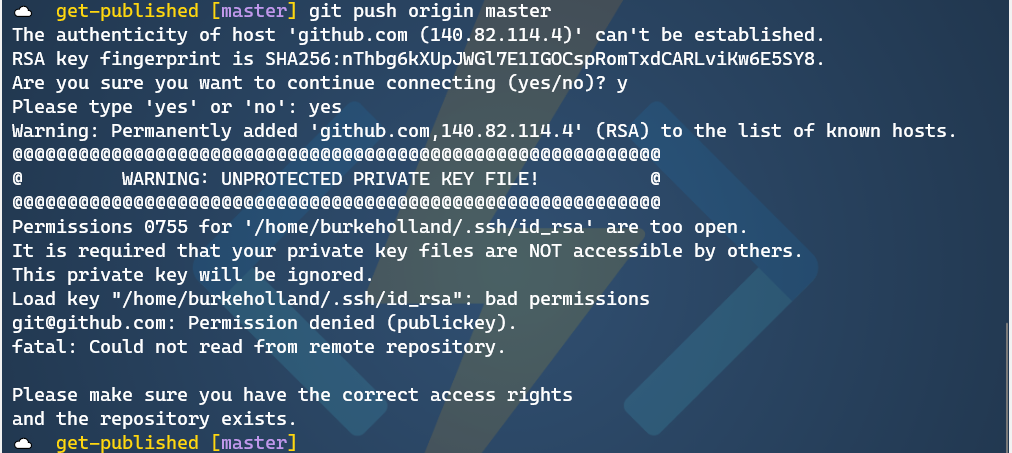
If you were to try and push something to Github from WSL, it will warn you that it doesn’t recognize the remote host and it will ask you if you want to connect. Type “yes”. Then you will get an error that looks something like this…

terminal showing unprotected private key

Like nearly everything that goes wrong on Linux, this is a permissions issue. You need to adjust the permissions on the key file to get this working. To do that, run the following command from WSL.

chmod 600 ~/.ssh/id_rsa

What this does is set Read/Write access for the owner, and no access for anyone else. That means that nobody but you can see this key. The way god intended.

Now try and push to Github…

terminal showing RSA host key message

Success!

Now, you will be asked to enter your passphrase every single time you try and push to Github. That’s going to get old in a hurry. This is because the ssh agent isn’t running on the Linux side. To get the agent running when WSL starts, first install keychain.

sudo apt install keychain

Then add the following line to your ~/.bashrc file…

eval ``keychain --eval --agents ssh id_rsa

Each time you reboot, you’ll have to enter your passphrase. But you only have to do it one time until you reboot or terminate WSL.

There are other ways to auto-start the ssh-agent in WSL. There are instructions in this article that show how to do with with Zsh.

Sharing is caring

While you can set up SSH keys on both the Linux and the Windows side, it feels a bit redundant. It also feels a bit like I’m not utilizing the full potential of WSL, which is that it lets me move between the two operating systems as if they were one. Sharing the same set of keys feels a bit more like I’m on one system instead of two.

I care because I’m always looking for the one “right way” to do things. The reality is that there is no one “right way” to do anything. You can setup SSH keys on both WSL and Windows, or you can set them up just in Windows and share them with WSL. It’s your world. The ssh keys just live in it.

The post Sharing SSH keys between Windows and WSL 2 appeared first on Windows Command Line.

24 Oct 03:02

Mapping When and Where People Start their Commute

by Nathan Yau

For commuters, the farther away you live from the workplace, the earlier you have to leave your house to get to work on time. How much does that start time change the farther out you get? Read More

24 Oct 03:00

Splintered politics in Canada this morning

by Chris Corrigan

So we had a very interesting election yesterday in Canada and a couple of progressive American friends of mine were hoping from afar that we would reject the kind of right wing racist populism that has infected much of the western world at the moment. This is the response I sent them. For those of you not in Canada, perhaps it will help you understand what happened in our country, written from an unabashedly progressive standpoint. It’s just my take, but here it is for posterity.

We pretty strongly rejected the People’s Party of Canada, the one actual right wing populist party that was running, although the Bloc Quebecois (Quebec’s sovereignties party) gained a lot of support, making some headway on the basis of Bill 21 in Quebec. That provincial bill outlaws public employees from wearing religious symbols in public and is lauded by some Quebeckers as a commitment to secularism and the civil law code principle of “laïcité” which is poorly understood outside of Quebec, but which comes across as racist and discriminatory in practice when seen through the common law lens of our Constitution. (In Canada both civil law and common law have standing, a historical anomaly stemming from the colonial compromise between English and French legal codes) In Quebec the province had to invoke the notwithstanding clause in the Constitution to pass the bill, meaning that it wasn’t subject to the Constitutional provisions to protect minority rights. Many are calling the bill racist and are begging the federal government to take it to Court. While that seems like a practical thing to do, in this political structure, it’s going to be hard.

The BQ and the Conservatives together with a few Liberal abstentions from Quebec can seriously hamper the government on bills that negatively impact Quebec, and as a result this issue might actually be allowed to stand without a Supreme Court challenge in the short term. Likewise, the BQ might join the government in messing up the investigation of corruption and obstruction of justice that needs to go on around the SNC-Lavalin affair that saw Trudeau pressure his Attorney General to allow the company to have a deferred prosecution agreement around some massive corruption they were involved in internationally. That AG, Jody Wilson-Raybould, is an indigenous woman, and she resigned her position, called out the Prime Minister and ran last night as an independent and got re-elected. So she will be back in the House, with a mandate to use her voice.

The Conservatives’ problem was that they pandered to a ton of anti-Trudeau rhetoric in Alberta and Saskatchewan. This has meant that they have won provincial elections there in recent years, but the rest of Canada thinks they are now a narrow-minded, regional-focused, climate change denying, dinosaur party and so the prairies are triumphantly blue and, outside of rural southern Ontario, all alone. They failed to see that Trudeau was actually the only leader willing to both build the pipeline they want (the government bought it last year) and also appeal broadly to the rest of Canada with social programs and policies that could unite interests. Had they voted Liberal, they would have had tremendous influence in Ottawa. Had the Conservatives broadened their appeal nationally, they would have won. As it is, we’re fractured along regional lines again, much as we were in 1993 and Trudeau returns to Ottawa with a minority government and actually coming in second in the popular vote. Folks are saying it’s the weakest mandate ever given to a government in Canadian history.

As a result, the NDP holds the balance of power, which will help get a few big things over the line such as a national pharmacare program, and perhaps a national low income dental care program and possibly some housing and urban infrastructure programs. It will preserve the climate strategy the Liberals have put forward, but that is still too weak to meet our Paris targets. For social programs, it’s the best possible outcome I think, but even with NDP support, the government is in a very weak position and the partisan and regional attacks will keep coming from Quebec and AlSask. That may mean a weak government and another election in a couple of years, and if that happens my guess is that the Liberals will have a better chance to capture conservative voters in Ontario who just hate Alberta moaning all the time even if they are supportive of oil and big business in general.

Interesting times. The Liberal party has not been good on progressive issues, especially indigenous issues, despite their rhetoric towards reconciliation. When the centre-right parties are weak, they tend to move right to canibalize the Conservatives’ soft support. Having the NDP holding the balance will help check them, but it’s not a massive progressive repudiation of populism.

Maybe it’s fair to say that it’s a defensive play against hate and it seems like our election was relatively protected from outside influence, hacks and Russian bots. They were definitely trying, but we are blessed not to have a two party system. It means that when things fracture, they do so in a way that creates more diversity rather that staunch and stark divisions. Makes it harder to govern, but then I think that should be a feature of Canadian politics and not a bug.

If you’re Canadian, why not weigh in here and offer perspective for folks reading this outside of Canada. What’s your take?

24 Oct 03:00

Broadway: Awaiting Transformation

by Gordon Price

As noted below, the Expo Line, which opened in 1985, has transformed the corridor along which it runs, especially at many of its station areas.  In that same time, nothing much has happened along Central Broadway.  Some of the blocks between Granville and Broadway seem curiously untouched since the 1970s.

The blocks between Granville and Burrard have some of the widest sidewalks in the city – and some of the least active street life.

This block from Burrard to Cypress has never had street trees, for no apparent reason:

At six lanes, it feels more like an urban highway than a streetcar arterial.  This is Motordom 2.0 – a redesigning of the city for the car and truck.

Because of the width of the road at six lanes and the height of the buildings at one and two storeys, there is no sense of enclosure, no ‘village’ feeling.  The Broadway subway offers the chance for a complete reordering when the train comes through  – a case where higher heights and densities will actually give the street a more ‘European’ feeling.

A classic example is in central Paris, where the ratio was set by Baron Haussmann in a 1859 degree that determined the height of the buildings as a function of the width of the street:

Six lanes allows five storeys, plus mansard roof (and no doubt higher storeys than our nine to ten feet for residential).  Even without street trees, it works.


24 Oct 03:00

Twitter Favorites: [anne_theriault] Boys think girls want outdated forms of government that cling to the status quo, but actually they want electoral r… https://t.co/LBfdQbkBIv

Anne Thériault @anne_theriault
Boys think girls want outdated forms of government that cling to the status quo, but actually they want electoral r… twitter.com/i/web/status/1…
24 Oct 02:58

Twitter Favorites: [Raptors] It’s perfect. #WeTheNorth https://t.co/zxLoZMSLg4

Toronto Raptors @Raptors
It’s perfect. #WeTheNorth pic.twitter.com/zxLoZMSLg4
24 Oct 02:58

Twitter Favorites: [ianhanomansing] Ready for our first post-election edition of The National, from the province now represented by Conservative, Liber… https://t.co/8lFpnG3DG9

Ian Hanomansing @ianhanomansing
Ready for our first post-election edition of The National, from the province now represented by Conservative, Liber… twitter.com/i/web/status/1…
24 Oct 02:54

British journalists have become part of Johnson’s fake news machine

mkalus shared this story .

I asked Shipman on Twitter the status (not the name) of his source. He didn’t reply (he has a busy Twitter feed; perhaps he didn’t see my question), so I rang Rudd herself.

She told me that she had repeatedly asked to be given the legal advice, including on two occasions approaching attorney general Geoffrey Cox.

She was told again and again that she would be given it. When she was not, her private office told her that Downing Street senior adviser Dominic Cummings had intervened to ensure she was not shown it.

Rudd did tell me that on the eve of her resignation, she was told “that they would set up a reading room the following week to see part of that advice. I had no confidence that would take place given that I had been promised it so many times and had not received it.”

It remains the case that the claim made by Shipman’s government source that Rudd had been “given every opportunity to see the legal advice” was wholly untrue.

“I have no comeback. I can’t challenge them,” says Rudd. “There is no individual for me to take on. It feels dishonest.”

This brings us to the major problem with Shipman’s decision to share with his 130,000 Twitter followers a venomous remark made by an unnamed person accusing Rudd of dishonesty.

Had the comment been made on the record by an official government spokesperson Shipman would have been well within his rights.

The spokesperson would have been accountable for her or his allegation against Rudd. He or she could have been identified and questioned about it.

Instead Shipman allowed an unknown Whitehall figure to label Rudd a liar, while granting him or her complete impunity.

Put another way, he allowed his Twitter account to be used as a vehicle for someone unknown to smear a prominent public figure as dishonest.

When I put this point to Tim Shipman yesterday, he replied that he had “cooperated” with Amber Rudd to publish the details of her resignation, and had “prominently included her accusation that she had asked to see the government’s legal advice and been denied this access”.

However, he added, “the nature of the story was such that [her request to see the legal advice had] to be kept secret until the Saturday evening” which meant that it was “impossible” for him to approach Downing Street to ask about her accusation.

He added: “I was in no way smearing her, but I was providing a right of reply, which I would do before publication except in the circumstances described.”

“People can draw their own conclusions about the origin of the anonymous quotes which now pepper the 24-hour news cycle. Government spin doctors have always hidden behind anonymity to make negative points about their opponents and enemies. Reporters have a duty to tell the public what the government’s position is. They are damned if they do and damned if they don’t.”

However, it is notable that Shipman operated a double standard. Amber Rudd gave her account of the circumstances leading up to her resignation on the record and in her own name. By contrast Shipman allowed a mysterious government source to make defamatory allegations that Rudd had been dishonest behind a cloak of anonymity.

This modus operandi, which allow pro-government narratives to enter the public domain unmediated by proper interrogation, has become routine among political reporters since Johnson and his Vote Leave media team entered Downing Street.

Hammond and Yellowhammer

An unpleasant and vicious example concerns the Downing Street smear campaign mounted against former chancellor of the exchequer, Philip Hammond.

This started on 18 August after Sunday Times news reporter Ros Urwin published the leaked Yellowhammer dossier setting out the painful short-term disruption that would confront Britain in the event of a no-deal Brexit.

This story was embarrassing for Downing Street because it undermined its core strategy – threatening a No Deal Brexit.

The government hit back, saying Yellowhammer was an “old document”. This false claim was made first by Michael Gove, minister in charge of Brexit preparations, and later by Tory chairman James Cleverly.

At this point ‘a senior Number 10 source’ went into action alongside Gove, briefing journalists that the Yellowhammer dossier was out of date.

But this ‘source’ added the vicious twist that it had been “deliberately leaked by a former minister to influence discussions with EU leaders”.

The Downing Street source was saying, in so many words, that a minister in the Theresa May government had kept a copy of the Yellowhammer document and then leaked it.

The result was that most of the following day’s newspapers did not focus on the Yellowhammer disclosures about the dangers of a No Deal Brexit.

Instead most turned Yellowhammer into a whodunnit – which of May’s ministers had been the leaker?

For instance The Times headline read “Boris Johnson accuses ex-ministers over Brexit chaos leaks”.

The Daily Telegraph’s read “No-deal leak blamed on Hammond’s Remainers”.

Boris Johnson’s Downing Street media machine had thus achieved a double success. It had distracted attention away from the real story, namely that No Deal Brexit carried real dangers of economic disruption and civil disorder.

And at the same time, it had smeared political opponents.

Most newspapers dutifully pointed the finger at Hammond. The Daily Mail (for which I write a political column) reported: “A No 10 source blamed former frontbenchers led by Philip Hammond.”

The source was quoted as saying: “[The Yellowhammer dossier] has been deliberately leaked by a former minister in an attempt to influence discussions with EU leaders.”

This was a brilliantly successful if cynical media operation. But it soon became apparent that the leaked document was dated 2 August, nine days after the Boris Johnson government had entered office.

It was therefore mysterious how a member of the May government could have leaked Yellowhammer to the Sunday Times. The leak had occurred on Johnson’s watch, not May’s.

Hammond accordingly wrote to Johnson asking that Downing Street “withdraw these allegations which question our integrity, acknowledge that no former Minister could have leaked this document, and apologise for the misleading briefing from No. 10”.

Well over a month has passed since Hammond sent that letter. When I checked on Sunday with his office, I was told that the prime minister hadn’t replied.

No newspaper has yet written a story about the failure of Johnson to reply to Hammond’s letter. I expect that political journalists don’t want to upset valuable Downing Street sources.

The sorry story of the smearing of Philip Hammond is another example of how Boris Johnson’s media operation operates through deceit. How it relies on a compliant media to cooperate with that deceit – even when it knows the allegations are false.

There is an implicit deal. In return for access and information (much of it false) the political media spins a pro-government narrative.

This means that Johnson’s Downing Street can malign political opponents, lie about them and get away with it. But it can do this only because political journalists and editors allow it to.

BBC manipulated by Downing Street

It’s not just the print media which allow themselves to be manipulated by Boris Johnson’s Downing Street.

Take BBC political editor Laura Kuenssberg’s reporting of the government’s formal submission to a Scottish court that Boris Johnson would comply with the so-called Benn Act, and so if need be request an extension of membership of the EU on 19 October, supposing no deal had been struck.

Clear enough, you would have thought. But, in the words of Jill Rutter, senior research fellow at The UK in a Changing Europe, a think tank based at King’s College London, the prime minister’s submission “was accompanied at the same time by a breathless tweet thread by the BBC’s political editor, Laura Kuenssberg, reporting [a “senior No. 10 source”] clarifying that message.

“Yes, the government would comply with the ‘narrow’ provisions of the Benn Act – but the source went on to suggest that shadowy MPs were behind the act and that the government had ways of undermining it.

“And thus Number 10 perpetuated the prime ministerial paradox: that Boris Johnson will comply with the Benn Act and yet still leave the EU ‘do or die’, deal or no deal, on 31 October.”

Kuenssberg is therefore open to the criticism that she was being manipulated by Downing Street. Her tweets to her 1.1 million followers meant there were two government positions. One for the courts: that the government would obey the law. One passed on uncritically by the BBC political editor: that it would find a way to get round it. Kuenssberg’s tweets carried with them the implication that Johnson was deliberately deceiving a British court.

This compliance is part of a pattern. Political editors are so pleased to be given ‘insider’ or ‘exclusive’ information that they report it without challenge or question.

In response to these points, a BBC spokesperson yesterday said: “While our journalists always prefer on-the-record quotes, there is a well-established practice in politics of reporting information from unnamed sources to give audiences a greater sense of what is going on in Westminster.

“It should go without saying that reporting comments from anyone, be they source or named individual, is not the same as endorsing those comments. Similarly, taking a single Twitter thread out of context to try to prove a point is disingenuous and does a disservice to your readers.

“Laura Kuenssberg is a fantastic journalist who helps audiences make sense of the Brexit story with her in-depth analysis and expertise.”

Cummings’ communications

Another culprit is ITV News political editor Robert Peston, who regularly preens himself on his special insight into the mind of Boris Johnson’s senior adviser Dominic Cummings.

In a Twitter thread on 25 September, he cited a “senior government source” to the effect that there was a way for Johnson to avoid complying with the Benn Act.

According to Peston’s informant, Johnson “still believes he can lawfully render the Benn Act null and void” by sending a second letter to Brussels that would counteract the first.

Unmitigated nonsense, said legal experts. But the message Downing Street wanted was out there.

This has become a signature technique of the Johnson media machine. Officially no comment. Meanwhile it makes its views known to friendly political editors, who push them without much inspection or analysis out into the public domain.

When I put this point to Robert Peston, he gave a long response which is published separately on openDemocracy.

Jill Rutter, a former director of communications at the Treasury, notes: “That may be how Number 10 wants to operate: to allow the prime minister to look statesmanlike while the dodgier tactics emerge from an unnamed source.

“But this way of operating does the public a big disservice – it allows Downing Street to get its message out without having to take responsibility for it.

“These are not official words. The prime minister does not have to account for them. And there is no way to interrogate the source.”

It’s a classic case of what Johnson once called “having our cake and eating it”. This means that the British media are not just failing to hold him to account. They are not even trying. They are behaving as cheerleaders to the government. They are allowing the prime minister to get away with lies and dishonesty which they would never have permitted to his predecessor, Theresa May, let alone Jeremy Corbyn.

Part of this is paying a price for access. Much is sheer laziness. Broadcasters don’t bother to confront Johnson when he utters lies and falsehoods. One recent example among many: on 29 September Johnson told Andrew Marr that the Conservatives don’t “do deals with other parties”.

The Conservative Party struck a deal worth £1 billion with the Democratic Unionist Party in 2017. Before that, they spent five years in a coalition with the Liberal Democrats. Marr’s failure to challenge Johnson allowed the prime minister to get away with an obvious falsehood.

I have dealt only with the mainstream media in the examples I have given above. I have not looked at The Spectator political editor James Forsyth, who has inherited a position occupied by masters of the craft such as Alan Watkins and Henry Fairlie, Bernard Levin and Ferdie Mount.

Forsyth, like so many others, has recently come to interpret his role – at least in part – as stenographer-in-chief to anonymous Downing Street advisers. Two weeks ago Forsyth made public a 700-word text he had received from a “contact in Number 10” setting out government strategy.

The following day cabinet minister Grant Schapps was asked about Forsyth’s document. He refused. “If you can name the source I’ll certainly engage in it,” he replied. “I am not really into leaked texts… who knows where they are from.”

A classic case of how Downing Street can release helpful talking points into the public domain without being held accountable.
22 Oct 17:38

Soaking in home

by Chris Corrigan

I Love the rain. The fall rains here in Bowen Island come heavy and steady starting in mid September and going through to December. They fill creeks and create the conditions for the salmon to return. You never know how many will return every year but without the rains they can’t taste their home stream or in ocean.

For some reason I have been really craving the rain this year. Waiting for it like people in the North wait for the ice to break up in the spring. It feels like a release somehow. Todayt we are expecting about 50mm of rain and this morning I headed out in it to cast my votes in our federal election. The forest is luminescent with fungus and lichen and the forest floor is covered in mushrooms. This weekend I fasted on fresh boletes and oyster mushrooms and spent time drying some.

Walking in the heavy rain is wonderful when you have the right gear. Layers of clothes with a water proof outer layer and good goretex boots does the trick. Walking quietly in a rainy forest whilst remaining sheltered from the water is a cozy and almost spiritual experience. It brings one into a contemplative mind, tucked beneath a hood, rain spattering on my head,, the constant sound of water flowing all around. Returning home to dry by the fire or tucking into the pub in the late afternoon for a quiet chat with the regulars now that the tourists have all gone. All of it is west coast spiritual practice.

Today we have a classic southeasterly wind and heavy rain. And tomorrow skies will clear and the winds will back strongly from the northwest, making it a good day to head over to the west side of our little island and watch the waves crash on the Cape after travelling 100 kms down the Salish Sea. It’s not a long fetch and not a heavy swell but the wind fills the face, the sun is glorious out over the Strait of Georgia, and the blue of sea and sky is flecked with brilliant white foam from crashing waves and chaotic seas.

It’s nice to be home.

22 Oct 17:38

Evernote's new editor - WSP

An article about the effort to create a new editor in Evernote: I didn&#8217;t find it terribly illuminating, but it&#8217;s a lengthy piece with lots of encouraging photographs of programmers sitting in front of laptops. Any sign of life at Evernote is welcome. (But Ian Small's videos on the Evernote discussion forum are actually more instructive.)

https://www.builtinaustin.com/spotlight/2019/10/15/working-at-evernote-austin-engineering
22 Oct 17:38

Understand what's changing in Yahoo Groups

Yahoo, Oct 22, 2019
Icon

Yahoo Groups used to be a staple, being one of the first online community sites (Google Groups came much later). But now it's being killed by Yahoo. "Yahoo has made the decision to no longer allow users to upload content to the Yahoo Groups site. Beginning October 28 you won't be able to upload any more content to the site, and as of December 14 all previously posted content on the site will be permanently removed. You'll have until that date to save anything you've uploaded." They should at least donate the contents to Internet Archive or something, so we don't have a repeat of the destruction of Geocities. Via Motherboard.

Web: [Direct Link] [This Post]
22 Oct 17:38

A MOOC as an immediate strategy to trainhealth personnel in the cholera outbreak inMexico

BMC Medical Education, Oct 22, 2019
Icon

In many ways this article (7 page PDF) leaves me with more questions than answers (the authors at one point observe "the terminal efficiency of the course is far above from what the evidence suggests") but the case is made, I think, that launching a MOOC is an effective strategy in the case of an urgent need such as a cholera epidemic. It's more (and better) than just an information dump. The authors also note that completion rates (which were quite high) were supported not only by the urgency of the epidemic, but also by "peer support and workplace facilities, particularly in healthcare  centers, hospitals, and teaching  areas of health jurisdictions, where a type of companionship and mutual support was generated, which ultimately favored the submission of evaluations." The authors reported an 85% completion rate, and more importantly, an effective response to the epidemic, one that is now being replicated elsewhere. Via Paperity.

Web: [Direct Link] [This Post]
22 Oct 17:38

Superusers Don’t Work For Free

by Richard Millington

Your top members aren’t answering questions for free.

They’re being paid in things they value more than money.

They’re being paid in how it feels when they help others and receive gratitude.

They’re being paid in feeling smarter about the topic and more competent at what they do.

They’re being paid in the relationships they form and finding a sense of identity.

They’re being paid in the reputation they nurture and feeling like they matter.

They’re being paid in feeling important by members and by the brand.

They’re being paid in things money can’t buy.

You don’t encourage superusers by finding tangible rewards with ever-greater value, you encourage superusers by doing whatever it takes to best amplify these feelings.

The most powerful rewards include:

  • Ensuring members thank those who provided the answer to their problem and highlight how much it helped.
  • Providing exclusive training and expertise which makes superusers feel smarter and appreciated.
  • Asking the PR team to promote their work, inviting them to speak at company events, or lead areas of the community (AMAs/Live chats etc..)
  • Gathering superusers together in the same room so they can form strong relationships with fellow superusers.
  • Providing unique access to insider information, attend CEO calls, or have contacts to ask for advice.

Don’t increase the size of a reward, amplify the feelings members want when they help.

22 Oct 17:38

PureBoot Best Practices

by Kyle Rankin

PureBoot is our cutting-edge secured boot process that combines a number of technologies including:

  • Neutralized and Disabled Intel Management Engine where only the code absolutely essential for the system to boot is left in the ME.
  • Coreboot the free software BIOS replacement.
  • A Trusted Platform Module (TPM) chip.
  • Heads, our tamper-evident boot software that loads from within coreboot and uses the TPM and the user’s own GPG keys to detect tampering within the BIOS, kernel, and GRUB config.
  • Librem Key, our USB security token that integrates with Heads to alert the user to tampering with an easy “green light good, red light bad” process.
  • Integration between the Librem Key and LUKS disk encryption so you can unlock your disk with your Librem Key.

Recently we started offering the PureBoot Bundle–PureBoot installed and configured on your laptop at the factory and bundled with a pre-configured Librem Key so you can detect tampering from the moment you unbox your laptop. It’s been great to see so many customers select the PureBoot Bundle and now that PureBoot is on so many more customer laptops, we felt it was a good time to write up a post to describe some best practices when using PureBoot.

If you are just getting started with PureBoot and want to know the basics, check out our Getting Started Guide for pointers on what to do when you start up your PureBoot Bundle for the first time. In this post I’ll assume you have already gone through the first boot and first reboot of your laptop and have settled into daily use.

Create Your Own Keys

To make PureBoot easier to use, from the factory we default to well-known and weak PINs for the TPM, GPG user PIN and GPG admin PIN. We recommend that once get your laptop and perform the initial boot, that you change the TPM, GPG admin and GPG user PINs to something unique. We document that process here.

We also generate unique GPG secret keys for each customer directly on the Librem Key, and store the corresponding public GPG key on a USB drive we ship with the laptop. Purism doesn’t back up these private keys when we generate them, so the private keys only exist on your specific Librem Key. For the average user who only intends on using the GPG key on the Librem Key for tamper detection, the factory-provided key should work fine required you trust Purism. The beauty of PureBoot, though, is that you aren’t required to trust Purism to be secure.

If you would like to replace the factory-provided GPG key with your own GPG key, or you intend on using the Librem Key for other GPG operations like signing email, and not just for tamper detection, you can follow the steps documented here to generate a new GPG key and replace the existing keys with your own.

Update Software With Packagekit

By default PureOS uses Packagekit, integrated with Gnome Software, to perform software updates. If you’ve ever been prompted by the default PureOS desktop to reboot and install updates, this is Packagekit. While you can certainly use other tools (including apt on the command line) to update PureOS, Packagekit offers some additional benefits when you use PureBoot, in particular when it comes to avoiding false positives.

PureBoot alerts you whenever any existing file in /boot changes. This means that any time you update software that changes files in /boot (such as with kernel updates or other system updates that might update the initrd file under /boot), PureBoot will issue an alert the next time you reboot. The easiest way to tell the difference between actual tampering of files in /boot and changes caused by package updates is to re-sign all of the changed files in /boot immediately after they change. The more time that goes by between the legitimate changes and a reboot, the better the chance you will forget about that software update and may interpret a harmless alert about changes in /boot as an attack, or dismiss an alert about a legitimate attack because you assume it’s related to a software update.

If you use Packagekit to perform your updates, the process goes something like this:

  • Tell Packagekit to reboot and apply updates
  • The computer reboots
  • PureBoot confirms the firmware and /boot files have not been tampered with and boots into PureOS
  • Packagekit applies updates in a restricted environment and then reboots again
  • If Packagekit changed files in /boot, PureBoot will alert you

Since you know the changes occurred only during this Packagekit update window, you can reasonably conclude the changes were caused by Packagekit. Then you immediately re-sign all files in /boot before booting into your OS, thereby sealing the current known good state in a trusted environment. If you get an alert about files changing in /boot at a later date, you have a stronger reason to be suspicious.

Traveling With PureBoot

Traveling presents a higher-than-normal risk for tampering, because you are more likely to leave your laptop unattended in an unfamiliar area strangers have access to, potentially for extended periods of time. Whether it’s for relatively brief periods of time during customs or other security checks, or more extended periods of time if you leave your laptop in your hotel room, PureBoot can help give you piece of mind when your laptop is out of your hands as long as you follow a few best practices.

Travel Best Practice 1: Keep Your Librem Key With You

When you turn on your laptop, PureBoot proves that it hasn’t been tampered with by sending a special code over USB to your Librem Key. If the code matches what the Librem Key itself generated, the Librem Key blinks green, notifying you the computer is safe, otherwise it blinks red. This procedure works because you keep your Librem Key with you so even if an attacker tampers with the laptop they can’t tamper with the Librem Key. If you leave both your laptop and your Librem Key at your hotel room, an attacker could potentially reset both devices (or guess your PIN) and you may not notice until it’s too late. Whenever you leave your laptop unattended, unplug your Librem Key and put it in your pocket or purse.

Librem Key Tip: If you wear jeans, you may not know that they have a custom “Librem Key pocket” just above the larger front-right pocket! It’s the best place to store your Librem Key, as long as you remember to remove it before your jeans go in the wash.

Travel Best Practice 2: Don’t Add/Remove/Update Software While Traveling

Because travel presents a larger risk of tampering, you want to make sure to remove as many false positives as possible, so that if PureBoot does detect tampering, you know to be suspicious. One of the biggest causes of false positives with PureBoot is from software updates, so if you need to install, remove, or update software, do it before you travel. Then before you leave, reboot the laptop and boot back into your OS to ensure that PureBoot does not detect any tampering. While you are traveling, try to avoid making changes (in particular software changes) to your laptop. That way if PureBoot does detect tampering either during traveling or right when you return, you have a strong reason to suspect tampering.

Travel Best Practice 3: Power Off Your Laptop When Unattended, Don’t Suspend

Librem Laptops encrypt the hard drive by default, and hopefully if you reinstalled a different OS, you also enabled disk encryption. When your laptop is suspended, an attacker with enough time alone with your machine can attempt a “cold boot attack” to retrieve disk encryption keys and other secrets from RAM. Beyond that, if your login password is weak, or you disabled screen locking when resuming from a suspended state, an attacker will have an easier time tampering with your machine if it’s suspended. By powering off your laptop whenever it’s unattended, you ensure that the attacker has to crack your disk encryption password before they can tamper with anything.

By powering off your laptop whenever it’s unattended, it means that when you return to your laptop, you will power it on and PureBoot will be able to test the system for tampering. If PureBoot does detect tampering, you will have a better chance of pinpointing when it happened since you are testing the system each time you use it.

Set Up Two-Factor Disk Unlocking

One of the final pieces of the PureBoot technology stack is the use of the Librem Key to enable multi-factor authentication to unlock your disk. This means that instead of typing in a passphrase to unlock the disk, you can use a combination of your Librem Key (something you have) and your Librem Key GPG user PIN (something you know) to unlock the disk. This is not only more secure, it’s also more convenient. This means you can set a very long, difficult passphrase as your fallback disk unlock passphrase, and potentially set a somewhat easier-to-type GPG unlock PIN that you use to unlock the disk normally.

We do not yet enable this feature in PureBoot by default, but if you would like to set up two-factor disk unlocking, we have created a script for PureOS and Debian that can help automate the process while we work with upstream providers to included this functionality in Debian and PureOS by default. In the meantime you can read our guide here on how to download and use our script to enable this feature.

Conclusion

We’ve been very pleased to see so many people use PureBoot. We believe it’s one of the best (and one of the few) ways to provide high security on laptops while giving you full control over all of the keys. By following these best practices you can get the most out of PureBoot. If you’d like to read more, check out our full PureBoot documentation.

The post PureBoot Best Practices appeared first on Purism.

22 Oct 17:38

Academic Workflow - Any Suggestion for an Application/s? - Darren McDonald

I am trying completely go digital with my workflow as a researcher in management studies in Japan. The main reason for doing so is that a stroke has left me with awful handwriting and a terrible short-term memory. (Up until the stroke, I made notes in a research journal and typed up my findings in Word). I tried unsuccessfully to find all I need in one application. But now I am starting to understand that a workflow involves drawing on the best of several different applications.

At the moment, I am trying to decide on an application to use when reading PDFs, making annotations and taking notes. The closest application that works for me is Highlights https://highlightsapp.net . I like it for two reasons. The first reason, you can see all your notes and annotations at once in the application, rather than just having lots of "memo icons" on the PDF that you have to click open to read the comment you made. Secondly, the ability to export your annotations and notes for use in another application. What holds me back is that there is no iPad app. Do you have any suggestions?

Another thing I am trying to do is find an application that helps me bring together the annotations and notes to find themes and decide where I use them in a journal article. Any suggestions on what application to use to do this?

Looking forward to your suggestions as I am in the middle of working on a chapter for a book. :)

Cheers! :)

Darren
22 Oct 17:38

How data changes the design process at every stage

by Nathan Yau

On Multiple Views, the Interactions Lab talks about their experience as a design studio and how quickly implementations can change when you introduce real data into the system:

It’s easy to assume that the tools and approaches used for general software design apply equally to data visualization design. But data visualization design and interface design are often deeply and fundamentally distinct from one another. We learned this the hard way when we turned our research lab into a collaborative data visualization design studio for a few years. Data permeates visualization interfaces in ways that pose challenges at every stage of the design process. These challenges are even greater within large visualization teams. By reflecting on and articulating these challenges, we hope to inspire new, powerful data visualization design tools and communication processes.

Always start with real data. You’re wasting your time otherwise.

Tags: process, real data

22 Oct 17:32

Twitter Favorites: [shawnmicallef] This racist POS could have inherited the party after Sheer's lost. Instead in went Canadian tea party. Best riddance.

Haunted Sexy Coalition Government @shawnmicallef
This racist POS could have inherited the party after Sheer's lost. Instead in went Canadian tea party. Best riddance.
22 Oct 17:32

Academic Workflow - Any Suggestion for an Application/s? - J J Weimer

> Secondly, the ability to export your annotations and notes for use in another application. What holds me back is that there is no iPad app. Do you have any suggestions?

At one level, you will find apps such as PDFExpert and PDFPen. They expand the tool sets to the iPad with additional markup options. I believe that both have been given high regards on this forum.

PDFPen -> https://smilesoftware.com/pdfpen-family/
PDFExpert -> https://pdfexpert.com/ios

Perhaps GoodNotes and others can be added, although I consider them to be note-taking plus PDF markup rather than dedicated PDF markup.

Going further, you will find apps such as LiquidText and MarginNote. They include their own internal options to extract the annotations to a side sheet and organize them for review. The downside of these two is that the annotations they create are not always compliant with other PDF editors.

LiquidText -> https://www.liquidtext.net
MarginNote -> https://www.marginnote.com

> Another thing I am trying to do is find an application that helps me bring together the annotations and notes to find themes and decide where I use them in a journal article. Any suggestions on what application to use to do this?

You may find that MarginNote (or LiquidText), with their additional study sheet approach, will provide a framework that you can use directly without having to export the annotations to other apps. In this regard, I particularly appreciate the approach in MarginNote to be able to put tags on annotations.

Personally, I use PDFExpert to do markup that must be compliant with the rest of the world (e.g. when I have to markup documents that are to be sent to the Windows community). I also appreciate the ability in PDFExpert to be able to access multiple cloud services (Google Personal + Google Work + Dropbox Personal + Dropbox Work + ...). I use MarginNote to make annotations that I want to tag for some reason or another (e.g. when I grade documents, I can mark tags such as "incorrect", "inadequate", or "improper" to denote different levels of mistakes). I do not use the collect or study aspects of MarginNote even though these two additional aspects are touted as the main reason for MarginNote to be used (markup + collect + study). I do not appreciate the limitations and general instabilities that MarginNote has in syncing only with iCloud (and have given it a low review on the App Store for this reason).
22 Oct 17:31

Work Futures Daily | Life Is Too Short

by Stowe Boyd

| Women in Economics | Self-Organization Myths | Meetings Suck | Pronoun Policies | Hannah Goldfield |

Continue reading on Work Futures »

22 Oct 17:31

Phone Scams, Woken Children, Lost Cars and Other Tales of Election Day

by peter@rukavina.net (Peter Rukavina)

I walked up the stairs to a well-kept building downtown that houses three apartments and rang the bell for the one housing Green Party supporters. I heard some shuffling inside, the door opened, and I was greeted by a woman on the telephone, motioning for me to wait a moment.

As I stood by, I could not help but overhear the person on the other end of the line, as the volume on the phone was very loud:

The RCMP are going to transfer $1,000 into your bank account, and this will then act as a sting operation for the group that hacked into your account; they will go to the nearest Google Store and take out the money, we will be alerted, and then…

And so on. As I listened, it became evermore evident that this was a very skilled phone scammer at work.

Eventually I could listen no longer: “this person is lying to you,” I chimed in; “I suggest you hang up the phone and call the police.”

I offered to take the phone from her, and once I was speaking to the scammer, I asked for his name, ID number and company. He gave me an Ottawa phone number, and told me he wasn’t from a company, but was from “Weasel.” Okay.

I finished things up: “you are lying, you are committing a crime; I am going to hang up now and we are calling the police.”

I found out that he’d kept her on the line for almost an hour with a never-ending stream of twists and turns, all just plausible enough that she’d been afraid to hang up.

I reassured her that she’d done nothing wrong, and that she was the victim of a very convincing scam artist. I recommended that she have a cup of tea, and then phone her bank and the police to report the incident.

And then, only when she’d had a chance to catch her breath, make her way to the polls.

Just one of the many adventures I had touring around Charlottetown as part of the Green Party “get out the vote” effort yesterday.

My day started at 7:30 a.m. at the Green “sign wave” in West Royalty; after a quick stop at Green Party HQ in Sherwood, I dropped Oliver home and set out on my appointed rounds.

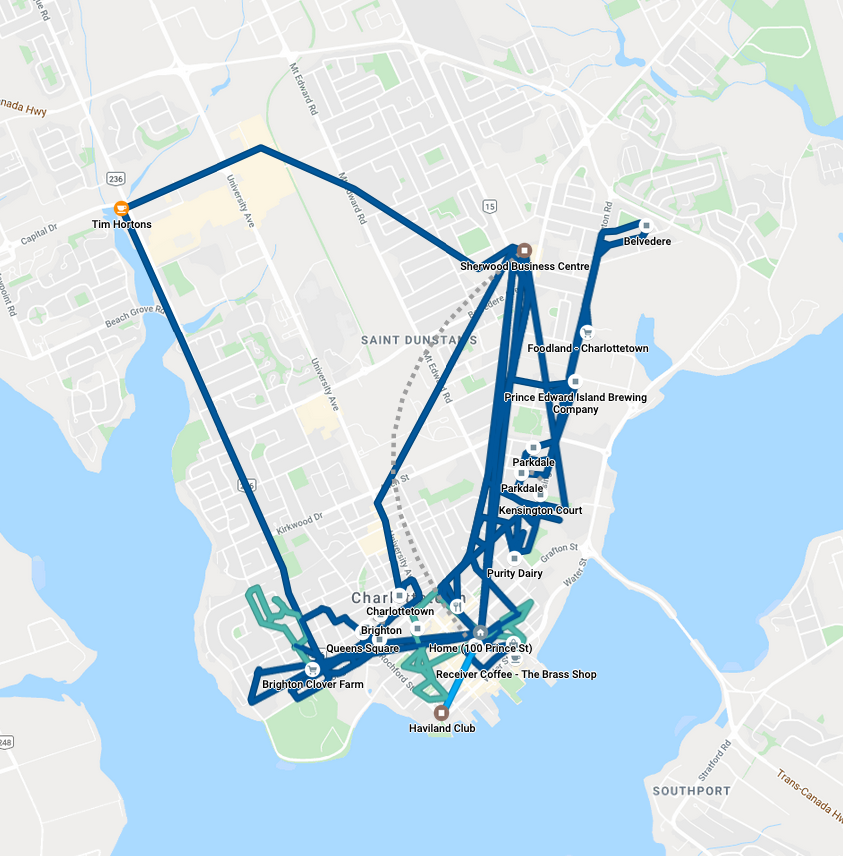
My job was to take poll-by-poll lists of previously-identified Green supporters and visit each one, knocking on their door to see if they needed a ride to the polls or had any other concerns, leaving a door hanger if they weren’t home. I started out, ambitiously given my brooding chest cold, on my bicycle, covering the downtown polls from the east end to Haviland.

My e-day bicycle setup

I met a lot of interesting people, set up some rides to the polls, left a lot of door hangers. I visited people in the swankiest of buildings and the humblest of buildings. I learned that there’s no way to predict who’s going to be a Green supporter.

Once I’d finished my downtown polls, I drove back out to HQ, wolfed down some lunch (Greens, I have discovered, have the best food of any of the political parties), and left with a new sheaf of lists, this time for the area between University Avenue and Queen Elizabeth Drive, a swath of town that also encompasses a full spectrum of housing and income levels. For this round I loaded my bicycle into the trunk of my car and set up a base on Admiral Street, cycling around in concentric circles until I had everyone covered, and then moving east and doing it all again.

I got upbraided for knocking the door while the children were sleeping (sorry!), barked at by a lot of dogs, experienced every possible model of doorbell and house number, and thanked by more than one family for the reminder to vote. I visited a building with a comfortable chair inside the elevator.

Armchair inside an elevator

Back to Sherwood for more.

My next round was along Kensington Road from the 1911 Jail out to the Belvedere Golf Club.

I found apartment buildings in places I had no idea apartment buildings existed.

I helped a man load a heavy set of flat-pack furniture into his office.

I discovered streets that I had no idea existed.

I found one short street in Parkdale where almost every single house was identified as “Strong Green.”

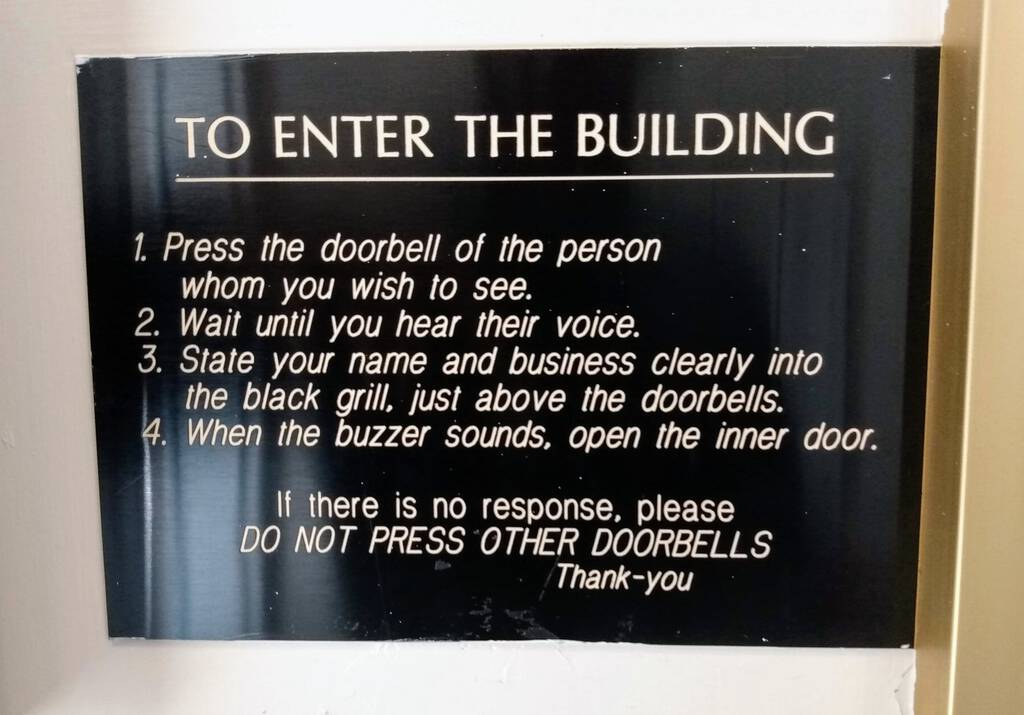
I encountered apartment buildings with broken intercoms, apartment buildings with no intercoms, apartment buildings where the intercom rang the resident’s cell phone, and apartment buildings where the intercom needed instructions from the 1950s to use.

How to use the intercom in an apartment building

Back to the office. One more round, this time the area north of Holland College into Parkdale: Edward, Esher, Fitzroy, Belmont, Spring, Second, Park, Pleasant.

It was getting dark. I was starting to feel the effects of the day: my mind was starting to get foggy, and it was getting more difficult to keep track of things.

On Pleasant Street, which is only 150 metres long, I managed to lose my car. Then, after a minute, I found it.

I tried to find addresses on Walthen Drive that, perplexingly, did not exist. I realized that I was canvassing Walthen Drive using street numbers for Hensley Street. In there somewhere I canvassed the right number on the wrong street, addressed the person who answered the door by the (presumably wrong) name, and was assured that the Greens had her support.

I encountered one woman who said simply “I don’t vote.” I had no comeback for that.

At another door, a solid Green supporter who didn’t know whether he’d have time to make it to the polls. I made sure he got a callback before the deadline. I hope he voted.

At 7:30 p.m. I realized that I couldn’t go on any longer: my mind and body were at their end, and I was scheduled to scrutineer the vote count at 8:15 p.m. I made a final trip to Sherwood, dropped off my supplies, grabbed a slice of pizza, and drove home.

After a quick sit-down at home, I headed next door to the Murphy Community Centre for my last task of the night.

Despite my years of working in election administration, I’d heretofore never seen a ballot box being emptied of ballots and counted, so, beyond any duty to democracy and the Green Party, I was also following my curiosity. And it was fascinating.

But, before the poll even closed and the count commenced, there was one final adventure: an elector arrived at the poll only to find that they were in the wrong place. They were supposed to vote across town. But they had no way of getting there in time on their own. Elections officials were confounded as to what to do, and looked over at we scrutineers–there was only me, for the Greens, and a couple from another party. When the other party demurred, I received assurances that I could re-enter the poll if I stepped out to see what I could do. I phoned HQ and asked if there was anyone who could rush down and drive; none other than (Green MLA) Hannah Bell, champion of democracy, stepped into the fray. She was at the front door in record time. I haven’t heard yet as to whether the elector got to the other poll in time to vote, but I hope they did. Just got word that they got to the proper poll by 8:30 p.m., and voted!

At exactly 8:30 p.m. the doors were locked and I watched the poll clerks and deputy returning officers go through the systematic process of shutting down the vote, carefully labeling and sealing many envelopes, tallying the total ballots cast and the total ballots remaining and, finally, unsealing the ballot boxes and counting the votes.

What a thing to watch!

Each ballot was pulled out of the ballot box, the marked candidate’s name read, and then the ballot was shown to all-observing and we each marked a tally sheet to keep the count.

Casey. Campbell. Casey. Lanthier. Lanthier. Byrne. Casey. Lanthier.

Every time a candidate’s total reached another multiple of five, someone would say “tally,” and we’d all double-check and confirm. It was both a humbling direct line to democracy and the closest to full-on-tenterhooks that I’d ever experienced.

In the final count, for the two polls that I was observing, Darcie won poll 53 and placed a respectable second in poll 54.

We observers received a copy of the Statement of the Vote and then, around 9:30 p.m., left with thanks.

I dropped home to pick up Oliver and we walked to the Haviland Club for the Green celebrations.

What a day.

My Google Timeline for October 21, 2019 - Election Day

22 Oct 17:31

Duck season! Wabbit season!

I don't know if it's Duck Season or Wabbit Season now, but starting Jan. 1 it's creepy database marketing company season here in California.

This doesn't mean that we can just use the opt-out flow that's easiest. The surveillance marketers are already working on a way to make people feel like they're doing CCPA, and to make things harder for publishers, but without affecting the bigger players. The IAB CCPA Compliance Framework for Publishers & Technology Companies is out, and it enables you to signal an opt-out only for the site you're on. Not what we need, because it doesn't do anything about the party that actually holds the data, and that's where the opt out or data deletion demandI know the law says data deletion request but if you're not allowed to turn me down then I'm not requesting. needs to go. Places like

  • Oracle Data Cloud

  • Acxiom

  • Experian Marketing Services

  • LiveRamp

All the companies on this CCPA todo list. If you want advertisers to buy you better ad-supported content, you have to starve them of the targeting data they need to reach you on crappy content, or in social media and native apps. Which means focus on the DMPs, not the peripheral ad targeting. Anyway, we should be able to make CCPA flow a lot easier. Here's a button to help me test something to do that.

Two more things.

Anybody with a clean whiteboard can design a better web advertising system than what we have now. The hard part is incrementally getting ad-supported publishers from the current shitshow to the new system before they run out of money.

Solutions to the surveillance marketing problem have to be built for real people, not for a fully-informed, rational Homo economicus. Two pieces of irrational behavior you can count on, and that the solution has to take into account.

  • Users won't pay for privacy even when it's cheap.

  • Advertisers won't pay for context even when it's valuable.

(The first makes sense if you consider that we consider surveillance marketing as something that the other side is doing wrong and we expect norms violators, not the people affected by the violation, to bear the cost. The second one seems to be a lot more complicated.)

Bonus links

50 ways to leak your data: an exploration of apps’ circumvention of the Android permissions system

Telcos And Rupert Murdoch Pushing Nonsense Story That Google Helping Keep Your Internet Activity More Private Is An Antitrust Violation

The NSA General Counsel's Proposal for a Moonshot

When Two of the Biggest Names in Ad Tech Merge, What Comes Next?

Same-Site Cookies By Default

Europe’s top court says active consent is needed for tracking cookies

22 Oct 17:31

The Illusion of choice and the need for default privacy protection

by Peter Dolanjski

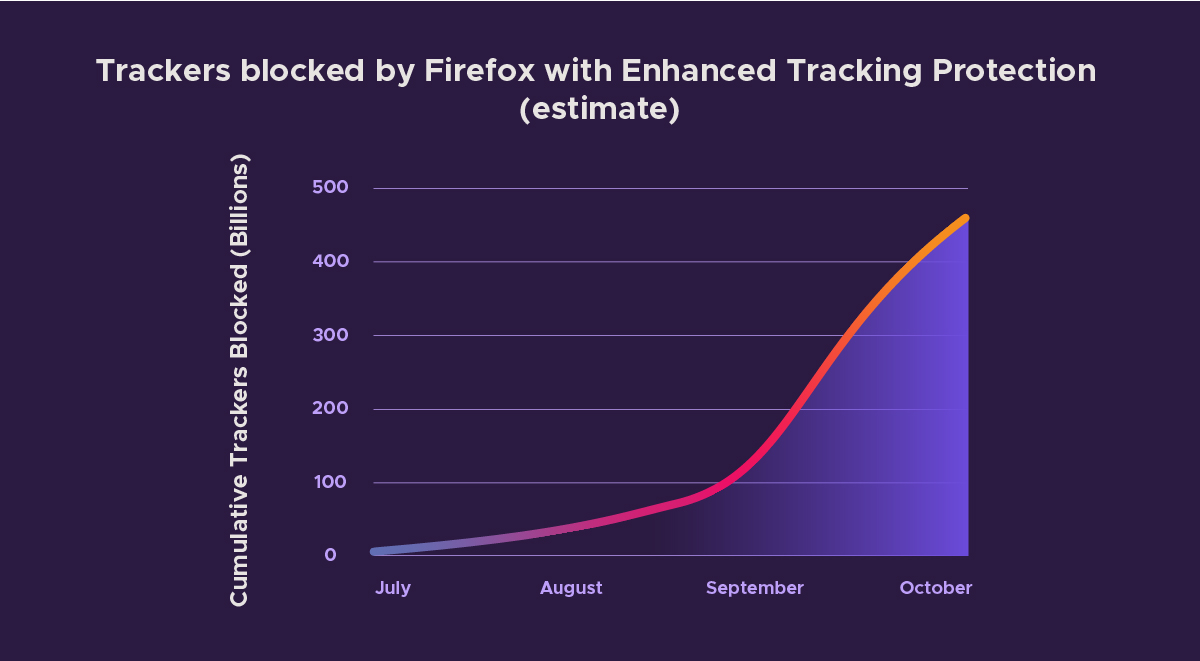
Since July 2019, Firefox’s Enhanced Tracking Protection has blocked over 450 Billion third-party tracking requests from exploiting user data for profit. This shocking number reveals the sheer scale of online tracking and it highlights why the current advertising industry push on transparency, choice and “consent” as a solution to online privacy simply won’t work. The solutions put forth by other tech companies and the ad industry provide the illusion of choice. Let’s step through the reasons why that is and why we ultimately felt it necessary to enable Enhanced Tracking Protection by default.

A few months ago, we began to enable Enhanced Tracking Protection, which protects Firefox users from cookie-based tracking by default. We did this for a few reasons:

1. People do not expect their data to be sent to, and collected by, third-party companies as they browse the web. For example, 72% of people do not expect that Facebook uses “Like” buttons to collect data about a person’s online activity on websites outside of Facebook (when the buttons are not actually clicked). Many in the ad industry will point to conversion rates for behaviorally targeted ads as evidence for consumers being okay with the privacy tradeoff, but people don’t know they are actually making such a tradeoff. And even if they were aware, we shouldn’t expect them to have the information necessary to evaluate the tradeoff. When people are asked explicitly about it, they are generally opposed. 68% of people believe that using online tracking to tailor advertisements is unethical.

2. The scale of the problem is immense. We currently see about 175 tracking domains being blocked per Firefox client per day. This has very quickly resulted in over 450B trackers being blocked in total since July. You can see the numbers accelerate in the beginning of September after we enabled Enhanced Tracking Protection for all users.

Estimate of Tracking Requests Blocked by Firefox with Enhanced Tracking Protection

It should be clear from these numbers that users would be quickly overwhelmed if they were required to make individual choices about data sharing to this many companies.

3. The industry uses dark patterns to push people to “consent” via cookie/consent banners.

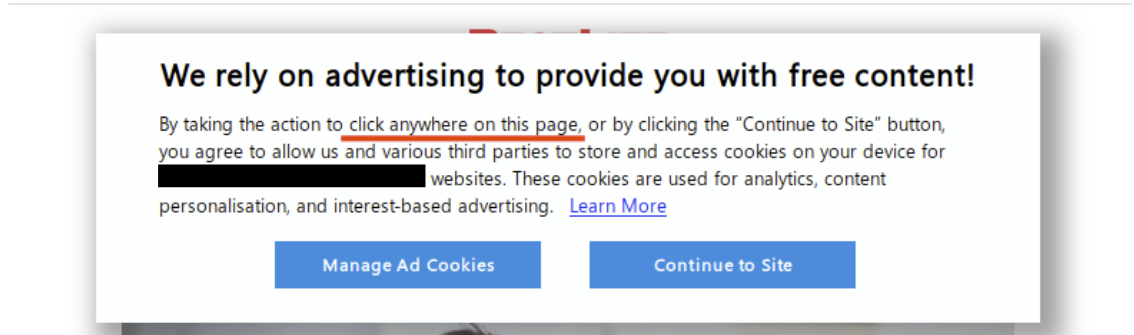
We’ve all had to click through consent banners every time we visit a new site. Let’s walk through the dark patterns in one large tech company’s consent management flow as an example, keeping in mind that this experience is not unique — you can find plenty of other examples just like this one. This particular consent management flow shows how these interfaces are often designed counterintuitively so that users likely don’t think they are agreeing to be tracked. We’ve redacted the company name in the example to focus on the content of the experience.

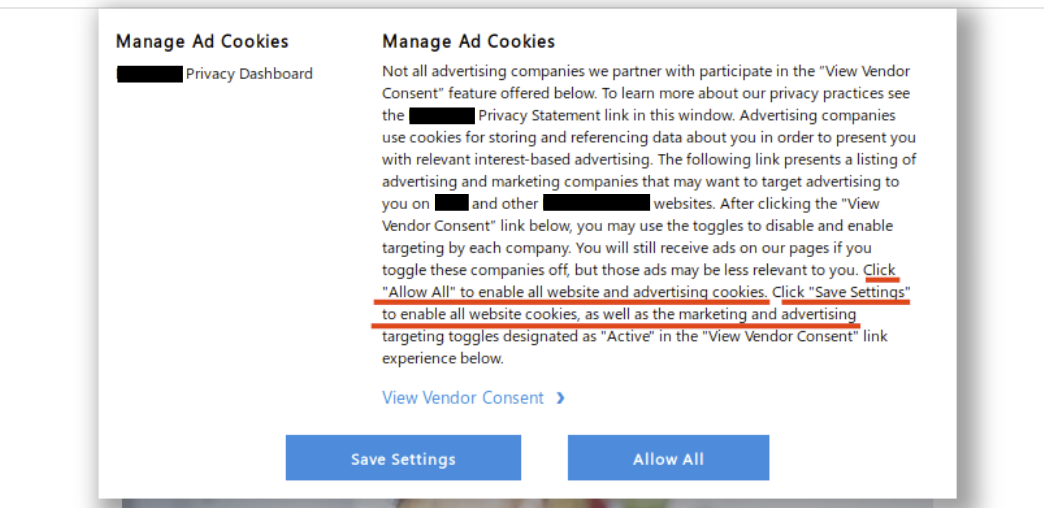
To start off, we’re presented with a fairly standard consent prompt, which is meant to allow the site visitor to make an informed choice about how their data can be collected and used. However note that clicking anywhere on the page provides “consent”. It only gets worse from here…

Consent prompt on large tech company website

If the user manages to click “Manage Ad Cookies” before clicking elsewhere on the page, they are given the options to “Save Settings” or “Allow All”. According to the highlighted text, clicking either of these buttons at this point provides consent to all partners to collect user data.  Users are not given the option to “Disable All”.

Confusing consent dialog

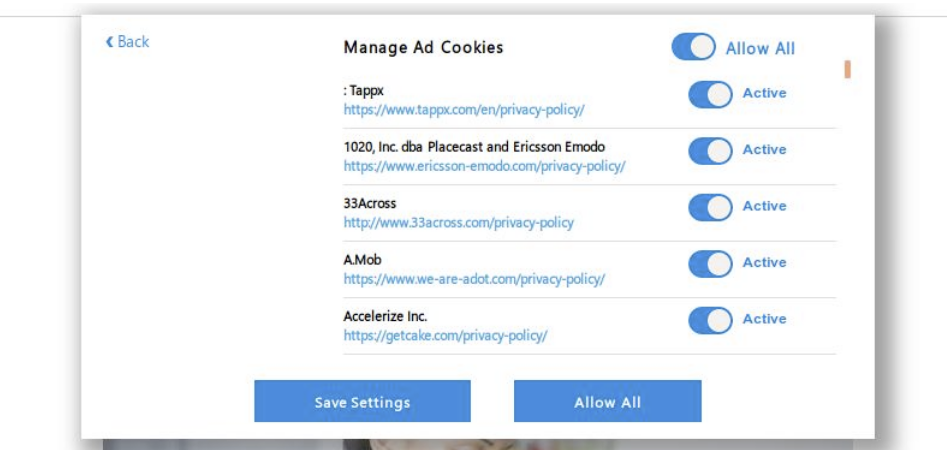
Instead, if a user wants to manage consent they have to click the link labeled view vendor consent. Wording matters here! If a person is skimming through that dialog they’ll assume that link is informational. This consent flow is constructed to make the cognitive load required to protect oneself as high as possible, while providing ample opportunity to “take the easy way out” and allow all tracking.

Finally, users who make it to the consent management section of the flow are presented with 415 individual sliders. The website provides a global toggle, but let’s assume a user actually wants to make informed choices about each partner. After all, that is the point, right?

Confusing consent mechanism

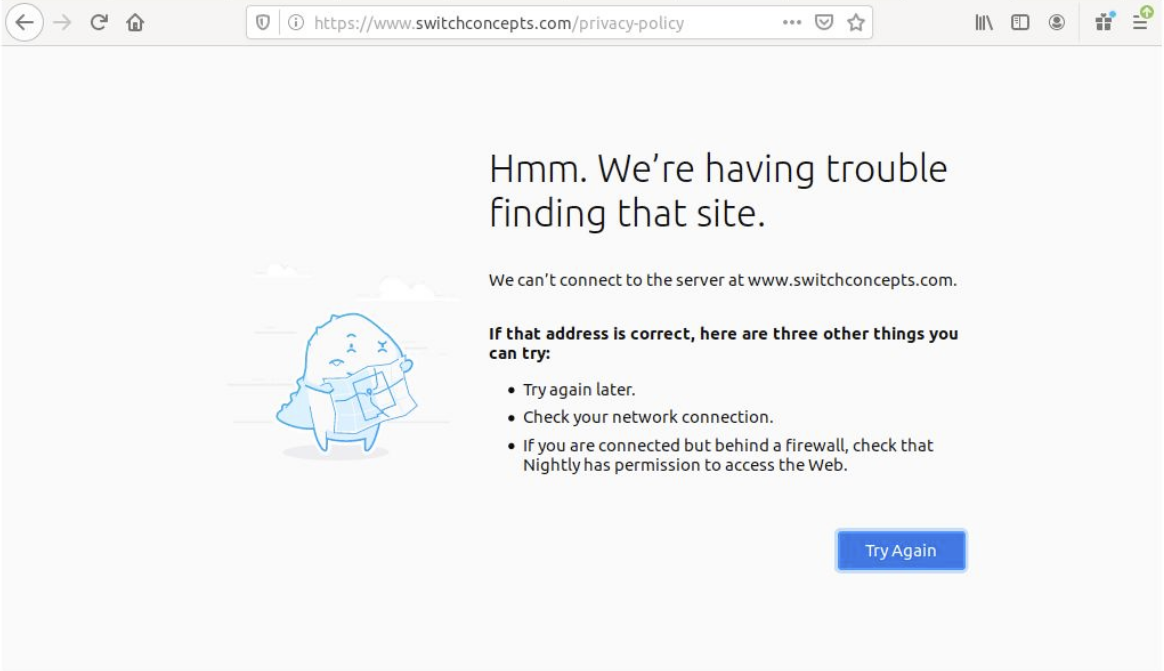
Eight of the 415 privacy policies linked from the consent management page are inaccessible. They throw certificate errors, fail to resolve, or time out.

Error loading privacy policies for 3rd party partners

The 407 privacy policies that load correctly total over 1.3 million words. That will take the average adult over 86 hours — two solid work weeks — just to read. That doesn’t even consider the time needed to reflect on that information and make an informed choice.

Proposals for “transparency and consent” as a solution to rampant web tracking should be seen for what they really are: proposals to continue business as usual.

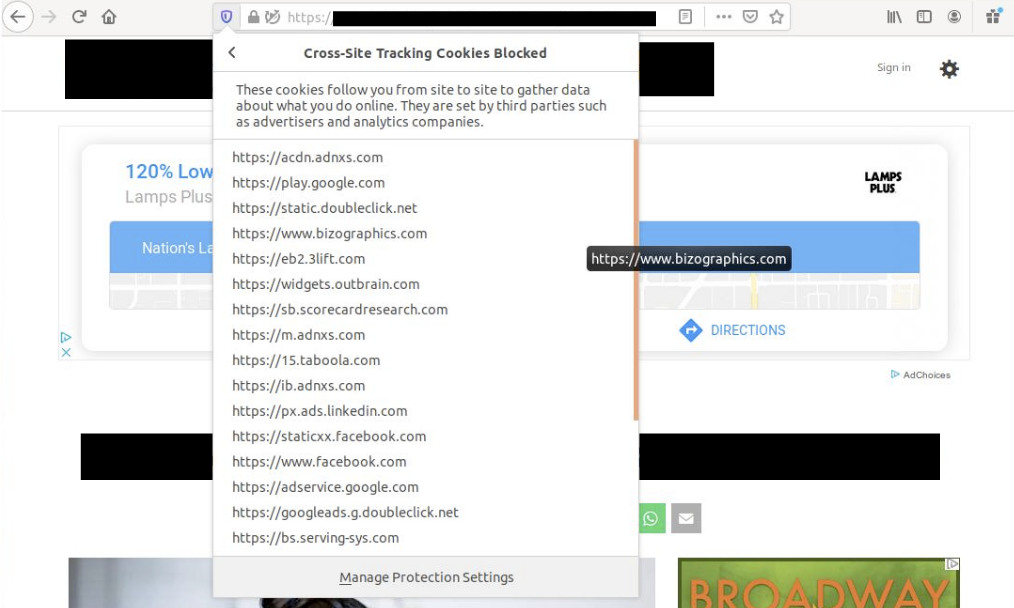
Thankfully Firefox blocks almost all of the third-party cookies loaded on the page by default, despite the deceptive methods used to get the visitor to “consent”.

Tracking Cookies Blocked in Firefox by Default

While it is easy to focus on this particular example, this experience is far from unique. The sheer volume of tracker blocking that we see with Firefox’s Enhanced Tracking Protection (around 175 blocks per client per day) confirms that the average individual would never be able to make informed choices about whether or not individual companies can collect their data. This also highlights how tech companies need to do more if they are really serious about privacy, rather than push the burden onto their customers.

Firefox already blocks tracking by default. Today, a new version of Firefox will be released which will make it clear when tracking attempts are happening without your knowledge and it will highlight how Firefox is keeping you safe.

We invite you to try and download the Firefox browser here.


The post The Illusion of choice and the need for default privacy protection appeared first on The Mozilla Blog.

22 Oct 17:31

Latest Firefox Brings Privacy Protections Front and Center Letting You Track the Trackers

by Dave Camp

Our push this year has been building privacy-centric features in our products that are on by default. With this move, we’re taking the guesswork out of how to give yourself more privacy online thanks to always-on features like blocking third-party tracking cookies and cryptominers also known as Enhanced Tracking Protection. Since July 2 we’ve blocked more than 450 billion tracking requests that attempt to follow you around the web.

450 billion tracker have been blocked with Enhanced Tracking Protection

Much of this work has been behind the scenes — practically invisible to you — making it so that whenever you use Firefox, the privacy protections are working for you in the background.

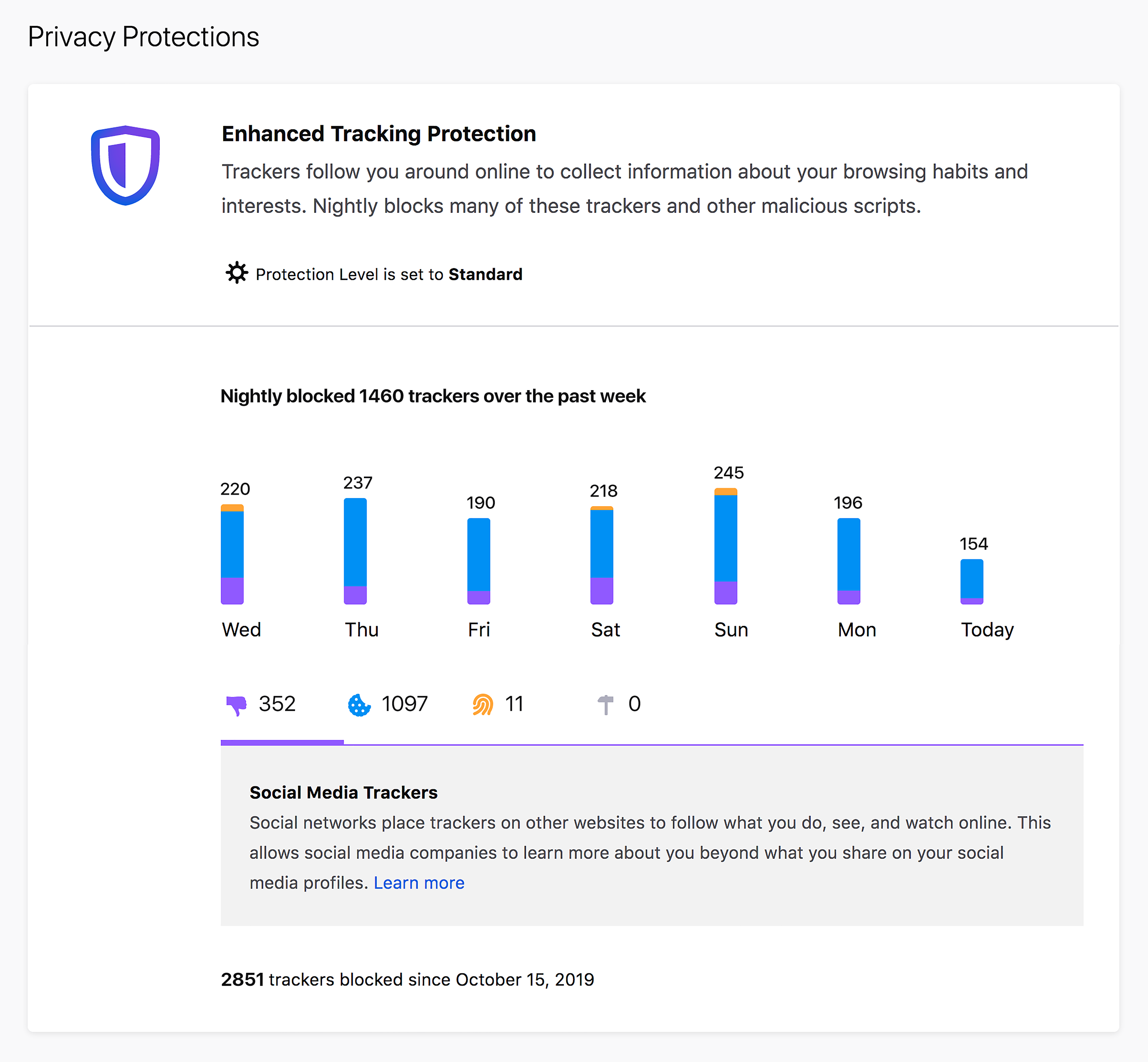
But now with growing threats to your privacy, it’s clear that you need more visibility into how you’re being tracked online so you can better combat it. That’s why today we’re introducing a new feature that offers you a free report outlining the number of third-party and social media trackers blocked automatically by the Firefox browser with Enhanced Tracking Protection.

In some ways a browser is like a car, where the engine drives you to the places you want to go and a dashboard tells you the basics like how fast you’re going or whether you need gas. Nowadays, most cars go beyond the basics, and dashboards tell you much more than ever, like when you need to brake or when a car is in your blind spot, essentially taking extra steps to protect you. Similar to a car’s dashboard, we created an easy-to-view report within Firefox that shows you the extra steps it takes to protect you when you’re online. So you can enjoy your time without worrying who’s tracking you, potentially using your data or browsing history without your knowledge.

Here’s how Firefox’s Privacy Protections report works for you:

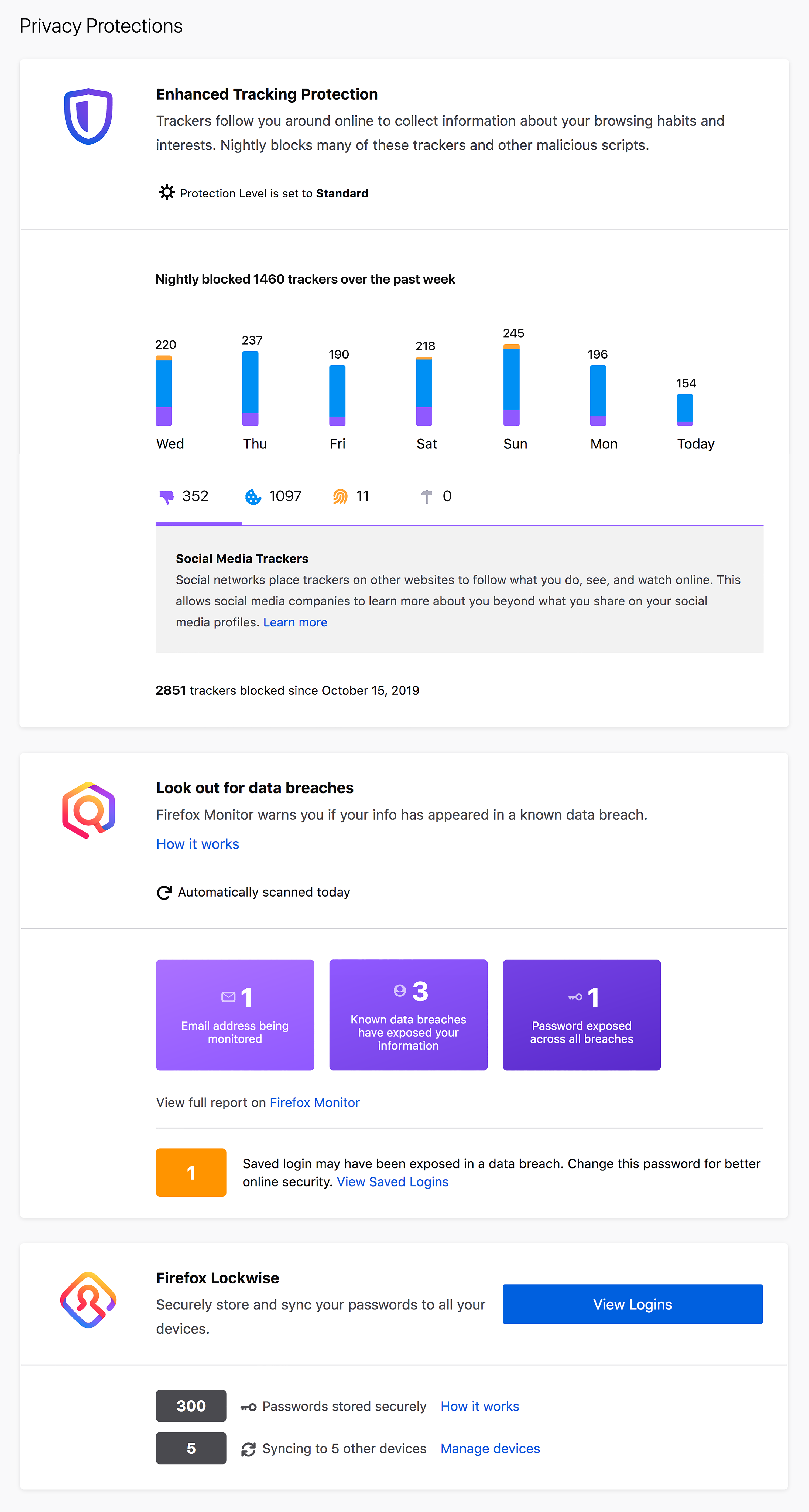
The Firefox Privacy Protections report includes:

    • See how many times Enhanced Tracking Protection blocks an attempt to tag you with cookies –  One of the many unseen ways that Firefox keeps you safe is to block third-party tracking cookies. It’s part of our Enhanced Tracking Protection that we launched by default in September. It prevents third-party trackers from building a profile of you based on your online activity. Now, you’ll see the number of cross-site and social media trackers, fingerprinters and cryptominers we blocked on your behalf.
    • Keep up to date on data breaches with Firefox Monitor –  Data breaches are not uncommon, so it’s more important than ever to stay on top of your email accounts and passwords. Now, you can view at a glance a summary of the number of unsafe passwords that may have been used in a breach, so that you can take action to update and change those passwords.
    • Manage your passwords and synced devices with Firefox Lockwise– Now, you can get a brief look at the number of passwords you have safely stored with Firefox Lockwise. We’ve also added a button where you can click to view your logins and update. You’ll also have the ability to quickly view and manage how many devices you are syncing and sharing your passwords with.

“The industry uses dark patterns to push people to “consent” to an unimaginable amount of data collection. These interfaces are designed to push you to allow tracking your behavior as you browse the web,” said Selena Deckelmann, Senior Director of Firefox Engineering at Mozilla. “Firefox’s Data Privacy Principles are concise and clear. We respect your privacy, time, and attention. You deserve better. For Firefox, this is business as usual. And we extend this philosophy to how we protect you from others online.”

Stay up-to-date on Your Personalized Privacy Protections

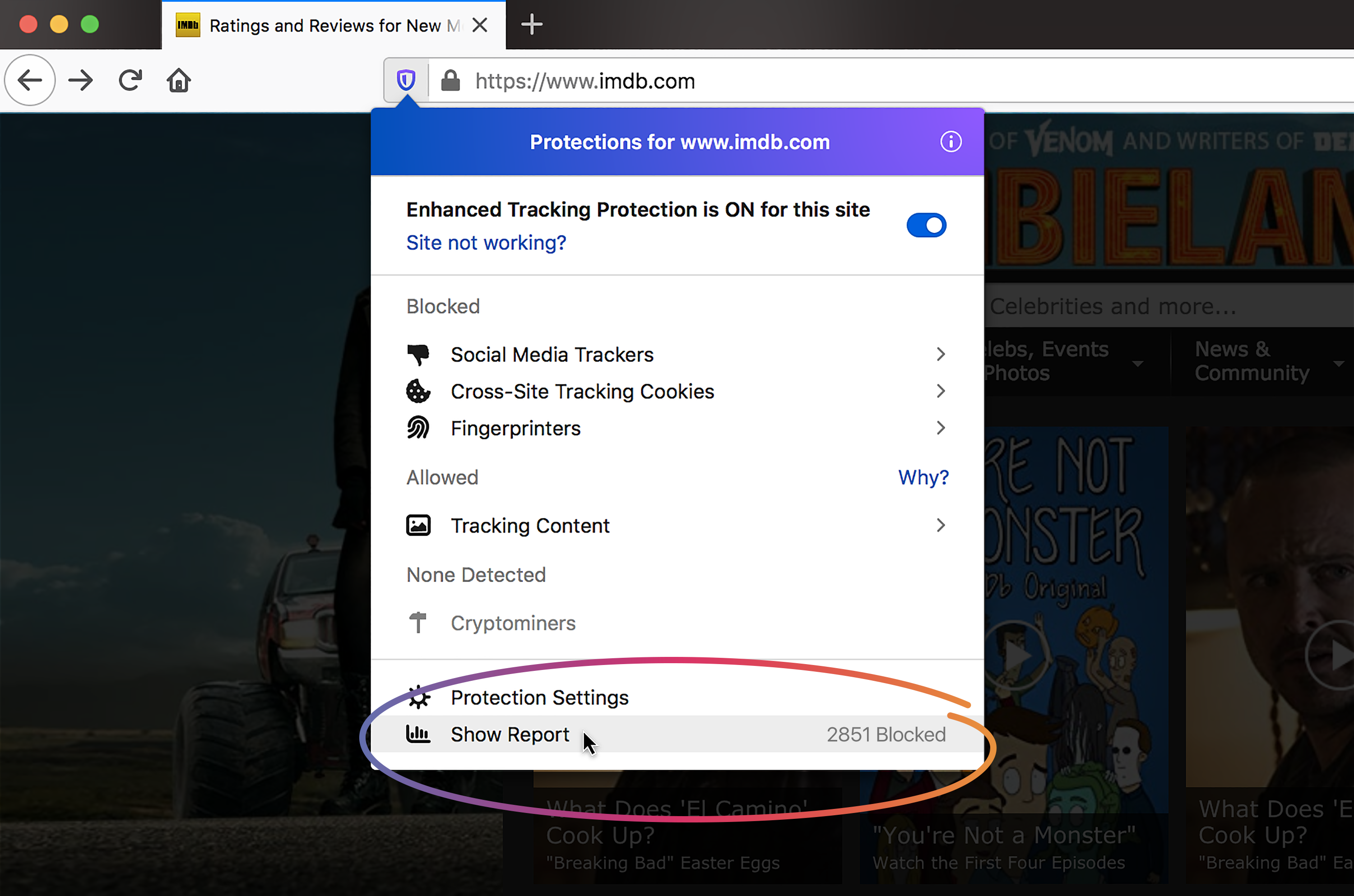
There are a couple ways to access your personalized Firefox’s privacy protections. First, when you visit a site and see a shield icon in the address bar, Firefox is blocking 10 billion — that’s billion with a B —  trackers every day, stopping thousands of companies from viewing your online activity. Now, when you click on the shield icon, then click on Show Report, you’ll see a complete overview.

Click on the shield icon, then click on Show Report, to see a complete overview


The number of cross-site and social media trackers, fingerprinters and cryptominers


A complete overview of your Privacy Protections

Another way to access the report is to visit here. The Privacy Protections section of your report are based on your recent week’s online activities.

Keep your passwords safe with Lockwise’s new password generator and improved management

As a further demonstration of our commitment to your privacy and security, we’ve built visible consumer-facing products like Monitor and Lockwise, available to you when you sign up for a Firefox account. Equipped with this information, you can take full advantage of the products and services that’s also part of this latest release.

Last year, Firefox Lockwise (previously Lockbox) launched as a Test Pilot experiment to safely store and take your passwords everywhere. Since then, we’ve incorporated feedback from users like launching it on Android, in addition to desktop and iOS. Today, we’ve added two of the most popular requested features for Lockwise that are now available in Firefox: password generator with improved management plus integrated updates on breached accounts with Firefox Monitor.

Take a look at the improved Lockwise dashboard:

The newest Firefox release includes enabling users to generate and manage passwords with Firefox Lockwise, stay informed about data breaches with Firefox Monitor, which is now even better integrated with the Firefox browser and its features.

  • Generate new, secure passwords – With multiple accounts like email, banks, retailers or delivery services, it can be tough to come up with creative and secure passwords rather than the typical 123456 or your favorite sports team, which are not secure at all. Now, when you create an account you’ll be auto-prompted to let Lockwise generate a safe password, which you can save directly in the Firefox browser. For current accounts, you can right click in the password field to access securely generated passwords through the fill option. All securely generated passwords are auto-saved to your Firefox Lockwise account.
  • Improved dashboard to manage your passwords – To access the new Lockwise dashboard, click on the main menu button located on the far right of your toolbar. It looks like ☰ with three parallel lines. From there click on “Logins and Passwords”, you’ll see the new and improved Firefox Lockwise dashboard open in a new tab, which allows you to search, sort, create, update, delete and manage your passwords to all your accounts. Plus, you’ll see a notification from Firefox Monitor if the account may have been involved in a data breach.
  • Take your passwords with you everywhere – Use saved passwords in the Firefox browser on any device by downloading Firefox Lockwise for Android and iOS. With a Firefox Account, you can sync all your logins between Firefox browsers and the Firefox Lockwise apps to auto-fill and safely access your passwords across devices whenever you are on the go.

Preventing additional data leaks in today’s Firefox release

We’re always looking for ways to protect your privacy, and as you know there are multiple ways that companies can access your data. Initially launched in Private Browsing mode in January 2018, we’re now stripping path information from the HTTP referrer sent to third-party trackers to prevent additional data leaks in today’s Firefox release. The HTTP referrer is data sent in an HTTP connection, and can be leveraged to track you from site to site. Additionally, companies can collect and sell this data to third parties and use it to build user profiles.

To see what else is new or what we’ve changed in today’s release, you can check out our release notes.

Check out and download the latest version of Firefox available here.


The post Latest Firefox Brings Privacy Protections Front and Center Letting You Track the Trackers appeared first on The Mozilla Blog.

22 Oct 17:31

iA Writer 5.3 Adds Multiwindow Support, Dark Mode, Content Block Improvements

by Federico Viticci
Multiple windows in iA Writer.

Multiple windows in iA Writer.

iA Writer, my favorite text editor for iPhone and iPad (which I’ve previously covered in detail here and here), has received a major update to version 5.3 this week, adding support for key iOS and iPadOS 13 features and bringing a welcome improvement to one of its most powerful advanced functionalities.

First up is integration with dark mode: like several other apps we’ve covered here on MacStories over the past month, iA Writer now lets you decide between letting the app follow the system’s appearance setting automatically or picking either the light or dark theme manually. Both options can be configured in the app’s settings under ‘Appearance’; personally, I prefer letting iA Writer (and other apps) always follow the system’s appearance setting.

iA Writer’s dark mode is the same dark theme the app has long offered as a custom feature, only it can now follow your device’s appearance automatically, which is not inherently surprising. What did surprise me, however, is how, in addition to the app’s default preview templates, even your custom templates will follow the system’s appearance setting if they’re programmed correctly. I have two custom iA Writer templates that let me preview Markdown documents as they’d look once published on MacStories; with iA Writer set to follow the system’s appearance by default, when I enable dark mode from Control Center, my custom templates in iA Writer use it too.

My custom MacStories template in iA Writer can switch to dark mode automatically alongside the rest of the app now.

My custom MacStories template in iA Writer can switch to dark mode automatically alongside the rest of the app now.

For iPad users, the big addition to iA Writer 5.3 is full support for multiwindow in iPadOS 13. Multiple documents can now be opened in multiple windows of iA Writer: when doing so, the app will spawn new primary windows that feature the full set of navigation controls in the sidebar to navigate in your library and open any other document. The ability to open multiple instances of iA Writer means you can keep your frequent documents in Slide Over, work with multiple editor windows side-by-side in Split View, or combine different iA Writer windows with different apps in multiple spaces on your iPad. The choice is all yours.

Multiple windows with iA Writer.

Multiple windows with iA Writer.

Editing two documents at the same time with native multiwindowing support in iA Writer.

Editing two documents at the same time with native multiwindowing support in iA Writer.

Unfortunately, like several other iPadOS 13 apps we’ve covered so far, iA Writer currently doesn’t let you open the same document in multiple windows. If you try to do that, the app will present you with an error message explaining that the document is already open elsewhere:

The app lets you move the selected document back to the current window, which is a helpful option I’d like more document-based apps to implement, but, ideally, I’d very much prefer to open the same document across multiple instances of the app.

As a consequence of this limitation, it’s not possible to edit a document in one window and preview it in another. This is one of the best features of the latest Ulysses update for iPadOS 13, and I was hoping iA Writer would allow me to build the same setup, but sadly this isn’t supported right now. If only in a limited “preview-only” mode that doesn’t let you edit the same document in two different windows, I would love the ability to open a preview for the document I’m working on in a live-updating window on the side; this feature sounds like the perfect candidate for auxiliary windows restricted to one view at a time.

What iA Writer gets right about multiwindow is offering multiple ways to activate the feature. As is standard on iPadOS, you can open the app’s Exposé view and tap the ‘+’ button in the upper right corner to open a new window; alternatively, you can pick up the app’s icon from the dock and drag it to the side of the screen to open a window in full-screen, Split View, or Slide Over. iA Writer 5.3 complements these default options with the ability to open documents in new windows with context menus and keyboard shortcuts. In the sidebar, you can long-press a document and select ‘Open in New Window’ to open it as a new window next to the one in the current space (in Split View); if you’re using an external keyboard, you can create a new window with a new document with ⇧⌘N or – and this is my favorite touch – open Quick Search with ⇧⌘O, search and select a document with the arrow keys, and hit ⇧⏎ to open the selection in a new window.

You can open documents in new windows from iA Writer's new context menus.

You can open documents in new windows from iA Writer’s new context menus.

Press ⇧⏎ to open the selected document from quick search in a new window.

Press ⇧⏎ to open the selected document from quick search in a new window.

When I was working on my coverage for the first update to MacStories Shortcuts Icons last week, the ability to open multiple iA Writer windows came in handy: in one space, I kept a draft of my blog post, while in another I created a Split View for our product page and FAQ so I could edit both at the same time. I find the integration with the app’s quick search remarkable as it enables full keyboard navigation within iA Writer – an aspect of the iPad experience I’ve always pushed for more developers to adopt.

With this update, iA Writer has also added official support for a variety of other iOS and iPadOS 13 technologies. In addition to context menus (which have rightfully replaced the app’s old custom menus in the library), iA Writer now fully integrates with new gestures for text editing and document selection (you can read more details in this section of my review). Full-page capture is supported too as a way to quickly generate a plain text PDF of the document you’re working on: just take a screenshot, select ‘Full Page’ at the top of the screen, and share your document with other people or apps. I like this addition, but I’m surprised that the generated PDF always comes with a white background – it doesn’t respect the app’s dark mode setting.1

A plain text PDF generated with full-page capture on iPadOS 13.

A plain text PDF generated with full-page capture on iPadOS 13.

Furthermore, thanks to its (existing) support for the native Files picker, iA Writer can now add external library locations for folders stored on external drives such as USB drives or SD cards – an advanced option I’d only seen implemented in Scriptable and Jayson before. I don’t think I’m ever going to rely on this functionality myself, but I’m glad it’s supported.

Lastly, I want to mention an improvement to content blocks in iA Writer 5.3. As I’ve explained before, I use content blocks extensively to insert references to local images stored in iCloud Drive when I’m editing a story in iA Writer. Thanks to content blocks, I can see what an article will look like with screenshots without having to upload them to my CDN first – a process I described in-depth in Issue 192 of MacStories Weekly for Club MacStories members. In older versions of the app, if you wanted to store files to reference with content blocks in a folder separate from your main ‘Documents’ one, you were forced to keep that folder within the same directory you were working on. My iA Writer articles are stored in iCloud Drive/iA Writer/MacStories Posts/ and with the old app I had to keep my ‘Image Assets’ sub-folder inside the ‘MacStories Posts’ one. It was an acceptable compromise, but I didn’t like having to see that folder intermixed with my documents.

In iA Writer 5.3, the content blocks syntax has been updated so you can now reference files from a parent folder. As you can see from the screenshots below, screenshots for this article were stored in a folder called ‘Image Assets’ located outside of ‘MacStories Posts’, which I can now reference with the following syntax:

../Image Assets/Image.png

A file from iCloud Drive (left) used as a content block in iA Writer.

A file from iCloud Drive (left) used as a content block in iA Writer.

This more flexible content blocks syntax will help me further customize and optimize my editing setup for future longform stories, allowing me to reference screenshots located anywhere in iCloud Drive’s iA Writer directory.


iA Writer 5.3 is one of the best iOS and iPadOS 13 updates we’ve seen to date, and I’m especially impressed with the app’s approach to multiwindowing and external keyboard integration. The one feature that is obviously missing for now is native support for the new Shortcuts app with actions based on parameters: iA Writer still relies on x-callback-url commands for automation, and version 5.3 of the app doesn’t include any native Shortcuts actions to create or retrieve documents. My hope is that iA Writer will eventually match Drafts and Ulysses with actions to create documents, append content to existing files, and search the app’s library for documents matching specific criteria. As I argued in my iOS and iPadOS 13 review, it’s time for apps to move past URL schemes and embrace the far more advanced, secure, and reliable automation framework enabled by Shortcuts.

Hopefully, we won’t have to wait long for iA Writer to be deeply integrated with Shortcuts, following in the footsteps of other text editors we’ve covered over the past few weeks. In the meantime, iA Writer 5.3 is a solid update, and it’s available on the App Store.


  1. Since it’s a plain text PDF, content blocks containing image references do not get expanded inline. On a similar note, full-page capture is also supported when previewing a document with a custom template, but, just like plain text PDFs, iA Writer doesn’t use the dark mode version of the template if the system’s appearance is dark. ↩︎

Support MacStories Directly

Club MacStories offers exclusive access to extra MacStories content, delivered every week; it’s also a way to support us directly.

Club MacStories will help you discover the best apps for your devices and get the most out of your iPhone, iPad, and Mac. Plus, it’s made in Italy.

Join Now
22 Oct 17:16

Google Duplex goes international with limited New Zealand test

by Jonathan Lamont
Google Assistant on Pixel 4

Google will begin testing Duplex, its artificial intelligence-powered natural conversation technology, outside of the U.S. for the first time this week.

The Mountain View, California-based search giant will run a test in New Zealand, where Duplex will call businesses in a pilot group. The automated calls will ask to confirm businesses’ hours for the upcoming Labour Day holiday on October 28.

Google says in a blog post about the test that, once confirmed, it will update the hours on Google Maps and Search.

For those unfamiliar with Duplex, Google demoed the technology on stage at its I/O developer conference in May 2018 before rolling it out in stages in the U.S.

Stateside, Duplex allows users to book restaurant reservations through Google Assistant on their smartphone. A Google support page says the service works with any device that can access Search or Maps.

U.S. issues likely behind limited international tests

While the New Zealand test is much more limited than what Duplex offers in the U.S., there’s good reason for it.

The U.S. rollout has had issues. The Verge reports that many restaurants were confused by the automated Duplex calls, and some assumed the calls were spam. Further, reports indicate that humans place as many as a quarter of all Duplex calls. Google uses human calls to obtain more training data for its AI.

With these challenges in mind, limiting international trials makes a lot of sense. Even tests in other English-speaking countries can prove difficult thanks to regional differences in dialect, as well as accents.

However, those same factors hopefully put Canada in a prime spot for future international tests. Aside from accents, regional slang and spelling differences, Canadian English isn’t that different from the English south of the border. It wouldn’t be unlikely to see a limited Duplex test in Canada in the future, especially considering that Google filed a Canadian trademark for the technology. That said, an official Duplex rollout in Canada likely won’t come until the service reliably supports other languages, especially French.

As for the New Zealand pilot, it will serve as a test of Duplex’s ability to converse with people. As with Duplex in the U.S., Google says it will disclose to the recipient of the call when they are speaking with an automated system. The search giant began doing this in the U.S. after public outcry over how human Duplex sounds on the phone. Businesses can opt-out of receiving calls as well.

People and businesses interested in learning more should check out Google’s blog post about the New Zealand pilot.

Source: Google Via: The Verge

The post Google Duplex goes international with limited New Zealand test appeared first on MobileSyrup.

22 Oct 17:16

Android 10 ‘Rules’ feature spotted in action by lone user

by Dean Daley

During the Android Q beta 5 an unannounced feature called ‘Rules‘ was spotted. Now, the functionality has quietly gone live for what seems like at least one user.

When you connect to a Wi-Fi network or arrive at a location, the phone performs one of four actions called Rules. The feature is capable of turning on ‘do not disturb,’ ‘set phone to silent,’ ‘set phone to vibrate,’ and also, ‘set phone to ring.’

According to 9to5Google, a German-based Pixel 2 XL user had the Rules feature appear in their device’s Settings menu. Based on the information received by 9to5, the location feature in rules allows users to set an activation radius.

Android 10 will set these ‘rules’ based on repeated actions. To explain further, when a user arrives at home and sets their phone to ring every day, Android 10 will take note of this and suggest that action as a rule.

It looks like Google is likely testing the feature prior to a wider launch. As always, it’s also possible the Mountain View, California company could ditch this functionality entirely.

Source: 9to5Google

The post Android 10 ‘Rules’ feature spotted in action by lone user appeared first on MobileSyrup.

22 Oct 17:16

Rumoured Motorola One Hyper to feature pop-up camera, Snapdragon 675

by Dean Daley

Earlier this month a Motorola smartphone with a pop-up camera was spotted online.

Now, XDA Developers has revealed the name of the mystery device is the Motorola One Hyper.

The One Hyper will reportedly launch with a Snapdragon 675 chipset and Android 10.

The device sports a nearly bezel-less display, a pop-up camera, a rear-facing fingerprint scanner that illuminates, and two additional rear-facing cameras.

It’s currently unclear when this device will launch or if it will come to Canada.

Source: XDA Developers

The post Rumoured Motorola One Hyper to feature pop-up camera, Snapdragon 675 appeared first on MobileSyrup.

22 Oct 17:15

Google Stadia Founder’s Edition has sold out in Canada

by Bradly Shankar

Google has announced that the Founder’s Edition for its Stadia game streaming service has sold out worldwide, including in Canada.

For $169.99 CAD, the Founder’s Edition included:

  • Limited-edition Night Blue Stadia controller
  • Chromecast Ultra (supports 4K)
  • Three-month Stadia Pro subscription (supports 4K/60fps streaming)
  • First dibs on Stadia Name
  • One 3-month ‘Buddy Pass’ to gift Stadia Pro to a friend
  • The full Destiny 2 experience (includes base game, all previous add-ons, the new Shadowkeep expansion and annual pass for future content)

For a while, the Founder’s Edition was the only way to play Stadia at launch. However, Google introduced a replacement Premiere Edition in September which costs the same but lacks a few of the perks.

The Premiere Edition includes the following:

  • Stadia Clearly White controller
  • Chromecast Ultra
  • Three-month Stadia Pro subscription
  • Destiny 2: The Collection

The Premiere Edition is available exclusively at the Google Store. Stadia will launch in Canada on November 19th.

Source: Google

The post Google Stadia Founder’s Edition has sold out in Canada appeared first on MobileSyrup.

22 Oct 17:15

McGee’s Musings turns 18; still curious, still exploring

by Jim

This experiment is now old enough to enlist. Pretty sure that wasn’t something I anticipated.

The blogging software I was using at the time asked for a tagline to describe the blog. I chose a quote from Dorothy Parker that I always liked and that seemed to fit the spirit of blogging at the time:

“The cure for boredom is curiosity. There is no cure for curiosity.” – Dorothy Parker

I found it an interesting bit of serendipity that the New York Times ran an op-ed on Sunday titled “Why Aren’t We Curious About the Things We Want to Be Curious About?.” The core argument is that:

Across evolutionary time, curious animals were more likely to survive because they learned about their environments; a forager that occasionally skipped a reliable feeding ground to explore might find an even better place to eat.…But it’s good to know about your environment even if it doesn’t promise a reward right now; knowledge may be useless today, but vital next week. Therefore, evolution has left us with a brain that can reward itself; satisfying curiosity feels pleasurable, so you explore the environment even when you don’t expect any concrete payoff.

The article offers insight into the mechanisms of curiosity, their payoffs, and a little bit of guidance about nudging curiosity into less frivolous paths.

It’s pretty clear to me that the environment we inhabit is increasingly in flux. Unsurprisingly, I’m in the school of thought that believes that curiosity about what is new and what is different is more relevant and important than ever. Hence, I continue to explore. I share traces of that exploring for two reasons. One, it forces me to make sense of what my curiosity dredges up. Two, it connects me to other explorers and their perspectives.

The post McGee’s Musings turns 18; still curious, still exploring appeared first on McGee's Musings.