Shared posts

21 Nov 04:53

The Pencil, and the iPad Mini 5

by Rui Carmo

After a bit of soul searching (and the realisation that I would spend less than half the cash), I ended up getting myself an iPad mini 5 for my birthday, plus an Apple Pencil. And guess what, the Pencil stole the show.

Hardware

It’s the Mini. It fits into a coat pocket, has a regular headphone jack, a standard iPad resolution at higher dpi, and Touch ID. It just works, and is still the first device I reach for in the mornings to check up on news over breakfast (it fits neatly into dressing gown pockets, too), and the last I put aside at night, usually after a couple of hours of noodling on the couch.

It is unobtrusive, practical, non-threatening (in meetings and otherwise), the perfect size to use on an airplane (even for typing, at least for me), and the best iPad for me right now. In fact, for me it is the iPad, and has nearly always been the one iPad.

And yes, I would have loved a “Pro” Mini with Face ID, four speakers and more modern bezels – and will be severely incensed if that comes to pass next year, even it would be an outlier both in the tablet market and Apple’s product range.

Still, Apple occasionally does things that make sense to me, and getting one mid-product cycle (and less than six months away from the rumored launch of a new Pro) was a bit of a gamble.

So after much soul searching I invested in the 256GB LTE model to boost both its usefulness while traveling and its aftermarket value should I want to upgrade sooner than the four years that seem to be its new lifecycle.

Performance

So far I have only good things to say–the Mini 5 is indeed notoriously faster than the 4, and I can finally use Cubasis and a decent amount of AUv3 synths on my iPad without it choking in various ways.

Multitasking works fine, even if the physical display can feel a little crowded (which is actually also true for all other iPads with similar resolution). The only real difference is that it is smaller, and right now, outside the Pro, only the new Air (which shares its insides) has a smidgeon more screen real estate.

But I see this as a “focus” device, something that can afford me the luxury of doing the things I enjoy whenever and wherever I want, so multi-tasking is mostly for running multiple audio apps, doing research and listening to podcasts while I do other stuff.

External Displays

Since I only had a Lightning to VGA adapter, I got myself an upgrade to the HDMI one, and was immediately able to get Blink to use it as a secondary display at what seems to be full 1080p, which is more than enough for occasional hacking while traveling.

The only app that has come up short of expectations here is Jump Desktop, which can handle multiple remote Windows displays but just scales down, tiles and mirrors them on both the internal and external displays, which is… sub-optimal.

Then again, that is likely to improve as bigger iPads like the Pro gain more acceptance as workhorses, and since the APIs are the same, the Mini can ride on that success.

Alternatives

There were none, as usual. I did entertain the notion of getting a Surface Go, but it hasn’t been updated in a while and I am getting deeper and deeper into the iOS music ecosystem, so even if I decided to, say, run Ableton Live Lite on the Surface, the outdated Pentium CPU it ships with would probably hamper me – although it was a tempting enough scenario.

I also looked at the Samsung Galaxy Tab S6, but, outside from it having nice hardware and the possibility of using DeX to have a desktop-like environment, the ecosystem just isn’t there (and Samsung is apparently killing Linux on DeX, so… there was even less appeal).

The Pencil

I have spent very little time trying it for “artistic” purposes like editing music on the GarageBand piano roll (which was one of the main uses I had originally envisioned) or drawing diagrams in notes.

Rather, I have spent most of my time using the Pencil writing longhand on the Mini while on the couch and holding it in portrait mode, which works out beautifully well for me.

This because, thanks to a sheer stroke of luck, I was able to install the MyScript handwriting recognition keyboards I had tried years ago.

These are distinct from their Nebo app (which, to be honest, I haven’t tried yet simply because I prefer being able to input text into the apps I already have) and, sadly, are currently deprecated in favor of it.

But the keyboards work brilliantly for me in both English and Portuguese, so I have been gleefully writing longhand on just about every app I can from Slack to iA Writer – in fact, most of this text was drafted in longhand.

I can understand MyScript discontinuing the standalone keyboards, but in my view they are brilliant and eminently useful to the point I’d pay more for them than for Nebo

But I must confess that after this experience I have to wonder what happened to the legacy support for handwriting recognition Apple kept churning out, and why they haven’t re-surfaced it after all these years now that the entire iPad range supports the Pencil.

The classic Doonesbury strip that became synonymous with the Newton

I suppose they are still afraid of another Newton-like debacle, because the experience is simply great.

Here’s a little example of what I mean:

There wasn't a single "egg freckles" moment, and my handwriting isn't that great.

As icing on the cake, these keyboards also work in the new iOS 13 “pinched”/compact keyboard mode, which affords me a lot more screen real estate at the expense of cramping my handwriting a bit.

It would be awesome to have Graffiti (it’s still hard-coded into my reflexes even after nearly two decades without using Palm devices), but I’m extremely happy with my Pencil experience as it is.

Well, except for two things–it is slightly longer than just about any pen or pencil I’ve used in recent years (and thus slightly unbalanced) and I have no words to accurately express how I feel about the borderline asinine way it charges.

It’s so literally ass-backwards that I have to wonder what Apple were thinking.

But hey, I have a new Mini, and it’s my new “most personal” computer after over four years. And the Pencil only makes it all the more awesome.


Support this site
21 Nov 04:51

7 of the Best Cheap Ebikes under $1000 for 2020

by Average Joe Cyclist

Great But Cheap Ebikes you Can Buy on Amazon.A really great ebike can cost a lot of money – but the good news is that if you want to try electric bikes for the first time, you can buy decent quality ebikes for less than $1000. In this post, we show you the best cheap ebikes we could find. Pick one, try it out, and experience the joy of electric biking!

The post 7 of the Best Cheap Ebikes under $1000 for 2020 appeared first on Average Joe Cyclist.

21 Nov 04:50

Norm Rukavina, 1937-2019

by peter@rukavina.net (Peter Rukavina)

In the spring of 1980, the year I turned 14, Greyhound Lines, a bus company in the United States, ran a “Thank You Canada” special to mark our country’s role in the Canadian Caper that had seen U.S. diplomats in Iran rescued with the help of the Canadian Embassy.

By purchasing a Thank You Canada pass, Canadians could enjoy unlimited bus travel in the United States for a month.

For reasons I never have completely understood, my father proposed that he and I should take advantage of this offer and take an adventure together. And so we did. I must have missed a month of school; he must have missed a month of work; and my mother must have been convinced to stay at home with my three brothers as a temporarily-single parent.

And what a grand adventure it was.

We took a Canada Coach Lines bus from Hamilton to the Greyhound station in Buffalo where we bought our passes. As far as I can recall, we didn’t have a plan, other than to see where the bus would take us for 30 days.

We started off by heading west, from Buffalo to Chicago, through Des Moines, Omaha, Salt Lake City, Reno, and Sacramento. We had to switch buses a number of times, but we never stopped moving, never spent a night in a hotel until we got to San Francisco. Those were the days when smoking was allowed on buses, and so my enduring memory of that mad transcontinental dash is of the pungent cocktail of cigarette smoke and bathroom disinfectant.

The rigours of sitting on a bus for three days put Dad’s back into spasm, and so our time in San Francisco consisted of a lot of hobbling around. Until we got to Golden Gate Park and he decided that we should rent bicycles: his theory was that riding a bike would either disable him completely, or solve his back problems. Miraculously, it solved his back problems, and he was fine for the rest of the trip.

From San Francisco we went south, bypassing Los Angeles and stopping in San Diego for a night or two; from there, having reached the end of the U.S., we turned back east, stopping in Tucson, El Paso, San Antonio, and Springfield, spending a few nights in every city, usually at the YMCA or a cheap hotel. We ate a lot of chicken fried steak. We never did laundry. And we saw corners of the United States of America that we never would have seen otherwise.

I think, in the end, we were gone for 21 days, not quite wringing every last drop of our 30 day entitlement out of the pass, but coming pretty close.

The trip was, by times, grueling and uncomfortable and scary. But it was the best trip of my life, and the best gift a father could give his teenage son: 21 days of undivided attention in a “wherever the wind will carry us” spirit.

It is not an exaggeration to say that trip changed my life, and laid the groundwork for an approach to travel, and an approach to life, that has been far more fearless, confident, and improvisational than it might have been otherwise.

Whatever possessed him?

My father died yesterday, at the age of 82.

Dad out for lunch

21 Nov 04:49

Distributed Teams: Why I Don’t Go to the Office More Often

by chuttenc

I was invited to a team dinner as part of a work week the Data Platform team was having in Toronto. I love working with these folks, and I like food, so I set about planning my logistics.

The plan was solid, but unimpressive. It takes three hours or so to get from my home to the Toronto office by transit, so I’d be relying on the train’s WiFi to allow me to work on the way to Toronto, and I’d be arriving home about 20min before midnight.

Here’s how it went:

  1. 0800 Begin
  2. 0816 Take the GRT city bus to Kitchener train station
  3. 0845 Try to find a way to get to the station (the pedestrian situation around the station is awful)
  4. 0855 Learn that my 0918 train is running 40min late.
  5. 0856 Purchase a PRESTO card for my return journey, being careful to not touch any of the blood stains on the vending machine. (Seriously. Someone had a Bad Time at Kitchener Station recently)
  6. 0857 Learn that they had removed WiFi from the train station, so the work I’ll be able to do is limited to what I can manage on my phone’s LTE
  7. 0900 Begin my work day (Slack and IRC only), and eat the breakfast I packed because I didn’t have time at home.
  8. 0943 Train arrives only 35min late. Goodie.
  9. 0945 Learn from the family occupying my seat that I actually bought a ticket for the wrong day. Applying a discount code didn’t keep the date and time I selected, and I didn’t notice until it was too late. Sit in a different seat and wonder what the fare inspector will think.
  10. 0950 Start working from my laptop. Fear of authority can build on its own time, I have emails to answer and bugs to shuffle.
  11. 1030 Fare inspector finally gets around to me as my nervousness peaks. Says they’ll call it in and there might be an adjustment charge to reschedule it.
  12. 1115 Well into Toronto, the fare inspector just drops my ticket into my lap on their way to somewhere else. I… guess everything’s fine?
  13. 1127 Train arrives at Toronto Union Station. Disconnect WiFi, disembark and start walking to the office. (Public transit would be slower, and I’m saving my TTC token for tonight’s trip)
  14. 1145 Arrive at MoTo just in time for lunch.

Total time to get to Mozilla Toronto: 3h45min. Total distance traveled: 95km Total cost: $26 for the Via rail ticket, $2.86 for the GRT city bus.

The way back wasn’t very much better. I had to duck out of dinner at 8pm to have a hope of getting home before the day turned into tomorrow:

  1. 2000 Leave the team dinner, say goodnights. Start walking to the subway
  2. 2012 At the TTC subway stop learn that the turnstiles don’t take tokens any more. Luckily there’s someone in the booth to take my fare.
  3. 2018 Arrive at Union station and get lost in the construction. I thought the construction was done (the construction is never done).
  4. 2025 Ask at the PRESTO counter how to use PRESTO properly. I knew it was pay-by-distance but I was taking a train _and_ a bus, so I wasn’t sure if I needed to tap in between the two modes (I do. Tap before the train, after the train, on the bus when you get on, and on the bus when you get off. Seems fragile, but whatever).
  5. 2047 Learn that the train’s been rescheduled 6min later. Looks like I can still make my bus connection in Bramalea.
  6. 2053 Tap on the thingy, walk up the flights of stairs to the train, find a seat.
  7. 2102 “Due to platform restrictions, the doors on car 3107 will not open at Bramalea”… what car am I on? There’s no way to tell from where I’m sitting.
  8. 2127 Arrive at Bramalea. I’m not on car 3107.
  9. 2130 Learn that there’s one correct way to leave the platform and I took the other one that leads to the parking lot. Retrace my steps.
  10. 2132 Tap the PRESTO on the thingy outside the station building (closed)
  11. 2135 Tap the PRESTO on the thingy inside the bus. BEEP BEEP. Bus driver says insufficient funds. That can’t be, I left myself plenty of room. Tick tock.
  12. 2136 Cold air aching in my lungs from running I load another $20 onto the PRESTO
  13. 2137 Completely out of breath, tap the PRESTO on the thingy inside the bus. Ding. Collapse in a seat. Bus pulls out just moments later.
  14. 2242 Arrive in Kitchener. Luckily the LRT, running at 30min headways, is 2min away. First good connection of the day.
  15. 2255 This is the closest the train can get me. There’s a 15min wait (5 of which I’ll have to walk in the cold to get to the stop) for a bus that’ll get me, in 7min, within a 10min walk from home. I decide to walk instead, as it’ll be faster.
  16. 2330 Arrive home.

Total time to get home: 3h30min. Total distance traveled: 103km. Total cost: $3.10 for the subway token, $46 PRESTO ($6 for the card, $20 for the fare, $20 for the surprise fare), $2.86 for the LRT.

At this point I’ve been awake for over 20 hours.

Is it worth it? Hard to say. Every time I plan one of these trips I look forward to it. Conversations with office folks, eating office lunch, absconding with office snacks… and this time I even got to go out to dinner with a bunch of data people I work with all the time!

But every time I do this, as I’m doing it, or as I’m recently back from doing it… I don’t feel great about it. It’s essentially a full work day (nearly eight full hours!) just in travel to spend 5 hours in the office, and (this time) a couple hours afterwards in a restaurant.

Ultimately this — the share of my brain I need to devote purely to logistics, the manifold ways things can go wrong, the sheer _time_ it all takes — is why I don’t go into the office more often.

And the people are the reason I do it at all.

:chutten

21 Nov 04:48

Integration and Monopoly

by Ben Thompson

When I started Stratechery in 2013, the conventional wisdom was that modularized ecosystems were best. After all, Microsoft had just spent the last thirty years dominating the tech industry by dominating the operating system layer and benefiting from competition everywhere else in the stack. Sure, the company’s dominance was slipping, but not because the model didn’t work: rather, the inevitable winner of the smartphone era would be Google, whose Android operating system was following the Windows playbook, with the rather attractive addition of being free.

That obviously didn’t happen: not only did Apple establish and maintain a sufficiently large install base to support an iOS ecosystem, the company went on to take the vast majority of profits in the entire smartphone industry; the exact share is uncertain, thanks to inconsistent reporting across the industry, but most estimates put Apple’s smartphone profit share between 70~90% for the last five years.

Apple, famously, is integrated, at least as far as the operating system and the hardware is concerned, and it turned out said integration was not only not a liability, it was actually a tremendous advantage.

The Benefits of Integration

I have written about Apple’s integration multiple times over the years, so rather than repeat myself allow me to highlight three advantages using three Articles.

First, integration provides for a superior user experience. From What Clayton Christensen Got Wrong:

The issue I have with this analysis of vertical integration — and this is exactly what I was taught at business school — is that the only considered costs are financial. But there are other, more difficult to quantify costs. Modularization incurs costs in the design and experience of using products that cannot be overcome, yet cannot be measured. Business buyers — and the analysts who study them — simply ignore them, but consumers don’t. Some consumers inherently know and value quality, look-and-feel, and attention to detail, and are willing to pay a premium that far exceeds the financial costs of being vertically integrated…

Not all consumers value — or can afford — what Apple has to offer. A large majority, in fact. But the idea that Apple is going to start losing consumers because Android is “good enough” and cheaper to boot flies in the face of consumer behavior in every other market…Apple is — and, for at least the last 15 years, has been — focused exactly on the blind spot in the theory of low-end disruption: differentiation based on design which, while it can’t be measured, can certainly be felt by consumers who are both buyers and users.

Second, integration maximizes the likelihood of success for new products — including the iPhone itself. From How Apple Creates Leverage, and the Future of Apple Pay:

The carriers [before the iPhone]…largely offered the same service: voice, SMS, and data, all of which was interoperable. This increased elasticity of substitution gave Apple an opportunity to pursue a divide-and-conquer strategy: they just needed one carrier.

Apple reportedly started iPhone negotiations with Verizon, but it turned out that Verizon was already kicking AT&T’s (then Cingular’s) butt through aggressive investment and technology choices, resulting in increasing subscriber numbers largely at AT&T’s expense. Verizon saw no need to change their strategy, which included strong branding and total control over the experience on phones on their network. AT&T, meanwhile, was on the opposite side of the coin: they were losing, and that in turn had a significant effect on their BATNA — they were a lot more willing to compromise when it came to branding and the user experience, and so the iPhone launched on AT&T to Apple’s specifications.

That is when Apple’s user experience advantage and corresponding customer loyalty took over: for the first time ever customers were willing to endure the hassle and expense of changing phone carriers just so they could have access to a specific device. Over the next several years Verizon began to bleed customers to AT&T even though their service levels were not only better, but actually widening the gap thanks to the iPhone’s impact on AT&T. Four years after launch the iPhone did finally arrive on Verizon with the same lack of carrier branding and control over the user experience; in other words, Verizon eventually accepted the exact same deal they rejected in 2006 because the loyalty of Apple customers gave them no choice…

Third, integration is incredibly profitable because it is, from a money-making perspective, a monopoly: Apple devices are the only ones that run iOS. From Everything as a Service:

Apple has arguably perfected the manufacturing model: most of the company’s corporate employees are employed in California in the design and marketing of iconic devices that are created in Chinese factories built and run to Apple’s exacting standards (including a substantial number of employees on site), and then transported all over the world to consumers eager for best-in-class smartphones, tablets, computers, and smartwatches.

What makes this model so effective — and so profitable — is that Apple has differentiated its otherwise commoditizable hardware with software. Software is a completely new type of good in that it is both infinitely differentiable yet infinitely copyable; this means that any piece of software is both completely unique yet has unlimited supply, leading to a theoretical price of $0. However, by combining the differentiable qualities of software with hardware that requires real assets and commodities to manufacture, Apple is able to charge an incredible premium for its products.

The results speak for themselves: this past “down” quarter saw Apple rake in $50.6 billion in revenue and $10.5 billion in profit. Over the last nine years the iPhone alone has generated $600 billion in revenue and nearly $250 billion in gross profit. It is probably the most valuable — the “best”, at least from a business perspective — manufactured product of all time.

Now, five years on, the conventional wisdom has flipped: integration is clearly the best. Just look at Apple! Indeed, looking at Apple, it is hard to escape that conclusion, but it is worth pointing out that the last week has highlighted a number of potential downsides.

The Keyboard Kerfuffle

Last week Apple did something that was shockingly momentous: it released a new laptop with what appears to be a user-friendly keyboard, both in terms of how it works and how often it works. I say shockingly because it is pretty incredible that such a should-be-mundane feature was momentous.

And yet, here we are: because the entire MacBook line does not yet have the new keyboard, Apple still hosts this support article that suggests cleaning your laptop’s keyboard with compressed air.
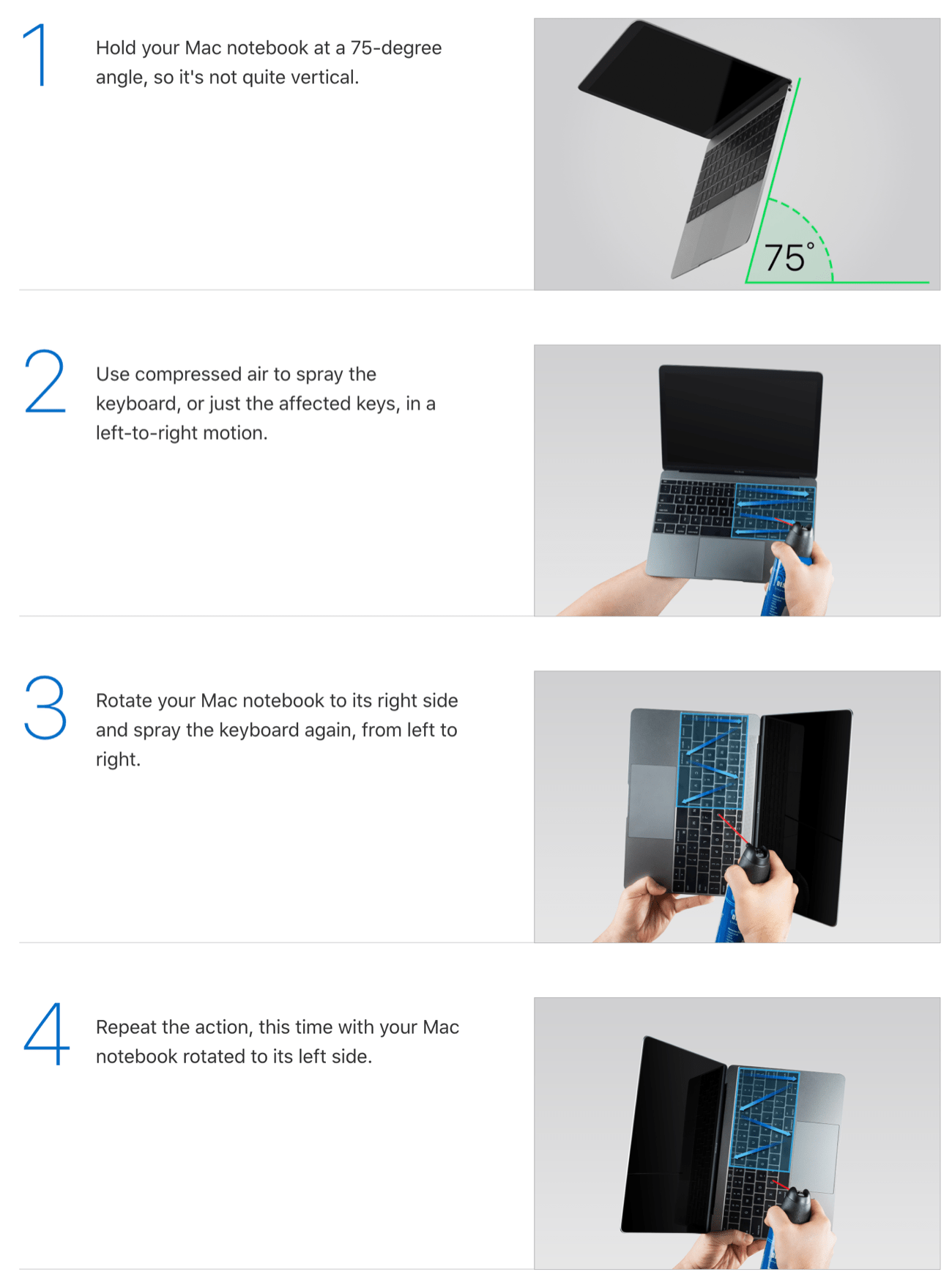
How to clean your MacBook with compressed air

This is, needless to say, not normal, nor are keys failing on multiple computers for multiple generations of computers.

It’s that last bit — the multiple generations bit — that is of interest here. Apple first released its notorious butterfly keyboard in April 2015, and has only now replaced it in one model in November 2019. Over that time period the company has sold $99 billion worth of Macs, the majority of which have been laptops. This is truly the power of integration!

Or, to put it another way, the power — and downside — of monopoly. No, Apple does not have a monopoly in computers — how amazing would that be! — but the company does have a monopoly on macOS. It sells the only hardware that runs macOS, which is why millions of customers kept buying computers that, particularly in the last couple of years, were widely reported to be at risk of significant problems.

To be clear, Apple didn’t commit some sort of crime here. At the same time, it is hard to imagine the butterfly keyboard persisting for four-and-a-half years and counting if the company faced any sort of competition. Integration can produce a superior user experience, but once an integrated product faces no more competition it can result in something that is downright user-hostile.

NFC and Innovation

The second story comes from Germany. From The Verge:

Apple could be forced to allow rival payment services on iOS to compete with its own Apple Pay service in Germany after the country’s parliament voted in favor of the measures on Thursday, Zeit Online reports. The legislation came in the form of an amendment attached to an anti-money laundering bill, and it will need to pass through the country’s upper house before it can become law next year.

If these measures become law, then, in Germany, Apple could be forced to allow other companies to access its phone’s NFC chips, which it has historically tightly controlled access to. Zeit Online notes that the change could result in individual banks offering NFC payments through their own apps, rather than going through Apple’s service. Apple would reportedly be allowed to charge a fee for access to the NFC chip, but it wouldn’t get the reported 0.15 percent fee that it currently gets from each Apple Pay transaction.

There is absolutely a competition component to Apple Pay and Apple’s restriction on NFC. Because of its control of iPhones generally and their built-in NFC chips specifically, Apple is able to give Apple Pay a significant advantage relative to competing payment apps (which need to use clumsy QR codes); that means that Apple can leverage its position in smartphones into a strong position in payments.

What is worth highlighting though, particularly in the context of this article, is how integration can hamper innovation.

To back up, NFC stands for “Near-Field Communication”, which is a protocol for two electronic devices to communicate when they are within 1.5 inches (4 centimeters) of each other. There are three use cases for NFC chips on smartphones:

  • Smart card emulation, where NFC devices act like payment cards; Apple Pay is an example of this, as are a host of other use cases, like transit tickets or smart keys.
  • Reader/Writer, where one active NFC devices reads or writes to a passive NFC device, such as an NFC sticker that receives power from the magnetic field generated by the active device.
  • Peer-to-peer, where two NFC devices exchange information on an ad-hoc basis.

In short, NFC makes it possible for two devices to communicate without any prior setup, making possible a range of use cases far greater than, say, Bluetooth…and yet the only NFC technology most of you have probably used is for payments. Why?

I think that Apple deserves a lot of the blame. While Android devices have had NFC chips since 2010, Apple only added them to iPhones with 2014’s iPhone, and it was limited to Apple Pay. Two years later Apple made it possible to read some NFC tags and use Apple Pay, and only two months ago made it possible to write NFC tags. No other payment solution can use Apple Pay, only five transit systems can use Apple Pay with an “Express Transit” mode, and only 11 more with time-of-purchase authentication.

The problem is that the NFC chip on iPhones is not open: it is integrated with iOS, and Apple is holding the reins tight. Given the company’s 0.15% skim of Apple Pay transactions, and previous attempts to charge 3rd parties for integrating into its ecosystem or building accessories, it’s fair to wonder how much financial considerations weigh in NFC’s sluggish roll-out. What seems unquestionable, though, is that innovation in the entire sector has been retarded because of Apple’s total control of NFC chips in iPhones.

App Store Control

The final story is from this weekend; from the Washington Post:

Apple removed all vaping-related apps from its App Store on Friday, siding with experts who call vaping “a public health crisis” and “a youth epidemic.” Some of the 181 vaping apps removed by Apple permit the user to control the temperature or other settings on vaping devices. Others offer users access to social networks or games. The App Store has never permitted the sale of vaping cartridges through apps.

“We’re constantly evaluating apps, and consulting the latest evidence to determine risks to users’ health and well-being,” Apple spokesman Fred Sainz said in a statement. Apple cited evidence from the Centers for Disease Control and Prevention and other groups that have linked vaping and e-cigarette usage to deaths and lung injuries.

It’s certainly tempting to cheer a decision like this, particularly given the health crisis that emerged around vaping this year, and the more widespread concerns about vaping being an on-ramp to tobacco use. Then again, given that the crisis seems centered on counterfeit cartridges, being able to connect to your smartphone could be a real benefit. Note this paragraph written by a medical marijuana user:

But there are also more sophisticated devices that have USB and even Bluetooth interfaces to enable the patient to control heat settings, display lights, and update the firmware. The Bluetooth devices are accompanied by apps on the iOS and Android mobile platforms which can allow the patient to measure and monitor their usage, and, as is the case with PAX to identify the medication loaded into the device, and to understand its contents, such as the overall cannabinoid profile, the terpene mix, and other components. It also allows a user to validate the authenticity of the medication as well as testing and batch results.

Those apps — and by extension, device functionality — are no longer available to iPhone users1 — you can’t get this level of functionality in a browser — not because regulators ruled them illegal, or because Congress passed a law, but because a group of technology executives said so. And, what they said held sway because the App Store is integrated with the iPhone: Apple has a monopoly on what apps can or cannot be installed.

To be fair, you may not find a vape app ban problematic, no matter how concerning the principles at stake; how about the company banning an app that shows where protestors and police are clashing in Hong Kong, or an app that tracks drone strikes? In both cases you can argue that Apple is simply abiding by the standards of the countries in which it operates, but the core reason why there is even a question about app removal is because of Apple’s control.

Apple’s approach to the App Store also raises both competition and innovation questions. With regards to the former Apple is leveraging its control of the App Store approval process into a tax on digital goods and/or an advantage for its own competing services; when it comes to the latter Apple’s restrictions on developer business models (which has improved a bit since that article, but is still lacking, particularly in terms of standalone trials and upgrades) has made it difficult for rich productivity apps in particular to emerge on iOS, and often that 30% is the line between being viable or not, particularly for licensed material.

Make no mistake, Apple’s close control of the App Store has had tremendous benefits, not simply for Apple and its bottom line, but also for developers, particularly by convincing customers scarred from the Windows malware debacle that it was safe to download and pay for apps. But that control — borne from innovation — has had significant costs as well.

Integration Versus Monopoly

This article is not a legal argument: in particular, I have used the term “monopoly” very loosely. What makes Apple so brilliant from a business perspective is that it has managed to, via hardware and software integration, earn monopoly profits in a way that would not normally be classified as a monopoly.2 Still, it seems to me that while “integration” results in good outcomes, “monopoly” doesn’t: note the contrast between the advantages of integration I began with and the bad outcomes of late:

  • The superior user experience of Apple’s integrated products somehow ended up with Apple delivering the user-hostile butterfly keyboard for four years and counting.
  • Apple’s ability to leverage its user base to bring new products and features to market also meant that Apple could retard the development of NFC applications.
  • Apple’s ability to drive superior profits from software-differentiated hardware is increasingly augmented by the attempt to extract rents on digital goods and/or give the company’s own services a competitive advantage.

The issue in all cases is a familiar one in technological markets, which often start in an ultra-competitive state, but quickly devolve into monopolies or duopolies as things like network effects and economies of scale takeover. We have seen similar progressions in operating systems, in search, in social networks, in digital advertising, in e-commerce — Apple pressing its advantages is hardly an exception!

The reason I find the Apple example particularly illustrative, though, is that it helps draw a line between the sort of healthy integration that is broadly beneficial, and monopoly rent-seeking that mostly goes to the dominant companies’ respective bottom lines.

Specifically, companies that create and or compete in new markets should be allowed to win, and reap the benefits of their innovation. I have no issue with Apple’s smartphone profits, or Apple Pay’s 0.15% or the App Store’s 30%.

What should be restricted, though, is leveraging a win in one area into dominance in another: that means Apple winning in smartphones should not mean it gets to own digital payments, and inventing the App Store does not mean it gets 30% of all digital goods (or be allowed to diminish the user experience of its competitors). Apple Pay and App Store payment processing should win because they are better — which can include being the default! — not because they are a point of integration that has curdled into monopoly-type behavior that results in worse outcomes for everyone.

I wrote a follow-up to this article in this Daily Update.

  1. To be clear, existing apps will continue to work for now, including on new iPhones, but are not available to users who have not previously downloaded them; it’s also not clear if those apps can ever be updated to support new devices
  2. That noted, it seems likely the European Commission is going to classify Apple as a monopoly provider of iOS devices
21 Nov 04:46

Algebra is about composition

by Eric Normand

When we look at the definitions of algebraic properties, we often see that we are defining how things compose. This is one of the main advantages of using algebraic properties to constrain our operations. If we define how they should compose before we implement them (as a unit test, for instance) we can guarantee that things will compose.

The post Algebra is about composition appeared first on LispCast.

21 Nov 04:42

✚ How to Make a Bump Chart in R, with ggplot

by Maarten Lambrechts

Visualize rankings over time instead of absolute values to focus on order instead of the magnitude of change. Read More

21 Nov 04:42

Bash and shell expansions: lazy list-making

by hello@victoria.dev (Victoria)

It’s that time of year again! When stores start putting up colourful sparkly lit-up plastic bits, we all begin to feel a little festive, and by festive I mean let’s go shopping. Specifically, holiday gift shopping! (Gifts for yourself are still gifts, technically.)

Just so this doesn’t all go completely madcap, you ought to make some gift lists. Bash can help.

Brace expansion

These are not braces: ()

Neither are these: []

These are braces: {}

Braces tell Bash to do something with the arbitrary string or strings it finds between them. Multiple strings are comma-separated: {a,b,c}. You can also add an optional preamble and postscript to be attached to each expanded result. Mostly, this can save some typing, such as with common file paths and extensions.

Let’s make some lists for each person we want to give stuff to. The following commands are equivalent:

touch /home/me/gift-lists/Amy.txt /home/me/gift-lists/Bryan.txt /home/me/gift-lists/Charlie.txt
touch /home/me/gift-lists/{Amy,Bryan,Charlie}.txt
tree gift-lists

/home/me/gift-lists
├── Amy.txt
├── Bryan.txt
└── Charlie.txt

Oh darn, “Bryan” spells his name with an “i.” I can fix that.

mv /home/me/gift-lists/{Bryan,Brian}.txt

renamed '/home/me/gift-lists/Bryan.txt' -> '/home/me/gift-lists/Brian.txt'

Shell parameter expansions

Shell parameter expansion allows us to make all sorts of changes to parameters enclosed in braces, like manipulate and substitute text.

There are a few stocking stuffers that all our giftees deserve. Let’s make that a variable:

STUFF=$'socks\nlump of coal\nwhite chocolate'

echo "$STUFF"
socks
lump of coal
white chocolate

Now to add these items to each of our lists with some help from the tee command to get echo and expansions to play nice.

echo "$STUFF" | tee {Amy,Brian,Charlie}.txt

cat {Amy,Brian,Charlie}.txt

socks
lump of coal
white chocolate
socks
lump of coal
white chocolate
socks
lump of coal
white chocolate

Pattern match substitution

On second thought, maybe the lump of coal isn’t such a nice gift. You can replace it with something better using a pattern match substitution in the form of ${parameter/pattern/string}:

echo "${STUFF/lump of coal/candy cane}" | tee {Amy,Brian,Charlie}.txt

cat {Amy,Brian,Charlie}.txt

socks
candy cane
white chocolate
socks
candy cane
white chocolate
socks
candy cane
white chocolate

This replaces the first instance of “lump of coal” with “candy cane.” To replace all instances (if there were multiple), use ${parameter//pattern/string}. This doesn’t change our $STUFF variable, so we can still reuse the original list for someone naughty later.

Substrings

While we’re improving things, our giftees may not all like white chocolate. We’d better add some regular chocolate to our lists just in case. Since I’m super lazy, I’m just going to hit the up arrow and modify a previous Bash command. Luckily, the last word in the $STUFF variable is “chocolate,” which is nine characters long, so I’ll tell Bash to keep just that part using ${parameter:offset}. I’ll use tee's -a flag to append to my existing lists:

echo "${STUFF: -9}" | tee -a {Amy,Brian,Charlie}.txt

cat {Amy,Brian,Charlie}.txt

socks
candy cane
white chocolate
chocolate
socks
candy cane
white chocolate
chocolate
socks
candy cane
white chocolate
chocolate

You can also:

Do this With this
Get substring from n characters onwards ${parameter:n}
Get substring for x characters starting at n ${parameter:n:x}

There! Now our base lists are finished. Let’s have some eggnog.

Testing variables

You know, it may be the eggnog, but I think I started a list for Amy yesterday and stored it in a variable that I might have called amy. Let’s see if I did. I’ll use the ${parameter:?word} expansion. It’ll write word to standard error and exit if there’s no amy parameter.

echo "${amy:?no such}"

bash: amy: no such

I guess not. Maybe it was Brian instead?

echo "${brian:?no such}"

Lederhosen

You can also:

Do this With this
Substitute word if parameter is unset or null ${parameter:-word}
Substitute word if parameter is not unset or null ${parameter:+word}
Assign word to parameter if parameter is unset or null ${parameter:=word}

Changing case

That’s right! Brian said he wanted some lederhosen and so I made myself a note. This is pretty important, so I’ll add it to Brian’s list in capital letters with the ${parameter^^pattern} expansion. The pattern part is optional. We’re only writing to Brian’s list, so I’ll just use >> instead of tee -a.

echo "${brian^^}" >> Brian.txt

cat Brian.txt

socks
candy cane
white chocolate
chocolate
LEDERHOSEN

You can also:

Do this With this
Capitalize the first letter ${parameter^pattern}
Lowercase the first letter ${parameter,pattern}
Lowercase all letters ${parameter,,pattern}

Expanding arrays

You know what, all this gift-listing business is a lot of work. I’m just going to make an array of things I saw at the store:

gifts=(sweater gameboy wagon pillows chestnuts hairbrush)

I can use substring expansion in the form of ${parameter:offset:length} to make this simple. I’ll add the first two to Amy’s list, the middle two to Brian’s, and the last two to Charlie’s. I’ll use printf to help with newlines.

printf '%s\n' "${gifts[@]:0:2}" >> Amy.txt
printf '%s\n' "${gifts[@]:2:2}" >> Brian.txt
printf '%s\n' "${gifts[@]: -2}" >> Charlie.txt
cat Amy.txt

socks
candy cane
white chocolate
chocolate
sweater
gameboy

cat Brian.txt

socks
candy cane
white chocolate
chocolate
LEDERHOSEN
wagon
pillows

cat Charlie.txt

socks
candy cane
white chocolate
chocolate
chestnuts
hairbrush

There! Now we’ve got a comprehensive set of super personalized gift lists. Thanks Bash! Too bad it can’t do the shopping for us, too.

21 Nov 04:41

Why We Should Expand Our OER Advocacy to Commercial Publishers

David Wiley, iterating toward openness, Nov 18, 2019
Icon

I will credit David Wiley with not being afraid to oull on the tiger's tail. Citing examples like Flat World Knowledge, Linux and Microsoft's open source projects, he makes the case that commercial enterprises have made large contributions to open source and open content. "Advocates helped businesses understand the ways that adopting an open source model would be good for their business." He also argues that commercial publishers should embrace OER because "their (existing closed) content is too expensive and its licensing precludes remixing... royalty payments (and the expensive and convoluted systems for tracking when they need to be paid) are like anchors dragging behind publishers’ business models."

I can agree with all this. And in an economy where viturally all the productive capacity is in private commercial hands, it makes sense. But I would still rather see open content be a public good, produced by the community - this especially given the example of Flat World, which just sudenly decided one day that their content wouldn't be published openly any more. Live by the "better for business" argument, die by the "better for business" argument. From where I sit, the logic begins with what's better for society - for the people, first of all, then government and institutions, and then, finally, business and commerce. To the extent that focusing on commercial publishers detracts from that, I am not interested. Image: Nature.

Web: [Direct Link] [This Post]
21 Nov 04:41

Weeknotes: datasette-template-sql

Last week I talked about wanting to take ona a larger Datasette project, and listed some candidates. I ended up pushing a big project that I hadn't listed there: the upgrade of Datasette to Python 3.8, which meant dropping support for Python 3.5 (thanks to incompatible dependencies).

Since Glitch now runs Python 3.7.5 my biggest reason for supporting 3.5 was gone, so I decided to make the upgrade.

Datasette 0.31 was the first version to drop support. Datasette 0.32 is the first to take advantage of it: I switched Datasette's template rendering over to use Jinja's async template support, which requires Python 3.6+.

This has exciting implications for the extra_template_vars plugin hook, which allows plugins to add extra variables (and functions) to the template scope.

Plugin authors can now add custom template functions that are defined with async def ... and make await calls within the body of the function. When the template is rendered, Jinja will automatically await those function calls.

I released a new plugin that takes advantage of this capability: datasette-template-sql. It lets you embed additional SQL queries directly in a custom Datasette template. For example:

{% for article in sql(
    "select headline, date, summary from articles order by date desc limit 5",
    "news"
) %}
    <h3>{{ article.headline }}</h2>
    <p class="date">{{ article.date }}</p>
    <p>{{ article.summary }}</p>
{% endfor %}

This new sql() function takes a SQL query and the optional name of the database to run the query against (in case you have more than one database file attached to your Datasette instance).

I'm really excited about this capability. I quipped about it on Twitter:

This is the great thing about having a plugin system: even if I'm not convinced this is the right technical direction for the core Datasette project, I can still expose this kind of feature in a plugin that people can opt into if they want to have this ability.

The official Datasette website is going to make extensive use of this plugin. I have an early prototype of that up and running now, which inspired me to release datasette-render-markdown 0.2 with a custom template function for rendering markdown directly:

{{ render_markdown(value) }}

Aside from the work on Python 3, my Datasette time this week has mostly involved ongoing refactors of both the query execution code and the core TableView.data() method. Hopefully these will unblock a flurry of interesting new functionality in the not too distant future.

Niche museums

This week's new museums on www.niche-museums.com.

  • California State Capitol Dioramas in Sacramento
  • Zeppelin Museum in Friedrsichshafen
  • Dai Loy Museum in Locke (Sacramento Delta)
  • Wallace Collection in London
  • Cookin' in San Francisco
  • Ramen Museum in Yokohama
  • Cable Car Museum in San Francisco
21 Nov 04:40

What is a Technology Company

by paulgolding

What is a Technology Company (Part 1)

And why it matters.

Technology Company?

I have often been hired by companies who call themselves technology companies, but are not technology companies in any meaningfully useful definition of the word.

It would be like Whole Foods calling themselves a computer company because they happen to use computers.

So what is a technology company, and why does it matter? Well, it depends on what kind of company we’re talking about. I want to eliminate from this post (for a later post) those companies that are unmistakably technology companies because they make a technical product, like, say, Intel. But what if you’re a Verizon (US) or John Lewis (UK) who rely heavily upon technology, but — and here’s the key — mostly obtain the tech via technology vendors, like Oracle or SAP.

If you identify with that type of tech-vendor-centric operation, then this post might be useful in helping to understand how you might become a technology company, and why.

I am usually hired by CxOs to do two things:

1. Define a technology vision
2. (Optionally) Execute on the vision

At some point in the conversation, somebody, usually me, utters the phrase “technology company”. Quite often, I might assert that my client is not a technology company. This can easily cause offense, especially when a large chunk of capital and opex goes on technology.

I therefore created the following diagram to frame the conversation. The framing is not canonical – you might have your own – but it helps to arrive at some useful conclusions by couching the job of technology within a kind of economic, or utility, framework.

Picture

As with all quadrant diagrams, we should first check the axes to make sure we understand them.

The horizontal axis here means the value of an asset. I prefer to use asset-based thinking in such a conversation because it usually resonates with executives who like to evaluate or score their company in terms of its assets, tangible and intangible. Other parameters, like “competencies” are sometimes useful, but can become quite vague all too quickly.

The vertical axis means the executable knowledge available to leverage an asset – put simple: do we know how to make money from it?

Let’s begin on the left where things are easiest to understand and uncontentious for most executives, especially the top left (so that is where we will start).

Entrepreneurs – Unknown Knowns

If we know the value of an asset, say a cellular network, but do not yet know how to make money from it, then it is the job of an entrepreneur to solve that problem.

In the case of a cellular network, the assets are any of the technical capabilities. For example, one asset is clearly the ability to make a call. Another might be the ability to determine a users location. It is the job of the entrepreneur to find a way to monetize such assets – i.e. to create a business model that turns the delivery of the asset into revenue.

Innovation here is mostly business model innovation, but there are myriad other types of applicable innovation (that you might find on Geoffrey Moore’s innovation types schema). Another example might be marketing innovation. So, in the case of O2 in the UK, they pioneered the concept of event sponsoring via rebranding the former millennium dome to be called The O2. This was a fantastic example of marketing innovation.

Engineers – Known Knowns

Let’s say the strategy or marketing team figure out how to monetize location data in the network, say by selling it to physical retailers who use it to predict footfall (which is a real use case exploited by Telefonica).

They might hand engineering the task of building functions that can execute the business model. Engineers know how to extract value from the asset because they have the necessary infrastructure to ping the location of users. They might chose to build a solution or buy one from a vendor, or both, but the scope and outcome is known, such as “we need a means to count how many times a partner uses the location platform so that we can bill them for each time they use it.”

Engineers use a lot of technology to build functions, even including cutting-edge technology, like, say, AI or cloud-based data lakes.

They might well account for the lion-share of fixed costs in the company, as is typical for any digital company. This function is often what causes executives to characterize their company as a “technology company”. To me, this is bit like calling Walmart a finance company because they handle so much money. Well, Walmart might well be a finance company, but you get the idea.

Let’s then turn to the role of technologists so that we get closer to the mark of being a technology company.

Technologists – Known Unknowns

Returning to our carrier example, let’s say that it turns out, after some analysis, that the strategy guys realize they could make way more $$$ from users’ locations if the location data is available in 3D (for urban-canyon areas). They hand the problem to engineering who declare that the current infrastructure has no such capability even though the biz guys can make $$$ from it. Furthermore, no vendor claims to have a solution either (although ambitious vendors might make such claims, as vendors often do, but intend to build the tech once they have the contract).

It is the role of a technologist (whether in the company or a vendor) to invent the solution by taking available resources, such as the existing network capabilities, and augmenting them with some capability that does not yet exist.

This step has all kinds of approaches and considerations that we won’t elaborate here. The point is to understand that a technologist brings an asset into existence that we know the value of (i.e. how to make money) but don’t currently known how to extract its value – i.e. we don’t know how to get 3D location data from our network.

This invention activity could be a one-off event or, more strategically, part of a systematic attempt to expose new values that support key themes. In this case, “advanced/creative location finding” could be a theme that inspires investment into an R&D team whose job is to expose a number of novel location methods, not just 3D location.

It is important to understand here that the type of step we are talking about most likely has the following characteristics:

  1. Game changer – the company can leapfrog their competition who are reliant upon vendors (who don’t have the 3D capability)
  2. Software economics – especially the ability to scale its use with minimal incremental capital costs
  3. Intellectual property rights – the opportunity to defend the competitive advantage against in-category competitors
  4. A positive affect on shareholder value and analyst commentary

In fact, depending upon the nature of the invention, there are all kinds of “software economics” or “digital economics” benefits that significantly multiply the company’s ability to exploit its user base, and potentially to expand it.

Scientists – Unknown Unknowns

If you already work in an R&D company, then the job of scientists should be clear even though it is my view that science is a poorly understood set of activities. Indeed, most of us never learn science per se, only its outcomes (e.g. the laws of physics or chemistry) and its modes of measurement (e.g. measuring pendulum swings or calorific burn rates).

Let’s make some claims about science:

1. The job of a scientist is often mistaken for something mechanical rather than creative because of confusion about the so-called scientific method.
2. There is a new type of science that is possibly valuable to all companies, whether they conduct R&D or not. It is called Data Science.

Well, I have lied a bit there as I don’t consider Data Science to be a science at all, but it has some usefully similar methodological approaches for the sake of our current discussion.

The “job of a scientist” (within the current rubric I want to explore here) is to be highly creative within a certain framework, or scope. Let’s return to our carrier network. We have a cellular business that we mostly use to connect people and things (via IoT). Unknown to us, the network has a hidden capability, let’s say to detect and in some way measure the spread of ideas (via the content of calls and messages). However, this is just a hypothesis. There is no such capability of an existing network and nor do we know how to make money from it.

However, for strategic reasons, say related to the future of communications as being envisaged as: “the connection of ideas (not just people)” — and a latent belief that anyone who can tap into such a capability could be in a powerful position (strategically speaking). Strategists have taken a view that such a capability is potentially worth $$$$$ in the realm of digital marketing.

A scientist might discover this capability via a number of means.

It might require advanced techniques, not only in speech analysis, but in the creation of “thought vectors” (yes, there is such a thing) to indicate ideas in the sense of intentionality (per the technical use of that term). Perhaps the scientist first has to postulate and define what an idea is (in order to detect one). From there they might develop techniques that could lead to the creation of an ideas network.

Critically, there is not yet any project for technologists, engineers or entrepreneurs to engage in the utility of an “ideas network” capability.

Of course, to discover such a capability requires investment in a team whose job is research. This is often beyond the reach of many companies because research involves methods that either require significant capital to bring about results or a willingness to take a certain type of risk. And we should point out the use of the term type of risk. Often we treat all types of risks as if they are equal. They are not. Indeed, there is a huge difference between risk in the technical sense (some numerical probability of success or failure, say) and the operational sense (translating the risk into a strategic move).

If you’re company isn’t yet in the realms of creating technology, then it’s unlikely to become an R&D company any time soon.

Well, there is one important caveat: data science.

Although I protested that this activity isn’t really a science (at least as practised in many organization where a better term might just be analytics), if approached like a science, then it can yield tremendous benefits with potentially reasonable R&D investment. The method I am describing is similar: i.e. to discover unknown uknowns in data. For example, upon analysis of our carrier network logs, it might be that we discover a kind of “idea network” proxy that whilst not providing the $$$$$ opportunity envisaged, it might nonetheless provide a significant competive advantage in personlized marketing, say.

However, most companies don’t quite have the infrastructure nor talent to undertake this kind of data science activity, often because their data assets are poorly maintained or otherwise inefficient. I shall return to this in a later post.

So what, then, is a technology company?

A technology company uses technologists to extract new value from assets where the value is not accessible using current engineering solutions. Let’s stick to that definition here as an understandable and meaningfully plausible explanation. It has lots of nuances and caveats, but they don’t affect the overall gist of the definition.

To give another example from my own list of projects, I was asked by McLaren (the racing guys) to suggest how they could leverage their remote sensing expertise (used on F1 cars) to build a business. One option might be to provide a platform for other racing companies, or say fleet companies, to manage the network of remote vehicular sensors and apply performance processes to the data (e.g. optimization of some asset).

But I described a vision in which they might create a “Performance Sensing Platform” that any company could use to build performance-enhancing solutions atop of sensing networks. For example, Nike could build sensors into training shoes and then offer athletic customers a performance-monitoring service of some description.

This was the vision part of the exercise.

I then moved on to architect the system in a way that enabled new value to be extracted from sensors by enabling mathematical algorithms to be applied in real-time across millions of sensors – i.e. on a scale far exceeding anything they had previously engineered for F1 racing or that could be reasonably obtained from technology partners. Such a solution enabled $$$$$ value by facilitating solution sellers to discover new business opportunities and by using engineers to do their job of turning a new asset into revenue in the manner set out by the entrepreneurs.

Does a company have to be a technology company?

Of course not.

But returning to my aside about data science, then the answer is increasingly: yes. Or, rather, it will pay to adopt some of the techniques of a technology company in order to generate future value in a sustainable fashion, especially in the digital realm where, increasingly, the value of a company is in the value of its data, but not just its known value!

Moreover, and this is the key part to be mulled over, the methods of technical invention are increasingly available to a wider audience via the availability of cloud services like AWS and the massive power of transferable knowledge via open source software projects. The economics of software and technical invention can be exploited by companies with an existing strong set of capabilities in an existing market. This makes for exciting, interesting and lucrative futures for existing “non technology” companies.


21 Nov 04:40

Embedding Community Into The Event Experience

by Richard Millington

Event-specific apps are simple solutions for a conference that typically undermine the community.

The problem is the event app is completely separate from the community, it serves a short-term purpose but never helps build a long-term community.

If you don’t make community both an essential and beneficial part of the event – they remain disconnected. So link them closer together.

  • Have questions for speakers? Ask in the community (they’ll be hosting a short AMA next week).
  • Aren’t sure how to apply their advice to your context? Ask in the community.
  • Want to meet up with others? Ask in the community.
  • Want to find people in your place to connect with? Search the community.

You can also go beyond this.

  • Invite speakers (especially paid speakers) to also spend time in the community answering questions about their topic.
  • Have booths and show the current unanswered questions on large plasma screens and give rewards for members who can answer them.
  • Display the current leaderboard of the community on a large plasma-screen everyone can see. Give prizes whoever is top at the end of the event.
  • Post new questions from customer support into the community and challenge people to answer them.
  • Reveal locations of the afterparty via the community.
  • Share the videos of the event in the community first.
  • Invite top community members to give lightning talks in their field of expertise.
  • Run a live ideation session during the event via the community.

An event should be a celebration of the community. The community shouldn’t be bolted on to the event. Integrate the two deeply and everyone wins.

21 Nov 04:40

Stuff that works :: Skyroam Solis

by Volker Weber

617b1c29d48b888690d956e915d375cd

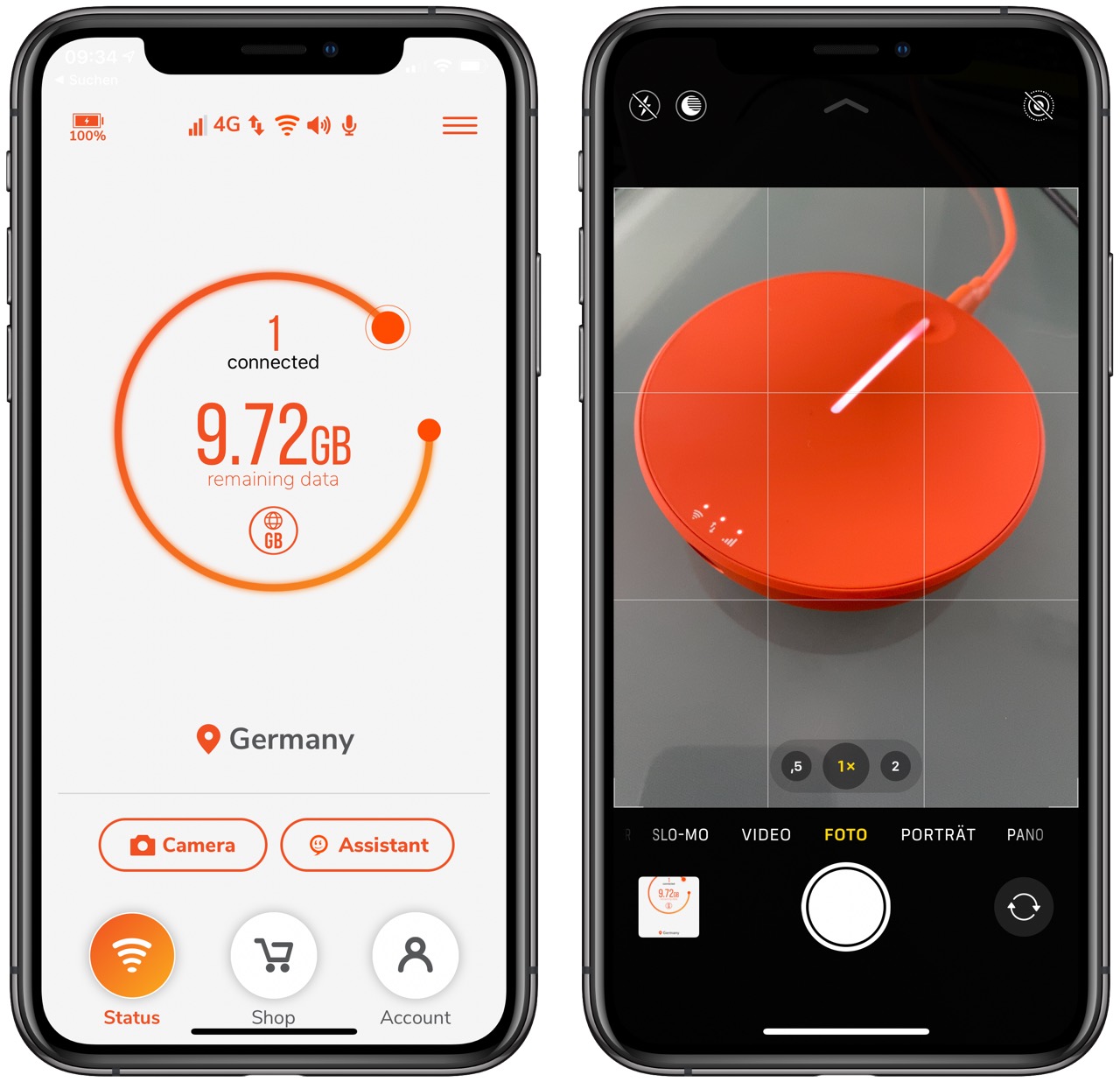
At the #MotorolaRAZR event my Skyroam Solis was once again a lifesaver. The venue had pretty decent Wifi coverage but when I wanted to upload my video, I just switched on this roaming hotspot, dropped it back in my bag and kept it running for the rest of the day. My esteemed colleague from Frankfurter Allgemeine Zeitung could not connect back to the mothership via VPN over Wifi or his Pixel 4, so I invited him to be my guest. vowe is a good mother.

Instant worry-free Wifi without congestion. The company has an impressive list of 300 networks in 130+ countries where this thing just works. It can even operate on different networks in your domestic country.

There are different packages available. 1 GB for 5 €, unlimited day pass for 8 € or flat monthy fee for 80 €. You can even rent the device if you want to try it out first or take it on vacation. My Solis has a bunch of features I don't need, like a camera. The simpler Solis Lite gets the job done as well. And they double as a power bank.

More >

21 Nov 04:40

KPI overload

by Nathan Yau

From Tom Fishburne, the Marketoonist. Maybe a dashboard isn’t the answer you’re looking for.

Tags: humor, KPI, Marketoonist

21 Nov 04:40

[RIDGELINE] Photographs and Frames

by Craig Mod
Walkers! Last week I put out a call for walker bios — requesting seven, to be exact. Well, we now have seventy-seven new bios! Thank you thank you. (And we can always use more.) There are many ways to walk, of course. One way: Completely unplanned, improv jazz walking where you get as far as you get, plop down, pass out on the spot, hunt for a small inn or motel or park to pitch a tent for the night.
21 Nov 04:40

En vrac du mardi

by Tristan

Vélo en bord de mer

21 Nov 04:36

Apple Maps Continues Its US Expansion

by John Voorhees

Yesterday, Apple Maps received its biggest US update by area yet, encompassing several states in the Midwest and West. Along with it, came a comprehensive update from Justin O’Beirne, who has been chronicling the updates since they began.

Apple started rolling out new, more detailed maps of the US in September 2018 and said at WWDC this year that the new maps would cover the entire US by the end of 2019. With the latest update, which is the sixth, only the Southeast and Central states, Alaska, and a few other areas remain un-updated.

Source: justinobeirne.com

Source: justinobeirne.com

According to O’Beirne’s post, Apple’s new maps now cover over 50% of the US by area and two-thirds of its population, including the country’s ten largest cities. Although almost half of the US by area has yet to have its maps updated, the accelerated pace of updates, suggests to O’Beirne that it is possible the remaining parts of the US may still be completed before the close of the year.

In addition to dozens of GIFs with side-by-side comparisons of the old and new Apple Maps for different regions of the US, O’Beirne goes into detail on the changes Apple has made to identifying roads, parks, and other landmarks at different zoom levels. It’s a fascinatingly in-depth analysis that suggests that Apple has increasingly automated its map creation process.

Be sure to check out O’Beirne’s post for all the details and the many GIF comparisons.

→ Source: justinobeirne.com

21 Nov 04:36

Subscriptions: too much of a good thing?

Terry Freedman, ICT & Computing in Education, Nov 19, 2019
Icon

I don't see subscriptions quite the same way as Terry Freedman, who implies that creators have a right to get paid ("I wondered if, on the same basis, he expected supermarkets to let him have small bars of chocolate free, or small cups of coffee") because sometime work is performed for which there is no paying market, no matter how much effort it took (my singing also falls into that category). Still, I can see the day when I no longer have my day job where I might want to make some money from my work. But subscriptions just don't seem like the answer. As Freedman says, the barrier to entry today is quite low, which means there are too many people chasing too few dollars. He suggests "you had better be sure that you can  provide good content on a consistent basis, that offers fresh insight, or inside information that subscribers can’t easily obtain elsewhere" but I doubt that this would be enough.

Web: [Direct Link] [This Post]
21 Nov 04:33

AirPods Are Becoming a Platform

by Neil Cybart

If AirPods were magical, AirPods Pro are supernatural. Apple’s newest pair of AirPods continues to make waves with “augmented hearing” entering people’s vocabulary. However, the broader implications found with Apple’s AirPods strategy are just as impressive. Apple is quickly removing all available oxygen from the wireless headphone market, and competitors find themselves at a severe disadvantage. In just three years, AirPods have evolved from an iPhone accessory into the early stages of a platform well positioned to reshape the current app paradigm for the wearables era.

Another “Quiet” Launch

One of the more fascinating aspects found with AirPods Pro was how the product was unveiled. Instead of receiving stage time at Apple’s big product event at Steve Jobs Theater one month earlier, AirPods Pro received the press release treatment. When contemplating potential sales, AirPods Pro may end up being the best-selling Apple product that has ever been unveiled with just a press release.

The subdued unveiling given to AirPods Pro is consistent with Apple’s prior approach to AirPods. Instead of receiving the red carpet treatment as the Apple Watch did two years earlier, AirPods were unveiled to the world over the course of just five minutes at Apple’s iPhone and Apple Watch event at Bill Graham Civic Auditorium in San Francisco. In a sign of just how nonchalant Apple was with the unveiling, AirPods were positioned merely as an iPhone 7 and 7 Plus feature. The product was said to be an additional option that consumers had for handling the transition away from dedicated headphone jacks. (Remember those?)

Earlier this year, AirPods with wireless charging case was unveiled via press release as well.

AirPods Pro

It’s easy to gloss over many of the selling points found with AirPods Pro given the familiarity with AirPods. Items such as seamless pairing and the carrying case that doubles as a charging station play crucial roles in giving AirPods Pro such a high-quality and enjoyable user experience.

However, the features that have gained the most attention, and rightly so, are Active Noise Cancellation (ANC) and Transparency mode. For many people, AirPods Pro will be their first pair of ANC headphones. Those users are in for a treat as Transparency mode addresses the largest negative found with ANC headphones - the user is seemingly removed from his or her surroundings. A press and hold on one AirPod stem switches between ANC and Transparency mode. The functionality is a great example of how Apple’s engineering and design teams, through collaboration, can produce a great user experience.

Sales

In FY2019, Apple sold 35 million pairs of AirPods at an average selling price (ASP) of $162 (both are my estimates). On a revenue basis, the AirPods business is on a $6 billion per year run rate that is doubling year-over-year.

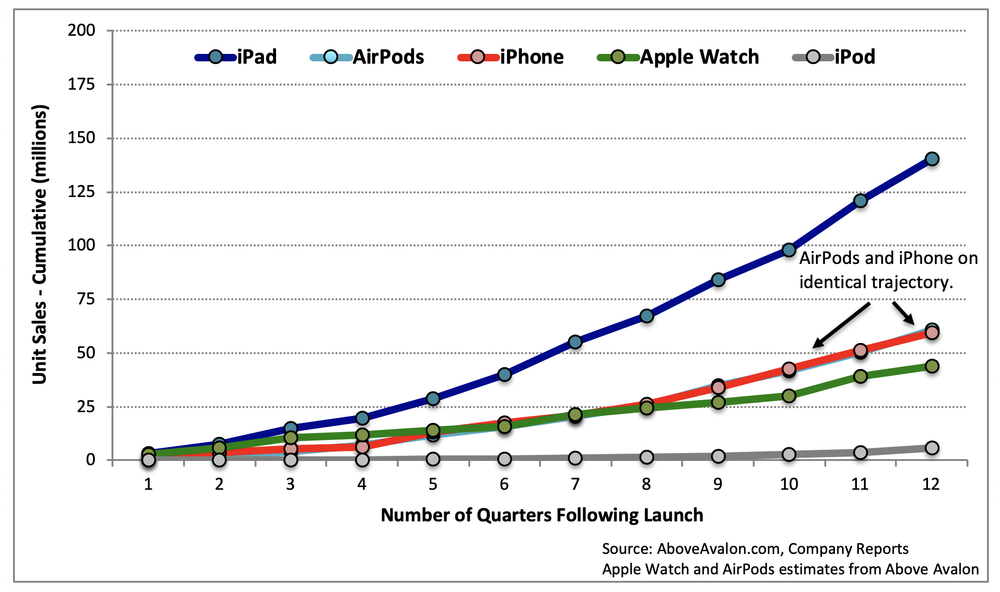
One way to put those sales numbers into context is to compare AirPods to other Apple products at the same point in time after launch. As shown in Exhibit 1, AirPods are trending similarly to iPhone sales when looking at unit sales out of the gate. After three years of sales, Apple has sold 61 million pairs of AirPods on a cumulative basis. During the first three years of sales, Apple sold 60 million iPhones.

Exhibit 1: Unit Sales out of the Gate

View fullsize Unit Sales Out of the Gate (Above Avalon)

Apple likely crossed an important AirPods sales milestone last quarter. For the first time, Apple sold more than 10 million pairs of AirPods during a three-month stretch. While the preceding observation came from my earnings model (access to my Apple earnings model is a benefit associated with Above Avalon membership at no additional cost), the math checks out with Apple management’s commentary and clues provided on the 4Q19 earnings conference call. It’s likely that AirPods sales will exceed 10 million per quarter for the foreseeable future.

When contemplating AirPods unit sales trends going forward, too many people are stuck in a mobile mindset. Instead of seeing someone buy and use just one pair of AirPods, we may see a new kind of usage pattern develop in which a growing percentage of AirPods owners will use more than one pair of AirPods. This will help boost AirPods unit sales.

On Apple’s 4Q19 earnings conference call, Tim Cook was asked about the potential upgrade trajectory for AirPods. Cook commented that he thought current AirPods owners would be in the market for AirPods Pro to “have a pair for the times that they need noise cancellation.” The clear implication found in Cook’s comment was that Apple expects some AirPods owners to use multiple pairs of AirPods with differing levels of functionality.

After just three years of sales, we are already starting to see the early stages of this trend develop with people upgrading their AirPods but keeping their old pair as a backup.

In an unscientific poll conducted via Twitter poll through my account, 30% of respondents said they use more than one pair of AirPods. Interestingly, 41% of people who said they purchased a pair of AirPods with wireless charging case claim to still be using their older pair of AirPods as well. It helps that AirPods last years before poor battery life takes its toll. My initial pair of AirPods from 2016 are still used daily. It's early, but it looks like people using more than one pair of AirPods is a thing.

Platform Building

The current app paradigm primarily consists of downloading an app to our smartphone, tablet, smartwatch, smart TV, or laptop / desktop. We then interact with the app to “pull” information and context at a time of our choosing. App notifications are not very smart and instead represent mostly useless distractions more than anything else.

The Apple Watch was the first device to genuinely begin questioning the current app paradigm. The Siri watch face on Apple Watch is all about providing the wearer glanceable amounts of information, data, and context in the form of cards chosen by a digital assistant. These cards are personalized to the wearer based on the time of day and schedule. In essence, we are moving away from pulling data from various apps to receiving a curated feed of data that is dynamic - always changing and tailored to our needs.

Apple is turning AirPods into the second platform built for what comes after the App Store. Instead of being about pushed snippets of information and data via a digital voice assistant, something that will likely remain ideal for mobile screens, AirPods will be all about augmenting our environment by pushing intelligent sound.

AirPods Pro wearers are able to experience the early days of this dynamic with Transparency mode. Switching between Transparency mode and ANC is equivalent to augmenting our environment. We are receiving two different experiences despite being in the same location.

This dynamic could be extended so that a simple tap of an AirPod or a quick voice command can take us to a different location via sound. Utilizing HomePods as sound receivers, an AirPods wearer would be able to “move” from the kitchen to family room. A quick tap of one AirPods, or Siri voice command could bring the wearer from the family room to kitchen to answer a family member’s question or simply to be “in” the room.

App developers would be able to take part in this revolution by building experiences that further augment people’s hearing. “Apps” would amount to tools capable of adding context to our hearing. Fitness can be rethought by adjusting the AirPods wearer’s hearing during workouts and exercise based on his or her activity. As an example, AirPods music playbook can be adjusted based on the users’ heart rate obtained by an Apple Watch. Such adjustment would amount to the AirPods wearer being “removed” from his or her environment when close to reaching a maximum heart rate during a run or track workout. Of course, such health tracking and monitoring may one day be brought directly to AirPods in subsequent editions.

Another example involves utilizing AirPods to deliver different sound experiences to different people despite being in the same location and looking at the same thing. As an example, a single presentation shown in a school or office setting can end up delivering a dozen different experiences to those in attendance.

Platform Power

AirPods will derive its platform power from three sources:

  • Technology advantage

  • Design focus

  • Massive adoption

Apple is pulling away from the competition when it comes to building mini computers worn on the body. AirPods are computers for the ears. Years of learning how to manufacture 2.1 billion iPhones and iPads is now helping Apple to build nearly 70 million wearable devices per year.

This technology prowess and manufacturing acumen goes to waste if people don’t actually want to be seen wearing the devices. Apple’s success at redefining luxury, combined with the company’s design-led culture, gives the company a large advantage in the area of understanding what people will want to wear on the body.

The final source of platform power will come from massive adoption. There are currently 45 million people wearing AirPods. At the current rate, more than 100 million people will be wearing AirPods at some point in 2021. As to how Apple is able to see such strong AirPods adoption, Apple is busy removing all available oxygen from the wireless headphone market.

The company is utilizing a masterful combination of price and features to establish multiple beachheads in the market.

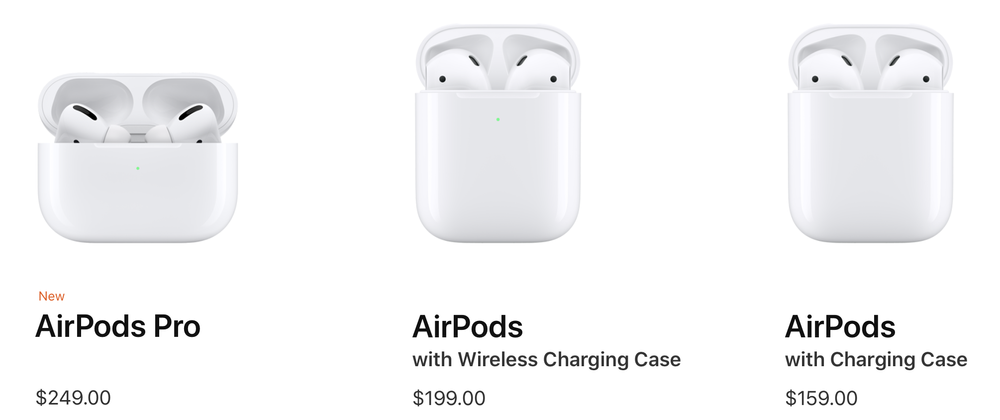
View fullsize AirPods (Above Avalon)

AirPods Pro do not replace AirPods in the product line. Apple is instead embracing a strategy of expanding the product line according to functionality. AirPods Pro represent the expansion of the AirPods line into a higher-end segment that places value with ANC. The end result is that Apple now has three different AirPods model, each targeting a different price segment of the wireless headphone market. It is certainly reasonable to expect Apple to continue pushing this strategy in the coming years so that we see a pair of AirPods go for as low as $99 and as high as $500.

We see similar product strategies with the iPad and Mac lines. With these, Apple sells a range of flagship products with varying degrees of functionality, and of course, price.

There are some unique attributes seen in Apple’s campaign to remove oxygen from the wireless headphone market. Unlike what they did with the iPhone or iPad playbook, Apple didn’t launch AirPods at one price and then begin to lower pricing once all of the profit had been sucked from that initial market segment. Instead, Apple has been doing the opposite. Apple unveiled AirPods at a very aggressive $159 price, which sent shockwaves across the industry as the competition was priced closer to $300. Three years later, competitors are still struggling to match AirPods' $159 entry-level price.

Something Big

This AirPods evolution into a platform does not come as a surprise. Here was the opening paragraph from my initial Above Avalon article on AirPods shortly after being unveiled in September 2016:

“AirPods will turn out to be one of the more strategically important hardware products Apple has released this decade. However, you would never know it judging from the way Apple unveiled the device last week. I suspect that was intentional. While the press remains focused on the short-term debate surrounding the iPhone's lack of a 3.5mm headphone jack, few have realized that Apple just unveiled its second wearables platform.”

Three years later and that paragraph still rings true. AirPods have turned into a cultural phenomenon while dedicated headphone jacks on smartphones have become relics. Meanwhile, Apple’s wearables train continues to gain momentum as the company grabs real estate on our wrists and in our ears by bringing a new level of personal computing to the masses.

Listen to the corresponding Above Avalon podcast episode for this article here.

Receive my analysis and perspective on Apple throughout the week via exclusive daily updates (2-3 stories per day, 10-12 stories per week). Available to Above Avalon members. To sign up and for more information on membership, visit the membership page.

21 Nov 04:31

filtered for nov 19 2019

by Michael Sippey

moma, coffee houses, massive brand collabs, taylor lyrics.

Continue reading on Stating the Obvious »

21 Nov 04:30

Topics Over Categories

by Richard Millington

If members are visiting a page, they want to learn something new about that topic, see questions they can answer, and perhaps find out who are the rising stars within this field.

This is why categories (which only show a list of discussions) aren’t a great option. It forces members to go elsewhere to find blogs, news etc…

Topics, however, display discussions, content, and leaderboards, in a single place. Members can find anything that’s new without having to visit multiple pages.

In an ideal world, they can also see a separate leaderboard for the top members in that topic.

Topics also allow more flexibility. Not every item of content or discussions your members create neatly falls into a single bucket. If you can add more than one tag to content, it can be displayed in more than one place. On some platforms, members can choose which categories to follow and develop their personal feed of new, relevant, activity on each visit.

Members care far more about the topic than they do about the medium. Make sure they can easily see everything that’s new in a topic in a single place.

21 Nov 04:29

Do Noise-Cancelling Headphones Hurt Your Ears? You’re Not Alone.

by Brent Butterworth and Lauren Dragan
Do Noise-Cancelling Headphones Hurt Your Ears? You’re Not Alone.

Noise-cancelling headphones are unquestionably popular, but they’re not the right choice for everyone. Active noise cancellation can cause intense discomfort for some people, while others may discover that the sounds they hope to eliminate are still coming through loud and clear.

21 Nov 04:25

Recommended on Medium: How To Fine-Tune GPT-2 So You Can Generate Long-Form Creative Writing

A step-by-step guide to fine-tuning GPT-2 with your favorite literary themes, genres, characters, settings, and writing styles.

Continue reading on Towards Data Science »

21 Nov 04:25

Twitter Favorites: [chadpederson] Now that’s a sunset. #dusk #Vancouver https://t.co/TLEbcmQghE

Chad Pederson @chadpederson
Now that’s a sunset. #dusk #Vancouver pic.twitter.com/TLEbcmQghE
21 Nov 04:23

Samsung Camera app teardown reveals several new camera modes

by Jonathan Lamont
Galaxy S10

A teardown of Samsung’s Camera app for its phones revealed work on a variety of new features that could make the next Galaxy flagship a real camera contender.

XDA Developers performed the teardown, digging into the code and uncovering hints about some upcoming features. However, as with all teardowns, we’re only seeing some snippets of code. Unfortunately, that doesn’t guarantee that Samsung will finish any of these features. That said, let’s dig in.

Director’s View

First up is a feature called ‘Director’s View.’ It appears the function will allow users to lock onto a subject and “select who’s in the close-up.” It also allows users to tap through thumbnails “to switch between camera lenses.” It appears that Samsung will allow users to record from multiple lenses at the same time.

The iPhone 11 series can do something similar using the Filmic Pro app. Interestingly, we could see that functionality built into the Samsung Camera app.

Night Hyperlapse

Next up is ‘Night Hyperlapse,’ but unfortunately, XDA couldn’t find much more than a name and description in the teardown. It appears to be a version the Samsung’s Hyperlapse mode but geared for use at night. The description reads: “For the best night hyperlapse results, Hold your device steady.”

Single Take Photo

‘Single Take Photo’ is the next feature, but the name doesn’t really do it justice. According to XDA, this will allow users to pan their phone for 15 seconds. During this time, the phone will capture several pictures and videos of a given scene.

While panning, the phone will offer instructions, such as telling you to slow down when needed. After, it processes all the photos and videos and provides a collection of what you’ve just captured.

Vertical Panorama

Samsung’s Camera app may also get a vertical panorama function. While the app technically already does this if you just ignore the guidelines and pan up, it’s nice to see an official version in the works.

Custom Filters

Finally, XDA also uncovered code for a ‘Custom Filters’ feature. It isn’t entirely clear how the feature works, but the code describes it as “select a picture you like the look of from your Gallery, then save it as a filter.” This could mean the app will use machine learning to build a filter out the photo’s visual style, or it could build a filter out of edits you made to the photo.

All in all, it seems like Samsung has several exciting new camera features in the works. While some of these will likely be hardware dependent, it’s probably a safe bet that others will get ported back to older Galaxy devices as well.

Coupled with rumours of a 108-megapixel sensor and 8K 30fps recording, the new Galaxy could have a killer camera.

Source: XDA Developers Via: The Verge

The post Samsung Camera app teardown reveals several new camera modes appeared first on MobileSyrup.

21 Nov 04:23

146 security flaws found in pre-loaded Android apps around the globe

by Brad Bennett

A U.S. based cybersecurity firm has published a report detailing 146 new Android security flaws found within first-party apps and services.

While a vast majority of these services are from Asian manufacturers, some global heavyweights like Samsung and Asus are included in the roundup.

What’s concerning about this report is that these are pre-installed apps and services, so users can’t get rid of the affected code on their phones.

The Cybersecurity firm is called Kryptowire and was contracted by the U.S. Department of Homeland Security.

Most of the affected devices are brands that don’t usually make it to Canada, such as Xiaomi, BQ, Doogee and more.

Wired has reported that Samsung claims two of the vulnerabilities on its devices are the handiwork of contracted developers, and the other four are rendered harmless by the Android Security Framework.

Kryptowire doesn’t believe Samsung’s claim, according to Wired.

Source: Kryptowire, Wired

The post 146 security flaws found in pre-loaded Android apps around the globe appeared first on MobileSyrup.

21 Nov 04:23

Apple releases iOS 13.2.3 update with fixes for Search, Messages and more

by Patrick O'Rourke
iPhone 11 Pro Max

Apple continues to push out iOS and iPadOS updates at a swift pace.

iOS 13.2.3, the latest update, solves several strange bugs that appeared in the mobile operating systems following the release of iOS 13. For example, the update includes a fix for the Spotlight filter that makes it work more consistently on an operating system level, as well as across Apple’s Mail, Files and Notes.

Further, apps that download content in the background have been fixed, along with Mail now fetching emails correctly. Apple’s update notes also mention that a problem causing photos, attachments and links to not display correctly in the Messages app has been solved.iOS 13 update

Since its release, iOS 13 has been a mess in some respects, but it’s great to see Apple releasing updates at a rapid rate. iOS 13.3 is currently being tested in both developer and public betas.

You can download iOS 13.2.3 by navigating to ‘Settings,’ then ‘Genera,’ ‘About,’ and finally ‘Software Update.’

The post Apple releases iOS 13.2.3 update with fixes for Search, Messages and more appeared first on MobileSyrup.

21 Nov 04:23

Apple releasing 13-inch MacBook Pro with Scissor switch keyboard in early 2020: report

by Patrick O'Rourke
16-inch MacBook Pro

Though this comes as no surprise, hot on the heels of the recently released 16-inch MacBook Pro, Apple will reportedly launch a new 13-inch version of the Pro in early 2020 that features a scissor switch keyboard.

The DigiTimes report states that the laptop’s display will remain 13.3-inches rather than being bumped up to 14-inches. Thanks to minimizing MacBook Pro’s sizable bezels, Apple was able to increase the 15-inch Pro’s screen 0.6-inches to 16-inches. According to the DigiTimes’ report, the tech giant doesn’t have the same plans for the 13-inch MacBook Pro.

Along with the new scissor switch, Apple’s revamped keyboard also features a physical ‘Escape’ key and a fingerprint sensor separated from the rest of the keyboard.

I’ve always been fond of Apple’s 13-inch laptops because they’re much easier to carry around, particularly when it comes to the Pro. That said, if this report is accurate, the fact that the laptop’s display size won’t be increased even by a small amount is disappointing.

Previous rumours stemming from often-reliable analyst Ming-Chi Kuo indicated that Apple plans to update its entire laptop line with scissor switch keyboards throughout 2020.

A recent iFixit teardown of the scissor switch keyboard featured in Apple’s 16-inch MacBook Pro revealed that the keys and mechanism are nearly identical to the Magic Keyboard included with Apple’s iMac and iMac Pro.

Source: DigiTimes Via: MacRumors 

The post Apple releasing 13-inch MacBook Pro with Scissor switch keyboard in early 2020: report appeared first on MobileSyrup.

21 Nov 04:23

Apple Watch patent hints at smart band for sports, support for Face ID

by Jonathan Lamont
Apple Watch Series 4

The United States Patent and Trademark Office (USPTO) granted Apple a new patent that describes the use of one or more cameras in a smartwatch, hinting at a possible version of Face ID for the Apple Watch.

Additionally, the patent — granted on November 19th — details a ‘smart band’ that could be used to analyze performance in sports. Apple applied for the patent in Septemeber 2017.

As far as the cameras go, 9to5Mac reports that the patent indicates they would be embedded in the face of the Apple Watch. It then describes various uses for the cameras, including capturing barcodes or QR codes. However, it also describes capturing images of the user, such as for video calls or Face ID.

The smart band, however, makes up the main focus of the patent. It details how sensors in the band could be used for coaching. For example, in baseball or golf, strain gauges could analyze the grip on the bat or club, while accelerometers and barometric sensors could analyze the swing.

Interestingly, the patent echoes and earlier Apple Watch patent that describes using smart band sensors for authenticating users, which could be called ‘Wrist ID.’

As with all patents like this, just because Apple got the patent doesn’t mean it’ll make it. Big tech companies like Apple often patent a variety of ideas but don’t always act on them.

Source: USPTO Via: 9to5Mac

The post Apple Watch patent hints at smart band for sports, support for Face ID appeared first on MobileSyrup.

21 Nov 04:22

Android camera flaw let apps take, upload photos, video without permission

by Jonathan Lamont
Pixel 4

Researchers from security firm Checkmarx have disclosed an Android camera flaw that allowed rogue apps to record video and audio, as well as upload images to an attacker-controlled server.

The disclosure comes after the release of patches for the flaws. Primarily, Google and Samsung’s camera apps were affected. Google pushed a patch to its app in July, but it’s not clear when Samsung fixed its app. However, Google says camera apps from other manufacturers may still be susceptible.

According to Checkmarx, Google designed Android to bar apps from accessing cameras and microphones without permission to do so from the user. However, the security firm found it easy to bypass these security restrictions and record video and audio without getting permission from users. Further, to upload captured images to a server, an app only needed permission to access a device’s storage — one of the most commonly given permissions.

Additionally, the flaw allowed attackers to track a user’s physical location through GPS data embedded in images or videos.

Checkmarx created a proof-of-concept weather app that exploited the flaw to do the following:

  • Take pictures and record videos, regardless if the phone was locked, the screen was off, or the app was closed.
  • Acquire GPS data embedded into any photo or video stored on the device.
  • Eavesdrop and record two-way phone conversations while simultaneously capturing images or videos.
  • Silence the camera shutter to make it harder to detect.
  • Transfer any photo or video on the device to an attacker-controlled server.
  • List and download and JPG image or MP4 video stored on the phone’s SD card.

Attacks wouldn’t go unnoticed; phones would display the camera when in use

Granted, an attack of this nature wouldn’t be completely unnoticeable. For example, an exploited device would still show the camera when recording video or capturing images. Users would notice if an attacker tried to carry out an attack while they were looking at the phone. However, that doesn’t prevent attackers from taking advantage of the flaw when the display is out of sight. Attackers could leverage a device’s proximity sensor to detect if a device were face down and the screen not visible.

Checkmarx’s app was also able to use the proximity sensor to detect if the phone was held to a user’s ear and then record a phone call. It could take pictures or videos at the same time.

Google officials told Ars Technica in a statement that they “appreciate Checkmarx bringing this to [their] attention and working with Google and Android partners to coordinate disclosure.” Additionally, it made a patch available to all its partners. Samsung confirmed to Ars that it had released a patch to all potentially affected models.

Further, Checkmarx suggested to Ars that the flaw may have been the result of Google making the camera work with Assistant, but it’s not sure why apps were able to access the camera without permission.

Pixel owners can quickly check if they’re affected

If you’re using a Pixel device, you can check if you’re vulnerable by long-pressing the Camera app icon, tapping the ‘i’ icon in a circle, tapping ‘Advanced’ and then ‘App details.’ This will bounce you to the source of the installation, which should be the Play Store. Make sure you’re running the latest version, but as long as you’re using a version newer than July 2019, you should be safe.

On phones from other manufacturers, checking for the flaw is significantly more difficult. According to Ars, you’ll need a computer with Android Debug Bridge (ADB), and you’ll need to connect your phone and run some commands to test for the flaw. If you’re confident in your ability to use tools like ADB, you can find the instructions here.

Thankfully, due to the nature of the flaw, it takes a fair amount of skill and luck to execute it. As such, it likely isn’t feasible to use against the majority of Android users. That said, it could be a powerful spying tool when used against specific users. Coupled with how easy it is for malicious apps to get on the Play Store, it probably wouldn’t be too difficult for a determined attacker to pull off.

Source: Checkmarx Via: Ars Technica

The post Android camera flaw let apps take, upload photos, video without permission appeared first on MobileSyrup.