Shared posts

10 Dec 04:00

Podcast Passivity

by Suzannah Showler

NEW FEELINGS is a column devoted to the desires, moods, pathologies, and identifications that rarely had names before digital media. Read the other installments here


When wireless radio became a thing, people thought it was haunted. Even to those who knew better, the new media seemed spooky and spectral — all voices untethered from bodies, passing through walls. This was the 1920s. That events transpiring elsewhere could appear close — and in real-time — was thrilling, but also disconcerting. People had to recalibrate themselves to a whole new understanding of what it meant to hear voices. And though the listening apparatus could be switched off and on, the broadcast itself never went away, every still and silent moment now shivering with currents and vibrations. “Wireless is a permanent guest,” wrote media theorist Rudolph Arnheim in 1934. There was something in the air.

The radio was penetrative. It got inside a person’s home, trespassing personal property like it was nothing. It made borders, privacy, categorical distinctions (all Victorian and Edwardian staples) into a joke. In the UK, the men (yes, they were all men) who founded the BBC in 1922 saw themselves as swashbuckling pioneers, pushing into the nation’s living rooms on a mission to entertain, but also to raise better, more enlightened citizens. In order to do so, they had to meet people where they literally, physically were. “It is nothing to create a studio atmosphere,” BBC exec C.A. Lewis wrote in 1924, reflecting on the corporation’s first year and declaring its manifesto for the future, “The programme has got to get into the home atmosphere.”

Where music might attach to your inner narrative, podcasts are a direct delivery system for narrative and chatter itself

Radio took a singular event — a performance, an announcement, a piece of art — and sent it rippling into the world. Writing in 1921, the Russian futurist Velimir Khlebnikov predicted a world in which the radio would become a kind of “spiritual sun” and “unite all mankind.” Even to those with a less lofty vision, the mass quality of the media was not lost. “From palace to slum people are listening. It is the most democratic form of entertainment ever invented by man,” C.A. Lewis declared.

It feels a little facile to point out that in the digital age, the “broad” cast of radio has been stuffed into the singular, contained unit of the “pod.” That the metaphor is obvious doesn’t make it untrue. It also seems worth pointing out how the podcast (a portmanteau of iPod and broadcast) is fundamentally yoked to Apple products, whose dominance often seems like some kind of dystopic punchline about what it costs to be the same kind of special as everybody else. When you think of a podcast listener, tell me you don’t picture a person whose ears are stuffed shut with little white buds: the now-universal sign for “I’m not listening.” Or, rather, “I’m not listening to you.”

Like music, podcasts neither require nor encourage you to stop whatever else you’re doing in order to enjoy them; they are designed, quite beautifully, to be palimpsestic, a soundscape ready to track over just about any non-verbal activity. But where music might attach to your inner narrative and drag the tone and emotional tenor up and down like a movie score, podcasts are a direct delivery system for narrative and chatter itself.

In that way, they’re not so different from old-school radio, except that the wild increase in portability is a game-changer. The radio needled at a 20th century crisis of boundaries by admitting public experiences into private spaces. Podcasts have turned this inside out, allowing us to have private experiences as we go about in public. If to the turn-of-the-century listener the presence of the radio seemed like a haunting, in the age of podcasting, it’s more like we’re the ghosts — floating through the world in a fog of semi-presence, both deeply engaged and fundamentally checked out.

Listening to a podcast while you go about your life is an act of almost literal dislocation, allowing a person to essentially perceive themselves in two places at once. The disjunct is only reconciled in the experience, memory, and body of the listener. The result is something rich and singular and unrepeatable — something that’s happened just to you.

I can remember a spat about a Taylor Swift album tracking past boarded-up houses in Ohio; a prison visitation room crackling with the static of fresh laundry

If you’re a podcast person, you’ll know what this is like — how the media integrates with the conditions under which it’s heard, imprinting on a person’s memory like a double-exposure. The results are oneiric. I can remember a whale carcass sinking to the ocean floor in Toronto’s Dufferin subway station; a spat about the cultural significance of a Taylor Swift album tracking past boarded-up houses in Ohio that seemed to be shutting their eyes; a prison visitation room crackling with the static of fresh laundry.

The thing people always say about podcasts is that they feel so intimate. The beautiful thing about intimacy is that, by letting other people in, we are reminded that our lives are porous, that the difference between humans is arbitrary and surmountable. And, of course, the horrifying thing about intimacy is that it reminds us that our lives are porous and the differences between us are arbitrary and surmountable. Intimacy is a kind of productive erosion — a sense of self acquired by allowing the boundaries of selfhood to dissolve. We can come to depend on it, lose ourselves in it, give up our integrity in order to feel it.


Maybe I should have said this earlier, but I love podcasts. Like, I love them. There are programs I’ve been tuning into for 10, 11, 12 years at this point. Which means I’ve been dosing myself with certain voices, ways of speaking, ways of thinking, since before my brain was, developmentally speaking, all the way cooked.

I fell in love with podcasts as a stationary form. In college, I tore through the This American Life archive on my heavy, barely-portable laptop. Then came Radiolab, the various Gabfests, whatever I could get. I want to say I listened while doing other things, like maybe household chores, but as former roommates will attest, I did shamefully little of anything like that. I lay on my unmade bed. I lay on the floor of my filthy room. Listening was the activity; the podcast was the event.

This was a time before I owned any iThings. I lived in a city draped over a four-mile-long peninsula, and I used to burn my angst by running the length of it in multiples — down, up, halfway back down again — listening to nothing but the churn of my own brain. How could I stand it? What was I thinking? That ability to endure myself now sounds absurd.

If early radio programming was meant to “get into the home atmosphere,” the 21st century version belongs to a smaller, more contained theater: it’s like a podcast is set inside your own skull. More than a decade into my listening habit, I find myself on what feels like cellular, neurological intimacy with people I’ve never met — who don’t know I exist. And as podcasts have exploded, I’ve started to wonder about their cumulative effects. At what level do these encounters remain world-expanding and empathy-provoking? How much is too much other people to chug into your head?

My concern is that on some level, I’m prone to mistake any voice that pours so convincingly into my brain for my own

My concern is that on some level, I’m prone to mistake any voice that pours so convincingly into my brain for my own. And maybe it’s not even a mistake, per se, so much as a calculated strategy on the part of my ego to maintain its primacy, targeting and claiming any foreign object that would stray so far into the inner-sanctum of my consciousness. Whether the medium is insidious, my mind a greedy assimilation machine, or both, it seems that at least some of the time, podcasts don’t just drown out my inner-monologue — they actually overwrite it. When I listen to a podcast, I think some part of me believes I’m only hearing myself think.

Twentieth-century critics worried about this, too. Writing sometime around the late 1930s, Theodore Adorno theorized that a solitary listener under the influence of radio is vulnerable to persuasion by an anonymous authority. He writes: “The deeper this [radio] voice is involved within his own privacy, the more it appears to pour out of the cells of his more intimate life; the more he gets the impression that his own cupboard, his own photography, his own bedroom speaks to him in a personal way, devoid of the intermediary stage of the printed words; the more perfectly he is ready to accept wholesale whatever he hears. It is just this privacy which fosters the authority of the radio voice and helps to hide it by making it no longer appear to come from outside.”

I’ll admit that I have occasionally been gripped by false memories as a result of podcasts — been briefly sure that I’d seen a TV show I’d never watched, or convinced that it was a friend, not a professional producer, who told me some great anecdote. But on the whole, my concern is less that I am being brainwashed and more that I’m indulging in something deeply avoidant: filling my head with ideas without actually having to do the messy, repetitive, boring, or anxious work of making meaning for myself. It’s like downloading a prefabbed stream of consciousness and then insisting it’s DIY. The effect is twofold: a podcast distracts me from the tedium of being alone with myself, while also convincingly building a rich, highly-produced version of my inner life. Of course that’s addictive — it’s one of the most effective answers to loneliness and self-importance I can imagine.

10 Dec 03:59

What the new peer-to-peer regulations mean for you

by Zopa Blogger

In June 2019, the Financial Conduct Authority’s (FCA) released its final review of peer-to-peer (P2P) platforms and introduced a number of new rules. Today, December 9th   2019, the new regulations have come into effect. 

At Zopa, we welcome these new regulations. In a lot of instances, they simply formalise best practices we’ve already been following. However, there are some areas we’ve been working on. In this blog, we’ll outline the changes we’ve made and what they mean for you.

Appropriateness tests for new investors  

If you’re coming to us for the first time, we’ll ask you some questions about Zopa investments to determine whether they are right for you. These cover everything from projected returns to how we diversify your money. We believe it’s of paramount importance that customers understand what they’re investing in and this approach helps us to check this more comprehensively in the sign-up process.  

Once we know the product is right for you, we’ll confirm how experienced you are with peer-to-peer investing. This helps us decide on an appropriate level of investment for you. If you fall into the definition the FCA refers to as a ‘restricted investor’, you should limit the amount you invest into peer-to-peer to 10% of your net assets. If you’re what the FCA refers to as a ‘sophisticated’ or ‘high net worth’ investor, these restrictions will not apply to you. Find out exactly what each of these categories mean here.  

Yearly certification  

If you’re already a Zopa investor, once a year you’ll be asked to reconfirm your level of experience with P2P. It’s all done online in a few simple steps.  

As mentioned above, according to the new FCA regulations, if you’re less experienced you shouldn’t invest more than 10% of your net assets in P2P until you’ve gained more experience. This approach is in line with what we have seen from our customers, who typically fund an initial amount and then build up their portfolio as they monitor how their Zopa investment performs. Taking that extra time to study your investment allows you to improve your understanding of P2P investing, making sure it’s right for you.  

After you’ve certified, you’ll see a recap of how investing with Zopa works. We firmly believe that all Zopa investors should have a clear understanding of how we operate. It will be information that you are already familiar with, but we ask that you read through it carefully. 

Loan book  

The Zopa loan book has undergone a refresh. For those that love to delve deep into each column and row, we’ve got some good news: there are now even more fields to dig into. The extra info should help to give even greater transparency and insight on each loan you’re invested in. 

To help you make sense of things, we’ve created a glossary of all the terms you’ll find in your updated loan book. Click here for the glossary

How Zopa has performed 

We’ve always provided details on how Zopa investments have performed, but the FCA has now outlined a standard approach which will allow you to view returns performance by product and year.   

Risk management and governance 

Zopa has long taken a rigorous approach to risk management and governance and, as part of our authorisation process to receive a banking licence, we have continued to build on this.  

The FCA has now raised the bar for the wider industry to make that ethos more consistent across P2P platforms. 

What now? 

The changes outlined above are now live for our investors, but we will be continuing to work with the FCA to ensure the rules are working in your favour. If you have any more questions about how this affects you, please drop us an email contactus@zopa.com 

The post What the new peer-to-peer regulations mean for you appeared first on Zopa Blog.

10 Dec 03:59

Why Teachers Shouldn’t Grade Their Own Students

Michael Horn, Forbes, Dec 09, 2019
Icon

This article combines two parts mythology with one part fact to come to a conclusion that is accidentally a good one. The purpose of the mythology (in my view) is to appeal to readers who already believe these things. The myths? Carol Dweck's comment that, “When teachers are judging [students], [they] will sabotage the teacher by not trying." Also, Jessica Lahey's assertion that "parents and teachers have become adversaries." Even more, the assertion that "Teacher grades, for example, are subject to grade inflation." You can paint a picture of who the article is appealing to here.

But the conclusion - that the acts of teaching and evaluation should be separated - is a good one. Not for any of the reasons listed here, but because it allows students to learn in any way they wish. The danger of this model is that it could create a commercial evaluation industry. And this article (whose author is an advisor for one such company) is an example of the spin being produced to support this idea. So we need to be careful about how we separate the functions of teaching and evaluation. There needs to be an ethical standard here that the commercial sector has heretofore failed to demonstrate that it can meet.

Web: [Direct Link] [This Post]
09 Dec 17:07

Members Cheat (A Lot)

by Richard Millington

A holiday season story for you.

In one of my first video gaming communities, we tried to organise a secret santa for members.

One member volunteered to write a simple program which would enable members to opt-in, and randomly assign them another member to buy a simple gift for.

It turned out the program wasn’t as random as we had been led to believe.

Instead of assigning a member another username at random, the developer instead programmed it to send his name to the 2k+ members who had opted in.

He earned a small fortune in gift cards and we learned a valuable lesson; when any tangible reward is involved people will always find a way to cheat.

Worse yet, it’s hard to spot the scam until it’s too late.

The lesson? Don’t offer tangible rewards.

Better to offer things worth more than tangible rewards. Offer what money can’t buy, reputation, gratitude, influence, a sense of making a difference. Offer things the scammers and tricksters will never care about.

09 Dec 17:07

How To Open ‘Protected’ PDFs on Linux

by Martin

I’ve received several PDF documents lately that would only open in Adobe’s Acrobat Reader without being asked for a password. In Acrobat Reader, the document is then usually ‘protected’ against printing, annotation and/or other things one does with a PDF. Unfortunately that doesn’t help me much because I won’t install the closed source Adobe Reader on my notebook. No way.

But here’s a quick fix: Files that Evince and Okular can’t open can still be viewed with the Firefox PDF viewer. Nice, but it’s still a major pain. So I spent some time to see if this annoyance could be removed. And indeed there is a simple solution:

To remove what is referred to as ‘owner protection’ with an empty password, use ‘qpdf’ in a shell:

qpdf --decrypt in.pdf out.pdf

And that’s it, no password required. After that, the PDF file can be opened in Evince and Okular and has no restrictions on what can be done with it, including printing it, modifying it, etc.

Qpdf also has a command line option to show which actions are ‘not allowed’ when an empty owner is set password:

qpdf --show-encryption in.pdf 

R = 6
P = -1084
User password = 
extract for accessibility: allowed
extract for any purpose: not allowed
print low resolution: allowed
print high resolution: allowed
modify document assembly: not allowed
modify forms: allowed
modify annotations: not allowed
modify other: not allowed
modify anything: not allowed
stream encryption method: AESv3
string encryption method: AESv3
file encryption method: AESv3


09 Dec 17:06

Elizabeth Warren’s $2 million — and mine

by Josh Bernoff

Elizabeth Warren disclosed that she made $1.9 million since 1985 doing legal work for companies like Travelers Insurance. To put this in context, you need to understand what consultants and lawyers do and who they do it for. My experience as a consultant and analyst — an illustration When you work for a law firm, … Continued

The post Elizabeth Warren’s $2 million — and mine appeared first on without bullshit.

09 Dec 17:06

Northern Electric – Robson Street

by ChangingCity

In the summer it’s impossible to be sure that this 1928 building is the same as it was in the picture, photographed in this Vancouver Public Library image a year after it was built. Nothing much has changed externally, although it was added to in 1947 with a matching element. To the east (left of the picture) there’s a former gas station that’s been a bar for many years. The architects for the Northern Electric building were McCarter Nairne, with Northern Electric’s Montreal based architect, Joseph Onesime Despatie. The building was basic, but there are a few modest Art Moderne / Classical touches at the entrance.

Northern Electric started life in the mid 1890s as the manufacturing subsidiary of Bell Telephone of Canada. Before they developed here they occupied a building on Water Street. During the 1920s, as well as the core telephone and related business, Northern Electric made kettles, toasters, cigar lighters, electric stoves, and washing machines. The Vancouver buildings were warehouse space, with a showroom, but manufacturing took place elsewhere. The company name was truncated to Nortel many years later, and eventually saw a spectacular bankruptcy in 2009. They had long abandoned this building, which had been purchased in 1958 by the Catholic Archdiocese of Vancouver for use as their Catholic Centre, containing their offices and the Catholic Men’s Hostel with over 100 beds on the third floor. A new office building was built some years ago on the site of the former St Vincent’s Hospital, and only the hostel occupies the building for now.

In 2018 City Council approved the development of a 29 storey residential tower here. It will sit above the restored facades of the Northern Electric Building, and there will be a hotel in the restored part, on four floors, with an adjacent new six storey building to the east. The oldest part of the heritage warehouse will have a restaurant on the main floor, and there will be a coffee shop in the 1947 addition. The Catholic Hostel is moving initially to St Paul’s Hospital, and will need another new home once that is redeveloped in a few years time.

Image source: City of Vancouver Archives CVA Bu N279.2

0928

09 Dec 17:05

Bell wireless network down in select Canadian cities

by Brad Bennett

Multiple people are reporting that Bell’s wireless network is down for texting and calling.

64 percent of users on downdetector.ca are reporting text message errors. Bell’s support channel on Twitter has also confirmed its working on fixing both calling and texting. Notably, a portion of the outage seems to stem from the Ottawa area.

A reader sent us a tweet that states some of their messages are being marked as ‘Failed to send,’ but are still going through.

MobileSyrup will update this post when the service interruption gets resolved.

The post Bell wireless network down in select Canadian cities appeared first on MobileSyrup.

09 Dec 15:46

Why some students do not feel that they belong in CS, and how we can encourage the sense that they do belong

by Mark Guzdial

One of my favorite papers at ICER 2019 was by Colleen Lewis and her colleagues, and is available on her website. I’ll quote her first:

Does a match between a students’ values of helping society and their perception of computing matter? Yes! A mismatch between a students’ goals of helping society and their perception of computing predicts a lower sense of belonging. And students from groups who – on average – are more likely to want to help society (women, Black students, Latinx students, and first-generation college students), this may be particularly problematic! (pdf)

  • Lewis, C. M., Bruno, P., Raygoza, J., & Wang, J. (2019). Alignment of Goals and Perceptions of Computing Predicts Students’ Sense of Belonging in Computing.Proceedings of the International Computer Science Education Research Workshop. Toronto, Canada.

I want to expand a bit on that paragraph. I often get the question, “Why aren’t more women and URM students going into CS?” We’re seeing female students and students of color leaving/avoiding CS at many stages, e.g., Barb’s deep analysis of AP CS*. Colleen and her collaborators are giving us one answer.

We know that students who have a sense of belonging in computing are more likely to stay in computing. Colleen et al. found that students who found that their values were supported in computing were more likely to feel a sense of belonging. So, if what you want to do with your life matches computing, you’re more likely to stick around in computing. This is the “alignment of goals” and “perceptions of computing” part of the title.

Next step: Students from demographic groups underrepresented in computing were more likely to value community and helping society than other students. These are their goals. Do students see that their goals align with their perception of computing? If so, then you have an increased sense of belonging. Colleen and her colleagues found that If the students who valued community perceived that they could use computing to support communal values, then they were more likely to stick around.

This result is obviously explanatory. It helps us to understand who stays in computing. It also suggests interventions. Want to retain more under-represented students in your CS classes? Help them to see that they can pursue their values in computing. Help them to update their perceptions so that they see the alignment of their goals with computing goals.

But what if you (as the teacher) don’t? This paper suggests future research questions. What if your CS class is entirely de-contextualized and doesn’t say anything about what the students might do with computing? What perceptions do the students bring to the CS class if nobody helps them to see the possibilities in computing? Which student goals align with these perceived goals of computing? We might guess what the answers might be, but it really does call for some explicit research. What are students’ goals and perceptions of computing in most CS classes today?


* Check out Barb’s blog at https://cs4all.home.blog/. As I’m writing this, Barb is finishing up the 2019 AP analysis. The gap between white and Black student pass rates on AP CSP is enormous, far larger than the gap on AP CS A. I’m hoping that she has updates there by the time this post appears.

09 Dec 15:42

Prizmo 5: The Pro Scanner with Powerful Editing Tools for the iPhone and iPad [Sponsor]

by MacStories Team

Prizmo 5 is the premier solution for fast, streamlined scanning and powerful, accurate OCR on the iPhone and iPad. The app’s hallmark is the efficiency of its capture workflow, which is driven by an elegant and intuitive UI coupled with the latest iOS and iPadOS features.

Creaceed, the maker of Prizmo 5, has been refining the capture process for years, and with the latest update, they introduced auto-shoot, which detects pages as they are come into view of your iPhone or iPad’s camera and captures them automatically. Once scanned, the images, which use highly-efficient compression formats, can be quickly cleaned up with Prizmo’s suite of built-in tools to rotate, crop, and flatten a scan and adjust its brightness, color, and edges.

Prizmo offers both cloud-based and on-device OCR, turning the text of scanned documents into editable text that can be exported as a text-searchable PDF or even an editable Microsoft Word file. The app also supports business card scanning and processing, so you’ll never lose track of those new contacts you meet again.

Of course, Prizmo supports all the latest iOS and iPadOS technologies, too, including Shortcuts, iCloud, and iPad multitasking, plus exhaustive VoiceOver support with spoken guidance while scanning. There’s even a text reader that can read your scan aloud and batch editing support.

Prizmo 5 is free to download and try and is available through Apple’s Volume Purchasing Program for schools and enterprises. Best of all, for this week only, Prizmo 5’s Premium Pack is 20% off, making now a great time to get started with building a paper-free workflow.

Our thanks to Prizmo 5 for sponsoring MacStories this week.


Support MacStories Directly

Club MacStories offers exclusive access to extra MacStories content, delivered every week; it’s also a way to support us directly.

Club MacStories will help you discover the best apps for your devices and get the most out of your iPhone, iPad, and Mac. Plus, it’s made in Italy.

Join Now
09 Dec 15:42

Ikea smart blinds to likely get HomeKit support early next year

by Shruti Shekar

Ikea’s smart blinds have been available in the U.S. for a while now, and while they support Google Assistant, they notably are not compatible with Apple’s HomeKit smart home platform.

The Swedish-based company indicated that it was going to support the platform in the fall of this year, but 9to5Mac reports this is probably not going to be the case.

On Twitter, Ikea customer support indicated that the HomeKit functionality “should be added to the blinds early next year.”

9to5Mac reports that this delay isn’t shocking since fall is nearly over and we still haven’t seen support for the ‘Kadrilj’ and ‘Fyrtur’ blinds.

The two products are wireless, battery-powered blinds that “interact with Ikea’s existing Tradfi lighting gateway.”

It’s still unclear when Ikea plans to launch its smart blinds in Canada, but MobileSyrup has reached out for more information.

Source: @IKEAUKSupport, 9to5Mac

The post Ikea smart blinds to likely get HomeKit support early next year appeared first on MobileSyrup.

09 Dec 15:42

Realsatire der Woche: Man kann dem FBI jetzt seine ...

mkalus shared this story from Fefes Blog.

Realsatire der Woche: Man kann dem FBI jetzt seine Fingerabdrücke geben. Und zwar (convenient!!) bei der örtlichen Postniederlassung!
Through a partnership between the #FBI and the @USPS, you can now submit your fingerprints electronically for an identity history summary check (IdHSC) while you buy stamps or mail packages.
Admiral Ackbar lässt grüßen!
09 Dec 15:32

RT @doctor_oxford: The defining moment of this election. ITV reporter @joepike shows @BorisJohnson a picture of the sick 4 year old forced…

by doctor_oxford
mkalus shared this story from iandunt on Twitter.

The defining moment of this election.

ITV reporter @joepike shows @BorisJohnson a picture of the sick 4 year old forced to lie on coats on the floor of a desperately underfunded, understaffed A&E.

Johnson refuses to look & pockets the phone.

For shame 😔pic.twitter.com/nmPeM0BjoH


Retweeted by IanDunt on Monday, December 9th, 2019 2:40pm


925 likes, 694 retweets
09 Dec 15:31

My LinkedIn Network and its Gender Balance

by Ton Zijlstra

I’ve held for a long time that whenever someone says “we’d like to hire women but we don’t know any” or “we really want women as speakers on our event but we don’t know any and if we do they say no”, it is really down to the lack of quality and balance in their network of contacts. When I organised international conferences myself, with our team we made sure to invite speakers while conscious of the lopsidedness of our own networks, overcompensating in our invitations to get a result closer to a 50/50 balance. Now that my company is hiring new people every now and then, that too is an opportunity to counteract such imbalance.

Last week I wrote about ‘homebrew CRM‘, in which I mentioned Rick Klau’s post on his contact management routines. One element that jumped out when I was reading his post was that he had taken a look at his contact lists to see how the men/women ratio was in his network. There’s nothing in LinkedIn that let’s you explore your contact list as a single data set. It’s only a rolodex still, no way to visualise the data in that list in any way (e.g. geographic or sectoral distribution, or other cross sections of the list). Rick mentioned he had downloaded all his LinkedIn data and all his Twitter data, and then used that data export to work on. I requested the same data from LinkedIn and Twitter.

It turns out that LinkedIn’s export contains a list of contact names (but not the link to their profiles, as that isn’t ‘your data’), and a key piece of information they normally don’t show you: the date you connected. (Interestingly LinkedIn offers you nothing to record the context and reason you connected. The Xing-platform, heavily used in Germany, does do that, and I find it very useful)

Having names and dates, I manually indicated someone’s gender, and then used the dates for basic insights into how my recorded network developed over time. (Typing this I realise I still have the export from Facebook when I deleted my original account 2 years ago, and I could do the same there)

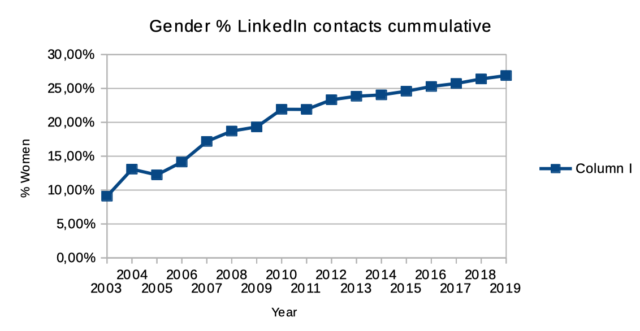
For now I looked at two measures: the balance between women and men in contacts I added each year, and the balance between women and men in the total number of contacts each year. Currently I have some 2150 contacts, of which some 600 are women, for a percentage of 27%. That is significantly lower than I had intuited. I think such overestimation is a known effect.

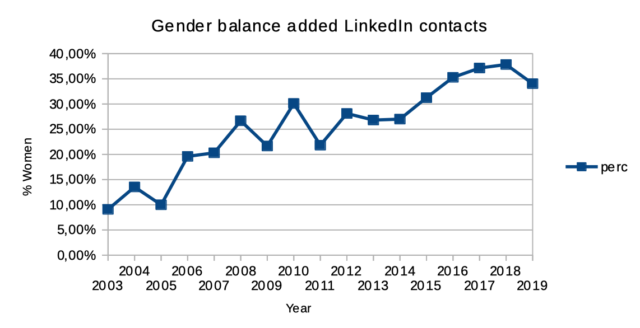
Looked at per year for the contacts added that year, the balance over time has improved from 10% in 2003, to between a third and 40% in the last handful of years. That last number is in line with the overall percentage I had intuited, so apparently I am using my perception of recent years as the estimate for the entire period. That low 2003 starting percentage has a lot to do I think with the general imbalance of the early adopter crowd that came into LinkedIn when they launched in May 2003 (I joined in June ’03) and the low number of people I connected to those first months on the platform (11 in 6 months).

Getting closer to a 50/50 balance on LinkedIn isn’t completely within my control I realise (unlike in my feed reading), as it also depends on who I actually meet in my work, and each working environment has its own existing gender distribution. It is also not completely outside my control. There is agency in new situations and contexts, such as whom I seek out for conversation when participating in an event. Yet, getting to a 50/50 balance for the total would mean connecting only to women for a few years, adding about a 1000 new contacts that way. History does keep one back clearly.

cummulative per year

new contacts added per year

09 Dec 06:03

A trend for 2020?

(This is a copy of an answer that I posted to a marketing list.)

There's a strong possibility that 2020 could be the year that two big trends collide.

  • Privacy opt-outs and objections, enabled by laws such as CCPA, which goes into effect on Jan. 1.

  • Public concerns over brand safety, Sleeping Giants style—amplified by the contentious online environment around the 2020 US election, and the anticipated flood of misinformation, extremist, and harassing content.

The conventional wisdom now around brand safety is that it's a manageable concern, and that it's acceptable to have a certain percentage of a brand's ad impressions end up on really heinous material on "long tail" sites and social media. This is likely to shift. Many people who are already on edge politically will realize that they can communicate their concerns in a way that brands are legally required to act on, by using the tools available to them under new privacy laws and regulations. Instead of just tweeting a screenshot of a problematic ad placement, people will be able to rage-CCPA the brand responsible.

The cost of complying with GDPR and CCPA is likely to be a factor in "flight to quality" media buying decisions.

(Related: making people cry in the stairwell: your best online brand-building value?)

Bonus links

A Subprime Content Crisis

Free as in … ? My LibrePlanet 2016 talk by Luis Villa

From fake news to fake views: connecting the dots on ad fraud

Improving Tracking Prevention in Microsoft Edge

Oxide Computer Company: Initial boot sequence

US-based chip-tech group moving to Switzerland over trade curb fears

09 Dec 03:08

Disruption Learnings from Self-Publishing a Book and Going to Burning Man

by Charlene Li

This fall I did two things that pushed me far out of my comfort zone: self-publishing my latest book and going to my first Burning Man. These seemingly unrelated adventures have some surprisingly common challenges. Book publishing is an arduous process that requires seemingly unending days of solitary focus, laboring over words that won’t come. Burning Man requires a journey to a lifeless desert and enduring dust storms and freezing nights. 

But the rewards are similarly glorious in the end. I hold a beautiful bestselling book in my hand that has moved people to become more disruptive. And I hold inside me a renewed sense of wonder from the time I spent at Burning Man. 

It’s taken me some time to distill what I’ve learned and how it applies to the disruption journey. Here are four insights that I hope you can apply to your own disruption journey. 

Structure creates a safe space for disruptive growth

One of the most interesting things I learned in my research for my book, “The Disruption Mindset,” is that disruptive organizations are incredibly well structured and ordered. When you don’t have to worry about how to get things done, then you can focus on achieving extraordinary, disruptive growth. You need to feel safe to take on risk, to be both vulnerable and confident in your ability to try and either succeed/fail. 

When I started to self-publish my book, I realized that being able to do anything I wanted to was crippling me into inaction – there were simply too many options and choices to make. My editor helped me whip my chapter structures into the same formula (tell a great story, do some analysis, explain how someone can do this). And I worked closely with IdeaPress who knew how to print and distribute business books. 

And at Burning Man, almost 80,000 people gather for a week in the desert without any police or security force. Contrary to some perceptions, the event was incredibly orderly, people were highly respectful and I did not see a single altercation. There are “10 Principles” that serve as guidelines. They were “crafted not as a dictate of how people should be and act, but as a reflection of the community’s ethos and culture”. As a result, I felt physically and emotionally safe to open up to complete strangers and to push myself out of my comfort zone. 

The takeaway is that you need to create just enough structure in your organization or community for people to feel safe space taking the first step out of their comfort zone. Your role as a leader is to ensure that this space remains steady for them, that it doesn’t wobble when they push off hard against it to take off on their disruption journey. 

Use setbacks as opportunities to slow down and “see”

As I was nearing the end of my writing, something kept nagging at me—the title. I originally called the book “The Disruption Agenda.” I’d get little comments here and there that it wasn’t the right title, but I couldn’t quite put my finger on it. As I was hurtling toward my deadline, I did some research using a tool called PickFu, where you can test titles and covers—and get detailed feedback on what worked/didn’t work. And yes, the original title tested poorly—and I started to finally understand at a deeper level what would resonate instead. If I hadn’t taken the previous time to slow down and listen, I would have never learned a crucial lesson. 

At Burning Man, one of the fun things to do is to get on one of the “art cars” that circulate around the camp. Unfortunately, we got on a car that was headed in the opposite direction of where we wanted to go and faced a long, dark, cold walk back to our camp. Setting off, we soon came upon an art installation that we would never have seen or explored if we had been in a car or on a bike. By going slow, we had a chance to see our environment in a completely different way.

The takeaway is that as fast-moving disruptors we need to leverage setbacks as opportunities to slow down, take stock, and see the world from a different perspective. It’s not necessarily a virtual picture that will quickly jump up and be in your face. 

Less is more

Burning Man is the epitome of FOMO or “fear of missing out.” Where is the grandest art? When is the best party? What are the best workshops to attend? I quickly realized how futile it was to try to optimize for the perfect Burning Man experience so instead of trying to do more, I started each day with a single goal, like looking for the Vietnamese coffee stand or biking. 

Similarly, I didn’t feel compelled or pressured to write a typical business book, typically defined as 10 chapters and 300 pages. Nor was I shooting for a bestseller—been there, done that. And besides, self-published books are never considered for lists like The New York Times bestseller list. I ended up with a book with just six chapters because I needed just those six chapters to get my point across. My editor and I worked hard to whittle the book down to the bare essentials, out of respect for the reader’s time and attention.

The lesson I learned is to constantly simplify, focus, and refine down to what is most important. Because doing less and doing it really well is always going to be better than doing more in a mediocre way. 

Finding the “a-ha moment”

One final lesson is how important pursuing change is to you. What’s the underlying motivation to create that change? For me, it’s the “a-ha moment,” that time when the world looks different from before. With my work on disruption and the book, I hear from people how it has helped them look at disruption in a different light and to have confidence that they can make exponential change happen. That is a very powerful motivator. 

At Burning Man, that moment was much more personal—I was searching for a newed sense of awe and wonder. I found it the first night when I walked out of my camp and came upon a sea of a thousand neon-lit bikes spread out over the area of a football field. I stopped completely in my tracks, awestruck with wonder by the sight. Twinkling like stars against the desert darkness, each one marked an individual’s creativity blending together into an ever-changing work of art. 

The final takeaway is this—don’t lose sight of why you pursue change. The reasons are both personal and bigger than you, and it’s what will carry you through the darkest moments and provide hope and solace. 

P.S. This was my favorite photo taken of Burning Man this year, looking like a solar system. 

Source: Wildlife Archives

The post Disruption Learnings from Self-Publishing a Book and Going to Burning Man appeared first on Charlene Li.

09 Dec 03:07

You will soon be able to edit your face into videos on Snapchat

by Aisha Malik
Snapchat

Snapchat is getting ready to launch a new feature that lets users edit their own faces into videos and then share them.

The feature, which is called Snapchat Cameo, is basically a way to create deepfake GIFs of yourself. It is also a way for users to convey a reaction or emotion in a funny way in Snapchat messages.

Some Snapchat users in France have received a test version of the feature and have shared videos of it on Twitter.

Snapchat confirmed to TechCrunch that the feature is currently being tested in some international markets. It also confirmed that it hasn’t been fully developed yet but will be making its global debut soon.

To get started with the feature, you’ll have to take a selfie and then choose a male or female body type. Cameo will be accessible through the Bitmoji button in the messaging keyboard.

There will then be a number of short videos that you can choose from. The app will then move and stretch your selfie to make it fit into the heads that appear in the videos. Once the video has been processed, you can share it in the chat.

With Instagram and WhatsApp successfully copying Snapchat’s story feature into their platforms, Snapchat has to get ahead with its chat features and that’s what it seem to be doing with Cameo.

Source: TechCrunch

The post You will soon be able to edit your face into videos on Snapchat appeared first on MobileSyrup.

09 Dec 03:07

Our First Long Distance Trip in the Kia Soul EV

by peter@rukavina.net (Peter Rukavina)

We had a holiday party to go to in Victoria last night, presenting us with the first opportunity to, at least relatively speaking, engage in long distance travel in our Kia Soul EV: Victoria is 39 km from our house, meaning the round trip journey would be just under 80 km.

Map showing my driving map on December 7, 2019

We left the house with a fully charged battery, with the “guess-o-meter” on the Soul’s dash showing 137 km of range (it was -5ºC outside, hence the reduced figure over the 158 km we’ve seen when it’s warmer). After clearing the windows with the defroster, we kept the heat off for the journey out, relying on the heated seats and heated steering wheel to keep us warm (upon reflection, we should have told our guest passenger that he could have turned on his heated seat!).

When we arrived in Victoria the car showed 89 km of range remaining; when we arrived back home after the return journey we had 34 km of range.

In other words, the car’s prediction was ambitious: we arrived home with 23 km less range than predicted. That can likely be accounted for by two factors: the range estimate is based on previous driving habits, and all of our driving to that point had been stop-and-go city driving with a lot of regenerative braking, and on the way home we used the heater for about 10 minutes to warm up the car.

While there are no public EV chargers in central Queens County, our friend–and PEI EV pioneer–Harry Smith has a charger in South Melville that he’s generous with, so had we got stuck that would have been a backup. As it turned out we had no need.

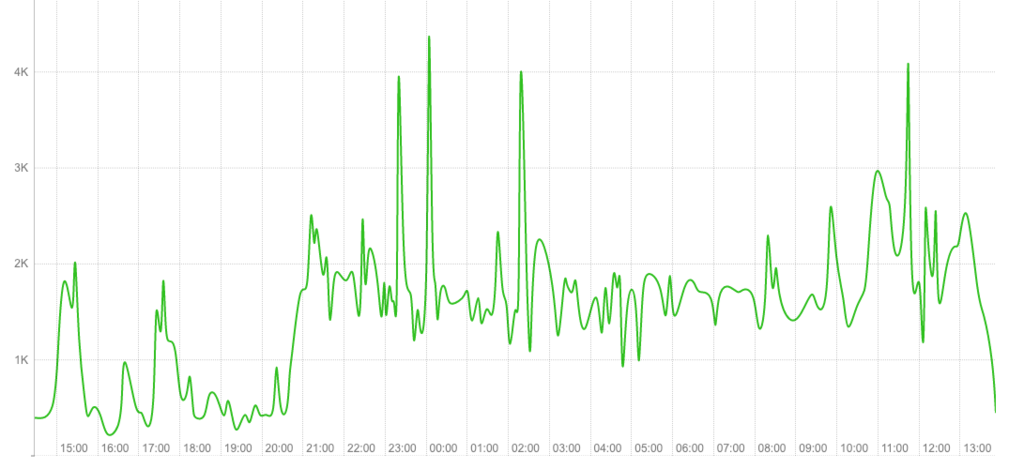
When we returned home, we plugged the car into the regular 110V outlet in our driveway (our level 2 charger is being wired up this coming week); here’s what the charge looked like:

Shape of our EV charge

The charge started at 8:30 p.m. Saturday night and finished at 1:30 p.m. on Sunday afternoon, running 17 hours (on the chart the Y-axis is watts and the X-axis is time).

09 Dec 03:06

Three Months With The Series 5

by Rui Carmo

For a number of reasons I don’t have the time or inclination to go into tonight, a few months ago I got myself a new Apple Watch, and I’ve been collecting assorted tidbits of my impressions thereof until there was enough to make a more substantial post than the usual fanboy crowd.

Bigger

I moved from a 38mm Series 3 (already running WatchOS 6) to a 44mm Series 5, and the first impression was that I had strapped an ancient cathode ray TV set to my wrist.

That was due partially to the physical size change, and partially to the much increased display area (the 40mm already has a lot more usable pixels than the 38mm as well, but the bigger form factor makes for a nearly 2x increase from what I was used to).

The size was a bit of a concern initially, but even with the sports bracelet (there isn’t anything else in stock in stores around here) it didn’t get caught in shirt cuffs, so it turned out to be fine in daily use.

It wasn’t an easy choice to make (I’ve always preferred smaller, slimmer watches), but improved readability and battery life took precedence.

Cosmetics

All my Apple Watches have always been space grey aluminum, for both weight and price concerns. I also prefer the sober look, although I found myself looking at the shinier variants every now and then.

This time, besides my usual favorite (the black Milanese loop, which I like for both aesthetic and comfort reasons even though it is heavier than the watch itself) I also got myself a bunch of Chinese knock-offs of the sports bracelet in various (reasonably sober) colors, plus a couple of sportier tones.

I’m hardly a fashionista, but the Milanese loop was kind of annoying in Summer and the black sports bracelet isn’t very comfortable at the beach either, so I’ll be trying those out in the sand next year.

But a part of me still wishes the watch was round. We may live in the future and appreciate the data it displays, but none of the gimmicky analog watch faces make sense for me on it, and I’ve settled on Infograph Modular as my default watch face.

That face does have a significant (and strangely short-sighted) drawback for me, though. it won’t let me swap out the date complication for another time zone, which is something I just cannot fathom since it seems to be possible on nearly every other watch face…

Overall Impressions

First, the good bits:

  • I like the always-on display and the way it manages brightness (very dim when partially obscured by a shirt cuff, perfectly readable when uncovered, and very bright when active). There have been exactly zero times when I could not glance at the watch and check the time or one of the complications.
  • There are significant delays between getting a haptic notification and the always on screen updating to show the little red notification dot, which means that Apple is really prioritizing battery life.
  • Automatic workout detection (especially for outdoor walks) works a lot better for some reason (I assume CPU). I haven’t tested fall detection (although I’ve enabled it), but in general the watch seems to be much smarter about kinetics and activity tracking.
  • The ECG feature is way more than a gimmick (for me at least), and does a decent enough good job at capturing variations in QRS and any changes in the occurrence of P waves). Getting a nicely formatted PDF in the Health app whenever you capture one is just icing on the cake.
  • Siri is very responsive (and loud), and despite remaining somewhat limited, it works OK. But it seems to be completely unable to run any kind of useful Shortcuts from the watch, and that remains a sore point, for I miss when Workflow (now Shortcuts) was able to run simple scripts on the watch. I used that to prompt me for menus and numbers to include on pre-formatted SMS messages or invoking Web APIs and getting a notification with the results, and I miss it a lot more now that I have a bigger watch face to tap on.
  • It is much faster than what I was used to, obviously, and the most notable aspect for me is that The TOTP tokens I keep in 1Password (for now, until Secrets gets around to implement a WatchOS app and I can finally switch over) are instantly accessible.

The not-so-good bits are mostly about gaps and bugs in third-party apps, but there are a few doozies in there:

  • I still can’t really get a grip on my calendar on either the built-in one or Outlook–the wonderful timeline mode that I had on my Pebble is something I sorely miss, but not being able to see anything beyond a single day’s appointments (or Calendar’s pretty but useless monthly view) is a major frustration.
  • You still cannot pair a Watch with an iPad. I know it probably will never happen, but we could have handed down my Series Zero to one of my kids (who are still far from owning a cell phone), if only for the sake of keeping it in use.
  • I really miss having Google Maps on the Watch. Apple Maps is still unaccountably–no tragically–bad in Lisbon, and Google’s decision to stop supporting Apple Watch still rankles.
  • The Home app is still pretty much useless on the Watch. Fortunately I can control most of my HomeKit devices via Siri, but the device-at-a-time approach is just ridiculous on this big a display.
  • WhatsApp notifications still suck at displaying media, and they don’t seem to have any interest in fixing them.
  • Responding to notifications is still a crapshoot in many regards–Apple still does not allow us to fully customize the order of canned responses or made it easier to dictate/swipe proper replies, which is annoying (especially when “Yes” is the tenth reply on the list for some reason).

Why some apps still haven’t made a comeback (or decent updates) when the number of Watches continues to climb is a mystery to me, but other than Google Maps and a nicer Uber app, most of the essentials I need are there.

Battery Life

Battery life has been great overall, considering I wear the watch round the clock, get both Teams and WhatsApp notifications on it throughout the day and also sleep with it.

And, of course, the LTE model is not available in Portugal, so I don’t even have the option of spending more battery (which I would not be interested in, honestly).

My 38mm Series 3 charged during my morning ablutions and trickled down to 20% over 24h most days (except on very busy ones), and comparatively the 44mm Series 5 has been able to match or exceed that over the past few months with ease, without any special settings other than noise monitoring off and brightness a smidgeon below average, plus a daily routine of enabling Cinema Mode when I’m going to bed.

The net result is that I sometimes wake up with over 40% battery remaining, which is pretty nice indeed.

Which reminds me: I have no clue why Apple hasn’t bothered with any kind of automation for switching off the display during the night, in the same fashion as Do Not Disturb.

It feels like a glaringly obvious feature even if they haven’t decided to tackle sleep tracking this time around (I’m still using AutoSleep, and it works just fine for me, as well as fitting in nicely with the other complications I have on Infograph Modular)

Final Thoughts

I wasn’t really expecting to upgrade this year, and it wasn’t for the always-on display, but the device now feels more whole with it somehow. I will be somewhat disappointed when Apple does something grubby like adding official sleep tracking features to the next iteration only (in somewhat the same way they “forget” to back-port new features to older iPhones even though they would be just as feasible there), but I really like this year’s upgrade and expect it to last me quite a while.

Now all we need (somewhat like the iPad, but with a narrower scope) is for the software to catch up until it is an awesome time keeping and navigation device instead of a glorified health tracker with rather uninspiring and inflexible watch faces.


09 Dec 03:05

Twitter Favorites: [gregeh] Yayyy indie book store open in Hastings hyphen Sunrise. https://t.co/cluIJhaxaf

Greg A @gregeh
Yayyy indie book store open in Hastings hyphen Sunrise. twitter.com/IronDogBooks/s…
09 Dec 03:05

Twitter Favorites: [SnarkySteff] Ooh. Okay. Hour later and my oven is preheating, the bread is scored! I can’t believe I’ve made sourdough bread. It… https://t.co/rqFgG8Vcer

Steffani Cameron, Repatriated Canadian @SnarkySteff
Ooh. Okay. Hour later and my oven is preheating, the bread is scored! I can’t believe I’ve made sourdough bread. It… twitter.com/i/web/status/1…
09 Dec 03:05

Twitter Favorites: [erikbryn] There are many ways to do capitalism. Some work better than others. https://t.co/IEysUWDi4A

Erik Brynjolfsson @erikbryn
There are many ways to do capitalism. Some work better than others. nytimes.com/2019/12/07/opi…
09 Dec 03:05

Procreate 5 Review: A Rebuilt Graphics Engine Drives Fantastic Animation, Color, and Brush Tools in an Art App Perfectly Tailored to the iPad

by John Voorhees

Procreate 5 for iPadOS is out with an impressive roster of new features. The update by Savage Interactive includes a new graphics engine, an updated color picker and color management tools, an incredibly deep and flexible brush studio, and a fun new animation assistant that brings your creations to life. Remarkably, these robust new features don’t clutter the app’s UI or add undue complexity. Instead, Procreate 5 delivers its added flexibility and power gracefully and in a manner that I expect both veterans of the app and newcomers alike will appreciate.

Procreate has been around since the earliest days of the App Store and has been used to create fantastic art. Over the years, we’ve covered stories of artists using the app to create everything from the Stranger Things poster art and a photorealistic portrait of Morgan Freeman featuring 285,000 brush strokes to a recent Apple ad. Procreate’s capabilities are impressive, but also a little intimidating.

I don’t consider myself much more than a doodler at best, which made me question whether the app was for me and whether I should tackle reviewing it at all. Here’s the thing, though: you don’t have to be a professional artist to enjoy drawing. Art is for everyone, and the key to Procreate’s success over its long history is that it too is for everyone. The app’s UI is a model of simplicity and progressive disclosure that stays out of the way, revealing its powerful tools only if and when you need them. Combined with a reasonable $10 price tag, Procreate is a fantastic choice for dabblers or pros alike, and with version 5 out today, Procreate is more powerful than it has ever been, but just as easy to use.

New Features Tucked Away in a Familiar Interface

The Procreate 5 Gallery.

The Procreate 5 Gallery.

If you’ve used Procreate before, the first time you open the Gallery in version 5 will be familiar because the UI hasn’t changed. Procreate includes its own interface for opening and managing files in the app instead of using the iOS and iPadOS document browser. From the app’s Gallery, you can create a new document from scratch using any of seven pre-defined templates, create a custom template, or import from the system file picker or your photo library. The Select button activates a mode that allows you to manage files by creating Stacks, which are essentially folders of images, or preview, share, duplicate, or delete files.

Procreate’s editor view. (Image via Procreate’s default gallery.)

Procreate’s editor view. (Image via Procreate’s default gallery.)

Once you open an image, you’ll enter Procreate’s editor, another familiar view that hasn’t changed. Along the top and left edges of Procreate’s main edit view are toolbars that serve as the gateways to the app’s full set of features. On the left edge of the screen are sliders for adjusting brush size and opacity along with a modify button that is part of the app’s extensive library of gestures. It’s impressive that the Procreate team has managed to resist overloading the editing interface with tools, which is something that I expect will be appreciated for its familiarity by existing users, and dramatically reduces the barrier to getting started for newcomers.

That streamlined design is one of the keys to Procreate. It conceals a lot of power under the hood, including most of the features that are new to version 5, and makes it easy to get started with the app. Buttons to access the app’s brush, eraser, smudge, and color picker tools should be familiar to anyone who has tried an art-creation app before. However, behind the buttons in Procreate’s toolbar is a deep set of tools and settings to explore. This review focuses on what is new in Procreate 5, but to learn more about the full capabilities of the app, I recommend checking out Savage Interactive’s support pages, which are a fantastic resource filled with tutorials, detailed instructions, and tips.

Colors

Procreate 5 adds a detachable color picker with harmony rules.

Procreate 5 adds a detachable color picker with harmony rules.

The first major revision in Procreate 5 that I want to cover is the color picker in the top right-hand corner of your iPad’s screen. Before version 5, the color picker was a popover that dropped down from the toolbar so you could pick colors. The trouble was that if you wanted to switch colors often, you had to reach for the corner of the screen continually.

In version 5, Procreate’s color picker is still a popover located in the top corner of the screen, but it can be detached from the toolbar by dragging it by the drag handle at the top of the picker. In its detached form, the color picker is more compact than in popover mode, which is an excellent way to conserve valuable screen space and put your color palette close at hand where it’s most useful.

Procreate’s previous color picker (left) and the new detachable color picker in Procreate 5 (right).

Procreate’s previous color picker (left) and the new detachable color picker in Procreate 5 (right).

Procreate 5 also includes a new Color Harmony feature that displays complementary, split complementary, analogous, Triadic, and the Tetradic colors to help make picking ones that work together easier. There’s a 10-color history strip that provides access to recently-used colors too.

The app also adds the ability to control color dynamics with the Apple Pencil’s pressure and tilt sensors. Hue, saturation, brightness, and other variables can all be tied to the Pencil, opening up a wide range of on-the-fly color transformations. Print artists should appreciate that Procreate now supports CMYK and RGB ICC color profiles too.

The combination of new color tools in Procreate 5 adds both convenience and depth. The draggable color picker, color history, and color harmony tools are the sorts of features that beginners and pros alike will be able to take advantage of immediately. In my testing of the app, I found myself using all three features regularly. Compared with earlier versions of Procreate, the changes reduce the friction of picking colors, making the process less of a disruption to the thing you’re creating. Color dynamics and CMYK and RGB ICC profile support aren’t something that I expect to use myself. Still, they’re essential additions for anyone who uses Procreate in print workflows and who is looking for greater flexibility in creating art on the iPad.

The Brush Studio

Procreate 5 has an extensive collection of default brushes. (Image via Procreate’s default gallery.)

Procreate 5 has an extensive collection of default brushes. (Image via Procreate’s default gallery.)

At the core of the Procreate 5 update is a new graphics engine called Valkyrie, which is based on Apple’s Metal framework. The new engine underlies everything you create onscreen in Procreate, allowing the app to do things that were not previously possible, including some of the new capabilities built into its brush system.

Tapping the paintbrush icon in the toolbar switches you to the brush tool for drawing and painting on Procreate’s canvas. Tapping the button a second time opens a popover of 18 categories of brush styles that organize a total of 190 brushes. That’s plenty of brush options to keep any beginner like me busy exploring options for a very long time.

Procreate’s Brush Studio.

Procreate’s Brush Studio.

Procreate’s brush support doesn’t stop there, though. Users can also create their own brushes, including combining two brushes into one, which the Procreate team says takes advantage of Apple’s Metal framework to seamlessly integrate the characteristics of each. You can also import Adobe Photoshop brushes and use them natively in Procreate.

Creating new brushes happens in Procreate’s Brush Studio. It’s an appropriate name for the full-screen feature that could be a standalone app itself. Tapping on the plus button in the brush tool’s popover opens the Brush Studio, which includes 10 categories of brush characteristics and settings that can be adjusted. The Brush Studio also has a drawing pad that changes as you modify settings, providing a preview of your newly-created brush stroke and a place you can test your brush. Once you’ve created a brush you’re happy with, you can share it by swiping left on it from the brush popover and using the share sheet.

The flexibility available for designing brushes is hard to convey. With so many ways to adjust and combine brushes, users can create an endless variety of unique styles that broaden the scope of what is possible with Procreate. Personally, I’m not likely to spend a lot of time creating brushes from scratch, but I appreciate the ability to start with an existing brush, duplicate it, and tweak a few parameters to suit my needs. With the feedback provided by the built-in drawing pad, the process is intuitive regardless of your experience level.

Animation

Procreate 5’s Animation Assist mode.

Procreate 5’s Animation Assist mode.

Perhaps my favorite new feature of Procreate 5 is its animation tool. As a doodler, nothing pulled me into Procreate 5 more than experimenting with bringing my doodles to life with animation.

To get started, tap the wrench button on the left side of the toolbar to access settings. In the Canvas section of the settings popover, toggle ‘Animation Assist’ on. As soon as you do, a new set of controls appear at the bottom of the screen, which will include the animation frames you create plus a few other controls.

Animation Assist brings your work to life as a shareable GIF.

Animation Assist brings your work to life as a shareable GIF.

Think of the strip of frames at the bottom of the screen like a flip book. Start drawing, adding frames as you go, and frames will use an onion skin technique to display echoes of earlier frames as you draw new ones, greatly aiding the animation process. Just above the strip of frames is a Play button for testing your animation, a Settings button for changing the frame rate, onion skin characteristics, the playback mode, and other settings. The final button adds a frame to the strip. Double-tapping a frame opens a popover with additional options, including the ability to set a hold time for individual frames, duplicate them, or delete them.

The steps necessary to create an animation couldn’t be more natural. At the same time, though, all of the image creation tools are available to create each frame, bringing the full breadth and depth of Procreate’s tools to bear as you craft an animation. When you’re finished, you can export your creation in a wide variety of formats, including as an easily-shareable GIF.

I expect animation will be the Trojan Horse that entices many users to try Procreate for the first time. Animation Assist was where I spent a lot of my time as I explored the beta of Procreate 5. It’s fun to play around with even if you’re only animating doodles and stick figures. At the same time though, each frame is a new drawing, which helps to quickly build experience using the app’s tools and encourages exploration of the other features Procreate has to offer.

Everything Else

As I mentioned at the outset, the Gallery and image editing views of Procreate remain the same as before, but that doesn’t mean there haven’t been changes to the design elsewhere. Most of the changes are subtle, but there are new icons, reorganized settings, and other tweaks that give the app a more contemporary look and feel while lending additional clarity and minimizing chrome that blocks the view of the canvas, which makes Procreate easier to use. Procreate also features a new clone tool that allows you to use any of the app’s brushes to paint one part of an image onto another area of the canvas.


Procreate 5 is a perfect example of the sort of sophisticated iPad tool that plays to the hardware’s strengths. The app harnesses the Apple Pencil, direct touch input, the power of the iPad’s graphics system, and Apple’s Metal framework, all in a way that is greater than the sum of its parts and uniquely an iPad experience.

What’s more, the design of the app makes that power approachable, and the price makes it accessible to a broad audience. The simplicity of Procreate’s canvas view and fun, engaging features like animation make the app approachable. With experience, though, users can easily discover and experiment with Procreate’s more advanced functionality, which is supported by extensive help and tutorial materials created by Savage Interactive, plus a large community of users.

The business model makes a difference too. Many beginners wouldn’t be willing to commit to a recurring subscription model for an app that they may not stick with, but at just $9.99, Procreate is an easy purchase for anyone who aspires to make art on their iPad and a bargain for pros.

If you’re looking to get more out of your iPad, Procreate is a great place to start. I’ve enjoyed the new features of version 5 and plan to spend more time exploring everything the app has to offer over the holidays, when I have a little extra downtime.

Procreate 5 is available on the App Store as a free download to existing users and $9.99 for new users.


Support MacStories Directly

Club MacStories offers exclusive access to extra MacStories content, delivered every week; it’s also a way to support us directly.

Club MacStories will help you discover the best apps for your devices and get the most out of your iPhone, iPad, and Mac. Plus, it’s made in Italy.

Join Now
08 Dec 04:37

What I want for CES

CES is a time to see new products and services. Alas, my expectations might be too high.
08 Dec 01:47

Understanding Collapse: A Physical Systems View

by Dave Pollard


image from the good folks at Pixabay CC0 (thanks Guillaume Preat)

While my belief in the inevitability of civilization’s collapse in this century is rooted in my study of complexity science and a commensurate appreciation of how change happens in complex systems, this is almost impossible to convey convincingly to those who haven’t studied and thought about complexity.

I don’t expect readers (or friends or loved ones) to have the interest and time to study complexity, so I often end up rather sheepishly just saying: If you take the time to study complexity science, you will understand how change happens and why it won’t happen in time to prevent civilization’s collapse. Not very compelling. Perhaps even annoying.

Thanks to a recent exchange with collapse podcaster Sam Mitchell, I’ve learned about a novel approach to explaining the inevitability of collapse using the metaphor of “super-organism” postulated by atmospheric physicist Tim Garrett and economist and Oil Drum/Post Carbon Institute editor Nate Hagens.

While Tim and Nate use the super-organism metaphor to represent global human civilization, my sense is that it would be even more apt to expand it to describe the entire organism of the living earth, what James Lovelock and Lynn Margulis affectionately if romantically call Gaia. I believe we are, in fact, inseparable from all-life-on-earth and our belief that we are separate is an illusion, a trick of our too-smart-for-our-own-good brains.

So with that expansion, let me describe this metaphor and how it might, drawing on Tim’s and Nate’s arguments, explain why the predicament of runaway climate change and the sixth great extinction is so intractable. (Please note that this is my elaboration of Tim’s and Nate’s metaphor, not how they have described it.):

  1. Over several billion years, just five physical elements have co-evolved to create what we call Gaia; together they are the ‘whole system’ that has produced everything that has ever happened on this planet:
    • the earth itself, five billion years old, with its soils and raw materials, volcanic eruptions and shifting tectonics
    • the earth’s environments (atmosphere, hydrosphere etc)
    • the ever-changing myriad of living creatures (all-life-on-earth)
    • the solar radiation that reaches and warms the earth and provides most of its energy
    • the occasional extra-system visitors (meteorites and other bodies that have impacted the earth, altered the planet’s spin etc)
  2. Gaia is of course a massively complex system, but when we view it as a single super “organism” we can also see it as amazingly simple — analogous to a single creature on a rock in a Petri dish under a heat lamp.
  3. From this perspective we can see that Gaia is really inseparable. As Stephen Jay Gould (in Full House) and Richard Lewontin (in The Triple Helix) have explained, the complexity of the interdependence between all the living creatures in the organism, the earth on which they live and the atmosphere in which they live is such that any analysis that attributes separate qualities to ‘parts’ of Gaia will be hopelessly flawed and possibly dangerously simplistic. Gaia is, and acts as, One living creature.
  4. It pretty much evolves by itself. In this part of the universe (unless you believe in UFOs), it’s the only game in town. It’s recently evolved into a much more complex form thanks to its ‘learned’ ability to stabilize its atmosphere, which has really worked well over the past 10-20 millennia, and thanks to the absence of any large external bodies hitting it, the absence of major eruptions within its crust affecting its atmosphere, and the absence of major anomalies in solar radiation. It’s gone through countless expansions and contractions of complexity, but the recent stability has greatly reduced the number and severity of collapses (extinctions) of its life-mass, greatly increasing its diversity and complexity.
  5. But at some point about 10-20 millennia ago, it became dysfunctional. Somehow* a part of it became ‘disconnected’ from the rest of Gaia and began to behave in ways insensitive to and damaging to the whole organism. As every part of the organism is utterly interdependent, this ‘disconnected’ part quickly became dis-eased and unhealthy, and in its desperate attempt to survive ‘independently’ it has dug into the core of the earth and exhausted the mineral resources the entire organism depends on, and spewed the wastes from this frantic activity into the atmosphere. So now the earth is depleted, the atmosphere is poisoned, and the entire organism is in a state of exhaustion and collapse that it inadvertently brought upon itself. And there is nothing left to mine and nowhere else to put the waste poisons the now-cancer-ridden organism continues to emit.
  6. Absurdly, the dysfunctional part of the organism acts as if it believes it can ‘save’ itself and the entire organism, either by continuing to accelerate its dysfunctional behaviour slightly differently, or by somehow ‘reforming’ itself and the entire organism, or by escaping Gaia entirely. Such is the delusion of disconnection. Clearly, this cannot end well. Still, it is in the nature of the organism to continue to try to heal itself and restore equilibrium; it cannot do otherwise. It limps along, immiserated by its now-massive, bloated and useless cancerous part. Somehow it knows its self-healing is not working very effectively this time, and that this collapse, this extinction, will be much more severe than any that it can ‘remember’.

Yes, I know this metaphor is a bit strained, but I think it’s useful, and better than telling readers that if they study complex systems they’ll understand the inevitability of near-term (this century) civilizational and ecological collapse. I also like that it doesn’t place humans apart or in apposition to the rest of life on earth, the rest of the Gaia organism. No one is to blame. We are all One. We are all doing our best, what we’ve been conditioned to do for a billion years, the only thing we can do.

It may seem strange to take individual people, culture, economics, politics, technology and other factors out of the equation about what the future might hold in store, but Tim makes a compelling case that “Our personal feelings aside, we are just sacks of matter that enable electrical and fluid flows down potential gradients. It sure has been hard for neuroscientists to find any evidence for free will; so perhaps people are really no different than any other physical system.”

Tim says that our current situation is a “double-bind“: One of two things will happen (again this is my elaboration of Tim’s conclusion, not his description):

  1. Human civilization collapses soon, economically/financially, politically, socially: Resource consumption and emissions drastically fall, human population plunges, the climate convulses but does not reach the runaway collapse stage, and the sixth great extinction slows and ends. Over millennia, the equilibrium of Gaia is restored.
  2. Human civilization continues to grow at or near a “business as usual” trajectory: CO2e concentrations reach 1000 ppm, and average surface temperatures rise 6-12ºC or more, which cannot support human or much other life, so human civilization collapses anyway; runaway climate change accelerates the sixth great extinction and eliminates all but the simplest life forms, and the equilibrium of Gaia either takes many more millennia to stabilize and slowly recover, or the climate is ‘permanently’ changed to a Venus-like lifeless state.

The end-game, as far as humans and our civilization is concerned, is pretty much the same. And we humans, just a part of ailing Gaia, can do nothing to choose between these equally-awful alternatives. We can’t even plan or prepare for this, because we cannot possibly predict precisely how and when this will all play out; we can only know how it will end.

What if there’s nothing we can do? That’s the question I’m starting to think about now. Like a passenger in a vehicle skidding off the edge of a huge cliff, what do you do when nothing you can do will make any difference?

My thoughts on that, coming soon.

_____

* Ajit Varki has called this dysfunctional disconnection the Mind Over Reality Transition, that seemingly occurred uniquely in the human species as our brains evolved the dual capacity to reinterpret and deny ‘unpleasant’ realities, and to ‘realize’ (conceive of as ‘real’) the idea of separate personhood and personal death , which he calls “intrinsically maladaptive traits”, as they condition us to ignore what’s true and to put the ‘self’ ahead of the collective interest.

It’s anyone’s guess, of course, but I’d be inclined to say this dysfunction arose because early humans, pummelled by the ice ages, cosmic radiation, and other climate disasters, had to abandon their long-time comfortable tropical homelands and venture into new ecological zones fraught with new dangers and the constant stress of scarcity. Those early humans that found this reality too much to bear might have decided not to procreate, while those that had these “intrinsically maladaptive traits”, less connected to the natural world and what was perhaps ‘good for them’ might have persevered and procreated, producing a hardened, desensitized, disconnected species that used denial as a coping mechanism and ‘laughed in the face of death’. Perhaps this evolution, while dysfunctional in the longer term, was, in the short-term, adaptive rather than maladaptive?

08 Dec 01:44

The Best Full-Frame Mirrorless Cameras

by Phil Ryan
Rolandt

jj

The Best Full-Frame Mirrorless Cameras

You probably don’t need a full-frame camera. But if you’re convinced that you need the slightly cleaner images a full-frame camera can create at extremely high sensitivity settings, or if you want to use old manual lenses through adapters, we think the Sony ɑ7 III is the best full-frame mirrorless camera to get. It produces beautiful images, it has fast, accurate autofocus, and at the moment more full-frame lenses are available for Sony’s system than for any other brand’s cameras.

08 Dec 01:34

MainWP to Manage Multiple Sites

by Ton Zijlstra

Elmine, in her role as resident WordPress expert, pointed me to MainWP. MainWP is a tool that allows one to manage updates of WordPress and plugins, from a separate single WordPress instance.

That separate single WordPress instance doesn’t need to be online, and can be hosted locally. So I installed it on my laptop. That way there is no attack surface for the outside that would risk allowing access to my 6+ sites that run WordPress.

It turns out, an added benefit is that I can also post to any of those sites from this local instance. This has as an advantage that I can draft postings offline on my laptop, and then push them to a website when done. That should help me write more and with a lower threshold. It has a few drawbacks, as offline I don’t have access to some features I use regularly (post kinds, and more importantly previews).

This post serves as a test, posting from my wordpress instance on localhost.

08 Dec 01:33

Coldbike winter bicycle pogies

by jnyyz

I’ve been using a pair of pogies on my winter bike for a couple of seasons now. They were designed by someone in Toronto under the original name “Handlebar Booties” but at some point the production was moved offshore, and the company name was changed to “Metal Tiger”. They are still available at Urbane Cyclist.

IMG_3588Overall I’ve been satisfied with them, but they’ve never worked very well with the swept back bars on my Garneau. This picture illustrates the problem:

IMG_3589

These pogies are really designed for straight bars, and they don’t provide a lot of hand coverage with my setup.I had admired a bigger set of pogies that I saw on a group ride a couple of years back by Dogwood Designs.DSC01985However, I recently saw a tweet from my favourite bike shop in Calgary that there was an alternative that was made in Canada, and so I discovered the Coldbike pogie. These are made by Doug in his basement, and by the way he has an awesome blog as well. His most recent post is all about keeping your hands warm while winter biking. (they come in black as well, BTW)IMG_3586IMG_3587The grey hems are made out of reflective material. Here is the comparison with the handlebar booties. Which one looks warmer?IMG_3592Each one has an integrated bar end that is meant for a straight bar.IMG_3585Here is a test fitting on the bike.IMG_3590IMG_3591Interestingly enough, the bar ends appear to have been 3D printed.IMG_3593Given that I have swept back bars, I decided to relocate the bar ends closer to where my handlebars actually end.  I put them on the underside of the pogie, and here you can see what the installation looks like with it turned partially inside out.IMG_3627The pogies have a stiffening rib that runs close to the original location of the bar ends (where you can now see a little hole). I bet this works really well if you have a straight bar.IMG_3628These pogies do a much better job of keeping my hands warm. Ironically, I installed them just as the weather turned warmer, and so I won’t be able to report on how they do down at -20°C for a while. I will say that when it is warm, the shell and pile lining are flexible enough that I can just grip my bars outside of the pogies, and I have no issues with braking or even using the grip shifter on the right hand side.IMG_3625I’ll report back again when it gets seriously cold, but for the moment I am very happy with my new purchase. Doug has recently released another version of the pogies that are compatible with drop bars. In the meantime, my Handlebar Booties have migrated to my cargo bike.IMG_3636

08 Dec 01:31

NewsBlur Blurblog: I have thoughts about therapy! Some of them may even help you.

sillygwailo shared this story from Blog – The Roof is on Phire.

One of my absolute favourite things to be asked is whether I have any advice for finding a therapist. This is because:

  1. I’m a huge fan of mental health and people getting help and treatment.
  2. I’m extremely honoured that people trust me to treat their question with care, to keep their confidence, and to provide good advice.
  3. I really love telling people what to do.

I’ve been getting this question more frequently recently so I thought I’d write up a guide for easy reference. I’m located in Toronto, Canada, but most of this advice applies across the board. There’s also a list of self-guided resources at the bottom if you’re not quite ready to take that plunge.

Disclaimer: I have no professional training in health care of any variety. My credentials mainly consist of having had five therapists in four cities in two countries and interviewed many more, so I’ve done this a lot. Comments and suggestions super welcome.


If you know for sure you want a therapist but don’t know how to go about finding one

Congrats! I’m genuinely super psyched for you. I know this can be overwhelming, but it’s worth it, I promise. There are three main components to this process:

  1. Figuring out what you want to address
  2. Finding a therapist
  3. Deciding if that therapist is right for you

Figuring out what you want to address

Everyone has their own reasons for why they might decide to get into therapy. It can be a good idea to write some of these reasons down on a post-it, and have that in front of you as you navigate this.

Figuring out what you want to address doesn’t mean you have to know exactly what’s wrong. It just serves as a jumping off point to focus your search. The thing you want to address could be trauma, dealing with microaggressions, bereavement, grief, a recent fight with a romantic partner, paralyzing unspecified anxiety, inability to talk about feelings, or existential dread about the future of the world. (Not that I, uh, know anything about any of those things.)

If you know what you want to get out of therapy, that can be super helpful. This might include things like coping mechanisms for when you get stressed, strategies for setting boundaries or dealing with conflict, or just a better understanding of your own motivations. If you have no idea what this is, that’s fine, too. Therapy will help you figure that out!

Finding a therapist

I find that this is the part that people find the most intimidating. Depending on your personality, you can either ask for help, or start from scratch. I’ve done both, and both are great.

Ask for help finding a therapist

The quickest way to short-circuit your search is to see if your local university or health care network has a referral system. Typically, this involves someone interviewing you and assigning you someone they think will suit your needs, and you can skip the whole research piece altogether. Often these systems also work with student practitioners, who are typically much more affordable.

Here are the main ones I know of locally, though I’m sure there’s many more.

If you’re in post-secondary education, your school probably provides some degree of mental health support. Navigating these can be tricky and each system is different, so I recommend reaching out to your school’s student accommodation centre for more specific advice.

If you or your partner work somewhere that provides health benefits, chances are that job also provides an Employee Assistance Program with a toll-free confidential number you can call for support. EAPs often have short-term counselling available, and even if you need something more ongoing, it can still be a good resource for figuring out how to set that up.

Also, don’t underestimate the power of just asking your friends for a recommendation. You might be surprised by how many people have been to therapy.

Finding a therapist from scratch

I personally start all my searches on the Psychology Today search engine, which is extremely broad and covers most local practitioners. Licensing authorities like the Ontario College of Social Workers and Social Services Workers , the College of Psychologists of Ontario, or the College of Registered Psychotherapists of Ontario will also have their own search engines. I personally like Psychology Today because it tends to aggregate all of these and has the most robust search filters, but I know it can be super overwhelming. Do what works best for you!

Generally I suggest doing enough research to find 3–5 candidates you might be interested in talking to, talking to them on the phone, and setting up in-person sessions with 1–2. You don’t have to do everything at once, or on the same day. Try setting a few hours aside over the course of a week or so and putting that in your calendar; that way you don’t have the pressure of figuring it all out immediately and have some room to breathe.

Here are some of the things I like to think about as I research:

  • Approach to therapy: There’s a ton of different approaches to therapy, and some of them will work better for you than others. It can be a good idea to familiarize yourself with some of them. The Psychology Today search engine, for example, will let you narrow your search by therapy style. You might need trauma-informed therapy to deal with your past, CBT to address specific behaviours you want to stop (or start), and mindfulness can be really effective at treating anxiety. If you want to talk about microaggressions, you probably want to look for a therapist trained in cultural sensitivity, queer inclusivity, or feminist approaches. However, if you feel totally overwhelmed by the idea of digging into all of that, it’s totally okay to skip this. Most therapists are familiar with multiple styles, and they’ll be able to guide you to something that works for you.
  • Non-therapy experience: Most of the therapists I’ve had in my life had a different job before going into health care. One of them used to be a lawyer, so they’re really good at calling me on my rhetorical bullshit. Another is a novelist, so I really felt heard when I talked about my creative blocks. It won’t make or break your therapy relationship, but it might grease the wheels to already have something in common.
  • Location
  • Price / insurance accepted
  • Years in the field

Even if you’ve been very selective in what kind of therapist you want and where you want to see them and how much you want to pay, sometimes you still find yourself with too many options. There are a lot of therapists out there, and all of them are on the internet. This is usually the point I start to despair.

Here’s the thing: it’s okay to be entirely arbitrary in your selection choices. You need to feel comfortable being vulnerable with this person, and as much as your rational brain might be like “I shouldn’t judge someone for having terrible taste in statement jewelry”, if your gut feeling about someone is mistrust for whatever reason, that can be a hard thing to get over. Here are things I have personally disqualified therapists for:

  • Autoplay music or video on their website
  • A website that looks like it was last under construction in 1996
  • An overly polished website, I know, I’m a pain in the ass
  • Over-reliance for spirituality-informed practices (which is fine for other people but probably not a die-hard atheist!)
  • Weird decor in the photos of their clinic space

You’re not in a court of law. You don’t have to be perfectly fair. It’s definitely important to keep in mind the latent biases we inherit from society, such as associating nurture with femininity, or being attracted to people who look like us. You know who might be a really good person to help with that? A therapist.

If this still sounds like too much, I give you permission to just pick the first three names near you and call them for a consultation. You’re not proposing marriage, here. You don’t have to be 100% sure for therapy to still be helpful.

Deciding if that therapist is right for you

Call them for phone consultations

Many clinics and therapists allow you to book your appointments online or over email, but I find that phone calls are still the best way to get a feel of whether you’ll feel comfortable talking to that person.

Have a script

If you’re not used to talking on the phone, the thought of calling some stranger and trying to figure out whether you’re willing to expose the rawest part of you probably doesn’t sound super fun. I like to write down what I want to say first and have it open in front of me. This doesn’t have to be some big decision tree; it can be as simple as “Hi, my name is [name] and I’m located in [city/neighbourhood], and I’m looking for a therapist who can help me with [generic issue]. Can I ask you a few questions about your practice?

You might catch them in the middle of a session with a client, in which case you’ll have to leave them a message. Don’t hang up! This is normal! Therapists’ voicemail boxes are confidential — just re-use the above and add “please give me a call back at [number]“.

If you find you didn’t click with someone on the phone, hanging up can also feel daunting. My go-to is “thank you so much for the information, I’m talking to a few other therapists as well and I will be in touch if I decide I would like to move forward“. They do this for a living; they’re not going to be offended.

Prepare some questions

It’s possible you are less anxious about being on the phone than I am, but if not, it’s a good idea to have some questions written down before you call. Here are the three questions I always ask:

  • Tell me a little more about your general approach to therapy
  • Do you have any experience with social justice-informed therapy or feminist practices?
  • How would you rate your familiarity with technology and the internet?

These questions work for my specific needs because the reaction to the question tells me almost as much as the response. If someone starts being very flustered when I say “feminism” and tries to throw buzzwords at me, they’re probably not the right person. However, if they say that they haven’t specifically practiced in that area but can relate it to, say, social worker burnout, that’s a good sign. And I don’t necessarily need (and probably shouldn’t have) a therapist who’s Extremely Online, but if I’m talking about FOMO or information overload I would rather not have to preface it by explaining what Twitter is. You’ll have different questions, and different red flags. It’s worth taking a few minutes to think about what these are before you pick up the phone.

Also pay attention to how the conversation flows. Most therapists will ask you to expand a little bit on what specific issues you want to address – are they good at prompting you? Do they talk over you? Do you feel like the silence is awkward? These cues can tell you a lot.

Evaluate them in person

I honestly don’t have a ton of advice here, because you’ll know best whether you’re clicking with someone in person once you’ve made an appointment with them. Here are some things to keep in mind:

  • Feeling discomfort is not the same thing as not clicking with that therapist. Most of us are not used to talking about our feelings and being vulnerable with another person (or with ourselves) and sometimes we take that discomfort out on the person in front of us. It’s also super common to transfer our emotions for other people in our lives to the therapist. Unless there’s an egregious red flag, I would recommend sticking with a therapist for at least two sessions before making a decision.
  • Your therapist is not your friend, and should not be your friend.
  • Remember that your first therapist doesn’t have to be a perfect fit, and oftentimes they won’t be. But every therapy experience will teach you a little bit more about what you want out of an optimal therapy experience.

All that said, pay attention to the physical feeling in your body and trust your gut. Your gut’s pretty smart.


If you’re not quite ready to get a therapist

That’s super understandable; in-person therapy is expensive and time-consuming and daunting and hard. There are still lots of resources out there for you even if you don’t want to talk to a person face-to-face.

Books

These are the ones I’ve read and can vouch for:

Here are some books I’ve heard tons of good things about but cannot personally vouch for:

Phone apps

Guided meditation and mindfulness

Anxiety and depression and CBT training

Mood trackers

Talk therapy apps

As your local resident paranoid tech professional, I personally don’t recommend these, because they’re unregulated and have very few accountability structures in place, therapists have spoken out about the lack of support for escalating dire situations, and they’re just generally rife with inevitable privacy and data retention issues. Plus, they’re often not much cheaper than a student session in Ontario. That said, whatever helps you is worth trying.

Misc


The most important thing to remember is that this is a journey, not a destination. I’m really happy for you that you’re taking this first step. Whether you succeed in finding a therapist or not, the act of looking for a therapist is a signal to yourself that you are worth taking care of. You are. You’ve got this.

08 Dec 01:30

Twitter Favorites: [skinnylatte] This is a thread of Malaysian Chinese food that I miss. Malaysian Chinese food is largely Cantonese / Hokkien / Hak… https://t.co/mOFaCzDEgJ

Adrianna Tan @skinnylatte
This is a thread of Malaysian Chinese food that I miss. Malaysian Chinese food is largely Cantonese / Hokkien / Hak… twitter.com/i/web/status/1…