Shared posts

09 Apr 18:13

How we found and fixed a rare race condition in our session handling

How we found and fixed a rare race condition in our session handling

GitHub had a terrifying bug this month where a user reported suddenly being signed in as another user. This is a particularly great example of a security incident report, explaining how GitHub identified the underlying bug, what caused it and the steps they are taking to ensure bugs like that never happen in the future. The root cause was a convoluted sequence of events which could cause a Ruby Hash to be accidentally shared between two requests, caused as a result of a new background thread that was introduced as a performance optimization.

09 Apr 18:12

What to Expect When You're Expecting COVID Immunity

by Cooper Lund

A year and a couple days ago I wrote a post on Indoor Voices about having lived through a COVID outbreak in China, recognizing that I had a certain amount of insight into our collective American futures from what turned out to have been a disastrous vacation and what I had todo upon my return. Looking back on it I was right about certain things but dead wrong about the course of the pandemic. I said that it would just be a few months, and here we are a whole-ass year later doing basically the same thing. I should have known that America was in no place to fight this when I received no guidance on what to do when I returned from a hot zone, but I guess I (mistakenly) thought that we could all collectively identify a threat and mobilize against it. In a way we kind of have, engaging in the herculean task of vaccinating everyone with two shots of a miracle cure that has to be kept at temperatures usually reserved for Dippin' Dots, and because of that I have once again found myself ahead of the pandemic curve. 

My sister texted me one Sunday morning saying that there was a Duane Reade that had doses expiring at noon and that we should call immediately. An hour later, my girlfriend and I had a shot of Pfizer in our arms and I had whole lot of feelings that every American is going share in someday soon. It's odd, there's a process going on in my body that I have no real insight into that is going to change my life in significant ways. I've begun to think of it as being pregnant with not getting the Coronavirus. I know that it's a clumsy way of thinking about it, but I also don't have a different framework for waiting for the vessel that I inhabit to do something. All I can do is wait for my second shot, when all the antibodies and other invisible things inside of me can become real. I have to say as I come up on two weeks since my first shot - I'm getting kind of impatient with it.

That impatience is something that I haven't felt in a long time, since before any of this happened. On March 17th of 2020 I wrote:

But at the present moment, our completed loss is the loss of the ability to look forward to anything other than the end of the virus. I used to get through weeks by thinking about the weekend, and days by thinking about what potential the end of the day might have. Now the end of the day looks the same as the day, and the weekend feels the same as the week does. I do not know when it will end, but I know that someday my anticipation will return, unlike the other things I have lost along the way.

What I wasn't expecting was my sense of anticipation to crash back into me as soon as the needle entered my shoulder. As my girlfriend and I waited around the pharmacy to see if we'd have an allergic reaction I couldn't help myself from looking at Mets tickets on my phone and daydream about drinking a 25 oz Goose Island on a still chilly April night. For the first couple days after my jab I had issues sleeping. I guess I had forgotten how to turn my brain off over the past year and it excitedly jumped between thinking about haircuts and dental appointments. I know that we're still a long way from normal, but it's intoxicatingly invigorating to think about something as simple as having friends over to drink on the couch or receiving routine medical care. It's like emerging from hibernation after a long emotional winter.

That's not to say that my burgeoning immunity is a slam dunk for my mental health. I've always been a hypochondriac, and that's an urge I've done my best to fight over the past year to avoid becoming a paranoid shut-in. On a certain level we've all normalized the risks we take just to get through a pandemic day, accepting that we have to go to the grocery store and to try to socialize safely and outdoors, and we've made an uneasy peace with the idea that we can do everything right and still get sick. We can tell ourselves that it's not our fault if we get sick, but once there's a clock ticking on how much longer you're going to be susceptible to COVID, you realize just how embarrassing it would be to get it now. To get this close and get sick would be an absolute gutpunch, like you saw the face of god and he flipped you off. I'm a healthy young man so I'm not worried about dying if I do catch it, I take my precautions for the sake of people who aren't as lucky as I am, but I would feel like I wanted to die. It would feel like going on a nice run through the park was pure hubris, and I certainly don't want that.

This also gives me a convenient reason to talk about guilt, because that seems to be the primary emotion for young people who are already vaccinated. I felt it when I stood in line with people who seemed older than my 95-year old grandmother, but I told myself that the doses were going to expire in half an hour and it's better to put it in my arm than down the drain. When I posted that I had gotten vaccinated I was completely unprepared for the number of people who reached out to me to talk about how guilty they felt for getting it, that they didn't think they were worthy of getting a dose before other people. I wrote a whole piece about vaccine guilt on my Medium, but I'd like to repeat myself and say that getting vaccinated isn't just for you, so don't feel bad if you got it before you thought you should. You getting vaccinated breaks the chain of transmission and means you can't get someone else sick or, god forbid, take up a hospital bed that someone else might need. You're not getting vaccinated so you can go back to bars, you're getting vaccinated so someone else will have a better chance of getting back to however they want to live life.

Pretty soon we'll all get that second jab and give birth to our immunity. We'll be able to go back to doing the things we want to do. In fact, it's probably going to happen more quickly than you think. Vaccine deliveries are accelerating, more needles are finding their way into arms, and eligibility keeps expanding. Maybe you'll feel less guilty than the people I've talked to because of it. The nicer the weather gets, the better life will become. You might want to try daydreaming about it, it'll be good for your mental health. We're on the home stretch of this thing, just try to not go viral. It would be humiliating.

09 Apr 18:12

Reinstating net neutrality in the US

by Amy Keating

Today, Mozilla together with other internet companies ADT, Dropbox, Eventbrite, Reddit, Vimeo, Wikimedia, sent a letter to the FCC asking the agency to reinstate net neutrality as a matter of urgency.

For almost a decade, Mozilla has defended user access to the internet, in the US and around the world. Our work to preserve net neutrality has been a critical part of that effort, including our lawsuit against the Federal Communications Commission (FCC) to keep these protections in place for users in the US.

With the recent appointment of Acting Chairwoman Jessica Rosenworcel to lead the agency, there will be a new opportunity to establish net neutrality rules at the federal level in the near future, ensuring that families and businesses across the country can enjoy these fundamental rights.

Net neutrality preserves the environment that allowed the internet to become an engine for economic growth. In a marketplace where users frequently do not have access to more than one internet service provider (ISP), these rules ensure that data is treated equally across the network by gatekeepers. More specifically, net neutrality prevents ISPs from leveraging their market power to slow, block, or prioritize content–ensuring that users can freely access ideas and services without unnecessary roadblocks. Without these rules in place, ISPs can make it more difficult for new ideas or applications to succeed, potentially stifling innovation across the internet.

The need for net neutrality protections has become even more apparent during the pandemic. In a moment where classrooms and offices have moved online by necessity, it is critically important to have rules paired with strong government oversight and enforcement to protect families and businesses from predatory practices. In California, residents will have the benefit of these fundamental safeguards as a result of a recent court decision that will allow the state to enforce its state net neutrality law. However, we believe that users nationwide deserve the same ability to control their own online experiences.

While there are many challenges that need to be resolved to fix the internet, reinstating net neutrality is a crucial down payment on the much broader internet reform that we need. Net neutrality is good for people and for personal expression. It is good for business, for innovation, for our economic recovery. It is good for the internet. It has long enjoyed bipartisan support among the American public. There is no reason to further delay its reinstatement once the FCC is in working order.

The post Reinstating net neutrality in the US appeared first on The Mozilla Blog.

09 Apr 18:10

Muddling through as smart strategy

by Jim

There’s a certain subset of academic articles that are as, or more, famous for their titles as they are for their insights. Charles Lindblom’s “The Science of Muddling Through” has to be on that list. Lindblom’s field was public policy but his insights are more broadly applicable. 

He starts with a simple enough observation; administrators don’t behave the way that theory says they should. Textbook decision processes of carefully articulating objectives, developing options, and selecting solutions that optimally meet objectives don’t show up in the wild. Real managers “muddle through,” making incremental changes and nudging complex systems in directions they hope will prove “better.” 

Lindblom’s insightful question was to wonder whether administrators weren’t as dumb as they looked. Theorists have the luxury of pretending that history doesn’t exist; real managers always start from Ken Boulding’s observation that “things are the way they are because they got that way.” The real world always imposes real constraints. 

The simplifying assumptions that economists and model builders must use to make their work tractable can be acceptable for simple enough problems. It’s dangerous to believe that the techniques that work for suitably constrained problems scale. Problems up the ladder aren’t simply bigger, they are more complex. That complexity transforms tractable problems into wicked problems.

“Muddling through” is what actually works; the primary metric for practicing managers. 

The post Muddling through as smart strategy appeared first on McGee's Musings.

09 Apr 18:10

Weeknote 11/2021

by Doug Belshaw
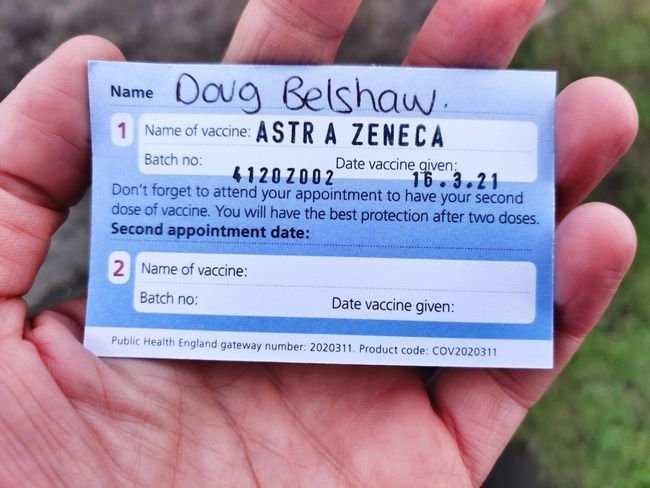
Card with name 'Doug Belshaw' and details of Astra Zeneca COVID vaccine batch number (4120Z002) and date (16.3.21)

The biggest and most unexpected news in my life this week was receiving a COVID vaccine. I had been contacted by the NHS by text message, and had booked an appointment for April, but then was called on Wednesday morning and asked to go that very day.

I’m asthmatic, and was in childhood, and then again from age 27. It’s well-managed, though, and doesn’t stop me from (usually) leading a reasonably-active lifestyle. As a result, it felt a little like receiving some kind of golden ticket.

While I can’t complain about getting the vaccine, I had planned to receive it on a Friday afternoon. This is because I know how I usually feel after receiving my annual flu jab, and I didn’t want it to interfere with my working week. Sure enough, I felt rough on Thursday and Friday. I’ve also got a bad back (still!) but I’m trying not to grumble.


This has been Week 10 of the Catalyst-funded Universal Credit programme I’m project managing, and Week 5 of the Definition programme I’m working on with my co-op colleagues. With the former, we’ve just a week left (bar any continuation funding) so we’re wrapping up our prototype work and focusing on reporting/handover. With the latter, we’re helping the charities get ready to create their ‘Minimum Lovable Product’ (MLP) and then test it with their target audience(s).

Other than some business development, it’s been Catalyst all the way this week for the ~23 hours of paid work I did. I read an article in Fast Company this week about the 25-hour work week and how it’s the future. Well, right now it’s the reality for me. I’m not sure, to be honest, where the 37.5 or 40-hour work week comes from. I average about 5 hours per day and, as I’ve said many times before, four hours of that is solid knowledge work and the other is admin.


I’m still reflecting on just what my response should be to the ‘Deep Adaptation’ paper I wrote about recently. My concern is that it feels like a potentially-valid response to throw your hands in the air and double-down on things that maximise both hedonism and killing the planet.

That’s not what I feel like doing. I feel like minimising my impact on nature. As an educator (by training) and a technologist (by interest) I feel that I should not only make some changes to my digital life, but encourage others to do likewise. I’m struggling a little to know exactly what to do, but I’ve been checking out Low-tech Magazine’s solar powered website, and outside of work I’m using some older, lower-powered tech. It doesn’t feel like enough, though.


I think I might need a break from writing Thought Shrapnel for a bit. It’s devolved into me just sharing links via blog posts which then get packaged up into a weekly newsletter. Last week, I just shared a couple of posts I’d written on this blog instead. What I probably need, like most people, is a holiday to get away from the home in which I live and work.

Next week I’ve scheduled a couple of days off, but I may need to move things around due to the requirements of the projects I’m working on. Right now, I feel like I’d like to go and pitch my tent somewhere with some nice scenery for a few days, do some walking, and cook on a Trangia. It won’t be long before all that’s possible, I suppose.


Photo taken by me on Wednesday.

The post Weeknote 11/2021 first appeared on Open Thinkering.
09 Apr 18:10

Acorn 7

Acorn 7, our image editor for humans, is out. It's currently on sale for $19.99 (50% off), directly from us or via the App Store. After the sale, the full price is moving up to $39.99 from $29.99. So unless you feel like giving me more money later on, now is a good time to buy it.

So what's new? Here's a casual overview of some things I find interesting with this release.

Visually, the most striking difference is the new unified windows. Acorn 7 has all the floating palettes placed together in the same window as the canvas (and if you prefer floating windows, we've got a pref for that). Unified windows have been a major feature request for a number of years, and I'm super happy to finally have it done for everyone.

It's nice. The same shortcuts work as before - the tab key will hide the inspectors, and ⌘⇧F will bring up the filters inspector as always. Pressing the f key will throw the window into full screen, and now the canvas isn't covered up by the floating palettes.

Acorn 7 is optimized for Apple M1 Silicon. The previous version of Acorn ran pretty well in the M1's emulation layer, Rosetta, but now Acorn 7 is natively built for the M1 which bumps up the speed. Beyond that, a bunch of filters were re-written in Apple's Metal GPU shading language, and I also managed to discover some other Metal optimizations which made Acorn's canvas drawing run quite a bit smoother (As an aside, I was very happy about this. While researching this problem I encountered forum questions posted by myself on this very topic from years ago. It always feels weird when that happens).

The Flood Fill, Instant Alpha, and Magic Wand tools all use a brand new multi-threaded seed fill routine I wrote and optimized on the M1 as well. Super geeky side note: as part of the debugging process when I was coding it, I had each thread draw different colors into a mask which was used for the result. On Intel, each color had a mostly equal representation across the mask. But when I was testing it on the DTK, which has two high performance cores and two low performance cores, you saw an imbalance where some colors were overrepresented and others were underrepresented. It was a visual result of the different speeds of the cores, which I thought was pretty cool.

New Perspective Fix & Crop tool. This handy little tool will draw guides on your canvas to help you fix perspective distortions. You simply line up the guides on your image by moving four handy little corners around, and press enter. Your image is then run through a perspective correction filter and cropped to the appropriate area.

I didn't think much of this feature at first, but I'm pleasantly surprised at how well it's being received. Props to for Kirstin pushing for this feature to be included.

Acorn 7 also has a new color picker. I've been wanting to do this for years, because the system color picker has been nothing but problems for me on account of its inability to set and stick with a specific color profile. For instance, if you have an image open in sRGB but you sample a color from the screen using the system picker, Acorn has to jump through hoops to convert it from the screen's color profile (which most certainly is not what the image is) and then into sRGB, and also keep the color picker informed about this profile change. And then I'd get support questions asking why colors were shifting ever so slightly, and I always hated answering those emails because to understand what's going on requires a lot of base knowledge about profiles and such, and well… it was a bother.

I could write pages and pages of other problems I encountered - but I'll spare you the details. Obviously, I had all these issues in mind when making the new picker, so it only ever has a single profile it draws with, and that's whatever color profile is set for the image. It's kind of nice just side-stepping all of those issues now. It was fun, in a strange way, writing the color picker. I don't consider it finished either, as I think there are a ton of other fun things I can eventually do with it.

OK, what else? The Export window is Über! (Acorn doesn't actually call it "Über" anywhere- I just think it's a good description of what it is now). I combined the previous web export window and the regular export save dialog into a single interface. So you get a nice preview, information on how big the file size is, as well as toggling between what you had previously and what it currently looks like. And I've even added animated GIF support when exporting. So you can open up an animated GIF, apply some filters or add some frames, and export it back out.

There's a new Navigation & Zoom Inspector which will probably be familiar to you if you've used other image editors in the past. It's a good way to quickly pan around your image when you're zoomed way in.

New Command Bar, which is sort of like Spotlight, but geared towards Acorn's commands and documentation. To search Acorn's docs, type "h" followed by a space, and then whatever topic you're interested in. Or, if you just want to quickly use the new Perspective Fix & Crop tool, you can type start to type "pers" which will filter up any commands that have those letters. Perspective Fix & Crop will be first, so you can hit enter and then you're in that mode quickly.

One nice thing about the Command Bar is that I can also include other random oddball things in there which don't necessarily deserve a menu item by itself. For instance, there's a toggle in there to switch Acorn into Dark Mode or to Light. There's an entry to quickly switch to pixels for the ruler, or fill the current selection or layer with the stroke color, or capitalize any currently selected text. I get requests all the time for cool little ideas (just today I got someone asking for the ability to pull the alpha channel out into its own layer). I've always shied away from these ideas because I want Acorn to be approachable, and having too many options in the menus can be a big turn off. But if they could be tucked away in the Command Bar, ready at your finger tips if you know it's there? I think that might end up being a very powerful thing if I can solve the discoverability problem (which might just be a matter of making sure everything is documented).

That's just a few of the new things in Acorn 7 I think are fun. As always, the full release notes are of available. There's a bunch of little things in there that are worth knowing about, so check them out. And of course, download a trial of Acorn today.

09 Apr 18:09

Here’s How to Report Abuse, Spam, and other Inappropriate Content on Flickr

by Flickr

Flickr is committed to being the best photo community in the world, and as such, we are determined to support members who assist us with upholding this ideal. 

We recently introduced tools to help people who share content on Flickr make sure that it’s moderated appropriately as safe, moderate, or restricted. This helps ensure members understand and abide by Flickr’s content guidelines, allowing for better connections with the right audience. These moderation tools have made it easier on our community and our Trust and Safety teams to ensure content is moderated appropriately, creating a better experience for all our Flickr members.

In conjunction with that release, we’ve been busy updating our Report Abuse tools so it’s easier to report content or actions that violate our community guidelines. The new Report Abuse flow on Flickr.com is accessible from the Flag Photo section at the bottom of every photo page and from the universal footer on the site. For issues that may require additional support, we have included easy access to appropriate resources. There is also an option to report abuse available in the info view in our mobile apps, and we’re looking into bringing some of these improvements to that experience, too.

We are proud to introduce a category specifically for reporting possible harmful content involving children. Additionally, there are a number of new and more precise categories that will make it much easier for our members to root out behavior that is not welcome on Flickr. This includes spam, explicit content, intellectual property concerns, and more. These new selections are now available in our new tiered system, which quickly routes your report to the most useful area for resolution. We are committed to safety and we hope this helps eliminate any potential harm on our platform. 

To all our members who take the time to report abusive behavior and content: thank you for helping make Flickr’s community stronger. We appreciate you and we hope these new tools make it easier for you, if or when you need us.

With respect,
Flickr Trust & Safety

09 Apr 18:08

A Firewall for Online Workshops

by Martin

Over the past months, I’ve been experimenting a lot with Docker and Kubernetes and decided to pass on the knowledge I have gained in occasional cloud-based hands-on workshops rather than doing presentations or videos. The advantage: Instead of talking ‘against a wall’ with virtually no feedback whatsoever during and after a presentation, hands-on workshops are much more interactive and fun to do in the virtual world for everybody involved. So while this is fun, it comes with a certain personal liability risk that can, however, be mitigated to a large degree with a firewall. So here’s the story:

Some Background

To have a common baseline for all participants, I have come up with the idea to provide every participant with a workstation in the cloud with a virtual desktop to which they can connect via VNC. In case a participant gets stuck during the workshop, I can also use VNC to access the participant’s individual workstation screen to see where the problem lies. I’ve done such sessions a couple of times now and I very much like the experience and the interesting technical feedback I get. A small thing that has been nagging me, however, is that the virtual workstations are of course connected to the Internet and participants could do things on them that the law would not approve of. As the workstations are only online for a few hours and I basically trust the workshop participants, I consider it an acceptable risk. Trust is good, but minimizing my exposure is even better, so I started experimenting with limiting traffic to and from the workstations with a virtual firewall.

Incoming Connections

Luckily, Hetzner, my VM cloud provider of choice, has recently added a firewall feature to their offering. It’s not a unique feature, AWS, for example, has had for many years now. The basic idea of the firewall is to define a set of rules for incoming and outgoing TCP connections (or UDP ports). This firewall configuration can then be used for several virtual machines and changes made later-on immediately take effect for all VMs. For incoming directions, the rules are quite straight forward in my use-case: Reject all incoming UDP packets and all TCP connection attempts unless they are to the port used by the VNC desktop service. Access to the SSH port can be limited to a single IP address, i.e. the IP address of my home connection.

Outgoing Connections

Limiting incoming connectivity to the bare minimum already mitigates my exposure quite a bit, but outgoing TCP connections are of course still a concern. Fortunately, these can be limited as well. In my case, I only need outgoing connectivity during the workshops to Docker hub for downloading images, and to an Etherpad service I host on my own. Defining a rule for my own Etherpad service is quite straight forward, as the DNS request only returns a single IP address. Interaction with Docker Hub, however, is not quite as straight forward:

Multiple IP Addresses of Servers

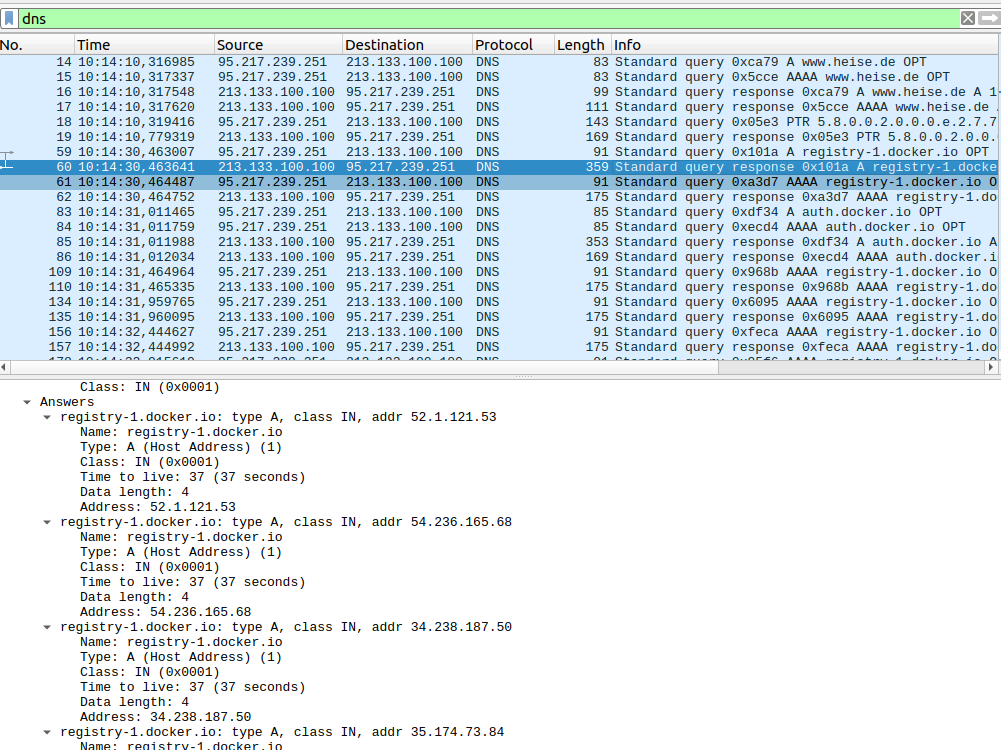
For one thing, several servers are contacted during an image download. As that happens under the hood, I used tcpdump and a remote Wireshark to trace which domain names are queried during a ‘docker pull‘ command. Here’s the command line to run tcpdump remotely and forward all traffic to Wireshark running on my PC:

ssh root@xxx.xxx.xxx.xxx 'sudo tcpdump -n -i eth0 -s 65535 -w - port not XXXXX and port not XXXXX' |  wireshark -k -S -i -

The second challenge that follows is that the DNS responses always return several IP addresses which can be contacted as shown in the screenshot above. One could of course make a firewall rule for each of them but that’s quite a bit of work. So instead, I decided to add the domain names used for a ‘docker pull‘ in /etc/hosts on each virtual workstation and use one of the returned IP addresses. This way, I get a 1:1 relationship between domain name and IP address and hence an easier firewall configuration. This is of course at the risk that the server behind this particular IP address becomes unreachable just before or during the workshop. However, if that happens, I could still reconfigure the firewall and modify the /etc/hosts file on each workstation over ssh. Looping over the following command which pipes the content of the ‘hosts-add.txt‘ on my notebook into /etc/hosts of a target machine does the trick. This is also helpful to initially write content to the hosts file when a new VM is instantiated from an image file, as the hosts file of the image gets overwritten by the defaults.:

# Use > to overwrite or >> to add
#

cat hosts-add.txt | ssh root@xxx.xxx.xxx.xxx -T "cat >> /etc/hosts"

Fortunately, this was not required so far during a workshop. But better be prepared.

By limiting all incoming and also all outgoing connections this way, I am pretty confident that all non-intended interactions with the network that could be a liability for me can be prevented. But if you have an idea how that could be circumvented, please let me know, I’m always interested to learn and improve 🙂

09 Apr 18:08

How NetNewsWire Handles Threading

NetNewsWire is mostly not multi-threaded. Here’s what we do:

Run Most Code on the Main Thread

The default place for all of our code — UI code and otherwise — is the main thread. Synchronous code running on the main thread is the easiest code to reason about and is the least likely to trigger weird, intermittent bugs.

In other words: we try, as much as possible, to not use queues or threading at all. I can’t emphasize this enough: the best way to handle concurrency is just to not do it.

Communicate Between Components on the Main Thread

Every notification and every callback happens on the main thread.

Though a given object (or small system) may use a serial queue internally, it never, ever lets that fact leak out beyond its own boundaries.

Use Serial Queues for Pure Functions That Take Time

Parsing an RSS feed is a pure function. Since it does take some time (though less than you think), it can be done on a serial queue, in the background. The result is returned via callback on the main thread (see above).

These kinds of things are great for background processing because they’re perfectly isolatable — parsing a feed affects no state. It doesn’t do any notifications. All it does is callback, once done, with an object.

There are other examples (decoding JSON or image data) that are great for this, and which we handle the same way.

Use Serial Queues for Database Access

Our model objects are plain ol’ classes and structs. The APIs for reading and writing are main-thread-only, and they call back asynchronously but always on the main thread with a result.

Inside the database code, though, is a serial queue. It’s completely internal to that code, though, and utterly invisible to the rest of the app.

When the database code sends any notifications, it does so on the main thread. It doesn’t otherwise affect any app state.

Use Asserts and Preconditions

If you do a search on Thread.isMainThread, you’ll find a bunch of these…

precondition(Thread.isMainThread)

…and…

assert(Thread.isMainThread)

…and one example of XCTAssertTrue(Thread.isMainThread). We don’t otherwise test if we’re in the main thread.

(I would not mind having a whole lot more of precondition(Thread.isMainThread) than we do now.)

The Result

You may be skeptical about this model, but I’ll remind you that NetNewsWire is responsive and freakishly fast. It’s also — by far — the most stable and bug-free app I’ve ever worked on in my long career. And a big part of that is our threading model.

One of the nice things about this model is that a developer knows, just by looking at where they are, what thread the code is running on. It’s almost always main. But if you’re working on the RSS parser or similar, you know that it literally doesn’t matter, and if you’re working on the database or similar, it’s obvious that you’re using a serial queue.

As we adopt Combine, SwiftUI, and future Swift language changes to support concurrency, we will continue to use this model. The details of our implementation may change, but the model will remain the same: use the main thread everywhere except in a few cases, and make sure that those cases cannot leak knowledge or behavior of their queues outside themselves.

Advice

Some developers I’ve known seem to think that being good at concurrency makes them badass. Others seem to think that senior developers must be great at concurrency, and so they should be too.

But what senior developers are good at is eliminating concurrency as much as possible by developing a simple, easy, consistent model to follow for the app and its components.

And this is because concurrency is too difficult for humans to understand and maintain. Maybe you can create a system that makes extensive use of it, and have it be correct for one day. But think of your team! Even if you’re a solo developer, you and you-plus-six-months makes you a team.

I know you’re worried about blocking the main thread. But consider this: it’s way easier to fix a main-thread-blocker than it is to fix a weird, intermittent bug or crash due to threading.

With a main-thread-blocker, use the Time Profiler in Instruments and figure out what’s going on. It may be that something does need to move to a background serial queue — or, more likely, there’s a data structure or algorithm that could be improved, or you find your app is doing unnecessary work (or both).

How To Get There From Where You Are

I suspect most apps don’t have a clear model for concurrency. If yours does, then great! Skip the rest of this post. :)

If you want to move to the model I’ve described above, I’d start with a few things.

  • Identify code that should be main-thread-only and use assert(Thread.isMainThread) in that code
  • Turn on Xcode’s Main Thread Checker
  • Make sure that every Notification that your app posts is posted on the main thread. In notification handlers, add an assert(Thread.isMainThread)

If you don’t use Notifications, apply that advice to KVO or whatever else you might be using.

The reason I pick Notifications and KVO is because they’re a kind of spooky action at a distance — when you’re working on the Notification handling side, you don’t know what thread the Notification was posted on, and developers tend to assume it’s the main thread. This is a common place for threadedness to leak, which causes bugs and crashes. (Accidental multithreading is the scourge of our platform.)

The next step is probably to look at the places where you’re using queues and find out which of those could be moved to the main thread. And, when you can’t move to main, build better walls: make APIs that call back on the main thread, and don’t let the fact of those queues leak out from behind the API. Don’t let threadedness leak.

You can get there incrementally.

In the meantime you may find that you’re having to dispatch to the main queue rather often as a defensive measure.

Ideally, you’re only dispatching to the main queue when it’s part of this threading model (when posting a notification from a background queue or calling a callback) and never as a defensive measure.

However, it may be a while before your app gets there, and that’s okay. (Tip: do consider the case where sometimes that call to DispatchQueue.main.async is happening in code already running on the main thread. The async part is real, and you may not always want that: sometimes you may want code to run immediately when already on the main thread. And sometimes not.)

In the end: change all your assert(Thread.isMainThread) to precondition(Thread.isMainThread) — make your app crash in production when the threading model is violated. Being able to do that — knowing that it won’t ever trip — is a great place to be. 🐣🐥🎉

09 Apr 18:08

Building My Own Yahoo! Pipes

by Rui Carmo

Pipes has been dead since 2015 or so, but I used it for a long time and it was essential to my daily news intake, so I’ve been building a personal replacement to cater to my specific needs.

The problem statement is simple–I’m looking to rebuild the collection of industry-specific RSS news feeds I follow through Reeder and Feedly on a daily basis, and add more smarts to it (trending topics, for starters, and then a curated feed of relevant news according to five or six topics).

But most of the sites or companies I want to keep track are either too niche or too corporate to bother having proper RSS feeds (or don’t have them for what I want to keep track of). Plus (and this is one of the new twists) some are written in German (which I can read, but not before my morning coffee), Swedish, Finnish, or even Korean.

So just like around a decade ago, I’m building a few custom scrapers and the logic to carve out some meaning from hostile web sites, and trying to do so in the easiest way possible.

Should I Go Web Scale?

I could write it all up in Python or Go again, and if I did I would most likely end up with a similar set of decoupled services:

  • Fetchers and parsers communicating via pubsub.
  • A writer process that takes the end results and writes them to a central store.
  • A set of back-end classifiers and rankers that would also use pubsub to keep track of changes and update the store with additional metadata.
  • An HTTP listener with read-only access to the store that just grabs the results and renders them as custom feeds so that Reeder can get at them via Feedly.

But as it turns out, this doesn’t need massive scalability (I’m only planning to track around a hundred or so feeds at most), and it becomes a little tedious to set up and maintain.

So I turned to piku again, and within all of 15 minutes, I had a running single-core VM with a working deployment of Node-RED running behind Cloudflare.

I then set out on a quest for piping data through it.

The New Low-Code Fashion is RED

I’ve been using Node-RED for home automation for quite a few years now (even down to maintaining my own cross-platform Docker images) and it’s been really stable, but I just never bothered with half of the built-ins except for building an app store price scraper a couple of years back.

Most of what I’ve done with it is a weird mix of MQTT and JSON piping with a couple of low-end UDP and multicast sniffing hacks to deal with HomeKit and my set-top-boxes as well as a bunch of quick and dirty dashboards for Zigbee temperature sensors, so this time around I consciously tried for a more modular, generic approach.

I also tried to avoid using third-party nodes as much as possible, since (like the rest of the npm ecosystem) there is a lot of outdated and broken stuff out there.

Fortunately, the core nodes have (so far) been more than enough, and you can go a long way with just four of them:

  • The xml node can parse both RSS and Atom trivially, and it takes around 5 lines of JavaScript to grab feed items off the results.
  • The html node can take jQuery-like selectors like a.tiles__content--link h4, which means it is able to scrape, slice and dice most web pages just fine (except for SPAs, but I don’t feel like using Puppeteer just yet).
  • The http client node can now do persistent connections, and is quite fast at grabbing multiple pages off the same web server.
  • The http server and response nodes make building an API a breeze:
The little HTTP listener that could.

The database, by the way, is provided by the node-red-contrib-sqlite node and currently has a pretty trivial schema (just feeds, items and topics, with straigthforward relationships) so isn’t exactly rocket science, either.

As an example, here’s the prepared statement for the query above:

SELECT
    items.url as url,
    items.title as title,
    items.body as body,
    strftime('%Y-%m-%dT%H:%M:%SZ', items.date, 'unixepoch') as date,
    items.date as pubdate,
    feeds.url as feed_url,
    feeds.title as feed_title
FROM
    feeds
JOIN items 
ON items.feed_id = feeds.id
WHERE feeds.slug = $slug
ORDER BY pubdate DESC LIMIT 30;

Pushing down some trivial stuff (like date formatting and column renaming) into the engine is also another way to save time and increase responsiveness, so I do it whenever I can.

For instance, I use UNIQUE NOT NULL ON CONFLICT IGNORE on item url fields to simplify batch insertion handling (and implicit duplicate skipping), and also push down full-text searching into SQLite‘s FTS engine, so it’s all blazing fast.

It’s all a matter of knowing your tools, really.

Also, somewhere in the past year or so Node-RED changed its UI for managing sub-flows, which means it’s much easier to have a modular approach with re-usable nodes–want a uniform way to clean up and store items? Just wrap a function node and a SQLite node in a sub-flow, and you’re done. And the same goes for filters, XML transforms, etc.

Build them once, test them, add them to the palette, wire them up in a pipeline, tie pipelines together… You get the idea.

So with some forethought and planning it’s pretty easy to have a Yahoo! Pipes-like experience - you just need to craft the right sub-flows with the right payload conventions, and voilá, you have your own palette of data transforms.

Example: Found In Translation

Translation turned out to be one of the easiest parts, since Node-RED‘s HTTP node was also recently revamped to remove some of the weirdness of building custom HTTP requests.

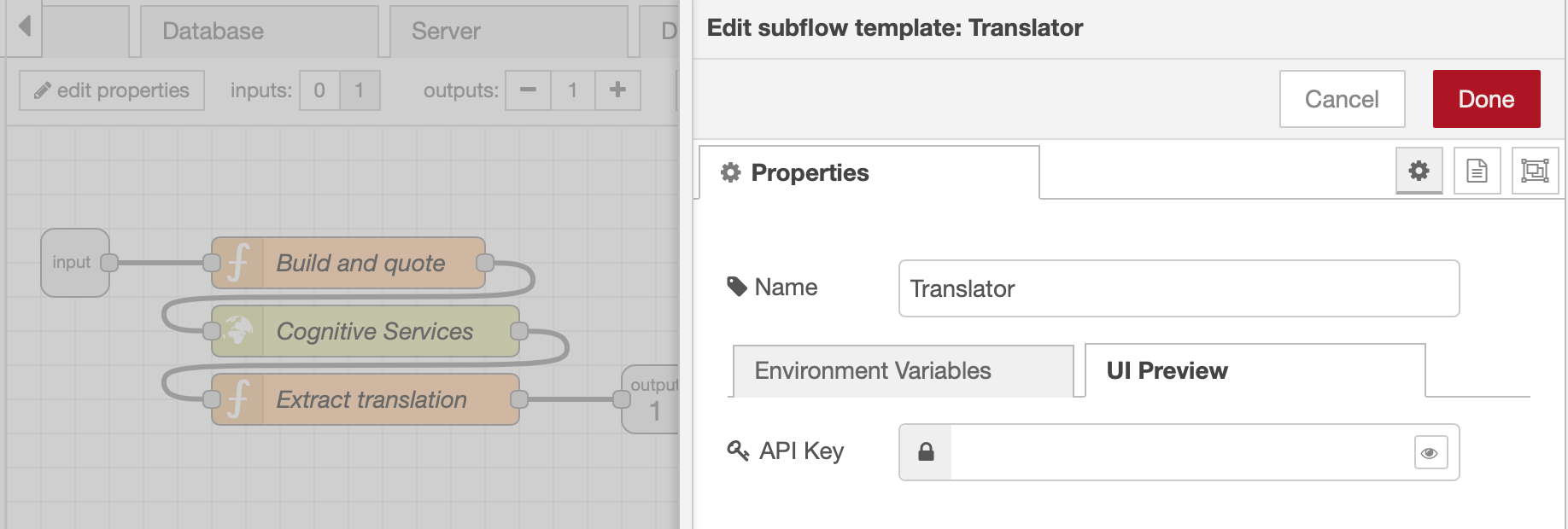
Calling out to Azure Cognitive Services boiled down to building a generic sub-flow containing just three nodes (set up the request payload and custom headers, execute it, and unpack the results) as well as configuring a custom UI pane to paste in the API key:

The only thing missing from the UI builder right now is configurable input drop-downs, but the basics are there.

Like all of my item processing nodes, it expects a consistent set of fields for each feed item, so I can toss in something that looks like:

{
    "title": "Veckans nyheter",
    "body": "Investeringsbank ..."
}

That will get formatted into an API request to the translation service, sent out, reformatted back into the right fields and output by the node like so:

{
    "title": "This week's news",
    "body": "Investment Bank ..."
}

…which conforms to the same schema I use across all my pipelines. So as long as I don’t deviate from that schema, I can slot this in anywhere.

Endgame

This means building a scraper for title-only, non-English feeds takes me around zero minutes right now, as all I have to do is drag one of my custom nodes to the canvas and link it to a scheduler that cycles through the URLs to fetch. It actually takes longer for me to subscribe to the new URL in Reeder.

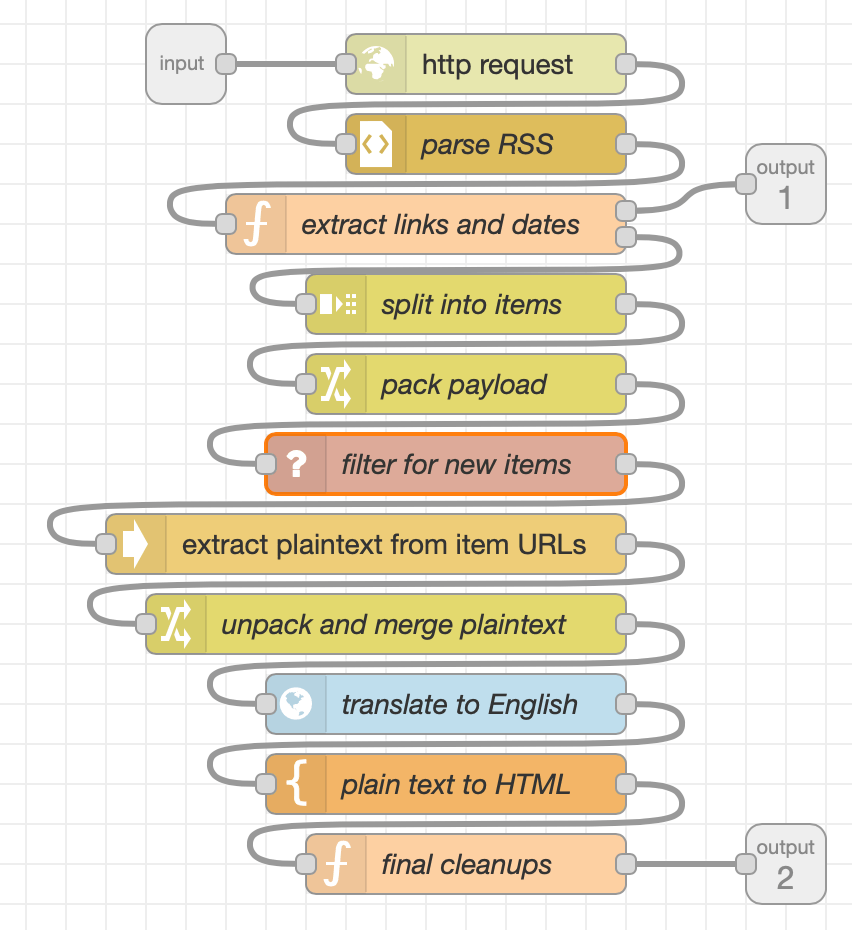
And each scraper follows more or less the same pattern (with minor variations depending on what it needs to do):

A sample scraper. All it needs is an input URL.

The filter, extractor and translator are all custom sub-flows as well, so it’s turtles all the way down.

There are a few other sub-flows for glue logic, but most of those are about scheduling refreshes and extracting topics from what is already in the database–again, it’s all a set of decoupled “processes”, and they could easily be extracted and run on their own compute contexts.

If Node-RED ran on Azure Functions, it would be a poster child for serverless low-code buzzword bingo…

Caveats

The only real issues I have with this setup are:

  • Doing data munging in JavaScript is tedious and error-prone. I keep having to toss arrow functions into Array.forEach, which is annoying.
  • Function nodes can only have one input, so there’s no easy way to (for instance) only act when two inputs are “finished” and available for processing. It requires some getting used to (and some creative workarounds for complex logic).
  • Node-RED is still painful to debug sometimes (nodes have untyped inputs, so it’s easy to inject quasi-invalid data and have it blow up somewhere in the middle of a pipeline).

Other than that, it’s extremely fast, easy to maintain and quite cheap (thanks to piku it’s running on the same single-core VM that renders this site).

Since it’s all asynchronous fetching a few dozen feeds, translating them and writing them to the database takes only a few seconds, and Feedly only checks for the results every half hour or so, so there is no real need for a high-performance pipeline yet (and plenty of headroom).

And sitting behind Cloudflare it can probably even have a few thousand users hammering it, so I’d say it’s pretty fit for purpose and cost effective.

Not as much fun as coding the whole thing from scratch, perhaps, but much less hassle altogether, and frees up some time to do more interesting stuff.


09 Apr 18:08

Project: For all time

by charlie

Some great projects are very personal. Or, at least, only the maker really understands the driving forces that led to the creation. And, yes, this is one of those.

Not sure when it happened, but the thought of measuring time in different ways got stuck in my head. Basically, there’s the old saying “Someone with one clock knows the time, someone with two is never sure.”

So I took that thought and figured all the ways I could show time in a compact construction, and it rolled on from there.

The parts
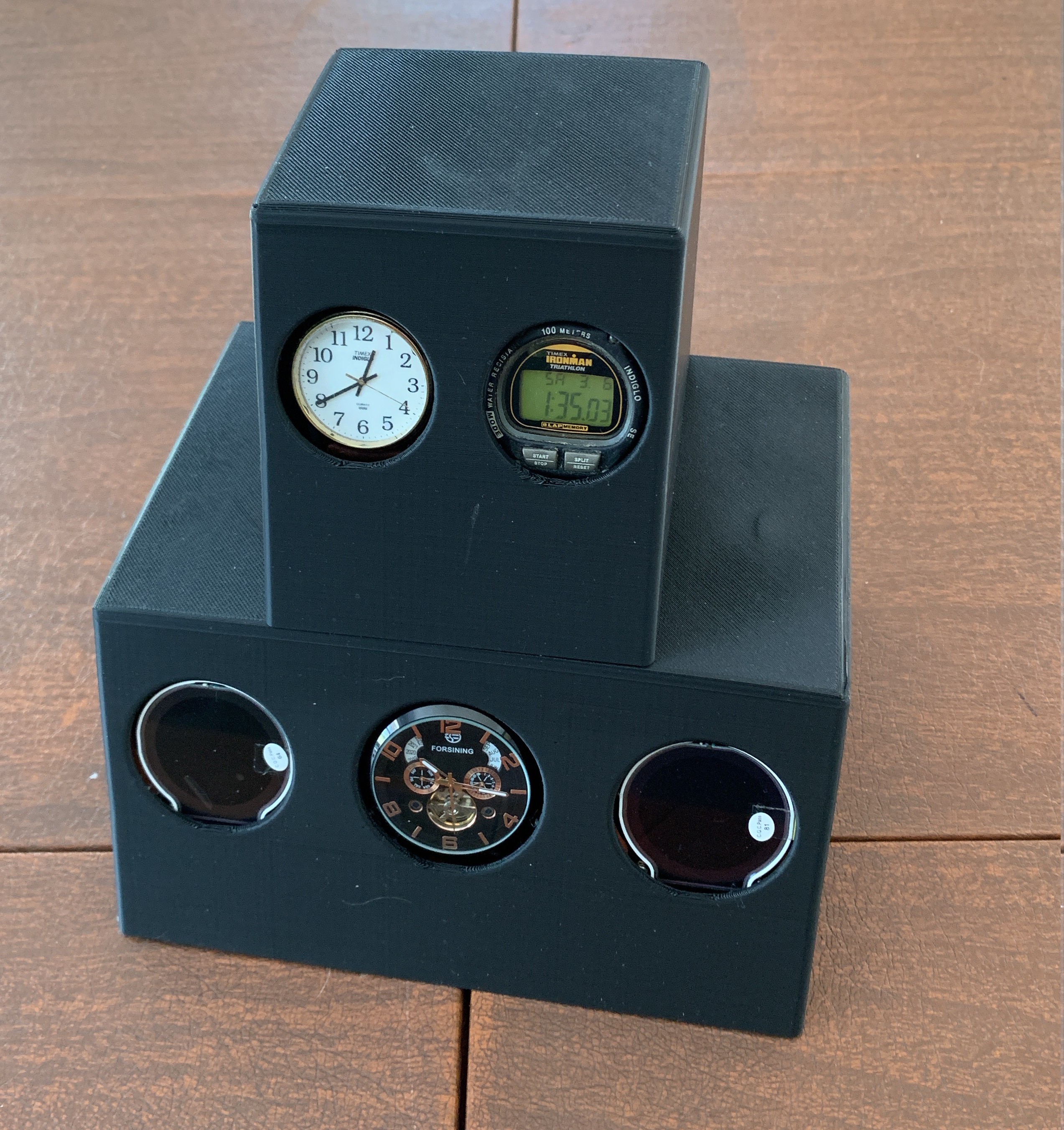
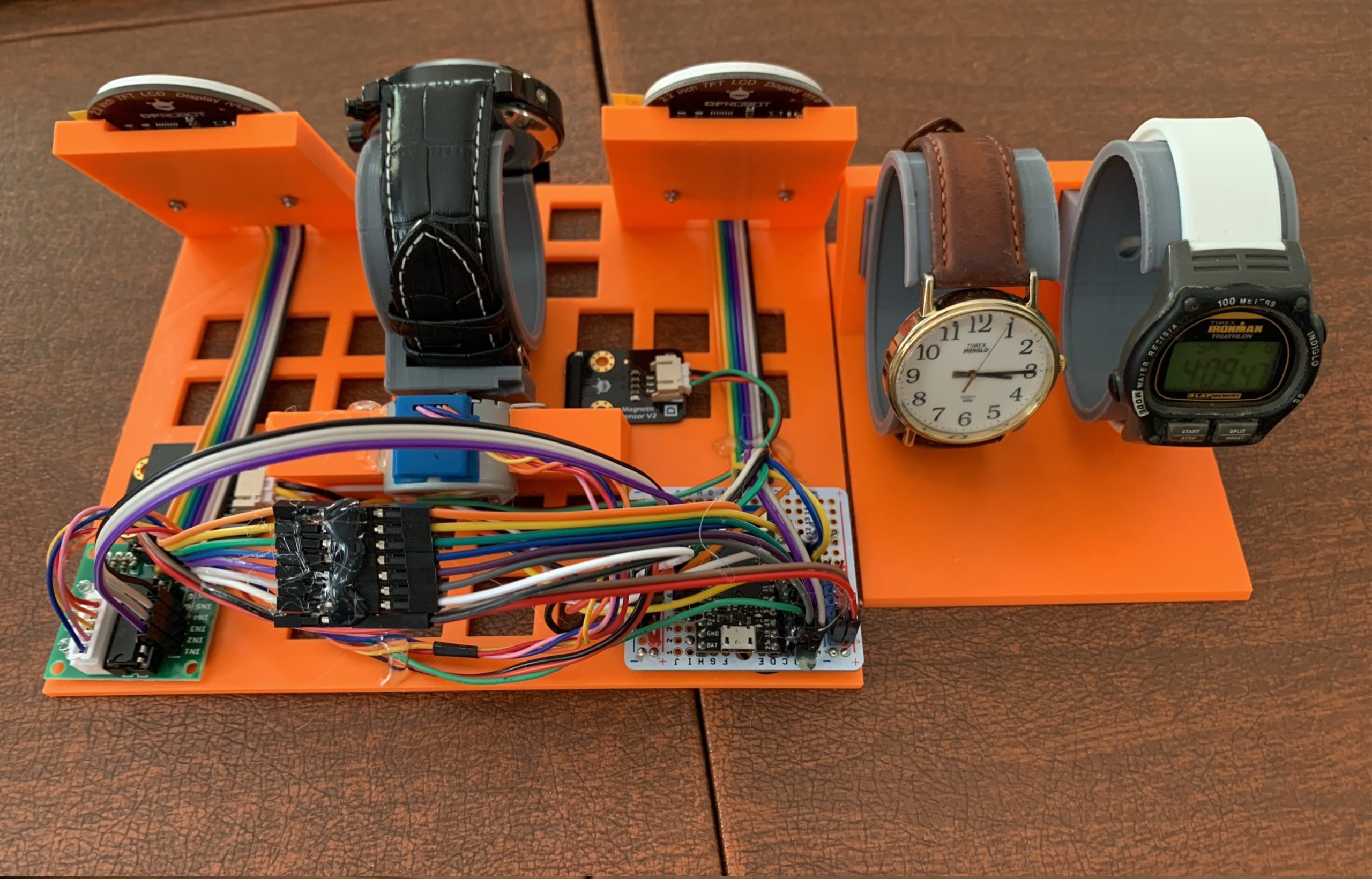
I had a few watches around. Two of them are the self-winding kind. And one was an old Timex digital watch. That got me going, so I thought I’d add an RTC that I had lying around and, since I had a WiFi capable board, I could do NTP. Then, along the way, I ended up with a straight analog digital watch (that one has a special story, too).

The RTC and NTP needed screens to display, so I got these cool round TFT displays that the vendor had a library for drawing a rudimentary watch face.

For the self-winding watch, I went out and bought an inexpensive one that looked cool (has year, month, day, day of week). And to keep the self-winding going, I hat to add a motor. I first thought I could get away with a servo, but soon thought better and got me a stepper.

At the core of it, I put my TinyPICO that was lying around for a while. I adore it, but really haven’t had a project that needed it since after some stuff I did I first bought it (that’s another project story).

When I put it all together the TFT were using 7 pins (SPI), the stepper took 4, and the RTC 2. That left one more for the magnet sensor for homing the stepper. Yes, I ended up using all the logic pins of the board. Also, everything ran on 3.3V, except the stepper, which ran off 5V.

Two hearts
The TFT drawing was really slow. I could draw a face a second, but it took most of the second for both faces to render. That meant that the stepper wasn’t happy when it was going. I could have left it at that as the stepper would only be going every so often (to keep the watch wound). But the cool thing is that the TinyPICO is based on an ESP32-PICO which has two cores.

The Arduino IDE only uses one core. But there is a way to make a process work on the second core. And it was soooo easy. So I ended up putting the screen drawing on one core and the stepper on the other. And the two could merrily chug along without any conflicts.

Leveled up there, for sure. Haha.

Mounting it all
The coding part was quite easy, and simple. The mounting of it all was a bit more invovled.

This was the first project that I printed a base and an enclosure of my design. I needed a useful base on which to mount things and an enclosure to cover it all. I kept things simple. This was the biggest effort I’ve ever done in Fusion 360 (best way to learn it properly). And these were the longest and biggest prints I’ve done to date. There were hiccups along the way, of course (I’m not going there). But here’s the inside (to right).

Feeling unfinished
OK, so I flexed my Fusion 360 skillz, used all the pins, and ran things on two cores. Really level up my skills. And I did manage to get it all up and going. But I forgot to make the enclosure snap or screw together so it’s still a bit loose. And I’m not sure if the homing code is working as it should. But chiefly, the holder for the self-winding watch is unsatisfying – it’s loose, mostly.

But I really need to put this project down. I haven’t been able, tho, to set it up and let it run. the whole point of the project is to turn it on, let it go for more than a few days, and watch how all the time elements get out of synch (as in, fall behind in their own way).

Life has a way, and I can’t focus on this much more for a few months, so in the semi-finished state it’ll stay until then.

Oh, well.

[This is meant to be the Dec-Jan edition of my project challenge. Talk about stretching out the time frame. Since Oct, this has been the norm. Currently, things are a bit more challenging than usual.]The post Project: For all time first appeared on Molecularist.
09 Apr 18:08

Galbraith cont'd

by graydon


The natural tendency of man, as manifested in primitive societies, is almost certainly to work until a given consumption is achieved. Then he relaxes, engages in sport, hunting, orgiastic or propitiating ceremonies or other forms of physical enjoyment of spiritual betterment. This tendency for primitive man to achieve contentment has been the despair of those who regard themselves as agents of civilization and remains so to this day. What is called economic development consists in no small part in devising strategies to overcome the tendency of men to place limits on their objectives as regards income and thus on their efforts. Commodities involving physical and progressive addiction were long considered expecially useful in this regard; this explains the great esteem that attached, in the early stages of modern civilization, to tobacco, alcohol, coca and opium as trade goods for more primitive peoples so-called, a value that they have not entirely lost in the present day. However, goods which by their novelty appeal to vanity or to emulative or competitive adornment or display are now considered more legitimate. Also, though need for food and shelter, especially in benign climates, is rather readily satisfied, the pressures of emulation and competition in adornment and display have no clear terminal point. California farmers and labor contractors once, as a matter of established policy, encouraged their Filipino workers to invest heavily in clothing. The pressure of debt and the pressure on each to emulate the most extravagant quickly converted these happy and easygoing people into a modern and reliable work force. In all underdeveloped countries, the acquisitive desires and resulting physical effort inspired by the introduction of modern consumer goods -- cosmetics, motor scooters, transistor radios, canned food, bicycles, phonograph records, movies, American cigarettes -- are recognized to be of the highest importance in the strategy of economic development.

In the advanced industrial countries, the creation of wants, and therewith the need to work, is a matter of considerable sophistication but the principles are the same. It is also a task of great importance. In 1939, the real income of employed workers in the United States was very nearly the highest on record, and it was then the highest of any country in the world. In the next quarter century it doubled. Had the 1939 income been a terminal objective, work effort would have been cut in half in the ensuing twenty-five years. In fact, there was a slight increase in weekly hours actually worked. This was a remarkable achievement.

It was accomplished partly by the now well-understood ability of the planning system to adapt belief to its needs. To increase income and consumption is held to be socially and morally sound. Leisure is something to be regarded with misgiving, especially in lower income brackets. Accordingly, a reduction in the standard work week must always be considered dubious social policy, inducing moral or spiritual weakness.

Economists, performing one of their now well-recognized functions, have accorded important canonical reinforcement to these beliefs. They have made the rate of increase in the production of goods the prime test of social achievement. To substitute leisure for work is, thus, to be antisocial. Economic theory has long insisted on the homogeneity and insatiability of wants. There is no proof that an expensive woman obtains the same satisfaction from yet another gown as does a hungry man from a hamburger. But there is no proof that she does not. Since it cannot be proven that she does not, her desire, it is held, must be accorded equal standing with that of a poor man for meat. Doctoral aspirants in economics stil risk failure and, at a minimum, get a warning rebuke if they assert otherwise. If all wants are of equally good standing, it follows that the moral and social obligation to work to fill them remains undiminished in power no matter how much is produced. Corporate executives with an overly acute sense of persecution have sometimes supposed that economists, in the ideas they advance, are their enemies. In fact, the economics profession is strongly in the service of the beliefs they most need. It would, prima facie, be plausible to set a limit on the national product that a nation requires. The test of economic achievement would then be how rapidly it could reduce the number of hours of toil that are needed to meet this requirement. Were economists to advocate this goal, with the revolutionary effects that it would have on the planning system, there would be grounds for complaint. None has been so uncooperative.

However, the more immediate device for ensuring that there is no terminal objective as regards income is advertising and the related arts of salesmanship. Here we have yet another of the interlocking developments which so admirably serve the planning system. Advertising and salesmanship -- the management of consumer demand -- are vital for planning in the planning system. At the same time, the wants so created ensure the services of the worker. Ideally, his wants are kept slightly in excess of his income. Compelling inducements are then provided for him to go into debt. The pressure of the resulting debt adds to his reliability as a worker.

It is held, of course, that wants are not contrived. They are deeply organic in the human situation. Their satisfaction is not only a source of rich reward to those served but the highest secular function of the society. Even to hold this process up for examination is to invite the suggestion that one is ascetic, unworldly, determinedly impractical and disposed to substitute one's own odd and esoteric values for the lustier instincts of the masses. Yet one cannot have it both ways. If wants are inherent, they need not be contrived. But few producers of consumer goods would care to leave the purchases of their products to the spontaneous and hence unmanaged responses of the public. Nor, on reflection, would they have much confidence in the reliability of their labor force in the absence of pressure to purchase the next car or to meet the payments on the last.

[further footnote]

Professional advertising men, who, as earlier noted, have wished for a substantial social justification for their services, have frequently argued that, without their efforts to stimulate wants, men would not work and the economy would falter. Economists, almost without exception, have dismissed this as the special pleading of an economically unlearned and conscience-ridden community. In fact, the advertising men have a good case. It has been rejected by economists because to admit that advertising promotes wants is, not surprisingly, to concede that the goods would be unwanted in the absence of such persuasion. This casts doubt on the pivotal contentions that wants are homogeneous and insatiable and that the volume of production measures the success of the society. One cannot give equal status with bread to what must be contrived by advertising, and one cannot measure the success of an economy by its ability to keep up with Madison Avenue.


This entry was originally posted at https://graydon2.dreamwidth.org/287172.html. Please comment there using OpenID.
08 Apr 17:41

“Forschung lohnt sich”

by Andrea

maiLab: Wie sicher ist AstraZeneca wirklich? (YouTube, 10:35min)

“Was ist eigentlich genau mit dem AstraZeneca-Impfstoff los? Was genau hat die Europäische Zulassungsbehörde über die potentiellen Nebenwirkungen und die seltenen Thrombose-Fälle herausgefunden? Und können sich immer noch alle bedenkenlos mit AstraZeneca impfen lassen? Hier ein wissenschaftlicher Überblick.”

Übrigens: Mediziner der Uni Greifswald haben inzwischen die Ursache für die Sinusvenenthrombose und Behandlungsmöglichkeiten gefunden: Therapie für seltene Hirnvenenthrombosen gefunden!

“Professor Andreas Greinacher hat sich reingehängt und es hat sich gelohnt. Die Komplikationen nach Impfung mit dem AstraZeneca Impfstoff sind erforscht und es wurde eine Therapie entwickelt. Einer weiteren Impfung steht also nichts mehr im Weg.

Der Abwehrstoff, der sich in seltenen Fällen nach der Impfung bildet, aktiviert die Blutplättchen. Diese agieren dann wie bei einer Wundheilung und lösen Thrombosen im Gehirn aus.

Der Greifswalder Wissenschaftler hat Blutproben von Betroffenen untersucht und gemeinsam mit europäischen Wissenschaftlern und dem Paul-Ehrlich-Institut eine Therapie entwickelt. Da diese Ergebnisse bereits, breit gestreut, an Kliniken übermittelt wurden, kann weiter mit AstraZeneca geimpft werden. Betroffene Menschen können direkt therapiert werden.”

Siehe auch hier:

Deutsche Welle: Entdeckt und Behandelt: Thrombosen nach AstraZeneca-Impfung.

“Was erstmal wie eine weitere Hiobsbotschaft im Zusammenhang mit dem Impfstoff von AstraZeneca klingt, ist laut den Fachleuten der Universität Greifswald nach dem NDR-Bericht eine gute Nachricht: Da der Mechanismus so genau erkannt werden konnte, war der Weg für eine mögliche Therapie nicht weit. Somit gebe es eine gezielte Behandlungsmöglichkeit, sollten Sinusvenenthrombosen bei Geimpften auftreten: Ihnen sollen nach Empfehlung der Gesellschaft für Thrombose- und Hämostaseforschung (GTH) hochdosierte Immunglobuline verabreicht werden. Das ist ein gängiges Mittel, dass in spezialisierten Krankenhäusern zur Verfügung steht und den Mechanismus hemmen soll.

“Da die Ergebnisse, breit gestreut, an Kliniken übermittelt wurden, kann weiter mit AstraZeneca geimpft werden. Betroffene können direkt therapiert werden”, heißt es in einer Pressemitteilung der Universitätsmedizin Greifswald. Allerdings betonen die Forschenden auch, dass der Wirkstoff zur Behandlung einer Thrombose nicht prophylaktisch, also vor einer Impfung und vor einer etwaigen Entwicklung der Symptome, gegeben werden könne.

Laut Greinacher könne mit einem Test festgestellt werden, ob bei Betroffenen mit entsprechenden Symptomen tatsächlich der entdeckte Mechanismus zum tragen kommt und die Therapie eingeleitet werden muss.”

Und mal wieder der Hinweis: Mögliche Impfnebenwirkungen muss man immer im Verhältnis zu Nebenwirkungen von Covid inklusive Long Covid setzen, denn wer sich nicht impfen lässt, wird früher oder später daran erkranken. Eine dritte Option gibt es nicht, wenn man sich nicht für den Rest seines Lebens in Dauer-Quarantäne begeben will.

19 Mar 00:50

♬ "It's a nice day for a... vaccination" ♬

by jwz
mkalus shared this story from jwz.


Just two more weeks until I can get back to licking doorknobs!

Previously, previously, previously, previously, previously.

19 Mar 00:09

Vax

by Asa Dotzler

I’m really excited that I’m going to be getting my first dose of a COVID-19 vaccine tomorrow. My medical provider (and backup medical provider) both had too limited a supply to offer me an appointment but Walgreens seems to have plenty.

California opened vaccinations this week to a number of new demographics including people with certain health conditions which is why I qualify.

I’m not sure which vaccine I’ll be getting. The web tells me that Walgreens has Johnson & Johnson, Moderna, and Pfizer vaccines. I guess I’ll find out tomorrow.

Deanna’s already had both of her doses so in about 5 weeks I’ll be all vaccinated and we can start talking about things like visiting family and close friends.

19 Mar 00:09

Three Million Meters on e-Wheels

This is just another round of cheerleading for e-bikes, provoked by my odometer clicking over to three thousand km. Granted, not amazing for twenty months of commuting, but not nothing. For anyone in an even marginally urban situation in reasonable health, if you don’t have one of these, you’re really missing a trick. For earlier raving about this vehicle, see here.

E-Bike by False Creek

March flowers by False Creek.

E-Bike odometer reads 2999

More interesting than 3000, and prime.

Capital cost: Noticeable but much less than anything with a motor.
Fuel cost: Damn close to zero.
Parking cost: Free.
Health cost: Negative.
Carbon loading: Trivial.
Mind-clearing ability: High.
Cargo capacity: Remarkable.
Getting you the hell out of the house during Covid: Beyond price.

There must be some gripes?

Oh yeah, I had a flat. So I bought a new tube and slipped it in and absolutely could not get the big thick fucking tire back on the fucking rim. I had to take it to a bike shop, where I discovered that my wrestling with it had ruined the new inner tube — ten bucks shot to hell — and this skinny little bike-shop woman slipped it on in no time.

Oh, and I ran out of power once and just about gave myself a coronary pumping this klunker up a not-too-steep hill.

These things are rough on chains; I’ve replaced it once and it’s getting ratty again. This is unsurprising, since the bike is so heavy and a low gear plus the e-boost pulls awfully hard, especially if you insist on going fast, which I do.

There’s no place to stash a latte if you pick one up on the way to work.

You’re stretching

Obviously. It’s fast, it’s smooth, it’s fun, it’s green, and it’s on balance cheap. I can’t imagine who wouldn’t want one.

19 Mar 00:08

GraphQL Reference Guide: Building Flexible and Understandable APIs

Daniel Bryant, InfoQ, Mar 17, 2021
Icon

The more time I spent messing around with APIs for learning technologies, the more I appreciate the need for a common approach like GraphQL, which "is both an open source query language for an API and a server-side runtime for executing queries. It enables the use of a type system that developers define for their data." The image this article provides is particularly useful in making the concept clear, showing a request for a number of posts with a certian number of properties and also desired relationships such as 'author' and 'company'.

Web: [Direct Link] [This Post]
19 Mar 00:08

Evolution of Chinese names

by Nathan Yau

For Kontinentalist, Isabella Chua took a dive into the evolution of Chinese names:

Put simply, names encode the wishes parents have for their children.

So, what were these wishes? For answers, I turned to the Chinese name database, which covers the surname and given-name characters for almost all 1.2 billion Han Chinese—the ethnic majority in China—individuals born between 1930 and 2008. I’ve focused only on given names here rather than surnames; given names are subject to parents’ discretion, whereas surnames are inherited.

If you’re unfamiliar with Chinese names, Chua provides good explanations and audio pronunciations to make it easier to follow along.

Tags: Chinese, Isabella Chua, names

19 Mar 00:02

Spellchecking Jupyter Notebooks with pyspelling

by Tony Hirst

One of the things I failed to do at the end of last year was put together a spellchecking pipeline to try to pick up typos across several dozen Jupyter notebooks used as course materials.

I’d bookmarked pyspelling as a possible solution, but didn’t have the drive to do anything with it.

So with a need to try to correct typos for the next presentation (some students on the last presentation posted about typos but didn’t actually point out where they thought were so we could fix them) I thought I’d have a look at whether pyspelling could actual help having spotted a Github spellcheck action — rojopolis/spellcheck-github-actions — that reminded me of it (and that also happens to use pyspelling).

The pyspelling package uses a matrix and pipeline ideas. The matrix lets you define and run separate pipelines, the pipelines let you sequence a series of filter steps. Available filters include markdown, html and python filters that preprocess files and pass text elements for spellchecking to the spellchecker. The Python filter allows you to extract things like comments and docstrings and run spell checks over those; the markdown and HTML filters can work together so you can transform markdown to HTML, then ignore the content of code, pre and tt tags, for example, and spell check the rest of the content. A url filter lets you remove URLs before spellchecking.

By default, there is no Jupyter notebook / ipynb filter, so I started off by running the spellchecker against Jupytext markdown files generated from my notebooks. A filter to strip out the YAML header at the start of the jupytext-md file was there to help minimise false positive typos from the spell checker report.

In passing, I often use a Jupytext -pre-commit filter to commit a markdown version of Git committed notebooks to a hidden .md directory. For example, in .git/hooks/pre-commit, add the line: jupytext –from ipynb –to .md//markdown –pre-commit [docs]. Whenever you commit a notebook, a Jupytext markdown version of the notebook (ex- of the code cell output content) will also be added and commited into a .md hidden directory in the same directory as the notebook.

Here’s the first attempt a pyspelling config file:

# -- .pyspelling.yml --

matrix:
- name: Markdown
  aspell:
    lang: en
  dictionary:
    wordlists:
    - .wordlist.txt
    encoding: utf-8
  pipeline:
  - pyspelling.filters.context:
      # Cribbed from pyspelling docs
      context_visible_first: true
      # Ignore YAML at the top of juptext-md file
      # (but may also exclude other content?)
      delimiters:
        - open: '(?s)^(?P<open> *-{3,})$'
          close: '^(?P=open)$'
  - pyspelling.filters.url:
  - pyspelling.filters.markdown:
      markdown_extensions:
        - pymdownx.superfences:
  - pyspelling.filters.html:
      comments: false
      ignores:
        - code
        - pre
        - tt
  sources:
    - '**/.md/*.md'
  default_encoding: utf-8

Note that the config also includes a reference to a custom wrodlist in .wordlist.txt that includes additional whitelist terms over the default dictionary.

Running pyspelling using the above confguration runs the spell checker over the desired files in the desired way: pyspelling > typos.txt

The output typos.txt file then has the form:

Misspelled words:
<htmlcontent> content/02. Getting started with robot and Python programming/02.1 Robot programming constructs.ipynb: html>body>p
--------------------------------------------------------------------------------
accidently
--------------------------------------------------------------------------------

Misspelled words:
<htmlcontent> content/02. Getting started with robot and Python programming/02.1 Robot programming constructs.ipynb: html>body>p
--------------------------------------------------------------------------------
autorunning
--------------------------------------------------------------------------------

We can create a simple pandas script to parse the result and generate a report that counts the prevalence of particular typos. For example, something of the form:

datalog          37
dataset          32
pre              31
convolutional    19
RGB              17
                 ..
pathologies       1
Microsfot         1

One possible way of using that information is to identify terms that maybe aren’t in the dictionary but should be added to the whitelist. Another way of using that infomation might be to identify jargon or potential glossary terms. Reverse ordering the list is more likely to give you occasional typos; middling prevalence items might be common typos; and so on.

That recipe works okay, and could be used to support spell checking over a wide range of literate programming file formats (Jupyter notebooks, Rmd, various structured Python and markdown formats, for example). Basing the process around a format Jupytext exports into allows us to then have a Jupytext step at the front a small pieces lightly joined text file pipeline that takes a literate programming document, converts it to eg Jupytext-md, and then passes it to the pyspelling pipeline.

But a problem with that approach is that we are throwing away perfectly good structure in the orginal document. One of the nice things about the ipynb JSON format is that it separates code and markdown in a very clean way (and by so doing makes things like my innovationOUtside/nb_quality_profile notebook quality profiler relatively easy to put together). So can we create our own ipynb filter for pyspelling?

Cribbing the markdown filter definition, it was quite straightforward to hack a first pass attempt at an ipynb filter that lets you extract the content of code or markdown cells into the spell checking pipeline:

# -- ipynb.py --

"""Jupyter ipynb document format filter."""

from .. import filters
import codecs
import markdown
import nbformat

class IpynbFilter(filters.Filter):
    """Spellchecking Jupyter notebook ipynb cells."""

    def __init__(self, options, default_encoding='utf-8'):
        """Initialization."""

        super().__init__(options, default_encoding)

    def get_default_config(self):
        """Get default configuration."""

        return {
            'cell_type': 'markdown', # Cell type to filter
            'language': '', # This is the code language for the notebook
            # Optionally specify whether code cell outputs should be spell checked
            'output': False, # TO DO
            # Allow tagged cells to be excluded
            'tags-exclude': ['code-fails']
        }

    def setup(self):
        """Setup."""

        self.cell_type = self.config['cell_type'] if self.config['cell_type'] in ['markdown', 'code'] else 'markdown'
        self.language = self.config['language'].upper()
        self.tags_exclude = set(self.config['tags-exclude'])

    def filter(self, source_file, encoding):  # noqa A001
        """Parse ipynb file."""

        nb = nbformat.read(source_file, as_version=4)
        self.lang = nb.metadata['language_info']['name'].upper() if 'language_info' in nb.metadata else None
        # Allow possibility to ignore code cells if language is set and
        # does not match parameter specified language? E.g. in extreme case:
        #if self.cell_type=='code' and self.config['language'] and self.config['language']!=self.lang:
        #    nb=nbformat.v4.new_notebook()
        # Or maybe better to just exclude code cells and retain other cells?

        encoding = 'utf-8'

        return [filters.SourceText(self._filter(nb), source_file, encoding, 'ipynb')]

    def _filter(self, nb):
        """Filter ipynb."""

        text_list = []
        for cell in nb.cells:
            if 'tags' in cell['metadata'] and \
                set(cell['metadata']['tags']).intersection(self.tags_exclude):
                continue
            if cell['cell_type']==self.cell_type:
                text_list.append(cell['source'])
        
        return '\n'.join(text_list)

    def sfilter(self, source):
        """Filter."""

        return [filters.SourceText(self._filter(source.text), source.context, source.encoding, 'ipynb')]


def get_plugin():
    """Return the filter."""

    return IpynbFilter

We can then create a config file to run a couple of matrix pipelines: one over ntoebook markdown cells, one over code cells:

# -- ipyspell.yml --

matrix:
- name: Markdown
  aspell:
    lang: en
  dictionary:
    wordlists:
    - .wordlist.txt
    encoding: utf-8
  pipeline:
  - pyspelling.filters.ipynb:
      cell_type: markdown
  - pyspelling.filters.url:
  - pyspelling.filters.markdown:
      markdown_extensions:
        - pymdownx.superfences:
  - pyspelling.filters.html:
      comments: false
      # https://github.com/facelessuser/pyspelling/issues/110#issuecomment-800619907
      #captures:
      #  - '*|*:not(script,style,code)'
      #ignores:
      #  - 'code > *:not(.c1)'
      ignores:
        - code
        - pre
        - tt
  sources:
    - 'content/*/*.ipynb'
    #- '**/.md/*.md'
  default_encoding: utf-8
- name: Python
  aspell:
    lang: en
  dictionary:
    wordlists:
    - .wordlist.txt
    encoding: utf-8
  pipeline:
  - pyspelling.filters.ipynb:
      cell_type: code
  - pyspelling.filters.url:
  - pyspelling.filters.python:
  sources:
    - 'content/*/*.ipynb'
    #- '**/.md/*.md'
  default_encoding: utf-8

We can then run that config as: pyspelling -c ipyspell.yml > typos.txt

The following Python code then generates a crude dataframe of the reseults:

import pandas as pd

fn = 'typos.txt'
with open(fn,'r') as f:
    txt = f.readlines()

# aspell
df = pd.DataFrame(columns=['filename', 'cell_type', 'typo'])

currfile = ''
cell_type = ''

for t in txt:
    t = t.strip('\n').strip()
    if not t or t in ['Misspelled words:', '!!!Spelling check failed!!!'] or t.startswith('-----'):
        continue
    
    if t.startswith('<htmlcontent>') or t.startswith('<py-'):
        if t.startswith('<html'):
            cell_type = 'md'
        elif t.startswith('<py-'):
            cell_type = 'code'
        else:
            cell_type=''

        currfile = t.split('/')[-1].split('.ipynb')[0]#+'.ipynb'
        continue
        
    df = df.append({'filename': currfile, 'cell_type': cell_type,
                    'typo': t}, ignore_index=True)

The resulting dataframe lets us filter by code or markdown cell:

We can also generate reports over the typos found in markdown cells, grouped by notebook:

df_group = df[(df['filename'].str.startswith('0')) & (df['cell_type']=='md')][['filename','typo']].groupby(['filename'])
    
for key, item in df_group:

    print(df_group.get_group(key).value_counts(), "\n\n")

Thsi gives basic results of the form:

Something that might be worth exploring is a tool that present a user with form that lets them enter (or select from a list of options?) a corrected version and that will then automatically fix the typo in the original file. To reduce the chance of false positives, it might also be worth showing the typo in it’s original context using the sort of display that is typical in a search engine results snippet, for example (eg ouseful-testing/nbsearch).

19 Mar 00:02

Nova Review: Panic’s Code Editor Demonstrates Why Mac-like Design Matters

by Alex Guyot

I’ve been writing code for nearly a decade, and throughout all of that time, I’ve never quite been satisfied with a code editor. Each one I’ve tried has annoyed me in various ways, and eventually, I find myself looking elsewhere.

My code editor is the app I use more than any other. I spend hours in it nearly every day and often keep going deep into the night. The code editor is the main tool of my trade, and I want to be using the best one that I can.

One of my main frustrations with pretty much all of the popular code editors out there (and I’ve tried most of them, including Visual Studio Code, Sublime Text, Atom, IntelliJ, and Eclipse) is that none of them are Mac-assed Mac apps. They’re all clearly cross-platform apps with design senses that differ significantly from those of Mac-first developers.

You can see a microcosm of this fact just by looking at the preferences of these apps. For many of them, the ‘Preferences’ menu bar item is actually a submenu from which you can navigate to ‘Settings,’ as well as other more nebulous options. If that doesn’t already offend Mac users, a common theme in those settings screens is for them to be literal JSON text files that open in the editor. You then manually edit the text to adjust options.

Visual Studio Code's 'Preferences' menu bar item.

Visual Studio Code’s ‘Preferences’ menu bar item.

VS Code — widely considered as one of the best code editors around right now — offers this JSON preferences approach, but by default, uses a strange screen that opens as a tab in the text editor despite actually being a list of settings. This list is huge, with hundreds of settings all stacked together and a sidebar to help aid navigation. At least there are actual buttons, so I guess that puts VS Code at the high end for code editor preferences. All of this is as far from Mac-like as you can get, though, and that truth is reflected throughout the rest of these apps’ interfaces.

That’s not to say that these code editors are bad. They all accomplish incredible things and are vital tools in the software engineering ecosystem. They just aren’t Mac-like, and for a very long time, that has been the sad state of affairs. If you’re a software engineer with Mac design sensibilities, you’re probably going to have to compromise.

Software development is a wide-ranging field, so there are certainly some niches where Mac-like editors can be found. If you develop specifically for Apple’s platforms, then you can — and probably must, for better or worse — use Apple’s Xcode. If you have fairly narrow website development needs, then you may be able to live in the beautiful Mac-first world of BBEdit or Panic’s old Coda. I was a Coda user for a while but outgrew its capabilities when I moved more into back-end programming and as my remaining front-end requirements grew more complicated. I’ve always missed its design since leaving it behind, though.

With the above in mind, it’s no surprise that my interest was piqued when I learned that Panic was working on an all-new, Mac-native code editor. Released last year, Nova has finally brought an end to my decade-long search for a code editing home.

Nova

Panic’s Nova website begins with the following introduction:

If we’re being honest, Mac apps are a bit of a lost art. There are great reasons to make cross-platform apps — to start, they’re cross-platform — but it’s just not who we are. Founded as a Mac software company in 1997, our joy at Panic comes from building things that feel truly, well, Mac-like.

Nova was built for the Mac, and it shows. But it’s also just an incredibly well-designed application in general. The care and craftsmanship that went into Nova are evident from the moment you first open it. The welcome screen includes this gorgeous animated lightspeed interface, which follows your mouse movement and accelerates when you hover over the ‘Get Started’ button:

Panic’s design prowess and dedication to the Mac continue as you dig into the app. Familiar keyboard shortcuts, a real preferences pane, a functional sidebar, a gorgeous editor… The list goes on. Nova proves that a modern app for programmers doesn’t need to skimp on design just because it’s catering to users who can operate a command line. In my opinion, it raises the bar here in an irreversible way.

Of course, an app’s design isn’t everything. The reason so many popular code editors are able to ship subpar designs is because of the powerful features that they offer to developers. Thankfully, Nova has a lot to offer in this area as well.

The Editor

The most important aspect of any code editor is its actual interface for editing code. Nova’s is a straightforward, minimal text editor which supports the two most universal code editor features: syntax highlighting and code completion.

An editor with syntax highlighting understands the general format of your programming language and can actively adjust the color of words and characters to indicate what your code is doing. Syntax highlighting makes it far easier to spot certain classes of typos. It’s also just more pleasant and efficient to write syntax-highlighted code. When you look at a block of code with syntax highlighting applied, you can immediately get a sense of what’s going on instead of just seeing a sea of characters.

Code completion is like autocomplete for programming languages, but unlike more generalized forms of autocomplete — such as those word suggestions at the top of the iOS keyboard — code completion is actually vitally useful. Having variable and function names completed for you greatly cuts down on capitalization or spelling typos, which will always break your code and can sometimes be difficult to identify during debugging.

Each time you click on a file in Nova’s sidebar, the editor opens a new ephemeral tab for the file (denoted by the tab’s title being in italic). If you then click on a different file in the sidebar, the ephemeral tab is automatically closed. This helps a lot to reduce tab cluttering when you’re just taking quick peeks into files without editing them. If you make a change to a file in an ephemeral tab, the tab is automatically converted into a permanent one and will no longer close unless you do it manually. Double-clicking an ephemeral tab’s title will also convert it to permanent. If you want to skip the ephemeral step, double-clicking a file in the sidebar will directly open it as a permanent tab.

_apiUtil.js_ is an ephemeral tab, so clicking another file in the sidebar will close it. Double-clicking the tab title will convert it to a permanent tab.

apiUtil.js is an ephemeral tab, so clicking another file in the sidebar will close it. Double-clicking the tab title will convert it to a permanent tab.

Ephemeral tabs are a common code editor feature, but some editors I’ve used don’t support the option to double click the tab’s title to convert it. I use that method quite a lot, so I’m pleased that Nova includes it.

Nova’s editor supports more than just text views. You can also open tabs for file browsers, local or remote terminals, and web previews. File browser tabs are split into local and remote browsers, allowing you to open a file from either your local machine or a remote server. This can be extremely useful for web developers, as you can use the remote file browser to open and edit live files on your web server. The preview feature adds more to this, allowing you to live-preview your file changes as they’ll appear in a browser before saving them back to the server.

Personally, I don’t find much use for the local and remote terminal tabs, but enough code editors offer built-in terminals that I assume there are many users who want these features. I prefer to keep my code editor and my terminal as separate apps to allow for easy Command-Tabbing between them. If you prefer your terminal to be a tab inside your editor, though, Nova has you covered.

The Nova editor can also be split into multiple side-by-side tab views. Splits can be horizontal or vertical, allowing you to manipulate your editor view into a personalized grid layout that suits your needs. You might have your remote file browser and terminal stacked in a column on the side of your text editor, or perhaps set your text editor directly next to a live-preview tab so that you can see your webpage changes in real-time. I find this feature most useful for viewing the same file side-by-side in two text editor tabs. This can really help with longer code files when you need to reference code in different spots or when you’re refactoring and want to easily move sections of code around.

The Nova editor with a top-right split for a remote terminal session and a bottom-right split for a local terminal session.

The Nova editor with a top-right split for a remote terminal session and a bottom-right split for a local terminal session.

On the left-hand side of Nova text editor tabs, you’ll find a thin column with line numbers and code folding indicators. Nova automatically determines logical blocks of code and denotes them with long, thin bars on the left edge. You can click these bars to collapse sections of code and then click the resulting collapsed bar to expand it again.

At the bottom of the text editor tabs, is another thin bar with some information and options about the tab’s contents. You can see how many lines of code are in the file, the number of lines added and deleted since your last git commit, which language the file is being syntax-highlighted as, and what the file’s indentation setting is. If your indentation is set to tabs, you can click the indentation button to change the number of spaces that make up each tab’s width. You can also click the syntax highlighting button to change the programming language that the tab is highlighted as, and you can click the line count button to jump to a specific line of code in the file. Finally, there’s a ‘Symbols’ button that tries to display the structure of your code in function names and variable definitions, allowing you to jump to specific sections of your code by name.

Syntax highlighting and code completion are all that I really need in an editor interface, so everything else here is just icing on the cake. Nova adds all of these features while maintaining a clean and useable interface, and the end result is a powerful editor, which is a joy to write code in.

The Sidebar

Nova’s sidebar has a row of customizable tabs at the top, which you can swap between to access a variety of features. The main tab here is the Files tab, which displays the folders and files of your currently open project. As mentioned above, clicking files here opens them ephemerally in the editor, and double-clicking opens them permanently. You can also right-click files or folders to get a contextual menu of options.

Nova's various sidebar tabs.

Nova’s various sidebar tabs.

The Files tab pretty much just works like a standard Mac file browsing interface. This seems like nothing special, but most other code editors try to implement their own non-native file browsing sidebars, resulting in strange behavior that doesn’t make much sense on a Mac. Panic kept it simple, and their file browser works pretty much exactly how I’d like it.

The one feature from other code editors that I’d like to see Nova’s Files tab pick up is automatically changing the selected file. In other editors, when I switch tabs in the text editor view, the sidebar changes its selected file to match the tab I switched to. In Nova, the sidebar and the editor are divorced in this regard, so the highlighted file in the sidebar isn’t necessary the file I’m looking at in the editor. This confuses me sometimes, and I’d love for a future update to make the sidebar selection change to always match the open file.

Nova’s next sidebar tab is the Find tab, which contains the app’s global find and replace functionality. You can create custom filters here to make searching through code significantly easier. For example, you can add a filter to ignore third-party package code files that you’re using in your code base. This speeds up your search by allowing you to only look through your own code.

Those top two are the main tabs that I use, but there are several more as well. The Git tab hooks into version control for your project, the Clips tab lets you add custom text snippets which can then be autocompleted while you’re coding, and the Symbols tab shows an expanded view of your code structure just like the Symbols button at the bottom of the editor. If you’re working with a web server, the Publish and Remote tabs can help you manage pushing your remote files. Finally, the Issues and Reports tabs surface info from Nova’s Extensions.

Extensions

Panic has created a robust system for third-party extensions to hook deeply into Nova. Any developer can create an extension and submit it to Panic’s extension library, where other users can access and install it. Extensions can be used to add support for more programming languages for Nova to syntax highlight and code complete. They can also run validators on your code to find errors or enforce a specific formatting style. You can automate build pipelines and run test suites with extensions as well.

One extension that I have installed, simply called Whitespace (Nova link), automatically trims out extra whitespace in my files every time I save them. Whitespace doesn’t cause any harm in most programming languages, but it still bothers me to be leaving the extra characters around for no reason. This extension takes care of that problem for me so that I no longer need to manage it manually.

Extensions are super powerful, but Nova’s library is still new, so there aren’t as many of them as you’ll find in some other code editors with similar features. That said, the library is growing, and if you’re a developer, then you can always write your own extension if you have the time.

Themes

Technically themes are extensions themselves, but they work a little differently because they show up in Nova’s preferences pane. Themes change the color scheme of Nova, including both the syntax highlighting colors for code and the entire app’s UI colors. You can set the editor theme separately from the “window” theme, with the latter including both the sidebar and the editor’s tab bar. This is a nice way to get a little extra contrast.

Nova ships with four built-in themes: Bright, Dark, Neon, and Palette. All four of these are nice, but programmers are finicky about their color themes, so I’ve played around with many third-party theme options in the Extension library as well. Currently I’m running the One Dark theme (Nova link) for both my window and editor. This is the most popular theme right now, which is unsurprising because it’s excellent. That said, I actually prefer the Material theme for my editor, but its background color for selected text is really low-contrast, which frustrates me.

At some point, I’m probably going to fork the Material theme and pump up the contrast for selected text, but until then, I’m sticking with One Dark. Another great option I found is the Hivacruz theme, which is very nice if you like a dark blue background. You can freely install any of the third-party Nova themes from the extension library, and can test them out from the ‘Theme’ section of Nova’s preferences.

Preferences

Speaking of preferences, Nova’s are extremely Mac-like. I normally wouldn’t prize an app on its preferences pane, but with so many code editors utterly failing in this area, Nova is a stand-out. The preferences window resembles Apple’s own System Preferences, with a grid of icons at the top level to drill down into specific sections. It supports search and has forward and back buttons to make navigation easier.

Options in Nova’s preferences are displayed with Mac-native interface elements that feel familiar and correct on the platform. Changes are applied automatically without needing to remember to save them. I wish we lived in a world where this kind of thing was table stakes for Mac apps, but instead, I must celebrate Nova for its adherence to platform standards.

Code editors require a notoriously large amount of options, which makes it even more important to expose them in a reasonable way. Most editors fail here, but Nova has clearly thought through how to manage the complexity. I’ve found it easier to find common preferences in Nova than in any other code editor I’ve used.

Conclusion

Software developers who use Macs have been pushed into cross-platform apps for far too long. For many of us, there just hasn’t been an option for a proper Mac-like code editor in our particular software niche. Nova is still a bit young, and it’s not quite as powerful as some of the most advanced editors (often referred to as “integrated development environments,” or IDEs), which come with built-in debuggers and advanced build pipelines. As such, not everyone will be able to switch to Nova quite yet.

That said, Nova fills a more general-purpose role than any other Mac-native code editor that I’m aware of. For a huge number of software developers, Nova will be a viable option, and I highly recommend them to give it a try. Shaking up your development workflow by changing editors is no small undertaking, but I think Nova is more worth this inconvenience than any other editor I’ve seen in years.

Nova’s extension library isn’t as full as its more established competitors yet, but it’s growing. While I haven’t dug much into the development of extensions myself yet, the app’s underlying framework for this seems quite powerful based on the extensions that I’ve seen developed by others. I try to check in on the library regularly to see what new options have arrived, and I’m looking forward to the interesting and powerful extensions developers will cook up in the future.

Mostly though, it just feels like such a relief to finally use an editor by a developer who cares as much about design as I do. Nova is a breath of fresh air, and if you’re a software developer on the Mac, you owe it to yourself to give this app a try.

You can download Nova from its website and try it free for 30 days. After the trial period, you can purchase your copy of Nova for $99 (if you previously owned Coda 1 or 2, you can upgrade for only $79). This purchase includes a year of free upgrades, and you’ll always own your copy going forward. Panic promises that it won’t nag you for continued updates if you don’t want them after your initial year expires. If you do, though, additional years of updates will be available for $49 per year.

While Nova’s pricing is steep compared to some other popular editors, I think it’s absolutely fair for such a well-designed app. If you care about quality Mac software, then you probably understand the need for independent developers to charge for it. As I stated earlier, the code editor is the main tool of my trade, and I want to use the best one I can.


Support MacStories Directly

Club MacStories offers exclusive access to extra MacStories content, delivered every week; it’s also a way to support us directly.

Club MacStories will help you discover the best apps for your devices and get the most out of your iPhone, iPad, and Mac. Plus, it’s made in Italy.

Join Now
18 Mar 23:59

The climate controversy swirling around NFTs

Justine Calma, The Verge, Mar 18, 2021
Icon

This is a follow-up to an earlier post on non-fungible tokens (NFT) and makes the point that blockchain technology - which is what NFT are based on - poses a significant environmental problem. " Ethereum uses about as much electricity as the entire country of Libya," we read.  But there are two subsidiary points worth making. First: it's an environmental problem only because so much electricity is generated using hydrocarbons. The argument here is not to oppose blockchain, but rather, to demand electricity be created from alternative sources. Second is Ethereum's impending switch to proof-of-stake, which would reduce its energy consumption to almost nothing. This article is sceptical about the prospect, but in fact, the conversion has already started.

Web: [Direct Link] [This Post]
18 Mar 23:58

Meritocracy is bad

Matthew Yglesias, SlowBoring, Mar 18, 2021
Icon

This post argues that meritocracy is bad, but not for the usual reason. The usual reason, we are told, is that the people we call the elite aren't really that smart. "The idea that America’s existing elites are somehow 'pretty dumb' is itself one of the dumbest lies that people tell themselves," writes Matthew Yglesias. "Our society is great at identifying smart people and giving them important or lucrative jobs." The problem is that "just assigning all power and responsibility and economic reward to the best and brightest is a genuinely bad idea.... what you need to do is actually change the framework — have a society that’s less based on sorting and ranking, and more based on equality." Well... yeah. The system of rewards for being elite is all out of proportion.

But I really think he misses the main point. We don't say elitism is wrong because elite people are dumb. Rather, we say that the evidence that tells us that elitism is wrong.is that when you look at the elite, you see real failings in intelligence, morality, and basic humanity. On a genetic level, people are more or less the same. The advantages begin in the womb, with better nutrition, then through childhood, with better education and greater aspirations, through to adulthood with inheritances, preferential admission to prestigue institutions, and systemic racism and gender discrimination, among other factors. It's just as likely that a disadvantaged person could have become an elite, but the way the system is set up, they are prevented from advancing, and we promote people with real failings and artificial advantages, instead.

Web: [Direct Link] [This Post]
18 Mar 23:56

The racist overtones of the Atlanta shooter’s “really bad day”

by Josh Bernoff

Robert Aaron Long confessed to shooting eight people in the Atlanta area on Tuesday. Captain Jay Baker, spokesperson for the Cherokee County sheriff’s office, said he had a “really bad day.” Is this how we now describe white people committing mass shootings? What Capt. Baker actually said In this space, I evaluate people’s actual words … Continued

The post The racist overtones of the Atlanta shooter’s “really bad day” appeared first on without bullshit.

18 Mar 23:56

Our 2020 State of the Commons Report Is Here!

Victoria Heath, Creative Commons, Mar 18, 2021
Icon

Creative Commons has released its annual report for 2020 describing a range of funding, advocacy, partnership and technology initiatives. The ones that I would highlight are the the Linked Commons, a visualization that shows how the commons is digitally connected, and the NGO network to support implementation of the UNESCO OER recommendation. One note of caution: the financials (p.16) are seriously imbalanced, showing expenses of more than $3 million and revenues closer to $1 million, a situation that obviously cannot continue for long.

Web: [Direct Link] [This Post]
18 Mar 23:55

Mapping all of the voters

by Nathan Yau

In what seems to have become a trend of making more and more detailed election maps, NYT’s The Upshot mapped results down to the addresses of 180 million voters:

The maps above — and throughout this article — show their estimates of partisanship down to the individual voter, colored by the researchers’ best guess based on public data like demographic information, voter registration and whether voters participated in party primaries.

We can’t know how any individual actually voted. But these maps show how Democrats and Republicans can live in very different places, even within the same city, in ways that go beyond the urban-suburban-rural patterns visible in aggregated election results.

The estimates are based on research by Jacob Brown and Ryan Enos, recently published in Nature. You can also look at their data via the Harvard Dataverse.

Tags: election, segregation, Upshot

18 Mar 23:55

North Shore Tour 2 – Complete Streets and Lolo Lanes

by Gordon Price

Councillor Tony Valente has been advocating for ‘complete streets’ even before he ran for council in the City of North Vancouver – a city laid our before the dominance of the auto (check out its City-Beautiful aspirations on Keith Road or Grand Boulevard) but succumbed to Motordom as a post-war suburban city (check out Third Street west of Forbes or, worse, Esplanade).

Esplanade was a particular target for Tony (who now lives on the arterial) in his advocacy for streets that could serve a variety of modes safely and beautifully.  He’s now seeing it come to fulfilment.

The changes, complete with separated bike lane, are part of a greater transformation of Lower Lonsdale – with some big changes, small indicators, and one that’s quite surprising.

Here’s a delightful touch on Carrie Cates Court at Lonsdale Quay – a glass-enclosed canopy for bike racks on a newly widened and well-furnished sidewalk in front of a mixed-use tower.  Check, check, check.


But the most delightful surprise in Lower Lonsdale (which started converting curb parking to patios some years ago) is what’s happening in Lolo Lane off the 100-block.

Lanes are the final frontier in dense downtowns: how to make viable retail frontage in a service alley devoted to garbage pick-up, parking and utilities, invisible to passers-by.  Some cities have pulled it off (hello, Melbourne) yet so far it’s evaded attempts in the City of Vancouver.

But look at Lolo: notably the back end of Streetcar Brewing, with patrons clustered around small fireplaces, spatially distanced.

About as North Van as you can get: outdoors with your brew and an electric cargo bike:

Here’s another indicator: the primary entrance to Cream Pony – soon to offer donuts and fried chicken (yes, as one dish), with a vegan menu. 

A few doors down, where the residential towers on Esplanade have townhouses that duplicate suburbia with garages at grade in the back, Google Streetview picked up this:

A woman wheels her electric bike past the family car to inside charging.


The above are just a few examples of CNV’s Open Streets strategy.  Lots more here.

We’ve said it before (here), CNV is where the regional town centre is being done the best.


18 Mar 23:52

✚ Maybe All Charts are Bad – The Process 131

by Nathan Yau

But probably not. Read More

18 Mar 23:52

Outgrowing software

by Benedict Evans

Ten years ago Marc Andreessen wrote an article in the WSJ called ‘Software is eating the world’, arguing that there was a fundamental shift in the role that software plays in the economy. In the past, IBM, Oracle or Microsoft sold technology to other companies, as a tool. They sold computers and software to GE, P&G and Citibank. Now there’s a generation of companies that both create software and use it themselves to enter another industry, and often to change it. Uber and Airbnb don’t sell software to taxi companies and hotel companies, Instacart doesn’t sell software to grocery companies, and Transferwise doesn’t sell software to banks. 

It’s useful to compare this to electricity, or cars and trucks. Walmart was built on trucking and freeways (and computers), but Walmart is a retailer, not a trucking company: it used trucks to change retail. Now people do the same with software. 

But it’s also interesting to look at the specific industries that have already been destabilised by software, and at what happened next. The first one, pretty obviously, was recorded music. Tech had a huge effect on the music business, but no-one in tech today spends much time thinking about it. 15 and 20 years ago music was a way to sell devices and to keep people in an ecosystem, but streaming subscription services mean music no longer has much strategic leverage - you don’t lose a music library if you switch from iPhone to Android, or even from Spotify to Apple Music. Meanwhile, the absolute size of the market is tiny relative to what tech has become - total recorded music industry revenues were less than $20bn last year (half the peak in 2000), where Apple’s were $215bn. No-one cares about music anymore. 

Something similar happened in books. Amazon has half the market, ebooks became a real business (though they remain a niche), and self-publishing has become a new vertical, but I suspect Apple wouldn’t bother to do ebooks again if it had the choice. Just as for music, there’s no strategic leverage, and total US book market revenues last year were perhaps $25bn, where Amazon’s US revenue was $260bn. No-one in tech cares about online book sales or ebooks. 

More fundamentally, though, for both music and books, most of the arguments and questions are music industry questions and book industry questions, not tech or software questions. Spotify is suing Apple over the App Store commission rules, but otherwise, all the Spotify questions are music questions. Why don’t artists make more from streaming? Ask the labels. Why didn’t the internet kill labels or publishers? Ask music people and book people.

I think the same thing is now happening in TV and in cinema. Technology (and now lockdown) broke apart the old model and changed all the rules, but the questions about the new models are TV and cinema questions, not software questions. What happens to Tom Cruise’s guaranteed share of first-dollar gross if the movie is part of a bundle used to sell subscriptions to a streaming service? What’s the lifespan of Netflix shows, where will sports rights go, and what will release windowing look like when cinemas reopen? Don’t ask me - these are all Los Angeles questions, not Silicon Valley questions. Netflix used tech as a wedge to enter the TV industry, but again, all the questions that matter for its future are TV questions. And meanwhile, just as for music and books, film and ‘TV’ (whatever that means) have limited strategic value to the giant tech platforms - Amazon uses it to drive Prime subscriptions, and Apple only as a marketing tool. Content isn’t king (I wrote more about this here). 

Today, TV is interesting to tech companies not because of the content, or to sell devices, but because it’s $65bn of US ad spend that’s probably now in play, and, much more broadly, because what used to be separate markets for advertising, marketing, retail rents, shipping and more (returns, for example) are now becoming one big and highly fungible TAM of $7-800bn (I wrote about that here). Not many people care about the actual TV.

There’s an old joke that consultants are like seagulls - they fly in, make lots of noise, mess everything up and then fly out. That’s pretty much what tech has done to media industries - it changes everything and then it leaves. Now that’s happening to retail - everything that tech, software and the internet did to media is now happening to retailers. This is also a rather bigger business - over $20 trillion globally. 

But again, tech will change everything, but once the dust has settled the questions that matter will mostly be retail questions, not tech questions. What’s the product, how do you know about it and how do you get it? Those are retail, brand and marketing questions. Of course, a retailer that sells using a new, online channel has to be good at it, but then it has to be good at the physical channel as well. Having a great online experience is a condition of entry, and it’s increasingly just a layer in the stack, thanks to tools like Shopify and Stripe. But doing ‘online’ properly isn’t enough - if Netflix was only showing reruns of Friends and ER, it wouldn’t matter how good the app was, and the reason Hulu is not as big as Netflix is not the compression quality. Doing ‘online’ properly is both necessary and hard, but your success will be determined by retailing questions, TV questions or music questions. 

Indeed, the same point also applies to Tesla - autonomy is clearly a software question, but electric is not so clear: the Tesla bull case is that it’s a software company and the bear case is that it’s a car company (I wrote about that here).

I mentioned Walmart earlier as a company that used trucks to change retail, but it also changed retail by presuming mass car ownership. The car industry probably created more millionaires in retail and real estate than in the actual car industry - making cars was just one industry, but mass car ownership changed everything else. I often think that’s a good way to think about the state of tech today: 80% of the world’s adult population has a smartphone now, so how many things can we do with that? That’s what ‘software is eating the world’ means. But part of that is also that Walmart wasn’t built by car people, from Detroit. It was built by retailers. Sam Walton was born a decade after the Model T, and this year’s MBA class was born the year Netscape launched. At a certain point, everyone has grown up with this stuff, everything is a software company, and the important questions are somewhere else.

17 Mar 01:45

The return of fancy tools

by Tom MacWright

Technology is seeing a little return to complexity. Dreamweaver gave way to hand-coding websites, which is now leading into Webflow, which is a lot like Dreamweaver. Evernote give way to minimal Markdown notes, which are now becoming Notion, Coda, or Craft. Visual Studio was “disrupted” by Sublime Text and TextMate, which are now getting replaced by Visual Studio Code. JIRA was replaced by GitHub issues, which is getting outmoded by Linear. The pendulum swings back and forth, which isn’t a bad thing. Some of the reasons for the last pivot - from complexity to simplicity - have been solved. Webflow fills a need, and produces better output than Dreamweaver did. Notion is more accessible to people who don’t know Markdown. VS Code is very helpful. Excessively helpful. It’s fine.

The same problems will crop up. In structured editors like Notion, the tendency to overstructure is common. Usually you’ll see a lot of structure - a table of nested pages with types, very particular formatting, a well-chosen icon. And then, after putting the structure in place, the content arrived and didn’t fit it. The columns aren’t filled in, or are filled with heterogenous information. The structure is encoded, but doesn’t reflect reality or doesn’t reflect how people actually thought about the information.

Webflow has buttons to add effects. It’s easy to add effects. Effects will be added, because there’s a button to add them. Everything for the next few years will slowly fade in as you scroll. I don’t know why. Stripe did it.

Fancy tools aren’t bad. Professional authors use Microsoft Word and they have the absolute courage, the phenomenal self-control, to never fiddle with fonts. I, however, don’t. Give me iA Writer to save me from myself.

And simple tools make you think a little more. The notetaking tool I use isn’t very good at recommending links, so I retype names and things, manually, every time that I refer to them. Would it be better if it did great autocomplete? Would it be even better if I didn’t even have to link things, and it automatically associated similar topics?

I don’t think so. As Drucker said and is written on the back of all my Field Notes notebooks, “I’m not writing it down to remember it later, I’m writing it down to remember it now.” The friction of having to write, to structure thoughts in plain text, to remember the name of the person I need to reference on this page: that is the point. Frictionless note-taking produces notes, but it doesn’t - for me - produce memory.

The same goes for a lot of things. I use neovim to edit code like a grandpa, and I don’t use a file tree. There’s no “directory listing” in my editor. I hit ctrl-p and fzf helps me find the file by name. This is obviously not the future of coding: shouldn’t I be navigating the source tree in 3D like in Jurassic Park? Sure, but the names of things, their functionality, and how it all fits together should be things that exist in one’s mind, not just in a computer.

17 Mar 01:45

RT @donmoyn: This is a strikingly honest description of culture war politics: create a brand that evokes negative feelings regardless of th…

by Don Moynihan (donmoyn)
mkalus shared this story from mrjamesob on Twitter.

This is a strikingly honest description of culture war politics: create a brand that evokes negative feelings regardless of the details or merits of the case.
In other words, the goal is to create a *bias* one that short-circuits reasoning and automates a political response. pic.twitter.com/YryY0adQ7z


Retweeted by James O'Brien (mrjamesob) on Tuesday, March 16th, 2021 3:43pm


2330 likes, 747 retweets