Shared posts

22 Apr 22:06

The OP-1

by Rui Carmo

A week or so before my post on the Yamaha Reface DX went online, I was banging my head on some metaphorical walls in much the same way Wily E. Coyote keeps going up against up road signs and needed something completely different to deal with, so I clicked over to Thomann and spent a small fortune on a Teenage Engineering OP-1, which I had had my eye on for two years.

If you’ve never heard of the OP-1 at all, I recommend popping over to Wikipedia, with the forenote that this is not your average synthesizer and has become somewhat of a cult thing.

But if you don’t want to click over, it looks like this:

Objects in this screen may look larger than life.

And now, a few days after it completed ten years of existence, I think I can at least try to clean up my notes about it and give you some food for thought regarding what it is, how it works and what I think of it.

Design and Form Factor

The thing is almost unbelievably tiny (it’s smaller than my Apple Bluetooth Keyboard) and amazingly dense. When people say it’s “built like a tank”, that because it is, and you can easily understand why by browsing through the iFixit repair guides–there is a hefty chunk of milled aluminum inside.

The “plastic toy” appearance is literally just a thin, masterfully deceiving veneer. And when you take a second look and soak in the industrial design niceties, the looks are amazing. We have a Casio VL-1 in the house and the influence is there, but it’s clearly evolved beyond it.

Overall, the clear-cut, modular Braun-like moulding of the front panel feels like it’s channeling Dieter Rams1, and that is certainly no bad thing.

Either which way you think about it, it is certainly not by accident that it is up for exhibit on MoMA.

Learning The Way

A major issue with the OP-1 is that it is as much an artistic piece as it is a musical instrument, so the UX is fun, quirky and hard to grasp until you spend a lot of time with it.

There is an extremely good video tutorial playlist by Jeremy Blake of Red Means Recording fame that walks you through all the basics, but I’ve come to learn that every synth and effect engine has its quirks, and there are dozens of things that are all too easy to gloss over in the guide/manual (PDF).

So you need time. Lots of time to get to grips with it, and you’ll be constantly finding new nuances as you go along.

Since it operates like the amalgamation of a pack of slightly insane synth engines and a four-track recorder, it has a completely different workflow from what you’d expect if you’re used to conventional DAWs, and that usually puts many people off it.

If, like me, you struggle to play in tempo, you’re going to have a hard time, or you’re going to try to lean too much on the built-in sequencer and sampler.

And you’ll always have “only” four audio tracks, although with overdub and some editing that is really not a problem, because the tape editing/splicing controls are so slick that they soon become second nature (although a bit tedious and error-prone if you don’t think things through).

But any way you decide to go, there is a lot to tinker with and discover, so I spent a fair amount of the time during our semi-vacation fiddling and twiddling with enjoyment–again, the tape editor is extremely easy to come to grips with, the real challenge is doing the actual composing, playing and editing…

So far I’ve found that the best way to deal with that is to just relax, noodle on it without too much expectations and then get your tracks off it and into your DAW of choice for post-processing (many people seem to be able to do utterly amazing things with it alone, but I’ve hardly had the time to become proficient at anything musical over the past year, so the two-step approach is fine).

Documenting Your Journey

A big part of learning how to deal with the OP-1 is, surprisingly enough, taking notes.

For me, given my perennially limited time and/or ability to do anything for a couple of hours without at least three interruptions, documentation is critical to learning anything. Tutorials are great, but I need a quick, easy way to get back up to speed when I’m interrupted. And given the sometimes cryptical nature of the OP-1’s UX, you either spend a lot of time with it and can commit everything to memory, or you really, really need to document what you’re doing.

And the OP-1 fights you on that, just a bit. For instance, you can save your presets as “snapshots”, but you can’t rename them on the device (they get named for their timestamp, which works, but only up to a point), and you can’t (apparently) do a MIDI sysex dump of patch settings–you can get them as bogus AIFF files with the patch data (the device gives you full access to all its data and audio tracks when you plug it in via USB), but given its wonderful quirks, you’ll often find yourself unable to reproduce the exact same sound you had a couple of days ago if you don’t save often (or if you haven’t taken notes).

Even though the UI is (brilliantly) whimsical and exposes only key parameters, taking screenshots might help, but there’s no way to do that on the OP-1 itself, and it’s fiddly to photograph the screen.

This means that saving frequent snapshots (201114_1231 and 201114_1245, 201114_1301, etc.) is essential, and you’ll need to sort out later which is which and rename them to something meaningful by mounting the internal storage via USB.

So just take notes.

Samples and Third-Party Stuff

Samples, however, make the thing shine. You can sample from the built-in FM radio and mic, but there are a bazillion samples over at op1.fun, and plenty more out there for the taking–for instance, I got a lovely set of samples for a Rhodes piano in AIFF format that I just dropped in to the OP-1, and the ability to roll your own and tweak them on the device itself is priceless.

There is also an OP-1 Manager app for the Mac and iOS that is a bit fiddly but makes it relatively easy to import and export patches, samples (directly from op1.fun, too) and rendered audio, providing a sensible workaround to the thing’s single biggest limitation–being unable to hold more than one project at a time.

Challenges

What I confirmed during that week in the countryside was that the OP-1, albeit being an uncontested manifestation of genius and parsimony when compared to most machines costing the same, is a bit… weird.

Like the VL-1 it has a built-in speaker, but I found it somewhat tinny and with a tendency to distort sound, so you’re better off with a good set of earphones (or studio monitors)2.

The keyboard doesn’t do the OP-1 any favors, either–it is more challenging to play on than the KORG nanoKEY that usually tags along with my iPad, and if you’re a fussy keyboard player you’re much better off using another keyboard altogether, which is a bit of a challenge as it doesn’t come with standard MIDI ports and you have to cobble up something via USB.

Don’t get me wrong on it, though–the keyboard is perfectly usable, but just lacks feel. There is no velocity sensing, let alone aftertouch (which is something I’m looking for in my next desktop MIDI keyboard, since I have grown accustomed to the expressiveness of my ROLI gear), but then again that might be just overthinking things.

More important to me, it doesn’t have any MIDI Bluetooth connectivity, which would be great for integrating with the iPad.

Also, it requires a somewhat old-fashioned USB mini cable (no, not micro, mini, which is borderline ancient in this age of USB-C).

On the other hand, the battery seems to last forever, which is a great thing. I’ve only charged it once since August, and it’s still going strong.

A Note on FM Synthesis

One of the things people apparently complain about the OP-1 is that it sounds too electronic (another is that the default presets lack warmth, which I mostly fixed with those Rhodes samples and a few others).

Well, one of the first things I decided to do with it was to figure out how to do an E-Piano sound with the built-in FM synth (because that’s one of my favorite synth sounds in general, and one of the best sounds on the Reface DX.

And it is quite feasible to do so–the biggest hurdle, like in anything other OP-1 related, is actually figure out what the controls do in each circumstance, but I got a decent enough approximation to stop worrying.

Conclusion

Another of the things people complain about it is the price, and there is endless debate about whether “it’s worth it” in an age when you can shove a bazillion soft synths (and at least four different DAWs) into an iPad.

Well, putting aside for the moment that there is a non-zero chance that I would not have spent a borderline insane amount of money on it if there wasn’t a pandemic going on, and avoiding comparisons to other gear that I’ve mentioned (or bought) in the meantime, I can only say that it is an experience that I’ve found worthwhile, in much the same way I found using the first Macs worthwhile.

It not only redefined what I expect out of modern music gear (even with its quirks), but it is extremely enjoyable to play around with.

I love it to bits, and it is most definitely not a completely rational thing, but I get what it is about, and I enjoy it even though I cannot really take full advantage of it.

And what is life for if you can’t enjoy it?


  1. And if you haven’t seen the documentary, believe me when I say you’re missing out. ↩︎

  2. The little mixer I got recently works beautifully with it and my desktop speakers. I liked it so much I got a second one, just in case. ↩︎


22 Apr 22:06

What Does it Mean to Enrol in a Course?

by Stephen Downes

I guess the answer seems pretty obvious: you provide your personal contact information, maybe pay some money, maybe show you've satisfied a prerequisite, such as admission to an institution, and provided there's room in the course, you're registered. 

Behind the scenes a bunch of things will happen: you'll be assigned a 'seat' in the class, an account will be created in the Student Information System and in the Learning Management System, your information may be sent to the bookstore, you may be issued library credentials, and you might even gain Student Union and Recreation Centre privileges. In some cases, you will be issued an institutional email address and given access credentials to things like EduRoam.

You get the idea. It's a bit different in every case, but it's generally something like this. But for me, course registration looks nothing like this. Let me explain.

In my world (which admittedly is a very small world of dubious reality) you don't actually 'register' for a course. My would is the world of open online courses, which means that if you want to take the course, you don't have to give the institution anything, nor does the institution grant you permission or admission to anything. There's no need.

But I still want there to be a sense of 'enrolling' into a course, so that the person taking the course can manage their own activities. Why, you ask? Well, people need answers to practical questions, like, where are the course materials? how do I access course events? etc. 

In the traditional scenario where you register for a course, all that is provided in the LMS, to which you've been granted access. Even in traditional open courses, students sign in to the course LMS or MOOC platform and all the information is there on the course page. 

And yes, you could do it that way, but I don't want to do it that way, because it's basically the platform model - you have to go to them, and they will keep all the resources there, and all your interactions are through their system, and it becomes really hard to think of your education as a seamless whole because every institution has its own platform, and you have to have a separate account in each one, and it all becomes a bit dysfunctional, like Facebook.

My model is different. As I've described before, you use your own Personal Learning Environment (PLE) to take courses. Think of your PLE as similar to your email client, or your RSS reader. It's yours, it belongs to you, and it doesn't matter where the messages or feeds came from, they all end up in the same place. This means, for example, if you're searching for something, you are searching all your content from all your sources to find the thing you need.

To 'enroll' using email you would provide your email address to someone, usually a mailing list provider, and you would receive emails constituting the 'course'. That's how I took my first open online courses, long before the MOOC. The risk of this is known to everyone: once your email address is out there, it becomes a target for self-propelled advertising messages - spam - and worse.

To 'enroll' using RSS, you would obtain an RSS reader application, either a desktop application, which is great if you only have one computer, or a cloud-based application, which allows you to read your RSS feeds from anywhere. There are risks here as well. If your desktop crashes you lose all your RSS feeds. Cloud providers usually charge money and RSS itself becomes a platform, and subject to some of the same problems as LMSs.

But the main problem with email and RSS is that they're pretty limited. Sure, you can read and write, but that's pretty much the limit of your activities. Sure, there's a social component, but it's hard to do things together. Email tag, anyone? The 'library' is one dimensional. There's no video. It's just hard. That's why we turned to the LMS, and that's why we turned to platforms like Blogger and Facebook.

My answer to this comes in two parts: the PLE, and the MOOC. 

The PLE is a personal workspace to subscribe to things like email and RSS feeds, to organize the data in a single place, and to enable me to create my own content like blog posts and email newsletters and my own RSS feeds. I manage my website with a PLE I call gRSShopper. The concept of the PLE has thus far been a non-starter, and nobody else uses one.

The Massive Open Online Course (MOOC) is a public space I provide to enable people to take an online course. It has modules and lessons and an interface to events and activities. My most recent MOOC even had badges and blockchain. The concept of the MOOC has been a runaway success, with millions of people using them, but with the inevitable backslide toward the more traditional platform-based model I described above.

I want the PLE and the MOOC to work together, so that people can enjoy the benefits of open online learning without being locked into a single course platform, a single institution, or even a single way of thinking about education generally. Like this:

So now the question in the title sharpens a bit. What do we mean by 'enroll' as depicted in the diagram?

Let's add a little complexity to the picture, so we can see some of the benefits of doing it this way a bit more clearly. Here's the typical scenario for a single learner:

And for completeness, here's what it looks like for two people, each using their own PLE:

These MOOCs may come from different institutions, and these people may be in different countries. It doesn't matter. The idea is that each person accesses their courses using their own PLE. Each person can set up their environment how they want, organize their data how they want, and access their courses how they want. Institutions, meanwhile, can focus on providing resources and support, but leave the details of accessibility, usability and preferences up to each individual user.

(And those of you who know me might look at this diagram and suggest that maybe I'm trying to build a neural network out of people and courses - and yes, that's exactly what I'm trying to do, but that's off-topic for today. Others might suggest that inevitably MOOC brokers would spring up to mediate between MOOC and PLE, and that's fine too, but again, off-topic.)

So let's consider: what does 'enroll' enable?

  • the PLE user initiates (or requests) data from the MOOC. As defined above, this is strictly a 'pull' process, in which the MOOC is essentially passive, does not make demands of the user (such as registration or authentication, etc.).
  • The PLE user may also give permission to the MOOC to send 'push' notifications, such as email messages, in which case the user must provide the MOOC with an address to send those notifications.
  • The PLE user may optionally provide the MOOC institution with personal information, allowing the MOOC to 'pull' data (like a vCard, say, or FOAF) from a location provided by the user.
  • The PLE user may also optionally provide the MOOC institution with (say) an RSS feed location, allowing the MOOC to pull data (like a blog posts, say, or videos) from a location provided by the user.

So, minimally, the MOOC needs to provide the user with a location to pull data from, and included among this data are the locations the user can use in order to send data to the MOOC.

Let's focus on the first part. What other sort of data will the user need from the MOOC? Here's one way of organizing it that I've settled into after a number of years of offering cMOOCs. 

  • Course - this is information about the course itself, including the course title, code, institution, and the addresses you need in order to (optionally) provide information about yourself.
  • Feed - this is the course feed, which is where you accessed this information, and where you will return to access additional information (as defined below) as the course progresses.
  • Pages - the MOOC needs to provide the user with a list of web pages. These can either be served from the MOOC website, in which case only the link is passed to the user, or the full pages may be passed.
  • Links - these are links to resources referenced by the pages (and perhaps the pages themselves). These links may be from any source - in fact, when we build our cMOOC the model was that we would use open educational resources (OER) from multiple providers, not by using them to build content, but by providing links to them to participants.
  • Media - these may be sent as links but specifically flagged as audio or video or multimedia, may be embedded in pages (that's for example what edX does) or viewed stand-alone, either from a platform (like YouTube) or downloaded and played locally (like an MP3 audio file).
  • Activities - these again may be sent as links but may also be sent as content. An activity will propose a set of actions to be undertaken, often with a recommendation for content creation, identified with an 'activity tag', to be shared by the user, and may include the use of third party applications like (say) concept mapping tools, discussion boards, whiteboards, etc.
  • Events - these are either scheduled activities or live-streamed media, which have specific start and end times, and a specific location for access. Participation in events may be passive, such as watching a live-stream on YouTube or Twitch, or it may be active, such as entry into a Zoom chat. In the case of active participation, it is very likely that the institution will want to limit participation for reasons of volume and security. 
  • Metadata - this is a catch-all term for additional sorts of data being used to classify or categorize the course and resources used within the course, and includes such things as topics, keywords, competencies, occupations, recommended prerequisites, etc., for example, as described by Learning Object Metadata (LOM). Metadata may be included in the course data itself, or in the data for any given resource.
  • Persons - this may be information about course authors, guests or content specialists, support staff, and other course participants. Information about persons in the course should obviously shared only with the expressed consent of that person, and may include contact information, RSS or FOAF feed information, etc. My recommendation is to share only RSS feed locations, allowing participants to remain anonymous while still being able to exchange thoughts with each other.
  • Graph - the course graph is the list of all the resources in the course (as defined immediately above) and associations between those resources (thus, for example, you could associate a link with a page defining a subject area, an event with a page defining a course module, media with an event, persons with resources they produce, etc.)
  • Certification - the list of badges or certificates, associated with course elements in the graph, or also competencies or skill sets, optionally recorded in a third-party registry or blockchain.

So - to enroll is to request and receive this set of data. Then what? 

The idea of the PLE is that this data is integrated into the rest of the data that's already there. So, when you enroll, first you request all this data, then you (or more accurately, your PLE) takes this data and stores it in your personal database - the links with all the other links, the pages with all the other pages, the events with all the other events, etc. 

Basically, the idea is that the course provides the data, but you decide what you want to do with it.

How you you actually 'take' a course in this scenario? There are several options:

  • In your PLE, list your currently active courses, select the course you want to work on, and be shown the course page in the PLE. From the course page, associated and still active resources (readings, activities) are listed, and you select from among them (you may also choose to review resources you've previously viewed and that are no longer active).
  • When you start up your PLE in the morning and select "Read What's New", new content and resources harvested from the course are displayed, including things created by other participants in the course, (along with whatever else you're following), and you select those resources.
  • An event, or an activity with a time component, shows up in your calendar, and you select the item from the calendar and access it.
  • You may decide to initiate an activity, perhaps convening a discussion group or video conference; this is published on your own feed, and made available to others taking the course as a resource or event they can select or follow.

In the longer term, through, you continue to 'take' the course, even if the course is long finished. For example, while doing something else (perhaps taking a different course or working on a different project) resources from this course may show up as associated with resources from your new course or project - perhaps they're by the same author, or perhaps they're on the same topic. 

Additionally, these resources, because they're integrated into your PLE 'personal graph', continue to be available to you even after the course has been completed - because an important part of 'open' means "doesn't go away when you're finished the course".

So, what does it mean to 'enroll' in a course?

"To request and receive a set of data pertaining to the course, including links to feeds to access course resources, events, and activities, etc., and links to allow you to offer your own contributions to the course."

No applications. No registration. No admission. No money.

22 Apr 22:06

Apr 17, 2021 @ 15:57

by Emily Chang

So relieved to get my first vaccine shot today. Thank you scientists, doctors, health care workers, volunteers, @sfgov @joebiden @anthonyfauciofficial and so many more who are helping end this pandemic!

So relieved to get my first vaccine shot today. Thank you scientists, doctors, health care workers, volunteers, @sfgov @joebiden @anthonyfauciofficial and so many more who are helping end this pandemic!

22 Apr 22:06

Errandonnee 2021: days 1&2

by jnyyz

The Errandonnee is a fun biking based activity that has been running for a couple of years. Basically you have to do 12 errands over a 12 day period, using the following categories: (from the website)

Categories

Below are the 9 Errandonnee categories in order for you to plan your Errandonnee:

  1. Discovery (See something new while you’re out and about!)
  2. Helping Hand (This can be however you define it – helping a person, helping the environment, you get the idea)
  3. History Lesson
  4. Non-Store Errand
  5. Personal Business
  6. Personal Care
  7. Public Art
  8. You carried WHAT?!
  9. Wild Card (Any trip that does not fall into any of the above categories. Surprise me!)

There are a couple of other rules. You are also encouraged to document your activities on social media, and you can also apply for a prize that will be mailed to you for a fee. There is a facebook page if you want to see what others are doing.

I decided to start yesterday. On day one, I did a loop around Etobicoke, and on the way back I realized that I was close to Sandown Market which is our go to place for Japanese groceries, so I dropped by to pick up a few items. Granted my handlebar bag didn’t fit too much more stuff so I limited what I bought. The proprietor was amused that I had arrived by bike. I put this activity in category #5: personal business.

On the way home, I also decided to drop by High Park and sure enough the cherry blossoms had been fenced off already. I counted this as #4 (non-store errand).

Today I wanted to pack a few more errands in. Here is public art (#7).

This is right across the street from Robarts, and you can see that the cherry blossoms are in full bloom.

I also did some deliveries for the Bike Brigade, so I counted that as a combination of #2 (helping hand) and #8 (you carried what?)

Finally I picked up some new glasses which I counted as #6 (personal care).

That makes a total of six errands thus far, over two days and 75 km. Ten days to go.

I’m not allowed to use any of the categories more than twice so I’ll have to do some planning over the next week.

This is a fun way to promote utility cycling. I’d encourage everyone to visit the website to find out all of the details. You can choose any 12 day period until the end of June. A heck of a lot easier than a Randonnée.

22 Apr 22:06

Annalena Baerbock, co-leader of the Green Party, and a likely...


Annalena Baerbock, co-leader of the Green Party, and a likely future chancellor of Germany.

22 Apr 22:06

Behind every algorithm, there be politics.

by zephoria

In my first class in computer science, I was taught that an algorithm is simply a way of expressing formal rules given to a computer. Computers like rules. They follow them. Turns out that bureaucracy and legal systems like rules too. The big difference is that, in the world of computing, we call those who are trying to find ways to circumvent the rules “hackers” but in the world of government, this is simply the mundane work of politicking and lawyering. 

When Dan Bouk (and I, as an earnest student of his) embarked on a journey to understand the history of the 1920 census, we both expected to encounter all sorts of politicking and lawyering. As scholars fascinated by the census, we’d heard the basics of the story: Congress failed to reapportion itself after receiving data from the Census Bureau because of racist and xenophobic attitudes mixed with political self-interest. In other words, politics. 

As we dove into this history, the first thing we realized was that one justification for non-apportionment centered on a fight about math. Politicians seemed to be arguing with each other over which algorithm was the right algorithm with which to apportion the House. In the end, they basically said that apportionment should wait until mathematicians could figure out what the “right” algorithm was. (Ha!) The House didn’t manage to pass an apportionment bill until 1929 when political negotiations had made this possible. (This story anchors our essay on “Democracy’s Data Infrastructure.”)

Dan kept going, starting what seemed like a simple question: what makes Congress need an algorithm in the first place? I bet you can’t guess what the answer is! Wait for it… wait for it… Politics! Yes, that’s right, Congress wanted to cement an algorithm into its processes in a feint attempt to de-politicize the reapportionment process. With a century of extra experience with algorithms, this is patently hysterical. Algorithms as a tool to de-politicize something!?!? Hahahah. But, that’s where they had gotten to. And now the real question was: why? 

In Dan’s newest piece – “House Arrest: How an Automated Algorithm Constrained Congress for a Century” – Dan peels back the layers of history with beautiful storytelling and skilled analysis to reveal why our contemporary debates about algorithmic systems aren’t so very new. Turns out that there were a variety of political actors deeply invested in ensuring that the People’s House stopped growing. Some of their logics were rooted in ideas about efficiency, but some were rooted in much older ideas of power and control. (Don’t forget that the electoral college is tethered to the size of the House too!) I like to imagine power-players sitting around playing with their hands and saying mwah-ha-ha-ha as they strategize over constraining the growth of the size of the House. They wanted to do this long before 1920, but it didn’t get locked in then because they couldn’t agree, which is why they fought over the algorithm. By 1929, everyone was fed up and just wanted Congress to properly apportion and so they passed a law, a law that did two things: it stabilized the size of the House at 435 and it automated the apportionment process. Those two things – the size of the House and the algorithm – were totally entangled. After all, an automated apportionment couldn’t happen without the key variables being defined. 

Of course, that’s not the whole story. That 1929 bill was just a law. Up until then, Congress had passed a new law every decade to determine how apportionment would work for that decade. But when the 1940 census came around, they were focused on other things. And then, in effect, Congress forgot. They forgot that they have the power to determine the size of the House. They forgot that they have control over that one critical variable. The algorithm became infrastructure and the variable was summarily ignored.

Every decade, when the Census data are delivered, there are people who speak out about the need to increase the size of the House. After all, George Washington only spoke once during the Constitutional Convention. He spoke up to say that we couldn’t possibly have Congresspeople represent 40,000 people because then they wouldn’t trust government! The constitutional writers listened to him and set the minimum at 30,000; today, our representatives each represent more than 720,000 of us. 

After the 1790 census, there were 105 representatives in Congress. Every decade, that would increase. Even though it wasn’t exact, there was an implicit algorithm in that size increase. In short, increase the size of the House so that no sitting member would lose his seat. After all, Congress had to pass that bill and this was the best way to get everyone to vote on it. The House didn’t increase at the same ratio as the size of the population, but it did increase every decade until 1910. And then it stopped (with extra seats given to new states before being brought back to the zero-sum game at the next census). 

One of the recommendations of the Commission on the Practice of Democratic Citizenship (for which I was a commissioner) was to increase the size of the House. When we were discussing this as a commission, everyone spoke of how radical this proposition was, how completely impossible it would be politically. This wasn’t one of my proposals – I wasn’t even on that subcommittee – so I listened with rapt curiosity. Why was it so radical? Dan taught me the answer to that. The key to political power is to turn politicking into infrastructure. After all, those who try to break a technical system, to work around an algorithm, they’re called hackers. And hackers are radical. 

Want more like this?

  1. Read “House Arrest: How an Automated Algorithm Constrained Congress for a Century” by Dan Bouk. There’s drama! And intrigue! And algorithms!
  2. Read “Democracy’s Data Infrastructure” by Dan Bouk and me. It might shape your view about public fights over math.
  3. Sign up for my newsletter. More will be coming, I promise!
22 Apr 22:06

Week Notes 21#15

by Ton Zijlstra

It was an intensive week. It was also still a cold spring week, although finally over the weekend we got to enjoy some sunrays in the garden.

This week I

  • Did an intensive but useful workshop with civil servants from regional and local governments working on monuments, looking at intergovernmental audits of monument care
  • Had a very interesting conversation with the hydrographic service, part of the Dutch navy
  • Readied a narrative survey, where people can share their experiences, for our Rotterdam air quality citizen science project
  • Saw the Rotterdam air quality project launched
  • Discussed a kick-off event between my client Geonovum and the JRC for their new MoU
  • Approved the 2020 year report and financial year report of the Open State Foundation, the NGO I chair
  • Tracked the fall-out of a procurement scandal (a billion Euro was allocated without proper public procurement procedures) concerning the Open Nederland Foundation, which online regularly got confused with the Open Nederland Association of which I’m the treasurer. Spent quite some time pushing back on online accusations addressed to us.
  • Did the monthly invoicing
  • Had the various weekly client meetings
  • Started building a list of Digital Twin projects, because I’m curious to see if they refer to each other/build on each other (my expectation is no, or in a very limited way)


This is a RSS only posting for regular readers. Not secret, just unlisted. Comments / webmention / pingback all ok.
Read more about RSS Club
22 Apr 22:04

Alright, who is running the espresso tonic trac...

Alright, who is running the espresso tonic tracker in #Vancouver?

22 Apr 22:04

country-coder

country-coder

Given a latitude and longitude, how can you tell what country that point sits within? One way is to do a point-in-polygon lookup against a set of country polygons, but this can be tricky: some countries such as New Zealand have extremely complex outlines, even though for this use-case you don't need the exact shape of the coastline. country-coder solves this with a custom designed 595KB GeoJSON file with detailed land borders but loosely defined ocean borders. It also comes with a wrapper JavaScript library that provides an API for resolving points, plus useful properties on each country with details like telepohen calling codes and emoji flags.

Via @bhousel

22 Apr 22:04

Weeknotes: The Aftermath

Some tweets that effectively illustrate my week:

Last week we went live with VIAL, the replacement backend I've been building for VaccinateCA. This meant we went from having no users to having a whole lot of users, and all of the edge-cases and missing details quickly started to emerge.

So this week I've been almost exclusively working my way through those. Not much to report otherwise!

TIL this week

Releases this week

22 Apr 22:04

A blossom filled evening walk. Blossom lined st...

A blossom filled evening walk. Blossom lined streets, a glorious giant pink blossom tree, and what I think are crab apple blossoms.

22 Apr 21:58

Google Developer Profiles

Apr 19, 2021
Icon

While I was following up the news about Feedly I was given a prompt to crate a 'Google Developer Profile', which I did. It felt a lot like signing up for Google+ to me, though my social network was more developer focused (yes GitHub account, no Facebook account). It's still in beta and there isn't a lot so far, but what I did notice is the focus on 'Learn', which makes sense. It offers different pathways (you might need to sign in to see the link) with options to build for cloud, maps, apps, neural networks and chatbots. Again, the big risk of working with Google technology is the company's tendency to discontinue things - lots of things - without any real explanation.

Web: [Direct Link] [This Post]
22 Apr 21:58

Upcoming changes to FeedBurner

Google Search Central Blog, Apr 19, 2021
Icon

This doesn't impact me at all because I learned long ago not to depend on Google for essential infrastructure. But it will impact FeedBurner users, and may be of interest to people who try to read the Google tea leaves to predict what's ahead. It's this: FeedBurner is discontinuing email subscriptions. Here's the official 'explanation': "we are transitioning FeedBurner onto a more stable, modern infrastructure... we will be turning down most non-core feed management features, including email subscriptions." That's it. Now, given that email is the most stable infrastructure of all time, we can discount the 'explanation'. On the website it says "Feedburner is going into maintenance mode." What does it really mean? Here I can only speculate...

Web: [Direct Link] [This Post]
22 Apr 21:58

3 of the 4 COVID-19 vaccine producers run on Drupal

by Dries
Logos of Pfizer, Moderna and Johnson & Johnson

Pfizer, Moderna and Johnson & Johnson all use Drupal for their websites. They each have hundreds of Drupal websites.

AstraZeneca, the fourth major vaccine producer, doesn't use Drupal. However, the University of Oxford, who developed their vaccine, is an active Drupal user.

These organizations save millions of people each year. I'm proud that they use Drupal.

22 Apr 21:55

A barbaric yawp

by Hugh Rundle

Over the Easter break I made a little Rust tool for sending toots and/or tweets from a command line. Of course there are dozens of existing tools that enable either of these, but I had a specific use in mind, and also wanted a reasonably small and achievable project to keep learning Rust.

For various reasons I've recently been thinking about the power of "the Unix philosophy", generally summarised as:

  • Write programs that do one thing and do it well.
  • Write programs to work together.
  • Write programs to handle text streams, because that is a universal interface.

My little program takes a text string as input, and sends the same string to the output, the intention being not so much that it would normally be used manually on its own (though it can be) but more that it can "work together" with other programs or scripts. The "one thing" it does (I will leave the question of "well" to other people to judge) is post a tweet and/or toot to social media. It's very much a unidirectional, broadcast tool, not one for having a conversation. In that sense, it's like Whitman's "Barbaric yawp", subject of my favourite scene in Dead Poets Society and a pretty nice description of what social media has become in a decade or so. Calling the program yawp therefore seemed fitting.

yawp takes text from standard input (stdin), publishes that text as a tweet and/or a toot, and then prints it to standard output (stdout). Like I said, it's not particularly complex, and not even all that useful for your daily social media posting needs, but the point is for it to be part of a tool chain. For this reason yawp takes the configuration it needs to interact with the Mastodon and Twitter APIs from environment (ENV) variables, because these are quite easy to set programatically and a fairly "universal interface" for setting and getting values to be used in programs.

Here's a simple example of sending a tweet:

yawp 'Hello, World!' -t

We could also send a toot by piping from the echo program (the - tells yawp to use stdin instead of looking for an argument like it uses above):

echo 'Hello again, World!' | yawp - -m

In bash, you can send the contents of a file to stdin, so we could do this too:

yawp - -mt <message.txt

But really the point is to use yawp to do something like this:

app_that_creates_message | yawp - -mt | do_something_else.sh >> yawping.log

Anyway, enjoy firing your barbaric yawps into the cacophony.


22 Apr 21:54

High quality audio makes you sound smarter

by Volker Weber

61YL3VPKp9L._AC_SL1331_.jpg

Interessante Studie, die ich in anderer Form schon oft gesehen habe:

People rated a physicist’s talk as 19.3% better when they listened to it in high (vs low) audio quality. They also thought he was smarter and liked him more.

Gutes Audio schlägt schlechtes Audio. Das wird oft übersehen, weil z.B. Airpods so bequem sind. Besser geht es mit guten Headsets oder einem guten Mikrofon. Das ist meine Sammlung:

Die Mikrofone wollen nah besprochen werden, sind bei Video-Konferenzen also im Bild. Beide Headsets unterdrücken Nebengeräusche aus dem Raum deutlich besser als die Mikrofone.

Das Shure MV7 ist besonders interessant, weil man es sowohl per USB als auch an professionelle Audio Interfaces anschließen kann. Aktuell zeigt sich der Zoom Podtrack P4 als Alleskönner. Dort kann man per XLR bis zu vier Mikrofone anschließen, ein Smartphone per TRRS-Klinke und einen PC per USB. Der Podtrack kann auf SD-Card aufzeichnen und eigene Sounds auf Knopfdruck mit einspielen. Das Gerät beherrscht auch Mix-Minus, wichtig für Anwendungen wie Clubhouse und lässt sich mit zwei Batterien oder USB-Kabel mit Strom versorgen.

22 Apr 21:54

Fragment: More Typo Checking for Jupyter Notebooks — Repeated Words and Grammar Checking

by Tony Hirst

One of the typographical error types that isn’t picked up in the recipe I used in Spellchecking Jupyter Notebooks with pyspelling is the repeated word error type (for example, the the).

A quick way to spot repeated words is to use egrep on the command line over a set of notebooks-as-markdown (via Jupytext) files: egrep -o  "\b(\w+)\s+\1\b" */.md/*.md

I do seem to get some false positives with this, generating an output file of the report and then doing a quick filter on that wouls tidy that up.

An alternative route might be to extend pyspelling and look at tokenised word pairs for duplicates. Packages such as spacy also support things like Rule-Based Phrase Text Extraction and Matching at a token-based, as well as regex, level. Spacy also has extensions for hunspell [spacy_hunspell]. A wide range of contextual spell checkers are also available (for example, neuspell seems to offer a meta-tool over several of them), although care would need to be taken when it comes to (not) detecting US vs UK English spellings as typos. For nltk based spell-checking, see eg sussex_nltk/spell.

Note that adding an autofix would be easy enough but may make for false positives if there is a legitimate repeated word pair in a text. Falsely autocorrecting that, then detecting the created error / tracking down the incorrect deletion so it can be repaired, would be non-trivial.

Increasingly, I think it might be useful to generate a form with suggested autocorrections and checkboxes pre-checked by default that could be used to script corrections might be useful. It could also generate a change history.

For checking grammar, the Java based LanguageTool seems to be one of the most popular tools out there, being as it is the engine behind the OpenOffice spellchecker. Python wrappers are available for it (for example, jxmorris12/language_tool_python).

22 Apr 21:54

Google’s FLoC Is a Terrible Idea

Bennett Cyphers, Electronic Frontier Foundation, Apr 19, 2021
Icon

Rather than track you individually, Google's Federated Learning of Cohorts (FLoC) puts you in a larger group of people who share your interests. This post from EFF argues that it's a bad idea. With FLoC, your browser does "the profiling that third-party trackers used to do themselves... boiling down your recent browsing activity into a behavioral label, and then sharing it with websites and advertisers." The problem, says EFF, is that you can't really turn it off. "Users begin every interaction with a confession: here’s what I’ve been up to this week, please treat me accordingly." This enables 'fingerprinting' each individual user and removes your  "right to present different aspects of your identity in different contexts."

Web: [Direct Link] [This Post]
22 Apr 21:54

Paid in Full

by Drew Austin
Full-text audio version of this essay.

In a 2000 piece for Wired, John Perry Barlow celebrated the rise of Napster and peer-to-peer file sharing while ridiculing the entertainment industry’s effort to suppress those developments. “The conflict between the industrial age and the virtual age is now being fought in earnest,” he claimed, and the free proliferation of information was winning. Computers had made information infinitely reproducible by disconnecting it from physical media; he took this to mean that owning information had become obsolete. That had become a core principle of the internet: Information wants to be free, as another early internet visionary, Stewart Brand, famously proclaimed at a conference in 1984.

Barlow used a derogative term, set off in scare quotes, for whatever information remained vestigially proprietary: “content.” He declared that “art is a service, not a product,” and that “created beauty is a relationship, and a relationship with the Holy at that. Reducing such work to ‘content’ is like praying in swear words.” Soon enough, he assured readers, the internet would allow us to supersede the concept of “content” altogether.

“Free” content on centralizing platforms is monetized, but most of the money flows directly from advertisers to the platforms themselves. Social media decoupled fame and fortune

Twenty years later, the opposite has happened: Everything is content. We all “pray in swear words,” to borrow Barlow’s phrase, and emerging forms of art are conspicuously products, characterized by their sale prices and ownership status as much as aesthetic merit. Free or not, content is still a commodity, inherently shaped by the platforms that circulate it and responsive to their incentives, monetary or otherwise. Rather than overthrowing the corporate entertainment industry, the internet has led us to internalize that industry’s logic, precipitating what is often called the “creator economy.” A host of intermediaries providing payment management systems, distribution infrastructure, marketing support, and systematized artificial scarcity are emerging to help individuals commodify and monetize more of their online presence. Intellectual property hasn’t faded away; instead it has become even more embedded in the fabric of the internet.

This is not what Barlow predicted. “For ideas, fame is fortune,” he wrote. “And nothing makes you famous faster than an audience willing to distribute your work for free.” That logic — that ever-larger quantities of followers, likes, and clicks could eventually be cashed in — held at first for the “participatory web” (so-called Web 2.0) but its very hegemony has led more users to prefer compensation in the form of money rather than attention. These users could see that the “free” content on centralizing platforms like Facebook and YouTube was in fact monetized, but that most of the money flowed directly from advertisers to the platforms themselves, largely bypassing the creators. Facebook and Google monopolized the advertising market, moreover, undermining independent creators’ ability to gain traffic and earn ad revenue of their own. In effect, contrary to Barlow’s pronouncement, social media decoupled fame and fortune.

To make a satisfactory living, creators would need concrete ways to turn attention into revenue, to make their output function more like intellectual property. If the internet was once mainly understood as encouraging the free flow of information (which in practice resulted in platform monopolies), the new creator economy would invent ways to impose scarcity on the seemingly endless digital bounty that users had helped create, thus enabling those users to get paid. The creator economy would seize upon the content-circulating infrastructure built and refined during the Web 2.0 era and repurpose it for individualized monetization. While it’s widely remembered that Brand said information wants to be free, he preceded that by saying that it wants to be expensive.

Among the pillars of the creator economy is Patreon, a service that individuals with blogs or podcasts can use to administer subscriber paywalls and raise money from their audiences. Musician Jack Conte founded the company in 2013 after watching his YouTube ad revenue dwindle despite his massive audience. According to a 2019 Wired profile, Conte felt a “growing fury at the pittance” that YouTube paid. “In one 28-day period, during which his account generated 1,062,569 views, he received a measly $166.10 payout.”

Other platforms, including Twitch, Substack, and OnlyFans, have emerged as similar alternatives to big social media and the meager earning potential it offers. The rise of these alternative forms of monetization has pushed the centralized web to modify its own incentive structures. When, earlier this year, Twitter announced its Super Follow feature — a paywall for tweets — it represented the latest acknowledgement by a social network that Web 2.0 was over: If the platforms themselves did not provide adequate monetization tools, users would generate their content elsewhere.

Such features, Will Oremus argues, signal a departure from social media’s established model of holding users’ attention with algorithmically sorted feeds: “Users will deliberately choose to forge ongoing connections with their favorite creators rather than simply trusting an algorithm to surface engaging free content from a vast, impersonal reservoir.” This points to social media just becoming mass media again; instead of everyone making content for one another, an elite group of “creators” produce it for the mass of “users.” Of course, the creators who already amassed large followings during the “free” era of social media are best positioned to benefit from subscription platforms, paywalls, and collectible content, and they will continue to draw upon feed-powered social media to promote themselves and attract their paying customers. Those without followings, meanwhile, will have a harder time monetizing their output. The creator economy’s highly visible success stories conceal a huge population of users who cannot make a living from selling subscriptions any more than they could from YouTube ad money. In a 2018 piece for the Verge, Patricia Hernandez described the Twitch streamers who spend months or years broadcasting without an audience: “Many streamers actually remember the exact moment their view counter went from zero to one.”

For every high-profile streamer earning millions, there are many others earning nothing; subscription services and Super Follows are unlikely to change this. But in the meantime, we’ll have normalized an internet where everything is increasingly for sale and content must embed its own marketing within itself, in order to maximize its financial return. That is, we will have the world of NFTs.


NFTs are among the most visible manifestations of what’s being called Web3, a transformation of the backend architecture of the internet in response to Web 2.0’s limitations and asymmetries. Its vision is a blockchain-based internet that works less like an open network circulating “free information” and more like an expansive matrix of built-in ownership and payment infrastructure.

As with Web 2.0, third-party applications will mediate most Web3 activity for ordinary users. These decentralized apps will not necessarily look and feel altogether different than traditional web apps but will likely incorporate functionality that blockchain technology specifically facilitates, allowing mechanisms like crowdfunding to be incorporated directly into works themselves. Interactions will become transactions, and more types of information will likely be traded in NFT-like marketplaces. As such transactions become more fundamental to the web, users will have to hold cryptocurrency in digital wallets to pay as they go.

The more decentralized apps of Web3 will not necessarily look and feel different but will allow mechanisms like crowdfunding to be incorporated directly into works themselves. Interactions will become transactions

Web3 replaces one starry-eyed vision of the internet with something seemingly more pragmatic, where creators are directly compensated for content they produce while users are never allowed to forget the true cost of information circulation. Web 2.0 has already demonstrated that information can’t be free; it can only be subsidized, most likely by entities with deep pockets and nefarious interests. Its “open network” largely consists of centralized servers owned by major corporations whose dominance grows with each passing year. Yes, the internet has generally been free for users, but ethereal metaphors like “the cloud” have concealed its increasingly proprietary nature, its ongoing consolidation into a few monopolies. That centralization has proceeded in tandem for the internet’s back-end hosting, which is increasingly handled by Amazon Web Services along with Microsoft and Google, just as much of the front end is handled by Google and Facebook. In the face of these giants, individual efforts to monetize content without their involvement can seem absurd: one’s own personal webpage vs. a billion-user site.

But with blockchains and built-in transactionality, the picture would presumably look different. Web3 is decentralized and inherently monetized at its core through tokenization: Users who contribute computing resources to the collective, peer-to-peer effort of storing the internet’s data and validating that data’s transfer (replacing the centralized servers that currently predominate) receive compensation in the form of bitcoin or another cryptocurrency. In her 2020 book The Token Economy, Shermin Voshmgir writes that blockchain “introduces a governance layer that runs on top of the current internet, that allows for two people who do not know or trust each other to reach and settle agreements over the web.” In other words, Web3 makes the internet’s traditional intermediaries — the centralized corporate platforms — less essential to its ongoing existence, both as providers of its backend capacity and as subsidizers of its content via ad revenue. The social platforms’ role as distribution channels might endure, but their overall importance to the web will have diminished. In a sense, technologist Jaron Lanier’s old idea of an internet based on micropayments has finally arrived, but it has been transformed into an internet of micro-ownership.

Web 2.0’s incentives emphasized quantity — more posts, more content, more engagement, more followers. Everything was free so that users would consume more of it and sink more of their attention into platforms, which had every incentive to increase information’s fluidity (more data should be collected, more information digitized and uploaded, more users should generate more content, etc.). This put them at cross-purposes with the creators whose content they depended on, who have come to see that their best path to earning money under those conditions is by restricting access to their content than letting it circulate freely. But as Web3 matures, creators will eventually be able to do away with Web 2.0’s legacy approaches to monetization and give their audiences the ability to directly invest and even speculate in content, purchasing tokens that correspond to specific images, texts, or relationships with creators and communities, while that content continues to circulate as widely as it could in Web 2.0. Instead of paywalls, NFTs.

In a sense, an old idea of an internet based on micropayments has finally arrived, but transformed into an internet of micro-ownership

The apparent novelty of NFTs lies in their model of ownership, which preserves one facet of exclusivity — a single individual possesses a discrete digital object — without restricting that object’s ability to be widely shared and copied. That is, NFTs attempt to preserve fluidity and scarcity simultaneously. This makes them a potentially more elegant solution for monetization than paywalls. “It’s a new model of interdependence for digital creators,” Rea McNamara writes in Hyperallergic, “in which the attention economics set by monopolizing big tech structures can be flipped into dynamic monetizable forms or enable fractional ownership.”

Theoretically, NFTs promise to allow creators to extract value from virality as well as exclusivity, as ownership of a given NFT stands to become more lucrative when the underlying content gains wider distribution. The Sisyphean copyright-enforcement efforts that Barlow criticized in 2000 are made irrelevant, since NFT ownership is non-exclusive in certain respects: An NFT’s value lies not in limiting and charging for its use but mainly in its speculative value as a trophy. It is not surprising, then, that speculative mania has engulfed NFTs — “(crypto) money chasing more (crypto) money,” as Kenny Schachter writes.

The end state of the creator economy, it appears, is the seamless convergence of content, money, and personal branding, with NFTs increasingly optimized for shareability to maximize their monetary value. As Dean Kissick notes, “artworks have begun to look more like memes, while memes have begun to look more like artworks.” Not only memes but individuals’ identities can become speculative assets via platforms like Clout Market and BitClout, which allow creators to mint themselves as NFTs. BitClout’s founder, who goes by the moniker Diamondhands, offers this description: “The core insight behind BitClout is that if you can mix speculation and content together, you can not only get a 10x product that creates innovative ways for creators to monetize, but you also get a new business model that’s not ad-driven anymore.” The union of speculation and content, far from an accidental byproduct, is the deliberate objective. Speculation is the content.

While “free” digital content had only use value (because its exchange value was effectively zero), NFTs are in danger of having only exchange value, with their meaning utterly subsumed by it. (The most significant quality of the best-known NFTs is their auction price.) This complicates the utopian promise of NFTs — that artists will get paid more without the kinds of tradeoffs that Web 2.0 often required, that the art will maintain its integrity in the face of its medium’s powerful incentives, and that NFTs might somehow avoid becoming mere “content.” Despite their technical non-fungibility, these works must succeed within systems that constantly demand greater fungibility and ease of circulation. Speculative “scarcity,” reframed as patronage, does not automatically make the relations between creators and fans stronger; it is just as likely to alienate those relations further.

If one of the problems with Web 2.0 was that it demanded constant overproduction, the speculative tendency of NFTs does little to correct that, instead encouraging creators and patrons alike to place more bets. As the GameStop short squeeze earlier this year demonstrated, speculation and exchange value can be their own form of entertainment. Watching numbers go up is fun — more so when one has a stake in them. Social media is already a scoreboard of likes and shares; speculation via tokenization ratchets this to the next level. This type of entertainment — spectacles of quantity — obviates the need for spectacles of quality, which lack the power of a direct personal appeal to one’s pocket. It’s not just that information wants to be expensive, then; it appears we want it to be expensive too.

22 Apr 21:53

Voting and vaccination rate

by Nathan Yau

Danielle Ivory, Lauren Leatherby and Robert Gebeloff for The New York looked at voting from the 2020 election and vaccination rates at the state and county levels. The strength of correlation is surprising. The existence of the correlation is not.

Tags: coronavirus, election, New York Times, vaccination

22 Apr 21:52

Blocking Google FLoC

by Ton Zijlstra

Google is experimenting with added functionality to the Chrome browser that follows your browsing. It’s called Federated Learning of Cohorts, FLoCs. This is a way of tracking you for advertising purposes that doesn’t rely on third party cookies. That last bit sounds nice, but it is still very much based on active tracking, and this time it’s the Chrome browser itself that provides the data, turning Chrome into ad-delivery malware. You can opt-out with your Chrome browser, or better yet by not using Chrome, and also website owners can opt out their sites.

That is what I’ve done, opting out my WordPress site, by adding a small function to functions.php in my theme. Adtech cannot be aligned with the GDPR, so it wasn’t a decision at all.

WordPress seems to be planning to add that function to WordPress itself, starting from version 5.8, which should arrive in July. That sounds like a good step.

If that blocking is too successful however, I bet we’ll see opt-out settings actively ignored, like with the Do-Not-Track settings already.

22 Apr 21:52

Firefox 88 combats window.name privacy abuses

by Tim Huang

We are pleased to announce that Firefox 88 is introducing a new protection against privacy leaks on the web. Under new limitations imposed by Firefox, trackers are no longer able to abuse the window.name property to track users across websites.

Since the late 1990s, web browsers have made the window.name property available to web pages as a place to store data. Unfortunately, data stored in window.name has been allowed by standard browser rules to leak between websites, enabling trackers to identify users or snoop on their browsing history. To close this leak, Firefox now confines the window.name property to the website that created it.

Leaking data through window.name

The window.name property of a window allows it to be able to be targeted by hyperlinks or forms to navigate the target window. The window.name property, available to any website you visit, is a “bucket” for storing any data the website may choose to place there. Historically, the data stored in window.name has been exempt from the same-origin policy enforced by browsers that prohibited some forms of data sharing between websites. Unfortunately, this meant that data stored in the window.name property was allowed by all major browsers to persist across page visits in the same tab, allowing different websites you visit to share data about you.

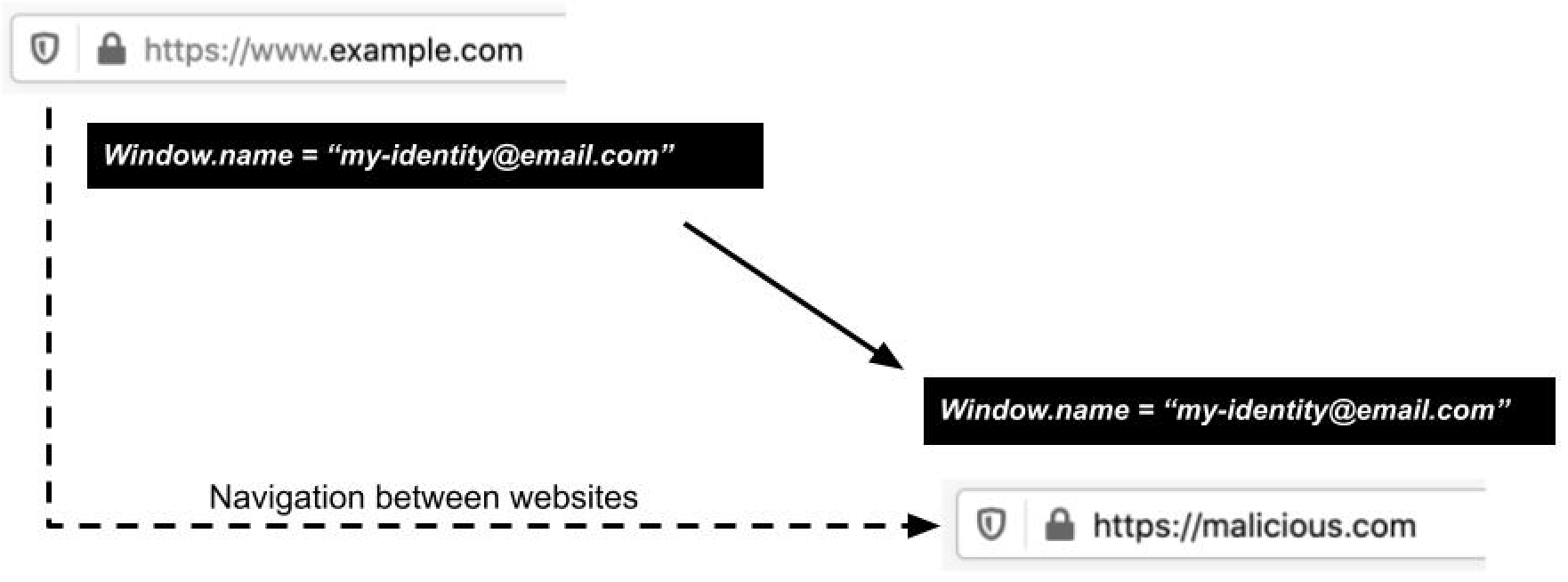
For example, suppose a page at https://example.com/ set the window.name property to “my-identity@email.com”. Traditionally, this information would persist even after you clicked on a link and navigated to https://malicious.com/. So the page at https://malicious.com/ would be able to read the information without your knowledge or consent:

Window.name persists across the cross-origin navigation.

Window.name persists across the cross-origin navigation.

Tracking companies have been abusing this property to leak information, and have effectively turned it into a communication channel for transporting data between websites. Worse, malicious sites have been able to observe the content of window.name to gather private user data that was inadvertently leaked by another website.

Clearing window.name to prevent leakage

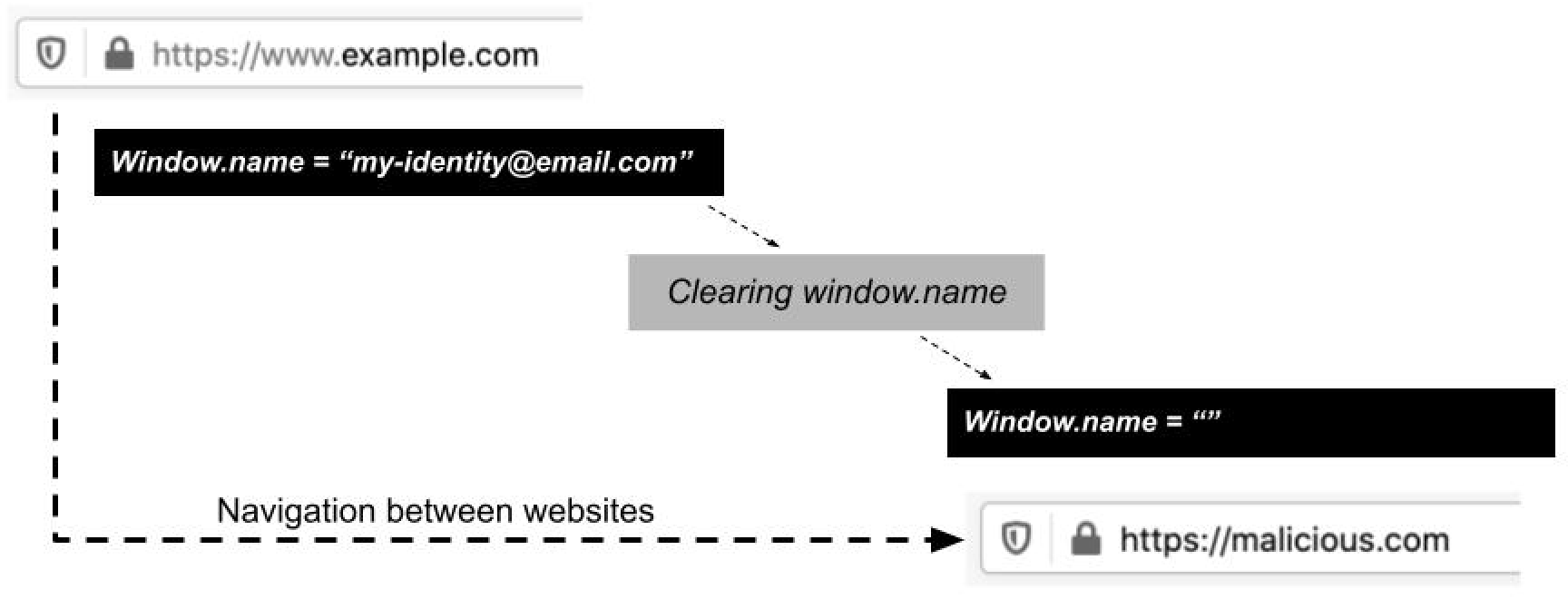
To prevent the potential privacy leakage of window.name, Firefox will now clear the window.name property when you navigate between websites. Here’s how it looks:

Firefox 88 clearing window.name after cross-origin navigation.

Firefox 88 clearing window.name after cross-origin navigation.

Firefox will attempt to identify likely non-harmful usage of window.name and avoid clearing the property in such cases. Specifically, Firefox only clears window.name if the link being clicked does not open a pop-up window.

To avoid unnecessary breakage, if a user navigates back to a previous website, Firefox now restores the window.name property to its previous value for that website. Together, these dual rules for clearing and restoring window.name data effectively confine that data to the website where it was originally created, similar to how Firefox’s Total Cookie Protection confines cookies to the website where they were created. This confinement is essential for preventing malicious sites from abusing window.name to gather users’ personal data.

Firefox isn’t alone in making this change: web developers relying on window.name should note that Safari is also clearing the window.name property, and Chromium-based browsers are planning to do so. Going forward, developers should expect clearing to be the new standard way that browsers handle window.name.

If you are a Firefox user, you don’t have to do anything to benefit from this new privacy protection. As soon as your Firefox auto-updates to version 88, the new default window.name data confinement will be in effect for every website you visit. If you aren’t a Firefox user yet, you can download the latest version here to start benefiting from all the ways that Firefox works to protect your privacy.

The post Firefox 88 combats window.name privacy abuses appeared first on Mozilla Security Blog.

22 Apr 21:52

The signal and the noise

by Alissa

We’re all goin’ on a twitter holiday
No more tweetin’ for a week or two
Fun and laughter on a twitter holiday
No more tweetin’ for me or you
For a week or two

(With apologies to Cliff Richard, who seemingly had the right idea)

I’m not always good with noise. My brain is regularly full of noise (anxiety) but can’t always process it (mild autism). Noise-cancelling headphones are my workplace saviour. Moving out of a flat on a four-lane road brought me desperate relief from traffic noise. Until recently I didn’t fully realise how much noise was in my life, and how much easier things are without it.

This month’s GLAM Blog Club theme is ‘Obsession’. I used to be obsessed with Twitter. It was the first thing I looked at when I woke up and the last thing I looked at before I fell asleep. I spent untold hours of my life firing little bursts of Opinion into my eyeballs like it somehow mattered. I fired off my own bursts right back. People liked the sound of them. I became a small Somebody in a small field. I kept going. Until about three weeks ago, when I suddenly stopped.

I decided to take myself on a twitter holiday. I reckon it’ll be permanent.

What began as an accessible and low-stress place to network with other librarians and share ideas has morphed into a high-stress horrorshow of anger, trauma, grief and drama. It’s not a healthy place to spend time. It’s where people go to start fights, let off steam, vent, have Opinions, scream. It’s also massively overstimulating. I popped back on briefly to attend the latest #auslibchat and immediately wished I hadn’t—not because of the chat itself, which was pleasant and informative, but because the website is designed to grab and hold your attention for as long as possible. My friend Hugh, who saw the light and quit Twitter long before I did, has likened it several times to a poker machine. It’s shamelessly addictive. You’ll never get back what you put in. The best thing to do is to cut your losses and go.

Everyone is angry and no one is listening.

I am very aware that I owe my career to Twitter. Being a small Somebody and giving myself a platform helped me meet lots of great people, grow new ideas, stand up for what’s right. It has made me the librarian I am today. But it is so bad for my brain now. Giving my account to a trusted friend and forcing myself to log the hell off has improved my mental health immensely. No more blasting fire and anger into my eyeballs. No more tediously scrolling past arcane fights and drama. No more unconsciously making space in my brain for whatever American Library Twitter™ reckons about something, whether it’s worth listening to or not.

Being extremely offline has meant I now have the brainspace to read and think more deeply. After years of being largely unable to do either I know this brainspace is a rare and precious gift. I don’t want, and can’t afford, to squander that gift on shouty pixel horror. Besides, my to-be-read pile is literally taller than I am. I also started noticing how much mainstream news content is either ‘Some people on the internet are angry about this thing’ or ‘Here’s something that went viral three days ago’. Making news from newsfeeds is called ‘juicing’ and there’s a lot of it. I left Twitter to escape all this stuff. Why does it persist in following me around?

As Information Officer for ACORD, the ALIA Community on Resource Description, I manage the Twitter account that was my idea in the first place. I logged on there today to share our committee survey of Australia’s cataloguing and metadata community (it’d be really helpful if you did it, cheers). Yet somehow an account that only follows 16 others, most of them assorted professional bodies, still has inflammatory content in its main feed. How does this happen? How can I escape it?

In the short term I don’t see myself returning to Twitter. In the long term, once I figure out how, I intend to use it as a unidirectional broadcast platform, syndicating posts from this blog and making other announcements as the need arises. It does mean losing out on that sense of community and broader professional awareness that attracted me to Twitter in the first place, and a small part of me misses that. But I definitely don’t miss the nonstop screeching that now pervades the place. My brain can’t separate the signal from the noise, so I am forced to silence both in order to function.

I once described Twitter as ‘the introvert’s megaphone’. For a moment I wished I still felt that way about it, eager to find like-minded people in the shrieking cesspoool, able to use the site to my advantage. But times have changed. I’m not sure I’d recommend Twitter to new librarians anymore. Apparently one library school makes students create a Twitter account as part of an introductory course, which was probably a great idea five years ago but today feels like punishment. It reminds me of having to create bookmarks on del.icio.us during an undergradute French class ten years ago. I didn’t understand the point of spending time on dying websites. (Ironically, the WordPress auto-tweet function no longer works on this blog after I migrated it to a new server. So it might be a while before anyone sees this post. Sorry about that.)

For now, I find things out from assorted email newsletters (including the one I write for ACORD, you should totally sign up), RSS feeds and messages from friends. It’s kinda nice not being so plugged in all the time. It’s lovely to have a bit of peace and quiet.

Take off those headphones and let this world pour into you
Throw off those glasses and then you’ll start seeing
Forget those battles, those ones that mean nothing to you
Know you’re alive and just smile, you’ll start hearing

Somewhere out beneath the heavens and the atmosphere
Somewhere out among the silence there’s a voice
There’s a feeling that takes over and it has no fear
When you’re caught between the signal and the noise

22 Apr 21:52

Wearing more (Mozilla) hats

by Mark Surman

Mark Surman

For many years now — and well before I sought out the job I have today — I thought: the world needs more organizations like Mozilla. Given the state of the internet, it needs them now. And, it will likely need them for a very long time to come.

Why? In part because the internet was founded with public benefit in mind. And, as the Mozilla Manifesto declared back in 2007, “… (m)agnifying the public benefit aspects of the internet is an important goal, worthy of time, attention and commitment.”

Today, this sort of ‘time and attention’ is more important — and urgent — than ever. We live in an era where the biggest companies in the world are internet companies. Much of what they have created is good, even delightful. Yet, as the last few years have shown, leaving things to commercial actors alone can leave the internet — and society — in a bit of a mess. We need organizations like Mozilla — and many more like it — if we are to find our way out of this mess. And we need these organizations to think big!

It’s for this reason that I’m excited to add another ‘hat’ to my work: I am joining the Mozilla Foundation board today. This is something I will take on in addition to my role as executive director.

Why am I assuming this additional role? I believe Mozilla can play a bigger role in the world than it does today. And, I also believe we can inspire and support the growth of more organizations that share Mozilla’s commitment to the public benefit side of the internet. Wearing a board member hat — and working with other Foundation and Corporation board members — I will be in a better position to turn more of my attention to Mozilla’s long term impact and sustainability.

What does this mean in practice? It means spending some of my time on big picture ‘Pan Mozilla’ questions. How can Mozilla connect to more startups, developers, designers and activists who are trying to build a better, more humane internet? What might Mozilla develop or do to support these people? How can we work with policy makers who are trying to write regulations to ensure the internet benefits the public interest? And, how do we shift our attention and resources outside of the US and Europe, where we have traditionally focused? While I don’t have answers to all these questions, I do know we urgently need to ask them — and that we need to do so in an expansive way that goes beyond the current scope of our operating organizations. That’s something I’ll be well positioned to do wearing my new board member hat.

Of course, I still have much to do wearing my executive director hat. We set out a few years ago to evolve the Foundation into a ‘movement building arm’ for Mozilla. Concretely, this has meant building up teams with skills in philanthropy and advocacy who can rally more people around the cause of a healthy internet. And, it has meant picking a topic to focus on: trustworthy AI. Our movement building approach — and our trustworthy AI agenda — is getting traction. Yet, there is still a way to go to unlock the kind of sustained action and impact that we want. Leading the day to day side of this work remains my main focus at Mozilla.

As I said at the start of this post: I think the world will need organizations like Mozilla for a long time to come. As all corners of our lives become digital, we will increasingly need to stand firm for public interest principles like keeping the internet open and accessible to all. While we can all do this as individuals, we also need strong, long lasting organizations that can take this stand in many places and over many decades. Whatever hat I’m wearing, I continue to be deeply committed to building Mozilla into a vast, diverse and sustainable institution to do exactly this.

The post Wearing more (Mozilla) hats appeared first on The Mozilla Blog.

22 Apr 21:48

Streeteries: We’re not going back

by Gordon Price

One confident post-pandemic prediction: the curbside patio – or streeterie – is here to stay.  Like these on Yew Street yesterday:

Irony alert: some businesses would have opposed the loss of the required curb parking tooth and nail if not for the pandemic.  Instead, this summer we should see some creativity and upscaling of streeterie design, so important have they become in the economics of eating.  (Likewise, more debate at City Hall on how much should eventually be charged for this valuable public space to offset the parking revenue loss.)

As for the inside of restaurants, lots of lessons have been learned that will be incorporated into permanent design changes.  But there’s still a debate as to whether deliberate crowding will be avoided or desired.  From Fortune:

Warren Weixler, cofounder of creative design firm Swatchroom, based in Washington, D.C., agrees. “I think the idea of packing a bar shoulder-to-shoulder and trying to sling as many drinks as possible is a thing of the past.” …

…. some say, not so fast. Knudsen of Concrete Hospitality … predicts (temporary partitions) will be gone by the end of this year. His team is even continuing to add communal tables into their restaurant designs.

“We’re social creatures,” he says. “The pandemic has proven that we need that interaction. And you can’t replace that.” If some packed bars and restaurants in places that have lifted all COVID restrictions are any indication, Knudsen may be right.

22 Apr 21:46

The Best Headlamp

by Jenni Gritters
Our four picks for best headlamp placed next to each other with their lamps turned on, in front of a sand-colored background.

Whether you’re headed into the backcountry or just taking your dog on a nighttime walk, with a good headlamp you’ll never be caught in the dark.

We’ve been testing headlamps since 2012, and after subjecting them to years of late-night hikes, evening runs, and stargazing sessions, we still think the Black Diamond Spot (the current version being the Spot 400) is the best headlamp.

22 Apr 02:35

A full-featured Raspberry Pi desktop computer

by Rui Carmo

This is quite neat, but considering that for the sum total of the parts (even with only eyeball pricing for the expansion board) you can get a low-end all-in-one Celeron or Pentium Gold that will give the Pi a run for its money, I’m not sure we’re not going into diminishing returns territory here…

(Even with current shortages, low-end hardware is still on sale, and I’ve been looking at updated z83ii equivalents…)

However, it does seem like a good hint as to what people are prioritizing: better storage options, more ports, and, in general, something with just a few more features on top of the “bare” Pi boards.

It’s as if the Pi was “nearly there”, but not quite good enough for general use yet (which is largely what I’ve been leaning towards over the years, even as I keep hacking on them).

Let’s see if these things influence the next generation of hardware in any way.


21 Apr 03:21

Twitter Favorites: [UpshotNYT] "It feels as if you’re muddling through your days, looking at your life through a foggy windshield." https://t.co/j81YxfxSK3

The Upshot @UpshotNYT
"It feels as if you’re muddling through your days, looking at your life through a foggy windshield." nyti.ms/3xiahfY
21 Apr 03:19

Twitter Favorites: [robgillezeau] As a policy wonk who once upon a time helped design the $15-a-day NDP child care plan in 2015, how do I feel about… https://t.co/qN1XDk3whb

Rob Gillezeau @robgillezeau
As a policy wonk who once upon a time helped design the $15-a-day NDP child care plan in 2015, how do I feel about… twitter.com/i/web/status/1…
20 Apr 19:19

Apple’s new iMac features power adapter with built-in ethernet port

by Karandeep Oberoi

Apple announced a revamped 24-inch iMac at its ‘Spring Loaded’ event that combines the company’s M1 silicon, macOS Big Sur and fresh new colours.

The machines also come with a new power connector that attaches to the iMac magnetically. Additionally, it features a two-meter colour-matched woven cable that leads to a small power adapter that includes an ethernet slot. Though not a significant design change, shifting the ethernet port to the power brick could help some people hide unsightly ethernet cables a little better.

The new iMac features 85 percent faster CPU performance when compared to its predecessor, 2x faster graphics and 3x faster machine learning. It also features up to four USB ports, with two of them being Thunderbolt.

For more on the new 24-inch iMac, check out our story focused on Apple’s refreshed all-in-one computer.

Image credit: Apple

The post Apple’s new iMac features power adapter with built-in ethernet port appeared first on MobileSyrup.