mkalus
shared this story
from  Kickstand Comics featuring Yehuda Moon. Kickstand Comics featuring Yehuda Moon.
|

The post 2016-12-15 Shiver Lining appeared first on Kickstand Comics featuring Yehuda Moon.
|
mkalus
shared this story
from Kickstand Comics featuring Yehuda Moon.
|
The post 2016-12-15 Shiver Lining appeared first on Kickstand Comics featuring Yehuda Moon.

This year, Apple has exited the external display business and is rumored to be discontinuing its AirPort wireless routers.
These developments have left a bad taste in many users' mouths, but 2016 isn't the first time Apple has shuttered an entire product line.
By my count, there are five major categories of products or devices that Apple has abandoned over the years.
In 1994, Apple launched one of the first consumer digital cameras, the QuickTake 100. The sandwich-shaped camera could store eight photos at 640×480 resolution. It had no focus or zoom controls, but did include a flash. The camera had to be hooked up to a computer to view, import or delete files.
The QuickTake line would evolve quickly. The 150 came with a snap-on lens that would allow for closer focus. The 200 — in a more traditional body — added controls for both focus and aperture and could store images using a removable media card.

The QuickTake 100
Like many Apple hardware accessories from this time, they were developed in conjunction with other companies. In this case, Kodak developed the 100 and 150, with Fujifilm building the 200.
The QuickTakes never sold well. While Apple may have been one of the first companies to market, once mainstream camera companies joined the party, sales continued to fall. The QuickTake project was ended in the Great Product Bloodbath that took place when Steve Jobs returned at the very end of 1996.
Apple's printer business started four years before the original Macintosh made its debut in 1984. That first printer — the Silentype — brought 80-column thermal printer to the Apple II and Apple III.
The ImageWriter came along in 1984, bringing its dot-matrix goodness to Macintosh users who had $675 to burn. The next year, Apple released the LaserWriter, the company's first network printer.
The ImageWriter dot matrix and LaserWriter printers spun off several subsequent models each, until Apple had a robust line of personal and professional printers spanning numerous models.

The LaserWriter Pro
image via The Computer History Museum
In 1990, the StyleWriter black and white ink jet printer replaced the ImageWriters. In 1993, Apple added a color ink jet printer to its line. By the mid 1990s, the company was offering all sorts of options to its customers.
Steve Jobs killed them all off in 1998.
In 1988, the Apple Scanner was released. It was a 16 level grayscale, 300 dpi flatbed scanner that attached to any Mac with a SCSI port. It was short-lived product, replaced by the Apple OneScanner just three years later.

Apple OneScanner
image via Stephen Edmonds
The OneScanner offered 256 levels of grey, with 1995's OneScanner adding color support. Later models picked up goodies like automatic document feeders and support for higher resolutions.
The OneScanner line was discontinued in 1997 by You Know Who.
Over the years, Apple has stated that music is at the heart of what the company does. While that's meant things like the iPod or Apple Music, Apple has released several sets of external speakers over the years.
The first was back in the early and mid 1990s. The AppleDesign Speakers initially came in Platinum to match the Mac line of the time, while the second generation came in gray to match the PowerBooks and the ill-fated PowerCD music player.
In January 2001, Apple shipped the Apple Pro Speakers. These speakers were built in partnership with Harman/Kardon. The speakers and electronics are encased in clear acyclic globes with flat bottoms to prevent them from rolling away. The speakers were part of many Power Mac, Cube and iMac G4 setups. As Apple transitioned to G5-powered systems, the speakers quietly went away.

iPod HiFi
The last stand-alone speaker product Apple shipped 2006's iPod Hi-Fi. The iPod-powered home stereo product included two 80mm speaker cones and a 130mm subwoofer. It retailed for $349 and was on sale for just a year and a half.
Apple's first external storage product was the ProFile drive. With support for the Lisa, Apple IIe and Apple III, the drive was 5 MB and cost $3,499 when introduced in 1981.
In the late 80s, Apple introduced an 20 MB external hard disk with the Macintosh 512K and then a series of drives ranging from 20 to 80 MB.
By 1989, these products were gone, and Apple didn't sell anything else noteworthy in this category until 2003 when it introduced the Xserve RAID:

With prices ranging from from $5,999 - $10,999, the Xserve RAID was designed for enterprise customers who needed rack-mountable storage attached to their Xserves over fiber for high-speed data access.
While the Xserve would last until January 2011, the Xserve RAID was taken off the market in 2008.
When Jobs came back to Apple, many products met their demise as he forced Apple to focus on just a few products. That drive led to the greatest turn-around in this history of technology companies.
Today, Apple is bigger then ever, both in terms of headcount and in cash on hand. Are things like the Thunderbolt Display and Time Capsule going away to help the company focus, or are they merely victims caught in the Post-PC crossfire? Will ditching these products result in the same gains as killing off printers and scanners and cameras once did?
Beats me. Here's hoping they haven't died in vain.
Club MacStories offers exclusive access to extra MacStories content, delivered every week; it’s also a way to support us directly.
Club MacStories will help you discover the best apps for your devices and get the most out of your iPhone, iPad, and Mac. Plus, it’s made in Italy.
Join Now


Earlier this year, we proposed a framework for Community Leadership Development at Mozilla. Since then, we’ve iterated on that work : ‘Open, Communicate, Empower, and Build’ are now core competencies guiding content development in Mozilla’s Leadership Toolkit.
As part of our goals for developing excellent content aligned with project and volunteer needs, I’ve been very deliberate and determined… to innovate a contribution model for volunteers with a background in education (professionals, and students), and those willing to invest in the testing of those workshops with their community. Our working group, has been building and testing a workflow as part of our early work. Enormous thanks to :
We’re definitely on our way, and energized with feedback from the Hawaii All Hands, including a contribution: ‘Using Powerful Questions’ from Jane Finette!
Our work is divided into areas of work listed below:
Based on the original Framework, and with inspiration from Julien Stodd, and the DIY Toolkit we proposed curriculum development under 4 competencies:
Competencies that help people bring others in, to help others realize and claim their potential through designed opportunity, empathy, diversity and inclusion.
Skills, knowledge and attitudes we develop to effectively, and collaboratively build momentum of positive change they want to see in our communities, on projects and initiatives that matter to Mozilla’s mission.
Open is a way of thinking and being, open is a willingness to share, not only resources, but processes, ideas, thoughts, ways of thinking and operating. Mozilla story, manifesto and way of working.
Growing connection and shared vision for advocacy and purpose through strong personal and community narrative. Sharing what we learn, sharing early, sharing often, sharing inclusively.
Content is also categorized according to (evolving) sub-competencies, displayed as stories that help connect people with resources (example below, not on website yet)

Content is prioritized by those skills, knowledge and attitudes identified by Mozilla projects (currently Mozilla Reps, Campus Clubs) as being key to volunteer success — validated through self-assessment and testing. Although content is categorized by competency and sub-competency, we’ve also started to recognize pathways as another method of content categorization. Some examples so far are ‘I Hear You!’, and ‘Presenting Ideas’, as well as pathways focused on Personas like ‘New Mozillian’.
So far we have a number of resources built, with others on their way. As much as possible, we leverage openly licensed OER.
My big aha moment during this process was to stop being prescriptive about the technology, and technology format of curriculum contribution, and instead focus building standards, and processes that support where and how people want to work. Who cares if contributors know markdown, who cares if they know how to submit a pull request. Honestly, it only takes one person to publish content — and they can be positioned at the end of the workflow.
Something I have also learned this year is that ‘open calls’ to test content is almost never successful in obtaining meaningful feedback. Instead holding a 1:1 call with someone willing to test content, demoing the content delivery and then asking them to do the same with one or two people yields higher quality feedback on both the facilitator journey, and the learner.
I’m starting to believe that all workshop content we develop should come with a demo video, or 1:1 coaching that helps the facilitator prepare and ask questions.
Currently, the Leadership Toolkit website is a fork of another, and intended only to demo progress.
You may ask yourself, what learning formats are you optimizing for? Good question!
Right now, content is a mix of self-study and in-person/workshop-focused — but we intend to be more deliberate about the design moving forward — with thought leadership from Mikko Knotto, we’ll be proposing a standard for content delivery based on this talk from Coursera . I’ll blog about this next.
Stay in Touch!
You can find updates on our work, including how to find us — on the project wiki.
Scrabble by Jacqui Brown
The Your Best Shot 2016 Flickr group is really amazing. There are already more than 19,000 members who have uploaded nearly 15,000 quality photos.
Today we wanted to showcase the work of those professionals who stick to more traditional types of photography, so here’s a selection of our favorite film-based images from the pool.
Join the group and be sure to add your best photo of 2016 for a chance to be featured on the Flickr blog and social media channels. You may get some visibility if your image is selected!
Here’s a preview of some of our favorite analog photos. Visit the full gallery on Flickr to see more.


mkalus
shared this story
from  Zero Hedge. Zero Hedge.
|
As reported earlier, in an attempt to demonstrate how advanced (and safe) Uber's "self-driving" technology is, the company rolled out a trial of its self-driving Volvo XC90 cars in San Francisco, the second city it has done so after Pittsburgh. However, in a surprising twist, Uber did not obtain a preapproval from the California DMV, perhaps in an attempt to avoid making a public disclosure of any potential infractions its cars might got into.
Unfortunately for the world's most valuable private startup, in a world where everyone has a camera, on the very day of the launch, one of its "self-driving" cars was caught did something we joked in our earlier post may happen: the car ran a red light.
The circumstances of this incident aren’t known at this time, including whether this was while the car was human or computer-operated when it ran the light. Uber said it is looking into this matter as “safety is a top priority.” In an attempt to cover up what could be a reputation bruising scandal, an Uber spokesperson Matt Wing issued a statement saying "this incident was due to human error. This is why we believe so much in making the roads safer by building self-driving Ubers. This vehicle was not part of the pilot and was not carrying customers. The driver involved has been suspended while we continue to investigate."
No matter the cause, this looks far more like the risk-happy Uber of the early days that often acted in contravention of local regulators to achieve its business goals.
And while the DMV was already angered when it learned of Uber's sole-sourced initiative, it was livid upon learning of the near accident.
As a result, AP reports that California regulators are now threatening Uber with legal action if it does not stop providing service using its self-driving vehicles in San Francisco without state permits.
BREAKING: APNewsBreak: California regulators: Uber must stop self-driving car service in San Francisco until it gets state permit.
— The Associated Press (@AP) December 14, 2016
The California Department of Motor Vehicles issued a statement saying Uber was expected to secure such a permit, but Uber maintained that it did not require this clearance because its vehicles were not fully self-driving and have a driver onboard at all times. Uber said earlier that it did not intend to pursue this permit, the requirements for which are detailed by the California DMV on a site dedicated to autonomous vehicle operation on public roads. In a letter to Uber telling it to end the launch of its self-driving service, the DMV states that Uber will face “legal action, including but not limited to, seeking injunctive relief” if it does not comply.
Earlier in the day, the DMV issued a statement in which it said that: “The California DMV encourages the responsible exploration of self-driving cars. We have a permitting process in place to ensure public safety as this technology is being tested. Twenty manufacturers have already obtained permits to test hundreds of cars on California roads. Uber shall do the same.”
That means, as TechCrunch puts it, it’s been less than one day since Uber started its test, had its first documented incident with the vehicles and was ordered by the state to stop what it was doing. This definitely looks more like the risk-happy Uber of the early days that often acted in contravention of local regulators to achieve its business goals.
The full letter sent by the CA DMV demanding that Uber stop operating its fleet of self-driving cars in SF or else they will pursue legal action, is below:

mkalus
shared this story
from  CinemaSins's YouTube Videos. CinemaSins's YouTube Videos.
|
Star Trek Beyond, the third entry to this current series, is actually pretty fun, and was a bright spot in a horrible summer of movies. Still not perfect, so here are its sins.
Thursday: Another space movie.
Remember, no movie is without sin! Which movie's sins should we expose next?!
Podcast: http://soundcloud.com/cinemasins
Sins Video Playlist: http://www.youtube.com/watch?v=wy-v4c4is-w&list=PLMWfZxj1nTkQBy4AeRGG4xH5d2IIApNPj
Tweet us: http://twitter.com/cinemasins
Reddit with us: http://reddit.com/r/cinemasins
Tumble us: http://cinema-sins.tumblr.com
Call us: 405-459-7466
Jeremy's book now available: http://theablesbook.com

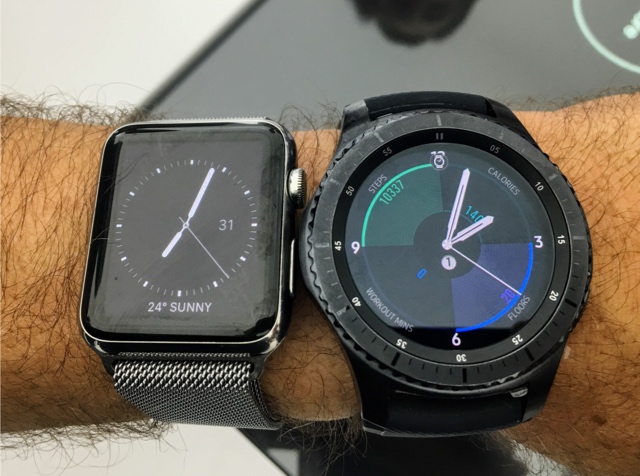
Pebble was one of my recommendations for a functional smartwatch. Now that Fitbit is taking over parts of the business, that is no longer the case. If you have an iPhone, my recommendation is simple: get an Apple Watch. It's brilliant.
For Android, I will be looking at alternatives. And at the top of my list are two watches from Samsung: the Gear S3 pictured above, and also last year's Gear S2. Both watches run on Tizen and I will try to use them with BlackBerry Android. There are a couple of reasons why I also consider the S2. It is smaller than the new model and the price has gone down considerably.
I will need a few days to befriend these watches. Expect a first impressions soon and more thoughts early next week. You should still be able to get it in time for Xmas.

Even if Verizon walks, there is value in Yahoo.
We tested our Strategic Community Management course (price rising tonight) with 20 community professionals from the FeverBee Experts community.
We told them to focus on practicality. Could they apply the material to their own work?
Practicality is key.
Most strategic advice, for example, begins with “list your community goal/purpose”.
This advice wouldn’t cut it with any organization we’ve ever worked with.
Consider the obvious questions this simple task provokes:
Instead of simplistic advice we give course participants a template of 50 specific questions we’ve used in the past and provide contextual advice about how to uncover the goals of their community as part of a process.
You can see a snippet of this below (or click here):

Get support by asking these questions
The Strategic Mindset
Get really granular and really practical.
Your approach to uncovering community goals will determine the level of support you get.
Do they think of you as the community person who does the fun engagement stuff on the internet? Or are you a trusted consultant who is going to help them achieve their targets in the most cost-efficient way possible?
Imagine instead of listing goals on a whim, you took the time instead to identify and build relationships with senior stakeholders. Imagine you asked deep, probing, questions to uncover their goals. Imagine you collaborated with stakeholders on a basic plan you would execute. Imagine you kept them updated on progress towards their goals using their language and you stopped sending through engagement reports.
Now you’re no longer the person that talks to people on the internet. Now you’re their trusted consultant to achieve their goals in the most efficient way possible.
And it’s never too late to begin doing this.
Final Course Promo – Prices Rise Tonight
The Strategic Community Management course isn’t just about putting a community strategy together.
The course is about applying a strategic mindset to everything that you do.
That strategic mindset means:
These are exactly the skills we want you to acquire and be able to apply from this course.
Strategic Community Management Course Details:
The course will require 1 to 2 hours of your time each week. We’re not going to overwhelm you with thousands of words to read.
Instead, we’re going to pinpoint and focus on the key strategic wins above.
The goal is strictly quality over quantity. This includes:
The fee for this course is $685 until tonight. Group rates available.

Federico Viticci’s round-up of how he gets things done on his iPad Pro, complete with a list of the apps he uses.
Always an interesting read, especially since I use a subset of those and it’s nice to pick up new tricks.
This post introduces one to the amazing world of creating sociology. You are in need of a strong knowledge of the premises and expectations of the subject before you compose a defined and clear sociology papers. You must understand the way, your crowd the universe is viewed by them as well as the way in which they purchase and value advice. Thus, without further ado, let us determine just how one goes about composing it, and just what sociology is.

Thus, exactly what is a sociological standpoint? At its simplest, sociology is an effort describe and to comprehend just how that organizations and people interact inside a culture. How precisely does one approach this target? The existence of a person or the annals of a culture could be understood without understanding both. Therefore, a debate that is good sociological must balance structural limitations and both individual agency. That is definitely a high order, but it is the cornerstone of composing that is successful sociological. As you feel about your personal creating, keep it in thoughts.
Do you know the most issues that are important to take into account as you compose in sociology? Spend particular awareness of the problems that are following:
In stating your thesis, first factor to keep in mind on paper a sociological discussion will be as obvious as you are able to. Which is not false in most documents, however you can find a few problems frequent to sociology, which you ought to know of and prevent at all cost. Sociology is the research of the discussion between people and larger social forces as previously described. Distinct traditions within sociology often favor one facet of the picture over another, with a few focusing on architectural components on the bureau of others among individual performers. The risk is the fact that you therefore lose the intricacy of sociological thinking and may move too much in both of those directions.
You will next should locate evidence to strengthen your state as soon as you have produced a functional discussion. What matters as proof in a document? Mostly, sociology is an empirical subject. Empiricism in sociology signifies basing your decisions on evidence that accumulated and is recorded with just as much rigor. This signs generally attracts from experiences, assembled instances up on data, and observed designs, maybe not merely from reviews that are isolated, anecdotal. Does not show the American class method is available, simply because your next relative could scale the steps from poverty to the exec boardroom. You are going to be needing signs that is mo Re systematic to make your state effective. Most importantly otherwise, do not forget your view alone just is not adequate help to get a debate that is sociological. You need to have the capacity to stage to recorded cases of societal happenings that meet your discussion actually should you be building a theoretical discussion. Sense is necessary to make the discussion, but is not adequate assistance on its own.
Sociological evidence drops in to two primary teams: qualitative and quantitative.
Some sociologists prefer vice versa, or qualitative over quantitative information, which is reasonable to count on just one system in your function. However, because each process has flaws and its very own talents, systems that are joining might be a particularly powerful strategy to strengthen your discussion. When you yourself need to gather your personal data to your document nevertheless, these distinctions will not be only significant. In addition, you should to be familiar with them actually, when you are counting on supplementary resources on your investigation. As a way to significantly appraise info and the research you happen to be studying, you ought to possess an excellent knowledge of flaws and the advantages of the systems that are different.
Considering the fact that that social existence is not simple, you must really have a point-of-entry in to analyzing this world. In vocabulary that is sociological, you are in need of a device of investigation. The system of evaluation is precisely that: it is the component that you have selected to examine in your research. Again, this can be maybe not of significance and priority, and merely an issue of concentrate and emphasis. You will find many different models of analysis in sociological creating, which range from the person up to companies or teams. You centered on theoretical premises and the passions driving your research should choose yours. The machine of evaluation may discover much of what is going to qualify as important evidence in work. Therefore, you should not just clearly see that that device, but in addition regularly put it to use during your papers.

Eventually, we reach the research-paper that is powerful. It is in fact small more as opposed to mixture of several of the areas of the documents even though the notion of doing a study document might be daunting, we have been previously mentioned. You make use of this review as a foundation for developing your research question and will start out having a crucial evaluation of the materials. The question may most likely take the kind of a credit card application (“These thoughts may aid us to clarify Z.”) or of hypothesis screening (“If these thoughts are right, we should locate X when we investigate Y.”). Written down the additional varieties of documents the abilities you have been already employed will allow you to compose your investigation documents.
Thus, we achieve the end-of this all too brief glance to the universe of creating that is sociological. Sociologists is definitely an idiosyncratic group, so expectations and papers tips may without a doubt differ from class to class, from instructor to instructor. Nevertheless, these basic directions will allow you to begin.
The post How to write a sociology paper appeared first on BookRiff.
AirPods are shipping, Mario needs the Internet and Myke has a story.
A fun episode of Connected this week with a good variety of topics. You can listen here.
Sponsored by:
→ Source: relay.fm
Waterloo-based company Eleven-x has launched a low-power Canadian network dedicated to connecting the Internet of Things.
The network, which is built on an open standard created by the global LoRa Alliance, aims to undercut traditional Canadian carriers in both price and power efficiency, stating that two AA batteries can last up to 10 years on its service and that higher-powered batteries can provide up to 20 years of life.
Big data, consumer solutions
“What’s exciting is all the data,” Ryan Hickey, CEO and co-founder of the company, told MobileSyrup in an interview.
“You just bring it to the field and now it’s collecting whatever data you want for 20 years. Just think about the vast amount of data you can generate if you multiply that by millions of sensors and then all this data then can be used to inform analytics or machine learning to optimize our society.”
Additionally, there are IoT solutions that could have more direct and immediate impacts for consumers. Dan Mathers, chairman and co-founder of the company, gave the example of parking.
“Who hasn’t driven around trying to find a parking spot as close to wherever their destination is? Imagine if you could just put a sensor in each of the parking sensors that didn’t need a battery replacement for up to 20 years and it just told an app where the nearest free parking spot is to your location. That’s a significant benefit for the environment and people in general.”
Global alliance of IoT networks
Hickey and Mathers also stressed the importance of joining LoRa, which is an alliance in the same vein as the Wi-Fi Alliance that is dedicated to standardizing Low Power Wide Area Networks (LPWAN) for IoT and machine-to-machine (M2M) technologies. It currently has about 400 members across the globe.
“There’s a rich ecosystem of industry partners that provide various components to the networks and that provide devices and solutions,” said Hickey. “We want to leverage all of that and offer that to our customers.”
Eleven-x as a team has a BlackBerry heritage that Mathers noted provided them with wireless expertise — particularly when it comes to low power, low cost devices that are highly secure. Mathers stated that those are the three driving factors when it comes to spurring the adoption of IoT on a mass scale.
As it stands, Eleven-x’s network is now live in Kitchener, Cambridge and Waterloo, with plans to deploy across all major cities in Canada over the next two years. The young company will have plenty of competition as it attempts to expand in the space — Rogers, Bell and Telus are all betting on IoT as a crucial emerging industry for the future.

Photo Caption: back in the 808
Photo taken at: Waikiki Beach
Instagram filter used: Clarendon
Following up on the success of its Spot pilot, undertaken by the company at the end of last year, Uber has started rolling out a new piece of hardware it plans to make mandatory for all of its drivers.
Dubbed Beacon, the Bluetooth-enabled LED light attaches to a car’s windshield and pairs with the Uber app. If the driver that is about to pick them up has Beacon installed, the user can adjust the colour of the light while they wait for their ride.

The idea here is to make it easier for Uber users to spot their driver at night, particularly if they’re waiting outside a crowded venue like a sports arena or concert hall.
The company plans to start distributing Beacon ahead of New Year’s Eve, typically one of its busiest nights, to drivers in Miami, Denver, Nashville and Newcastle, England. Although it doesn’t mention specifics, Uber says the device will make its way to more cities in 2017.
As unsettled and chaotic as 2016 has felt, it makes sense that stillness would seem like a means of resilience. As the election approached, the Mannequin Challenge — in which people freeze in place while someone captures the resulting spectacle on their phone — swept through social media, with everyone from teens to presidential nominees participating. The first Mannequin Challenge video was reportedly created by a group of high schoolers in Jacksonville, Florida, who posed atop desks while Rae Sremmurd’s “Black Beatles” played. Sooner than you could yell “Freeze,” the craze had caught fire, and suddenly even Paul McCartney was participating. It’s like the opposite of a flash mob: Instead of strangers showing up somewhere and doing something, people who know each other stand where they are and do nothing. But where flash mobs were often prankish and confrontational, the mannequin challenge seems contemplative, a poignant moment of collective vulnerability. It is pointedly deliberate, inverting never-resting phones into an unlikely facilitator of serenity. The Mannequin Challenge evokes a space where notifications can’t reach you — but then it goes viral.
Freezing as a social activity is hardly new. The 19th century saw a vogue for tableaux vivants, or “living pictures,” in which partygoers would cast themselves into a frozen arrangement of living figures, costumed and posed in reference to a scene from art, literature, or history. Among the popular scenes, according to the 1860 manual Home Pastimes; or Tableaux Vivants, were “Venus Rising From the Sea,” “Liberty,” and “Joan of Arc at the Siege of Orleans.” Though the Mannequin Challenge participants are not necessarily following set scenarios, they sometimes can be read as aligning themselves with time-honored types: the beauty, the joker, the muscle man, etc. The silence of the medium throws these iconic representations in stark relief, giving them the resonance of eternity.
The Mannequin Challenge evokes a space where notifications can’t reach you — but then it goes viral.
The depiction of such epic scenes and archetypes made the idealizations of art appear accessible in reality: By existing in such a tableau, for a brief moment, the individual becomes part of something timeless. Edith Wharton included a tableaux-vivants scene in The House of Mirth (1905): “To unfurnished minds,” her narrator explains, tableaux vivants “remain, in spite of every enhancement of art, only a superior kind of wax-works, but to the responsive fancy they may give magic glimpses of the boundary world between fact and imagination.” That is, the tableaux offered an opportunity for audiences to confirm to themselves that they are properly “responsive” by dissolving their cognitive dissonance and holding the fake and the real in their mind simultaneously.
Likewise, 19th-century pantomimist Tony Denier claimed in Parlor Tableaux (1869) that “the realization of a picture on canvas, and reproduced by living figure in all its beauty and entirety, tends to assimilate the real with the ideal, and also to improve the understanding and fill the mind with purer thoughts, and clothe the outer form with fresh graces.” This perspective focuses on the edifying effects for the audience. But for the performers, it allowed for a kind of conscious objectification. Lily Bart, Wharton’s heroine, appears in a tableau posed as the bare-torsoed Mrs. Richard Bennett Lloyd from a 1775–76 neoclassical portrait by Joshua Reynolds. In this guise, Lily was “divested of the trivialities of her little world … catching for a moment a note of that eternal harmony of which her beauty was a part.”
This kind of role playing could also serve as a type of meditation, for stillness, silence (usually), and concentration can create a deep sense of contemplation and awareness. A paused moment is full of poised anticipation, investing seemingly ordinary time with the drama of possibility, a sense that something momentous has to happen. But from inside, the stillness itself seems momentous.
One day after work, I was finally roped into a mannequin challenge (one that has never seen the light of day, I hope). While I was frozen in a simple sitting position with a magazine, I grew hyper-conscious of my body, the way you do when you’re trying to meditate and you haven’t quite locked into a place of concentration. I felt the weight of my body all of a sudden, and I realized that my “natural” sitting position is quite uncomfortable. But more than that, I found that while frozen, I was able to think clearly. Holding still suddenly, paradoxically, felt like an elusive escape from the stresses of daily life. I couldn’t move, but I felt free.
Stillness offers the chance to reflect, to meditate. But it is also hard work. Maintaining motionlessness is a feat of physical endurance, as shown by the quivering arms of the carefully balanced participants in many Mannequin Challenge videos. Ultimately, stillness is a struggle between one’s mind and body in the quest to reach a controlled state.
It might seem wonderful to float around the world like a poltergeist, rearranging things at one’s leisure (or to stop your life story to become your own narrator, like Zack Morris in Saved by the Bell). But as Bart and Milhouse learn in a Simpsons Halloween episode when their mail-order time-freezing stopwatch breaks, complete control only seems fun when it’s fleeting. HBO’s Westworld illustrates the opposite possibility: robot hosts are forced to be frozen in an instant, with the sharp demand to “freeze all motor functions,” or simply with the press of a button, their sense of free will made to disappear in an instant. This version of uncanny stillness usurps that focused experience of self-control, creating the ultimate display of powerlessness. Stillness serves to confirm visually the illusion of choice.
The illustration of how the sense of agency can be so easily withdrawn is a horrifying reminder of the unspoken hierarchies we routinely obey, the various techniques by which we are controlled and rendered passive. With a simple declaration, the government can effectively take control of our bodies, and restrict our free will, our mobility, our means of representing ourselves. Westworld depicts a too-familiar world in which an unseen few can control the actions of all; stillness is how that power manifests. Stillness becomes the ultimate display of vulnerability, an inevitable consequence of the ever more thorough ways people are put under surveillance.
Which interpretation of stillness fits with our cultural moment: the person who chooses to pose or the one who’s frozen against their will? It may be that stillness resonates because it blurs these together: the desire to control oneself, and the fear of being controlled. Technologies of social control are expanding their reach, through the devices and platforms that have made phenomena like the Mannequin Challenge possible. But participating in the mannequin challenge allows us to creatively explore identities and embody representations of ideals, as in some of the 19th-century tableaux. One can exercise a mastery of the mind over the body, through the force of a free will.

I use my Amazon Echo a lot. Since importing one from the U.S. last year, I've started using web services that provide native integration with Alexa, the platform that powers Amazon's speaker. Whenever I come across a new web service I could use, I check if they have an Alexa skill too. I like Amazon's take on the home assistant so much, I recently added an Echo Dot to my setup, which has further increased my usage of Alexa and connected services.
There's one big problem with the Amazon Echo, though: Alexa has no iPhone presence, and Apple is never going to give up the prime spot of Siri on their devices. Amazon has an Alexa app, but it's a clunky wrapper for a web view that has no voice functionality whatsoever. So while Siri has improved with iOS 10, it's still behind Alexa in terms of third-party integrations. I often find myself wishing I could ask Siri what I ask Alexa to do for me at home. I have to confess that I even considered an Amazon Tap – the poorly reviewed portable speaker with Alexa support – only to have some way to summon Alexa when driving.
Thankfully, developer Thaddeus Ternes sees this as a problem as well, and he created Astra, an iPhone app to issue requests to Alexa via voice. You might remember Ternes from Lexi, the predecessor of Astra that also allowed you to use Alexa on the iPhone. Lexi was pulled from the App Store and it's coming back as Astra, which sports a new design, support for timers and alarms, and background audio. After testing Astra for the past two weeks, I decided to put it on my Home screen and it's quickly become one of my most used iPhone apps when I'm not at home.
Astra is, effectively, just a large microphone in the middle of the screen. You can sign into your Amazon account, give the app permission to record audio, and start sending messages to Alexa. To record a command, you hold down a Siri-like microphone button and then lift your finger to send a request to Alexa. When Astra displays a 'Thinking...' message it is not, in fact, processing your request on its own – the Alexa Voice Service is; Astra is just waiting for a response to speak back to you. Astra is a bridge to Alexa's cloud brain: there are no visual messages and no interface elements built around Amazon's assistant. Even the audio responses use Alexa's standard voice.
And it's because of this simplicity that using Astra creates the illusion of having a small Amazon Echo inside your iPhone. Astra – and therefore the Alexa Voice Service – can integrate with all the skills you've already configured with your Echo. I was able to ask Astra to add new tasks in Todoist, and Alexa performed the action like it would if activated from an Echo. I asked about the weather, my TV shows in Trakt, and my agenda from Google Calendar; Astra always came back with a response sent by Alexa.
Perhaps more impressively, Astra can be used to control connected home devices through the Alexa Voice Service over the Internet. I can use this app to turn on my coffee maker when I'm walking up to my house and I'm still on 4G; I can turn on my Hue lights and even specific scenes thanks to the existing Hue integration; I even tried to turn on my television (connected to a Harmony hub) with Astra and Alexa, and it worked. When I arrived at home, the TV was on, my living room lights were red, and I treated myself to a good espresso thinking that reviewing apps can be pretty cool sometimes.

An Alexa timer delivered by Astra.
Unlike the former Lexi app, Astra has support for background audio and it can set both timers and alarms. I ran across issues with flash briefings (audio tracks didn't play at all), but timers and alarms were sent as push notifications to my iPhone from Alexa – the Echo speakers at home didn't go off. I'm not sure I need Alexa to set a timer when I'm out (that's one area where Siri excels), but it's good to have options.
In my tests, Astra was able to perform most of the actions that I can ask Alexa to do on my Echo speakers. Alas, one of my favorite Echo features – Spotify playback – isn't supported by Astra: if you ask the app to play some music from Spotify, Alexa will reply with an error message. If it's not a technical limitation imposed by Amazon, I would love to have a way to stream Spotify to my iPhone with Astra. And while the app does have an astra:// URL scheme to open it, I would like to see support for 3D Touch quick actions on the Home screen to enter recording mode. Finally, it'd be nice to have haptic feedback on the iPhone 7 to feel when the microphone button has been pressed and when a message has been heard.
An app like Astra will never be as tightly integrated with iOS as Siri. Looking ahead, it's also likely that Apple will consider a smart speaker with Siri integration and extend the domains available in SiriKit for third-party apps. But until that day comes, the Amazon Echo and Alexa allow me to interact via voice with services that Siri doesn't support, and Alexa skills have become a staple of our household. Astra brings most of that convenience to an iPhone app that is fast and intuitive, but, more importantly, consistent with Alexa's usual behavior. If you miss your Amazon Echo when you're not at home, Astra is for you.
Astra is available on the App Store.
Club MacStories offers exclusive access to extra MacStories content, delivered every week; it’s also a way to support us directly.
Club MacStories will help you discover the best apps for your devices and get the most out of your iPhone, iPad, and Mac. Plus, it’s made in Italy.
Join Now

The North Sense. Image courtesy of Cyborg Nest
If humans are going to be augmented with implanted technology and head towards a cyborg, transhumanist future, it's got to start somewhere. Somewhere small, perhaps. The founders of Cyborg Nest are hoping they've taken the first steps towards that reality with their "artificial sense," North Sense.
North Sense is a small piece of technology, a cyborg piercing, that's embedded into the skin, the chest area or elsewhere, using titanium rods. These rods, or barbells, anchor an electronic device which, once calibrated, vibrates when facing north, providing the user with a sixth sense, one focused on orientation which connects them to the earth's magnetic field. Two of the co-founders of Cyborg Nest, Scott Cohen and Liviu Babitz, revealed their implanted devices at a press conference in London on Wednesday, marking the first time the North Sense has ever been attached to a human body.
"It is hard to put into words only a few hours after attaching the North Sense but the feeling I am left with is profound." Cohen said. "The impact of immediately sensing my position created a permanent memory. I vaguely recall the colors and sounds in the room but I remember my position vividly."

Liviu Babitz with his implanted North Sense. Image courtesy of Cyborg Nest
At the press conference Skyping via video conference were two of the other co-founders of the company, artists Neil Harbisson and Moon Ribas. Harbisson has an antennae implanted in his head which gives him the synesthetic sense of "hearing" color. Ribas has a sensor in her arm which lets her detect earthquakes, giving her a "seismic sense." Both Harbisson and Ribas also run the Cyborg Foundation, a organization dedicated to the ethical and human rights issues surrounding technological enhancement of the human body.

The founders of Cyborg Nest. Liviu Babitz, Scott Cohen with Neil Harbisson and Moon Ribas on video conference. Image courtesy of Cyborg Nest
Cyborg Nest, on the other hand, is a commercial enterprise whose aim is to bring bodyhacking augmentation to the masses. According to Cohen and Babitz, they've sold many units of their North Sense, which have been on sale for a number of months—but haven't shipped any just yet. Cohen and Babitz are essentially the very first guinea pigs.
Babitz notes there are some theories which say humans once had a sixth sense, the north sense, providing the ability to know which way was magnetic north—this implant could potentially be a way to reconnect to that. "This was not another step towards us becoming machines, but towards us becoming more human," Babitz has said. "We are curious and want to sense and understand more than what we could with our natural born senses."

North Sense. Image courtesy of Cyborg Nest
The next stage for them is to now see how the device will affect not just their sense of direction, but how it might change the whole way their brain and body interface when it comes to orientation. That's the long game, over the next year or so.
But like someone would need to get used to seeing or smelling for the first time, the aim over the next few weeks is to wear it a few hours each day. And then see, not only if it will expand their senses and change body behavior, but also, because the device feels the magnetic pull of the planet, help them develop a sense of the living earth—and, ultimately, respect it more.

The North Sense circuit board. Image courtesy of Cyborg Nest
So the cyborg experiment, the commercial one where the public at large are involved, has begun, and Cyborg Nest believe that in ten years time we might all have devices implanted in us, augmenting us with senses we never thought we would have. However, unlike the endeavors of pioneers like Ribas and Harbisson, whose enhancements are unique to them, the North Sense allows anyone with $350.00 to spare to begin their cyborg journey—and share that experience with other like-minded transhumans.
"Now, suddenly, there is going to be a group of people having the same thing, having the same experience," says Babitz. "If for now the [current] knowledge was based on their [the pioneers'] experiences and they were very nice in sharing everything and explaining, it's still a personal experience. But now it is going to be a larger experience for many people that are all going to have the same sense. So it will give everybody a much bigger perspective from which to do research."

Scott Cohen and Liviu Babitz. Image courtesy of Cyborg Nest
You can learn more about Cyborg Nest and the North Sense at the company's website here.
Related
Talking to Real-Life Cyborgs About the Future of Body-Hacking
'Dark' Screenings and Performances Question What It Means to Be Human
"Marilyn Monroe” Music Video Features Sevdaliza Becoming a Cyborg
Freedom Mobile subscribers in Toronto and Vancouver have reported that they are now able to use the LTE network that the carrier officially launched on November 28th, 2016.
Some users who have the LG V20 or ZTE Grand X 4, which are compatible with Freedom’s “traffic-free” AWS-3 Band 66 LTE, are posting screenshots of network speed tests. One snap, included below, shows download speeds of 51Mbps and upload speeds of 21Mbps.
@FreedomMobile first speed test on the new AWS-3 LTE network in Vancouver @MobileSyrup using @ZTE_Canada grand x4 pic.twitter.com/d93pvw1eng
— GBV (@bigdoing) December 15, 2016
The carrier initially stated that its LTE network would go live on November 28th in Toronto and Vancouver, however, customers found they could not connect to the service. In a statement to MobileSyrup, Freedom Mobile said, “the network is live and we are doing final network-handset optimization over the next week or so and customers will be able to access it shortly.”
It seems the network-handset optimization has now been completed, with Freedom Mobile representatives reaching out to customers via Twitter to offer assistance in setting them up on the new network.
@DiggzWorld Hi there! LTE is up and running! Do you have the LG V20 or ZTE Grand X 4? DM us and we will assist with set up!… 1/2
— Freedom Mobile Care (@freedomsupport) December 15, 2016
Update: Freedom Mobile has posted the software updates to the ZTE Grand X 4 and the LG V20 on their website. Simply tap Settings -> General -> About Phone -> Software info to download the latest software update.

We previously posted this building four years ago when it had first been renovated. It was built by Patrick Hickey in around 1889 and for many years was used as the Cosmopolitan Hotel Rooms. The City of Vancouver Archives aren’t exactly sure when this image was taken; it’s thought to be at some point in the 1940s. That makes sense; the delivery van is a 1940s Chevy. Butt & Bowes were based here in 1940; they had first moved in around 1938, and were still here in 1955, staying in business until 1996 (although not in this building for the entire 60 years). Although it looks like Berkel Products were a separate store, that was the brand of equipment that Butt & Bowes sold; Berkel were the inventors of the very first professional meat slicer.
There was no Mr. Bowes that we can find associated with the business in 1936 (when they operated from premises on Water Street), but Percival Butt was the manager, and Douglas Butt was a salesman. The company sold Packers and Butchers’ Supplies, Scales, Meat Choppers and Slicers, French Fry Cutters, Sausage Flour and Spices. Douglas Butt passed away in 2009, aged 93. Today there are no meat slicers or sausage making machines, but rather a line of handmade furniture.
Image source: City of Vancouver Archives CVA 1184-3295


What becomes a favorite app is personal, complicated, and evolves over time. Favorites can be brand-new apps that debuted this year, old standbys that you go back to over and over, or newly-discovered apps that have been around for a while. With the end of the year in sight Alex, Jake, and I got together and each picked a handful of our favorite Mac apps that we used in 2016 to share with you.

A simple, beautiful notes app, Bear (free, with a subscription to unlock all features) came out at the perfect time: right on the heels of the official end of Vesper. Vesper was my favorite notes app for years, but that favor came at a cost. There was no Mac app, no Markdown support, no automation, and the app was very clearly not designed for any sort of longform writing. Bear entered the market with an answer to all of these shortcomings, and because I was already in notes-app limbo, I jumped on board immediately.
Coming from a notes app that was iOS-only, Bear's support for macOS is a massive boon. I love never having to worry about whether my notes are on the device I'm using at any given time. With its light, clean layout and Markdown support, I've even found myself drawn to the app for longform writing. It has quickly climbed the ranks to become my go-to app for anything related to text.
Bear fits in perfectly with the way I want my notes app to work. It's beautiful and versatile, and there hasn't been a thing that I've thrown at it which it hasn't been able to handle. I like the Markdown checkboxes, the code blocks, the options for different themes, and the simple hashtag method for tagging notes. I also enjoy seeing the word, character, and paragraph counts, and even a "Read Time" count, behind the information button.
I've tried a lot of notes apps over the years, but the vast majority just never spoke to me. Vesper did, and that's why I stuck with it so much longer than I probably should have. Something about Bear scratches that same itch. Particularly for a 1.0 release, Bear's developers have done a tremendous job so far. They have crafted one of my favorite Mac apps of 2016, and I can't wait to see where they take the app from here.

The MacStories team has used Slack (free) as our main communication app for a long time now, but earlier this year my day job moved to Slack as well. With Slack everywhere, the app has climbed even higher among my favorite Mac apps.
In particular I love the way Slack handles emoji. The ":name:" syntax for picking emoji is fantastic, and I wish that Apple would set up something similar on iOS and macOS (I know there are apps that do this but it's not the same). Furthermore, Slack's "emoji reactions" are excellent, and really make the app more fun. Using them forces me to wonder why Apple's implementation of the same feature in iMessage doesn't allow reacting with your choice of emoji rather than with a limited set of icons.
My favorite aspect of Slack's emoji implementation is the ability to upload custom GIFs and images to a team's emoji database. This creates a unique ability for teams to mold the messaging app around their particular cultures. The MacStories Slack team has a much different set of emoji from my day job's Slack team, and I like it that way.
The final aspect of Slack that I love is the excellent API. At work, I built a Slack bot which integrates with this API, and members of the team can interact with it by mentioning its username, or by using Slack's ‘Slash commands.’ In the Slack app for Mac, custom bot integrations can present miniature interfaces with buttons that users can interact with, and this has opened up a ton of possibilities for useful custom utilities. Building the bot has been a highly satisfying and fun side project.
Between the emoji, the bot, and Slack's generally fun and inviting interface, the app has earned a special place in my heart this year. I expect it to be one of my favorite Mac apps for many years to come.

Every programmer has a favorite coding app, and mine is Coda 2 ($99) from Panic.
Most professional coding apps I've used have extremely heavy and cluttered interfaces, but the fantastic designers at Panic have crafted a simple and clean interface for Coda. While the app is focused mainly on web development, as a Computer Science major I've thrown a wide variety of languages at it and found it surprising versatile. Coda's customizable syntax highlighting and seamlessly integrated SSH capabilities have let me program anything from C and Python to Haskell. My aforementioned Slack bot, a server-side Node.js app, was programmed entirely using Coda. The experience was great, and I have nothing but praise for this Mac app.
Coda 2 is the first app I've used that makes software development feel light and simple. It's like the difference between writing text on Microsoft Word versus Byword (or Bear!). It isn't the best fit for all types of programming – I still use Xcode and Eclipse when necessary (I've never been a fan of Sublime Text) – but I prefer to use Coda whenever possible.
While the Mac version is by far the most powerful, Coda for iOS is solid app as well. With Panic Sync set up between them, it's great to know that I can jump in and make changes to my projects no matter what device I'm using at any given time.

Letterpress (free) is a classic iOS word game released by Loren Brichter in 2012. It's one of my all-time favorite games on any platform, and one of the only games that I've found that has continued to keep me entertained for years. The only downside to the game was that it lacked continuous development under Brichter.
In late 2015, however, Letterpress was sold to Solebon. They hit the ground running, bringing long-awaited and much-needed updates to refresh and improve on the original foundation. The first update was bringing Letterpress to the Mac.
Having access to my favorite word game on my Mac has been great. It's a nice distraction from other work without having to shift attention to my iPhone. I also enjoy receiving notifications for new turns directly on my Mac.
Admittedly, Letterpress for Mac is not the best macOS citizen. It lives in a fixed-size window and is basically a direct port of the iOS version, with no design changes to help it fit in on the macOS platform. While that is a shame, I expect Solebon will update the Mac version over time to address it. For now, its mere existence on my most-used platform is good enough for me. In the end, anything that results in me playing Letterpress even more often is a win in my book.
If anyone reading this still plays and wants a challenge, my Letterpress username is ajguyot. Feel free to start a game, just leave a note in the chat saying you're coming from MacStories!

When I made the switch to Upthere back in August, I was working primarily on iOS without the need for file syncing between all my devices. Now that I’m in the full swing of university life, and work on iOS and macOS, having a cloud service that’s clean, quick, and reliable is more important than ever. That’s where Upthere Home comes in.
Upthere has multiple apps, but my favorite is Home, which allows me to type in what I want, see the results, and select the right file faster than any of its competitors. I prefer it to Finder because its unique file-organization system (no folders!) fits better with my preferred work style. With my synced photos and documents side-by-side, it truly feels like all my files are right where I need them.
Aesthetically, it’s hard to beat Upthere Home’s design. Upthere Home’s simple white and black color scheme gets out of your way and puts your content – the most important stuff – first. The app emphasizes search for finding files with an exceptionally fluid experience.
Because Upthere is a paid cloud storage solution, its Mac app doesn’t do much without the subscription. However, if you decide to make the switch (I have a full review of the apps and service coming soon), I think you’ll be pleased with the interface and features that Upthere Home has to offer on the Mac.

I’m not that active on Instagram, but I enjoy using the service to see how my friends are doing. Because I don’t always want to open the Instagram app on my iPhone (and don’t even get me started on the iPad), I’ve been using Flume (free) as my Mac Instagram client.
The way Flume handles the photos in your feed is fundamentally different than Instagram's iPhone app. Instead of showing you the photo followed by the like, share, and comment buttons and the comment section, Flume simply displays each image one after the other. I prefer this to the iOS app because it gives me just the details I want while browsing. If I want to view more information or like a photo, all I have to do is to click on it for those options.
I’m also usually pleased to receive Flume's notifications letting me know that something new has been posted in my feed. Because I follow a relatively small number of accounts, this happens often enough that it draws me in, but not so often that it’s as distracting as it would be with another service like Twitter.
By far my favorite feature of Flume, though, is that it is conveniently placed in a thin, long window that only takes up a small portion of the screen. This design decision is incredibly smart, as it allows me to work on other things while also keeping an eye on what's going on in my feed.
In terms of quality, I have no hesitations about putting Flume next to social media apps like Tweetbot. If you love Instagram, Flume is for you.

What can I say about Tweetbot that hasn’t already been said?
Tweetbot ($9.99) is, without a doubt, my most used third-party Mac app of the year. Whenever I’m trying to be productive in apps like Slack and Bear, I feel the incessant desire to check Tweetbot. Even now, as I write this on my iPad, I’m periodically checking Tweetbot on my Mac.
Tweetbot is more than just a better Twitter client – it's a lesson on what it means to be the best app in your category. Tweetbot is exactly what I need in a Twitter client: clean, smooth, and fast. With Twitter on the web or on iOS, I always feel like it takes too long to get to the content I want to see, while Tweetbot has me launched and looking at new tweets almost immediately.
What I appreciate the most about Tweetbot is its navigational ease. I can get from my timeline to my mentions and even to my mute filters in just one click. I can also quickly like, reply, or retweet, saving a lot of time.
With Tweetbot on all my devices, I'm able to pick up on my timeline exactly where I left it, a feature I took for granted after retrying Twitter's own app a couple of months ago. If you haven't given Tweetbot a try, this is something that you won't truly appreciate until you see it for yourself.

MindNode Pro ($29.99) is my favorite way to get my thoughts out of my head and organized the way I want. Although it sounds like a simple task, I've always struggled to find the right software for this. Since using MindNode, I've made it a habit of organizing my thoughts in the form of a mind map.
Building mind maps is simple – from a central idea, you create topics that branch off of the main one as far, and in as much detail, as you'd like. The end result is a colorful web of lines and text that you can trace from the main idea, down whatever path you want, while still viewing the context of the broader themes.
MindNode makes creating mind maps easy with trackpad swipe controls and a convenient 'Add' button that’s always nearby. As you add branches, MindNode even helps organize your mind map visually by evenly spacing everything. With customizable options like the ability to add media or change theme colors and fonts, it’s also easy to give your mind maps your own look.
I wish I could say more about MindNode, but it’s the app’s simplicity that makes it shine. I've never been confused by MindNode. Instead, I've always felt I could insert my thoughts into it without the app getting in the way. With versions on iOS and watchOS too, MindNode on the Mac completes a great selection of apps.

Ulysses ($44.99) unified my writing across iOS and macOS this year. Previously I used different text editors on each OS, and while I would never say never, I can’t imagine ever going back different apps on each platform. Even though it’s a small change, the familiar organization of my documents and UI eliminated a friction point I appreciated leaving behind.
I was initially a little turned off by the way Ulysses abstracts away Markdown syntax for things like links and images. That took getting used to, but it’s an improvement overall because it makes articles easier to read, which, in turn, makes editing and proofreading easier too.
Most of the time I’m in Ulysses’ third pane writing in Courier Prime with a dark mode theme that Federico designed. I appreciate the ability to add keywords, notes, and images to articles, but they’re not features I use every day. The feature that’s made the biggest difference is Ulysses’ versatile export functionality. I regularly preview articles as HTML when editing and proofreading to get a different perspective on my prose, export articles as MultiMarkdown that I upload to GitHub where they’re available to other MacStories team members, and, when an article is finished, I publish to WordPress from within Ulysses, complete with a category and tags.
There is no other app that I’ve spent as much time in during 2016 as Ulysses. Both the Mac and iOS versions hide powerful features just out of sight from a simple writing environment, which minimizes distractions, but also accomplishes the heavy lifting when needed.

My image editing needs are light. As a result, a monthly subscription to Adobe’s Creative Cloud is more than I want to spend. Instead, I use Pixelmator ($29.99) for things like many of the screenshots you see on MacStories. Pixelmator makes quick work of tasks like adding a little transparent padding to an image or creating a grid of iPad screenshots for my Game Day column.
The layout tools in Pixelmator make it extremely easy to work with Photoshop files too. The screenshot above started as a Photoshop file from a past project that I adapted to create the cover for the ePub version of Federico’s story A Computer for Everything: One Year of iPad Pro that’s available to Club MacStories members.
As with Ulysses, I like that I can use Pixelmator on my Mac or iOS devices, which makes moving between platforms easier. In addition, even though I barely scratch the surface of the sophisticated image editing tools available, Pixelmator for Mac is a bargain at $29.99.

I’ve used a few different email clients in 2016, but Airmail ($9.99) has stuck the longest because it works well with how I use email. I want to be in my email client as little as possible. To accomplish this I use two features Airmail offers on macOS. The first is VIPs, which I use to surface email from people it’s important for me to respond to right away. VIP notifications are a great way to limit email interruptions.
Even more important, though, are the services and apps I can connect to Airmail. The list is long, but the ones I use most often are Todoist, Dropbox, PDF Create, and Trello, but you can also connect to apps like 2Do, Fantastical, Things, OmniFocus, and others. By far the most important of all is Todoist, which helps me get information out of Airmail and into my task manager where I can assign it a project, deadline, and other parameters.
The other feature of Airmail I use a lot is filters. Just above your list of emails is a row of buttons to show unread messages, starred messages, messages with attachments, and conversation threads, as well as buttons to jump to a particular date, order emails in the list by various criteria, and show all messages from a sender. I try to keep on top of my email, but when I get behind, the ability sort messages in so many ways helps me work through them quickly.

Todoist’s (Free, $28.99/year for premium features) strength lies in its being everywhere, including the web. Because it’s on so many platforms, the design of its Mac app sometimes feels a little un-Apple-like, but I can live with that in exchange for its power and flexibility.
Todoist makes it dead simple to get tasks into the app. I regularly send snippets of text or URLs to Todoist with the system share sheet, for instance. There are also keyboard shortcuts for nearly everything in Todoist, which makes adding, editing, and filtering items a snap.
My task management system is fairly simple. I have a handful of top-level projects, which each have a few sub-projects. I take advantage of Todoist’s natural language recognition to input dates in plain English and hashtag syntax to assign projects without navigating to the projects first. If I don’t get to something, rescheduling it for a later date is also easy. I can pick the date suggested by Todoist’s built-in AI or use one of the other choices offered.
Also important to the way I work is that Todoist’s UI feels like an outline, which is how I take notes and think about projects. The clear, color-coded hierarchy lends a visual clarity to projects that is appealing to look at and simple to recognize.

I have used Deliveries ($4.99) since it was a Dashboard widget. My use of it ebbs and flows depending on how much online shopping I do, but it’s never failed to work for me. Whether I’m dropping in order numbers from Apple.com or Amazon or tracking numbers from any shipping company I’ve ever used, Deliveries gives me the details about my shipment, where it is in the process, and when it is expected to arrive at my home. I particularly like how I can add order numbers for websites like Amazon and Deliveries pulls in the order details from the web so I don’t have to type a description.
You may have noticed a theme in our picks. Nearly every one has an iOS and macOS component and in most cases incorporates almost the same features in both versions.
We didn’t plan our picks that way, but we each spend so much of our time on both platforms that there are few Mac apps that any of us could call favorites if they weren’t also on iOS. We find ourselves at a point in the development of both OSes where moving between macOS and iOS can be done seamlessly. That’s something that we’ve all come to appreciate as we switch contexts throughout the day without compromising our productivity.
Club MacStories offers exclusive access to extra MacStories content, delivered every week; it’s also a way to support us directly.
Club MacStories will help you discover the best apps for your devices and get the most out of your iPhone, iPad, and Mac. Plus, it’s made in Italy.
Join NowSamsung is reportedly ready to ship every smartphone it releases next year with Samsung Pay pre-installed.
Reports indicate that all models except for a few low-end ones will include the payment platform, as Samsung Pay has primarily been promoted with Samsung’s high-end devices in its Galaxy and Galaxy Note lines.
In the coming months, Samsung Pay will likely aim to fill the gap left by Android Pay, according to 9to5Google. However, Android Pay is equal to Samsung Pay in terms of bank compatibility and country availability, but also works on all devices equipped with NFC as well as 2013’s Android KitKat.
While this makes Android Pay the more obvious choice for most users, Samsung intends to combat this by making Samsung Pay an embedded feature in all its smartphones released in 2017, to avoid the extra step of installing the app.
The original report is sourced from Business Korea, which goes on to say that Samsung Electronics is also preparing a release of Samsung Pay Mini — an application for those who don’t use Samsung devices but still want to use Samsung’s mobile payment service.
Samsung Pay opened up its platform to Canadian users at the beginning of November via an early access platform. CIBC customers were able to register to use Samsung Pay early, using the website. No word was given regarding when the payments service would be available to use through other Canadian banks.
While Android Pay has not officially launched in Canada, Reddit users claimed that the service worked with Scotiabank Visa Cards last week. An Android Pay update in October featured code indicating that the service would be available in Canada. Since then, several users reached out to MobileSyrup claiming that it was no longer possible to use Scotiabank Visa cards with Android Pay, and there has been no word on bringing the service to Canada since.
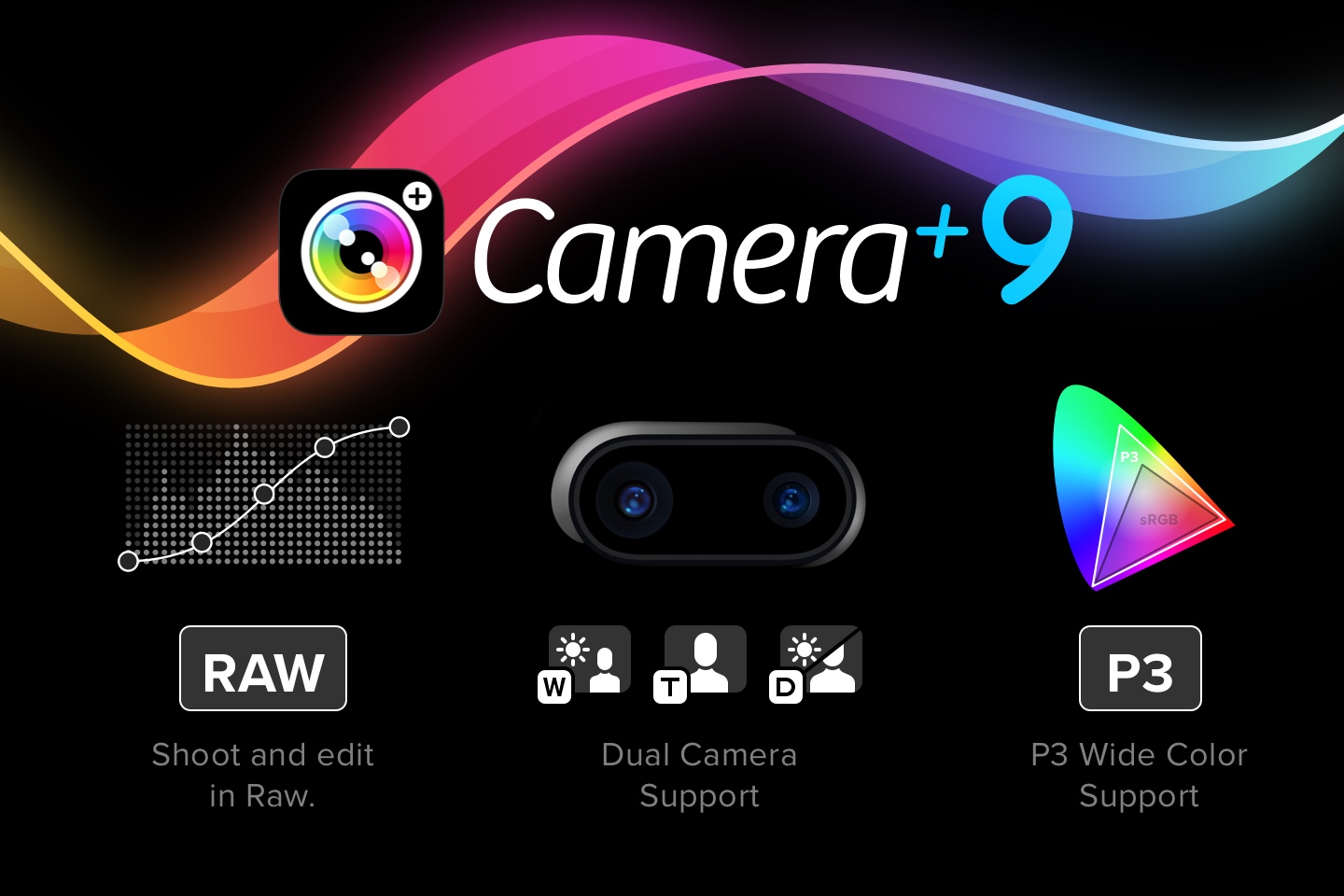
For those of you with big pockets (both in the literal and figurative sense) who are fortunate enough to have a shiny (in the literal sense if you opted for Jet Black ), new iPhone 7 Plus, you’ll be very happy to hear that Camera+ now has extensive support for the dual lenses it sports. You’re now able to explicitly choose to shoot with the wide angle or telephoto lens so you can get exactly the lens you desire for the given shooting situation. If you prefer the simplicity of not having to think about those sorts of things like lens pickin’, you can just keep the lens switcher set to Duo mode and let your iPhone 7 Plus do its magic.
One thing worth knowing along these lines is that in Apple’s Camera app, the 2× zoom button sort of implies that it behaves as a wide angle / tele switcher, but it’s actually not (sometimes it’s a wide/tele switcher… sometimes it’s a 2× digital zoom button… and sometimes it’s something else altogether). The “tell” here is if you set it to 2× then put a finger over the tele lens (the one on the right side if you’re looking at the back of the phone). If you’re expecting to snap a pic of your finger, you’ll be surprised in some situations… when lighting conditions are relatively dark, the system will use the wide angle lens (to prevent an underexposed photo, since the tele lens has a higher ƒ-number of 2.8 than the wide angle lens’ ƒ-number of 1.8… in other words, this somewhat confusingly means it has a smaller aperture, which therefore lets in less light). Now to make a long story even longer, one of the benefits of the dual lenses is that the system can combine info from both lenses, resulting in a better photo than one taken with a single lens. In any case, we’ve implemented our Duo lens mode to be consistent with Apple’s Camera behavior, but we’ve also enabled you to choose precisely which lens you want. Hopefully at least some of you will have found at least some of this informative. Undoubtedly, some others of you have had a flashback to some high school science class, have fallen asleep by now, and are drooling on your desk. The More You Know ?
If you’re using an iPhone 6s, 6s Plus, SE, 7, or 7 Plus, you now have the privilege of shooting in RAW. You’ll find this new setting in the (newly renamed) Quality & Format menu. For those of you not in the know, shooting in RAW can provide you with the highest quality shots your iPhone camera is capable of taking. RAW photos actually store more information than normal JPEG or TIFF photos, so when you edit these photos, you’ll have the opportunity to pull out otherwise lost details to help you achieve the perfect photo.
Bear in mind that this higher quality comes at a significant expense… when you’ve got RAW turned on, your photos will take up considerably more space, and it’ll generally take longer to shoot/edit/save/etc.
Note that RAW shooting isn’t compatible with all shooting modes… in particular, using zoom, shooting crops, macro mode, selfiecam, and the iPhone 7 Plus Duo lens mode will temporarily disable RAW shooting if you have it turned on.
To go hand-in-hand with RAW shooting, we’ve added the capabilities for you to make adjustments to the pics you’ve shot in RAW. The way to look at this in the world of Camera+ is that the photos that come out of your camera sensor have some processing applied to them by the system. The items that end up in your Lightbox right after shooting are the “developed” versions of these photos. You can then edit them using Camera+’s suite of editing tools like The Lab and apply our various filters to them. But now, with RAW thrown into the picture (bad pun’d), you have the opportunity to “re-develop” the pics fresh from your camera using a new suite of editing tools we call the RAW Lab. Then you can save/share the re-developed versions or further edit them using the normal Camera+ editing tools before doing so.
If you use The Lab for editing, you’ll be familiar with some of the tools we’ve provided in the RAW Lab like Exposure, Brightness & Contrast, and Highlights & Shadows. But in addition to these, we’ve also provided several new tools for the high-end tweakers like a nifty Curves tool and a comprehensive set of Noise Reduction adjustments.
One very nice thing about our RAW implementation is that we combine both the regular photo representation (JPEG or TIFF) and the RAW representation into one photo. This helps keep both your Lightbox and Photo Library neatly organized and prevents clutter.
And if you’ve got the space to waste, you can export photos from the RAW Lab in 16-bit per channel TIFF format so that all the quality of the RAW shots is preserved in your final output.
In general with RAW shooting and editing, a major factor in determining whether or not these capabilities are for you have a lot to do with quality versus storage space and time.
Note that RAW editing requires an iPhone 6, 6s, SE, 7, or their Plus-sided doppelgängers. Also note that all things RAW in Camera+ requires iOS 10.1.
The iPhone 7 and 7 Plus feature an improved display that supports a slightly wider range of color than previous iPhones. Apple’s Department of Uncreative Product Feature Naming has deemed this “Wide Color” and we’ve added support for it in Camera+ 9. So now, if you’re wielding one of the newest devices, you’ll also have the benefit of marginally improved color. It’s worth pointing out that you get this benefit whether or not you’re using the new RAW capabilities of Camera+ 9.
To go along with the new capabilities in Camera+ 9, we’ve enhanced the Info section to provide details about them. So when your photos also include the RAW capture, you’ll see this fact, along with things like the color space used and the various RAW edits you’ve made.
A big, new release deserves some new iconery and such. So we’ve updated the icons in Camera+ 9 to better fit the iOS 10 style. And we’ve made a bunch of visual and functional changes to our Today Widget, along with our Quick Actions so that Camera+ 9 both looks and feels right at home on Apple’s latest version of iOS.
One of the most underrated features in the new iPhone 7 and 7 Plus is haptic feedback. It’s a taste of the future of mobile device user experience and it’s surprising that Apple hasn’t done more to promote it. So we’re helping do just that by tastefully including haptic feedback throughout Camera+ 9 and letting you know about it. Haptic feedback brings new life to elements like the shooting control wheels in Camera+ and once you’ve experienced it, you’ll definitely miss it when you’re using a device that hasn’t been blessed with this very cool, new feature.
Get Camera+ in the App Store.
the aim is to equip students with a set of general problem-solving approaches that can be applied to any given domain; these are lauded by business leaders as an essential set of dispositions for the 21st century.Well.... no. That's not what critical thinking is. Critical thinking is neither "a set of general problem-solving approaches" nor is it a "disposition". Critical thinking does apply to any given domain, for reasons I'll explain below. And it's irrelevant whether they are lauded by business leaders.
to be good in a specific domain you need to know a lot about it: It's not easy to translate those skills to other areas.and
This non-translatability of cognitive skill is well-established in psychological research and has been replicated many times.Moreover, they argue that critical thinking does not contribute to improved learning outcomes. Citing a study of 'brain training' games, Hendrick quotes:
We know of no evidence for broad-based improvement in cognition, academic achievement, professional performance, and/or social competencies that derives from decontextualized practice of cognitive skills devoid of domain-specific content.Fair enough. Let's take all this as a given.
we all know people who are "clever" in their professional lives yet who often seem to make stupid decisions in their personal lives.Yes! Exactly! Critical thinking is designed to prevent this!
Pebble has released a new blog post that details its “first steps forward with Fitbit” after its recent announcement of the $40 million acquisition. In particular, the post stresses that users can rest assured that Pebble software and services will continue to be supported through 2017.
“To be clear, no one on this freshly-formed team seeks to brick Pebble watches in active service,” writes Jon Barlow, a member of Pebble’s developer evangelist team, on behalf of the company. “The Pebble SDK, CloudPebble, Timeline APIs, firmware availability, mobile apps, developer portal, and Pebble appstore are all elements of the Pebble ecosystem that will remain in service at this time. Pebble developers are welcome to keep creating and updating apps. Pebble users are free to keep enjoying their watches.”
The blog post further goes on to state that the company’s first action to preserve the Pebble experience into the future will be to update its mobile apps and loosen their dependency on a “patchwork of cloud services” (enumerating authentication, analytics, app locker and more) so that even when cloud services are discontinued, core Pebble functionalities won’t break. The company says users should expect this update in the coming months.
As for Pebble features that are dependent on third-party services, such as dictation, messaging and weather, the company says to stay tuned as it figures out if and for how long those services can continue on its platform. Meanwhile Pebble Health features are not in danger of discontinuation. The Pebble’s Health API data is not dependent on cloud services and feeds directly into the Pebble mobile app, Apple HealthKit and Google Fit.
Finally, the blog post notes that its community developers have kicked into action in an effort to keep the experience going, with discussions occurring in various Pebble Dev Discord channels.
The blog post ends on a note of thanks.
“Finally, I want the Pebble community to know just how much impact they can have on what’s to come. Continuing to engage with us and sharing your passion for what makes Pebble special to you will go a long way towards showing our Fitbit friends how valuable your enthusiasm can be.”

December 7 was a big day for Amazon (AMZN). It made its very first delivery of a package by drone.
It was in England, it wasn’t far from Amazon’s warehouse, it’s daylight/good weather only, and it’s available to only two customers at the moment. But Amazon says that it will soon expand availability to dozens of UK customers, then hundreds, and then—regulations willing—the world.
Don’t expect to get 30-minute Amazon Prime Air delivery in the US any time soon, though. Amazon’s ambitions are being thwarted by the FAA, which has yet to approve Amazon’s drone-delivery plans here.
There are plenty of questions about delivering packages by automated drone. How will it work? Will the skies become black with drones? Will they collide with planes? What about apartment dwellers?
So when I reported my story about the current legal status of drones for “CBS Sunday Morning” (you can watch the story here), Amazon, of course, was one of my first stops. In October 2015, I interviewed Paul Misener, Amazon’s vice president for global public policy.
In honor of Prime Air’s first successful package delivery, I thought that maybe it’d be worth re-posting the edited transcript of my interview with Amazon’s Misener.

David Pogue: First of all, tell the unenlightened about Amazon Prime Air.
PM: Well, soon after I joined Amazon in early 2000, my young son was sitting on my lap. And we ordered something from Amazon, and he hopped off and ran up to the front door, waiting for the brown truck to show up on the spot. That was a high-delivery expectation. (LAUGH) I had to explain that just because we’d bought this thing doesn’t mean it’s at the front door yet.
So Prime Air is a future delivery service that will get packages to customers within 30 minutes of them ordering it online at Amazon.com.
The characteristics of these drones that we have set as goals for ourselves are: the range has to be over 10 miles. These things will weigh about 55 pounds each. But importantly, they’ll be able to deliver parcels that weigh up to five pounds. And it turns out that the vast majority of the things we sell at Amazon weigh less than five pounds.
DP: OK, a few questions pop up right away. What if I’m not home?
PM: It gets delivered to your doorstep, or wherever you want in your yard, just as like it would be if it were delivered by the UPS truck.
DP: What about if there’s some guy with a shotgun who sees that I’m getting a TV and wants to shoot it down?
PM: I suppose they could shoot at trucks, too.
We want to make the deliveries. And we believe that these Prime Air drones will be as normal as seeing a delivery truck driving down the street someday. So the novelty will wear off.
DP: Would it help Amazon, not having to pay shipping companies? To have it under your own control?
PM: Well, that’s not the purpose of it. It’s really to fulfill a need that we believe our customers have.
Usually they need that delivery in a few days, and that’s sufficient. But for example, let’s say your grandchildren are visiting you at the end of the month. You want to stock up on batteries. So you go to your computer, your laptop, your tablet or your smartphone, go to the internet, go to Amazon.com, and stock up on batteries. They’ll be delivered a few days later, and that’s fine.
But what if one of your grandchildren is already visiting you, and she’s playing with an electric truck on the floor, and the battery wears out? On one hand, you could get her all bundled up, put her in the car and drive to the store to get the battery replacement, and drive all the way back. Wouldn’t it be so much better if you could just go online from Amazon and order it, have it delivered in 30 minutes?
DP: I mean, sure. But you would understand if people would say, “Are you kidding? That is a huge technological, geological, geographic, regulatory problem to solve!”
PM: Well, it’s actually not as difficult as you might think. The automation technologies already exist.
DP: So which problem is harder to solve? The technological ones or the red tape?
PM: Well, the regulatory issues to which you refer are difficult. And once we demonstrate the safety of the system, we believe that the regulations will quickly follow.
DP: Do you have the drones you’ll be using?
PM: We have different prototypes we’re working on simultaneously—different kinds of drones for different kinds of delivery circumstances. Our customers in the United States live in hot, dry, dusty areas like Phoenix, but they also live in hot, wet, rainy environments like Orlando, or up in the Colorado Rockies.
Likewise, obviously, our customers live in a wide variety of buildings. Some live in a rural farmhouse. Some live in a high-rise city skyscraper. And then everything in between. In suburban and ex-urban environments. We want to be able to serve all those customers. And it may take a different kind of a drone to best work in each one.
DP: You’re designing and building your own drones? So these aren’t off-the-shelf?
PM: No; these are quite different than the drones that you can buy in a store and fly around. These are highly automated drones. They have what is called sense-and-avoid technology. That means, basically, seeing and then avoiding obstacles.
These drones are more like horses than cars—and let me explain why. If you have a small tree in your front yard, and you want to bang your car into it for some reason, you can do that. Your spouse might not be happy with you, but you can do it.
But try riding a horse into the tree. It won’t do it. The horse will see the tree, and go around it. Same way our drones will not run into trees, because it will know not to run into it.
DP: How do you solve the apartment-building problem?
PM: We’re working on it. And again, it might be changing the design of the drones, so that they better serve that kind of an urban environment.
DP: Or maybe the apartment-building owners could designate, you know, a spot on the roof, or in the courtyard?
PM: That’s entirely possible. We’re thinking through those.
DP: Amazon ships millions and millions of packages a week. Won’t it be loud to have the sky filled with buzzing Amazon drones?
PM: Well, it’s not gonna be some science fiction, Hitchcock scenario; that’s a bit of an exaggeration. But if we design these correctly, they won’t be loud and obnoxious and noisy. It’s a really cool engineering challenge, it turns out. I mean, there are a bunch of challenges. But dampening the noise is one of them.
DP: And how will you keep these drones from interfering with air travel?
PM: Well, we’ve proposed to regulators around the world, including the F.A.A., a certain kind of an airspace design that would keep the drones separated from the aircraft.
We were thinking: Manned aircraft above 500 feet. Between 400 and 500 feet there’d be a no-fly zone—a safety buffer. Between 200 and 400 feet would be a transit zone, where drones could fly fairly quickly, horizontally.
And then below 200 feet, that would be limited to certain operations. For us, it would be takeoff and landing. For others, it might some aerial photography. The realtors, for example, wouldn’t need to fly above 200 feet to get a great shot at a house.
DP: How have the F.A.A. and NASA reacted to this proposal?
PM: I think they welcome the thinking that has gone into it. So I’m hopeful that this will spur discussions about exactly how to get this right.
DP: How does this proposal, the layers idea, differ from what NASA’s working on?
PM: It’s with a similar goal in mind. We presented this proposal at a NASA conference, and we’re of the same mind. We need to figure out this airspace.
DP: My impression is that the FAA and Amazon haven’t exactly seen eye to eye on your plan.
PM: In deference to the FAA., or in sympathy with the FAA, it turns out that they have a limited ability to regulate amateur drones, but they have full powers to regulate commercial drones. To my way of thinking, at least, that imbalance doesn’t make sense. At the very least, they ought to be treated the same, to give the F.A.A. the same authority to regulate both amateur and commercial drones.
Arguably, you would want to regulate the amateurs even more, because they have less training, their drones are less sophisticated, and so forth. So certainly that part of the law needs to be clarified, at a minimum.
We believe that they must begin, in earnest, planning for the rules that are more sophisticated, that go to the kinds of operations that Amazon Prime Air will encompass. And other countries already are doing this.
DP: Well, what happens if the technology is ready, everything’s ready, but the FAA still doesn’t have regulations in place for Amazon?
PM: Well, we have customers all around the world, of course. There’s no reason why the United States must be first. We hope it is.
DP: When you tell people what you do at parties, what do they say?
PM: Well, I’m an engineer and a lawyer. They don’t talk to me at parties. (LAUGH)
But when they do deign to talk to me, and ask me about Prime Air, they always ask me the questions you led with. “Is it real? Or is this science fiction? Is this just all some big marketing thing?”
I can tell you, it is very real. We’ve beefed up a team at Amazon Prime Air that includes aeronautical engineers, roboticists, a former NASA astronaut. These folks are completely focused on making this a reality. And demonstrating that it is safe before we begin operations.
Challenges are there, for sure, but once we demonstrate that this is safe, we’ll be able to take it to the regulators and hopefully deploy it for our customers quickly. I’ve seen it. It’s gonna happen. It’s coming.
David Pogue, tech columnist for Yahoo Finance, welcomes non-toxic comments in the Comments below. On the Web, he’s davidpogue.com. On Twitter, he’s @pogue. On email, he’s poguester@yahoo.com. Here’s how to get his columns by email.


