
@sillygwailo you told me to. I blame you.


Stephen Downes,
Federica.EU,
Jan 16, 2017
This is my next MOOC; it starts January 30 and runs for 10 weeks. It provides an overview of my version of connectivism as it applies to teaching and learning. It covers a lot of the ground I've covered in my talks and papers, but as a single structured unit. Unlike my previous MOOCs, I've prepared a ton of video content ahead of time, so you can follow the course at your leisure. I'll probably want to do events and things during the course but I haven't planned these yet. But there will be opportiunity for interaction and participation. Meanwhile you can sign up at the Federica.EU web site - they host the course and designed the site.
[Link] [Comment]
As Multiple Myeloma is an incurable blood cancer, the objective of chemo treatment is to control cancer levels so that they remain low and stable without significant increases. I remain on chemo indefinitely, until it is no longer effective in fighting my cancer. When that happens, I will start a new chemo treatment, that hopefully will be more successful. I think of my treatment as analogous to a prescription for glasses.
The goal of wearing glasses is to improve your vision. After a period of time, your vision may worsen, and you need a new prescription, as your glasses just aren’t effective anymore. Once you have your new glasses, you feel great because you can see again.
I’m happy with my current “glasses” and remain hopeful that everything will stay cool.
To recap: On Sunday, January 8th, I completed Cycle 25 Week 4. I have Multiple Myeloma and anemia, a rare blood cancer. It is incurable, but treatable. From February to November 2013, I received Velcade chemo through weekly in-hospital injections as an outpatient. Since February 9th 2015, I have been on Pomalyst and dexamethasone chemo treatment (Pom/dex).
Weekly chemo-inspired self-portraits can be viewed in my flickr album.
 May 2014: Segway on the seawall
The post Week 100 complete: How my chemo is like wearing glasses appeared first on Fade to Play.

I am now 20 weeks pregnant and doing really well. Though today I noticed a bit more difficulty with the structure and fit of my bike. My handlebars need to be moved up to accommodate my growing belly. I need to ride more like Mary Poppins.
Another challenge is that I am starting to feel a bit more winded especially on hills. However if I take my time, it feels a lot better. I remind myself to leave early for this reason.


Will Martyr, No One Else In The World Will Do, 2016. Image courtesy of Unit London and Avant Arte
Social media has provided a huge platform not only for art admirers, collectors, students, and curators to consume art, but the way they buy it and discover it too. A new exhibition in London called Avant Arte @ Unit London, is showcasing just such art works, although offline in a gallery setting.
The works have been selected due to their popularity on social media, particularly Instagram, and for it Unit London, a gallery startup, has teamed up with Avant Arte, an online art discovery platform which has an app and an Instagram page with nearly half a million followers. International artists in the group show include Jason Seif, Lionel Smit, Henrik Uldalen, Brian Willmont, Ryan Hewett, and more.

Stephan Doitschinoff, NÓS OSSOS QUE AQUI ESTAMOS PELOS VOSSOS ESPERAMOS (WE BONES THAT HERE ARE, FOR YOURS AWAIT, 2015. Image courtesy of Unit London and Avant Arte
Unit London was founded in 2013 by young artists Jonny Burt and Joe Kennedy who, starting with a pop up, now operate a gallery in Soho. Their aim with setting up the space was to "break down the barriers of elitism" in the art industry, not only showcasing more unsung artists who might struggle to be seen, but also letting anyone buy the art, be they first-time buyers or institutions. The pair say that both seasoned and emerging collectors have become their clients.
"Unit London is centered on celebrating and broadcasting the most amazing contemporary art to the widest possible audience," explain the pair to The Creators Project in an email. "When we started the business three years ago with no initial funding or direct route into the industry, we relied on social media to build our platforms into what they are today. It is no secret that Instagram is becoming an integral and invaluable tool in the art market, and is in fact now the most popular platform for visual art."

Jake Wood-Evans, Portrait of a Professor, after Sir Henry Raeburn, 2016. Image courtesy of Unit London and Avant Arte
The exhibition is their second showcasing of Instagram art, the first was called Paintguide (another Instagram art account) and had people queuing around the block to get in. They're no doubt hoping to repeat that success by patnering with another popular Instagram art platform.
"Although there are similar 'art assistant' promo platforms on Instagram with one or two million plus followers, none of them have the kind of engagement that Avant Art boasts," notes Unit London. "Their audience is diverse and their USP is that their following is comprised of serious and loyal art collectors. Reputable galleries have recently invested into their platform to promote exhibitions, which subsequently have entirely sold out. They now charge galleries a considerable fee for one IG post. Besides the promotional element of Instagram, what is becoming increasingly key is the successful commercial aspect of IG pages like Avant Art. This is indisputably a new model for the art market—it is increasing transparency whilst also carving out a new avenue for art sales."

Lionel Smit, Divert #2 Head Fragment, 2011. Image courtesy of Unit London and Avant Arte
As well as benefiting from the reach and capabilities of social media, the show is also an opportunity for Unit London to showcase works from artists they might not have had access to, and who Avant Art do. As such it's a mutually beneficial partnership between two relative newcomers, where resources can be shared and the effectiveness of Avant Art's online presence can be harnessed in the physical world of Unit London's come one, come all gallery setting.

Jan Kalab, Utila, 2016. Image courtesy of Unit London and Avant Arte
"[Avant Art] understand that a physical space will always be necessary. Art is fundamentally a human experience and whilst the digital experience is revolutionary, it can only go so far," note Unit London. "Staging shows like this is not only a celebration of the power of social media in the art world, but also demonstrates a bridge between the digital and the physical spaces. It exemplifies our point that both spaces operate in harmony together. The large followings you see on these Instagram pages are very real ones."

Ryan Hewett, Makeba, 2016. Image courtesy of Unit London and Avant Arte
Avant Arte @ Unit London is on view from January 13th to February 2nd at Unit London, 147 Wardour Street, London W1F 8WD. To find out more about Unit London visit their website or Instagram. To find more about Avant Arte check their website and Instagram.
Related:
Enter a Cotton Candy Dreamworld on This Instagram
Instagram Artists Memorialize David Bowie
Dark Political Cartoons Show How Technology Is Our New Master
In the two years since he left Google, we’ve heard relatively little from Andy Rubin. According to a new report from Bloomberg‘s Mark Gurman and Mark Bergen, however, the man who helped make Android what it is today, is planning a comeback, one in which he aims to take down both his former company and Apple.
Bloomberg reports that Rubin is currently leading a 40 person startup made up of former Google and Apple engineers. The company, known as Essential, is currently operating in secret while it finalizes its first consumer-facing device, a smartphone designed to compete against high-end offerings from mobile’s current crop of market leaders.
Rubin was reportedly seen showing off the device to American carriers, including Sprint, at last week’s Consumer Electronics Show in Las Vegas, Nevada. Relatively little is known about the device — in part because the company is said to be considering multiple different prototypes — but what Bloomberg was able to ascertain from its sources is that the phone will feature a large, edge-to-edge display. This display is said to be bigger than the one found on the iPhone 7 Plus. However, thanks to its bezel-less design, the footprint of Essential’s upcoming smartphone is smaller than that of Apple’s current flagship.
The company is in talks with Foxconn to build the phone. One prototype features metal edges and a ceramic back. If Essential sticks with this prototype, it will add additional complexity to the manufacturing of the device, which the company aims to sell at an iPhone-like price point.
It’s currently unknown if the device will run on Google’s Android operating system, but the phone is expected to showcase an emphasis on artificial intelligence, which Rubin believes to be the future of computing.
That said, the phone’s most interesting feature is its proprietary charging connector, which is designed to allow Essential and other third-party manufacturers to expand the hardware functionality of the device over time. One accessory Essential is developing is a camera that will allow users to shot 360-degree photos and video when it is attached to the company’s smartphone.
Rubin is expected to announce his new company, as well the device they’ve been working on, sometime in 2017.
Image credit: Joi Ito via Flickr
Source: Bloomberg

Database-backed microservices are powerful and in this article we show how to use SenecaJS, NodeJS and Compose databases to create a virtual product catalog using them. Microservices are making a huge dent in the web development world, with companies like Netflix, Walmart, and IBM embracing microservice architectures for their mission critical applications.
First, in case you've been hiding in the dungeons of ancient enterprise application development for the past few years, let's start with a small introduction to microservices. If you're already comfortable with microservices, you can skip to the next section.
A typical software application consists of a single process that contains all of the instructions you'll need to execute the application. This monolithic architecture allows a process to be quickly and simply executed, but scaling up functionality requires executing multiple copies of the entire process even if you only need to scale up one small piece of functionality (for example, Netflix uses the streaming portion of its application far more than it uses the 'new user signup' portion).
One of the challenges that can arise from this "all-in-one" approach is that it's very difficult to scale your applications. Since monolithic applications are designed to be self-contained, the mechanisms for connecting multiple redundant copies of a monolithic process can be impractical or impossible if the application hasn't been designed to accommodate such tandem scaling. Errors in monolithic applications also tend to be catastrophic, requiring a reboot of the entire application and resulting in downtime for end users.
Modern distributed software, such as large web applications, need to be able to scale easily and fail robustly by running processes on multiple machines in multiple locations. Microservices architectures are designed to allow for exactly this type of behavior. Each microservice handles a small piece of functionality for the application, and multiple microservices connected together in a network constitutes a complete application. Designing applications as a "system of systems" means that developers can add new instances of a microservice to handle the extra load without impacting the existing system. Developers can also redirect traffic to redundant copies running on different servers in the event of server or application failure.
Microservices aren't without their faults - while a single microservice might be a small and simple piece of software, the way it interacts with other parts of the application is more complex than a typical monolithic application. Frameworks like SenecaJS provide tools to make these interactions easier.
SenecaJS is a NodeJS application framework that allows developers to define microservices and connect them together in different ways. The fundamental unit of communication in SenecaJS is a simple JSON message. By convention, that message will be an object with at least 2 keys: a role and a cmd. For example, a message that outputs hello, world might look like the following:
{ "role": "hello", "cmd": "sayHello" }
SenecaJS looks at the message and compares it to a set of commands that have been registered with it. When the message matches one of those commands, SenecaJS executes the function associated with that command.
Let's start with a basic SenecaJS application to see how commands can be registered. Create a new folder for your project on your system and initialize a new Node module using npm init. The npm init command will prompt you for options for your new module. You can use the defaults. Then, use npm install to install SenecaJS.
$ mkdir seneca-compose
$ cd seneca-compose
$ npm init
...
...
...
$ npm install --save seneca
Now, we'll create a simple ping application. This application will just respond with a message when we call into it letting us know that the application is Online and working correctly.
// Create a new SenecaJS application
var seneca = require('seneca')();
First, we'll create a new SenecaJS application by calling the "seneca()" function. This provides us with a place to register new commands and functionality.
seneca.add({"role": "compose", "cmd": "ping"}, (args, done) => {
  console.log(args);
  done(null, {result: "Hi there"});
});
Next, we'll call the seneca.add method. seneca.add is used to register a new command with the seneca system, and to define the function that should be executed when that command it sent. It takes two arguments: a command pattern and the function that executes when the pattern is matched. The function that executes also takes two arguments: an args object which contains the entire message that was sent (including the command pattern and any extra parameters) and a done function which is executed once the service is ready to send a response. The done function itself also takes two arguments in typical node.js fashion: an error as the first argument (or null if there's no error) and the results of any operations as the second argument.
seneca.listen({"type": "http", "port": 8080});
Finally, we'll have the application to listen for connections using the seneca.listen method. Since SenecaJS uses simple JSON messages, there are many different ways you can communicate between microservices (called the transport in SenecaJS lingo). There are transport plugins for Redis, PubNub, TCP, and RabbitMQ among others. In our example, we'll use HTTP which has the added benefit of allowing us to test our microservices using the curl utility. The HTTP transport exposes a special route, /act, for this purpose and also useful for connecting other applications and external systems (for example, those designed in another programming language) to SenecaJS-designed microservices. If your platform has an HTTP library, it can communicate with a SenecaJS-based Microservice.
To test our microservice, you'll need to open two terminal windows. In the first window, you'll run your SenecaJS microservice.
$ node service.js
In the second window, we'll use the curl utility to send a message to our running service.
$ curl -d '{"role":"compose","cmd":"ping"}' http://localhost:8080/act
If all goes well you should see the following output:
{result: "Hi there"}
That's about it! All SenecaJS applications are designed in a similar fashion: use .add to register command patterns and tie that command to a function, and then execute that function by sending a message into SenecaJS matching the pattern.
Now that you have a feel for creating a microservice in SenecaJS, let's do something a little more interesting: save data in a database. SenecaJS by itself is minimally functional, but there is an ecosystem of plugins (many developed by the SenecaJS team itself) that can be used to make SenecaJS far more powerful. We'll use a plugin called seneca-entity that makes storing and retrieving data in SenecaJS a snap. If you've ever used an ORM like ActiveRecord or an ODM like Mongoose, you'll feel right at home with Seneca entities.
As a demo, we'll create a catalog for a nerdy clothing store. Our clothing store contains products and we'll represent these products as entities. To create a new entity, you'll first need to add the seneca-entity and seneca-basic plugins.
npm install --save seneca-entity seneca-basic
Then, you can tell SenecaJS to use those plugins with the .use command. If you have experience with NodeJS development with ExpressJS you'll recognize the syntax:
seneca
  .use('basic')
  .use('entity');
The seneca-entity plugin decorates our SenecaJS application with a new method, .make$, which we'll use to create a new entity type. Call seneca.make$ and pass in the name of the entity you'd like to create. seneca.make$ will return a new instance of that entity that you can now modify as you would any other JavaScript object.
var product = seneca.make$("Product");
product.name = "Star Wars Jacket";
product.price = 100.00;
product.description = "The force will be with you with this stellar Star Wars jacket!";
Now, you can save the new product using the save$ function. save$ takes a callback with the function signature of (err, savedProduct) where err contains any errors encountered while saving (or null if there are no errors) and savedProduct contains the entity that was persisted to the database.
product.save$((err, savedProduct) => {
  if (err) {
    // handle error in your application.
  } else {
    // handle saved product in your application
  }
});
Let's bring this all together with a new command we can add to SenecaJS. This new command will add a product to our virtual catalog. We'll also demonstrate how to take the name, price, and description for the product from arguments passed into the service.
// service.js

// Create a new SenecaJS application
var seneca = require('seneca')();

seneca
  .use('basic')
  .use('entity');

seneca.add({"role": "product", "cmd": "create"}, (args, done) => {
  var product = seneca.make$("Product");
  product.name = args.name;
  product.description = args.description;
  product.price = args.price;
  product.save$((err, savedProduct) => {
    done(err, savedProduct);
  });
});

// Listen for messages in the specified transport type and port.
seneca.listen({
    "type": "http",
    "port": 8080
});
Then, just like we did earlier, run your service in one terminal by calling the following:
$ node service.js
And, in a separate terminal, use this curl command to add a new product to the catalog:
$ curl -d \
  '{"role":"product","cmd":"create","name":"Star Wars Jacket","price":100.00,"description":"Awesome!"}' \
    http://localhost:8080/act
You'll notice that we've passed in far more data than we were listening for with the command. SenecaJS is only concerned with matching all the parts of it's command to your message (ie: role: product, cmd: create). Since those two fields are present in our message, it's considered a match. The extra data is sent into the function in the args object, which we used to send in extra information about our product in the catalog.
Since we sent back the savedProduct as our success response, we should see something like the following (notice the new entity$ and id fields added by the entity system):
{
   "entity$":"-/-/Product",
   "name":"Star Wars Jacket",
   "description":"Awesome!",
   "price":100,
   "id":"6esbkg"
}
You might be wondering where the entities are currently being saved. By default, SenecaJS provides a memory store plugin that saves the entities using an in-memory database. This default behavior allows us to create some entities and test out operations on them during early development. This is also useful for creating test drivers that can validate entity logic without connecting to a persistent database.
Using this plugin concept, we can now swap out the in-memory database with a plugin that adds a persistent backing data store without having to change any of our application or entity logic.
To store our entities in MongoDB, we first need to spin up a new Mongo database in Compose.
Once you've created a new database, we'll use mongo-store to tell SenecaJS to use MongoDB as the persistent backing store for our application. First, we'll install the seneca-mongo-store node package:
npm install --save seneca-mongo-store
Next, we'll modify our SenecaJS application to use the mongo-store plugin. Since SenecaJS plugins are added in the order your add them in your application, we'll .use the mongo-store plugin after we .use the entity plugin (otherwise the entity plugin will default back to memory store):
seneca
  .use('basic')
  .use("entity")
  .use('mongo-store', {
      uri: 'mongodb://<youruser>:<password>@aws-us-east-1-portal.23.dblayer.com:16659,aws-us-east-1-portal.21.dblayer.com:16659/whatever?ssl=true'
  })
Make sure you use your username and password in the connection URI.
The final program looks like the following (notice that the only thing we've done from the previous example is to add the extra .use('mongo-store', ...) after .use('entity')):
// service.js

// Create a new SenecaJS application
var seneca = require('seneca')();

seneca
  .use('basic')
  .use("entity")
  .use('mongo-store', {
      uri: 'mongodb://testuser:secret@aws-us-east-1-portal.23.dblayer.com:16659,aws-us-east-1-portal.21.dblayer.com:16659/whatever?ssl=true'
  })

seneca.add({"role": "product", "cmd": "create"}, (args, done) => {
  var product = seneca.make$("Product");
  product.name = args.name;
  product.description = args.description;
  product.price = args.price;
  product.save$((err, savedProduct) => {
    done(err, savedProduct);
  });
});

// Listen for messages in the specified transport type and port.
seneca.listen({
    "type": "http",
    "port": 8080
});
Our entities should now persist to our new Mongo database. To test this out, run your service like before in one terminal, and run the curl command to add a product in the other:
$ node service.js
And, in a separate terminal, use this curl command to add a new product to the catalog:
$ curl -d \
  '{"role":"product","cmd":"create","name":"Star Wars Jacket","price":100.00,"description":"Awesome!"}' \
    http://localhost:8080/act
You should get back the same response (something like the following):
{
  "entity$":"-/-/Product",
  "name":"Star Wars Jacket",
  "description":"Awesome!",
  "price":100,
  "id":"5873cec107d642a2e9216d73"
}
Now, when you navigate to the database browser in Compose, you'll see a new collection in your database called "Product" and a new item in that collection:


Storing an item in REDIS uses the same process as storing an item in MongoDB. First, you'll need to spin up a new REDIS on Compose database.
Once you've created a new deployment, install the seneca-redis-store plugin:
$ npm install --save seneca-redis-store
Then, in your microservice, add the redis-store plugin and use your Redis connection string:
seneca.use('basic')
    .use('entity')
    .use('redis-store', {
      'uri': 'redis://x:HFLFFYKEMELVLHKW@portal.tangy-redis-22.jwo.composedb.com:15933'
    }
If you've been following along, you'll notice that it's the same basic structure as the mongo-store configuration above. The final service looks like this:
// service.js

// Create a new SenecaJS application
var seneca = require('seneca')();

seneca
  .use('basic')
  .use("entity")
  .use('redis-store', {
    'uri': 'redis://x:HFLFFYKEMELVLHKW@portal.tangy-redis-22.jwo.composedb.com:15933'
  });

seneca.add({"role": "product", "cmd": "create"}, (args, done) => {
  var product = seneca.make$("Product");
  product.name = args.name;
  product.description = args.description;
  product.price = args.price;
  product.save$((err, savedProduct) => {
    done(err, savedProduct);
  });
});

// Listen for messages in the specified transport type and port.
seneca.listen({
    "type": "http",
    "port": 8080
});
Once again, run the service in one terminal:
$ node service.js
and run your CURL command in the other:
$ curl -d \
  '{"role":"product","cmd":"create","name":"Star Wars Jacket","price":100.00,"description":"Awesome!"}' \
    http://localhost:8080/act
You should get something like the following as output from the service:
{
  "entity$":"-/-/Product",
  "name":"Star Wars Jacket",
  "description":"Awesome!",
  "price":100,
  "id":"0c7b4cfa-ff6c-4329-97a6-9f58cc47c9f6"
}
And when you visit the data browser in your Compose for Redis database, you should see a new key that contains your newly saved product:

Writing microservice applications in JavaScript doesn't have to be a hassle. With SenecaJS and Compose, you can quickly spin up new server-side applications and swap out databases as your needs change. SenecaJS also allows you to use multiple transport mechanisms, and in a future article, we'll discuss how to use RabbitMQ and Redis on Compose to create stable and secure distributed microservices applications.
If you have bits you think should be in NewsBits, or any feedback about any Compose articles, drop the Compose Articles team a line at articles@compose.com. We're happy to hear from you.

(Sourced via the fine humans on Twitter.)
Hello, SUMO Nation!
Yes, it’s Friday the 13th this week, considered by some cultures to be a day of “bad luck”, so… Read quickly, before the bells chime for midnight! But, before we get there… Happy birthday, Charles Perrault! and a happy National Youth Day to everyone in India!
If you just joined us, don’t hesitate – come over and say “hi” in the forums!
We salute all of you!
We are at the end for today, whew. Grab a few interesting links for your enjoyment and information:
We shall see you soon, friends of the web :-) Thank you for a great week and we are looking forward to another one. The further we go into 2017, the more new challenges we encounter… and the more greatness we can achieve together!


Surface has a sense of elegance to it. It is almost completely free of any decoration, with the exception of the Windows logo on the kickstand and the Microsoft word mark on the back of the type cover. Both of those are subdued and don't draw too much attention. Apple has gone down that same path with dropping the backlight from the newer MacBooks. It no longer screams "look here, I am an Apple". The Alcantara clad Signature Type Cover completes this elegant design.

Martin asked me the other day whether I stopped using my MacBook Pro and my iPad Pro. Not entirely — there are some things I can do faster on the MacBook than on Surface, but that is mostly due to the fact that I own more Mac software than Windows software. For the most part I have been relying on Surface for the last couple of weeks. It combines two use cases into one machine: the leaning forward mode of sitting at a desk, typing into the notebook or drawing on the flat tablet, just slightly raised with the kickstand folded backwards all the way, and the leaning back mode of reading and watching video. When leaning forward I use the keyboard and trackpad, sometimes augmented by touching things on the screen. Leaning back I am only using touch, typing the odd login with the on screen keyboard.
I am running Windows 10 in tablet mode at all times with the exception of managing files, which I hardly ever do. So even in notebook mode, all Windows are full screen and don't show window borders. I prefer the lightweight Word Mobile over the Office 16 version, mostly because I am only typing plain text anyway. I am using Edge as my browser in the same way that I am using Safari on the Mac. As a tablet, Surface is way heavier than an iPad Pro, but it is also larger and more capable. On the iPad I would often have to go through hoops just to qickly move a file which is very natural on Windows. I can also do more things with the Surface Pen than I can do with Apple Pencil. The ability to quickly grab something off the screen and annotate it is very valuable to me.
Windows 10 is this odd mixture of old and new. The legacy software is what I am struggling with. If it were for me, I would be perfectly happy with Windows RT. Simpler, no clutter, again: elegant. I am staying mostly on the UWP side of things. Universal Windows Platform, apps which could potentially adjust to any size of device from phone to wall mount monster. I have some favorites like NextGen Reader UWP for instance or the Windows version of Instagram which displays photos larger than a phone. On the iPad in contrast, you would be looking at a scaled up iPhone app.
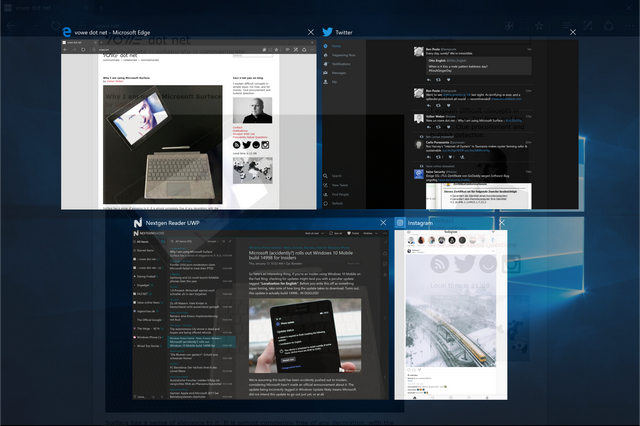
I am not giving up on Apple. Not on Mac nor on iPad. Using both the MacBook and Surface at the same time has its challenges, keyboard shortcuts for instance. I often touch things on the Mac screen wondering why they don't react. And I struggle with Windows once in a while. But I am persistent. When Windows strikes me down, I get up and continue the fight. And I will win. Microsoft is on to something with Surface and Windows 10. I want to be a part of it.
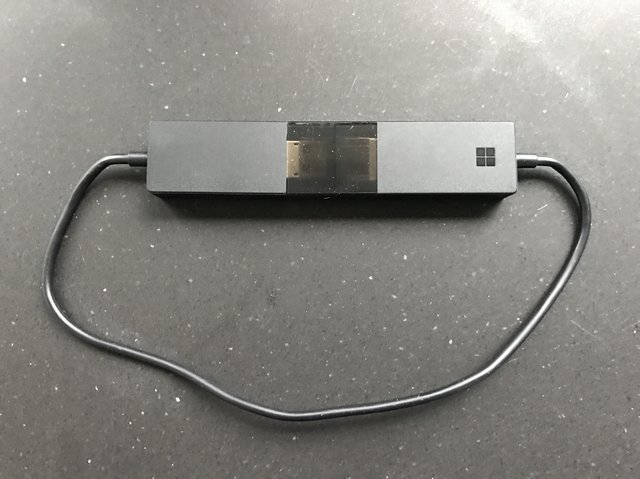
How do you get your Windows screen onto the big screen, whether it's a TV or a projector? The obvious choice is an HDMI cable. If you can't plug that in, you may need an adapter. Surface would require a DisplayPort to HDMI dongle, which happens to be the same adapter I would need with my MacBook Pro. However, I only use this solution when I need to run a presentation from my own machine. I don't carry a long HDMI cable nor the adapter at all times. And I don't want to run a cable to my living room TV.
If you are a Mac or iOS user, the obvious wireless choice would be to use an Apple TV. Use Airplay with screen mirroring to the Apple TV and you are done. But that requires a working network that connects both your device and the Apple TV, over Wifi or Ethernet. Your device and Apple TV don't talk directly to each other over Wifi. I was mistaken here. Your device and your Apple TV talk to each other by using peer-to-peer Wifi. (Thank you, Peter, for the correction)
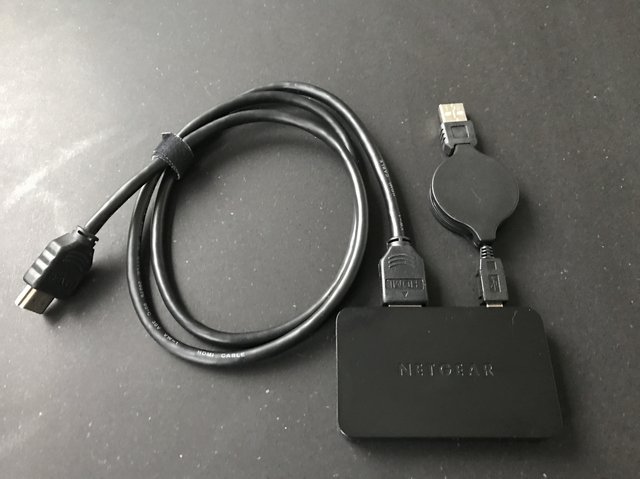
The Windows technology to mirror a display is called Miracast. I have had several such devices in the past. Some worked well (Netgear Push2TV), some not so well (Nokia HD-10). Both share the same problem with Apple TV. You need cables, one for power, one for HDMI out.
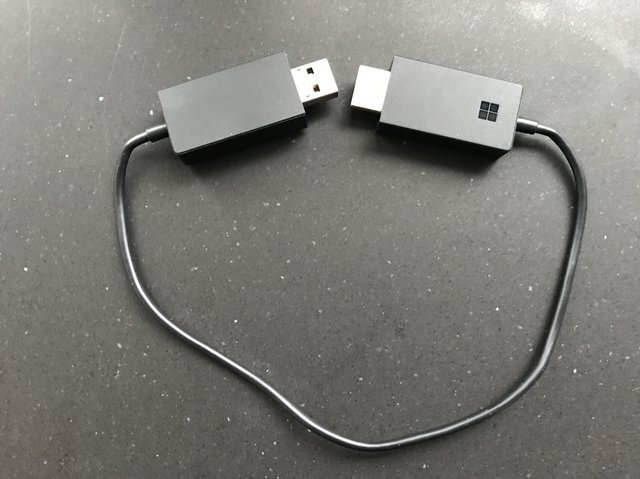
And that is the genius of the Microsoft Wireless Display Adapter. It is the cable. If you get this thing you need to work from a checklist when leaving the venue. Otherwise you are going to leave it behind often. because it hides so well. And yes, the adapter is all you need. It provides connectivity to your Windows machine. And no, you are not losing Intenet connectivity. It's just another network interface.
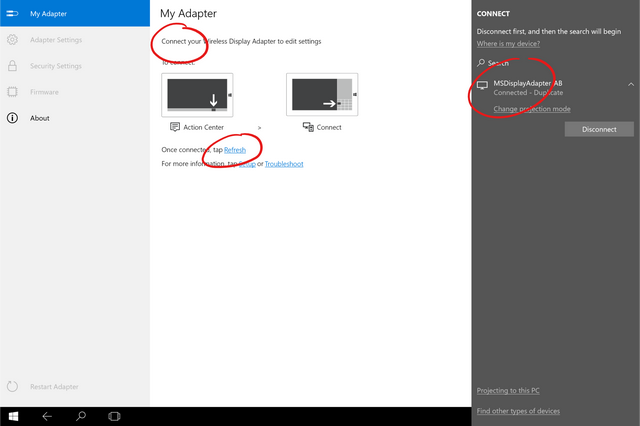
Not everything is going as smooth as it should. There is a Windows 10 companion app that fails to see the connected display adapter. It is connected and at the same time it isn't. I think I need to fight with Windows for a bit before it gives up.
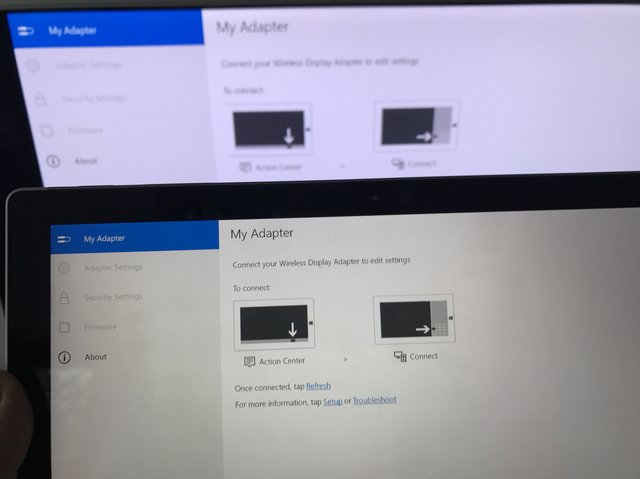
[Update:] And ... resolved. I needed to nail the Wifi Band to 2.4 GHz, because otherwise it would not see connected adapter. Well, I do not want to see this code.

Management summary: please install Signal.
I recently had some intelligent conversations in Signal and in one of them I explained that I do not consider my email as confidential, but I do with chat. Email is a store and forward system and while it may be encrypted in transit it is not encrypted at rest. And I cannot be bothered with PGP. While I do not disclose secrets on purpose, I also cannot protect them. Email gets replied to and forwarded and such things. You would not believe the amount of confidential information I gathered by just scrolling down.
Chat = confidential, email not so much.
For chat to stay confidential it has to be encrypted. In transit and at rest. Signal does that for me. Since the last time I asked, my contact list has grown by 100 people. And that is only the people I know of. My phone number is public. Add me to your address book and you can reach me on Signal.
If you want me to be able to reach out to you, or to even recognize you when you contact me, I need your phone number. The best way to tell me your phone number is by emailing me your vcard. What does a good vcard look like? Here is an example. It's just a text file with the extension .vcf.
BEGIN:VCARD

VERSION:3.0

N:Weber;Volker;;;

FN:Volker Weber

EMAIL:vowe@vowe.net

TEL:+49-176-24799915

END:VCARD
My real vcard has more entries, but that is all I need from you. Name, email, phone number. If you cannot be bothered to write a vcard file, that is not a problem. Just send me an email with only your phone number as text.
Want to read more about Signal? This is currently the top story on The Verge.
I will make it easy for you: please install Signal, even if you don't know anybody else who uses it. They will come.
Nice change for tvOS app developers announced today by Apple:
The size limit of a tvOS app bundle has increased from 200 MB to 4 GB, so you can include more media in your submission and provide a complete, rich user experience upon installation. Also, tvOS apps can use On-Demand Resources to host up to 20 GB of additional content on the App Store.
On one hand, this prepares the platform for 4K support and larger file sizes in the future, and it makes another step towards legitimizing the Apple TV as a micro-console (in addition to bigger app downloads, developers can also require controllers in their games for tvOS 10).
However, the 64 GB version of the 4th generation Apple TV has been around for over a year now with little explanation from Apple as to why customers would want to spend more for increased storage, and this feels like lifting a limitation because why not.
I'm curious to see what happens now, particularly in terms of game releases on tvOS. This is a welcome change for game developers, but we haven't seen any major tvOS exclusives so far.
→ Source: developer.apple.com
I’ve been sending fewer words out onto the Net so far this year, and one of the reasons was The Last Guardian, which I finished last night. Now I’m missing it and maybe writing about it will help.
There’s been controversy about the game but I think that on balance it’s great, one of 2016’s more significant works of art, and also a dozen or two hours of fine entertainment for these cold winter evenings.
I’m going to wrap my impressions around a handful of my screen-grabs — the Internet has better ones, but these are mine. I couldn’t bring myself to scale them down, so they’re a gift for those of you with big screens; for the rest of you, try clicking on, then shrinking, a couple, to get the full effect.
For the 0.03% of the population who don’t already know, here’s what it’s about: You, a skinny pre-teen boy, work your through a fantastical mostly-vertical landscape of ruins and towers with the help of Trico (トリコ), a giant dog-cat-bird, and you become very close.

Trico is the center of the game and the best reason to play, a triumph of brushstrokes and imagination and precision and software; her movements teeter on the blade between clumsiness and grace, never losing balance; her rare outbursts of violence are shocking and convincing.
I just know someone’s going to lean back and flame me for calling Trico “her”, but it seems obvious. To start with, that name, in the Japanese context, sounds more girl than boy to me. And then, I’ve crawled up her tail and hind legs a few times, and I guarantee that if Trico had any male secondary sexual characteristics, I’d have noticed.
It says in this 2009 IGN piece that the motion of each of Trico’s feathers is computed individually, and I think that must be true.
The game play is about platforming and puzzling, there’s no twitch to speak of. But mostly it’s about the beautiful visuals and working with Trico. Check the screengrab below.

It’s like this: You’re on a balcony over a vast empty space, a fall meaning certain death; check. The balcony and its building are ornate, pastel-to-monochrome, and crumbling; check. You’re convincing Trico to walk around the edge of the building on a random rooftop, waiting for her to come along; check.
For me, the game regularly achieved absolute suspension of disbelief; I was absolutely trapped on this teetering ledge over a thousand-meter drop, hoping for my CatBirdDog buddy to get where I could leap to where she could grab me. And when the towers start falling beneath you… well, my heart was pounding hard more than once.
The game might be a bargain even if were just a virtual tour through its world’s landscapes, immeasurably vast, insanely detailed, admirable and sad and scary. People despaired whether the game, ten years in the making, would ever come out; but I can’t see how they ground out all this wonder in a mere decade.


There have been gripes about the game-play: controls, frame-rate, camera, and, well, Trico. Yep, the controls are kind of klunky; I never fully mastered that quick climb up Trico’s shoulder or haunch, kept sometimes straying into her ear or armpit. Others I respect hated the frame-rate, but I honestly found it obtrusive only once during my many hours in the game. As for the camera, I thought it was a triumph, always spontaneously drifting in or out or sideways to highlight the view or emphasize the space or focus on the sparkles flowing in filtered light coming from the high shattered window.
But yeah, when you’re clinging to the neck of a monstrous beast shouldering its way between narrow stone walls, well, you’re not gonna see much but feathers and stones. Deal with it.
And then there’s Trico herself. She often does not Come When Called. Or Go When Sent. Or Leap When Begged. I can see how this constitutes the road to madness for a twitch gamer, and sometimes it’s bloody irritating even for a fairly laid-back greybeard like me. But over the hours I came to appreciate the game’s forcing Trico’s pace on me; and when I was sitting perched on her back on a bridge on a tower on a buttress on a castle on a mountain in the wind, well, there was lots to look at.
Once the programming went wonky on me and Trico refused to jump up to that first waterfall for a solid half hour. But I suspect that any software sufficiently advanced to do what Trico does at some point becomes indistinguishable from a cat.
There are things to gripe about; about the eighteenth time that I was maneuvering around a turret by alternately hanging from railings, teetering along narrow boards, and leaping from ledge to ledge, I was thinking “This is a not-very-exciting platformer.” So, there were places the game could have been edited down a bit.

Check out that shadow.
But, still, I got the best part of a solid day’s worth of extreme beauty, and excitement, and a relationship with a wonderful virtual creature. Maybe not as intense as the temporary relationships I’ve had with Ivan Denisovich Shukhov, or Chihiro, or Tiffany Aching. But it’s not insane to talk about them in the same breath.
Four years ago, Dalton Caldwell announced an ‘audacious proposal’, to build a Twitter alternative. He crowdsourced funds launched, and… two years later it became a zombie company, no employees, just a server running in a closet somewhere. When he launched I wondered, does anyone really care? And the answer is, not really. The lights are finally being turned off:
Ken Yeung, App.net shutting down Twitter-like social platform on March 14, open sources code
In Twitter’s early years, there were numerous competitors on the market, including App.net. Launched in 2012, the social network billed itself as being ad-free and subscription-based, but on Thursday, the company announced it was shutting down. App.net will cease to exist on March 14, citing an inability to generate meaningful revenue and failing to gain attention of developers and users.
New signups or subscriptions are no longer allowed and users have until the shutdown date to export their data or have it be permanently deleted. For developers, there is some light at the end of the gloomy tunnel as App.net said it has open sourced its code for anyone to build off of.
Considering the difficulties Twitter is having, why would anyone want to build a knock-off?
Personally, I am hoping for something to appear that gets me to transition from Twitter, somewhere halfway between today’s Twitter and Medium. Maybe where Tumblr would be if it hadn’t gotten acquired by Yahoo.

When I was conference-hopping last month, I caught up with an academic friend who had unfollowed me on Twitter. While transiting from a proper academic conversation at the dinner table of a nice restaurant to a more intimate catch-up about our personal lives over drinks in a cosy bar, my friend admitted that they thought my use of Twitter was very “brave”. I didn’t understand. Specifically, they had unfollowed me because my Twitter stream was too “cluttered” and “spammy” and my tweeting habits were too frequent. It seemed “brave” was polite-speak for “homgh aren’t you afraid someone important might see your tweets”?
You see, my friend curates a rather professional persona on their Twitter account. They announce new publications, tweet links to other academic papers within their research interests, “heart” research announcements they want to archive from other academic tweeters, or live-tweet good soundbytes from conferences. Like many academics, I engage in all of these activities too. But alongside these mechanisms of socializing research, I also often tweet my favourite Pusheen gifs without context, muse about unimportant things in life, subtweet random interactions I witness throughout the day, whine about being awake at 0300hrs, and publicly declare my undying love for chicken nuggets – all under the same handle.
My Twitter bio reads: “my twitter is frivolous. navigating academia while whining about the weather.” in small caps (because, you know, that’s supposed to convey that I’m not 100% serious on Twitter all the time). I also tweet half-serious Public Service Announcements every time a new surge of tweeters follow me post-conference to forewarn them of the mixed-genre and frivolity of my content – this, because I understand that even among academics we use Twitter for various reasons to express various things to various audiences. Yet for all these worries, there are many tweeters like me just as there are many tweeters like my friend. Some of us code-switch between audiences, adopting different registers depending on circumstance. On the internet, such code-switching takes place both across platforms and within platforms, across handles/accounts and within handles/accounts. It’s not too dissimilar from how my friend and I progressed from serious adult academic conversation in a nice restaurant where the length of the table, brightness of the lights, and proximity to other patrons set the tone for our conversation; to personal intimate catch-ups in a cosy bar where the array of cushions on a comfy couch, soothing jazz music, dim lights, and overall decorum of friendly bar staff lubricated a different kind of sociality.
Code-switching and linguistic acrobatics influenced by internet-speak have permeated various demographies and parts of the world, albeit with different intensities of uptake and with a curious blend of glocal hybrids. On Tumblr and 9GAG where I, an anthropologist of internet culture, live, three great memes of 2016 address young people’s code-switching skills. In this post, I share some of the “bone apple tea”, “me, an intellectual”, and “increasingly verbose” memes I have been collecting in the past year and their implicit messages of youth savvy.
*






(The Sun / Mirror / KDVR / CNN)
I got my first phone as a teenager 16 years ago. The oldest niece in my extended family is 16-years-old this year. I grew up in a time where my over-protective parents would occasionally go through the text messages in my phone if I left it charging and unattended some where in the house (I eventually learnt to sleep with my phone under my pillow). I watched my niece grow up in a time where her super cool mom (i.e. my super cool cousin) texts her like a friend using the full array of emoji, stickers, and flashing gifs. One time my cousin asked one of the 12-year-old nieces to explain a specific internet meme to her; they did so willingly and thought their mom, “a real adult”, was pretty cool. When I asked one of the 12-year-olds about an Instagram meme they were posting, they thought I, a “young adult”, was super uncool.
The point is, our uses, understandings, and comfort with technology change over generations and between cohorts. Yet some moral panics never die. A vast majority of reports from the press and popular media that focus on young people’s digital vocabularies are still fixated over sexting and acronyms – acronyms that are, to be honest, some times rather obscure and archaic from current practices and vocabularies in circulation. And when such public anxieties are manufactured over and over to resurrect prime time television numbers and reap easy clickbait-for-advertising profits, we lose the opportunity to appreciate the magic of watching young people’s savvy and wit in evolving internet vernacular.
*








bone apple tea is a deliberate misspelling of the French salutation bon appétit. In this meme, users attempt to string homophones loosely similar to bon appétit to caption their food pictures. Of the hundreds of variations, the few that have gained traction and become sub-memes of their own include “bone app the teeth” and “toe tap the fleas”. I enjoyed watching this meme progress on Tumblr (usually via screenshots of Tweet pics) as the homophones evolved beyond recognition. Soon, the game shifted from creative homophoning of “bon appétit” to guessing what the original food item of a deliberately bad homophoned phrase was. Some of my favourites were “a chick ham seizure sad lad” (a chicken caesar salad), “smack the pony and leave” (macaroni and cheese), and “hoe maid pete sir end ships” (homemade pizza and chips). Bless these creative citizens of the internet and their bemusing homophoning abilities.
*






me, an intellectual is an unnecessary formal or literal synonymizing of a common catch-phrase. Many of the viral ones on Tumblr involve translating curse words or colloquial synonyms for the penis.
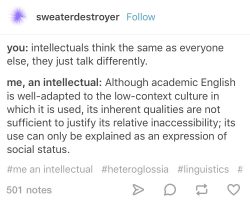



Given the cultural norm of Social Justice Warriorhood on Tumblr, over time this meme was used to convey one’s political identity and stance. For instance, when a certain Public Figure was calling then-Secretary Hillary Clinton names on public stages and in social media posts, Tumblr took to address Hillary Clinton in full as “Madame President Hillary Rodham Clinton” to convey their respect and support towards someone of her caliber. Tumblr is also one of the safe spaces on the internet for discussions relating to diverse family structures. What popular culture calls a “love triangle” filters through “me, an intellectual” to be acknowledged as a “healthy polyamorous relationship”. Most recently, in response to a circus of mainstream and popular media outlets rebranding and normalizing a certain Public Figure’s political ideology, Tumblr translated “Alt-right” as “Neo-nazi”. What started out as young people expressing unnecessary verbosity ended up becoming a translator for truths and political claims amidst competing hegemonies of discourse.
*


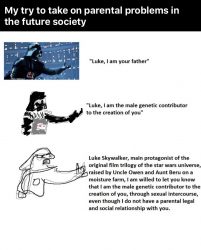




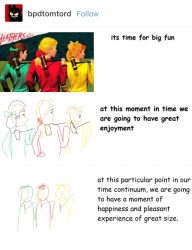

increasingly verbose is a succession of degrading art work alongside increasingly complex captions. It is likely a combination of two memes. The text on the right is a extended variation of “me, an intellectual”, while the accompanying image on the left degrading in quality and skill is reminiscent of the “hyper realistic drawing” meme on 9GAG. On 9GAG, 9GAGgers with artistic talents were originally sharing very realistic drawings of everyday objects, and would include in the title the number of hours it took them to finish the project. In response to this, some users blessed with sarcasm and wit began hijacking the meme with “drawings” that were actually photographs, while others submitted intentionally bad and sloppy drawings with exaggerated “completion times”. I love this meme for 9GAG’s ironic celebration of mediocrity alongside a mockery of needless formality.
*




A Tumblr meme that corresponds beautifully to the above three are when users are bonding over the stress of meeting the minimum word count for essays. This speaks back to the “studyblr” demographic on Tumblr in which users share studying strategies and “study porn” by displaying their beautiful handwritten notes, colour-coded stacks of binders, or impossibly bling stationery. It is almost as if a whole cohort of homework procrastinators are bonding over the irony of mocking verbosity on the internet while actually having to rely on it to get through assignments in school.
*



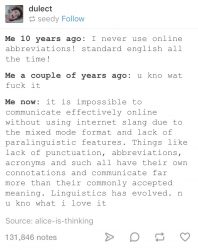
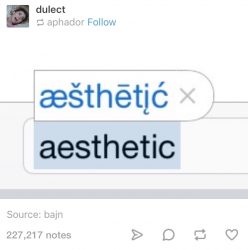
Whether you’re dabbling in suspicious homophones, using an intellect translator, flexing your illustrative mediocrity, or struggling to thesaurus your way through an overdue essay, the internet is a beautiful space for multiple Englishes and languages to converge and rub out sophisticated and equally mundane internet vernacular with increasingly obscure backstories and complex discursive politics. Young people aren’t just NIFOC while 99 for 53X. Long live internet speak. Long live Baby Kangaroo Tribbiani.
Dr Crystal Abidin is an anthropologist and ethnographer who studies young people’s relationships with technology and social media. Reach her at wishcrys.com and @wishcrys.
Michael Tsai, who is on a blogging roll lately, has a great rundown on the latest kerfuffle about static typed languages like Swift and whether their value outweighs their inconvenience.
The underlying problem is simple. In dynamically-typed languages like Obejctive C, you can have a container that holds different kinds of things and, if you get mixed up, you might find yourself sending a message to an object that it can’t handle. If you’ve got a mix of Dates and Colors in the same list, you might send a color an request for its day of the week; if you do that, the color looks at you all funny and nothing good will happen.
Reading this debate, I was startled to realize one thing I’d overlooked: I almost never make type errors. I make plenty of errors – for me, programming is always about correcting errors – but type errors are once in a blue moon affairs.
I wonder if strong typing is a solution to a problem we don’t really have, or whether I’m just Doing It Wrong.

Joe Wai needs no introduction to Vancouverites-this extraordinary advocate, citizen and architect has shaped how we think about place, culture and our responsibilities to our city. If Joe saw you walking by on the street he would run across to say hello, shake your hand, and ask you how you and your family were doing. He quite simply personified all that was good in community and neighbourhood, and worked hard to make good things even better.
If you were to check Joe’s “Linked In” profile, he has written very simply “I have been around for a while“. That is typical Joe Wai and also a very typical understatement. Joe received his bachelor’s and master’s in architecture from the University of British Columbia and worked for iconic architects in Vancouver and in London England before setting up his own practice in 1978. Joe was involved with the Strathcona Owners and Tenants Association (SPOTA) who successfully challenged the expropriation of housing for the creation of a public housing project and a freeway that would have carved into Chinatown.
Joe’s energies and interests were legendary. As The Tyee notes “Joe has been involved with senior/social housing and a volunteer in Chinatown community issues for over 40 years. He is also the architect of the Dr. Sun Yat-Sen Classical Chinese Garden, the Chinatown Millennium Gate, the Chinese Cultural Centre Museum and Archives, the Chinatown Parkade and Plaza, and the Commemoration of Block 17 as well as many restorations of the early Chinatown Society buildings.”


Henry Yu has written a memory of Joe Wai that describes more of Joe’s work and philosophy. You may also want to leave your own thoughts and stories about this extraordinary Vancouverite below. He will be greatly missed.


Nintendo revealed its upcoming video game console the Switch during a press conference in Japan last night, but did not release concrete details regarding the upcoming handheld-console hybrid’s hardware specs.
While many of the following Switch technical specifications have been rumoured for a number of months, we can now confirm that the Switch will feature a 6.2-inch 720p multitouch display twith a 1280 x 720 pixel resolution. When docked, the console is capable of outputting full 1080p visuals via HDMI.

The Japanese gaming giant says that the Switch is powered by a custom Nvidia Tegra processor, but has not released details related to computing power, so it’s unclear exactly how powerful the console really is in actual use. It’s believed that the Switch will be slightly less powerful than the Xbox one and PlayStation 4.
In terms of storage, the switch features 32GB of onboard memory, which is extremely low compared to the Xbox One and PlayStation 4’s much larger storage 500GB and 1TB hard drives. This issue is exemplified when you consider the fact that Nintendo intends to place an emphasis on downloadable titles. On the plus side, storage can be expanded via microSD cards, which remain relatively affordable.

Actual physical games for the Switch come on what Nintendo is calling GameCards, which the company claims also offload storage from the system’s internal storage. Battery life comes in at between 2.5 and six hours, depending on what game is being played, according to Nintendo. While it’s difficult to give a concrete answer, early reports indicate that when playing a graphically intensive game like The Legend of Zelda: Breath of the Wild, battery life will be around three hours.
The Switch also features 802.11ac Wi-Fi connectivity and the ability to connect to up to eight other Switch consoles for local multiplayer. The console is charged via USB-C. Finally, the Switch is also capable of being connected to the internet via ethernet when connected to its dock.

The Nintendo Switch is set to release on March 3rd for $399. Pre-orders went live today on January 13th at a variety of retailers but have already sold out at most stores.
Find the Nintendo Switch’s full list of technical specs below:
Canadian startup Maluuba, which is focused on helping machines learn, think, and communicate like humans, has just been acquired by Microsoft. Maluuba has offices in Kitchener-Waterloo and Montreal.
In a blog post, the company suggested that it is at a point where its complex tech requires ‘significant resources’ in order to scale.
“Our team has focused on the areas of machine reading comprehension, dialogue understanding, and general (human) intelligence capabilities such as memory, common-sense reasoning, and information seeking behaviour,” the post reads. “Our early research achievements in these domains accelerated our need to scale our team rapidly; it was apparent that we needed to bolster our work with significant resources to advance towards solving artificial general intelligence.”

Maluuba is working to make machines understand human language, which it calls the “holy grail” in the field of AI. In December, Maluuba released two natural language understanding datasets with the goal of advancing breakthroughs in artificial intelligence research.
“We are focused on language, which I think helps to differentiate ourselves from the other labs who do almost everything,” product manager Rahul Malhotra said at the time. “They’ll do images and sound and video and text, whereas Maluuba is extremely focused on language, and written language more than anything else.”
According to Maluuba’s hiring manager, the company plans to stay in Canada. In the company’s blog post, Maluuba thanks Yoshua Bengio, a machine learning pioneer and co-founder of Montreal’s Element AI, and professor Richard Sutton, whom they call a pioneer of reinforcement learning.
The company also indicated that it will continue to work with the Montreal AI community and pursue global collaboration.
In Microsoft’s own blog post, Harry Shum, EVP of Microsoft’s AI and research group, said that Microsoft will share more plans with Maluuba in the coming months.
“Maluuba’s impressive team is addressing some of the fundamental problems in language understanding by modeling some of the innate capabilities of the human brain, from memory and common sense reasoning to curiosity and decision making,” said Shum. “I’ve been in the AI research and development field for more than 20 years now, and I’m incredibly excited about the scenarios that this acquisition could make possible in conversational AI.”
Shum said that Bengio would advise Microsoft’s AI and research group, and indicated that Maluuba’s engineering and research teams will join Microsoft’s Artificial Intelligence and Research organization.
This article was originally published on BetaKit
Source: Maluuba
In November Tesla laid out plans to change the way its Supercharging network is operated, moving from a completely free network that allowed Tesla owners to charge their vehicles at no additional cost, to a pay-per-use model.
In a follow-up, Tesla stated that free Supercharger access will be permitted for customers who purchased a Model X or Model S before January 15th 2017. Those customers that have their vehicle delivered after that date will be subject to the new policy, including those who have pre-ordered the Model 3. The pay-per use model is only charged after a customer has exceeded their yearly balance of 400 kWh (about 1609 km).
“To put the affordability of Supercharging into perspective, customers will pay about $15 for a road trip from San Francisco to Los Angeles, about $120 from Los Angeles to New York”
Now, the company has revealed the specific Canadian pricing for Supercharging. The charging rates in Canada are applied per-minute, where as in other countries Tesla is charging per kWh. The prices in Ontario are $.13 for tier one and $.26 for tier two.
In its blog post, the company explained that tier one charging is when your vehicle is charging along side another Tesla vehicle and tier two is when your car can use the full power of the Tesla Supercharger.
“To put the affordability of Supercharging into perspective, customers will pay about $15 for a road trip from San Francisco to Los Angeles, about $120 from Los Angeles to New York,” stated the company.

Throughout the post on the company blog Tesla has stated that it does not intend to profit off the cost of the super charger network and that the included 400 kWh that is given to every Tesla owner on their delivery anniversary, is more than enough for most of their customers, based upon prior Supercharger network data.
Source: TESLA
 Photo by Maria Baranova
Medea, the Ancient Greek myth about a magic-wielding, foreign born woman who murders her children to get revenge on the man who left her, is coming to Brooklyn. But this isn’t your high school play. It’s an impassioned and unintentionally timely celebration of “one of the first women to be feared by men.” La Medea, the new production by Brooklyn artist Yara Travieso, runs from January 20 to 22, both as a live show presented by Performance Space 122's 2017 COIL Festival at BRIC House and as an interactive live film film presented by Dance Films Association and powered by Twitch.
La Medea combines dance, interactive theater, live music, film, and live broadcasting, creating a genre of art all its own. It took two and a half years to wrangle all the production pieces, but the hardest part was coming to terms with a main character who’s just as complex. “Medea is this sensationalized, wild, vengeful, Kill Bill-esque character who murders her children. And she’s portrayed as a foreigner and savage and barbaric and hysterical… But she’s also this knowledgeable scientist and political figure,” Travieso tells The Creators Project.
 Poster design by Ryan Hartley Smith
In conceptualizing her own Medea, Travieso felt pressured to pick one characterization angle and stand by it. But reducing one of history's strongest women to a single dimension came with a litany of implications, most of which she wasn't prepared to make, so Travieso shifted her approach.
“When I started to really dig into her, I found something interesting about the way she rejects all the roles that are put onto her as a woman, but also performs them,” she says.
As Travieso began to accept Medea's contradictions, they shifted from character flaws to very real, very human complexities. Her Medea could exist as both the barbarian and the foreigner, the vengeful killer and the vulnerable women, the witch and the scientist.
“I thought, why not allow all of these versions of her to be the story, and give her freedom through that form, through the infiniteness of her?” Travieso explains.
 Photo by Maria Baranova
The production seeks its own freedom through form by asking the audience to accept many points of view told through ever-changing genres. Throughout the show, La Medea shifts from performance to dance to concert to musical to telenovela, but retains a single identity, much like its shero, Medea. Sometimes the shifts happen seamlessly, other times the audience — who stands within the set, acting as a live Greek chorus — takes part in the change, entering Travieso’s creative process and all the vulnerability that comes along with it. Three cameras, two of which are handheld, capture this intricate dance of form and broadcast it live to a digital audience, who becomes a second chorus. People viewing at home can voice their opinions in the form of comments, which somehow make it into the script itself. Then, after the live performance is over, the footage will be edited for a cinematic premiere on February 7.
 Photo by Maria Baranova
The production is so complex that at any one time Travieso, who directs the production live, must know the count for each dancer’s choreography, the shots for each of the three cameras, the lighting positions, the mirror positions (the set is covered in moving mirrors), the song that the live band is playing, the lines in the script and who is speaking them, and more.
Travieso's team is a collection of artists and multi-talented producers who she describes as "really intense women and three really sensitive guys." Among them are all-female camera operators, a conscious decision that puts the entire production’s point of view, and 30 pounds of equipment, in the hands of women.
 Photo by Maria Baranova
It also puts La Medea in direct conversation with the original play, which was written by a man and performed by men. In casting nearly all women, as well as foreigners — her team comes from seven different countries — Travieso is showing a side of Medea that's never been shown, and doing so the weekend of the Women’s March on Washington, DC.
“There has been a lot of anxiety in our team about the current political climate," says Travieso, "and it’s so great to have certain scenes be so cathartic.”
La Medea shares Travieso’s vulnerability and search for freedom, and in doing so, invites you inside of this thing that isn’t sure exactly what to call itself, or if that even matters, but is so very sure of what it stands for.
 Photo by Jonathan David Kane
La Medea comes to BRIC House in Brooklyn, January 20 to 22. You can follow La Medea on Instagram and see more of Travieso’s work on her Instagram.
Related:
“Fuck Trumps Wall”: These Artists Turned Immigration Stories into Art
Shadow Puppetry and Dance Meet for an Adventure in Hybrid Theater
Over on Relay FM, Jason Snell and Myke Hurley host a well-loved technology podcast called “Upgrade”. On the first show of the new year, they handed out the Upgradies, awards for their favorite products of the year. Rogue Amoeba was honored to be included among the winners!

Woo!
At last year’s ceremony, Audio Hijack received a nomination for “Best New Mac App”, but it was bested by Fantastical from our friends at Flexibits. This year, however, Audio Hijack was not to be denied. Our flagship audio recorder took home the big prize, earning the title of “Best Overall Mac App”. Not bad!
 We also had another contender in the “Best New Mac App” category, with our audio routing tool Loopback getting a nomination. While Loopback didn’t come away with the win, it did receive a very respectable 10% of the vote, surprising the hosts. While Loopback certainly isn’t needed by everyone, it’s far less niche than some folks assume!
Our thanks to Jason and Myke, as well as their listeners, for recognizing our work! We hope to pop up again on Upgrade, perhaps at the 2018 Upgradies.

This thought, born in a session at Mozfest, where Mark Surman related back to the kookiness of the origins of Open Badges. As micro-credentials become more mainstream, and the standard itself evolves (the proposed V2 has a number of big improvements from V1.1) the stuff that will stretch the development of the standard and the tools available are the innovative solutions where Open Badges can play a part.
The post Keeping badges weird appeared first on Visual Thinkery.
A few weeks ago I wrote about a magazine article I found in which micro-SD card speeds were evaluated. In the article, amazing speeds were mentioned that I could not reach with my USB2 Micro-SD adapters. So I went out and bought a small USB3 reader. I turned out that while read and write speeds improved, they were nowhere near those in the article, despite using the same Micro-SD cards. So I bought a ‘Ugreen USB 3.0 SD-card reader‘ with a built-in USB-3 hub that got good reviews for its read and write performance.
And indeed things significantly improved and interestingly varied significantly and unpredictably with the SD cards I had. The numbers below are all for the same Sandisk Ultra branded micro-SD cards with a size of 16, 32 and 64 GB, bought at different times over the last year.
What is interesting and disappointing at the same time is that the write speed of the 32 GB micro-SD card was significantly faster than that of the 64 GB card which I had only bought very recently. I was assuming that write speeds would scale with capacity. Well, obviously it doesn’t, perhaps Sandisk doesn’t always use the same flash memory for their ‘Ultra’ branded micro-SD cards.
And here are the two commands I used to check the write speed. One of them writes zeros to a file while the other erases the micro-SD card by overwriting it with random data:
sudo dd if=/dev/zero of=/media/martin/64GB/test.txt bs=4k conv=notrunc

sudo shred -v -n 1 /dev/sdb


