Shared posts

16 Feb 01:50

Snap’s Apple Strategy

by Ben Thompson

At first — or even second — glance at Snap’s S-1 it’s easy to see why many are drawing a comparison to Twitter. Like Twitter, Snap is losing a lot of money; like Twitter, Snap’s growth rate is slowing; and, like Twitter, Snap is actually losing leverage.

To see what I mean by the last point, consider this chart of Facebook at the time of its IPO:

  • Daily Active Users (in millions)
  • Revenue per User (in dollars, as are all the rest)
  • Cost of Revenue per User (i.e. the actual cost of running the service, like running servers, paying partners, etc.)
  • Total Costs per User (i.e. cost of revenue plus the cost of running the company, including engineering, marketing, etc.)
  • Profit per User

facebook

This is a pretty good chart on the verge of an IPO: Facebook’s cost of revenue per user was holding steady, which meant every additional user cost about the same to serve as the previous user; the company wasn’t gaining leverage, but it wasn’t losing it either. Total costs, meanwhile, were escalating just a bit, which meant Facebook was spending slightly more per user than before (likely because of a mid-2011 acquisition spree), but the situation was largely under control. That meant that Facebook’s profits would grow as long as it grew either average revenue per user or the total number of users; the company is such a juggernaut because it has continually done both.

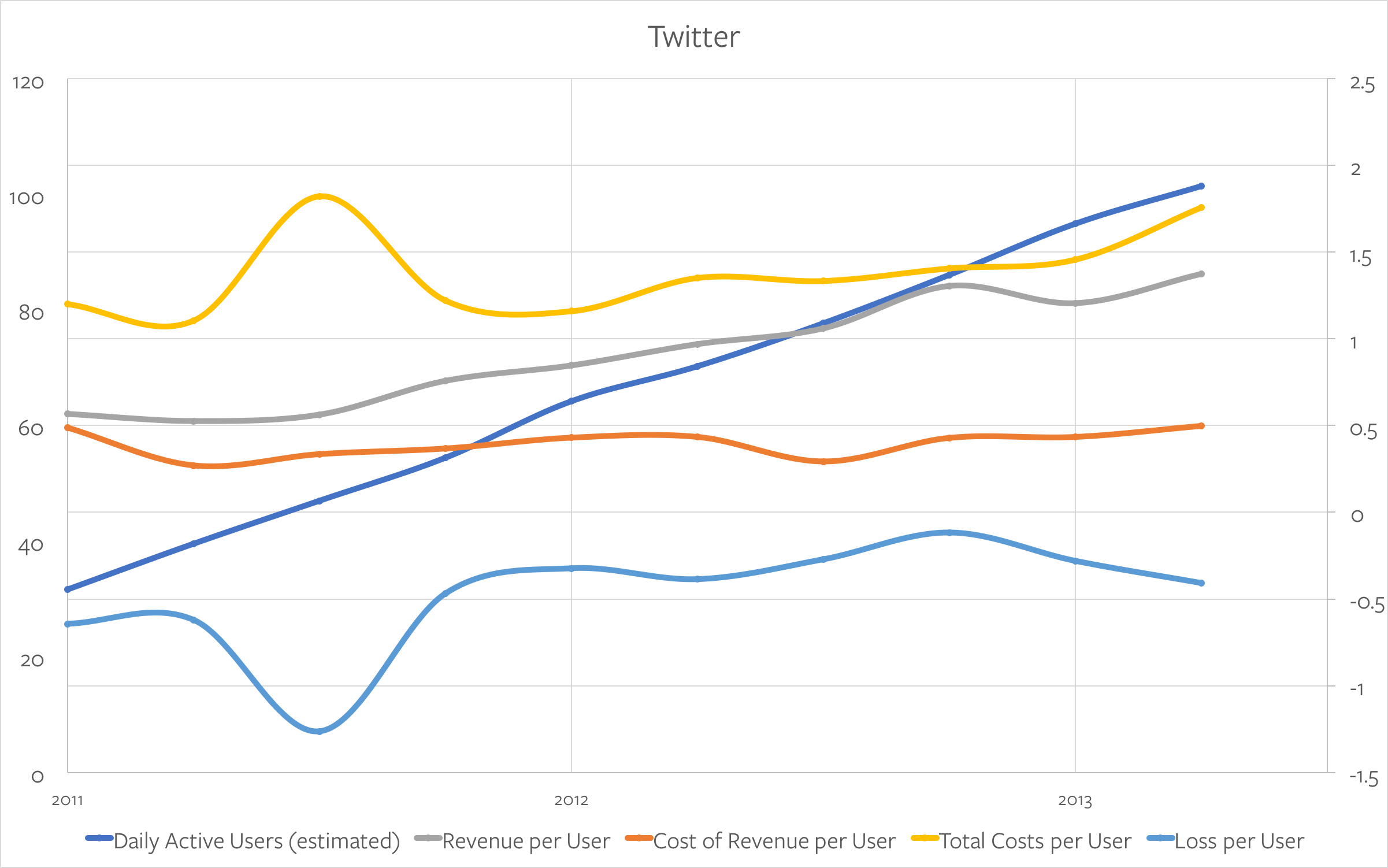
Twitter, meanwhile, wasn’t as bad as people (now) remember:
twitter

Like Facebook, Twitter’s cost of revenue per user was basically flat; total costs were higher than Facebook’s, and had taken a recent upturn thanks to the acquisition of MoPub, but that was assumed to be temporary. As long as Twitter could grow revenue per user or the total number of users the company would be profitable; if it could do both it too could be a juggernaut. Obviously things didn’t turn out that way, in part because user growth was already slowing, but also because Twitter’s costs never flattened out; since the MoPub acquisition the company has spent around $1.24 for every $1 in revenue brought in. Had the company simply kept its pre-IPO cost structure it would be in far better shape today.

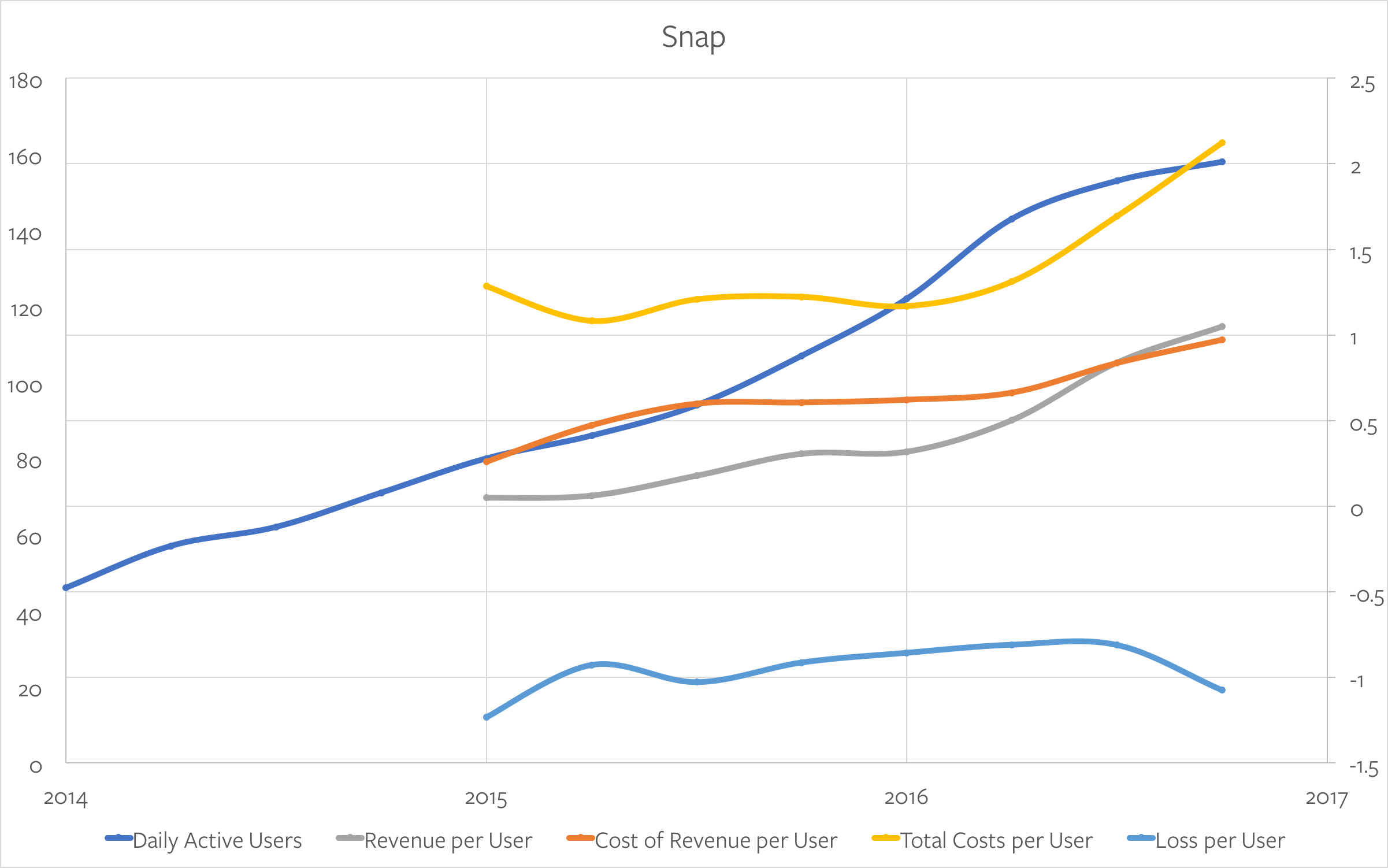
Snap is actually in worse shape than either:
snap

The biggest problem here is Snap’s cost of revenue per user: it’s going up, and it has been for a while. This isn’t quite as bad as it seems, because Snap’s cost of revenue includes revenue sharing payments to publishers; once you back that out, though, the company has gone from paying ~$0.47/user in 2015 to ~$0.66/user in 2016, a 40% increase, and an amount (per user) that well exceeds that of Facebook or Twitter at the time of their IPOs. That means that to become profitable Snap has to not only grow users, it has to grow them faster than its costs are increasing, or grow revenue per users by that much more.

What is the most fascinating, though, is Snap’s insistence that it has no choice.

Snap’s Gingerbread Man Strategy

Snap’s S-1 is a remarkable document, because its strategy is remarkable. To quote:

Our strategy is to invest in product innovation and take risks to improve our camera platform. We do this in an effort to drive user engagement, which we can then monetize through advertising. We use the revenue we generate to fund future product innovation to grow our business.

In a world where anyone can distribute products instantly and provide them for free, the best way to compete is by innovating to create the most engaging products. That’s because it’s difficult to use distribution or cost as a competitive advantage—new software is available to users immediately, and for free. We believe this means that our industry favors companies that innovate, because people will use their products.

We invest heavily in future product innovation and take risks to try to improve our camera platform and drive long-term user engagement. Sometimes this means sacrificing short-term engagement to introduce products, like Stories, that might change the way people use Snapchat. Additionally, our products often use new technologies and require people to change their behavior, such as using a camera to talk with their friends. This means that our products take a lot of time and money to develop, and might have slow adoption rates. While not all of our investments will pay off in the long run, we are willing to take these risks in an attempt to create the best and most differentiated products in the market.

Most companies use their S-1 to explain how they are building a sustainable competitive advantage — a moat, if you will. Snap is declaring that moats no longer exist; all it has is the Gingerbread Man strategy:

Run, run, run as fast as you can.
You’ll never catch me, I’m the gingerbread man.

That’s why the cost of revenue must rise; Snap explains:

Providing our products to our users is costly, and we expect our expenses, including those related to people and hosting, to grow in the future. This expense growth will continue as we broaden our user base, as users increase the number of connections and amount of content they consume and share, as we develop and implement new product features that require more computing infrastructure, and as we hire additional employees at a rapid pace to support potential future growth. Historically, our costs have increased each year due to these factors, and we expect to continue to incur increasing costs.

The payoff, though, at least in Snap’s telling, is a big opportunity to dramatically increase the average revenue per user by capturing technology’s white whale — television advertising money:1

Worldwide advertising spend is expected to grow from $652 billion in 2016 to $767 billion in 2020. The fastest growing segment is mobile advertising, which is expected to grow nearly 3x from $66 billion in 2016 to $196 billion in 2020. We believe that one of the major factors driving this growth is the shift of people’s attention from their televisions to their mobile phones. This trend is particularly pronounced among the younger demographic, where our Daily Active Users tend to be concentrated. According to Nielsen, people between the ages of 18 and 24 spent 35% less time watching traditional (live and time-shifted) television in an average month during the second quarter of 2016 compared to the second quarter of 2010.

Snap goes on to explain how its concentration in western markets, particularly the United States; the quality of its ad units (especially relative to Facebook); and the depth of engagement it drives with the most desirable demographic for advertisers, set the company up well to capture enough advertising that not only justifies the company’s increasing costs but actually provide a profit — as long as the company keeps innovating.

To summarize, Snap’s strategy is to:

  • Deliver innovative and differentiated products that…
  • Cost a lot to deliver but…
  • Capture the best customers…and PROFIT!

That’s definitely not Twitter; indeed, the real analogy for Snap is from another part of technology entirely: it’s Apple.

Snap, Apple, and Humanity

Seven years ago, well before I started Stratechery, I wrote a paper in business school called Apple and the Innovator’s Dilemma;2 it concluded like this:

The secret of Appleʼs success is about design and a different way of thinking. Design at its essence, is not just about form, and not just about function. Instead, itʼs both, and more. It is ultimately about the user and delivering exactly what they need, not just what they say they want. Apple takes it as their responsibility — what customers pay them for — to both know technology and customers better than customers know themselves and deliver products that truly surprise and delight…

Moreover, it is a way of thinking that Apple does not have a monopoly over. It requires acknowledging that there are product attributes that cannot be measured, and that value means much more than money. It also requires thoughtfulness and patience, and a broad appreciation of people and culture. Escaping the Innovatorʼs Dilemma is about escaping the operational mindset that is the current ideal in much of business. In short, there are few other companies like Apple because no one dares or is allowed to think different, not because it is impossible.

Compare that to this paragraph from Snap’s S-1:

Our drive to create new things comes from the belief that we can create products that will improve the lives of the people who use them. We believe it’s always worth trying to build something that will empower people to express themselves, live in the moment, learn about the world, and have fun together — even when it’s not clear that what we build will be successful or make money.

While we get many of our ideas by listening to our community, sometimes it takes a long time to get the product solution just right. Even when we have the right solution, it’s often in the form of a new product that might take a while for our community to learn how to use. Just because products are sometimes confusing when they’re new doesn’t mean we are going to stop building innovative products for our community. Part of the joy of using Snapchat is discovering new features and learning how to use all of the products that we create.

Snap gives the example of Stories:

Our community started asking for an easier way to send a Snap to all of their friends, not just one or two at a time…Some people in our community asked for a “Send to All” button, but we thought this might encourage users to spam each other by making it too easy to send a Snap to everyone very quickly, ruining what made Snapchat personal and fun.

We learned that our community often shared things with all of their friends using social media, but we also heard that traditional social media was confusing because the typical feed placed every update in reverse chronological order. If you posted photos from a birthday party and then viewed them in the feed, the first photo in the feed would be from the end of the party, and the last photo in the feed would be from the beginning of the party. Our community wanted to view updates in chronological order, the way that they were experienced. That made sense to us because humans have been telling stories with a beginning, a middle, and an end for a long time.

While we understood why people used social media, we didn’t want to make a traditional profile on Snapchat because we knew from our experience with delete by default that people didn’t like the burden of accumulating perfect moments for their friends. Our community wanted to express themselves and tell stories in a way that embraced change and growth.

In October 2013, slightly more than two years after we first launched Snapchat, we introduced My Story. Stories are collections of Snaps viewed in chronological order that expire within 24 hours. Every user on Snapchat has their own personal and ephemeral Story that can be viewed by all of their friends. With Stories, every day begins anew.

This too is remarkable: not only is Snap not promising a traditional moat, it is in fact selling its humanity as a company. That the company and its Steve Jobs-admiring CEO in fact do understand users better than everyone else, that that will result in a sustainable differentiation, and that the prize will be the top end of the advertising market.

Without question Apple’s ongoing success lends credence to the idea of humanity as a differentiator; the challenge for Snap, though, is that that approach didn’t work too well for Apple the first time around.

Facebook = Microsoft

Perhaps the single most misunderstood fact about the most misunderstood episode in tech history is that the Macintosh computer never had a chance against Windows. Sure, “Windows” launched after the Mac, and certainly leaned on Apple’s creation for product inspiration, but the fact that mattered was that it was built on DOS — and it was fully backwards compatible. That meant that all of the businesses that had already bought PCs — the DOS-running IBM PC had launched three years before the Macintosh, and was a massive success — along with all of the software that had already been created for DOS, were going to buy/run-on Windows. The competition was over before it began, no matter how much humanity may have been in the Macintosh’s design.3

Today, if Snap is Apple, then Facebook is Microsoft. Just as Microsoft succeeded not because of product superiority but by leveraging the opportunity presented by the IBM PC, riding Big Blue’s coattails to ecosystem dominance, Facebook has succeeded not just on product features but by digitizing offline relationships, leveraging the desire of people everywhere to connect with friends and family. And, much like Microsoft vis-à-vis Apple, Facebook has had The Audacity of Copying Well.

The trouble for Snap is that if this comparison holds, the company may indeed be in danger of being like Apple — the 80s version, that is. Facebook is already threatening to saturate the direct response market for mobile — the analogy would be to Microsoft’s hold on the enterprise — and just as the consumer market Apple built the Macintosh for never really materialized, the same may be the case for the long-awaited shift of TV brand advertising to mobile.

That, though, is the key to Snap’s insistence it is a camera company. What changed for Apple the second time around was that there was a paradigm shift — and in paradigm shifts, the incumbents’ lock-in evaporates. Again from the S-1:

In the way that the flashing cursor became the starting point for most products on desktop computers, we believe that the camera screen will be the starting point for most products on smartphones. This is because images created by smartphone cameras contain more context and richer information than other forms of input like text entered on a keyboard. This means that we are willing to take risks in an attempt to create innovative and different camera products that are better able to reflect and improve our life experiences.

Snap’s bet is that Facebook, with all of the baggage of putting your best self forward, will never be truly able to step into this brave new future. No, capturing that future won’t be as simple as re-making the connections you already have — new users will need to be won, feature by feature and innovation by innovation — but that is exactly what Snap insists it does better than anyone else.


So will Snap succeed?

The trouble for the company is that some of the conditions necessary for its success are out of its hands: on a macro level, the timing of The Great Unbundling, an important aspect of advertising moving away from TV, is as uncertain as ever. On a competitive level I suspect Snap is more surprised than anyone at how effectively Facebook has leveraged Instagram to foreclose Snapchat’s growth.

I do, though, have faith in Snap itself: Spiegel and team are the most innovative in tech, brilliantly laddering up to new opportunities, and creating new markets. The products will be great; we’ve known for 30 years, though, that that is not always enough.

  1. As noted on this site two years ago
  2. I used this same conclusion in one of my first ever pieces on Stratechery called Apple the Black Swan
  3. By extension, it didn’t really matter that the Macintosh was integrated and Windows wasn’t; what mattered was the ecosystem
16 Feb 01:50

Editorial: Why Apple ignores so much pundit innovation advice

files/images/ipadpro-splitview-l-l.jpg


Daniel Eran Dilger, Apple Insider, Feb 16, 2017


This is a good article even if the writing gets excessively syrupy and sycophantic at times. The author identifies three major themes of "toxic innovation advice" and talks about how Apple has avoided them. Now I won't even touch an Apple device any more, but the three themes are nonetheless resonant. The first involves acquisitions: why doesn't Apple buy Dropbox, Uber, etc.? But buying the already successful isn't a good investment strategy. The second is advice to innovate incrementally, eg., to build better Windows-based systems, rather than abandoning windows entirely. But doing what was already successful isn't a good development strategy. Finally, there's the advice that Apple should target existing commodity markets. But building technology that was already successful isn't a good device strategy. You get the idea. The point here is that Apple isn't alone in getting this sort of advice. I get it all the time (and it often drives policy). The key to success is being able to resist it.

[Link] [Comment]
16 Feb 01:49

How Nasdaq offers a Drupal distribution as-a-service

Nasdaq CIO and vice president Brad Peterson at the Acquia Engage conference showing the Drupal logo on Nasdaq's MarketSite billboard at Times Square NYC

Last October, I shared the news that Nasdaq Corporate Solutions has selected Acquia and Drupal 8 for its next generation Investor Relations and Newsroom Website Platforms. 3,000 of the largest companies in the world, such as Apple, Amazon, Costco, ExxonMobil and Tesla are currently eligible to use Drupal 8 for their investor relations websites.

How does Nasdaq's investor relations website platform work?

First, Nasdaq developed a "Drupal 8 distribution" that is optimized for creating investor relations sites. They started with Drupal 8 and extended it with both contributed and custom modules, documentation, and a default Drupal configuration. The result is a version of Drupal that provides Nasdaq's clients with an investor relations website out-of-the-box.

Next, Nasdaq decided to offer this distribution "as-a-service" to all of their publicly listed clients through Acquia Cloud Site Factory. By offering it "as-a-service", Nasdaq's customers don't have to worry about installing, hosting, upgrading or maintaining their investor relations site. Nasdaq's new IR website platform also ensures top performance, scalability and meets the needs of strict security and compliance standards. Having all of these features available out-of-the-box enables Nasdaq's clients to focus on providing their stakeholders with critical news and information.

Offering Drupal as a web service is not a new idea. In fact, I have been talking about hosted service models for distributions since 2007. It's a powerful model, and Nasdaq's Drupal 8 distribution as-a-service is creating a win-win-win-win. It's good for Nasdaq's clients, good for Nasdaq, good for Drupal, and in this case, good for Acquia.

It's good for Nasdaq's customers because it provides them with a platform that incorporates the best of both worlds; it gives them the maintainability, reliability, security and scalability that comes with a cloud offering, while still providing the innovation and freedom that comes from using Open Source.

It is great for Nasdaq because it establishes a business model that leverages Open Source. It's good for Drupal because it encourages Nasdaq to invest back into Drupal and their Drupal distribution. And it's obviously good for Acquia as well, because we get to sell our Acquia Site Factory Platform.

If you don't believe me, take Nasdaq's word for it. In the video below, which features Stacie Swanstrom, executive vice president and head of Nasdaq Corporate Solutions, you can see how Nasdaq pitches the value of this offering to their customers. Swanstrom explains that with Drupal 8, Nasdaq's IR Website Platform brings "clients the advantages of open source technology, including the ability to accelerate product enhancements compared to proprietary platforms".

16 Feb 01:49

Recommended on Medium: Akasha Cross-post: Planting the tag-flag for Vancouver, Bowen Island, and Canada

This is a cross-post of an entry I’m making into AKASHA, a decentralized app that runs on the Ethereum blockchain and IPFS (Inter-Planetary File System).

But you can ignore all that and pretty easily download an early alpha release of the desktop client for Windows, Mac, and Linux and use the Medium-inspired interface to write blog entries, leave comments, and chat with users in the system. Read the AKASHA blog post “Tipping Point” for screen shots and links to downloads.

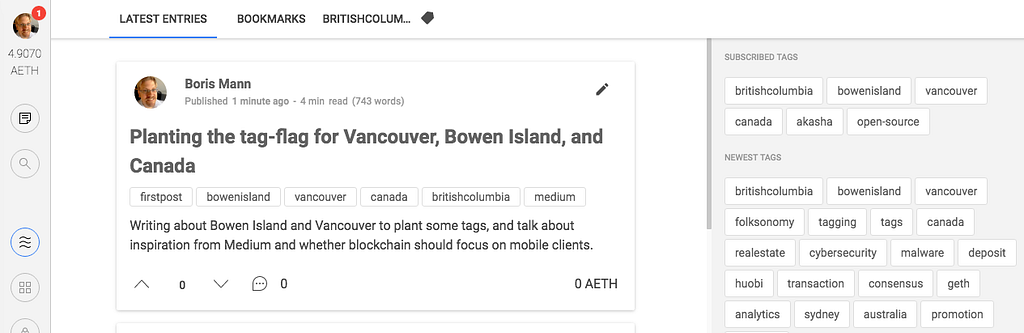
The entry below is a cut-and-paste with some minor edits direct from the AKASHA editor. Here’s a screenshot of the published post:

I’ll use my first post to plant some new tags, since that seems to be the main way to subscribe and explore content on AKASHA today.

It’s been 13 years or so since I’ve easily been able to get the @boris user name on the first try. Specifically, I’m thinking of my early access to Flickr, which at the time first launched as a browser-based, Flash powered chat interface. Now in 2017, I’m exploring how to export all of my photos out of Flickr, and onto a decentralized app of some kind. And as I explore decentralized apps and their namespaces, the @boris handle is once again easy to grab.

View from the bridge by the Meadow, Crippen Park, Bowen Island, BC, Canada

It’s been great sitting down over a long weekend, hanging out at my parents’ place on Bowen Island, and making my AKASHA first post. I’ll plant the flag and tag this entry with some place names so people have some tags to follow and subscribe to.

While I grew up on Bowen Island, I live in Vancouver. Here’s a panorama of False Creek, an ocean inlet along one side of the downtown peninsula of the City of Vancouver.

A panorama of one of the False Creek ferry docks. Downtown Vancouver on the left.

Decentralized App Cross-Posts to Medium

I’ve been quite surprised at how much of the crypto / decentralized / p2p world often cross-posts to Medium. I’ve found lots of great content by following the Ethereum or Blockchain tags on Medium.

But of course, until there are built in web proxies that let the traditional web browsers view blockchain stored content, it makes sense to post to where there is an audience, and the Medium platform has a nice and clean writing interface.

Actually more than just nice and clean. Medium is a real step up in terms of a writing, editing, and comment interface. Plus, I’ve found Medium to be a great reading interface as well, in part by following tags, and in part because the algorithm they use seems to do a good job of surfacing great content for me. I’ll make a point of following tags here on AKASHA to find people who are posting on topics of interest.

And of course, the AKASHA editor is one of many that has chosen to be heavily inspired / cloned from the Medium interface. That is a good thing, and there are already some other Medium features that I’d like to see here, which I’ll write up as feature suggestions.

Should decentralized apps focus on the desktop?

I’m enjoying my explorations and tinkering with various decentralized apps. The Electron codebase that allows developers to build cross-platform desktop apps is something I’ve been seeing in many of these early alphas and betas.I understand the logic of starting with a desktop-focused client, but I’m spending a lot of time thinking about how the “next billion” that come online will have a smartphone as their one and only computing device.

Should we be prototyping and evolving a desktop interface when the end game is mobile computing?

The way I set up this question, I obviously believe that no, we shouldn’t be spending a lot of time on the desktop interface.

Likely the app store locked down distribution channel is one of the things that prevents devs from doing more mobile work. As well, while programming mainly in a desktop environment, it makes it easier to spin up a work in progress, test it, and go back to coding. With mobile, the time it takes to push code to a mobile device, test it, and then tweak something makes this take more time.

Of course, with all the data on a blockchain, nothing prevents someone from building a mobile client. This is where I’m thinking I’d like to focus efforts when I get to actually investing in R&D in this decentralized space.

I’d love to hear from the AKASHA devs on documenting the interface and APIs strongly so that one can work on these items in parallel.

With that, I’ll finish my first post*. Hello from Vancouver and Bowen Island, BC, Canada.

*actually my second post, since I posted a simple one about tagging in order to troubleshoot why this post wasn’t working. I’ve been saving regularly, and it seems like I can no longer save as soon as I add a link of any kind. The lesson is: save often, and don’t add any links.


Akasha Cross-post: Planting the tag-flag for Vancouver, Bowen Island, and Canada was originally published in Boris Mann’s Blog on Medium, where people are continuing the conversation by highlighting and responding to this story.

16 Feb 01:48

USB Overdrive, new life for abandoned hardware

by Rob Campbell

This post is a note of appreciation for Alessandro Levi Montalcini‘s USB Overdrive for macOS. I put off buying this software for a couple of years, making due with sub-rate work-arounds and inadequate stop-gap drivers for a slew of random USB devices that have come and gone: The Xbox 360 controller that refused to work; An array of mice and keyboards that if I were to line them all up, could probably populate a small computer accessory boutique or at least a Shopify store. Every time I plugged one of these things in, I’d search for a driver and would see mention of USB Overdrive and pass over it, opting for some other imperfect solution.screenshot of USB overdrive

Today I finally bit the bullet, shelled out my $27 and bought a copy. I wish I’d done it sooner. My Cyborg RAT7 wired mouse stopped working with macOS Sierra, the company Mad Catz (formerly Saitek?) having stopped updating the driver software in the hopes that it would force me into buying a newer mouse from them. I tried multiple combinations of drivers and software from their site with no success, some of which requiring painful operations to remove from my operating system.

Not today, Mad Catz! After a few minutes wangjangling some settings, remapping the 8 or so buttons to how I like them, I was back in business, putting away my trusty Apple Trackpad for another season. I still love this mouse and it works very well.

And that’s the thing. Hardware shouldn’t be disposable. Companies shouldn’t be churning this stuff out with the expectation that people will just buy another one in a year or two or three. Why aren’t we building things to last? Rather than filling up landfills with still-functional products, how about building something that looks nice and works well and continue to support it for as long as possible? What a concept.

So, thank you for all your hard work, signore Montalcini. Thank you for giving us something that hardware vendors should have been doing all along. And for doing it well. And for doing it for over 15 years! You deserve some kind of medal, but all I got you was this blog post.

16 Feb 01:48

I look like a self-made millionaire. But I owe my success to privilege.

files/images/shutterstock_554328787.0.jpg


Jason Ford, Vox, Feb 16, 2017


When we talk about education and human development we often overlook the fact that success is driven by a lot of factors that have nothing to do with learning. This article makes the point as clearly as any I've seen. Being well-nourished as a child, being safe, getting a good education, being debt-free, getting good introductions, eliminating the risk of failure, getting capital from the family, and having the right physical appearance - if you have all of these, you might be successful. Miss any of them (have a learning deficiency, lack confidence, be uneducated, be in debt, be unconnected, have no safety net, have no capital, be female or black or whatever) and your chances of success drop dramatically. 

[Link] [Comment]
16 Feb 01:48

Reveries on The Future of VR

by Jason Rosenthal
“The future is already here. It’s just not evenly distributed.” William Gibson As we enter Year 2 of the emergence of Virtual Reality as a consumer platform, we will see many analysts, articles and pundits [...]
16 Feb 01:48

These 6 systems will get rid of WiFi dead spots in your house

As history flows along, we find ways to snuff out conditions that make us miserable. We invented plumbing so we didn’t have to carry water. We invented tractors so we didn’t have to break our backs in the fields. We invented air conditioning so we’re no longer uncomfortable in the summer.

And now, you are alive to see the snuffing out of another source of misery: Wi-Fi dead spots.

For years, we’ve tried to solve this problem with various imperfect solutions like Wi-Fi repeaters/extenders. But they all have downsides, like diminished speed and having to change Wi-Fi network names when you move around the house.

But now, there’s mesh Wi-Fi.

Instead of one Wi-Fi transmitter too weak to fill your entire home with signal, a mesh system uses a set of them, spaced evenly through your house. The result is a single “mesh network,” a roaming network, that blankets the entire house in good, strong signal.

The revolution began a year ago with the introduction of the Eero. After I tested it (my review’s here), I was so exhilarated that I actually bought a set for myself, at the nosebleedy price of $500.

Today, every networking company and its sister now offers a similar system. And man, they are great.

Because a router out in plain sight offers better coverage than one in a closet, they’re all great-looking. Because we’re human beings and not engineers, they all include phone apps that make setup simple. And because many of us have children, most offer either parental controls (to block iffy websites) or a Pause button for specified offspring (so we can have dinner conversation face to face).

This week, I reviewed six of these systems: Eero, Plume, Luma, Google WiFi, Netgear Orbi, LinkSys Velop, and Ubiquiti Amplifi HD.

The fruits of my week in networking hell.

About Speed Measurements

Each manufacturer touts its routers’ top speed in megabits per second (“867 mbps/sec!”, for example). But trust me: You’ll get those speeds only on the moon. In the cluttered airwaves of a community, among the walls and furniture obstacles of a home, your top speed will probably be less than half the advertised maximum. Move 30 feet away, and it drops by half again.

In fact, any of these mesh systems can pass along data faster than your Internet provider passes it into the average American home (54 mbps/sec.). If your concern is transferring files between drives within your home, or if you’re paying for much faster Internet, then consider one of the beefier systems here: The Velop, Orbi, or Amplifi HD.

I tested each system by wandering through my house with a laptop running Netspot, an app that builds a “heat map” of Wi-Fi strength. All of them totally blanketed both floors of the house. (I even spot-checked the attic and basement. They had Wi-Fi, too.)

Here’s the “heat map,” before and after installing mesh routers. Green is good.

I also did an internet speed test twice per system: in the room closest to the cable modem, and the room farthest from it. Here’s what I discovered.

Eero

The modules are small and good-looking; the terrific app gives you insight into every aspect of your system. All the key features are here, like guest networks (for visitors—they can access the internet, but not your computers) and individual, pause-able profiles for your offspring.

The original mesh WiFi modules, still great.

If you have an Amazon (AMZN) Echo, you can even control your Eeros by voice: shutting off certain kids’ internet access, turning the Eeros’ status lights on or off, or finding your phone/tablet/laptop in the house according to its closest Eero.

Eero’s app looks great.

The Eero’s price has not come down in its year on the market, though. At $500 for a set of three, it’s almost goofily overpriced—$200 more than Google (GOOG, GOOGL) Wi-Fi, for example. I’m glad to own it, but it wouldn’t be my first choice today.

  • Speed tests: 57 megabits/second downloading in the closest room, 47 in the farthest.
  • Ethernet jacks: Two per unit. (The pod by your cable modem therefore has only one empty jack for a printer, network hard drive, or other gizmos. I bought a cheap five-port switch box to solve that problem.)
  • Price: Three for $500, 1 for $200.

Google Wi-Fi

Google’s Eero-like system costs $300 for the set of three.

Three Google’s the charm.

It, too, is fast, full-featured, and beautifully designed. (For example, there’s no traditional power brick—only a simple cord with USB-C on the router end and standard two-prong plug on the other.)

You can dim or turn off the Google Wifi’s status light.

The app makes it incredibly simple to set the whole thing up. You use your phone to scan a barcode on the bottom of the first pod; after that, one tap is all it takes to set up each additional pod. The app even tests the placement of each unit and lets you know if you’ve chosen wisely.

Google’s app is a snap.

Features: You can pause individuals or groups, even remotely. You can control the colorful LED ring around the equator of each unit, although they make fantastic night lights. Voice control is coming soon, Google says. Port forwarding, guest networking, device prioritization (“favor the Roku when I’m watching videos!”): all present.

  • Speed tests: 53 mbps/sec closest, 35 mbps farthest.
  • Ethernet ports: two.
  • Price: $300 for three, $130 for each additional.

Luma

Feels like a cheap Eero knockoff; minor irritations abound. Do I really have to surrender my phone number just to use my new router? The units are hexagons, but unlike the Eeros, they can’t lie flat, because the power cord sticks out of the back. The setup process goes like this.

The Luma’s illuminated during setup.

The app is strong on parental controls and security; for example, you can set up accounts for each kid in your family and specify what kinds of sites they’re allowed to visit (rated PG, R, etc.).

The Luma app queries you about your home setup.

But the Lumas’ power is on the weak side; a set of three left fading signal at the fringes of the house.

To avoid the diluted signal at the outer edges, I would have needed another Luma.
  • Speed tests: 55 mbps/sec closest spot, 49 farthest.
  • Ethernet ports: two.
  • Price: $400 for three (choice of white, gold, orange, or silver plastic), $150 for one

Netgear Orbi

Netgear’s approach to mesh networking is radical: Only two units to cover an entire big house. Including the front and back yard!

How? First, these are big, honking towers, crammed with antennas and power to drive them. (A ring on the top glows in colors during setup to show its happiness with the current signal strength.)

The Orbi kit comes with two of these towers.

Second, most routers communicate with your devices on one of two radio bands (2.4 or 5 gigahertz)—but this one uses a third channel exclusively for communications between the two towers. As a result, that channel remains strong enough to drive through ceilings, floors, and walls. Netgear suggests putting one unit right by your cable modem, and the “satellite” tower in the middle of your house, even if that’s upstairs and several rooms away.

Only two Orbi units covers the house. Weird.

It works. (The “Mesh routers” heat map shown near the top of this article is the Orbi’s result.)

By the way, the Orbi also offers MU-MIMO streaming. (That stands for Multi-User Multiple Input, Multiple Output, but it basically means fast—at least when talking to gadgets that also speak MU-MIMO. For example, the Samsung Galaxy S7 and certain other Android phones do; no Apple products do.)

Alas, Netgear’s software engineers aren’t anywhere near as impressive as its hardware designers. The setup instructions are filled with terms like “credentials” and “redirect,” and they make no mention of a smartphone app that could make the process easier. You’re supposed to use a web-browser interface to set up your Orbis.

Orbi’s app exists, but Netgear doesn’t want you to know.

When I contacted the company, they told me that there is a setup app—they just forgot to mention it! In fact, there are three apps, each governing a different aspect of the Orbis (setting up guest network, parental controls, etc.).

Come on, people. You can do better.

  • Speed tests: 56 mbps/sec closest spot, 52 farthest.
  • Ethernet ports: four per tower
  • Price: $380 for two

LinkSys Velop

For $490, you get three gorgeous, sculptural white towers, with cables that sneak out of a corner cutout, a physical reset button (instead of a paper-clip hole), and packaging that out-elegances Apple’s. The towers deliver fantastic speed and coverage, thanks in part to a three-band system like Netgear’s for better comms between towers.

Air freshener or mesh WiFi router? You decide.

The Velop (pronounced VELLup) also offers MU-MIMO streaming, if you’re scoring at home.

All the perks are here: parental controls, guest networking, device prioritization, port forwarding, Alexa commands (“Turn the guest network on,” “What’s my password?”), and so on. The app is, therefore, more dense than on simpler devices, but it’s not hard to navigate.

The Velop app is nicely done.

My one beef: it takes a long time to recognize each new satellite as you hook it up. Minutes.

  • Speed tests: 56 mbps/sec closest spot, 52 farthest.
  • Ethernet ports: 2 per tower.
  • Price: Three for $480; two for $250, or one for $200.

Plume

If you took the concept of mesh routers—multiple transmitters spaced around the home—to its logical conclusion, you’d wind up with Plume. Here, you buy a bunch of super-cheap, tiny routers—the size of night lights, available in black, silver, or bronze—and plug them directly into power outlets, one per room or hallway! (Once you’re about a room away from the nearest Plume, your signal weakens dramatically.)

Smallest routers ever.

Setting them up is insanely easy. You don’t even have to introduce them to the network one at a time, as you must the other systems; you can just plug in all six, or all nine, or whatever, and they just work. (If you want to name them, you can: Just hold your phone very close to one of the plugs until it offers its name for changing. Very cool.)

Look, ma—no cords!

These pods are so cheap because they don’t contain processors, as their rivals do; all the analysis is done online. As a result, the company says that it takes 24 hours of analysis before the plugs begin to deliver their best speeds. Then, in the coming weeks, they shift bandwidth to the pods that need it most, according to your use patterns.

The Plume’s app is super smart.

Here’s the problem, though: Economics. If your home is small enough that you can get by with three Plumes ($180) or even six ($330), you’d save money and complexity by buying a modern, standard, regular router. And if your house is big enough that you need a mesh system, you’ll probably need $600 worth of Plumes—and any of the competitors here would cost a lot less than that.

There are no features to speak of, either: No guest network, device prioritization, or parental controls.

  • Speed tests: 52 mbps/sec closest spot, 33 farthest.
  • Ethernet ports: one per unit
  • Price: Three for $180, six for $330, one for $70.

Amplifi HD

Here’s another fresh take on the mesh system. This time, the three modules aren’t identical and interchangeable. There’s a base module and two satellite antennas.

The base is a cube with a color touch screen; tap it to view various network-info screens. (Most of the time, it just shows the time and date.)

The Amplifi HD base station has a color touch screen—and sound effects.

The satellites are very cool: the antenna part connects to the power-outlet part with a magnetic ball joint, meaning that you can adjust the antenna’s angle. Note, though, that it can be tough finding spots to plug these things in where they’re not stymied by a floor, a countertop, or a wall. Baseboard outlets are pretty much it—which limits your positioning options (and attracts small children). They’re not exactly fashion accessories, either.

Here’s part 2 of the Amplifi system, courtesy of the magnetic ball hinge.

The app is lovely, and gives you access to all kinds of advanced router settings (port forwarding, DHCP settings, etc.)—but doesn’t offer parental controls.

  • Speed tests: 48 mbps/sec closest spot, 44 farthest.
  • Ethernet ports: four on the base unit
  • Price: $350 for the base and two satellites

What to buy

If money were no object, I’d tell you to buy the LinkSys Velop. These babies look great, they’re absurdly fast, the features are all there, and the software has its act together. A set of three is designed to cover 6,000 square feet of house—far more than the Google WiFi (4,500 square feet), Netgear Orbi (4,000), or Eero or Luma (3,000). (Then again, if your pad is more of a palace, you ‘ll want the Amplifi HD, which says it can cover 20,000 square feet!)

But if money is an object—namely, if you object to a $490 price tag—then you can save $200 by getting the Google WiFi trio. The modules are gorgeous and not so ostentatious, and the app offers a smoother setup.

Unfortunately, the three-pack of Google WiFi is currently sold out everywhere. If you can’t wait, you can save almost as much money, and still get unbelievable coverage, with the Amplifi HD ($350) or the Netgear Orbi ($380).

In any case, if your house’s size or construction stymies any single router you’ve tried, treat yourself. Dead spots are the latest scourge of humanity that we’ve now wiped out.

David Pogue, tech columnist for Yahoo Finance, welcomes non-toxic comments in the Comments below. On the web, he’s davidpogue.com. On Twitter, he’s @pogue. On email, he’s poguester@yahoo.com. You can read all his articles here, or you can sign up to get his columns by email

16 Feb 01:46

Life Hack: IKEA’s $2.00 Bicycle Ski Rack

by James Schwartz

Ikea Bike Ski Rack

Life Hack: $2.00 IKEA Bike Ski Rack – Photo by James Schwartz / The Urban Country

Two years ago my girlfriend Roxy and I each picked up a pair of Nordic skis, which allowed me to re-take-up cross country skiing; a hobby that I had thoroughly enjoyed as a kid. Over the past couple winters, Toronto has lacked adequate snow for us to get out much; but a nice dumping of snow yesterday provided the first opportunity this winter to dust off the skis and get out in the snow.

Unfortunately, finding places to ski typically requires using a car; and the skis are awkward to transport from my apartment to the closest park where I would use them.

Fortunately, I had a couple $1.00 IKEA BETYDLIG curtain rod brackets kicking around in a bin in my apartment and serving no useful purpose.

So, I attached the curtain rod brackets to the side of my bakfiets cargo bike; which created a handy side-rack to hold my skis and poles. This morning I took the skis on my bike to the 36-acre Trinity Bellwoods Park to do some cross-country skiing. After work, I picked up my daughter Sofia from school on the bike and took her to the tobogganing hill; with her sled conveniently hooked on the side rack.

Certainly one of the better $2.00 investments I have made.

Ikea Bike Ski Rack

Life Hack: $2.00 IKEA Bike Ski Rack – Photo by James Schwartz / The Urban Country

Ikea Bike Ski Rack

Life Hack: $2.00 IKEA Bike Ski Rack – Photo by James Schwartz / The Urban Country

Ikea Bike Ski Rack

Life Hack: $2.00 IKEA Bike Ski Rack – Photo by James Schwartz / The Urban Country

Ikea Bike Ski Rack

Life Hack: $2.00 IKEA Bike Ski Rack – Photo by James Schwartz / The Urban Country

Ikea Bike Ski Rack

Life Hack: $2.00 IKEA Bike Ski Rack – Photo by James Schwartz / The Urban Country

James D. Schwartz is the Editor of The Urban Country and is based in Toronto, Canada. You can contact James at james.schwartz@theurbancountry.com or follow him on Twitter.

i share the road

More Articles Like This:

16 Feb 01:46

Twitter Favorites: [samuelclay] NewsBlur’s iOS app is the same way. Even better, you can see so for yourself: https://t.co/fvascWJizp. Tracking is… https://t.co/0tCsmu7iWM

Samuel Clay @samuelclay
NewsBlur’s iOS app is the same way. Even better, you can see so for yourself: github.com/samuelclay/New…. Tracking is… twitter.com/i/web/status/8…
16 Feb 01:46

Panel: WeChat mini-apps have promise, but fail to deliver

by John Artman

Editor’s note: On Feb 13, 2017, TechNode held its first event of the year, looking at WeChat mini-apps, what they are and whether they have a future. Below are some highlights. You can also listen to the whole panel here.

After much hype, WeChat mini-apps don’t seem to have much a future. That was the conclusion of a panel discussion held on Feb 13 at DayDayup in Beijing.

Both Thomas Graziani and Drew Kirchhoff shared their views of mini-apps and unfortunately, the conclusions drawn ranged from lukewarm reception to outright dismissal.

Thomas Graziani, CEO of WalktheChat, a WeChat marketing consultancy, was very bearish, going so far as to say that mini-apps have no future.

“If you think about new innovation, there are basically three categories: innovations which don’t suck, . . . things which suck for now, . . . and then you stuff which really sucks and will suck forever,” said Thomas. “What makes mini-apps really weak is that [they are competing with WeChat service accounts] which is just better. There’s no amount of improvement you can make to make them competitive against service accounts.”

Drew Kirchhoff, co-founder of WeChat-based language learning platform yoli, however, was more conciliatory, saying that while they may have been launched poorly, mini-apps could provide the foundation for WeChat’s future dominance through AR.

“I’m not going to say they’ve been a complete failure. The response from the [WeChat] team is that this is all about offline. Mini-apps aren’t supposed to be apps themselves; they’re supposed to create an offline experience,” said Drew. “Instead of online to offline, mini-apps are more offline back to online. In [Alan Zhang’s speech] when he announced mini-apps, he talked about how in ten years we would be able to use [AR integration] . . . to create an offline OS.”

What are mini-apps?

Before release everyone called them mini-apps, but now WeChat is officially calling them Mini-Programs, seemingly in an attempt to steer clear of any conflicts with Apple and their App Store provisions against other app stores on their platform.

“After Tencent denied approval for calling them yingyonghao [应用号 or “app account” in English)], WeChat came up with xiaochengxu [小程序 or “little program” in English],” said Drew. “Both are literal translations, but they are basically the same thing.”

Interestingly enough, they can potentially replace traditional apps. Instead of having to install and uninstall, users can just use once and never have to think about them again. Not only that, but app stores across platforms are oversaturated and underutilized.

“The basic idea is that you don’t have to install apps so much. If you look at how many apps you installed last week or last month, the average number is close to zero. The question is how do you get more people to interact with you on a more personal basis, said Thomas. “The solution for WeChat is service accounts and subscription accounts, but that was not good enough: they wanted something more native and faster. The more nerdier branch of Tencent in Shenzhen decided that solution would be mini-apps. The idea is that people don’t need to download apps and brands can interface with users.”

Do mini-apps have a future?

Given this promise, there are quite a few companies exploring this type of user experience, most notably Google with their instant apps. However, unlike Google and their massive Android I/O conference, WeChat has been relatively silent about their mini-apps. And, yet, there was a ton of buzz about mini-apps, with even some speculating this could be Tencent’s play to replace the App Store and obviate the OS as a platform.1

“A lot of developers knew that if you were the first, if you could be the first one to launch your mini-app, you would get a huge amount of users on the first day and would be able to monetize it and convert those users to other channels,” said Drew. “For a lot of developers in the beginning, it was a chance to be first, to capitalize on the very short development times of 1-2 weeks, and of lot of people are just kind of sick of app stores. Mini-apps were supposed to be the chance to do something new and be potentially the first to be part of the next revolution.”

However, in just over a month, mini-apps have lost a of traction. According to Baidu’s search index, searches for xiaochengxu have decreased dramatically over the last 30 days.

Screen Shot 2017-02-14 at 18.44.46

Baidu 30 day seach index for mini-apps (Image credit: WalktheChat)

On top of that, there have yet to be any compelling use cases with most mini-apps being extension of official accounts.

“Offline use cases are interesting if its something you can use once, like paying for gas. I can scan the QR code and pay for the gas, increasing convenience for users. You could argue that its a bit faster than a website even though I find that questionable,” said Thomas. “Why not have people follow your service account so that you can interact with them later? If you really don’t to talk to these people again, then its really about have one touch point and that can make sense.”

Even then, they do still provide an alternative to traditional apps by not taking up any space on your phone’s storage. This may be good for people who are finding themselves with too many apps already or just not enough space on their phones, in particular lower-end devices with little space to begin with.

“Before mini-apps launched, I couldn’t download any more apps because my phone didn’t have enough storage. So instead of downloading ofo, I just used the service account,” said Drew. “At the time, I thought it was great because I don’t have to leave WeChat to use ofo. . . but since the first week of launch I haven’t used any mini-apps [because using apps is faster].”

  1. And, yes, TechNode did contribute to some of this (some might say) over-hype.
16 Feb 01:46

According to this startup, Korean men love cosmetics even more on Valentine’s Day

by Eva Yoo

It’s Valentine’s Day, and never think chocolate is the best and the ultimate present for men. Cosmetics can be a good present for men, at least in South Korea.

On Valentine’s Day, men’s interest in makeup increases rapidly in South Korea, according to the data provided by cosmetics information provider app Bird View (in Korean).

In fact, Korean men are the world’s top per-capita consumers of skincare products, and the grooming industry is worth more than 1 billion USD.

Bird View’s flagship app Hwahae (shortened word for ‘interpreting cosmetics’) analyzed the cosmetics 20 million search traffic in the app for the month before and after Valentine’s Day last year, and it turned out that the percentage of men seeking men’s make-up cosmetics increased significantly during the period.

According to the Hwahae app, men’s search amount on men’s cosmetics increased by 133% on average on the week before Valentine’s Day. Especially, the search for makeup products such as concealer and the eyebrow pencil more than doubled during the period.

So why do Korean men put on make-up? Most Korean men get interested in skin care products and sun protection items during military service, due to frequent outdoor activities with strong sunlight. According to AmorePacific, a Korean cosmetics company, 70% of South Korea’s military men use cosmetics. Even after the military service, men continue to use cosmetics for their daily life and for special occasions such as a job interview.

“Men’s grooming is so common now, and the male cosmetics market is growing by 30-40% every year,” said Yoonjin Jung, chief marketing officer at Hwahae. “Now that there is a wider choice of men’s cosmetics in the market and the needs for segmented information on men’s cosmetics is growing, we will try to provide more information relevant to them.”

The app provides information on over 70,000 components in 87,000 cosmetic products made by 9000 brands and allows its users to give feedback on the products. The company recently introduced ecommerce function to make money from its 3.5 million users.

In Japan, Atcomse, a Japanese cosmetic portal provides information on cosmetic ingredients and user reviews. The portal has more than 10 million users and runs brick-and-mortar cosmetic shops in Japan.

16 Feb 01:46

Hans Rosling – the World’s Greatest Data-Storyteller

by David McCandless

Very sad to hear that Hans Rosling has passed away. Such a grand ninja of dataviz. His spectacular talks convinced me that data stories could be enlightening, illuminating, and entertaining – all at the same time.

Some of his best sequences:
» Five ways the world is doing better than you think (2013) – people are healthier, better educated than you might think
» 200 countries, 200 years, 4 minutes (2010) – health data in visual space
» The best stats you’ve ever seen (2006) – debunking myths about the so-called “developing world”

And heartfelt obits:
» NY Times: Rosling was “a Swedish doctor who transformed himself into a pop-star statistician”
» Guardian – “a kind and constantly curious genius”
» The Economist “a natural showman”

Thank you Hans.

David


16 Feb 01:46

The Most Satisfying Graph

by chuttenc

There were a lot of Firefox users on Beta 44.

Usually this is a good thing. We like having a lot of users[citation needed].

It wasn’t a good thing this time, as Beta had already moved on to 45. Then 46. Eventually we were at Beta 52, and the number of users on Beta 44 was increasing.

We thought maybe it was because Beta 44 had the same watershed as Release 43. Watershed? Every user running a build before a watershed must update to the watershed first before updating to the latest build. If you have Beta 41 and the latest is Beta 52, you must first update to Beta 44 (watershed) so we can better ascertain your cryptography support before continuing on to 48, which is another watershed, this time to do with fourteen-year-old processor extensions. Then, and only then, can you proceed to the currently-most-recent version, Beta 52.

(If you install afresh, the installer has the smarts to figure out your computer’s cryptographic and CPU characteristics and suitability so that new users jump straight to the front of the line)

Beta 44 being a watershed should, indeed, require a longer-than-usual lifetime of the version, with respect to population. If this were the only effect at play we’d expect the population to quickly decrease as users updated.

But they didn’t update.

It turns out that whenever the Beta 44 users attempted to download an update to that next watershed release, Beta 48, they were getting a 404 Not Found. At some point, the watershed Beta 48 build on download.mozilla.org was removed, possibly due to age (we can’t keep everything forever). So whenever the users on Beta 44 wanted to update, they couldn’t. To compound things, any time a user before Beta 44 wanted to update, they had to go through Beta 44. Where they were caught.

This was fixed on… well, I’ll let you figure out which day it was fixed on:

beta44_dau

This is now the most satisfying graph I’ve ever plotted at Mozilla.

:chutten


16 Feb 01:46

Raspberry Pi Zero PiE-Ink Name Badge

by Alex Bate

Gone, it would seem, are the days of ‘Hello, My name is…’ stickers and Sharpies. Who wants a simple sticker on their chest, so flat and dull, when they can wear an entire computer, displaying their name and face in pixelated perfection?

PiE-Ink Name Badge

I created this video with the YouTube Video Editor (http://www.youtube.com/editor)

With this PiE-Ink Name Badge, maker Josh King has taken this simple means of identification and upgraded it. And in his Instructables tutorial, he explains exactly how. But here’s the TL;DR for those wanting to get the basic gist of the build.

Josh King e-ink name badge Raspberry Pi

For the badge, Josh uses a Raspberry Pi Zero, a PaPiRus 2″ e-ink HAT, an Adafruit Powerboost 1000c, and a LiPo battery. He also uses various other components, such as magnets and adhesive putty.

Josh prepped the Zero, soldering the header pins in place, and then attached the Powerboost, allowing the LiPo battery to power the unit and be charged at the same time.

Josh King e-ink name badge Raspberry Pi

From there, he attaches the PaPiRus HAT and secures the whole thing with the putty, to ensure a snug fit. He also attaches a mini slide switch to allow an on/off function.

Josh King e-ink name badge Raspberry Pi

Having pre-installed Raspbian on the SD card, Josh follows the setup for the PaPiRus, ensuring all library information is in place and that the Pi recognises the 2″ screen. The code for the badge can then be downloaded directly from Josh’s GitHub account.  You’ll need to scale your image down to 200×96 in order for it to fit on the e-ink screen.

Josh King e-ink name badge Raspberry Pi

And there you have it. One Raspberry Pi Zero e-ink name badge, ready for you to show off at the next work function, conference, or when you visit Grandma and she still can’t get your name right.

The post Raspberry Pi Zero PiE-Ink Name Badge appeared first on Raspberry Pi.

13 Feb 18:58

Rands Response Hierarchy

by rands

The arrival of Slack1 changed my communication regimen. On top of Slack being the primary means of communicating at Slack, the Leadership Slack at 3000+ members represents a daily part of how I communicate.

There are a great many ways to get in touch with me. With the establishment of Slack as a primary means of communication, I realized that I had updated the prioritized hierarchy to how likely I will respond to a piece of communication. From least likely to most likely, this is the hierarchy:

Spam < LinkedIn < Facebook < Twitter < Email < Slack < Phone < SMS < Face to Face

Let’s talk about each one:

Spam: I never respond. Spam is a solved problem in that I don’t even see it anymore, but even when I did, I never responded. The most work I perform here is removing myself from spam-like mailing lists resulting from online purchases.

LinkedIn: I respond slowly… maybe. There is no doubt there is value in my LinkedIn network, but the design choices that LinkedIn has made over the years makes the site both difficult to use and distinctly pay to play. My “inbox” is full of strangers making even stranger offers. The signal to noise is so bad that when an actual friend or a credible inquiry arrives, I will miss the message because I’m busily ignoring the rest of LinkedIn.

Facebook: I’ll respond… eventually. I’m in the minority here, but I don’t use Facebook for messaging. There’s a very short list of humans who only have my Facebook account, so that’s where they’ll start to reach out, but it’s infrequent. The quality of my network on Facebook is higher than LinkedIn plus there is less pay to play opportunities so when someone does message me, it’s usually relevant.

Twitter: I’ll respond. Twitter is more a broadcast medium for me than a 1:1 communication tool. I’ve taken the time to curate the humans I follow so my network is more valuable than Facebook. Given I’m configured such that mutual following is a necessity to directly message, the flow of messages is low, but the signal is high. However, I’ll almost always redirect a direct message to a different medium.

Email: I’ll respond in a timely fashion. I have two inboxes: work and personal. Both of these are empty at the end of each working day. Work inbox zero used to be a challenge pre-Slack but is now an inbox I’ll forget to check for days on end because of the low volume of messages. My personal inbox is higher volume than work and each message from a human is a message I’ll respond to promptly.2

Slack: I’ll respond immediately. All of work communication happens within Slack. As I’ve written about before, I have a system using starring that effectively transforms my sidebar a dynamic inbox. Urgent conversations are handled in real time, less urgent usually in 24 hours. The same approach applies to the Leadership Slack. Within Slack, it’s guaranteed that you’re a human and we have shared interests which mean if you message me and I’m sitting there, the response is instantaneous.

Phone: I’ll answer immediately… if I know you. In the last year, the number of spam calls on my private number has skyrocketed. The result is that if you’re not in my contact list, I will never ever ever answer the phone. However, I will eagerly check my voicemail because there’s a decent chance it’s important news since someone bothered to call.

SMS: I’ll answer immediately… if I know you. Same familiarity protocol as the phone. For friends and family, this is the primary means of communication these days and has almost completely replaced the role of phone calls from just a few years ago. My parents were the last to get on this bandwagon in the last year.

Face to Face: Yeah, I’ll respond immediately. You’re sitting right there.

To summarize the last year: there are fewer phone calls thanks to the prevalence of texting, email is giving way to Slack, and it’s a bit of crap shoot on most social networks.

My introversion is fine with all of these developments.


  1. Bias alert. I work at Slack. 
  2. Remember hand written letters? I do. 
13 Feb 18:57

The difference between tactics and strategy in marketing

by Paul Jarvis
Before you start trying (or keep trying) random marketing tactics you read on industry blogs, think about why you’re doing them. Are they a part of your overall strategic plan?
13 Feb 18:55

Apple quietly joins Wireless Power Consortium, igniting speculation next iPhone will feature Qi charging

by Igor Bonifacic

Apple has quietly joined the Wireless Power Consortium, the multinational group that oversees the Qi wireless charging standard, according to 9to5Mac.

The publication spotted Apple’s entry into the now 213 member group after comparing a live version of the Wireless Power Consortium’s website with a cached .

While far from a smoking gun, the move lends weight to the rumour that company will add wireless charging functionality to its next iPhone. Since 2012, Apple has said it doesn’t see much value in the technology, with the company’s Phil Schiller noting at one point that wireless charging doesn’t make refilling a smartphone’s battery more convenient than a standard USB cable.

However, it now appears the next iPhone will likely ship with simple inductive charging, in part because consumer demand for the feature has become too loud for Apple to ignore. A technology analyst for market research firm IHS told 9to5Mac that 90 percent of consumers want the feature in their next device.

Another rumour suggests Apple likely won’t bundle its wireless charging accessory with the device, instead offering it as an optional add-on consumers can buy. It’s also possible Apple will use the same off-shot of Qi wireless charging that’s included in the Apple Watch, which is to say existing Qi-compatible wireless charging mats won’t work with the new iPhone.

Source: 9to5Mac

The post Apple quietly joins Wireless Power Consortium, igniting speculation next iPhone will feature Qi charging appeared first on MobileSyrup.

13 Feb 18:55

Galaxy S8+ name tipped through official Samsung support page, Bixby leaks via trademark filing

by Patrick O'Rourke

In a posting on Samsung’s official support page, the name Galaxy S8+, which is presumed to be a larger version of the still unannounced standard S8, has leaked.

The support page lists the Galaxy S8+ on the South Korean manufacturer’s India website, complete with the model number SM-G955FD.


Over the weekend, prolific mobile leakster Evan Blass shared a photo of the Samsung Galaxy S8+’s design and branding via a tweet. This information was later corroborated in a Reddit thread pointing to Samsung India’s support page. Blass also clarified that the Galaxy S8 features a 5.8-inch QHD display and that the S8+ comes equipped with 6.2-inch QHD glass.

While nothing has been confirmed yet, the S8+ leak seems to indicate that Samsung has plans to ditch the Edge branding it started adopting with the S6 Edge.


Samsung’s upcoming virtual assistant, which is rumoured to be called Bixby, was also leaked in a recent trademark application. Samsung’s Bixby virtual assistant trademark was originally posted on Twitter by user @ecd_sam.

As expected, the trademark filing describes a virtual assistant that’s very similar to Google Assistant or Apple’s Siri.


“Smartphones; mobile telephones; portable computers; tablet computers; interactive computer software enabling exchange of information across a computer network; computer software to enable the provision of information via communications networks; computer communication.” The description indicates that Bixby may very well the new digital assistant for Samsung devices, starting with the Galaxy S8 and Galaxy S8+,” reads the filing.

Following Samsung’s purchase of Viv Labs, a U.S.-based artificial-intelligence software company, it has been predicted that Samsung is working on its own virtual assistant, though a report stemming from the Wall Street Journal indicates its technology will be based on S Voice and not Vive Labs’ technology.

The post Galaxy S8+ name tipped through official Samsung support page, Bixby leaks via trademark filing appeared first on MobileSyrup.

13 Feb 18:53

Gaze in Amazement at Concept Drawings of Beyoncé's Grammy Outfits | Monday Insta Illustrator

by Beckett Mufson for The Creators Project
 

A photo posted by Peter Dundas (@peter_dundas) on


Beyoncé stole the show at the Grammys last night in a goddess-of-the-Indus-inspired costume by longtime collaborator Peter Dundas.

A veteran of Roberto Cavalli and Emilio Pucci, Dundas has designed many of the pop star's iconic looks in music videos and public appearances for the last 10 years, including the golden dress from the "Lemonade" film and her costumes for the Mrs. Carter and Formation tours. His designs fiercely highlight her pregnant body, heightening the tension of her dangling off the stage in a mechanical chair during her performance.

via GIPHY

The glittering costume and red and white evening gowns, a vivid contrast with the low-fi, innocent floral gettup photographer Awol Erizku shot Beyoncé in when Bey announced her pregnancy via Instagram last week, are the first of Dundas' debut eponymous collection. “Beyoncé and I have a long working relationship. I think she wanted someone she trusted and connected with on several levels, and felt the Lemonade dress had particularly been that,” he tells Vogue. “She also knew I was going solo and liked being the first to wear my new collection." 

Get a glimpse into Dundas' process in the concept images he published to Instagram below.


A photo posted by Peter Dundas (@peter_dundas) on


via GIPHY


via GIPHY


A photo posted by Peter Dundas (@peter_dundas) on


via GIPHY

Follow Peter Dundas here, and check out The Creators Project on Instagram to find your next favorite artist.

Related:

Beyonce's Pregnancy Photos and the Contemporary Artist Behind Them

Kanye West’s “Ultralight Beam” Soundtracks a Film About Black Spiritual Power

How (and Why) the Long-Form Music Video Is Making a Comeback

13 Feb 18:08

Why Everyone Should Travel

by Gail Mooney

 As I prepare to head out of the country next week I’ve been thinking about why I travel. I’ve been a bit of a rolling stone most of my life, moving 10 times before I graduated high school and pursuing a career as a professional photographer which has taken me to over 100 countries.

Gail at the Great Pyramids 1971
Gail in Egypt 1971

I think if I ever had to give up traveling I would wither and my spirit would die.

Here are my top ten reasons that I think every American (and other citizens of the world) should travel:

  • It gives you a much better perspective on our world rather than just experiencing it virally. Let’s face it, when you are an armchair traveler, you are getting someone else’s perspective.
  •  It makes one grateful for what they have. Many, if not most Americans are very privileged but don’t really have an understanding of that because they isolate themselves in their own environment.
  • You get to be a true diplomat for your country. When I’m traveling I try to give people from other countries and cultures a more realistic idea what an American is beyond our government’s policies and how we are depicted in the movies.
  • It creates lasting memories of importance or at least memories that last longer than buying a consumer product.
  • It teaches you a lot about yourself. When you travel things don’t always go according to plan. You get to see how you handle stress in situations beyond your control.
  • You learn how to communicate. Many times you don’t understand the language and you learn to read body language and pick up people’s vibes.
  • You meet people you would never get to meet at home. It makes you less fearful when you get to meet people from other lands.
  • As a photographer my camera has given me access to incredible experiences that I have shared with the world.
  • You can affect change.
    Gail showing video to children of remote Amazon village, Peru
    Gail with children in small village along Amazon River, Peru

    When you travel you realize that regardless which country you come from we are all part of the human race. We all share this planet and we are all stewards of keeping it healthy.

  • It brings wonder to your life. I have had many awe- inspiring moments and not all of them were at typical tourist sites. Some of my greatest memories are the simple conversations that I’ve had with people all around the world.

Check out some of the images that I’ve captured from my journeys. www.kellymooney.com


Filed under: HD DSLR, Inspirational, Personal Stories, Photography, Travel, Video, Women Tagged: global, inspiration, personal, philanthropy, Photography, Travel
13 Feb 17:23

Should Shopify dump Breitbart? Where should vendors draw the line?

by Josh Bernoff

Shopify, a commerce platform, supports thousands of online stores, including Breitbart’s. Tens of thousands of people have called on the company to dump the alt-right site, but Shopify CEO Tobias Lütke says anyone who isn’t breaking the law can use his platform. I agree with his position. As I previously wrote, the boycott war has descended … Continued

The post Should Shopify dump Breitbart? Where should vendors draw the line? appeared first on without bullshit.

13 Feb 17:10

Two AWS Years

Wow, it was December 2014 when I climbed on board this train. I’m sitting in a pretty interesting place and feel I owe the world some reportage.

In terms of what it’s like to work to work here, I don’t have much to add to last year’s write-up.

Since then I’ve got my fingerprints all over two AWS services: CloudWatch Events and Step Functions. There are few things as much fun as helping ship something and watching people start to use it.

If you want opinions on what those products mean and how well they work, there are lots of blogs out there written by people who are less biased.

But here’s one amusing sidelight. When I came to work here I felt like I was facing a thousand-mile-high wall of technology and knowledge and experience, and damn little of the stuff I knew felt relevant. After six months it was less scary, but I still feel like a Perma-noob much of the time. Well, except for the Amazon States Language — they needed a JSON DSL, with a specification, and a parser inside the service, and (it became obvious) a downloadable command-line version. I smiled, because had this rare feeling of “I know exactly what needs to be done here, as well as almost anyone in the world, and how to do it.” I wonder if that’ll ever happen again in my whole life.

What makes me happy

Turning IT from Capex into Opex.

Writing code that processes billions of messages per week with good O()-notation behavior.

Working in an almost-entirely-asshole-free environment.

My paycheck.

Hearing about the weird shit people do with the infrastructure we rent ’em.

Working in Vancouver.

Cloud hypergrowth.

What makes me scared

Cloud hypergrowth.

What makes me unhappy

Working when it’s nice outside.

Videoconferencing technology.

Male-dominated professions.

I-5 between Vancouver and Seattle.

What makes me impressed

Network design that enables things like VPCs at scale.

Serverless. I’m pretty sure there’s a there there.

Linux. Seriously, no sense of strain after all these years.

IntelliJ.

CloudTrail. Maybe the most radical AWS service. I can’t imagine running a serious business without something like it. The combo with CloudWatch Events makes me smile too.

What makes me dubious and cynical

AI. *gasp* OK, the best implementations can now beat humans at Go and (even more impressive) reliably distinguish between photos of cats and dogs. But OMG the hype. My advice: Try linear regression first.

Node and NPM.

Blockchain.

AdTech.

13 Feb 17:10

Over 37 percent of Canadian couples are ‘Netflix cheating,’ says study

by Patrick O'Rourke

You start a TV show with your significant other under the assumption that you’re both going to continue watching the content together as a joint activity.

Then, one night, you find yourself alone, struggling with the temptation of launching Netflix on your phone and hitting play on just one more episode. This is what the popular streaming platform calls ‘Netflix cheating.’

According to a recent global survey conducted by Netflix consisting of 30,000 couples that use the service, 37 percent of Canadian couples and 46 percent of couples in the U.S., end up ‘Netflix cheating.’ 76 percent of Canadians say they don’t plan to Netflix cheat, but end up falling into the the trap anyways while getting caught up in binge watching session. Furthermore, 57 percent of Canadians don’t see Netflix cheating as a bad thing.

Netflix cheating infographicFinally, and perhaps this is the most telling statistic, seven percent of streaming couples think watching ahead is worse than having an actual affair. The infographic continues by revealing that 63 percent of those cheating say they plan to continue to do so as long as they know they won’t get caught.

While a painfully silly study, in the era of binge watch, which was at least in part created by Netflix releasing full seasons of TV shows simultaneously, hurting a significant other’s feelings by watching an episode of Orange is the New Black without them, can often become a point of contention for some couples.

Source: Canadian News Wire

The post Over 37 percent of Canadian couples are ‘Netflix cheating,’ says study appeared first on MobileSyrup.

13 Feb 17:09

Working from an iPhone

by Ryan Christoffel

One of my goals in 2016 was to make working from my iPhone as efficient as possible. The desire to make this happen initially sprung from experiences raising a baby. My wife and I began foster parenting in July of 2015, and one of our foster children was AJ, a four-week-old baby boy. AJ ended up staying with us for about a year before returning to his birth mother, and in that year I learned that when raising a baby, there are frequently occasions when only one hand is available for computing. I would often have a hand tied up feeding AJ or carrying him around, and if I needed to get any work done during that time, my iPad Pro was no help. iPads are built for two-handed computing, while iPhones work great with one.

In addition to the motivation of being able to get work done with one hand, one of the things I've learned during the past couple years is that the best computer for work is the one you have with you. Despite the iPad Pro being more portable than most Macs, it still pales in portability compared to the iPhone. Because my iPad doesn't travel with me everywhere, I need to be able to do anything on my iPhone that I can on my iPad.

Between my two current jobs, much of my work can be done while on the go – whether I'm waiting for an oil change to be completed, standing in a seemingly endless DMV line, or any similar scenario. In these short intervals of life, there are moments work can be done – which is where my iPhone comes in, because it's with me wherever I go.

If and when a pressing work issue comes up, in many cases it can't just be ignored until I get back to my desk; my iPhone needs to be capable of handling the task. Even if the issue isn't time-sensitive, getting things done while I'm out makes the load lighter when I do get back to my desk.

I've grown extremely proficient in using my iPhone to get things done, and there are six key things I've identified that make that possible.

Cloud Storage

Though this holds true for iPad as well, if you are going to depend on your iPhone for getting work done, cloud-based file storage is essential. If an iPad is your primary computer, you likely have this issue solved already, but Mac users may need to make some changes here.

Whatever your profession, whatever work you're trying to get done, most likely there will be times you need access to files on your iPhone. There are plenty of options available to meet this need. Dropbox, Box, and Google Drive all offer varying levels of free cloud storage. macOS Sierra introduced new tools to store your Desktop and Documents folders in iCloud Drive. Any option you choose will easily enable accessing files from your iPhone.

Documents by Readdle allows management of multiple storage services.

Documents by Readdle allows management of multiple storage services.

I've been using cloud storage for over a year now, and I've grown so spoiled by cloud-based files that it surprises me every time someone says they'll send a file when they get back to their computer. It takes a minute for that concept to register in my brain, because if it were me I could simply pull out the iPhone from my pocket and send the file then and there. Cloud storage is a must.

In-Sync Universal Apps

The best experience working on the iPhone is one that requires as little jumping through hoops as possible. If you have to create and remember new workflows when on the iPhone, you won't be able to work as efficiently; this is why universal apps are so important. Aim to use the same apps across all your devices, and you'll set yourself up for success.

Bear launched as a universal app on iPhone, iPad, and Mac.

Bear launched as a universal app on iPhone, iPad, and Mac.

One prerequisite to the benefit of using universal apps is that they must have rock-solid sync. When I add a task in Todoist on my iPhone, I'm counting on it showing up later on my iPad; if it doesn't, things break down quickly. Same goes for changes made to a sheet in Ulysses, or timeline progress made in Tweetbot. Working from my iPhone becomes a waste of time if the things I get done aren't synced to my other devices.

The need for solid syncing doesn't necessarily prevent using different apps across your devices for the same task. For example, if you're a writer who uses Markdown, and a third-party service like Dropbox is your syncing solution, you'll have greater freedom regarding which apps you use. If it suited you best, you could use a mixture of Ulysses on Mac, 1Writer on iPad, and Byword on iPhone. Just because you can do it, though, doesn't mean you should.

Using different apps across different devices may be alright in some cases, but most of the time I've found that I work best when my mind doesn't have to shift between different apps with different interfaces. With a universal app, the transition from working on iPad to working on iPhone is seamless. There's no wondering, "Where can I access my files? How do I change this setting?" I only have to remember one interface, with one basic layout, and one set of menus and controls. Trying to use different apps will inevitably lead to frustration over forgetting how to do something in one app, leading you to abandon the device you're on and go back to the device and app you're most familiar with. There are exceptions to this rule, but in general universal apps are best.

Extensions

Pre-iOS 8, the iPhone's one-app-at-a-time limitation was a much bigger detriment to work than it is today. That's changed in large part thanks to the advent of extensions. Extensions come in several different forms, each serving the goal of minimizing the number of app switches needed to accomplish a job on iOS.

Share extensions allow me to quickly add content to Apple Notes or Evernote, to email a block of text from a note or website, and to create tasks in Todoist with embedded files. When writing content for MacStories, the extension for Ulysses gets an article started, while one for Working Copy saves my finished draft into a shared GitHub repository for edits from team members.

Left: Share and action extensions; Right: Photo editing extensions.

Left: Share and action extensions; Right: Photo editing extensions.

I use action extensions on my phone every day to invoke 1Password, to add articles to Safari Reading List, to run workflows (more on that soon), and to print emails and websites to PDF. Less frequently, action extensions help me save files to iCloud Drive or Dropbox, and import recipes into AnyList.

Recently I shared with Club MacStories members a collection of apps with photo editing extensions. Included in that list was Annotable, an excellent image annotation tool whose entire feature set can be employed through the app's extension. Thanks to photo editing extensions, a photo or screenshot just taken on your iPhone can be edited without ever leaving Apple's Photos app.

Workflow

What can I say about Workflow that hasn't already been said?

I used Workflow in a few key ways before joining the MacStories team, but never has it been more essential to me than it is now. The majority of the time I'm working from my iPad, so that's where Workflow gets used the most, but one of the beauties of the app is that nearly everything it does on the iPad works identically on the iPhone. Creating new workflows can take a bit longer due to the iPhone's limited screen space, but the more common act of running an existing workflow takes not a second longer.

Opening the Workflow app to run a workflow is fine, but I find that the real magic happens when invoking workflows using the app's action extension. Since the iPhone can't put apps in Split View, the ability to run workflows without changing apps is crucial. While writing an article, without leaving Ulysses, I frequently run a workflow that creates an App Store affiliate link to an app I mention. Occasionally I'll need to copy an app's release notes from the App Store, and Workflow helps me there too. In the Photos app I use the "Run Workflow" extension to combine images, to place screenshots within product frames, and to upload images to MacStories' CDN, the latter of which adds a URL to my clipboard that I can easily paste back in Ulysses. All of this is incredible enough on an iPad, but doing it while on the go, from an iPhone, never ceases to amaze me.

Plus Model

This past September I joined the Plus club for the first time with my purchase of the iPhone 7 Plus. It was a move I'd wanted to make since the prior November, when the 12.9" iPad Pro became my primary computer. Adopting the Pro meant abandoning my iPad Mini, and that transition made Plus phones more appealing than ever before. Tasks like reading iBooks and note-taking in meetings were great on the iPad Mini, but less than ideal on the iPad Pro. I thought the Plus phone would be a great fit to handle those former iPad Mini tasks, and I was right.

The Plus model's greatest value in helping me get work done is screen size. Yes it has longer battery and a better camera, but those benefits don't make as much difference in my personal workflows as screen size does.

A sheet in Ulysses on 4.7" and 5.5" screens.

A sheet in Ulysses on 4.7" and 5.5" screens.

Two of the most common tasks I accomplish on my iPhone are writing and image editing, both of which greatly benefit from additional screen real estate. Writing in particular is a daily task for me, and the Plus model allows me to see more of what I'm writing as I work. Writing on an iPhone of any size can be challenging due to the software keyboard's dominance of the screen, but that problem is mitigated most on the Plus model. Even though the Plus screen brings with it a larger keyboard, it still can show more of your content than any other iPhone. The difference may not seem significant in a side-by-side comparison, but when it comes to working on a phone-sized screen, every bit of extra space is valuable.

I mentioned the Plus phone's larger keyboard. If you've ever tried longform writing on your iPhone before, you'll likely appreciate any increase in key size you can get as a way to minimize mistakes. Ultimately this may have more to do with hand size than anything else, but I can't imagine churning out articles on my old iPhones with 4" or 4.7" screens.

3D Touch

I recently outlined the ways I use 3D Touch each day. Without rehashing that whole article, I'll say that 3D Touch helps me work from my iPhone by making everyday tasks faster.

When a notification comes in, I can use 3D Touch to instantly take action without ever leaving the app I was in. When writing, I use trackpad mode to make text selection and replacement quicker than before. Peeking at links in an article allows me to determine whether or not I want to save it to read later; if so, swiping up on the peeked link in Safari provides the "Add to Reading List" option. Quick actions that appear by using 3D Touch on an app's icon provide shortcuts to actions or menus within the app. Switching apps using 3D Touch, once you get used to the action, is easily the best way to do it. I know popular opinion on 3D Touch can vary, but for me it's an indispensable tool.


There are currently no kids in the house. No babies to feed or carry around. But I continue to have opportunities to get work done on my iPhone. Recently my wife and I took a road trip to California with her sister and brother-in-law. We were in the car for twenty hours each way, and while most of my work was done on the iPad during that time, whenever we would stop to stretch our legs or use the restroom, all I had to do was pull out my iPhone and I could continue working while enjoying a break from our somewhat-cramped car. Continuity features like Handoff were built for situations like that. I was writing in Bear at the time, and its use of CloudKit sync and Handoff made proceeding with a writing project on the iPhone seamless.

While Apple pundits debate whether the iPad or Mac is the future of computing, iPhone sales consistently make each platform look minuscule by comparison.

iPhone is the one device that most people wouldn't want to be without. For many, it has replaced their need for a traditional computer altogether. The iPhone excels as a tool for communication of any sort – whether iMessages, email, social networking, Slack, or phone calls. It can manage online banking and shopping, replace your credit card with Apple Pay, take incredible photos, handle 4K video editing, and do anything else that there's an app for. Despite its limited screen size, the iPhone has even become great at web browsing thanks to an increasingly mobile-first web.

As it marches toward another billion units sold, the iPhone continues to rightly receive Apple's primary focus. It's continually pushed and improved at a rate that the company's other devices can't match; and with every inch of progress, the iPhone becomes a more efficient workhorse.

It may not have the screen real estate or sheer power of most Macs and iPads, but there's little work that can't be done from an iPhone when the situation calls for it.


Support MacStories Directly

Club MacStories offers exclusive access to extra MacStories content, delivered every week; it’s also a way to support us directly.

Club MacStories will help you discover the best apps for your devices and get the most out of your iPhone, iPad, and Mac. Plus, it’s made in Italy.

Join Now
13 Feb 17:09

Welcome to Hong Kong's Pitch Black 'Empty Gallery'

by Samantha Culp for The Creators Project
Exhibition View, Takashi Makino’s Cinéma Concret, 2016, Courtesy of Empty Gallery, Hong Kong

In a nondescript industrial building on the south side of Hong Kong Island, there is a portal into the abyss, a series of pitch-black halls and walkways designed to disorient the senses and present art in a radically different way. Welcome to Empty Gallery, a new space for media art, experimental film, and music which would be ambitious anywhere in the world, but is especially so in Hong Kong.

Though the city has recently come into its own as a global art hub, it’s still solidifying a commercial market for traditional art works like paintings and sculpture—let alone VR installations and noise music. But that didn’t stop Stephen Cheng, the founder of Empty Gallery, from launching his dream space last year in the industrial district of Tin Wan, at the edge of Aberdeen Harbor.

Viewers in front of Takashi Makino’s Cinéma Concret, 2016, Courtesy of Empty Gallery, Hong Kong

Cheng grew up between New York and Hong Kong, and studied film and photography at Harvard. He sought to create a venue for “ephemeral, time-based, and non-object-oriented practices” and for it to run as a commercial gallery instead of a nonprofit institution, in order to experiment as much with art-world economics as with art itself.

“You could call it a lab,” says gallery director Alexander Lau, another erstwhile New Yorker with Hong Kong roots. “We want to find ways to convince people that there’s meaning to acquiring a piece by an artist, and seeing the value in it, even when it’s not a physical object.”

Hans-Henning Korb, Yin Skin, 2016, Courtesy of Empty Gallery, Hong Kong

Cheng wanted the gallery architecture itself to reflect this risk-taking ethos—hence its design as a “black cube” space, entirely dark inside. It's like a photo-negative reversal of the typical white cube: Singapore’s Brewin Design Office painstakingly planned two floors of gallery space to create an illusion of infinite darkness interrupted only by the artworks within.

The inaugural exhibition showcases the work of Japanese experimental filmmaker Takashi Makino and emerging Berlin artist Hans-Henning Korb—each with an entire floor all their own. Makino’s multilayered, jewel-tone film Cinéma Concret beckons hypnotically at the end of the entry-hall, while film stills printed on steel appear to levitate along the walls. Beyond this, a staircase descends into a lower level, and the smell of earth and vegetation becomes overpowering. Down here, Korb’s Kaya Cynara is a sprawling, cavelike installation that has packed the gallery floor with dirt, and features oil-slick video projections, a virtual reality experience, and live performers serving boiled-artichoke tea in handmade ceramic cups. Though Makino is an abstract filmmaker in the subtle tradition of Stan Brakhage, and Korb riffs on post-internet occultism, both shows feel like rituals in dialogue with one another, facilitated by the darkness.

Hans-Henning Korb, Cynara, 2016, Courtesy of Empty Gallery, Hong Kong

One of the gallery’s goals is to make connections between diverse artists, especially from various generations, genres, and regions, particularly cross-pollinating between different parts of Asia, and the Asian diaspora.

Beyond exhibitions and live programs, the gallery will make publications and produce new work. The first release on the Empty Editions label is a vinyl LP by New York-based percussionist Eli Keszler, which has already sold out its first pressing; other music and print books will follow. Up on the 20th floor, the gallery has a “digital atelier,” with color correction, render farm, and sound booth facilities to support their artists in producing new multimedia projects.

Hans-Henning Korb, Yumco, 2016, Courtesy of Empty Gallery, Hong Kong

But both Cheng and Lau emphasize they’re not only focused on cutting-edge new media or the current tech buzzwords. “I’m very interested in what technology can do,” says Lau. “But I have a commitment to a broader definition of what it means for something to be immersive or experiential.”

Exhibition View, Takashi Makino’s “Cinéma Concret”, 2016, Courtesy of Empty Gallery, Hong Kong

Takashi Makino’s Cinéma Concret and Hans-Henning Korb’s Kaya Cynara are on view at Empty Gallery through February 17. For more information, click here. On February 18, there will be a world-premiere of The Endless Cinema, a performance by Takashi Makino. See event details on Empty Gallery's Facebook.

Related:

Hong Kong's Farewell to Thousands of Neon Signs 

New Installation Lets You Smell the Hong Kong–Chinese Border 

TRANSFER Gallery Attempts To Crack The Digital Art Dilemma

13 Feb 17:09

Is This the Most Awkward Dance Party Music Video Ever?

by Sami Emory for The Creators Project
_27A825ww7.jpgPhoto by Jenia Filatova

Russia’s unforgiving winters inspired the fluffy sweaters and awkward dance moves of experimental sound artist Maria Teriaeva’s first music video, "Меринос" ("Merino," like the wool). With the Moscow-based Teriaeva on Buchla synthesizer, her friend Vadik Korolev on vocals, and a live trombone to round it all out, the track is a fun blend of musical aesthetics. The artist’s concept for the piece, she explains to The Creators Project, was to combine avant-garde Buchla melodies, a pop style, and lyrics which would evoke, “the feeling of frost.”

This funky sound highlights the comedy of the video’s protagonists’ (Teriaeva and Korolev) minimal movements, as well as that of the androgynous winter clothing they wear. “It’s impossible to understand who is under all those layers of snow and clothes in winter,” Teriaeva says, “there is no notion of sex. Gender lines are blurred, everything becomes less important.” In "Меринос," this idea is translated into a choreography of cold. With sweaters pulled over their heads, Teriaeva and Korolev sit expressionless, fingers tapping to the music as if waiting impatiently for spring to come. While later, under the weight of thick, boxy, matching jackets, the pair whips out their dance moves with all the grace of two automatons.

See more of Maria Teriaeva’s work on her Facebook page and her Soundcloud. She will also be performing at the upcoming Geometry of Now group show in Moscow, Russia.

Related:

Dance, Religion, and Ritual Collide in an Abandoned Pool

Experimental Animation Meets 90s Clubbing in a Psychedelic Visual Feast [Premiere]

Val Kilmer Meditates in Oneohtrix Point Never's Latest Music Video

13 Feb 17:09

The Elbow Room As A Musical

by Sandy James Planner

04-godfrey-elbowroom05

You can always tell when something becomes an institution when it is written about or becomes a play. One of my  favourite places-and  some of my favourite people-are at the Elbow Room. Bryan Searle and Patrick Savoie first opened this restaurant  on Jervis Street with huge groaning breakfasts served with the driest sense of humour directly catered to your quickness. Their first  restaurant was in the home of the first mayor of Vancouver, Malcolm McLean who served in 1886. If he came back  as a ghost, I am sure he was entertained in fine form by Bryan and Patrick.

These restauranteurs serve their breakfast and lunch specials with a fine side of sarcasm and quick wit. And if you can’t finish your portion? You are sure to be contributing directly to the donations collected for a loving spoonful, with a stern admonishment to eat more next time. They’ve raised tens of thousands for this organization.

The Elbow Room, now on Davie Street  is one of those places you take people you really love and people you’d like to know better. The repartee and exchanges with staff are legendary, edgy  and everyone leaves as friends. There is also a short documentary film on the Elbow Room here.

The Elbow Room is now immortalized in a musical and it is featured in its premiere at York Theatre from March 1 to 12. The musical is developed by Zee Zee Theatre in conjunction Langara’s Studio 58. This is sure to be a sell out, and a great opportunity to see how art parallels the extraordinary wit of The Elbow Room.

Where: York Theatre – 639 Commercial Drive, Vancouver

When: March 1 to 12, 2017

Tickets: At The Cultch, $19-$44

10894661


13 Feb 17:09

Possible Listeria Contamination Leads To Sargento Cheese, Taylor Farms Salad Recalls

by Ashlee Kieler
mkalus shared this story from Consumerist.

Cheese is delicious. Salad with cheese is also delicious. But Listeria is not. For that reason, Sargento has recalled seven prepackaged cheese products and Taylor Farms has recalled 6,630 pounds of pork and chicken salad products that use the affected cheese.

Sargento — one of the largest cheesemakers in the U.S. — announced the recall over the weekend, after determining that some cheese products could potentially be contaminated with Listeria Monocytogene.

Taylor Farms soon followed suit after it was notified about Sargento’s recall.

The recall roundup began shortly after cheese supplier Deutsch Kase Haus informed Sargento that the speciality Longhorn Colby cheese supplied by the company must be recalled due to a potential contamination of listeria.

Both Sargento and Deutsch Kase Haus say they are unaware of any illnesses related to the possible listeria contamination.

The affected Longhorn Colby cheese was used in Sargento’s Ultra Thin Slicked Longhorn Colby cheese and in its Chef Blends Shredded Nacho & Taco Cheese products.

The packages can be identified by the following UPC and “sell by” dates:

• Sargento Ultra Thin Sliced Longhorn Colby, 6.84 oz., UPC 4610000228, with “Sell By” dates of “12APR17B” and “10MAY17B”
• Sargento Chef Blends Shredded Nacho & Taco Cheese, 8 oz., UPC 4610040041, with “Sell By” dates of “H14JUN17” and “H12JUL17”

Out of an abundance of caution, Sargento says that it has recalled five additional products that were made on the same line as the affected cheese.

c4wuqqtwyai0ry6

Those products include, which can also be identified by UPC and “sell by” dates:

• Sargento Sliced Colby-Jack Cheese, 12 oz., UPC 4610000109 with “Sell By” date of “11JUN17B”
• Sargento Sliced Pepper Jack Cheese, 12 oz., UPC 4610000108 with “Sell By” dates of “12JUN17B”, “09JUL17B” and “10JUL17B”
• Sargento Chef Blends Shredded Taco Cheese, 8 oz., UPC 4610040002 with “Sell By” dates of “H14JUN17” and “F28JUN17”
• Sargento Off The Block Shredded Fine Cut Colby-Jack Cheese, 8 oz., UPC 4610040014 with “Sell By” date of “F05JUL17”
• Sargento Off The Block Shredded Fine Cut Cheddar Jack Cheese, 8 oz., UPC 4610040076 with “Sell By” date of “F05JUL17”

Customers who purchased the recalled cheeses can contact Sargento at 1-800—Cheese (243-3737) to begin the refund process.

As for the salad recall, Taylor Farms says in a notice to the USDA that it was informed by Sargento on Friday of the potential listeria contamination of its Bevel Shred Pepperjack cheese.

While the cheese is being recalled out of an abundance of caution, Taylor Farms says it will recall 6,630 pounds of chicken and pork salad products made between Feb. 6 and Feb. 9.

The recalled products include:
• 10.5 oz. plastic trays of “Signature Cafe Southwest Chicken Premade Salad” with the following “USE BY” dates: “2/13/17, 2/14/17 or 2/15/17.”
• 10.5 oz. plastic trays of “Signature Café Southwest Style Salad with Chicken” with the following “USE BY” dates: “2/14/17, 2/15/17 or 2/16/17.”
• 10.5 oz. plastic trays of “H-E-B Shake Rattle & Bowl Rowdy Ranch Hand (contains pork)” with the following “USE BY” dates: “2/17/17, 2/18/17 or 2/19/17.”

Consumers who have purchased the products are urged not to consume them and the products should be thrown away or returned to the place of purchase.


13 Feb 17:07

Telcos & OEMS: You should ignore the GSMA's "Advanced Messaging", RCS & "Universal Profile"

by Dean Bubley
Summary: There are  10+ reasons why RCS messaging has failed, despite a decade of trying. Even with Google's involvement, the GSMA's "Universal Profile" and "Advanced Messaging" only fix, at most, two of these problems - and introduce new ones. Despite the hype, mobile operators should continue to deploy VoLTE only when it is really needed, and should avoid Advanced Messaging, RCS and ViLTE entirely. There are many other better ways for telcos to retain relevance in communications apps & services.


What's happening? 

In the next couple of weeks, we will likely be hearing a lot about the GSMA’s “Universal Profile” (UP), developed with Google as a standardised setup for new Android devices to support VoLTE, plus the latest version of the decade-old failed RCS messaging "zombie" service, now being rebranded as “Advanced Messaging”.

UP also incorporates a version of ViLTE, the video-calling application that can’t even be called a zombie, as it was never alive in the first place. Essentially, UP is a combination of VoLTE and RCS6.0. The first spec was published in Nov 16 (link). (Microsoft is also apparently supporting it, although seems less deeply involved than Google).

Expect the MWC announcements to talk breathlessly about how this is going to enable “Messaging as a Platform” (MaaP), and there will likely be some dubious-seeming big numbers mentioned. Any claims of "XXXmillion active users" should be *very* carefully questioned and analysed - what actually counts as use? There will be a lot of spin, painting what is essentially legacy SMS usage with a new app, as RCS. Daily is much more relevant than monthly data here.

Most probably, you’ll hear lots of hype and PR noise about “mobile operators winning back against the OTTs”, or “people won’t need to download apps”, or “everyone is fed up of having 17 messaging apps”. You’ll hear that it can use network—based QoS, which is great for VoLTE primary-telephony calls, but irrelevant otherwise. Vendors will probably say “well you’ve got an IMS for VoLTE so you should sweat the assets and add extra applications”.

We might even get an announcement about “advanced calling”, which is a way to improve phone calls with pre/mid/post-call capabilities (not actually a bad idea if done well) but force-fitted to use RCS rather than a more pragmatic and flexible approach (which is a very bad idea, and likely executed very poorly).


So ignore it. There are no customers, no use-cases, and no revenues associated with “advanced messaging”. It’s the same pointless RCS zombie-tech I’ve been accurately predicting would fail for the last decade. It’s still dead, still shambling around and still trying to eat your brain. It’s managed to bite Google and Samsung, and they’ll probably try to infect you as well.


What's the background?

If you're new here: I've been following and talking negatively about RCS for 9 years now. The project started in 2007, and emerged as a lukewarm 2008 IM concept for featurephones (link) in the days when both iOS and Facebook where just emerging onto the stage. I described it as a "coalition of the losers" in a report in 2010 (link) It evolved to a dead-on-arrival branded app called "joyn" as smartphones gained traction (link), and it has tried climbing out of its grave so many times since that I describe it as a zombie (link). Various operators have deployed it, then given up - even in markets like Spain and South Korea where multiple operators offered it at first.

I'm currently writing a report on VoLTE trends and implications for my STL/Telco 2.0 Future of the Network research stream (link). It should be out in the next month or so. As part of my research, I've been updating myself about the GSMA's plans to blend VoLTE with RCS - hence becoming aware of the Universal Profile and Advanced Messaging developments. 

Most people I speak to in the mobile industry privately admit that it's been a huge white elephant. I've met people who've been given the "poison chalice" of RCS inside operators and eventually quit their jobs in desperation. Huge slugs of time and money have been spent on a no-hope service, that could have been better deployed elsewhere, on things that could make a real difference. 

It's been pushed by:

  • A few operators misunderstanding the nature of user behaviour, requirements and preferences for communications services, thinking that there had to be a standardised and interoperable "magic bullet" to compete with WhatsApp, Facebook, iMessage and WeChat (and 100's of others).
  • The desperation of network vendors trying to make IMS seem relevant for something other than plain-old phone-call VoIP, either for fixed broadband voice, or VoLTE.
  • The GSMA's stubborn belief that it needs to predefine interoperability and lengthy specifications, rather than iterate on something basic that people actually like. Also, the belief that it has to tie in the phone number / any-to-any model.
  • Google, wanting to find a way to compete in the messaging space it has repeatedly failed with, especially creating an Android version of iMessage based on the Jibe acquisition. Samsung has recently joined in with its own acquisition of Newnet.
So my "coalition of the losers" joke (er... jibe?) in fact has a reasonable basis in history. And history doesn't record many such coalitions having great success at anything, except maybe keeping a few people occupied.

A couple of operators have launched recently - Rogers and Sprint in North America - but the other operators are still delaying, and have big iPhone populations anyway.
 
In the meantime, while the telecom industry has procrastinated over RCS, various other adjacent players such as Twilio and Nexmo (now Vonage) have pushed the supposedly "dead" SMS market to become the standard mechanism for A2P messaging, and signed up thousands of developers for that, plus voice/video/notification cPaaS capabilities. In the time it has taken RCS to get to its 10th anniversary, we have seen Apple, Facebook, Whatsapp, WeChat and others create huge value and loyalty.


But, but... Google!
 
It’s a little difficult to tell if Google actually believes in RCS, or whether it’s just cynically using the GSMA and gullible MNOs to push Android harder – and especially, help reduce the horrendous fragmentation of its platform in terms of both OEM-specific skews and non-updated older OS variants.

As I wrote previously (link), it also seems likely that Google is using the surprisingly-pliant cellular industry to help it create its own version of Apple’s iMessage. The optional hosted RCS Hub could also be an early foray by Google into the NFV and cloud communications space – perhaps with an eye to ultimately competing not just with the Huawei/Ericsson/Nokia axis, but also maybe Amazon and Twilio over time. That’s quite an extrapolation on my part, though - not based on anything public from Mountain View.


What’s definitely clear is that Google doesn’t see RCS as “the one messaging platform to rule them all”, nor the Universal Profile as a way to replace all other forms of voice and video communications. It has a broad range of other services, including Duo, Allo, Voice, HangOuts (now being reoriented towards enterprise), WebRTC support in Chrome and perhaps natively in Android at some point. It also has a stake in Symphony (messaging/UC for finance and other verticals), and works with most of the larger UCaaS and hosted PBX/UC players.

It also wouldn’t be a surprise if Google acquires other cool youth-oriented messaging apps to compete with Facebook’s Instagram, although a post-IPO Snap might be too pricey. And of course, it has its own push-notification platform which is probably (quietly) the world’s biggest messaging service that nobody talks about.


In other words, Google seems OK about creating a lowest-common denominator function that's no worse than what it has already, but which brings extra cooperation brownie-points from the mobile industry, and a bit more leverage with its wayward licensees. Its downside is limited - and if miraculously it somehow it can create a MaaP platform, its upside significant. There's probably also some interesting data-analytics and machine-learning gains in here somewhere too - even if it's just a better understanding of what Android users don't like.

In other words, from Google's point of view, it's a worthwhile and almost risk-free punt. Whether the mobile industry wants to over-rely on a company with a reputation for ruthlessly shutting down failed ventures is another matter.
 

What's wrong with UP/Advanced Messaging? 
Where do I start?! Well, perhaps by pointing out what actually has changed for the positive. It's true that Google is offering a hosted RCS platform for operators that don't yet have an IMS. ("Effectively sponsoring this piece" - link). That's helpful as it reduces friction and cost of operators getting RCS to market. So to does having a pre-certified set of devices that should work with that platform, or in-house deployments. 
But while perhaps those are necessary, they are very far from being sufficient. Many other problems and concerns abound.

The biggest lie about RCS and the “universal profile” is that it will become universal or ubiquitous. Not only is Apple not likely to support it, but it is far from clear that Android OEMs will implement it on all their devices, especially those sold in the open market. It is unlikely to have good PC support (although to be fair, neither does Whatsapp). It is unlikely to be downloaded onto older Android phones. It is unlikely to work smoothly on dual/multi-SIM handsets, of which there are hundreds of millions. It’s unlikely to work well on many MVNOs’ devices (neither does VoLTE). It’s also unlikely to work nicely on the vast plethora of smart IoT devices that support SMS – even those with decent web-browsers and app downloads. 

I've seen some of the projections for RCS-capable handset penetration, and I think they're significantly over-enthusiastic, especially if considered on a country-by-country basis.

There is no relevance of RCS for the enterprise UCaaS and vertical markets that telcos urgently need to focus on. That has to integrate with all manner of other communications services that seem unlikely to have more than a loose coupling with RCS, if at all. It won't be replacing email, Office365, Cisco Spark, Slack, HipChat and numerous other collaboration tools, not to mention the universe of video-conferencing. It's also going to be a long time before it becomes another channel in contact centres' multi-channel platforms - there's a long list of bigger fish, especially if WhatsApp and Facebook offer APIs to billions of users.

The MaaP approach seems doomed to failure – there are no examples of successful technology platforms that have not been based on successful technology products first. Trying to pre-guess the requirements for a platform – let alone creating voluminous standards for it - ignores a wealth of experience: customers use products in unexpected ways, with spikes in viral adoption, unpredictable demographic biases, emergent behaviour and geographical patchiness.

Platforms are created in response to a product’s growth, not pre-ordained. Nobody predicted that Snapchat had the potential to become a media channel and camera/AR platform – those angles represent reactions to actual real-world usage, as well as improvements in “adjacent” technology in the interim. More importantly, developers are unlikely to become interested until there is evidence of real-world usage among a decent slice of their target audiences. You'd have to be a brave airline to ditch your native apps, ignore Facebook and WeChat and iMessage, and port your main loyalty "experience" to a mini-app inside the RCS client.

There are assorted other problems lurking as well - interconnect and roaming should be interesting. Will it really be free to do video-sharing and file-transfer to your friend in Singapore? Trying to work out the pricing aspects will be challenging too - unless everything is free, for everyone, and to everyone. While that might be feasible for post-paid customers with big data quotas, it's unlikely to translate to the worlds billions of prepay users. 

It's slow to evolve, as it's designed by committee. It's not set up to do A/B testing on live audiences - maybe 100 million on a redesign first, to see how it goes and then make a call on full rollout. Standardisation and interoperability doesn't work with the agile, devops approach to apps that is de-rigeur here.

And another of the herd of elephants - what's it for? Who is going to use it, and why? I can't foresee any case-studies of teenagers saying "I used to SnapChat my friends all the time, but now we only use HyperMessage+ from NetworkXYZ!". Is it just generic SMS-style "Hi, I'm running 5mins late" stuff? But with "rich" elements, at least insofar as the person you're connecting with is another RCS user who can see them? Why else are people going to use it, except maybe as some sort of lower-than-lowest common denominator? And moreover, whats going to keep them using it, given how dynamic the communications app market is. Unless it can capture the "cool" factor, it's toast.

This is the problem - pretty much everyone can get WhatsApp or WeChat or Facebook. There's a 90%+ chance your friends are on your platform of choice and have no reason to switch. iMessage is the obvious anomaly, but it's more of a hygiene factor between Apple users - who often also have multiple devices like tablets and Macs as well, and who expect to "fall back" to FB or WA for friends (or groups of friends) who aren't Apple users. I guess in low-Apple penetration countries there could be tighter communities of Android buddies, but they may well include people with a lot of prepay accounts, older open-market handsets (some multi-SIM) and little likelihood to upgrade to a new UP-powered one soon. (One possible exception is India, given Reliance Jio's influence). 


So what should you do? (Or not do?)

If you’re the head of advanced communications at an operator, or looking into future voice and video services, don’t bother wasting your time in Barcelona on RCS or "advanced messaging". 

Sure, speak to vendors and look at cheap ways to implement VoLTE. The industry painted itself into a corner with a horrendously complex and expensive approach, so finding quick/simple/reliable ways to launch or scale it make sense. (Think open-source, cloud-based, pseudo-NFV for IMS without the hugely complex MANOs etc). VoLTE is becoming increasingly mainstream, although its adoption in many operators' networks is quite gradual. Insofar as the Universal Profile helps with handset/network interop for voice calls, it has a role to play.

But beyond VoLTE, operators and handset OEMs need to ignore the exhortations of the GSMA to implement so-called “Advanced Messaging” (I wrote that before I realised the acronym spells SCAM). It will soak up money, technical and marketing resources, customer attention and credibility. Even if the Google-hosted RCS platform reduces the cost of operators deploying their own servers, it will still need testing, integration with in-house IMS platforms and new NFV systems and other actions.

Be very very skeptical of all the announcements. Any user statistics should be scrutinised carefully - while some operators technically have RCS servers live, the key statistic that won’t be mentioned is how many active users are doing anything beyond basic SMS-type messaging. How many are actually using RCS properly - and like it? The reality is that essentially zero people have switched from using Facebook Messenger, WeChat or Snapchat to using RCS for any meaningful purposes – and a reasonable forecast for 2019 would be roughly zero as well.

Go and see genuine innovators in messaging and communications platforms for inspiration. Have a look at the various business UCaaS providers. Seek out anything based on WebRTC. Speak to the cPaaS providers & talk about partnerships. Look for open-source platforms for infrastructure and IMS (eg from Metaswitch & Canonical). Track down in-app messaging, or ways to hook IoT devices' signalling traffic into the mix (MQTT and so on). Look for companies doing interesting things with SMS - it's not dead, especially for A2P uses. Look at what some vendors are operators are doing with 2nd/3rd-generation API platforms for developers.

There are dozens of clever options for messaging innovation available for operators (or MVNOs, cPaaS providers, UCaaS players and other types of SPs). RCS is not one of them.
It's notable that in all of the GSMA's literature & commentary I've been able to find, I've seen almost zero mentions of these words: Viral, Fun, Snapchat, Slack, Instagram, Emoji, Twilio. But there's lots of "interoperable" and "rich" and scare-stories about telephony ARPU.

Although, ironically, GSMA's own Twitter avatar is a SnapChat ghost at the moment. And it has its own Snap channel (link). Maybe if it announces at MWC that SnapChat is transitioning to/interconnecting with RCS it'd be a gamechanger. But otherwise, it speaks volumes that it's promoting one of the Internet success stories in 2017 messaging.


As I've said before: Ubiquity is earned, not imposed. RCS stilll needs to prove that users actually want it before it can have pretensions to being a platform. For now, remember So-Called Advanced Messaging is still a failure - it's an unfortunate acronym, but amusingly appropriate. If the Universal Profile had just been about implementing - and improving - VoLTE to improve the telephony experience, it would make sense. Instead, it's been weighed down with a lot of harmful baggage.


If you're thinking "So what else should I do instead?" or "How do I stop my management team making an expensive mistake?" then you're in the right place. Contact me about possible workshops or other advice. information AT disruptive-analysis DOT com