×You need to sign in to continue.

Shared posts

16 Jun 02:03

Edge browser feature sends images you view back to Microsoft

A relatively new service provided by Microsoft’s browser Edge sends images you've viewed online back to Microsoft. A new feature labelled Enhance images in Microsoft Edge has raised some privacy concerns. The feature is designed to upscale low resolution images, making them sharper, and improving the lighting and contrast.

Unlike the Video Super Resolution which uses local resources to enhance the quality of video viewed in Microsoft Edge, the pictures submitted to the Enhance images service are sent to Microsoft for processing as Edge loads them. This is enabled by default, so users have to opt out if they don't want their images to be sent.

Observant Edge Canary users spotted a difference in the description of the feature after an update. Under Enhance images in Microsoft Edge in settings, it now says "Image URLS will be sent to Microsoft to provide super resolution."

Microsoft offers Edge users different update channels. The Canary Channel ships daily and is the most bleeding edge of all the channels. If you want access to the newest updates, they'll appear here first. The downside is that it also comes with a certain amount of bugs.

This recent update also came with the option to have a more granular control about images from which sites should be enhanced.

screenshot of choices for Edge Canary uesrer

Image courtesy of Neowin

How to disable the service

If you prefer to turn of the Enhance image service, here’s how to do it:

  • In Edge, open the Settings menu and select Privacy, search, and services (edge://settings/privacy)
  • Scroll down to the Services section and find the Enhance images in Microsoft Edge entry
  • Switch the toggle to Off.

And while we have your attention and you are in the Privacy menu anyway, if you scroll up a little bit, you may see the Show Collections and follow content creators in Microsoft Edge. If you are not actively using this feature you may want to disable that as well. The feature was found to track every single URL you visited and send them to Microsoft.

Reportedly, Microsoft is working on resolving this unintentional behavior.


Malwarebytes EDR and MDR removes all remnants of ransomware and prevents you from getting reinfected. Want to learn more about how we can help protect your business? Get a free trial below.

TRY NOW

09 Nov 23:50

Nail polish by Liberation Nails is free of 21 chemicals

by Laura Cowan

We never even thought about nail polish needing a sustainable upgrade, but Liberation Nails was already on the job. This clean beauty brand has created on-trend nail colors and nurturing products for your cuticles that have no benzene, phthalates, bismuth oxychloride or glycol ethers of series E. Basically a bunch of things you can’t pronounce. While these nail polishes do still have a chemical base of butyl and ethyl acetate, polymers, dyes and titanium dioxide, they’re otherwise made of natural oils including baobab, kukui and sweet almond.

A summer color palette of nail polishes

“We’ve put heart and healing into every color and formula for products and polishes that elevate and deliver so that you can feel good about making it part of your self-care,” the creators say. “Each one is thoughtfully designed with sustainability top of mind.”

Pink, purple and clear nail polishes

The creators of Liberation Nails purposefully avoided the top most harmful chemicals in nail polish known to create health problems.

Related: A doctor created this vegan and natural skincare line

Collection of nail polish colors without harming chemicals

Liberation Nails tries to keep raw materials in use as long as possible and have created refillable options for many products. They also ask their suppliers and manufacturers to have healthy business practices. The company also prides itself on being inclusive.

Display of Liberation Nail products

So what is out? Parabens, phthalates, carcinogens, mutagens and 16 other chemicals linked to toxicity. And what’s in? Evening primrose oil, violet extract and natural fragrances. The refillable nail polish remover still has an acetate base for dissolving polish but it also contains frankincense and vitamins A, C and E.

Painted nails holding yellow nail polish

Creating clean beauty is about the product and your health, and about sustainable business practices. We think Liberation Nails is off to a great start. Be sure to read ingredient lists for potential allergens. Unfortunately, we are allergic to things sometimes regardless of whether they are harmful chemicals. You’ll want to watch whether you react to certain plant-based ingredients, too, as beauty goes green.

What might make you forget to check labels? These colors. They are a lovely updated combo of bright neons and refined neutrals. We love the combinations that create a fresh new take on fall palettes.

+ Liberation Nails

Images via Liberation Nails

26 Mar 18:41

Don’t post it! Six social media safety sins to say goodbye to

by Malwarebytes Labs

If you or anyone you know is committing the below social media sins, it’s time to change that habit of an online lifetime. Even the most innocuous of things can cause trouble down the line, because everyone’s threat model is different. Unfortunately, people tend to realise what their threat model is when it’s already too late.

With this handy list, you’ll hopefully avoid the most common mistakes which are served up to social media with a dash of eternal regret.

Don’t post: credit card information

Yes, people do this. Someone is issued a new credit card. Perhaps it’s their first and they’re really excited. They want to tell the world…and they do it by posting up un-redacted shots of the front and back of the card. If they’re really unlucky, they’ve left bits and pieces of personal information on the same profile or elsewhere. I’m not sure why, but these posts often stay online long after hundreds of people have replied with “Delete this!”

It’s a mystery we may never get to the bottom of.

Don’t post: medical information

This is quite a timely one. Various forms of medical data are very popular on social media right now, especially due to the pandemic. Got a nice health and wellbeing story? Off it goes into Twitter or Facebook. This can bring problems, however. Back in 2017 we looked at the trend of posting X-Rays to social media. Even where people thought they’d redacted everything, some details still slipped through the net.

Wind forward to 2021, and we have people posting vaccination selfies. Those are fine. However, close ups of the sheets / slips detailing patient info in relation to their vaccine are not. There’s plenty of folks posting these images up from all over the world, which is to be expected. We beg you to ask yourself if you really need to post it and, if you do, please redact most if not all the information on these cards. You really don’t need it online.

Don’t post: visas and passport photos

Many immigration advice firms post to social media whenever they manage to obtain visas for their clients. That’s great! Well done. What’s not so great? Posting images of the client’s passport to social media, usually along with the visa, or other entry document.

Occasionally they’ll redact some of the data…but not all of the time. And even when name / address / D.O.B. is obscured, other elements are left visible. That could be their biometric residence permit number, or something else specific to their identity in their new country of residence. Given these are Government issued documents, it’s best not to post any of it online at all. There’s often steep fees for replacement documents, and I’m not sure if it’s any better if they need replacing due to negligence as opposed loss.

Let’s say “It’s probably worse” and resolve to never do it again.

If you’re a customer of organisations helping arrange visas and you know they have social media accounts? Feel free to keep an eye on their feeds, especially if you see they already do this. You’ll probably find yourself posted online at some point, and even with redactions applied this feels like a very uncomfortable practice.

Don’t post: personal information in customer service chats

Interacting with customer service reps on Twitter is something people do 24/7. It’s often one of the fastest ways to resolve an issue, but trouble beckons when people post the inner workings of their problem. Something wrong with an order? Missing screws for your DIY table? Milk expired 3 weeks ago?

Okay, but you don’t need to post everything to go with it. Order numbers tied to public accounts, screenshots of your order summary complete with home address listed, telephone numbers, we’ve seen them all down the years.

Is your delivery driver disputing that someone was in when they rang the doorbell? It happens, but you don’t need to post up a shot of the GPS indicator from their website showing exactly where you live.

All of this information is usable to some degree by people up to no good. It could be phishing, it could be doxxing, it might be stalking. Bottom line: start from a position of total redaction and only show what you absolutely need to.

If you’re taking the conversation to direct messages? Don’t post anything sensitive in there either, and that includes things like passwords.

Don’t post: vacations in real-time

Given it’s an age since anyone likely went on holiday, it’s worth dusting off one more golden oldie. If and when we’re all able to go on vacation, remember to control your travel experience ruthlessly.

We strongly suggest you post about your trip after you get back home. It may be appealing to get everything online as it takes place, but “I’m hundreds of miles away from my empty home” seems a bit dangerous to us.

This is especially the case if any of your profiles make use of geolocation, or you happily tag your home address in any geolocation service. You may as well hire someone to fly a plane over your house with a big banner that says “We’re empty for 14 days, come on in”. This isn’t a very catchy marketing slogan, but people up for a bit of burglary will love it.

Don’t post: the TMI selfie

This probably isn’t what you’re expecting it to be. However.

Something we regularly see on social media is the TMI selfie. This is an entirely boring and normal photo, with one major exception lurking. That pic of your nice new sofa in the front room? There’s a letter on the shelf with your bank statement on it. The Instagram-worthy snap of your meal? You can see a reflection of confidential work information on your laptop in the mirror. Finally received that delivery you’ve been waiting on and Tweeted it out? You left the label with your address on the box.

We let our guard down in places we trust. This often proves disastrous for people who prefer to remain a little bit anonymous on social media. The TMI selfie is usually brought to light by helpful followers of whoever happens to post it. Interestingly, unlike the credit card snaps, these usually get deleted swiftly. That’s definitely a good thing.

Keeping it safe on social

These are the social media sins which frequently have a negative impact on people’s lives when they least expect it. By avoiding them, you’re encouraging solid security and safety practices in all aspects of your life both offline and on. If you can think of others, we’d love for you to add some of your own in the comments.

The post Don’t post it! Six social media safety sins to say goodbye to appeared first on Malwarebytes Labs.

29 Dec 22:00

IRS to Make ID Protection PIN Open to All

by BrianKrebs

The U.S. Internal Revenue Service (IRS) said this week that beginning in 2021 it will allow all taxpayers to apply for an identity protection personal identification number (IP PIN), a single-use code designed to block identity thieves from falsely claiming a tax refund in your name. Currently, IP PINs are issued only to those who fill out an ID theft affidavit, or to taxpayers who’ve experienced tax refund fraud in previous years.

Tax refund fraud is a perennial problem involving the use of identity information and often stolen or misdirected W-2 forms to electronically file an unauthorized tax return for the purposes of claiming a refund in the name of a taxpayer.

Victims usually first learn of the crime after having their returns rejected because scammers beat them to it. Even those who are not required to file a return can be victims of refund fraud, as can those who are not actually due a refund from the IRS.  

Many of the reasons why refund fraud remains a problem have to do with timing, and some of them are described in more detail here. But the short answer is the IRS is under tremendous pressure to issue refunds quickly and to minimize “false positives” (flagging legitimate claims as fraud) — even when it may not yet have all of the information needed to accurately distinguish phony filings from legitimate ones.

One way the IRS has sought to stem the flow of bogus tax refund applications is to issue the IP PIN, which is a six-digit number assigned to eligible taxpayers to help prevent the use of their Social Security number on a fraudulent income tax return. Each PIN is good only for the tax year for which it was issued.

But up until now, the IRS has restricted who can apply for an IP PIN, although it has over the past few years issued them proactively to some taxpayers as part of a multi-state experiment to determine if doing so more widely might reduce the overall incidence of refund fraud.

The IRS says it will make its Get IP PIN tool available to all taxpayers in mid-January. Until then, if you haven’t already done so you should plant your flag at the IRS by stepping through the agency’s “secure access authentication” process.

Creating an account requires supplying a great deal of personal data; the information that will be requested is listed here.

The signup process requires one to validate ownership of a mobile phone number in one’s name, and it will reject any voice-over-IP-based numbers such as those tied to Skype or Google Voice. If the process fails at this point, the site should offer to send an activation code via postal mail to your address on file.

02 Nov 04:51

Sorry, Coal: 66% Conversion Efficiency Eyeballed For Next-Gen “Hot Carrler” Perovskite Solar Cells

by Tina Casey
The US is going all-in on a plan to dominate the global PV market with next-gen perovskite solar cells that can beat fossil fuels to a pulp
02 Nov 04:47

Texas Wind Power Growth 2010–2019 — 6% to 18% of Texas Electricity

by U.S. Energy Information Administration
In 2019, wind-powered generation contributed 84.4 thousand gigawatt-hours (GWh) of electricity in Texas, an 11% increase from the 75.7 thousand GWh generated in 2018. Wind power accounted for 18% of the electricity generated in Texas in 2019, compared with 6% in
12 Oct 03:23

Report: U.S. Cyber Command Behind Trickbot Tricks

by BrianKrebs

A week ago, KrebsOnSecurity broke the news that someone was attempting to disrupt the Trickbot botnet, a malware crime machine that has infected millions of computers and is often used to spread ransomware. A new report Friday says the coordinated attack was part of an operation carried out by the U.S. military’s Cyber Command.

Image: Shutterstock.

On October 2, KrebsOnSecurity reported that twice in the preceding ten days, an unknown entity that had inside access to the Trickbot botnet sent all infected systems a command telling them to disconnect themselves from the Internet servers the Trickbot overlords used to control compromised Microsoft Windows computers.

On top of that, someone had stuffed millions of bogus records about new victims into the Trickbot database — apparently to confuse or stymie the botnet’s operators.

In a story published Oct. 9, The Washington Post reported that four U.S. officials who spoke on condition of anonymity said the Trickbot disruption was the work of U.S. Cyber Command, a branch of the Department of Defense headed by the director of the National Security Agency (NSA).

The Post report suggested the action was a bid to prevent Trickbot from being used to somehow interfere with the upcoming presidential election, noting that Cyber Command was instrumental in disrupting the Internet access of Russian online troll farms during the 2018 midterm elections.

The Post said U.S. officials recognized their operation would not permanently dismantle Trickbot, describing it rather as “one way to distract them for at least a while as they seek to restore their operations.”

Alex Holden, chief information security officer and president of Milwaukee-based Hold Security, has been monitoring Trickbot activity before and after the 10-day operation. Holden said while the attack on Trickbot appears to have cut its operators off from a large number of victim computers, the bad guys still have passwords, financial data and reams of other sensitive information stolen from more than 2.7 million systems around the world.

Holden said the Trickbot operators have begun rebuilding their botnet, and continue to engage in deploying ransomware at new targets.

“They are running normally and their ransomware operations are pretty much back in full swing,” Holden said. “They are not slowing down because they still have a great deal of stolen data.”

Holden added that since news of the disruption first broke a week ago, the Russian-speaking cybercriminals behind Trickbot have been discussing how to recoup their losses, and have been toying with the idea of massively increasing the amount of money demanded from future ransomware victims.

“There is a conversation happening in the back channels,” Holden said. “Normally, they will ask for [a ransom amount] that is something like 10 percent of the victim company’s annual revenues. Now, some of the guys involved are talking about increasing that to 100 percent or 150 percent.”

08 Sep 02:36

More details on what's coming to Meet and Classroom

by Zach YeskelGoogle for Education

Editor’s note: On August 11, 2020 Google for Education kicked off a global back-to-school event, The Anywhere School. Check out the full recap of product launches and our collection of announcements.

Google has always aimed to invest in products, programs and philanthropy that make learning possible for everyone, anywhere. This year we’ve been especially inspired by the teachers and students around the world who have used our tools in new creative ways and at unprecedented scale. 

As schools start this next semester, we’re excited to share the many new capabilities we’re bringing to Meet and Classroom, to support teaching and learning, no matter where it’s taking place. Let’s start with what’s coming to Meet.

Control for moderators 

Over the next few months, we’re giving moderators of Education meetings more controls for managing their virtual classes. Here are new capabilities, arriving in September, that moderators will have:

  • Prohibit participants from joining meetings after they’ve been ejected or after they’ve been denied entry twice (launching later this month) 
  • End meetings for all participants when class is finished
  • Manage join requests with ease by accepting or rejecting them in bulk
  • Disable in-meeting chat and set restrictions on who can present during a meeting 
  • A setting that requires the teacher to join first

Interactivity in Meet 

Opportunities for interactivity are critical for distance learning and we’re sharing new features to increase engagement with your students virtually:

Launching in September

  • A larger tiled views with a 7x7 grid so you can see up to 49 students at once 

  • A collaborative whiteboard with Jamboard in Meet so you can encourage students to share ideas and try creative approaches to lessons 

Launching in October

  • Blur or replace backgrounds so everyone feels more comfortable during distance-learning classes. Note: Admins can disable custom backgrounds as needed.

  • Attendance tracking to see and track which students attended virtual class (G Suite Enterprise for Education) 

  • Breakout rooms so educators can split classes into simultaneous small group discussions (G Suite Enterprise for Education) 

Launching later this year

  • Hand-raising to help you identify students who may need help or have a question 

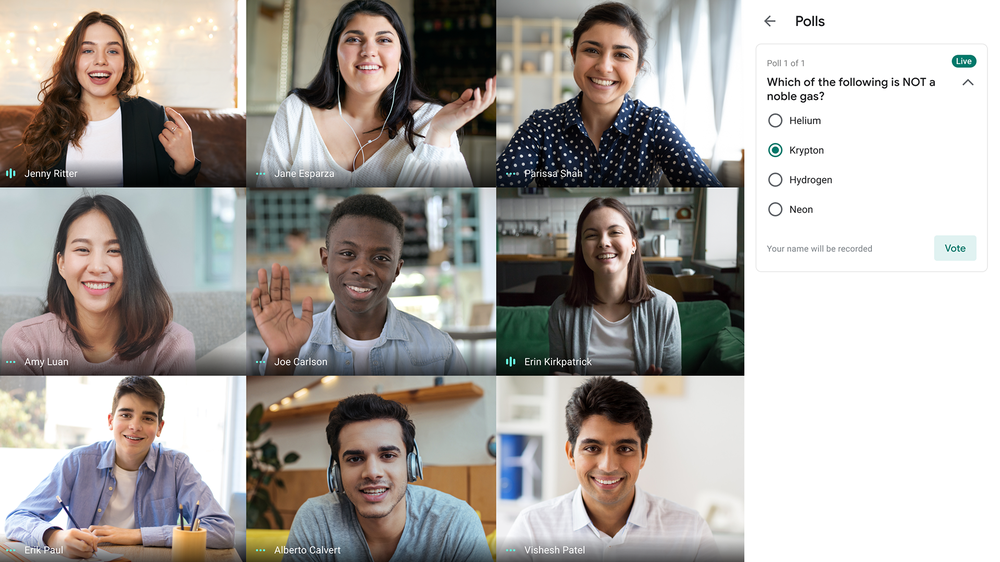
  • Q&A features to provide a way for students to ask questions without disrupting the flow of the class discussion or lesson, and polling to engage students to share their voice (G Suite Enterprise for Education) 

New Meet features

New features coming to Meet can help make classes more engaging.

Additionally, we’ll launch temporary recordings later this year, which will be available to all Education customers for free (premium recordings will still be part of G Suite Enterprise for Education). With this new feature, any meeting host can record a meeting and share the recording within their domain for up to 30 days before the video expires. Given disparities in internet access, temporary recordings are intended to help students or meeting participants replay a class or session they couldn't attend live. Temporary recordings cannot be shared outside the host’s domain or downloaded. We’re granting continued free access to premium recordings until temporary recordings are available later this year (note: this is replacing the promotion for access to premium Meet features including live streaming and meetings of up to 250 participants that will be ending on September 30th). 

Now, let’s cover new features you can expect in Classroom.

Helping students and instructors stay on top of their upcoming work

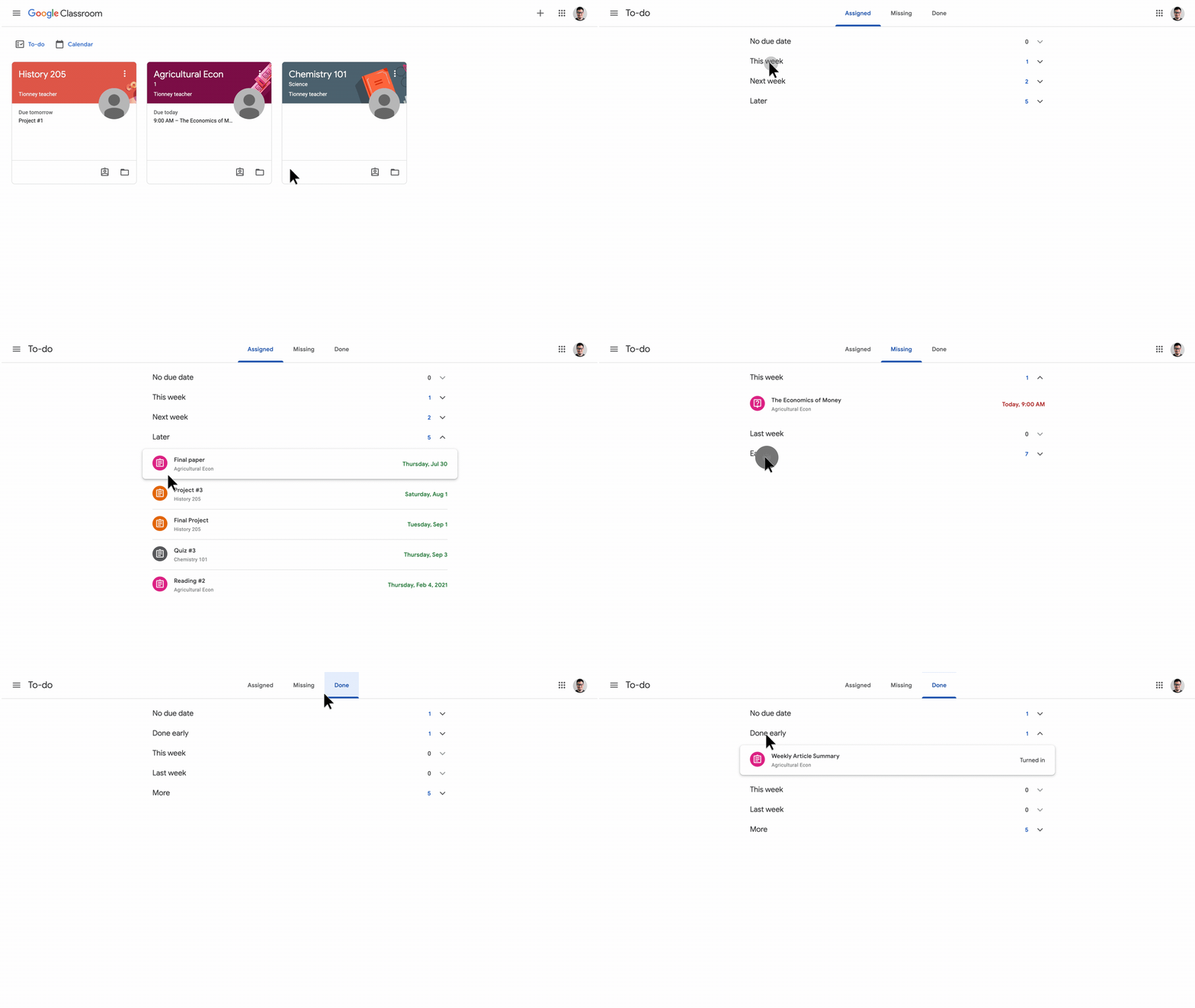
Both students and instructors have risen to the challenge of learning and teaching from home, but it can be tough to stay on top of what they need to do and when. To help instructors and students better discover and track their work in Classroom, the Classes page will soon have a to-do widget for students and a to-review widget for teachers.

To-Do-List-Improvements.gif

New, easier ways to join classes

In addition to sharing course join codes, educators can now share a link to join classes with a single click. Link-sharing allows educators to share classes anywhere they communicate with students, including in messaging platforms such as WhatsApp.

Link-Based-Class-Joining-Share-Mobile.gif

Spot missed citations with enhanced originality reports

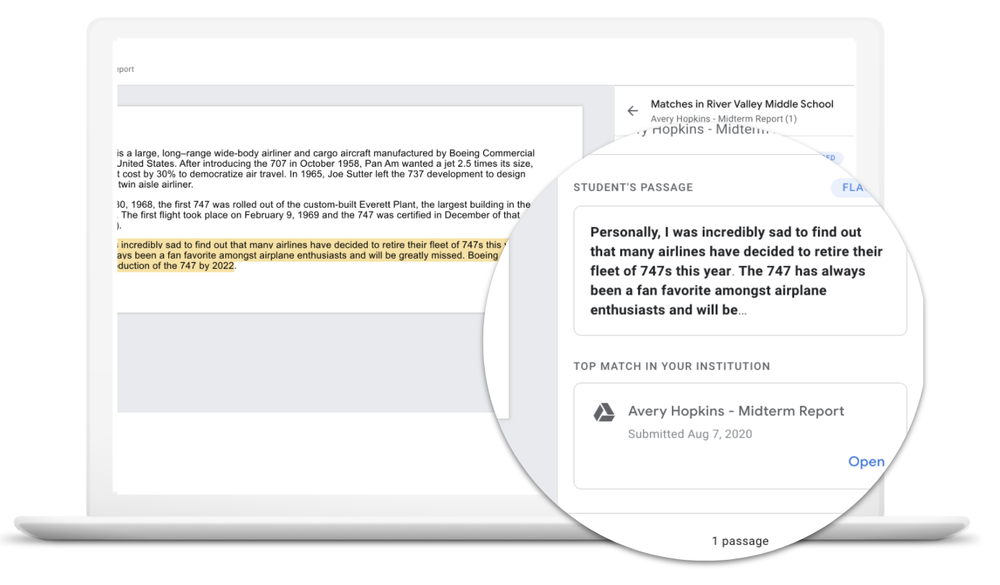
Originality reports, which are built into Classroom and Assignments, provide educators with flags for potential plagiarism in student work and also help students quickly identify passages that may need citations. Now, we’re making originality reports even more helpful.

First, we’re raising the number of originality reports that educators can use per class from three to five. (Educators with G Suite Enterprise for Education licenses will continue to get unlimited originality reports.) Educators will also be able to print, save and download reports to share with students, parents and administrators. Soon educators and students will be able to run originality reports on Google Slides, in addition to Google Docs, as well as in multiple languages, including Spanish, Portuguese, Norwegian, Swedish, Indonesian and Italian.

Check for potential plagiarism between students 

Traditionally, originality reports have surfaced matches for potential plagiarism against hundreds of billions of web pages and over 40 million books. Now, instructors with G Suite Enterprise for Education licenses will be able to see potential plagiarism between students at their school. Starting in a few weeks, originality reports will check submissions against a private, school-owned repository of past student work to look for student-to-student matches. Student submissions are automatically added when instructors use originality reports in Classroom. If admins want to actively manage the repository, they can manually add files or remove documents directly. Google never has access to or the ability to use this repository—it’s owned and used solely by the school domain.

school matches.png

More visibility and tools for Classroom admins

Coming soon, we’re rolling out additional tools for adminswho want to troubleshoot Classroom issues or gain deeper insights into usage across their domain. For example, all Education admins will now have access to Classroom audit logs, and admins with an Enterprise license will also be able to export their logs to BigQuery or create a customizable dashboard on Data Studio to see a slate of engagement metrics.

Classroom now available in additional languages

With Classroom usage quickly growing around the world, we’re making it accessible to more learners in their native language. We’ll be launching Classroom in 10 additional Indian languages. Soon Classroom will support over 54 languages globally; with even more coming in the future.

More support from partners

With the new features in Google Classroom, you’ll also see that many apps are also launching new features that make their tools easy to use alongside Classroom. Explore these apps to learn how teachers and students can continue to stay organized, interactive, and collaborative with Classroom: Canva, Nearpod, Screencastify, Achieve3000 and Adobe, to name a few.

Classroom features coming soon

In the coming month, we will provide a more detailed roadmap to help education leaders and teachers understand and prepare for other improvements that will launch to Classroom throughout the school year.  Here’s a sneak peek at some of the specific areas we’ll be working on:

  • Student engagement metrics: Educators will be able to see stats that help track how students are interacting in Google Classroom each day.

  • Deeper integration with other teaching tools. With Classroom now playing a role as “mission control” for many classes, we'll enable more seamless integrations with the content and learning tools schools are using alongside Google’s tools.

  • Mobile offline improvements. We know that home and mobile internet connections aren’t always available or reliable, so we’re working to update the Classroom mobile apps to work much better even with intermittent connectivity.

Integrated admin capabilities for deploying and managing Classroom. Provisioning classes for an entire school system can be time-consuming, especially given the scale of many of our customers. We’re building integrated tools to make it easier to create and manage courses at scale.

If we can’t all physically be together in our schools this year, we’re committed to making Classroom and Meet even better to bring everyone together online. Please continue to share your feedback, and we’ll keep adapting our tools to meet your evolving needs.

08 Sep 02:35

The Anywhere School: 50+ Google for Education updates

by Avni Shah

In the midst of all the change and uncertainty in the world over the past several months, the education community has never wavered in its commitment to learning and supporting students. At Google, we’re honored to work on tools that lighten the load for teachers, school leaders, families, and especially the students who have navigated learning from home with grace and resilience. 

As educators worldwide have reinvented their practice online, we’re also adapting our tools to meet the evolving needs of their new educational landscape. This year, we’re taking a virtual approach to “back to school” with The Anywhere School, bringing Google for Education announcements to hundreds of thousands of viewers in more than 250 countries around the world. 

Inspired by your feedback, we’re sharing over 50 new features across Meet, Classroom, G Suite and other products. Check out our other posts for deeper dives into the features, and continue to watch the keynote sessions, which are running live for the next 24 hours and will be available on demand if you need to catch up later. Here’s a birds-eye view of what’s coming. 

A safer, more engaging Meet experience

Earlier this year, we announced new features coming to Google Meet to improve moderation and engagement. Today, we’re sharing more details about these upcoming launches and when they’ll be available. Here are a few highlights:

  • In September, we’ll kick off with a larger tiled view of up to 49 people and an integrated Jamboard whiteboard for collaboration. We’ll also release new controls so moderators can choose to always join first, end meetings for all participants, disable in-meeting chat, and much more.

  • In October, we’ll launch custom and blurred backgrounds to provide some extra privacy. Breakout rooms and attendance tracking will also be launching for all Google Enterprise for Education customers, allowing for more engaged classes and insights on participation.

  • Later this year, we’re rolling out hand raising for all customers and Q&A and polling for G Suite Enterprise for Education customers. Plus, we’ll launch a new temporary recordings feature which will be available to all Education customers for free (premium recordings will still be part of G Suite Enterprise for Education). 

Better support for students, educators and admins in Classroom

With more teachers around the world using Classroom more than ever before, we’re working to make Classroom simpler and more efficient with new features.  

  • A new to-do widget on the Classes page will help students see what’s coming up, what’s missing, and what’s been graded. 
  • Teachers can now share a link to invite students to their class, which makes joining a class much easier. 
  • Classroom will soon be available in 10 additional languages, for 54 languages total.

Classroom also gives you access to originality reports, which are now better than ever. For example, educators can soon run originality reports five times per course (up from three previously). And with G Suite Enterprise for Education, educators will be able to see matches for potential plagiarism not only against webpages, but between student submissions at their school.

We’re giving admins more powerful tools to manage G Suite and Classroom. For example, school leaders with Enterprise licenses will have greater visibility into Classroom usage via new Data Studio dashboards, which allow admins to see active classes, measure feature adoption, and monitor teacher and student engagement. To support teachers and admins, we’re making it easier to sync Classroom grades with a push to your Student Information System (SIS), starting with Infinite Campus customers (and more SIS to come). Keep reading for more details on what’s new in Classroom.

Enhance your learning management system with Assignments

Our newest product for non-Classroom users is Assignments, an application for your learning management system (LMS) that gives educators a faster, simpler way to distribute, analyze and grade student work. This time-saving application helps educators automatically create and distribute personalized copies of classwork to each student's Google Drive folder, quickly provide feedback, and keep grading consistent and transparent with originality reports. Assignments is compatible with any LMS that supports LTI 1.1 and higher such as Canvas, Schoology, Blackboard and more. 

Help students turn in their best work with Docs

We recently launched SmartCompose and Auto Correct in Docs for educators and students. This will help them compose high-quality content faster by cutting back on repetitive writing, while reducing the chance of spelling and grammatical errors (by the end of this month, admins will be able to disable both SmartCompose and Auto Correct if they choose). Soon we’re also launching citations so students can format and manage their sources directly in Docs. With the citations tool, after adding the relevant attributes for a source, students can insert formatted in-text citations or a bibliography.

New resources and tools that continue to support families

As many parents and guardians supported their childrens’ learning from home this year, we heard about a big need for more resources and training for families on Google’s tools. To help, we’ve created the Tech Toolkit for Families and Guardians, which helps parents better understand the technology that their kids use in the classroom. Plus, we’ve added school accounts to Chrome OS so students can access Classroom and their school files while having the safety net of Family Link. We’re sharing many more product updates for families here.

Finally, educators can find free training, resources, and professional development programs like the new Certified Coach program to support them as they use these tools and features in their classroom in the new Teacher Center

Moving forward together

There’s so much more to share with you about what’s coming to Google for Education, and we encourage you to take some time to watch the keynote sessions from The Anywhere School event for all the updates. 


Most importantly, thank you for your partnership. We’re grateful for the insights you’ve shared with us, and we’ll continue to evolve our products to meet the unique needs of this moment. By working together, we can provide students with the education they deserve, no matter where it’s taking place.

15 Jul 02:55

Protests Against Policing Could Help Make Formerly Homeless Candace Valenzuela the First Afro-Latina in Congress

by Rachel M. Cohen

A poll released on Friday shows changing dynamics in the runoff for the Democratic primary in Texas’s 24th Congressional District, which represents suburban areas between Fort Worth and Dallas. According to the survey, which was commissioned by the Congressional Hispanic Caucus and conducted in July by Data for Progress, 36-year-old local school board member Candace Valenzuela leads 62-year-old former Air Force Col. Kim Olson by an 11-point margin, 40 percent to 29 percent. 

The poll reveals a substantial shift since Texas’s March 3 primary, a seven-way contest that Olson won with 41 percent of the vote, followed by Valenzuela with 30 points. Undecided voters, the pollsters reported, are leaning Valenzuela, with white, Latino, and Black voters also more likely to support her.  

“Our polling suggests there has been movement since the first round,” said Data for Progress executive director Sean McElwee, noting that only 2 percent of voters who backed Valenzuela in the primary are now undecided, compared with 7 percent of those who initially backed Olson. Data for Progress also found 3 percent of voters who initially backed Olson now back Valenzuela.

It seems likely that the recent wave of protests against racism and police brutality have helped turn the tide in favor of Valenzuela, who would be the first Afro-Latina in Congress and has been endorsed by the Congressional Hispanic, Black, Asian, and Progressive Caucuses. 

In June, Georgia Democratic Rep. John Lewis came out for Valenzuela, directly tying his support to the ongoing national reckoning. “Issues of racial and economic justice are front and center in America right now,” he said in his endorsement. “Candace brings a unique perspective to these issues and will be integral in driving our national conversation forward.”

The protests have shaken up Democratic primaries across the country. In Kentucky’s Senate race, Charles Booker surged on the back of his “hood to the holler” message as a leader of local protests, falling just short of upsetting Amy McGrath, who had the backing of the national party and had racked up an early lead in mail-in voting before Booker’s rise. In New York, both Jamaal Bowman and Mondaire Jones were buoyed in their primaries by the energy of the protest movement, while Ruben Diaz Sr., a close ally of the police in New York, saw his Bronx primary campaign falter in the final month.

Elsewhere in Texas, progressive-populist Mike Siegel, running in a suburban Austin runoff in the 10th Congressional District, has leaned into his career as a civil rights attorney and worked to frame the primary as revolving around issues of police abuse. In the 31st District, stretching from Waco to Austin, Democrats are similarly vying for the chance to flip the seat blue. Computer engineer Donna Imam, facing physician Christine Mann in a runoff, said that her campaign has seen a boost from the focus on racial justice. “People in our district are noticing that our campaign was talking about solutions for Black Americans back in 2019 well before the recent concerns,” she said.

GettyImages-1203010168

Kim Olson, candidate in the Texas 24 Congressional District, speaks with Roll Call in her campaign office in Euless, Texas, Feb. 24, 2020.

Photo: Bill Clark/CQ-Roll Call via Getty Images


Valenzuela has seen a surge in fundraising in recent months. Olson stood as the top fundraiser leading up to the March primary, but in the most recent fundraising quarter Valenzuela outraised her opponent, $465,000 to $438,000. Average donations to Valenzuela’s and Olson’s campaigns stood at $33 and $48, respectively. 

Early voting data from the Valenzuela campaign suggests voters of color are turning out in greater force for the runoff. “According to our VAN data, black voters made up about 8 percent of the vote in the primary,” said Geoffrey Simpson, Valenzuela’s campaign manager. “Black turnout in early voting is already over 12 percent, and we expect that to go even higher on Election Day.”

Turnout for the March 3 primary, while double the previous two primaries, still represented just 2 percent of the district’s population. Of the 60,000 Democrats who casted ballots in March, Olson took the district’s two largest counties and two-thirds of the total precincts. Valenzuela earned a narrow majority in Denton County but just 10,000 votes in total were cast there.

The House seat has been controlled by Republican Rep. Kenny Marchant for the last 16 years, but the district has changed a lot demographically over that time, and its population has been majority people of color since 2016. Marchant very narrowly fended off a Democratic challenger in 2018 (after defeating her handily in 2016), and last year, he announced he would not be seeking reelection: part of a wave of such decisions by suburban Republican incumbents dubbed locally as “Texit.” A Democrat will instead take on Beth Van Duyne, a former Republican mayor in the district who has been endorsed by President Donald Trump. The diversification of the district is central to why Democrats view the race as one of the most competitive congressional contests in the fall — a factor that has been central to both Olson and Valenzuela’s campaigns since before the protests.

In the absence of major policy differences, Olson has been making the case that she’s best suited to represent the district because of her career experience. Valenzuela, meanwhile, has leaned on her high-profile endorsements as well as national momentum throughout the Democratic Party for more diverse representation. Also having grown up homeless, she would bring to Congress a socioeconomic perspective not often reflected among the wealthy federal legislators

While Valenzuela faces the added challenge of trying to flip a district from red to blue, her campaign is aiming to harness some of the arguments made successfully by Jamaal Bowman and Rep. Alexandria Ocasio-Cortez, progressives who unseated long-serving, white, centrist lawmakers representing diversifying districts. The debate over diverse political leadership is also playing out in the presidential race, with many politicos urging Joe Biden against selecting a white running mate, saying his ticket needs to reflect the demographics of the country, and others arguing he needs a VP of color if he wants to generate enough excitement in the fall.

In April, the campaign arms for the Hispanic, Black, Asian, and Progressive Caucuses urged the Democratic Congressional Campaign Committee to endorse Valenzuela, writing in a letter that the party should “continue to strive for the diverse representation our communities deserve.” The DCCC does not often endorse in open primaries, but it did several times in 2018, including in Texas. A DCCC aide told the Intercept their internal data showed either candidate could win the seat in November, and it stayed out of all open primaries this cycle.

When protests surrounding George Floyd’s killing picked up, both candidates sought to incorporate the energy into their campaigns.

Olson attended five Black Lives Matter protests throughout the district, according to her campaign manager, Rachel Perry, and she released a new pledge for police and criminal justice reform. 

Valenzuela, who lives with her 71-year-old mother-in-law and has an immunocompromised 1-year-old son, steered clear of the protests but dispatched members of her campaign in her stead.

Both candidates organized virtual forums around policing, racism and civil rights. 

At one virtual town hall in June, though, Olson, perhaps overcompensating, got herself embroiled in controversy, leading the Congressional Black Caucus to later condemn her for her remarks. At the event, Olson was asked about the movement to defund the police, and as part of her answer, which was broadly sympathetic to the protesters, she dismissed concerns about property destruction. “Even if people loot, so what? Burn it to the ground, you know, if that’s what it’s gonna take to fix our nation,” she said. “I know people don’t want me to say that, but I’m just saying, you know, what are you gonna do, shoot us as we protest? We really have fundamentally pivoted the militarization of our police force where it used to be to protect and serve.”

Conservatives quickly grabbed onto Olson’s comments, first reported by the Washington Examiner, and accused her of endorsing violence. Van Duyne tweeted the Washington Examiner article and said, “The Democrat primary in the 24th District has become a despicable race to the bottom for who can be the most extreme, most radical, and most destructive to our neighborhoods, state, and nation.” 

In response, Olson’s campaign issued a statement that Olson “knows we cannot use force to fix a systemic problem of undue violence and discrimination perpetrated by those who are sworn to protect and serve. We have to rebuild from the ground up a color-blind public safety institution across America.”

The Congressional Black Caucus then rebuked Olson for her comment. “Olson’s team response calling for ‘color-blindness’ is tone deaf and silences members of the community she is seeking to represent,” said Niccara Campbell, the political director for the CBC political action committee. “This is not solidarity or allyship. It is not even an attempt.”

Valenzuela also jumped into the fray, issuing a statement that Olson had “missed the mark” in her response to the Dallas protests by “actively encouraging the destruction of our community rather than amplifying the voices of Black people who are fighting for change with empathy and compassion.” Valenzuela then went further, saying Olson’s follow-up statement, which called for a “color-blind” public safety institution, “ignores 400 years of our country’s history and is exactly the kind of ignorance we need to call out.”

Olson told the Dallas Morning News she didn’t mean race shouldn’t be considered but that more must be done to ensure law enforcement doesn’t disproportionately harm black people. “It can’t be that police judge you because of your color, and courts can’t judge you for your color,” she said.

Earlier in the campaign, Olson struggled to articulate why she was best positioned to represent the diversifying district. 

At a Democratic forum in February, the candidates were asked to make that case, and Olson responded first by saying she grew up “as a minority” in many countries overseas, because her parents were Department of Defense school teachers. “This district is very diverse, just like our nation, and we have to have voices that will speak for them when they can’t speak for themselves,” she added.

Olson declined to comment further on her claim. As for why Olson thinks she is better suited to represent her district, Perry, her campaign manager, said, “Texas voters will have the final say on who they want to represent them. … And from day one of this race — with their votes, donations, and grassroots enthusiasm — they’ve made it abundantly clear that that candidate is Kim Olson.”

Valenzuela meanwhile argued at that winter forum that her racial background will increase her competitiveness in a general election. 

“In order to win a district like this, you need to be able to bring out folks who feel enfranchised by [their] leadership,” she said. “I mean, look at me. I am a young black Latina myself, and one of the ways you’re going to excite voters to come out is you’re going to have someone that has represented them in a way they’ve never seen before.”

The post Protests Against Policing Could Help Make Formerly Homeless Candace Valenzuela the First Afro-Latina in Congress appeared first on The Intercept.

14 Jul 06:06

2021 Mazda 3 2.5 Turbo revealed with 250 horsepower, AWD

by Viknesh Vijayenthiran
2021 Mazda 3 2.5 TurboA new version of the Mazda 3 with a turbocharged engine and all-wheel drive is headed to dealers in late 2020. It's called the Mazda 3 2.5 Turbo, and it will be available at launch in both sedan and hatchback body styles. This should help differentiate it from the redesigned 2022 Volkswagen Golf GTI and a new hot hatch from Toyota (most likely...
05 Jun 02:58

Teaching from home might become part of every teachers’ job description

by Pieter Arntz

“Hey Joe, I wanted to remind you that starting next Monday you will be expected to teach from home. The lesson material is in your inbox along with the list of pupils that are expected to follow them. We are sure it will take some adjustments, but we trust that by working together we can make the best of the current situation.  If you have any questions, feel free to let us know.”

Basically, that is the scenario many teachers across the globe have found themselves in—or are about to find themselves in—because of the broad shelter-in-place orders now in effect to limit the spread of coronavirus. And we still don’t know how long this could all last. In fact, teaching from home might become a part of the new normal when the new school year starts after the summer.

We have covered some of the perils that come with working from home but teaching from home poses some extra hurdles. Not only are you entertaining a demanding audience, you are working with sensitive data about children. As indicated, we have already handed our readers some general tips for working from home (WFH), but collaborating with co-workers and teaching children are two different beasts altogether. Let us go over some pointers that are specific for teaching from home.

Get your house prepped for video calls

You probably already know that there are some children in your class that notice everything, especially if it is outside of the scope of the lesson. To limit the number of distractions you can:

  • Take a good look at the background. Is there anything that could possibly get more attention than the subject at hand? In some of the software packages you can choose a virtual background if you would rather not display your real surroundings.
  • Make sure everyone in your household knows when not to disturb you. Ideally you’ll be in a separate room with a warning sign at the door when you are working, so the people in your household know when not to burst in.

Optimize your lessons

Teaching from home is a different craft then teaching in front of the class, but you probably already knew that. Some things you can use to your advantage when working from home:

  • Stream what you can. You can broadcast or upload a prepared lesson or part thereof. After viewing you can discuss it with the students. It relieves the stress of “performing live” and it’s easier on your internet connection since it uses less bandwidth than a conference call.
  • Don’t go overboard with the prepared lessons. Your students learn more when they are part of a discussion or otherwise engaged in the subject matter.
  • Virtual classes, virtual breaks. It is easy to forget that your students need a break now and then just as they would in the real life classroom, but allowing them to move away from the computer will cause disruptions that are longer then you intended. Show some funny video or discuss a lighthearted theme as a virtual break.

Adjust your teaching to the circumstances

Decide on the most important learning goals as you may not achieve all the goals you would have reached by teaching in person and strive to at least meet those minimum requirements. Everything extra should be considered a bonus.

Looking after individual students that are falling behind is harder when you are teaching from home. The direct human contact is an important factor in how well we are able to pick up whether a student is struggling. And it’s hard be patient rather than telling them what the answer is because we have at least 20 other students that need our help as well. Encourage those that are struggling and give them the time to come up with their own answers.

Teaching from home: technology

It is not very likely that you will have the luxury of choosing your own tools and software. Chances are you will have to make do with what you get.

Familiarize yourself with the technology before you jump in at the deep end. Utilizing the teaching tools could become a nightmare if you have to figure out how everything works on the fly.

Once you are familiar with the software and hardware it is a lot easier to take advantage of the things the technology has to offer.

Teaching from home: privacy and compliance

It is hard to give general guidelines when it comes to aligning with all the different privacy and compliance guidelines. In some countries it would be against privacy regulations if students can hear their classmates in a video conference call, even if they are asking a question about the lessons. Make sure you are aware of your local rules and regulations, so you don’t get caught off-guard.

Handle data and access with care

The key here is to avoid unauthorized views of confidential information. Here are a few ways to shore up physical security while WFH:

  • If you need to leave your home for supplies or other reasons, make sure your work devices are inaccessible.
  • Should you be living with a roommate or young children, be sure to lock your computer even when you step away for just a bit. Don’t tempt others in your household by leaving information accessible. This is true even for the workplace, so it is imperative for WFH.
  • If you can’t carve out a separate workspace in your home, be sure to collect your devices at the end of your workday and store them someplace out of sight.
  • Access to a computer’s desktop should at least be password protected, and the password should be strong. Even if the entire machine is stolen, a strong, mandatory password will keep the thief from easily accessing sensitive school information.
  • Encryption also helps protect information on stolen or compromised computers. Check whether data encryption is active on your work machine. Not sure? Ask your IT department whether you have it, and if they think it’s necessary.
  • If you’re connecting your work computer to your home network, make sure you don’t make it visible to other computers in the network. If you have to add it to the HomeGroup, then make sure the option to share files is off.
  • Secure your home Wi-Fi with a strong password and do the same for access to the settings on your home router. Be sure to change the default password it came with!

Teaching from home: security

Whether you are going to use your own laptop or one provided by your school, make sure to keep the data safe. It is important to realize that you will likely be storing sensitive information about your students on a system that is connected to your home network and maybe even on your personal device.

And last but not least, familiarize yourself with the security settings of the software you are going to use. We have an extensive guide for Zoom that can also serve as a set of directions for other similar software packages. You definitely don’t want your classes to be interrupted by Zoombombers.

Stay safe, everyone!

The post Teaching from home might become part of every teachers’ job description appeared first on Malwarebytes Labs.

25 May 04:35

A is for accessibility: How to make remote learning work for everyone

by Anne Nash

Editor’s note: Today is Global Accessibility Awareness Day, and we’ll be sharing resources and tools for education, as well as accessibility features and updates for Android and Google Maps

When it comes to equity and access in education, nothing is more important than making sure  our digital tools are accessible to all learners—especially now as distance learning becomes the norm. I’m a proud member of the disability community, and I come from a family of special education teachers and paraprofessionals. So I’ve seen firsthand how creative educators and digital tools can elevate the learning experience for students with disabilities. It’s been amazing to see how tools like select-to-speak help students improve reading comprehension as they listen while reading along or assist students who have low vision. And tools like voice typing in Docs can greatly benefit students who have physical disabilities that limit their ability to use a keyboard.

This Global Accessibility Awareness DayI'm reminded of how far we’ve come in sharing inclusive tools for people with different abilities. But it doesn’t stop there. Everyday we strive to make our products and tools more inclusive for every learner, everywhere.

Applying technology to accessibility challenges

At Google, we’re always focused on how we can use new technologies, like artificial intelligence, to broaden digital accessibility. Since everyone learns in different ways, we’ve  built tools and features right into our products, like G Suite for Education and Chromebooks,  that can adapt to a range of needs and learning styles. For learners who are Deaf, hard of hearing, or need extra support to focus, you can turn on live captions in Google Slides and in  Google Meet. On Chromebooks, students have access to built-in tools, like screen readers, including ChromeVox and Select-to-speak, and Chromebook apps and extensions from EdTech companies like Don Johnston, Grackle Docs, Crick Software, Scanning Pens and Text Help, with distance learning solutions on the Chromebook App Hub

As more students learn from home, we’ve seen how features like these have helped students learn in ways that work best for them.

Helping all students shine during distance learning

Educators and students around the world are using Google tools to make learning more inclusive and accessible. Whether that’s using Sheets to make to-do lists for students, sharing the built-in magnification tools in Chromebooks to help those who are visually impaired, or using voice typing in Google Docs to dictate lesson plans or essays. 

In Portage Public Schools in Portage, Michigan, teachers are taking advantage of accessibility features in Meet to help all of their students learn at their own pace.  They use live captioning in Meet so that students who are Deaf or hard of hearing can follow along with the lesson. And with the ability to record and save meetings, every student can refer back to the material if they need to.  

In Daegu, South Korea, about 100 teachers worked together to quickly build an e-learning content hub that included tools for special education students, such as Meet, Classroom and Translate. “In the epidemic situation, it was very clear that students in special education were placed in the blind spot of learning,” said one Daegu teacher. But thanks to digital accessibility features that were shared with students and parents, the teacher said, “I saw hope.” 

live captions in Meet.gif

Accessibility resources for schools

At a time when digital tools are creating the  connection between students, classmates, and teachers, we need to prioritize accessibility so that no student is left behind. The good news is that support and tools are readily available for parents, guardians, educators and students:

Your stories of how technology is making learning accessible for more learners during COVID-19 help us and so many others learn new use cases. Please share how you're using accessibility tools and requests for how we can continue to meet the needs of more learners.

16 Apr 02:30

Zoom passwords for sale on the Dark Web – “ten-a-penny” by all accounts

by Paul Ducklin
If you reuse an old password when you're rushing to create a new account for the lockdown era, you're as good as "pre-hacking" yourself.
12 Apr 04:03

What’s new in Chrome OS: Easy navigation in Chromebook tablet mode

by Alexander Kuscher

With the latest Chrome OS update, Chromebook tablet mode is simpler to navigate thanks to new gestures, the launch of Quick shelf, and updates to Chrome browser that are tailored specifically for tablet mode.   


What is Chromebook “tablet mode”?

Chromebooks, which all run on Chrome OS, help you to get things done and keep you entertained. All 2-in-1 Chromebooks work as both a high-performing laptop and a tablet. If you have a convertible Chromebook, fold your screen back on its hinge and your Chromebook transitions to tablet mode. Or if you’re using a detachable Chromebook like the Lenovo Chromebook Duet, then you can fully remove the keyboard to activate tablet mode.


Navigate tablet mode with gestures

We've built new gestures for Chromebook tablet mode, which make it easier for you to navigate using touch. 

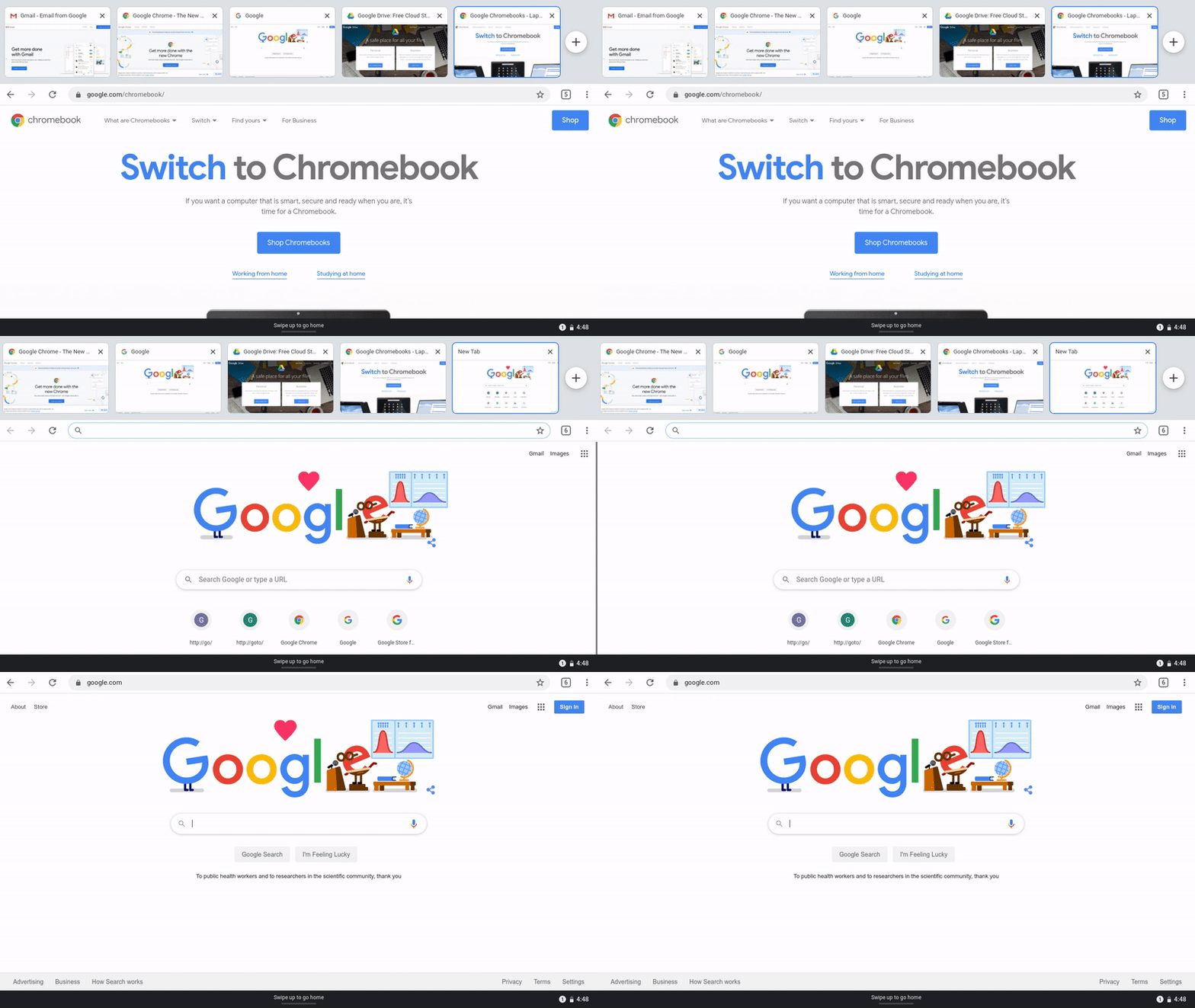
Now, to get to your tablet mode’s Home screen, swipe up from the bottom of the screen.

Gesture1

You can also see all the windows and apps open on your Chromebook with a similar gesture. Swipe up from the bottom of your screen and hold at the end of the motion, and you’ll see an overview of the windows and apps running on your Chromebook.

Gesture2

If you’re browsing in tablet mode, you can navigate between web pages faster now. Just swipe from the left side of the screen to go back to the previous page. 

Gesture3

Enjoy more screen space

We’ve redesigned the shelf on Chromebook to give you more space on your screen for windows and apps. Now, when you’re in tablet mode, you can access your pinned apps and other programs that are running from the Quick shelf. To summon the Quick shelf, just make a small swipe up from the bottom of your screen. 

QuickShelf

Even when you’re using Chromebook in laptop mode, the shelf is now more compact to give you more space to focus on your task at-hand. This is especially useful if you’re multitasking with various windows.

Speaking of making the most of your screen space, we’ve also extended picture-in-picture to all Google Play Store apps on Chromebook, even for tablet mode. Now when you’re watching a TV show or video on YouTube, Prime Video, Hulu or other apps, you can minimize the video screen and watch it while you’re doing other things on your Chromebook.


Use Chrome, tailored for tablet mode

This update will allow you to more easily manage Chrome tabs with a touch-friendly tab strip while in tablet mode. When you’re browsing, you’ll be able to open a new tab with a big button, reorder tabs by dragging, and close tabs by swiping up.

This change is coming first to the Lenovo Chromebook Duet, which will be available for purchase within the next couple of months. We’ll then bring the tab strip to other Chromebooks with tablet mode soon.  

TabStrip

We’re also making updates to Chrome OS to keep Chromebooks hassle-free— especially in these moments when technology helps us stay connected to each other.  So we’re listening closely to feedback that Chromebook owners provide on our Chromebook Community to keep adapting our software to the evolving climate.  

Stay tuned for more from us soon. If you're new to Chromebook and want to get up to speed quickly, check out this article for more information and tips for using your Chromebook at home.

03 Apr 07:01

Chromebook accessibility tools for distance learning

by Laura AllenChrome & Chrome OS Accessibility

Around the world, 1.5 billion students are now adjusting to learning from home. For students with disabilities, this adjustment is even more difficult without hands-on classroom instruction and support from teachers and learning specialists.

For educators and families using Chromebooks, there are a variety of built-in accessibility features to customize students’ learning experience and make them even more helpful. We’ve put together a list of some of these tools to explore as you navigate at-home learning for students with disabilities.

Supporting students who are low vision

To help students see screens more easily, you can find instructions for locating and turning on several Chromebook accessibility features in this Chromebook Help article. Here are a few examples of things you can try, based on students’ needs:

  • Increase the size of the cursor, or increase text size for better visibility. 

  • Add ahighlighted circle around the cursor when moving the mouse, text caret when typing, or keyboard-focused item when tabbing. These colorful rings appear when the items are in motion to draw greater visual focus, and then fade away.

  • For students with light sensitivity or eye strain, you can turn on high-contrast mode to invert colors across the Chromebook (or add this Chrome extension for web browsing in high contrast).

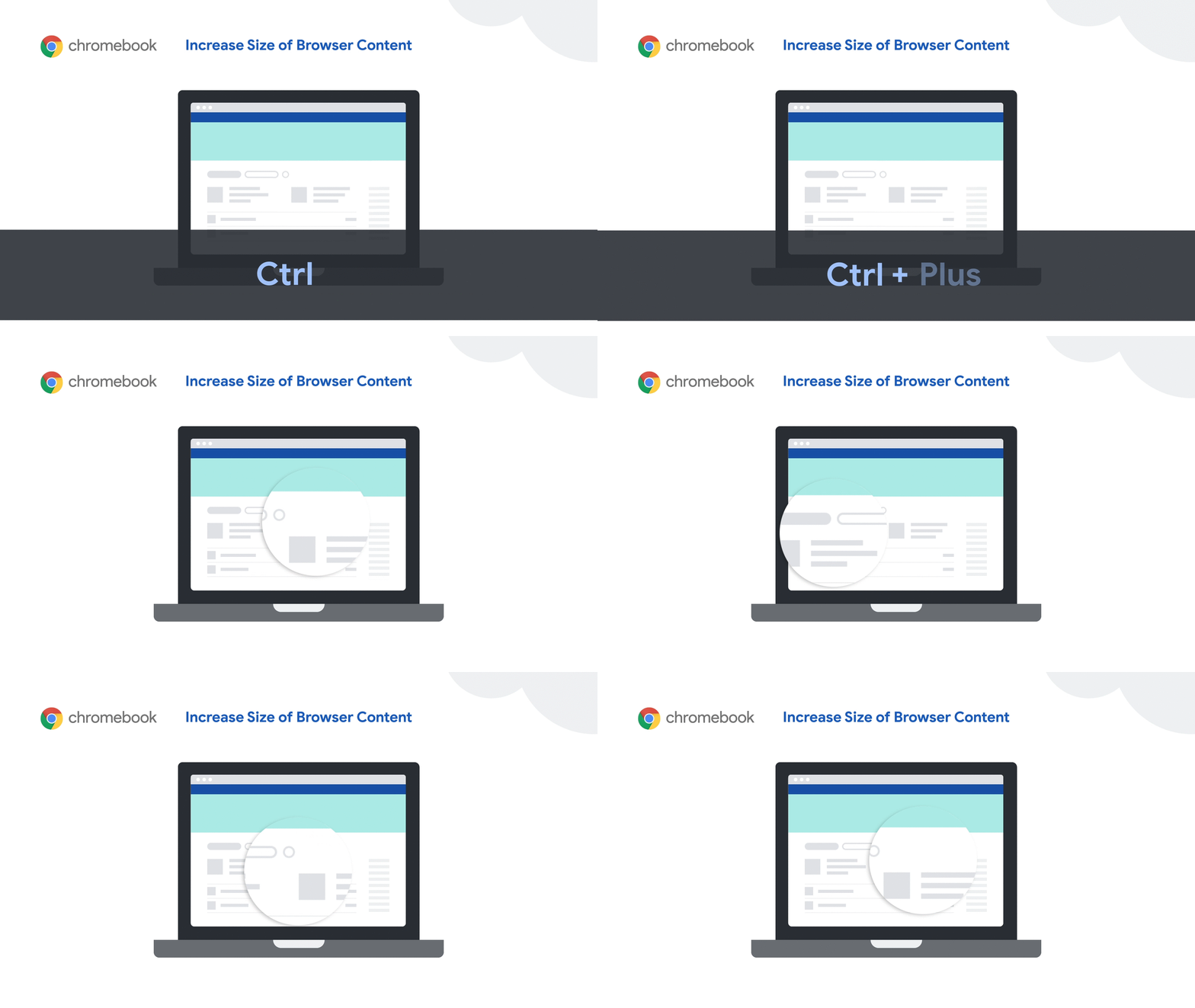
  • Increase the size of browser or app content, or make everything on the screen—including app icons and Chrome tabs—larger for greater visibility. 

  • For higher levels of zoom, try thefullscreen or docked magnifiers in Chromebook accessibility settings. The fullscreen magnifier zooms the entire screen, whereas the docked magnifier makes the top one-third of the screen a magnified area. Learn more in this Chromebook magnification tutorial.

002-B2S-Tips-Resize-GIF.gif

Helping students read and understand text

Features that read text out loud can be useful for students with visual impairments, learning and processing challenges, or even students learning a new language.

  • Select-to-speak lets students hear the text they choose on-screen spoken out loud, with word-by-word visual highlighting for better audio and visual connection.

  • With Chromevox, the built-in screen reader for Chromebooks, students can navigate around the Chromebook interface using audio spoken feedback or braille. To hear whatever text is under the cursor, turn on Speak text under the mouse in ChromeVox options. This is most beneficial for students who have significant vision loss. 

  • Add the Read&Write Chrome extension from Texthelp for spelling and grammar checks,  talking and picture dictionaries, text-to-speech and additional reading and writing supports- all in one easy to use toolbar. 

  • For students with dyslexia, try the OpenDyslexic Font Chrome extension to replace web page fonts with a more readable font. Or use the BeeLine Reader Chrome extension to color-code text to reduce eye strain and help students better track from one line of text to the next. You can also use the Thomas Jockin font in Google Docs, Sheets and Slides.

Guiding students with writing challenges or mobility impairments

Students can continue to develop writing skills while they’re learning from home.

  • Students can use their voice to enter text by enabling dictation in Chromebook accessibility settings, which works in edit fields across the device. If dictating longer assignments, students can also use voice typing in Google Docs to access a rich set of editing and formatting voice commands. Dictating writing assignments can also be very helpful for students who get a little stuck and want to get thoughts flowing by speaking instead of typing. 

  • Students with mobility impairments can use features like the on-screen keyboard to type using a mouse or pointer device, or automatic clicks to hover over items to click or scroll.

  • Try the Co:Writer Chrome extension for word prediction and completion, as well as excellent grammar help. Don Johnston is offering free access to this and other eLearning tools. Districts, schools, and education practitioners can submit a request for access.

How to get started with Chromebook accessibility tools

We just shared a 12-part video series with training for G Suite and Chromebook Accessibility features made by teachers for teachers. These videos highlight teachers’ experience using these features in the classroom, as well as what type of diverse learner specific features benefit. For more, you can watch these videos from the Google team, read our G Suite accessibility user guide, or join a Google Group to ask questions and get real time answers. To find great accessibility apps and ideas on how to use them, check out the Chromebook App Hub, and for training, head to the Teacher Center.


We’re also eager to hear your ideas—leave your thoughts in this Google Form and help educators benefit from your experience.

29 Mar 04:40

Coronavirus: How To Disinfect Groceries & Takeout Food

by Kurt Lowder
Of course, CleanTechnica is about clean technology. However, in the middle of the pandemic, I feel compelled to share life-saving information
06 Feb 00:21

PayPal SMS scams – don’t fall for them!

by Paul Ducklin
Text messages may be old hat - but SMS is still a handy tool for crooks out to find more about you.
06 Feb 00:07

Nontraditional Voters at Iowa Satellite Caucuses Could Tip the Balance to Bernie Sanders

by Ryan Grim

Heading into Iowa, Sen. Bernie Sanders had a mantra he used in his stump speech: If you turn on the TV on caucus night and they say turnout is high, we win. If they tell you that turnout is low, we lose. Simple as that.

Except, of course, it’s not that simple. On Monday evening in Iowa, turnout did not match the 2008 record set as Barack Obama, Hillary Clinton, and John Edwards battled it out. Yet, Sanders still won the most votes so far, both on the first and final ballots, even as the delegate total remains unsettled.

Asked Tuesday about turnout, Sanders told The Intercept that he would have preferred more. Sanders, noted that the numbers were “somewhat higher than in ’16,” when Sanders lost to Clinton by less than 1 percent of state delegates. But, he said, they were “not as high frankly as I would’ve like to have seen.”

Whether high turnout translates into success depends heavily on who turns out; a candidate has to increase turnout among the people most likely to vote for them. (Donald Trump, for instance, helped drive higher turnout among Democrats in the 2018 midterms, but that hardly can be counted as a victory for him.) Throughout the 2020 campaign, Sanders has targeted nontraditional voters, students, and working-class people who usually stay home during primaries and caucuses. As the campaign pointed out on Wednesday, turnout among 17-to-29 year olds went up, even from 2008.


In particular, the campaign focused heavily on bringing people out to the satellite caucuses that were held across the state and in other parts of the world for Iowans who couldn’t make it to the 7 p.m. caucuses. This was the first year the party hosted satellite caucuses, and no other campaign seems to have invested serious resources in turning those voters out. With 41 state delegates available to be swept up, and fewer than 25 delegates currently separating Pete Buttigieg and Sanders, they could end up making the difference when the delegate count is finalized.

The first caucus was held in Tbilisi, Georgia, of all places and reports are that Sanders led the delegates there. Another was held in St. Petersburg, Florida, where former New York City Mayor Michael Bloomberg is heavily on the airwaves. The first in Iowa was held at a UFCW union hall in Ottumwa, with Sanders winning all 14 of the final votes to net four precinct delegates, a relatively large pickup. At Drake University in Des Moines, workers and students went overwhelmingly for Sanders, giving him five delegates and Sen. Elizabeth Warren two, meaning that he netted five relative to Buttigieg. (On the Intercepted podcast, we interviewed voters at satellite caucuses and in Precinct 36.)

In all, there were 87 satellite caucuses. According to Iowa Democratic Party rules, the total delegate value of those caucuses will be determined by satellite turnout and in proportion to the total number of people who came out to vote in the regular caucuses. They are to be worth some percent of the total, meaning that the four delegates Sanders won in Ottumwa, for instance, could actually rise or shrink in the final analysis. But what we know about those caucuses suggests that Sanders may have won those caucuses by enough to overcome his deficit with Buttigieg, which at the time of writing sits at 23.987 delegates with 86 percent of the precincts reporting.

Jeff Weaver, a senior campaign adviser, said at a Sanders rally in New Hampshire on Tuesday night that he remained optimistic about winning not just the popular vote, but also the delegate count, citing success in the satellite caucuses. “If you look at satellite caucuses — we don’t have final numbers yet — if you look at new Latino voters coming out in Iowa, new Muslim voters coming out in Iowa, caucus sites in union halls, that’s part of this expansion of the electorate. It takes a while, but I’m very proud of the work we did helping underrepresented communities get represented in the caucus,” Weaver said.

The negative ads run against Sanders at the end of the campaign, he argued, could have depressed turnout. “We were trying to drive as high a turnout as we possibly could in Iowa. Who knows whether the fact that three people weren’t in state for a week, what effect that had on sort of like, the excitement level in the state. It’s impossible to know all the mix. Another thing that happened which was unfortunate was an outside Democratic group — I think really, on the Democratic side, maybe for the first time — came in with some really nasty advertising and frankly that tends to suppress turnout,” Weaver said.

Indeed, a number of factors unrelated to Sanders likely influenced turnout numbers this year. As Weaver mentioned, three of the top five (or perhaps top four, when the final votes are counted) candidates spent most of January stuck in an impeachment trial in the U.S. Senate, while one of the five did little campaigning. Only Buttigieg was able to hit multiple events per day for an extended period.

Also, turnout in 2008 — the record year, with 236,000 caucus-goers in a state of over 3 million people — benefited from some structural advantages: The caucuses were held on the first Monday in January, which meant college students were home for winter break, and workers who travel were more likely to be home as well. By the first Monday in February — the night after the Super Bowl — those students were back at their respective schools. In 2016, when Sanders and Clinton faced off, turnout dropped to 171,109. That’s a dip in roughly 55,000 potential Democratic voters. This year, Sanders was unlikely to gain those 55,000 voters back — since they had the chance to caucus for him in 2016 and didn’t.

Instead, the makeup of those 172,000 may have changed. At a largely black working-class precinct in central Des Moines, held at King Elementary School, Joe Biden had a level of support that was startling in comparison to his healthy polling numbers among African Americans. Of the 133 caucus-goers at Precinct 36, Sanders won 69 — more than half — while Biden was backed by just 25 percent. After a long struggle, Warren’s supporters were able to persuade enough Buttigieg backers to join them to barely hit the 15 percent threshold.

Working to turn out voters is no guarantee of victory. But in a close election, it can make all the difference. Or not.

The post Nontraditional Voters at Iowa Satellite Caucuses Could Tip the Balance to Bernie Sanders appeared first on The Intercept.

30 Dec 06:25

Volkswagen Group Aiming To Produce 3 Million Electric Vehicles In 2025 — How Might It Get There?

by Zachary Shahan
Volkswagen Group has been spending a lot of time these days focused on its electrification plans — or e-mobility, as they call it in Europe. Some take this as simply PR, but I think the sales targets are real and we know the company has launched an initial electric car factory and is investing tens of billions of euros into batteries and EV development
28 Dec 19:28

Everybody’s Watching You: The Intercept’s 2019 Technology Coverage

by The Intercept

A look back at The Intercept’s must-read technology stories from 2019.

Amazon’s Home Surveillance Chief Declared War on “Dirtbag Criminals” as Company Got Closer to Police

RingCam2_retouched-edit-final-1550163913-crop-1577129890

Illustration: Erik Blad for The Intercept

Video and internal emails show how Amazon’s Ring has blurred the line between private innovation and public law enforcement.
By Sam Biddle

Inside the Video Surveillance Program IBM Built for Philippine Strongman Rodrigo Duterte

IBM-7-final-1552686332-crop-1577129887

Photo illustration: Soohee Cho/The Intercept

Law enforcement in Davao City familiar with the IBM program said the technology had assisted them in carrying out Duterte’s controversial anti-crime agenda.
By George Joseph

Everybody Does It: The Messy Truth About Infiltrating Computer Supply Chains

Intercept_microchip_FLAT2-1540333206-crop-1577129888

Illustration: Oliver Munday for The Intercept

The danger of China compromising hardware supply chains is very real, judging from classified intelligence documents, even if a Bloomberg story on the matter is highly disputed.
By Micah Lee, Henrik Moltke

The Trump Administration Is Using the Full Power of the U.S. Surveillance State Against Whistleblowers

TheIntercept_Surveillance_Metro_Fin02B_web-1564422777-crop-1577129892

Illustration: Owen Freeman for The Intercept

An examination of court filings in all seven leak cases filed under Trump yields a detailed picture of how the government tries to unmask confidential sources.
By Micah Lee

Mission Creep: How the NSA’s Game-Changing Targeting System Built for Iraq and Afghanistan Ended Up on the Mexico Border

norwegian-feature-01-1557953994-crop-1577129889

Photo: NSA

The revolutionary NSA system merged different sources of electronic surveillance to rapidly map enemy fighters. The ramifications are still being felt.
By Henrik Moltke

Team of American Hackers and Emirati Spies Discussed Attacking The Intercept

UAE-Raven-feature-final-1560283452-crop-1577129892

Photo illustration: Soohee Cho/The Intercept

Spies working for the United Arab Emirates discussed the attack with operatives at controversial firm DarkMatter.
By Sam Biddle, Matthew Cole

Peter Thiel’s Palantir Was Used to Bust Relatives of Migrant Children, New Documents Show

GettyImages-1140291994-1556830088-e1556830196500-crop-1577129886

Photo: Paul Ratje/AFP/Getty Images

Palantir previously claimed its software was strictly involved in criminal investigations as opposed to deportations. This was false.
By Sam Biddle, Ryan Devereaux

How U.S. Tech Giants Are Helping to Build China’s Surveillance State

semptian-illo-final-1562774148-crop-1577129891

Illustration: Soohee Cho/The Intercept

A nonprofit led by Google and IBM executives is working with Semptian, whose technology is monitoring the internet activity of 200 million people in China.
By Ryan Gallagher

Before Being Hacked, Border Surveillance Firm Lobbied to Downplay Security and Privacy Concerns About Its Technology

GettyImages-1134848462-mexico-us-border-tijuana-1562958899-e1562959746509-crop-1577129885

Photo: Guillermo Arias/AFP/Getty Images

The CEO of Perceptics, which makes license plate readers, claimed that “CBP has none of the privacy concerns at the border that all agencies have inland.”
By Cora Currier

David Duke and His Twitter Nazis Got Mad at Me. Twitter Took Their Side.

AP_619098483975-edit-1574885395-crop-1577129884

Photo: Max Becherer/AP

Twitter doesn’t care when its users are abused by Nazi accounts. But what happens when the feelings of the Nazis get hurt? Then Twitter springs into action.
By Jon Schwarz


The post Everybody’s Watching You: The Intercept’s 2019 Technology Coverage appeared first on The Intercept.

28 Dec 19:04

New Consumer Online Privacy Rights Act (COPRA) would empower American users

by David Ruiz

Despite the already dizzying number of comprehensive data privacy proposals before the US Senate—nearly 10 have been introduced since mid-2018—yet another bill has entered the conversation: the Consumer Online Privacy Rights Act.

This time, the bill, called COPRA for short, is sponsored by a Democratic Senator from Washington whose name has rarely been cited in the country’s ongoing debate as to how to best protect Americans’ data.

The biggest differentiator about this 2019 latecomer bill? It ticks almost every box on the data privacy wishlist.

Granting Americans the right to access data about them? This bill’s got it. The right to grab that data and move it to another company? Also included. What about the right to opt out of data sharing and selling? Yep. And the requirement that companies get explicit approval for the processing and sharing of sensitive data, including biometrics, precise geolocation, and emails? You bet.

But, perhaps most importantly, the bill would give everyday Americans the right to sue a company that violated their data privacy rights, extending enforcement capabilities directly to the public.

Introduced by Senator Maria Cantwell, the Consumer Online Privacy Rights Act has already been welcomed by data privacy advocates across the country.

“This is the most sophisticated federal proposal to emerge to date and demonstrates that Senate Democrats are committed to setting a high bar for consumer privacy,” said Jules Polonetsky, the CEO of the nonprofit Future of Privacy Forum. “The bill provides a strong starting point that will move bipartisan debate forward, with private rights of action, limits on preemption, and the definition of sensitive data, among other issues, likely to be points of ongoing negotiation.”  

Consumer Online Privacy Rights Act: in a nutshell

The Consumer Online Privacy Rights Act (COPRA) would improve the relationship that Americans currently have with the multitude of companies that collect, store, share, and sell their data across the Internet.

COPRA would accomplish this by extending new rights to consumers—like the right to access data collected about them and the right to delete that data—while also placing new restrictions on companies.

Under COPRA, companies would no longer be able collect “sensitive covered data” without first getting explicit approval from a user. Nor would companies be able to ignore the data privacy and security of their users’ data, as each company subject to COPRA would need to appoint a privacy officer and a data security officer, both of whom would be tasked with performing annual data risk assessments.

COPRA would also create a new bureau within the Federal Trade Commission to aid enforcement. Further, state Attorneys General could file civil claims on behalf of their states’ residents when they believe there has been a violation of the law.

Though some of these ideas have propped up in federal data privacy bills introduced this year, COPRA differs in two major ways.

First, it would not impact any state data privacy laws that improve the data privacy of that state’s residents.

In 2018 and 2019, dozens of individual state legislatures took it upon themselves to try to solve data privacy, with California passing the California Consumer Privacy Act last year and Maine passing a data privacy bill focused on Internet Service Providers this year, to name just two. Similar efforts have produced laws that will either bolster or study data privacy in Nevada, Vermont, Illinois, Louisiana, and North Dakota.

Under COPRA, these laws—and new, similar ones—would go untouched.

This preservation and respect of state laws goes directly against the wishes of many of the companies that COPRA would regulate. Earlier this year, the CEOs of 50 of the largest global companies informed Congress about what a federal data privacy bill should include. High on the list was the demand that any federal bill negate, or preempt current and future state data privacy bills.

This corporate demand is not the only one that COPRA contradicts.

COPRA would extend what is called a “private right of action” to consumers, granting them the ability to personally file a civil claim against a company to allege that the company violated their data privacy rights. The group of 50 CEOs also oppose this idea, asking that no private right of action be included in a federal data privacy law.

Until now, everyday US consumers have suffered limited options in enacting their own data privacy rights, instead having to rely on state Attorneys General to act on their behalf, or having to try and prove the near-unprovable when making claims about alleged data breaches.

This private right of action is, as Purism CEO Todd Weaver told Malwarebytes earlier this year, a key component in any meaningful data privacy bill.

“If you can’t sue or do anything to go after these companies that are committing these atrocities, where does that leave us?” Weaver said. 

Below is a more detailed look at COPRA’s rights and restrictions.

COPRA’s consumer rights

The Consumer Online Privacy Rights Act would create new definitions of the types of data that receive protection in the United States. “Covered data,” the bill describes, is any information that “identifies, or is linked or reasonably linkable to an individual or a consumer device, including derived data.” Not included in this definition, though, is de-identified data, employee data, and public records.

Further, COPRA would create new restrictions on what it calls “sensitive covered data.” The defined list is long, but not exhaustive, including passport numbers, Social Security numbers, information about physical and mental health, financial account usernames and passwords, biometrics, precise geolocation, communications content and metadata (which means not just the words that consumers send to one another, but the time they sent it, and to what user or phone number they sent it to), emails, phone numbers, and any information that reveals race, religion, sexual orientation and behavior, and union membership.

That’s not all. Also included in “sensitive covered data” are calendars and address books, photos and videos—plus any nude pictures—and online activity over time and across different third-party services.

Unfortunately, the list leaves much to be desired, said Adam Schwartz, senior staff attorney at Electronic Frontier Foundation, as it still fails to include “extraordinarily sensitive” information like immigration status, marital status, employment history, and political history.

“So COPRA’s list of sensitive data is under-inclusive,” Schwartz wrote. “In fact, any such list will be under-inclusive, as new technologies make it ever-easier to glean highly personal facts from apparently innocuous bits of data. Thus, all covered information should be free from processing and transfer, absent opt-in consent, and a few other tightly circumscribed exceptions.”

Still, with these definitions of data, COPRA offers new data privacy rights to consumers.

For “covered data,” consumers have the rights to access, delete, and correct inaccuracies, along with the right to data portability and the right to opt-out of having their covered data “transferred” to other companies. That last right means that consumers would have the right to tell companies that they do not want to have their covered data disclosed, released, shared, disseminated, sold, or licensed to other companies.

The right to access under COPRA would allow consumers to not only obtain a copy of what covered data a company has on them, but also a list of the third parties that their data has been shared with to that point. Further, companies would have to explain why they shared a user’s covered data with a third party.

This level of information equips consumers with a better understanding of just how far their data travels in today’s data-driven economy.

Similarly, COPRA’s “right to delete” would extend to third parties. If a user requests that a company delete data collected on them, that company would also be obligated to inform the third parties with which it had shared that user’s data about the deletion request.

For “sensitive covered data,” consumers could relax, knowing that companies would not be allowed to collect any of that type of data without a user’s explicit, opt-in approval.

COPRA’s requirements for companies

As explained above, the Consumer Online Privacy Rights Act has two primary levers for accomplishing change—extending new rights to users while placing new restrictions on companies.

COPRA’s scope—the definition of the businesses it applies to—is broad, hewing exactly in line with the current Federal Trade Commission Act. Any entity subject to that law would also be subject to COPRA, with the exception of what COPRA defines as “small businesses.”

These are, the bill explains, businesses that do not exceed $25 million in revenue; do not process the covered data of an average of 100,000 or more individuals, households, and devices; and do not derive 50 percent or more of their annual revenue from transferring individuals’ data.

What that means is that COPRA would absolutely apply to the most common names in Big Tech—Facebook, Google, Amazon, Apple, Microsoft, Twitter, Oracle, and far more.

Under COPRA, companies would need to, for starters, post an easily-accessible privacy policy, a requirement that already applies to companies doing business in California. The privacy policy would need to include, among other things, the contact information for the company’s privacy and data security officers, the categories of data the company collects and processes and the reasons why, whether the company transfers data to third parties, and if so, what categories of data it transfers with stated purposes for the transfers and the identity of each third party that receives data in those transfers.

Companies would also be subject to new duties—a “duty of loyalty,” a “duty to secure data,” and a “duty to build privacy protective systems.” Combined, the new duties would prohibit companies from engaging in deceptive or harmful data practices, along with requiring companies to name a privacy officer and a data security officer. The officers, the bill explains, would need to oversee the implementation of a comprehensive data privacy program while also performing annual data risk assessments.

Further, companies would need to commit to what is called “data minimization.” Under this rule, companies could not “process or transfer covered data beyond what is reasonably necessary, proportion, and limited.”

Unfortunately, COPRA would allow companies to engage in certain data processing practices that consumers may personally view as invasive, so long as the company clearly lays out these practices in its stated privacy policy. This is a small mis-step in the bill, according to privacy advocates, as even the most thoughtful, well-written privacy policies gain few, if any, full reads from the average consumer.

Companies should not be given the opportunity to engage in potentially invasive data processing practices so long as they bury those practices in concise language on page 100 of their privacy policies.

Separately, a few of COPRA’s rights offered to consumers actually impact companies first.

Take, for example, the consumers’ “right to data security,” which would require companies to “establish, implement, and maintain reasonable data security practices to protect the confidentiality, integrity, and accessibility of covered data.” The specific requirements of those actions include assessing vulnerabilities, disposing of data when required, training employees, and taking preventive actions to correct and mitigate vulnerabilities, which could include installing administrative, technical, and physical safeguards.

The bill’s requirement that companies post privacy policies is another example, as it falls under the consumers’ “right to transparency.”

Finally of interest, COPRA would create a new requirement for companies that have implemented algorithmic decision-making processes into their data processing systems. Such companies would need to perform an annual assessment if their tools are used to determine housing eligibility, education, employment, or credit, along with distributing ads for the same areas, and access to public accommodations. Annual assessments would need to study whether the algorithmic decision-making systems produce discriminatory results.

A contender for comprehensive change

Data privacy has undergone massive change in the past 10 years alone. For much longer than that, the US has lacked comprehensive data privacy protections for everyone, no matter which state they live in.

It’s time for that to change. With the Consumer Online Privacy Rights Act, the US Senate now has one of the firmest options to consider. COPRA would not only extend new data privacy rights to Americans, it would also give them the tools to defend them.

We look forward to the next year in hopes that Congress will finally, actually, enact a meaningful federal data privacy law.

The post New Consumer Online Privacy Rights Act (COPRA) would empower American users appeared first on Malwarebytes Labs.

28 Dec 18:46

Taxpayers Give $400 Billion To Oil Companies Each Year, Enough For 91 Tesla Gigafactories

by Johnna Crider
The article, noting that we spend $400 billion on oil subsidies globally, indicates that taxpayers want their governments to stop subsidizing this rich, over-mature industry, yet politicians keep the money funneling toward them
14 Sep 03:55

What’s new in Chrome OS: better audio, camera and notifications

Every Chromebook runs on Chrome OS, which updates every six weeks to keep your device speedy, smart and secure. Each Chrome OS update happens in the background, without interrupting what you’re doing. Here’s some of what’s new on Chromebook this August.

Control your media in one place

New media controls make it easier for you to pause or play sound from a tab or an app. Have you ever had dozens of tabs and apps open and struggled to turn off a specific tab’s audio? If so, we think you’ll find this change helpful—especially for those moments when you start watching a YouTube video and you want to quickly pause your music.

Starting this month, you can open your system menu and see all of the tabs or apps on your Chromebook that are playing audio tracks and control them from one place.

media1
media2

Take great photos on your Chromebook

The Chromebook camera app has been updated to make taking photos and videos easier. Portrait mode is now available on Google Pixel Slate and we are working on bringing it to other Chromebooks. We’ve introduced an updated interface for navigating between new modes, like square mode and portrait mode.

Now, open your camera app, take a selfie with a landscape or square crop, and access it easily in your Downloads folder.

camera_final

Clear your notifications faster

With Chrome OS, you can access all your favorite apps from the Google Play Store. In response to your feedback, it’s now easier for you to check and clear notifications from Play Store apps on your Chromebook. Starting this month, easily dismiss your notifications with the “Clear all” button.

notification1
notification2

We’ll be back in around six weeks to share more of what’s new in Chrome OS. 

14 Sep 03:38

Republicans Must Accept Climate Change Or Lose The Presidency

by Michael Barnard
If Republicans don't change their tune on climate change, they stand a good chance of losing Florida and the Presidency in
14 Sep 03:35

2020 Chevy Bolt EV range rises to 259 miles

by Viknesh Vijayenthiran
2020 Chevrolet Bolt EVEnthusiasts of electric cars have a new reason to opt for the Chevrolet Bolt EV: a 21-mile increase in range. Chevy on Thursday announced its 2020 Bolt EV, and included in the announcement was news of an EPA-estimated range of 259 miles. That's well above the 220 miles of the Tesla Model 3 Standard Range, and even the 240 miles of the Model 3...
02 Jun 23:11

This luxury resort in Canada is recognized globally for its contributions to eco tourism

by Katherine Gallagher

The Fairmont Chateau Lake Lodge in Alberta, Canada is setting the bar high when it comes to sustainable eco tourism. As a popular accommodation choice for outdoor enthusiasts with an unparalleled location inside Banff National Park (a UNESCO World Heritage Site), preserving the national wildlife around the resort is of the utmost importance. The hotel was the very first in Canada to receive the highest possible rating from the Hotel Association of Canada’s Green Key Eco-Rating Program in 2005, and won the award again in 2016. The business also holds an award from the 26th Annual Emerald Awards recognizing outstanding environmental achievements for its sustainability program.

  • hotel is nestled in between mountains and forest covered in snow
  • hotel with mountains in the background surrounded by trees and snow at night
  • inside of hotel lobby with blue and white carpet with white walls and large crystal chandelier
  • dining room of the hotel with large windows with snow covered mountain views
  • view of a suite with large bed and light brown colored carpet with large windows showing mountain views
  • person snowboarding in daytime with snow covered mountains in the background
  • people canoeing at a lake nearby the hotel with mountains in the background
  • hotel is nestled in between mountains and forest covered in snow

hotel is nestled in between mountains and forest covered in snow

Activities around the resort include guided mountain tours, skiing, canoeing, horseback riding, fishing, mountain biking, rafting, ice-skating and scenic hiking. Guests can enjoy amenities such as a luxury spa and multiple dining options.

Related: Bee + Hive to help explorers book green hotels and sustainable tourism experiences

hotel with mountains in the background surrounded by trees and snow at night

Over the past ten years of operation, the Fairmont Chateau Lake Lodge has implemented a “No Net Negative Environmental Impact” incentive for its eco tourism hotel operations, with full transparency and results reported annually to Parks Canada. The resort also purchases half of its total energy from wood biomass-generated Green Power and uses energy efficient heating sources throughout the property.

inside of hotel lobby with blue and white carpet with white walls and large crystal chandelier

dining room of the hotel with large windows with snow covered mountain views

80 percent of the hotel operations use energy-efficient lighting, holiday decorations use LED lighting and free parking is awarded to guests driving hybrid vehicles. Each year the resort helps celebrate the World Wildlife Fund Earth Hour to raise awareness for environmental issues by switching off all of the lights on the property for one hour.  

view of a suite with large bed and light brown colored carpet with large windows showing mountain views

Water-saving fixtures installed at the hotel save 3.9 gallons of water per toilet flush and 1.5 gallons of water per minute in the shower. The new fixtures along with the construction of a water treatment plant helped the hotel decrease its water consumption by 38 percent between 1995 and 2015. Guests are encouraged to do their part by reducing their towel and linen usage, which saves both water and electricity.

person snowboarding in daytime with snow covered mountains in the background

The Fairmont CAREs Program — Westslope Cutthroat Trout Restoration Project works to preserve Canada’s wild trout population; the hotel has donated $12,000 to the cause since 2012. The resort’s culinary program works with Ocean Wise, a local conservation program that allows consumers to make sustainable choices when purchasing seafood. All possible food and beverage containers are recycled, as well as all paper products, batteries, light bulbs, electronics and toner cartridges. The hotel also works with suppliers and vendors to reduce the amount of packaging for delivered products.

people canoeing at a lake nearby the hotel with mountains in the background

+ Fairmont Chateau Lake Louise

Via Dwell

Images via Fairmont Chateau Lake Louise

  • hotel with mountains in the background surrounded by trees and snow
  • hotel with mountains in the background surrounded by trees and snow at night
  • inside of hotel lobby with blue and white carpet with white walls and large crystal chandelier
  • dining room of the hotel with large windows with snow covered mountain views
  • view of a suite with large bed and light brown colored carpet with large windows showing mountain views
  • person snowboarding in daytime with snow covered mountains in the background
  • people canoeing at a lake nearby the hotel with mountains in the background
  • hotel is nestled in between mountains and forest covered in snow
23 May 03:31

Texas Going Big On Renewables: Phase II Has Started

by Guest Contributor
When a wind power discussion comes up, Texas is often mentioned. It’s not just that Texas has a lot of wind power. (It does.) It’s not just that Texas has a big, very isolated grid. (It does.*) There’s the oft-forgotten fact that when Texas started adopting wind power, it went from almost zero to the national leader in wind power in just 6 years!

23 May 03:16

What to Stock Up On Before Tariffs Cause Prices to Go Up

by Lisa Rowan on Two Cents, shared by Lisa Rowan to Lifehacker

If there’s one message that we’ve heard over and over about the trade war, it’s that life is going to get more expensive. And that could be a reason to do some shopping right now.

Read more...

23 May 03:11

This $119 Pressure Washer Is Cheaper Than Therapy

by Shep McAllister on Kinja Deals, shared by Tercius to Lifehacker
vigilenator

n r/pressurewashingporn

You might not think you need a pressure washer, but after spending 10 minutes on r/pressurewashingporn, you’ll have your credit card out. For a limited time, Walmart and Amazon’s marked down a powerful Sun Joe washer down to $119, a new all-time low.

Read more...