Shared posts

02 Jul 06:25

Low-rate recruiters – The bane of my existence

by James Serra

There is nothing more annoying to me in my profession than getting calls and emails from recruiters who are looking for senior-level BI people at ridiculously low rates.  A common example: they want someone with 10-years experience in BI to work in NYC for $45/hr, no expenses paid.  Seriously?  I get 3-10 such requests each day.  90% of the time the recruiters are from India.  They will email you as well as call you.  They love to put “URGENT” in the job title.  And if you make the mistake of replying to an email of theirs, you can expect they will call you immediately and continue calling until you pickup, no matter what time of day it is (somehow they got my home and cell phone and would call both numerous times).  Many times their English is poor and their phone numbers are disguised to show as coming from the US (New Jersey seems to be the most popular one, where they have “headquarters” there with outsourcing centers in India).  They make telemarketers seem like angels.

Most of the time their email does not tell you what the pay rate is.  If you ask, they usually reply “Rate is negotiable please let me whats the rate you are looking for?”.  If you insist they will tell you, and you can expect the rate to be no better than half of what the average going rate is.

My advise is to immediately delete an email from an Indian firm or hangup if they call (but beware they sometimes use fake English names).  The few times I have expressed interest were complete wastes of time.  They always want your resume (no doubt they have a quota to obtain a certain amount of resumes each week), and always want you to fill out a bunch of useless info (i.e. name, address, visa status, expected hourly rate, etc).  And to top it off, many of the jobs are nowhere even close to my skill set (“You are a perfect fit for the opening we have for a K2 developer”).  They never bothered to actually look at my LinkedIn profile, as you would then know I am nowhere near a “perfect fit”.  Sending out these boilerplate template emails is no different from spam.  Often these emails will have a unsubscribe link that will take you to a webpage that looks just like the graphic below, with a different company name and color, but everything else is the same, leading me to believe they are all working under the same company:

Untitled picture

Unfortunately these recruiters are all over dice.com now, making it that much more difficult to filter through the job listings to find jobs worth applying for.  Many times you will see multiple postings of the same position from different Indian recruiting firms (just the other day I saw 13 postings on dice for the same exact position).

These recruiters are very bottom-level people who make tons of calls a day to try to find someone who expresses interest.  When that person is found, they then hand you off to their “manager” who will try to convince you to allow them to submit you to the client at some crazy low rate (a recent recruiter asked me if I would be interested in taking a contract in Minnesota, no expenses paid, for $40/hr less than I am making now at a local client.  He knew what I was making and that I did not have to travel, yet he still tried to convince me to let him submit me).

These firms from India are offering low rates because there are so many layers of companies taking a piece of the rate.  Here is a typical scenario: A US company wants to hire a consultant/contractor, so they have a US staffing firm try to fill the position. That staffing firm can’t find someone, so they sub-contract out to a large staffing firm in India. That large staffing firm then sub-contracts out to a smaller staffing firms in India, and on-and-on.

If contacted by one of these recruiters, the first question to ask them is if they are working directly for the client.  If not, they are one of many layers and the hourly rate will be low.  I see similar abuse at large consulting firms offering a low salary.  Those firms pay a low salary and then bill you at triple (or more) what you are making.  The result?  Lot’s of junior programmers doing senior level work.  That is why so many projects fail or go way over budget .

I asked a recruiter who has been in the industry a long time about this:

I’ve actually worked for a few Indian firms and your assessment is pretty accurate.  Sometimes there are many layers to a deal and that destroys the margin.  But sometimes they may just be recruiting for a client that doesn’t care about quality talent and only offers poor rates.  To work with those types of clients, some staffing firms take the approach of throwing as much “bleep” against the wall and hoping some of it sticks.  That takes very little recruiting talent and it is more of a numbers game than anything else.  But you get what you pay for, and the clients that provide these low bill rates usually get the lesser talent (or the talent that is sponsored on an H-1B until that person gets their Green Card).  I hate to stereotype, but foreign national firms are usually the ones that are willing to churn through the “low rate” business, that is why they are the ones always contacting you about low margin stuff.

I’m not a fan of working with these types of firms.  There is very little accountability, a lot of turnover, and it gets pretty greasy when everyone is fighting over a nickel.  When I first got out of school and didn’t know any better, I went to work for a firm like this.  I will say this, it was a great way to get experience and I learned a lot during my time there – it helped me get to where I am today, so I can’t bash it too hard.  At this point in my career I just choose not to work that way any longer.  But if you take me as an example of the experience level of people who work in that space (I had none to very little when I worked there) it is a good reflection of the type of people you’re connecting with.  They don’t know very much about the business, the client, the details of the opportunity, or the staffing industry for that matter.  They are basically reading you a job description word-for-word, and that job description was spit out of a vendor management system where the staffing firm has no inside knowledge.  Not much value there – but there is a market for this type of business and so you’ll continue to see it…

More info:

I’ve Reached an Unfortunat​e Conclusion About Indian Recruiters

Indian Recruiters – What Is Wrong With This Country?

02 Jul 06:21

Dealing with Auditors: Password Settings

Yet again I've seen an audit request where the auditor wants the DBA to show what SQL Server's settings are for this set of information:

Facepalm pose 

  • Account Lockout settings
  • Password Expiration settings
  • Password Complexity settings


If you're dealing with an auditor who is asking for this on your SQL Server, please refer them to:


Books Online: Password Policy  (this link goes to the SQL Server 2005 BOL, when such support was introduced)


Then show them this quote (emphasis mine):


When it is running on Windows Server 2003 or later versions, SQL Server 2005 can use Windows password policy mechanisms.

SQL Server 2005 can apply the same complexity and expiration policies used in Windows Server 2003 to passwords used inside SQL Server. This functionality depends on the NetValidatePasswordPolicy API, which is only available in Windows Server 2003 and later versions.


If they aren't familiar with that function, point them here:


NetValidatePasswordPolicy function


In other words, SQL Server is passing off the password check to the OS. Therefore, the settings are at the OS. This is true of every version since SQL Server 2005. Hit the same topic, regardless of version, and you'll see something similar with regards to the text. The bottom line is that there are no separate settings in SQL Server. Furthermore,if your Windows computer is in an Active Directory domain, then most likely your OS is getting them from the Default Domain Policy, which is stored in Active Directory. In short, the auditors need to look there, not in SQL Server.


If they're interested in seeing what SQL-based logins which are enforcing password policy/expiration, that's a different story. Query sys.sql_logins and you'll get that information. But as far as the settings are concerned, they aren't "settable" within SQL Server. They come from the OS. If they still insist on seeing the settings, point them to this article and send them off to your friendly (well, until the auditor shows up at his or her desk) Windows administrator:


How to configure password enforcement options for standard SQL Server logins


02 Jul 06:20

TechEd North America 2013 videos online

by James Serra

Microsoft has posted ALL the session videos for TechEd North America 2013 and they are available for free!  What a great way to learn all about SQL Server 2012 and Business Intelligence (some sessions have hands-on labs).  Check them out here.  Also check out the best of the data platform and business intelligence sessions (another good list).

02 Jul 06:18

The Accidental DBA (Day 24 of 30): Virtualization High Availability

This month the SQLskills team is presenting a series of blog posts aimed at helping Accidental DBAs ‘keep the SQL Server lights on’. It’s a little taster to let you know what we’ll be covering in our brand new Immersion Event for The Accidental DBA, which we’ll be presenting for the first time in September 2013 in Bellevue, WA. You can find all the other posts in this series at http://www.SQLskills.com/help/AccidentalDBA. Enjoy!

Virtualization has been popular for many years, and more and more businesses are moving low-latency line-of-business applications like SQL Server into virtual machines every day.  One of the common reasons that I’ve heard over the years for moving SQL Server to a virtual machine is that high availability is built-in.  Usually what this translates into is, “We don’t need to use SQL Server availability options because the VM already has HA.”  This may be the case for some scenarios but as the saying goes “there’s no such thing as a free lunch.”  In this post we’ll look at the high availability provided to virtual machines and the considerations that need to be taken into account when determining whether or not to implement SQL Server high availability while using virtual machines.

Basic Virtual Machine HA

The high availability provided through virtualization depends on the configuration of the host environment on which the VMs are running.  Typically for a high-availability configuration for virtualization, multiple host servers are clustered together using a shared-storage solution on a SAN, NFS, or NAS for the virtual machine hard disks.  This provides resilience against failure of one of the host servers by allowing the virtual machines to restart on one of the other hosts.  Both Hyper-V and VMware provide automated detection of guest failures in the event of a problem and will restart the VMs automatically on another host, provided that sufficient resources exist to meet any reservations configured for the individual VMs.

VMs also gain better availability over physical servers through features like Live Migration/vMotion and the ability to perform online storage migrations to move the virtual hard disks from one storage array to another one available to the host(s).  This can be very useful for planned maintenance windows, SAN upgrades, or for balancing load across the host servers to maximize performance in response to performance problems. The VM tools that are installed in the guest, to improve performance and integration with the host server, can also monitor availability of the guest through regular ‘heart-beats’ allowing the host to determine that a VM has crashed, for example a blue screen of death (BSOD), and automatically restart the guest VM in response.

VM Specific HA Features

Addition to the basic high availability provided by virtualization, there are VM-specific HA features that are offered by both VMware and Hyper-V for improving availability of individual VMs.  VMware introduced a feature for VM guests called Fault Tolerance in vSphere 4 that creates a synchronized secondary virtual machine on another host in the high-availability cluster that is lock stepped with the primary.  In the event of a host failure, guests that have Fault Tolerance enabled immediately failover to their secondary in a manner that is similar to a vMotion operation, preventing application downtime from occurring.  At the same time, a new secondary VM is created on another host inside of the cluster and synchronized with the new primary maintaining the fault tolerance of the guest inside of the environment. Unfortunately this is limited to a single virtual CPU, even in ESX 5.1 so it’s not likely to be used with SQL Server VMs.

Hyper-V does not currently provide an equivalent feature to VMware Fault Tolerance, even in Server 2012.  Hyper-V 2012 introduced Replica’s which are provide disaster recovery through replication to a remote data center with manual failover, but it doesn’t provide automated failover in a similar manner to Fault Tolerance.

SQL Server Considerations

The primary consideration I ask about when it comes to SQL Server high availability on virtualization is whether or not it is acceptable to incur planned down times associated with routine maintenance tasks like Windows Server OS patching, and SQL Server patching with Service Packs or Cumulative Updates. If a planned down time is possible to allow for patching then the high availability provided by virtualization may meet your business requirements.  However, I would always recommend testing a host failure to determine the amount of time required to detect the failure, and then restart the VM on another host, including the time required for Windows to boot, and SQL Server to perform crash recovery to make the databases available again.  This may take 3-5 minutes, or even longer depending on the environment, which may not fit within your downtime SLAs.

If planned down time for applying server patches is not possible, you will need to pick a SQL Server availability option using the same considerations as you would for a physical server implementation.  Support for Failover Clustering of SQL Server on SVVP-certified platforms was introduced in 2008, and Database Mirroring and Availability Groups are also supported under server virtualization.  However, none of the SQL Server high availability options are supported in conjunction with Hyper-V Replicas, so there are additional limitations that need to be considered whenever you combine features on top of server virtualization.  One of the limitations that should always be factored into the decision to virtualize SQL Server and use SQL native high availability options is the added complexity that exists by adding the virtualization layer to the configuration.

The post The Accidental DBA (Day 24 of 30): Virtualization High Availability appeared first on Jonathan Kehayias.

02 Jul 06:16

The Accidental DBA (Day 25 of 30): Wait Statistics Analysis

This month the SQLskills team is presenting a series of blog posts aimed at helping Accidental DBAs ‘keep the SQL Server lights on’. It’s a little taster to let you know what we’ll be covering in our brand new Immersion Event for The Accidental DBA, which we’ll be presenting for the first time in September 2013 in Bellevue, WA. You can find all the other posts in this series at http://www.SQLskills.com/help/AccidentalDBA. Enjoy!

For the last set of posts in our Accidental DBA series we’re going to focus on troubleshooting, and I want to start with Wait Statistics.  When SQL Server executes a task, if it has to wait for anything – a lock to be released from a page, a page to be read from disk into memory, a write to the transaction log to complete – then SQL Server records that wait and the time it had to wait.  This information accumulates, and can be queried using the sys.dm_os_wait_stats DMV, which was first available in SQL Server 2005.  Since then, the waits and queues troubleshooting methodology has been a technique DBAs can use to identify problems, and areas for optimizations, within an environment.

If you haven’t worked with wait statistics, I recommend starting with Paul’s wait stats post, and then working through Tom Davidson’s SQL Server 2005 Waits and Queues whitepaper.

Viewing Wait Statistics

If you run the following query:

SELECT *
FROM sys.dm_os_wait_stats
ORDER BY wait_time_ms DESC;

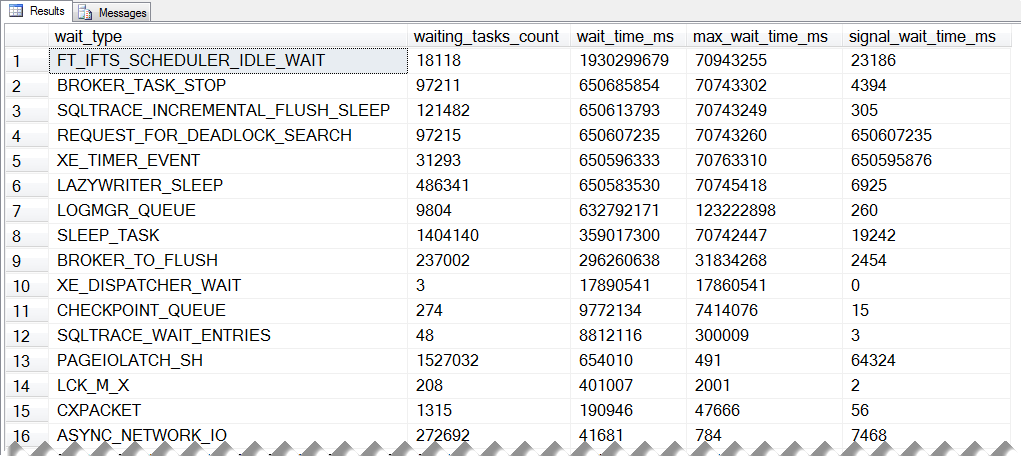
You will get back output that isn’t that helpful, as you can see below:

WaitStats output The Accidental DBA (Day 25 of 30): Wait Statistics Analysis

sys.dm_os_wait_stats output

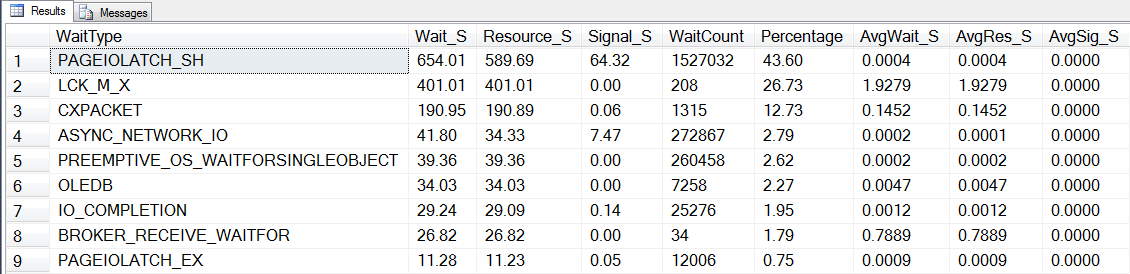
It looks like FT_IFTS_SCHEDULER_IDLE_WAIT is the biggest wait, and SQL Server’s waited for 1930299679 ms total.  This is kind of interesting, but not what I really need to know.  How I do really use this data?  It needs some filtering and aggregation.  There are some waits that aren’t going to be of interest because they occur all the time and are irrelevant for our purposes; we can filter out those wait types.  To make the most of our wait stats output, I really want to know the highest wait based on the percentage of time spent waiting overall, and the average wait time for that wait.  The query that I use to get this information is the one from Paul’s post (mentioned above).  I won’t paste it here (you can get it from his post) but if I run that query against my instance, now I get only three rows in my output:

WaitStats output 2 The Accidental DBA (Day 25 of 30): Wait Statistics Analysis

sys.dm_os_wait_stats output with wait_types filtered out

If we reference the various wait types listed in the MSDN entry for sys.dm_os_wait_stats, we see that the SQLTRACE_WAIT_ENTRIES wait type, “Occurs while a SQL Trace event queue waits for packets to arrive on the queue.”

Well, this instance is on my local machine and isn’t very active, so that wait is likely due to the default trace that’s always running.  In a production environment, I probably wouldn’t see that wait, and if I did, I’d check to see how many SQL Traces were running.  But for our purposes, I’m going to add that as a wait type to filter out, and then re-run the query.  Now there are more rows in my output, and the percentage for the PAGEIOLATCH_SH and LCK_M_X waits has changed:

WaitStats output 3 1024x248 The Accidental DBA (Day 25 of 30): Wait Statistics Analysis

sys.dm_os_wait_stats output with SQLTRACE_WAIT_ENTRIES also filtered out

If you review the original query, you will see that the percentage calculation for each wait type uses the wait_time_ms for the wait divided by the SUM of wait_time_ms for all waits.  But “all waits” are those wait types not filtered by the query.  Therefore, as you change what wait types you do not consider, the calculations will change.  Keep this in mind when you compare data over time or with other DBAs in your company – it’s a good idea to make sure you’re always running the same query that filters out the same wait types.

Capturing Wait Statistics

So far I’ve talked about looking at wait statistics at a point in time.  As a DBA, you want to know what waits are normal for each instance.  And there will be waits for every instance; even if it’s highly tuned or incredibly low volume, there will be waits.  You need to know what’s normal, and then use those values when the system is not performing well.

The easiest way to capture wait statistics is to snapshot the data to a table on a regular basis, and you can find queries for this process in my Capturing Baselines for SQL Server: Wait Statistics article on SQLServerCentral.com.  Once you have your methodology in place to capture the data, review it on a regular basis to understand your typical waits, and identify potential issues before they escalate.  When you do discover a problem, then you can use wait statistics to aid in your troubleshooting.

Using the Data

At the time that you identify a problem in your environment, a good first step is to run your wait statistics query and compare the output to your baseline numbers.  If you see something out of the ordinary, you have an idea where to begin your investigation.  But that’s it; wait statistics simply tell you where to start searching for your answer.  Do not assume that your highest wait is the problem, or even that it’s a problem at all.  For example, a common top wait is CXPACKET, and CXPACKET waits indicate that parallelism is used, which is expected in a SQL Server environment.  If that’s your top wait, does that mean you should immediately change the MAXDOP setting for the instance?  No.  You may end up changing it down the road, but a better direction is to understand why that’s the highest wait.  You may have CXPACKET waits because you’re missing some indexes and there are tons of table scans occurring.  You don’t need to change MAXDOP, you need to start tuning.

Another good example is the WRITELOG wait type.  WRITELOG waits occur when SQL Server is waiting for a log flush to complete.  A log flush occurs when information needs to be written to the database’s transaction log.  A log flush should complete quickly, because when there is a delay in a log write, then the task that initiated the modification has to wait, and tasks may be waiting behind that.  But a log flush doesn’t happen instantaneously every single time, so you will have WRITELOG waits.  If you see WRITELOG as your top wait, don’t immediately assume you need new storage.  You should only assume that you need to investigate further.  A good place to start would be looking at read and write latencies, and since I’ll be discussing monitoring IO more in tomorrow’s post we’ll shelve that discussion until then.

As you can see from these two examples, wait statistics are a starting point.  They are very valuable – it’s easy to think of them as “the answer”, but they’re not.  Wait statistics do not tell you the entire story about a SQL Server implementation.  There is no one “thing” that tells you the entire story, which is why troubleshooting can be incredibly frustrating, yet wonderfully satisfying when you find the root of a problem.  Successfully troubleshooting performance issues in SQL Server requires an understanding of all the data available to aid in your discovery and investigation, understanding where to start, and what information to capture to correlate with other findings.

The post The Accidental DBA (Day 25 of 30): Wait Statistics Analysis appeared first on Erin Stellato.

02 Jul 06:15

Manage SQL Server Connectivity through Windows Azure Virtual Machines Remote PowerShell

by SQLOS Team

Manage SQL Server Connectivity through Windows Azure Virtual Machines Remote PowerShell Blog

This blog post comes from Khalid Mouss, Senior Program Manager in Microsoft SQL Server.

Overview

The goal of this blog is to demonstrate how we can automate through PowerShell connecting multiple SQL Server deployments in Windows Azure Virtual Machines. We would configure TCP port that we would open (and close) though Windows firewall from a remote PowerShell session to the Virtual Machine (VM). This will demonstrate how to take the advantage of the remote PowerShell support in Windows Azure Virtual Machines to automate the steps required to connect SQL Server in the same cloud service and in different cloud services.
 
Scenario 1: VMs connected through the same Cloud Service

2 Virtual machines configured in the same cloud service. Both VMs running different SQL Server instances on them.

Both VMs configured with remote PowerShell turned on to be able to run PS and other commands directly into them remotely in order to re-configure them to allow incoming SQL connections from a remote VM or on premise machine(s).

Note: RDP (Remote Desktop Protocol) is kept configured in both VMs by default to be able to remote connect to them and check the connections to SQL instances for demo purposes only; but not actually required.

Step 1 – Provision VMs and Configure Ports


Provision VM1; named DemoVM1 as follows (see examples screenshots below if using the portal):


Provision VM2 (DemoVM2) with PowerShell Remoting enabled and connected to DemoVM1 above (see examples screenshots below if using the portal):

After provisioning of the 2 VMs above, here is the default port configurations for example:

Step2 – Verify / Confirm the TCP port used by the database Engine

By the default, the port will be configured to be 1433 – this can be changed to a different port number if desired.


1. RDP to each of the VMs created below – this will also ensure the VMs complete SysPrep(ing) and complete configuration

2. Go to SQL Server Configuration Manager -> SQL Server Network Configuration -> Protocols for <SQL instance> -> TCP/IP - > IP Addresses


3. Confirm the port number used by SQL Server Engine; in this case 1433

4. Update from Windows Authentication to Mixed mode


5.       Restart SQL Server service for the change to take effect

6.       Repeat steps 3., 4., and 5. For the second VM: DemoVM2

Step 3 – Remote Powershell to DemoVM1

Enter-PSSession -ComputerName condemo.cloudapp.net -Port 61503 -Credential <username> -UseSSL -SessionOption (New-PSSessionOption -SkipCACheck -SkipCNCheck)

Your will then be prompted to enter the password.

Step 4 – Open 1433 port in the Windows firewall

netsh advfirewall firewall add rule name="DemoVM1Port" dir=in localport=1433 protocol=TCP action=allow

Output:

netsh advfirewall firewall show rule name=DemoVM1Port

Rule Name:                            DemoVM1Port

----------------------------------------------------------------------

Enabled:                              Yes

Direction:                            In

Profiles:                             Domain,Private,Public

Grouping:                            

LocalIP:                              Any

RemoteIP:                             Any

Protocol:                             TCP

LocalPort:                            1433

RemotePort:                           Any

Edge traversal:                       No

Action:                               Allow

Ok.

Step 5 – Now connect from DemoVM2 to DB instance in DemoVM1

Step 6 – Close port 1433 in the Windows firewall

netsh advfirewall firewall delete rule name=DemoVM1Port

Output:

Deleted 1 rule(s).

Ok.

netsh advfirewall firewall show  rule name=DemoVM1Port

No rules match the specified criteria.


Step 7 – Try to connect from DemoVM2 to DB Instance in DemoVM1
 

Because port 1433 has been closed (in step 6) in the Windows Firewall in VM1 machine, we can longer connect from VM3 remotely to VM1.

Scenario 2: VMs provisioned in different Cloud Services

2 Virtual machines configured in different cloud services. Both VMs running different SQL Server instances on them. Both VMs configured with remote PowerShell turned on to be able to run PS and other commands directly into them remotely in order to re-configure them to allow incoming SQL connections from a remote VM or on on-premise machine(s).

Note: RDP (Remote Desktop Protocol) is kept configured in both VMs by default to be able to remote connect to them and check the connections to SQL instances for demo purposes only; but not actually needed.

Step 1 – Provision new VM3

Provision VM3; named DemoVM3 as follows (see examples screenshots below if using the portal):

After provisioning is complete, here is the default port configurations:

Step 2 – Add public port to VM1 connect to from VM3’s DB instance

Since VM3 and VM1 are not connected in the same cloud service, we will need to specify the full DNS address while connecting between the machines which includes the public port. We shall add a public port 57000 in this case that is linked to private port 1433 which will be used later to connect to the DB instance.

Step 3 – Remote Powershell to DemoVM1

Enter-PSSession -ComputerName condemo.cloudapp.net -Port 61503 -Credential <UserName> -UseSSL -SessionOption (New-PSSessionOption -SkipCACheck -SkipCNCheck)

You will then be prompted to enter the password.


Step 4 – Open 1433 port in the Windows firewall

netsh advfirewall firewall add rule name="DemoVM1Port" dir=in localport=1433 protocol=TCP action=allow

Output:

Ok.

netsh advfirewall firewall show rule name=DemoVM1Port

Rule Name:                            DemoVM1Port

----------------------------------------------------------------------

Enabled:                              Yes

Direction:                            In

Profiles:                             Domain,Private,Public

Grouping:                            

LocalIP:                              Any

RemoteIP:                             Any

Protocol:                             TCP

LocalPort:                            1433

RemotePort:                           Any

Edge traversal:                       No

Action:                               Allow

Ok.


Step 5 – Now connect from DemoVM3 to DB instance in DemoVM1

RDP into VM3, launch SSM and Connect to VM1’s DB instance as follows. You must specify the full server name using the DNS address and public port number configured above.

Step 6 – Close port 1433 in the Windows firewall

netsh advfirewall firewall delete rule name=DemoVM1Port


Output:

Deleted 1 rule(s).

Ok.

netsh advfirewall firewall show  rule name=DemoVM1Port

No rules match the specified criteria. 

Step 7 – Try to connect from DemoVM2 to DB Instance in DemoVM1
 

Because port 1433 has been closed (in step 6) in the Windows Firewall in VM1 machine, we can no longer connect from VM3 remotely to VM1.

Conclusion

Through the new support for remote PowerShell in Windows Azure Virtual Machines, one can script and automate many Virtual Machine and SQL management tasks. In this blog, we have demonstrated, how to start a remote PowerShell session, re-configure Virtual Machine firewall to allow (or disallow) SQL Server connections.

References

SQL Server in Windows Azure Virtual Machines


Originally posted at http://blogs.msdn.com/b/sqlosteam/
02 Jul 06:15

Shakespeare and storing Unicode characters

by John Paul Cook
This post is about the political issues involved with using multiple languages in a global organization and how to troubleshoot the technical details. The CHAR and VARCHAR data types are NOT suitable for global data. Some people still cling to CHAR and VARCHAR justifying their use by truthfully saying that they only take up half the space of NCHAR and NVARCHAR data types. But you’ll never be able to store Chinese, Korean, Greek, Japanese, Arabic, or many other languages unless you use NCHAR and NVARCHAR...(read more)
02 Jul 06:15

Getting Started with Technical Drill Downs for the New Windows Server, SQL Server and System Center Previews

by Microsoft Server and Cloud Platform Team

We hope everyone is enjoying TechEd Europe 2013 and the host city of Madrid, Spain.  It’s a beautiful city with a rich history. We’re trying to write some history of our own this year at both TechEd conferences. There are some amazing advances coming from the Windows Server, System Center, SQL Server and Intune product teams.  In addition to the great sessions being delivered at TechEd Europe 2013, there are some new technical posts we think you’ll find valuable.

As we usually do, we’ll start with Windows Server. It is the foundation OS for many of our products and it is important to know what we are delivering with the next release. The file system and storage capabilities have been an important role for all server operating systems, and that continues today with virtualization and cloud services.  See the Windows Server teams blog post, “Storage Transformation for Your Datacenter” for information on SMB Direct, SMB Multichannel and other storage improvements in Windows Server 2012 R2.

While we are talking about management, the Intune and System Center teams have penned a post called, “Preview New People-centric IT Products Now!”  In that post you get information on the device operating systems we support, what you can test today, and what is coming in the next release of Windows Intune (not yet available for testing).

And last but not least is SQL Server 2014.  The SQL Server product group kicked off a series of blogs today on SQL Server 2014 In-Memory Technologies. In-memory OLTP (previously called Project Codename 'Hekaton')  is a new database engine optimized for memory resident data and OLTP workloads. In-memory OLTP is fully integrated into SQL Server – not a separate system. To take advantage of In-memory OLTP, a user defines a heavily accessed table as memory optimized. In-memory OLTP tables are fully transactional, durable and accessed using T-SQL in the same way as regular SQL Server tables.  The SQL Server team will be publishing a series of blog posts on In-Memory OLTP and here is the “SQL Server 2014 In Memory Technologies: Blog Series Introduction" to start.

Content and Downloads

If the information in the blog posts seems foreign and you want to learn more, be sure to check out all of the sessions in the TechEd Europe 2013 course catalog.  You can watch the sessions live or on-demand.  The sessions are organized by tracks and you can filter in a variety of ways to find a particular topic.

Ready to try the previews for yourself?  Go get the Windows Server 2012 R2, System Center 2012 R2 or SQL Server 2014 R2 previews at the download center.  Enjoy!


02 Jul 06:14

Alert visualization recipe: Get out your blender, drop in some sp_send_dbmail, Google Charts API, add your favorite colors and sprinkle with html. Blend till it’s smooth and looks pretty enough to taste.

by Maria Zakourdaev


I really like database monitoring. My email inbox have a constant flow of different types of alerts coming from our production servers with all kinds of information, sometimes more useful and sometimes less useful. Usually database alerts look really simple, it’s usually a plain text email saying “Prod1 Database data file on Server X is 80% used. You’d better grow it manually before some query triggers the AutoGrowth process”.

Imagine you could have received email like the one below.  In addition to the alert description it could have also included the the database file growth chart over the past 6 months. Wouldn’t it give you much more information whether the data growth is natural or extreme? That’s truly what data visualization is for.

Believe it or not, I have sent the graph below from SQL Server stored procedure without buying any additional data monitoring/visualization tool.

image


Would you like to visualize your database alerts like I do? Then like myself, you’d love the Google Charts.

All you need to know is a little HTML and have a mail profile configured on your SQL Server instance regardless of the SQL Server version.

First of all, I hope you know that the sp_send_dbmail procedure has a great parameter @body_format = ‘HTML’, which allows us to send rich and colorful messages instead of boring black and white ones. All that we need is to dynamically create HTML code.

This is how, for instance, you can create a table and populate it with some data:

DECLARE @html varchar(max)

SET @html = '<html>'
+ '<H3><font id="Text" style="color: Green;">Top Databases: </H3>'
+ '<table border="1" bordercolor="#3300FF" style="background-color:#DDF8CC" width="70%" cellpadding=3 cellspacing=3>'
+ '<tr><font color="Green"><th>Database Name</th><th>Size</th><th>Physical Name</th></tr>' +

CAST( (SELECT TOP 10
                            td = name,'',
                            td = size * 8/1024 ,'',
                            td = physical_name 
            FROM sys.master_files  
            ORDER BY size DESC
            FOR XML PATH ('tr'),TYPE
) AS VARCHAR(MAX))
+
'</table>'

EXEC msdb.dbo.sp_send_dbmail
@recipients = 'PutYourEmailHere',
@subject ='Top databases',
@body = @html,
@body_format = 'HTML'

This is the result:

image


If you want to add more visualization effects, you can use Google Charts Tools https://google-developers.appspot.com/chart/interactive/docs/index which is a free and rich library of data visualization charts, they’re also easy to populate and embed.

There are two versions of the Google Charts

image Image based charts: https://google-developers.appspot.com/chart/image/docs/gallery/chart_gall

This is an old version, it’s officially deprecated although it will be up for a next few years or so. I really enjoy using this one because it can be viewed within the email body. For mobile devices you need to change the “Load remote images” property in your email application configuration.        


image Charts based on JavaScript classes: https://google-developers.appspot.com/chart/interactive/docs/gallery

This API is newer, with rich and highly interactive charts, and it’s much more easier to understand and configure. The only downside of it is that they cannot be viewed within the email body. Outlook, Gmail and many other email clients, as part of their security policy, do not run any JavaScript that’s placed within the email body. However, you can still enjoy this API by sending the report as an email attachment.

Here is an example of the old version of Google Charts API, sending the same top databases report as in the previous example but instead of a simple table, this script is using a pie chart right from  the T-SQL code

DECLARE @html  varchar(8000)

DECLARE @Series  varchar(800),@Labels  varchar(8000),@Legend  varchar(8000);
   
SET @Series = '';
SET @Labels = '';
SET @Legend = '';

SELECT TOP 5 @Series = @Series + CAST(size * 8/1024 as varchar) + ',',
                        @Labels = @Labels +CAST(size * 8/1024 as varchar) + 'MB'+'|',
                        @Legend = @Legend + name + '|'
FROM sys.master_files
ORDER BY size DESC

SELECT @Series = SUBSTRING(@Series,1,LEN(@Series)-1),
        @Labels = SUBSTRING(@Labels,1,LEN(@Labels)-1),
        @Legend = SUBSTRING(@Legend,1,LEN(@Legend)-1)

SET @html =
  '<H3><font color="Green"> '+@@ServerName+' top 5 databases : </H3>'+
   '<br>'+
   '<img src="http://chart.apis.google.com/chart?'+
   'chf=bg,s,DDF8CC&'+
   'cht=p&'+
   'chs=400x200&'+
   'chco=3072F3|7777CC|FF9900|FF0000|4A8C26&'+
   'chd=t:'+@Series+'&'+
   'chl='+@Labels+'&'+
   'chma=0,0,0,0&'+
   'chdl='+@Legend+'&'+
   'chdlp=b"'+
   'alt="'+@@ServerName+' top 5 databases" />'
            
EXEC msdb.dbo.sp_send_dbmail @recipients = 'PutYourEmailHere',
                            @subject = 'Top databases',
                            @body = @html,
                            @body_format = 'HTML'

This is what you get. Isn’t it great?

image

Chart parameters reference:

chf     Gradient fill  bg - backgroud ; s- solid
cht     chart type  ( p - pie)
chs        chart size width/height
chco    series colors
chd        chart data string        1,2,3,2
chl        pir chart labels        a|b|c|d
chma    chart margins
chdl    chart legend            a|b|c|d
chdlp    chart legend text        b - bottom of chart


Line graph implementation is also really easy and powerful

DECLARE @html varchar(max)
DECLARE @Series varchar(max)
DECLARE @HourList varchar(max)

SET @Series = '';
SET @HourList = '';

SELECT @HourList = @HourList + SUBSTRING(CONVERT(varchar(13),last_execution_time,121), 12,2)  + '|' ,
             @Series = @Series + CAST( COUNT(1) as varchar) + ','
FROM sys.dm_exec_query_stats s 
   CROSS APPLY sys.dm_exec_sql_text(plan_handle) t
WHERE last_execution_time > = getdate()-1
GROUP BY CONVERT(varchar(13),last_execution_time,121)
ORDER BY CONVERT(varchar(13),last_execution_time,121)

SET @Series = SUBSTRING(@Series,1,LEN(@Series)-1)

SET @html =
'<img src="http://chart.apis.google.com/chart?'+
'chco=CA3D05,87CEEB&'+
'chd=t:'+@Series+'&'+
'chds=1,350&'+
'chdl= Proc executions from cache&'+
'chf=bg,s,1F1D1D|c,lg,0,363433,1.0,2E2B2A,0.0&'+
'chg=25.0,25.0,3,2&'+
'chls=3|3&'+
'chm=d,CA3D05,0,-1,12,0|d,FFFFFF,0,-1,8,0|d,87CEEB,1,-1,12,0|d,FFFFFF,1,-1,8,0&'+
'chs=600x450&'+
'cht=lc&'+
'chts=FFFFFF,14&'+
'chtt=Executions for from'
+(SELECT CONVERT(varchar(16),min(last_execution_time),121)
         FROM sys.dm_exec_query_stats
         WHERE last_execution_time > = getdate()-1)
+' till '+
+(SELECT CONVERT(varchar(16),max(last_execution_time),121)
    FROM sys.dm_exec_query_stats)
+
'&'+
'chxp=1,50.0|4,50.0&'+
'chxs=0,FFFFFF,12,0|1,FFFFFF,12,0|2,FFFFFF,12,0|3,FFFFFF,12,0|4,FFFFFF,14,0&'+
'chxt=y,y,x,x,x&'+
'chxl=0:|1|350|1:|N|2:|'+@HourList+'3:|Hour&'+
'chma=55,120,0,0" alt="" />'

EXEC msdb.dbo.sp_send_dbmail
@recipients = 'PutYourEmailHere',
@subject ='Daily number of executions',
@body = @html,
@body_format = 'HTML'


image

Chart parameters reference:

chco    series colors
chd        series data
chds    scale format
chdl    chart legend
chf        background fills
chg        grid line
chls    line style
chm        line fill
chs        chart size
cht        chart type
chts    chart style
chtt    chart title
chxp    axis label positions
chxs    axis label styles
chxt    axis tick mark styles
chxl    axis labels
chma    chart margins

If you don’t mind to get your charts as an email attachment, you can enjoy the Java based Google Charts which are even easier to configure, and have much more advanced graphics. In the example below, the sp_send_email procedure uses the parameter @query which will be executed at the time that sp_send_dbemail is executed and the HTML result of this execution will be attached to the email.

DECLARE @html varchar(max),@query varchar(max)
DECLARE @SeriesDBusers  varchar(800);
   
SET @SeriesDBusers = '';

SELECT @SeriesDBusers = @SeriesDBusers +  ' ["'+DB_NAME(r.database_id) +'", ' +cast(count(1) as varchar)+'],'
FROM sys.dm_exec_requests r
GROUP BY DB_NAME(database_id)
ORDER BY count(1) desc;

SET @SeriesDBusers = SUBSTRING(@SeriesDBusers,1,LEN(@SeriesDBusers)-1)

SET @query = '
PRINT ''
<html>
  <head>
    <script type="text/javascript" src="https://www.google.com/jsapi"></script>
    <script type="text/javascript">
      google.load("visualization", "1", {packages:["corechart"]});
       google.setOnLoadCallback(drawChart);
      function drawChart() {
                     var data = google.visualization.arrayToDataTable([
                       ["Database Name", "Active users"],
                       '+@SeriesDBusers+'
                     ]);
 
                     var options = {
                       title: "Active users",
                       pieSliceText: "value"
                     };
 
                     var chart = new google.visualization.PieChart(document.getElementById("chart_div"));
                     chart.draw(data, options);
      };
    </script>
  </head>
  <body>
    <table>
    <tr><td>
        <div id="chart_div" style="width: 800px; height: 300px;"></div>
        </td></tr>
    </table>
  </body>
</html>
'''

EXEC msdb.dbo.sp_send_dbmail
   @recipients = 'PutYourEmailHere',
   @subject ='Active users',
   @body = @html,
   @body_format = 'HTML',
   @query = @Query, 
   @attach_query_result_as_file = 1, 
   @query_attachment_filename = 'Results.htm'

After opening the email attachment in the browser you are getting this kind of report:


image

In fact, the above is not only for database alerts. It can be used for applicative reports if you need high levels of customization that you cannot achieve using standard methods like SSRS.

If you need more information on how to customize the charts, you can try the following:

Use the above examples as a starting point for your procedures and I’d be more than happy to hear of your implementations of the above techniques.

Yours,

Maria

02 Jul 06:13

Getting Started with SQL Server 2014 In-Memory OLTP

by SQL Server Team

SQL Server 2014 introduces memory-optimized database technology for optimizing the performance of OLTP workloads. In particular, it introduces memory-optimized tables for efficient, contention-free data access, and natively compiled stored procedures for efficient execution of business logic.    

With this post we are giving you a brief introduction to the new syntax for in-memory OLTP, and will show you how to get started with T-SQL and SQL Server Management Studio (SSMS).      

Before we start, let’s create a sample database. If you have an existing database you can skip this step.


-- optional: create database
CREATE DATABASE imoltp
GO

SSMS: To create a database,
1.    In Object Explorer, connect to an instance of the SQL Server Database Engine and then expand that instance.
2.    Right-click Databases, click New Database and then enter the value for the database name.


Step 1: enable your database for in-memory OLTP

We are going to add a filegroup for memory_optimized_data to our database, and add a container to this filegroup. This filegroup will be used to guarantee durability of memory-resident data in the event of a server crash or restart. During the crash recovery phase in server startup, the data is recovered from this filegroup and loaded back into memory.

When creating the container in the memory_optimized_data filegroup you must specify the storage location. In this example we picked the folder ‘c:\data’. Make sure the folder exists before running the script.

-- enable for in-memory OLTP - change file path as needed
ALTER DATABASE imoltp ADD FILEGROUP imoltp_mod CONTAINS MEMORY_OPTIMIZED_DATA
ALTER DATABASE imoltp ADD FILE (name='imoltp_mod1', filename='c:\data\imoltp_mod1') TO FILEGROUP imoltp_mod
GO

SSMS: To add a memory_optimized_data filegroup and its container,
1.    In Object Explorer, expand the Databases node, right-click your database and then click Properties.
2.    To add a new memory optimized data filegroup, click the Filegroups page. Under MEMORY OPTIMIZED DATA, click Add filegroup and then enter the values for the filegroup.
3.    To add a file to the filegroup, click the General page. Under Database files, click Add and then enter the values for the file. Use file type FILESTREAM Data.

Getting Started with SQL Server 2014 In-Memory OLTP

Getting Started with SQL Server 2014 In-Memory OLTP Part 2

 
Step 2: create your first memory-optimized table

We are now ready to create our first memory-optimized tables. We have here two tables, ‘ShoppingCart’, and ‘UserSession’. ‘ShoppingCart’ is a durable table (the default), which means that its contents are persisted on disk and will not be lost on a server crash. ‘UserSession’ is a non-durable table (DURABILITY=SCHEMA_ONLY), which means that the contents of the table exist only in memory, and are lost on server restart.

Note that in CTP1 memory-optimized tables support only ‘nonclustered hash’ indexes. The bucket_count of the index should be roughly 1 to 2 times the number of unique index keys you expect to find in the table.

-- create memory optimized tables
USE imoltp
GO

-- durable table – contents of this table will not be lost on a server crash
CREATE TABLE dbo.ShoppingCart (
   ShoppingCartId int not null primary key nonclustered hash with (bucket_count=2000000),
   UserId int not null index ix_UserId nonclustered hash with (bucket_count=1000000),
   CreatedDate datetime2 not null,
   TotalPrice money
)
WITH (MEMORY_OPTIMIZED=ON)
GO

-- non-durable table – contents of this table are lost on a server restart
CREATE TABLE dbo.UserSession (
   SessionId int not null primary key nonclustered hash with (bucket_count=400000),
   UserId int not null,
   CreatedDate datetime2 not null,
   ShoppingCartId int,
   index ix_UserId nonclustered hash (UserId) with (bucket_count=400000)
)
WITH (MEMORY_OPTIMIZED=ON, DURABILITY=SCHEMA_ONLY)
GO

SSMS: To create a memory-optimized table,
1.    In Object Explorer, right-click the Tables node of your database, click New, and then click Memory Optimized Table. A template for creating a memory-optimized table is displayed.
2.    To replace the template parameters, click Specify Values for Template Parameters on the Query menu. The shortcut key is Ctrl-Shift-M.

Step 3: load your data

You can load data into the tables in various ways, including INSERT .. SELECT from an existing disk-based table and BCP. In this example we are using simple INSERT statements for loading the data.

-- Basic DML
-- insert a few rows
INSERT dbo.UserSession VALUES (1,342,GETUTCDATE(),4)
INSERT dbo.UserSession VALUES (2,65,GETUTCDATE(),NULL)
INSERT dbo.UserSession VALUES (3,8798,GETUTCDATE(),1)
INSERT dbo.UserSession VALUES (4,80,GETUTCDATE(),NULL)
INSERT dbo.UserSession VALUES (5,4321,GETUTCDATE(),NULL)
INSERT dbo.UserSession VALUES (6,8578,GETUTCDATE(),NULL)
INSERT dbo.ShoppingCart VALUES (1,8798,GETUTCDATE(),NULL)
INSERT dbo.ShoppingCart VALUES (2,23,GETUTCDATE(),45.4)
INSERT dbo.ShoppingCart VALUES (3,80,GETUTCDATE(),NULL)
INSERT dbo.ShoppingCart VALUES (4,342,GETUTCDATE(),65.4)
GO

-- verify table contents
SELECT * FROM dbo.UserSession
SELECT * FROM dbo.ShoppingCart
GO

SSMS: To view the contents of a memory-optimized table,
⦁    In Object Explorer, right-click on your memory-optimized table, click on Script Table as, click on SELECT To, click on New Query Editor Window and then execute the query that is displayed.

Step 4: update statistics

Memory-optimized tables do not support auto_update_statistics, thus statistics will need to be updated manually. You can use UPDATE STATISTICS to update statistics for individual tables, or sp_updatestats for all tables in the database.

-- update statistics on memory optimized tables
UPDATE STATISTICS dbo.UserSession WITH FULLSCAN, NORECOMPUTE
UPDATE STATISTICS dbo.ShoppingCart WITH FULLSCAN, NORECOMPUTE
GO

Step 5: run queries

You are now ready to run your queries. Because they access memory-optimized tables, these queries will benefit from the latch-free data structures and more efficient data access. Here are a few examples.

-- in an explicit transaction, assign a cart to a session and update the total price.
-- note that the isolation level hint is required for memory-optimized tables with
-- SELECT/UPDATE/DELETE statements in explicit transactions
BEGIN TRAN
  UPDATE dbo.UserSession WITH (SNAPSHOT) SET ShoppingCartId=3 WHERE SessionId=4
  UPDATE dbo.ShoppingCart WITH (SNAPSHOT) SET TotalPrice=65.84 WHERE ShoppingCartId=3
COMMIT
GO
-- verify table contents
SELECT *
FROM dbo.UserSession u JOIN dbo.ShoppingCart s on u.ShoppingCartId=s.ShoppingCartId
WHERE u.SessionId=4
GO

Step 6: create natively compiled stored procedures

To further optimize the access to memory-optimized tables, and to optimize execution of your business logic, you can create natively compiled stored procedures. While these procedures are written using Transact-SQL, they do not support the full Transact-SQL surface area. For details, see Books Online.

Here is an example of a natively compiled stored procedure that accesses the tables we created previously.

-- natively compiled stored procedure for assigning a shopping cart to a session
CREATE PROCEDURE dbo.usp_AssignCart @SessionId int
WITH NATIVE_COMPILATION, SCHEMABINDING, EXECUTE AS OWNER
AS
BEGIN ATOMIC
WITH (TRANSACTION ISOLATION LEVEL = SNAPSHOT, LANGUAGE = N'us_english')

  DECLARE @UserId int,
    @ShoppingCartId int

  SELECT @UserId=UserId, @ShoppingCartId=ShoppingCartId
  FROM dbo.UserSession WHERE SessionId=@SessionId

  IF @UserId IS NULL
    THROW 51000, 'The session or shopping cart does not exist.', 1

  UPDATE dbo.UserSession SET ShoppingCartId=@ShoppingCartId WHERE SessionId=@SessionId
END
GO

EXEC usp_AssignCart 1
GO

The following stored procedure showcases the performance of natively compiled stored procedures by inserting a large number of rows into a memory-optimized table. This scripts inserts 1,000,000 rows.

Note that if log IO becomes a bottleneck in the application, SQL Server allows you to use a non-durable table (DURABILITY=SCHEMA_ONLY), which removes the log IO completely.

-- natively compiled stored procedure for inserting a large number of rows
--   this demonstrates the performance of native procs
CREATE PROCEDURE dbo.usp_InsertSampleCarts @StartId int, @InsertCount int
WITH NATIVE_COMPILATION, SCHEMABINDING, EXECUTE AS OWNER
AS
BEGIN ATOMIC
WITH (TRANSACTION ISOLATION LEVEL = SNAPSHOT, LANGUAGE = N'us_english')

  DECLARE @ShoppingCartId int = @StartId

  WHILE @ShoppingCartId   BEGIN
    INSERT INTO dbo.ShoppingCart VALUES
         (@ShoppingCartId, 1, '2013-01-01T00:00:00', NULL)
    SET @ShoppingCartId += 1
  END

END
GO

-- insert 1,000,000 rows
DECLARE @StartId int = (SELECT MAX(ShoppingCartId)+1 FROM dbo.ShoppingCart)
EXEC usp_InsertSampleCarts @StartId, 1000000
GO

-- verify the rows have been inserted
SELECT COUNT(*) FROM dbo.ShoppingCart
GO

SSMS: To create a natively compiled stored procedure,
1.    In Object Explorer, right-click the Stored Procedures node of your database, click New, and then click Natively Compiled Stored Procedure. A template for creating natively compiled stored procedures is displayed.
2.    To replace the template parameters, click Specify Values for Template Parameters on the Query menu. The shortcut key is Ctrl-Shift-M.

For more details about the concepts for in-memory OLTP, as well as a reference of the syntax, see Books Online or get started and download SQL Server 2014 CTP1 here.

That’s all for today, but stay tuned for further posts on this blog!    

02 Jul 06:12

More XEvents in SQL Server 2014 CTP1 – don’t wait any longer

by Bob Beauchemin

Don’t get me wrong, there’s almost no one who enjoys a good SQL Profiler diagnostic trace more than I do. But, starting in the early CTPs of SQL Server 2008, I’ve become impressed with the diagnostic enablement afforded through Extended Events. Enough to hack through that first beta (sans docs, with only metadata) and blog about it for a week. XEvents’ biggest weakness was that there was no GUI, and a guy named Jonathan Kehayias took care of that with his SSMS add-in.

In SQL Server 2012, it was announced that the old trace would be deprecated in favor of XEvents. The sheer number of events (618 in SQL Server 2012 RTM, with 9 more in SQL Server 2012 SP1) dwarfed the profiler events, as well as a nice GUI built into SSMS and programmatic interfaces for session definition, metadata, and trace-reading (including realtime) with a component called LINQ to XEvents, things were sort of sealed. That’s not even mentioning the actions, the powerful predicate system, and the series of targets.

Still, XEvents seems daunting for some, mostly (I think) because there’s too much XML involved. But c’mon, XPath is, for the most part, like navigating through a file system. And basic XPath is all you need, for the most part, to reformat the event data. Goodness, the XEvent data doesn’t even use XML Namespaces, to keep the querying simple.

After looking at the SQL Server 2014 CTP1 metadata, the results are in; things are settled. The score is:

– 763 XEvents total (that’s 145 new ones) vs. 0 new trace events (although SQL Profiler/event system is still around)
– 4 new packages, including 3 related to Hekaton (internals, compiler, and runtime). The other one, qs (query_store) that must be for future CTPs.
– 68 events in the “sqlserver” packages, including about 10 more xtp (Hekaton) events in these packages, events to trace interactions with Windows Azure storage, for the new cardinality estimating code, and new columnstore functionality.

In a release where there are actually 3 new Event Notification event types (for CREATE/DROP AUDIT and DDL_DATABASE_AUDIT_EVENTS, remember Event Notifications?) the fact that there’s no new trace capability means YOU need to start learning/experimenting with Extended Events now. if you haven’t already. Go to a class, or a presentation, or read blogs or something… And you may want to brush up on your XPath…

A good place to start would be with Jonathan’s “An XEvent A Day” blog series. Or his two courses on Pluralsight about them. But start NOW, before you find yourself in SQL 2012 or 2014 with your diagnostic hands tied behind your back. How else can you look at wait stats for a specific workload or work with the T-SQL stack?

And BTW, Here’s a list of all the new events ([package name].[event name]) in 2014 CTP1 (since 2012 SP1):

hkenginexepkg.after_changestatetx_event – Fires after transaction changes state
hkenginexepkg.alloctx_event -
hkenginexepkg.attempt_committx_event – Is raised when a transaction is asked to commit
hkenginexepkg.before_changestatetx_event – Fires before transaction changes state
hkenginexepkg.compute_oldest_active_tx_hint – Indicates that the oldest active transaction hint has been recalculated
hkenginexepkg.dependency_acquiredtx_event – Raised after transaction takes a dependency on another transaction
hkenginexepkg.endts_acquiredtx_event – Fires after transaction acquires an end timestamp
hkenginexepkg.gc_cycle_completed – Indicates that a GC notification has been enqueued.
hkenginexepkg.gc_notification_enqueued – Indicates that a GC notification has been enqueued.
hkenginexepkg.redo_single_hk_record – Redo on a HK log record
hkenginexepkg.update_oldest_active_tx_stats – Indicates that an attempt is being made to recalculate the GC base generation.
hkenginexepkg.waiting_for_dependenciestx_event – Raised when we have explicitly waited for dependencies to clear
hkenginexepkg.xtp_checkpoint_file_flush – Indicates the point at which a given file has been flushed to disk.
hkenginexepkg.xtp_checkpoint_file_flush_complete – Indicates the point at which all in-flight buffers have been flushed to disk.
hkenginexepkg.xtp_checkpoint_file_read – Indicates reading of a file in XTP checkpoint recovery.
hkenginexepkg.xtp_checkpoint_write_io – Indicates that the checkpointing subsystem has issued or completed a write IO.
hkenginexepkg.xtp_create_log_record – Fires when the XTP engine creates a log record.
hkenginexepkg.xtp_root_file_write – Indicates that the write of the checkpoint root file is complete.
qds.query_store_async_shutdown_failed – Fired when query store encounters an error during async query store shutdown
qds.query_store_background_task_creation_failed – Fired if the background task for QDS data persistence could not be created
qds.query_store_background_task_initialization_failed – Fired if the background task for QDS data persistence could not be initialized
qds.query_store_background_task_persist_failed – Fired if the background task for QDS data persistence is not completed successfully
qds.query_store_begin_persist_runtime_stat – Fired immediately before current runtime statistics for a query plan is persisted to the database.
qds.query_store_bloom_filter_false_positive – Fired if the Bloom filter for QDS statement texts gives a false positive result
qds.query_store_check_consistency_init_failed – Fired when check consistency task fails during initialization
qds.query_store_database_initialization_failed – Fired if initialization of the Query Store for database has failed. The Query Store will be disabled for this database
qds.query_store_disk_size_check_failed – Fired when a check against Query Store on-disk size limit fails
qds.query_store_disk_size_info – Fired when a check against QDS on-disk size is performed
qds.query_store_execution_runtime_info – Fired when runtime information is sent to the query store.
qds.query_store_execution_runtime_info_discarded – Fired when runtime information sent to the query store is discarded.
qds.query_store_execution_runtime_info_evicted – Fired when runtime information sent to the query store is evicted.
qds.query_store_flush_failed – Fired when query store failed to flush dirty data
qds.query_store_loaded – Fired when query store is loaded
qds.query_store_notify_dirty_shutdown_on_partition_startup – Fired when previous instance of query store for the partition is shutdown by force in order to allow creation of a new instance
qds.query_store_notify_force_failure_failed – Fired when query store failed to notify force failure
qds.query_store_persist_task_init_failed – Fired when persist task fails during initialization
qds.query_store_plan_forcing_failed – Occurs when forcing of plan from qds fail
qds.query_store_plan_persistence_failure – Fired if there’s a failure to persist plan
qds.query_store_plan_removal – Fired when plan is removed
qds.query_store_query_persistence_failure – Fired if there’s a failure to persist query
qds.query_store_read_write_failed – Fired if the read/write to Query Store internal tables failed
qds.query_store_statement_not_found – Fired in case when statement couldn’t be found due to race condition or ambiguous user request.
qds.query_store_unloaded – Fired when query store is unloaded from memory
sqlos.nonpreemptive_long_syncio – record long sync io operation in nonpreemptive worker
sqlos.stuck_dispatcher_callback_executed – Stuck dispatcher callback executed
sqlos.wait_completed – Occurs when there is a wait completed on a SQLOS controlled resource.  Use this event to track wait completion.
sqlserver.after_natively_compiled_proc_entry_removal_on_drop – Fired after the procedure cache entry is flushed when dropping a natively compiled procedure.
sqlserver.before_natively_compiled_proc_entry_removal_on_drop – Fired before the procedure cache entry is flushed when dropping a natively compiled procedure.
sqlserver.before_redo_lsn_update – Occurs just prior to the update of the EOL LSN
sqlserver.buffer_pool_eviction_thresholds_recalculated – Lazywriter and/or worker clock has wrapped the BUF array and thresholds are re-calculated.
sqlserver.buffer_pool_extension_pages_evicted – Page is evicted from the buffer pool extension cache.
sqlserver.buffer_pool_extension_pages_read – Page is read from the buffer pool extension cache.
sqlserver.buffer_pool_extension_pages_written – Page or contiguous set of pages evicted into the buffer pool extension cache.
sqlserver.check_phase_tracing – Occurs when DBCC CHECK enters a new phase of the checking. Use this event to trace the phases of DBCC CHECK process.
sqlserver.check_thread_message_statistics – Occurs when a phase of DBCC CHECK is finished. Use this event to collect the number of messages a DBCC CHECK thread has sent or received.
sqlserver.check_thread_page_io_statistics – Occurs when a phase of DBCC CHECK is finished. Use this event to collect the number of logical, physical, and read-ahead IOs a DBCC CHECK thread has performed.
sqlserver.check_thread_page_latch_statistics – Occurs when a phase of DBCC CHECK is finished. Use This event to collect the number and time of page latch and IO latch waits.
sqlserver.clustered_columnstore_index_rebuild – Occurs when clustered index on the table was rebuilt. This event is raised three times for ALTER index rebuild operation on CCSI. The event is raised when the operation takes lock on index rebuild resource, when lock is taken on the table and when S lock on the table is upgraded to SCH_M lock to switch indexes in metadata.
sqlserver.column_store_index_build_low_memory – Occurs when Storage Engine detects low memory condition and the rowgroup size is reduced.
sqlserver.column_store_index_build_process_segment – Occurs when a segment is processed
sqlserver.column_store_index_build_throttle – Shows the statistics of columnstore index build parallelism throttling
sqlserver.columnstore_tuple_mover_begin_compress – Occurs when column store tuple mover starts compressing a deltastore.
sqlserver.columnstore_tuple_mover_end_compress – Occurs when column store tuple mover is done compressing a deltastore.
sqlserver.database_xml_deadlock_report – Produces a deadlock report for a victim, with information scoped to the victim’s database.
sqlserver.db_lock_acquired_from_cache – Occurs when a DB lock is acquired from the XactWorkspace DB lock cache.
sqlserver.db_lock_released_from_cache – Occurs when a DB lock is released from the XactWorkspace DB lock cache.
sqlserver.ddl_with_wait_at_low_priority – A DDL statement was executed using the WAIT_AT_LOW_PRIORITY options
sqlserver.diag_quantum_end – Occurs when the diag is notified of quantum end.
sqlserver.dyn_throttle_checkpoint – Occurs when checkpointing has been dynamically throttled with a new Checkpoint rate.
sqlserver.feature_extension – Occurs when received and parses data for a feature in feature extension.
sqlserver.file_read_enqueued – File read enqueued
sqlserver.file_read_throttled – File read throttled
sqlserver.file_write_enqueued – File write enqueued
sqlserver.file_write_throttled – File write throttled
sqlserver.hadr_tds_synchronizer_payload_skip – Hadron Tds Listener Synchronizer skipped a listener payload because there were no changes since the previous payload.
sqlserver.lock_request_priority_state – The priority state of a lock request
sqlserver.log_cache_write_block – Writing a log block to the log cache
sqlserver.logreader_start_scan – Outputs the replnextlsn value from the database table that the first replcmds scan uses as a starting point.
sqlserver.metadata_ddl_add_column – Occurs when an ALTER TABLE ADD column operation is updating base index.
sqlserver.metadata_ddl_alter_column – Occurs when an ALTER TABLE ALTER column operation is updating base index.
sqlserver.metadata_ddl_drop_column – Occurs when an ALTER TABLE DROP column operation is updating base index.
sqlserver.mixed_extent_activation – Track mixed extent activation and deactivation operations.
sqlserver.mixed_extent_allocation – Track mixed extent allocation operations
sqlserver.mixed_extent_deallocation – Track mixed extent deallocation operations.
sqlserver.mixed_page_allocation – Track mixed page allocation operations
sqlserver.mixed_page_deallocation – Track mixed page allocation operations
sqlserver.mixed_page_scan_file – Track the activity of SGAM scans for mixed page allocation
sqlserver.mixed_page_scan_page – Track the activity of SGAM scans for mixed page allocation
sqlserver.mixed_page_skipextent – Track the activity of SGAM scans for mixed page allocation
sqlserver.natively_compiled_proc_execution_started – Fired before a natively compiled procedure is executed.
sqlserver.optimizer_timeout – Occurs when the optimizer times out either due to spending too much time or hitting a memory limit.  Use this event to look at all the queries that are impacted by the optimizer timeout in a particular workload. This can be very useful when tuning a particular workload.
sqlserver.plan_affecting_convert – Occurs when a type convert issue affects the plan.  The expression value indicates the conversion that can cause inaccurate Cardinality Estimation or prevent from using a seek based plan in the query plan choice.  If performance is affected, rewriting the query could help.
sqlserver.process_killed_by_abort_blockers – A process is killed by an ABORT = BLOCKERS DDL statement
sqlserver.query_execution_batch_hash_aggregation_finished – Occurs at the end of batch hash aggregation.
sqlserver.query_execution_batch_hash_children_reversed – Occurs each time when hash join reverses build and probe side while processing data spilled to disk.
sqlserver.query_execution_batch_hash_join_spilled – Occurs each time when hash join spills some data to disk in batch processing.
sqlserver.query_optimizer_estimate_cardinality – Occurs when the query optimizer estimates cardinality on a relational expression.
sqlserver.query_optimizer_force_both_cardinality_estimation_behaviors – Both traceflags 2312 and 9481 were enabled, attempting to force both old and new cardinality estimation behaviors at the same time. The traceflags were ignored. Disable one or both of the traceflags.
sqlserver.query_store_failed_to_capture_query – Fired if the Query Store failed to capture query. The Query Store will not track statistics for this query
sqlserver.query_store_failed_to_load_forced_plan – Fired if the query failed to load forced plan from QDS. Forcing policy will not be applied
sqlserver.query_store_persist_on_shutdown_failed – Occurs when SQL Server fails to store dirty entries in Query Store on database shutdown.
sqlserver.selective_xml_index_no_compatible_sql_type – Occurs when a value() method is used in a query, specifying a sql type that differs from the type specified during selective XML index creation for that path.
sqlserver.selective_xml_index_no_compatible_xsd_types – Occurs when the user specifies a different resulting XSD type in a query, than the one that was used to promote the path during selective XML index creation.
sqlserver.selective_xml_index_path_not_indexed – Occurs when the path given in the user query is not promoted in the selective XML index, and thus the index is not used.
sqlserver.selective_xml_index_path_not_supported – Occurs when selective XML index is not used for a XML query due to the user using an unsupported path type.
sqlserver.session_recoverable_state_change – Occurs when the server determines a state change in term of session recovery on a connectionresilency-enabled connection.
sqlserver.spatial_guess – Occurs when the optimizer cannot get enough join selectivity information.  Use this event to look at the queries where spatial index could be used and the optimizer guesses the spatial selectivity.
sqlserver.unmatched_filtered_indexes – Occurs when the optimizer cannot use a filtered index due to parameterization.  For each such index an event is fired.  The unmatched_database_name, unmatched_schema_name, unmatched_table_name, unmatched_index_name fields give details of the filtered index that could not be used.
sqlserver.xfcb_blob_properties_obtained – Windows Azure Storage blob property is obtained from response header.
sqlserver.xfcb_failed_request – Failed to complete a request to Windows Azure Storage.
sqlserver.xfcb_header_obtained – Response header is obtained from request to Windows Azure Storage.
sqlserver.xfcb_read_complete – Read complete from Windows Azure Storage response.
sqlserver.xfcb_request_opened – A request is opened to Windows Azure Storage.
sqlserver.xfcb_send_complete – Request send to Windows Azure Storage is complete.
sqlserver.xfcb_write_complete – Request send to Windows Azure Storage is complete.
sqlserver.xtp_create_procedure – Occurs at start of XTP procedure creation.
sqlserver.xtp_create_table – Occurs at start of XTP table creation.
sqlserver.xtp_deploy_done – Occurs at completion of XTP object deployment.
sqlserver.xtp_matgen – Occurs at start of MAT generation.
sqlserver.xtp_offline_checkpoint_scan_start – Fired by XTP offline checkpoint when the checkpoint thread begins.
sqlserver.xtp_offline_checkpoint_scan_stop – Fired by XTP offline checkpoint when the checkpoint thread stops.
sqlserver.xtp_recover_done – Occurs at completion of log recovery of XTP table.
sqlserver.xtp_recover_table – Occurs at start of log recovery of XTP table.
sqlserver.xtp_storage_table_create – Occurs at just before the XTP storage table is created.
ucs.ucs_connection_rejected_by_proxy_whitelist – After a connection attempt to the UCS proxy endpoint is rejected by whitelist check
ucs.ucs_proxy_connect_next_hop – UCS proxy next hop connection
ucs.ucs_proxy_receive_proxy_connect_message – UCS proxy receive proxy connect message
ucs.ucs_proxy_route_add – UCS proxy route added
ucs.ucs_proxy_route_disable – UCS proxy route disabled
ucs.ucs_proxy_route_refresh – UCS proxy route refreshed
ucs.ucs_proxy_send_proxy_connect_message – UCS proxy send proxy connect message
XeXtpCompilePkg.cgen – Occurs at start of C code generation.
XeXtpCompilePkg.invoke_cl – Occurs prior to the invocation of the C compiler.
XeXtpCompilePkg.mat_export – Occurs at start of MAT export.
XeXtpCompilePkg.pit_export – Occurs at start of PIT export.
XeXtpCompilePkg.pitgen_procs – Occurs at start of PIT generation for procedures.
XeXtpCompilePkg.pitgen_tables – Occurs at start of PIT generation for tables.
XeXtpRuntimePkg.bind_md – Occurs prior to binding metadata for a memory optimized table.
XeXtpRuntimePkg.bind_tables – Occurs prior to binding tables for a natively compiled procedure.
XeXtpRuntimePkg.create_table – Occurs prior to creating memory optimized table.
XeXtpRuntimePkg.deserialize_md – Occurs prior to deserializing metadata.
XeXtpRuntimePkg.load_dll – Occurs prior to loading the generated DLL.
XeXtpRuntimePkg.recover_done – Occurs at completion of checkpoint recovery of a memory optimized table.
XeXtpRuntimePkg.recover_table – Occurs at start of checkpoint recovery of a memory optimized table.
XeXtpRuntimePkg.serialize_md – Occurs prior to serializing metadata.

Enjoy.

Cheers, Bob

The post More XEvents in SQL Server 2014 CTP1 – don’t wait any longer appeared first on Bob Beauchemin.

02 Jul 06:10

AlwaysOn in SQL Server 2014 CTP1

by SQL Server Team

AlwaysOn encompasses the SQL Server solutions for mission-critical high availability and disaster recovery. Two solutions were included under the AlwaysOn umbrella in SQL Server 2012: Availability Groups and Failover Cluster Instances. Each solution has different characteristics, making them appropriate for different scenarios, and both can be combined in the same deployment.

In SQL Server 2014, we are enhancing the availability, scalability, and flexibility of these solutions.

In this blog, we remind you of the AlwaysOn solutions and then describe the enhancements in SQL Server 2014 CTP1. In a future blog, we’ll describe the enhancements in CTP2.

Availability Groups

Availability Groups (AGs), introduced in SQL Server 2012, integrate and extend features from Database Mirroring and Log Shipping.

AGs provide high availability for a group of databases through redundant replicas hosted by up to 5 SQL Server instances (1 primary, 4 secondaries). Each SQL Server instance has its own copy of the databases (on its local disks), and AGs continuously synchronize transactions from the primary replica to the secondary replicas. Secondaries can be configured as synchronous or asynchronous allowing to trade data safety for performance. Similarly, they can be configured for automatic or manual failover to account for automated and manual processes. Secondary replicas maintain hot database copies (online state) so that failovers take only seconds.

AGs enable integrated high availability and disaster recovery configurations without the need for shared storage (e.g. SAN). In addition, secondary replicas can be used to offload read workloads and backups from the primary replica. A SQL Server instance can host replicas for multiple AGs, allowing the distribution of primary replicas across different SQL Server instances. AGs provide many other capabilities such as a Listener (virtual network name) for client connectivity, flexible failover policies, automatic page repair, full cross-feature support, compression, and encryption.

In SQL Server 2014 CTP1, AGs are enhanced with:

  • Increased availability of readable secondaries in multi-site environments
  • Increased number of secondaries
  • Enhanced Diagnostics
  • Integration with Windows Azure

Increased availability of readable secondaries in multi-site environments

Readable secondary replicas now allow read workloads to run without any disruption even in the presence of lasting network failures or loss of quorum on the underlying Windows Server Failover Cluster.

This is especially desirable in large-scale geo-distributed environments where network disconnections are not that unusual. This is depicted in the picture below, reports running on readable secondaries far from the main data center will continue running despite a network disconnection. Similarly, new reports started during the network disconnection will run.

clip_image002

Using the AlwaysOn Dashboard or DMVs, you can detect that a secondary replica is disconnected from the primary and determine the last time and transaction LSN that the secondary committed.

Increased number of secondaries

Many customers use AGs to satisfy their high availability, disaster recovery, and reporting requirements in a single solution (to configure and manage). The fact that AG log synchronization is many times faster than other technologies (e.g. Replication or Log Shipping) motivates use readable secondaries for reporting.

Thus, we have increased the maximum number of secondaries from 4 to 8.

This facilitates the following scenarios:

a) Distribution of replicas in a geo-distributed environment

Additional replicas can be deployed across the geo-distributed environment, allowing read workloads to run against a local replica.

b) Scaling-out of read workloads

Additional replicas can be used to load balance read workloads.

Load balancing can be implemented using simple DNS round-robin or specialized (hardware or software) load balancing solutions.

The picture below depicts the increased number of replicas in Object Explorer and the AlwaysOn Dashboard.

AlwaysOn Dashboard

Enhanced Diagnostics

We have enhanced the diagnostics information for troubleshooting issues.

This involves:

  1. Simplifying error messages. For example, separating the generic error “replica can’t become primary” into multiple messages, each with a specific cause: “because replica is not synchronized”, “because windows cluster was started in forced quorum mode”, etc
  2. Making information easier to find and correlate. For example, adding names (AG, replica, and database) to all AlwaysOn XEvents or making additional columns more discoverable in the AlwaysOn Dashboard.

There are many more coming in CTP2. For example, allowing to view XEvents in UTC time, triggering XEvents when replicas change synchronization state, and recording the last time and transaction LSN committed when a replica goes to resolving state.

Integration with Windows Azure Infrastructure Services

This year we started supporting AGs on Windows Azure Infrastructure Services (SQL Server running on virtual machines). We support SQL Server 2012 and now SQL Server 2014.

This enables two scenarios:

a) High Availability for SQL Server databases hosted in Windows Azure

Configure a synchronous secondary replica for automatic failover in case of failure (SQL Server or VM), guest patching (SQL Server or OS), or Windows Azure’s host upgrade.

b) Disaster Recovery for on-premise SQL Server databases using Windows Azure

Configure one or more asynchronous secondary replicas for your on-premise databases. This allows manually failing over to an Azure replica in case of a failure impacting the on-premise environment. The Azure replicas can be used to offload read workloads and maintain additional backups.

The picture below depicts the canonical scenario. The AG has 2 replicas on-premise for high availability and a 3rd replica on Windows Azure for disaster recovery.

clip_image006

Implementing this scenario requires configuring a site-to-site VPN tunnel between your on-premise network and Windows Azure. You can use either a physical VPN device or Windows Server 2012 Routing and Remote Access Service (RRAS).

In CTP2, we’ll release a wizard to greatly simplify adding a replica on Azure.

Failover Cluster Instances

Failover Cluster Instances (FCIs) enhance the traditional SQL Server Failover Clustering feature. FCIs provide high availability for a SQL Server instance through redundant servers that share the same storage (generally a SAN) and appear as a single logical SQL Server instance. Only one active server has access to the storage and can run workloads. When this instance becomes unavailable, the storage ownership moves to a different server where SQL Server is started. SQL Server startup, which includes databases recovery, can take from seconds to a couple of minutes. The secondary servers are passive (can’t run any workloads).

Given that FCI ensures availability for a full SQL Server instance, it is suited for servers with many instance-level dependencies (e.g. jobs or SSIS packages) or for consolidation, hosting hundreds to thousands of databases.

In SQL Server 2012, FCIs were enhanced to support multi-subnet clusters, faster and more predictable failover times, flexible failover policies, and tempDB support on local disk.

In SQL Server 2014 CTP1, FCIs are enhanced with:

  • Support for Cluster Shared Volumes
  • Enhanced Diagnostics

Support for Cluster Shared Volumes

Cluster Shared Volumes (CSVs) is a feature of Windows Server Failover Cluster. A CSV is a shared disk that is made accessible to all nodes in a Windows Server Failover Cluster. CSVs build a common global namespace across the cluster (accessible under the %SystemDrive%\ClusterStorage root directory). This allows creating as many shared volumes as desired in the shared storage, removing the 24 drive letter limitation. For FCI this means that you can create as many FCIs as desired, without having to manage mount points.

CSVs also increase the resiliency of the cluster by having I/O fault detection and recovery over alternate communication paths between the nodes in the cluster. This is built on top of the Server Message Block (SMB) protocol. For FCI this means that, if the active server is not able to read/write directly to the shared storage, the CSV will automatically re-route the request through another node that has access. In addition, if the shared storage has any transient issues, CSV will transparently cache and re-try the operation.

Finally, CSVs increase the reliability of failovers, as disks don’t need to be unmounted and mounted as with traditional cluster disks. On failover, the new primary SQL Server instance can simply access the CSV.

CSVs are supported on Windows Server 2012 and Windows Server 2012 R2.

The picture below depicts two CSVs (Disk 1 and Disk 4) registered in Windows Server Failover Cluster. These CSVs can be selected as the shared disks during the installation of a FCI.

Failover Cluster Manager

Enhanced Diagnostics

We made some errors easier to understand. In CTP2, we’ll display information about the underlying Windows Server Failover Cluster in AlwaysOn DMVs.

Try SQL14 CTP1 and give us feedback! Download it or try it on Windows Azure.

Let us know if you would like to join the Technology Adoption Program (TAP) and give us your feedback.

02 Jul 06:09

The Accidental DBA (Day 27 of 30): Troubleshooting: Tempdb Contention

This month the SQLskills team is presenting a series of blog posts aimed at helping Accidental DBAs ‘keep the SQL Server lights on’. It’s a little taster to let you know what we’ll be covering in our brand new Immersion Event for The Accidental DBA, which we’ll be presenting for the first time in September 2013 in Bellevue, WA. You can find all the other posts in this series at http://www.SQLskills.com/help/AccidentalDBA. Enjoy!

One of the most common performance problems that exists in SQL Server instances across the world is known as tempdb contention. What does that mean?

Tempdb contention refers to a bottleneck for threads trying to access allocation pages that are in-memory; it has nothing to do with I/O.

Consider the scenario of hundreds of concurrent queries that all create, use, and then drop small temporary tables (that by their very nature are always stored in tempdb). Each time a temp table is created, a data page must be allocated, plus an allocation metadata page to keep track of the data pages allocated to the table. This requires making a note in an allocation page (called a PFS page – see here for in-depth info) that those two pages have been allocated in the database. When the temp table is dropped, those pages are deallocated, and they must be marked as such in that PFS page again. Only one thread at a time can be changing the allocation page, making it a hotspot and slowing down the overall workload.

Back in SQL Server 2005, my dev team at Microsoft implemented a small cache of temp tables, to try to reduce this contention point, but it’s only a small cache, so it’s very common for this contention to be an issue, even today.

What’s really interesting though, is that many people don’t realize they have this problem – even seasoned DBAs. It’s really easy to figure out whether you have this kind of problem using the sys.dm_os_waiting_tasks DMV. If you run the query I have below, you’ll get an idea of where the various threads on your server are waiting, as Erin discussed earlier this month.

SELECT
    [owt].[session_id],
    [owt].[exec_context_id],
    [owt].[wait_duration_ms],
    [owt].[wait_type],
    [owt].[blocking_session_id],
    [owt].[resource_description],
    CASE [owt].[wait_type]
        WHEN N'CXPACKET' THEN
            RIGHT ([owt].[resource_description],
            CHARINDEX (N'=', REVERSE ([owt].[resource_description])) - 1)
        ELSE NULL
    END AS [Node ID],
    [es].[program_name],
    [est].text,
    [er].[database_id],
    [eqp].[query_plan],
    [er].[cpu_time]
FROM sys.dm_os_waiting_tasks [owt]
INNER JOIN sys.dm_exec_sessions [es] ON
    [owt].[session_id] = [es].[session_id]
INNER JOIN sys.dm_exec_requests [er] ON
    [es].[session_id] = [er].[session_id]
OUTER APPLY sys.dm_exec_sql_text ([er].[sql_handle]) [est]
OUTER APPLY sys.dm_exec_query_plan ([er].[plan_handle]) [eqp]
WHERE
    [es].[is_user_process] = 1
ORDER BY
    [owt].[session_id],
    [owt].[exec_context_id];
GO

Note that the [est].text line does not have text delimited – it throws off the plugin.

If you see a lot of lines of output where the wait_type is PAGELATCH_UP or PAGELATCH_EX, and the resource_description is 2:1:1 then that’s the PFS page (database ID 2 – tempdb, file ID 1, page ID 1), and if you see 2:1:3 then that’s another allocation page called an SGAM (more info here).

There are three things you can do to alleviate this kind of contention and increase the throughput of the overall workload:

  1. Stop using temp tables
  2. Enable trace flag 1118 as a start-up trace flag
  3. Create multiple tempdb data files

Ok – so #1 is much easier said than done, but it does solve that problem :-) Seriously though, you might find that temp tables are a design pattern in your environment because they made a query go faster once and then everyone started using them, whether they’re *really* needed or not for enhancing performance and throughput. That’s a whole other topic though and outside the scope of this post.

#2 prevents contention on the SGAM pages by slightly changing the allocation algorithm used. There is no downside from having this enabled, and I even say that all SQL Server instances across the world should have this trace flag enabled by default (and I said the same thing when I ran the dev team that owned the allocation code in the SQL Server Storage Engine).

#3 will help to remove the PFS page contention, by spreading the allocation workload over multiple files, thus reducing contention on the individual, per-file PFS pages. But how many data files should you create?

The best guidance I’ve seen is from a great friend of mine, Bob Ward, who’s the top Escalation Engineer in Microsoft SQL Product Support. Figure out the number of logical processor cores you have (e.g. two CPUS, with 4 physical cores each, plus hyperthreading enabled = 2 (cpus) x 4 (cores) x 2 (hyperthreading) = 16 logical cores. Then if you have less than 8 logical cores, create the same number of data files as logical cores. If you have more than 8 logical cores, create 8 data files and then add more in chunks of 4 if you still see PFS contention. Make sure all the tempdb data files are the same size too.

Here’s an example screenshot of a 100-connection workload on tempdb.

tempfiles The Accidental DBA (Day 27 of 30): Troubleshooting: Tempdb Contention

On the left was when I had a single tempdb data file and I was seeing nearly all the connections waiting for PAGELATCH_UP on 2:1:1. After adding three more tempdb data files and stabilizing, the throughput jumped, as you can clearly see.

This has just been an overview of this problem, but as I said, it’s very common. You can get more information from the links below:

The post The Accidental DBA (Day 27 of 30): Troubleshooting: Tempdb Contention appeared first on Paul S. Randal.

02 Jul 06:09

‘Wicked Fast’–Real World Experience with SQL Server 2014 In-Memory OLTP

by SQL Server Team

Recently Quentin Clark announced SQL Server 2014 during TechEd North America. One of the key features to be announced was the in-memory online transaction processing (OLTP) engine, which would complement the in-memory technologies which have been available in the data warehouse and analytics engines in SQL Server 2012, and integrated into PowerPivot in Excel 2013.

During the announcement Quentin highlighted how Edgenet were using In-Memory OLTP to gain real-time access to retail product data with in-memory OLTP. At TechEd Europe, it’s a timely reminder to look back to a story we highlighted first at PASS Summit 2012, in which bwin announced the benefits that they were gaining from using In-Memory OLTP – at that time, still under it’s codename ‘Project Hekaton’.

Bwin is the largest regulated online gaming company in the world, and their success depends on positive customer experiences. They had recently upgraded some of their systems to SQL Server 2012 - a story you can read here. Bwin had already gained significant in-memory benefit in their data warehouse using in-memory column store, for example – a large report that used to take 17 minutes to render now takes only three seconds.

Given the benefits, they had seen with in-memory technologies, they were keen to trial the technology preview of In-memory OLTP. Prior to using In-memory, their online gaming systems were handling about 15,000 requests per second, a huge number for most companies. However, bwin needed to be agile and stay at ahead of the competition and so they wanted access to the latest technology speed.

Using In-memory OLTP bwin were hoping they could at least double the number of transactions. They were ‘pretty amazed’ to see that the fastest tests so far have scaled to 250,000 transactions per second. So how fast is SQL Server 2014 In-memory OLTP or as it was then Project ‘Hekaton’ – just ask Rick Kutschera, the Database Engineering Manager at bwin – in his words it’s ‘Wicked Fast’!

Watch ‘bwin Wins with SQL Server 2014 below and download SQL Server 2014 CTP1 today!


02 Jul 06:09

SQL 2014 New Cardinality Estimator

by Simon

One of the lesser mentioned features in SQL 2014 is the new cardinality estimator. In this release Microsoft are making significant changes to query optimiser – the heart of the SQL Server Engine. It’s a brave move – and something they are doing with caution, so much so that to use it on upgraded databases you will have to use a trace flag to enable it.

SQL uses statistics on data in your tables and indexes to determine how to execute a query. Cardinality is a measure of density which the optimiser uses to estimate how many rows match the predicates in your query (the filter criteria). This is a very important part of the plan generation, for example if the statistics suggest only a small number of rows will be returned from two tables that are to be joined then it is likely that an nested loop join will be used. If there are many rows then a hash join or maybe a merge join will be used. Each method has positives and negatives, getting it wrong can create painfully slow queries. For example if the statistics suggest 100 rows will be returned for a join but in truth it is a million rows then the optimiser will probably try to perform a nested loop join. This will probably be significantly slower.

For sometime people have been asking for Microsoft to introduce partitioned statistics. This is needed because for very large tables updating statistics on very old data repeatedly just to include a small percentage of new data was resource and time consuming. Microsoft has responded and included partitioned statistics in SQL 2014. I’ve been unable to find a way of testing this is CTP1 – I suspect it isn’t available yet as they have not included the new Compatibility Mode (120) yet. This is usually required when syntax changes are introduced.

So with this change to statistics has forced Microsoft’s hand in looking at the cardinality estimator to support the new feature. But they from the looks of things they have taken the opportunity to re-work the engine. The risk of forcing the change on everyone is too risky, if it was to wreck havoc on customer servers it would be severely damaging to the product – so the use of trace flags to enable it is no surprise. Slightly oddly the trace flag is not via the usual method of using DBCC TRACEON, instead it is a query hint. This is good in the sense that you can control where it is used if you see conflicting results.

The syntax to use the new cardinality estimator on databases created on previous versions of SQL Server (this includes attached or restored databases) is:

OPTION (QUERYTRACEON 2312)

To disable the new estimator on databases created on SQL 2014 the syntax is:

OPTION (QUERYTRACEON 9481)

When you run the query with this option enabled and view the XML execution plan you should see CardinalityEstimationModel110=”ON” near the top of the plan.

I’ve played with the option with several queries using the Adventure Works 2012 databases and found the results hit and miss. Some of the estimates were better, some were worse. But in either case the amount of reads recorded using STATISTICS IO were similar.

Here is an interesting example using a restored adventure works database on SQL 2014 CTP1 so I had to enable the option:

SET STATISTICS IO ON
SELECT COUNT(*)
FROM Sales.SalesOrderHeader H 
JOIN Sales.SalesOrderDetail D ON D.SalesOrderID = H.SalesOrderID
JOIN Production.TransactionHistory TH ON D.ProductID = TH.ProductID
WHERE H.DueDate > TH.TransactionDate AND OnlineOrderFlag = 0
SET STATISTICS IO OFF

SET STATISTICS IO ON
SELECT COUNT(*)
FROM Sales.SalesOrderHeader H 
JOIN Sales.SalesOrderDetail D ON D.SalesOrderID = H.SalesOrderID
JOIN Production.TransactionHistory TH ON D.ProductID = TH.ProductID
WHERE H.DueDate > TH.TransactionDate AND OnlineOrderFlag = 0
OPTION (QUERYTRACEON 2312) 
SET STATISTICS IO OFF

If you look at the messages window the number of reads are identical for both queries. Now look at the query plans, this is from the first example using the old estimator:

CE_OLD

In the screenshot I’m hovering over the arrow to the left of the Hash Match join operator. You can see the estimator is pretty close. Now look at the same item for the plan on the new estimator:

image

Here you can see that the estimate is well off. Yet the reads are the same, the query cost (which is never particularly reliable) shows that the second query is 41% of the load versus 59% for the old estimator query. Running the query with STATISTICS TIME on shows the second query is about 10% faster.

It’s hard to draw any conclusions from this yet – time will tell how it performs.

Microsoft are yet to release details of the changes they have made so it is very hard to write queries to test the scenarios they are expecting to be better. They may actually never release that detail as the optimiser has always been a black box that I suspect very few people at Microsoft even fully understand.

Still – download CTP1 and have a play.

02 Jul 05:51

CodeSOD: We're Going to Need Another Guru!

by Mark Bowytz
Jonathan Mooney's office recently lost their resident SQL Server Reporting Services guru to greener pastures. As such, a general consensus began to take hold of the teams that nobody could ever hope to match his high-level abilities and that their organization as a whole was doomed.

This fear was confirmed after the first programming change arrived after the guru's departure. A relatively simple one really - allow for the addition of another parameter - "Overview". Unfortunately, the departed guru prided him self on his complex methods, as represented by the code below.

=SWITCH(
Parameters!View.Count = 1,IIF(Parameters!View.Value(iif(Parameters!View.Count=1,0,0)) = "Redemptions" ,false,true),
Parameters!View.Count = 2,IIF(Parameters!View.Value(iif(Parameters!View.Count=2,1,0)) = "Redemptions" or
Parameters!View.Value(iif(Parameters!View.Count=2,0,0)) = "Redemptions",false,true), Parameters!View.Count = 3,
IIF(Parameters!View.Value(iif(Parameters!View.Count=3,2,0)) = "Redemptions" or
Parameters!View.Value(iif(Parameters!View.Count=3,1,0)) = "Redemptions" or
Parameters!View.Value(iif(Parameters!View.Count=3,0,0)) = "Redemptions",false,true), Parameters!View.Count = 4,
IIF(Parameters!View.Value(iif(Parameters!View.Count=4,3,0)) = "Redemptions" or
Parameters!View.Value(iif(Parameters!View.Count=4,2,0)) = "Redemptions" or
Parameters!View.Value(iif(Parameters!View.Count=4,1,0)) = "Redemptions" or
Parameters!View.Value(iif(Parameters!View.Count=4,0,0)) = "Redemptions",false,true), Parameters!View.Count = 5,
IIF(Parameters!View.Value(iif(Parameters!View.Count=5,4,0)) = "Redemptions" or 
Parameters!View.Value(iif(Parameters!View.Count=5,3,0)) = "Redemptions" or 
Parameters!View.Value(iif(Parameters!View.Count=5,2,0)) = "Redemptions" or 
Parameters!View.Value(iif(Parameters!View.Count=5,1,0)) = "Redemptions"  or 
Parameters!View.Value(iif(Parameters!View.Count=5,0,0)) = "Redemptions",false,true), Parameters!View.Count = 6,
IIF(Parameters!View.Value(iif(Parameters!View.Count=6,5,0)) = "Redemptions" or 
Parameters!View.Value(iif(Parameters!View.Count=6,4,0)) = "Redemptions" or 
Parameters!View.Value(iif(Parameters!View.Count=6,3,0)) = "Redemptions" or 
Parameters!View.Value(iif(Parameters!View.Count=6,2,0)) = "Redemptions"  or 
Parameters!View.Value(iif(Parameters!View.Count=6,1,0)) = "Redemptions"  or 
Parameters!View.Value(iif(Parameters!View.Count=6,0,0)) = "Redemptions",false,true), Parameters!View.Count = 7,
IIF(Parameters!View.Value(iif(Parameters!View.Count=7,6,0)) = "Redemptions" or 
Parameters!View.Value(iif(Parameters!View.Count=7,5,0)) = "Redemptions" or 
Parameters!View.Value(iif(Parameters!View.Count=7,4,0)) = "Redemptions" or 
Parameters!View.Value(iif(Parameters!View.Count=7,3,0)) = "Redemptions"  or 
Parameters!View.Value(iif(Parameters!View.Count=7,2,0)) = "Redemptions"  or 
Parameters!View.Value(iif(Parameters!View.Count=7,1,0)) = "Redemptions"  or 
Parameters!View.Value(iif(Parameters!View.Count=7,0,0)) = "Redemptions",false,true), Parameters!View.Count = 8,
IIF(Parameters!View.Value(iif(Parameters!View.Count=8,7,0)) = "Redemptions" or 
Parameters!View.Value(iif(Parameters!View.Count=8,6,0)) = "Redemptions" or 
Parameters!View.Value(iif(Parameters!View.Count=8,5,0)) = "Redemptions" or 
Parameters!View.Value(iif(Parameters!View.Count=8,4,0)) = "Redemptions"  or 
Parameters!View.Value(iif(Parameters!View.Count=8,3,0)) = "Redemptions"  or 
Parameters!View.Value(iif(Parameters!View.Count=8,2,0)) = "Redemptions"  or 
Parameters!View.Value(iif(Parameters!View.Count=8,1,0)) = "Redemptions" or 
Parameters!View.Value(iif(Parameters!View.Count=8,0,0)) = "Redemptions",false,true)
)

After reviewing the guru's code, Jonathan realized that he could have taken a much simpler approach, and in fact he managed to reproduce the above for the new parameter with a single line of code.

=Join(Parameters!Views.Value, ",").Contains("Overview")

Jonathan's peers were amazed. Such elegance. Such skill. Jonathan's managers who weren't nearly as technical did not share the same level of "amazement". Instead they were simply relieved.

At long last, they had found their replacement guru.

[Advertisement] Make your team a DevOps team with BuildMaster. Pairing an easy-to-use web UI with a free base platform, BuildMaster gets you started in minutes. See how Allrecipes.com and others use BuildMaster to automate their software delivery.
02 Jul 04:33

Diving into the Oracle-Microsoft cloud computing deal

by Mark Fontecchio, Editor(mfontecchio@techtarget.com
Oracle's getting back to its roots, as SQL Azure bites its fingernails (or does it?) Find out why the Oracle-Microsoft deal matters.
02 Jul 04:30

Lessons in Community Building from #TheKrewe

by mjb

While many gather for the European edition this week, just a couple weeks ago was Microsoft TechEd 2013 in New Orleans.

I had the good fortune of joining Brace Rennels to represent the EMC Community Network with the sole goal of connecting into a contingent of the enterprise community I had not been accustomed to knowing: those who focus on Microsoft.

As I’ve written about before, the brand advocacy program at EMC known as EMC Elect is modeled in a strong way after the success of the Microsoft MVP. That hat tip acknowledged, the MVP were not the community that stood out at TechEd.

To my surprise, an independent collection of MSFT friends gathered passionately under the banner of The Krewe.

I sat down with cofounder and all around wonderful person Michael Bender - no typo or relation to me – to discuss what people should know about this gathering of technical minds and how they can join in.

You can listen by downloading the podcast here

Here are some key links to stay in touch with The Krewe:

Or tweet them directly:

Tweets by @TheKrewe

22 Jun 11:05

They WILL take your photos and they WILL use them and you WILL like it.

by Scott Hanselman

This is hardly a tragic story and it's not even a good photo, but it's interesting because it happens a few times a year. Perhaps it's happened to you! (Share in the comments)

A buddy noticed a story in Business Insider Australia that was picked up off Reuters called "Microsoft says they've disrupted a global cybercrime ring responsible for $500 Million Theft." It was syndicated to OZ by Business Insider US who pulled it from Reuters, and it seems they each pick their own illustrative picture.

And apparently they did it in my damn office. That's my big head, my three monitors and I am, in fact, hacking on CoffeeScript in this picture, not fighting cybercrime. How do I know? Because I was there when this photo was taken by Rob Conery. We used it for my Speaking Hacks educational video.

image

Rob Conery and I made a video called Speaking Hacks...here's a screen capture.

image

It got used on a post a CoderWall.com where I describe my system setup. I love that they crop the pictures they so carefully Google Image Search for.

I try to use search.creativecommons.org for my image searches on this blog. Raphael Rivera turned me on to this and reminded me of the importance of respecting image copyright. Just googling for a picture and slapping it on your blog isn't cool.

Usually when this kind of thing happens I'll just email a kind note to the owner of the site and mention it and it gets handled. (I've just emailed Business Insider now) Most people are very nice. Folks at Gizmodo and LifeHacker almost always have a real human behind their stories with a real Twitter account and they've always been accommodating about little things.

Ah, but sometimes it's not just a nameless-faceless newspaper but it's a nameless-faceless newspaper article originally published by Reuters on "put on the wire" which means it can spread literally everywhere, and fast.

Do I care? Not really, but it's the principle of the thing. I mention it because it's a teachable moment for us all.

When you put an image on the Internet, it's on the Internet.

It can be used for anything, anytime, by anyone. You can assert copyright, but usually depending on how big the site is (or how obtuse their Contact Us page is) you'll be lucky to find a human, much less a nice one.

image

At least I have my hair. So far.

Think about signing that Photo Release

It matters to me when it's big and public and involves my kids. Some friends were driving down the freeway recently and noticed something. They called and said "Is that your son on a billboard off I-5?"

This was my reaction: O_o

image

Turns out that years ago in our school's day care we signed a photo release. I assume we thought it was for their blog, or a pamphlet, but in retrospect even that was a bad idea. We never thought my kid would end up on a 30 foot paper billboard advertisement, with little recourse. Fortunately in the billboard case, the head of the school wasn't aware either! Their marketing folks were just pulling the photos from a shared folder, treating them as stock images. In the end, the school was extremely accommodating and apologetic and it's since been handled. Still, a wake up call to us, and I hope, to you, Dear Reader.

Happy Resolution

This email showed up literally as I was/am writing this post.

Hi Scott

Thanks for getting in touch. I’m the editor at Business Insider Australia.

I’ve removed that image, which was syndicated from the US edition. I’ve also alerted them to your complaint.

http://au.businessinsider.com/microsoft-cybercrime-500-million-theft-2013-6

Hope this addresses the matter for you.

Best wishes,

Paul

Awesome. And sometimes your kind letter reaches a kind human and gets handled. Thanks Paul, much respect!

Now, about this NEW picture...;)

image 

(Yes, I realize the thick irony of me blogging it, and thereby putting the image "back out there" but it's for educational purposes.)


© 2013 Scott Hanselman. All rights reserved.
     
18 Jun 02:43

My Chat with Chris Hadfield. Yeah, It Was That Kinda Friday.

by Karen Lopez

SNAGHTML9f48a96


This is Chris Hadfield calling from Houston…

Music to my ears.  How appropriate, eh?  Today I was honoured to be able to chat with Commander Chris Hadfield. It was brief, but I can’t tell you how wonderful it was to talk to him again.  It was a personal call, so I didn’t record it.  Some of the highlights:

  • He remembered where we had met once – at a Canadian Science Writers event in Toronto. I think he remembered because of @venusbarbie.  Yes, that sort of stuff gets you remembered.   I told him I actually met him first at Nolan’s Pub in Cocoa Beach the night of the STS-134 Endeavour scrub — a surreal informal event with about 40 astronauts, NASA, ESA and other space organization staff.  Plus a few star-struck spacetweeps.
  • We talked about the maple cookies that I nominated to go to the space station.  I sometimes bring these to events because they are so dang good and do a good job of representing Canadian sweets. And they smell wonderful.
  • We talked about the amazing job he and the Canadian Space Agency did in promoting space exploration, STEM, and working hard to meet one’s goals.  And #Chris2D. I really miss my travelling companion.   I admire the wonderful people at the CSA and all they did to make these exciting thing happen.  I can’t wait to see what they do next.
  • We chatted a bit about his accomplishments before, during and after his mission.
  • We talked about his future plans for where he will be living and projects he will be doing.  I’m sure he’ll be tweeting about those soon.

So why did I get the call?  Officially, because I won a contest for nominating Canadian food to go to the International Space Station.  Since he asked “You’re Datachick, right"?”, I’m hoping my prolific tweeting and sharing managed to help him in his work on space and STEM outreach.  I can dream, too, right?

You’re Datachick, right?

It was a great honour that Chris would take time out of his busy schedule to personally call the winners of this contest.  I am happy that I got a chance to tell him how much I valued his work and the out come of his efforts going forward.  That’s one of the things I think is wonderful about all the astronauts, but especially @cmdr_Hadfield. During his mission it always felt that he put a lot of effort into ensuring that people understood why we have the Station, why space is so important, and why regular people like you and me should be paying attention.  I think he managed to get a lot of attention for STEM, space and space agencies, don’t you?

Thanks, Chris.  For all you did and all you are going to do in the future.  I can’t wait to see what you’ll be doing next.

Even though Chris is back on Earth and moving back to Canada, you can still follow the astronauts on the ISS, including my good friend (okay, I met him a couple of times) Luca Parmitato (@astro_luca).  Luca was Chris’s mission backup.  Luca is currently sharing photos and doing interviews from the ISS.  You should go follow him for more space goodness.


Maple Cream Cookies in Space

Maple Cream Cookies I nominated - Chris's photo from the ISS


Music Monday Video


Travelling with Chris2D

Datachick and Chris2D. Photo by Josh Fennessy

18 Jun 02:43

50 Percent of Fortune 500s Using Windows Azure

by StevenMartinMS

Last week at TechEd North America, I had the opportunity to meet with a staggering number of customers, partners and analysts from all over the world.  There is nothing as energizing as hearing directly from customers like Milliman, Trek and Mando Group who are using Windows Azure to forge new ground. As I mentioned during an event, I’ve had the privilege of working on a number of high-growth businesses at Microsoft and in the Valley during explosive growth of the ‘90s.  That said, I haven’t seen anything that compares the growth we are seeing in Cloud Computing.

Gartner recently predicted that the public cloud services market will grow 18.5% in 2013, which would be impressive for any ordinary business but is significantly lower than what we estimate given the traction we are seeing. In just a year, we have grown to over 200 services for our platform, more than doubled our customer base (now at 250,000) and are seeing an average of 1,000 new customers per day.  In fact, more than 50% of the Fortune 500 are using Windows Azure already. The growth doesn’t stop with customer volume— we continue to double compute and storage capacity every six to nine months and are simultaneously expanding into Japan, Australia and China (operated by 21Vianet).

This growth tells the story of Windows Azure’s durability, staying power, and value across the globe. But so does the increase in usage. With over four trillion objects in Windows Azure and an average of 270,000 requests per second, customer requirements grow and are met daily.  In peak periods, demand can grow to a staggering 880,000 requests per second.

To say we’re humbled and even amazed by Azure’s momentum would be an understatement. Why is Azure growing so fast? Simply put, we’re delivering what customers are asking for—choice and end-to-end support. We understand the diversity of cloud adoption and the requirements customers have for Hybrid application patterns and deployment scenarios. We also know that customers expect support for the entire stack, not just the infrastructure or the application.

Momentum is a good indicator of where we’ve been, and where we’re going.  To that end, I’d like to invite you to see for yourself what we have been up to and take advantage of our free trial.

Steven Martin
General Manager
Windows Azure

18 Jun 02:39

The Accidental DBA (Day 15 of 30): Statistics Maintenance

This month the SQLskills team is presenting a series of blog posts aimed at helping Accidental DBAs ‘keep the SQL Server lights on’. It’s a little taster to let you know what we’ll be covering in our brand new Immersion Event for The Accidental DBA, which we’ll be presenting for the first time in September 2013 in Bellevue, WA. You can find all the other posts in this series at http://www.SQLskills.com/help/AccidentalDBA. Enjoy!

When you execute a query that’s going to process a single row, the plan to access that row might be very simple – use an index to find the row and then look up the data. If you execute a query that’s going to process thousands of rows, the plan to gather that data might be more complicated. The real question here isn’t the plan itself but how did SQL Server know that there was going to be one row or thousands of rows to access? To create a good plan, SQL Server needs to know your data (before it goes to the data) in order to access the data efficiently.  This is why statistics exist.

What are statistics?

Statistics are objects in the database, stored as a BLOB (binary large object). Generally, you don’t create them directly; they are created with indexes or auto-created by SQL Server when the query optimizer (the system that decides the most efficient way to access the data) needs better information about your data than what it has currently. The latter creation scenario is tied to a database option: auto create statistics. This database option is on by default and for Accidental DBAs, I recommend that this stay on. As for manually creating statistics, there are cases where creating statistics can be extremely useful but they tend to be warranted for VLTs (very large tables). For today, I’ll save that discussion as it’s out of scope for a typical Accidental DBA.*

Statistics give information about the data distribution of the keys described by that statistic (in key order). Statistics exist for all indexes and [column-level] statistics can exist on their own. For example, let’s review the AdventureWorks2012 database. The person.person table has an index called IX_Person_LastName_FirstName_MiddleName on the LastName, FirstName, and MiddleInitial columns of the table. What do the statistics on this index tell me?

USE AdventureWorks2012;
go
DBCC SHOW_STATISTICS ('Person.Person', 'IX_Person_LastName_FirstName_MiddleName');
go

There are 3 results sets returned from the DBCC SHOW_STATISTICS command.

The header

Name Updated Rows Rows Sampled Steps Density Average key   length String Index Filter   Expression Unfiltered Rows
IX_Person_LastName_FirstName_MiddleName Oct 31 2012 12:47PM 19972 8935 200 0.6730038 28.32502 YES NULL 19972

The most important information from the header is when the statistics were last Updated (or when they were created if they’ve never been updated). The second most important is the Rows vs. Rows Sampled columns. Neither of these directly indicates a problem but if queries against this table are not performing and the estimates the queries are using for optimization are not correct, it could be the statistics that are incorrect.

The density vector

All   density Average Length Columns
0.001362398 11.22798 LastName
5.05E-05 23.09927 LastName, FirstName
5.03E-05 24.32502 LastName, FirstName,   MiddleName
5.01E-05 28.32502 LastName, FirstName,   MiddleName, BusinessEntityID

The density vector tells us information about the average distribution of our data. If you multiply the All density * Rows (of the table) you can get some insight into the average distribution of the column(or columns) described by Columns above.

Using LastName alone: 0.001362398 * 19972 = 27.209812856. What this tells me is that the Average number of rows returned for queries that supply JUST a LastName is 27.

Using LastName & FirstName: 5.05E-05 * 19972 = 1.008586. What this tells me is that the combination of LastName and FirstName is almost unique. If I supply BOTH a FirstName and a LastName in my query (using equality), then I should get back 1 row.

This is interesting information – especially for the combinations of the columns beyond the first – because this tells us how much more selective a query can be if we add these additional columns in our WHERE clauses. But, it’s not perfect for LastName alone because we all know that each last name is not going to return 27 rows, right? And, this is where the histogram comes in…

The histogram

RANGE_HI_KEY RANGE_ROWS EQ_ROWS DISTINCT_RANGE_ROWS AVG_RANGE_ROWS
Abbas 0 1 0 1
Adams 7.016288 71.19462 3 2.326017
Alan 9.355051 11.12416 3 3.101357
Alexander 18.7101 111.2416 6 3.103471
Zhu 72.50165 68.96979 1 71.9106
Zugelder 23.38763 1 4 5.817025
Zwilling 0.1117823 3.552485 0 27.20037

The histogram can contain up to 201 rows (see the Steps column in the statistics header). These 201 rows are made up of up-to 200 distinct (and actual values) from the table itself AND one row if this leading column allows Nulls. In this case, because our LastName column does not allow Nulls, our histogram has 200 rows (side note: even if your leading column has more than 200 values, it does not guarantee that SQL Server will have 200 steps).

The histogram tells us the most detailed information about our leading column (often referred to as the “high-order element” of the index). It’s surprisingly easy to read:

Abbas 0 1 0 1
Adams 7.016288 71.19462 3 2.326017
Alan 9.355051 11.12416 3 3.101357

For the LastName Abbas there is 1 row equal to this value (EQ_ROWS) and no rows prior to it (no rows in the range).

For the LastName of Adams, there are 71 rows that equal this value (EQ_ROWS) and 7 rows between Abbas and Adams (not including the rows that equal Abbas [1] and Adams [71]) and between these values there are 3 other LastName values. The average number of rows per name between these values is 2.32.

What does this tell me – it tells me that any query requesting rows with a LastName value between Abbas and Adams, will have an estimate of 2.32 rows.

Are statistics accurate?

Well… it depends. There are many factors that affect the accuracy of a statistic. Size of the table, skew of the data, volatility of the table – they all affect the accuracy. At the time of creation, they can be incredibly accurate. But, as data gets modified, they might become less accurate. Because of the nature of how they’re created and what they represent, there’s no way to keep them up to date as individual rows are modified. The only way to update them is when you’re viewing a large amount of the data. When an index is rebuilt, SQL Server updates the index’s statistic with the equivalent of a full scan of the data. Statistics on an index are most accurate after an index rebuild. However, an index reorganize does not update statistics at all because the entire table is not analyzed in one go (only pages with fragmentation are reorganized). So, if you find that your index maintenance scripts are regularly reorganizing indexes then you’ll want to make sure that you also add in statistics maintenance. And, your statistics maintenance should not only include statistics on indexes but any of the other statistics that SQL Server may have created.

Statistics Maintenance

Now that you know statistics provide a valuable role in optimization, it’s also important that this information be accurate. Just as Jonathan mentioned in his post yesterday (The Accidental DBA (Day 14 of 30): Index Maintenance), I also often recommend custom scripts. And, Ola’s scripts even have an option where you only update statistics where data has changed. So, if you run the statistics maintenance after having run index maintenance (and no data has been modified since), then you will only update statistics where there has been data change. This is the most efficient way to update only the statistics that might need to be changed.

Summary

In order for the query optimizer to do a good job, it has to have accurate and up-to-date statistics. My general recommendations for Accidental DBAs is that they should leave both the auto create statistics option and the auto update statistics option on (they are both on by default). However, I would also recommend a specific maintenance routine that updates the statistics manually – off hours – so that the default auto updating mechanism isn’t your primary method for updating statistics. For the optimizer to do a good job at optimizing your queries, statistics have to both exist and be accurate. Proper statistics maintenance is a critical task for helping the optimizer do its job. While there are multiple options for automating this task, custom scripts provide the best method of minimizing the work to be done by performing the most efficient updates based only on data change.

This has only been a short introduction into statistics; there’s a lot more to them. If you’re interested in reading more about statistics check out the whitepaper, Statistics Used by the Query Optimizer in Microsoft SQL Server 2008. Then, check out our SQLskills blogs by category: Statistics.

Thanks for reading!
kt

*Sidenote, as an Accidental DBA, if you have individual tables reaching 100GB or more, we’ll, you might want to talk to management to allow you more time, more knowledge, more administration, more tweaking/tuning of these larger tables. Maybe it’s time your environment considered a full-time DBA (maybe you?) with more dedicated time to managing/tuning your servers. It’s hard to wear so many hats in general but if you’re starting to administer databases with large tables and large databases (1TB+), then maybe you’re not an Accidental DBA any more?

The post The Accidental DBA (Day 15 of 30): Statistics Maintenance appeared first on Kimberly L. Tripp.

18 Jun 02:39

Cumulative Update #4 for SQL Server 2012 SP1

by SQLMaster

The 4th cumulative update package for SQL Server 2012 SP1 is available now for testing.

KBA2833645 talks about the list of issues that are fixed:


VSTS bug number KB article number Description
1226984 2504090 FIX: Access violation or incorrect result when you insert data into or update a new partition of a partitioned table in SQL Server 2008 R2, SQL Server 2012 or SQL Server 2008
1222218,
1206972
2792921 Description of new features in Cumulative Update 4 for SQL Server 2012 SP1 and Cumulative Update 6 for SQL Server 2008 R2
1207375 2800284 FIX: Incorrect result when you run an MDX query that includes an Aggregate function that is used in a calculated member in SSAS 2008 R2 or SSAS 2012
1149043 2800585 FIX: The border of a text box is displayed incorrectly after you export a report as an Excel 2007 file in SSRS 2012
1254673 2811842 FIX: Missing parameter panel of a drillthrough report when a top-level report contains hidden parameters or no parameters in SSRS 2008 R2 or SSRS 2012
1254678 2819446 FIX: Error when you run the sp_cursoropen stored procedure together with the scrollopt argument in SQL Server 2008 R2 or SQL Server 2012
1213285 2820918 FIX: PowerPivot database is not deleted from SSAS memory when PowerPivot database processing fails
1254693 2821783 FIX: Out-of-memory errors related to a memory clerk in SQL Server 2012
1226964 2821836 FIX: Incorrect result when you run an MDX query that returns multiple calculated members in SSAS 2008, SSAS 2012 or SSAS 2008 R2
1254671 2828205 FIX: SQL Server may freeze when an instance of SQL Server 2012, SQL Server 2008 or SQL Server 2008 R2 is shut down
1224654 2828833 FIX: “EXCEPTION_INVALID_CRT_PARAMETER” on System Health Monitor Thread in SQL Server 2012
1226020 2829372 FIX: “Incorrect syntax near ‘begi’” error message when you run a Transact-SQL statement in SQL Server 2012
1254696 2829845 FIX: “The provided statistics stream is corrupt” when you run the “UPDATE STATISTICS” statement against a table in SQL Server 2012
1254691 2829948 FIX: Slow performance when you run the SSIS Server Maintenance Job to remove old data in SQL Server 2012
1254695 2830400 FIX: Database does not follow simple recovery model behavior in SQL Server 2012 after you set the recovery model of the “model” database to “Simple”
1232408 2831472 FIX: Incorrect value is returned when you run an UPDATE CUBE statement in SSAS 2012
1232425 2831478 FIX: Incorrect result or access violation when you run an MDX query against an SSAS 2012 database that has multiple data sources
1243001 2832017 FIX: You can’t create or open SSIS projects or maintenance plans after you apply Cumulative Update 3 for SQL Server 2012 SP1
1254690 2832818 FIX: The KeepTogether property may not work in SSRS 2008 R2 or SSRS 2012
1254688 2833436 FIX: Globals!TotalPages variable returns incorrect number after you perform an in-place upgrade to SSRS 2008 R2 or SSRS 2012
1231307 2833898 FIX: You receive “System.InvalidOperationException” when you run a report that contains multivalued parameters in SSRS 2012
1232604 2834062 FIX: Out of memory error when you build a columnstore index on partitioned tables in SQL Server 2012
1240830 2835348 Update that improves the Service Broker when you send messages to remote servers in SQL Server 2012 is available
1182797 2836537 FIX: Slow metadata RESTORE performance and incomplete orphaned backup files on Windows Azure Blob storage when backup fails in SQL 2012
1224672 2837604 FIX: Access violation when you run queries that use the sys.dm_server_services DMV multiple times on several UNION clauses in SQL Server 2012
1249134 2837910 FIX: Error 1222 when you use Service Broker in SQL Server 2012
1263032 2837964 FIX: “Unexpected Termination” when you run SSIS packages by using SQL Server Agent jobs in SQL Server 2012
1201648 2839806 An update is available for CDC for Oracle by Attunity in SQL Server 2012
1198157 2840657 FIX: Performance decreases when you stage many records in MDS for SQL Server 2012
1266262 2842651 FIX: Error 2627 when you restore a database from a database backup in SQL Server 2012
1267972 2843467 FIX: “Internal error” when you run an MDX query after you run an UPDATE CUBE statement in SSAS 2012
1266674 2844087 FIX: SMO handle leak when the ConnectionInfo object is called by using user impersonation in SQL Server 2012
1274132 2845166 FIX: You receive a file system error message when you try to save modifications in SSAS 2012 by using SSDT
1242856 2845380 An update is available for SQL Server 2012 Memory Management
1273059 2845550 FIX: Merge replication fails when you use SQL Server Compact to perform a merge replication that synchronizes changes with a publisher in SQL Server 2012
1277701 2846378 FIX: “Non-yielding Scheduler” error occurs when you insert a row in SQL Server 2012
1268849 2846763 FIX: “Class already exists” error message when you try to open a .bim file in SSDT
1079200 2770635 FIX: Incorrect result when you run an MDX query against an SSAS 2008 R2 or SSAS 2012 database that has multiple data sources
1249437 2848806 FIX: The replication Log Reader Agent fails in SQL Server 2012


The pre-requisite for this CU4 package is to ensure that SQL Server 2012 instance must be running with Service Pack 1 (11.00.3000.00) and version build number with this will be 11.0.3368.0. Within that referred KBA you have an option to download:

 Hotfix Download Available


You may need to restart the SQL Server services once this patch is applied, also once you have tested on the Development and see that none of the issues are applicable for your existing SQL2012 data platform  then you can simply uninstall from that instance by using Add or Remove Programs option from the Control panel.


Happy patching!


18 Jun 02:38

DBCC CHECKDB on VVLDB and latches (Or: My Pain is Your Gain)

by Argenis


Does your CHECKDB hurt, Argenis?

There is a classic blog series by Paul Randal [blog|twitter] called “CHECKDB From Every Angle” which is pretty much mandatory reading for anybody who’s even remotely considering going for the MCM certification, or its replacement (the Microsoft Certified Solutions Master: Data Platform – makes my fingers hurt just from typing it). Of particular interest is the post “Consistency Options for a VLDB” – on it, Paul provides solid, timeless advice (I use the word “timeless” because it was written in 2007, and it all applies today!) on how to perform checks on very large databases.

Well, here I was trying to figure out how to make CHECKDB run faster on a restored copy of one of our databases, which happens to exceed 7TB in size. The whole thing was taking several days on multiple systems, regardless of the storage used – SAS, SATA or even SSD…and I actually didn’t pay much attention to how long it was taking, or even bothered to look at the reasons why - as long as it was finishing okay and found no consistency errors.

Yes – I know. That was a huge mistake, as corruption found in a database several days after taking place could only allow for further spread of the corruption – and potentially large data loss.

In the last two weeks I increased my attention towards this problem, as we noticed that CHECKDB was taking EVEN LONGER on brand new all-flash storage in the SAN! I couldn’t really explain it, and were almost ready to blame the storage vendor. The vendor told us that they could initially see the server driving decent I/O – around 450Mb/sec, and then it would settle at a very slow rate of 10Mb/sec or so. “Hum”, I thought – “CHECKDB is just not pushing the I/O subsystem hard enough”. Perfmon confirmed the vendor’s observations.

blob

Dreaded @BlobEater

What was CHECKDB doing all the time while doing so little I/O? Eating Blobs.

It turns out that CHECKDB was taking an extremely long time on one of our frankentables, which happens to be have 35 billion rows (yup, with a b) and sucks up several terabytes of space in the database. We do have a project ongoing to purge/split/partition this table, so it’s just a matter of time before we deal with it.

But the reality today is that CHECKDB is coming to a screeching halt in performance when dealing with this particular table.

Checking sys.dm_os_waiting_tasks and sys.dm_os_latch_stats showed that LATCH_EX (DBCC_OBJECT_METADATA) was by far the top wait type. I remembered hearing recently about that wait from another post that Paul Randal made, but that was related to computed-column indexes, and in fact, Paul himself reminded me of his article via twitter. But alas, our pathologic table had no non-clustered indexes on computed columns.

I knew that latches are used by the database engine to do internal synchronization – but how could I help speed this up? After all, this is stuff that doesn’t have a lot of knobs to tweak.

(There’s a fantastic level 500 talk by Bob Ward from Microsoft CSS [blog|twitter] called “Inside SQL Server Latches” given at PASS 2010 – and you can check it out here. DISCLAIMER: I assume no responsibility for any brain melting that might ensue from watching Bob’s talk!)

Failed Hypotheses

Earlier on this week I flew down to Palo Alto, CA, to visit our Headquarters – and after having a great time with my Monkey peers, I was relaxing on the plane back to Seattle watching a great talk by SQL Server MVP and fellow MCM Maciej Pilecki [twitter] called “Masterclass: A Day in the Life of a Database Transaction” where he discusses many different topics related to transaction management inside SQL Server. Very good stuff, and when I got home it was a little late – that slow DBCC CHECKDB that I had been dealing with was way in the back of my head.

As I was looking at the problem at hand earlier on this week, I thought “How about I set the database to read-only?” I remembered one of the things Maciej had (jokingly) said in his talk: “if you don’t want locking and blocking, set the database to read-only” (or something to that effect, pardon my loose memory). I immediately killed the CHECKDB which had been running painfully for days, and set the database to read-only mode. Then I ran DBCC CHECKDB against it. It started going really fast (even a bit faster than before), and then throttled down again to around 10Mb/sec. All sorts of expletives went through my head at the time. Sure enough, the same latching scenario was present. Oh well.

I even spent some time trying to figure out if NUMA was hurting performance. Folks on Twitter made suggestions in this regard (thanks, Lonny! [twitter])

…Eureka?

This past Friday I was still scratching my head about the whole thing; I was ready to start profiling with XPERF to see if I could figure out which part of the engine was to blame and then get Microsoft to look at the evidence.

After getting a bunch of good news I’ll blog about separately, I sat down for a figurative smack down with CHECKDB before the weekend. And then the light bulb went on.

A sparse column. I thought that I couldn’t possibly be experiencing the same scenario that Paul blogged about back in March showing extreme latching with non-clustered indexes on computed columns. Did I even have a non-clustered index on my sparse column?

As it turns out, I did. I had one filtered non-clustered index – with the sparse column as the index key (and only column).

To prove that this was the problem, I went and setup a test.

Yup, that'll do it

The repro is very simple for this issue: I tested it on the latest public builds of SQL Server 2008 R2 SP2 (CU6) and SQL Server 2012 SP1 (CU4).

First, create a test database and a test table, which only needs to contain a sparse column:

CREATE DATABASE SparseColTest;
GO

USE SparseColTest;
GO

CREATE TABLE testTable (testCol smalldatetime SPARSE NULL);
GO

INSERT INTO testTable (testCol) 
    VALUES (NULL);
GO 1000000

That’s 1 million rows, and even though you’re inserting NULLs, that’s going to take a while. In my laptop, it took 3 minutes and 31 seconds.

Next, we run DBCC CHECKDB against the database:

DBCC CHECKDB('SparseColTest') WITH NO_INFOMSGS, ALL_ERRORMSGS;

This runs extremely fast, as least on my test rig – 198 milliseconds.

Now let’s create a filtered non-clustered index on the sparse column:

CREATE NONCLUSTERED INDEX [badBadIndex]
    ON testTable (testCol)
    WHERE testCol IS NOT NULL;

With the index in place now, let’s run DBCC CHECKDB one more time:

DBCC CHECKDB('SparseColTest') WITH NO_INFOMSGS, ALL_ERRORMSGS;

In my test system this statement completed in 11433 milliseconds. 11.43 full seconds. Quite the jump from 198 milliseconds.

I went ahead and dropped the filtered non-clustered indexes on the restored copy of our production database, and ran CHECKDB against that. We went down from 7+ days to 19 hours and 20 minutes.

Cue the “Argenis is not impressed” meme, please, Mr. LaRock.

My pain is your gain, folks. Go check to see if you have any of such indexes – they’re likely causing your consistency checks to run very, very slow.

Happy CHECKDBing,

-Argenis

ps: I plan to file a Connect item for this issue – I consider it a pretty serious bug in the engine. After all, filtered indexes were invented BECAUSE of the sparse column feature – and it makes a lot of sense to use them together. Watch this space and my twitter timeline for a link.

18 Jun 02:38

IPv6 for the Windows Administrator: Why you need to care about IPv6

by Mark Morowczynski [MSFT]

Hey y’all, Mark back with a new topic we haven’t really talked about much here on the blog, IPv6. When I go onsite with customers I tend to have two discussions over and over again. First, RPC ports and firewalls. Ned Pyle has taken care of that one here and here. The second, IPv6. The point of this post is not the technical how it all works deep down, the point is to be similar to the on-site discussions I have every other week and is geared at the Windows/System Administrator. Ray Zabillia and I have more posts planned on some basics and how it all works in the coming weeks. If this is a topic of interest we can keep going from there and do some real in depth on some of the transitions technologies and how to roll your own lab even. Please let us know in the comments! Now on to the glimpse of the on-site discussions.

“Who cares about IPv6 we got IPv4 working and it’s working just fine.”

I bet you do. It’s has similar logical argument of, “who cares about 64-bit computing we have 32-bit”. Do you want to make that claim as well? On February 3, 2011, the Internet Corporation for Assigned Names and Numbers (ICANN) joined the Number Resources Organization (NRO), the Internet Architecture Board (IAB) and the Internet Society to announce that the pool of public Internet Protocol version 4 (IPv4) addresses has now been completely allocated.

On 14 September 2012, the RIPE NCC began to allocate IPv4 address space from the last /8 of IPv4 address space it holds. Currently IPv4 address space is now allocated according to section 5.6 of the IPv4 Address Allocation and Assignment Policies for the RIPE NCC service region. The IPv4 pools of the RIRs (Regional Internet Registry) are nearly exhausted RIPE NCC IPv4 Available Pool. Shortly thereafter the ISPs will exhaust their pools. It is at this point that customers will be impacted by the exhaustion, because there will not be any IPv4 addresses available to give them. They are all gone. Donezo.

Also there are several limitations of IPv4. I’m not saying you need to roll out IPv6 tomorrow, but let’s not do things that will make it hard in the future to transition to.

“IPv4 Limitations? Like what?”

Well for starters we are out of addresses as said above. Chances are you are getting MORE internet connected devices not less. But let’s assume you are lucky enough to have an entire class A or B address to yourself and you don’t need more addresses for the foreseeable future. Do you need IP level security or will you need that in the future? I’m guessing so. IPSec is optional in IPv4 but has become a standard in IPv6 from day one which makes the implementations of IPSEC consistent across vendor implementations. What about Quality of Service (QOS)? IPv4 can do that by using the Type of Service (TOS) field but doesn’t work when the packet is encrypted. So hopefully you don’t want both SECURITY and QOS at the same time. It’s getting harder and harder to force IPv4 to do what is easily accomplished in IPv6.

“We got NAT working right now so it’s fine”

That’s a whole other ball of wax. Not to mention its adding complexity to the network which can make troubleshooting issues even harder to deal with, but not every application works with NAT due to the fact it doesn’t have a “real” IP address on the client. Making IPSec work with NAT is also a challenge. NAT can solve some problems but it can also introduce some others. It’s probably not sustainable for the long haul.

“Hmmm all this sounds like you should talk to the Network Team about this, they are up the hall. This is not my problem”

Alright we’ve arrived at the core of this argument. It is ABSOLUTLEY your problem. If you’ve never had to troubleshoot a server not being able to connect to another server, it must be your first day on the job. Connectivity troubleshooting is a critical tool in your troubleshooting bag. If it’s not, add it immediately, you’re welcome. Being able to understand an IPv6 address and what it all means will be helpful and in reality a necessity in the future. I’ve had customers where the network team is “testing” IPv6 and the client now starts receiving this “mystery address”. Is that normal? Is it working like it suppose to? Am I on the right network? All these questions today can be answered with an IPv4 address, why would you NOT answer them because the address looks different? The thought of not having basic understanding of IPv4 today is unthinkable, having IPv6 skills will not only put you ahead of the curve today, and it will set you up for the future. Real life example coming up here shortly.

“Yea but still, I hear IPv6 screws stuff up that’s why I disable it like so”

clip_image002

Of course you have. First off, I’ve yet to hear what IPv6 “screws up”. Second, this isn’t disabling IPv6, this is unbinding it from the network adapter. If your goal is to disable IPv6 on the system, you have not done so. It is still running on your system. If you need to re-check that box there is NO PROGRAMATICALLY WAY to do so. So if you gone ahead and built that uncheck in your image and you do need IPv6 on that network adapter you’ll need to log into EVERY MACHINE AND RE-CHECK IT. Oh how fun that will be. If you do need to disable it follow KB 929852 using the Disabled Components registry key. I recommend not disabling it but if you have absolutely must, use a GPO so you can easily undo this in the future. As stated in the KB if you do use the Disabled Components registry key that checkbox will still be checked. That is expected behavior.

“This is all great in theory but does this actually happen in the real world?”

We here at AskPFEPlat have a unique perspective by spending so much time in front of so many customers we get to see what does happen in the real world. Recently Ray was assisting one of our large enterprise customers in their migration from Windows Server 2003 Active Directory to Windows Server 2008 R2. They had just installed a few 2008 R2 domain controllers and shortly thereafter Ray received a call from one of the company’s AD architect asking to explain why he was getting an IPv6 addresses in response to his “ping” on the 2008 R2 domain controllers. Further, why were there two IPv6 addresses assigned? And why did one of address always begin with FEC0 and the other with 2002? What addresses are being registered in DNS?

Now at this particular customer most of the IT support and administration, including Active Directory has been outsource to a third party vendor. So Ray had a meeting with the customers’ in house AD staff and several members of the third party outsourcers AD staff. One of the members from the third party AD support staff announced that this had an easy fix, they would simply just uncheck the IPv6 protocol box on the Network adapter settings to disable IPv6 and the problems would be resolved.

See the real life problem? Face palm! If a vendor is telling you to disable IPv6 to “fix an issue” or “seen it cause problems” push back a bit and ask them what is it actually fixing or problems that it is causing. Have them be specific. It’s time to not allow IPv6 to be this great universe mystery.

“Ok I’m coming around a bit what is Microsoft’s stance on IPv6?”

I’ll let the official documentation do the talking on this one. Short answer, leave it on. Original can be found at IPv6 For Microsoft Windows: FAQ.

“It is unfortunate that some organizations disable IPv6 on their computers running Windows 7, Windows Vista, Windows Server 2008 R2, or Windows Server 2008, where it is installed and enabled by default. Many disable IPv6-based on the assumption that they are not running any applications or services that use it. Others might disable it because of a misperception that having both IPv4 and IPv6 enabled effectively doubles their DNS and Web traffic. This is not true.

From Microsoft's perspective, IPv6 is a mandatory part of the Windows operating system and it is enabled and included in standard Windows service and application testing during the operating system development process. Because Windows was designed specifically with IPv6 present, Microsoft does not perform any testing to determine the effects of disabling IPv6. If IPv6 is disabled on Windows 7, Windows Vista, Windows Server 2008 R2, or Windows Server 2008, or later versions, some components will not function. Moreover, applications that you might not think are using IPv6—such as Remote Assistance, HomeGroup, DirectAccess, and Windows Mail—could be.

Therefore, Microsoft recommends that you leave IPv6 enabled, even if you do not have an IPv6-enabled network, either native or tunneled. By leaving IPv6 enabled, you do not disable IPv6-only applications and services (for example, HomeGroup in Windows 7 and DirectAccess in Windows 7 and Windows Server 2008 R2 are IPv6-only) and your hosts can take advantage of IPv6-enhanced connectivity.”

“What Microsoft products support IPv6?”

Get the official list here. It is a lot.

“Anything else I should know?”

A quote from the Foreword of Understanding IPV6 – Third Edition sums it up very well.

“In the past 24 months, we’ve made immense progress toward the goal of upgrading the Internet. IPv6 is no longer the next-generation Internet Protocol; it has become the now-generation Internet Protocol.


The World IPv6 Launch in June 2012 marked a key turning point in this transition. When you read this book, some of the most important web services in the world, not only from Microsoft but from across the technology community, are operational on the IPv6 Internet. Millions of users with IPv6-ready computers are using IPv6 to interact with these services and with one another. The apps, the operating systems, the routing infrastructure, the ISPs, and the services are not merely ready, they're activated.”

-Chris Palmer

IPv6 Program Manger

Microsoft


Ok hopefully by this point in the post you’ve come around fully on IPv6 and are ready to dive in. The point of this is that IPv6 is not coming, it is here now. IPv4 is in fact the legacy technology. In our next post we’ll get into more of the innards and making sense of it all. Don’t worry it’s not that scary. As always let us know what you think in the comments. 

-Mark “IPv6 Ready” Morowczyski and Ray “IPv6 Ready” Zabilla

13 Jun 23:21

The Accidental DBA (Day 13 of 30): Consistency Checking

This month the SQLskills team is presenting a series of blog posts aimed at helping Accidental DBAs ‘keep the SQL Server lights on’. It’s a little taster to let you know what we’ll be covering in our brand new Immersion Event for The Accidental DBA, which we’ll be presenting for the first time in September 2013 in Bellevue, WA. You can find all the other posts in this series at http://www.SQLskills.com/help/AccidentalDBA. Enjoy!

If you’ve been following along with our Accidental DBA series, you’ll know that the posts for the last week covered topics related to one of the most important tasks (if not the most important) for a DBA: backups.  I consider consistency checks, often referred to as CHECKDB, as one of the next most important tasks for a DBA.  And if you’ve been a DBA for a while, and if you know how much I love statistics, you might wonder why fragmentation and statistics take third place.  Well, I can fix fragmentation and out-of-date/inaccurate statistics at any point.  I can’t always “fix” corruption.  But let’s take a step back and start at the beginning.

What are consistency checks?

A consistency check in SQL Server verifies the logical and physical integrity of the objects in a database. A check of the entire database is accomplished with the DBCC CHECKDB command, but there are other variations that can be used to selectively check objects in the database: DBCC CHECKALLOC, DBCC CHECKCATALOG, DBCC CHECKTABLE and DBCC CHECKFILEGROUP. Each command performs a specific set of validation commands, and it’s easy to think that to in order to perform a complete check of the database you need to execute all of them. This is not correct.

When you execute CHECKDB, it runs CHECKALLOC, CHECKTABLE for every table and view (system and user) in the database, and CHECKCATALOG. It also includes some additional checks, such as those for Service Broker, which do not exist in any other command. CHECKDB is the most comprehensive check and is the easiest way to verify the integrity of the database in one shot. You can read an in-depth description of what it does from Paul, it’s author, here.

CHECKFILEGROUP runs CHECKALLOC and then CHECKTABLE for every table in the specified filegroup. If you have a VLDB (Very Large DataBase) you may opt to run CHECKFILEGROUP for different filegroups on different days, and run CHECKCATALOG another day, to break up the work.

How often should I run Consistency Checks?

If you can run a consistency check every day for your database, I recommend that you do so. But it’s quite common that a daily execution of CHECKDB doesn’t fit into your maintenance window – see Paul’s post on how often most people do run checks. In that case, I recommend you run your checks once a week. And if CHECKDB for your entire database doesn’t complete in your weekly maintenance window, then you have to figure out what’s possible within the time-frame available. I mentioned VLDBs earlier, and Paul has a nice post on options for breaking up checks for large database. You will have to determine out what works best for your system – there isn’t a one-size-fits-all solution. You may need to get creative, which is one of the fun aspects of being DBA. But don’t avoid running consistency checks simply because you have a large database or a small maintenance window.

Why do I need to run consistency checks?

Consistency checks are critical because hardware fails and accidents happen. The majority of database corruption occurs because of issues with the I/O subsystem, as Paul mentions here. Most of the time these are events that are out of your control, and all you can do is be prepared. If you haven’t experienced database corruption yet in your career, consider yourself lucky, but don’t think you’re exempt. It’s much more common that many DBAs realize and you should expect that it’s going to occur in one of your databases, on a day that you have meetings booked back-to-back, need to leave early, and while every other DBA is on vacation.

What if I find corruption?

If you encounter database corruption, the first thing to do is run DBCC CHECKDB and let it finish. Realize that a DBCC command isn’t the only way to find corruption – if a page checksum comes up as invalid as part of a normal operation, SQL Server will generate an error. If a page cannot be read from disk, SQL Server will generate an error. However it’s encountered, make sure that CHECKDB has completed and once you have the output from it, start to analyze it (it’s a good idea to save a copy of the output). Output from CHECKDB is not immediately intuitive. If you need help reviewing it, post to one of the MSDN or StackOverflow forums, or use the #sqlhelp hashtag on Twitter.

Understand exactly what you’re facing in terms of corruption before you take your next step, which is deciding whether you’re going to run repair or restore from backup. This decision depends on numerous factors, and this is where your disaster recovery run-book comes into play. Two important considerations are how much data you might lose (and CHECKDB won’t tell you what data you will lose if you run repair, you’ll have to go back and try to figure that afterwards) and how long the system will be unavailable – either during repair or restore. This is not an easy decision. If you decide to repair, make certain you take a full backup of the database first. You always want a copy of the database, just in case. I would also recommend that if you decide to run repair, run it against a copy of the database first, so you can see what it does. This may also help you understand how much data you would lose. Finally, after you’ve either run repair or restored from backup, run CHECKDB again. You need to confirm that the database no longer has integrity issues.

Please understand that I have greatly simplified the steps to go through if you find corruption. For a deeper understanding of what you need to consider when you find corruption, and options for recovering, I recommend a session that Paul did a few years ago on Corruption Survival Techniques, as what he discussed still holds true today.

What about CHECKIDENT and CHECKCONSTRAINTS?

There are two additional DBCC validation commands: DBCC CHECKIDENT and DBCC CHECKCONSTRAINTS. These commands are not part of the normal check process. I blogged about CHECKIDENT here, and you use this command to check and re-seed values for an identity column. CHECKCONSTRAINTS is a command to verify that data in a column or table adheres to the defined constraints. This command should be run any time you run CHECKDB with the REPAIR_ALLOW_DATA_LOSS option. Repair in DBCC will fix corruption, and it doesn’t take constraints into consideration; it just alters data structures as needed so that data can be read and modified. As such, after running repair, constraint violations can exist, and you need to run CHECKCONSTRAINTS for the entire database to find them.

What’s next?

We’ve only scratched the surface of consistency checking. This is a topic worthy of hours of discussion – not just in the how and why, but also what to do when corruption exists. If you plan on attending our Immersion Event for the Accidental DBA, and want to get a jump on the material, I recommend reading through the posts to which I’ve linked throughout, and also going through Paul’s CHECKDB From Every Angle blog category, starting with the oldest post and working your way forward. Hopefully your experience with database corruption will be limited to testing and what you hear about from colleagues…but don’t bet on it icon smile The Accidental DBA (Day 13 of 30): Consistency Checking

The post The Accidental DBA (Day 13 of 30): Consistency Checking appeared first on Erin Stellato.

13 Jun 22:47

ConfigMgr 2012 support tip: Clients never reboot even when required in a deployment

by J.C. Hornbeck

- Adeel Mohd | Configuration Manager Support Engineer

ToolsI recently came across an interesting issue that I had never witnessed before in System Center Configuration Manager 2007 (ConfigMgr 2007) and while troubleshooting I learned it had to do with one of the new features included in System Center 2012 Configuration Manager (ConfigMgr 2012). If you’re new to ConfigMgr 2012 then you might take a minute to read through this one and learn how this new feature may affect client reboots in your software deployments.

Consider this scenario:

You deploy Software Updates or any type of deployment to a specific collection that has a maintenance window configured. The deployments succeed, however the client machines do not reboot inside or outside of their maintenance window even though a reboot is required per the deployment. In such a case, the only option left is to reboot the machines manually which can be very painful in a large environment.

When analyzing Rebootcoordinator.log we saw the following entries:

ServiceWindowsManager has allowed us to Reboot – means the Maintenance window has permitted to reboot
System restart turnaround time is 36600 seconds - means the total time of maintenance windows on the client is 610 minutes
Scheduled reboot from agent UpdatesDeploymentAgent - means updates were deployed and a reboot is required

Then straight after that the log shows the following entries:

ServiceWindowsManager has not allowed us to Reboot
ServiceWindowsManager says that we will not be able to Reboot in the future
We may not Reboot ever. Sending 'System May Never Reboot' Status Message

When we checked the Computer Restart client setting under the Administration node in the console (New in ConfigMgr 2012) we found that the total time of all applicable maintenance windows was 610 minutes and the time configured for the restart temporary notification interval and for the final countdown interval was also 610 minutes. This was our problem.

As a rule, the value for the restart temporary notification interval and the value for the final countdown interval should be shorter in duration than the shortest maintenance window that is applied to the client computer. In our case the shortest maintenance window was configured for 30 minutes.

To resolve this, we opened the console and went to Administration –> Client settings –> properties-> Computer restart settings and changed the value for temporary notification interval and for final countdown interval to 15 minutes.  This was less than the shortest maintenance window of 30 minutes and it fixed our issue. So if you have a deployment that’s not triggering a reboot when you think it should, make sure your temporary notification interval and final countdown interval is less than the shortest maintenance window for the targeted client. Chances are this will fix your issue.

Adeel Mohd | Support Engineer

Get the latest System Center news on Facebook and Twitter:

clip_image001 clip_image002

System Center All Up: http://blogs.technet.com/b/systemcenter/
System Center – Configuration Manager Support Team blog: http://blogs.technet.com/configurationmgr/
System Center – Data Protection Manager Team blog: http://blogs.technet.com/dpm/
System Center – Orchestrator Support Team blog: http://blogs.technet.com/b/orchestrator/
System Center – Operations Manager Team blog: http://blogs.technet.com/momteam/
System Center – Service Manager Team blog: http://blogs.technet.com/b/servicemanager
System Center – Virtual Machine Manager Team blog: http://blogs.technet.com/scvmm

Windows Intune: http://blogs.technet.com/b/windowsintune/
WSUS Support Team blog: http://blogs.technet.com/sus/
The AD RMS blog: http://blogs.technet.com/b/rmssupp/

App-V Team blog: http://blogs.technet.com/appv/
MED-V Team blog: http://blogs.technet.com/medv/
Server App-V Team blog: http://blogs.technet.com/b/serverappv

The Forefront Endpoint Protection blog : http://blogs.technet.com/b/clientsecurity/
The Forefront Identity Manager blog : http://blogs.msdn.com/b/ms-identity-support/
The Forefront TMG blog: http://blogs.technet.com/b/isablog/
The Forefront UAG blog: http://blogs.technet.com/b/edgeaccessblog/

13 Jun 22:35

The Accidental DBA (Day 12 of 30): Backups: VM Snapshots

This month the SQLskills team is presenting a series of blog posts aimed at helping Accidental DBAs ‘keep the SQL Server lights on’. It’s a little taster to let you know what we’ll be covering in our brand new Immersion Event for The Accidental DBA, which we’ll be presenting for the first time in September 2013 in Bellevue, WA. You can find all the other posts in this series at http://www.SQLskills.com/help/AccidentalDBA. Enjoy!

In the final post in the Backup section of our Accidental DBA series, I’m going to a look at backups using virtual machine (VM) snapshots, which are popular among VM administrators but may not be the right solution for your SQL Server recovery needs, depending on your RPO and RTO requirements.

VM Snapshot Backup Support

The “Support policy for Microsoft SQL Server products that are running in a hardware virtualization environment” Knowledge Base article includes information about the support of virtualization-aware backups for SQL Server. As long as the backup solution uses the volume shadow-copy service (VSS) to perform volume-based snapshots of the virtual machine hard disks, those backups are supported for recovery with SQL Server in a virtualized environment. Some examples of these tools include:

  • Hyper-V backup
  • Veeam
  • vRanger

There are also many other VM backup tools available; this is just a brief list of the ones that come immediately to my mind. Additionally, many of the traditional backup products like Symantec NetBackup also support VSS-based backups of virtual machine images as well. VSS integration is required to provide an application-consistent backup of the databases contained within the SQL Server instance. This ensures that disk I/O activity is quiesced (frozen) properly prior to the snapshot being created. Any snapshot functionality that does not use VSS may leave SQL Server in an inconsistent state, and this may include standard VM snapshots that can save the VM memory and device state to disk without quiescing through VSS, unless specifically configured to do so.

Limitations of VM Backups

VM snapshot-backup solutions are popular with VM and server administrators because they standardize the backup implementation across the enterprise and remove the need for application-specific backup configurations. While this is generally a benefit, there are other considerations that should be evaluated when it comes to relational database management systems (RDBMS) like SQL Server. I specifically say RDBMS here because these same considerations need to be applied to any RDBMS and not just SQL Server for backups. Below are a few of the considerations that you should keep in mind while evaluating whether to use VM snapshot backups for SQL Server.

Point-in-time Recovery?

One of the features provided by VM backup solutions is the ability to perform a point-in-time restore of the virtual machine image, or even the files contained within the VM. While it is true that you can restore to a point in time, that point is simply the last snapshot backup point for the VM being backed up. Depending on the frequency of the backups that are occurring, this might meet your business recovery requirements, but it doesn’t provide the same capabilities as native SQL Server backups, which provide the ability to restore to any point in time using a combination of the latest full backup of the database, and all of the transaction log backups since that full backup (using the full recovery model, or the bulk_logged recovery model with some restrictions). If you are not currently using the full recovery model for databases and also taking transaction log backups at regular intervals, the point-in-time recovery provided by VM snapshot backups can reduce the risk of data loss over only performing daily full or differential SQL Server backups of the database, depending on the snapshot backup interval configured for the VM.

Single Database Restore?

Depending on the tool being used for VM backups, it may or may not be possible to restore a single database from the VM backup without first having to restore the entire VM image from the backups to obtain access to the database files contained in the image. Some tools do allow guest-OS file indexing of the VM backups which allows for individual files to be restored from the VM backup without having to restore the entire VM image. Other tools also offer the ability to mount a VM backup as a VM that is boot-able to allow for object-level recovery of individual tables through data transfers back to the production VM SQL Server.

Transaction Log Clearing?

For databases that use the full or bulk_logged recovery models, transaction log clearing only occurs when the log is backed up using SQL Server native backup commands. The VSS backup will not cause log clearing to occur inside of SQL Server on it’s own. Some of the VM backup tools offer options to perform transaction log clearing, but you need to be very careful with these options, especially if you have concurrent SQL Server backups being performed for the VM. The way that certain tools clear the transaction log during a VM snapshot backup is to issue a subsequent command to the SQL Server, BACKUP LOG <database_name> TO DISK =’NUL’, which dumps the transaction log records to nowhere, essentially throwing them away completely and breaking the log backup chain for any native SQL Server backups being performed. If you are still using native SQL Server backups, it is recommended that the VM snapshot backups be configured to not truncate the transaction logs for the databases.

Summary

While VM snapshot backups can provide a simplified method of backing up SQL Server VMs, there are some trade-offs that exist when using them that should be considered to ensure that you are going to be able to meet your business RPO and RTO requirements. The ability to restore a VM, database files, or even an individual object inside of a database to the point-in-time of the last snapshot backup can help minimize the data loss associated with a crash or accidental deletion of data inside of a database.

However, contrary to popular belief, it is not possible to restore to an intermediate point-in-time that exists between the VM snapshot backups, so if that level of recovery is needed or expected, you will still need to perform SQL Server native backups of the databases. Paul explained how to get near zero data loss using SQL Server backups in his post The Accidental DBA (Day 8 of 30): Backups: Planning a Recovery Strategy.

This level of recovery currently can only be accomplished through the use of SQL Server native backups.

The post The Accidental DBA (Day 12 of 30): Backups: VM Snapshots appeared first on Jonathan Kehayias.

13 Jun 22:18

Plan Operator Tuesday round-up

by Rob Farley

Eighteen posts for T-SQL Tuesday #43 this month, discussing Plan Operators.

I put them together and made the following clickable plan. It’s 1000px wide, so I hope you have a monitor wide enough.

Let me explain this plan for you (people’s names are the links to the articles on their blogs – the same links as in the plan above).

It was clearly a SELECT statement. Wayne Sheffield (@dbawayne) wrote about that, so we start with a SELECT physical operator, leveraging the logical operator Wayne Sheffield.

The SELECT operator calls the Paul White operator, discussed by Jason Brimhall (@sqlrnnr) in his post. The Paul White operator is quite remarkable, and can consume three streams of data. Let’s look at those streams.

The first pulls data from a Table Scan – Boris Hristov (@borishristov)’s post – using parallel threads (Bradley Ball@sqlballs) that pull the data eagerly through a Table Spool (Oliver Asmus@oliverasmus). A scalar operation is also performed on it, thanks to Jeffrey Verheul (@devjef)’s Compute Scalar operator.

The second stream of data applies Evil (I figured that must mean a procedural TVF, but could’ve been anything), courtesy of Jason Strate (@stratesql). It performs this Evil on the merging of parallel streams (Steve Jones@way0utwest), which suck data out of a Switch (Paul White@sql_kiwi). This Switch operator is consuming data from up to four lookups, thanks to Kalen Delaney (@sqlqueen), Rick Krueger (@dataogre), Mickey Stuewe (@sqlmickey) and Kathi Kellenberger (@auntkathi). Unfortunately Kathi’s name is a bit long and has been truncated, just like in real plans.

The last stream performs a join of two others via a Nested Loop (Matan Yungman@matanyungman). One pulls data from a Spool (my post@rob_farley) populated from a Table Scan (Jon Morisi). The other applies a catchall operator (the catchall is because Tamera Clark (@tameraclark) didn’t specify any particular operator, and a catchall is what gets shown when SSMS doesn’t know what to show. Surprisingly, it’s showing the yellow one, which is about cursors. Hopefully that’s not what Tamera planned, but anyway...) to the output from an Index Seek operator (Sebastian Meine@sqlity).

Lastly, I think everyone put in 110% effort, so that’s what all the operators cost. That didn’t leave anything for me, unfortunately, but that’s okay. Also, because he decided to use the Paul White operator, Jason Brimhall gets 0%, and his 110% was given to Paul’s Switch operator post.

I hope you’ve enjoyed this T-SQL Tuesday, and have learned something extra about Plan Operators. Keep your eye out for next month’s one by watching the Twitter Hashtag #tsql2sday, and why not contribute a post to the party? Big thanks to Adam Machanic as usual for starting all this.

@rob_farley

13 Jun 21:19

That's Actually Quite Brilliant