Shared posts

10 Feb 22:31

One Intel Processor Family to Avoid For SQL Server 2012/2014

On January 9, Intel launched the 22nm Intel Xeon E5-2400 v2 Product Family (Ivy Bridge-EN) of processors for two-socket servers. For SQL Server usage, this is not a good processor family to choose for a new server.

While these processors are a nice improvement over the older 32nm Intel Xeon E5-2400 Product Family (Sandy Bridge-EN) of processors, they are still a particularly poor choice for SQL Server 2012 and SQL Server 2014, when compared to a 22nm Intel Xeon E5-2600 v2 Product Family (Ivy Bridge-EP) processor with the same physical core count.

The reason for this is that Microsoft simply charges for physical core licenses with SQL Server 2012 and SQL Server 2014 (in non-virtualized servers). The performance characteristics of the processor do not matter at all to Microsoft (for licensing purposes). Given this fact, it does not make any sense to pick a lower performance processor with the same number of physical cores, at least from a performance or scalability perspective. From a strict economic perspective, a lower performance processor (with the same core count) will cost a little bit less money, and it is likely to use less electrical power and require less heat dissipation in your data center. These cost savings are pretty small compared to the cost of SQL Server core licenses, and you are giving up a lot of performance to save a relatively small amount of money.

If you compare the best models from the the entry-level E5-2400 v2 line to the best models from the E5-2600 v2 line, you will notice significantly higher base and turbo clock speeds, along with larger L3 cache sizes from the higher-end E5-2600 v2 line. You will also see higher QPI bandwidth, higher memory speed support and twice the memory capacity with the E5-2600 v2 line. The E5-2407 v2 processor does not have Turbo Boost or Hyper-Threading, which helps explain its very low price for a server-level processor.

Processor Cores Base Speed Turbo Speed L3 Cache QPI Price
E5-2407 v2 4 2.4GHz 2.4GHz 10MB 6.4GT/s $250.00
E5-2430 v2 6 2.5Ghz 3.0GHz 15MB 7.2GT/s $551.00
E5-2450 v2 8 2.5GHz 3.3GHz 20MB 8.0GT/s $1,107.00
E5-2470 v2 10 2.4GHz 3.2GHz 25MB 8.0GT/s $1,440.00

Table 1: Intel Xeon E5-2400 v2 Product Family Specifications


Processor Cores Base Speed Turbo Speed L3 Cache QPI Price
E5-2637 v2 4 3.5GHz 3.8GHz 15MB 8.0GT/s $996.00
E5-2643 v2 6 3.5GHz 3.8GHz 25MB 8.0GT/s $1,552.00
E5-2667 v2 8 3.3GHz 4.0GHz 25MB 8.0GT/s $2,057.00
E5-2690 v2 10 3.0GHz 3.6GHz 25MB 8.0GT/s $2,057.00
E5-2697 v2 12 2.7GHz 3.5GHz 30MB 8.0GT/s $2,618.00

Table 2: Intel Xeon E5-2600 v2 Product Family Specifications

Just to be clear, you won’t see these processors being offered in the same model servers. For example, the Dell PowerEdge R320, R420, and R520 servers will have the Xeon E5-2400 (Sandy Bridge-EN) or Xeon E5-2400 v2 (Ivy Bridge-EN) processors (which you don’t want for SQL Server usage). The Dell PowerEdge R620, R720 and R720xd servers will have the Xeon E5-2600 (Sandy Bridge-EP) or Xeon E5-2600 v2 (Ivy Bridge-EP) processors (which you do want for SQL Server usage).

As a final observation, the major server vendors are still offering the older 32nm Sandy Bridge along with the newer 22nm Ivy Bridge processors in most of their servers. In the cases I have seen, there is no discount for the older, slower, more power hungry Sandy Bridge processors, so there is really no good reason to choose one of the older Sandy Bridge processors.

The post One Intel Processor Family to Avoid For SQL Server 2012/2014 appeared first on Glenn Berry.

10 Feb 22:30

Announcing the GA of Windows Azure Hyper-V Recovery Manager

by BradAnderson

Over the last several weeks this blog has featured a series of posts about the benefits of the Hybrid Cloud – and today marks a major Hybrid Cloud milestone.

I am excited to announce the General Availability (GA) of Windows Azure Hyper-V Recovery Manager service.

Windows Azure Hyper-V Recovery Manager Service protects your on-prem applications by orchestrating the protection and recovery of Hyper-V Virtual Machines running in a private cloud (i.e. System Center Virtual Machine Manager 2012 R2 or System Center Virtual Machine Manager 2012 SP1) to a secondary location.

Over the years, as I have spoken with the VMWare community, I have heard things like this: “Well, with Windows Server 2008 you did not have Live Migration; let me know when you have that.” Recently, that one missing scenario has been SRM. Well here it is! And I want to emphasize that this solution is so much easier to use and the way we have architected it is a much more modern, cloud-centric way of doing things.

Hyper-V Recovery Manager assembles some core elements of our Cloud OS strategy (Windows Server 2012 Hyper-V Replica, System Center Virtual Machine Manager, and Windows Azure) to deliver a cloud integrated Disaster Recovery Solution. Reaching GA means that the service is now backed by support and SLA assurance, and IT administrators can use it in production environments. We have had a number of customers running this in production in preview, and their feedback has been straightforward: The solution is incredible and it is ready for general availability.

While building Hyper-V Recovery Manager we listened carefully to customers all over the world – and a consistent piece of feedback was that although they had a DR strategy in place for their business, they were unable to implement it for all their applications. On top of this, Disaster Recovery (DR) solutions have historically been expensive and complex to deploy. These factors often leave IT Pros in a situation where they implement DR protocols for their critical applications but leave many other parts of their business exposed.

In one of our reviews six months ago, I asked the team to walk me though – side-by-side – what it was like to setup DR for 500 VMs using Hyper-V Recovery Manager compared to our primary competition. I literally counted the number of mouse clicks as one of the ways to understand which solution was more complex. To my surprise, the team demonstrated they could do this in less 20 clicks of the mouse! By comparison, I would have needed to come back the next day before it could be setup with the competition. More on this later.

Hyper-V Recovery Manager’s singular focus is to deliver a simple and cost-effective solution. By leveraging the power and reach of Windows Azure and Windows Server’s in-box replication technology in Hyper-V Replica, Hyper-V Recovery Manager can provide a high-performance, low-cost DR solution for every inch of an organization.

The diagram below captures the high level architecture of the service. The service itself is hosted in Windows Azure and it securely communicates with System Center Virtual Machine Manager via a lightweight provider installed on the VMM Server. VMM servers send the metadata about Virtual Machines to the service, which then uses it to orchestrate the protection and recovery of Hyper-V Virtual Machines in the private cloud. On-going VM replications happen site-to-site via Hyper-V Replica.

I really want to emphasize just how unique this is compared to our competition. The control plane for DR is now in the cloud (running as an Azure SaaS app). The VMs being replicated between clouds never come to Azure – Azure is just the control plane where the policies, automation and status are stored. This use of the public cloud is a game changer. Windows Azure offers a global, highly available cloud platform that is available anytime and anywhere. By leveraging Azure to offer a DR management service, we eliminate the need for our customers to invest the time and resources to build a high-availability platform for their DR needs.

I believe that this model of the control plane being in Azure as a highly available SaaS app is the architecture we should all be leaning towards.

Key Differentiators

Hyper-V Recovery Manager is unlike any other DR solutions previously available. A few key elements that really set it apart include:

· Simple Setup and Configuration
Hyper-V Recovery Manager has been designed for simplicity. Since it’s a hosted service, customers don’t need to install/deploy additional servers or worry about servicing/patching. By installing a lightweight VMM provider, they can extend their existing VMM environments and quickly make it DR ready. By leveraging VMM’s management capabilities, the service can also push cross-site configuration across a large number of Hyper-V hosts and Virtual Machines. This enables scale without comprising on simplicity. You also setup your DR policies at the cloud level. This allows you to express policy such as, “I want all VMs in the Finance cloud to be replicated to my local service provider,” or, “I want all VMs in the Redmond Cloud to be replicated to the Chicago Cloud.”

· Automated Protection
Hyper-V Recovery Manager leverages the capabilities of Hyper-V Replica to provide on-going replication of Virtual machines. The service also monitors for changes like VM migration, additions of new clusters, changes in network setting – and it automatically re-configures VM protection if needed. This ensures that Virtual Machines remain protected throughout the lifecycle without manual intervention.

· Remote Monitoring
Hyper-V Recovery Manager can be accessed via the Windows Azure Portal from any internet-enabled device. VM protection status can also be remotely monitored and, in the event of an unforeseen disaster, customers can begin the recovery operations remotely.

· Orchestrated Recovery
Cloud-based Recovery Plans enables automated DR orchestration by sequencing the failover of different groups of Virtual Machines. For example: In a multi-tiered application you can arrange the Database tier, middle tier, and web tier in different groups within a Recovery Plan and sequence it such that the database tier fails over and boots up before the other tiers. Additionally, recovery plans can be customized with scripts and manual actions. For example, one can combine a SQL Always On failover PowerShell script with a Hyper-V Recovery Manager Recovery Plan for application-specific DR operations.

Scenarios and Use Cases

Enterprise customers can leverage Hyper-V Recovery Manager in their existing VMM-based private clouds to quickly implement a DR plan for their virtualized workloads and applications that are compatible with Hyper-V Replica. To get an idea of what these kinds of scenarios look like, consider these use cases:

· Failover and Recovery in case of an outage/natural disaster
In situations like these, customers can use Hyper-V Recovery Manager to bring up their applications on a secondary site and achieve business continuity. In scenarios where early warning is available, customers can perform a Planned Failover, which will ensure zero data loss and achieve disaster avoidance. In scenarios where events happen suddenly, customers can perform an Unplanned Failover. Using Hyper-V Replica’s near-sync replication feature, customers can achieve an RPO of as low as 30 seconds when failing over. Incredible, right?

· Planned Maintenance with Minimal downtime
Periodically, datacenters need to take planned downtime for various servicing activities, e.g. AC maintenance or routine servicing. During a planned maintenance, administrators can use Hyper-V Recovery Manager’s planned failover capability to bring up the applications on the secondary site quickly. Once the servicing is complete, they can use Planned Failback capability to bring the application back up on the primary site.

· Disaster Recovery Drills with no downtime
In order to maintain regulatory compliance, businesses need to demonstrate DR readiness and perform drills on a periodic basis. Hyper-V Recovery Manager’s Test Failover capability enables customers to perform a DR drill on an application without impacting the performance of the production/primary site. In this scenario, a test copy of the VM is brought up on the secondary site which can be tested to ensure correctness without any impact on the production workload.

· Planned Datacenter Migrations
Customers such as United Airlines are using Hyper-V Recovery Manager to migrate workloads from one datacenter/location to another as part of their datacenter consolidation.

· Prove Your DR Scenario for Compliance
One of the things we constantly hear is the concern from customers that they are not 100% confident that the DR and failover will work when they need it. Clearly this is a problem. It goes without saying that the last thing you want to be doing during a crisis is seeing whether or not your DR strategy actually is functional. With Hyper-V Recovery Manager it is incredibly simple to do a Planned Failover and demonstrate/prove to that the DR strategy works. This is critical for compliance, business contingency planning, and the peace of mind to sleep at night!

· Hosters and Service Providers can leverage Hyper-V Recovery Manager to offer managed DR services for tenant Virtual Machines hosted in their environments. They can also build new offerings around protected VM, Recovery Plans, and perform DR operations on behalf of their customers in case of an event or as part of a DR drill.

We have worked closely with customers to refine this service, and I think the enterprise-ready, battle-tested nature of this GA will really show. These are high-value scenarios, and I this feedback has been consistent from the customers that have already been using it.

There are already some great examples of Hyper-V Recovery Manager-based Disaster Recovery solutions at work for customers like Aston Martin, United Airlines, Dartmouth-Hitchcock Medical Center, Pošta Slovenije.

With general availability, I look forward to more evaluations and feedback about this service and our overarching cloud service model. Our goal is to study the feedback we receive and identify the ongoing improvements we can add to the service.

I encourage you to visit the Windows Azure site for more information on Hyper-V Recovery Manager, and you can also check out additional product documentation here. There’s also a Hyper-V Recovery Manager forum on MSDN for additional information and easy engagement with other customers.

Again, I’d like to congratulate the Hyper-V Recovery Manager on a great release, and I want to encourage all our partners and customers to make the most of these DR solutions!

To learn more about Hyper-V Recovery Manager, check out the preview announcement and this overview of cloud-integrated disaster recovery from the “What’s New in 2012 R2” series.

Honestly my biggest ask is this: Just go try it! Especially while the price is 50% off through March 1st!

To learn more about how to purchase Hyper-V Recovery Manager, and get into the details about pricing options, visit this page on the Windows Azure website.

27 Jan 02:55

Making the Perfect Chocolate Chip Cookie With the Power of Science!

Submitted by: Unknown

21 Jan 18:35

Choosing between Visual Basic and C#

by Jerry Nixon

imageHere’s an awesome question I was recently asked:

So far, our line-of-business apps are in Visual Basic. We are moving to Visual Studio 2013. On the internet, we find more samples in C# than Visual Basic. What language should we choose?

The overarching principle here is that an enterprise needs to have an established, common technical architecture and set of development standards – including language. Having said that, every enterprise should also have a roadmap for change adoption, adjusting to trends and upending long-held traditions for the sake of the enterprise and their developers.

First – parity

Microsoft is dedicated to language parity.

The Microsoft Language Team has worked hard to ensure parity between the two .Net languages – C# and Visual Basic. In fact, the 2014 compiler, codenamed Roslyn, compiles C# in a version written in C# and compiles Visual Basic in a version written in Visual Basic. Such an undertaking has helped ensure the parity, capability, and quality of both languages. For that reason, neither is technically superior.

Second – new blood

Schools that teach software development, teach C.

The reality of the industry is that CS students learn C++ in school. C# is a C derivative, so most students wanting to develop on the Microsoft platform are naturally attracted to C# - if for no other reason, because it is familiar. When samples are written for students, and when samples are written by students, they are in C#. As a result, in part, the majority of samples are in C#.

Third – availability

So many developers, so few Visual Basic developers.

The previous point has a secondary impact that as the developer community greys, the labor pool of younger, junior, cheaper, and more available developers is a C# workforce. It means that it is easier to find C# developers. It means it is cheaper to hire C# developers. It means that Visual Basic has no technical reason to be avoided as much as it has practical and economic considerations.

FoUrth – old school

One man’s proven tech is another man’s out-dated tech.

As students begin to graduate and fill enterprise developer and architect positions, they bring with them a perception of our industry. That perception is that modern developers code in C# and modern software is coded in C#. Their experience and their peers reinforce this perception. The reality is not important here, the perception is an absolute. And, it drives attitude.

Sixth – turnover

Every developer wants to keep up with change. 

The perception that C# is the modern preference, true or not, is important to understand for the sake of employee turnover. Developers notoriously are short-lived in their jobs. Since the recession, this has slightly waned, but it will only get worse. If your company embraces industry trends, the latest frameworks, forthcoming architectures, and technical advances – your developer workforce will feel challenged, more likely satisfied, and more likely staying in their jobs. As a result, your company will experience less turnover – which saves you productivity, money, and headaches.

Seventh – third parties

Microsoft is dedicated to Visual Basic, third parties are not.

As the trend toward C# extends across the industry, third party tooling and resources cater to that trend and not to the exception. Again, although Visual Basic is the technical equal to C# and even through Visual Basic may have some genuine productivity benefits, those are eclipsed by the reality that tooling and online resources cater to C#. This includes templates, snippets, code examples, walk-throughs, extendable libraries, blog articles, and other valuable resources in the developer’s toolbox.

Eighth

The internet isn’t written in Visual Basic.

Not so many years ago, I could not imagine doing my job without http://Google.com. Today, I could not imagine doing my job without http://StackOverflow.com. Most of the .Net questions I encounter on StackOverflow are in C#. Most of the answers I find are in C#. So, when your developer needs to answer a question, are you giving him a productivity advantage by requiring him to translate the wealth of C# questions into Visual Basic? You really aren’t. You’re likely slowing him down.

Ninth

Future tech is typically introduced in C#.

Visual Basic is not ending. Visual Basic is a pervasive language. It is the basis of thousands of line-of-business applications serving enterprises for years. It is based on Basic, and as powerful and as flexible as C#. But when you attend conferences or when you read magazine articles, what languages are the presenters and authors showing? They are showing C#. Developers use these resources to sharpen their saws. Visual Basic developers can’t help but be discouraged. C# developers, on the other hand, sometimes don’t even notice that the world caters to them.

I am going to circle back here to the idea of job satisfaction and employee turnover. The more discouraged or dissatisfied your developer, the more likely they will seek employment elsewhere. Only by challenging your development team and stretching their skills with exacerbated technical adoption can you create a culture of encouraged growth. The minute your developer thinks your company is holding back his career he hops on http://Monster.com – and I think he should. He has a career to protect.

Tenth

Multi-platform options aren’t that flexible.

A peripheral add-on here is a call-out to Xamarin. They sell a code compiler that takes C# code and compiles it to native Android and iOS software. This lets developers create a single code base in C#, and leverage their logic on multiple platforms. Enterprises servicing mobile applications across the spectrum of platforms suffer from multiple code bases. Xamarin narrows the gap between the platforms. They can increase productivity and software quality. They are, incidentally, the only player in this space. And, they don’t speak Visual Basic.

An ode to beta software

Design for shelf-life

I also believe that it is reasonable, if not necessary, for enterprises to use beta software in emerging line-of-business projects. Unlike small one-off projects, enterprise line-of-business projects take one or more years to complete. Though the software architect chooses the next version of Visual Studio or the .Net framework while still in beta, by the end of the project they are is already outdated. Choosing the safer, easier, proven version of tools or frameworks just means the end-of-life for the software comes even sooner. Choosing new software extends your solution’s shelf-life. Choosing new technology also invigorates your development team to value your project for themselves, creating buy-in and inordinate commitment.

Finally

Technical decisions are not always based on technology.

A good director, manager, and architect ensures there is a common technical architecture and developmental standards for the sake of corporate vision and developer productivity. They ensure the vision is understood by each member of their team, for the sake of buy-in and peer accountability. They ensure the vision is followed, for the sake of project consistency and product maintainability. And, they ensure the vision is flexible, not driving toward a predetermined conclusion without the ability to adopt to change.

Conclusion

Right or wrong. It is what it is.

Can you use Visual Basic in your enterprise apps? Absolutely. Visual Basic may even be superior in its readability and productivity to C#. Should you use Visual Basic in your enterprise apps? Consider the life of your product, the developers on your team, the developers you want to hire, and the direction of the industry. The answer may seem clear, but in some cases it is not. Your existing code base may be so large that hiring and training a developer into the tech you need is worth it. You may also compensate developers so aggressively that they can handle non-industry trends. But, the easy path is C#. Right or wrong. It is what it is.

Not too hasty

Hey! This is not a recommendation to rewrite your existing applications. Of course, not. This is not a recommendation to fire your Visual Basic developers. Of course, not. This is a recommendation to look around, measure the trends insofar as their impact to your business. Survey your development team. And, consider again, the current direction of your architecture, patterns, and standards. Are you resting on decisions made in an irrelevant context? Are you resting on decisions made in an outdated environment? It’s up to you. Not me.

Disclaimer

Sorry, but I have to add this. There is absolutely no way I am speaking for Microsoft here. Microsoft loves Visual Basic developers and C# developers the same; like parents equitably love their children. Microsoft official samples are aggressively produced as multi-language. Their language support is not in jeopardy at all – this includes desktop support, Windows 8 support, and Windows Phone support.

In the end, this is not just a technical decision.

Though I may work for Microsoft, I am not speaking for them here. I am not trying to “sell” you or “tell” you the answer to this turbulent question. I am trying to talk through some logical observations – distinct considerations that together may help you draw the conclusion right for you. Not me.

Best of luck!

PS: Perhaps you have another observation?

21 Jan 18:34

TechTalk Episode 33 – OpenStack not Enterprise Ready

by Keith Townsend
EMC logo

I go into a deep dive discussion on why I believe OpenStack isn’t enterprise ready yet.


TechTalk Episode 33
15 Jan 21:20

Cardinality Estimation for Multiple Predicates

by Paul White
Paul White (@SQL_Kiwi) talks about multiple predicate cardinality, including some new and undocumented trace flags in SQL Server 2014.
15 Jan 21:18

NYT: NSA Put 100,000 Radio Pathway "Backdoors" In PCs

by Unknown Lamer
retroworks writes "The New York Times has an interesting story on how NSA put transmitters into the USB input devices of PCs, allowing computers unplugged from the Internet to still be monitored, via radio, from up to 8 miles away. The article mainly reports NSA's use of the technology to monitor Chinese military, and minor headline reads 'No Domestic Use Seen.' The source of the data was evidently the leak from Edward J. Snowden."

Share on Google+

Read more of this story at Slashdot.


15 Jan 21:16

Programmer Privilege

by Soulskill
An anonymous reader writes "Philip Guo, an Asst. Professor of Computer Science at the University of Rochester, has written a thoughtful article on his education in programming. Guo explains that he was no particular coding wizard while growing up, but when he jumped into a CS major when he went to college at MIT, he received all sorts of passive and active encouragement — simply because he 'looked the part.' He says, 'Instead of facing implicit bias or stereotype threat, I had the privilege of implicit endorsement. For instance, whenever I attended technical meetings, people would assume that I knew what I was doing (regardless of whether I did or not) and treat me accordingly. If I stared at someone in silence and nodded as they were talking, they would usually assume that I understood, not that I was clueless. Nobody ever talked down to me, and I always got the benefit of the doubt in technical settings.' Guo compares this to the struggles faced by other minority groups and women to succeed in a field that is often more skeptical of their abilities. 'I want those people to experience what I was privileged enough to have gotten in college and beyond – unimpeded opportunities to develop expertise in something that they find beautiful, practical, and fulfilling.'"

Share on Google+

Read more of this story at Slashdot.


15 Jan 01:11

Delayed Durability

by Simon

A new feature in SQL 2014 is called Delayed Durability. This allows transactions to be committed to the database asynchronously to the client. This is a very exciting change, but also one that will no doubt be abused and used in the wrong situations.

Firstly lets look at what normally happens when a transaction is committed to the database. When a commit is issued (or a statement is executed outside of a transaction that modifies data, ie implicit transaction) the change has to be written to the log file before the client receives an acknowledgement that the transaction has completed successfully. This is a core part of the ACID properties (note that D stands for Durability). This is why log performance is so key to the overall performance of the database. The actual data, or page, does not get written to the data file on disk until the lazy writer picks up the dirty page from memory and writes it to disk. This is why databases can sometimes take a while to recover during startup because the recovery process has to read through the log (since the last checkpoint) and ensure that the data on disk is correct – for example if the server crashed before the lazy writer updated the data file.

With this new delayed durability option we now have the option of also making the write to the log file after the client has been told that everything is completed successfully. So whilst this is wonderful for performance it now breaks the key ACID property of Durability. Should the server crash before the change has been written to disk then the change will only be held memory and will be lost. Truly lost – as in non recoverable – yet you have told the client it completed successfully.

So the important point to take from this is that this functionality is for writing data where some data loss is acceptable. For example, an application that logs activity of the users. The data maybe considered nice to have but non essential. You also would prefer that it ran as quickly as possible and relinquished control back to the application as soon as possible. This is perfect example of where delayed durability is useful.

My hope is that no one ever turns this on for transactions because it “makes things faster” rather than understanding the consequences. Only time will tell on that one.

BOL has been updated to show the syntax changes. There are two key components. Firstly the functionality must be enabled at database level:

ALTER DATABASE … SET DELAYED_DURABILITY = { DISABLED | ALLOWED | FORCED }

Disabled is the default and is the pre SQL 2014 behaviour. Allowed means that transactions can have delayed durability if specified on commit and FORCED means that all transactions will be delayed (scary option).

When the database is set to ALLOWED you need to use the option COMMIT TRANSACTION WITH (DELAYED_DURABILITY = ON). Equally when in FORCED mode you could set this to OFF. Omitting this option will fall back to the database default (disabled or forced).

Databases that see a high volume of writes will see performance improvements with this option enabled, even if it is just enabled for non essential writes. I’m not particularly keen on the FORCED option, the only usage I can think of is for a Staging database in warehouse environment or something similar where you can reprocess the data on request.  Generally I would recommend sticking with ALLOWED and making sure you are comfortable with the behaviour first.

15 Jan 01:11

Correlating SQL Server 2014 cardinality events and query plan

by Bob Beauchemin

I’ve been doing some investigation of the new cardinality estimator in SQL Server 2014. I’ve always thought the best way to see how the estimation process worked was through the query_optimizer_estimate_cardinality XEvent. I wrote about this event in an earlier CTP1 post. Joe Sack used this event to show how the new estimator uses techniques to improve the query plan, I’d encourage you to read his series of posts. If you don’t know what a cardinality estimator is or why you’d care, Ben Nevarez’ article is a nice intro. And, as Joe says and I agree, documentation on the XEvent is sparse.

Lately, I thought it would be nice to demonstrate how the cardinality information emitted by the XEvent shows up in the query plan, and have been studying a number of plans v. event traces to find a pattern by brute force. But it was right in front of my face… While setting up the XEvent trace (again), I happened upon this description one of the event’s fields.

stats_collection_id – “ID of the stats collection generated for the input. This same ID will also appear in ShowplanXML as an attribute of the RelOp element when the event is enabled.”

Ohhh. So, you need to enable the event (i.e. turn on the XEvent trace), then run the query with the query plan turned on. Turning on either an estimated plan or actual plan will work, but actual plan is the best because you can see the estimated v. actual rows affected, and see not only whether the estimate was good, but how the cardinality estimator arrived at the estimate.

And when you do this, each plan iterator contains a new property, StatsCollectionId. Which corresponds to stats_collection_id in your XEvent trace. You need to show the properties window (click on the iterator to select it, then hit F4) to see this property. Or look in the XML directly (and we know how much fun that is…). So, graphic showplan and F4 is your friend.

The first time I tried this, with a really simple query, I was really confused. The plan consisted of a single ClusteredIndexScan, and that iterator had a StatsCollectionId of 1. The XEvent trace had 5 events with stats_collection_id of 2,2,3,3 and 5. Hmmm…

Then I tried a more complex plan, figuring that I had more chances to see some correlation. More iterators to try. Sure enough. There are no cardinality estimate rows for a scan. Because they don’t estimate cardinality for a scan, they know how many rows there are in each table or index. So you won’t find correlation between XEvent and scan iterator, or I just haven’t seen it so far. On every other iterator in the plan, there’s nice correlation. OK, now that we have correlation, let’s extract the information from the event.

There’s three main fields, defined in the event description like this:
1. input_relation – “The input relation on which cardinality is being updated”. This is, which plan logical operator (e.g. LogOp_GbAgg) is being estimated, what statistics were used as input.
2. calculator – “The strategy used for the estimate”. Which calculator was used to calculated cardinality. BTW, it is perfectly valid for this fields to be empty (empty Calculator element), guess that means they didn’t need a cardinality estimation strategy.
3. stats_collection – “The stats collection generated for the input”. What type of stats were used and which stats were loaded.

So each record in the trace represents Input -> Calculator -> Output …And you can read your way through a whole plan/events pair this way.

This post is getting kind of long (there will be more to come) and I’ll end with the observation that there are lots more XEvents in the trace than there are iterators in the plan. What’s the extra ones for? At this point I’m thinking that, since this information is gathered as the plan is being produced, these events represent intermediate steps in the estimation process, and only one step is tied to the plan iterator. But that’s a guess for now.

For your enjoyment, I’ve included an example with a SQL query, query plan, XEvent trace, and SQL/XML query to take apart the XEvent trace and look at what I thought were relevent subelements and attributes of the event fields. There are also some information and samples in my previous post, and in Joe’s posts, to get you started.

Cheers, @bobbeauch

FiveTableJoin_query.zip

The post Correlating SQL Server 2014 cardinality events and query plan appeared first on Bob Beauchemin.

15 Jan 01:10

Automation? Think Causation, not Correlation

by merrillaldrich
I do a fair amount of operations work in my DBA role, so obviously automation is one of my favorite topics. In fact, I get a little twitchy when I see people plowing through repetitive, rote, manual processes because, to me, those people could instead be doing more creative, satisfying and useful work. Still, that doesn’t mean we ought to stumble ahead attempting to automate everything . This post is for T-SQL Tuesday #050: Automation, how much of it is the same? hosted by SqlChow ( http://sqlchow.wordpress.com/...(read more)
14 Jan 09:43

Exporting Data from SQL Server to CSV Files for Import to MongoDB Using PowerShell

by arcanecode

I’ve been exploring other database systems, in order to determine how to import data from them using SQL Server Integration Services (SSIS). My first step though was to create some test data. I wanted something familiar, so I decided to export the Adventure Works Data Warehouse sample database and import into MongoDB. While I had many options I decided the simplest way was to first export the data to CSV files, then use the MongoDB utility mongimport. Naturally I turned to PowerShell to create an automated, reusable process.

First, if you need the Adventure Works DW database, you’ll find it at http://msftdbprodsamples.codeplex.com/. Second, I did my export from a special version of Adventure Works DW I created called AdventureWorksDW2014. This is optional, but if you want to have a version of Adventure Works DW updated with current dates, see my post at http://arcanecode.com/2013/12/08/updating-adventureworksdw2012-for-2014/. Third, I assume you are familiar with MongoDB, but if you want to learn more go to http://www.mongodb.org/.

Below is the PowerShell 3 script I created. The script is broken into four regions. The first, User Settings, contains the variables that you the user might need to change to get the script to run. It has things like the name of the SQL Server database, the path to MongoDB, etc.

The second region, Common, establishes variables that are used by the remaining two regions. You shouldn’t need to change or alter these. The third region accesses SQL Server and exports each table in the selected database to a CSV format file.

The final region, “Generate MongoDB import commands”, creates a batch (.BAT) file which has all the commands needed to run mongoimport for each CSV file. I decided not to have the PowerShell script execute the .BAT file so it could be reviewed before it is run. There might be some tables you don’t want to import, etc.

It is also quite easy to adapt this script to just create CSV files from SQL Server without using the MongoDB piece. Simply remove the fourth and final region, then in the Common and User Settings regions remove any variables what begin with the prefix “mongo”.

As the comments do a good job of explaining what happens I’ll let you review the included documentation for step by step instructions.

#==================================================================================================
# SQLtoCSVtoMongoDb.ps1
# Robert C. Cain | @ArcaneCode |
http://arcanecode.com
#
# If you need a simple way to export data from SQL Server to MongoDb, here is one way to do it.
# The script starts by setting up some variables to the server environment (see the User Settings
# region)
#
# Next, it exports data from each table in the selected database to individual CSV files.
# Finally, it generates a batch file which executes mongoimport for each csv file to import
# into MongoDb.
#
# I broke this into four regions so if all that is desired is a simple export of data to CSVs,
# you can simply omit the final region along with any variables that begin with "mongo".
#
# While I could have gone ahead and run the batch file at the end, I chose not to in order to
# give you time to review the output prior to running the batch file.
#==================================================================================================

Clear-Host

#region User Settings

  # In this section, set the variables so they are appropriate for your project / environment
 
  # This is the spot where you want to store the generated CSVs.
  # Make sure it does NOT end in a \
  $csvPath = "C:\mongodb"

  # If you are running this on a computer other than the server, set the name of the server below
  $sqlServer = $env:COMPUTERNAME

  # If you have a named instance be sure replace "default" with the name of the instance
  $sqlInstance = "\default"

  # Enter the name of the database to export below
  $sqlDatabaseName = "AdventureWorksDW2014"

  # The settings below only apply to the MongoDB code generation
  # Assemble path to mongodb. This assumes utlities are stored in the default bin folder
  $mongoPath = "C:\mongodb"
  $mongoImport = "$mongoPath\bin\mongoimport"

  # Set the server name and port
  $mongoHost = "localhost"   # Leave blank to default to localhost
  $mongoPort = ""            # Leave blank to default to 27107
 
  # Set the user name and password, leave blank if it isn’t needed
  $mongoUser = ""
  $mongoPW = ""

  # Enter the name of the database to import to.
  $mongoDatabaseName = "AdventureWorksDW2014"

  # Upserts are REALLY slow, especially on large datasets. Setting this to $true will turn off
  # the upsert option. If set to true, you are responsible for either deleting all documents
  # in the collection before hand, or allowing the risk of duplicates.
  #
  # Setting to false will enable the upsert option for mongoimport, and attempt to determine the
  # keys and (if found) add them to the final mongoimport command.
  $mongoNoUpsert = $true

#endregion

#region Common ————————————————————————————
 
  # This section sets variables used by both regions below. There is no need to alter anything
  # in this region.

  # Import the SQLPS provider (if it’s not already loaded)
  if (-not (Get-PSProvider SqlServer))
    { Import-Module SQLPS -DisableNameChecking }

  # Assemble the full servername \ instance
  $sqlServerInstance = "$sqlServer\$sqlInstance"

  # Assemble the full path for the SQL Provider to get to the database
  $sqlDatabaseLocation = "SQLSERVER:\sql\$sqlServerInstance\databases\$sqlDatabaseName"

  # Now tack on the Tables ‘folder’ to the SQL Provider path, the move there
  $sqlTablesLocation = $sqlDatabaseLocation + "\Tables"
  Set-Location $sqlTablesLocation

  # Get a list of tables in this database
  $sqlTables = Get-ChildItem

#endregion

#region Export SQL Data —————————————————————————
  # In this section we will export data from each table in the database to a CSV file.
  # WARNING: If the CSV file exists, it will be overwritten.

  # These are just used to display informational messages during processing
  $sqlTableIterator = 0
  $sqlTableCount = $sqlTables.Count

  # Iterate over each table in the database
  foreach($sqlTable in $sqlTables)
  {
    $sqlTableName = $sqlTable.Schema + "." + $sqlTable.Name   

    # I’ll grant you the next little bit of formatting for the progress messages is a bit
    # OCD on my part, but I like my output formatted and easy to read.
    $sqlTableIterator++
    $padCount = " " * (1 + $sqlTableCount.ToString().Length – $sqlTableIterator.ToString().Length)
    $sqlTableIteratorFormatted = $padCount + $sqlTableIterator

    if( $sqlTableName.Length -gt 50 )
      { $padTable = " " }
    else
      { $padTable = " " * (50 – $sqlTableName.Length) }

    Write-Host -ForegroundColor White -NoNewline "Processing Table $sqlTableIteratorFormatted of $sqlTableCount : $sqlTableName $padTable"
   
    # If the instance is "default", we have to exclude it when we use Invoke-SqlCmd
    if($sqlInstance.ToLower() -eq "\default")
      { $sqlSI = $sqlServer }
    else
      { $sqlSI = $sqlServerInstance }

    # Load an object with all the data in the table
    # Note if you have especially large tables you may need to modify this
    # section to break things into smaller chunks.
    $sqlCmd = "SELECT * FROM " + $sqlTableName
    $sqlData = Invoke-Sqlcmd -Query $sqlCmd `
                             -ServerInstance $sqlSI `
                             -SuppressProviderContextWarning `

    # Now write the data out.
    # Note utf8 encoding is important, as it is all mongoimport understands
    # Also need to omit the Type Info header PowerShell wants to write out
    Write-Host -ForegroundColor Yellow "    Writing to table $sqlTableName.csv"
    $sqlData | Export-Csv -NoTypeInformation -Encoding "utf8" -Path "$csvPath\$sqlTableName.csv"

  }

  # Just add a blank line after the processing ends
  Write-Host

#endregion

#region Generate MongoDB import commands ———————————————————-

  # In this region we will generage the commands to import our newly exported data
  # into an existing database in MongoDB. This is an example of our desired output (wrapped
  # onto multiple lines for readability, in the output it will be a single line):

  #  C:\mongodb>bin\mongoimport –host localhost -port 27107
  #                             –db AdventureWorksDW2014 –collection DimSalesReason
  #                             –username Me –password mySuperSecureP@ssW0rd!
  #                             –type csv –headerline –file DimSalesReason.csv
  #                             –upsert –upsertFields SalesReasonKey

  # Note several of these parameters are optional, and could use defaults, or be potentially
  # omitted from the final output, based on the choices at the very beginning of this script

  # Feel free to alter the $mongoCommand as needed for other circumstances

  # Final warning, the database must already exist in MongoDb in order to import the data. This
  # script will not generate the database for you.

  # Create the name for the batch file we will generate
  $mongoBat = $csvPath + "\Import_SQL_" + $sqlDatabaseName + "_to_MongoDb_" + $mongoDatabaseName + ".bat"

  # See if file exists, if so delete it
  if (Test-Path $mongoBat)
    { Remove-Item $mongoBat }

  # These are just used to display informational messages during processing
  $sqlTableIterator = 0
  $sqlTableCount = $sqlTables.Count

  # mongoimport allows us to do upserts, helping to eliminate duplicate rows on import.
  #
  # To make an upsert work there has to be a key column to match up on. Fortunately,
  # most tables in the SQL Server world have Primary Keys, so we can find out what
  # columns those are and add it to the command. Note if there is no PK in SQL Server,
  # no upsert will be attempted.
  #
  # Note though that upserts are REALLY slow, so the option to skip them is
  # built into the script and set at the top (mongoNoUpsert). The generated batch file
  # assumes that either a) you have deleted all data from the collection ahead of time,
  # or b) you are OK with the risk of duplicate data.

  # Iterate over each table in the database to build the mongoimport command
  foreach($sqlTable in $sqlTables)
  {
    $sqlTableName = $sqlTable.Schema + "." + $sqlTable.Name

    # A bit more OCD progress messages
    $sqlTableIterator++
    $padCount = " " * (1 + $sqlTableCount.ToString().Length – $sqlTableIterator.ToString().Length)
    $sqlTableIteratorFormatted = $padCount + $sqlTableIterator
    Write-Host -ForegroundColor Green "Building mongoimport command for table $sqlTableIteratorFormatted of $sqlTableCount : $sqlTableName"

    # Begin building the command
    $mongoCommand = "$mongoImport "
   
    if ($mongoHost.Length -ne 0)
      { $mongoCommand += "–host $mongoHost " }

    if ($mongoPort.Length -ne 0)
      { $mongoCommand += "–port $mongoPort " }

    $mongoCommand += "–db $mongoDatabaseName –collection $sqlTableName "

    if ($mongoUser.Length -ne 0)
      { $mongoCommand += " –username $mongoUser –password $mongoPW " }

    $mongoCommand += " –type csv –headerline –file $csvPath\$sqlTableName.csv "
       
    # Build the upsert clause, if the user has elected to use it.
    if ($mongoNoUpsert -eq $false)
    {
      $mongoPKs = ""
      foreach($sqlIndex in $sqlTable.Indexes)
      {
        if($sqlIndex.IndexKeyType -eq ‘DriPrimaryKey’)
        {
          foreach($sqlCol in $sqlIndex.IndexedColumns) #$sqlPKColumns)
          {
            if ($mongoPKs.Length -ne 0)
              { $mongoPKs += "," }
            # Note column names are returned with [ ] around them, and must be removed
            # Have to use -replace instead of .Replace() because $sqlCol is an column not a string
            $mongoPKs += ($sqlCol -replace "\[", "") -replace "\]", ""
          }
               
          $mongoCommand += " –upsert –upsertFields $mongoPKs"
        }           
      }
    }

    # Append the command to the batch file
    $mongoCommand | Out-File -FilePath $mongoBat -Encoding utf8 -Append

  }

  # Just add a blank line after the processing ends
  Write-Host

#endregion


13 Jan 19:19

What Does a Good Mentor Do for You?

by kevin

KevinEKline.com Mentors

These would be good mentors – me plus Adam Machanic, and Klaus Aschenbrenner

Not long ago, John Sansom (Twitter | Blog) kicked off a SQL Community Project #DBAJumpStart by asking 20 successful and experienced SQL Server professionals this exact question:

“If you could give a DBA just one piece of advice, what would it be?”

I wrote up my Advice for the Aspiring DBA post here, while John collected the entire set of responses here within the DBA JumpStart collection. Part of my advice, indeed of several of the contributors, was to find and build a strong mentor-protege relationship.  But what does that really mean? What does a mentor do for you?


Meaningful Mentors

First of all, a successful mentor acts on behalf of their protege, with an eye to the their profession development and, if they work for the same company, for the betterment of their mutual employer. Here are several things successful mentors do:

  1. Model the behavior a protege should emulate: In the IT world, there are few areas where the protege has bigger blind spots than in handling interpersonal situations. Yes, we’re great at handling technology, but not so good with politics and persuasion. So when you encounter a mentor who effectively models confidence, competence, professionalism and integrity, you can be certain that his is a person to emulate.  (And as a potential protege, keep in mind that you don’t want a mentor who acts in a way that you don’t want to emulate).
  2. Move the mentor-protege relationship forward:  I personally believe that the onus is upon the protege to initiate and carry most of the water in the relationship. But a successful mentor will stay cognizant of the status of the relationship and help to keep it moving in a positive way. We want a mentor who notices when we’ve disappeared or gone quiet for a couple months.
  3. Introspection: It’s rare for a mentor to be approached by a person without ambition. The flip side is that ambitious people are often somewhat less introspective and attuned to their own flaws. Just like with coaches in sports, mentors in your profession help the protege understand their strengths and weaknesses and how to amplify or mitigate them, respectively.
  4. Sponsorship: Good mentors know that learning skills takes practice. Consequently, a good mentor is on the lookout for ways to apply the skills and abilities of their proteges. In my own case, I frequently try to connect my proteges with speaking and volunteering opportunities that increase their prestige, introducing them to important contacts, and helping to broker new relationships. 
  5. Wisdom: Sometimes a protege needs help with personal matters that aren’t work or career related. In many situations, a good mentor will help their protege work through emotion issues and explore, in a respectful way, an open dialog that can help the protege gain perspective on their situation. This might be a scenario like working through a confrontational work situation which is actually motivated by a emotional reason that is simmering just beneath the surface.
  6. Teach: Depending on the work environment, good mentors can teach key technical skills needed to be successful in a particular job. In a sense, they teach competency.  But in technology, so many of our successes are driving by non-technical factors. I’ve found over time that my mentors taught me important lessons in setting priorities, recognized the true motivations of people I interact with, and focusing on results-oriented activity.
  7. Inspire: Whenever I begin a new mentor-protege relationship, I begin with values and passions. What does my protege really care about? What get’s them excited about the day ahead? Many times proteges don’t even realize why they’re earning their daily bread, aside from the paycheck. And many other times, proteges have no idea what they can achieve. As a mentor, we want to awaken creativity and inspire the protege to act upon those creative impulses. “I want to become a recognized authority and speak at events all over the world!” is something I hear frequently from proteges. Yes. It’s definitely in your grasp. But how does the protege react after their first disastrous presentation. Many, who don’t have a mentor to bolster their spirits and make the ordeal an uplifting learning experience, throw in the towel and vow to never make that mistake again.  Good mentors can help them to see through the hard times to the even better times ahead.

If you’ve made it this far, you’re probably digesting all of the recommendations. And perhaps you’re thinking about times in the past where you had a mentor who you respected and who provided you with a lot of help.  I’m sure that they didn’t do every single thing on the list.  But they probably did several if not most of the activities on the list.

Whether you’re currently a mentor, or a protege, or hope to be one or the other in the future, keep in mind the behaviors that enable a mentor to succeed. As a protege, look for these behaviors in your mentor. Ask for them, if need be.  As a mentor, take an inventory of whether you do enough of these to truly be a valuable and trusted confident of your protege.

By giving of ourselves, as mentors or proteges, we build much stronger relationships based on amity and intimacy. In our go-go, hyper-fast internet-driven world, that’s one thing I never get enough of.

What’s your opinion? What was your best mentor like?

-Kevin

-Follow me on Twitter!
-Google Author

The post What Does a Good Mentor Do for You? appeared first on Kevin Kline.

13 Jan 18:57

SQL Set Operators. Set? Really?

by Dejan Sarka

UNION, INTERSECT and EXCEPT operators are commonly called Set Operators. For example, in Books Online you can find a topic “Set Operators”, where  these three operators are explained. They should represent set operations UNION, INTERSECT and MINUS (synonym for EXCEPT DISTINCT). Also Wikipedia has a topic called “SET OPERATIONS (SQL)”, where these three operators are introduced. And these operators are commonly represented by Venn diagrams. Logically, Venn diagrams are also called Set diagrams. Here are the three operators presented with Venn diagrams:

image

However, is the name “Set Operators” really correct? The first question I asked myself was very simple: why would we have 10 and more relational operator and three set operators in the relational algebra? Well, makes no sense. The relational algebra comprise relational operators only, of course.

So what exactly is a relation? A relation is a special kind of set, set of entities that are related, i.e that are of the same kind. How do we know that the two entities are of the same kind and can thus be grouped in a single entity set, i.e. in a relation? Of course, two entities are of the same kind if they have the same attributes. Therefore, every relation is a set; however, not every set is a relation.

Set operators work on sets and produce a set. Relational operators work on relations and produce a relation. SQL operators UNION, INTERSECT and EXCEPT produce relations, i.e. special kind of sets. Set operator UNION can combine a set of differential equations and a set of hammers into a single set. Relational operator UNION can’t combine a relation of differential equations and a relation of hammers into a single relation, because elements of these two relations have nothing in common. And don’t think that if you take only keys of both relation, and both have a single-column integer key, that a UNION of this would be a relation. First of all, you can do such an union because we don’t use strong types in a relational database (each key should be of its own type – in this case, you should have a “hammer” and a “differential equation” key types, which would disallow such operations). In addition, in the case I mentioned, you would get two a relations that has with a single attribute, the key only, which would probably be meaningless from the business perspective. A relation without a meaningful attribute is not really an entity set, as defined by Peter Chen. An entity is something we can identify and is of interest. If we don’t have any real attribute, then this “thing” (whatever) is definitely not an entity, because without attributes it can’t be of any interest.

To summarize: SQL UNION, INTERSECT and EXCEPT are simply relational operators. Talking about them as of set operators is at least imprecise. However, representing them with Venn diagrams is not just imprecise, it is wrong. Here is a better presentation of there three relational operators.

image

13 Jan 18:55

In-memory OLTP – read_set, write_set, and scan_set

by Bob Beauchemin

I was looking through some in-memory OLTP DMVs in SQL Server 2014 and came across these in the DMV sys.dm_xtp_system_memory_consumers:
WRITE_SET_LOOKASIDE
SCAN_SET_LOOKASIDE
READ_SET_LOOKASIDE

Thought it might be nice to see how these work, but explain first I’ll explain what they’re about. By the way, a lookaside is just a cache, sometimes of pointers to memory addresses. You’ve probably heard of the L1 and L2 cache built into CPUs.

These sets and their corresponding lookasides have to do with how memory-optimized tables do transactions against multi-version concurrency control (MVCC) tables (memory-optimized tables in SQL Server 2014 use MVCC). The three basic transaction types supported by MVCC tables (lowest to highest isolation) are snapshot, repeatable read, and serializable. In all isolation levels, reads are performed as of the beginning of the transaction. So any of these levels will read rows where the begin-time of the transaction is between the begin-timestamp and end-timestamp of the row.

Snapshot transactions require no additional processing, simply read the correct versions. Repeatable read means that the version you’d read at the end of the transaction must be the same as you’d read at the end. Serializable means repeatable read and in addition, if you’re doing a scan (e.g. select rows where id is between 10 and 20) no new rows in your range were added between beginning and end of your transaction. READ_SET and SCAN_SET have to do with repeatable read and serializable transactions, respectively.

SQL Server MVCC accomplishes the additional checks by **re-reading the rows at commit time**. Sounds expensive. It needs to make this re-reading fast, so instead of doing the whole operation again, repeatable read transactions keep a pointer to each row they’ve read in a READ_SET and check the pointer again at commit time to see if they’re the same. You can see this behavior on a system with no other activity, in sys.dm_xtp_system_memory_consumers.

– execute sys.dm_xtp_system_memory_consumers and check the READ_SET_LOOKASIDE amount
select * from sys.dm_xtp_system_memory_consumers;
– now repeatable read transaction using AdventureWorks memory-optimized table sample
begin transaction
select * from Sales.SalesOrderHeader_inmem with (repeatableread);
commit
– note READ_SET_LOOKASIDE should be bigger
select * from sys.dm_xtp_system_memory_consumers;

For a serializable transaction you need to ensure read consistency with the READ_SET and also ensure scans will produce the same rows and no additional rows with SCAN_SET. Choose a different table if you want to see them both increase, because, if there’s no other changes in Sales.SalesOrderHeader_inmem (from the first experiment) the READ_SET_LOOKASIDE will retain the same rows/same size:

– execute sys.dm_xtp_system_memory_consumers and check the READ_SET_LOOKASIDE and SCAN_SET_LOOKASIDE amount
select * from sys.dm_xtp_system_memory_consumers;
– now repeatable read transaction using AdventureWorks memory-optimzed table sample
begin transaction
select * from Production.Product_inmem with (serializable);
commit
– note READ_SET_LOOKASIDE and SCAN_SET_LOOKASIDE should be bigger
select * from sys.dm_xtp_system_memory_consumers;

So what about the WRITE_SET then? Transactions that update MVCC rows replace the end-timestamp of the rows they update with the transaction ID while the transaction is running. A bit indicates whether the information is an end-timestamp or a transaction ID. The transaction ID also prohibits concurrent updates of the same row (it’s not a lock, transactions that attempt concurrent update will simply fail and roll back the transaction). They’ll also insert new rows with a transaction ID as a begin-timestamp.

Transaction commit happens like this:
Acquire an end-timestamp
Validation (see READ_SET and SCAN_SET above)
Harden to the transaction log
Update the timestamps in the updated/new rows

The WRITE_SET is used to make updating the timestamps fast. Because this entry is getting a bit long, I’ll leave it to the reader to observe WRITE_SET activity using the DMV. And I’ll also leave it to you to figure out how the transaction commit series of events guarantees transactionally consistent data. Hint: edge-cases and additional information is available in my previous blog entries of the subject.

Cheers, @bobbeauch

The post In-memory OLTP – read_set, write_set, and scan_set appeared first on Bob Beauchemin.

13 Jan 18:28

Ford Exec: 'We Know Everyone Who Breaks the Law' Thanks To Our GPS In Your Car

by Soulskill
An anonymous reader sends this report from Business Insider: "[Ford VP Jim Farley] was trying to describe how much data Ford has on its customers, and illustrate the fact that the company uses very little of it in order to avoid raising privacy concerns: 'We know everyone who breaks the law, we know when you're doing it. We have GPS in your car, so we know what you're doing. By the way, we don't supply that data to anyone,' he told attendees. Rather, he said, he imagined a day when the data might be used anonymously and in aggregate to help other marketers with traffic related problems. Suppose a stadium is holding an event; knowing how much traffic is making its way toward the arena might help the venue change its parking lot resources accordingly, he said." Farley later realized how his statement sounded, and added, "We do not track our customers in their cars without their approval or consent."

Share on Google+

Read more of this story at Slashdot.


13 Jan 18:15

Australian Teen Reports SQL Injection Vulnerability, Company Calls Police

by timothy
FuzzNugget writes with an excerpt from Wired, which brings us the latest in security researcher witch hunts: "Joshua Rogers, a 16-year-old in the state of Victoria, found a basic security hole that allowed him to access a database containing sensitive information for about 600,000 public transport users who made purchases through the Metlink web site run by the Transport Department. It was the primary site for information about train, tram and bus timetables. The database contained the full names, addresses, home and mobile phone numbers, email addresses, dates of birth, and a nine-digit extract of credit card numbers used at the site, according to The Age newspaper in Melbourne. Rogers says he contacted the site after Christmas to report the vulnerability but never got a response. After waiting two weeks, he contacted the newspaper to report the problem. When The Age called the Transportation Department for comment, it reported Rogers to the police.'"

Share on Google+

Read more of this story at Slashdot.


13 Jan 18:06

Tech's Gender and Race Gap Starts In High School

by Soulskill
An anonymous reader writes "Diversifying the tech industry is a prominent topic these days, with much analysis being done on colleges and companies that employ software engineers. But exam data shows the gap is created much earlier — it's almost overwhelming even before kids get out of high school. From the article: 'Ericson's analysis of the data shows that in 2013, 18 percent of the students who took the exam were women. Eight percent were Hispanic, and four percent were African-American. In contrast, Latinos make up 22 percent of the school-age population in the U.S.; African-Americans make up 14 percent. (I don't need to tell you that women make up about half.) There are some states where not a single member of one of these groups took the test last year. No women in Mississippi or Montana took it. Seven states had no Hispanic students take the exam: Alaska, Idaho, Kansas, Mississippi, Montana, Nebraska, and North Dakota. And 10 states had no Black students take the exam: Alaska, Idaho, Kansas, Maine, Mississippi, Montana, Nebraska, New Mexico, North Dakota, and Utah. In some of these states, there simply aren't many students of any race or gender taking the test, which helps explain the dearth of young women and minorities. (Indeed, no women or minorities took the exam in Wyoming—but that's because no students at all took it.) But Idaho had nearly 50 students taking it, and Utah had more than 100.'"

Share on Google+

Read more of this story at Slashdot.


13 Jan 17:58

CodeSOD: Throttling Throughput

by snoofle

The folks at Big Corp Inc. like to do things in very formal ways. All code is officially peer reviewed. Important code for key aspects of the system is reviewed by a manager. Only blessed tools may be used. The environment is to be pristine - regardless of cost. Following the rules takes precedence over efficiency.

David R. reported that in one particular system, the data was coming in way too fast. The message consumer was spawning a background thread for each inbound message. As volume rose, the number of threads that got spawned exceeded the capacity of the system, and NullPointerExceptions got thrown around like siding in a hurricane. The Master Architect decided that this problem was so important that he would fix it himself. Of course, since he was the apex predator, nobody would (could) review his code:

  public interface ThrottleDao {
    public long getNumberOfDataRows();
  }


  public class ThrottleDaoImpl implements ThrottleDao {
    @Override
    public long getNumberOfDataRows() {
      try (Connection        con = ...;
           PreparedStatement ps  = con.prepareStatement("select count(1) from TheSchema.TheTable");
           ResultSet         rs  = ps.executeQuery()) {
          rs.next();
          return rs.getLong(1);
      } catch (Exception e) {
        // log it
        return 0L;
      }
  }


  public class InboundMessageHandler extends Thread {
     private Session     session;
     private Queue       mqQueue;
     private ThrottleDao dao;

     // Assume everything is initialized

     @Override
     public void run() {
        while (true) {
           try {
               final Message msg = // read message from mqQueue

               long numRowsInDbBeforeTransaction = dao.getNumberOfDataRows();

               new Thread(new Runnable() {
                   @Override
                   public void run() {
                     // call another class to process: msg and commit to database
                   }
               }).start();

               // poll the database until the transaction commits 
               // before starting with the next message

               while (dao.getNumberOfDataRows() <= numRowsInDbBeforeTransaction) {
                  try {
                      Thread.sleep(10); // 10 milliseconds
                  } catch (InterruptedException ie) {
                    // do nothing
                  }
               }
           } catch (Throwable t) {
             // log it
           } // try
        } // while
     } // run
  } // class InboundMessageHandler

I wonded what would happen if the transaction had to be rolled back and no new row(s) ever got committed as a result?

[Advertisement] BuildMaster 4.0 is here! Check out the brand-new UI and see how you can deploy directly from TeamCity (and other CI) to your own servers, the cloud, and more.
13 Jan 17:55

Time to switch your vCenter attributes to tags

by Gabrie van Zanten

VMware has been clear about it, you should switch to the vSphere Web Client and stop using the good old Windows vSphere Client. Being best kid in the class, I of course tell my customers to start using the vSphere Web Client when possible and I work with it myself most of the time. During an upgrade to vSphere 5.5 the customer’s admin suddenly asked me where he could find the attributes in the vSphere Web Client. To my surprise, the vCenter Server attribute fields are not available in the vSphere Web Client. I did know that VMware now offers tags and categories for a lot of objects in vCenter and we should use these in favour of vCenter Attributes, but I wasn’t aware that the vSphere Web Client no longer shows the attribute fields. Vice versa, the tags and categories only work in the vSphere Web Client and not in the Windows vSphere Client.

 What exactly are tags and categories?

According to the information in the vSphere Web Client: “Tags are a new feature of this vSphere release. Their purpose is to allow you to add metadata to objects. Tags allow you to bring information about your virtual infrastructure form outside vSphere and attach it to objects inside so that actions and decisions can be taken on the basis of that information. In order to avoid conflicts between the many possible uses of tags, tags are organized into categories.”. When looking at tags and categories you can best see them like this:

  • vCenter attribute “name” is now called a category and you can set a category to be tagged only once or multiple times per object.  For example the “Datacenter”.
  • The value of an attribute is what is now called the name, for example “Open Line”.

How to use tags and categories

Tags can be assigned to the following objects:

  • Cluster
  • Datacenter
  • Datastore
  • Datastore Cluster
  • Distributed Port Group
  • Distributed Switch
  • Folder
  • Host
  • Network
  • Resource Pool
  • vApp
  • vCO Scheduled Workflow
  • vCO Workflow
  • Virtual Machine

To give you a few examples of how to use tags and categories I created a schema that I could use in the Open Line datacenter in which we host VMs for multiple customers. What does this vSphere environment look like? For most customers we host VMs in a shared environment but some have their own dedicated ESXi hosts (and cluster). We offer different types of backups for VMs: file level and vmdk level.  We offer different types of management, some customers only buy a VM and they take care of their own guest, but for a big part we also manage the guest at the OS level and therefore we want to know what is running inside the VM.  This by far is not a complete list but I think it is enough to help you understand how to work tags and categories.

Virtual Machine level

For each VM I would like to know the following details:

  • Datacenter. This can only be one datacenter at the same time.
  • Customer. This can only be one customer name at the same time.
  • Backup Method. Several values can be needed here, since a VM can be backed up through VMDK level and also have SQL Agent backup.
  • Guest Management. This can only be one, either Open Line manages the Guest OS or the customer manages the Guest OS.
  • Services. Multiple values can be used here per VM. These services are for example: Exchange, SQL, DNS, DHCP, Domain Controller, Citrix Provisioning Server, Citrix XenApp Server, FTPserver, WebServer, etc.
  • DR. This can also only be one value per VM, either the customer has a DR contract or not.
  • VM Quality. This can only be one value per VM, either Gold, Silver, Bronze, etc.
  • Storage Quality. A VM could potentially have more types of storage quality since this can be per VDMK.

In the above, where I write about “can only be one”, what I mean is that a VM can for example not be in two datacenters at the same time. But there will be multiple tags for this category. In the datacenter example, there would be a tag “DC-1” and “DC-2” but only one tag can be attached to the VM.

Creating categories and tags

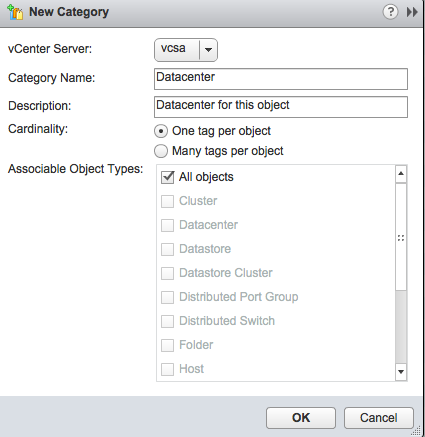
First we need to create the categories. Let’s start with the datacenter. Open the vSphere Web Client, go to HOME and click “Tags” on the left hand side, followed by clicking the “items” tab and “Categories”. Now click “New Category” and enter the following:

vSphere_Web_Client

  • Category Name: Datacenter
  • Description: Datacenter for this object
  • Cardinality: One tag per object
  • Associable Object types: All objects.

Now switch to the “Tags” section and create a the following new tags:

  • Name: DC-1
  • Description: Datacenter Number One
  • Category: Datacenter
  • Name: DC-2
  • Description: Datacenter Number Two
  • Category: Datacenter

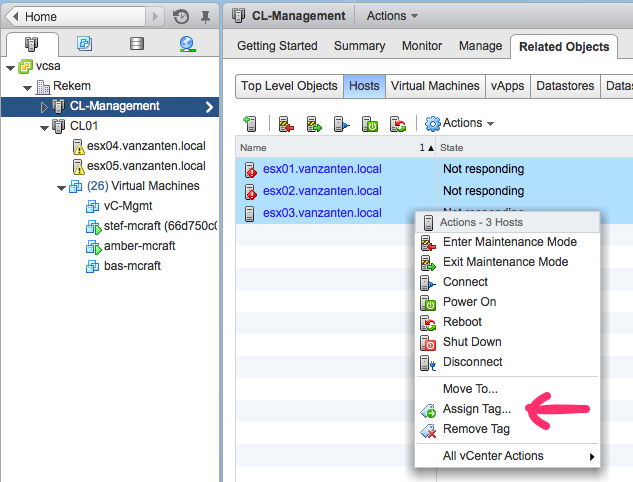
Now navigate to a VM, click the summary tab and see the section called “Tags” and click “Assign….” in the lower right corner of the “Tags” section. Choose the Datacenter “DC-1” tag and you’re done. The same can be done for hosts, datastores, networks, etc. if the Category can be used on those objects that is. It is also very easy to quickly add a tag to multiple objects. For example go to the cluster, select the tab “Related Objects”, click the section “Hosts” and select all hosts, right click and choose “Assign Tag…”.vSphere_Web_Client_2

Reporting on tags

Using tags should make it very easy to quickly find objects that match a given tag, but the search / reporting function isn’t that functional yet. It seems that the “old” search function is moved to the vSphere Web Client without adding functionality for the tags and categories. It is possible to search “for” a tag but not “on” a tag.

For example I want a list of Virtual Machines in DC-1. On the home screen go to the “New Search” section on the left hand side and create a search in the middle pane. Click “Advanced Search” to search for a “Virtual Machine” that satisfies “any” of the following criteria. Strange thing is that in the properties I cannot select a Tag.

The closest thing to getting a list of Virtual Machines from DC-1 is to search for:  “Tag Name” contains “DC-1” and click Search. What happens now is that you get a list of all tags that have “DC-1” in the tag name.  You can now click that tag “DC-1” and get the list of related objects. But you will get all objects with that tag and then in the bottom right, you can choose to export as CSV. In this CSV you then have to filter out all non-VM objects, which is not very convenient.

Work around

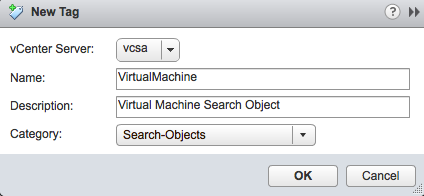
There is a work around that is actually too stupid, but what you can do is created an object tag for each object. If you assign the tag “Virtual Machine” to each virtual machine, you can use that in an advanced search. To do this, create a new category named “Search-Objects” (or anything you prefer) and make it “one tag per object”.

vSphere_Web_Client_3

Now create a new tag named “VirtualMachine” and connect it to the “Search-Objects” categorie. Now go to “New Search” select “Advanced Search” and create the following search:

“Virtual Machine” that satisfies “any” of the following criteria: “Virtual Machine Host Name” contains “*”.

You have to enter something in the criteria line, so I just picked “Virtual Machine host name” but it could have been anything.  Now click search and you will get a list of all Virtual Machines in this vCenter Server.  Select them all, right click and assign them the tag “VirtualMachine”.  You have to select VMs and Templates separately or you can’t assign a tag. Now create a new search:

  • “Everything” that satisfies “all” of the following criteria:
  • “Everything tag name” – “contains” – “dc-1”
  • “Everyhting tag name” – “contains” – “VirtualMachine”

And there you have it, a list of all VMs in datacenter one.

vCenter Attributes migration wizard

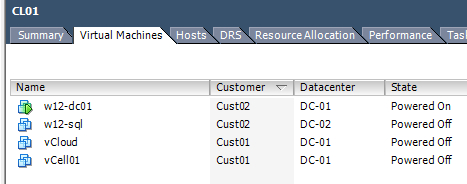
Luckily VMware has offered a migration wizard that will convert the vCenter attributes into tags and categories. Let’s walk through it using the following example. I have two vCenter custom attributes named “Customer” and “Datacenter”.  Using the old Windows vSphere Client, you can see them and their values.

Win7-x86_Tools

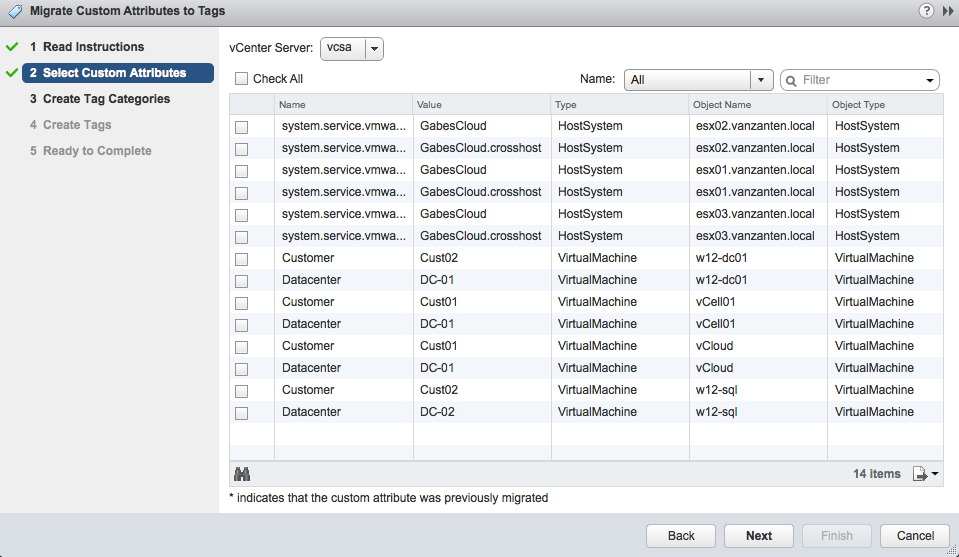
In the vSphere Web Client go to Home, then “Tags” on the left hand side and use the “Getting started” tab. In the middle pane you can now choose “Convert Custom Attributes”. A wizard pops up and in step 2 I get a list of all attributes I can convert. Here I select all the “customer” and “datacenter” entries.

vSphere_Web_Client

Click next and now see the categories that the wizard suggests. By clicking on a category you can edit the category.  After you’re satisfied with the entries, you can click next and see what the tags will be that will be created. Here you can also edit the description.

vSphere_Web_Client-2

Click Next and Finish to complete the wizard. Now check if the VM indeed has these new tags. The wizard does not remove the vCenter attributes.

PowerShell commands

Since VMware PowerCLI version 5.5R1 and up there are a number of commands available to work with tags:

  • Get-Tag
  • New-TagAssignment
  • Remove-TagAssignment

And the –Tag property has been added to many existing commands, for example:

Get-VM -Tag “DC-2″      will list all VMs with a tag “DC-2”.

Conclusion

Working with tags does take some getting used to, but in the end they will give you more freedom and ease of use but I do hope reporting will improve a little in the next version.

See full post at: Time to switch your vCenter attributes to tags

10 Jan 06:42

In-memory OLTP – read_set, write_set, and scan_set

I was looking through some in-memory OLTP DMVs in SQL Server 2014 and came across these in the DMV sys.dm_xtp_system_memory_consumers:
WRITE_SET_LOOKASIDE
SCAN_SET_LOOKASIDE
READ_SET_LOOKASIDE

Thought it might be nice to see how these work, but explain first I’ll explain what they’re about. By the way, a lookaside is just a cache, sometimes of pointers to memory addresses. You’ve probably heard of the L1 and L2 cache built into CPUs.

These sets and their corresponding lookasides have to do with how memory-optimized tables do transactions against multi-version concurrency control (MVCC) tables (memory-optimized tables in SQL Server 2014 use MVCC). The three basic transaction types supported by MVCC tables (lowest to highest isolation) are snapshot, repeatable read, and serializable. In all isolation levels, reads are performed as of the beginning of the transaction. So any of these levels will read rows where the begin-time of the transaction is between the begin-timestamp and end-timestamp of the row.

Snapshot transactions require no additional processing, simply read the correct versions. Repeatable read means that the version you’d read at the end of the transaction must be the same as you’d read at the end. Serializable means repeatable read and in addition, if you’re doing a scan (e.g. select rows where id is between 10 and 20) no new rows in your range were added between beginning and end of your transaction. READ_SET and SCAN_SET have to do with repeatable read and serializable transactions, respectively.

SQL Server MVCC accomplishes the additional checks by **re-reading the rows at commit time**. Sounds expensive. It needs to make this re-reading fast, so instead of doing the whole operation again, repeatable read transactions keep a pointer to each row they’ve read in a READ_SET and check the pointer again at commit time to see if they’re the same. You can see this behavior on a system with no other activity, in sys.dm_xtp_system_memory_consumers.

– execute sys.dm_xtp_system_memory_consumers and check the READ_SET_LOOKASIDE amount
select * from sys.dm_xtp_system_memory_consumers;
– now repeatable read transaction using AdventureWorks memory-optimized table sample
begin transaction
select * from Sales.SalesOrderHeader_inmem with (repeatableread);
commit
– note READ_SET_LOOKASIDE should be bigger
select * from sys.dm_xtp_system_memory_consumers;

For a serializable transaction you need to ensure read consistency with the READ_SET and also ensure scans will produce the same rows and no additional rows with SCAN_SET. Choose a different table if you want to see them both increase, because, if there’s no other changes in Sales.SalesOrderHeader_inmem (from the first experiment) the READ_SET_LOOKASIDE will retain the same rows/same size:

– execute sys.dm_xtp_system_memory_consumers and check the READ_SET_LOOKASIDE and SCAN_SET_LOOKASIDE amount
select * from sys.dm_xtp_system_memory_consumers;
– now repeatable read transaction using AdventureWorks memory-optimzed table sample
begin transaction
select * from Production.Product_inmem with (serializable);
commit
– note READ_SET_LOOKASIDE and SCAN_SET_LOOKASIDE should be bigger
select * from sys.dm_xtp_system_memory_consumers;

So what about the WRITE_SET then? Transactions that update MVCC rows replace the end-timestamp of the rows they update with the transaction ID while the transaction is running. A bit indicates whether the information is an end-timestamp or a transaction ID. The transaction ID also prohibits concurrent updates of the same row (it’s not a lock, transactions that attempt concurrent update will simply fail and roll back the transaction). They’ll also insert new rows with a transaction ID as a begin-timestamp.

Transaction commit happens like this:
Acquire an end-timestamp
Validation (see READ_SET and SCAN_SET above)
Harden to the transaction log
Update the timestamps in the updated/new rows

The WRITE_SET is used to make updating the timestamps fast. Because this entry is getting a bit long, I’ll leave it to the reader to observe WRITE_SET activity using the DMV. And I’ll also leave it to you to figure out how the transaction commit series of events guarantees transactionally consistent data. Hint: edge-cases and additional information is available in my previous blog entries of the subject.

Cheers, @bobbeauch

The post In-memory OLTP – read_set, write_set, and scan_set appeared first on Bob Beauchemin.

09 Jan 22:03

Senior Managers Are the Worst Information Security Offenders

by Unknown Lamer
An anonymous reader writes "As companies look for solutions to protect the integrity of their networks, data centers, and computer systems, an unexpected threat is lurking under the surface — senior management. According to a new survey, 87% of senior managers frequently or occasionally send work materials to a personal email or cloud account to work remotely, putting that information at a much higher risk of being breached. 58% of senior management reported having accidentally sent the wrong person sensitive information (PDF), compared to just 25% of workers overall."

Share on Google+

Read more of this story at Slashdot.


09 Jan 04:14

SQL Server – Simplifying execution plans: Part 5

by Kanchan Bhattacharyya

Hi Friends,


I hope you are finding this series useful and read my previous posts Part1, Part2, Part3 and Part4 where I covered different operators. Today I’m going to talk about two more important plan operators, let’s start right away;

Stream Aggregate and Compute Scalar

Following are MSDN extracts as it describes Stream Aggregate and Compute Scalar;

Stream Aggregate: The Stream Aggregate operator groups rows by one or more columns and then calculates one or more aggregate expressions returned by the query. The output of this operator can be referenced by later operators in the query, returned to the client, or both. The Stream Aggregate operator requires input ordered by the columns within its groups. The optimizer will use a Sort operator prior to this operator if the data is not already sorted due to a prior Sort operator or due to an ordered index seek or scan. In the SHOWPLAN_ALL statement or the graphical execution plan in SQL Server Management Studio, the columns in the GROUP BY predicate are listed in the Argument column, and the aggregate expressions are listed in the Defined Values column. Stream Aggregate is a physical operator.

Compute Scalar: The Compute Scalar operator evaluates an expression to produce a computed scalar value. This may then be returned to the user, referenced elsewhere in the query, or both. An example of both is in a filter predicate or join predicate. Compute Scalar is a logical and physical operator. 


Let us look with an example, how they appear in execution plans?

CSSGQuery

CSSGQueryPlan

We will now decode query plan in text;

CSSGShowPlan


You can clearly observe that aggregation happens because of COUNT(*) operation. In addition, we could observe Compute Scalar on the plan, which is responsible for implicit conversion of COUNT(*) operation.

This is just an illustration and you may observe different behaviors on these operators based on different scenarios.


Merge Join

The Merge Join operator performs the inner join, left outer join, left semi join, left anti semi join, right outer join, right semi join, right anti semi join, and union logical operations and is a physical operator. A merge operator can be used only when both sets of rows are pre-sorted according to the join expression(s). Merge join combines the advantage of hash match and nested loops. It results in low CPU consumption and enables fast output of matched rows for further processing.

Let us join Sales.SalesOrderHeader and Sales.SalesOrderDetail;

MergeJoinQueryNPlan

According to the execution plan, query optimizer performs a Clustered Index Scan on Sales.SalesOrderHeader and Sales.SalesOrderDetail tables. I did not specify a WHERE clause hence a scan is performed on each tables to return result-set, then all rows from both the tables are joined using Merge Join. When we look at the ToolTip of Merge Join operation (shown in screenshot below), it is observed that SalesOrderID column used to join both the tables.

MergeJoinToolTip

Query used for this demo joined cluster index of both the tables. As clustered index sorted in the order of clustered keys, it covers all queries and thus used to retrieve any column in the table that are specified in SELECT statement. Note, even SELECT * won’t require any additional lookups. Bear in mind, when we select all columns, both the tables needs to be loaded in memory and needs to send over network so there could be a performance overhead so better to specify the required ones. One important point to note here is; when the join columns are presorted but if the join columns are not presorted; query optimizer has the option of EITHER;

  • Sorting the join columns first then performs a Merge Join

             OR

  • Performing a less efficient Hash Join

The query optimizer checks for all the options and then chooses the execution plan that uses the least resources.


Stopping here today; I will be back with next part soon with some more operators.


If you liked the post, do like us on Facebook at http://www.FaceBook.com/SQLServerGeeks

Have a SQL Server question? Join the fastest growing SQL Server Facebook group at: http://www.facebook.com/groups/458103987564477/


Regards,

Kanchan

09 Jan 04:14

SQL Server 2014 In Memory OLTP: Memory-Optimized Table Types and Table Variables

by SQL Server Team

SQL Server 2014 In-Memory OLTP introduces two new widely advertised kinds of database objects: memory-optimized tables for efficient data access, and natively compiled stored procedures for efficient query processing and business logic execution. However, there is a third kind of object introduced by In-Memory OLTP: the memory-optimized table type.

The use of memory-optimized table variables has a number of advantages over traditional table variables:

  • The variables are truly in memory: they are guaranteed to never spill to disk.
  • Data access is more efficient due to the same memory-optimized algorithm and data structures used for memory-optimized tables, especially when the variables are used in natively compiled stored procedures.
  • Finally, with memory-optimized table variables there is no tempdb utilization: table variables are not in tempdb, and do not use any resources in tempdb.

The typical usage scenarios for memory-optimized table variables are:

  • Storing intermediate results and creating single result sets based on multiple queries in natively compiled stored procedures.
  • Passing table-valued parameters into natively compiled stored procedures, as well as traditional interpreted procedures.
  • As replacement for traditional table variables, and in some cases for #temp tables that are local to a stored procedure.  This is particularly useful if there is a lot of tempdb contention in the system.

Like memory-optimized tables, SQL Server generates a DLL for each memory-optimized table type. As is the case for memory-optimized tables, the DLL includes the functions for access indexes and retrieving data from the table variables. When a memory-optimized table variable is declared based on the table type, an instance of the table and index structures corresponding to the table type is created in the user session. The table variable can then be used in the same way as traditional table variables: you can insert/update/delete rows in the table variable, and you can use the variables in T-SQL queries. You can also pass them into natively compiled as well as traditional stored procedures, as table-valued parameters (TVP).

The following sample shows a memory-optimized table type from the AdventureWorks-based In-Memory OLTP sample.

CREATE TYPE [Sales].[SalesOrderDetailType_inmem] AS TABLE(

      [OrderQty] [smallint] NOT NULL,

      [ProductID] [int] NOT NULL,

      [SpecialOfferID] [int] NOT NULL,

      [LocalID] [int] NOT NULL,

      INDEX [IX_ProductID] HASH ([ProductID])

            WITH ( BUCKET_COUNT = 8),

      INDEX [IX_SpecialOfferID] HASH ([SpecialOfferID])

            WITH ( BUCKET_COUNT = 8)

)

WITH ( MEMORY_OPTIMIZED = ON )

As you can see, the syntax is very similar to traditional table variables. A few things to keep in mind:

  • The option MEMORY_OPTIMIZED=ON indicates that the table type is indeed memory-optimized.
  • The type must have at least one index. Like with tables, supported index types are hash and nonclustered.
    • Keep in mind that for a hash index the bucket_count should be about 1-2X the number of expected unique index keys. Over-sizing is usually better than under-sizing: if sometimes you insert only 2 values in the variables, but sometimes insert up to 1000 values, it’s usually better to specify BUCKET_COUNT=1000.
  • The restrictions on memory-optimized tables related to data types and constraints also apply to memory-optimized table types. For example, in SQL Server 2014 default constraints are supported, but check constraints are not.
  • Like memory-optimized tables, table variables do not support parallel plans.
  • Like memory-optimized tables, table variables must fit completely in memory – there is no spill to disk.
  • Traditional table variables exist in tempdb. In contrast, memory-optimized table variables exist in the user database.
  • Memory-optimized table types need to be specified explicitly using a CREATE TYPE statement. Specification in-line with the variable declaration is not supported.

Table-Valued Parameters

The following example script shows declaration of a table variable as the memory-optimized table type Sales.SalesOrderDetailType_inmem, insert of three rows into the variable, and passing the variable as a TVP into Sales.usp_InsertSalesOrder_inmem.

DECLARE @od Sales.SalesOrderDetailType_inmem,

      @SalesOrderID uniqueidentifier,

      @DueDate datetime2 = SYSDATETIME()

 INSERT @od (LocalID, ProductID, OrderQty, SpecialOfferID) VALUES

      (1,888,2,1),

      (2,450,13,1),

      (3,841,1,1)   

EXEC Sales.usp_InsertSalesOrder_inmem

      @SalesOrderID = @SalesOrderID,

      @DueDate = @DueDate,

      @OnlineOrderFlag = 1,

      @SalesOrderDetails = @od

Note that memory-optimized table types can be used as the type for stored procedure table-valued parameters (TVPs), and can be referenced by clients in exactly the same way as traditional table types and TVPs. Therefore, invocation of stored procedures with memory-optimized TVPs, and indeed natively compiled stored procedure, works exactly the same way as the invocation of traditional stored procedures with traditional TVPs.

Cross-Database Queries

In SQL Server 2014, memory-optimized tables do not support cross-database transactions. This means you cannot access another database from the same transaction or the same query that also accesses a memory-optimized table. This means you cannot straightforwardly copy data from a table in one database, to a memory-optimized table in another database.

Table variables are not transactional. Therefore, memory-optimized table variables can be used in cross-database queries, and can thus facilitate moving data from one database into memory-optimized tables in another. The idea is to use two transactions: in the first transaction you insert the data from the remote table into the variable; in the second transaction you insert the data into the local memory-optimized table from the variable.

For example, if you want to copy the row from table t1 in database db1 to table t2 in db2, using variable @v1 of type dbo.tt1, you would use something like:

USE db2

GO

DECLARE @v1 dbo.tt1

INSERT @v1 SELECT * FROM db1.dbo.t1

INSERT dbo.t2 SELECT * FROM @v1

GO

09 Jan 04:11

Finding a Deadlocked SQL Server Agent Job Name

Short and simple post – filed under “Joe – you’ve already forgotten about this twice, so write this down somewhere.”

Let’s say you have deadlock output that shows the following information for the “clientapp” attribute:

clientapp=SQLAgent – TSQL JobStep (Job 0xB813B96C59E6004CA8CD542D8A431A2E : Step 1)

Based on this output, we know a SQL Server Agent Job is involved, but what is the SQL Server Agent Job name?

Tested on SQL Server 2012 SP1, I can find it with the following query:

SELECT  [job_id] ,
        [name]
FROM [msdb].[dbo].[sysjobs]
WHERE [job_id] = 0xB813B96C59E6004CA8CD542D8A431A2E;
GO

I’ve forgotten about this twice over time because the job_id uses a uniqueidentifier data type (in this example, the job_id value is 6CB913B8-E659-4C00-A8CD-542D8A431A2E).  And as an aside, the query execution plan shows a CONVERT_IMPLICIT as I would expect and uses a Clustered Index Seek.

The post Finding a Deadlocked SQL Server Agent Job Name appeared first on Joe Sack.

09 Jan 04:11

SQL Server 2014 memory-optimized table variables – metadata and garbage collection

I’d been doing some experimentation with memory-optimized table types in SQL Server 2014 and thought it was about time to write about it. Yesterday however, there was an excellent post on them at SQL Server team blog. So I’ll stay away from restating their points for the most part, and encourage you to read their post.

First off, although you can use memory-optimized table variables outside of compiled stored procedures, I think the biggest use for them will be in compiled procedures, mainly because compiled procedures don’t support #temporary tables. So, everywhere folks use and abuse temp tables, they’ll be using memory-optimized table variables as a replacement. Be careful of this however, because memory-optimized table variables, like “ordinary” table variables, have no statistics and, absent of an OPTION RECOMPILE hint, other SQL statement always use an estimate of one row for them.

Memory-optimized table variables must be strongly typed, so you start by creating a table type with the CREATE TYPE DDL statement. You can’t use a durability specification in this statement, but that only makes sense, because memory-optimized table variables are non-durable by definition. They don’t participate in availability group failover. The compiled code module for them is created at CREATE TYPE time and uses a naming conversion for a ‘v’ in the name (e.g. xtp_v_15_277576027.dll), rather than ‘t’ for memory-optimized table modules or ‘p’ for compiled procedure modules. Because there is no data load at SQL Server startup, this module isn’t created after a instance restart until the first time its used to create a variable.

It’s important to realize that these table variables don’t live in tempdb; they live in the memory-optimized object space of the database in which they are created. This takes pressure off tempdb, but they can compete for memory with other memory-optimized objects in the same database. In a short test, as I was doing a bunch of inserts into a memory-optimized table, I instanciated a memory-optimized table variable and filled it with a large number of rows. The inserts into the table (not the table variable) started failing because the combination exceeded my memory allocation for optimized objects in that database. It’s also possible for a series of memory optimized variables that are active at the same time to exceed the memory allocation and fail due to lack of memory. Granted that because table variables are usually kept to a small number of rows and have a limited lifetime, this may not be an big issue; my concern was the proliferation that could result because they replace temp tables in compiled stored procedures.

There are a few more surprises. Individual memory-optimized table variables have no metadata like “ordinary” table variables do, so you can’t tell how many you have active at a time by consulting the metadata. They do appear in sys.dm_db_xtp_memory_consumers as memory_consumer_type of PGPOOL. This consumer is “used for all table variables and includes usage for serializable scans” according to the BOL description of that DMV. However, the pool doesn’t appear in sys.dm_db_xtp_table_memory_stats at all. This means that it doesn’t appear in the SSMS “Memory used by memory-optimized objects” report, even under the “system allocated memory” category. This is useful to know if you use the report or sys.dm_db_xtp_table_memory_stats to monitor usage.

Finally, about memory-optimized table variables and garbage collection. Although these variables may participate in garbage collection during their lifetime (e.g. for updates or deletes), when the variable goes out of scope, the memory it used is released in it’s entirety (sys.dm_db_xtp_memory_consumers/used_bytes goes to zero). There is a small amount of memory (up to ~62.5 mb or so, in my tests) that remains allocated in this pool after the last variable goes out of scope, but under low-memory conditions, even this is given back.

Bear in mind that this is all based upon observed behavior in SQL Server 2014 CTP2 and may change by RTM. If it does, I’ll update this post.

Cheers, @bobbeauch

The post SQL Server 2014 memory-optimized table variables – metadata and garbage collection appeared first on Bob Beauchemin.

09 Jan 03:13

CodeSOD: Dropped Catch

by Remy Porter

Alex still has some VB6 code lurking in his environment. Like too much VB6 code, it’s littered with On Error Resume Next statements, which allow lazy programmers to simply ignore errors. It’s an easy way to make crash-proof applications in VB6.

One of their database programmers decided to compete with that anti-pattern . This programmer wrote a huge pile of database triggers which looked like this:

CREATE TRIGGER [dbo].[AccountOnInsertOrUpdate]
    ON [dbo].[Account]
    AFTER INSERT,UPDATE
AS
BEGIN
    BEGIN TRY
        SET NOCOUNT ON;

        DECLARE @CurrentUserID NVARCHAR(30) = dbo.getCurrentUserID()
        DECLARE @Now DATETIME = GETDATE()
        -- Update if deleted records exist, otherwise insert.
        DECLARE @Action CHAR = CASE
            WHEN (SELECT COUNT(1) FROM deleted) = 0
            THEN N'i'
            ELSE N'u'
            END

        INSERT INTO audit.Account
            SELECT @CurrentUserID, @Now, @Action, u.*
                FROM (SELECT * FROM inserted
                    EXCEPT SELECT * FROM deleted) AS u
    END TRY
    BEGIN CATCH 
        ROLLBACK TRANSACTION
        DROP TRIGGER dbo.AccountOnInsertOrUpdate
    END CATCH
END

Yes, if the trigger ever throws an error, it simply ceases to exist. Alex checked, and the trigger is still there… for now.

[Advertisement] BuildMaster 4.0 is here! Check out the brand-new UI and see how you can deploy directly from TeamCity (and other CI) to your own servers, the cloud, and more.
09 Jan 03:13

Web Services...The COBOL Way

by snoofle

In the beginning, you had to meticulously write out your assembly language computer program - instruction by instruction - and then flip switches to enter it into the computer. Fast forward a few years and FORTRAN made its entrance. It was highly useful, but not for business applications. A bit later, COBOL came along, and the business folks were off and running. With this miracle-language, they could design records that all looked alike so that they could be fed through a simple sieve and processed at the blazing speed of the day. The software wouldn't need to handle special cases because every record would be exactly the same.

Although many other languages came along in the 1970's and beyond, at Catastrophic Automation Inc., H. P. observed that everyone knew that COBOL was the only real choice for developing enterprise-class software.

It was solid engineering in the seventies, and when you get down to it, not much has changed since then.

This is because COBOL was based on the only data structure anyone would ever need: the fixed width record. Every client record with everything it entailed, consisted of exactly 2000 EBCDIC characters, as was decided long ago. The first 40 bytes were the client first name, the next 30 the last name, etc. This structure had survived in-tact through the 80's and 90's because, if we're to be honest, nobody really needs those accents in their name, and it's not like there would ever be a need to store any additional information, right?

Around the year 2000, a new technology had made its way into the mainstream, and it created an issue that needed working around. You see, those new-fangled e-mail addresses had to be stored somewhere too. A decision was made by the COBOL data analysts: email addresses could have at most 50 characters (EBCDIC only). Any email address that was longer than 50 characters would be arbitrarily truncated.

Now this might seem a bit harsh, but realistically, the company had trained the Postal Service to figure out and deliver mail with truncated street addresses many years ago. Eventually, the Postal Service simply gave up trying to get people to put the whole address on the envelope, and simply accepted cut-off street addresses; the computers couldn't process them, but humans looking at the parcel could figure it out and get them to their proper destination. Those modern-day internet postmasters would just have to accept the realities of enterprise class software and be taught to deal with truncated email addresses in the same way.

Even so, customers were annoyed and users were grumbling. Worse, around 2010 the last Visual Basic and Delphi programmers were finally converted to C#. As a consequence of this, management felt that the time was ripe for a bold new initiative: a happy marriage had to be forged between the C#-ies, the Javans, and the COBOLists. The strategy was simple: since the Javans and C#-ies had web services, the COBOLists would have web services too. Only the latest technologies and methodologies would be used. After all, if you're going to modernize, you may as well go all-in and do it properly!

The COBOList data analysts were highly confident in their abilities to take on this new mission. After all, they were trained professionals with decades of experience designing large scale COBOL systems; how hard could it be to design web services? Input from the other analysis teams was not required, because the COBOList data analysts told management that they could easily handle it.

About a month later, the first iteration of the first cross-platform COBOL web service specification was handed to a C#-ie. Henceforth, every web service would be created with the following pattern: each supported operation would have one string as input and return one string. Both strings would be exactly 2000 characters long - in EBCDIC. The first 40 characters of the input string would be the client first name, the next 30 the client last name, ...

[Advertisement] BuildMaster 4.0 is here! Check out the brand-new UI and see how you can deploy directly from TeamCity (and other CI) to your own servers, the cloud, and more.
09 Jan 03:08

This Woman Purposefully Made the Worst Online Dating Profile Ever and Still Received Tons of Messages From h0rny Dudes

This Woman Purposefully Made the Worst Online Dating Profile Ever and Still  Received Tons of Messages From h0rny Dudes

Check the article for the full story. For the record: 150 messages in 24 hours.

We all deserve better than this, folks.

Submitted by: Unknown (via Cracked)

Tagged: crazy , online dating , SMH , cringe , dating
09 Jan 02:56

5 gadgets that have changed my life

by Jerry Nixon

imageI think I am pretty high tech. I have an electric blanket, I listen to internet radio, I carry a smartphone, I stream movies to my television, I talk to my car, and I’m a Technical Evangelist – it’s part of the job description.

Sorting out the chaff

As time passes, I buy and throw away gobs of technology. Lots of it is fun. Lots of it sucks. For example, I purchased the Google ChromeCast. Oh, the fun of talking to my television from my computer. It’s in a closet now. Useless. This article isn’t about gadgets that are fun but useless. This article is about life-changing gadgets.

Diamonds in the rough

By now, I have started to settle in on some key technologies that have changed the way I live. Made it better. Made it easier. Things that, should I lose them for any reason, I would immediately replace them. Essentials.

Acknowledgement

Some people don’t think that technology is essential in any way. Those people are right. Clean air, food, water, and safety are true essentials. Having said that, these are first-world essentials. And, here are my top 5.

Number 1: Multiple Monitors
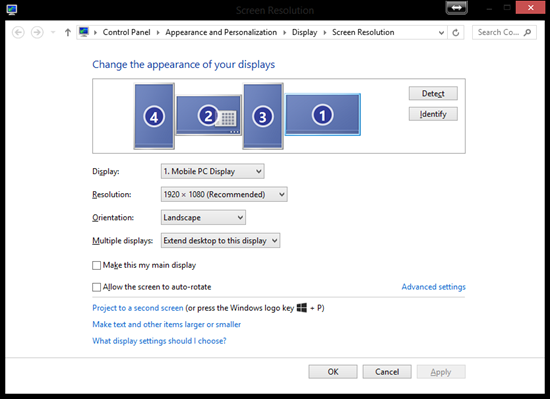
image

As mundane as it may sound, it is the multiple-monitor that easily deserves the first place on this list. It is not the most novel technology anymore, but it is certainly the one I use every single day and miss the most when it is gone. For me, two monitors is just the beginning – three is the bare minimum.

Approach 1: Video Card
To drive multiple monitors, the first way is to get a nice video card. In my case when I drive monitors from my desktop, I drive them using my Radeon XFX HD 6970 width 2 GB of onboard RAM – which supports 4 monitors. Anymore, this isn’t uncommon; when I got it, it was like ordering a moon lander.

Note: there is zero question that this is the only solution suited to PC gamers. That’s because it takes hardware like this to drive the frame rates that gamers enjoy. If you are using Excel, writing Word documents, or just watching Hulu – this might be a little like cracking nuts with a steam roller.

Caveat: Let the casual user beware. Such a video card will likely require you to purchase a new power supply. A new poser supply can be purchased and installed by you for around $50 or at Staples for about $100. The cost of the Radeon is about $500, so go ahead and think of it as $600 – if you get this one.

Approach 2: DisplayLink

image

To drive multiple monitors, the second way is to use USB DisplayLink devices. This is one of my favorite inventions. It allows for 3 external monitors for my laptop! These are simple to setup; no setup at all. They do the job – but do introduce some CPU cost; most of the work is offloaded to the processor. But, who cares. It works like a charm and only cost $50/each.

Note: I use Windows 8.1 Professional. The DisplayLink drivers are all up-to-date and support every version of Windows I have ever used. In fact, even during beta, the DisplayLink drivers are released as pre-release for us to use. This is the same tech in universal laptop docking stations.

Number 2: Internet Radio
image

I love music. I am not an audiophile, for sure. But I love music, and I can hardly stand it when the room is completely silent. At the same time, I am not 100% into setting up playlists. So, I also love Pandora which does a magical job of guessing what I like to hear and introducing me to new music.

In my kitchen is the Logitech Squeezbox Internet Radio. This little marvel has excellent sound, a stunning user interface, and just freaking works. The support for this device is amazing. There are tons of apps, and awesome advanced features like the ability to synchronize two of them to the same stream.

The best part of this gem is that it has a built in battery that lest be grab it, unplug it, and take it out to the deck so we can have some background tunes while we grill with some friends. The presets can go directly to my favorite Pandora stations, as well as play from my own, local  DLNA server if I want, but I don’t – it’s all Pandora for me. And, did I mention the sound?

Back in October of 2008, I started my Squeezebox family with the two-speaker Boom edition. And, who wouldn’t with Duran Duran on the demo photo. This device is still prominently hidden in my family room and synchronizes it’s deep, full sound with the smaller, one-speaker version in the kitchen. During a party, the house is an experience itself as you walk around, music following you.
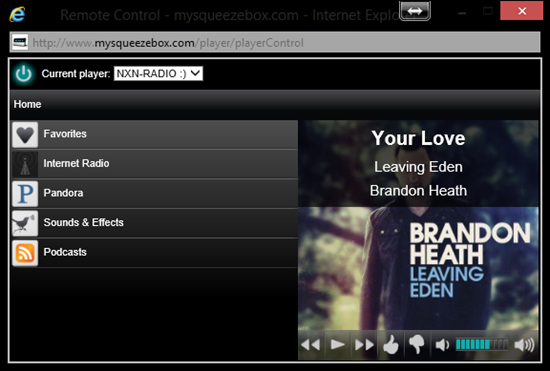
image

The icing on the cake for this device is it’s ability to be remote controlled over the internet at http://mysqueezebox.com. Are the kids downstairs listening to something a little too loud? No problem. I log in and turn it down a bit. It’s the sort of nerd-trapping that can really hook me. And, it did.

CAVEAT: as far as I can tell, Logitech has discontinued the Squeezebox brand – and the new UE radio versions. Though they still offer support with regular software updates, I think if I were starting this journey today, I might… nope, I would still get a Squeezebox. After all, I can get a used one for $79. And it’s a perfect device. There are alternatives almost identical if you like.

Number 3: Digital Deadbolt

image

I am the type of guy who can remember the nuanced specification of an operating system’s API but can’t tell you where my keys are. It’s just one of those things. As a result, we use the Schlage Deadbolt Keypad on our front door. I went through several brands and models before I found one that would not be too complicated to use, too prone to error, or too hungry for batteries.

This issue about batter is a real one. Most of the digital deadbolts out there suck. They have a small servo inside them that when the correct code is entered they unlock the door. It’s a terrible design. It’s noisy, typically fails, and quickly drains the battery. This design lets the bolt’s knob turn freely; enter the correct code and the knob locks to the bolt and the user unlocks the door. Perfect.

In my opinion, the lock is visually innocuous. Visitors to my house might notice it in passing, but it’s not “technology in your face”. The best benefit for me isn’t just never being locked out of my house again, it’s letting my children be able to get into our locked house without giving them a key to lose.

Caveat: the lock supports many different codes. It’s up to you if you share your code with your children, neighbors, or anyone. A code can be copied far easier than a key. If you re in a vulnerable neighborhood, then you might not want to share your code with a single person. I don’t know.

image

Similar in concept is keyless entry on my car. I drive a Ford Expedition – a nice all wheel drive car that fits my family and my mountainous terrain. What’s great about fords is that their keyless entry does not require a key fob, my wallet or anything else. I can walk up to my car completely unprepared and get in. Someone with my personality type, I have decided, will always buy a Ford because only Ford has such a keyless system.

Number 4: Phone wallet

image

This is less of a high-tech gadget as much as it’s a high-tech gadget accessory. Again, to remind you, I am the type of guy who can recite the asynchronous interface requirements for C#, but might spend an hour a day looking for my wallet. It’s just how I am wired to lose my wallet.

But, ironically, I never lose my phone. For one, I tend to want my phone more than I want my wallet. I don’t check email on my wallet. Plus, I use carry a Microsoft Windows Phone which has sever “find me” functions like “Locate” and “Ring” built right into the operating system. It would be a struggle to lose my phone, as long as it has any battery at all.

This awesome phone wallet means that if I never lose my phone, I never lose my wallet. In fact, if I ever lose my wallet, I can call it! It is a life-saver, and for the past 4 months, I have enjoyed this new accessory. It’s difficult to imagine a good life without this. It’s beautiful leather, and smaller than you think.

One thing worth noting about this wallet is that it has a built in hard case for my phone. It’s glued or something to the leather. Best of all, it’s made specifically for my phone and hugs it gently and tightly as use my wallet or the phone’s camera – for which there is a custom-cut hole on the back.

REALITY CHECK: I hate thick wallets (remember that Seinfeld episode?), but putting my phone in my wallet has guaranteed it is thick. This is just something I have had to accept, and it came easy.

In addition, I have had to rethink what I put in my wallet; I want to keep this beauty as thin as possible. It turns out, I really didn’t need all I was carrying. For example, I keep my Sam’s Club card in my glove box now. Why did I ever carry that? So much other crap was offloaded, too. It’s a new lease on life!

Number 5: Wireless sound

image

I have the small, red Jawbone, bluetooth Jambox. This has been the season of bluetooth, wireless speakers. Seems like they are on sale everywhere. And, though I am certainly not saying that the other speakers are not great, I am saying that the Jambox is awesome.

Let’s consider the reason to have a wireless speaker in the first place.

You go to the beach in Mexico. You want to play some music because after several hours of sitting around, you’re ready for some audible distraction. Your smartphone is in your bag. You have tons of music on your phone. But your phone’s speaker could never compete with the Pacific ocean. Presto.

You go on a road trip in an RV with a family down the street. You are on the road for hours playing endless hands of Euchre at the kitchen table which does not have a radio (the radio is up front). You can stream Pandora over your phone, but the road noise would muffle your phone’s speaker. Presto.

You go to Grandma’s for Christmas every year having to listen to the same bad music from the same 1980’s, crappy “sound system”. This year, you want some real Christmas music and you want to hear the whole range of sound. Your Surface can stream Xbox Music for you but it’s not loud enough. Presto.
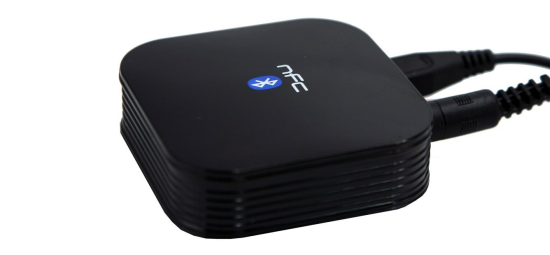
image

I’ve already mentioned that I carry a Microsoft Windows Phone. But, more specifically, I carry a Nokia Lumia 920 which has NFC. NFC is sort of like RFID in that it lets two mostly-passive devices talk to each other. That’s important.

This little bonus device. This is a bluetooth receiver that plugs into any microphone or 3/4 inch input jack. It’s powered by bluetooth which means you can basically turn any car into a bluetooth-enabled car. You can take it to grandma’s and stream Pandora right to her old-time cassette player. Needless to say, this beauty is a staple for my travel bag.

What’s best here is that the bluetooth pairing is virtually brain-dead automatic thanks to the fact that this receiver is NFC-enabled. Just tap your Lumia to the receiver and the pairing is complete. Then, start streaming. It really is one of those devices that works the way you would want technology to work.

Conclusion

It was super-difficult to stop with 5 devices. I have tons of little gadgets that I use every day and love. Devices that I didn’t list above, but that I might mention here, so I am not tempted to blog another article like this:

  1. Nokia DT-900 Wireless Charging Plate
  2. Buffalo LinkStation Pro Duo Network Attached Storage
  3. Soft Heat Micro-Plush Electric Mattress Pad
  4. NETGEAR Powerline Ethernet Adapter Kit
  5. Samsung 840 Pro Series Solid State Drive
  6. Electrolux Bagless Handheld Vacuum
  7. Wiremold Charging Center For Mobile Devices
  8. Velcro Cable Ties, 100 per Pack
  9. ClearOptix Gaming Glasses
  10. PowerLine 2Amp Four Port USB AC Adapter

There, now I feel better. Those ten help round out some of the gizmos I use every single day. Some of them are less “family”-oriented, but they are surely in the category of things that make my life better.

Would you add anything to my list?