Shared posts

28 May 13:26

The Primary Filegroup Cannot be Backed Up as a File Backup

by Tim Radney

File Group backups are great when working with very large databases (VLDB’s) that have been partitioned.  Typically when I come across File Group backups implemented in production the database is using the full recovery model. With the full recovery model you can specify individual file groups for backup. A very common backup strategy for VLDB’s is to partition the non-changing data to secondary file groups so that only current data is being written to the primary file group.  This allows for a more efficient backup solution as well as recovery plan.  Performing file group backups allow for a piece meal restore meaning you can bring data back online in order of importance.  Backing up an individual file group can be done using syntax much like:

BACKUP DATABASE DB_NAME FILEGROUP = ‘PRIMARY’ TO DISK = ‘PATH:\DB_NAME.BAK”

This TSQL statement will work if the database is utilizing the full recovery model, but what if the recovery model is in simple? In that case specifying FILEGROUP = ‘PRIMARY’ would not work.  You would get a message that states

Msg 3004, Level 16, State 1, Line 19
The primary filegroup cannot be backed up as a file backup because the database is using the SIMPLE recovery model. Consider taking a partial backup by specifying READ_WRITE_FILEGROUPS.
Msg 3013, Level 16, State 1, Line 1
BACKUP DATABASE is terminating abnormally.

How would you backup the primary file group?

In this case you would need to specify ‘READ_WRITE_FILEGROUPS’ in the statement.

BACKUP DATABASE DB_NAME READ_WRITE_FILEGROUPS TO DISK = ‘PATH\DB_NAME.BAK’

If your secondary file groups are not read-only then they would also be backed up. If you are not writing data to those secondary file groups then you should consider marking them read-only.  There are added benefits to them being read-only in addition to this backup methodology.  You can read more about that here http://technet.microsoft.com/en-us/library/ms190257(v=sql.105).aspx


Share

28 May 13:25

Nasty day-1 bug causing page checksums to miss corruptions on 2008 R2/2012/2014

Over the last few weeks I’ve been investigating a series of customer corruption issues (on one customer’s system) where it appears that the page checksum algorithm is missing a combination of DWORD bit flips, caused by another (Query Processor) bug that’s been introduced in recent builds of SQL Server 2008 R2, SQL Server 2012, and SQL Server 2014 (on 2014, most likely when using a readable AG secondary).

I’ve gone back-and-forth with my good friends in Product Support and the Product Group quite a bit and we’ve decided to publicize the issue before more people find they have unrecoverable corruption because of this. I’ve been told that this will be fixed ASAP for all three versions, but it isn’t going to delay the RTM and general release of 2014. I’ll blog details as soon as I know.

So what’s the bug?

Well, it involves the way the page checksum algorithm aggregates values. It turns out that a certain repeating bit pattern on adjacent words can cause the Fletcher’s Checksum algorithm (the one that’s used – it’s way cheaper than a full CRC-based checksum – see this Wikipedia link) to fail because of the order insensitivity of the algorithm (it’s explained in the Wikipedia link, under the section Weaknesses of Simple Checksums) and the fact that it can’t distinguish between a block of zeros and a block of ones (described in the main Weaknesses section). The SQL Server implementation was supposed to work around that problem (making it more like a traditional Adler’s Checksum, from which the Fletcher’s Checksum is derived), but obviously it doesn’t work entirely correctly.

The bug hasn’t come to light until now because there has never been a possibility of having these bit patterns adjacent in a data value that would have a page checksum on, or at least it’s been highly unlikely and we all just got lucky. Now that the main Query Processor bug exists, it’s able to persist these bad values because of the page checksum hole. It’s just a nasty combination.

To make matters worse, unfortunately DBCC CHECKDB also has an issue where it also fails to spot this corruption. DBCC CHECKDB uses the buffer pool to do all it’s I/O, and because the page checksum comes back clean (from the broken algorithm), DBCC CHECKDB does a reduced-scope page audit, and so misses the new corruption problem. That issue has been there since my rewrite in SQL Server 2005.

So it’s really a trifecta of nasty bugs, only two of which I’m responsible for (the Query Processor bug is new). I can only apologize I guess.

And the final kicker is that because the page checksum algorithm is compromised, backup checksums also don’t find the problem so most people’s 2008 R2/2012/2014 backups are also corrupt. Even restoring the backup and running DBCC CHECKDB won’t find the problem because of the page checksum bug I describe above.

It’s a pretty sucky combination that’s going to cause a lot of hassle for people to figure out whether they’ve been affected or not. From what we can tell, many people will have undetectable corruption that will continue to get worse until it causes query failures or the Storage Engine sets the database offline. It seems to be more common with OLTP query patterns so far, and 7 of our long-term clients have discovered they have this ‘undetectable’ corruption after I checked them all last week.

How can you tell if you have the corruption?

It’s not a simple test to figure out whether you have the problem, but with some luck you may be able to spot it. I know how to find it using a hex editor to search through data files (which I’ll explain below) and I’ll write some code that uses DBCC PAGE … WITH TABLERESULTS and some post-processing once I have a 100% accurate test and then I’ll blog the code.

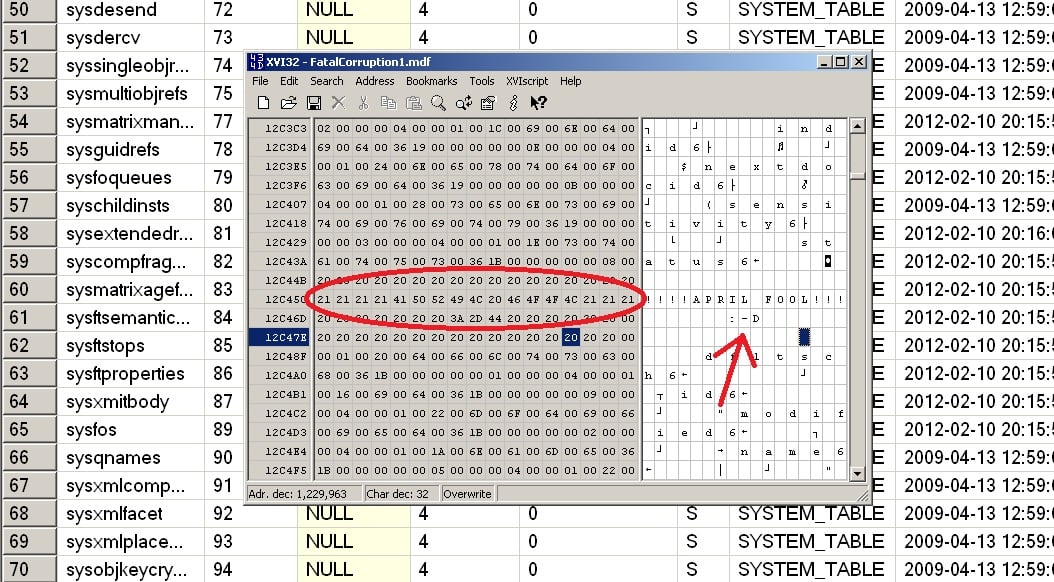
In the meantime, here’s an example using XVI32 (note that XVI32 will truncate data files larger that 2GB so you’ll need to use my other favorite freeware hex editor HxD).

You need to set the database you suspect (I’d test all of them to be sure, including master, but you don’t need to check msdb) to be offline and then open it with your hex editor. Then you need to search for the bit pattern of all ones followed by all zeroes, for 32-bits each.

Here’s an example from a 2012 database:

fool Nasty day 1 bug causing page checksums to miss corruptions on 2008 R2/2012/2014

Summary

You really think there would be day-1 bugs in DBCC CHECKDB and the page checksum algorithm? Oh ye of little faith!

Have a great day :-)

The post Nasty day-1 bug causing page checksums to miss corruptions on 2008 R2/2012/2014 appeared first on Paul S. Randal.

28 May 13:23

SQL Server 2014’s new cardinality estimator (Part 1)

by JackLi

One of the performance improvement in SQL Server 2014 is the redesign of cardinality estimation. The component which does cardinality estimation (CE) is called cardinality estimator. It is the essential component of SQL query processor for query plan generation. Cardinality estimates are predictions of final row count and row counts of intermediate results (such as joins, filtering and aggregation). These estimates have direct impact on plan choices such as join order, join type etc. Prior to SQL Server 2014, cardinality estimator was largely based on SQL Server 7.0 code base. SQL Server 2014 introduces new design and the new cardinality estimator is based on research on modern workloads and learning from past experience.

A whitepaper planned by the SQL Server product team will document specific scenarios where new and old cardinality estimators differ. We will follow up with a later blog post when that paper is released. Additionally, Juergen Thomas has posted an overview of the feature on "Running SAP on SQL Server blog".

In this blog, we will provide a quick overview about controlling the SQL Server 2014 feature, guidelines on troubleshooting issues. We have plans to release more blog posts related to SQL Server 2014 new cardinality estimator in the future.

One of the goals for this blog post is to help make customers aware of this feature for upgrades and new deployments as query plans may change. We encourage users test sufficiently prior to upgrading to avoid performance surprises.

New deployments vs upgrade

SQL Server 2014 uses database compatibility level to determine if new cardinality estimator will be used. If the database compatibility level is 120, new cardinality estimator will be used. If you create a new database on SQL Server 2014, compatibility level will be 120. When you upgrade or restore from a previous version to SQL 2014, a user database compatibility level will not be updated. In other words, you will continue to use old cardinality estimator in upgrade and restore situations by default. This is to avoid plan change surprises for upgrades. You can manually change the compatibility level to be 120 so that new cardinality estimator can be used. Please refer to online documentation on how to view and change database compatibility level. Be aware that changing database compatibility level will remove all existing query plans from the plan cache for the database.

Please note the following:

  1. Which version of cardinality estimator to use is based on current database context where the query is compiled even if the query references multiple databases. Let's assume you have db1 with compatibility level of 120 and db2 with compatibility level of 110, and you have a query that references two databases. If the query is compiled under db1, new cardinality estimator will be used. But if the query is compiled under db2, old cardinality estimator will be used.
  2. Regarding system databases and upgrade, the compatibility levels of model, msdb and tempdb will be changed to 120 following the upgrade to SQL Server 2012.  But the master system database retains the compatibility level it had before upgrade per online documenation.  Therefore in upgrade scenarios, if your query is compiled under the context of master, old cardinality estimator will be used, but new cardinality estimator will be used for a query compiled under the context model, msdb, or tempdb.

  3. If your query references temporary tables, the database context under which the query is compiled determines which version of cardinality estimator to be used. In other words, if your query is compiled under a user database, the user database compatibility level (not tempdb) will determine which version of cardinality estimator to be used even though the query references temp table.

How to tell if you are using new cardinality estimator

There are two ways you can tell if new cardinality estimator is used.

In the SQL 2014 XML plan, there is a new attribute in StmtSimple called CardinalityEstimationModelVersion. When the value is 120, it means the new cardinality estimator is used. If the value is 70, it means the old cardinality estimator is used. This new XML attribute is only available for SQL 2014 and above (see screenshot below).

If you start capturing a new SQL Server 2014 XEvent called query_optimizer_estimate_cardinality, this event will be produced during compilation if new cardinality estimator is used. If the old cardinality estimator is used, this XEvent won't be produced even if you enable the capturing (see a screenshot below). We will talk more about how to use this XEvent to help troubleshoot cardinality issues in future blogs.

Additional ways to control new cardinality estimator

In addition to database compatibility level, you can use trace flags 2312 and 9481 to control if new or old cardinality estimator will be used. Trace flag 2312 is used to force new cardinality estimator while 9481 is used to force old cardinality estimator regardless of the database compatibility level setting. If you enable both trace flags, neither will be used to determine which version of cardinality estimator. Instead, database compatibility level will determine which version of cardinality estimator to be used. When such a case occurs, a new XEvent "query_optimizer_force_both_cardinality_estimation_behaviors" will be raised to warn user (if you enable this XEvent).

You can enable these trace flags at server, session or query level. To enable the trace flag at query level, you use QUERYTRACEON hint documented in 2801413. Below is an example query

select * from FactCurrencyRate where DateKey = 20101201 option (QUERYTRACEON 2312)

Precedence

Since we have multiple ways to control the behavior, let's talk about order of precedence. If the query has QUERYTRACEON hint to disable or enable the new cardinality estimate, it will be respected regardless of server/session or database level settings. If you have a trace flag enabled at server or session level, it will be used regardless the database compatibility level setting. See the diagram below.


Guidelines on query performance troubleshooting with new cardinality estimator

When you run into issues with new cardinality estimator, you have a choice to revert to the old behavior. But we encourage you spend time troubleshooting the query and find out if the new cardinality estimator even plays a role in terms of your slow query performance. Basic troubleshooting query performance stays the same.

Statistics

Regardless of the versions of cardinality estimators, the optimizer still relies on statistics for cardinality estimate. Make sure you enable auto update and auto create statistics for the database. Additionally, if you have large tables, auto update statistics threshold may be too high to trigger statistics update frequently. You may need to schedule jobs to manually update statistics.

Indexes

You may not have sufficient indexes on tables involved for the slow query. Here are a few ways you can help tune your indexes.

  1. XML Plan will display missing index warning for a query.
  2. Missing index DMVs. SQL Server tracks potential indexes that can improve performance in DMVs. This blog has sample queries on how to use the DMVs. Additionally, SQL Nexus also has a report on missing indexes server wide.
  3. Database Tuning Advisor (DTA) can be used to help you tune a specific query. Not only can DTA recommend indexes but also recommend statistics needed for the query. Auto create statistics feature of SQL Server doesn't create multi-column statistics. But DTA can identify and recommend multi-column statistics as well.

Constructs not significantly addressed by the new cardinality estimator.

There are a few constructs that are known to have cardinality estimate issues but are not addressed by the new cardinality estimator. Below are a few common ones.

  1. Table variables. You will continue to get low estimate (1) for table variables. This issue is documented in a previous blog.
  2. Multi-statement table valued function (TVF): Multi-statement TVF will continue to get estimate of 100 instead of 1 in earlier version. But this can still cause issues if your TVF returns many rows. See blog for more details.
  3. Behaviors of Table valued parameter (TVP) and local variables are unchanged. The number of rows of TVP at compile time will be used for cardinality estimate regardless if the rows will change for future executions. Local variables will continued to be optimized for unknown.

References

  1. New cardinality estimator online documentation.
  2. Juergen Thomas's blog on New cardinality estimator and SAP applications

In the future blogs, we will document more on how to use new XEvent query_optimizer_estimate_cardinality to troubleshoot query plan issues and how plan guide may be used to control the new cardinality estimator behavior.

Many thanks to Yi Fang, a Senior Software Design Engineer from SQL Server Query Processor team at Microsoft, for reviewing and providing technical details on this blog.


Jack Li - Senior Escalation Engineer and Bob Ward - Principal Escalation Engineer, Microsoft SQL Server Support

28 May 13:19

Unexpected SPID change

by Sergio Govoni

A few time ago I had the opportunity to investigate about an unexpected SPID (Session Process ID) change. The inquiry began when a customer of ours starts to complain for locks, and lock time out error. These locks sometime were more frequent and sometimes not.

To investigate about this issue, I have taken two SQL Profiler trace files related of two execution of the Application functionality on which the customer has complained about the problem, with the same execution criteria. The only difference is that the first trace file was taken when the user complained locks and lock timeout error, while the second one was taken when no locks were occurred.

Comparing the two SQL Profiler trace files I have noticed an "unexpected" SPID change happened exactly when the Application has been locked; I have written "unexpected" because the Application uses always one connection to perform the queries captured by SQL Profiler. I have checked the piece of code that execute the queries shown in the following picture and I have verified no new connection was been opened explicitly.

The following picture shows the first execution in which you can see the unexpected SPID change.

Picture 1 – Execution with unexpected SPID change

Let me focus on the trace captured during the first execution. As you can see in the Picture 1, at certain point for the ClientProcessID number 192, there was been a SPID change from SPID number 111 to SPID number 110. The last query executed with SPID 110 has only the SP:StmtStarting event without SP:StmtCompleted event because this query was blocked from the previous SPID number 111 and for this reason the Application has been blocked.

The following picture shows the second execution.

Picture 2 – Execution without SPID change

Let me focus on the second execution of the same Application functionality, on the same client and with the same execution criteria, of course. As you can see in the picture 2 the SPID number is always the 68 for all queries performed in the same piece of code (as I expect).

Now the questions are: Which is the reason for this unexpected SPID change? Which are the conditions that force SQL Server to take the decision of changing the SPID number between two queries execution?

Talking about this issue with Erland Sommarskog he asked me "What API does the application use?" and my answer: "OLE DB", so he replied me "We have the answer!".

When you use OLE DB or something based on OLE DB and you perform a query on a connection which has not fully consumed the entire result-set of the previous, the default behavior is to open a new connection behind the scenes. This new connection will have a different SPID number, it is an attempt to be helpful, but it is not be ever helpful.

In particular, the result-set not fully consumed was in the last query executed by the SPID number 111, the same tables were been accessed from the last query with SPID 110 and then there was been the lock.

Thanks for the help Erland!

28 May 13:19

I think I am getting duplicate query plan entries in SQL Server’s procedure cache

by psssql

Before the post dives into the subject I need to point out that Keith did most of the work.  I just kept pestering him with various scenarios until he sent me the e-mail content I needed.   Thanks Keith – Smile

Keith devised a set of steps that you can use to collect information about the plans and the associated plan, key attributes.  Using these queries you can track down entries in procedure cache with the same handles and determine what attribute is different, indicating why there appears to be duplicate entries for the same query.    It is often as simple as a SET statement difference.

From: Keith Elmore

Bob asked me to take a quick look and see if I could make some headway on understanding why there appears to be duplicate plans in cache for the same sql_handle and query_hash. In researching this, if you call a procedure that references a temp table created outside of that scope, the cached plan has the session_id as part of the cache key for the plan. From http://technet.microsoft.com/en-us/library/ee343986(v=SQL.100).aspx

If a stored procedure refers to a temporary table not created statically in the procedure, the spid (process ID) gets added to the cache key. This means that the plan for the stored procedure would only be reused when executed again by the same session. Temporary tables created statically within the stored procedure do not cause this behavior.

Because the customer is invoking this query via sp_executesql and the temp table is created outside of the sp_executesql the above condition applies, and the theory is that this could be causing the larger number of entries even though the sql_handle and query_hash are the same. But in order to confirm this theory we need some additional data. If the customer wants to pursue this, the following queries is what I’d want to run:

1. A single execution of this query from SSMS.

-- Look and see if there is any hash bucket with a large number of entries (> 20)

-- which may cause slower lookup of entries

select p1.* from sys.dm_exec_cached_plans p1

join (select bucketid, count(*) as cache_entries, count(distinct plan_handle) as distinct_plans from sys.dm_exec_cached_plans p

group by bucketid

having count(*) > 20) as p2 on p1.bucketid = p2.bucketid

2. Run the following query from SSMS, which will save all of these "duplicate" queries into a permanent table that we’ll retrieve.

-- Save all of the "duplicate" plans for this specific query in a table in tempdb

select qs.sql_handle, qs.statement_start_offset, qs.statement_end_offset,

qs.creation_time,

qs.execution_count,

qs.plan_generation_num,

p.*

into tempdb..DuplicateCachePlans

from sys.dm_exec_query_stats qs

join sys.dm_exec_cached_plans p on qs.plan_handle = p.plan_handle

where qs.sql_handle = 0x0200000093281821F68C927A031EDA1B661FC831C10898D0

and qs.query_hash = '0x07BD94E2146FD875'

3. From a command prompt, bcp out the data from the table above, as well as the plan_attributes data for each of these plans (add appropriate server name with –S parameter and optionally add path to where you want the file written, filename highlighted in yellow below)

bcp "select * from tempdb..DuplicateCachePlans" queryout cached_plans.out -n –T

bcp "select p.plan_handle, pa.* from tempdb..DuplicateCachePlans p cross apply sys.dm_exec_plan_attributes (p.plan_handle) as pa" queryout plan_attributes.out -n –T

4. Back in SSMS, you can drop the temp table created in step 2

drop table tempdb..DuplicateCachePlans

-Keith

 Bob Dorr - Principal SQL Server Escalation Engineer

06 May 04:54

Top Security Improvements Found in Windows 8.1

by Jonathan Rozenblit

 Since we’re already on the topic of Security (see previous post Windows Azure = Security + Privacy + Compliance), might as well talk about it within the context of Windows 8.1. We often get the question:

“What has Microsoft done to further enable security in its new Windows offering?”

Though there were many improvements in Windows 8.1, the ones that stuck out the most for developers were:

  •  AppContainers and Vulnerability Mitigations, in other words – safer apps.

    It’s one of the things that customers have enjoyed on mobile operating systems such as Windows Phone 8 is a relatively malware free experience. There are two primary reasons driving these impressive results on mobile devices. First being the fact that all apps come from a centralized store that vets the apps before making them available to customers. Secondly, all of these apps run inside of a sandbox called the AppContainer. The AppContainer utilizes a sandboxing technology which is effective at preventing malicious apps from tampering with the system, other apps, and your data. Windows 8.1 also utilizes this technology making the system less susceptible to attacks even in the event that vulnerabilities are discovered. Improvements to technologies like ASLR and DEP where made in Windows 8.1 to ward off attackers and close said vulnerabilities.


  • Biometrics – fingerprints for your apps

    Windows 8.1 supports the use of fingerprint authentication for its own core scenarios such as buying apps from the Windows Store and purchasing music, to name a few. However, biometrics can be implemented into your Windows Store apps as well so that you can easily identify users for scenarios such as biometrics-based consent and quick sign-in. More >>.


  • Strong Authentication Using Virtual Smart Cards

    Windows 8.1 makes it easier than ever for Windows Store apps use virtual smart cards when strong authentication is needed, as in various enterprise Bring Your Own Device (BYOD) scenarios, as well as consumer scenarios that require strong authentication such as banking. The new Windows Runtime APIs make it easy to write apps to manage both real and virtual smart cards. More >>

It would not be proper of me to talk about security in Windows 8.1 and not mention what Windows is doing on the Trustworthy Computing side. Rather than going through it here though, take a half hour and watch Crispin Cowan’s What Every Developer Should Know About Building Trustworthy Apps. I know that learned a thing or two about how to avoid security pitfalls while developing Windows Store apps and how to inspire user confidence in apps. Is there something specific that you do in your apps that you believe increases your users’ confidence and trust in your app? If so, please share – start a new conversation in the Canadian Developer Connection LinkedIn group.

If you’re interested to learn more about the security improvements on more of the OS itself vs. what pertains specifically to Windows Store apps, make sure you check out the new What’s New in Windows 8.1 Security course on MVA.

06 May 04:43

Back to Basics: When allowing user uploads, don't allow uploads to execute code

by Scott Hanselman

I got an email from a reader who noticed some very odd errors happening in her web site's global error handler. Fortunately she's using ELMAH for error handling, which as you may know, is a JOY.

She was seeing:

Access to the path 'C:\Windows\security\database\secedit.sdb' is denied

Well, that's enough to make your heart skip a beat.

She looked around and found a file simply named "list.aspx" that she didn't recognize. The weird part was that this file was in the /uploads folder. That's where users can upload files with her particular CMS.

The list.aspx even has authors listed. Perhaps for their LinkedIn page?

Thanks Snailsor,FuYu,BloodSword,Cnqing,

Code by Bin
Make in China

I won't list the full list.aspx here, but rather call out some highlights of this clear malware.

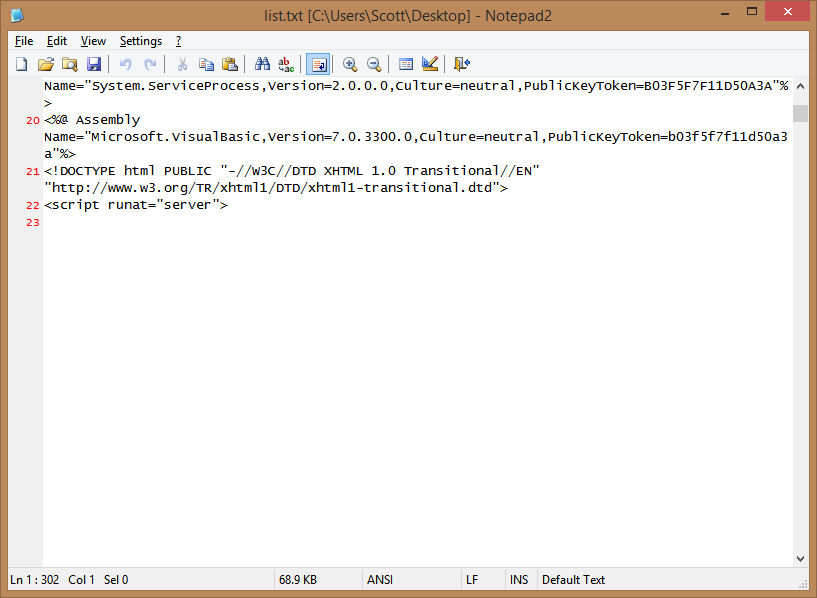
It had a LOT of spaces in the opening of the file.

Meaning, they were assuming you wouldn't scroll down. Seriously. Oddly, though, it was spaces, not carriage returns. Note Line 23 never ends. It's SUPER long.

image

It pointed to a lot of (comparatively) unusual domains

It had links inside to things like

  • www.rootkit.net.cn
  • r57c99.com

Note that the second one actually serves malware and bad JavaScript, so avoid it.

It's a whole admin console for a bad guy to attack your computer

This file actually has a dropdown with "Please select a database" with values like (this is just a taste):

  • Use master dbcc addextendedproc('sp_OACreate','odsole70.dll')
  • select * from openrowset('microsoft.jet.oledb.4.0',';database=c:\windows\system32\ias\ias.mdb
  • c:\bin.asp' backup database @b to disk=@t WITH DIFFERENTIAL,FORMAT;drop table [bin_cmd];
  • Exec master.dbo.xp_cmdshell 'net user'
  • EXEC sp_configure 'xp_cmdshell'

They're going for complete control of the system, and this file is just the start.

It serves JavaScript from elsewhere

This bad aspx file also tries to bring in some bad JS from the second domain above.

That JavaScript tries to bring in even worse JavaScript from another location via an indirection. I won't even list these bits for fear that I'll get blocked for serving it!

The root of all of this is: Don't let users upload and execute code.

A fix for arbitrary code execution in user upload folders

What was the fix? Well, certainly not allowing someone to upload a file with a .aspx or .php extension for one, but also to mark the entire uploads folder as not executable! Here is the updated web.config:

<location path="upload">

<system.webServer>
<handlers accessPolicy="Read" />
</system.webServer>
</location>

I'm not a security expert, but I'd love to hear from YOU, Dear Reader, and some of the crazy stuff you've discovered on systems you manage.


© 2014 Scott Hanselman. All rights reserved.
     
06 May 04:42

Video Tutorial and Screenshots: Windows 8.1 Update 1

by Scott Hanselman

I have a personal MSDN account so I download and installed the Windows 8.1 Update as soon as I could. It'll roll out to the rest of the world slowly in the coming weeks.

The verdict? It's a significant improvement. I use an X1 Carbon Touch laptop, and while it has a touchscreen, I spend most of my time on the mouse and keyboard. I'm comfortable with moving between Store (fullscreen) apps and Desktop apps but it's always a little jarring. You're leaping between two universes. I want to live in one universe and this Windows update merges them in a measured way that means I'm moving faster when using my computer.

I've just put up a brand new 5 minute YouTube video to give you a tour of just a few of the new features.

After you get the update, you'll notice immediately that the Windows Store - a full screen app, mind you - is pinned to your Windows Desktop's Taskbar. You can now pin any app, desktop or store, to your Taskbar.

Even better, you can close them with a right click, just like you're used to:

Windows Store apps can be pinned to the taskbar

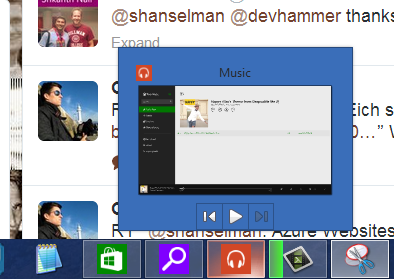
And Windows Store apps like Xbox Music that use the Media Controls can also get taskbar enhancements like the Media Controls within the Taskbar button. Here I'm controlling the music in my Windows Store app while I'm in the desktop. The "universal" music controls also pop up when you press your hardware volume keys as well.

Windows Store apps can modify the jump menu

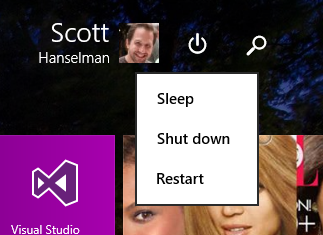
The Start Screen now includes a power button and search button, always.

Windows Start Screen has a visible power button

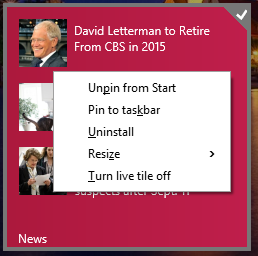
If you right click a pinned Tile with the mouse (or Shift-F10 with the keyboard) you'll get the familiar context menu. You can change sizes, pin to the taskbar, and more.

Context Menus are in the Start Menu now

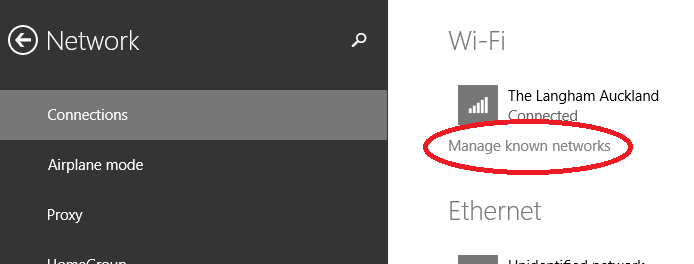
There's also some nice subtle changes and features added. This is great for me as I travel a lot. I can manage my known Wi-Fi networks now. This was in Windows 7 and was either removed or hidden. I even wrote a utility to manage Wireless Networks because of this missing feature. Well, it's back.

Manage known WiFi Networks is back

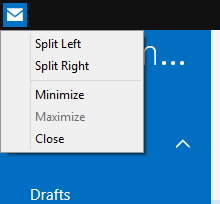
You can move the mouse to the top of a Windows Store app and a title bar will appear. Click in the left side of that title bar, and you can now control Window Splitting.

You can split windows with mouse clicks from the System Menu

Windows Store apps also get Minimize and Close buttons as well.

Windows Store apps have a minimize and close now

Newly installed apps are easier to find and a notification appears on your Start Screen:

"2 new apps installed" notification on the Start Screen

Fullscreen IE11 also has an option to always show open tabs, useful if you're an "out of sight, out of mind" individual.

IE11 Fullscreen can show open tabs now

All in all, it works surprisingly well. I'm moving around Windows faster than before and actually using more Store apps like Mail and Music.

Free Windows 8 and 8.1 Tutorials

I've made this easy link to my free Windows 8 Tutorials. There's a whole playlist up on YouTube and you can get to them from here: http://hanselman.com/windows8 

Please do pass that link along to family and friends, or via Social Media. Thanks!


© 2014 Scott Hanselman. All rights reserved.
     
06 May 04:41

Adding Two-Factor authentication to an ASP.NET application

by Scott Hanselman
German Lorenz cipher machine by Timitrius used under CC Attributin

ASP.NET Identity 2.0 was released last month and it's got a number of significant updates and new features that are worth checking out. For historical context, read the "Introduction to ASP.NET Identity" article that includes a lot of background and information on why certain decisions were made, as well as an  overview of some of the goals of ASP.NET Identity 2.0 like:

  • One Identity system for ASP.NET Web Forms, MVC, Web API, and Web Pages
  • Total control over user profile schema.
  • Pluggable storage mechanisms from Windows Azure Storage Table Service to NoSQL databases
  • Unit Testable
  • Claims-based Auth adds more choice over simple role membership
  • Social Logins (MSFT, FB, Google, Twitter, etc)
  • Based on OWIN middleware, ASP.NET Identity has no System.Web dependency

You can watch a video of Pranav Rastogi and I upgrading the ASP.NET Membership systems on an older ASP.NET application to the latest bits. There's also migration docs in detail:

ASP.NET Identity is on CodePlex today (and soon to be open sourced...paperwork) at https://aspnetidentity.codeplex.com/ or access the NuGet feed for nightly builds.

Adding Two-Factor authentication to an ASP.NET application

I recently changed all my accounts online to two-factor auth, and I really recommend you do as well. Here's how to add Two-Factor Auth to an ASP.NET application using Identity 2.0.

You'll have a class that is a UserManager that handles access to users and how they are stored. Inside this manager there's an IIdentityMessageService that you can implement to validate a user with whatever you want, like email, SMS, or a time-based token.

Send Verification Code

Here's an example SmsService where I'm using Twilio to send text messages. Again, you can do whatever you want in your implementation.

public class SmsService : IIdentityMessageService

{
public Task SendAsync(IdentityMessage message)
{
// Plug in your sms service here to send a text message.
message.Destination = Keys.ToPhone; //your number here
var twilio = new TwilioRestClient(Keys.TwilioSid, Keys.TwilioToken);
var result = twilio.SendMessage(Keys.FromPhone, message.Destination, message.Body);

return Task.FromResult(0);
}
}

If I were sending an EmailMessage, I'd do something like this. Note it's just another implementation of the same simple interface:

public class EmailService : IIdentityMessageService

{
public Task SendAsync(IdentityMessage message)
{
string text = message.Body;
string html = message.Body;
//do whatever you want to the message
MailMessage msg = new MailMessage();
msg.From = new MailAddress("scott@hanselman.com");
msg.To.Add(new MailAddress(message.Destination));
msg.Subject = message.Subject;
msg.AlternateViews.Add(AlternateView.CreateAlternateViewFromString(text, null, MediaTypeNames.Text.Plain));
msg.AlternateViews.Add(AlternateView.CreateAlternateViewFromString(html, null, MediaTypeNames.Text.Html));

SmtpClient smtpClient = new SmtpClient("smtp.whatever.net", Convert.ToInt32(587));
System.Net.NetworkCredential credentials = new System.Net.NetworkCredential(Keys.EmailUser, Keys.EMailKey);
smtpClient.Credentials = credentials;
smtpClient.Send(msg);

return Task.FromResult(0);
}
}

In your IdentityConfig.cs you can register as many TwoFactorProviders as you'd like. I'm adding both Email and Sms here. They include token providers but again, everything is pluggable.

manager.RegisterTwoFactorProvider("PhoneCode", new PhoneNumberTokenProvider<ApplicationUser> {

MessageFormat = "Your security code is: {0}"
});
manager.RegisterTwoFactorProvider("EmailCode", new EmailTokenProvider<ApplicationUser> {
Subject = "SecurityCode",
BodyFormat = "Your security code is {0}"
});

manager.EmailService = new EmailService();
manager.SmsService = new SmsService();

If a user tries to login you need to make sure they are a VerifiedUser. If not, get a valid two factor provider and send them a code to validate. In this case, since there are two providers to choice from, I let them pick from a dropdown. Here's the POST to /Account/SendCode:

public async Task<ActionResult> SendCode(SendCodeViewModel model)

{
// Generate the token and send it
if (!ModelState.IsValid)
{
return View();
}

if (!await SignInHelper.SendTwoFactorCode(model.SelectedProvider))
{
return View("Error");
}
return RedirectToAction("VerifyCode", new { Provider = model.SelectedProvider, ReturnUrl = model.ReturnUrl });
}

The sender of the two factor code depends on your implementation, of course.

public async Task<bool> SendTwoFactorCode(string provider)

{
var userId = await GetVerifiedUserIdAsync();
if (userId == null)
{
return false;
}

var token = await UserManager.GenerateTwoFactorTokenAsync(userId, provider);
// See IdentityConfig.cs to plug in Email/SMS services to actually send the code
await UserManager.NotifyTwoFactorTokenAsync(userId, provider, token);
return true;
}

When it's time to get the code from them, they need to have logged in with name and password already, and we're now checking the code:

[AllowAnonymous]

public async Task<ActionResult> VerifyCode(string provider, string returnUrl)
{
// Require that the user has already logged in via username/password or external login
if (!await SignInHelper.HasBeenVerified())
{
return View("Error");
}
var user = await UserManager.FindByIdAsync(await SignInHelper.GetVerifiedUserIdAsync());
return View(new VerifyCodeViewModel { Provider = provider, ReturnUrl = returnUrl });
}

We can sign users potentially a number of ways, like with External Sign Ins (Twitter, etc) but here's the TwoFactorSignIn

public async Task<SignInStatus> TwoFactorSignIn(string provider, string code, bool isPersistent, bool rememberBrowser)

{
var userId = await GetVerifiedUserIdAsync();
if (userId == null)
{
return SignInStatus.Failure;
}
var user = await UserManager.FindByIdAsync(userId);
if (user == null)
{
return SignInStatus.Failure;
}
if (await UserManager.IsLockedOutAsync(user.Id))
{
return SignInStatus.LockedOut;
}
if (await UserManager.VerifyTwoFactorTokenAsync(user.Id, provider, code))
{
// When token is verified correctly, clear the access failed count used for lockout
await UserManager.ResetAccessFailedCountAsync(user.Id);
await SignInAsync(user, isPersistent, rememberBrowser);
return SignInStatus.Success;
}
// If the token is incorrect, record the failure which also may cause the user to be locked out
await UserManager.AccessFailedAsync(user.Id);
return SignInStatus.Failure;
}

If you want this blog post's sample code, make an EMPTY ASP.NET Web Application and run this NuGet command from the Package Manager Console

Install-Package Microsoft.AspNet.Identity.Samples -Pre

Have fun!

Related Links

* Photo of German Lorenz cipher machine by Timitrius used under CC Attribution 


Sponsor: Big thanks to Novalys for sponsoring the blog feed this week! Check out their security solution that combines authentication and user permissions. Secure access to features and data in most applications & architectures (.NET, Java, C++, SaaS, Web SSO, Cloud...). Try Visual Guard for FREE.


© 2014 Scott Hanselman. All rights reserved.
     
06 May 04:40

Open Source is a thankless job. We do it anyway.

by Scott Hanselman
Photo by Sweet Chili Arts, used under CC

Open Source is hard.

Security is hard

There's been lots of articles about the recent OpenSSL "Heartbleed" bug. You can spend a day reading all the technical analysis, but one headline that stood out to me was "OpenSSL shows big problem with open source; underfunded, understaffed." A fundamental part of the fabric of The Internet Itself is mostly just one person plus a bunch of volunteers.

"The fascinating, mind-boggling fact here is that you have this critical piece of network infrastructure that really runs a large part of the Internet, and there’s basically one guy working on it full time."

Moreover, we don't sing contributor's praises for their hard work and success while their software work, instead we wait until a single line (albeit one of the more important lines) fails to live up to expectations. Darn that free stuff, mostly working, and powering our connected global network.

Open Source is largely a thankless job. Sometimes in the Microsoft .NET community, it feels more futile because it's often hard to find volunteers. Many folks use the default stuff, or whatever ships with Visual Studio. With Rails or Node, while they have corporate backing, there's a sense that the projects are community driven. The reality is in-between, but with open source projects built on the Microsoft stack volunteers may say "we'll just use whatever the ship."

There's anger around past actions by Microsoft, but as I've said publicly before, they've come a LONG way. I will keep pushing open source at Microsoft until I think I'm done pushing and can push no more. There's a seismic shift going on inside. Mistakes get made, but it's moving in the right direction. Everyone is learning.

Visibility is hard

Jeremy Miller's team recently stopped active development on the "FubuMVC" open source .NET framework. In his exit blog post, the question of the viability of .NET open source comes up:

"Setting aside the very real question of whether or not OSS in .Net is a viable proposition (it's largely not, no matter how hoarse Scott Hanselman makes himself trying to say otherwise), FubuMVC failed because we — and probably mostly me because I had the most visibility by far — did not do enough to market ourselves and build community through blog posts, documentation, and conference speaking."

It's very true that in a large way visibility drives viability for many open source projects. Jeremy's retrospective is excellent and you should read it.

I think it's harder to bootstrap a large framework project that is an are alternatives to existing large frameworks because for many, it's easier to use the default. Frameworks like FubuMVC, OpenRasta, ServiceStack, Nancy and others all "reimagine the default." They are large opinionated (in a the best way) frameworks that challenge the status quo. But it's much more difficult to cultivate support for a large framework than it is a smaller library like Humanizer or JSON.NET.

Still, without these projects, we'd all still be using the defaults and wouldn't be exploring new ideas and pushing limits as a community like the FAKE F# build system, or Chocolatey, or Boxstarter.

Microsoft can better support OSS projects not just with licenses and money, but with visibility. I'd propose dedicate Open Source tracks at all Microsoft conferences with speaking slots for open source community members. DotNetConf is a start, but we can go bigger.

Organizing is hard

OWIN is an example of a small, but extremely important project that affects the .NET world that is struggling with organization. Getting it right is going to be important for the future. There's a small, but influential group of community members that having been trying for months to find middle ground and build consensus around a technical issue.

ASP.NET Web API and SignalR both build on top of an open source project called OWIN (Open Web Interface in .NET) that aims to decouple servers, frameworks, and middleware from each other.

There's an issue open over on GitHub about what may seems like an obscure but important point about OWIN. The OWIN specification doesn't include an interface called IAppBuilder, but IAppBuilder is used by default in most Microsoft examples. Can the underlying OWIN framework remain neutral? The issue is a long one, and goes off on a few tangents. It's a complex problem that perhaps 20 people fully understand.

Scott Koon worked hard on a Governance document for OWIN and hasn't seen any forward motion. He vented his frustration on Twitter, rightfully so. Under the often-used "Lazy Consensus" technique, if folks are silent or don't reply in 72 hours, that is effectively consent and can change the direction of a project. Active involvement matters.

The fun part of open source is the pull requests and writing code, but before the code building, there's the consensus building. Ownership is the most contentious part of this process. Ownership means control; control over direction. The key to finding control and working through ownership issues is by thoroughly understanding everyone's differing goals and finding a shared vision that the community can rally around, then move forward.

This sausage making process is tedious, messy, but necessary. These discussions are as much a part of OSS as the code is. It takes equal parts patience and pushing.

Getting involved is hard

I get dozens of emails every week that all ask "how can I get involved in open source?" Everyone assumes my answer will be "write code" or "send a pull request," or sometimes, "help write documentation."

In fact, that's not all you can do. What you can do is read. Absorb. Understand. Be welcoming, inclusive, and kind. Offer thoughtful analysis and ask questions. Avoid hyperbole and inflammatory language. Show code examples when commenting on issues. Be helpful.

Your blog posts are the engine of community, your open source commits, documentation, promotion, samples, talks, gists are important. But getting involved in open source doesn't always mean "fork a project and send a giant pull request with your worldview." Sometimes it's the important but unglamorous work of writing a governance document, organizing a conference call, or thoroughly reading a giant Github issue thread before asking a question.

Why do we do this? It's not for the glamour or the money. It's because we are Builders. I encourage you all to get involved. There's lots to be done.

* photo by Sweet Chili Arts, used under CC


Sponsor: Big thanks to Novalys for sponsoring the blog feed this week! Check out their security solution thatcombines authentication and user permissions. Secure access to features and data in most applications & architectures (.NET, Java, C++, SaaS, Web SSO, Cloud...). Try Visual Guard for FREE.


© 2014 Scott Hanselman. All rights reserved.
     
06 May 04:36

Technical Short: What’s with iSCSI Port Binding?

by mjb

I’m learning much more about virtual networking in VMware as I work with customers as a Sales Engineer.

One checkbox I have to pay close attention to right now is called iSCSI port binding.

I love this image, compliments of Chad back in 2009.


First – let’s define it from VMware’s very own language in KB 2038869:

Port binding is used in iSCSI when multiple VMkernel ports for iSCSI reside in the same broadcast domain and IP subnet to allow multiple paths to an iSCSI array that broadcasts a single IP address.

If you’re anything like me, you’ve noticed the checkbox for iSCSI port binding and simply ignored it.

As an SE for Infinio, I now need to verify that customers do not have iSCSI port binding enabled on the vmkernel interface they’re using for NFS traffic.

Why does a NFS-only server-side caching solution care about iSCSI port binding?

I had to find out.

Here’s what I understand so far: enabling port binding bypasses some significant vSwitch functionality. With it enabled, the vmkernel interface takes the pNIC associated with it. No vSwitch logic, which would cut Infinio out of the data path.

No data path, no acceleration.

To be honest, I still don’t understand exactly how  port binding jumps in the way. I think of it like a raw device mapping for pNICs.

The team at Infinio has tested and found – even with Promiscuous Mode enabled on the vSwitch – you cannot sniff traffic going over the pNIC taken by port binding.

Technical details admittedly unknown, VMware is very clear about what’s import to keep in mind in the case where iSCSI port binding should be used (from the same KB as above):

When using port binding, you must remember that:

  • Array Target iSCSI ports must reside in the same broadcast domain and IP subnet as the VMkernel port.

  • All VMkernel ports used for iSCSI connectivity must reside in the same broadcast domain and IP subnet.

  • All VMkernel ports used for iSCSI connectivity must reside in the same vSwitch.

one-does-not-simply-iscsi-port-binding

My simple understanding of the matter comes down to this:

  • If you’re not using multiple physical NICs for iSCSI multipathing, there’s no reason to enabled iSCSI port binding
  • If you are using multiple pNICs for iSCSI traffic, have your vmkernel interface for NFS traffic on a separate pNIC

For those more curious on how to configure port binding, Brian Tobia goes over how to setup iSCSI Port Binding on vPrimerBuild Virtual also has a tutorial, which including the CLI commands.

06 May 04:36

Heartbleed-ing Your Way into Better Password Management

by mjb

The Internet responded to Heartbleed. They even have stickers.*

But if you’re reading this, you’re still mulling it all over. I know I am. 

So let’s cut the subtly and even the low-level tech conversation. Let’s talk about why you need to act and what you need to do to act right now. 

Step 1: What Heartbleed Means To You

Here’s how I understand it:

Assume every single website you’ve ever logged into can be logged into, as you, by someone else.

If that does not scare you a little, read it again.

Ever single place you have an account on the Internet could be logged into by a total stranger without your password.

The discovery of Heartbleed shows that a fundamental building block of Internet security has not been secure for a while. It’s identify theft to the max.

It doesn’t mean your assets are in danger. Every respectable website that manages your money pays attention to your IP address and access patterns.

Step 2: Manage Your Passwords with LastPass

Let’s look at the bright side. Your password strategy sucked already. You use the same password everywhere or you forget it once a week and have to reset.

Maybe Heartbleed is a fresh start for you.

Do yourself a huge favor as you start fresh in the right direction: use LastPass to manage your password.

The software is simple and secure. No further thought be needed here. It installs per web browser you use (like Chrome, Firefox, Safari) all from the same location:

From this point forward, you have just one password you HAVE to remember. Remember your password to LastPass.

Since we’re doing this right, make it a passphrase, like XKCD explained so well. This guy made a generator for you too.

In all honesty, you could still keep your passwords memorable through a password theme. It makes it easy to remember each one you write by having a certain website-dependent structure. For example, “[website]77Wahoo!!” could be your format. You would use:

  • Facebook77Wahoo!! on Facebook.com
  • Twitter77Wahoo!! on Twitter.com
  • Google77Wahoo!! on Google.com
  • etc

Side note for those interested: I ran LastPass side-by-side with Password1 and found Password1 didn’t keep up. There are two cases that killed it:

  1. Password updates: Password1 could create duplicate entries on update and required manual intervention to fix it. LastPass has a beautiful auto-update feature.
  2. Form Filling: LastPass is a ninja on filling out forms. I haven’t written out my home address on a website since using it. Password1 supposedly has a form filling functionality, but it didn’t fill out all forms smoothly, nor handled drop downs as seamlessly as LastPass.
  3. Bonus: LastPass is free. And it’s better. And also free.

 Step 3: Change Your Passwords After You Get The Email

First you need “the email” from your vendor, like this one:

IFTTT-heartbleed-notification

IFTTT is telling you they are no longer vulnerable. That’s a green light to update your password.

If you update your password before the vulnerability is fixed, you just have a new password that’s easily bypassed through Heartbleed.

So wait for the email.

So you’ve waited for the email. You have LastPass on your favorite browser(s).

Good. Now you have to deal with Heartbleed. Now go change all your passwords.  Use LastPass to save them securely. You can even choose to auto-login on sites like this:

Auto-Login is awesome

What sites do you really have to change?

Mashable put together a list.  If you own a site, give this a read. My rule is if it would ruin your day for someone else to log into the website, change the password.

Conclusion: Is The Internet Still Safe?  

I think of the honest people on the Internet as a pack of gazelle.

Gazelle-Pack

The more noticeable you are – public figure or due to personal assets – the further you are from the center of the pack. The less noticeable you are on the internet, the closer you are to the center.

Now the other factor.

The more up-to-date you are on software updates, the more often you change your password, the bigger, faster and stronger you are. The less secure your practices, the smaller and weaker you are. 

Long metaphor short, don’t be this guy.

You on the Internet.

Will I still continue to bank, buy and build everything online?

Of course.


* Feel free to send me a sticker if this post is helpful!


23 Apr 21:52

Security in the Cloud including HIPAA

by John Paul Cook
I’m increasingly recommending cloud based strategies to both drive down costs and simplify things. Cloud technology is now at a point there there are very clear guidelines and frameworks for addressing security concerns. Take a look at the Microsoft Azure Trust Center for a list of all of the security certifications Microsoft has earned. Notice that Microsoft has a P-ATO (Provisional Authority to Operate) from FedRAMP , the United States federal government cloud computing watchdog agency. FedRAMP...(read more)
23 Apr 21:50

SQL Server 2014 brings on-premises and cloud database together to improve data availability and disaster recovery

by SQL Server Team

With the recently disclosed general availability of SQL Server 2014, Microsoft brings to market new hybrid scenarios, enabling customers to take advantage of Microsoft Azure in conjunction with on-premises SQL Server.

SQL Server 2014 helps customers to protect their data and make it more highly availably using Azure. SQL Server Backup to Microsoft Azure builds on functionality first introduced in SQL Server 2012, introducing a UI for easily configuring backup to Azure from SQL Server Management Studio (SSMS). Backups are encrypted and compressed, enabling fast and secure cloud backup storage. Set up requires only Azure credentials and an Azure storage account. For help getting started, this step-by-step guide will get you going with the easy, three-step process.

Storing backup data in Azure is cost-effective, secure, and inherently offsite, making it a useful component in business continuity planning. A March 2014 commissioned study conducted by Forrester Consulting on Microsoft's behalf about Cloud Backup and Disaster Recovery found that saving money on storage is the top benefit of cloud database backup, cited by 61%, followed closely by 50% who said savings on administrative cost was a top reason for backing up to the cloud. Backups stored in Azure also benefit from Azure built-in geo-redundancy and high services levels, and can be restored to a Azure VM for fast recovery from onsite outages.

In addition to the SQL Server 2014 functionality for backing up to Azure, we have now made generally available a free standalone SQL Server Backup to Microsoft Azure Tool that can encrypt and compress backup files for all supported versions of SQL Server, and store them in Azure—enabling a consistent backup to cloud strategy across your SQL Server environments. This fast, easy to configure tool enables you to quickly create rules that direct a set of backups to Azure rather than local storage as well as select encryption and compression settings.

Another new business continuity planning scenario enabled by SQL Server 2014 is disaster recovery (DR) in the cloud. Customers are now able to setup an asynchronous replica in Azure as part of an AlwaysOn high availability solution. A new SSMS wizard enables you to simplify the deployment of replicas on-premises and to Azure. As soon as a transaction is committed on-premises it is sent asynchronously to the cloud replica. We still recommend you keep your synchronous replica on-premises, but by having the additional replicas in Azure you gain improved DR and can reduce the CAPEX and OPEX costs of physically maintaining additional hardware in additional data centers.

Another benefit of keeping an asynchronous replica in Azure is that the replica can be efficiently utilized for read functionality like BI reporting or utilized for doing backups, speeding up the backup to Azure process as the secondary is in Azure already.

But the greatest value to customers of an AlwaysOn replica in Azure is the speed to recovery. Customers are finding that their recovery point objectives (RPO) can be reduced to limit data loss, and their recovery time objectives (RTO) can be measured in seconds:

  • Lufthansa Systems is a full-spectrum IT consulting and services organization that serves airlines, financial services firms, healthcare systems, and many more businesses. To better anticipate customer needs for high-availability and disaster-recovery solutions, Lufthansa Systems piloted a solution on SQL Server 2014 and Azure that led to faster and more robust data recovery, reduced costs, and the potential for a vastly increased focus on customer service and solutions. They expect to deploy the solution on a rolling basis starting in 2014.
  • Amway is a global direct seller. Amway conducted a pilot test of AlwaysOn Availability Groups for high availability and disaster recovery. With multisite data clustering with failover to databases hosted both on-premises and in Azure, Amway found that the test of SQL Server AlwaysOn with Azure replicas delivered 100 percent uptime and failover took place in 10 seconds or less. The company is now planning how best to deploy the solution.

Finally, SQL Server 2014 enables you to move your database files to Azure while keeping your applications on-premises for bottomless storage in the cloud and greater availability. The SQL Server Data Files in Microsoft Azure configuration also provides an alternative storage location for archival data, with cost effective storage and easy access.

If you're ready to evaluate how SQL Server 2014 can benefit your database environment, download a trial here. For greater flexibility deploying SQL Server on-premises and in the cloud, sign up for a free Azure evaluation. And, to get started backing up older versions of SQL Server to Azure, try our free standalone backup tool. Also, don't forget to save the date for the live stream of our April 15 Accelerate Your Insights event to hear more about our data platform strategy from CEO Satya Nadella, COO Kevin Turner and CVP of Data Platform Quentin Clark.

23 Apr 21:50

Finding Timeout-Prone Code with max_elapsed_time

Consider a scenario where your application timeout setting is 30 seconds and you’ve been asked to proactively start tuning workloads that are at risk of timing out.  There are several different places you can start, and I want to demonstrate an additional option today.

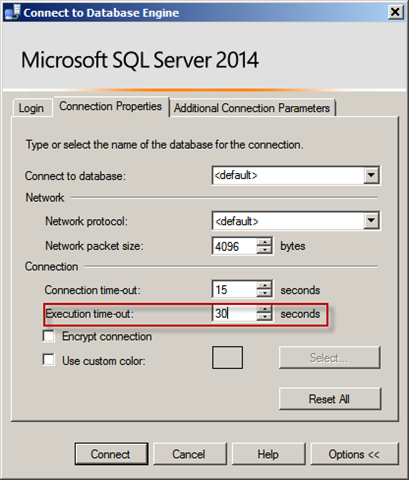
To demonstrate timeout settings, I can configure it in SQL Server Management Studio via the “Execution time-out” setting:

image thumb Finding Timeout Prone Code with max elapsed time

Next – let’s create two procedures that have two different WAITFOR thresholds (one which doesn’t time out and another that will):

CREATE PROCEDURE [dbo].[TimeOutProne]
AS
WAITFOR DELAY '00:00:29';
GO

CREATE PROCEDURE [dbo].[TimeOutProneV2]
AS
WAITFOR DELAY '00:00:30';
GO

Execute both of these (starting with the one that succeeds and the one that times out next):

EXEC [dbo].[TimeOutProne];
GO

EXEC [dbo].[TimeOutProneV2];
GO

The first execute succeeds and the second times out with the following error message:

Msg -2, Level 11, State 0, Line 13
Timeout expired.  The timeout period elapsed prior to completion of the operation or the server is not responding.

Now execute the following query against dm_exec_procedure_stats:

SELECT  [database_id] ,
OBJECT_NAME([object_id]) AS [object_name] ,
[max_elapsed_time],
[plan_handle],
[sql_handle]
FROM [sys].[dm_exec_procedure_stats]
WHERE [max_elapsed_time] > 28000000;  -- microseconds, "but only accurate to milliseconds"

Interestingly enough – even though the second query timed out – we still have accumulated max_elapsed_time stats for it prior to timeout:

image thumb1 Finding Timeout Prone Code with max elapsed time

I included plan_handle and sql_handle for later hook-ins – just keeping things minimal for demonstration purposes.

So if you’re seeing timeouts and want to start narrowing down workloads that are getting near or exceeding the timeout, both sys.dm_exec_procedure_stats and sys.sys.dm_exec_query_stats max_elapsed_time can be a helpful piece of information to work with.

The post Finding Timeout-Prone Code with max_elapsed_time appeared first on Joe Sack.

23 Apr 21:49

Currys having apostrophe trouble

Before I start I just want to say that much of this post is mere speculation on my part and not specifically targetted at Currys. They just happen to be the catalyst and example for this post.

A few months back I ordered a new tumble drier online from Currys to replace an aging one that my family have long outgrown and chose Currys purely because they were selling the model I wanted at the cheapest price that I could find online. No problems with the transaction (or the service that was to follow I hasten to add), but what I did find quite interesting was the confirmation email that I received shortly after placing the order.

On the email that I received, under the order breakdown there was a typical information section that looked like this:

image

I kid you not, on the “Before we leave” bullet point there are 11 apostrophes for the words we’ll and you’re. You can also see similar issues in two other places in the text. I’ve often come across bugs in my career where I’ve seen 2 or 3 single apostrophes in some data but never 11 in one hit!

I do always raise an eyebrow when seeing issues involving duplicate apostrophes.. In the db world that would more often than not be indicative of  some kind of string concatenation going on or incorrect logic somewhere replacing single apostrophes with two single apostrophes to make it into a valid statement for SQL rather than using parameters. All in all, a prime target for SQL injection based attacks. But to be fair though this may have nothing to do with SQL or whatever RDBMS Currys use.

Alternatively Currys could be suffering from a problem that many large businesses do where their systems have rapidly and organically grown over the years. These businesses tend to have a whole number of interconnected legacy systems, apps, imports/exports, 3rd party connections, BI etc etc and changing anything significant in the core is just too costly and time consuming and that is not factoring in any knowledge long lost with the sands of time. Instead they just keep adding around the edges here and there to get the functionality they need to have in rapidly changing market place. They need to get new features to market quickly so they can ill afford complete re-architectures of legacy systems. As such from time to time you get strange things like the above happening as the logic/data is going through so many legacy apps/tiers before it finally makes it out and debugging it is a nightmare. I have seen this problem a number of times at previous organisations I have worked at.

Sometimes though businesses do need to bite the bullet and sort things out when they get to this stage. Legacy applications do tend to be very reliable as they have been tried and tested for years and years, but I doubt that many of them would stand up to a modern day targeted attack. Current software security patterns and encryption methodologies just didn’t exist a decade ago. Any encryption technology used when the software was originally developed would seem primitive now by todays standards. The problem is often made worse because the legacy systems tend to only run on old operating systems because they can’t be upgraded to a newer OS thus increasing the risk of a breech.

It is very hard when developing something today to visualise if and how that software be used in a decades time so you can’t really blame the developer of the day if the software is still being used way past its use by date. Businesses need to realise when something has organically grown too far and is starting to get unwieldy to maintain. Rather than constantly developing around it and extending it because that is by far and away cheaper to ship something; tackle the problem earlier rather later as otherwise it’ll just become more and more expensive and maintaining a legacy codebase often holds you back in the marketplace and allows competitors to ship faster and better features than you.

I know that there is the age old adage of "if it isn't broke, don't fix it", but there comes a point where every piece of software has had its day and needs to be retired. The hard bit is knowing when that day actually comes sooner rather than later.

Enjoy!

23 Apr 21:47

SQL Server 2014: TEMPDB Hidden Performance Gem

by psssql

I ran across a change for TEMPDB BULK OPERATIONS (Select into, table valued parameters (TVP), create index with SORT IN TEMPDB, …) that you will benefit from.

For example, I have a Create Index … WITH SORT IN TEMPDB that takes ~1 minute in SQL Server 2012.   On the same machine using a SQL Server 2014 instance, the index builds in 19 seconds.

SQL Server has had a concept of eager writes for many versions.  The idea is to prevent flooding the buffer pool with pages that are newly created, from bulk activities, and need to be written to disk (write activities.)  Eager writes help reduce the pressure on lazy writer and checkpoint as well as widening the I/O activity window, allowing for better performance and parallel usage of the hardware.

The design is such that bulk operations may track the last ## of pages dirtied, in a circular list.   When the list becomes full old entries are removed to make room for new entries.   During the removal process the older pages are put in motion to disk, if still dirty – API: WriteFileGather.    The intent is to gather up to 128K, contiguous dirty pages (32) and write them out.

The change in SQL Server 2014 is to relax the need to flush these pages, as quickly, to the TEMPDB data files.  When doing a select into … #tmp … or create index WITH SORT IN TEMPDB the SQL Server now recognizes this may be a short lived operation.   The pages associated with such an operation may be created, loaded, queried and released in a very small window of time.

For example:  You could have a stored procedure that runs in 8ms.  In that stored procedure you select into … #tmp … then use the #tmp and drop it as the stored procedure completes.

Prior to the SQL Server 2014 change the select into may have written all the pages accumulated to disk.  The SQL Server 2014, eager write behavior, no longer forces these pages to disk as quickly as previous versions.   This behavior allows the pages to be stored in RAM (buffer pool), queried and the table dropped (removed from buffer pool and returned to free list) without ever going to disk as long memory is available.   By avoiding the physical I/O when possible the performance of the TEMPDB, bulk operation is significantly increased and it reduces the impact on the I/O path resources as well.

The pages used in these operations are marked so lazy writer will favor writing them to TEMPDB are returning the memory to the free list before impacting pages from user databases, allowing SQL Server to handle some of your TEMPDB operations with increased performance.

In progress, no promises: We are actively investigating a port of this change to SQL Server 2012 PCU2 so your SQL Server 2012 installations can take advantage of the performance increase as well.

Bob Dorr - Principal SQL Server Escalation Engineer

22 Apr 01:25

SQL Server 2012 and 2014 Management Differences

by John Paul Cook
Whenever a new version of SQL Server is released, I compare what is in SQL Server Management Studio to get an overall, visual representation of the differences. There are of course differences that aren’t readily apparent by comparing what’s in SSMS. The scope of this post is limited to the differences that are apparent in putting the different versions of SSMS side by side. In the comparison of 2012 to 2014, the SSMS differences appear under the Management node, which is why other SSMS nodes are...(read more)
22 Apr 01:24

Cardinality Estimation for Disjunctive Predicates in SQL Server 2014

by Paul White
Introduction Back in January 2014, I wrote an article for SQLperformance.com describing the cardinality estimation process for queries with multiple predicates, from the point of view of the old and new cardinality estimators. The article describes the various behaviours and formulas involved, along with the usual sprinkling of documented and undocumented trace flags. I was able to describe the formula SQL Server 2014 uses to calculate a cardinality estimate for multiple predicates connected by AND...(read more)
22 Apr 01:24

The data platform for a new era

by Quentin Clark

Earlier today, Microsoft hosted a customer event in San Francisco where I joined CEO Satya Nadella and COO Kevin Turner to share our perspective on the role of data in business. Satya outlined his vision of a platform built for an era of ambient intelligence. He also stressed the importance of a “data culture” that encourages curiosity, action and experimentation – one that is supported by technology solutions that put data within reach of everyone and every organization. 

Kevin shared how customers like Beth Israel Deaconess Medical Center, Condé Nast, Edgenet, KUKA systems, NASDAQ, telent, Virginia Tech and Xerox are putting Microsoft’s platform to work and driving real business results. He highlighted an IDC study on the tremendous opportunity for organizations to realize an additional $1.6 trillion dividend over the next four years by taking a comprehensive approach to data. According to the research, businesses that pull together multiple data sources, use new types of analytics tools and push insights to more people across their organizations at the right time, stand to dramatically increase their top-line revenues, cut costs and improve productivity. 

A platform centered on people, data and analytics
In my keynote, I talked about the platform required to achieve the data culture and realize the returns on the data dividend – a platform for data, analytics and people. 

It’s people asking questions about data that’s the starting point -- Power BI for Office 365 and Excel’s business intelligence features helps get them there. Data is key – data from all kinds of sources, including SQL Server, Azure and accessibility of the world’s data from Excel. Analytics brings order and sets up insights from broad data – analytics from SQL Server and Power BI for Office 365, and Azure HDInsight for running Hadoop in the cloud.

A platform that solves for people, data, and analytics accelerates with in-memory. We created the platform as customers are increasingly needing the technology to scale with big data, and accelerate their insights at the speed of modern business. 

Having in-memory across the whole data platform creates speed that is revolutionary on its own, and with SQL Server we built it into the product that customers already know and have widely deployed. At the event we celebrated the launch of SQL Server 2014. With this version we now have in-memory capabilities across all data workloads delivering breakthrough performance for applications in throughput and latency. Our relational database in SQL Server has been handling data warehouse workloads in the terabytes to petabyte scale using in-memory columnar data management. With the release of SQL Server 2014, we have added in-memory Online Transaction Processing. In-memory technology has been allowing users to manipulate millions of records at the speed of thought, and scaling analytics solutions to billions of records in SQL Server Analysis Services. 

The platform for people, data and analytics needs to be where the data and the people are. Our on-premises and cloud solutions provide endpoints for a continuum of how the realities of business manage data and experiences – making hybrid a part of every customer’s capability. Today we announced that our Analytics Platform System is generally available – this is the evolution of the Parallel Data Warehouse product that now supports the ability to query across the traditional relational data warehouse and data stored in a Hadoop region – either in the appliance or in a separate Hadoop cluster. SQL Server has seamless integration with VMs in Azure to provide secondaries for high availability and disaster recovery. The data people access in the business intelligence experience comes through Excel from their own data and partner data – and Power BI provides accessibility to wherever the data resides.  

The platform for people, data and analytics needs to have full reach. The natural language search query Q&A feature in Power BI for Office 365 is significant in that it provides data insights to anyone that is curious enough to ask a question. We have changed who is able to reach insights by not demanding that everyone learn the vernacular of schemas and chart types. With SQL Server, the most widely-deployed database on the planet, we have many people who already have the skills to take advantage of all the capabilities of the platform. With a billion people who know how to use Excel, people have the skills to get engaged on the data.

Looking forward, we will be very busy. Satya mentioned some work we are doing in the Machine Learning space and today we also announced a preview of Intelligent Systems Service – just a couple of the things we are working to deliver a platform for the era of ambient intelligence. The Machine Learning work originates in what it takes to run services at Microsoft like Bing. We had to transform ML from a deep vertical domain into an engineering capability, and in doing so learned what it would take to democratize ML for our customers. Stay tuned. 

The Internet of Things (IoT) space is very clearly one of the most important trends in data today. Not only do we envision the data from IoT solutions being well served by the data platform, but we need to ensure the end-to-end solution can be realized by any customer. To that end, Intelligent Systems Service (ISS) is an Internet of Things offering built on Azure, which makes it easier to securely connect, manage, capture and transform machine-generated data regardless of the operating system platform.

It takes a data platform built for the era of ambient intelligence with data, analytics and people to let companies get the most value from their data and realize a data culture. I believe Microsoft is uniquely positioned to provide this platform – through the speed of in-memory, our cloud and our reach. Built on the world’s most widely-deployed database, connected to the cloud through Azure, delivering insights to billions through Office and understanding the world through our new IoT service – it is truly a data platform for a new era. When you put it all together only Microsoft is bringing that comprehensive a platform and that much value to our customers.


Quentin Clark
Corporate Vice President
Data Platform Group

22 Apr 01:23

SQL Server 2014 and HP Sets Two World Records for Data Warehousing Leading In Both Performance and Price/Performance

by EronKelly

Yesterday we talked about how we are delivering real-time performance to customers in every part of the platform.  I’m excited to announce another example of where we are delivering this to customers in conjunction with one of our partners. Microsoft and Hewlett Packard broke two world records in TPC-H 10 Terabyte and 3 Terabyte benchmarks for non-clustered configuration for superior data warehousing performance and price-performance. Each of the world records showed SQL Server breaking the previously held record by Oracle/SPARC on both performance and price/performance1 by significant margins.

10TB: Running on a HP ProLiant DL580 Gen8 Server with SQL Server 2014 Enterprise Edition and Windows Server 2012 R2 Standard Edition, the configuration achieved a world record non-clustered performance of 404,005 query-per-hour (QphH) topping the previously held record from Oracle/SPARC of 377,594 query-per-hour (QphH) 1.  The SQL Server configuration also shattered the Price/performance metric with a $2.34 USD Dollar/Query-per-Hour ($/QphH) topping Oracle’s $4.65 $/QphH1

3TB: Running on a HP ProLiant DL580 Gen8 Server with SQL Server 2014 Enterprise Edition and Windows Server 2012 R2 Standard Edition, the configuration achieved a world record non-clustered performance of 461,837 query-per-hour (QphH) topping the previously held record from Oracle/SPARC of 409,721 query-per-hour (QphH) 1.  The SQL Server configuration also shattered the Price/performance metric with a $2.04 USD Dollar/Query-per-Hour ($/QphH) topping Oracle’s $3.94 $/QphH1

By breaking the world records for both performance and price/performance validates how SQL Server 2014 is delivering on leading in-memory performance at exceptional value. It also validates SQL Server’s leadership in data warehousing.

The TPC Benchmark™H (TPC-H) is an industry standard decision support benchmark that consists of a suite of business oriented ad-hoc queries and concurrent data modifications. The queries and the data populating the database have been chosen to have broad industry-wide relevance. This benchmark illustrates decision support systems that examine large volumes of data, execute queries with a high degree of complexity, and give answers to critical business questions.  The performance metric is called the TPC-H Composite Query-per-Hour Rating and the price/performance metric is the cost / performance metric. More information can be found at http://www.tpc.org/tpch/results/tpch_perf_results.asp?resulttype=noncluster

Eron Kelly,
General Manager
SQL Server


For more information:


1As of April 15, 2014.

SQL Server 2014 HP 10TB TPC-H Result: http://www.tpc.org/tpch/results/tpch_result_detail.asp?id=114041502&layout=

2SQL Server 2014 HP 3TB TPC-H Result: http://www.tpc.org/tpch/results/tpch_result_detail.asp?id=114041501&layout=
Oracle 10TB TPC-H Result: http://www.tpc.org/tpch/results/tpch_result_detail.asp?id=113112501&layout=

Oracle 3TB TPC-H Result: http://www.tpc.org/tpch/results/tpch_result_detail.asp?id=113060701&layout=

22 Apr 01:23

SQL Server 2014 Backup to the Cloud

by John Paul Cook
Backing up SQL Server to the cloud makes a lot of sense, particularly for small businesses. Managing the physical media takes up too much time and effort for a small shop. Azure storage simplifies the backup process allowing a small business to allocate its limited resources more effectively. As I was preparing this post and editing the screen captures showing how to back up SQL Server 2014 to Windows Azure blob storage, I discovered that earlier today Microsoft released a whitepaper covering all...(read more)
22 Apr 01:23

MSDN Whitepaper: More Cowbell—Optimizing Your Query Plans with the SQL Server 2014 Cardinality Estimator

by aspiringgeek

Hot off the presses is this new MSDN white paper:

Optimizing Your Query Plans with the SQL Server 2014 Cardinality Estimator

One of the gems introduced in SQL Server 2014 is the Cardinality Estimator (CE)—new! improved! & now with more cowbell.  I'm thrilled to be a Technical Reviewer for a superb MSDN white paper authored by my friend, buddy, & pal Joe Sack (b|t). It's exciting & humbling to see my name among such an array of Contributors & Reviewers—including several former colleagues from Azure CAT (formerly SQL CAT b|t).

What’s a CE?

As described on the Cardinality Estimation (SQL Server) page:

Cardinality estimates are a prediction of the number of rows in the query result. The query optimizer uses these estimates to choose a plan for executing the query. The quality of the query plan has a direct impact on improving query performance.

Why a New CE?

The pre-existing CE is more than a decade old.  Both OLTP & DW workloads have changed—& databases are bigger by far than they used to be.  Often, cardinality changes spawned disparate plans (in one prototype, over 78 different plans were generated by the former CE).  Plainly & simply—the CE needed more cowbell.

What’s New?

During SQL14 TAP, SQL Engineer Kate Smith provided a heads up.  Highlights included:

Relaxing Independence Assumption:  The old CE assumed that column values were independent.  Yet columns such as City and State, or Manufacturer, Make, and Model are tightly correlated.  Algorithms in the new CE better account for this.

Join Changes:  Improvements to equijoins, non-equijoins, & join estimates related to primary keys.

Ascending Key Modifications:  Newly inserted data are out of the range in histogram.  The new CE assumes not only that the data actually does exist & also is present at the average frequency of values in the table.  (And the same heuristics also apply to missing values in sample statistics.)

In other words, more cowbell.

Joe provides numerous examples & walk-throughs detailing the behavior of the new CE.

Inside Baseball 

Here’s some behind-the-scenes info.  "Cardinality Estimator" didn't appear in the original title which referred merely to performance tuning.  Who wouldn’t want to read a perf paper from Joe?  Yet the working title belied the true nature of the paper.  The published title provides the precision the topic deserves. 

I won’t reprise the penultimate comma soliloquy that I shared with the editors, but you can learn more here, or pick up a copy of Fowler’s Modern English Usage.

White Paper Metadata

Tile: Optimizing Your Query Plans with the SQL Server 2014 Cardinality Estimator 

URL: http://msdn.microsoft.com/en-us/library/dn673537.aspx

Summary: SQL Server 2014 introduces the first major redesign of the SQL Server Query Optimizer cardinality estimation process since version 7.0.  The goal for the redesign was to improve accuracy, consistency and supportability of key areas within the cardinality estimation process, ultimately affecting average query execution plan quality and associated workload performance.  This paper provides an overview of the primary changes made to the cardinality estimator functionality by the Microsoft query processor team, covering how to enable and disable the new cardinality estimator behavior, and showing how to troubleshoot plan-quality regressions if and when they occur.

Authors: Joseph Sack (SQLskills.com b|t)

Contributers: Yi Fang (Microsoft), Vassilis Papadimos (Microsoft)

Technical Reviewers: Barbara Kess (Microsoft), Jack Li (Microsoft), Jimmy May (Microsoft b|t), Sanjay Mishra (Microsoft), Shep Sheppard (Microsoft), Mike Weiner (Microsoft), Paul White (SQL Kiwi Limited b|t)

I'm confident you'll find the paper as edifying as I did. Enjoy!

22 Apr 01:23

Just an Ack Will Do

by AllenMWhite
In the 1980s one of my principal responsibilities was enabling communications between retail point-of-sale systems and the host computer where we processed those transactions. Communications protocols were many and varied, and I had to figure out their nuances and get the registers to talk to the hosts. Success was most often achieved when, after sending a message to the remote system, I received back a message called an Ack, an acknowledgement that the message had been received successfully. In...(read more)
22 Apr 01:22

SQL Saturday #295 Las Vegas wrapup

by tjaybelt
(written while disconnected in the southern desert of Utah on April 8th)


This last weekend found me travelling to Las Vegas to help celebrate its first SQL Saturday ever. The team of Stacia Misner, Jason Brimhall, as well as a slew of others, were able to stand up a great event that drew a descent opening round as well as great support from local, regional and remote speakers.

As it is only a few hours (6) from my home, we decided to go as a family, spend some time in Vegas, then start a Spring Break week vacation afterwards. Various options were discussed in my family, and it was decided that we would go camping and dirt biking after an extra bit of time in Vegas. This requires us to load up anb haul our camper somewhere. We chose to camp and bike in St. George, which is partway to Las Vegas. We found a location where we could drop off our trailer and leave it for a few days while we spent time in Las Vegas.

The fateful day came when we left to make our way south. With the trailer loaded and ready we took off around 10:30 am, with 2 planned stops that would consume an hour or so, extending the trip from 6 hours to about 7 hours.

The first stop occurred as planned, and I even saved $20 I wasn't planning on. Yeah, its always nice to save money. Around 11:30 am we left that stop and headed south. We passed a town called Nephi that is an hour plus from our home. As we pass this town, there is a large gap of towns that usually means you are really on your way. The trip underway, we get excited to be going. Its about this time that I hear a small explosion from the left side of our vehicle, and am alerted to flying debris from the mirror. Having never experienced a blow out on a tire, I was surprised at how I simply knew what had happened. Blowout. Yeah. less than 200 miles from our home and at the beginning of the tirp, boom. I pull over semi gracefully and get stopped to  inspect the damage. As I exit the vehicle, I grab my nexus 5 cell phone so I can take pictures, if needed. As I exit, the phone slips from my hand and lands screen down on the pavement. It looks fine, but I can tell that it just added to the cost we had just had shoved down our throats with the blowout. Sure enough, the screen was cracked before I could even go see the damage behind us. It turns out that only 1 of the 4 trailer tires blew, which explains why it was easy to pull over after I saw the tire pieces in my mirror escaping their previously contained existence.

After several phone calls, we found a tire dealer that could send out help. When Ben arrived, he was able to pull the borked tire off our trailer. While he was there, I inquired as to his expert opinion concerning the other tires. The prognosis was rather negative, and while he returned to his shop to fix the 1 tire, we deliberated what we should do. Several options lay in front of us. Replace the single tire, replace the other partner tire on that side, replace all 4, take the trailer back home, continue on with some or all tires replaced, and so on. Ugghh. When Ben returned with a brand new tire, we were able to get it mounted easily. We had decided to return to Nephi and get all 4 tires replaced. The tires were from 2007, and though they didn't have a ton of wear and were actually had plenty of tread left, there was evidence of age and cracking visually. The time had come, we just hadn't planned on it. The tire store was amazing and got us fixed up really quickly and on the road again. 2.5 hours delayed, but on our way. Let SQL Saturday trip begin, again.

Back on the road again, with stress levels high, we got to experience them even higher as the winds blew us all over the road for the next 4 hours. At some points during the trip I had to remove my hands from the wheel and shake them out because of holding on so hard to counteract the pull of the wind gusts. Stress was a constant companion. Eventually we made it to St. George and were successfull in dropping off the trailer at storage. Phase one of the trip was complete. On to Vegas, just hours and hours delayed.

We arrived in Vegas about 20 minutes after the speaker dinner started. I went in to the dinner to grab some keys to our hotel (SQL Solutions Group had a suite of rooms rented for us and had checked in already). I intended to grab and go, but ended up hanging out a bit to talk and say hi to #SQLFAMILY members before getting my family to the hotel. After dropping the kiddos off at the hotel, my wife and I returned to the dinner and had a great time catching up with folks. It is always fun to introduce my wife to the members of my other family. The dinner that was thrown for the speakers was delicious. The gifts given to speakers were spot on for the locale. A deck of cards with the SQL Saturday Las Vegas logo, a handful of similarly logoed poker chips and a usb jump drive shaped like a poker chip. Turns out my cards have 2 5's of clubs and no 4 of clubs. But #firstworldproblems aside, I love the cards and enjoyed playing card games with my family and with them already.

At the dinner, I was able to meet and talk with several of the volunteers that would be helping out in the morning. Questions were answered, tasks discussed, and times set to meet in the morning to get it going.
The next morning I awoke late, but was at the facility a little after 7am. I grabbed the signs and went back out to the various roads to put up the directional signs to help attendees find the facility. The morning in the desert was glorious, warm, wind blowing slightly, and bright blue skies. ?I ran around with my truck and the signs and the radio blaring, pounding the sign holders into the bedrock around the area. Once complete, I returned to the facility and said more "Hi's" to folks as well as started doing various volunteer tasks. The morning got going with a couple of hiccups, mainly the printing of SpeedPasses had some issues. The rooms were up on the third floor and we found attendees had an issue initially getting around and finding the rooms and getting around. Once the layout was understood, folks had less of an issue with it. It turned out that the printed map had a typo that also lent to this confusion. It was a problem, but not a large one, and once communicated out, it was overcome. The location of the vendors was not ideal, and lent to light foot traffic to visit the vendors. This should be remedied next time if this facility is reused. The location for lunch was ideal as it was the largest room and also served as one of the session rooms. So once lunch arrived, attendees and speakers knew where it was and easily found their way there. Lunch had been catered and the catering folks did a great job keeping the supply available as the attendees flowed thru to get food. The food was good and probably one of the best lunch selections I have had at an event like this. There was a sponsor for lunch, which may have helped it be such good food as well as catered. I likey.

The facility was a bit odd, and one of the rooms had almost lounge chairs to sit in instead of the normal desk and office type chairs. The speaker stations were really high tech and had an ipad controller to select all the options for display. Initially I thought that this may prove to be a problem as each new speaker took the station, but it turned out to not be an issue, as the previous speaker had already selected the options and left it ready to go. The speaker ready room was large enough for a few speakers to get ready in, and small enough that all the speakers were unable to hang out the entire day there. This is a good thing, as it forced speakers to get out and around the event, instead of holing up in the speaker room. It was also centrally located and lent to a good flow. It's nice when the speaker room is not off in a far off location of the facility.

When the last session was completed, we all adjourned to the lunch room and got to listen to a sponsor session from Microsoft. This was a bit odd, and luckily was not the entire half hour as previously mentioned. Since it was a large room, folks gathered in the back of the room and started talking. These conversations became loud enough that the attendees actually trying to listen started turning around and giving 'that look'. Truth be told, i was one talking and received 'that look'. Suffice it to say, the location in the big room and the gathering of us all there, was not ideal for an after session. Maybe it would have been better to let folks know to convene in the big room at 5:30, after the sponsor session was over, instead of 5:00 and talking. But its never a perfect science.

After the sponsor session, the attendees were able to receive the large prizes from the sponsors. Each sponsor was given a moment to talk and give out their prizes. A lot of folks were able to receive some great prizes and they all looked happy. Once completed with the giveaways, Stacia and Jason were able to sell the event for next time, as well as PASS and the local user group. Hopefully this activity will have instilled in the local populace the excitement that we have all felt, and propel them to continue building these communities, networking with locals as well as others in the community, and help themselves and their careers.

There was an after party and though not everyone attends these, enough folks did that we were able to hang out  a bit and ultimately say our good byes to the #SQLFAMILY members we did get to see. Hugs, shakes and networking completed, we went our separate ways. Some returning to hotels, others going to the airport, and still others heading out to be entertained by the Vegas nightlife. Thus bringing to and end, the event, the learning, and the networking. Another one in the bag.

Thanks to all organizers, volunteers, speakers and attendees. Let's hope that this is the start of many more to come.

22 Apr 01:22

What is the Microsoft Analytics Platform System (APS)?

by James Serra

Analytics Platform System (APS) is simply a renaming of the Parallel Data Warehouse (PDW).  It is not really a new product, but rather a name change due to a new feature in Appliance Update 1 (AU1) of PDW.  That new feature is the ability to have a HDInsight region (a Hadoop cluster) inside the appliance.

So APS combines SQL Server and Hadoop into a single offering that Microsoft is touting as providing “big data in a box.”

Think of APS as the “evolution” of Microsoft’s current SQL Server Parallel Data Warehouse product.  Using PolyBase, it now supports the ability to query data using SQL across the traditional data warehouse, plus data stored in a Hadoop region, whether in the appliance or a separate Hadoop Cluster.

More info:

The data platform for a new era

22 Apr 01:22

How to Cluster Analysis Services

by tlachev

Some scenarios require a fault-tolerant SSAS installation. In a real-life project, an active-active cluster met this requirement. Instead of installing an active-passive cluster where one node just plays a sitting duck waiting for the active node to fail, with the active-active cluster we had two active nodes to distribute processing and achieve high availability. The first node had the SQL Server database engine hosting the data warehouse database while the second had SSAS. If one of the nodes would fail, its services will fail over to the other.

Configuring a failover cluster requires many steps. Luckily, Microsoft just published a whitepaper "How to Cluster SQL Server Analysis Services" by Allan Hirt (SQL Server MVP) that includes step-by-step instructions of how to configure SSAS (Multidimensional or Tabular) on a Windows Server failover cluster (WSFC). Although not discussed, instead of WSFC, yet another way to achieve high tolerance that gains popularity is to use VM failover capabilities.

22 Apr 00:58

CodeSOD: The Fix

by Bruce Johnson

As one of the more experienced DBAs at RBC (Really Big Corporation, Inc), Marle was frequently called upon to review changes being proposed by her younger, less worldly-wise colleagues. This includes not just "pure" DBAs but also DBA wannabes (otherwise known as developers). Marle had no problem with this part of her job. People had mentored her when she was just getting started and paying back was just good karma. It was also, occasionally, the source for a really good WTF.

On a Tuesday morning, the following stored procedure to review came across her desk.

--declare @cnt int
--declare @searchuserid int
declare @tempid int
set @tempid = 931200
--set @cnt = 1
--while @cnt > 0
--begin
--set @searchuserid = @tempid
--set @cnt = (select count(*) from user_table where UserLoginName = @searchuserid)
--if @cnt=1
--set @tempid = @tempid + 1
--end
set @tempid = (select max(UserLoginName) from user_table where UserLoginName between @tempid and @tempid + 100000)
set @tempid = @tempid + 1
return @tempid

A note was included with the review request.

"Production was timing out on inserts. The more rows that went into user_table, the longer it took to run, until it finally the connection timeout was exceeded. This stored procedure was identified as the root of the problem. I ended up refactoring it to use a select MAX with a 'between' clause that had zero performance impact."

Um...yeah.

First off, the analysis of the original code is accurate. The performance curve of the original procedure resembles the aerodynamic characteristics of a 2-ton boulder. However, the 'fix' is not nearly the improvement the author hopes. While it's true that, since the UserLoginName column is indexed, using MAX and BETWEEN will be performant, it has the stink of a skunk-scented dog.

Marle added a note to the review.

"You might want to look into making UserLoginName an IDENTITY column and use SCOPE_IDENTITY to get the id for the inserted record"

With a quiet sigh, she and clicked Send.

"Just a developer", she thought. "But there's still time to fix him up so he'd make a passable DBA."

[Advertisement] BuildMaster 4.1 has arrived! Check out the new Script Repository feature and see how you can deploy builds from TFS (and other CI) to your own servers, the cloud, and more.
22 Apr 00:51

CodeSOD: Offshore Obfuscation

by Dan Adams-Jacobson

JH supports web-based property management software, which is exactly as exciting as it sounds. We've all been there: obsolete tech—their database was running SQL Server 2000 long past its sunset date—and outsourced development. The Indian office had a problem to solve: they'd already written a database function to return all completed work orders for a given tenant's unit, but since notifications were only sent once a day, the client wanted to scoop up any work orders from the previous day that were completed after that day's notification was sent. JH could have modified the function to look back at the previous day in five minutes, but then his company would have missed out on the incredible cost and efficiency gains of offshoring. Instead, JH was tasked with reviewing the code. The first thing he noticed was that, instead of just comparing the work order dates to the current date using SQL Server's GETDATE() function, the technician did this:

where datediff(day, @asofDate, wo.DTWCOMPL) between -1 and 0

Puzzled by the mystery variable, JH did a search for @asofDate, and found:

SELECT @asofDate = Now From vw_GetDate;

JH didn't recognize vw_GetDate, either, nor did he know why you'd look up the current date in a view. Opening the script the technician had written to define the original function revealed this gem:

CREATE VIEW dbo.vw_GetDate AS SELECT GETDATE() AS Now

He marked the code review failed and re-opened the change request. Offshoring! The modern miracle!

[Advertisement] BuildMaster 4.1 has arrived! Check out the new Script Repository feature and see how you can deploy builds from TFS (and other CI) to your own servers, the cloud, and more.
22 Apr 00:50

Nursing the Plan Along

by Remy Porter

In the ancient time of 2008, people were still using Lotus Notes. Rumor has it that some still do, even today. Danny worked for an IBM partner which was a “full service” provider. It was the kind of company that you’d leas your entire IT infrastructure from, from servers to desktops and soup to nuts.

Their newest client was the state Nursing Board, the government agency responsible for keeping track of every nurse in the state- when they became a nurse, when they last paid to renew their license, any complaints or reports. From the IT side, this involved tracking payments, physical documents, and navigating custom Lotus Notes applications developed by the Board’s own development team. It was a giant pile of confusion with a highly manual and error prone process.

It had it all- data-entry/lookups in Lotus Notes , a manual reconciliation to move payment data from their processor into their database, copy/pasted document generation and the need to print out then scan documents back into the Lotus document manager. The mountain of data was terabytes deep, and it needed to move from a highly custom Lotus v5 install to a Lotus v8 install.

That was enough of a challenge alone, but the nursing board’s director, Victor, had other requirements. “You have one month to complete this migration,” Victor said. “We cannot have any downtime during business hours. There is no budget for overtime. This is the busiest time of the year for us, so we need everything to work perfectly out of the gate.” The desktops were getting replaced, and they were going from Office XP to Office 2003. “Office 2007 is too new for us to trust it,” Victor explained.

To ensure success, Victor provided a detailed project plan, as designed by his pet developers. “If we follow the plan, we will be successful. I’ve detailed out everything, to the letter. This document is law. Do nothing that is not on the plan.”

Despite the challenges, the first week of the project passed without incident. Danny was as surprised as anyone else. The project plan, as laid out by the Nursing Board’s in-house developers, had them migrate the existing Lotus install to the new hardware before making any other changes. That transition went without a single problem… during the first week.

At 6AM on the Monday of the second week, Danny got his first call from Victor. “My system isn’t working! I have too much work to do to deal with these kinds of problems!”

“Can you be more specific about what’s not working?” Danny asked.

“No! Come here and fix it.”

Danny rushed down to Victor’s office and asked to see the problem. “I exited out of lotus when it wasn’t working,” Victor said. “Give me a minute to log back in.”

It took far longer than a minute, as Victor mis-typed, mis-clicked, and stopped to go look at his webmail. Finally, Victor pulled up a listing of nurse registrations, double clicked on a record, and the details instantly appeared, ready to be edited and modified. “There, see? It doesn’t work.”

Danny struggled to process what he was seeing. “I- I don’t understand. Is the record incorrect? I’m not sure what the problem is.”

In slow, careful speech, Victor enunciated the problem. “I click on the record and it opens.”

“And… that’s not supposed to happen?”

“Not that quickly, no!”

Danny explained that their new hardware was superior to the old hardware. It was expected that things should run faster and be more responsive. Working better was not a sign that anything was broken.

Victor wasn’t pleased by this explanation. “The project plan said that you weren’t making any changes but migrating to the new hardware, last week.”

“That’s correct.”

“But it’s different- it runs faster. You shouldn’t be making changes like that unless the project plan calls for it. Be more methodical!”

The rest of that week and the following one were dedicated to desktop upgrades. It was tedious work in the best case, but Victor made it even more challenging. “You are just putting new hardware in, nothing should be different. Nothing!” No matter what undocumented changes might have been done by creative users, Danny and his team needed to mirror that on each new machine. Danny spent one afternoon doing nothing but trying to arrange Victor’s desktop icons to match his old machine.

Along the way, there were several more moments for Victor where “it doesn’t work!”. Some fonts were different between Office XP and 2003, which meant the “document doesn’t work”. Since Victor’s new monitor had higher resolution, the fonts were too small, and hence “didn’t work”, but when he made them larger, they printed out wrong and hence “didn’t work”. The new mouse was optical, and didn’t have a ball, and hence “didn’t work”.

“You were just supposed to upgrade my computer, I don’t understand why so many things are different. You aren’t following the project plan!”

The start of the 4th week, according to the project plan, was to upgrade their Lotus v5 install to Lotus v8. Like all things Lotus, it was harder than it needed to be. There was no direct upgrade path, but years of experience had taught Danny the quickest route: 5 to 6.4.6 to 7.0.4 and finally to 8.0.1. It was time consuming, but it was not error prone.

Before starting the upgrade, Danny called a brief meeting with Victor and the developers.

“This meeting isn’t on the project plan,” Victor complained.

“Well, I just want to make sure we’re being extra safe,” Danny said. “So, you guys are happy with the test environment we set up? Everything works- custom databases, templates and views?”

“Yes,” the first developer said.

“So there were no problems?”

“Yes,” the second developer said. “There were no problems.”

“So you all agree that I should start the uprgade after business hours today?”

“Yes,” the developers said.

“That’s what the project plan says,” Victor complained. “Just follow the document.”

Danny upgraded the system. No errors cropped up. He smoke-tested it the best he knew how, but the developers had already left for the day. He called it a night and went home at around 3AM. Three hours later, he was called back in by a panicking Victor.

The office was in chaos. The entire nurse registration management system had stopped working. Oh, the bits Danny had smoke-tested still worked fine, but the overall business flow couldn’t be completed. They couldn’t get at nurse registrations, print certificates, or add the certificates to the document manager.

Danny went off the project plan to call another meeting with Victor and the developers. “Do you guys have any thoughts? You said it worked fine in the test environment.”

“It did,” the first developer said.

“We just had to make some changes to our database,” the second developer said.

“Wait, there were changes that needed to go in as part of the upgrade?”

“Yes.”

Danny raised his voice. “Did you think that, maybe, you should have told me before I started the upgrade?”

“It was in the project plan!” Victor shouted. “Section 37B: ‘Apply any necessary changes to the Lotus system ’. It’s all there, black and white, clear as crystal!”

That day was a loss, but a late night with the developers let Danny get an emergency fix in place. By the end of the project, Danny had put in a 4-week stretch of 60 hour weeks and had become intimately familiar with what 4AM looked like. At least this project was over, and the next time Victor sent Danny a project plan, Danny had a few colorful suggestions on how to improve it.

Project plan document from here

[Advertisement] BuildMaster 4.1 has arrived! Check out the new Script Repository feature and see how you can deploy builds from TFS (and other CI) to your own servers, the cloud, and more.