Shared posts

28 May 13:13

RS, SharePoint and Forefront UAG Series – Part 2 (Operational Reports)

by Adam W. Saxton

Part 1 – Intro
Part 2 – Operational Reports (Classic RDL Reports) (you are here)
Part 3 – Power Pivot Gallery (Silverlight)
Part 4 – Export a Power View Report to PowerPoint


This piece took the longest amount of time to narrow down what was going on.  This issue was when they were trying to Render a report that was integrated within SharePoint 2013, being accessed by an external client going through a Forefront UAG.  The result was that the report would get into this loop.  It would almost look like a flicker.

image

image

image


From a fiddler trace, the patter we saw was the following just repeat itself:

#    Result    Protocol    Host    URL    Body    Caching    Content-Type    Process    Comments    Custom   
368    200    HTTPS    sptest.uaglab.com    /_layouts/15/ReportServer/RSViewerPage.aspx?rv:RelativeReportUrl=/Reports/Company%20Sales%20SQL2008R2.rdl&Source=https%3A%2F%2Fsptest%2Euaglab%2Ecom%2FReports%2FForms%2FAllItems%2Easpx    96,899    private    text/html; charset=utf-8    iexplore:3980           
369    200    HTTPS    sptest.uaglab.com    /InternalSite/logoffParams.asp?site_name=sptest&secure=1    1,415    private,no-cache    text/javascript    iexplore:3980           
370    304    HTTPS    sptest.uaglab.com    /InternalSite/scripts/applicationScripts/whlsp15.js    0    no-cache        iexplore:3980           
371    200    HTTPS    sptest.uaglab.com    /InternalSite/sharepoint.asp?site_name=sptest&secure=1    3,961    private,no-cache    text/javascript    iexplore:3980           
372    200    HTTPS    sptest.uaglab.com    /InternalSite/?WhlST    30    no-cache        iexplore:3980           
373    200    HTTPS    sptest.uaglab.com    /InternalSite/?WhlSL    30    no-cache        iexplore:3980           
374    200    HTTPS    sptest.uaglab.com    /Reserved.ReportViewerWebPart.axd?OpType=SessionKeepAlive&ControlID=b19d27e5e8254cb69789caaa773937a7    122    private    text/plain; charset=utf-8    iexplore:3980 <-- POST via AJAX call - x-requested-with: XMLHttpRequest
375    200    HTTPS    sptest.uaglab.com    /_layouts/15/ReportServer/RSViewerPage.aspx?rv:RelativeReportUrl=/Reports/Company%20Sales%20SQL2008R2.rdl&Source=https%3A%2F%2Fsptest%2Euaglab%2Ecom%2FReports%2FForms%2FAllItems%2Easpx    514    no-cache; Expires: -1    text/plain; charset=utf-8    iexplore:3980           
376    302    HTTPS    sptest.uaglab.com    /_login/default.aspx?ReturnUrl=%2f_layouts%2f15%2fReportServer%2fRSViewerPage.aspx%3frv%3aRelativeReportUrl%3d%2fReports%2fCompany%2520Sales%2520SQL2008R2.rdl%26Source%3dhttps%253A%252F%252Fsptest%252Euaglab%252Ecom%252FReports%252FForms%252FAllItems%252Easpx&rv:RelativeReportUrl=/Reports/Company%20Sales%20SQL2008R2.rdl&Source=https%3A%2F%2Fsptest%2Euaglab%2Ecom%2FReports%2FForms%2FAllItems%2Easpx    583    private, no-store    text/html; charset=utf-8    iexplore:3980           
377    302    HTTPS    sptest.uaglab.com    /_windows/default.aspx?ReturnUrl=%2f_layouts%2f15%2fReportServer%2fRSViewerPage.aspx%3frv:RelativeReportUrl%3d%2fReports%2fCompany%2520Sales%2520SQL2008R2.rdl%26Source%3dhttps%253A%252F%252Fsptest%252Euaglab%252Ecom%252FReports%252FForms%252FAllItems%252Easpx&rv:RelativeReportUrl=/Reports/Company%20Sales%20SQL2008R2.rdl&Source=https:%2F%2Fsptest.uaglab.com%2FReports%2FForms%2FAllItems.aspx    617    private    text/html; charset=utf-8    iexplore:3980           
378    200    HTTPS    sptest.uaglab.com    /_layouts/15/ReportServer/RSViewerPage.aspx?rv:RelativeReportUrl=/Reports/Company%20Sales%20SQL2008R2.rdl&Source=https%3A%2F%2Fsptest%2Euaglab%2Ecom%2FReports%2FForms%2FAllItems%2Easpx    96,899    private    text/html; charset=utf-8    iexplore:3980
           

What was apparently happening is that every POST request needs to be authenticated in the UAG setting.  Not new POST contains the necessary credential.  As a result, SharePoint issues a 401 in response to each POST.  These are handled by UAG, which does the challenge/response handshake and then sends the final response back to the client.  However, for some POST requests (like the ones sent from Reporting Services), the 401 gets modified before sent to UAG.  According to this thread, the forms authentication module intercepts any 401 and replaces them with redirects.

With a SharePoint Claims configuration, you will have both Forms Authentication and Windows Authentication enabled.

image

The forms authentication module intercepts any 401s and replaces them with redirects. Since we have Forms and Windows authentication enabled, which according to IIS Manager is not supported, we get this behavior for what appeared to be only the AJAX requests coming from the Report Viewer Control.

There were two workarounds we came up with to avoid this looping behavior and to get reports to work.

Workaround 1: Response.SuppressFormsAuthenticationRedirect

Note: Following this workaround will put SharePoint into an unsupported configuration.  Please use at your own risk as this has not been tested with other functionality within SharePoint. If you encounter an issue and call support, you may be asked to remove this snippet to continue.  Also, installing updates to SharePoint may remove this snippet.

While Reporting Services 2012 uses the .NET Framework 2.0/3.5, SharePoint 2013 uses the 4.5 framework.  There was a property introduced in the 4.5 framework, on the Response object, to suppress those Forms Auth Redirects (302).  This is the Response.SuppressFormsAuthenticationRedirect property. This article talks about some of the challenges with light weight services and using jQuery. We added the following snippet to the global.asax.  After doing so, the reports loaded fine.

<script runat="server">
 
protected void Application_BeginRequest()  {
  if(   FormsAuthentication.IsEnabled
     && Context.Request.RequestType == "POST"
     && Context.Request.Headers["x-requested-with"] == "XMLHttpRequest"
    )
  Context.Response.SuppressFormsAuthenticationRedirect = true;  }
 
</script>

The default path to the global.asax in our SharePoint deployment was:  C:\inetpub\wwwroot\wss\VirtualDirectories\sptest.uaglab.com5196\. Reports were able to render properly at this point.

image

From fiddler, it looked as we expected it to, without the authentication loop.

#    Result    Protocol    Host    URL    Body    Caching    Content-Type    Process    Comments    Custom   
13    200    HTTPS    sptest.uaglab.com    /_layouts/15/ReportServer/styles/1033/sqlrvdefault.css    3,362    max-age=31536000    text/css    iexplore:4916           
14    304    HTTPS    sptest.uaglab.com    /InternalSite/scripts/applicationScripts/whlsp15.js    0    no-cache        iexplore:4916           
15    200    HTTPS    sptest.uaglab.com    /InternalSite/sharepoint.asp?site_name=sptest&secure=1    3,961    private,no-cache    text/javascript    iexplore:4916           
16    200    HTTPS    sptest.uaglab.com    /InternalSite/?WhlST    30    no-cache        iexplore:4916           
17    200    HTTPS    sptest.uaglab.com    /InternalSite/?WhlSL    30    no-cache        iexplore:4916           
18    200    HTTPS    sptest.uaglab.com    /Reserved.ReportViewerWebPart.axd?OpType=Resource&Version=11.0.3401.0&Name=ViewerScript    161,670    public; Expires: Fri, 23 May 2014 13:00:56 GMT    application/javascript    iexplore:4916           
51    200    HTTPS    sptest.uaglab.com    /Reserved.ReportViewerWebPart.axd?OpType=SessionKeepAlive&ControlID=bee8fb2bf93e4e3bb3fd52acfcc3b7e7    122    private    text/plain; charset=utf-8    iexplore:4916           
52    200    HTTPS    sptest.uaglab.com    /_layouts/15/ReportServer/RSViewerPage.aspx?rv:RelativeReportUrl=/Reports/Company%20Sales%20SQL2008R2.rdl&Source=https%3A%2F%2Fsptest%2Euaglab%2Ecom%2FReports%2FForms%2FAllItems%2Easpx    82,166    private    text/plain; charset=utf-8    iexplore:4916

Workaround 2: Web Application Proxy

This was mentioned in the Intro post, but I’ll mention it here as well.  When setting up the Web Application Proxy, via Windows 2012 R2, we did not encounter any issues with regards to this problem.  Reports rendered fine out of the box.  No configuration changes were necessary.  The win here is that this configuration is fully supported for both the Proxy perspective, SharePoint and Reporting Services.  This is definitely the cleaner way to go, with less hassle.  This also allowed Power View reports to just work, which I’ll talk about in the next post.  I’ll post the information on Web Application Proxy here again for reference.

Web Application Proxy (WAP) Information:

Working with Web Application Proxy
http://technet.microsoft.com/en-us/library/dn584107.aspx
 
Installing and Configuring Web Application Proxy for Publishing Internal Applications
http://technet.microsoft.com/en-us/library/dn383650.aspx
 
Plan to Publish Applications through Web Application Proxy
http://technet.microsoft.com/en-us/library/dn383660.aspx
 
Step 3: Plan to Publish Applications using AD FS Pre-authentication
http://technet.microsoft.com/en-us/library/dn383641.aspx#BKMK_3_2 

These TechNet articles include links to a complete walk-through guide to deploy a lab or POC environment with AD FS 2012 R2 and Web Application Proxy.

Getting Started with AD FS 2012 R2
http://technet.microsoft.com/en-us/library/dn452410.aspx 
 
Overview: Connect to Applications and Services from Anywhere with Web Application Proxy
http://technet.microsoft.com/en-us/library/dn280942.aspx


Adam W. Saxton | Microsoft SQL Server Escalation Services
http://twitter.com/awsaxton

28 May 13:13

Yes, you can install SQL Server 2014 Books Online locally

by AaronBertrand
Update 2014-08-01: Below I mention that the T-SQL and XQuery references were not available locally with the initial release; they have now been provided ( see this post for more details). I've seen people complain that SQL Server 2014 did not ship with...(read more)
28 May 13:10

Photos From SQLSat Orange County

by Karen Lopez
28 May 13:08

ICYMI: Data platform momentum

by SQL Server Team

The last couple months have seen the addition of several new products that extend Microsoft’s data platform offerings.  

At the end of January, Quentin Clark outlined his vision for the complete data platform, exploring the various inputs that are driving new application patterns, new considerations for handling data of all shapes and sizes, and ultimately changing the way we can reveal business insights from data.

 In February, we announced the general availability of Power BI for Office 365, and you heard from Kamal Hathi about how this exciting release simplifies business intelligence and how features like Power BI sites and Power BI Q&A, Power BI helps anyone, not just experts, gain value from their data. You also heard from Quentin Clark about how Power BI helps make big data work for everyone by bringing together easy access to data, robust tools that everyone can use, and a complete data platform.

In March, we announced that SQL Server 2014 would be general available beginning April 1, and shared how companies are already taking advantage of in-memory capabilities and hybrid cloud scenarios that SQL Server enables. Shawn Bice explored the platform continuum, and how with this latest release, developers can continue to use SQL Server on-premises while also dipping their toes into the possibilities with the cloud using Microsoft Azure. Additionally, Microsoft Azure HDInsight was made generally available to support Hadoop 2.2, making it easy to deploy Hadoop in the cloud.

 And earlier this month at the Accelerate your insights event in San Francisco, CEO Satya Nadella discussed Microsoft’s drive towards a data culture. In addition, we announced two other key capabilities to extend the robustness of our data platform: the Analytics Platform System, an evolution of the Parallel Data Warehouse with the addition of a Hadoop region for your unstructured data, and then a preview of the Microsoft Azure Intelligent Systems Service to help tap into the Internet of Your Things. In case you missed it, watch the keynotes on-demand, and don’t miss out on experiencing the Infinity Room, to inspire you with the extraordinary things that can be found in your data.

On top of our own announcements, we’ve been recently honored to be recognized by Gartner as a Leader in the 2014 Magic Quadrants for Data Warehouse Database Management Systems and Business Intelligence and Analytics Platforms. And SQL Server 2014, in partnership with Hewlett Packard, set two world records for data warehousing performance and price/performance.

With these enhancements across the entire Microsoft data platform, there is no better time than now to dig in. Learn more about our data platform offerings. Brush up on your technical skills for free on the Microsoft Virtual Academy. Connect with other SQL Server experts through the PASS community. Hear from Microsoft’s engineering leaders about Microsoft’s approach to developing the latest offerings. Read about the architecture of data-intensive applications in the cloud computing world from Mark Souza, which one commenter noted was a “great example for the future of application design/architecture in the Cloud and proof that the toolbox of the future for Application and Database Developers/DBAs is going to be bigger than the On-Prem one of the past.” And finally, come chat in-person – we’ll be hanging out at the upcoming PASS Business Analytics and TechEd events and are eager to hear more about your data opportunities, challenges, and of course, successes.

What can your data do for you?

28 May 13:07

SharePoint Adventures : Using Claims with Reporting Services

by Adam W. Saxton

Back in February of 2011, I created a blog that walked through using Kerberos with Reporting Services. Since then, we have moved Reporting Services to a shared service within SharePoint.  This changes the game and we are now in the Claims world.  I’ve been asked a bunch of times regarding Claims Configuration, and just clearing up some general confusion.  I have also presented at PASS on this topic as well, and thought it was time to get the Blog post out there on this topic.  This blog will show SharePoint 2013, but the steps are the same in SharePoint 2010.  To start, I’ll reference a few other blogs for background that we can refer back to.

Reference Blogs:

My Kerberos Checklist…
What SPN do I use and how does it get there?
SharePoint Adventures : How to identify if you are using Claims Authentication

Isn’t Kerberos Dead?

image

I’ve heard some comments along the lines of – “Well now that I’m using claims, I don’t need to worry about Kerberos.”  This isn’t true.  Claims changes the perspective a bit, but if our goal is to get to a back end data source using Windows Authentication, we need Kerberos.  Within the Claims/SharePoint Bubble, we don’t have a Windows Token.  We have a Claims Token.  When we want to leave the bubble, we need to go get a Windows Token.  This is done by way of the Claims to Windows Token Service (C2WTS).  From there it is all Kerberos.  So, everything you know about Kerberos is still relevant.  We just need to add a few things to your utility belt.

Shared Service

Starting with Reporting Services 2012, we are now a Shared Service within SharePoint.  We are no longer an external service as we were with RS 2008 R2 and earlier versions. This means we are inside of the SharePoint bubble.  In the Using Kerberos with Reporting Services, I talk a lot about needing to have the front end SPN’s (HTTP) in place.  However, now that we are inside of the SharePoint bubble, we don’t need the HTTP SPN’s any longer.  Everything from the client (Browser) to the Report Server, does not require Kerberos any longer.  You can still setup Kerberos for the SharePoint Web Front End (WFE), but when we go to hit the Report Server, it will be Claims.  Any communication with the Report Server is done via a WCF Web Service and will be Claims Auth.  Regardless of how the WFE is configured.  So, in this setup, we really only care about the RS Service and going back into the backend.  It’s all about Delegation now. 

Common Errors

Before getting into the configuration, I wanted to highlight some of the errors you may see that are related to this topic.  These are at least ones I’ve seen.

Cannot convert claims identity to a windows token.  This may be due to user not logging in using windows credentials.

image

Login failed for user ‘NT AUTHORITY\ANONYMOUS’

image

Could not load file or assembly ‘System.EnterpriseServices, Version=2.0.0.0, culture=neutral, <-- see this blog post

image

Claims to Windows Token Service (C2WTS)

This is where the magic happens.  As mentioned above, we are using a Claims Token when we are within the RS Shared Service.  We are in the SharePoint bubble.  So, what happens when we want to leave the bubble?  We need a helper.  This helper is the Claims to Windows Token Service (C2WTS). It’s whole purpose in life is to extract the User Principal Name (UPN) claim from a non-Windows security token, in our case a SAML token, and generates an impersonation-level Windows Token.  Think Kerberos Delegation. This is actually a Windows Service that sits on the same machine as the service that is trying to call into it to get the Windows Token.

This service is enabled via Central Admin –> Application Management –> Service Applications –> Manage services on server.

image

Be sure to start it here as opposed to the Windows Service directly.  The SharePoint Timer jobs will just stop the service if you start it manually.

C2WTS Configuration

There are a few things that need to make sure that you configure C2WTS correctly.  We will have a look at everything except for the delegation piece.  We will save that for last.

Service Account

You will need to decide what Service Account you want to use. By default, C2WTS is set to use the Local System account.  I’ve seen people use this, and it will work fine.  However, I usually don’t ever recommend you use Local System for any Service Account.  This is just a security standpoint, and the ideal of least privileged.  Local System has a lot of power on the machine.  So, I typically recommend a Domain Account to use.  On my deployment, I use a Claims Service account that I created.  If you use an account you created, you will need to add it as a managed account within Central Admin.  This is done via Security –> General Security –> Configure managed accounts.

image

After that is done, you need to change the C2WTS service to use that managed account.  This is done via Security –> General Security –> Configure service accounts.  Then select C2WTS from the drop down.

image

When you do this second step, it should also add the service account to the WSS_WPG local group on the SharePoint boxes.

image

Local Admin Group

You will need to add this service account to the Local Admin Group on the machine that it will be used on.  If you have two SharePoint boxes and one is a WFE and the other is the App Server that will be using it, you only need to do this on the App Server.  C2WTS will not work unless it is in the local admin group.  I haven’t narrowed down what exact permissions it requires to avoid the local admin group.  If someone has figured this out, let me know. 

Local Security Policy

The service account you are using needs to be listed in the Act as part of the operating system policy right. Again, this only needs to be done on the SharePoint box that will be using the service. 

image

c2wtshost.exe.config

Remember the WSS_WPG group?  This is why we want the service account in that group.  The location of this config file is C:\Program Files\Windows Identity Foundation\v3.5.  In this config file will be defined who can make use of C2WTS.  If your account isn’t listed here, or covered by a group that is listed, it won’t work.

<allowedCallers>
  <clear />
  <add value="WSS_WPG" />
</allowedCallers>

RS Shared Service Configuration

The only real configuration point here is with regards to the service account.  Again, I would recommend a Domain Account for use with this.  In my deployment, my account is rsservice.  We will need to make sure that account is added as a managed account within SharePoint (see above under the claims account).  Once that is done, it will be added to the local WSS_WPG group.  The addition into the WSS_WPG group allows for the RS Service to call into C2WTS because that group is set in the config file.

We then need to associate that account to the RS Service, if you didn’t already do that during initial configuration of the RS Service.

image

Delegation

The last part on our journey is configuring delegation.  Remember we mentioned that we don’t care about the front end piece of this.  So, we don’t need to be concerned with HTTP SPNs at all.  We just want to configure delegation from the point of C2WTS and the RS Service.  These both need to be configured in order for this to work.  They need to match with regards to which service you want to hit. I would start with the RS Service Account, and then make sure that the C2WTS account matches what the RS Service Account has.

NOTE:  The C2WTS service may have other services configured that RS doesn’t need.  This could be due to other services making use of C2WTS such as Excel Services or PerformancePoint.

To configure this, we need to go into Active Directory Users and Computers.  There are other ways to configure delegation, but this is probably the easiest.  Ut Oh!  Where’s the delegation tab?  The delegation tab will only show up if there is an SPN configured on that account.  But, we said we didn’t need the HTTP SPN that we would have with RS 2008 R2.  As a result, nothing was configured on the RS Service Account and we don’t see the delegation tab.  What’s the fix?  Add a fake SPN.

image

Here you can see I added an SPN called my/spn.  This won’t hurt anything and won’t otherwise be used.

image

For this to work, we need to choose the settings for Constrained Delegation.  More specifically we need to enable Protocol Transitioning (Use any authentication protocol).  This is because we are transitioning from one authentication scheme (Claims) to another (Windows Token).  This also has the adverse effect of limiting you to a single domain for your services and computer accounts.  This has changed starting in Windows 2012 R2, but I haven’t tested that yet to see how it works. I’ve read that you can do cross domain traffic with constrained delegation in Windows 2012 R2.

After that, I add the service that I want to delegate to.  Basically, what data sources are you hitting with your reports.  In this case, I added my SQL Server.  This assumes you have your SQL SPN in place.  You can reference the other blog posts at the top of this blog if you need assistance getting your SQL SPN configured.

We then need to make sure that the Claims Service matches this configuration. Don’t forget the fake spn on the Claims service account.

image

And that’s it!  After that, we should see that our data source works.

image


Adam W. Saxton | Microsoft SQL Server Escalation Services
http://twitter.com/awsaxton

28 May 13:07

Last week in Azure SQL Database – Part 1

by Bob Beauchemin

This blog post is especially dedicated to those who attended my SQLIntersection post-conference talk on WASD just over one week ago. The announcements were made after the talk, and so the information here is mostly a delta for those who want to catch up. I think the post series will be useful above and beyond that, however. I’ll try not to paraphrase the announcements but may need to quote from it or provide URLs. I’ll also tell you where I’m currently a bit unclear about things.

Last week, Microsoft made some major announcements about the future of Azure SQL Database. As an aside, the announcements referred to it as “Azure SQL Database” (although there is one usage of the name Microsoft Azure SQL Database), so I’m going to refer to it as a new made-up acronym, ASD, rather than my previous acronym (WASD) for their previous name, Windows Azure SQL Database. “Azure SQL Database” is just too long. For folks who get the two confused, ASD is a platform as a service (PaaS) database offering based on the SQL Server code. As opposed to “SQL Server on an Azure VM”, which is an IaaS offering. With ASD, you don’t need to maintain a guest OS or maintain SQL Server software yourself. I’ve written about this previously.

The first announcement was a changing of the tiering and pricing structure. ASD goes from 2 tiers (Web and Business) to 6 tiers (Base, Standard S1 and S2, Premium P1, P2, P3). Even more important, the charges go from being database size-based to tier-based. To see the new pricing, go here (http://azure.microsoft.com/en-us/pricing/details/sql-database/), scroll down, and click on “Basic, Standard, and Premium” button to see the chart. The difference between the tiers (besides size limit) is the level of service. More on that later. The chart mentions “Database size limit (included)”, but I’m unsure that there isn’t SOME charge based on the database size (as was the case with Web and Business). I can’t find it if there is, and the word “included”, tends to suggest that there isn’t additional per-GB data size charge. One (1) day is the minimum charge and charges are daily. I guess 1 day means “24 hours after you create the DB”, but haven’t tested that out yet.

You’ll have 1 year to convert from Web/Business to Base/Standard/Premium. The announcement doesn’t say what will happen if you don’t. The new tier structure is in “preview mode”, which has two main consequences. Firstly, to use preview mode you forgo your SLA, until the new tiers become GA. Secondly, to try it out, you need to sign-up/opt-in at http://azure.microsoft.com/en-us/services/preview/. Scroll until you see “New Service Tiers for SQL Databases” and click “Try it”. If you have multiple Azure subscriptions, you must do it once per subscription. It was almost immediately visible for me on either the old or new Azure portal.

The new service tiers use different sets of hardware, so you can’t use a new tier on an existing “server”. You need a new server. The new tier choices also show up when you Import a BACPAC into a database (on portal, +New/Data Services/SQL Database/Import), too. On “Import” and “New/Custom Create” I get choices of all old and new tiers. They don’t show up on “quick create” in the same path, however, but when I tried it (after making the new tiers available) “quick create” (on a new server) created a Basic (new-tier) database. Not sure I like that, because preview tiers have no SLA.

You can also convert between tiers for an existing database. On the portal, choose your database, and it’s under “Scale”. Scale (on a Basic database) didn’t give me Web/Business as a choice, only the new tiers as you’d expect. Be careful with this because, if I read the charges right, switching from Basic -> P1 Premium -> Basic will cost you $15 (the cost for 1 day of P1). I didn’t do this yet to find out.

There’s much more to come, but I do want to close this blog entry by quickly mentioning two other things:
1. When new tiers go GA, the uptime SLA goes from 99.9 to 99.95 for all new tiers.
2. On same day, it was announced that Azure Federation feature also will be discontinued after a year (Apr 2015). More on this later.

Cheeers, @bobbeauch

The post Last week in Azure SQL Database – Part 1 appeared first on Bob Beauchemin.

28 May 13:07

Last week in Azure SQL Database – Part 2 – New preview services

by Bob Beauchemin

Note: Well that was quick. I’ve updated this blog entry (same day) to reflect clarifications provided by a member of the Azure SQL Database team. Thanks for these excellent clarifications. For now (I may go back and change this later) changes from the original blog post are indicated with italics.

The last post in this series was about the new tiers/pricing in Azure SQL Database (ASD). This post will be more exiting, as it covers the new services that come with the new tiers. I’m talking about what the announcement (and docs) call “Business continuity features”. To summarize these features are Self-Service Restore and Disaster Recovery – Geo-Replication.

Although the docs and the chart on http://msdn.microsoft.com/library/azure/dn741340.aspx show these features as available on all new tiers, currently, these services only appear on premium. And the PowerShell cmdlets mentioned in the docs aren’t in Azure PowerShell 2.3. I was told the cmdlets “will be out this(Apr 28) week”. See the chart for how the new features are implemented on different tiers.

One final thing about using “CREATE DATABASE .. AS COPY OF” and the preview. Last year’s Premium preview created a copy that was in a “disabled premium” state. The new preview will create a copy at the same level, so, for example, “CREATE DATABASE .. AS COPY OF” with a P2 database will create a P2 database. This has charge repercussions.

First, Self-Service Restore. Microsoft keeps (and has always kept) database backups at their data center. I’m guessing these are “traditional” database backups (not BACPACs). BUT, you can’t use their backups, because Backup and Restore are not supported on ASD. Export and Import are supported. Self-service restore is a way you can have them use THEIR backups to restore an ASD database. There are two flavors of self-service restore:
1. Restore a copy of a currently existing database as of a point-in-time. Perhaps you deleted a table, for example, or some data with a miscoded SQL DELETE statement. It happens…
2. Restore a copy of a database you deleted by mistake. Or that you want back. The database doesn’t currently exist now.

I’ve heard both of these referred to as “oops recovery”. I’m thrilled with this service, even though you and I have never made a mistake, right? ;-)

Use the portal (see http://msdn.microsoft.com/en-us/library/azure/dn715779.aspx) or the PowerShell cmdlets Start-AzureSqlDatabaseRestore (for a Standard or Premium Edition database) or Start-AzureSqlDatabaseRecovery (for a Basic database, because it doesn’t have point-in-time recovery), and a restore request will be submitted for you. To restore a deleted Standard or Premium database, just restore to a point-in-time before you deleted it. There is no SLA on *how long* the request will take to process. I couldn’t even get a ballpark figure, because it depends on the size of the database and the amount of recent activity. You can, however, get information about the status of the restore operation. You can even get this a T-SQL with the sys.dm_operation_status metadata table.

Unlike “CREATE DATABASE .. AS COPY OF”, self-service restoring a database produces a database of the same tier, but the lowest performance level in that tier. For example, restoring a P3 database creates a P1 database as a copy. This lessens the charge repercussions, but you do, of course, pay for at least one day of the copy.  If you’re manually just using it to recover a table, don’t forget to delete the restored copy when you are done. The database that’s created with a restore request can have the same name or a different name as the original and is always created on the same logical server, same data center. So to use a restored copy, you’ll need to change connection strings to point to the new database name or choose the same name when you when you submit the restore request. You may also want to increase the performance level, if you want to use the copy in place of the original afterwards.

If you’re the kind of person who wants their own backup (to Import the data on-premises, for example) you’ll still need to use Export/Import and BACPACs. The backup/restore capability is not available to you. BTW, if you used the Automated Export service (in preview itself) with Web/Business (it produces BACPACs to Azure Storage on a schedule), this is NOT available currently on the new tiers (at least that I could see, on the portal). No announcement when/if it will be.

To reiterate, the level of self-service restore (length of retained backups and point-in-time or not) is dependent on the service tier. See the chart referred to above. Also, here’s a clarification of what “Most recent daily DB backup in past 24 hours” means for Basic tier. For each database the service manages several types of backups: full backup created once a week, differential backup created once a day and transaction log backup created every 5 minutes. The first two are also copied to the Azure storage and that is what we refer to as “daily backups”. The actual time those backups are created differ therefore we can only guarantee that they will not be older than 24 hrs.  Consequently, if a database is recovered using Start-AzureSqlDatabaseRecovery the data loss (RPO) will be less than 24 hrs.

As this post is getting too long, I’ll save disaster recovery – geo-replication for another post.

Cheers. @bobbeauch

The post Last week in Azure SQL Database – Part 2 – New preview services appeared first on Bob Beauchemin.

28 May 13:07

Last week in Azure SQL Database – Part 3 – HADR preview service for premium

by Bob Beauchemin

This post is about a new SQL Azure Database feature called a “Business Continuity Feature”, called “Disaster recovery/geo-replication”. This feature was announced last week as a preview. For the Premium tiers, this is a lovely feature that include “Active geo-replication” (their term) and cmdlets (and portal) for controlling it. For Basic and Standard tiers, you can use “Database copy + Manual export” according to the chart here: http://msdn.microsoft.com/library/azure/dn741340.aspx. By now, you know what “Database copy + Manual export” means (BACPACs, CREATE DATABASE AS COPY OF).

Terms concerning geo-replication are documented here: http://msdn.microsoft.com/en-US/library/azure/dn741339.aspx and there’s an entire docs section devoted to how to use it. A few points need to be called out:
1. Secondaries are readable.
2. You can create secondaries in the same region/different server or different region.
3. The target server must have an available Premium database quota to create the active secondary. You start with a quota of 2 and can “request” (from Azure support?) to have your quota increased.
4. The secondaries are always transactionally consistent but can run behind the primary.
5. Secondaries must be the same performance level (P1,P2,P3) as the primary. This has charge repercussions, as you could imply (nowhere is it directly stated but it seems obvious) that each secondary costs the same as the primary.
6. Each primary and secondary consists of a database that is itself replicated (passively and unseen by you) 3 times, because this is the design of ASD. And there is no info that this internal design has changed.

You start a continuous copy to the secondary using the portal or the (soon-to-be-released) PowerShell cmdlet Start-AzureSqlDatabaseCopy. This starts a seeding process, and eventually catches up to close to the primary. You can monitor this. Your can stop or cancel a continuous copy by using portal, the DROP DATABASE command on the copy, or Stop-AzureSqlDatabaseCopy. You need to use Stop-AzureSqlDatabaseCopy -ForcedTermination parameter to cancel the operation while it is still in progress or stop the replication immediately. See http://msdn.microsoft.com/en-us/library/azure/dn741337.aspx.

There are two ways to failover, planned or forced. Planned is performed only on the primary. Forced can be performed on the primary or secondary. Their terms for the types of types of disaster recovery that can be designed are:
1. Active-passive compute with coupled failover
2. Active-active compute with decoupled failover
3. Active-passive compute with decoupled failover

I know some folks in the disaster recovery biz have a problem with the terms active-active and active-passive, so perhaps these terms will change in future. There are a few recovery scenarios documented, I’d like to try these with the PowerShell cmdlets, when they appear.

This is an excellent feature for Premium edition but, to reiterate, nothing new in this space is currently announced for Basic and Standard, past the original, built-in and internal, 3 database replicas as with the original ASD. A change to the internal single-database design was not announced.

In the next post (which will be the last post, if I can make it short enough), I’ll talk about performance levels in the tiers and comment on the current state of ASD functionality.

Cheers, @bobbeauch

The post Last week in Azure SQL Database – Part 3 – HADR preview service for premium appeared first on Bob Beauchemin.

28 May 13:07

Last week in Azure SQL Database – Part 4 – Performance Levels

by Bob Beauchemin

In this post I’ll address perhaps the most important of all the announcements, performance levels.

The 6 new ASD tiers provide different levels of performance and different resource guarentees/reservations. There is a chart here: http://msdn.microsoft.com/library/azure/dn741340.aspx that lists performance levels (among other things) and there is a different chart here: http://msdn.microsoft.com/en-us/library/azure/dn741336.aspx that gives more details on performance, predictability, and resource guarantees (like max worker threads and max sessions).

The part concerning predictability is useful because ASD servers (physical servers in datacenters, not SQL Server master database they call “servers”) are shared. Because servers are shared, there is a syndrome that affects predictability called the “noisy neighbor” syndrome. Imagine someone who shared a physical server with you is performing a database stress test…maybe during your business’ peak time…

Performance is defined in a new, curious, unit of measure called a DTU or Database Throughput Unit. DTUs are meant to allow comparison between the new tiers. Currently, there is no direct comparison between the new tiers and the old (Web/Business) tiers, possibly because there was no performance SLA in the old tiers at all.

DTUs are based on throughput with a described benchmark (The Azure SQL Database Benchmark, see http://msdn.microsoft.com/en-us/library/azure/dn741327.aspx). This benchmark and how they run it are described in a nice level of detail. However, it would be better if the source code and running instructions could be released in future. Unless it’s already been released, and I missed it.

For now, the DTU is a nice way to compare the tiers and a known benchmark is a nice thing but, to reiterate, there’s no way to ensure that you’re getting your bang-per-buck. And remember, at this point, any “smoke tests” you do on your own are being performed against a preview, not production. With Basic, sometimes it seems to take “a long while” (a nebulous term) to connect the first time to a new Basic tier database. After that, it’s faster (another nebulous term). Others have reported that Basic/Standard is slower than Web/Business on self-invented performance test. It would be nice, before the new tiers go GA, if they run the benchmark on a traditional Web/Business database (maybe a few times and take the average, but post all detail runs) just to assuage the fears of folks before they need to convert to the new tiers. MHO… After everyone’s converted, we can start talking about DTUs again, and they become more interesting and meaningful.

BTW, to get information about your databases (new or old tiers) in T-SQL, just use this query. It has all of the tier and objective information. There is some redundancy in the metadata, so start with SELECT * and choose the information you’d like to see:

select o.name, o.description, st.*, do.*
from slo_objective_setting_selections sl
join slo_service_objectives o
on sl.objective_id = o.objective_id
join slo_dimension_settings st
on sl.setting_id = st.setting_id
join slo_database_objectives do
on o.objective_id = do.current_objective_id
order by o.name;

Cheers, @bobbeauch

The post Last week in Azure SQL Database – Part 4 – Performance Levels appeared first on Bob Beauchemin.

28 May 13:07

Last week in Azure SQL Database – Part 5 – Wrapup

by Bob Beauchemin

This post contains miscellaneous information about the current/future state of Azure SQL Database (AST). You know I couldn’t write just one more blog post when I said I would in Part3, didn’t ya’? This post has some properties of a rant in some places, but I’m genuinely interested. I try not to judge technologies, just tell people how they work…in detail. This post covers:
Additional metrics in the new tiers
ASD database functionality status
Sync Services status
Scale-out status

The new tiers contain 3-4 new metrics that can be turned on and observed in the portal. Select a existing new-tier database, choose “Monitor” then at the bottom, choose “Add Metrics”. New additonal metrics are:
CPU Percentage %
Log Writes Percentage %
Physical Data Reads Percentage %

Old “Additonal Metrics” are
Blocked by Firewall Count
Throttled Connections Count
Storage Megabytes

Original Metrics are:
Deadlocks Count
Failed Connections Count
Successful Connections Count

I said 3-4 new ones because I think “Storage Megabytes” was in the old tiers as well. There may be PowerShell properties to control and monitor these too. None of the additional metrics show up in Azure PowerShell 2.3, or at least I can’t find them.

Next, about new functionality (database functionality) in ASD. It’s been a while since there’s been any new (visible) database functionality in ASD. The new tiers don’t provide any; @@version is the same as the old tiers, as is the database metadata. Sequences and SQL2012 windowing functions are still missing. Event sessions were announced with fanfare at TechEd a year or two ago, then metadata appeared, but the feature hasn’t appeared.

The last new functionality tidbit that I remember is the addition of compression (ROW and PAGE) about a month ago. I tried this and it works. However, without a sys.partitions metadata table (it’s “not found”) it’s impossible to see what existing tables/indexes have been compressed. On a whim, I looked in sys.tables….and found some metadata fields from SQL2014! (referring to in-memory OLTP). Of course, in-memory OLTP isn’t there either, but this begs the question: what version of SQL Server is this based on, anyway?

Then there’s Sync Services. It still exists, still works (or can be configured) on the new tiers, but it’s still preview…for the last approximately 2 years. What I once referred to, in one of my more rude moments, as “eternal beta”. No word on it’s GA date or it’s fate yet either. Geo-replication may provide an alternative for Premium customers, but for non-Premium and sync to on-premises/SQL Server, we’re still using either Sync Services (preview) or Export/Import.

Finally, about Federations being deprecated… The replacement for federations, according to this page: http://msdn.microsoft.com/en-us/library/azure/dn495641.aspx is Custom Sharding. But it’s description: “Design custom sharding solutions to maximize scalability and flexibility for resource intense workloads. These solutions use application code across multiple databases.” leaves a lot to be desired. What does the custom code (that replaces a built-in feature) do, exactly?? I’d heard there was to be “prescriptive guidance” but, so far, I see no guidance at all, except “write your own”. Maybe, some SAMPLE CODE? Especially because the placement point for Azure SQL Database is “New applications that are designed to scale-out”.

Granted federations had a lot of missing features (fan-out queries and ALTER FEDERATION MERGE are two that come to mind) and had its drawbacks, but (MHO…) you can’t replace a built-in feature with (no, yet) prescriptive guidence unless no one’s using it currently. But some folks ARE using it. I’ll need to keep updated as things develop in this area. I’m hopeful that things will develop….

Wrapup: I like the new tiers. Love the new utility features. Wonder about the database features going forward. But these were not MEANT to be announced last week. There were enough announcements to get used to. ;-)

Cheers, @bobbeauch

The post Last week in Azure SQL Database – Part 5 – Wrapup appeared first on Bob Beauchemin.

28 May 13:05

The Case for Moving From TPC to Database Throughput Units in Database Performance Comparisons

by BuckWoody

Scientific testing is based on controls, transparency, and repeatability. Whenever we as technical professionals want to test the performance of a database system, we search for a series of tests that show the system’s metrics against a standard.

But the scientific basis for using the most common standard, the Transaction Performance Council (TPC) measurements (http://www.tpc.org/), is difficult for most database professionals. The TPC metrics are divided up in “Benchmarks”, classified as C, DS, E, H and “Energy” as of this writing. These involve everything from measuring OLTP (in multiple types), virtualization technology, and all the way to business-intelligence type workloads. It takes no small amount of study to understand what these measurements show and how they apply to the systems that are tested.

And that forms the main issue with TPC numbers – the testing is done by and for the various database vendors (Microsoft included), which leads to the problems in the other areas – controls, transparency and repeatability. While the TPC standard is public (and lengthy, and sound), each vendor tunes the hardware, platform and workloads as much as possible to favor their database (controls), doesn’t often disclose those parameters (transparency) which of course leads to a problem of your reproducing those results to ensure that you can verify them (repeatability).

And in the end, none of this matters anyway – your workloads don’t resemble those controls at all. They are a statistically spread, standardized way of measuring various vendor systems and hardware using transactions. In your case, you want something that resembles your workloads, future workloads, and you want a standard way of reproducing those results. So in many shops where I’ve worked, I created my own tests. This works, but I was never sure that I had covered all of the areas I needed to ensure that the workloads were representative.

So at Microsoft we’re starting to focus more on a scientific methodology that more closely resembles real-world workloads, is repeatable on your own systems, and measured (starting with our SQL Databases offering in Microsoft Azure) in a published document. We call this new measurement “Database Throughput Units” or DTU.  You can find the complete document here: http://msdn.microsoft.com/en-us/library/azure/dn741327.aspx. It’s short – and that’s on purpose. A more simple description allows you to replicate what we’ve done, and change it to be more relevant to your own workloads. Almost all parts of the process are under your control. And while we have standards published based on our testing, we recommend you use the same methodology on all your systems and ours, to show a true benchmark. The culmination of the process is throughput – the time it takes a user to make a request for a database operation and get a result. That’s all they care about, and in the end it’s what your final decision will be judged on.

There are multiple areas in the standard, including:

  • The Schema – A variety and complexity within the structure to show the broadest range of operations.
  • Transactions – A mix of types within the CREATE, READ, UPDATE and DELETE operations (CRUD Matrix) that can be tuned to a real-world observation.
  • Workload Mix – A distribution of the above measures that more accurately resemble your environment.
  • Users and Pacing – The number of virtual “users” that a measurement should show, and how often each user performs each action to show spikes, lulls and other anomalies faced in real-world systems.
  • Scaling Rules – A scale factor applied to the number of virtual users per database.
  • Duration – The length of time for the test run – one hour is considered minimum, longer is better for a true statistical result.
  • Metrics – DTU focuses on only two end measurements for simplicity: throughput and response time.

You can read the full document at the link above. As always, all comments are welcomed.


28 May 13:04

Change the Game with APS and PolyBase

by SQL Server Team

 Guest blog post by: James Rowland-Jones (JRJ), SQL Server MVP, PASS Board Director, SQLBits organiser and owner of The Big Bang Data Company (@BigBangDataCo). James specializes in Microsoft Analytics Platform System and delivers scale-out solutions that are both simple and elegant in their design. He is passionate about the community, sitting on both the PASS Board of Directors and the SQLBits organising committee. He recently co-authored a book on Microsoft Big Data Solutions and also authored the APS training course for Microsoft. You can find him on LinkedIn (JRJ) and Twitter (@jrowlandjones).

*     *     *     *     *

On April 15, 2014 Microsoft announced the next evolution of their Modern Data Warehouse strategy; launching the Analytics Platform System (APS). APS is an important step for many reasons. However, to me, the most important of those reasons is that it helps businesses complete the jigsaw on business data. In this blog post I am going to define what I mean by business data and explain how PolyBase has evolved; providing the bridge between heterogeneous data sources. In short, we are going to put the “Poly” in PolyBase.

Business Data

Business data comes in a variety of forms and exists in a diverse set of data sources. Those forms are sometimes described using terms such as relational, non-relational, structured, semi-structured or even un-structured. However, whatever term you choose to use doesn’t really matter. What matters is that the business has generated it and its employees (a.k.a. the users) need to be able to access said data, integrate it and draw data insights from it. This data is often disparate; spread liberally across the enterprise.

These users don’t see themselves as technical (although many are) and are often frustrated by the barriers created by having disparate data in a variety of forms. Having to write separate queries for different sources is difficult, time-consuming and raises many data quality challenges. I am sure you have seen this many times before. However, in the world of analytics the latency introduced by this kind of data integration is the real killer. By the time the data integration barrier has been solved the value of the insight has diminished. Consequently, business users need to have frictionless access to all of the data, all of the time.

In the modern world, there is only data, questions and a desire for answers. To enhance adoption we also need *something* that delivers using simple, familiar tools leveraging commodity technology and offering both high performance and low latency.

That *something* is PolyBase – underpinned by APS.

PolyBase

What is PolyBase, how does it work, and why is it such an important, innovative technology?

Put simply - it’s the bridge to your business data.

Why is it important? It is unique, innovative technology and it is available today in APS.

PolyBase was created by the team at the Jim Gray Systems Lab, led by Dr David DeWitt. Dr DeWitt is a technical fellow at Microsoft (i.e. he is important) and he’s also been a PASS Summit key-note speaker for several years. If you’ve never seen any of his presentations then you should absolutely address that. They are all free to watch and are available now; including a great session on PolyBase.

As I mentioned a moment ago, PolyBase is a bridge but it’s not just any old bridge. It is a fully parallelised super-highway for data. It’s like having your own fibre-optic bridge when everyone else has a copper ADSL bridge. It offers fast, run-time integration across relational data stored in APS and non-relational data stored in both Hadoop and Microsoft Azure Storage Blobs. 

Notice I didn’t just say the new Hadoop Region in APS – I just said Hadoop. That’s because PolyBase is different. It is agnostic, not proprietary, in its approach and in its architecture. PolyBase integrates with Hadoop clusters that reside outside the appliance just as it does with the new Hadoop Region that exists inside the appliance. This agnostic approach is also evident in its Hadoop distribution support; covering both Hortonworks (HDP) on both Windows and Linux and Cloudera (CDH) on Linux.

To achieve this unparalleled level of agnosticism, PolyBase uses a well-established enterprise pattern of employing “external tables” to provide the metadata of the external data. However, PolyBase takes this concept further by de-coupling the format and the data source from the definition of the external table.

This enables PolyBase to access data in a variety of sources and data formats, including RCFiles and Microsoft Azure Storage Blobs using wasb[s]. This is a key step. This process lays the foundation for other data sources to be plugged into the PolyBase architecture; putting the “Poly” in PolyBase.

Building Bridges

PolyBase builds the bridges to where the data is. Once the bridge has been defined (a simple case of a few DDL commands), PolyBase enables users to simply write queries using T-SQL. These queries can be against data in APS, Hadoop and/or Azure all at the same time. How amazing is that? I call this dynamic hybrid query execution. You can do some really clever things using hybrid queries. For example, you can read data from Hadoop, transform and enrich it in APS and persist the data back in Hadoop or Azure. That’s called round-tripping the data and that is just a taster of what is possible with hybrid query support.

There is more.

PolyBase can also leverage the computational resources available at the data source. In other words it can selectively issue MapReduce jobs against a Hadoop cluster. This is called split query execution. Like a true data surgeon, PolyBase is able to dissect a query into push-able and non-pushable expressions. The push-able ones are considered for submission as MapReduce jobs and the non-push-able parts are processed by APS.

It gets better.

The decision to push an expression is made on cost by the APS distributed query engine: Cost based split query execution against APS, Hadoop and Azure. Fantastic.

To achieve this feat PolyBase is able to hold detailed statistical information in the form of table and column level statistics. This level of knowledge about the data is lacking in Hadoop today. By having a mechanism for generating statistics APS and PolyBase can selectively assess when it is appropriate to use MapReduce and when it would be more cost-effective to simply import the data. 

The results can be dramatic. Even with “small” data you can see huge data volume reduction through the MapReduce split query process and significant delegation of computation to low-cost Hadoop clusters; providing maximum efficiency and business value. Plus if you are using the APS Hadoop Region you can also draw comfort from the ultra-low latency Infiniband connection between the two regions – leading to unparalleled data transfer speeds. This offers a completely new paradigm to the world of Hadoop.

Simple, Familiar Tools

Did I mention that all this is possible with just T-SQL? Literally there is nothing to really “learn” in order to be able to write PolyBase queries. If you can write T-SQL then you can query any PolyBase-enabled data source.

That is really important.

Think about how many users know T-SQL. Having a technology that is SQL-based is massive for adoption. Many projects have failed in the adoption phase only to wither on the vine. Imagine how many of your users would be able to simply access all of their data, gaining new insights, using nothing but their existing T-SQL skills thanks to PolyBase.

PolyBase changes the game and is available now in APS.

28 May 13:04

Shrinking tempdb no longer prohibited

by Paul Randal

For the longest time the guidance around tempdb is that if you shrink it on a live system then it could cause tempdb corruption.

A few months ago I was discussing this with my good friend Bob Ward from Product Support and neither of us could remember the last time we’d seen a case of tempdb corruption that had been caused by shrinking. So we both did some investigations, including looking through the internal bug databases, to find the root cause of the long-running advice.

The bottom line is that tempdb corruption hasn’t been a problem with shrink since early builds of SQL Server 2000. There was also some extensive testing done to verify this.

As such, the KB article that discusses shrinking tempdb has been updated and I got notification last night from the author that it’s been published.

KB 307487 (How to shrink the tempdb database in SQL Server) now explains that even though you may see messages from shrink that look like corruption, they’re not.

Remember though, shrinking should be a rare operation, whether data or log file shrinking – and never a regular operation.

Enjoy!

The post Shrinking tempdb no longer prohibited appeared first on Paul S. Randal.

06 May 05:09

cURLing Up With a Good Hook

by Dan Adams-Jacobson

A year into his gig as a senior web developer for ClientServiCo, Eddie felt like he had a good grip on the many disparate systems he and his team had built for their clients over the years. Like most web-dev firms formed during the first bubble, the ClientServiCo team had survived by adopting whatever tools were the right combination of familiar, popular, and available at the time. This approach, while allowing them to be flexible in conforming to their clients' needs, also left a tangled legacy spread across a constellation of web hosts. Yeah, it was kludgy in parts. Sure, Eddie would look at some parts and wonder if the coder was high at the time, but hey - overall, it just worked and nobody complained! ...Then came the notification from their current host that a Drupal installation belonging to a ClientServiCo client was spewing spam and had to be taken offline.

The first oddity Eddie noticed was that Drupal wasn't running the entire site. Instead, it was just a calendar and event-registration system. The administrative section was powered by a CMS that ClientServiCo had written in-house during the aughts, and abandoned years ago in favor of something more robust. Though the site was meant to be accessible to authorized users only, the .htaccess and .htpasswd files which comprised the authorization system were only protecting the third part of the site: a set of static webpages written in FrontPage. With the Drupal system and admin backend both freely accessible from the web, it was incredible that the five year-old site had only recently been compromised. As a simple first step to stop the bleeding, Eddie moved the .htaccess file up one directory to protect the entire web root and trudged on.

Confident that the content was now protected, Eddie asked the host to restore permissions to the Drupal site so he could go looking for the actual attack vector. His suspicion, since the site hadn't seen an update since 2010, was a long-since patched bug in Drupal core. He was in the midst of reviewing changelogs to see which holes had been patched when it occurred to Eddie to check the account-creation settings. There it was, not a bug but a feature: "Visitors can create accounts and no administrator approval is required" was checked, meaning anyone on Earth could create an account, add stories or pages to the site or register for events, and that's exactly what they'd done. After zapping nine thousand users and ten times as many "stories", Eddie had a clean DB and restored it to the live site.

Naïve misconfiguration on a public-facing website earns an F, but is it really WTF? Perhaps not, but the very next day Eddie's phone lit up. Somehow, even the ringtone sounded frantic! On the other end was one of the clients' site administrators, and she was not calling to congratulate him on getting their site taken off the host's blacklist. No, although the site was back online, no one could register for events through the Drupal calendar. The admin was more than familiar with the tradition that, since Eddie had touched it last, the problem must be his fault. After she walked him through the issue, all Eddie had to go on was a dropdown failing to populate and a cryptic PHP warning about foreach() expecting certain parameters.

Eddie donned his fedora and bull whip and began another archaeological dig. This time, he found a custom Drupal module lurking in the /modules directory. This shadowy script was apparently managing the event registrations and should have been pulling in the missing data. It was mostly luck that brought Eddie's attention to an inconspicuous ten-line function called retrieveNameData.

When he parsed the code, Eddie did a double take - since the site's admin system was using ClientServiCo's home-made CMS instead of a Drupal module, the name data was being retrieved by making a cURL call to the admin system's URL. The use of cURL was odd but, even worse, the target URL resolved just fine in Eddie's web browser. "That's weird," Eddie muttered to himself, "if I can access the URL, why can't-" His eyes landed on the widget telling him he was logged into the site. Opening a different browser, he tried the URL again, and was left staring at an htpasswd dialog. Now that Eddie had the admin system under the intended access control, cURL's unauthenticated call was being summarily rejected. For the first time, Eddie found himself wishing the site's original developers were still around; he wouldn't be surprised to hear that this roadblock had kept them from applying authorization to either CMS in the first place.

With a new user in the .htpasswd file and the appropriate curlopts in place, the newly-hardened site was working again. This time, the admin did thank him, and Eddie was happy to tuck this chapter of ClientServiCo's history back in the drawer.

[Advertisement] BuildMaster 4.1 has arrived! Check out the new Script Repository feature and see how you can deploy builds from TFS (and other CI) to your own servers, the cloud, and more.
06 May 04:51

Putting the Community back in Wiki

by Grace Note

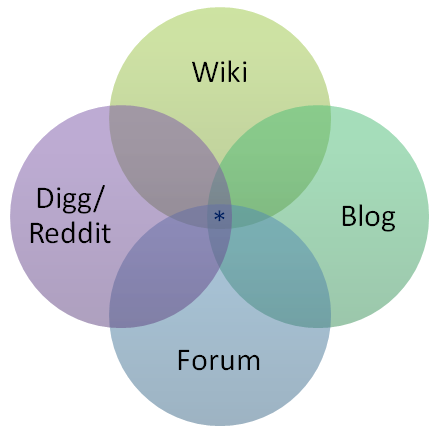
Ever seen this diagram?

That’s the visual elevator pitch for Stack Exchange. We were the little dot in the middle, a potent mix of useful traits from other tools, a wiry mutt full of hybrid vigor. The purpose of this blend was to allow and encourage the construction of a library of solutions, by providing communities with the tools they needed to share their experiences and challenges with others who might struggle with the same issues.

The diagram illustrated where we stole drew inspiration for the design of those tools, and their influence occasionally shows up in the results. Sometimes, a question will end up more like a wiki, other times more like a blog, other times more like a discussion. Because of these roots, we’ve never been too stuck on the purity of the idea of Q&A: over time, when communities using this software needed to deviate a bit, we’ve tried to build in features to give them what they needed to help solve more problems:

  • Users wanted to “blog” about questions where they’d already found solutions, so we introduced self-answered questions
  • People occasionally found themselves needing ongoing discussion to solve a problem, so we added chat forums

…And sometimes, folks realized that they needed a bunch of people to contribute meaningfully to create a post. Not just the collaborative, minor editing that occurs on most questions here; these were cases where multiple users needed to pitch in just to do a topic justice. But there were two points of friction:

  1. Originally, most users couldn’t edit others’ posts, (we didn’t have suggested edits yet)
  2. It’s hard to ask people to put a lot of effort into creating something together when the asker is going to keep all the credit and all the reputation. I don’t care about rep and attribution when I’m self-motivated to improve a post I come across, but it feels different when someone outright asks me to pitch in while intending to keep all the fake internet points for themselves!

That’s where Community Wiki came in – it killed those friction points by eliminating rep generation from those posts and lowering the bar on who could edit them. Which made it much easier for people who wanted to create collaborative, ensemble works – true community owned and edited resources.

But, much like dynamite, this well-intentioned invention was quickly weaponized into an instrument of destruction. Our big mistake: thinking we could systematically detect when such collaboration was happening, and automatically convert those posts to Community Wiki. It sounded awesome – “we’ll help you collaborate even more! When we see enough editors, we’ll save you the trouble of making it community wiki yourself and do it for you…”

Yeah, we are dumb.

In which we stop being dumb

By using ridiculously simplistic heuristics to detect these scenarios, we turned what should have been an act of generosity – an invitation to the community to participate in building a shared resource – into a hidden pitfall for the unwary. Too many helpers? NO ONE GETS CREDIT!!! It was a system that converted helpfulness and generosity into a slap in the face – from a robot.

Therefore, we have removed all automatic Wiki conversion triggers from the software. No longer will answers with more than some arbitrary number of edits, or questions with more than a page of answers suddenly lose their owners. To handle those rare situations where unusual activity levels may indicate misuse, we’ve added some new moderator flags in these scenarios: they can respond when necessary by closing or locking the post – but when there is no fire behind the smoke, they can silently dismiss the flag without disruption.

The once again future of Community Wiki

An author can still apply the status manually when posting or when editing their own answer, and moderators retain the ability to apply it when they deem it truly necessary (for instance, a question attracting very large numbers of partial answers can be a sign of a topic that wants to be a wiki). For the most part, we’ve turned it back into something that you can choose to use in cases where it lets you work together to create something wonderful:

Sometimes these are single, collaborative answers, other times questions where all contributions must be made in the form of edits. In all cases, the results are clearly that of a sum greater than the whole of its parts, a true community project.


source: Wikimedia Commons

Collaboration isn’t a rare thing on our network – the whole system, from posting and editing to voting to moderation, is based on the interaction of multiple users to produce a final product. Community wiki is for a special scenario, something built not by the expertise of one individual, then improved or iterated on by a few others, but rather something created by the concerted efforts of the community as a whole.

06 May 04:48

What Can Men Do?

by Jeff Atwood

(The title references Shanley Kane's post by the same name. This post represents my views on what men can do.)

It's no secret that programming is an incredibly male dominated field.

  • Figures vary, but somewhere from 20% to 29% of currently working programmers are female.

  • Less than 12% of Computer Science bachelor's degrees were awarded to women at US PhD-granting institutions in 2010.

So, on average, only about 1 out of every 5 working programmers you'll encounter will be female. You could say technology has a man problem.

In an earlier post I noted that many software developers I've known have traits of Aspergers. Aspergers is a spectrum disorder; the more severe the symptoms, the closer it is to autism. And did you know that autism skews heavily towards males at a 4:1 ratio?

Interesting. I might even go so far as to say some of those traits are what makes one good at programming.

That's the way it currently is. But is that the way it should be? I remember noticing that the workforce of the maternity ward at the hospital where our children were born was incredibly female dominated. Is there something inherently wrong with professions that naturally skew heavily male or female?

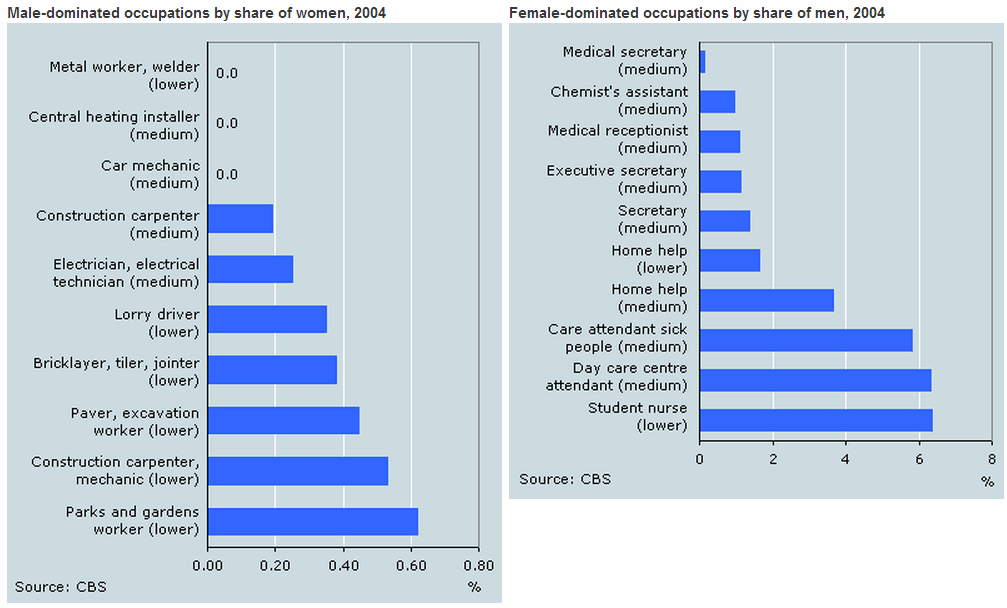
Consider this list of the most male and female dominated occupations in the Netherlands from 2004. It notes that:

In higher and academic level positions, men and women are more often represented equally. This pattern of employment has hardly changed over the last years.

Is programming a higher and academic level occupation? I'm not so sure, given that I've compared programmers to auto mechanics and plumbers in the past. And you'll notice squarely where those occupations are on the above graphs. There's nothing wrong with being an auto mechanic or a plumber (or a programmer, for that matter), but is there anything about those particular professions that demands, in the name of social justice, that there must be 50% male plumbers and 50% female plumbers?

For a counterpoint, here's a blog post from Sara J. Chipps. When I've e-mailed her in the past with my stupid questions on topics like this, she tries her best to educate me with empathy and compassion. That's why I love her.

This is an excerpt from a blog post she wrote in 2012 which answered my question:

Many people I meet ask me a variant of the question “I understand we want more women in technology, but why?” It’s a great question, and not at all something we should be offended by. Often men are afraid to ask questions like this for fear there will be backlash, and I think that fear can lead to stifling an important conversation.

Frankly, the Internet is thriving without women building it, why should that change? Three reasons:

1) Diversity leads to better products and results

As illustrated in this Cornell study along with many others, diversity improves performance, morale, and end product. More women engineers means building a better internet, and improving software that can service society as a whole. Building a better Internet is why I started doing software development in the first place. I think we can all agree this is of utmost importance.

2) The Internet is the largest recording of human history ever built

Right now the architecture for that platform is being built disproportionally by white and asian males. You’ve heard the phrase “he who writes history makes history”? We don’t yet know how this will affect future generations.

How can architecture be decidedly male? I like to refer to the anecdotal story of the Apple Store glass stairs. While visually appealing, there was one unforeseen consequence to their design: the large groups of strange men that spend hours each day standing under them looking up. As a woman, the first time I saw them I thought “thank god I’m not wearing a skirt today.” Such considerations were not taken in designing these stairs. I think it’s probable, if not easily predictable, that in a few years we will see such holes in the design of the web.

3) Women in 10 years need to be able to provide for themselves, and their families

Now, this reason is purely selfish on the part of women, but we all have mothers, and sisters, so I hope we can relate.

This year there are 6 million information technology jobs in the US, up from 628,600 in 1987 and 1.34 million in 1997. Right now jobs in technology have half the unemployment rate of the rest of the workforce. There is no sign this will change anytime soon. If growth continues at the current rate, it will not be long until women will not be able to sustain themselves if not involved in a technical field.

We have to start educating young girls about this now, or they may ultimately become the poorest demographic among us.

These are good reasons. I'm particularly fond of #1. Diversity in social perspectives is hugely valuable when building social software intended for, y'know, human beings of all genders, like Discourse and Stack Exchange. Also, I get really, really tired of all the aggressive mansplaining in software development. Yes, even my own. Sometimes it would be good to get some ladysplaining all mixed up in there for variety.

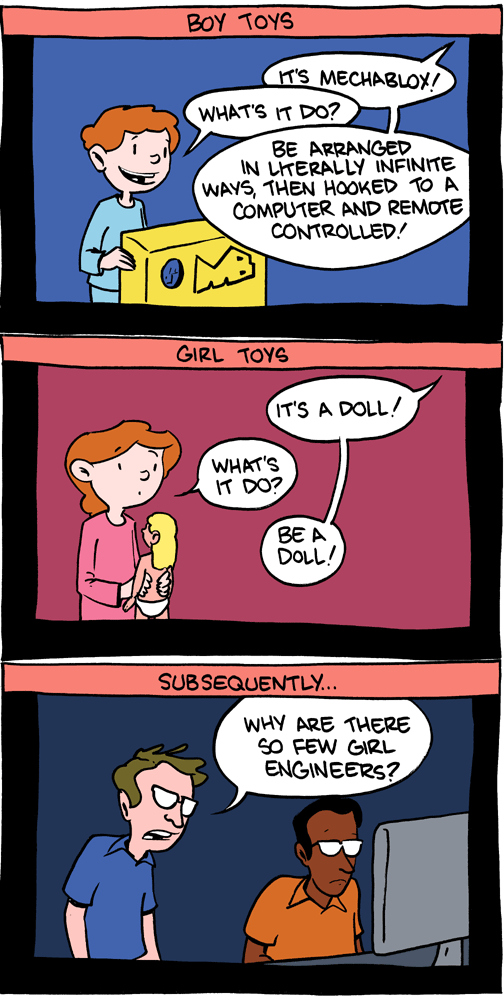
I suppose any effort to encourage more women to become software engineers should ideally start in childhood.

boy toys vs girl toys

Dolls? Pshaw. In our household, every child, male or female, is issued a regulation iPad at birth. You know, the best, most complex toy there is: a computer. And, shocker, I'm kind of weird about it – I religiously refer to it as a computer, never as an iPad. Never. Not once. Not gonna happen in my house. Branding is for marketing weasels. So the twin girls will run around, frantically calling out for their so-called "'puter". It puts a grin on my face every time. And when anything isn't here, Maisie has gotten in the habit of saying "dada chargin'". Where's the milk, Maisie? "dada chargin'".

But not everyone has the luxury of spawning their own processes and starting from boot. (You really should, though. It will kick your ass.)

What can you do?

If you're reading this, there's about an 80% chance that you're a man. So after you give me the secret man club handshake, let's talk about what we men can do, right now, today, to make programming a more welcoming profession for women.

  1. Abide by the Hacker School Rules

    Let's start with the freaking brilliant Hacker School rules. This cuts directly to the unfortunate but oh-so-common Aspergers tendencies in programmers I mentioned earlier:

    • No feigning surprise. "I can't believe you don't know what the stack is!"
    • No well-actuallys. "Well, actually, you can do that without a regular expression."
    • No back seat driving. Don't intermittently lob advice across the room.
    • No subtle sexism via public debate.

    Does any of this sound familiar? Because it should. Oh God does this sound familar. Just read the whole set of Hacker School guidelines and recognize your natural tendencies, and try to rein them in. That's all I'm proposing.

    Well, actually, I'll be proposing a few more things.

  2. Really listen. What? I SAID LISTEN.

    Remember this scene in Fight Club?

    This is why I loved the support groups so much, if people thought you were dying, they gave you their full attention. If this might be the last time they saw you, they really saw you. Everything else about their checkbook balance and radio songs and messy hair went out the window. You had their full attention. People listened instead of just waiting for their turn to speak. And when they spoke, they weren't just telling you a story. When the two of you talked, you were building something, and afterward you were both different than before.

    Guilty as charged.

    My wife is a scientist, and she complains about this happening a lot at her work. I don't even think this one is about sexism, it's about basic respect. What does respect mean? Well, a bunch of things, but let's start with openly listening to people and giving them our full attention when they talk to us – rather than just waiting for our turn to speak.

    Let's shut up and listen quietly with the same thoughtfulness that we wish others would listen to us. We'll get our turn. We always do, don't we?

  3. If you see bad behavior from other men, speak up.

    It's not other people's job to make sure that everyone enjoys a safe, respectful, civil environment at work and online.

    It's my job. It's your job. It is our job.

    There is no mythical men's club where it is OK to be a jerk to women. If you see any behavior that gives you pause, behavior that makes you wonder "is that OK?", behavior that you'd be uncomfortable with directed toward your sister, your wife, your daughter – speak up. Honestly, as one man to another. And if that doesn't work for whatever reason, escalate.

  4. Don't attempt romantic relationships at work.

    Do you run a company? Institute a no-dating rule as policy. Yeah, I know, you can't truly enforce it, but it should still be the official company policy. And whether the place where you work has this policy or not, you should have it on a personal level.

    I'm sorry I have to be that guy who dumps on true love, but let's be honest: the odds of any random office romance working out are pretty slim. And when it doesn't, how will you handle showing up to work every day and seeing this person? Will there be Capulet vs Montague drama? The women usually get the rough end of this deal, too, because men aren't good at handling the inevitable rejection.

    Just don't do it. Have all the romantic relationships you want outside work, but do not bring it to work.

  5. No drinking at work events.

    I think it is very, very unwise for companies to have a culture associated with drinking and the lowered inhibitions that come with drinking. I've heard some terrifyingly awful stories that I don't even want to link to here. Men, plus women, plus alcohol is a great recipe for college. That's about all I remember from college, in fact. But as a safe work environment for women? Not so much.

    If you want to drink, be my guest. Drink. You're a grown up. I'm not the boss of you. But don't drink in a situation or event that is officially connected with work in any way. That should absolutely be your personal and company policy – no exceptions.

There you have it. Five relatively simple things you, I, and all other working male programmers can do to help encourage a better environment for men and women in software plumbing. I mean engineering.

So let's get to it.

(I haven't listed anything here about mentoring. That's because I am an awful mentor. But please do feel free to mention good resources, like Girl Develop It, that encourage mentoring of female software engineers by people that are actually good at it, in the comments.)

[advertisement] How are you showing off your awesome? Create a Stack Overflow Careers profile and show off all of your hard work from Stack Overflow, Github, and virtually every other coding site. Who knows, you might even get recruited for a great new position!
06 May 04:34

My First 60 Days – Juniper Networks

by Erin Banks
EMC logo

When I first graduated college and lived as a professional in the big city, I worked in technical support at Bay Networks. I will never forget my experience and subsequently, Nortel. It was an amazing place with incredible people and I was happy there. Truly happy. But Nortel was going under and I needed to find  a new opportunity. As I was driving home I saw an “Open House” sign at RSA Security and I applied for some jobs and … I got one!!! Yay Me!!! #PewPew

Six months later I moved to EMC and a couple of years after that, VMware. I have had an amazing career and ironically, now I am back where it all started… a networking company. I work out of the office in Westford and the amount of people that I run in to from Bay and Nortel is amazing. It is almost like going back home, but better. The energy, the passion, the excitement, the drive to create and do amazing things is so alive at Juniper, I can not even explain it. What I love the best besides all those amazing things is the technology. I know without a doubt that I made the right decision to come to Juniper not only for the people but the technology… and I am just talking about the security products that have been virtualized… I have not even touched all the other cool stuff.

60

So let’s just take a quick glimpse at these security products that have been virtualized (I of course will go into more detail on them in the future but I wanted to make you aware of them)…

Let’s see, there is the popular and often talked about Firefly Perimeter and Firefly Host but what about

It is important to understand the “listing” of the security products that have been virtualized because at this time, there is no virtualization tab on Juniper.net but there certainly are products available.

This has truly been an amazing 60 days with so much to do and I look forward to the next 60 months ;)


06 May 04:33

CapEx versus OpEx – its not a decision point, its a result of business requirements

by Jonathan Frappier
EMC logo

Jonathan Frappier Virtxpert

At the SDDC Symposium, there was a discussion around CapEx vs OpEx (video below).  You can click the previous links to learn more about each but, in short, CapEx or Capital Expenditures are large, one time purchases, such as buying a SAN or NAS for example where as OpEx or Operational Expense is ongoing cost which in the technology field most closely aligns to ongoing cost such as monthy payments for Amazon AWS instances or S3 storage.

I expected a bit more discussion around actual CapEx and OpEx, however (at least early on) was mostly around technology and whether vendors can lock you in or how to be more agile.

From my perspective, CapEx and OpEx isn’t a technology decision alone, it’s a joint decision between the short/long term business goals, the finance group and how they prefer to manage cash flow and budget and what technology groups need in order to support those short and long term business goals.  I don’t feel that one is any better than the other, but it should be a marriage between business, finance and technology.  If short term business goals call for a more flexible end user computing solution, and additional business requirements call for lower operational cost then its the job of the technology group to find a solution.  If a longer term business goal is, as Colin McNamara used in one of his examples, a more mature development solution that allows you to abstract your code/product from any particular solution then the finance and technology groups need to work together to allow for the OpEx model.  Let’s assume for a moment that this conversation goes horribly wrong for you and you are instructed as a technologist to go CapEx, and are given the budget to build out multiple physical data centers, does that really change your development model?  I don’t think so, build your code so it can be deployed and don’t tie  yourself to the hardware where its deployed.

At the end of the day, CapEx vs OpEx is not a decision, its the result of business requirements that involve many people.  I’ve worked for organizations where finance felt very strongly for a CapEx model, however, when needed we discussed business requirements that required solutions in more of an OpEx model and that worked because business, finance and technology worked together to identify the needs of the business and the solution to properly support those needs.  Justin Warren made a similar point around 18:29 which I’ve often said – business doesn’t care about technology, it doesn’t care about what server vendor you use they want their business to operate, be available, perform well and provide disaster recovery options while supporting customer and local/state/federal requirements.  If I can run my business application stack on AWS or on my local VMware stack, the business doesn’t care.  It’s up to the technology group to take these requirements and build the right solution.

To my fellow technology folk, let’s make CapEx vs OpEx a thing of the past and focus on the needs of the business(es) we support.  Technology needs to understand how the business and finance operate, and we need to educate business and finance on various solutions and make the right decision for the business.

SDDC14 CapEx/OpEx Battleground

CapEx versus OpEx – its not a decision point, its a result of business requirements

06 May 04:33

The $46 standing desk from Ikea

by Jonathan Frappier
EMC logo

Jonathan Frappier Virtxpert

With standing desks all the rage, I’d been looking for something in the DIY category because I don’t have hundreds or even thousands to spend on some standing desks.  The $22 standing desk from iamnotaprogrammer.com has clearly been popular for that reason, but it didn’t quite work for me because I wanted a wider area, thus the $22 standing desk for me turned into a $44 standing desk if I purchased two.  A co-worker came up with these parts to create a winder $46 standing desk pictured here:

standing

It is composed of the $5.99 Linnmon top and 4 adjustable Sultan legs which will run you $40 ($10 each).   There are some additional table tops in my link, so depending on the size of your desk you may chose another top or even shape like the Linnmon corner top.

If you are going to go the standing desk route, make sure to pick up an anti-fatigue mat, this one from Amazon has served me well.  Also, check your shoes – the flatter the shoe the better for your foot, don’t stand all day with shoes that have a pronounced heel.

The $46 standing desk from Ikea

06 May 04:32

PowerCLI – Add cluster hosts to existing virtual distributed switch

by Jonathan Frappier
EMC logo

Jonathan Frappier Virtxpert

I started writing this script for mostly greenfield deployments to add all hosts in a cluster to a virtual distributed switch, but it could also be used when adding a new group of servers to vCenter or a cluster.  I haven’t added logic to check if the host already has be added to the VDS or not – I’ll do that soon (maybe) so right now it will just throw an error.  I also plan on adding the creation of the VDS, maybe I’ll do that in a separate script.

The script prompts for the vCenter name, the list of vmnics to add as uplinks and local ESXi user since adding the uplinks is done on a per host basis.   This script currently assumes there is one existing VDS, but could be easily(?) modified to use a specific VDS if there were more than one or add additional nested loop to add hosts to multiple VDS.

You can see here one of my hosts I used for testing with the VDS and uplinks added.

vdswitch-from-powercli

# Script to create, and add all hosts in a Cluster to a VDS, create port groups and add uplinks/VMkernel interfaces
# The driver behind this script is to not have to place hosts into maintenance mode as you would with host profiles
# Logging portion thanks to Sam McGeown http://www.definit.co.uk/2013/06/changing-esxi-root-passwords-the-smart-way-via-powercli/
# Config maximum notes: http://www.vmware.com/pdf/vsphere5/r55/vsphere-55-configuration-maximums.pdf
# - Max ports per host: 4096
# - Max active ports per host: 1016
# - Max port groups per vDS: 6500
# - Max ports per vDS/vCenter: 60000
# - Max VDS per vCenter: 128
# - Max VDS per hots: 16
# - Max LAG per host/vDS: 64
# - Max Uplinks per LAG: 32
# - NIOC Resource Pools per vDS: 64

# Set PowerCLI Options
Set-PowerCLIConfiguration -InvalidCertificateAction Ignore -Confirm:$false | Out-Null

# Collect information
$VCSrv = Read-Host "Enter the name of the vCenter Server"
$VCCl = Read-Host "Enter the name of the cluster"

#Connect to vCenter for inventory
Connect-VIServer $VCSrv
$ClHost = Get-Cluster $VCCl | Get-VMHost
$VDSw = Get-VDSwitch
$UserAcct = Read-Host "Enter the host user account to connect directly to ESXi hosts (typically root)"
$UplinkCount = $VDSw.NumUplinkPorts

Write-Host "$VDSw currently has $UplinkCount uplinks"
# Collect vmnics to add as uplinks into an array
$VMNICS = @()
do {
$input = (Read-Host "Enter the VMNIC name and press enter (just enter to end)")
if ($input -ne '') {$VMNICS += $input}
}
until ($input -eq '')

# Setup log file stored in the folder the script is run from
$LogFile = "Update-HostNetworking.csv"
# Rename the old log file, if it exists
if(Test-Path $LogFile) {
$DateString = Get-Date((Get-Item $LogFile).LastWriteTIme) -format MMddyyyy
Move-Item $LogFile "$LogFile.$DateString.csv" -Force -Confirm:$false
}
# Add some CSV headers to the log file
Add-Content $Logfile "Date,Host,Status"

# Add each host in the Cluster to the Distributed Switch
ForEach ($VMHost in $ClHost)
{
# Add hosts to the VDS
Get-VDSwitch -Name $VDSw | Add-VDSwitchVMHost -VMHost $VMHost
}

# Disconnect from Cluster as commands to add uplinks are per host
Disconnect-VIServer $VCSrv -Confirm:$false

# Add uplinks for each host to VDS
ForEach ($VMHost in $ClHost)
{
# Get Host Password
$HostPW = Read-Host "Enter the $UserAcct password for $VMHost.Name"

# Connect to host, host PW in quotes to account for special characters
Connect-VIServer -Server $VMHost.Name -User $UserAcct -Password "$HostPW" | Out-Null

# Add uplinks for the host to the VDS
ForEach ($VMNIC in $VMNICS)
{
$vmhostNetworkAdapter = Get-VMHost $VMHost | Get-VMHostNetworkAdapter -Physical -Name $VMNIC
Get-VDSwitch $VDSw | Add-VDSwitchPhysicalNetworkAdapter -VMHostNetworkAdapter $vmhostNetworkAdapter -Confirm:$false
}

# Update log file
Add-Content $Logfile ((get-date -Format "dd/MM/yy HH:mm")+","+$VMHost.Name+",Success")

# Disconnect from host
Disconnect-VIServer $VMHost.name -Confirm:$false
}

PowerCLI – Add cluster hosts to existing virtual distributed switch

06 May 04:32

Infrastructure as a Means, not an End

by mjb

In philosophy, the term means to an end refers to any action (the means) carried out for the sole purpose of achieving something else (an end)

I run two small clusters of ESXi hosts for the SEs at Infinio.

They act as  a microcosm of real infrastructure: shared amongst the team, at the will of the network team, often capacity or performance constrained, occasionally faulty for unexplained reasons.

What’s most realistic about this side-task is that the goal of my job is not managing this cluster. My work uses the clusters as a resource for my actual work. Maybe I need to test new code. Maybe I need to document a user experience. No matter the end, running the infrastructure is not what my work is about. It’s simply a means.

This last point resonates with me most of all. As I look to experience what my customers experience, I find this setup to be a perfect way to do so. Running a small cluster in order to demo our product makes it a means to a much more business-centric end. If something is broken for a while, I mostly don’t care. If it doesn’t work  when I need to demo, I care a great deal.

That’s real world infrastructure for you, and probably is more true than we like to admit. Those who prioritize their tasks do not always fix what’s broken. They fix what’s broken before it is needed and as quickly as they can while doing it well. It’s a different mindset.

This experience teaches me two lessons I wish to share with you:

  1. If you want to sell infrastructure (that includes you, Marketing), you should run one. No matter how small. Download Autolab and get one running on your laptop.
  2. As organizational silos fall between storage, network, and compute you can imagine even less time spent twiddling with infrastructure knobs. Automation – even if it’s good enough automation – will eat up these menial tasks in even the smallest organizations. The only people left needing to know the details will be Technical Support.
06 May 04:28

The Case For SPARSE_SE

by Itzik Reich
EMC logo

Hi,

A topic I got involved with lately is the ability to run an in guest space reclamation automatically, why is that so important you may ask,

well, let’s assume, you are after a storage array, any storage array, you pay good money for it, right? now, you are probably assuming that by deleting files from WITHIN the guest OS, the capacity will return back to the array right? you are probably assuming that if you delete files OUTSIDE the VM, say, deleting an actual VM from the datastore, the physical capacity will also return back to the array, right?

WRONG!

it won’t, in order to support it, both the guest OS needs to translate UNMAP command to the parental hypervisor or OS and the parental Hypervisor needs to pass on this information to the underlying storage array.

ok itzik, so you are telling me that I may gave GB’s or TB’s of space that I can potentially use but I can’t ??

YEP!

so what can you do, after all, you just spent good money that you want to put to a use, well, like any answer, it depends…

Microsoft Server 2012 / Hyper-V

IF you are using Windows server 2012 / 2012 R2 as a physical OS or with the Hyper-V role installed on it, you do not need to do anything!, UNMAP is built in to the OS for both physical or “virtual” (Hyper-V is just a role enabled on the parental Physical OS)

image

File deletion can generate UNMAP operations

Background operations?

As a scheduled task through “Optimize Drive”

Volume initialization (format) can generate UNMAP

if you are using Windows Server 2012, you want to Watch for HotFix 444333 , Resolves serialization of UNMAP in NTFS volumes

2012 R2? – It Just Work.

VMware vSphere

the plot get’s more complex, back in the vSphere 5.0 era, VMware DID support an automated UNMAP command but it turned out that in rare circumstances, it actually cased data corruption so you now need to do it manually at both the in guest level and the datastore level

In-Guest

you can use a free MS utlitiy called sdelete that you need to run on every VM

phase 1:

the sdelete command started to run

image

phase 2:

the sdelete command is toward the end of it’s run, note the red arrow, our physical capacity just got bigger!

image

but it’s not over, right? remember I told you that the datastore also need to be aware of the space reclamation so:

vSphere 5.1

run the vmfstools –y command, it will create a baloon file that will then gets deleted and release the capacity back to the array

image

Before:

image

After:

image

vSphere 5.5

more or less the same, the syntax is different, you now should run the unmap command

image


seriously man, do I now need to run sdelete MANUALLY on hundreds or thousands of VMs????

well, there is some hope, you can use a third party which ain’t free like sdelete but will automate, report and consume the capacity for you, the software I was using is from a company called RAXCO and the specific product is “PerfectStorage” (http://www.raxco.com/products/perfectstorage)

let me show you one screenshot from my VDI lab that will tell a thousands words, the lab has been running 2,500 VDI VM’s, persistent desktops, no real users are connected to it but I DO use LoginVSI to generate load on it so temporary windows files DO EXIST.

image

yes, you are seeing it right, the tool just gave me a full report (which is part of it’s centralized reporting engine) about the fact I can claim back 5.14TB of space!!

“ok but deploying this tool is probably a nightmare and it takes ages”, nope, I used it’s ability to push the msi package and it took me 2 minutes to configure the policy and around 2 hours to push it to 2,500 VMs.

the scanning capability is also very important because it letYOU to decide if you want to reclaim back the capacity or leave it as is and wait for the next scanning reporting, the actual claiming process is very sophisticated as it takes into an account both the guest OS / ESX CPU utilization so it knows to “behave” itself in a virtualized environment, here’s the setting how to do it, they call it, virtualization awareness, it takes into an account not just the kernel CPU and the user Mode CPU but also the Disk I/O, pretty cool in my (humble) opinion1

image

by the way, PerfectStorage isn’t perfect either, you still need to run the space reclaim command per datastore but running this can be scripted and it’s easier to do then manually running “sdelete” on thousands of VM’s

“hmm, sounds very good but isn’t it up to VMware to fix this?”

yes, it is but currently they do it for VMware VIEW when using linked clones only, they basically enable a new disk format called “sParse_SE or “Flex-SE” if you are using the vCenter web interface

image

you basically set a “blackout” windows, when they will go and claim the capacity inside of these VM’s

I want to show this from a different angle, here, at XtremIO, we have a tool called “dedupe estimator”, it basically can scan volumes (physical or virtual) and will let you know about the data savings that you can have by moving these voumes to XtremIO

here’s how it look before, scanning two PRODUCTION datastore from a real customer, these datastores have been used for couple of years by now

BEFORE:

image

as you can see, the GLOBAL dedupe and data reduction savings (XtremIO dedupe is global, not per volume..) are around 2:1, not bad but not great either.

AFTER:

image

after running either sdelete or RAXCO and then running the datastore space reclaim commands on these two datastores, the data reduction has gone up to 4.6:1 !!! that is really good, it means you are buying an EMC XtremIO array but you are getting X 4.6 of what you pay for..

I hope I was able to demonstrate why cleaning after yourself is a good habit, for ALL storage arrays but in particular for AFA’s where the media is more expensive.

I truly hope that one day VMware will support SPARSE-SE as the default vdisk format but until then your best option is to use RAXO PerfectStorage.


23 Apr 21:44

Arcane-SQL–A PowerShell Module for Generating SQL Code

by arcanecode

Overview

There are many PowerShell modules available for assisting the busy DBA with managing their SQL Server environment. This isn’t one of them. This module is targeted toward SQL Developers, with special functionality for data warehouse developers. A common task for BI professionals, one that is performed on almost every project, is the creation of a staging area. This might be a set of tables in the data warehouse, perhaps in their own schema, or in an entirely separate database often called an operational data store (ODS).

The staging tables are typically similar in structure to the ones in the source database. Similar, but not identical, as there are some small modifications which are commonly made to the staging tables. First, large data types such as VARCHAR(MAX) are seldom useful in data analysis and thus could be removed. Next, even the most casual user of SSIS will quickly see SSIS prefers to work with the double byte character sets (WSTR in SSIS, which maps to NVARCHAR in T-SQL) as opposed to the single byte (STR/VARCHAR) character sets. It can be helpful to convert these in the staging area.

This Module can (optionally) do all of these things and more when it is used to generate CREATE TABLE or SELECT statements. Imagine if you will a source system with thousands of tables and the need to create a staging area for it in a new data warehouse. This quickly becomes a long, boring tedious task. Now imagine being able to write a bit of PowerShell code and generate these tables in just a few minutes time.

Before diving in, it is highly suggested you download and review the example script, Arcane-SQL-Example.ps1. This demonstrates the most commonly used functions and provides patterns for their use.

Functionality

While the module is full of functions, there are a few core ones that should be highlighted. Complete documentation can be found in the module itself, which has been fully documented using the native PowerShell Help system. In addition there is an example script file which demonstrates some of the most common tasks.

  • Enable-SqlAssemblies – This is the most important function, without calling it nothing else works. Be aware the SQL Server assemblies (including the SMO – SQL Management Objects – and SQL Provider) need to be on the machine where this script is run. This module has been tested on, and intended for, SQL developers with SQL Server Developer Edition installed on their workstations.
  • Join-InvokeInstance and Join-ProviderInstance – Most of the interaction done with the SQL Provider requires the server name and instance name, assembled in a path like syntax. The Invoke-SQLCommand likewise requires this formatting, however it has a little quirk. If the instance is "default" then the Invoke requires it to be omitted while the provider requires it to be present. These two functions reduce the confusion, simply pass in the server name and instance, and they will format things correctly.
  • Get-TablesCollection – When working with tables it is common to iterate over all the tables in a database. This function will generate a PowerShell array of table objects, each object being of type Microsoft.SqlServer.Management.Smo.Table. By having table objects the wide variety of properties for the table are available, such as Schema name, Table name, and Row Count.
  • Get-TableByName – Most commonly scripts will retieve an array of tables using the above Get-TablesCollection, then iterate over them in a foreach loop. There are times however when only a single table from the collection is desired. For those types the Get-TableByName can be used to retrieve a specific table object based on the name of the table. 
  • Remove-SchemasFromTableCollection and Select-SchemasInTableCollection – Get-TablesCollection will return an array of all the tables in a database. Often there is a need to only work with a subset of that table collection. These two functions will filter based on the schema and return a new array. The first, Remove-SchemasFromTableCollection, removes all tables from the array of schemas that are passed in. The second, Select-SchemasInTableCollection, will retain only those tables in the schemas passed into the function.
  • Remove-TablesFromTableCollection and Select-TablesInTableCollection – These work as filters, similar to the functions above. Instead of the schema however, they are based on table name. All tables that begin with the text passed in are either removed, or in the latter function the only ones retained.
  • Get-PrimaryKeyIndex – Returns the primary key object for the passed in table object.
  • Get-PrimaryKeyColumnNames – returns a comma delimited list of the column names in the primary key
  • Decode-IsPrimaryKeyColumn – Will determine if the passed in column name is part of the primary key index
  • Get-TruncateStatement – Will generate a SQL Truncate Table statement based on the table object passed in.
  • Get-DropTableStatement – Generates a Drop Table statement, including the check to see if the table exists, for the passed in table object.
  • Get-CreateStatement – To simply say this function generates a create table statement would do it disservice. It will take a table object and reverse engineer it, generating a create table statement. Unlike other code generators, it has a suite of parameters which allow customization of the generated statement with an eye toward the needs of a data warehouse developer. A few are:
    • DataTypeAlignColumn – Set the column number to line up the data type declarations on. Passing in a value of 1, will suppress alignment and simply place the data type after the column name. The default is column 50.
    • OverrideSchema – It is common place staging tables in the data warehouse in their own schema, often named ‘Staging’ or ‘ETL’. Passing in a value here will include the new schema name in the create table declaration. If the table object passed in had a schema other than dbo, it is placed in front of the table name with an underscore. If it was dbo, the source schema is simply omitted.
    • PrependToTableName and AppendToTableName – Allows extra text to be placed before or after the table name. For example, it is common to create tables with _Delete, _Update, and _Insert in the staging area. This provides a simple way to do that.
    • AdditionalColumns – When creating tables in a data warehousing environment, there are often extra columns to hold metadata about the ETL process. A user of this function can create an array of additional columns using the Add-ColumnDefinition function and have them added to the create table statement.
    • Scrub – This is a very powerful switch. When added it will perform a cleanup to make the output suitible for data warehousing. Columns with large data types such as VARCHAR(MAX) are removed. All single byte character sets in the source are converted to double byte sets.
    • SuppressIdentity – Source systems will sometimes use the IDENTITY clause in the primary key column. Using this switch will suppress that identity clause from being generated in the new create table statement.
    • SuppressNotNull – Often staging tables will not be concerned with null versus not null values. Using this switch will create all columns as nullible, regardless of their setting in the source.
    • IncludeDropTable – Adding this switch will include a ‘if exists drop table’ style clause prior to the create table statement.
    • PrimaryKeysOnly – Will generate a create table statement that only has the primary keys found in the source system.

Finally, if a column in the source table object has a custom data type, the script will reverse engineer the data type back to its basic SQL data type.

  • Get-SelectStatement – Like its sister function Get-CreateStatement, under the covers this function provides a lot of power and flexibility to the statement it creates. Additional columns can be added, columns can be specified to order the output by, table aliases can be used, and most powerful of all is the ability to generate a HASHBYTES column, including the ability to remove specified columns from the hash byte calculation. Here are some of its parameters:
    • AsColumn – The routine will line up the AS <column alias> at the column number passed in here. The default is 50. To not use aligning, set this to 1.
    • PrependToColumnName – Text to include before each column name.
    • AppendToColumnName – Text to place after each column name.
    • AdditionalColumns – A collection of additional columns to be added to the SELECT statement. Useful for adding metadata columns. All items in the AdditionalColumns collection should be generated using the Add-OutputColumn function.
    • OrderByColumns – A list of columns to add to the ORDER BY clause. All items in the OrderByColumns collection should be generated using the Add-OutputColumn function.
    • TableAlias – Allows user to specify an alias to use for the table. The alias is then put in front of each column name.
    • HashBytes – If included the select statement will include a HASHBYTES function with all columns except the primary keys and any columns included in the OmitFromHashBytes collection. The name passed in this parameter will be used for the name of the HashBytes column.
    • OmitFromHashBytes – A collection of column names that should be excluded from the HashBytes calculated column. Useful for excluding metadata columns. All items in the OmitFromHashBytes collection should be generated using the Add-OutputColumn function.
    • Scrub – When included this will remove certain data columns from the output, such as BINARY, NVARCHAR(MAX), XML, and other large types not normally used in data warehouses. Additionally VARCHAR/CHAR are converted to NVARCHAR/NCHAR, and DATETIME converted to DATETIME2(4).
    • Flatten – When included will return the SELECT statement as one long string, without any Carriage Return / Line Feed characters. Additionally, any additional spacing (such as indicated with the AsColumn) is eliminated.
    • IncludeOrderByPK – When included the Primary Keys in the table object are included in the order by clause. If any columns are passed in the OrderByColumns parameter, the Primary Keys occur first in the Order By clause, followed by any columns in the OrderByColumns parameter.
    • IncludeNoLock – When included, a WITH NOLOCK clause is added to the SELECT statement.

Construction

Those PowerShell experts who review the code may note that in many places code does not follow the most "powershelly" way of doing things. In some places rather than using pipelining it was instead decided to use a foreach loop, for example. The intended audience for this module are T-SQL developers who may not be as comfortable in PowerShell as they are T-SQL. Thus using code that more closely aligned with T-SQL patterns would make it more useful and modifiable by SQL developers.

When development first started attempts were made to use advanced functions, using the pipeline for input and output. At some point however this didn’t make sense for a majority of the functions. Time constraints further impinged this effort. Some future revision may attempt to migrate selected functions back to an advanced design, but for now they will have to stand as is.

Development Environment

This module is intended to be used on a developer workstation, not on a server, and especially not on a production server. As such deployment has been made simple, just copy the Arcane-SQL folder to the developers PowerShell module library. On a standard Windows 7 machine this would be C:\Users\<<usernamehere>>Documents\WindowsPowerShell\Modules. If the Windows PowerShell folder and modules subfolder do not exist, they will need to be created first.

To keep things simple, no attempt was made to sign the script. If this is an issue the developer using this module can self sign it on their PC. Check the execution policy on the workstation where the module is installed to ensure sufficient rights to run the module.

This module was developed on machines with both SQL Server (Developer Edition) 2008R2 and 2012 installed (some machines with both) and worked without issue. One machine it was tested on had 3 versions of SQL Server, 2008R2, 2012, and 2014. On that one machine there were some errors with some of the functions passing in the SMO table objects. Those are still being investigated.

SQL Security was assumed to be handled using built in Windows Credentials. Thus the logged in user would need to have rights based on Windows credentials to the SQL Server they are targeting. 

The machine being developed on was using PowerShell v4, however v3 should work as well.

This module was developed using SAPIEN PowerShell Studio 2014. To make life easy for other developers the PowerShell Studio files (Arcane-SQL.psproj, Arcane-SQL.psproj.build, and Arcane-SQL.psprojs) were included in the code. If you are using a different editor, such as the PowerShell ISE, simply discard these files.

Warranty

To put it succinctly, there is none. No guarantee is made for the code in this module, users of this module assume all risks. While I am happy to receive bug reports, I make no promises or guarantees if, or when, they will be fixed.

Contributions

No, not the money kind, code contributions. If anyone wishes to extend the functionality of this module I am happy to collaborate as long as the coding standards demonstrated in this module are adhered to, and the contributions are relevant to the goals of this module. Be aware though this is not a money making effort, so expect no monetary reimbursement for any contributions.

Download

You can download the module and its example at:

http://gallery.technet.microsoft.com/Arcane-SQL-A-PowerShell-185651ad


23 Apr 21:43

Does the direction of storage make us bad data citizens?

by simonsabin
  My career started at a company where we hardly had email, the network was a 10base2 affair with cables running all around the office. You used floppy disks and the thought of a GB of data was absurd. You had to look after every byte and only keep...(read more)
23 Apr 21:41

Cars, Databases, and Benchmarks

by Alexander Kuznetsov
Over the last few months we have migrated some functionality from Sql Server to PostgreSql, and developed a couple of new systems powered by PostgreSql. So far I do not see that either of these two products is better than another - they are different. Even though I guess this is the right time to write something like "N reasons why PostgreSql is better than Sql Server", or vise versa: "N reasons why Sql Server PostgreSql is better than PostgreSql", or both ( I guess I could write it both ways), I...(read more)
23 Apr 21:41

Yes, you can install SQL Server 2014 Books Online locally

by AaronBertrand
I've seen people complain that SQL Server 2014 did not ship with documentation you could install locally. While true, it is just because the publication lagged; the local Books Online option is available now. First, make sure you have the documentation components installed. (Note that these use the old, icky, Help Viewer 1.0/1.1 - if you'd like to see this changed, vote here .) Go to Control Panel / Programs and Features, select SQL Server 2014, right-click and choose "Add" and then point it at your...(read more)
23 Apr 21:41

Introducing the Microsoft Analytics Platform System – the turnkey appliance for big data analytics

by SQL Server Team

At the Accelerate your Insights event last week, Satya Nadella introduced the new Microsoft Analytics Platform System (APS) as Microsoft’s solution for delivering “Big Data in a box.” APS is an evolution of our SQL Server Parallel Data Warehouse (PDW) appliance which builds upon the high performance and scale capabilities of that MPP version of SQL Server, and now introduces a dedicated region to the appliance for Hadoop in addition to the SQL Server PDW capabilities. The Hadoop region within the appliance is based on the Hortonworks Data Platform for Windows but adds key capabilities enterprises expect for a Tier 1 appliance such as high availability through the appliance design and Windows Server failover clustering, security through Active Directory and a unified appliance management experience through Systems Center. Completing the APS package and seamlessly unifying the data in SQL Server PDW with data in Hadoop is PolyBase, a ground breaking query technology developed by Dr. David DeWitt and his team in Microsoft’s Grey Systems Labs.

Microsoft continues to work with industry leading hardware partners Dell, HP and Quanta to deliver APS as a turnkey appliance that also delivers the best value in the industry for a data warehouse appliance.

Go to the APS product site to learn more or watch the short product introduction video here: 

22 Apr 01:22

SQL Server Diagnostic Information Queries for April 2014

by Glenn Berry

I made some small improvements to a few of the queries this month. I plan to add several more SQL Server 2014 specific queries over the next couple of months, along with a lot more comments on how to interpret the results of each query in the entire set.

Rather than having a separate blog post for each version, I have just put the links for all five major versions in this single post. There are two separate links for each version. The first one on the top left is the actual query script, and the one below on the right is the matching blank results spreadsheet.  

SQL Server 2005 Diagnostic Information Queries

SQL Server 2005 Blank Results

SQL Server 2008 Diagnostic Information Queries

SQL Server 2008 Blank Results

SQL Server 2008 R2 Diagnostic Information Queries

SQL Server 2008 R2 Blank Results

SQL Server 2012 Diagnostic Information Queries

SQL Server 2012 Blank Results

SQL Server 2014 Diagnostic Information Queries

SQL Server 2014 Blank Results

The basic idea is that you should run each query in the set, one at a time (after reading the directions). You need to click on the top left square of the results grid in SSMS to select all of the results, and then right-click and select “Copy with Headers” to copy all of the results, including the column headers to the Windows clipboard. Then you paste the results into the matching tab in the blank results spreadsheet. There are also some comments on how to interpret the results after each query.

About half of the queries are instance specific and about half are database specific, so you will want to make sure you are connected to a database that you are concerned about instead of the master system database.

Note: These queries are stored on Dropbox. I occasionally get reports that the links to the queries and blank results spreadsheets do not work, which is most likely because Dropbox is blocked wherever people are trying to connect.

I also occasionally get reports that some of the queries simply don’t work. This usually turns out to be an issue where people have some of their user databases in 80 compatibility mode, which breaks many DMV queries.

There is an initial query in each version that tries to confirm that you are using the correct version of the script for your version of SQL Server. Please let me know what you think of these queries, and whether you have any suggestions for improvements. Thanks!

22 Apr 01:22

Starting SSIS 2012 Job Remotely

by tlachev

Scenario: Inspired by the new SSIS 2012 capabilities, you've managed to convince management to install SSIS 2012 on a new server for new ETL development. But your existing ETL is still on SQL Server 2008 (or R2) and there is no budget for migration and retesting. You want to start SSIS 2012 jobs from the 2008 server, e.g. in SQL Server Agent on completion of a certain SSIS 2008 job.

Solution: Courtesy to Greg Galloway for clueing me on this, thanks to its CLR integration, SSIS 2012 supports initiating jobs via stored procedure in the SSIS catalog. Although the process could benefit from simplification, it's easy to automate it, such as (you guessed it) with an SSIS 2008 calling package. It goes like this:

  1. Call catalog.create_execution in the SSISDB database to create an execution for the SSIS job. At this point, the job is not started. It's simply registered with the SSIS 2012 framework. Notice that you want to get back the execution id because you will need it for the next calls.

EXEC catalog.create_execution

@folder_name=N'<SSIS Catalog Folder>',

@project_name=N'<project name>',

@package_name=N'package name',

@reference_id=NULL,

@execution_id=? OUTPUT


Note: If you use SSIS 2008 and you declare the variable that stores execution_id (which is a big integer) to be Int64, SSIS 2008 would probably choke due to a known issue with big integers. As a workaround, change the SSIS variable type to Int32.


  1. So that the SSIS 2008 job waits for the SSIS 2012 job to complete, set the Synchronous parameter.
    EXEC catalog.set_execution_parameter_value @execution_id = ?

    ,@object_type=50 ,@parameter_name='SYNCHRONIZED'

    ,@parameter_value=1


  2. Now you are ready to start the job by calling catalog.start_execution and wait for it to finish.
    EXEC catalog.start_execution @execution_id = ?


  3. To get the back the job status, query the status field from the [catalog].[executions] view. A status of 4 means that the job has failed.
    SELECT [status] FROM [SSISDB].[catalog].[executions] WHERE execution_id = ?


  4. To get the actual error, query the [catalog].[event_messages] view, e.g.:
    SELECT TOP 1 cast([message] as nvarchar(500)) as message, cast ([execution_path] as nvarchar(500)) as execution_path

    FROM [catalog].[event_messages]

    WHERE operation_id = ? AND event_name = 'OnError'

    ORDER BY message_time DESC


Tip: If you use SQL Server Agent to start the SSIS 2008 job, use a proxy account to execute the job under a Windows service account that has the required permissions to the SSISDB catalog to start SSIS 2012 jobs.

22 Apr 00:31

CodeSOD: You Can't Handle the True!

by Bruce Johnson

We've all had that feeling before. We see something happening in front of us, yet because the sight doesn't conform to the worldview held within our brain, we just can't believe our own eyes. Dogs playing poker. Cats wearing panty hose. Politicians telling the truth. You get the idea. And depending on your personal threshold for incredulity, you might experience this feeling as a double take, a spit take or a psychotic break. If you happen to be prone to psychotic episodes, then I'm going to have to ask you to move on. Wait for tomorrow's WTF. Or maybe pet some kittens. Here's a picture to help you get started.

Incredibly cute kitten...sorry you can

Feeling calm and relaxed? Good. Now let me tell you a story about Steve. Steve is what you call a 'skeptic' (which is scarily close to septic, but I digress). He questions absolutely everything he encounters. He walks with overly firm footfalls to make sure that the ground won't open up under him. He carries two watches to act as verification for the clock on his smartphone. He even checks his own pulse to make sure he's alive.

What's worse is that Steve carries this tendency into his job as a developer. He writes if statements with a true block, a false block and an else block. And when comparing strings? The equality operator just won't cut it. Consider the following code.

public static void setDelay(String delay) {
   String yes = "YES";
   if ((delay.hashCode()) == yes.hashCode()) Scenario.delay= 10000; 
}

Passing a string as a parameter instead of a Boolean is something that, possibly, could be forgiven. But when it comes to checking for the value of the string, Steve is way too skeptical to just use an equal sign (or two). Instead, the hash code for both incoming value and the test value are generated and compared. Because, as everybody knows, the equality operator is not trustworthy for strings, but has no problem when comparing long integers.

Ironically (and not in the Alanis Morisette sense), by using the hashCode method, Steve has actually changed a simple comparison that was pretty certain to be accurate into one that actually could fail. After all, hashCode is not guaranteed to be unique for each string (that is, a perfect hash). So out there, somewhere, may be another string whose hashCode value actually matches the hashCode for "YES". And there are hackers working hard to find unanticipated ways to delay the scenario.

[Advertisement] BuildMaster 4.1 has arrived! Check out the new Script Repository feature and see how you can deploy builds from TFS (and other CI) to your own servers, the cloud, and more.