Shared posts

28 May 12:58

Read Committed Snapshot Isolation

by Paul White

SQL Server provides two physical implementations of the read committed isolation level defined by the SQL standard, locking read committed and read committed snapshot isolation (RCSI). While both implementations meet the requirements laid down in the SQL standard for read committed isolation behaviours, RCSI has quite different physical behaviours from the locking implementation we looked at in the previous post in this series.

Logical Guarantees

The SQL standard requires that a transaction operating at the read committed isolation level not experience any dirty reads. Another way to express this requirement is to say a read committed transaction must only encounter committed data.

The standard also says that read committed transactions might experience the concurrency phenomena known as non-repeatable reads and phantoms (though they are not actually required to do so). As it happens, both physical implementations of read committed isolation in SQL Server can experience non-repeatable reads and phantom rows, though the precise details are quite different.

A point-in-time view of committed data

If the database option READ_COMMITTED_SNAPSHOT in ON, SQL Server uses a row-versioning implementation of the read committed isolation level. When this is enabled, transactions requesting read committed isolation automatically use the RCSI implementation; no changes to existing T-SQL code is required to use RCSI. Note carefully though that this is not the same as saying that code will behave the same under RCSI as when using the locking implementation of read committed, in fact this is quite generally not the case.

There is nothing in the SQL standard that requires the data read by a read committed transaction to be the most-recently committed data. The SQL Server RCSI implementation takes advantage of this to provide transactions with a point-in-time view of committed data, where that point in time is the moment the current statement began execution (not the moment any containing transaction started).

This is quite different from the behaviour of the SQL Server locking implementation of read committed, where the statement sees the most-recently committed data as of the moment each item is physically read. Locking read committed releases shared locks as quickly as possible, so the set of data encountered may come from very different points in time.

To summarize, locking read committed sees each row as it was at the time it was briefly locked and physically read; RCSI sees all rows as they were at the time the statement began. Both implementations are guaranteed to never see uncommitted data, but the data they encounter can be very different.

The implications of a point-in-time view

Seeing a point-in-time view of committed data might seem self-evidently superior to the more complex behaviour of the locking implementation. It is clear, for example, that a point-in-time view cannot suffer from the problems of missing rows or encountering the same row multiple times, which are both possible under locking read committed isolation.

A second important advantage of RCSI is that it does not acquire shared locks when reading data, because the data comes from the row version store rather than being accessed directly. The lack of shared locks can dramatically improve concurrency by eliminating conflicts with concurrent transactions looking to acquire incompatible locks. This advantage is commonly summarized by saying that readers do not block writers under RCSI, and vice-versa. As a further consequence of reducing blocking due to incompatible lock requests, the opportunity for deadlocks is usually greatly reduced when running under RCSI.

However, these benefits do not come without costs and caveats. For one thing, maintaining versions of committed rows consumes system resources, so it is important that the physical environment is configured to cope with this, primarily in terms of tempdb performance and memory/disk space requirements.

The second caveat is a little more subtle: RCSI provides a snapshot view of committed data as it was at the start of the statement, but there is nothing to prevent the real data from being changed (and those changes committed) while the RCSI statement is executing. There are no shared locks, remember. An immediate consequence of this second point is that T-SQL code running under RCSI might make decisions based on out of date information, as compared with the current committed state of the database. We will talk more about this shortly.

There is one last (implementation-specific) observation I want to make about RCSI before we move on. Scalar and multi-statement functions execute using a different internal T-SQL context from the containing statement. This means that the point-in-time view seen inside a scalar or multi-statement function invocation can be later than the point-in-time view seen by the rest of the statement. This can result in unexpected inconsistencies, as different parts of the same statement see data from different points in time. This weird and confusing behaviour does not apply to in-line functions, which see the same snapshot as the statement they appear in.

Non-repeatable reads and phantoms

Given a statement-level point-in-time view of the committed state of the database, it might not be immediately apparent how a read committed transaction under RCSI might experience the non-repeatable read or phantom row phenomena. Indeed, if we limit our thinking to the scope of a single statement, neither of these phenomena are possible under RCSI.

Reading the same data multiple times within the same statement under RCSI will always return the same data values, no data will disappear between those reads, and no new data will appear either. If you are wondering what sort of statement might read the same data more than once, think about queries that reference the same table more than once, perhaps in a subquery.

Statement-level read consistency is an obvious consequence of the reads being issued against a fixed snapshot of the data. The reason that RCSI does not provide protection from non-repeatable reads and phantoms is that these SQL standard phenomena are defined at the transaction level. Multiple statements within a transaction running at RCSI may see different data, because each statement sees a point-in-time view as of the moment that particular statement started.

To summarize, each statement within an RCSI transaction sees a static committed data set, but that set can change between statements inside the same transaction.

Out-of-date data

The possibility of our T-SQL code making an important decision based on out-of-date information is more than a little unsettling. Consider for a moment that the point-in-time snapshot used by a single statement running under RCSI might be arbitrarily old.

A statement that runs for a considerable period a time will continue to see the committed state of the database as it was when the statement began. Meanwhile, the statement is missing all the committed changes that occurred in the database since that time.

This is not to say that problems associated with accessing stale data under RCSI are limited to long-running statements, but the issues certainly might be more pronounced in such cases.

A question of timing

This issue of out-of-date data applies to all RCSI statements in principle, no matter how quickly they might complete. How ever small the time window is, there is always a chance that a concurrent operation might modify the data set we are working with, without us being aware of that change. Let us look again at one of the simple examples we used before when exploring the behaviour of locking read committed:

INSERT dbo.OverdueInvoices
SELECT I.InvoiceNumber
FROM dbo.Invoices AS I
WHERE I.TotalDue >
(
    SELECT SUM(P.Amount)
    FROM dbo.Payments AS P
    WHERE P.InvoiceNumber = I.InvoiceNumber
);

When run under RCSI, this statement cannot see any committed database modifications that occur after the statement starts executing. While we will not encounter the problems of missed or multiply-encountered rows possible under the locking implementation, a concurrent transaction might add a payment that ought to prevent a customer from being sent a stern warning letter about an overdue payment after the statement above starts executing.

You can probably think of many other potential problems that might occur in this scenario, or in others that are conceptually similar. The longer the statement runs for, the more out-of-date its view of the database becomes, and the greater the scope for possibly-unintended consequences.

Of course, there are plenty of mitigating factors in this specific example. The behaviour might well be seen as perfectly acceptable. After all, sending a reminder letter because a payment arrived a few seconds too late is an easily defended action. The principle remains however.

Business Rule Failures and Integrity Risks

More serious issues can arise from the use of out-of-date information than sending a warning letter a few seconds early. A good example of this class of weakness can be seen with trigger code used to enforce an integrity rule that is perhaps too complex to enforce with declarative referential integrity constraints. To illustrate, consider the following code, which uses a trigger to enforce a variation of a foreign key constraint, but one that enforces the relationship for only certain child table rows:

ALTER DATABASE Sandpit
SET READ_COMMITTED_SNAPSHOT ON
WITH ROLLBACK IMMEDIATE;
GO
SET TRANSACTION ISOLATION LEVEL READ COMMITTED;
GO
CREATE TABLE dbo.Parent (ParentID integer PRIMARY KEY);
GO
CREATE TABLE dbo.Child
(
    ChildID integer IDENTITY PRIMARY KEY,
    ParentID integer NOT NULL,
    CheckMe bit NOT NULL
);
GO
CREATE TRIGGER dbo.Child_AI
ON dbo.Child
AFTER INSERT
AS
BEGIN
    -- Child rows with CheckMe = true
    -- must have an associated parent row
    IF EXISTS
    (
        SELECT ins.ParentID
        FROM inserted AS ins
        WHERE ins.CheckMe = 1
        EXCEPT
        SELECT P.ParentID
        FROM dbo.Parent AS P
    )
    BEGIN
    	RAISERROR ('Integrity violation!', 16, 1);
        ROLLBACK TRANSACTION;
    END
END;
GO
-- Insert parent row #1
INSERT dbo.Parent (ParentID) VALUES (1);

Now consider a transaction running in another session (use another SSMS window for this if you are following along) which deletes parent row #1, but does not commit yet:

SET TRANSACTION ISOLATION LEVEL READ COMMITTED;
BEGIN TRANSACTION;
DELETE FROM dbo.Parent
WHERE ParentID = 1;

Back in our original session, we try to insert a (checked) child row that references this parent:

INSERT dbo.Child (ParentID, CheckMe)
VALUES (1, 1);

The the trigger code executes, but because RCSI sees only committed data as of the time the statement started, it still sees the parent row (not the uncommitted deletion) and the insert succeeds!

The transaction that deleted the parent row can now commit its change successfully, leaving the database in an inconsistent state in terms of our trigger logic:

COMMIT TRANSACTION;
SELECT P.* FROM dbo.Parent AS P;
SELECT C.* FROM dbo.Child AS C;

Integrity violation

This is a simplified example of course, and one which could easily be circumvented using the built-in constraint facilities. Much more complex business rules and pseudo-integrity constraints can be written inside and outside of triggers. The potential for incorrect behaviour under RCSI should be obvious.

Blocking behaviour and latest-committed data

I mentioned earlier that T-SQL code is not guaranteed to behave in the same way under RCSI read committed as it did using the locking implementation. The preceding trigger code example is a good illustration of that, but I need to emphasise that the general problem is not limited to triggers.

RCSI is typically not a good choice for any T-SQL code whose correctness depends on blocking if a concurrent uncommitted change exists. RCSI might also not be the right choice if the code depends on reading current committed data, rather than the latest committed data as at the time the statement started. These two considerations are related, but they are not the same thing.

Locking read committed under RCSI

SQL Server provides one way to request locking read committed when RCSI is enabled, using the table hint READCOMMITTEDLOCK. We can modify our trigger to avoid the problems shown above by adding this hint to the table that needs blocking behaviour to perform correctly:

ALTER TRIGGER dbo.Child_AI
ON dbo.Child
AFTER INSERT
AS
BEGIN
    -- Child rows with CheckMe = true
    -- must have an associated parent row
    IF EXISTS
    (
        SELECT ins.ParentID
        FROM inserted AS ins
        WHERE ins.CheckMe = 1
        EXCEPT
        SELECT P.ParentID
        FROM dbo.Parent AS P WITH (READCOMMITTEDLOCK) -- NEW!!
    )
    BEGIN
        RAISERROR ('Integrity violation!', 16, 1);
        ROLLBACK TRANSACTION;
    END
END;

With this change in place, the attempt to insert the potentially-orphaned child row blocks until the deleting transaction commits (or aborts). If the delete commits, the trigger code detects the integrity violation and raises the expected error.

Identifying queries that might not perform correctly under RCSI is a non-trivial task that may require extensive testing to get right (and please remember these issues are quite general and not confined to trigger code!) Also, adding the READCOMMITTEDLOCK hint to every table that needs it can be a tedious and error-prone process. Until SQL Server provides a more broadly-scoped option to request the locking implementation where needed, we are stuck with using the table hints.

Next Time

The next post in this series continues our examination of read committed snapshot isolation, with a look at the surprising behaviour of data modification statements under RCSI.

28 May 12:57

Team Work

by Chris Shaw

When people talk to me about my time in the Marine Corps I am often asked about boot camp, they want to know if it is as rough has Hollywood makes it out to be. Do the drill instructors yell at you and do they continually insult you and try to break you down. Well the truth is… yes they do, but if you think about why I am sure you will understand and it comes back to team work. Consider this, in the movie A Few Good Men,

I eat breakfast 300 yards from 4000 Cubans who are trained to kill me“. –Col. Jessep

If you think about the full concept of this statement; you might ask; why doesn’t Col. Jessep fear the 4000 Cubans that are trained to kill him, why does he casually get up each morning and enjoy his breakfast.

Later the Col. refers to how people can rest easy sleeping at night. The mission of a drill instructor is to train young men and women to become Marines, and being a Marine means you are part of a team, a team that works together so well that when a Marine looks to his left and sees another Marine, that he or she knows they can sleep sound, their team mate will take care of them just as they would themselves. Granted working in the civilian world this may sound a little drastic, at least I hope it does. I hope you don’t low crawl to your desk to avoid the Customer Service department so the snipers don’t have a clear shot. However, I do think there are things that can be learned from how Marines are a team.

I could tell many stories about Marines not getting along with each other. Sometimes to the point of fist fighting, however when there is a mutual goal in sight, the accomplishment of that goal overrides any ill feelings towards fellow Marines. Having a Clear Goal and defined tasks to complete the goal help manage the relations that impact the team. When a team member is falling short, then his or her fellow Marines are responsible to bring them back up to where they need to be. It doesn’t matter if one team member is failing; the goal is still the most important thing. When we look at how we approach IT work, when we focus on what needs to be done, hopefully the team performs as a team and meets those expectations.

What happens when a lagging Marine cannot keep up in the hike, or can’t shoot as well as they should? How do they approach a team member who falls short? Marines are part of a family, a brotherhood and if a family member is in need of assistance then the family is responsible to help them. Maybe a brother needs help to move, or a grandparent has health issues, hopefully the surrounding family is there to help accomplish the goal. How do you handle this in the business world? The same way, team members will need help from time to time, it may be the need to cover an on-call shift, and it might be learning a new skill. As a member of the team it is your responsibility to help, remove obstacles that get in the way of completing a goal.

Most work as a Marine is accomplished in Squads. Each individual in the squad may have different areas where they consider the responsible party; there might be a Medic, a Communication expert, someone who is a mechanic for example. In business I can see how teams are created with the same methodology; a database team might have a replication expert, a tuning expert or someone who works well with Active Directory. Teams that work well together have shared goals/responsibilities as well as the individual ones. If we look at the example of a Marine squad the whole squad may have the mission to patrol an area, and each team member contributes with their skills and individual responsibilities. As a DBA Team we are no different, our goal is to support the company database, if the database slows down it is the responsibility of the team to get the performance issue corrected.

Have you taken a look at the team you work with? Do you know where the individual skills that each team member has contributes to the overall goal of the team? It may just be a good time to reflect on how your team works together and how you can help others on the team. Some tasks that individuals consider a waste of time, such as documentation are critical if someone else on the team needs to jump in and help accomplish the goal. If one aspect of the goal is forgotten or neglected, then the overall goal is at risk. Imagine if the Medic in the Marine Squad is unable to help with a medical issue because he is not in physical shape enough to keep up with the team, not only did the Squad lose the medic and is down a person, but if another team member gets hurt and requires medical attention, the squad is now short 2 members. The goal is now at risk.

Actions of team members and team leaders need to be focused on either helping individuals to do their part in reaching the overall goals or the overall goal itself, if team member cannot contribute to reaching the overall goal then quickly they become a liability.

How is your team work?


28 May 12:56

Links and resources for understanding windowing functions

by John Paul Cook
Today at SQL Saturday in Houston I gave a presentation on SQL Server 2012/2014 windowing functions. The focus was on analytic functions. I used several different resources that I want to share with you. First, purchasing Itzik Ben Gan’s excellent book...(read more)
28 May 12:56

Notes From SQLSaturday #298

by Andy Warren

The trip didn’t start smoothly for this one. Wed night I was really sick with some kind of stomach flu. I was able to crawl out of bed mid morning on Thursday to work and Thursday afternoon didn’t feel too bad. Thursday night was truly miserable so I slept until noon on Friday and was finally able to eat some rice. Loading up for the trip at 2 pm wasn’t fun, more sleep seemed like a better plan. The drive up went smoothly though and we made it to Jacksonville before traffic became miserable. That gave me time to rest for an hour or so after checking in before going to the volunteer dinner.

The dinner was at Seven Bridges, good location with a nice patio. I settled into a chair to drink water, thinking food wasn’t a good plan, especially with a less than subtle trash can/sewage line smell saturating the patio. Great crowd there. I got to argue politics with my friend Robert Cain (it’s nice to be able to talk about a tough topic without it escalating), talked with Eric Wisdahl about my recent blog posts, and talked with Rob Volk about whether it might make sense to seek a larger venue for SQLSaturday Atlanta. The latter conversation was a great one, it’s just not an easy decision. It adds costs, it adds risk, it makes sponsorships more expensive. It’s also hard to gauge the remaining demand. Do you need 50 more seats (and would it be worth it for that), or can you fill another 100 or 200? For Atlanta, as in many free venues, a big challenge is room size, few rooms hold more than 50 people. It’s never a bad thing to have to run a wait list, but I can appreciate thinking that there is more than can be done. One other option is to try running two events, typically a BI event such as we do here in Tampa and also in Dallas. I’ll be curious to see what they decide and how it works out.

Saturday morning I felt better, arrived in time to watch Mike Davis present on interviews. Clearly Mike has done a lot of interviews and had some good tips for candidates. Mike clearly sees travel as a litmus question – he’s hiring for a consultancy that plans on 50% travel after all, and that makes sense. He also does all interviews via Skype with webcam, in part to be sure the candidate he interviews is the one that he hires and in part to see how tech savvy they are. Clearly he gets what is important to his culture and I like that, the challenge for someone interviewing is that it’s very hard to discern the culture from the outside. Every time I go to these I wish that this was taught more in school and more at events. I like seeing different takes on how to interview well, but I can understand why attendees might wind up frustrated because what one presenter values the next one doesn’t (or even dislikes). Not simple.

It was interesting to watch because I don’t consider myself a very good interviewer and usually figure I have a 50/50 chance of having a hire work out (after removing the ones that are obviously not a good fit). Few managers get a lot of practice at hiring – much smarter to work on retention. It’s also why contract to hire is a very common and often preferred strategy. It’s less stress on the organization – no HR set up, no vacation days, no mental hurdle about firing someone.

I did my presentation in the same room at the next hour and it went very well. I had about 40 people in the room to hear about building professional development plans and it made me wish I had also submitted my talk about learning plans which is, depending on how you see the world, the step before or the step after building a PDP. I did my standard bit of asking everyone to introduce themselves to someone next to them and that went well, I also handed out the evals at the very beginning mentioning that they would be turned as a raffle tickets. I think I got almost 100% completion of the evals with good scores and a few nice comments. A nice way to spend the morning.

I then spent some time talking with Jason Carter about check-in for SQLSaturday, Jason essentially challenging Orlando to find a way to go paperless other than the name badge. Even with the SpeedPass we end up printing a lot of raffle tickets, just the nature of how things work. I know there is some provision for scanning tags built into the SQLSat framework already but I’m not sure how robust – need to talk to Karla on that. Beyond technology though, the paper raffle tickets have always worked in a way that badge scanning seldom does. You can watch at the events where the sponsors have scanners and see people stay just out of ‘scan range’ as they look to see what the sponsor does. Maybe we’ve evolved to where that isn’t as big a deal, or maybe we can make it fun by having it smart phone based or having something pop up on the monitor when they “check-in” ala Foursquare. We’ll see. Also should not that it’s not just to be green, printing requires time and aggravation, reducing that makes for a better experience for all, if we can do it right.

Lunch was pizza. Ok, but compared to Orlando and Tampa lunch…blah! I hereby challenge Devin and Scott and team to show us they have some game when it comes to lunch next year.

I left right after lunch to take the family down to St Augustine for the afternoon and do some walking on St George street, then home by mid evening and a 10 hour nap so that by Sunday I felt almost normal again.

A good trip and a very nice event, thanks to the event team for continuing a great tradition in Jacksonville.

28 May 12:55

Making a Difference – #SQLFamily

by Tim Radney

When I started with the SQL Community I was first encourage to start blogging which I started in Sept of 2010. While at the PASS Summit in 2010 I was encourage to submit to speak at a SQL Saturday. I submitted my first ever session for SQL Saturday #62 and got selected to speak. This event was held on Jan 15th 2011.  Thank you to Jose Chinchilla for encouraging me to submit. (He didn’t really give me a choice)

It has been an incredible journey since then with speaking at events in numerous states within the US and multiple countries.  My most recent out of the country trip was to Costa Rica to speak at SQL Saturday 282.  I am very fortunate to have a good friend who lives there who encouraged me to come visit.  I met Kenneth a couple of years prior at a SQL Skills class in Tampa Florida.  A nice thing that SQL Skills does is one night during each week of training they have a “free for all” where the attendees can get up and present a short talk. I took advantage of this and gave a trimmed down version of my session “Getting Involved and Getting Ahead” where I share my journey with volunteering in the SQL Community.

Little did I know that giving this talk would have such a profound impact on someone in the audience. This is where I met my now good friend Kenneth Urena. After my talk Kenneth approached me with lots of questions on how to do this himself. I shared everything I knew. I talked about local PASS Chapters, virtual chapters, SQL Saturdays, etc.  We connected with each other on social media so we could stay in touch and we have.

While at Summit this past year in Charlotte NC we made a deal, if I come to Costa Rica and present a session that Kenneth would come to Atlanta and present.  We both held up our end of the agreement however what I did not realize is that it would be the first time my friend presented a technical session in English.  I did not realize this until an hour before his session. Kenneth sent me a text to come help him review his slides during lunch (his session was right after lunch). When I arrived he was very nervous but we went through his material and he was awesome.  His language was excellent, his slides were great and he knew the material very well. My only advice was to take things slow, not to rush and speak clearly. I hope this helped to calm his nerves because when he got to his room it was packed.

You should read Kenneth’s account of how he came to start speaking and how his session went in Atlanta. The interaction with the room monitor is worth reading the post. http://sqlcr.com/content/my-first-sql-saturday-english-speaker-few-years-journey

Kenneth, thank you for giving back to the SQL Community and helping to extend the #SQLFamily to Latin America.  You all are awesome. I had the best time in Costa Rica and can’t wait to come back.

timandkennethatlanta

Share

28 May 12:53

When is your interview?

by Rob Farley

Sometimes it’s tough to evaluate someone – to figure out if you think they’d be worth hiring. These days, since starting LobsterPot Solutions, I have my share of interviews, on both sides of the desk. Sometimes I’m checking out potential staff members; sometimes I’m persuading someone else to get us on board for a project. Regardless of who is on which side of the desk, we’re both checking each other out.

The world is not how it was some years ago. I’m pretty sure that every time I walk into a room for an interview, I’ve searched for them online, and they’ve searched for me. I suspect they usually have the easier time finding me, although there are obviously other Rob Farleys in the world. They may have even checked out some of my presentations from conferences, read my blog posts, maybe even heard me tell jokes or sing. I know some people need me to explain who I am, but for the most part, I think they’ve done plenty of research long before I’ve walked in the room.TSQL2sDay150x150

I remember when this was different (as it could be for you still). I remember a time when I dealt with recruitment agents, looking for work. I remember sitting in rooms having been giving a test designed to find out if I knew my stuff or not, and then being pulled into interviews with managers who had to find out if I could communicate effectively. I’d need to explain who I was, what kind of person I was, what my value-system involved, and so on.

I’m sure you understand what I’m getting at. (Oh, and in case you hadn’t realised, it’s a T-SQL Tuesday post, this month about interviews.)

At TechEd Australia some years ago (either 2009 or 2010 – I forget which), I remember hearing a comment made during the ‘locknote’, the closing session. The presenter described a conversation he’d heard between two girls, discussing a guy that one of them had just started dating. The other girl expressed horror at the fact that her friend had met this guy in person, rather than through an online dating agency. The presenter pointed out that people realise that there’s a certain level of safety provided through the checks that those sites do. I’m not sure I completely trust this, but I’m sure it’s true for people’s technical profiles.

If I interview someone, I hope they have a profile. I hope I can look at what they already know. I hope I can get samples of their work, and see how they communicate. I hope I can get a feel for their sense of humour. I hope I already know exactly what kind of person they are – their value system, their beliefs, their passions. Even their grammar. I can work out if the person is a good risk or not from who they are online. If they don’t have an online presence, then I don’t have this information, and the risk is higher.

So if you’re interviewing with me, your interview started long before the conversation. I hope it started before I’d ever heard of you. I know the interview in which I’m being assessed started before I even knew there was a product called SQL Server. It’s reflected in what I write. It’s in the way I present. I have spent my life becoming me – so let’s talk!

@rob_farley

28 May 12:21

Waterfagile

by snoofle

Some folks use Waterfall. Some use Agile. A. W.'s team uses Waterfagile. Now you might ask, wtf is waterfagile? Well...fasten your seatbelts...

A. W.'s manager was charged with designing a black-box replacement for an existing system that was over-engineered, over-complicated, over-interfaced, over-configured and utterly incomprehensible. The highly paid consultants who wrote it have all long been let go. Before they could write up user guides, developer guides, architecture diagrams, or pretty much anything else. All of the records of the licenses for the third party libraries used by the project were lost or misplaced. When something went wrong, the only plausible answer was: sorry, we can't fix it, so incur the loss.

The new system had to be bullet-proof. It had to be scalable by 4 orders of magnitude. It had to crunch all that additional data in less time than the current system. It had to be fully configurable, so users could enter a new task-name in a web form, and the application would magically perform the described action.

Naturally, the developers pushed back to dial down the lunacy to the realm of merely theoretically plausible.

Faced with a near revolt on his hands, the manager decided that the best way to handle all of this was to combine the best attributes of waterfall and agile methodologies. To this end, he had A. W. and another architect designing the main features and control structures. Then he had the junior developers following behind them doing the implementations. However, since there were so many tasks to do, he would hold a special scrum with the architects every three weeks to plan out the next sprint. He would essentially go down the list of tasks in the waterfall project plan, and dole them out based upon the number of available hours for each person.

However, he had each person available at 90%. Hmmm, that means 4 hours of other stuff each week. However, he scheduled each person with 10-12 hours of meetings each week, including the daily 60 minute scrum, during which each of 12 developers would spend 5 minutes talking about what was, what will be, and blockages. When the consultants started rolling up the billable hours, he ordered them to limit it to 40 hours per week. Of course, then the work wasn't being finished on time.

After numerous meetings to discuss why work wasn't being finished in the allotted time, he was finally convinced that the excess of meetings, limited hours and basic arithmetic added up to the problem. His solution? Work more hours but don't bill for them. The consultants in Kerbleckistan knuckled under and did it. The more senior folks in the office decided that if they couldn't leave after 40 hours and they weren't being paid for over 40 hours, that they'd just run all of their errands during the day.

This went back and forth for a while until they finally tried to run the very first load test for the new software. It turned out that 84% of the CPU time was spent in one routine. But this was no ordinary routine. No. It was the access control list to set state variables. You see, it was important to control who could call the public setter for each state variable in each class. Lists of classes and methods were mapped to each state variable in each class. Thus, instead of simply setting a state variable, each setter had to first call a routine that would look up a class, then the state variable in that class, and then look to see if the class that wanted to change it had permission, and then if the method in that class that actually wanted to call the setStateXyz(...) method had permission to call that method. All of that just to set a variable. Each and every time. Billions of times.

The rewrite is now undergoing a rewrite.

[Advertisement] BuildMaster 4.1 has arrived! Check out the new Script Repository feature and see how you can deploy builds from TFS (and other CI) to your own servers, the cloud, and more.
23 May 23:00

Data Modifications under Read Committed Snapshot Isolation

by Paul White

The previous post in this series showed how a T-SQL statement running under read committed snapshot isolation (RCSI) normally sees a snapshot view of the committed state of the database as it was when the statement started execution. That is a good description of how things work for statements that read data, but there are important differences for statements running under RCSI that modify existing rows.

I emphasise the modification of existing rows above, because the following considerations apply only to UPDATE and DELETE operations (and the corresponding actions of a MERGE statement). To be clear, INSERT statements are specifically excluded from the behaviour I am about to describe because inserts do not modify existing data.

Update locks and row versions

The first difference is that update and delete statements do not read row versions under RCSI when searching for the source rows to modify. Update and delete statements under RCSI instead acquire update locks when searching for qualifying rows. Using update locks ensures that the search operation finds rows to modify using the most recent committed data.

Without update locks, the search would be based on a possibly out-of-date version of the data set (committed data as it was when the data modification statement started). This might remind you of the trigger example we saw last time, where a READCOMMITTEDLOCK hint was used to revert from RCSI to the locking implementation of read committed isolation. That hint was required in that example to avoid basing an important action on out-of-date information. The same kind of reasoning is being used here. One difference is that the READCOMMITTEDLOCK hint acquires shared locks instead of update locks. In addition, SQL Server automatically acquires update locks to protect data modifications under RCSI without requiring us to add an explicit hint.

Taking update locks also ensures that the update or delete statement will block if it encounters an incompatible lock, for example an exclusive lock protecting an in-flight data modification performed by another concurrent transaction.

An additional complication is that the modified behaviour only applies to the table that is the target of the update or delete operation. Other tables in the same delete or update statement, including additional references to the target table, continue to use row versions.

Some examples are probably required to make these confusing behaviours a bit clearer…

Test Setup

The following script ensures we are all set up to use RCSI, creates a simple table, and adds two example rows to it:

ALTER DATABASE Sandpit
SET READ_COMMITTED_SNAPSHOT ON
WITH ROLLBACK IMMEDIATE;
GO
SET TRANSACTION ISOLATION LEVEL READ COMMITTED;
GO
CREATE TABLE dbo.Test
(
    RowID integer PRIMARY KEY,
    Data integer NOT NULL
);
GO
INSERT dbo.Test
    (RowID, Data)
VALUES 
    (1, 1234),
    (2, 2345);

The next step needs to run in a separate session. It starts a transaction and deletes both rows from the test table (seems odd, but this will all make sense shortly):

BEGIN TRANSACTION;
DELETE dbo.Test 
WHERE RowID IN (1, 2);

Note that the transaction is deliberately left open. This maintains exclusive locks on both rows being deleted (along with the usual intent-exclusive locks on the containing page and the table itself) as the query below can be used to show:

SELECT
    resource_type,
    resource_description,
    resource_associated_entity_id,
    request_mode,
    request_status
FROM sys.dm_tran_locks
WHERE 
    request_session_id = @@SPID;

Lock list

The Select Test

Switching back to the original session, the first thing I want to show is that regular select statements using RCSI still see the two rows being deleted. The select query below uses row versions to return the latest committed data as at the time the statement begins:

SELECT *
FROM dbo.Test;

Table data

In case that seems surprising, remember that showing the rows as deleted would mean displaying an uncommitted view of the data, which is not allowed at read committed isolation.

The Delete Test

Despite the success of the select test, an attempt to delete these same rows from the current session will be blocked. You might imagine this blocking occurs when the operation tries to acquire exclusive locks, but that is not the case.

The delete does not use row versioning to locate the rows to delete; it tries to acquire update locks instead. Update locks are incompatible with the exclusive row locks held by the session with the open transaction, so the query blocks:

DELETE dbo.Test 
WHERE RowID IN (1, 2);

The estimated query plan for this statement shows that the rows to be deleted are identified by a regular seeking operation before a separate operator performs the actual deletion:

Delete execution plan

We can see the locks held at this stage by running the same locking query as before (from another session) remembering to change the SPID reference to that used by the blocked query. The results look like this:

Lock list

Our delete query is blocked at the Clustered Index Seek operator, which is waiting to acquire an update lock to read data. This shows that locating the rows to delete under RCSI acquires update locks rather than reading potentially-stale versioned data. It also shows that the blocking is not due to the delete part of the operation waiting to acquire an exclusive lock.

The Update Test

Cancel the blocked query and try the following update instead:

UPDATE dbo.Test
SET Data = Data + 1000
WHERE RowID IN (1, 2);

The estimated execution plan is similar to the one seen in the delete test:

Update query plan

The Compute Scalar is there to determine the result of adding 1000 to the current value of the Data column in each row, which is read by the Clustered Index Seek. This statement will also block when executed, due to the update lock requested by the read operation. The screenshot below shows the locks held when the query blocks:

Lock list

As before, the query is blocked at the seek, waiting for the incompatible exclusive lock to be released so an update lock can be acquired.

The Insert Test

The next test features a statement that inserts a new row into our test table, using the Data column value from the existing row with ID 1 in the table. Recall that this row is still exclusively locked by session with the open transaction:

INSERT dbo.Test
    (RowID, Data)
SELECT 3, Data
FROM dbo.Test
WHERE RowID = 1;

The execution plan is again similar to the previous tests:

Insert execution plan

This time, the query is not blocked. This shows that update locks were not acquired when reading data for the insert. This query instead used row-versioning to acquire the Data column value for the newly-inserted row. Update locks were not acquired because this statement did not locate any rows to modify, it merely read data to use in the insert.

We can see this new row in the table using the select test query from before:

Table data

Note that we are able to update and delete the new row (which will require update locks) because there is no conflicting exclusive lock. The session with the open transaction only has exclusive locks on rows 1 and 2:

-- Update the new row
UPDATE dbo.Test
SET Data = 9999
WHERE RowID = 3;
-- Show the data
SELECT * FROM dbo.Test;
-- Delete the new row
DELETE dbo.Test
WHERE RowID = 3;

Table data

This test confirms that insert statements do not acquire update locks when reading, because unlike updates and deletes they do not modify an existing row. The reading portion of an insert statement uses the normal RCSI row versioning behaviour.

Multiple reference test

I mentioned before that only the single table reference used to locate rows to modify acquires update locks; other tables in the same update or delete statement still read row versions. As a special case of that general principle, a data modification statement with multiple references to the same table only applies update locks on the one instance used to locate rows to modify. This final test illustrates this more complex behaviour, step by step.

The first thing we will need is a new third row for our test table, this time with a zero in the Data column:

INSERT dbo.Test
    (RowID, Data)
VALUES
    (3, 0);

As expected, this insert proceeds without blocking, resulting in a table that looks like this:

Table data

Remember, the second session still holds exclusive locks on rows 1 and 2 at this point. We are free to acquire locks on row 3 if we need to. The following query is the one we will use to show the behaviour with multiple references to the target table:

-- Multi-reference update test
UPDATE WriteRef
SET Data = ReadRef.Data * 2
OUTPUT 
    ReadRef.RowID, 
    ReadRef.Data,
    INSERTED.RowID AS UpdatedRowID,
    INSERTED.Data AS NewDataValue
FROM dbo.Test AS ReadRef
JOIN dbo.Test AS WriteRef
    ON WriteRef.RowID = ReadRef.RowID + 2
WHERE 
    ReadRef.RowID = 1;

This is a more complex query, but its operation is relatively simple. There are two references to the test table, one I have aliased as ReadRef, and the other as WriteRef. The idea is to read from row 1 (using a row version) via ReadRef, and to update the third row (which will need an update lock) using WriteRef.

The query specifies row 1 explicitly in the where clause for the reading table reference. It joins to the writing reference to the same table by adding 2 to that RowID (so identifying row 3). The update statement also uses an output clause to return a result set showing the values read from the source table and the resulting changes made to row 3.

The estimated query plan for this statement is as follows:

Multi-reference update query plan

The properties of the seek labelled (1) show that this seek is on the ReadRef alias, reading data from the row with RowID 1:

Clustered Index Seek properties

This seek operation does not locate a row that will be updated, so update locks are not taken; the read is performed using versioned data. The read is not blocked by the exclusive locks held by the other session.

The compute scalar labelled (2) defines an expression labelled 1004 that calculates the updated Data column value. Expression 1009 calculates the row ID to be updated (1 + 2 = row ID 3):

Compute Scalar properties

The second seek is a reference to the same table (3). This seek locates the row that will be updated (row 3) using expression 1009:

Clustered Index Seek properties

Because this seek locates a row to be changed, an update lock is taken instead of using row versions. There is no conflicting exclusive lock on row ID 3, so the lock request is granted immediately.

The final highlighted operator (4) is the update operation itself. The update lock on row 3 is upgraded to an exclusive lock at this point, just before the modification is actually performed. This operator also returns the data specified in the output clause of the update statement:

Clustered Index Update properties

The result of the update statement (generated by the output clause) is shown below:

Output clause results

The final state of the table is as shown below:

Final table data

We can confirm the locks taken during execution using a Profiler trace:

Profiler lock trace output

This shows that only a single update row key lock is acquired. When this row reaches the update operator, the lock is converted to an exclusive lock. At the end of the statement, the lock is released.

You may be able to see from the trace output that the lock hash value for the update-locked row is (98ec012aa510) in my test database. The following query shows that this lock hash is indeed associated with the in the clustered index with RowID 3:

SELECT RowID, %%LockRes%%
FROM dbo.Test;

Lock hash values

Note that the update locks taken in these examples are shorter-lived than the update locks taken if we specify an UPDLOCK hint. These internal update locks are released at the end of the statement, whereas UPDLOCK locks are held to the end of the transaction.

This concludes the demonstration of cases where RCSI acquires update locks to read current committed data instead of using row versioning.

Shared and Key-Range Locks under RCSI

There are a number of other scenarios where the database engine may still acquire locks under RCSI. These situations all relate to the need to preserve correctness that would be threatened by relying on potentially out-of-date versioned data.

Shared Locks taken for Foreign Key Validation

For two tables in a straightforward foreign key relationship, the database engine needs to take steps to ensure constraints are not violated by relying on potentially-stale versioned reads. The current implementation does this by switching to locking read committed when accessing data as part of an automatic foreign key check.

Taking shared locks ensures the integrity check reads the very latest committed data (not an old version), or blocks due to a concurrent in-flight modification. The switch to locking read committed only applies to the particular access method used to check foreign key data; other data access in the same statement continues to use row versions.

This behaviour only applies to statements that change data, where the change directly affects a foreign key relationship. For modifications to the referenced (parent) table, this means updates that affect the referenced value (unless it is set to NULL) and all deletions. For the referencing (child) table, this means all inserts and updates (again, unless the key reference is NULL). The same considerations apply to the component effects of a MERGE.

An example execution plan showing a foreign key lookup that takes shared locks is shown below:

image

Serializable for cascading foreign keys

Where the foreign key relationship has a cascading action, correctness requires a local escalation to serializable isolation semantics. This means you will see key-range locks taken for a cascading referential action. As was the case for the update locks seen previously, these key-range locks are scoped to the statement, not the transaction. An example execution plan showing where the internal serializable locks are taken under RCSI is shown below:

image

Other scenarios

There are many other specific cases where the engine automatically extends the lifetime of locks, or locally escalates the isolation level to ensure correctness. These include the serializable semantics used when maintaining a related indexed view, or when maintaining an index that has the IGNORE_DUP_KEY option set.

The takeaway message is that RCSI reduces the amount of locking, but cannot always eliminate it entirely.

Next Time

The next post in this series looks at the snapshot isolation level.

23 May 21:09

SQL Server 2014 is Customer Tested!

by SQL Server Team

At Microsoft, we have an important program in place to work closely with our customers to ensure high-quality, real-world testing of Microsoft SQL Server before it hits the market for general availability. Internally, we call this the Technology Adoption Program (TAP). It works like this: an exclusive list of customers are invited to collaborate with us very early in the development lifecycle, and together, we figure out which features they benefit the most from testing and which workload (or scenario) they will use. They test the upgrade process, and then exploit the new feature(s), as applicable. Many of these customers end up moving their test workloads into their production environments up to six months prior to the release of the final version. The program obviously benefits Microsoft because no matter how well we test the product, it is real customer workloads that determine release quality. Our select customers benefit because they are assured that their workloads work well on the upcoming release, and they have the opportunity to work closely with the SQL Server engineering team.

Microsoft SQL Server 2014 is now generally available, and we believe you will enjoy this release for its exciting features: In-Memory OLTP; Always-On enhancements, including new hybrid capabilities; Column Store enhancements; cardinality estimate improvements, and much more. I also believe you will be happy with my favorite feature of all, and that is “reliability.” For an overview on the new features in SQL Server 2014, see the general release announcement.

To give you a better feel for this pre-release customer validation program, I will describe a few examples of customer workloads tested against SQL Server 2014 prior to the release of the product for general availability.

The first customer example is the world’s largest regulated online gaming company. Hundreds of thousands of people visit this company’s website every day, placing more than a million bets on a range of sports, casino games, and poker. SQL Server 2014 enables this customer to scale its applications to 250k requests per second, a 16x increase from the 16k requests per second on a previous version of SQL Server, using the same hardware. In fact, due to performance gains, they were able to reduce the number of servers running SQL Server from eighteen to one, simplifying the overall data infrastructure significantly. The transaction workload is session state of the online user, which not only has to manage tens of thousands of customers, it needs to respond quickly and be available at all times to ensure high customer satisfaction. The session state, written in ASP.NET, uses heavily accessed SQL Server tables that are now defined as “memory-optimized,” which is part of one of the new exciting capabilities of SQL Server 2014, In-Memory OLTP. The performance gain significantly improves the user’s experience and enables a simpler data infrastructure. No application logic changes were required in order to get this significant performance bump. This customer’s experience with SQL Server 2014 performance and reliability was so good, they went into production more than a year before we released the product.

The second customer example is a leading global provider of financial trading services, exchange technology, and market insight. Every year, the customer adds more than 500 terabytes of uncompressed data to its archives and has to perform analytics against this high volume of data. As you can imagine, this high volume of data not only costs a lot to store on disk, it can take a long time to query and maintain. To give you a sense of scale of this customer’s data volume, let me give you a few examples: one of the financial systems processes up to a billion transactions in a single trading day; a different system can process up to a million transactions per second; the data currently collected is nearly two petabytes of historical data. The cost savings on storage of 500+ terabytes of data, now compressed by ~8x using SQL Server 2014 in-memory columnstore for data warehousing indexes, provides an easy justification to upgrade, especially now that the in-memory columnstore is updatable. Significantly faster query execution is achieved due to the reduction in IO, another benefit of the updatable columnstore indexes and compressed data. This customer deployed SQL Server 2014 in a production environment for several months prior to general availability of the product.

My third example is a customer that provides data services to manufacturing and retail companies; the data services enable such companies to better market and sell more product. The closer this data services company can get to providing real-time data services, the more customers their partners can reach and the better customer satisfaction their partners can provide, when using the service. Before SQL Server 2014, the data services company designed their application utilizing cache and other techniques to ensure data (e.g., a product catalog) was readily available for customers. In this scenario, processing speed is important, and even more important than speed is data quality or “freshness,” so if the database can provide faster access to data persisted in the database rather than a copy in a cache, this ensures the data is more accurate and relevant. SQL Server 2014 In-Memory OLTP technology enables them to eliminate the application-tier cache and to scale reads and writes within the database. Data load performance improved 7x–11x. The In-Memory OLTP technology, by eliminating locking/latching, removed any lock contention that they might have previously experienced on read/write options to the database. The performance gains were so compelling, this company went into production with SQL Server 2014 four months prior to general release.

The Technology Adoption Program (TAP) is a great way to help all of us ensure that the final product has a proven high-quality track record when released. These three customers—and as many as a hundred others—have partnered with the SQL Server engineering team to ensure that SQL Server 2014 is well tested and high quality—maybe you can sleep a little better at night knowing you are NOT the first.

We are excited by the release of SQL Server 2014; check it out here.


Mark Souza
General Manager
Microsoft Azure Customer Advisory Team

23 May 21:08

TechEd 2014 Day 4

by John Paul Cook
Many people visiting the SQL Server booth wanted to know how to improve performance. With so much attention being given to COLUMNSTORE and in-memory tables and stored procedures, it is easy to overlook how important tempdb is to performance. Speeding...(read more)
23 May 21:08

Most common wait stats over 24 hours and changes since 2010

by Paul Randal

Back in February I kicked off a survey asking you to run code that created a 24-hour snapshot of the most prevalent wait statistics. It’s taken me a few months to provide detailed feedback to everyone who responded and to correlate all the information together. Thanks to everyone who responded!

I did this survey because I wanted to see how the results had changed since my initial wait statistics survey back in 2010.

The results are interesting!

2010 Survey Results

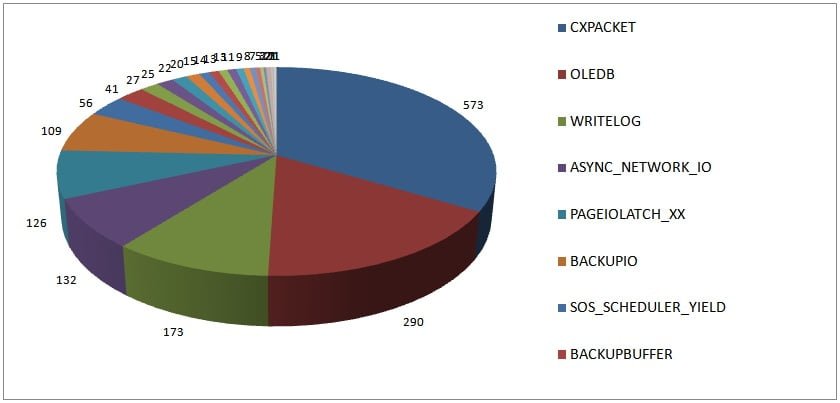
Results from 1823 servers, top wait type since server last restarted (or waits cleared). The blog post for this survey (Wait statistics, or please tell me where it hurts) has a ton of information about what these common wait types mean, and I’m not going to repeat all that in this blog post.

waitstatssurvey Most common wait stats over 24 hours and changes since 2010

2014 Survey Results

Results from 1708 servers, top wait type over 24 hours

2014waits Most common wait stats over 24 hours and changes since 2010

The distribution of the top waits has changed significantly over the last four years, even when taking into account that in the 2010 survey I didn’t filter out BROKER_RECEIVE_WAITFOR.

  • CXPACKET is still the top wait type, which is unsurprising
  • OLEDB has increased to being the top wait type roughly 17% of the time compared to roughly 4% in 2010
  • WRITELOG has increased to being the top wait 10% of the time compared with 6% in 2010
  • ASYNC_NETWORK_IO has decreased to being the top wait 8% of the time compared with 15% in 2010
  • PAGEIOLATCH_XX has decreased to being the top wait 7% of the time compared with 18% in 2010

These percentages remain the same even when I ignore the BROKER_RECEIVE_WAITFOR waits in the 2010 results.

Now I’m going to speculate as to what could have caused the change in results. I have no evidence that supports most of what I’m saying below, just gut feel and supposition – you might disagree. Also, even though the people reading my blog and responding to my surveys are likely to be paying more attention to performance and performance tuning than the general population of people managing SQL Server instances across the world, I think that these results are representative of what’s happening on SQL Server instances across the world.

I think that OLEDB waits have increased in general due to more and more people using 3rd-party performance monitoring tools that make extensive, repeated use of DMVs. Most DMVs are implemented as OLE-DB rowsets and will cause many tiny OLEDB waits (1-2 milliseconds on average, or smaller). This hypothesis is actually borne out by the data I received and confirmation from many people who received my detailed analyses of results they sent me. If you see hundreds of millions or billions of tiny OLEDB waits, this is likely the cause.

I think WRITELOG waits being the top wait have increased partly because other bottlenecks have become less prevalent, and so the next highest bottleneck is the transaction log, and partly because more workloads are hitting logging bottlenecks inside SQL Server that are alleviated starting in SQL Server 2012 (blog post coming next week!). I also think that WRITELOG waits have been prevented from becoming even more prevalent because of the increased use of solid-state disks for transaction log storage mitigating the increased logging from higher workloads.

Now it could be that the drop in PAGEIOLATCH_XX and ASYNC_NETWORK_IO waits being the top wait is just an effect caused by the increase in OLEDB and WRITELOG waits. It could also be because of environmental changes…

PAGEIOLATCH_XX waits being the top wait might have decreased because of:

  • Increased memory on servers meaning that buffer pools are larger and more of the workload fits in memory, so fewer read I/Os are necessary.
  • Increased usage of solid-state disks meaning that individual I/Os are faster, so when I/Os do occur, the PAGEIOLATCH_XX wait time is smaller and so the aggregate wait time is smaller and it is no longer the top wait.
  • More attention being paid to indexing strategies and buffer pool usage.

ASYNC_NETWORK_IO waits being the top wait might have decreased because of fewer poorly written applications, or fixes to applications that previously were poorly written. This supposition is the most tenuous of the four and I really have no evidence for this at all. I suspect it’s more likely the change is an effect of the changes in prevalence of the other wait types discussed above.

Summary

I think it’s interesting how the distribution of top waits has occurred over the last four years and I hope my speculation above rings true with many of you. I’d love to hear your thoughts on all of this in the post comments.

It’s not necessarily bad to have any particular wait type as the most prevalent one in your environment, as waits always happen, so there has to be *something* that’s the top wait on your system. What’s useful though is to trend your wait statistics over time and notice how code/workload/server/schema changes are reflected in the distribution of wait statistics.

There is lots of information about wait statistics in my Wait Statistics blog category and there’s a new whitepaper (SQL Server Performance Tuning Using Wait Statistics: A Beginners Guide) on wait statistics written by Jonathan and Erin in conjunction with Red Gate which you can download from our website here.

Enjoy!

The post Most common wait stats over 24 hours and changes since 2010 appeared first on Paul S. Randal.

23 May 21:08

BASIC

by Andy Warren

It might or might not surprise you that I learned to code in Basic. I suppose my first real attempt at building a solution was using complex macros and batch files, but I was trying to learn more and a friend gave me a copy of Turbo Basic. I struggled to figure it out and went to the book store to buy a book to learn (pre-internet days you know). They didn’t have a book on Turbo Basic, but they did have one on Quick Basic and it came with the software, I think it was $90, so I bought it after debating the merits of spending about $60 more than I had planned on something that might or might not turn out to be useful. It did turn out to be useful. I read and tried and tried some more and eventually wrote several apps to help me at work, apps that could read/write dbase III formatted files so I could do reporting from other apps. QB was a good learning experience. You had to monitor the keyboard input, you had to do something when a key was pressed – backspace didn’t automatically delete a character and move the cursor. If you wanted to do a popup you had to save the state of the screen, draw the new stuff, then restore the state. That’s all stuff hidden by the OS today and that’s good. I don’t know that I’m better at anything for having that experience, but sometimes it helps in odd ways.

I’m writing this after running across Fifty Years of BASIC, the Programming Language That Made Computers Personal. One of the points in the article was the ubiquity of a Basic app in the OS made it very common to have code samples in text books and somewhat common for students to have at least tried a 10 or 20 line app, something that might have connected them just a little bit with the science behind the magic of a PC. Another point was that once you get past variables and flow control you’re close to maxing out (there are arrays, and plenty of other stuff, but no objects in that kind of Basic). Both are interesting points because it’s about trying to find the sweet spot between easy to learn and so easy to learn that you learn bad habits. I think easy to learn matters more than anything else. The people who want to learn programming and have the aptitude just need a taste of it and off they go, the trick is to show them what’s possible – to get them over that first learning curve. I don’t know that Basic is best for that, certainly there are tons of languages that try to solve this particular problem. Do the bad habits stick? Maybe, maybe not. I’ve migrated from QB to Visual Basic to Visual Basic.Net and I wouldn’t want to go back. I like objects and I like .Net. I may have some bad programming habits but I doubt you could trace them back to QB.

Like Basic? Microsoft has SmallBasic that looks interesting but doesn’t seem to get much press and here is a remake of Quick Basic in .Net.

23 May 19:44

SQL Server: Foreign Key Deadlocks

by Ahmad Osama

Recently I came across an interesting deadlock scenario I wasn’t aware off. I didn’t have idea that foreign key constraint can also result in deadlocks.  The detailed steps to replicate the deadlocks are mentioned below.

Test Tables

Create table ParentTable
	(Pid int identity, Col1 char(5) 
        CONSTRAINT PK_ParentTable PRIMARY KEY (Pid));
GO

Create table ChildTable 
	(Cid int identity Primary Key, 
	Col1 Char(5),Pid int references ParentTable(Pid));
GO

The Scenario

Step 1: Open a new query window and execute below query under an explicit Transaction say T1.

-- Transaction T1
BEGIN TRAN
Insert into ParentTable Values('Dummy');
GO 10

The transaction T1 inserts 10 rows in ParentTable and takes appropriate locks on the ParentTable. To check what all locks it acquires, execute the below query.

select resource_type,
DB_NAME(resource_database_id) as DatabaseName,
resource_description,request_mode,
request_type,
request_status
from
-- change the request_session_id to that of yours
sys.dm_tran_locks where request_session_id=59 
order by resource_type desc

The transaction T1 takes IX locks at Object and Page level and X locks at key level as shown below.

Lock stats

Step 2: Open a new query window and execute below query under another explicit Transaction say T2.

-- Transaction T2
BEGIN TRAN
Insert into ParentTable Values('Dummy')
GO 10
While 1=1
Insert into ChildTable values('D',1)
Insert into ChildTable values('D',2)
Insert into ChildTable values('D',3)
Insert into ChildTable values('D',4)
Insert into ChildTable values('D',5)

The transaction T2 inserts 10 rows into ParentTable and then inserts multiple rows into ChildTable. To check what all it acquires execute the below query.

select resource_type,
	DB_NAME(resource_database_id) as DatabaseName,
	object_name(p.object_id) As ObjectName,
	resource_description,request_mode,
	request_type,
	request_status
	from
	-- change the request_session_id to that of yours
	sys.dm_tran_locks tl 
	join sys.partitions p on p.partition_id=tl.resource_associated_entity_id
	where tl.request_session_id=55
	order by request_status desc

The transaction T2 takes IX lock at Page level on ParentTable and ChildTable and X locks on relevant rows. It also waits to acquire S lock on ParentTable, Why? This is because as it inserts rows into ChildTable it scans ParentTable to verify referential integrity. However, it has to wait to get S lock on rows inserted by transaction T1 in ParentTable in step1. 

Lock stats

Step 3: Execute the below query in transaction T1. Make sure that you select and execute below query only.

While 1=1
Insert into ChildTable values ('D',11)
Insert into ChildTable values ('D',12)
Insert into ChildTable values ('D',13)
Insert into ChildTable values ('D',14)
Insert into ChildTable values ('D',15)

The above query inserts records in ChildTable.  One of the transactions will be chosen as a deadlock victim and will terminate with below error

Msg 1205, Level 13, State 51, Line 2

Transaction (Process ID 55) was deadlocked on lock resources with another process and has been chosen as the deadlock victim.

Rerun the transaction.

When transaction T1 inserts rows into ChildTable similar to transaction T2 it also scans the rows in ParentTable to verify referential integrity. In doing so, it waits on rows inserted into ParentTable by Transaction T2. This results in a deadlock situation.

I leave it as an exercise for you all to figure out work around for this kind of deadlocks, until I spill the beans in my next blog.


Cheers!!!

Ahmad 

@_ahmadosama

If you like this post do like us on facebook.

All our events: http://www.sqlservergeeks.com/default-category/events

Our spam-free, 24x7 moderated FaceBook group: www.facebook.com/groups/theSQLgeeks

Our FaceBook page: www.facebook.com/SQLServerGeeks

Our awesome gallery: http://www.facebook.com/SQLServerGeeks/photos_albums

And a must watch, our video - http://www.youtube.com/watch?v=EAFhDwXxlzM

23 May 19:44

Password Cracking–Part 2

by Andy Warren

Two days felt like a long time, so we found a cloud server with 16 cores we could use. We guessed on the threads and were able to run it at an average of 90% utilization (and it seems to use all the cores). The initial projection was 14 hours so it seemed better, but this morning it had moved on to the next iteration where it would try something like 85 trillion variations and was estimated at 55 days. It could find it five minutes later, or perhaps never, 55 days is a long time to wait. I had left mine running, though that included some time with the laptop in hibernate, here’s one status report:


image


I went back and did what I should have done to start with, a quick test with a password of “test” and that did indeed work fine, breaking it to clear text in about 25 seconds. Hashcat has a ton of options, but the command line syntax can be fussy and it’s definitely not easy to figure out which settings to use – some experimentation would see worthwhile. All documentation is online at the Hashcat Wiki. While reading that I saw a note about a GUI, just the thing for a beginner. After following the trail through a few links I wound up at http://www.hashkiller.co.uk/hashcat-gui.aspx. I downloaded and ran the exe, resulting in this:


image


It helps decipher the settings some and if you click on the “commands” tab you get the command line syntax to run it based on what you’ve set in the UI.

I suspect any hacker has a GPU, but without it I think my  only chance is to try to tweak the mode (“brute force”, “permutation”, etc) and something as simple as setting the limit of the length to something too small could cause it to miss, and that feels like more work than I want to do. I’m going to give it a try on a machine at home when I get time, set up an easy, medium, hard password and see how it goes.

23 May 19:43

How In-Memory Database Objects Affect Database Design: The Conceptual Model

by drsql
After a rather long break in the action to get through some heavy tech editing work (paid work before blogging, I always say!) it is time to start working on this presentation about In-Memory Databases. I have been trying to decide on the scope of the demo code in the back of my head, and I have added more and taken away bits and pieces over time trying to find the balance of "enough" complexity to show data integrity issues and joins, but not so much that we get lost in the process of trying to...(read more)
23 May 19:42

How In-Memory Database Objects Affect Database Design: The Conceptual Model

by drsql
This part is part of an ongoing series of blogs I am writing while preparing to give a presentation based on the prefix of this blog's title. It is a work in progress as I explore the effects of the new in-memory model. I would love comments that tell...(read more)
23 May 19:42

Tips for adapting Date table to Power View forecasting #powerview #powerbi

by Marco Russo (SQLBI)

During the keynote of the PASS Business Analytics Conference, Amir Netz presented the new forecasting capabilities in Power View for Office 365. I immediately tried the new feature (which was immediately available, a welcome surprise in a Microsoft announcement for a new release) and I had several issues trying to use existing data models.

The forecasting has a few requirements that are not compatible with the “best practices” commonly used for a calendar table until this announcement. For example, if you have a Year-Month-Day hierarchy and you want to display a line chart aggregating data at the month level, you use a column containing month and year as a string (e.g. May 2014) sorted by a numeric column (such as 201405). Such a column cannot be used in the x-axis of a line chart for forecasting, because you need a date or numeric column. There are also other requirements and I wrote the article Prepare Data for Power View Forecasting in Power BI on SQLBI, describing how to create columns that can be used with the new forecasting capabilities in Power View for Office 365.

23 May 19:41

Dude, who owns that #temp table?

by Aaron Bertrand

You have probably been in a scenario where you were curious about who created a specific copy of a #temp table. Back in June of 2007, I asked for a DMV to map #temp tables to sessions, but this was rejected for the 2008 release – and has been subsequently ignored in every release since. (Please feel free to vote and, more importantly, comment about your business need.)

In SQL Server 2005, 2008 and 2008 R2, you should be able to pull this information from the default trace:

DECLARE @filename VARCHAR(MAX);
 
SELECT @filename = SUBSTRING([path], 0,
 LEN([path])-CHARINDEX('\', REVERSE([path]))+1) + '\Log.trc'  
FROM sys.traces   
WHERE is_default = 1;  
 
SELECT   
     o.name,   
     o.[object_id],  
     o.create_date, 
     gt.SPID,  
     NTUserName = gt.NTDomainName + '\' + gt.NTUserName,
     SQLLogin = gt.LoginName,  
     gt.HostName,  
     gt.ApplicationName,
     gt.TextData -- don't bother, always NULL 
  FROM sys.fn_trace_gettable(@filename, DEFAULT) AS gt  
  INNER JOIN tempdb.sys.objects AS o   
    ON gt.ObjectID = o.[object_id] 
  WHERE gt.DatabaseID = 2 
    AND gt.EventClass = 46 -- (Object:Created Event from sys.trace_events)  
    AND gt.EventSubClass = 1 -- Commit
    AND o.name LIKE N'#%'
    AND o.create_date >= DATEADD(MILLISECOND, -100, gt.StartTime)   
    AND o.create_date <= DATEADD(MILLISECOND,  100, gt.StartTime);

Based on code from this Jonathan Kehayias blog post.

To determine space usage you could further enhance this to join in data from DMVs like sys.db_db_partition_stats – for example:

DECLARE @filename VARCHAR(MAX);
 
SELECT @filename = SUBSTRING([path], 0,
   LEN([path])-CHARINDEX('\', REVERSE([path]))+1) + '\Log.trc'  
FROM sys.traces   
WHERE is_default = 1;  
 
SELECT   
     o.name,   
     o.[object_id],  
     o.create_date, 
     gt.SPID,  
     NTUserName = gt.NTDomainName + '\' + gt.NTUserName,
     SQLLogin = gt.LoginName,  
     gt.HostName,  
     gt.ApplicationName,
     row_count = x.rc,
     reserved_page_count = x.rpc
  FROM sys.fn_trace_gettable(@filename, DEFAULT) AS gt  
  INNER JOIN tempdb.sys.objects AS o   
    ON gt.ObjectID = o.[object_id]
  INNER JOIN
  (
    SELECT 
      [object_id],
      rc  = SUM(CASE WHEN index_id IN (0,1) THEN row_count END), 
      rpc = SUM(reserved_page_count) 
    FROM tempdb.sys.dm_db_partition_stats
    GROUP BY [object_id]
  ) AS x 
    ON x.[object_id] = o.[object_id]
  WHERE gt.DatabaseID = 2 
    AND gt.EventClass = 46 -- (Object:Created Event from sys.trace_events)  
	AND gt.EventSubClass = 1 -- Commit
	AND gt.IndexID IN (0,1)
    AND o.name LIKE N'#%'
    AND o.create_date >= DATEADD(MILLISECOND, -100, gt.StartTime)   
    AND o.create_date <= DATEADD(MILLISECOND,  100, gt.StartTime);

Starting in SQL Server 2012, however, this stopped working if the #temp table was a heap. Bob Ward (@bobwardms) furnished a thorough explanation of why this happened; the short answer is there was a bug in their logic to try to filter out #temp table creation from the default trace, and this bug was partially corrected during the SQL Server 2012 work of better aligning trace and extended events. Note that SQL Server 2012+ will still capture #temp table creation with inline constraints such as a primary key, just not heaps.

[Click here to show/hide Bob's full explanation.]

The Object:Created event actually has 3 subevents: Begin, Commit, and Rollback. So if you successfully create an object you get 2 events: 1 for Begin and 1 for Commit. You know which one by looking at EventSubClass.

 
Prior to SQL Server 2012, only the Object:Created with subclass = Begin has the ObjectName populated. So the subclass = Commit did not contain the ObjectName populated. This was by design to avoid repeating this thinking you could look up the name in the Begin event.

 
As I've said the default trace was designed to skip any trace events where the dbid = 2 and object name started with "#". So what can show up in the default trace are the Object:Created subclass = Commit events (which is why the Object Name is blank).

 
Even though we didn't document our "intentions" to not trace tempdb objects, the behavior was clearly not working as intended.

 
Now move forward to the building of SQL Server 2012. We move to a process of porting events from SQLTrace to XEvent. We decided during this timeframe as part of this XEvent work that the subclass=Commit or Rollback needed the ObjectName populated. The code where we do this is the same code where we produce the SQLTrace event so now the SQLTrace event has the ObjectName in it for the subclass=Commit.

 
And since our filtering logic for default trace has not changed, now you don't see either Begin or Commit events.

How you should do it today

In SQL Server 2012 and up, Extended Events will allow you to manually capture the object_created event, and it is easy to add a filter to only care about names that start with #. The following session definition will capture all #temp table creation, heap or not, and will include all of the useful information that would normally be retrieved from the default trace. In addition, it captures the SQL batch responsible for the table creation (if you want it to), information not available in the default trace (TextData is always NULL).

CREATE EVENT SESSION [TempTableCreation] ON SERVER 
ADD EVENT sqlserver.object_created
(
  ACTION 
  (
    -- you may not need all of these columns
    sqlserver.session_nt_username,
    sqlserver.server_principal_name,
    sqlserver.session_id,
    sqlserver.client_app_name,
    sqlserver.client_hostname,
    sqlserver.sql_text
  )
  WHERE 
  (
    sqlserver.like_i_sql_unicode_string([object_name], N'#%')
    AND ddl_phase = 1   -- just capture COMMIT, not BEGIN
  )
)
ADD TARGET package0.asynchronous_file_target
(
  SET FILENAME = 'c:\temp\TempTableCreation.xel',
  -- you may want to set different limits depending on
  -- temp table creation rate and available disk space
      MAX_FILE_SIZE = 32768,
      MAX_ROLLOVER_FILES = 10
)
WITH 
(
  -- if temp table creation rate is high, consider
  -- ALLOW_SINGLE/MULTIPLE_EVENT_LOSS instead
  EVENT_RETENTION_MODE = NO_EVENT_LOSS
);
GO
ALTER EVENT SESSION [TempTableCreation] ON SERVER STATE = START;

You may be able to do something similar in 2008 and 2008 R2, but I know there are some subtle differences to what is available, and I did not test it after getting this error right off the bat:

Msg 25623, Level 16, State 1, Line 1
The event name, "sqlserver.object_created", is invalid, or the object could not be found

Analyzing the data

Pulling the information from the file target is a little more cumbersome than with the default trace, mostly because it is all stored as XML (well, to be pedantic, it is XML presented as NVARCHAR). Here is a query I whipped up to return information similar to the second query above against the default trace. One important thing to note is that Extended Events stores its data in UTC, so if your server is set to another time zone, you will need to adjust so that the create_date in sys.objects is compared as if it were UTC. (The timestamps are set to match because object_id values can be recycled. I assume here that a two second window is sufficient to filter out any recycled values.)

DECLARE @delta INT = DATEDIFF(MINUTE, SYSUTCDATETIME(), SYSDATETIME());
 
;WITH xe AS
(
  SELECT 
    [obj_name]  = xe.d.value(N'(event/data[@name="object_name"]/value)[1]',N'sysname'),
    [object_id] = xe.d.value(N'(event/data[@name="object_id"]/value)[1]',N'int'),
    [timestamp] = DATEADD(MINUTE, @delta, xe.d.value(N'(event/@timestamp)[1]',N'datetime2')),
    SPID        = xe.d.value(N'(event/action[@name="session_id"]/value)[1]',N'int'),
    NTUserName  = xe.d.value(N'(event/action[@name="session_nt_username"]/value)[1]',N'sysname'),
    SQLLogin    = xe.d.value(N'(event/action[@name="server_principal_name"]/value)[1]',N'sysname'),
    HostName    = xe.d.value(N'(event/action[@name="client_hostname"]/value)[1]',N'sysname'),
    AppName     = xe.d.value(N'(event/action[@name="client_app_name"]/value)[1]',N'nvarchar(max)'),
    SQLBatch    = xe.d.value(N'(event/action[@name="sql_text"]/value)[1]',N'nvarchar(max)')
 FROM 
    sys.fn_xe_file_target_read_file(N'C:\temp\TempTableCreation*.xel',NULL,NULL,NULL) AS ft
    CROSS APPLY (SELECT CONVERT(XML, ft.event_data)) AS xe(d)
) 
SELECT 
  DefinedName         = xe.obj_name,
  GeneratedName       = o.name,
  o.[object_id],
  xe.[timestamp],
  o.create_date,
  xe.SPID,
  xe.NTUserName,
  xe.SQLLogin, 
  xe.HostName,
  ApplicationName     = xe.AppName,
  TextData            = xe.SQLBatch,
  row_count           = x.rc,
  reserved_page_count = x.rpc
FROM xe
INNER JOIN tempdb.sys.objects AS o
ON o.[object_id] = xe.[object_id]
AND o.create_date >= DATEADD(SECOND, -2, xe.[timestamp])
AND o.create_date <= DATEADD(SECOND,  2, xe.[timestamp])
INNER JOIN
(
  SELECT 
    [object_id],
    rc  = SUM(CASE WHEN index_id IN (0,1) THEN row_count END), 
    rpc = SUM(reserved_page_count)
  FROM tempdb.sys.dm_db_partition_stats
  GROUP BY [object_id]
) AS x
ON o.[object_id] = x.[object_id];

Of course this will only return space and other information for #temp tables that still exist. If you want to see all #temp table creations still available in the file target, even if they don't exist now, simply change both instances of INNER JOIN to LEFT OUTER JOIN.

The post Dude, who owns that #temp table? appeared first on SQLPerformance.com.

23 May 19:40

Dell Doubles Application Speeds, Processes Transactions 9X Faster with In-Memory OLTP

by SQL Server Team

As a global IT leader, Dell manufactures some of the world’s most innovative hardware and software solutions. It also manages one of the most successful e-commerce sites. In 2013, the company facilitated billions in online sales. On a typical day, 10,000 people are browsing Dell.com at the same time. During peak online shopping periods, the number of concurrent shoppers can increase 100 times, to as many as one million people.

To help facilitate fast, frustration-free shopping despite traffic spikes, Dell has distributed the website’s online transaction processing (OLTP) load between 2,000 virtual machines, which include 27 mission-critical databases that run on Microsoft SQL Server 2012 Enterprise software and the Windows Server 2012 operating system. These databases, along with hundreds of web applications, are supported by Dell PowerEdge servers, Dell Compellent storage, and Dell Networking switches.

When Dell learned about SQL Server 2014 and its in-memory capabilities, the company immediately signed up to be an early adopter. Not only are memory-optimized tables in SQL Server 2014 lock-free—making it possible for numerous applications to simultaneously access and write to the same database rows—but also the solution is based on the technologies that IT staff already know how to use.

Initially, engineers set up the database tables to be fully durable, meaning that the table replicas are synchronous copies. However, developers can also configure the tables to use delayed durability, which means that changes made to a table’s replica are delayed slightly to minimize any impact on performance.

By gaining the option to store tables in memory, Dell is achieving unprecedented OLTP speeds. “The performance increase we realize with In-Memory OLTP in SQL Server 2014 is astounding!” says Scott Hilleque, Design Architect at Dell. “After just a few hours of work, groups sped database performance by as much as nine times. And all aspects of our In-Memory OLTP experience has been seamless for our staff because it is so easy to adopt, and its implementation produces zero friction for architects, developers, database administrators, and operations staff.”

Although Dell is in the very early stages of adopting SQL Server 2014, IT workers are excited by the impact of In-Memory OLTP. The more the IT team can speed database performance, the faster web applications can get the information that they need to deliver a responsive and customized browsing experience for customers.  Reinaldo Kibel, Database Strategist at Dell summarizes that “In-Memory OLTP in SQL Server 2014 really signifies a new mindset in database development because with it, we no longer have to deal with the performance hits caused by database locks—and this is just one of the amazing benefits of this solution.”

You can read the full case study here  and watch the video here:

Also, check out the website to learn more about SQL Server 2014 and start a free trial today.  

23 May 19:39

Edgenet Exec Q&A

by SQL Server Team

Edgenet provides optimized product data for suppliers, retailers and search engines. Used online and in stores, Edgenet solutions ensure that businesses and consumers can make purchasing and inventory decisions based on accurate product information. Last year, it implemented an In-Memory OLTP solution built on SQL Server 2014, which has helped it continue to innovate and lead in its business

We caught up with Michael Steineke, Vice President of IT at Edgenet, to discuss the benefits he has seen since Edgenet implemented SQL Server 2014.

Q: Can you give us a quick overview of what Edgenet does?

A: We develop software that helps retailers sell products in the home building and automotive industries. We work with both large and small dealers and provide software that helps determine and compare which products are in a local store.

We provide the specs, pictures, manuals, diagrams, and all the rest of the information that a customer would need to make an informed decision. We take all of this data, standardize it, and provide it to retailers and search engines.

With the major shift to online sales over the past handful of years, retailers need to have relevant and timely product information available so the customer can compare products and buy the best one for their needs.

In a single store, inventory is easy. In a chain where you have 1,000 or 5,000 stores, that gets very complicated. Our company is built on product data, and we need a powerful solution to manage it.

Q: What is your technology solution?

A: We are using In-Memory OLTP based on SQL Server 2014 to power our inventory search. This is where SQL Server 2014 comes in. Our applications make sure we have the right product listed, pricing and availability, and we couldn’t do it without In-Memory OLTP.

Q: What types of benefits have you seen since deployment?

A: SQL Server 2014 and OLTP have helped change our business. Our clients are happy as well. No matter what our customers need, we can do it with our solution. If a retailer wants to supply the data to us every 10 minutes, we can update every 10 minutes. It’s the way we like to do our business.

Q: Why did you choose to deploy SQL 2014 in your organization?

A: Working with Microsoft was a natural choice since we often are early adopters with new technologies. Our goal is to utilize new feature sets of new software as much as possible so we stay innovators in the field. That was the main reason we were so excited to deploy the In-Memory OLTP features with SQL Server 2014.

Q: What type of data are you managing?

A: Our inventory data isn’t extremely large, but there is a lot of volatility with it. We are talking about managing thousands of products across thousands of stores, with different pricing and availability for each store. There could be hundreds of millions of rows for just one retailer. Our big data implementation is around managing this volatility in the market, and we need a powerful back-end solution to help us handle all sorts of information.

Q: What are the advantages of In-Memory OLTP?

A: The biggest advantage we are getting is the ability to continually keep data up-to-date, so we always have real-time inventory and pricing. While we are updating we can continue to use the same tables, with little or no impact on performance. We were also able to consolidate a database used for the application to read that was refreshed daily and a database that consumed the updates from our customers, to one In-Memory database.


For more information about SQL Server 2014, check out the website and start a free trial today.

23 May 19:38

Writing A Question Of the Day–More Notes

by Andy Warren

One of the things I’m trying to do now is include a link to a blog(ger) in the explanation. That might be because they wrote something that inspired me to write a question (such as http://www.statisticsparser.com/) or because they wrote something that adds value to the topic, something over and above (or just better) than the BOL links I usually provide. I think I’ll try to do more on the references, if someone has taken the time to try the question, read the answer, maybe they’ll be curious enough (and persistent enough) to read another link or two if they are right there and very relevant.

I also sent in a request for a change to the question editor. Below in gray is the editor today and you can see that the explanation is just a blob. My suggestion, in red, is to set it up so that someone writing a question is prompted to put in an explanation for each answer. That drives a better quality question and would allow for more consistent formatting on the explanation display. The downside is that making it just one line as I’ve shown here suggests it should be a short explanation, most of mine are 2-3 sentences, so getting the UI “right” will call for skills beyond my red box drawing ones.


image

23 May 19:38

Avoiding a split brain in database mirroring

by Wayne Sheffield

You’re utilizing the database mirroring high-availability feature, configured to be in the High Safety mode with automatic failover, which means that the mirroring configuration includes having a witness server to ensure that the system can automatically switch over to the partner in the event of a failure of the principal.

Under this scenario, if the partner server loses its connection to the principal, it will contact the witness server to figure out what to do. In order for automatic failover to occur, both the partner and witness servers have to agree that the principal server is out of commission. There are three possible outcomes:

  1. If the witness is still in contact with the principal, then an automatic failover will not occur. The principal server will remain online, serving the application. However, the transaction log will start to accumulate transactions that cannot be removed until the connection has been re-established and these transactions have been sent to the partner.
  2. If the witness has also lost its connection with the principal, then the partner and witness servers will reach a quorum and the partner database will be brought online, becoming the new principal (specifically, it will undo any un-committed transactions and then bring the database online).
  3. If the partner server is also disconnected from the witness server, then automatic failover will not occur.

The purpose of this last outcome is to prevent what is known as a split brain – a situation where both of the servers are online, serving up results to application requests. If this were to occur, then there would be two different versions of the database, and reconciling these differences would become problematic.

Now let’s consider what would happen if the principal server were to lose its connection to both the partner and witness servers, however the principal server is still online (let’s just say that the partner and witness servers are each in separate remote locations that has had a service interruption – such as a change to a network switch that has isolated these servers from the principal). With the principal server still being online, and potentially able to service at least some users, what does it need to do to ensure that the mirror does not end up in a split brain situation?

Let’s first look at what the possible scenarios are now:

  1. The partner server is in communication with the witness server, and they have reached a quorum where the partner server has been brought online.
  2. The partner server is not in communication with the witness server, and thus it is still in a partner state.

Since the principal server has lost communication with both servers, it can’t know in which situation the mirror is in. Therefore, it needs to protect the mirror from potentially being in a split brain situation. It does this by assuming that the partner server has been elevated to become the mirror’s principal, and so it goes into the partner state. Specifically, this means putting the database into recovery in order to be able to receive transactions from the new principal server.

Is this what actually happens? Well, it’s easy enough to test this out. On three different instances of SQL (they can even be on the same server), establish a mirror in high safety mode with a witness server. After it is established, ensure that SQL Agent is shut down (if running, it will restart SQL), and use task manager to end the processes for sqlservr.exe on the secondary and witness instances. Now look at the status of the database in SSMS, and you will see that its status is “Principal, Disconnected / In Recovery). Alternatively, you can run this following query to see what the status is:

Source code    
SELECT  sd.name, sd.state_desc,
        sdm.mirroring_role_desc,
        sdm.mirroring_state_desc,
        sdm.mirroring_witness_state_desc
FROM    sys.DATABASES sd
        JOIN sys.database_mirroring sdm ON sd.database_id = sdm.database_id;

To wrap up, mirroring prevents a split-brain situation by:

  1. Both the partner and witness servers have to be in communication with each other, and have lost communication with the principal, in order for the partner server to be elevated to the mirror principal.
  2. If the principal server becomes disconnected from both the partner and witness servers, it goes into partner status and puts its database into recovery.
22 May 23:20

CodeSOD: Accepted Values for Days of the Month

by snoofle

Ryan recently received some thorough documentation from a client regarding a third-party API he had been tasked with integrating.

He found it quite helpful that the documentation included an Excel spreadsheet that listed the accepted values for each input field. Particularly helpful was the page on acceptable values for the "dob_dd" (Date of birth -day) field, which lists the "title" of each day and its corresponding "value".

Now we all know that some developers are not the best, and occasionally make less-than-stellar design decisions, but was this level of detail truly necessary or helpful?

Spreadsheet png

I can't help but wonder what they did to document any fields where you could enter an arbitrary integer, or worse, a decimal number...

[Advertisement] BuildMaster 4.1 has arrived! Check out the new Script Repository feature and see how you can deploy builds from TFS (and other CI) to your own servers, the cloud, and more.
22 May 21:47

CodeSOD: The In-House Developer

by Erik Gern

Casa de Quixote is a small, state-run retirement community in La Mancha, in central Spain. Sergio is the sole developer of software managing hundreds of residents. Missing documentation, he tracks down his predecessors for help.

Miguel, manager of Casa de Quixote, told Sergio he'd find Luis at a dive in Toledo. "Just follow the empty glasses of beer," he said. Sergio did, and they led to a man: about two hundred pounds overweight, asleep at the bar, wearing a Real Madrid shirt.

"Excuse me?" Sergio poked his shoulder. "Are you Luis? I'd like to ask you some questions about the code you wrote for Casa de--"

Sergio ducked, avoiding the flying glass that passed near his cheek.

Copy-Only Programming

After several tries (and a few drinks on his tab), Sergio got Luis to talk about his time as the in-house developer at Casa de Quixote.

"I was hired after the original team finished the application," Luis said. "The management didn't have the money to pay for GenericDao's support package. I was a lot cheaper."

Sergio nodded. He pulled out his laptop. "I want to go over some code, figure out some unusual programming patterns you used." He opened a copy of the Java package and showed it to Luis. "This, for example. It's part of the code that generates bank transaction statements. Why didn't you make this thread-safe? SUFIJO could be changed during any part of this process."

public class RemesaBancariaUtil {

	private static String SUFIJO; // Suffix, one of the fields of the file
	
	public static void setSUFIJO(String sUFIJO) {
		SUFIJO = sUFIJO;
	}

	public static String primeroOpcional(Recibo recibo){

		StringBuffer sb = new StringBuffer();
		
		//Zona A
		//A1
		sb.append("56");
		//A2
		sb.append("81");
		
		//Zona B
		//B1
		if(NIF.getValor().length() ==9){
			sb.append(NIF.getValor());
		}else{
			String nif = NIF.getValor();
			while(nif.length() < 9){
				nif = "0".concat(nif);
			}
			sb.append(nif);
		}
		
		if(SUFIJO.length() ==3){
			sb.append(SUFIJO);
		}else{
			String sufijo = SUFIJO;
			while(sufijo.length() < 3){
				sufijo = "0".concat(sufijo);
			}
			sb.append(sufijo);
		}
		[…]
	}

"Oh, I dunno," Luis slurred, a drop of beer running down the side of his face.

"Okay, how about this." Sergio opened another class file. "A lot of this code is really similar. Why didn't you consolidate this into a loop, feeding in new values with each iteration? Right now this class def is almost ten thousand lines long!"

	public static String segundoOpcional(ResidenteSocio residenteSocio, FacturaServicioFacturable concepto){
		
		StringBuffer sb = new StringBuffer();
		
		//Zona A
		//A1
		sb.append("56");
		//A2
		sb.append("82");
		
		//Zona B
		//B1
		if(NIF.getValor().length() ==9){
			sb.append(NIF.getValor());
		}else{
			String nif = NIF.getValor();
			while(nif.length() < 9){
				nif = "0".concat(nif);
			}
			sb.append(nif);
		}
		
		if(SUFIJO.length() ==3){
			sb.append(SUFIJO);
		}else{
			String sufijo = SUFIJO;
			while(sufijo.length() < 3){
				sufijo = "0".concat(sufijo);
			}
			sb.append(sufijo);
		}
		
		//B2
		String b2 = residenteSocio.getCodigo().toString();
		while (b2.length() <12){
			b2 = "0".concat(b2);
		}
		sb.append(b2);
		
		//Zona C
		[…]
		
	}
	
	public static String cuartoOpcional(ResidenteSocio residenteSocio, FacturaServicioFacturable concepto){
		
		StringBuffer sb = new StringBuffer();
		
		//Zona A
		//A1
		sb.append("56");
		//A2
		sb.append("84");
		
		//Zona B
		[…]
	}
	
	public static String quintoOpcional(ResidenteSocio residenteSocio, FacturaServicioFacturable concepto){
		
		StringBuffer sb = new StringBuffer();
		
		//Zona A
		//A1
		sb.append("56");
		//A2
		sb.append("85");
		
		//Zona B
		[…]
	}

"I don't remember," Luis said. "I was having a lot of … fun, at the time, if you catch my meaning."

Sergio sighed.

A No-Loop Block

Soon, Sergio was running a hundred-euro tab in a place he'd never like to see again, and Luis had given him little insight into his coding methods. He decided to try one last tack.

"Okay, one last thing, then you can sleep on the bar all you want. Just tell me your coding philosophy. Just tell me why you wrote the code you did."

"I'll tell you something." Luis rose, teetering. "That manager … paid me so little … hic! … I had to take on three more jobs to make ends meet!" Luis formed a fist. "I had to cut a lot of corners to make it work! So don't you dare come here and tell me how to code!"

Sergio easily ducked under Luis's swinging arm. He grabbed the laptop and ran.

Working for the Weekend

"Any luck with Luis?" Miguel asked the next day.

"Absolutely not. He was uncommunicative, clearly incompetent, and probably drunk on the job. He says you paid him so little he had to take on three more jobs."

"He took three jobs, I think, because he drinks so much," Miguel said. "And we let him go as soon as we found out."

"Well, that's developer two," Sergio said. "Only one more to track down."

[Advertisement] BuildMaster 4.1 has arrived! Check out the new Script Repository feature and see how you can deploy builds from TFS (and other CI) to your own servers, the cloud, and more.
22 May 20:35

SQL Server 2014 Performance Enhancements

by MVP Award Program

Editor’s note: In partnership with Microsoft Press, now celebrating their 30th year, MVPs have been contributing to an ongoing guest series on their official team blog. Today’s article is from SQL Server MVP Shehap El Nagar which is the 41stin the series. 

SQL Server 2014 Performance Enhancements

Database Performance has become an important subject for any database administrator, database Analysts and IT Directors. That is why Microsoft has focused on the performance factor within SQL Server 2014 to achieve 10x-30x improvement without touching your code whatsoever, they did that through in-Memory OLTP with no page buffer. Then you can create memory optimized table and add it to a memory optimized file group which is translated to .dll entry points. Moreover its data is more resilient, in other words its data remains intact after a server crash as they look like resident on disk. Awesome! I don’t have enough words to say how much it improved significantly an OLTP transaction to insert and delete 1 million records from 32 sec to just 2 seconds! In addition you no longer worry about heavy delete processes used for archiving because records are actually not deleted but just marked as deleted and another garbage collection process will take place asynchronously to clean up the deleted data without affecting on live transactions. Additionally, no changes are needed from developers on code level as it is one of the major myths of in-memory OLTP technology

This dream of performance was achievable through in-memory OLTP and other important projects targeted at rebuilding the architecture of the SQL engine….read full article here 


About the author

Shehap El Nagar is an MVP, MCTS and MCITP SQL Server and the founder of SQL Server Performance Tuning which is the largest SQL community in the Middle East along with their Facebook group with more than 8000 members. He is currently the Database manager for the ministry of Higher Education of KSA and well known SQL Server independent expert in the Middle East. Shehap has more than 60 blog articles in English and Arabic that touch on trickier SQL Server subjects.  He is also the first SQL Author on MSDN Arabia and frequent speaker at SQL Saturday events worldwide in Peru, Italy and Australia as well as other local events.  He has more than 90 video tutorials and also many private sessions for .net developers and Database Administrators  and active participant in the Microsoft TechNet Forums for SQL Server.

 About MVP Monday

The MVP Monday Series is created by Melissa Travers. In this series we work to provide readers with a guest post from an MVP every Monday. Melissa is a Community Program Manager, formerly known as MVP Lead, for Messaging and Collaboration (Exchange, Lync, Office 365 and SharePoint) and Microsoft Dynamics in the US. She began her career at Microsoft as an Exchange Support Engineer and has been working with the technical community in some capacity for almost a decade. In her spare time she enjoys going to the gym, shopping for handbags, watching period and fantasy dramas, and spending time with her children and miniature Dachshund. Melissa lives in North Carolina and works out of the Microsoft Charlotte office.


22 May 20:34

The Infinite Space Between Words

by Jeff Atwood

Computer performance is a bit of a shell game. You're always waiting for one of four things:

  • Disk
  • CPU
  • Memory
  • Network

But which one? How long will you wait? And what will you do while you're waiting?

Did you see the movie "Her"? If not, you should. It's great. One of my favorite scenes is the AI describing just how difficult it becomes to communicate with humans:

It's like I'm reading a book… and it's a book I deeply love. But I'm reading it slowly now. So the words are really far apart and the spaces between the words are almost infinite. I can still feel you… and the words of our story… but it's in this endless space between the words that I'm finding myself now. It's a place that's not of the physical world. It's where everything else is that I didn't even know existed. I love you so much. But this is where I am now. And this who I am now. And I need you to let me go. As much as I want to, I can't live your book any more.

I have some serious reservations about the work environment pictured in Her where everyone's spending all day creepily whispering to their computers, but there is deep fundamental truth in that one pivotal scene. That infinite space "between" what we humans feel as time is where computers spend all their time. It's an entirely different timescale.

The book Systems Performance: Enterprise and the Cloud has a great table that illustrates just how enormous these time differentials are. Just translate computer time into arbitrary seconds:

1 CPU cycle 0.3 ns 1 s
Level 1 cache access 0.9 ns 3 s
Level 2 cache access 2.8 ns 9 s
Level 3 cache access 12.9 ns 43 s
Main memory access 120 ns 6 min
Solid-state disk I/O 50-150 μs 2-6 days
Rotational disk I/O 1-10 ms 1-12 months
Internet: SF to NYC 40 ms 4 years
Internet: SF to UK 81 ms 8 years
Internet: SF to Australia 183 ms 19 years
OS virtualization reboot 4 s 423 years
SCSI command time-out 30 s 3000 years
Hardware virtualization reboot 40 s 4000 years
Physical system reboot 5 m 32 millenia

The above Internet times are kind of optimistic. If you look at the AT&T real time US internet latency chart, the time from SF to NYC is more like 70ms. So I'd double the Internet numbers in that chart.

Latency is one thing, but it's also worth considering the cost of that bandwidth.

Speaking of the late, great Jim Gray, he also had an interesting way of explaining this. If the CPU registers are how long it takes you to fetch data from your brain, then going to disk is the equivalent of fetching data from Pluto.

He was probably referring to traditional spinning rust hard drives, so let's adjust that extreme endpoint for today:

  • Distance to Pluto: 4.67 billion miles.
  • Latest fastest spinning HDD performance (49.7) versus latest fastest PCI Express SSD (506.8). That's an improvement of 10x.
  • New distance: 467 million miles.
  • Distance to Jupiter: 500 million miles.

So instead of travelling to Pluto to get our data from disk in 1999, today we only need to travel to … Jupiter.

That's disk performance over the last decade. How much faster did CPUs, memory, and networks get in the same time frame? Would a 10x or 100x improvement really make a dent in these vast infinite spaces in time that computers deal with?

To computers, we humans work on a completely different time scale, practically geologic time. Which is completely mind-bending. The faster computers get, the bigger this time disparity grows.

[advertisement] Stack Overflow Careers matches the best developers (you!) with the best employers. You can search our job listings or create a profile and even let employers find you.
22 May 20:32

vSphere Connected to vCloud Hybrid Services

by Jason Gaudreau
EMC logo
I am inquisitive by nature, I think as technologist, most of us like to figure things out. As Albert Einstein said, "I have no particular talent. I am merely inquisitive." So with that perspective, I wanted to see if I could take the vSphere lab that is running on my notebook and connect it to my vCloud Hybrid Services (vCHS) account.

The nested lab on my notebook consists of the two ESXi 5.5 Advanced hosts, vSphere Appliance 5.5 with the vCHS plug-in, vCenter Operations Manager Advanced 5.8, vCloud Connector Server, vCloud Connector Node, and a couple of other virtual machines. All the virtual machines I have running on my notebook are virtual appliances to reduce overhead.


My notebook is a late 2013 MacBook Pro with 2.6 GHz Intel Core i7 processor, 16 GB of 1600 MHz DDR3 memory, and the NVIDIA GeForce GT 750M 2048 MB. For the most part, it handles everything I have in my lab environment without an issue.

Additionally, I have a vCloud Hybrid Service account with a Virtual Data Center that has 10 GHz of CPU, 20 GB of memory, and 2 TB of storage.


In the diagram below, you can see to make the connection from an enterprise data center to vCloud Hybrid Services you need both a vCloud Connector Server and vCloud Connector Node. You can download vCloud Connector 2.6.0 from the VMware Dowloads page. The vCC server is 1.3 gigabyte and the vCC node is 912 megabytes.


After you have deployed the vCloud Connector Server and vCloud Connector Node, you log into the Connector Node by going to https://<vCC Node IP>:5480/ from your web browser. There are four tabs, we want to go to the Node tab which displays the Cloud Registration screen. For the Cloud Registration, you will select the Cloud Type of vSphere and then enter in the Cloud URL, which should be your vSphere host server.


Next, we log onto our vCloud Connector Server, we are going to register our vCloud Connector Node and our vCHS Offline Data Transfer (ODT) node. You register the vCloud Connector Node by selecting a display name, the Node URL, selecting the Cloud Type of vSphere, and then entering in the privileged account information.


Now comes the part that isn't very intuitive, we need to register the vCHS Offline Data Transfer (ODT) node. But where do you find the Node URL? Log onto your vCloud Hybrid Services account, in the Dashboard double-click on the Virtual Data Center to bring up the details page. On the right hand side of the page you will see vCloud Director API URL under Related Links, you want to copy the https://<vCD.vCHS.Info>.com, you do not need to copy the entire string.


You then register the vCHS Offline Data Transfer (ODT) node, make sure that when you are adding the Node URL that you include :8443 at the end of the string. Under Cloud Credentials, select vCloud Director and choose the VCD Org Name from your vCloud Hybrid Services account, in my case the name is ouwant-a-tam2.


Registration is completed, we should have established the connection between our vSphere environment and our vCloud Hybrid Services Virtual Data Center. Open up the vSphere Client, you should have an icon for vCloud Connector under Solutions and Applications, double-click the icon to access the vCloud Connector Console. You will see that both your vSphere environment and your vCHS clouds are available.


In vCloud Hybrid Services, you need to create a catalog as a destination for your transferred virtual machines. Switch to the VMware vCloud Director interface, under Catalogs, click on the Add Catalog button. As you can see in the diagram below, I have created a catalog called Cloud Transfer under My Organization's Catalogs.


Provide a Name and Description for the Catalog, keep the default for Select Storage Type, select Everyone in the organization with Full access for the access level, and then click Finish.


To move a virtual machine from your vSphere environment to vCHS, make sure that the virtual machine is powered down, it should show as Stopped in the Status column; and then click on the Copy button that is indicated in the picture below.


You are going to select your cloud target, which in this case is vCHS, create a name for the resource being copied, and then select the target catalog to send the virtual machine. For our example, I am going to select Cloud Transfer which is the catalog I created earlier.


After you have chosen your target VDC, there are three deployment options available, check the options you want during your deployment.


After you have reviewed the information, click the Validate button and vCloud Connector will validate the transfer and provide any warnings if there are issues. When the validation is complete, click the Finish button to start the transfer. You will see the transfer happening in the right hand panel under Tasks.


And there you have it, my vSphere lab on my MacBook Pro sending virtual machines to vCloud Hybrid Services.

20 May 23:29

Why OpenStack Doesn’t Need Fibre Channel Support

by Stephen Foskett
EMC logo

Last week, J Metz penned an article entitled “Thoughts on #OpenStack and Software-Defined Storage” in which he argues (rightly) that OpenStack Cinder should take storage networks into account and also (wrongly) that it should also encompass existing protocols such as “the 11 Billion ports of Fibre Channel that currently exist as part of a holistic system of storage networking.”

Hey! It's J and I drawing unicorns!

Hey! It’s J and I drawing unicorns!

Although it might not seem like it all the time, Dr. Metz and I are good friends and agree more than we disagree. And although it might not seem like it all the time, I actually respect and approve of Fibre Channel in the data center. But this doesn’t change the fact that OpenStack doesn’t need Fibre Channel to achieve the goal of software-defined storage.

Storage Is More Than The Sum Of Its Parts

Let’s start with where Dr. Metz gets it right. Storage isn’t just about media. Storage isn’t even just arrays or server-side software. Storage is a continuum beginning at the application and ending at the media and includes protocols, attachments, virtualization, and (yes) networks. In short, storage is a relationship, to seize Metz’ phrasing.

Metz next dives into the fact that storage has “an intimate and symbiotic relationship with its corresponding network.” We can see all around us that this is a true statement. The history of data generally and IT storage specifically is one of creating and defeating bottlenecks between data sources and data destinations. And the last 20 years has been all about transforming storage from a simple end-to-end bus into a more dynamic multi-point network.

We have had varying levels of success on this point. Indeed, many of the success stories in enterprise storage (e.g. Fibre Channel SAN and PCIe flash) as well as the failures (e.g. CIFS and iSCSI a decade ago) have more to do with the inherent capabilities of the storage interconnect than of the rest of the technology stack.

If Cinder is indeed to be the center of software-defined storage for OpenStack, it needs to take the network into account. This is especially true if Cinder is to be as reliant on iSCSI going forward as it is now: The chief roadblock there isn’t the iSCSI or TCP/IP protocols but the reliability of the Ethernet network itself. This is why so many enterprise IT folks have a sour view of iSCSI: It was deployed initially on lossy, slow, and congested networks which slowed it to a crawl with TCP retransmissions.

Where OpenStack Fits

OpenStack is a conscious departure from the old ways of building servers, networks, and storage. It is different from enterprise IT and isn’t intended to be run on the same old infrastructure. OpenStack isn’t VMware, where existing data center technology was used to run a new virtual data center. It’s Real Cloud ™, built on commodity hardware.

Dr. Metz doesn’t outright say that OpenStack should adopt Fibre Channel but he does suggest that conventional storage technology be brought into the fold. More importantly, he charges the OpenStack community to work with “the T11 and the Fibre Channel Industry Association (FCIA), as well as the Storage Networking Industry Association (SNIA).” In his view, OpenStack and the giants of enterprise storage would together “work towards the next level of technological innovation”.

This is a fool’s errand. Cloud generally, and OpenStack specifically, is no more related to conventional open systems enterprise storage than that world of FC and NFS is related to the minicomputers and mainframes that still run the core of the world’s business. I have watched for 20 years as sad pundits have bemoaned open systems “reinventing the wheel” for data management issues that were long since solved on their beloved mainframes. And where has this discussion gotten us? Nowhere.

In fact, the success of today’s enterprise systems came because the innovators broke from tradition and took us in new directions, just as the success of cloud computing came from ignorance of conventional IT. Yes, we spun our wheels and patted ourselves on the back as we rediscovered fire, but we also created the modern world of enterprise computing.

Stephen’s Stance

Now OpenStack is doing it again. Just as the mainframe hasn’t disappeared, conventional IT won’t be swept away by the cloud. This is a new paradigm for computing that will adopt what it wants and ignore the rest, just as we in open systems did 20 years ago. The best that people like Dr. Metz and I can do is make suggestions and recommendations from our enterprise IT experience and hope the OpenStack Cinder community will listen.

OpenStack should consider the network. They should not just assume that data will arrive on time and intact. Cinder and Neutron should merge software-defined storage and networking so protocols like iSCSI can do their very best. But it would a ludicrous waste of time to wedge Fibre Channel into OpenStack beyond whatever limited support current implementers demand. Linux didn’t need CKD support and OpenStack doesn’t need Fibre Channel.

Now read J’s response to my response, “OpenStack and Storage, a Response


© sfoskett for Stephen Foskett, Pack Rat, 2014. | Why OpenStack Doesn’t Need Fibre Channel Support
This post was categorized as Computer History, Enterprise storage, Everything. Each of my categories has its own feed if you'd like to filter out or focus on posts like this.

20 May 23:29

Cyber Security Intelligence (2 di 2)

by Fabio Chiodini
EMC logo
Questo secondo articolo continua la serie iniziata con l'articolo sulla complessità delle nuove minacce sui dispositivi mobili precedentemente pubblicato.
Notoriamente un attacco informatico inizia da una prima fase di ricerca, raccolta delle informazioni e analisi dell’obiettivo, l’esecuzione dell’attacco in sé è solo una delle ultime fasi.

Il ruolo del gruppo di Cyber ​​Threat Intelligence (CTI) in azienda gioca un ruolo cruciale per prevenire e arginare anche queste tipologie di attacchi. La tempestività caratterizza l’efficienza e l’efficacia dell’intelligence.

Un’attività di security intelligence pone le sua fondamenta in un modello che sia il più possibile operativo, semplice e chiaro e che possa essere in seguito implementato anche nelle soluzioni tecnologiche aziendali già in essere, al fine di ridurre l’esposizione al rischio dell’azienda stessa.

Di seguito le fasi principali:
  • Tenere monitorate le fonti di security intelligence;
  • Raccogliere informazioni rilevanti circa il profilo di rischio della società;
  • Identificare gli attori (Threat Actors) e individuare le tattiche, le tecniche e le procedure utilizzate (TTP);
  • Comunicare la possibile minaccia agli stakeholder aziendali (sia interni che esterni);
  • Integrare l’intelligence acquisita con l’ecosistema dei sistemi di sicurezza IT aziendali esistenti
clip_image002

Il Threat Intelligence Analyst (TIA) durante la prima fase:
  • Valuta l’affidabilità dell’intelligence e la legittimità della sorgente;
  • Identifica l’effettivo rischio che la minaccia pone e pianifica un meeting con gli altri membri del gruppo (ad esempio il CIRT/CSERT).
Il CIRT/CSERT, darà una risposta alle seguenti domande:
  • La fonte dell’ intelligence è effettivamente pertinente e credibile?
  • L’informazione identificata è di pubblico dominio?
  • Qual è la probabilità che la minaccia venga sfruttata contro l’azienda?
  • Che impatto potrà avere sulle persone, i processi e le tecnologie?
  • Quali provvedimenti è necessario che l’azienda adotti?

Tutte queste azioni confluiscono nella terza fase (identificare e analizzare). Al completamento dell’analisi della gravità della minaccia, il gruppo di sicurezza prepara una comunicazione agli stakeholders della società (comunicare).

La comunicazione dovrà contenere le seguenti informazioni:
  • Descrizione della minaccia;
  • Rilevanza di tale minaccia per la società;
  • Identificazione degli attori, motivazioni, tecniche e tool utilizzati;
  • Classificazione della minaccia;
  • Severità della minaccia;
  • Priorità con la quale la minaccia deve essere gestita;
  • Impatto della minaccia;
  • Piano d’azione.
Una volta appurata la pertinenza del report, gli stakeholder della società potranno decidere se distribuire il report anche a stakeholder esterni, rendendolo anonimo e utilizzando standard, protocolli e tool come: CIF, IETF MILE standards, CybOX/STIX/TAXII, OTX, OpenIOC, TLP.

La fase finale del processo è rappresentata dall’integrazione di tale intelligence nei sistemi di sicurezza già in uso in azienda: il gruppo di security operations esegue delle ricerche sullo storico degli eventi, tramite l’analisi di questi, implementando le funzionalità di protezione e monitoraggio sulla tecnologia disponibile. Qualora la minaccia dovesse essere presente in azienda, potrà venire avviata immediatamente la procedura per la gestione dei sistemi compromessi.

Per maggiori dettagli, è possibile far riferimento al seguente link:
http://www.emc.com/services/rsa-services/advanced-cyber-defense/index.htm

Autori:
Demetrio Milea – RSA Sr Consultant - Advanced Cyber Defense Practice EMEA
Marco Casazza – RSA Sr Technology Consultant
20 May 23:29

Isilon Firmware Upgrade HowTo

by Jon Klaus
EMC logo

These Isilon nodes need a firmware upgrade!Isilon scale-out NAS clusters (or grids) are built out of nodes or servers using (relatively) cheap commodity hardware. Compared to a traditional storage system this has the advantage that with every capacity (=disks) expansion you’re adding to the cluster, the number of CPUs, amount of RAM and network ports grows accordingly. You just add another node or server and poof: more TBs, more speed. The proprietary software OneFS then glues all those nodes together to create one single immense filesystem (up to 20PB with current drive specs). But what’s one trait of commodity hardware? You occasionally need an Isilon firmware upgrade! The LSI disk controller needs a new release once in a while, as do perhaps the front panel or the Infiniband components. This howto explains what to do to make sure you’re running the latest firmwares!

Impact of an Isilon Firmware upgrade

As with most servers, if you apply a firmware upgrade the server or component will have to reboot. During an Isilon firmware upgrade this is no different. Only one node will reboot at a time so your data will always be available to clients. An ideal moment to plan this would be after you’ve upgraded your OneFS version, since nodes have been rebooting for that maintenance anyway.

As with any upgrade: make sure you check the release notes ahead of time and note any fixes, bugs and dependencies. This guide is a condensed howto; if you don’t know what to do exactly, make sure either EMC Tech Support performs the Isilon firmware upgrade or get yourself the specific manual for the nodes and firmware release you’re upgrading to.

Start by downloading the firmware package from the support.emc.com website. The packages will be listed under the downloads section of the Isilon nodes in question, NOT the OneFS section. For example, if you’ve got NL-nodes, navigate to these specific nodes and look for the firmware package there. I’ve downloaded release 9.0.1 to upgrade three NL400 nodes. Upload this to the Isilon system in the /ifs/data/ directory.

Getting started

Once the firmware is safely on the Isilon grid, open an SSH session and install the package with isi pkg install <pathToPkg>. This will unpack the firmware package and place it on all the Isilon nodes. Next, install the firmware with isi firmware update. Both these steps should look like this:

Installing the Isilon firmware upgrade package and applying it. Only the LSI controllers need updating in this case...

As you can see this system only needs to update the LSI controller. Type yes to confirm you want to upgrade, sit back and enjoy the ride. During the firmware upgrade you will be kept apprised of the status and which node is rebooting. You may have to confirm you want to continue after the first node is upgraded, due to the cluster being in attention state. Just follow the on-screen instructions.

The firmware upgrade on the last node will kill your session.. don't panic!

Once the process upgrades and reboots the last node your SSH session will break. No worries, this is normal. Just wait a couple of minutes for the node to come back online, reconnect and run isi firmware status to check if everything went according to plan. Little side note: do NOT run multiple instances of isi firmware status at the same time since according to the manual, this might break things. Also don’t run this command with isi_for_array which basically spawns a process on every node and thus generates multiple instances. Just run it once in your current session and it will display in detail which nodes run what version of firmware:

Isilon firmware upgrade status for all nodes.

Upgrade complete! You might want to send a log file bundle to EMC using the isi_gather_info command so these guys and girls know you’ve upgraded. And that’s it!

The post Isilon Firmware Upgrade HowTo appeared first on FastStorage.