Shared posts

28 May 13:02

The Read Committed Isolation Level

by Paul White

Read committed is the second weakest of the four isolation levels defined by the SQL standard. Nevertheless, it is the default isolation level for many database engines, including SQL Server. This post in a series about isolation levels and the ACID properties of transactions looks at the logical and physical guarantees actually provided by read committed isolation.

Logical Guarantees

The SQL standard requires that a transaction running under read committed isolation reads only committed data. It expresses this requirement by forbidding the concurrency phenomenon known as a dirty read. A dirty read occurs where a transaction reads data that has been written by another transaction, before that second transaction completes. Another way of expressing this is to say that a dirty read occurs when a transaction reads uncommitted data.

The standard also mentions that a transaction running at read committed isolation might encounter the concurrency phenomena known as non-repeatable reads and phantoms. Though many books explain these phenomena in terms of a transaction being able to see changed or new data items if data is subsequently re-read, this explanation can reinforce the misconception that concurrency phenomena can only occur inside an explicit transaction that contains multiple statements. This is not so. A single statement without an explicit transaction is just as vulnerable to the non-repeatable read and phantom phenomena, as we we will see shortly.

That is pretty much all the standard has to say on the subject of read committed isolation. At first sight, reading only committed data seems like a pretty good guarantee of sensible behaviour, but as always the devil is in the detail. As soon as you start to look for potential loopholes in this definition, it becomes only too easy to find instances where our read committed transactions might not produce the results we might expect. Again, we will discuss these in more detail in a moment or two.

Differing Physical Implementations

There are at least two things that mean the observed behaviour of the read committed isolation level might be quite different on different database engines. First, the SQL standard requirement to read only committed data does not necessarily mean that the committed data read by a transaction will be the most-recently committed data.

A database engine is allowed to read a committed version of a row from any point in the past, and still comply with the SQL standard definition. Several popular database products implement read committed isolation this way. Query results obtained under this implementation of read committed isolation might be arbitrarily out-of-date, when compared with the current committed state of the database. We will cover this topic as it applies to SQL Server in the next post in the series.

The second thing I want to draw your attention to is that the SQL standard definition does not preclude a particular implementation from providing additional concurrency-effect protections beyond preventing dirty reads. The standard only specifies that dirty reads are not allowed, it does not require that other concurrency phenomena must be allowed at any given isolation level.

To be clear about this second point, a standards-compliant database engine could implement all isolation levels using serializable behaviour if it so chose. Some major commercial database engines also provide an implementation of read committed that goes well beyond simply preventing dirty reads (though none go as far as providing complete Isolation in the ACID sense of the word).

In addition to that, for several popular products, read committed isolation is the lowest isolation level available; their implementations of read uncommitted isolation are exactly the same as read committed. This is allowed by the standard, but these sorts of differences do add complexity to the already difficult task of migrating code from one platform to another. When talking about the behaviours of an isolation level, it is usually important to specify the particular platform as well.

As far as I know, SQL Server is unique among the major commercial database engines in providing two implementations of the read committed isolation level, each with very different physical behaviours. This post covers the first of these, locking read committed.

SQL Server Locking Read Committed

If the database option READ_COMMITTED_SNAPSHOT is OFF, SQL Server uses a locking implementation of the read committed isolation level, where shared locks are taken to prevent a concurrent transaction from concurrently modifying the data, because modification would require an exclusive lock, which is not compatible with the shared lock.

The key difference between SQL Server locking read committed and locking repeatable read (which also takes shared locks when reading data) is that read committed releases the shared lock as soon as possible, whereas repeatable read holds these locks to the end of the enclosing transaction.

When locking read committed acquires locks at row granularity, the shared lock taken on a row is released when a shared lock is taken on the next row. At page granularity, the shared page lock is released when the first row on the next page is read, and so on. Unless a lock-granularity hint is supplied with the query, the database engine decides what level of granularity to start with. Note that granularity hints are only treated as suggestions by the engine, a less granular lock than requested might still be taken initially. Locks might also be escalated during execution from row or page level to partition or table level depending on system configuration.

The important point here is that shared locks are typically held for only a very short time while the statement is executing. To address one common misconception explicitly, locking read committed does not hold shared locks to the end of the statement.

Locking Read Committed Behaviours

The short-term shared locks used by the SQL Server locking read committed implementation provide very few of the guarantees commonly expected of a database transaction by T-SQL programmers. In particular, a statement running under locking read committed isolation:

  • Can encounter the same row multiple times;
  • Can miss some rows completely; and
  • Does not provide a point-in-time view of the data

That list might seem more like a description of the weird behaviours you might associate more with the use of NOLOCK hints, but all these things really can, and do happen when using locking read committed isolation.

Example

Consider the simple task of counting the rows in a table, using the obvious single-statement query. Under locking read committed isolation with row-locking granularity, our query will take a shared lock on the first row, read it, release the shared lock, move on to the next row, and so on until it reaches the end of the structure it is reading. For the sake of this example, assume our query is reading an index b-tree in ascending key order (though it could just as well use a descending order, or any other strategy).

Since only a single row is share-locked at any given moment in time, it is clearly possible for concurrent transactions to modify the unlocked rows in the index our query is traversing. If these concurrent modifications change index key values, they will cause rows to move around within the index structure. With that possibility in mind, the diagram below illustrates two problematic scenarios that can occur:

Missing and double-counted rows

The uppermost arrow shows a row we have already counted having its index key concurrently modified so that the row moves ahead of the current scan position in the index, meaning the row will be counted twice. The second arrow shows a row our scan has not encountered yet moving behind the scan position, meaning the row will not be counted at all.

Not a point-in-time view

The previous section showed how locking read committed can miss data completely, or count the same item multiple times (more than twice, if we are unlucky). The third bullet point in the list of unexpected behaviours stated that locking read committed does not provide a point-in-time view of the data either.

The reasoning behind that statement should now be easy to see. Our counting query, for example, could easily read data that was inserted by concurrent transactions after our query started executing. Equally, data that our query sees might be modified by concurrent activity after our query starts and before it completes. Finally, data we have read and counted might be deleted by a concurrent transaction before our query completes.

Clearly, the data seen by a statement or transaction running under locking read committed isolation corresponds to no single state of the database at any particular point in time. The data we encounter might well be from a variety of different points in time, with the only common factor being that each item represented the latest committed value of that data at the time it was read (though it might well have changed or disappeared since).

How serious are these problems?

This all might seem like a pretty woolly state of affairs if you are used to thinking of your single-statement queries and explicit transactions as logically executing instantaneously, or as running against a single committed point-in-time state of the database when using the default SQL Server isolation level. It certainly does not fit well with the concept of isolation in the ACID sense.

Given the apparent weakness of the guarantees provided by locking read committed isolation, you might start to wonder how any of your production T-SQL code has ever worked properly! Of course, we can accept that using an isolation level below serializable means we give up full ACID transaction isolation in return for other potential benefits, but just how serious can we expect these issues to be in practice?

Missing and double-counted rows

These first two issues essentially rely on concurrent activity changing keys in an index structure that we are currently scanning. Note that scanning here includes the partial range scan portion of an index seek, as well as the familiar unrestricted index or table scan.

If we are (range) scanning an index structure whose keys are not typically modified by any concurrent activity, these first two issues should not be much of a practical problem. It is difficult to be certain about this though, because query plans can change to use a different access method, and the new searched index might incorporate volatile keys.

We also have to bear in mind that many production queries only really need an approximate or best-effort answer to some types of question anyway. The fact that some rows are missing or double-counted might not matter much in the broader scheme of things. On a system with many concurrent changes, it might even be difficult to be sure that the result was inaccurate, given that the data changes so frequently. In that sort of situation, a roughly-correct answer might be good enough for the purposes of the data consumer.

No point-in-time view

The third issue (the question of a so-called 'consistent' point-in-time view of the data) also comes down to the same sort of considerations. For reporting purposes, where inconsistencies tend to result in awkward questions from the data consumers, a snapshot view is frequently preferable. In other cases, the sort of inconsistencies arising from the lack of a point-in-time view of the data may well be tolerable.

Problematic scenarios

There are also plenty of cases where the listed concerns will be important. For example, if you write code that enforces business rules in T-SQL, you need to be careful to select an isolation level (or take other suitable action) to guarantee correctness. Many business rules can be enforced using foreign keys or constraints, where the intricacies of isolation level selection are handled automatically for you by the database engine. As a general rule of thumb, using the built-in set of declarative integrity features is preferable to building your own rules in T-SQL.

There is another broad class of query that does not quite enforce a business rule per se, but which nevertheless might have unfortunate consequences when run at the default locking read committed isolation level. These scenarios are not always as obvious as the often-quoted examples of transferring money between bank accounts, or ensuring that the balance over a number of linked accounts never drops below zero. For example, consider the following query that identifies overdue invoices as an input to some process that sends out sternly-worded reminder letters:

INSERT dbo.OverdueInvoices
SELECT I.InvoiceNumber
FROM dbo.Invoices AS INV
WHERE INV.TotalDue >
(
    SELECT SUM(P.Amount)
    FROM dbo.Payments AS P
    WHERE P.InvoiceNumber = I.InvoiceNumber
);

Clearly we would not want to send a letter to someone who had fully paid their invoice in instalments, simply because concurrent database activity at the time our query ran meant we calculated an incorrect sum of payments received. Real queries on real production systems are frequently much more complex than the simple example above, of course.

To finish up for today, take a look at the following query and see if you can spot how many opportunities there are for something unintended to occur, if several such queries are run concurrently at the locking read committed isolation level (perhaps while other unrelated transactions are also modifying the Cases table):

-- Allocate the oldest unallocated case ID to 
-- the current case worker, while ensuring
-- the worker never has more than three
-- active cases at once.
UPDATE dbo.Cases
SET WorkerID = @WorkerID
WHERE 
    CaseID = 
    (
        -- Find the oldest unallocated case ID
        SELECT TOP (1)
            C2.CaseID
        FROM dbo.Cases AS C2
        WHERE 
            C2.WorkerID IS NULL
        ORDER BY 
            C2.DateCreated DESC
    )
    AND
    (
        SELECT COUNT_BIG(*) 
        FROM dbo.Cases AS C3
        WHERE C3.WorkerID = @WorkerID
    ) < 3;

Once you start looking for all the little ways a query can go wrong at this isolation level, it can be hard to stop. Bear in mind the caveats noted previously around the real need for completely isolated and point-in-time accurate results. It is perfectly fine to have queries that return good enough results, so long as you are aware of the trade-offs you are making by using read committed.

Next Time

The next part in this series looks at the second physical implementation of read committed isolation available in SQL Server, read committed snapshot isolation.

28 May 13:02

Delayed Durability in SQL Server 2014

by Aaron Bertrand

Delayed Durability is a late-breaking but interesting feature in SQL Server 2014; the high-level elevator pitch of the feature is, quite simply:

    "Trade durability for performance."

Some background first. By default, SQL Server uses a write-ahead log (WAL), which means that changes are written to the log before they are allowed to be committed. In systems where transaction log writes become the bottleneck, and where there is a moderate tolerance for data loss, you now have the option to temporarily suspend the requirement to wait for the log flush and acknowledgement. This happens to quite literally take the D out of ACID, at least for a small portion of data (more on this later).

You kind of already make this sacrifice now. In full recovery mode, there is always some risk of data loss, it's just measured in terms of time rather than size. For example, if you back up the transaction log every five minutes, you could lose up to just under 5 minutes of data if something catastrophic happened. I'm not talking simple failover here, but let's say the server literally catches on fire or someone trips over the power cord – the database may very well be unrecoverable and you may have to go back to the point in time of the last log backup. And that's assuming you are even testing your backups by restoring them somewhere – in the event of a critical failure you may not have the recovery point you think you have. We tend not to think about this scenario, of course, because we never expect bad things™ to happen.

How it works

Delayed durability enables write transactions to continue running as if the log had been flushed to disk; in reality, the writes to disk have been grouped and deferred, to be handled in the background. The transaction is optimistic; it assumes that the log flush will happen. The system uses a 60KB chunk of log buffer, and attempts to flush the log to disk when this 60KB block is full. You can set this option at the database level, at the individual transaction level, or – in the case of natively compiled procedures in In-Memory OLTP – at the procedure level. The database setting wins in the case of a conflict; for example, if the database is set to disabled, trying to commit a transaction using the delayed option will simply be ignored, with no error message. Also, some transactions are always fully durable, regardless of database settings or commit settings; for example, system transactions, cross-database transactions, and operations involving FileTable, Change Tracking and Change Data Capture.

At the database level, you can use:

ALTER DATABASE dbname SET DELAYED_DURABILITY = DISABLED | ALLOWED | FORCED;

If you set it to ALLOWED, this means that any individual transaction can use Delayed Durability; FORCED means that all transactions that can use Delayed Durability will (the exceptions above are still relevant in this case). You will likely want to use ALLOWED rather than FORCED – but the latter can be useful in the case of an existing application where you want to use this option throughout and also minimize the amount of code that has to be touched. An important thing to note about ALLOWED is that fully durable transactions may have to wait longer, as they will force the flush of any delayed durable transactions first.

At the transaction level, you can say:

COMMIT TRANSACTION WITH (DELAYED_DURABILITY = ON);

And in an In-Memory OLTP natively-compiled procedure, you can add the following option to the BEGIN ATOMIC block:

BEGIN ATOMIC WITH (DELAYED_DURABILITY = ON, ...)

A common question is around what happens with locking and isolation semantics. Nothing changes, really. Locking and blocking still happen, and transactions are committed in the same way and with the same rules. The only difference is that, by allowing the commit to occur without waiting for the log to flush to disk, any related locks are released that much sooner.

When You Should Use It

In addition to the benefit you get from allowing the transactions to proceed without waiting for the log write to happen, you also get fewer log writes of larger sizes. This can work out very well if your system has a high proportion of transactions that are actually smaller than 60KB, and particularly when the log disk is slow (though I found similar benefits on SSD and traditional HDD). It doesn't work out so well if your transactions are, for the most part, larger than 60KB, if they are typically long-running, or if you have high throughput and high concurrency. What can happen here is that you can fill the entire log buffer before the flush finishes, which just means transferring your waits to a different resource and, ultimately, not improving the perceived performance by the users of the application.

In other words, if your transaction log is not currently a bottleneck, don't turn this feature on. How can you tell if your transaction log is currently a bottleneck? The first indicator would be high WRITELOG waits, particularly when coupled with PAGEIOLATCH_**. Paul Randal (@PaulRandal) has a great four-part series on identifying transaction log problems, as well as configuring for optimal performance:

Also see this blog post from Kimberly Tripp (@KimberlyLTripp), 8 Steps to Better Transaction Log Throughput, and the SQL CAT team's blog post, Diagnosing Transaction Log Performance Issues and Limits of the Log Manager.

This investigation may lead you to the conclusion that Delayed Durability is worth looking into; it may not. Testing your workload will be the most reliable way to know for sure. Like many other additions in recent versions of SQL Server (*cough* Hekaton), this feature is NOT designed to improve every single workload – and as noted above, it can actually make some workloads worse. See this blog post by Simon Harvey for some other questions you should ask yourself about your workload to determine if it is feasible to sacrifice some durability to achieve better performance.

Potential for data loss

I'm going to mention this several times, and add emphasis every time I do: You need to be tolerant to data loss. Under a well-performing disk, the maximum you should expect to lose in a catastrophe – or even a planned and graceful shutdown – is up to one full block (60KB). However, in the case where your I/O subsystem can't keep up, it is possible that you could lose as much as the entire log buffer (~7MB).

To clarify, from the documentation (emphasis mine):

For delayed durability, there is no difference between an unexpected shutdown and an expected shutdown/restart of SQL Server. Like catastrophic events, you should plan for data loss. In a planned shutdown/restart some transactions that have not been written to disk may first be saved to disk, but you should not plan on it. Plan as though a shutdown/restart, whether planned or unplanned, loses the data the same as a catastrophic event.

So it is very important that you weigh your data loss risk with your need to alleviate transaction log performance issues. If you run a bank or anything dealing with money, it may be much safer and more appropriate for you to move your log to faster disk than to roll the dice using this feature. If you are trying to improve the response time in your Web Gamerz Chat Room application, maybe the risk is less severe.

You can control this behavior to some degree in order to minimize your risk of data loss. You can force all delayed durable transactions to be flushed to disk in one of two ways:

  1. Commit any fully durable transaction.
  2. Call sys.sp_flush_log manually.

This allows you to revert to controlling data loss in terms of time, rather than size; you could schedule the flush every 5 seconds, for example. But you will want to find your sweet spot here; flushing too often can offset the Delayed Durability benefit in the first place. In any case, you will still need to be tolerant to data loss, even if it is only <n> seconds' worth.

You would think that CHECKPOINT might help here, but this operation actually does not technically guarantee the log will be flushed to disk.

Interaction with HA/DR

You might wonder how Delayed Durablity functions with HA/DR features such as log shipping, replication, and Availability Groups. With most of these it works unchanged. Log shipping and replication will replay the log records that have been hardened, so the same potential for data loss exists there. With AGs in asynchronous mode, we're not waiting for the secondary acknowledge anyway, so it will behave the same as today. With synchronous, however, we can't commit on the primary until the transaction is committed and hardened to the remote log. Even in that scenario we may have some benefit locally by not having to wait for the local log to write, we still have to wait for the remote activity. So in that scenario there is less benefit, and potentially none; except perhaps in the rare scenario where the primary's log disk is really slow and the secondary's log disk is really fast. I suspect the same conditions hold true for sync/async mirroring, but you won't get any official commitment from me about how a shiny new feature works with a deprecated one. :-)

Performance Observations

This wouldn't be much of a post here if I didn't show some actual performance observations. I set up 8 databases to test the effects of two different workload patterns with the following attributes:

  • Recovery model: simple vs. full
  • Log location: SSD vs. HDD
  • Durability: delayed vs. fully durable

I am really, really, really lazyefficient about this kind of thing. Since I want to avoid repeating the same operations within each database, I created the following table temporarily in model:

USE model;
GO
 
CREATE TABLE dbo.TheTable
(
  TheID INT IDENTITY(1,1) PRIMARY KEY,
  TheDate DATETIME NOT NULL DEFAULT CURRENT_TIMESTAMP,
  RowGuid UNIQUEIDENTIFIER NOT NULL DEFAULT NEWID()
);

Then I built a set of dynamic SQL command to builds these 8 databases, rather than create the databases individually and then muck with the settings:

-- C and D are SSD, G is HDD
 
DECLARE @sql NVARCHAR(MAX) = N'';
 
;WITH l AS (SELECT l FROM (VALUES('D'),('G')) AS l(l)),
r AS (SELECT r FROM (VALUES('FULL'),('SIMPLE')) AS r(r)),
d AS (SELECT d FROM (VALUES('FORCED'),('DISABLED')) AS d(d)),
x AS (SELECT l.l, r.r, d.d, n = CONVERT(CHAR(1),ROW_NUMBER() OVER 
  (ORDER BY d.d DESC, l.l)) FROM l CROSS JOIN r CROSS JOIN d)
SELECT @sql += N'
CREATE DATABASE dd' + n + ' ON '
+ '(name = ''dd' + n + '_data'','
+ ' filename = ''C:\SQLData\dd' + n + '.mdf'', size = 1024MB)
LOG ON (name = ''dd' + n + '_log'','
+ ' filename = ''' + l + ':\SQLLog\dd' + n + '.ldf'', size = 1024MB);
  ALTER DATABASE dd' + n + ' SET RECOVERY ' + r  + ';
  ALTER DATABASE dd' + n + ' SET DELAYED_DURABILITY = ' + d + ';'
FROM x ORDER BY d, l;
 
PRINT @sql;
-- EXEC sp_executesql @sql;

Feel free to run this code yourself (with the EXEC still commented out) to see that this would create 4 databases with Delayed Durability OFF (two in FULL recovery, two in SIMPLE, one of each with log on slow disk, and one of each with log on SSD). Repeat that pattern for 4 databases with Delayed Durability FORCED – I did this to simplify the code in the test, rather than to reflect what I would do in real life (where I would likely want to treat some transactions as critical, and some as, well, less than critical).

For sanity checking, I ran the following query to ensure that the databases had the right matrix of attributes:

SELECT d.name, d.recovery_model_desc, d.delayed_durability_desc, 
  log_disk = CASE WHEN mf.physical_name LIKE N'D%' THEN 'SSD' else 'HDD' END
FROM sys.databases AS d
INNER JOIN sys.master_files AS mf
ON d.database_id = mf.database_id
WHERE d.name LIKE N'dd[1-8]'
AND mf.[type] = 1; -- log

Results:

name recovery_model delayed_durability log_disk
dd1 FULL FORCED SSD
dd2 SIMPLE FORCED SSD
dd3 FULL FORCED HDD
dd4 SIMPLE FORCED HDD
dd5 FULL DISABLED SSD
dd6 SIMPLE DISABLED SSD
dd7 FULL DISABLED HDD
dd8 SIMPLE DISABLED HDD

Relevant configuration of the 8 test databases

I also ran the test cleanly multiple times to ensure that a 1 GB data file and 1 GB log file would be sufficient to run the entire set of workloads without introducing any autogrowth events into the equation. As a best practice, I routinely go out of my way to ensure customers' systems have enough allocated space (and proper alerts built in) such that no growth event ever occurs at an unexpected time. In the real world I know this doesn't always happen, but it is ideal.

I set up the system to be monitored with SQL Sentry Performance Advisor – this would allow me to easily show most of the performance metrics I wanted to highlight. But I also created a temporary table to store batch metrics including duration and very specific output from sys.dm_io_virtual_file_stats:

SELECT test = 1, cycle = 1, start_time = GETDATE(), * 
INTO #Metrics 
FROM sys.dm_io_virtual_file_stats(DB_ID('dd1'), 2) WHERE 1 = 0;

This would allow me to record the start and finish time of each individual batch, and measure deltas in the DMV between start time and end time (only reliable in this case because I know I'm the only user on the system).

    Lots of small transactions

    The first test I wanted to perform was a lot of small transactions. For each database, I wanted to end up with 500,000 separate batches of a single insert each:

    INSERT #Metrics SELECT 1, 1, GETDATE(), * 
      FROM sys.dm_io_virtual_file_stats(DB_ID('dd1'), 2);
    GO
    INSERT dbo.TheTable DEFAULT VALUES;
    GO 500000
    INSERT #Metrics SELECT 1, 2, GETDATE(), * 
      FROM sys.dm_io_virtual_file_stats(DB_ID('dd1'), 2);

    Remember, I try to be lazyefficient about this kind of thing. So to generate the code for all 8 databases, I ran this:

    ;WITH x AS 
    (
      SELECT TOP (8) number FROM master..spt_values 
      WHERE type = N'P' ORDER BY number
    )
    SELECT CONVERT(NVARCHAR(MAX), N'') + N'
    INSERT #Metrics SELECT 1, 1, GETDATE(), * 
      FROM sys.dm_io_virtual_file_stats(DB_ID(''dd' + RTRIM(number+1) + '''), 2);
    GO
    INSERT dbo.TheTable DEFAULT VALUES;
    GO 500000
    INSERT #Metrics SELECT 1, 2, GETDATE(), * 
      FROM sys.dm_io_virtual_file_stats(DB_ID(''dd' + RTRIM(number+1) + '''), 2);'
    FROM x;

    I ran this test and then looked at the #Metrics table with the following query:

    SELECT 
      [database] = db_name(m1.database_id),
      num_writes = m2.num_of_writes - m1.num_of_writes, 
      write_bytes = m2.num_of_bytes_written - m1.num_of_bytes_written,
      bytes_per_write = (m2.num_of_bytes_written - m1.num_of_bytes_written)*1.0
        /(m2.num_of_writes - m1.num_of_writes),
      io_stall_ms = m2.io_stall_write_ms - m1.io_stall_write_ms,
      m1.start_time,
      end_time = m2.start_time,
      duration = DATEDIFF(SECOND, m1.start_time, m2.start_time)
    FROM #Metrics AS m1
    INNER JOIN #Metrics AS m2
    ON m1.database_id = m2.database_id
    WHERE m1.cycle = 1 AND m2.cycle = 2
    AND m1.test = 1 AND m2.test = 1;

    This yielded the following results (and I confirmed through multiple tests that the results were consistent):

    database writes bytes bytes/write io_stall_ms start_time end_time duration (seconds)
    dd1 8,068 261,894,656 32,460.91 6,232 2014-04-26 17:20:00 2014-04-26 17:21:08 68
    dd2 8,072 261,682,688 32,418.56 2,740 2014-04-26 17:21:08 2014-04-26 17:22:16 68
    dd3 8,246 262,254,592 31,803.85 3,996 2014-04-26 17:22:16 2014-04-26 17:23:24 68
    dd4 8,055 261,688,320 32,487.68 4,231 2014-04-26 17:23:24 2014-04-26 17:24:32 68
    dd5 500,012 526,448,640 1,052.87 35,593 2014-04-26 17:24:32 2014-04-26 17:26:32 120
    dd6 500,014 525,870,080 1,051.71 35,435 2014-04-26 17:26:32 2014-04-26 17:28:31 119
    dd7 500,015 526,120,448 1,052.20 50,857 2014-04-26 17:28:31 2014-04-26 17:30:45 134
    dd8 500,017 525,886,976 1,051.73 49,680 2014-04-26 17:30:45 2014-04-26 17:32:58 133

    Small transactions: Duration and results from sys.dm_io_virtual_file_stats

    Definitely some interesting observations here:

    • Number of individual write operations was very small for the Delayed Durability databases (~60X for traditional).
    • Total number of bytes written was cut in half using Delayed Durability (I presume because all of the writes in the traditional case contained a lot of wasted space).
    • The number of bytes per write was a lot higher for Delayed Durability. This was not overly surprising, since the whole purpose of the feature is to bundle writes together in larger batches.
    • The total duration of I/O stalls was volatile, but roughly an order of magnitude lower for Delayed Durability. The stalls under fully durable transactions were much more sensitive to the type of disk.
    • If anything hasn't convinced you so far, the duration column is very telling. Fully durable batches that take two minutes are more are cut almost in half.

    The start/end time columns allowed me to focus on the Performance Advisor dashboard for the precise period where these transactions were happening, where we can draw a lot of additional visual indicators:

    small_tx_dashboard
    SQL Sentry Performance Advisor dashboard – click to enlarge

    Further observations here:

    • On several graphs, you can clearly see exactly when the non-Delayed Durability portion of the batch took over (~5:24:32 PM).
    • There is no observable impact to CPU or memory when using Delayed Durability.
    • You can see a tremendous impact to batches/transactions per second in the first graph under SQL Server Activity.
    • SQL Server waits go through the roof when the fully durable transactions started. These were comprised almost exclusively of WRITELOG waits, with a small number of PAGEIOLOATCH_EX and PAGEIOLATCH_UP waits for good measure.
    • The total number of log flushes throughout the Delayed Durability operations was quite small (low 100s/sec), while this jumped to over 4,000/sec for the traditional behavior (and slightly lower for the HDD duration of the test).
    Fewer, larger transactions

    For the next test, I wanted to see what would happen if we performed fewer operations, but made sure each statement affected a larger amount of data. I wanted this batch to run against each database:

    CREATE TABLE dbo.Rnd
    (
      batch TINYINT,
      TheID INT
    );
     
    INSERT dbo.Rnd SELECT TOP (1000) 1, TheID FROM dbo.TheTable ORDER BY NEWID();
    INSERT dbo.Rnd SELECT TOP (10)   2, TheID FROM dbo.TheTable ORDER BY NEWID();
    INSERT dbo.Rnd SELECT TOP (300)  3, TheID FROM dbo.TheTable ORDER BY NEWID();
    GO
     
    INSERT #Metrics SELECT 1, GETDATE(), * 
      FROM sys.dm_io_virtual_file_stats(DB_ID('dd1'), 2);
    GO
    UPDATE t SET TheDate = DATEADD(MINUTE, 1, TheDate)
      FROM dbo.TheTable AS t
      INNER JOIN dbo.Rnd AS r
      ON t.TheID = r.TheID
      WHERE r.batch = 1;
    GO 10000
    UPDATE t SET RowGuid = NEWID()
      FROM dbo.TheTable AS t
      INNER JOIN dbo.Rnd AS r
      ON t.TheID = r.TheID
      WHERE r.batch = 2;
    GO 10000
    DELETE dbo.TheTable WHERE TheID IN (SELECT TheID   FROM dbo.Rnd WHERE batch = 3);
    DELETE dbo.TheTable WHERE TheID IN (SELECT TheID+1 FROM dbo.Rnd WHERE batch = 3);
    DELETE dbo.TheTable WHERE TheID IN (SELECT TheID-1 FROM dbo.Rnd WHERE batch = 3);
    GO
    INSERT #Metrics SELECT 2, GETDATE(), * 
      FROM sys.dm_io_virtual_file_stats(DB_ID('dd1'), 2);

    So again I used the lazy method to produce 8 copies of this script, one per database:

    ;WITH x AS (SELECT TOP (8) number FROM master..spt_values WHERE type = N'P' ORDER BY number)
    SELECT N'
    USE dd' + RTRIM(Number+1) + ';
    GO
     
    CREATE TABLE dbo.Rnd
    (
      batch TINYINT,
      TheID INT
    );
     
    INSERT dbo.Rnd SELECT TOP (1000) 1, TheID FROM dbo.TheTable ORDER BY NEWID();
    INSERT dbo.Rnd SELECT TOP (10)   2, TheID FROM dbo.TheTable ORDER BY NEWID();
    INSERT dbo.Rnd SELECT TOP (300)  3, TheID FROM dbo.TheTable ORDER BY NEWID();
    GO
     
    INSERT #Metrics SELECT 2, 1, GETDATE(), * 
      FROM sys.dm_io_virtual_file_stats(DB_ID(''dd' + RTRIM(number+1) + ''', 2);
    GO
    UPDATE t SET TheDate = DATEADD(MINUTE, 1, TheDate)
      FROM dbo.TheTable AS t
      INNER JOIN dbo.rnd AS r
      ON t.TheID = r.TheID
      WHERE r.cycle = 1;
    GO 10000
    UPDATE t SET RowGuid = NEWID()
      FROM dbo.TheTable AS t
      INNER JOIN dbo.rnd AS r
      ON t.TheID = r.TheID
      WHERE r.cycle = 2;
    GO 10000
    DELETE dbo.TheTable WHERE TheID IN (SELECT TheID   FROM dbo.rnd WHERE cycle = 3);
    DELETE dbo.TheTable WHERE TheID IN (SELECT TheID+1 FROM dbo.rnd WHERE cycle = 3);
    DELETE dbo.TheTable WHERE TheID IN (SELECT TheID-1 FROM dbo.rnd WHERE cycle = 3);
    GO
    INSERT #Metrics SELECT 2, 2, GETDATE(), * 
      FROM sys.dm_io_virtual_file_stats(DB_ID(''dd' + RTRIM(number+1) + '''), 2);'
    FROM x;

    I ran this batch, then changed the query against #Metrics above to look at the second test instead of the first. The results:

    database writes bytes bytes/write io_stall_ms start_time end_time duration (seconds)
    dd1 20,970 1,271,911,936 60,653.88 12,577 2014-04-26 17:41:21 2014-04-26 17:43:46 145
    dd2 20,997 1,272,145,408 60,587.00 14,698 2014-04-26 17:43:46 2014-04-26 17:46:11 145
    dd3 20,973 1,272,982,016 60,696.22 12,085 2014-04-26 17:46:11 2014-04-26 17:48:33 142
    dd4 20,958 1,272,064,512 60,695.89 11,795 2014-04-26 17:48:33 2014-04-26 17:50:56 143
    dd5 30,138 1,282,231,808 42,545.35 7,402 2014-04-26 17:50:56 2014-04-26 17:53:23 147
    dd6 30,138 1,282,260,992 42,546.31 7,806 2014-04-26 17:53:23 2014-04-26 17:55:53 150
    dd7 30,129 1,281,575,424 42,536.27 9,888 2014-04-26 17:55:53 2014-04-26 17:58:25 152
    dd8 30,130 1,281,449,472 42,530.68 11,452 2014-04-26 17:58:25 2014-04-26 18:00:55 150

    Larger transactions: Duration and results from sys.dm_io_virtual_file_stats

    This time, the impact of Delayed Durability is much less noticeable. We see a slightly smaller number of write operations, at a slightly larger number of bytes per write, with the total bytes written almost identical. In this case we actually see the I/O stalls are higher for Delayed Durability, and this likely accounts for the fact that the durations were almost identical as well.

    From the Performance Advisor dashboard, we some similarities with the previous test, and some stark differences as well:

    large_tx_dashboard
    SQL Sentry Performance Advisor dashboard – click to enlarge

    One of the big differences to point out here is that the delta in wait stats is not quite as pronounced as with the previous test – there is still a much higher frequency of WRITELOG waits for the fully durable batches, but nowhere near the levels seen with the smaller transactions. Another thing you can spot immediately is that the previously observed impact on batches and transactions per second is no longer present. And finally, while there are more log flushes with fully durable transactions than when delayed, this disparity is far less pronounced than with the smaller transactions.

Conclusion

It should be clear that there are certain workload types that may benefit greatly from Delayed Durability – provided, of course, that you have a tolerance for data loss. This feature is not restricted to In-Memory OLTP, is available on all editions of SQL Server 2014, and can be implemented with little to no code changes. It can certainly be a powerful technique if your workload can support it. But again, you will need to test your workload to be sure that it will benefit from this feature, and also strongly consider whether this increases your exposure to the risk of data loss.

As an aside, this may seem to the SQL Server crowd like a fresh new idea, but in truth Oracle introduced this as "Asynchronous Commit" in 2006 (see COMMIT WRITE ... NOWAIT as documented here and blogged about in 2007). And the idea itself has been around for nearly 3 decades; see Hal Berenson's brief chronicle of its history.

Next Time

One idea that I have batted around is to try to improve the performance of tempdb by forcing Delayed Durability there. One special property of tempdb that makes it such a tempting candidate is that it is transient by nature – anything in tempdb is designed, explicitly, to be tossable in the wake of a wide variety of system events. I am saying this now without having any idea if there is a workload shape where this will work out well; but I do plan to try it out, and if I find anything interesting, you can be sure I will post about it here.

28 May 13:00

How Automatic Updates to Statistics Can Affect Query Performance

by Erin Stellato

In my previous post, I explored different methods to track automatic updates to statistics to determine if they were affecting query performance. In the latter half of the post I included options, one of which was to enable the Auto Update Statistics Asynchronously database setting. In this post, I want to look at how query performance changes when the automatic update does occur prior to query execution, and what happens to performance if the update is asynchronous.

The Set Up

I started with a copy of the AdventureWorks2012 database, and then created a copy of the SalesOrderHeader table with over 200 million rows using this script. The table has a clustered index on SalesOrderID, and a nonclustered index on CustomerID, OrderDate, SubTotal. [Note: if you are going to do repeated tests, take a backup of this database at this point to save yourself some time]. After loading the data and creating the nonclustered index, I verified row count and calculated how many rows (approximately) would need to be modified to invoke an automatic update.

SELECT
OBJECT_NAME([p].[object_id]) [TableName],
[si].[name] [IndexName],
[au].[type_desc] [Type],
[p].[rows] [RowCount],
([p].[rows]*.20) + 500 [UpdateThreshold],
[au].total_pages [PageCount],
(([au].[total_pages]*8)/1024)/1024 [TotalGB]
FROM [sys].[partitions] [p]
JOIN [sys].[allocation_units] [au] ON [p].[partition_id] = [au].[container_id]
JOIN [sys].[indexes] [si] on [p].[object_id] = [si].object_id and [p].[index_id] = [si].[index_id]
WHERE [p].[object_id] = OBJECT_ID(N'Sales.Big_SalesOrderHeader');

Big_SalesOrderHeader CIX and NCI Information

I also verified the current statistics header for the index:

DBCC SHOW_STATISTICS ('Sales.Big_SalesOrderHeader',[IX_Big_SalesOrderHeader_CustomerID_OrderDate_SubTotal]);

NCI Statistics: At Start

I then created the stored procedure that I would use for testing. It’s a straightforward procedure that queries Sales.Big_SalesOrderHeader, and aggregates sales data by CustomerID and OrderDate for analysis:

CREATE PROCEDURE Sales.usp_GetCustomerStats
@CustomerID INT,
@StartDate DATETIME,
@EndDate DATETIME
AS
BEGIN
  SET NOCOUNT ON;
 
  SELECT CustomerID, DATEPART(YEAR, OrderDate), DATEPART(MONTH, OrderDate), COUNT([SalesOrderID]) as Computed
    FROM [Sales].[Big_SalesOrderHeader]
    WHERE CustomerID = @CustomerID
    AND OrderDate BETWEEN @StartDate and @EndDate
    GROUP BY CustomerID, DATEPART(YEAR, OrderDate), DATEPART(MONTH, OrderDate)
    ORDER BY DATEPART(YEAR, OrderDate), DATEPART(MONTH, OrderDate);
END

Finally, before executing the stored procedure, I created an Extended Events session so I could track query duration using sp_statement_starting and sp_statement_completed. I also added the auto_stats event, because even though I did not expect an update to occur, I wanted to use this same session definition later.

CREATE EVENT SESSION [StatsUpdate_QueryPerf]
ON SERVER
ADD EVENT sqlserver.auto_stats,
ADD EVENT sqlserver.sp_statement_completed(
SET collect_statement=(1)
),
ADD EVENT sqlserver.sp_statement_starting
ADD TARGET package0.event_file(
SET filename=N'C:\temp\StatsUpdate_QueryPerf.xel'
)
WITH (MAX_MEMORY=4096 KB,EVENT_RETENTION_MODE=ALLOW_SINGLE_EVENT_LOSS,MAX_DISPATCH_LATENCY=30 SECONDS,
MAX_EVENT_SIZE=0 KB,MEMORY_PARTITION_MODE=NONE,TRACK_CAUSALITY=ON,STARTUP_STATE=OFF);
GO

The Test

I started the Extended Events session, and then executed the stored procedure multiple times, using different CustomerIDs:

ALTER EVENT SESSION [StatsUpdate_QueryPerf]
ON SERVER
STATE = START;
GO
 
EXEC Sales.usp_GetCustomerStats 11331, '2012-08-01 00:00:00.000', '2012-08-31 23:59:59.997'
GO
EXEC Sales.usp_GetCustomerStats 11330, '2013-01-01 00:00:00.000', '2013-01-31 23:59:59.997'
GO
EXEC Sales.usp_GetCustomerStats 11506, '2012-11-01 00:00:00.000', '2012-11-30 23:59:59.997'
GO
EXEC Sales.usp_GetCustomerStats 17061, '2013-01-01 00:00:00.000', '2013-01-31 23:59:59.997'
GO
EXEC Sales.usp_GetCustomerStats 11711, '2013-03-01 00:00:00.000', '2013-03-31 23:59:59.997'
GO
EXEC Sales.usp_GetCustomerStats 15131, '2013-02-01 00:00:00.000', '2013-02-28 23:59:59.997'
GO
EXEC Sales.usp_GetCustomerStats 29837, '2012-10-01 00:00:00.000', '2012-10-31 23:59:59.997'
GO
EXEC Sales.usp_GetCustomerStats 15750, '2013-03-01 00:00:00.000', '2013-03-31 23:59:59.997'
GO

I verified the execution count, and the plan, by querying the procedure cache:

SELECT
OBJECT_NAME([st].[objectid]),
[st].[text],
[qs].[execution_count],
[qs].[creation_time],
[qs].[last_execution_time],
[qs].[min_worker_time],
[qs].[max_worker_time],
[qs].[min_logical_reads],
[qs].[max_logical_reads],
[qs].[min_elapsed_time],
[qs].[max_elapsed_time],
[qp].[query_plan]
FROM [sys].[dm_exec_query_stats] [qs]
CROSS APPLY [sys].[dm_exec_sql_text]([qs].plan_handle) [st]
CROSS APPLY [sys].[dm_exec_query_plan]([qs].plan_handle) [qp]
WHERE [st].[text] LIKE '%usp_GetCustomerStats%'
AND OBJECT_NAME([st].[objectid]) IS NOT NULL;

Plan Cache: At Start

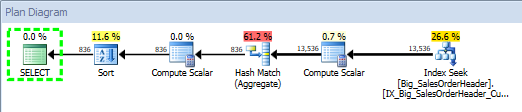
Query Plan for Stored Procedure, using SQL Sentry Plan Explorer

I could see that the plan was created at 2014-04-08 18:59:39.850. With the plan in cache, I stopped the Extended Events session:

ALTER EVENT SESSION [StatsUpdate_QueryPerf]
ON SERVER
STATE = STOP;

Next I added about 47 million rows of data to the table using this script, well over the threshold necessary to invalidate the current statistics. After adding the data, I verified the number of rows in the table:

Big_SalesOrderHeader CI: After Data Load

Before I re-ran my stored procedure, I checked the plan cache to make sure nothing had changed, and verified that statistics had not yet updated. Remember, even though the statistics were invalidated at this point, they will not update until a query that uses the statistic is executed (for reference: Understanding When Statistics Will Automatically Update). For the final step, I started the Extended Events session again, and then ran the stored procedure multiple times.  After those executions, I checked the plan cache again:

Plan Cache: After Data Load

The execution_count is 8 again, and if we look at the create_time of the plan, we can see it’s changed to 2014-04-08 19:32:52.913. If we check the plan, we can see that it is the same, even though the plan was recompiled:

Query Plan for Stored Procedure, using SQL Sentry Plan Explorer

Analysis of Extended Events Output

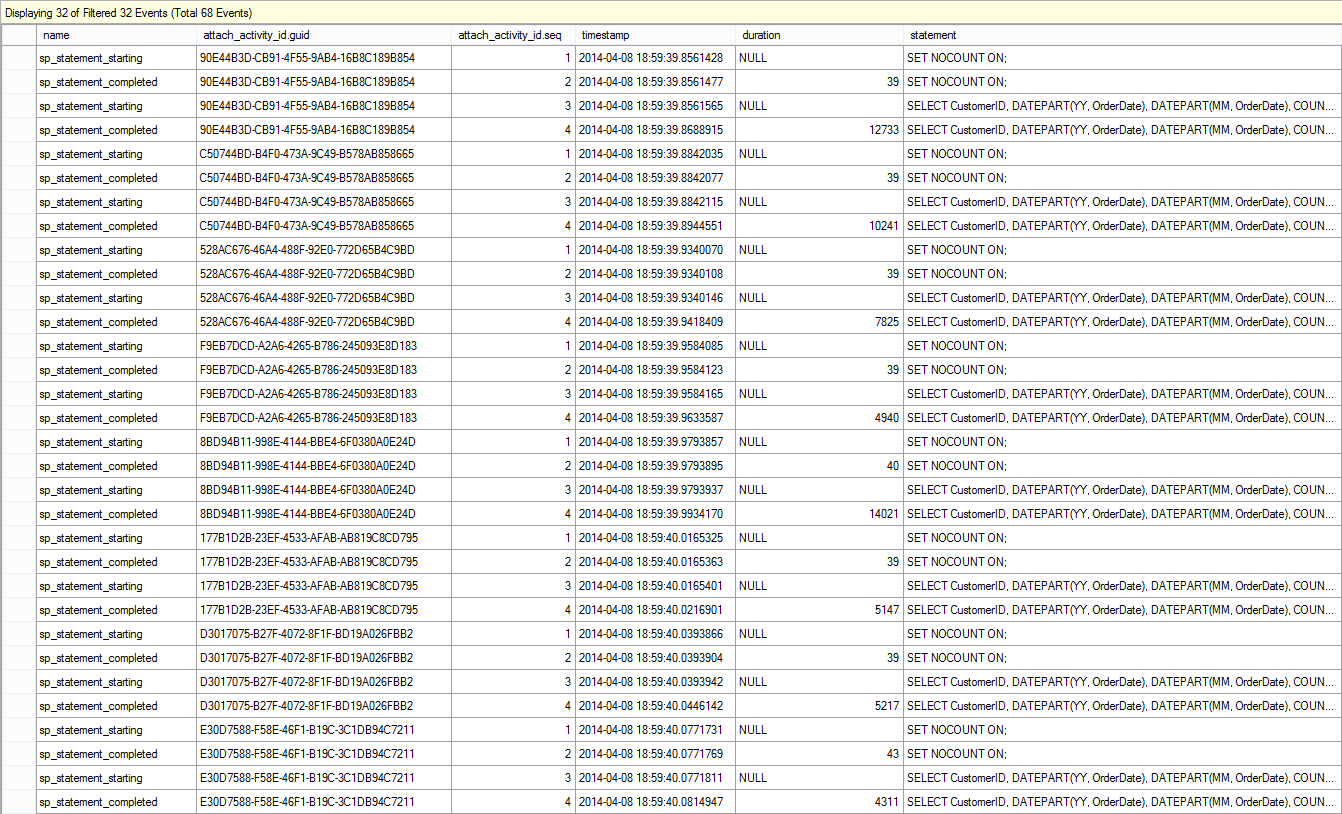
I took the first Extended Events file – before data was loaded – and opened it in SSMS, then applied a filter so that only statements from the stored procedure were listed:

Extended Events Output: After Initial SP Execution

You can see that there are eight (8) executions of the stored procedure, with query durations that vary slightly.

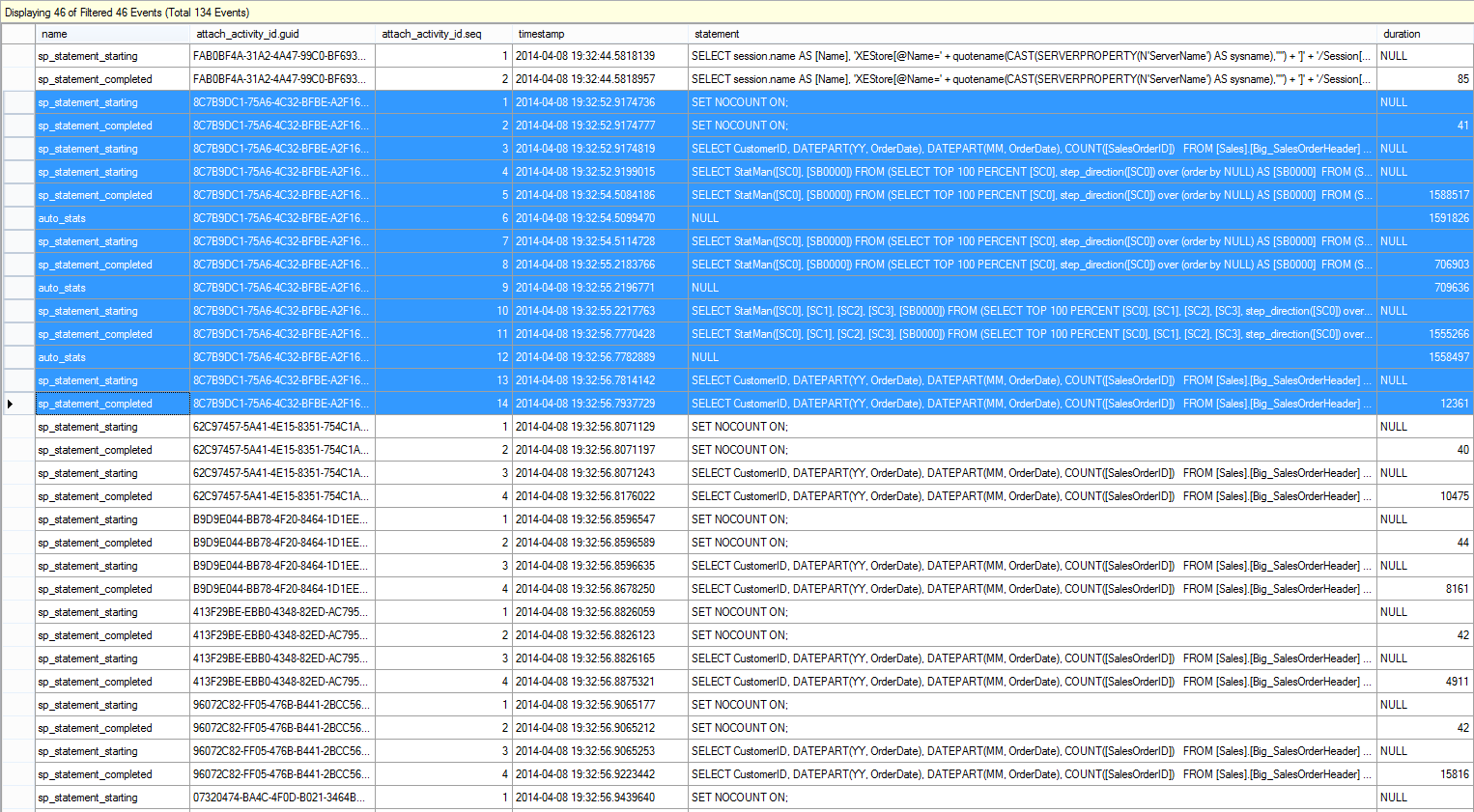
I took the second Extended Events file – after data was loaded – opened it SSMS, and filtered again so that only statements from the stored procedure, as well as auto_stats events, were listed:

Extended Events Output: SP Execution After Data Load

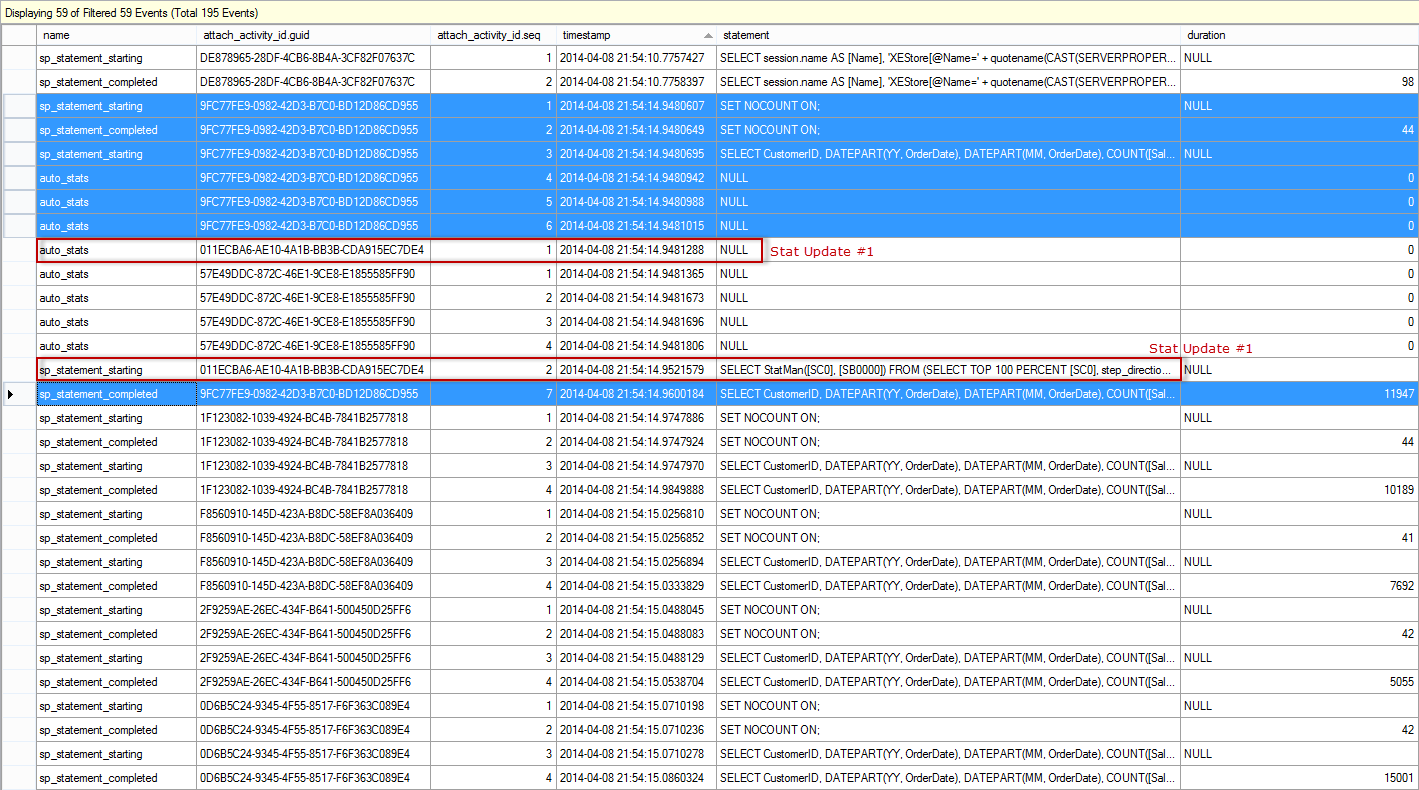
The output is truncated, as it is not all needed to show the main result. The blue highlighted entries represent the first execution of the stored procedure, and note that there are multiple steps – the update to statistics is part of the execution. The SELECT statement starts (attach_activity_id.seq = 3), and the updates to statistics then execute. In our example, we actually have updates to three statistics. Once the last update completes (attach_activity_id.seq = 11), then the stored procedure starts and completes (attach_activity_id.seq = 13 and attach_activity_id.seq = 14). Interestingly enough, there is a second sp_statement_starting event for the stored procedure (presumably the first one is disregarded), so the total duration for the stored procedure is calculated without the update to statistics.

In this scenario, having statistics automatically update immediately – that is, when a query that uses invalidated statistics executes – causes the query to run longer, even though query duration based on the sp_statement_completed event is still less than 14000. The end result is that there is no benefit to query performance, as the plan is exactly same before and after the statistics update. In this scenario, the query plan and execution duration do not change after more data is added to the table, so the update to statistics only hinders its performance. Now let’s see what happens when we enable the Auto Update Statistics Asynchronously option.

The Test, Version 2

We start by restoring to the backup that I took before we started the first test. I recreated the stored procedure and then changed the database option to update statistics asynchronously:

USE [master];
GO
ALTER DATABASE [AdventureWorks2012_Big] SET AUTO_UPDATE_STATISTICS_ASYNC ON WITH NO_WAIT
GO

I started the Extended Events session, and again executed the stored procedure multiple times, using different CustomerIDs:

ALTER EVENT SESSION [StatsUpdate_QueryPerf]
ON SERVER
STATE = START;
GO
 
EXEC Sales.usp_GetCustomerStats11331, '2012-08-01 00:00:00.000', '2012-08-31 23:59:59.997'
GO
EXEC Sales.usp_GetCustomerStats11330, '2013-01-01 00:00:00.000', '2013-01-31 23:59:59.997'
GO
EXEC Sales.usp_GetCustomerStats11506, '2012-11-01 00:00:00.000', '2012-11-30 23:59:59.997'
GO
EXEC Sales.usp_GetCustomerStats17061, '2013-01-01 00:00:00.000', '2013-01-31 23:59:59.997'
GO
EXEC Sales.usp_GetCustomerStats11711, '2013-03-01 00:00:00.000', '2013-03-31 23:59:59.997'
GO
EXEC Sales.usp_GetCustomerStats15131, '2013-02-01 00:00:00.000', '2013-02-28 23:59:59.997'
GO
EXEC Sales.usp_GetCustomerStats29837, '2012-10-01 00:00:00.000', '2012-10-31 23:59:59.997'
GO
EXEC Sales.usp_GetCustomerStats15750, '2013-03-01 00:00:00.000', '2013-03-31 23:59:59.997'
GO

I verified the execution count, and the plan, by querying the procedure cache:

Plan Cache: At Start, Test 2

Query Plan for Stored Procedure, using SQL Sentry Plan Explorer

For this test, the plan was created at 2014-04-08 21:15:55.490. I stopped the Extended Events session and again added about 47 million rows of data to the table, using the same query as before.

Once the data had been added, I checked the plan cache to make sure nothing had changed, and verified that statistics had not yet updated. Finally, I started the Extended Events session again, and then ran the stored procedure eight more times. A final peek into the plan cache showed execution_count at 16 and a create_time of 2014-04-08 21:15:55.490. The execution_count and create_time demonstrate that statistics have not updated, as the plan hasn't been flushed from cache yet (if it had, we would have a later create_time and an execution_count of 8).

Plan Cache: After Data Load, Test 2

If we open the Extended Events output from after the data load in SSMS, and again filter so we only see statements from the stored procedure, as well as auto_stats events, we find this (note that the output is broken into two screen shots):

Extended Events Output: Test 2, SP Execution After Data Load, part I

Extended Events Output: Test 2, SP Execution After Data Load, part II

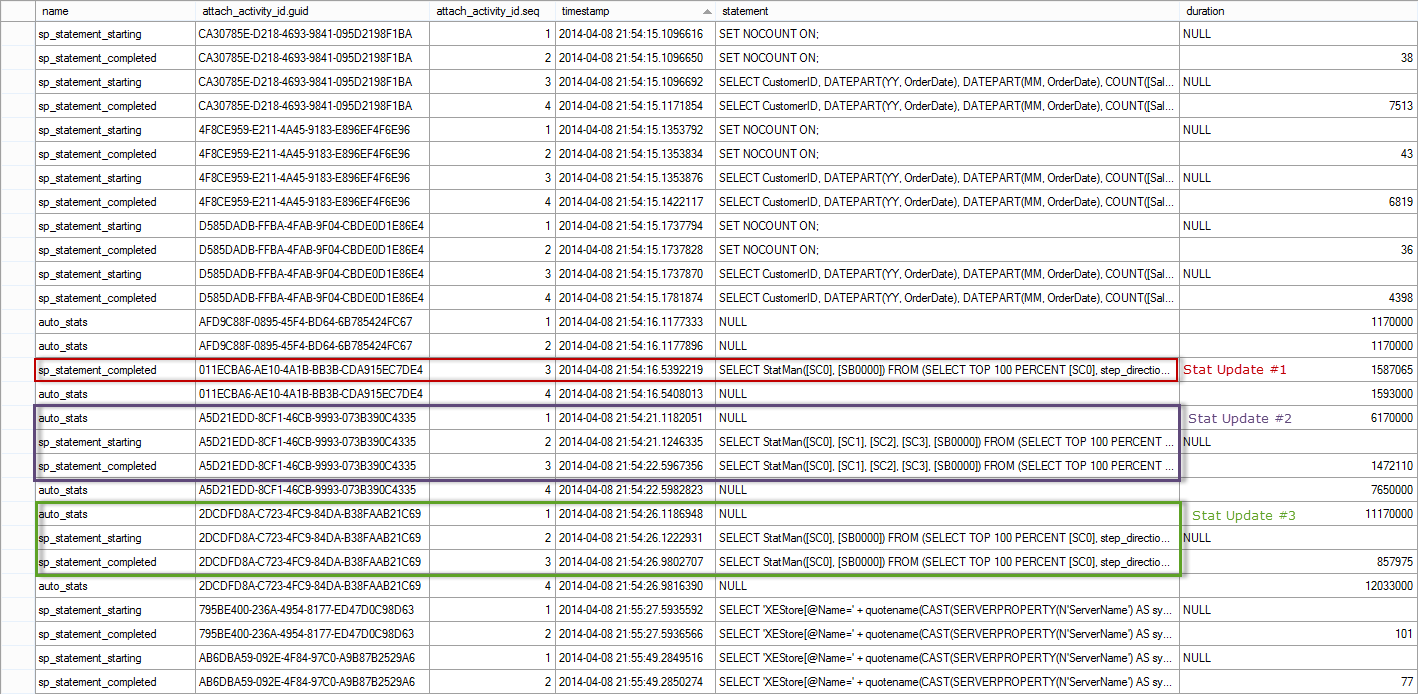
The events for the execution of the first call of the stored procedure are highlighted in blue – they start at 2014-04-08 21:54:14.9480607 and there are seven (7) events. Note that there are three (3) auto_stats events, but none of them actually complete, as we saw when the Auto Update Statistics Asynchronously option was disabled. You'll notice that the automatic update does start for one of the statistics almost immediately (2014-04-08 21:54:14.9481288), and it's three events have the red text 'Stat Update #1' next to them. That statistics update finishes at 2014-04-08 21:54:16.5392219, just under two seconds after it starts, but after all other executions of the procedure have completed. This is why the execution_count from sys.dm_exec_query_stats shows 16. From the XE output, we can see that the other statistics updates then complete (Stat Update #2 and Stat Update #3). All of the updates are asynchronous to the initial stored procedure's execution.

Summary

As you can see, automatic updates to statistics have the potential to negatively affect query performance. The degree of impact will depend on the amount of data that has to be read to update the statistic, and the system resources. In some cases, query performance only increases by milliseconds and is most likely imperceptible to users. Other times, the duration can increase dramatically, which then affects end-user experience. In the case where the query plan does not change after an update to statistics, it is well worth considering enabling the Auto Update Statistics Asynchronously option, to mitigate the impact on query performance.

28 May 13:00

First steps with Scheduled Data Refresh for Power Query #powerbi #powerquery

by Marco Russo (SQLBI)

Just a few days before my session about Power Query at TechEd 2014, Microsoft released a new update that enables the scheduled data refresh of a Power Pivot workbook containing Power Query transformations.

This is a very good news, because it enables the data refresh of a number of different data sources. Even if the number of providers supported by this release is limited (only SQL Server and Oracle), you can use a SQL Server database as a bridge to access different data sources through views using Linked Server connections.

If you want to use this feature, first of all read carefully the Scheduled Data Refresh for Power Query blog post on MSDN web site. It guides you through are the steps required in order to enable the data source connection through the Data Management Gateway. As you will see, in reality you need to create the data source connections corresponding to the Power Query databases you use. Thus, in reality you might skip the data source configuration if you already have the corresponding databases enabled in the Power BI admin center. However, I suggest you to go through the steps described in that blog post at the beginning, because if the same database has two different drivers, it needs two different data sources. For this reason, I have a number of notes that might be helpful to avoid certain issues.

  • Power Query uses the .NET Framework Data Provider for SQL Server and Oracle Data Provider for .NET, whereas Power Pivot by default creates a SQL Server connection using the SQL Server Native Client 11.0 (SQLNCLI11).
    • Even if you already created a data source for a SQL Server database you refresh in a Power Pivot workbook, you have to create another data source for the same SQL Server database for Power Query, because you use two different drivers.
    • You might consolidate these data sources to only one, by changing the data provide in the advanced options of a Power Pivot configuration, but I am not sure this is a good idea. I would keep the two version of data sources, one for each provider, in case I use the same database in both connections
  • Power Query creates one connection string in Excel for each query you create. The connection string contains the entire transformation and when you copy it in the New Data Source page in Power BI admin, the internal query is analyzed to extract the required connection to SQL Server. If these connections are already configured as Power BI data sources, then you don’t need to do anything else. I suggest you to iterate all the queries you have following this step until you are confident of the internals and you are sure the required data sources are already available.
    • Even if you create a single query in M language accessing to different databases, the referenced connections will be found and each database will have a separate data source configuration in Power BI. I was worried that loading multiple tables from different database on the same server would have produced a single data source enabling to access all the databases on the server, but luckily this does not happen and security is preserved!
  • I spot an issue using certain DateTimeZone functions (DateTimeZone.FixedLocalNow, DateTimeZone.FixedUtcNow, DateTimeZone.LocalNow, and DateTimeZone.UtcNow) that seem not working with scheduled data refresh. You can read more about such issue in this thread on Power Query MSDN forum. I found a workaround using the Table.Buffer function, so that by stopping query folding the expression is not translated in SQL but evaluated directly by the Power Query engine. However, I hope this will be fixed soon.
  • A Power Query transformation that contains only a script, without accessing to any data source, currently is not refreshed. This would be useful for generating a Date table, I opened this other thread about this issue on the forum, I hope there will be news on that, too.
    • In the same thread you will find another tip: the literal in the form #literal, such as #table, are being mis-analyzed by scheduled refresh, but at least for this issue there are workarounds available, until the issue is not fixed by Microsoft.
  • You can use SQL Server views based on linked servers to overcome the limitation of providers currently supported by Data Management Gateway (which is the component used by scheduled data refresh).
  • Now that it is possible to publish SSIS packages as OData Feed Sources, you can expose a SQL Server view to Power BI, and accessing it from Power Pivot or Power Query, you can execute SSIS packages at refresh time. If the package is not too long to execute (it would timeout the connection), this is a smart way to arrange execution of some small “corporate ETL” in sync with the data refresh on Power BI, without relying on synchronized scheduling dates (which is always one more thing to maintain). This further extends the range of providers you can use with scheduled data refresh.

I would like to get more detailed errors when something goes wrong and scheduled data refresh stops, but this is a good start.

28 May 13:00

Writing and Delivering a Successful Full-Day Technology Seminar

by kevin

kekline full day

I was recently chatting with the current President of PASS, Thomas LaRock (Twitter | Blog), and Pieter Vanhove (Twitter | Blog), a prominent SQL Server consultant and expert in Belgium, about how I go about building and presenting a full-day technical seminar. In the SQL Server world, we tend to call these “pre-cons”, as in pre-conference seminar, because they’re typically offered as paid add-ons occurring prior to a full technical conference. We call them that even when they come at the end of the conference and, heck, when there’s no conference at all.

Kevin and Kendal, PASS 2013

Kevin and Kendal Van Dyke preparing to kick off a session at the PASS Summit 2013

Personally, I have developed and delivered six different pre-cons over the years. Four are purely technical and two are professional development oriented. I keep them up to date and deliver around six per year these days, though I’ve done as many as ten in a single year. (But that was because I had a daughter’s wedding to pay for. Shameless plug – HIRE ME to deliver one of these in house.)

The Foundation of a Good Pre-Con Seminar is a Good Topic

There are a ton of perennially favorite topics which, once you write the session, you’ll be able to present over and over again. One interesting technique to choose a good topic, if you’re not sure what you want to present, is to use Google Insight to see what are the most popular variations of a topic you feel strongly about. Here are some additional thoughts on choosing a topic:

1.       The most popular topics are always focused on ‘help me do my current work better/faster/stronger’. Broad, but fundamental topics tend to draw bigger audiences than niche topics. However, some events have a large enough attendance that even niche topics will pack a room. And always remember that your event organizer’s goal is to pack the room, no matter how much they like you.

a.       The biggest winners in my market are server troubleshooting & performance tuning (for DBAs) and various topics on better SQL coding (for devs). That’s why a session on performance tuning or coding best practices will bring in more attendees than, say, a session on features in the newest release or professional development. That’s sad for me, since I love leadership and career training and have a really good full day pre-con on the topic, but they never bring in more than 1/3 of what the biggest tech session brings in. And don’t forget – people love to hear about mistakes to avoid just as much as how to do things better. So “gotcha” topics can bring in just as many attendees as a best practices session.

b.      Sessions that drill into a hot and hyped new technology tend to do really well too. So something like ‘Implementing Big Data with SQL Server’ can bring in a big crowd. But technologies that are too broad and ill-defined have the opposite effect on attendance. For example, many people still don’t “get” Azure or cloud computing in general. So, while it’s definitely a worthwhile topic, don’t be disappointed if you don’t put a butt in every seat.

c.       Some pre-cons are feature-oriented, like Replication or Disaster Recovery. Many of these features are very cool, but are only available in SQL Server Enterprise Edition. For example, some of the Always On Availability Group features are EE only. Less people have Enterprise Edition than Standard Edition, so less people will come to an Enterprise Edition-oriented session.  The features you plan to discuss will directly correlate to your attendance numbers. I’m telling you to avoid these topics, rather just expect it to have an impact in the size of your audience.

2.       You will absolutely spend way too much time researching and developing your slide deck. So it’s also always good to choose a topic you want to learn more about. This’ll not only improve the attendees skills, but yours as well. Want to learn more about Hekaton? Then include it in your pre-con. Want to learn more about SQL Server query tuning? Write and deliver a session on it. You’ll learn it better than you ever would, independently, because you know you’ll get tough questions and you want to be prepared for those.

You Can Attract and ‘Manage’ Your Audience Through Your Abstract

This is the second most important step. You can’t control what your audience is like once they get into the room. But you can strongly influence who decides to come into the room in the first place with your session title and abstract.

Personally, I believe your title should immediately inform the reader of the topic and who is intended to reach, such as “Cutting Edge Debugging Techniques for the .NET Developer” or “Top 10 Mistakes New Tech Managers Make”. The title is alone constitutes 60-75% (by my careful, non-scientific assessment) of  what will drive an attendee to your session. In fact, many attendees never even read the session abstract, unless there are two sessions at the same time that seem equally worth attending. In that case, the abstract is often the tie-breaker.

Be sure that your abstract explains not only what the session is about, but what the topic is and why people should care about it. I can’t tell you how many times I’ve seen a session abstract that names a specific, niche feature in the title but doesn’t tell what that feature is in the abstract. I once saw a session whose title was, and I paraphrase, “Introduction to the Flux Capacitor“. The abstract said I’d learn three cool was to use the flux capacitor and would see live demos of the flux capacitor in action. But it didn’t say what tool the flux capacitor was used in (.NET? BI? Java? SQL Server? SharePoint?), who would use it, what it did, or why it matter. And I always like to include at least three high-level topics the attendee will leave having learned.

Having said all of that, I feel like there’s no better write-up of how to write a top quality session abstracts that in the blog post by Adam Machanic (b | t) entitled “Capturing Attention: Writing Great Session Descriptions“. This is such a good overview of doing abstract writing the right way that I wish technical conferences would make this required reading for their speaker submissions. (Are you listening SQL Saturday?)

Planning and Building Your Presentation

A lot of accomplished speakers who’ve done one-hour sessions become both excited and terrified about doing a full 7- to 8-hour session. And one of the first fears that people share with me is that they won’t have enough to say or that they’ll be able to fill the time. Believe me – this will not be your problem. In fact, if you properly research your presentation and read what other writers and bloggers have to say, you will have difficulty fitting everything you want to talk about within your allotted time.

Here are some planning tips I use for planning and building my sessions:

1.       I estimate that I’ll speak 3 minutes per slide. Then I do the math for how many slides I can fit into the amount time I have in the given session slot. For example, a 75 minute session should not have more than 20’ish slides, taking into account some time for the introductory and closing slides, questions, and demos.

2.       Attendees are idiots AND geniuses simultaneously. One surprising thing I’ve learned after averaging about 6 pre-cons per year for the last few years is that no one reads the session-level advice (i.e. whether it’s a 200, 300, or 400 level session). They always read the titles, and possibly skim the abstract, and then make their decision based on that.

a.       Here’s an important part tip for your presentation: you will definitely have plenty, maybe even a surprising number, of attendees who don’t know the basics of your topic. For example, in a recent pre-con called “50 Things Every SQL Developer Should Know that my buddy, Aaron Bertrand (b | t) and I presented at SQL Intersection, I now include a whole section discussing how the plan cache works and how to read execution plans. I clearly told attendees that they needed to know those things as prerequisites, but I’d say about 40-50% of the attendees in fact did not know the fundamentals.

b.      At the same time: You will have attendees who are quite advanced. I try to identify those kinds of attendees early on (often by explicitly asking who has a lot of experience), then I try to include them as allies in the presentation. I ask their feedback a lot and give them a lot of eye contact. If there’s a question that seems tough, I might turn towards them and say “Have you ever seen that in your shop? How did you deal with it?” Usually, if they’re experienced and knowledgeable, then they love to share. It’s often as enjoyable for them to be recognized as smart as it would be to learn some big, new skill or technique. That helps keeps both ends of the talent spectrum equally happy.

IMG_1754

3.       Demos are the most stressful part of even one-hour sessions. It’s an order of magnitude worse in a day-long session. In my case, I strive for a high degree of deliberately assessed order and standardization:

a.      Never install new software or change your configuration within 48 hours of your presentation. If some enterprise policy forces a change, assume the worst and retest all of your demos.

b.       Include in the PPT notes panel the exact path and filename for a demo file that a particular slide relates to. It’s not as important if you recently wrote the slide deck. But it becomes very important if you wrote the session a while ago and no longer know all of the facts cold about your demos.  For that matter, I’m now putting a number prefix on all of my SQL scripts so I can see which to load into SSMS in what order. Also, SSMS orders open tabs automatically. So numbering them works much better than giving only an alphabetic name.

c.      If you’re running short on time, explain the concepts and tell where attendees can find the demo scripts, but skip the demos themselves.

d.      One thing I’ve started to do, especially for really complex or annoying demos (e.g. a demo involving multiple servers such as a big Availability Group), is to either screenshot the whole demo process or make a video of the demo using Camtasia. Then I show the slides or the video instead of the real work environment. That way I can illustrate the principles involved without ever risking something going wrong. Attendees don’t seem to mind at all.

e.      This is so axiomatic that I shouldn’t have to mention it, but just in case, create your demos in such a way that they require very little new typing. If you have to do more than change a parameter or two, then you need to work on your demos a bit more.

4.      For goodness’ sake, get to the room as early as is practical and get comfortable with the learning environment. Expect problems with setup. Many laptops have issues with certain types of projects and require a lot of tinkering to get working properly.  And carry spare equipment for crazy and unexpected issues. Batteries for your wireless mouse is practical, of course, but other mind-boggling things can happen. For example, I’ve spoken at many facilities which did not have an electrical outlet anywhere near the podium. My lesson learned? I always carry a 3m extension chord.

Making the Session Memorable

There are several small tips and tricks you can use to make sure your session is memorable and well-regarded. (And when you have well-regarded sessions, you get invited to do more session. It’s a positive feedback loop, engineers!) Here are some of my favorite techniques:

1. Work with a co-presenter. Personally, I love working with co-presenters. This might not be your cup of tea, since you have to split revenue, and I can respect that. But hear me out. On the one hand, the shared workload for both writing and presenting the pre-con is much easier. And don’t forget that most of us aren’t used to standing or speaking for 8-hrs straight. So being able to tag-team with another presenter off and on through the day can be like mana from heaven at times when you’re flagging. On the other hand, audiences find dialogue much more entertaining than monologue. Have you ever noticed that the morning radio show on your drive to work is no longer a single, lonely DJ? There is almost always at least two and sometimes as many as a half-dozen people on the “!!WKRP Morning Team!! Caffeinate your day!!” show, and sometimes even skits and almost-comedy bits. People just enjoy that format more and it translates into measurably ratings for the radio stations. It will for you too.

2. Quiz the attendees as you go along. You want people to remember your session and, even better, recommend it to others. One trick that I learned when I was trying to master recall of names is to repeat a person’s name back a time or two before the introduction concludes. You can use this tip, as a presenter, to help your attendees remember aspects of your session. After you’ve advanced the slide, find a reason to ask a question relevant to an earlier slide. In some cases, I’ve started to substitute old fashioned slide notes pages (i.e. a list of standard bullet points) for a quiz sheet, which is essential the same list of bullet points with a single key word as a fill-in-the-blank. The attendees will really get into making sure those blanks are filled it. If you miss one, they’ll make you go back and tell them what goes in the blank. (Hooray! They were paying attention!) Make it fun. Tease them jokingly if they forgot something you just talked about. But keep the attendees engaged and mindful of the major lessons.

3. Provide useful takeaways. Attendees love to be able to reference a list of takeaways. Just think about all the great sessions you have ever been to before. They usually have some level of detail for you to consume easily and walk away with or reference later. They have clean demo scripts with lots of comments that would stand on their own without slides or someone speaking. They offer the attendee the ability to be immersed in the “here and now” and the ability to come back for a summary to jog their memory. In my case, I actually have a password protected area of my website where attendees can download the slide decks and demo scripts to all of my pre-cons. My theory being that the attendee has paid for this training, so I want to provide an incentive for them to view me as one of the Go-To references going forward, to encourage them to attend other pre-cons of mine, and to nudge them to promote me to others.


Well, that’s my BULK INSERT for pulling off a successful and repeatable pre-con. Have you done a full day training session yourself? What sort of techniques have you learned to make your session more effective and memorable? Share your thoughts and questions here.

Many thanks,

-Kevin

-Follow me on Twitter!
-Google Author


The post Writing and Delivering a Successful Full-Day Technology Seminar appeared first on Kevin Kline.

28 May 12:59

In-Memory OLTP Sample for SQL Server 2014 RTM

by SQL Server Team

SQL Server 2014 introduces the new In-Memory OLTP feature to boost performance of OLTP workloads. In an earlier blog post, Quentin Clark described how In-Memory OLTP has helped customers achieve performance gains up to 30X.

To help you get started with the new In-Memory OLTP feature in SQL Server 2014 we created a sample around sales order processing based on the AdventureWorks sample database. This is an update of the sample we published back in November following the CTP2 release.

Installation instructions and documentation can be found on MSDN:

http://msdn.microsoft.com/en-us/library/dn511655(v=sql.120).aspx

The sample script can be downloaded from Codeplex:

https://msftdbprodsamples.codeplex.com/releases/view/114491

We encourage you to download and install the sample to become familiar with the new memory-optimized tables and natively compiled stored procedures, introduced by the In-Memory OLTP feature in SQL Server 2014.

The documentation also contains instruction for running a demo workload which can be used to measure the performance of the sample on your system, and to contrast the performance of the new memory-optimized tables with traditional disk-based tables.

You can post feedback and questions about the sample on the SQL Server Samples Forum.

28 May 12:59

Causes of IO_COMPLETION and WRITE_COMPLETION SQL Server wait types

by Paul Randal

In many of the sets of wait statistics I’ve been analyzing, the IO_COMPLETION and WRITE_COMPLETION waits show up (but never as the most prevalent wait type).

The official definition of these wait types are:

  • IO_COMPLETION: Occurs while waiting for I/O operations to complete. This wait type generally represents non-data page I/Os. Data page I/O completion waits appear as PAGEIOLATCH_* waits.
  • WRITE_COMPLETION: Occurs when a write operation is in progress.

I promised many of the people who sent me wait statistics recently that I would write a blog post giving more detailed information on when these wait types occur, so here it is.

I used the Extended Events code in my post How to determine what causes a particular wait type to watch for these wait types occurring and then ran a variety of operations and analyzed the call stacks. There are way too many occurrences to document them all here, so I’ll summarize my findings below.

Note that these are not lists are not exhaustive, but you get the idea of the kinds of operation where these wait types occur.

IO_COMPLETION

  • Reading log blocks from the transaction log (during any operation that causes the log to be read from disk – e.g. recovery)
  • Reading allocation bitmaps from disk (e.g. GAM, SGAM, PFS pages) during many operations (e.g. recovery, DB startup, restore)
  • Writing intermediate sort buffers to disk (these are called ‘Bobs’)
  • Reading and writing merge results from/to disk during a merge join
  • Reading VLF headers from the transaction log

WRITE_COMPLETION

  • Writing any page to a database snapshot (e.g. while running DBCC CHECK*, which is often the most common cause of this wait type)
  • Writing VLF headers while creating or growing a transaction log file
  • Writing a file’s header page to disk
  • Writing portions of the transaction log during database startup
  • Writing allocation pages to disk when creating or growing a data file

These aren’t waits that I’d generally be concerned about, and I’d expect the individual resource wait times to be in line with those of the read and write latencies of the instance.

Enjoy!

The post Causes of IO_COMPLETION and WRITE_COMPLETION SQL Server wait types appeared first on Paul S. Randal.

28 May 12:59

Another User Has Locked My File!

by Andy Warren

I had an SSIS package fail in a script task this morning. As part of the why process I opened up one of the files it was processing and got this message:


image


I get the idea and I’ll hunt around to find what has it open, but I’m bemused at ‘another user’ which is either a really great domain user name or a fun default when no user name is available – presumably the latter. The package is using GetSchema to get the sheet names and I suspect it is/was the cause, but I wonder why no useful user name provided?

In the course of a quick search I found this post that doesn’t answer that question, but does go into a lot of detail (look at the flow chart!) on all the various ways it can happen.

22 May 20:36

What should I be looking for during Code Reviews?

by Alexandre Brisebois (Canadian MVP)

For the longest time, I was wary of Code Reviews. I used to spend most of my time implementing features and felt that Code Reviews robbed me of my precious time. I was mistaken and have changed my approach.

Our team uses systematic Code Reviews to help us normalize our code base. It has helped us to set our expectations and to identify major defects before our clients got to experience them in production. We have a minimum of 2 reviewers for each code contribution and we encourage everyone to take part in Code Reviews. The practice has the added benefit of creating opportunities for developers to look at different parts of our solution.

Thus far, it’s been a great way to share knowledge and practices amongst our team members. I hardly hear anyone swearing during reviews and I rarely see any code that strays from our common expectations. It has made onboarding new team members easier because once they understand our standards, they’re able to contribute with code and Code Reviews.

Code Review tools don’t always provide enough context for each piece of code that we need to review. This makes it a challenge to perform effective Code Reviews in a timely manner. To make my life easier, I try to concentrate on things that don’t require me to understand the full context. For example, I look at standards, documentation, Unit Tests and try to use common sense to identify as many issues as I can.

The following questions help me perform quick and effective Code Reviews.

Why was the code changed?

Before we start reading any code, it’s crucial that we get acquainted with the associated Work Items. This will help us identify if the requirements were satisfied by the proposed solution. Furthermore, it will allows us to identify whether the developer has done more than what was expected.

Have Unit Tests been modified?

Modified Unit Tests are a great indicator that developers have tested their code. In projects where I use Test Driven Development (TDD), keeping an eye out for these changes becomes essential.

If the original task was to implement a new feature, then I should see new Unit Tests. On the other hand, if the requirement was to fix a bug, I should see a new Unit Test whose role is to prevent future regressions. The only time I don’t look for Unit Tests, is when the code was changed because of necessary refactoring efforts.

Has the internal documentation been updated?

At the beginning of my career, I had the opportunity to work with a very demanding employer. One of his requirements was that I needed complete documentation before I could start working on a new task. At first I found this process heavy and slow, but after a few months I understood that to go fast your have to go well. Eight months later, I came back and that documentation pay off! I had forgotten about the specifics of the system and would have looked like a fool without that documentation.

Today, I believe that developer documentation is essential and that it should be stored within the solution. This is especially useful when you need to onboard new developers or produce external documentation for partner, consumers and clients. Furthermore, Technical Writers can use this internal documentation as a base for their work.

Are Code Analysis Issue Suppressions accompanied by valid justifications?

When I start new projects I make the extra effort to resolve all the issues found by Code Analysis in Visual Studio. I try to leave as little suppressions as I can so that new developers who join the project are inclined to care about fixing these issues as they arise.

The Rule Set I use in my projects is a modified version of the “Microsoft All Rules” which contains the Extended Correctness Rules rule set for managed code, the Extended Design Guidelines Rules rule set for managed code, the Globalization Rules rule set for managed code, the Managed Recommended Rules rule set for managed code and the Security Rules rule set for managed code. This extensive Rule Set has helped me standardize code bases and follow proven industry standards.

When issues are identified in code that results from scaffolding or frameworks, developers can suppress specific warnings by adding attributes to classes and methods. For a suppression to be accepted, they must provide a valid justification so that other developers don’t have to ask questions like “Why isn’t this method static?”

Are TODO comments accompanied by a Work Item IDs?

Although I have nothing against TODO comments. I believe that we should track technical debt at its source. Consequently, I ask developers to create a Work Item in TFS for every TODO comment they add to our code base. As the project evolves, teams can use these Work Items to prioritized, free resources and tackle technical debt before it gets out of hand.

Are there any useless comments?

Some developers feel the urge to comment on obvious things. I prefer to think that comments are exceptional and should only be used when I fail to express my intent through code & good naming conventions. I strongly encourage developers to take this approach, because we rarely maintain comments and they contribute to misleading future developers.

Is there any dead code?

Dead code is just as bad as misleading comments. Don’t keep unused code in your solution because it’s just going to accumulate. Developers will be wary and won’t get rid of it because there’s too much uncertainty. What’s the worst that can happen? The solution will bloat, developers will get lost and productivity will drop off the map.

As professionals, we should strive to use source control for what its best at, keeping historic snapshots of our code. Keeping our code clean, means that we don’t have to ask unnecessary questions and that we can concentrate on real problems.

Can I tell which developer wrote the code?

Teams should strive to instate and respect coding standards. Writing code for a computer is the easy part. Writing code for your peers and for your future self, takes a bit of extra effort.

If I can tell which developer wrote a piece of code, I try to identify what makes it standout. Then I seek opportunities to adjust our coding standards based on my findings. If I can’t, I ask the developer to conform to our standards.

Are there any quality issues or possible bugs?

Once I’ve gone through process and standards, I look for possible quality issues and potential exceptions. This is a great opportunity to identity possible refactoring, technical debt and to question how business rules are applied.

Was the developer too creative?

The last question I ask myself about the code I’m reviewing, concerns creativity. Was the developer too creative with their proposed solution? Will other developers on our team understand and will they be capable of maintaining the code? If the answer to these questions is “NO”, I spend some time with the developer to simplify the overall solution.

Remember, simple is better!

Image Source: http://alexandrebrisebois.wordpress.com/2014/05/04/what-should-i-be-looking-for-during-code-reviews/

07 May 05:22

Ask Slashdot: How To Communicate Security Alerts?

by Soulskill
Capt.Michaels writes: "I need to start sending security alerts and warnings to employees at my somewhat sizable company. My problem: I'm not sure how to send these alerts without freaking everyone out and causing the help desk to get flooded with phone calls. For example, let's take the current Internet Explorer exploit that caused US-CERT to recommend switching browsers. I don't want everyone killing our limited help desk with ridiculous questions like, 'I downloaded $New_Browser, how can I get my toolbar? How do I bookmark things in this browser? Can you tell me which browser you recommend?' Simply put: some vulnerabilities are worth major changes, but many aren't. If we switched software every time a new vulnerability came out, we'd never get anything done. Sooner or later, a patch will come out, and everything will be back to normal. But how do I communicate to end users that they should be aware of an issue and take extra care until it's fixed, without causing panic?"

Share on Google+

Read more of this story at Slashdot.


07 May 05:16

Steve Jobs Defied Convention, and Perhaps the Law

by timothy
Hugh Pickens DOT Com (2995471) writes "James B. Stewart writes in the NYT that recent revelations that Steve Jobs was the driving force in a conspiracy to prevent competitors from poaching employees raises the question: If Steve Jobs were alive today, should he be in jail? Jobs 'was a walking antitrust violation. I'm simply astounded by the risks he seemed willing to take,' says Herbert Hovenkamp, a professor at the University of Iowa College of Law and an expert in antitrust law. 'Didn't he have lawyers advising him? You see this kind of behavior sometimes in small, private or family-run companies, but almost never in large public companies like Apple.' In 2007, Jobs threatened Palm with patent litigation unless Palm agreed not to recruit Apple employees, even though Palm's then-chief executive, Edward Colligan, told him that such a plan was 'likely illegal.' That same year, Jobs wrote Eric E. Schmidt, the chief executive of Google at the time, 'I would be extremely pleased if Google would stop doing this,' referring to its efforts to recruit an Apple engineer. When Jobs learned that the Google recruiter who contacted the Apple employee would be 'fired within the hour,' he responded with a smiley face. 'How could anyone have approved that?' says Hovenkamp. 'Any competent antitrust counsel would know that's illegal. And they had to know they'd get caught eventually.'" (Read more, below.)

Share on Google+

Read more of this story at Slashdot.


07 May 04:57

Researchers See a Post-Snowden Chilling Effect In Our Search Data

by samzenpus
Daniel_Stuckey (2647775) writes "How risky is it to use the words "bomb," "plague," or "gun" online? That was a question we posed, tongue in cheek, with a web toy we built last year called Hello NSA. It offers users suggested tweets that use words that drawn from a list of watchwords that analysts at the Dept. of Homeland Security are instructed to search for on social media. "Stop holding my love hostage," one of the tweets read. "My emotions are like a tornado of fundamentalist wildfire." It was silly, but it was also imagined as an absurdist response to the absurdist ways that dragnet surveillance of the public and non-public Internet jars with our ideas of freedom of speech and privacy. And yet, after reading the mounting pile of NSA PowerPoints, are all of us as comfortable as we used to be Googling for a word like "anthrax," even if we were simply looking up our favorite thrash metal band? Maybe not. According to a new study of Google search trends, searches for terms deemed to be sensitive to government or privacy concerns have dropped "significantly" in the months since Edward Snowden's revelations in July."

Share on Google+

Read more of this story at Slashdot.


07 May 04:53

Microsoft Cheaper To Use Than Open Source Software, UK CIO Says

by Unknown Lamer
colinneagle (2544914) writes "Jos Creese, CIO of the Hampshire County Council, told Britain's 'Computing' publication that part of the reason is that most staff are already familiar with Microsoft products and that Microsoft has been flexible and more helpful. 'Microsoft has been flexible and helpful in the way we apply their products to improve the operation of our frontline services, and this helps to de-risk ongoing cost,' he told the publication. 'The point is that the true cost is in the total cost of ownership and exploitation, not just the license cost.' Creese went on to say he didn't have a particular bias about open source over Microsoft, but proprietary solutions from Microsoft or any other commercial software vendor 'need to justify themselves and to work doubly hard to have flexible business models to help us further our aims.'"

Share on Google+

Read more of this story at Slashdot.


07 May 04:44

Brain Injury Turns Man Into Math Genius

by Soulskill
mpicpp sends in the story of Jason Padgett, a man who developed extraordinary mathematical abilities as the result of brain trauma when he was attacked outside a bar. "Padgett, a furniture salesman from Tacoma, Wash., who had very little interest in academics, developed the ability to visualize complex mathematical objects and physics concepts intuitively. The injury, while devastating, seems to have unlocked part of his brain that makes everything in his world appear to have a mathematical structure 'I see shapes and angles everywhere in real life' — from the geometry of a rainbow, to the fractals in water spiraling down a drain, Padgett told Live Science." "He describes his vision as 'discrete picture frames with a line connecting them, but still at real speed.' If you think of vision as the brain taking pictures all the time and smoothing them into a video, it's as though Padgett sees the frames without the smoothing. "

Share on Google+

Read more of this story at Slashdot.


07 May 04:33

Comcast: Destroying What Makes a Competitive Internet Possible

by Soulskill
An anonymous reader writes "Vox has another in-depth report on the perilous state of net neutrality regulation, and how Comcast is attempting to undermine it. Quoting: 'In the bill-and-keep internet, companies at each "end" of a connection bill their own customers — whether that customer is a big web company like Google, or a an average household. Neither end pays the other for interconnection. ... ISP's typically do this by hiring a third party to provide "transit," the service of carrying data from one network to another. Transit providers often swap traffic with one another without money changing hands. ... The terminating monopoly problem occurs when a company at the end of a network not only charges its own customers for their connection, but charges companies in the middle of the network an extra premium to be able to reach its customers. In a bill-and-keep regime, the money always flows in the other direction — from customers to ISPs to transit companies. ... But when an ISP's market share gets large enough, the calculus changes. Comcast has 80 times as many subscribers as Vermont has households. So when Comcast demands payment to deliver content to its own customers, Netflix and its transit suppliers can't afford to laugh it off. The potential costs to Netflix's bottom line are too large.'"

Share on Google+

Read more of this story at Slashdot.


07 May 03:06

EMC World 2014 – Area 53 Keynote

by Andrew Miller
EMC logo


Cool intro video….as you’d expect.

“Please welcome Agent J & Agent H” – Jeremy Burton and some other folks (young man as well). Some T-Shirt shooting….fun.

Jeremy Burton – “If you can’t download an app from the App Store, please leave now as you won’t understand anything.”

New world is driven by deployment of applications – move to 3rd platform is driven by business, move to 2nd platform was driven by IT.

Showing video about InsureCorp – accident with incredible claim processing. Locate accident, send drone to take pictures, file claim, file accident report, send Uber car, send tow truck. All powered by Pivotal of course.

Quote from large bank exec – “Banks need to take on Amazon or Google or die.”

Sundeep Madra on stage – CTO of Pivotal. Here to break down the InsureCorp app – take many data sources and combine in real time.

NewImage

Walking through demo of Pivotal Web Services in the real world – deploying application update without downtime (command line demo), also showing the GUI.

Cloud Foundry = development platform but also deployment platform.

InsureCorp Storage Requirements – 5 categories. 1) Personal Info in Relational Database, 2) Analytics for Cross Sell in Hadoop, 3) Accident Photos in Object Storage, 4) Accident Report Collaboration in File Storage, 5) Archive for Compliance in Object Storage.

NewImage


10 years ago insurance records in db would have had a green screen with 10 kb of data – now it’s 1000x that.

NewImage

Walking through ViPR demo – showing VMAX, VNX, VPLEX all underneath ViPR. 

Moving into data protection – the continuum of RPO & RTO Objectives. With 3rd platform may need to use multiple options for the various types of data.

NewImageBrief review of Project Charon – “google Project Charon”

Now onto VPLEX – VPLEX is a first class citizen in vCenter now (vCenter interface shown with VPLEX UI inside vCenter). Virtual VPLEX also inside vCHS. Moving into the demo showing migrating a VM live between on-premise. 

5 minute Avatar 2 Preview Behind the Scenes – then Jon Landau on stage (Avatar producer) for an interview.

NewImageWhen James Cameron first came up with Avatar story in 1995, the technology literally didn’t exist – not just 3D but compute power, storage capabilities, etc.


First part of Avatar 2 behind the scenes preview video at http://moby.to/f2np8d

Special effect differences between Titanic & Avatar – in Titanic had to drop $750k for an SGI unit. 20th Century Fox didn’t want to pay for it.

“If Avatar did anything for the industry, it allowed film makers to believe that if you can dream it, it can be created.”

Yes, Jim Cameron can be hard to work with – but people from Avatar came back to work on Avatar 2. Demanding but to fulfill a vision….

So what’s attainable in the future? “Things are going up in quantum leaps – anything is possible.” For the Abyss movie, they had 900 MB of online storage. Avatar had 180 PB.

Working on 3 Avatar sequels – each movie will complete itself but together make up a full saga. Trying to build Avatar outside the movie world – working with Disney for “Avatar Land” to experience Pandora.

Syncplicity + Isilon done – can browse Isilon home directories via Syncplicity iOS client.

Now skipping to the end – had to cut some pieces due to time.

Into a live demo of the Area 53 iOS app.


06 May 05:16

Logistics For All Day Meetings

by Andy Warren

Quick thoughts about the work required to make all day meetings run smoothly:

  • Suitable space with enough seating (and reasonable chairs!)
  • Turn down the AC if the room is going to be crowded to help with the heat load
  • Plenty of power strips – few people will make it through the day on laptop battery only
  • At least one extra laptop power cable (someone will forget)
  • Might be worth bringing a couple USB cables or setting up a phone charging area
  • Know how to use the projector and who to call if any problems
  • Dry erase markers, post it charts, etc
  • Good phone and a conference bridge if needed
  • Printed instructions for connecting to WIFI (remember some laptops don’t have network jacks anymore)
  • And yes, an agenda and a facilitator to drive the agenda
  • If you’re using LiveMeeting or any of the similar products make sure you know how to use it and ideally get everyone set up ahead of time
  • Coffee and water near by, ideally in the room
  • Throw in a map to the break room, restrooms, and any on site cafeteria if you have people from outside joining you
  • Big trash can for lunch garbage (and you are providing lunch, right?)

I’ve seen a lot of meetings derailed just trying to get everyone on the network. Right behind it is trying to get someone to show something on LiveMeeting that hasn’t used it before.

06 May 05:15

How Automatic Updates to Statistics Can Affect Query Performance

by Erin Stellato

In my previous post, I explored different methods to track automatic updates to statistics to determine if they were affecting query performance. In the latter half of the post I included options, one of which was to enable the Auto Update Statistics Asynchronously database setting. In this post, I want to look at how query performance changes when the automatic update does occur prior to query execution, and what happens to performance if the update is asynchronous.

The Set Up

I started with a copy of the AdventureWorks2012 database, and then created a copy of the SalesOrderHeader table with over 200 million rows using this script. The table has a clustered index on SalesOrderID, and a nonclustered index on CustomerID, OrderDate, SubTotal. [Note: if you are going to do repeated tests, take a backup of this database at this point to save yourself some time]. After loading the data and creating the nonclustered index, I verified row count and calculated how many rows (approximately) would need to be modified to invoke an automatic update.

SELECT
OBJECT_NAME([p].[object_id]) [TableName],
[si].[name] [IndexName],
[au].[type_desc] [Type],
[p].[rows] [RowCount],
([p].[rows]*.20) + 500 [UpdateThreshold],
[au].total_pages [PageCount],
(([au].[total_pages]*8)/1024)/1024 [TotalGB]
FROM [sys].[partitions] [p]
JOIN [sys].[allocation_units] [au] ON [p].[partition_id] = [au].[container_id]
JOIN [sys].[indexes] [si] on [p].[object_id] = [si].object_id and [p].[index_id] = [si].[index_id]
WHERE [p].[object_id] = OBJECT_ID(N'Sales.Big_SalesOrderHeader');

Big_SalesOrderHeader CIX and NCI Information

I also verified the current statistics header for the index:

DBCC SHOW_STATISTICS ('Sales.Big_SalesOrderHeader',[IX_Big_SalesOrderHeader_CustomerID_OrderDate_SubTotal]);

NCI Statistics: At Start

I then created the stored procedure that I would use for testing. It’s a straightforward procedure that queries Sales.Big_SalesOrderHeader, and aggregates sales data by CustomerID and OrderDate for analysis:

CREATE PROCEDURE Sales.usp_GetCustomerStats
@CustomerID INT,
@StartDate DATETIME,
@EndDate DATETIME
AS
BEGIN
  SET NOCOUNT ON;
 
  SELECT CustomerID, DATEPART(YEAR, OrderDate), DATEPART(MONTH, OrderDate), COUNT([SalesOrderID]) as Computed
    FROM [Sales].[Big_SalesOrderHeader]
    WHERE CustomerID = @CustomerID
    AND OrderDate BETWEEN @StartDate and @EndDate
    GROUP BY CustomerID, DATEPART(YEAR, OrderDate), DATEPART(MONTH, OrderDate)
    ORDER BY DATEPART(YEAR, OrderDate), DATEPART(MONTH, OrderDate);
END

Finally, before executing the stored procedure, I created an Extended Events session so I could track query duration using sp_statement_starting and sp_statement_completed. I also added the auto_stats event, because even though I did not expect an update to occur, I wanted to use this same session definition later.

CREATE EVENT SESSION [StatsUpdate_QueryPerf]
ON SERVER
ADD EVENT sqlserver.auto_stats,
ADD EVENT sqlserver.sp_statement_completed(
SET collect_statement=(1)
),
ADD EVENT sqlserver.sp_statement_starting
ADD TARGET package0.event_file(
SET filename=N'C:\temp\StatsUpdate_QueryPerf.xel'
)
WITH (MAX_MEMORY=4096 KB,EVENT_RETENTION_MODE=ALLOW_SINGLE_EVENT_LOSS,MAX_DISPATCH_LATENCY=30 SECONDS,
MAX_EVENT_SIZE=0 KB,MEMORY_PARTITION_MODE=NONE,TRACK_CAUSALITY=ON,STARTUP_STATE=OFF);
GO

The Test

I started the Extended Events session, and then executed the stored procedure multiple times, using different CustomerIDs:

ALTER EVENT SESSION [StatsUpdate_QueryPerf]
ON SERVER
STATE = START;
GO
 
EXEC Sales.usp_GetCustomerStats 11331, '2012-08-01 00:00:00.000', '2012-08-31 23:59:59.997'
GO
EXEC Sales.usp_GetCustomerStats 11330, '2013-01-01 00:00:00.000', '2013-01-31 23:59:59.997'
GO
EXEC Sales.usp_GetCustomerStats 11506, '2012-11-01 00:00:00.000', '2012-11-30 23:59:59.997'
GO
EXEC Sales.usp_GetCustomerStats 17061, '2013-01-01 00:00:00.000', '2013-01-31 23:59:59.997'
GO
EXEC Sales.usp_GetCustomerStats 11711, '2013-03-01 00:00:00.000', '2013-03-31 23:59:59.997'
GO
EXEC Sales.usp_GetCustomerStats 15131, '2013-02-01 00:00:00.000', '2013-02-28 23:59:59.997'
GO
EXEC Sales.usp_GetCustomerStats 29837, '2012-10-01 00:00:00.000', '2012-10-31 23:59:59.997'
GO
EXEC Sales.usp_GetCustomerStats 15750, '2013-03-01 00:00:00.000', '2013-03-31 23:59:59.997'
GO

I verified the execution count, and the plan, by querying the procedure cache:

SELECT
OBJECT_NAME([st].[objectid]),
[st].[text],
[qs].[execution_count],
[qs].[creation_time],
[qs].[last_execution_time],
[qs].[min_worker_time],
[qs].[max_worker_time],
[qs].[min_logical_reads],
[qs].[max_logical_reads],
[qs].[min_elapsed_time],
[qs].[max_elapsed_time],
[qp].[query_plan]
FROM [sys].[dm_exec_query_stats] [qs]
CROSS APPLY [sys].[dm_exec_sql_text]([qs].plan_handle) [st]
CROSS APPLY [sys].[dm_exec_query_plan]([qs].plan_handle) [qp]
WHERE [st].[text] LIKE '%usp_GetCustomerStats%'
AND OBJECT_NAME([st].[objectid]) IS NOT NULL;

Plan Cache: At Start

Query Plan for Stored Procedure, using SQL Sentry Plan Explorer

I could see that the plan was created at 2014-04-08 18:59:39.850. With the plan in cache, I stopped the Extended Events session:

ALTER EVENT SESSION [StatsUpdate_QueryPerf]
ON SERVER
STATE = STOP;

Next I added about 47 million rows of data to the table using this script, well over the threshold necessary to invalidate the current statistics. After adding the data, I verified the number of rows in the table:

Big_SalesOrderHeader CI: After Data Load

Before I re-ran my stored procedure, I checked the plan cache to make sure nothing had changed, and verified that statistics had not yet updated. Remember, even though the statistics were invalidated at this point, they will not update until a query that uses the statistic is executed (for reference: Understanding When Statistics Will Automatically Update). For the final step, I started the Extended Events session again, and then ran the stored procedure multiple times.  After those executions, I checked the plan cache again:

Plan Cache: After Data Load

The execution_count is 8 again, and if we look at the create_time of the plan, we can see it’s changed to 2014-04-08 19:32:52.913. If we check the plan, we can see that it is the same, even though the plan was recompiled:

Query Plan for Stored Procedure, using SQL Sentry Plan Explorer

Analysis of Extended Events Output

I took the first Extended Events file – before data was loaded – and opened it in SSMS, then applied a filter so that only statements from the stored procedure were listed:

Extended Events Output: After Initial SP Execution

You can see that there are eight (8) executions of the stored procedure, with query durations that vary slightly.

I took the second Extended Events file – after data was loaded – opened it SSMS, and filtered again so that only statements from the stored procedure, as well as auto_stats events, were listed:

Extended Events Output: SP Execution After Data Load

The output is truncated, as it is not all needed to show the main result. The blue highlighted entries represent the first execution of the stored procedure, and note that there are multiple steps – the update to statistics is part of the execution. The SELECT statement starts (attach_activity_id.seq = 3), and the updates to statistics then execute. In our example, we actually have updates to three statistics. Once the last update completes (attach_activity_id.seq = 11), then the stored procedure starts and completes (attach_activity_id.seq = 13 and attach_activity_id.seq = 14). Interestingly enough, there is a second sp_statement_starting event for the stored procedure (presumably the first one is disregarded), so the total duration for the stored procedure is calculated without the update to statistics.

In this scenario, having statistics automatically update immediately – that is, when a query that uses invalidated statistics executes – causes the query to run longer, even though query duration based on the sp_statement_completed event is still less than 14000. The end result is that there is no benefit to query performance, as the plan is exactly same before and after the statistics update. In this scenario, the query plan and execution duration do not change after more data is added to the table, so the update to statistics only hinders its performance. Now let’s see what happens when we enable the Auto Update Statistics Asynchronously option.

The Test, Version 2

We start by restoring to the backup that I took before we started the first test. I recreated the stored procedure and then changed the database option to update statistics asynchronously:

USE [master];
GO
ALTER DATABASE [AdventureWorks2012_Big] SET AUTO_UPDATE_STATISTICS_ASYNC ON WITH NO_WAIT
GO

I started the Extended Events session, and again executed the stored procedure multiple times, using different CustomerIDs:

ALTER EVENT SESSION [StatsUpdate_QueryPerf]
ON SERVER
STATE = START;
GO
 
EXEC Sales.usp_GetCustomerStats11331, '2012-08-01 00:00:00.000', '2012-08-31 23:59:59.997'
GO
EXEC Sales.usp_GetCustomerStats11330, '2013-01-01 00:00:00.000', '2013-01-31 23:59:59.997'
GO
EXEC Sales.usp_GetCustomerStats11506, '2012-11-01 00:00:00.000', '2012-11-30 23:59:59.997'
GO
EXEC Sales.usp_GetCustomerStats17061, '2013-01-01 00:00:00.000', '2013-01-31 23:59:59.997'
GO
EXEC Sales.usp_GetCustomerStats11711, '2013-03-01 00:00:00.000', '2013-03-31 23:59:59.997'
GO
EXEC Sales.usp_GetCustomerStats15131, '2013-02-01 00:00:00.000', '2013-02-28 23:59:59.997'
GO
EXEC Sales.usp_GetCustomerStats29837, '2012-10-01 00:00:00.000', '2012-10-31 23:59:59.997'
GO
EXEC Sales.usp_GetCustomerStats15750, '2013-03-01 00:00:00.000', '2013-03-31 23:59:59.997'
GO

I verified the execution count, and the plan, by querying the procedure cache:

Plan Cache: At Start, Test 2

Query Plan for Stored Procedure, using SQL Sentry Plan Explorer

For this test, the plan was created at 2014-04-08 21:15:55.490. I stopped the Extended Events session and again added about 47 million rows of data to the table, using the same query as before.

Once the data had been added, I checked the plan cache to make sure nothing had changed, and verified that statistics had not yet updated. Finally, I started the Extended Events session again, and then ran the stored procedure eight more times. A final peek into the plan cache showed execution_count at 16 and a create_time of 2014-04-08 21:15:55.490. The execution_count and create_time demonstrate that statistics have not updated, as the plan hasn't been flushed from cache yet (if it had, we would have a later create_time and an execution_count of 8).

Plan Cache: After Data Load, Test 2

If we open the Extended Events output from after the data load in SSMS, and again filter so we only see statements from the stored procedure, as well as auto_stats events, we find this (note that the output is broken into two screen shots):

Extended Events Output: Test 2, SP Execution After Data Load, part I

Extended Events Output: Test 2, SP Execution After Data Load, part II

The events for the execution of the first call of the stored procedure are highlighted in blue – they start at 2014-04-08 21:54:14.9480607 and there are seven (7) events. Note that there are three (3) auto_stats events, but none of them actually complete, as we saw when the Auto Update Statistics Asynchronously option was disabled. You'll notice that the automatic update does start for one of the statistics almost immediately (2014-04-08 21:54:14.9481288), and it's three events have the red text 'Stat Update #1' next to them. That statistics update finishes at 2014-04-08 21:54:16.5392219, just under two seconds after it starts, but after all other executions of the procedure have completed. This is why the execution_count from sys.dm_exec_query_stats shows 16. From the XE output, we can see that the other statistics updates then complete (Stat Update #2 and Stat Update #3). All of the updates are asynchronous to the initial stored procedure's execution.

Summary

As you can see, automatic updates to statistics have the potential to negatively affect query performance. The degree of impact will depend on the amount of data that has to be read to update the statistic, and the system resources. In some cases, query performance only increases by milliseconds and is most likely imperceptible to users. Other times, the duration can increase dramatically, which then affects end-user experience. In the case where the query plan does not change after an update to statistics, it is well worth considering enabling the Auto Update Statistics Asynchronously option, to mitigate the impact on query performance.

06 May 05:15

Azure SQL Database: New Service Tiers Q&A

by ShawnBice

Earlier this month, we celebrated the launch of Microsoft SQL Server 2014, announced that the Analytics Platform System is generally available, and shared a preview of the Intelligent Systems Service. Quentin Clark summarized his keynote speech at the Accelerate Your Insights event in a blog post entitled, “The data platform for a new era.” If you haven’t read that post, I encourage you to take a few minutes to read it.

In a previous post, I described the modern data platform as having a “continuum of capabilities [that] enables developers to continue to use SQL Server on-premises, to easily virtualize and move database workloads into Azure, and to attach Azure services and build new cloud applications all from one data platform.” So, along with the news mentioned above, we are also continuing to evolve the Microsoft Azure SQL Database service. Just a few days ago, Eron Kelly shared the news that we are introducing new service tiers to Azure SQL Database. And, in a recent Channel 9 video, Scott Klein was joined by Tony Petrossian and Tobias Ternstrom (both work as program managers for SQL Database) to discuss the new service tiers.

With all this going on, we created a document with anticipated questions & answers to help people on the team address common questions about the new Azure SQL Database service tiers. The document was written as an internal brief, but frankly, I think everything here is just as useful for you. 

Enjoy.

Shawn Bice
Director of Program Management, Data Platform Group


What are the new service tiers?

In the Microsoft Azure business, we refer to customer options within a particular service as ‘service tiers.’ In the on-premises software business, we traditionally called these editions. Based on this, Microsoft Azure SQL Database will have 3 service tiers in preview: Basic, Standard and Premium. The new service tiers are:

  • Basic: Designed for applications with a light transactional workload and continuity needs. Performance objectives for Basic provide a predictable hourly transaction rate. The max size database in Basic is 2 GB.
  • Standard: Standard is the go-to option for getting started with cloud-designed business applications. It offers mid-level performance and business continuity features. Performance objectives for Standard deliver predictable per minute transaction rates. The max size database in Standard is 250 GB.
  • Premium: Designed for mission-critical databases, Premium offers the highest performance levels and access to advanced business continuity features. Performance objectives for Premium deliver predictable per second transaction rates. The max size database in Premium is 500 GB.

What can customers expect from each service tier?

  Basic Standard Premium
Uptime SLA 99.95%*
Database Size Limit 2 GB 250 GB 500 GB
Restore Latest restore point within 24 hours Any point within 7 days Any point within 35 days
Disaster Recovery (DR) Restore to alternate Azure region** Geo-Replication, passive replica** Active Geo-Replication, up to 4 readable replicas
Performance Objectives Transaction rate per hour Transaction rate per minute Transaction rate per second
Preview Cost $0.08/day
(~$2.50/month)
S1: $0.65/day (~$20/month)
 

S2: $3.23/day
(~$100/month)
P1: $15.00/day
 (~$465/month)

P2: $30.00/day
(~$930/month)

P3: $120.00/day
 (~$3,720/month)
GA Cost $0.16/day
(~$4.99/month)
S1: $1.29/day
(~$40/month)

S2: $6.45/day
(~200/month)
P1: $30.00/day
(~$930/month)

P2: $60.00/day
(~$1860/month)

P3: $240.00/day
(~$7440/month)

*SLAs will take effect at time of GA, Azure previews are subject to different service terms, as set forth in preview supplemental terms.

**Not all disaster recovery features are available today, visit the disaster recovery documentation page to learn more.

What are performance levels?

The new service tiers introduce the concept of performance levels. There are six performance levels across Basic, Standard and Premium. The performance levels are Basic, S1, S2, P1, P2, and P3. Each performance level will deliver a set of resources required to run light-weight to heavy-weight database workloads. We’ll provide more details on performance levels in a follow-on blog post.

How does a customer provision a Basic, Standard or, Premium Database?

Premium databases can be created on any server. Web and Business databases can also be upgraded to a Premium database on the database Scale tab. Premium databases are limited by a quota of 2 per server. If you need additional quota, contact customer support.

Initially, servers that have Web and Business databases will not support Basic and Standard databases.  To create a Basic or Standard database, you first create a new server that supports Basic, Standard and Premium tiers; then, you create the database with the tier and performance level needed. Once the Basic or Standard database has been created, you can freely upgrade or downgrade on the database Scale tab.

Initially, customers cannot upgrade a Web or Business database to Basic or Standard. However, customers can export a Web or Business database, and then import the resulting BACPAC file into a newly created Basic or Standard database using the database import Powershell cmdlet. This limitation will be removed during the course of the previews, enabling customers to freely mix Web, Business, Basic, Standard and Premium databases on the same server, and enabling upgrade and downgrade between any editions.

How does a customer change the performance level of a Standard or Premium database?

You set the performance level using the database scale tab in Azure Management Portal or via APIs.


How long does it take to change the service tier or performance level of a database?

Changing the performance level of a database may require data movement in order to provide sufficient resources. This may happen when changing to or from Standard or Premium, or when changing the performance level of a Standard or Premium database. If this happens, it may take a few minutes and up to several hours, depending on the size of the database. The database will remain available to the customer, and operations will be transparent during the change. Of course, changing the service tier or performance level of a database immediately after creating it will be faster than upgrading a database after it is populated with data. For example, in some tests, an empty database took about 15 minutes to change, a 1 GB database took roughly 35 minutes, and a 10 GB database took between 3 to 4 hours.  In general, downgrading the service tier or performance level within Standard or Premium will always be very quick. For more information on the latency when changing performance levels see this topic.

Which service tier is used when a customer copies or restores a database?

Copying and restoring a database creates a new database in the same service tier as the original database. If copying a database via the portal (new) or using the T-SQL CREATE DATABASE … AS A COPY OF statement, the new database will have the same performance level as the original. When restoring a database, it will have the service tier applied at the point in time from which the database was restored and the default performance level, which is S1 for Standard tier and P1 for Premium tier. Customers can choose to downgrade a database after copying or restoring, if its size permits, but you will be charged for at least one day at the initial rate. Note that this is a change in behavior for Premium databases. Previously as premium database quota was limited, T-SQL copy and restore created a Suspended Premium database without reserved resources, which was charged at the same rate as a Business database. Suspended Premium databases are no longer supported. Existing Suspended Premium databases will be converted to Business edition as part of the April 24 release.

How often can a customer change the edition or performance level of a database?

Changing the edition or performance level of a database should be done as a considered and deliberate action. Customers are allowed up to 4 changes in a 24 hour period that alter the service tier or performance level of a database. Be mindful that you are still billed based on the highest database day rate for that day regardless of downgrades. Changes between Web and Business are excluded from this limit.

How does the billing approach within the new service tiers improve a customer’s bill?

With Basic, Standard and Premium, you are billed based on a predictable daily rate which you choose. Additionally, performance levels (eg. Basic, S1, and P2) are broken out in the bill to make it easier to see the number of database days you incurred in a single month for each performance level.

What pricing (or cost) benefits are realized using the new service tiers?

Based on early conversations with customers, we have found these common scenarios where the new service tiers remove costly workarounds and streamline the overall experience:

Backups workaround via import/export

  • Scenario: Customer uses DB Copy & export to create database copies as backups which incurs additional database cost.
  • Solution: Restore removes the need for the customer to carry the extra DB cost which can cut their database count by up to 50%, leaving headroom to dial-up performance.

Disaster Recovery via Data Sync

  • Scenario: Customer uses Azure DataSync (in preview) to create geo-replicated databases which incurs additional database cost and doesn’t assure transactional consistency after failover.
  • Solution: Geo-Replication in Standard is built-in and will discount the passive, secondary database by 25% which can save money on the total bill and assures transactional consistency.

Larger databases for less money

  • Scenario: Today, customers pay $45 and $225 for 10GB and 150GB databases, respectively.
  • Solution: With Standard S1 costing $40 a month and Standard S2 costing $200 a month, customers gain access to 250GB databases at a flat rate of $40 and $200 with greater performance assurance and business continuity.

When does the billing rate change as a customer changes the service tier or performance level of a database?

All databases are charged on a daily basis based on the highest service tier and performance level that applied during the day. When changing service tier or performance levels, the new rate applies once the change has completed. For example, if you upgrade a database to Premium at 10:00 pm, and the upgrade completes at 1:00 am on the following day, you will only be charged the Premium rate on the day it completes. If you downgrade a database from Premium at 11:00 am, and it completes at 5:00 pm the same day, the database will be charged at the Premium rate throughout that day and will be charged at the downgraded rate beginning the following day.

What if a customer’s database is active for less than a day?

The minimum granularity of billing is one day. Customers are billed the flat rate for each day the database exists, regardless of usage or if the database is active for less than a day. For example, if you create a database and delete it five minutes later, the bill will reflect a charge for one database day for that database. If a database is deleted and then another one is created with the same name, the bill will reflect a charge for two separate databases on that day.

If the new service tiers are not priced based on the database size, why is Max Size still supported as a property?

While the new service tier prices are based on their performance level, the size of the database is still significant. Some customer scenarios are size-sensitive and require set size limits. For example, some CSVs may place size limits on their customers’ databases.

In addition, while each service tier has a maximum possible size (eg. Standard supports up to 250 GB), customers should be aware that for certain workloads, there will be a correlation between the size of the database and the throughput achieved at any given performance level. This will be noticed particularly with operations that act on the entire database, such as import, export, or copy. Customers should not assume that because a service tier allows a specific max size that their workloads will necessarily perform satisfactorily at that size. Customers should evaluate the effect of database size on the performance of a database and may need to upgrade to a higher performance level as the database grows before reaching size limits of a service tier.

What is the Service Level Agreement (SLA) for the Basic, Standard, and Premium databases?

Microsoft does not provide any SLA for SQL Database Basic, Standard, or Premium during preview. At the time of general availability (GA), Basic, Standard, and Premium will have a 99.95% SLA.

When will Basic, Standard and Premium become Generally Available (GA)?

Microsoft has not disclosed the General Availability date for Basic, Standard, and Premium service tiers. Customers in the previews will receive notice via email at least 30 days prior to GA pricing taking effect.

How will customers engage support for these new offers during the preview?

All customers participating in the preview will have access to an MSDN public forum. Furthermore, we are introducing a policy that Azure SQL Database public previews will receive GA-level CSS support. Customers with Microsoft Azure paid support and/or Premium Support hours can access Customer Support for questions and incidents relating to SQL Database Basic, Standard, or Premium databases.

Where can I learn more?

Official Azure blog

SQL Database pricing page

Choosing an Azure SQL Database Edition

Manage Azure SQL Database Editions

06 May 05:15

What’s New in PowerShell 3… and 4!

by arcanecode

I did a webinar today for Pragmatic Works, What’s New in PowerShell 3… and 4! You can find the recording at:

http://pragmaticworks.com/LearningCenter/FreeTrainingWebinars/PastWebinars.aspx?ResourceId=632

The demo files and slides can be found at:

http://gallery.technet.microsoft.com/Whats-New-in-PowerShell-3-78e1d49e

I had some audio issues during the early part, my apologies and bear with me as it gets better once I switched to phone.


06 May 05:14

Azure SQL Database: Service Tiers & Performance Q&A

by ShawnBice

A few days ago, I published a post with some anticipated questions & answers to provide details on the new service tiers for Microsoft Azure SQL Database, announced on April 24. In this follow-up post, I want to provide more information about how SQL Database performance is factored into the service tiers.

Like the previous post, this document was originally written to help people on the Microsoft team address common questions about the new service tiers, and the information is certainly relevant to you, as well.

Shawn Bice
Director of Program Management, Data Platform Group


How is SQL Database performance improving with the new service tiers?

Our customers have provided consistent feedback that they highly value predictable performance. To address this feedback, we previously introduced a Premium service tier to support database workloads with higher-end throughput needs. We’re continuing our commitment to predictable performance by introducing new service tiers at lower price points (Basic & Standard), which are primarily differentiated on performance. As you move up the performance levels, the available throughput increases. This service design offers customers the opportunity to dial up the right set of resources to get the throughput their database requires.

What changes are being made to Premium?

Starting April 24, Azure SQL Database Premium preview introduces a new 500 GB max size, another performance level (P3), new business continuity features (active geo-replication and self-service restore), and a streamlined provisioning and billing experience.

What new features are available in Premium?

Active Geo-Replication: Gain control over your disaster recovery process by creating up to four active, readable secondaries in any Azure region and choosing when to failover. For more information on using Active Geo-Replication, see Disaster Recovery documentation.

Self-service Restore: SQL Database Premium allows you to restore your database to any point in time within the last 35 days, in the case of a human or programmatic data deletion scenario. Replace import/export workarounds with self-service control over database restore. For more on using Self-service Restore, see Restore Service documentation.

Larger database size: support for up to 500 GB databases is baked into the daily rate (no separate charge for DB size).

Additional Premium performance level: Meet high-end throughput needs with a new P3 performance level which delivers the greatest performance for your most demanding database workloads. Learn more about SQL Database Premium and pricing by visiting the SQL Database pricing page.

What are performance levels?

Azure SQL Database service tiers introduce the concept of performance levels. There are six performance levels across the Basic, Standard, and Premium service tiers. The performance levels are Basic, S1, S2, P1, P2, and P3. Each performance level delivers a set of resources required to run light-weight to heavy-weight database workloads.

How does a customer think about the performance power available across the different performance levels?

As part of providing a more predictable performance experience for customers, SQL Database is introducing the Database Throughput Unit (DTU). A DTU represents the power of the database engine as a blended measure of CPU, memory, and read and write rates. This measure helps a customer assess the relative power of the six SQL Database performance levels (Basic, S1, S2, P1, P2, and P3). 

Performance levels offer the following DTUs:

Basic Standard Premium
Basic: 1 DTU S1: 5 DTU
S2: 25 DTU
P1: 100 DTU
P2: 200 DTU
P3: 800 DTU


How can a customer choose a performance level without hardware specs?

We understand the on-premises and VM world have made machine specs the go-to option for assessing potential power a system can provide to database workloads. However, this approach doesn’t translate in the platform-as-a-service world where abstracting the underlying hardware and OS is inherent to the value proposition and overall customer benefit.

Customers consistently tell us they assess performance needs for building cloud-designed applications by choosing a performance level, building the app, and then testing and tuning the app, as needed. The complicated task of assessing hardware specs is more critical in the on-premises world where the ability to scale up requires more careful consideration and calculation. With database-as-a-service, picking an option, then dialing up (or down) performance power is a simple task via an API or the Azure portal.

Review the performance guide on MSDN for more information.

How can a customer view the utilization of the resources in a performance level?

Customers can monitor the percentage of available CPU, memory, and read and write IO that is being consumed over time. Initially, customers will not see memory consumption, but this will be added to the views during the course of preview.

What do we mean by a transaction rate per hour, per minute, and per second?

Each of the performance levels is designed to deliver increasingly higher throughput. By summarizing the throughput of each service tier as supporting transaction rates per-hour, per-minute, and per-second, it makes it easier for customers to quickly relate the capabilities of the service tier to the requirements of an application. Basic, for example, is designed for applications that measure activity in terms of transactions per hour. An example might be a single point-of-sale (POS) terminal in a bakery shop selling hundreds of items in an hour as the required throughput. Standard is designed for applications with throughput measured in terms of tens or hundreds of transactions per minute. Premium is designed for the most intense, mission-critical throughput, where support for many hundreds of concurrent transactions per second is required.

What if a customer needs to understand DTU power in more precise numbers, a language they understand?

For customers looking for a familiar reference point to assist in selecting an appropriate performance level, Microsoft is publishing OLTP benchmark numbers for each of the 6 performance levels (Basic, S1, S2, P1, P2, and P3). These published transaction rates are the output of an internal Microsoft cloud benchmark which mimics the database workload of a typical OLTP cloud application. As with all benchmarks, the published transaction rates are only a guide. Real-world databases are of different sizes and complexity, encounter different mixes of workloads, and will respond in different ways.  Nonetheless, the published transaction rates will help customers understand the relative throughput of each performance level. The published Microsoft benchmark transaction rates are as follows, and the methodology paper is here.


Basic Standard Premium
Basic: 3,467/hour S1: 283/minute
S2: 1,470/minute
P1: 98/second
P2: 192/second
P3: 730/second


The car industry provides a great analogy when thinking about DTUs. While horsepower is used to measure the power of an engine, a sports car and a truck utilize this horsepower in very different ways to achieve different results. Likewise, databases will use DTU power to achieve different results, depending on the type of workload. The Microsoft benchmark numbers are based on a single defined OLTP workload (the sports car, for example).  Customers will need to assess this for their unique workload needs.

Defining database power via a published benchmark is a cloud analog of TPC-C. TPC-C is the traditional industry-standard approach for defining the highest power potential of a database workload. Customers familiar with traditional databases and database systems will immediately understand the value and caveats associated with benchmark numbers. We have found newer startups and developers to be less familiar with the benchmarking industry.  Instead, this group is more motivated to just build, test, and tune.

By offering customers both the benchmark-defined transaction rates and the ability to quickly build, try, and tune (scale up or down), we believe most customer performance assessment needs will be met.

Are the published transaction rates a throughput guarantee?

The Microsoft benchmark and associated transaction rates do not represent a transaction guarantee to customers. Notwithstanding the differences in customer workloads, customers cannot bank transactions for large bursts or roll transactions over seconds, minutes, hours, days, etc. The best way for customers to assess their actual performance needs is to view their actual resource usage in the Azure portal. Detailed views show usage over time as a percentage of the available CPU, memory, reads, and writes within their defined performance level.

Why doesn’t Microsoft just publish a benchmark on TPC, the industry-standard in database benchmarking?

Currently, TPC does not permit cloud providers to publish TPC benchmarks for database workloads. There is no other cloud vendor industry standard established at this time.

Will Microsoft publish the benchmark code for customers to run in their own environment?

Currently, there are no plans to publish the benchmark to customers. However, Microsoft will publish the methodology details (here) of how the defined OLTP workload was run to achieve the published benchmark numbers.

06 May 04:37

Cloud Power: How to scale Azure Websites globally with Traffic Manager

by Scott Hanselman

The "cloud" is one of those things that I totally get and totally intellectualize, but it still consistently blows me away. And I work on a cloud, too, which is a little ironic that I should be impressed.

I guess part of it is historical context. Today's engineers get mad if a deployment takes 10 minutes or if a scale-out operation has them waiting five. I used to have multi-hour builds and a scale out operation involved a drive over to PC Micro Center. Worse yet, having a Cisco engineer fly in to configure a load balancer. Certainly engineers in the generation before mine could lose hours with a single punch card mistake.

It's the power that impresses me.

And I don't mean CPU power, I mean the power to build, to create, to achieve, in minutes, globally. My that's a lot of comma faults.

Someone told me once that the average middle class person is more powerful than a 15th century king. You eat on a regular basis, can fly across the country in a few hours, you have antibiotics and probably won't die from a scratch.

Cloud power is that. Here's what I did last weekend that blew me away.

I just took a website, bought a wildcard SSL cert, deployed to Asia, Europe, and US, and geo-load-balanced the secure traffic in 45 min. O_O

— Scott Hanselman (@shanselman) May 3, 2014

Here's how I did it.

Scaling an Azure Website globally in minutes, plus adding SSL

I'm working on a little startup with my friend Greg, and I recently deploy our backend service to a small Azure website in "North Central US." I bought a domain name for $8 and setup a CNAME to point to this new Azure website. Setting up custom DNS takes just minutes of course.

CNAME Hub DNS

Adding SSL to Azure Websites

I want to run my service traffic over SSL, so I headed over to DNSimple where I host my DNS and bought a wildcard SSL for *.mydomain.com for only $100!

Active SSL Certs

Adding the SSL certificate to Azure is easy, you upload it from the Configure tab on Azure Websites, then binding it to your site.

SSL Bindings

Most SSL certificates are issued as a *.crt file, but Azure and IIS prefer *.pfx. I just downloaded OpenSSL for Windows and ran:

openssl pkcs12 -export -out mysslcert.pfx -inkey myprivate.key -in myoriginalcert.crt

Then I upload mysslcert.pfx to Azure. If you have intermediaries then you might need to include those as well.

This gets me a secure connection to my single webserver, but I need multiple ones as my beta testers in Asia and Europe have complained that my service is slow for them.

Adding multiple global Azure Website locations

It's easy to add more websites, so I made two more, spreading them out a bit.

Multiple locations

I use Git deployment for my websites, so I added two extra named remotes in Git. That way I can deploy like this:

>git push azure-NorthCentral master

>git push azure-SoutheastAsia master
>git push azure-WestEurope master

At this point, I've got three web sites in three locations but they aren't associated together in any way.

I also added a "Location" configuration name/value pair for each website so I could put the location at the bottom of the site to confirm when global load balancing is working just by pulling it out like this:

location = ConfigurationManager.AppSettings["Location"];

I could also potentially glean my location by exploring the Environment variables like WEBSITE_SITE_NAME for my application name, which I made match my site's location.

Now I bring these all together by setting up a Traffic Manager in Azure.

Traffic Manager

I change my DNS CNAME to point to the Traffic Manager, NOT the original website. Then I make sure the traffic manager knows about each of the Azure Website endpoints.

Then I make sure that my main CNAME is setup in my Azure Website, along with the Traffic Manager domain. Here's my DNSimple record:

image

And here's my Azure website configuration:

Azure Website Configuration

Important Note: You may be thinking, hang on, I though there was already load balancing built in to Azure Websites? It's important to remember that there's the load balancing that selects which data center, and there's the load balancing that selects an actual web server within a data center. 
Also, you can choose between straight round-robin, failover (sites between datacenters), or Performance, when you have sites in geographic locations and you want the "closest" one to the user. That's what I chose. It's all automatic, which is nice.

Azure Traffic Manager

Since the Traffic Manager is just going to resolve to a specific endpoint and all my endpoints already have a wildcard SSL, it all literally just works.

When I run NSLOOKUP myHub I get something like this:

>nslookup hub.mystartup.com

Server: ROUTER
Address: 10.71.1.1

Non-authoritative answer:
Name: ssl.mystartup-northcentralus.azurewebsites.net
Address: 23.96.211.345
Aliases: hub.mystartup.com
mystartup.trafficmanager.net
mystartup-northcentralus.azurewebsites.net

As I'm in Oregon, I get the closest data center. I asked friends via Skype in Australia, Germany, and Ireland to test and they each got one of the other data centers.

I can test for myself by using https://www.whatsmydns.net and seeing the different IPs from different locations.

Global DNS

This whole operation took about 45 minutes, and about 15 minutes of that was waiting for DNS to propagate.

In less than an hour went from a small prototype in a data center in Chicago and then scaled it out to datacenters globally and added SSL.

Magical power.

Related Links


Sponsor: Big thanks to Aspose for sponsoring the blog feed this week. Aspose.Total for .NET has all the APIs you need to create, manipulate and convert Microsoft Office documents and a host of other file formats in your applications. Curious? Start a free trial today.


© 2014 Scott Hanselman. All rights reserved.
     
06 May 04:28

Last week(s) in science #19

by Hrvoje Crvelin
EMC logo

I believe the process of going from confusion to understanding is a precious, even emotional, experience that can be the foundation of self-confidence.

                                                                        - Brian Greene


sc147.gif


Few Americans question that smoking causes cancer. But they have more skepticism than confidence in global warming, the age of the Earth and evolution and have the most trouble believing a Big Bang created the universe 13.8 billion years ago. Just 4% doubt that smoking causes cancer, 6% question whether mental illness is a medical condition that affects the brain and 8% are skeptical there's a genetic code inside our cells. More - 15% - have doubts about the safety and efficacy of childhood vaccines. About 4 in 10 say they are not too confident or outright disbelieve that the Earth is warming, mostly a result of man-made heat-trapping gases, that the Earth is 4.5 billion years old or that life on Earth evolved through a process of natural selection, though most were at least somewhat confident in each of those concepts. But a narrow majority questions the Big Bang theory. Actually, the reality of the Big Bang 13.8 billion years ago was the least believed proposition, getting about 20%. That's vastly lower than the number of Americans who believed in various religious insights such as the resurrection of ***** ******. Depressing. For get more depressed, see here. Lubos Motl was motivated by this so first he made 21% of Americans believe the Big Bang. As that was not enough, he had later guest post by Kashyap Vasavada in form of Hinduism for physicists.


News broke of the first (again) Earth-sized exoplanet orbiting within the habitable zone of another star has been confirmed by observations with both the Keck Observatory and the Gemini Observatory. The initial discovery, made by Kepler telescope, is one of a handful of smaller planets found by Kepler and verified using large ground-based telescopes. It also confirms that Earth-sized planets do exist in the habitable zone of other stars.


sc160.jpg


The host star, Kepler-186, is an M1-type dwarf star relatively close to our solar system, at about 500 light years and is in the constellation of Cygnus. The star is very dim, being over half a million times fainter than the faintest stars we can see with the naked eye. Five small planets have been found orbiting this star, four of which are in very short-period orbits and are very hot. The planet designated Kepler-186f, however, is earth-sized and orbits within the star's habitable zone.


What did not make the news, however, is that this discovery also slightly increases how much credence we give to the possibility of near-term human extinction. This because of a concept known as The Great Filter. The Great Filter is an argument that attempts to resolve the Fermi Paradox: why have we not found aliens, despite the existence of hundreds of billions of solar systems in our galactic neighborhood in which life might evolve? As the namesake physicist Enrico Fermi noted, it seems rather extraordinary that not a single extraterrestrial signal or engineering project has been detected. This apparent absence of thriving extraterrestrial civilizations suggests that at least one of the steps from humble planet to interstellar civilization is exceedingly unlikely. The absence could be caused because either intelligent life is extremely rare or intelligent life has a tendency to go extinct. This bottleneck for the emergence of alien civilizations from any one of the many billions of planets is referred to as the Great Filter. Are We Alone?


What exactly is causing this bottleneck has been the subject of debate for more than 50 years. Explanations could include a paucity of Earth-like planets or self-replicating molecules. Other possibilities could be an improbable jump from simple prokaryotic life (cells without specialized parts) to more complex eukaryotic life - after all, this transition took well over a billion years on Earth. Proponents of this “Rare Earth” hypothesis also argue that the evolution of complex life requires an exceedingly large number of perfect conditions. In addition to Earth being in the habitable zone of the sun, our star must be far enough away from the galactic centre to avoid destructive radiation, our gas giants must be massive enough to sweep asteroids from Earth’s trajectory, and our unusually large moon stabilizes the axial tilt that gives us different seasons. These are just a few prerequisites for complex life. The emergence of symbolic language, tools and intelligence could require other such "perfect conditions" as well.


Or Is the Filter Ahead of Us? While emergence of intelligent life could be rare, the silence could also be the result of intelligent life emerging frequently but subsequently failing to survive for long. Might every sufficiently advanced civilization stumble across a suicidal technology or unsustainable trajectory? We know that a Great Filter prevents the emergence of prosperous interstellar civilizations, but we don’t know whether or not it lies in humanity’s past or awaits us in the future. For 200000 years humanity has survived supervolcanoes, asteroid impacts, and naturally occurring pandemics. But our track record of survival is limited to just a few decades in the presence of nuclear weaponry. And we have no track record at all of surviving many of the radically novel technologies that are likely to arrive this century. When the Fermi Paradox was initially proposed, it was thought that planets themselves were rare. Since then, however, the tools of astronomy have revealed the existence of hundreds of exoplanets. That just seems to be the tip of the iceberg. But each new discovery of an Earth-like planet in the habitable zone, such as Kepler-186f, makes it less plausible that there are simply no planets aside from Earth that might support life. The Great Filter is thus more likely to be lurking in the path between habitable planet and flourishing civilization.


If Kepler-186f is teeming with intelligent life, then that would be really bad news for humanity. For that fact would push back the Great Filter’s position further into the technological stages of a civilization’s development. We might then expect that catastrophe awaits both our extraterrestrial companions and ourselves. In the case of Kepler-186f, we still have many reasons to think intelligent life might not emerge. The atmosphere might be too thin to prevent freezing, or the planet might be tidally locked, causing a relatively static environment. Discovery of these hostile conditions should be cause for celebration. As philosopher Nick Bostrom once said: "The silence of the night sky is golden … in the search for extraterrestrial life, no news is good news. It promises a potentially great future for humanity."  I tend to agree with Lubos Motl on this subject as he described in There's probably no industrial civilization on Kepler-186f.


Last November, a gargantuan iceberg broke free from the Pine Island Glacier in Antarctica. Six times larger than Manhattan and possibly 500 meters thick, iceberg B31 is now drifting slowly toward the Southern Ocean.


The time-lapse by NASA above starts in early November, just as the iceberg was calving from the glacier, and it continues through mid-March, tracking B31 as it moves through Pine Island Bay. Pine Island Glacier has accelerated dramatically in 40 years, according to a study published in March in the journal Geophysical Research Letters. It is one of six giant glaciers in West Antarctica that the study shows are moving considerably faster now, dumping increasing amounts of ice into the ocean and thereby causing global sea level to rise. For more details see As Antarctic Glaciers Flow Faster, an Iceberg Six Times Larger than Manhattan Drifts Toward the Open Sea.


The majority of the stars in our Galaxy, the Milky Way, reside in a single huge disc, known as the Galactic Plane, spanning 100000 light-years across. The Sun also resides in this crowded stellar hub, lying roughly halfway between its centre and its outer edges. Be aware, what you see below is huge image


sc156.jpg


This disc is filled with a diffuse mixture of gas and dust (so called the interstellar medium) that pervades space, filling the large gaps found between stars. Occasionally, these clouds of gas and dust cool, becoming denser and denser until they spark star formation, giving rise to new generations of stars. Image above is part of Hi-GAL, a survey of the Galactic Plane completed with ESA's Herschel. The image combines observations from the PACS and SPIRE instruments on Herschel. It spans about 12º on the longer side, corresponding to some 24 times the diameter of the full Moon. And just to be realistic - this is only 1/30th of the entire Galactic Plane survey. And if you like galaxies, do not forget to check Hubble galaxies: Deep image reveals thousands of weird galaxies.


What about intergalactic medium? Caltech astronomers recently have taken unprecedented images of the intergalactic medium (IGM) - the diffuse gas that connects galaxies throughout the universe - with the Cosmic Web Imager (instrument designed and built at Caltech). Until now, the structure of the IGM has mostly been a matter for theoretical speculation. However, with observations from the Cosmic Web Imager, astronomers are obtaining our first three-dimensional pictures of the IGM. The Cosmic Web Imager will make possible a new understanding of galactic and intergalactic dynamics, and it has already detected one possible spiral-galaxy-in-the-making that is three times the size of our Milky Way.


sc157.jpg


Since the late 1980s and early 1990s, theoreticians have predicted that primordial gas from the Big Bang is not spread uniformly throughout space, but is instead distributed in channels that span galaxies and flow between them. This "cosmic web" - the IGM - is a network of smaller and larger filaments crisscrossing one another across the vastness of space and back through time to an era when galaxies were first forming and stars were being produced at a rapid rate. As you know 96% of the mass and energy in the universe is dark energy and dark matter, whose existence we know of only due to its effects on the remaining 4% that we can see: normal matter. Of this 4% that is normal matter, only 1% is made up of stars and galaxies. The remainder, which amounts to only about 3% of everything in the universe, is the IGM. Two papers describing the initial data from the Cosmic Web Imager have been published


Light has some well-established dynamical properties that have defined our understanding of electromagnetic radiation for over a century. Two of the most fundamental of these properties are that photons of light carry momentum in the direction of propagation, and a 'spin' about the propagation axis defined by the electromagnetic wave's circular polarization. These properties play critical roles in a range of everyday phenomena and experimental interactions between light and matter.


sc159.jpg


RIKEN Interdisciplinary Theoretical Science Research Group and Center for Emergent Matter Science scientists have now made the remarkable discovery that a particular type of light known as evanescent waves possesses unexpected dynamical properties that are in sharp contrast with previous knowledge about light and photons. Evanescent waves are produced, for example, when light undergoes total internal reflection at a boundary with another medium. In such situations, the main electromagnetic wave is reflected back into the originating medium and an evanescent wave is produced in the second medium. The evanescent wave decays rapidly away from the boundary but can propagate along the interface. By investigating the dynamic characteristics of evanescent waves, team discovered that the momentum and spin of these waves have transverse components that are oriented at right angles to the plane of propagation. Equally surprising, they also found that the transverse momentum, and not the transverse spin, is determined by the wave's circular polarization - precisely the opposite to the dependence seen in normal light.  You can find more details here.


Quick notes:

  • The Y chromosome, which distinguishes males from females at the genetic level, appeared some 180 million years ago. It originated twice independently in all mammals. Scientists have managed to date these events that are crucial for both mammalian evolution and our lives, because the Y chromosome determines whether we are born as a boy or girl. For details, see here.
  • If you read my previous posts you know I'm pro-nuclear guy.  Perhaps (surely) plutonium is not good as thorium is, but current anti-nuclear hysteria is nonsense.  And you don't have to agree with me, but just read What is the Future for Eco-Pessimists and Pro-Nuke Greens? and think about it.
  • Brian Greene is amazing with words and has power to translate complex topics into understandable paragraphs. He is also very talented theoretical physicist.  He made beautiful article on recent gravitational waves with history perspective as well - please check Listening to the Big Bang.
  • I'm big fan of 2048 game.  Now, on similar principle there is a game where you can build your own star - check Build your own Iron-rich star!
  • Matt Strassler is back with The Amazing Feat of Quantum Tunneling.  Needless to say, it is recommended reading.
  • Ten things you might not know about particle accelerators?  Click here for more details.
  • While setting out to fabricate new springs to support a cephalopod-inspired imaging project, a group of researchers stumbled upon a surprising discovery: the hemihelix, a shape rarely seen in nature. This made the researchers wonder: were the 3D structures they observed randomly occurring, or are there specific factors that control their formation? The scientists answered that question by performing experiments in which they stretched, joined, and then released rubber strips. Below is an illustration of a helix (top), a hemihelix with one perversion marked by an arrow (middle), and a hemihelix with multiple perversions (bottom). The scale bar is 5 cm for each image. For details, see Scientists characterize a new shape using rubber bands | Harvard School of Engineering and Applied Sciences.


sc154.jpg


  • NASA's Cassini spacecraft has documented the formation of a small icy object within the rings of Saturn that may be a new moon, and may also provide clues to the formation of the planet's known moons. See here for more details.
  • Despite light pollution you see some start, but from the airplane not - despite being above the clouds - why?  Ethan has answer for you in his Ask Ethan #33: A Flight Without Stars.
  • Mysteries of one of the most fascinating nearby planetary systems have been solved. The study presents the first viable model for the planetary system orbiting one the first stars discovered to have planets. Illustration below shows the orbital distances and relative sizes of the four innermost planets known to orbit the star 55 Cancri A (bottom) in comparison with planets in own inner Solar System (top).  Both Jupiter and the Jupiter-mass planet 55 Cancri "d" are outside this picture, orbiting their host star with a distance of nearly 5 astronomical units (AU), where one AU is equal to the average distance between the Earth and the Sun. For details, see Solved: mysteries of a nearby planetary system.


sc152.jpg


Those who care most passionately about climate change belong to opposing camps. One camp believes global warming is much ado about nothing and the other believes it is an existential threat to civilization. These two camps are at war. The rest of us who chime in every so often risk being caught in the crossfire. Remember, there are no bystanders in war. If you don’t choose a side, it’ll be chosen for you.

You may also read his Is Climate Change Making You Wobbly in the Head?

  • Scientists have discovered new relationships between deep-sea temperature and ice-volume changes to provide crucial new information about how the ice ages came about. The researchers found, for the first time, that the long-term trends in cooling and continental ice-volume cycles over the past 5.3 million years were not the same. In fact, for temperature the major step toward the ice ages that have characterized the past two to three million years was a cooling event at 2.7 million years ago, but for ice-volume the crucial step was the development of the first intense ice age at around 2.15 million years ago. Before these results, these were thought to have occurred together at about 2.5 million years ago. For details see here.
  • Scientists were greatly surprised to discover an ancient tundra landscape preserved under the Greenland Ice Sheet, below two miles of ice. This finding provides strong evidence that the ice sheet has persisted much longer than previously known, enduring through many past periods of global warming. For details see Preservation of a Preglacial Landscape Under the Center of the Greenland Ice Sheet.
  • Parts of ancient Antarctica were as warm as today's California coast, and polar regions of the southern Pacific Ocean registered 21st-century Florida heat, according to scientists using a new way to measure past temperatures. See Pronounced zonal heterogeneity in Eocene southern high-latitude sea surface temperatures for details.
  • New research has found that increased levels of carbon dioxide in the atmosphere cause soil microbes to produce more carbon dioxide, accelerating climate change. This research challenges our previous understanding about how carbon accumulates in soil. For details, see Faster Decomposition Under Increased Atmospheric CO2 Limits Soil Carbon Storage.
  • Despite overwhelming scientific evidence for the impending dangers of human-made climate change, policy decisions leading to substantial emissions reduction have been slow. New research shows that even as extreme weather events influence those who experience them to support policy to address climate change, waiting for the majority of people to live through such conditions firsthand could delay meaningful action by decades. For details, see Climate change: Don't wait until you can feel it.
  • From food shortages to global weather changes, there are ways to mitigate the risks of climate change, experts say. A new muli-national report outlines what we can expect as the planet continues to change with regard to climate patterns, and offers recommendations that focus on strategies from adaptation to mitigation. For details, see Latest IPCC report: Climate change poses risks to the well-being of nature and people – but there are ways of mit…
  • New NASA research on natural ozone cycles suggests ozone levels in the lowest part of Earth's atmosphere probably won't be affected much by projected future strengthening of the circulating winds that transport ozone between Earth's two lowest atmospheric layers. The finding is good news, since human and plant health are harmed by exposure to ozone near the ground. Significant increases in ozone in Earth's lowest atmospheric layer, the troposphere, would also lead to additional climate warming because ozone is a greenhouse gas.
  • Mystery of [1302.0009] PS1-10afx at z=1.388: Pan-STARRS1 Discovery of a New Type of Superluminous Supernova is over.  We now know anomalies observed were due to gravitational lensing. See Mystery Solved: Supernova Lies Behind Cosmic 'Magnifying Glass' for details.
  • The universe we can see is made up of thousands of millions of galaxies, each containing anywhere from hundreds of thousands to hundreds of billions of stars. Large numbers of galaxies are elliptical in shape, red and mostly made up of old stars. Another (more familiar) type is the spiral, where arms wind out in a blue thin disk from a central red bulge. On average stars in spiral galaxies tend to be much younger than those in ellipticals. Now a group of astronomers has found a (relatively) simple relationship between the color of a galaxy and the size of its bulge: the more massive the bulge, the redder the galaxy.


sc153.jpg


Images of a small fraction of the galaxies analysed in the new study. The galaxies are ordered by total mass of stars (rising from bottom to top) and by ‘bulge to total stellar mass ratio’ (rising from left to right). Galaxies that appear redder have high values for both of these measurements, meaning that the mass of the bulge - and central black hole - determines their colour. For details see Red stars and big bulges: how black holes shape galaxies.


  • Discovering the secret to a long and healthy life has always intrigued humanity - you need look no further than the nearest magazine rack to see that that fascination is today alive and well. And now scientists have some new hints, thanks to blood samples from one of the longest-lived humans yet to walk this Earth: Hendrikje van Andel-Schipper, who was 115 when she died in 2005. A new genetic analysis of blood and tissue samples collected during her autopsy indicates that life’s outer limits might be set by our cells’ finite ability to divide.
  • For the first time, astronomers have seen a double star brighten rather than fade when one star passes in front of its companion. Predicted decades ago, the phenomenon arises from gravitational microlensing as the great surface gravity of a white-dwarf star magnifies its partner's light.  For more details see Dignity, Impudence, And General Relativity and KOI-3278: A Self-Lensing Binary Star System.
  • According to a new study by British researchers, not only can music help men attract mates, but more complex the song, the greater the composer’s chances of getting a woman to sleep with him. See Women Prefer Complex Composers for Sexual Flings
  • Fermilab director speaks of fascination about Higgs and neutrinos in Quantum Diaries
  • Multi-sensory technology that creates soap bubbles, which can have images projected onto them or when the bubbles are burst release a scent, is being unveiled at an international conference. The research could be used in areas such as gaming or education and encourage a new way of thinking about multi-sensory technologies. See video below.


  • People blog, they don't lbog, and they schmooze, not mshooze. But why is this? Why are human languages so constrained? Can such restrictions unveil the basis of the uniquely human capacity for language? New research shows the brains of individual speakers are sensitive to language universals. Syllables that are frequent across languages are recognized more readily than infrequent syllables. Simply put, this study shows that language universals are hardwired in the human brain.  For details see Language Universals Engage Broca's Area.
  • Research into Pseudomonas aeruginosa, a type of bacteria common in water and soil, shows that they can communicate in a way that was previously thought to be unique to humans and perhaps some other primates. The bacteria used combinatorial communication, in which two signals are used together to achieve an effect that is different to the sum of the effects of the component parts. For details, see Combinatorial Communication in Bacteria: Implications for the Origins of Linguistic Generativity.
  • Birds in the exclusion zone around Chernobyl are adapting to - and may even be benefiting from - long-term exposure to radiation, ecologists have found. The study is the first evidence that wild animals adapt to ionizing radiation, and the first to show that birds which produce most pheomelanin, a pigment in feathers, have greatest problems coping with radiation exposure. You can read further in Chernobyl, 28 years later: birds mostly benefit.


sc148.jpg


  • The idea that entanglement might explain the arrow of time first occurred to Seth Lloyd about 30 years ago, when he was a 23-year-old philosophy graduate student at Cambridge University with a Harvard physics degree. Lloyd realized that quantum uncertainty, and the way it spreads as particles become increasingly entangled, could replace human uncertainty in the old classical proofs as the true source of the arrow of time.  For more see here.
  • The concept of maximizing happiness has been explored by researchers, who have found that pursuing concrete 'giving' goals rather than abstract ones leads to greater satisfaction. One path to happiness is through concrete, specific goals of benevolence - like making someone smile or increasing recycling - instead of following similar but more abstract goals - like making someone happy or saving the environment.
  • Synapses are the points of contact at which information is transmitted between neurons. Without them, we would not be able to form thoughts or remember things. For memories to endure, synapses sometimes have to remain stable for very long periods. But how can a synapse last if its components have to be replaced regularly? New research shows that synapses remain stable if their components grow in coordination with each other.
  • A new look at the Human Microbiome Project shows wide variation in the types of bacteria found in healthy people. Based on their findings, there is no single healthy microbiome. Rather each person harbors a unique and varied collection of bacteria that’s the result of life history as well their interactions with the environment, diet and medication use.  For more details see here.
  • A new study pins down a major factor behind the appearance of superconductivity -- the ability to conduct electricity with 100 percent efficiency - in a promising copper-oxide material. Scientists used carefully timed pairs of laser pulses to trigger superconductivity in the material and immediately take x-ray snapshots of its atomic and electronic structure as superconductivity emerged.


sc149.jpg


In equilibrium (top), the charge stripe "ripples" run perpendicular to each other between the copper-oxide layers of the material. When a mid-infrared laser pulse strikes the material (middle), it "melts" these conflicting ripples and induces superconductivity (bottom). The experimenters used a carefully synchronized x-ray laser to take this femtosecond–fast "movie" to reveal how quickly the charge stripes melt.

  • Geologists analyzed 40 meteorites that fell to Earth from Mars to understand the history of the Martian atmosphere. Their new article shows the atmospheres of Mars and Earth diverged in important ways early in the solar system's 4.6 billion year evolution. For details see here.
  • Eliminating chocolate milk from elementary schools decreased total milk sales by 10%, and increased milk waste by 29%, a study has shown. Additionally, the ban may have been a factor in a 7% decrease in Lunch Program participation. Nutritionally, after the milk substitution, students on average consumed less sugar and fewer calories, but also consumed less protein and calcium. Go choco milk, go! For details see Chocolate Milk Consequences: A Pilot Study Evaluating the Consequences of Banning Chocolate Milk in School Caf…
  • Next time you play a computer at chess, think about the implications if you beat it. It could be a very sore *****! A new study reflects upon the growing need for autonomous technology, and suggests that humans should be very careful to prevent future systems from developing anti-social and potentially harmful behavior. For details see here.
  • Like a balloon bobbing along in the air while tied to a child's hand, a tracer has been found in the sun's atmosphere to help track the flow of material coursing underneath the sun's surface. For details see here.


sc150.jpg


  • Scientists have successfully identified the age of 120000-year-old Antarctic ice using radiometric krypton dating - a new technique that may allow them to locate and date ice that is more than a million years old. This will allow them to reconstruct the climate much farther back into Earth's history and potentially understand the mechanisms that have triggered the planet to shift into and out of ice ages. See Radiometric 81Kr dating identifies 120,000-year-old ice at Taylor Glacier, Antarctica for details.
  • Slowly but surely, astronomers have been making huge strides in understanding planets around other stars. From just proving they existed about 20 years ago, we're now at the point where they can determine the composition of an exoplanet, its weather patterns and - as of this week - even the length of its day. Researchers announced today that they've calculated the spin of gigantic planet β Pictoris b, about 63 light-years away. A day on the planet lasts just eight hours - spin of 25 kilometers per second. This is yet another confirmation of astronomers' current models that indicate that larger worlds should spin more quickly. For details, see Beta Pic b: Astronomers determine the length of an exoplanets day.
  • Scientists have shown that anatomically modern humans spread from Africa to Asia and Europe in several migratory movements. The first ancestors of today’s non-African peoples probably took a southern route through the Arabian Peninsula as early as 130000 years ago, the researchers found. See Genomic and cranial phenotype data support multiple modern human dispersals from Africa and a southern route into Asia for details. Picture below show the first migration along the Indian Ocean rim occurred as early as 130 thousand years ago (green arrow) and was followed by a second, more recent migration wave into Eurasia (red arrow).


sc151.jpg


  • Getting your "space legs" in Earth orbit has taken on new meaning for NASA's pioneering Robonaut program. Thanks to a successful launch of the SpaceX-3 flight of the Falcon 9/Dragon capsule, the lower limbs for Robonaut 2 (R2) are aboard the International Space Station (ISS). Safely tucked inside the Dragon resupply vehicle, R2's legs are to be attached by a station crew member to Robonaut's torso already on the orbiting outpost. For details, see Robonaut: Home.
  • A new image from Curiosity (Mars rover) is the first ever from the surface of Mars to show an asteroid, and it shows two: Ceres and Vesta. These two - the largest and third-largest bodies in the asteroid belt between Mars and Jupiter - are the destinations of NASA's Dawn mission. Dawn orbited Vesta in 2011 and 2012, and is on its way to begin orbiting Ceres next year. Ceres is a dwarf planet, as well as an asteroid. Image version below includes Mars' moon Deimos in a circular, exposure-adjusted inset and square insets at left from other observations the same night.


sc155.jpg


  • New research has shown that there was liquid water on Mars as recently as 200000 years ago. The southern hemisphere of Mars is home to a crater that contains very well-preserved gullies and debris flow deposits. The geomorphological attributes of these landforms provide evidence that they were formed by the action of liquid water in geologically recent time.
  • Not only above, but geochemical calculations by researchers at Tokyo Institute of Technology to determine how the water content of Mars has changed over the past 4.5 billion years suggest as yet unidentified reservoirs of water on the planet. See [1403.4211] Evolution of Water Reservoirs on Mars: Constraints from Hydrogen Isotopes in Martian Meteorites for details.
  • Nearly one-third of breast cancer survivors who were working when they began treatment were unemployed four years later. Women who received chemotherapy were most affected, according to a new study. Many of these women reported that they want to work: 55 percent of those not working said it was important for them to work and 39 percent said they were actively looking for work. Those who were not working were significantly more likely to report they were worse off financially. People make me sick sometimes.
  • A brown dwarf star that appears to be the coldest of its kind - as frosty as Earth's North Pole - has been discovered by astronomers. The object's distance at 7.2 light-years away, making it the fourth closest system to our Sun. Brown dwarfs start their lives like stars, as collapsing ***** of gas, but they lack the mass to burn nuclear fuel and radiate starlight. The newfound coldest brown dwarf, named WISE J085510.83-071442.5, has a chilly temperature between minus 48 to minus 13 degrees Celsius. Previous record holders for coldest brown dwarfs, also found by WISE and Spitzer, were about room temperature. See Nearby brown dwarf: WISE sees very cold and faint neighbor for more details.
  • Why is top quark so important?  See following article.
  • Nice display in the sky - Halos and arcs: Optical effects photographed by Göran Strand.
  • NASA has issued a Request for Information (RFI) to science and engineering communities for ideas for a mission to Europa that could address fundamental questions of the enigmatic moon and the search for life beyond Earth. The RFI's focus is for concepts for a mission to Europa that costs less than $1 billion, excluding the launch vehicle that can meet as many of the science priorities as possible recommended by the National Research Council's 2011 Planetary Science Decadal Survey for the study of Europa. To view the RFI in its entirety, visit go.nasa.gov/1lp693R
  • Image below is from Navcam on Curiosity rover and it shows a sandstone slab on which the rover team has selected a target, "Windjana", for close-up examination and possible drilling. The target is on the approximately 60-centimeter-wide rock seen in the right half of this view.


sc158.jpg


  • It's official (in the horned beetle world at least), females prefer courtship over competitiveness – and it doesn't matter about the size of your mandibles either. For details, see here.
  • About one in 25 inmates sentenced to death in the United States was likely wrongly convicted.  See Rate of false conviction of criminal defendants who are sentenced to death for details.
  • The soil on Mars may be suitable for cultivating food crops - this is the prognosis of a study by plant ecologist Wieger Wamelink. This would prove highly practical if we ever decide to send people on a one-way trip to the red planet. In a unique pilot experiment Wieger tested the growth of 14 plant varieties on artificial Martian soil over 50 days. NASA composed the soil based on the volcanic soil of Hawaii. To his surprise, the plants grew well; some even blossomed. The analysis showed Mars soil contains more nutrients than expected. In addition to phosphorus and iron oxides, the scientist found nitrogen, essential to plant nutrient.


  • A quasiparticle called an exciton - responsible for the transfer of energy within devices such as solar cells, LEDs, and semiconductor circuits - has been understood theoretically for decades. But exciton movement within materials has never been directly observed. Now scientists at MIT and the City College of New York have achieved that feat, imaging excitons' motions directly.
  • Did BICEP2 observe gravitational waves directly or indirectly?  Matt Strassler discusses it in his Did BICEP2 Detect Gravitational Waves Directly or Indirectly?
  • Is Jupiter a friendly planet, Earth's enemy, or perhaps both? For decades, scientists have talked about how the giant gas planet keeps some asteroids from striking our small world, while others have pointed out that Jupiter's gravity could send some civilization-shattering asteroids our way. While that debate goes on, a subtler question arises about how influential Jupiter was in the early Solar System. Jupiter is by far the heavyweight planet in the Solar System, weighing in at 320 Earth masses. Its gravity not only influences small asteroids that go by, but also tugs on other planets in the solar system - including our own. What if Jupiter had had a more eccentric orbit? Could that have affected the habitability of Earth? Check [1401.6741] The role of Jupiter in driving Earth's orbital evolution.
  • Scientists supported by the Astrobiology Technology for Exploring Planets (ASTEP) and Astrobiology Instrument Development Programs (ASTID) have outlined the proposed 'Icebreaker' mission to Mars in a recent paper in the Journal of Field Robotics.  Btw, did you know this existed - Outer Space Treaty?
  • Hubble's cosmic firepower was recently put to a new purpose: searching for a billowing cloud of water vapor on Jupiter's moon Europa. The plumes are a sign that extraterrestrial life could be lurking within our own Solar System. Before we head way out there, we need to know a little about the eruptions happening at home.  For that, see Transient Water Vapor at Europa’s South Pole.
  • The team operating NASA's Curiosity Mars rover plans to proceed in coming days with the third-ever drilling into a rock on Mars to collect a sample for analysis.
06 May 04:22

Gridstore – Virtualization changes everything and nothing

by Rob Koper
EMC logo

George Symons, Gridstore

Gridstore as a storage company is obviously focussing on SDS. Virtualization has changed the way storage vendors need to look at their storage solutions, because their storage now needs to react on how applications work to be able to provide an optimal performance. And of course cost. How customers want their storage solutions is about cost. It needs to be cheaper, perform better and provide more insight in what the data is actually doing there.

Virtualization changes everything and nothing

In many ways storage always sees what it was always seeing up above: servers doing I/O. Whether these servers are hypervisor hosts with VMs running on top of them or simply physical machines doing their own thing, to the storage it’s like nothing has changed.

The other way around is the same thing: physical machines as well as virtual ones still see a place to land “down there” and if it works, it works. What else is new?

I/O is randomized

But…. when looking a bit deeper at what Hypervisors are doing it’s now like a big randomizer machine, since a lot of different I/O profiles come together and everything is randomized.

I/O blender

THE big issue nowadays is application performance, but the high cost of storage is a big concern too.

Since the era of virtualization that old familiar LUN is now supporting a large number of virtual machines and no longer one specific application and so it is more difficult to have a specialized LUN for a certain I/O profile. Add replication and other higher layers of storage functionality and you can imagine that this all isn’t contributing to ease of management. The LUN is not tuned anymore the way it was before.

Turn it upside down please!

If the control plane is moved up to the VM itself as well as the data plane, this reveals the idea of giving the server more control over the underlying storage. In fact if you go up high enough, you end up giving the application the right amount of resources it needs to function well.

Moving the control up to the server, means you’re using software defined storage so the server defines the storage. The server will manage the replication, manage the way data is laid out over the back-end. This way I/O is optimized in a per application way. The storage could never do this kind of management.

Ease of management can work for you

Storage is the bottleneck, not the VMs or the applications. Separate the control from the data. Gridstore offers a Hyper-V integratable software “driver” which can do a sort of quality of service per VM. They call it managing, but if the storage is already the bottleneck and applications suffer from that, creating a sublayer between Hyper-V and the VMs, this is indeed something like QoS and you need that to rule out the disturbance “noisy neighbors” can cause. But the thing is that you need to install a driver inside the VM to make it application aware. Is that what we want? If the Hypervisor was VM or even application aware and you didn’t have to install something inside the VM, that would really be great, since then the VM can simply keep on doing what they are doing now and the underlying layer has the intelligence to streamline I/Os and make sure performance is how you want it.


Watch all SDDC 2014 video recordings at this Youtube channel or on Vimeo.

06 May 04:21

The VNXe3200 Meets Fibre Channel

by Nick Fritsch
EMC logo

Finally, a VNXe with Fibre Channel.  Okay, I let the cat out of the bag a little early.  The EMC Elect were recently briefed on the VNXe3200.  In this article I’ll touch upon a few of the highlights of the VNXe and having worked with both the VNXe3100 and VNXe3300 in my past life, I’ll highlight some of the things I like about the VNXe3200.

First and most importantly, the VNXe3200 was designed to be simple and low cost.

Also, as already mentioned, the VNXe3200 now supports fibre channel.  I still firmly believe that fibre channel is the easiest and best performing storage protocol on the planet.  In the past, I have primarily worked with iSCSI.  In fact, before my days at RoundTower Technologies where I was a Systems Engineer on the delivery team, I had never worked with FC.  My first few implementations all involved either iSCSI or NFS and I had plenty of battles with both of them.  My position required that I learn FC, so I did and I was amazed at how easy it was.  Okay, enough about me, back to the VNXe3200.  A few other highlights include support for FAST Cache and FAST VP (FAST Suite).  If you’re not familiar with either of these and interested in EMC storage, it’s important that you learn.  Therefore, let’s do a quick rundown of FAST Cache and FAST VP.  Both utilize enterprise flash drives (EFDs).  FAST Cache is the use of EFDs for read and write caching.  This helps increase the response of your applications as they no longer have to wait for the acknowledgement of a write or the fetching of a read from spinning disk, it now lives in flash.  As for FAST VP, again EFDs are used this time in a pool of disks that includes spinning drives.  FAST VP tiers the data in the pool, moving hot blocks up to flash drives and moving cold blocks or data that is accessed rarely to slower spinning drives.

VNXe3200 - FAST VP

The VNXe3200 is a completely unified storage array (file and block).  The biggest benefit, you do not need to create separate storage pools for block and file.  You can now create a single storage pool for both block and file which simplifies deployment.  It supports FC, iSCSI, NFS, CIFS and SMB3 and has many of the common integration points including VAAI, VASA, ESA, SMI-S and ESI.  Also, since the array is unified, a single snapshot technology is used across both block and file.  Again, managing a VNXe just became simpler as you no longer have two different methods to create snapshots of your data.  I also have to mention the support integration.  It is fantastic.  Access to How-To-Videos, Forums, Community, Online Documentation and Technical Advisories are all built-into the Unisphere management interface.  Even more importantly, you can connect your VNXe3200 to EMC allowing them to monitor your storage array remotely and allows for quick access (with your permission of course) to the storage array if an problem was to occur.

VNXe3200 - Unified File System

A few other highlights include the use of a dynamic/automatic hot spare.  You no longer have to designate a hot spare per storage pool.  This helps make better use of all drives as you will most likely end up with less drives designated as hot spares.  The VNXe3200 also is the first array to support the new VPLEX virtual edition (VE).   VPLEX VE is targeted at VMware environments with iSCSI.  VPLEX helps create an active-active environment that is “stretched” across multiple locations enabling the use of things like vMotion across different sites.  Obviously, distance limitations apply.

I believe the VNXe3200 accomplishes exactly what EMC set out to do, make a storage array that is fast and dependable while being simple and low cost.  Again, the introduction of fibre channel is the biggest highlight for me, only because I’m a fan of fibre channel.  The unified file system probably comes in second only due to some of the challenges with the file system used in the VNXe3100 and 3300.  This is definitely a huge step in the right direction for EMC and the VNXe3200.


06 May 04:20

VNXe3200 – a new member in VNX/VNXe family

by Vipin V.K
EMC logo


Yes, let’s welcome the new member in the VNX/VNXe family – VNXe3200 . Even-though it is a VNXe, it is having almost all important features of the VNX-2 series, a true Unified system.

vipinvk.wordpress.com-VNXe3200-1


As said in the release, it is truly  “Enterprise features at entry-level prices“..!  VNXe3200 can have up to 200 TB raw capacity, with support to features including FAST Cache, FAST VP etc… Added MCx Multicore optimization and advanced snapshots also are some of the feature enhancements with VNXe3200.  Here you can find the specifications at a glance and price and more.

VNXe3200-2VNXe3200-5

Unlike the previous VNXe models, VNXe3200 is a unified model with support to multiple protocols. It supports CIFS, SMB3, NFS, iSCSI and FC, i.e, having the capabilities of both SAN and NAS. In VNX models, we have two controller types (SP and DM) for serving the SAN and NAS functionalities. Here with new VNXe3200, we can have both of these functionalities via a single type of controller. More from the hardware point, VNXe3200 have FC Connectivity..!!

From the software point of view, much like VNX-2, VNXe3200 supports FAST suite. But the pool configuration here is bit different. In VNX, NAS and SAN have different controllers and pools for them are also at different levels. Here in the new model, both are controlled by a single controller and so the pools for the both (SAN and NAS) are the same..! Similarly, the snapshots (for SAN and NAS) are also of the same kind.


Along with the support to VAAI and VASA, VNXe3200 came with a new feature ‘ VMware ESX Auto-discovery ‘. It allows the ESX machines and even the VMs to get  auto-discovered. VNXe3200 have improved the performance with Exchange, SharePoint and SQL etc… also.

VNXe3200-support

As in the above screenshot, the support page in Unisphere links us to the Online trainings, ECN, support.emc.com and more. This ‘ improved support ‘  makes it even more easy to work with the product.


Filed under: Announcements, EMC, VNXe Tagged: EMC, Product Announcement, vnxe, vnxe3200
06 May 04:19

8-Core, 32GB RAM, 240GB Flash Home Lab Hardware Assembly

by Jonathan Frappier
EMC logo

Jonathan Frappier Virtxpert

A while back I wrote about a couple of options for building a single, powerful desktop capable of running a nested ESXi lab (4-core & 8-core), these are my notes about that home lab hardware assembly.  The 8-core post has remained fairly up to date, I made a few revisions between conception and actual assembly including changing out the NICS to HP dual-port NC7170.  Also, hindsight being what it is, I think I’d likely opt for 3x 1TB SATA drives versus 4x 500GB hybrid drives.

One item I was unsure of witht he AMD FX-8320 CPU was whether it supported RVI so I could boot 64-bit OS VMs from a nested ESXi VM.  Thanks to this post from William Lam I was able to confirm that, in fact, the CPU does support this feature.

nested-true

Other home lab options

I had also looked at a few other options for setting up a usable home lab such as Dell C6100’s from eBay which are single 2U units with multiple “sled” style servers, smaller HP MicroServer boxes and even tried refurbished high end Dell Precision workstations. What I was never comfortable with for any of those options was the amount of electricity draw to use them, and overheating issues when leaving them running all day; thus I landed on the single server environment.

Physical assembly

Assembling the hardware is pretty straight forward.  A few notes with this specific hardware, however, are in order.

This motherboard (as well as a Biostar TA970 that I also tried) aren’t quite as wide as a normal ATX motherboard… that or I missed some type of spat between motherboard and case manufactures (I also tried a second case with the same results).  Since the motherboard doesn’t reach the standoffs in the middle of the case you’ll need to provide it with some support.  When connecting the power supply and installing the RAM and SATA cables, you’ll want to place your index fingers under the motherboard for support and push down with your thumbs to make sure you do not damage the case.

img2


As you can see in the image above, the case provides ample space to run the cables behind the mounting plate for the motherboard.  Not only does this help keep the inside of the case neat, but its actually required. When installing the hard drives into the 3.5” bays, the SATA and power connectors will need to face the inside of the case as seen here.

img3

The HP NC7170 NICs are installed in the bottom two PCI slots, with the PNY video card installed in the PCI-E slot just above them. The small card near the battery is a SYBA dual port NIC that uses a Realtek chipset (same that is on the motherboard).  The Realtek chipset is not supported out of the box, but later we will look at how to install the VIB for these.

img4

The PCI-E slot (slot #4 in the motherboard manual) that the video card is installed in runs at 4x, and since this is a low end video card I wanted to keep the 16x slot (slot #1 in the manual) free for future use; maybe a high end video card to do some View graphics test with or an additional SATA controller.

img5

One last piece of hardware you’ll need, if only temporarily, is a USB CD/DVD drive to do the first ESXi installation. After that we can use ISO’s mounted from the datastores.  I’ve also opted to install ESXi to a USB drive, though you obviously have enough hard drives in this build to install to to a drive. I may remove some of these drives to test out some external drive enclosures later on so i did not want my ESXi install tied to any particular drive.

Once your hardware is installed, connect one of the LAN ports to your home network so we can manage the baremetal ESXi install and start creating new VMs. Download and burn the ISO image for ESXi 5.5 to a CD and you will be ready to power on the computer, configure the BIOS configured and install ESXi.

BIOS Configuration

  1. On boot, press F2 to enter setup.  Once in the BIOS I prefer advanced mode, so press F7 to enter advanced mode.
  2. Ensure the total memory is 32GB, otherwise you may have not seated your DIMMS securely or they could be defective.
  3. Check the System date and time and, if necessary adjust.
  4. Go to the Ai Tweakter tab and ensure AMD Turbo Core Technology is disabled
  5. Go to the Advanced tab and change the C state (C1E) from Enabled to Disabled, make sure SVM is enabled, Disable Core C6 state and disable Apm Master Mode.
  6. Go to the boot tab and ensure you can see all your devices. I am able to see my USB drive which I’ll install ESXi to, my 4x Seagate hybrid drives and 2 Neutron GTX drives.
  7. Finally, go to Secure Boot and change OS Type to Other OS. Now you are ready to install ESXi.

Wrap up and other notes

At this point you should be ready to install ESXi on the computer, while I won’t cover that here I will write up a post on installing the nested ESXi hosts on this hardware build.  As for connectivity, I have vmnic0 connected to a switch as well as the Ethernet port on my home desktop and set the physical ESXi hosts IP address to 10.11.12.100/24 and a my desktop 10.11.12.254; you should now be able to connect to the host with the C# client.

If you are installing the vSphere 5.5 C# client on Windows 8.1 (maybe 8 as well), you will have to also go into Programs and Features, click on Turn Windows features on or off and add the .NET Framework 3.5 package as it is required for the client install.  Once that was installed and I rebooted (damn reboots) I was able to install the client and successfully connect to my physical host to start setting up the virtual ESXi hosts.

host-client

For now this lab will be isolated, but in the future I hope to connect it to the interwebs so I can test/play remotely.

In my next post, I’ll cover the nested ESXi setup, including vSwitch configs and virtual ESXi host VMX settings.  As you can see here, 64-bit VMs are booting.

inception-achieved


8-Core, 32GB RAM, 240GB Flash Home Lab Hardware Assembly

06 May 04:18

EMC’s Nile Makes the Leap from Project to Product

by Dave Henry
EMC logo

EMC Nile logoEMC’s “Project Nile” was first revealed at EMC’s MegaLaunch event in 2013. The idea was hyper-scale private cloud storage at a cost-per-gigabyte similar to (or lower than) public cloud storage.

The idea was to provide this storage via software running on commodity storage hardware.

It was clear from the beginning that EMC intended Nile to be disruptive and a game-changer. While introducing the idea for the first time publicly back in September, it was clear that even the choice of name was intended to hurl a proverbial gauntlet at public cloud storage providers. EMC pointed out the the Nile is not only a longer river than the Amazon, but also “less dangerous”.

How Nile Works

Nile is an implementation of the combination of two enabling technologies: ViPR 2.0 and ScaleIO 1.30. ScaleIO runs on commodity hardware (like the HP SL4540) built using x86 processors, SAS disks, and Ethernet connectivity. ViPR is used to manage the ScaleIO cluster and the data services provided by it.

At scale, Nile will provide private cloud storage services at a cost similar to getting those services from a public cloud provider — at a lower cost once the cost of bandwidth to the public cloud is taken into account.

Nile will provide object (supporting the S3 and Atmos APIs), HDFS, and block (iSCSI) services.

Configurations Available at GA

One rack of Nile storageAt GA, Nile will be available in the following configurations:

Object and HDFS configs:

  • Small – 360TB
  • Medium – 1.4PB
  • Large – 2.9PB

Block Configs:

  • Small – 120TB at 12K IOPS
  • Medium – 240TB at 24K IOPS

Mixed Configs:

  • Small – 360TB of Object and HDFS, plus 120TB of Block
  • Medium – 1.4PB of Object and HDFS, plus 240TB of Block

Individual Nile racks can be clustered together in order to scale to multi-hundred PB configurations.

Availability

Nile is due to GA before the end of Q2.

06 May 04:16

EMCWorld 2014 – EMC announces Data Domain DD2200 appliance

by Anil Sedha
EMC logo

I have been a long time user of EMC’s Data Domain appliances and these are cool de-duplication devices that facilitate your primary use cases of backup and archiving.

Data domain appliances have significantly improved over the years – now with capabilities like DD Bost you can backup serious volumes of data very quickly. I am referring to backing up huge Tb’s of data within a single day here.

At EMCWorld 2014, EMC is announcing DD2200 appliances – these are highly useful devices in the small to midrange enterprises. As an EMCElect I received some valuable information that general users will see over time but the appliances provide great efficiency like performing a backup of 36Tb of data in less than 8 hours. That’s 4.7Tb/hr with DD boost and 3.5 Tb/hr without it. The appliance scales up to 860Tb logical capacity with up to 60 backup/archive streams. Now for a small to midrange environment that’s a lot of streams and offers highly efficient backups.

Way back on May 11, 2010, EMC had first announced DD Boost software. For those that do not know much about DD Boost – it compresses data inline and identifies unique segments or changed blocks. It facilitates very fast backup times since we essentially do not backup everything in that case.  That feature alone boosted the Data Domain capability by around 50% – though personally I would keep its average around the 40% range – reason being practical requirements vary.

EMC DD2200 announced at EMC World 2014

Click to enlarge image

The new DD2200 is said to be also integrated with EMC Data Protection suite for <10Tb environments. It integrates directly with VMware and other applications to simply backup and recovery and at the same time reduces backup & archive storage requirements by 10x to 30x.  Now, I like to talk from a technical angle so based on personal experience I would place that at 8x to 25x because de-duplication or storage requirements also vary by type of data and we have to factor in those variables.

A key thing I always look forward to is performance – how the array or de-duplication appliance performs when it is encrypting data or restoring compressed data are the factors that are highly important. Usual marketing documentation does not specify that information – but based on available information I believe we’ll see about 3.5 Tb/hr of data throughput speeds with encryption turned on. The logical capacity varies from 172 to 860 Tb and after data is de-duplicated actual storage footprint is upto 17.2Tb (imagine storing 25x of compressed data on it though) – at conservative figures that’s about 430Tb and plenty for a small to midrange environment. In my view that’s scaling to reach larger enterprise environments.

The IT environments that currently run DD880 can attest to one thing always – Data Domain appliances are highly reliable. The level of failure is very low, support is top notch for the most part, and the configuration is highly flexible. If there is anything you would like to share or provide feedback on please feel free to comment.


06 May 04:15

EMC World 2014 – Keynote – Tucci & Goulden

by Andrew Miller
EMC logo

Summary = I don’t necessarily expect new content at a keynote (that’s Area 52 & 53) but I find it interesting what themes EMC chooses to focus on when they have an audience of 12,000 onsite and many more online.

More content to come here…

  • Strobe lights and lots of quotes from customers about EMC products to start – someone called it “rave-style”.
  • Marketing officer comes out playing guitar (air guitar?) – various social initiatives – water for developing countries.
  • Now a video game style video about rebuilding your datacenter with the Federation.

Joe Tucci now on stage.

  • Joe Tucci now on stage – “hello” – “hello!”
  • And now we’re playing Cinco de Mayo music with dancers walking by Joe Tucci – Joe actually did 2-3 arm pumps in rhythm.
  • EMC received it’s highest net promoter score ever.
  • Theme is REDEFINE due to increasing amounts of transformation – customers driving it and the industry has to respond.
  • 2010 was first exabyte shipped year, 2011 had first exabyte shipped quarter, 2013 had first exabyte shipped month.
  • 2013 – 28 million IT professionals, 2020 = 36 million IT professionals.
  • Today = 230 GB/IT pro, 2020 = 1.2 PB/IT pro – so a 25% employee increase but a 5x data increase.
  • What’s causing the deluge of data? Mobile devices – 27% of data, Social
  • Rise of the Software Defined Enterprise – otherwise can’t change quickly enough or keep up with the pace of growth.
  • Data deluge growth drivers – 4 key players – social, mobile, etc.
  • EMC’s Federation strategy is a direct response to this crazy transformation – Pivotal, VMware, EMC
  • EMC’s Dual Innovation strategy – 10% of Revenue on Acquisitions, 12% of Revenue on internal R&D
  • Tucci announces acquisitions of DSSD
  • Andy Becholstein now on stage – Tucci is super excited about this.
  • No product specs today though for DSSD
  • Bill McDermott with SAP no video conferenced in – always interesting to see who gets stage time.
    • SAP gets prime stage time during EMC World keynote.
    • World going mobile, execs want real time data, core SAP business is now cloud HANA
    • HANA HANA HANA
    • Feels like SAP may rename the whole company to HANA soon.
  • Lots of positive references to the DSSD acquisition but not much detail frankly.

Now another “Game of IT” video – hmm….these are cute but…well…whatever. Let’s get Goulden on stage.

David Goulden now on stage – CEO of EMC Infrastructure

  • Here to talk about the 3rd platform of IT – starting out by talking about how Tesla is not just a new car but a new software platform.
  • Nest getting a reference too – Thermostat Redefined.
  • Uber too – more redefinition.
  • Applications define third platform – Tesla, Nest, Uber.
  • Insurance claims too – file a claim through an app on your phone – how much data does that create?
  • How do you handle the business requirements for this?
    • Invest in 3rd platform, manage costs on 2nd platform.
    • But need consistent management, tools, etc. as much as possible.
    • IBM, Java, Oracle, MS listed as 2nd platform.
  • EMC is committed to best of breed in every sector.
  • Brief mention of EMC Converged Infrastructure – VSPEX & VCE.
  • Crazy busy since EMC World last year – ViPR release, VNX2, SRM Suite, new Data Domain, XtremIO release, BRS Suite, etc.
  • 5 big areas to discuss
    • New All Flash Array Offers
      • 50 PB = all of human writing up to now.
      • Focus on inline data services – necessary for solid performance
      • Showing XtremIO vs. competitor in tests done by customer – Xtremio stayed consistent, competitor went up to 133 ms – huge deviation on the competitor.
      • Now walking around the audience – unveiling $1 million guarantee – will give to first customer that show the array not meeting the terms.
      • What if you bought an AFA that’s not working out in production? “Trade It In – All Flash Array Rescue Program”
      • Server side flash – current story has limitations. The Next Chapter is…
    • New Rack Scale Flash Storage
      • Game changing IOPs, Bandwidth, Latency
      • 100′s of TB of addressable flash capacity.
      • DSSD goes towards sub-1 ms performance.
      • Flash: 3% of Enterprise Storage by 2017 according to IDC – means lots and lots of disk still in play.
    • New Software-Defined Storage
      • ViPR is extended further support into OpenStack
      • ViPR supports a TON of stuff – more on the slide than can type out.
      • ViPR will handle block storage too based on ScaleIO – pools server storage over 1000′s of nodes.
      • Works with VMware and Microsoft
      • HDFS support as well – committed to leading storage support for Hadoop.
      • ViPR will support Geographic Replication & Distribution – can setup object stores in ViPR and replicate them.
    • New Elastic Cloud Storage Appliance
      • “How do we make it easier to deploy cloud scale storage?”
      • Project Nile – this is the shipping version of that.
      • Complete – supports tons of stuff.
      • Cloud-scale – can scale up and down very easily.
      • Any data center
      • Configurations – mix and match space and IOPs.
      • Positioning as 23-28% less expensive than Amazon and Google – could be a huge deal.
      • Need more details on the configurations – how you mix and match.
    • Hybrid Cloud in 5 days or less.
      • What is the best deployment model?
      • EMC announcing Reference Architecture with specific instructions.
      • Hybrid Cloud Solution for VMware
      • Has EMC storage, data protection, VMware self-service, management & orchestration,
      • Service Providers and vCHS referenced on the same slide.
      • A true on-premise private cloud – designed to be a natural extension of vCHS – one enterprise platform, common management, seamless networking, same IT process.
      • Will be building a private cloud live during EMC World to show how you can truly do this.

Now into the recap….great review of EMC’s focus from Goulden.