Shared posts
23 Oct 05:44

Passwords
by Rob Farley
Another month, and another T-SQL Tuesday. I have some blog posts I’ve been meaning to write, but the scheduling of T-SQL Tuesday and my determination to keep my record of never having missed one keeps me going. This month is hosted by Sebastian Meine (@sqlity), and is on the topic of Passwords.

Passwords are so often in the news. We read about how passwords are stolen through security breaches on a regular basis, and have plenty of suggestions on how using complex passwords can help (although the fact that tools such as 1Password put passwords on the clipboard must be an issue…), or that we should use passwords that are complex through length but simple in form such as a sentence – and we naturally see xkcd.com jump in on things with poignant commentary on life in a tech world.
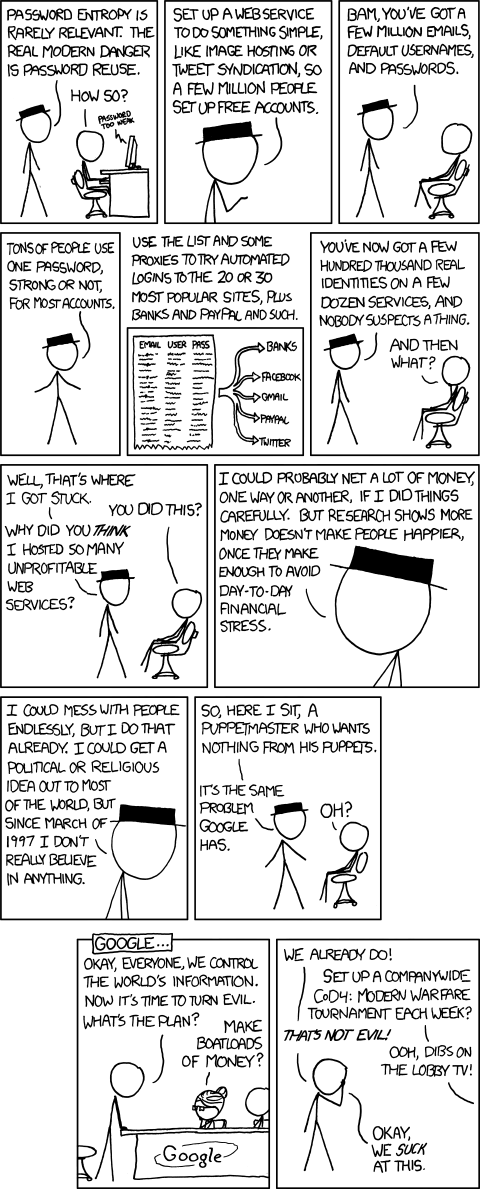 This post is actually not to tell you all to avoid using passwords more than once, or to use sufficiently complex that you don’t put onto your clipboard, or anything like that.
Instead, I want you to think about what a password means.
A password means that you have secret information that only you have. It’s what ‘secret’ means. As soon as you tell that secret information to multiple places, it’s not secret any more. Anyone who has seen my passport knows where I was born, and there are plenty of ways to work out my mother’s maiden name, yet these are considered ‘secret’ information that can be used to check that I’m me.
These days, I carry multiple RSA tokens around with me, so that I can log into client sites, or connect to bank’s internet banking. The codes on these devices are considered secret, but actually, they contain a secret piece of information that can be used to identify me, through the codes they generate. Combining a password and these codes is considered enough to identify me, but not in a way that can let someone else in a few seconds later when the numbers change.
When I develop SSIS packages for clients, or just about anything that needs to connect to sensitive data, I don’t try to figure out what passwords need to be included. Where possible (frustratingly it’s not always), I don’t include passwords in database connections at all – it’s secret information that I shouldn’t have to know. Instead, I let the package run with credentials that are stored within the SQL instance. When the package is deployed, it can run with the appropriate permissions, according to the rights given to the user identified in the credential. The trust that is established by the credential is enough to let it do what it needs to, and all I need to tell the package is “Assume you have sufficient rights for this.” I don’t need to store the password anywhere in the package that way, and I’m separated from production data, as every developer should be.
I studied cryptography at university, although that was nearly twenty years ago and I hope things have moved on since then. I know various algorithms have been ‘cracked’, but the principles of providing secret information for identification carry on. I believe public/private key pairs are still excellent methods of proving that someone is who they say they are, so that I can generate something that you know comes from me, and you can generate something that only I can decrypt (and by using both my key pair and yours will allow us to have a secure conversation – until one of our private keys is compromised).
Today we need to be able to identify ourselves through multiple devices and our ‘secret’ information is stored on servers, protected by passwords. Our passwords are secret, and anyone who knows any password we have used before could try to see if this is our secret information for other servers.
I don’t know what the answer is, but I’m careful with my information. That said, I was the victim of credit-card skimming just recently, which the bank detected and cancelled my cards.
Just be careful with your passwords. They are secret, and you should treat them that way. If you can make use of RSA tokens, or multi-factor authentication, or some other method that can trust you, then do so. Hopefully those places that you entrust your secret information will do the right thing by you…
Be safe out there!
23 Oct 05:44
Database Server Hardware Trends
by Glenn Berry
I think there are some very interesting trends happening with database server hardware and storage subsystems that warrant some continued study and analysis if you are a database professional. Even if you have higher levels of interest in more traditional DBA and database development tasks, paying attention to these trends is worth your time when it comes to selecting a new system.
The first big trend, which has been evident for several years, is that single-threaded processor performance is increasing at a much slower rate than it used to, as new processor microarchitectures are released in Intel's Tick-Tock sequence. I think there are several reasons for this:
- First, Intel has no viable competition for high-end, premium processor models.
- Second, Intel has been much more focused on reducing power usage in their mobile processors (which share much of their architecture with server processors of the same generation).
- Finally, achieving dramatic single-threaded performance increases is much harder than it used to be, especially when Intel engineers are constrained by strict design guidelines about power usage vs. performance.
This means that we are going to continue to see higher core count processors, with larger and faster L3 caches as a way to get more concurrent capacity from a system.
The current 22nm Intel Xeon E5 v2 family (Ivy Bridge-EP/EN) ranges from four-core to twelve-core models, while the current 22nm Intel Xeon E7 v2 family (Ivy Bridge-EX) ranges from six-core to fifteen-core models. Sometime during Q3 2014, we should see the introduction of the new 22nm Intel Xeon v3 family (Haswell-EP), which will have anywhere from four to eighteen physical cores, if current reports are accurate. These processors will require new server models, since they use different processor sockets (Socket R3) and chipsets than the previous generation Intel Sandy Bridge and Ivy Bridge processors. This means that you will probably see something like a Dell Power Edge R730 and an HP DL380 Gen 9, for example. These new servers should have 2133 MHz DDR3 memory support and 12 Gb/sec SAS/SATA support, along with more PCI-E 3.0 capacity in the chipset.
Knowing this, I might want to think about waiting for these new server models and processors to become available before I bought a whole new set of database servers for my company, as long as you are not in a big hurry to get some new servers. If you are in an immediate hurry, you might be able to use your knowledge of the upcoming new models to get more leverage and better pricing from your friendly sales representative. Of course, if you ask your sales representative about this now, they will likely deny all knowledge of any new models…
On April 14, 2014, Fujitsu submitted a new TPC-E benchmark score for an eight-socket Fujitsu Primequest 2800E system with eight 22nm Intel Xeon E7-8890 v2 processors. This system got a raw TPC-E score of 8582.52, which is significantly higher than the previous highest ever TPC-E score of 5576.27 for a four-socket IBM System x3850 X6 system with Intel Xeon E7-4890 v2 processors. These two processors have identical specifications, with the E7-8890 v2 being capable of running on eight-socket or larger systems, and the E7-4890 v2 being limited to four-socket systems. These 22nm Xeon E7 v2 Ivy Bridge-EX processors are a huge improvement over the previous generation 32nm Intel Xeon E7 Westmere-EX processors, with nearly double the raw TPC-E performance for a four-socket or eight-socket system compared to the older models. This gives you the ability to run a workload that used to require an eight-socket system on a much less expensive four-socket system, with 25% fewer cores, and 25% less cost for SQL Server 2014 licenses.
Much of this improvement in the raw TPC-E scores is explained by going from ten physical cores to fifteen physical cores per processor, which would cost you about $34,000 in extra SQL Server 2014 Enterprise Edition license costs per processor. Despite this, there is still about a 15% improvement in single-threaded performance as you go from a Xeon E7-4870 to a 2.8GHz Xeon E7-4890 v2 processor. You can reduce your SQL Server 2014 Enterprise Edition license costs very significantly (and get much better single-threaded performance) by purposely choosing a "frequency optimized", lower core-count model such as a six-core 3.4GHz Xeon E7-8893 v2 processor or a ten-core, 3.2GHz Xeon E7-8891 v2 processor (both of which will work in a four-socket system).
On the storage front, we are seeing native 12 Gb/s SAS/SATA support in the latest and upcoming servers, along with new, faster RAID controllers that are less likely to be a bottleneck with flash storage. This will let you see up to 1 GB/sec of sequential throughput from a single 2.5" SSD. If you are going to be running SQL Server 2014 Standard Edition, and you want to experiment with using the new Buffer Pool Extensions (BPE) feature (after you have allocated 128GB to the regular SQL Server buffer pool), this should let you get some very good results for very little cost. Even more exciting is native support for Non-Volatile Memory Express (NVMe) storage devices in Windows Server 2012 R2. Intel has introduced a family of very affordable PCI-E 3.0 NVMe storage devices that offer extremely good sequential and random I/O performance for a very low cost, especially compared to some other PCI-E flash storage vendors. You will need a server that has PCI-E 3.0 slots to take full advantage of this, which means a Xeon E5 or newer or Xeon E7 v2 or newer processor.
These types of devices give you an inexpensive way to do things like move tempdb from a SAN to local flash storage with a Windows Failover cluster (with SQL Server 2012 or newer) or to try out the BPE feature in SQL Server 2014.
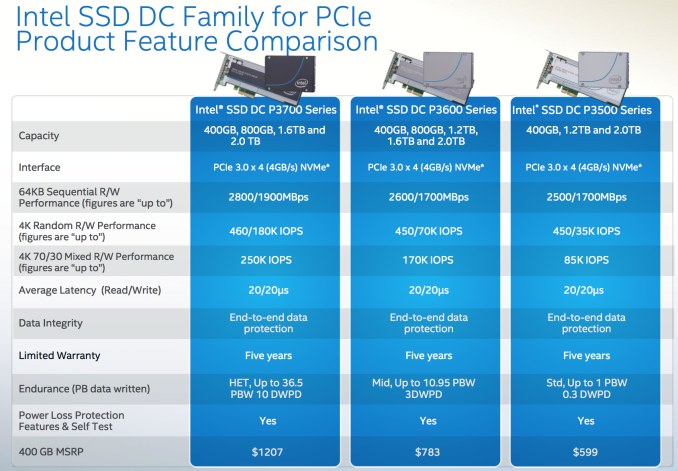 Figure 1: Intel SSD DC P3500, DC P3600 and DC P3700 Families (Credit: AnandTech)
So what does all of this mean? If you do your research, bide your time, follow database server hardware trends, and make sure to pick the right hardware and storage components, you can get excellent performance and scalability without completely blowing your budget on SQL Server 2014 license costs. You have storage options outside of a traditional SAN if you are willing to explore the alternatives (and if you can convince your SAN-loving I.T. staff). You can also avoid the excessive markup that the large server vendors add when they sell you any type of flash storage with the server.
The post Database Server Hardware Trends appeared first on SQLPerformance.com.
08 Sep 19:24
FAA Scans the Internet For Drone Users; Sends Cease and Desist Letters
by timothy
Mrdennynow
An anonymous reader writes with this news from Carl Malamud's Government Attic: "The FAA has released a set of cease and desist letters sent in 2012 and 2013 to people operating drone vehicles for a variety of purposes including: tornado research, inspecting gas well stacks, aerial photography, journalism education, and other purposes. Drone cease and desist letters sent during 2014 are available from the FAA upon request." The text of the letters (bureaucratically polite, but bureaucratically firm) often starts with notes indicating to the UAV operators to whom they were sent that the FAA became interested in them because it "became aware of" their web sites, or even because someone tipped them off about an article in a community newsletter. The letters go on to outline the conditions under which the FAA allows the operation of unmanned aircraft, and specifically notes: Those who use UAS only for recreational enjoyment, operate in accordance with Advisory cicular 91-57. This generally applies to operations in remotely populated areas away from airports, persons and buildings, below 400 feet Above Ground Level, and within visual line of sight. On February 6, 2007 the FAA published UAS guidance in the Federal Register, 14 CPR Part 91 / Docket No. FAA-2006-25714 I Unmanned Airaaft Operations in the National Airspace System. Toward the end of the docket it says, ''The FAA recognizes that people and companies other than modelers might be flying UAS with the mistaken understanding that they are legally operating under the authority of AC 91-57. AC 91-57 only applies to modelers, and thus specifically excludes Its use by persons or companies for business purposes." Update: 09/07 02:16 GMT by T : Pray forgive the OCR that turned "persons" into "pecions" and "circular" into "arcular"; updated to fix those. 


Read more of this story at Slashdot.
08 Sep 18:56
 [Advertisement] Have you seen BuildMaster 4.3 yet? Lots of new features to make continuous delivery even easier; deploy builds from TeamCity (and other CI) to your own servers, the cloud, and more.


Non-Restorative Restoration
by Charles Robinson
Jeremy’s employer, SwissMedia, were upgrading their proprietary CMS to run on new, shiny, PHP5. They planned for bumps in the road, but assembled a rugged upgrade plan with a steel chassis. When the time came to upgrade their largest client, French-Haitian News, Jeremy was behind the wheel.
The first step in the plan was for Jeremy to take a copy of their production database that he could experiment with and work out the kinks. He would then prove it worked with the PHP5 application, and get the stamp of approval to go to production. SwissMedia outsourced their data storage, so he contacted Sebastien at Datamaniaks to handle that part.

Somewhere between getting the data and making it work with the PHP5 application, Jeremy committed the dreaded “forgotten WHERE clause” boner. His local copy of the French-Haitian News DB became unusable. He immediately reached out to Sebastien to help remedy the situation.
“Hey, Sebastien,” his email started, “I’m sure I’ll have a good laugh about this later, but I totally trashed the test DB. Could you send me today’s 2AM backup when you get a chance?” He laid out the specific database backup he wanted, and where it needed to be delivered. Jeremy then skipped out for an early lunch while waiting for Sebastien to give him the goods.
Upon his return from lunch, Jeremy didn’t find any “goods”, but plenty of bads. The website director from the French-Haitian News had stuffed Jeremy’s voice-mail inbox full of angry messages. “Our content is out of date! We’ve lost ALL OF TODAY’S ARTICLES!” Jeremy pulled up the F-HN site and confirmed the issue- the last article had a timestamp of 0150.
Jeremy called Le Directeur and assured him they were looking into the problem. All he got in return was audible venom. Jeremy managed to tame the cobra by suggesting they start working on re-uploading all the content they had posted since 1:50AM. In the meantime, Jeremy could get to the root of the problem.
Jeremy opened up Outlook, ready to fire off an email to Datamaniaks with a big red exclamation point. Waiting for him was an email from Sebastian: “No problem, Jeremy! You just need to be more careful. LOL! I’ve restored the production database from the 2AM backup so you should be all set.”
The thud from Jeremy’s jaw hitting his desk could be heard across the SwissMedia office. Jeremy engaged his Caps Lock key and replied, “THAT IS NOT WHAT I AKSED FOR SEBASTIEN. I WANTED YOU TO SEND ME A COPY OF THE PRODUCTION BACKUP, NOT RESTORE FROM BACKUP! My customer is uploading the articles again, but if you send me the production database that I ORIGINALLY ASKED FOR, I can probably fix it faster than they can, then restore that version to production. Get me the database IMMEDIATELY and I’ll work things out with the client.”
Five agonizing minutes later, Sebastien replied, “Sorry for the confusion… I’m starting the production DB upload now!” As soon as the SQL dump was done transferring, Jeremy’s phone began to ring. It was Le Directeur again, and he had discovered an entirely new dimension of pissed off. “I NO LONGER HAVE A NEWS WEBSITE YOU *CONNARD! [long string of French obscenities redacted]” Jeremy went to the F-HN website, only to get a database error staring back at him.
After the stunned silence passed, Jeremy pulled up the directory where Sebastien had supposedly uploaded the database backup. It was not a backup. There sat the actual database file. Sebastien had apparently cut and pasted it to SwissMedia, removing it from where it was supposed to be, and leaving the F-HN website dead.
Jeremy let out his own extensive string of “pardon my French” obscenities. It was a long road to cleaning up the disaster. The aftermath saw much anticipation- there were two contracts everyone wanted to expire: the one SwissMedia had with Datamaniaks and the one French-Haitian News had with SwissMedia.
Image sources: Database, Trash
[Advertisement] Have you seen BuildMaster 4.3 yet? Lots of new features to make continuous delivery even easier; deploy builds from TeamCity (and other CI) to your own servers, the cloud, and more.
byron lewis likes this
08 Sep 18:51
[Advertisement] Have you seen BuildMaster 4.3 yet? Lots of new features to make continuous delivery even easier; deploy builds from TeamCity (and other CI) to your own servers, the cloud, and more.

The Data Migration
by Ellis Morning
Consider a small European country with more than 20 social insurance institutions, each using their own proprietary software. Now consider sharing data between them. After decades of integration failures, these institutions decided to standardize on a handful of applications. One of these institutions hired Philipp’s firm to migrate their data to DB2.

Philipp’s boss gave him the assignment with a clear conscience. “They have a data transfer interface already established. This should be a quick process.”
However, Philipp’s dreams of webservices, integration end-points, clean XML, and a well organized workflow were shattered when he was handed a few examples of the COBOL-generated flat files the company currently used for data transfer, via FTP. There was no documentation regarding the schema. Philipp sat down with William, an employee at the client site who had worked with this data for the better part of a generation, and had discovered its quirks through trial and error.
“Now, these files look exactly like the ones that we actually send, except they may or may not have an extra field stuffed into character 12,” William explained. “If there’s a ‘Q’ there, then we know we’re using the alternate message block, but only if the customer data flag contains a letter ‘B’.”
Philipp struggled to take notes that his brain would be able to parse later. “And where’s the customer data flag?”
“Oh, we call that column ‘R’. That’s a right-aligned field that starts at character 120. Be careful, because column ‘S’ is left aligned and starts at character 125. If you’re just skimming the file, it’s easy to think they’re the same field.” William chuckled. “Column ‘F’ is the tricky one, though- it needs two leading spaces, then a five-character field value, then five trailing spaces. That’s all one field, mind you.”
Mapping the file to the underlying data was even more of a challenge, as William explained. “Field ‘M’ is a substring across one of the database columns from the Patient database.”
“Which column?” Philipp asked.
“Oh, I don’t know. X1 or X8, I think. I’d have to reread the source code to be sure...”
The data from the flat files- sensitive patient data, transmitted as plain text across FTP- needed additional formatting and cleaning before it could move into its new home in DB2. The destination schema was as clearly specified and documented as the source schema- i.e., it wasn’t. The “already established” process Philipp’s boss had mentioned was a single gigantic stored procedure- thousands of lines of Oracle’s PL/SQL.
Philipp braced his temple. “Oracle? How do I log into Oracle?”
“You don’t,” William said. “We don’t have an Oracle database. You have to work with Stephen, he’s got a local instance on an off-site machine.”
“Could I just write my own DB2 stored procedure instead?”
“Absolutely not! Do you know how much we paid to get the PL/SQL procedure written? We can’t afford to pay that again. Work with Stephen.”
Philipp wasn’t the first person who needed to work with Stephen. The process for doing so was well-documented and formalized. Phillip took the output from his flat-file processing and emailed it to Stephen’s Gmail address. Stephen would import the data into Oracle, run the stored procedure against it, export the results to a CSV file, then email that gigantic file back. Finally, Philipp could import the data into the target DB2 database.
Philipp wasn’t a lawyer, so he had no idea how many privacy laws this violated, but he wasn’t allowed to do anything else. It would only be a one-time process, anyway…
…until after they ran through it, and discovered the data that had ended up in DB2 had significant flaws, requiring iterative corrections.
Since the data entry clerks weren’t allowed to access the test database (“It’s a development environment, and they’d only get confused,” William explained), the data had to be loaded into production. There, the clerks would correct it. Philipp had no access to production (“Security is very important to us”), so the DBA would copy the corrected data back to the test environment. The DBA refused to truncate the table before loading, and refused to drop the table, which meant each time through this cycle created a new table, named something like PRODUCTION_TEST_DATA_13, or 14_TEST_ATTEMPT.
The DBA account owned and controlled each new table. Obtaining access was a separate request to the DBAs each time, with a paragraph justifying why Philipp needed access (“Security is very important to us”).
By the time the DBAs granted him access to PRODUCTION_TESTING_47, Philipp was confident that the migration had finally succeeded. Not long after, he got a call from his boss. ”We’re getting complaints from the client. What’s this I hear about you designing an overly complex migration process?”
Images: Oracle plane, and Midsummer bonfire. Collage by Remy Porter. [Advertisement] Have you seen BuildMaster 4.3 yet? Lots of new features to make continuous delivery even easier; deploy builds from TeamCity (and other CI) to your own servers, the cloud, and more.
Ronald.phillips likes this
08 Sep 17:54
[Advertisement] Have you seen BuildMaster 4.3 yet? Lots of new features to make continuous delivery even easier; deploy builds from TeamCity (and other CI) to your own servers, the cloud, and more.

Heard Around the Office
by snoofle
Gary works in a huge conglomerate. There are about 500 developers and assorted low level managers on his floor alone, and everyone is constantly on live audio-chat with their remote peers. As such, you can pretty much hear all of the conversations going on at any given time - if you listen... (see if you can guess whether the engineers or managers are in italics)
"We need to put foreign keys on auxiliary tables in order to enforce the relationships between primary and secondary data." We don't need foreign keys in the database; they slow everything down and make it harder to delete stuff. We'll just keep everything straight in code!
"We need to get requirements on when to do rounding, and what type of rounding to do." What do you mean? "Should we do rounding after each mathematical operation, or after every logical computation? Should we do it on a record by record basis, on an aggregate basis or something else? Should we round up, down, half up, half down, half even? To how many digits of precision? Should all the different computations use the same rounding rules or are they different in each case? The requirements say nothing about it!" We can decide that after the application is finished; we'll see what the data looks like and decide if things need to change.
"We should set up database roles, assign permissions to each role and assign relevant roles to appropriate groups of users. This will make things much easier to manage." It's much simpler to just assign all the permissions each person needs to them individually. "No it's not. We have about 200 tables, each of which needs table-create, drop, insert, update, delete and select privileges. That goes with about 200 sequences which need create, drop and use privileges. Then there are the stored procedures, functions, triggers and views. Multiply all of that by 10 developers and 35 users, and it becomes quite unmanageable." Maybe, but we don't have time to invest in this; change privileges as needs arise!
"Per project plan, we have written > 1,350 JUnit and JBehave (business driven development) tests and scripts to verify the code in the main processing module. Everything works per the tests, but the tests were designed to verify that it works the way we intended. The users haven't yet specified the primary functionality of the core of the application. If they fill in the requirements with anything other than what you told us to expect, most of this stuff will likely need to be changed. We should stop writing tests until the users provide final requirements!" No, keep writing tests. If we have enough of them and it becomes too cumbersome to change it all, the users won't be able to make changes to this iteration of development, and it will all get pushed to version 2.0!
"When you made the project plan, you assumed that nobody would be doing any code changes to the legacy system. Further, you assumed that only one person would be doing 50% production support and the rest of us were 100% dedicated to development. In practice, we've all been doing about 30% production support plus functionality changes to the legacy system. This is going to translate directly to missed deadlines. Before you accept any more requests from the users, you need to tell them that the cost for the request-of-the-day is a delay of <time> in delivering the new project. Then agree to do the work only if they agree - in writing - to the delay." No, I am not going to say 'no' to the users. They are our customers and they get what they want! "Nobody said to say 'no'; just that they must agree to the cost of doing the work, which translates into delays on the new project." I don't care, we'll all just put in extra hours to make up for it. "Wait; 3/4 of the team is hourly consultants who are contractually limited to 40 hours per week. They're not going to work for free, so they won't be putting in any extra time. There's no way you'll be able to deliver this thing on time; you're digging a very deep hole with no escape clause!" Just keep doing the work on the legacy system!
"You can't just hire junior developers with 2-3 years of experience." Maybe, but we can hire two of them for less than what we pay an experienced engineer. "That may be true, but the experienced engineer will generally out-produce them by way more than 2:1. In the long run, having a couple of more experienced folks is cheaper than fixing the damage caused by very inexperienced folks." Productivity doesn't have a line-item on the budget. I get reviewed on (among other things) by how well I work within my budget!
Gary now keeps his head down and makes a concerted effort not to listen; however, he's developing his own escape clause for when the time comes.
[Advertisement] Have you seen BuildMaster 4.3 yet? Lots of new features to make continuous delivery even easier; deploy builds from TeamCity (and other CI) to your own servers, the cloud, and more.
Tom likes this
08 Sep 17:50
[Advertisement] Have you seen BuildMaster 4.3 yet? Lots of new features to make continuous delivery even easier; deploy builds from TeamCity (and other CI) to your own servers, the cloud, and more.

70,000 Hours for Phase I
by snoofle
Anyone with any significant amount of experience has had to estimate a project of some complexity. The only real way to do it is by breaking down the project into major parts. Then breaking each part into smaller parts and so on, until you have a list of units-of-work that you can reasonably estimate the amount of time that will be required to do that work. Then you figure in dependencies, see what can be done in parallel, factor in available staffing, add it all up, pad by as much as you think you can get away with to account for unscheduled changes, miscalculations, emergencies and management stupidity. Finally, you put it into a project management tool and make your presentation to the Powers That Be.
Rob worked for a company that brought in three consultants to do a major rework of their database structure. One of them was being paid about $85 an hour for the sole job of filling out and maintaining a Microsoft Project schedule for the project. The first thing the consulting team did was put together a proper schema diagram of the database to be reworked. Then they tracked down all of the code that wrote to or read from each table. Armed with all of this ammunition, Mr. Project was able to put together a project time line.
Fast forward to the meeting where the project plan was to be presented to the bosses. Mr. Project stands up and proudly drops a stack of paper (that looks like an entire Amazonean village was defoliated to create it) onto the conference table with a resounding thud. He announces that this is the project plan. As he runs through the executive summary - just to list the major work areas (problem analysis, work estimates, resource scheduling) - the brass all nod along in agreement. It was standard stuff. Then he started to get into bottom-line numbers.
He explained that in order to come up with first-pass estimates on how much work was involved, they chose a methodology that involved analyzing a few database tables, and then multiplying by the total number of tables involved to get rough estimates.
   MrP: It will take something like 35 full time developers an entire year (70,000 hours),
        just to analyze the database
   C**: <cue collective gasps>
   MrP: Once that part is done, we can assess the amount of work required to rewrite code...
   CEO: There's no way we can allocate 35 people just for this
   CIO: Even if we did, all other work would grind to a halt; we have commitments to our customers
   CTO: Even if we didn't, we don't have enough infrastructure to support that size project
        just for this purpose
Rob was somewhat taken aback by this. Knowing that their database was in dire need of help, but not that much help, Rob asked him how many tables were involved. The answer was over 1,000 tables. Rob laughed and asked to work with him off-line to attempt to refine that estimate a bit.
Once back at their desks, Mr. Project showed Rob all the tables in the schema. There were, in fact, more than 1,000 tables, but more than 900 of them were named like this: TMP_65239423756893, and they had been accumulating for quite some time.
Ok, Mr. Project didn't use any common sense and was just doing a quick calculation on the total number of tables in the list. But the most fascinating part of all of this is that when Rob went back to the suits to advise them that the estimate would be more like a few man months, he found them having an all-out management panic trying to figure out how they could possibly allocate that many people to just one phase of this project, and how they were going to pay for it...
   CEO: If we cancel the Flugle and Anaconda projects, we could save enough to fund this
   CIO: Maybe, but those projects support direct commitments to our major customers; that is
        not an option
   CTO: To do this, we'd need servers for developers, database servers, drive arrays, I/O-switches,
        a lot of server room floorspace to put it all, additional network bandwidth, and a cubicle
		farm big enough to hold four normal-sized development teams
   CEO: Do we really need to clean up this database that badly? Can it wait?
   CIO: Project lead-times have significantly increased in the past two years. The development
        managers have repeatedly said it's because the database was never intended to handle
		our rate of growth; waiting will mean more expensive software development going forward
	...
The suits didn't even seem to realize just how bizarre this all was...
[Advertisement] Have you seen BuildMaster 4.3 yet? Lots of new features to make continuous delivery even easier; deploy builds from TeamCity (and other CI) to your own servers, the cloud, and more.
08 Sep 17:41

VSS backup of AlwaysOn Secondaries
by psssql
Hi Everyone,
Today I’m going to highlight one of the changes brought by SQL Server 2012 SP2, which is the way we handle VSS Backup requests on AlwaysOn Secondary Databases.
Until now, any request for a FULL database backup (VSS_BT_FULL) thru VSS against a DB that is an AlwaysOn secondary was failing by design. Our VSS Writer SQLWriter would return FAILED_AT_PREPARE_SNAPSHOT (0x800423f4 - VSS_E_WRITERERROR_NONRETRYABLE).
A copy-only VSS backup (VSS_BT_COPY) would work.
The rationale being the following: a FULL backup is actually updating the target DB (reset of differential bitmap mainly), which is not possible when the DB is read only. Furthermore, because of the failover possibilities introduced by AlwaysOn, the favored option was to use Native SQL Servers backup that could rely on SQL Server variable backup location (http://msdn.microsoft.com/en-us/library/hh245119.aspx) if needed, and be ‘alwayson –aware’.
So that could be the end of the story: against an AlwaysOn Secondary DB, either use Copy_only VSS backups or use native backups.
But of course that wouldn’t make for a very interesting blog post…
Enters HyperV…
Consider the following scenario:
Large Windows HyperV Servers, hosting many HyperV virtual Servers, some of them SQL Servers in Always On architecture.
In short: a Private Cloud.
In this context, the IT usually takes care of the infrastructure at host level, and lets users deal with whatever happens within the VMs. One of the key tasks of IT is to manage backups (eg. for disaster recovery at datacenter level, or to provide restore of single VMs).
And the mainstream way to do that is to take VSS backups of the Host Disk Volumes. Microsoft System Center DPM will do exactly that.
But VSS backups are all about taking backups that are consistent: in ‘standalone’ SQL Server context you may already know all the logic SQLWriter implements to make sure that IO against the Databases that are backed up are frozen during the snapshot operation. So, back to our HyperV context, collecting a point-in-time image of a VHD without bothering with what happens within the VM would be defeating that very purpose right?
So what happens is the following: the VSS backup is propagated to Guest VMs thru HyperV integration services. That propagation hardcodes the backup type to VSS_BT_FULL, and therefore all guest VMs are initiating a VSS backup/snapshot in their own context. The purpose is to make sure that all applications are quiesced within all running VMs at the time we take the snapshot at the host level. This will enable us to generate a consistent backup of running VMs.
But let’s now put this in the context where one of the VMs is running an AlwaysOn secondary DB: you guessed it, it’s not going to work:

The important thing to know here is that the error returned by SQLWriter in VM3 will actually bubble up all the way to the initial VSS backup command at Host level, and will make it fail as a whole.
So we ended up in a situation where the IT infrastructure folks would see their Host backups failing from time to time for an unknown reason, depending on whether one or more of the VM present on the Host Drive being backup up had a secondary AlwaysOn DB! It could be that the AlwaysOn AG spans different HyperV hosts and therefore that the presence of a Secondary DB on a given Host is not something static over time.
Because of the complexity of the whole call chain, and because infrastructure IT operators may not have any visibility (or understanding) of the VM content, you can imagine what kind of troubleshooting challenges this would offer… And even when the situation is understood, well, what do we do? If host level backup must be somehow manually synchronized to the applicative state of Guest VMs, the Private Cloud scenario becomes quite more complicated all of a sudden.
This is the reason why SQL Server 2012 SP2 ships a code change for SQLWriter that will implement the following:


.jpg)

As you can see, SQLWriter now detects this specific situation and changes the backup type to VSS_BT_COPYONLY. This will only happen for VSS_BT_FULL backups against AlwaysOn secondary Dbs. VSS_BT_FULL backups against primary DB will happen without change.
In this case, the VSS backup will now successfully complete in VM3 and the host-level backup success state will no longer be tied to guest VM’s AlwaysOn activity. Private Cloud scenario unlocked!
Important note: the fact that VSS backup of AlwaysOn secondaries now works does not make it the preferred solution to backup SQL Server AlwaysOn architectures. The main purpose of the SP2 change is to avoid a situation where a single SQL Server in a VM fails a complete host-level backup operation that encompassing dozens of VMs.
The resulting backup for the VM hosting SQL should be considered a Disaster Recovery one, where AlwaysOn will be removed at once at restore time, not as a way to rebuild a subset of the nodes for an AlwaysOn Availability group. And for regular databases within the VM, that backup is as good any regular VSS one.
Finally, SQL Server 2012 SP2 only contains a partial fix for this issue. Servers running case-sensitive sort orders will require SQL Server 2012 SP2 Cumulative Update 2.
HTH,
Guillaume Fourrat
SQL Server Escalation Engineer
Microsoft France
08 Sep 17:41
 Well, here it is again. The second Tuesday of the month, which means that it’s T-SQL Tuesday. T-SQL Tuesday… that wonderful monthly blogging party started by Adam Machanic (Blog | @AdamMachanic). The intent is to get the entire SQL Community together on a monthly basis to blog about a common theme – to get each person’s perspective on the chosen subject. This month, it is being hosted by Jeffrey Verheul (Blog | @DevJef), and the topic he has chosen is SQL Family and Community. Jeffrey lays out the topic like this:

T-SQL Tuesday #57: SQL Family and Community
by Wayne Sheffield
Well, here it is again. The second Tuesday of the month, which means that it’s T-SQL Tuesday. T-SQL Tuesday… that wonderful monthly blogging party started by Adam Machanic (Blog | @AdamMachanic). The intent is to get the entire SQL Community together on a monthly basis to blog about a common theme – to get each person’s perspective on the chosen subject. This month, it is being hosted by Jeffrey Verheul (Blog | @DevJef), and the topic he has chosen is SQL Family and Community. Jeffrey lays out the topic like this:This month I would like to give everyone the opportunity to write about SQL Family. The first time I heard of SQL Family, was on Twitter where someone mentioned this. At first I didn’t know what to think about this. I wasn’t really active in the community, and I thought it was a little weird. They were just people you meet on the internet, and might meet in person at a conference some day. But I couldn’t be more wrong about that!Once you start visiting events, forums, or any other involvement with the community, you’ll see I was totally wrong. I want to hear those stories. How do you feel about SQL Family? Did they help you, or did you help someone in the SQL Family? I would love to hear the stories of support, how it helped you grow and evolve, or how you would explain SQL Family to your friends and family (which I find hard). Just write about whatever topic you want, as long as it’s related to SQL Family or community.
I think that this is a wonderful topic. Thank you Jeffrey for selecting this. The #SQLFamily, and the entire SQL community is so fantastic, and this is a wonderful opportunity to shine the light on it. So, what is #SQLFamily? How would you explain it to others? Well, let’s start off with what is family? It’s simply all the people that you are related to. So, #SQLFamily is all the people that you know through SQL Server.
However, #SQLFamily isn’t just about who they are; it’s also about what they are. They are the SQL community. Unlike Other RDBMS platforms, the #SQLFamily openly shares what they know. From folks writing online articles at places like sqlservercentral.com and their own blogs or books. Presenters at user groups, SQLSaturdays, or larger conferences like the PASS Summit. Or perhaps what is most unique about our SQL community is the folks that help out on the #SQLhelp twitter “group”. You see, most of these do it for free (or in the case of SQLSaturday, it comes out of their own pocket). Okay, those that write books get paid for that, and there might be a pittance for some articles, but almost everything else is all volunteering, of both time and money. But they don’t try to hog the spotlight – they are just trying to help and encourage others in all things SQL Server.
Why would they do this? Some may be craving name recognition, maybe even perhaps hoping for a boost in their career. But I’d venture that most are like me, and they like helping others learn. When you get feedback of how you’ve helped someone, or you see the light go on in someone’s eyes while speaking, it is such an incredible rush. When you have taught someone something, you have changed the world. Talk about paying it forward!
My first exposure to #SQLFamily was at my local user group. There, I was encouraged to apply myself – to write and to present. Little did I realize just how much this would make me grow myself, but I suspect that those encouraging me knew.
But this isn’t all that that #SQLFamily is about. It’s also about what else you do away from SQL. The #SQLFamily encourages each other in all kinds of areas. Runners get encouragement where the #SQLFamily tweets messages to them while they are running. We sponsor each other for things that are important to each other (like polar plunges for charity). Or like Brent and Grant are doing for Summit this year and wearing funky leggings for a good cause. We get together for fun nights of SQLKaraoke. When you are down, or if something unfortunate happens, someone is there to lift you up and to offer support. And like all families, we grow. Spouses get added to the mix, and they become part of our #SQLFamily also, sometimes an active part.
So there you have it… my recap of what SQLFamily is all about. Thanks again Jeffrey for the topic, and I look forward to reading what everyone else has posted.
08 Sep 17:40

Tableau Conference Is Bigger Than PASS Summit
by Andy Warren
Mrdennynow
I was reading http://paultebraak.wordpress.com/2014/08/11/the-wisdom-of-the-tableau-crowd/ and, no disrespect intended at all to the Tableau universe, I was astounded to see that the Tableau Conference is bigger than the PASS Summit. Both are in Seattle (different dates), and the prices look to be similar ($1495 is the number I saw for TC, but registration is closed/sold out). Looking at the Tableau event, I like what I see:
- 220 sessions
- Some “real” keynoters – by which I mean not Tableau (or in our case, SQL) people and some other featured speakers
- Paul cites 5200 attendees (I believe him, I just don’t have a supporting link)
Good for Tableau!
Does it mean anything for PASS? Is bigger better? Many would argue not. If you’ve ever been to TechEd (10k attendees) you spend a lot of time walking. It’s just big. Yet I can’t help wonder what are they doing that has grown the event to this size in 7 years or so? Are they doing things (or not doing them) that PASS should be doing? Someone should – officially – go take a look. I don’t care about number for the sake of numbers, I care about serving the people in my craft. If we’re not doing that as well as can be done, we should be trying to do better, quickly.
08 Sep 17:40

Public Data Sources – finding them and using them
by BuckWoody
 A quick post here on some valuable data sources you can use in your HDInsight, Microsoft Excel, SQL Server, APS, and other products to enrich your data. Sometimes it’s helpful just to peruse through various sources to see what you can put together to gain more insight and answers. If you know of other sources, feel free to reply and I’ll update this post from time to time. Note that this isn't just a "link dump", the links here refer to pages of links and even tools you can use to find the sets of data you're looking for. I use these quite a bit in my work.
| Description | Link |
| List from Data Science Central |
http://www.datasciencecentral.com/profiles/blogs/big-data-sets-available-for-free |
| 100+ Interesting Data Sets for Statistics | |
| Microsoft Azure Datasets | |
| Google's Datasets Search Engine | |
| ImportIO - Make your own datasets from webpages | |
| Database Format of Wikipedia articles | |
| Journalistic Datasets | |
| United States government data sets | |
| United States government statistics sets | |
| United States weather data | |
| World Bank Data | |
| USA Financial Analysis from New York University |
http://pages.stern.nyu.edu/~adamodar/New_Home_Page/data.html |
08 Sep 17:31


SQL Spatial: Getting “nearest” calculations working properly
by Rob Farley
If you’ve ever done spatial work with SQL Server, I hope you’ve come across the ‘nearest’ problem.
You have five thousand stores around the world, and you want to identify the one that’s closest to a particular place. Maybe you want the store closest to the LobsterPot office in Adelaide, at -34.925806, 138.605073. Or our new US office, at 42.524929, -87.858244. Or maybe both!
You know how to do this. You don’t want to use an aggregate MIN or MAX, because you want the whole row, telling you which store it is. You want to use TOP, and if you want to find the closest store for multiple locations, you use APPLY. Let’s do this (but I’m going to use addresses in AdventureWorks2012, as I don’t have a list of stores). Oh, and before I do, let’s make sure we have a spatial index in place. I’m going to use the default options.
CREATE SPATIAL INDEX spin_Address ON Person.Address(SpatialLocation);
And my actual query:
WITH MyLocations AS
(SELECT * FROM (VALUES ('LobsterPot Adelaide', geography::Point(-34.925806, 138.605073, 4326)),
('LobsterPot USA', geography::Point(42.524929, -87.858244, 4326))
) t (Name, Geo))
SELECT l.Name, a.AddressLine1, a.City, s.Name AS [State], c.Name AS Country
FROM MyLocations AS l
CROSS APPLY (
SELECT TOP (1) *
FROM Person.Address AS ad
ORDER BY l.Geo.STDistance(ad.SpatialLocation)
) AS a
JOIN Person.StateProvince AS s
ON s.StateProvinceID = a.StateProvinceID
JOIN Person.CountryRegion AS c
ON c.CountryRegionCode = s.CountryRegionCode
;

Great! This is definitely working. I know both those City locations, even if the AddressLine1s don’t quite ring a bell. I’m sure I’ll be able to find them next time I’m in the area.
But of course what I’m concerned about from a querying perspective is what’s happened behind the scenes – the execution plan.

This isn’t pretty. It’s not using my index. It’s sucking every row out of the Address table TWICE (which sucks), and then it’s sorting them by the distance to find the smallest one. It’s not pretty, and it takes a while. Mind you, I do like the fact that it saw an indexed view it could use for the State and Country details – that’s pretty neat. But yeah – users of my nifty website aren’t going to like how long that query takes.
The frustrating thing is that I know that I can use the index to find locations that are within a particular distance of my locations quite easily, and Microsoft recommends this for solving the ‘nearest’ problem, as described at http://msdn.microsoft.com/en-au/library/ff929109.aspx.
Now, in the first example on this page, it says that the query there will use the spatial index. But when I run it on my machine, it does nothing of the sort.

I’m not particularly impressed. But what we see here is that parallelism has kicked in. In my scenario, it’s split the data up into 4 threads, but it’s still slow, and not using my index. It’s disappointing.
But I can persuade it with hints!
If I tell it to FORCESEEK, or use my index, or even turn off the parallelism with MAXDOP 1, then I get the index being used, and it’s a thing of beauty! Part of the plan is here:

It’s massive, and it’s ugly, and it uses a TVF… but it’s quick.
The way it works is to hook into the GeodeticTessellation function, which is essentially finds where the point is, and works out through the spatial index cells that surround it. This then provides a framework to be able to see into the spatial index for the items we want. You can read more about it at http://msdn.microsoft.com/en-us/library/bb895265.aspx#tessellation – including a bunch of pretty diagrams. One of those times when we have a much more complex-looking plan, but just because of the good that’s going on.
This tessellation stuff was introduced in SQL Server 2012. But my query isn’t using it.
When I try to use the FORCESEEK hint on the Person.Address table, I get the friendly error:
Msg 8622, Level 16, State 1, Line 1
Query processor could not produce a query plan because of the hints defined in this query. Resubmit the query without specifying any hints and without using SET FORCEPLAN.
And I’m almost tempted to just give up and move back to the old method of checking increasingly large circles around my location. After all, I can even leverage multiple OUTER APPLY clauses just like I did in my recent Lookup post.
WITH MyLocations AS
(SELECT * FROM (VALUES ('LobsterPot Adelaide', geography::Point(-34.925806, 138.605073, 4326)),
('LobsterPot USA', geography::Point(42.524929, -87.858244, 4326))
) t (Name, Geo))
SELECT
l.Name,
COALESCE(a1.AddressLine1,a2.AddressLine1,a3.AddressLine1),
COALESCE(a1.City,a2.City,a3.City),
s.Name AS [State],
c.Name AS Country
FROM MyLocations AS l
OUTER APPLY (
SELECT TOP (1) *
FROM Person.Address AS ad
WHERE l.Geo.STDistance(ad.SpatialLocation) < 1000
ORDER BY l.Geo.STDistance(ad.SpatialLocation)
) AS a1
OUTER APPLY (
SELECT TOP (1) *
FROM Person.Address AS ad
WHERE l.Geo.STDistance(ad.SpatialLocation) < 5000
AND a1.AddressID IS NULL
ORDER BY l.Geo.STDistance(ad.SpatialLocation)
) AS a2
OUTER APPLY (
SELECT TOP (1) *
FROM Person.Address AS ad
WHERE l.Geo.STDistance(ad.SpatialLocation) < 20000
AND a2.AddressID IS NULL
ORDER BY l.Geo.STDistance(ad.SpatialLocation)
) AS a3
JOIN Person.StateProvince AS s
ON s.StateProvinceID = COALESCE(a1.StateProvinceID,a2.StateProvinceID,a3.StateProvinceID)
JOIN Person.CountryRegion AS c
ON c.CountryRegionCode = s.CountryRegionCode
;
But this isn’t friendly-looking at all, and I’d use the method recommended by Isaac Kunen, who uses a table of numbers for the expanding circles.
It feels old-school though, when I’m dealing with SQL 2012 (and later) versions. So why isn’t my query doing what it’s supposed to? Remember the query...
WITH MyLocations AS
(SELECT * FROM (VALUES ('LobsterPot Adelaide', geography::Point(-34.925806, 138.605073, 4326)),
('LobsterPot USA', geography::Point(42.524929, -87.858244, 4326))
) t (Name, Geo))
SELECT l.Name, a.AddressLine1, a.City, s.Name AS [State], c.Name AS Country
FROM MyLocations AS l
CROSS APPLY (
SELECT TOP (1) *
FROM Person.Address AS ad
ORDER BY l.Geo.STDistance(ad.SpatialLocation)
) AS a
JOIN Person.StateProvince AS s
ON s.StateProvinceID = a.StateProvinceID
JOIN Person.CountryRegion AS c
ON c.CountryRegionCode = s.CountryRegionCode
;
Well, I just wasn’t reading http://msdn.microsoft.com/en-us/library/ff929109.aspx properly.
The following requirements must be met for a Nearest Neighbor query to use a spatial index:
A spatial index must be present on one of the spatial columns and the STDistance() method must use that column in the WHERE and ORDER BY clauses.
The TOP clause cannot contain a PERCENT statement.
The WHERE clause must contain a STDistance() method.
If there are multiple predicates in the WHERE clause then the predicate containing STDistance() method must be connected by an AND conjunction to the other predicates. The STDistance() method cannot be in an optional part of the WHERE clause.
The first expression in the ORDER BY clause must use the STDistance() method.
Sort order for the first STDistance() expression in the ORDER BY clause must be ASC.
All the rows for which STDistance returns NULL must be filtered out.
Let’s start from the top.
1. Needs a spatial index on one of the columns that’s in the STDistance call. Yup, got the index.
2. No ‘PERCENT’. Yeah, I don’t have that.
3. The WHERE clause needs to use STDistance(). Ok, but I’m not filtering, so that should be fine.
4. Yeah, I don’t have multiple predicates.
5. The first expression in the ORDER BY is my distance, that’s fine.
6. Sort order is ASC, because otherwise we’d be starting with the ones that are furthest away, and that’s tricky.
7. All the rows for which STDistance returns NULL must be filtered out. But I don’t have any NULL values, so that shouldn’t affect me either.
...but something’s wrong. I do actually need to satisfy #3. And I do need to make sure #7 is being handled properly, because there are some situations (eg, differing SRIDs) where STDistance can return NULL. It says so at http://msdn.microsoft.com/en-us/library/bb933808.aspx – “STDistance() always returns null if the spatial reference IDs (SRIDs) of the geography instances do not match.” So if I simply make sure that I’m filtering out the rows that return NULL…
…then it’s blindingly fast, I get the right results, and I’ve got the complex-but-brilliant plan that I wanted.

It just wasn’t overly intuitive, despite being documented.
08 Sep 17:30

I can't hear you over the sound of how small your fonts are
by BuckWoody
I've had it.
I sat through *another* presentation where the screen fonts and icons were so small I couldn't tell what was going on. No, it wasn't a Microsoft presentation, it was on a Linux box. But presenters from colleges to conferences routinely get poor marks because THEY DON'T MAKE THE SCREEN ELEMENTS BIG ENOUGH TO SEE.
So send them this. With my compliments. I'll make as easy as possible.
Windows
Step 1:
Open whatever tool you're using, set the fonts to a large size. For instance, in Visual Studio/SQL Server Management Studio, etc, open Tools | Options | Fonts and set them to something you can see when you walk 7 feet from your laptop:

Step 2:
Hold down the Windows Key and the Plus Key (Windows +). This brings up the screen magnifier. Move your pointer, the screen follows. To exit, hold down the Windows Key and the Escape Key (Windows Esc):

or, Step 2:
Install Zoomit.exe from here (http://technet.microsoft.com/en-us/sysinternals/bb897434.aspx) and hold down Control and 1 (CTRL+1). The screen freezes and expands wherever your screen is. Press the Escape key (ESC) to exit:

Here's a video (http://windows.microsoft.com/en-us/windows/make-screen-items-bigger-magnifier#1TC=windows-7). Learn the tool. It takes like 2 minutes. Seriously, practice with this for two minutes and everyone will stop beaming hatred and fury at you.
Mac
- Click the Apple logo in the upper left corner.
- Click "System Preferences."
- Click the "Universal Access" icon.
- Click the "On" button under the "Zoom" category.
- Click the "Options" button.
- Select the "Maximum Zoom" setting.
- Press "Command, "Option" and the "=" keys simultaneously to zoom the screen around the mouse cursor.
- Press the "Command, "Option" and "-" keys simultaneously to return to normal view.
- Press the "Command" and "Option" keys while moving the scroll wheel on the mouse to zoom in and out, as an alternative method.
You can also find pay-for magnifiers in the iOS store.
Linux
For Ubuntu, use the CompizConfig Settings Manager, look under Accessibility for Magnifier, click on it to configure, use the hotkeys there
If you don't have it installed, you can install it from the Ubuntu Software Center, or press Ctrl+Alt+T on your keyboard to open a Terminal, and run this command: sudo apt-get install compizconfig-settings-manager
08 Sep 17:29

The End of The Professional Association Of SQL Server? It Should Be More Than Just An Acronym
by Andy Warren
I read with a bit of despair this post by Denise McInerney this morning. Going forward, it’s just “PASS”. Somehow we’ve transitioned to being a data organization, which I think means big data, Power Query, Sharepoint, Excel, and everything else. I always thought the SQL Server community was plenty big enough without needing to expand into other areas, and we’ve always been great about including cross over topics at our events – it’s never been only SQL Server, just primarily SQL Server.
Maybe it’s the smart move and I’m the guy who doesn’t like change (that doesn’t seem like me, but maybe)? Maybe it’s just a name change and nothing more? Or maybe it’s that point that many companies hit where they think they have to change or die (or grow or die). To me, the BA conference was the start down this slope. It should have been the BI Conference and it should be focused on MS BI, still with allowing some cross over topics. Maybe there is a place in the world for a data organization and I might want to participate in it too, but I go to the Summit and I’m a member of PASS because of the focus.
Maybe it’s just a name change. It will be interesting to look back in two years and see.
08 Sep 17:29

Being a Volunteer Leader Is Hard
by Andy Warren
I’ve been thinking about this topic for a few weeks, maybe longer. It’s based on the three years I served on the PASS Board, and observations of others who served before during, and after that time. I’m trying to look at behaviors and patterns, not people and personalities, though surely the latter plays a part in how effective a leader and the entire Board can be each year. My definition of success may not match yours, or theirs.
Starting at the beginning, most people run for the Board either to pay it back/forward or to advance their career, or both. Both are fine reasons to run and serving on the Board is a good way to do both. Generalizing, I would say most candidates for the Board have never served on a Board before, or worked in a non-hierarchal environment. Perhaps half of them, or more, have never owned their own business or managed anything beyond a small team. Until recently few had experience “managing” volunteers. Then then get thrown into an environment as junior peers on a team of equals supported by a full time staff that has their own way and reasons for doing things. They sit at a table with 12 really smart peers and realize that there at least 12 ways to look at an issue. It’s a confusing time, trying to figure out the portfolio, the staff, the rules and unwritten policies and the why and why not. I think this may be done a little better than back when I joined in 2009, but probably not much.
If you watch a first time leader, they almost always become over cautious and over involved (and a bunch more things). It’s natural and not wrong. Over time they either figure it out, or fail, while the team tries to survive. I’ll argue it’s easier in the business world with a hierarchy, but it’s still a tremendous learning curve. Plus, in business the worst that can happen is you fired. Not good to be sure, but survivable, and rare. When you join PASS, there’s this idea that seems to get transmitted to new members of “don’t f**k this up”. That’s not bad either. The org has started, prospered, struggled, prospered, no one wants it to die, and certainly not because of a decision you made.
Then there is the non disclosure agreement, which most people find daunting, because they want to play by the rules (as they should), and for PASS, there’s also the idea that ‘only officers can speak’ for PASS. Somehow those two things combine to seriously inhibit public discourse, and then you add to it the complaints and negativity about decisions or lack of decisions. It’s easy to feel trapped, or more than that, to think something along the lines of “I’m a volunteer, I don’t need this ….”. Marketing wants to approve every message and schedule it. HQ doesn’t want you in debates on Twitter or blogs because it might cause more attention to a negative issue. Many new leaders aren’t used to speaking as leaders, aren’t comfortable writing about their ideas, their work, and their decisions. Many leaders – not even the new ones – appreciate the value of sharing what they are working on, they think either “why would anyone care” or more commonly, “I can get something done or write about it”. It’s never “or”, but it’s an easy way to justify not doing it.
Criticism sucks. I don’t like being criticized, probably you don’t either. I try to be fair about criticize when I do it (and I may or may not succeed at that), but many don’t try – they seem something wrong, they complain. That’s one reason that back in 2009 the unwritten rule was that we’d debate a vote, but the voting would just show the #yeas/nays, not who voted, so that no one could be singled out for criticism. We got that changed and I think it’s been good, but it’s certainly been hard on some.
Just like taking any new job, it’s hard to really understand the culture and the work until you arrive. You have to adapt to the culture to get things done, but that doesn’t mean you can’t also change the culture as you go. Whether you choose to do so depends on your world view. I tend to be an agent/proponent of change, though never for the sake of change, but every team needs those that look at the road ahead to make sure the ship doesn’t change course too fast.
No one gets it all right, including me. I was thinking about the recent episode about the 24HOP and it reminded me of years ago a discussion about whether PASS “black listed” speakers. I asked, and we didn’t, and that’s what I shared. Looking back, I should have asked “why don’t we?” because surely there are reasons to decide someone needs a year or two on the bench. Rare, but they exist. I protected the organization (by telling the truth as I found it), but I didn’t help the organization grow when it could have. Why/how did I miss that? Some lessons take time.
Most people want to get along with the team. Taking a contrarian or adversarial position is no fun. Do it often enough and you lose your ability to be heard on anything, yet teams need a contrarian voice. I’ve always wondered why we didn’t ask people to switch sides and argue the other point, or appoint someone as the contrarian of the week. Most people aren’t used to sustained conflict and so they go dark, because anything different is painful. It’s human.
I know it’s been a ramble, but here’s the summary. Being a volunteer lead is hard, I get that. But it doesn’t mean you won’t be held accountable. It’s easy to get caught up in discussions of junk and not get anything meaningful done. Keeping the lights on is job one, but it’s not the only job. Serving the members is what matters. I often tell people that PASS has the one thing that all non-profits/social businesses dream of – a superb fund raiser. Given liquidity, there’s a lot of good that can be done in the world. Are you making the most of it? Or coasting?
08 Sep 17:28

Reviewing the PASS 2015 Budget
by Andy Warren
Mrdennynow
I just spent a few minutes reviewing the 2015 PASS budget, things that I noticed:
- Anticipating a change in revenue of 1.1 million. That seems…optimistic
- IT spend is now $550k, up $150k over 2014. Probably good, but what are we doing with that? Ah, the budget doesn’t say
- Chapter spend is reduced $50k, from $141k to $92k. I’d really like to know why
- Special Projects (which is a catch-all) changed from $64k to $496k….why?
- SQLRally Global decreased $42k to $24k for 2015. That doesn’t seem like much, but maybe its not needed
- BAC numbers for 2015 are basically even. I’d expect growth. Is BAC stalled?
- Budget shows a deficit of $112k. Not bad on $9 million, but still
- Management and overhead is $815k. Maybe that’s ok. Wish it was split out
- SQLSaturday sponsorship decreased to $31,500. Why? Aren’t we growing more events?
It’s not exciting reading, but worth a look, especially if you plan to run for the Board sometime, or care about where the current Board is focusing.
08 Sep 17:27
New Azure services and evolution of the Service/SQL Server relationship
by Bob Beauchemin
Today, two new service offerings for the Azure platform were introduced, DocumentDB and Azure Search. These are exciting in themselves and worth a look-see but, to me, they are also occurrences of the phasing out of the “database as an application server” concept, formalized in the SQL Server 2005 timeframe. At least, in the cloud. Did everybody already notice, or was it too subtle?
Services moving inside the database (where they are more tightly integrated with the data they use) predates SQL Server 2005. Rather than rely on the OS for scheduling and alerting activities, SQL Server has always had its own facility (and separate Windows service) for this, known as SQL Agent. A mail component is included in the database as well. But possibly the first big service to be moved into the database was Microsoft Search Server. It was originally grafted on, but over time came to be completed integrated in SQL Server as the fulltext search feature. SQL Server 2005 was the watershed for this concept, including the XML/XQuery, Service Broker, event and query notifications and HTTP endpoints, with SQLCLR providing a programming substrate to be used in conjunction with T-SQL for the new services. This concept was formalized in the Dave Campbell’s paper “Service Oriented Database Architecture App-Server Lite”. Interestingly, these features are often artifices over relational constructs (e.g. XML and fulltext indexing are relational side-tables). There was even lots of work put into using SQL Server as a substrate for the Windows file system (WinFS).
The first move away from this concept of “database as substrate for all” was the removal of HTTP endpoints and it’s replacement by what finally came to be called the OData protocol. OData serves data as either an XML format (AtomPub) or JSON format, which is why, although it’s often requested, it’s doubtful we’ll see “native JSON support” inside SQL Server soon.
Then….to the cloud…
One of Microsoft’s first PaaS offerings, now known as Azure SQL Database, solidified what was to come. Azure SQL Database is a relational database engine only, shipped without most of the “app-server” services inside SQL Server proper. Features that do not exist inside Azure SQL Database include not only the features mentioned above (XML/XQuery survives, but XML indexes, as far as I’m aware, do not), but other nice infrastructure features such as replication. These are to be offered by “the platform”, as in PaaS.
DocumentDB and Azure Search are just the latest pieces of the platform. SQL Agent functionality can be implemented using Azure scheduling and notification services. Service Broker is implemented/subsumed by Azure Service Bus. OData services are part of the service layer, not the database layer. JSON is tightly coupled in DocumentDB, JSON documents subsuming XML documents in many use cases, e.g. document databases rather than XML databases.
A discussion of what precipitated the move from application servers and service-based architectures to database as application server to separate services with service coordination programmed into each application is a whole other set of blog entries…or discussions in bars. As is the comparing-and-contrasting of how this is being done in other ecosystems, e.g. cluster as substrate for all and a central resource negotiator (YARN) that manages the cluster. Note: SQL Server (and likely SQL Azure Database) uses it’s own Resource Governor to divvy-up the resources. And there’s always the question of who (application and administration-wise) manages and orchestrates the integration of these disparate services; now that’s a occupation that will certainly be in demand.
As far as SQL Server “proper” goes, DBAs need not worry about having less to do. The latest versions now integrate a column-based “database” and its optimizations, and an in-memory “database” (with different storage and isolation paradigms) into the mix. But these are data engines rather than services. Also note the cross-pollination between different parts of “the platform”; the XVelocity engine also lives quite nicely in SQL Server Analysis Services and in Excel. And there’s already rumblings of the implementation of DocumentDB using lessons learned with SQL Server’s in-memory implementation. So far, it’s interesting that neither columnstore nor hekaton have yet to make an appearance in Azure SQL Database. The same “redistribution, integration, and evolution of services” is going on in the ETL/Analysis/DataMining/Machine Learning Microsoft ecosystem too.
One thing about the technologies surrounding software; we always “live in interesting times”.
Cheers, Bob (@bobbeauch)
The post New Azure services and evolution of the Service/SQL Server relationship appeared first on Bob Beauchemin.
08 Sep 17:27

Where is SSDT?
by tlachev
Now that Microsoft has decoupled SQL Server Data Tools from the SQL Server 2014 setup, the quest to find SSDT has started. You can download SSDT from the Microsoft SQL Server Data Tools page. Note that to get the BI project templates, you need the SSDT-BI install depending on the Visual Studio version you have (scroll all the way down the page to see the SSDT-BI links). If you don't have Visual Studio installed (you probably don't need it if you don't code), I suggest you pick the latest, which as of this writing is Download SSDT-BI for Visual Studio 2013.
To make things a bit more interesting, Microsoft threw in another gotcha. When you run the SSDT setup, it will ask you if you want to install a new instance of SQL Server or add features to the existing instance. If you have SQL Server already installed, you might opt to add features to the current instance but you'll be greeted later on with a rule violation "The CPU architecture of installing feature(s) is different than the instance specified. To continue, add features to this instance with the same architecture." I have no idea what's complaining about here given that when I tried this I had a brand new instance of SQL Server 2014 installed. It looks like we have a bug report on this already.
Although it doesn't make much sense, the correct choice is to create a new instance although the setup won't be creating any new instances since we are installing only SSDT here. After the install, you can start SSDT and see the beloved BI project templates.

08 Sep 17:26


Using indexed views on ANY core SQL server edition
I was having a discussion the other day and was quite surprised to hear that there still appears to be a slight misconception regarding being able to use indexed views on web or standard editions of SQL server. As it stands the documentation clearly states that you can create and use indexed views on web, standard, BI and enterprise editions of SQL server (I’m ignoring developer + evaluation as they are the same as enterprise). You can create a view, materialise that view in the form of a unique clustered index and then write queries that utilises that index in web editions and above. However there is a feature in enterprise edition that adds value to indexed views by having the optimiser automatically consider them during plan compilation without any changes to the t-sql. For non-enterprise editions of SQL, to force the optimiser to use the indexed view then you must specify the NOEXPAND table hint to stop the view from “expanding” to access the tables referenced by the view. MSDN states “The query optimizer treats the view like a table with clustered index”
But, you can create and use indexed views on all editions from express upwards….
So first of all, I’m going to show how indexed views work on enterprise edition and show that the optimiser will automatically consider an indexed view if it deems to be the best choice without any changes in the logic:

A simple example script that creates two tables, adds some data to both and then creates a view referencing both tables: CREATE TABLE MyOrders
(
OrderId INT,
CustomerId INT,
OrderDate DATE,
CONSTRAINT PK_MyOrders PRIMARY KEY CLUSTERED (OrderId)
)
GO
CREATE TABLE MyOrderDetails
(
OrderId INT,
LineId INT,
ProductId INT,
SalePrice DECIMAL(10,2),
CONSTRAINT PK_MyOrderDetails PRIMARY KEY CLUSTERED (OrderId, LineId)
)
GO
ALTER TABLE dbo.MyOrderDetails
ADD CONSTRAINT FK_OrderId_Orders FOREIGN KEY (OrderId) REFERENCES dbo.MyOrders (OrderId)
GO
INSERT INTO dbo.MyOrders (OrderId, CustomerId, OrderDate) VALUES (1, 1, GETDATE())
INSERT INTO dbo.MyOrders (OrderId, CustomerId, OrderDate) VALUES (2, 2, GETDATE()-1)
INSERT INTO dbo.MyOrders (OrderId, CustomerId, OrderDate) VALUES (3, 3, GETDATE()-2)
INSERT INTO dbo.MyOrderDetails (OrderId, LineId, ProductId, SalePrice) VALUES (1, 1, 1, 10.00)
INSERT INTO dbo.MyOrderDetails (OrderId, LineId, ProductId, SalePrice) VALUES (1, 2, 2, 500.00)
INSERT INTO dbo.MyOrderDetails (OrderId, LineId, ProductId, SalePrice) VALUES (1, 3, 3, 7500.00)
INSERT INTO dbo.MyOrderDetails (OrderId, LineId, ProductId, SalePrice) VALUES (2, 1, 1, 20.00)
INSERT INTO dbo.MyOrderDetails (OrderId, LineId, ProductId, SalePrice) VALUES (2, 2, 2, 600.00)
INSERT INTO dbo.MyOrderDetails (OrderId, LineId, ProductId, SalePrice) VALUES (2, 3, 3, 8500.00)
INSERT INTO dbo.MyOrderDetails (OrderId, LineId, ProductId, SalePrice) VALUES (3, 1, 1, 30.00)
INSERT INTO dbo.MyOrderDetails (OrderId, LineId, ProductId, SalePrice) VALUES (3, 2, 2, 700.00)
INSERT INTO dbo.MyOrderDetails (OrderId, LineId, ProductId, SalePrice) VALUES (3, 3, 3, 9500.00)
GO
CREATE VIEW MyOrdersAndDetails_View
WITH SCHEMABINDING
AS
SELECT O.OrderId, CustomerId, OrderDate, LineId, ProductId, SalePrice
FROM dbo.MyOrders O
INNER JOIN dbo.MyOrderDetails D ON D.OrderId = O.OrderId
GO
Now if we were to simply select all records from the view, we would end up with a no surprise execution plan like:

So next lets materialise the view by creating a unique clustered index against it:
CREATE UNIQUE CLUSTERED INDEX UCIX_OrderId_LineId ON MyOrdersAndDetails_View (OrderId, LineId)
and run the exact same identical select * query against the view, we now get this execution plan:

You can see that the optimiser has chosen not to “expand” the view to the base tables, but to use the data from the unique clustered index on the view and you can see that the query is identical in both plans.
To compare, lets do exactly the same steps on a 2012 Express edition:

After creating the tables, data and view as per the same script above (not the index yet though) and selecting all records from the view we are given the expected following plan which is identical to the enterprise version before the index was created:

Now create the same unique clustered index as before against the view, and run the same select * query:
CREATE UNIQUE CLUSTERED INDEX UCIX_OrderId_LineId ON MyOrdersAndDetails_View (OrderId, LineId)
Still the same plan as the one without the index, so the optimiser has not considered the use of the index. But this is as per the documentation i.e. considering indexes on views being an enterprise only feature.
But we can force the optimiser to use the index by using the NOEXPAND hint:
SELECT * FROM dbo.MyOrdersAndDetails_View WITH (NOEXPAND)
So running the revised query on my 2012 express instance produces this new plan:

The optimiser has used the index to satisfy the query.
It is hardly surprising that this misconception exists as the official documentation is a bit misleading even suggesting that the feature doesn’t exist in Express edition when it clearly is. There is also a lot of wrong advice out there and persistent mis-information.
Hopefully you can see that you can create and use indexed views on express, web, standard, BI and enterprise editions. The difference is that for non-enterprise editions, you have to “force” the optimiser with a hint to use the index whereas enterprise editions will automatically consider the index and use it.
Indexed views do come with a lot of restrictions and in many situations you won’t be able to use them and because you are materialising the data, any DML to the base tables of the views will take that bit longer due to the additional work that it has to perform keeping the index up to date. I’ve used them with quite a bit of success in the past even developing specially so I could use an indexed view. But on other occasions I have also ripped them out in favour of refactoring elsewhere to get performance improvements. You need to bear in mind that you are creating a clustered index so you are materialising the entire view and not just the key columns. For complicated views with large columns this can amount to quite a substantial overhead. So just because you can use them in all editions it seems, it doesn’t necessarily mean you should be looking to put an index on all your views! :)
Enjoy!
Follow me on twitter @sqlserverrocks
Subscribe to my blog RSS feed
Comment on this or any of my posts or contact me directly from http://www.olcot.co.uk
08 Sep 17:25
Yet Another Odd Job Criterion
by Karen Lopez
I’ve seen this a few times. I’d like to think it just a cut-and-paste error, or someone doing alcohol-driven job postings, but I’m guessing these sorts of things are used to, let’s say, target certain candidates.

Here’s a blurb from another posting, courtesy of a government contractor:

But if you think Business Analysts have it bad, look to see what this upstate NY retailer thinks they need in a Data Analyst

And don’t get me started on someone looking to hire a Data Analyst to be a a “Data Cop” for $35k a year. I don’t care how “generous” the benefits are.
Here are the rest of those Data Analyst job requirements:

He-men Only
I don’t see anything in the job description that requires the ability to lift 70 pounds frequently. I can only guess is helping move the bodies.
When recruiters issue silly job postings, this is a major sign that they aren’t serious about the posting. Just give them a pass.
And ladies, start doing bicep curls and push ups. You are going to have a difficult time meeting that requirement without weight training. But perhaps that’s the point after all. All that data stuff is really hard work.
08 Sep 17:24
What I Wish I Had Known Sooner…as a DBA
Mike Walsh posted 4 Attitudes I Wish I Had Earlier as a DBA, and tagged a few people to respond. Here goes…
- Surround yourself with people who are smarter than you. Interacting with colleagues who have had different experiences and know more about certain topics is the fastest way to grow, both personally and professionally. While it’s nice to be known as a person who can answer almost every question, where’s the challenge (and fun) in that?
- Take vacations, and don’t take your laptop with you. I have taken my laptop on way too many family trips. This doesn’t serve anyone. I’m not fully engaged in my time with my family, I don’t give my full attention to my customers because I’m stressing out about not spending time with my family, and my co-workers are just thinking, “What the heck?” If Jon or Glenn go on vacation, I am more than happy to fill in and do whatever is needed because they need that break. We all do. So stop worrying. You have earned this time. Leave the laptop at home. Turn off your phone. Stop checking Facebook and Twitter. The world will still be there when you return.
- Take the time to mentor others. You didn’t get to this spot on your own, and that new DBA is never going to be able fill in for you when you’re on vacation and want to be completely disconnected (see above). You don’t just have to mentor one person, you can mentor many, in different ways and it doesn’t have to take a significant amount of time. At my previous job, when I worked with anyone in Technical Support I would explain what we were doing, why, and talk them through the process. This took maybe an extra 10 to 15 minutes. If they asked questions, I knew immediately they wanted to learn more and I repeated that process every time I helped them going forward. Eventually, they could troubleshoot basic database issues without me, freeing up my time. At a leadership course I attended the facilitator said, “You should always be trying to work yourself out of your current position.” That means you’re teaching someone how to take over yours.
- Save every script you write. I love writing T-SQL. Sometimes I think I should have been a developer. In the beginning, I didn’t save many scripts, so when a similar problem came up I had to start over. At first I didn’t mind, because I got to write some code and I’d try to remember how I did it last time and how to make it better. Then I didn’t have enough time, and writing that code became a bottleneck. Also: organize your scripts. Everyone has different methods, one of mine is to use the same first word to name scripts with a common task. For example, Check_Baselines.sql, Check_Backups.sql, Create_DB.sql, Create_RG.sql. Find a system, stick with it, start saving.
I’m not tagging anyone in this post by name, but if you’re thinking “I wish she had tagged me” then you’ve just been tagged.
The post What I Wish I Had Known Sooner…as a DBA appeared first on Erin Stellato.
08 Sep 17:23
Small Enhancement to Microsoft SQL Server CU Knowledge Base Articles
Microsoft has made a small, but helpful improvement to the format for their Knowledge Base articles that accompany new Cumulative Updates for SQL Server 2012 and SQL Server 2014. As you hopefully know, there will not be any more cumulative updates for SQL Server 2008 or SQL Server 2008 R2, since those versions are now out of mainstream support.
There is now a new column in the hotfix table that lists the major functional area that the hotfix applies to (see Figure 1). Having this information readily available and visible can help you focus your efforts as you scan the overall hotfix list looking for relevant fixes for the SQL Server components you are using, which is something you should be doing when each new Cumulative Update is released.
The fix area information is generated automatically (probably by VSTS), so it may not be 100% accurate, but it is certainly a good start.
Figure 1: Recent SQL Server 2014 CU KB Article
The post Small Enhancement to Microsoft SQL Server CU Knowledge Base Articles appeared first on Glenn Berry.
08 Sep 17:23

Trace flags - TF 7806
by Damian
The trace flag 7806 is necessary when a DBA would like to use the dedicated administrator connection (DAC) in the SQL Server Express. The DAC is turned off when you install the SQL Server but it is a good practice to turn it on after the installation is done. The DBA will really need the have access to the unresponsive database server and having DAC active he/she has more chance to do the work. However this feature is not supported in the SQL Server Express edition by default.
Microsoft has added a trace flag 7806 to enable this feature in the SQL Server Express.
As the flag is a global flag we have to turn it on the service level. You should add a parameter –T7806 to the parameter list and restart the service.
After you did that you are now able to use the DAC in the SQL Server Express. For example you could try to connect using sqlcmd tool:
Sqlcmd –S localhost\sqlexpress –E –A
I made an assumption that on your local server there is an instance of the SQL Server Express which is called "sqlexpress" and you connect to this instance using your Windows credentials
When you are connected try to run that query:
SELECT S.session_id FROM sys.tcp_endpoints as E JOIN sys.dm_exec_connections as S
On E.endpoint_id = S.endpoint_id
WHERE E.name = ‘Dedicated Admin Connection’
Last remarks – the DAC can be used only by sysadmins
08 Sep 17:22
Script to generate index rebuild with PAGE compression
by Haidong Ji
For BI data warehouse databases, since the data does not change much and they typically require a lot of space, it makes a lot of sense to compress the indexes to save space.
I came across some BI databases whose indexes were created without compression. We are in the process of migrating those databases to a new server so I took this opportunity to completely rebuild those indexes with PAGE compression.
Two things are of interest:
- Index rebuild starts from the smallest to the largest. The rational is that during one index rebuild, it needs roughly twice of the actual index size. If we start with the largest index, it may need to expand the file size unnecessarily. On the other hand, if we start with the smallest one, there might be enough space inside to accommodate that rebuild. Once that rebuild is done, more space will be saved, leaving more room for the next rebuild. This way we’ll be able to accommodate index rebuild with no or minimal additional space requirement;
- Re-indexing is done on a new server, therefore there are no or very few connections to it, so the script defines the MAXDOP parameter, to hopefully make the process faster.
SELECT
    s.Name AS SchemaName,
    t.NAME AS TableName,
    i.name AS IndexName,
    'ALTER INDEX ' + i.name + ' ON ' + s.name + '.' + t.name + ' REBUILD WITH (SORT_IN_TEMPDB = ON, DATA_COMPRESSION = PAGE, MAXDOP = 20);' AS AlterIndex,
    SUM(a.total_pages) * 8 AS TotalSpaceKB,
    SUM(a.used_pages) * 8 AS UsedSpaceKB,
    (SUM(a.total_pages) - SUM(a.used_pages)) * 8 AS UnusedSpaceKB
FROM
    sys.tables t
INNER JOIN
    sys.schemas s ON s.schema_id = t.schema_id
INNER JOIN
    sys.indexes i ON t.OBJECT_ID = i.object_id
INNER JOIN
    sys.partitions p ON i.object_id = p.OBJECT_ID AND i.index_id = p.index_id
INNER JOIN
    sys.allocation_units a ON p.partition_id = a.container_id
WHERE
    t.NAME NOT LIKE 'dt%'
    AND t.is_ms_shipped = 0
    AND i.OBJECT_ID > 255
    AND i.index_id > 0
GROUP BY
    s.Name, t.Name, i.name
ORDER BY
    UsedSpaceKB
08 Sep 17:22

Choosing SEQUENCE instead of IDENTITY? Watch your step.
by Maria Zakourdaev
On the nice sunny day getting this error message can be really frustrating. In fact, it is frustrating on any day. Especially if you are doing something really simple.

Most of you at this moment yell at your monitor “DDL Trigger!!!!” . Yes. I have a simple DDL trigger for auditing purposes.
If you use the script below for the auditing table, any DDL statement will get pretty red notification to discard the results.
CREATE DATABASE TestDB;
USE TestDB;
CREATE SEQUENCE GetNextNumber AS int START WITH 1 INCREMENT BY 1;
CREATE TABLE dbo.TestAuditTable(
ID int NOT NULL DEFAULT NEXT VALUE FOR GetNextNumber PRIMARY KEY,
ChangeDate datetime NULL,
ObjectName sysname,
LoginName sysname) ;
You see, the table is pretty basic, I even use SEQUENCE instead of IDENTITY. Which is, in fact, the main problem.
CREATE TRIGGER TRG_DDLServer
ON ALL server
For
DDL_EVENTS
AS
DECLARE @error varchar(256) ;
DECLARE @LoginName nvarchar(max) ;
DECLARE @ObjectName nvarchar(max) ;
SELECT @ObjectName = EVENTDATA().value('(/EVENT_INSTANCE/ObjectName)[1]','nvarchar(max)'),
@LoginName = EVENTDATA().value('(/EVENT_INSTANCE/LoginName)[1]','nvarchar(max)');
BEGIN TRY
INSERT INTO TestDB.dbo.TestAuditTable (ChangeDate,ObjectName,LoginName)
VALUES(getdate(),@ObjectName,@LoginName);
END TRY
BEGIN CATCH
SET @error = 'Failed execute DDL trigger:' + ERROR_MESSAGE()
ROLLBACK;
RAISERROR (@error,18,1) WITH LOG
END CATCH
GO
In addition to the unclear error message, you get a nice memory dump in Error Log logged each time some DDL comes through.

Searching for the problem, I have spent few hours of my life giving various types of permissions on the Sequence object to the user that I am working with and to the guest user, adding WITH EXECUTE to the Trigger and many other things. Regular inserts to the Audit table worked. I even had created an INSERT TRIGGER and INSTEAD OF INSERT TRIGGER and any of this worked perfectly. Apart from the insert from the DDL trigger.
My stubborn friend Yoni Nakache after a long fight discovered that if you change execution context by using EXEC or sp_executesql over the insert statement inside DDL trigger, DDL will not produce the error anymore.
BEGIN TRY
EXEC ('INSERT INTO TestDB.dbo.TestAuditTable (ChangeDate,ObjectName,LoginName)
VALUES(getdate(),'''+@ObjectName+''','''+@LoginName+''');')
END TRY
More brainstorming around the subject has revealed the truth.
Server side DDL triggers do not have a default schema. It is a must to add Schema name to the Sequence call inside the Table Default definition. I admit, I frequently forget adding schema name if I am using the dbo schema.
CREATE TABLE dbo.TestAuditTable(
ID int NOT NULL DEFAULT NEXT VALUE FOR dbo.GetNextNumber PRIMARY KEY,
ChangeDate datetime NULL,
ObjectName sysname,
LoginName sysname
) ;
The fact that SQL Server does not produce the correct error message looks like a bug. QA plan for Sequence feature did not contain DDL triggers. Neither on the SQL Server 2012 not on SQL Server 2014.
May all your errors turn into experiences that will cause you to evolve.
Yours,
Maria
08 Sep 17:19

Announcing the PASS 24 HOP Challenge
by SQL Server Team
Mrdennynow
Calling all data junkies! How smart are you? Want to get smarter?
Play along with #pass24hop Challenge on Twitter starting at 5:00 AM PT Tuesday, September 9, 2014 to win a free Microsoft Exam Voucher! Simply watch 24 Hours of PASS and be the first to answer the question correctly. At the beginning of each 24 live 24 Hours of PASS sessions (approximately 5-8 minutes into each hour) a new question regarding the session will be posted online on the @SQLServer Twitter account. The first tweet with the correct answer will win a prize. Your answer must include hashtags #pass24hop and #24hopquiz.
To take part in the #pass24hop Challenge, you must:
- Sign in to your Twitter account. If you do not have an account, visit www.twitter.com to create one. Twitter accounts are free.
- Once logged into your Twitter account, follow the links and instructions to become a follower of @SQLServer.
- From your own account, reply your response to the question tweeted by @SQLServer.
- Your tweet must contain both the #pass24hop and #24hopquiz hashtags to be eligible for entry.
- Your tweet must include the complete answer to the question, or it will be disqualified.
- The first person to correctly tweet a correct reply to the corresponding question will win the prize described below.
Register now for 24 Hours of PASS and get ready for 24 hours of play!
Learn more about the 24 Hours of PASS read the official rules below.
NO PURCHASE NECESSARY. COMMON TERMS USED IN THESE RULES:
These are the official rules that govern how the ’24 Hours of PASS Social Media Answer & Question Challenge (“Sweepstakes”) promotion will operate. This promotion will be simply referred to as the “Sweepstakes” throughout the rest of these rules. In these rules, “we,” “our,” and “us” refer to Microsoft Corporation, the sponsor of the Sweepstakes. “You” refers to an eligible Sweepstakes entrant.
WHAT ARE THE START AND END DATES?
This Sweepstakes starts at 5:00 AM PT Tuesday, September 9, 2014 and ends at 5:00 AM PT Tuesday, September 9, 2014 and ends at 7:00 AM PT Wednesday, September 10, 2014 (“Entry Period”). The Sweepstakes consists of 24 prizes. Each Prize Period will begin immediately following each of the 24 session and run for 60 minutes.
CAN I ENTER?
You are eligible to enter this Sweepstakes if you meet the following requirements at time of entry:
· You are professional or enthusiast with expertise in SQL Server or Business Intelligence and are 18 years of age or older; and
o If you are 18 of age or older, but are considered a minor in your place of residence, you should ask your parent’s or legal guardian’s permission prior to submitting an entry into this Sweepstakes; and
· You are NOT a resident of any of the following countries: Cuba, Iran, North Korea, Sudan, and Syria.
PLEASE NOTE: U.S. export regulations prohibit the export of goods and services to Cuba, Iran, North Korea, Sudan and Syria. Therefore residents of these countries / regions are not eligible to participate
• You are NOT an employee of Microsoft Corporation or an employee of a Microsoft subsidiary; and
• You are NOT involved in any part of the administration and execution of this Sweepstakes; and
• You are NOT an immediate family (parent, sibling, spouse, child) or household member of a Microsoft employee, an employee of a Microsoft subsidiary, or a person involved in any part of the administration and execution of this Sweepstakes.
This Sweepstakes is void wherever prohibited by law.
HOW DO I ENTER?
At the beginning of each 24 live 24 Hours of PASS sessions (approximately 5-8 minutes into each hour) a new question regarding the session will be posted online on the @SQLServer Twitter account. The first tweet with the correct answer will win a prize. Your answer must include hashtags #pass24hop and #24hopquiz. Failure to use this hashtag will automatically disqualify you.
To enter, you must do all of the following:
- Sign in to your Twitter account. If you do not have an account, visit www.twitter.com to create one. Twitter accounts are free.
- Once logged into your Twitter account, follow the links and instructions to become a follower of @SQLServer
- From your own account, reply your response to the question tweeted by @SQLServer
- Your tweet must contain both the #pass24hop and #24hopquiz hashtags to be eligible for entry
- Your tweet must include the complete answer to the question, or it will be disqualified.
- The first person to correctly tweet a correct reply to the corresponding question will win the prize described below.
Limit one entry per person, per session. For the purposes of these Official Rules, a “day” begins 5:00 AM PT Tuesday, September 9, 2014 and ends at 7:00 AM PT Wednesday, September 10, 2014 (“Entry Period”). If you reply with more than one answer per session, all replies received from you for that session will be automatically disqualified. You may submit one answer to each session, but will be eligible to win only one prize within the 24 hour contest period.
We are not responsible for entries that we do not receive for any reason, or for entries that we receive but are not decipherable for any reason, or for entries that do not include your Twitter handle.
We will automatically disqualify:
- Any incomplete or illegible entry; and
- Any entries that we receive from you that do not meet the requirements described above.
WINNER SELECTION AND PRIZES
The first person to correctly respond will receive a Microsoft Exam Voucher. Approximate Retail Value each $150. A total of twenty four prizes are available.
Within 48 hours following the Entry Period, we, or a company acting under our authorization, will select one winner per session to win one free Microsoft Certification Exam. Voucher has a retail value of $ $150. Prize eligibility is limited to one prize within the contest period. If you are selected as a winner for a session, you will be ineligible for additional prizes for any other session. In the event that you are the first to answer correctly on multiple session, the prize will go to the next person with the correct answer.
If there is a dispute as to who is the potential winner, we reserve the right to make final decisions on who is the winner based on the accuracy of the answer provided, ensuring that the rules of including hashtags is followed, and the times the answers arrives based on what times are listed on www.twitter.com.
Selected winners will be notified via a Direct Message (DM) on Twitter within 48 business hours of the daily drawing. The winner must reply to our Direct Message (DM) within 48 hours of notification via DM on Twitter. If the notification that we send is returned as undeliverable, or you are otherwise unreachable for any reason, or you do not respond within 48 business hours, we will award the prize to an alternate winner as randomly selected. Only one alternate winner will be selected and notified; after which, if unclaimed, the prize will remain unclaimed.
If you are a potential winner, we may require you to sign an Affidavit of Eligibility, Liability/Publicity Release within 10 days of notification. If you are a potential winner and you are 18 or older, but are considered a minor in your place of legal residence, we may require your parent or legal guardian to sign all required forms on your behalf. If you do not complete the required forms as instructed and/or return the required forms within the time period listed on the winner notification message, we may disqualify you and select an alternate winner.
If you are confirmed as a winner of this Sweepstakes:
- You may not exchange your prize for cash or any other merchandise or services. However, if for any reason an advertised prize is unavailable, we reserve the right to substitute a prize of equal or greater value; and
- You may not designate someone else as the winner. If you are unable or unwilling to accept your prize, we will award it to an alternate potential winner; and
- If you accept a prize, you will be solely responsible for all applicable taxes related to accepting the prize; and
- If you are otherwise eligible for this Sweepstakes, but are considered a minor in your place of residence, we may award the prize to your parent/legal guardian on your behalf.
WHAT ARE YOUR ODDS OF WINNING?
There will be 24 opportunities to respond with the correct answer. Your odds of winning this Challenge depend on the number of responses and being the first to answer with the correct answer.
WHAT OTHER CONDITIONS ARE YOU AGREEING TO BY ENTERING THIS CHALLENGE?
By entering this Challenge you agree:
· To abide by these Official Rules; and
· To release and hold harmless Microsoft, and its respective parents, subsidiaries, affiliates, employees and agents from any and all liability or any injury, loss or damage of any kind arising from or in connection with this Challenge or any prize won; and
· That Microsoft’s decisions will be final and binding on all matters related to this Challenge; and
· That by accepting a prize, Microsoft may use of your proper name and state of residence online and in print, or in any other media, in connection with this Challenge, without payment or compensation to you, except where prohibited by law
WHAT LAWS GOVERN THE WAY THIS CHALLENGE IS EXECUTED AND ADMINISTRATED?
This Challenge will be governed by the laws of the State of Washington, and you consent to the exclusive jurisdiction and venue of the courts of the State of Washington for any disputes arising out of this Challenge.
WHAT IF SOMETHING UNEXPECTED HAPPENS AND THE CHALLENGE CAN’T RUN AS PLANNED?
If cheating, a virus, bug, catastrophic event, or any other unforeseen or unexpected event that cannot be reasonably anticipated or controlled, (also referred to as force majeure) affects the fairness and / or integrity of this Challenge, we reserve the right to cancel, change or suspend this Challenge. This right is reserved whether the event is due to human or technical error. If a solution cannot be found to restore the integrity of the Challenge, we reserve the right to select winners from among all eligible entries received before we had to cancel, change or suspend the Challenge. If you attempt to compromise the integrity or the legitimate operation of this Challenge by hacking or by cheating or committing fraud in ANY way, we may seek damages from you to the fullest extent permitted by law. Further, we may ban you from participating in any of our future Challenge, so please play fairly.
HOW CAN YOU FIND OUT WHO WON?
To find out who won, send an email to v-daconn@microsoft.com by September 15, 2014 with the subject line: “SQL Server QQ Winners
WHO IS SPONSORING THIS CHALLENGE?
Microsoft Corporation
One Microsoft Way
Redmond, WA 98052
08 Sep 17:19

A Partitioned Table May Limit the Runtime MAX DOP of Create/Alter Index
by psssql
I was working with a 1.3 trillion row table in the Microsoft lab when I learned more about the ins and outs of this behavior. This issue is alluded to in SQL Server Books Online but allow me to expand on the behavior a bit more. (http://msdn.microsoft.com/en-us/library/ms190787.aspx)
The lab machine is a 128GB, 64 CPU system running enterprise editions of Windows and SQL Server.
- When I built an index on a 25 million row table, non-partitioned the MAX DOP selected for the index build was 64.
- When I built an index on the 1.3 trillion row table, partitioned (27 total partitions) the MAX DOP selected for the index build was 27.
I spent some time looking at and tuning the maximum query grant and sp_configure index memory settings without seeing any change in MAX DOP = 27 behavior.
After reading over SQL Server Books Online and stepping through the SQL Server (CalculateDOP) logic the answer was clear.
There are certain operations against a partitioned table (create and alter index are a few of these) that leverage the partitioning when performing range operations. The partition ranges are then used to drive the maximum possible, runtime DOP level.
First, SQL Server limits the maximum possible DOP = MIN(64, CPUs). If you only have 32 CPUs the MAX DOP possible will be 32. If you have 160 CPUs the MAX DOP possible will be 64.
Then for some operations, such as create index, the partitions are considered. When performing a create/alter index with range partitioning: MIN(Partitions, MIN(64, CPUS)).
Note: The formulas presented here assume sp_configure max degree of parallelism=0 and no other resource governor or query option was established. You may use the MAXDOP query or resource governor options to alter the runtime DOP selections.
In my test case the I had 64 CPUs so the MIN becomes the partitions = 27. This is a very practical choice in many situations as the partitions usually line up with hardware and running DOP = partitions in this way is very efficient and inline with the DBAs database design decisions.
The specific index build I was doing was very CPU intensive (Spatial) activities and from testing I knew if I achieved additional runtime DOP I could build the index faster (knowing I consume more resources at the possible expense of other activity!)
Evenly splitting the partitioned table into at least as many partitions as I have MIN(64, CPUS) CPU resources allowed me to apply more CPU resources to the create index operation.
In my specific scenario the 1.3 trillion row, spatial index builds in ~4.5 hours @ 27 CPUs and ~2.3 hours @ 64 CPUs.
WARNING: Increasing the runtime DOP does not always provide improved performance. The additional overhead may put pressure on memory, I/O and impact performance of other queries as the additional resources are consumed. You should test carefully but consider your partitioned layout in order to optimize your DOP capabilities.
Specific Partition Index Builds
You should also be aware that the partition scheme and index may limit the MAXDOP when rebuilding a specific index on a specific partition. For some indexes you are allowed to rebuild a partitioned index for a specific partition. This may use the partition’s range and limit the index rebuild to MAXDOP=1 where a similar index build on a non-partitioned table may use an increased DOP level.
Bob Dorr - Principal SQL Server Escalation Engineer
08 Sep 17:19
SQL Server sp_msforeachdb breaks
by Amit Bansal
Hi Friends, I had known this before that SQL Server sp_msforeachdb breaks but what I didn’t know that it is not a common knowledge so I thought I should blog about it. SQL Server sp_msforeachdb is widely used for SQL Server database maintenance purposes. It is undocumented and unsupported. Let us take an example. Suppose, […]
The post SQL Server sp_msforeachdb breaks appeared first on SQL...
[This is a content summary only. Click on the topic to see full blog post, other content, and more!]


[This is a content summary only. Click on the topic to see full blog post, other content, and more!]
08 Sep 17:19

Using Google Charts API to Visualize Schema Changes
by Maria Zakourdaev
Last week I have worked on the new email report using Google Charts and liked it so much that decided to share it here with anyone who finds it useful.
I have a Schema Changes Audit table which is being maintained by the DDL Trigger. The relevant record is added to this table every time anyone changes objects on the server .


If you are not familiar with the Google Charts, you can read my old post about it and how it works here. It is easy to use, very customizable and FREE. The above visualization is using Google Bar Chart.
To keep things short, I am using Transact SQL to build an HTML Image tag. The above email body contains this HTML:
-------------------------------------------------------------------------
<img src="http://chart.apis.google.com/chart?
cht=bvg&
chs=660x250&
chco=CF9036,90062D,67E13B,82088D,319CBA&
chd=t:0,1|1,3|3,2|18,5|4,8&
chds=0,19&
chxt=x&
chxs=0,ff0000,12,0,lt&
chxl=0:|Sep%202|Sep%203&
chm=N,000000,0,-1,10|N,000000,1,-1,10|N,000000,2,-1,10|N,000000,3,-1,10|N,000000,4,-1,10&
chdl=SendBarReport%20(by%20Maria)|TestAuditTable%20(by%20Diana)|TestAUditTable%20(by%20Maria)|TestAUditTable%20(by%20Roy)|V1%20(by%20Diana)
" />
In order to test the HTML chart in usual Browser, you need take the source of the IMG tag and remove the line breaks.
http://chart.apis.google.com/chart?cht=bvg&chs=660x250&chco=CF9036,90062D,67E13B,82088D,319CBA&chd=t:0,1|1,3|3,2|18,5|4,8&chds=0,19&chxt=x&chxs=0,ff0000,12,0,lt&chxl=0:|Sep%202|Sep%203&chm=N,000000,0,-1,10|N,000000,1,-1,10|N,000000,2,-1,10|N,000000,3,-1,10|N,000000,4,-1,10&chdl=SendBarReport%20(by%20Maria)|TestAuditTable%20(by%20Diana)|TestAUditTable%20(by%20Maria)|TestAUditTable%20(by%20Roy)|V1%20(by%20Diana)------------------------------------------------------------------------
Here is a script that produces the HTML code and sends out an email. Take into consideration that, if you have high variety of objects that are changing – render this report for 1 day only. Otherwise the chart will be too big.
Create Stored Procedure that builds the HTML and sends it
In order to make sure that your Server can send emails, you will need to enable mailing functionality. Here you can find a nice article on how to configure mailing profile.
/*
EXEC SendBarReport 'yourmailgoeshere', 1,1
*/
ALTER PROCEDURE [dbo].[SendBarReport]
@MailRecipient varchar(256),
@PrintMode bit = 1,
@MailMode bit = 1
AS
BEGIN
DECLARE @Legend varchar(max);
DECLARE @ChartSeries varchar(max) = '';
DECLARE @ChartColors varchar(max)= '';
DECLARE @AxisLabels varchar(max)= '';
DECLARE @ChartLegend varchar(max)= '';
DECLARE @DataValueMarkers varchar(max)= '';
DECLARE @Min int, @Max int;
DECLARE @html varchar(max)='';
-- Prepare the data for the chart
SELECT ChangeDate = CAST(ChangeDate AS Date),
Change = ObjectName +' (by '+LoginName+')' ,
NumOfChanges = COUNT(1)
INTO #FinalData
FROM TestAuditTable
GROUP BY CAST(ChangeDate AS Date),ObjectName,LoginName;
-- Get distinct dats for the X axis
SELECT @AxisLabels = @AxisLabels + LEFT(DATENAME(m,ChangeDate),3) +' '+ CONVERT(varchar(5),DAY(ChangeDate)) + '|'
FROM #FinalData
GROUP BY ChangeDate
ORDER BY ChangeDate
-- Get MIN and MAX values to scale the chart correctly
SELECT @Min = MIN(NumOfChanges) -1,
@Max = MAX(NumOfChanges) +1
FROM #FinalData;
-- Prepare Chart legend, dynamically generate colors, define data value markers and chart series
-- Chart series must be in the following format |series1_val1,series1_val2,series1_val3|series2_val1,series2_val2,series2_val3| … where each part between | | belongs to separate value on X axis
SELECT @ChartLegend = @ChartLegend + Change + '|',
@ChartColors = @ChartColors + CONVERT(varchar(6),LEFT(newid(),6)) + ',',
@DataValueMarkers = @DataValueMarkers + 'N,000000,'+CAST(ROW_NUMBER() OVER ( ORDER BY Change) -1 AS VARCHAR(10)) +',-1,10|',
@ChartSeries = @ChartSeries + ( SELECT CAST(ISNULL(NumOfChanges,0) AS varchar(50)) +','
FROM #FinalData f4
RIGHT JOIN (SELECT DISTINCT ChangeDate,f2.Change
FROM #FinalData
OUTER APPLY (SELECT DISTINCT Change FROM #FinalData ) f2
) f3
ON f3.ChangeDate = f4.ChangeDate and f3.Change = f4.Change
WHERE f3.Change = f1.Change
ORDER BY f3.ChangeDate
FOR XML PATH ('')
) + '|'
FROM #FinalData f1
GROUP BY Change
ORDER BY Change;
-- Remove last character “|” or “,” from dynamically created strings
set @ChartSeries = SUBSTRING(@ChartSeries,1,LEN(@ChartSeries)-2);
set @ChartSeries = REPLACE(@ChartSeries,',|','|');
set @ChartColors = SUBSTRING(@ChartColors,1,LEN(@ChartColors)-1);
set @AxisLabels = SUBSTRING(@AxisLabels,1,LEN(@AxisLabels)-1);
set @ChartLegend = SUBSTRING(@ChartLegend,1,LEN(@ChartLegend)-1);
set @DataValueMarkers = SUBSTRING(@DataValueMarkers,1,LEN(@DataValueMarkers)-1);
-- Prepare HTML
set @html =
'<img src="http://chart.apis.google.com/chart?
cht=bvg&
chs=660x250&
chdlp=t&
chco='+@ChartColors+'&
chd=t:'+@ChartSeries+'&
chds='+CAST(@Min as varchar)+','+CAST(@Max as varchar)+'&
chxt=x&
chxs=0,ff0000,12,0,lt&
chxl=0:|'+@AxisLabels+'&
chm='+@DataValueMarkers+'&
chdl='+@ChartLegend+'&
" />'
IF @PrintMode = 1 BEGIN
PRINT @html
END
-- Send email using prepared HTML as an email body
IF @MailMode = 1 BEGIN
EXEC msdb.dbo.sp_send_dbmail
@recipients = @MailRecipient,
@subject ='Schema Changes',
@body = @html,
@body_format = 'HTML'
END
END
Audit table script
CREATE SEQUENCE dbo.GetNextNumber AS int START WITH 1 INCREMENT BY 1;
CREATE TABLE dbo.TestAuditTable(
ID int NOT NULL DEFAULT NEXT VALUE FOR dbo.GetNextNumber PRIMARY KEY,
ChangeDate datetime NULL,
ObjectName sysname,
LoginName sysname) ;
P.S.
Please, don’t say “Have you noticed that Google Charts API has been deprecated?”
They have announced the deprecation of this tool about two years ago. We can still enjoy this awesome API, Google will not make any changes to it during the next year and will announce if they intend to discontinue or make any changes to it. As soon as this sad day arrives, we will adjust ourselves to their new API https://google-developers.appspot.com/chart/interactive/docs/gallery based on the Java classes.
Yours,
Maria