Shared posts

23 Oct 05:43

Azure SQL Database new service tiers now generally available

by T.K. Ranga Rengarajan

We are excited to announce that the new SQL Database service tiers, Basic, Standard, and Premium are now generally available. These service tiers raise the bar for what you can expect from a database-as-a-service with business-class functionality that is both built-in and seamless to use—allowing you to dramatically increase the number of databases managed under a single database administrator.

Today is an important milestone for the Azure SQL Database community. Since the first public introduction in 2009, our journey has been influenced by our direct and deep engagements with customers and partners.  Along the way we have increased the global scale and reach of the service, database size, and made it easier to run database diagnostics, to name a few. Your drive to push the boundaries on what is possible in the cloud brought us to a million databases. Your feedback on what you need from a relational database-as-a-service helped us reimagine an approach that aligns best with the unique needs of cloud-based database workloads.

In April, we introduced the Basic, Standard, and Premium tiers into preview. These tiers address the needs of today’s demanding cloud applications by providing predictable performance for your light- to heavy-weight transactional applications while also ensuring the performance of your apps are no longer affected by other customer workloads. Additionally, the new tiers provide you with the following new capabilities:

  • Higher uptime SLA, previously at 99.9%, uptime is now 99.99%--one of the highest in the database-as-a-service industry
  • Point-in-time-restore, with built-in backups and up to 35 days of data retention
  • Active geo-replication and standard geo-replication options for continuous data replication to geographically dispersed secondaries
  • Larger database sizes, previously at 150 GB, database max size is now up to 500 GB
  • Auditing for added security confidence (remains in preview)

Since the preview release in April, we listened to important feedback on the new tiers and as a result pre-announced changes to GA based on this direct dialogue. A summary of the key changes are:

  • New S0 performance level:  Within the Standard service tier, we have introduced an S0 performance level to ease the transition from Basic to Standard.
  • Premium and Standard price reductions:  Final pricing reflects up to 50% savings from previously-published GA pricing. GA pricing will take effect on November 1, 2014.
  • Hourly billing:  Starting today, Azure SQL Database will move to hourly billing in the new service tiers. 

I am incredibly excited about the value our ongoing investments will continue to deliver to you. Our customers Samsung, ESRI, Callaway Golf, and Pottermore, to name a few, are already using Azure SQL Database as a relational database service platform to help grow their cloud-based businesses. With an expanding portfolio of cloud services, including DocumentDB, Azure Search, Azure Machine Learning, and Azure HDInsight and complimentary data services from our partners, we’re committed to delivering a complete data platform that makes it easier for you to work with data of any type and size—using the tools, languages and frameworks you want in a trusted cloud environment. 

Try the new SQL Database service tiers today.

23 Oct 05:41

Thoughts On the NomCom Process

by Andy Warren

We’ve just wrapped up the interviews and I wanted to jot down a few thoughts on what I’ve seen from using the process that we have today:

  • The time requirement for the NomCom members seems reasonable
  • We still have a lot of work on explaining the “why” of the tasks so that we get year over year consistency of execution. HQ has/will continue to pay a key role in that.
  • I think the process does a fair job of helping the NomCom assess candidates. I rate it fair because I wish for better (and we’ll look more), but it’s always analog.
  • I’d like to see the process revised to include a mock app review and a mock candidate interview. Particularly the latter, we found as we went that we’d hear someone ask a question and go “that’s a good question!”, and sometimes we’d hear a good question badly framed. One mock would smooth a lot of that out, especially with an interesting “candidate”.
  • The current application plus an hour interview is enough to assess them. Not sure longer/more would be worth doing.

There was one part that surprised me, and that was how hard it was for me – who knows better! – to remember that I’m not hiring candidates, I’m screening them (you the voter get to do the hiring). What’s the difference? Screening means we pass on qualified candidates, even if in some cases we heard an answer we disagreed with it on direction or style or substance. The difference is subtle, but it’s there. The process we have mitigates that problem nicely by scoring candidates across different categories, not just a thumbs up/down. I’ll add that if we have a weak point its that we don’t have a lot of good data points on who will work out to be a good Board member. We should work on that, not just for vetting, but for growing future candidates.

Thinking about the rest of it, I am concerned about the drop in total candidates this year. Why so much lower? One theory I’ve heard is that with one current/three former Board members on the NomCom potential candidates were intimidated. I hope that isn’t the case. Not enough marketing? If you have thoughts on any part of that I’d love to hear from you offline/confidentially.

The NomCom isn’t quite done. We still have to recommend the slate, and then revisit the entire process to see if more changes are needed.

I’ll close by thanking the candidates for this year for stepping up and taking the challenge. Win or lose, your participation means a lot to the organization and its members.

23 Oct 05:39

Why I Support PASS & Why I Criticize PASS

by Andy Warren

A friend recently asked me about my involvement with PASS, and that lead to the two questions in the title. Why do I support PASS? Why do I criticize PASS? And there is one more that goes with it, do I balance criticism with praise? Interesting stuff.

First, for those who don’t know me, a little background. I’ve been part of PASS since 2000. I’ve been to the Summit every year since 2002. With Steve Jones and Brian Knight as part of SQLServerCentral we did a lot in those early years to promote PASS, we partnered with PASS to print The SQL Server Standard (though you could argue that was business) and we provided the hosting for chapters for quite a few years too (free, not business). I was a member of oPASS here in Orlando when it launched, and I led the re-launch later on. With Brian & Steve we started SQLSaturday and gifted it to PASS once it was up and running and we had done 30+ events (and no, that wasn’t business). I’ve served on the Board and am serving this year on the NomCom. I designed the SQLRally concept which was eventually killed here in the US, but still gets used internationally. All of which is only useful as far as that I feel like I know something about PASS and have been willing to invest in it to make things better, with only the former really being a requirement to praise or complain.

But why? Back in 1998 when I moved to my first IT job I started working with SQL 6.5. It wasn’t long after that I stumbled across PASS and loved the idea, it’s what every career book says to look for – the organization that has something to do with your profession. I think professions need organizations. They can spread ideas, grow ideas, help people connect.  PASS has done that and continues to do so. Not always as fast or as well as I’d like, but certainly good enough to be worth participating in. I look at other parts of IT, especially in the Microsoft space, and while there are clearly other “communities”, none that feels as inclusive and as organized, and none that seems to try to do nearly as much. The SQL community is  more than PASS of course, it’s hundreds of bloggers, SQLServerCentral and MSSQLTips, and a lot, lot more, but PASS, because of it’s mission to do good, can do things that aren’t done for profit and therefore might not get done at all. I think more can be done. A lot more. It can be done so that our profession is better, the people in do better and live better, and then, as a very nice side affect, the world is a bit better place. That’s why. On a personal and tactical level, I’m better for my involvement with PASS, and I think others can benefit too. Maybe I didn’t articulate that too well? The why feels obvious.

So why criticize PASS? That’s not so obvious. PASS is lead by volunteers and I know from experience it’s a fair amount of work. It’s volunteering on a different scale. It’s also an environment where decisions are made by a committee that sometimes acts like a hierarchy. It’s a business and a community, trying to balance profit and value, because without money no good gets done. The volunteers come from backgrounds that tend to frown on risks and failure, which often makes it hard to do medium size things without a guarantee of success. PASS has an important relationship with Microsoft that can be incredibly hard to manage because Microsoft tends to think of PASS as just another marketing outley , and we have a management company that is event focused and incented to do some things (at the Boards direction) more than others. You end up with a group of smart and dedicated people that have, since 1999, kept the organization going and growing – that’s no small thing.

For the past ten years I’ve known most if not all of the members of the Board. Good people, all ones you’d sit and have coffee or dinner with comfortably. Some more effective than others, due to life experience or life commitments or resources (or lack of). They bring various ideas and strengths to the role and that’s good, as diversity always is. Criticizing PASS means criticizing people, the elected ones and the ones that do is their full time job at HQ. Is it fair to criticize a volunteer? Or a volunteer organization? I guess I can’t understand how we cannot criticize, though criticize is a harsh word. Ideally it’s a question, or a concern, or an idea, but sometimes it is a true disagreement or outright criticism, so let’s stick with the harshest description as not to sugar coat it. If you care about the organization and the people it serves, sometimes you’re going to wish a decision was made or not made and I believe you have an obligation to say something. Of course, how and where and when matter, but even when done very well  criticism is…..not fun. Yet I believe it’s necessary for the organization to stay healthy that the leaders remain accountable to the members and if the members “don’t get it”, they make a solid attempt at closing the gap. Few of us – including me – take criticism well. It’s extra hard to take when you’re giving up family time to do the work to start with, then you have to give up more to explain/argue with a member that thinks you’re wrong. I get that. I’m just not very sympathetic. If you wish to lead, then lead. Take the bad with the good. Learn to listen more deeply, to care without being damaged, to realize that, just like our elected ones here in the US, that it’s incredibly easy to be captured by the system and lose sight of what the people you serve think.

Due to various life experiences I’m a little bit qualified to comment on things related to PASS. I’m not always right, but I usually have some pretty good reasons for why I think what I think. I share ideas and concerns privately, but candidly, I’ve had very limited success with that approach. I write publicly not to eviscerate, but to evoke discussion and thought, not just within the Board, but with you, someone else who cares and who may one day choose to lead. It’s also a fact that the Board tends to feel more pressure from publicly posted comments than they private email. I wish it was different. I wish that thoughtful emails could be exchanged, but that tends to work only when you’re in agreement. I just finished up an email thread with PASS that spanned four months and I’m surprised that it was resolved without having to make it public. My experience may not be the same as yours, because, as I’ve been told more than once, I’m perceived by the Board as being one of a handful of people that are never going to be happy/always see the dark side. Not pleasant to hear, perhaps a little bit true, and a reminder that speaking up is harder than not. Turn the criticism thing around. As a member, why should I take any crap at all for raising what I see is an issue or concern? Isn’t that interesting? I suspect it’s why few have much to say.

Now to praise. I’ll be the first to admit that I don’t often praise PASS. Occasionally they delight me and I try to say so (the last 24HOP I participated in did so), but mostly it’s keeping the lights on and, candidly, I expect them to do that. That’s not entirely fair, and doesn’t mirror my own strategy when I manage, but for PASS it’s a way to challenge them – no hugs for status quo, show me more! I’ll also argue that PASS, now and historically, has done a really bad job of explaining what they have done and why it matters. A great example is the recent budget. It’s a lot of work and it matters, they release the budget, but where is the story? What was the win? What had to be sacrificed? Even when good to great work is done, we rarely hear about it, and we’re all too busy to try to figure it out. My own answer here feels like it needs work. Something to think on.

I thought the initial questions that led to the post were fair and interesting, and they came at a time when I’m debating whether to write something critical of PASS, perhaps the most critical I’ve written, and I struggle with it. Will writing something help? Am I right? And, selfishly, do I use up karma with people I respect to no good end? Reading all of that, I’m sorely tempted to delete it all. Does it matter? Should I criticize less and praise more? Who cares beyond the few of you that read this? I write that not to whine, but to illustrate that just like most people, on any given day I’d prefer jazz over conflict. So, with all that said, I look forward to your thoughts.

23 Oct 05:36

Stop making SQL Server do your dirty work

by Aaron Bertrand

I often see "problems" that involve requirements for SQL Server to perform "dirty work" like:

  • In my trigger I need to copy a file to/from the network
  • My stored procedure needs to FTP a file
  • After the backup finishes I need SQL Server to zip it, make a copy, and then archive it
  • When a customer is added, I want to create a new database, and do a bunch of stuff in Active Directory
  • My SQL Server Agent job needs to scan a directory for files, and perform bulk inserts when it finds new ones

This is not an exhaustive list; I could probably fill a page. The point is that performing these tasks from within SQL Server presents significant obstacles:

Security

Typically, for anything where you deem SQL Server needs file system or other OS-level access, you are going to either (a) give explicit carte blanche rights to the SQL Server service account (and/or the SQL Agent / proxy accounts), or (b) just set SQL Server service accounts to run as an existing domain account that already has all of those rights. This is the "easy" solution – now, instead of individually granting access to this folder and that share and this other resource, you just wipe your hands because they're already domain admins. Next you enable server-level settings that are disabled by default but are standing in your way of accomplishing one or more of the above tasks (e.g. xp_cmdshell).

I don't think I have to explain the level of exposure these actions can represent. Or what kind of problems can happen if this is an actual employee account, and that employee goes away – or determines that he/she is disgruntled before they go away. Yikes. I've seen several cases where a common account is used for all the SQL Servers. Guess what happens if/when you need to change the password for a domain account that is being actively used by dozens or hundreds of SQL Server instances? Never mind how often it will happen if you don't exclude that user from password reset policies?

Performance

In addition to security issues, going outside of the database server can introduce delays while SQL Server relies on some external process it has no control over. Does the database transaction really need to wait for a file to be compressed and copied, or for an FTP transfer to complete, or for your backup domain controller to respond? How does this compound when several users are performing similar tasks, all competing for the same bandwidth and/or disk heads? Also you must consider that once SQL Server has told some batch file to do something, then the containing transaction is rolled back, you can't roll back the external action.

The Answer

Well, usually – and there are always exceptions – the answer is to use external processes for these tasks that really are external to SQL Server. Use PowerShell, use C#, use batch files; heck, use VBScript. Think about which of these tasks really need to be handled *immediately* and while the transaction is still active – I suspect not many. Build a queue table for these, and write to the queue table inside the transaction (which will be rolled back if the transaction is not successful). Then, have a background task or script that consumes rows from the queue table, performs the associated task(s), and deletes or marks each row as completed. Added bonus: SQL Server Agent isn't required here, so you can use any enterprise scheduler, and the methodology still works with SQL Server Express.

The post Stop making SQL Server do your dirty work appeared first on SQLPerformance.com.

23 Oct 05:36

Extending AlwaysOn Availability Group to Remote Azure Datacenter (PowerShell)

by Steven.Schneider

Author: Steven Schneider

Reviewers: Sanjay Mishra, Shep Sheppard, Mike Weiner, Kun Cheng, Rama Ramani, Yorihito Tada, Hongyi Wang

If you are looking for multi region continuous availability, by extending your current availability group to a remote Azure datacenter, then this blog is for you. We start with an existing availability group already setup within Azure, walk you through setting up VPN connectivity by taking advantage of the Azure-to-Azure VPN functionality, extend your infrastructure and setup your asynchronous replica. At the end of this blog, your SQL Server AlwaysOn Availability Group in Azure will consist of the following elements:

  • 2 virtual networks with VPN connectivity between West US and East US, as an example.
  • A domain controller on each site with Active Directory (AD) and Domain Name Services (DNS).
  • 2 snchronous replicas in WestUS and an asynchronous replica in EastUS. Synchronous was chosen for the WestUS replicas since they are within the same region and asynchronous for the EastUS replica since it is cross region.
  • An extended availability group with an asynchronous commit replica of an availability database.

Below are a couple diagrams showing you what your environment should look like before you start (Figure 1) and what it will look like when you are finished (Figure 2).


Figure 1: Initial State


Figure 2: Final State


Please see the original documentation for the complete steps.

23 Oct 05:33

Four Big Things PASS Could Do Next Year

by Andy Warren

Here’s my wish list:

  • Fix the membership problem. One voter, one vote. That’s what we want. The current hack of requiring an updated profile is just that, a hack. Fixing this, making sure that elections are solid and that members have one permanent PASS identity leads to all kinds of good things.
  • Skip the speaker bureau and go big, build a not for profit technical speakers and writers association, one that at least serves the Microsoft space and ideally the entire technical space. And yes, build a conference to go with it. Spin it off with its own Board once built.
  • Create a PASS University to train and continuously educate volunteers and leaders. Online classes plus in person seminars, and no, it won’t be be cheap – why would we want it to be?
  • Build a BI Conference. Does it replace BAC? I don’t think so, but I’m sure there is a market for it

Big dreams, or not big enough? Got better ones?

23 Oct 05:32

Finding a table name from a page ID

by Paul Randal

This is a question that I was sent over email that I thought would make a good post, and I’m waiting to do a user group presentation in Australia at 2am, so this will keep me busy :-)

Imagine you come to work in the morning and notice that some new rows have been entered into the msdb.dbo.suspect_pages table during the night. Usually the first thing you’re going to do is run DBCC CHECKDB, but if your database is a few TB, that could be several hours before you know where the problem is, and which table may have lost data. You want to find out which table is involved as soon as possible so you can explore your disaster recovery options.

Another scenario is troubleshooting a poorly performing query workload, running my script to look at the currently waiting threads using sys.dm_os_waiting_tasks, seeing a lot of PAGELATCH_EX waits and needing to figure out which table is involved from the page ID in the resource_description column in the sys.dm_os_waiting_tasks output.

Going back to the first scenario, getting the data from the suspect_pages table is easy:

SELECT * FROM [msdb].[dbo].[suspect_pages];
GO
database_id file_id     page_id              event_type  error_count last_update_date
----------- ----------- -------------------- ----------- ----------- -----------------------
6           1           295                  2           2           2014-09-25 01:18:22.910

Finding the table name requires first using DBCC PAGE. The syntax for DBCC PAGE is:

dbcc page ( {'dbname' | dbid}, filenum, pagenum [, printopt={0|1|2|3} ])

You can just use print option 0, as that just displays the page’s header. You also must enable trace flag 3604 to get any output from DBCC PAGE – it’s perfectly safe. So taking the values from our suspect_pages output, that gives us:

DBCC TRACEON (3604);
DBCC PAGE (6, 1, 295, 0);
DBCC TRACEOFF (3604);
GO
PAGE: (1:295)

BUFFER:

BUF @0x00000004FD8C7980

bpage = 0x00000004A2D14000          bhash = 0x0000000000000000          bpageno = (1:295)
bdbid = 6                           breferences = 0                     bcputicks = 0
bsampleCount = 0                    bUse1 = 55116                       bstat = 0x809
blog = 0x15ab215a                   bnext = 0x0000000000000000          

PAGE HEADER:

Page @0x00000004A2D14000

m_pageId = (1:295)                  m_headerVersion = 17                m_type = 17
m_typeFlagBits = 0x0                m_level = 0                         m_flagBits = 0x8200
m_objId (AllocUnitId.idObj) = 84    m_indexId (AllocUnitId.idInd) = 256
Metadata: AllocUnitId = 72057594043432960
Metadata: PartitionId = 72057594039042048                                Metadata: IndexId = 0
Metadata: ObjectId = 245575913      m_prevPage = (0:0)                  m_nextPage = (0:0)
pminlen = 8008                      m_slotCnt = 1                       m_freeCnt = 83
m_freeData = 8107                   m_reservedCnt = 0                   m_lsn = (35:200:9)
m_xactReserved = 0                  m_xdesId = (0:0)                    m_ghostRecCnt = 0
m_tornBits = 1093512791             DB Frag ID = 1                      

Allocation Status

GAM (1:2) = ALLOCATED               SGAM (1:3) = ALLOCATED
PFS (1:1) = 0x64 MIXED_EXT ALLOCATED 100_PCT_FULL                        DIFF (1:6) = CHANGED
ML (1:7) = NOT MIN_LOGGED

We’re interested in the output beginning Metadata:. Those fields are not stored on the page itself. When I rewrote DBCC PAGE for SQL Server 2005, I added the Metadata: output to make it easier to find the object and index ID that the page is part of (as these used to be the m_objId and m_indexId fields in SQL Server 7.0 and 2000).

The Metadata: ObjectId field is what we want. If you see it is 99, then stop as that means the damaged page is part of the allocation system and not part of a table and you’ll need to wait for DBCC CHECKDB to complete to know the extent of the damage.

If you see the ObjectId is 0, that means there was no metadata found. This could be because:

  • The table that the page was part of has been deleted since the page corruption was logged
  • The system catalogs are corrupt in some way
  • The page is corrupt and so incorrect values were used to look up the metadata

In any case, you’ll need to wait for DBCC CHECKDB to complete to know the extent of the damage.

If the ObjectId is not 0 or 99, we can plug it into the OBJECT_NAME function to give us the name of the table:

SELECT OBJECT_NAME (245575913);
GO
--------------------------------------------------------------------------------------------------------------------------------
NULL

If you get the result above, then there are two possibilities:

  1. You are in the wrong database context
  2. The metadata for the database is corrupt, so wait for DBCC CHECKDB to complete

It’s most likely #1 that’s the problem, at least in my experience with helping people out. You can get the database name by taking the database_id in the suspect_pages output and plugging it into the DB_NAME function. Go into the correct database context and try again.

USE [company];
GO
SELECT OBJECT_NAME (245575913);
GO
--------------------------------------------------------------------------------------------------------------------------------
CustomerNames

So there you go – hope this helps!

PS1 Kenneth Fisher commented with some neat code that will do the job on 2012 and 2014 using the new sys.dm_db_database_page_allocations DMF – check it out. That will work as long as there aren’t any metadata or allocation bitmap corruptions.

PS2 Wayne Sheffield reminded me over email and in a comment that DBCC PAGE doesn’t need 3604 if you use the WITH TABLERESULTS option and programmatically crack the DBCC PAGE results.

The post Finding a table name from a page ID appeared first on Paul S. Randal.

23 Oct 05:31

What PASS is to me #sqlpass

by Tim Radney

I found out about the Professional Association for SQL Server (PASS) in 2008 when I attended my first PASS Community Summit “SQL Server Heroes UNITE”. For those who don’t know what the PASS Summit is, it is the largest SQL Server and BI convention in the world. A SQL Nerd Herd. While attending the PASS Community Summit I learned about our extensive SQL Community on twitter, learned about SQL Saturday’s and PASS Chapters.

I quickly got much more involved in the SQL Community by attending and speaking at SQL Saturdays and user groups across the south east. By my involvement with the community I have been able to increase my knowledge of SQL Server much more quickly by having access to very talented SQL Server professionals. Our community is strong. I have connected with other professionals from all over the world.

Over the past six years I have watched and helped PASS grow.  Way back in 2008 the SQL Saturday count was low, the first one I attended was in the 30’s. The first one I spoke at was in the 60’s. Now they are in the 300’s. The PASS Summit continues to draw record crowds. SQL Saturdays have been offering full day precon sessions for years. We have 24 Hours of PASS, SQL Rally, SQL Saturdays all over the globe, a record number of PASS Chapters, BI focused SQL Saturdays, virtual PASS Chapters, and more.

Over the past few years I have taken over the local PASS Chapter in my town, have been a regional mentor for my region, was recognized as an outstanding PASS volunteer, have spoken at over 30 SQL Saturdays, dozens of user groups, given several webinars, written books, blogged, etc. None of this would have been possible had it not been for PASS to provide the infrastructure and our awesome SQL Community.

Over the past couple of years PASS has tried to grow into the Business Analytics space. A new event called PASS BAC has been started. The Business Analytics world is getting a lot of attention and rightfully so. You can just as easily interchange Business with Data. I have been working with a data scientist over the past few months. This person works heavily with MySQL, Microsoft SQL Server, R, SAP, Excel, Oracle, Hadoop, MongoDB and other technologies. For this person he doesn’t really care about the database engine he is pulling data from, however he does care a bit about where he is storing his analytic data. Learning about this persons role has been eye opening.

As this field continues to grow, PASS has seen an opportunity to expand and try to grow into this region of data analytics. This is evident with the creation of the BAC event. Part of this decision ledPASS to drop the full name of the chartered organization from published content. PASS will be simply PASS instead of the Professional Association for SQL Server. When this announcement went out via a blog post, it was met with a mixed reaction from the community. My personal reaction was a feeling of hurt. I felt a bit jaded that the community that was built for SQL Server users was going to lose the attention on the Microsoft data platform. The initial communication sharing the news of PASS dropping professional and SQL Server from the name was not as clear as it could have been. It caught many of us off guard. In reaction to the community chatter, our current PASS President addressed it well in a blog post. I loved the analogy of building a bigger umbrella.

Does this change affect my PASSion for PASS, no. PASS is still an awesome part of our SQL community that I love. Our community makes PASS, however PASS helps provide a lot of the infrastructure to help grow the community too. Will I continue to share the experience of PASS with others as I travel and speak about Microsoft SQL Server, absolutely. Should you be a member of PASS, heck yes. If you are not a current member, it would greatly benefit you to sign up to “connect, share and learn”. sqlpass.org


Share

23 Oct 05:30

IaaS, PaaS, and SaaS explained

by James Serra

You might be reading a lot about Cloud computing and see three acronyms frequently: IaaS, PaaS, Saas.  Cloud providers offer their services according to these three fundamental models:

Infrastructure-as-a-service (IaaS)

This is the most basic model which is essentially your virtual machines in a cloud data center.  You set up, configure, and manage VMs that run in the data center infrastructure, and you put whatever you want on them.  A hypervisor such as Hyper-V runs the virtual machines as guests.  Pools of hypervisors installed at a data center can support large numbers of virtual machines and the ability to scale services up and down according to customers’ varying requirements.  Windows Azure, Hortonworks Data Platform, Amazon Elastic Compute Cloud (EC2)Rackspace, and Google Compute Engine are the most popular examples.

Traits of IaaS:

  • You Build/Upload Virtual Machines to a DC on the Internet – e.g. Windows Azure
  • You PAY for time/resources used and the software in your VM’s
  • Your virtual machines RUN on hardware shared with other organizations
  • You manage ALL aspects of the software stack inside your virtual machines
  • You perform OS updates and manage runtime and middleware
  • VM’s can be moved to/from the Cloud and your own data center
  • App development is unchanged

Platform-as-a-service (PaaS)

With PaaS, a provider delivers a computing platform, typically including operating system, programming language execution environment, database, and web server.  You don’t have to worry about OS updates or managing runtime and middleware.  The provider manages the hardware and software infrastructure and you just use the service.  It is usually a layer on top of IaaS.  Examples are Microsoft Azure SQL Database, HDInsight, AWS Elastic Beanstalk, Windows Azure BLOB Storage, and Google App Engine.

Using a Windows Azure BLOB Storage example:

  • You SUBSCRIBE to the service and create a unique name
  • You GIVE Blobs(Files) to the Storage Service – simple API or REST
  • The service provides resilience and scale, you don’t have to.
  • You ask for them back – you don’t care or know where they really are (which VM’s)
  • The service and the fabric controller make sure your data is stored so there is no single point of failure
  • You pay for the amount of storage you use – the service manages everything
  • The service can also geo-replicate, provide disaster recovery

Software-as-a-service (SaaS)

With SaaS, users are provided access to application software and databases. Cloud providers manage the infrastructure and platforms that run the applications.  SaaS is sometimes referred to as “on-demand software”.  Google Apps (which includes GMail), Salesforce, and Microsoft Office 365 are good examples.

Traits of SaaS:

  • Complete apps you use
  • Subscribe, on-board, normally pay for the # of users who use the app
  • No access to underlying platform
  • Software may support some customizations
  • Shared hardware, platform and finished software across multiple customers
  • A layer on top of PaaS

To summarize, when you have a data center on site, you manage everything.  When it’s infrastructure as a service, part of that stack is outsourced to a vendor.  With platform as a service, you’re responsible for the application and data – everything else is outsourced to the vendor.  With software as a service, you outsource everything.  Using a “pizza-as-a-service” analogy:

  • On Premise = you buy everything and make the pizza at home
  • IaaS = take and bake (pick up the pizza, you cook it at home)
  • PaaS = pizza delivered
  • SaaS = dining in the restaurant

More info:

Windows Azure – Write, Run or Use Software

But what can I *do* with Windows Azure? Create (Free) Websites and Applications

IaaS, PaaS and SaaS Terms Clearly Explained and Defined

Cloud Jargon Unwound: Distinguishing SaaS, IaaS and PaaS

What Is Cloud Computing?

Cloud Service Models (IaaS, SaaS, PaaS) + How Microsoft Office 365, Azure Fit In

Microsoft Azure for Enterprises

Cloud Models (IaaS, PaaS, SaaS) explained with examples

Pizza as a Service – On Prem, IaaS, PaaS and SaaS Explained through Pie (not Pi)

23 Oct 05:29

Fixing SCOM After a Hardware Upgrade

by Andy Warren

Quick note in case I need again some day. The team recently moved all the user databases for a monitoring instance to new hardware and it basically went well. Immediately afterward there were a number of error messages in the log about a missing user defined error message. Minus 5 points for not moving MSDB. We had the “old” MSDB of course, but we found this fix which took care of the problem by just adding back the error messages. Problem fixed, sorta. Turns out it was then failing differently and the new error wasn’t in the SQL log. Once I heard “service broker” it was an easy fix:

alter database ABC SET ENABLE_BROKER WITH ROLLBACK IMMEDIATE;
alter database ABC SET TRUSTWORTHY ON;

There are a handful of lessons there, the least of which is about SCOM.

23 Oct 05:27

Thoughts on the Student to IT Pro Seminar

by Andy Warren

Miscellaneous notes as I think on this.

I’ve been reading through feedback from the students. Reading the raw feedback is interesting and informative. I’ll try to recap some of the things I’ve seen so far:

  • Some found it to be interesting and helpful to understand the career journey (in this case mine)
  • Some were overwhelmed by our “beginner” session on databases and SQL
  • Some were introduced to new titles/areas (didn’t have a sense of what the options were)
  • All seemed thrilled to hear from a staffing company about how to find work
  • SQLSaturday was interesting, hopeful, and sometimes overwhelming to those that stayed
  • Lesser mentions about the networking part, nothing negative, just not as big a deal for them

Reading the feedback I’m reminded that writing is an important IT skill and I bet few realize how much depends on our ability to convey ideas in writing.

Based on what I’ve seen so far, here’s what I think I’ll recommend if we do it again:

  • 30 minutes on networking. Not a waste of time to talk about LinkedIn, separating (or not) work/life, and how to attend events/meet people
  • I like the hour introduction to a major silo, but we’re going to have to show them enough to interest without losing them. I think it’s important that they see it’s about tools and problems and solutions. That said, maybe an hour is too much. Changing to 30 minutes might encourage brevity/avoid deep dives.
  • I’d like to put more people up front to tell their stories. 2-4 people. Next time I’d like to get a BI person up front, maybe a data developer, etc, and give them 20 minutes to say “this is what I do, this is how I got there, this is how you might pursue this specialty”.  Diversity would be good in that.
  • Continue or expand the session with the staffing firm about the practical problems of getting an IT job
  • More resources – 10 blogs to read, career sites, etc. Stuff they can do afterwards. Free tools also – we tend to forget about the cost
  • Makes me think we need 30 minutes on virtualization and building a test lab
  • 3 hours feels about right, could go slightly longer if needed
  • Add something about writing
  • Important to have time for Q&A with each speaker, and some open floor time (would a panel be better?)
  • I’d like to have everyone who spoke available to students for 30 minutes afterward

What my comments don’t convey is how much of a beginner they are. That’s not bad, it just is. We’ve got to show them the path, with more emphasis on the next step than the tenth step, but still help them see that decisions made now affect what the tenth step will be.

Something else to ponder is diversity. We don’t have much control over who attends, but I wonder if photos of the speakers that show some diversity might not bring a few more? Hard to measure. Even if it doesn’t bring more, I wonder if having a woman or minority as part of the team might tilt someone into staying that is uneasy (even if not for reasons related to gender/race).

There’s no formula yet. It’s going to take iterations and iterations may not be easy. It’s different from an “event” because here it’s about one set of carefully crafted content and not much about logistics. That’s not to say content isn’t important at SQLSaturday – clearly it is – but as with any seminar if the content isn’t right they just don’t attend.

23 Oct 05:27

Learning About Journalism

by Andy Warren

One of my current projects is PASSWatch. Right now it’s mostly aggregation which I think has value, but I hope to do more over time including news and maybe opinions. I get by on writing (and hope to get better at it), but I don’t know much about journalism. When I want to learn something new I want something focused and curated, so I’ve been reading The Elements of Journalism, Revised and Updated 3rd Edition: What Newspeople Should Know and the Public Should Expect. Its been interesting to see that some ideas like the wall between advertising and news doesn’t work out to be as practical as it sounds, and I’m taken with the idea of skeptical editing where someone goes through a piece line by line to validate it. The book reinforces for me how confusing the journalistic landscape. I’m not yet comfortable with the idea of being a journalist (which I think implies more training that I have or will probably get), but it does feel like this is learning that will help me in other ways.

I try to always figure out what is “done” for learning and that’s hard when you’re just getting started on a topic. Here’s what I have in mind so far:

  • I need to better understand how to decide what “news” really is
  • How (or if) to mix factual content with opinions
  • How to build a brand that is considered to be fair and trustworthy

Looking at those, they feel superficial. Early days and we shall see.

I have the rare luxury of not needing to figure out the commercial side of things which I think greatly simplifies what I need to learn. I’ll finish this book in a week or two, then go through the recommended reading from it to see if I can discover something else that seems like a good investment of time. I did a quick search for free stuff (below) but I’ll go through those once the reading is done. I think I’d enjoy taking a class online if I can find one that fits my needs.

If you have a recommendation for reading please comment, email, or send to me on Twitter at @sqlandy.

23 Oct 05:26

Error: 18456, Severity: 14, State: 11

by Bill Graziano

I’ve seen this error off and on in our environment for a while.  The full error looks like this:

Login failed for user DOMAIN\login’. Reason: Token-based server access validation failed with an infrastructure error. Check for previous errors. [CLIENT: X.X.X.X]
Error: 18456, Severity: 14, State: 11.

Aaron Bertrand wrote the post I always start with on troubleshooting 18456 errors.  I’ve always struggled tracking down the root cause of state 11 though.  I’ve seen it intermittently occur and then clean itself up.  One of the reported causes is difficultly connecting to a domain controller so that kind of fits. 

But this time it was occurring and not going away.  People have suggested deleting and recreating the login, running as Administrator, disabling UAC, etc.

In our case, the login had been given permission through a Windows Group.  That group had been removed, thus the user no longer had permission.  But rather than give a standard login failure, it gave the state 11 error.  That left me heading down a rabbit hole until xp_logininfo cleared up that they just didn’t have access.  My only guess is that because they’d logged in before there was some artifact left on the system and the result was a slightly different login failure error message.

I’m hoping this might help the next person tracking down the dreaded state 11.

23 Oct 05:26

Did You Know? My Hekaton Book is at the Publishers!

by Kalen Delaney
I am very excited to be able to report that my latest book is at the printers now, and should be ready in time for the PASS Summit! And since the last files were sent off to the publisher (Red Gate) last Friday, I could finally finish up the slides for my Pre-Conference Seminar, all about In-Memory OLTP. Check it out here: http://www.sqlpass.org/summit/2014/Sessions/Details.aspx?sid=6152 Although there will be some copies of the book at the Red Gate booth, along with many of their other wonderful...(read more)
23 Oct 05:15

Bazooka Proof

by snoofle

Back in early 2000, Clint interviewed for a position as a software developer for a mid-sized engineering company of about 200-plus people somewhere in the deserts of Kerblekistan, located in very close proximity to the Elbonian mud fields. Everyone there, especially the women, was used to living in harsh conditions, and had grown extremely rugged as a result. The Kerblekistanis and Elbonians had been enjoying an uneasy peace, but kept a wary eye out for less-than-peaceful activities...

During the interview, the development team was ready to hire him when one of the bosses burst into the room and interrupted the interview to introduce himself. When he discovered that Clint had an IT background, he became very excited. They temporarily needed a network administrator until they could hire someone permanently, so for the first three months, Clint was assigned to be a network admin.

To further complicate things, the team was moving to a new office. Two new network administrators were hired, one of which Clint had worked with elsewhere. Since both had extensive experience in managing office moves, they were given the task of continuing to coordinate that, while Clint maintained the day to day network tasks. Since the new guys would ultimately be running the network, he gave them the luxury of modifying some of the plans to suit themselves.

A few weeks before the move when it was time to get the communications set up, there arose a heated debate between the two admins about where to set up the servers.

The new office had two floors. On the lower floor, a receptionist who was built like a tank and could have single handedly replaced the Pittsburgh Steel Curtain, sat directly in front of the main entrance. She was the secretary, receptionist and security. Right behind her was a large air conditioned area where power and communications came into the building. Directly above this room was a small office without any special A/C, power or communications set-ups, which was to be the administrators' office. Before the two admins were hired, Clint had placed several server racks in the big room downstairs.

Both new admins had installed the racks, but new admin B was not happy; he wanted the server racks to be installed in the small room on the second floor (the new IT office). Admin A wanted them left downstairs where they were already located because the small office upstairs was barely big enough for two people, let alone several racks of noisy servers, plus A/C that would have to be added.

  Admin-B: We can't have these racks downstairs; what if the Elbonians attack 
           through the front door?
  Admin-A: The receptionist is in front of the door, and nobody gets 
           past her without a pass!
  Admin-B: These racks need to be upstairs; this way if the server room is 
           destroyed, they'll be safe - with us
  Admin-A: If the room downstairs blows up, what makes you think we will survive 
           directly above it? Besides, how much damage can a wad of mud really do?
  Admin-B: But they've been ramping up their weapons and supplies; we need to be ready!
  ...

The debate was still raging when Clint arrived at the new office with two owners of the company (one Elbonian, one Kerblekistani) in tow, to check on things. Neither admin noticed Clint or the owners walk in.

  Admin A: There is no security issue. These doors are solid and they lock!
           The servers are not going to be any more secure on the second floor.
  Admin B: (sounding like a belligerent child)
           Yes, but those doors are not bazooka-proof. The owners are Elbonian 
           and Kerblekistani - you never know what might happen!

Rather than take offence, both owners decided to have some fun with the situation...

  Owner E: Our mud-bombs could certainly penetrate this door!
  Owner K: Perhaps, but you'll never get them past my secretary - 
           Nothing gets past her - NOTHING!
  Admin A: Um, what the f...?!
  Admin B: Now do you see why we need to keep these servers upstairs?
  Owner E: I am positive our new Mud-a-Pult™ has both the range and 
           power to penetrate the upstairs office
  Owner K: Then I suppose I'll have to call up the reserves from the office pool
           to back up my secretary
  Admin B: (sounding significantly less belligerent)
           W..W..Wait - are you serious?

As the owners wandered away while pretending to still argue, Clint brokered a compromise where only the rack with the more important mission-critical servers was to be located in the upstairs office, safe from the mud-people. The other servers would stay in the server room, protected by the locked door, and the receptionist, who thankfully would never know that she was the first line of defense.


Foter / CC BY
23 Oct 05:12

A Stupid Comment

by Ellis Morning

Paul worked for a branch of the Defence Department in Australia, writing reams of C++ using the standard template libraries on a Linux box. On a typical afternoon, Paul checked some code into CVS with a comment:

Fixed bug 7551, see issue report 2119. Tinky Winky is my favourite Teletubby.

The addendum continued a long-running inside joke. At this point, the weird check-in comments were only funny because they were applied so consistently.

“Hey Paul, come over here a second!”

Paul’s friend and fellow developer Stan had initiated an impromptu gathering around his desk. Once Paul joined the huddle, Stan turned back to his computer screen. “I’m getting sick of these warning messages. You know, the ones our compiler throws because our namespace names are longer than 256 characters? I have trouble finding the real errors around these things. Do any of you know how to shut them off?”


What a Tinky Winky might look like
Paul also has a lovely red purse.

“I do,” Paul said. “Here, let me show you what I’ve done.”

Paul supplied the name of a header file he’d been working on recently, then pointed to a line near the top. “See that pragma statement? It’ll suppress those warnings during compile time.”

// We don't need these stupid warning messages PMJ
#pragma warning( disable : 4507 34 )

“Oh, cool. I’ll try that,” Stan said. “Thanks, Paul!”

Life went on.

The trouble started a few weeks later, during a code review. Paul was asked to attend as an impartial reviewer for a project he had no involvement with. When he sat down in the meeting room, Burt the project manager was already there, giving him narrowed eyes.

“Paul,” Burt began, “are your initials PMJ?”

Paul frowned. “Yes… why?”

“The research scientists on my team are complaining that the word ‘stupid’ appears at the start of almost every header file.”

“What does this have to do with me?” Paul asked.

“Well, you’ve been touching all this code.” Burt brought up a Word document on his laptop, which was projected onto a screen in the meeting room. “I compiled some samples the scientists showed me. This right here, for instance…”

Paul blinked at the offending screenshot, which displayed the following two lines:

// We don't need these stupid warning messages PMJ
 #pragma warning( disable : 4507 34 )

“Oh! That’s just code for suppressing warning messages during compile time,” Paul said. “I wasn’t the one who put it in here. One of the other developers must’ve copied and pasted it in wholesale.”

“‘Stupid?’” Burt demanded and accused all at once.

“That’s just a comment. It doesn’t actually do anything.”

“It makes the scientists angry,” Burt snapped. “It’s inappropriate- and it’s everywhere! They’re questioning the entire code base and the quality of our in-house software! I think we should take this offline for further discussion.” His glowering lifted as more project members filtered into the room for the code review.

A few days later, Paul was roped into a meeting with Burt, his own boss, and a very offended research scientist.

“Stupid! Do you think national defense is stupid?” the scientist fumed. “Do you think I’m too stupid not to notice? What good is the code in that stupid file, anyway?”

“I didn’t touch all those files,” Paul tried to explain.

“You initialed every line!” the scientist cried.

“Check CVS. I wasn’t the one checking in those changes!” Paul returned. “And who cares anyway, it’s just a stupid comment! It doesn’t do anything!”

“Again with the stupid! It reflects an attitude that is rude and demoralizing. How would you like it if I called your work stupid? Oh wait, I see you already did!”

“Let’s calm down here,” Paul’s boss intervened. “Paul, you said it’s a comment, right? Taking it out won’t change the behavior?”

“No, course not.”

“Well, then that means it’d be no problem for you to remove the word ‘stupid’ wherever it appears in the code base- right?” His boss smiled with the glow of a self-assured master diplomat.

It turned out Paul’s fellow developers had copied the warning suppression code to hundreds of files. Paul wrote a shell script that nuked all occurrences of the offending word and his initials, which he ran during a couple of code base merges when he had everything checked out.

Disaster averted- or so Paul thought. Paul’s boss reared his head again a few days later, frowning. “Is Tinky Winky really your favorite Teletubby? If you think you had too many meetings about ‘stupid’, think about how many I had. You’d better edit the log.”

23 Oct 05:03

Part 2: Get Started with Python

by AdarshaDatta

This is a tutorial series which will teach you how to code in Python. We will start with the absolute basics of installation of Python in Windows and Python Tools in Visual Studio. We will then go through basic constructs in Python and write a couple of programs to summarize what we have learned. We will end with an Object Oriented Approach using Python and a specific feature of Python Tools in Visual Studio: Mixed mode C/C++/Python Debugging

Part 1: Get Started with Python summarized the steps involved to setup Python and Visual Studio for Python Development. We essentially learned how to install Python in Windows, Visual Studio and Python Tools for Visual Studio.

In this section, Part 2, we will learn the basic constructs in Python which will cover:

  • Output
  • Input
  • Variables
  • Control Flow Statements
    • Conditional Statements
    • Loops

Let’s get started !

Output

For most basic programs or scripts you will need to print to a console, whether it’s to show information, as for user input or it’s just to display progress. The following piece of code does just that:

   1: print(“This is a tutorial to show the basic constructs in Python”)

It’s always a good practice to comment your code as it not only helps you later when you come back to it, but also everyone else who reads your code. In Python commenting is quite simple. Just add a # before you write your comment.

   1: #This will print the text in quotes in the console

Once you Run the code, the output will be displayed in a console window as follows:

image

Input

In most cases you will also need user input. To do so, you can use the function input(). For example,

   1: input("Enter a number:")


Variables

Variable is essentially a names entity, a container or a box to store values which can change over its lifetime. In Python, a variable can simply be declared and used without declaring or defining it.

   1: number=input('Enter a number:')

In Python, the naming convention for variables is that you cannot start the variable name with a digit, or have a space in-between the variable name. The following table can be used as a reference for Do’s  and Dont’s when naming variables:

Dos

Don’ts

Variable

First Name

First_Name

1userName

FirstName

Friend’sName

firstName


FirstName


userName1


An example of using the input function to store a value in a variable is as follows:

image

Control Flow Statements

Control Statements are essential in any program language. Python uses similar constructs with a slight twist. The primary difference being the addition of the ‘:’ after the conditional statement (either ‘if’ or ‘for’ or ‘while’ ). Let us deal with each of them with an example to show you how to use it:

If statement:
   1: if (<condition>):
   2:     #execute code
   1: userNum=input('enter a number:')
   2: if (int(userNum) < 10):
   3:     print('the number '+userNum+' is less than 10')

The output of the above code is as follows:

image


If Else statement:

The syntax to use this construct is as follows:

   1: if (condition1):
   2:         #execute the code 1
   3:     elif (condition2):
   4:         #execute the code 2
   5:     else:
   6:         #execute the code 3

An example of this flow is shown below:

image

You could also use multiple conditional statements as shown below:

   1: if (condition) and (condition):
   2:         #execute code here
   3:     elif (condition) or (condition):
   4:         #execute code here
   5:     else(condition):
   6:         #execute code here

When executing multiple conditional statements, order of precedence of operators is important. The order of precedence is as follows:

image

For :

If you want to repeat something ‘n’ times you can use a for or a while loop. Which one you decide to use depends on your situation. The syntax for a for loop is:

   1: for x in range(y):
   2:         #do the following

The code in the loop will be executed y – 1 times as you can see in the following example:

image

Note: here I have used the range() function. It generates a sequence of numbers in arithmetic progressions. The range function can be used as follows:

   1: >>> range(5, 10)
   2: [5, 6, 7, 8, 9]
   3: >>> range(0, 10, 3)
   4: [0, 3, 6, 9]
   5: >>> range(-10, -100, -30)
   6: [-10, -40, -70]

Or, it can also used as:

image

While loop:

The syntax of the while loop is as follows:

   1: while (condition):
   2:         #do the following

An example of this is as follows:


image

Some additional control statement constructs:

Break and Else Clauses on Loops (Yes, this is unique to Python and is not ‘if-else’ else but ‘else’ for a conditional loop):

The ‘break’ statement like in other programming languages breaks out from the closest enclosing ‘for’ or ‘while’ loop. The ‘conditional loop-else’ works as follows:

It is executed when the loop terminates through exhaustion of the list ( for loop) or when the condition becomes false (while loop), but not when the loop is terminated by a break.

The below example shows how the break is used along with the loop-else construct:

image

Summary

In this tutorial, you have learned basic constructs of how to write a simple program. Starting with how to handle input and output statements, to variables and control flow statements. We also learnt about loop-else construct which is unique to Python. With this, you should be able to write your first simple programs and start experimenting with Python.

In the next part, I will cover how to define / handle functions and basics of file handling. Stay Tuned!

23 Oct 04:59

Whoops! I deleted the data! My DevOps disaster and how you can avoid your own

by Susan Ibach


imageWhen you migrate your code or data from one environment to another, things can go wrong, with potentially disastrous consequences. In this post I share my disaster story and three things I learned to help reduce the chance of future migration disasters!

I remember it clearly. We were migrating a new application to production. The users had just finished entering all the data to support a new location. Part of my job was to migrate the new data to production. Easy right? Just delete the local test data, extract the new data to a file, copy it to the new server and import the data into the local database. Hmmmm, why am I not seeing any data? That’s odd, the data file is empty. I had better go extract the data again. That’s odd, the data file is still empty. Let me go check the database. 0 records? How could it possibly be 0 records. Whoops I accidentally deleted the data in the wrong database and blew away all the data that had just been entered by the users (which by the way had not been backed up yet).

Suffice to say, I was not very popular that day! The users had to re-enter all the data and happily paged me at 5 AM (yes, a pager, I know I just gave away my age) to come and re-do the migration. You can guess what the first thing my manager said to the team on Monday in the post-mortem.

“How are we going to make sure this doesn’t happen again?”

I’d like to share three things I learned we could have done to avoid this migration disaster. There is nothing ground breaking here, a lot of this is common sense, but unfortunately common sense is not always common practice.

Follow the principle of least permissions!

Some of you may have immediately wondered when you read that story: “Why did your account have the permissions to delete data in the central database?”

Good question.

My personal account only had read permissions for the databases. We often changed roles on the team and it was hard to keep up with who needed what permissions. So, I just logged in with the admin account, just like the person who did the role before me. Yeah, in retrospect, that was NOT a good idea! But I bet someone out there reading this right now has logged in with the admin account to do a task that didn’t require admin permissions.

Sometimes we need to execute a task that requires elevated permissions. Maybe you want to create a few folders or database tables. Maybe you have access to the administrator account, because sometimes you do require it and you just get into the habit of logging into the system with that elevated account.  Logging in as administrator to run tasks that do not require administrator permissions is an accident waiting to happen. That’s why we have server and database roles for databases. That’s why we have tools like active directory to help us manage permissions so you don’t end up using an account which has more permissions than you need and can cause more damage when you do make a mistake.

As a developer, I admit, I sometimes find myself arguing with the system and database administrators asking for more and more permissions so I can create and delete folders, or create tables in the database to hold quick backups of test data. But I also understand that when I have less permissions, there is a limit to the damage I can do when I accidentally type in the wrong command on the wrong server. So, if you have an administrator who locks everything down, you should in fact thank them because their prudence has probably prevented a number of incidents!

You will not be surprised to hear, after my incident, the database administrator changed the admin password, and my account was updated to have the minimum permissions required to perform the tasks I needed to do.

Automate your migrations

I only had to do  4 simple steps for my data migration. 1 – delete local test data, 2 – extract data from central database to a file 3 – copy the file to the local server 4 – load the data into the local database. You might think, why bother automating or scripting such a simple procedure? Well if we had automated the procedure I would never have issued the delete command on the wrong server. The automation would have known which server to use for the extraction and chances are I would have been prompted for the local server name or maybe edited a configuration file to specify the local server name. We executed these steps at 11 different sites. The only thing that changed from one site to the next was the name of the local server.

“Why bother automating or scripting such a simple procedure?”

The other thing to consider is that migrating the data was just one step in a larger migration process. We had just completed a round of user testing with on-site and received sign-off that we could go live. That sign off triggered the migration of the code, logins, data and a myriad other small tasks that all needed to be completed to go live. I screwed up the data migration, but I’ve seen other things go wrong as well. Sometimes the client code gets updated but the server code doesn’t. Sometimes the logins aren’t updated to reflect the different users. There are a lot of things to keep track of when you migrate between environments. Whether it’s from development to testing, or from testing to production. If you automate the steps, then once you have that automated process working, migration becomes faster and more foolproof (I don’t think you can make anything 100 foolproof, but automation helps you strive for that goal).

Having faster, reliable migrations between environments is even more important now because more and more companies moving to Agile methodologies and more frequent releases. Long gone are the days when we could spend two years developing an application and then take 2 months to roll it out to the user after all the coding was complete. In this day and age code is being released monthly, weekly, or even daily! So a manual process becomes a bottleneck in your release cycle.

The Visual Studio Release Management feature would have been a huge help for the migrations we were doing. It allows you to specify multiple staging  environments, approvals for each stage, actions to take when you deploy from one stage to another, and more!

Test your migration automation

Now I get to share another horror story. I was working on a project where we did use automation. We used a script to check code in and out because we found developers were making mistakes when they used the drag and drop user interface. Two months into the project, a coder checked one of his modules and noticed some recent bug fixes were missing. He checked out another module, bug fixes were missing there as well. Convinced he must have done something wrong he asked another developer to check out anything he had recently modified. The other coders changes were missing too! It turns out the directory where the code was stored by the version control tool had create permissions but not modify permissions. So, when a new module was checked in it worked fine, when code was checked out, modified, and checked back in an error message was returned which was ignored by our automated script (on a side note: NEVER use On error goto 0 in VBScript) So for two months all the modifications to code modules we thought were completed had not been saved. You can imagine the ensuing chaos.

When you use any automation tool such as SQL Server Integration Services (SSIS), or Release management, it is important that you learn how to make sure you have a robust process. Learn how to define the actions to take when an error occurs in the process. Who will be notified? What logging options can you enable so if I walk into the office at 8 AM and the migration failed I can figure out what went wrong and how to fix it? Do you need to define rollback steps so you don’t end up with a half completed migration? This is one of the advantages to using a more complete tool such as SSIS or Release Management instead of just writing up a few PowerShell scripts. I am not saying you shouldn’t user PowerShell. PowerShell is great, in fact many tools actually allow you to specify that at certain steps you should execute a PowerShell script. But PowerShell can’t do it all! (or if it can, the resulting script would be so confusing only one person on the team will be able to understand it)

I can’t be the only one!

Share your own disaster stories (or narrowly averted disaster stories) you can comment here or join the conversations at Canadian Developer Connection group on LinkedIn. If you want to learn more about the features in Visual Studio to help with DevOps check out DevOps – Visual Studio Release Management Jump Start on Microsoft Virtual academy.

23 Oct 04:58

Celebrating Women in Computing

by AdarshaDatta

Let us celebrate the contribution of women in computing by hosting and participating in this International Hackathon for Women

image

What?

Third International Women’s Hackathon 2014

When?

October 11th, 2014 (though 12/1/2104)

Where?

Worldwide in University Campuses and live at the Grace Hopper Celebration of Women in Computing.

Yes, that’s right. You can participate from where you are.

Why?

Celebrate one of the greatest minds in computing history, “Amazing Grace” Hopper.

Trivia Time:

  • Grace Hopper is known as the Mother of Computing
  • Grace Hopper coined the term “debug” when she literally removed a ‘moth’ (a bug) from her computer to make a program run. (Yes! We have come a long way since)
  • She has the distinction of designing and architecting the first Computer Compiler
  • Grace popularized the idea of machine independent computing and was instrumental in designing COBOL (Common Business Object Language), the first English-like programming language

The list of accomplishments and contribution to Computing from this extraordinary woman is commendable and deems celebration. The Grace Hopper Celebration of Women in Computing is the world’s largest gathering of women technologists.

Who?

All who self-identify as female in university worldwide who want to celebrate Women in Computing are encouraged to participate.

Women in computing are encouraged to organize/ host/ participate their own hackathon locally. To help host/participate the Hackathon, we have assembled the International Women’s Hackathon Kit which provides information for event hosts such as checklists, suggested schedule, sample menu, activities, the challenge projects and judging guidelines. Register here to host the event or be a part of the live event at Grace Hopper.

I encourage each and every one of you to participate and celebrate the contribution of Women in Computing. Tell your friends and family about it and spread the word. To learn more and participate in the event, please visit Third International Women’s Hackathon 2014.

17 Oct 17:23

Migrating Open Source Databases to SQL Server

by John Paul Cook
In my recent migration of a PostgreSQL database to SQL Server, I made several generic observations that I hope you will find helpful. I used the official PostgreSQL drivers found here . They did work and I was eventually able to use the Import and Export...(read more)
17 Oct 17:23

Heroes of SQL

by Rob Farley

Every story has heroes. Some heroes distinguish themselves by their superpowers; others by extraordinary bravery or compassion; some are simply heroes because of what they do in their jobs.

We picture the men and women who work in the emergency departments of hospitals, soldiers who go back into the line of fire to rescue their colleagues, and of course, those who have been bitten by radioactive spiders.

We don’t tend picture people who work with databases.

But let me explain something – at the PASS Summit next month, you will come across a large number of heroes. The people who are presenting show extraordinary bravery to stand up in front of a room full of people who want to learn and who will write some of the nastiest things about them in evaluation forms. The members of the SQL Server Product Group (who you can see at the SQL Clinic) from Microsoft have incredible information about how SQL Server works on the inside. And then you have people like Paul White, Jon Kehayias and Ted Krueger, who have obviously spent too much time around arachnids with short half-lives.

The amazing thing about the SQL Server community is their willingness to be heroes – not only by stepping up at conferences, but in helping people with their every day problems. It’s one thing to be a hero to help those in your workplace, by making sure that backups are performed, and that your databases are checked for corruption regularly, but people in the SQL Server community help people they don’t know on forums, they write blogs posts, and they attend (and organise) SQL Saturdays and other events so that they can sit and talk to strangers.

The PASS Summit is the biggest gathering of SQL professionals in the world each year. So come along and see why people in the SQL community are different.TSQL2sDay150x150

They’re heroes.

@rob_farley 

PS: Thanks to another SQL Hero, Tracy McKibben (@realsqlguy), for his effort in hosting this month’s T-SQL Tuesday.

17 Oct 17:22

Correctly adding data files to tempdb

by Paul Randal

It’s well known that one of the common performance issues that can affect tempdb is allocation bitmap contention. I discuss this, and ways to alleviate it, in these posts:

The current best advice around adding tempdb data files is enshrined in KB article 2154845. If you’re seeing tempdb allocation contention (see top blog post link above), then:

  • If your server has less than 8 logical cores (e.g. a one CPU server with 4 physical cores and hyperthreading enabled has 8 logical cores), use # tempdb data files = # logical cores, equally sized
  • If your server has more than 8 logical cores, start with 8 tempdb data files, and add sets of four at a time, equally sized, until the contention is alleviated

There are three problems that people often face when adding tempdb data files: matching the size of the existing files that are growing, adding a file doesn’t help with contention, and adding too many files.

Matching Existing File Sizes

This problem occurs when the existing tempdb data files are growing, and people find it hard to create additional files that match the size of the existing files.

There’s an easy method for doing this: don’t!

Don’t try to match the size of existing, growing files. Create the new files to be a bit larger than the existing files, then go back and increase the size of the existing files to match the size of the new files.

For example, if I have 4 tempdb data files sized at 6GB each, and they’re growing by 512MB every few minutes because of an ad hoc workload. If I decide to add 4 more files, I might decide to add the four new files at 10GB each, and then go back and do ALTER DATABASE [mydb] MODIFY FILE [DataFileX] (SIZE = 10GB) for each of the 4 existing files. Problem solved.

But also see the bottom section, where you may want to limit the total amount of space taken up by all your tempdb files if the only reason for extra files is to alleviate tempdb allocation contention.

Additionally, if you have one full data file, you may find that…

Adding a File Doesn’t Help

This is very frustrating when it happens to people because it gives the impression that adding tempdb data files does not help with allocation contention. However, there is a simple explanation for this phenomenon.

Consider the case where there is one tempdb data file. Obviously all the allocations have to come from that data file and with the right workload, allocation bitmap contention will result. After the server has been up for a while, and the workload has been running and using tempdb for a while, the single tempdb data file may become quite full.

Now let’s say that you decide to add one more tempdb data file. What happens to the allocations?

Allocation uses two algorithms: round-robin and proportional fill. It will try to allocate from each file in the filegroup in turn, but will allocate proportionally more frequently from files that have proportionally more free space than others in the filegroup.

In the case where one file is very full and the other file is very empty, the vast majority of the allocations will be from the new, empty file. This means that almost all the contention moves from the initially existing tempdb data file to the new one, without much alleviation of the overall contention.

If this happens to you, try adding some more data files so that the allocation system has multiple files that it will allocate from, spreading the contention over those files and leading to an overall drop in contention and increase in transaction throughput.

But beware of immediately…

Adding Too Many Data Files

This is the case where tempdb allocation contention is a problem and people immediately add a large number of additional files where fewer files would work just as well. The problem here is that additional disk space is used up for no real gain, which may or may not be significant in your environment, depending on the size of the files added.

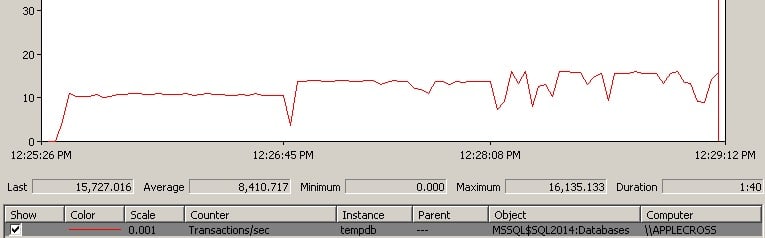
Let’s do an experiment. Below is a screen shot of PerfMon measuring transactions per second in tempdb for a contrived workload that has 100 connections all repeatedly creating and truncating temp tables. It’s running on my laptop (8 logical cores) using SQL Server 2014 RTM CU3.

perfmon1 Correctly adding data files to tempdb

For the first third of the trace, there’s a single data file. For the middle third of the trace, there are two equally-sized files. For the final third of the trace, there are 8 equally-sized files.

Clearly there isn’t a big performance boost from having the additional 6 data files in the final third, but what’s the sweet spot?

Ideally you’d experiment with varying numbers of tempdb data files to find the sweet spot for your workload. However, that’s easier said than done, especially when you’re trying to standardize a tempdb configuration across multiple servers.

Here’s an example of a slightly different workload running under the same conditions on my laptop.

perfmon2 Correctly adding data files to tempdb

It starts with a single data file, then 2, 4, 6, and 8 (pausing perfmon between each file addition). In this case, it’s clearly worth it going to 8 data files. But would I make them all the same size as the initial data file?

No, not if the only reason I need the extra files is to alleviate the allocation bitmap contention. I’d lower the size of all the tempdb files, including the initial one, so I’m not taking up a huge amount of extra disk space for these files.

Just be aware that sometimes you don’t need to go all out and add a whole bunch of extra tempdb data files to get a performance boost.

Summary

The easiest way to alleviate tempdb allocation contention is to enable trace flag 1118 and to add more tempdb data files. Just be careful that you add the right number to help with the contention, you make all the files the same size, and that you take into account the total size of all the data files you’ve created, and possibly dial them all down a bit.

Enjoy!

The post Correctly adding data files to tempdb appeared first on Paul S. Randal.

17 Oct 17:22

PASS Election Results for 2014

by Andy Warren

The election results were just posted. Congratulations to James Rowland-Jones, Wendy Pastrick, and Grant Fritchey for earning seats on the PASS Board of Directors for the 2015-2016 term. This will be the second term for both James & Wendy, so both will be building on two years hard won experience and I hope will do great things. Grant will be the newbie for a couple months and I look forward to hearing his voice about the journey and the challenges while he’s learns the ropes and beyond.

My friend Sri Sridharan was also running for re-election and came in fourth. I’m disappointed about that. I’ve known Sri since the early days of SQLSaturday and in my view there are few that have a deeper love of community and a sense of the possibilities than he does. He’s done a lot of good work in Dallas and he worked hard on the Board to get the volunteer management tools built and deployed. Once his term finishes in December I know he’ll find more ways to contribute.

17 Oct 17:22

Readable Secondaries on a Budget

by Aaron Bertrand

Availability Groups, introduced in SQL Server 2012, represent a fundamental shift in the way we think about both high availability and disaster recovery for our databases. One of the great things made possible here is offloading read-only operations to a secondary replica, so that the primary read/write instance is not bothered by pesky things like end user reporting. Setting this up is not simple, but is a whole lot easier and more maintainable than previous solutions (raise your hand if you liked setting up mirroring and snapshots, and all the perpetual maintenance involved with that).

People get very excited when they hear about Availability Groups. Then reality hits: the feature requires the Enterprise Edition of SQL Server. Enterprise Edition is expensive, especially if you have a lot of cores, and especially since the elimination of CAL-based licensing (unless you were grandfathered in from 2008 R2, in which case you are limited to the first 20 cores). It also requires Windows Server Failover Clustering (WSFC), a complication not just for demonstrating the technology on a laptop, but also requiring the Enterprise Edition of Windows, a domain controller, and a whole bunch of configuration to support clustering. And there are new requirements around Software Assurance, too; an added cost if you want your standby instances to be compliant.

Some customers can't justify the price. Others see the value, but simply can't afford it. So what are these users to do?

Your New Hero: Log Shipping

Log shipping has been around for ages. It's simple and it just works. Almost always. And aside from bypassing the licensing costs and configuration hurdles presented by Availability Groups, it can also avoid the 14-byte penalty that Paul Randal (@PaulRandal) talked about in this week's SQLskills Insider newsletter (October 13, 2014).

One of the challenges people have with using the log shipped copy as a readable secondary, though, is that you have to kick all the current users out in order to apply any new logs – so either you have users getting annoyed because they are repeatedly disrupted from running queries, or you have users getting annoyed because their data is stale. This is because people limit themselves to a single readable secondary.

It doesn't have to be that way; I think there is a graceful solution here, and while it might require a lot more leg work up front than, say, turning on Availability Groups, it will surely be an attractive option for some.

Basically, we can set up a number of secondaries, where we will log ship and make just one of them the "active" secondary, using a round-robin approach. The job that ships the logs knows which one is currently active, so it only restores new logs to the "next" server using the WITH STANDBY option. The reporting application uses the same information to determine at runtime what the connection string should be for the next report the user runs. When the next log backup is ready, everything shifts by one, and the instance that will now become the new readable secondary gets restored using WITH STANDBY.

To keep the model uncomplicated, let's say we have four instances that serve as readable secondaries, and we take log backups every 15 minutes. At any one time, we'll have one active secondary in standby mode, with data no older than 15 minutes old, and three secondaries in standby mode that aren't servicing new queries (but may still be returning results for older queries).

This will work best if no queries are expected to last longer than 45 minutes. (You may need to adjust these cycles depending on the nature of your read-only operations, how many concurrent users are running longer queries, and whether it is ever possible to disrupt users by kicking everyone out.)

It will also work best if consecutive queries run by the same user can change their connection string (this is logic that will need to be in the application, though you could use synonyms or views depending on the architecture), and contain different data that has changed in the meantime (just like if they were querying the live, constantly-changing database, or the live, constanrly ).

With all of these assumptions in mind, here is an illustrative sequence of events for the first 75 minutes of our implementation:

time events visual
12:00 (t0)
  • Backup log t0
  • Kick users out of instance A
  • Restore log t0 to instance A (STANDBY)
  • New read-only queries will go to instance A
Time t0 : Instance A becomes active read-only secondary
12:15 (t1)
  • Backup log t1
  • Kick users out of instance B
  • Restore log t0 to instance B (NORECOVERY)
  • Restore log t1 to instance B (STANDBY)
  • New read-only queries will go to instance B
  • Existing read-only queries to instance A can continue running, but ~15 minutes behind
Time t1 : Instance B becomes active read-only secondary
12:30 (t2)
  • Backup log t2
  • Kick users out of instance C
  • Restore logs t0 -> t1 to instance C (NORECOVERY)
  • Restore log t2 to instance C (STANDBY)
  • New read-only queries will go to instance C
  • Existing read-only queries to instances A & B can continue running (15-30 minutes behind)
Time t2 : Instance C becomes active read-only secondary
12:45 (t3)
  • Backup log t3
  • Kick users out of instance D
  • Restore logs t0 -> t2 to instance D (NORECOVERY)
  • Restore log t3 to instance D (STANDBY)
  • New read-only queries will go to instance D
  • Existing read-only queries to instances A, B & C can continue running (15-45 minutes behind)
Time t3 : Instance D becomes active read-only secondary
13:00 (t4)
  • Backup log t4
  • Kick users out of instance A
  • Restore logs t1 -> t3 to instance A (NORECOVERY)
  • Restore log t4 to instance A (STANDBY)
  • New read-only queries will go to instance A
  • Existing read-only queries to instances B, C & D can continue running (15-45 minutes behind)
  • Queries still running on instance A since t0 -> ~t1 (45-60 minutes) will be cancelled
Time t4 : Instance A becomes active read-only secondary again

 
That may seem simple enough; writing the code to handle all that is a little more daunting. A rough outline:

  1. On the primary server (I'll call it BOSS), create a database. Before even thinking about going any further, turn on Trace Flag 3226 to prevent successful backup messages from littering SQL Server's error log.
  2. On BOSS, add a linked server for each secondary (I'll call them PEON1 -> PEON4).
  3. Somewhere accessible to all servers, create a file share to store database/log backups, and ensure the service accounts for each instance have read/write access. Also, each secondary instance needs to have a location specified for the standby file.
  4. In a separate utility database (or MSDB, if you prefer), create tables that will hold configuration information about the database(s), all of the secondaries, and log backup and restore history.
  5. Create stored procedures that will back up the database and restore to the secondaries WITH NORECOVERY, and then apply one log WITH STANDBY, and mark one instance as the current standby secondary. These procedures can also be used to re-initialize the whole log shipping setup in the event anything goes wrong.
  6. Create a job that will run every 15 minutes, to perform the tasks described above:
    • backup the log
    • determine which secondary to apply any unapplied log backups to
    • restore those logs with the appropriate settings
  7. Create a stored procedure (and/or a view?) that will tell the calling application(s) which secondary they should use for any new read-only queries.
  8. Create a cleanup procedure to clear out log backup history for logs that have been applied to all secondaries (and perhaps also to move or purge the files themselves).
  9. Augment the solution with robust error handling and notifications.

Step 1 – create a database

My primary instance is Standard Edition, named .\BOSS. On that instance I create a simple database with one table:

USE [master];
GO
CREATE DATABASE UserData;
GO
ALTER DATABASE UserData SET RECOVERY FULL;
GO
USE UserData;
GO
CREATE TABLE dbo.LastUpdate(EventTime DATETIME2);
INSERT dbo.LastUpdate(EventTime) SELECT SYSDATETIME();

Then I create a SQL Server Agent job that merely updates that timestamp every minute:

UPDATE UserData.dbo.LastUpdate SET EventTime = SYSDATETIME();

That just creates the initial database and simulates activity, allowing us to validate how the log shipping task rotates through each of the readable secondaries. I want to state explicitly that the point of this exercise is not to stress test log shipping or to prove how much volume we can punch through; that is a different exercise altogether.

Step 2 – add linked servers

I have four secondary Express Edition instances named .\PEON1, .\PEON2, .\PEON3, and .\PEON4. So I ran this code four times, changing @s each time:

USE [master];
GO
DECLARE @s NVARCHAR(128) = N'.\PEON1',  -- repeat for .\PEON2, .\PEON3, .\PEON4
        @t NVARCHAR(128) = N'true';
EXEC [master].dbo.sp_addlinkedserver   @server     = @s, @srvproduct = N'SQL Server';
EXEC [master].dbo.sp_addlinkedsrvlogin @rmtsrvname = @s, @useself = @t;
EXEC [master].dbo.sp_serveroption      @server     = @s, @optname = N'collation compatible', @optvalue = @t;
EXEC [master].dbo.sp_serveroption      @server     = @s, @optname = N'data access',          @optvalue = @t;
EXEC [master].dbo.sp_serveroption      @server     = @s, @optname = N'rpc',                  @optvalue = @t;
EXEC [master].dbo.sp_serveroption      @server     = @s, @optname = N'rpc out',              @optvalue = @t;

Step 3 – validate file share(s)

In my case, all 5 instances are on the same server, so I just created a folder for each instance: C:\temp\Peon1\, C:\temp\Peon2\, and so on. Remember that if your secondaries are on different servers, the location should be relative to that server, but still be accessible from the primary (so typically a UNC path would be used). You should validate that each instance can write to that share, and you should also validate that each instance can write to the location specified for the standby file (I used the same folders for standby). You can validate this by backing up a small database from each instance to each of its specified locations – don't proceed until this works.

Step 4 – create tables

I decided to place this data in msdb, but I don't really have any strong feelings for or against creating a separate database. The first table I need is the one that holds information about the database(s) I am going to be log shipping:

CREATE TABLE dbo.PMAG_Databases
(
  DatabaseName               SYSNAME,
  LogBackupFrequency_Minutes SMALLINT NOT NULL DEFAULT (15),
  CONSTRAINT PK_DBS PRIMARY KEY(DatabaseName)
);
GO
 
INSERT dbo.PMAG_Databases(DatabaseName) SELECT N'UserData';

(If you're curious about the naming scheme, PMAG stands for "Poor Man's Availability Groups.")

Another table required is one to hold information about the secondaries, including their individual folders and their current status in the log shipping sequence.

CREATE TABLE dbo.PMAG_Secondaries
(
  DatabaseName     SYSNAME,
  ServerInstance   SYSNAME,
  CommonFolder     VARCHAR(512) NOT NULL,
  DataFolder       VARCHAR(512) NOT NULL,
  LogFolder        VARCHAR(512) NOT NULL,
  StandByLocation  VARCHAR(512) NOT NULL,
  IsCurrentStandby BIT NOT NULL DEFAULT 0,
  CONSTRAINT PK_Sec PRIMARY KEY(DatabaseName, ServerInstance),
  CONSTRAINT FK_Sec_DBs FOREIGN KEY(DatabaseName)
    REFERENCES dbo.PMAG_Databases(DatabaseName)
);

If you want to backup from the source server locally, and have the secondaries restore remotely, or vice versa, you can split CommonFolder into two columns (BackupFolder and RestoreFolder), and make relevant changes in the code (there won't be that many).

Since I can populate this table based at least partially on the information in sys.servers – taking advantage of the fact that the data / log and other folders are named after the instance names:

INSERT dbo.PMAG_Secondaries
(
  DatabaseName,
  ServerInstance, 
  CommonFolder, 
  DataFolder, 
  LogFolder, 
  StandByLocation
)
SELECT 
  DatabaseName = N'UserData', 
  ServerInstance = name,
  CommonFolder = 'C:\temp\Peon' + RIGHT(name, 1) + '\', 
  DataFolder = 'C:\Program Files\Microsoft SQL Server\MSSQL12.PEON'  
               + RIGHT(name, 1) + '\MSSQL\DATA\',
  LogFolder  = 'C:\Program Files\Microsoft SQL Server\MSSQL12.PEON' 
               + RIGHT(name, 1) + '\MSSQL\DATA\',
  StandByLocation = 'C:\temp\Peon' + RIGHT(name, 1) + '\' 
FROM sys.servers 
WHERE name LIKE N'.\PEON[1-4]';

I also need a table to track individual log backups (not just the last one), because in many cases I'll need to restore multiple log files in a sequence. I can get this information from msdb.dbo.backupset, but it is much more complicated to get things like the location – and I may not have control over other jobs which may clean up backup history.

CREATE TABLE dbo.PMAG_LogBackupHistory
(
  DatabaseName   SYSNAME,
  ServerInstance SYSNAME,
  BackupSetID    INT NOT NULL,
  Location       VARCHAR(2000) NOT NULL,
  BackupTime     DATETIME NOT NULL DEFAULT SYSDATETIME(),
  CONSTRAINT PK_LBH PRIMARY KEY(DatabaseName, ServerInstance, BackupSetID),
  CONSTRAINT FK_LBH_DBs FOREIGN KEY(DatabaseName)
    REFERENCES dbo.PMAG_Databases(DatabaseName),
  CONSTRAINT FK_LBH_Sec FOREIGN KEY(DatabaseName, ServerInstance)
    REFERENCES dbo.PMAG_Secondaries(DatabaseName, ServerInstance)
);

You might think it is wasteful to store a row for each secondary, and to store the location of every backup, but this is for future-proofing – to handle the case where you move the CommonFolder for any secondary.

And finally a history of log restores so, at any point, I can see which logs have been restored and where, and the restore job can be sure to only restore logs that haven't already been restored:

CREATE TABLE dbo.PMAG_LogRestoreHistory
(
  DatabaseName   SYSNAME,
  ServerInstance SYSNAME,
  BackupSetID    INT,
  RestoreTime    DATETIME,
  CONSTRAINT PK_LRH PRIMARY KEY(DatabaseName, ServerInstance, BackupSetID),
  CONSTRAINT FK_LRH_DBs FOREIGN KEY(DatabaseName)
    REFERENCES dbo.PMAG_Databases(DatabaseName),
  CONSTRAINT FK_LRH_Sec FOREIGN KEY(DatabaseName, ServerInstance)
    REFERENCES dbo.PMAG_Secondaries(DatabaseName, ServerInstance)
);

Step 5 – initialize secondaries

We need a stored procedure that will generate a backup file (and mirror it to any locations required by different instances), and we will also restore one log to each secondary to put them all in standby. At this point they will all be available for read-only queries, but only one will be the "current" standby at any one time. This is the stored procedure that will handle both full and transaction log backups; when a full backup is requested, and @init is set to 1, it automatically re-initializes log shipping.

CREATE PROCEDURE [dbo].[PMAG_Backup]
  @dbname SYSNAME,
  @type   CHAR(3) = 'bak', -- or 'trn'
  @init   BIT     = 0 -- only used with 'bak'
AS
BEGIN
  SET NOCOUNT ON;
 
  -- generate a filename pattern
  DECLARE @now DATETIME = SYSDATETIME();
  DECLARE @fn NVARCHAR(256) = @dbname + N'_' + CONVERT(CHAR(8), @now, 112) 
    + RIGHT(REPLICATE('0',6) + CONVERT(VARCHAR(32), DATEDIFF(SECOND, 
      CONVERT(DATE, @now), @now)), 6) + N'.' + @type;
 
  -- generate a backup command with MIRROR TO for each distinct CommonFolder
  DECLARE @sql NVARCHAR(MAX) = N'BACKUP' 
    + CASE @type WHEN 'bak' THEN N' DATABASE ' ELSE N' LOG ' END
    + QUOTENAME(@dbname) + ' 
    ' + STUFF(
        (SELECT DISTINCT CHAR(13) + CHAR(10) + N' MIRROR TO DISK = ''' 
           + s.CommonFolder + @fn + ''''
         FROM dbo.PMAG_Secondaries AS s 
         WHERE s.DatabaseName = @dbname 
         FOR XML PATH(''), TYPE).value(N'.[1]',N'nvarchar(max)'),1,9,N'') + N' 
        WITH NAME = N''' + @dbname + CASE @type 
        WHEN 'bak' THEN N'_PMAGFull' ELSE N'_PMAGLog' END 
        + ''', INIT, FORMAT' + CASE WHEN LEFT(CONVERT(NVARCHAR(128), 
        SERVERPROPERTY(N'Edition')), 3) IN (N'Dev', N'Ent')
        THEN N', COMPRESSION;' ELSE N';' END;
 
  EXEC [master].sys.sp_executesql @sql;
 
  IF @type = 'bak' AND @init = 1  -- initialize log shipping
  BEGIN
    EXEC dbo.PMAG_InitializeSecondaries @dbname = @dbname, @fn = @fn;
  END
 
  IF @type = 'trn'
  BEGIN
    -- record the fact that we backed up a log
    INSERT dbo.PMAG_LogBackupHistory
    (
      DatabaseName, 
      ServerInstance, 
      BackupSetID, 
      Location
    )
    SELECT 
      DatabaseName = @dbname, 
      ServerInstance = s.ServerInstance, 
      BackupSetID = MAX(b.backup_set_id), 
      Location = s.CommonFolder + @fn
    FROM msdb.dbo.backupset AS b
    CROSS JOIN dbo.PMAG_Secondaries AS s
    WHERE b.name = @dbname + N'_PMAGLog'
      AND s.DatabaseName = @dbname
    GROUP BY s.ServerInstance, s.CommonFolder + @fn;
 
    -- once we've backed up logs, 
    -- restore them on the next secondary
    EXEC dbo.PMAG_RestoreLogs @dbname = @dbname;
  END
END

This in turn calls two procedures that you could call separately (but most likely will not). First, the procedure that will initialize the secondaries on first run:

ALTER PROCEDURE dbo.PMAG_InitializeSecondaries
  @dbname SYSNAME,
  @fn     VARCHAR(512)
AS
BEGIN
  SET NOCOUNT ON;
 
  -- clear out existing history/settings (since this may be a re-init)
  DELETE dbo.PMAG_LogBackupHistory  WHERE DatabaseName = @dbname;
  DELETE dbo.PMAG_LogRestoreHistory WHERE DatabaseName = @dbname;
  UPDATE dbo.PMAG_Secondaries SET IsCurrentStandby = 0
    WHERE DatabaseName = @dbname;
 
  DECLARE @sql   NVARCHAR(MAX) = N'',
          @files NVARCHAR(MAX) = N'';
 
  -- need to know the logical file names - may be more than two
  SET @sql = N'SELECT @files = (SELECT N'', MOVE N'''''' + name 
    + '''''' TO N''''$'' + CASE [type] WHEN 0 THEN N''df''
      WHEN 1 THEN N''lf'' END + ''$''''''
    FROM ' + QUOTENAME(@dbname) + '.sys.database_files
    WHERE [type] IN (0,1)
    FOR XML PATH, TYPE).value(N''.[1]'',N''nvarchar(max)'');';
 
  EXEC master.sys.sp_executesql @sql,
    N'@files NVARCHAR(MAX) OUTPUT', 
    @files = @files OUTPUT;
 
  SET @sql = N'';
 
  -- restore - need physical paths of data/log files for WITH MOVE
  -- this can fail, obviously, if those path+names already exist for another db
  SELECT @sql += N'EXEC ' + QUOTENAME(ServerInstance) 
    + N'.master.sys.sp_executesql N''RESTORE DATABASE ' + QUOTENAME(@dbname) 
    + N' FROM DISK = N''''' + CommonFolder + @fn + N'''''' + N' WITH REPLACE, 
      NORECOVERY' + REPLACE(REPLACE(REPLACE(@files, N'$df$', DataFolder 
    + @dbname + N'.mdf'), N'$lf$', LogFolder + @dbname + N'.ldf'), N'''', N'''''') 
    + N';'';' + CHAR(13) + CHAR(10)
  FROM dbo.PMAG_Secondaries
  WHERE DatabaseName = @dbname;
 
  EXEC [master].sys.sp_executesql @sql;
 
  -- backup a log for this database
  EXEC dbo.PMAG_Backup @dbname = @dbname, @type = 'trn';
 
  -- restore logs
  EXEC dbo.PMAG_RestoreLogs @dbname = @dbname, @PrepareAll = 1;
END

And then the procedure that will restore the logs:

CREATE PROCEDURE dbo.PMAG_RestoreLogs
  @dbname     SYSNAME,
  @PrepareAll BIT = 0
AS
BEGIN
  SET NOCOUNT ON;
 
  DECLARE @StandbyInstance SYSNAME,
          @CurrentInstance SYSNAME,
          @BackupSetID     INT, 
          @Location        VARCHAR(512),
          @StandByLocation VARCHAR(512),
          @sql             NVARCHAR(MAX),
          @rn              INT;
 
  -- get the "next" standby instance
  SELECT @StandbyInstance = MIN(ServerInstance)
    FROM dbo.PMAG_Secondaries
    WHERE IsCurrentStandby = 0
      AND ServerInstance &gt; (SELECT ServerInstance
    FROM dbo.PMAG_Secondaries
    WHERE IsCurrentStandBy = 1);
 
  IF @StandbyInstance IS NULL -- either it was last or a re-init
  BEGIN
    SELECT @StandbyInstance = MIN(ServerInstance)
      FROM dbo.PMAG_Secondaries;
  END
 
  -- get that instance up and into STANDBY
  -- for each log in logbackuphistory not in logrestorehistory:
  -- restore, and insert it into logrestorehistory
  -- mark the last one as STANDBY
  -- if @prepareAll is true, mark all others as NORECOVERY
  -- in this case there should be only one, but just in case
 
  DECLARE c CURSOR LOCAL FAST_FORWARD FOR 
    SELECT bh.BackupSetID, s.ServerInstance, bh.Location, s.StandbyLocation,
      rn = ROW_NUMBER() OVER (PARTITION BY s.ServerInstance ORDER BY bh.BackupSetID DESC)
    FROM dbo.PMAG_LogBackupHistory AS bh
    INNER JOIN dbo.PMAG_Secondaries AS s
    ON bh.DatabaseName = s.DatabaseName
    AND bh.ServerInstance = s.ServerInstance
    WHERE s.DatabaseName = @dbname
    AND s.ServerInstance = CASE @PrepareAll 
	WHEN 1 THEN s.ServerInstance ELSE @StandbyInstance END
    AND NOT EXISTS
    (
      SELECT 1 FROM dbo.PMAG_LogRestoreHistory AS rh
        WHERE DatabaseName = @dbname
        AND ServerInstance = s.ServerInstance
        AND BackupSetID = bh.BackupSetID
    )
    ORDER BY CASE s.ServerInstance 
      WHEN @StandbyInstance THEN 1 ELSE 2 END, bh.BackupSetID;
 
  OPEN c;
 
  FETCH c INTO @BackupSetID, @CurrentInstance, @Location, @StandbyLocation, @rn;
 
  WHILE @@FETCH_STATUS  -1
  BEGIN
    -- kick users out - set to single_user then back to multi
    SET @sql = N'EXEC ' + QUOTENAME(@CurrentInstance) + N'.[master].sys.sp_executesql '
    + 'N''IF EXISTS (SELECT 1 FROM sys.databases WHERE name = N''''' 
	+ @dbname + ''''' AND [state]  1)
	  BEGIN
	    ALTER DATABASE ' + QUOTENAME(@dbname) + N' SET SINGLE_USER '
      +   N'WITH ROLLBACK IMMEDIATE;
	    ALTER DATABASE ' + QUOTENAME(@dbname) + N' SET MULTI_USER;
	  END;'';';
 
    EXEC [master].sys.sp_executesql @sql;
 
    -- restore the log (in STANDBY if it's the last one):
    SET @sql = N'EXEC ' + QUOTENAME(@CurrentInstance) 
      + N'.[master].sys.sp_executesql ' + N'N''RESTORE LOG ' + QUOTENAME(@dbname) 
      + N' FROM DISK = N''''' + @Location + N''''' WITH ' + CASE WHEN @rn = 1 
        AND (@CurrentInstance = @StandbyInstance OR @PrepareAll = 1) THEN 
        N'STANDBY = N''''' + @StandbyLocation + @dbname + N'.standby''''' ELSE 
        N'NORECOVERY' END + N';'';';
 
    EXEC [master].sys.sp_executesql @sql;
 
    -- record the fact that we've restored logs
    INSERT dbo.PMAG_LogRestoreHistory
      (DatabaseName, ServerInstance, BackupSetID, RestoreTime)
    SELECT @dbname, @CurrentInstance, @BackupSetID, SYSDATETIME();
 
    -- mark the new standby
    IF @rn = 1 AND @CurrentInstance = @StandbyInstance -- this is the new STANDBY
    BEGIN
        UPDATE dbo.PMAG_Secondaries 
          SET IsCurrentStandby = CASE ServerInstance
            WHEN @StandbyInstance THEN 1 ELSE 0 END 
          WHERE DatabaseName = @dbname;
    END
 
    FETCH c INTO @BackupSetID, @CurrentInstance, @Location, @StandbyLocation, @rn;
  END
 
  CLOSE c; DEALLOCATE c;
END

(I know it's a lot of code, and a lot of cryptic dynamic SQL. I tried to be very liberal with comments; if there is a piece you're having trouble with, please let me know.)

So now, all you have to do to get the system up and running is make two procedure calls:

EXEC dbo.PMAG_Backup @dbname = N'UserData', @type = 'bak', @init = 1;
EXEC dbo.PMAG_Backup @dbname = N'UserData', @type = 'trn';

Now you should see each instance with a standby copy of the database:

PMAG_objexplorer

And you can see which one should currently serve as the read-only standby:

SELECT ServerInstance, IsCurrentStandby
  FROM dbo.PMAG_Secondaries 
  WHERE DatabaseName = N'UserData';

Step 6 – create a job that backs up / restores logs

You can put this command in a job you schedule for every 15 minutes:

EXEC dbo.PMAG_Backup @dbname = N'UserData', @type = 'trn';

This will shift the active secondary every 15 minutes, and its data will be 15 minutes fresher than the previous active secondary. If you have multiple databases on different schedules, you can create multiple jobs, or schedule the job more frequently and check the dbo.PMAG_Databases table for each individual LogBackupFrequency_Minutes value to determine if you should run the backup/restore for that database.

Step 7 – view and procedure to tell application which standby is active

CREATE VIEW dbo.PMAG_ActiveSecondaries
AS
  SELECT DatabaseName, ServerInstance
    FROM dbo.PMAG_Secondaries
    WHERE IsCurrentStandby = 1;
GO
 
CREATE PROCEDURE dbo.PMAG_GetActiveSecondary
  @dbname SYSNAME
AS
BEGIN
  SET NOCOUNT ON;
 
  SELECT ServerInstance
    FROM dbo.PMAG_ActiveSecondaries
    WHERE DatabaseName = @dbname;
END
GO

In my case, I also manually created a view unioning across all of the UserData databases so that I could compare the recency of the data on the primary with each secondary.

CREATE VIEW dbo.PMAG_CompareRecency_UserData
AS
  WITH x(ServerInstance, EventTime)
  AS
  (
    SELECT @@SERVERNAME, EventTime FROM UserData.dbo.LastUpdate
    UNION ALL SELECT N'.\PEON1', EventTime FROM [.\PEON1].UserData.dbo.LastUpdate
    UNION ALL SELECT N'.\PEON2', EventTime FROM [.\PEON2].UserData.dbo.LastUpdate
    UNION ALL SELECT N'.\PEON3', EventTime FROM [.\PEON3].UserData.dbo.LastUpdate
    UNION ALL SELECT N'.\PEON4', EventTime FROM [.\PEON4].UserData.dbo.LastUpdate
  )
  SELECT x.ServerInstance, s.IsCurrentStandby, x.EventTime,
         Age_Minutes = DATEDIFF(MINUTE, x.EventTime, SYSDATETIME()),
         Age_Seconds = DATEDIFF(SECOND, x.EventTime, SYSDATETIME())
    FROM x LEFT OUTER JOIN dbo.PMAG_Secondaries AS s
      ON s.ServerInstance = x.ServerInstance
      AND s.DatabaseName = N'UserData';
GO

Sample results from the weekend:

SELECT [Now] = SYSDATETIME();
 
SELECT ServerInstance, IsCurrentStandby, EventTime, Age_Minutes, Age_Seconds
  FROM dbo.PMAG_CompareRecency_UserData
  ORDER BY Age_Seconds DESC;

Age of each secondary once up and running

Step 8 – cleanup procedure

Cleaning up the log backup and restore history is pretty easy.

CREATE PROCEDURE dbo.PMAG_CleanupHistory
  @dbname   SYSNAME,
  @DaysOld  INT = 7
AS
BEGIN
  SET NOCOUNT ON;
 
  DECLARE @cutoff INT;
 
  -- this assumes that a log backup either 
  -- succeeded or failed on all secondaries 
  SELECT @cutoff = MAX(BackupSetID)
    FROM dbo.PMAG_LogBackupHistory AS bh
    WHERE DatabaseName = @dbname
    AND BackupTime &lt; DATEADD(DAY, -@DaysOld, SYSDATETIME())
    AND EXISTS
    (
      SELECT 1 
        FROM dbo.PMAG_LogRestoreHistory AS rh
        WHERE BackupSetID = bh.BackupSetID
          AND DatabaseName = @dbname
          AND ServerInstance = bh.ServerInstance
    );
 
  DELETE dbo.PMAG_LogRestoreHistory
    WHERE DatabaseName = @dbname
    AND BackupSetID &lt;= @cutoff;
 
  DELETE dbo.PMAG_LogBackupHistory 
    WHERE DatabaseName = @dbname
    AND BackupSetID &lt;= @cutoff;
END
GO

Now, you can add that as a step in the existing job, or you can schedule it completely separately or as part of other cleanup routines.

I'll leave cleaning up the file system for another post (and probably a separate mechanism altogether, such as PowerShell or C# – this isn't typically the kind of thing you want T-SQL to do).

Step 9 – augment the solution

It's true that there could be better error handling and other niceties here to make this solution more complete. For now I will leave that as an exercise for the reader, but I plan to look at follow-up posts to detail improvements and refinements to this solution.

Variables and limitations

Note that in my case I used Standard Edition as the primary, and Express Edition for all secondaries. You could go a step further on the budget scale and even use Express Edition as the primary – a lot of people think Express Edition doesn't support log shipping, when in fact it's merely the wizard that wasn't present in versions of Management Studio Express before SQL Server 2012 Service Pack 1. That said, since Express Edition does not support SQL Server Agent, it would be difficult to make it a publisher in this scenario – you would have to configure your own scheduler to call the stored procedures (C# command line app run by Windows Task Scheduler, PowerShell jobs, or SQL Server Agent jobs on yet another instance). To use Express on either end, you would also have to be confident that your data file won't exceed 10GB, and your queries will function fine with the memory, CPU, and feature limitations of that edition. I am by no means suggesting that Express is ideal; I merely used it to demonstrate that it is possible to have very flexible readable secondaries for free (or very close to it).

Also, these separate instances in my scenario all live on the same VM, but it doesn't have to work that way at all – you can spread the instances out across multiple servers; or, you could go the other way, and restore to different copies of the database, with different names, on the same instance. These configurations would require minimal changes to what I've laid out above. And how many databases you restore to, and how often, is completely up to you – though there will be a practical upper bound (where [average query time] > [number of secondaries] x [log backup interval]).

Finally, there are definitely some limitations with this approach. A non-exhaustive list:

  1. While you can continue to take full backups on your own schedule, the log backups must serve as your only log backup mechanism. If you need to store the log backups for other purposes, you won't be able to back up logs separately from this solution, since they will interfere with the log chain. Instead, you can consider adding additional MIRROR TO arguments to the existing log backup scripts, if you need to have copies of the logs used elsewhere.
  2. While "Poor Man's Availability Groups" may seem like a clever name, it can also be a bit misleading. This solution certainly lacks many of the HA/DR features of Availability Groups, including failover, automatic page repair, and support in the UI, Extended Events and DMVs. This was only meant to provide the ability for non-Enterprise customers to have an infrastructure that supports multiple readable secondaries.
  3. I tested this on a very isolated VM system with no concurrency. This is not a complete solution and there are likely dozens of ways this code could be made tighter; as a first step, and to focus on the scaffolding and to show you what's possible, I did not build in bulletproof resiliency. You will need to test it at your scale and with your workload to discover your breaking points, and you will also potentially need to deal with transactions over linked servers (always fun) and automating the re-initialization in the event of a disaster.

The "Insurance Policy"

Log shipping also offers a distinct advantage over many other solutions, including Availability Groups, mirroring and replication: a delayed "insurance policy" as I like to call it. At my previous job, I did this with full backups, but you could easily use log shipping to accomplish the same thing: I simply delayed the restores to one of the secondary instances by 24 hours. This way, I was protected from any client "shooting themselves in the foot" going back to yesterday, and I could get to their data easily on the delayed copy, because it was 24 hours behind. (I implemented this the first time a customer ran a delete without a where clause, then called us in a panic, at which point we had to restore their database to a point in time before the delete – which was both tedious and time consuming.) You could easily adapt this solution to treat one of these instances not as a read-only secondary but rather as an insurance policy. More on that perhaps in another post.

The post Readable Secondaries on a Budget appeared first on SQLPerformance.com.

17 Oct 17:21

How to answer questions politely and correctly

by Paul Randal

Back in August I wrote a long post about how to ask questions politely and correctly to address what I see as a growing volume of poorly asked questions by people who often don’t have the common courtesy to be polite and also often come across as feeling entitled to an answer. Based on the responses, and private discussions, many of you out there see the same trend and are dismayed by it.

This is the necessary corollary to that post – how to answer questions politely and correctly, in my opinion – because I see people being discourteous and sometimes unprofessional in their replies. I’ve woven in some of the replies and private distribution list discussions I’ve had over the last two months as well – thanks to those involved – you know who you are.

I’ll start out by saying that some of you will disagree with elements of what I state below. That’s cool, this is just my opinion – vive la différence, and all that – but don’t expect to convince me to change my views. We’ll agree to disagree :-)

Ignorance is Not Stupidity

Probably the number one sin I see people committing when answering questions is giving an attitude to the original poster (who I’ll call the OP from now on) that they’re stupid/lacking/deficient/lazy in some way for not knowing the answer themselves.

Now, if a simple Google search would have found the answer, then I can understand some frustration on the part of the answerer, and I suffer from it myself, but that’s no excuse to be rude or belittling. I even shy away from posting Let Me Google That For You links in such cases as I think that comes across as too snarky, and I like to stay polite as much as I can. But sometimes I’ll just post a Google search URL (especially on Twitter), which does the same thing, but without the added snark, as that would just make me look angry. Others disagree with this sentiment, I know, and will happily post LMGTFY links – each to his/her own.

If it’s not a simple Google search, or I can tell from the question that the OP wouldn’t know what to search on, or how to make sense of the search results, or know which one to choose, then I’ll answer politely and explain the answer. Even if it’s something really simple about SQL Server. (Also check out the insightful comments about Google searches in the comment from @sqlhandle.)

As I explained in my post Ignorance is not stupidity back in 2011, everyone in the world starts with zero knowledge about SQL Server. I knew zero about SQL Server when I joined Microsoft from DEC in February 1999 (15 years ago – OMG – I’m getting old!! :-). Especially if the OP is someone you don’t know, give them the benefit of the doubt and treat them with respect for having the guts to ask a question publicly to get help. Don’t slap someone down for not knowing the answer. That’s the height of conceit, it’s bullying, and it’ll likely drive the OP away from our wonderful online SQL Server community.

Ok – that’s one of my hot-button topics done.

Posting Links in Question Answers

Here’s another one: posting links in question answers.

There was an interesting debate on the MVP email list a week or so ago about this, where someone said they hesitate to post blog post links as an answer because it can come across as self-promotion. I vehemently argued against that point of view, and I continue to believe that posting blog post links in the answer (or even as the answer) is entirely justified.

Self-promotion is where you’re posting something solely to get clicks on a link, or to drive traffic to your website for some business purpose – which of course is bad and you shouldn’t do it in the answer to a technical question – unless it’s directly relevant in some way. Posting a link to a blog post that contains the answer that the OP needs, or helps explain the answer, is certainly not self promotion. It doesn’t matter that the link is to a blog post on your company website, that’s just where you blog, and if it makes them aware of your company, then I think that’s fair recompense for your time in answering a community question. it’s not blatant self-promotion.

I also don’t buy the argument that a bunch of the contents of said blog post should be reiterated in the answer, just to give some meat to the answer in the thread so the thread is ‘self-contained’, or because blog posts move. One of the reasons I blog about things is so I can reference them in classes and online, so I can avoid repeating myself and point people at a deeper reference as part of answer, or as the complete answer. This is especially important for question mediums like Twitter.

If in doubt, consult whatever guidelines exist for the forum/distribution list/medium on which you’re answering. And if I just drop in a blog post link, I’ll always say something like ‘If you have any follow-up questions, feel free to ask’.

Now, saying that, you need to be very confident that your blog post is actually correct and actually answers the question (or contributes to your answer).

Answering the Actual Question

Which brings me to my next point: make sure you’re answering the actual question.

Often I see someone post an answer to the question that shows that either a) they didn’t read the question to see what the OP was actually asking for, or b) they didn’t understand the question or what the OP was actually asking for.

This is quite prevalent on forums such as MSDN, where I’ll see people post just for the sake of posting to try to increase their forums points/score. This is just daft. What’s really interesting is that I don’t see this behavior at all on #sqlhelp, as the only merit gained from answering questions on Twitter is community respect, not some silly score. Other forums do it better by allowing up and down voting, which increases of decreases your score. I applaud people who answer lots of questions correctly, but if you’re only doing it to have a higher score than everyone else, then IMHO you need to go out and get a life.

Don’t post at all if you don’t know the answer and can’t help, otherwise you’re just noise that’s obscuring the answer for the OP and putting people off from following and helping out in that forum. This is what stopped me answering corruption questions on MSDN and other forums – having to continually (nicely) correct people who were answering incorrectly and then being berated for it.

If there isn’t enough information in the question to answer it correctly, ask for more information. Don’t just assume. Or maybe give a couple of different answers, for different conditions or SQL Server versions, state as much, and ask for clarification. If you assume some piece of information that can change the answer, you may be doing a huge disservice to the OP by giving them an answer that’s wrong for their situation.

Don’t just answer: It Depends.

Much of the time the answer really does start with It Depends, but you then need to explain why it depends, what it depends, how it depends, etc. It Depends is a valid start to an answer IMHO. See my post It Depends. It really, really does for more on this.

If you don’t have time to answer properly, don’t answer at all. A half answer, or a non-answer wastes everyone’s time. Step away and let someone else answer.

If the medium where the question is being asked isn’t appropriate to the question, direct the OP at an alternative medium. For instance, if someone posts a #sqlhelp question on Twitter asking for an explanation of whether to use one join type or another, or a comparison between mirroring and availability groups based on some facet of operation, they’ll be directed by someone to post the question on a forum so that longer answers can be given.

Summary

It all comes down to this: give a good answer, that answers the question, provides references if necessary, and leaves the OP feeling like they’ve had a good interaction with the SQL Server community.

Even if they don’t ask politely or correctly, don’t be a jerk when you answer. You can politely point out how to ask the question. The days of being able to hide anonymously on the Internet are well past – and your response is captured for all eternity, so take pride in answering politely and correctly.

Again, don’t be a jerk. Treat people with respect, and if they seem to be lacking in some way, educate them. But be nice about it.

Thanks

The post How to answer questions politely and correctly appeared first on Paul S. Randal.

17 Oct 17:15

SQLskills procs to analyze data skew and create filtered statistics

by Kimberly Tripp

At PASS Summit 2013 I delivered a presentation titled: Skewed Data, Poor Cardinality Estimates, and Plans Gone Bad (you can watch this session on PASStv here). Note: please fast forward 4 mins as they didn’t tell me they were recording / publishing my “chatting” before the session – which is weird IMO but if you want to hear me talk about diving and sharks and octopus then there it is. As for the actual content of the session, it’s all about understanding the limits of SQL Server’s histogram (which has a maximum of 201 steps) and the result that estimates from skewed data (using step averages) can be highly incorrect – resulting in estimates that are off and query plans that aren’t correct. As part of that session, I demo’ed some code to help programmatically analyze histograms for skew and also code that will create filtered statistics for you – based on a few parameters. In this post, I have an update to those scripts. But, there’s also a bit of good news and bad news that goes along with filtered statistics. Let me start with the good news…

The Good News

  • Filtered statistics work really well in SQL Server 2008, SQL Server 2008 R2, and SQL Server 2012. (hmm… I bet you can already figure out the bad news)
  • The scripts have been updated to fix a couple of minor issues (one where I checked for version but didn’t allow them to run on SQL Server 2014).
  • sp_SQLskills_DropAllColumnStats has been modified to ONLY drop filtered statistics that start with SQLskills_FS (which is the naming convention I use when I create filtered stats).
  • sp_SQLskills_CreateFilteredStats no longer requires a “max” value for tables. The final filtered statistic created will be unbounded. Also, depending on how many steps you have, there were a few weird situations where you might end up with a statistic that is definitely >= value and < same value. This would NOT hurt any estimates but it also wasn’t very useful. Totally benign but also fixed.

The Bad News

Filtered statistics are not yet accessible by the SQL Server 2014 cardinality estimator (tested up to SQL 2014 CU3). This is also true for multi-column, column statistics (where you need to use MORE than just the first column) and hypothetical indexes created with auto pilot. But, there is good news here as well – you CAN still use SQL Server 2014 and take advantage of filtered statistics by accessing the legacy CE at the query level. In fact, if you run using the legacy CE in 2014 then you can access all of these things (and, again, you can do this on a query by query basis if you’d like). So, let me give you a few options and a recommendation.

Cardinality Estimator Options for SQL Server 2014

Option 1 – low impact (my recommendation)

  • Upgrade existing databases (through backup / restore)
  • Leave the existing compatibility level intact (SQL Server 7.0 CE is the default for compatibility modes of SQL Server 7.0 through SQL Server 2012). Remember, restoring / attaching  does not “upgrade” the compatibility level; it remains the level it was when it was backed up / detached.
  • For the following types of queries, test the query performance using trace flag 2312. If you see a benefit, use the new CE model in the query with OPTION (QUERYTRACEON 9481).
    •  That aren’t performing well
    • Whose estimates are far off from actual
    • Where you want to use filtered statistics or auto pilot

Option 2 – low impact

  • Change to compatibility level 120
  • Enable trace flag 9481 server-wide
  • Again, use query-level changes for accessing the new CE.

Option 3 – potentially high impact (potentially good; potentially bad)

  • Change to compatibility level 120 (New CE model)
  • When troubleshooting, test trace flag 9481 against queries that have regressed
  • Use trace flag 9481 for queries that regressed

Playing with the skew analysis scripts and filtered statistics scripts

If you’re still wanting to determine if your very large tables show signs of skew and potentially poor estimates – check out my PASStv presentation from last year. Then, replace the SQLskills project with the scripts in this zip (SQLskillsProcs). If you keep your database compatibility mode at 110 (for SQL Server 2012) then you won’t need to make any changes to the other examples from that session. However, if you change to the SQL Server 2014 compatibility mode (120) then you’ll need to add this to the statements where you want to leverage filtered statistics.

SELECT blah blah
...
OPTION (QUERYTRACEON 9481, QUERYTRACEON 3604, QUERYTRACEON 9204)

9481 = Legacy CE model for SQL Server versions 7.0 – 2012

3604 = this will display the output to the results window

9204 = this will display the statistics used by the query (note, I can’t seem to get this to work when using the new CE at all)

Have fun and let me know what you find. Cheers, kt

17 Oct 17:13

The ins and outs of Apache Storm – real-time processing for Hadoop

by SQL Server Team

Yesterday at Strata + Hadoop World, Microsoft announced the preview of Apache Storm clusters on Azure HDInsight.  This post will give you the ins and outs of Storm.

What is Storm?

Apache Storm is a distributed, fault-tolerant, open source real-time event processing solution. Storm was originally used by Twitter to process massive streams of data from the Twitter firehose. Today, Storm is an incubator project as part of the Apache Software foundation. Typically, Storm will be integrated with a scalable event queuing system like Apache Kafka or Azure Event Hubs.

What can it do?

Combined with an event queuing system, the combined solution will be able to process a large amount of real-time data. This can enable many different scenarios like real-time fraud detection, click-stream analysis, financial alerts, telemetry from connected sensors/devices, and more. For information on real world scenarios, read how companies are using Storm.

How do I get started?

For Microsoft customers, we offer Storm as a preview cluster in Azure HDInsight. This gives you a managed cluster where you will have the benefit of being easy-to-setup (within a few clicks and a few minutes), having high availability (clusters are monitored 24/7 and under the Azure SLA for uptime), having elastic scale (where more resources can be added depending on need), and being integrated to the broad Azure ecosystem (ie. Event Hubs, HBase, VNet, etc).

To get started, customers will need to have an Azure subscription or a free trial to Azure. With this in hand, you should be able to get a Storm cluster up and running in minutes by going through this getting started guide.

For more information on Storm:

For more information on Azure HDInsight:

17 Oct 17:13

Setting Your Page Verify Database Option to CHECKSUM

One thing I still run into quite often are SQL Server 2005 and newer databases that have their Page Verify database option set to TORN_PAGE or NONE. The most common reason for this is that an older database that was originally created in SQL Server 2000 or older was upgraded to SQL Server 2005 or newer, and the Page Verify Option was left at the older and less effective TORN_PAGE value. I also run into instances where people have changed the Page Verify database option to NONE, thinking that this would have a dramatic beneficial effect on performance (which is not true).

From BOL: “When CHECKSUM is enabled for the PAGE_VERIFY database option, the SQL Server Database Engine calculates a checksum over the contents of the whole page, and stores the value in the page header when a page is written to disk. When the page is read from disk, the checksum is recomputed and compared to the checksum value that is stored in the page header. This helps provide a high level of data-file integrity.”

Paul Randal talked about some of the myths around page verify here. Kendra Little wrote a good post that demonstrates how CHECKSUM reacts to corruption here.

In my opinion, all of your databases should be using CHECKSUM for their Page Verify database option. You can easily query sys.databases to find out the status of the Page Verify database option for all of your databases with this query:

-- Get value of page verify option for all databases
SELECT name, page_verify_option_desc
FROM sys.databases;


If you have just a few databases, it is pretty easy to run code like this for each one, to change this option:

-- T-SQL to change Page Verify option to CHECKSUM for a single database
USE [master]
GO
ALTER DATABASE [AdventureWorks] SET PAGE_VERIFY CHECKSUM  WITH NO_WAIT;
GO


If you have a large number of databases that need to be changed, you can write a query to generate the ALTER DATABASE statements for you, like this:

-- Generate ALTER DATABASE statements to change Page Verify option to CHECKSUM
SELECT N'ALTER DATABASE [' + db.name + N'] SET PAGE_VERIFY CHECKSUM  WITH NO_WAIT;'
FROM sys.databases AS db 
WHERE db.page_verify_option_desc <> N'CHECKSUM';


After you run this query, you can copy the rows from your results grid in SSMS to a new query window, and then run your ALTER DATABASE statements when you are ready, without having to write all of the T-SQL code yourself.

Keep in mind that just changing the setting to CHECKSUM does not instantly add CHECKSUMs to your existing data pages in the database. In order for this to happen, you have to read each page into memory, make some sort of change and then write it back out to the storage subsystem. This can happen from normal INSERT/UPDATE/DELETE activity over time, or from rebuilding your indexes.

Here are some useful links on this subject:

Checksum in SQL2005

How to tell if the IO subsystem is causing corruptions?

Inside The Storage Engine: Does turning on page checksums discard any torn-page protection?

Checksum and tempdb

Performance impact of enabling page checksum and default trace

The post Setting Your Page Verify Database Option to CHECKSUM appeared first on Glenn Berry.

17 Oct 17:12

Notes From The October 15, 2014 oPASS & MagicPASS Meeting (The Souza-Thon!)

by Andy Warren

Both groups met at a special joint meeting last night at Nova University, part of Operation Souza. Before I go into my usual notes, I want to say thank you to Mark Souza for traveling from Redmond for the meeting. He flew overnight to get here and had a 6 am flight the next morning, making for a long trip. Chapters don’t work without speakers and as much as we rely heavily on the great group of Florida speakers, it’s nice to have someone new added to the mix. Thanks also to the oPASS & MagicPASS teams for trying something new and making it work!

  • Nova was a great host facility, great room, great staff, great location. We’ll return there at some point I’m sure.
  • We arrived at 5 pm to set up. More setup than usual because we planned for a larger crowd than usual. All went well. Kendal had signs, made coffee, had extension cords and other extras, including a mouse when needed later in the evening.
  • There were already a couple people there and I was surprised to learn that one of them worked in the same building as I do (and even stranger, I recently met one of his co-workers in the elevator who recognized me from visiting ONETUG). Networking is good!!
  • We set up a table for the swag, Mark had stuff shipped ahead – hoodies, pen and pencil sets, some leather wallet thingies – ended up with almost enough for everyone to get something, and too much to plan on using the raffle ticket method – would take too long
  • We had 130 registered and no idea what the no show rate would be. We went a day-of reminder and that did generate a few cancellations (which we appreciate, helps get the food order right). I was hoping for 80-100, thinking to see 30% drop
  • Final count was 75-80. Not as much as hoped, but still a great turnout, and I would guess 2 to 2.5x the normal turnout of the combined groups each month
  • We printed the sign in sheet from Eventbrite, worked well. Dan Taylor staffed the sign in table for a while, thanks Dan!
  • Room had a projector and a rolling whiteboard, very nice to have the latter
  • We had some drive down from Tallahassee, over from Sarasota, Tampa, Clearwater, and Denny Cherry drove up from West Palm
  • We started just a couple minutes after 6 pm with probably 60 people present (the rest trickled in up until 7 pm or so)
  • Kendal did the usual (and fantastic) Chapter opening, working through slides on the groups, PASS, upcoming area events, ONETUG, probably some more.
  • That was followed by networking in my favorite form – talk to the person next to you. Always works!
  • Dinner was ready about 6:15 consisting of pizza, veggie trays, cookies, various soda, plus water and coffee.
  • We forgot forks for those that wanted them for the veggies (some turned up eventually)
  • We forgot our own lesson from SQLSaturday and only ran one food line, so it took as much as 25 minutes to get everyone through the and mostly settled. The room was set up with tables for food and we just used as it was. Not huge, but we knew better!
  • Mark had told me he had about 90 minutes of material, but he would run longer if the meeting was interactive. I asked about a break at the one hour mark, he said he would just keep going
  • AV worked, we found an extension cord, and he wrote 4 items on the whiteboard for discussion, then left blanks for items 5-10 (and sadly, he noticed when I was trying to add a couple topics to the list when he wasn’t looking about, shall we way…competitors?!)
  • Mark worked the room some starting at 5:30 and I noticed that he’s very good at remembering names – great skill to have
  • About 6:40 I did a quick introduction of Mark Souza, reminding attendees about the no photo/video/tweet rule during the presentation
  • He started off by talking about his career, back before Microsoft, why he joined them, starting SQLCAT, and more. Nice intro.
  • Then he explained his presentation. He had a bunch of slides, four topics he wanted to discuss, but he wanted everyone to go home having learned something they cared about. So what other topics did we want to hear about? He started handed out swag as people came up with topics until list had grown to 21 items, filling the whiteboard. Effective use of swag and an effective way to get them talking. That really set the tone.
  • I can’t write about the details, but he covered a lot of ground and delivered – easily – more than we had promised in the marketing of the meeting.
  • 90 minutes went by quickly and it felt like he was just getting started, so I was thinking 2 hours or a little more. Mark spoke to the audience for an astonishing 3 hours and 15 minutes! A few people had to leave at the end, but the majority stayed and seemed quite content to do so.
  • The final 30 minutes or was Mark going back over the list, crossing out the ones covered and trying to make sure everyone got an answer
  • The meeting ended about 10:15 and then did clean up (which takes longer with more people and more food), and called it a night around 10:45
  • We’ll be sending them a follow up survey and an invite to the next scheduled group meetings
  • Some thoughts for next time:

    • Two food lines is a must
    • We should borrow what MagicPASS does and run a Summit video, or have something else planned to keep them engaged while waiting in that pre-6pm window. Not a big deal, but every little bit helps
    • Every chapter should keep an extra extension cord, mouse, presentation remote on hand, just in case

    And one thought that I’m not sure about. Charging for lunch at SQLSaturday is a win because we don’t have to risk hard earned funds over-ordering food. I wonder if that model wouldn’t work for Chapters too? Set the price at $7 or $7.50 and order boxed meals. Those that want food pay for it, those that don’t would get chips and salsa or whatever. Better food, better logistics (other than the food order cutoff perhaps) and it would reduce the strain on Chapter finances. Would it hurt attendance? I’d be surprised.

    17 Oct 15:52

    Hey, Windows 10, fix this!

    by jamiet

    So I hear that in Windows 10 they’re making improvements to the DOS window. You’ll be able to resize it now. And use Shift plus the arrow keys to select text. That’s great. Stunning in fact. Now here’s some more things they might want to have a go at at the same time.

    Make the environment variable editor bigger

    Would it really be a great hardship to put a drag handle onto this thing?

    SNAGHTMLc13a16

    Make PATH editing work. All the time.

    A 1024 character limit? Really? Thanks for completely obliterating my %PATH% in the meantime!

    image


    I don’t think I’m asking for the world. Am I?


    If anyone has installed Windows 10 feel free to ask them to fix this. Thank you kindly.

    @Jamiet