Shared posts

31 May 20:38

The Industry Vet

by Remy Porter

Like most schools, Andy’s requried a “capstone” project for their software engineering track. It was a group project, which meant the project’s success was largely dependent on the luck of the draw. For his partners, Andy drew Mindy and Al. Mindy, he knew from other classes and had worked with before.

The Intellectual Group

Al was a stranger, but Al had made his presence known from the very first day of class. You see, Al had industry experience. Al had been working with a global manufacturing company for a few years, and didn’t really need this class. He lived this stuff. He knew more than the professor, so Al spent most of his time trying to help the other students, even going so far as to hold is own informal “office hours” in one of the computer labs. At their first team meeting in one of the conference rooms in the library, Al explained, “This project here looks pretty close to some of the work I’ve been doing.”

“You’ve implemented a database for a library to track users and assets?”

“Not exactly,” Al said, “but it’s a basic data-driven application. I’ve written thousands of these.”

“That’s really great to hear,” Andy said, “because Mindy and I haven’t actually taken the databases class yet- we don’t really know SQL.”

“Great!” Al said. “I can work on the data-layer.”

As an experienced enterprise developer, Al took the weekend to write up a specification for the database layer, which he gave to Andy and Mindy. They could use a stubbed version of the database layer, while Al did all the work on that side.

“Now,” Al warned as they reviewed the latest ER diagrams in a quiet corner of the campus coffee shop, “I’ve worked on a lot of projects like this, so let me warn you- we’ll probably need to spend some time doing some serious integration testing to link all of these modules together.”

“Oh, I’d expect as much,” Andy said. “If you can finish your work within the next week, we’ll have two weeks left to do our testing.”

“Will do,” Al said.

Al didn’t do. He didn’t get his database layer committed until one week before the due date. He skipped the next team meeting and sent an email, “Project crunch at work, not available. Will send updates.”

Andy and Mindy fired the application up with a pile of instructor-provided test data. It took nearly 100 seconds to filter through the 1000 test users and find a single user’s account. Performance got worse with larger data-sets, like the list of books in their “library”.

If it were just poor performance, Andy would have thrown indexes at the problem and hoped that cleared things up. There were worse problems, though. For example, according to the database, today’s date was “Martha Sawyer”. User “Jim Mahony” had $–155132 in late fees, there were 15,005.542 books in the database, and 16,000 of them were available to be checked out to users.

Andy decided to take a look and see if he could address those bugs. He immediately regretted the decision, because one look at the code told him that he had just given up on getting any sleep for the next week. Al did okay at managing database connections, but his “vast” industry experience apparently didn’t include the use of the “where” clause. Every single query he wrote followed the pattern:

SELECT * FROM `table`

Al always loaded the results into a 2-d array. If Al needed to filter, he passed the matrix into a linear search. If Al needed to sort, he passed the matrix into a bubble sort.

Andy didn’t really have any choice. He threw out Al’s work and reimplemented the database layer from scratch. At their final meeting before turning the project in, Andy diplomatically explained, “I had to make some changes to your code.”

“Oh, sure,” Al said. “I know there were a few bugs in there. It’s not like you’re my parter in the Digital Electronics class- the day before our logic circuit project was due, he ripped out all of the wiring I’d done on the bread-board and did it from scratch. That guy was a real jerk.”

“Well… actually… ”

[Advertisement] BuildMaster is more than just an automation tool: it brings together the people, process, and practices that allow teams to deliver software rapidly, reliably, and responsibly. And it's incredibly easy to get started; download now and use the built-in tutorials and wizards to get your builds and/or deploys automated!
31 May 20:33

Source History Information Tool

by snoofle

In technology as in life, some folks get it, and some don’t. Trying to make the ones who don’t get it get it can sometimes challenge even the hardiest of tech-souls. Michelle made a valiant effort to enlighten one such individual, and failed. This is her story.

Dunny

Michelle’s predecessor had migrated their code-base from VSS to SVN, before fleeing for the hills. Michelle was “the replacement.” Before she finished finding her cube, she was cornered by her manager and peers with some concerns. “About this new-fangled SVN source control system,” they began, and then they tried to pin her down as to how she could address their “issues”…

Specifically, Bob, the manager asked: “Is it true that in SVN, anyone can check-out the code?”

“Of course”, Michelle replied. She explained that anyone with an account can check out the source code at any time. This started an avalanche of stupidity that, not unlike one of snow, only gained mass and momentum with time.

Jim, the lead developer, said that this was a problem. “If I checked out a file, I would have no idea if someone else was working on that file as well.” When Michelle just looked at him, blankly, he continued: “VSS was much better in that respect.”

Michelle explained that this was the whole point, and in fact, one of the main benefits of SVN. Unlike VSS, SVN supports concurrent development, and it’s smart enough to automatically keep track of who’s changing what for you.

Jim was worried that if he was working in an area of code, he needed to know that nobody else was working on it, so his change(s) wouldn’t get overwritten by the other developer.

Michelle went on to console him by explaining the concept of merges and how merge collisions would be handled.

“Yeah, but we’re working on a major bug and need to know that no-one else is working on those files!”

Michelle then explained the concept of branches. She further explained that the file history was available for examination, and in an extreme case, an automatic email notification could be sent where anyone on the mailing list would receive notification every time someone committed code.

Bob and Jim would have none of that. Bob complained, “No that’s not good enough. We can’t risk developers clobbering each other’s code. You need to change this. When I go to the bathroom, I have exclusive use of the stall. Others can only use it before me or after me, but not at the same time as me. We need this same level of isolation in handling our source code.”

Try as she might, there was no explaining that this was really not necessary, as going to the bathroom and editing source code were, in fact, two very different things, and that it defeated the point of a multi-versioned, concurrent development environment…

Bob insisted, in absolute finality: “No it’s too dangerous. Please change SVN to make to make it single check-out only; now! Before something terrible happens!”

In reality, something terrible already had. Michelle resigned herself to the stupidity of running source control in the same way as accessing a toilet, she wrote a trigger script hack to disable parallel check outs. But at the end of the day, she couldn’t bring herself to activate crap mode.

[Advertisement] Release! is a light card game about software and the people who make it. Play with 2-5 people, or up to 10 with two copies - only $9.95 shipped!
31 May 20:30

More is Better, They Said

by TJ Mott

Steve’s group was quite good,
they made quality software.
Then came Initech.

Initech bought them,
management had a field day
restructuring teams.

Haiku 2008-02-19

Steve was a mid-level developer when his company got purchased by Initech. Naturally, the new owners wanted to change everything. Old people were fired, new people were hired, and HR promised to take this group to “the next level.”

They hired a man named Ty, who replaced the senior developer on Steve’s team.

He was an expert
and his experience would
bring much rejoicing.

Or so said HR.
Steve quickly found himself to
disagree with them.

Early on in his new employment, Ty called Steve to his desk. “I’ve got this requirement, but I just can’t quite get the code to work. I’m getting an input from the user, and if it’s a number or a string, I have to do something different in each case. I can get it to work one way or another, but not both!” Steve quickly showed Ty the documentation for Integer.TryParse and the “if” statement. As he left, he heard Ty mutter, “his framework is way too complex! Nobody trained me for this!”

This was a common scenario. Steve had to hold Ty’s hand through even the most basic programming tasks.

Give him an input
and ask him to validate,
and he won’t get it.

Hand him a double
and have him round it to tenths,
and mainframes will crash.

Show him an error
and stacktrace, his own brain will
overheat and melt.

Fizz-Buzz would have been
enough of a test to stop
his acquisition.

Ty blamed everyone but himself for his problems. “Someone checked in bad code. It worked yesterday!” “My computer is broken!” “Steve is an idiot!” This last was exactly the sort of thing the new management wanted to hear. They pulled Ty into a critical new feature: new reports for their BI application. This happened to mirror work Steve had done just a year before.

When Ty was tasked to
develop BI reports,
Steve kept his distance.

Ty coded and worked,
and after several months his
work was deployed live.

But celebration
was not in order, there
was a big problem.

“Steve! We have a huge problem here!” said Tyler, as he burst into Steve’s workspace. “The numbers in my reports don’t match the numbers in your old reports. You need to figure out what you did wrong.”

Steve blinked. “No one has noticed any problems before. Are you sure your report is right?”

“Of course it’s right!” retorted Tyler. “Now go fix your bugs- we need an answer by the end of the week.”

Steve looked at Ty’s code
and found bad SQL joins.
The output was wrong!

Because of the joins,
sums grew exponentially
based on project count.

Employees with few
projects were in the ballpark,
but still not correct.

Employees with tons
of projects were millions of
bucks overstated!

Steve gathered his findings and prepared for an end-of-the-week meeting. Both Ty and the BI director scoffed at what he found.

Though Steve’s old reports
had not changed in many years,
they had to be wrong.

Ty’s report output
contained a lot more data!
And that’s a good thing!

“You see,” the BI director explained, “look at how many more rows are in Ty’s reports than yours. His shows more information. More information is always better!”

“But,” Steve tried to explain, “the data is wrong. He’s doing cross-joins where he shouldn’t be!”

“How can more data be wrong?” Ty challenged. The BI director nodded in agreement.

Since more is better,
Steve was given a new task.
His heart grew heavy.

Lo, his own reports
must be re-written to work
just like Ty’s reports!

Loosely inspired by this thread

Image Credit: KAMiKAZOW Haiku: Contributors (Own work) [MIT (http://opensource.org/licenses/mit-license.php) or MIT (http://opensource.org/licenses/mit-license.php)], via Wikimedia Commons

[Advertisement] BuildMaster is more than just an automation tool: it brings together the people, process, and practices that allow teams to deliver software rapidly, reliably, and responsibly. And it's incredibly easy to get started; download now and use the built-in tutorials and wizards to get your builds and/or deploys automated!
31 May 20:10

XEvent Timestamp is a large integer value not the expected datatime value

by psssql

The timestamp column for XEvent is stored internally as an offset from the start of the trace.   The XEvent header contains the starting, UTC time and each event stores the offset in ticks from the value stored in the header.

On a system where the time is adjusted, for example daylight savings time falls backward, the offset stored in the individual trace record can become a negative value.

There is a bug in the common, XEvent reader code that impacts the TSQL reader as well as the client reader (SSMS, XEvent Linq reader, …).   Instead of reading the value as a signed value the value is read as unsigned.   This causes the unsigned value to look like 0xFFFFFFFFFFFF####.   The signed value should be –#### but it is incorrectly treated as a unsigned.   This large of an offset is illegal and causes the reader to return an error.

When using the TSQL reader function (sys.fn_xe_file_target_read) an incorrect value returned from the reader for timestamp is output as the calculated, tick offset value (%I64u) instead of the datetime value.

A correct event looks like:

…. timestamp="2015-04-11T11:19:24.265Z">                               

Incorrect event might look like: 

…. timestamp="18446744070113720036">

Attempting to open the file in SSMS (management Studio) results in the following error.

image

Bob Dorr - Principal SQL Server Escalation Engineer

31 May 20:10

SQL Server 2012 T-SQL language enhancements

by John Paul Cook
Part of my job with Microsoft includes demonstrating SQL Server features. I have a set of five T-SQL scripts that I use for demonstrating SQL Server 2012 language enhancements which I am providing to you below. These scripts were actually tested on SQL Server 2014, which is what I currently use for all of my demonstrations. The scripts use the AdventureWorks2014 and AdventureWorksDW2014 databases found on Codeplex . These scripts are not intended as comprehensive tutorials for beginners. They are...(read more)
12 May 17:01

A Quiet Rack

by Edward Haletky

My lab environment sits within a closet in my home office. It is not a particularly large closet, but it has been decked out with its own air conditioning, extra insulation in all the walls, and a double-pane insulated external door. The goal? To keep the rack cool, of course, but also to prevent noise from leaking out to the office and the rest of the house.

I was successful in keeping the noise in my office below about 44 decibels (dB) until I had an issue with my AC unit that required the door to be opened and closed quite often. Even the door to the office (which is also an insulated external door) did not help much to keep the noise out of the rest of the house. The problem was that the bottom seal on the closet door had worn away with all the opening and closing. I was a bit mystified at first, until I looked for gaps and found a gaping one at the bottom of the door.

I have been measuring dB using SkyPaw’s Multi Measures iPhone application, according to which 44 dB is an average quiet house, 50 dB is an average quiet street, 70 dB is an average conversation, and 75 dB is the the inside of an average car that is not soundproofed.

My temporary solution was to take some foam sheeting (a long towel will also do). I rolled it up and stuffed it in front of the door opening. That really killed the dBs and brought things back down to 44dB or so, which is quite tolerable. Generally, a house with no one in it could be around 44dB.

Then, I went searching for something that would be automatic and professional grade, and would not suffer the same issues as my old door seal. After some looking around, I discovered the Acoustic Geometry Door Seal Kit. Its automatic bottom door seal attaches to the door and lifts the insulation away from the floor as the door is opened. This allows the door to open easily but also protects the seal from constant rubbing against the floor.

Before I moved to this location, I was also considering an APC NetShelter CX, an insulated soundproof rack that looks like a piece of office equipment. It also costs quite a bit, but to gain back my hearing, it would have been worth it.

The only real way to lower the noise I hear now (43 to 45 dB is a quiet house), I would need to change out my external door with double-pane glass for one that is triple-pane and filled with something that deadens noise, or to go with a solid-core door. But I do want to see all the blinking lights without having to open the door.

What do you use to have a quiet rack in your home lab? I would like to know other ideas, thoughts, and solutions. I am always looking for a way to keep my systems quieter!

The post A Quiet Rack appeared first on AstroArch Consulting, Inc.

02 May 01:51

Want 30 Job Offers a Month? It's Not As Great As You Think

by timothy
An anonymous reader writes: Software engineers suffer from a problem that most other industries wish they had: too much demand. There's a great story at the Atlantic entitled Imagine Getting 30 Job Offers a Month (It Isn't as Awesome as You Might Think). This is a problem that many engineers deal with: place your resume on a job board and proceed to be spammed multiple times per day for jobs in places that you would never go to (URGENT REQUIREMENT IN DETROIT!!!!!, etc). Google "recruiter spam" and there are many tales of engineers being overwhelmed by this. One engineer, fed up by a lack of a recruiting spam blackhole, set up NoRecruitingSpam.com with directions on how to stop this modern tech scourge. Have you been the victim of recruiting spam?

Share on Google+

Read more of this story at Slashdot.

02 May 01:50

SQL Server DML Triggers - Tips & Tricks - Part 4 ("Statements that each Trigger should have")

by Sergio Govoni

This is the fourth blog post in the series dedicated to the Tips and Tricks of DML Triggers development.

The previous parts can be found here:


The statements that each Trigger should have

A Trigger is optimized when its duration is brief, it always works within a Transaction and its Locks will remain active till the Transaction will be committed or rolled back. As you can imagine, the more time the Trigger needs to execute, the higher the possibility that the Trigger will lock another process in the system will be.

The first thing you have to do to ensure that the Trigger execution will be short is to establish if the Trigger has to do something or not. If there are no rows affected in the statement that has called the Trigger, this means that there are no things for the Trigger to do. So, the first thing that a Trigger should do is to check the number of rows affected by the previous statement.

The system variable @@ROWCOUNT allows you to know how many rows have been changed by the previous DML statement. If the previous DML statement hasn't changed the rows, the value of the system variable @@ROWCOUNT will be zero, so that there are no things that the Trigger has to do except giving back the control flow to the caller by the RETURN (T-SQL) command.

The following piece of code should be placed at the beginning of all Triggers.

IF (@@ROWCOUNT = 0)
  RETURN;

Checking the @@ROWCOUNT system variable allows you to verify if the number of rows affected is the number you expect, if not, the Trigger can give back the control flow to the caller.

In a Trigger active on multiple statement, you can query the virtual table Inserted and Deleted to know the exact number of inserted and updated (or deleted) rows.

After that, you should consider that for each statement executed, SQL Server sends back to the client the number of rows affected, so if you aren't interested about the number of rows affected by each statement within a Trigger, you can set to ON the NOCOUNT option at the beginning of the Trigger and at the end you can flip back the value to OFF. In this way, you will reduce network traffic dramatically.

In addition, you could check if interested columns are updated or not. The UPDATE (T-SQL) function allows you to know if the column passed by is updated or not (within an update Trigger) and if the column is involved into an INSERT statement (within an insert Trigger). If the column is not updated, the Trigger has another chance to give back the control flow to the caller or it goes on. In general, an update Trigger has to do something when a column is updated and its values are changed; if there are no changed values, probably the Trigger has another chance to give back the control flow to the caller. You can check if the values are changed by querying the virtual tables Inserted and Deleted.

Remember, a Trigger is optimized when its duration is brief!

01 May 02:16

Your Password is Too Damn Short

by Jeff Atwood

I'm a little tired of writing about passwords. But like taxes, email, and pinkeye, they're not going away any time soon. Here's what I know to be true, and backed up by plenty of empirical data:

  • No matter what you tell them, users will always choose simple passwords.

  • No matter what you tell them, users will re-use the same password over and over on multiple devices, apps, and websites. If you are lucky they might use a couple passwords instead of the same one.

What can we do about this as developers?

  • Stop requiring passwords altogether, and let people log in with Google, Facebook, Twitter, Yahoo, or any other valid form of Internet driver's license that you're comfortable supporting. The best password is one you don't have to store.

  • Urge browsers to support automatic, built-in password generation and management. Ideally supported by the OS as well, but this requires cloud storage and everyone on the same page, and that seems most likely to me per-browser. Chrome, at least, is moving in this direction.

  • Nag users at the time of signup when they enter passwords that are …

    • Too short: UY7dFd

    • Lack sufficient entropy: aaaaaaaaa

    • Match common dictionary words: anteaters1

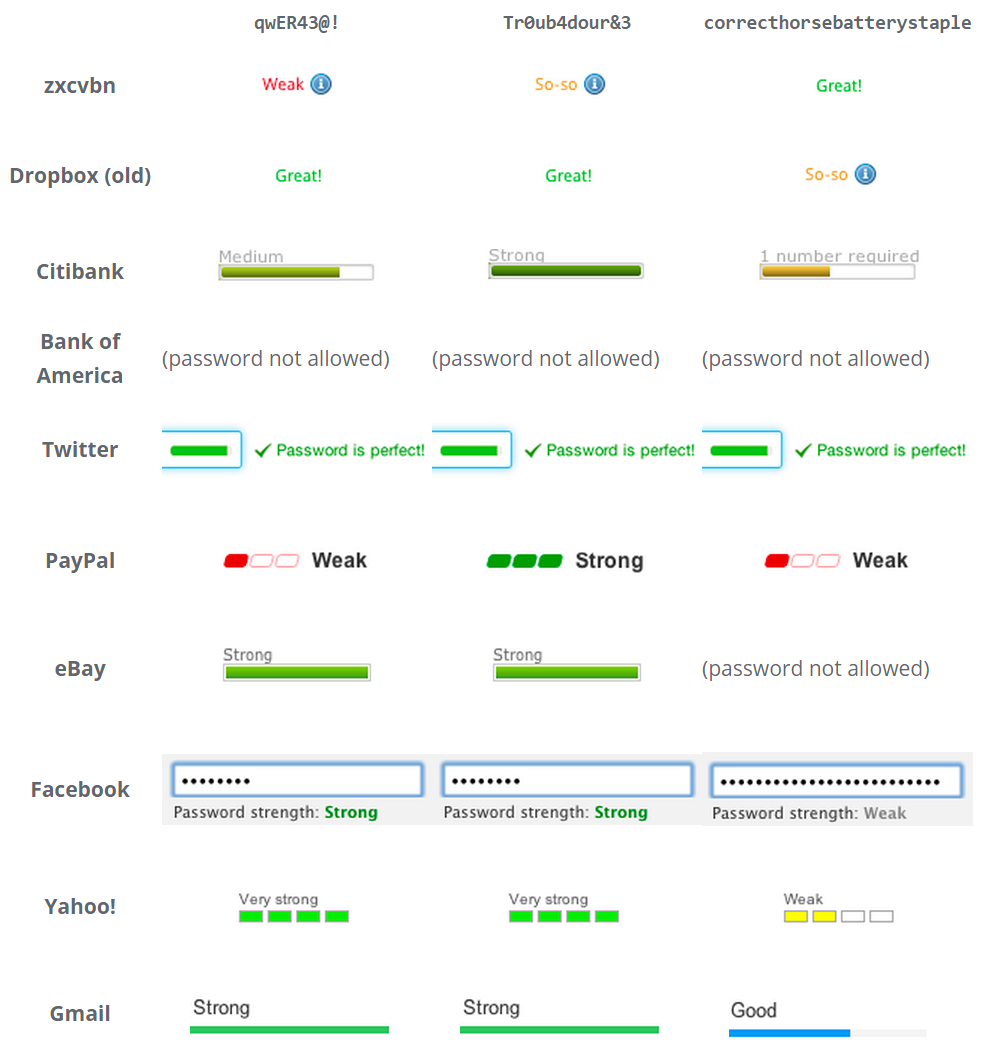
This is commonly done with an ambient password strength meter, which provides real time feedback as you type.

If you can't avoid storing the password – the first two items I listed above are both about avoiding the need for the user to select a 'new' password altogether – then showing an estimation of password strength as the user types is about as good as it gets.

The easiest way to build a safe password is to make it long. All other things being equal, the law of exponential growth means a longer password is a better password. That's why I was always a fan of passphrases, though they are exceptionally painful to enter via touchscreen in our brave new world of mobile – and that is an increasingly critical flaw. But how short is too short?

When we built Discourse, I had to select an absolute minimum password length that we would accept. I chose a default of 8, based on what I knew from my speed hashing research. An eight character password isn't great, but as long as you use a reasonable variety of characters, it should be sufficiently resistant to attack.

By attack, I don't mean an attacker automating a web page or app to repeatedly enter passwords. There is some of this, for extremely common passwords, but that's unlikely to be a practical attack on many sites or apps, as they tend to have rate limits on how often and how rapidly you can try different passwords.

What I mean by attack is a high speed offline attack on the hash of your password, where an attacker gains access to a database of leaked user data. This kind of leak happens all the time. And it will continue to happen forever.

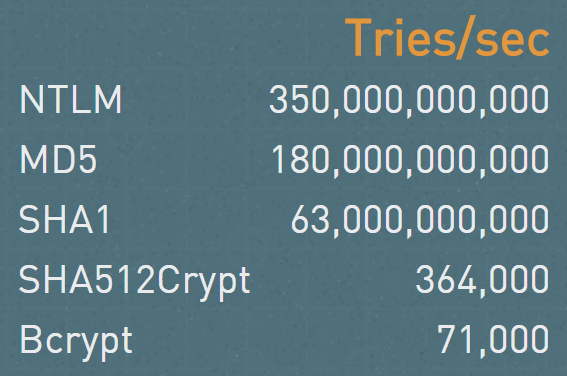
If you're really unlucky, the developers behind that app, service, or website stored the password in plain text. This thankfully doesn't happen too often any more, thanks to education efforts. Progress! But even if the developers did properly store a hash of your password instead of the actual password, you better pray they used a really slow, complex, memory hungry hash algorithm, like bcrypt. And that they selected a high number of iterations. Oops, sorry, that was written in the dark ages of 2010 and is now out of date. I meant to say scrypt. Yeah, scrypt, that's the ticket.

Then we're safe? Right? Let's see.

You might read this and think that a massive cracking array is something that's hard to achieve. I regret to inform you that building an array of, say, 24 consumer grade GPUs that are optimized for speed hashing, is well within the reach of the average law enforcement agency and pretty much any small business that can afford a $40k equipment charge. No need to buy when you can rent – plenty of GPU equipped cloud servers these days. Beyond that, imagine what a motivated nation-state could bring to bear. The mind boggles.

Even if you don't believe me, but you should, the offline fast attack scenario, much easier to achieve, was hardly any better at 37 minutes.

Perhaps you're a skeptic. That's great, me too. What happens when we try a longer random.org password on the massive cracking array?

9 characters 2 minutes
10 characters 2 hours
11 characters 6 days
12 characters 1 year
13 characters 64 years

The random.org generator is "only" uppercase, lowercase, and number. What if we add special characters, to keep Q*Bert happy?

8 characters 1 minute
9 characters 2 hours
10 characters 1 week
11 characters 2 years
12 characters 2 centuries

That's a bit better, but you can't really feel safe until the 12 character mark even with a full complement of uppercase, lowercase, numbers, and special characters.

It's unlikely that massive cracking scenarios will get any slower. While there is definitely a password length where all cracking attempts fall off an exponential cliff that is effectively unsurmountable, these numbers will only get worse over time, not better.

So after all that, here's what I came to tell you, the poor, beleagured user:

Unless your password is at least 12 characters, you are vulnerable.

That should be the minimum password size you use on any service. Generate your password with some kind of offline generator, with diceware, or your own home-grown method of adding words and numbers and characters together – whatever it takes, but make sure your passwords are all at least 12 characters.

Now, to be fair, as I alluded to earlier all of this does depend heavily on the hashing algorithm that was selected. But you have to assume that every password you use will be hashed with the lamest, fastest hash out there. One that is easy for GPUs to calculate. There's a lot of old software and systems out there, and will be for a long, long time.

And for developers:

  1. Pick your new password hash algorithms carefully, and move all your old password hashing systems to much harder to calculate hashes. You need hashes that are specifically designed to be hard to calculate on GPUs, like scrypt.

  2. Even if you pick the "right" hash, you may be vulnerable if your work factor isn't high enough. Matsano recommends the following:

    • scrypt: N=2^14, r=8, p=1

    • bcrypt: cost=11

    • PBKDF2 with SHA256: iterations=86,000

    But those are just guidelines; you have to scale the hashing work to what's available and reasonable on your servers or devices. For example, we had a minor denial of service bug in Discourse where we allowed people to enter up to 20,000 character passwords in the login form, and calculating the hash on that took, uh … several seconds.

Now if you'll excuse me, I need to go change my PayPal password.

[advertisement] What's your next career move? Stack Overflow Careers has the best job listings from great companies, whether you're looking for opportunities at a startup or Fortune 500. You can search our job listings or create a profile and let employers find you.
01 May 02:14

Introducing Visual Studio Code for Windows, Mac, and Linux

by Scott Hanselman
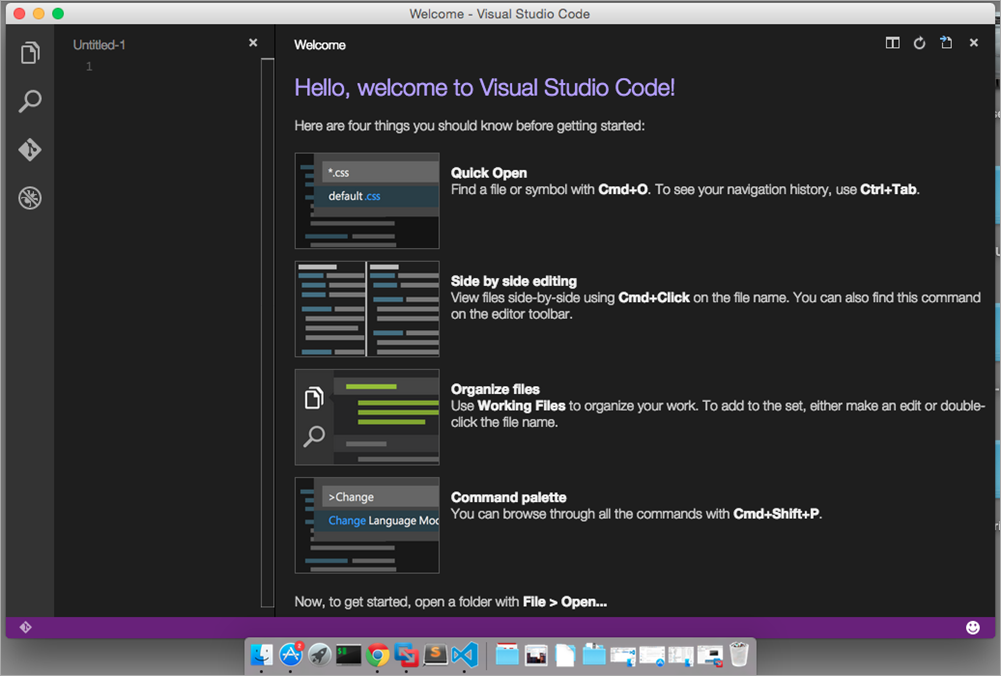
Screen Shot 2015-04-28 at 11.33.49 PM

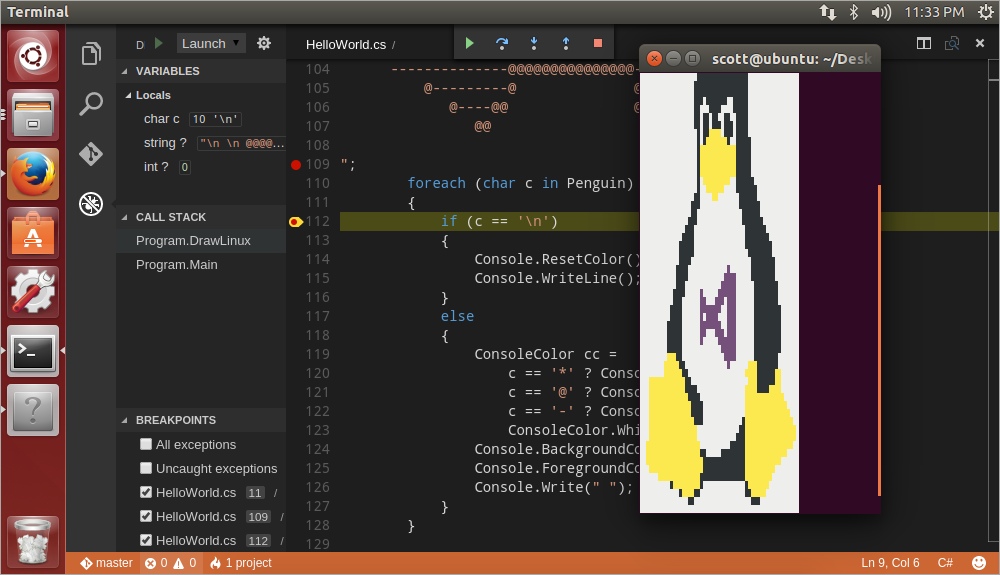
What a wonderful time to be developer. I'm down here at the BUILD Conference in San Francisco and Microsoft has just launched Visual Studio Code - a code-optimized editor for Windows, Mac, and Linux and a new member of the Visual Studio Family.

Visual Studio Code (I call it VSCode, myself) is a new free developer tool. It's a code editor, but a very smart one. It's cross-platform, built with TypeScript and Electron, and runs on Windows, Mac, and Linux.

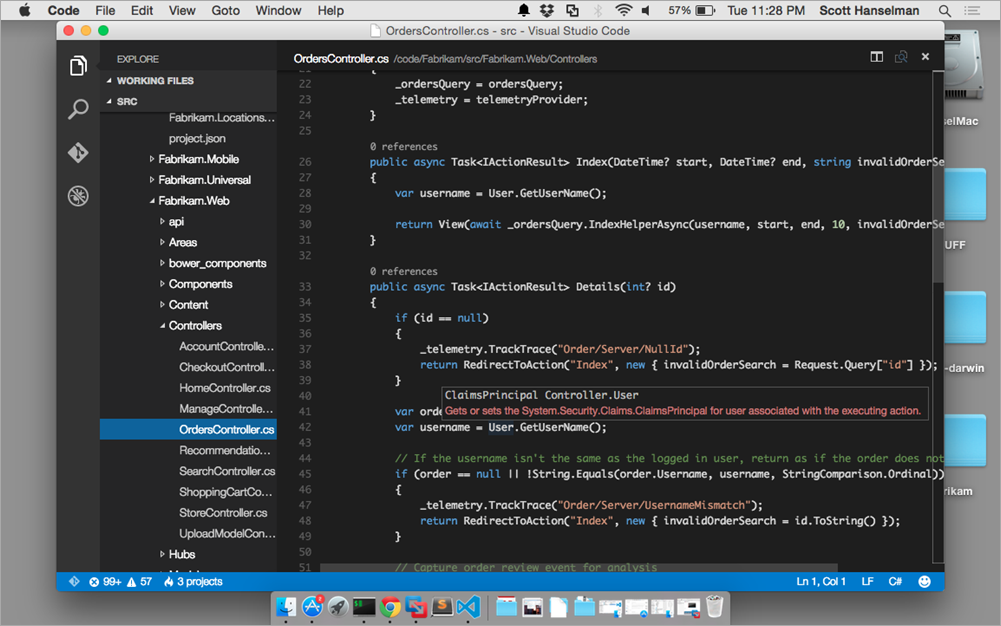
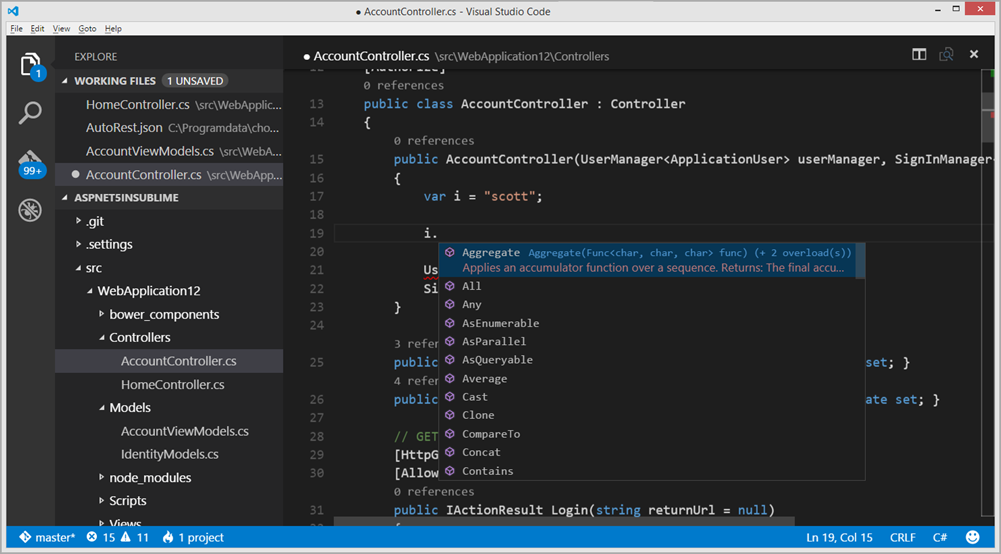
Visual Studio Code has syntax highlighting for dozens of languages, the usual suspects like CoffeeScript, Python, Ruby, Jade, Clojure, Java, C++, R, Go, makefiles, shell scripts, PowerShell, bat, xml, you get the idea. It has more than just autocomplete (everyone has that, eh?) it has real IntelliSense. It also as IntelliSense for single files like HTML, CSS, LESS, SASS, and Markdown. There's a huge array of languages that Visual Studio Code supports.

IMHO, the real power of this editor is its project IntelliSense for C#, TypeScript, JavaScript/node, JSON, etc. For example, when an ASP.NET 5 application is being edited in Visual Studio Code, the IntelliSense is provided by the open source projects Roslyn and OmniSharp. This means you get actual intelligent refactoring, navigation, and lots more. Visual Studio Code's support for TypeScript is amazing because it has JavaScript and TypeScript at its heart.

Visual Studio Code has git support, diffs, interesting extensibility models through gulp, and is is a great debugger for JavaScript and Nodejs apps. They are also working on debugging support for things like the .NET Core CLR and Mono on all platforms.

This a code-focused and code-optimized lightweight tool, not a complete IDE. There's no File | New Project or visual designers. If you live and work in the command line, you'll want to check free tool out.

You can download Visual Studio Code now at http://code.visualstudio.com.

They'll be blogging at http://blogs.msdn.com/b/vscode and you can email them feedback at vscodefeedback@microsoft.com and follow them at @code.

Download Visual Studio Code and check the the docs to get started. Also note the docs for ASP.NET support and Node.js support. Visual Studio Code is a preview today, but it's going to move FAST. It automatically updates and will be updating in weeks, not months.

And here's some screenshots of Visual Studio Code because it's awesome. Code what you like, how you like, on what you like, and you can run it all (by the way) in Azure. ;)

Screen Shot 2015-04-28 at 11.17.59 PM
Screen Shot 2015-04-28 at 11.28.35 PM

 
image

Have fun!


Sponsor: Big thanks to the folks over at Grape City for sponsoring the feed this week. GrapeCity provides amazing development tools to enhance and extend application functionality. Whether it is .NET, HTML5/JavaScript, Reporting or Spreadsheets, they’ve got you covered. Download your free trial of ComponentOne Studio, ActiveReports, Spread and Wijmo.


© 2015 Scott Hanselman. All rights reserved.
     
01 May 02:14

Introduction to the Internet of Things – From the Device to Microsoft Azure Cloud

by MVP Award Program

Editor’s note: In partnership with Microsoft Press, MVPs have been contributing to an ongoing guest series on their official team blog. Today’s article is from Visual C++ MVP Alon Fliess and is the 51st in the series.

Technology advances in “Buzzwords” steps. At the beginning, there is the basic technology. It slowly evolves, and then after a few years, sometimes even many years, everything becomes connected and the world, not the early bird world, but everybody is ready to embrace that technology. This is where the big buzz begins and everybody predicts that in five to ten years the technology will generate incremental revenue exceeding hundreds of billions. With this buzz, all major companies invest in the technology and we begin seeing TV news reports and economy magazine articles about the technology, telling that the everyday life of every human being on the planet is going to change because of that technology!

Of course, I am a bit cynical, but this is exactly what is happening now with regards to the IoT – the Internet of things. The basic technology is already here for almost a decade so far. Amazon Web Services (ASW) started in 2006. Microsoft Azure is 5 years old. Devices such as those based on the Amtel AVR  controller are more than 20 years old, and the affordable Arduino family of devices used by IoT hobbyists are 10 years old. It is not (just) the technology that makes IoT what it is, but the concepts, the perception, the commitment and the challenges that the entire industry is dealing with nowadays. IoT is about the machine-to-machine (M2M) communication at scale. Vast numbers of devices using different hardware and software technologies are connected between them and to the cloud. The cloud provides many services, which can handle huge streams of data, analyze and can extract vital information about the current state of the system and can even predict future state.

So what exactly is IoT?

In one simple form, IoT is about a device that can monitor a physical character of the environment and transfer this data over the Internet to a cloud service. In a more complex form, IoT is the combination of many smart devices that can “feel” the environment, read the data, and transfer this information to a collector service in the cloud. This service has to deal with large amounts of devices and huge streams of data. Such services take in information and can extract a vital information from a live stream, or run algorithms such as those based on big-data map-reduce patterns. Services can act on historical and new data, or can provide future insight about the collected data. Services like Azure Machine Learning can use the collected data to predict future behaviors. The cloud can send commands to devices. Take for an example a system that starts the water sprinklers according to an algorithm that reads information from a group of soil moisture level sensors. Based on information that it gets from a forecast service that predicts that no rain is coming, it decides to send a command to an actuator that starts the sprinklers.

Sometimes the end device has the capabilities to communicate directly with the cloud service, and sometimes the device is cheap, weak, and has to conserve power, or has no encryption capabilities. In the latter case, a group of such weak devices is connected to a local gateway – a software that runs on a stronger local device that serves as a mediator between the local device sub-network and the cloud.

To illustrate, let us take a simple personal and fun project – which I have only recently turned into an IoT projectJ). With this project, I can control my home electrical devices such as lights, shutters, hot water boiler, and the air condition. I can use a web browser, Windows Phone or Windows 8.1 Modern application to send a command or read the current state of a device. I have other services that turn on the garden lights on sunset, or raise the shutters automatically every morning except on weekend days. I even have a service that sets the boiler according to the forecast.  Continue reading full article here


Thanks

I would like to thank Microsoft Azure MVP Michele Leroux Bustamante for technical reviewing and editing the article. I also would like to thank Aaron Etchin for spending the time discussing with me my ideas and the way to present them and for the patience of reviewing this and previous articles. I would like to thank the MVP team – Melissa Travers, Hande Kayadeniz Torkan and Lina Magdy for encouraging me to write and publish articles and last but not least to my wife Liat and my kids: Yarden, Saar and Adva.


About Alon Fliess


Alon Fliess is the Chief Architect & Founder of CodeValue. CodeValue is the home of software experts. We build software tools, foundations and products for the software industry. We Build OzCode – Your road to magical debugging! We offer mentoring, consulting and project development services.

About MVP Monday

The MVP Monday Series is created by Melissa Travers. In this series we work to provide readers with a guest post from an MVP every Monday. Melissa is a Community Program Manager, formerly known as MVP Lead, for Messaging and Collaboration (Exchange, Lync, Office 365 and SharePoint) and Microsoft Dynamics in the US. She began her career at Microsoft as an Exchange Support Engineer and has been working with the technical community in some capacity for almost a decade. In her spare time she enjoys going to the gym, shopping for handbags, watching period and fantasy dramas, and spending time with her children and miniature Dachshund. Melissa lives in North Carolina and works out of the Microsoft Charlotte office.

01 May 02:14

Beware of the Native Microsoft NVMe Driver!

Non-Volatile Memory Express (NVMe) is a specification for accessing solid-state drives (SSDs) attached through the PCI Express (PCIe) bus. It gives lower storage latency and much higher queue depths. Even though this technology is most relevant for server workloads, there are also some affordable new NVMe devices meant for client devices and workloads. A good primer on NVMe is available here.

The use case from nvmexpress.org is that

“NVM Express is architected from the ground up for Non-Volatile Memory (NVM). NVM Express significantly improves both random and sequential performance by reducing latency, enabling high levels of parallelism, and streamlining the command set while providing support for security, end-to-end data protection, and other Client and Enterprise features users need. NVM Express provides a standards-based approach enabling broad ecosystem adoption and PCIe SSD interoperability.”

NVMe is being pushed as a modern replacement for the old Advanced Host Controller Interface (AHCI) that most flash storage devices are still using, and all indications are that NVMe will really start to become more popular and more affordable in 2015/2016.

Windows Server 2012 R2 and Windows 8.1 have a native NVMe driver that allows NVMe devices to be automatically recognized by Windows. This driver works, but does not offer the best performance. I wrote about my experiences with the native NVMe driver last October. Microsoft has also released a hotfix to Windows Server 2008 R2 and Windows 7 that gives native NVMe support to the operating system.

Anandtech has had similar results with several different NVMe devices. Their information (from Samsung) was that

“the performance difference was due to the Microsoft NVMe driver creating FUA (Force Unit Access) I/O write commands. These FUA commands bypass the DRAM cache on the SSD and directly write to the flash, increasing the response time and also lowering bandwidth. For the same access traces, this situation does not happen with the Microsoft AHCI driver.”

This sounds pretty similar to the difference between write-back and write-through caching for RAID controllers. If you have any NVMe storage devices, you should make absolutely sure that you are using the vendor supplied NVMe driver rather than the generic Microsoft NVMe driver. My fear is that it will be very common for many server administrators to simply install their NVMe device, start the server, and then think everything is ok, since Windows recognized the device and it seems to be working.

There are a lot of recent tests of new NVMe storage devices to whet your appetite for this technology. Here are some reviews and tests of client devices:

PCIe SSD Roundup – Samsung SM951 NVMe vs. AHCI, XP941, SSD 750 and More!

Intel SSD 750 Review

Intel 750 series SSD review: Storage so fast, only the highest-end PCs can keep up 

Intel SSD 750 Series NVMe PCI Express SSD Review

Intel 750 Series 1.2TB NVMe PCIe SSD Review

Here are  some reviews of server devices:

Intel SSD DC P3700 Review: The PCIe SSD Transition Begins with NVMe

Intel SSD DC P3700 800GB and 1.6TB Review: The Future of Storage

Intel SSD DC P3700 Review (800GB) – NVMe for Enterprise…and Enthusiasts?

Hopefully, Microsoft will improve the performance of their native NVMe driver in a future update for Windows Server 2012 R2 and Windows 8.1. I certainly hope the native NVMe driver performs better in Windows 10 and “Windows Server 2016”. I would love to see Microsoft’s Jose Barreto weigh in on this subject!

01 May 02:13

Azure SQL Database Security Features

by Kun Cheng (SQLCAT)

The Microsoft Azure platform is evolving fast. Azure SQL Database, which is a Relational Database service running on Azure, is riding high on the cloud wave with new features enabled at a fast pace. I want to share a few Azure SQL Database security features currently in GA or public preview) that could help developers and DBAs develop and manage a secure SQL Database solution. All security features mentioned in this blog are available for Basic, Standard, and Premium databases in v12 servers.

Feature

Status

Target scenario

Firewall

GA

All

Secure connection

GA

All

Auditing

GA

Log data access/change trails for regulatory compliance

Data masking

Public preview (V12)

Obfuscate confidential data in the result set of a query.

Row-level security (RLS)

Public preview (V12)

Multi-tenant data access isolation.


Firewall (GA) – This feature has been available for Azure SQL Database since the very beginning. It’s a way for DBAs to control which clients, based on IP addresses, can access a logical Azure SQL Server or a specific database. By default, for a newly created logical server, no firewall rules are defined and nobody outside of Azure can access any database on that server yet. You must define a rule to start the first connection. Note the firewall rule IP ranges between server level and database level don’t overlap. You may also allow other Azure services to access your server or database using a single rule by selecting a checkbox rather than based on IP addresses.

Secure connection (GA) – SQL Database requires secure communication from clients based on the TDS protocol over TLS (Transport Layer Security). Note for application to be truly protected against man-in-the-middle type of attack, we encourage you to follow these guidelines to explicitly request an encrypted connection and do NOT trust server side certificate.

Auditing (GA) – Allows customers to record selected database events in log files for alerting and post-mortem analysis, for example, as part of maintaining regulatory compliance such as PCI, HIPAA. Common auditing events include insert, update, and delete events on tables. Using SQL Database Auditing, you can store the audit logs in Azure table storage and build reports on top of them. There is preconfigured dashboard report template available for download (requires Excel 2013 or later plus Power query). SQL Database Auditing requires the use of a secure connection string.

Data masking (public preview) – Is a policy based security feature that limits exposure of sensitive data like credit card numbers, social security numbers, clinic patient info to non-privileged users. Similar to Auditing, it’s useful for scenarios with compliance requirements. You may specify masking rules to be applied to designated fields, either at source (tables/columns), or at results (alias used in queries). Note that masking rules are applied to the appropriate data in the result set of a query. Unlike encryption, data masking does NOTprotect sensitive data at rest or during query processing in memory. Data masking requires the use of a secure connection string.

Row-level security (RLS) (public preview) – The feature is aimed at multi-tenant applications that share data in a single table within the same database. Typically, application developers currently have to build logic in the application code to isolate tenants from accessing each other’s. In contrast, RLS centralizes the isolation logic within the database, simplifying application design and reducing the risk of error. With RLS security policy managers can encode the isolation logic in a security policy using inline table-value functions. An example of how to use RLS in a middle-tier, multi-tenant application can be found here.


Additional security resources:

01 May 02:13

SQL Server 2005 support ends April 2016. Are you ready?

by SQL Server Team

Don’t get caught off-guard.

Upgrading to Microsoft SQL Server 2014 helps you maintain security and compliance, gain faster data insights, and optimize your data infrastructure—all using familiar tools you already know and trust.

Be prepared when extended support for SQL Server 2005 ends. Protect your data with a thoughtful upgrade plan and mitigate cost and risk. Read this complimentary report today to learn more about the robust backward compatibility features and tools that enable a range of migration options. 

Read Directions on Microsoft’s report: Migrating from SQL Server 2005

01 May 02:13

Forced parameterization to the rescue

by JackLi

Some of the features have been around for a long time.  But we keep seeing users not taking advantage of it.   I wanted to give you an example how forced parameterization can help you.

Recently I worked with a customer with a very active system serving many concurrent users.  Here is some basic information:

  1. CPU: 160 logical CPU (80 cores with hyper-threading enabled)
  2. RAM: 2TB RAM
  3. Active users: about 1400
  4. Batch requests/sec:  averaging 4000 or above

This is very mission critical system.  When their users reached max of 1400 and CPU reached above 70-80%, their application started to slow down.    With high CPU, the usual troubleshooting is the tune heavy hitter queries.  But SQL Nexus & RML report showed that there wasn’t predominant set of queries to tune.  The screenshot bellowed showed that top 10 queries accumulatively accounted for less than 20% of total CPU consumed.   This made it hard to focus and tune individual queries.


image


We noticed that the compilation was fairly high as shown in the screenshot below.  SQL Compilation/sec averaged 730.

image


With compilation being this high, it usually was because ad hoc queries were used at high rate.  To prove this, we pulled out “SQL Plan” out of “Cache Object Counts”.   It was almost over 160,000 (see screenshot below)!   This counter meant that there were almost 160,000 ad hoc plans in the plan cache!

image


Solution

Many times, ad hoc queries at high rate can cause issues such as wasting CPU to compile and wasting plan cache memory.   We had this customer enable “Forced Parameterization” for the database.  After that, the CPU dropped to 10-20% even with highest user load and performance became super fast.

Sometimes, a solution may be simpler than you might have thought.  Just keep this option handy.  If things don’t work out, it’s easy to back it out.  Over the course of troubleshooting performance issues, I have used this trick many times.  I hope this serve as a reminder for you.


Jack Li | Senior Escalation Engineer | Microsoft SQL Server Support

twitter| pssdiag |Sql Nexus

01 May 02:13

Azure Premium Storage provides highest performance for SQL Server in Azure VM

by SQL Server Team

Last week we announced the General Availability of Azure Premium Storage for Azure Virtual Machines.

Premium Storage provides steady high throughput (up to 64,000 IOPs; 8x more than Standard Storage) at low latency (single-digit milliseconds; 8x less than Standard Storage). This enables enterprise SQL Server workloads (OLTP or Data warehousing) needing consistent high performance to run on Azure VM.

During the Preview of Azure Storage we worked with many SQL Server customers of different workload sizes to ensure that Premium Storage satisfied their requirements on Azure VM.  Here are some examples of customer results:

  • Transaction latency for thousands of concurrent users consistently within 10ms
  • Query times over large data sets reduced from minutes in standard storage to seconds
  • Batch loads for millions of records reduced from hours in standard storage to minutes
  • Backup/restore times on large databases reduced from many hours in standard storage to less than one hour

Azure Premium Storage and SQL Server

Premium Storage is based on Solid State Disks (SSD) in the storage backend, dedicated fast connections between the storage backend and new compute clusters, and VMs local read-only caches that are also SSD-based. Writes are sent to the backend to guarantee their persistence via 3 copies. Writes trigger an update on the VM read-only cache. Reads that can be served from the cache return immediately; others are served quickly from the backend, also updating the cache as a result. More details here.

VMs using Premium Storage get a guaranteed higher storage bandwidth to serve writes and reads. Reads served from the cache are not counted towards this bandwidth. The high bandwidth allows writing and reading more data per second to the storage. This increases transaction throughput and reduces the time for query scans and other operations such as backup/restore, batch loads, and index rebuilds.

The following PerfMon picture shows a SQL Server backup consistently reading and writing ~500MB/s:

The main benefit of the fast storage writes is lowering SQL Server transaction latency. This is achieved by shortening the time to synchronously write commit records to the log file. This benefits both standalone and AlwaysOn configurations, where the secondary must ACK writing commit records. Besides this, the fast storage writes reduce the time for other SQL Server write operations (e.g. checkpoints (asynchronously writing dirty pages to disk), AlwaysOn secondary’s log redo, etc).

The main benefit of fast reads is lowering SQL Server query time. This is achieved by shortening the time to retrieve data pages, especially if served from the read-only cache. In addition, the higher storage bandwidth aids retrieving more data pages. The benefit of the read-only cache is for data files, as data pages are read very frequently. There is no benefit for log files, as log records are only read during distant operations (e.g. backups).

The following PerfMon picture shows a SQL Server workload executing an average of 9K Batch Requests per second. This accounts for 20K reads and 17K writes per second (37K IOPs). The average read latency is just 1ms with a max of 6ms, and the average write latency is just 3ms with a max of 10ms.

Azure Premium Storage Options

There are 3 types of Premium Storage disks to choose from: P10, P20, and P30. The type of disk is determined by its size. Each disk type is assigned a different number of IOPs and bandwidth:

Disk Type

Disk Size

Storage IOPS

Storage Bandwidth (MB/s)

P10

128 GB

500

100

P20

512 GB

2300

150

P30

1024 GB

5000

200


To support Premium Storage, there is a new series of VMs called DS-Series. The capabilities of these VMs are below:

 VM Size

CPU Cores

Max

Storage Disks

Max Storage Space

Max Storage IOPS*

Max Storage Bandwidth (MB/s)

Cache size (GB)

DS1

1

2

2 TB

3,200

32

43

DS2

2

4

4 TB

6,400

64

86

DS3

4

8

8 TB

12,800

128

172

DS4

8

16

16 TB

25,600

256

344

DS11

2

4

4 TB

6,400

64

72

DS12

4

8

8 TB

12,800

128

144

DS13

8

16

16 TB

25,600

256

288

DS14

16

32

32 TB

50,000

512

576

  * Doesn’t include IOPs directly from the VM read-only cache

Notice that the total number of IOPs and bandwidth will depend on the combination of VM size, number of disks, and the sizes of these disks.

Consider the size of your database, workload requirements, and pricing when choosing the above. Notice that a VM can have disks with different sizes and, it’s even possible to mix disks from Premium and Standard storage. More details here.

Creating a new SQL Server Virtual Machine using Premium Storage

  1. Go to the new Azure Portal
  2. Create a storage account of type Premium Locally Redundant

    Notice that there is a limit of 32TB per storage account. If you need more storage, then create more storage accounts.
  3. Create a new VM using a SQL Server Image from the Gallery, specifying a DS-Series VM, and the Premium Storage account that you previously created (type PREMIUM-LRS). Notice that this VM can’t be added to resource groups that have other VM Series (DS-Series are hosted by new compute clusters).

  4. Attach disks to the VM
    Select the VM that you previously created, go to Disks, and select Attach New. Choose the Premium Storage account that you previously created, a container for the disk (by default vhds), the disk file name, size, and caching. A common basic configuration is using 3 disks, one for data, another for log, and another for TempDB.

Migrating an existing SQL Server to Premium Storage

Notice that it’s not possible to upgrade an existing Standard Storage account to Premium Storage and that DS-Series VMs can’t be added to a Resource Group that have other VM Series. 

To migrate an existing SQL Server to Premium Storage please create a new DS-Series VM that uses a Premium Storage account. Then backup and restore your databases and copy your SQL configuration (equivalent to a side-by-side migration).

To reduce downtime during the migration to few minutes:

  1. Take a full backup of the databases and restore them to the new SQL VM
  2. Disconnect the clients from the databases in the old SQL VM
    ALTER DATABASE SET SINGLE_USER WITH ROLLBACK AFTER 20 SECONDS
  3. Take a log backup of the databases (for any final transactions) and restore them to the new SQL VM
  4. Change the clients connection string to point to the new SQL VM

If you are using SQL AlwaysOn Availability Groups you can minimize downtime during the migration to seconds. Availability Groups allow you to failover a group of databases from a primary SQL Server replica to a secondary SQL Server replica in seconds without data loss. In addition, applications connect to the primary replica using a listener (virtual network name), so their connection string doesn’t need to change.

You can add a synchronous secondary SQL Server replica in a DS-Series VM that uses Premium Storage and failover to it. Notice that you will need to add the secondary replica VM to the same Windows Domain and the same Windows Cluster as the primary replica. In addition, you will need to create an endpoint for the secondary replica VM and add it to the load balancer supporting the Availability Group listener.

More details here.

Performance Best Practices

Most existing performance best practices apply to Premium Storage. Premium Storage disks have much higher bandwidth and IOPs limits than Standard Storage disks, thus a smaller number of Premium Storage disks will satisfy the performance requirements (especially for P30 disks). Consider the bandwidth and IOPs limits of the DS-Series VM sizes when determining the number and types of disks.

To get the highest performance:

  1. Use a Premium storage account and VM in the same region
  2. Use separate disks for data files, log files, and TempDB files
  3. Enable the read-only cache for data disks and TempDB disks, but not for log disks
  4. If you need higher bandwidth or IOPs: use Storage Spaces over multiple disks to aggregate their IOPs, bandwidth, and storage space. Use separate Storage Spaces for data and log. Depending on your TempDB requirements you could put TempDB in the Storage Pool for data files or in a different pool.

Summary

Premium Storage provides steady high throughput at low latency. This enables enterprise SQL Server workloads (OLTP or Data warehousing) needing consistent high performance to run on Azure VM.

Many SQL Server customers of different workload sizes have satisfied their requirements on Azure VM using Premium Storage. We hope that you will too!

Premium Storage is available in the following regions: West US, East US 2, West Europe, East China, Southeast Asia, West Japan. It’ll become available in other regions soon.


Learn more about SQL Server on Azure VM and try Premium Storage today!

01 May 02:13

Andy-Frickin-Leonard

by andyleonard
A few years ago at a conference, a young man approached me and asked if I was ready for my presentation. I squared with him (for emphasis) and replied, “No, sir. In fact, I’m worried about it.” He looked a little stunned and said, “Why?” “I’ve never done this presentation before, I don’t like the flow of the material yet, and I’m concerned it’s going to fall flat when I deliver it.” Looking aghast, he said, “But… you’re Andy-frickin-Leonard. ” “I’ve been trapped in here with me for several decades...(read more)
01 May 02:13

Playing with the Filestream storage on Sunday

by Damian

Today I was asked to do a pretty easy thing. The task was to add a filestream support to a table that already stores some documents. The customer wants to keep the data outside the database because he uses the SQL Server 2014 Express edition. According to the MSDN page there is limitation of 10GB that can be stored in this edition and filestream data are not taken into the consideration to this limit.

But let’s go back to work now. The first thing we would have to do is to enable filestream support on the server level. That can be done using the SQL Server Configuration Manager or by sp_configure stored procedure. I prefer the second way. Please remember – you have to be a sysadmin to configure that.

use demo_db

go


EXEC sys.sp_configure N'filestream access level', N'2'

GO

RECONFIGURE WITH OVERRIDE

GO


The second step is to make the database aware of the filestream support. To do so you need to add a new filegroup to this database. The filegroup is a special one as it will contain the filestream data. By the way – it is of course possible to have more than one such filegroup in a database but only one of them can be marked as default.

ALTER DATABASE demo_db ADD FILEGROUP demoFS CONTAINS FILESTREAM

GO


When a filegroup is in place then it’s time to add file into it.  There is also possible to have more than one file in the filestream filegroup.

ALTER DATABASE  demo_db

ADD FILE

(

    Name = demo_dbFS,

    FILENAME = 'C:\dbdemo',

    Maxsize = UNLIMITED

) TO FILEGROUP demoFS;


Now it’s time to get into the table level. The customer has one table that should contain the filestream data.  Now the data are stored in the column that is called Data and is type of varbinary(MAX). In order to have filestream aware table you have to do 3 things:

  • Add a column that is a type of uniqeidentifier and is marked as rowguidcol.

  • Set filestream_on option on the table

  • Add new column of varbinary(MAX) type and mark it for filestream data


Follow the three statements below:

ALTER TABLE dbo.Documents

ADD filestreamguidcol uniqueidentifier not null ROWGUIDCOL unique default newid()

GO


ALTER TABLE dbo.Documents

SET (filestream_on=demoFS)

GO


ALTER TABLE dbo.Documents

Add DataFS varbinary(max) FILESTREAM null

GO


After we did the necessary setup now is the time to transfer data from the existing column (Data) to the filestream column (DataFs). I did it  by running the simple UPDATE command:

UPDATE dbo.Documents

SET DataFS = Data

GO


Now it’s safe to drop the Data column:

ALTER TABLE dbo.Documents

DROP COLUMN [Data]

GO


The last step in this example is to rename the new column (DataFS) to the one that existed and was dropped in the previous step (Data) so I do not have to change the existing application data access layer. If you wish you could refresh all dependent objects at the end.

EXEC sp_rename

    @objname = 'Documents.DataFS',

    @newname = 'Data',

    @objtype = 'COLUMN'

GO

By the way – there are at least two great sources of information (also internals) and some myth busters done by Paul Randal and Bob Beauchemin.

Cheers,

Damian

01 May 02:09

Non Parallelizable operations in SQL Server

by simonsabin
Anyone working on SQL Server will have banged their head against a wall at one point or another trying to figure why a query hitting millions of rows isn’t being done in parallel. Well there have been a number of blogs posts about this, Craig Freedman...(read more)
01 May 02:08

Your Master Data is a Graph: Are You Ready? Whitepaper, Webinar

by Karen Lopez

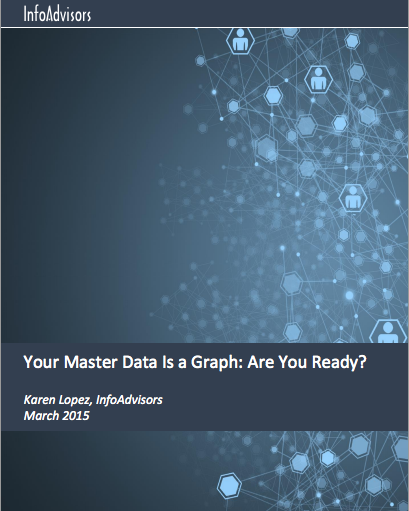
Neo4j White Paper: Your Master Data Is a Graph: Are You Ready?I recently wrote a whitepaper, sponsored by Neo4j, on how your master data (think cross-application data like CUSTOMER, PRODUCT, ORGANIZATION, etc.) is much more valuable to your organization if you can leverage the relationships between the data.  You might think that relational databases are all about relationships, but they aren’t.  The relational in relational database comes from the fact that data is a relation (a table-like structure of columns and rows). 

The best thing we have for describing relationships in a relational database is a foreign key (FK).  An FK is a constraint between two tables.  In a relational database, FKs enforce integrity between exactly two tables.  But in the real world, relationships are more than constraints.  They are implied, inferred and, maybe even just plausible.  That’s not a constraint; that’s a relationship.  And these relationships often exist because they span multiple tables.  Think about CUSTOMERs that are related because they live at ADDRESSes near each other, they have TRANSACTIONs at the same RETAIL STORE and they buy the same PRODUCTs and SERVICEs.  That’s a specific relationship, one that has nothing to do with foreign keys.

You can download my whitepaper at http://neo4j.com/resources/wp-master-data-graph/ 

Note that while Neo Technology sponsored this paper, they had no editorial control over its content.


This week I’m also doing a webinar about some of the content of the paper.  Kamile Nixon of Neo Technology will join me in this discussion.  You can register at http://info.neo4j.com/0430-register.html 

I think this one will be a lot of fun. Kamile and I have worked together on many things over the years. She and I share the same sort of sense of humour. You have been warned.


Webinar: Your Master Data is a Graph: Are You Ready?

Thursday, April 30 at 09:00 PDT | 18:00 CEST

REGISTER NOW

As you tackle your ongoing Master Data Management challenges, it’s important to keep a few things in mind: Hierarchies don’t really exist Relational isn’t about relationships Foreign keys aren’t relationships, but constraints It’s crazy, isn’t it?

Join Master Data Management expert Karen Lopez and Neo Technology’s Kami Nixon as they discuss today’s MDM requirements and explore the companies that are getting MDM right.

In this webinar, you will learn:

  • Why hierarchies aren’t real
  • How to choose the right technology for the stories your data wants to tell, so your business can use data in ways it couldn’t do before
  • Why relationships are just as important as the things they relate
  • What foreign keys really do to your architecture
  • How companies like Cisco and Polyvore use graphs to get real business value from Master Data

    Karen LopezKaren Lopez, Data Evangelist, InfoAdvisors

    Karen Lopez has more than 20 years of data architecture and database design experience. She specializes in the practical application of design approaches, balancing development time frames with the need to deliver solutions that will support business agility and data quality needs. Known for her practical and sometimes snarky views on the data world, Karen works to find the right tools for the job, even if it means learning something new. She wants you to love your data.

    Kami NixonKami Nixon, Senior Product Marketing Manager, Neo Technology

    A recipient of the 2012 "Graphie", Kamille was a fan of Neo4j for several years before she happily joined the team. Kamille has helped several successful database companies (DataStax, Comindware and Embarcadero Technologies) to identify and execute on market trends so they could pull ahead of the pack. Her efforts have led to doubled vertical bookings, increases by 30% to 100% in year-over-year revenue, and several awards. In addition to the Graphie, Kamille has received several other commendations, including co-authoring with Karen Lopez story #5 in Information Management’s Top 10 for 2011, and Best Investigative Journalism in a national competition.

    01 May 02:08

    Server’s “Max Degree of Parallelism” setting, Resource Governor’s MAX_DOP and query hint MAXDOP–which one should SQL Server use?

    by JackLi

    SQL Server allows a user to control max degree of parallelism of a query in three different ways.   Just for references, here is a list of documentation:

    1. SQL Server wide “max degree of parallelism” configuration is documented in max degree of parallelism Option.   Microsoft Support has recommended guidelines on setting max degree of parallelism per KB “Recommendations and guidelines for the "max degree of parallelism" configuration option in SQL Server”.
    2. Resource Governor’s MAX_DOP is documented in CREATE WORKLOAD GROUP
    3. MAXDOP query hint is documented in “Query Hints (Transact-SQL)

    What is effective setting if all or some of these settings are enabled?    Permutations of this can be confusing.   So I decided to do some code research and here is the table of all possible combinations of the settings:

    Query Hint (QH)

    Resource Governor (RG)

    Sp_conifgure

    Effective MAXDOP of a query

    Not set

    Not set

    Not set

    Server decides (max cpu count up to 64)

    Not set

    Not set

    Set

    Use sp_configure

    Not set

    Set

    Not set

    Use RG

    Not set

    Set

    Set

    Use RG

    Set

    Not set

    Not set

    Use QH

    Set

    Set

    Not set

    Use min(RG, QH)

    Set

    Set

    set

    Use min (RG, QH)

    Set

    Not set

    Set

    Use QH

    When you reference the above table, please note the following:

    1. 0 of any configure (Query hint, Resource governor, or sp_configure) means max dop is not set.  For example if you use option (MAXDOP 0) query hint, it is considered as MAXDOP hint is not set at query level.
    2. A query can be set to use serial plan regardless of these settings.  Optimizer decides if a plan is serial plan based on cost and certain TSQL constructs (an example if SQL 2014 query use memory optimized table).
    3. Actual DOP can be lower than MAXDOP due to memory or thread shortage. 


    For reference, my colleague Bob Dorr has written a couple of blogs in this space:

    Credits:  I’d like to thank Jay Choe  -- Sr. Software Engineer at Microsoft for reviewing my code research and confirming the findings, and Bob Ward -- CTO CSS AMERICAS at Microsoft for prompting the research on this topic.


    Jack Li |Senior Escalation Engineer | Microsoft SQL Server

    twitter| pssdiag |Sql Nexus

    01 May 02:08

    When DBCC DROPCLEANBUFFERS doesn’t work…

    by Paul Randal

    Here’s an interesting question that came up in our IEPTO1 class in Chicago this week (paraphrasing):

    I was doing a demo recently where I was demonstrating physical I/Os occurring. I used DBCC DROPCLEANBUFFERS, then enabled SET STATISTICS IO ON and performed a SELECT operation. I was expecting to see physical reads occurring but I only saw logical reads. What’s going on? Why weren’t there any physical reads after I’d flushed the buffer pool with DBCC DROPCLEANBUFFERS?

    It’s a very interesting question. If you ask most people what DBCC DROPCLEANBUFFERS does, you’ll get the response that it clears out the buffer pool (as my student expected).

    But it doesn’t.

    It drops *clean* pages from the buffer pool only.

    A clean page is one that has not been changed since it was read into memory or last written to disk. A dirty page is one that has not been written to disk since it was last changed. Dirty pages are not dropped by DBCC DROPCLEANBUFFERS, they are only made clean by writing them to disk (either through one of the various kinds of checkpoints or by the lazy writer – or one of the per-NUMA node lazy writers if you have NUMA configured).

    The demo in question had updated the table being selected, and so when DBCC DROPCLEANBUFFERS was executed, the pages from that table remained in memory – hence no physical reads were required for the subsequent SELECT.

    If you want to ensure that all pages from a database are flushed from memory, you need to first perform a manual CHECKPOINT of that database and then run DBCC DROPCLEANBUFFERS.

    You can then verify that there are no pages in memory for the database in question using the following code:

    SELECT *,
    	[DirtyPageCount] * 8 / 1024 AS [DirtyPageMB],
    	[CleanPageCount] * 8 / 1024 AS [CleanPageMB]
    FROM
    	(SELECT 
    		(CASE WHEN ([database_id] = 32767)
    			THEN N'Resource Database'
    			ELSE DB_NAME ([database_id]) END) AS [DatabaseName], 
    		SUM (CASE WHEN ([is_modified] = 1)
    			THEN 1 ELSE 0 END) AS [DirtyPageCount], 
    		SUM (CASE WHEN ([is_modified] = 1)
    			THEN 0 ELSE 1 END) AS [CleanPageCount]
    	FROM sys.dm_os_buffer_descriptors
    	GROUP BY [database_id]) AS [buffers]
    ORDER BY [DatabaseName]
    GO 
    

    Hope this helps some of you out there!

    The post When DBCC DROPCLEANBUFFERS doesn’t work… appeared first on Paul S. Randal.

    01 May 02:08

    Internals of the Seven SQL Server Sorts – Part 1

    by Paul White

    As far as graphical execution plans are concerned, there is just one icon for a physical sort in SQL Server:

    Sort icon

    This same icon is used for the three logical sort operators: Sort, Top N Sort, and Distinct Sort:

    Logical sort types

    Going a level deeper, there are four different implementations of Sort in the execution engine (not counting batch sorting for optimized loop joins, which is not a full sort, and not visible in plans anyway). If you are using SQL Server 2014, the number of execution engine Sort implementations increases to seven:

    1. CQScanSortNew
    2. CQScanTopSortNew
    3. CQScanIndexSortNew
    4. CQScanPartitionSortNew (SQL Server 2014 only)
    5. CQScanInMemSortNew
    6. In-Memory OLTP (Hekaton) natively compiled procedure Top N Sort (SQL Server 2014 only)
    7. In-Memory OLTP (Hekaton) natively compiled procedure General Sort (SQL Server 2014 only)

    This article looks at these sort implementations and when each is used in SQL Server. Part one covers the first four items on the list.

    1. CQScanSortNew

    This is the most general sort class, used when none of the other available options is applicable. General sort uses a workspace memory grant reserved just before query execution begins. This grant is proportional to cardinality estimates and average row size expectations, and cannot be increased after query execution begins.

    The current implementation appears to use a variety of internal merge sort (perhaps binary merge sort), transitioning to external merge sort (with multiple passes if necessary) if the reserved memory turns out to be insufficient. External merge sort uses physical tempdb space for sort runs that do not fit in memory (commonly known as a sort spill). General sort may also be configured to apply distinctness during the sorting operation.

    The following partial stack trace shows an example of the CQScanSortNew class sorting strings using an internal merge sort:

    CQScanSortNew stack trace

    In execution plans, Sort provides information about the fraction of the overall query workspace memory grant that is available to the Sort when reading records (the input phase), and the fraction available when sorted output is being consumed by parent plan operators (the output phase).

    The memory grant fraction is a number between 0 and 1 (where 1 = 100% of the granted memory) and is visible in SSMS by highlighting the Sort and looking in the Properties window. The example below was taken from a query with only a single Sort operator, so it has the full query workspace memory grant available during both input and output phases:

    image

    The memory fractions reflect the fact that during its input phase, Sort has to share the overall query memory grant with concurrently-executing memory-consuming operators below it in the execution plan. Similarly, during the output phase, Sort has to share granted memory with concurrently-executing memory-consuming operators above it in the execution plan.

    The query processor is smart enough to know that some operators are blocking (stop-and-go), effectively marking boundaries where the memory grant can be recycled and reused. In parallel plans, the memory grant fraction available to a general Sort is split evenly between threads, and cannot be rebalanced at runtime in case of skew (a common cause of spilling in parallel sort plans).

    SQL Server 2012 and later includes additional information about the minimum workspace memory grant required to initialize memory-consuming plan operators, and the desired memory grant (the "ideal" amount of memory estimated to be needed to complete the whole operation in memory). In a post-execution ("actual") execution plan, there is also new information about any delays in acquiring the memory grant, the maximum amount of memory actually used, and how the memory reservation was distributed across NUMA nodes.

    The following AdventureWorks examples all use a CQScanSortNew general sort:

    -- An Ordinary Sort (CQScanSortNew)
    SELECT
        P.FirstName,
        P.MiddleName,
        P.LastName
    FROM Person.Person AS P
    ORDER BY 
        P.FirstName,
        P.MiddleName,
        P.LastName;
     
    -- Distinct Sort (also CQScanSortNew)
    SELECT DISTINCT
        P.FirstName,
        P.MiddleName,
        P.LastName
    FROM Person.Person AS P
    ORDER BY 
        P.FirstName,
        P.MiddleName,
        P.LastName;
     
    -- Same query expressed using GROUP BY
    -- Same Distinct Sort (CQScanSortNew) execution plan
    SELECT
        P.FirstName,
        P.MiddleName,
        P.LastName
    FROM Person.Person AS P
    GROUP BY
        P.FirstName,
        P.MiddleName,
        P.LastName
    ORDER BY 
        P.FirstName,
        P.MiddleName,
        P.LastName;

    The first query (a non-distinct sort) produces the following execution plan:

    General sort

    The second and third (equivalent) queries produce this plan:

    Distinct Sort

    CQScanSortNew can be used for both logical general Sort and logical Distinct Sort.

    2. CQScanTopSortNew

    CQScanTopSortNew is a subclass of CQScanSortNew used to implement a Top N Sort (as the name suggests). CQScanTopSortNew delegates much of the core work to CQScanSortNew, but modifies the detailed behaviour in different ways, depending on the value of N.

    For N > 100, CQScanTopSortNew is essentially just a regular CQScanSortNew sort that automatically stops producing sorted rows after N rows. For N <= 100, CQScanTopSortNew retains only the current Top N results during the sort operation, and keeps track of the lowest key value that currently qualifies.

    For example, during an optimized Top N Sort (where N <= 100) the call stack features RowsetTopN whereas with the general sort in section 1 we saw RowsetSorted:

    Optimized Top N Sort stack trace

    For a Top N Sort where N > 100, the call stack at the same stage of execution is the same as the general sort seen earlier:

    Unoptimized Top N Sort call stack

    Notice that the CQScanTopSortNew class name does not appear in either of those stack traces. This is simply due to the way sub-classing works. At other points during the execution of these queries, CQScanTopSortNew methods (e.g. Open, GetRow, and CreateTopNTable) do appear explicitly on the call stack. As an example, the following was taken at a later point in query execution and does show the CQScanTopSortNew class name:

    CQScanTopSortNew call stack

    Top N Sort and the Query Optimizer

    The query optimizer knows nothing about Top N Sort, which is an execution engine operator only. When the optimizer produces an output tree with a physical Top operator immediately above a (non-distinct) physical Sort, a post-optimization rewrite can collapse the two physical operations into a single Top N Sort operator. Even in the N > 100 case, this represents a saving over passing rows iteratively between a Sort output and a Top input.

    The following query uses a couple of undocumented trace flags to show the optimizer output and the post-optimization rewrite in action:

    SELECT TOP (10)
        P.FirstName, 
        P.MiddleName,
        P.LastName
    FROM Person.Person AS P
    ORDER BY 
        P.FirstName,
        P.MiddleName,
        P.LastName
    OPTION (QUERYTRACEON 3604, QUERYTRACEON 8607, QUERYTRACEON 7352);

    The optimizer's output tree shows separate physical Top and Sort operators:

    Query optimizer output

    After the post-optimization rewrite, the Top and Sort have been collapsed into a single Top N Sort:

    Post-rewrite tree

    The graphical execution plan for the T-SQL query above shows the single Top N Sort operator:

    Top N Sort execution plan

    Breaking the Top N Sort rewrite

    The Top N Sort post-optimization rewrite can only collapse an adjacent Top and non-distinct Sort into a Top N Sort. Adding DISTINCT (or the equivalent GROUP BY clause) to the query above will prevent the Top N Sort rewrite:

    SELECT DISTINCT TOP (10)
        P.FirstName, 
        P.MiddleName,
        P.LastName
    FROM Person.Person AS P
    ORDER BY 
        P.FirstName,
        P.MiddleName,
        P.LastName;

    The final execution plan for this query features separate Top and Sort (Distinct Sort) operators:

    Separate Top and Distinct Sort

    The Sort there is the general CQScanSortNew class running in distinct mode as seen in section 1 earlier.

    A second way to prevent the rewrite to a Top N Sort is to introduce one or more additional operators between the Top and the Sort. For example:

    SELECT TOP (10)
        P.FirstName, 
        P.MiddleName,
        P.LastName,
        rn = RANK() OVER (ORDER BY P.FirstName)
    FROM Person.Person AS P
    ORDER BY 
        P.FirstName,
        P.MiddleName,
        P.LastName;

    The query optimizer's output now happens to have an operation between the Top and the Sort, so a Top N Sort is not generated during the post-optimization rewrite phase:

    Output Tree with separate Top and Sort

    The execution plan is:

    Separate Top and Sort execution plan

    The compute sequence (implemented as two Segments and a Sequence Project) between the Top and Sort prevents the collapse of the Top and Sort to a single Top N Sort operator. Correct results will still be obtained from this plan of course, but execution may be a little less efficient than it could have been with the combined Top N Sort operator.

    3. CQScanIndexSortNew

    CQScanIndexSortNew is used only for sorting in DDL index building plans. It reuses some of the general sort facilities we have already seen, but adds specific optimizations for index insertions. It is also the only sort class that can dynamically request more memory after execution has begun.

    Cardinality estimation is often accurate for an index building plan because the total number of rows in the table is usually a known quantity. That is not to say that memory grants for index building plan sorts will always be accurate; it just makes it a little less easy to demo. So, the following example uses an undocumented, but reasonably well-known, extension to the UPDATE STATISTICS command to fool the optimizer into thinking the table we are building an index on only has one row:

    -- Test table
    CREATE TABLE dbo.People
    (
        FirstName dbo.Name NOT NULL,
        LastName dbo.Name NOT NULL
    );
    GO
    -- Copy rows from Person.Person
    INSERT dbo.People WITH (TABLOCKX)
    (
        FirstName, 
        LastName
    )
    SELECT
        P.FirstName, 
        P.LastName
    FROM Person.Person AS P;
    GO
    -- Pretend the table only has 1 row and 1 page
    UPDATE STATISTICS dbo.People 
    WITH ROWCOUNT = 1, PAGECOUNT = 1;
    GO
    -- Index building plan
    CREATE CLUSTERED INDEX cx
    ON dbo.People (LastName, FirstName);
    GO
    -- Tidy up
    DROP TABLE dbo.People;

    The post-execution ("actual") execution plan for the index build does not show a warning for a spilled sort (when run on SQL Server 2012 or later) despite the 1-row estimate and the 19,972 rows actually sorted:

    No sort spill despite incorrect row estimate

    Confirmation that the initial memory grant was dynamically expanded comes from looking at the root iterator's properties. The query was initially granted 1024KB of memory, but ultimately consumed 1576KB:

    Memory properties

    The dynamic increase in granted memory can also be tracked using the Debug channel Extended Event sort_memory_grant_adjustment. This event is generated each time the memory allocation is dynamically increased. If this event is being monitored, we can capture a stack trace when it is published, either via Extended Events (with some awkward configuration and a trace flag) or from an attached debugger, as below:

    Sort memory grant adjustment event

    Dynamic memory grant expansion can also help with parallel index build plans where the distribution of rows across threads is uneven. The amount of memory that can be consumed this way is not unlimited, however. SQL Server checks each time an expansion is needed to see if the request is reasonable given the resources available at that time.

    Some insight to this process can be obtained by enabling undocumented trace flag 1504, together with 3604 (for message output to the console) or 3605 (output to the SQL Server error log). If the index build plan is parallel, only 3605 is effective because parallel workers cannot send trace messages cross-thread to the console.

    The following section of trace output was captured while building a moderately large index on a SQL Server 2014 instance with limited memory:

    Trace flag 1504 output

    Memory expansion for the sort proceeded until the request was considered infeasible, at which point it was determined that enough memory was already held for a single-pass sort spill to complete.

    4. CQScanPartitionSortNew

    This class name might suggest that this type of sort is used for partitioned table data, or when building indexes on partitioned tables, but neither of those is actually the case. Sorting partitioned data uses CQScanSortNew or CQScanTopSortNew as normal; sorting rows for insertion to a partitioned index generally uses CQScanIndexSortNew as seen in section 3.

    The CQScanPartitionSortNew sort class is only present in SQL Server 2014. It is only used when sorting rows by partition id, prior to insertion into a partitioned clustered columnstore index. Note that it is only used for partitioned clustered columnstore; regular (non-partitioned) clustered columnstore insert plans do not benefit from a sort.

    Inserts into a partitioned clustered columnstore index will not always feature a sort. It is a cost-based decision that depends on the estimated number of rows to be inserted. If the optimizer estimates that it is worth sorting the inserts by partition to optimize I/O, the columnstore insert operator will have the DMLRequestSort property set to true, and a CQScanPartitionSortNew sort may appear in the execution plan.

    The demo in this section uses a permanent table of sequential numbers. If you do not have one of those, the following script can be used to create one:

    -- Itzik Ben-Gan's row generator
    WITH
      L0   AS (SELECT 1 AS c UNION ALL SELECT 1),
      L1   AS (SELECT 1 AS c FROM L0 AS A CROSS JOIN L0 AS B),
      L2   AS (SELECT 1 AS c FROM L1 AS A CROSS JOIN L1 AS B),
      L3   AS (SELECT 1 AS c FROM L2 AS A CROSS JOIN L2 AS B),
      L4   AS (SELECT 1 AS c FROM L3 AS A CROSS JOIN L3 AS B),
      L5   AS (SELECT 1 AS c FROM L4 AS A CROSS JOIN L4 AS B),
      Nums AS (SELECT ROW_NUMBER() OVER(ORDER BY (SELECT NULL)) AS n FROM L5)
    SELECT
        -- Destination column type integer NOT NULL
        ISNULL(CONVERT(integer, N.n), 0) AS n
    INTO dbo.Numbers
    FROM Nums AS N
    WHERE N.n &gt;= 1
    AND N.n <= 1000000
    OPTION (MAXDOP 1);
    GO
    ALTER TABLE dbo.Numbers
    ADD CONSTRAINT PK_Numbers_n
    PRIMARY KEY CLUSTERED (n)
    WITH (SORT_IN_TEMPDB = ON, MAXDOP = 1, FILLFACTOR = 100);

    The demo itself involves creating a partitioned clustered columnstore indexed table, and inserting enough rows (from the Numbers table above) to convince the optimizer to use a pre-insert partition sort:

    CREATE PARTITION FUNCTION PF (integer)
    AS RANGE RIGHT 
    FOR VALUES (1000, 2000, 3000);
    GO
    CREATE PARTITION SCHEME PS
    AS PARTITION PF
    ALL TO ([PRIMARY]);
    GO
    -- A partitioned heap
    CREATE TABLE dbo.Partitioned
    (
        col1 integer NOT NULL,
        col2 integer NOT NULL DEFAULT ABS(CHECKSUM(NEWID())),
        col3 integer NOT NULL DEFAULT ABS(CHECKSUM(NEWID()))
    )
    ON PS (col1);
    GO
    -- Convert heap to partitioned clustered columnstore
    CREATE CLUSTERED COLUMNSTORE INDEX ccsi
    ON dbo.Partitioned
    ON PS (col1);
    GO
    -- Add rows to the partitioned clustered columnstore table
    INSERT dbo.Partitioned (col1)
    SELECT N.n
    FROM dbo.Numbers AS N
    WHERE N.n BETWEEN 1 AND 4000;

    The execution plan for the insert shows the sort used to ensure rows arrive at the clustered columnstore insert iterator in partition id order:

    Partitioned Clustered Columnstore index insert

    A call stack captured while the CQScanPartitionSortNew sort was in progress is shown below:

    CQScanPartitionSortNew stack trace

    There is something else interesting about this sort class. Sorts normally consume their entire input in their Open method call. After sorting, they return control to their parent operator. Later, the sort starts to produce sorted output rows one at a time in the usual way via GetRow calls. CQScanPartitionSortNew is different, as you can see in the call stack above: It does not consume its input during its Open method – it waits until GetRow is called by its parent for the first time.

    Not every sort on partition id that appears in an execution plan inserting rows into a partitioned clustered columnstore index will be a CQScanPartitionSortNew sort. If the sort appears immediately to the right of the columnstore index insert operator, the chances are very good that it is a CQScanPartitionSortNew sort.

    Finally, CQScanPartitionSortNew is one of only two sort classes that sets the Soft Sort property exposed when Sort operator execution plan properties are generated with undocumented trace flag 8666 enabled:

    Soft Sort Property

    The meaning of "soft sort" in this context is unclear. It is tracked as a property in the query optimizer's framework, and seems likely to be related to optimized partitioned data inserts, but determining exactly what it means requires further research. In the meantime, this property can be used to infer that a Sort is implemented with CQScanPartitionSortNew without attaching a debugger. The meaning of the InMemory property flag shown above will be covered in part 2. It does not indicate whether a regular sort was performed in memory or not.

    Summary of Part One

    • CQScanSortNew is the general sort class used when no other option is applicable. It appears uses a variety of internal merge sort in memory, transitioning to external merge sort using tempdb if granted memory workspace turns out to be insufficient. This class can be used for General Sort and Distinct Sort.
    • CQScanTopSortNew  implements Top N Sort. Where N <= 100, an in-memory internal merge sort is performed, and never spills to tempdb. Only the current top n items are retained in memory during the sort. For N > 100 CQScanTopSortNew is equivalent to a CQScanSortNew sort that automatically stops after N rows have been output. An N > 100 sort can spill to tempdb if necessary.
    • The Top N Sort seen in execution plans is a post-query-optimization rewrite. If the query optimizer produces an output tree with an adjacent Top and non-distinct Sort, this rewrite can collapse the two physical operators into a single Top N Sort operator.
    • CQScanIndexSortNew is used only in index building DDL plans. It is the only standard sort class that can dynamically acquire more memory during execution. Index building sorts can still spill to disk in some circumstances, including when SQL Server decides a requested memory increase is not compatible with the current workload.
    • CQScanPartitionSortNew  is only present in SQL Server 2014 and is used only to optimize inserts to a partitioned clustered columnstore index. It delivers a "soft sort".

    The second part of this article will look at CQScanInMemSortNew, and the two In-Memory OLTP natively compiled stored procedure sorts.

    The post Internals of the Seven SQL Server Sorts – Part 1 appeared first on SQLPerformance.com.

    01 May 02:07

    Microsoft Announces Azure SQL Database elastic database, Azure SQL Data Warehouse, Azure Data Lake

    by T.K. Ranga Rengarajan

    In this mobile-first, cloud-first world, we’re creating and consuming data through new devices and services – and developers are building applications and analytics solutions at a rapid pace to take advantage of the new forms, types and sizes of data. As Scott Guthrie talked about in his keynote this morning, a big piece of what we’ve been working on and will continue to invest in, is making it easier to work with all your data – no matter how big or complex – and how to build new applications utilizing data to take advantage of the intelligent cloud. Today, we’re pleased to share three major data platform announcements: Azure SQL Database elastic database, Microsoft’s new offering to support SaaS applications; Azure SQL Data Warehouse, a fully managed relational data warehouse-as-a-service; and Azure Data Lake Microsoft’s hyper-scale data store optimized for big data analytic workloads.

    Azure SQL Database elastic databases

    As customers look to ease and expedite building and managing applications, the scale, simplicity and economics of the cloud are impossible to ignore. With new capabilities and enhanced security features, Microsoft’s relational database-as-a-service, Azure SQL Database, can support robust enterprise applications in the cloud as well new SaaS applications, including:

    • Elastic databases – available in preview today – allow you to build SaaS applications to manage large numbers of databases that have unpredictable resource demands. Managing dynamic resource needs can be more art than science, and with these new capabilities, you can pool resources across databases to support explosive growth and profitable business models. Instead of overprovisioning to accommodate peak demand, cloud ISVs and developers can use an elastic database pool to share resources across hundreds – or thousands – of databases within a budget that they control. Additionally, we are making tools available to help query and aggregate results across these databases as well as implement policies and perform transactions across the database pool. 


      Create a pool of elastic databases to scale and share resources across unpredictable demands.

    • New security capabilities for managing data and applications in Azure: Row-level security and Dynamic data masking are already currently in preview, and new in preview today is Transparent data encryption. Transparent data encryption has been a top request from customers and we are excited to bring this to market building on the other advanced security features already available in preview.

    • Preview of Full-text search capabilities in Azure SQL Database to support richer search capabilities in new cloud applications. With this and other features such as the in-memory columnstore and parallel query, we continue to bring the benefits from the decades of innovation in query processing technologies on-premises to the cloud and make it even easier to migrate existing on-premises SQL Server applications to the cloud.

    Azure SQL Data Warehouse

    As customers move more applications and structured data in the cloud, we’ve seen strong demand for additional options for cloud-based data warehousing and analytics. Scott also announced Azure SQL Data Warehouse, a new, first-of-its-kind elastic data warehouse in the cloud. It’s the first enterprise-class cloud data warehouse that can dynamically grow, shrink and pause compute in seconds independent of storage, enabling you to pay for the query performance you need, when you need it. Azure SQL Data Warehouse is based on the massively parallel processing architecture currently available in both SQL Server and the Analytics Platform System appliance, and will work with existing data tools including Power BI for data visualization, Azure Machine Learning for advanced analytics, Azure Data Factory for data orchestration and Azure HDInsight, our 100% Apache Hadoop managed big data service. The preview for Azure SQL Data Warehouse will be available later this calendar year.

    Introducing Azure SQL Data Warehouse

    Azure Data Lake

    For customers looking to maximize value on unstructured, semi-structured and structured data, we announced Azure Data Lake, a hyper-scale data store for big data analytic workloads. Azure Data Lake is built to solve for restrictions found in traditional analytics infrastructure and realize the idea of a “data lake” – a single place to store every type of data in its native format with no fixed limits on account size or file size, high throughput to increase analytic performance and native integration with the Hadoop ecosystem. Azure Data Lake is a Hadoop File System compatible with HDFS that is integrated with Azure HDInsight and will be integrated with Microsoft offerings such as Revolution-R Enterprise and industry standard distributions like Hortonworks and Cloudera. The preview for Azure Data Lake will be available later this calendar year.

    Microsoft Azure data lake supports multiple big data analytic workloads


    Try and sign up for new previews today

    The move to the cloud is accelerating across industries, and we are proud to provide a comprehensive database and analytics platform that enables you to more easily work with big data and extract as much value as possible from your data to accelerate your business. Additionally, over the last few months we’ve had the opportunity to share with you a wave of new platform offerings and innovations, from the general availability of the latest Azure SQL Database release bringing near-complete compatibility with SQL Server, our preview of the first managed service running on Linux with HDInsight and the general availability of new cloud services such as Azure DocumentDB and Azure Search. With today’s announcements, we’re build on our existing investments and continuing to make it easier for customers to capture, transform, and analyze any data, of any size, at any scale – using the tools, languages and frameworks they know and want in a trusted environment on-premises and in the cloud.

    Try out the Azure SQL Database previews made available today and sign up to be notified as the Azure SQL Data Warehouse and Azure Data Lake previews become available. Stay tuned for more on Microsoft’s data platform at next week’s Ignite conference in Chicago.

    01 May 02:07

    SQL Server 2005 support ends April 2016 - Here’s why that’s a good thing

    by SQL Server Team

    Now’s the perfect time to deploy Microsoft SQL Server 2014. Sure, it enables faster data processing and performance, but that’s just the beginning. If ensuring business-critical performance, maintaining security and compliance, and optimizing your data infrastructure are important to you, Microsoft has the tools and resources to support your migration from SQL Server 2005.  

    With the help of SQL Server 2014, leading hospital Beth Israel Deaconess Medical Center cut its query time from 45 to 10 seconds and can now query decades of historical data on demand with HDInsight. In addition, its IT team can implement new features without rewriting applications.

    Discover the measurable difference SQL Server 2014 has made for other organizations—and can make for you too.

    Read Forrester’s The Total Economic ImpactTM of Microsoft SQL Server, a commissioned study conducted by Forrester Consulting on behalf of Microsoft.

    01 May 02:07

    How to rename a column when CDC is enabled

    by Damian

    I have been recently asked if Always On supports metadata operations on tables. The operation is add, drop and column rename. I said that it was possible. However I was informed that during column rename there was an error about “replication”:

    Caution: Changing any part of an object name could break scripts and stored procedures.Msg 4928, Level 16, State 1, Procedure sp_rename, Line 655. Cannot alter column 'Name' because it is 'REPLICATED'.

    I know that replication is not used in the scenario so my next guess was that this must be caused by the CDC. And I was right. Let’s do a simple example to see how the CDC works and what happened if you try to rename a column.

    I downloaded the AdventureWorks2014 database from the codeplex page and enabled the CDC in this database. I created also a role that could be used to have access to the CDC data. However it is not important in our example.

     USE AdventureWorks2014;

    GO

    CREATE ROLE [cdc_admin]

    GO

    EXEC sys.sp_cdc_enable_db

    GO


    Next I configured that all CDC-related objects are stored in the separate filegroup – that is for performance reason:

    ALTER DATABASE AdventureWorks2014

    ADD FILEGROUP [CDC_Objects];

    GO

    ALTER DATABASE AdventureWorks2014

    ADD FILE (    NAME = N'CDC_Objects',

                         FILENAME = N'C:\Temp\Adwentureworks_cdc.ndf',

                         SIZE = 1024MB , FILEGROWTH = 1024MB )

    TO FILEGROUP [CDC_Objects];

    GO

    The last configuration step is to choose the table that will be under the control of the CDC feature.  You might indicate the role, capture instance name (which is important in case where there are two CDC tables) and filegroup name at the moment.

    EXEC sys.sp_cdc_enable_table

           @source_schema = N'Sales',

           @source_name = N'Store',

           @role_name = N'cdc_admin',

           @capture_instance = N'SalesStore',

           @filegroup_name = N'CDC_Objects';

    GO

    As the CDC configuration is done I was trying to rename on of the column that belongs to the table Sales.Store:

    EXEC sys.sp_rename 'Sales.Store.Name' , 'SomeNewBetterName', 'COLUMN'


    I was immediately notified by the error:

    Caution: Changing any part of an object name could break scripts and stored procedures.

    Msg 4928, Level 16, State 1, Procedure sp_rename, Line 655

    Cannot alter column 'Name' because it is 'REPLICATED'.


    I checked the sys.columns view and that was true – the flag is_replicated was set to all columns that are configured for the CDC.

    It makes perfect sense for me as the CDC feature uses log reader agent J to detect changes.

    Change data capture and transactional replication always use the procedure sp_replcmds to read changes from the transaction log.


    SELECT is_replicated FROM sys.columns

    WHERE object_id = object_id(N'Sales.Store')

    AND name = N'Name'


    What should we do in case of column rename? There is only one way I am aware of. First the CDC must be disabled for the table. But be careful before you run the statement because all related CDC tables will be dropped immediately and without any warning J

    EXEC sys.sp_cdc_disable_table

           @source_schema = N'Sales',

           @source_name = N'Store',

           @capture_instance = N'all';

    GO


    Finally it is possible to rename the column.

    EXEC sys.sp_rename 'Sales.Store.Name' , 'SomeNewBetterName', 'COLUMN'


    If all changes are done the CDC should be enabled again

    EXEC sys.sp_cdc_enable_table

           @source_schema = N'Sales',

           @source_name = N'Store',

           @role_name = N'cdc_admin',

           @capture_instance = N'SalesStore',

           @filegroup_name = N'CDC_Objects';

    GO


    And that's all for today! 

    Cheers,

    Damian


    01 May 02:07

    Manage your VMware Metro Storage Cluster with Tags

    by Gabrie van Zanten

    Running a VMware vSphere Metro Storage Cluster (VMware vMSC) makes it possible to move VMs between two geographical locations without downtime. In a Metro Storage Cluster a vSphere Cluster consists of ESXi hosts from both locations with shared storage that is stretched over these locations. Using a VMware Metro Storage Cluster makes your environment even more resilliant against failures and can help you get up and running again much faster should a disaster occur.

    To get more information on VMware Metro Storage Cluster read the following articles:
    Implementing vSphere Metro Storage Cluster (vMSC) using HP 3PAR Peer Persistence (2055904)
    Implementing vSphere Metro Storage Cluster (vMSC) using EMC VPLEX (2007545)
    VMware vSphere Metro Storage Cluster Case Study

    (In this post I used an example and image from  the VMware vSphere Metro Storage Cluster Case Study)

    While a Metro Storage Cluster offers resilliance in many failure scenario’s, a datacenter pration can still cause downtime to your VMs. This is because a stretched VMFS volume is in reality a virtual VMFS volume based on a read-write volume in one datacenter and a read-only volume in the other datacenter. When a datacenter partition ocurs the virtual VMFS volume will only be accessible by the ESXi host on the Read-Write site. When this partition happens, it could potentially bring down VMs that are running “cross datacenter”.

    VMware vSphere Metro Storage Cluster

    (Image taken from the White Paper “VMware vSphere Metro Storage Cluster Case Study”).

    For example, looking at the image above: A VM is running on ESXi-01 and is using datastore Bluefin01. Usualy this is fine as the IO’s from the VM are handled by storage A and the storage Metro Clustering software (for example EMC VPLEX) will make sure the IO will also be written on storage B. When a partition of the datacenter will happen, the datastore Bluefin01 will become invisible on ESXi-01 / Storage A and only visible and write-able on storage B, which will cause the VM to lose connection to its disks.

    To prevent these scenario’s from happening, usually DRS host-to-VM affinity rules are used. VMs that reside on the Bluefin datastores are connected to ESXi-03 and ESXi-04 through a host-affinity rule. In theory this should be enough but in practise we noticed that now and then admins would forget to add new VMs to those DRS rules or storage VMotion from a Bluefin VMFS to a Frimley VMFS without adjusting the DRS rules.

    To keep an eye on changes like these and prevent unwanted down time, my colleague Peter Lammers and I used vCenter Tags and PowerShell to make sure a VM is always on the correct datastore and host. Each morning a PowerShell script is run that checks for a matching VM location tag, datastore location tag and host location tag.

    VM location tags, datastore location tags and host location tags

    For the location tags to work, fire-up the good old vSphere Web Client (hehehe). Go to the “Tags” section, click on “Categories” and create a new categorie named: “Location” with a cardinality of “One tag per object” and select “Associable Object types” for Datastore, Host and Virtual Machine. Next click on “Tags” and create two tags connected to the Location category, in this example “Bluefin” and “Frimley”.

    Next in the vSphere Web Client, select the datastores from “Frimley” and add the “Frimley” tag. For “Bluefin” add the “Bluefin” tag. Do the same for the hosts and the VMs.

    When you’re done, you can use this script to make sure that VM, datastore and host are on the same location.

    $Report = @()
    # Get all VMs
    $VMList = Get-VM
    
    ForEach( $vm in $VMList )
    {
    # 1 get VM Location tage
    $VMLocation = Get-TagAssignment -Entity $vm -Category "Location"
    
    # 2 What datastores is the VM running on?
    $datastores = Get-Datastore -RelatedObject $vm
    
    ForEach( $datastore in $datastores )
    {
    	# Get the location of the datastore
    	$DSLocation = Get-Datastore -Name $datastore | Get-TagAssignment -Category "Location"
    
    	# Get the location of the host
    	$HostLocation = $vm.Host | Get-TagAssignment -Category "Location"
    
    	$row = "" | Select Name, Location, HostName, HostLocation, DSName, DSLocation, ResultDS, ResultHost
    	$row.Name = $vm.Name
    	$row.Location = $VMLocation.Tag
    	$row.HostName = $vm.Host
    	$row.HostLocation = $HostLocation.Tag
    	$row.DSName = $datastore.Name
    	$row.DSLocation = $DSLocation
    
    	if( $VMLocation.Tag -ne $DSLocation.Tag )
    	{
    		Write-Host $vm.Name $VMLocation.Tag $datastore.Name $DSLocation.Tag "Incorrect storage assignment"
    		$row.ResultDS = "Incorrect storage assignment"
    	}else{
    		$row.ResultDS = &quot;OK&quot;
    	}
    
    	if( $VMLocation.Tag -ne $HostLocation.Tag   )
    	{
    		Write-Host $vm.Name $VMLocation.Tag $vm.Host $HostLocation.Tag "Incorrect host assignment"
    		$row.ResultHost = "Incorrect host assignment"
    	}else{
    		$row.ResultHost = "OK"
    	}
    	$Report += $row
    }
    $Report
    

    See full post at: Manage your VMware Metro Storage Cluster with Tags

    20 Apr 18:58

    Pssdiag Manager update 12.0.0.1001 released

    by JackLi

    We just released a pssdiag Manager update to codeplex.

    Where to download

    You can download both binary and source code at http://diagmanager.codeplex.com/.

    What's New

    This version support SQL Server 2012 and 2014

    Requirements

    1. Diag Manager requirements
      • Windows 7 or above (32 or 63 bit)
      • .NET framework 2.0 installed
    2. Data collection
      • The collector can only run on a machine that has SQL Server with targeted version (either client tools only or full version) installed

    Training

    1. Downloading and Installing Diag Manager
    2. Configuring and customizing pssdiag packages using Diag Manager
    3. Running pssdiag package
    4. PSSDIAG performance considerations


    Jack Li |Senior Escalation Engineer | Microsoft SQL Server Support

    twitter| pssdiag |Sql Nexus

    20 Apr 18:58

    First Look at Datazen

    by tlachev

    To follow up on my blog announcing Datazen, I want to share some additional notes now that I had to chance to install it and take it out for a spin.

    Pros

    1. Easy installation experience – Installation can't be easier either although I'm not crazy about the Datazen decision to make the Publisher available in the Windows Store. I just don't like Windows Store applications, not the mention that they don't work by default with Windows Server (you need to enable the Desktop Experience feature and use a non-admin account). To share your dashboards, you can publish them to a server component (Datazen Enterprise Server). The server installs as an ASP.NET application running under IIS (no surprises here). The server supports custom authentication, where users are stored locally or integrate with Active Directory.
    2. Easy authoring experience – Designing dashboards with Datazen is a no-brainer. The tool supports the basic visualization blocks, including filters, charts, gauges, three maps, maps (customization with ESRI shapes is possible) and data grids. I'd like the idea to snap visualizations to a grid. When you expand the visualization height or width, the Datazen Publisher realizes that it has more real estate and adds additional elements to the visualization.

      To see how this work, take a look at this video.
    3. Designed for mobile – Everyone wants mobile rendering nowadays but it's important to agree on what the desired experience should be. Mobile devices range from tablets, which have larger displays, to phones which are much smaller. Responsive web design seems to be compromise but it's typically limited to reflowing content based on the display capabilities of the device. Rightly so, Datazen allows the designer to optimize the user experience by offering options for Tablet and Phone. The designer doesn't have to start from scratch when targeting another device. Instead, the designer can use the visualizations already added to the dashboard and just resize and rearrange, or don't add them at all. The designer supports pre-defined themes. There are native viewer applications for Windows, Windows Phone, iPhone, and Android.
    4. Good data support – Out of the box, Datazen supports the most common data sources, including Excel files, SQL Server, Analysis Services, Oracle, ODATA, Web Services. Additional data sources can be plugged in via ODBC drivers. The designer can decide to import the data and refresh it periodically or create a connection to the data source and execute live queries. Another feature that I like is that during the design phase the designer auto-generates data so the dashboard can be designed entirely offline. Data can be plugged in later. Live queries can be parameterized. When SSAS is targeted, the user identity can flow to the data model for row-level security using Kerberos or EffectiveUserName. Live queries are configured by implementing server-side views which are conceptually similar to SSRS shared datasets. I didn't see an option to import SSAS KPIs as PerformancePoint allows you to do.

    Cons

    1. No data exploration – Similar to SSRS, the query is fixed at design time. Therefore, the user cannot change the report layout or add/remove fields. In this age of interactivity, I consider this a major shortcoming. True, the out-of-the-box dashboards are effective and there is more interactivity then SSRS reports, such as the user can slide the finger to select multiple date periods and the page doesn't repost. Other than that though there is nothing that Datazen can do than SSRS can't.
    2. Great front, weak back– It's obvious that the Datazen developers have focused exclusively on the presentation layer. I didn't see alerts, subscriptions, printing, exporting, execution log, etc.
    3. Limited customization – I didn't see options for expressions, conditional formatting, etc.
    4. Confusing integration story – Honestly, I'm not sure why Microsoft acquired this tool and this acquisition is a surprise to me. I'd prefer Power BI v 2.0 on premise with shorter release cycles and more features than yet another visualization tool that has a problem fitting in. I really hope it gets integrated with Power View at some point to reduce confusion.

    If your primary visualization goal is implementing basic dashboards that target mobile devices with minimum design effort, Datazen might do the trick. For demos, take a look at demos.datazen.com (use datazen for user name and password).

    20 Apr 18:57

    Mitigating Index Fragmentation

    by Paul Randal
    tetris-frag
    This isn't good fragmentation, either

    Last month I wrote about unexpected clustered index fragmentation so, this time, I'd like to discuss some of the things you can do to avoid index fragmentation happening. I'll assume you've read the previous post and are familiar with the terms I defined there, and throughout the rest of this article, when I say 'fragmentation' I'm referring to both the logical fragmentation and low page density problems.

    Choose a Good Cluster Key

    The most expensive data structure to operate on to remove fragmentation is the clustered index of a table, because it's the biggest structure as it contains all the table data. From a fragmentation perspective, it makes sense to choose a cluster key that matches the table insert pattern, so there's no possibility of an insert happening on a page where there's no space and hence causing a page split and introducing fragmentation.

    What constitutes the best cluster key for any given table is a matter of much debate, but in general you won't go wrong if your cluster key has the following simple properties:

    • Narrow (i.e. as few columns as possible)
    • Static (i.e. you don't ever update it)
    • Unique
    • Ever-increasing

    It's the ever-increasing property which is the most important for fragmentation prevention, as it avoids random inserts that can cause page splits on already-full pages. Examples of such a key choice are int identity and bigint identity columns, or even a sequential GUID from the NEWSEQUENTIALID() function.

    With these types of keys, new rows will have a key value guaranteed to be higher than all others in the table, and so the new row's insertion point will be at the end of the right-most page in the clustered index structure. Eventually the new rows will fill that page up and another page will be added to the right-hand side of the index, but with no damaging page split occurring.

    Now, if you have a clustered index key that's not ever-increasing, it may be a very complex and unpalatable procedure to change it to an ever-increasing one, so don't worry – instead you can use a fill factor like I discuss below.

    By the way, for a much deeper insight into choosing a cluster key and all the ramifications of it, check out Kimberly's Clustering Key blog category (read from the bottom up).

    Don't Update Index Key Columns

    Whenever a key column is updated, it's not just a simple in-place update, although many places online and in books say that it is (they're wrong). A key column cannot be updated in place as the new key value would then mean that the row is in the wrong key order for the index. Instead a key column update is translated into a full row delete plus a full row insert with the new key value. If the page where the new row will be inserted does not have enough space on it, a page split will happen, causing fragmentation.

    Avoiding key column updates should be easy to do for the clustered index, as it's a poor design that calls for updating the cluster key of a table row. For nonclustered indexes though, it's unavoidable if updates to the table happen to involve columns on which there is a nonclustered index. For those cases, you'll need to use a fill factor.

    Don't Update Variable-Length Columns

    This one's easier said than done. If you have to use variable-length columns and it's possible that they get updated, then it's possible that they may grow and so require more space for the updated row, leading to a page split if the page is already full.

    There are a few things you could do to avoid fragmentation in this case:

    • Use a fill factor
    • Use a fixed-length column instead, if the overhead of all the extra padding bytes is less of a problem than fragmentation or using a fill factor
    • Use a placeholder value to 'reserve' space for the column – this is a trick you can use if the application enters a new row and then comes back to fill in some of the details, causing variable-length column expansion
    • Perform a delete plus insert instead of an update

    Use a Fill Factor

    As you can see, many of the ways to avoid fragmentation are unpalatable as they involve application or schema changes, and so using a fill factor is an easy way to mitigate fragmentation.

    An index fill factor is a setting for the index that specifies how much empty space to leave on each leaf-level page when the index is created, rebuilt, or reorganized. The idea is that there's enough free space on the page to allow random inserts or row growths (from a versioning tag being added or updated variable-length columns) without the page filling up and requiring a page split. However, eventually the page will fill up, and so periodically the free space needs to be refreshed by rebuilding or reorganizing the index (generally called performing index maintenance). The trick is in finding the right fill factor to use, along with the right periodicity of index maintenance.

    You can read more about setting a fill factor in MSDN here. Don't fall into the trap of setting the fill factor for the entire instance (using sp_configure) as that means that all indexes will be rebuilt or reorganized using that fill factor value, even those indexes that don't have any fragmentation problems. You don't want your large clustered indexes, with nice ever-increasing keys, to all have 30% of their leaf-level space wasted preparing for random inserts that will never happen. It's much better to figure out which indexes are actually affected by fragmentation and only set a fill factor for those.

    There's no right answer or magic formula I can give you for this. The generally-accepted practice is to put a fill factor of 70 (meaning leave 30% free space) in place for those indexes where fragmentation is a problem, monitor how quickly fragmentation occurs, and then modify either the fill factor or the index maintenance frequency (or both).

    Yes, this means you're deliberately wasting space in the indexes to avoid fragmentation, but that's a good trade-off to make given how expensive page splits are and how detrimental fragmentation can be for performance. And yes, in spite of what some might say, this is still important even if you're using SSDs.

    Summary

    There are some simple things you can do to avoid fragmentation happening, but as soon as you get into nonclustered indexes, or use snapshot isolation or readable secondaries, fragmentation rears its ugly head and you need to try to prevent it.

    Now don't knee-jerk and think that you should set a fill factor of 70 on all your instances – you need to choose and set them carefully, as I described above.

    And don't forget about SQL Sentry Fragmentation Manager, which you can use (as an add-on to Performance Advisor) to help figure out where fragmentation problems are and then address them. For example, on the Indexes tab, you can easily sort your indexes by highest fragmentation first (and, if you like, apply a filter to the row count column, to ignore your smaller tables):

    Fragmentation and fill factor in SQL Sentry Fragmentation Manager

    And then see if those indexes are using the default fill factor (0%), or perhaps a non-default fill factor, which might not be a good match for your data and DML patterns. I'll let you guess which ones in the above screen shot I would be most interested in investigating. Implementing more appropriate index fill factors is the simplest way to address any problems you spot.

    The post Mitigating Index Fragmentation appeared first on SQLPerformance.com.