Read more of this story at Slashdot.
Read more of this story at Slashdot.
Read more of this story at Slashdot.
Read more of this story at Slashdot.
Read more of this story at Slashdot.
Read more of this story at Slashdot.
Read more of this story at Slashdot.
"I'm not sure if the WTF is that I have to find 0000FF]2 piles of dirty clothes," Simon H. writes, "or the fact that the ']' makes it look like they entered the information in something resembling BBCODE."
"SSMS would like to firmly remind me that it is not just some floozy, and I should treat it with respect," writes Matthew F..
"I wanted to get my no longer new laptop back on it's feet, but not literally," wrote David, "I only right-clicked in the body of an email."
"I think I'll pass on continuing my 214748 mile journey. That would take 5 months at 60 mph," Jakob W. wrote, "but I suspect that the number is actually 2147483647 miles, in which case this is a ride of nearly 4100 years."
Adam F. writes, "Thanks Lenovo! I never thought I'd get to have a say in the matter."
"What's that? Suppressing warnings will give me better performance? Well then...SIGN ME UP!," Sam W. wrote.
"Why yes...I do drive in my city and my region? How could they know?!" Nikolei Z. wrote.
"Even though I am a prince, I am not totally convinced that spending an extra £15 of my princely fortune for a 0Mb superfast fibre connection is good value for money," Ian writes.
 [Advertisement] Use NuGet or npm? Check out ProGet, the easy-to-use package repository that lets you host and manage your own personal or enterprise-wide NuGet feeds and npm repositories. It's got an
impressively-featured free edition, too!
[Advertisement] Use NuGet or npm? Check out ProGet, the easy-to-use package repository that lets you host and manage your own personal or enterprise-wide NuGet feeds and npm repositories. It's got an
impressively-featured free edition, too!
by Jennifer Zaino Machine learning has been put to many uses that involve analyzing Big Data to solve issues or address opportunities. It’s been applied to delivering personalized video or article recommendations, handling fraud detection, clustering news, and predicting customer churn, for example. Now it – along with other computer science breakthroughs – is playing…
The post Machine Learning Plays Role in Reinvention of Database Science appeared first on DATAVERSITY.
Previously, I covered the basics of storage subsystem metrics and testing in my article Analyzing I/O Subsystem Performance for SQL Server, including an introduction of CrystalDiskMark 4.0. CrystalDiskMark was recently rewritten to use Microsoft DiskSpd for its testing, which makes it an even more valuable tool for your initial storage subsystem testing efforts. DiskSpd provides the functionality needed to generate a wide variety of disk request patterns, which can be very helpful in diagnosis and analysis of I/O performance issues with a lot more flexibility than older benchmark tools like SQLIO. It is extremely useful for synthetic storage subsystem testing when you want a greater level of control than that available in CrystalDiskMark.
Now, we are going to dive a little deeper into how to actually use Microsoft DiskSpd to test your storage subsystem without using CrystalDiskMark 4.0. In order to do this, you’ll need to download and unzip DiskSpd. To make things easier, I always copy the desired diskspd.exe executable file from the appropriate executable folder (amd64fre, armfre or x86fre) to a short, simple path like C:\DiskSpd. In most cases you will want the 64-bit version of DiskSpd from the amd64fre folder.
Once you have the diskspd.exe executable file available, you will need to open a command prompt with administrative rights (by choosing “Run as Administrator”), and then navigate to the directory where you copied the diskspd.exe file.
Here are some of the command line parameters that you will want to start out with:
| Parameter | Description |
| -b | Block size of the I/O, specified as (K/M/G). For example –b8K means an 8KB block size, which is relevant for SQL Server |
| -d | Test duration in seconds. Tests of 30-60 seconds are usually long enough to get valid results |
| -o | Outstanding I/Os (meaning queue depth) per target, per worker thread |
| -t | Worker threads per test file target |
| -h | Disable software caching at the operating system level and hardware write caching, which is a good idea for testing SQL Server |
| -r | Random or sequential flag. If –r is used random tests are done, otherwise sequential tests are done |
| -w | Write percentage. For example, –w25 means 25% writes, 75% reads |
| -Z | Workload test write source buffer size, specified as (K/M/G). Used to supply random data for writes, which is a good idea for SQL Server testing |
| -L | Capture latency information during the test, which is a very good idea for testing SQL Server |
| -c | Creates workload file(s) of the specified size, specified as (K/M/G) |
Table 1: Basic command line parameters for DiskSpd
You will also want to specify the test file location and the file name for the results at the end of the line. Here is an example command line:
This example command line will run a 30 second random I/O test using a 20GB test file located on the T: drive, with a 25% write and 75% read ratio, with an 8K block size. It will use eight worker threads, each with four outstanding I/Os and a write entropy value seed of 1GB. It will save the results of the test to a text file called DiskSpeedResults.txt. This is a pretty good set of parameters for a SQL Server OLTP workload.
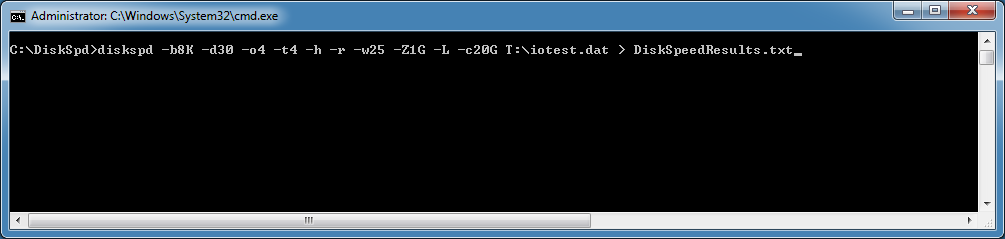 Figure 1: Example command line for DiskSpd
Running the test starts with a default five second warm up time (before any measurements actually start), and then the actual test will run for the specified duration in seconds with a default cool down time of zero seconds. When the test finishes, DiskSpd will provide a description of the test and the detailed results. By default this will be a simple text summary in a text file using the file name that you specified, which will be in the same directory as the diskspd executable.
Here are what the results look like for this particular test run on my workstation.
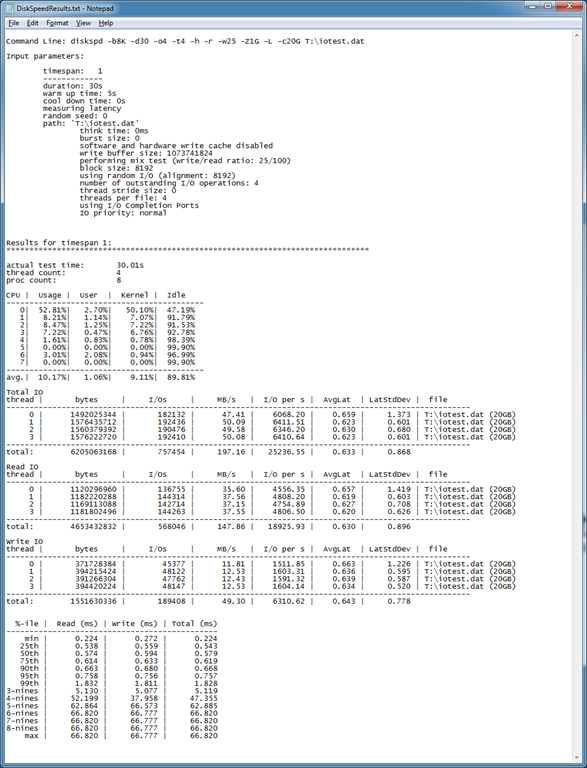 Figure 2: Example DiskSpd test results
The first section of the results gives you the exact command line that was used for the test, then specifies all of the input parameters that were used for the test run (which include the default values that may not have been specified in the actual command line). Next, the test results are shown starting with the actual test time, thread count, and logical processor count. The CPU section shows the CPU utilization for each logical processor, including user and kernel time, for the test interval.
The more interesting part of the test results comes next. You get the total bytes, total I/Os, MB/second, I/O per second (IOPS), and your average latency in milliseconds. These results are broken out for each thread (four in our case), with separate sections in the results for Total IO, Read IO, and Write IO. The results for each thread should be very similar in most cases. Rather than initially focusing on the absolute values for each measurement, I like to compare the values when I run the same test on different logical drives, (after changing the location of the test file in the command line), which lets you compare the performance for each logical drive.
The last section of the test results is even more interesting. It shows a percentile analysis of the distribution of the latency test results starting from the minimum value in milliseconds going up to the maximum value in milliseconds, broken out for reads, writes, and total latency. The “nines” in the %-ile column refer to the number of nines, where 3-nines means 99.9, 4-nines means 99.99, etc. The reason why the values for the higher percentile rows are the same is because this test had a relatively low number of total operations. If you want to accurately characterize the higher percentiles, you will have to run a longer duration test that generates a higher number of separate I/O operations.
What you want to look for in these results is the point where the values make a large jump. For example, in this test we can see that 99% of the reads had a latency of 1.832 milliseconds or less.
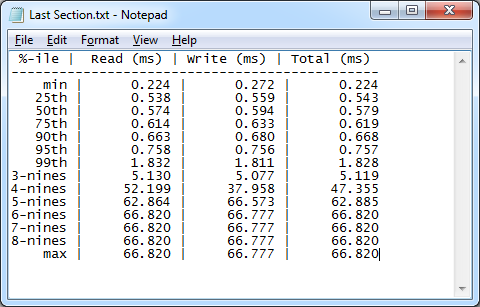 Figure 3: Latency results distribution
As you can see, running DiskSpd is actually pretty simple once you understand what the basic parameters mean and how they are used. Not only can you run DiskSpd from an old-fashioned command line, you can also run it using PowerShell. DiskSpd also gives you a lot more detailed information than you get from SQLIO. The more complicated part of using DiskSpd is analyzing and interpreting the results, which is something I will cover in a future article.
The post Using Microsoft DiskSpd to Test Your Storage Subsystem appeared first on SQLPerformance.com.
Tim Ford (SQL Agent Man: http://thesqlagentman.com/) recently got me involved in writing a column for SQL Server Magazine.
I’m planning to write an article each fortnight describing something of interest that I’ve recently found while consulting/mentoring at client sites.
The first of those articles is now live: http://sqlmag.com/sql-server/case-auto-truncating-table
Enjoy!
by Jennifer Zaino Take a look at the Federal Reserve Board’s semi-annual Monetary Policy Report to Congress issued in July and you’ll see a lot of data about the U.S. economy. In her testimony about the report, Board Chair Janet Yellen cited statistics ranging from an unemployment rate of 5.3 percent to inflation that continues…
The post A New Data-Driven Vision at the U.S. Federal Reserve Board appeared first on DATAVERSITY.
by Angela Guess Matt Graney recently wrote for Information Management, “While 74 percent of today’s business executives say their company has a digital strategy, only 19 percent of executives believe their firms have the right technology to properly execute on the digital strategy, according to a recent Forrester Research report… So where do they start?…
The post Updating Your Data Strategy Requires a Shift in Thinking appeared first on DATAVERSITY.
Webinars have become a very important part of the DATAVERSITY education platform, so I thought I would talk about the program this month. Many are regular webinar registrants, so for you, this would just be a reaffirmation regarding the program details (and serious THANK YOU!), but maybe there's something in here you don't know too. In…
The post August 2015 DATAVERSITY Letter from the Editor appeared first on DATAVERSITY.
by Angela Guess Jerry Overton recently wrote for O’Reilly Radar, “I call data scientists with essential data product engineering skills “professional” data science programmers. Professionalism isn’t a possession like a certification or hours of experience; I’m talking about professionalism as an approach. The professional data science programmer is self-correcting in their creation of data products.…
The post What it Takes to Go Pro in Data Science appeared first on DATAVERSITY.
by Cathy Nolan How many of us bother to go into the station to pay cash for gas, take actual money to the grocery store or settle our bill with that green stuff at a restaurant—let alone use it to leave the server a tip. We use credit or debit cards for donations to charities,…
The post Cash – The Ultimate Privacy Protection appeared first on DATAVERSITY.
Transparent Data Encryption has been around for some time now, making sure that data in SQL Server as stored on disk is encrypted. When it was announced, this was incredibly exciting.
You see, by default, SQL Server data is not encrypted. If you open up the pages within a data file, you can read the data that’s in there. Numbers are stored as hex, varchar strings are stored as readable values – it can be quite surprising to realise this. The first time you ever salvage an MDF file from a broken server, open up that file, and just start reading the data, you realise that the data in most databases is only as secure as the physical security of the disks – you can read data from that table whether or not your Windows login has access to it.
With Transparent Data Encryption, that MDF file is encrypted. It’s only decrypted when it’s pulled into RAM, where access to it is controlled by database permissions. If your access to a particular table has been denied, you’re not getting to read that data out of RAM. When the power goes out, the decrypted data in RAM disappears – that’s what RAM’s like. It’s a good thing. But TDE is across the whole database, whether you like it or not. And everyone who has access to the table can read it unencrypted, as if it’s never been encrypted.
It’s Transparent. It doesn’t feel like it’s encrypted, and as far any application can see, it’s not. This only protects against the disk (or backup) being compromised.
And then there’s the distrust of DBAs.
As someone who deals with sensitive data regularly, I can assure you that this is a very real concern. I’ve had police checks, to help make sure that I’m trustworthy – and I make a point of never looking myself up in customer databases (I know I must exist in some of my customers’ databases – I receive bills from some of them even). I also have confidence that my employees at LobsterPot Solutions are all completely trustworthy, and that I’d throw the book at them if they ever broke that trust.
I’ve certainly been asked “How do I stop the DBA from being able to read the data?”
And that’s where the problem is. The DBA is the guardian of your data. They’re the person who makes sure that the database doesn’t have corruption, who can defrag indexes, tune queries, and so on. The DBA should be trustworthy with the data. But what if that data contains the lottery numbers? What if that data involves national secrets? At what point is the sensitivity of the data way too great to be able to let Archbishop Desmond Tutu look after it, let alone Barry the DBA?
Now, I understand that a DBA might feel insulted that they’re not trusted to read the data. They need to look after it, but they can’t look at it. My take is that if I can be removed from suspicion if there’s a leak, then great. I know I’m okay. The client should know I’m okay. But would a criminal investigation be able to remove me from suspicion? Not if I’m one of the only people that could read the data and know how to cover my tracks.
Transparent Data Encryption doesn’t stop me from being able to read the data. Not at all. If I have access to query the table, it looks unencrypted to me.
Always Encrypted, in SQL Server 2016, does stop me though, if I don’t have the ability to access the certificate which has protects the column master key. Always Encrypted stores encrypted data in the database file. It’s encrypted in RAM, and while it’s being sent across the network, only being decrypted by the application that has access to the certificate. Now, I know that as an administrator, I might be able to jump through a few hoops to be able to get access to it, but this could be handled by other people, who could deny my access to it.
This decryption is still transparent to the applications that use it – so the applications don’t need to change, apart from telling the connection string to look out for it. The .Net 4.6 environment will handle the decryption without developers needing to code it specifically. Access to those applications can be controlled in other ways.
If you’re needing to search by values that are encrypted, it might not be ideal for you. But for that data that you need to make sure even you can’t read, this could be a really nice option. Roll on 2016!
PS: Another option is to build encryption functions into client applications, so that the applications encrypt everything, and handle everything well away from the database. We’ve been able to do this since applications first began, but when there are multiple applications, the coordination of keys can become problematic. What you get with SQL 2016 is the ability to do this centralised control over the encryption and decryption.
PPS: This post was brought to you for the 69th T-SQL Tuesday, hosted by Ken Wilson (@_KenWilson)

by Angela Guess Kenneth Corbin reports for CIO.com, “Most CIOs have an inkling that employees in their enterprise have snuck a few applications past the IT department, but a new study by Cisco indicates that they are vastly underestimating the extent that unauthorized apps and services have infiltrated the network. Consulting with CIOs and analyzing…
The post Study Finds that CIOs Vastly Underestimate Shadow IT appeared first on DATAVERSITY.
by Angela Guess Andrew C. Oliver recently wrote for InfoWorld, “Sometimes, there's a big hole in the side of the ship, and the industry decides to wait until the ship starts sinking in hope of selling lifeboats. At other times, less severe flaws resemble the door in my downstairs bathroom, which opens only if you…
The post 9 Pain Points Every Big Data Professional Contends Against appeared first on DATAVERSITY.
In vChat #38 Eric, David and myself talk about what they are using for their vSphere virtual labs (cloud, physical, and virtual), Simon’s new vVNX videos and how vVNX can be used for home labs, and other home lab vSphere storage options, and a VMworld 2015 pre-view (stay tuned to for our next episode where we will spend the whole show talking about VMworld).
JOIN US to learn more!
Links discussed in the show are:
vChat is a regular virtualization video chat covering VMware vSphere, Cloud Computing, Virtualization News, and maybe some geeky humor. Regular contributors are 3 vExperts– Simon Seagrave (TechHead.co), Eric Siebert (vSphere-Land.com), and David Davis (VMwareVideos.com).
You can now SUBSCRIBE TO vCHAT on iTunes!

The post [PODCAST] vChat : Episode 38 – vSphere Home Labs and EMC vVNX appeared first on TechHead and was written by Simon Seagrave.
Why not take a look at my other related posts?:
In 2013 I asked the questions "Is the Windows user ready for apt-get?" As with nearly all my blog posts, the comments are better than the post itself. ;)
Now it's 2015 and many of us are upgrading to Windows 10. One of the little gems in Windows 10 that no one is talking about (yet) is OneGet. You can read about OneGet architecture here.
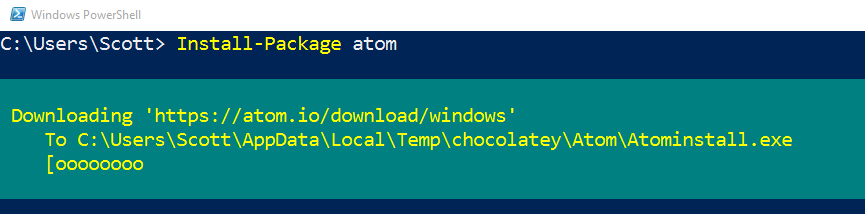
It's easy (and wrong) to just say that One-Get is Apt-Get for Windows. But OneGet isn't actually a package manager. It's more clever and cooler than that. It's a package manager manager.
Go out to you Windows 10 PowerShell prompt now and type "Get-PackageProvider" and you'll see the package managers you have registered with OneGet today.
C:\> Get-PackageProvider


Name                     Version

----                     -------

Programs                 10.0.10240.16384

msu                      10.0.10240.16384

msi                      10.0.10240.16384

PSModule                 1.0.0.0
Usually programs are installed with things like MSIs, for example, so there's a provider for that. You can type "Get-Package" and see the programs AND packages on your machine:
C:\> Get-Package


Name                           Version

----                           -------

123D Design R1.6               1.6.41

Windows Driver Package - Ge... 06/04/2011 8....

Windows Driver Package - Ge... 06/19/2014 8....

Windows Driver Package - FT... 01/27/2014 2....

JRuby 1.7.19                   1.7.19

Windows Driver Package - ST... 11/09/2009 3....

EPSON NX410 Series Printer ...

Intel Edison Device USB driver 1.2.1
Since it's PowerShell, you can sort and filter and what-not to your heart's delight.
Chocolatey is an open source apt-get-like machine-wide package manager that you can use today, even if you don't have Windows 10.
OneGet isn't Microsoft's version of Chocolately. But there is a beta/preview Chocolatey provider that plugs into OneGet so you can use OneGet to get Chocolatey packages and install them.
Other things worth noting, even though OneGet is in the box for Windows 10, you can still run it on Windows 7 and Windows 2008 R2. Plus, OneGet isn't done and it's open source so there's lots of cool possibilities.
Oh, and an important naming point. Just like "Chromium" is the open source browser and "Chrome" is the Google packaged instance of that project, "OneGet" is the open source project and what ships with Windows 10 is just generically "PackageManagement." Just a good reminder of the relationship between open source projects and their shipping counterparts.
Example time. You've got a new Windows 10 machine and you want to get VLC. You can (and should) totally get it from the Windows Store, but let's get it using Package Management.
Here I need to get the beta Chocotlatey provider first, and once, with "get-packageprovider -name chocolatey." Also, when I install a package for the first time it will prompt to download NuGet as well. I will answer Yes to both.
NOTE: You can also install Chocolatey explicitly with "install-package –provider bootstrap chocolatey"
Now I can just "install-package vlc" and it will get it from the Chocolatey repository.
C:\>  get-packageprovider -name chocolatey


The provider 'chocolatey v2.8.5.130' is not installed.

chocolatey may be manually downloaded from https://oneget.org/ChocolateyPr30.exe and installed.

Would you like PackageManagement to automatically download and install 'chocolatey'?


[Y] Yes  [N] No  [S] Suspend  [?] Help (default is "Y"): y


Name                     Version

----                     -------

Chocolatey               2.8.5.130


C:\> install-package vlc


The provider 'nuget v2.8.5.127' is not installed.

nuget may be manually downloaded from https://oneget.org/nuget-anycpu-2.8.5.127.exe and installed.

Would you like PackageManagement to automatically download and install 'nuget' now?

[Y] Yes  [N] No  [S] Suspend  [?] Help (default is "Y"): y


The package(s) come from a package source that is not marked as trusted.

Are you sure you want to install software from 'chocolatey'?

[Y] Yes  [A] Yes to All  [N] No  [L] No to All  [S] Suspend  [?] Help (default is "N"): y


Name                           Version          Source           Summary

----                           -------          ------           -------

vlc                            2.2.1.20150630   chocolatey       VLC Media Player
Boom. Now VLC is installed. It's early days but it's interesting stuff!
You can read about the available OneGet cmdlets at https://github.com/OneGet/oneget/wiki/cmdlets.
For example here I can find the latest version of zoomit.
C:\> find-package -name zoomit


Name                           Version          Source

----                           -------          ------

zoomit                         4.50             chocolate
Just to be clear, with regards to OneGet and Chocolatey.
And again, you can use Chocolatey TODAY on your Windows 7 and up machines as it is.
OneGet and PackageManagement in Windows 10 lets you manage package managers of all kinds to control what's installed one your machines. For example, I can uninstall an MSI installed program like this. This is just like visiting Add/Remove Programs (ARP) and uninstalling, except I did it from the command line!
C:\> Uninstall-Package join.me.launcher


Name                           Version

----                           -------

join.me.launcher               1.0.368.0
MSI and Chocolately are just the start for OneGet. What if one package management API could also get Python or PHP packages? Windows Store apps?

Last, but definitely not least, it's important to remember that Chocolatey and the Chocolatey Repository of Packages can use your help and sponsorship. Head over to https://chocolatey.org/ and scroll to the bottom and click Donate and you can Paypal or use your Credit Card to help them out.
SOCIAL: Hey folks, please do follow me on Facebook https://fb.me/scott.hanselman or Twitter! https://twitter.com/shanselman
Sponsor: Big thanks to our friends at Infragistics for sponsoring the feed this week! Responsive web design on any browser, any platform and any device with Infragistics jQuery/HTML5 Controls. Get super-charged performance with the world’s fastest HTML5 Grid -Download for free now!


This post is a bit of a public service announcement, so I'll get right to the point:
Every time you use WiFi, ask yourself: could I be connecting to the Internet through a compromised router with malware?
It's becoming more and more common to see malware installed not at the server, desktop, laptop, or smartphone level, but at the router level. Routers have become quite capable, powerful little computers in their own right over the last 5 years, and that means they can, unfortunately, be harnessed to work against you.
I write about this because it recently happened to two people I know.
.@jchris A friend got hit by this on newly paved win8.1 computer. Downloaded Chrome, instantly infected with malware. Very spooky.
— not THE Damien Katz (@damienkatz) May 20, 2015
@codinghorror *no* idea and there’s almost ZERO info out there. Essentially malicious JS adware embedded in every in-app browser
— John O'Nolan (@JohnONolan) August 7, 2015
In both cases, they eventually determined the source of the problem was that the router they were connecting to the Internet through had been compromised.
This is way more evil genius than infecting a mere computer. If you can manage to systematically infect common home and business routers, you can potentially compromise every computer connected to them.

Hilarious meme images I am contractually obligated to add to each blog post aside, this is scary stuff and you should be scared.
Router malware is the ultimate man-in-the-middle attack. For all meaningful traffic sent through a compromised router that isn't HTTPS encrypted, it is 100% game over. The attacker will certainly be sending all that traffic somewhere they can sniff it for anything important: logins, passwords, credit card info, other personal or financial information. And they can direct you to phishing websites at will – if you think you're on the "real" login page for the banking site you use, think again.
Heck, even if you completely trust the person whose router you are using, they could be technically be doing this to you. But they probably aren't.
Probably.
In John's case, the attackers inserted annoying ads in all unencrypted web traffic, which is an obvious tell to a sophisticated user. But how exactly would the average user figure out where this junk is coming from (or worse, assume the regular web is just full of ad junk all the time), when even a technical guy like John – founder of the open source Ghost blogging software used on this very blog – was flummoxed?
But that's OK, we're smart users who would only access public WiFi using HTTPS websites, right? Sadly, even if the traffic is HTTPS encrypted, it can still be subverted! There's an extremely technical blow-by-blow analysis at Cryptostorm, but the TL;DR is this:
Compromised router answers DNS req for *.google.com to 3rd party with faked HTTPS cert, you download malware Chrome. Game over.
HTTPS certificate shenanigans. DNS and BGP manipulation. Very hairy stuff.
How is this possible? Let's start with the weakest link, your router. Or more specifically, the programmers responsible for coding the admin interface to your router.
They must be terribly incompetent coders to let your router get compromised over the Internet, since one of the major selling points of a router is to act as a basic firewall layer between the Internet and you… right?
In their defense, that part of a router generally works as advertised. More commonly, you aren't being attacked from the hardened outside. You're being attacked from the soft, creamy inside.
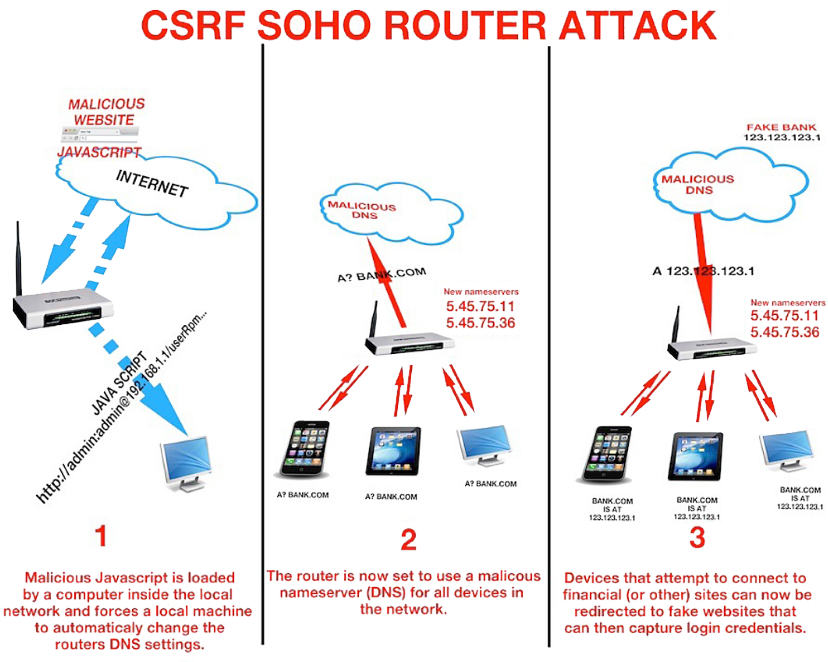
That's right, the calls are coming from inside your house!
By that I mean you'll visit a malicious website that scripts your own browser to access the web-based admin pages of your router, and reset (or use the default) admin passwords to reconfigure it.
Nasty, isn't it? They attack from the inside using your own browser. But that's not the only way.
Maybe you accidentally turned on remote administration, so your router can be modified from the outside.
Maybe you left your router's admin passwords at default.
Maybe there is a legitimate external exploit for your router and you're running a very old version of firmware.
Maybe your ISP provided your router and made a security error in the configuration of the device.
In addition to being kind of terrifying, this does not bode well for the Internet of Things.

Internet of Compromised Things, more like.
OK, so what can we do about this? There's no perfect answer; I think it has to be a defense in depth strategy.
Buy a new, quality router. You don't want a router that's years old and hasn't been updated. But on the other hand you also don't want something too new that hasn't been vetted for firmware and/or security issues in the real world.
Also, any router your ISP provides is going to be about as crappy and "recent" as the awful stereo system you get in a new car. So I say stick with well known consumer brands. There are some hardcore folks who think all consumer routers are trash, so YMMV.
I can recommend the Asus RT-AC87U – it did very well in the SmallNetBuilder tests, Asus is a respectable brand, it's been out a year, and for most people, this is probably an upgrade over what you currently have without being totally bleeding edge overkill. I know it is an upgrade for me.

(I am also eagerly awaiting Eero as a domestic best of breed device with amazing custom firmware, and have one pre-ordered, but it hasn't shipped yet.)
Download and install the latest firmware. Ideally, do this before connecting the device to the Internet. But if you connect and then immediately use the firmware auto-update feature, who am I to judge you.
Change the default admin passwords. Don't leave it at the documented defaults, because then it could be potentially scripted and accessed.
Turn off WPS. Turns out the Wi-Fi Protected Setup feature intended to make it "easy" to connect to a router by pressing a button or entering a PIN made it … a bit too easy. This is always on by default, so be sure to disable it.
Turn off uPNP. Since we're talking about attacks that come from "inside your house", uPNP offers zero protection as it has no method of authentication. If you need it for specific apps, you'll find out, and you can forward those ports manually as needed.
Make sure remote administration is turned off. I've never owned a router that had this on by default, but check just to be double plus sure.
For Wifi, turn on WPA2+AES and use a long, strong password. Again, I feel most modern routers get the defaults right these days, but just check. The password is your responsibility, and password strength matters tremendously for wireless security, so be sure to make it a long one – at least 20 characters with all the variability you can muster.
Pick a unique SSID. Default SSIDs just scream hack me, for I have all defaults and a clueless owner. And no, don't bother "hiding" your SSID, it's a waste of time.
Optional: use less congested channels for WiFi. The default is "auto", but you can sometimes get better performance by picking less used frequencies at the ends of the spectrum. As summarized by official ASUS support reps:
Set 2.4 GHz channel bandwidth to 40 MHz, and change the control channel to 1, 6 or 11.
Set 5 GHz channel bandwidth to 80 MHz, and change the control channel to 165 or 161.
Experts only: install an open source firmware. I discussed this a fair bit in Everyone Needs a Router, but you have to be very careful which router model you buy, and you'll probably need to stick with older models. There are several which are specifically sold to be friendly to open source firmware.
Well, this one is simple. Assume everything you do outside your home, on a remote network or over WiFi is being monitored by IBGs: Internet Bad Guys.

I know, kind of an oppressive way to voyage out into the world, but it's better to start out with a defensive mindset, because you could be connecting to anyone's compromised router or network out there.
But, good news. There are only two key things you need to remember once you're outside, facing down that fiery ball of hell in the sky and armies of IBGs.
Never access anything but HTTPS websites.
If it isn't available over HTTPS, don't go there!
You might be OK with HTTP if you are not logging in to the website, just browsing it, but even then IBGs could inject malware in the page and potentially compromise your device. And never, ever enter anything over HTTP you aren't 100% comfortable with bad guys seeing and using against you somehow.
We've made tremendous progress in HTTPS Everywhere over the last 5 years, and these days most major websites offer (or even better, force) HTTPS access. So if you just want to quickly check your GMail or Facebook or Twitter, you will be fine, because those services all force HTTPS.
If you must access non-HTTPS websites, or you are not sure, always use a VPN.
A VPN encrypts all your traffic, so you no longer have to worry about using HTTPS. You do have to worry about whether or not you trust your VPN provider, but that's a much longer discussion than I want to get into right now.
It's a good idea to pick a go-to VPN provider so you have one ready and get used to how it works over time. Initially it will feel like a bunch of extra work, and it kinda is, but if you care about your security an encrypt-everything VPN is bedrock. And if you don't care about your security, well, why are you even reading this?
If it feels like these are both variants of the same rule, always strongly encrypt everything, you aren't wrong. That's the way things are headed. The math is as sound as it ever was – but unfortunately the people and devices, less so.
Until I heard Damien's story and John's story, I had no idea router hardware could be such a huge point of compromise. I didn't realize that you could be innocently visiting a friend's house, and because he happens to be the parent of three teenage boys and the owner of an old, unsecured router that you connect to via WiFi … your life will suddenly get a lot more complicated.
As the amount of stuff we connect to the Internet grows, we have to understand that the Internet of Things is a bunch of tiny, powerful computers, too – and they need the same strong attention to security that our smartphones, laptops, and servers already enjoy.
| [advertisement] At Stack Overflow, we help developers learn, share, and grow. Whether you’re looking for your next dream job or looking to build out your team, we've got your back. |
Having upgraded all the management tools that make up vCloud Suite 6.0, it became time to upgrade vSphere itself to 6.0. My upgrade did not go as smoothly as I had expected. Following are the steps I took for the upgrade, plus an account of the one major problem I had and its solution.
The steps to upgrade vSphere to a major revision require using either VMware Upgrade Manager (VUM), or VUM plus Auto Deploy. In either case, you need to do the following to at least one host:
This is a pretty straightforward set of steps, ones that I have been doing for years and since ESX v2.x in some fashion. Yet, this upgrade had a major issue, which thankfully has a simple solution—not an ideal solution, but there is one. The problem:
After I upgraded the first node, two of my virtual distributed switch (VDS) port groups went offline. Mind you, not all my port groups went offline, just one on each of my VDSes with three or more port groups.
This was a not a good state of affairs, as during this I lost access to my Microsoft Windows VUM server. The quick solution was to move all my management virtual machines to a virtual standard switch (VSS) I always have available. Actually, vCenter lives on this VSS due to other past issues with non-ephemeral VDS port groups.
The real impact was to my Horizon View infrastructure. Those VMs could not be moved to a VSS very easily, as I would have to break linkages to uplinks that kept the other part of my environment running. The problem was with only one port group on each VDS. The solution for my VDS issue was to enable IPV6 per KB Article #2117308 (thank you, VMware Support, for pointing this one out to me).
Granted, before I found this solution, I tried to recreate the port group, looked through all the settings, and then used Log Insight to look at the latest messages. This pointed me to another problem, of NoneZ appearing instead of a timestamp (fixed with KB Article #2111202). In looking at the logs, I realized that Log Insight does not organize things very well on the “last five minutes” view. It only brings up the messages it thinks you should see, which in this case were not related to the issue. Instead, I had to filter specifically on VMkernel on a specific node, and then I saw the errors I needed to find the fix.
After that, I did the following:
Now my environment is sitting at vCloud Suite 6.0 and seems to be working quite smoothly. All in all, outside of the VDS issue, the upgrade also went smoothly. Solving that issue, however, requires a better understanding of Log Insight. Now that I know how to use this important tool better, I can build out some new rules and content packs.
The post vSphere Upgrade Saga: vSphere 6.0 appeared first on AstroArch Consulting, Inc.
Mrdennynow
In 1992, I thought I was the best programmer in the world. In my defense, I had just graduated from college, this was pre-Internet, and I lived in Boulder, Colorado working in small business jobs where I was lucky to even hear about other programmers much less meet them.
I eventually fell in with a guy named Bill O'Neil, who hired me to do contract programming. He formed a company with the regrettably generic name of Computer Research & Technologies, and we proceeded to work on various gigs together, building line of business CRUD apps in Visual Basic or FoxPro running on Windows 3.1 (and sometimes DOS, though we had a sense by then that this new-fangled GUI thing was here to stay).
Bill was the first professional programmer I had ever worked with. Heck, for that matter, he was the first programmer I ever worked with. He'd spec out some work with me, I'd build it in Visual Basic, and then I'd hand it over to him for review. He'd then calmly proceed to utterly demolish my code:
O'Neil? Nope.One thing that surprised me was that the code itself was rarely the problem. He occasionally had some comments about the way I wrote or structured the code, but what I clearly had no idea about is testing my code.
I dreaded handing my work over to him for inspection. I slowly, painfully learned that the truly difficult part of coding is dealing with the thousands of ways things can go wrong with your application at any given time – most of them user related.

That was my first experience with the buddy system, and thanks to Bill, I came out of that relationship with a deep respect for software craftsmanship. I have no idea what Bill is up to these days, but I tip my hat to him, wherever he is. I didn't always enjoy it, but learning to develop discipline around testing (and breaking) my own stuff unquestionably made me a better programmer.
It's tempting to lay all this responsibility at the feet of the mythical QA engineer.
QA Engineer walks into a bar. Orders a beer. Orders 0 beers. Orders 999999999 beers. Orders a lizard. Orders -1 beers. Orders a sfdeljknesv.
— Bill Sempf (@sempf) September 23, 2014
If you are ever lucky enough to work with one, you should have a very, very healthy fear of professional testers. They are terrifying. Just scan this "Did I remember to test" list and you'll be having the worst kind of flashbacks in no time. And that's the abbreviated version of his list.
I believe a key turning point in every professional programmer's working life is when you realize you are your own worst enemy, and the only way to mitigate that threat is to embrace it. Act like your own worst enemy. Break your UI. Break your code. Do terrible things to your software.
This means programmers need a good working knowledge of at least the common mistakes, the frequent cases that average programmers tend to miss, to work against. You are tester zero. This is your responsibility.
Let's start with Patrick McKenzie's classic Falsehoods Programmers Believe about Names:
That's just the first 10. There are thirty more. Plus a lot in the comments if you're in the mood for extra credit. Or, how does Falsehoods Programmers Believe About Time grab you?
Are there more? Of course there are! There's even a whole additional list of stuff he forgot when he put that giant list together.
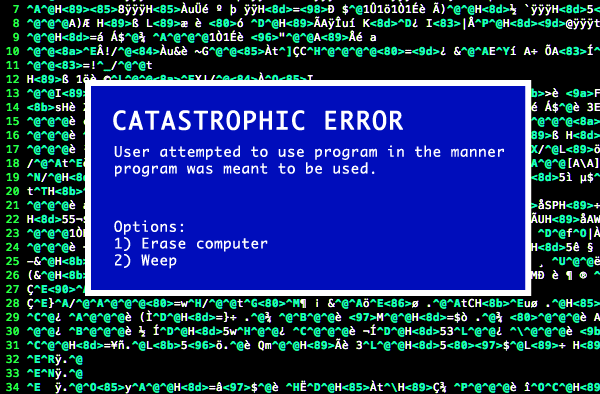
I think you can see where this is going. This is programming. We do this stuff for fun, remember?
But in true made-for-TV fashion, wait, there's more! Seriously, guys, where are you going? Get back here. We have more awesome failure states to learn about:
At this point I wouldn't blame you if you decided to quit programming altogether. But I think it's better if we learn to do for each other what Bill did for me, twenty years ago — teach less experienced developers that a good programmer knows they have to do terrible things to their code. Do it because if you don't, I guarantee you other people will, and when they do, they will either walk away or create a support ticket. I'm not sure which is worse.
| [advertisement] Find a better job the Stack Overflow way - what you need when you need it, no spam, and no scams. |
Mrdennynow
Read more of this story at Slashdot.
I have had more Linked Server cases that are setup for an Oracle database than any other non-SQL Server database in SQL. Being in Business Intelligence Support we deal with plenty of connectivity issues and this is one topic of connectivity that does not get touched on a lot.
In less than a month I got 4 Oracle Linked Server cases that all had different issues. The one thing that really got me was I did not really understand how the Oracle side of things worked for me to better troubleshoot the issue. For example, in one case I did not really have a good understanding of the ODAC Providers (Oracle’s Providers for connecting to different tools and applications) and the tnsnames.ora file and how they related to the whole setup. By having the whole picture I feel we can really help understand Oracle Linked Server setups better.
Walkthrough:
So for me to understand how the Oracle side worked I needed to get an Oracle server up and running.
As such, I decided to create an Oracle 11G server. You can download the bits using the following link.
Oracle Database Software
http://www.oracle.com/technetwork/database/enterprise-edition/downloads/index-092322.html
After all that, I created a table in the system (default) schema.
Then I needed to create a listener which I learned is very important from an Oracle’s standpoint to make the database run properly.
What’s a table without any data? I added some test data so I can compare the results between the Oracle database and the Linked Server results. Then after creating the table I added data to it so I can compare the results between the Oracle database and the Linked Server results.
Once I had the Oracle side all up and ready I started to create my Linked Server in SSMS.
Now after I got my Oracle server up and operational I needed to find a very distinct file as this is the file that deals with the connectivity between Oracle and SQL. This file is called the tnsnames.ora file. I need to make sure I can locate it on the Oracle database server itself. More normal default Location is
C:\<database folder>\product\11.2.0\dbhome_1\ NETWORK\ADMIN\tnsnames.ora
ex: C:\OracleDatabase\product\11.2.0\dbhome_1\NETWORK\ADMIN\tnsnames.ora
The Service ID you have setup will be the connection information you will need when creating the Linked Server in SSMS. In this case I am going to use SPORTS.
Now that we know the Oracle server is setup and we have our tnsnames.ora information ready, we need to start setting up the SQL Server to have the ability to create a Linked Server that connects to an Oracle database.
So at this point we would need to download and install the proper ODAC provider from ORACLE to get that process started. REMEMBER – BITNESS MATTERS!
Listed below are the sites on where to download the proper provider needed:
For 64-bit providers
http://www.oracle.com/technetwork/database/windows/downloads/index-090165.htmlFor 32-bit providers
http://www.oracle.com/technetwork/topics/dotnet/utilsoft-086879.html
For this example we are using 64 bit Oracle version 11g
For a quick test to verify you have it downloaded and installed properly you can do a quick UDL test. On the desktop create a new text file (make sure to show extensions so you can see the .txt part of the name). Then rename the entire file including the extension to Test.udl and press OK. Once you go to the Provider tab at the top left you should see something like “Oracle Provider for OLE DB” listed.
Now once you have confirmed you have installed the provider, search for the tnsnames.ora file on the SQL Server. Normally the default location is – C:\<folder chosen to save it in>\app\oracle\product\11.2.0\client\network\ADMIN.
Example location we are going to use will be: D:\app\sql2012\product\11.2.0\client_1\network\ADMIN.
What we would add to the SQL Server TNSNames file:
SPORTS =
(DESCRIPTION =
(ADDRESS = (PROTOCOL = TCP)(HOST = ORACLE11GMG.markg.local)(PORT = 4977))
(ADDRESS = (PROTOCOL = TCP)(HOST = ORACLE11GMG.markg.local)(PORT = 1521))
(CONNECT_DATA =
(SERVER = DEDICATED)
(SERVICE_NAME = Sports)
)
)
Once you have the tnsnames.ora file correctly filled in on the SQL Server machine, you can now setup the Linked Server in SQL Server Management Studio.
Using SQL Server Management Studio to create a linked server to another instance of SQL Server Using SQL Server Management Studio
https://technet.microsoft.com/en-us/library/ff772782(v=sql.110).aspx#SSMSProcedure
Before we start going through the actual steps you need to make sure the “OraOLEDB.Oracle” Provider is listed under Linked Server > Providers.
Also make sure that under properties for the provider you select Allow inprocess.
When you use the “Allow in-process” option for Linked Server providers, SQL loads the COM DLL in its own memory process. We do not normally recommend it because it can lead to stability issues in SQL Server, but some providers require it such as the Oracle one. If it crashes, it will also crash SQL Server.
When running “Out of Process”, SQL launches the MSDAINITIALIZE process and that process loads the COM server (in this case, OLE DB Provider). If it is idle for x minutes or if the driver crashes the process, it unloads and the next linked server request loads in a new MSDAINITIALIZE process. You can see MSDAINITIALIZE by running dcomcnfg and working your way down Component Services.
Generally only Administrators or the local system account can launch this, so if SQL is running under a domain account, you should add it to the local Administrators group or have it run as Local System.
Now we can start creating the Oracle Linked Server in Management Studio.
Go to Server Objects > Linked Servers > right click and select New Linked Server…
Then start filling in the necessary information to continue to create an Oracle Linked server
General Tab:
Linked server - Name of your Linked Server
Server Type - Choose “Other data source” when using Oracle or any other Non-SQL Server database
Provider – Oracle Provider for OLE DB (downloaded from the Oracle site)
Product name – Oracle
Data source – MSORATEST (this comes from the information in the TNSNames.ora file you added onto the SQL machine)
Provider String – “leave blank”
Sample image of what it would look like once completed.
Then you will need to go to the Security Tab.
Select the option – Be made using this security context. The credentials you need to add are the ones that get you logged into your Oracle database.
Do Note: this is probably not the safest option. Mapping logins would be more secure. By doing this, it means that every user hitting this linked server will connect to Oracle using that context. I did it this way because it was easier for me and I am my own admin.
Then open up the Linked Server in Management Studio and search for the system tables:
Test that it works by running a 4 part query.
<Linked server name> <Database name> (if no specific database name then just use “..”) <Schema> <Table Name>
Ex: [SPORTS]..[MARK].[SPORTSDALLAS]
If you get this error when trying to create a Linked Server - “Cannot create an instance of OLE DB provider” - after filling in all the information follow this BLOG.
Troubleshooting “Cannot create an instance of OLE DB provider”
http://blogs.msdn.com/b/dataaccesstechnologies/archive/2011/09/28/troubleshooting-cannot-create-an-instance-of-ole-db-provider.aspx
Mark Ghanayem
Microsoft Business Intelligence Support
"Samsung's printer technology must really be something," writes Tim, "A black and white printer able to output a full color photo?! Who knew!"
Richard wrote, "Hmmm...at 17 GB, do I really need source control that badly?"
"Finally - a survey I can agree with," Sean L., "One is definitely less than five."
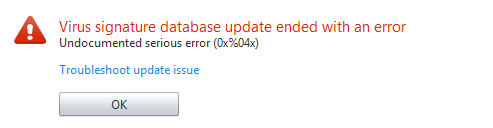
Rafael C. writes, "Undocumented and serious?! I think that I might be in trouble."
"Okay, I need Yellow Toner, sure, but it seems I have bigger, vaguer problems to tackle first," Josh P. wrote.
Brian F. writes, "Alas, AVG AntiVirus Free...I hardly knew you."
"Some websites take their good old time updating their sites," Paolo T. writes, "but considering East Germany (German Democratic Republic) hasn't been around since 1990, KTMB (Malaysian Railways) had better get with the program!"
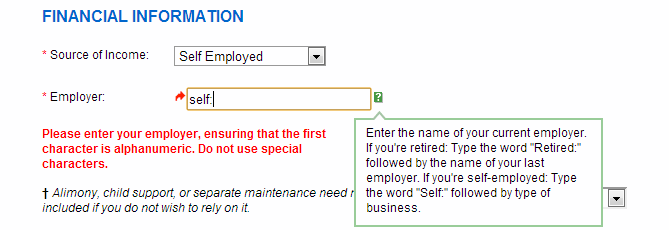
"The Chase Credit application form I filled out asks that if I'm self employed that I type 'self:' with what I do," Collin wrote, "This isn't a problem, until you go to submit the form and find that special characters like ':' aren't permitted."
[Advertisement] Use NuGet or npm? Check out ProGet, the easy-to-use package repository that lets you host and manage your own personal or enterprise-wide NuGet feeds and npm repositories. It's got an
impressively-featured free edition, too!