Shared posts

01 Aug 00:35

Professional Development – What a Difference 60 Years Makes

by kevin

Originally appearing at ForITPros.com.

In 1957, the Soviet-made Sputnik streaked across the sky in low earth orbit. It was clearly visible to millions of concerned Americans. The Soviet government had leapfrogged America technologically. The dot that traversed the nighttime sky marked a change in international politics and fueled the engine that became America’s space program.

Another far more subtle shift was happening in America’s businesses as well. In the 1950’s and 1960’s, American employees gave their loyalty to their employer in exchange for a commitment for a career-long job within the organization.

Over the past 60 years, those commitments from employers have eroded. No longer are employees guaranteed a job for life. Likewise employees no longer extend boundless loyalty to their companies, readily changing jobs every few years for better opportunities, pay, and working conditions.

Read the rest of this article at HERE.

-Kevin

Connect with me online! Facebook | Twitter | LinkedIn | SlideShare | YouTube | Google Author

The post Professional Development – What a Difference 60 Years Makes appeared first on Kevin Kline.

01 Aug 00:34

Proactive SQL Server Health Checks, Part 4 : ERRORLOG

by Erin Stellato

There is so much you can say about history and importance. History of a country, of civilization, of each of us. I love quotes and like this one from Teddy Roosevelt (cool guy):

The more you know about the past, the better prepared you are for the future.

Why am I waxing poetic (or trying to) about history in a blog about SQL Server? Because history in SQL Server is important, too. When a performance issue exists in SQL Server, it’s ideal to troubleshoot the issue live, but in some cases, historical information can provide a smoking gun, or at least a starting point. A great source of historical information in SQL Server is the ERRORLOG. I mentioned in my original post, Performance Issues: The First Encounter, that the ERRORLOG used to be an afterthought for me. No more. During client audits we always capture the ERRORLOGs, and while we are notified for any high-severity alerts (which are written to the log), it’s not unheard of to find other interesting information in the log. We prepare for the future by using the historical info in the logs; the information can help us fix a problem, or potential problem, before it becomes catastrophic.

Viewing the ERRORLOG

First off, we’ll review some options for viewing the ERROLOG. If I’m connected to an instance, I’ll usually navigate to it through SSMS (Management | SQL Server Logs, right-click on a log, and select View SQL Server Log). From this window I can just scroll through the log, or use the Filter or Search options to narrow down the result set. I can also view multiple files by selecting them in the left-hand pane.

If I’m looking at data captured in one of our health audits, I’ll just open the log files in a text editor and review them (I do have the option of going into the viewer and loading them are as well). The log files exist in the log folder (default location: C:\Program Files\Microsoft SQL Server\MSSQL12.SQL2014\MSSQL\Log) if I ever wanted to look at them on the server. Many of you might prefer to view and/or search the log using the undocumented procedure sp_readerrorlog or extended stored procedure xp_readerrorlog.

And finally, if you’re all into PowerShell, that’s an also an option for reading the log that way (see this post: Use PowerShell to Parse SQL Server 2012 Error Logs). The method is up to you – use what you know and what works for you – it’s the content that really matters. And remember that there are times where you will need to simply read through the log to understand the order of events, and there are other times where you might search to find a specific error or piece of information.

What’s in the ERRORLOG?

So what information can we find in the ERRORLOG, besides errors? I’ve listed many of the items I’ve found most useful below. Note that this isn’t an exhaustive list (and I’m sure many of you will have suggestions of what could be added – feel free to post a comment and I can update this!), but again, this is what I’m looking for first when I’m proactively looking at an instance.

  • Whether the server is physical or virtual (look for the System Manufacturer entry)
  • Trace flags enabled at startup
    • Within the entry for the Registry startup parameters, if you scroll all the way to the right, you’ll see if any trace flags are enabled:
       
      Trace Flags enabled at startupTrace Flags enabled at startup
  • Trace flags enabled or disabled after the instance has started
    • If users (or an application) enable or disable a trace flag using DBCC TRACEON or DBCC TRACEOFF, an entry appears in the log
  • Number of cores and sockets detected by SQL Server
  • Amount of memory detected by SQL Server
    • Again, I want to verify that SQL Server sees all the memory that’s available to it.
  • Confirmation that Locked Pages in Memory (LPIM) is enabled
    • While this option is enabled via the Windows Security Policy, you can confirm that it’s enabled by looking for “Using locked pages in the memory managed” message in the log.
    • Note that if you have Trace Flag 834 in use, then the message won’t say locked pages, it will say that large pages are being used for the buffer pool.
  • Version of CLR in use
  • Success or failure of Service Principal Name (SPN) registration
  • How long it takes for a database to come online
    • The log records when the database starts up, and when it’s online – I check to see if any database takes an excessive amount of time to come up.
  • Status of Service Broker and Database Mirroring endpoints – important if you’re using either feature
  • Confirmation that Instant File Initialization (IFI) is enabled*
    • By default this information is not logged, but if you enable Trace Flag 3004 (and 3605 to force the output to the log), when you create or grow a data file, you will see messages in the log to indicate whether IFI is in use or not.
  • Status of SQL Traces
    • When you start or stop a SQL Trace, it gets logged, and I look to see if any traces beyond the default trace exist (either temporarily or long term). If you’re running a third-party monitoring tool, such as SQL Sentry’s Performance Advisor, you might see an active trace that’s always running, but only capturing specific events, or you might see a trace start, run for a short duration, then stop. I’m not concerned about one or two extra traces, unless they’re capturing a lot of events, but I definitely pay attention when multiple traces are running.
  • The last time CHECKDB was completed
    • This message is often misunderstood by people – when the instance starts up, it reads the boot page for each database and notes when CHECKDB last ran successfully. Most people don’t read the entire message:
       
      Date that DBCC CHECKDB last completed successfullyDate that DBCC CHECKDB last completed successfully 

      The date for CHECKDB completion is November 11, 2012, but the ERRORLOG date is July 7, 2015. It’s important to understand that SQL Server does not run CHECKDB against databases at startup, it checks the dbcclastknowngood value on the boot page (to see when that gets updated, check out my post, What Checks Update dbcclastknowngood. Also, if DBCC CHECKDB has never been run against a database, then no entry will show up for the database here.

  • CHECKDB completion
    • When CHECKDB is run against a database, the output is recorded in the log.
  • Changes to instance settings
    • If you change an instance-level settings (e.g. max server memory, cost threshold for parallelism) using sp_configure or through the UI (note that it doesn’t log who changed it).
  • Changes to database settings
    • Did someone enable AUTO_SHRINK? Change the RECOVERY option to SIMPLE and then back to FULL? You’ll find it here.
  • Changes to database status
    • If someone takes a database OFFLINE (or brings it ONLINE), this gets logged.
  • Deadlock information*
    • If you need to capture deadlock information, don’t want to run a trace, and you’re running SQL Server 2005 through 2008R2, use trace flag 1222 to write deadlock information to the log in XML format. For those of you using SQL Server 2000 and below, you can trace flag 1204 (this trace flag is also available in SQL Server 2005+, but it outputs minimal information). If you’re running SQL Server 2012 or higher, this is not needed, as the system_health event session captures this information (and it’s there in 2008 and 20082 too, but you have to pull it from the ring_buffer versus the event_file target).
  • FlushCache Messages
    • If the cache is being flushed by SQL Server because the checkpoint process exceeds the recovery interval for the database, you’ll see a set of FlushCache messages in the log (see this post by Bob Dorr for more information). Don’t confuse these messages with the ones that show up when you run DBCC FREEPROCCACHE or DBCC FREESYSTEMCACHE:
       
      Message after running DBCC FREEPROCCACHE or DBCC FREESYSTEMCACHEMessage after running DBCC FREEPROCCACHE or DBCC FREESYSTEMCACHE
  • AppDomain unload messages
    • The log also notes when AppDomains are created, and you’ll only see either if you’re using CLR. If I see AppDomain unload messages because of memory pressure, it’s something to investigate further.

There is other information in the log that’s useful, such as authentication mode in use, whether or not the Dedicated Admin Connection (DAC) is enabled, etc. but I can also get that from sys.configurations and I check those with the instance baselines I discussed earlier (Proactive SQL Server Health Checks, Part 3: Instance and Database Settings).

What’s not in the ERROLOG, that you might expect?

This is a short list, for now, as I’m guessing some of you might have found other things you thought would be in the log but were not…

  • Adding or removing database files or filegroups
  • Starting or stopping of Extended Events Sessions
  • Running DBCC DROPCLEANBUFFERS does show up in the ERRORLOG

Managing the Log

Remember that by default, SQL Server only keeps the most recent six (6) log files (in addition to the current file), and the log file rolls over every time the SQL Server restarts. As a result, you can sometimes have extremely large log files which take a while to open and are a pain to dig through. On the flip side, if you run into a case where the instance gets restarted a couple times, you might lose important information. It’s recommended to increase the number of retained files to a higher value (e.g. 30), and create an Agent job to roll over the file once a week using sp_cycle_errorlog.

In addition to managing the files, you can affect what information is written to the log. One of the most common entries that creates clutter in the ERRORLOG is the successful backup entry:

Backup completed successfullyBackup completed successfully

If you have an instance with numerous databases and transaction log backups are taken with any regularity (e.g. every 15 minutes), you’ll see the log quickly fill up with messages, which makes finding a true problem harder. Luckily, you can use trace flag 3226 to disable successful backup messages (errors will still show up in the log, and all entries will still exist in msdb).

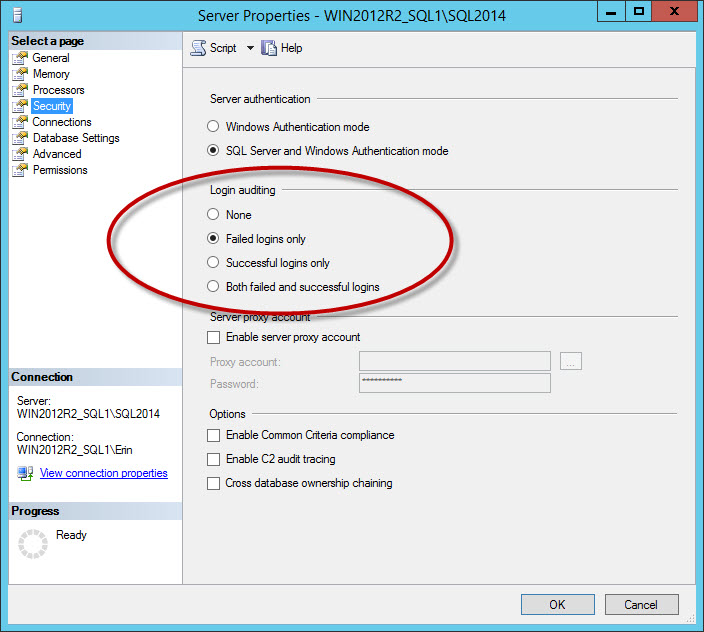
Another set of messages that clutter the log are successful login messages. This is an option you configure for the instance on the Security tab:

Security option to log successful and/or failed loginsSecurity option to log successful and/or failed logins

If you log successful logins, or failed and successful logins, you can have very large log files, even if you rollover the files daily (it will depend on how many users connect). I recommend capturing failed logins only. For businesses that have a requirement to log successful logins, consider using the Audit feature, added in SQL Server 2008. Side note: If you change the Login auditing setting, it will not take effect until you restart the instance.

Don't underestimate the ERRORLOG

As you can see, there is some great information in the ERRORLOG for you to use not just when you're troubleshooting performance or investigating errors, but also when you're proactively monitoring an instance.  You can find information in the log that's not found anywhere else; make sure you're checking it on regular basis and not leaving it as an afterthought.

See the other parts in this series:

The post Proactive SQL Server Health Checks, Part 4 : ERRORLOG appeared first on SQLPerformance.com.

01 Aug 00:34

US Congress Considers How It Should Respond to the Internet of Things

by A.R. Guess

by Angela Guess Kenneth Corbin reports for CIO.com, “With billions of new sensor-enabled devices coming online each year, lawmakers and regulators have been considering a host of security and privacy questions arising from the so-called Internet of Things (IoT). But at a House hearing this week, leading industry representatives urged restraint, cautioning members of Congress…

The post US Congress Considers How It Should Respond to the Internet of Things appeared first on DATAVERSITY.

01 Aug 00:26

Microsoft <3 Startups

by Adarsha Datta

One of the drivers of a successful economy is a holistic and supportive startup ecosystem that drives employment, revenue and spurs creativity. It is quite clear that technology, design and entrepreneurship provide the right mix to facilitate the next tide to spur up the economy. At Microsoft, we recognize the need of support in this system. Welcome to Microsoft BizSpark - We <3 Startups!

You think you have an idea. You think you have that product in mind that will revolutionize the next gen. You have developed the minimal viable product and are waiting for the validation and support to take the next step. How many of you have been through this or are going through this? At this stage, few things are key:

  • the right support (mentorship)
  • the right investments ($$)
  • the right network (customer access)

At Microsoft, we acknowledge the need and have crafted this program called BizSpark around these key requirements. The BizSpark program is available to any startups building a technological software product, is less than five years old and has revenues less than a million dollars. Through this program the startup has access to free softwares such as office, visual studio and more, cloud hosting credits to the tune of $750 / month for 3 years which translates to $27,000 (USD) in value for the lifetime of the account. What is more is that you get support too through local resources in the field and finally we help in co-marketing initiatives. After all, we help and want you to grow and be successful.

Starting July 2015, Microsoft announced partnerships with over 150 accelerators across 47 countries. The BizSpark Plus program is being offered through these accelerators to the startups. This essentially aligns with what a startup really needs.

  • The right support through mentorship from illustrious mentors associated with the accelerators with in depth industry knowledge and experience. Through the association with BizSpark Plus, you get additional personalized technical guidance too from local resources.
  • The right investments – access to VC and angel investors through the accelerators. In association with BizSpark Plus, you get $120,000 worth of Azure credits which translates to $10,000/month for a year. This is ideal for any technological company who have high hosting or cloud service requirements who are ready to scale.
  • The right network: The biggest advantage that a startup has by being a part of accelerators is the access to the large network that an accelerator has. The network may include alumni, investors, angels, perspective clients and more. Again, through the BizSpark Plus program too, a startup gets direct access to the wide network of partners, alumni and startups in the same program, not to mention the potential access to some relevant customers in the enterprise and consumer space too.

Essentially, The BizSpark Plus offer is a win-win situation for startups, accelerators and Microsoft. Now that I have given the premise of what the program entails, let me dig in a little deeper.

In Canada, we announced partnerships with 6 accelerators that include: Mars (Toronto), Highline(Toronto, Vancouver), The Next 36 (Toronto), Velocity (Kitchner), L-Spark (Ottawa) and FounderFuel (Montreal). Any startups belonging to an active cohort to any of these partners are eligible for BizSpark Plus. To break it down, what a startup gets through the BizSpark Plus program is:

  • $120,000 (USD) in Azure credits for 1 year
    • $10,000 (USD) / month in Azure credits is ideal for startups that are just about to go live, in production and scaling to reach out to their customers. Startups in Machine Learning, Analytics, Big Data also have very high computational needs and can take advantage of the free Azure credits. Moreover Azure is an open platform and integrates beautifully with open source, hence it takes care of all your infrastructure, data services and computational needs. Through this offer, every dollar that you save on cloud computing costs means more money for you to spend elsewhere for hiring developers, investing in marketing or acquiring new customers.
  • Office 365 – upto 5 seats for 1 year
    • This is the full office license that is granted to startups which they can use for their productivity and collaboration needs. However, this may apply to startups only with new account setups rather than startups with current subscriptions.
  • Bing Ads – $250 (USD) of Ad credits
    • We want to make it easier for you to reach out to your customers. Providing Bing Ads is a new feature that has been introduced and we are welcome to feedback to see how it works best for our startups.
  • Microsoft Translator services – 250m characters/mo valued at $27k(USD)/year
    • We understand that as our partners scale and go global, one of the key requirements are language translation services to localize content and services. Again, this is a new addition to the product and we are confident that it will be a huge value add to our partners. The Translator Services team in Microsoft is ambitious and is willing to put some skin in the game to win developers.

If you are a startup and you are wondering how to claim these services, you can get started with BizSpark for free anytime and if you think you are ready to scale through BizSpark Plus, reach out to us through one of our partner accelerators and we will get you on boarded ASAP, because we understand how important it is for you to get to market quick. The following video describes how some partners have benefited from BizSpark Plus:

Finally, in short and simple if you want to know what you can do with BizSpark, you can refer to the BizSpark Guide or even see the following video which briefly touches on how to use BizSpark:

Ultimately, the idea that we are trying to convey here is that we, at Microsoft, love startups. We want to help you grow and would want to grow with you – not to make a clichéd statement as ‘We want to grow old with you’ – bit much I  d say, but the sentiments do hold :-).

If you have any further questions or any doubts about BizSpark or Azure or about how we can help/support you, please feel free to reach out to me @AdarshaDatta, will be more than happy to help you.

30 Jul 03:10

Honeywell Home Controllers Open To Any Hacker Who Can Find Them Online

by Soulskill
Trailrunner7 writes: Security issues continue to crop up within the so-called "smart home." A pair of vulnerabilities have been reported for the Tuxedo Touch controller made by Honeywell, a device that's designed to allow users to control home systems such as security, climate control, lighting, and others. The controller, of course, is accessible from the Internet. Researcher Maxim Rupp discovered that the vulnerabilities could allow an attacker to take arbitrary actions, including unlocking doors or modifying the climate controls in the house.

Share on Google+

Read more of this story at Slashdot.

30 Jul 03:08

What Federal Employees Really Need To Worry About After the Chinese Hack

by samzenpus
HughPickens.com writes: Lisa Rein writes in the Washington Post that a new government review of what the Chinese hack of sensitive security clearance files of 21 million people means for national security is in — and some of the implications are quite grave. According to the Congressional Research Service, covert intelligence officers and their operations could be exposed and high-resolution fingerprints could be copied by criminals. Some suspect that the Chinese government may build a database of U.S. government employees that could help identify U.S. officials and their roles or that could help target individuals to gain access to additional systems or information. National security concerns include whether hackers could have obtained information that could help them identify clandestine and covert officers and operations (PDF). CRS says that if the fingerprints in the background investigation files are of high enough quality, "depending on whose hands the fingerprints come into, they could be used for criminal or counterintelligence purposes." Fingerprints also could be trafficked on the black market for profit — or used to blow the covers of spies and other covert and clandestine officers, the research service found. And if they're compromised, fingerprints can't be reissued like a new credit card, the report says, making "recovery from the breach more challenging for some." vivaoporto Also points out that these same hackers are believed to be responsible for hacking United Airlines.

Share on Google+

Read more of this story at Slashdot.

30 Jul 03:07

[labbuildr]goes hadoop

by Karsten Bott
EMC logo

following my other solutionpacks method, i also finished my automated hadoop deployment.

Currently, my hadoop solutionpack installs a Pseudo-Distributed environment ( all-in-one).


The receipe is quite easy.

Again , Baseline for this is my CentOS 7 Master. The CentOS Master has all required VMware Tools installed and represents a base Installation of CentOS.

All required hadoop packages will be downloaded from Apache


To start you will need:

  1. get familiar and download / install labbuildr
    View [labbuildr]beta for download and install instruction
  2. download the CentOS7 Master
  3. Adjust your Defaults.xml if required using the labtools (link follows)
  4. run install-hadoop.ps1


.\install-hadoop.ps1 -Defaults -Verbose


You may want to specify the Haadoop release ith -release ( 2.7.0 and 2.7.1)

When the installation is finished, namenode and ressourcemanager are started by default.


hadoop_finished.png


After this, you can connect with your Browser to the Namenode

namenode.png


And the Ressourcemanager:

Ressourcemanager.png

Happy hadooping :-)

30 Jul 03:07

“Why are there so many programming languages?”

by Matt Sherman

I was asked this question twice in the past week, by colleagues who work with our clients. It sounds like a dumb question, but it’s not.

The short answer is that we don’t need so many languages, but we want them. Let’s explore this further.

Aren’t they all the same?

In a sense, yes. You can create a web site using Ruby, Java, Python, C#, Go or JavaScript. You can use C or C++ or Haskell or Rust. Or COBOL or Pascal or Perl.

Underlying this fact is that all of these languages serve the same purpose: to turn human thoughts into the 1’s and 0’s that the computer understands. In highfalutin computer terms, they are all “Turing complete”.

At their most foundational level, these languages are all the same. But on the surface – where humans interact with them – they vary a lot. This is where other concerns come into play.

Different tools for different jobs

Programming languages are tools, and we choose different tools for different jobs. A tractor trailer and a bicycle and a Tesla are all vehicles – they have wheels and steering and will get you from point A to point B – but obviously we use them for different things.

Programming languages are similar. Ruby and JavaScript are great for building web sites; Java and C++ are often used for financial trading; Python and R are the tools of choice for analyzing statistics.

Languages often make trade-offs in terms of convenience, safety, and speed – much like vehicles. The trade-off is dictated by the job at hand.

Developers have tastes

Beyond mere utility, developers choose tools based on personal tastes.

A programming language is a tool for humans to express ideas to computers. While we developers have many things in common, there is natural variety in the way our minds work.

Because we have many choices of good programming languages, we can select one that “works the way I think”. Some developers like Ruby’s flexibility, while others prefer Java’s strictness. Where some languages feel like math, others look like prose.

People first

Beyond utility, and beyond taste, businesses run on people. Often, you will choose a programming language based on what you, or the people around you, know.

Stack Overflow chose C# mostly because that’s what our founders knew. In turn, it’s what the founders’ friends and colleagues knew. Which made recruiting easier, and allowed Stack to get to market more quickly.

(Luckily, C# also happens to have excellent technical characteristics.)

Technologies are supported by “ecosystems” – communities and organizations that provide the tools and assistance that every developer needs. A good ecosystem – Ruby has a great one, for example – can make the individual developer more successful.

Variety is strength

In summary, we have a variety of programming languages because there is a variety of jobs to be done and a variety of people who do those jobs. This diversity makes interesting programs – and interesting companies, and interesting careers – possible.

30 Jul 03:06

Building High Performance, Highly Available SQL Servers on Azure

by MVP Award Program

Editor’s note: The following post was written by SQL Server MVP Warner Chaves as part of our Technical Tuesday series.

The cloud is ready for SQL Server enterprise-grade workloads. This is not my opinion but a simple fact that comes from helping multiple clients in different industries move very intensive SQL Servers to Azure. A couple of years ago the guidance was to focus on moving your Development or Test servers but now a days with proper planning and configuration you can deploy a production SQL Server confidently and easily.

In this article I’m going to focus on the two pillars of a SQL Server deployment: performance and availability. Of course we want our SQL Servers to be fast but we also want them to be highly available and ready to serve applications any time of the day, any day of the year. And we want to do these things in a cost efficient way. I will discuss the different options Azure offers to achieve these goals.

Building for Performance
The exact virtual machine size that you’ll need depends on your SQL Server size and load, however there are some best practices and recommendations that apply to any VM that you want to optimize for performance.

First, for high performance workloads you want to be looking at VM sizes for Microsoft Azure Virtual Machines. In my opinion, for high performance workloads the options are either a DS machine or a G series machine. The pick between the two of them right now comes down to differences in the CPU models, the amount of RAM per core and the type of storage allowed as we’ll see below.

Compute and Memory
On the compute front, the DS machines come with Intel Xeon E5-2660 2.2 GHz processors that are 60% faster than the previous CPU models used on the A tier. The G ones however come equipped with more powerful Intel Xeon E5-2698 2.3 GHz processors for more compute demanding workloads. Most SQL Server workloads are more IO bound than CPU bound but if yours doesn’t follow this rule and is heavier on CPU then a G series model could be better.

The amount of RAM per core also changes between the DS and G series with the G series coming equipped with more RAM per core. For example, the following 3 machines all come with 4 cores but differ based on the RAM provided:
• DS3: 14GB of RAM.
• DS12: 28GB of RAM.
• G2: 56GB of RAM.

The more RAM the more expensive the machine is, so you need to make a choice that makes sense for the size of your databases and your workload. The pricing details for the VM sizes can be found on pricing page, here.

Storage
Both DS and G series come with a temporary SSD drive attached to the VM with a size dependent on the specific VM model you choose. The G series come with larger temporary SSD drives at a higher cost. Since this drive is temporary it should only be used for storing a database like Tempdb on SQL Server. Or if using SQL Server 2014 or up, you can deploy a Buffer Pool Extension file on this drive.

For permanent storage there are two options: Page Blob storage and the recently introduced SSD Premium Storage.  Page blob storage volumes provide performance of approximately 500 IOPS, up to 60 MB/sec and variable latency. Depending on your VM model you’ll be able to attach a variable number of volumes to it as well. For example, a D3 4 core machine allows attaching up to 8 of these volumes, whereas a 32 core G5 allows up to 64. Using Windows Server Storage Spaces you can also stripe these volumes to provide higher throughput to a single Windows disk. Page blob storage is paid by the amount used and the amount of IO transactions.

Premium storage is more recent and right now only available on the DS series VMs. This type of storage is SSD-based and can sustain higher IOPS and throughput with lower latency than the classic Page Blob storage. Premium volumes come in 3 different performance levels (July 2015):

The amount of these volumes that you can attach to a single VM goes from 2 on a DS1 all the way to 32 on a DS14. You can stripe these as well to present them as one disk, though keep in mind that specific VM sizes will have a limit to the amount of IOPS and MB/sec that they can go up to. You can see those limits here: https://azure.microsoft.com/en-us/documentation/articles/storage-premium-storage-preview-portal/.
Premium storage unfortunately is not yet available for all regions so this could be a big factor in your decision. At the time I’m writing this (July 2015) these are the regions where you can create a DS series machine: West US, East US 2, West Europe, South East Asia, Japan West. Microsoft is constantly adding more capabilities to each region so make sure to check the Azure portal for the latest information.
Also note that the published Best Practices from Microsoft for data disks is to have no caching for Page Blob disks and Read-Only caching for Premium Storage disks. Refer to this article for the full details: https://msdn.microsoft.com/en-us/library/azure/dn133149.aspx.
Putting all the information together, here are two example Virtual Machine configurations:

Configuring for Availability
SQL Server includes several High Availability and Disaster Recovery solutions right out-of-the-box that work well within Azure and provide different levels of resilience to suit different Recovery Time Objective (RTO) and Recovery Point Objective (RPO) requirements. These solutions are log shipping, database mirroring and AlwaysOn availability groups.

Regarding storage redundancy, locally redundant storage should be used so Azure will keep 3 copies of your Virtual Hard Disks. Geo-redundant storage should not be used for SQL Server because write-ordering is not guaranteed with this option. For geographic redundancy it’s recommended to use a SQL Server technology like the ones mentioned.

For new Enterprise grade deployments the best solution is to go with SQL Server 2014 Enterprise and AlwaysOn Availability Groups. For example, support for multi-subnet clusters in Windows Server 2012 and above means we can deploy two nodes to provide high availability on one Azure region and then another third node for disaster recovery on a second region.

One concept that is critical to understand in Azure is Availability Sets. An Availability Set is a logical grouping of virtual machines to maximize availability in the event of planned or unplanned downtime of the Azure physical host. Virtual machines inside an Availability Set are assigned and Update Domain and a Fault Domain and these govern the rules as to where the Virtual Machine is located in case of planned or unplanned maintenance. For example, if we have two SQL Servers in a Windows cluster, we can have them in different Update and Fault domains so that if planned or unplanned maintenance happens for one machine then the other one will not be affected and will be able to take over.

This is what the solution would look like: 


This is a 3 node Windows Server 2012 Failover Cluster called SQLCLUSTER running SQL Server 2014 Enterprise and using AlwaysOn Availability Groups to provide the redundancy and data synchronization capabilities. The Primary site has two nodes and a file-share witness that are part of the same Availability Set for fast local failover. There is also a third node that on a second Azure region that serves as the Disaster Recovery location. SQL1 replicates synchronously to SQL2 and provides automatic failover while SQL3 is being replicated to asynchronously and is able to do a manual failover if a disaster strikes.

Final thoughts
Azure has now matured to the point where critical SQL Server workloads can be designed and implemented on the platform with ease. Both performance and availability requirements can be met with the latest offerings like Premium Storage and SQL Server technologies like AlwaysOn Availability Groups.

The key to a successful deployment is in documenting the performance and availability requirements clearly and then comparing against the different virtual machine and configuration options mentioned in this article. If your organization is thinking of leveraging the cloud for efficiency and velocity, SQL Server can definitely go there and you can make sure that it does so without compromising any performance or availability.

About the author

Warner is a SQL Server MCM and SQL Server Principal Consultant at Pythian, a global Canada-based company specialized in data and infrastructure services. A brief stint in .NET programming led to his early DBA formation working for enterprise customers in Hewlett-Packard ITO organization. From there he transitioned to his current position at Pythian, managing multiple customers and instances in many versions and industries while leading a highly talented team of SQL Server DBAs.

30 Jul 03:05

What's The Password?

by Maciej Stachowski

DigitalUNIX

"So, first day, huh?"

"Yeah." Jake loosened his tie nervously and straightened his suit. Standing in a room full of geeky-looking guys in T-shirts and hoodies, he felt like a time traveller from centuries past.

"Don't worry, a few days and you'll get a grip of how we do things around here." Steve, Jake's superior and tour guide, couldn't suppress a sly smile at the expense of the new guy. "Anyway, that's our office, here's your desk." He pointed to one of the open plan seats, quickly swiping an empty Coke can off of it. "And remind me, you're the back-end guy, aren't you?"

"Well, my strong suit is database work, but I know Ruby and PHP too," Jake said. "Also some basic HTML and CSS, if there's a need."

"Nah, don't worry, we have lots of people doing this. Speaking of people, let's go around and say hi to everybody, then we can grab a coffee and breakfast — there's a nice vegan cafeteria downstairs — and by 11:00 all your accounts should be set up and we can get you some real work to do."

"Sounds good to me," Jake replied as they walked toward the other end of the office. "So, can you tell me what you guys are doing here?"


Two hours later, after making all his acquaintances, discussing the upcoming project, and eating what appeared to be a piece of cardboard coated in sea salt, Jake finally ended up in front of his shiny, triple-monitor workstation.

"Okay, our SVN is at https://svn.initrode.com." Steve took a free seat nearby. "The account should be there already. You know how to connect to it, right?"

"Sure, but I'll need my credentials, right?" Jake asked.

"Oh, that's simple," Steve replied. "See, since we were tired of people going around asking for passwords, we developed this little tool called PassMan. It's sort of a keyring, keeps all your passwords together. Just open the command prompt and type 'passman'."

Hearing that, something in Jake's brain instantly threw a red flag, but he kept his mouth shut. After all, the first day at a new job was not the best time to question the company's processes. For now, he decided to oblige.

C:\Users\jakesmith>passman
USAGE: passman <first name> <last name> <system name>
Available systems: db financial ftp intranet jira joshua lync mail prodsrv svn testsrv tfs webadmin
C:\Users\jakesmith>

Huh. I guess I'll get the password via e-mail or something when I request it, Jake thought. Here we go…

C:\Users\jakesmith>passman Jake Smith svn
Your login is: jsmith
Your password is: 1qazxsw2
C:\Users\jakesmith>

Jake's jaw dropped.

"See?" Steve seemed much more impressed by the solution. "Simple, efficient, and you no longer need to go through all the paperwork just to get a password! Now get your project, have a look at it, and ping me when you're ready." He got up and walked away, leaving Jake stumped and speechless.

After setting the repository to download, Jake decided to play around with the PassMan...

C:\Users\jakesmith>passman Jake Smith webadmin
Your login is: admin
Your password is: hunter2
C:\Users\jakesmith>passman Jake Smith db
Your login is: dbadmin
Your password is: dbadmin
C:\Users\jakesmith>passman Jake Smith joshua
SHALL WE PLAY A GAME?
^C^C^X^C^CC:\Users\jakesmith>

A thought struck him like a bolt of lightning. Oh God. They do verify the user names, right? With throbbing heart, he typed in Steve's name:

C:\Users\jakesmith>passman Steve Williams svn
Your login is: swilliams
Your password is: i<3tswift

Jake had to pinch himself before closing the command prompt to make sure he wasn't having a bad dream. Keyring? More like a master key up for grabs! Who thought this was a good idea?

Jake leaned his head against the office window to his side. Looking down from his seat, he could see all 14 stories of his building — a building that hosted of one of the largest ISPs in the country...

[Advertisement] BuildMaster is more than just an automation tool: it brings together the people, process, and practices that allow teams to deliver software rapidly, reliably, and responsibly. And it's incredibly easy to get started; download now and use the built-in tutorials and wizards to get your builds and/or deploys automated!
30 Jul 03:03

Fear has Replaced Apathy as the Number One Enemy of Data: Implications for Lovers of Data

by Shannon Kempe

by Thomas C. Redman Fear has replaced apathy as the number one enemy of all things data. That’s the headline result of my most recent scan of the space. The process by which I reached this conclusion found here. This fear reflects a growing sense that, sooner or later, data will penetrate every nook and…

The post Fear has Replaced Apathy as the Number One Enemy of Data: Implications for Lovers of Data appeared first on DATAVERSITY.

30 Jul 03:03

10 Emerging Big Data Vendors to Watch

by A.R. Guess

by Angela Guess Rick Whiting recently wrote for CRN.com, “Startups developing technology for collecting, analyzing and managing big data make up a disproportionate number of the companies on this year's CRN list of emerging vendors. That's not so surprising when you consider that big data is one of the hottest segments of the IT industry…

The post 10 Emerging Big Data Vendors to Watch appeared first on DATAVERSITY.

30 Jul 03:03

Real Time Data Science and the DIKW Pyramid

by A.R. Guess

by Angela Guess John Weathington recently wrote for TechRepublic, “A client asked me to run a weeklong workshop in Houston, Texas. When the workshop ended, I went straight from my client's office to the airport with the help of Google Maps… The app was able to calculate the quickest route in real time based on…

The post Real Time Data Science and the DIKW Pyramid appeared first on DATAVERSITY.

30 Jul 03:03

Modeling Slides: $#@! Your Database Says About Me…and How to Fix It in Your Data Model

by Shannon Kempe

Modeling Webinar: $#@! Your Database Says About Me…and How to Fix It in Your Data Model from DATAVERSITY To view the On Demand recording of this presentation, click HERE>> About the Webinar Does your data sit around mocking your best attempts to support good data practices?  Databases are also bound by the GIGO rule: Garbage…

The post Modeling Slides: $#@! Your Database Says About Me…and How to Fix It in Your Data Model appeared first on DATAVERSITY.

30 Jul 03:03

Modeling Webinar: $#@! Your Database Says About Me…and How to Fix It in Your Data Model

by Shannon Kempe

To view just the slides from this presentation, click HERE>> About the Webinar Does your data sit around mocking your best attempts to support good data practices?  Databases are also bound by the GIGO rule: Garbage In is Garbage Out.  In this presentation, Karen shows you examples of the types of mistakes, misunderstandings and outright…

The post Modeling Webinar: $#@! Your Database Says About Me…and How to Fix It in Your Data Model appeared first on DATAVERSITY.

30 Jul 03:03

Nuance Says Your Car Will Understand You Much Better Within a Few Years

by A.R. Guess

by Angela Guess Will Knight recently wrote for the MIT Technology Review, “Many cars now come with voice control, but you can’t really talk normally to such systems, and you often have to repeat a phrase to get the job done. That could change, however, with the introduction of voice interfaces that allow for a…

The post Nuance Says Your Car Will Understand You Much Better Within a Few Years appeared first on DATAVERSITY.

30 Jul 03:03

Python May Get Squeezed Out By R

by A.R. Guess

by Angela Guess Matt Asay recently wrote for InfoWorld, “According to a new survey of data professionals, Python remains the No. 1 tool for data science. As the report authors conclude, ‘Python is definitely top dog when it comes to data.’ There’s reason to believe Python’s dominance won’t last. Two years ago I argued that…

The post Python May Get Squeezed Out By R appeared first on DATAVERSITY.

30 Jul 03:02

DBTA - IT Employers Must Adapt to the Looming DBA Shortage

by KKline
Originally appearing in my monthly column at Database Trends & Applications magazine . In the first of this three-part series, I described some of the findings contained in an intriguing new survey published by Unisphere Research, a division of Information Today, Inc. In that article, I covered the macroeconomic and general trends that pointed to a looming shortage of DBA talent. In part 2 of the series, I described some of the issues and opportunities these trends offer to current and up-and-coming...(read more)
30 Jul 03:02

Why Doesn’t SOA Use Data Models?

by Michael Blaha

by Michael Blaha The short answer is that’s there’s no good reason. SOA, the Service-Oriented Architecture, is a popular approach for organizing business functionality. From the literature it’s clear that SOA’s emphasis is on programming. That’s ironic given that most SOA services deal with the reading and writing of data. We seldom see SOA developers…

The post Why Doesn’t SOA Use Data Models? appeared first on DATAVERSITY.

28 Jul 22:56

Improving the Row Numbering Median Solution

by Paul White

The fastest way to compute a median uses the SQL Server 2012 OFFSET extension to the ORDER BY clause. Running a close second, the next fastest solution uses a (possibly nested) dynamic cursor that works on all versions. This article looks at a common pre-2012 ROW_NUMBER solution to the median calculation problem to see why it performs less well, and what can be done to make it go faster.

Single Median Test

The sample data for this test consists of a single ten million row table (reproduced from Aaron Bertrand's original article):

CREATE TABLE dbo.obj
(
    id  integer NOT NULL IDENTITY(1,1), 
    val integer NOT NULL
);
 
INSERT dbo.obj WITH (TABLOCKX) 
    (val)
SELECT TOP (10000000) 
    AO.[object_id]
FROM sys.all_columns AS AC
CROSS JOIN sys.all_objects AS AO
CROSS JOIN sys.all_objects AS AO2
WHERE AO.[object_id] &gt; 0
ORDER BY 
    AC.[object_id];
 
CREATE UNIQUE CLUSTERED INDEX cx 
ON dbo.obj(val, id);

The OFFSET solution

To set the benchmark, here is the SQL Server 2012 (or later) OFFSET solution created by Peter Larsson:

DECLARE @Start datetime2 = SYSUTCDATETIME();
 
DECLARE @Count bigint = 10000000
--(
--    SELECT COUNT_BIG(*) 
--    FROM dbo.obj AS O
--);
 
SELECT 
    Median = AVG(1.0 * SQ1.val)
FROM 
(
    SELECT O.val 
    FROM dbo.obj AS O
    ORDER BY O.val
    OFFSET (@Count - 1) / 2 ROWS
    FETCH NEXT 1 + (1 - (@Count % 2)) ROWS ONLY
) AS SQ1;
 
SELECT Peso = DATEDIFF(MILLISECOND, @Start, SYSUTCDATETIME());

The query to count the rows in the table is commented out and replaced with a hard-coded value so as to concentrate on the performance of the core code. With a warm cache and execution plan collection turned off, this query runs for 910 ms on average on my test machine. The execution plan is shown below:

OFFSET single median execution plan

As a side note, it is interesting that this moderately complex query qualifies for a trivial plan:
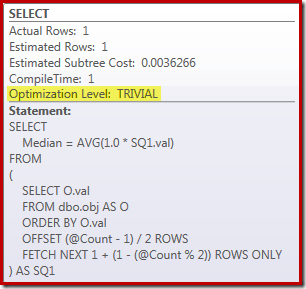
image

The ROW_NUMBER Solution

For systems running SQL Server 2008 R2 or earlier, the best-performing of the alterative solutions uses a dynamic cursor as mentioned previously. If you are unable (or unwilling) to consider that as an option, it is natural to think about emulating the 2012 OFFSET execution plan using ROW_NUMBER.

The basic idea is to number the rows in the appropriate order, then filter for just the one or two rows needed to compute the median. There are several ways to write this in Transact SQL; a compact version that captures all the key elements is as follows:

DECLARE @Start datetime2 = SYSUTCDATETIME();
 
DECLARE @Count bigint = 10000000
--(
--    SELECT COUNT_BIG(*) 
--    FROM dbo.obj AS O
--);
 
SELECT AVG(1.0 * SQ1.val) FROM 
(
    SELECT
        O.val,
        rn = ROW_NUMBER() OVER (
            ORDER BY O.val)
    FROM dbo.obj AS O
) AS SQ1
WHERE 
    SQ1.rn BETWEEN (@Count + 1)/2 AND (@Count + 2)/2;
 
SELECT Pre2012 = DATEDIFF(MILLISECOND, @Start, SYSUTCDATETIME());

The resulting execution plan is quite similar to the OFFSET version:

ROW_NUMBER single median execution plan

It is worth looking at each of the plan operators in turn to understand them fully:

  1. The Segment operator is redundant in this plan. It would be required if the ROW_NUMBER ranking function had a PARTITION BY clause, but it does not. Even so, it remains in the final plan.
  2. The Sequence Project adds a calculated row number to the stream of rows.
  3. The Compute Scalar defines an expression associated with the need to implicitly convert the val column to numeric so it can be multiplied by the constant literal 1.0 in the query. This computation is deferred until needed by a later operator (which happens to be the Stream Aggregate). This runtime optimization means the implicit conversion is only performed for the two rows processed by the Stream Aggregate, not the 5,000,001 rows indicated for the Compute Scalar.
  4. The Top operator is introduced by the query optimizer. It recognises that at most, only the first (@Count + 2) / 2 rows are needed by the query. We could have added a TOP ... ORDER BY in the subquery to make this explicit, but this optimization makes that largely unnecessary.
  5. The Filter implements the condition in the WHERE clause, filtering out all but the two 'middle' rows needed to compute the median (the introduced Top is also based on this condition).
  6. The Stream Aggregate computes the SUM and COUNT of the two median rows.
  7. The final Compute Scalar computes the average from the sum and count.

Raw Performance

Compared with the OFFSET plan, we might expect that the additional Segment, Sequence Project, and Filter operators are going to have some adverse effect on performance. It is worth taking a moment to compare the estimated costs of the two plans:
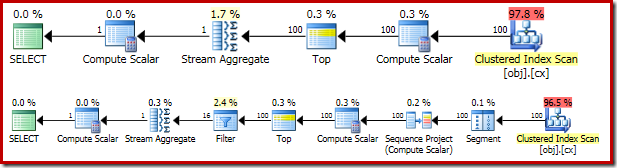
image

The OFFSET plan has an estimated cost of 0.0036266 units, while the ROW_NUMBER plan is estimated at 0.0036744 units. These are very small numbers, and there is little difference between the two.

So, it is perhaps surprising that the ROW_NUMBER query actually runs for 4000 ms on average, compared with 910 ms average for the OFFSET solution. Some of this increase can surely be explained by the overhead of the extra plan operators, but a factor of four seems excessive. There must be more to it.

You have probably also noticed that the cardinality estimates for both estimated plans above are pretty hopelessly wrong. This is due to the effect of the Top operators, which have an expression referencing a variable as their row count limits. The query optimizer cannot see the contents of variables at compilation time, so it resorts to its default guess of 100 rows. Both plans actually encounter 5,000,001 rows at runtime.

This is all very interesting, but it does not directly explain why the ROW_NUMBER query is more than four times slower than the OFFSET version. After all, the 100 row cardinality estimate is just as wrong in both cases.

Improving the performance of the ROW_NUMBER solution

In my previous article, we saw how the performance of the grouped median OFFSET test could be almost doubled by simply adding a PAGLOCK hint. This hint overrides the storage engine's normal decision to acquire and release shared locks at the row granularity (due to the low expected cardinality).

As a further reminder, the PAGLOCK hint was unnecessary in the single median OFFSET test due to a separate internal optimization that can skip row level shared locks, resulting in only a small number of intent-shared locks being taken at the page level.

We might expect the ROW_NUMBER single median solution to benefit from the same internal optimization, but it does not. Monitoring locking activity while the ROW_NUMBER query executes, we see over half a million individual row level shared locks being taken and released.

This is the problem with undocumented internal optimizations: we can never be sure when they will and will not be applied.

So, now we know what the problem is, we can improve the locking performance in the same way we did previously: either with a PAGLOCK lock granularity hint, or by increasing the cardinality estimate using documented trace flag 4138.

Disabling the "row goal" using the trace flag is the less satisfactory solution for several reasons. First, it is only effective in SQL Server 2008 R2 or later. We would most likely prefer the OFFSET solution in SQL Server 2012, so this effectively limits the trace flag fix to SQL Server 2008 R2 only. Second, applying the trace flag requires administrator-level permissions, unless applied via a plan guide. A third reason is that disabling row goals for the whole query may have other undesirable effects, especially in more complex plans.

By contrast, the PAGLOCK hint is effective, available in all versions of SQL Server without any special permissions, and does not have any major side effects beyond locking granularity.

Applying the PAGLOCK hint to the ROW_NUMBER query increases performance dramatically: from 4000 ms to 1500 ms:

DECLARE @Start datetime2 = SYSUTCDATETIME();
 
DECLARE @Count bigint = 10000000
--(
--    SELECT COUNT_BIG(*) 
--    FROM dbo.obj AS O
--);
 
SELECT AVG(1.0 * SQ1.val) FROM 
(
    SELECT
        O.val,
        rn = ROW_NUMBER() OVER (
            ORDER BY O.val)
    FROM dbo.obj AS O WITH (PAGLOCK) -- New!
) AS SQ1
WHERE 
    SQ1.rn BETWEEN (@Count + 1)/2 AND (@Count + 2)/2;
 
SELECT Pre2012 = DATEDIFF(MILLISECOND, @Start, SYSUTCDATETIME());

The 1500 ms result is still significantly slower than the 910 ms for the OFFSET solution, but at least it is now in the same ballpark. The remaining performance differential is simply due to the extra work in the execution plan:
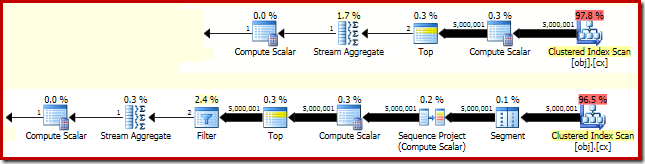
image

In the OFFSET plan, five million rows are processed as far as the Top (with the expressions defined at the Compute Scalar deferred as discussed earlier). In the ROW_NUMBER plan, the same number of rows have to be processed by the Segment, Sequence Project, Top, and Filter.

The post Improving the Row Numbering Median Solution appeared first on SQLPerformance.com.

28 Jul 22:56

VertiPaq Analyzer for Analysis Services #ssas #tabular #powerpivot #powerbi

by Marco Russo (SQLBI)

During the writing of The Definitive Guide to DAX I wanted a simple way to analyze the content and distribution of data compressed in the VertiPaq engine, used by Analysis Services Tabular, Power Pivot and Power BI models. I always relied on BISM Memory Report (thanks Kasper!), but when you focus on a single database there are a number of details available in other data management views (DMVs) other than the one used by BISM Memory Report.

I created VertiPaq Analyzer, which is a Power Pivot data model that collects data by these other DMVs and shows them in pivot tables that provide you information about compression, size of data and related structures (such as relationships and hierarchies), and column selectivity (very important to understand how to optimize DAX queries.

You can download the workbook here, and read the article that describes all the metrics used.

DMV Size 04

28 Jul 08:34

Ask Slashdot: How Do You Store a Half-Petabyte of Data? (And Back It Up?)

by timothy
An anonymous reader writes: My workplace has recently had two internal groups step forward with a request for almost a half-petabyte of disk to store data. The first is a research project that will computationally analyze a quarter petabyte of data in 100-200MB blobs. The second is looking to archive an ever increasing amount of mixed media. Buying a SAN large enough for these tasks is easy, but how do you present it back to the clients? And how do you back it up? Both projects have expressed a preference for a single human-navigable directory tree. The solution should involve clustered servers providing the connectivity between storage and client so that there is no system downtime. Many SAN solutions have a maximum volume limit of only 16TB, which means some sort of volume concatenation or spanning would be required, but is that recommended? Is anyone out there managing gigantic storage needs like this? How did you do it? What worked, what failed, and what would you do differently?

Share on Google+

Read more of this story at Slashdot.

28 Jul 08:33

HP R&D Starts Enforcing a Business Casual Dress Code

by timothy
An anonymous reader writes: HP was once known as a research and technology giant, a company founded in a garage by a pair of engineers and dominated by researchers. Whilst a part of that lives on in Agilent any hope for the rest of the company has now died with the announcement that HP R&D will have to dress in business "smart casual" with T-shirts, baseball caps, short skirts, low cut dresses and sportswear all being banned.

Share on Google+

Read more of this story at Slashdot.

28 Jul 08:14

SQL Server 2016: Concepts and architecture for Stretch Database

by SQLMaster

The new feature set within SQL Server 2016 (in CTP2.2 as of today), not just simple enhancements or easy features there will be a big changes to come as compared to previous releases.

As there is a flood of information about What’s new or top features in SQL Server 2016  I’m keen on newest feature: Stretch Database concept.

What is a stretch database?

A different name to what you call as Archive process, the stretch database management lets us to archive any historical data in a transparent manner. There is a facility to archive/store data in Azure cloud for migration. The main advantage is, no need to change existing queries or client applications.

Few set of questions reference:

Is Stretch Database for you?
If you can make the following statements, Stretch Database may help to meet your requirements and solve your problems.
If you’re a decision maker
  •  I have to keep transactional data for a long time.
  • Sometimes I have to query the historical data.
  • I have apps, including older apps, that I don’t want to update.
  • I want to find a way to save money on storage.
  • The size of my tables is getting out of control.
  • My users say that they want access to historical data, but they only rarely use it.
  • I have to keep buying and adding more storage.
  • I can’t backup or restore such large tables within the SLA.

Where to begin?

All you need is Azure account, if you don’t have one then get an Azure account.

Using the following method within your local instance as follows:

EXEC sp_configure 'remote data archive' , '1';
RECONFIGURE;


Then we have an opportunity to select a database or number of tables to enable Stretch option.

Enable Stretch for a database by using SQL Server Management Studio

  1. In SQL Server Management Studio, in Object Explorer, select the database for which you want to enable Stretch.

  2. Right-click and select Tasks, and then select Enable Database for Stretch.

  3. On the Microsoft Azure Sign-in page of the wizard, sign in to your Azure account and select the subscription to use for billing.

  4. On the Stretch Settings page of the wizard, do the following things to configure the Azure SQL Database server.

    1. Select an Azure location for the server.
    2. Create the credential for the server.
    3. Configure a firewall rule to allow connections to the server.
  5. On the Summary page of the wizard, review your choices and then click Finish.

Enable Stretch for a table to start migrating historical data to Azure SQL Database.

Make sure that the account used to connect your local instance and Azure instance has db_owner permissions on the both sides, along with ALTER permissions on the involved tables.

Enable Stretch for a table by using SQL Server Management Studio

  1. In SQL Server Management Studio, in Object Explorer, select the table for which you want to enable Stretch.

  2. Right-click and select Enable Stretch.

The best option to enable stretch database is to identify transactional databases with large dataset of historical data, that is stored and contained nearly millions/billion rows.


How to identify relevant databases and tables for Stretch Database?

All you need is SQL Server 2016 Upgrade Advisor tool (sounds familiar), which has a Stretch Database Advisor to identify relevant databases and tables for Stretch Database. Download SQL Server 2016 Upgrade Advisor tool. Mind you, this is an advisor not a definitive identification to enable relevant feature. As a database management owner you must have specific information to accompany the list of tables and databases within your data platform.

stretch DB adv

As always any new feature that is associated with new release of SQL Server, make sure you understand about requirements and limitations for Stretch Database.

Finally, here is the list of features (from BOL) on tasks associated to databases or data management:

Databases Cursors Database Checkpoints (SQL Server)
Tables Sequence Numbers Back Up and Restore of SQL Server Databases
In-Memory OLTP (In-Memory Optimization) DDL Triggers Bulk Import and Export of Data (SQL Server)
Indexes DML Triggers Data Compression
Partitioned Tables and Indexes Synonyms (Database Engine) OLE Automation Objects in Transact-SQL
Views JSON Data (SQL Server) Event Notifications
Stored Procedures (Database Engine) XML Data (SQL Server) Monitor and Tune for Performance
Search (SQL Server) Spatial Data (SQL Server) Temporal Tables
User-Defined Functions Binary Large Object (Blob) Data (SQL Server)
Statistics Data-tier Applications
Plan Guides The Transaction Log (SQL Server)
24 Jul 08:02

Utility to reset a sequence next value based on a table/sequence relationship

by drsql
So I was building a database the other day, and I used sequence objects for all of the defaults because it was FAR easier to load data into the table not needing to set identity_insert on and off over and over and over. Worked great. Went through all...(read more)
24 Jul 08:02

Performance and Stability Related Fixes in Post-SQL Server 2014 SP1 Builds

As of June 19, 2015, there has been one Cumulative Update (CU) for the Service Pack 1 branch of SQL Server 2014. There were a large number of hotfixes in this Cumulative Update, in order to get this branch caught up with the RTM branch of SQL Server 2014. If you are running SQL Server 2014 SP1, I really think you should be running the latest SQL Server 2014 SP1 Cumulative Update. Right now, that means SP1, CU1 (Build 12.0.4416), which was released on June 19, 2015. 

Note: SQL Server 2014 Service Pack 1 was re-released on May 4, 2015, and SQL Server 2014 SP1 CU1 was released on June 19, 2015. SQL Server 2014 SP1 CU1 is synchronized with SQL Server 2014 RTM CU8, so I think it is now ok to migrate to the SQL Server 2014 SP1 branch after you have done your own application testing and are ready to make that move.

Table 1 shows the SQL Server 2014 SP1 CU builds that have been released so far.

Build Description Release Date
12.0.4416 SP1 CU1 June 19, 2015

Table 1: SQL Server 2014 SP1 CU Builds

You can follow the KB article link below to see all of the CU builds for both the SQL Server 2014 RTM and the SQL Server 2014 SP1 branches.

SQL Server 2014 Build Versions

Like I have done for other versions and branches of SQL Server, I decided to scan the hotfix list for all of the Cumulative Updates in the RTM branch, looking for performance and general reliability-related fixes for the SQL Server Database Engine. I came up with the list below, but this listing is completely arbitrary on my part. You may come up with a completely different list, based on what specific SQL Server 2014 features you are using.

Here are the fixes in the RTM branch:

SQL Server 2014 SP1 Cumulative Update 1 (Build 12.0.4416), 112 total public hot fixes

FIX: Performance issue occurs when you use sqlncli11.dll ODBC driver to access SQL Server in an application

FIX: Improved memory management for columnstore indexes to deliver better query performance in SQL Server 2014

FIX: A SELECT query that’s run as a parallel batch-mode scan triggers a deadlock in SQL Server 2014

FIX: Data loss might occur when you use Windows Azure Storage in SQL Server 2014 on high latency networks

Incorrect values are included in the description column when you query the sys.dm_xe_objects dynamic management object in SQL Server 2014

FIX: Cannot create statistics when you execute statement to create it directly or in the background in SQL Server 2014

FIX: Complex parallel query does not respond in SQL Server 2012 or SQL Server 2014

FIX: An I/O error that occurs on BPE files causes SQL Server 2014 to disable BPE

FIX: Access violation occurs when you connect to an instance of SQL Server 2014

“Non-yielding Scheduler” error occurs and SQL Server stops responding when a database has columnstore indexes on a Microsoft SQL Server 2014 instance

Incorrect results are returned in an indexed view after an Insert or Delete operation on the base table occurs in SQL Server 2014

FIX: Memory leak in USERSTORE_SCHEMAMGR and CPU spikes occur when you use temp table in SQL Server 2012 or 2014

FIX: DBCC CHECKDB and DBCC CHECKTABLE take longer to run when SQL CLR UDTs are involved in SQL Server 2012 or SQL Server 2014

FIX: Access violation occurs when you delete rows from a table that has clustered columnstore index in SQL Server 2014

FIX: Paging out in memory occurs when columnstore index query consumes large memory in SQL Server 2014

FIX: A severe error occurs in SQL Server 2014 during compilation of a query on a table with clustered columnstore index

Large query compilation waits on RESOURCE_SEMAPHORE_QUERY_COMPILE in SQL Server 2014

FIX: Error 1205 when you execute parallel query that contains outer join operators in SQL Server 2014

FIX: The transaction isolation level is reset incorrectly when the SQL Server connection is released in SQL Server 2014

FIX: SOS_CACHESTORE spinlock contention on ad hoc SQL Server plan cache causes high CPU usage in SQL Server 2012 or 2014

FIX: Memory leak occurs when you run DBCC CHECKDB against a database in SQL Server 2014

FIX: Error 8646 when you run DML statements on a table with clustered columnstore index in SQL Server 2014

FIX: SQL Server takes long time to open database after recovery to add or remove a data file in SQL Server 2014 or SQL Server 2012

FIX: Access violation and “No exceptions should be raised by this code” error occur when you use SQL Server 2012 or SQL Server 2014

FIX: Error 3624 occurs when you execute a query that contains multiple bulk insert statements in SQL Server 2014

FIX: Access violation occurs when you query against a table that contains column store indexes in SQL Server 2014

FIX: Incorrect choice of a nested loops join strategy causes poor query performance in SQL Server 2014

FIX: Error 33294 occurs when you alter column types on a table that has clustered columnstore indexes in SQL Server 2014

FIX: Access violation when a missing task for a background clear operation tries to delete a missing index entry

FIX: Error 33415 occurs when you restart the SQL Server service or alter database in SQL Server 2012 or SQL Server 2014

FIX: Error 35377 when you run a parallel query that contains MERGE statements in SQL Server 2014


The reason that I put these lists together is that I want to convince more people to try to keep their SQL Server instances up to date with Cumulative Updates. If you do the proper testing, planning and preparation, I think the risks from installing a SQL Server Cumulative Update are quite low (despite the occasional issues that people run into).

If you install a Cumulative Update or Service Pack on a Production system the day it is released, after doing no testing whatsoever, and then run into problems (and don’t have a plan on how to recover), then I don’t have that much sympathy for you. 

On the other hand, if you go through a thoughtful and thorough testing process, and you have a plan for how you will install the CU, and how you would recover if there were any problems, then you are much less likely to have any problems. You are also much more likely to avoid the issues that are fixed by all of the included fixes in the new build of SQL Server. You have done your job as a good DBA.

24 Jul 08:02

SQL Server Cumulative Update Highlights

I have a series of blog posts (that I try to keep updated over time) that list I what I consider to be the more important hotfixes in each cumulative update for the respective branch of code for that version of SQL Server. In order to make it easier for people (and myself) to find these posts, I have put together a list of these posts below.

Performance and Stability Related Fixes in Post-SQL Server 2014 SP1 Builds

Performance and Stability Related Fixes in Post-SQL Server 2014 RTM Builds

Performance and Stability Related Fixes in Post-SQL Server 2012 SP2 Builds

Performance and Stability Related Fixes in Post-SQL Server 2012 SP1 Builds

Performance Related Fixes in Post-SQL Server 2008 R2 Service Pack 2 Builds

Performance Related Fixes in Post-SQL Server 2008 Service Pack 3 Builds

Performance and Stability-Related Fixes in All SQL Server 2008 SP2 Cumulative Updates

The main point of these posts is to try to convince more people to stay up to date with SQL Server cumulative updates, especially with SQL Server 2012 and 2014, where most cumulative updates have had a large number of very significant hotfixes.

For people who don’t believe in installing SQL Server cumulative updates, this Microsoft KB article might help convince you.

Recommended updates and configuration options for SQL Server 2012 and SQL Server 2014 used with high-performance workloads

24 Jul 08:02

Visual Studio 2015 and whatnot…

by SQLMaster

An exciting news to Development world about Visual Studio 2015.

Catch up all the excitement from Visual Studio 2015 release Event.

If you have a MSDN subscription then all you can do is download the latest version of Visual Studio 2015 editions from your subscriber download page based on your subscription level.

Visual Studio 2015 available on Azure VMs

Wondering how to use your $150 per month Azure credit? Visual Studio Enterprise is now available on a Windows 8.1 Enterprise N VM on Azure in the exclusive MSDN image gallery. Spin up a VM and get started using Visual Studio 2015 in a matter of minutes. No credit card, no hassle.

Activate Azure
24 Jul 08:02

Professional Development – Set the Bar High

by kevin

Originally appearing at ForITPros.com.

Henry Ford is reported to have once said, “Whether you think you can or think you can’t – you’re right.”

That’s great insight. Too often people place self-imposed and artificial limitations on themselves. They tell themselves that they cannot accomplish something because they aren’t smart enough or don’t have enough creativity. They close their minds to the idea they can, in fact, succeed. Success, after all, is scary to many people.

As a leader, one of your jobs is to inspire your team. Help them to recognize and realize their potential. Don’t let them settle for something less than what they were created to be.

If you believe in your team and regularly communicate that belief in words and actions, you’ll be amazed at how much each person can accomplish.

Read the rest of this article at HERE.

-Kevin

Connect with me online! Facebook | Twitter | LinkedIn | SlideShare | Google Author

The post Professional Development – Set the Bar High appeared first on Kevin Kline.

24 Jul 07:18

VMware – vSphere 6 Basics – Platform Services Controller

by dan

I’ve finally gotten some time to dig into the changes in vSphere 6 with regards to deployment options and architecture. I thought I’d do a few posts covering some key enhancements from VMware, paying particular attention to the Platform Service Controller (PSC) and VMware’s preferred deployment options. I haven’t received any briefings from VMware, so I can’t comment on what is coming in future releases. Note that most of this information was made available to me via access to VMware’s partner program, and I think it’s important that more people understand what’s going on when it comes to PSC and how it works.


vSphere Components

The PSC is a new feature in vSphere 6.0. As background, I recommend you first check out this blog post – vCenter Server 6 Deployment Topologies and High Availability. There is also an excellent FAQ from VMware available here. I thought, before diving too much into PSC deployment options, it’s a good idea to revisit VMware’s semi-new approach to vSphere components.

The PSC contains the following services:

  • VMware vCenter Single Sign-On (SSO);
  • License Service;
  • Lookup Service;
  • VMware Directory Service; and
  • VMware Certificate Authority (CA).

Everything else is now referred to as “vCenter Services”, providing the remainder of the vCenter Server functionality.  This includes:

  • vCenter Server;
  • VMware vSphere Web Client;
  • Inventory Service;
  • vSphere Auto Deploy;
  • VMware vSphere ESXi Dump Collector; and
  • VMware vSphere Syslog Collector (Windows) / VMware Syslog Service (Appliance).


Enhanced Linked Mode and PSC Deployment Options

Here are a few different ways you can do it. Some are good, some are bad. VMware has published a list of recommended topologies for VMware vSphere 6.0.x. The following section provides an overview of the options. Note that some of these options aren’t without their issues.


Enhanced Linked Mode with an External PSC Without HA

The PSC is configured on a separate VM and then the vCenter Servers are joined to that domain, providing Enhanced Linked mode functionality.

ELM1


Enhanced Linked Mode with an External PSC in an HA Configuration

In this case, the PSCs are configured on separate VMs behind a load balancer to provide HA for the configuration. The vCenter Servers are then joined to that domain using the shared load balancer IP address, providing Enhanced Linked mode functionality that is fault-tolerant.

ELM2

And here’s a few ways that you can do it that aren’t really recommended.


Enhanced Linked Mode with Embedded PSCs (Not Recommended)

In this scenario, vCenter is installed in an embedded configuration on the first server. Subsequent installations are then configured in embedded mode but joined to an existing SSO domain. Linking the embedded PSCs is possible, but VMware does not recommend this configuration.

ELM3


Enhanced Linked Mode in Combination Deployment (Not Recommended)

In a combination deployment, the embedded and external PSC architectures are combined. While linking an embedded PSC and an external PSC is possible, VMware does not recommended this configuration.

ELM4


Enhanced Linked Mode using only an Embedded PSC (Not Recommended)

In this case there is an embedded PSC and vCenter Server linked with an external standalone vCenter Server. Linking a second vCenter Server to an existing embedded vCenter Server and PSC is possible, but VMware does not recommended this configuration.

ELM5


Sizing Considerations

If you’re not going to use enhanced linked mode, use an embedded PSC. You still have availability via VMware HA. The failure domain is limited to a single vCenter Server, as there is no dependency on external component connectivity for PSC connectivity. This is most suitable for lab environments.

For sites that will use enhanced linked mode use external PSCs.  The number of controllers depends on the size of the environment:

  • Between 2 and 4 VMware solutions – a single PSC for no HA, and 2 will be required for HA configured behind a single load balancer.
  • Between 4 and 8 VMware solutions – two PSCs linked together for no HA, and four will be required for HA configured behind two load balancers (two behind each load balancer).
  • Between 8 and 10 VMware solutions – three PSCs linked together for no HA, and six will be required for HA configured behind three load balancers (two behind each load balancer).

HA is provided by having multiple PSCs and a load balancer to provide failure protection. All components are still protected by VMware HA. This VMware KB has more information on how to set this up – Configuring PSC 6.0 High Availability for vSphere 6.0 using vCenter Server 6.0 Appliance.


vCenter Platform Choice

VMware maintain that, with the improvements to the vCenter appliance platform, the choice of Windows-based vs vCenter appliance is now a matter of preference rather than performance. I recommend the appliance wherever possible, but some people will feel more comfortable with a Windows-based platform. The cool thing is that, if you want to make things complicated, the PSC supports mixed-mode (i.e. appliance and Windows-based vCenter deployments).

PSC_mixed


Final Thoughts

This may have gone a bit beyond basics, and it’s not something that’s necessarily going to come up each day. But if you’re working either directly with VMware, via an integrator or doing it yourself, this new approach should be a key consideration in your planning activities. The addition of the PSC concept to the vCenter architecture improves the flexibility and availability options of the product, something that I think VMware has struggled with in the past. The key takeaway, in my opinion, is that if you’re upgrading from 5.5 or below, you need to take the time to plan appropriately, particularly if you want to leverage some of the new features that are available.