Shared posts

26 Mar 07:43

Cloud Platform Release Announcements for March 15, 2016

by Cloud Platform Team

This is a blog post of a new ongoing series of consolidated updates from the Cloud Platform team.

In today’s mobile first, cloud first world, Microsoft provides the technologies and tools to enable enterprises to embrace a cloud culture. Our differentiated innovations, comprehensive mobile solutions and developer tools help all of our customers realize the true potential of the cloud first era.

You expect cloud-speed innovation from us, and we’re delivering across the breadth of our Cloud Platform product portfolio. Below is a consolidated list of our latest releases to help you stay current, with links to additional details if you’d like more information. In this update:

  • Compliance – FedRAMP High Package – US Gov GA
  • Azure App Service – Web Apps
  • Azure Key Vault
  • D-Series for Azure Virtual Machines, Azure Cloud Services, and web/worker roles
  • Azure Site Recovery
  • Azure Automation
  • Azure Backup
  • Azure Role-Based Access Control: Preview with PowerShell

Microsoft Cloud for Government extends leadership in Compliance with FedRAMP High, CJIS expansion and DISA Impact Levels 4 and Level 5 investments

Azure Government to be awarded FedRAMP High.

We are pleased to announce that today in Washington, DC, Microsoft confirmed that Azure Government was one of the cloud service providers selected to participate in the FedRAMP High Pilot to build the High Impact Baseline. We completed the pilot process and successfully submitted for a High Impact Provisional Authority to Operate (P-ATO) for our Azure Government environment. We anticipate signature of our P-ATO by the end of the month. This is the highest impact level for FedRAMP accreditation.

Up until this point, federal agencies could only migrate low and moderate impact workloads. Now, Azure Government has controls in place to securely process high-impact level data—that is, data that, if leaked or improperly protected, could have a severe adverse effect on organizational operations or, assets, or individuals. Matt Goodrich, director for FedRAMP’s Program Management Office at the U.S. General Services Administration, affirmed the significance of this news, saying,

“The creation of the FedRAMP High Security Baseline is essential in allowing agencies to migrate more high-impact level data to the cloud. Selecting Microsoft Azure Government to participate in FedRAMP’s High Impact baseline pilot and its forthcoming Provisional Authority to Operate (P-ATO) from the FedRAMP JAB are testaments to Microsoft’s ability to meet the government’s rigorous security requirements.”

Microsoft has finalized the Security Assessment Report (SAR) to meet DISA Impact Level 4 for Azure Government to process controlled unclassified information (CUI)

Building on the successful FedRAMP High pilot completion, Azure Government is on track to achieve DISA Impact Level 4 authorization shortly. Impact Level 4 data refers to unclassified data that requires protection against unauthorized disclosure as established by Executive Order 13556 or other mission-critical data. It may, for example, include data subject to export control, privacy or protected health information, or other data designated as For Official Use Only, Law Enforcement Sensitive, or Sensitive Security Information. This authorization enables our US federal government customers to deploy CUI on in-scope Azure Government services.

Microsoft is establishing two new physically isolated Azure Government regions for Department of Defense and DISA Impact Level 5

To further extend our commitment to providing high levels of security controls and compliance required for government data, Azure Government is adding two new regions for US Department of Defense data, designed to meet DISA Impact Level 5. A first of their kind, these regions, to be designated US DoD East and US DoD West, are architected to meet stringent DoD security controls and compliance requirements, and will be specifically dedicated to DoD workloads and data at Level 5.

Microsoft extends industry leadership in meeting mission critical government compliance

As a CJIS-capable platform, Microsoft works directly with state departments of justice and law enforcement agencies at the state and local levels to sign the FBI CJIS Addendum, with sixteen states, covering more than half of the US population signed to date.  Based on public announcements, that’s at least fifteen more states than the next closest cloud provider. Police departments from California to South Carolina see this compliance as being critical to their adoption of Azure Government:

“Azure Government supports the CJIS framework, and that was a huge reason we chose this solution,” says Tony Elder, deputy chief of the Charleston Police Department.

Microsoft Azure was the first hyper-scale cloud platform to comply with mission-critical compliance programs like CJIS, and now proudly offers an industry leading portfolio of compliance certifications and attestations with 35.

Seven new service releases furthering government’s momentum to Microsoft’s Trusted Cloud

Microsoft is also very pleased to confirm availability of the following Azure Government service, fueling continued customer innovation:

Azure App Service – Web Apps

Azure Web Apps provides a scalable platform for building and managing powerful web applications in Azure Government. The service features rich application framework support for 32-bit and 64-bit web apps using .NET, php, python, node.js and Java.   You can scale your site on-demand with Azure’s auto-scaling, help secure your web apps with full support for both SNI SSL and IP-based SSL, stage new code changes into production using deployment slots, monitor your apps with endpoint monitoring and alerting, and periodically backup your apps for peace of mind.

Azure Key Vault

Government agencies case use Azure Key Vault for Azure Government to help safeguard cryptographic keys and secrets used by cloud applications and services, enhance data protection and compliance.

D-Series for Azure Virtual Machines, Azure Cloud Services, and web/worker roles

There is now expanded support for Azure Government customers with a new series of virtual machine (VM) sizes for Azure Virtual Machines and web/worker roles. The D-Series sizes offer up to 112 GB in memory with compute processors that are approximately 60 percent faster than our A-Series VM sizes (relative to the A1-A7 VM sizes). Even better, these sizes have up to 800 GB of local solid-state drives (SSDs) for blazingly fast disk read/write. The new sizes offer an optimal configuration for running workloads that require increased processing power and fast local disk input/output (I/O). These sizes are available for both Virtual Machines and Azure Cloud Services. In Azure Government, this expanded support houses all customer data, applications, and hardware in the continental United States.

Azure Site Recovery

Azure Site Recovery provides Azure Government customers with full-featured disaster recovery that is simple, and provides automated protection and replication of your physical and virtual environment. The addition of Site Recovery as part of our Azure Backup and disaster recovery features help meet Azure Government customers’ security rigor and requirements, as well as help meet your hybrid cloud objectives. More updates will become available in the near future as we enable physical Linux and VMWare Linux VM replication scenarios to Azure Storage and/or a secondary datacenter for Azure Government.

Azure Automation

Azure Automation enables Azure Government users to automate manual, long-running, error-prone, and frequently repeated tasks that are commonly performed in a cloud environment. You can create, monitor, manage, and deploy resources in your Azure Government environment using runbooks, which are based on Windows PowerShell workflows. Automation runbooks work with Azure Web Apps for Azure App Service, Azure Virtual Machines, Azure Storage, Microsoft SQL Server, and other popular Azure Government services. You can also use them with any service offering public Internet APIs. By efficiently handling processes that span tools, systems, and department silos, Automation lets you deliver services faster and more consistently. It’s highly reliable and you can create checkpoints to resume your workflow after unexpected errors, crashes, and network issues.

Azure Backup

Azure Backup helps enable backups of your Azure Government infrastructure as a service (IaaS) VMs. This can help Azure Government customers in state, local, federal, civilian, and defense, plus more than 100 solution partners with dedicated government practices, to leverage the cloud for critical business needs by backing up their assets on the cloud. We also enabled Microsoft Azure Backup Server, a feature of Azure Backup, to protect workloads to disk and cloud, for all Azure Government customers. You can leverage this Microsoft Azure Backup server to back up your key Microsoft workloads like SQL, SharePoint and Exchange to Azure Government.

Azure Role-Based Access Control: Preview with PowerShell

Azure Role-Based Access Control (RBAC) for Azure Government can be managed using PowerShell and Command-Line tools. Azure RBAC enables fine-grained access management for Azure. Using Azure RBAC, you can segregate duties within your DevOps team and grant only the amount of access to users that they need to perform their jobs. Securing key management roles is essential to protecting government data in the cloud.

Continuing our investment in the future of government

By 2018, increased security will displace cost savings and agility as the primary driver for government agencies to move to public cloud within their jurisdictions*. At Microsoft, we are steadfast in our commitment and investments to deliver a Cloud for Government that meets those stringent requirements. Customers like Rick Smith, CEO, TASER are confirming these investments with their cloud platform choices:

“Microsoft, when we did the final analysis for this market sector, is good for government compliance and in helping us in organizations that have compliance issues. They also have deep relationships. It is a great partnership and we’re excited to keep working with them.”

We listen to feedback, we offer choice, and we will continue making the investments required to deliver the most Trusted Cloud for Government.

Get the full story and check out the Microsoft Trust Center for all things related security, privacy, transparency and compliance.

To experience the power of Azure Government for your organization, sign up for an Azure Government Trial.

*Predicts 2016: Government Continues to Adapt to the Digital Era, Gartner, December 2, 2015.


This blog post contains forward looking statements regarding future operations, product development, product capabilities and availability dates. These statements are based on current expectations and assumptions that are subject to risks and uncertainties. This information is subject to change at any time without prior notification.

26 Mar 07:39

Pure Storage Announces FlashBlade, FlashArray//m10 and FlashStack CI Enhancements

by dan

Another Pure Storage product announcement means a mouthful for my blog post title. I sometimes struggle to get across the magic of vendor product announcements, so if you want a really good insight into what is going on, check out Dave Henry’s post here. Pure Storage are currently running their Pure//Accelerate event and are making three key announcements today:

  • FlashBlade;
  • FlashArray//m10; and
  • FlashStack CI enhancements.


FlashBlade

Pure Storage have done a decent job working with structured storage offerings (think traditional block, databases, and VM workloads). FlashBlade, however, is a file, object, and container-based solution. As always, Pure Storage have come through with what can only be described as a pretty snazzy hardware design.

FlashBlade_Box

So what is it then? Basically, it’s 4RU of flash storage, scale-out goodness. To wit:

  • 8TB or 52TB scale-out blades
  • 15 blades per chassis, offering “elastic” scale at >$1 useable per GB
  • 100% flash, 0% SSD
  • Low-latency, software-defined (isn’t everything?) 40GbE interconnect
  • Scale-out storage software

Note that at General Availability (GA), scalability is limited to one chassis, then going to 2, 3, etc via a fairly aggressive roadmap. So what’s in a FlashBlade?

FlashBlade_Internal

The blade uses an Intel Xeon-based system on a chip, with 8 full CPUs, integrated NV-RAM, 1 FPGA, 2 x ARM cores and PCIe connectivity amongst other things. As far as the software side of things goes, there are a few things to note:

  • Only NFS v3 will be supported at GA, with plans for SMB and HDFS;
  • The S3 object support will offer create, read, update, and delete functionality, with further functionality being added post-GA;
  • Data services include data reduction and encryption, with snapshots and replication on the to do list;
  • They use N+2 erasure coding (so you can lose 2 nodes); and
  • They use LDPC error correction.

Pure Storage are claiming 1.6PBs effective storage in 4RU (assuming 3:1 data reduction), which, as scalability improves, will make for some nicely dense solutions on a per rack basis, with very reasonable power usage at 1.3KW /PB.

When can you buy one? Directed availability is in the second half of 2016, with GA shortly thereafter.


FlashArray//m10

PureStorage_FlashArray_Boxshot

I wrote about the “//m” series of FlashArrays when they were announced last year. They’re pretty cool. Pure Storage has now announced the //m10, a smaller version of the previously released models. The //m10 has the following features:

  • 12.5TB – 25TB of effective* capacity (5 or 10TB RAW) – *note that effective capacity assumes a 5:1 average data reduction;
  • All software is included;
  • Evergreen Storage support;
  • 1 year of Pure1 support; and
  • It’s fully upgradeable to any //m series FlashArray.

Pure Storage have told me these are starting at < US $50K, with GA in Q2 2016.


FlashStack CI

Pure Storage announced FlashStack a little while ago (you can grab the datasheet from here).

PureStorage_FlashStack

Enhancements to the current CI platform include SAP Lumira and Microsoft Exchange solutions. Pure Storage are now positioning the FlashStack Mini solution (with the //m10) for around US $100K, which might be appealing given the right circumstances. As always, have a chat to your local Puritan (!) about what might work for you and what it might cost.

Pure_Cloud

Finally, Pure Storage spoke briefly to me about an all-flash hybrid cloud solution on built on Azure and leveraging Equinix or your local DC. they also have an AWS solution coming soon. The key thing of note here is that you’ll get your compute via the public cloud with storage that has all the features you need (primarily performance and security). It’s an interesting concept, and one I’m looking forward to digging into further.


Further Reading and Closing Thoughts

I was enthusiastic about Pure Storage when I had a chance to meet with them at SFD6 and SFD8. They’re saying a lot of the right things and have branched out a fair bit with this latest announcement. Previous feedback I’d had from people I’d talked to in the marketplace was that Pure Storage had a pretty solid offering with their FlashArray (particularly the //m), but what else did they have up their sleeve? Well, now we know, and I think if Pure Storage can execute on a lot of what’s being positioned as post-GA functionality then they’ll have a pretty serious offering. If nothing else, it’s worth having a chat to your local Puritan to hear more.

[Update]

Enrico has a nice post here, and Alex has some good thoughts here and here. You can read the Enrico’s El Reg wrap-up here.

26 Mar 07:32

R Tools for Visual Studio

by Greg Low

In recent months, I’ve been brushing up my R skills. I’ve had a few areas of interest in this:

* R in Azure Machine Learning

* R in relation to Power BI and general analytics

* R embedded (somewhat) in SQL Server 2016

As a client tool, I’ve been using RStudio. It’s been good and very simple but it’s a completely separate environment. So I was excited when I saw there was to be a preview of new R tooling for Visual Studio.

I’ve been using a pre-release version of R Tools for Visual Studio for a short while but I’ve already come to quite like it. It’s great to have this embedded directly within Visual Studio. I can do everything that I used to do in RStudio but really like the level of Intellisense, etc. that I pick up when I’m working in R Tools for Visual Studio.

So today I was pleased to see the announcement that these tools have gone public. You’ll find more info here in today’s post from Shahrokh Mortazavi in the Azure Machine Learning blog: https://blogs.technet.microsoft.com/machinelearning/2016/03/09/announcing-r-tools-for-visual-studio-2/

26 Mar 07:30

F5 – Developing in Docker Containers – version 0.10 of Docker Tools for Visual Studio

by Steve Lasker

This week, we released an update to our Docker Tools for Visual Studio. This was based on a bunch of feedback we’ve heard from you .It does change some of the experience to date, so I wanted to provide some insight to why.

The tools up to version 0.9.* focused on packaging and publishing your ASP.NET 5 (core) application, running it in a container, hosting in an Azure VM Container Host. We support both Linux and Windows Container scenarios.

The 0.9.* tools are a great way for the entry developer to get started as they get some basic container scenarios enabled for them without changing too much about their development workflow. However, we’ve been working with a number of customers that are hitting various limitations.

Based on customer feedback, below are a list of the issues we’ve been hearing, and what we’re proposing:

  • Running containers through the UI is great, but I need to customize the scripts with Vagrant, Mesos, or Marathon functionality
    0.10.* moved to a PowerShell script scaffolded into your project. See Developing In Containers below
  • I need to run multiple containers for my project including RedisCach/MongoDB or my WebAPI and want to use docker-compose
    0.10.* moved to using docker-compose
  • I need to target different environments: debug w/debugging configurations, such as volume mapping and ultimately breakpoint debugging. And release, which optimizes the image for staging and production hosting
    0.10.* uses multiple dockerfile.[config] and docker-compose.[config].yml files
  • I need to target different container hosts, that use different certs
    The 0.9.* tools were developed before we fully understood docker-machine. Docker-machine has a local store for each hosts certs enabling you to switch between them by executing docker-machine env [hostname] from a Command/PowerShell/Bash prompt. The 0.10.* iteration defers container targeting to docker-machine active. docker-machine does have several limitations, such as importing existing container hosts, however this is the manner Docker recommends for managing various hosts. The docker-machine team has been hearing the feedback and working to complete the docker-machine scenarios, so our tools are standardizing on docker-machine rather than coming up with an alternative solution
  • As I get beyond hello world, I need a set of dockerfiles, compose files and scripts that prep and run a collection of containers
    yo docker has some early ideas we’ve been iterating upon, but for the Visual Studio developer, see the Developing In Containers description below
  • In addition to Azure, I’d like to use a local container host or another host in my environment
    While you can use the custom option, between the multiple host/cert issues, and trying to figure out what values to place in the custom text boxes, developers, including the lesser Scotts have been confused and frustrated with some blocking bugs. Getting VirtualBox to work reliably isn’t the easiest either.
    Starting with 0.10.*, container host targeting defers to docker-machine which standardizes on the way developers working with docker have come to expect. We’re still planning to support specific host targeting, however we use docker-machine to switch hosts, getting all the benefits offered by docker-machine multi-host targeting.
    VirtualBox has gotten a little better, and the Docker-machine folks have even started to give some Windows CMD and PowerShell love by providing the relevant commands for switching to the proper host with docker-machine env [hostname]
  • Windows Containers are difficult to get working consistently
    We’ve been working with the Windows Container/Hyper-V team to stabilize the Windows Container scenarios. Linux Containers have been out for a while so there aren’t many moving parts. Windows Containers are still early and there are many moving parts as we build the best Cloud/Container OS. The majority of challenges with Windows Containers relates to properly provisioning them in the first place and capture the certs for a secured connection.
    There are a number of workarounds in our tooling scenarios for provisioning Windows Container Hosts that have caused us far too much fragility, including the lack of docker-machine create support. Long term, we don’t believe provisioning a container host is something we think should be uniquely done from the Visual Studio tools, rather they would be done in the Azure Portal directly, or through a command line similar to docker-machine create, or the Azure CLI.
    There’s some bigger changes coming that will make things more reliable, faster and standard, so we’ve been balancing getting the developing in container experiences working, which will work for Windows as well, compared to patching a set of scenarios that will change in their implementation.
    That said, we do know it’s frustrating and do plan to stabilize the Windows development scenarios as the new components come together
  • Where’s the dockerfile syntax handling? It’s in VS Code, why not Visual Studio
    As it turns out, the implementation for VS Code language services are different compared to Visual Studio. We do have a docker language service in our backlog, but figured developers aren’t blocked at this point editing the docker files, particularly as we scaffold out the baseline. But, developing in a container, that’s a bit more difficult for developers to hook themselves. So, stay tuned.

Developing in Containers

As customers move beyond simple hello world container scenarios, they’ve hit the issues listed above. And while we started thinking about ways to solve them, after talking with mac/linux developers and startups already using docker in production, what we found was developers really wanted to develop in a container, as part of their inner loop. They like scripts to manage their environment, but want help scaffolding the scripts as their tedious to get right.

Publishing to a container, after they’ve been developing for a while means they’re deferring problems such as taking a dependency on the wrong NuGet package or coding to a behavior that’s different on their Windows 8/10 development machine compared to their Windows Nano or Linux host they plan to deploy to.

The fact that we develop in one environment, but plan from the outset to deploy to another environment is a bit strange if you think about it. We know there are differences, we hope the underlying frameworks abstract those, yet we look for specific behaviors from that target OS and we know that as much as we try, there are always differences that leak through. And, it’s those small nuances that cause us the most headache to troubleshoot and resolve later on.

As we looked at what Linux/Mac developers were doing we didn’t want to forget the expectations our Windows/Visual Studio developers have for great UI/Tooling. Exploring with yo docker and building on the work we did with Connected Services, we went with the scaffolding approach, with prompted UI. We provide the baseline functionality, scaffold files into your project based on some questions you might answer, which become your files. No more “can’t touch this” style coding where we put code in your project that you must compile, but if you change anything you lose the support of the tooling or we simply overwrite your changes.

3 Steps

We’re taking a 3 step approach to transitioning your development from your development machine to developing directly in a container

  1. Run my code in a container
    switch F5 from my development machine to running in a container
  2. Edit & Refresh
    Allow me to make changes to my code, without having to rebuild the container each time
  3. Breakpoint debugging
    Set a breakpoint, hit F5, …just as I have today
With release 0.10.0, we’ve achieved step 2.
Step 3 is something we’re actively working on and is our next major iteration. We’re also planning some fixes to the publishing experience for the low hanging fruit pain points.

Version 0.10.0 – Edit & Refresh – Linux

With the latest version of our Docker Tools for Visual Studio we now support the following scenarios:

  • Docker assets for Debug and Release configurations are added to the project
  • A PowerShell script added to the project to coordinate the build and compose of containers, enabling you to extend them while keeping the Visual Studio designer experiences
  • F5 in Debug config, launches the PowerShell script to build and run your docker-compose.debug.yml file, with Volume Mapping configured
  • F5 in Release config launches the PowerShell script to build and run your docker-compose.release.yml file, with an image you can verify and push to your docker registry for deployment to other environment

Some Q&A on Docker Tools for Visual Studio 0.10.0

  • Q: I see support for Linux. When will you support Windows?
  • A: The Developing in Container scenario, for Edit & Refresh relies on the Volume Mapping feature of Docker and running the containers in a local container host. While we have Linux running locally with VirtualBox, we don’t have Windows running locally on Win 10. So unless you have an early preview of Windows Server 2016, you don’t yet have this scenario.
  • Q: Why does the PowerShell script get displayed?
  • A: This is just an early way to get things launched. We will hide the PowerShell script and send the output to the Output Window when we get the debugger hooked up
  • Q: Why am on the B&W side of the rainbow with the docker files?
  • A: We have the docker language service on our backlog. We felt we should prioritize the F5 experiences for now.
  • Q: The PowerShell script launches, shows some red text, but quickly closes without running the containers
  • A: You have an error somewhere. The first thing to do is stop the PowerShell script from closing to see the error
    Open Properties\launchSettings.json file
    in the Docker section, edit the commandLineArgs name/value pair and add -noexit
    “commandLineArgs”: “-noexit -ExecutionPolicy RemoteSigned …
  • Q: When I add another environment variable to the docker-compose files, I get an error when docker-compose runs. I see \t in the Output window
  • A: By default, the editor for .yml files is a json editor. When you hit carriage return on the previous line, Visual Studio converts your spaces to tabs. .yml files don’t support tabs and the yml parser is failing validation. You can change your Visual Studio editor defaults to not insert tabs for now. Once we implement the docker language service, we’ll keep spaces as spaces
  • Q: Why is this release 0.10? When will 1.0 be released?
  • A: Having a 1.0 release implies a commitment to the stability and consistent in behavior, and a handoff to our premier support teams. As we’re still working through the way we’re enabling container development, we’re making pretty frequent changes, and we’re not fully integrated into the e2e experiences, such as launching a PowerShell script. We’re also dependent on the ASP.NET 5/Core components, Windows Containers which haven’t released and we’re working with Docker on some new tooling. Once we get these dependencies released and we complete step 3, we’ll see if we’re ready to declare 1.0
  • Q: If it’s not 1.0, can I use this for production projects?
  • A: Our tools don’t have any runtime components, and the files scaffolded into your projects are your code to enhance. So, yes, as much as you feel comfortable with Docker and ASP.NET 5/core, you should feel just as comfortable with the pre-release Docker Tools for Visual Studio
I’ll keep this updated as we hear about more common problems.
We hope you find this release helpful in the journey to containerize your applications and really want to hear your feedback
Thanks,
The Microsoft Docker Tools team
26 Mar 07:28

#SQL2016 #Linux #StretchDatabase #Cloud #blownaway #analytics #R – what else?

by SQLMaster

Tweet


Just one more day to go to be blown away; to know insights of Microsoft Data Platform’s data driven event; no need to book your travel; just experience a full view of event live from New York and make you have registered and marked your calendar.

On the lighter side see few awesome videos about Countdown to Data Driven:

Also check further information about:

First release candidate of SQL Server 2016 now available

Technical Overview: SQL Server 2016 Release Candidate 0

Announcing SQL Server on Linux

Few highlights for SQL Server 2016:

  • New security encryption capabilities that enable data to always be encrypted at rest, in motion and in-memory to deliver maximum security protection.
  • In-memory database support for every workload with performance increases up to 30-100x.
  • Better data warehousing performance with the No. 1, No. 2 and No. 3 TPC-H 10 terabyte benchmarks for non-clustered performance, and the No. 1 SAP SD Two-Tier performance benchmark on Windows.
  • Business intelligence (BI) for every employee on every device — including new mobile BI support for iOS, Android and Windows Phone devices.
  • Advanced analytics using new R support that lets customers do real-time predictive analytics on both operational and analytic data.
  • Unique cloud capabilities that enable customers to deploy hybrid architectures that partition data workloads across on-premises and cloud-based systems to save costs and increase agility.


26 Mar 07:27

Instant File Initialization : Impact During Setup

by Aaron Bertrand

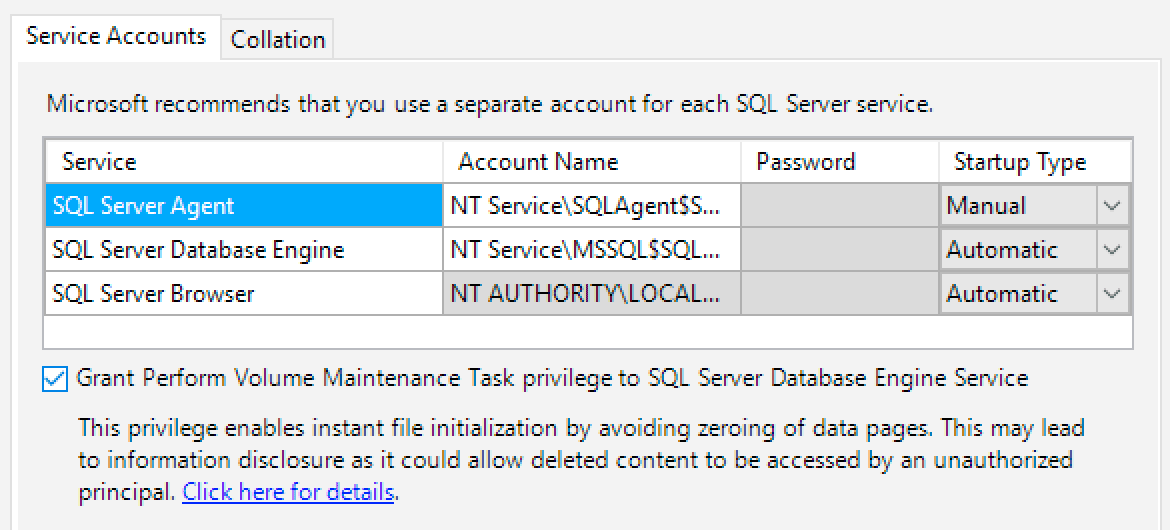
Recently, Erin Stellato (@erinstellato) blogged about the performance impact Instant File Initialization (IFI) can have when creating or restoring databases. She explains that SQL Server 2016 setup now offers you the ability to grant the appropriate rights to the SQL Server service during installation (we also talked about this in the CTP 3.0 section of Latest Builds of SQL Server 2016):

IFINow you can enable Instant File Initialization during SQL Server setup

The key is a new option (which you can also specify in a configuration file):

SQLSVCINSTANTFILEINIT="True|False"

It's nice that you can really reduce the amount of time it takes to create or restore databases later, without having to remember to go into gpedit, assign the rights correctly, and restart the service. But a much bigger benefit to me is the ability to configure larger tempdb files during setup, taking early advantage of IFI.

Now, there are some limits during setup; for example, the number of tempdb files is limited to 8 (or the number of cores, whichever is less), and the size of each file can only reach a max of 1,024 MB. These limits are enforced in the UI, and I thought that I might be able to get around them by specifying higher sizes in a configuration file for an unattended install, but that didn't work either. (The logs said: "The value 8192 for the TempDB file size exceeds 1024 MB and may have impact to installation time. You can set it to a smaller size and change it after installation.") Personally, I think that in this day and age, with the speed and size of the storage we can obtain, a 1 GB cap on data file size is artificially low. So I filed a Connect suggestion:

And then it was pointed out that Brent Ozar (@BrentO) filed a similar item earlier in the CTP cycle, when the limit was actually enforced as 256 MB instead of 1 GB:

I don't have any monster machines that could support 64 x 1 GB files, and that wouldn't be a realistic test either, so I resolved to testing the impact of IFI on 8 tempdb data files of 1 GB each. I'm kind of old school, so I built four different .ini files, and I've highlighted the lines I would change for each test (I wanted to baseline a minimal install with the 4 x 8 MB data files, using IFI and not, and then compare it to 8 x 1,024 MB files). Since I would be running these loops multiple times, it was important to use different instance names depending on whether IFI was enabled or not, because once you grant the right to a service account, it doesn't get taken away by simply removing the instance (and I could have set those accounts up independently, but I wanted to make these tests easy to reproduce).

;SQL Server 2016 RC0 Configuration File
[OPTIONS]
ACTION="Install"
ENU="True"
QUIET="True"
QUIETSIMPLE="False"
UpdateEnabled="False"
ERRORREPORTING="False"
USEMICROSOFTUPDATE="False"
FEATURES=SQLENGINE
HELP="False"
INDICATEPROGRESS="False"
INSTALLSHAREDDIR="C:\Program Files\Microsoft SQL Server"
INSTALLSHAREDWOWDIR="C:\Program Files (x86)\Microsoft SQL Server"
INSTANCENAME="ABTESTIFI_ON"
INSTANCEID="ABTESTIFI_ON"
SQLTELSVCSTARTUPTYPE="Disabled"
INSTANCEDIR="C:\Program Files\Microsoft SQL Server"
AGTSVCACCOUNT="NT Authority\System"
AGTSVCSTARTUPTYPE="Manual"
SQLSVCSTARTUPTYPE="Manual"
SQLCOLLATION="SQL_Latin1_General_CP1_CI_AS"
SQLSVCACCOUNT="NT Service\MSSQL$ABTESTIFI_ON"
;True for IFI = ON, False for OFF:
SQLSVCINSTANTFILEINIT="False"
SQLSYSADMINACCOUNTS="NT Authority\System"
SQLTEMPDBFILECOUNT="8"
;1024 for 8 GB total, 8 for 64 MB total:
SQLTEMPDBFILESIZE="1024"
SQLTEMPDBFILEGROWTH="64"
SQLTEMPDBLOGFILESIZE="8"
SQLTEMPDBLOGFILEGROWTH="64"
BROWSERSVCSTARTUPTYPE="Manual"

And here is the batch file I used (placed in the same folder as the config files), which installed and then uninstalled the instance using each combination three times, and logged the setup times to a text file – ignoring uninstall and cleanup.

echo Beginning test…
@echo off 2>nul
setlocal enabledelayedexpansion
set outputfile=time.txt
echo. > %outputfile%
rem Remove Eight and/or Sixteen if you only have 4 cores!
FOR %%e IN (Baseline Four Eight Sixteen) DO (
  FOR %%x IN (IFI_ON IFI_OFF) DO (
    FOR /L %%A IN (1,1,3) DO (
      echo INSERT #x VALUES('%%e', '%%x', '!TIME!', >> %outputfile%
      D:\setup.exe /Q /IACCEPTSQLSERVERLICENSETERMS /ConfigurationFile=%%e_%%x.ini
      echo '!TIME!' ^) >> %outputfile%
      D:\setup.exe /Q /ACTION=UNINSTALL /INSTANCENAME=ABTEST%%x /FEATURES=SQL
      rem del /Q /S "C:\Program Files\Microsoft SQL Server\MSSQL13.ABTEST%%x\*.*"
      rem rd /Q /S "C:\Program Files\Microsoft SQL Server\MSSQL13.ABTEST%%x\"
    )
  )
)
@echo on
echo …test complete.

A few notes:

  • You may need to change the two lines from D:\setup.exe to the path to the setup directory.
  • You may need to restart your system before running this.
  • You'll want to run the batch file from an elevated command prompt so that UAC doesn't interrupt you on every iteration.

I ran tests on three different systems:

  • A Windows 10 VM with 4 cores and SSD storage
    Baseline test of 4 x 8MB and then 4 x 1,024 MB
  • A Windows 10 VM with 8 cores and PCIe storage
    Baseline test of 4 x 8MB, 4 x 1,024 MB, 8 x 1,024 MB
  • A Windows 2012 R2 VM with 16 cores and a dual-channel RAID 10 array of 8 10K SAS drives
    Baseline test of 4 x 8MB, 4 x 1,024 MB, 8 x 1,024 MB, and 16 x 1,024 MB

The output files generated a bunch of insert statements I could paste here:

CREATE TABLE #x
(
  [server] varchar(32),
  [test]   varchar(32),
  [start]  time(2),
  [end]    time(2)
);
 
-- inserts pasted here
 
SELECT [server],[test],AVG(DATEDIFF(SECOND,[start],[end])*1.0)
FROM #x
GROUP BY [server],[test];

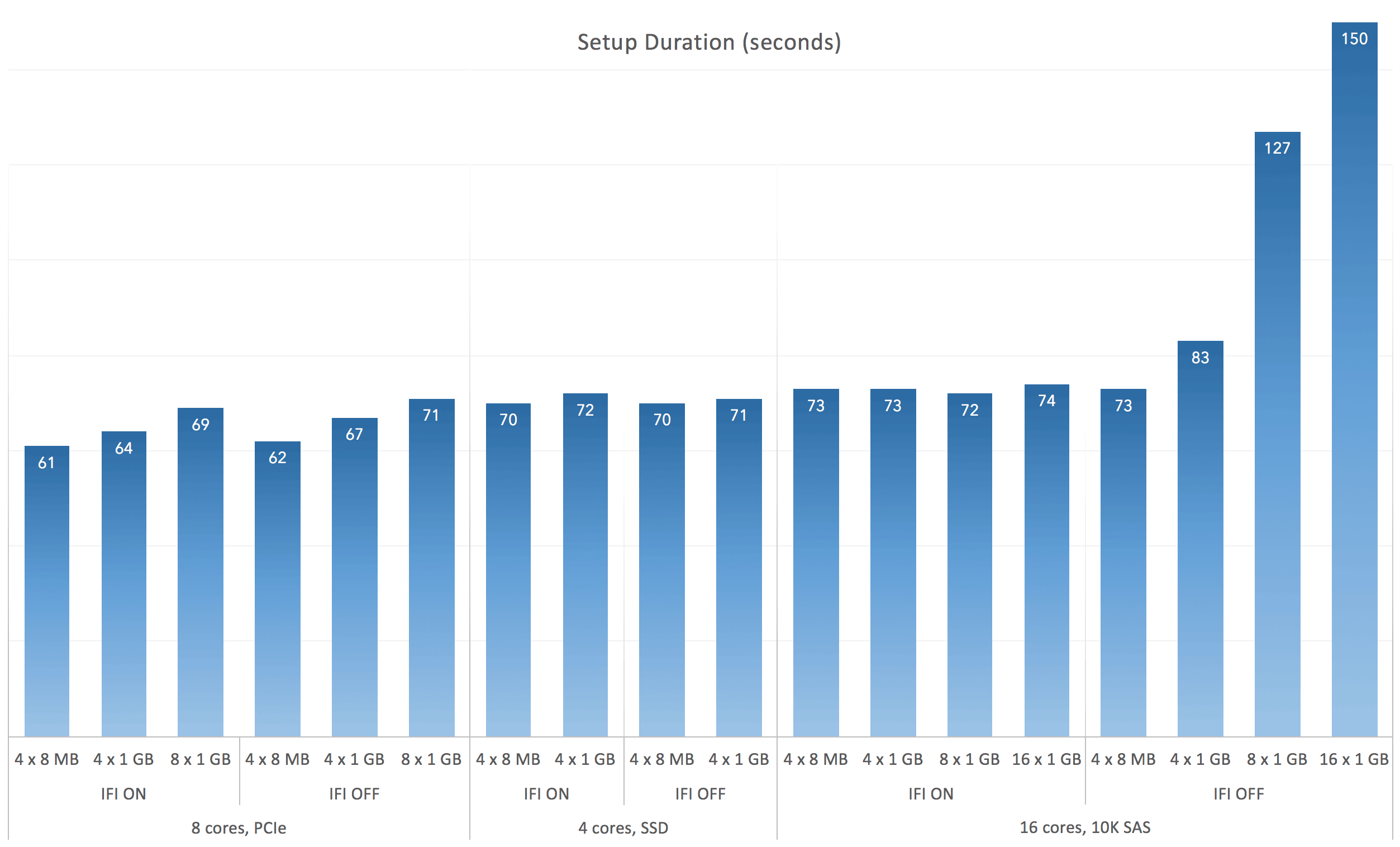
Here were the timings across ten tests each, averaged and rounded (click to enlarge):

Predictably, IFI becomes important with larger files on slower drivesPredictably, IFI becomes important with larger files on slower drives

Setup takes a little over a minute across the board (how nice it is to run setup without Management Tools). The only deviation, really, was when the file sizes started to get bigger on the mechanical drives and with instant file initialization disabled. I can't pretend to be shocked by this.

Conclusion

If you are on SSD or PCIe, instant file initialization can't make things worse, but there is no clear benefit during setup, as long as the archaic file size limitations for tempdb data files remain intact. With the current rules it doesn't seem possible to test this impact beyond (1 GB x the number of cores available). If you are on slow mechanical drives, though, there is a noticeable difference, even when only initializing 8 GB or 16 GB of data – that zeroing out is rather expensive when the disk heads have to move. That said, whether setup takes 75 seconds or 2 minutes is pretty inconsequential in the grand scheme of things (unless you're installing hundreds of servers, but not automating that for some reason), so I think the bigger advantage here is convenience – not having to remember to go grant the service account the volume rights necessary some time after installation has succeeded. If you think about it, this new configuration option can actually pay off much better in automated installs of large numbers of servers, outside of any time saved during the actual installation.

(My next test will take a look at the time it takes to expand the existing tempdb files to a much larger size than 1,024 MB after installation.)

The post Instant File Initialization : Impact During Setup appeared first on SQLPerformance.com.

26 Mar 07:24

R Tools for Visual Studio

by Greg Low

In recent months, I’ve been brushing up my R skills. I’ve had a few areas of interest in this:

* R in Azure Machine Learning

* R in relation to Power BI and general analytics

* R embedded (somewhat) in SQL Server 2016

As a client tool, I’ve been using RStudio. It’s been good and very simple but it’s a completely separate environment. So I was excited when I saw there was to be a preview of new R tooling for Visual Studio.

I’ve been using a pre-release version of R Tools for Visual Studio for a short while but I’ve already come to quite like it. It’s great to have this embedded directly within Visual Studio. I can do everything that I used to do in RStudio but really like the level of Intellisense, etc. that I pick up when I’m working in R Tools for Visual Studio.

So today I was pleased to see the announcement that these tools have gone public. You’ll find more info here in today’s post from Shahrokh Mortazavi in the Azure Machine Learning blog: https://blogs.technet.microsoft.com/machinelearning/2016/03/09/announcing-r-tools-for-visual-studio-2/

26 Mar 07:23

Restoreability and SSMS

by TiborKaraszi
I have written about this before, how SSMS generates restore commands that will fail. This post is about showing what it might look like using screenshots. If you always use T-SQL directly to do restore, then you won't be affected by this. But if you expect to be able to perform restore using the restore dialog, then read on. The problem The issue is that SSMS base a restore sequence on backups that are impossible to restore from. There are two cases I have found: Copy only backups The purpose of...(read more)
26 Mar 07:17

Mapping the Universe with SQL Server

by SQL Server Team

This blog post was co-authored by Joseph Sirosh, Corporate Vice President, and Rimma V. Nehme, Principal Software Engineer, at the Data Group at Microsoft.


Szalay quote
Figure 1: Visible objects of the Sloan Digital Sky Survey (SDSS) DR7 dataset.

Over the last 15 years a database helped revolutionize an entire field of science. Astronomical discovery and sophisticated analyses of properties of the aggregate universe was turbocharged by a vast public mapping effort of the sky, called the Sloan Digital Sky Survey, whose data was served in a public database built with Microsoft SQL Server. This was the first in the field and opened up an entirely new window into the Universe.

The Fourth Paradigm
Figure 2: The Fourth Paradigm: Data-Intensive Scientific Discovery book dedicated to Jim Gray.

Now scientists in every field, from astronomy to zoology, are recognizing that the rate of accumulation of data in their fields are greatly outstripping the rate of accumulation of interpretation, i.e. the rate at which the scientific community can assimilate data into an interpretive framework. And there’s widespread recognition that powerful scientific discoveries lie hidden in such massive data. The Fourth Paradigm of scientific discovery, driven by novel techniques for analyzing massive data, is a driving force in science like never before.

Sloan Digital Sky Survey: The Cosmic Genome Project

It all started in the early 90’s when Dr. Alex Szalay together with the late Dr. Jim Gray took on a daring endeavor to build what could be called the first “DataScope” – an efficient data intensive computing infrastructure for astronomers called the Sloan Digital Sky Survey (SDSS) using Microsoft SQL Server as the back-end database.

Super Computing
Figure 3: Jim Gray, Alex Szalay and other astronomers at Super Computing 2003

SDSS had a bold goal – to create a map of the universe in a database for exploration by all. It is often referred to as the Cosmic Genome Project. A dedicated 2.5-m-diameter telescope in New Mexico used a 120-megapixel camera to image more than one-quarter of the entire night sky, 1.5 square degrees of sky at a time, about eight times the area of the full Moon, both inside and outside of the Milky Way, and helped create a three-dimensional (3D) map of millions of galaxies, quasars and stars.

The SDSS maps sparked a revolution in the way astronomy is practiced. No longer did scientists have to wait months for access to a telescope to learn about the night sky; instead, entire research projects could be accomplished by querying the online database. The SDSS made its entire data set available through SkyServer database – an online portal for public use,  and invited volunteer contributions to scientific research. Prior to SDSS, only the leading scientists and astronomers had telescopes and instruments to collect data for serious research, with most others largely excluded from direct and active engagement with astronomy. Now, with access to the visual data that SkyServer offers, anyone with Internet access could explore the universe with data just as the top scientists do.

SDSSIV_MilkyWay
Figure 4: SDSS-IV can view the whole Milky Way

SkyServer’s architecture was fairly simple to start with: a front-end IIS web server accepted HTTP requests processed by JavaScript Active Server Pages (ASP). These scripts used Active Data Objects (ADO) to query the backend Microsoft SQL Server database. SQL Server returned record sets that the JavaScript formatted into pages. The website was about 40,000 lines of code and was originally built by two people as a spare-time activity.

Why Microsoft SQL Server?

While building applications to study the correlation properties of galaxies, Szalay and his team have discovered that many of the patterns in their statistical analysis involved tasks that were much better performed inside the database engine than outside, on flat files. The Microsoft SQL Server gave them high-speed sequential search of complex predicates using multiple CPUs, multiple disks and large main memories. It also had sophisticated indexing and data joining algorithms far outperforming hand-written programs against flat files. Many of the multi-day batch files were replaced with database queries that ran in minutes thanks to the sophisticated query optimizer.

Impact

Sloan Telescope
Figure 5: Dr. Jim Gray in front of the Sloan telescope in Apache Point, NM

The most recent version of the database has a 15TB queryable public dataset, with about 150TB additional raw and calibrated files. A recent scan of the logs showed more than 1.6 billion web hits in the past 14 years and more than four million distinct IP addresses accessing the site. The total number of professional astronomers worldwide is only about 15,000. Furthermore, the multiuser collaborative environment in SDSS called CasJobs which allows users to launch extensive analyses has more than 6,820 registered users – almost half of the professional astronomy community.

SDSS has been successful in generating new scientific discoveries, including the measurements of thousands of asteroids, maps of the complicated merger history of the outer Milky Way, and the first detection of the baryon acoustic peak – a measurement of how structure formed from ultra-low frequency standing sound waves in the early universe. These surveys have produced data to support 5,800 papers with more than 245,000 citations.  This has made SDSS one of the highest impact projects in the field of astronomy.

SkyServer data

The amount of astronomical data in SkyServer is truly unprecedented. When the SDSS began in 1998, astronomers had data for less than 200,000 galaxies. Within five years after SDSS began, SkyServer had data on 200 million galaxies in the database. Today, the SDSS data exceeds 150 terabytes, covering more than 220 million galaxies and 260 million stars. The images alone include 2.5 trillion pixels of original raw data. SkyServer allows users to search for stars at a given position in the sky, or they can search for galaxies brighter than a certain limit. Users can also enter queries to the database in SQL directly, which allows more flexible and sophisticated searches.

Examples of queries users can ask in SkyServer:

  • What resources are in this part of the sky?
  • What is the common area of these surveys?
  • Is this point in the survey?
  • Give me all objects in this region
  • Give me all “good” objects (exclude “bad” areas)
  • Give me the cumulative counts over areas
  • Compute fast spherical transforms of densities
  • Interpolate sparsely sampled functions (extinction maps, dust temperature, …)

SkyServer
Figure 6: SkyServer portal

Galaxy Zoo

Another project that SDSS data access has enabled is a “citizen science” website, called Galaxy Zoo, where Internet volunteers have classified galaxies using SDSS images. Typically, astronomers used to classify galaxies by eye. If you have 200 million galaxies, on average at three per minute, classification would take 600 million minutes or 1142 years of 24 hours per day, seven days per week. Galaxy Zoo was the first astronomy crowdsourcing portal which allowed private citizens to look at data by eye, and contribute classifications to scientists in a much shorter time.

Hannys Voorwerp
Figure 7: Hanny’s Voorwerp. The mass (shown here in green) is a new cosmic object discovered by a Dutch school teacher, an astronomy novice, while using Galaxy Zoo.

There have been a number of scientific discoveries using Galaxy Zoo including determination of the relation between the morphology of galaxies and their environment and the discovery by a Dutch school teacher of Hanny’s Voorwerp – a very rare type of astronomical object called a quasar ionization echo. These discoveries would not have been possible without the participation of thousands of Galaxy Zoo volunteers – between them, they have visually classified over 40 million galaxies to date.

From SkyServer to SciServer: Big Data infrastructure for science

A new effort called SciServer, a descendant from SkyServer, aims to go beyond astronomy and build a long-term, flexible ecosystem for scientists to provide access to the enormous data sets from observations and simulation to enable collaborative research. SciServer aims to meet the challenges of Big Data in scientific world. By building a common infrastructure, the goal is to create data access and analysis tools useful to all areas of science. Led by Alex Szalay, the work on SciServer will deliver significant benefits to the scientific community by extending the infrastructure developed for SDSS astronomy data to many other areas of science.

SciServer
Figure 8: SciServer: A collaborative research environment for large-scale data-driven science.

The approach in designing SciServer is the same as in the SkyServer: bring the analysis to the data. This means that scientists can search and analyze Big Data without downloading terabytes or petabytes of data, resulting in much faster processing times. Bringing analysis to data also makes it much easier to compare and combine datasets allowing researchers to discover new and surprising connections between data and make experiments more reproducible.

To help ease the burden on researchers, the team developed SciDrive, a cloud data storage system for scientific data that allows scientists to upload and share data using a Dropbox-like interface. The interface automatically reads the data into a database, and one can search online and cross-correlate with other data sources. SciDrive tries to address the “long tail” of a huge number of small data sets that scientists have. The goal is to try bring many small, seemingly unrelated data to a single place and see if new value emerges. People can simply drag and drop (and share) their data without any metadata required.

In the heart of it all is SQL Server

SDSS team in collaboration with Jim Gray took on the enormous task of putting all of the astronomy data into SQL Server database, preserving as much provenance as possible, and making the data as accessible and query-able as possible.

Database logical design

Dr. Alex Szalay
Figure 9: Dr. Alex Szalay

The processed image data were stored in databases. The logical database design consisted of photographic and spectrographic objects. They were organized into a pair of snowflake schemas. Sub-setting views and many indices gave convenient and fast access to the conventional subsets (such as stars and galaxies). Procedures and indices were defined to make spatial lookups even more convenient and faster.

Database physical design

SkyServer initially took a simple approach to database design (see Figure 11 below) and it worked right from the beginning. The design counted on the SQL storage engine and the query optimizer to make all the intelligent decisions about data layout and data access. As Alex Szalay put it: “Great query optimizer made all the difference. Even ‘the worst’ query plans were actually quite good!”

Schema
Figure 11: The photoObj table at left is the center of one star schema describing photographic objects. The specObj table at right is the center of a star schema describing spectrograms and the extracted spectral lines. The photoObj and specObj tables are joined by objectId. Not shown are the dataConstants table that names the photoObj flags and tables that support web access and data loading.

“Indexing the Sky”

To speed up the access, the base tables were heavily indexed (these indices also benefited view access). In addition to the indices, the database design includes a fairly complete set of foreign key declarations to insure that every profile has an object; every object is within a valid field, and so on. The design also insisted that all fields were non-null.  These integrity constraints were invaluable tools in detecting errors during loading and they aided tools that automatically navigated the databases.

Beyond the file group striping (to automatically get the sum of the disk bandwidths without any special user effort), SkyServer used, for the most part, all of the SQL Server default values; there was not much special tuning. This is the hallmark of SQL Server – the system aims to have the out-of-the box performance to be great, and the SkyServer project has been a true testimonial to that goal.

Spatial data access

HTM
Figure 12: Hierarchical triangular mesh

“Spatial was special.” Astronomers are particularly interested in executing spatial queries to obtain galactic clustering and large-scale structure of the universe. The common theme in SDSS experience was that it was possible to embed spatial concepts in a relational framework in a very simple manner. To make spatial area queries run quickly, SDSS team integrated the hierarchical triangular mesh (HTM) code with the SQL Server, which became a new “spatial access method” in the engine. HTM is a method to subdivide the surface of a sphere into spherical triangles of similar, but not identical, shapes and sizes. It is basically a quad-tree that is particularly good at supporting searches at different resolutions, from arc seconds to hemispheres. The HTM library was an external stored procedure wrapped in a table-valued stored procedure spHTM_Cover(<area>).

So all the users had to do was to simply invoke the procedure call similar to this:  select * from spHTM_Cover(‘Circle J2000 12 5.5 60.2 1’) which would return the table with four rows, each row defining the start and end of a 12-deep HTM triangle like below.

HTMIDstart HTMIDend
3,3,2,0,0,1,0,0,1,3,2,2,2,0 3,3,2,0,0,1,0,0,1,3,2,2,2,1
3,3,2,0,0,1,0,0,1,3,2,2,2,2 3,3,2,0,0,1,0,0,1,3,2,2,3,0
3,3,2,0,0,1,0,0,1,3,2,3,0,0 3,3,2,0,0,1,0,0,1,3,2,3,1,0
3,3,2,0,0,1,0,0,1,3,2,3,3,1 3,3,2,0,0,1,0,0,1,3,3,0,0,0

Another optimization technique used by SkyServer was the zoning idea (segmenting space into zone buckets and then segmenting zones by an offset). The main idea behind zoning was to try to push the logic entirely into SQL (the zone code was all native to SQL), which allowed the query optimizer to do a very efficient job at filtering the objects.  In particular, the zone design gave a three-fold speedup for the table-valued functions.

CLR support

integration of .NET common language runtime (CLR) with SQL Server in 2005 enabled astronomers to implement user code that runs inside the database server process. CLR was in particular a very important feature to SDSS as it gave astronomers the ability to write astronomy-specific logic in the form of user-defined functions, aggregates and stored procedures to build critical science functionality and run the compiled code in the database. As Alex put it, “Support for object-oriented types made a dramatic change for SkyServer.”

SQL queries

Astronomers wanted a tool that would be able to quickly answer questions like: “find asteroid candidates” or “find other objects like this one”, which originally gave the motive to build the SQL-based backend. Indeed, right from the beginning Jim Gray asked Alex Szalay to define 20 typical queries astronomers might want to ask and then together they designed the SkyServer database to answer those queries. The anecdote is that the conversation went as follows:

Jim: What are the 20 questions you want to ask?
Alex: Astronomers want to ask anything! Not just 20 queries.
Jim: Ok, start with 5 queries.
[it took Alex 30 minutes to write them all down]
Jim: Ok, add another 5 queries.
[it took Alex 1 hour to write them all down]
Jim: Ok, now add another 5 queries.
[Alex gave up and went home to think about them]

Alex (said later): In 1.5 hours, Jim taught me a lot of humility!

Alex (said later): It also taught us the importance of long-tail distribution and how to prioritize.

The queries corresponded to typical tasks astronomers would do. Translating the queries into SQL required a good understanding of astronomy, a good understanding of SQL, and a good understanding of the databases. As Alex put it: “We were surprised and pleased to discover that all 20 queries had fairly simple SQL equivalents.” Below is one of the query examples used in SkyServer to detect asteroids:

Q: Provide a list of moving objects consistent with an asteroid.

 select	objID,  					       -- return object ID	
 	sqrt( power(rowv,2) + power(colv, 2) ) as velocity, -– velocity
	dbo.fGetUrlExpId(objID) as Url		       -- url of image to examine it.
 into  ##results
 from	PhotoObj  					       -- check each object.
 where (power(rowv,2) + power(colv, 2)) between 50 and 1000	-- square of velocity 
   and rowv >= 0 and colv >=0				       -- negative values indicate error

This is a sequential scan of the PhotoObj table to evaluate the predicate on each of the objects. It finds asteroid candidates. Here is a picture of one of such objects:

Asteroid Candidate

Above query returns ‘slow moving’ objects. To find fast moving objects one can write a slightly different query which looks for streaks in the sky that line up. These streaks are not close enough to be identified as a single object.

SELECT r.objID as rId, g.objId as gId,   
                 dbo.fGetUrlExpEq(g.ra, g.dec) as url 
FROM PhotoObj r, PhotoObj g
WHERE  r.run = g.run and r.camcol=g.camcol _    and abs(g.field-r.field)<2  -- nearby
       -- the red selection criteria
       and ((power(r.q_r,2) + power(r.u_r,2)) > 0.111111 )
       and r.fiberMag_r between 6 and 22 
and r.fiberMag_r < r.fiberMag_g 
and r.fiberMag_r < r.fiberMag_i
       and r.parentID=0 and r.fiberMag_r < r.fiberMag_u      
and r.fiberMag_r < r.fiberMag_z
       -- the green selection criteria
       and ((power(g.q_g,2) + power(g.u_g,2)) > 0.111111 )
       and g.fiberMag_g between 6 and 22 and g.fiberMag_g < g.fiberMag_r
and g.fiberMag_g < g.fiberMag_i
       and g.fiberMag_g < g.fiberMag_u and g.fiberMag_g < g.fiberMag_z
       and g.parentID=0 
       -- the matchup of the pair
       and sqrt(power(r.cx -g.cx,2)+ power(r.cy-g.cy,2)+power(r.cz-g.cz,2))*(10800/PI())< 4.0
       and abs(r.fiberMag_r-g.fiberMag_g)< 2.0_
 
And you can also add a third query

select  top 10 ra, dec, (rowv*rowv + colv*colv ) as velocityVector, *
from PhotoObj
where 
-- object SATURATED | BRIGHT | BLENDED and object DEBLENDED_AS_MOVING
(flags & (
       cast(0x0000000000040000 as bigint) |  
    cast(0x0000000000000002 as bigint) | 
    cast(0x0000000000000008 as bigint) ) ) = 0 
AND (flags & cast(0x0000000100000000 as bigint)) > 0 
-- PSF magnitude / psfCount r  r range between 14.5 and 21.5
AND type = 6
AND (psfMag_r > 14.5)
and (psfMag_r < 21.5)
-- veolocity vector larger than 0.05 deg/day and smaller than 0.5 deg/day.
AND (rowv*rowv + colv*colv > 0.0025)
AND (rowv*rowv + colv*colv < 0.25)
And dec > -1.25 
AND dec < 1.25
-- Limit to specific part of the Stripe-82 region
AND (ra > 300 or ra < 60)
order by (rowv*rowv + colv*colv ) desc

Here is a picture of one of such ‘faster moving’ objects:

Fast Moving Objects

When asked about T-SQL, one of the astronomers said that it was ‘almost like English’ to them, and they could easily understand what was going on. Another astronomer put it: “SQL can serve as a ‘helpdesk’ – if somebody has a problem, another person can answer the question when query is sent to them.” A graphical query plan that’s viewable before submitting an MS-SQL query provided details on which query steps would take the largest fraction of execution time and—in most cases— gave users all the information necessary to improve query performance.

Hardware configuration

The configuration for multiple release support in SDSS is shown in Figure 12 below. DR12 (the latest release) DB servers have the following hardware configuration today:

  • Total data size: 12 TB
  • Number of filegroups: Two (Primary has 8 files, Secondary has one file, see Figure 13)
  • Servers: Four identical nodes with one copy of DB on each
  • System manufacturer: Supermicro
  • System type: x64-based PC
  • Processor(s): Intel(R) Xeon(R) CPU E5-2630 v3 @ 2.40GHz (2 processors)
  • Logical cores: 32
  • Physical CPUs: 2
  • Total physical memory: 128 GB
  • HDD size: 3.0 TB
  • Total HDDs: 24

HardwareConfig
Figure 13: DR12 Hardware configuration at JHU for SDSS Servers.

In the production cluster, there are three to four DB servers per release, so that the public and collaboration users can be adequately supported, and the queries can be load-balanced on different boxes. Quick and long queries are pointed to separate servers.

Database Properties
Figure 14: DR12 database properties

Conclusion

“When we started working on SDSS, we had fun, and we were hoping people will use it. Working with SQL Server was fun, but astronomy is also fun” – said Alex Szalay. Science is increasingly driven by data (big and small), combined with changing sociology – surveys today are analyzed by individuals from all over the world, not just by a few experts. The move from hypothesis-driven to data-driven science is a reality, and the SQL Server-powered SDSS is the first true “telescope” for data that has made the vision of a ‘DataScope’ a reality.


Joseph & Rimma
Follow Joseph on twitter @josephsirosh, and Rimma at @rimmanehme.

26 Mar 07:17

Data Driven Top 10

by Takeshi Numoto

Last week at our Data Driven event in New York City, we had the opportunity to meet with several hundred customers to talk about data in person, as well as many more online. More specifically, we talked about the opportunity and challenges facing our customers, how data can help them innovate and get ahead and how Microsoft, and SQL Server 2016, can help.

A few themes were clear throughout these great conversations:

  • A massive explosion of data from things, apps and services is affecting every customer.
  • In order to drive impact from all their data, there was high interest in using the new advanced analytics capabilities to derive intelligent action from data.
  • TCO matters to customers, there was high interest in the Oracle migration offer given the nearly 12X savings from SQL Server over Oracle.*

So, for our many customers and partners who couldn’t be there in person I wanted to summarize the top 10 questions I heard – and the answers.

Thank you for being a SQL Server customer. I encourage you to learn more about SQL Server 2016 and find out how we can help you transform your business.

– Takeshi

Top 10 customer questions

1. What’s the biggest challenge customers face today in managing their data strategy and how is what you announced helping them?

Customers want to be more agile to use and respond to new data and data sources as they are available. But they can’t completely replace their IT environment so those new solutions needs to work with what they already have and be deployed where their data lives. Our commitment is to help customers turn data into intelligent action with solutions that meet them where they are today, with the tools and languages they use most and the platform and applications they need, on-premises or in the cloud. At the Data Driven event we talked about:

  • How the rapid release model of the cloud enables us to quickly iterate on new capabilities and test features at scale. SQL Server is truly the first “born in the cloud” database where features such as Always Encrypted and Role Level Security were first validated in Azure by hundreds of thousands of customers and billions of queries.
  • Why our consistent model across on-premises and cloud delivers unique hybrid scenarios such as Stretch Database for customers who are on-premises so they can take advantage of the economics of the cloud by keeping terabytes of historical data online at a fraction of a cost of a SAN on-premises.
  • How SQL Server continues to deliver the performance customers want with the applications they need as evident by holding the #1 SAP benchmark on Windows.**
  • Our future plans for SQL Server on Linux which is part of our strategy to meet customers where they are.

2. Can you help better define what you mean by the core relational database being available on Linux?

We’ll first release the core relational database capabilities on Linux targeting mid calendar year 2017 and will work with customers to prioritize the additional capabilities. The core relational database capabilities, inclusive of transaction processing and data warehousing, are the core foundation of building intelligent applications and will enable customers to get started quickly with their deployments. To find out more about SQL Server on Linux, you can sign up to get regular updates and provide input to the team.

3. When SQL Server is available on Linux, how will customers license it?

A customer who buys a SQL Server license (per-server or per-core) will be able to use it on Windows Server or Linux. This is just part of how we are enabling greater customer choice and meeting customers where they are.

4. When SQL Server is available on Linux, what if customers have Software Assurance on their existing SQL Server licenses?

For customers who have made an investment in Software Assurance, as always, they will have rights to the future releases of SQL Server as we make them generally available.

5. What can customers expect in the future for SQL Server on Windows?

We have a 23-year history of Windows Server and SQL Server joint engineering and proven innovation. Windows Server and SQL Server today are the most widely deployed database and operating system pairing on the planet, with industry leading price/performance, unparalleled security, and simply-configured and powerful high availability and disaster recovery. We will continue to invest in helping SQL Server customers take advantage of the latest innovations in Windows Server to increase cost efficiencies and maximize performance.

6. Why should customers migrate off Oracle to use SQL Server today?

SQL Server 2016 is the database built for mission critical intelligence. It is the biggest leap forward in Microsoft’s data platform history with real-time operational analytics, rich visualizations on any mobile device, built-in advanced analytics, new advanced security technology to encrypt data at rest, in motion and in-memory, and new hybrid cloud scenarios. All of these capabilities are built-in into this latest release offering mission-critical capabilities at significantly lower TCO.

Microsoft is a leader in the Gartner Operational Database Management Systems Magic Quadrant with the execution score furthest to the top for execution and furthest to the right on strategy, which is a strong proof point for SQL Server 2014 as well as SQL Server 2016.

Customers can also choose to deploy SQL Server 2014 today or any supported version of SQL Server. Customers who take advantage of the Oracle migration offer with SQL Server 2014 today will have rights to deploy future versions of SQL Server once generally available during the term of Software Assurance.

7. Given this event celebrated the launch of SQL Server 2016, when is the general availability of SQL Server 2016?

Customers can expect SQL Server 2016 to be generally available this calendar year (2016). Last week we shipped the first release candidate (RC0) in which the core database is feature complete.  With the new rapid release model, customers can expect multiple release candidate prior to general availability so stay tuned for future updates.

8. When does the competitive migration offer expire? Is it only for Oracle?

To take advantage of the offer, customers would need to purchase by June 30, but have flexibility on the deployment timeline. Customers can use the migration offer to move off of all commercial databases including Oracle, IBM DB2 and SAP Sybase ASE to any supported release of SQL Server.

9. What are early adopter customers saying about SQL Server 2016?

Hear what DocuSign had to say about SQL Server 2016 and how they help organizations build entire approval workflows without a single sheet of paper or filing cabinet in sight. DocuSign partnered with Microsoft to help secure their customers’ data, realize insights with SQL Server analytics and BI capabilities and receive world-class support. Hear directly from their chief architect and vice president of platforms, Eric Fleischman:

10. How are partners responding to SQL 2016?

Partners are excited about the capabilities of SQL Server 2016.  At the Data Driven event, SQL Server partner OpenText shared that they are piloting use of the Stretch Database feature with Content Suite 16. Stretch Database will address OpenText’s customers’ hot and cold data storage and compute needs and enable customers to better leverage the mission critical data that powers their businesses. According to Adam Howatson, CMO, “The Stretch DB capability in SQL Server 2016 addresses this need and allows us to stretch information to the cloud to optimize their spend and the way that they manage information.”

Likewise, Royce Kallesen, senior director data science at PROS says of their pricing management software, “Getting data to the customers as soon as possible is vitally important. SQL Server with R Services is a big step forward for us and a great opportunity in the fact that we can have that Advanced Analytics embedded in with our database.”


* Annualized pricing based on Oracle US commercial list price and SQL Server open ERP EE price, assuming 16 core servers (two procs with eight cores each) running OLTP, BI, DW, AA and ETL Tools, 1000 BI users. http://www.oracle.com/us/corporate/pricing/technology-price-list-070617.pdf

** Benchmark Certification #2016002: Two-tier configured SAP SD Standard Application Benchmark. Using SAP ERP 6.0 Enhancement Package 5, achieving the results of 100000 SD benchmark users using HPE Integrity Superdome X, 16 processors/288 cores/576 threads Intel E7-8890 v3 with 4096GB of main memory. Operating System: Windows Server 2012R2 with SQL Server 2014 Enterprise Edition as DBMS. For more details see: http://www.sap.com/benchmark.

26 Mar 07:17

Time is running out: Upgrade SQL Server 2005 now

by SQL Server Team

Less than one month remains before support ends for SQL Server 2005 on April 12, 2016. If you’re still using this version or other legacy versions of SQL Server, there’s never been a better time to upgrade to SQL Server 2014 and Microsoft Azure SQL Database to safeguard your business and reap all the benefits of a modern data platform.

With just a few weeks remaining, we wanted to remind you of the many resources available to help you make the move:

Understand the process

Read our blog post series for a full description of the upgrade process:

  • Step One: Understand and map out your database and its dependencies.
  • Step Two: Target the destination for each application and workload.
  • Step Three: Identify your upgrade strategy.

Visit the SQL Server 2005 End of Support page for detailed information on planning and executing the migration, along with options for your new database strategy.

Understand the benefits

Plan your upgrade

Upgrade to SQL Server 2014 now.

Microsoft’s deep commitment to this industry leading technology continues with the availability of the release candidate for SQL Server 2016, the biggest leap forward in Microsoft’s data platform history. SQL Server 2016 will include real-time operational analytics, rich visualizations on mobile devices, built-in advanced analytics, new advanced security technology, and new hybrid cloud scenarios.

See what’s coming in SQL Server 2016.

26 Mar 07:17

Enable business insights for everyone with SQL Server 2016: Part 1

by SQL Server Team

This post was authored by Kasper de Jonge, Senior Program Manager, SQL Server Analysis Services.


This is the first installment of a two-part series. Read on to learn how SQL Server 2016 Analysis Services (SSAS) can provide fast access to data to allow analysis at the speed of thought and stay tuned for part two, where we discuss the specific improvements made to SSAS for SQL Server 2016.

Many companies are generating more and more data, and the increased use of mobile devices, sensors and business applications adds to this trend every day. With this wealth of information and the business opportunity unlocking it provides to organizations, it has become increasingly important to allow more business users to easily access data to help them make better decisions when and where they need to.

Many organizations have two types of data users. The first type is those who geek out on data, are passionate about it, and know where to locate the information and manipulate it into insights by using tools such as Excel or Power BI Desktop. They are the ones who often discover hidden insights, solve important ad-hoc questions that arise in an organization and tend to be on the cutting edge of technology and data knowledge. The second type (and majority of data users) often don’t have the same inclination to search for data but still need access to make informed decisions. This group of data users often specifically benefit from SQL Server Analysis Services (SSAS) by accessing data models that they can easily understand, with the tools they are familiar with. IT developers can use SSAS to empower these users to unlock business intelligence based on data that can be trusted, is reusable and easy to interpret.

Create powerful BI Semantic Models and transform complex data

IT developers play an important role in helping business users unlock data that produce actionable  insights. For example, they can create an Analysis Services BI Semantic Model that allows business users to explore data and surface insights through visualization tools. When connecting to a BI Semantic Model, business users don’t have to worry about where the data is coming from or how it is joined together.

The model provides BI professionals with an intuitive abstraction (as opposed to complex data) by creating either a traditional multidimensional model or a simpler tabular model. On top of that, they can apply specific business logic to the data using a powerful calculation language that allows them to describe logic in forms such as year-to-date or year-over-year change.

Flexible data access layer

The BI Semantic Model also provides fast access to data to allow analysis at the speed of thought. Historically, this has been done by loading data into the analysis storage engine. Given that the amount of data at some companies is growing at an unprecedented rate, organizations have needed to increase scale by investing in infrastructure and databases, often utilizing in-memory to handle the increased volume. However, when more data needs to be moved from source systems to the BI system to widen access, the length of time required to retrieve data increases every day.

For some organizations, the volume of data provides a challenge and they need a solution that no longer has a dependency on moving data from the source system. In addition to the option to load the data into memory, SQL Server Analysis Services provides the capability to directly connect models to the data sources. This option might be especially attractive when the source data is available on high-performing infrastructure.

The image below shows an overview of the BI Semantic Model:

BI Semantic Model
Figure 1: Overview of SQL Server Analysis Services (SSAS).

We have only scratched the surface on this important topic. In a follow-up blog post, we will share more information on the enhancements made for SQL Server Analysis Services in SQL Server 2016. Further information on these updates can also be found via our videos sessions from Data Driven 2016 on the Tabular semantic model and Analysis Services DirectQuery. The latest details can always be found on the Analysis Services and PowerPivot Team Blog.

See the other posts in the SQL Server 2016 blogging series.

Try SQL Server 2016 RC

26 Mar 07:16

Blocking operators and actual row counts

by Gail

Query plans can sometimes be hard to read, and other times can be downright mystifying.

Take this plan for example. Not too hard in general. Two index seek/scan, a join, a sort and a filter. The peculiarity here is in the actual row counts. We expect that a join can filter rows out, that a filter can, well, filter rows out, that a top can reduce rows, that any aggregation can reduce the row count.

SortActualRowsBefore

SortActualRowsAfter

But why is a sort operator, a normal sort, reducing the row count? The answer lies in part not in how rows flow through the query plan, but in how control flows through the plan, and in part in the types of operators in the plan.

First let’s look at the types of operators. Here I don’t mean joins and aggregates and the like, I’m referring to whether an operator is a blocking operator or a non-blocking operator.

A non-blocking operator is one that consumes and produces rows at the same time. Nested loop joins are non-blocking operators.

A blocking operator is one that requires that all rows from the input have been consumed before a single row can be produced. Sorts are blocking operators.

Some operators can be somewhere between the two, requiring a group of rows to be consumed before an output row can be produced. Stream aggregates are an example here.

The sort in the plan is a blocking operator, and hence it needs all rows from the operator before it, the loop, before it can output any rows. That’s the 2920 going in to it, but why is there only 50 rows coming out?

That’s down to the way a query executes. Starting at the top of the plan, the top operator, in this case a SELECT asks the operator beneath it for a row. If the requested operator isn’t one that can generate a row (eg an index scan), then it asks the operator beneath it for a row.

The query that generated the shown plan had a filter based on the generated Row_Number of RowNumber between 26 and 50. This filter was executed by the Filter operator and partially by the Top operator.

RestOfPlan

FilterPropertiesTopProperties[3]

The TOP is there because the filter is on a Row_Number, the resultset is sorted by the columns defined in the Row_Number’s order by and there’s no partition by. The row numbered 50 will be the 50th row in the resultset and after that point there can be no more rows that satisfy the predicate. The query processor knows this.

So, the first row is requested by the select. The Filter can’t generate a row so it asks the Top for a row, and so on down the plan until we get to the sort.

The sort can’t request one row from the operator below it, it’s a blocking operator, it has to fetch all the rows from the operator below it. All 2920 of them.

Once the sort has all the rows, it sorts them and returns one row back to the previous operator. Repeat for the next row and the next.

Let’s fast-forward a few rows. The filter has just returned row 50 to the select operator. Select asks for the next row, row 51. The filter asks the top for the next row. The top, however, knows that it was only supposed to return the first 50 rows, and so instead it tells the filter operator that there are no more rows. The filter passes that up to the select and the query end there.

Hence why we have a sort further down the plan that only outputted 50 rows. Not because it filtered the rows itself, but because it was a blocking operator and the operators above it only asked for 50 rows.

It’s important to be able to read the execution plan in both directions. Reading the plan right-to-left is reading it in the direction of the data flow. Reading it left-to-right is reading it in the direction of the control flow. To fully understand plans it’s necessary to be able to do both.

26 Mar 07:16

SQL 2016 Technical Deep Dive Video – Azure

by simonsabin
This is the set of videos from the SQL Server Engineering Team on SQL Server 2016. This post is covering SQL Server and the Microsoft Data Platform in Azure. For the other groups of videos have a look at. Customer Stories And End To End Implementations...(read more)
26 Mar 07:16

SQL 2016 Technical Deep Dive Video – BI and Integration and reporting

by simonsabin
This is the set of videos from the SQL Server Engineering Team on SQL Server 2016. This post is covering BI, Reporting and Integration . For the other groups of videos have a look at. Customer Stories And End To End Implementations Azure Big Data and...(read more)
26 Mar 07:16

SQL 2016 Technical Deep Dive Video – SQL Engine and TSQL

by simonsabin
This is the set of videos from the SQL Server Engineering Team on SQL Server 2016. This post is covering The SQL Engine, TSQL and High Availability . For the other groups of videos have a look at. Customer Stories And End To End Implementations Azure...(read more)
26 Mar 07:15

Prologika Newsletter Fall 2015

by Prologika - Teo Lachev

Is ETL (E)ating (T)hou (L)ive?

etlBefore we get to the subject of this newsletter, I’m happy to announce the availability of my latest class – Applied Power BI Service. As you’ve probably heard by now, Power BI Service (or Power BI 2.0) is the Microsoft latest cloud-based analytics service with a simple promise: 5 seconds to sign up, 5 minutes to wow! If you’re ready to disrupt how your organization is analyzing data, please contact me to schedule this class at your convenience and get immediate value.


What Not To Do

Back to the newsletter subject, let’s start with a story that was inspired by true events as they say in the movies. Not a long time ago, a man wanted a nice and modern house for his family. He hired a couple of well-known builders but they didn’t deliver what the man really wanted. Then, the man hired a third builder who built him a great house (or a close approximation of the grand vision). Everyone was happy and they lived happily ever after…or at least until the man sold the house to another man.

The second owner had more pressing needs and another vision about the house. Not only the house had to accommodate his family but now the house had to entertain hordes of guests so it had to be expanded. But to cut down cost, the second man decided to maintain the house on his own or outsource whatever he can’t do to a cheap builder. The new owner put hastily new rooms and did other renovations as necessary. Expansion and new construction were his highest priorities and there was never time for proper maintenance or to reinforce the house infrastructure so that it can accommodate the new demands. Needless to say, not much time had passed until the infrastructure gave up. For example, it took days for clogged pipes to drain and guests were not happy. Did I mention the man sold his guests the sun and the moon?

What does this have to do with Extraction, Transformation, and Loading (ETL)? Data is rapidly growing nowadays while ETL processing windows are shrinking. You must do more with less. And, ETL usually becomes a performance bottleneck that stands in the way of your current and future BI initiatives

What To Do

How did the story end? The story didn’t end and it will never end. If you have a house, you can just focus on renovations and additions. You must also maintain it and you must budget for it. One day a member of the man’s family did something out of ordinary and the entire infrastructure collapsed. There wasn’t a way to find out why and the family was scurrying around trying to apply quick fixes. Finally, the second man hired hastily the original builder to assess the situation. Among other things that the builder did to resolve the crisis, he recommended changes and proactive maintenance along the following ten tenets:

  1. Parallelism – The chances are that you have an ETL framework that orchestrates package execution, log errors, etc. And, the chances are that the framework executes packages sequentially. With all the bandwidth modern servers have, there is no excuse if your framework doesn’t support parallel execution. That’s because many ETL tasks, such as ODS loads, loading dimensions and independent fact tables, can benefit greatly from parallel execution. For example, at Prologika we use ETL framework that supports a configurable number of parallelism. Once you configure which packages can run in parallel, the framework distributes the packages across parallel flows.
  2. Incremental extraction – If you have small data volumes, you might get away with fully loading the source data but most systems would require incremental extraction. Again, this is something the ETL framework is best suited to handle.
  3. Volume stats – ETL must log in important data volume metrics, such as number of rows extracted, inserted, updated, and deleted. It should also load how many days were processed since the last incremental extraction and additional context that might be useful for troubleshooting purposes, such as what parameters were passed to stored procedures.
  4. Targeted execution – I recommend you add a target execution duration for each package. Then, ETL will log in the actual duration so that you can detect performance deviations from the norm.
  5. Daily monitoring – I suggest you implement and publish a dashboard, such as using Excel Power Pivot, and monitor this dashboard daily. For example, the dashboard should include a Package Execution KPI that flags excessive executions in red based on the performance metrics you established in step 4.
  6. Regression analysis – Once things “normalize”, create an one-time Extended Events session (assuming SQL Server) to capture the query plans for all significant queries. If during daily monitoring you discover a performance deviation, run the session again focusing on that slow package and compare the query plan with the baseline. Analyze both query plans to find if and why they have changed. To make this easier, when SQL Server 2016 ships, consider upgrading to take advantage of the new Query Store feature.
  7. Cold data archiving – If you lots of source data, e.g. billions of rows, consider archiving historical data that no one cares about, such as by uploading to Azure Table storage.
  8. Project deployment – Consider upgrading to SSIS 2012 or above to benefit from its project deployment so that you can get task-level performance analysis in addition to easier development.
  9. Avoid locking – Use “SET TRANSACTION ISOLATION LEVEL READ UNCOMMITED” at the beginning of your stored procedures of freeform SQL to avoid read locks. I prefer using this statement instead of the NOLOCK hint for its brevity and so that I don’t miss a table.
  10. ELT pattern – I saved the best for last. I’m a big fan of the ELT pattern. I usually try to get out as fast as I can from the SSIS designer. Instead of transformations in the ETL data flow, consider ETL pattern for its performance and maintenance benefits. For more information about the ELT pattern, read my blog “3 Techniques to Save BI Implementation Effort.

As you’d probably agree the BI landscape is fast-moving and it might be overwhelming. As a Microsoft Gold Partner and premier BI firm, you can trust us to help you plan and implement your data analytics projects.

Regards,

Teo Lachev

Teo Lachev
President and Owner
Prologika, LLC | Making Sense of Data
Microsoft Partner | Gold Data Analytics

EVENTS & RESOURCES

Prologika: Applied Power BI Service training by Prologika (online or instructor-led):
Atlanta BI Group: Enhancing Data Analysis and Predictive Analytics with NoSQL by Cornell A. Emile on September 28th
Atlanta BI Group: ETL Architecture Reusable Design Patterns and Best Practices by Stephen Davis on October 26th

26 Mar 07:15

Prologika Newsletter Winter 2015

by Prologika - Teo Lachev

Power BI and You


book1I’m excited to announce the availability of my latest (7th) book – Applied Microsoft Power BI! Currently, this is the only book on Power BI. The book page has more information about the book, including the front matter (with foreword by Jen Underwood), source code, and a sample chapter (Chapter 1 “Introduction to Power BI”). You can order the paper copy on Amazon, and soon on other popular retail channels. I predict that 2016 will be the year of Power BI and I hope that this book will help you to take the most out of it and bring your data to life! And if you’re looking for instructor-led training on Power BI and Microsoft BI, please check our training classes.
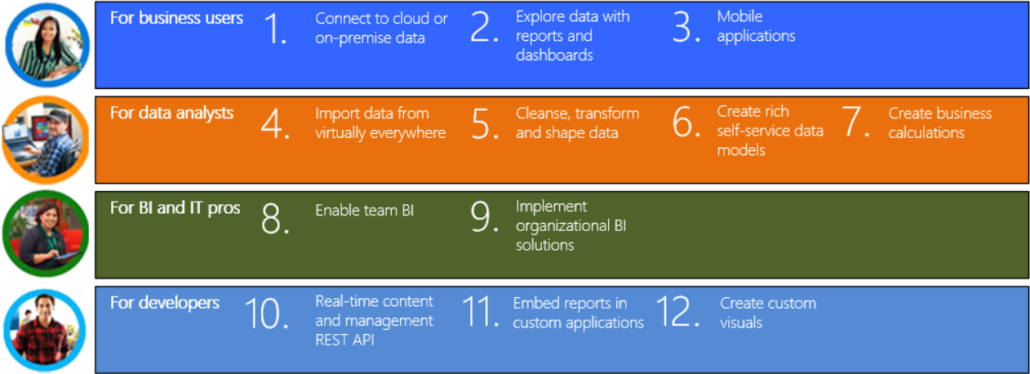


Let’s face it. Without supporting data, you are just another person with an opinion. But data is useless if you can’t derive knowledge from it. And this is where Power BI can help you. While writing the book and helping customers use Power BI, I’m astonished by its breath of features and the development momentum Microsoft has put behind it. The Power BI cloud service gets major features every week, while Power BI Desktop is updated every month! Although this makes it hard for people like me who are writing books, it’s a great value proposition for you.

Not to mention that Power BI has the best business model: most of it it’s free! Power BI Desktop and Power BI Mobile are free. Power BI Service is free and has a Power BI Pro subscription option that you could pay for, following a freemium model. Cost was the biggest hindrance of Power BI, and it’s now been turned around completely. You can’t beat free! In this newsletter, I’ll revisit how Power BI can benefit different users in your organization.

IMG_8221

Power BI for Business Users

To clarify the term, a business user is someone in your organization who is mostly interested in consuming BI artifacts, such as reports and dashboards. Business users can utilize Power BI to connect to popular cloud services, such as Salesforce, Marketo, Google Analytics, Dynamics CRM, and many more. With a few clicks, a business user can use content packs to connect to cloud data and gain insights from predefined reports and dashboards, and create custom reports. Other cloud-hosted providers build profitable businesses around SaaS cloud BI but Power BI does it for free!

With a few clicks, business users can analyze data from files and cubes without having to create data models. And they can also view Power BI dashboards and reports on mobile devices so they are always informed while they are on the go. Again, all of this for free!

Power BI for Data Analysts

A data analyst or BI analyst is a power user who has the skills and desire to create self-service data models. Leveraging the Microsoft’s prior investment in Power Pivot, Power View, and Power Query, Power BI lets business analysts import data form virtually everywhere and create sophisticated self-service models whose features are on a par with professional models and cubes. And now that we have a native support for many-to-many relationships, there shouldn’t be a requirement you can’t meet with Power BI.

As a data analyst you have a choice about your toolset because you can create models in both Excel or in Power BI Desktop. While other vendors charge hefty licensing fees for desktop modeling tools, Power BI Desktop is free and it gets updates every month! Think of Power BI Desktop as the unification of Power Pivot, Power Query, and Power View. Previously available as Excel add-ins, these tools now blend into a single flow. No more guessing which add-in to use and where to find it! Because many data analysts use R to data analysis and statistics, Power BI recently added support for R scripts and visualizing data using the R plotting capabilities.

Power BI for Pros

BI pros and IT pros have much to gain from Power BI. An IT pro can establish a trustworthy environment that promotes sharing of BI artifacts. To do so, IT can set up Power BI workspaces that allow authorized users to see the same BI content. If IT needs to distribute BI artifacts to a wider audience, such as the entire organization, she can create an organizational content pack and publish it to the Power BI Content Gallery. Then her coworkers can search, discover, and use the content pack. And IT can set up an organizational gateway to centralize and grant access to on-premises data.

The scenario that BI pros will probably be most excited about is hybrid BI solutions, where the report definitions (not data) is hosted in Power BI but corporate data remains in relational databases and cubes. This is a scenario that Prologika is planning for a cloud-averse Fortune 10 company in order to empower their users with mobile reports and dashboards. But that’s not all! BI pros can also implement predictive and real-time solutions that integrate with Power BI, and book has the details.

Power BI for Developers

Power BI has plenty to offer to developers as well because it’s built on an open and extensible architecture that embraces popular protocols and standards, such as REST, JSON, and oAuth. For years, Microsoft didn’t have a good solution for embedding interactive reports in custom apps. Power BI enables this scenario by allowing developers to embed dashboard tiles and interactive reports. Soon it will also support custom authentication.

Microsoft has also published the required “custom visuals”  interfaces to allow developers to implement and publish custom visuals using any of the JavaScript-based visualization frameworks, such as D3.js, WebGL, Canvas, or SVG. Do you need visualizations that Power BI doesn’t support to display data more effectively? With some coding wizardry, you can implement your own, such as the Sparkline visual that I published to the Power BI visuals gallery!

In summary, no matter what data visualization or data analytics requirements you have, Power BI should be at the forefront and you ought to evaluate its breath of features. Remember that Power BI is a part of a holistic vision that Microsoft has for delivering cloud and on-premises data analytics. When planning your on-premises BI solutions, consider the Microsoft public reporting roadmap. Keep in mind that you can use both Power BI (cloud-based data analytics) and the SQL Server box product on-premises to implement synergetic solutions that bring your data to life!

As you’d probably agree, the BI landscape is fast-moving and it might be overwhelming. If you need any help with planning and implementing your next-generation BI solution, don’t hesitate to contact me. As a Microsoft Gold Partner and premier BI firm, you can trust us to help you plan and implement your data analytics projects, and rest assured that you’ll get the best service.

Regards,

Teo Lachev

Teo Lachev
President and Owner
Prologika, LLC | Making Sense of Data
Microsoft Partner | Gold Data Analytics

EVENTS & RESOURCES

Prologika: “Applied Microsoft Power BI Service” book by Teo Lachev
SQL Saturday BI: “What’s New for BI in SQL Server 2016” presentation by Teo Lachev and “Introduction to R” presentation by Neal Waterstreet on 1/9/2016
Atlanta BI Group: Power BI presentation by Patrick LeBlanc on 1/25/2016


26 Mar 07:15

Prologika Newsletter Spring 2016

by Prologika - Teo Lachev

What’s New in SQL Server 2016 for BI?


031316_1550_PrologikaNe2.pngOn a personal note, I’m excited to announce the launch of the new Prologika website (http://prologika.com), which adds a slew of new features to connect better with customers and readers, including site-wide search, responsive web design, case studies, book and blog discussion lists, and more to come. Although the old blog feed should still work, please update it to http://www.prologika.com/feed/. Continuing on the list of announcements, Microsoft added a Prologika Power BI case study to the Power BI partner showcase. Speaking of Power BI, I definitely see a lot of interest from customers in Power BI-based solutions, ranging from self-service BI to white-labeling and report embedding. Last but not list, our Atlanta MS BI group is an official Power BI group! So, if you’re interested in Power BI, check our monthly meetings which now feature more Power BI content.


Spring is here and it brings again a new version of SQL Server. Microsoft launched SQL Server 2016 on March 10th. Its product page include nice videos covering some of the new features. The great news is that the “box” has seen a renewed interest and Microsoft has made significant investments in all the bundled services to help you implement cost-effective and modern data analytics solutions on premises. In this newsletter, I’ll enumerate my favorite BI new features in SQL Server 2016. Feel free to also check my slides on this topic on my LinkedIn profile page.

Tools

The days of waiting years for the next SQL Server release are coming to an end, as you first witness with the client tools.

  • SSMS – You no longer have to run the SQL Server setup just to get SQL Server Management Studio (SSMS). SSMS is now available as a free and standalone download here. Moreover, it will be updated on a monthly basis and it will be backward compatible for all SQL Server supported versions!
  • SSDT – Also, to everybody’s delight, the BI add-on to SQL Server Data Tools (SSDT) is gone. Instead, you just download and install SQL Server Data Tools, which includes the BI projects. No more installing three setup packages to get to the BI stuff. To make your joy complete, SSDT is backward compatible. Actually, SSRS and SSAS have been backward compatible for a while, but now SSIS joins the list so that you can use SSDT to work with legacy SSIS packages.

Database Engine

There are many new features in the Database Engine but the following will be of particular interest to BI practitioners:

  • Updatable columnstore indexes – They will allow you to speed up aggregated queries without having to drop and recreate the columnstore index.
  • Live query statistics – How many times you had to troubleshoot the performance of massive query with many joins? Live query statistics will now show you which joins slows the query down.
  • Temporal tables – Anyone who’s implemented ODS knows that maintaining Type 2 changes is no fun. Temporal tables can maintain changes on any column for you. This feature is also great if you need data change auditing.
  • Integration with R – Leveraging the Revolution Analytics acquisition, the R Server allows your data analysts to run R scripts on top of the SQL Server data. Moreover, DBAs can configure resource limits so that these scripts don’t impact the database performance.

SQL Server Integration Services (SSIS) and Master Data Services (MDS)

I’m somewhat disappointed that the Power Query integration and Lineage Statistics didn’t make the cut. Anyway, here are my favorites:

  • Incremental project deployment – you can just deploy changed packages to the catalog instead of deploying the entire project.
  • Package parts – you can refactor some control flow tasks in reusable package parts that you can manage separately. This could be very beneficial for SSIS “frameworks” so that you don’t have to update all packages if some changes are introduced later in the development cycle.
  • Cloud tasks and connectors – Lots of attention to moving and transforming data in Azure. For example, there is a task that will allow you to move data to Azure Blog storage in the most efficient way. Continuing this line of thought, the fastest way to move the data to Azure SQL DW would be to use Polybase which supports HDInsight and Azure Blob Storage.
  • MDS Entity Sync – Allows you to reuse entities among models. For example, you can implement a Common model with entities, such as Geography, that you can configure for auto synchronization with other models.
  • 15x performance increase in MDS Excel add-in.

SQL Server Reporting Services (SSRS)

As per the Microsoft’s updated reporting roadmap, SSRS comes out of the closet to fulfill its new role of becoming the on-premises platform for paginated (pixel-perfect), mobile, and Power BI Desktop reports (support for Power BI Desktop files in SSRS will happen after SQL Server 2016). SSRS saw a lot of attention in SQL Server 2016 and brings major new enhancements:

  • Better mobile support – SSRS reports now render in HTML5. Users can use the Power BI native apps for iOS, Android and Windows devices to render both SSRS and Power BI reports. ActiveX print control has been replaced with PDF printing that works on all modern browsers.
  • Facelift – SSRS 2016 brings a new report portal (aka Report Manager). Report Builder has a new look too. Charts and gauges have a new modern look. New chart types (Sunburst and Treemap) have been added. You can now add KPIs directly in the Report Portal.
  • Mobile reports – Thanks to the Datazen acquisitions, you can now have in the box reports that specifically target mobile devices, that have similar features as competing vendors, such as PushBI (now part of Tibco) and RoamBI.
  • Parameter area – You can now control the parameter placement. Personally, I expected also more control over parameters, such as parameter validation, but the alas, the wait is not over.
  • Prioritized native report mode – Microsoft now prioritizes SSRS in native mode which is a great news for customers who previously had to adopt SharePoint Enterprise just for BI. In fact, all the new features are available only in SSRS native mode.

SQL Server Analysis Services (SSAS)

As you know by now, I’m a big fan of classic BI solutions that feature a semantic layer (Multidimensional or Tabular). SSAS gets many new features, including:

  • Tabular many-to-many relationships – You can now implement M2M relationships by setting the relationship cross filtering direction to Both, as you can in Power BI Desktop.
  • Tabular Direct Query enhancements – Microsoft put a lot of effort to lift previous Direct Query limitations in Tabular so that you can build Tabular models on top of fast databases without having to cache the data. Direct Query now have better performance, support for row level security, support for MDX clients such as Excel, support for Oracle, Teradata, and Azure DW.
  • New Tabular scripting language – Tabular models are now described in a new lightweight JSON grammar. This speeds up scheme changes, such as renaming columns. In addition, a new Tabular Object Model (TOM) is introduced to help developers auto-generate Tabular models.
  • DAX new functions – Many new DAX functions (super DAX) were introduced.
  • Multidimensional – support for Power BI and Power BI Desktop. Support for Netezza as a data source. Distinct count ROLAP optimization for DB2, Oracle, and Netezza. Drillthrough is now supported with multi-selection, such as then the user filters on multiple values in Excel.

MS BI Events in Atlanta

As you’d probably agree, the BI landscape is fast-moving and it might be overwhelming. If you need any help with planning and implementing your next-generation BI solution, don’t hesitate to contact me. As a Microsoft Gold Partner and premier BI firm, you can trust us to help you plan and implement your data analytics projects, and rest assured that you’ll get the best service.

Regards,

Teo Lachev
Prologika, LLC | Making Sense of Data
Microsoft Partner | Gold Data Analytics

26 Mar 07:12

SQL Server, @@VERSION, and Hyper-V

by John Paul Cook
Yesterday my friend Kalen Delaney asked me about @@VERSION showing (HYPERVISOR) even though she wasn’t running inside a virtual machine. I was able to replicate the behavior on my machines. I asked my colleagues at Microsoft about this. It was confirmed...(read more)
26 Mar 07:11

SQL Server on Linux!

by James Serra

Looks outside: pigs are flying!

In an announcement yesterday, SQL Server will be made available on Linux.  The private preview of SQL Server on Linux is available now, and Microsoft is targeting availability in mid-2017.  Microsoft will offer both on-premises and cloud versions of the product (via Linux VMs).  It will include the Stretch Database capabilities that Microsoft is building into SQL Server 2016.  Right now, SQL Server on Linux is available on Ubuntu or as a Docker image, and Microsoft intends to support Red Hat Enterprise Linux as well as other platforms over time.  The private preview is based on SQL Server 2016.

Considering how anti-Linux Microsoft was a few years ago, this is very surprising, but not so surprising if you have followed the changes over the past two years as Microsoft has come to embrace Linux and other open source technologies and tools (see Microsoft Loves Linux).

To find out more about SQL Server on Linux, you can sign up to get regular updates and provide input to the team, as well as apply to the private preview.

More info:

Microsoft is porting SQL Server to Linux

8 no-bull reasons why SQL Server on Linux is huge for Microsoft

26 Mar 07:11

Microsoft Azure Government

by James Serra

I’m sure you are aware of Microsoft Azure, but are you aware there is special version of Azure for U.S. governments?

Microsoft Azure Government is a cloud computing service for federal, state, local and tribal U.S. governments.  It was generally available in December 2014 after a year in preview.  To see the Azure services available for the government, see the services available by region.

By default, Azure Government ensures that all data stays within the U.S. and within data centers and networks that are physically isolated from the rest of Microsoft’s cloud computing solution, operated by screened U.S. persons.  It’s in compliance with FedRAMP, a mandatory government-wide program that prescribes a standardized way to carry out security assessments for cloud services.  It also supports a wide range of other compliance standards, including Health Insurance Portability and Accountability Act (HIPAA), Department of Defense Enterprise Cloud Service Broker (ECSB), and the FBI Criminal Justice Information Services (CJIS), which is meant to keep safe fingerprint and background-check data that has to be shared with other agencies.

Microsoft also offers government versions of Office 365, which is hosted in a dedicated “cloud community” reserved only for government customers.  There is also a Microsoft Dynamics CRM Online Government.

Also just announced:
Two new physically isolated regions, which will become available later this year, are part of Azure Government and are meant to host Department of Defense (DoD) data.  These regions will meet the Pentagon’s Defense Information Systems Agency (DISA) Impact level 5 restrictions and are, according to Microsoft, “architected to meet stringent DoD security controls and compliance requirements.”

Level 5 data includes controlled unclassified information.  Classified information (up to ‘secret’) can only be stored on systems that fall under the level 6 classification.  To gain level 5 authorization, cloud providers have to ensure that all workloads run (and all data is stored) on dedicated hardware that is physically separated from non-DoD users.

In addition to its new work with the DoD, Microsoft is also expanding its support for FedRAMP, the standard that governs which cloud services federal agencies are able to use.  The company today announced that Azure Government has been selected to participate in a new pilot that will allow agencies to process high-impact data — that is, data that could have a negative impact on organizational operations, assets or individuals.  Until now, FedRAMP only authorized the use of moderate impact workloads.  Microsoft says it expects all the necessary papers for this higher authorization will be in place by the end of this month.

Azure Government is also on track to receive DISA Level 4 authorization soon.

More info:

Microsoft Cloud for Government

26 Mar 07:05

Visual Studio 2010 Localized Code Samples Available!

by RongLu

Visual Studio 2010 Localized Code Samples for all Visual Studio supported languages are now available on the Web!

You can find the samples by clicking on Help->Samples menu directly from within Visual Studio 2010.

clip_image002

And then click on Visual Studio 2010 Samples link on the following page.

clip_image004

Or, you can directly use following links to open the code samples page:

For example, C# samples in German look like this:

clip_image006

Enjoy!

26 Mar 07:04

Using multiple routes in Service Broker

by pmarciniak

One of main Service Broker components is routing. Whenever you want your messages to leave the database they originate in, you need to provide routes. Setting up routes may become complicated, so if you're making your first steps in Service Broker area, I suggest staying within single database. Once you have an idea of how Service Broker conversations work, it's time to move one of the communicating services to a different database, or even different server. For that you'll need routes. For a syntax of route creation, see T-SQL reference at http://msdn.microsoft.com/en-us/library/ms186742.aspx. A route is basically a matching between logical conversation endpoint and an address of the machine that hosts the service. The logical endpoint may be specified in two ways:

  • By giving just the service name
  • By giving the service name and additionally a broker instance identifier, which ties the route to a specific instance of the service (broker instance ID is just a database identifier in broker terms, so in other words it specifies a database the service is deployed in).

When such mappings (in the form of routes) are defined, each time a message needs to be sent to the specified service (and optionally in the specified database), it will use the address provided.

In this post I would like to cover somewhat more advanced topic of using multiple routes for the same service name. There are two main reasons you would like to do so, namely:

  • Load balancing
  • High availability

I'll go over these two scenarios, describing what happens in each case and providing examples.

To understand the rest of this post, you need to be aware that a service of given name may exist in multiple databases. A pair <service name; broker instance ID> is required to uniquely identify service deployment in a database with this broker instance ID (broker instance ID is simply a guid; I'll just call it "broker ID" from now on). You can specify which instance of target service you want to talk to by providing target broker ID in the BEGIN DIALOG statement. But you may specify just the target service name and in such case the broker ID remains "open", i.e. messages are sent to whichever instance (with whatever broker ID) of the target service is known. Once an acknowledgement comes back from the target service, the target broker ID it carries is set in sys.conversation_endpoints table and all further messages sent from initiator are directed specifically to that broker ID. If a broker receives a message carrying broker ID other than its own, it simply drops it, concluding that it was probably meant for other instance of a service of the same name.

Load balancing

If no broker ID is specified in the BEGIN DIALOG statement and all matching routes specify broker ID, Service Broker will pick one of the available broker IDs from the routing table and direct messages to the chosen broker ID. To avoid distributing messages from a single dialog among different service instances, load balancing doesn't simply pick a route randomly every time it is needed. It employs a mechanism called deterministic routing: each time a message needs to be sent on a dialog started without specifying broker ID and all your routes to the target service are load-balancing routes (i.e. they contain broker IDs), Service Broker performs a hash of dialog ID and, based on that hash, picks one from the set of possible broker IDs. Dialog ID is a parameter that is available from the moment of dialog creation and stays the same during the whole lifetime of a dialog, so as long as the routing table doesn't change while conversations are active, every message of a given dialog will be sent to the same target service instance, because the same broker ID will be always picked up based on the dialog ID hash. Note that all this refers only to messages that are being sent before the first ack comes back from the target. When it does, the target's broker ID is locked at the initiator side and load balancing mechanism is no longer used in the sending process.

Load balancing example

It's now time for an example. Let's assume that we start our dialogs from InitiatorService on a machine named ServerA. The service is deployed in DatabaseA. For the sake of simplicity, let broker IDs in the example be equal to database names (in reality they would be GUIDs that have nothing to do with database names). The target of our dialogs is TargetService, which is deployed in two databases: DatabaseB located on ServerB, and DatabaseC located on ServerC.

For the load balancing mechanism to start working, you need to set up the following routes:

  • DatabaseA on ServerA:
    CREATE ROUTE [LoadBalancingRoute1] WITH SERVICE_NAME = 'TargetService', BROKER_INSTANCE = 'DatabaseB', ADDRESS = 'tcp://ServerB:4022';
    CREATE ROUTE [LoadBalancingRoute2] WITH SERVICE_NAME = 'TargetService', BROKER_INSTANCE = 'DatabaseC', ADDRESS = 'tcp://ServerC:4022';
  • DatabaseB on ServerB:
    CREATE ROUTE [ReturnRoute] WITH SERVICE_NAME = 'InitiatorService', BROKER_INSTANCE = 'DatabaseA', ADDRESS = 'tcp://ServerA:4022';
  • DatabaseC on ServerC:
    CREATE ROUTE [ReturnRoute] WITH SERVICE_NAME = 'InitiatorService', BROKER_INSTANCE = 'DatabaseA', ADDRESS = 'tcp://ServerA:4022';

Unless you have dropped the default ‘AutoCreatedLocal' routes in msdb's of all servers, this will suffice. If you followed the recommended practices and dropped the default routes, you'll need the following routes as well to close the routing loop:

  • msdb of ServerA:
    CREATE ROUTE [LocalRoute] WITH SERVICE_NAME = 'InitiatorService', BROKER_INSTANCE = 'DatabaseA', ADDRESS = 'LOCAL';
  • msdb of both ServerB and ServerC:
    CREATE ROUTE [LocalRoute] WITH SERVICE_NAME = 'TargetService', BROKER_INSTANCE = 'DatabaseB', ADDRESS = 'LOCAL';

The BROKER_INSTANCE parts of LoadBalancing1 and LoadBalancing2 routes are REQUIRED. Without them the load balancing mechanism won't work (I'll explain later what happens in such case). Note that I specified broker ID for return routes as well, even though there is only one instance of InitiatorService. It may seem redundant, but it is always a good thing to specify broker ID in a route if it is known at the time of route creation. This may save you from headaches in the future, when something changes in the way services are deployed.

Now, having these routes in place, each time you start a dialog in DatabaseA, one instance of the target service will be chosen randomly with even distribution among the provided TargetService instances and the dialog will be bound to that instance (to be specific, it's not the choice being made that is random - the randomness comes from random values of dialog IDs).

You've got your load balancing, but there are two gotchas you need to remember:

  • Of course you need to start your dialogs without specifying broker ID of the target service in the BEGIN DIALOG statement. If you do specify it, you're preventing the load balancing mechanism from doing its work of choosing the instance for you.
  • You cannot have any routes in DatabaseA that point to the target service and do not specify broker ID. Such routes have higher priority for dialogs started without specifying broker ID, so your load balancing routes won't be considered at all. For more information on route matching priority, take a look at http://msdn.microsoft.com/en-us/library/ms166052.aspx.

Unfair load balancing

Deterministic routing, explained before, is a reason why it is impossible to provide "uneven" load balancing, based on machines' processing power. One might think that if ServerC is two times more powerful than ServerB, it would be a nice idea to create routes as follows, doubling the chances of the fast machine for being picked up, and effectively making 2/3 of the traffic hit the more powerful server:

CREATE ROUTE [LoadBalancingRoute1] WITH SERVICE_NAME = 'TargetService', BROKER_INSTANCE = 'DatabaseB', ADDRESS = 'tcp://ServerB:4022';
CREATE ROUTE [LoadBalancingRoute2] WITH SERVICE_NAME = 'TargetService', BROKER_INSTANCE = 'DatabaseC', ADDRESS = 'tcp://ServerC:4022';
CREATE ROUTE [LoadBalancingRoute3] WITH SERVICE_NAME = 'TargetService', BROKER_INSTANCE = 'DatabaseC', ADDRESS = 'tcp://ServerC:4022';

Unfortunately, this won't work, as deterministic routing uses dialog ID hash to choose particular broker ID and not particular route, so the number of routes with the same broker ID doesn't change the probability of that ID being picked up.

High availability

As explained above, providing multiple routes for the same service instance doesn't influence the load balancing behavior in any way. But it is still an important scenario. Why would anyone want to create multiple routes to the same service instance? The answer is availability.

Imagine that you only have single instance of the target service (in DatabaseB on ServerB), but the traffic between ServerA and ServerB needs to go through one of two available forwarders (e.g. network boundary nodes). You don't care which forwarder your traffic goes through, but in the event one of them goes down, you would like the traffic to start flowing through the other one. Here's how Service Broker helps you achieving this functionality. When multiple routes match the target of a dialog, (and it is not a load balancing scenario described above), broker doesn't arbitrarily choose to use one of the routes. Instead it passes all matching routes to the underlying transport layer, which tries to deliver the message utilizing all the routing information it got. This may just mean sending the message on all the routes simultaneously, but may also be based on previous attempts to connect to given target, connection latency etc. You shouldn't assume anything regarding this behavior. It is unspecified and may change without any notice in the documentation. Treat it as a black box that knows what it is doing.

Wait a minute! So shouldn't all "matching routes" be passed to the transport also in load balancing scenario described before? Actually, that's something else. The catch is that load balancing chooses the target broker ID for a dialog first, so only the route with the chosen broker ID is considered a "matching route". If there are two or more routes with the chosen broker ID, they will indeed be all passed to the transport, even in a load balancing scenario.

High availability example

Let's go through an example of how to set up a high availability scenario. As mentioned before, now there is only one instance of TargetService, deployed in DatabaseB on ServerB. Let the two mentioned forwarder nodes be named GatewayA and GatewayB. ServerA and ServerB cannot directly communicate with each other (e.g. due to cross-domain trust relationship issues). The routes that need to be in place are as follows:

  • DatabaseA on ServerA:
    CREATE ROUTE [HighAvailabilityRoute1] WITH SERVICE_NAME = 'TargetService', BROKER_INSTANCE = 'DatabaseB', ADDRESS = 'tcp://GatewayA:4022';
    CREATE ROUTE [HighAvailabilityRoute2] WITH SERVICE_NAME = 'TargetService', BROKER_INSTANCE = 'DatabaseB', ADDRESS = 'tcp://GatewayB:4022';
  • DatabaseB of ServerB:
    CREATE ROUTE [ReturnRoute1] WITH SERVICE_NAME = 'InitiatorService', BROKER_INSTANCE = 'DatabaseA', ADDRESS = 'tcp://GatewayA:4022';
    CREATE ROUTE [ReturnRoute2] WITH SERVICE_NAME = 'InitiatorService', BROKER_INSTANCE = 'DatabaseA', ADDRESS = 'tcp://GatewayB:4022';
  • msdb of both GatewayA and GatewayB:
    CREATE ROUTE [ForwardingRoute] WITH SERVICE_NAME = 'TargetService', BROKER_INSTANCE = 'DatabaseB', ADDRESS = 'tcp://ServerB:4022';
    CREATE ROUTE [ForwardingReturnRoute] WITH SERVICE_NAME = 'InitiatorService', BROKER_INSTANCE = 'DatabaseA', ADDRESS = 'tcp://ServerA:4022';

If your gateway nodes serve as forwarders for multiple services, you may opt for defining more generic TRANSPORT routes on them and naming your services accordingly, so that you don't have to worry about providing connectivity for each specific service pair, thus decreasing the administrative burden.

For the example to work, you will also need the following msdb routes (that you may have already):

  • msdb of ServerA:
    CREATE ROUTE [LocalRoute] WITH SERVICE_NAME = 'InitiatorService', BROKER_INSTANCE = 'DatabaseA', ADDRESS = 'LOCAL';
  • msdb of ServerB:
    CREATE ROUTE [LocalRoute] WITH SERVICE_NAME = 'TargetService', BROKER_INSTANCE = 'DatabaseB', ADDRESS = 'LOCAL';

If, for some reason, you don't know target broker ID at the time of setting the routes at ServerA, it's OK, you may omit the BROKER_INSTANCE = ‘DatabaseB' part and both routes will still be passed to the transport. However, when creating multiple routes for the same service without specifying broker IDs in them, it is very important to make sure they all point to the same instance of the service, merely providing alternative ways of reaching it. Using multiple routes to different service instances without specifying broker ID for each of them may easily lead to problems such as multiple target endpoint creation (described in details below), so you should never do it. I really can't think of a scenario where it would be desired.

Multiple target endpoint creation

Let's see how such multiple target endpoint situation could happen. Imagine that in the initiator database you have routes to two different instances of TargetService (on ServerB and ServerC), but you don't specify broker ID for them, just the service name and address.

  1. Once you begin your dialog and send the first message, both these routes are passed to the transport layer and let's say it sends the message on both of them.
  2. The message hits ServerB first and a dialog endpoint is created there (an entry in DatabaseB.sys.conversation_endpoints shows up).
  3. After some time, the broker in DatabaseB sends an acknowledgement back. The acknowledgement contains the broker ID of the database hosting TargetService on ServerB (i.e. DatabaseB).
  4. After a little while (connection to ServerC might have taken longer to be established) the message transmitted in step 1 hits ServerC and a dialog endpoint is created there as well. ServerB and ServerC don't know anything about each other.
  5. ServerC sends an acknowledgement cointaining its own broker ID.

If the business logic that processes first message of a dialog triggers some external action that should be carried out only once for each dialog, you've already run into problems, because it has been executed twice. But let's see what may happen next.

  1. The ack from ServerB arrives at ServerA and locks the target broker ID for the conversation to DatabaseB.
  2. The ack from ServerC arrives as well, but its broker ID doesn't match the one already fixed for the dialog, so an error is sent back to ServerC.
  3. Now, InitiatorService tries to send second message on the dialog, again both routes are passed to the transport layer, but the transport layer might keep choosing the one to ServerC (perhaps it thinks that ServerB is inaccessible or slow). The message now carries the broker ID of DatabaseB (since the first ack locked it) so ServerC keeps dropping it and the broker conversation cannot continue.

Well, the transport logic will probably try ServerB eventually, but anyway that's certainly not a behavior one's looking for. Note that we didn't provide any matching in the routes between target server addresses and broker IDs, so there is no way for Service Broker to act smart in this case.

So how come this problem doesn't occur in a load balancing scenario? Because of how deterministic routing works. As long as the routing table doesn't change while conversations are active, each message of a given dialog will be sent to the same TargetService instance, so the risk of creating multiple target endpoints is avoided. What if you cannot avoid changing routes when new conversations are being started and you really care not to fall into the multiple target endpoints scenario? Well, you'll have to implement some kind of a three-way handshake and defer executing any business logic at the target side until you get second message from the initiator, because receiving it means that it's your broker ID that has been saved in initiator's sys.conversation_endpoints table.

As you can see, it's always a good idea to provide broker IDs in created routes. The only exception is a situation when the initiator server doesn't know about target server location, number of instances and broker IDs of the target service. In such case there is usually a dedicated node in the topology that takes care of routing, load balancing etc. It is justified to have a route without broker ID in the initiating database, which would delegate all the messages to the intermediate node for processing. Setting the broker ID by the initiator might for example prevent that node from doing load balancing on its own or choosing an appropriate target service instance based on some business logic.

Putting it all together

Finally, let me just quickly mention that it is also possible to combine the two multiple route features: load balancing and high availability. Hopefully that's obvious at this point, but let me just provide a short example of how the routes in the initiator database would need to be created. In this example we'll have two TargetService instances, just as in the load balancing example, but access to each one will be available via two dedicated forwarders: GatewayA, GatewayB for accessing ServerB, and GatewayC, GatewayD for accessing ServerC. The routes in DatabaseA will have to be created as follows:

CREATE ROUTE [LoadBal1Fwd1] WITH SERVICE_NAME = 'TargetService', BROKER_INSTANCE = 'DatabaseB', ADDRESS = 'tcp://GatewayA:4022';
CREATE ROUTE [LoadBal1Fwd2] WITH SERVICE_NAME = 'TargetService', BROKER_INSTANCE = 'DatabaseB', ADDRESS = 'tcp://GatewayB:4022';
CREATE ROUTE [LoadBal2Fwd1] WITH SERVICE_NAME = 'TargetService', BROKER_INSTANCE = 'DatabaseC', ADDRESS = 'tcp://GatewayC:4022';
CREATE ROUTE [LoadBal2Fwd2] WITH SERVICE_NAME = 'TargetService', BROKER_INSTANCE = 'DatabaseC', ADDRESS = 'tcp://GatewayD:4022';

Now, when we begin a dialog and send a message to TargetService, one of the two instances of the service will be chosen in the load balancing process, based on dialog ID hash, as described before. But since two routes match the chosen broker ID, they will both be passed to the transport layer and it will do its heuristic to determine which forwarder to use for sending the message. The multiple target endpoint creation problem doesn't exist in this case. Dialog ID is established between initiator and target and not changed by any forwarding machine, so whichever gateway a message will flow through, it will carry the same dialog ID. Therefore even if the same message is sent to the target server from both gateways, it will be able to recognize that it is the same dialog and receive the message that arrives first, treating the other one as a duplicate, thus dropping it.

26 Mar 07:03

Reusing dialogs with a dialog pool

by portegys

As noted in various Service Broker sources, it is often advantageous to minimize the overhead of creating dialogs to send messages on. This blog shows how to create a shared pool of dialogs to be able to reuse dialogs instead of creating new ones. The dialog pool is a variation of Remus Rusanu's reusing and recycling conversations as shown in his blog. One of the main differences is that the dialog pool is keyed only on services and contract, not SPID. This allows the same SPID to obtain multiple dialogs from the pool should the need arise. As importantly, different SPIDs can reuse the same dialog sequentially instead of creating two of them. Measurements show equivalent performance using the dialog pool compared to the SPID-based reuse scheme.


The following code shows how to get, free and delete dialogs from a dialog pool table. Initially empty, a new dialog is created in the pool when a request for an existing free dialog cannot be met. Thus the pool will grow during bursts of high demand.


The dialog pool entries also contain creation time and send count fields that ease the auditing and "recycling" of dialogs in the pool based on application requirements. Recycling consists of gracefully ending an existing dialog between services and beginning a new one. If done prudently, this technique can ease the handling of dialog errors by limiting the number of messages affected. For example, the application may choose to contrain a dialog to a certain number of messages before it is recycled. This might also be done according to the age of a dialog. See the end of the usp_send procedure for an example of recycling.


An example application that exercises the dialog pool is also included.


--------------------------------------------------------------------------

-- Dialog Pool Sample.

-- This sample shows how to create and use a shared pool of reuseable dialogs.

-- The purpose of reusing dialogs is to reduce the overhead of creating them.

-- The sample also shows how dialogs in the pool can be "recycled" by deleting

-- dialogs based on application criteria, such as number of messages sent.

-- This sample is largely based on Remus Rusanu's tutorials on reusing and

-- recycling conversations (rusanu.com/blog).

-- Contents: dialog pool and application using the pool.

----------------------------------------------------


USE master

GO


--------------------------------------------------------------------------

-- Create demo database section

--------------------------------------------------------------------------


IF EXISTS (SELECT name FROM sys.databases WHERE name = 'SsbDemoDb')

      DROP DATABASE [SsbDemoDb];


CREATE DATABASE [SsbDemoDb]

GO


USE [SsbDemoDb];

GO


-- Create master key

IF NOT EXISTS(SELECT name FROM sys.symmetric_keys WHERE name = '##MS_DatabaseMasterKey##')

      CREATE MASTER KEY ENCRYPTION BY PASSWORD='Password#123'

GO


--------------------------------------------------------------------------

-- Dialog pool section

--------------------------------------------------------------------------


--------------------------------------------------------------------------

-- The dialog pool table.

-- Obtain a conversation handle using from service, to service, and contract.

-- Also indicates age and usage of dialog for auditing purposes.

--------------------------------------------------------------------------

IF EXISTS (SELECT name FROM sys.tables WHERE name = 'DialogPool')

      DROP TABLE [DialogPool]

GO

CREATE TABLE [DialogPool] (

      FromService SYSNAME NOT NULL,

      ToService SYSNAME NOT NULL,

      OnContract SYSNAME NOT NULL,

      Handle UNIQUEIDENTIFIER NOT NULL,

      OwnerSPID INT NOT NULL,

      CreationTime DATETIME NOT NULL,

      SendCount BIGINT NOT NULL,

      UNIQUE (Handle));

GO


--------------------------------------------------------------------------

-- Get dialog procedure.

-- Reuse a free dialog in the pool or create a new one in case

-- no free dialogs exist.

-- Input is from service, to service, and contract.

-- Output is dialog handle and count of message previously sent on dialog.

--------------------------------------------------------------------------

IF EXISTS (SELECT name FROM sys.procedures WHERE name = 'usp_get_dialog')

      DROP PROC usp_get_dialog

GO

CREATE PROCEDURE [usp_get_dialog] (

      @fromService SYSNAME,

      @toService SYSNAME,

      @onContract SYSNAME,

      @dialogHandle UNIQUEIDENTIFIER OUTPUT,

      @sendCount BIGINT OUTPUT)

AS

BEGIN

      SET NOCOUNT ON;

      DECLARE @dialog TABLE

      (

          FromService SYSNAME NOT NULL,

          ToService SYSNAME NOT NULL,

          OnContract SYSNAME NOT NULL,

          Handle UNIQUEIDENTIFIER NOT NULL,

          OwnerSPID INT NOT NULL,

          CreationTime DATETIME NOT NULL,

          SendCount BIGINT NOT NULL

      );


      -- Try to claim an unused dialog in [DialogPool]

      -- READPAST option avoids blocking on locked dialogs.

      BEGIN TRANSACTION;

      DELETE @dialog;

      UPDATE TOP(1) [DialogPool] WITH(READPAST)

             SET OwnerSPID = @@SPID

             OUTPUT INSERTED.* INTO @dialog

             WHERE FromService = @fromService

                   AND ToService = @toService

                   AND OnContract = @OnContract

                   AND OwnerSPID = -1;

      IF @@ROWCOUNT > 0

      BEGIN

           SET @dialogHandle = (SELECT Handle FROM @dialog);

           SET @sendCount = (SELECT SendCount FROM @dialog);          

      END

      ELSE

      BEGIN

           -- No free dialogs: need to create a new one

           BEGIN DIALOG CONVERSATION @dialogHandle

                 FROM SERVICE @fromService

                 TO SERVICE @toService

                 ON CONTRACT @onContract

                 WITH ENCRYPTION = OFF;

           INSERT INTO [DialogPool]

                  (FromService, ToService, OnContract, Handle, OwnerSPID,

                      CreationTime, SendCount)

                  VALUES

                  (@fromService, @toService, @onContract, @dialogHandle, @@SPID,

                      GETDATE(), 0);

          SET @sendCount = 0;

      END

      COMMIT

END;

GO


--------------------------------------------------------------------------

-- Free dialog procedure.

-- Return the dialog to the pool.

-- Inputs are dialog handle and updated send count.

--------------------------------------------------------------------------

IF EXISTS (SELECT name FROM sys.procedures WHERE name = 'usp_free_dialog')

      DROP PROC usp_free_dialog

GO

CREATE PROCEDURE [usp_free_dialog] (

      @dialogHandle UNIQUEIDENTIFIER,

      @sendCount BIGINT)

AS

BEGIN

      SET NOCOUNT ON;

      DECLARE @rowcount INT;

      DECLARE @string VARCHAR(50);


      BEGIN TRANSACTION;


      -- Release dialog by setting OwnerSPID to -1.

      UPDATE [DialogPool] SET OwnerSPID = -1, SendCount = @sendCount WHERE Handle = @dialogHandle;

      SELECT @rowcount = @@ROWCOUNT;

      IF @rowcount = 0

      BEGIN

           SET @string = (SELECT CAST( @dialogHandle AS VARCHAR(50)));

           RAISERROR('usp_free_dialog: dialog %s not found in dialog pool', 16, 1, @string) WITH LOG;

      END

      ELSE IF @rowcount > 1

      BEGIN

           SET @string = (SELECT CAST( @dialogHandle AS VARCHAR(50)));

           RAISERROR('usp_free_dialog: duplicate dialog %s found in dialog pool', 16, 1, @string) WITH LOG;

      END


      COMMIT

END;

GO


--------------------------------------------------------------------------

-- Delete dialog procedure.

-- Delete the dialog from the pool. This does not end the dialog.

-- Input is dialog handle.

--------------------------------------------------------------------------

IF EXISTS (SELECT name FROM sys.procedures WHERE name = 'usp_delete_dialog')

      DROP PROC usp_delete_dialog

GO

CREATE PROCEDURE [usp_delete_dialog] (

      @dialogHandle UNIQUEIDENTIFIER)

AS

BEGIN

      SET NOCOUNT ON;


      BEGIN TRANSACTION;

      DELETE [DialogPool] WHERE Handle = @dialogHandle;

      COMMIT

END;

GO


--------------------------------------------------------------------------

-- Application setup section.

--------------------------------------------------------------------------


--------------------------------------------------------------------------

-- Send messages from initiator to target.

-- Initiator uses dialogs from the dialog pool.

-- Initiator also retires dialogs based on application criteria,

-- which results in recycling dialogs in the pool.

--------------------------------------------------------------------------


-- This table stores the messages on the target side

IF EXISTS (SELECT name FROM sys.tables WHERE name = 'MsgTable')

      DROP TABLE MsgTable

GO

CREATE TABLE MsgTable ( message_type SYSNAME, message_body NVARCHAR(4000))

GO


-- Activated store proc for the initiator to receive messages.

CREATE PROCEDURE initiator_queue_activated_procedure

AS

BEGIN

     DECLARE @handle UNIQUEIDENTIFIER;

     DECLARE @message_type SYSNAME;


     BEGIN TRANSACTION;

     WAITFOR (

          RECEIVE TOP(1) @handle = [conversation_handle],

            @message_type = [message_type_name]

          FROM [SsbInitiatorQueue]), TIMEOUT 5000;


     IF @@ROWCOUNT = 1

     BEGIN

          -- Expect target response to EndOfStream message.

          IF @message_type = 'http://schemas.microsoft.com/SQL/ServiceBroker/EndDialog'

          BEGIN

               END CONVERSATION @handle;

          END

     END

     COMMIT

END;

GO


-- Activated store proc for the target to receive messages.

CREATE PROCEDURE target_queue_activated_procedure

AS

BEGIN

    -- Variable table for received messages.

    DECLARE @receive_table TABLE(

            queuing_order BIGINT,

            conversation_handle UNIQUEIDENTIFIER,

            message_type_name SYSNAME,

            message_body VARCHAR(MAX));


    -- Cursor for received message table.

    DECLARE message_cursor CURSOR LOCAL FORWARD_ONLY READ_ONLY

            FOR SELECT

            conversation_handle,

            message_type_name,

            message_body

            FROM @receive_table ORDER BY queuing_order;


     DECLARE @conversation_handle UNIQUEIDENTIFIER;

     DECLARE @message_type SYSNAME;

     DECLARE @message_body VARCHAR(4000);


     -- Error variables.

     DECLARE @error_number INT;

     DECLARE @error_message VARCHAR(4000);

     DECLARE @error_severity INT;

     DECLARE @error_state INT;

     DECLARE @error_procedure SYSNAME;

     DECLARE @error_line INT;

     DECLARE @error_dialog VARCHAR(50);


     BEGIN TRY

       WHILE (1 = 1)

       BEGIN

         BEGIN TRANSACTION;


         -- Receive all available messages into the table.

         -- Wait 5 seconds for messages.

         WAITFOR (

            RECEIVE

               [queuing_order],

               [conversation_handle],

               [message_type_name],

               CAST([message_body] AS VARCHAR(4000))

            FROM [SsbTargetQueue]

            INTO @receive_table

         ), TIMEOUT 5000;


         IF @@ROWCOUNT = 0

         BEGIN

              COMMIT;

              BREAK;

         END

         ELSE

         BEGIN

              OPEN

26 Mar 07:03

Fast data push tuning

by portegys

A common use of service broker is the "data push" scenario in which messages are asynchronously sent to a destination such as a data warehouse for storage and processing with minimal impact on the source application. Two frequent concerns are whether service broker can handle a proposed work load, and how to "tune" a broker application so that it can achieve the required performance. Since various applications impose different constraints and are hosted within differing computing and networking configurations, there is no "one size fits all" answer.

This sample offers a means of estimating the performance of a broker application and tuning it to suit a given load and configuration. The user does this by setting several application parameters, such as message volume, message size, and processing time, as well as several internal parameters, such as number of initiator transactions, number of dialogs, etc. On the initiator, the output is the time to send the specified number of messages and the time for the messages to be transmitted to the target. On the target, the output is the time to receive and process the messages, which allows the user to obtain an estimate of whether the initiator is overrunning the target, something to avoid for a sustained high volume message load.

The sample also implements a number of recommended practices for using service broker, and can serve as an example of how to build the service broker part of a data push application. Of particular significance, it is recommended that batch messaging be done where possible. On the initiator side, this refers to sending messages on a set of "reusable" dialogs to avoid the overhead of creating a dialog per message. The dialog pool sample shows how to do this. On the target, batching refers to receiving a set of messages at a time, which can significantly improve performance.

As an illustration of the effect of reusing dialogs, data pushes of 10000 messages were performed from an initiator instance to a target. Each message was 1000 bytes. Two extreme cases were evaluated and compared. In the first case, a dialog was created for each message. In the second, all messages were sent under the same dialog. Performance was measured in terms of the time for the application to send all messages, the time for the messages to be transmitted to the target, and the time for the target to process the messages. The results show that the single dialog case is approximately ten times faster for all of these metrics.

As mentioned for the above, these are "end of the continuum" cases. There are some trade-off considerations for using more or fewer dialogs. More dialogs can ease errror handling in the case of a dialog failure, for example, since fewer messages need recovery action. "Recycling" dialogs by periodically replacing dialogs in a shared pool is another way of minimizing the impact of dialog failures. This sample and the dialog pool sample show how recycling may be implemented. One of the major reasons to use more dialogs, however, it to achieve concurrent processing on the target. This is due to the fact that a dialog is associated with a conversation group lock which allows only a single receiving procedure on the target. Thus if all messages are in the same dialog, it will serialize message reception on the target. As an illustration of how more dialogs allow more target concurrency, again using the 10000 message data push, a processing time of 10ms per message is also imposed on the target. Using ten dialogs instead of one results in halving the total processing time on the target, with no significant impact on the sending times.

The previous illustrations underscore the purpose of this sample: to allow a user to tune an application to achieve performance goals given a particular system and networking configuration. 

Parameters 

----------------------------------------------------
-- The data push parameters.
--
-- Application parameters:
-- message_quantity: number of messages sent.
-- message_size: size of message in bytes.
-- message_processing_time: time for target to process a message.
--    Format: 'hh:mm:ss:xxx'  hh=hours, mm=minutes, ss=seconds, xxx=milliseconds
--
-- Internal parameters:
-- number_initiator_transactions: number of initiator transactions used.
--    Notes: 1. Fewer is more efficient since each transaction entails an overhead.
--           2. Messages are actually sent when transaction commits, so sending a large
--              number of messages in a transaction can result in increased latency.
-- initiator_transaction_delay: delay time between initiator transactions.
--    Format: 'hh:mm:ss:xxx'  hh=hours, mm=minutes, ss=seconds, xxx=milliseconds
--    Notes: 1. A transaction can be thought of as a burst of message_quantity /
--              number_initiator_transactions messages. This delay specifies a time
--              to wait before the next transaction is run.
--           2. This parameter can be used to simulate message traffic distributed
--              over time.
-- number_dialogs: number of dialogs used to send messages.
--    Notes: 1. Message ordering only guaranteed with a dialog.
--           2. Multiple dialogs allows concurrent processing on target.
--           3. Dialog creation is expensive; dialog reuse is employed here.
-- dialog_recycle_max_messages: maximum number messages sent on a dialog before
--    recycling the dialog. Recycling is defined as ending the old dialog and
--    beginning a new one. A value of -1 indicates no recycling.
--    Notes: 1. Larger is more efficient since is minimizes the overhead of
--              creating dialogs.
--           2. Larger can complicate dialog error processing.
-- number_target_procedures: number of activated target procedures to receive messages.
--    Notes: 1. A target proc locks all messages in a dialog when it receives first message
--              for a dialog, blocking other procs from processing these messages.
--           2. Thus more dialogs yields increased concurrent processing. However, unless
--              dialog recycling is used, this should be set to number_dialogs, which
--              can utilize a target proc for each dialog.
-- max_messages_per_receive: maximum number of messages per target receive call.
--    Notes: 1. Larger is more efficient, but can complicate transaction error processing.
--           2. The maximum value can be set to message_quantity / number_dialogs.
--
-- Example:
--
-- I want to send 100000 messages in sets of 10000 with a delay of 10 seconds between
-- each set. This calls for 10 transactions. Each message is 100 bytes and the target
-- message processing time is 10 ms. The messages are independent of each other, so use
-- 5 dialogs and target procedures to get some concurrent processing on the target. Allow
-- each target proc to receive 2000 messages at a time. Do not recycle dialogs.
--
-- INSERT INTO data_push_parameters
--       VALUES
--       (
--       100000,
--       10000,
--       '00:00:00:010',
--       10,
--       '00:00:10:000',
--       5,
--       -1,
--       5,
--       2000
--       );
--
-- 

Running the Sample

xmlns="http://ddue.schemas.microsoft.com/authoring/2003/5" ddue.schemas.microsoft.com authoring 2003 5:CONTENT>
  1. This sample is normally run between two server instances on different machines using Windows transport security. However, it can easily be configured to perform a "loop around" data push in the same database by skipping the indicated sections of the initiator and target setup scripts. For the two server case, it is essential that the servers are configured to enable communication protocols. In this example, we will be using TCP, so use the SQL Server Configuration Manager to make sure TCP is enabled on both servers.

  2. Edit the Common setup script and set the desired parameters. Make sure the edits are performed identically on both servers.

  3. Run the scripts, in order:

  4. Common setup (both servers).

    Initiator setup.

    Target setup.

    Initiator send. The message sending start and end times are printed.

    Target monitor. The message processing time is printed.

    Cleanup. (both servers).

Scripts

--------------------------------------------------------------------

-- Script for fast data push sample.

--

-- This file is part of the Microsoft SQL Server Code Samples.

-- Copyright (C) Microsoft Corporation. All Rights reserved.

-- This source code is intended only as a supplement to Microsoft

-- Development Tools and/or on-line documentation. See these other

-- materials for detailed information regarding Microsoft code samples.

--

-- THIS CODE AND INFORMATION ARE PROVIDED "AS IS" WITHOUT WARRANTY OF

-- ANY KIND, EITHER EXPRESSED OR IMPLIED, INCLUDING BUT NOT LIMITED TO

-- THE IMPLIED WARRANTIES OF MERCHANTABILITY AND/OR FITNESS FOR A

-- PARTICULAR PURPOSE.

--------------------------------------------------------------------


----------------------------------------------------

-- Common setup for fast data push.

-- Before running, replace the configuration-dependent

-- domain_name and partner_host names.

----------------------------------------------------


USE master;

GO


---------------------------------------------------------------------

-- Create the broker endpoint using Windows authentication.

-- On a secure network, encryption may be disabled to improve speed:

-- (AUTHENTICATION = Windows, ENCRYPTION = DISABLED)

-- This step can be skipped if services are in the same database instance.

---------------------------------------------------------------------


IF EXISTS (SELECT * FROM sys.endpoints WHERE name = 'service_broker_endpoint')

      DROP ENDPOINT service_broker_endpoint;

GO


CREATE ENDPOINT service_broker_endpoint

STATE = STARTED

AS TCP (LISTENER_PORT = 4022)

FOR SERVICE_BROKER (AUTHENTICATION = Windows);

GO


-- A procedure to create a Windows login and grant it endpoint connection permission.

IF EXISTS (SELECT name FROM tempdb.sys.procedures WHERE name LIKE '#usp_windows_login_for_broker_endpoint%')

      DROP PROCEDURE #usp_windows_login_for_broker_endpoint;

GO


CREATE PROCEDURE #usp_windows_login_for_broker_endpoint (

      @domain_name VARCHAR(100),

      @login_name VARCHAR(50),

      @endpoint_name VARCHAR(50))

AS

BEGIN

     SET NOCOUNT ON;


     DECLARE @query VARCHAR(1000);


     -- Create the login.

     SET @query =

         'IF EXISTS (SELECT * FROM sys.syslogins WHERE name = ''' + @domain_name + '\' + @login_name + ''')

           DROP LOGIN [' + @domain_name + '\' + @login_name + ']';

     EXEC (@query);


     SET @query = 'CREATE LOGIN [' + @domain_name + '\' + @login_name + '] FROM Windows';

     EXEC (@query);


     -- Grant the login connection access to the endpoint.

     SET @query = 'GRANT CONNECT ON ENDPOINT::' + @endpoint_name + ' TO [' + @domain_name + '\' + @login_name + ']';

     EXEC (@query);

END;

GO


-- Create a login for the partner machine (partner_host) in the

-- shared domain (domain_name) and grant it endpoint connection permission.

-- This assumes the availability of Kerberos authentication.

-- Note: the '$' is significant.

EXEC #usp_windows_login_for_broker_endpoint 'domain_name', 'partner_host$', 'service_broker_endpoint';

GO


---------------------------------------------------------------------

-- Create the data push database.

---------------------------------------------------------------------

IF EXISTS (SELECT * FROM sys.databases WHERE name = 'data_push_database')

      DROP DATABASE data_push_database;

GO


CREATE DATABASE data_push_database;

GO


USE data_push_database;

GO


-- Create messages and contract.

CREATE MESSAGE TYPE data_push_message VALIDATION = NONE;

CREATE MESSAGE TYPE end_of_stream;

CREATE CONTRACT data_push_contract

       (

        data_push_message SENT BY INITIATOR,

        end_of_stream SENT BY INITIATOR

       );


----------------------------------------------------

-- The data push parameters.

--

-- Application parameters:

-- message_quantity: number of messages sent.

-- message_size: size of message in bytes.

-- message_processing_time: time for target to process a message.

--    Format: 'hh:mm:ss:xxx'  hh=hours, mm=minutes, ss=seconds, xxx=milliseconds

--

-- Internal parameters:

-- number_initiator_transactions: number of initiator transactions used.

--    Notes: 1. Fewer is more efficient since each transaction entails an overhead.

--           2. Messages are actually sent when transaction commits, so sending a large

--              number of messages in a transaction can result in increased latency.

-- initiator_transaction_delay: delay time between initiator transactions.

--    Format: 'hh:mm:ss:xxx'  hh=hours, mm=minutes, ss=seconds, xxx=milliseconds

--    Notes: 1. A transaction can be thought of as a burst of message_quantity /

--              number_initiator_transactions messages. This delay specifies a time

--              to wait before the next transaction is run.

--           2. This parameter can be used to simulate message traffic distributed

--              over time.

-- number_dialogs: number of dialogs used to send messages.

--    Notes: 1. Message ordering only guaranteed with a dialog.

--           2. Multiple dialogs allows concurrent processing on target.

--           3. Dialog creation is expensive; dialog reuse is employed here.

-- dialog_recycle_max_messages: maximum number messages sent on a dialog before

--    recycling the dialog. Recycling is defined as ending the old dialog and

--    beginning a new one. A value of -1 indicates no recycling.

--    Notes: 1. Larger is more efficient since is minimizes the overhead of

--              creating dialogs.

--           2. Larger can complicate dialog error processing.

-- number_target_procedures: number of activated target procedures to receive messages.

--    Notes: 1. A target proc locks all messages in a dialog when it receives first message

--              for a dialog, blocking other procs from processing these messages.

--           2. Thus more dialogs yields increased concurrent processing. However, unless

--              dialog recycling is used, this should be set to number_dialogs, which

--              can utilize a target proc for each dialog.

-- max_messages_per_receive: maximum number of messages per target receive call.

--    Notes: 1. Larger is more efficient, but can complicate transaction error processing.

--           2. The maximum value can be set to message_quantity / number_dialogs.

--

-- General note: for simplicity, @message_quantity should be evenly divisible

-- by @number_initiator_transactions x @number_dialogs, since this allows a

-- constant number of messages to be sent per dialog per transaction. "Remainder"

-- messages will not be sent to the target.

--

-- Example:

--

-- I want to send 100000 messages in sets of 10000 with a delay of 10 seconds between

-- each set. This calls for 10 transactions. Each message is 100 bytes and the target

-- message processing time is 10 ms. The messages are independent of each other, so use

-- 5 dialogs and target procedures to get some concurrent processing on the target. Allow

-- each target proc to receive 2000 messages at a time. Do not recycle dialogs.

--

-- INSERT INTO data_push_parameters

--       VALUES

--       (

--       100000,

--       10000,

--       '00:00:00:010',

--       10,

--       '00:00:10:000',

--       5,

--       -1,

--       5,

--       2000

--       );

--

--

CREATE TABLE data_push_parameters (

      message_quantity BIGINT NOT NULL,

      message_size INT NOT NULL,

      message_processing_time CHAR(12) NOT NULL,

      number_initiator_transactions INT NOT NULL,

      initiator_transaction_delay CHAR(12) NOT NULL,

      number_dialogs INT NOT NULL,

      dialog_recycle_max_messages BIGINT NOT NULL,

      number_target_procedures INT NOT NULL,

      max_messages_per_receive BIGINT NOT NULL);

GO


-- Insert parameter values.

TRUNCATE TABLE data_push_parameters;

INSERT INTO data_push_parameters

       (

       message_quantity,

       message_size,

       message_processing_time,

       number_initiator_transactions,

       initiator_transaction_delay,

       number_dialogs,

       dialog_recycle_max_messages,

       number_target_procedures,

       max_messages_per_receive

       )

       VALUES

       (

       10000,

       1000,

       '00:00:00:000',

       1,

       '00:00:00:000',

       1,

       -1,

       1,

       1000

       );

GO


-- Check parameters.

DECLARE @message_quantity BIGINT;

DECLARE @number_initiator_transactions INT;

DECLARE @number_dialogs INT;

DECLARE @i BIGINT;

DECLARE @string VARCHAR(50);

SET @message_quantity = (SELECT message_quantity FROM data_push_parameters);

SET @number_initiator_transactions = (SELECT number_initiator_transactions FROM data_push_parameters);

SET @number_dialogs = (SELECT number_dialogs FROM data_push_parameters);

SET @i = @message_quantity / (@number_dialogs * @number_initiator_transactions);

SET @i = @i * @number_dialogs * @number_initiator_transactions;

IF @message_quantity > @i

BEGIN

     SET @i = @message_quantity - @i;

     SET @string = (SELECT CAST( @i AS VARCHAR(50)));

     PRINT 'Warning: @message_quantity is not evenly divisible by @number_dialogs * @number_initiator_transactions';

     PRINT @string + ' messages will not be sent to the target';

END;

GO


--------------------------------------------------------------------

-- Script for fast data push sample.

--

-- This file is part of the Microsoft SQL Server Code Samples.

-- Copyright (C) Microsoft Corporation. All Rights reserved.

-- This source code is intended only as a supplement to Microsoft

-- Development Tools and/or on-line documentation. See these other

-- materials for detailed information regarding Microsoft code samples.

--

-- THIS CODE AND INFORMATION ARE PROVIDED "AS IS" WITHOUT WARRANTY OF

-- ANY KIND, EITHER EXPRESSED OR IMPLIED, INCLUDING BUT NOT LIMITED TO

-- THE IMPLIED WARRANTIES OF MERCHANTABILITY AND/OR FITNESS FOR A

-- PARTICULAR PURPOSE.

--------------------------------------------------------------------


----------------------------------------------------

-- Initiator setup for fast data push.

-- Before running, customize the configuration-dependent

-- routing to the target service.

----------------------------------------------------


USE data_push_database;

GO


-- The data push procedure: send messages to target.

CREATE PROCEDURE usp_data_push

AS

BEGIN

    SET NOCOUNT ON;


    -- Get initiator parameters.

    DECLARE @message_quantity BIGINT;

    DECLARE @message_size INT;

    DECLARE @number_initiator_transactions INT;

    DECLARE @initiator_transaction_delay CHAR(12);

    DECLARE @number_dialogs INT;

    DECLARE @dialog_recycle_max_messages BIGINT;

    SET @message_quantity = (SELECT message_quantity FROM data_push_parameters);

    SET @message_size = (SELECT message_size FROM data_push_parameters);

    SET @number_initiator_transactions =

26 Mar 07:02

Securing a dialog with certificates

by portegys

This sample shows how to set up a secure dialog using certificates. Service broker will always have a level of security at the transport level, which may include encryption, but this is at a server level of granularity. It does not secure conversations on a database-to-database basis. If this is required, then dialog security can be used. Dialog security is also end-to-end as opposed to the point-to-point connection-based security provided by transport security. Since conversations may entail multiple hops through the use of forwarding, dialog security can provide authentication and one-time encryption at the terminating services. Certificate-based authentication also allows users to specify a window of time in which authentication will be honored.

The initiator and target certificates must be exchanged in order for them to authenticate each other. This "out of band" exchange should be done with a high level of trust, since a certificate bearer will be able to begin dialogs and send messages to service broker services in the authenticating server.

Running the sample

  1. This sample requires two server instances on different machines to avoid a port collision. It is essential that the servers are configured to enable communication protocols. In this example, we will be using TCP, so use the SQL Server Configuration Manager to make sure TCP is enabled on both servers. To keep things simple, Windows authentication is used for transport security. The transport security sample shows how to use certificates for this if needed.

  2. Run the scripts, in order:

  3. Initiator endpoint setup.

    Target endpoint setup.

    Initiator service setup.

    Target service setup.

    Initiator certification of target.

    Target certification of initiator.

    Initiator message send.

    Target message receive.

    Initiator cleanup.

    Target cleanup.

Scripts

--------------------------------------------------------------------

-- Script for dialog security sample.

--

-- This file is part of the Microsoft SQL Server Code Samples.

-- Copyright (C) Microsoft Corporation. All Rights reserved.

-- This source code is intended only as a supplement to Microsoft

-- Development Tools and/or on-line documentation. See these other

-- materials for detailed information regarding Microsoft code samples.

--

-- THIS CODE AND INFORMATION ARE PROVIDED "AS IS" WITHOUT WARRANTY OF

-- ANY KIND, EITHER EXPRESSED OR IMPLIED, INCLUDING BUT NOT LIMITED TO

-- THE IMPLIED WARRANTIES OF MERCHANTABILITY AND/OR FITNESS FOR A

-- PARTICULAR PURPOSE.

--------------------------------------------------------------------


-- Set up an initiator service broker endpoint for dialog

-- certificate-based security.

-- Modify domain_name and target_host in script to suit configuration.


USE master;

GO


-- Create the broker endpoint using Windows authentication.

IF EXISTS (SELECT * FROM sys.endpoints WHERE name = 'service_broker_endpoint')

      DROP ENDPOINT service_broker_endpoint;

GO


CREATE ENDPOINT service_broker_endpoint

STATE = STARTED

AS TCP (LISTENER_PORT = 4022)

FOR SERVICE_BROKER (AUTHENTICATION = Windows);

GO


-- Create a login for the target machine (target_host) in the shared domain

-- (domain_name). This assumes the availability of Kerberos authentication.

-- Note: the '$' is significant.

CREATE LOGIN [domain_name\target_host$] FROM Windows;

GO


-- Grant the target connection access to the endpoint.

GRANT CONNECT ON ENDPOINT::service_broker_endpoint TO [domain_name\target_host$];

GO


--------------------------------------------------------------------

-- Script for dialog security sample.

--

-- This file is part of the Microsoft SQL Server Code Samples.

-- Copyright (C) Microsoft Corporation. All Rights reserved.

-- This source code is intended only as a supplement to Microsoft

-- Development Tools and/or on-line documentation. See these other

-- materials for detailed information regarding Microsoft code samples.

--

-- THIS CODE AND INFORMATION ARE PROVIDED "AS IS" WITHOUT WARRANTY OF

-- ANY KIND, EITHER EXPRESSED OR IMPLIED, INCLUDING BUT NOT LIMITED TO

-- THE IMPLIED WARRANTIES OF MERCHANTABILITY AND/OR FITNESS FOR A

-- PARTICULAR PURPOSE.

--------------------------------------------------------------------


-- Set up a target service broker endpoint for dialog

-- certificate-based security.

-- Modify domain_name and initiator_host in script to suit configuration.


USE master;

GO


-- Create the broker endpoint using Windows authentication.

IF EXISTS (SELECT * FROM sys.endpoints WHERE name = 'service_broker_endpoint')

      DROP ENDPOINT service_broker_endpoint;

GO


-- Use Windows for authentication.

CREATE ENDPOINT service_broker_endpoint

STATE = STARTED

AS TCP (LISTENER_PORT = 4022)

FOR SERVICE_BROKER (AUTHENTICATION = Windows);

GO


-- Create a login for the initiator machine (initiator_host) in the shared domain

-- (domain_name). This assumes the availability of Kerberos authentication.

-- Note: the '$' is significant.

CREATE LOGIN [domain_name\initiator_host$] FROM Windows;

GO


-- Grant the initiator connection access to the endpoint.

GRANT CONNECT ON ENDPOINT::service_broker_endpoint TO [domain_name\initiator_host$];

GO


--------------------------------------------------------------------

-- Script for dialog security sample.

--

-- This file is part of the Microsoft SQL Server Code Samples.

-- Copyright (C) Microsoft Corporation. All Rights reserved.

-- This source code is intended only as a supplement to Microsoft

-- Development Tools and/or on-line documentation. See these other

-- materials for detailed information regarding Microsoft code samples.

--

-- THIS CODE AND INFORMATION ARE PROVIDED "AS IS" WITHOUT WARRANTY OF

-- ANY KIND, EITHER EXPRESSED OR IMPLIED, INCLUDING BUT NOT LIMITED TO

-- THE IMPLIED WARRANTIES OF MERCHANTABILITY AND/OR FITNESS FOR A

-- PARTICULAR PURPOSE.

--------------------------------------------------------------------


-- The initiator creates a database, queue, service, target route,

-- and certificate for the dialog to the target service.

-- Modify target_host and location of stored certificate in script

-- to suit configuration.


USE master;

GO


-- Create initiator database.

IF EXISTS (SELECT * FROM sys.databases WHERE name = 'initiator_database')

      DROP DATABASE initiator_database;

GO


CREATE DATABASE initiator_database;

GO


USE initiator_database;

GO


-- Create a message queue.

CREATE QUEUE initiator_queue;

GO


-- Create a service with a default contract.

CREATE SERVICE initiator_service ON QUEUE initiator_queue ([DEFAULT]);

GO


-- Create a route to the target service.

CREATE ROUTE target_route

      WITH SERVICE_NAME = 'target_service',

      ADDRESS = 'tcp://target_host:4022';

GO


-- Create a user who is authorized for the initiator service.

IF NOT EXISTS (SELECT * FROM sys.sysusers WHERE name = 'initiator_user')

      CREATE USER initiator_user WITHOUT LOGIN;

GO


ALTER AUTHORIZATION ON SERVICE::initiator_service TO initiator_user;

GO


-- A master key is required to use certificates.

BEGIN TRANSACTION;

IF NOT EXISTS (SELECT * FROM sys.symmetric_keys WHERE name = '##MS_DatabaseMasterKey##')

      CREATE MASTER KEY ENCRYPTION BY PASSWORD='Password#123'

COMMIT;

GO


-- Create a certificate and associate it with the user.

IF EXISTS (SELECT * FROM sys.certificates WHERE name = 'initiator_dialog_cert')

      DROP CERTIFICATE initiator_dialog_cert;

GO


CREATE CERTIFICATE initiator_dialog_cert

      AUTHORIZATION initiator_user

      WITH SUBJECT = 'Dialog certificate for initiator';

GO


-- Backup to a file to allow the certificate to be given to the target.

BACKUP CERTIFICATE initiator_dialog_cert

      TO FILE = 'c:\initiator_dialog.cert';

GO


--------------------------------------------------------------------

-- Script for dialog security sample.

--

-- This file is part of the Microsoft SQL Server Code Samples.

-- Copyright (C) Microsoft Corporation. All Rights reserved.

-- This source code is intended only as a supplement to Microsoft

-- Development Tools and/or on-line documentation. See these other

-- materials for detailed information regarding Microsoft code samples.

--

-- THIS CODE AND INFORMATION ARE PROVIDED "AS IS" WITHOUT WARRANTY OF

-- ANY KIND, EITHER EXPRESSED OR IMPLIED, INCLUDING BUT NOT LIMITED TO

-- THE IMPLIED WARRANTIES OF MERCHANTABILITY AND/OR FITNESS FOR A

-- PARTICULAR PURPOSE.

--------------------------------------------------------------------


-- The target creates a database, queue, service, initiator route,

-- and certificate for the dialog to the initiator service.

-- Modify initiator_host and location of stored certificate in script

-- to suit configuration.


USE master;

GO


-- Create target database.

IF EXISTS (SELECT * FROM sys.databases WHERE name = 'target_database')

      DROP DATABASE target_database;

GO


CREATE DATABASE target_database;

GO


USE target_database;

GO


-- Create a message queue.

CREATE QUEUE target_queue;

GO


-- Create a service with a default contract.

CREATE SERVICE target_service ON QUEUE target_queue ([DEFAULT]);

GO


-- Create a route to the initiator service.

CREATE ROUTE initiator_route

      WITH SERVICE_NAME = 'initiator_service',

      ADDRESS = 'tcp://initiator_host:4022';

GO


-- Create a user who is authorized for the target service.

IF NOT EXISTS (SELECT * FROM sys.sysusers WHERE name = 'target_user')

      CREATE USER target_user WITHOUT LOGIN;

GO


ALTER AUTHORIZATION ON SERVICE::target_service TO target_user;

GO


-- A master key is required to use certificates.

BEGIN TRANSACTION;

IF NOT EXISTS (SELECT * FROM sys.symmetric_keys WHERE name = '##MS_DatabaseMasterKey##')

      CREATE MASTER KEY ENCRYPTION BY PASSWORD='Password#123'

COMMIT;

GO


-- Create a certificate and associate it with the user.

IF EXISTS (SELECT * FROM sys.certificates WHERE name = 'target_dialog_cert')

      DROP CERTIFICATE target_dialog_cert;

GO


CREATE CERTIFICATE target_dialog_cert

      AUTHORIZATION target_user

      WITH SUBJECT = 'Dialog certificate for target';

GO


-- Backup to a file to allow the certificate to be given to the initiator.

BACKUP CERTIFICATE target_dialog_cert

      TO FILE = 'c:\target_dialog.cert';

GO


----------EXCHANGE CERTIFICATES BEFORE PROCEEDING---------------

-- The initiator and target certificates must be exchanged in order for them to

-- authenticate each other. In a production system, this "out of band" exchange

-- should be done with a high level of trust, since a certificate bearer will be

-- able to begin dialogs and send messages to the secured service.However, assuming

-- the sample is being used on a development system, the exchange may be simple

-- remote copies.


--------------------------------------------------------------------

-- Script for dialog security sample.

--

-- This file is part of the Microsoft SQL Server Code Samples.

-- Copyright (C) Microsoft Corporation. All Rights reserved.

-- This source code is intended only as a supplement to Microsoft

-- Development Tools and/or on-line documentation. See these other

-- materials for detailed information regarding Microsoft code samples.

--

-- THIS CODE AND INFORMATION ARE PROVIDED "AS IS" WITHOUT WARRANTY OF

-- ANY KIND, EITHER EXPRESSED OR IMPLIED, INCLUDING BUT NOT LIMITED TO

-- THE IMPLIED WARRANTIES OF MERCHANTABILITY AND/OR FITNESS FOR A

-- PARTICULAR PURPOSE.

--------------------------------------------------------------------


-- The initiator creates a target user certified by the target certificate,

-- binds it to the target service, and grants it send access to the initiator

-- service.

-- Modify location of stored certificate in script to suit configuration.


USE initiator_database;

GO


-- Create a user for the target.

IF NOT EXISTS (SELECT * FROM sys.sysusers WHERE name = 'target_user')

      CREATE USER target_user WITHOUT LOGIN;

GO


IF EXISTS (SELECT * FROM sys.certificates WHERE name = 'target_dialog_cert')

      DROP CERTIFICATE target_dialog_cert;

GO


-- Associate the target user with the target certificate.

CREATE CERTIFICATE target_dialog_cert

      AUTHORIZATION target_user

      FROM FILE = 'c:\target_dialog.cert';

GO


-- Bind the target service to the target user.

IF EXISTS (SELECT * FROM sys.remote_service_bindings WHERE name = 'remote_target_service_binding')

      DROP REMOTE SERVICE BINDING remote_target_service_binding;

GO


CREATE REMOTE SERVICE BINDING remote_target_service_binding

      TO SERVICE 'target_service'

      WITH USER = target_user;

GO


-- Allow the target to send to the initiator service.

GRANT SEND ON SERVICE::initiator_service TO target_user;

GO


--------------------------------------------------------------------

-- Script for dialog security sample.

--

-- This file is part of the Microsoft SQL Server Code Samples.

-- Copyright (C) Microsoft Corporation. All Rights reserved.

-- This source code is intended only as a supplement to Microsoft

-- Development Tools and/or on-line documentation. See these other

-- materials for detailed information regarding Microsoft code samples.

--

-- THIS CODE AND INFORMATION ARE PROVIDED "AS IS" WITHOUT WARRANTY OF

-- ANY KIND, EITHER EXPRESSED OR IMPLIED, INCLUDING BUT NOT LIMITED TO

-- THE IMPLIED WARRANTIES OF MERCHANTABILITY AND/OR FITNESS FOR A

-- PARTICULAR PURPOSE.

--------------------------------------------------------------------


-- The target creates an initiator user certified by the initiator certificate,

-- binds it to the initiator service, and grants it send access to the target

-- service.

-- Modify location of stored certificate in script to suit configuration.


USE target_database;

GO


-- Create a user for the initiator.

IF NOT EXISTS (SELECT * FROM sys.sysusers WHERE name = 'initiator_user')

      CREATE USER initiator_user WITHOUT LOGIN;

GO


-- Associate the initiator user with the initiator certificate.

IF EXISTS (SELECT * FROM sys.certificates WHERE name = 'initiator_dialog_cert')

      DROP CERTIFICATE initiator_dialog_cert;

GO


CREATE CERTIFICATE initiator_dialog_cert

      AUTHORIZATION initiator_user

      FROM FILE = 'c:\initiator_dialog.cert';

GO


26 Mar 07:01

Service Broker Wait Types

by priyankporwal

SQL server engine keeps track of wait operations (aka wait types) performed by all its executing threads, either to serialize access to protected structures or to wait for asynchronous events/notifications. Sys.dm_os_wait_stats DMV can be used to get the statistics for all wait types and can potentially point to performance issues and code paths with high degrees of contention.

Service Broker threads use 12 different wait types. The sections below describe these wait types in detail and their expected values depending on usage of specific Service Broker features.

[Note: Let  avg_wait_time_ms = wait_time_ms/waiting_tasks_count for each wait type from the DMV]

1.    BROKER_CONNECTION_RECEIVE_TASK

Each Service Broker (and Database Mirroring) connection endpoint has a list of buffers posted to receive data from the network. There are two threads working on this list, one that posts buffers for receive and one that processes them after receiving the data.

This wait type is charged whenever these threads attempt to access this list to add or remove buffers.

Waiting_tasks_count and wait_time_ms for this wait type should both be proportional to the amount of network data received by all Service Broker (and Database Mirroring) connection endpoints and avg_wait_time_ms should be a really small value.

2.    BROKER_ENDPOINT_STATE_MUTEX

This wait type is charged each time there is some state change for a Service Broker (or Database Mirroring) connection endpoint during the connection establishment (i.e. handshake) phase - e.g. initialization before connect or after accept, login negotiation (authentication, encryption), validation, error, arbitration and error. This wait type is also charged per connection endpoint every time sys.dm_broker_connections (or sys.dm_db_mirroring_connections) DMV is queried to serialize access to each connections handshake state.

Avg_wait_time_ms for this wait type should be very small and the wait_time_ms and waiting_tasks_count should both be proportional to the number of times Service Broker (or Database Mirroring) establishes connection with some other SQL server instance and the number of times sys.dm_broker_connections (or sys.dm_db_mirroring_connections) DMV is queried.

Rapidly increasing values of wait_time_ms and waiting_tasks_count for this DMV could indicate very frequent connection establishment (and teardown). Since service broker transport tears down connections after ~90 seconds of inactivity, these values can increase if applications use service broker once every ~90 seconds.

3.    BROKER_EVENTHANDLER

Each SQL server instance has a primary event handler thread for processing Service Broker startup/shutdown and timer events. This thread never goes away and is always either waiting for such events or processing them.

This wait type is charged each time Service Broker's primary event handler waits for instance startup/shutdown or any dialog timer events (dialog timeouts) and mirrored routes timeouts.

Wait_time_ms for this wait type should approximately be equal to the interval since instance startup. Waiting_tasks_count merely indicates the number of times the primary event handler had to wait due to absence of any events.

Neither of these two fields in the DMV indicates any performance issue in the engine. If Service Broker is not being used at all (either directly or through DBMail, Event Notification), then max_wait_time_ms and wait_time_ms would approximately be the same and waiting_tasks_count would be really small value.

4.    BROKER_INIT

This wait type is charged each time Service Broker fails to initialize internal broker managers for any database. Service Broker waits for about 1 second before re-attempting to initialize broker for same database. These events should be rare.

Waiting_tasks_count for this wait type is the number of times Service Broker failed to initialize broker on any database. Wait_time_ms will be proportional to waiting_tasks_count with avg_wait_time_ms being close to 1 second. 

High or increasing values of waiting_tasks_count for this wait type indicate some problem in the SQL instance.

5.    BROKER_MASTERSTART

This wait type is charged only during instance startup, when Service Broker is waiting for master database to startup.

Waiting_tasks_count should be just 1 and wait_time_ms should be really small for this wait type.

6.    BROKER_RECEIVE_WAITFOR

This wait type is charged once per WAITFOR RECEIVE SQL statement, where the statement execution waits for messages to arrive in the user queue.

Waiting_tasks_count must be same as the number of times such statements have been executed and wait_time_ms should be the total time their execution had to wait before messages arrived or WAITFOR timeout for each.

If avg_wait_time_ms is much higher than expected, errorlog and profiler events should be checked on both initiator and target server instances for potential problems.

7.    BROKER_REGISTERALLENDPOINTS

This wait type is charged only during instance startup, when Service Broker is waiting for all endpoint types to be registered, so that it can start Broker and/or Database Mirroring endpoints.

Waiting_tasks_count should be just 1 and wait_time_ms should be really small for this wait type.

8.    BROKER_SERVICE

This wait type is charged when next hop destination list associated with a target service/broker instance pair gets updated or re-prioritized due to addition or removal of a dialog to the target service/broker instance pair. Service Broker sends messages to these next hop destinations in the order of their priority and hence it needs to serialize access to destination-list and their effective priority changes.

Waiting_tasks_count and wait_time_ms for this wait type merely indicate the number of times Service Broker had to serialize access to these internal structures with avg_wait_time_ms being really small.

9.    BROKER_SHUTDOWN

This wait type is charged only during instance shutdown, when Service Broker waits a few seconds for its primary event handler and all connection endpoints to shutdown.

Waiting_tasks_count and wait_time_ms for this wait type should be both 0 unless instance shutdown has already started.

10. BROKER_TASK_STOP

Service Broker has several task handlers to execute broker internal tasks related to transmission of messages, asynchronous network operations and processing of received messages.

This wait type is charged only when one of these task handlers is stopping due to absence of broker internal tasks. The task handler waits for maximum 10 seconds before getting destroyed in case it needs to be restarted to execute some task.

Waiting_tasks_count and wait_time_ms should both be small values for heavy Service Broker usage scenarios. In addition, every 5 seconds, Service Broker schedules an internal cleanup task that does not do much work when broker is not being used. But, it causes one of the task handlers to wake-up, restart, execute the task and then start waiting again. As a result, even though Service Broker is not used at all, waiting_tasks_count and wait_time_ms for this wait type keep increasing, proportional to the interval since instance startup with avg_wait_time_ms being close to 5 seconds.

11. BROKER_TO_FLUSH

For performance reasons Service Broker maintains all dialog state (TO - transmission object) in memory as well as in temporary tables on disk. Every time a TO is updated, it is scheduled to be flushed lazily to the temporary table on disk. Service Broker employs an always alive lazy flusher task to do this job.

This wait type is charged when the TO lazy flusher task is waiting for some TOs to be saved to the temporary tables. The lazy flusher sleeps for 1 second before waiting again for ~1 second for TOs to be saved.

If Service Broker is not used at all, wait_time_ms and waiting_tasks_count for this wait type should be proportional to the duration since instance startup, with avg_wait_time_ms being close to ~1 second. When Service Broker is used heavily these columns should have lowe values since the lazy flusher will be busy as well.

12. BROKER_TRANSMITTER

Service Broker has a component known as the Transmitter which schedules messages from multiple dialogs to be sent across the wire over one or more connection endpoints. The transmitter has 2 dedicated threads for this purpose.

This wait type is charged when these transmitter threads are waiting for dialog messages to be sent using the transport connections.

High values of waiting_tasks_count for this wait type point to intermittent work for these transmitter threads and are not indications of any performance problem. If service broker is not used at all, waiting_tasks_count should be 2 (for the 2 transmitter threads) and wait_time_ms should be twice the duration since instance startup.

Example: Broker wait types statistics after 1 hour (3,600,000 ms) of idle system   

Service Broker Wait Type

waiting_tasks_count

wait_time_ms

BROKER_CONNECTION_RECEIVE_TASK

0

0

BROKER_ENDPOINT_STATE_MUTEX

0

0

BROKER_EVENTHANDLER

3

81*

BROKER_INIT

0

0

BROKER_MASTERSTART

0

0

BROKER_RECEIVE_WAITFOR

0

0

BROKER_REGISTERALLENDPOINTS

0

0

BROKER_SERVICE

0

0

BROKER_SHUTDOWN

0

0

BROKER_TASK_STOP

724

3634180

BROKER_TO_FLUSH

1762

1804005

BROKER_TRANSMITTER

2

0*

* Service Broker's primary event handler and the transmitter threads are still waiting for some dialog activity to wake them up. Since wait_time_ms gets updated only after the wait is over, we see 0/low values for these wait types.

26 Mar 07:01

Get Started With Using External Activator

by junan_msft

In the blog post Announcing Service Broker External Activator, we introduced Service Broker External Activator and showed what benefits a broker user can get from using it. In this article, we'll get you started with using external activator in four steps:

·         How to create a notification service

·         How to create an event notification to associate your user queue with the notification service

·         How to modify external activator configuration file to connect to the notification service you just defined and to launch applications when messages are arriving at your user queues that are being monitored

·         A few things External Activator expect you to do


To begin with, external activator must connect to a notification service before it can do anything useful. If you don't have a notification service yet, here is the script you can use to create one:


-- switch to the database where you want to define the notification service

USE my_db

GO

-- create a queue to host the notification service

CREATE QUEUE my_notif_queue

GO

-- create event notification service

CREATE SERVICE my_notif_svc

      ON QUEUE my_notif_queue

      (

            [http://schemas.microsoft.com/SQL/Notifications/PostEventNotification]

      )

GO


Next, let's create an event notification object so whenever messages have arrived at the user queue you are interested in (my_user_queue), notifications will be posted to the notification service we just created above:


CREATE EVENT NOTIFICATION my_evt_notif

ON QUEUE my_user_queue

FOR QUEUE_ACTIVATION

TO SERVICE 'my_notif_svc' , 'current database'

GO


The above  example assumes my_user_queue and my_notif_svc reside in the same database. In the case of my_notif_svc is in another database, 'current database' should be replaced with the broker instance GUID where my_notif_svc is defined in.


Assume you have already downloaded the Service Broker External Activator MSI package and installed external activator to C:\Program Files\Service Broker\External Activator\.   Suppose the message processing application that you want external activator to invoke is in c:\test\myMessageReceiver.exe, and your notification database server is running on my_pc01. Here is what your configuration file will look like (C:\Program Files\Service Broker\External Activator\config\EAService.config):

...

  <NotificationServiceList>

    <NotificationService name="my_notif_svc" id="100" enabled="true">

      <Description>my notification service</Description>

      <ConnectionString>

        <Unencrypted>server=my_pc01;database=my_db;Application Name=External Activator;Integrated Security=true;</Unencrypted>

      </ConnectionString>

    </NotificationService>

  </NotificationServiceList>

  <ApplicationServiceList>

    <ApplicationService name="myMessageApp" enabled="true">

      <OnNotification>

        <ServerName>my_pc01</ServerName>

        <DatabaseName>my_db</DatabaseName>

        <SchemaName>dbo</SchemaName>

        <QueueName>my_user_queue</QueueName>

      </OnNotification>

      <LaunchInfo>

        <ImagePath>c:\test\myMessageReceiver.exe</ImagePath>

        <CmdLineArgs>whatever cmd-line arguments you need to pass to your receiver application</CmdLineArgs>

        <WorkDir>c:\test</WorkDir>

      </LaunchInfo>

      <Concurrency min="1" max="4" />

    </ApplicationService>

  </ApplicationServiceList>

...


We now have specified notification service name, notification database connection string, the four-part user queue name whose activities we like to watch, and the message-receiving application we like External Activator to invoke when messages are coming in. We have also configured the min attribute of the <Concurrency/> element to 1, which means External Activator will launch a single instance of c:\test\myMessageReceiver.exe upon the first QUEUE_ACTIVATION notification message received for my_user_queue. The max attribute is set to 4, meaning as many as four instances of the same application can be launched if service broker sees my_user_queue are not being drained fast enough (e.g., messages keep accumulating). We recommend max to be set to the number of CPU cores of the machine where External Activator is deployed (my_pc01) to take full advantage of the machine power.


A couple of things External Activator expects you to do it right include:

·         The windows login-account external activator service is running under needs to have the set of permissions that are listed in Security Implications section of C:\Program Files\Service Broker\External Activator\bin\<language_id>\ssbea.doc in order to connect to the notification service and database to read notification messages from the notification service queue (my_notif_queue). Assuming the service account is my_domain\my_username, we have provided the SQL scripts below that can be used to set up the minimum set of permissions required by external activator. Please refer to Service Broker Identity and Access Control page for more information about what permissions are expected by service broker applications, and Service Broker Tutorials for more information about broker programming in general.


-- switch to master database

USE master

GO


-- create a sql-login for the same named service account from windows

CREATE LOGIN [my_domain\my_username] FROM WINDOWS

GO


-- switch to the notification database

USE my_db

GO


-- allow CONNECT to the notification database

GRANT CONNECT TO [my_domain\my_username]

GO


-- allow RECEIVE from the notification service queue

GRANT RECEIVE ON my_notif_queue TO [my_domain\my_username]

GO


-- allow VIEW DEFINITION right on the notification service

GRANT VIEW DEFINITION ON SERVICE::my_notif_svc TO [my_domain\my_username]

GO


-- allow REFRENCES right on the notification queue schema

GRANT REFERENCES ON SCHEMA::dbo TO [my_domain\my_username]

GO


·         Your application (c:\test\myMessageReceiver.exe), when launched, must issue RECEIVEs and consume messages from your user queue (my_user_queue) before it exits for service broker to post more event notifications when either your user queue is not completely drained at the time your application finishes or there are new messages coming in later after your application quits. For more details about how broker activations work, check out Understanding When Activation Occurs of SQL Server Books Online.


If you have done all the above necessities, now try to start your external activator service, and send a few messages to your user queue, you should probably be able to see the messages are read and processed. But if not, in our next EA blog article, and we'll show how you can trouble-shoot external activator to find out what have gone wrong. Stay tuned! :)


26 Mar 07:00

External Activator Security

by luis vargas [MSFT]

This short post deals with security and permission-related aspects of External Activator.

Selecting External Activator service account

When you install External Activator, you are asked to choose the service account (the Windows account that External Activator service will run as). The choice is from well-known Windows service accounts and a custom user with a password. For more information on the well-known accounts, please refer Sql Server Books Online or MSDN pages. The recommended service account for External Activator is a local or domain user.

Local security groups created by External Activator

The External Activator setup application will also create one or two (depending on the Operating System) local security groups for administrative purposes.

The first group, SSB EA Admin, is created regardless of the OS used. Members of this group have permission to start/stop the service, view the trace (log) file and modify the configuration file. The purpose of this group is to provide sufficient privilege separation so that the user(s) configuring and running External Activator doesn’t have to be a box admin.

The second group, SSB EA Service, is only created on down-level OSes and its purpose is to make changing External Activator’s service account easier (more on that below).

Changing External Activator’s service account

On newer OSes (starting from Vista/Server 2008) changing External Activator’s service account is as simple as setting the new account in Services MMC snap-in (Win-R –> services.msc). The reason it works is that ACLs on External Activator’s files are created based on Service SID, which is independent of service’s “real” service account (more about Per Service SID can be found here). On down-level OSes using the Services MMC snap-in is not enough, because changing the External Activator’s service account there won’t automatically change the file ACLs to the new account. This is something you need to do yourself, but in order to make it easier, the SSB EA Service local group has been introduced. The files are ACLed to be accessible by members of SSB EA Service group rather than by the External Activator’s service account directly. Therefore, when changing service account, it’s enough to add the new account to that group (and possibly remove the old one), without the need to actually touch any file ACLs. You can do that from a command line window:

net localgroup “SSB EA Service” /add “<new account name>”
net localgroup “SSB EA Service” /delete “<old account name>”

Local security groups created by External Activator

One of the previous posts provided a detailed description of all the Sql Server permissions that External Activator needs in order to work properly. It all starts with creating a Sql Server login for External Activator to use. There are several options how this login may be created, depending on the topology of the services:

  1. External Activator runs on a machine in different domain from the machine hosting Sql Server. Even though External Activator doesn’t support Sql authentication when connecting to the notification service, you can still make connections across domain boundaries. The trick is to use “mirrored accounts”, which boils down to creating a local/domain windows user on the database server with the same username and password as the External Activator’s service account. The service account must be a local or domain user (you can’t use e.g. NT AUTHORITY\NETWORK SERVICE). Once you create a Sql Server login from that user and grant necessary Sql Server permissions to that login, External Activator will be able to connect, even from outside of the database server’s domain.
  2. External Activator runs on different machine from Sql Server, but both machines are in the same domain or in trusted domains.
    1.  
      1. If External Activator runs as NT AUTHORITY\NETWORK SERVICE or NT AUTHORITY\SYSTEM, the login may be created from machine account (e.g. MyDomain\EaMachine$ - note the dollar sign necessary for machine accounts).
      2. If External Activator runs as domain user, the login may be created from that user directly (e.g. MyDomain\EaUser).
      3. If External Activator runs as local user, you have to resort to using mirrored accounts as described above.
      4. NT AUTHORITY\LOCAL SERVICE is not supported as External Activator service account in a multi-machine deployment.
  3. External Activator runs on the same machine as the Sql Server it’s connecting to. In this case, in addition to the above possibilities, you can also use the following:
    1.  
      1. If External Activator runs as local user, the login may be created from the local user (e.g. MachineName\EaUser).
      2. If the OS is Vista or higher, the login may be created using the service SID (i.e. NT SERVICE\SSBExternalActivator).
      3. If the OS is older than Vista, the login may be created using the SSB EA Service local group (i.e. MyMachine\SSB EA Service). Note however that it won’t work if External Activator runs as NT AUTHORITY\SYSTEM. Local system is a special account and even if it belongs to SSB EA Service security group, that group’s token won’t be passed to Sql Server when External Activator tries to log in, hence the login will fail.

        The advantage of using Service SID/SSB EA Service group as a base for Sql login is that nothing needs to be done on Sql Server side when External Activator’s service account is changed.