Shared posts

10 May 20:45

Give yourself permission to have work-life balance

by Scott Hanselman
Stock photos by #WOCTechChat used with Attribution

I was having a chat with a new friend today and we were exchanging stories about being working parents. I struggle with kids' schedules, days off school I failed to plan for, unexpected things (cars break down, kids get sick, life happens) while simultaneously trying to "do my job."

I put do my job there in quotes because sometimes it is in quotes. Sometimes everything is great and we're firing on all cylinders, while other times we're barely keeping our heads above water. My friend indicated that she struggled with all these things and more but she expressed surprise that *I* did. We all do and we shouldn't be afraid to tell people that. My life isn't my job. At least, my goal is that my life isn't my job.

Why are you in the race?

We talked a while and we decided that our lives and our careers are a marathon, not a giant sprint. Burning out early helps no one. WHY are we running? What are we running towards? Are you trying to get promoted, a better title, more money for your family, an early retirement, good healthcare? Ask yourself these questions so you at least know and you're conscious about your motivations. Sometimes we forget WHY we work.

Saying no is so powerful and it isn't something you can easily learn and just stick with - you have to remind yourself it's OK to to say no every day. I know what MY goals are and why I'm in this industry. I have the conscious ability to prioritize and allocate my time. I start every week thinking about priorities, and I look back on my week and ask myself "how did that go?" Then I optimized for the next week and try again.

Sometimes Raw Effort doesn't translate to Huge Effect.

She needed to give herself permission to NOT give work 100%. Maybe 80% it OK. Heck, maybe 40%. The trick was to be conscious about it, rather than trying to give 100% twice.

Yes, there are consequences. Perhaps you won't get promoted. Perhaps your boss will say you're not giving 110%. But you'll avoid burnout and be happier and perhaps accomplish more over the long haul than the short. 

Work Life

Look, I realize that I'm privileged here. There's a whole knapsack of privilege to unpack, but if you're working in tech you likely have some flexibility. I'm proposing that you at least pause a moment and consider it...consider using it. Consider where your work-life balance slider bar is set and see what you can say no to, and try saying yes to yourself.

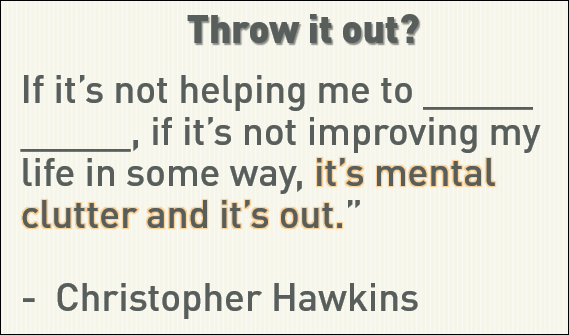
I love this quote by Christopher Hawkins that I've modified by making a blank space for YOU to fill out:

"If it’s not helping me to _____ _____, if it’s not improving my life in some way, it’s mental clutter and it's out." - Christopher Hawkins

The Red Queen's Race

Are you running because everyone around you is running? You don't always need to compare yourself to other people. This is another place where giving yourself permission is important.

"Well, in our country," said Alice, still panting a little, "you'd generally get to somewhere else—if you run very fast for a long time, as we've been doing."

"A slow sort of country!" said the Queen. "Now, here, you see, it takes all the running you can do, to keep in the same place. If you want to get somewhere else, you must run at least twice as fast as that!" - Red Queen's Race

There's lots of people I admire, but I'm not willing to move to LA to become Ryan Reynolds (he stole my career!) and I'm not willing to work as hard as Mark Russinovich (he stole my hair!) so I'm going to focus on being the best me I can be.

What are you doing to balance and avoid burnout?

* Stock photo by #WOCTechChat used with Attribution


Sponsor: Big thanks to RedGate and my friends on ANTS for sponsoring the feed this week! How can you find & fix your slowest .NET code? Boost the performance of your .NET application with the ANTS Performance Profiler. Find your bottleneck fast with performance data for code & queries. Try it free


© 2016 Scott Hanselman. All rights reserved.
     
10 May 20:45

VMware vSphere Next Beta Applications Are Now Open

by dan

VMware recently announced that applications for the next VMware vSphere Beta Program are now open. People wishing to participate in the program can now indicate their interest by filling out this simple form. The vSphere team will grant access to the program to selected candidates in stages. This vSphere Beta Program leverages a private Beta community to download software and share information. There will be discussion forums, webinars, and service requests to enable you to share your feedback with VMware.

So what’s involved? Participants are expected to:

  • Accept the Master Software Beta Test Agreement prior to visiting the Private Beta Community;
  • Install beta software within 3 days of receiving access to the beta product;
  • Provide feedback within the first 4 weeks of the beta program;
  • Submit Support Requests for bugs, issues and feature requests;
  • Complete surveys and beta test assignments; and
  • Participate in the private beta discussion forum and conference calls.

All testing is free-form and you’re encouraged to use the software in ways that interest you. This will provide VMware with valuable insight into how you use vSphere in real-world conditions and with real-world test cases.

Why participate? Some of the many reasons to participate include:

  • Receiving early access to the vSphere Beta products;
  • Interacting with the vSphere Beta team consisting of Product Managers, Engineers, Technical Support, and Technical Writers;
  • Providing direct input on product functionality, configurability, usability, and performance;
  • Providing feedback influencing future products, training, documentation, and services; and
  • Collaborating with other participants, learning about their use cases, and sharing advice and learnings.

I’m a big fan of public beta testing. While we’re not all experts on how things should work, it’s a great opportunity to at least have your say on how you think that vSphere should work. While the guys in vSphere product management may not be able to incorporate every idea you have for how vSphere should work, you’ll at least have an opportunity to contribute feedback and give VMware some insight on how their product is being used in the wild. In my opinion this is extremely valuable for both VMware and us, the consumers of their product. Plus, you’ll get a sneak peak into what’s coming up.

So, if you’re good with NDAs and have some time to devote to some testing of next-generation vSphere, this is the program for you. So head over to the website and check it out.

10 May 20:22

SQL Server 2016 features: Live query statistics

by Gail

Ever wanted to look at a query’s actual execution plan (execution plan with runtime information) without waiting for the query to finish? Now you can.

LiveQueryStats

Enable that and run a query, and you get an execution plan immediately, one with a few more details in it than we’re used to.

LiveQuery

I’m not sure what the times on the operators show, because a constant scan wouldn’t take over 4 seconds, it generates a single number. I suspect it’s the time between the first row request and the operator returning ‘no more rows’, but I’d have to test more to be sure.

The percentage done is probably based on the estimated row count, because on this plan all the operators went to 99% done instantly. The two numbers underneath the % done are the number of rows currently processed and below that the estimated number of rows.

It’s clear there’s a severe row estimation problem here. The last nested loop join estimated 97 rows and, at the point the screenshot was taken, had processed 170500 rows. It’s a pity that the estimated executions isn’t shown as well, as it makes identifying row estimation errors slightly harder for operators that execute multiple times (eg the key lookup). http://sqlinthewild.co.za/index.php/2009/09/22/estimated-rows-actual-rows-and-execution-count/

Identifying this kind of problem is, I think, one of the primary uses for Live Query Stats (other that using it to see how the QP works). The old example of ‘it ran fast yesterday and slow today, why?’ can be at least partially answered with Live Query Stats. Run the query with it turned on and see what plan is used and what row counts are flowing through them. Combine that with Query Store’s history of what plans were used yesterday, and we have a very powerful way of identifying why something is running unusually slow.

However is it something that should be used sparsely in production, as it does add some  overhead.

LiveStatsOn

In most ways the Live Query Stats behaves like a normal execution plan, it can be saved and if saved part way through a query’s execution, the resultant file is a normal .sqlplan file and has actual row counts of the point in execution where it was saved.

It’s not a ground breaking new feature, but it’s a fun way to see how queries execute and it does have some uses in debugging sudden performance problems.

10 May 18:19

Beyond end-of-support: Seeing value in modernization

by SQL Server Team

This post was authored by Tiffany Wissner, Senior Director, Product Marketing.

Today is the last day of extended support for SQL Server 2005. Starting tomorrow, companies running SQL Server 2005 will no longer receive security updates or hotfixes from Microsoft. We started on this journey eighteen months ago, with our first discussion on the end of support for SQL Server 2005, and sharing information about how to upgrade. If you haven’t migrated your SQL Server 2005 databases to a newer version of SQL Server, now is the time to put in place a plan for action.

While we’d be remiss if we didn’t mention that these customers will now run a much greater risk for business disruptions, increased maintenance costs and security and compliance issues, there is another hidden cost to running an older system that can potentially be much larger over time — lost opportunity.

In 2016, the world looks much different than it did in 2005. With our smart mobile devices, much more powerful hardware, intelligent applications and cloud computing, an older database solution can be a limiting factor to an organization’s competitiveness. Modern systems like SQL Server 2014 or the soon-to-be-released SQL Server 2016 give organizations the flexibility to deploy on-premises or in the cloud, to manage modern apps and create a host of business scenarios that simply weren’t possible a decade ago.

“From our unique vantage point of successfully running SQL Server modernization programs for diverse customers two things clearly stood out. First of all, modernization comes with better performance and scalability. Secondly modernization drives a culture change. Companies start treating data as an asset and the SQL Server ecosystem helps them to make smarter decisions with actionable insights with an immediate positive business impact, with the integration of Power BI, R Server, Azure Machine Learning and Cortana giving insights that were previously not available.” – Debu Dasgupta, Vice President of Technology and Microsoft Evangelist, Cognizant Technology Solutions

Recognizing this, many companies have already undertaken their upgrades from SQL Server 2005 to more modern platforms. We recently worked with Spiceworks to survey hundreds of these customers to understand where they were in the process, which platforms they were migrating to, obstacles, costs and other factors. The report found that the majority of SQL Server 2005 customers are either fully or partly migrated.  With data on fellow customers’ upgrade plans and durations, and the benefits these customers achieved through upgrade, it is a great read for companies still considering the move.

Case in point: Pact Group

A SQL Server upgrade can be a powerful business differentiator. Australian packaging manufacturer Pact Group has acquired 44 companies since 2002, and has a five-year plan to continue its aggressive expansion — averaging four new acquisitions each year.

To facilitate the plan, Pact has moved its SAP stack, which was running older Oracle and SQL Server databases, into Microsoft Azure, Windows Server 2012 R2 and SQL Server 2014, resulting in several benefits. For one, they’re now working under a consumption-based model hosted on Microsoft Azure, providing massive scalability and enabling them to incorporate acquisitions without the associated cost of provisioning on-premises IT.

The company’s ability to spin up virtual machines has gone from two weeks to just minutes. Now Pact can respond quickly with near-unlimited capacity when managing a merger, then scale back when it’s complete, paying only for what they use. Further, each of Pact’s main platforms in now mirrored in the cloud, giving them a true disaster recovery solution for the first time. They’ve also reduced database storage needs by 75%, from 10 terabytes to 2.5 terabytes.

Looking ahead, the company is exploring the platform’s ability to integrate with a variety of sensors, an IoT approach with the potential to create valuable new efficiencies and insights.

The path forward

What Pact has been able to accomplish would not have been feasible if they’d remained on their legacy, on-premises SAP systems powered by older versions of SQL Server, Windows Server and Oracle. By upgrading its systems, the company has literally enabled its own business plan, put itself on the path for continued growth, and opened the door for new possibilities down the road.

Not every company is a large multinational like Pact, but the benefits of elasticity, agility and connectivity that enables a rich new flow of data are largely the same for organizations of all shapes and sizes. And of course security and compliance are important concerns wherever you do business.

With all this in mind, Microsoft strongly encourages customers currently using SQL Server 2005, SQL Server 2008 or SQL Server 2008 R2 (the latter two will sunset in 2019) to review their technology needs and see how an upgrade to a modern database platform can make a real transformation in your business.

For a deeper run-down of the benefits of SQL Server 2014, take a look at a blog post from Takeshi Numoto, Corporate Vice President of Cloud + Enterprise Marketing from last October.

If you’re just getting started, these informational blog posts will serve as great resources. You can also visit the SQL Server 2005 upgrade page for more information on planning and executing your migration, along with options for your new database strategy. The analyst firm Directions on Microsoft has also issued a paper on planning your data platform upgrade: “Migrating from SQL Server 2005,” available here.

As always, Microsoft and our partners are still here to help you complete your migrations. Many of our partners have been helping customers modernize their SQL Server install base, and they say customers are recognizing new value in their updated solutions.

“We see the EoS of SQL Server 2005 as a big opportunity for large organizations. Data being the fabric of the digital enterprise, modernization starts with the designing the data layer as appropriate on the cloud or on to the latest on-premises solutions. We are excited about our partnership with Microsoft on SQL Server 2005 modernization program to help large enterprises create a digital data farm migration roadmap.” – Eravi Gopan, Head, Microsoft BU, WIPRO LTD

10 May 18:19

SQL Server 2016: Dynamic Data Masking

by Artemakis Artemiou [MVP]
Dynamic Data Masking is another data protection feature in SQL Server 2016. It limits sensitive data exposure by masking it to non-privileged users. The masking rules are applied in the query results and you designate how much of the sensitive data to reveal and to who. The Dynamic Data Masking feature provides four types of masking methods: Default: Full masking according to the data types of
10 May 18:19

Bye bye SQL Server 2005, now is the time for you to #upgrade

by SQLMaster

Tweet


From today SQL Server 2005 will no longer have any support from the Microsoft, which means no security updates or hotfixes that might affect your production platform if you are still managing 2005 version instances.

Microsoft and partners (along with MVPs) have been discussing about end of support for SQL Server 2005, and sharing information about how to upgrade. So now is the time to put all your efforts in one place to plan for action on SQL Server 2005 upgrade.

Upgrade to latest version of SQL Server (2014 and 2016 – soon to be) doesn’t guarantee you better performance or scalability, it is the database that was designed and also failing to prepare, plan and deploy a proper process will result to a disastrous performance loss on your data platform. So your vision must reside on upgrade – prepare, checkpoint and post-upgrade tasks to sustain performance and scalability.

So going into technical details we have tons of information in the Books OnLine and other blogs about SQL Server 2014 support for SQL Server 2005, see below:

  • Upgrade a SQL Server 2005 instance of database engine to SQL Server 2014 by running SQL Server 2014 setup using the installation wizard or from the command prompt.
  • Attach a SQL Server 2005 database (mdf/ldf files) to SQL Server 2014 instance of database engine.
  • Restore a SQL Server 2005 database to SQL Server 2014 instance of database engine from a backup.
  • Upgrade a SQL Server 2005 Integration Services (SSIS) package to SQL Server 2014. Execute packages with automatic-in-place upgrade.
  • Upgrade a SQL Server 2005 Analysis Services (SSAS) to SQL Server 2014 by running SQL Server 2014 setup.
  • Back up a SQL Server 2005 Analysis Services (SSAS) cube and restoring on SQL Server 2014.
  • Upgrade SQL Server 2005 Reporting Services (SSRS) to SQL Server 2014 by running SQL Server 2014 setup.
  • Connect to SQL Server 2005by using SQL Server Profiler 2014.

When a SQL Server 2005 database is upgraded to SQL Server 2014, the database compatibility level will be changed from 90 to 100. (In SQL Server 2014, valid values for the database compatibility level are 100, 110 and 120.) ALTER DATABASE Compatibility Level (Transact-SQL)discusses how the compatibility level change could affect SQL Server applications.

Any scenarios not specified in the list above are not supported, including but not limited to the following:

  • Installing SQL Server 2005 and SQL Server 2014 on same computer (side by side).
  • Using a SQL Server 2005 instance as a member of the replication topology that involves a SQL Server 2014 instance.
  • Configuring database mirroring between SQL Server 2014 and SQL Server 2005 instances.
  • Backing up the transaction log with log shipping between SQL Server 2014 and SQL Server 2005 instances.
  • Configuring linked servers between SQL Server 2014 and SQL Server 2005 instances.
  • Managing a SQL Server 2005 instance from a SQL Server 2014 Management Studio.
  • Attaching a SQL Server 2005 Analysis Services (SSAS) cube in SQL Server 2014 Management Studio.
  • Connecting to SQL Server 2005 Integration Services (SSIS) from SQL Server 2014 Management Studio.
  • Managing a SQL Server 2005 Integration Services (SSIS) service from SQL Server 2014 Management Studio.
  • Support for SQL Server 2005 third party custom Integration Services components, such as execute and upgrade.

….and highly recommended pages:

Features Supported by the Editions of SQL Server 2014
Hardware and Software Requirements for Installing SQL Server 2014
Upgrade to SQL Server 2014
Use Upgrade Advisor to Prepare for Upgrades


Also data platform upgrade topic is one of the popular topic that I have been presenting since the year 2008 in majority of SQL Server conferences.


10 May 18:19

Why Business Like Yours Choose Power BI Over Sisense

by Prologika - Teo Lachev

As Power BI gains a momentum, expect attacks from vendors to intensify. Do you know that there are thousands of vendors offering BI tools! There is not a month passed by when I’m not asked about some cool vendor. I usually don’t criticize other vendors but sometimes I get provoked by their audacity and I need to keep ’em honest. Recently, a customer shared a Sisense whitepaper “Why Business Like Yours Choose Sisense over Power BI” and asked about my thoughts. The whitepaper is not published yet but I guess it will be soon as Sisense has deployed another battle card “Why Business Like Yours Choose Sisense over QlikView” that’s already in the open. Overall, Sisense appears to be a just another pure self-service BI player that it’s trying to aggressively get noticed  and refuses to see further then its nose. Judging by their mantra on YouTube and elsewhere, data warehousing is dead, OLAP is dead, star schema is dead, as well as pretty much everything else except Sisense. In their own words:

“DO I NEED TO BUILD A DATA WAREHOUSE?”
Absolutely not! Data warehouses are one of the most notorious projects associated with BI tools. That’s exactly what we have vowed to eliminate. We use an in-memory columnar database that automatically connects to your data and builds everything for you. You do not need to worry about a complex data modeling or performance. You just say which data you want to add, and Sisense does the rest.

Dream come true? Actually, nothing new here despite their Don Quixote’s rhetoric. If your BI solution can be done just by joining a bunch of tables, you can do it with any self-service BI tool, as folks have done for many years using Excel, Access, and for the past decade other self-service BI oriented tools. A tool that allows you to just import more data doesn’t solve the inherent problems of self-service BI. Complex data transformation, automation, and consolidation requires a centralized repository. When done right and if you need it, implementing DW shouldn’t be risky, and it should yield a nice ROI together with a true single version of truth. As I said many times, any vendor or a consulting firm that forces you in a particular methodology (pure self-service BI in this case), is just trying to score points and it shouldn’t be taken seriously. There isn’t one-size-fits-all tool or methodology when it comes to data analytics.

Let’s take a look at some of the statements that Sisense makes about Power BI and Sisense offerings. I actually installed their 15-day trial and did some limited testing. Mind you that their whitepaper is limited to comparing the self-service aspect of Power BI with Sisense because they don’t have organizational BI solution (which of course they hold in disdain). So, we’re comparing just Power BI Desktop self-service models and PowerBI Service with Sisense ElastiCube and dashboards. Let’s review some of the claims Sisense makes:

  1. “Power BI is a good out the box tool for simple data analysis, but if you need to analyze larger and more complex data you will likely need to invest in a costly high performance data store. Why? Because of the MS data and technology limitations to query larger or complex data sets, Power BI requires a direct query to the data. If you want the query to run fast or to scale, their lack of a high performance data engine creates 3 issues:
    1. You need expensive technical skills to get the data properly prepared for analysis in the data store.
    2. If you do not have a powerful data store, you need to invest in it.
    3. Business will be more reliant on IT to prepare data, which will create more, not less overhead and longer time to value.”

    Sisense is exalting the virtues of ElastiCube as superior to xVelocity (the memory engine behind Power BI Desktiop/Power Pivot, Tabular and SQL Server columnstore indexes). SiSense ElastiCube is a proprietary multidimensional storage that is only accessible by Sisense dashboards. Think of ElastiCube as SSAS Tabular but simplified to target business users. Of course, simplification comes at expense of features. However, its storage is disk first, memory second, and it brings data in memory on demand (so think of it as a hybrid between Multidimensional and Tabular). Sisense claims that this architecture is highly scalable and superior to both OLAP and in-memory columnar databases. However, similar to the SSAS default cached storage, ElastiCube requires that all the data must be imported first. I don’t see a pass-through configuration where ElastiCube can pass queries to a fast database. Direct Query, of course, is mentioned as a limitation of Power BI while it should be the other way around. As far as scaling without a backend data store that is sanctioned by IT, I kept on asking myself “How many business users out there have access to billions of rows?” (that need to be imported, mind you!). To Sisense’s point, it’s true that PowerBI.com now limits the datasets you upload to 250 MB (expect this limitation to be lifted) but this 250 MB still allows you to pack a few million rows because data is highly compressed. Anyway, if your business users need to import billions of rows without IT getting involved and data doesn’t require extensive transformations, then Sisense might be worth a try but you probably shouldn’t be on the self-service bandwagon with these data volumes to start with. As far as complex data, I found Sisense to be no match to xVelocity and DAX as you’ll quickly find out when you start modeling with Sisense ElastiCube Manager and look at the limited calculations and relationship options the tool supports.

  2. Dashboard filtering in Power BI – “Limited access pre-defined by dashboard creator using ‘slicer’ widgets”. Power BI supports visual-level, page-level, and report-level filters which Sisense obviously missed. Power BI support basic and advanced filtering modes. Interestingly, when I played with Sisense, their filtering options filters data before it’s aggregated.
  3. Widget drilldown in Power BI – “Only supported in Power BI Desktop, pre-defined by dashboard creator”. Another wrong statement. Users can create ad-hoc reports and they have the same reporting capabilities as in Power BI Desktop.
  4. “To avoid direct queries against data, Power BI Desktop uses a Memory intensive data engine with some data compression – this has all the disadvantages of the in-memory approach relating to performance limitations (you can’t get large data sets into memory) and cost to scale (memory is expensive).” – This goes back to the first point. I’m yet to see business users who are given rights and authority to analyze billions of rows, not to mention the performance implication of importing such a enormous dataset (the only option supported by ElastiCube). And, Power BI compresses everything so the statement “some data compression” is technically inaccurate.
  5. “Applying changes to an existing data model, for example adding or editing a column is like starting from scratch as the model will have to do all the data import and transformations again – very time consuming” – Nope. The Power BI engine is smart enough to apply the minimum processing. If you add a column, it will reload only that table. Not sure what Sisense means by “editing”, since the data is read-only but renaming the column is only a metadata operation and it’s very quick.
  6. “The Query Editor has a wizard feel, but it somewhat complex and clunky” – What’s the Sisense alternative that is not complex and clunky for data transformations by business users? Power Query resonates very well with business users and I don’t agree with this statement but beauty is the eye of the beholder.
  7. “In practice, if analytics are to be done on a larger, more complex data set, much care must be taken to pre-aggregate and clean the data to fit into the data size limitations.” – I don’t see how Sisense would address more complex data. More complex data would probably require an organizational BI solution which they don’t support.
  8. “However as data complexity and requirements generally grow as users’ appetites for more analytics and intelligent dashboards, problems will quickly arise due to the strict data limitations of Power BI.” Would you want your business users to manage complex solutions? Are they actually capable of doing so? If they are, Microsoft gives you a nice continuum where you can move the solution to a dedicated server. True, the modeler needs to learn a few more tricks and get out of Power BI Desktop/Excel and into Visual Studio, and gain many more features than Sisense provides.
  9. “Sisense can deploy to a cloud hosted service, or to an on premise server, while Power BI currently only offers a cloud hosted solution for sharing.” From here, we learn that Sisense Cloud is actually VM-hosted. So, no PaaS. You still have to configure it, manage it, license it, etc.
  10. “You will lose the ability to perform analytics on larger data sets, and will need to make decisions to pre-aggregate data in a data warehouse, or drop portions of the dataset in order to adhere to the data size limits.” We typically don’t pre-aggregate data as we have efficient backend technologies to aggregate it for us.
  11. “In Sisense, you will have a much more flexible, scalable solution that can be maintained much more easily by less technical resources.” – This goes back into the self-service mantra. Large, complex, and scalable solutions are often needed and it’s too much to ask of business users to tackle them.

Of course, Sisense leaves out many other points and features Power BI excels. Q&A? Quick Insights? Excel integration? Security? Governance? Sharing? Speed of development? Real-time BI? Machine Learning? Pricing – for this, you need to call Sisense.

In summary, why Business Like Yours Choose Power BI Over Sisense? Because Sisense is two quadrants behind (it made the Magic Quadrant this year). Read the latest Gartner report to find what Gartner thinks about Sisense (tip: you can download the report from the Sisense site).

10 May 18:18

Keep data virtually forever with Stretch Database in SQL Server 2016

by SQL Server Team

This post was authored by Joe Yong, Sr. Program Manager, SQL Server.

Stretch Database in SQL Server 2016 allows users to keep as much data as they need, for as long as they need, without incurring business service level agreement (SLA) risks or the high costs of enterprise storage. Unlike typical cold data solutions, by leveraging the endless storage and compute capacity of Azure your data is always online and most applications don’t require changes. DBAs only need to enable the database for stretch.

As organizations continue to accumulate massive amounts of data in their transactional systems, much of it eventually becomes cold, and therefore infrequently accessed. Overtime, individual tables can grow to millions or billions of rows and up to terabytes in size.

Stretch Database

For business and regulatory compliance purposes, users need the data to remain online and accessible on-demand. Storage administrators and IT managers are continually looking for ways to meet business goals with inadequate IT budgets. Meanwhile, DBAs are pulled in different directions by these conflicting goals, trying to keep database performance and availability within business SLAs as the database grows, even as maintenance windows and budgets continue to shrink.

Core scenarios

  • Stretch entire table: If you currently already have a dedicated table for cold data, you can stretch this entire table. For example, you may have an Order_details and an Order_details_history table where the Order_details_history table only contains cold data moved from the Order_details table.
  • Stretch cold rows: If you have hot and cold data in the same table, you can stretch just the cold rows from the table to Azure. You only need to define which rows are cold (usually by date or status) and SQL Server will take care of the movement.

Benefits

With Azure SQL Stretch Database, you can leverage Azure on your terms:

  • Get as much enterprise-class storage as needed, when it is needed. Automated backup and geo-redundancy are available by default.
  • Scale compute and storage resources independently based on workload requirements—and only pay for what is consumed.
  • Centralize access control via integrated security for customers who federate their on-premises Active Directory with Azure Active Directory.
  • Leverage existing knowledge and tools such as SQL Server Management Studio, SQL Server Data Tools, T-SQL and PowerShell, while adding enhanced experiences via Azure portal.

And the best part is, most applications will require no code changes in order to take advantage of Stretch Database.

Base requirements

Stretch Database is only available in SQL Server 2016, so users will need to first upgrade their existing SQL Server database to 2016. It works with RC0 or later, which can be downloaded here. Customers will also need an Azure subscription to create a new SQL Server Stretch Database. Any subscription admin, co-admin, owner or contributor account will have this privilege. If you don’t currently have an Azure subscription, sign-up for a free trial subscription. Implementing Stretch Database generally requires little effort if your database does not have unsupported objects or features.

How it works

To get started, first identify either a cold table that you wish to stretch entirely or a table where you will stretch the cold rows. The actual process to enable Stretch Database is simple and can be accomplished via a SQL Server Management Studio wizard or via T-SQL. Details and step-by-step guidance is available on this documentation page.

As part of the Stretch Database process, SQL Server establishes a secure connection to Azure to create a new server (if you choose to do so) and a new Stretch Database (occurs each time a database is stretched). Once you have a table enabled for stretch, SQL Server will create a new table in the Stretch Database created earlier and begin migrating data silently in the background.

SQL Server always performs Stretch Database tasks over a secure channel and validates the target certificate; nothing is ever sent to Azure in clear text. It ignores user defined settings for this specific area to ensure users cannot accidently configure Stretch Database in an un-secure manner.

Data is trickled to Azure instead of a high volume migration. This ensures minimal impact to the production database. The entire system is online and applications continue working against the database throughout the entire process. Enabling Stretch Database does not incur downtime.

Enabling Stretch Database

Queries against a Stretch Database do not change. If the query needs to retrieve data from the remote database, the query processor automatically executes the query and pushes appropriate filters (WHERE clause) to the remote database for execution. Only required rows are returned and joined with local data, if any, and presented to the application/user. If the query does not require data from the remote database, the query processor will not execute the query remotely. This avoids the overhead and latency of the Azure roundtrip.

When Stretch Database is enabled, you can monitor its activity and progress in different ways. We offer Dynamic Management Views (DMVs) that provide current migration activity or schema update status. You can also view the overall status via the Stretch Database Monitor in SSMS (figure below). Full details are documented here.

Stretch Database Monitor in SSMS

After a period of time when a large percentage of the cold data has moved to Azure, you will see that important maintenance operations like backup/restore will take less time and fewer resources. This is because the cold data in Azure no longer affect these operations.

So, how big of an impact can this have? As for impact, that really depends on how large the tables have gotten and what your business SLAs are. The largest single table we’ve found working with customers is 45 billion rows (and growing), with about 99% of that being cold data. All of it needs to be online and query-able at any time, although actual access to cold data is rare. Imagine you were the DBA and were tasked with index maintenance for that table. If that weren’t big enough for you, the largest partitioned table we found with a customer is 1.3 trillion rows (and still growing rapidly).

While these are pretty extreme examples, they do show what the future holds. Most users today are well below the billion-row range, but still face similar challenges.

Next steps

Download the latest release of SQL Server 2016 if you haven’t already done so, and check out Stretch Database running against the new Stretch Database service in Azure. Share you experiences with us and let us know what works and doesn’t work for you.

Finally, if you have a really large table or even a lot of moderately large tables, we’re very interested in working with you. Talk to us in the comment section or on MSDN.

Learn more

For more information and to get started, check out the following links:


See the other posts in the SQL Server 2016 blogging series.

Try SQL Server 2016 RC

10 May 18:17

Who is Active for Azure SQL Database - Attempt #2

by Adam Machanic
This blog has moved! You can find this content at the following new location: http://dataeducation.com/sp_whoisactive-for-azure-sql-database-attempt-2/...(read more)
10 May 18:17

Failover – and guess what !!!

by GrumpyOldDBA
Yup yet another instance of something breaking when a cluster runs on the other node. I don’t wish to apportion blame here or point any fingers but .. following on from my last post I managed to have one of the production clusters that normally runs on...(read more)
10 May 18:16

SSRS UX Changes in SQL Server 2016

by Prologika - Teo Lachev

SQL Server 2016 RC3 (last and feature complete RC) just came out for public review. It includes a couple of interesting UX enhancements. The first one is more of a teaser but shows you that Microsoft is committed to fulfill and go beyond its reporting roadmap. SSRS in native mode plays a central role in this roadmap as the on-premises BI reporting platform.

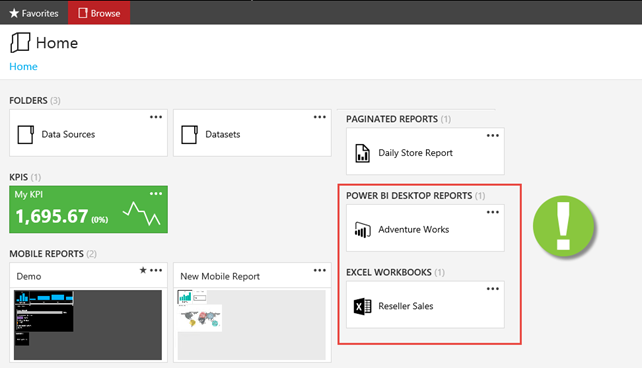
The new portal (the old Report Manager portal is gone BTW) now includes sections if you upload Power BI Desktop files and even Excel workbooks! For SQL Server 2016 RTM timeframe, clicking a file of these two types simply opens it on the client with the corresponding application (Power BI Desktop for PBIX files and Excel for Excel workbooks). So, no embedded web rendering yet but I guess these features won’t be there if Microsoft isn’t prepared to travel the full distance after RTM.

041616_2211_UXChangesin1.png

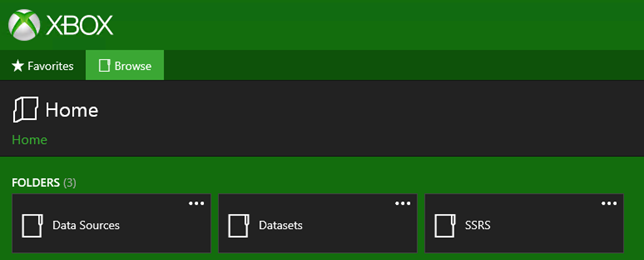
Second, we now have branding of the portal and mobile reports, as Chris Finlan explains in his “How to create a custom brand package for Reporting Services with SQL Server 2016” blog.

041616_2211_UXChangesin2.png

10 May 18:16

Load Testing Tabular

by Prologika - Teo Lachev

I while back I did a TechEd presentation “Can Your BI Solution Scale?”, when I discussed a methodology for load testing SSAS and SSRS. A customer wanted to ensure that its Tabular model can scale to thousands of deployed users when it goes live. You can still use the excellent Microsoft-originated AS Load Sim framework that I demonstrated in the presentation to load test Tabular. And you can use It can send both MDX and DAX queries. The project allows you to parametrize queries by using tupples from MDX sets. For example, if you want to parameterize a query by month, you can specify the set NonEmpty( [Date].[Calendar].[Month].Members, [Measures].[Internet Sales Amount] ). Then, the framework executes the set and assigns tupples from the set in random so you don’t just get cached results from the same query.

However, you’ve to use a small trick to parameterize DAX queries. Because DAX queries doesn’t support the MDX UniqueName syntax for filtering, you can parse the UniqueName of the tupple member to extract only the name. Use can use the DAX MID function for this purpose. For example, if I want to filter the Customer[Customer Name] column on the actual name, e.g. Acme, you can use the following expression:

Customer[Customer Name] = MID(“([Customer].[Customer Name].&[Acme])”, SEARCH(“&[“, “([Customer].[Customer Name].&[Acme])”) + 2, SEARCH(“])”, “([Customer].[Customer Name].&[Acme])”) – SEARCH(“&[“, “([Customer].[Customer Name].&[Acme])”) – 2)

Basically, this expression extracts the string “Acme” from ([Customer].[Customer Name].&[Acme]). Since, the customer names will vary. it’s a generic and a rather convoluted expression to extract a string surrounded by “&[” and “])”.

041716_2018_LoadTesting1.jpg

10 May 18:15

MIT is Teaching AI to Fight Cyberattacks

by A.R. Guess

by Angela Guess Brian Barrett recently wrote in Wired, “Finding evidence that someone compromised your cyber defenses is a grind. Sifting through all of the data to find abnormalities takes a lot of time and effort, and analysts can only work so many hours a day. But an AI never gets tired, and can work […]

The post MIT is Teaching AI to Fight Cyberattacks appeared first on DATAVERSITY.

10 May 18:15

Talking About Rust’s Traits

by Jeremiah Peschka

We previously talked about The Basics of Rust structs. That was some pretty cool stuff – we learned how to structure data and how to attach functionality to that data by using impl. A struct defines what data we have, but what if we want to define how that data should function?

Using the traits Rusting and Broken at the same time.

Enter Rust’s Traits

A trait lets us define how data will behave. Rust’s traits are similar to interfaces in other programming languages – it’s a guarantee of functionality that we’re going to provide. This makes programming significantly easier.

Declaring a trait is easy and looks a lot like a struct definition:

pub trait Debug {
    fn fmt(&self, &mut Formatter) -> Result;
}

This is Rust’s own Debug trait. I removed a little bit of the code from it just to make it readable, but you can look at the code for the Debug trait.

In this code, Rust we’re defining a public trait named Debug. Debug has one function named format that accepts a reference to the implementor and a mutable reference to a Formatter. The Formatter just tells Rust how to display whatever we’re debugging.

Debug is a bit of an odd choice since it’s normally used with a #derive annotation, but I really didn’t feel like coming up with some kind of pet or shape or other crazy example that didn’t rely on 900 lines of scaffolding to make it work.

Implementing a Trait

We implement traits the same way that we implement structs: using the impl keyword. Let’s implement the Debug trait for the Todo struct we looked at the last time.

use std::fmt;

pub struct Todo {
    pub title: String,
    pub description: String,
    created_at_s: i64,
    completed_at_s: Option
}

impl fmt::Debug for Todo {
    fn fmt(&self, f: &mut fmt::Formatter) -> fmt::Result {
        write!(f, "DO THIS:\n{{\n title: {}\n description: {}\n created: {}\n completed{:?}\n}} ",
               self.title,
               self.description,
               self.created_at_s)
    }
}

fn main() {
    let t = Todo {  title: "lol".to_string(),
                    description: "wut".to_string(), 
                    created_at_s: 0, 
                    completed_at_s: None };

    println!("{:?}", t);
}

// Output:
// DO THIS:
// {
//  title: lol
//  description: wut
//  created: 0
//  completed: None
// } 

It actually worked. That’s crazy!

What’s happening here?

In main, we create a Todo and then print it using the println! macro. The macro, here, has two arguments: a format string, and a thing to print. The format string is the "{:?}" thing. The curly braces mean we’re substituting something in and the bit inside the curly braces (the :? part) says “Use the Debug trait to dump this garbage to screen”.

When Rust evaluates println!, it goes off looking for a way to use the Debug trait on our Todo. If we hadn’t implemented that, the compiler would’ve complained long before the program could run and then everyone would be angry. Thankfully, we’ve implemented this trait by writing impl fmt::Debug for Todo – this tells the compiler that we’re implementing the Debugtrait (housed in fmt) for the Todo struct. Whenever we need to debug print a Todo, Rust now knows where to look for it.

You can play with this code over in the Rust playground.

Doing More with Traits

There’s a lot that’s possible with traits. We can add multiple traits to a single struct, you can see examples of this all over the Rust standard library. Creating multiple traits lets us define fine grained units of functionality and apply them wherever we need them. One example of this is both the Read and Write traits. These are used on files and streams, but they provide a sane way to interact with anything that is either readable or writable.

It’s also possible to extend other types with a trait. You don’t need to have defined the data type to be able to extend it with your own trait. It’s possible to add traits to primitive types like i32 or to complex types like a file or even a database connection.

There arew two rules for doing this yourself:

  1. You have to explicitly bring the trait you want into scope.
  2. You must have defined either the trait or the type that you’re messing with in the same library as the impl that you’re writing. This prevents you from hijacking the ToString trait on primitive types.

If you want to dig further into traits the Traits chapter of the Rust book is helpful and will lead you to further investigations into Rust’s traits.


Rusting” by ben dalton is licensed with CC BY-SA 2.0


10 May 18:15

STRING_SPLIT() in SQL Server 2016 : Follow-Up #1

by Aaron Bertrand

A few weeks ago, I wrote about how surprised I was at the performance of a new native function in SQL Server 2016, STRING_SPLIT():

After the post was published, I got a few comments (publicly and privately) with these suggestions (or questions that I turned into suggestions):

  • Specifying an explicit output data type for the JSON approach, so that that method doesn't suffer from potential performance overhead due to the fallback of nvarchar(max).
  • Testing a slightly different approach, where something is actually done with the data – namely SELECT INTO #temp.
  • Showing how estimated row counts compare to existing methods, particularly when nesting split operations.

I did respond to some people offline, but thought it would be worth posting a follow-up here.

Being fairer to JSON

The original JSON function looked like this, with no specification for output data type:

CREATE FUNCTION dbo.SplitStrings_JSON
...
    RETURN (SELECT value FROM OPENJSON( CHAR(91) + @List + CHAR(93) ));

I renamed it, and created two more, with the following definitions:

CREATE FUNCTION dbo.SplitStrings_JSON_int
...
    RETURN (SELECT value FROM OPENJSON( CHAR(91) + @List + CHAR(93) ) 
      WITH ([value] int '$'));
GO
 
CREATE FUNCTION dbo.SplitStrings_JSON_varchar
...
    RETURN (SELECT value FROM OPENJSON( CHAR(91) + @List + CHAR(93) ) 
      WITH ([value] varchar(100) '$'));

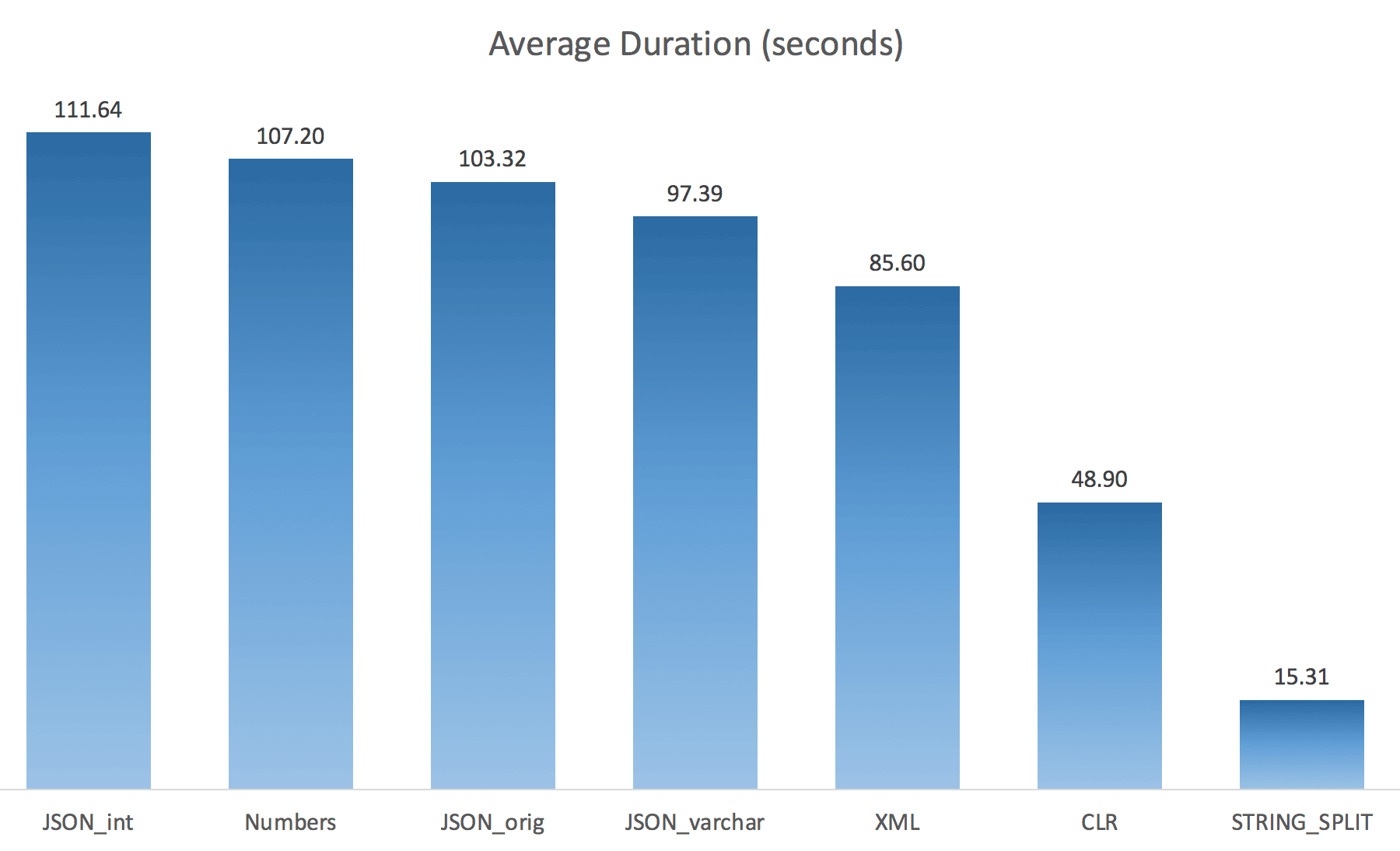
I thought this would drastically improve performance, but alas, this was not the case. I ran the tests again and the results were as follows:

Testing additional JSON approaches

The waits observed during a random instance of the test (filtered to those > 25):

CLR IO_COMPLETION 1,595
SOS_SCHEDULER_YIELD 76
RESERVED_MEMORY_ALLOCATION_EXT 76
MEMORY_ALLOCATION_EXT 28
JSON_int MEMORY_ALLOCATION_EXT 6,294
SOS_SCHEDULER_YIELD 95
JSON_original MEMORY_ALLOCATION_EXT 4,307
SOS_SCHEDULER_YIELD 83
JSON_varchar MEMORY_ALLOCATION_EXT 6,110
SOS_SCHEDULER_YIELD 87
Numbers SOS_SCHEDULER_YIELD 96
XML MEMORY_ALLOCATION_EXT 1,917
IO_COMPLETION 1,616
SOS_SCHEDULER_YIELD 147
RESERVED_MEMORY_ALLOCATION_EXT 73

Waits observed > 25 (note there is no entry for STRING_SPLIT)

While changing from the default to varchar(100) did improve performance a little, the gain was negligible, and changing to int actually made it worse. Add to this that you probably need to add STRING_ESCAPE() to the incoming string in some scenarios, just in case they have characters that will mess up JSON parsing. My conclusion is still that this is a neat way to use the new JSON functionality, but mostly a novelty inappropriate for reasonable scale.

Materializing the Output

Jonathan Magnan made this astute observation on my previous post:

STRING_SPLIT is indeed very fast, however also slow as hell when working with temporary table (unless it get fixed in a future build).
 
SELECT f.value
INTO #test
FROM dbo.SourceTable AS s
CROSS APPLY string_split(s.StringValue, ',') AS f

Will be WAY slower than SQL CLR solution (15x and more!).

So, I dug in. I created code that would call each of my functions and dump the results into a #temp table, and time them:

SET NOCOUNT ON;
 
SELECT N'SET NOCOUNT ON;
TRUNCATE TABLE dbo.Timings;
GO
';
 
SELECT N'DECLARE @d DATETIME = SYSDATETIME();
 
INSERT dbo.Timings(dt, test, point, wait_type, wait_time_ms)
SELECT @d, test = ''' + name + ''', point  = ''Start'', wait_type, wait_time_ms
FROM sys.dm_exec_session_wait_stats WHERE session_id = @@SPID;
GO
 
SELECT f.value
INTO #test
FROM dbo.SourceTable AS s
CROSS APPLY dbo.'+name+'(s.StringValue, '','') AS f;
GO
 
DECLARE @d DATETIME = SYSDATETIME();
 
INSERT dbo.Timings(dt, test, point, wait_type, wait_time_ms)
SELECT @d, '''+name+''', ''End'', wait_type, wait_time_ms
FROM sys.dm_exec_session_wait_stats WHERE session_id = @@SPID;
 
DROP TABLE #test;
GO'
FROM sys.objects WHERE name LIKE '%split%';

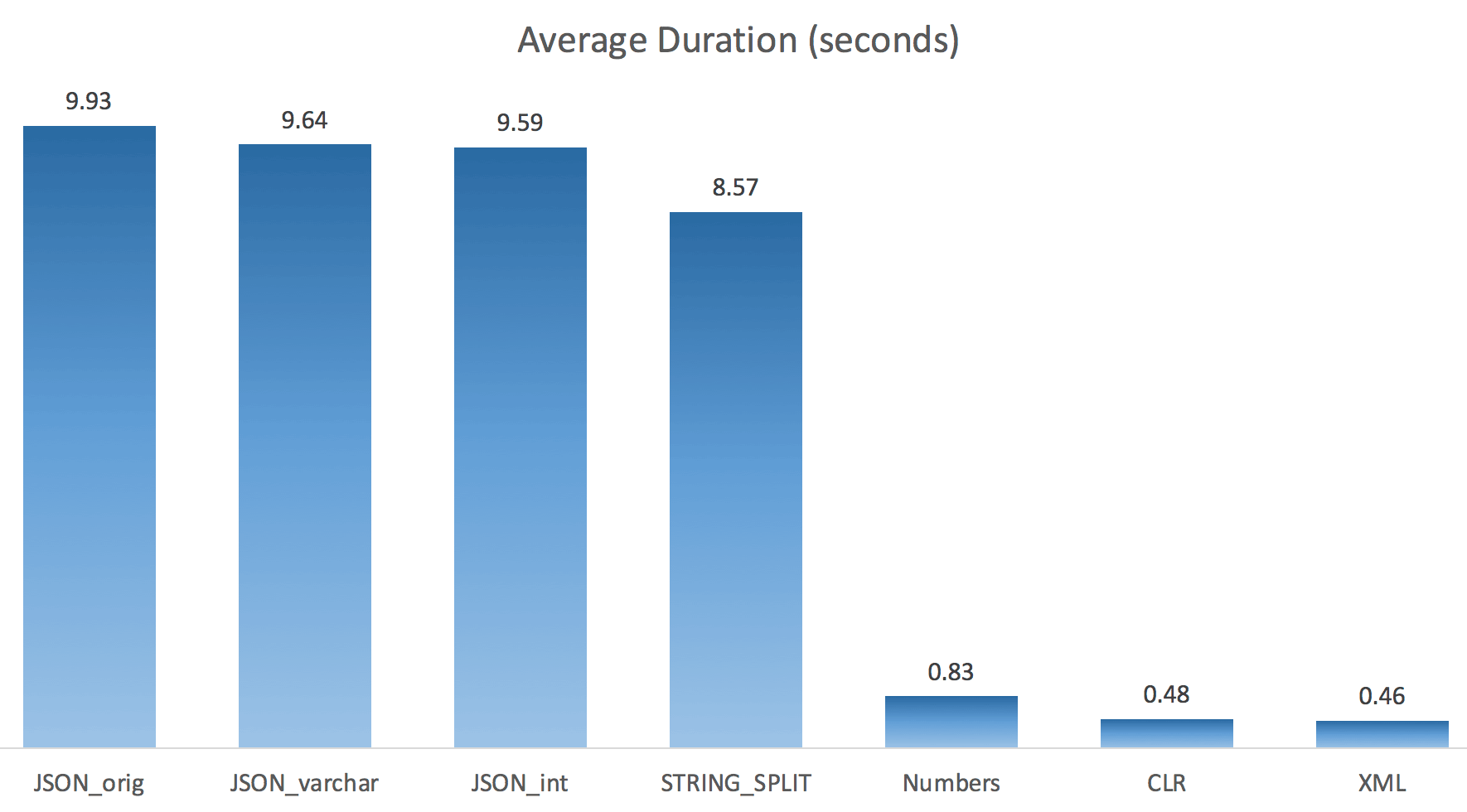
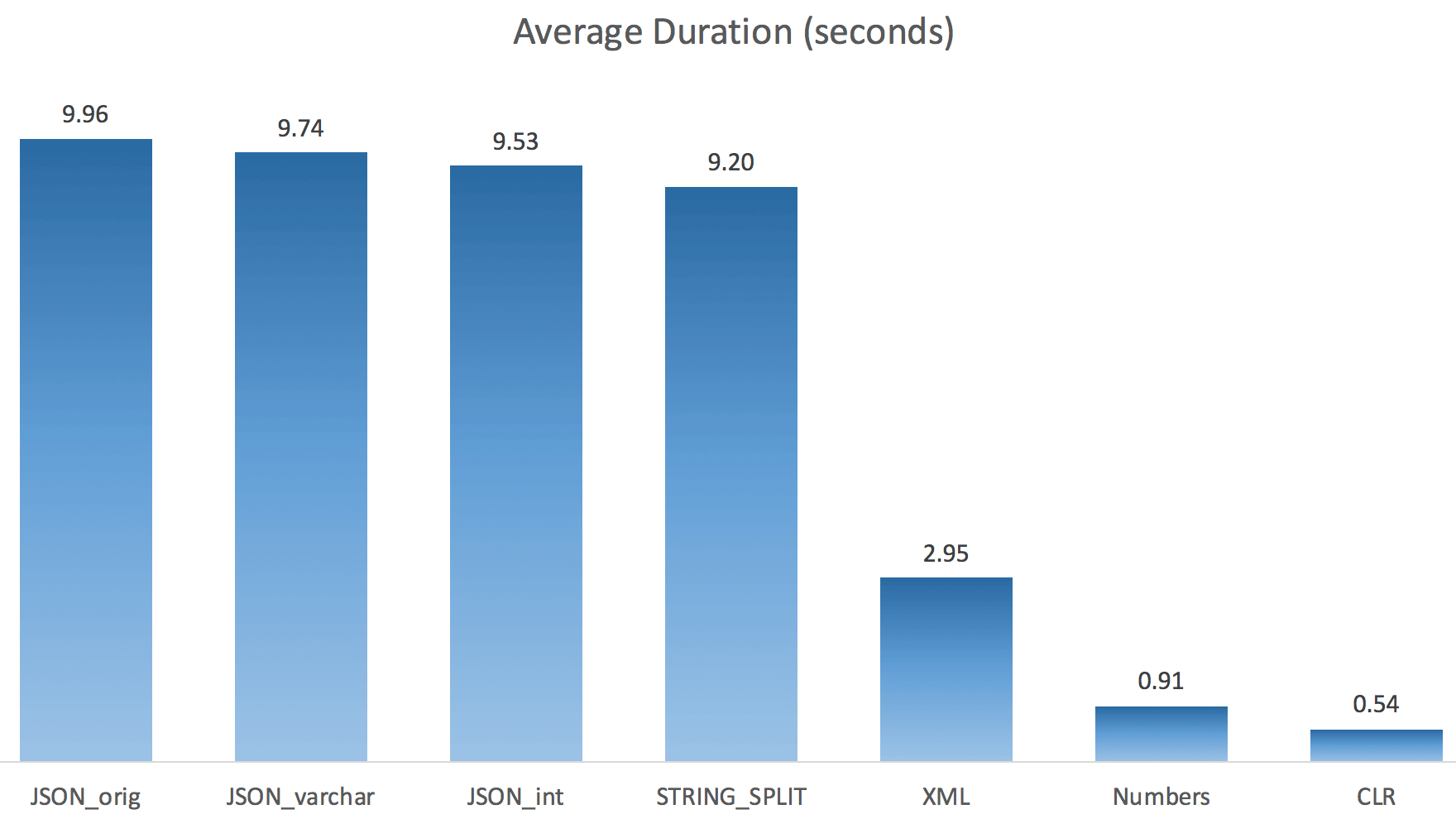
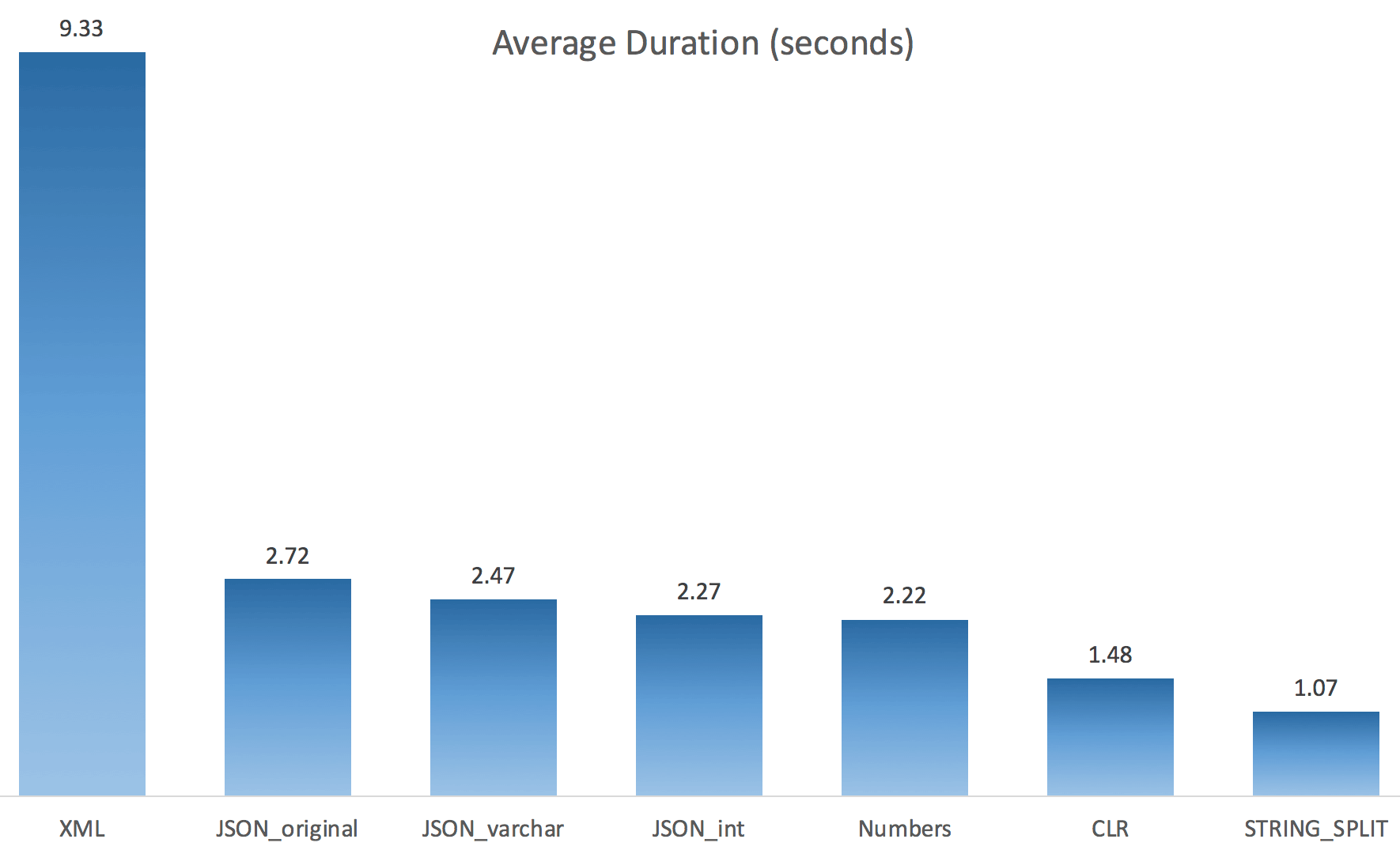
I just ran each test once (rather than loop 100 times), because I didn't want to completely thrash the I/O on my system. Still, after averaging three test runs, Jonathan was absolutely, 100% right. Here were the durations of populating a #temp table with ~500,000 rows using each method:

Populating a #temp table with output of split functions

So here, the JSON and STRING_SPLIT methods took about 10 seconds each, while the Numbers table, CLR, and XML approaches took less than a second. Perplexed, I investigated the waits, and sure enough, the four methods on the left incurred significant LATCH_EX waits (about 25 seconds) not seen in the other three, and there were no other significant waits to speak of.

And since the latch waits were greater than total duration, it gave me a clue that this had to do with parallelism (this particular machine has 4 cores). So I generated test code again, changing just one line to see what would happen without parallelism:

CROSS APPLY dbo.'+name+'(s.StringValue, '','') AS f OPTION (MAXDOP 1);

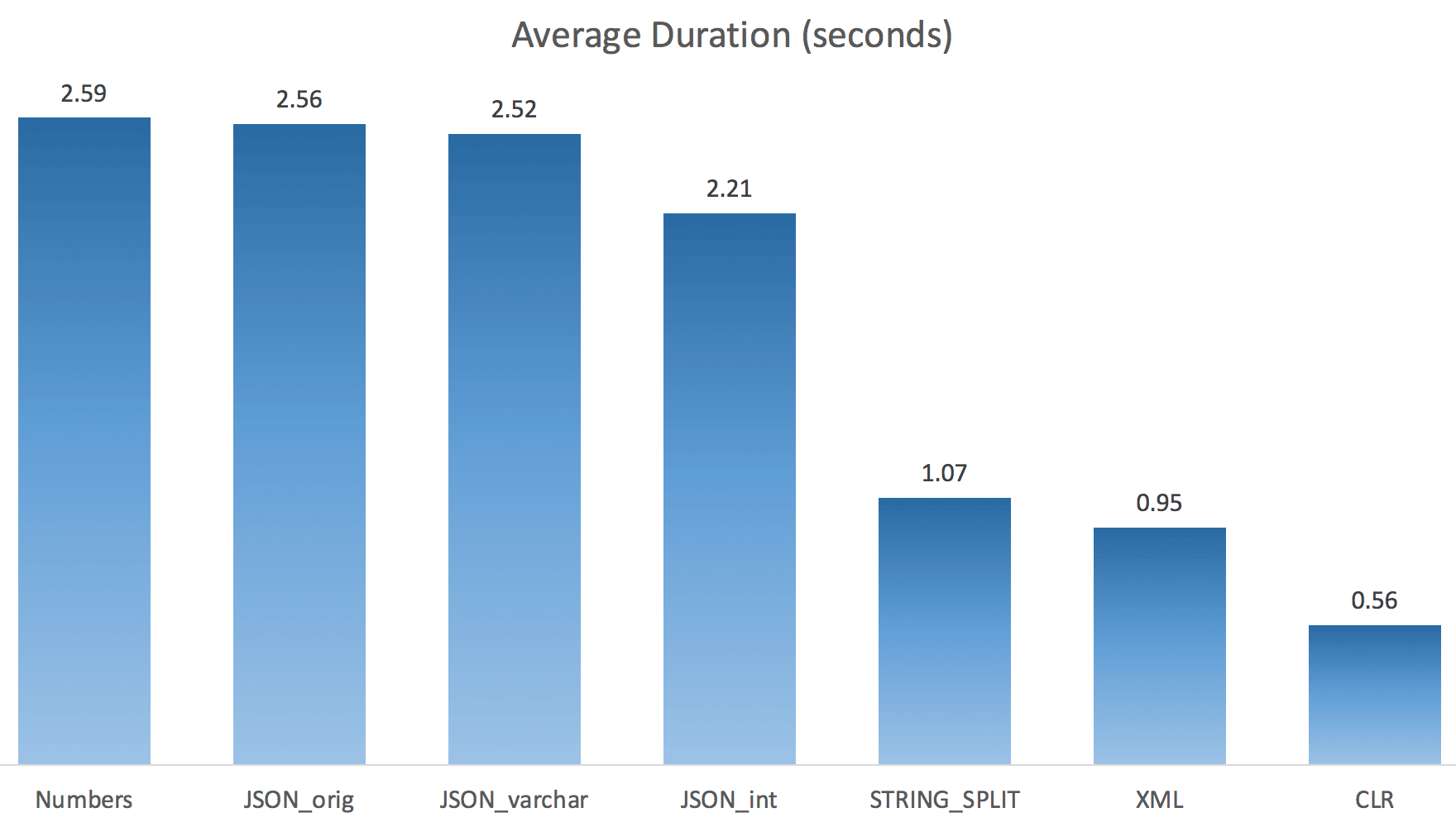
Now STRING_SPLIT fared a lot better (as did the JSON methods), but still at least double the time taken by CLR:

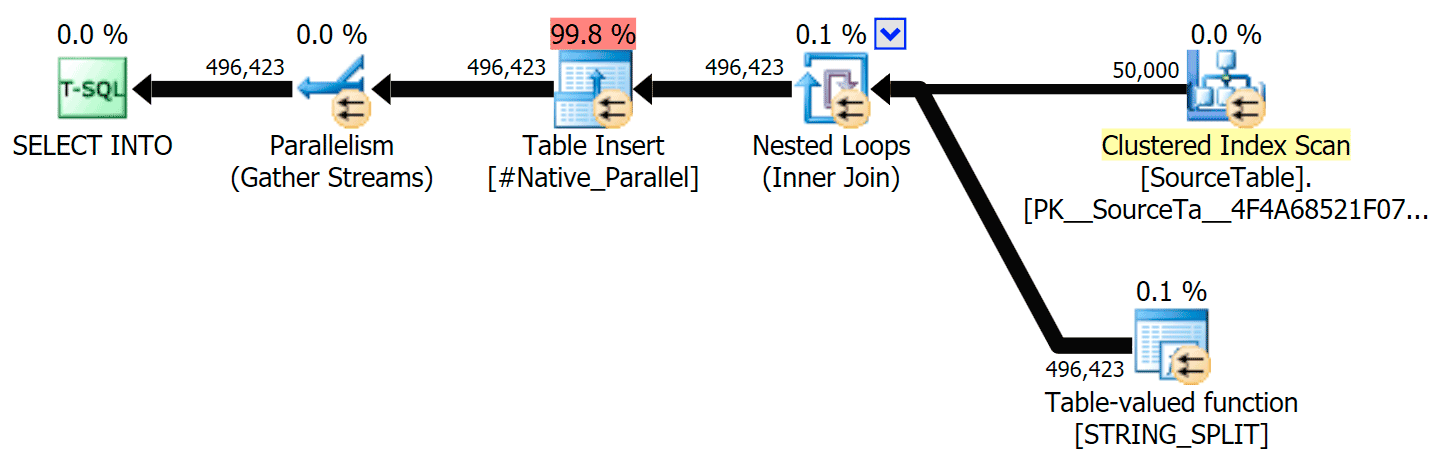
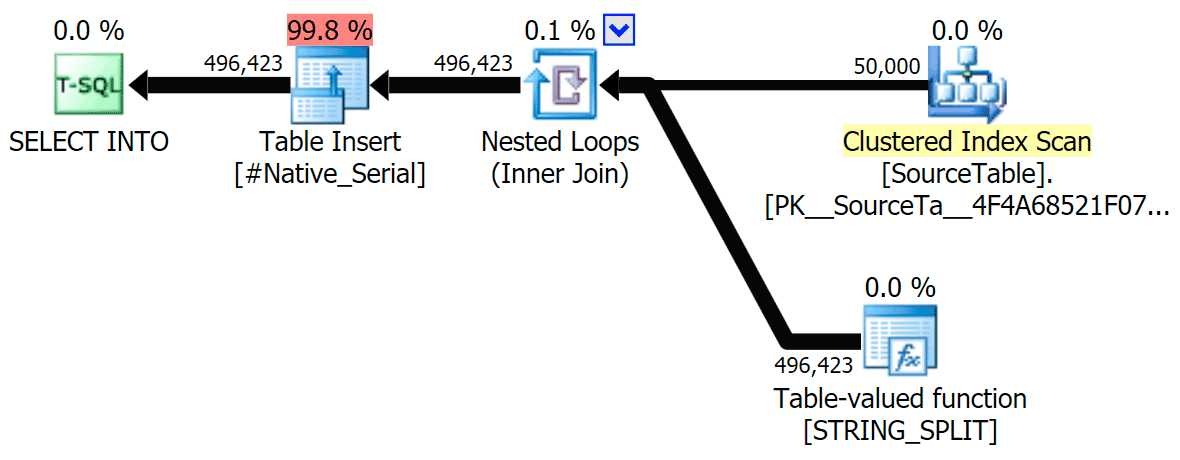
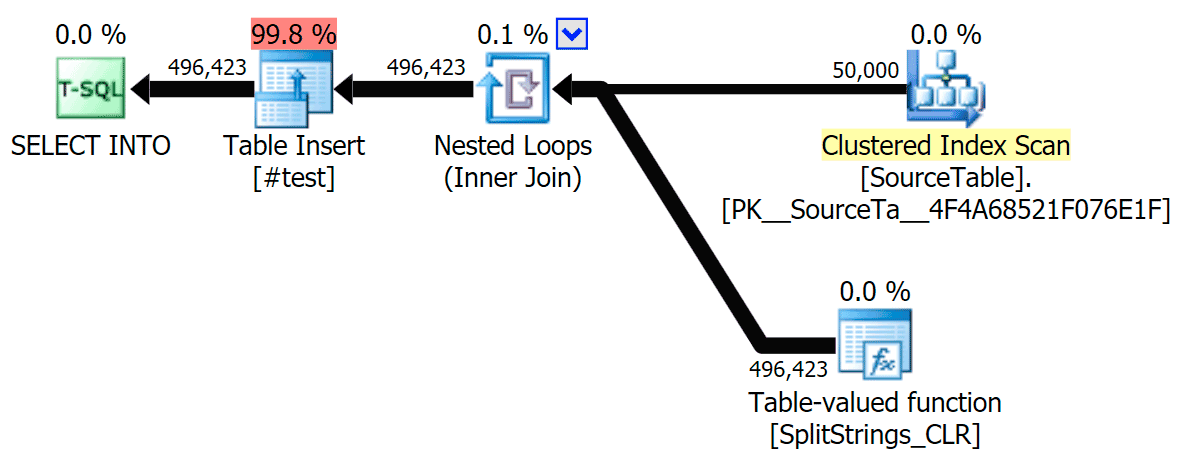
So, there might be a remaining issue in these new methods when parallelism is involved. It wasn't a thread distribution issue (I checked that), and CLR actually had worse estimates (100x actual vs. just 5x for STRING_SPLIT); just some underlying issue with coordinating latches amongst threads I suppose. For now, it might be worthwhile using MAXDOP 1 if you know you are writing the output onto new pages.

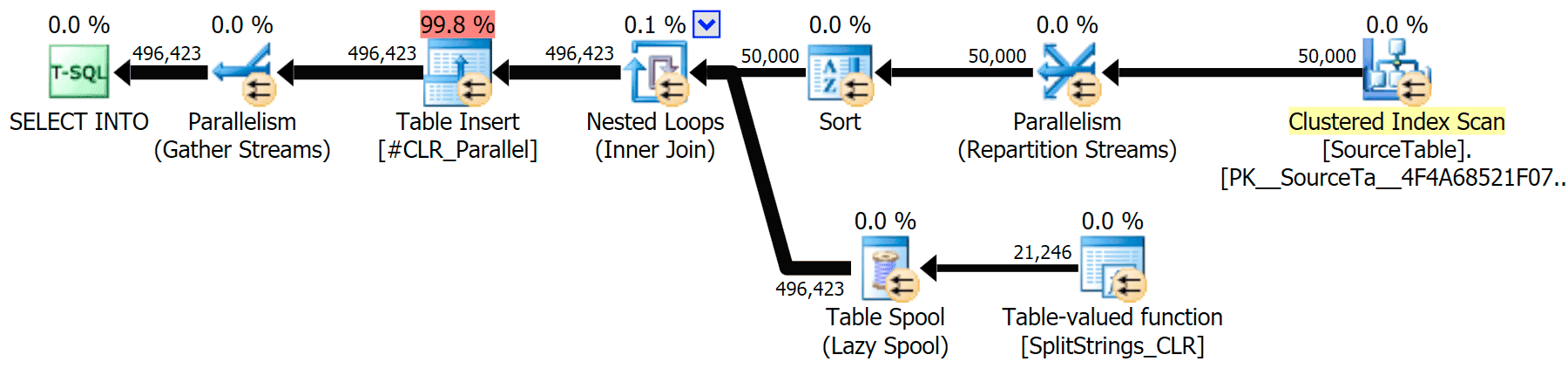
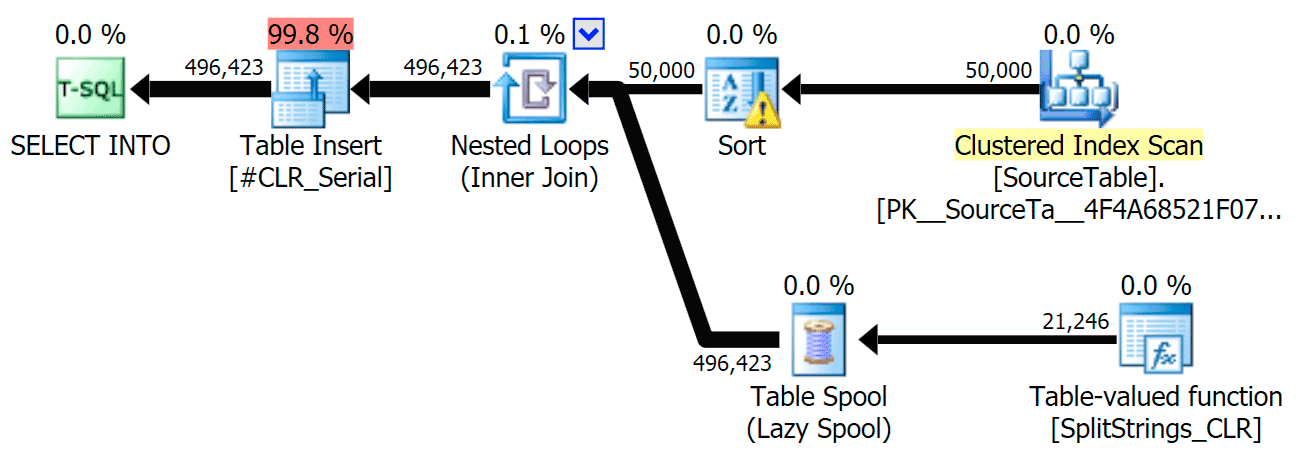
I've included the graphical plans comparing the CLR approach to the native one, for both parallel and serial execution (I've also uploaded a Query Analysis file that you can open up in SQL Sentry Plan Explorer to snoop around on your own):

STRING_SPLIT

STRING_SPLIT parallel

STRING_SPLIT serial

CLR

CLR parallel

CLR serial

The sort warning, FYI, was nothing too shocking, and obviously didn't have much tangible effect on the query duration:

Spill warning

Spools Out For Summer

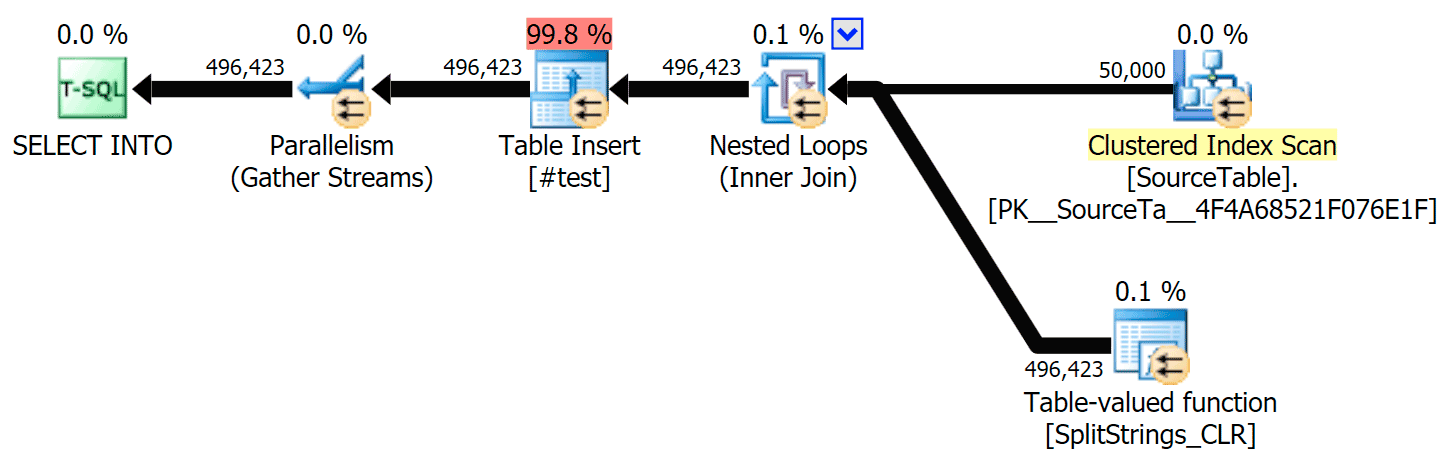
When I looked a little closer at those plans, I noticed that in the CLR plan, there is a lazy spool. This is introduced to make sure that duplicates are processed together (to save work by doing less actual splitting), but this spool is not always possible in all plan shapes, and it can give a bit of an advantage to those that can use it (e.g. the CLR plan), depending on estimates. To compare without spools, I enabled trace flag 8690, and ran the tests again. First, here is the parallel CLR plan without the spool:

Parallel plan for CLR function with TF 8690 enabled

And here were the new durations for all queries going parallel with TF 8690 enabled:

Timing results for parallel queries with TF 8690 enabled

Now, here is the serial CLR plan without the spool:

Serial plan for CLR function with TF 8690 enabled

And here were the timing results for queries using both TF 8690 and MAXDOP 1:

Timing results for serial queries with TF 8690 enabled

(Note that, other than the XML plan, most of the others didn't change at all, with or without the trace flag.)

Comparing estimated rowcounts

Dan Holmes asked the following question:

How does it estimate the data size when joined to another (or multiple) split function? The link below is a write up of a CLR Based split implementation. Does the 2016 do a 'better' job with data estimates? (unfortunately i don't have hte ability to install the RC yet).
 
http://sql.dnhlms.com/2016/02/sql-clr-based-string-splitting-and.html

So, I swiped the code from Dan's post, changed it to use my functions, and ran it through Plan Explorer:

DECLARE @s VARCHAR(MAX);
 
SELECT * FROM dbo.SplitStrings_CLR(@s, ',') s
CROSS APPLY   dbo.SplitStrings_CLR(s.value, ';') s1 
CROSS APPLY   dbo.SplitStrings_CLR(s1.value, '!') s2
CROSS APPLY   dbo.SplitStrings_CLR(s2.value, '#') s3;
 
SELECT * FROM dbo.SplitStrings_Numbers(@s, ',') s
CROSS APPLY   dbo.SplitStrings_Numbers(s.value, ';') s1 
CROSS APPLY   dbo.SplitStrings_Numbers(s1.value, '!') s2
CROSS APPLY   dbo.SplitStrings_Numbers(s2.value, '#') s3;
 
SELECT * FROM dbo.SplitStrings_Native(@s, ',') s
CROSS APPLY   dbo.SplitStrings_Native(s.value, ';') s1 
CROSS APPLY   dbo.SplitStrings_Native(s1.value, '!') s2
CROSS APPLY   dbo.SplitStrings_Native(s2.value, '#') s3;

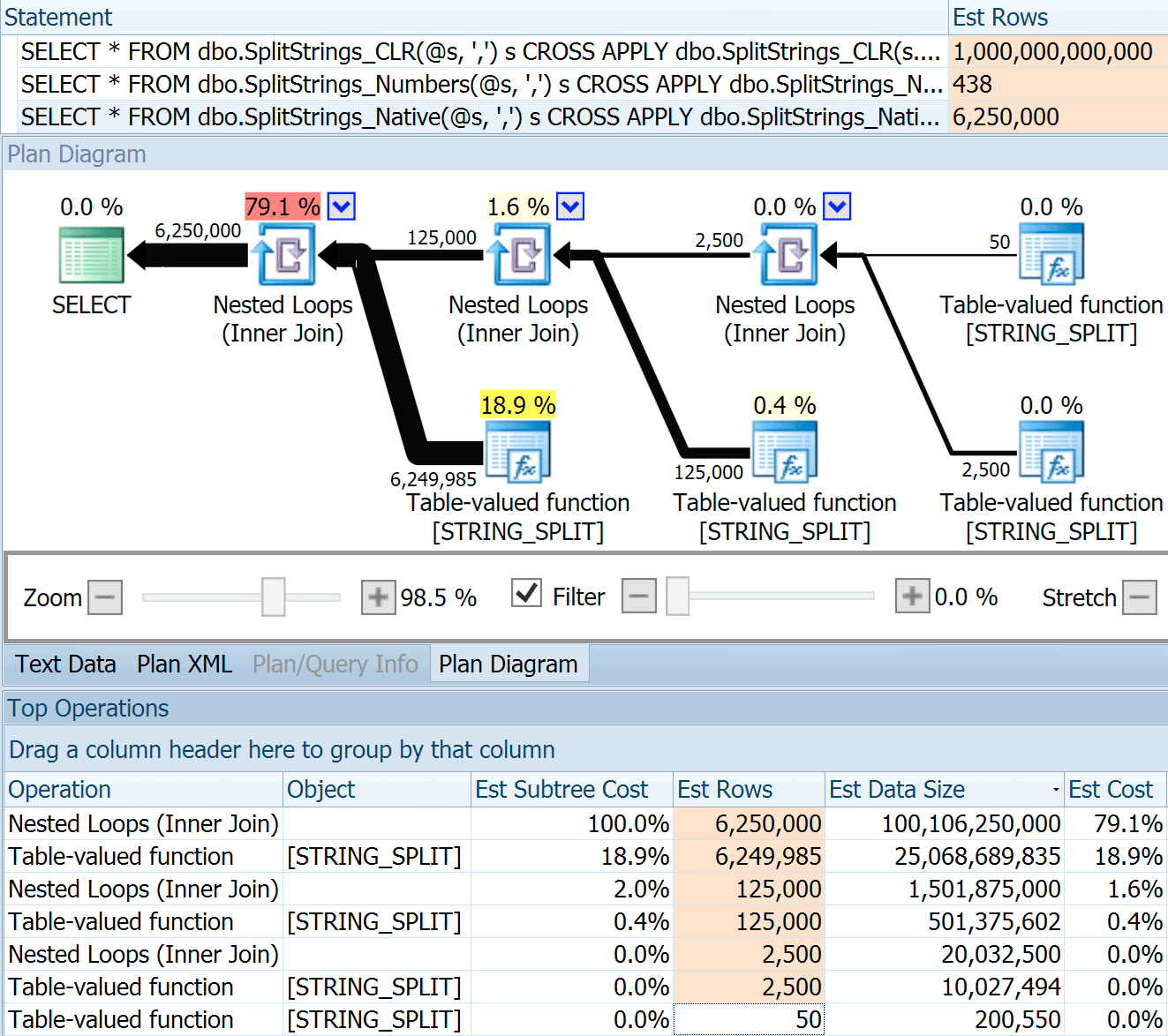
The SPLIT_STRING approach certainly comes up with *better* estimates than CLR, but still grossly over (in this case, when the string is empty; this might not always be the case). The function has a built-in default that estimates the incoming string will have 50 elements, so when you nest them you get 50 x 50 (2,500); if you nest them again, 50 x 2,500 (125,000); and then finally, 50 x 125,000 (6,250,000):

Estimated plan for nested STRING_SPLIT()

Note: OPENJSON() behaves the exact same way as STRING_SPLIT – it, too, assumes 50 rows will come out of any given split operation. I am thinking that it might be useful to have a way to hint cardinality for functions like this, in addition to trace flags like 4137 (pre-2014), 9471 & 9472 (2014+), and of course 9481…

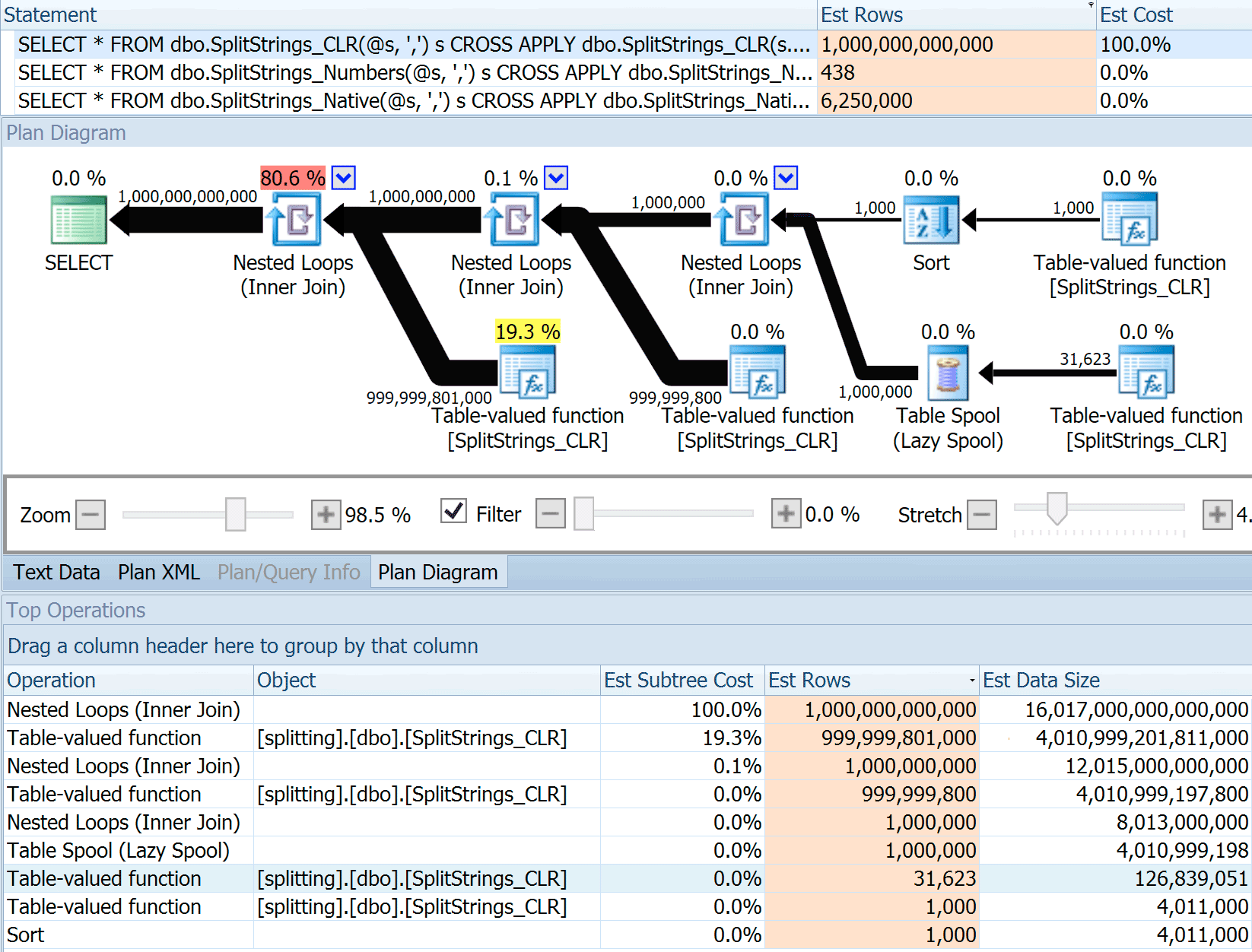
This 6.25 million row estimate is not great, but it is much better than the CLR approach that Dan was talking about, which estimates A TRILLION ROWS, and I lost count of the commas to determine data size – 16 petabytes? exabytes?

Estimated plan for nested CLR split

Some of the other approaches obviously fare better in terms of estimates. The Numbers table, for example, estimated a much more reasonable 438 rows (in SQL Server 2016 RC2). Where does this number come from? Well, there are 8,000 rows in the table, and if you remember, the function has both an equality and an inequality predicate:

     WHERE Number <= LEN(@List)
     AND SUBSTRING(@Delimiter + @List, [Number], 1) = @Delimiter

So, SQL Server multiplies the number of rows in the table by 10% (as a guess) for the equality filter, then the square root of 30% (again, a guess) for the inequality filter. The square root is due to exponential backoff, which Paul White explains here. This gives us:

8000 * 0.1 * SQRT(0.3) = 438.178

The XML variation estimated a little over a billion rows (due to a table spool estimated to be executed 5.8 million times), but its plan was far too complex to try to illustrate here. In any case, remember that estimates clearly don't tell the whole story – just because a query has more accurate estimates does not mean it will perform better.

There were a few other ways I could tweak the estimates a bit: namely, forcing the old cardinality estimation model (which affected both the XML and Numbers table variations), and using TFs 9471 and 9472 (which affected only the Numbers table variation, since they both control cardinality around multiple predicates). Here were the ways I could change the estimates just a little bit (or A LOT, in the case of reverting to the old CE model):

Playing with estimates using trace flags

The old CE model brought the XML estimates down by an order of magnitude, but for the Numbers table, completely blew it up. The predicate flags altered the estimates for the Numbers table, but those changes are much less interesting.

None of these trace flags had any effect on the estimates for the CLR, JSON, or STRING_SPLIT variations.

Conclusion

So what did I learn here? A whole bunch, actually:

  • Parallelism can help in some cases, but when it doesn't help, it really doesn't help. The JSON methods were ~5x faster without parallelism, and STRING_SPLIT was nearly 10x faster.
  • The spool actually helped the CLR approach perform better in this case, but TF 8690 might be useful to experiment with in other cases where you're seeing spools and are trying to improve performance. I am certain there are situations where eliminating the spool will end up being better overall.
  • Eliminating the spool really hurt the XML approach (but only drastically so when it was forced to be single-threaded).
  • Lots of funky things can happen with estimates depending on the approach, along with the usual statistics, distribution, and trace flags. Well, I suppose I already knew that, but there are definitely a couple of good, tangible examples here.

Thank you to the folks who asked questions or prodded me to include more information. And as you might have guessed from the title, I address yet another question in a second follow-up, this one about TVPs:

The post STRING_SPLIT() in SQL Server 2016 : Follow-Up #1 appeared first on SQLPerformance.com.

10 May 18:15

SQL 2016 features: Stretch Database

by Gail

Stretch database allows for a table to span an ‘earthed’ SQL Server instance and an Azure SQL Database. It allows for parts (or all) of a table, presumably older, less used parts, to be stored in Azure instead of on local servers. This could be very valuable for companies that are obliged to retain transactional data for long periods of time, but don’t want that data filling up the SAN/flash array.

After having played with it, as it is in RC2, I have some misgivings. It’s still a useful feature, but probably not as useful as I initially assumed when it was announced.

To start with, the price. Stretch is advertised as an alternative to expensive enterprise-grade storage. The storage part is cheap, it’s costed as ‘Read-Access Geographically Redundant Storage’ blob storage.

PriceStorage

Then there’s the compute costs

PriceCompute

The highest tier is 2000 DSU at $25/hour. To compare the costs to SQL Database, a P2 has the same compute costs as the lowest tier of Stretch, and that’s with a preview discount applied to Stretch. It’s going to be a hard sell to my clients at that price (though that may be partially because of the R15=$1 exchange rate).

The restrictions on what tables are eligible are limiting too. The documented forbidden data types aren’t too much of a problem. This feature’s intended for transactional tables, maybe audit tables and the disallowed data types are complex ones. HierarchyID, Geography, XML, SQL_Variant.

A bigger concern are the disallowed features. No computed columns, no defaults, no check constraints, can’t be referenced by a foreign key. I can’t think of too many transactional tables I’ve seen that don’t have one or more of those.

It’s looking more like an archive table, specifically designed to be stretchable will be needed, rather than stretching the transactional table itself. I haven’t tested whether it’s possible to stretch a partitioned table (or partition a stretched table) in order to partition switch into a stretched table. If it is, that may be the way to go.

I have another concern about stretch that’s related to debugging it. When I tested in RC2, my table was listed as valid by the stretch wizard, but when I tried, the ALTER TABLE succeeded but no data was moved. It turned out that the Numeric data type wasn’t allowed (A bug in RC2 I suspect, not an intentional limitation), but the problem wasn’t clear from the stretch-related DMVs. The problem is still present in RC3

StretchDMV

The actual error message was no where to be found. The new built-in extended event session specifically for stretch tables was of no additional help.

StretchXE

The error log contained a different message, but still not one that pinpointed the problem.

This blog post was based on RC2 and written before the release of RC3, however post RC3 testing has shown no change yet. I hope at least the DMVs are expanded before RTM to include actual error messages and more details. We don’t need new features that are hard to diagnose.

As for the other limitations, I’m hoping that Stretch will be like Hekaton, very limited in its first version and expanded out in the next major version. It’s an interesting feature with potential, I’d hate to see that potential go to waste.

10 May 18:15

Stopping your SQL Server Job

by Chris Shaw

Maintenance in General is a necessity for SQL Server.  No different than changing the oil in your car or going to the Doctor for the annual exam.  There is going to be times when you are going to need to run maintenance on your server.  The tricky part is trying to determine when you should start the maintenance so that it completes before the busy time.  The common approach to this problem is to simply determine how long a job executes (often determined by trial and error) and then adjust the start time to give the job enough time to execute.  There is another way…

SQL Server has a number of system stored procedures that you can use to perform tasks that you might be doing in the user interface, for example… If you want to stop a job you can open SQL Server Management Studio, navigate to the job, right click and stop the job.  Here is where the system supplied stored procedure comes into play.  What if your busy time of the day is at 6 AM, and you want to make sure that the indexing has finished by 5:00 AM so that the system is ready to take on the day.  Do you really want to wake up at 5:00 AM just to right click and stop job, in the chance that it is running?

Simply schedule a job that will execute at 5:00 AM (the time you want to make sure the maintenance job is done by), and create a step that will stop the job.

exec sp_stop_job @job_name=N’My Job Name’

Not to complex. But what if you want to add some logic to the job so that not only does it just try to stop the job it will check the job to determine if it is executing first?  And now that we are looking at some of the options there are, we should put a line of code in there that will email us whenever the maintenance job has run long and had to be stopped.

Select name

from msdb..sysjobs j

join msdb..sysjobactivity a on j.job_id = a.job_id and j.name = ‘My Job Name’

Where start_execution_date is not null and stop_execution_date is null

If @@rowcount > 0

Begin

EXEC msdb.dbo.sp_stop_job @job_name = ‘My Job Name’

EXEC msdb.dbo.sp_send_dbmail @profile_name = ‘MyMailProfile’, @recipients = ‘Me@xtivia.com’,

@body = ‘The Indexing Rebuild Job had to be stopped due to long run time.’, @subject = ‘Index Rebuild’ ;

End

Else Return

I hope this tip has helped you in one fashion or another.  If you would like my list of TOP 10 TIPS FOR SQL SERVER PERFORMANCE AND RESILIENCY can be found here with Tip # 1.


10 May 18:14

Sorting then formatting du output on Linux

by jamiet

This is my first blog post in eons and, don’t laugh, its about using Bash/Linux (nothing to do with the recent announcement of  Bash on Windows, I’ve been using Bash on and off for about a year now). As I’m now a hadoop monkey the linux command-line is where I spend a lot of my time and today I discovered awk for the first time and the cool stuff one can do with it.

My challenge was to get the size of a bunch of HDFS folders within a given folder, sort the results, then format the output to be human-readable (i.e. use K, M, G, T depending on whether the size should be measured in KB, MB etc…). Hadoop has a command to get the size of a bunch of folders and format the numbers to be human readable

hadoop fs –du –h /path/to/folder

but once the output is formatted it can’t be sorted so that was no good. That’s when I discovered what awk can do for you. Rather than try and explain it I’ll just put this here:

$ hdfs dfs -du -s /foo/bar/*tobedeleted | sort -r -k 1 -g | awk '{ suffix="KMGT"; for(i=0; $1>1024 && i < length(suffix); i++) $1/=1024; print int($1) substr(suffix, i, 1), $3; }'
28T /foo/bar/card_dim_h_tobedeleted
20T /foo/bar/transaction_item_fct_tobedeleted
2T /foo/bar/card_dim_h_new_tobedeleted
2T /foo/bar/hshd_loyalty_seg_tobedeleted
1T /foo/bar/prod_dim_h_tobedeleted
607G /foo/bar/promo_item_fct_tobedeleted
456G /foo/bar/card_dim_c_tobedeleted
340G /foo/bar/ch_contact_offer_alc_fct_tobedeleted
203G /foo/bar/prod_dim_h_new_tobedeleted
184G /foo/bar/card_dim_h_test_tobedeleted
166G /foo/bar/offer_dim_h_tobedeleted
115G /foo/bar/promo_dim_h_tobedeleted
87G /foo/bar/offer_tier_dtl_h_tobedeleted
84G /foo/bar/ch_contact_offer_dlv_fct_tobedeleted
50G /foo/bar/ch_contact_event_dlv_fct_tobedeleted

All sorted in descending order and nicely formatted to be human-readable. Cool stuff. I’m mainly putting this here so I can find it later when I need it but thought it might be interesting for others also.

@Jamiet

P.S. Yes, I deleted about 55TB of data today Smile

10 May 18:14

SQL Server 2016 cloud backup and restore enhancements

by SQL Server Team

This post was authored by Eli Fisher, Program Manager, SQL Server.

By backing up to the cloud, you can easily store a copy of your data offsite, allowing you to take advantage of cost-effective storage options. In SQL Server 2016, we have added significant enhancements to our backup technologies, making it easy to leverage the cloud for backups.

Backup to URL

With traditional on-premises backup strategies, storing backups can be difficult for reasons such as storage management, storage device failure and making backups geographically redundant. SQL Server Backup to URL allows you to easily backup directly to Microsoft Azure Blob Storage, removing the need to manage hardware for backups while also giving you the benefit of storing your backups in flexible, reliable and virtually bottomless storage.

In SQL Server 2016, we now support the use of block blobs to make this tool even more helpful.

  • Backup striping can be used to support backup sizes of up to 12 TB.
  • Faster backup and restore when using backup striping.
  • You can use shared access signatures to create SQL backup credentials that limit SQL Server’s access to a specific container, rather than the whole storage account.

Managed Backup

Currently, automating backups for multiple databases requires developing a backup strategy, writing custom code and scheduling backups. Using SQL Server Managed Backup to Azure, you can easily create a backup plan by specifying the retention period and the Microsoft Azure storage location. SQL Server Managed Backup to Windows Azure does the rest – scheduling, performing and maintaining the backups.

In SQL Server 2016 we have enhanced this feature to make it even easier to back-up your databases.

  • Full, bulk-logged and simple recovery models are all supported.
  • System databases can be configured for backups.
  • Backup striping can be used to support backup sizes of up to 12 TB.
  • Customer backup schedules can be specified to ensure your backups are created when it is best for your workload.
    Getting started with SQL Server 2016 Managed Backup is simple with our configuration guide.

You can also configure Managed Backup on a SQL Server Azure Virtual Machine with our Auto Backup feature. Simply follow the screenshot below when creating your virtual machine.

Creating a VM

File-Snapshot Backup

With traditional SQL Server backups, you need to stream entire copies of your databases and their logs into backup files. This can be both a time consuming and resource intensive process. When storing SQL Server Data Files directly in Azure Blob Storage, File-Snapshot Backup allows you to backup and restore data quickly, and with minimal impact on performance. As data in the blob changes over time, the snapshots continue to point to the data at the time when the snapshots were created.

Backup to Azure Blob Storage

Not only does this feature fully support point-in-time restore, but, unlike traditional point-in-time restore (where you need all the transaction log backups from the most recent full or differential backup before the point-in-time), File-Snapshot Backup only requires the backup before the point-in-time and the backup after the point-in-time. The image below compares using File-Snapshot Backup with what is required to restore to a place in the last log backup of a backup chain using traditional streaming backup. Note the difference in the number of backups required for File-Snapshot Backup.

Backup to Azure with File-Snapshot

To get started with File-Snapshot Backup, please follow our tutorial on Using Azure Blob Storage service with SQL Server 2016 databases and check out the File-Snapshot Backup Channel 9 video below.

Summary

With SQL Server 2016, we improved our hybrid backup feature set to help you be more productive and secure. With SQL Server Backup to URL we support much larger databases and provide you with more secure storage account backup configurations. With SQL Server Managed Backup we have made it easier to customize your backup configurations and backup your system databases. File-Snapshot Backup allows you to take nearly instantaneous backups and very fast restores of SQL Server Data Files directly in Azure Blob Storage.

Next steps

See the other posts in the SQL Server 2016 blogging series.

Try SQL Server 2016 RC

10 May 18:14

Aerospike Wants to Bring NoSQL to Finance in a Big Way

by A.R. Guess

by Angela Guess Renee Caruthers reports in FierceFinanceIT, “As financial companies increasingly leverage big data, they have explored and embraced non-relational databases for their most advanced analytics. But NoSQL database provider Aerospike envisions bigger use cases in finance. ‘There is a huge amount of investment in those technologies for analytics uses, and it’s easier to […]

The post Aerospike Wants to Bring NoSQL to Finance in a Big Way appeared first on DATAVERSITY.

10 May 18:14

7 Enemies of Big Data

by A.R. Guess

by Angela Guess Adrian Bridgwater recently wrote in Forbes, “The unfortunate truth is, big data has a lot of enemies… Enemy #1 – IT architecture. Sumit Nijhawan, CEO & President of Infogix argues that technology itself is the first major big data enemy. More specifically, Nijhawan is referring to the architectural challenge of integrating ‘elements’ […]

The post 7 Enemies of Big Data appeared first on DATAVERSITY.

10 May 18:13

Azure SQL Database pricing

by James Serra

Pricing Azure SQL database is difficult because various database service tier options such as database transaction units (DTU’s), max database size, disaster recovery options, and backup retention days are used to determine pricing instead of hardware (CPU/RAM/HD).  Generally I recommend starting out with a low service tier and scaling as your needs increase as it only takes a few minutes to scale with no downtime (see Change the service tier and performance level (pricing tier) of a SQL database).

DTU’s are explained at here.  To help, there is a Azure SQL Database DTU Calculator.  This calculator will help you determine the number of DTUs being used for your existing on-prem SQL Server database(s) as well as a recommendation of the minimum performance level and service tier that you need before you migrate to Azure SQL Database.  It does this by using performance monitor counters.

After you use a SQL Database for a while, you can use a pricing tier recommendation tool to determine the best service tier to switch to.  It does this by assessing historical resource usage for a SQL database.

Note this pricing is per database, so if you have many databases on each on-prem SQL server you will have to price each one.  But there are many “built-in” features of SQL database, such as high availability and disaster recovery, that you don’t have to build or manage in the cloud, thus saving you costs and administration time.

You pay for each database based on up-time.  You don’t pay for storage (but there is a database size limit for each tier).

Below is the pricing for all database service tiers, based in the East US region, for the single database model (pricing is different for elastic database pools which are an option to share resources).  The pricing comes from the Azure pricing calculator:

Basic, SQL Database, 5 DTU, 2GB DB, $5/month
Standard, S0, SQL Database, 10 DTU, 250GB database, $15/month
Standard, S1, SQL Database, 20 DTU, 250GB database, $30/month
Standard, S2, SQL Database, 50 DTU, 250GB database, $75/month
Standard, S3, SQL Database, 100 DTU, 250GB database, $150/month
Premium, P1, SQL Database, 125 DTU, 500GB database, $465/month
Premium, P2, SQL Database, 250 DTU, 500GB database, $930/month
Premium, P4, SQL Database, 500 DTU, 500GB database, $1,860/month
Premium, P6, SQL Database, 1000 DTU, 500GB database, $3,720/month
Premium, P11, SQL Database, 1750 DTU, 1TB database, $7,001/month
Premium, P15, SQL Database, 4000 DTU, 1TB database, $16,003/month

sql-database-service-tiers-table (1)

For more details on pricing, see SQL Database Pricing.  Data going into a SQL Database is free (“Inbound data transfers”).  Data going out of a SQL Database is free (“Outbound data transfers”) if within the same Azure data center (“region”), otherwise there is a small cost – see Data Transfers Pricing Details.

An option to get around the 1TB database size limit is to split the data into multiple databases and use elastic database queries.

More info:

Understanding Windows Azure Storage Billing – Bandwidth, Transactions, and Capacity

Understand your bill for Microsoft Azure

Azure SQL Database – How to choose the right service tier

10 May 18:13

STRING_SPLIT() in SQL Server 2016 : Follow-Up #2

by Aaron Bertrand

Earlier this week, I posted a follow-up to my my recent post about STRING_SPLIT() in SQL Server 2016, addressing several comments left on the post and/or sent to me directly:

After that post was mostly written, there was a late-breaking question from Doug Ellner:

How do these functions compare with table-valued parameters?

Now, testing TVPs was already on my list of future projects, after a recent twitter exchange with @Nick_Craver over at Stack Overflow. He said they were excited that STRING_SPLIT() performed well, because they were unhappy with the performance of sending ~7,000 values in through a table-valued parameter.

My Tests

For these tests, I used SQL Server 2016 RC3 (13.0.1400.361) on an 8-core Windows 10 VM, with PCIe storage and 32 GB of RAM.

I created a simple table that mimicked what they were doing (selecting about 10,000 values from a 3+ million row posts table), but for my tests, it has far fewer columns and fewer indexes:

CREATE TABLE dbo.Posts_Regular
(
  PostID   int PRIMARY KEY,
  HitCount int NOT NULL DEFAULT 0
);
 
INSERT dbo.Posts_Regular(PostID) 
  SELECT TOP (3000000) ROW_NUMBER() OVER (ORDER BY s1.[object_id])
  FROM sys.all_objects AS s1 
  CROSS JOIN sys.all_objects AS s2;

I also created an In-Memory version, because I was curious if any approach would work differently there:

CREATE TABLE dbo.Posts_InMemory
(
  PostID   int PRIMARY KEY NONCLUSTERED HASH WITH (BUCKET_COUNT = 4000000),
  HitCount int NOT NULL DEFAULT 0
) WITH (MEMORY_OPTIMIZED = ON);

Now, I wanted to create a C# app that would pass in 10,000 unique values, either as a comma-separated string (built using a StringBuilder) or as a TVP (passed from a DataTable). The point would be to retrieve or update a selection of rows based on a match, either to an element produced by splitting the list, or an explicit value in a TVP. So the code was written to append every 300th value to the string or DataTable (C# code is in an appendix below). I took the functions I created in the original post, altered them to handle varchar(max), and then added two functions that accepted a TVP – one of them memory-optimized. Here are the table types (the functions are in the appendix below):

CREATE TYPE dbo.PostIDs_Regular AS TABLE(PostID int PRIMARY KEY);
GO
 
CREATE TYPE dbo.PostIDs_InMemory AS TABLE
(
  PostID int NOT NULL PRIMARY KEY NONCLUSTERED HASH 
  WITH (BUCKET_COUNT = 1000000)
) 
WITH (MEMORY_OPTIMIZED = ON);
GO

I also had to make the Numbers table bigger in order to handle strings > 8K and with > 8K elements (I made it 1MM rows). Then I created seven stored procedures: five of them taking a varchar(max) and joining with the function output in order to update the base table, and then two to accept the TVP and join directly against that. The C# code calls each of these seven procedures, with the list of 10,000 posts to select or update, 1,000 times. These procedures are also in the appendix below. So just to summarize, the methods being tested are:

  • Native (STRING_SPLIT())
  • XML
  • CLR
  • Numbers table
  • JSON (with explicit int output)
  • Table-valued parameter
  • Memory-optimized table-valued parameter

We'll test retrieving the 10,000 values, 1,000 times, using a DataReader – but not iterating over the DataReader, since that would just make the test take longer, and would be the same amount of work for the C# application regardless of how the database produced the set. We'll also test updating the 10,000 rows, 1,000 times each, using ExecuteNonQuery(). And we'll test against both the regular and memory-optimized versions of the Posts table, which we can switch very easily without having to change any of the functions or procedures, using a synonym:

CREATE SYNONYM dbo.Posts FOR dbo.Posts_Regular;
 
-- to test memory-optimized version:
DROP SYNONYM dbo.Posts;
CREATE SYNONYM dbo.Posts FOR dbo.Posts_InMemory;
 
-- to test the disk-based version again:
DROP SYNONYM dbo.Posts;
CREATE SYNONYM dbo.Posts FOR dbo.Posts_Regular;

I kicked off the application, ran it several times for each combination to ensure compilation, caching, and other factors weren't being unfair to the batch executed first, and then analyzed the results from the logging table (I also spot-checked sys.dm_exec_procedure_stats to make sure none of the approaches had significant application-based overhead, and they did not).

Results – Disk-Based Tables

I struggle with data visualization sometimes – I really tried to come up with a way to represent these metrics on a single chart, but I think there were just far too many data points to make the salient ones stand out.

You can click to enlarge any of these in a new tab/window, but even if you have a small window I tried to make the winner clear through use of color (and the winner was the same in every case). And to be clear, by "Average Duration" I mean the average amount of time it took for the application to complete a loop of 1,000 operations.

Average Duration (milliseconds) for SELECTs against disk-based Posts table Average Duration (milliseconds) for SELECTs against disk-based Posts table

Average Duration (milliseconds) for UPDATEs against disk-based Posts table Average Duration (milliseconds) for UPDATEs against disk-based Posts table

The most interesting thing here, for me, is how poorly the memory-optimized TVP did when assisting with an UPDATE. It turns out that parallel scans are currently blocked too aggressively when DML is involved; Microsoft has recognized this as a feature gap, and they are hoping to address it soon. Note that parallel scan is currently possible with SELECT but it is blocked for DML right now. (It will not be resolved in SQL Server 2014, as these specific parallel scan operations are not available there for any operation.) When that is fixed, or when your TVPs are smaller and/or parallelism isn't beneficial anyway, you should see that memory-optimized TVPs will perform better (the pattern just doesn't work well for this particular use case of relatively large TVPs).

For this specific case, here are the plans for the SELECT (which I could coerce to go parallel) and the UPDATE (which I could not):

Parallelism in a SELECT plan joining a disk-based table to an in-memory TVPParallelism in a SELECT plan joining a disk-based table to an in-memory TVP

No parallelism in an UPDATE plan joining a disk-based table to an in-memory TVPNo parallelism in an UPDATE plan joining a disk-based table to an in-memory TVP

Results – Memory-Optimized Tables

A little more consistency here – the four methods on the right are relatively even, while the three on the left seem very undesirable by contrast. Also pay particular attention to absolute scale compared to the disk-based tables – for the most part, using the same methods, and even without parallelism, you end up with much quicker operations against memory-optimized tables, leading to lower overall CPU usage.

Average Duration (milliseconds) for SELECTs against memory-optimized Posts table Average Duration (milliseconds) for SELECTs against memory-optimized Posts table

Average Duration (milliseconds) for UPDATEs against memory-optimized Posts table Average Duration (milliseconds) for UPDATEs against memory-optimized Posts table


Conclusion

For this specific test, with a specific data size, distribution, and number of parameters, and on my particular hardware, JSON was a consistent winner (though marginally so). For some of the other tests in previous posts, though, other approaches fared better. Just an example of how what you're doing and where you're doing it can have a dramatic impact on the relative efficiency of various techniques, here are the things I've tested in this brief series, with my summary of which technique to use in that case, and which to use as a 2nd or 3rd choice (for example, if you can't implement CLR due to corporate policy or because you're using Azure SQL Database, or you can't use JSON or STRING_SPLIT() because you aren't on SQL Server 2016 yet). Note that I didn't go back and re-test the variable assignment and SELECT INTO scripts using TVPs – these tests were set up assuming you already had existing data in CSV format that would have to be broken up first anyway. Generally, if you can avoid it, don't smoosh your sets into comma-separated strings in the first place, IMHO.

Goal 1st choice 2nd choice (and 3rd, where appropriate)
Simple variable assignment STRING_SPLIT() CLR if XML if no CLR and
SELECT INTO CLR XML if no CLR
SELECT INTO (no spool) CLR Numbers table if no CLR
SELECT INTO (no spool + MAXDOP 1) STRING_SPLIT() CLR if Numbers table if no CLR and
SELECT joining large list (disk-based) JSON (int) TVP if
SELECT joining large list (memory-optimized) JSON (int) TVP if
UPDATE joining large list (disk-based) JSON (int) TVP if
UPDATE joining large list (memory-optimized) JSON (int) TVP if


For Doug's specific question: JSON, STRING_SPLIT(), and TVPs performed rather similarly across these tests on average – close enough that TVPs are the obvious choice if you're not on SQL Server 2016. If you have different use cases, these results may differ. Greatly.

Which brings us to the moral of this story: I and others may perform very specific performance tests, revolving around any feature or approach, and come to some conclusion about which approach is fastest. But there are so many variables, I will never have the confidence to say "this approach is always the fastest." In this scenario, I tried very hard to control most of the contributing factors, and while JSON won in all four cases, you can see how those different factors affected execution times (and drastically so for some approaches). So it is always worth it to construct your own tests, and I hope I have helped illustrate how I go about that sort of thing.


Appendix A : Console Application Code

Please, no nit-picking about this code; it was literally thrown together as a very simple way to run these stored procedures 1,000 times with true lists and DataTables assembled in C#, and to log the time each loop took to a table (to be sure to include any application-related overhead with handling either a large string or a collection). I could add error handling, loop differently (e.g. construct the lists inside the loop instead of reuse a single unit of work), and so on.

using System;
using System.Text;
using System.Configuration;
using System.Data;
using System.Data.SqlClient;
 
namespace SplitTesting
{
  class Program
  {
    static void Main(string[] args)
    {
      string operation = "Update";
      if (args[0].ToString() == "-Select") { operation = "Select"; }
      var csv = new StringBuilder();
      DataTable elements = new DataTable();
      elements.Columns.Add("value", typeof(int));
      for (int i = 1; i <= 10000; i++)
      {
        csv.Append((i*300).ToString());
        if (i < 10000) { csv.Append(","); }
        elements.Rows.Add(i*300);
      }
      string[] methods = { "Native", "CLR", "XML", "Numbers", "JSON", "TVP", "TVP_InMemory" };
 
      using (SqlConnection con = new SqlConnection())
      {
        con.ConnectionString = ConfigurationManager.ConnectionStrings["primary"].ToString();
        con.Open();
        SqlParameter p;
 
        foreach (string method in methods)
        {
          SqlCommand cmd = new SqlCommand("dbo." + operation + "Posts_" + method, con);
          cmd.CommandType = CommandType.StoredProcedure;
          if (method == "TVP" || method == "TVP_InMemory")
          {
            cmd.Parameters.Add("@PostList", SqlDbType.Structured).Value = elements;
          }
          else
          {
            cmd.Parameters.Add("@PostList", SqlDbType.VarChar, -1).Value = csv.ToString();
          }
 
          var timer = System.Diagnostics.Stopwatch.StartNew();
          for (int x = 1; x <= 1000; x++)
          {
            if (operation == "Update") { cmd.ExecuteNonQuery(); }
            else { SqlDataReader rdr = cmd.ExecuteReader(); rdr.Close(); }
          }
          timer.Stop();
          long this_time = timer.ElapsedMilliseconds;
 
          // log time - the logging procedure adds clock time and 
          // records memory/disk-based (determined via synonym)
 
          SqlCommand log = new SqlCommand("dbo.LogBatchTime", con);
          log.CommandType = CommandType.StoredProcedure;
          log.Parameters.Add("@Operation", SqlDbType.VarChar, 32).Value = operation;
          log.Parameters.Add("@Method", SqlDbType.VarChar, 32).Value = method;
          log.Parameters.Add("@Timing", SqlDbType.Int).Value = this_time;
          log.ExecuteNonQuery();
 
          Console.WriteLine(method + " : " + this_time.ToString());
        }
      }
    }
  }
}

Sample usage:

SplitTesting.exe -Select
SplitTesting.exe -Update


Appendix B : Functions, Procedures, and Logging Table

Here were the functions edited to support varchar(max) (the CLR function already accepted nvarchar(max) and I was still reluctant to try to change it):

CREATE FUNCTION dbo.SplitStrings_Native( @List varchar(max), @Delimiter char(1))
RETURNS TABLE WITH SCHEMABINDING
AS
    RETURN (SELECT [value] FROM STRING_SPLIT(@List, @Delimiter));
GO
 
CREATE FUNCTION dbo.SplitStrings_XML( @List varchar(max), @Delimiter char(1))
RETURNS TABLE WITH SCHEMABINDING
AS
   RETURN (SELECT [value] = y.i.value('(./text())[1]', 'varchar(max)')
      FROM (SELECT x = CONVERT(XML, '<i>' + REPLACE(@List, @Delimiter, '</i><i>') 
        + '</i>').query('.')) AS a CROSS APPLY x.nodes('i') AS y(i));
GO
 
CREATE FUNCTION dbo.SplitStrings_Numbers( @List varchar(max), @Delimiter char(1))
RETURNS TABLE WITH SCHEMABINDING
AS
  RETURN (SELECT [value] = SUBSTRING(@List, Number, 
       CHARINDEX(@Delimiter, @List + @Delimiter, Number) - Number)
     FROM dbo.Numbers WHERE Number <= CONVERT(INT, LEN(@List))
     AND SUBSTRING(@Delimiter + @List, Number, LEN(@Delimiter)) = @Delimiter
  );
GO
 
CREATE FUNCTION dbo.SplitStrings_JSON( @List varchar(max), @Delimiter char(1))
RETURNS TABLE WITH SCHEMABINDING
AS
    RETURN (SELECT [value] FROM OPENJSON(CHAR(91) + @List + CHAR(93)) WITH (value int '$'));
GO

And the stored procedures looked like this:

CREATE PROCEDURE dbo.UpdatePosts_Native
  @PostList varchar(max)
AS
BEGIN
  UPDATE p SET HitCount += 1
  FROM dbo.Posts AS p
  INNER JOIN dbo.SplitStrings_Native(@PostList, ',') AS s
  ON p.PostID = s.[value];
END
GO
CREATE PROCEDURE dbo.SelectPosts_Native
  @PostList varchar(max)
AS
BEGIN
  SELECT p.PostID, p.HitCount
  FROM dbo.Posts AS p
  INNER JOIN dbo.SplitStrings_Native(@PostList, ',') AS s
  ON p.PostID = s.[value];
END
GO
-- repeat for the 4 other varchar(max)-based methods
 
CREATE PROCEDURE dbo.UpdatePosts_TVP
  @PostList dbo.PostIDs_Regular READONLY
AS
BEGIN
  SET NOCOUNT ON;
 
  UPDATE p SET HitCount += 1
  FROM dbo.Posts AS p
  INNER JOIN @PostList AS s
  ON p.PostID = s.PostID;
END
GO
CREATE PROCEDURE dbo.SelectPosts_TVP
  @PostList dbo.PostIDs READONLY
AS
BEGIN
  SET NOCOUNT ON;
 
  SELECT p.PostID, p.HitCount
  FROM dbo.Posts AS p
  INNER JOIN @PostList AS s
  ON p.PostID = s.PostID;
END
GO
-- repeat for in-memory

And finally, the logging table and procedure:

CREATE TABLE dbo.SplitLog
(
  LogID           int IDENTITY(1,1) PRIMARY KEY,
  ClockTime       datetime          NOT NULL DEFAULT GETDATE(),
  OperatingTable  nvarchar(513)     NOT NULL, -- Posts_InMemory or Posts_Regular
  Operation       varchar(32)       NOT NULL DEFAULT 'Update', -- or select
  Method          varchar(32)       NOT NULL DEFAULT 'Native', -- or TVP, JSON, etc.
  Timing          int NOT NULL DEFAULT 0
);
GO
 
CREATE PROCEDURE dbo.LogBatchTime
  @Operation  varchar(32),
  @Method     varchar(32),
  @Timing     int
AS
BEGIN
  SET NOCOUNT ON;
 
  INSERT dbo.SplitLog(OperatingTable, Operation, Method, Timing) 
    SELECT base_object_name, @Operation, @Method, @Timing
    FROM sys.synonyms WHERE name = N'Posts';
END
GO
 
-- and the query to generate the graphs:
 
;WITH x AS
(
  SELECT OperatingTable,Operation,Method,Timing,
    Recency = ROW_NUMBER() OVER 
      (PARTITION BY OperatingTable,Operation,Method 
       ORDER BY ClockTime DESC)
  FROM dbo.SplitLog
)
SELECT OperatingTable,Operation,Method,AverageDuration = AVG(1.0*Timing)
FROM x WHERE Recency <= 3
GROUP BY OperatingTable,Operation,Method;

The post STRING_SPLIT() in SQL Server 2016 : Follow-Up #2 appeared first on SQLPerformance.com.

10 May 18:13

Database Hardware and Infrastructure Trends

by Aaron Bertrand

As I have been watching what has been going on recently in the Windows and SQL Server world, I have come to the conclusion that it is a particularly exciting time to be a database professional working with SQL Server, largely because of all of the recent and upcoming advances in technology. There are a number of useful and valuable new developments in hardware, storage, and the Microsoft Windows and SQL Server ecosystem.

Server Processors

Right now, you can purchase extremely capable, high performance server processors with physical core counts between four and twenty-two cores per processor. I am referring to the current 14nm Intel Xeon E5-2600 v4 (Broadwell-EP) and the 22nm Intel Xeon E7-8800 v3 (Haswell-EX) families that both use high bandwidth DDR4 memory.

On March 31, 2016, Intel released the 14nm Xeon E5-2600 v4 family (Broadwell-EP) for two-socket servers. This is a Tick release, building on the current Haswell microarchitecture that has up to 22 physical cores and DDR4 2400 support. This processor will work in existing model servers such as the Dell PowerEdge R730 with a BIOS update, which means that there will be less delay before they are actually available for sale.

You still have the flexibility to choose a particular processor based on its physical core count and clock speeds to balance your SQL Server core license costs with your performance and scalability needs. Tables 1, 2, and 3 show the best processor choices for a given core count for these two families.

Model Cores/L3 Cache Base Speed Turbo Speed Price (USD)
E5-2699 v4 22/55 MB 2.2 GHz 3.6 GHz $4,115
E5-2698 v4 20/50 MB 2.2 GHz 3.6 GHz $3,226
E5-2697 v4 18/45 MB 2.3 GHz 3.6 GHz $2,702
E5-2697A v4 16/40 MB 2.6 GHz 3.6 GHz $2,891
E5-2690 v4 14/35 MB 2.6 GHz 3.6 GHz $2,090

Table 1 : Preferred High Core Count Broadwell-EP Processors for SQL Server Usage

Model Cores/L3 Cache Base Speed Turbo Speed Price (USD)
E5-2687W v4 12/30 MB 3.0 GHz 3.5 GHz $2,141
E5-2640 v4 10/25 MB 2.4 GHz 3.4 GHz $939
E5-2667 v4 8/25 MB 3.2 GHz 3.6 GHz $2,057
E5-2643 v4 6/20 MB 3.4 GHz 3.7 GHz $1,552
E5-2637 v4 4/15 MB 3.5 GHz 3.7 GHz $996

Table 2 : Preferred Low Core Count Broadwell-EP Processors for SQL Server Usage

Model Cores/L3 Cache Base Speed Turbo Speed Price (USD)
E7-8890 v3 18/45 MB 2.5 GHz 3.3 GHz $7,175
E7-8867 v3 16/45 MB 2.5 GHz 3.3 GHz $4,672
E7-4850 v3 14/35 MB 2.2 GHz 2.8 GHz $3,003
E7-4830 v3 12/30 MB 2.1 GHz 2.7 GHz $2,170
E7-8891 v3 10/45 MB 2.8 GHz 3.5 GHz $6,841
E7-8893 v3 4/45 MB 3.2 GHz 3.5 GHz $6,841

Table 3 : Preferred Haswell-EX Processors for SQL Server Usage

Later in 2016, we should see the 14nm Xeon E7-4800/8800 v4 family (Broadwell-EX) for four and eight-socket servers that will have up to 24 physical cores.

Finally, sometime in 2017, we should see a new 14nm Skylake server CPU that may merge the Intel Xeon E5 and E7 lines into a single family, with up to 28 physical cores, that will be part of the Purley platform – detailed here and in Figure 1:

Intel Server Purley Platform RoadmapFigure 1 : Intel Server Purley Platform Roadmap

As these new processor families show up, with ever higher physical core counts, hopefully Intel will continue to offer lower core count, “frequency-optimized” SKUs, which offer higher clock speeds and much lower SQL Server license costs than their highest core count models.

With 64GB DDR4 DIMMs, you can have 6TB of RAM in a commodity, four-socket server, which is actually more memory than is supported by Windows Server 2012 R2. Luckily, Windows Server 2016 raises the memory limit to 12TB. With increasing memory density and better memory controllers in the latest processors, it is increasingly feasible to have enough RAM in your database server to have your entire workload in the SQL Server Buffer Pool.

Storage

We also have much less expensive, high performance enterprise flash storage from vendors such as SanDisk and Intel. For example you have the latest SanDisk Fusion ioMemory SX350 PCIe Application Accelerator product line, with capacities from 1.25TB to 6.4TB. Intel has a number of PCIe NVMe enterprise flash storage products with capacities from 400GB to 4TB.

Intel has recently announced a new enterprise product line that uses 3D NAND, for even lower costs, which will be competitive with SATA SSDs. The DC P3320 series has capacities of up to 2TB with better performance than SATA SSDs.

Enterprise flash storage is much more affordable than it was even a year ago, so it is worthwhile to reconsider using it if it seemed unaffordable in the past. The next 6-12 months should really see much more widespread adoption of PCIe NVMe flash storage devices from multiple storage vendors.

Microsoft

Microsoft is on a rapid and aggressive release cadence for the Release Candidate builds of SQL Server 2016, with RC3 being released on April 15th, 2016. Microsoft has also separated SQL Server Management Studio (SSMS) into a separate product than can be updated independently from the rest of the product, and can also automatically check for product updates.

SQL Server 2016 has a number of interesting improvements over SQL Server 2014. One of the most exciting is a feature called Query Store, which gives you a much deeper level of visibility and insight about query plan choice and performance for any database where you have enabled Query Store with an ALTER DATABASE command.

It automatically captures a history of queries, plans, and runtime statistics, and retains these for your review. Unlike DMV/DMOs, Query Store information survives restarts of the SQL Server service. Perhaps the most useful feature in Query Store is the ability to “force” a particular query plan with a simple system stored procedure, which should work much better than the old plan guide functionality.

One new development with SQL Server 2016 that may surprise some people is that it requires Windows Server 2012 (or Windows 8) or newer to run the server components. The new separate version of SQL Server SQL Server Management Studio (SSMS) will run on Windows 7 Service Pack 1, which will make it much easier to deploy in some organizations.

Windows Server 2016 is likely to be released in mid-2016, and it will have a number of important improvements compared to previous versions of Windows Server, such as a higher 12TB memory limit, better clustering and virtualization support, and a new version of Server Message Block (SMB 3.1.1) with better support for scale-out file servers and a new feature called Storage Spaces Direct (S2D).

Future developments

Intel and Micron jointly unveiled a new kind of non-volatile data storage device called 3D XPoint (pronounced cross-point) during a press conference on July 28, 2015. According to Intel and Micron, it is 1,000 times faster and has 1,000 times more endurance than current conventional NAND flash and is ten times denser than DRAM. It's also non-volatile, which means there's no need to power it at all times. 3D XPoint has already entered production at their joint factory in Utah, and they claim that it will be in volume production later in 2016.

Initially, we'll probably see some sort of hybrid memory devices, such as sticks of memory that have both DRAM and 3D XPoint soldered on, or hybrid drives with NAND flash for mass storage and 3D XPoint providing a faster cache for the NAND. All of this will require hardware support from the server vendors and operating system support from Microsoft before we see the full benefits of the technology, but it is exciting nonetheless.

Conclusion

As a database professional, I think it makes a lot of sense to pay attention to relevant industry trends and product release cycles so you can do a better job planning for future upgrades. For example, if you are aware that a new version of SQL Server, a new version of Windows Server, a new family of Intel server processors, and a new generation of Intel PCIe NVMe storage devices are due to be released by mid-2016 – that might have a significant impact on your infrastructure budget and planning process.

Staying current with technology is also good for your career, both from a personal and professional perspective. Personally, I find that your job is much more enjoyable if you are actually passionate about it. Getting excited about new technology is a good thing if you are going to be working with technology! Professionally, staying up to date with new technology helps you do your job better and it also makes you a more valuable employee.

The post Database Hardware and Infrastructure Trends appeared first on SQLPerformance.com.

10 May 18:13

Timing your SQL Server Maintenance Jobs

by Chris Shaw

Maintenance in General is a necessity for SQL Server.  No different than changing the oil in your car or going to the Doctor for the annual exam.  There is going to be times when you are going to need to run maintenance on your server.  The tricky part is trying to determine when you should start the maintenance jobs before the busy time. For example, what if you need to backup your database, then re-index your database and follow it up with a consistency check.

The common approach to this problem is to simply determine how long a job executes (often determined by trial and error) and then adjust the start time of each job to give the job enough time to execute, before starting the next job.  The problem with this method is you are hoping the first job in the chain completes on time before you start the second job.  The common way to avoid this is leaving gaps so one long running job does not step on the next job.  However, there are options…

Option 1

If you are using a maintenance plan you can keep all the tasks that are schedule to run at the same time in the same sub-plan.  Sometimes this does not provide the flexibility that individuals want, but it is an effective method.

Option 2

You can create multiple steps to a single job.  If we use the example above where you want to run a backups, than re-index and then DBCC, you can create 3 different steps, this way as soon as one step completes the next step is executed. This method removes the need for guessing when one job would finish and the next job start.

Option 3

Each task could have its own job, then the last step of each job would start the next job.  This will add a lot of flexibility to your maintenance.  I like to use this in a couple different kinds of situations.

  1. If your maintenance is done by using multiple tools, for example… a Red Gate Backup, a custom re-indexing plan and a simple t-sql script to run a consistency check.
  2. If your maintenance is done across multiple servers… If you have 3 servers that all backup to the same network share, you could have one server execute at a time to not clog up the network and the storage.

Adding a step to execute the next job is pretty simple.

exec sp_start_job @job_name=N’My Job Name’


If you need to schedule this to occur across server, you can simply make the call to the other server using a linked server.

I hope this tip has helped you in one fashion or another.


10 May 18:12

Will Data Scientists Soon Be Obsolete?

by A.R. Guess

by Angela Guess Bernard Marr recently opined in Forbes, “The job of data scientist — the quintessential big data job, and the job that was just voted the best job in America for 2016 — is at risk. Data scientists have been called ‘unicorns’ because finding the right person with the right set of skills […]

The post Will Data Scientists Soon Be Obsolete? appeared first on DATAVERSITY.

10 May 18:12

Arcane Training and Consulting, LLC

by arcanecode

Well this has been an exciting last few months. I’m finally able to share what’s been happening with me.

As some of you know, I’ve left Pragmatic Works. They went through a reorganization of sorts, and several of us either had our positions eliminated, or as people departed were not replaced. Let me be clear, I have no ill will toward them. This was purely a business decision.

I have to be grateful to them, as through them I gained many new opportunities for speaking, authoring, and the like. In addition I worked with many top level people, who constantly challenged me. I wish them the best of luck in their new business model.

As my good friend Alan Stevens likes to say, “…sometimes getting fired is the best thing that can happen to you”. In my case, it has finally given me the impetus to start my own company, a dream I’ve had for a while.

As Arcane Training and Consulting, LLC, I plan a twofold approach. First, I will continue my passion for training primarily through continuing my videos on Pluralsight. Here I have a suite of ten videos already, with another shortly to follow. If you don’t have a Pluralsight subscription, email me free@arcanetc.com and I will be happy to set you up with a 30 day trial through which you can watch my videos, or those of any of the other awesome authors at Pluralsight.

In addition I will also be setting up a YouTube channel, I’ll post more on that as it comes about. Finally I will be available to do live training, both customized as well as public courses. I’m already scheduled to do a one day precon for an event here in Birmingham Alabama to be held in August, and hope to do more for SQL Saturdays, code camps, and other such events.

On the consulting side, I’m very excited to announce I’ve now become a team member at Linchpin People! I have long admired the company, especially the outstanding quality of the people who work with them. I can’t tell you how thrilled I am to be part of their team now.

If you aren’t familiar with their model, they are basically a confederation of independent consultants with a top notch sales team. This gives them a pool of outstanding talent to draw from. In addition it gives me, as a consultant, a great team to back me up, people to draw on when I need additional resources for a project. Likewise when they have projects they can pull me in very easily. I see this as a great partnership between Arcane Training and Consulting and Linchpin People.

Finally, I am in the process of wrapping up a new book deal. I can’t say much about it right now, but look for a new tome from the old Arcane Coder to come out sometime around the end of 2016 or early 2017.

If you have any inquires about my training or consulting services, please email me at info@arcanetc.com. With the rush of getting things setup I still haven’t had time to establish a real website, but for now I’ve just updated my company domain of http://arcanetc.com points to my company Facebook page http://www.facebook.com/arcanetc . I’ll revise it once I get a website created.

I’ve also setup a company twitter account of @ArcaneTC. I’ll use this for company announcements like upcoming training, releases of new Pluralisght courses, and the like. Of course you can still follow me at @ArcaneCode.

Thanks for following along, and hope to do business with you in the future!


10 May 18:12

SQL Down Under Podcast 68–Guest Joe Yong–SQL Server 2016 StretchDB

by Greg Low

Hi Folks,

One of the intriguing options that’s coming as part of SQL Server 2016 is StretchDB. I’ve been spending some time working with it and learning about it, and I’ve ended up with lots of questions.

It was great to get an opportunity to speak to Joe Yong to get all my questions sorted.

Hope you’ll enjoy it too. You’ll find it here: http://sqldownunder.azurewebsites.net/Podcasts

10 May 18:11

Code to analyze the transaction hierarchy in the log

by Paul Randal

Over the weekend there was a discussion on the MVP distribution list about the sys.dm_tran_database_transactions DMV and how one cannot use it to accurately determine how much log an operation has generated because it doesn’t provide a roll-up of the sub-transaction metrics to the outer transaction. This makes the output somewhat non-intuitive.

The discussion prompted me to write some code I’ve been meaning to do since 2012, when SQL Server 2012 introduced a field in LOP_BEGIN_XACT log records that tracks the transaction ID of the parent transaction, allowing the hierarchy of transactions to be investigated.

The actual code is at the bottom of the article, and is available in a zip file here.

It provides two stored procs, sp_SQLskillsAnalyzeLog and sp_SQLskillsAnalyzeLogInner, with the former making use of the latter, and the latter calling itself recursively.

The sp_SQLskillsAnalyzeLog proc will dump the hierarchy of transactions in the transaction log. By default it will only show the top-level transactions (with no parent transaction), and it has the following parameters:

  • @DBName (with a default of master)
  • @Detailed (default 0, when 1 it will shows the transaction begin time and Windows login, for top-level transactions only)
  • @Deep (default 0, when 1 it will show the sub-transaction hiearchy)
  • @PrintOption (default 0 for a resultset, 1 for textual output)

I’ve set the procs to be in master and system objects using sp_MS_marksystemobject. You can change them to be stored wherever you want.

The pseudo-code is as follows:

  • Get the info from the log into temp table 1
  • Create temp table 2 with a clustered index on an identity column
  • For each top-level transaction
    • If @Detailed, add the user name and start time
    • Get the last transaction added to temp table 2
    • If it’s the same as the one we’re about to add, increment the counter for the last one added, else add the new one
    • if @Deep, then, with recursion depth = 1,
      • **RP** for each sub-transaction of current next-level up transaction
        • Prefix ‘…’ x the recursion depth to the transaction name
        • Get the last transaction added to temp table 2
        • If it’s the same as the one we’re about to add, increment the counter for the last one added, else add the new one
        • Recurse to **RP**, increasing recursion depth
    • (doing it this way vastly reduces the amount of data to be stored in temp table 2)
  • select the result set or print it, depending on @PrintOption

Let’s look at an example, using the SalesDB database that you can restore from a zip file on our resources page:

-- Restore the database
USE [master];
GO
ALTER DATABASE [SalesDB] SET SINGLE_USER WITH ROLLBACK IMMEDIATE;
GO
RESTORE DATABASE [SalesDB]
	FROM DISK = N'D:\SQLskills\DemoBackups\SalesDB2014.bak'
WITH STATS = 10, REPLACE;
GO

ALTER DATABASE [SalesDB] SET RECOVERY SIMPLE;
GO

-- Create a smaller copy of the Sales table
USE [SalesDB];
GO

SELECT *
INTO [SalesCopy]
FROM [Sales]
WHERE [SalesID] < 100000;
GO

CREATE CLUSTERED INDEX [SalesCopy_CL] ON [SalesCopy] ([SalesID]);
GO

-- Empty the log
CHECKPOINT;
GO

-- Online rebuild the clustered index
ALTER INDEX [SalesCopy_CL] ON [SalesCopy] REBUILD WITH (ONLINE = ON);
GO

-- Analyze the log
EXEC sp_SQLskillsAnalyzeLog salesdb, @Detailed = 1, @Deep = 1, @PrintOption = 1;
GO
ALTER INDEX by APPLECROSS\Paul @ 2016/05/01 11:26:48:113
...ONLINE_INDEX_DDL 2 times
OnlineIndexInsertTxn by APPLECROSS\Paul @ 2016/05/01 11:26:48:113
...BTree Split/Shrink
...BulkExtentAlloc
...SplitPage
...BulkExtentAlloc
...SplitPage
...BTree Split/Shrink
...BulkExtentAlloc
...SplitPage
...BulkExtentAlloc
...SplitPage 85 times
Allocate Root by APPLECROSS\Paul @ 2016/05/01 11:26:48:113
...AllocFirstPage
Allocate Root by APPLECROSS\Paul @ 2016/05/01 11:26:48:113
...AllocFirstPage
OnlineIndexInsertTxn by APPLECROSS\Paul @ 2016/05/01 11:26:48:150
...SplitPage
...BulkExtentAlloc
...SplitPage
...BulkExtentAlloc
...SplitPage 86 times
...BulkExtentAlloc
...SplitPage 89 times
...BulkExtentAlloc
...SplitPage 57 times
...BulkExtentAlloc
...SplitPage 31 times
...BulkExtentAlloc
...SplitPage 88 times
...BulkExtentAlloc
...SplitPage 52 times
SetFileSize @ 2016/05/01 11:26:48:303

Pretty cool, eh? You can see that the online rebuild uses a bunch of top-level transactions, which makes it difficult to determine exactly how much transaction log it generated as there isn’t one transaction that then drives everything else. But using this script, now you can see what an operation does.

There are other uses of this too:

  • Searching through the log to see who’s doing what
  • Analysis of your stored proc transactions and what they cause to happen under the covers on the system (e.g. page splits)

I hope you find this useful! Let me know if there are any other features you’d like to see and I’ll figure out if they’re possible and feasible. I can think of at least:

  • Making it work on log backups
  • Providing a roll-up of log space used for transactions and their sub-transactions (would be pretty slow, but do-able)

Enjoy!

Here’s the code, and it’s in the zip file here. I’m sure there are probably some ways to make this code more efficient, I’m not an expert T-SQL programmer :-)

/*============================================================================
  File:     sp_SQLskillsAnalyzeLog.sql

  Summary:  This script cracks the transaction log and prints a hierarchy of
			transactions

  SQL Server Versions: 2012 onwards
------------------------------------------------------------------------------
  Written by Paul S. Randal, SQLskills.com

  (c) 2016, SQLskills.com. All rights reserved.

  For more scripts and sample code, check out 
    http://www.SQLskills.com

  You may alter this code for your own *non-commercial* purposes. You may
  republish altered code as long as you include this copyright and give due
  credit, but you must obtain prior permission before blogging this code.
  
  THIS CODE AND INFORMATION ARE PROVIDED "AS IS" WITHOUT WARRANTY OF 
  ANY KIND, EITHER EXPRESSED OR IMPLIED, INCLUDING BUT NOT LIMITED 
  TO THE IMPLIED WARRANTIES OF MERCHANTABILITY AND/OR FITNESS FOR A
  PARTICULAR PURPOSE.
============================================================================*/

USE [master];
GO

IF OBJECT_ID (N'sp_SQLskillsAnalyzeLog') IS NOT NULL
	DROP PROCEDURE [sp_SQLskillsAnalyzeLog];
GO

IF OBJECT_ID (N'sp_SQLskillsAnalyzeLogInner') IS NOT NULL
	DROP PROCEDURE [sp_SQLskillsAnalyzeLogInner];
GO

CREATE PROCEDURE sp_SQLskillsAnalyzeLogInner (
	@XactID AS CHAR (13),
	@Depth AS INT)
AS
BEGIN
	DECLARE @String VARCHAR (8000);
	DECLARE @InsertString VARCHAR (8000);
	DECLARE @Name VARCHAR (256);
	DECLARE @ID INT;

	DECLARE @SubXactID CHAR (13);
	DECLARE @SubDepth INT = @Depth + 3;

	DECLARE [LogAnalysisX] CURSOR FAST_FORWARD LOCAL FOR
	SELECT [Transaction ID], [Transaction Name]
	FROM ##SQLskills_Log_Analysis
	WHERE [Parent Transaction ID] = @XactID;

	OPEN [LogAnalysisX];

	FETCH NEXT FROM [LogAnalysisX] INTO @SubXactID, @Name;

	WHILE @@FETCH_STATUS = 0
	BEGIN
		SELECT @InsertString = REPLICATE ('.', @Depth) + @Name;

		-- Select the last transaction name inserted into the table
		SELECT TOP 1
			@ID = [ID],
			@String = [XactName]
		FROM
			##SQLskills_Log_Analysis2
		ORDER BY [ID] DESC;

		IF @String = @InsertString
			UPDATE
				##SQLskills_Log_Analysis2
			SET
				[Times] = [Times] + 1
			WHERE
				[ID] = @ID;
		ELSE
			INSERT INTO ##SQLskills_Log_Analysis2
			VALUES (@InsertString, 1);

		-- Recurse...
		EXEC sp_SQLskillsAnalyzeLogInner @SubXactID, @SubDepth;

		FETCH NEXT FROM [LogAnalysisX] INTO @SubXactID, @Name;
	END;

	CLOSE [LogAnalysisX];
	DEALLOCATE [LogAnalysisX];
END
GO

CREATE PROCEDURE sp_SQLskillsAnalyzeLog (
	-- The name of a database, default of master
	@DBName AS sysname = N'master',

	-- Detailed = 0 means just the transaction name
	-- Detailed = 1 means time and user
	@Detailed AS INT = 0,

	-- Deep = 0 means only the top-level transactions
	-- Deep = 1 means sub-transaction hierarchy (slow!)
	@Deep AS INT = 0,

	-- PrintOption = 0 means SELECT as a resultset
	-- PrintOption = 1 means PRINT as text
	@PrintOption VARCHAR (25) = 0)
AS
BEGIN
	SET NOCOUNT ON;

	IF EXISTS (SELECT * FROM [tempdb].[sys].[objects]
		WHERE [name] = N'##SQLskills_Log_Analysis')
		DROP TABLE [##SQLskills_Log_Analysis];

	IF EXISTS (SELECT * FROM [tempdb].[sys].[objects]
		WHERE [name] = N'##SQLskills_Log_Analysis2')
		DROP TABLE [##SQLskills_Log_Analysis2];

	-- Only get the detailed info if we need it
	IF @Detailed = 1
		EXEC ('USE ' + @DBName + ';' +
			'SELECT [Transaction ID], [Transaction Name], [Parent Transaction ID],' +
			'[Begin Time], SUSER_SNAME ([Transaction SID]) AS [Who] ' +
			'INTO ##SQLskills_Log_Analysis FROM fn_dblog (null,null) ' +
			'WHERE [Operation] = ''LOP_BEGIN_XACT'';');
	ELSE
		EXEC ('USE ' + @DBName + ';' +
			'SELECT [Transaction ID], [Transaction Name], [Parent Transaction ID],' +
			'NULL AS [Begin Time], NULL AS [Who]' +
			'INTO ##SQLskills_Log_Analysis FROM fn_dblog (null,null) ' +
			'WHERE [Operation] = ''LOP_BEGIN_XACT'';');
	

	CREATE TABLE ##SQLskills_Log_Analysis2 (
		[ID]		INT IDENTITY,
		[XactName]	VARCHAR (8000),
		[Times]		INT);

	CREATE CLUSTERED INDEX [ID_CL]
	ON ##SQLskills_Log_Analysis2 ([ID]);

	-- Insert a dummy row to make the loop logic simpler
	INSERT INTO ##SQLskills_Log_Analysis2
	VALUES ('PSRDummy', 1);

	-- Calculate the transaction hierarchy
	DECLARE @XactID		CHAR (13);
	DECLARE @Name		VARCHAR (256);
	DECLARE @Begin		VARCHAR (100);
	DECLARE @Who		VARCHAR (100);
	DECLARE @String		VARCHAR (8000);
	DECLARE @ID			INT;
	DECLARE @Counter	INT;

	DECLARE [LogAnalysis] CURSOR FAST_FORWARD FOR
	SELECT
		[Transaction ID], [Transaction Name], [Begin Time], [Who]
	FROM
		##SQLskills_Log_Analysis
	WHERE
		[Parent Transaction ID] IS NULL;

	OPEN [LogAnalysis];

	FETCH NEXT FROM [LogAnalysis] INTO @XactID, @Name, @Begin, @Who;

	WHILE @@FETCH_STATUS = 0
	BEGIN
		-- Select the last transaction name inserted into the table
		SELECT TOP 1
			@ID = [ID],
			@String = [XactName]
		FROM
			##SQLskills_Log_Analysis2
		ORDER BY ID DESC;

		-- If it's the same as we're about to insert, update the counter,
		-- otherwise insert the new transaction name
		IF @String = @Name
			UPDATE
				##SQLskills_Log_Analysis2
			SET
				[Times] = [Times] + 1
			WHERE
				[ID] = @ID;
		ELSE
		BEGIN
			SELECT @String = @Name;

			-- Add detail if necessary
			IF @Detailed = 1
			BEGIN
				-- Do this separately in case CONCAT_NULL_YIELDS_NULL is set
				IF @WHO IS NOT NULL
					 SELECT @String = @String + ' by ' + @Who;

				SELECT @String = @String + ' @ ' + @Begin;
			END

			INSERT INTO ##SQLskills_Log_Analysis2 VALUES (@String, 1);
		END

		-- Look for subtransactions of this one
		IF @Deep = 1
			EXEC sp_SQLskillsAnalyzeLogInner @XactID, 3;

		FETCH NEXT FROM [LogAnalysis] INTO @XactID, @Name, @Begin, @Who;
	END;

	CLOSE [LogAnalysis];
	DEALLOCATE [LogAnalysis];

	-- Discard the dummy row
	DELETE
	FROM
		##SQLskills_Log_Analysis2
	WHERE
		[ID] = 1;

	-- Print the hierachy
	DECLARE [LogAnalysis2] CURSOR FOR
	SELECT
		[ID],
		[XactName],
		[Times]
	FROM
		##SQLskills_Log_Analysis2;

	OPEN [LogAnalysis2];

	-- Fetch the first transaction name, if any
	FETCH NEXT FROM [LogAnalysis2] INTO @ID, @String, @Counter;

	WHILE @@FETCH_STATUS = 0
	BEGIN
		IF @Counter > 1
		BEGIN
			SELECT @String = @String + ' ' +
				CONVERT (VARCHAR, @Counter) + ' times';
		END
		
		-- If we're going to SELECT the output, update the row
		IF @PrintOption = 0
			UPDATE
				##SQLskills_Log_Analysis2
			SET
				[XactName] = @String
			WHERE
				[ID] = @ID;
		ELSE
			PRINT @String;

		FETCH NEXT FROM [LogAnalysis2] INTO @ID, @String, @Counter;
	END;

	CLOSE [LogAnalysis2];
	DEALLOCATE [LogAnalysis2];

	IF @PrintOption = 0
	BEGIN
		SELECT
			[XactName]
		FROM
			##SQLskills_Log_Analysis2;
	END

	DROP TABLE ##SQLskills_Log_Analysis;
	DROP TABLE ##SQLskills_Log_Analysis2;
END
GO

EXEC sys.sp_MS_marksystemobject [sp_SQLskillsAnalyzeLog];
EXEC sys.sp_MS_marksystemobject [sp_SQLskillsAnalyzeLogInner];
GO

-- EXEC sp_SQLskillsAnalyzeLog salesdb, 1, 1, 1;

The post Code to analyze the transaction hierarchy in the log appeared first on Paul S. Randal.

10 May 17:56

They Have To Be Monsters

by Jeff Atwood

Since I started working on Discourse, I spend a lot of time thinking about how software can encourage and nudge people to be more empathetic online. That's why it's troubling to read articles like this one:

My brother’s 32nd birthday is today. It’s an especially emotional day for his family because he’s not alive for it.

He died of a heroin overdose last February. This year is even harder than the last. I started weeping at midnight and eventually cried myself to sleep. Today’s symptoms include explosions of sporadic sobbing and an insurmountable feeling of emptiness. My mom posted a gut-wrenching comment on my brother’s Facebook page about the unfairness of it all. Her baby should be here, not gone. “Where is the God that is making us all so sad?” she asked.

In response, someone — a stranger/(I assume) another human being — commented with one word: “Junkie.”

The interaction may seem a bit strange and out of context until you realize that this is the Facebook page of a person who was somewhat famous, who produced the excellent show Parks and Recreation. Not that this forgives the behavior in any way, of course, but it does explain why strangers would wander by and make observations.

There is deep truth in the old idea that people are able to say these things because they are looking at a screen full of words, not directly at the face of the person they're about to say a terrible thing to. That one level of abstraction the Internet allows, typing, which is so immensely powerful in so many other contexts …

… has some crippling emotional consequences.

As an exercise in empathy, try to imagine saying some of the terrible things people typed to each other online to a real person sitting directly in front of you. Or don't imagine, and just watch this video.

I challenge you to watch the entirety of that video. I couldn't do it. This is the second time I've tried, and I had to turn it off not even 2 minutes in because I couldn't take it any more.

It's no coincidence that these are comments directed at women. Over the last few years I have come to understand how, as a straight white man, I have the privilege of being immune from most of this kind of treatment. But others are not so fortunate. The Guardian analyzed 70 million comments and found that online abuse is heaped disproportionately on women, people of color, and people of different sexual orientation.

And avalanches happen easily online. Anonymity disinhibits people, making some of them more likely to be abusive. Mobs can form quickly: once one abusive comment is posted, others will often pile in, competing to see who can be the most cruel. This abuse can move across platforms at great speed – from Twitter, to Facebook, to blogposts – and it can be viewed on multiple devices – the desktop at work, the mobile phone at home. To the person targeted, it can feel like the perpetrator is everywhere: at home, in the office, on the bus, in the street.

I've only had a little taste of this treatment, once. The sense of being "under siege" – a constant barrage of vitriol and judgment pouring your way every day, every hour – was palpable. It was not pleasant. It absolutely affected my state of mind. Someone remarked in the comments that ultimately it did not matter, because as a white man I could walk away from the whole situation any time. And they were right. I began to appreciate what it would feel like when you can't walk away, when this harassment follows you around everywhere you go online, and you never really know when the next incident will occur, or exactly what shape it will take.

Imagine the feeling of being constantly on edge like that, every day. What happens to your state of mind when walking away isn't an option? It gave me great pause.

The Scream by Nathan Sawaya

I admired the way Stephanie Wittels Wachs actually engaged with the person who left that awful comment. This is a man who has two children of his own, and should be no stranger to the kind of pain involved in a child's death. And yet he felt the need to post the word "Junkie" in reply to a mother's anguish over losing her child to drug addiction.

Isn’t this what empathy is? Putting myself in someone else’s shoes with the knowledge and awareness that I, too, am human and, therefore, susceptible to this tragedy or any number of tragedies along the way?

Most would simply delete the comment, block the user, and walk away. Totally defensible. But she didn't. She takes the time and effort to attempt to understand this person who is abusing her mother, to reach them, to connect, to demonstrate the very empathy this man appears incapable of.

Consider the related story of Lenny Pozner, who lost a child at Sandy Hook, and became the target of groups who believe the event was a hoax, and similarly selflessly devotes much of his time to refuting and countering these bizarre claims.

Tracy’s alleged harassment was hardly the first, Pozner said. There’s a whole network of people who believe the media reported a mass shooting that never happened, he said, that the tragedy was an elaborate hoax designed to increase support for gun control. Pozner said he gets ugly comments often on social media, such as, “Eventually you’ll be tried for your crimes of treason against the people,” “… I won’t be satisfied until the caksets are opened…” and “How much money did you get for faking all of this?”

It's easy to practice empathy when you limit it to people that are easy to empathize with – the downtrodden, the undeserving victims. But it is another matter entirely to empathize with those that hate, harangue, and intentionally make other people's lives miserable. If you can do this, you are a far better person than me. I struggle with it. But my hat is off to you. There's no better way to teach empathy than to practice it, in the most difficult situations.

In individual cases, reaching out and really trying to empathize with people you disagree with or dislike can work, even people who happen to be lifelong members of hate organizations, as in the remarkable story of Megan Phelps-Roper:

As a member of the Westboro Baptist Church, in Topeka, Kansas, Phelps-Roper believed that AIDS was a curse sent by God. She believed that all manner of other tragedies—war, natural disaster, mass shootings—were warnings from God to a doomed nation, and that it was her duty to spread the news of His righteous judgments. To protest the increasing acceptance of homosexuality in America, the Westboro Baptist Church picketed the funerals of gay men who died of AIDS and of soldiers killed in Iraq and Afghanistan. Members held signs with slogans like “GOD HATES FAGS” and “THANK GOD FOR DEAD SOLDIERS,” and the outrage that their efforts attracted had turned the small church, which had fewer than a hundred members, into a global symbol of hatred.

Perhaps one of the greatest failings of the Internet is the breakdown in cost of emotional labor.

First we’ll reframe the problem: the real issue is not Problem Child’s opinions – he can have whatever opinions he wants. The issue is that he’s doing zero emotional labor – he’s not thinking about his audience or his effect on people at all. (Possibly, he’s just really bad at modeling other people’s responses – the outcome is the same whether he lacks the will or lacks the skill.) But to be a good community member, he needs to consider his audience.

True empathy means reaching out and engaging in a loving way with everyone, even those that are hurtful, hateful, or spiteful. But on the Internet, can you do it every day, multiple times a day, across hundreds of people? Is this a reasonable thing to ask of someone? Is it even possible, short of sainthood?

The question remains: why would people post such hateful things in the first place? Why reply "Junkie" to a mother's anguish? Why ask the father of a murdered child to publicly prove his child's death was not a hoax? Why tweet "Thank God for AIDS!"

Unfortunately, I think I know the answer to this question, and you're not going to like it.

Busy-Work by Shen, owlturd.com

I don't like it. I don't want it. But I know.

I have laid some heavy stuff on you in this post, and for that, I apologize. I think the weight of what I'm trying to communicate here requires it. I have to warn you that the next article I'm about to link is far heavier than anything I have posted above, maybe the heaviest thing I've ever posted. It's about the legal quandary presented in the tragic cases of children who died because their parents accidentally left them strapped into carseats, and it won a much deserved pulitzer. It is also one of the most harrowing things I have ever read.

Ed Hickling believes he knows why. Hickling is a clinical psychologist from Albany, N.Y., who has studied the effects of fatal auto accidents on the drivers who survive them. He says these people are often judged with disproportionate harshness by the public, even when it was clearly an accident, and even when it was indisputably not their fault.

Humans, Hickling said, have a fundamental need to create and maintain a narrative for their lives in which the universe is not implacable and heartless, that terrible things do not happen at random, and that catastrophe can be avoided if you are vigilant and responsible.

In hyperthermia cases, he believes, the parents are demonized for much the same reasons. “We are vulnerable, but we don’t want to be reminded of that. We want to believe that the world is understandable and controllable and unthreatening, that if we follow the rules, we’ll be okay. So, when this kind of thing happens to other people, we need to put them in a different category from us. We don’t want to resemble them, and the fact that we might is too terrifying to deal with. So, they have to be monsters.

This man left the junkie comment because he is afraid. He is afraid his own children could become drug addicts. He is afraid his children, through no fault of his, through no fault of anyone at all, could die at 30. When presented with real, tangible evidence of the pain and grief a mother feels at the drug related death of her own child, and the reality that it could happen to anyone, it became so overwhelming that it was too much for him to bear.

Those "Sandy Hook Truthers" harass the father of a victim because they are afraid. They are afraid their own children could be viciously gunned down in cold blood any day of the week, bullets tearing their way through the bodies of the teachers standing in front of them, desperately trying to protect them from being murdered. They can't do anything to protect their children from this, and in fact there's nothing any of us can do to protect our children from being murdered at random, at school any day of the week, at the whim of any mentally unstable individual with access to an assault rifle. That's the harsh reality.

When faced with the abyss of pain and grief that parents feel over the loss of their children, due to utter random chance in a world they can't control, they could never control, maybe none of us can ever control, the overwhelming sense of existential dread is simply too much to bear. So they have to be monsters. They must be.

And we will fight these monsters, tooth and nail, raging in our hatred, so we can forget our pain, at least for a while.

After Lyn Balfour’s acquittal, this comment appeared on the Charlottesville News Web site:

“If she had too many things on her mind then she should have kept her legs closed and not had any kids. They should lock her in a car during a hot day and see what happens.”

I imagine the suffering that these parents are already going through, reading these words that another human being typed to them, just typed, and something breaks inside me. I can't process it. But rather than pitting ourselves against each other out of fear, recognize that the monster who posted this terrible thing is me. It's you. It's all of us.

The weight of seeing through the fear and beyond the monster to simply discover yourself is often too terrible for many people to bear. In a world of heavy things, it's the heaviest there is.

[advertisement] At Stack Overflow, we help developers learn, share, and grow. Whether you’re looking for your next dream job or looking to build out your team, we've got your back.