Shared posts

22 Feb 02:15

Error'd: Garfield Only Wants the Best for You

by Mark Bowytz

"I have two questions: First - Why make the dropdown go all the way down to 1908 if you don't want people selecting it? Second - Why can't I view garfield.com if I'm 101 years old?" wrote Tom.


"Hopefully, CloudFlare's TLS 1.3 implementation is better than their public-facing website describing the same," writes David B.


"Lately, I've been having an issue with Amazon Assistant re-installing itself," Michael C. wrote, "After clicking on the 'Amazon Assistant help' link, I'm not very surprised."


"The good news is that Westpac New Zealand has streamlined their processes," wrote Gregory E., "However, the bad news is that you need to be able to read Latin."


Ruben L. writes, "While reading some of the details of always on for SQL Server I noticed that some topic names about the availability group name weren't... well... available...(https://msdn.microsoft.com/en-us/library/hh213539(v=sql.120).aspx "


"Steam really messed up here, but hey, at least they're being apologetic about it," Pete writes.


Paul N. wrote, "Almost makes as much sense as IHttpActionResult not giving access to the response status."


[Advertisement] Application Release Automation – build complex release pipelines all managed from one central dashboard, accessibility for the whole team. Download and learn more today!
22 Feb 02:13

The Second Factor

by Remy Porter

Famed placeholder company Initech is named for its hometown, Initown. Initech recruits heavily from their hometown school, the University of Initown. UoI, like most universities, is a hidebound and bureaucratic institution, but in Initown, that’s creating a problem. Initown has recently seen a minor boom in the tech sector, and now the School of Sciences is setting IT policy for the entire university.

Derek manages the Business School’s IT support team, and thus his days are spent hand-holding MBA students through how to copy files over to a thumb drive, and babysitting professors who want to fax an email to the department chair. He’s allowed to hire student workers, but cannot fire them. He’s allowed to purchase consumables like paper and toner, but has to beg permission for capital assets like mice and keyboards. He can set direction and provide input to software purchase decisions, but he also has to continue to support the DOS version of WordPerfect because one professor writes all their papers using it.

A YubiKey in its holder, along with an instruction card describing its use.

One day, to his surprise, he received a notification from the Technology Council, the administrative board that set IT policy across the entire University. “We now support Two-Factor Authentication”. Derek, being both technologically savvy and security conscious, was one of the first people to sign up, and he pulled his entire staff along with him. It made sense: they were all young, technologically competent, and had smartphones that could run the school’s 2FA app. He encouraged their other customers to join them, but given that at least three professors didn’t use email and instead had the department secretary print out emails, there were some battles that simply weren’t worth fighting.

Three months went by, which is an eyeblink in University Time™. There was no further direction from the Technology Council. Within the Business School, very little happened with 2FA. A few faculty members, especially the ones fresh from the private sector, signed up. Very few tenured professors did.

And then Derek received this email:

To: AllITSManagers
From: ITS-Adminsd@initown.edu
Subject: Two-Factor Authentication
Effective two weeks from today, we will be requiring 2FA to be enabled on
all* accounts on the network, including student accounts. Please see attached, and communicate the changes to your customers.

Rolling out a change of this scale in two weeks would be a daunting task in any environment. Trying to get University faculty to change anything in a two week period was doomed to fail. Adding students to the mix promised to be a disaster. Derek read the attached “Transition Plan” document, hoping to see a cunning plan to manage the rollout. It was 15 pages of “Two-Factor Authentication(2FA) is more secure, and is an industry best practice,” and “The University President wants to see this change happen”.

Derek compiled a list of all of his concerns- it was a long list- and raised it to his boss. His boss shrugged: “Those are the orders”. Derek escalated up through the business school administration, and after two days of frantic emails and, “Has anyone actually thought this through?” Derek was promised 5 minutes at the end of the next Technology Council meeting… which was one week before the deadline.

The Technology Council met in one of the administrative conference rooms in a recently constructed building named after a rich alumni who paid for the building. The room was shiny and packed with teleconferencing equipment that had never properly been configured, and thus was useless. It also had a top-of-the-line SmartBoard display, which was also in the same unusable state.

When Derek was finally acknowledged by the council, he started with his questions. “So, I’ve read through the Transition Plan document,” he said, “but I don’t see anything about how we’re going to on-board new customers to this process. How is everyone going to use it?”

“They’ll just use the smartphone app,” the Chair said. “We’re making things more secure by using two-factor.”

“Right, but over in the Business School, we’ve got a lot of faculty that don’t have smartphones.”

Administrator #2, seated to the Chair’s left, chimed in, “They can just receive a text. This is making things more secure.”

“Okay,” Derek said, “but we’ve still got faculty without cellphones. Or even desk phones. Or even desks for that matter. Adjunct professors don’t get offices, but they still need their email.”

There was a beat of silence as the Chair and Administrators considered this. Administrator #1 triumphantly pounded the conference table and declared, “They can use a hardware token! This will make our network more secure!”

Administrator #2 winced. “Ah… this project doesn’t have a budget for hardware tokens. It’s a capital expense, you see…”

“Well,” the Chair said, “it can come out of their department’s budget. That seems fair, and it will make our network more secure.”

“And you expect those orders to go through in one week?” Derek asked.

“You had two weeks to prepare,” Administrator #1 scolded.

“And what about our faculty abroad? A lot of them don’t have a stable address, and I’m not going to be able to guarantee that they get their token within our timeline. Look, I agree, 2FA is definitely great for security- I’m a big advocate for our customers, but you can’t just say, let’s do this without actually having a plan in place! ‘It’s more secure’ isn’t a plan!”

“Well,” the Chair said, harrumphing their displeasure at Derek’s outburst. “That’s well and good, but you should have raised these objections sooner.”

“I’m raising these objections before the public announcement,” Derek said. “I only just found out about this last week.”

“Ah, yes, you see, about that… we made the public announcement right before this meeting.”

“You what?”

“Yes. We sent a broadcast email to all faculty, staff and students, announcing the new mandated 2FA, as well as a link to activate 2FA on their account. They just have to click the link, and 2FA will be enabled on their account.”

“Even if they have no way to received the token?” Derek asked.

“Well, it does ask them if they have a way to receive a token…”

By the time Derek got back to the helpdesk, the inbox was swamped with messages demanding to know what was going on, what this change meant, and half a dozen messages from professors who saw “mandatory” and “click this link” and followed instructions- leaving them unable to access their accounts because they didn’t have any way to get their 2FA token.

Over the next few days, the Technology Council tried to round up a circular firing squad to blame someone for the botched roll-out. For a beat, it looked like they were going to put Derek in the center of their sights, but it wasn’t just the Business School that saw a disaster with the 2FA rollout- every school in the university had similar issues, including the School of Sciences, which had been pushing the change in the first place.

In the end, the only roll-back strategy they had was to disable 2FA organization wide. Even the accounts which had 2FA previously had it disabled. Over the following months, the Technology Council changed its tone on 2FA from, “it makes our network more secure” to, “it just doesn’t work here.”

[Advertisement] Application Release Automation for DevOps – integrating with best of breed development tools. Free for teams with up to 5 users. Download and learn more today!
22 Feb 01:57

IoT Hub vs. Event Hub

by James Serra

There can sometimes be confusion, in IoT scenarios, between IoT Hub and Event Hub, as they can both be valid choices for streaming data ingestion.  My Microsoft colleague, Steve Busby, an IoT Technology Specialist, is here to clear up the confusion:

The majority of the time, if the data is coming directly from the devices, either directly or via a field-based gateway, IoT Hub will be the more appropriate choice.  Event Hub will generally be the more appropriate choice if either the data will not be coming to Azure directly from the devices, but rather either cloud-to-cloud through another provider, intra-cloud, or if the data is already landing on-premise and needs to be streamed to the cloud from a small number of endpoints internally.  There are exceptions to both conditions, of course.

Both solutions offer very high throughput data ingestion and can handle tremendous streaming data volumes.  In fact, today, IoT Hub is primarily a set of additional services that wrap an underlying Event Hub.

Event Hub, however, has some limitations that may make it inappropriate for an IoT scenario when data is being pulled from devices in the field, specifically:

  • Event Hub is limited to 5000 concurrent AMQP connections.  At “IoT scale”, there would likely be a lot more devices than that
  • Event Hub does not authenticate individual device connections, but rather all the devices essentially share the same (or few) access keys.  You also cannot enable/disable communication from a single device.
  • Event Hub is ingestion only and has no facility for sending traffic back to the devices (command and control or device management scenarios)
  • Event Hub does not support MQTT.  For better or worse, MQTT is a very popular IoT protocol and is supported by competitors, particularly AWS

In addition to the features of Event Hub, IoT Hub also adds:

  • Scale out connections.  A single IoT Hub has been tested to more than a million concurrent connections
  • IoT Hub does individual device authentication (via either a device-specific key, or x.509 certificate) and you can enable/disable individual devices
  • Bi-directional communication, allowing you to either do asynchronous or synchronous commands to the device
  • Supports AMQP and HTTP, like Event Hub, but also adds support for MQTT as a transport protocol
  • Device Management – the ability to orchestrate firmware updates and desired and reported configuration management with devices
  • Device Twins – A queryable cloud-side representation of the state of a device, allowing customers to group and manage their devices “at IoT scale”
  • File update – orchestrate file uploads from device through the hub

As you can see, both Event Hub and IoT Hub are valuable Azure services with distinct use cases.  Event Hub is great for high throughput ingestion (only) of data from a limited number of sources (like cloud to cloud, on-prem to cloud, or intra-cloud).  In those scenarios, Event Hub will generally be appropriate and significantly cheaper than IoT Hub.  However, for IoT scenarios where interacting with the individual devices directly are involved, IoT Hub will generally be the better technology and adds a lot of features we need to be competitive.

More info

Comparison of Azure IoT Hub and Azure Event Hubs

22 Feb 01:57

Follow-up #1 on leading wildcard seeks

by Aaron Bertrand

Follow-up #1 on leading wildcard seeksIn my last post, "One way to get an index seek for a leading wildcard," I mentioned that you would need triggers to deal with maintaining the fragments I recommended. A couple of people have contacted me to ask if I could demonstrate those triggers.

To simplify from the previous post, let's assume we have the following tables – a set of Companies, and then a CompanyNameFragments table that allows for pseudo-wildcard searching against any substring of the company name:

CREATE TABLE dbo.Companies
(
  CompanyID  int CONSTRAINT PK_Companies PRIMARY KEY,
  Name       nvarchar(100) NOT NULL
);
GO
 
CREATE TABLE dbo.CompanyNameFragments
(
  CompanyID int NOT NULL,
  Fragment  nvarchar(100) NOT NULL
);
 
CREATE CLUSTERED INDEX CIX_CNF ON dbo.CompanyNameFragments(Fragment, CompanyID);

Given this function for generating fragments (the only change from the original article is I've increased @input to support 100 characters):

CREATE FUNCTION dbo.CreateStringFragments( @input nvarchar(100) )
RETURNS TABLE WITH SCHEMABINDING
AS
  RETURN 
  (
    WITH x(x) AS 
    (
      SELECT 1 UNION ALL SELECT x+1 FROM x WHERE x < (LEN(@input))
    )
    SELECT Fragment = SUBSTRING(@input, x, LEN(@input)) FROM x
  );
GO

We can create a single trigger that can handle all three operations:

CREATE TRIGGER dbo.Company_MaintainFragments
ON dbo.Companies
FOR INSERT, UPDATE, DELETE
AS
BEGIN
  SET NOCOUNT ON;
 
  DELETE f FROM dbo.CompanyNameFragments AS f
    INNER JOIN deleted AS d 
    ON f.CompanyID = d.CompanyID;
 
  INSERT dbo.CompanyNameFragments(CompanyID, Fragment)
    SELECT i.CompanyID, fn.Fragment
    FROM inserted AS i 
    CROSS APPLY dbo.CreateStringFragments(i.Name) AS fn;
END
GO

This works without any checking for which type of operation happened because:

  • For an UPDATE or a DELETE, the DELETE will happen – for an UPDATE, we are not going to bother trying to match fragments that will remain the same; we're just going to blow them all away, so they can be replaced en masse. For an INSERT, the DELETE statement will have no effect, because there will be no rows in deleted.
  • For an INSERT or an UPDATE, the INSERT will happen. For a DELETE, the INSERT statement will have no effect, because there will be no rows in inserted.

Now, just to make sure it works, let's perform some changes to the Companies table and then inspect our two tables.

-- First, let's insert two companies 
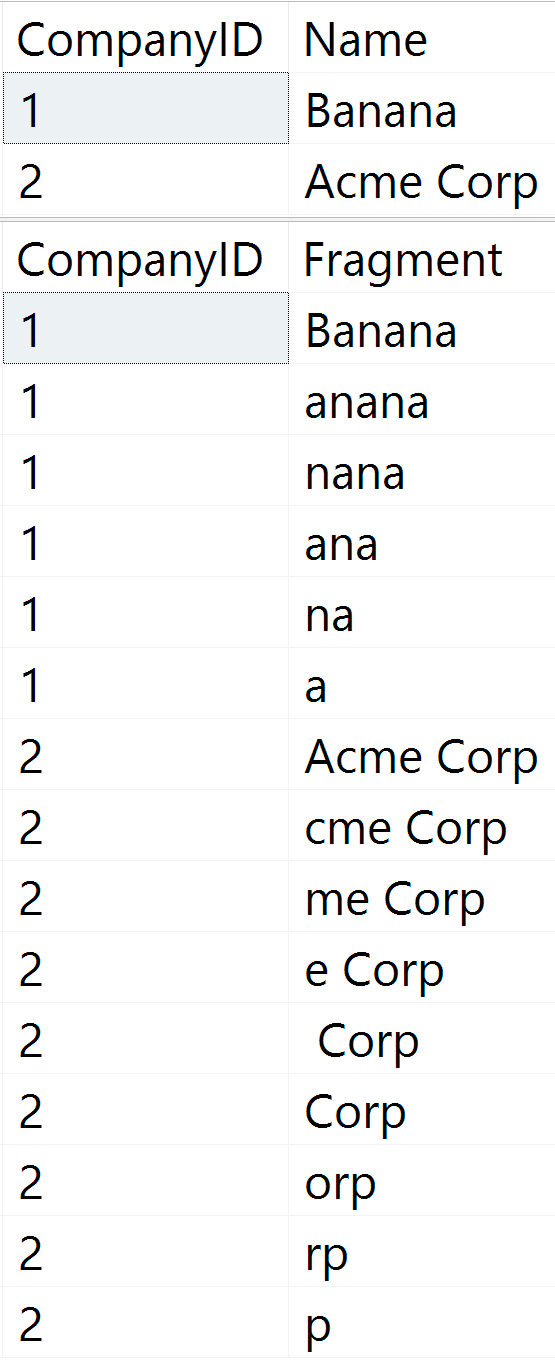
-- (table contents after insert shown in figure 1 below)
 
INSERT dbo.Companies(Name) VALUES(N'Banana'), (N'Acme Corp');
 
-- Now, let's update company 2 to 'Orange' 
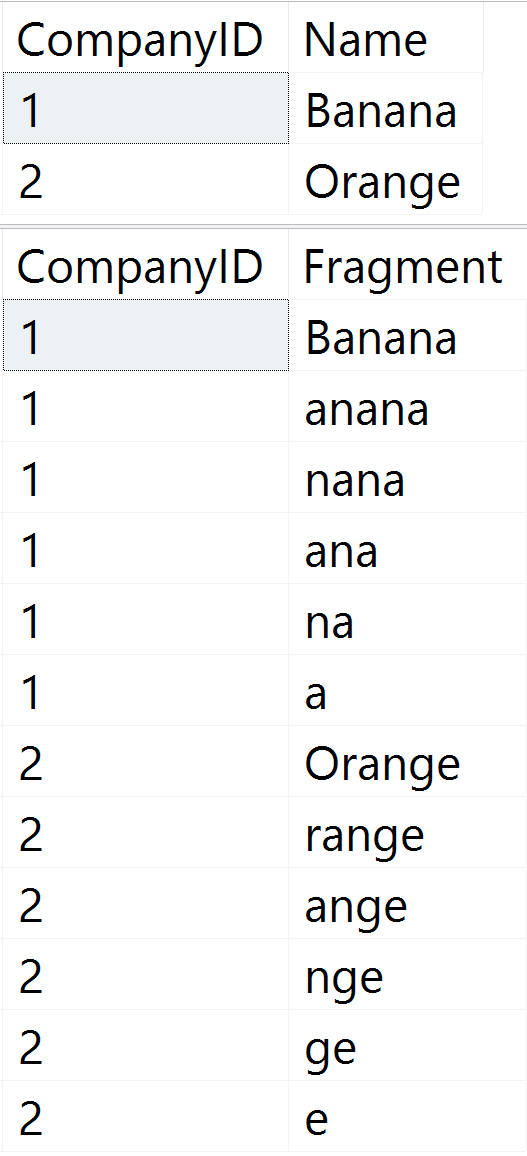
-- (table contents after update shown in figure 2 below):
 
UPDATE dbo.Companies SET Name = N'Orange' WHERE CompanyID = 2;
 
-- Finally, delete company #1 
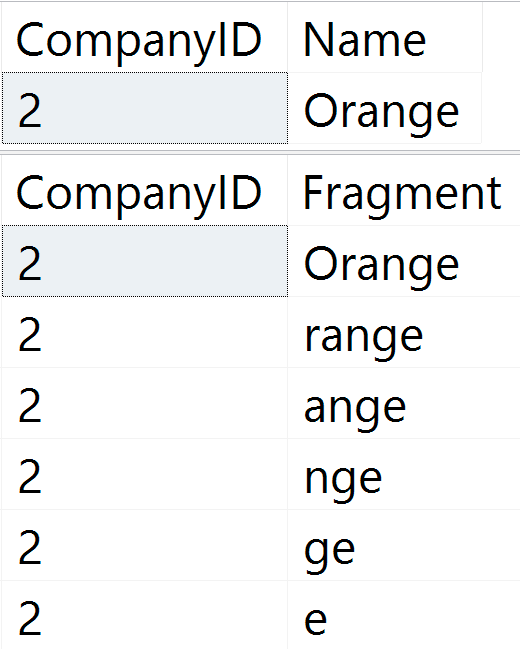
-- (table contents after delete shown in figure 3 below):
 
DELETE dbo.Companies WHERE CompanyID = 1;
Wildcard supporting fragments 1Figure 1: Initial table contents Wildcard supporting fragments 2Figure 2: Table contents after update Wildcard supporting fragments 3Figure 3: Table contents after delete

Caveat (for the referential integrity folks)

Note that if you set up proper foreign keys between these two tables, you'll have to use an instead of trigger to handle deletes, otherwise you'll have a chicken and egg problem – you can't wait until *after* the parent row is deleted to remove the child rows. So you would have to set up ON DELETE CASCADE (which I personally don't tend to like), or your two triggers would look like this (the after trigger would still have to perform a DELETE/INSERT pair in the case of an UPDATE):

CREATE TRIGGER dbo.Company_DeleteFragments
ON dbo.Companies
INSTEAD OF DELETE
AS
BEGIN
  SET NOCOUNT ON;
 
  DELETE f FROM dbo.CompanyNameFragments AS f
    INNER JOIN deleted AS d
    ON f.CompanyID = d.CompanyID;
 
  DELETE c FROM dbo.Companies AS c
    INNER JOIN deleted AS d
    ON c.CompanyID = d.CompanyID;
END
GO
 
CREATE TRIGGER dbo.Company_MaintainFragments
ON dbo.Companies
FOR INSERT, UPDATE
AS
BEGIN
  SET NOCOUNT ON;
 
  DELETE f FROM dbo.CompanyNameFragments AS f
    INNER JOIN deleted AS d
    ON f.CompanyID = d.CompanyID;
 
  INSERT dbo.CompanyNameFragments(CompanyID, Fragment)
    SELECT i.CompanyID, fn.Fragment
    FROM inserted AS i
    CROSS APPLY dbo.CreateStringFragments(i.Name) AS fn;
END
GO

Summary

This post was aimed at showing how easy it is to set up triggers that will maintain seekable string fragments to improve wildcard searches, at least for moderately-sized strings. Now, I still know that this kind of comes across as a wacky idea, but I keep talking about it because I am convinced there are good use cases out there.

In my next post, I will show how to see the impact of this choice: You can easily set up representative workloads to compare the resource costs of maintaining the fragments against the performance savings at query time. I will look at varying string lengths as well as different workload balances (mostly read vs. mostly write) and try to find sweet spots and danger zones.

The post Follow-up #1 on leading wildcard seeks appeared first on SQLPerformance.com.

22 Feb 01:57

Is Machine Learning Ready to Take on Artificial Intelligence?

by Paramita Ghosh

Machine Learning (ML) algorithms can learn from data and improve themselves. In a way, that learning process is akin to the way the humans learn from daily experience and improve their own skill sets. Artificial Intelligence (AI) facilitates “emulation of human thinking in actions. “So, together AI and ML are capable of delivering smart robots […]

The post Is Machine Learning Ready to Take on Artificial Intelligence? appeared first on DATAVERSITY.

22 Feb 01:57

Explicitly naming CL key columns in NC indexes – when and why

by Kimberly Tripp

This morning, as I was prepping for my PASS Data Architecture Virtual Chapter presentation on “Why Physical Database Design Matters,” I went to tweet that folks could join the presentation. I stumbled on a discussion that led to Robert Davis (@SQLSoldier) asking this: I was searching to see if you had a blog post on missing indexes recommending CI keys as included columns in NCIs.

And, there was no way I’d be able to do that in 140 characters… so, I thought a blog post would be easier!

First off, you do NOT need to explicitly state clustering key columns in your nonclustered index definition; those that aren’t already part of the index – ARE ADDED automatically by SQL Server. So, it seems weird that the missing index DMVs always add the clustering key to the recommended nonclustered indexes – even if it’s not required?

SIDE NOTE: The “green hint” / missing index recommendation shown in showplan does this as well (since it uses the missing index DMVs behind the scenes).

But, let’s go back to why it’s in there to begin with..

Why does SQL Server NEED a lookup value?

SQL Server uses the clustering key (if the table has a rowstore clustered index defined) as the way to “lookup” a corresponding row when accessing the data from a nonclustered index. The main reason to do this is that the nonclustered index does not have all of the information the query needs so SQL Server has to look up the rest of the data by accessing the data row.

SIDE NOTE: If the table is a HEAP (a table without a clustered index) then SQL Server uses a “fixed RID” which consists of an 8 byte row-ID (2 bytes for the fileID, 4 bytes for the pageID, and 2 bytes for the slot number). There are pros/cons to heaps vs. clustered tables but that’s not the main point of this post; I’m solely going to focus on what happens when a table has a clustered index.

If you think of an index in the back of a book on animals, you have duplicate data (like a “common name”) that’s ordered in the index. We use that sorted order to find the animal in which we’re interested and then the index tells us on what page we can find the rest of the information about that animal.

Nonclustered indexes in SQL Server work similarly. However, there isn’t a person “scanning” the sorted data (as we would a regular index). Instead, SQL Server has TWO structures to an index. One structure (the leaf level) is VERY much like an index in the back of a book (in this case, the common name + a lookup value to get to the rest of the data). The other part of an index structure is called the b-tree; this structure (0 to n levels) is solely used for efficient navigation to the leaf level. (If you’re wondering when an index tree would have 0 levels – only when the data of the entire table is only 1 page. SQL Server will not add a navigational level to a table that’s only one page. Yes, rare. But, yes, I expected someone would have asked! And, again, I’m somewhat simplifying things but I want to get to the main point of the question… :))

So, now we know WHY SQL Server needs the clustering key columns added to the index. And, we know that SQL Server adds them when they’re not explicitly defined… but, is it a problem and why do they do it?

Is it a problem to EXPLICITLY define clustered key columns in a nonclustered index?

No. But, I personally don’t recommend it. If the query doesn’t need it nor is the query going to use it (and, isn’t that the point of a missing index recommendation), then there’s no reason to add it. I never recommend adding anything that isn’t explicitly needed. I can only speculate on why they do it AND it does have one benefit.

First, no, it’s completely unnecessary. But, it does NOT cause any problems (SQL Server won’t add clustering key columns to the index more than once; they’re either explicitly added or internally added – but, they’re never in the index twice).

And, it does provide ONE benefit in that columns that are explicitly defined show up in sp_helpindex and in the management studio tools. So, this helps people to better see what’s actually in their indexes (but, this is kind of a weird way around the inadequacies of both the tools as well as sp_helpindex). So, while there is a benefit; it’s only making up for shortcomings in the tools.

SIDE NOTE: Whether or not you believe me is also part of the problem because none of the standard utilities / sps, etc. expose that SQL Server is doing this. But, you can check table size with sp_spaceused and you should see the size is the same whether the clustering key column is explicitly added or not. And, there are [3rd party] ways to expose that these columns ARE part of the index (I’ve written about my sp_helpindex rewrites before and I know there are a bunch of other tools out there that show it as well! I’m a bit overdue for yet-another sp_helpindex rewrite / update but I do have one planned. So, I hope to get to that within the next few days. Stay tuned. But, the 2012 version still works in 2014/2016 for clustered/nonclustered indexes. I have a new version that works with ALL index types but it still needs a bit more testing – email me if you have columnstore, in-memory indexes, full-text, spatial, or hypothetical indexes and want to do some tests for me!)

When should you explicitly define clustered key columns in a nonclustered index?

This is the real reason I wrote this post was to get to this point. And, it’s something I hadn’t thought about until I ran into it personally…

So, when SHOULD you explictly define the clustering key columns in a nonclustered index? When they ARE needed by the query.

This sounds rather simple but if the column is USED by the query then the index MUST have the column explicitly defined. Yes, I realize that SQL Server will add it… so it’s not necessary NOW but what if things change? (this is the main point!)

What could go wrong?

If you don’t explicitly add clustering key columns in a nonclustered index and the queries actually rely on that clustering key column to be there (for better performance)… then your queries will not be able to use the nonclustered index if the clustered index changes.

What if you want to change your clustering key? What if you later want to create a clustered columnstore index. In either case, all of your nonclustered indexes will no longer include those [former] clustering key columns and the queries that relied on their being present, won’t perform.

So, the simple answer is – always define the index explicitly with the columns needed (in the key, in INCLUDE, wherever they are REQUIRED). If a column is not needed by that query then do not explicitly name it (it might happen behind the scenes but it won’t add extra data where it’s not needed if the clustering key were to change at a later time).

Using this strategy when you’re doing query tuning will make your indexes more readable, more effective / scalable and should work even if there are later changes to your schema!

SIDE NOTE: Indexing is a very difficult topic to discuss in only a blog post and “query tuning” is not the same as “server tuning.” Sometimes the index that’s best for a query is not ideal to add to your server… but, once you get to the point where you want to create an index on your server – explicitly state only the columns absolutely necessary. Don’t just add things “because SQL Server would have done it anyway.”

Hope this helps! And, thanks for reading!!
Kimberly


The post Explicitly naming CL key columns in NC indexes – when and why appeared first on Kimberly L. Tripp.

22 Feb 01:56

How Can the SQL Server Resource Governor Help You?

by kevin

MANAGING ‘NOISY NEIGHBORS’ IN SQL SERVER

If you’ve been managing databases for any length of time, you’ve probably had to contend with the “noisy neighbors” scenario. In this scenario, you have several applications, each with their own database residing on a single instance of SQL Server, which don’t share the resources of the server nicely. To deal with this issue, you might want to investigate Resource Governor as an alternative.

READ MORE…

Originally Posted in DBTA Magazine in June 09, 2015

The post How Can the SQL Server Resource Governor Help You? appeared first on Kevin Kline.

22 Feb 01:56

Microsoft’s SQL Platform continues to lead the market with advanced data security

by SQL Server Team

This post was authored by Rohan Kumar, General Manager, Database Systems.

Securing customer data while maintaining the highest levels of privacy have always been top priorities for Microsoft and the SQL organization. As a result, SQL Server, which also powers Azure SQL Database and Azure SQL Data Warehouse, continues to be one of the most secure Relational Database Management Systems (RDBMS) on the market.[1]

At the RSA Conference last year, we talked about our commitment to security and privacy. I want to share a few examples of industry-leading security features we shipped since then and update you on our plans to deliver the highest levels of security across the SQL Database product lineup.

Announcing the April general availability of Azure SQL Database Threat Detection for proactive monitoring and alerting of suspicious database activities and potential vulnerabilities.

Using machine learning, SQL Database Threat Detection continuously monitors and profiles application behavior, and detects suspicious database activities to identify unusual and potentially harmful attempts to access, breach or exploit sensitive data in databases. When suspicious activity is detected, security officers and designated administrators get immediate notification or can view the alerts in the Azure Security Center along with recommendations for how to mitigate the threats. SQL Database Threat Detection can detect potential vulnerabilities and SQL injection attacks, as well as anomalous activities such as data access from unusual locations or by unfamiliar principals.

Frans Lytzen, CTO of New Orbit, UK, is early adopter of SQL Database Threat Detection, said “I’ve seen it detect potential SQL injection attacks […]. This is a useful feature to potentially detect both external and internal attacks […]. You have nothing to lose by switching it on.” SQL Database Threat Detection is simple to configure via the Azure portal and requires no modifications to your existing T-SQL code or client applications. Fernando Sola, Cloud Technology Consultant at HSI adds, “Thanks to Azure SQL Database Threat Detection, we were able to detect and fix vulnerabilities to SQL injection attacks and prevent potential threats to our database. I was very impressed with how simple it was to enable Threat Detection using the Azure portal.”

State-of-the-art protection of sensitive data in flight, at rest and during query processing with Always Encrypted in SQL Server 2016 and Azure SQL Database has been generally available since July 2016.

Always Encrypted is an industry-first feature that offers unparalleled data security against breaches involving the theft of critical data. For example, with Always Encrypted, customers’ credit card numbers are stored encrypted in the database at all times, even during query processing, allowing decryption at the point of use by authorized staff or applications that need to process that data. Encryption keys are managed outside of the database for maximum safety and separation of duties. Only authorized users with access to the encryption keys can see unencrypted data while using applications.

Financial Fabric, a global provider of big data analytics to hedge funds and institutional investors, uses Always Encrypted to ensure that sensitive data is encrypted from the moment it is ingested in Azure SQL Database until it is accessed by authorized end users. Paul Stirpe, CTO of Financial Fabric states, “With Always Encrypted in Azure SQL Database, analysts can aggregate information, work on client data and positions, and provide numbers without revealing highly sensitive, identifiable information.” You can read more about how Financial Fabric is transforming hedge fund management with Azure and SQL Database here.

Always Encrypted is simple to use, transparent, and ready to protect your data.  Client drivers have been enhanced to work in conjunction with SQL Server and Azure SQL Database to decrypt and encrypt data at the point of use, requiring only minimal modifications to your applications.

SQL Dynamic Data Masking is another security capability that’s built right into the relational engine. Itlimits sensitive data exposure by masking the data when accessed by non-privileged users or applications. Any data in the result set of a query over masked database fields is obfuscated on the fly while the data in the database remains unchanged.  SQL’s Dynamic Data Masking requires no changes to the application and is simple to configure. What’s more, for users of Azure SQL Database, Dynamic Data Masking can automatically discover potentially sensitive data and suggest the appropriate masks to be applied.

We have also delivered single sign-on for Azure SQL Database and SQL DW with Azure Active Directory Authentication which was made generally available in August 2016, and customers can now preview secure, compliant management of the TDE encryption keys using Azure Key Vault.

Securing customer data doesn’t end with the features we ship. Security and privacy are built right into our products, beginning with the Security Development Lifecycle (SDL) that focuses on security at every step – from the initial planning, to launch, to making sure the service and our infrastructure are continuously monitored and updated to stay ahead of new threats.

For example, our scanning and threat protection tools run continuously against our service to look for viruses, ensure software is properly patched, and identify potential vulnerabilities and misconfigurations. “Just-in-time” access management enables us to operate our service with no standing access to production servers and their databases. Instead, employees are required to request access which is reviewed and granted for the narrowest possible scope and limited time only. In addition, much of what we do internally has found its way back into customer facing products, Azure SQL Database Threat Detection is one example. I also encourage you to read our whitepaper on protecting data and privacy in the Azure cloud to learn about how we work hard every day to earn your trust.

Going forward we want to dramatically simplify security to ensure all of our customers can implement and operate an effective, defense-in-depth strategy for their sensitive data independent of their level of expertise. For example, we believe that securing a SQL database should be as simple as identifying the desired protection level (e.g., High Business Impact) and applying the appropriate policy to secure the database. Microsoft’s SQL Server platform will do the rest, including identifying which data is sensitive and which features are needed to secure the data. While the database is in use, it will continuously monitor for changes in the configuration and any unusual activities that may be signs of malicious attacks.

Although this remains a vision for now, we continue to invest in features that combine machine learning and adaptive behavior with state-of-the-art security and privacy protection to get us closer to our goals.

Our customers are taking notice, as voiced by Paul Stirpe from Financial Fabric who said “[… the] new technology that has been rolled out by Microsoft is a game-changer. Cloud security has fundamentally shifted as of now.

We believe our vision of the intelligent, always secure database will democratize security in the same way relational query processing democratized data management in the 1970’s by enabling anyone who could write SQL queries to manage and access large databases.


[1] Based on vulnerabilities reported in the NIST National Vulnerability Database (nvd.nist.gov) for the last 6 years.

22 Feb 01:56

RiskSense Introduces Cyber Risk Management Platform That Spans Network, Database Layers

by A.R. Guess

by Angela Guess According to a recent press release, “RiskSense® Inc., the pioneer and market leader in pro-active cyber risk management, today announced it will unveil at the upcoming RSA Conference 2017 in San Francisco the first integrated platform that allows governments and enterprises to identify cyber risk exposure across their network, endpoint, application, and […]

The post RiskSense Introduces Cyber Risk Management Platform That Spans Network, Database Layers appeared first on DATAVERSITY.

22 Feb 01:56

The Last SSIS Book You Read

by andyleonard
Every now and then I get an email or meet someone at an event and they say something like, “I learned SSIS from your book!” I’m not going to lie to you, that makes me feel pretty good. Since I’ve written most of my books as part of a team, I usually reply, “It was a team effort and our team was a bunch of really smart people… plus me!” These folks tell me they read other books about SSIS (SQL Server Integration Services) but they didn’t really grok SSIS until they read the book authored by the team...(read more)
22 Feb 01:55

Seagate Helps Strengthen Federal Cybersecurity With New Data Encryption Capabilities

by A.R. Guess

by Angela Guess According to a recent press release, “Seagate Technology announced that its portfolio hard drives and solid-state drives designed to meet stringent federal security standards now integrate with advanced encryption key management software and services from Fornetix, LLC. The integration gives federal government agencies another line of defense against external and internal cybersecurity […]

The post Seagate Helps Strengthen Federal Cybersecurity With New Data Encryption Capabilities appeared first on DATAVERSITY.

22 Feb 01:53

Using AT TIME ZONE to fix an old report

by Rob Farley

T-SQL TuesdayAs soon as I saw the SQL 2016 feature AT TIME ZONE, which I wrote about here at sqlperformance.com a few months ago, I remembered a report that needed this feature. This post forms a case study on how I saw it work out, which fits into this month’s T-SQL Tuesday hosted by Matt Gordon (@sqlatspeed). (It’s the 87th T-SQL Tuesday, and I really need to write more blog posts, particularly about things that are not prompted by T-SQL Tuesdays.)

The situation was this, and this may sound familiar if you read that earlier post of mine.

Long before LobsterPot Solutions existed, I needed to produce a report on incidents that occurred, and in particular, show the number of times that responses were made within SLA and the number of times that the SLA was missed. For example, a Sev2 incident that occurred at 4:30pm on a weekday would need to have a response within 1 hour, while a Sev2 incident that occurred at 5:30pm on a weekday would need to have a response within 3 hours. Or something like that – I forget the numbers involved, but I do remember that the helpdesk employees would breathe a sigh of relief when 5pm would roll around, because they wouldn’t need to respond to things so quickly. The 15-minute Sev1 alerts would suddenly stretch out to an hour, and the urgency would disappear.

But a problem would come whenever daylight saving time started or ended.

I’m sure if you’ve dealt with databases, you’ll know the pain that daylight saving time is. Supposedly Ben Franklin came up with the idea – and for that he should be struck by lightning or something. Western Australia tried it for a few years recently, and sensibly abandoned it. And the general consensus is to store date/time data is to do so in UTC.

If you don’t store data in UTC, you run the risk of having an event start at 2:45am and end at 2:15am after the clocks have gone back. Or having an SLA incident that starts at 1:59am just before the clocks go forward. Now, these times are fine if you store the time zone that they’re in, but in UTC time just works as expected.

…except for reporting.

Because how am I supposed to know whether a particular date was before daylight saving started or after? I might know that an incident occurred at 6:30am in UTC, but is that 4:30pm in Melbourne or 5:30pm? Obviously I can consider which month it’s in, because I know that Melbourne observes daylight saving time from the first Sunday in October to the first Sunday in April, but then if there are customers in Brisbane, and Auckland, and Los Angeles, and Phoenix, and various places within Indiana, things get a lot more complicated.

To get around this, there were very few time zones in which SLAs could be defined for that company. It was just considered too hard to cater for more than that. A report could then be customised to say “Consider that on a particular date the time zone changed from X to Y”. It felt messy, but it worked. There was no need for anything to look up the Windows registry, and it basically just worked.

But these days, I would’ve done it differently.

Now, I would’ve used AT TIME ZONE.

You see, now I could store the customer’s time zone information as a property of the customer. I could then store each incident time in UTC, allowing me to do the necessary calculations around the number of minutes to respond, resolve, and so on, while being able to report using the customer’s local time. Assuming my IncidentTime had actually been stored using datetime, rather than datetimeoffset, it would simply be a matter of using code like:

i.IncidentTime AT TIME ZONE 'UTC' AT TIME ZONE c.tz

…which first puts the timezoneless i.IncidentTime into UTC, before converting it to the time zone of the customer. And this time zone can be 'AUS Eastern Standard Time', or 'Mauritius Standard Time', or whatever. And the SQL Engine is left to figure out what offset to use for that.

At this point, I can very easily create a report that lists each incident across a time period, and show it in the customer’s local time zone. I can convert the value to the time data type, and then report against how many incidents were within business hours or not.

And all of this is very useful, but what about the indexing to handle this nicely? After all, AT TIME ZONE is a function. But changing the time zone doesn’t change the order in which the incidents actually occurred, so it should be okay.

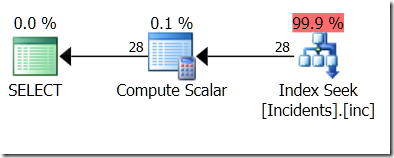
To test this, I created a table called dbo.Incidents, and indexed the IncidentTime column. Then I ran this query, and confirmed that an index seek was used.

select i.IncidentTime, itz.LocalTime
from dbo.Incidents i
cross apply (select i.IncidentTime AT TIME ZONE 'UTC' 
  AT TIME ZONE 'Cen. Australia Standard Time') itz (LocalTime)
where i.IncidentTime >= '20170201'
and i.IncidentTime < '20170301';

image

But I want to filter on itz.LocalTime…

select i.IncidentTime, itz.LocalTime
from dbo.Incidents i
cross apply (select i.IncidentTime AT TIME ZONE 'UTC' 
  AT TIME ZONE 'Cen. Australia Standard Time') itz (LocalTime)
where itz.LocalTime >= '20170201'
and itz.LocalTime < '20170301';

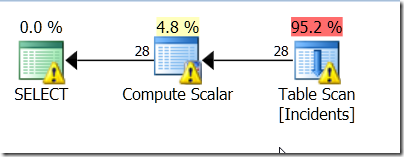
No luck. It didn’t like the index.

The warnings are because it’s having to look through a lot more than the data that I’m interested in.

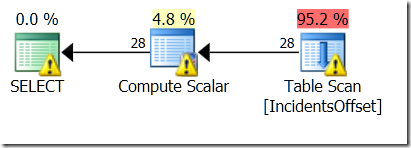
I even tried using a table with a datetimeoffset field. After all, AT TIME ZONE can change the order when moving from datetime to datetimeoffset, even though the order isn’t changed when moving from datetimeoffset to another datetimeoffset. I even tried making sure that the thing I was comparing it to was in the time zone.

select i.IncidentTime, itz.LocalTime
from dbo.IncidentsOffset i
cross apply (select i.IncidentTime AT TIME ZONE 'Cen. Australia Standard Time') itz (LocalTime)
where itz.LocalTime >= cast('20170201' as datetimeoffset) 
  AT TIME ZONE 'Cen. Australia Standard Time'
and itz.LocalTime < cast('20170301' as datetimeoffset) 
  AT TIME ZONE 'Cen. Australia Standard Time';

image

Still no luck!

So now I had two options. One was to store the converted version alongside the UTC version, and index that. I think that’s a pain. It’s certainly a lot more of a database change than I’d like.

The other option was to use what I call helper predicates. These are the kind of thing that you see when you use LIKE. They’re predicates that can be used as Seek Predicates, but not exactly what you’re asking for.

I figure that no matter what time zone I’m interested in, the IncidentTimes that I care about are within a very specific range. That range is no more than a day bigger than my preferred range, on either side.

So I’ll include two extra predicates.

select i.IncidentTime, itz.LocalTime
from dbo.IncidentsOffset i
cross apply (select i.IncidentTime 
    AT TIME ZONE 'Cen. Australia Standard Time') itz (LocalTime)
where itz.LocalTime >= cast('20170201' as datetimeoffset) 
  AT TIME ZONE 'Cen. Australia Standard Time'
and itz.LocalTime < cast('20170301' as datetimeoffset) 
  AT TIME ZONE 'Cen. Australia Standard Time
and i.IncidentTime >= dateadd(day,-1,'20170201')
and i.IncidentTime < dateadd(day, 1,'20170301');

image

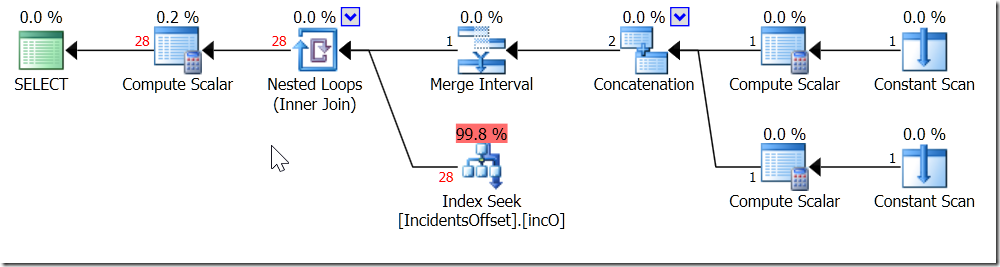
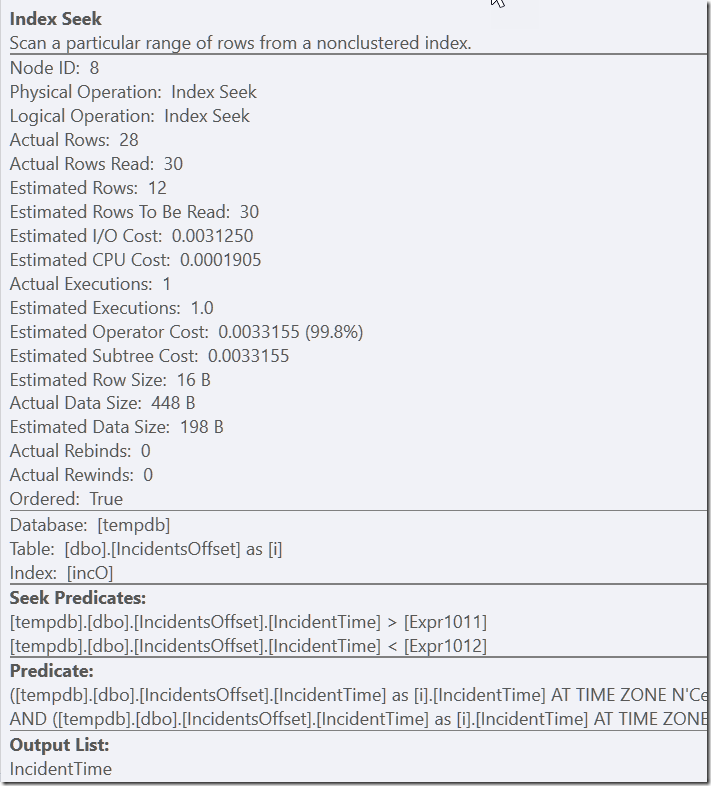
Now, my index can be used. It’s having to look through 30 rows before filtering it to the 28 that it cares about – but that’s a lot better than scanning the whole thing.

image

And you know – this is the kind of behaviour that I see all the time from regular queries, like when I do CAST(myDateTimeColumns AS DATE) = @SomeDate, or use LIKE.

I’m okay with this. AT TIME ZONE is great for letting me handle my time zone conversions, and by considering what’s going on with my queries, I don’t need to sacrifice performance either.

@rob_farley

The post Using AT TIME ZONE to fix an old report appeared first on SQLPerformance.com.

22 Feb 01:53

T-SQL Tuesday #87 – Beware the Shiny New Toys

by Wayne Sheffield

Today is yet another T-SQL Tuesday – the monthly blogging party started by Adam Machanic (b|t) to get everyone in the SQL Server blogosphere together and to blog about a topic. Today’s party is hosted by none other than Matt Gordon (b|t), and the topic that he has chosen for us to blog about is “Fixing old problems with Shiny New Toys”. Specifically, he says:

What I’d like to see from the blog responses for this T-SQL Tuesday is how you’ve used a “new” Microsoft data platform toy to fix an old problem.

I’ve decided that I’m going to turn this around. Sometimes, those Shiny New Toys cause problems. Lets talk about one such case.

Recently, I was helping a client with an issue where when a job would run, the CPU on all processors would max out. This in turn would cause other performance issues on the server:

After a bit of investigation, I was able to determine that the statement causing this was a MERGE statement. The MERGE statement was a Shiny New Toy introduced in SQL 2008. This MERGE statement had both a WHEN MATCHED and a WHEN NOT MATCHED BY TARGET clause inside it.

What does this mean?

BOL defines the MERGE statement as:

Performs insert, update, or delete operations on a target table based on the results of a join with a source table.

This is performed with just one pass of the target table.

There are three possible operations that can be used within the MERGE statement. These are:

WHEN MATCHED – this allows you to perform an UPDATE or DELETE against the target table using the source table. There is a row existing in both tables for this match. If you were performing just the individual UPDATE or DELETE statement, you would use an INNER JOIN between the source and target table.

WHEN NOT MATCHED BY TARGET – this allows you to perform an INSERT of rows into the target table from rows in the source table that are not in the target table. If you were performing just the INSERT statement, you would drive it with a SELECT statement that performs a LEFT OUTER JOIN between the source and target tables, checking for a (not-null) column in the target table being NULL (signifying that there wasn’t a matching row).

WHEN NOT MATCHED BY SOURCE – this allows you to perform an UPDATE or DELETE against the target table when the target table has rows that the source table does not. If you were performing just the UPDATE or DELETE statement, you would use a RIGHT OUTER JOIN between the source and target tables… or how most people would write it, a LEFT OUTER JOIN between the target and source tables.

Keep in mind that my examples above are what you would do if you were separating the commands. Individually, these different conditions perform just fine with the MERGE statement. However, when the MERGE statement combines multiple match conditions, then think about what SQL has to do. See the chart at this link for when the different types of join conditions are used in the MERGE statement.

In this case, it’s doing both a WHEN MATCHED and a WHEN NOT MATCHED BY TARGET. In order to process the target table in just one pass, it will frequently end up performing worse. It can also end up using more resources in the process. I frequently find it better to just use the individual statements.

By separating this out into the respective statements, each can be optimized to perform better. Which is what I did… an UPDATE statement followed by an INSERT statement. Not only did the job run faster overall, but this change also stopped the CPU from maxing out:

Ah, much better.

There are other issues with the MERGE statement. It has bugs… some of which can cause database corruption.

Here we have a Shiny New Toy (feature), supposed to make life easier, yet it causes problems. Until it can perform better (and the bugs are eliminated), I just don’t use it.

Beware the Shiny New Toys.

The post T-SQL Tuesday #87 – Beware the Shiny New Toys appeared first on Wayne Sheffield.

22 Feb 01:52

Who is overriding MAXDOP 1 on the instance?

by Paul Randal

In Monday’s newsletter I discussed an email question I’d been sent and promised to blog about it.

The question was “how can latch waits for ACCESS_METHODS_DATASET_PARENT occur when the instance MAXDOP is set to 1?” This shouldn’t happen, as that latch is only used for coordination between threads performing a parallel table/index scan. However, just because the instance MAXDOP is set to 1, that doesn’t mean no parallelism can occur.

Anyone can override the instance MAXDOP setting using a query hint.

There are two ways to prevent this:

  • Set the instance cost threshold for parallelism setting to be extremely high, so no serial plans can be deemed expensive enough to run in parallel
  • Make everyone run within a Resource Governor (Enterprise Edition only) workload group that has the MAX_DOP set to 1

Or you can figure out where the query hint is being used and remove it.

In this post I’m going to show you a simple Extended Events session that will capture information about what’s causing CXPACKET waits (you can’t have ACCESS_METHOD_DATASET_PARENT latch waits without CXPACKET waits happening too) and then refine it to use a less expensive event.

First off I’ll set my MAXDOP to 1:

EXEC sp_configure 'show advanced options', 1;
RECONFIGURE WITH OVERRIDE;
GO

EXEC sp_configure 'max degree of parallelism', 1;
RECONFIGURE WITH OVERRIDE;
GO

SELECT [name], [value_in_use] FROM sys.configurations WHERE [name] LIKE '%degree%';
GO
Configuration option 'show advanced options' changed from 0 to 1. Run the RECONFIGURE statement to install.
Configuration option 'max degree of parallelism' changed from 0 to 1. Run the RECONFIGURE statement to install.
name                       value_in_use
-------------------------- -------------
max degree of parallelism  1

Then I’ll check for CXPACKET waits (using my waits query) after running the following query, that scans a 6.7 million row table (you can get the SalesDB database from here):

SELECT * FROM [SalesDB].[dbo].[Sales] WHERE [Quantity] > 10000;
GO

No CXPACKET waits.

But if I add a MAXDOP query hint and then check for waits:

SELECT * FROM [SalesDB].[dbo].[Sales] WHERE [Quantity] > 10000 OPTION (MAXDOP 8);
GO
WaitType            Wait_S  Resource_S Signal_S WaitCount Percentage AvgWait_S AvgRes_S AvgSig_S Help/Info URL
------------------- ------- ---------- -------- --------- ---------- --------- -------- -------- ---------------------------------------------
LATCH_EX            0.20    0.16       0.05     93        79.61      0.0022    0.0017   0.0005   https://www.sqlskills.com/help/waits/LATCH_EX
CXPACKET            0.05    0.05       0.00     16        20.00      0.0032    0.0032   0.0000   https://www.sqlskills.com/help/waits/CXPACKET

And the instance MAXDOP was successfully overridden.

Now I’ll set up a simple Extended Events session to track down the offending code (based on the query from here). It’s very important that you query the sys.dm_xe_map_values DMV to find the correct number to use in the query for the CXPACKET wait, as these numbers often change from release to release, and even in Service Packs. For instance, CXPACKET was 191 in SQL Server 2014 RTM, but is 190 in the 2014 build I’m using.

Be very careful about running this in production, as the event will fire for *every* wait that occurs and so will likely affect your workload throughput, even though it’ll short-circuit if the wait isn’t CXPACKET. I’ll show you a better event to use lower down.

IF EXISTS (
    SELECT * FROM sys.server_event_sessions
        WHERE [name] = N'InvestigateWaits')
    DROP EVENT SESSION [InvestigateWaits] ON SERVER
GO

CREATE EVENT SESSION [InvestigateWaits] ON SERVER
ADD EVENT [sqlos].[wait_info]
(
    ACTION (
        sqlserver.client_hostname,
        sqlserver.nt_username,
        sqlserver.sql_text)
    WHERE [wait_type] = 190 -- CXPACKET only
    AND [opcode] = 1 -- Just the end wait events
)
ADD TARGET [package0].[ring_buffer]
WITH
(
    MAX_MEMORY = 50 MB,
    MAX_DISPATCH_LATENCY = 5 SECONDS)
GO

ALTER EVENT SESSION [InvestigateWaits] ON SERVER STATE = START;
GO

And then when I run the select statement again I can look in the ring buffer and see the events. I put in a DISTINCT to minimize the number of lines of output. The code is:

SELECT 
    DISTINCT ([data1].[value] ('(./@timestamp)[1]', 'datetime')) AS [Time],
    [data1].[value] ('(./action[@name="client_hostname"]/value)[1]', 'VARCHAR(MAX)') AS [Host],
    [data1].[value] ('(./action[@name="nt_username"]/value)[1]', 'VARCHAR(MAX)') AS [User],
    [data1].[value] ('(./action[@name="sql_text"]/value)[1]','VARCHAR(MAX)') AS [Statement]
FROM (
    SELECT CONVERT (XML, [target_data]) AS data
    FROM sys.dm_xe_session_targets [xst]
    INNER JOIN sys.dm_xe_sessions [xs]
        ON [xst].[event_session_address] = [xs].[address]
    WHERE [xs].[name] = N'InvestigateWaits') AS t
CROSS APPLY data.nodes('//event') n (data1);
GO
Time                    Host       User            Statement
----------------------- ---------- --------------- ---------------------------------------------------------------------------------
2017-02-16 00:20:16.937 APPLECROSS APPLECROSS\Paul SELECT * FROM [SalesDB].[dbo].[Sales] WHERE [Quantity] > 10000 OPTION (MAXDOP 8);
2017-02-16 00:20:16.987 APPLECROSS APPLECROSS\Paul SELECT * FROM [SalesDB].[dbo].[Sales] WHERE [Quantity] > 10000 OPTION (MAXDOP 8);
2017-02-16 00:20:16.937 APPLECROSS                 SELECT * FROM [SalesDB].[dbo].[Sales] WHERE [Quantity] > 10000 OPTION (MAXDOP 8);

Cool – so that works, but the session will likely affect workload performance, as I mentioned above. A better event to use is degree_of_parallelism, which was introduced in SQL Server 2012 and only fires once per batch execution, rather than once for every wait that occurs.

The updated event session is:

CREATE EVENT SESSION [InvestigateWaits] ON SERVER
ADD EVENT [sqlserver].[degree_of_parallelism]
(
    ACTION (
        sqlserver.client_hostname,
        sqlserver.nt_username,
        sqlserver.sql_text)
    WHERE [dop] > 0 -- parallel plans
)
ADD TARGET [package0].[ring_buffer]
WITH
(
    MAX_MEMORY = 50 MB,
    MAX_DISPATCH_LATENCY = 5 SECONDS)
GO

And the code to parse the XML, and sample output from my query is:

SELECT 
    [data1].[value] ('(./@timestamp)[1]', 'datetime') AS [Time],
    [data1].[value] ('(./data[@name="dop"]/value)[1]', 'INT') AS [DOP],
    [data1].[value] ('(./action[@name="client_hostname"]/value)[1]', 'VARCHAR(MAX)') AS [Host],
    [data1].[value] ('(./action[@name="nt_username"]/value)[1]', 'VARCHAR(MAX)') AS [User],
    [data1].[value] ('(./action[@name="sql_text"]/value)[1]','VARCHAR(MAX)') AS [Statement]
FROM (
    SELECT CONVERT (XML, [target_data]) AS data
    FROM sys.dm_xe_session_targets [xst]
    INNER JOIN sys.dm_xe_sessions [xs]
        ON [xst].[event_session_address] = [xs].[address]
    WHERE [xs].[name] = N'InvestigateWaits') AS t
CROSS APPLY data.nodes('//event') n (data1);
GO
Time                    DOP Host       User            Statement
----------------------- --- ---------- --------------- ---------------------------------------------------------------------------------
2017-02-16 00:36:37.347 8   APPLECROSS APPLECROSS\Paul SELECT * FROM [SalesDB].[dbo].[Sales] WHERE [Quantity] > 10000 OPTION (MAXDOP 8);

Pretty cool, eh?

You can mess around with more complex code that does things like grab the tsql_stack action and then parses it out, and more information to identify the culprit, like the application name – however complex you want to get – but now you know the base event session to capture when the query hint is being used.

Enjoy!

The post Who is overriding MAXDOP 1 on the instance? appeared first on Paul S. Randal.

22 Feb 01:52

Ingenu Simplifies IoT Deployments Powered by Microsoft Azure

by A.R. Guess

by Angela Guess A new press release reports, “Ingenu Inc.™, the company that delivers purpose-built IoT connectivity, today announced it is teaming with Microsoft Corp. to utilize the Microsoft Azure IoT Hub to facilitate the deployment of end-to-end IoT (Internet of Things) solutions based on Ingenu’s RPMA® (Random Phase Multiple Access) network technology. Azure IoT […]

The post Ingenu Simplifies IoT Deployments Powered by Microsoft Azure appeared first on DATAVERSITY.

22 Feb 01:52

SQL Server on Linux: Mission-critical HADR with Always On Availability Groups

by SQL Server Team

This post was authored by Mihaela Blendea, Senior Program Manager, SQL Server

In keeping with our goal to enable the same High Availability and Disaster Recovery solutions on all platforms supported by SQL Server, today Microsoft is excited to announce the preview of Always On Availability Groups for Linux in SQL Server v.Next Community Technology Preview (CTP) 1.3. This technology adds to the HADR options available for SQL Server on Linux, having previously enabled shared disk failover cluster instance capabilities.

First released with SQL Server 2012 and enhanced in the 2014 and 2016 releases, Always On Availability Groups is SQL Server’s flagship solution for HADR. It provides High Availability for groups of databases on top of direct attached storage, supporting multiple active secondary replicas for integrated HA/DR, automatic failure detection, fast transparent failover, and read load balancing. This broad set of capabilities is enabling customers to meet the strictest availability SLA requirements for their mission- critical workloads.

Here is an overview of the scenarios that Always On Availability Groups are enabling for SQL Server v.Next:

Run mission-critical application using SQL Server running on Linux

Always On Availability Groups make it easy for your applications to meet rigorous business continuity requirements. This feature is now available on all Linux OS distributions SQL Server v.Next supports — Red Hat Enterprise Linux, Ubuntu and SUSE Linux Enterprise Server. Also, all capabilities that make Availability Groups a flexible, integrated and efficient HADR solution are available on Linux as well:

  • Multidatabase failover – an availability group supports a failover environment for a set of user databases, known as availability databases.
  • Fast failure detection and failover – as a resource in a highly available cluster, an availability group benefits from built-in cluster intelligence for immediate failover detection and failover action.
  • Transparent failover using availability group listener – enables client to use single connection string to primary or secondary databases that does not change in case of failover.
  • Multiple sync/async secondary replicas – an availability group supports up to eight secondary replicas. The availability mode determines whether the primary replica waits (synchronous replica) or not (asynchronous replica) to commit transactions on a database until a given secondary replica has written the transaction log records to disk.
  • Manual/automatic failover with no data loss – failover to a synchronized secondary replica can be triggered automatically by the cluster or on demand by the database administrator.
  • Active secondary replicas available for read/backup workloads – one or more secondary replicas can be configured to support read-only access to secondary databases and/or to permit backups on secondary databases.
  • Automatic seeding – SQL Server automatically creates the secondary replicas for every database in the availability group.
  • Read-only routing – SQL Server routes incoming connections to an availability group listener to a secondary replica that is configured to allow read-only workloads.
  • Database level health monitoring and failover trigger – enhanced database-level monitoring and diagnostics.
  • Disaster Recovery configurations – with Distributed Availability Groups or multisubnet availability group setup.

Here is an illustration of a HADR configuration that an enterprise building a mission-critical application using SQL Server running on Linux can use to achieve: application-level protection (two synchronized secondary replicas), compliance with business continuity regulations (DR replica on remote site) as well as enhance performance (offload reporting and backup workloads to active secondary replicas):

clip_image002

Fig. 1 Always On Availability Groups as an Integrated and Flexible HADR Solution on Linux

On Windows, Always On depends on Windows Server Failover Cluster (WSFC) for distributed metadata storage, failure detection and failover orchestration. On Linux, we are enabling Availability Groups to integrate natively with your choice of clustering technology. For example, in preview today SQL Server v.Next integrates with Pacemaker, a popular Linux clustering technology. Users can add a previously configured SQL Server Availability Group as a resource to a Pacemaker cluster and all the orchestration regarding monitoring, failure detection and failover is taken care of. To achieve this, customers will use the SQL Server Resource Agent for Pacemaker available with the mssql-server-ha package, that is installed alongside mssql-server.

Workload load balancing for increased scale and performance

Previously, users had to set up a cluster to load balance read workloads for their application using readable secondary replicas. Configuring and operating a cluster implied a lot of manageability overhead, if HA was not the goal.

Users can now create a group of replicated databases and leverage the fastest replication technology for SQL Server to offload secondary read-only workloads from the primary replica. If the goal is to conserve resources for mission-critical workloads running on the primary, users can now use read-only routing or directly connect to readable secondary replicas, without depending on integration with any clustering technology. These new capabilities are available for SQL Server running on both Windows and Linux platforms.

clip_image008

Fig. 2 Group of Read-Only Replicated Databases to Load Balance Read-Only Workloads

Note this is not a high-availability setup, as there is no “fabric” to monitor and coordinate failure detection and automatic failover. For users who need HADR capabilities, we recommend they use a cluster manager (WSFC on Windows or Pacemaker on Linux).

Seamless cross-platform migration

By setting up a cross-platform Distributed Availability Group, users can do a live migration of their SQL Server workloads from Windows to Linux or vice versa. We do not recommend running in this configuration in a steady state as there is no cluster manager for cross-platform orchestration, but it is the fastest solution for a cross-platform migration with minimum downtime.

clip_image010

Fig. 3 Cross-Platform Live Migration Using Distributed Availability Groups

Please visit our reference documentation on business continuity for SQL Server on Linux for more specifics on how integration with Pacemaker clustering is achieved in all supported OS flavors and end-to-end functional samples.

Today’s announcement marks the first preview of new Always On Availability Groups capabilities: Linux platform support for HADR as well as new scenarios like creating a cluster-independent group of replicated databases for offloading read-only traffic. Availability Groups are available on all platforms and OS versions that SQL Server v.Next is running on. In upcoming releases, we are going to enhance these capabilities by providing high-availability solutions for containerized environments as well as tooling support for an integrated experience. Stay tuned!

Get started

You can get started with many of these capabilities today:

Learn more

08 Feb 18:40

DH2i Announces New Support for Oracle Database on Windows

by A.R. Guess

by Angela Guess According to a new press release, “DH2i™ Company, the leading provider of Microsoft Windows Server application virtualization and management solutions, today announced the general availability of DxEnterprise™ version 16 (v16). This updated release of DH2i’s container virtualization and management software features added support for Oracle Database on Windows.  Now for the first […]

The post DH2i Announces New Support for Oracle Database on Windows appeared first on DATAVERSITY.

08 Feb 18:38

Parallel Execution on SQL Server 2016

by jchang
There are a number of interesting questions in parallel execution performance that can be investigated using the TPC-H kit, which has a data generator. There are also supplemental files that accompany published results. Important questions in parallel...(read more)
08 Feb 18:38

Accenture Helps Seattle Police Department Implement Data Analytics Platform

by A.R. Guess

by Angela Guess A recent press release announces, “Accenture has helped the Seattle Police Department (SPD) build and deploy a new data analytics platform that provides the Department with reliable and rapidly accessible data to meet its management and governance objectives and support insight-led policing. By enabling the Department to consolidate, prepare and analyze critical […]

The post Accenture Helps Seattle Police Department Implement Data Analytics Platform appeared first on DATAVERSITY.

08 Feb 18:38

Troy Hunt: A data breach investigation blow-by-blow

by arcanecode

This is a fascinating read from security researcher Troy Hunt. In it he describes the process by which he investigates a data breach. Well worth the read.

https://www.troyhunt.com/a-data-breach-investigation-blow-by-blow/


08 Feb 18:37

On DevOps…

by andyleonard
DevOps is getting a lot of attention in SQL Server and Developer communities these days. Two friends have blogged about the outage and accompanying data loss experienced by GitLab : Brent Ozar ( blog | @BrentO ) wrote SQL Server DBA’s Guide to the Gitlab...(read more)
08 Feb 18:37

DI&A Webinar: Data Lake vs. Data Warehouse

by Anita Kress

To view just the slides from this presentation, click HERE>> About the Webinar Modern data analysis is moving beyond the Data Warehouse to the Data Lake where analysts are able to take advantage of emerging technologies to manage complex analytics on large data volumes and diverse data types. Yet, for some business problems, a Data Warehouse […]

The post DI&A Webinar: Data Lake vs. Data Warehouse appeared first on DATAVERSITY.

08 Feb 18:37

One way to get an index seek for a leading %wildcard

by Aaron Bertrand

A performance issue I see often is when users need to match part of a string with a query like the following:

... WHERE SomeColumn LIKE N'%SomePortion%';

With a leading wildcard, this predicate is "non-SARGable" – just a fancy way of saying we can't find the relevant rows by using a seek against an index on SomeColumn.

One solution we get kind of hand-wavy about is full-text search; however, this is a complex solution, and it requires that the search pattern consists of full words, doesn't use stop words, and so on. This can help if we're looking for rows where a description contains the word "soft" (or other derivatives like "softer" or "softly"), but it doesn't help when we're looking for strings that could be contained within words (or that aren't words at all, like all product SKUs that contain "X45-B" or all license plates that contain the sequence "7RA").

What if SQL Server somehow knew about all of the possible portions of a string? My thought process is along the lines of trigram (or trigraph) in PostgreSQL. The basic concept is that the engine has the ability to do point-style lookups on substrings, meaning you don't have to scan the entire table and parse every full value.

The specific example they use there is the word cat. In addition to the full word, it can be broken down into portions: c, ca, and at (they leave out a and t by definition – no trailing substring can be shorter than two characters). In SQL Server, we don't need it to be that complex; we only really need half the trigram – if we think about building a data structure that contains all of the substrings of cat, we only need these values:

  1. cat
  2. at
  3. t

We don't need c or ca, because anyone searching for LIKE '%ca%' could easily find value 1 by using LIKE 'ca%' instead. Similarly, anyone searching for LIKE '%at%' or LIKE '%a%' could use a trailing wildcard only against these three values and find the one that matches (e.g. LIKE 'at%' will find value 2, and LIKE 'a%' will also find value 2, without having to find those substrings inside value 1, which is where the real pain would come from).

So, given that SQL Server does not have anything like this built in, how do we generate such a trigram?

A Separate Fragments Table

I'm going to stop referencing "trigram" here because this isn't truly analogous to that feature in PostgreSQL. Essentially, what we are going to do is build a separate table with all of the "fragments" of the original string. (So in the cat example, there'd be a new table with those three rows, and LIKE '%pattern%' searches would be directed against that new table as LIKE 'pattern%' predicates.)

Before I start to show how my proposed solution would work, let me be absolutely clear that this solution should not be used in every single case where LIKE '%wildcard%' searches are slow. Because of the way we're going to "explode" the source data into fragments, it is likely limited in practicality to smaller strings, such as addresses or names, as opposed to larger strings, like product descriptions or session abstracts.

A more practical example than cat is to look at the Sales.Customer table in the WideWorldImporters sample database. It has address lines (both nvarchar(60)), with the valuable address info in the column DeliveryAddressLine2 (for reasons unknown). Someone might be looking for anyone who lives on a street named Hudecova, so they will be running a search like this:

SELECT CustomerID, DeliveryAddressLine2
  FROM Sales.Customers
  WHERE DeliveryAddressLine2 LIKE N'%Hudecova%';
 
/* This returns two rows:
 
    CustomerID  DeliveryAddressLine2
    ----------  ----------------------
    61          1695 Hudecova Avenue
    181         1846 Hudecova Crescent
*/

As you would expect, SQL Server needs to perform a scan to locate those two rows. Which should be simple; however, because of the complexity of the table, this trivial query yields a very messy execution plan (the scan is highlighted, and has a warning for residual I/O):
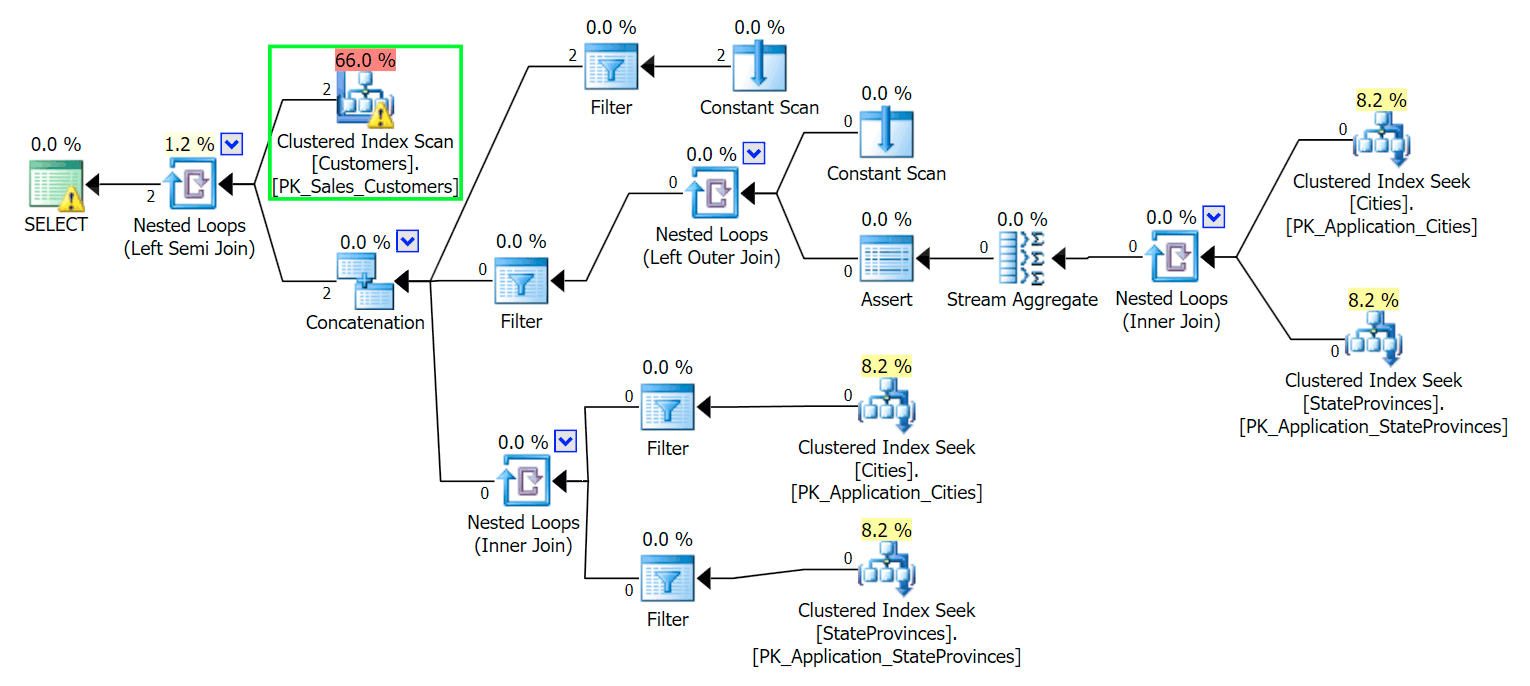
Plan for LIKE '%wildcard%' query

Blecch. To keep our lives a simple, and to make sure we don't chase a bunch of red herrings, let's create a new table with a subset of the columns, and to start we'll just insert those same two rows from above:

CREATE TABLE Sales.CustomersCopy
(
  CustomerID int IDENTITY(1,1) CONSTRAINT PK_CustomersCopy PRIMARY KEY,
  CustomerName         nvarchar(100) NOT NULL,
  DeliveryAddressLine1 nvarchar(60) NOT NULL,
  DeliveryAddressLine2 nvarchar(60)
);
GO
 
INSERT Sales.CustomersCopy
(
  CustomerName,
  DeliveryAddressLine1,
  DeliveryAddressLine2
)
SELECT 
  CustomerName,
  DeliveryAddressLine1,
  DeliveryAddressLine2
FROM Sales.Customers
WHERE DeliveryAddressLine2 LIKE N'%Hudecova%';

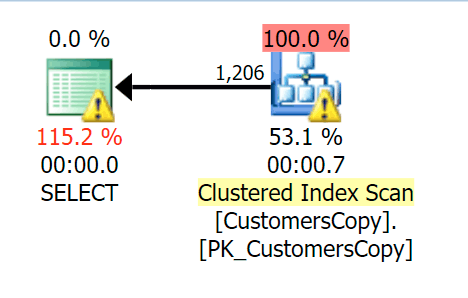
Now, if we run the same query we ran against the main table, we get something a lot more reasonable to look at as a starting point. This is still going to be a scan no matter what we do – if we add an index with DeliveryAddressLine2 as the leading key column, we'll most likely get an index scan, with a key lookup depending on whether the index covers the columns in the query. As is, we get a clustered index scan:
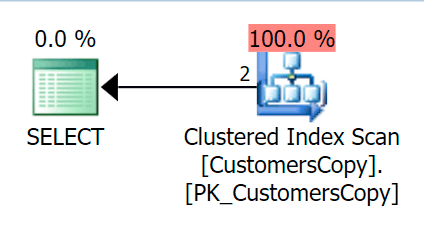
Scan against the Customers copy

Next, let's create a function that will "explode" these address values into fragments. We would expect 1846 Hudecova Crescent, for example, to have the following set of fragments:

  • 1846 Hudecova Crescent
  • 846 Hudecova Crescent
  • 46 Hudecova Crescent
  • 6 Hudecova Crescent
  •  Hudecova Crescent
  • Hudecova Crescent
  • udecova Crescent
  • decova Crescent
  • ecova Crescent
  • cova Crescent
  • ova Crescent
  • va Crescent
  • a Crescent
  •  Crescent
  • Crescent
  • rescent
  • escent
  • scent
  • cent
  • ent
  • nt
  • t

It is fairly trivial to write a function that will produce this output – we just need a recursive CTE that can be used to step through each character throughout the length of the input:

CREATE FUNCTION dbo.CreateStringFragments( @input nvarchar(60) )
RETURNS TABLE WITH SCHEMABINDING
AS
  RETURN 
  (
    WITH x(x) AS 
    (
      SELECT 1 UNION ALL SELECT x+1 FROM x WHERE x < (LEN(@input))
    )
    SELECT Fragment = SUBSTRING(@input, x, LEN(@input)) FROM x
  );
GO
 
SELECT Fragment FROM dbo.CreateStringFragments(N'1846 Hudecova Crescent');
-- same output as above bulleted list

Now, let's create a table that will store all of the address fragments, and which Customer they belong to:

CREATE TABLE Sales.CustomerAddressFragments
(
  CustomerID  int          NOT NULL,
  Fragment    nvarchar(60) NOT NULL,
  CONSTRAINT FK_Customers FOREIGN KEY(CustomerID) REFERENCES Sales.CustomersCopy(CustomerID)
);
 
CREATE CLUSTERED INDEX s_cat ON Sales.CustomerAddressFragments(Fragment, CustomerID);

Then we can populate it like this:

INSERT Sales.CustomerAddressFragments(CustomerID, Fragment)
SELECT c.CustomerID, f.Fragment
  FROM Sales.CustomersCopy AS c
  CROSS APPLY dbo.CreateStringFragments(c.DeliveryAddressLine2) AS f;

For our two values, this inserts 42 rows (one address has 20 characters, and the other has 22). Now our query becomes:

SELECT c.CustomerID, c.DeliveryAddressLine2
  FROM Sales.CustomersCopy AS c
  INNER JOIN Sales.CustomerAddressFragments AS f
    ON  f.CustomerID = c.CustomerID
    AND f.Fragment LIKE N'Hudecova%';

Here is a much nicer plan – two clustered index *seeks* and a nested loops join:
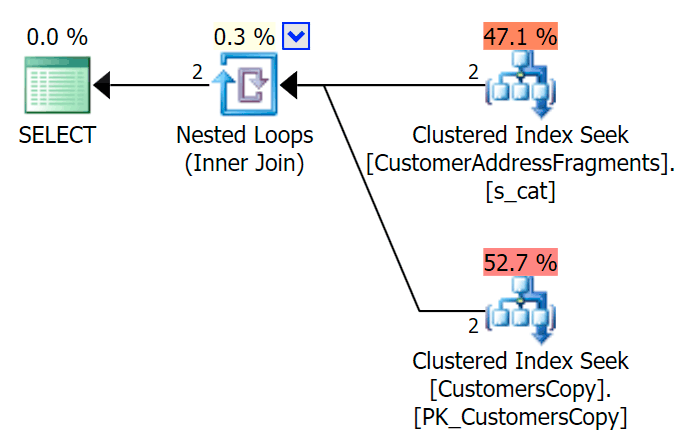
Seeks against customers and address fragments

We can also do this another way, using EXISTS:

SELECT c.CustomerID, c.DeliveryAddressLine2
  FROM Sales.CustomersCopy AS c
  WHERE EXISTS
  (
    SELECT 1 FROM Sales.CustomerAddressFragments
    WHERE CustomerID = c.CustomerID
      AND Fragment LIKE N'Hudecova%'
  );

Here is that plan, which looks on the surface to be more expensive – it chooses to scan the CustomersCopy table. We'll see shortly why this is the better query approach:
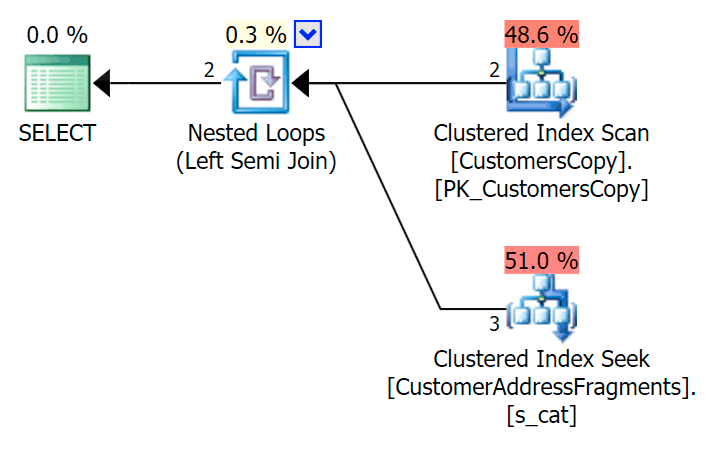
Scan and seek using EXISTS

Now, on this massive data set of 42 rows, the differences seen in duration and I/O are so minuscule they're irrelevant (and in fact, at this small size, the scan against the base table looks cheaper in terms of I/O than the other two plans that use the fragment table):

Metrics against small table

What if we were to populate these tables with a lot more data? My copy of Sales.Customers has 663 rows, so if we cross join that against itself, we'd get somewhere near 440,000 rows. So let's just mash up 400K and generate a much larger table:

TRUNCATE TABLE Sales.CustomerAddressFragments;
DELETE Sales.CustomersCopy;
DBCC FREEPROCCACHE WITH NO_INFOMSGS;
 
INSERT Sales.CustomersCopy WITH (TABLOCKX) (CustomerName, DeliveryAddressLine1, DeliveryAddressLine2)
SELECT TOP (400000) c1.CustomerName, c1.DeliveryAddressLine1, c2.DeliveryAddressLine2
  FROM Sales.Customers c1 CROSS JOIN Sales.Customers c2
  ORDER BY NEWID(); -- fun for distribution
 
-- this will take a bit longer - on my system, ~4 minutes
-- probably because I didn't bother to pre-expand files
INSERT Sales.CustomerAddressFragments WITH (TABLOCKX) (CustomerID, Fragment)
SELECT c.CustomerID, f.Fragment
  FROM Sales.CustomersCopy AS c
  CROSS APPLY dbo.CreateStringFragments(c.DeliveryAddressLine2) AS f;
 
-- repeated for compressed version of the table
-- 7.25 million rows, 278MB (79MB compressed; saving those tests for another day)

Now to compare performance and execution plans given a variety of possible search parameters, I tested the above three queries with these predicates:

Query Predicates
WHERE DeliveryLineAddress2 LIKE … N'%Hudecova%' N'%cova%' N'%ova%' N'%va%'
JOIN … WHERE Fragment LIKE … N'Hudecova%' N'cova%' N'ova%' N'va%'
WHERE EXISTS (… WHERE Fragment LIKE …)

 
As we remove letters from the search pattern, I would expect to see more rows output, and perhaps different strategies chosen by the optimizer. Let's see how it went for each pattern:

    Hudecova%

    For this pattern, the scan was still the same for the LIKE condition; however, with more data, the cost is much higher. The seeks into the fragments table really pay off at this row count (1,206), even with really low estimates. The EXISTS plan adds a distinct sort, which you would expect to add to the cost, though in this case it ends up doing fewer reads:

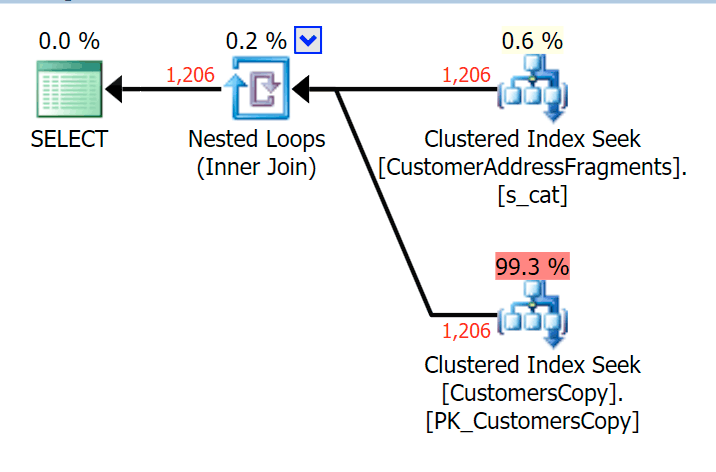
    Hudecova-metrics

    Hudecova-joinPlan for the JOIN to the fragments table
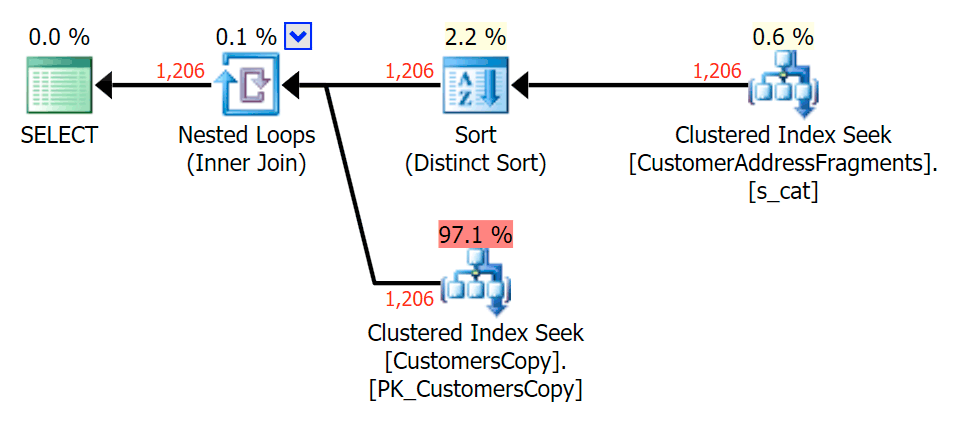
    Hudecova-existsPlan for the EXISTS against the fragments table

    cova%

    As we strip some letters off our predicate, we see the reads actually a bit higher than with the original clustered index scan, and now we over-estimate the rows. Even still, our duration remains significantly lower with both fragment queries; the difference this time is more subtle – both have sorts (only EXISTS is distinct):

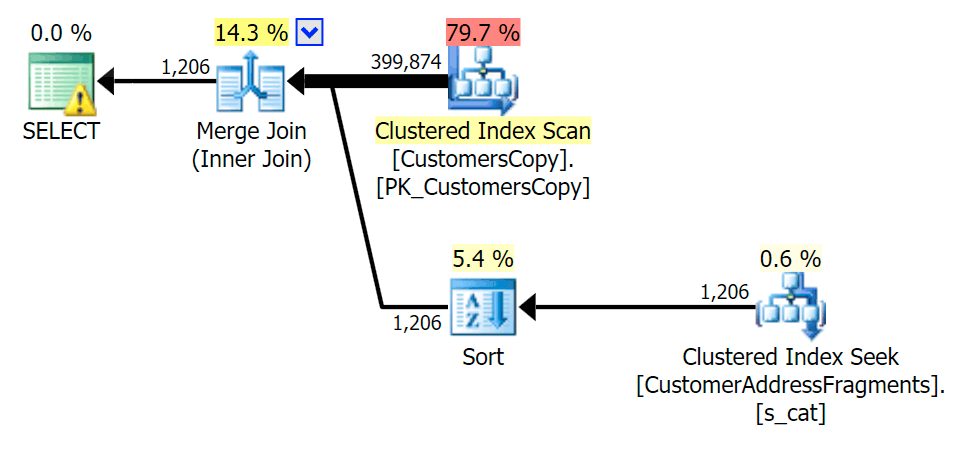
    cova-metrics

    cova-joinPlan for the JOIN to the fragments table
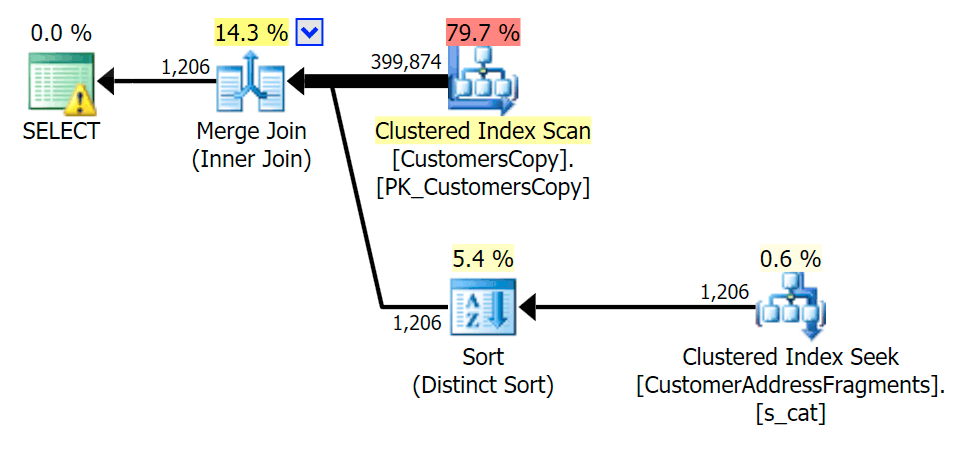
    cova-existsPlan for the EXISTS against the fragments table

    ova%

    Stripping an additional letter didn't change much; though it is worth noting how much the estimated and actual rows jump here – meaning that this may be a common substring pattern. The original LIKE query is still quite a bit slower than the fragment queries.

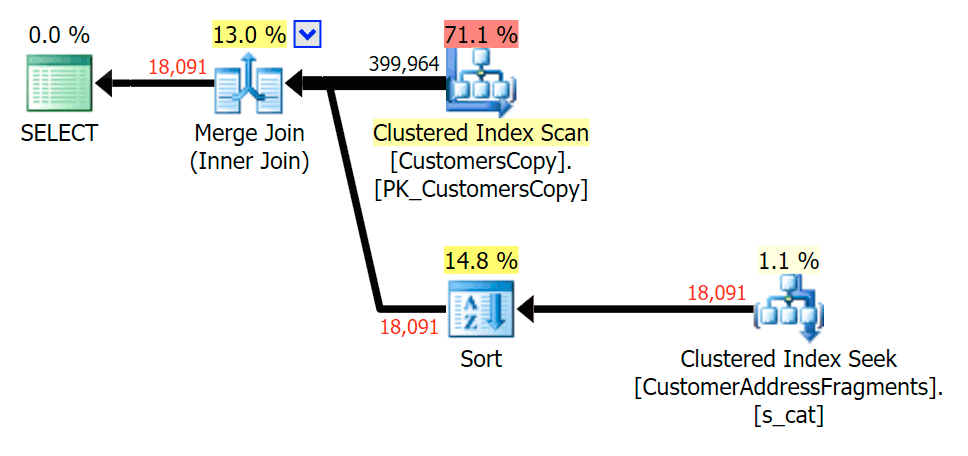
    ova-metrics

    ova-joinPlan for the JOIN to the fragments table
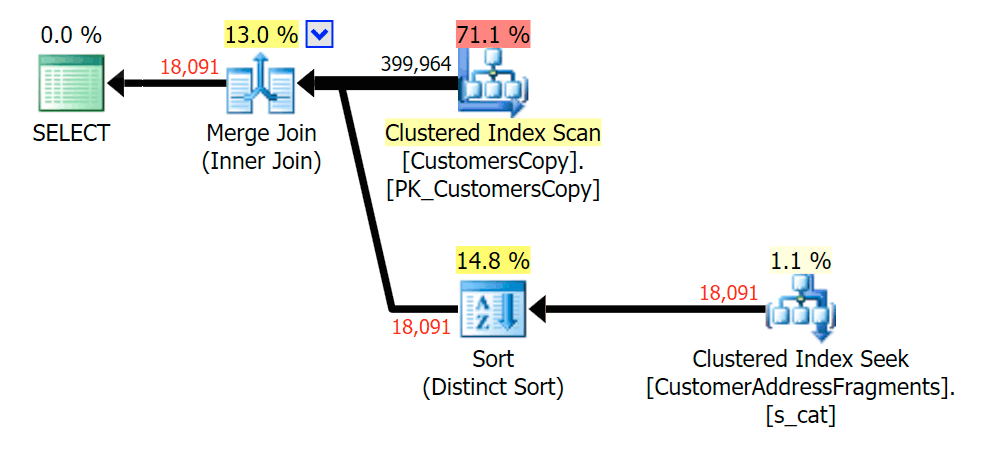
    ova-existsPlan for the EXISTS against the fragments table

    va%

    Down to two letters, this does introduce our first discrepancy. Notice that the JOIN produces more rows than the original query or the EXISTS. Why would that be?

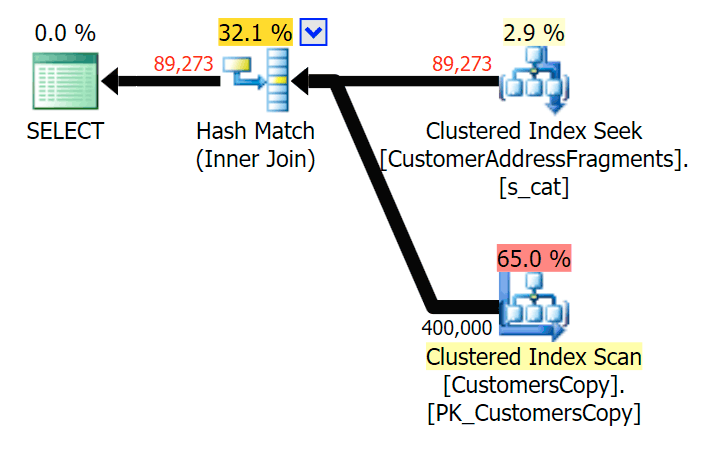
    va-metrics

    va-joinPlan for the JOIN to the fragments table
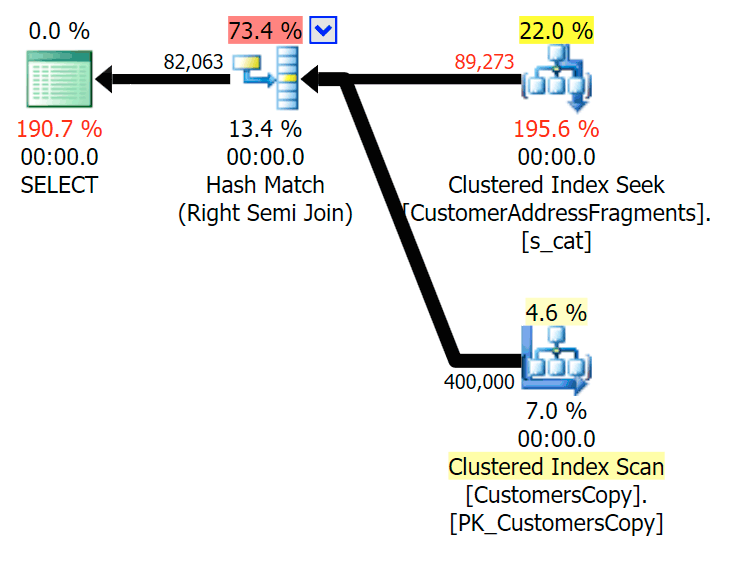
    va-existsPlan for the EXISTS against the fragments table
    We don't have to look far. Remember that there is a fragment starting from each successive character in the original address, which means something like 899 Valentova Road will have two rows in the fragments table that start with va (case sensitivity aside). So you'll match on both Fragment = N'Valentova Road' and Fragment = N'va Road'. I'll save you the searching and provide a single example of many:
    SELECT TOP (2) c.CustomerID, c.DeliveryAddressLine2, f.Fragment
    FROM Sales.CustomersCopy AS c
    INNER JOIN Sales.CustomerAddressFragments AS f
    ON c.CustomerID = f.CustomerID
    WHERE f.Fragment LIKE N'va%'
    AND c.DeliveryAddressLine2 = N'899 Valentova Road'
    AND f.CustomerID = 351;
     
    /*
    CustomerID  DeliveryAddressLine2  Fragment
    ----------  --------------------  --------------
    351         899 Valentova Road    va Road
    351         899 Valentova Road    Valentova Road
    */

    This readily explains why the JOIN produces more rows; if you want to match the output of the original LIKE query, you should use EXISTS. The fact that the correct results can usually also be obtained in a less resource-intensive way is just a bonus. (I'd be nervous to see people choose the JOIN if that were the repeatedly more efficient option – you should always favor correct results over worrying about performance.)

Summary

It's clear that in this specific case – with an address column of nvarchar(60) and a max length of 26 characters – breaking up each address into fragments can bring some relief to otherwise expensive "leading wildcard" searches. The better payoff seems to happen when the search pattern is larger and, as a result, more unique. I've also demonstrated why EXISTS is better in scenarios where multiple matches are possible – with a JOIN, you will get redundant output unless you add some "greatest n per group" logic.

Caveats

I will be the first to admit that this solution is imperfect, incomplete, and not thoroughly fleshed out:

  • You'll need to keep the fragments table synchronized with the base table using triggers – simplest would be for inserts and updates, delete all rows for those customers and re-insert them, and for deletes obviously remove the rows from the fragments table.
  • As mentioned, this solution worked better for this specific data size, and may not do so well for other string lengths. It would warrant further testing to ensure it is appropriate for your column size, average value length, and typical search parameter length.
  • Since we will have a lot of copies of fragments like "Crescent" and "Street" (never mind all the same or similar street names and house numbers), could further normalize it by storing each unique fragment in a fragments table, and then yet another table that acts as a many-to-many junction table. That would be a lot more cumbersome to set up, and I'm not quite sure there would be much to gain.
  • I didn't fully investigate page compression yet, it seems that – at least in theory – this could provide some benefit. I also have a feeling a columnstore implementation may be beneficial in some cases, too.

Anyway, all that said, I just wanted to share it as a developing idea, and solicit any feedback on its practicality for specific use cases. I can dig into more specifics for a future post if you can let me know what aspects of this solution interest you.

The post One way to get an index seek for a leading %wildcard appeared first on SQLPerformance.com.
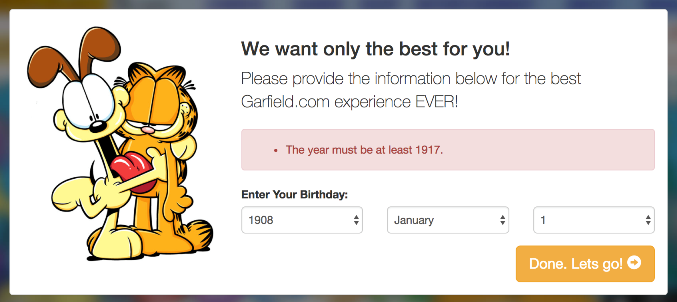
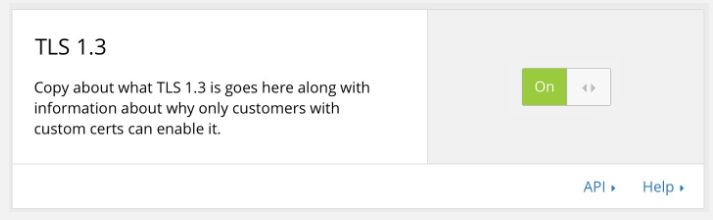
08 Feb 18:37

Migration from SQL Server to Azure SQL Database Using Transactional Replication

by Dimitri Furman

Written by: Josh Gnanayutham, Program Manager, SQL Engineering

Introduction

As users are increasingly moving their data to the Azure cloud, migration from SQL Server to Azure SQL Database is a common task. There are many migration methods and they each have their pros and cons. This blog post will explore how to migrate your database using Transaction Replication. It will also cover the limitations.

As a prerequisite to this article, we recommend looking at the Azure SQL Database documentation on migration, which summarizes the different options you have. This will help determine if Transactional Replication is a good option for you. Keep in mind that you should refer to the Azure SQL Database documentation for the most up to date information.

Transactional replication is useful for migration when

The following are the major tasks associated with migration.

  1. Before migration, ensure that the database is compatible with Azure SQL Database. Not all SQL Server features are supported in Azure SQL Database.
  2. Provision and Configure Azure Resources.
  3. Rehearse migration steps in a test environment to ensure the migration will go smoothly.
  4. Test the migrated Azure SQL Database to see if it performs as expected.
  5. Operationalize migrated database.

This document will focus on step 3, and the aspects of migration which are unique to Transactional Replication. We recommend you use the steps from the blog post on Migrating from SQL Server to Azure SQL Database using Bacpac Files to prepare your database for migration. It will guide you through database compatibility and the provisioning and configuration of Azure resources (Steps 1 and 2). Note that regarding compatibility, Transactional Replication is a little bit more flexible than migration with bacpac files. For a bacpac to be used, the entire database must be compatible with Azure SQL Database, and not contain any broken object references. With Transaction Replication, you can omit incompatible or broken parts of the database if they are unnecessary. This can be done when you define your publication.

About Transactional Replication

Transactional replication involves three main components. They are the publisher, the distributor, and the subscriber. Transactional replication starts with a snapshot of the original database. After the initial snapshot is created, all changes to published objects and data in the original database (the publisher) are propagated to the new database (the subscriber) by the distributor, guaranteeing transactional consistency.

With transactional replication, you will suffer little to no downtime, assuming you’re using concurrent snapshots. With concurrent snapshots, you can continue using your original database while the snapshot is being created. After this, transactional replication will keep the subscriber up to date with minimal latency, so you can switch to using your new database in the cloud whenever you want. Note that in the case of highly intensive workloads, downtime may still be advised for snapshot creation, in order to prevent resource contention from affecting the application.

There are some features that Transactional Replication does not support when the subscriber is in Azure SQL Database. If you are using any unsupported features, Transactional Replication may not work. For more details on Transactional Replication, you can look at the full documentation. documentation.

Migrate the Database

After you’ve determined that your database is compatible with Azure SQL Database and that Transactional Replication fits your needs, you can begin migration.

The basic migration tasks are as follows:

  1. Set up distribution
  2. Create publication
  3. Create subscription

In the following sections, we’ll walk through each of these steps in more detail.

Set Up Distribution

The distributor is responsible for controlling the processes which move your data between servers. When you set up distribution, SQL will create a distribution database. Each publisher needs to be tied to a distribution database. The distribution database holds the metadata for each associated publication and data on the progress of each replication. For transactional replication, it will hold all the transactions than need to be executed on the subscriber.

To set up distribution you will:

  • Configure Distribution
  • Select snapshot folder
  • Grant publisher access to the distributor server
Using SQL Server Management Studio (SSMS)
  1. Connect to server you are replicating in Object Explorer
  2. Right click on the Replication folder and select Configure Distribution
  3. On the Distributor page, select “Server Name” will act as its own distributor. Then click next. Note that using the publisher as its own distributor may cause a performance impact on the server, depending on the amount of data you’re replicating and on the server resource headroom. If the performance impact is unacceptable, you can use a remote distributor, but it will add complexity to management and administration. The distributor must have network access to your Azure SQL Database. This usually means allowing outbound internet access on the distributor. However, if you have an ExpressRoute link to the target Azure region, internet access is not necessary.
  4. If the SQL Agent isn’t running on the SQL Agent Start page, select Yes to configure the SQL Agent to run automatically.
  5. Select a Snapshot folder to store your initial snapshot. Creating a snapshot involves taking a BCP copy of every replicated table. Make sure the location you choose has enough space for this. By default, snapshot data is uncompressed, even if you use data compression in the database. While using compressed snapshots is possible, that carries significant limitations.
  6. Use the defaults on the remaining pages of the wizard.
  7. Click Finish to enable the distribution.
  8. After this you’ll have to give the publisher access to the distributor. If you are using a remote distributor located on a different server from that of your publisher, you’ll need to set up a password.
Using Transact-SQL
  1. Execute sp_get_distributor to determine if the server is already configured as a Distributor. If the value of installed in the result set is 0, execute sp_adddistributor at the Distributor on the master database. Specify the name of the distribution database for @database.
  2. At the Distributor, which is also the Publisher if you’re using local distribution, execute sp_adddistpublisher, specifying the folder that will be used as default snapshot folder for @working_directory. If you are using a remote distributor, the steps will be a little different. Note that the distribution server must have network access to your Azure SQL Database.
  3. At the Publisher, execute sp_replicationdboption. Specify the database being published for @dbname, the type of replication for @optname (publish), and a value of true for @value.
More Details

For more details about configuring Distribution, go here.

Create Publication

The publisher is the database where all data for migration originates. Within the publisher, there can be many publications, though in the context of migration to Azure SQL Database, only one publication is typically used. These publications contain articles which map to database objects, including tables, that need to be replicated. Depending on how you define the publication and articles, you can replicate either all or a part of your database. Note that for each table, it is possible to replicate just a subset of rows by defining a filter for the corresponding article.

Using SQL Server Management Studio (SSMS)
  1. Connect to the Publisher in SSMS, and expand the server node.
  2. Expand the Replication folder and right-click the Local Publications folder.
  3. Click New Publication. If your server is not configured as a publisher, you will be prompted to do that.
  4. Select your publication database, then click next.
  5. Select Transactional Publication, then click next.
  6. Select the articles you want to publish, then click next. You can publish everything, or select specific tables.
  7. You have the option to filter rows, this step is not necessary, click next. You can use this to filter out unnecessary data.
  8. Select when you would like to create a snapshot. In this blog, we will select Immediately for the sake of simplicity. Then click next. The snapshot is for the initial synchronization between the publisher and subscriber. You can also schedule your snapshot creation for later.
  9. Click Security Settings near the Snapshot Agent box. Select Run under the following Windows account and enter your credentials. Under Connect to the Publisher, select Impersonate. Click ok to confirm and return to the original Agent Security page. Check the checkbox at the bottom and click next.
  10. Select Create the publication and then click next
  11. Name the publication and you’re done.
Using Transact-SQL
  1. Execute sp_replicationdboption (Transact-SQL) to enable publication of the current database using transactional replication.
  2. Determine whether a Log Reader Agent job exists for the publication database. If a Log Reader Agent job exists for the publication database, proceed to step 3. If you are unsure whether a Log Reader Agent job exists for a published database, execute sp_helplogreader_agent (Transact-SQL) at the Publisher on the publication database. If the result set is empty, create a Log Reader Agent job. At the Publisher, execute sp_addlogreader_agent (Transact-SQL). Specify the Microsoft Windows credentials under which the agent runs for @job_name and @password. If the agent will use SQL Server Authentication when connecting to the Publisher, you must also specify a value of 0 for @publisher_security_mode and the Microsoft SQL Server login information for @publisher_login and @publisher_password.
  3. Execute sp_addpublication (Transact-SQL). Specify a publication name for @publication, and, for the @repl_freq parameter, specify a value of continuous for a transactional publication.
  4. Execute sp_addpublication_snapshot (Transact-SQL). Specify the publication name used in step 3 for @publication and the Windows credentials under which the Snapshot Agent runs for @snapshot_job_name and @password. This creates a Snapshot Agent job for the publication. When configuring a Publisher with a remote Distributor, the values supplied for all parameters, including job_login and job_password, are sent to the Distributor as plain text. You should encrypt the connection between the Publisher and its remote Distributor before executing this stored procedure.
  5. Add articles to the publication. For more information, see Define an Article.
  6. Start the Snapshot Agent job to generate the initial snapshot for this publication. For more information, see Create and Apply the Initial Snapshot.
More Details

You can see more details on creating your Publication here.

Create Subscription

In a replication topology, the subscriber is the server which receives data and transactions from the publication. Each publication can have many subscriptions, though in the context of migration to Azure SQL Database, only one subscription is typically used.

Using SQL Server Management Studio (SSMS)
  1. Connect to the Publisher in SSMS and expand the server node.
  2. Expand the Replication folder, and then expand the Local Publications folder.
  3. Right-click your publication and click New Subscriptions.
  4. Select your publication and click next. Select Run at Distributor and click next.
  5. Only push subscriptions are supported for Azure SQL Database.
  6. Click Add Subscriber and connect to the Azure SQL Database logical server you are migrating to.
  7. Select the Subscription Database, this is where the data will be replicated. Note that this database is expected to have been created in advance, with an appropriate edition and service level. Then click next.
  8. Click and select the option to connect to the subscriber using SQL Server login. Enter the credentials. Connect to the Distributor by Impersonating. Then click next. In the context of replication, you can only connect to Azure SQL Database using SQL Server Authentication.
  9. Use the defaults on the remaining pages of the wizard.
  10. Click Finish to create the subscription.
Using Transact-SQL
  1. Do the following at the Publisher on the publication database.
  2. Execute sp_helppublication to see if push subscriptions are enabled. If the value of allow_push is 1, push subscriptions are supported. If the value of allow_push is 0, execute sp_changepublication, specifying allow_push for @property and true for @value.
  3. Execute sp_addsubscription. Specify the @publication, @subscriber and @destination_db. Specify a value of push for @subscription_type.
  4. Execute sp_addpushsubscription_agent. Specify the @subscriber, @subscriber_db, and @publication parameters. The SQL Server credentials under which the Distribution Agent at the Distributor runs for @job_login and @job_password. When creating a push subscription at a Publisher with a remote Distributor, the values supplied for all parameters, including job_login and job_password, are sent to the Distributor as plain text. You should encrypt the connection between the Publisher and its remote Distributor before executing this stored procedure. For more information, see Enable Encrypted Connections to the Database Engine (SQL Server Configuration Manager).
More Details

You can see more details on setting up your Subscription here.

After Migration

After migration you have a few more things to do:

  • Verify successful migration
  • End Replication

End Replication

The easiest way to end replication is to simply delete the publication. When you delete the publication all subscriptions are automatically deleted.

Using SQL Server Management Studio (SSMS)
  1. Connect to the Publisher in SSMS and expand the server node.
  2. Expand the Replication folder, and then expand the Local Publications folder.
  3. Right-click your publication and click Delete.
  4. Click Yes.
Using Transact-SQL
  1. Do the following at the Publisher on the publication database.
  2. Execute sp_droppublication at the Publisher on the publication database. Specify the @publicationDB and @publication parameters.

Verify Successful Migration

After migration is complete, verification is a vital step. You should ensure that your data was correctly and completely migrated before you start using your new database. See the verification section of this blog for some quick sample queries to help you verify success. To be more thorough you can use data compare in SSDT, but this will be time consuming.

Limitations

There are some limitations to when transactional replication can be used for migration. For complete documentation go here. The following configurations are supported:

  • Only push subscriptions are supported.
  • The distribution and replication agents cannot be on Azure SQL Database.
  • Only one-way transactional replication is supported. Peer-to-peer, bi-directional and merge are not supported.
  • SQL Server 2012 or later

Conclusion

In this blog post, we covered migration from on premises SQL Server to Azure SQL Database using transactional replication. This is a common migration scenario, especially in cases where minimal downtime is required. This blog post will be useful to organizations preparing to migrate to Azure SQL Database.

08 Feb 18:37

Introducing SDU Tools: Free T-SQL Tools for DBAs and Developers

by Greg Low

This blog has moved! You can find this content at the following new location:

http://blog.greglow.com/index.php/2017/02/06/introducing-sdu-tools-free-t-sql-tools-for-dbas-and-developers/

08 Feb 18:35

Cybersecurity Weather Report

by David Schlesinger

This will be brief, as befits a weather report. However, it will need to be a little bit more specific than the typical TV weathercast. First, beware of growing internet storm clouds approaching. These storms are caused by the heating up of state-sponsored hacking groups. Many nations are realizing that their infrastructure is poorly protected, […]

The post Cybersecurity Weather Report appeared first on DATAVERSITY.

08 Feb 18:35

Would You Still Love Linux If Windows Was Free?

by SQLAndy

How often is cost the deciding factor in the case of Windows vs Linux? And what if cost wasn’t a factor (noting that Linux isn’t “free” if you’re paying a support agreement)? If you look at cloud offerings Linux has an advantage in pricing because its, if not free, considerably cheaper. I wonder how many people go with Linux because of that? And who can fault them if so?

I wrote about it for SQLServerCentral, we’ll see how that discussion evolves.


08 Feb 18:35

ODBC Driver 13.1 for Linux Released

by SQL Server Team

This post is authored by Meet Bhagdev, Program Manager, Microsoft

Hi all. We are delighted to share the Production Ready Release of the Microsoft ODBC Driver 13.1 for Linux (Ubuntu, RedHat and SUSE). The new driver enables access to SQL Server, Azure SQL Database and Azure SQL DW from any C/C++ application on Linux.

Added

  • BCP API support
    • You can use functions through the ODBC driver as described here on Linux.
  • Support for user-defined KeyStoreProvider for Always Encrypted
    • You can now user-defined/created AE Column Master Key keystore providers. Check out code samples and more information here.
  • Ubuntu 16.10 support
    • Developed a package Ubuntu 16.10 for an apt-get experience.
  • Dependency on the platform unixODBC Driver Manager instead of the custom unixODBC-utf16 Driver Manager
    • This avoids conflicts with applications/software that depends on the platform unixODBC Driver Manager.

Fixed

  • msqobcsql.h (Connect issues 3115331, 3114970)
    • Missing definitions for AE, BCP and SQL Server specific types were added
  • TRUST_SERVER_CERTIFICATE connection attribute is always yes (Connect 3116639)
    • Setting the TRUST_SERVER_CERTIFICATE connection attribute to anything other than yes failed to set the attribute value. This has been corrected.
  • Fixed Connect issue 2693027 — Memory Leak
    • We detected this issue independently of the bug report using valgrind. The memory leak has been fixed.
  • Driver failure when connecting with more than 1,024 handles
    • Switched away from libio select. Driver now supports (theoretical) handle limit of 64K or platform max.
  • Intermittent commlinkfailure when using Azure DW
    • In some high-latency scenarios over an encrypted channel, the driver could fail unexpectedly. This has been resolved.

Install the ODBC Driver for Linux on Ubuntu 15.10

sudo su
curl https://packages.microsoft.com/keys/microsoft.asc | apt-key add –
curl https://packages.microsoft.com/config/ubuntu/15.10/prod.list > /etc/apt/sources.list.d/mssql-release.list
exit
sudo apt-get update
sudo ACCEPT_EULA=Y apt-get install msodbcsql=13.1.4.0-1
sudo apt-get install unixodbc-dev

Install the ODBC Driver for Linux on Ubuntu 16.04

sudo su
curl https://packages.microsoft.com/keys/microsoft.asc | apt-key add –
curl https://packages.microsoft.com/config/ubuntu/16.04/prod.list > /etc/apt/sources.list.d/mssql-release.list
exit
sudo apt-get update
sudo ACCEPT_EULA=Y apt-get install msodbcsql=13.1.4.0-1
sudo apt-get install unixodbc-dev

Install the ODBC Driver for Linux on Ubuntu 16.10

sudo su
curl https://packages.microsoft.com/keys/microsoft.asc | apt-key add –
curl https://packages.microsoft.com/config/ubuntu/16.10/prod.list > /etc/apt/sources.list.d/mssql-release.list
exit
sudo apt-get update
sudo ACCEPT_EULA=Y apt-get install msodbcsql=13.1.4.0-1
sudo apt-get install unixodbc-dev

Install the ODBC Driver for Linux on RedHat 6

sudo su
curl https://packages.microsoft.com/config/rhel/6/prod.repo > /etc/yum.repos.d/mssql-release.repo
exit
sudo yum remove unixODBC-utf16 unixODBC-utf16-devel #to avoid conflicts
sudo ACCEPT_EULA=Y yum install msodbcsql-13.1.4.0-1
sudo yum install unixODBC-devel

Install the ODBC Driver for Linux on RedHat 7

sudo su
curl https://packages.microsoft.com/config/rhel/7/prod.repo > /etc/yum.repos.d/mssql-release.repo
exit
sudo yum remove unixODBC-utf16 unixODBC-utf16-devel #to avoid conflicts
sudo ACCEPT_EULA=Y yum install msodbcsql-13.1.4.0-1
sudo yum install unixODBC-devel

Install the ODBC Driver for SLES 12

sudo su
zypper ar https://packages.microsoft.com/config/sles/12/prod.repo
zypper update
exit
sudo ACCEPT_EULA=Y zypper install msodbcsql-13.1.4.0-1
sudo zypper install unixODBC-devel

Try Our Sample

Once you install the driver that runs on a supported Linux distro, you can use this C sample to connect to SQL Server/Azure SQL DB/Azure SQL DW. To download the sample and get started, follow these steps:

wget “https://raw.githubusercontent.com/Microsoft/sql-server-samples/master/samples/tutorials/c/linux/sample_c_linux.c”
gcc sample_c_linux.c -o sample_c_linux -lodbc -w #make sure you change the servername, username and password in the connections string
./sample_c_linux

If you installed the driver using the manual instructions found here, you will have to manually uninstall the ODBC Driver and the unixODBC Driver Manager to use the deb/rpm packages. If you have any questions on how to manually uninstall, feel free to leave a comment below.

Please fill bugs/questions/issues on our Issues page. We welcome contributions/questions/issues of any kind. Happy programming!

Meet Bhagdev (meetb@microsoft.com)

clip_image002[4]

08 Feb 18:34

Developers without Borders: The Global Stack Overflow Network

by David Robinson

A while back I encountered a developer who shared a story of a positive experience on Stack Overflow. He'd asked a question late one Sunday on Labor Day weekend, and been delighted that he'd quickly gotten multiple responses. He said he was impressed that someone else in San Francisco was also "burning the midnight oil," and noted it as a testament to the work ethic in Silicon Valley.

It was great that he'd had a positive experience, but he'd made one incorrect assumption: there was no reason to think the users who'd answered his question were also staying up late in Silicon Valley. They could be halfway around the world, where it wasn't midnight on a holiday weekend but rather a normal Monday afternoon. Indeed, some analysis of typical answering patterns on late Labor Day Sundays indicates that was almost certainly the case!

It's easy in the American tech environment to forget that Stack Overflow is a global community, and that it couldn't have been successful otherwise. Since its start, Stack Overflow has let questions and answers pass fluidly across national borders, creating a worldwide network of programming knowledge. I thought I'd share some analyses of how global Stack Overflow is, and how we've benefitted from it.

Stack Overflow around the world

What countries ask questions and provide answers on Stack Overflow?

Stack Overflow is an American company, but only 29.4% of its questions and answers have been contributed from within the US. Countries such as India, the UK, and Germany make up the next largest contributors, but about a quarter of questions and answers are contributed from the 200+ countries that each have a small (<1%) share. (The relative proportions are pretty similar if you look just at questions asked or answers provided.)

The Stack Overflow community has always been open to the world. It has gotten more global over its history, with the United States and the United Kingdom contributing a smaller fraction of its questions and answers each year, and India and smaller countries contributing a larger portion.

Questions across borders

What does a typical weekday look like for Stack Overflow Q&A? There are about 8,000 questions asked, and 9,500 answers provided. These come from 150 separate countries, and 84.7% of answers come from a different country than the asker.

What does that global exchange of knowledge look like?

(You can rotate or resize the globe with your mouse). Each one of these arcs represents one user getting help from another. I've heard programmers refer to Stack Overflow as their "external brain"; these are its neurons.

(Incidentally, we took several measures to anonymize the interactive visualization above to prevent the possibility of users being matched to locations, including, but not limited to, fuzzing locations and removing ones without a minimum number of distinct users.)

So if I ask a question from my office in the US, who might answer it?

  • There's a 64.1% chance the answer would come from outside the US
  • This depends a bit on what programming language you ask about. For example, PHP questions asked in the US have a 75% chance of being answered from outside the US, while R questions have only a 54.9% chance.
  • Questions asked from non-US countries are even more likely to be answered across borders; for example, a question asked in the UK has a 89.7% chance of the answer coming from outside the UK.

It makes sense that questions flow freely across national borders, but you might expect time zones to make some difference. However, it turns out that's a small factor in who answers your questions.

Just 16.9% of answers come from a user in the same time zone as the person who asked it, and of ones that don't, a user is almost as likely to get an answer from someone eleven hours away as someone who is three hours away. This is both because answers don't necessarily come immediately, and because even immediate answers may come from someone working on a different schedule (for example, a question asked in the morning in New York could get answered in the evening in Mumbai).

Seven countries

I've wanted to write about the global nature of Stack Overflow's user base for a while, but this post has a particular motivation. Last Friday, President Trump issued an executive order banning immigration to the United States from seven countries: Iraq, Iran, Syria, Libya, Sudan, Somalia, and Yemen.

Many leaders of tech companies have expressed their outrage. Alongside many other concerns, most recognized the enormous contributions of immigrants from these countries to the American tech industry. This includes our CEO Joel Spolsky, who pointed out that developers in these seven countries make up a valued part of our userbase. I'd like to share more about how they fit in.

In just the last week about 125,000 developers in these seven countries visited Stack Overflow. (If you're wondering, they visit a bit more Matlab, C#, and Android than the average country, and less R and Linux). This isn't counting the many developers from these countries who have since emigrated elsewhere.

Users from these seven countries have written over 225,000 posts on Stack Overflow, including over 110,000 answers to other users' questions.

Questions and answers from these seven countries have, in combination, been visited over 500 million times. If I made an interactive globe showing all the ways developers in these countries have helped others through the knowledge they contributed, it would crash your browser.

Conclusion

The point of this post is not to focus on these seven countries; there are hundreds of countries that make Stack Overflow the powerful resource that it is. It's to share just how much we owe to the global community of developers, and to celebrate what's possible when a community is built on cooperation and trust across borders.

If you're a software developer, you've likely gotten help from questions and answers from these seven countries, even if you didn't know it. You may have products and open source tools developed by immigrants from them. If you've ever used the Stack Exchange mobile app, you've benefitted directly from the work of a former Iranian refugee.

Supporting that kind of global cooperation is what Stack Overflow is all about.

08 Feb 18:34

What Programming Languages Are Used Most on Weekends?

by Julia Silge

For me, the weekends are mostly about spending time with my family, reading for leisure, and working on the open-source projects I am involved in. These weekend projects overlap with the work that I do in my day job here at Stack Overflow, but are not exactly the same. Many developers tinker with side projects for learning or career development (or just for fun!) and at Stack Overflow, we support all types of technologies, from professional to hobbyist. Whenever people are working, we're available to answer their questions. But what languages tend to be asked about on weekends, as opposed to weekdays?

Let's use our public StackLite dataset on Kaggle to explore differences between questions that are posted on weekdays and weekends. This dataset is available for anyone to analyze; you can use a Kaggle Kernel to get started on your own question about Stack Overflow questions and tags.

Comparing tags

For this analysis, we will use non-deleted questions and tags used on more than 10,000 questions. We defined weekends using UTC dates, which may not exactly overlap the weekend for all users. Overall, this includes 10,451,274 questions on weekdays and 2,132,073 questions on weekends. The difference in number there is mostly due to people largely using Stack Overflow for their jobs on weekdays, and we see this pattern both in questions posted and traffic to our site.

Because of this weekday/weekend pattern, we're not interested in whether tags were busier on weekends than weekdays; basically all tags are busier on weekdays. Instead, let's explore which tags made up a larger share of weekend questions than they did of weekday questions, and vice versa.

Which question tags have the biggest difference in relative frequency?

comparing weekends and weekdays

To explain this a bit more, let's look at some numbers. The programming language Haskell makes up 0.365% of weekend questions in this dataset, but only 0.21% of weekday questions, showing it is unusually popular on weekends. Sharepoint makes up 0.0683% of weekend questions, and 0.188% of weekday questions, showing it is more often used on weekdays.

It brings me great delight that the functional programming language Haskell leads up the weekend-shifted technologies, because this is basically me:

Haskell cat

I haven't learned Haskell. But kudos to all of you who are using your weekends to do so! And now enjoy this joke about Haskell, which is a language popular among academics and mathematicians but not typically used in corporate environments.

Let's make some other observations!

  • We see some low-level technologies are popular on weekends, such as C, C++, pointers, and assembly, as well as tags related to math, such as algorithm, recursion, and (of course) math.
  • Heroku and Meteor are app platforms often used for rapid prototyping, which may suggest they are being used for weekend hobbyist projects.
  • Many of the weekday-shifted technologies are connected to Microsoft, including tags related to Excel, SQL Server, VBA, and T-SQL. Others include enterprise technologies such as Oracle.

We can also visualize these relationships by comparing the total number of questions to the relative frequencies.

weekday weekend scatterplot

Tags that are further to the right in this plot (JavaScript, Java, C#, PHP, etc.) have more questions asked about them, and tags that are further to the left have fewer questions asked about them. Tags that appear close to the dashed line have about an equal share of weekend questions as weekday questions, and tags that are farthest from the dashed line exhibit the largest weekend/weekday differences.

We can see again that most of the popular tags that are weekday-shifted are connected to Microsoft (C#, ASP.NET, SQL Server, Excel, VBA) and many of the weekend-shifted tags include technologies like C and C++, as well as newer languages such as Swift and Node.js.

Working for the weekend

We can also use this dataset to examine how developers have changed how they use these technologies over time. We can use modeling to find the tags whose weekend proportion (the percentage of questions that are asked on the weekend) has changed the most over time. For tags with more than 20,000 questions, which ones are being posted about less on weekends now compared to the past?

decreasing

We see tags here like Ruby on Rails and Scala that developers used at a higher rate on weekends several years ago, but now use at a lower rate on weekends and more on weekdays. These technologies were more weekend-oriented in the past, but are now proportionally part of more developers' weekday work lives. The version control system SVN also decreased in weekend use over these years; most likely the advent of GitHub (launched in 2008) has led to fewer people using SVN to manage code for personal weekend projects.

increasing

If we look for the tags that have increased the most in weekend activity, we see the game engine Unity3D, as well as a number of tags used for building mobile apps. It looks like developers are designing more games and apps on the weekends now than in previous years. A good way to spend a weekend!

We used openly accessible data to do this analysis, and look forward to seeing what other developers in our community may find by exploring the data products that we make available. We on the Data Team use datasets like this one to answer diverse questions about understanding, hiring, and engaging with developers. To see how we can solve your problems using data and analysis, learn more about Developer Insights at Stack Overflow.