Shared posts

11 Mar 18:00

Editor's Soapbox: The Billable Hour

by Remy Porter

For every line of code that ends up in software the general public sees or interacts with, for every line in your Snapchats and Battlezone: Call of Honor Duty Warfare, there are a thousand lines of code written to handle a supply chain processing rule that only applies to one warehouse on alternating Thursdays, but changes next month thanks to a union negotiation. Or it’s a software package that keeps track of every scale owned by a company and reminds people to calibrate them. Or a data-pump that pulls records out of one off-the-shelf silo and pushes them into another.

That’s the “iceberg” of software development. In terms of sheer quantity, most software is written below the waterline, deep in the bowels of companies that don’t sell software, but need it anyway. That’s the world of internal software development.

And internal software development, in-house software shops, have a problem. Well, they have lots of problems, but we’re going to focus on one today: Internal Billing and the Billable Hour.

At a first pass, internal billing makes sense. If you are a widget manufacturer, then you want the entire company aligned with that goal. If you buy raw materials, those raw materials are going into widgets. If you pay laborers, their labor should be going into making widgets. If you buy capital assets, they should be things like widget-stamping machines.

A person using a computer and a calculator at the same time for some insane, stock-photo related reason

But you can’t just build widgets. Your workers need to organize via email. The new Widget-Stamper 9000 needs network connectivity, so you need network drops and routers and switches, which in turn need regular maintenance. This is, in pointy-haired-boss speak, “overhead”. You need it, but it doesn’t directly make widgets. It’s a cost center.

So what do large companies do? Well, they take all those “non-productive” activities and shuffle them off into their own departments, usually in a “corporate SBU”. Then all the departments doing “real” work get a budget to spend on those “cost centers”. And thus, internal billing is born.

Each employee needs an email account. Let’s assign that a cost, a rough—sometimes very rough—estimate of the total cost of managing the email account. Our corporate IT department will charge $20/yr per employee to cover the storage, configuration, management, and helpdesk support associated with their email account—and so on through the list of IT-related goods and services. Now the idea is that individual departments know their IT needs better than anyone else. By putting them in control of their IT budgets, they can spend their money wisely.

If you’re a widget-making company, you view software and IT support as an overhead cost, and recognize that you only have the capacity to pursue a certain number of IT projects, this makes perfect sense. Budgets and billing create a supply/demand relationship, and they give corporate the ability to cut overhead costs by controlling budgets. (Of course, this is all founded on the faulty assumption that in-house software development is simply overhead, but let’s set that aside for now.)

The problems start when internal billing meets software development, usually through the interface of the “billable hour”. The combination of these factors creates a situation where people who are ostensibly co-workers are locked into a toxic client/vendor relationship. The IT department is usually in a disadvantageous negotiating position, often competing against external vendors for a business department’s IT budget. Treating corporate IT as the preferred vendor isn’t all sunshine and roses for the business, either. There are definitely cases where external vendors are better suited to solve certain problems.

Putting IT resources on a billable hours system introduces a slew of bizarre side effects. For one thing, hours have to be tracked. That overhead might be relatively small, but it’s a cost. “Idling” becomes a serious concern. If developers aren’t assigned to billable projects, the IT department as a whole starts looking like it’s being non-productive. Practices like refactoring have to be carefully concealed, because business units aren’t going to pay for that.

Spending more billable hours on a project than estimated throws budgets out of whack. This forces developers into “adaptive strategies”. For example: padding estimates. If you can get an extremely padded estimate, or can get a long-running project into a steady-state where no one’s looking too closely at the charges, you can treat these as “banks”. A project starts running over your estimate? Start charging that work against a project that has some spare time.

Of course, that makes it impossible to know how much time was actually spent on a project, so forget about using that for process improvement later. It also makes every project more expensive, driving up the costs of internal development. This drives business users to seek external solutions, spending their IT budget outside of the company, or worse: to find workarounds. Workarounds like maybe just building a big complicated Excel spreadsheet with macros in it.

This isn’t even always restricted to hourly charges, either. I saw one organization that had a charge-back rate of $10,000/yr for a SQL Server database. That wasn’t licensing or hardware, that was just to create a new database on an existing instance of SQL Server. The result? Pretty much no business unit had a working test environment, and they’d often stack four or five different applications into the same database. Rarely, they’d use schemas to organize their tables, but usually you’d have tables like: Users, Users_1, UsersNew, UsersWidgetsoft, ___Users.

Forget about upgrades, even if they’re required. Short of making organization-wide modernization a capital project, no department or business unit is going to blow their IT budget on upgrading software that already works. For example, Microsoft still supports the VB6 runtime, but hasn’t supported the VB6 development environment since 2008. So, when the users say, “We need to add $X to the application,” IT has to respond, “We can’t add $X unless we do a complete rewrite, because we can’t support it in the state it’s in.” Either the business ends up doing without the feature or they make it a demand: “We need $X and we need it without a complete rewrite.” Then your developers end up trying to breathe life into a Windows 2000 VM without connecting it to the network in hopes that they can get something to build.

Billable hours turn work into a clock-punching exercise. Billing time is how you’re judged, and whether or not that time is spent effectively becomes less relevant. Often, by the end of the week, employees are looking for ways to fill up their hours. This is a task that should be easy, but I’ve watched developers agonize over how much they’re going to lie to make their timesheet look good, and hit their “85% billable” targets. This gets especially bizarre since you’re not self-assigning tasks, but you have to have 85% of your time billable, and thus you need to take the tasks you’ve been assigned and spend a lot of time on the billable ones to make sure you hit your targets, turning five-minute jobs into ten-hour slogs.

We could go on dissecting the problems with billable hours, and these problems exist even when we assume that you can just view your in-house software as a cost center. Some of these problems can get managed around, but the one that can’t is this harsh reality: software isn’t a cost center.

I’ve heard a million variations on the phrase, “we make widgets, not software!” Twenty years ago, perhaps even ten years ago, this may have been true. Today, if you are running a business of any scale, it simply is not. It’s trite to say, but these days, every business is an IT business.

One project I worked on was little more than a datapump application with a twist: the data source was a flow meter attached to a pipe delivering raw materials to a manufacturing process. The driver for reading the data was an out-of-date mess, and so I basically had to roll my own. The result was that, as raw material flowed through the pipe, the ERP system was updated in real-ish time with that material consumption, allowing up-to-the-minute forecasts of consumption, output, and loss.

How valuable was that? It’s not simply an efficiency gain, but having that sort of data introduces new ways of managing the production process. From allowing management to have a better picture of the actual state of the process, to helping supply chain plan out a just-in-time inventory strategy, this sort of thing could have a huge change on the way the business works. That wasn’t a skunkworks idea, that wasn’t IT just going off and doing its own thing. That was a real hook for business process improvement.

Smart companies are starting to figure this out. I’ve been doing some work for a financial services company that just hired a new CTO, and he’s turned around the “We make $X, not software,” and started his tenure by saying, “We are a software company that provides financial services.” Instead of viewing IT as a sink, he’s pushing the company to view IT as a tool for opening up new markets and new business models.

So, yes, IT is a cost of doing business. You’ll need certain IT services no matter what, often fulfilled with off-the-shelf solutions, but configured and modeled to your needs. IT can also be a cost savings. Automation can free up employees to focus on value-added tasks.

But the one that’s underestimated in a lot of companies is IT’s ability to create value-added situations. If you make widgets, sure, it’s unlikely that your software is going to directly change the process of making widgets, so it’s unlikely that your software is itself technically “value added”. But a just-in-time supply chain system is more than just a cost savings or an efficiency booster. It can completely change how you manage your production process.

By placing the wall of billable hours between IT and the business, you’re discouraging the business from leveraging IT. So here are a few ways that corporations and management could possibly fix this problem.

First, as much as possible, integrate the IT staff into the business-unit staff. This might mean moving some corporate IT functionality out into individual departments or business units (if they’re large enough to support it), or dedicating corporate staff to a relationship with specific business units. Turn IT workers into a steady flat cost, not a per-hour cost. When trying to handle priorities and deciding how to spend this limited resource to get new software developed, business-unit management can set priorities.

If an organization absolutely must use internal billing to set priorities and control demand for IT resources, move as much work as possible into fixed-rate, flat-fee type operations. If a business unit requests a new piece of software, build a fixed-bid cost for that project, not an hourly cost.

While a “20% time” approach, where employees are allowed to spend 20% of their time on their own projects, doesn’t work in these kinds of environments, an organizational variation where some IT budget is used on speculative projects that simply might not work—a carefully managed skunkworks approach—can yield great benefits. It’s also an opportunity to keep your internal IT staff’s skills up to date. When you’re simply clocking billable hours, it’s hard to do any self-training, and unless your organization really invests in a training program, it’s easy to ossify. This can also involve real training, not “I sent my drones to a class, why don’t they know $X by now?” but actual hands-on experimentation, the only way to actually learn new IT skills.

All in all: billable hours are poison. It doesn’t matter that they’re a standard practice, they drag your IT department down and make your entire organization less effective. If you’re in a position to put a stop to it, I’m asking you, stop this. If you can’t stop it, find someone who can. Corporate IT is one of the most important yet under-prioritized sectors of our industry, and we need to keep it effective.

[Advertisement] Release! is a light card game about software and the people who make it. Play with 2-5 people, or up to 10 with two copies - only $9.95 shipped!
11 Mar 17:59

Error'd: Meats or Exceeds My Expectations

by Mark Bowytz

"Sure, it's a bit expensive, but hey, where else can you find a place with a huge outside baloney?" Keith S. wrote.


"People think that nobody plays Candy Crush any more," writes Maddie, "It seems their testers agree."


Alex writes, "Well, looks like Facebook is testing in production again."


"These empty groups in Facebook Workplace are definitely where things take off...any minute now..." Björn E. wrote.


Janez writes, "Seeing a stack trace while driving hits you a little differently than when you're at your desk."


"Ok, name parsing can be tricky, but sometimes it's best to just not to try so hard," wrote Geoff G.


Peter K. writes, "Now we know that XP is hiding out in the French Alps."


[Advertisement] Incrementally adopt DevOps best practices with BuildMaster, ProGet and Otter, creating a robust, secure, scalable, and reliable DevOps toolchain.
11 Mar 17:55

Tales from the Interview: It's No Big Deal

by snoofle
Snoofle's tale is a little different than our usual Tales From the Interview, but these kinds of negotiating tactics are TRWTF. -- Remy

After more than 3 decades in our field, I find my self in the position of being able to afford to retire, but not yet actually ready to retire. This is partly due to the fact that my wife still wants to work. While walking off into the sunset together seems enticing, biding my time until she's ready seems somewhat boring (for the unmarried, having too much fun while she's still at work, even by her choice, is not conducive to marital bliss).

Once you realize that you've cleared the financial hurdles where the big bills like college tuition and the mortgage are paid and retirement is funded, your priorities at work change. For example, when you need to pay tuition and a mortgage, you are willing to put up with a certain amount of stupidity so that you can take care of your family. Once those bills are paid, your tolerance for idiocy shrinks quite a bit. To that end, I left my last job - for the first time - with no job to go to.

While I'm waiting for my wife to decide to join me, I've decided that taking another job could fill the time. Since I no longer need the money, however, my criteria for taking another job are far more stringent than usual. Specifically, no more managers who offer randomly chosen delivery dates without taking the amount of work into account. No more places that deploy directly to production. No more tolerance for managers that say one thing and then do another, leaving you holding the bag. No more teams of one experienced person to fix the onslaught of wrong-ness inflicted by a bevy of inexperienced junior developers.

A pile of $100 bills

As you might imagine, most of what crosses my in-box doesn't measure up. However, every now and then, something of interest (that seems to measure up) appears. The latest of these was a position as a highly experienced architect/developer at a non-financial company in NJ. The technology stack they were using was in line with my experience. The phone screen with the developers yielded some honesty about the differences between where they were and where they needed to be, but at least they recognized the shortcomings. It was a try-buy deal (usually a turn-off for me) with the numbers in the right range (e.g.: commensurate with my experience). I decided to go on the interview.

Don't get me wrong; if I could find a good position at half the money, but near home, I'd grab it (convenience trumps income). Unfortunately, there's very little in the way of tech offerings near where we live. If I have to make the long daily shlep, then I feel it's only reasonable to be paid along the lines of typical salaries in the industry and location where I'll be working. The fact that I don't actually need the money is personal and should be of no consequence to the company who will be getting my services.

The interview went well. A few days later the offer came, but at $50K less than what they had listed in the job posting. Upon querying, I was informed that although they said I had all the qualifications and experience they were seeking, they decided they only needed mid-level experience and so they adjusted the offer to reflect that. Although it's not about money, I don't like being taken advantage of, and declined based upon the discrepancy.

The hiring manager called me to try and convince me to take the position as we had all hit it off and seemed to be on the same page. I said that it seemed that they wanted 30+ years of experience but were only willing to pay for 15 years of experience, and that since the number they originally discussed and the one they offered were so different, that I was not interested in giving it away (would they be willing to let me dumb down my skills, knowledge and experience to match the compensation, or did they want me to use all of my expertise to do the best job possible?)

Of course he said the latter. He then pointed out that $50K wasn't that much money and it shouldn't be a deciding factor. I said that money wasn't the issue, but how they changed the terms on me after the fact was. I further pointed out that if it wasn't that much money, then I would take the job at the offered rate if he would personally make up the $50K difference.

Naturally he railed at that suggestion.

I pointed out that it was interesting that $50K was no big deal when it was coming out of my pocket, but it was a huge deal when it was coming out of his pocket; then I declined the offer.

A few days later, he called me again and informed me that he got the budget to pay the originally agreed-upon rate.

I am presently doing volunteer work, instead. If I'm going to take a paid position, it should be a fair wage given the skills/experience/location/industry/etc. I am not going to give it away. The fact that he tried to renege on a financial agreement just to make his budget look better - to me - is a huge warning sign that dealing with him would be an ongoing WTF, so I chose to pass on the position.

When you have fiscal obligations, getting paid something - anything - is better than nothing, but we all know that someone who is qualified but underpaid is someone searching for a new position. When you have the luxury of not having monetary obligations, dealing with someone who treats you fairly and honestly trumps - pretty much - all.

[Advertisement] Release! is a light card game about software and the people who make it. Play with 2-5 people, or up to 10 with two copies - only $9.95 shipped!
11 Mar 17:52

Error'd: Rebooting Space Mountain

by Mark Bowytz

Hugo K. writes, "Space Mountain is closed for refurbishment. It will reopen when all security patches are installed."


"Thanks TeamViewer for copying every picture 1.1 million times over," writes Michael L., "You can, um, stop whenever you like."


"I had no idea that Report Builder depended on 2972!" wrote David G., "If I ignore this will 30584 still get updated?"


"While I have unlimited phone and text, it seems odd that Verizon would track my data usage so precisely," wrote Ken L.


Adam K. writes, "My day was going great until Atlassian changed how reputation was tracked."


"Today Spotify played the same song on my daily mix twice, at the same time. I guess the album title explains it," wrote Matthijs W.


Prutser writes, "Someone forgot some tags while making this website and, all of a sudden, broken HTML was painted all my old dormitory."


[Advertisement] Otter enables DevOps best practices by providing a visual, dynamic, and intuitive UI that shows, at-a-glance, the configuration state of all your servers. Find out more and download today!
11 Mar 17:50

The Automation Vigilante

by Ellis Morning

Sipping Bird

Fresh off an internship, Trace landed his first full-time job performing customer service and administration at a large company.

Oddly enough, customer service wasn't the worst part of the job. He barely had time to help customers due to all the tasks required just to tread water in the company's lumbering beast of an ERP system. All day long, he had to click the same buttons, generate the same PDF files, and send the same emails.

This drudgery wasn't limited to Trace, either. Everyone in his department, from other young graduates to the most senior reps, performed the same grueling ritual. It'd been devised long before Trace was born, and it was taken for granted—right along with the resultant stress, weariness, and repeated mantra of "I'm too busy right now!"

Trace saw no reason why the repetitive process couldn't be automated in some fashion, but Trace wasn't a programmer himself. Undaunted, he scheduled a meeting with his boss to go over his idea.

"Let's bring in someone who can write a program for this. It'll save lots of time and effort in the long run, which we can then use to help our customers." Trace smiled, excited by the prospect of making a real difference at his new corporate home.

There was no crack in his manager's tired expression. "It's not an ideal process, sure, but it works. Besides, we don't have room in our budget to hire programmers."

That was the day Trace learned that there wasn't a single sound suggestion in the universe that couldn't be shot down with the words, "There's no budget for that."

He returned to his desk, discouraged. Just as he was about to plow back into his paperwork, he had a new thought. Wait, why can't I make this happen? He wasn't a programmer, but that didn't mean he couldn't learn. Hadn't his college roomate always told him that 90% of his CompSci major came down to how well he phrased his Google searches?

During downtime and after work, Trace began to teach himself how to code. At first, he'd learn operations and then copy/paste them like mad—he hadn't learned loops yet—but over time, the program gained sophistication. It could click buttons, create PDF files, send emails, and lookup and consolidate important information.

It was time to show it to the team. Trace spent a few coffee breaks approaching people at their cubes, demonstrating his achievement. "Isn't this great?"

Some of the newer coworkers saw the benefit at once. The more veteran employees frowned with confusion, scorn, or outright fear.

"Are you trying to get us all fired, kid? If you show this to management, we're screwed!"

"I don't have any control over this!"

"My way works for me!"

Trace reluctantly left these folks to keep clicking the same buttons, generating the same PDF files, sending the same emails, and making the same old tired complaints about their workload. He learned another important lesson about how easy it was to become complacent with, and even dependent upon, the status quo.

With that lesson firmly in mind, he spent his free time deepening his programming knowledge, refining his existing code, even throwing in a few loops. It paid off as his daily administrative chores became a matter of clicks rather than hours. Customers gave him great feedback because he had time to give their issues the attention they deserved.

Over time, Trace climbed the ladder with promotions, and quietly shared his program with each new hire. Whenever they suggested process improvements of their own, he made sure to listen.

[Advertisement] Release! is a light card game about software and the people who make it. Play with 2-5 people, or up to 10 with two copies - only $9.95 shipped!
11 Mar 17:43

Using DBCC CLONEDATABASE and Query Store for Testing

by Erin Stellato

Last summer, after SP2 for SQL Server 2014 was released, I wrote about using DBCC CLONEDATABASE for more than simply investigating a query performance issue. A recent comment on the post by a reader got me thinking that I should expand on what I had in mind on how to use the cloned database for testing. Peter wrote:

“I'm mainly a C# dev and whilst I write and deal with T-SQL all the time when it comes to going beyond that SQL Server (pretty much all DBA stuff, stats and the like) I don't really know a lot. Don't even really know how I'd use a clone DB such as this for performance tuning”

Well Peter, here you go. I hope this helps!

Setup

DBCC CLONEDATABASE was made available in SQL Server 2016 SP1, so that’s what we will use for testing as it’s the current release, and because I can use Query Store to capture my data. To make life easier, I’m creating a database for testing, rather than restoring a sample from Microsoft.

USE [master];
GO
 
DROP DATABASE IF EXISTS [CustomerDB], [CustomerDB_CLONE];
GO
 
/* Change file locations as appropriate */
 
CREATE DATABASE [CustomerDB] 
 ON  PRIMARY 
 (
   NAME = N'CustomerDB', FILENAME = N'C:\Databases\CustomerDB.mdf' , 
   SIZE = 512MB , MAXSIZE = UNLIMITED, FILEGROWTH = 65536KB 
 )
 LOG ON 
 ( 
   NAME = N'CustomerDB_log', FILENAME = N'C:\Databases\CustomerDB_log.ldf' , 
   SIZE = 512MB , MAXSIZE = UNLIMITED , FILEGROWTH = 65536KB 
 );
GO
 
ALTER DATABASE [CustomerDB] SET RECOVERY SIMPLE;

Now, create a table and add some data:

USE [CustomerDB];
GO
 
CREATE TABLE [dbo].[Customers]
(
	[CustomerID] [int] NOT NULL,
	[FirstName] [nvarchar](64) NOT NULL,
	[LastName] [nvarchar](64) NOT NULL,
	[EMail] [nvarchar](320) NOT NULL,
	[Active] [bit] NOT NULL DEFAULT 1,
	[Created] [datetime] NOT NULL DEFAULT SYSDATETIME(),
	[Updated] [datetime] NULL,
  CONSTRAINT [PK_Customers] PRIMARY KEY CLUSTERED ([CustomerID])
);
GO
 
/*
	This adds 1,000,000 rows to the table; feel free to add less
*/
INSERT dbo.Customers WITH (TABLOCKX) 
  (CustomerID, FirstName, LastName, EMail, [Active])
  SELECT rn = ROW_NUMBER() OVER (ORDER BY n), fn, ln, em, a
  FROM 
  (
    SELECT TOP (1000000) fn, ln, em, a = MAX(a), n = MAX(NEWID())
    FROM
    (
      SELECT fn, ln, em, a, r = ROW_NUMBER() OVER (PARTITION BY em ORDER BY em)
      FROM
      (
        SELECT TOP (20000000)
          fn = LEFT(o.name,  64), 
          ln = LEFT(c.name,  64), 
          em = LEFT(o.name,  LEN(c.name)%5+1) + '.' 
             + LEFT(c.name,  LEN(o.name)%5+2) + '@' 
             + RIGHT(c.name, LEN(o.name + c.name)%12 + 1) 
             + LEFT(RTRIM(CHECKSUM(NEWID())),3) + '.com', 
          a  = CASE WHEN c.name LIKE '%y%' THEN 0 ELSE 1 END
        FROM sys.all_objects AS o CROSS JOIN sys.all_columns AS c 
        ORDER BY NEWID()
      ) AS x
    ) AS y WHERE r = 1 
    GROUP BY fn, ln, em 
    ORDER BY n
  ) AS z 
  ORDER BY rn;
GO
 
CREATE NONCLUSTERED INDEX [PhoneBook_Customers] 
ON [dbo].[Customers]([LastName],[FirstName])
INCLUDE ([EMail]);

Now, we'll enable Query Store:

USE [master];
GO
 
ALTER DATABASE [CustomerDB] SET QUERY_STORE = ON;
 
ALTER DATABASE [CustomerDB] SET QUERY_STORE (
	OPERATION_MODE = READ_WRITE, 
	CLEANUP_POLICY = (STALE_QUERY_THRESHOLD_DAYS = 30), 
	DATA_FLUSH_INTERVAL_SECONDS = 60,  
	INTERVAL_LENGTH_MINUTES = 5, 
	MAX_STORAGE_SIZE_MB = 256, 
	QUERY_CAPTURE_MODE = ALL, 
	SIZE_BASED_CLEANUP_MODE = AUTO, 
	MAX_PLANS_PER_QUERY = 200);

Once we have the database created and populated, and we’ve configured Query Store, we’ll create a stored procedure for testing:

USE [CustomerDB];
GO
 
DROP PROCEDURE IF EXISTS [dbo].[usp_GetCustomerInfo];
GO
 
CREATE OR ALTER PROCEDURE [dbo].[usp_GetCustomerInfo] (@LastName [nvarchar](64))
AS
 
  SELECT 
    [CustomerID],
    [FirstName],
    [LastName],
    [Email],
    CASE WHEN [Active] = 1 THEN 'Active'
      ELSE 'Inactive' END [Status]
  FROM [dbo].[Customers]
  WHERE [LastName] = @LastName;

Take note: I used the cool new CREATE OR ALTER PROCEDURE syntax which is available in SP1.

We will run our stored procedure a couple times to get some data in Query Store. I’ve added WITH RECOMPILE because I know that these two input values will generate different plans, and I want to make sure to capture them both.

EXEC [dbo].[usp_GetCustomerInfo] 'name' WITH RECOMPILE;
GO
EXEC [dbo].[usp_GetCustomerInfo] 'query_cost' WITH RECOMPILE;

If we look in Query Store, we see the one query from our stored procedure, and two different plans (each with its own plan_id). If this were a production environment, we’d have significantly more data in terms of runtime statistics (duration, IO, CPU information) and more executions. Even though our demo has less data, the theory is the same.

SELECT
	[qsq].[query_id], 
	[qsp].[plan_id], 
	[qsq].[object_id], 
	[rs].[count_executions],
	DATEADD(MINUTE, -(DATEDIFF(MINUTE, GETDATE(), GETUTCDATE())), 
		[qsp].[last_execution_time]) AS [LocalLastExecutionTime],
	[qst].[query_sql_text], 
	ConvertedPlan = TRY_CONVERT(XML, [qsp].[query_plan])
FROM [sys].[query_store_query] [qsq] 
JOIN [sys].[query_store_query_text] [qst]
	ON [qsq].[query_text_id] = [qst].[query_text_id]
JOIN [sys].[query_store_plan] [qsp] 
	ON [qsq].[query_id] = [qsp].[query_id]
JOIN [sys].[query_store_runtime_stats] [rs] 
	ON [qsp].[plan_id] = [rs].[plan_id]
WHERE [qsq].[object_id] = OBJECT_ID(N'usp_GetCustomerInfo');

Query Store data after stored procedure execution (query_id = 1) with two different plans (plan_id = 1, plan_id = 2)Query Store data from stored procedure query Query Store data after stored procedure execution (query_id = 1) with two different plans (plan_id = 1, plan_id = 2)

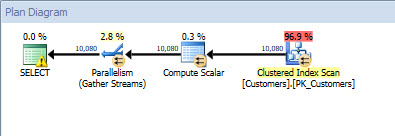
Query plan for plan_id = 1 (input value 'name)Query plan for plan_id = 1 (input value = 'name')
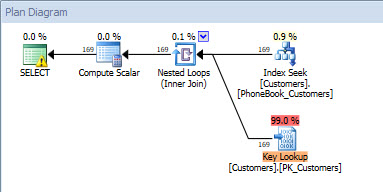
Query plan for plan_id = 2 (input value = 'query_cost')Query plan for plan_id = 2 (input value = 'query_cost')
 

Once we have the information we need in Query Store, we can clone the database (Query Store data will be included in the clone by default):

DBCC CLONEDATABASE (N'CustomerDB', N'CustomerDB_CLONE');

As I mentioned in my previous CLONEDATABASE post, the cloned database is designed to be used for product support to test query performance issues. As such, it’s read-only after it is cloned. We’re going to go beyond what DBCC CLONEDATABASE is currently designed to do, so again, I just want to remind you of this note from the Microsoft documentation:

The newly generated database generated from DBCC CLONEDATABASE isn't supported to be used as a production database and is primarily intended for troubleshooting and diagnostic purposes.

In order to make any changes for testing, I need to take the database out of a read-only mode. And I’m ok with that because I do not plan to use this for production purposes. If this cloned database is in a production environment, I recommend you back it up and restore it on a dev or test server and do your testing there. I do not recommend testing in production, nor do I recommend testing against the production instance (even with a different database).

/*
	Make it read write
	(back it up and restore it somewhere else so you're not working in production)
*/
ALTER DATABASE [CustomerDB_CLONE] SET READ_WRITE WITH NO_WAIT;

Now that I’m in a read-write state, I can make changes, do some testing, and capture metrics. I’ll start with verifying that I get the same plan I did before (reminder, you won’t see any output here because there’s no data in the cloned database):

/*
	verify we get the same plan 
*/
USE [CustomerDB_CLONE];
GO
EXEC [dbo].[usp_GetCustomerInfo] 'name';
GO
EXEC [dbo].[usp_GetCustomerInfo] 'query_cost' WITH RECOMPILE;

In checking Query Store, you’ll see the same plan_id value as before. There are multiple rows for the query_id/plan_id combination because of the different intervals of time across which the data was captured (determined by the INTERVAL_LENGTH_MINUTES setting, which we set to 5).

SELECT
	[qsq].[query_id], 
	[qsp].[plan_id], 
	[qsq].[object_id], 
	[rs].[count_executions],
	DATEADD(MINUTE, -(DATEDIFF(MINUTE, GETDATE(), GETUTCDATE())), 
		[qsp].[last_execution_time]) AS [LocalLastExecutionTime],
	[rsi].[runtime_stats_interval_id],
	[rsi].[start_time],
	[rsi].[end_time],
	[qst].[query_sql_text], 
	ConvertedPlan = TRY_CONVERT(XML, [qsp].[query_plan])
FROM [sys].[query_store_query] [qsq] 
JOIN [sys].[query_store_query_text] [qst]
	ON [qsq].[query_text_id] = [qst].[query_text_id]
JOIN [sys].[query_store_plan] [qsp] 
	ON [qsq].[query_id] = [qsp].[query_id]
JOIN [sys].[query_store_runtime_stats] [rs] 
	ON [qsp].[plan_id] = [rs].[plan_id]
JOIN [sys].[query_store_runtime_stats_interval] [rsi]
	ON [rs].[runtime_stats_interval_id] = [rsi].[runtime_stats_interval_id]
WHERE [qsq].[object_id] = OBJECT_ID(N'usp_GetCustomerInfo');
GO

Query Store data after executing the stored procedure against the cloned databaseQuery Store data after executing the stored procedure against the cloned database

Testing Code Changes

For our first test, let’s look at how we could test a change to our code – specifically, we'll modify our stored procedure to remove the [Active] column from the SELECT list.

/*
	Change procedure using CREATE OR ALTER
	(remove [Active] from query)
*/
CREATE OR ALTER PROCEDURE [dbo].[usp_GetCustomerInfo] (@LastName [nvarchar](64))
AS
  SELECT 
    [CustomerID],
    [FirstName],
    [LastName],
    [Email]
  FROM [dbo].[Customers]
  WHERE [LastName] = @LastName;

Re-run the stored procedure:

EXEC [dbo].[usp_GetCustomerInfo] 'name' WITH RECOMPILE;
GO
EXEC [dbo].[usp_GetCustomerInfo] 'query_cost' WITH RECOMPILE;

If you happened to display the actual execution plan, you'll notice that both queries now use the same plan, as the query is covered by the nonclustered index we created originally.

Execution plan after changing stored procedure to remove [Active]Execution plan after changing stored procedure to remove [Active]

We can verify with Query Store, our new plan has a plan_id of 41:

SELECT
	[qsq].[query_id], 
	[qsp].[plan_id], 
	[qsq].[object_id], 
	[rs].[count_executions],
	DATEADD(MINUTE, -(DATEDIFF(MINUTE, GETDATE(), GETUTCDATE())), 
		[qsp].[last_execution_time]) AS [LocalLastExecutionTime],
	[rsi].[runtime_stats_interval_id],
	[rsi].[start_time],
	[rsi].[end_time],
	[qst].[query_sql_text], 
	ConvertedPlan = TRY_CONVERT(XML, [qsp].[query_plan])
FROM [sys].[query_store_query] [qsq] 
JOIN [sys].[query_store_query_text] [qst]
	ON [qsq].[query_text_id] = [qst].[query_text_id]
JOIN [sys].[query_store_plan] [qsp] 
	ON [qsq].[query_id] = [qsp].[query_id]
JOIN [sys].[query_store_runtime_stats] [rs] 
	ON [qsp].[plan_id] = [rs].[plan_id]
JOIN [sys].[query_store_runtime_stats_interval] [rsi]
	ON [rs].[runtime_stats_interval_id] = [rsi].[runtime_stats_interval_id]
WHERE [qsq].[object_id] = OBJECT_ID(N'usp_GetCustomerInfo');

Query Store data after changing the stored procedureQuery Store data after changing the stored procedure

You'll also notice here that there is a new query_id (40). Query Store performs textual matching, and we changed the text of the query, thus a new query_id is generated. Also note that the object_id stayed the same, because use used the CREATE OR ALTER syntax. Let's make another change, but use DROP and then CREATE OR ALTER.

/*
	Change procedure using DROP and then CREATE OR ALTER
	(concatenate [FirstName] and [LastName])
*/
DROP PROCEDURE IF EXISTS [dbo].[usp_GetCustomerInfo];
GO
 
CREATE OR ALTER PROCEDURE [dbo].[usp_GetCustomerInfo] (@LastName [nvarchar](64))
AS
 
	SELECT 
		[CustomerID],
		RTRIM([FirstName]) + ' ' + RTRIM([LastName]),
		[Email]
	FROM [dbo].[Customers]
	WHERE [LastName] = @LastName;

Now, we re-run the procedure:

EXEC [dbo].[usp_GetCustomerInfo] 'name';
GO
EXEC [dbo].[usp_GetCustomerInfo] 'query_cost' WITH RECOMPILE;

Now the output from Query Store gets more interesting, and note that my Query Store predicate has changed to WHERE [qsq].[object_id] 0.

SELECT
	[qsq].[query_id], 
	[qsp].[plan_id], 
	[qsq].[object_id], 
	[rs].[count_executions],
	DATEADD(MINUTE, -(DATEDIFF(MINUTE, GETDATE(), GETUTCDATE())), 
		[qsp].[last_execution_time]) AS [LocalLastExecutionTime],
	[rsi].[runtime_stats_interval_id],
	[rsi].[start_time],
	[rsi].[end_time],
	[qst].[query_sql_text], 
	ConvertedPlan = TRY_CONVERT(XML, [qsp].[query_plan])
FROM [sys].[query_store_query] [qsq] 
JOIN [sys].[query_store_query_text] [qst]
	ON [qsq].[query_text_id] = [qst].[query_text_id]
JOIN [sys].[query_store_plan] [qsp] 
	ON [qsq].[query_id] = [qsp].[query_id]
JOIN [sys].[query_store_runtime_stats] [rs] 
	ON [qsp].[plan_id] = [rs].[plan_id]
JOIN [sys].[query_store_runtime_stats_interval] [rsi]
	ON [rs].[runtime_stats_interval_id] = [rsi].[runtime_stats_interval_id]
WHERE [qsq].[object_id] <> 0;

Query Store data after changing the stored procedure using DROP and then CREATE OR ALTERQuery Store data after changing the stored procedure using DROP and then CREATE OR ALTER

The object_id has changed to 661577395, and I have a new query_id (42) because the query text changed, and a new plan_id (43). While this plan is a still an index seek of my nonclustered index, it's still a different plan in Query Store. Understand that the recommended method for changing objects when you’re using Query Store is to use ALTER rather than a DROP and CREATE pattern. This is true in production, and for testing such as this, as you want to keep the object_id the same to make finding changes easier.

Testing Index Changes

For Part II of our testing, rather than changing the query, we want to see if we can improve performance by changing the index. So we will change the stored procedure back to the original query, then modify the index.

CREATE OR ALTER PROCEDURE [dbo].[usp_GetCustomerInfo] (@LastName [nvarchar](64))
AS
 
	SELECT 
		[CustomerID],
		[FirstName],
		[LastName],
		[Email],
		CASE	
			WHEN [Active] = 1 THEN 'Active'
			ELSE 'Inactive'
		END [Status]
	FROM [dbo].[Customers]
	WHERE [LastName] = @LastName;
GO
 
/*
	Modify existing index to add [Active] to cover the query
*/
CREATE NONCLUSTERED INDEX [PhoneBook_Customers]
ON [dbo].[Customers]([LastName],[FirstName])
INCLUDE ([EMail], [Active])
WITH (DROP_EXISTING=ON);

Because I dropped the original stored procedure, the original plan is no longer in cache. If I had made this index change first, as part of testing, remember that the query would not automatically use the new index unless I forced a recompilation. I could use sp_recompile on the object, or I could continue to use the WITH RECOMPILE option on the procedure to see I got the same plan with the two different values (remember I had two different plans initially). I don't need WITH RECOMPILE as the plan is not in cache, but I'm leaving it on for consistency's sake.

EXEC [dbo].[usp_GetCustomerInfo] 'name' WITH RECOMPILE;
GO
EXEC [dbo].[usp_GetCustomerInfo] 'query_cost' WITH RECOMPILE;

Within Query Store I see another new query_id (because the object_id is different than it was originally!) and a new plan_id:

Query Store data after adding new indexQuery Store data after adding new index

If I check the plan, I can see that the modified index is being used.

Query plan after [Active] added to the index (plan_id = 50)Query plan after [Active] added to the index (plan_id = 50)

And now that I have a different plan, I could take it a step further and try to simulate a production workload to verify that with different input parameters, this stored procedure generates the same plan and uses the new index. There's a caveat here, though. You might have noticed the warning on the Index Seek operator – this occurs because there are no statistics on the [LastName] column. When we created the index with [Active] as an included column, the table was read to update statistics. There is no data in the table, hence the lack of statistics. This is definitely something to keep in mind with index testing. When statistics are missing, the optimizer will use heuristics which may or may not convince the optimizer to use the plan you're expecting.

Summary

I’m a big fan of DBCC CLONEDATABASE. I’m an even bigger fan of Query Store. When you put the two of them together, you have great capability for quick testing of index and code changes. With this method, you’re primarily looking at execution plans to validate improvements. Because there is no data in a cloned database, you cannot capture resource use and runtime stats to either prove or disprove a perceived benefit in an execution plan. You still need to restore the database and test against a full set of data – and Query Store can still be a huge help in capturing quantitative data. However, for those cases where the plan validation is sufficient, or for those of you who don’t do any testing currently, DBCC CLONEDATABASE provides that easy button you’ve been looking for. Query Store makes the process even easier.

A few items of note:

I don’t recommend using WITH RECOMPILE when calling stored procedures (or declaring them that way – see Paul White's post). I used this option for this demo because I created a parameter-sensitive stored procedure, and I wanted to make sure the different values generated different plans and didn’t use a plan from cache.

Running these tests in SQL Server 2014 SP2 with DBCC CLONEDATABASE is quite possible, but there’s obviously a different approach for capturing queries and metrics, as well as looking at performance. If you’d like to see this same testing methodology, without Query Store, leave a comment and let me know!

The post Using DBCC CLONEDATABASE and Query Store for Testing appeared first on SQLPerformance.com.

11 Mar 17:42

SQLskills SQL101: Stored Procedures

by Kimberly Tripp
Start with a CLEAN slate!

Sometimes going back-to-the-basics is the best thing to do to fully understand something. Some of us have been doing things in a certain way for so long that we’ve missed a very basic / important point. So… SQLskills is introducing a SQL101 series of blog posts to do just that – get back to the basics! These will be posts hitting some of the core / critical points around technologies that we often see used the WRONG way or where there are many misunderstandings that lead to serious problems. And, well, stored procedures are definitely something we see misused in SQL Server (resulting in poor performance).

What is a Stored Procedure?

Simply, it’s a set of Transact-SQL commands that have been grouped together for reuse. It’s a way of taking some process you do repetitively and “wrapping” it into a named unit – allowing parameters. Think of something like sales by customer where you pass in a customer number and it outputs their sales. By creating this “process” as a stored procedure you’re allowing SQL Server to also store an executable plan in the plan cache which can save time in compilation / execution.

The Good News: Centralization

Having your code stored on the server can be fantastic for code reuse and manageability / maintainability… this can also allow the database developers to change schema without the application being aware of those changes. Or worse, requiring the application to change. Instead, the stored procedure can be changed to continue to behave the same way after the schema change as it did before the change. This is especially valuable when there are multiple applications accessing the database. And, there are other reasons but these are some of the most important IMO!

The Bad News: Performance

This executable plan that SQL Server comes up with might not be good for all executions (based on the parameters). Again, think of the case for sales by customer; some customers have very few purchases while other customers have many. When an executable plan is created it is tied to the set of parameters used when that procedure is executed (by default – there are statement options [hints] that can override this) and there isn’t already a plan in the cache. That plan is then placed in the cache so that subsequent users benefit from having a cached plan (saving compile time) but since that plan was optimized with the parameters first passed subsequent executions passing different parameters may warrant a plan change (which SQL Server does NOT do by default). And, this becomes significantly more complex as you have more parameters and more variations in how it’s executed.

More info: once you’ve read this post, get more insight into stored procedures by reading: Stored Procedure Execution with Parameters, Variables, and Literals

The Best News: Recompilation

Now that you’re aware of the fact that a stored procedure may be sensitive to the parameters passed, your database developers can dive deeper and learn options to handle this better. One way is through recompilation but here’s where we open a can of worms. There are quick / simple solutions that can help a procedure in the short-term and there are longer-term solutions that are even better for stored procedures that execute often and are used by a lot of users. Since this is only SQL101, I have a quick guide to what I would / wouldn’t use for recompilation as well as some resources to use to get more information.

Recompile the RIGHT Way

Recompilation is not always bad. But, you want to make sure that you always recompile as little as possible. Ideally, using a strategy that only recompiles the statement(s) that need it – is best. And, as of SQL Server 2005, you have a way to do this using OPTION (RECOMPILE). This is – BY FAR – the easiest strategy to use. However, it can become costly if it’s used too often. So, here’s a quick guide to some of the options with a brief description (note: before you use these options you should do more learning / testing as this is starting to head to 200+ level):

  • CREATE <procedure> WITH RECOMPILE: do not use this. First, you rarely want the entire procedure to be recompiled. Second, because it’s recompiled on every execution SQL Server does not place it in the plan cache so troubleshooting performance problems around these procedures is more difficult. Finally, without getting into deeper details – the type of optimization performed for recompilations done WITH RECOMPILE is not as advanced.
  • EXECUTE <procedure> WITH RECOMPILE: for the same reasons as above, this is not recommended either. But, even while it’s not ideal, I DO use this for testing. Testing: YES. Production: NO. I describe this and do some demos in my DBA Fundamentals webcast that you can watch online here.
  • Statement-level
    • OPTION (RECOMPILE): this is fantastic. But, it can be OVER-used. So, use it sparingly. It’s a great way to temporarily solve a problem but then you might want to use the hybrid solution for long-term scalability / performance.
    • OPTION (OPTIMIZE for …): there are specific cases where this can be useful – primarily when you’re trying to tune for a specific case or a specific “type” of value. But, this takes important (and, sometimes deep) knowledge of the data to get this right. And, it needs to be “watched” more carefully as data changes.
    • OPTION (OPTIMIZE FOR UNKNOWN): This was new in SQL Server 2008 and allows you to tune for the “average” case without having to know what that case is (like you need to know with
  • Hybrid option: sometimes cache / sometimes recompile. This can give you the best of both worlds where you programmatically chose to cache stable plans and recompile unstable plans (which sounds more complicated than it is but it does take more knowledge / more testing to get it right). To help you with this one, check out Building High Performance Procedures. And, make sure to review the DBA Fundamentals webcast here.

OK, so, while I tried to be brief – the “instructor” in me wanted to give you lots of nuggets of info. I hope you found this post helpful! And, if you want to find all of our SQLskills SQL101 blog posts – check out: SQLskills.com/help/SQL101

Thanks for reading!
k


The post SQLskills SQL101: Stored Procedures appeared first on Kimberly L. Tripp.

11 Mar 17:42

Automating DBCC PAGE – Part 3 (Is a Clustered Index physically sorted on disk?)

by Wayne Sheffield

In several of my last few blog posts, I’ve shared several methods of getting internal information from a database by using the DBCC PAGE command and utilizing the “WITH TABLERESULTS” option to be allowed to automate this process for further processing. This post will also do this, but in this case, we’ll be using it to bust a common myth—data in a clustered index is physically stored on disk in the order of the clustered index.

Busting this myth

To bust this myth, we’ll create a database, put a table with a clustered index into this database, and then we’ll add some rows in random order. Next, we will show that the rows are stored on the pages in logical order, and then we’ll take a deeper look at the page internals to see that the rows are not stored in physical order.

To start off with, let’s create a database and a table, and add a few rows to this table:

IF DB_ID('CIPageTest') IS NULL
CREATE DATABASE CIPageTest;
GO
-- use the database
USE CIPageTest;
GO
-- if the PageTest table exists, then drop it to start all over
IF OBJECT_ID('dbo.PageTest','U') IS NOT NULL DROP TABLE dbo.PageTest;
GO
-- create the dbo.PageTest table
CREATE TABLE dbo.PageTest (
RowID INTEGER PRIMARY KEY CLUSTERED,
Col1 VARCHAR(1000)
);

INSERT INTO dbo.PageTest (RowID, Col1) VALUES (1, REPLICATE('Row01', 100));
INSERT INTO dbo.PageTest (RowID, Col1) VALUES (3, REPLICATE('Row03', 100));
INSERT INTO dbo.PageTest (RowID, Col1) VALUES (5, REPLICATE('Row05', 100));
INSERT INTO dbo.PageTest (RowID, Col1) VALUES (2, REPLICATE('Row02', 100));
INSERT INTO dbo.PageTest (RowID, Col1) VALUES (4, REPLICATE('Row04', 100));

What we have is a table with 5 rows. The table’s clustered key is the RowID integer column. The rows are inserted so that the odd rows are inserted first, followed by the even rows.

Determine row’s physical location

At this point, let’s look at where the system reports these rows to be at. To do this, we’ll utilize two undocumented system commands. The first is %%physloc%%, which returns the physical location in a hexadecimal format. The second is fn_PhysLocFormatter, which converts this into a format of FileID:PageID:SlotID. This is just simply added to the select clause, so the query is:

SELECT  RowID, 
        Col1, 
        sys.fn_PhysLocFormatter(%%physloc%%) AS [File:Page:Slot]
FROM    dbo.PageTest;

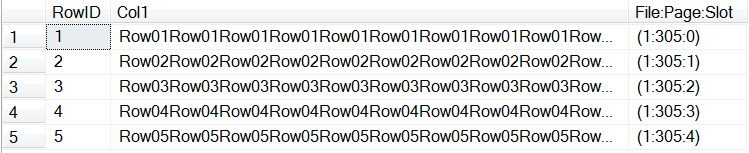
This query produces these results:

DBCCPage3-1

From these results, you can see that the rows are all on the same page, and that the slot in the slot array on that page are incrementing for the appropriate RowID value. Remember also that the slot array is zero-based, where the first slot is slot #0. This is the logical order.

How inserts change the slot the row is in

To see this changing around as the rows are inserted, just put the select statement (which I just introduced) after each of the prior insert commands and run the script to create the table and add the rows again. You will initially see RowID=1 put into Slot #0, RowID =3 into Slot #1 and RowID=5 into slot #2. When you then add RowID=2, this needs to be between RowID #s 1 and 3, so #2 is now in slot array #1, #3 moves to slot array #2, and #5 is moved to slot array #3. When you add RowID=4, it gets inserted into slot #3 and RowID#5 is again pushed down, to slot #4. The logical order follows what we are expecting:

DBCCPage3-3

Check the physical storage

In order to show that these are not physically stored in this order, we will need to crack this page and look internally at where the data is actually stored. We will accomplish this with this code:

DECLARE @Page   INTEGER,
       @SQLCMD VARCHAR(MAX);

DECLARE @DBCCIND TABLE (
   PageFID         INTEGER,   
   PagePID        INTEGER,
   IAMFID         INTEGER,
   IAMPID         INTEGER,
   ObjectID       INTEGER,
   IndexID        INTEGER,
   PartitionNumber INTEGER,
   PartitionID    BIGINT,
   iam_chain_type  VARCHAR(100),
   PageType       INTEGER,
   IndexLevel     INTEGER,
   NextPageFID    INTEGER,
   NextPagePID    INTEGER,
   PrevPageFID    INTEGER,
   PrevPagePID     INTEGER
);

INSERT INTO @DBCCIND 
  EXECUTE ('DBCC IND (CIPageTest, ''dbo.PageTest'', -1)');

SELECT @Page = PagePID
FROM   @DBCCIND
WHERE   PageType = 1;

SET @SQLCMD = 'DBCC PAGE (CIPageTest, 1, ' + 
              CONVERT(VARCHAR(15), @Page) + 
              ', 3) WITH TABLERESULTS';

DECLARE @DBCCPAGE TABLE (
   RowID           INTEGER IDENTITY,
   ParentObject    VARCHAR(255),
   Object          VARCHAR(255),
   Field           VARCHAR(255),
   Value           VARCHAR(255));

INSERT INTO @DBCCPAGE EXECUTE (@SQLCMD);

SELECT DISTINCT Page = @Page, ParentObject
FROM   @DBCCPAGE
WHERE   ParentObject LIKE 'Slot%Offset%';

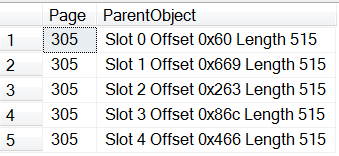
Which produces these results:

DBCCPage3-2.

The row’s offset is where the row starts at on the page

As we look at these results, pay close attention to the Offset. This is where the row physically starts on the page. You can see how for RowID #2, that this offset is higher than the offset for RowID #3… and even RowID #5. When the row was added, the data was added to the end of the other existing rows on the page, and the offset where this data starts was entered into the slot array, after having the remaining slot array entries pushed down in order to maintain the correct logical order. We can see this happening once again when RowID #4 is inserted.

And, finally, let’s use DBCC PAGE to crack open this page and look at the raw data. For this, we want to use dump style 2:

DECLARE @Page INTEGER;
SET @Page = xyz; --&lt;&lt; set to the appropriate page from above
DBCC PAGE (CIPageTest, 1, @Page, 2) WITH TABLERESULTS;

If you expand out the VALUE column, you can see it go from Row01 to Row03 to Row05, then to Row02 and Row04.

So there you go… the data is physically stored in the next available space on the page; however, the page’s slot array is in the clustered key order. Furthermore, we now know that we can look at the offset and determine the order on the page. And we also have yet another way to use DBCC PAGE in an automated manner to show this.

Previous related posts:

Persisting DBCC Output
Automating DBCC Page
Automating DBCC Page, Part 2

This post is re-published from my original post on SQL Solutions Group.

The post Automating DBCC PAGE – Part 3 (Is a Clustered Index physically sorted on disk?) appeared first on Wayne Sheffield.

11 Mar 17:42

San Diego to Deploy World’s Largest Smart City IoT Platform with Current, powered by GE

by A.R. Guess

by Angela Guess A new press release states, “‘America’s Finest City’ is also becoming the its smartest. In partnership with Current, powered by GE, the City of San Diego today announced a $30 million investment to deploy the world’s largest smart city IoT sensor platform. Transforming its street lighting into a connected digital infrastructure, San […]

The post San Diego to Deploy World’s Largest Smart City IoT Platform with Current, powered by GE appeared first on DATAVERSITY.

11 Mar 17:42

Erwin’s End Game: Holistic Data Management

by Jennifer Zaino

Data Management vendor erwin Inc. has been following through on the plans it discussed with DATAVERSITY® last year, shortly after its acquisition from CA Technologies by private equity firm Parallax Capital Partners. Its efforts to bring together Data Modeling, Business Process Management, and Enterprise Architecture domains to support the data-driven enterprise have been in evidence with its acquisitions […]

The post Erwin’s End Game: Holistic Data Management appeared first on DATAVERSITY.

11 Mar 17:42

SQL Server Availability Groups in Azure VM setup with AAD Domain Services

by Rajesh Setlem

Reviewed by: Steven Schneider, Sanjay Mishra, Mike Weiner, Kun Cheng, Dimitri Furman, Arvind Shyamsundar, Mahesh Unnikrishnan, Luis Carlos Vargas Herring and Nimesh Nedungadi

Deploying SQL Server Availability Groups in Azure VMs typically involved provisioning two additional VMs to host an Active Directory Domain Controller. With Azure Active Directory (AAD) Domain Services (aka managed domain services on Azure), it is possible to deploy SQL Server Availability Groups (AG) in Azure, instead of deploying VMs for the AD. AAD Domain Services provides services such as domain join, group policy, LDAP, Kerberos/NTLM authentication that are fully compatible with Windows Server Active Directory and the best part is, it’s completely managed by Azure. With AAD Domain Services there is no need for you to deploy, manage, and patch domain controllers in the cloud. Our earlier Azure AG deployment documents required you to provision two domain controller VM’s (primary and secondary) but with AAD Domain Services you just have to ask Azure to do it for you. The overhead of managing the domain controller VM’s is gone with AAD Domain Services.

The current pre requisite is that AAD Domain services can be enabled only in Classic Virtual Network. We know that you might have started with a classic virtual network in the past and all new virtual networks you create will be mostly the recommended Azure Resource Manager (ARM) based. Good news is that VM’s in ARM Virtual Network can leverage AAD Domain Services enabled in Classic Virtual once these two networks are connected through VNET Peering or VNET to VNET VPN gateway . We went with VNET Peering for this post and AG setup was seamless. For detailed network considerations with AAD Domain services check this link.

SQL Server Always On AG scenarios with AAD Domain Services

We cover the following two scenarios in this post:

Scenario 1:
Enabling AAD Domain Services in Classic Virtual Network and deploying two SQL Server 2016 Classic VM’s (Windows Server 2012) and then setting up AG

Scenario 2:
Leveraging AAD Domain Services enabled in Classic Virtual Network from an ARM virtual network by adding an ARM based SQL Server 2016 VM as replica to the existing AG.

Detailed steps and screenshots

Steps 1-4 cover Scenario 1
1. We enabled AAD Domain Services on a classic virtual network
You can start with the excellent documentation from here and follow along Task 1 to Task 5

As displayed below, VNETAADDSTEST is the name of my Classic Virtual Network

clip_image002

In the below screenshot CONTOSO100.onmicrosoft.com is the DNS name of managed domain. Note that the DNS server IP’s in above screenshot are the actual primary and secondary IP of managed domain.

clip_image004

2. Next, we deployed two SQL Server 2016 Classic VM’s from Azure gallery images in a cloud service:

clip_image006

3. Then we added the VMs to managed domain (CONTOSO100.onmicrosoft.com).
Here is a sample “Welcome to the domain” screenshot for SQL2016VM1:

clip_image008

4. Then we configured SQL Server Always On AG successfully, by following detailed steps documented here
Displayed below is the screenshot showing an healthy Always On dashboard

clip_image010

Steps 5-10 cover Scenario 2
5. Then, we created an ARM Virtual Network called ARMVnetAADDSTest.
Displayed below is a screenshot from Azure Portal showing create virtual network configuration pane.

clip_image011

6. We then peered it with the classic virtual network that we created earlier. Go to Azure Portal | Virtual Network | ARMVnetAADDSTest | under Settings, click Peerings | Click Add
This screenshot shows the Add Peering configuration pane.

clip_image012

7. We then updated the DNS settings (highlighted below) for the ARM Virtual Network to point to AAD Domain Services IP’s

clip_image013

8. We added a third SQL Server 2016 VM (“ARMSQL2016VM3”) in the ARM virtual network

clip_image014

9. Then we added the third ARM VM to managed domain
The screenshot shows “Welcome to the domain” message for the third VM “ARMSQL2016VM3”
clip_image016

10. Finally we added the third VM to Windows Server Failover Clustering (WSFC) and to the existing AG and it just worked (Given our careful planning and execution of the previous steps, it is no surprise that it just works!)
The screenshot shows a healthy AG dashboard after adding the third VM as replica.

clip_image018

Points worth mentioning

1. If you have existing AAD users and a Cloud-only or Synced tenant, please follow the recommendation here (Task 5)
2. We created an user (named it SQLInstall) and added it to “AAD DC Administrators” group and used this user credentials to add VM’s into managed domain. “AAD DC Administrators” group has all the permissions needed to join a VM to domain.After creating the user you would get a temporary password. Log on to Azure Portal with it (in this example SQLInstall@contoso100.onmicrosoft.com) to change the password.
3. When we created the ARM virtual network, we made sure the subnet address does not overlap with the existing one in classic virtual network, this is something you must be careful as VNET peering feature will not get enabled if there are overlapping IP address spaces.
4. Make sure to create or select a classic virtual network in an Azure region where AAD Domain Services is currently available.

We have plans in near future to enable AAD Domain Services in ARM Virtual Network. In summary, this post was to showcase two scenarios that would benefit from AAD Domain Services. So, go ahead and enjoy this integrated functionality and let us know if you have any questions or feedback.

Update July 31,2017

  • In this blog we created an AG spanning classic and ARM deployment model and so, we didn’t configure listener as Azure load balancer cannot span across deployment models.
  • To create listener (external or internal), existing documentation should be followed as long as all the Azure VM’s involved are either in classic or ARM mode.
  • In the ARM mode here’s the high level sequence for creating AG and listener:
    • Enable AAD Domain Services for classic VNET
    • Create an ARM VNET and peer it with the above classic VNET
    • Deploy ARM SQL Server VM’s and create AG
    • Create external or internal listener. Make sure to setup listener using a domain account that’s added to “AAD DC Administrators” group in AAD Domain Services.


11 Mar 17:41

Executing T-SQL Statements Against All Databases

by Artemakis Artemiou [MVP]
There are many cases where a DBA needs to perform a task against all databases in a SQL Server instance. In order to avoid the process of just changing a part of the statement or switching to the target database and executing the T-SQL statement each time, there are some options that can help you. One option is the undocumented stored procedure "sp_MSforeachdb" which executes the given T-SQL
11 Mar 17:38

80 Percent of IT and Security Professionals Admit to Using Antiquated Collaboration Tools

by A.R. Guess

by Angela Guess A recent press release reports, “New research from secure collaboration provider Intralinks and the Cloud Security Alliance (CSA) examines the progress towards content-driven digital transformation and data privacy compliance in the enterprise. To stay relevant in an increasingly digital world, companies are either starting to or are currently in the process of […]

The post 80 Percent of IT and Security Professionals Admit to Using Antiquated Collaboration Tools appeared first on DATAVERSITY.

11 Mar 17:38

Music City Code, a great conference that you may have never heard of yet

by drsql
For quite a few years, Nashville, and then Chattanooga had a conference called Devlink. It was low on cost, and high on education, and run by the awesome John Kellar ( @johnkellar ), who wrote the forward of my 2012 book. It was an amazing conference and was the place where I learned (well, in many cases learned about ) a lot of stuff that existed in the non-Transact SQL world that I keep my head firmly planted in; along with a great database track that lots of my SQL Community friends presented. ...(read more)
11 Mar 17:38

Auditing Row Counts in SSIS

by Prologika - Teo Lachev

It’s a good practice to have a custom ETL framework that augment the SSIS capabilities. ETL frameworks come in different shapes and sizes but what I’d like to see in a framework is:

  1. Configurable parallelism – Does your ETL take hours? The chances are that your packages run sequentially. Or, disconnected flows in the master package’s control flow support limited parallelism, while your server probably has much bigger pipeline. By contrast, the framework we use support configuring the degree of parallelism and automatically distributes packages to be executed on different threads.
  2. Target and actual package execution duration – You must proactively monitor when the actual package execution exceeds its target duration. See my newsletter “Is ETL (E)ating (T)hou (L)ive?” of a real-life example of what could happen if you don’t do this. Plan to implement an ETL dashboard for monitoring the package execution against its target and to let the users know what date the data is current as by every source system.
  3. Restartability – Resume package execution from the point of failure.
  4. Sufficient auditing checks to ensure data quality – This is usually done by recording row counts of extracted, inserted, updated, and deleted rows. I’d also like to see ETL packages doing some quality checks to ensure the data is consistent as it moves through the pipeline (source, staging, DW, cubes).

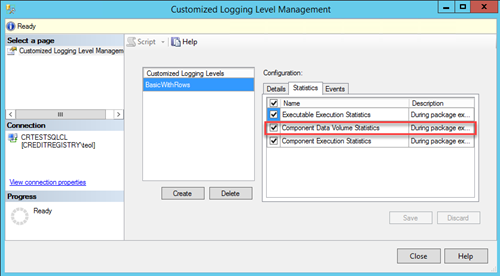
I’m currently auditing an ETL implementation where the original developers didn’t record row counts. Citing regulatory requirements, such as The Sarbanes-Oxley Act, the ETL has been “enriched” to record before and after row counts of every possible DML operation. If this is the stated business requirement, then that’s fine but before you start on this this path, consider that the SSIS catalog provides counts for data flow tasks. Before SQL Server 2016, collecting these counts would require enabling Verbose logging. This wasn’t a recommended practice because of the additional overhead. However, in SQL Server 2016 you can create a custom logging level to record only the things you need. To capture the row counts:

  1. Right-click the SSIS catalog and then click Customized Logging Level.
  2. When configuring the logging level, make sure to select Component Data Volume Statistics in the Statistics tab.
  3. When configure your job with SQL Server Agent, go to the Configuration tab, click the Advanced Tab, and then select the custom logging level you created in the “Logging level” drop-down.

Because the row counts are recorded for each buffer in the data flow task, you’d need to group by and sum the row counts:

SELECT eds.[dataflow_path_id_string] , SUM(eds.[rows_sent])  AS rows_sent

FROM [catalog].[execution_data_statistics] eds

GROUP BY [dataflow_path_id_string];

As I mentioned, this won’t record DML operations in the Control Flow. However, it’s unlikely that capturing row counts alone would satisfy stringent auditing requirements, such as when was the row changed, what change was made and what was the old values. Instead, consider using another feature introduced in SQL Server 2016 Database Engine: temporal tables. By configuring your destination tables as temporal, you let SQL Server to capture data changes in a history table. Now you have a rich audit trail.

11 Mar 17:37

W3C Begins Standards Work on Web of Things to Reduce IoT Fragmentation

by A.R. Guess

by Angela Guess According to a recent press release, “The World Wide Web Consortium (W3C), the global standards organization for the Web, has launched a new Working Group to develop initial standards for the Web of Things. The goals of the Web of Things Working Group are to counter the fragmentation of the IoT; reduce […]

The post W3C Begins Standards Work on Web of Things to Reduce IoT Fragmentation appeared first on DATAVERSITY.

11 Mar 17:36

SQLskills SQL101: Dealing with SQL Server corruption

by Paul Randal

As Kimberly mentioned last week, SQLskills is embarking on a new initiative to blog about basic topics, which we’re calling SQL101. We’ll all be blogging about things that we often see done incorrectly, technologies used the wrong way, or where there are many misunderstandings that lead to serious problems. If you want to find all of our SQLskills SQL101 blog posts, check out SQLskills.com/help/SQL101.

For my first SQL101 post, I’d like to touch on a subject that that has been core to my work since I graduated in 1994: dealing with corruption. You may not know that before joining the SQL Server engineering team at Microsoft in early 1999, I worked for the file system group at DEC (Digital Equipment), where among other things I was responsible for the VMS equivalent of the Windows chkdsk (called ANAL/DISK). It was this expertise with corruption and repairing it that led me to work on DBCC, rewriting much of the DBCC CHECKDB check and repair code for SQL Server 2005.

All through my professional career I’ve seen people make mistakes when they encounter corruption, so here I’d like to offer some quick guidelines for how to approach SQL Server corruption.

Don’t panic

When corruption appears, it can be scary. Suddenly your main database has all these errors and you don’t know what to do. The absolute best thing you can do is to keep calm and make rational decisions about how to proceed. If you knee jerk or jump to conclusions or let someone pressure you into make a snap decision, the odds are you will make a mistake and make the situation worse.

Make use of the run book

Check to see if your team or department has a disaster recovery handbook (often called a run book). This should give you useful information for you like:

  • How to access the backups
  • How to access Windows and SQL Server installation media and product keys
  • Who to call in various other departments for assistance with infrastructure
  • Who to call for help in your department
  • Who to notify of the problem (think CIO, CTO, I.T. Director)
  • How to proceed with various scenarios (e.g. restoring the main production database, or performing a bare-metal install of a new server)

Your run book might say to immediately fail over to a synchronous Availability Group replica, or some other redundant copy of the database, no matter what the problem is and then figure out the problem on the main production database afterwards. If that’s the case, that’s what you do.

And if you’re reading this and thinking ‘Hmm – we don’t have one of those…’, then that’s a big problem that should be addressed, as well as making sure that even the most junior DBA can follow the various procedures in it.

Consult my comprehensive flow chart

A few years ago I wrote a large flow chart for SQL Server Magazine, and it’s available in PDF poster form here (archived on a friend’s blog).

This can also form the basis of a run book if you don’t have one.

Understand the extent of the corruption

It is a very good idea to run DBCC CHECKDB on the database (if you haven’t already) to determine the extent of the corruption.

Depending on where the corruption is, you may be able to restore in a lot less time than restoring the entire database. For instance, if only a single page is damaged, you might be able to do a single-page restore. If only a single filegroup is damaged, you might be able to do a single filegroup restore.

Depending on what the corruption is, you may not even have to restore. For instance, if the corruption is confined to nonclustered indexes (all the corruption messages list index IDs higher than 1), you can rebuild the corrupt indexes manually with code like the following:

BEGIN TRANSACTION;
GO

ALTER INDEX CorruptIndexName ON TableName DISABLE;
GO
ALTER INDEX CorruptIndexName ON TableName REBUILD WITH (ONLINE = ON);
GO

COMMIT TRANSACTION;
GO

That means you don’t have to restore or use repair, both of which incur downtime.

Consider the ramifications of the actions you’re planning

If you’ve never dealt with corruption before and you’re not an experienced DBA, there are actions that might be tempting that could cause you bigger headaches than just having corruption.

Some examples:

  • If you have a corrupt database, don’t try to detach it from the instance as you likely won’t be able to attach it again because of the corruption. This especially applies if the database is marked as SUSPECT. If you ever have this scenario, you can reattach the database using the steps in my post Disaster recovery 101: hack-attach a damaged database.
  • If your SQL Server instance is damaged, and the database is corrupt, don’t try to attach it to a newer version of SQL Server, as the upgrade might fail and leave the database in a state where it can’t be attached to either the old or new versions of SQL Server.
  • If crash recovery is running, don’t ever be tempted to shut down SQL Server and delete the log file. That is guaranteed to cause at least data inconsistencies and at worst corruption. Crash recovery can sometimes take a long time, depending on the length of open transactions at the time of the crash that must be rolled back.

If you’re planning or have been told to do something, make sure you understand what the ramifications of that thing are.

Don’t just jump to repair

The repair option is called REPAIR_ALLOW_DATA_LOSS because you’re telling DBCC CHECKDB that it can lose data to perform repairs. The repairs (with a few exceptions) are written as ‘delete what’s broken and fix up all the links’. That’s because that’s usually the only way to write a repair algorithm for a certain corruption that fixes it in 100% of cases without making things worse. After running repair, you will likely have lost some data, and DBCC CHECKDB can’t tell you what it was. You really don’t want to run repair unless you can avoid it.

Also, there are some cases of corruption that absolutely cannot be repaired (like corrupt table metadata) so then you *have* to have backups or a redundant copy to use.

There is a last resort that we make a documented feature back in SQL Server 2005 – EMERGENCY-mode repair – for when the transaction log is damaged. That will try to get as much data out of the transaction log as possible and then run a regular repair. Although that may get the database back online, you’ll likely have data loss and data inconsistencies. It really is a last resort, and it’s not infallible either.

You really want to have backups to use or a redundant copy to fail over to instead.

But if you *have* to use repair, try to do it on a copy of the corrupt database. And then go fix your backup strategy so you aren’t forced to use repair again in future.

Be very careful with 3rd-party tools

There are some 3rd-party tools that will try to do repairs or extract data out. I’ve seen them work sometimes and I’ve seen them spectacularly fail and totally trash a database at other times. If you’re going to try one of these out, do it on a copy of the corrupt database in case something goes wrong.

Ask for help (but be careful)

If you don’t know what to do and you’re concerned that you’ll make things worse or make a wrong decision, try asking for help. For free, you could try using the #sqlhelp hashtag on Twitter, you could try posting to a forum like http://dba.stackexchange.com/ or one of the https://www.sqlservercentral.com/Forums/. Sometimes I’ll have time to respond to a quick email giving some direction, and sometimes I’ll recommend that you get some consulting help to work on data recovery.

You can also call Microsoft Customer Support for assistance, but you’ll always need to pay for that unless the source of the corruption turns out to be a SQL Server bug.

Wherever you get the help from though, be careful that the advice seems sound and you can verify the suggestion with well-known and reputable sources.

Do root cause analysis

After you’ve recovered from the corruption, try to figure out why it happened in the first place as the odds are that it will happen again. The overwhelmingly vast majority of corruptions are caused by the I/O subsystem (including all the software under SQL Server), with a very small percentage being caused by memory chip problems, and a smaller percentage being caused by SQL Server bugs. Look in the SQL Server error log, Windows event logs, ask the Storage Admin if anything happened, and so on.

Practice and research

It’s a *really* good idea to practice recovering from corruption before you have to do it for real. You’ll be more comfortable with the procedures involved and you’ll be more confident. I have some corrupt databases that you can download and practice with here.

There’s also a lot of instructional information on my blog under the following categories:

And there are two Pluralsight online training courses I’ve recorded which will give you an enormous boost in practical knowledge:

Summary

Ok – so it turned out to not be quite as quick as I thought! However, this is all 101-level information that will help you work through a corruption problem or exercise. I’ll be blogging a lot more of these 101-level posts this year. If there’s anything in particular you’d like to see us cover at that level, please leave a comment.

Enjoy!

The post SQLskills SQL101: Dealing with SQL Server corruption appeared first on Paul S. Randal.

11 Mar 17:36

SSMS: Removing all tabs in your query window with spaces

by Greg Low

This is just a short post that I’ve been meaning to write for a while.

I know that there is an eternal tabs vs spaces debate that goes on in development teams. Currently I’m in the spaces team for SQL queries.

So, it’s a pain in the neck when I receive a script file from someone and it’s full of tabs. Even worse when there are a bunch of tabs at weird tab positions. And I start to edit it, and things jump around, and I think @#$@$!@#$@#$ tabs !

But nowadays, SSMS can help yet very few people seem to realize it.

If you hit Control-H to bring up the Quick Replace dialog (or do it manually when Control-H doesn’t work –> still investigating that), you can set an option to use Regular Expressions:

image

Click to turn that option on, it will have a background color (default is beige-ish). Enter \t for the from text, and 4 spaces (or whatever your favorite number is) for the “to” text and click the replace all option:

image

And you get to say “farewell you pesky tabs”.

I also often use this with \r etc. to replace multiple double-lines, etc. etc. (One day we might even get a macro recorder but this helps for many situations)

Hope that helps someone.

11 Mar 17:36

Public Preview for SQL Server vNext Management Pack (CTP2)

by Damian


According to the SQL Server Release Services Team we have a new Management Pack (CTP2) for SQL Server vNext

The new CTP bits for SQL Server vNext Management Pack can be used to monitor SQL Servers both on Windows and Linux

Here is the list of new features and fixes in the CTP2:

 
  • Implemented “Discovery Data Mapper”; improved queries and datasources
  • Implemented support for full cookdown for all discoveries on Linux and Windows
  • Implemented Log Shipping monitoring
  • Implemented new monitors and rules:
    • “Service Pack Compliance” monitor
    • “SQL Server Windows Service” monitor
    • “CPU Utilization (%)” monitor
    • “SQL Server Service (database)” monitor
    • “Database Health Policy (Critical)” monitor
    • “Database Health Policy (Warning)” monitor
    • “WMI Health” monitor
    • “Memory Used By Tables (MB) rule
    • “Memory Used By Indexes (MB)” rule
    • “MSSQL vNext on Windows: DB Engine CPU Utilization (%)” rule
    • “SQL Server vNext DB Engine is restarted” rule
  • Implemented new DB Space performance rules:
    • MSSQL vNext: DB Allocated Space Unused (MB)
    • MSSQL vNext: DB Free Space Total (%)
    • MSSQL vNext: DB Free Outer Space (MB)
    • MSSQL vNext: DB Transaction Log
    • Free Space Total (%)
    • MSSQL vNext: DB Free Space Total (MB)
    • MSSQL vNext: DB Allocated Space Used (MB)
    • MSSQL vNext: DB Allocated Space (MB)
  • Implemented new classes:
    • SQL Server vNext DB FILESTREAM Filegroup on <Platform>
    • SQL Server vNext DB Memory-Optimized Data Container on <Platform>
    • Generic SQL Server vNext Custom User Policy
    • SQL Server vNext Custom User Policy on <Platform>
    • SQL Server vNext Database Critical Policy on <Platform>
    • SQL Server vNext Database Warning Policy on <Platform>
    • SQL Server vNext Resource Pool Group on <Platform>
    • Generic SQL Server vNext Resource Pool
    • SQL Server vNext Resource Pool on <Platform>
    • SQL Server vNext Internal Resource Pool on <Platform>
    • SQL Server vNext User Resource Pool on <Platform>
    • SQL Server vNext User-Defined Resource Pool on <Platform>
  • Implemented new monitor and rule for FILESTREAM objects:
    • MSSQL vNext on <Platform>: DB FILESTREAM Filegroup Free Space Total (MB)
    • MSSQL vNext on <Platform>: DB FILESTREAM Filegroup Free Space Total (%)
  • Implemented new performance rules for Memory-Optimized Data filegroups:
    • MSSQL vNext on Windows: DB Memory-Optimized Data Filegroup Free Space Total (MB)
    • MSSQL vNext on Windows: DB Memory-Optimized Data Filegroup Free Space Total (%)
  • Implemented “MSSQL LogReader” module
  • Implemented Event Collection monitoring for Linux and Windows (more than 400 workflows)
  • Implemented discoveries, rollups and icons for the new classes; updated Filegroup and child classes’ icons
  • Implemented all XTP counters (more than 200 workflows)
  • Implemented “Empty Bucket percent” in the hash index monitor
  • Implemented “Average length of the row chains” in the hash buckets monitor
  • Implemented “SQL Full-text Filter Daemon Launcher Service”; added “NetworkName” property to local dbengine; refactored Windows monitoring folder structure
  • Added “Local Database” class on Windows
  • Improved the architecture: split “Windows.DBEngine” and “Windows.LocalDBEngine” classes
  • Improved error logging
  • Improved the error-handling (connectivity issues)
  • Remounted “LocalDiscoverySeed” discovery to support long names and not support wow64
  • Updated Add Monitoring Wizard: fixed layouts issues, improved multithreading and performance, implemented background loading progress
  • Updated and fixed the Knowledge Base articles and display strings; unified the workflows naming template
  • Fixed alerts for classes managed by local agent
  • Fixed Smart Connect issues connected with cached data (WMI connection)
  • Fixed Linux modules to skip smart connect
  • Fixed issue: “Total Transactions Per Second” rule runs twice in one interval
  • Fixed issue: SQL Server vNext on Windows database objects may get rediscovered
  • Fixed issue: filegroups get undiscovered in SQL Express instance
  • Fixed issue: in some situations, Add Monitoring Wizard cannot detect that test connection task is completed
  • Fixed issue: the already discovered database objects are undiscovered if database state is changed to “Offline”

All the details regarding the new functionality can be found in the Operations Guide that can be downloaded along with the Management Pack. Full functionality will be available with SQL Server vNext GA. This CTP release only covers a subset of monitors and rules. We will work towards full functionality as we release new CTPs.


You can read more: http://bit.ly/2mK9DTe

You can download the software here: http://bit.ly/2lyk9g2

Cheers

Damian

11 Mar 17:36

Now available! SQL Server Premium Assurance provides six more years of product support

by SQL Server Team

Today we are announcing general availability of SQL Server Premium Assurance, a new offering that enables flexibility to keep systems running without disruption while modernizing on your own schedule.

When you purchase Premium Assurance, you receive “critical” and “important” security updates and bulletins during the six years after the End of Extended Support. This means you can get up to 16 years of total support beginning with SQL Server 2008 and 2008 R2 versions.

To learn more about SQL Server Premium Assurance and its companion offering Windows Server Premium Assurance, visit the announcement on Hybrid Cloud blog. You can get the lowest price and lock in savings if you purchase Premium Assurance through June 2017. Prices will increase over time, so act now!

11 Mar 17:36

Azure Data Factory and SSIS compared

by James Serra

I see a lot of confusion when it comes to Azure Data Factory (ADF) and how it compares to SSIS.  It is not simply “SSIS in the cloud”.  See What is Azure Data Factory? for an overview of ADF, and I’ll assume you know SSIS.  So how are they different?

SSIS is an Extract-Transfer-Load tool, but ADF is a Extract-Load Tool, as it does not do any transformations within the tool, instead those would be done by ADF calling a stored procedure on a SQL Server that does the transformation, or calling a Hive job, or a U-SQL job in Azure Data Lake Analytics, as examples.  Think of it more as an orchestration tool.  SSIS has the added benefit of doing transformations, but keep in mind the performance of any transformations depends on the power of the server that SSIS is installed on, as the data to be transformed will be pushed to that SSIS server.  Other major differences:

  • ADF is a cloud-based service (via ADF editor in Azure portal) and since it is a PaaS tool does not require hardware or any installation.  SSIS is a desktop tool (via SSDT) and requires a good-sized server that you have to manage and you have to install SQL Server with SSIS
  • ADF uses JSON scripts for its orchestration (coding), while SSIS uses drag-and-drop tasks (no coding)
  • ADF is pay-as-you-go via an Azure subscription, SSIS is a license cost as part of SQL Server
  • ADF can fire-up HDInsights clusters and run Pig and Hive scripts.  SSIS can also via the Azure Feature Pack for Integration Services (SSIS)
  • SSIS has a powerful GUI, intellisense, and debugging.  ADF has a basic editor and no intellisense or debugging
  • SSIS is administered via SSMS, while ADF is administered via the Azure portal
  • SSIS has a wider range of supported data sources and destinations
  • SSIS has a programming SDK, automation via BIML, and third-party components.  ADF does not have a programming SDK, has automation via PowerShell, and no third-party components
  • SSIS has error handling.  ADF does not
  • ADF has “data lineage“, tagging and tracking the data from different sources.  SSIS does not have this

Think of ADF as a complementary service to SSIS, with its main use case confined to inexpensively dealing with big data in the cloud.

Note that moving to the cloud requires you to think differently when it comes to loading a large amount of data, especially when using a product like SQL Data Warehouse (see Azure SQL Data Warehouse loading patterns and strategies).

More info:

Azure Data Factory vs SSIS

11 Mar 17:35

The Ebb & Flow of Community Participation

by SQLAndy

It’s an interesting moment when you discover the SQL community (or any other I suppose). It’s the moment of finding the door in a dark room that leads to the next level of the career game. Easy to find once you know it’s there, but until you find it not obvious at all.

Joining is easy, there is no fee, no requirements, and little to no stigma attached to being new to the community or even new to the technology. There are lots of ways to participate depending on focus and level of intro/extrovertedness and budget. Good stuff.

Once in there is often a point when you realize you can move from more active consumer of ideas to one of those that takes the time to share ideas back through one or more channels. It’s exciting to take that step. It often seems like everyone does it, but as a percentage it’s a small group. You start to work on new skills – writing better (or just writing publicly), writing the best answer, building a network, finding followers, building better abstracts, and so on. It can also take the form of leading, perhaps a local SQL group or a SQLSaturday.

Sometimes it leads to fame and fortune. I imagine few would turn that down (or should), but most find that it’s a way to add a dimension to their game and most find it to be fun to participate and give back. That’s not to say that having a well written blog or a list of presentations given doesn’t have value – it does – but it’s usually more value add/tie-breaker than it is a decision point.

That’s the flow, the uphill journey, one absolutely worth doing.

But what about the ebb?

We don’t talk or think about that as much. Having started blogging or speaking (or both) or answering forum questions we usually hit the first ebb when life intervenes – birth of a child, new job, big project, illness, something. It can be frustrating. One path is to try to keep doing it all, not step off of that one great blog post a week or speaking every quarter goal. More often those efforts just stop, because whatever has caused the interruption is both more important and takes up all that excess creative energy.

For many the first ebb is the last ebb. Sometimes it’s because of feeling of failed, of not maintaining that level of participation. Perhaps more often it’s because after taking a break from that headlong rush up the hill they stop to think about the ROI. Some make it past that first ebb and learn to adjust to the cycles of life and career and balance their participation accordingly.

Time goes by and things change again. New job, new job focus, perhaps moving into management,  starting a business, or retiring. Sometimes that inflection point means more time in a new community, sometimes it means using that time and energy for other things.

None of that is wrong, or bad. It’s not wrong to want to run with the big dogs. It’s not wrong to prioritize work or family over community participation. It’s definitely not wrong to weigh the ROI of the effort vs using that effort in a different way. I think the first one is obvious, though still hard the first time it happens. The second should be obvious, but often isn’t because we start down the path without a goal other than to try it and see what happens. Note that I’m not discouraging that, just describing it.

Should we tell all of that to those starting the journey? I don’t think so. Maybe I’m wrong, but I’m inclined to say that a big chunk of the value in the journey is that it’s open ended. No, the audience for this post is that those have participated – usually a lot – and are having to do less, for whatever reason. Ultimately it goes back to managing your career in terms of time, budget, and goals. Can’t do it all.

I should add its harder if you’re leading. It’s tough to be the one to have to drop out of leading a group or an event, especially if there is no one there to pick it up. Ideally we all have someone ready to jump in and do a seamless handoff, but that’s not always the case.  Then what? Do the right thing for career and go anyway? Or keep trudging forward, even though energy and enthusiasm is gone? For how long? I have no great answers.

My view is that if you contributed anything you’ve helped. You don’t have to do it all. There is no SQL Hall of Fame for community participation! Do the things you want to do, do the things that leverage your skills and experience and interests the most, encourage others to walk the path, and don’t be afraid to look at all of it in the context of ROI, however you choose to measure it.


11 Mar 17:35

Why PFS pages cannot be repaired

by Paul Randal

Last week there was a short discussion on Twitter about why PFS pages can’t be repaired (prompted by a #sqlhelp question about why they can’t be single-page restored, like other per-database allocation bitmaps). Just for the record, they can’t be fixed by automatic page repair in a mirror or AG either.

PFS pages occur every 8088 pages in every data file and store a byte of information about itself and the following 8087 pages. The most important piece of information it stores is whether a page is allocated (in use) or not. You can read more about PFS pages and the other per-database allocation bitmaps in this blog post.

So why can’t they be repaired by DBCC CHECKDB, when all the other per-database allocation bitmaps can?

The answer is that the is-this-page-allocated-or-not information is not duplicated anywhere else in the database, and it’s impossible to reconstruct it in all cases.

You might think that DBCC CHECKDB could work out which pages are allocated by inferring that state if a page is linked to in some way from another page that’s known to be allocated, and it could do that, except for the case of a heap with no nonclustered indexes.

If a heap has no nonclustered indexes, there is no other structure in the database that links to any of the data pages in the heap. Therefore, without the information in a PFS page, there’s no way to tell which of the pages contained in extents allocated to the heap are actually allocated or not. This is because SQL Server does not touch a page when it is deallocated, so there’s nothing on a page that indicates whether a page is currently allocated or has been deallocated.

So what if DBCC CHECKDB can tell that there are no such cases in the database?

The answer is that the algorithm to rebuild a PFS page given the links from other pages to pages covered by that PFS range is extremely complicated and would involve searching through the entire database, reading and processing all pages a second time *after* they’ve been repaired, looking for linkages to pages in the broken range. While it sounds technically possible, when scoping out writing such an algorithm back in 2001-2002, I quickly ran into run-time and complexity challenges that made the work entirely infeasible.

It’s also not possible to just mark all the pages allocated – because then allocation-order scans would come across potentially unformatted pages and fail. It would also break backups that use WITH CHECKSUM. Such an algorithm could be made to work (in the absence of heaps with no nonclustered indexes), but has the same problems as the algorithm above.

So – PFS pages can’t be repaired, and unless the database structure changes to mirror that allocation information in some way, I don’t see that changing at any point in the future.

Hope you found this interesting!

The post Why PFS pages cannot be repaired appeared first on Paul S. Randal.

11 Mar 17:35

UPDATED: Use Amazon’s Alexa to Create a Copy of a Database Using Redgate SQL Clone…

by andyleonard
Please help: If you commented below please email me by clicking the Email link and sending me an email. Redgate wants to notify the winners! Thank you, Andy …and win an Amazon Echo Dot and one lucky winner will score a free SQL Clone license! About SQL Clone I can hear you thinking, “What’s SQL Clone, Andy?” I’m glad you asked! SQL Clone is a database provisioning tool that removes much of the time and disk space needed to create multiple database copies. With SQL Clone, database copies can be created...(read more)
11 Mar 17:34

Implementing Header-Details in Power BI

by Prologika - Teo Lachev

Lots of things to like in the just released March update of Power BI Desktop! My favorite? We can now implement header-details text reports using the updated Matrix visual. Previously, Table and Matrix visuals wouldn’t allow you to select a row to cross filter other sections. Now, you can use the Matrix visual for the header section. When you click a row in the “header”, other visuals get cross-filtered. In the screenshot below, the Table visual shows all customers who have purchased the selected product. Also, notice that the Slicer visual has also been upgraded to allow sliding a numeric measure.

030717_0323_Implementin1.png

22 Feb 02:03

Blind Obedience

by snoofle

Murray F. took a position as an Highly Paid Consultant at a large firm that had rules for everything. One of the more prescient rules specified that for purposes of budgeting, consultants were only allowed to bill for 8 hours of work per day, no exceptions. The other interesting rule was that only certain employees were allowed to connect to the VPN to work from home; consultants had to physically be in the office.

The project to which Murray was assigned had an international staff of more than 100 developers; about 35 of them were located locally. All of the local development staff were HPCs.

With that much staff, as you would expect, there was a substantial MS Project plan detailing units of work at all levels, and assorted roll-ups into the master time line.

A soccer ref holding up a red card

The managers that had created this plan took all sorts of things into account. For example, if you attended three hours of meetings two days a week, then you only had 34 hours available for work; if you had to leave early one day to pick up your kid, it set those hours aside as non-work, and so on. The level of detail even took into account the time it takes to mentally put down one complex task and pick up another one. It was awful to look at but it was reasonably accurate.

Until...

Weather forecasters are wrong as often as they are right. However, the spiraling pin-wheel of snowstorms was getting bigger and barreling down on the local office, and was so imminent that even the forecasters were issuing absolute warnings. Not "It looks like we might get six inches"; but more along the lines of "Get groceries and plan to be shut in for a while".

The storm hit at night and by first light, anyone who looked out the window immediately realized that the forecasters were right and that they weren't going anywhere. In an attempt to be good team players, the consultants called their managers, pointed out that they were snowed in and unable to travel, and given the special circumstances, could they use the VPN and work from home?

The managers all responded that the rules were very specific and that the consultants could only work from the office. Since the consultants were powerless to do anything about the weather or the mountain of snow that had to be shoveled, they took snow days and no work was done.

That's 35 consultants for 2 days or 70 days of (loaded) work, or about 2 ½ months of work that vaporized. Needless to say, this turned the otherwise green time line quite red.

The managers called a meeting to discuss how to make up the time. Their first suggestion was that the consultants put in more time, to which they responded The rules specify that we cannot bill more than 8 hours each day. The managers then asked the consultants if they would work without pay - to get it done. Wisely, the consultants said that they were required to play by the rules set forth by the company, and could not falsify the billing sheets with the wrong number of hours worked.

The sponsoring agencies of the consultants all agreed on that one (free labor means no commissions on said labor).

This went back and forth for a while until it came time for scheduled demos. Only the work was about ten person-weeks behind schedule and the features to be demo'd had not yet been built.

At this point, the senior people who could not see their expected features in action had no choice but to address the snow delay. After much discussion, they decreed that the budgets had to be adhered to (e.g.: billing was limited to 8 hours per day), but the line development managers could hire additional consultants to make up the missed work. The managers got to work adjusting the master project plan.

The existing consultants pointed out that it would take a substantial amount of time to find new consultants, get computers, set up development environments, do general on-boarding and get new developers up to speed; and that it didn't make sense to hire new developers for something like this.

It was decreed that rules had to be followed, and it didn't matter if it wasn't cost efficient to follow those rules.

So they spent about a month interviewing (new project task for existing senior consultants and managers), bringing new consultants on board (getting them equipment, access, etc. - a new project task for managers) , and giving them architecture and code walk-throughs (new project task for existing senior consultants). This necessitated increasing the expense to the project to cover all the additional overhead.

All to save a few bucks in additional billing by already-trained-and-equipped developers, which would have been completely unnecessary if they had just let them work from home in the first place.

But hey, those were the rules.

[Advertisement] Application Release Automation – build complex release pipelines all managed from one central dashboard, accessibility for the whole team. Download and learn more today!
22 Feb 01:50

Long Poles and Critics

by andyleonard
As a consultant, I get calls to complete projects started by someone else or extend projects completed by someone else. When I look at someone else's work it's sometimes tempting to say, "Wow - they did that wrong." But I don't. Instead I say, "I'm not sure why they built it this way." That may sound back-handed but I make sure it's not by asking follow-up questions. Which questions? My favorite is, "What was the problem they were trying to solve?" It’s entirely possible...(read more)
22 Feb 01:50

Gartner’s 2017 BI and Data Analytics Magic Quadrant Shows Microsoft Leading

by Prologika - Teo Lachev

Power BI is enjoying a tremendous momentum and unprecedented popularity. Just within this month, your humble correspondent has been teaching Power BI four times in a row. It looks like industry observers are taking notice of this momentum. As Kamal Hathi (General Manager, Microsoft BI) announced, the newly released Garner Magic Quadrant for Business Intelligence and Data Analytics gave Microsoft a very high score. The image below shows the Microsoft’s lift between last year and this year in the Gartner magic quadrant.

I’m not surprised about the Qlik drop given they sold out the company. What’s still surprising to me is that Gartner ranked Tableau and Microsoft almost the same on the ability to execute. Although the report is not out yet, judging by the stub, Gartner used the same 14 criteria as last year, but added one more which is unknown at this point (probably real-time where Microsoft can score very high as well). Here are my comments on where Microsoft stands on these 14 criteria. You might also find my two-part blog about Tableau vs. Microsoft useful if you are tasked to compare vendors.

Capability

Teo’s Rank for MS BI

Comments
Infrastructure BI Platform Administration
Capabilities that enable scaling the platform, optimizing performance and ensuring high availability and disaster recovery

High

On premises or cloud, I think the MS BI Platform is second to none
Cloud BI
Platform-as-a-service and analytic-application-as-a-service capabilities for building, deploying and managing analytics and analytic applications in the cloud, based on data both in the cloud and on-premises

High

Power BI supports both pure cloud and hybrid architectures
Security and User Administration
Capabilities that enable platform security, administering users, and auditing platform access and utilization

Medium

More work is required to support external users in Power BI, Power BI Embedded, and SSRS
Data Source Connectivity
Capabilities that allow users to connect to the structured and unstructured data contained within various types of storage platforms, both on-premises and in the cloud.

High

As of this time, Power BI supports close to 70 connectors to let you connect to cloud and on-premises data sources. No scripting required.
Data Management Governance and Metadata Management
Tools for enabling users to share the same systems-of-record semantic model and metadata. These should provide a robust and centralized way for administrators to search, capture, store, reuse and publish metadata objects, such as dimensions, hierarchies, measures, performance metrics/key performance indicators (KPIs) and report layout objects, parameters and so on. Administrators should have the ability to promote a business-user-defined data model to a system-of-record metadata object.

Medium

Power BI has done a good job to provide auditing and admin oversight but more work is required for proactive monitoring and improving its data governance capabilities
Self-Contained Extraction, Transformation and Loading (ETL) and Data Storage
Platform capabilities for accessing, integrating, transforming and loading data into a self-contained storage layer, with the ability to index data and manage data loads and refresh scheduling.

Medium

SSIS is the most popular on-premises ETL tool. More work is required to bring similar capabilities in the cloud (I think Azure Data Factory is a step backwards)
Self-Service Data Preparation
The drag-and-drop, user-driven data combination of different sources, and the creation of analytic models such as user-defined measures, sets, groups and hierarchies. Advanced capabilities include semantic autodiscovery, intelligent joins, intelligent profiling, hierarchy generation, data lineage and data blending on varied data sources, including multistructured data

High

Power BI Desktop and Excel has a fantastic query editor (originated from Power Query) that scores big with business users. Tableau doesn’t have such native capabilities. Power BI and Excel have best of class self-modeling capabilities (much better than Tableau). Azure Query Catalog can be used for dataset autodiscovery.
Analysis and Content Creation Embedded Advanced Analytics
Enables users to easily access advanced analytics capabilities that are self-contained within the platform itself or available through the import and integration of externally developed models.

High

Not sure what is meant here by “advanced analytics capabilities”. Power BI supports integration with R, Azure Machine Learning, clustering, forecasting, binning, but I might be missing something.
Analytic Dashboards
The ability to create highly interactive dashboards and content, with visual exploration and embedded advanced and geospatial analytics, to be consumed by others

High

“Highly interactive dashboards and content” is what Power BI is all about.
Interactive Visual Exploration
Enables the exploration of data via the manipulation of chart images, with the color, brightness, size, shape and motion of visual objects representing aspects of the dataset being analyzed. This includes an array of visualization options that go beyond those of pie, bar and line charts, to include heat and tree maps, geographic maps, scatter plots and other special-purpose visuals. These tools enable users to analyze the data by interacting directly with a visual representation of it

High

According to Gartner’s definition, Power BI should score high but more work is required on the visualization side of things, such as ability to drill through a chart point as we can do in SSRS.
Mobile Exploration and Authoring
Enables organizations to develop and deliver content to mobile devices in a publishing and/or interactive mode, and takes advantage of mobile devices’ native capabilities, such as touchscreen, camera, location awareness and natural-language query

High

Native apps for iOS, Android and Windows to surface both Power BI and SSRS reports.
Sharing of Findings Embedding Analytic Content
Capabilities including a software developer’s kit with APIs and support for open standards for creating and modifying analytic content, visualizations and applications, embedding them into a business process, and/or an application or portal. These capabilities can reside outside the application (reusing the analytic infrastructure), but must be easily and seamlessly accessible from inside the application without forcing users to switch between systems. The capabilities for integrating BI and analytics with the application architecture will enable users to choose where in the business process the analytics should be embedded.

High

An Azure cloud service, Power BI Embedded allows you to do this with an appealing cost-effective licensing model.
Publishing Analytic Content
Capabilities that allow users to publish, deploy and operationalize analytic content through various output types and distribution methods, with support for content search, storytelling, scheduling and alerts.

Medium

Power BI supports subscriptions and data alerts but we can do better, such as to allow an admin to subscribe other users. “Storytelling” can mean different things but I thought the integration with Narrative Science can fall into this category.
Collaboration and Social BI
Enables users to share and discuss information, analysis, analytic content and decisions via discussion threads, chat and annotations

High

Power BI supports this with workspaces and Office 365 unified groups.

Of course, there are many competing definitions of what constitutes a BI and Analytics platform. Again, it looks to me that Gartner has predominantly focused on the self-service BI aspect of it (even there Microsoft should have scored higher) and ignored the SQL Server BI features and all the cloud BI-related products (Azure SQL Database, SQL Data Warehouse, Azure ML, Query Catalog, HDInsight, StreamInsight). If we take them in consideration, where will that dot be?

22 Feb 01:50

Data Governance vs. Big Data Governance

by Stefan Groschupf

Click to learn more about video blogger Stefan Groschupf. Introducing the Big Data & Brews video blog series presented by Stefan Groschupf, Founder of Datameer. The series will touch on hot topics within the business of  Big Data, Analytics, Internet of Things, Machine Learning, Cloud Computing, Modern BI, NoSQL and Next Generation Technologies. In today’s video blog Stefan […]

The post Data Governance vs. Big Data Governance appeared first on DATAVERSITY.

22 Feb 01:50

Creating SSIS Packages with the SQL Server Import and Export Wizard

by andyleonard
This material was originally posted on the Linchpin People blog . In this post, I demonstrate how to use the SQL Server 2012 Import and Export Wizard to create a SQL Server 2012 Integration Services (SSIS 2012) package. The demo is created on a virtual machine running Windows Server 2012. You can use the SQL Server Import and Export Wizard to learn more about SQL Server Integration Services. Often, one will reach the “Save and Run Package” just before executing the Wizard. The “Run immediately” checkbox...(read more)