
Unser werktäglicher News-Überblick fasst die wichtigsten Nachrichten des Tages kurz und knapp zusammen.
Unser werktäglicher News-Überblick fasst die wichtigsten Nachrichten des Tages kurz und knapp zusammen.
 I LOVE my Amplifi Wi-Fi Mesh Network. I've had it for two years and it's been an absolute star performer. We haven't had a single issue. Rock solid. That's really saying something. From unboxing to installation to running it (working from home for a tech company, so you know I'm pushing this system) it's been totally stable. I recommend Amplifi unreservedly to any consumer or low-key pro-sumer who has been frustrated with their existing centrally located router giving them reliable wi-fi everywhere in their home.
That said...I recently upgraded my home internet service provider. For the last 10 years I've had fiber optic to the house with 35 Mbp/s up/down and it's been great. Then I called them a a few years back and got 100/100. The whole house was presciently wired by me for Gigabit back in 2007 (!) with a nice wiring closet and everything. Lately 100/100 hasn't been really cutting it when I'm updating a dozen laptops for a work event, copying a VM to the cloud while my spouse is watching 4k netflix and two boys are updating App Store apps. You get the idea. Modern bandwidth requirements and life has changed since 2007. We've got over 40 devices on the network now and many are doing real work.
I called an changed providers to a cable provider that offered true gigabit. However, I was rarely getting over 300-400 Mbp/s on my Amplifi. There is a "hardware NAT" option that really helps, but short of running the Amplifi in Bridged Mode and losing a lot of its epic features, it was clear that I was outgrowing this prosumer device.
Give I'm a professional working at home doing stuff that is more than the average Joe or Jane, what's a professional option?
Amplifi is the consumer/prosumer line from Ubiquiti Networks and UniFi (UBNT) is the professional line. You'll literally find these installed at business or even sports stadiums. This is serious gear.
Let me be honest. I knew UniFi existed. Knew (I thought) all about it and I resisted. My friends and fellow nerds insisted it was easy but I kept seeing massive complex network diagrams and convinced myself it wasn't worth the hassle.
My friends, I was wrong. It's not hard. If you are doing business at home, have a gigabit network pipe, a wired home network, and/or have a dozen or more network devices, you're a serious internet person and you might want to consider serious internet networking gear.
Now, UniFi is more expensive than Amplifi as it's pro gear. While an Amplifi Mesh WiFi system is just about $300-350 USD, UniFi Pro gear will cost more and you'll need stuff to start out and it won't always feel intuitive as you plan your system. It is worth it and I'm thrilled with the result. The flexibility and customizability its offered has been epic. There are literally no internet issues in our house or property anymore. I've even been able to add wired and wireless non-cloud-based security cameras throughout the property. Additionally, remember how the house is already wired in nearly every room with Cat6 (or Cat5e) cabling? UniFi has reintroduced me to the glorious world of PoE+ (Power over Ethernet) and removed a half dozen AC wall plugs from my system.
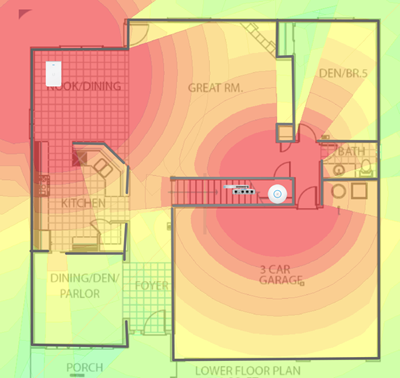
You can test out the web-based software yourself LIVE at https://demo.ui.com and see what managing a large network would be like. Check out their map of the FedEx Forum Stadium and how they get full coverage. You can see a simulated map of my house (not really my house) in the screenshot above. When you set up a controller you can place physical devices (ones you have) and test out virtual devices (ones you are thinking of buying) and see what they would look like on a real map of your home (supplied by you). You can even draw 3D walls and describe their material (brick, glass, steel) and their dB signal loss.
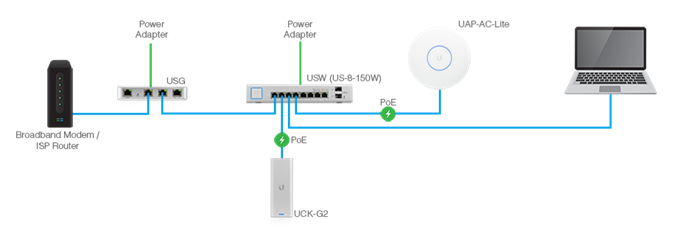
When you are moving to UniFi you'll need:
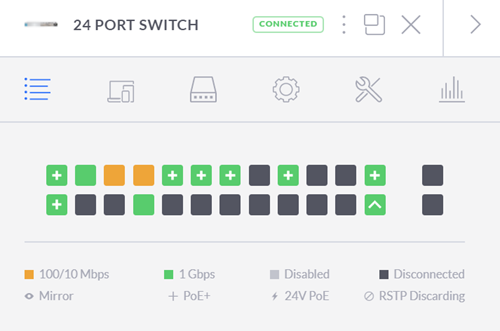
Now once you've got the administrative infrastructure above, you just need to add whatever UniFi APs - access points - and/or optional cameras that you want!
NOTE/TIP - A brilliant product from Ubiquiti that I think is flying under the radar is the Unifi G3 Flex PoE camera. It's just $75 and it's tiny but it's absolutely brilliant. Full 1080p video and night vision. I'll talk about the magic of PoE later on but you can just plug this in anywhere in the house - no AC adapter - and you've got a crystal clear security camera or cameras anywhere in the house. They are all powered from the PoE switch!
I had a basic networking closet I put the USG Gateway into the closet with a patch cable to the cable modem (the DOCSIS 3.1 cable modem that I bought because I got tired of renting it from the service provider) then added the Switch with PoE, and plugged the Cloud Key into it. Admin done.
Here's the lovely part.
Since I have cable throughout the house, I can just plug in the UniFi Access Points in various room and they get power immediately. I can try different configs and test the signal strength. I found the perfect config after about 4 days of moving things around and testing on the interactive map. The first try was fine but I strove for perfect.
There's lots of UniFi Access Points to choose from. The dual radio Pro version can get pretty expensive if you have a lot so I got the Lite PoE AP. You can also get a 5 pack of the nanoHD UniFi Access Points.
These Access Points are often mounted in the ceiling in pro installations, and in a few spots I really wanted something more subtle AND I could use a few extra Ethernet ports. Since I already had an Ethernet port in the wall, I could just wall mount the UniFi Wall Mounted AP. It's both a wireless AP that radiates outward into the room AND it turns your one port into two, or you can get one that becomes a switch with more ports and extends your PoE abilities. So I can add this to a room, plug a few devices in AND a PoE powered Camera with no wall-warts or AC adapters!
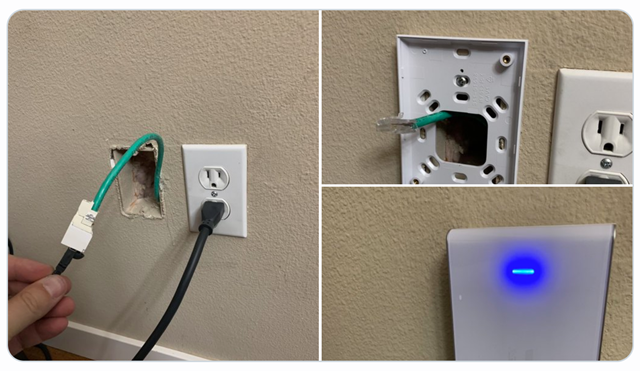
NOTE: I did need to add a new ethernet RJ45 connector to plug into the female connector of the UniFi in-wall AP. Just be sure to plan and take inventory. You may already have full cables with connectors pulled to your rooms. Be aware.
There are a TON of great Wireless AP options from UniFi so make sure you explore them all and understand what you want.
Here's the resulting setup and choices I made, as viewed in the UniFi Controller Software:
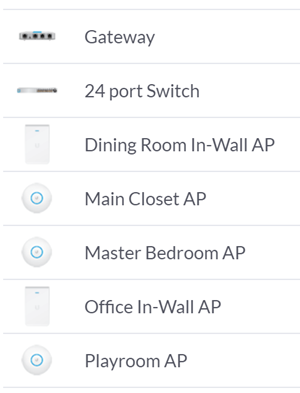
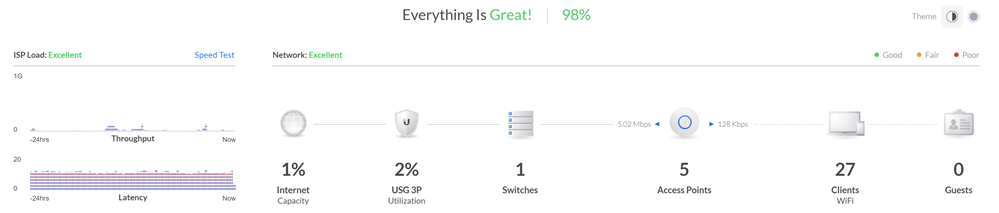
I have the Gateway, the Switch with PoE, and five APs. Three are the disc APs and two are in-wall APs. They absolutely cover and manage my entire two story house and yards front and back. It's made it super easy for me to work from home and be able to work effectively from any room. My kids and family haven't had any issues with any tablets or phones.
As of the time of these writing I have 27 wireless devices on the system and 11 wired (at least those are the ones that are doing stuff at this hour).
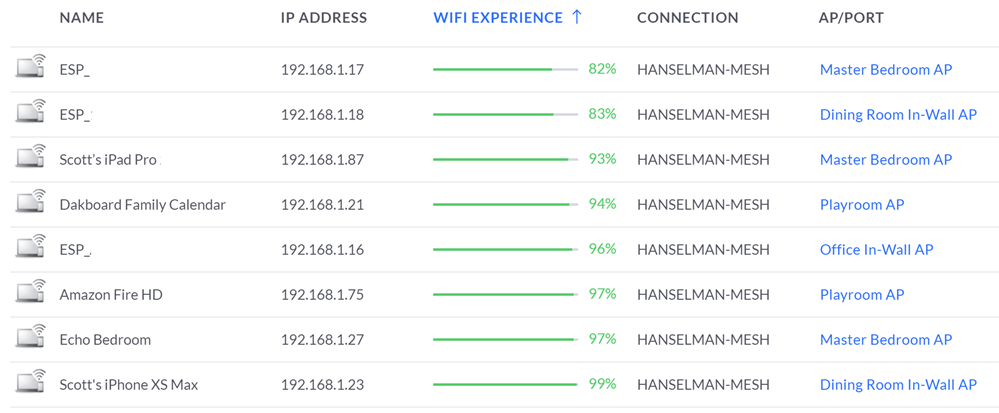
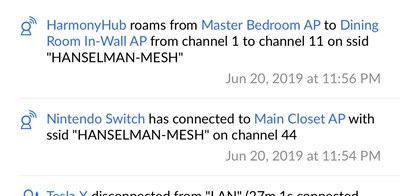
Note how it will tell you how each device's WiFi experience is. I use this Experience information to help me manage the network and see if the APs are appropriately placed. There is a TON of great statistics and charts and graphics. It's info-rich to say the LEAST.
NOTE: To answer a common question - In an installation like this you've got a single SSID even though there's lots of APs and your devices will quietly and automatically roam between them!
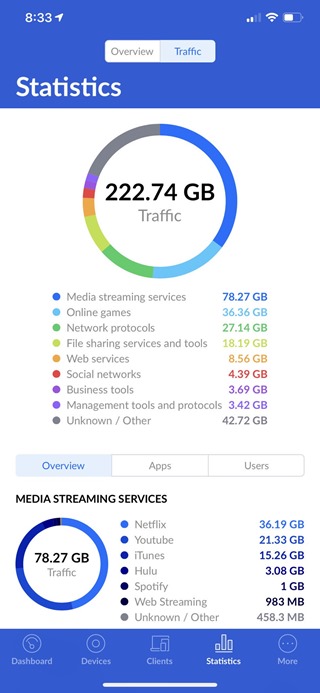
The iPhone app is very full-featured as well and when you've got deep packet introspection turn on you can see a ton of statistical information at the price of a smidge of throughput performance.
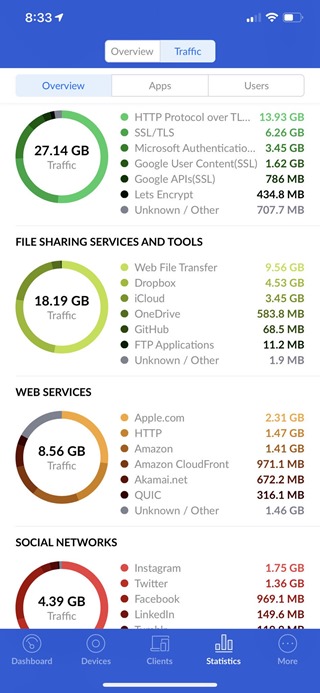
I have had NO problem hitting 800-950Mbs over wired and I feel like there's no real limit to the perf of this system. I've done game streaming over Steam and Xbox game streaming for hours without a hiccup. Netflix doesn't buffer anymore, even on the back porch.
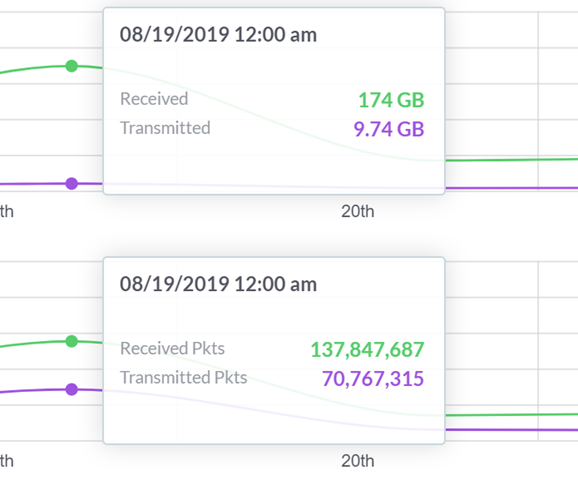
You can auto-optimize, or you can turn off a plethora of feature and manage everything manually. I was able to twitch a few APs to run their 2.4Ghz Wi-Fi radios on less crowded channels in order to get out of the way of the loud neighbors on channel 11.
I have a ton of control over the network now, unlimited expandability and it has been a fantastically stable network. All the APs are wire backed and the wireless bandwidth is rock solid. I've been extremely impressed with the clean roaming from room to room while streaming from Netflix. It's a tweakers (ahem) dream network.
* I use Amazon referral links and donate the little money to my kids' school. You support charter schools when you use these links.
Sponsor: Get the latest JetBrains Rider with WinForms designer, Edit & Continue, and an IL (Intermediate Language) viewer. Preliminary C# 8.0 support, rename refactoring for F#-defined symbols across your entire solution, and Custom Themes are all included.


Neuer Ärger für Wayne Rooney: Der englische Fußballstar ist offenbar betrunken Auto gefahren - und landete in einer Zelle.
 Harvey ist der stärkste Hurrikan seit Katrina 2005. Gut, dass sich nicht nur die Texaner an der Küste sondern auch die in Texas beheimatete US-Ölindustrie darauf vorbereitet haben.
 Abschieben, festsetzen, überwachen: Für den Umgang mit islamistischen Gefährdern mangelt es nicht an Möglichkeiten. In der Praxis laufen sie aber oft ins Leere – wie zwei Abschiebungen aus Niedersachsen erneut zeigen.
UPDATE 1
Wieder da, diesmal als eines der aktuellen Blitzangebote.
Bei Amazon Notebooksbilliger bekommt ihr die OCZ SSD Trion 100 120GB 2,5″ SATA 6GB/s für 39€ (Vergleichspreis: ~45€) Ersparnis ~6€
Sicherlich ist die Ersparnis kein Knaller, aber immerhin 😉
Features:
Die Amazon Kunden sind zufrieden und vergeben gute
4 von 5 Sterne.
 Sherlock: The Abominable Bride - Review
Serienjunkies im Internet:
Hanno GeorgSehr amüsant

Auf den Tag genau vor 30 Jahren kam Windows 1.02 auf den Markt. Lernen Sie mit unserem Quiz Skurriles und Unterhaltendes aus den Kindertagen des Redmonder Kassenschlagers kennen.

Hanno GeorgOha ... da hat Herr Lewandowski jetzt aber ein Problem :/

Mehrere kritische Sicherheitslücken in Teslas Elektroflitzer erlaubten es Sicherheitsforschern, das Fahrzeug zum Stehen zu bringen. Tesla hat bereits mit Updates reagiert.

Hanno Georg... das erklärt so einiges :D

Wie sich die echten Entscheider in Wirtschaft, Politik und Verwaltung informieren, zeigt das F.A.Z.-Elite-Panel: Sie verlassen sich auf die Frankfurter Allgemeine Zeitung.
 Game of Thrones: Informationen zu neuer Figur in Staffel 6
Serienjunkies im Internet:

Nachdem der Audiospezialist die Apple-Tochter Beats Anfang des Jahres wegen "Betrugs und Piraterie" verklagt hatte, reagiert Cupertino nun geschäftlich. Monster-Geräte dürfen Apples Zertifizierungslogo nicht mehr tragen.


Jetzt ist es offiziell: Der US-Riese übernimmt das kleine Unternehmen, das die beliebte App “Wunderlist” entwickelt. Der Kaufpreis soll Gerüchten zufolge im dreistelligen Millionenbereich liegen.

Hanno Georgjemand das schon mal ausprobiert?

Going back to work after an extended break is never fun. You’re in a completely different state of mind when on a holiday, and shutting that off when it’s time to go back is incredibly hard. What can you do to beat the back to work blues? Is there anything you can do on your break that will make the return less painful? As it turns out, there is! Check out the infographic below for some useful tips that will make your work return much more pleasant. Next time you take a vacation, you just might find that going back...
Read the full article: How to Deal With Going Back to Work After a Break
Hanno Georggutes Angebot

Angebot wurde nun um 18 Uhr beendet bzw. kostet nun 14,85€ pro Monat!
Handybude feiert den 15. Geburtstags und hat sich mit Klarmobil eine richtige Knaller-Aktion ausgedacht. Ihr erhaltet eine Allnet Flat + SMS Flat + 500MB Datenflat im Telekom Netz für 9,85€ im Monat.
Die Tarifdetails:
Bis dato gab es diesen Tarif nur mal für 14,85€ pro Monat, nun noch mal ganze 5€ günstiger. Wer eine 1GB Datanflat haben will, kann diese gegen 5€ Aufpreis im Monat bekommen.
So kommt ihr auf den Preis:
“Klarmobil reduziert diese Grundgebühr während der Mindestvertragslaufzeit von 24 Monaten auf gesamt 9,85 €. Nach dem Ablauf von 24 Monaten fällt eine weiterhin reduzierte Grundgebühr von nur 19,85 € statt regulär 24,85 € an.”

Kündigung: bitte denkt daran, dass dieser Tarif ab dem 25. Monat dann 19,85€ kostet. Wollt ihr dies nicht, müsst ihr spätestens 3 Monate vor Vertragsende kündigen.
Hanno Georghaha

Many people find getting up in the morning to be an absolute struggle, which must explain the number of third-party alarm clocks available in the Play Store — but some of them are just really out there. Having trouble waking up on time? These just might help. Here are three of the most aggravating (some would say creative) alarm clock apps for Android. SpinMe Alarm Clock SpinMe wakes you up with loud sounds and jarring vibrations, just like any other alarm app. The challenge comes in getting the thing to shut up. The only way to do so is by standing up, holding...
Read the full article: 3 of the Most Hilariously Annoying Alarm Clock Apps for Android
Hanno GeorgFür Urlaub eigentlich gar nicht so schlecht
 Liebe WhatsApp-Süchtige, es gibt eine billige Lösung falls ihr gerne durch die Welt tingelt, aber auf genau eins nicht verzichten könnt: chatten über WhatsApp. Mit der eigenen Sim-Karte für WhatsApp kann man sich in 150 Ländern für ein Jahr für 10 Eu...
 Ein teureres und kurioseres Computergehäuse wird es auf der CES 2016 wohl nicht geben: Der In Win H-Tower kostet 2.400 Euro. Dafür können Besitzer des E-ATX-Towers die motorisierte Hülle per Smartphone öffnen. (