Article URL: https://jonathanhaidt.substack.com/p/the-play-deficit
Comments URL: https://news.ycombinator.com/item?id=36910256
Points: 416
# Comments: 353
Article URL: https://jonathanhaidt.substack.com/p/the-play-deficit
Comments URL: https://news.ycombinator.com/item?id=36910256
Points: 416
# Comments: 353
Article URL: https://medium.com/microsoft-design/a-change-of-typeface-microsofts-new-default-font-has-arrived-f200eb16718d
Comments URL: https://news.ycombinator.com/item?id=36719987
Points: 184
# Comments: 158
Hello! I’m writing a short series of programming challenges with Julian, and this is the first one!
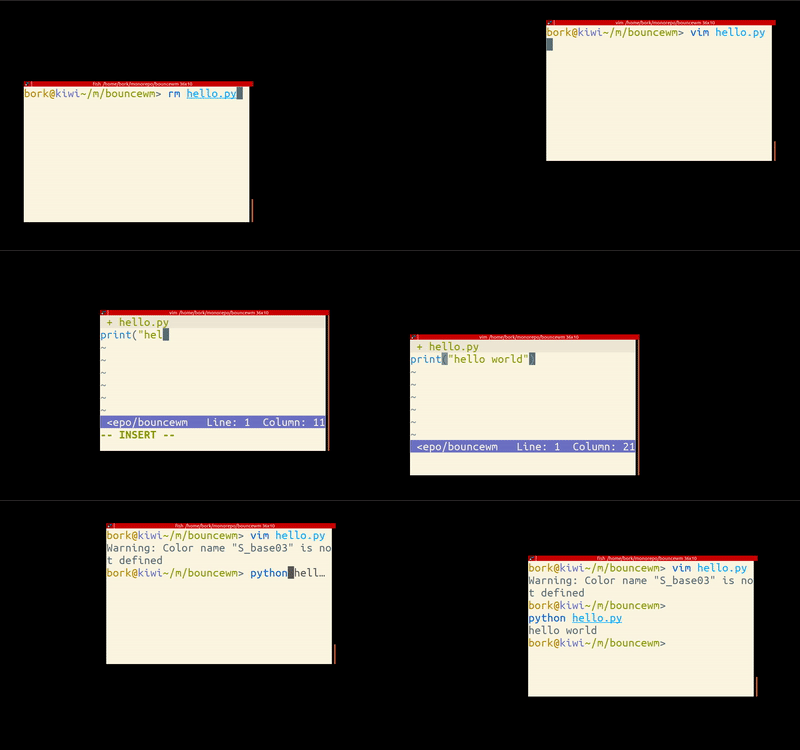
requirements
The goal here is to make a very silly Linux window manager that bounces its windows around the screen, like in the gif above.
anti-requirements
The window manager doesn’t need to do anything else! It doesn’t need to support:
It turns out implementing this kind of toy window manager is surprisingly approachable!
All the instructions here only work on Linux (since this is about writing a Linux window manager).
starter kit: tinywm
Writing a window manager from scratch seems intimidating (at first I didn’t even know how to start!). But then I found tinywm, which is a tiny window manager written in only 50 lines of C. This is a GREAT starting point and there’s an annotated version of the source code which explains a lot of the details. There’s a Python version of tinywm too, but I wasn’t able to get it to work.
I did this challenge by modifying tinywm and it worked really well.
tools
Xephyr -ac -screen 1280x1024 -br -reset -terminate 2> /dev/null :1 &
xterm -display :1
gcc bouncewm.c -g -o bouncewm -lX11 and ran it with env DISPLAY=:1 ./bouncewm
xtrace ./bouncewm)documentation
Some useful references:
If you’re not comfortable writing C, there are also libraries that let you work with X in other languages. I personally found C easier to use because a lot of the window manager documentation and examples I found were for the Xlib C library.
To give you a very rough idea of the difficulty of this exercise: I did this in 4 or 5 hours this morning and last night, producing the window manager you see in the gif at the top of the blog post (which is 50 lines of code). I’d never looked at the source code for a window manager before yesterday.
As usual when working with a new library I spent most of that time being confused about various basic things about how X works. (and as a result I learned several new things about X!)
For me this challenge was a fun way to:
I’ll post the solution I came up in a week. If you think this window manager challenge sounds fun and end up doing it, I’d love it if you sent me your solution (to julia@jvns.ca)!
I’d be delighted to post any solutions you send me in the solutions blog post.
I understand that the New Horizons craft used gravity assist from Jupiter to increase its speed on the way to Pluto. I also understand that by doing this, Jupiter slowed down very slightly. How many flyby runs would it take to stop Jupiter completely?
—Dillon
More than we can afford.
Spacecraft sometimes perform close flybys of heavy, fast-moving planets, which can let them gain speed without using fuel.[1]It may sound strange that you could gain speed by flying toward a planet and then away from it, since intuitively it seems like any speed you gain from flying toward it, you should lose flying away. But it's not really about gravity at all; gravity assists could work just as well with ropes or springs, if you could make them big enough. When you you fly toward a planet, swing around it, and fly back in the direction you came, it's as if you "bounced off" the planet. If the planet is moving, this bounce can give you an extra kick—like a tennis ball thrown at the windshield of a passing truck. You can check out What If #38 for details—or, at least, a drawing of the tennis ball thing. Due to conservation of momentum, the maneuver also slows the planet down very slightly, but no one really worries about that.

Planets don't slow down much during a flyby because they're so much heavier than spacecraft. When New Horizons flew by Jupiter, it gained about 4,000 m/s of velocity, while Jupiter lost about 10-21 m/s.[2]The geometry is a little complicated, since they were changing both speed and direction. If you want to learn more, look for a copy of this paper; it's a great tutorial.
10-21 meters per second may not sound like much, but it very slightly changed Jupiter's orbit, shortening its year and bringing it slightly closer to the Sun. Thanks to that flyby, by the time the Sun goes supernova, Jupiter's calendar will be several dozen nanoseconds out of sync from where it would be otherwise!

"Several dozen nanoseconds out of sync" isn't really satisfying, so we'll definitely need more than one flyby. How many can we pull off?
The New Horizons mission cost the US government about \$700,000,000 over the full planned lifetime of the mission from 2001 to 2016. Over that same period, the government spent about \$47,879,840,000,000 on other things. If we cut all the spending on those other things[3]It's probably nothing important. and funneled it all into New Horizons probes, we could have launched 68,000 identical New Horizons probes.
This would create some problems. For one, New Horizons carries a chunk of plutonium for power. This chunk—about 10 kg of it—was made from uranium in a reactor. To make enough plutonium for 68,000 New Horizons would require a substantial chunk of the world's uranium reserves.
But it gets worse.[4]It always seems to, with plutonium. When NASA launches a spacecraft carrying plutonium, they estimate the odds of a launch accident which would release radioactive material into the atmosphere. Usually, these odds are around 1 in 300. With 68,000 launches, then, we can expect a little over 200 nuclear accidents, which probably isn't good.

But it would all be worth it if we could slow down Jupiter! Sadly, 68,000 New Horizons probes aren't nearly enough. We'd still only rob Jupiter of a tiny fraction of its speed. Over the lifetime of the Solar System, the error in Jupiter's calendar would only add up to 2 milliseconds.
If we made the spacecraft cheaper, we could send more of them, but sooner or later we'd start running out of materials. We'd definitely run out of fuel for all these rocket launches, but let's assume we've built some kind of space elevator to make launches cheap. We'd run out of uranium (to make the plutonium) pretty quickly, but we could replace the uranium with a chunk of lead—after all, this spacecraft doesn't really need to work.
Eventually, though, we'd start running out of lead, too. If we replaced the lead with something else—say, rocks, or old garbage—we'd run out of that, too. At some point, in our desperate attempts to reduce Jupiter's forward speed, we'd be reduced to stuffing handfuls of rocks and dirt into a burlap sack with a NASA logo on the side.

Then, believe it or not, we would run out of rocks.
The Earth's crust only has so much stuff[5]This is the technical term. in it. Even if we peeled up the upper few dozen kilometers of crust and flung it at Jupiter—and for the record, I do not recommend we do this—it would trim less than a single mile per hour off Jupiter's speed.
Really, it makes sense that this plan doesn't work. Earth weighs a lot less than Jupiter,[6]Earth weighs almost exactly pi milliJupiters. so even if we throw the entire Earth at Jupiter, it would still only reduce Jupiter's speed by a fraction of a percent—on the order of a few dozen miles per hour. The situation is similar to the one in the tennis ball analogy from earlier: If you want to stop a truck with tennis balls, the tennis balls need more momentum than the truck, which means they need to be extremely heavy, fast, or both.
And at the core, that's the problem with this idea. Gravity assists are just like throwing a tennis ball at a speeding truck, and to stop a truck ...

... you need an awfully big tennis ball.
Sinatra is a domain-specific language for quickly creating web applications in Ruby. After using it on a few projects, I decided to find out how it works under the hood.
Here’s a step by step guide on how I wrote my own Sinatra.
At its core, Sinatra is a Rack application. I already wrote about Rack, so if you’re a little fuzzy on how Rack works, that post is a great starting point. Sinatra is a layer on top of Rack: it provides an excellent DSL for specifying what your Rack app responds to, and what it sends back. For example, here’s a Sinatra application:
get "/hello" do
  [200, {}, "Hello from Sinatra!"]
end

post "/hello" do
  [200, {}, "Hello from a post-Sinatra world!"]
end
We should be able to run the code above,
then send a GET to /hello on localhost and see “Hello from Sinatra!”.
A POST to /hello should give us a snarky message about Sinatra.
And visiting any route that we haven’t explicitly defined should give
us a 404.
After poring over the Sinatra source, I’ve distilled Sinatra down to a simplified technical architecture.
We’ll make a base Sinatra class that other classes can inherit from. It will
store routes (like GET /hello) and actions to take when hitting those routes.
For each request, it will match the requested route to the stored routes, and
take action if there’s a match, or return a 404 if nothing matches.
Let’s call our version Nancy.
Here’s the first iteration: a class that has a method get that takes a path
and a handler block.
# nancy.rb
require "rack"

module Nancy
  class Base
    def initialize
      @routes = {}
    end

    attr_reader :routes

    def get(path, &handler)
      route("GET", path, &handler)
    end

    private

    def route(verb, path, &handler)
      @routes[verb] ||= {}
      @routes[verb][path] = handler
    end
  end
end
The route method takes a verb, a path, and a handler block.
It stores the handler in a nested hash of the verb and path,
which ensures that routes with the same path
like POST /hello and GET /hello
won’t conflict.
Let’s add this at the bottom to try it out:
nancy = Nancy::Base.new

nancy.get "/hello" do
  [200, {}, ["Nancy says hello"]]
end

puts nancy.routes
Note that we currently have nancy.get instead of just get,
but don’t worry, we’ll fix that at the end.
If we run ruby nancy.rb, we see:
{
  "GET" => {
    "/hello" => #<Proc:0x007fea4a185a88@nancy.rb:26>
  }
}
Cool! Calling nancy.get correctly adds a route.
Now let’s make Nancy::Base a Rack app by adding a minimal call method,
as described in my Rack post:
# nancy.rb
def call(env)
  @request = Rack::Request.new(env)
  verb = @request.request_method
  requested_path = @request.path_info

  handler = @routes[verb][requested_path]

  handler.call
end
First, we grab the verb and requested path (like GET and /the/path)
from the env parameter using Rack::Request.
Then we grab the handler block from @routes and call it.
We are assuming that end users will ensure their block handler will return
something that Rack can understand, which our block does.
Now that we’ve added a call method to Nancy::Base,
let’s add a handler at the bottom:
nancy = Nancy::Base.new

nancy.get "/hello" do
  [200, {}, ["Nancy says hello"]]
end

# This line is new!
Rack::Handler::WEBrick.run nancy, Port: 9292
Rack handlers take a Rack app and actually run them. We’re using WEBrick because it’s built in to Ruby.
Run your file with ruby nancy.rb and visit http://localhost:9292/hello.
You should see a greeting.
Important future note: this code doesn’t automatically reload,
so every time you change this file,
you’ll need to hit Ctrl-c and run the code again.
Visiting a route that we’ve defined shows a message, but visiting a nonexistent route like http://localhost:9292/bad shows a gross Internal Server Error page. Let’s show a custom error page instead.
To do that, we need to modify our call method a little bit.
Here’s a diff:
 def call(env)
   @request = Rack::Request.new(env)
   verb = @request.request_method
   requested_path = @request.path_info

-  handler = @routes[verb][requested_path]
-
-  handler.call
+  handler = @routes.fetch(verb, {}).fetch(requested_path, nil)

+  if handler
+    handler.call
+  else
+    [404, {}, ["Oops! No route for #{verb} #{requested_path}"]]
+  end
 end
If our nested @routes hash doesn’t have a handler defined
for the requested verb/path combination,
we now return a 404 with an error message.
Our nancy.get handler always shows the same content.
But what if we want to use information about the request (like params) in our handler?
The Rack::Request class that wraps the env
has a method called params that contains information about all parameters
provided to the method - GET, POST, PATCH, etc.
First, we need to add a params method to Nancy::Base:
module Nancy
  class Base
    #
    # ...other methods....
    #

    def params
      @request.params
    end
  end
end
We still need to give our route handlers (the block that we pass to each get)
access to that params method, though.
We have a params method on the instance of Nancy::Base, so let’s evaluate
our route handler block in the context of that instance, to give it access to
all of the methods. We can do that with instance_eval.
If you’re a little fuzzy on instance_eval, try this article on DSLs,
which goes into it in detail.
Here’s the change we need to make to the call method:
 if handler
-  handler.call
+  instance_eval(&handler)
 else
   [404, {}, ["Oops! Couldn't find #{verb} #{requested_path}"]]
 end
This is a little tricky, so I’m going to go over it in detail:
handler is a “free floating” lambda, without any contextcall on that handler it doesn’t have access to any of the
Nancy::Base instance’s methodsinstance_eval, the handler block is
run in the context of the Nancy::Base instance, which means it has access
to that instance’s methods and instance variablesNow we have access to params in the handler block. Try adding the following
to nancy.rb and then visiting http://localhost:9292/?foo=bar&hello=goodbye:
nancy.get "/" do
  [200, {}, ["Your params are #{params.inspect}"]]
end
Any other methods we add to Nancy::Base
will also be available inside route handler blocks.
So far nancy.get works,
but we haven’t defined methods for other common HTTP verbs yet.
The code is very similar to get:
# nancy.rb
def post(path, &handler)
  route("POST", path, &handler)
end

def put(path, &handler)
  route("PUT", path, &handler)
end

def patch(path, &handler)
  route("PATCH", path, &handler)
end

def delete(path, &handler)
  route("DELETE", path, &handler)
end
In most POST and PUT requests, we’ll want to access the request body.
Since the handler has access to every instance method on Nancy::Base,
we need to add an instance method named request that has access to our
@request instance variable that we set in call:
attr_reader :request
After adding that, we can access the request in every handler block:
nancy.post "/" do
  [200, {}, request.body]
end
Add that route, and now you can use curl
to send the contents of a file to Nancy
and she’ll echo it back to you:
$ curl --data "body is hello" localhost:9292
body is hello
Let’s spruce up the place:
params instead of request.params
params is fairly easy, we can add a small method to Nancy::Base:
def params
  request.params
end
For the second item, we need to check the result of the handler block in call:
   if handler
-    instance_eval(&handler)
+    result = instance_eval(&handler)
+    if result.class == String
+      [200, {}, [result]]
+    else
+      result
+    end
   else
     [404, {}, ["Oops! Couldn't find #{verb} #{requested_path}"]]
   end
Neat! If evaluating the block returns a String, we construct a successful Rack response; otherwise, we return the result of the block as-is. Now we can do this:
nancy.get "/hello" do
  "Nancy says hello!"
end
That nancy.get is really getting me down.
It’d be really cool if we could just do get.
Here’s how.
Our strategy will be to make a Sinatra class that we can access from anywhere,
then delegate get, post, etcetera to that class.
An example will explain the “access from anywhere”:
every time we call Nancy::Base.new,
we get a new instance of Nancy::Base.
So if we add routes to Nancy::Base.new,
then in another file try running Nancy::Base.new with a Rack handler,
we’d be running a brand new instance that doesn’t have any of our routes.
So let’s define an instance of Nancy::Base that we can reference:
module Nancy
  class Base
    # methods...
  end

  Application = Base.new
end
Try changing your routes to use Nancy::Application:
nancy_application = Nancy::Application

nancy_application.get "/hello" do
  "Nancy::Application says hello"
end

# Use `nancy_application,` not `nancy`
Rack::Handler::WEBrick.run nancy_application, Port: 9292
That’s step 1. Step 2 is to delegate methods to Nancy::Application.
Add the following code (taken from Sinatra) to nancy.rb:
module Nancy
  module Delegator
    def self.delegate(*methods, to:)
      Array(methods).each do |method_name|
        define_method(method_name) do |*args, &block|
          to.send(method_name, *args, &block)
        end

        private method_name
      end
    end

    delegate :get, :patch, :put, :post, :delete, :head, to: Application
  end
end
Nancy::Delegator will delegate get, patch, post, etc
to Nancy::Application
so that calling get in context with Nancy::Delegator will behave exactly like
calling Nancy::Application.get.
Now let’s include it everywhere.
Add this line to nancy.rb outside of the Nancy module:
include Nancy::Delegator
Now we can delete all of the Nancy::Base.new and nancy_application lines
and try the fancy new routes:
get "/bare-get" do
  "Whoa, it works!"
end

post "/" do
  request.body.read
end

Rack::Handler::WEBrick.run Nancy::Application, Port: 9292
Plus it works when run with rackup via config.ru:
# config.ru
require "./nancy"

run Nancy::Application
Here’s the full final code:
# nancy.rb
require "rack"

module Nancy
  class Base
    def initialize
      @routes = {}
    end

    attr_reader :routes

    def get(path, &handler)
      route("GET", path, &handler)
    end

    def post(path, &handler)
      route("POST", path, &handler)
    end

    def put(path, &handler)
      route("PUT", path, &handler)
    end

    def patch(path, &handler)
      route("PATCH", path, &handler)
    end

    def delete(path, &handler)
      route("DELETE", path, &handler)
    end

    def head(path, &handler)
      route("HEAD", path, &handler)
    end

    def call(env)
      @request = Rack::Request.new(env)
      verb = @request.request_method
      requested_path = @request.path_info

      handler = @routes.fetch(verb, {}).fetch(requested_path, nil)

      if handler
        result = instance_eval(&handler)
        if result.class == String
          [200, {}, [result]]
        else
          result
        end
      else
        [404, {}, ["Oops! No route for #{verb} #{requested_path}"]]
      end
    end

    attr_reader :request

    private

    def route(verb, path, &handler)
      @routes[verb] ||= {}
      @routes[verb][path] = handler
    end

    def params
      @request.params
    end
  end

  Application = Base.new

  module Delegator
    def self.delegate(*methods, to:)
      Array(methods).each do |method_name|
        define_method(method_name) do |*args, &block|
          to.send(method_name, *args, &block)
        end

        private method_name
      end
    end

    delegate :get, :patch, :put, :post, :delete, :head, to: Application
  end
end

include Nancy::Delegator
Here’s an app that uses Nancy:
# app.rb
# run with `ruby app.rb`
require "./nancy"

get "/" do
  "Hey there!"
end

Rack::Handler::WEBrick.run Nancy::Application, Port: 9292
And that’s Nancy Sinatra! Let’s review what we can do with this code:
get instead of nancy.get).Nancy::Base to make our own custom apps.Sinatra’s source code is almost all in base.rb.
It’s dense, but more understandable after reading this post.
I’d start with the call! method; also check out the Response class,
which is a subclass of Rack::Response.
One thing to keep in mind is that Sinatra is class-based,
while Nancy is object-based;
where Nancy uses an instance-level get method, Sinatra uses a class-level
get method.

Super Time Force Ultra brought some friends along to its release on Steam today: Pyro and Saxton Hale!
When I was part of thoughtbot’s apprentice.io program, I spent my days learning to code in a maintainable and scalable way. In my first two weeks, refactoring with my mentor Anthony became one of my favorite exercises.
In my third week as an apprentice, we sat down to refactor a test I wrote for my breakable toy application. This is the process we followed:
# spec/features/teacher/add_an_assignment_spec.rb

require 'spec_helper'

feature 'teacher adding an assignment' do
  scenario 'can create an assignment with valid attributes' do
    teacher = create(:teacher)
    course1 = create(:course, name: 'Math', teacher: teacher)
    course2 = create(:course, name: 'Science', teacher: teacher)
    course3 = create(:course, name: 'History', teacher: teacher)
    course4 = create(:course, name: 'Quantum Physics', teacher: teacher)

    visit new_teacher_assignment_path(as: teacher)

    select 'Science', from: :assignment_course_id
    fill_in :assignment_name, with: 'Pop Quiz'
    fill_in :assignment_description, with: 'I hope you studied!'
    select '2014', from: :assignment_date_assigned_1i
    select 'January', from: :assignment_date_assigned_2i
    select '15', from: :assignment_date_assigned_3i
    select '2014', from: :assignment_date_due_1i
    select 'January', from: :assignment_date_due_2i
    select '17', from: :assignment_date_due_3i
    fill_in :assignment_points_possible, with: 100
    click_button I18n.t('helpers.submit.create', model: 'Assignment')

    expect(current_path).to eq(teacher_assignments_path)
    expect(page).to have_content('Course: Science')
    expect(page).to have_content('Name: Pop Quiz')
    expect(page).to have_content('Description: I hope you studied!')
    expect(page).to have_content('Date assigned: January 15, 2014')
    expect(page).to have_content('Date due: January 17, 2014')
    expect(page).to have_content('Points possible: 100')
  end
end
Check out this repo to follow along.
date_assigned and date_due fields are not named using Rails idioms.Where to begin?
First we looked at some low hanging fruit. Anthony asked me, “when we
use t.timestamps in a migration, what are the attribute names?” I knew
immediately where he was going with this. Timestamps are named created_at and
updated_at. The reason they are named with _at is because it gives
developers context that says, “this is a DateTime.” Similarly, when naming
Date attributes, the proper Rails idiom is _on.
This may seem like a small thing, but following conventions makes it much easier for other developers (including my future self) to read and derive context about my attributes without having to dig.
So, we changed date_assigned and date_due to assigned_on and due_on
respectively:
select '2014', from: :assignment_assigned_on_1i
select 'January', from: :assignment_assigned_on_2i
select '15', from: :assignment_assigned_on_3i
select '2014', from: :assignment_due_on_1i
select 'January', from: :assignment_due_on_2i
select '17', from: :assignment_due_on_3i
Updated assertions to follow the same convention:
expect(page).to have_content('Assigned on: January 15, 2014')
expect(page).to have_content('Due on: January 17, 2014')
We check to make sure our test passes and make a commit.
This test creates 4 courses, so that a teacher must select which course the assignment belongs to. This could be done much more efficiently by using some simple Ruby. However, upon further consideration, having more than 1 course is not only unnecessary, but detrimental to our test because it writes unnecessary data to the database and increases run time.
teacher = create(:teacher)
course1 = create(:course, name: 'Math', teacher: teacher)
course2 = create(:course, name: 'Science', teacher: teacher)
course3 = create(:course, name: 'History', teacher: teacher)
course4 = create(:course, name: 'Quantum Physics', teacher: teacher)
becomes
teacher = create(:teacher)
create(:course, name: 'Science', teacher: teacher)
Again, we check to make sure the test still passes and commit.
Anthony is always pushing me to write code so that it performs like it reads. Doing so ensures readability for myself and other developers, and forces us to make sure our objects and methods execute the intentions indicated by their name.
When Anthony isn’t around for conversations, I find pseudocoding helps organize my intentions:
# I want a method that:
#  fills out all attributes within my assignment form
#  selects a course from a dropdown list
#  fills in text fields with the appropriate attributes
#  selects dates for the appropriate attributes
#  submits my form
#  is readable and intention-revealing
The ugliest part of this test (in my opinion) is the way the date fields are selected. It takes 3 lines of code for each date because the form has a separate select for each Month, Day and Year. We can DRY (Don’t Repeat Yourself) this up by creating a method that will make these selections for us.
First, we write the method call:
select_date(:assignment, :assigned_on, 'January 15, 2014')
select_date(:assignment, :due_on, 'January 17, 2014')
When using form_for, form fields are all prefixed with the object they belong
to (in this case, :assignment), so we pass that first. Second, we pass the
form field we want to select. Third, we pass the date in a string.
Now we write the method:
def select_date(prefix, field, date)
  parsed_date = Date.parse(date)
  select parsed_date.year, from: :"#{ prefix }_#{ field }_1i"
  select parsed_date.strftime('%B'), from: :"#{ prefix }_#{ field }_2i"
  select parsed_date.day, from: :"#{ prefix }_#{ field }_3i"
end
To make extracting the Month, Day and Year from our string much easier, we
convert them to a Date object and interpolate the form attributes using the
prefix and field arguments.
The test is green, so we commit.
We don’t love the local variable for parsing our date and there is an argument order dependency as well. So we extract the parsing of dates to local variables at the top of the test. We aren’t exactly sure what to do about the argument order dependency at this point, and assume this may be an issue with the next form field as well, so we put off that refactor for now.
assigned_on = Date.parse('January 15, 2014')
due_on = Date.parse('January 17, 2014')
...

select_date(:assignment, :assigned_on, assigned_on)
select_date(:assignment, :due_on, due_on)
...

def select_date(prefix, field, date)
  select date.year, from: :"#{ prefix }_#{ field }_1i"
  select date.strftime('%B'), from: :"#{ prefix }_#{ field }_2i"
  select date.day, from: :"#{ prefix }_#{ field }_3i"
end
We feel good about this refactor. Our code is still readable and introduction
of the Date object will allow us to put the date in whatever format we like
and still achieve the same result.
The test is green, so we commit.
We have 3 text_field attributes being filled the exact same way. Following
what we did with select_date, we can write a method that will fill in the
text_field’s and will DRY up this duplication.
Again, we write the method call so that it reads as the code performs:
fill_in_text_field(:assignment, :name, 'Pop Quiz')
fill_in_text_field(:assignment, :description, 'I hope you studied!')
fill_in_text_field(:assignment, :points_possible, 100)
This isn’t much of an improvement. While we may have decreased a little bit of ‘noise’ and increased the legibility, we are accomplishing our task in the same number of lines and it is still repetitive. Stay tuned, we’re going somewhere with this.
def fill_in_text_field(prefix, field, value)
  fill_in "#{ prefix }_#{ field }", with: value
end
We are getting less out of this refactor than the last. We still have argument order dependencies and the code’s readability is much the same. However, notice the pattern forming between all the different form methods…
Our test is green, so we commit.
We have a lot of duplication. We are calling the methods select_date and
fill_in_text_field multiple times each. We need to find a way (perhaps an
object or method) to pass each form field type multiple arguments and iterate
over them.
However, we need to make sure that all the form fields are essentially using the same format before we try to wrap them. We need to create a method for selecting our course. Write the method call:
select_from_dropdown(:assignment, :course_id, 'Science')
This may look a bit funny, selecting a course from a drop-down list with a
field identifier of :course_id, but passing it the string 'Science' instead
of an id. This is due to a little bit of form_for magic. When courses are
created, each receives an id when persisted to the database. In our form, we
want to be able to select courses that belong to a specific teacher. form_for
allows us to display the names of the courses in the drop-down list, but once
selected and submitted, the form actually sends the course_id that is
required for our Assignment belongs_to :course association.
The method:
def select_from_dropdown(prefix, field, value)
  select value, from: :"#{ prefix }_#{ field }"
end
Now we can really see a pattern forming. Test is green, commit.
yield and wrapping method callsThe next refactor is a very small but integral step in making these other
refactors worth while. What good are the select_from_dropdown, select_date
and fill_in_text_field if we can’t use them every time we need to fill in
another form?
In each of these method calls, we are passing a ‘prefix’ (in this case it is
:assignment) which will always be present no matter what form you are filling
out for a particular object. We can abstract this away by wrapping all of these
method calls in another method that simply yields the prefix. We’ll call this
method within_form(prefix, &block):
def within_form(prefix, &block)
  yield prefix
end
Update the method calls to fill in our form:
within_form(:assignment) do |prefix|
  select_from_dropdown(prefix, :course_id, 'Science')
  fill_in_text_field(prefix, :name, 'Pop Quiz')
  fill_in_text_field(prefix, :description, 'I hope you studied!')
  select_date(prefix, :assigned_on, assigned_on )
  select_date(prefix, :due_on, due_on )
  fill_in_text_field(prefix, :points_possible, 100)
end
All we are doing here is abstracting the object for the form into an argument,
and supplying that argument to each method call with yeild.
But what if instead of yeilding our prefix, we were to yield an object back
that understood the methods select_from_dropdown, select_date and
fill_in_text_field? If that object understood our prefix, and these methods,
we could use within_form for any object we need to fill in a form for.
Our test is green, so we commit.
This next refactor has a lot of moving pieces. We want to create an object responsible for filling out all form fields. As always, write the method call and describe what you want it to perform:
within_form(:assignment) do |f|
  f.select_from_dropdown(course_id: 'Science')
  f.fill_in_text_field(name: 'Pop Quiz')
  f.fill_in_text_field(description: 'I hope you studied!')
  f.fill_in_text_field(points_possible: 100)
  f.select_date(assigned_on: assigned_on)
  f.select_date(due_on: due_on)
end
In order for within_form to perform properly we must update it to yield an
object that understands each method responsible for filling out form fields.
def within_form(form_prefix, &block)
  completion_helper = FormCompletionHelper.new(form_prefix, self)
  yield completion_helper
end
By creating the FormCompletionHelper object, we have a place to put the
select_from_dropdown, select_date and fill_in_text_field methods.
Each time within_form is called, a new instance of FormCompletionHelper
is yielded. We call our form methods, and pass along the field and value
arguments that each method requires:
class FormCompletionHelper
  delegate :select, :fill_in, to: :context

  def initialize(prefix, context)
    @prefix = prefix
    @context = context
  end

  def fill_in_text_field(field, value)
    fill_in :"#{ prefix }_#{ field }", with: value
  end

  def select_date(field, date)
    select date.year, from: :"#{ prefix }_#{ field }_1i"
    select date.strftime('%B'), from: :"#{ prefix }_#{ field }_2i"
    select date.day, from: :"#{ prefix }_#{ field }_3i"
  end

  def select_from_dropdown(field, value)
    select value, from: :"#{ prefix }_#{ field }"
  end

  private

  attr_reader :prefix, :context
end
This was a big refactor. By wrapping the methods select_from_dropdown,
select_date and fill_in_text_field within the FormCompletionHelper class,
their scope changes and they no longer have access to Capybara’s
select and fill_in methods. In order to call these methods from
FormCompletionHelper, we delegate to the test context (hence, choosing
context for the name of this object). We do this by passing self as an
argument to the within_form method and we delegate with the code:
delegate :select, :fill_in, to: :context
We also are able to remove prefix as an argument from each of our methods by
defining a getter method for prefix:
attr_reader :prefix, :context
Our test is green, so we commit.
We are calling fill_in_text_field 3 times, select_date twice,
and the click_button action that submits our form is reliant on ‘Assignment’
being passed as a string.
Let’s address the duplication:
within_form(:assignment) do |f|
  f.select_from_dropdown(course_id: 'Science')
  f.fill_in_text_fields(
    name: 'Pop Quiz',
    description: 'I hope you studied!',
    points_possible: 100
  )
  f.select_dates(
    assigned_on: assigned_on
    due_on: due_on,
  )
end
click_button I18n.t('helpers.submit.create', model: 'Assignment')
Notice that instead of passing multiple arguments, we now pass key: value
pairs.
Now, we must adjust our methods to allow one or more fields:
def fill_in_text_field(options)
  options.each do |field, value|
    fill_in :"#{ prefix }_#{ field }", with: value
  end
end
alias :fill_in_text_fields :fill_in_text_field

def select_date(options)
  options.each do |field, date|
    select date.year, from: :"#{ prefix }_#{ field }_1i"
    select date.strftime('%B'), from: :"#{ prefix}_#{ field }_2i"
    select date.day, from: :"#{ prefix }_#{ field }_3i"
  end
end
alias :select_dates :select_date

def select_from_dropdown(options)
  options.each do |field, value|
    select value, from: :"#{ prefix }_#{ field }"
  end
end
alias :select_from_dropdowns :select_from_dropdown
In addition to adding iteration to each of these methods, we also create an
alias for each method to allow singular or plural method calls.
alias :select_dates :select_date
The test is green, commit.
We know that in the context of a database backed object, form submit
actions are only used to create or update the object. To make this submission
dynamic we need to assign the model and stipulate whether the action is a
create or update.
The method call as we want to see it perform:
def within_form(:assignments) do |f|
...
  f.submit(:create)
end
Implement #submit in FormCompletionHelper:
delegate :select, :fill_in, :click_button, to: :context
...
def submit(create_or_update)
  raise InvalidArgumentException unless [:create, :update].include?(create_or_update.to_sym)
  click_button I18n.t("helpers.submit.#{ create_or_update }", model: model_name)
end

private

def model_name
  prefix.to_s.capitalize
end
This refactor completes our ability to dynamically fill out forms. By
abstracting the submit action to the FormCompletionHelper we are able to
assign the model_name using our form_prefix. We also include an
InvalidArgumentException to allow :create or :update arguments only.
Our test is green, so we commit.
Now that we’ve fully abstracted form completion, it doesn’t make much sense
to leave #within_form or FormCompletionHelper in our
spec/features/teacher/adding_an_assignment_spec.rb. We can move them to
separate files, wrap them in a module, and include them in our RSpec
configuration so that our teacher/adding_an_assignment_spec.rb will have
access to them. A nice by-product of doing this is that any other feature specs
that require a form to be filled out can now use the within_form method.
We move our FormCompletionHelper class to a new file called
form_completion_helper.rb. The functionality that this class offers is only
going to be used in feature spec files, so we place the file in the
spec/support/features/ directory. We also namespace the class by wrapping it in a
Features module.
# spec/support/features/form_completion_helper.rb

module Features
  class FormCompletionHelper
    delegate :select, :fill_in, :click_button, to: :context

    def initialize(prefix, context)
      @prefix = prefix
      @context = context
    end

    def fill_in_text_field(options)
      options.each do |field, value|
        fill_in :"#{ prefix }_#{ field }", with: value
      end
    end
    alias :fill_in_text_fields :fill_in_text_field

    def select_date(options)
      options.each do |field, date|
        select date.year, from: :"#{ prefix }_#{ field }_1i"
        select date.strftime('%B'), from: :"#{ prefix }_#{ field }_2i"
        select date.day, from: :"#{ prefix }_#{ field }_3i"
      end
    end
    alias :select_dates :select_date

    def select_from_dropdown(options)
      options.each do |field, value|
        select value, from: :"#{ prefix }_#{ field }"
      end
    end
    alias :select_from_dropdowns :select_from_dropdown

    def submit(create_or_update)
      raise InvalidArgumentException unless [:create, :update].include?(create_or_update.to_sym)
      click_button I18n.t("helpers.submit.#{create_or_update}", model: model_name)
    end

    private

    def model_name
      prefix.to_s.capitalize
    end

    attr_reader :prefix, :context
  end
end
We also created a form_helpers.rb file for our #within_form helper method.
We also namespace this method in the Features and FormHelpers modules.
# spec/support/features/form_helpers.rb

module Features
  module FormHelpers
    def within_form(form_prefix, &block)
      completion_helper = FormCompletionHelper.new(form_prefix, self)
      yield completion_helper
    end
  end
end
The last step is to require these modules in /spec/spec_helper.rb.
RSpec.configure do |config|
  config.include Features
  config.include Features::FormHelpers
end
Our test is green, so we commit.
Next time, I might use the Formulaic gem. However, I find that exercises like this really help me understand the process of writing quality code.
If you found this post helpful, check out our refactoring screencast on Learn.
Also, check out this
blog to take your test refactoring to the next level using
I18n.
Polymorphism - the provision of a single interface to entities of different types
Polymorphism is one of the fundamental features of object oriented programming, but what exactly does it mean? At its core, in Ruby, it means being able to send the same message to different objects and get different results. Let's look at a few different ways to achieve this.
One way we can achieve polymorphism is through inheritance. Let's use the template method to create a simple file parser.
First let's create a GenericParser class that has a parse method. Since
this is a template the only thing this method will do is raise an exception:
class GenericParser
  def parse
    raise NotImplementedError, 'You must implement the parse method'
  end
end
Now we need to make a JsonParser class that inherits from GenericParser:
class JsonParser < GenericParser
  def parse
    puts 'An instance of the JsonParser class received the parse message'
  end
end
Let's create an XmlParser to inherit from the GenericParser as well:
class XmlParser < GenericParser
  def parse
    puts 'An instance of the XmlParser class received the parse message'
  end
end
Now let's run a script and take a look at how it behaves:
puts 'Using the XmlParser'
parser = XmlParser.new
parser.parse

puts 'Using the JsonParser'
parser = JsonParser.new
parser.parse
The resulting output looks like this:
Using the XmlParser
An instance of the XmlParser class received the parse message

Using the JsonParser
An instance of the JsonParser class received the parse message
Notice how the code behaves differently depending on which child class receives
the parse method. Both the XML and JSON parsers modify GenericParser's
behavior, which raises an exception.
In statically typed languages, runtime polymorphism is more difficult to achieve. Fortunately, with Ruby we can use duck typing.
We'll use our XML and JSON parsers again for this example, minus the inheritance:
class XmlParser
  def parse
    puts 'An instance of the XmlParser class received the parse message'
  end
end

class JsonParser
  def parse
    puts 'An instance of the JsonParser class received the parse message'
  end
end
Now we'll build a generic parser that sends the parse message to a parser
that it receives as an argument:
class GenericParser
  def parse(parser)
    parser.parse
  end
end
Now we have a nice example of duck typing at work. Notice how the parse
method accepts a variable called parser. The only thing required for this to
work is the parser object has to respond to the parse message and luckily
both of our parsers do that!
Let's put together a script to see it in action:
parser = GenericParser.new
puts 'Using the XmlParser'
parser.parse(XmlParser.new)

puts 'Using the JsonParser'
parser.parse(JsonParser.new)
This script will result in the following output:
Using the XmlParser
An instance of the XmlParser class received the parse message

Using the JsonParser
An instance of the JsonParser class received the parse message
Notice that the method behaves differently depending on the object that receives it's message. This is polymorphism!
We can also achieve polymorphism through the use of design patterns. Let's look at an example using the decorator pattern:
class Parser
  def parse
    puts 'The Parser class received the parse method'
  end
end
We need to change our XmlParser to include a constructor that accepts a
parser as an argument. The parse method will need to be modified to send the
parse message to the parser it receives when constructed:
class XmlParser
  def initialize(parser)
    @parser = parser
  end

  def parse
    @parser.parse
    puts 'An instance of the XmlParser class received the parse message'
  end
end
We'll make the same change to our JsonParser:
class JsonParser
  def initialize(parser)
    @parser = parser
  end

  def parse
    puts 'An instance of the JsonParser class received the parse message'
    @parser.parse
  end
end
We'll use the decorators to create our normal XML and JSON parsers, but in the last example, we'll do something a little different: use both decorators to achieve runtime polymorphism:
puts 'Using the XmlParser'
parser = Parser.new
XmlParser.new(parser).parse

puts 'Using the JsonParser'
JsonParser.new(parser).parse

puts 'Using both Parsers!'
JsonParser.new(XmlParser.new(parser)).parse
This script will give us the following output:
Using the XmlParser
The Parser class received the parse method
An instance of the XmlParser class received the parse message

Using the JsonParser
An instance of the JsonParser class received the parse message
The Parser class received the parse method

Using both Parsers!
An instance of the JsonParser class received the parse message
The Parser class received the parse method
An instance of the XmlParser class received the parse message
Notice how we're able to change the results of sending the parse message
based on the output.
Now we will look at an intentionally simple example of how taking advantage of polymorphism can simplify our code. Let's say we had the following classes:
class Parser
  def parse(type)
    puts 'The Parser class received the parse method'

    if type == :xml
      puts 'An instance of the XmlParser class received the parse message'
    elsif type == :json
      puts 'An instance of the JsonParser class received the parse message'
    end
  end
end
We can simplify our Parser class by removing the branch logic thanks to simple duck
typing. In this particular example we also get the benefit of separating
concerns. Now we have our specific parsing logic encapsulated within their own
classes:
class Parser
  def parse(parser)
    puts 'The Parser class received the parse method'
    parser.parse
  end
end

class XmlParser
  def parse
    puts 'An instance of the XmlParser class received the parse message'
  end
end

class JsonParser
  def parse
    puts 'An instance of the JsonParser class received the parse message'
  end
end
This example demonstrates that we were able to simplify our class using polymorphism. We were also able to satisfy the Single Responsibility Principle.
In the initial version of the code the Parser class determined which parser to use and then initiated the parsing by instantiating and sending the parse message to the object. In the latter version this class only sends the parse method to kick off the process.
Polymorphism is one of the foundational elements of object oriented programming, but can also be confusing to get a grasp on. Taking the time to understand it and why it's important is a big step towards writing more maintainable and extensible code.
If you found this useful, you might also enjoy:

%7Cutmcsr%3Dhttp%3A%2F%2Fwww%2Esinfest%2Enet%2F%7Cutmcmd%3Datom%3B%2B)
