 View
View
Corey G
Shared posts
25 Nov 14:23


Android Studio 1.0 Release Candidate 1 Soars Into Canary Channel, Includes Brand New Logo And An Offline Maven Repository
by Cody Toombs
Corey GSpiffy

It's been almost exactly 18 months since it was announced at I/O 2013, but Android Studio has finally hit version 1.0. Well, almost. This is a release candidate, so it's pretty close to what will become the first official stable release. For this release, the Android Tools team has been focusing on getting the bugs fixed and improving stability, but there are a couple of notable changes, as well.


Left: old splash screen, Right: new splash screen.
Android Studio 1.0 Release Candidate 1 Soars Into Canary Channel, Includes Brand New Logo And An Offline Maven Repository was written by the awesome team at Android Police.
11 Nov 01:27


Chrome v39 On Lollipop Supports Custom Multitasking Header/Status Bar Colors With A Simple HTML Tag
by Ryan Whitwam
 The recent app list in Android 5.0 is much more vibrant that it was in KitKat with support for colored header bars, but not all apps are taking advantage of that. As of Chrome v39 (current beta release), developers can add an HTML tag to their site that does the same for Chrome tabs. It's not only the multitasking header—the tag also affects the status bar in Chrome. It's kind of crazy.
Chrome v39 On Lollipop Supports Custom Multitasking Header/Status Bar Colors With A Simple HTML Tag was written by the awesome team at Android Police.
09 Nov 16:04
Serious Root Access Bug in Belkin N750 Router
by Brian Donohue
A serious vulnerability in a popular Belkin router could be exploited by a local, unauthenticated attacker to gain full control over affected devices.
31 Oct 15:33


HTC Sneaks A Cute Easter—Err, Halloween Egg Into The Dot View Case [Update: More Holidays, Yay]
by Ryan Whitwam
Corey GThis is so cool. Too bad it's not amoled I don't think.
 HTC's Dot View case is a cool idea, though the quality of the accessory itself is somewhat suspect. Still, HTC gets points for doing something new. What's more, it turns out the Dot View for the One M8 still has some tricks up its heavily perforated sleeve. There's a Halloween surprise lurking in there.


The Dot View case is able to show notifications and other bits of data by shining light from the screen through the holes in the case.
HTC Sneaks A Cute Easter—Err, Halloween Egg Into The Dot View Case [Update: More Holidays, Yay] was written by the awesome team at Android Police.
28 Oct 15:18

Sorry, penguin lovers -- if you thought that 2015, in the heinous wake of Windows 8, would finally be the year of desktop Linux, you were sadly mistaken. Windows 10 will actually come with a package manager. Yes, in Windows 10 you can open up a command line shell and install VLC or Firefox or thousands of other packages by typing in a single command.
Windows 10 will come with a command line package manager, much to the lament of Linux users
by Sebastian Anthony
Corey GWoooooooah.
Sorry, penguin lovers -- if you thought that 2015, in the heinous wake of Windows 8, would finally be the year of desktop Linux, you were sadly mistaken. Windows 10 will actually come with a package manager. Yes, in Windows 10 you can open up a command line shell and install VLC or Firefox or thousands of other packages by typing in a single command.

16 Oct 05:43


Android Lollipop Will Come With Factory Reset Protection That Makes Stolen Phones Useless
by Ryan Whitwam
Corey GInteresting..
 It has been the hot thing to make kill switches for phones recently. Carriers have been asked by government agencies to do it, states are passing laws to require it, Apple did it, and now Google is implementing it in Android 5.0. Lollipop will come with an opt-in "Factory Reset Protection" option that keeps a thief from being able to wipe your phone, making it a less appealing target in the first place.
Android Lollipop Will Come With Factory Reset Protection That Makes Stolen Phones Useless was written by the awesome team at Android Police.
25 Sep 16:44


Patent Troll Successfully Squashed After Rackspace Chooses To Engage Over 'Screen Rotation Technology'
by Liam Spradlin

In a triumphant post to its blog today, Rackspace announced that Rotatable Technologies is now "an ex-patent troll." This new designation for Rotatable Technologies comes after the US Patent and Trademark Office declared its patent (6,326,978) unpatentable. Last year, Rotatable Technologies decided to go after Rackspace over the patent, demanding $75,000. Rackspace chose to fight not just the case but the patent itself.
What is patent 6,326,978? It was a patent covering "a display method for selectively rotating windows on a computer display including a window for a computer display having a frame and a display portion.
Patent Troll Successfully Squashed After Rackspace Chooses To Engage Over 'Screen Rotation Technology' was written by the awesome team at Android Police.
Bwhalen likes this
18 Sep 14:52
Dropbox Reports 80 Percent of Subpoenas Contain Gag Request
by Michael Mimoso
Dropbox revealed in its latest Transparency Report that 80 percent of the subpoenas it receives are accompanied by a request not to inform users their data is being requested.
10 Sep 15:02


Google Voice Integration Is Currently Rolling Out In Hangouts
by Ryan Whitwam
Corey GFinally.
 There have been rumors, speculation, hints in Hangouts updates, and now finally Google Voice is being rolled into Hangouts. The Hangouts app is offering to enable Voice SMS and voicemail via a popup in the conversation list. So check your app now!

Parts of this seems to be working fine, but others not so much. For example, messages sent to your Google Voice number will appear in Hangouts (mobile and desktop) just fine.
Google Voice Integration Is Currently Rolling Out In Hangouts was written by the awesome team at Android Police.
08 Sep 18:06

TiVo, answering the calls of the country's seven most crazed TV addicts, has just unveiled the TiVo Mega -- a massive 24-terabyte DVR with six separate tuners, capable of recording up to 26,000 hours (three years) of TV. TiVo Mega will be available in the first quarter of 2015, priced at a rather astronomical $5000.
The $5000 24TB TiVo Mega: The exorbitant price of never deleting a TV show ever again
by Sebastian Anthony
Corey GThere's actually demand for this?
TiVo, answering the calls of the country's seven most crazed TV addicts, has just unveiled the TiVo Mega -- a massive 24-terabyte DVR with six separate tuners, capable of recording up to 26,000 hours (three years) of TV. TiVo Mega will be available in the first quarter of 2015, priced at a rather astronomical $5000.
29 Aug 13:23

Keurig's coffee brewer 'DRM' has already been defeated
by Chris Welch
Corey GI went ahead and switched back to a drip machine last week. Not going to wait for my Keurig to kick the bucket and have to consider dealing with this shit.
Maybe getting past Keurig's DRM-protected brewing system won't be so challenging after all. Keurig Green Mountain incensed many third-party coffee pod makers with its decision to lock down the Keurig 2.0 system with the coffee equivalent of DRM earlier this year. The move was widely viewed as a desperate attempt by Green Mountain, which purchased Keurig in 2006, to protect its profits and stop other companies from putting out imitation K-Cups at much cheaper prices. That was the troubling trend that began when several of Keurig's key patents expired in 2012, opening up the coffee pod market to all comers. To avoid that whole "competition" thing, Keurig designed a sophisticated anti-counterfeiting system for its latest brewer that scans...
29 Aug 13:16

MSN Messenger is shutting down after 15 years of memories
by Tom Warren
Corey G!!!
Microsoft’s MSN Messenger, or Windows Live Messenger as it’s now known, will be fully retired on October 31st. The software maker originally announced its plans to shift users over to Skype last year, but Microsoft kept the service running in China. After October 31st Chinese Messenger users will need to use Skype, bringing an end to 15 years of the service.
MSN Messenger started off life in 1999 as a rival to AOL’s AIM service. Both companies battled over chat dominance, and Microsoft...
08 Aug 17:16

Man uses his cat to map which neighbors have Wi-Fi networks he can easily hack
by Ben Popper
Security researcher Gene Bransfield has figured out a fun way to map the vunerable Wi-Fi networks in his neighborhood. As reported in Wired, he outfitted his cat Coco with a specially-made collar built from a Wi-Fi card, GPS module, battery, and a Spark Core chip. The device runs custom software that looks for Wi-Fi signals and records ones that are open or poorly protected with old encryption like WEP, which can be easily broken.
31 Jul 20:22

New Oculus Rift dev kit uses front of a Galaxy Note 3 as its screen
by Chris Welch
It doesn't get much more "off-the-shelf" than this: the new Oculus Rift developer kit uses the front half of Samsung's Galaxy Note 3 for a display. Samsung's logo is in its usual spot, and the frame even has slots where the phablet's home button, earpiece speaker, and various sensors would normally go. iFixit made the discovery while tearing down the Rift Dev Kit 2, which is now making its way to developers who ordered the VR headset earlier this year.
And while it's a strange thing to see, the decision to use a Samsung component that's already rolling off the assembly line makes total sense. It's less costly than producing a custom panel — which we don't expect to see until the consumer Rift arrives — and the Note 3's 1080p Super...
31 Jul 14:41

Tor anonymity service says unknown attackers compromised its network
by Adi Robertson
The Tor encryption service is a high-profile bastion of computer security, but the project appears to have been compromised earlier this year. Today, the Tor Project blog announced that an unknown party likely managed to gather information about people who were looking up hidden services — websites that users can operate and visit anonymously, like Silk Road — and could theoretically have compromised other parts of the network.
Anyone who used Tor between early February and July 4th of 2014 "should assume they were affected" by the attack, says the Tor team. But they don't know what exactly that means. The attackers specifically looked for who was retrieving the public keys to hidden services, but they "likely were not able to see any...
18 Jul 15:50

Google will stop calling games 'free' when they offer in-app purchases
by Jacob Kastrenakes
Corey GThis is awesome.
Google has agreed to add protections around games' in-app purchases to ensure that children won't rack up unwanted charges on their parents' credit cards. The changes come at the request of the European Commission, which has been investigating the ongoing issue of unwanted in-app purchases and is today laying out a series of guidelines that it would like developers and app stores to comply with. Google has said that by the end of September, it will cease to advertise games as "free" when they include in-app purchases and that it will also require payment verification before each purchase. It's unclear if these changes will be exclusive to Europe, however.
17 Jul 00:38
 Note: Worthwhile larger version of the above pic HERE.
This is the Enterprise, NASA's concept for a warp-drive spaceship capable of interstellar travel. Interstellar means between stars. So this is a spaceship that could travel between stars. Impressive, but I only need a spaceship that can get me to the surface of the sun and back. "There is no coming back from the sun." *wink* I know.
Note: Worthwhile larger version of the above pic HERE.
This is the Enterprise, NASA's concept for a warp-drive spaceship capable of interstellar travel. Interstellar means between stars. So this is a spaceship that could travel between stars. Impressive, but I only need a spaceship that can get me to the surface of the sun and back. "There is no coming back from the sun." *wink* I know.


 Thanks to maiaolorin, Wilmersama and John A, who already filled out the paperwork to be astronauts on the first interstellar journey but I ripped up their applications so mine will be the only one in the pile when it comes time to pick the crew.
Make It Already: NASA's Warp Drive Spaceship Concept
Note: Worthwhile larger version of the above pic HERE.
This is the Enterprise, NASA's concept for a warp-drive spaceship capable of interstellar travel. Interstellar means between stars. So this is a spaceship that could travel between stars. Impressive, but I only need a spaceship that can get me to the surface of the sun and back. "There is no coming back from the sun." *wink* I know.
It's not a fantasy sci-fi ship but a concept based on the equations of Dr. Harold White--lead at NASA's Eagleworks Advanced Propulsion Physics Laboratory--who also works in ion engines and plasma thrusters. Dr. White--whose daily life is working in future propulsion solutions for interplanetary travel in the near future, like ion and plasma thrusters--developed new theoretical work that solved the problems of the Alcubierre Drive concept, a theory that allowed faster-than-light travel based on Einstein's field equations in general relativity, developed by theoretical physicist Miguel Alcubierre. A spaceship equipped with a warp drive would allow faster-than-light travel by bending the space around it, making distances shorter. At the local level, however, the spaceship wouldn't be moving faster than light. Therefore, warp drive travel doesn't violate the first Einstein commandment: Thou shall not travel faster than light.The feasibility of building a space-bending warp-drive aside, I don't care how we get out of this solar system to go explore other worlds, just as long as we do it. If you told me you could shoot me out of a cannon to Alpha Centauri I would already have my crash helmet on. The sad fact is, NASA will never receive the funding to build an interstellar spaceship. People don't care enough. NASA would be lucky to receive the funding to build a model OF A MODEL of this spaceship OUT OF POPSICLE STICKS. Now I'm depressed, somebody come cheer me up. "I'll send a clown." Cool, I'll send a thank-you note with anthrax. Keep going for more shots.
Thanks to maiaolorin, Wilmersama and John A, who already filled out the paperwork to be astronauts on the first interstellar journey but I ripped up their applications so mine will be the only one in the pile when it comes time to pick the crew.
01 Jul 21:23


Early Limited L Preview Release Battery Life Test By Ars Technica Shows Promising Results
by Bertel King, Jr.
 At Google I/O last week, Google announced Project Volta, its effort to change and drastically improve how Android manages battery life. Since then the folks over at Ars Technica have downloaded the publicly available L developer preview build and put it through its paces. Is there a noticeable difference? Yes, apparently. They were able to get an an extra two hours of battery life out of their Nexus 5, an improvement of thirty-six percent.
Early Limited L Preview Release Battery Life Test By Ars Technica Shows Promising Results was written by the awesome team at Android Police.
22 Jun 02:27

The 6 things you need to watch from 'Star Wars' director Rian Johnson
by Kwame Opam
Corey GWow, both were excellent Breaking Bad episodes.
J.J. Abrams may sound like a tough act to follow in the Star Wars universe, but director Rian Johnson might just have the chops to make Episode VIII a classic. It's early yet, but with word surfacing that Johnson is in talks with Disney to both write and direct the eighth entry in the saga, fans can reasonably expect the film to stand up next to the greats. He's the real deal.
Johnson doesn't have an extensive backlog of films under his belt, but it can safely be said that he's been drawing...
20 Jun 12:48
Storm Cell Over the Southern Appalachian Mountains
This storm cell photo was taken from NASA's high-altitude ER-2 aircraft on May 23, 2014, during a study aimed at gaining a better understanding of precipitation over mountainous terrain. The Integrated Precipitation and Hydrology Experiment, or IPHEx, field campaign is part of the ground validation effort for the Global Precipitation Measurement (GPM) mission, an international satellite mission led by NASA and the Japan Aerospace Exploration Agency. GPM's Core Observatory launched Feb. 27, 2014, to provide next-generation observations of rain and snow worldwide every three hours. But to get accurate measurements from space, scientists have to understand what is happening on the ground.
For the six-week IPHEx field campaign over the southern Appalachian mountains, the NASA team and their partners at Duke University and NOAA's Hydrometeorological Test Bed set up ground stations with rain gauges and ground radar throughout western North Carolina. In addition to the ground sites, they also collected data sets from satellites and two aircraft.
The NASA ER-2 aircraft that deployed to Robins Air Force Base in Warner Robins, Georgia, was able to fly when rain was in the air. The ER-2's cruising altitude of 65,000 feet kept it well above the storm systems it was observing, allowing it to act as a proxy-satellite. The aircraft carried a suite of instruments, including three that took measurements similar to those taken by GPM's Core Observatory.
> Read more
> Earth Right Now
Image Credit: NASA / Stu Broce


04 Jun 10:49

Kill from behind cover with Google Glass
by Cassandra Khaw
Corey GUhhh..
Austin startup TrackingPoint is best known for its precision-guided firearms, expensive weaponry purportedly capable of turning anyone into a veritable marksman. In this minute-long concept video, the company shows how wearable technology can be used in conjunction with its products to further augment a person's shooting abilities. The testosterone-laced montage features a stern-faced, bearded man firing shots from unlikely angles while a narrator extols the system's benefits. Most notably, the technology the company is working on is supposed to allow "for accurate shots around corners, unsupported positions, behind the back, to the side, and around barricades."
20 May 19:56

China is claiming to be so worried about future software support from Microsoft that it is banning the use of Windows 8 on government PCs.
Chinese government bans Windows 8 due to Microsoft’s retirement of Windows XP
by Ryan Whitwam
China is claiming to be so worried about future software support from Microsoft that it is banning the use of Windows 8 on government PCs.
13 May 15:20
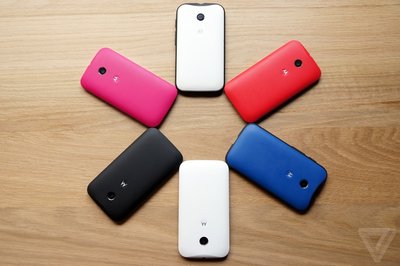
The Moto E is shockingly cheap and surprisingly good
by Vlad Savov
Corey G4.3" and 4.5" do seem kind of tempting to go back to
The Moto E isn't the sort of phone you dream about or sketch concepts of in your spare time. It's made simply and of simple materials; it's neither extremely thin nor especially light. It's just a regular smartphone. What's different about the E, however, is its price: $129 without a contract. Nobody's going to fantasize about this phone because almost everyone who wants one should be able to afford it.
Motorola has proven with the Moto G, which costs $50 more than the new E, that it can...
07 May 18:44
Nintendo Rules Out Same-Sex Marriage in Tomodachi Life and Explains Position
Corey GOh man. Awkward.

"Nintendo never intended to make any form of social commentary"
02 May 11:57
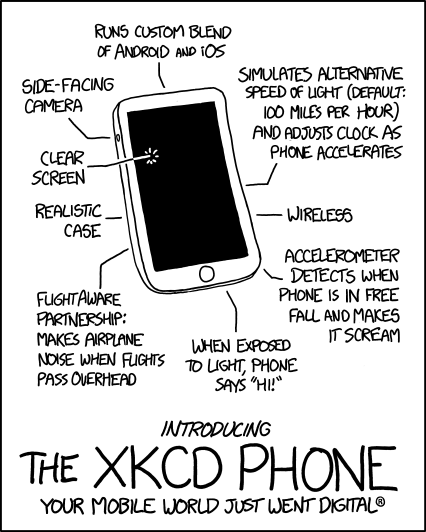
xkcd Phone
Corey GA screaming phone? Sign me up!
Youshallbeshot, Hipstor and 27 others like this
23 Apr 10:41


OnePlus One Revealed: Coming Mid-May For $299 (16GB) / $349 (64GB) With Snapdragon 801, 3GB Of RAM, And 3100mAh Non-Removable Battery
by Ryan Whitwam
Corey GOh man, a battery that could last more than a day, blasphemous.
 After all the teasing and big talk, the OnePlus One has been officially announced. Some of what wasn't revealed by the company in the lead up to the unveiling was leaked a few days ago, but now we've got all the details. This device is clearly going after the Nexus category of devices with a low price and solid feature set. Oh, and it has CyanogenMod.
The specs were revealed in a piecemeal fashion over the last few weeks, but let's just get everything in once place before we dig in.
Done With This Post? You Might Also Like These:
- OnePlus Is Cyanogen Inc.'s New Official Hardware Partner, Will Announce Debut Phone Called The OnePlus One In First Half Of 2014
- OnePlus Exec Promises His Company's Flagship Phone Will Cost Less Than $500, Unlocked And Off-Contract
- OnePlus One Hardware Leaked In Photos, Along With CyanogenMod 11S Screenshots
- OnePlus Announces Moto X-Style Voice Commands For The Upcoming One Phone
OnePlus One Revealed: Coming Mid-May For $299 (16GB) / $349 (64GB) With Snapdragon 801, 3GB Of RAM, And 3100mAh Non-Removable Battery was written by the awesome team at Android Police.
22 Apr 11:07
The Nintendo eShop Is Like Paradise, Says Image & Form's Brjann Sigurgeirsson
Corey GMakes sense. It could just be Nintendo being behind like they typically are on most fronts. It's nice to have one platform that still isn't over-run with freemiums, for now at least.

"The gamers are REAL gamers who pay for quality"
18 Apr 18:12
Originally Posted on BenCane.com: Go To Article


Using sysdig to Troubleshoot like a boss
by bc-log
If you haven't seen it yet there is a new troubleshooting tool out called sysdig. It's been touted as strace meets tcpdump and well, it seems like it is living up to the hype. I would actually rather compare sysdig to SystemTap meets tcpdump, as it has the command line syntax of tcpdump but the power of SystemTap.
In this article I am going to cover some basic and cool examples for sysdig, for a more complete list you can look over the sysdig wiki. However, it seems that even the sysdig official documentation is only scratching the surface of what can be done with sysdig.
Installation
In this article we will be installing sysdig on Ubuntu using apt-get. If you are running an rpm based distribution you can find details on installing via yum on sysdig's wiki.
Setting up the apt repository
To install sysdig via apt we will need to setup the apt repository maintained by Draios the company behind sysdig. We can do this by running the following curl commands.
# curl -s https://s3.amazonaws.com/download.draios.com/DRAIOS-GPG-KEY.public | apt-key add -
# curl -s -o /etc/apt/sources.list.d/draios.list http://download.draios.com/stable/deb/draios.list
The first command above will download the Draios gpg key and add it to apt's key repository. The second will download an apt sources file from Draios and place it into the /etc/apt/sources.list.d/ directory.
Update apt's indexes
Once the sources list and gpg key are installed we will need to re-sync apt's package indexes, this can be done by running apt-get update.
# apt-get update
Kernel headers package
The sysdig utility requires the kernel headers package, before installing we will need to validate that the kernel headers package is installed.
Check if kernel headers is installed
The system that I am using for this example already had the kernel headers packaged installed, to validate if they are installed on your system you can use the dpkg command.
    # dpkg --list | grep header
    ii  linux-generic                       3.11.0.12.13                     amd64        Complete Generic Linux kernel and headers
    ii  linux-headers-3.11.0-12             3.11.0-12.19                     all          Header files related to Linux kernel version 3.11.0
    ii  linux-headers-3.11.0-12-generic     3.11.0-12.19                     amd64        Linux kernel headers for version 3.11.0 on 64 bit x86 SMP
    ii  linux-headers-generic               3.11.0.12.13                     amd64        Generic Linux kernel headers
It is important to note that the kernel headers package must be for the specific kernel version your system is running. In the output above you can see the linux-generic package is version 3.11.0.12 and the headers package is for 3.11.0.12. If you have multiple kernels installed you can validate which version your system is running with the uname command.
# uname -r
3.11.0-12-generic
Installing the kernel headers package
To install the headers package for this specific kernel you can use apt-get. Keep in mind, you must specify the kernel version listed from uname -r.
# apt-get install linux-headers-<kernel version>
Example:
# apt-get install linux-headers-3.11.0-12-generic
Installing sysdig
Now that the apt repository is setup and we have the required dependencies, we can install the sysdig command.
# apt-get install sysdig
Using sysdig
Basic Usage
The syntax for sysdig is similar to tcpdump in particular the saving and reading of trace files. All of sysdig's output can be saved to a file and read later just like tcpdump. This is useful if you are running a process or experiencing an issue and wanted to dig through the information later.
Writing trace files
To write a file we can use the -w flag with sysdig and specify the file name.
Syntax:
# sysdig -w <output file>
Example:
# sysdig -w tracefile.dump
Like tcpdump the sysdig command can be stopped with CTRL+C.
Reading trace files
Once you have written the trace file you will need to use sysdig to read the file, this can be accomplished with the -r flag.
Syntax:
# sysdig -r <output file>
Example:
    # sysdig -r tracefile.dump
    1 23:44:57.964150879 0 <NA> (7) > switch next=6200(sysdig)
    2 23:44:57.966700100 0 rsyslogd (358) < read res=414 data=<6>[ 3785.473354] sysdig_probe: starting capture.<6>[ 3785.473523] sysdig_probe:
    3 23:44:57.966707800 0 rsyslogd (358) > gettimeofday
    4 23:44:57.966708216 0 rsyslogd (358) < gettimeofday
    5 23:44:57.966717424 0 rsyslogd (358) > futex addr=13892708 op=133(FUTEX_PRIVATE_FLAG|FUTEX_WAKE_OP) val=1
    6 23:44:57.966721656 0 rsyslogd (358) < futex res=1
    7 23:44:57.966724081 0 rsyslogd (358) > gettimeofday
    8 23:44:57.966724305 0 rsyslogd (358) < gettimeofday
    9 23:44:57.966726254 0 rsyslogd (358) > gettimeofday
    10 23:44:57.966726456 0 rsyslogd (358) < gettimeofday
Output in ASCII
By default sysdig saves the files in binary, however you can use the -A flag to have sysdig output in ASCII.
Syntax:
# sysdig -A
Example:
# sysdig -A > /var/tmp/out.txt
# cat /var/tmp/out.txt
1 22:26:15.076829633 0 <NA> (7) > switch next=11920(sysdig)
The above example will redirect the output to a file in plain text, this can be helpful if you wanted to save and review the data on a system that doesn't have sysdig installed.
sysdig filters
Much like tcpdump the sysdig command has filters that allow you to filter the output to specific information. You can find a list of available filters by running sysdig with the -l flag.
Example:
    # sysdig -l

    ----------------------
    Field Class: fd

    fd.num            the unique number identifying the file descriptor.
    fd.type           type of FD. Can be 'file', 'ipv4', 'ipv6', 'unix', 'pipe', 'e
                      vent', 'signalfd', 'eventpoll', 'inotify' or 'signalfd'.
    fd.typechar       type of FD as a single character. Can be 'f' for file, 4 for
                      IPv4 socket, 6 for IPv6 socket, 'u' for unix socket, p for pi
                      pe, 'e' for eventfd, 's' for signalfd, 'l' for eventpoll, 'i'
                       for inotify, 'o' for uknown.
    fd.name           FD full name. If the fd is a file, this field contains the fu
                      ll path. If the FD is a socket, this field contain the connec
                      tion tuple.
<truncated output>
Filter examples
Capturing a specific process
You can use the "proc.name" filter to capture all of the sysdig events for a specific process. In the example below I am filtering on any process named sshd.
Example:
    # sysdig -r tracefile.dump proc.name=sshd
    530 23:45:02.804469114 0 sshd (917) < select res=1
    531 23:45:02.804476093 0 sshd (917) > rt_sigprocmask
    532 23:45:02.804478942 0 sshd (917) < rt_sigprocmask
    533 23:45:02.804479542 0 sshd (917) > rt_sigprocmask
    534 23:45:02.804479767 0 sshd (917) < rt_sigprocmask
    535 23:45:02.804487255 0 sshd (917) > read fd=3(<4t>10.0.0.12:55993->162.0.0.80:22) size=16384
Capturing all processes that open a specific file
The fd.name filter is used to filter events for a specific file name. This can be useful to see what processes are reading or writing a specific file or socket.
Example:
# sysdig fd.name=/dev/log
14 11:13:30.982445884 0 rsyslogd (357) < read res=414 data=<6>[  582.136312] sysdig_probe: starting capture.<6>[  582.136472] sysdig_probe:
Capturing all processes that open a specific filesystem
You can also use comparison operators with filters such as contains, =, !=, <=, >=, < and >.
Example:
    # sysdig fd.name contains /etc
    8675 11:16:18.424407754 0 apache2 (1287) < open fd=13(<f>/etc/apache2/.htpasswd) name=/etc/apache2/.htpasswd flags=1(O_RDONLY) mode=0
    8678 11:16:18.424422599 0 apache2 (1287) > fstat fd=13(<f>/etc/apache2/.htpasswd)
    8679 11:16:18.424423601 0 apache2 (1287) < fstat res=0
    8680 11:16:18.424427497 0 apache2 (1287) > read fd=13(<f>/etc/apache2/.htpasswd) size=4096
    8683 11:16:18.424606422 0 apache2 (1287) < read res=44 data=admin:$apr1$OXXed8Rc$rbXNhN/VqLCP.ojKu1aUN1.
    8684 11:16:18.424623679 0 apache2 (1287) > close fd=13(<f>/etc/apache2/.htpasswd)
    8685 11:16:18.424625424 0 apache2 (1287) < close res=0
    9702 11:16:21.285934861 0 apache2 (1287) < open fd=13(<f>/etc/apache2/.htpasswd) name=/etc/apache2/.htpasswd flags=1(O_RDONLY) mode=0
    9703 11:16:21.285936317 0 apache2 (1287) > fstat fd=13(<f>/etc/apache2/.htpasswd)
    9704 11:16:21.285937024 0 apache2 (1287) < fstat res=0
As you can see from the above examples filters can be used for both reading from a file or the live event stream.
Chisels
Earlier I compared sysdig to SystemTap, Chisels is why I made that reference. Similar tools like SystemTap have a SystemTap only scripting language that allows you to extend the functionality of SystemTap. In sysdig these are called chisels and they can be written in LUA which is a common programming language. I personally think the choice to use LUA was a good one, as it makes extending sysdig easy for newcomers.
List available chisels
To list the available chisels you can use the -cl flag with sysdig.
Example:
    # sysdig -cl

    Category: CPU Usage
    -------------------
    topprocs_cpu    Top processes by CPU usage

    Category: I/O
    -------------
    echo_fds        Print the data read and written by processes.
    fdbytes_by      I/O bytes, aggregated by an arbitrary filter field
    fdcount_by      FD count, aggregated by an arbitrary filter field
    iobytes         Sum of I/O bytes on any type of FD
    iobytes_file    Sum of file I/O bytes
    stderr          Print stderr of processes
    stdin           Print stdin of processes
    stdout          Print stdout of processes
    <truncated output>
The list is fairly long even though sysdig is still pretty new, and since sysdig is on GitHub you can easily contribute and extend sysdig with your own chisels.
Display chisel information
While the list command gives a small description of the chisels you can display more information using the -i flag with the chisel name.
Example:
    # sysdig -i bottlenecks

    Category: Performance
    ---------------------
    bottlenecks     Slowest system calls

    Use the -i flag to get detailed information about a specific chisel

    Lists the 10 system calls that took the longest to return dur
    ing the capture interval.

    Args:
    (None)
Running a chisel
To run a chisel you can run sysdig with the -c flag and specify the chisel name.
Example:
    # sysdig -c topprocs_net
    Bytes     Process
    ------------------------------
    296B      sshd
Running a chisel with filters
Even with chisels you can still use filters to run chisels against specific events.
Capturing all network traffic from a specific process
The below example shows using the echo_fds chisel against the processes named apache2.
# sysdig -A -c echo_fds proc.name=apache2
------ Read 444B from 127.0.0.1:57793->162.243.109.80:80

GET /wp-admin/install.php HTTP/1.1
Host: 162.243.109.80
Connection: keep-alive
Cache-Control: max-age=0
Authorization: Basic YWRtaW46ZUNCM3lyZmRRcg==
Accept: text/html,application/xhtml+xml,application/xml;q=0.9,image/webp,*/*;q=0.8
User-Agent: Mozilla/5.0 (Macintosh; Intel Mac OS X 10_9_2) AppleWebKit/537.36 (KHTML, like Gecko) Chrome/33.0.1750.152 Safari/537.36
Accept-Encoding: gzip,deflate,sdch
Accept-Language: en-US,en;q=0.8
Capturing network traffic exchanged between a specific ip
We can also use the the echo_fds chisel to show all network traffic for a single ip using the fd.cip filter.
# sysdig -A -c echo_fds fd.cip=127.0.0.1
------ Write 1.92KB to 127.0.0.1:58896->162.243.109.80:80

HTTP/1.1 200 OK
Date: Thu, 17 Apr 2014 03:11:33 GMT
Server: Apache
X-Powered-By: PHP/5.5.3-1ubuntu2.3
Vary: Accept-Encoding
Content-Encoding: gzip
Content-Length: 1698
Keep-Alive: timeout=5, max=100
Connection: Keep-Alive
Content-Type: text/html; charset=utf-8
Originally Posted on BenCane.com: Go To Article