Shared posts

31 May 07:36

Függőleges erdő Milánóban

by brian

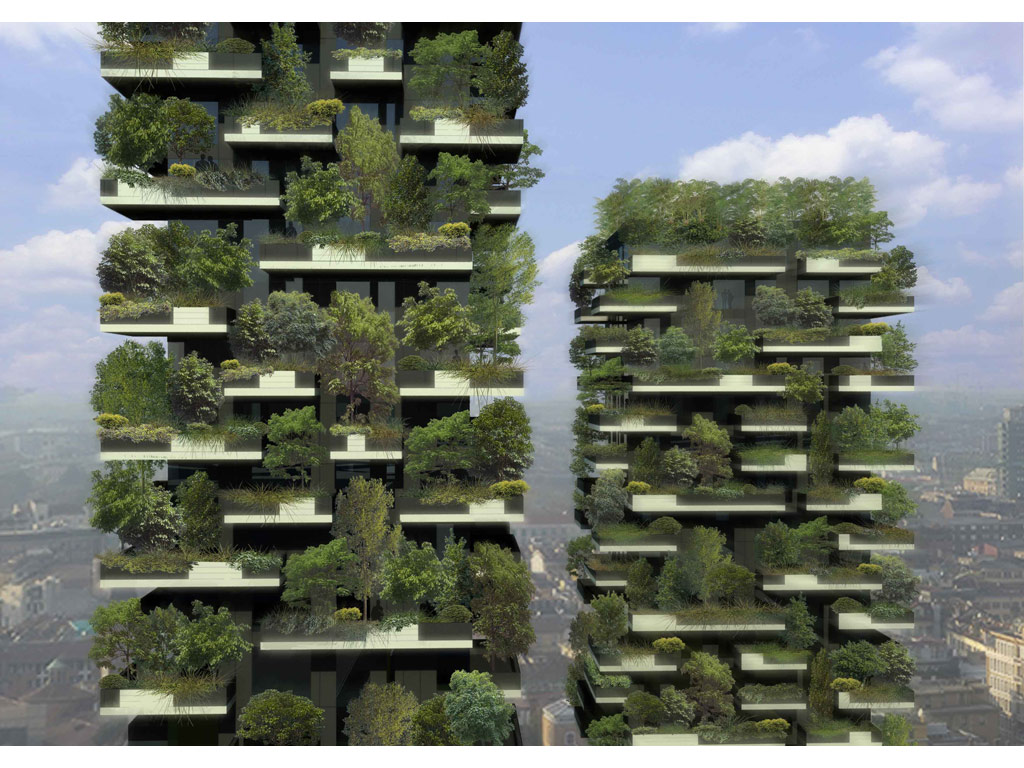
Milánóban hamarosan átadják a 2009 óta épülő Bosco Verticale épületegyüttest, ami szó szerint függőleges erdőt jelent olaszul, és ránézésre is pont úgy néz ki, mintha a természet visszahódította volna a város felhőkarcolóit (a mozikban nemrég vetített Feledés c. filmben láthattunk hasonlókat, ahhoz képest ez a burjánzó erdő semmiség).

01-Bosco-verticale

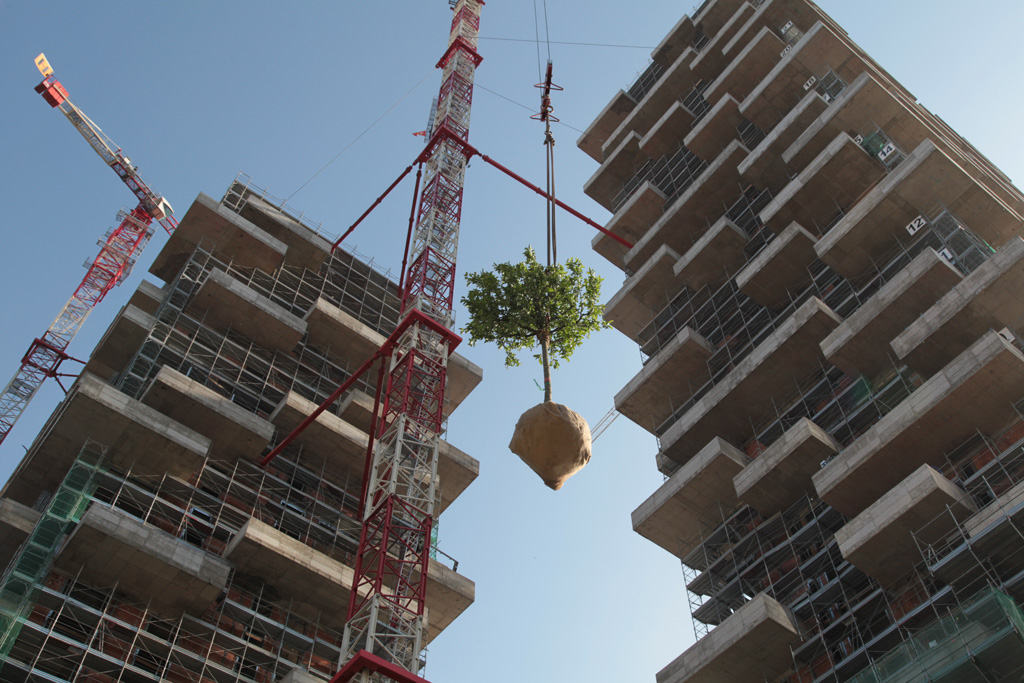
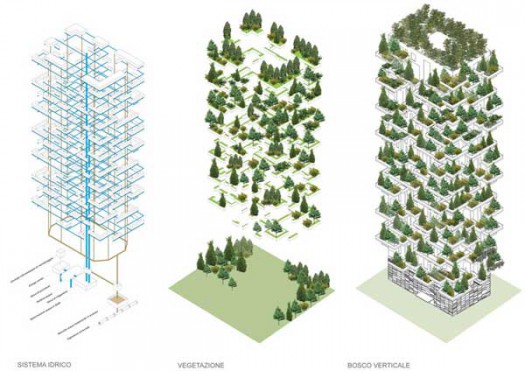
A két torony többszáz fának ad helyet, egészen pontosan 490 közepes és nagy növésűt és több mint 250 kisebb méretűt ültetnek el a beruházás keretében, továbbá 5.000 tő bokor és 11.000 évelő növény fogja majd borítani a 8.918 nm2 összterületű teraszokat, ezzel a mennyiséget tekintve egy közel egy hektáros erdőt sikerül varázsolni a város közepére, ami a zöldterületekben meglehetősen szegény, zsúfolt olasz metropolisznak különösen jól jön.

BoscoVerticale03

A D torony 18 szintes és 80 méter magas, míg a magasabb, 112 méteres E toronyban 26 szintet alakítottak ki, összesen pedig közel 400 luxusapartmannak jutott bennük hely, amiket 3.000 euró/négyzetméteres kezdőártól terveznek értékesíteni (~880.000Ft/nm2).

BoscoVerticale05

Nem véletlenül az 1,3 milliós lakosú Milánóbal épül az első ilyen jellegű épület, ugyanis Európa egyik legszennyezettebb levegőjű városáról van szó, ahol 2012. januárja óta már dugódíjat is kénytelenek voltak bevezetni a belvárosi járműforgalom korlátozására, és bár perek miatt tavaly két hónapig szünetelt az öt eurós díj beszedése, azóta közel egyharmadával csökkent a beáramló autók száma az úgynevezett C zónában, és az első félévben már 11 millió eurós hasznot hozott a milánói önkormányzatnak.

05-Bosco-verticale_efk

Az építkezés része a Porta Nouva Project-nek, ami a történelmi városnegyed teljes rekonstrukcióját magában foglalja, a Bosco Verticale megtervezésénél azonban a legtöbb időt érdekes módon mégis a fák és növények fajtáinak kiválasztása jelentette, a botanikusoknak közel két évükbe telt, amíg megtervezték a konstrukcióhoz illő és a nyári forró klímát is elviselő flórát, továbbá azt is tesztelniük kellett az egyes fafajtáknál, hogy milyen ellenállók a különböző magasságokon előforduló szélcsatornákban.

Stefano-Boeris-Urban-Vertical-Forest-7

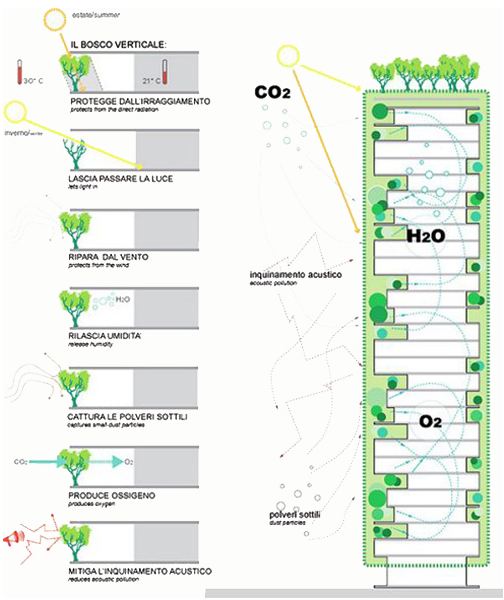
A Bosco Verticale jövőbeni lakói a szén-dioxid-szint csökkenésén és a levegő minőségének javulásán túl rövid időn belül javulást tapasztalhatnak az életkörülményeiket illetően, hiszen a szálló port is megszűri majd a növényrengeteg, védi a lakókat a zajszennyezéstől és a káros ultraibolya-sugaraktól, hűsíti a lakásokat nyári kánikula idején és ezáltal csökkenti az energiafogyasztást, sőt idővel még egyes madárfajták is beköltözhetnek a teraszokra, így lesz némi kertvárosi feelingje az épületnek. Nagy talány egyelőre, hogy miért nem terjed ez a konstrukció, hiszen a kivitelezők szerint egy átlagos felhőkarcoló megépítésének összköltségét mindössze 5%-al dobja meg az erdősítés.

BoscoVerticale07

Minden, ami felhőkarcoló:

30 May 13:36

Ubuntu Bug #1 Marked As Fixed By Mark Shuttleworth

by noreply@blogger.com (Andrew)
Ubuntu bug 1

After almost 9 years and 1833 comments, the famous Ubuntu bug #1, "Microsoft has a majority market share", has been marked as fixed today by Mark Shuttleworth.

Ubuntu bug #1 states that "Microsoft has a majority market share in the new desktop PC marketplace" but since it was reported, phones and tablets have become a lot more important and while Microsoft may still be winning on the desktop, in the consumer compute market it's now 3rd, behind Android and Apple.

Mark Shuttleworth notes in the comment that marks the bug as "fix released":

"[...] Android may not be my or your first choice of Linux, but it is without doubt an open source platform that offers both practical and economic benefits to users and industry. So we have both competition, and good representation for open source, in personal computing.

Even though we have only played a small part in that shift, I think it's important for us to recognize that the shift has taken place. So from Ubuntu's perspective, this bug is now closed.

[...] Along those lines, it's good to reflect on how much has changed since 2004, and how fast it's changed. For Ubuntu, our goal remains to deliver fantastic experiences: for developers, for people building out production infrastructure, and for end-users on a range of devices. We are doing all of that in an environment that changes completely every decade. So we have to be willing to make big changes ourselves - in our processes, our practices, our tools, and our relationships. Change this bug status is but a tiny example."

The full comment can be found HERE.

What do you think?
30 May 08:01

Sose volt klasszabb animgif Budapestről

by Szily László

Sose volt klasszabb animgif Budapestről

Nincs benne Hősök tere meg Mátyás-templom, mégis egy csomó mindent mond el a városról pár másodpercben.

Az érzés pont olyan, mintha vadászgép-sebességgel suhannánk végig a kék metró vonalán. A tanulság? Maximum annyi, hogy az állami nagyberuházások a magyar dizájn nagy barátai.

[via unadras]

30 May 08:00

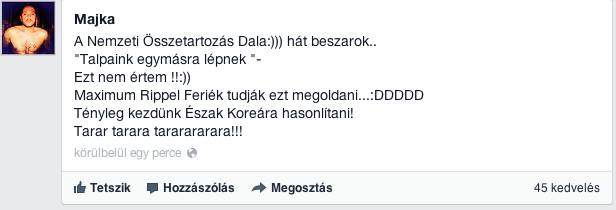
Majka says

by Subba Vipera

960216_161646284015783_1982187352_n.jpg

Itt egy másik elemzés. A lényeg a lényeg: szar a szám. Ennyi

Megosztom Facebookon! Megosztom iWiWen! Megosztom Twitteren! Megosztom Google Buzzon! Megosztom Google Readeren! Megosztom Tumblren!

30 May 07:55

Linux Mint 15 `Olivia` Available For Download [Screenshots Tour]

by noreply@blogger.com (Andrew)
Linux Mint 15 "Olivia", based on Ubuntu 13.04, has been released today and is available, as usual, in two editions: MATE and Cinnamon. Let's take a look at what's new!

Linux Mint 15


Linux Mint 15 "Olivia"


The features below are shared between the two main Linux Mint editions: Cinnamon and MATE.

Linux Mint 15 ships with a new tool that allows you to manage the software sources, called MintSources (shows up as "Software Sources" in the menu), replacing the old Software Sources (software-propreties-gtk) that was shared with Ubuntu:

Linux Mint 15 screenshots

Linux Mint 15 screenshots

MintSouces allows you to select the mirrors used for the software sources, with an included speed-test tool that lets you select the fastest mirror, easily enable optional components such as backports or unstable packages, enable source code repositories, there's a PPAs tab that lets you add, edit or remove PPAs, add additional repositories, manage authentication keys and so on. On the "Maintenance" tab you'll find a button to fix common APT problems like MergeList issue or purge residual configuration.

Another new tool that's available in Linux Mint 15 is "MintDrivers", a driver manager (shows up as "Driver Manager" in the menu) that uses the same backend as the Ubuntu Software Sources (which integrates the driver manager now):

Linux Mint 15 screenshots


In Linux Mint 15, MDM supports three types of greeters: a GTK greeter, a GDM greeter which supports the old GDM 2.20 themes and a new HTML (supports HTML5, CSS, Javascript and WebGL) greeter which supports theming but since it's new, there are no themes available to download yet on websites such as Gnome-Look, though I'm sure many will be available soon.

Linux Mint 15 screenshots

Linux Mint 15 ships with some GDM as well as some HTML themes for MDM - here's the default MDM theme and some other MDM HTML themes included by default with Linux Mint 15:

Linux Mint 15 screenshots
The default Linux Mint 15 MDM greeter (HTML)

Linux Mint 15 screenshots

Linux Mint 15 screenshots

Linux Mint 15 screenshots

Among the default MDM HTML themes there's a really nice animated WebGL theme which unfortunately I can't show you here since it would have required a video (and the theme is really slow in VirtualBox).

Besides these new features, MDM has also received many bug fixes and under-the-hood improvements.


Other changes shared between the two Linux Mint 15 editions:
  • artwork improvements, including 12 new wallpapers, improved Mint-X theme to make GTK2 and GTK3 applications look more similar, updated Plymouth theme and more;
  • MintNanny has been ported to GTK+;
  • the Update Manager is now able to refresh the APT cache in user mode;
  • the Software Manager now uses automated pagination, supports searching in a certain category, etc.

Linux Mint 15 screenshots
Linux Mint Software Manager

Linux Mint 15 screenshots
Linux Mint Software Manager

Linux Mint 15 screenshots
Linux Mint Update Manager


Default applications


Both Linux Mint 15 "Olivia" editions share most of the default applications (basically all except for the file manager and other desktop-especific components): Firefox 20.0 (but Firefox 21 is available as an update already), Thunderbird 17.0.6, LibreOffice 4.0.2, GIMP 2.8.4, gThumb 3.0.2, Transmission 2.77, Pidgin 2.10.7, VLC 2.0.6, Totem 3.6.3, Banshee 2.6.0, Tomboy 1.12.0, Brasero 3.6.1, Synaptic 0.80, Mint Backup 2.0.9, Xchat 2.8.8 and more.


Also, since Linux Mint 15 is based on Ubuntu 13.04, it uses the same kernel: 3.8 - based on the upstream Linux Kernel 3.8.8, Xorg server 1.13.3 and Mesa 9.1.1.


Linux Mint 15 Cinnamon edition


Linux Mint 15 Cinnamon screenshots

Linux Mint 15 Cinnamon edition comes with the latest Cinnamon 1.8, released recently, which introduces some important changes, such as:
  • a new Control Center, especially created for Cinnamon;
  • a new screensaver created for Cinnamon which is very simplistic and has basically the same features as Gnome Screensaver, from which it was forked, except for an away message feature (display an away message on the lock screen);
  • desktop widgets ("Desklets") support;
  • install or update "spices" (applets, desklets, themes or extensions) directly from the desktop, via Cinnamon Control Center;
  • Nemo, the default Cinnamon file manager has received a lot of improvements, including: better Cinnamon integration, buttons in the statusbar to easily hide the sidebar, switch to treeview, etc., option to hide the menu, collapsable sidebar categories, breadcrumbs, sidebar disk space indicators and more;
  • Cinnamon now automatically falls back to Software Rendering (previously known as Cinnamon 2D) when the full Cinnamon is not supported - a critical notification is displayed on startup when running Software Rendering - this usually happens because of a problem with the drivers or if the graphics card doesn't support any acceleration;
  • horizontal / vertical maximizing of windows;
  • more!

Here are some Linux Mint 15 Cinnamon screenshots (note: there are no window shadows because the screenshots were taken in VirtualBox and Cinnamon used the software renderer):


Linux Mint 15  Cinnamon screenshots
Online Cinnamon applets

Linux Mint 15 Cinnamon screenshots
Desklets

Linux Mint 15 Cinnamon screenshots
Nemo file manager

Linux Mint 15 Cinnamon screenshots
Cinnamon Screensaver

Linux Mint 15 Cinnamon screenshots
Cinnamon Control Center

Linux Mint 15 Cinnamon screenshots
Cinnamon Control Center (advanced)

For more about Cinnamon 1.8, including a video and Ubuntu installation instructions, see our article: Cinnamon 1.8 Gets Its Own Control Center And Screensaver, Easier Spices Installation.


Linux Mint 15 MATE edition


Linux Mint 15 MATE screenshots
Linux Mint 15 MATE edition with mintMenu

Linux Mint 15 MATE edition ships with MATE 1.6, released a couple of months ago, which doesn't come with a lot of visible features but there are many under-the-hood improvements and bug fixes. Here are the Linux Mint 15 MATE highlights:
  • some of the old technologies used by MATE have been replaced with newer ones: mateconf has been replaced with gsettings, matecorba and matecomponent has been replaced with dbus, matevfs has been replaced with gio/gvfs and matenotify has been replaced with libnotify;
  • Caja, the default file manager, has received support for new thumbnailers, a new connect server dialog backported from Nautilus 3, improved sidebar and more;
  • MPRIS v2 support;
  • in case of a crash, mate-settings-daemon is now able to recover and it is automatically restarted by mate-session;
  • the MATE panel Window List now supports middle click to close windows and the Workspace Switcher has option to wrap around between workspaces with the mouse wheel;
  • new options in MATE Control Center to enable Macro compositing manager, fast alt-tab and more;
  • the Notification Daemon now supports notifications that "never" expire" and there's a new option to allow users to specify on which screen the notifications should be displayed;
  • mintDesktop and mintMenu have been migrated to the latest MATE 1.6
  • more.

Linux Mint 15 MATE edition screenshots:

Linux Mint 15 MATE screenshots

Linux Mint 15 MATE screenshots

Linux Mint 15 MATE screenshots

Linux Mint 15 MATE screenshots
Caja, the default MATE file manager

Linux Mint 15 MATE screenshots

Linux Mint 15 MATE screenshots
MATE Control Center

Linux Mint 15 MATE screenshots
New MATE notification options

Linux Mint 15 MATE screenshots
mintDesktop

Read more about MATE 1.6 (and Ubuntu installation instructions) in the following article: MATE 1.6 Released, Install It In Ubuntu [GNOME 2 Fork]


Download Linux Mint 15


Before downloading Linux Mint 15, make sure you read the known issues!


29 May 12:56

Ha jól megdugnak, szebb leszek?

by Szily László

Ha jól megdugnak, szebb leszek?

Vagy pont attól simul ki a bőröm, ha megdugok valakit? Az élet nagy kérdései néha egy árleszálltás miatt törnek elő az emberből.

Ha tényleg ezen múlik, egy ötödével olcsóbb koton tényleg nem nagy ár a szépségért. De ha ez igaz, akkor hogyan magyarázzuk meg Ron Jeremy kinézetét?

[via vampirpillango]

29 May 11:13

A house caretaker is not! - A fordítógép legszebb napjai

by Szily László

A house caretaker is not! - A fordítógép legszebb napjai

Eteléék Kisdiófa utcai házában az egyik lakást rendszeresen kiadják külföldi turistáknak az airbnb.com-on keresztül, a turisták pedig ijesztó idegen nyelven kérdezgetnek ezt-azt. Mivel Ács Dániel nem lehet egyszerre jelen mindenhol, és nem kérdezheti meg, hogy Heló turiszt, what are you doing here, a ház közös képviselője kénytelen volt más megoldáshoz folyamodni. Az utóbbi idők legszebb backdoor kommunikációs üzenete!

Kár, hogy mindenki Google fordítóval dolgozik, a Bing Traslatorjével például így nézett volna ki a szöveg:

There is no elevator in the House!

Problems, questions, Bug R common representative visit! Contact information can be found on the Whiteboard!

Ha pedig a magyar terméhez ragaszkodott volna Bogár Anikó, a webforditas.hu-val erre a pompásan veretes, nem létező bürokratanyelvre tudta volna átültetni a szöveget:

There is not an assignee in the house!

With their problems, their questions Bogár Anikó common representative let it be being looked for! His availability on the wall newspaper can be found!

29 May 07:23

Ma így

by Subba Dirty Detty

dealvidit_1369805050.gif_387x213

Megosztom Facebookon! Megosztom iWiWen! Megosztom Twitteren! Megosztom Google Buzzon! Megosztom Google Readeren! Megosztom Tumblren!

27 May 08:08

Subtitles App

by angelday

A Webisztán Weeklyben láttam ezt a hasznos linket: bármilyen rádobott filmnek, vagy filmek egy csoportjának szó nélkül letölti a feliratait a netről. Már régóta kerestem hasonló megoldást vészhelyzetekre.

Ez az ingyenes program nagyon kényelmes, egyből lementi a feliratokat a forrás mappába, ha nem találja meg őket, akkor beállíthatunk másodlagos nyelvet is. Például egy jó setup lehet elsődlegesnek a magyar, másodlagosnak az angol. (Arra sajnos nincs lehetőség, hogy megmondhassam egy filmnél, melyik nyelvet szeretném – ez is egy jó use case pedig.)

26 May 05:12

Carlos Estevez

by human

A Machete Killsből.

25 May 10:05

Cukiság: Bepuszilta

by Subba Dirty Detty

Sáskát jól lekapták a négy lábáról.

kami1.gif

kami2.gif

Uh.

Megosztom Facebookon! Megosztom iWiWen! Megosztom Twitteren! Megosztom Google Buzzon! Megosztom Google Readeren! Megosztom Tumblren!

22 May 16:33

Közeledik a végjáték a HTC számára

by Gálffy Csaba
Tömegével távoznak a HTC dolgozói a gyártótól, miközben a két nagy reménység, a First és a One is súlyos problémákkal küzd. Az alapító-vezérigazgató egyelőre a helyén van, de lemondását ígéri, ha a csúcsmodell megbukik.