Shared posts

06 Jul 14:16

What GKE users need to know about Kubernetes' new service account tokens

by Taahir Ahmed

When you deploy an application on Kubernetes, it runs as a service account — a system user understood by the Kubernetes control plane. The service account is the basic tool for configuring what an application is allowed to do, analogous to the concept of an operating system user on a single machine. Within a Kubernetes cluster, you can use role-based access control to configure what a service account is allowed to do ("list pods in all namespaces", "read secrets in namespace foo"). When running on Google Kubernetes Engine (GKE), you can also use GKE Workload Identity and Cloud IAM to grant service accounts access to GCP resources ("read all objects in Cloud Storage bucket bar").

How does this work? How does the Kubernetes API, or Cloud Storage know that an HTTP request is coming from your application, and not Bob's? It's all about tokens: Kubernetes service account tokens, to be specific. When your application uses a Kubernetes client library to make a call to the Kubernetes API, it attaches a token in the Authorization header, which the server then validates to check your application's identity.

How does your application get this token, and how does the authentication process work? Let's dive in and take a closer look at this process, at some changes that arrived in Kubernetes 1.21 that will enhance Kubernetes authentication, and how to modify your applications to take advantage of the security capabilities.

Legacy tokens: Kubernetes 1.20 and below

Let's spin up a pod and poke around. If you're following along, make sure that you are doing this on a 1.20 (or lower) cluster.

code_block
[StructValue([(u'code', u'(dev) $ kubectl apply -f - <<EOF\r\napiVersion: v1\r\nkind: Pod\r\nmetadata:\r\n name: basic-debian-pod\r\n namespace: default\r\nspec:\r\n serviceAccountName: default\r\n containers:\r\n - image: debian\r\n name: main\r\n command: ["sleep", "infinity"]\r\nEOF\r\n\r\n(dev) $ kubectl exec -ti basic-debian-pod -- /bin/bash\r\n\r\n(pod) $ ls /var/run/secrets/kubernetes.io/serviceaccount\r\nca.crt\r\nnamespace\r\ntoken'), (u'language', u''), (u'caption', <wagtail.wagtailcore.rich_text.RichText object at 0x3e2e50825c50>)])]

What are these files? Where did they come from? They certainly don't seem like something that ships in the Debian base image:

  • ca.crt is the trust anchor needed to validate the certificate presented by the Kubernetes API Server in this cluster. Typically, it will contain a single, PEM-encoded certificate.
  • namespace contains the namespace that the pod is running in — in our case, default.
  • token contains the service account token — a bearer token that you can attach to API requests. Eagle-eyed readers may notice that it has the tell-tale structure of a JSON Web Token (JWT): <base64>.<base64>.<base64>.

An aside for security hygiene: Do not post these tokens anywhere. They are bearer tokens, which means that anyone who holds the token has the power to authenticate as your application's service account.

To figure out where these files come from, we can inspect our pod object as it exists on the API server:

code_block
[StructValue([(u'code', u'(dev) $ kubectl get pods basic-debian-pod -o yaml\r\napiVersion: v1\r\nkind: Pod\r\nmetadata:\r\n name: basic-debian-pod\r\n namespace: default\r\n # Lots of stuff omitted here\u2026\r\nspec:\r\n serviceAccountName: default\r\n containers:\r\n - image: debian\r\n name: main\r\n command:\r\n - sleep\r\n - infinity\r\n volumeMounts:\r\n - mountPath: /var/run/secrets/kubernetes.io/serviceaccount\r\n name: default-token-g9ggg\r\n readOnly: true\r\n # Lots of stuff omitted here\u2026\r\n volumes:\r\n - name: default-token-g9ggg\r\n secret:\r\n - defaultMode: 420\r\n secretName: default-token-g9ggg\r\n # Lots of stuff omitted here\u2026'), (u'language', u''), (u'caption', <wagtail.wagtailcore.rich_text.RichText object at 0x3e2e50825b90>)])]

The API server has added… a lot of stuff. But the relevant portion for us is:

  • When the pod was scheduled, an admission controller injected a secret volume into each container in our pod.
  • The secret contains keys and data for each file we saw inside the pod.

Let's take a closer look at the token. Here's a real example, from a cluster that no longer exists.

code_block
[StructValue([(u'code', u'eyJhbGciOiJSUzI1NiIsImtpZCI6ImtUMHZXUGVVM1dXWEV6d09tTEpieE5iMmZrdm1KZkZBSkFMeXNHQXVFNm8ifQ.eyJpc3MiOiJrdWJlcm5ldGVzL3NlcnZpY2VhY2NvdW50Iiwia3ViZXJuZXRlcy5pby9zZXJ2aWNlYWNjb3VudC9uYW1lc3BhY2UiOiJkZWZhdWx0Iiwia3ViZXJuZXRlcy5pby9zZXJ2aWNlYWNjb3VudC9zZWNyZXQubmFtZSI6ImRlZmF1bHQtdG9rZW4tZzlnZ2ciLCJrdWJlcm5ldGVzLmlvL3NlcnZpY2VhY2NvdW50L3NlcnZpY2UtYWNjb3VudC5uYW1lIjoiZGVmYXVsdCIsImt1YmVybmV0ZXMuaW8vc2VydmljZWFjY291bnQvc2VydmljZS1hY2NvdW50LnVpZCI6ImFiNzFmMmIwLWFiY2EtNGJjNy05MDVhLWNjOWIyZDY4MzJjZiIsInN1YiI6InN5c3RlbTpzZXJ2aWNlYWNjb3VudDpkZWZhdWx0OmRlZmF1bHQifQ.UiLY98ETEp5-JmpgxaJyyZcTvw8AkoGvqhifgGJCFC0pJHySDOp9Zoq-ShnFMOA2R__MYbkeS0duCx-hxDu8HIbZfhyFME15yrSvMHZWNUqJ9SKMlHrCLT3JjLBqX4RPHt-K_83fJfp4Qn2E4DtY6CYnsGUbcNUZzXlN7_uxr9o0C2u15X9QAATkZL2tSwAuPJFcuzLWHCPjIgtDmXczRZ72tD-wXM0OK9ElmQAVJCYQlAMGJHMxqfjUQoz3mbHYfOQseMg5TnEflWvctC-TJd0UBmZVKD-F71x_4psS2zMjJ2eVirLPEhmlh3l4jOxb7RNnP2N_EvVVLmfA9YZE5A'), (u'language', u''), (u'caption', <wagtail.wagtailcore.rich_text.RichText object at 0x3e2e50825950>)])]

As mentioned earlier, this is a JWT. If we pop it in to our favorite JWT inspector, we can see that the token has the following claims:

code_block
[StructValue([(u'code', u'{\r\n "iss": "kubernetes/serviceaccount",\r\n "kubernetes.io/serviceaccount/namespace": "default",\r\n "kubernetes.io/serviceaccount/secret.name": "default-token-g9ggg",\r\n "kubernetes.io/serviceaccount/service-account.name": "default",\r\n "kubernetes.io/serviceaccount/service-account.uid": "ab71f2b0-abca-4bc7-905a-cc9b2d6832cf",\r\n "sub": "system:serviceaccount:default:default"\r\n}'), (u'language', u''), (u'caption', <wagtail.wagtailcore.rich_text.RichText object at 0x3e2e508255d0>)])]

Breaking them down:

  • iss ("issuer") is a standard JWT claim, meant to identify the party that issued the JWT. In Kubernetes legacy tokens, it's always hardcoded to the string "kubernetes/serviceaccount", which is technically compliant with the definition in the RFC, but not particularly useful.
  • sub ("subject") is a standard JWT claim that identifies the subject of the token (your service account, in this case). It's the standard string representation of your service account name (the one also used when referring to the serviceaccount in RBAC rules): system:serviceaccount:<namespace>:<name>. Note that this is technically not compliant with the definition in the RFC, since this is neither globally unique, nor is it unique in the scope of the issuer; two service accounts with the same namespace and name but from two unrelated clusters will have the same issuer and subject claims. This isn't a big problem in practice, though.
  • kubernetes.io/serviceaccount/namespace is a Kubernetes-specific claim; it contains the namespace of the serviceaccount.
  • kubernetes.io/serviceaccount/secret.name is a Kubernetes-specific claim; it names the Kubernetes secret that holds the token.
  • kubernetes.io/serviceaccount/service-account.name is a Kubernetes-specific claim; it names the service account.
  • kubernetes.io/serviceaccount/service-account.uid is a Kubernetes-specific claim; it contains the UID of the service account. This claim allows someone verifying the token to notice that a service account was deleted and then recreated with the same name. This can sometimes be important.

When your application talks to the API server in its cluster, the Kubernetes client library loads this JWT from the container filesystem and sends it in the Authorization header of all API requests. The API Server then validates the JWT signature and uses the token's claims to determine your application's identity.

This also works for authenticating to other services. For example, a common pattern is to configure Hashicorp Vault to be able to authenticate callers using service account tokens from your cluster. To make the task of the relying party (the service seeking to authenticate you) easier, Kubernetes provides the TokenReview API; the relying party just needs to call TokenReview, passing the token you provided. The return value indicates whether or not the token was valid; if so, it also contains the username of your serviceaccount (again, in the form system:serviceaccount:<namespace>:<name>).

Great. So what's the catch? Why did I ominously title this section "legacy" tokens? Legacy tokens have downsides:

  1. Legacy tokens don't expire. If one gets stolen, or logged to a file, or committed to Github, or frozen in an unencrypted backup, it remains dangerous until the end of time (or the end of your cluster).

  2. Legacy tokens have no concept of an audience. If your application passes a token to service A, then service A can just forward the token to service B and pretend to be your application. Even if you trust service A to be trustworthy and competent today, because of point 1, the tokens you pass to service A are dangerous forever. If you ever stop trusting service A, you have no practical recourse but to rotate the root of trust for your cluster.

  3. Legacy tokens are distributed via Kubernetes secret objects, which tend not to be very strictly access-controlled, and means that they usually aren't encrypted at rest or in backups.

  4. Legacy tokens require extra effort for third-party services to integrate with; they generally need to explicitly build support for Kubernetes because of the custom token claims and the need to validate the token with the TokenReview API.

These issues motivated the design of Kubernetes' new token format called bound service account tokens.

Bound tokens: Kubernetes 1.21 and up

Launched in Kubernetes 1.13, and becoming the default format in 1.21, bound tokens address all of the limited functionality of legacy tokens, and more:

  • The tokens themselves are much harder to steal and misuse; they are time-bound, audience-bound, and object-bound.

  • They adopt a standardized format: OpenID Connect (OIDC), with full OIDC Discovery, making it easier for service providers to accept them.

  • They are distributed to pods more securely, using a new Kubelet projected volume type.

Let's explore each of these properties in turn.

We'll repeat our earlier exercise and dissect a bound token. It's still a JWT, but the structure of the claims has changed:

code_block
[StructValue([(u'code', u'{\r\n "aud": [\r\n "foobar.com"\r\n ],\r\n "exp": 1636151360,\r\n "iat": 1636147760,\r\n "iss": "https://container.googleapis.com/v1/projects/taahm-gke-dev/locations/us-central1-c/clusters/mesh-certs-test2",\r\n "kubernetes.io": {\r\n "namespace": "default",\r\n "pod": {\r\n "name": "basic-debian-pod-bound-token",\r\n "uid": "a593ded9-c93d-4ccf-b43f-bf33d2eb7635"\r\n },\r\n "serviceaccount": {\r\n "name": "default",\r\n "uid": "ab71f2b0-abca-4bc7-905a-cc9b2d6832cf"\r\n }\r\n },\r\n "nbf": 1636147760,\r\n "sub": "system:serviceaccount:default:default"\r\n}'), (u'language', u''), (u'caption', <wagtail.wagtailcore.rich_text.RichText object at 0x3e2e52e2a390>)])]

Time-binding is implemented by the exp ("expiration"), iat ("issued at"), and nbf ("not before") claims; these are standardized JWT claims. Any external service can use its own clock to evaluate these fields and reject tokens that have expired. Unless otherwise specified, bound tokens default to a one-hour lifetime. The Kubernetes TokenReview API automatically checks if a token is expired before deciding that it is valid.

Audience binding is implemented by the aud ("audience") claim; again, a standardized JWT claim. An audience strongly associates the token with a particular relying party. For example, if you send service A a token that is audience-bound to the string "service A", A can no longer forward the token to service B to impersonate you. If it tries, service B will reject the token because it expects an audience of "service B". The Kubernetes TokenReview API allows services to specify the audiences they accept when validating a token.

Object binding is implemented by the kubernetes.io group of claims. The legacy token only contained information about the service account, but the bound token contains information about the pod the token was issued to. In this case, we say that the token is bound to the pod (tokens can also be bound to secrets). The token will only be considered valid if the pod is still present and running according to the Kubernetes API server — sort of like a supercharged version of the expiration claim. This type of binding is more difficult for external services to check, since they don't have (and you don't want them to have) the level of access to your cluster necessary to check the condition. Fortunately, the Kubernetes TokenReview API also verifies these claims.

Bound service account tokens are valid OpenID Connect (OIDC) identity tokens. This has a number of implications, but the most consequential can be seen in the value of the iss ("issuer") claim. Not all implementations of Kubernetes surface this claim, but for those that do (including GKE), it points to a valid OIDC Discovery endpoint for the tokens issued by the cluster. The upshot of this is that the external services do not need to be Kubernetes-aware in order to authenticate clients using Kubernetes service accounts; they only need to support OIDC and OIDC Discovery. As an example of this type of integration, the OIDC Discovery endpoints underlie GKE Workload Identity, which integrates the Kubernetes and GCP identity systems.

As a final improvement, bound service account tokens are deployed to pods in a more scalable and secure way. Whereas legacy tokens are generated once per service account, stored in a secret, and mounted into pods via a secret volume, bound tokens are generated on-the-fly for each pod, and injected into pods using the new Kubelet serviceAccountToken volume type. To access them, you add the volume spec to your pod and mount it into the containers that need the token.

code_block
[StructValue([(u'code', u'(dev) $ kubectl apply -f - <<EOF\r\napiVersion: v1\r\nkind: Pod\r\nmetadata:\r\n name: basic-debian-pod-bound-token\r\n namespace: default\r\nspec:\r\n serviceAccountName: default\r\n containers:\r\n - image: debian\r\n name: main\r\n command: ["sleep", "infinity"]\r\n volumeMounts:\r\n - name: my-bound-token\r\n mountPath: /var/run/secrets/my-bound-token\r\n volumes:\r\n - name: my-bound-token\r\n projected:\r\n sources:\r\n - serviceAccountToken:\r\n path: token\r\n audience: foobar.com\r\n expirationSeconds: 3600\r\nEOF'), (u'language', u''), (u'caption', <wagtail.wagtailcore.rich_text.RichText object at 0x3e2e52e2a210>)])]

Note that we have to choose an audience for the token up front, and that we also have control over the token's validity period. The audience requirement means that it's fairly common to mount multiple bound tokens into a single pod, one for each external party that the pod will be communicating with.

Internally, the serviceAccountToken projected volume is implemented directly in Kubelet (the primary Kubernetes host agent). Kubelet handles communicating with kube-apiserver to request the appropriate bound token before the pod is started, and periodically refreshes the token when its expiry is approaching.

To recap, bound tokens are:

  • Significantly more secure than legacy tokens due to time, audience, and object binding, as well as using a more secure distribution mechanism to pods.

  • Easier to iterate with for external parties, due to OIDC compatibility.

However, the way you integrate with them has changed. Whereas there was a single legacy token per service account, always accessible at /var/run/secrets/kubernetes.io/serviceaccount/token, each pod may have multiple bound tokens. Because the tokens expire and are refreshed by Kubelet, applications need to periodically reload them from the filesystem.

Bound tokens have been available since Kubernetes 1.13, but the default token issued to pods continued to be a legacy token, with all the security downsides that implied. In Kubernetes 1.21, this changes: the default token is a bound service account token. Kubernetes 1.22 finishes off the migration by promoting bound service account tokens by default to GA.

In the next sections, we will take a look at what these changes mean for users of Kubernetes service account tokens, first for clients, and then for service providers.

Impacts on clients

In Kubernetes 1.21, the default token available at /var/run/secrets/kubernetes.io/serviceaccount/token is changing from a legacy token to a bound service account token. If you use this token as a client, by sending it as a bearer token to an API, you may need to make changes to your application to keep it working.

For clients, there are two primary differences in the new default token:

  • The new default token has a cluster-specific audience that identifies the cluster's API server. In GKE, this audience is the URL https://container.googleapis.com/v1/projects/PROJECT/locations/LOCATION/clusters/NAME.

  • The new default token expires periodically, and must be refreshed from disk.

If you only ever use the default token to communicate with the Kubernetes API server of the cluster your application is deployed in, using up-to-date versions of the official Kubernetes client libraries (for example, using client-go and rest.InClusterConfig), then you do not need to make any changes to your application. The default token will carry an appropriate audience for communicating with the API server, and the client libraries handle automatically refreshing the token from disk.

If your application currently uses the default token to authenticate to an external service (common with Hashicorp Vault deployments, for example), you may need to make some changes, depending on the precise nature of the integration between the external service and your cluster.

First, if the service requires a unique audience on its access tokens, you will need to mount a dedicated bound token with the correct audience into your pod, and configure your application to use that token when authenticating to the service. Note that the default behavior of the Kubernetes TokenReview API is to accept the default Kubernetes API server audience, so if the external service hasn't chosen a unique audience, it might still accept the default token. This is not ideal from a security perspective — the purpose of the audience claim is to protect yourself by ensuring that tokens stolen from (or used nefariously by) the external service cannot be used to impersonate your application to other external services.

If you do need to mount a token with a dedicated audience, you will need to create a serviceAccountToken projected volume, and mount it to a new path in each container that needs it. Don't try to replace the default token. Then, update your client code to read the token from the new path.

Second, you must ensure that your application periodically reloads the token from disk. It's sufficient to just poll for changes every five minutes, and update your authentication configuration if the token has changed. Services that provide client libraries might already handle this task in their client libraries.

Let's look at some concrete scenarios:

Your application uses an official Kubernetes client library to read and write Kubernetes objects in the local cluster: Ensure that your client libraries are up-to-date. No further changes are required; the default token already carries the correct audience, and the client libraries automatically handle reloading the token from disk.

Your application uses Google Cloud client libraries and GKE Workload Identity to call Google Cloud APIs: No changes are required. While Kubernetes service account tokens are required in the background, all of the necessary token exchanges are handled by gke-metadata-server.

Your application uses the default Kubernetes service account token to authenticate to Vault: Some changes are required. Vault integrates with your cluster by calling the Kubernetes TokenReview API, but performs an additional check on the issuer claim. By default, Vault expects the legacy token issuer of kubernetes/serviceaccount, and will reject the new default bound token. You will need to update your vault configuration to specify the new issuer. On GKE, the issuer follows the pattern https://container.googleapis.com/v1/projects/PROJECT/locations/LOCATION/clusters/NAME.

Currently, Vault does not expect a unique audience on the token, so take care to protect the default token. If it is compromised, it can be used to retrieve your secrets from Vault.

Your application uses the default Kubernetes service account token to authenticate to an external service: In general, no immediate changes are required, beyond ensuring that your application periodically reloads the default token from disk. The default behavior of the Kubernetes TokenReview API ensures that authentication keeps working across the transition. Over time, the external service may update to require a unique audience on tokens, which will require you to mount a dedicated bound token as described above.

Impacts on services

Services that authenticate clients using the default service account token will continue to work as clients upgrade their clusters to Kubernetes 1.21, due to the default behavior of the Kubernetes TokenReview API. Your service will begin receiving bound tokens with the default audience, and your TokenReview requests will default to validating the default audience. However, bound tokens open up two new integration options for you.

First, you should coordinate with your clients to start requiring a unique audience on the tokens you accept. This benefits both you and your clients by limiting the power of stolen tokens:

  • Your clients no longer need to trust you with a token that can be used to authenticate to arbitrary third parties (for example, their bank or payment gateways).
  • You no longer need to worry about holding these powerful tokens, and potentially being held responsible for breaches. Instead, the tokens you accept can only be used to authenticate to your service.

To do this, you should first decide on a globally-unique audience value for your service. If your service is accessible at a particular DNS name, that's a good choice. Failing that, you can always generate a random UUID and use that. All that matters is that you and your clients agree on the value.

Once you have decided on the audience, you need to update your TokenReview calls to begin validating the audience. In order to give your clients time to migrate, you should conduct a phased migration:

  1. Update your TokenReview calls to specify both your new audience and the default audience in the spec.audiences list. Remember that the default audience is different for every cluster, so you will either need to obtain it from your client, or guess it based on the kube-apiserver endpoint they provide you. As a reminder, for GKE cluster, the default audience is https://container.googleapis.com/v1/projects/PROJECT/locations/LOCATION/clusters/NAME. At this point, your service will accept both the old and the new audience.

  2. Have your clients begin sending tokens with the new audience, by mounting a dedicated bound token into their pods and configuring their client code to use it.

  3. Update your TokenReview calls to specify only your new audience in the spec.audiences list.

Second, if you have certain requirements, you can consider integrating with Kubernetes using the OpenID Connect Discovery standard. If instances of your service integrate with thousands of individual clusters, need to support high authentication rates, or aim to federate with many non-Kubernetes identity sources, you can consider integrating with Kubernetes using the OpenID Connect Discovery standard, rather than the Kubernetes TokenReview API.

This approach has benefits and downsides: The benefits are:

  • You do not need to manage Kubernetes credentials for your service to authenticate to each federated cluster (in general, OpenID Discovery documents are served publicly).
  • Your service will cache the JWT validation keys for federated clusters, allowing you to authenticate clients even if kube-apiserver is down or overloaded in their clusters.
  • This cache also allows your service to handle higher call rates from clients, with lower latency, by taking the federated kube-apiservers off of the critical path for authentication.
  • Supporting OpenID Connect gives you the ability to federate with additional identity providers beyond Kubernetes clusters.

The downsides are:

  • You will need to operate a cache for the JWT validation keys for all federated clusters, including proper expiry of cached keys (clusters can change their keys without advance warning).
  • You lose some of the security benefits of the TokenReview API; in particular, you will likely not be able to validate the object binding claims.

In general, if the TokenReview API can be made to work for your use case, you should prefer it; it's much simpler operationally, and sidesteps the deceptively difficult problem of properly acting as an OpenID Connect relying party.

24 Feb 12:30

Operating Lambda: Building a solid security foundation – Part 1

by James Beswick

In the Operating Lambda series, I cover important topics for developers, architects, and systems administrators who are managing AWS Lambda-based applications. This two-part series discusses core security concepts for Lambda-based applications.

In the AWS Cloud, the most important foundational security principle is the shared responsibility model. This broadly shares security responsibilities between AWS and our customers. AWS is responsible for “security of the cloud”, such as the underlying physical infrastructure and facilities providing the services. Customers are responsible for “security in the cloud”, which includes applying security best practices, controlling access, and taking measures to protect data.

One of the main reasons for the popularity of Lambda-based applications is that AWS manages even more of the security operations compared with traditional cloud-based compute. For example, Lambda customers using zip file deployments do not need to patch underlying operating systems or apply security patches – these tasks are managed automatically by the Lambda service.

This post explains the Lambda execution environment and mechanisms used by the service to protect customer data. It also covers applying the principles of least privilege to your application and what this means in terms of permissions and Lambda function scope.

Understanding the Lambda execution environment

When your functions are invoked, the Lambda service runs your code inside an execution environment. Lambda scrubs the memory before it is assigned to an execution environment. Execution environments are run on hardware virtualized virtual machines (MicroVMs) which are dedicated to a single AWS account. Execution environments are never shared across functions and MicroVMs are never shared across AWS accounts. This is the isolation model for the Lambda service:

Isolation model for the Lambda service

A single execution environment may be reused by subsequent function invocations. This helps improve performance since it reduces the time taken to prepare and environment. Within your code, you can take advantage of this behavior to improve performance further, by caching locally within the function or reusing long-lived connections. All of these invocations are handled by a single process, so any process-wide state (such as static state in Java) is available across all invocations within the same execution environment.

There is also a local file system available at /tmp for all Lambda functions. This is local to each function but shared across invocations within the same execution environment. If your function must access large libraries or files, these can be downloaded here first and then used by all subsequent invocations. This mechanism provides a way to amortize the cost and time of downloading this data across multiple invocations.

While data is never shared across AWS customers, it is possible for data from one Lambda function to be shared with another invocation of the same function instance. This can be useful for caching common values or sharing libraries. However, if you have information only intended for a single invocation, you should:

  • Ensure that data is only used in a local variable scope.
  • Delete any /tmp files before exiting, and use a UUID name to prevent different instances from accessing the same temporary files.
  • Ensure that any callbacks are complete before exiting.

For applications requiring the highest levels of security, you may also implement your own memory encryption and wiping process before a function exits. At the function level, the Lambda service does not inspect or scan your code. Many of the best practices in security for software development continue to apply in serverless software development.

The security posture of an application is determined by the use-case but developers should always take precautions against common risks such as misconfiguration, injection flaws, and handling user input. Developers should be familiar with common security concepts and security risks, such as those listed in the OWASP Top 10 Web Application Security Risks and the OWASP Serverless Top 10. The use of static code analysis tools, unit tests, and regression tests are still valid in a serverless compute environment.

To learn more, read “Compliance validation for AWS Lambda” and “Security Overview of AWS Lambda”.

Applying the principles of least privilege

AWS Identity and Access Management (IAM) is the service used to manage access to AWS services. Before using IAM, it’s important to review security best practices that apply across AWS, to ensure that your user accounts are secured appropriately.

Lambda is fully integrated with IAM, allowing you to control precisely what each Lambda function can do within the AWS Cloud. There are two important policies that define the scope of permissions in Lambda functions. The event source uses a resource policy that grants permission to invoke the Lambda function, whereas the Lambda service uses an execution role to constrain what the function is allowed to do. In many cases, the console configures both of these policies with default settings.

As you start to build Lambda-based applications with frameworks such as AWS SAM, you describe both policies in the application’s template.

Resource and execution role policy

By default, when you create a new Lambda function, a specific IAM role is created for only that function.

IAM role for a Lambda function

This role has permissions to create an Amazon CloudWatch log group in the current Region and AWS account, and create log streams and put events to those streams. The policy follows the principle of least privilege by scoping precise permissions to specific resources, AWS services, and accounts.

Developing least privilege IAM roles

As you develop a Lambda function, you expand the scope of this policy to enable access to other resources. For example, for a function that processes objects put into an Amazon S3 bucket, it requires read access to objects stored in that bucket. Do not grant the function broader permissions to write or delete data, or operate in other buckets.

Determining the exact permissions can be challenging, since IAM permissions are granular and they control access to both the data plane and control plane. The following references are useful for developing IAM policies:

One of the fastest ways to scope permissions appropriately is to use AWS SAM policy templates. You can reference these templates directly in the AWS SAM template for your application, providing custom parameters as required:

SAM policy templates

In this example, the S3CrudPolicy template provides full create, read, update, and delete permissions to one bucket, and the S3ReadPolicy template provides only read access to another bucket. AWS SAM named templates expand into more verbose AWS CloudFormation policy definitions that show how the principle of least privilege is applied. The S3ReadPolicy is defined as:

        "Statement": [
          {
            "Effect": "Allow",
            "Action": [
              "s3:GetObject",
              "s3:ListBucket",
              "s3:GetBucketLocation",
              "s3:GetObjectVersion",
              "s3:GetLifecycleConfiguration"
            ],
            "Resource": [
              {
                "Fn::Sub": [
                  "arn:${AWS::Partition}:s3:::${bucketName}",
                  {
                    "bucketName": {
                      "Ref": "BucketName"
                    }
                  }
                ]
              },
              {
                "Fn::Sub": [
                  "arn:${AWS::Partition}:s3:::${bucketName}/*",
                  {
                    "bucketName": {
                      "Ref": "BucketName"
                    }
                  }
                ]
              }
            ]
          }
        ]

It includes the necessary, minimal permissions to retrieve the S3 object, including getting the bucket location, object version, and lifecycle configuration.

Access to CloudWatch Logs

To log output, Lambda roles must provide access to CloudWatch Logs. If you are building a policy manually, ensure that it includes:

{
    "Version": "2012-10-17",
    "Statement": [
        {
            "Effect": "Allow",
            "Action": "logs:CreateLogGroup",
            "Resource": "arn:aws:logs:region:accountID:*"
        },
        {
            "Effect": "Allow",
            "Action": [
                "logs:CreateLogStream",
                "logs:PutLogEvents"
            ],
            "Resource": [
                "arn:aws:logs:region:accountID:log-group:/aws/lambda/functionname:*"
            ]
        }
    ]
}

If the role is missing these permissions, the function still runs but it is unable to log any output to the CloudWatch service.

Avoiding wildcard permissions in IAM policies

The granularity of IAM permissions means that developers may choose to use overly broad permissions when they are testing or developing code.

IAM supports the “*” wildcard in both the resources and actions attributes, making it easier to select multiple matching items automatically. These may be useful when developing and testing functions in specific development AWS accounts with no access to production data. However, you should ensure that “star permissions” are never used in production environments.

Wildcard permissions grant broad permissions, often for many permissions or resources. Many AWS managed policies, such as AdministratorAccess, provide broad access intended only for user roles. Do not apply these policies to Lambda functions, since they do not specify individual resources.

In Application design and Service Quotas – Part 1, the section Using multiple AWS accounts for managing quotas shows a multiple account example. This approach provisions a separate AWS account for each developer in a team, and separates accounts for beta and production. This can help prevent developers from unintentionally transferring overly broad permissions to beta or production accounts.

For developers using the Serverless Framework, the Safeguards plugin is a policy-as-code framework to check deployed templates for compliance with security.

Specialized Lambda functions compared with all-purpose functions

In the post on Lambda design principles, I discuss architectural decisions in choosing between specialized functions and all-purpose functions. From a security perspective, it can be more difficult to apply the principles of least privilege to all-purpose functions. This is partly because of the broad capabilities of these functions and also because developers may grant overly broad permissions to these functions.

When building smaller, specialized functions with single tasks, it’s often easier to identify the specific resources and access requirements, and grant only those permissions. Additionally, since new features are usually implemented by new functions in this architectural design, you can specifically grant permissions in new IAM roles for these functions.

Avoid sharing IAM roles with multiple Lambda functions. As permissions are added to the role, these are shared across all functions using this role. By using one dedicated IAM role per function, you can control permissions more intentionally. Every Lambda function should have a 1:1 relationship with an IAM role. Even if some functions have the same policy initially, always separate the IAM roles to ensure least privilege policies.

To learn more, the series of posts for “Building well-architected serverless applications: Controlling serverless API access” – part 1, part 2, and part 3.

Conclusion

This post explains the Lambda execution environment and how the service protects customer data. It covers important steps you should take to prevent data leakage between invocations and provides additional security resources to review.

The principles of least privilege also apply to Lambda-based applications. I show how you can develop IAM policies and practices to ensure that IAM roles are scoped appropriately, and why you should avoid wildcard permissions. Finally, I explain why using smaller, specialized Lambda functions can help maintain least privilege.

Part 2 discusses security workloads with public endpoints and how to use AWS CloudTrail for governance, compliance, and operational auditing of Lambda usage.

For more serverless learning resources, visit Serverless Land.

03 Nov 14:09

New – GPU-Equipped EC2 P4 Instances for Machine Learning & HPC

by Jeff Barr

The Amazon EC2 team has been providing our customers with GPU-equipped instances for nearly a decade. The first-generation Cluster GPU instances were launched in late 2010, followed by the G2 (2013), P2 (2016), P3 (2017), G3 (2017), P3dn (2018), and G4 (2019) instances. Each successive generation incorporates increasingly-capable GPUs, along with enough CPU power, memory, and network bandwidth to allow the GPUs to be used to their utmost.

New EC2 P4 Instances
Today I would like to tell you about the new GPU-equipped P4 instances. These instances are powered by the latest Intel® Cascade Lake processors and feature eight of the latest NVIDIA A100 Tensor Core GPUs, each connected to all of the others by NVLink and with support for NVIDIA GPUDirect. With 2.5 PetaFLOPS of floating point performance and 320 GB of high-bandwidth GPU memory, the instances can deliver up to 2.5x the deep learning performance, and up to 60% lower cost to train when compared to P3 instances.

P4 instances include 1.1 TB of system memory and 8 TB of NVME-based SSD storage that can deliver up to 16 gigabytes of read throughput per second.

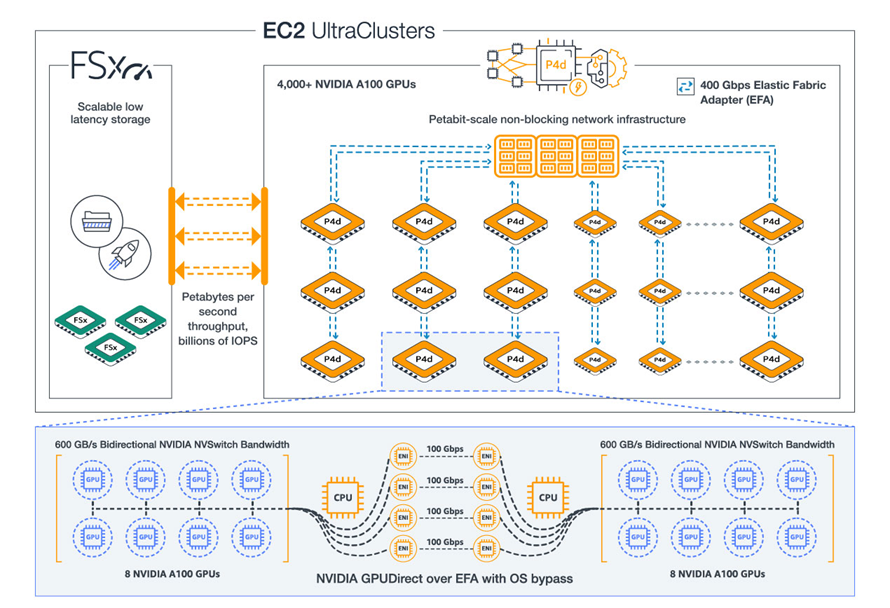
Network-wise, you have access to four 100 Gbps network connections to a dedicated, petabit-scale, non-blocking network fabric (accessible via EFA) that was designed specifically for the P4 instances, along with 19 Gbps of EBS bandwidth that can support up to 80K IOPS.

EC2 UltraClusters
The NVIDIA A100 GPUs, support for NVIDIA GPUDirect, 400 Gbps networking, the petabit-scale network fabric, and access to AWS services such as S3, Amazon FSx for Lustre, and AWS ParallelCluster give you all that you need to create on-demand EC2 UltraClusters with 4,000 or more GPUs:

These clusters can take on your toughest supercomputer-scale machine learning and HPC workloads: natural language processing, object detection & classification, scene understanding, seismic analysis, weather forecasting, financial modeling, and so forth.

Now Available
P4 instances are available in one size (p4d.24xlarge) and you can launch them in the US East (N. Virginia) and US West (Oregon) Regions today. Your AMI will need to have the NVIDIA A100 drivers and the most recent ENA driver (the Deep Learning Containers have already been updated).

If you are using multiple P4s to run distributed training jobs, you can use EFA and an MPI-compatible application to make the best use of the 400 Gbps of networking and the petabit-scale networking fabric.

You can purchase P4 instances in On-Demand, Savings Plan, Reserved Instance, and Spot form. Support for use of P4 instances in managed AWS services such as Amazon SageMaker and Amazon Elastic Kubernetes Service (EKS) is in the works and will be available later this year.

Take it from Dave
My colleague Dave Brown has even more to say about the P4 instances:

Learn More
To learn more about the performance of P4d instances in comparison to the previous generation (P3) instances, read Amazon EC2 P4d Instances in UltraClusters. For pricing and additional technical details, read about P4 Instances.

Jeff;

20 Jun 02:13

How I used Lambda and EFS for massively parallel compute.

by Peter Sbarski

Back in October of 2019 (in what seems like another lifetime), Nicki Stone and I presented a talk at Serverlessconf 2019 on solving BIG…

Continue reading on A Cloud Guru »

24 Jan 14:54

Lesson Learned #67: Azure SQL Database – SSH, VNET and Firewall

by Jose M Jurado - MSFT

Hello,

Today I worked in a service request when our customer tries to connect using SSH to the 1433 port from a Linux environment using a JumpBox in Azure to perform the connection.

In this situation, we need to know that in Azure, depending on where is the connection coming, the Gateway that Azure SQL Database has to validate the connection, has different behaviour, based on the IP source.

  • If the source IP is located outside Azure: All the connection is stablished against the Gateway using the port 1433.
  • If the source IP is located inside Azure:
    • The first connection will be to the Gateway using the port 1433.
    • This gateway will validate the connection and provide to the client another Database Server IP and another port (11000-14000) to connect. This process is called redirection.

In this scenario, using SSH and changing the external IP to private IP/VNET range our customer was not able to connect because our Gateway understand that the connection is stablished inside Azure and perform the redirection.

  • The gateway receives the connection using the port 1433.
  • The gateway replies with the re-direction policy.
  • As the connection has been stablished using only 1433 when the client application tries to connect to the Database Server IP and port is not possible and is not able to connect.
  • To change the behaviour from redirect or default to proxy (use only the port 1433) please, follow the steps mentioned in this URL.

In our YouTube channel you could find more information about it.

Enjoy!

03 Dec 18:05

Azure.Source - Volume 60

by Rob Caron

Now in preview

Simplifying security for serverless and web apps with Azure Functions and App Service

New security features for Azure App Service and Azure Functions reduce the amount of code you need to work with identities and secrets under management. Key Vault references for Application Settings, User-assigned managed identities, and Managed identities for App Service on Linux/Web App for Containers are available in public preview. In addition, ClaimsPrincipal binding data for Azure Functions and support for Access-Control-Allow-Credentials in CORS config are now available. In addition, we’re continuing to invest in the Azure Security Center as the primary hub for security across your Azure resources, as it offers a fantastic way to catch and resolve configuration vulnerabilities, limit your exposure to threats, or detect attacks so you can respond to them.

Screenshot of Key Vault references for Application Settings (now in public preview)

Python package (PyPI) support for Azure Artifacts now in preview

Python package functionality within Azure Artifacts for publishing and consuming Python packages using Azure DevOps Services is currently in public preview. Now you can create a feed(s) associated with your project to store your packages; upload Python packages to your feed using twine, flit support is being tested; pull packages from your feed using pip; integrate Python packages into your Azure Pipelines CI/CD using a task that simplifies the authentication for you; and include packages from the public index into your feed (Upstreams). A tutorial is available for using Azure Artifacts to consume and publish Python packages using Azure DevOps Services, including assigning licenses and setup.

Also in preview

Get the latest updates: In preview

Now generally available

General availability: Zone-redundant SQL databases and elastic pools in additional regions

Azure SQL Database Premium tier supports multiple redundant replicas for each database that are automatically provisioned in the same datacenter within a region. Zone-redundant SQL single databases and elastic pools, are now generally available in two additional regions: West Europe and South-East Asia. The full list of supported regions includes: France Central, Central US, West Europe, and South-East Asia. The zone-redundant configuration is available to SQL databases and elastic pools in the Premium and Business Critical service tiers.

News and updates

Announcing Azure Dedicated HSM availability

The Microsoft Azure Dedicated Hardware Security Module (HSM) service provides cryptographic key storage in Azure and meets the most stringent customer security and compliance requirements. This service is the ideal solution for customers requiring FIPS 140-2 Level 3 validated devices with complete and exclusive control of the HSM appliance. The Azure Dedicated HSM service uses SafeNet Luna Network HSM 7 devices from Gemalto. This device offers the highest levels of performance and cryptographic integration options and makes it simple for you to migrate HSM-protected applications to Azure. The Azure Dedicated HSM is leased on a single-tenant basis.

Premium Block Blob Storage - a new level of performance

Premium Block Blob Storage, which is currently in limited public preview, unlocks a new level of performance in public cloud object storage. It uses a combination of solid-state drives in our storage clusters and enhancements to our blob storage software to provide high throughput and very fast response times. This blog post takes a closer look at some of these performance enhancements, such as low and consistent latency that was demonstrated to be up to 40 times better than Standard Blog Storage.

Chart comparing latency between Premium and Standard Blog Storage

SQL Server on Azure Virtual Machines resource provider

This post announced a new Resource Provider called Microsoft.SqlVirtualMachine, a management service running internally on Azure clusters to handle SQL Server-specific configurations and deployments on Azure VMs. SQL VM resource provider enables dynamic updates of SQL Server metadata and orchestrates multi-VM deployments required for SQL Server HADR architectures. SQL VM resource provider also enables SQL Server specific browse and monitoring experiences. The SQL VM resource provider introduces three new resource types: Microsoft.SqlVirtualMachine/SqlVirtualMachine, Microsoft.SqlVirtualMachine/SqlVirtualMachineGroup, and Microsoft.SqlVirtualMachine/Sql Virtual Machine Groups/Availability Group Listener.

Azure Hybrid Benefit for SQL Server on Azure Virtual Machines

Azure Hybrid Benefit (AHB) for SQL Server allows you to use on-premises licenses to run SQL Server on Azure Virtual Machines. If you have Software Assurance, you can use AHB when deploying a new SQL VM or activate SQL Server AHB for an existing SQL VM with a pay as you go (PAYG) license. Now you can activate SQL Server AHB on Azure VM with SQL VM Resource Provider described in the post above. With the new Microsoft. SqlVirtualMachine resource provider you can manage SQL server configurations on Azure VMs dynamically. Flexible SQL Server License type configuration is the first feature we are delivering with SQL VM resource provider, and it enables instant and significant cost savings for SQL VM.

The Green Team solves high-risk, systemic security issues for Microsoft Azure

The Assume Breach security strategy assumes security breaches will occur instead of focusing solely on preventing breaches. Since 2009, two groups within Microsoft, the Red Team (attackers) routinely attacks Azure to discover security holes and the Blue Team (defenders) sets up honey pots and works to detect any attack. The Green Team consists of dedicated resources focusing on remediation and solving classes of high-risk and systemic security vulnerabilities for the Azure platform. The Green Team works closely with the Red and Blue Teams to understand what high-risk, systemic security issues exist – specifically focusing in on those that enable or lead to breaches – and by performing root cause analysis identify and address these issues at scale. The team continuously implements the latest best practices to help secure the Azure platform and help protect customer data and workloads. Read this post to learn how the Green Team contributes to Microsoft’s Assume Breach evolution while striving for Simply Secure.

Additional news and updates

Azure shows

Episode 256 - Living in a Serverless world | The Azure Podcast

Cynthia, Cale and Evan have a stirring discussion on the use-cases for Serverless computing and Azure Functions. They dive into scenarios when it is a good idea to use them and when it is not.

Azure Container Registry Tasks: Build and deploy to Azure App Service | Azure Friday (500th episode!)

Steve Lasker joins Scott Hanselman to talk about Azure Container Registry (ACR) Tasks and how you can build your container images in Azure for the three phases of development: pre-commit, team commits, and post-development for OS & Framework Patching.

Track my Pizza Cat van with Azure IoT solution accelerators | Internet of Things Show

Oh no! Pizza cat is having a hard time knowing if his pizzas are being delivered purr-fectly. Customers have been complaining about cold pizzas being delivered to the wrong houses! Come see how Pizza Cat uses a Remote Monitoring solution to save his Pizza company.

SmartHotel 360, a demo powered by Azure Digital Twins | Internet of Things Show

Here is an example of a smart hotel solution built on Azure Digital Twins. In this episode of the IoT Show, Lyrana Hughes shows how the core spatial intelligence capabilities of Azure Digital Twins power the Smart Hotel 360 demo and shares where you can access the demo content on GitHub so you can start building your own solution.

Introducing the Azure Blockchain Development Kit | Block Talk

In this episode we introduce the Azure Blockchain Development Kit, highlighting new samples that show case three key themes – Connect – Connect users, organizations, and devices to blockchain solutions, highlighting IoT, SMS, and Bots; Integrate – Integrate to existing legacy systems and protocols, highlighting legacy (FTP, Flat File) and media; Deploy – DevOps for blockchain using Azure DevOps and OSS tools for Truffle. Highlighting dev, test, and build pipelines.

Getting started with Key Management Concepts | Block Talk

This video and demonstration provides a look at the core concepts around cryptographic key and key management, as well as how they apply to blockchain based technology. The topics covered include core key fundamentals (asymmetric) used by Ethereum and a demo showing the technical details around how they apply to blockchain.

Azure ML Data Prep GUI, It's Not Just About The Code | AI Show

While lots of people like to do their data prep in code some tasks are faster and more easily done in a GUI, what's even better is a set of capabilities where you can pick and choose when and how to work in code and when to work in a GUI that work together. This show will demonstrate how we make Seth's life easier and faster in terms of data prep, allowing him to focus his nerdiness on modelling.

How to build a home automation auto-away assist with Azure IoT Hub | Azure Makers Series

Get more out of your home automation setup with Azure IoT Hub and Azure Functions. See how you can let your smart thermostat know when you’re in another room (not truly away) using motion sensors, Particle.io, and Azure.

Thumbnail from How to build a home automation auto-away assist with Azure IoT Hub from the Azure Makers Series on YouTube

How to edit an existing API Connection with Azure Logic Apps | Azure Tips and Tricks

Learn how to modify an existing API Connection with Azure Logic Apps. If you want to edit an existing API connection, all you have to do is simply type "API Connections" and select the "API Connections" menu item to get started.

Thumbnail from How to edit an existing API Connection with Azure Logic Apps from Azure Tips and Tricks on YouTube

Henry Been on Security with DevOps - Episode 012 | The Azure DevOps Podcast

Jeffrey is discussing security in DevOps with his guest, Henry Been. Henry offers advice on how to implement security into your DevOps practice, makes recommendations on how to be more secure at each stage of the software development application lifecycle, highlights possible vulnerabilities that you might want to watch out for, and offers tools you can utilize to combat this and up your security in your DevOps environment.

Technical content

Running Cognitive Service containers

Recently, we announced a preview of Docker support for Microsoft Azure Cognitive Services with an initial set of containers ranging from Computer Vision and Face, to Text Analytics. This blog post focuses on trying things out, firing up a Cognitive Service container, and seeing what it can do using Docker Desktop. Later blog posts will explore using Azure Kubernetes Service and Azure Service Fabric.

Considering Azure Functions for a serverless data streaming scenario

An earlier blog post, A fast, serverless, big data pipeline powered by a single Azure Function, discussed a fraud detection solution delivered to a banking customer. This solution required complete processing of a streaming pipeline for telemetry data in real-time using a serverless architecture. This blog post describes the evaluation process and the decision to use Azure Functions, which is easy to configure and within minutes can be set up to consume massive volumes of telemetry data from Azure Event Hubs.

Diagram of the workflow that begins with data streaming into a single instance of Event Hubs, which is then consumed by a single Azure Function

Azure Cosmos DB and multi-tenant systems

Learn how to build a multi-tenant system on Azure Cosmos DB, which itself is a multi-tenant PaaS offering on Microsoft Azure. Building a multi-tenant system on another multi-tenant system can be challenging, but Azure provides us all the tools to make our task easy. A key actor in this solution is an Azure Managed Application, which enables you to offer cloud solutions that are easy for consumers to deploy and operate. In a managed application, the resources are provisioned in a resource group that is managed by the publisher of the app. The resource group is present in the consumer's subscription, but an identity in the publisher's tenant has access to the resource group in the customer subscription. The publisher application, which manages the customer data, is hosted in a different Azure Active Directory tenant and subscription, which is separate from that of the customer’s tenant and data.

Flow chart showing front-end service interaction with the customer subscription resources

Improving Azure Virtual Machine resiliency with predictive ML and live migration

Starting earlier this year, Azure has been using live migration in response to a variety of failure scenarios such as hardware faults, as well as regular fleet operations like rack maintenance and software/BIOS updates. Our initial use of live migration to handle failures gracefully allowed us to reduce the impact of failures on availability by 50 percent. We partnered with Microsoft Research (MSR) on building our ML models that predict failures with a high degree of accuracy before they occur. As a result, we’re able to live migrate workloads off “at-risk” machines before they ever show any signs of failing. Read this post to learn more about how this means VMs running on Azure can be more reliable than the underlying hardware.

Time series analysis in Azure Data Explorer

Azure Data Explorer (ADX) is a lightning fast service optimized for data exploration. It supplies users with instant visibility into very large raw datasets in near real-time to analyze performance, identify trends and anomalies, and diagnose problems. This blog post describes the basics of time series analysis in Azure Data Explorer, which performs on-going collection of telemetry data from cloud services or IoT devices. This data can be analyzed for various insights such as monitoring service health, physical production processes, and usage trends. Analysis is done on time series of selected metrics to find a deviation in the pattern compared to its typical baseline pattern.

Screenshot of chart showing the Top 2 periodic decreasing web service traffic

Additional technical content

Events

Microsoft Connect(); 2018

Save the date to tune in online tomorrow, Tuesday, December 4, 2018 for Microsoft Connect – a full day of dev-focused delight—including updates on Azure and Visual Studio, keynotes, demos, and real-time coding with experts. Whether you’re just getting started or you’ve been around the blockchain, you’ll find your people here. And it all happens online. Get comfortable, and get inspired.

Save the date for Microsoft Connect(); 2018

Join us on November 28 for our next meetup: Adopting Emerging Tech in Government

At the last Microsoft Azure Government DC meetup, we discussed the leading edge of emerging technology in government, including how agencies are approaching strategy, challenges, use cases, and workforce readiness as they leverage emerging tech to innovate for their mission including blockchain, artificial intelligence, machine learning, and augmented reality. Check out the Microsoft Azure Government DC YouTube channel later this week for on-demand videos of this meetup and past ones.

Customers and partners

Customers are using Azure Stack to unlock new hybrid cloud innovation

We’re seeing high interest and adoption of Azure Stack across a number of industries – manufacturing, financial services, healthcare, and state & local governments. This makes perfect sense, as these industries have some of the most stringent regulatory requirements, often require operations in areas with limited or no internet connectivity, and typically have some legacy applications. This post looks at a few ways our customers in these industries are using Azure Stack today to address these real-world challenges. Customers across many industries are realizing the benefits of a truly consistent hybrid cloud with Azure Stack.

Three reasons why Windows Server and SQL Server customers continue to choose Azure

For the past 25 years, companies of every size have trusted Windows Server and SQL Server to run their business-critical workloads. As more customers use the cloud for innovation and digital transformation, the first step is often migrating existing Windows Server and SQL Server applications and data to the cloud. This post looks at the three main reasons we hear why customers choose to stay with Microsoft when they move to the cloud: Pay less with Azure, Azure delivers unmatched security and compliance, and Azure is the only consistent hybrid cloud.

Using AI and IoT for disaster management

Natural disasters caused by climate change, extreme weather, and aging and poorly designed infrastructure, among other risks, represent a significant risk to human life and communities. National, state, and local governments and organizations are also grappling with how to update disaster management practices to keep up. In this blog post, learn how the Internet of Things (IoT), artificial intelligence (AI), and machine learning can help. Not every crisis is avoidable, but we now have the technology to predict and prevent catastrophes such as oil spills or building collapses. When unpredictable natural disasters do strike, responders can gain access to real-time data that aims aid where it needs to be faster, reducing additional loss of life.


Azure This Week – 30 November 2018 | A Cloud Guru

This time on Azure This Week, Lars talks about Azure DevOps on-premises version now in Release Candidate. He also discusses the public preview of simplifying confidential computing in Azure IoT Edge, and gives details on how you can join the online Microsoft Connect(); event tomorrow.

Thumbnail from Azure This Week - 30 November 2018 by A Cloud Guru on YouTube

30 Apr 20:15

Region expansion for the next generation of SQL Data Warehouse

by Kevin Ngo

Azure SQL Data Warehouse (SQL DW) is a fast, flexible and secure, cloud data warehouse tuned for running complex queries fast and across petabytes of data. Continuing to deliver on this promise, we have announced the general availability of the next generation of SQL DW which includes an average of five times the performance boost, five times the increase in compute scalability, and four times the increase in concurrency. The release of Azure SQL DW Compute Optimized Gen2 tier comes with an expansion of 14 additional regions bringing the global region footprint of SQL DW Gen2 to 20 surpassing all other major cloud providers. The following regions are available:

  • Australia East

  • Australia Southeast

  • Canada Central

  • Central India

  • Central US

  • East Asia

  • East US

  • East US 2

  • Japan East

  • Japan West

  • Korea South

  • North Central US

  • North Europe

  • South Central US

  • South India

  • Southeast Asia

  • UK South

  • West Europe

  • West US

  • West US 2

With more global regions than any other cloud provider, Azure SQL Data Warehouse gives customers the flexibility to deploy applications where they need to. This also allows customers with specific data-residency and compliance needs to keep their data and applications close. We also have a strong roadmap to add the service availability in all Azure regions in coming months.

If you have a Gen1 data warehouse, take advantage of the latest generation of the service by upgrading. If you are getting started, try Azure SQL DW Compute Optimized Gen2 tier today. Stay up-to-date on the latest Azure SQL DW news and features by following us on Twitter @AzureSQLDW.

23 Dec 20:45

That C-130 Circling NYC Was Practicing Donald Trump's Rescue: Report

by Andrew P Collins

Last Wednesday New Yorkers were bugging out over a massive C-130 military plane doing low and slow laps with a pair of helicopters over Manhattan. The military originally said it was a “routine training exercise,” but now it’s reported that it was a training exercise for pulling President-Elect Donald Trump out of the…

Read more...

31 Oct 23:55

Shadows of innistrad? A Dream Come true Mark, Thank you.

You’re welcome.

01 Sep 19:36

Jimmy Kimmel makes fun of gamers, and gamers provide their own punchline

by Ben Kuchera

Watching other people play video games seems like a weird thing if you didn't grow up playing and understanding games. There's a lot about that activity that lends itself to humor.

You can say there's little difference between watching other people play video games and watching other people play professional sports, but that's kind of the thing. People make fun of people who watch sports all the time.

Here's the original video that made certain people so upset:

So Jimmy Kimmel made some jokes about people who watch others play video games on services like YouTube and there was some negativity in the reaction from the gaming community. By that I mean a few people lost their minds when something they enjoy was criticized during a late...

Continue reading…

08 Jun 20:08

The Morning Brew #1876

by Chris Alcock

Information

21 Mar 04:22

Publishing on QuickBooks Apps.com Now Easier

by Vishal Aggarwal

We’ve heard your feedback!

A lot of you have provided input on the publishing process for QuickBooks Apps.com. We’re working hard to meet your needs and have made an important change to the requirements for publishing on Apps.com.

What’s new

Apps published on QuickBooks Apps.com must implement single sign-on (SSO). To ease the way for apps that also require their own credentials, we’ve added a new SSO option that lets you prompt users to create an account for your app while complying with the SSO flow requirements for apps published on QuickBooks Apps.com.

Up until now, apps have had only one choice, our standard single sign-on. Going forward you’ll have the following 2 options:

  1. Standard single sign-on

This is the existing flow. With this model your application is required to implement OpenID in order to allow the customer signing up for your application from QuickBooks Apps.com to sign in directly to your application without being prompted to create a new account or password on your site. The customer signs in only once with their Intuit credentials.


In this model, you must add the Sign in with Intuit button on all of your sign-in pages.

Because this flow is easy for customers, it results in more customers signing up for your app. Many Intuit developers have found this model increases overall customer sign ups. Unless under special circumstances, we we recommend sticking with Standard single sign-on.

  1. Modified single sign-on

This is a new flow. With this model you still implement OpenID, but your application can let a customer create an account on your site for your app’s use.  Subsequent sign-ins from QuickBooks Apps.com should honor the OpenID credentials from Intuit and sign the user directly in to your application.

This modified model makes adding the Sign in with Intuit button to your sign-in pages optional.

Again, use modified single sign-on if your customers really need to create an identity and password on your site (for example, they need to sign in to your mobile or tablet app).

Another publishing requirement change

In addition to the new Modified SSO option, we’re trying to ease your way by removing the requirement for your app to sign users out of Intuit if they sign out of your app

You can learn about the advantages of publishing on QuickBooks Apps.com here.

We at Intuit Developer are committed to creating support and features that help our developers find success for their apps.   With the above changes we hope to see your app on QuickBooks Apps.com soon.

Do you have an app that’s ready to launch on Apps.com? Check out your first steps here.


05 Dec 15:03

Applied Azure: Infographic of how “Have I been pwned?” orchestrates Microsoft’s cloud services

by Troy Hunt

Remember the good old days when a website used to be nothing more than a bunch of files on a web server and a database back end? Life was simple, easy to manage and gloriously inefficient. Wait – what? That’s right, all we had was a hammer and we consequently treated every challenge like the proverbial nail that it was so we solved it in the same way with the same tools over and over again. It didn’t matter that an ASP.NET website on IIS was woefully inadequate at scheduling events, that’s all we had and we made it work. Likewise with SQL Server; it was massive overkill for many simple data persistence requirements but we’d spent the money on the licenses and we had an unhealthy dose of loss aversion coupled with a dearth of viable alternatives.

This was the old world and if you’re still working this way, you’re missing out big time. You’re probably spending way too much money and making life way too hard on yourself. But let’s also be realistic – there are a heap of bits in the “new world” and that means a lot of stuff to learn and wrap your head around. The breadth and depth of services that constitute what we know of as Microsoft Azure are, without a doubt, impressive. When you look at infographics like this you start to get a sense of just how comprehensive the platform is. You also get a bit overwhelmed with how many services there are and perhaps confused as to how you should tie them together.

I thought I’d take that aforementioned infographic and turn it into what Have I been pwned? (HIBP) is today. Oh – and speaking of today – it’s exactly one year since I launched HIBP! One of the key reasons I built the service in the first place was to get hands on with all the Azure services you’ll read about below. I had no idea how popular the service would be when I set out to build it and how well it would demonstrate the cloud value propositions that come with massively fluctuating scale, large volumes of data storage and a feature set that is distributed across a range of discrete cloud services.

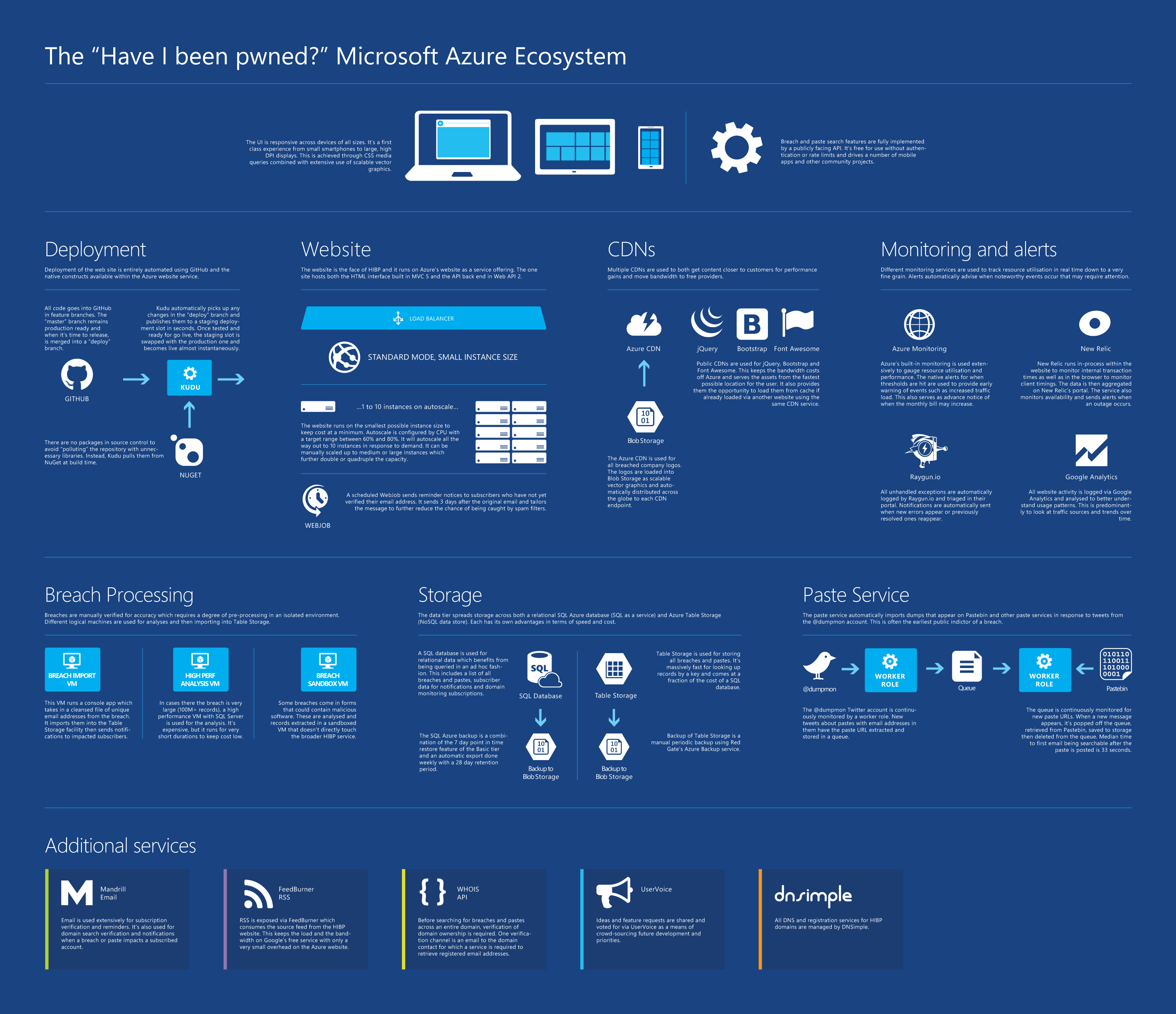
Here’s the infographic, click through for a high-res PNG or go vector with PDF and read on after that for more details on how it’s all put together.

The "Have I been pwned?" Microsoft Azure Ecosystem

So that’s the big picture, now let me fill in the details.

The clients

I went down the responsive web route from the outset with a view to making everything play as nice as possible across the broadest range of devices. I discarded IE8 from the outset (remember when that was still a thing?!) and focused on CSS media queries and design that adapted to the device form. From very early on, I also made an API available publicly and freely. The search feature was already making async requests to a Web API endpoint anyway, publishing an API spec was a simple step from there.

On that web interface, I’ve been a bit obsessive in optimising the bejesus out of everything I possibly can, as you can see from posts like Micro optimising web content for unexpected, wild success and Measure, optimise then measure again: further refining “Have I been pwned?”. It was experiences like paying for 15GB of jQuery downloads in a day that prompted me to really look at how I structured the way the browser was talking to the service to optimise both performance and cost. (Pro tip – don’t pay for bandwidth you don’t need to!)

Standing up an unlimited API with no authentication requirement has also been a bit interesting. I’m yet to see any behaviour that I’d class as malicious in terms of impact on HIBP, but I’ll often see a few hours’ worth of high requests per minute to the server without it being reflected in Google Analytics (it’s only logging browser activity). You can actually see the requests flat-lining at what is inevitably the maximum throughput the client’s connection allows, but I’m yet to see it actually cause HIBP itself to max out an instance.

The deployment process

Everything is in a private GitHub repository and makes use of feature branches extensively. I probably wouldn’t say “religiously”, but I do aim to keep the master branch in a ready state of deployment. I don’t put any NuGet packages in there, it only pollutes the repository with things that can be pulled back down by either the IDE or the build environment as required anyway. It makes versioning simpler when there’s a package update and keeps the repository size lighter.

In terms of deployment, I merge master into a “deploy” branch and push back to GitHub. Kudu then jumps in and does its magic (do read up on what Kudu can do if you deploy to Azure but haven’t used the browser-based Kudu service, it’s quite awesome), pulling the deploy branch and deploying the site. All of this happens to a staging deployment on Azure – it’s not immediately live. This gives me an environment I can play with to make sure everything is behaving then I just swap that deployment with the current live one using Azure’s staged deployment feature.

If this process is new to you, you can see how to set most of it up in my World’s Greatest Azure Demo walkthrough which is a free 1 hour 20 minute video.

The website

Obviously this is the coalface of what people see when they come to the site. I run it as the smallest possible standard instance available in the Azure website offerings (a single 1.6GHz CPU with 1.75GB of RAM) which gives a well-optimised site a heap of performance until load gets serious. When that happens, I allow it to scale out automatically to as many as 10 instances so we’re also talking a ten-fold increase in website capacity. As required, I can also scale up to a “Large” website instance which in my testing, is effectively a four-fold increase again (there’s always the “Medium” instance which is about double “Small” and half “Large” in terms of the traffic it will support). The bottom line is that the site sits there using only 2.5% of the available scale which means I only pay for 2.5% of the available scale until I actually need more.

Speaking of scale, this is the sort of scenario I need to cater for:

Scale going from almost nothing to 168k page views in a day

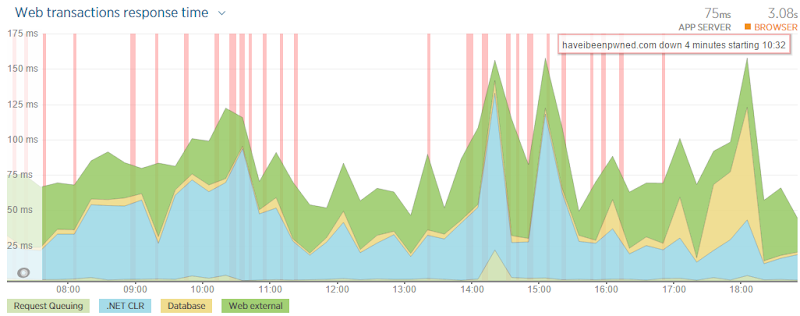
That’s just the last few months and it doesn’t include hits to the API which occur every single time there is a search for a pwned account so you can pretty much double those numbers in terms of traffic to the server. The cloud value proposition of rapid elasticity is never more apparent than when you go from a few hundred requests in an hour to 30,000 of them which is what happened on September 11 when everyone got stressed about the alleged Gmail hack. I learned a bunch of things about how that sort of scale works back then after which I learned I couldn’t trust any of the figures as New Relic was eating up all my CPU due to a bug! Inevitably I’ll see traffic of this scale (and probably way higher) many times in the future yet and it will be good to have an opportunity for a more objective analysis of performance. It’s crazy just how far that small website instance can scale when the app is built for performance…

The CDNs

I unashamedly steal other peoples’ bandwidth. Well kind of – I use public CDNs for everything I can which means jQuery, Bootstrap and Font Awesome. One of the key reasons is that it means I don’t pay for the data (I mentioned earlier how I paid for 15GB of jQuery alone in a single day once) but it also gets these libraries served from locations that are most convenient to the user. There’s also the added bonus that if they’ve visited another site using the same version of, say jQuery from the same CDN, it’s already cached in their browser and there’ll be no loading it over the web.

I’m also making use of the Azure CDN for the pwned companies’ logos. I dump it into blob storage, set a long cache expiry on it and magic happens as it’s distributed around the globe. Since I originally set this up, you can actually point a CDN endpoint to a path on a website rather than just to a blob storage location, but by doing this I don’t need to deploy the site when a new breach is added. I tend to use Visual Studio’s Azure integration points quite a lot so I just use the server explorer to browse on over to the blob and drop the file there. This helped get the site an excellent performance grade and there are now very small gains left to be had.

Monitoring and alerts

It’d be really hard to properly support this service without a heap of info about how it’s behaving. The native Azure monitoring is great for understanding what’s going on internally within the service, particularly when it comes to how things will scale and what you’ll be billed for. There’s more than enough information in there that you should never have any surprises come the end of the month when the bill lands. In fact that’s something that surprises me – that some people say they were surprised! Get your alerts right and you’ll know very early when something is happening to a resource that could hit your bottom line.

New Relic has been invaluable for tracing down performance to a very fine grain which includes what’s happening at the individual transaction or database query level. The alerts it sends are often the first indication of an outage and having a monitoring service independent of the hosting platform is something that sits rather well with me. Oh – and it’s a free add on when you stand up an Azure website so the price is awesome!

Raygun.io – I have nothing but good things to say about these guys. Go and check out my post on Error logging and tracking done right with Raygun.io if you want the detail but in short, this captures all my unhandled exceptions (including things like 404s so they’re not necessarily all my fault!) and triages them in a way that I can focus on stuff that’s important and not get distracted by noise. I’ve used services like ASP.NET Health Monitoring and ELMAH before and whilst they were very handy, the noise they generate can be deafening. I use Raygun.io religiously for HIBP and its proven extremely valuable.

Breach processing

Whichever way you cut it, so long as I want to verify the legitimacy of breaches before putting them in the system and then automatically notifying a bunch of people that they’ve been pwned, it’ll take some effort. Many breaches come from very questionable sources and when it’s a zip or binaries I tend to pull them straight into a “sandbox” VM, that is one that I’m happy to blow away at any time. I only turn it on when I need it so for all intents and purposes, it’s free.

Occasionally I need some serious scale for analysing large breaches. Adobe is the canonical example of this and I’ve previously written about Using high-spec Azure SQL Server for short term intensive data processing. In fact in that post, I grabbed the biggest freakin’ SQL Server VM I could get my hands on because frankly, time is money! I mean my time is money – I don’t want to waste it sitting around waiting for stuff to happen and for the sake of $3.14 an hour for the biggest VM I could get at the time, it just makes sense.

Once I have a clean set of data (namely a unique collection of email addresses and if they exist, usernames), I use a VM dedicated to importing the breach and then emailing out notifications. This runs a console app that takes care of the process and is probably the least cloud-like implementation in the entire system. However it’s a small overhead for an infrequent process (albeit a very important one) and there are challenges in becoming more cloud-like which I’ll talk about a bit later.

Storage

“You need a data layer therefor thou shalt use SQL Server”. Ugh – heard this before? Not that there’s anything specifically wrong with SQL Server, it’s an excellent RDBMS, but you don’t always need an RDBMS. I made the call very early on to use Azure table storage for managing the breached data (and later the pastes as well) and I’ve never looked back. I explain the rationale in my post on Working with 154 million records on Azure Table Storage – the story of “Have I been pwned?” but in short, table storage is massively fast for looking up data by a key and it’s a fraction of the price of SQL Azure.

But I also use SQL Azure. Wait – two data persistence technologies?! Computers can do that?! I jest, but there is a popular (mis)conception out there that you must pick a singular implementation and stick with it. In my experience, it makes much more sense to use table storage in the places it excels (price and speed when looking up by key) and SQL Azure where it makes sense (queryability). The big stuff I retrieve by partition and row key is the breach data, the little stuff I query is the subscriptions and when required, sending and tracking notifications. It works beautifully harmoniously!

In terms of how the data is backed up, it’s a bit of a mixed bag. Firstly, there’s built-in redundancy against failure by virtue of multiple locally redundant copies of the data (this isn’t something I configure, it’s just part of the managed service). I’ve manually configured Godzilla protection which is to say that I’ve enabled geo redundant storage such that a disaster of monstrous proportions in the West US data centre where HIBP is hosted will still leave a copy of everything in a totally separate region which assumedly, Godzilla has not impacted.

For SQL Azure, I’m using the “Basic” service tier which gives me the ability to roll back to any previous version of the data within the previous week. This is really neat and it replaces the more manual approach I’d written about in the Godzilla link above. That model was on the old “Web” tier and it involved taking daily backups into blob storage which meant replicating the DB and then consequently paying double for it as you get hit with a full day of charges each time it runs. Now, the backup is implicit although the basic tier is only locally redundant. I could go to the “Standard” tier and get a 14 day restore window and also make the backup geo redundant but the cost triples ($5 up to a lofty $15/m!). Instead, I’m using a combination of the basic plan’s auto-restore and still using the old manual backup process albeit on a weekly basis (this means the cost increases by one seventh rather than doubles as it did before) with a 28 day retention period and the DB is backed up to blob storage which is geo redundant. The bottom line is full local redundancy with near-instant rollback to any point in the last week plus the ability to rollback to a weekly backup anywhere up to a month back and it’s geo redundant.

One other thing about the basic tier – it’s rated at 5 DTUs or “Database Throughput Units” which is effectively a measure of performance tier you can read about in Azure SQL Database Service Tiers and Performance Levels.  So how does that perform under serious load? The SQL DB is very rarely hit; each breach has a row in there but it’s cached in-process in the app for 5 mins so 12 times an hour there are 34 rows returned (one for each current breach). If a breach search gets a hit, the name of the breach is matched to one of those cached records. All paste data is in table storage so no SQL Azure hit there which just leaves notification signups which are a (comparatively) low throughput at the best of times and they can also tolerate slightly higher latency. The percentage of DTU utilisation can be monitored in the portal so it’s easy to keep an eye on if it’s causing problems and then just scale it up accordingly. I hammered it with a large query just for kicks and watched the DTU percentage max out:

Resource utilisation of SQL Azure in terms of DTUs

I will likely try not to do that too often…

The paste service

I launched this service a few months back and it’s been absolutely fantastic. I was going to write a dedicated blog post on how it was put together, but somehow it morphed into this one that covers everything. Just as a refresher, the premise is simply this: Pastebin (and to a lesser extent, other similar paste services), is often the first place a data dump appears. There’s a Twitter account called @dumpmon which monitors Pastebin (among others) for new pastes that match a pattern indicating it’s probably a data breach dump and then auto-tweets it out. HIBP now monitors that tweet stream for new pastes and then automatically imports them with impacted accounts being searchable on HIBP within a median time of 33 seconds after first appearing on Pastebin.

Clearly this all needed a bunch of background processing which included monitoring the @dumpmon account, retrieving pastes and sending notifications. I decided to stand up one Azure Worker Role just to watch the @dumpmon Twitter feed. Every time there’s a tweet that announces a dump containing emails, HIBP knows about it within 2 or 3 seconds. To ensure the whole thing is idempotent, the worker role stores a reference to the tweet in SQL Azure and always checks that I haven’t already retrieved it before any further processing. It then drops the URL of the paste only into Azure Queue Storage so that’s the only job this worker role has – get new tweets and queue the paste URL.

There’s then a separate worker role which monitors the queue. When a new message appears, the worker role pops it off the queue and makes sure that the paste hasn’t previously been retrieved. This is not redundant with the check in the previous paragraph – that one ensures tweets aren’t double-processed, this one ensures pastes aren’t. The distinction is important as it creates a clear abstraction between the two tasks and leaves the door open to me populating the queue with paste URLs from a different source. Anyway, once popped off the queue and verified as unique, the paste is retrieved, unique email addresses are extracted via regex, data is saved to table storage then emails are sent to impacted subscribers. Once everything has completed successfully, the message is deleted from the queue. The beauty of queue storage is that the message is automatically returned to the queue 30 seconds after having been popped so if anything fails catastrophically before it’s programmatically deleted then the message itself isn’t lost.

At present, all of this remains implemented by a single instance of each worker role which is just fine as the @dumpmon tweets come in slow enough to make everything very sequential. In theory, I could scale out multiple instances of the roles if I was dealing with high volumes and wanted massive async processing of large data volumes (and I’m not ruling that out for processing new breaches…) but for now, this works just fine as is.

The additional services

There are a few here so I’ll reel them off quickly. Mandrill is working great for email and I rolled over to that from SendGrid recently which was also great but I found I was getting a better spam rating, a more comprehensive dashboard and better pricing with Mandrill.

RSS via FeedBurner gets load and bandwidth off HIBP which are good things for both scalability and cost. I wrote about how I put this together a couple of weeks ago so check that out if you want more info.

The WHOIS API is necessary to get email addresses from domains so that I can email them as a means of ownership verification on domain-wide searches. Of course I’d love to get this service for free (it’s actually one of the more expensive things I pay for), but certainly when I implemented it, I couldn’t reliably pull that data across TLDs. Speak up if you know of a better way!

I added the UserVoice page just a week ago in response to lots of good ideas that needed a better triage mechanism and a means of prioritisation. I’ll also use that to flesh out ideas further and discuss the various challenges in implementing the things people are looking for (see the “+” syntax discussion as an example of that) so do use your votes to contribute ideas and join in the discussion.

DNSimple is not GoDaddy which is immediately advantageous. It’s run by exceptionally smart people who don’t work for GoDaddy and I’ve had nothing but great support from them. It’s dead easy to use, it’s super fast and it’s not GoDad… ok, just go here and read why.

What I’d do differently…

The good news is that all the fundamentals are sound and the service does exactly what it needs to based on today’s requirements. Probably the main thing I’d improve is the process of importing a new breach as it is a bit labour intensive right now. To a degree, that’s unavoidable when I want to validate the legitimacy of a breach, the main scope for improvement is the import process which presently involves remoting into a VM and running commands.

Ideally, that breach import process would be far more parallelised and far more automated. It might mean just dropping a dump into blob storage somewhere which then fires off a process to auto-extract all the email addresses and queue them for processing. The trick is dealing with scale – Adobe was a 2.9GB zip file containing 152M records and let me make a prophecy now: we will see that scale topped at some time in the future. That creates some very challenging problems when it comes to merging them into the existing result set and then sending notifications.

The other thing I’d do differently if there was sufficient scale to justify it is split the API out from the website. Putting it on a separate domain running it on a separate website instance would start to give me more options around scale, namely that the bits serving the HTML could be tuned and scaled entirely independently of the bits serving the JSON. Particularly when you consider the latter can be hit pretty heavily independently of the former, this makes sense but again, only when there’s enough consistent demand to justify it (although of course I could always do that now and put them on the same web hosting plan using the same resources at no additional cost then move to a dedicated set of resources at a later date).

Taking that thinking even further, I could scale the API out to Azure’s API Management service in the future, but it doesn’t come cheap. There’s a bunch of stuff this would allow me to do in terms of scale and management, but it’s the sort of thing that wouldn’t happen unless the demand justified it as it simply doesn't solve problems I currently have, at least it doesn’t solve enough of them!

Same deal again with potentially using Azure Traffic Manager to scale the service out to more regions around the globe rather than just sitting the website in the one location. Yes, I could do this but at the moment it’s rare to use all the resources I already have at my disposal (namely that one website) so whilst it would get traffic that much closer to the consumers, it’d at least double the website cost. With super fast pages and good use of CDNs already, it’s a problem I don’t yet have although it would be a nice problem to have :)

What I wouldn’t do differently…

While I’m here, let me touch on a couple of things I wouldn’t do differently with regards to two recent outages. This week I had very intermittent DNS for the better part of the working day due to DNSimple being hit with a massive DDoS attack:

Outage due to DNSimple DDoS attack

A couple of weeks before that, Azure got hit with a serious outage that also knocked HIBP offline for a good whack of the day. I have no intention of changing either service for one key reason: I’ve got a huge amount of confidence in those running these services. It’s the same with Raygun.io for that matter (although without the outage) in that to my mind, the vision and execution of how all these guys work is spot on. Outages happen to everyone and if they haven’t happened yet, they will at some time or another. I’m confident those experiences will improve the services and they’ll benefit from lessons learned, lessons not yet learned by those who’ve not had to deal with these issues yet. Don’t get me wrong – if I kept seeing outages then I’d absolutely reassess the situation, but we’re a long way from that in these cases.

Supporting HIBP

Back in March, I wrote about Donations, why I don’t need them and why I’m now accepting them for “Have I been pwned?”. As I said at the time, the cost of running the service is negligible and indeed that’s a massively positive endorsement of Azure and the things it lets you do for less than coffee money. That’s actually gotten cheaper both in real terms (some prices have fallen plus the SQL cost is down due to the change in backup processes mentioned earlier) and in relative terms (I’m using the website service for additional things without paying any more money). But I also explained that the real cost was in time and the sacrifices made so that all this can work the way it does.

I came up with 10 different things of varying value that illustrated the sacrifices that get made to make the magic happen:

CoffeeRent a DVDMonth of SendGrid mailSix pack of Little Creatures Pale Ale2,500 WHOIS API queriesTake the kids to a movieWoodform ReserveGitHubWifeSaving your ass

I’m enormously grateful to those who have shown support and helped keep this service running through the encouragement they’ve provided both monetarily and just by virtue of positive words. I’m still doing the PayPal thing but a bunch of people wanted to throw me a slice of Bitcoin too so I’ve added support for that and it’s all over on the donate page.

Next…

The UserVoice page is probably the best indication of the user-facing features you can expect to see next and I intend to take a good bite out of that over the coming Christmas holidays. Beyond that though is a never ending stream of backend stuff, everything from better optimising the email notifications for legibility and spam-friendliness to using more of Azure’s features to improve the service. Some of this things you’ll see, others you may just “feel” in terms of things being a little slicker.

I hope this overview has been useful in helping you understand not just how HIBP has been put together, but also how a range of Azure features can be combined to provide a service like this at such a negligible price. We couldn’t do this even just a few years ago, at least not with this degree of ease and as awesome as it is, we’ll look back at this again in a year and a bunch of what you’ve read here today will be done in a better, cheaper and more readily consumable fashion. It’s just a very exciting time to be building software!

07 Nov 19:46

Why does an attempt to create a SysLink control in my plug-in sometimes fail?

by Raymond Chen - MSFT

A customer had written a plug-in for some application, and they found that their plug-in was unable to create a SysLink control via the Create­Window­ExW function. The same code in a standalone application works fine, but when the code is placed in their plug-in, the code fails.

Debugging showed that the call to Init­Common­Controls­Ex succeeded, but the Create­Window­ExW call failed with "Cannot find window class."

The customer is another victim of not keeping their eye on the activation context.

They attached a manifest to their DLL so that the call to Init­Common­Controls­Ex maps to the version of the common controls library that supports the SysLink control. But they did nothing to ensure that that context was active at the time they called Create­Window­ExW.

The customer's plug-in clearly falls into the case Adding Visual Style Support to an Extension, Plug-in, MMC Snap-in or a DLL That Is Brought into a Process. but they failed to follow the instructions provided therein (which boil down to "use isolation awareness").

From the symptoms, it appears that the host application for their plug-in does not activate a version-6 common controls manifest at the time it calls into the plug-in, which means that your attempt to create version-6 common controls will fail.

On the other hand, the standalone application probably uses the technique given in Using ComCtl32.dll Version 6 in an Application That Uses Only Standard Extensions, which activates the version-6 common controls when the process starts and leaves it active for the duration of the process.

12 Sep 17:51

Why are there so many Warriors in Abzan? They felt more like Soldiers and a handfull of them are. Why not all of them?

There’s a warrior matters theme in the set.

12 Sep 17:50

In samstod's article he mentions tom lapille developed an unannounced set in the block! Does that mean louie or something we havent heard about yet?

He means one of the sets later in the block.

14 Mar 13:05

Bursting the Bubble

by Cliff Daigle
In the last few months, Magic: the Gathering card prices, especially for anything seeing play in Modern, have gone up and up and up. These have not been steady increases over time, these have been spikes over the course of a few days. The examples are many and varied. Zendikar Fetchlands are now worth more […]
11 Dec 15:20

AlwaysOn Availability Groups, Backup Checksums, and Corruption

by Brent Ozar

The latest version of sp_Blitz™ alerts you if you haven’t been using the WITH CHECKSUM parameter on your backups. This parameter tells SQL Server to check the checksums on each page and alert if there’s corruption.

But what about corrupt backups? Books Online says:

NO_CHECKSUM - Explicitly disables the generation of backup checksums (and the validation of page checksums). This is the default behavior, except for a compressed backup.
CHECKSUM - Specifies that the backup operation will verify each page for checksum and torn page, if enabled and available, and generate a checksum for the entire backup. This is the default behavior for a compressed backup.

Hmmm, let’s see about that. In my SQL Server 2014 lab environment, I shut down my primary replica, then busted out the hex editor XVI32 to edit the data file by hand, thereby introducing some corruption on a clustered index.

After starting the replica up again, I ran a normal compressed backup:

BACKUP DATABASE [AdventureWorks2012] TO DISK = N'\\DC1\SQLCLUSTERA\MSSQL\Backup\AW20131202_248_NoChecksum' WITH NOFORMAT, INIT,  NAME = N'AdventureWorks2012-Full Database Backup', SKIP, NOREWIND, NOUNLOAD, COMPRESSION, STATS = 10

The backup completed fine without errors – even though compressed backups are supposed to run WITH CHECKSUM by default.

Then I ran a compressed backup and manually specified the CHECKSUM parameter:

BACKUP DATABASE [AdventureWorks2012] TO  DISK = N'\\DC1\SQLCLUSTERA\MSSQL\Backup\AW20131202_256_Checksum' WITH NOFORMAT, INIT,  NAME = N'AdventureWorks2012-Full Database Backup', SKIP, NOREWIND, NOUNLOAD, COMPRESSION,  STATS = 10, CHECKSUM

That time, the backup stopped with an error:

10 percent processed.
Msg 3043, Level 16, State 1, Line 4
BACKUP 'AdventureWorks2012' detected an error on page (1:3578) in file '\\dc1\SQLClusterA\MSSQL\Data\AdventureWorks2012_Data.mdf'.
Msg 3013, Level 16, State 1, Line 4
BACKUP DATABASE is terminating abnormally.
And the warning to the left.

Do not stare into cork with remaining eye.

Conclusion #1: Compressed backups don’t really check checksums. No idea if that’s a bug in the code or in the Books Online article.

But the plot thickens – this particular database is also part of an AlwaysOn Availability Group. One of the cool benefits of AGs (and also database mirroring) is that when one of the replicas encounters corruption, it automatically repairs the corruption using a clean copy of the page from one of the replicas. (After all, I didn’t use a hex editor on the secondary – only on the primary’s data file, so the secondaries still had a clean copy.)

After running the first backup (compressed, but no checksum), I queried sys.dm_hadr_auto_page_repair, the DMV that returns a row for every corruption repair attempt. The DMV held no data – because a backup without checksum doesn’t actually detect corruption.

After running the second backup (compressed, with checksum), I queried sys.dm_hadr_auto_page_repair again, and this time it successfully showed a row indicating which page had been detected as corrupt. However, the backup still failed – but why?

The clue is in the Books Online page for sys.dm_hadr_auto_page_repair – specifically, the page_status field’s possible values:

The status of the page-repair attempt:
2 = Queued for request from partner.
3 = Request sent to partner.
4 = Queued for automatic page repair (response received from partner).
5 = Automatic page repair succeeded and the page should be usable.

When I first queried the DMV, the page’s status was 3 – request sent to partner. My primary had asked for a clean copy of the page, but because my lab hardware is underpowered, it took several seconds for repair to complete. After it completed, I ran the backup again – and it completed without error.

A few things to take away here:

  • Automatic page repair is automatic, but it’s not instant. When you’ve got corruption, a query (or backup) can fail due to corruption, and then magically succeed a few seconds later.
  • Unless you’re doing daily DBCCs (and you’re not), then as long as you can stand the performance hit, use the WITH CHECKSUM parameter on your backups. Just doing compression alone isn’t enough.
  • No, I can’t tell you what the performance hit will be on your system. Stop reading blogs and start doing some experimenting on your own.

...
Some of our favorite "ing" resources: clustering, indexing, and partitioning.

03 Dec 22:33

WildStar to feature Medic, Engineer classes

by Megan Farokhmanesh

Carbine Studios' upcoming massively multiplayer online role-playing game, WildStar, will feature a Medic and Engineer class, the developer announced today.

The Medic is a mid-range class that uses medium armor and relies on Power Cores as its resource. Players who choose the medic can either go with a traditional healing role, or act as a DPS medic focusing more on offensive skills. DPS medics will still be able to perform healing skills with correct skill customization. Watch the video below an overview of the class.

Few details have been revealed about the game's final class, the Engineer. The Engineer is a close-range hybrid class who uses high-tech skills in battle. Engineers wear medium armor and use stations, probes and...

Continue reading…