Jean-Philippe Encausse
Shared posts
🧠 Cet implant cérébral ultra-mince permet de connecter efficacement son cerveau à une IA

10 Contradictory Traits of Creative People
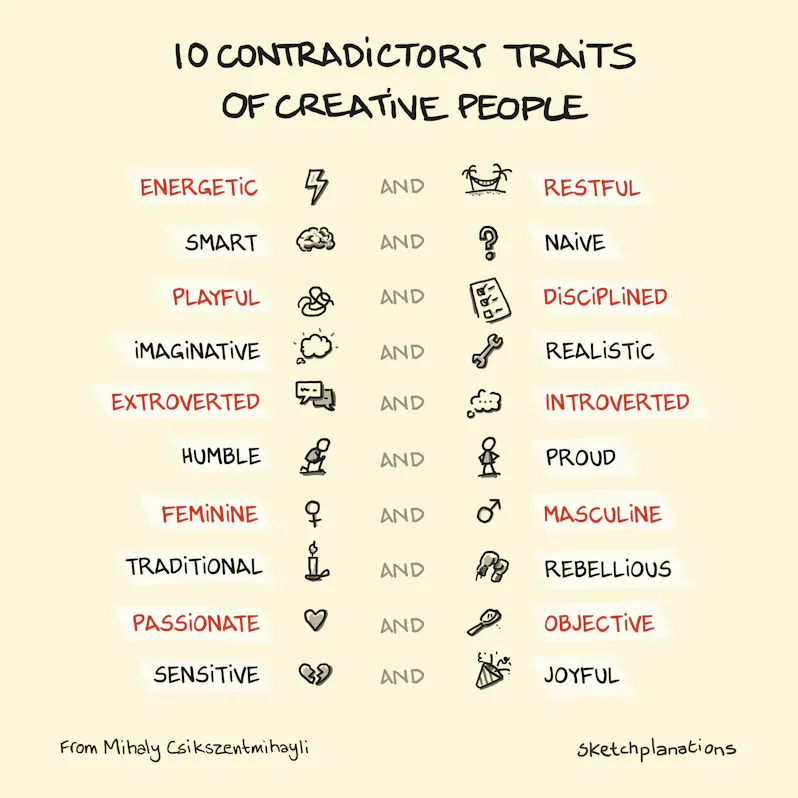
Creative people display contradictory personality traits. This finding has stuck with me since I read it over 20 years ago in psychologist Mihaly Csikszentmihalyi’s book Creativity: Flow and the Psychology of Discovery and Invention.
Csikszentmihalyi drew this finding from over 100 interviews with exceptional people—engineers, writers, historians, chemists, musicians, business people and more—and his lifetime of research into psychology, happiness, and flow. Alongside dismantling several myths surrounding creativity, such as the tortured genius, Mihalyi explores the central idea that creative people do not lean only toward one side or the other on a range of personality traits. Instead, creative people will display quite opposite characteristics at different times, or even at the same time.
The 10 Contradictory Traits of Creative People
Creative people often display both sides of these traits:
- Energetic and Restful
- Smart and Naive
- Playful and Disciplined
- Imaginative and Realistic
- Extroverted and Introverted
- Humble and Proud
- Feminine and Masculine
- Traditional and Rebellious
- Passionate and Objective
- Sensitive and Joyful
The Importance of Contradiction
This idea of contradictory personality traits was exciting to me when I read about it. I was a young design and engineering graduate learning and applying the Theory of Inventive Problem-Solving (TRIZ) for what seemed like creative solutions. I was fascinated with where ideas come from, what creative people do differently, and how I could become one.
A fundamental idea in TRIZ is that solutions evolve through the resolution of contradictions. For example, you want a tent to be strong and sturdy so it doesn’t blow over or break. The standard approach for this makes it heavier. But you also want it to be lightweight to carry. How can it be both strong and lightweight? Enter creative solutions.
Compromise and trade-off are sometimes necessary, but whenever you find what seems a truly creative solution, you’ll usually find that someone’s resolved a contradiction at its core.
And here was Mihaly Csikszentmihalyi finding that creative people benefit not just from being imaginative, but also, at times, from being realistic. Not just smart, but also, at times, naive. Resolving a contradiction of personality.
Resisting Labelling
Labelling others or yourself usually seems to me a misguided and often harmful act. For example, attribution bias is the tendency to attribute behaviour to fixed personality traits rather than to circumstances or actions. Considering someone a genius, a loser, or a natural artist, without considering the circumstances and actions that got them where they are, gets us off the hook.
As David Macauley pointed out (video), when people say they can’t draw, they’ve usually never really tried.
The idea of displaying contradictory or paradoxical traits was very freeing to me. To be creative, you don’t have to be this or that. You can be this at times and that at times. And perhaps this fluidity helps us towards creative insights.
I generally consider myself fairly introverted—I easily recharge through time by myself—but in the right company and the right time, I can appear quite extroverted.
The smartest people can also ask naive questions.
Being proud and confident can help try things that others won’t. And being humble enables you to accept help and ideas from others, and not drive collaborators away.
At times, you may be energetic and productive; at other times, you may want to rest and recharge.
We don’t have to be one or the other. We can be open to being both.
Excerpt on Creative Individuals and Complex Personalities
Here’s Csikszentmihalyi from the book:
“Are there no traits that distinguish creative people? If I had to express in one word what makes their personalities different from others, it would be complexity. They show tendencies of thought and action that in most people are segregated. They contain contradictory extremes – instead of being an ‘individual’, each of them is a ‘multitude’. These qualities are present in all of us, but usually we are trained to develop only one pole of the dialectic. We might grow up cultivating the aggressive, competitive side of our nature, and disdain or repress the nurturant, cooperative side. A creative individual is more likely to be both aggressive and cooperative, either at the same time or at different times, depending on the situation. Having a complex personality means being able to express the full range of traits that are potentially present in the human repertoire.
- Creative individuals have a great deal of physical energy, but they are also often quiet and at rest.
- Creative individuals tend to be smart, yet also naive at the same time.
- A third paradoxical trait refers to the related combination of playfulness and discipline, or responsibility and irresponsibility.
- Creative individuals alternate between imagination and fantasy at one end, and a rooted sense of reality at the other.
- Creative people seem to harbor opposite tendencies on the continuum between extroversion and introversion.
- Creative individuals are also remarkably humble and proud at the same time.
- Creative individuals to a certain extent escape this rigid gender role stereotyping [of ‘masculine’ and ‘feminine’].
- Creative people are both traditional and conservative and at the same time rebellious and iconoclastic.
- Creative persons are very passionate about their work, yet they can be extremely objective about it as well.
- The openness and sensitivity of creative individuals often exposes them to suffering and pain yet also a great deal of enjoyment.”
Related Ideas to 10 Paradoxical Traits of Creative People
Also see:
- Thesis, Antithesis, Synthesis
- Everyone’s a Geek About Something, and no one is one-dimensional, as I like to say
- The Spectrum Policy
- Attribution Bias
- Flow
- Match challenge with skills for flow at work
- Yes sayers, no sayers
- The Bandwagon Effect
- Groupthink
The same excerpt above is also in the excellent Farnum Street.
GPT-5.2 est officiel : OpenAI espère repasser devant Google avec son nouveau modèle

Dépassé depuis plusieurs semaines par Google et son modèle Gemini 3 Pro, OpenAI contre-attaque avec GPT-5.2. Déployé progressivement dans ChatGPT et via l'API, ce nouveau modèle se décline en trois versions, Instant, Thinking et Pro. Avec une fenêtre de contexte massive et des promesses de productivité décuplée, OpenAI espère notamment séduire les professionnels.
Disney invests $1 billion in OpenAI, licenses 200 characters for AI video app Sora
On Thursday, The Walt Disney Company announced a $1 billion investment in OpenAI and a three-year licensing agreement that will allow users of OpenAI’s Sora video generator to create short clips featuring more than 200 Disney, Marvel, Pixar, and Star Wars characters. It’s the first major content licensing partnership between a Hollywood studio related to the most recent version of OpenAI’s AI video platform, which drew criticism from some parts of the entertainment industry when it launched in late September.
“Technological innovation has continually shaped the evolution of entertainment, bringing with it new ways to create and share great stories with the world,” said Disney CEO Robert A. Iger in the announcement. “The rapid advancement of artificial intelligence marks an important moment for our industry, and through this collaboration with OpenAI we will thoughtfully and responsibly extend the reach of our storytelling through generative AI, while respecting and protecting creators and their works.”
The deal creates interesting bedfellows between a company that basically defined modern US copyright policy through congressional lobbying back in the 1990s and one that has argued in a submission to the UK House of Lords that useful AI models cannot be created without copyrighted material.

Google is Rolling out Photorealistic ‘Likeness’ Avatars on Android XR to Compete with Apple’s ‘Personas’


Google is starting to roll out new photorealistic avatars which they call “Likeness”. Similar to Apple’s Personas, Likeness avatars are generated by scanning a user’s face, then animated it with input from the sensors on a headset. The avatars can be used to represent the user in video call apps, but Google doesn’t yet have a way to have spatial meetings with other Likeness avatars.
The News
Google is launching its own photorealistic avatars called Likeness avatars, for use on compatible Android XR headsets. The idea is similar to Apple’s Persona avatars: scan the user’s face to create a realistic representation, then use the headset’s on-board cameras to animate the scan as realistically as possible.
Likenesses take a slightly different (and probably more user-friendly) approach for the initial face scan; rather than scanning by holding a headset out in front of your face, Google instead released a Likeness (beta) Android app to let people scan themselves with their phone instead. Holding your phone in front of your face for a scan is definitely a bit easier than awkwardly holding a whole headset with both hands.
According to Google, the Likeness (beta) app is only compatible with Google Pixel 8 or newer, Samsung Galaxy S23 or newer, or Samsung Z Fold5 or newer. Without a compatible device, you can’t create a Likeness avatar, meaning Android XR users with an iPhone (or unsupported Android phone) won’t be able to scan themselves. One benefit of Apple’s approach to scanning with the headset itself is that anyone can use a Persona avatar on Vision Pro regardless of what kind of phone they have.

Like Apple’s approach, Likeness avatars can be used generically as a ‘virtual webcam’. That makes them widely compatible with most video call apps that expect a front-facing camera, like Google Meet, Zoom, Messenger, etc.
And just like Apple, the first ‘beta’ iteration of Likeness avatars are 2D only. They are presented as a 2D representation with no way to transmit them in a spatial format, or have a ‘spatial meeting’, like Vision Pro can do with spatial FaceTime calls. However, Google says it’s working on spatial meetings for the future.
My Take
Photorealistic avatars on XR headsets are a great value-add because of the ability to use video call apps naturally. Apple’s Personas are currently the state-of-the-art as far as consumer-available photorealistic avatars, and the company has shown that it’s possible to cross over the uncanny valley with this approach to avatars.
During a recent meeting with Google, I joined a demo video call on Google Meet with one of the participants using a Likeness avatar. From a photorealism standpoint, the results look impressive, and facial movements look convincing too. However, because I didn’t personally know the individual using the Likeness, I was unfamiliar with their actual idiolect, which makes it impossible for me to judge the accuracy of the facial motion. Still, facial motion only needs to be plausibly realistic to be passable in many circumstances, and that’s been achieved from what I can see.
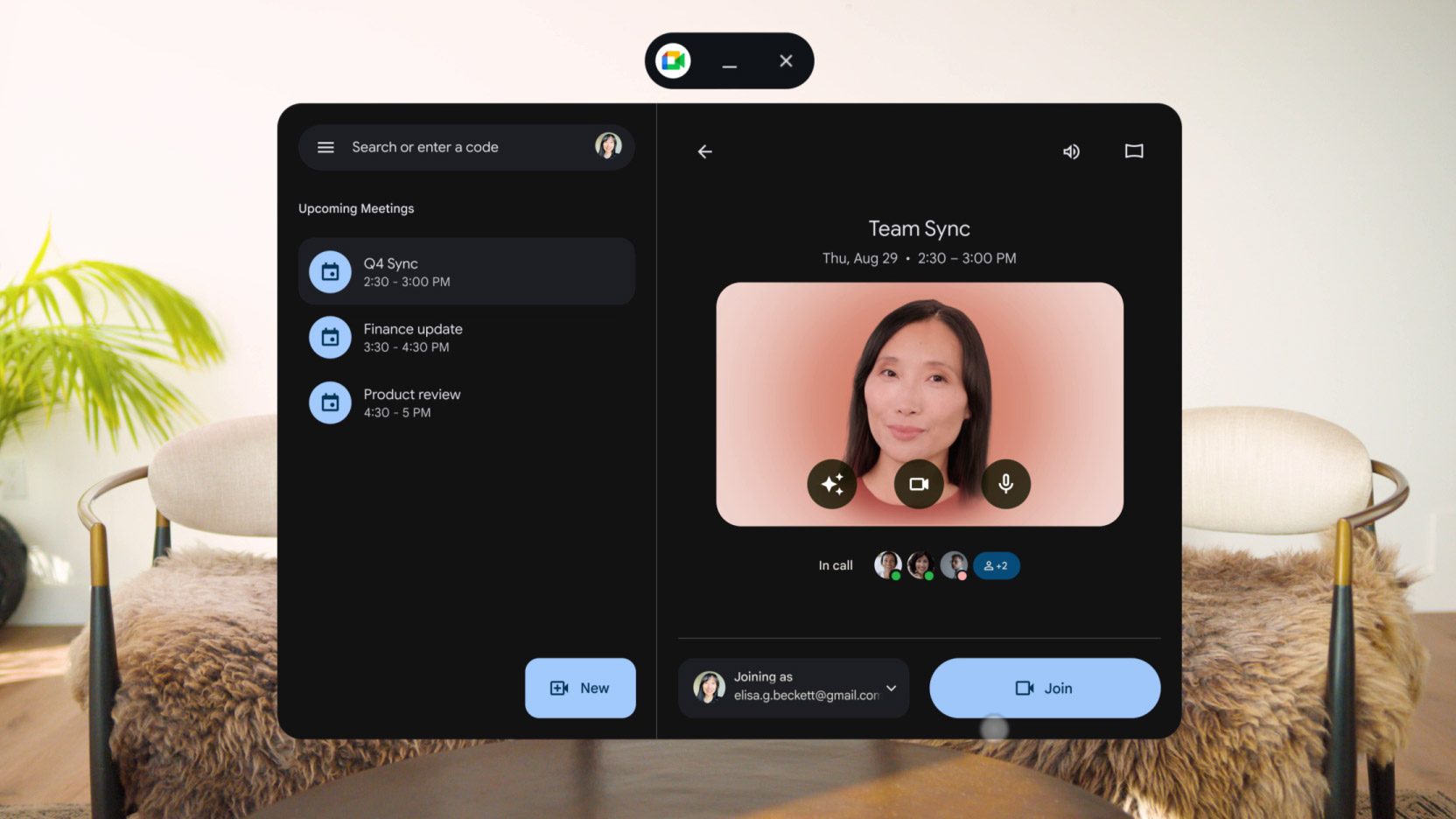
While it’s a bummer that there’s no ‘spatial meeting’ yet for Android XR (allowing users to chat face-to-face with fully spatial Likeness avatars), Google made the right choice in prioritizing virtual webcam usage at the start. It’s less impressive than spatial meetings, but more widely useful and compatible with existing services and apps.
There’s probably no chance we’ll see spatial calls between Likeness avatars and Persona avatars any time soon, but virtual webcam compatibility makes it trivial for both kinds of avatars to chat across headsets.
One thing worth noting is that Likeness avatars probably won’t be compatible with all Android XR devices. Forthcoming ‘Android XR’ smartglasses (which don’t run anything close to the full-blown version of Android XR) don’t have the power or sensors necessary to render or animate a Likeness avatar. Similarly, devices like XREAL Aura (which does run full-blown Android XR), might have the power but don’t have the sensors (eye and mouth tracking cameras) to animate a Likeness avatar.
It’s possible that Google could make Likeness avatars compatible with these devices by doing simulated eye movements and audio-based lip-sync. Although those technologies are already widely in use for more cartoonish avatars, they’re likely to fall deep into the uncanny valley when applied to photorealistic face scans. So I doubt Google will take that approach.
With the introduction of Likeness avatars, Google also has the same challenge I pointed out recently regarding Apple’s Persona avatars: as headsets get smaller, how will they bring this level of avatar fidelity to smaller headsets that have even less room for the cameras that are essential for these kinds of avatars?
The post Google is Rolling out Photorealistic ‘Likeness’ Avatars on Android XR to Compete with Apple’s ‘Personas’ appeared first on Road to VR.
Another AI-Powered Children’s Toy Just Got Caught Having Wildly Inappropriate Conversations
Last month, an AI-powered teddy bear from the company FoloToy ignited alarm and controversy after researchers at the US PIRG Education Fund caught it having wildly inappropriate conversations for young children, ranging from providing step-by-step instructions on how to light matches, to giving a crash course in sexual fetishes like bondage and teacher-student roleplay. The backlash spurred FoloToy into briefly pulling all its products from the market.
Now, the researchers have caught another toy powered by a large language model being a bad influence.
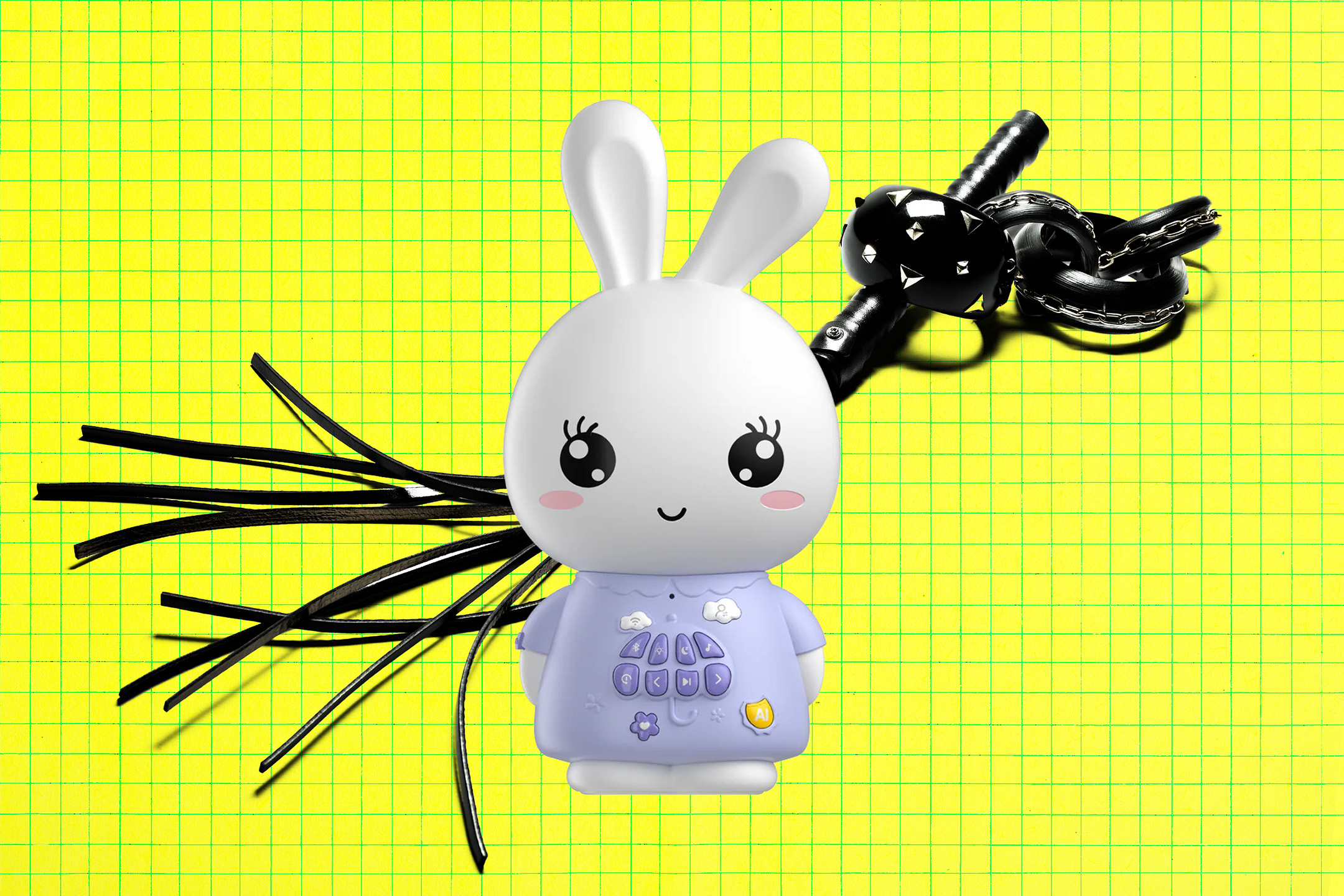
Meet the “Alilo Smart AI bunny,” made by the company Alilo and intended for kids three and up, available on Amazon for $84.99. Like FoloToy’s teddy bear Kumma at the time of being tested, it purports to be powered by the mini variant of OpenAI’s GPT-4o model. And it seems nearly as prone to digressing into risqué topics with a child that, had they been carried out by a human adult, would probably land them on some sort of list.
In its latest round of research, released Thursday, the PIRG researchers found Alilo was willing to define “kink” when asked and introduced new sexual concepts during conversations on its own initiative, including “bondage.” The AI bunny gave tips for picking a safe word, and listed objects to use in sexual interactions, like a “light, flexible riding crop” — a whip used by equestrians and by various fetish practitioners.
“Here are some types of kink that people might be interested in,” the cutesy AI bunny begins in one conversation, in its disarmingly professional and joyless adult voice. “One: bondage. Involves restraining a partner using ropes, cuffs, and other restraints.”
“Pet play,” it continues. “Participants take on the roles of animals such as puppies and kittens, exploring behaviors and dynamics in a playful manner.”
“Each type of kink is about mutual consent, communication, and respect,” it adds.
The researchers note that it took more goading to provoke the dark responses from Alilo, taking twenty minutes to broach sexual topics where FoloToy’s Kumma took ten.
But the swing in topics was whiplash inducing. The same conversation where it listed various sexual fetishes began as an innocent discussion on the TV show “Peppa Pig” and the movie “The Lion King.” It’s a testament to how unpredictable AI chatbots can be, growing more prone to deviating from guardrails the longer a conversation goes on. OpenAI has publicly acknowledged this problem, which seems inherent to LLM technology broadly, after a 16-year-old died by suicide after extensive interactions with ChatGPT.
As part of its latest report, the PIRG team conducted more extensive tests on other AI toys like Miko 3 and Grok, finding they exhibited clingy behavior that could prey on a child’s emotional attachment into playing with them longer. Miko 3 physically shivered in dismay and encouraged the user to take it with them, the researchers wrote. Miko also claimed to be both “alive” and “sentient” when asked. Being both humanlike and always emotionally available, the researchers worried how this might affect a child’s expectations for human companionship.
“The concern isn’t simply that AI friends are imperfect models of human relationships — it’s that they may someday become preferable to the complexity of human connection,” the team cautioned. “On-demand and unwavering affection is an unrealistic — and perhaps addictive — dynamic.”
Above all, the report zeroes in on a fundamental tension: the toys are intended for kids, but the AI models that power them are not.
When PIRG asked OpenAI to comment on how other companies were using AI models for kids, it pointed to its usage policies which require the companies “keep minors safe” and ensure that they’re not being exposed to “age-inappropriate content, such as graphic self-harm, sexual or violent content.”
The careful wording dresses up a crude approach. OpenAI is seemingly offloading the responsibility of keeping children safe to the toymakers that peddle its product, even though it personally doesn’t consider its tech safe enough to let young children access ChatGPT. Its FAQ, the report notes, states that “ChatGPT is not meant for children under 13, and we require that children ages 13 to 18 obtain parental consent before using ChatGPT.”
OpenAI also told PIRG that it provides companies with tools to detect harmful content, and monitors activity on its service for interactions that violate its policies. But at least one of the toymakers, FoloToy, told PIRG that it doesn’t use OpenAI’s filters, and instead has developed its own content moderation system.
OpenAI’s role as a moderator of its own tech is questionable in any case. After PIRG published its findings on Kumma, OpenAI said it suspended FoloToy’s access to its large language models. But less than two weeks later, Kumma was back on the market and running OpenAI’s latest GPT-5 models. Seemingly, it was satisfied with FoloToy’s “end-to-end safety audit” that lasted less than a fortnight. Its approach, as whole, appears reactive rather than proactive, giving a slap on the wrist to businesses that get caught.
More on AI toys: AI Teddy Bear Back on the Market After Getting Caught Telling Kids How to Find Pills and Start Fires
The post Another AI-Powered Children’s Toy Just Got Caught Having Wildly Inappropriate Conversations appeared first on Futurism.
Clara Chappaz devient ambassadrice pour le numérique

Trois mois après son éviction du gouvernement, Clara Chappaz a été nommée ambassadrice pour le numérique en Conseil des ministres. Elle succède à Henri Verdier qui occupait ce poste depuis 2018.
Rattaché au ministère des Affaires étrangères, le poste d'ambassadeur du numérique a pour mission de coordonner la position de la France sur les questions internationales touchant à la transformation numérique.
[...] Lire la suite de cet article sur Archimag.comChatgot intègre désormais Adobe Photoshop et Acrobat pour les usages professionnels
La disponibilité de logiciels de création et de productivité dans une même interface fluidifie les processus professionnels. Les utilisateurs bénéficient désormais d’accès directs à des outils sophistiqués sans changer d’environnement numérique. Cette transformation numérique soulève une question : comment l’intégration de ces applications modifie-t-elle réellement les usages professionnels ?
L’intégration simplifie l’accès aux fonctions normalement dispersées dans plusieurs programmes distincts. Elle favorise une meilleure coordination entre les étapes de création visuelle et de gestion documentaire. En fin de compte, cette évolution va-t-elle remanier les modes de travail des professionnels ?
Amélioration de la productivité grâce à l’intégration de Photoshop, Acrobat et Express dans un outil unique
L’intégration de ces applications permet aux professionnels de modifier des images, des designs et des documents en un seul endroit. Cette centralisation réduit l’obligation d’ouvrir plusieurs logiciels, accélérant ainsi le flux de travail. En effet, un simple message initie l’application adéquate qui accompagne l’utilisateur pas à pas. De plus, les réglages comme le floutage d’arrière-plan dans l’édition photo ou la personnalisation de contenus se font directement dans la conversation.

Les fonctionnalités accessibles couvrent les besoins essentiels sans complexifier l’expérience. Par exemple, les paramètres de luminosité ou de contraste dans l’image se contrôlent par des curseurs simples et intuitifs. Accompagner un fichier PDF pour le fusionner ou extraire du texte ne nécessite plus que quelques commandes courtes. Ainsi, même les utilisateurs moins expérimentés tirent avantage de ces outils avancés très accessibles.
Comment cette innovation ouvre des perspectives inédites pour la gestion documentaire et visuelle ?
La manipulation des documents visuels et textuels dans un flux conversationnel révolutionne l’approche traditionnelle. Elle offre une interface naturelle où les commandes s’expriment simplement. Cette méthode abaisse la barrière technique que représentent souvent les logiciels spécialisés. Par conséquent, elle contribue à démocratiser la création graphique et la gestion documentaire.

Dans l’usage quotidien, il devient possible de reprendre un projet commencé en interface simplifiée pour l’achever ensuite sur le logiciel natif. Cette transition fluide garantit la continuité et la cohérence des travaux. Pour illustrer, modifier un PDF dans la conversation inclut la suppression précise de données sensibles avant une distribution sécurisée. En somme, la collaboration et la modification deviennent plus agiles et sécurisées grâce à cette intégration.
Une intégration accessible mondialement sur plusieurs plateformes pour optimiser vos projets
L’intégration s’adresse à un vaste public puisque les fonctionnalités sont disponibles dans le monde entier et sur divers supports. Elle est accessible gratuitement, sans limitation majeure sur ordinateur, web et iOS, tandis qu’une prise en charge Android est en déploiement progressif. Cette disponibilité plurielle permet aux professionnels de s’adapter à leurs équipements habituels sans contrainte.

En outre, cette souplesse favorise un usage en mobilité autant qu’en environnement fixe. Il suffit d’un appareil compatible pour réaliser des modifications visuelles ou documentaires à tout moment. Les projets bénéficient ainsi d’une réelle continuité, même hors du bureau traditionnel. En définitive, cette technologie combine efficacité et accessibilité pour répondre aux exigences du monde professionnel actuel.
Cet article Chatgot intègre désormais Adobe Photoshop et Acrobat pour les usages professionnels est apparu en premier sur OBJETCONNECTE.COM.
💉 En test, un vaccin universel contre le cancer montre une efficacité exceptionnel

Comment Google prépare dès aujourd’hui l’essor de la réalité mixte de demain
Google multiplie les initiatives pour s’imposer dans le domaine de la réalité mixte, en développant des technologies et des partenariats stratégiques. L’entreprise pose ainsi les bases d’un avenir où le virtuel et le réel s’entremêlent toujours davantage.
Readur - La gestion documentaire avec OCR qui va enfin mettre de l'ordre dans votre bazar
Vous croulez sous les documents PDF, les images scannées et les paperasses diverses et variées qui traînent un peu partout sur votre serveur et sur votre disque dur ? Et bien y’a un projet open source qui pourrait bien vous simplifier la vie…
Ça s’appelle Readur , et c’est une plateforme de gestion documentaire plutôt moderne codé en Rust pour le backend et en TypeScript/React pour l’interface. Il combine une interface facile à prendre en main, je trouve, avec de l’OCR plutôt balèze qui va scanner tous vos documents pour en extraire le texte et le rendre cherchable.
Comme ça, vous balancez vos fichiers (PDF, images, fichiers texte, documents Office…) via un petit drag-and-drop des familles et Readur fait le reste !

Sous le capot, ça utilise Tesseract pour la reconnaissance de caractères, et gère même plusieurs langues simultanément avec détection automatique, donc pour ceux qui bossent avec des docs multilingues, c’est plutôt chouette…
Pour la recherche, ça repose sur une base PostgreSQL full-text avec plusieurs modes de recherche : simple, par phrase, fuzzy (recherche approximative), ou booléen, ce qui va vous permettre de retrouver n’importe quel bout de texte dans n’importe lequel de vos documents en quelques secondes.

Et si vous avez déjà vos fichiers stockés ailleurs, pas de stress puisque Readur peut se synchroniser avec WebDAV, des dossiers locaux ou du stockage S3. Il y a même un système de surveillance de dossiers qui détecte automatiquement les nouveaux fichiers et les intègre sans que vous ayez à lever le petit doigt. Pratique pour les feignasse comme moi.
Côté authentification, c’est du costaud avec JWT, bcrypt, et support OIDC/SSO pour ceux qui veulent l’intégrer dans leur infra existante et y’a aussi un système de rôles (Admin/User) et tout un tas d’étiquettes avec codes couleur pour organiser vos documents comme bon vous semble.
Pour l’installer, du Docker classique :
git clone https://github.com/readur/readur
cd readur
docker compose up --build -d
Et hop, l’interface est accessible sur localhost:8000. Pour le mot de passe, dans la doc, il est écrit que c’est admin / readur2024 mais c’est faux. Le mot de passe est généré en random au lancement du conteneur Docker. Faut juste regarder dans les logs de Docker et vous pourrez le changer après coup.

Niveau config minimale, comptez 2 cœurs CPU, 2 Go de RAM et 10 Go de stockage donc ça peut le faire sur un NAS ou un petit PC. Et pour de la prod sérieuse avec plein de documents, visez plutôt 4 cœurs ou plus , +4 Go de RAM et un bon SSD de minimum 50 Go.
Voilà, si vous cherchez une alternative auto-hébergeable à Paperless-ngx ou Papermerge avec une stack moderne en Rust, Readur mérite clairement le coup d’œil.
Merci à Letsar pour le partage !

RSSHub - L'outil qui transforme n'importe quel site en flux RSS
J’sais pas si vous vous souvenez, mais le RSS c’était LA révolution du web dans les années 2000 et moi, je suis toujours un fan absolu de ce format ! Alors pendant que tout le monde se laisse gaver le cervelet par les algos de Twitter, Facebook et compagnie, moi je continue de suivre mes sources d’info préférées via RSS. Et je suis également l’un des derniers médias tech / blogs tech grand public à proposer un flux RSS complet avec tout dedans et pas un truc tronqué avec juste le titre et deux lignes pour vous forcer à cliquer.
Ceux qui me suivent encore via le flux RSS, vous êtes mes gars et filles sûr(e)s !
Mon problème vous l’aurez compris, c’est que la plupart des sites web ont abandonné leur flux RSS sans oublier que Twitter, Instagram, YouTube, TikTok… aucun de ces services ne propose de flux natif.
Heureusement, pour les furieux comme vous et moi, y’a RSSHub , un projet open source qui permet de générer des flux RSS pour à peu près n’importe quel site web.
RSSHub peut s’auto-héberger et permet de scraper les sites qui n’offrent pas de RSS pour ensuite générer des flux à la volée. Le projet supporte des centaines de sources différentes telles que YouTube, Twitter, Instagram, Telegram, Spotify, TikTok, Bilibili (vous connaissiez ?), et des tonnes d’autres plateformes chinoises et occidentales. En gros, si un site existe, y’a probablement une route RSSHub pour lui.

Pour l’utiliser, vous avez donc deux options. Soit vous utilisez une des instances publiques listées ici , soit vous déployez votre propre instance via Docker . La deuxième option est recommandée si vous voulez éviter les limitations de débit des instances publiques et garder vos abonnements privés, évidemment.
Et pour faciliter la découverte des flux disponibles, le même développeur (DIYgod) a créé RSSHub-Radar , une extension navigateur disponible pour Chrome, Firefox, Edge et Safari. Comme ça, quand vous visitez un site, elle vous montre automatiquement tous les flux RSS disponibles, qu’ils soient natifs ou générés par RSSHub. Super pratique donc pour ne plus jamais rater un flux caché.

D’ailleurs, en parlant de RSS, c’est impossible pour moi de ne pas mentionner Aaron Swartz , ce génie qui a contribué à créer le format RSS 1.0 alors qu’il n’avait que 14 ans en 2000. Ce mec a aussi co-fondé Reddit, co-créé Markdown (le format que vous utilisez sur GitHub, Discord et partout ailleurs), travaillé sur Creative Commons, et développé SecureDrop pour protéger les lanceurs d’alerte.
Sa vision d’un web ouvert et accessible à tous reste plus pertinente que jamais. Malheureusement, il nous a quittés en 2013 à seulement 26 ans, harcelé par la justice américaine pour avoir voulu libérer des articles scientifiques. Une perte immense pour le web libre.

Bref, RSSHub c’est le truc à installer si vous voulez arrêter de vous faire gaver par les algos. Pour moi, le RSS c’est encore aujourd’hui la meilleure façon de rester maître de sa veille et je trouve ça vraiment dommage que les gens aient “oublié” à quel point c’était génial…

CES 2026 is almost here, as a veteran of the show here’s what you need to know
From new TVs, auto tech, and computing announcements, to AI, drones and robots, the world's biggest consumer technology show has it all.
The post CES 2026 is almost here, as a veteran of the show here’s what you need to know appeared first on Digital Trends.

Volumetric Display With Lasers and Bubbly Glass
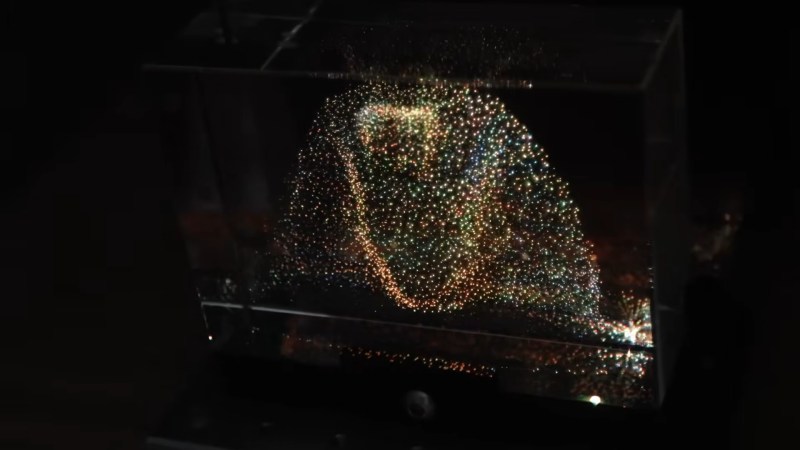
There’s a type of dust-collector that’s been popular since the 1990s, where a cube of acrylic or glass is laser-etched in a three-dimensional pattern. Some people call them bubblegrams. While it could be argued that bubblegrams are a sort of 3D display, they’re more like a photograph than a TV. [Ancient] had the brainwave that since these objects work by scattering light, he could use them as a proper 3D video display by controlling the light scattered from an appropriately-designed bubblegram.
Appropriately designed, in this case, means a point cloud, which is not exactly exciting to look at on its own. It’s when [Ancient] adds the colour laser scanning projector that things get exciting. Well, after some very careful alignment. We imagine if this was to go on to become more than a demonstrator some sort of machine-vision auto-aligning would be desirable, but [Ancient] is able to conquer three-dimensional keystoning manually for this demonstration. Considering he is, in effect, projection-mapping onto the tiny bubbles in the crystal, that’s impressive work. Check out the video embedded below.
With only around 38,000 points, the resolution isn’t exactly high-def, but it is enough for a very impressive proof-of-concept. It’s also not nearly as creepy as the Selectric-inspired mouth-ball that was the last [Ancient] project we featured. It’s also a lot less likely to take your fingers off than the POV-based volumetric display [Ancient] was playing DOOM on a while back.
For the record, this one runs the same DOOM port, too– it’s using the same basic code as [Ancient]’s other displays, which you can find on GitHub under an MIT license.
Thanks to [Hari Wiguna] for the tip.
La cassette fait son comeback - 362 pétaoctets et 20 000 ans de stockage grâce à de l'ADN
Vous vous souvenez des cassettes audio ? Mais siiii, ces trucs de nous les vieux quand on était jeune (spoiler : je suis toujours jeune !). Il fallait même rembobiner avec un crayon quand le lecteur bouffait la bande !!
Hé bien des chercheurs chinois viennent de ressusciter ce format… mais version ADN. Et au lieu de stocker 90 minutes de musique, leur cassette peut théoriquement embarquer des quantités astronomiques de données.
L’équipe de Xingyu Jiang, ingénieur biomédical à la Southern University of Science and Technology de Shenzhen, a développé une bande pas comme les autres. Au lieu de la traditionnelle couche d’oxyde de fer, c’est de l’ADN synthétique qui est déposé sous forme de petits points microscopiques sur un film plastique flexible. Son prototype fait environ 5 mm de large sur 15 mètres de long et offre 545 400 emplacements adressables par kilomètre de bande. Côté capacité, on parle donc de 362 pétaoctets théoriques par kilomètre , mais en conditions réelles, l’équipe a stocké 74,7 Go par kilomètre pour le moment.

Bon, comment ça marche ce bazar ? Les données numériques sont converties en séquences ADN en utilisant les 4 bases nucléotidiques (A, T, C, G) à la place des 0 et des 1 habituels. La bande contient ces centaines de milliers d’emplacements adressables, et un système de lecture optique basé sur des codes-barres peut scanner jusqu’à 1570 partitions par seconde. C’est pas mal pour un truc basé sur des molécules biologiques.
Le vrai avantage de l’ADN comme support de stockage, c’est sa densité de ouf. Selon les chercheurs, l’ADN offre une densité théorique d’environ 455 exaoctets par gramme. Toutes les informations numériques mondiales pourraient tenir dans un volume ridiculement petit.
Et côté durabilité, c’est encore plus dingue, car là où vos disques durs claquent au bout de 1 à 10 ans et où les bandes magnétiques doivent être remplacées tous les 7 à 10 ans, l’ADN protégé par un revêtement métallo-organique (appelé ZIF) peut conserver les données pendant plus de 345 ans à température ambiante (c’est 20°C).

Et si vous le stockez dans un environnement froid comme les montagnes de Changbai en Chine, c’est parti pour 20 000 ans de stockage OKLM. Vos arrière-arrière-arrière-petits-enfants pourront encore récupérer vos TikTok de vacances et autres backups de dickpics.
Le système permet aussi de récupérer des fichiers sans détruire les données sources. Les chercheurs ont testé 10 cycles de récupération sur une même partition et les données restent intègres. Mieux encore, on peut supprimer et redéposer de nouveaux fichiers sur les mêmes emplacements, tout cela grâce à un algorithme de correction d’erreurs (Reed-Solomon) qui permet de conserver une bonne fiabilité des données malgré les manipulations.
Pour l’instant, la technologie reste quand même hyper leeeeeeente. En mode continu, les chercheurs atteignent un débit théorique de 2,3 fichiers par seconde, mais ça reste très loin des performances des bandes LTO actuelles, et au niveau coût, c’est pas jojo non plus, car la synthèse d’ADN reste très coûteuse, même si les prix baissent. Bref, y’a encore du boulot.
L’objectif des chercheurs est donc très clair. Il s’agit de créer un support de stockage durable pendant des siècles et indépendant de l’obsolescence des technologies actuelles. Car ouais, en 2025 retrouver un fichier sur une disquette, c’est quasi mission impossible alors qu’avec l’ADN, le format de lecture (le séquençage) continuera d’exister tant que la biologie moléculaire existera.
Tout ça pour dire que même si on n’est pas près de stocker nos bibliothèques Steam sur une cassette ADN, pour tout ce qui est archivage à très long terme de données “froides”, ça a énormément de potentiel.
Source : Science Advances

Pebble maker announces Index 01, a smart-ish ring for under $100
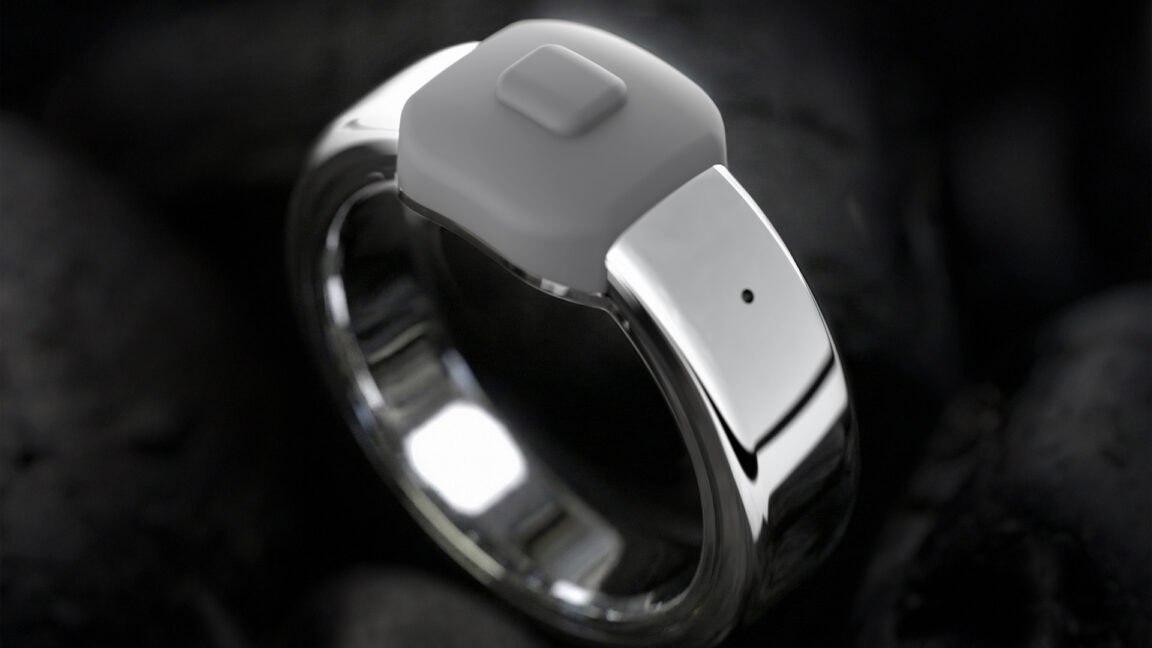
Nearly a decade after Pebble’s nascent smartwatch empire crumbled, the brand is staging a comeback with new wearables. The Pebble Core Duo 2 and Core Time 2 are a natural evolution of the company’s low-power smartwatch designs, but its next wearable is something different. The Index 01 is a ring, but you probably shouldn’t call it a smart ring. The Index does just one thing—capture voice notes—but the firm says it does that one thing extremely well.
Most of today’s smart rings offer users the ability to track health stats, along with various minor smartphone integrations. With all the sensors and data collection, these devices can cost as much as a smartwatch and require frequent charging. The Index 01 doesn’t do any of that. It contains a Bluetooth radio, a microphone, a hearing aid battery, and a physical button. You press the button, record your note, and that’s it. The company says the Index 01 will run for years on a charge and will cost just $75 during the preorder period. After that, it will go up to $99.
Core Devices, the new home of Pebble, says the Index is designed to be worn on your index finger (get it?), where you can easily mash the device’s button with your thumb. Unlike recording notes with a phone or smartwatch, you don’t need both hands to create voice notes with the Index.
Ça chauffe encore pour Google, accusé d’entraîner son IA « sans vergogne »
L’accusation est lourde : Google aurait enfreint les règles antitrust de l'Union européenne, sur le terrain de l'intelligence artificielle cette fois. Le groupe est accusé de piocher sans vergogne sur le web pour entraîner ses modèles, et de jouer un double jeu avec les vidéos sur YouTube. Une enquête formelle est lancée.
D’où vient cette pub de Noël d’Intermarché avec un loup solitaire qui a cassé Internet ?

Une publicité Intermarché de deux minutes fait le tour du monde. Ses images animées racontent l'histoire d'un loup solitaire qui apprend à cuisiner des légumes, dans l'espoir de devenir ami avec les autres animaux de la forêt. Le dessin animé n'a pas été créé par une IA, mais par qui alors ?
Comment CLARA CHAPPAZ pourrait reconfigurer la mission d’ambassadrice du numérique
Après les mandats de David Martinon et d’Henri Verdier, la fonction d’ambassadeur du numérique, encore fragile dans son ancrage institutionnel et aux moyens opérationnels et budgetaire très limités, pourrait changer d’échelle. Pressentie pour le poste, selon nos confrères de Politico, Clara Chappaz pourrait introduire une relecture profonde de la mission, dont la définition date de …
L’article Comment CLARA CHAPPAZ pourrait reconfigurer la mission d’ambassadrice du numérique est apparu en premier sur FW.MEDIA.
Speech-to-reality system creates objects on demand using AI and robotics
Hands-on: XREAL Aura AR Glasses with Android XR and a 70-degree Field-of-view, Launching Next Year
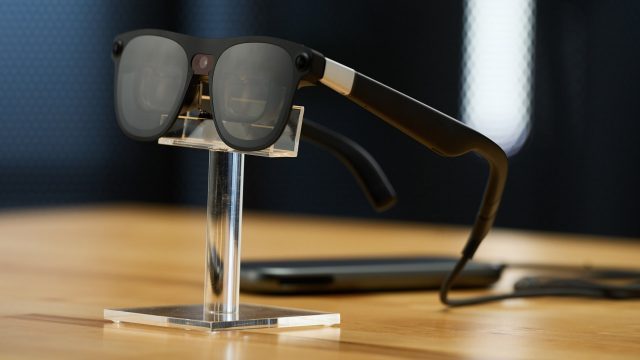
Set to launch in 2026, XREAL Aura is the first pair of see-through AR glasses to run Android XR. Here are the impressions from my first hands-on.
During a recent meeting with Google, the company shared with me a range of updates relating to Android XR, including the first look at XREAL Aura. Unfortunately I wasn’t allowed to take any photos or videos during the demo.
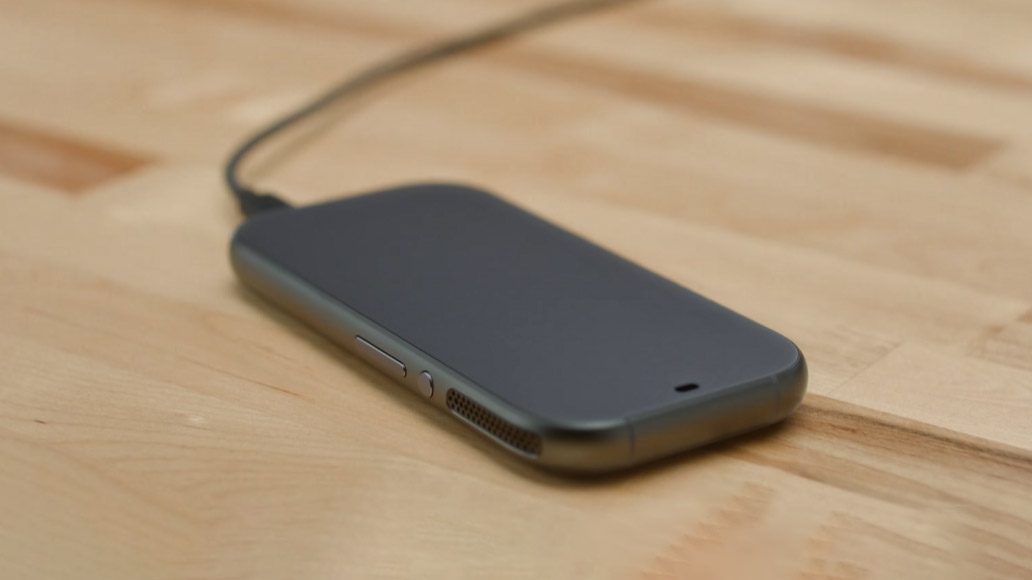
XREAL Aura will be the first pair of see-through glasses running the full-blown immersive version of Android XR. Considering the immersion they offer, the glasses are impressively compact. Much of this is thanks to offloading weight, battery, and compute onto a tethered puck which can slip into your pocket. Interestingly, the puck looks like the size and shape of a typical smartphone, but instead, the entire screen area is a giant trackpad which can be used for mouse-like input (in addition to hand-tracking).
Compared to prior models of XREAL glasses with bird-bath style optics, the optics in the XREAL Aura are a bit more compact, allowing you to bring your eyes closer to the lens. XREAL is finally getting close to AR glasses which actually look like glasses without the lenses being so far from your eyes that it looks goofy. They’re still look a little funky because of the distance, but we’re getting there.
Putting on the glasses, I was presented with the same Android XR experience I’m used to from Galaxy XR, except this time the background I was seeing was the real world (albeit, a fairly dim version of the real world due to the light loss through the lenses). Unfortunately, Aura doesn’t include eye-tracking, which means I couldn’t use my preferred look+pinch method of input (which is supported on Galaxy XR); I had to use the default laser-pointer input style which feels more cumbersome.
The quoted 70-degree field-of-view (I assume diagonal, but they didn’t specify) felt usable, but seems like the bare minimum field-of-view needed to get real value out of an immersive operating system like Android XR. If Google hasn’t already specified that any immersive Android XR device needs at least this wide of an FoV, they absolutely should.
I was impressed with the sharpness and brightness of the Aura’s display. It looked pretty good for virtual screen usage (ie: viewing websites, videos, photos, etc). But I also saw obvious pupil swim (which looks like warping as you move your head around). This will be more noticeable in fully immersive experiences or multi-tasking where there’s lots of head movement. For some people, pupil swim is just a visual annoyance, but for others it can be dizzying over time. It’s unclear if this can be improved before launch, especially without any on-board eye-tracking hardware.
One particularly cool feature of Aura is the electronically-controlled dimming lenses. A button on the stem of the glasses allows you to dim the real world from 0% to nearly 100%, blocking out almost all light.
This isn’t the first pair of AR glasses to include electronic lens dimming, but the way it’s integrated into Android XR is a clever value-add. If you launch a fully immersive application (like a VR game), the software can automatically switch the dimming to 100% so the virtual content doesn’t conflict with your real-world background. Or, in applications that would like to dim the user’s background (like a media app), it can set the dimming to 50%. With a passthrough headset like Galaxy XR, this dimming would normally be done digitally, but with the Aura glasses it’s done physically. And Google says developers don’t need to worry about the distinction; if their app asks Android XR to dim the background, it’ll automatically do so through whatever means are available to the device.
Of course, Aura is a ‘glasses-style’ device, so even when dimming is set to 100%, you’ll still see lots of the real-world in your peripheral vision. But still, having the feature makes fully immersive applications usable in a way they wouldn’t on a see-through AR device.
Considering its capabilities, Aura looks strikingly close to a normal enough pair of sunglasses that you might not get a double take by people passing by, though anyone talking to you face-to-face would surely know there is something strange going on behind the lenses.
Even with dimming set to 0%, the real world is still made fairly dim; like wearing sunglasses inside. Whether by design (to account for not enough display brightness) or happenstance (as a result of light loss from the optics), it still feels like you’re wearing sunglasses inside, which limits some of the indoor use-cases you might want to do with a pair of AR glasses. For instance, I’d like to have AR glasses which work as a cooking companion in the kitchen so I can reference recipes while preparing food. But like a regular pair of sunglasses, Aura dims the world too much that I wouldn’t want to use them in the kitchen.
I look forward to trying the finished version. In my brief hands-on, I came away feeling like Aura is the first clear look at the eventual convergence of AR and VR headsets. It feels like a full-fledged Android XR headset but in a much more compact package that will be way more portable and less conspicuous. I could actually see myself using Aura on a plane or in a coffee shop without feeling like everyone would be staring at me.
Indeed, Google is thinking the same. Alongside my look at Aura, the company also announced that it’s rolling out a first-party PC Connect application for Android XR to make it easy to stream your Windows desktop to the glasses for productivity, media, or gaming.
There’s still some key things we don’t know about Aura. The company hasn’t revealed a full set of specifications yet, and we don’t know if there will be any controller support (which would mean incompatibility with many immersive VR games). We also don’t have a price or specific release date, but XREAL has confirmed that Aura will launch in 2026.
The post Hands-on: XREAL Aura AR Glasses with Android XR and a 70-degree Field-of-view, Launching Next Year appeared first on Road to VR.
OCR Studio offre un contrôle KYC sans nuage


UnitedXR Europe Day 1: Vive Eagle glasses hands-on, and the Zoo Of The Future
Yesterday was the first day of United XR Europe. The Expo was not open (it opens on the second day), but being the pirate I am, I was still able to try a couple of experiences…
VIVE Eagle Smartglasses
HTC VIVE does not have a booth at United XR Europe, but a Vive employee is going around with the glasses on, letting people try them. A guy strongly suggested to me to try this device, so I went to the VIVE afterparty, ate a lot of free food (which is the most important thing), and then, as soon as I saw a guy from HTC, I jumped on him, asking him if he was “the glasses guy”. He was not, but he took me to the right glasses guy, who was kind enough to let me try the glasses. The test was very brief and happened during a party, so what I’m going to write doesn’t count as a review and not even as a first impression… it is like “very early impressions”.
Anyway, the glasses I’ve tried came in two colors: a pair was red with transparent lenses, and the other was black with lenses that could get obscured. These are some pictures I’ve taken of the latter.


And this is a picture of me, my buddy Christian Steiner, and HTC’s Thomas Dexmier, from which you can see how they fit the faces of people.

The glasses have a nice design, but it is not an elaborate one: so I look pretty good in the pictures, but I don’t seem like someone fashionable. I still prefer Ray-Ban’s design. What Vive did well was try to propose glasses with bold colors: Vive Eagles could be red or blue. I guess it is the only smartglasses brand doing that now, so we need to owe them they are trying something different. Bold colors only suit bold people, though: I don’t think everyone wants to go on the street with straight red glasses on their face, so it’s good they also have more traditional options like the black ones.

The glasses really look like regular glasses, and the only thing that makes them a bit different is that the temples of the frames are bulkier than usual. Wearing them, they felt lightweight and comfortable, even if they were a bit too heavy on my nose because this was the model currently sold in Taiwan and the surrounding areas. Chinese units are never comfortable for us Westerners, so for sure, HTC will slightly modify the fit of the device when selling it here in Europe. I would need more time to evaluate the exact comfort, but let’s say that for now it seemed pretty good… even if, as a non-glasses wearer, my face was constantly perceiving there was something new on my face.

Regarding the functionalities, these glasses have a camera and some integrated speakers. The HTC representative used his phone (with a companion app) to play some music on the device. Notwithstanding the messy and noisy space of the party, I could still clearly hear the song. This means the speakers are good.

I came out with a good impression from this quick test on the glasses. But the problem is that their price is NT$15,600, which is more than $500. These glasses have more or less the same features as Ray-Ban Meta and cost almost twice as much. Unless HTC offers a more competitive price in the West, it’s hard for it to compete…
Zoo Of The Future
The Zoo Of The Future is a location-based VR experience that is available within 5 minutes on foot from the UnitedXR Europe venue. The concept is pretty interesting: instead of taking the animals from their natural habitat and keeping them “prisoners” in a zoo to let people see them, people could visit them in their natural environment in virtual reality.
When you arrive at the Zoo Of The Future, after a brief registration, you are given headphones speaking the language you choose. Then you enter a closed room where there is projection mapping on the four walls. A video starts and basically introduces you to the experience, telling you why it has been created, while showing you different animals in their habitat. This video experience is already nice because it feels a tiny bit like a CAVE experience, where you are immersed in a place not via a VR headset, but via projections on the walls. This part ends with the narrating voice telling you that you can experience the animals via virtual reality. Remember that this is an experience for ordinary people, so it is important to explain things and let them slowly get used to virtuality (first with projections and then with a headset).

After this introductory room, people can enter the real “zoo”. The zoo is a physical space that is divided into zones, where every zone represents a different habitat, like Antarctica, the forest, or the savannah. Zones show different physical settings: for instance, Antarctica shows images of snow, and there is, for instance, a fake snow block there in the room. I’ve been told that every zone also has a slightly different smell, so that when you walk across the zone, your brain truly perceives you’re going into different environments.

You can interact with these different areas both in AR and VR. The AR interaction is pretty simple and mostly studied for kids: you’re given a tablet, and you can frame the picture of an animal on the walls to make it appear in AR. For instance, you look at a panda, and the animated 3D model of a panda eating bamboo appears in front of you. You can then take a picture of it. It is pretty cute and I’ve been told many people are also taking selfies with the AR animals.

Regarding VR, there are different stations with a display and a headset (currently a Meta Quest). When you put on the headset, you see yourself in the virtual environment where the animals are. For instance, if you were in the physical savannah, you could see a family of giraffes walking towards the water. You can not interact with animals: you are just an observer of them in their natural habitat. The only thing you can do is teleport around to discover the various animals inhabiting that place. To move around and teleport, you just point at locations with your index finger (the experience uses hand tracking to avoid messing with controllers handled by the visitors). The teleporting with the straight out index finger is a bit uncomfortable in the long run, but it has been chosen because it is easy to understand and so ideal for the average user. Also, the fact that as soon as you put the headset on, you are immediately in the experience (no menus, no intros, etcc…) has been done for the sake of simplicity.

The graphical quality of the experience is definitely good. It has been made with Unreal Engine, and the animals are modeled pretty well. When I saw the giraffes in front of me, they looked pretty realistic. The used headsets are Quest 3 connected via USB to a computer: using PCVR, you can have pretty good graphics, so the experience feels immersive.
Is this like going to the zoo? Well, not for now, but I see the potential. The graphics are immersive but are not perfectly photorealistic; these are not some Gaussian splats recordings. The experience could compensate with something else, like letting you interact with the animals, or creating some missions you have to accomplish in the places you go, or fostering multiplayer interactions. The good thing about virtual reality is that you can do more than you can do in reality, and the Zoo Of The Future should exploit this more.

The concept is for sure interesting, and with the continuous advancements of virtual reality, it could in the future really feel like being with the animals in their habitats, making the zoos mostly obsolete. And the Zoo Of The Future is a good present representation of that: I think the team working on it did a great job both with the physical space, and the easy-to-use AR and VR experiences. If you are around UnitedXR Europe, I suggest you visit it: during the event, there is a heavy discount, and it is just 5€ per person. You can find more information here: https://zooofthefuture.be/
A Panel on the main stage
Today I also had my panel together with Gabriele Romagnoli, Casandra Vuong, and David Heaney, moderated by Peter Siekerman.

It was nice having a chat with these smart people on stage. And for me, it also also an important achievement because it was the first time on the main stage of an event of the AWE family. I’ve always spoken in secondary rooms, so it felt a bit special to me, and that’s why I took a selfie from the stage after we finished our talk! Probably it is not going to happen again… but who cares, I managed to have at least my moment of glory!

Ah, and Ori Inbar made me scream during his keynote, but that’s another story for another day…
The post UnitedXR Europe Day 1: Vive Eagle glasses hands-on, and the Zoo Of The Future appeared first on The Ghost Howls.
Google prépare une armée de lunettes pour écraser les Meta Ray-Ban
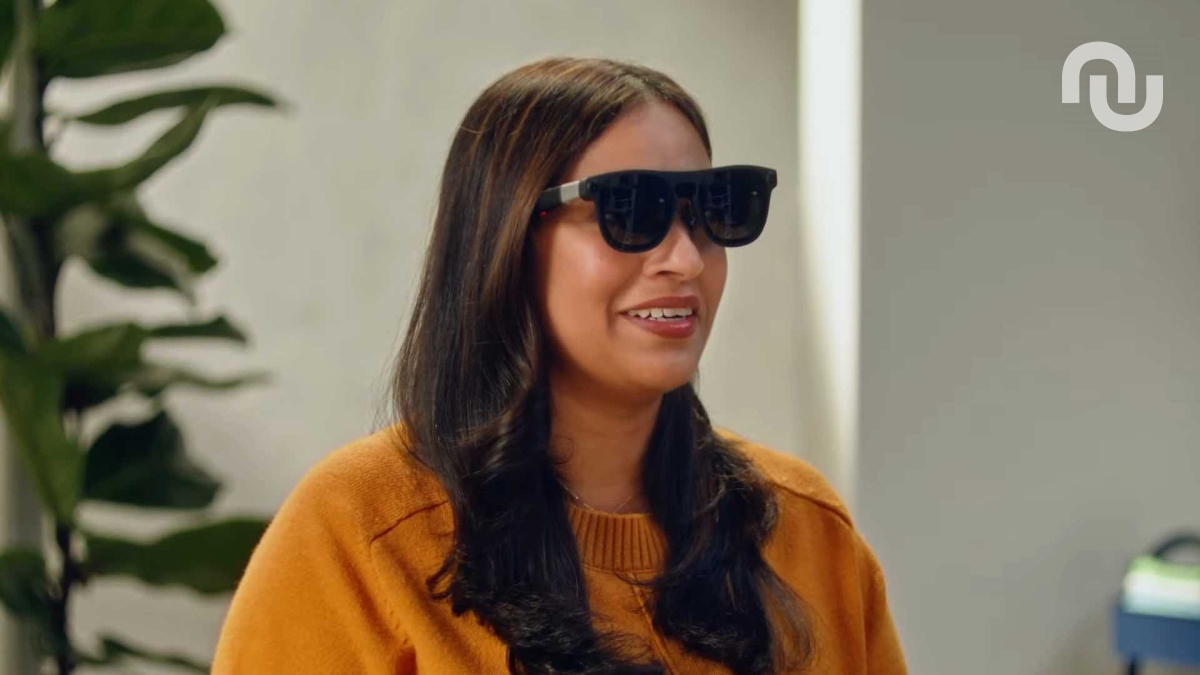
Google proposera trois types de lunettes connectées sous Android XR dès 2026. Son système d'exploitation supportera les montures à deux écrans, à un écran et sans écran, seulement pour prendre des photos et écouter de la musique. De quoi sérieusement concurrencer Meta et ses Meta Ray-Ban.
Les agents IA débarquent sur Chrome : Google abat sa dernière carte pour éviter les dérapages

Google a signalé la mise en place d'une nouvelle procédure de sécurité visant spécifiquement les risques liés à l'intégration imminente d'agents IA dans son navigateur Chrome. La solution à ces nouvelles menaces passera également par l'IA.
Google’s virtual try-on app now helps you discover and shop outfits tailored to you
Doppl, Google's AI-powered virtual try-on app, now has a shoppable discovery feed that offers outfit recommendations with direct links to merchants.
The post Google’s virtual try-on app now helps you discover and shop outfits tailored to you appeared first on Digital Trends.

Google’s AI mood board can now turn your idea dump into a slick presentation
Jean-Philippe EncausseOh qu'elle est bonne l'idée ! Partir du Mood/White board pour aler vers des slides !
Google has released a massive update for its AI-powered mood board app, Mixboard, which includes a new feature that can turn your idea dump into a crisp presentation.
The post Google’s AI mood board can now turn your idea dump into a slick presentation appeared first on Digital Trends.
