Bcstevieb
Shared posts
11 Apr 20:01
Waterstones founder to launch Spotify for books
by Bill Crider
Telegraph: Tim Waterstone is to launch a new digital books business which aims to become the literary version of Spotify, charging readers a flat rate to access as much reading matter as they like online.
11 Apr 20:01

Get 50GB of Free, Encrypted Online Storage from Tresorit
by Melanie Pinola
 Windows (Mac, Android, iOS coming soon): There are a ton of online syncing and storage services, but not all of them locally encrypt your data for higher security. Just out of limited beta, Tresorit is a new Dropbox alternative with client-side encryption. The company offers 5GB of free space, but for a limited time Lifehacker readers can grab 50GB free for life.
Tresorit's biggest selling point is the strong security. Your files and folders are encrypted before they're uploaded to the cloud. To get technical about it:
Files are encrypted with AES-256 before being uploaded to the cloud. Additional security is provided before upload by HMAC message authentication codes applied on SHA-512 hashes. Encrypted files are uploaded to the cloud using TLS-protected channels.
The company is also putting its money where its mouth is: On April 15, Tresorit is inviting the world's hackers to try to break its encryption and win $10,000. So Tresorit is pretty confident in its security claims.
The Windows software (Mac, Android, and iOS versions coming before June) is also really easy to use. You can select any folder to be synced (as a "Tresor"), share folders with other users, and also adjust permissions of shared folders by user.
On the downside, there's no web-based access for your files, people you share folders with will also need the software installed, and it takes a few seconds longer for your synced files to appear on another computer (probably because of the encryption that has to happen first). Other Dropbox alternatives with client-side encryption, SpiderOak and Wuala, have more features, but Tresorit's interface is a lot more user-friendly. And it's hard to beat 50GB of free encrypted space.
If you want to try it out, you'll need to register via the link below to get the 50 gigs free. This offer is good until May 20.
Update: Some people are reporting only getting 5GB. Tresorit has fixed the glitch, so it should work fine now, but if you were one of these people, email support@tresorit.com and they'll set you up with the 50GB. Also, you can follow @tresorit on Facebook or Twitter to be notified when Mac and mobile apps are available.
11 Apr 13:18
 Done With This Post? You Might Also Like These:


Google Map Maker Comes To The UK, Bringing More Detailed Local Maps With It
by John Thompson
 While Google's UK Maps service is far from incomplete, it's not easy to comprehensively cover a vast array of British towns and countryside without a bit of local knowledge. Hopefully, that's exactly what we'll get with the launch of Google Map Maker in the United Kingdom, including the Isle of Man, Jersey and Guernsey.
The idea behind Map Maker is that local residents can contribute to Google's existing maps, and when any additions or edits have been approved, they will become available on Google Maps and Google Earth. The difference that this can make to local areas and attractions is clearly quite significant, as you can see on the before and after shot of Bletchley Park, in Milton Keynes.
Done With This Post? You Might Also Like These: - Google Improves Maps With Its "Biggest Street View Update Ever", Updates 250,000 Miles Of Roads And Special Collections
- [New Game] EA's Theme Park Lets You Create The Happiest Virtual Place On Earth
- [New App] Official My Disney Experience Guides You Around Walt Disney World With GPS Maps And Wait Times
- Google Earth Gets Some Amazing New 3D Maps, Rubs It In Apple's Face Just A Bit
Google Map Maker Comes To The UK, Bringing More Detailed Local Maps With It was written by the awesome team at Android Police.
    
|
11 Apr 13:04
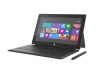
Microsoft Reportedly Working On 7″ Surface Tablet As PC Market Slumps To Four-Year Low
by Natasha Lomas
According to a report in the WSJ, Microsoft is working on a new line-up of its Windows 8-powered Surface tablets that includes a seven inch version of the slate. This small form factor size would enable Microsoft to compete with the likes of the Android-powered Google Nexus 7, Amazon Kindle Fire and Samsung Galaxy Tab 2, as well as Apple’s iOS-based iPad Mini.
The paper quotes a person familiar with the situation saying that while 7-inch tablets were not part of Microsoft’s product plans last year company executives have realised they need to respond to the growth and popularity of small slates. Which boils down to Redmond is having to play catch up yet again.
Microsoft has previously been tipped to release three new and distinct generations of Surface this year — albeit, none of those prior rumours had pointed to a seven inch device. And perhaps with good reason, as Gartner analyst Michael Gartenberg noted via Twitter today the small tablet form factor poses some usability challenges for Microsoft’s full-fat Windows OS. Rival small slates are powered by lighter weight mobile OSes, and while Microsoft has now unified its smartphone (Windows Phone) and desktop OSes on a shared kernel it’s still using ‘desktop’ Windows for tablets.
But it’s not just that computing devices are getting smaller. Shrinkage appears inextricably linked with the market in another way. Gartner put out its figures for worldwide PC shipments for Q1 late yesterday — which show shipments declining to their lowest level since Q2 2009. The analyst says alternative smart connected devices — aka those small smartphones and tablets running lighter weight smartphone OSes — are eroding the traditional PC market.
Global PC shipments totalled 79.2 million units in Q1 2013, which Gartner said was an 11.2% year-on-year decline. All global regions showed a decrease in shipments, with the EMEA region experiencing the steepest decline.
“Consumers are migrating content consumption from PCs to other connected devices, such as tablets and smartphones. Even emerging markets, where PC penetration is low, are not expected to be a strong growth area for PC vendors,” said Mikako Kitagawa, principal analyst at Gartner in a statement.
Microsoft’s Surface tablet straddles the gap between a tablet and a laptop, having a touchscreen and a keyboard cover add-on. But Gartner said touchscreen-based Windows 8 PCs took only a small percentage share of consumer PC shipments in Q1 — owing to their relatively high price.
“Touchscreen-based Ultramobiles [such as Surface Pro] offer PC manufacturers an opportunity to recover market share from media tablets, but Windows 8 PCs with touchscreens accounted for only a small percentage of consumer PC shipments in the first quarter of 2013,” noted Isabelle Durand, principal research analyst at Gartner in a statement. “The majority of consumers remain unwilling to pay the price premium for touchscreen capabilities on PCs at this stage.”
Android tablet sellers including Google and Amazon have been driving down the cost of seven inch slates — with the Nexus 7 and the Kindle Fire currently costing from as little $199 and $159 respectively — and that price erosion is likely helping to accelerate the consumer migration away from the traditional PC category. Microsoft’s Surface RT tablet was priced from $499 at launch, while Surface Pro was from $899.
How Microsoft chooses to price any ‘Surface Mini’ will be key to driving sales — and with the iPad mini starting at $329, there is not much scope for Redmond to be able to undercut the small slate competition. Yet it can’t afford for Surface to fail.
As Gartner analyst Carolina Milanesi told TechCrunch last week, discussing its smart devices forecast: “You need to own consumers in terms of mobile and tablet in order to remain relevant in this market… Consumers have options and consumers are choosing and Microsoft can not take that for granted that they’ll be the one to be chosen.”
11 Apr 13:04
Samsung Launches New Phablet Brand - Galaxy Mega - Confirms Two Devices: 6.3″ HD, 1.7GHz Dual-Core & 5.8″ QHD, 1.4GHz Dual-Core
by Natasha Lomas
Samsung has confirmed the arrival of a new sub-brand within its Galaxy range of mobile devices: the Galaxy Mega expands its mini-tablet-sized-phone (aka phablet) portfolio by firing two new devices into the category, building on the momentum generated by its extant Galaxy Note line.
Samsung said the Mega will be available globally — “beginning May from Europe and Russia”, adding that product availability will vary by market and roll outs will be gradual. There’s no official word on Mega pricing yet but since both devices pack dual-core chips (vs the Galaxy Note II’s quad-core chipset) it’s possible they will be a slightly more affordable than Samsung’s other phablets.
Here’s how Samsung describes Mega:
The newest addition to the GALAXY family balances an optimal viewing experience on a 6.3-inch HD screen, yet is ultra-thin and portable enough to put into a pocket or hold in one hand. The GALAXY Mega offers a mix of popular smartphone and tablet features such as an effortless user experience, a split screen, multitasking between video and other apps and more.
JK Shin, CEO of Samsung’s mobile business, added in a statement that Mega is about bringing more choice to buyers who want a portable device with a big screen. “We are aware of a great potential in the bigger screen for extensive viewing multimedia, web browsing, and more. We are excited to provide another choice to meet our consumers’ varying lifestyles, all while maintaining the high-quality features of the award-winning GALAXY series,” he said.
Samsung has climbed to a position of dominance in the smartphone market by offering a hugely diverse portfolio of devices, hitting price points from low end budget to high end flagship and everything in between — so little surprise that it’s beefing up its phablet line with Mega.
The company has also fuelled an industry wide trend for smartphone screen size inflation, following the introduction of the original Galaxy Note in 2011. That device had a 5.3 inch screen — which seemed massive at the time. But Samsung’s latest pair of phablets push out even more, adding a full extra inch in the case of the full HD device.
Design wise, Mega does not push the boat out — sharing the same look as fellow Galaxy devices, such as Samsung’s new flagship Galaxy S4 (which packs in a 5 inch pane).
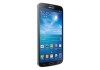
Here’s the 6.3 inch Galaxy Mega:
And here’s the 5.8 inch Galaxy Mega:
On the specs side, the 6.3 inch Mega is the clear flagship of the pair — packing in a full HD screen, 4G/LTE connectivity and a 1.7GHz dual-core chip while the 5.8 inch Mega has a QHD display, HSPA+ and a 1.4GHz dual-core chip. There’s also a 1mm difference in thickness, with the flagship being 8mm thick vs 9mm for the Mega 5.8.
Full dimensions for the two devices are 167.6 x 88 x 8.0 mm and 162.6 x 82.4 x 9.0 mm. Weight is 199g and 182g respectively. Both devices have 1.5GB RAM. Memory is 8GB/16GB options for the flagship Mega, and 8GB on board the other. Both support microSD card memory expansion up to 64GB. Battery capacity is 3,200 mAh and 2,600 mAh respectively.
Each device has an 8 megapixel rear camera and a 1.9 megapixel front-facing lens. They also both run Android 4.2 Jelly Bean, skinned with Samsung’s TouchWiz UI.
Also on board is a full contingent of Samsung software services — including the likes of Sound & Shot and Drama Shot, introduced at the launch of the Galaxy S4 — plus even more new features, including:
- ‘S Travel’: Provides trip information, local guides and resources and more
- ‘Story Album’: Allows customers to create albums of daily events, keep special moments in one place using a timeline, geo-tag information and publish digital albums in hard copy
- ‘Group Play’: Enables easy content sharing for up to 8 devices on the same Wi-Fi network.
- Samsung WatchON’: Transforms into an IR remote controller for a richer TV experience. Connect the device to your home entertainment system, and it will provide program recommendations, schedules, and even remotely control your TV.
- ‘Samsung Link’: Easily streams photos, videos, notes, or music to your television, tablet or computer.
- ‘S Translator’: Say or text what you need translated into the GALAXY Mega, and it will provide instant translation, using text or voice translation on applications including email, and ChatON.
- ‘ChatON’: Share what’s on your screen with friends to stay more connected.
Samsung was criticised for larding the S4 with too many software add ons, but it’s clearly not rowing back from this strategy of differentiating its Android devices with scores of its own software extras.
As with the Galaxy Note II, the new Mega devices support split screen viewing for applications including email, messages, ‘MyFiles,’ ‘S Memo’ and ‘S Planner’ — which, beyond their larger screen size, is one way Samsung differentiates its phablets from its flagship smartphones.
Back in January, analyst house IHS iSuppli predicted smartphones with 5 inch+ screens would more than double in number this year — rising from 25.6 million in 2012, to 60.4 million in 2013, up “a notable” 136 per cent year on year.
Last fall, Samsung said channel shipments of its Galaxy Note II had pushed past five million two months after the device launched. Samsung does not break out actual sales of the Note.
10 Apr 23:20

Black Menu Puts Google Shortcuts in Your Toolbar, Is Way Better Than Google's Menu
by Eric Ravenscraft
 Chrome:Black Menu gives you short cuts to all your favorite Google services in one place. In addition to quick access to primary services like your Gmail inbox or starred documents, it has a host of links to lesser-known corners of your Google account.
A little over a year ago, Google tried an experiment with its navigation bar, creating a rollover menu for all its services. It did not go well. This extension has a similar style, but is much more convenient as an extension.
From the menu, you can access your Dashboard and Google Settings page, or jump directly to your devices and content on the Play Store. It's not a complete control panel—Keep, for example, is notably absent—but it still shows a lot more than Google's defaults (which neglects things like Voice). If you're looking for a way to consolidate, it's hard to get much more comprehensive than this.
Black Menu | Chrome Web Store via MakeUseOf
10 Apr 23:19
Done With This Post? You Might Also Like These: 


Google Play's Favorite Things Twitter Sweepstakes: Win One Of 10 Nexus 10s, 7 Nexus 7s, 4 Nexus 4s, Or 100 $10 Gift Cards
by Jeremiah Rice
 Got a dog bite? Maybe a bee sting? Perhaps you're just feeling sad? Google's got a little mid-week pick-me-up in the form of a sizeable giveaway. To promote the new look of the Play Store and the Google Play Twitter account, they're giving away ten Nexus 10 tablets, seven Nexus 7 tablets, four Nexus 4 phones, and no less than a hundred $10 gift cards to the Google Play Store. Unfortunately for our international readers, the sweepstakes is only for US residents.
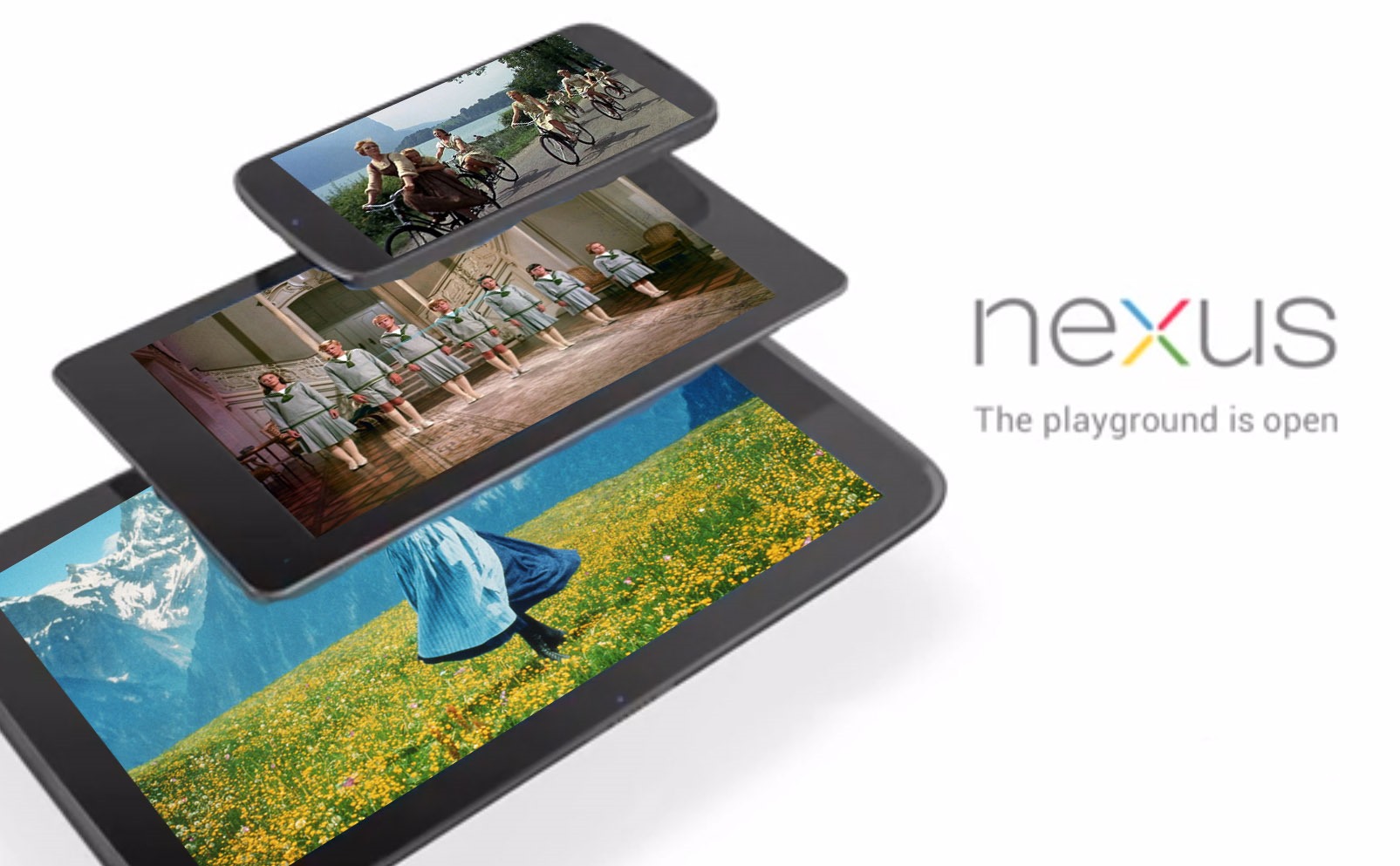
To enter, you'll need to follow the Google Play Twitter account (@GooglePlay), then tweet out one of your favorite things (copper kettles, woolen mittens, unlocked devices with AOSP software builds) with the hashtag #favoritethings.
Done With This Post? You Might Also Like These: - American Airlines Giving Away One Million AAdvantage Miles Plus 30 Nook Colors To Android App Users
- Twitter For Android Updated To Version 3.3 - New Push Notification Options, Expanded Tweet Support, And More
- AppFeed.net Automates Update And Sale Notifications Via RSS, Indulges Your App ADD
- DROID Bionic Augmented Reality Scavenger Hunt Now In Session, Prizes Include Quadricopter, HDTV, Laptop, And Motorola XOOM
Google Play's Favorite Things Twitter Sweepstakes: Win One Of 10 Nexus 10s, 7 Nexus 7s, 4 Nexus 4s, Or 100 $10 Gift Cards was written by the awesome team at Android Police.
|
|
09 Apr 20:33

Hyperlapse tool lets you turn Google Street View into a stunning visual journey
by T.C. Sottek
Have you ever taken a trip down a road or explored a path in Google Street View just to see where it will take you? A project released today from Teehan+Lax Labs has elevated Google's Street View feature to an unexpected, even beautiful level. With a simple UI and Google's map data, Google Street View Hyperlapse allows explorers to zoom fluidly along preselected or custom routes, anywhere in the world where Google has captured Street View data. The creators of the tool say that they originally aimed to make creating traditional hyperlapses easier with Street View as an aid, but "quickly discovered that it could be used as the source material." From there, they created a user interface around the hyperlapse engine, and release it for free...
Andrew Lim likes this
09 Apr 20:33

Nook launches Press, a self-publishing ebook platform
by Carl Franzen
Nook Media, the Barnes & Noble subsidiary that includes the Nook line of ereaders and tablets, has launched a new self-publishing platform for ebooks. Called "Nook Press," the new platform takes the place of PubIt, another digital publishing program Barnes & Noble launched two years ago, and uses new technology from FastPencil, a digital self-publishing company that Barnes & Noble partnered with last year.
09 Apr 16:27
A fresh new look for Google Play
by Unknown
Whether you’re in the mood to listen to Justin Timberlake’s new album, read Harlan Coben’s latest bestseller or discover a new game to play, you want the experience of finding and making your purchase to be quick and easy. Today we’ve started rolling out a redesigned Google Play store on Android phones and tablets that is simple, clean and — most importantly — helps you find great entertainment, fast.


The new design focuses on bigger images that jump off the page. Similarly themed content is grouped together so you can hone in on a magazine to read or an app to try. As you move down the page, new recommendations continue to appear so there is always more to see and explore. We’ve also simplified purchasing so you can breeze through checkout and get to enjoying your movie rental or other content.
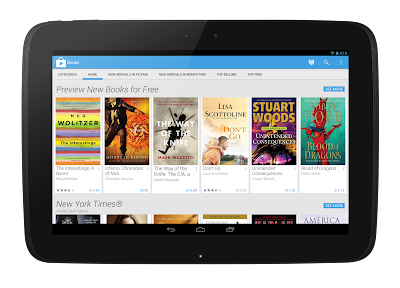
The redesigned Google Play store app starts rolling out today for Android phones and tablets running Android 2.2 (Froyo) and above. People around the world should see it over the next few weeks. Get ready for a simpler Google Play.
Posted by Michael Siliski, group product manager for Google Play
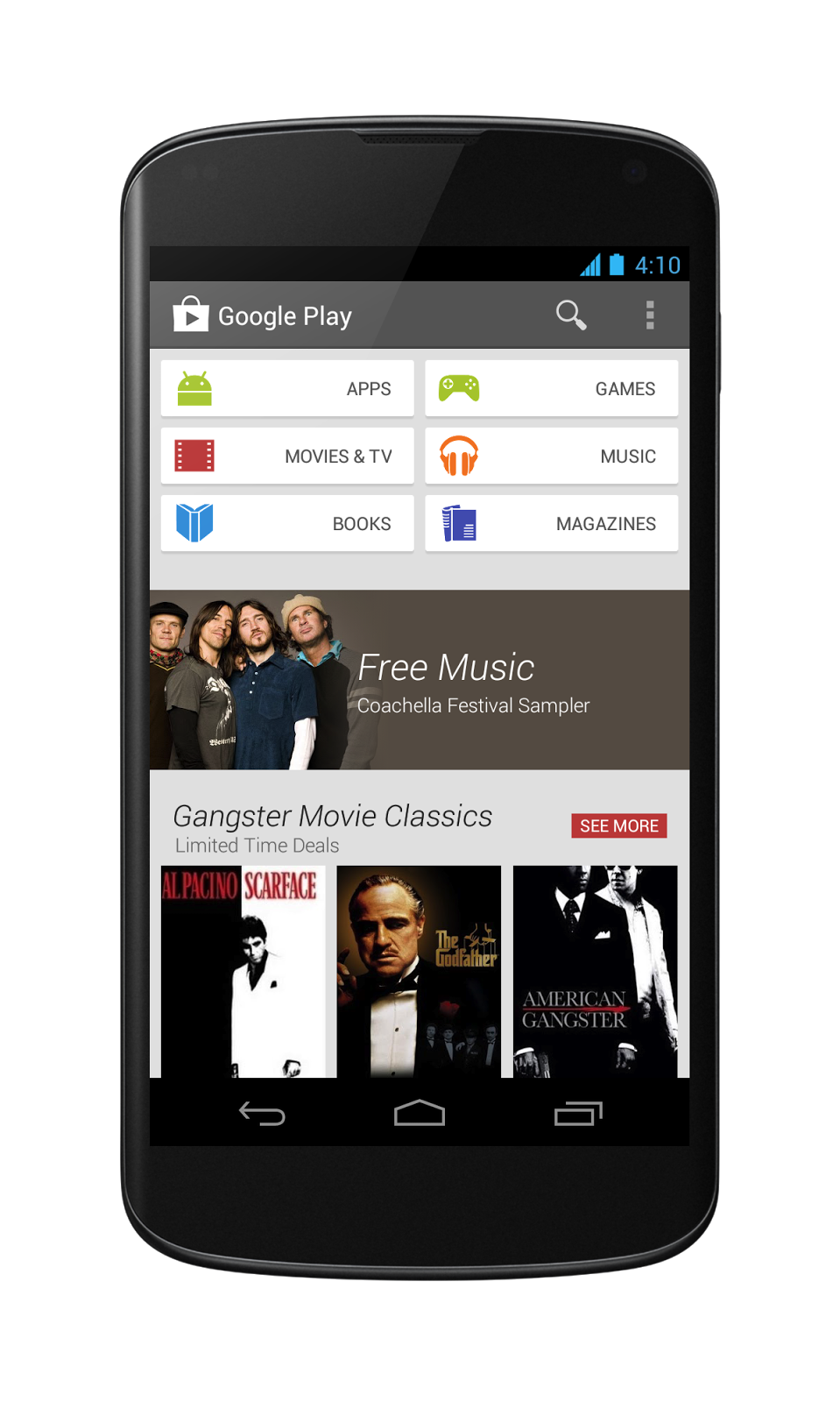

The new design focuses on bigger images that jump off the page. Similarly themed content is grouped together so you can hone in on a magazine to read or an app to try. As you move down the page, new recommendations continue to appear so there is always more to see and explore. We’ve also simplified purchasing so you can breeze through checkout and get to enjoying your movie rental or other content.

Posted by Michael Siliski, group product manager for Google Play
Aktham.ah likes this
09 Apr 11:59

Twilight for Android Changes Your Screen Brightness by Time of Day
by Alan Henry
 Twilight is an Android app that automatically adjusts your device's brightness (or really, color temperature) over the course of the day, reducing the harsh whites and blues as the day progresses. We've talked about how to avoid eyestrain at the computer, but when you're not staring at a computer screen, you're probably looking at your phone or tablet, and Twitlight can help.
Once installed, the app slowly adds a soft red filter over your display as the hours drag on. In the morning, your phone or tablet's screen will be bright white, but the app filters out the blues over time to try and reduce your exposure to the kind of bright, harsh light that keeps you awake at night and prevents you from falling into a deep sleep. The intensity of the red filter adjusts automatically, and is based on the sunset and sunrise times where you live. We tried the app out, and it works as advertised, although it takes a little getting used to at first.
Twilight is a bit like F.lux (another app we love) for Android. It was developed by the same guy behind Sleep As Android, one of your favorite sleep tracking tools. If you want to give it a shot, it's free and available now at Google Play.
Twilight (Free) | Google Play via gHacks
09 Apr 11:57

First Man Of Steel TV Spot Soars In

We’ve been hearing a lot recently from Iron Man, the other big superhero due to arrive soon on our screens. But there hasn’t been much marketing for Man Of Steel, which we suppose makes sense given that A) it’s further away from release and B) this is Team Nolan we’re talking about, who tend to wait before the barrage. A new TV spot has arrived, however, which you can watch below.
Admittedly, this really is just a cut-down version of the trailers we’ve already seen (you can remind yourself of the most recent one at the bottom of the page), but sneaks in one or two flashes of new footage.
And, if we’re honest, we’re glad not to be seeing every single beat from the film before it even has a chance to unspool in our cinemas.
With Zack Snyder behind the camera, working from a script by David Goyer, Man Of Steel features Henry Cavill as the suited and booted hero himself alongside Russell Crowe, Amy Adams, Diane Lane, Kevin Costner, Michael Shannon, Ayelet Zurer, Antje Traue, Richard Schiff and Christopher Meloni. It lands on June 14.
|
|

09 Apr 11:57


The Pirate Bay Moves to .GL Domain in Anticipation of Domain Seizure
by Ernesto
 The Pirate Bay switched to a new domain overnight, from the Swedish based .se to Greenland’s .gl extension. The move to thepiratebay.gl will be permanent.
A Pirate Bay insider told TorrentFreak that the change was made in anticipation of a domain name seizure in Sweden. The BitTorrent site suspects that the authorities are gearing up to seize their Swedish domain name to render it inaccessible worldwide.
This is not just a hypothetical threat. Last year a Swedish court ordered the seizure of the p2ptv.se domain which was offering unauthorized live streams of hockey and soccer matches. The prosecutor in this case, which is under appeal, suggested that a similar procedure could also be used to take out The Pirate Bay.
The change will bring little new for regular users of The Pirate Bay. Visitors to the site will be automatically redirected to its new home, and aside from a bookmark update everything will remain the same.
For users whose access to the infamous torrent site was previously blocked, the switch has the potential to bring good news. In addition to a new domain name The Pirate Bay is also operating from a fresh set of IP-addresses. This raises the possibility that blockades already in place may be bypassed, at least temporarily.
The domain change is perhaps most frustrating for copyright holders and DMCA takedown services. Over the past year rightsholders have removed 870,923 Pirate Bay urls from Google and to keep the content blocked all requests will have to be resubmitted for the new domain.
For TPB this is the second domain change in little more than a year. Early 2012 the site traded in their .org domain for the Swedish .se domain to stay outside the reach of US authorities. With a few dozen alternative domains in backup, this might not be the last time this trick is played.
The Whac-A-Mole continues….
Update: The static IP-addresses still appear to be the old ones, so for most blocked users The Pirate Bay will only load partially.
Update: The domain / IP change caused some proxies to stop working on connections where The Pirate Bay is blocked (sometimes redirecting to a “blocked” page).
Source: The Pirate Bay Moves to .GL Domain in Anticipation of Domain Seizure
09 Apr 11:53

EE to double 4G download speeds as UK LTE battle heats up
by Matt Brian
Having already enjoyed seven months as the UK's only LTE operator, EE has laid out the next phase of its plans to retain customers ahead of entry into the 4G market by its carrier rivals. Speaking at an event in London today, EE CEO Olaf Swantee announced that the carrier will boost the speed and capacity of its 4G network, doubling both the absolute top speed on EE's networks to over 80Mbps and average speed to over 20Mbps. Plans and prices will remain the same.
08 Apr 19:43
 Google (GOOG) and WhatsApp have reportedly been locked in negotiations about an acquisition for more than a month — and WhatsApp is pushing for nearly $1 billion valuation, Digital Trends recently reported. This sounds like a huge number, but even though WhatsApp has not released its user base estimate, it is widely assumed to be more than 300 million. This past New Year's Eve, WhatsApp processed more than 11 billion outbound messages. The company has started counting outbound and inbound messages separately due to the popularity of its group chat feature that has been one of the cornerstones of its franchise. WhatsApp has become a massively popular service on all continents, but it is particularly big in Europe and Latin America where its market penetration among smartphone users tops 80% in countries including Brazil, Spain, Portugal, the Netherlands and Germany.
Continue reading...
Google’s reported plan to buy WhatsApp for $1 billion would really tick off Facebook
by Tero Kuittinen
Google (GOOG) and WhatsApp have reportedly been locked in negotiations about an acquisition for more than a month — and WhatsApp is pushing for nearly $1 billion valuation, Digital Trends recently reported. This sounds like a huge number, but even though WhatsApp has not released its user base estimate, it is widely assumed to be more than 300 million. This past New Year's Eve, WhatsApp processed more than 11 billion outbound messages. The company has started counting outbound and inbound messages separately due to the popularity of its group chat feature that has been one of the cornerstones of its franchise. WhatsApp has become a massively popular service on all continents, but it is particularly big in Europe and Latin America where its market penetration among smartphone users tops 80% in countries including Brazil, Spain, Portugal, the Netherlands and Germany.Continue reading...
08 Apr 19:37
Done With This Post? You Might Also Like These: 


Is Sony Going To Bring Native DualShock 3 Controller Support To Xperia Phones? Sure Looks Like It [Video]
by David Ruddock
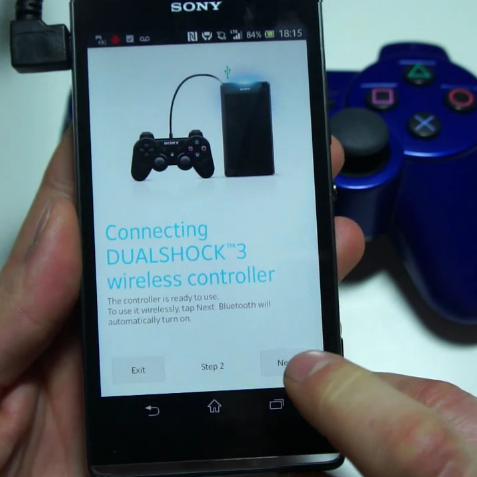
Native PlayStation DualShock game controller support is a feature Sony fans have been clamoring for on Android for some time now. So long, in fact, that there's an very popular app devoted strictly to making this possible for rooted users. But requiring root access is definitely a major roadblock for some people, and an official solution from Sony has remained elusive - until now.
A video of the soon-to-be-released Xperia SP phone shows off built-in DualShock 3 pairing functionality, and it seems to work great.
The catch is that in order to pair the controller, a USB OTG cable (and USB host support on the phone itself) is required initially.
Done With This Post? You Might Also Like These: - [CES 2012] Gametel Bluetooth Controller Gives Just About Any Android Phone An Easy, Accurate Gaming Experience
- Sony's Ice Cream Sandwich Update For The Xperia Sola Introduces "Glove Mode", Allows You To Control Your Phone Whilst Wearing Gloves
- [New App] Sixaxis Controller Lets You Play Games On Your Rooted Android Device Using A Playstation3 Controller
- [Deal Alert] Pre-Order The Sony Xperia Z, Get A Free Pair Of MDR-1R Headphones Worth £299 (UK Only)
Is Sony Going To Bring Native DualShock 3 Controller Support To Xperia Phones? Sure Looks Like It [Video] was written by the awesome team at Android Police.
|
|
08 Apr 19:36


The Dude and the Zen Master
by Jason Weisberger

Did the rug really tie the room together?
Was Donny out of his element?
If you love The Big Lebowski you'll probably enjoy The Dude and the Zen Master, a collaboration between Jeff Bridges and Zen teacher Bernie Glassman. Evidently Bridges and Glassman have been friends for years and thought a critical analysis of the Dude's words and actions was in order.
Pretty much all I know about Zen comes from reading some Alan Watts, thus I'm unqualified to speak to how much Zen learning you may take away from this entertaining book. Start out simply looking to chuckle or remember a few great scenes from a favorite movie, and you won't be disappointed. Recall Jon Stewart's reminders that The Daily Show is a comedy. This book is for fun and if you read it as such, you won't be disappointed.
A sort of side note or unexpected takeaway from the book is that I really enjoyed the glimpse into Jeff Bridges' life and experiences as an actor. He shares quite a bit and clearly works very hard.
The Dude and the Zen Master by Jeff Bridges and Bernie Glassman
|
|
08 Apr 19:35


Obama's regressive record makes Nixon look like Che
by Cory Doctorow
Redditor Federal Reservations has made a handy post enumerating all the regressive, authoritarian, corporatist policies enacted by the Obama administration in its one-and-a-bit terms. You know, for someone the right wing press likes to call a socialist, Obama sure makes Richard Nixon look like Che Guevara. And what's more, this is only a partial list, and excludes the parade of copyright horrors and bad Internet policy emanating from the White House, via Joe Biden's push for Six Strikes, the US Trade Rep's push for secret Internet censorship and surveillance treaties like TPP and ACTA and TAFTA; the DoJ's push to criminalize every Internet user by expanding the CFAA, and much, much more.
Obama extends Patriot Act without reform - [1]
http://articles.nydailynews.com/2011-05-27/news/29610822_1_terrorist-groups-law-enforcement-secret-intelligence-surveillanceSigns NDAA 2011 (and 2012, and 2013) - [2]
http://www.forbes.com/sites/erikkain/2012/01/02/president-obama-signed-the-national-defense-authorization-act-now-what/Appeals the Federal Court decision that “indefinite detention” is unconstitutional - [3]
http://www.activistpost.com/2013/02/ndaa-hedges-v-obama-did-bill-of-rights.htmlDouble-taps a 16-year-old American-born US citizen living in Yemen, weeks after the boy's father was killed. Administration's rationale? He "should have [had] a far more responsible father" - [4]
http://www.washingtonpost.com/world/national-security/anwar-al-awlakis-family-speaks-out-against-his-sons-deaths/2011/10/17/gIQA8kFssL_story.htmlContinues to approve drone strikes that kill thousands of innocent civilians including women and children in Pakistan, Yemen, and other countries that do not want the US intervening; meanwhile, according to the Brookings Institute's Daniel Byman, we are killing 10 civilians for every one mid- to high- level Al Qaeda/Taliban operative. This is particularly disturbing, since now any military-aged male in a strike zone is now officially considered an enemy combatant - [5]
http://www.telegraph.co.uk/news/worldnews/asia/pakistan/7361630/One-in-three-killed-by-US-drones-in-Pakistan-is-a-civilian-report-claims.htmlProtects Bush’s war crimes as State Secrets - [6] [7] [8]
http://www.salon.com/2010/09/08/obama_138/
https://www.eff.org/deeplinks/2009/04/obama-doj-worse-than-bush
http://washingtonindependent.com/33985/in-torture-cases-obama-toes-bush-lineWaives sections of a law meant to prevent the recruitment of child soldiers in Africa in order to deepen military relationship with countries that have poor human rights records -[9]
http://thecable.foreignpolicy.com/posts/2010/10/26/why_is_obama_easing_restrictions_on_child_soldiers
Appoints Monsanto, GMO company with multiple unsafe practice violations, lobbyist to head the FDA - [10]
http://www.washingtonpost.com/blogs/blogpost/post/monsanto-petition-tells-obama-cease-fda-ties-to-monsanto/2012/01/30/gIQAA9dZcQ_blog.htmlDOJ raids marijuana dispensaries that are now legal pursuant state law - [11]
http://www.liveleak.com/view?i=685_1342311527Obama protects AG Holder from Congressional “Fast and Furious” gun walking investigations - [12]
http://abcnews.go.com/blogs/politics/2012/06/white-house-invokes-executive-privilege-on-fast-and-furious-documents/Brings no criminal charges against bank executives that misused bailouts - [13]
http://www.nytimes.com/2012/08/26/opinion/sunday/no-crime-no-punishment.htmlEngages in a war on whistleblowers - [14]
http://dailycaller.com/2012/07/31/the-obama-administrations-war-on-whistleblowers/Grants immunity to CIA torturers - [15]
http://www.guardian.co.uk/commentisfree/2012/aug/31/obama-justice-department-immunity-bush-cia-torturerQuadruples Bush's warrantless wiretapping program - [16]
http://www.aclu.org/blog/national-security-technology-and-liberty/new-justice-department-documents-show-huge-increaseAllows innocent man to die at gitmo - [17]
http://www.huffingtonpost.com/suzanne-nossel/the-death-of-guantanamo_b_1878375.htmlIncreases Drug War budget - [18]
http://www.whitehouse.gov/ondcp/the-national-drug-control-budget-fy-2013-funding-highlightsSupports intrusive TSA pat-downs and body scans - [19]
http://www.cnn.com/2010/TRAVEL/11/20/obama.tsa/index.htmlSays it’s legal to track individuals by pinpointing their cellphone without warrant - [20]
http://www.businessinsider.com/government-says-its-to-track-cell-phones-2012-10Renews FISA and NSA’s unregulated spying and banking of all wireless communication - [21] [22]
http://www.nytimes.com/2010/04/01/us/01nsa.html
http://www.democracynow.org/2012/4/20/whistleblower_the_nsa_is_lying_us Appeals SCOTUS ruling that warrantless installation of tracking devices on cars is unconstitutional - [23]
http://www.thenewamerican.com/usnews/constitution/item/11591-obama-admin-argues-no-warrant-required-for-gps-tracking-of-citizensDOJ overzealously prosecutes [read: persecutes] activist Aaron Swartz, ultimately leading to his suicide in the face of trumped-up charges brought forth to silence his movement for open information - [24]
http://rt.com/usa/secret-service-accused-of-misconduct-in-aaron-swartz-case-020/ Obama nominates JP Morgan defense lawyer to head the SEC, the regulatory agency in charge of keeping Wall Street in line - [25]
http://www.rollingstone.com/politics/blogs/taibblog/choice-of-mary-jo-white-to-head-sec-puts-fox-in-charge-of-hen-house-20130125Picks Goldman Sachs partner Bruce Heyman—who, along with his wife, raised $1 million for Obama—as an ambassador to Canada - [26]
http://www.cbc.ca/news/business/story/2013/04/03/pol-us-ambassador-to-canada-obama.html

|
|
Jonathon Howard and -1 others like this
08 Apr 13:48
Margaret Thatcher, R. I. P.
by Bill Crider
Margaret Thatcher Dies After Stroke: Baroness Thatcher has died at the age of 87 after suffering a stroke, her spokesman Lord Bell has announced. Lord Bell said: "It is with great sadness that Mark and Carol Thatcher announced that their mother Baroness Thatcher died peacefully following a stroke this morning.
08 Apr 13:47


Today, we save the Internet (again): fix the CFAA!
by Cory Doctorow
Read this if you want to stay out of jail.
 When my friend Aaron Swartz committed suicide in January, he'd been the subject of a DoJ press-release stating that the Federal prosecutors who had indicted him were planning on imprisoning him for 25 years for violating the terms of service of a site that hosted academic journals. Aaron had downloaded millions of articles from that website, but that wasn't the problem. He was licensed to read all the articles they hosted. The problem was, the way he downloaded the articles violated the terms and conditions of the service. And bizarrely -- even though the website didn't want to press the matter -- the DoJ decided that this was an imprisonable felony, under the Computer Fraud and Abuse Act, which makes it a crime to "exceed your authorization" on any online service.
The DoJ reasoned that if the law said that doing anything "unauthorized" was a crime, and if the long, gnarly hairball of legalese that no one reads before clicking "I agree" set out what you were allowed to do, then violations of that "agreement" were a felony.
Aaron's death galvanized some Congresscritters to do something about this oversight. The ancient CFAA predated the widespread use of terms of service in everyday activities like hanging out with your friends, reading the newspaper, getting an education or signing up for a dating service. Congress did not intend to create a situation where companies that provided services could put any unreasonable condition they wanted into an "agreement" you might never see ("By using this website, you accept all terms and conditions") and then ask the DoJ to put people in prison for decades if they violated them.
The reform to CFAA was welcome and long overdue. But the DoJ has asked some members of the House Judiciary Committee to make it worse.
Under the amendments, which might be voted on as early as April 10, violating terms of service could be defined as racketeering -- so that you could be prosecuted as though your violation of terms of service made you into a mobster.
They also add "conspiring" to violate terms of service to the list of offenses that are a felony under the CFAA. So you can be thrown in jail just for talking about ways to violate terms of service.
The amendments also make it a felony to obtain information that you are entitled to obtain, if you do so in a way that violates terms of service. My wife and I share some online accounts, including our "family" airmiles account with British Airways, which we both contribute to and use, but only my wife can see the details of them (she signed up for the service, so it's linked to her login). We're both entitled to see those details, but poor service design makes it impossible to do this without sharing a login and password. No problem, except that BA's terms of service forbid this. So looking up my own airmiles, which I earned, and which I'm entitled to see and use, would be a felony under these amendments because I was looking at them in a way that violates BA's terms.
The amendments also include increased powers for seizure of property, which will enable the Feds to take away the assets you might use to defend yourself against a CFAA claim.
This is a trainwreck. It will allow the DoJ to put every single American Internet user in prison at their discretion, because we all violate terms of service every day. For example, Seventeen magazine's terms of service forbid you from visiting its website if you're under eighteen (!), and that means that its 4.5 million underage readers would all be felons under the CFAA, and liable to decades in prison.
The fact that Congress is contemplating this is a testament to its awful authoritarian venality. The fact that they're doing it as part of a reform triggered by Aaron's death is a fucking travesty.
Aaron helped design the widgets that put through 8,000,000 phone calls to Congress about the awfulness of SOPA and killed legislation that everyone on the inside considered unstoppable. Now, Demand Progress -- the group Aaron helped found -- has got another "Tell Congress" widget, which we've embedded for today. You can (and should) embed it too. You can get your own at FixTheCFAA.com, along with a cute tool to put your social media profile photo behind bars and let your friends know what's going on.
Today, we save the Internet. Again.
Demand Justice for Aaron Swartz 
|
|
08 Apr 13:45
Done With This Post? You Might Also Like These: 


Mini MicroSD Reader, Accessible To Android Phones And Tablets Via MicroUSB Port, Gets Funded On Kickstarter
by Jeremiah Rice
 We've become pretty wary of featuring Kickstarter projects here on Android Police - too many have overpromised, under-delivered, or just delayed themselves into oblivion. (I'm looking at you, Star Command.) But this one has too much potential to ignore. A pair of San Mateo engineers have created a MicroSD card reader that plugs right into a MicroUSB port, making it a perfect travel companion for phones or tablets with no expandable storage. The project has been successfully funded after just three days.
There's a lot to like about this Kickstarter. One, the hardware is incredibly simple, but well thought-out: the housing is a tiny dongle that hangs off of a device's USB port, just far enough to enclose the SD card itself.
Done With This Post? You Might Also Like These: - Chameleon Is Back For Its Second Go On Kickstarter, Hopefully Won't Hit Any Snags This Time
- Amazon Gold Box Deal Alert: 32GB Lexar Class 10 MicroSD Card + Reader For $39.99 ($78 Off)
- Deal Alert: Amazon Offering SanDisk Ultra 32GB microSD Class 10 UHS-1 Card For Just $19.99
- [New App] Trello Organizes Your Projects And Makes Collaboration A Snap
Mini MicroSD Reader, Accessible To Android Phones And Tablets Via MicroUSB Port, Gets Funded On Kickstarter was written by the awesome team at Android Police.
 |
 |
07 Apr 13:33

Clean Master Frees Up Space on Your Android Device
by Shep McAllister
 Android: If you're running low on space on your Android device, Clean Master makes it easy to identify what's hogging your storage, and helps you get rid of it.
Once you open Clean Master, you'll get some graphs showing your used and unused space on the device's onboard storage and SD card, but most of the action takes place in the History section of the app. Here, you'll see the cache size of all of your installed apps, which you can delete selectively or with an automated "Clean" option that gets rid of most caches, but saves important ones. Another tab shows you residual files left over from apps you've deleted, and lets you trash them with just a tap.
Clean Master also comes with a task killer, but as we've mentioned before, you shouldn't use it. Clean Master is free, so check it out if you're bumping up against your storage limits. If you're having the same issue on your PC or Mac, be sure to give WinDirStat or Disk Inventory X a look.
Clean Master (Free) | Google Play via MakeUseOf
07 Apr 10:21


Widespread, illegal debtors' prisons in Ohio
by Cory Doctorow
A new ACLU report called The Outskirts of Hope (PDF) documents the rise of illegal debtors prisons in Ohio. A majority of municipal and mayors' courts (an unregulated and rare system of courts only permitted in two states) surveyed by the ACLU routinely imprison people for their inability to pay fines, a practice banned in both the US and state constitution. 20 percent of the bookings in the Huron County Jail are "related to failure to pay fines."
Taking care of a fine is straightforward for some Ohioans — having been convicted of a criminal or traffic offense and sentenced to pay a fine, an affluent defendant may simply pay it and go on with his or her life. For Ohio’s poor and working poor, by contrast, an unaffordable fine is just the beginning of a protracted process that may involve contempt charges, mounting fees, arrest warrants, and even jail time. The stark reality is that, in 2013, Ohioans are being repeatedly jailed simply for being too poor to pay fines.
The U.S. Constitution, the Ohio Constitution, and Ohio Revised Code all prohibit debtors’ prisons. The law requires that, before jailing anyone for unpaid fines, courts must determine whether an individual is too poor to pay. Jailing a person who is unable to pay violates the law, and yet municipal courts and mayors’ courts across the state continue this draconian practice. Moreover, debtors’ prisons actually waste taxpayer dollars by arresting and incarcerating people who will simply never be able to pay their fines, which are in any event usually smaller than the amount it costs to arrest and jail them.
The report documents heartbreaking cases, like Samantha Reed and John Bundren, a couple with a nine-month-old who were both ordered to pay fines they can't afford. John diverts whatever seasonal/part time wages he earns to Samantha's fines so she can look after their baby, while he goes to jail for ten-day stretches for failure to make payments. They are effectively indigent, but are not given access to counsel when they appear in court over their debts.
(via Reddit) 
|
|
Jonathon Howard likes this
07 Apr 10:19

Mozilla announces new web payment mechanism to debut on Firefox OS
by Jeff Blagdon
Mozilla is working on a new JavaScript API, first appearing in the Firefox OS, that will make it easy for people to pay for digital goods and services on the web, either using a credit card, or by adding the purchase to their monthly carrier bills. According to a blog post from Firefox OS engineer Kumar McMillan, navigator.mozPay() is based on Google Wallet's API, but modified for multiple payment providers and, importantly, carrier billing. When a web app invokes the API, a "secure window with a concise UI" pops up on your phone, you authenticate with a password, and your payment gets processed.
Part of Mozilla’s pitch to operators has been a bigger share in the value chain and more ownership and control over relationships with...
06 Apr 10:20

Readability Launches Top Reads, An Online Magazine Aggregating The Platform's Most-Read Content
by Ingrid Lunden
Reading app Readability once butted heads with Apple on subscription rules, but more recently its friction points have been in competition with apps like Instapaper, Pocket, Pulse, and Flipboard, who all present consumers with ways of aggregating and making it easier to read the vast sea of content available online. Now Readability, with has 5 million monthly active users stripping out and reading tens of millions of articles each day, is launching Top Reads, a reading aggregation service of its own based on the most read stories on Readability, to get more people to spend more time on its platform.
Top Reads will launch first as a responsive web app for desktop and mobile screens, and Rich Ziade, one of Readability’s founders, says that there will be dedicated native mobile apps on the way in a matter of months if the response is good.
Top Reads is not exactly new — it a feature that first appeared as a list in Readability’s mobile app last year, and has been getting strong traffic since, with about two-thirds of the site’s 5 million users using it every month. Enough attention, he said, to get Ziade and his team to explore making it into a standalone service with its own URL.
“Discovery is a still big deal,” he told TechCrunch. “We’re getting swamped with stuff to read.” And while his app has developed a dedicated audience using it to read content they are finding themselves, this will help them look at what others are reading, too.
The new, more visual version looks more like Flipboard than text river, with pictures and links through to either read later, share, or read instantly.
A click through to read instantly takes you to the actual web page, with a link at the top to read in Readability’s stripped-down format:
And this is what that format then looks like:
Ziade says that Top Reads will also remain in Readability’s mobile app, which today accounts for just under half of all of the company’s traffic. Over time the two Top Reads will diverge in function: the in-app version will be a “best of” list, while the dedicated Top Reads site will display a much larger selection of content, with more features, like views of vertical subjects, coming soon.
Readability is currently funded by arc90, an app design studio based in New York, but the plan is to become a viable, standalone business. Ziade says Readability makes a modest revenue from licensing its “parsing engine” to a few device makers and other apps, which use it to present content on their own sites. Some of these are confidential; one that is Reeder, one of the companies aspiring to the soon-to-be-vacated Google Reader throne.
The idea will be to continue to build that out with more platform licensing deals, and to supplement that with big-data analytics based on discovering what kind of content is popular on the platform. Ziade says that just about every online publisher has had its content pass through Readability’s platform, so it becomes a huge repository of aggregated information about what is getting read. In that vein, getting more people reading and browsing through Top Reads will help further grow that dataset.
“We are already getting a really good sense of what people are reading on the web,” Ziade says. “Top Reads is the first step of surfacing that value.”
What’s interesting is that while services like Flipboard are “social” readers, with people using their social networks to share and discover content; Top Reads is a bit more old school, relying instead on a most-popular algorithm to select what goes on to its front page. The more something is read on Readability, the more likely it will appear on Top Reads. Crucially, the kind of data that Readability is putting together is not, for now at least, based on “learning” what you like or targeting you in any way. The data, and the user, remain anonymous.
There are social elements, too, however. Folling @topreads on Twitter, you will be able to get links to articles as the “heat up” on Readability. The same list will be accessible through the Readability app.
While services like Pocket are extending to other kinds of media like video, Top Reads, as its name implies, is going to stick to the written word. “We want to really capture behavior around reading,” Ziade says. “We are focused on shedding light on how people read. They say reading is dying, that people mostly read tweets these days, people are actually reading tons, and we want to be in the middle of that.”
06 Apr 10:17

Tweak the Dark Corners of Your Operating System This Weekend
by Whitson Gordon
 Some people are content to use their computers as they were originally intended. Others take matters into their own hands, get a little adventurous, and tweak every corner of their operating system until it fits into their workflow perfectly. This is for those in that second group.
You've probably already searched through a lot of menus and hidden settings, and maybe even downloaded some awesome apps to help you along. But when it comes to really digging in your heels, you need to look into the darker corners of your OS—the parts that people give you caution before entering. Here are some of our favorite skills and tweaks for Windows, Mac, and Linux in that realm—and remember, back up before you start tweaking!
Windows
 If you're looking to start tweaking your Windows system, we recommend you start out with a tool like Ultimate Windows Tweaker. It's incredibly easy to use (it's basically just a window full of checkboxes), and you can tweak everything from Windows Explorer to the start menu, taskbar, welcome screen, and lots more. The 7+ Taskbar Tweaker is also a great tool for more taskbar-centric changes.
When you're ready to go deeper, it's time to open up the Windows Registry. If you still aren't sure what the registry does, check out our explainer on the subject. Basically, it's a database that stores settings and preferences for nearly everything on your system. By going in and changing things directly, you can unlock a lot of hidden features and settings in Windows. Some of our favorites include:
- Hide Pre-Populated Items in Windows Explorer's Sidebar
- Clean Up Explorer's ‘Open With' Menu with a Registry Hack
- Lose the Taskbar Thumbnail Delay in Windows 7 with a Registry Hack
- Prevent Windows Update from Forcibly Rebooting Your Computer
- Show Drive Letters Before the Drive Name in Windows Explorer
For more, check out our registry tag and our list of the top 10 registry tweaks that power up Windows.
OS X
 In OS X, you'll probably perform most of your deep tweaks from the command line. Before you start digging into a terminal, though, warm up a little bit with a system tweaker like OnyX. Not only can it unlock hidden features in the Finder, Dock, QuickTime, Mail, iTunes, Spotlight, and other apps, but it also has a lot of maintenance features built-in to keep your system running in tip top shape. Secrets is a pretty great app for tweakers too.
Once you want to go a little further, it's time to open up that terminal window and get to work. OS X's built-in terminal is great, but our favorite terminal emulator is iTerm2, which contains a bunch of extra features to make command line work easier. Some of our favorite command line tweaks include:
- Prevent Your Mac from Sleeping with a Simple Terminal Command
- Show Hidden Files in the Finder
- Turn Off the New "Elastic Scrolling" in OS X Lion
- Remove the Delay when Showing and Hiding the Dock in OS X
- Single Application Mode in OS X Keeps Your Desktop Distraction Free
- Unlock Old School Arcade Games in Your Mac's Terminal
Want to try more? Check out this huge list of useful preferences, or check out our guide to finding your Mac's hidden features. Be sure to check out our terminal tag for Mac to see more handy tweaks, too.
Linux
 If you're using Linux, you're probably no stranger to system tweaks. In fact, you're probably already an expert on the subject. So, instead of telling you what you should do, we'll share a few of our favorite tips and resources with you out of the gate:
- Ubuntu Tweak and Unity Tweak customize every inch of Ubuntu
- This Cheat Sheet Makes Learning Your Way Around Linux Easy
- Master the Command Line This Weekend
- Build a Killer Customized Arch Linux Installation (and Learn All About Linux in the Process)
- Top 10 Tools That Are Better in the Command Line
- The Best Terminal Emulator for Linux
All that should get you started, but these are just the tip of the iceberg in terms of Windows, Mac, and Linux tips. So jump on into the discussions below and share all your favorite tweaks with us.
Have a great weekend!
Photo by anaken2012 (Shutterstock).
Joby, Jay McDaniel and -1 others like this
05 Apr 23:51


Black leopard compared to black house cat
by David Pescovitz
Black leopard compared to black house cat. "Duality," directed by Rich Kuras.
|
|
05 Apr 20:09

Grab Private Internet Access VPN Service for 20% Off
by Melanie Pinola
Private Internet Access, one of Lifehacker readers' favorite VPN service providers, makes it easy to surf privately and securely from anywhere. With this promotion, you get 20% off the service paid monthly or yearly.
The month-to-month plan is $5.45/month, normally $6.95, and the yearly price is $31.95/year (which turns out to be $2.66/month), normally $39.95.
Private Internet Access boasts many advanced features including a kill switch if your VPN disconnects, DNS leak protection, the ability to connect 3 devices simultaneously or a DD-WRT or Tomato router (which will count as one device). Perhaps best of all, the service promises it doesn't log any activity. PC Magazine chose the service as its Editor's Choice. There's also a 7-day refund period if you change your mind and you can pay in Bitcoin.
According to Slickdeals, this promotion was from the weekend's giveaway, but the link is still working today. No word on how long this will last, so if you need a VPN service—and most of us really should be using one—hurry to the link below.
Private Internet Access | via Slickdeals
raydarken likes this
05 Apr 19:55


Samsung Galaxy Note 8.0 available in the UK today
by Alex Dobie

Samsung's 8-inch stylus-toting tablet arrives today at flagship London store
Samsung has announced that the latest member of the Galaxy Note family, the Note 8.0, has today gone on sale in the UK. The tablet is initially available at the Samsung Experience Store at the Westfield Stratford City shopping center in London, the same flagship Samsung store at which the Galaxy S3 and Note 2 first launched.
The Wifi-only Note 8 goes on sale today for £339.99, and the version with cellular data is expected to follow shortly. Besides cell data, you've got a 1.6GHz quad-core Exynos CPU running the show, 2GB of RAM and 16 or 32GB of internal storage, expandable via microSD. There's also a 5MP rear shooter and 1.3MP front-facing camera. On the software side, you're looking at Android 4.1.2 Jelly Bean wrapped in Sammy's TouchWiz UI.
To sweeten the deal, Samsung's offering a pack of software goodies worth £60 to buyers who pick one up before Apr. 15. This includes a £20. Samsung Learning Hub voucher, a two-month subscription to The Times newspaper, AVG Pro, a month of Samsung Music Hub access, Need for Speed: Hot Pursuit and Sonc 4: Episode 2. Being a Samsung device, the Note 8.0 also lands you 50GB of free Dropbox storage for two years.
More: Hands-on with the Samsung Galaxy Note 8.0
|
|
05 Apr 19:50

Chrome will officially leave WebKit for Blink in 10 weeks
by Matt Brian
Google has given the first indication as to when it will release its first Blink-enabled builds of its Chrome browser, confirming that it will enable its new rendering engine in Chrome 28. Answering questions submitted by the Chrome developer community in a Q&A video panel, Chrome developer advocate Paul Irish explained that while Blink is already integrated in Chrome Canary builds, we can expect to see it in stable versions of the browser "in around 10 weeks."