Shared posts

10 May 16:20

YouTube launches paid channels, aims to provide richer content

by Sean Brunett

YouTube paid

Channels will start at a 99 cent monthly subscription and have a 14-day trial period

YouTube made a big announcement today: paid subscriptions for certain channels. It had been rumored for some time that YouTube was readying some sort of paid model and today that becomes reality. This is the beginning of a pilot program that will likely see many more premium channels in the future.

So how does it work and how much is it? There are a select few YouTube Paid Channels launching today with that are partnering with YouTube to provide richer content starting at $0.99/month. Some channels offer discounts if you subscribe annually. All channels also offer a 14-day free trial and they insist that you use it to see how you like it. Once you subscribe, you can watch on your computer, mobile device and television.

For example, I am a huge fan of Big Think, which is a channel that brings together thinkers from around the world and produces short videos dedicated to specific ideas. They are launching a premium channel called Big Think Mentor (seen above), which will provide more videos and longer content. By making it paid, this allows them to gauge their audience and produce content that is demanded.

YouTube is a great platform and has always provided countless free videos with the support of ads. That model is still the same and will not change. However, I think YouTube wants to be able to offer its users the chance to access higher quality content aimed at a certain audience that is willing to shell out a little money. Let's be honest, 99 cents is not that much and if the creators use the platform and money strategically, I feel  that it could be a success.

Source: YouTube


10 May 16:19

These 12 Videos Show the Proper Form for a 7-Minute Full Workout

by Melanie Pinola

Interval training, as we've mentioned before, is one of the most efficient ways to exercise. Yesterday we shared a routine that gives you a full-body workout with 12 exercises in 7 minutes. By request, here are videos that show how to do each of those exercises properly.

We've shared several of these videos previously, in our guide to getting a full workout with just your body and our Lifehacker Workout program. These 12 videos cover all the movements for the program we shared yesterday, designed by performance coaches at the Human Performance Institute.

Do each exercise as many times as you can for 30 seconds (or in the plank poses, hold for 30 seconds), and pause for 10 seconds between each exercise.

Keep in mind that for many people this isn't meant to be just a 7-minute workout, but rather a 7-minute cycle that you do a few (e.g., 2 or 3) times.

By the way, Lifehacker reader Will Wilson wrote up this handy webapp for the 7 minute routine, telling you when to start and stop each movement.

1. Jumping Jacks

There are two variations: one with your arms going all the way up and one with your bent arm raised to shoulder height. This video shows the bent arm variation, which is helpful if you have shoulder issues. It's a good warm-up movement.

2. Wall Sit

In this exercise, you lean back onto a wall and slide down into a squat position so you have a 90-degree bend in your legs. Hold that position for up to 30 seconds, but make sure you don't slide down if you get fatigued.

3. Push Ups

To do a push up correctly, make sure your body is completely flat as you move up and down.

4. Abdominal Crunches

To do a crunch, keep your feet flat on the floor, hold your hands at the side of your head, and lift your chest. Avoid rounding your back or pulling your elbows inward. If you have back issues or want to try an easier variation, consider the reverse crunch or bicycle crunch.

5. Step-up Onto Chair

Start at about two feet away from the chair, and step up onto it powerfully. Repeat with the alternate leg leading.

6. Squat

To do a proper squat, put your feet shoulder-width apart, hold your arms forward, and go down until your thighs are about parallel with the floor. Don't let your knees go past your toes. For an easier modification, do this against a wall or pole.

7. Triceps Dip on Chair

This video shows an "easy" variation with your hands facing towards the back of your chair, as well as a way to make this more advanced with a second chair. Keep your torso straight as you lower yourself down until your arms are bent about 90 degrees.

8. Plank

For the plank pose, hold yourself in a push-up position, without lowering down.

9. High Knees Running in Place

To do a high knee run, you simply run in place. Move your arms in sync and hold your hands in a soft grip and relax your face.

10. Lunge

This video shows how to do the front-stepping lunge, but you can modify with a back or rear lunge (which might be easier on your knees) or alternate in side lunges.

11. Push Up and Rotation

In this exercise, you lower down in a push up, but as you come up, extend your arm and turn your body to face one side. Lower down again, then extend to the other side.

12. Side Plank

Finally, in the side plank, you're holding your body turned to one side. This video shows the beginner version, with the bottom leg bent for support, and more advanced versions with the bottom leg straightened out and your arm extended. Repeat on the other side.

Whew!

10 May 16:18

YouTube Video Deck Manages Your Video Subscriptions

by Eric Ravenscraft

YouTube Video Deck helps power viewers keep up with their subscriptions in a multi-column layout that's straight out of TweetDeck's playbook.

The app ties in to your existing subscriptions, so you'll need to follow content creators on YouTube first to be able to use the app. From there, you can set up multiple columns that are sorted however you choose. For example, you can keep comedy videos in one column, news-y videos in another, and one feed for Lifehacking (ahem).

Obviously, YouTube doesn't have quite the same speed that Twitter does that makes something like this useful for the average user, but if you keep track of a lot of channels, this may just be the best way to keep an eye out for new content.

YouTube Video Deck | Chrome Web Store via Make Tech Easier

10 May 16:18

A new bill introduced to congress today, called "The Unlocking Technology Act," seeks to make unlock

by Adam Dachis

A new bill introduced to congress today, called "The Unlocking Technology Act," seeks to make unlocking, jailbreaking, and otherwise modifying phones, tablets, and other mobile devices completely legal. It'll legalize DVD ripping as well. For more information, read this and contact your representative and show your support if this is something you want to pass.

10 May 16:18

Robbie Williams ‘Promotes’ Megaupload in New Dizzee Rascal Video

by Andy

robbievidUK rapper Dizzee Rascal and international superstar Robbie Williams have teamed up for a single from Dizzee’s new album, “The Fifth”.

The song, called ‘Goin Crazy’, features the pair cruising around the East End of London in mobility scooters pimped to look like the two-wheeled scooters featured during the intro of The Who’s classic movie, Quadrophenia.

After Rascal appears from a smoking and exceptionally spiky car, he and Williams are joined on their cruise by a number of pensioners.

But it’s the start of the video that succeeded in raising eyebrows and piquing our interest. As Robbie moves into shot, walking away from camera, the focus pans from his colored sneakers up to his coat, on which is painted two very familiar words – MEGA and UPLOAD.

MegaRobbie

But could this really be related to the now-defunct Megaupload? Well, we’ve sen pop tie-ins before with the controversial MegaSong of 2011 – big name artists were only too pleased back then to be associated with the file-sharing site. In the song Goin Crazy, Dizzee Rascal also weaves ‘Megaupload’ into his lyrics – it hardly seems like an accident.

And, adding to the intrigue, Kim Dotcom himself has commented on the development.

“Robbie, I love the Megaupload jacket!” he said on Twitter, adding: “Ready for Megabox?”

As first announced by Kim Dotcom in a guest post for TorrentFreak in 2011, Megabox is a soon-to-launched platform designed to bring music to the masses and reward artists by giving them the lion’s share of the profits. Its development was held back due to the raids on Megaupload in January 2012 but is now on course to launch sometime in the coming months.

If there is a link, and Robbie and Dizzee are indeed promoting Kim Dotcom’s new venture, this would be another huge coup for the larger-than-life entrepreneur. If it isn’t, and the guys are just having fun, Kim will settle for that since it’s still quite a compliment. It has to be said though, Kim appears to be taking quite an interest in this video.

So here it is, enjoy it while you can because if previous experiences are anything to go by, it might not stay up long.

Source: Robbie Williams ‘Promotes’ Megaupload in New Dizzee Rascal Video

10 May 16:18

‘Worst’ File-Sharing Pirates Spend 300% More on Content Than ‘Honest’ Consumers

by Andy

Early 2012 UK telecoms regulator Ofcom commissioned research designed to track consumer behavior and attitudes towards the legal and illegal consumption of copyrighted material.

The research targeted Internet users over 12 years old with the aim of gathering information on the way they consume movies, music, TV shows, video games, software and books to assist with copyright enforcement policy making. The results are now in and they interesting to say the least.

The researchers split infringers into several categories according to their attitudes and motivations.

So-called ‘Justifying Infringers’ were the group who demonstrated the highest levels of infringing behavior. This group accounted for 9% of all infringers, 24% of total infringed volume and 2% of total digital consumers. They felt that they’d already spent enough on content (the researchers say this was confirmed) but like to try before they buy. They’re also the most receptive group when it comes to considering fairly priced legal alternatives.

The ‘Digital Transgressors’ group (9% of all infringers, 22% of total infringed volume, 2% of total digital consumers) consumed more films and TV shows than the ‘Justifying Infringers’. While they showed the least remorse over their behavior, this group had the highest fear of getting caught and the researchers say they would be the most receptive to warning notices sent by ISPs.

The largest group, the ‘Free Infringers’ (42% of infringers, 35% of infringed volume, 10% of total digital consumers) lived up to their name. They all download content because its free and pay for the lowest proportion of legal content compared to the other infringers.

Ambiguous Infringers (39% of infringers, 20% of infringed volume, 9% of total digital consumers) had the lowest level of digital consumption and the highest proportion of paid and legal content. They made less attempt to justify their infringing.

Ofcom5

“Most infringing segments found it easy to find content on the internet for free which would normally be paid, ranging from 45% for the Ambiguous Infringers to 76% for the Top 20% infringers,” the researchers note. “Among non-infringers the figures were notably lower, ranging from 28% to 45%.”

Looking at the infringers overall, the researchers made some very interesting discoveries, particularly among the most prolific.

The top 10% of infringers (who accounted for just 1.6% of all Internet users over 12) were responsible for a massive 79% of all infringed content. Pull in another 10%, to consider the top 20% of all infringers (equal to 3.2% of all Internet users over 12), and this group were responsible for 88% of all infringements.

This means that the other 80% of the total infringers accounted for just 12% of all infringements by volume.

Ofcom

While they are undoubtedly prolific consumers of illicit content, the Top 20% group proves to be of great value to entertainment companies. Not only does the group account for 11% of all legal content consumed, but they also spend the most.

Across all content types, the top 20% of infringers on average not only spend more than the remaining 80% of infringers, but also more than consumers who never infringe. The figures are impressive – the 20% worst infringers spent £168 over the six month monitoring period with the remaining 80% spending £105. Tailing in last place were the ‘honest’ consumers with just £54 spent, three times less than the prolific pirate group.

“For all content types there were differences in terms of payment between the two groups; the large majority (92% overall) of content consumed by the Top 20% Infringers was free. This compared to 76% among the Bottom 80% Infringers,” the researchers write. “However, because they consumed more content in total, the Top 20% purchased more ‘paid for’ digital files in absolute terms than the Bottom 80%.”

Later on in the report the researchers reveal which services – authorized and unauthorized – respondents use to access content. Even for the infringers, authorized sites such as YouTube and BBC iPlayer prove most popular as the table below shows.

Ofcom3

Interestingly, despite being blocked in the UK during the research period, The Pirate Bay is still being used by almost a third of the top 20% of infringers. The site was used by just 9% of the bottom 80% of infringers which perhaps suggests that the more hardcore the pirate, the more likely they are to unblock a site.

So what might encourage infringers to stop accessing content illegally? As usual, pricing, availability and convenience top the list. Interestingly, fears over internet disconnections in the Top 20% group trumped fears of being sued.

Ofcom4

The research, titled OCI Tracker Benchmark Study ‘Deep Dive’ Analysis Report, was prepared by Kantar Media for Ofcom and is available for download here. (pdf)

Source: ‘Worst’ File-Sharing Pirates Spend 300% More on Content Than ‘Honest’ Consumers

10 May 16:17

Pirate Bay Takes Over Distribution of Censored 3D Printable Gun

by Ernesto

3d-goneIn late 2012 the 3D blueprint website Thingiverse decided to ban 3D gun designs, citing their terms of service which clearly prohibit files used to make weapons.

Enter DEFCAD, a site dedicated to hosting designs that have been banned at Thingiverse. Namely, the entirely printable 3D gun design which clocked up more than 100,000 downloads within its first two days of release.

This did not sit well with the Department of State Office of Defense Trade Controls who kindly requested that DEFCAD remove the availability of the 3D printable gun documents, enthusiastically named “The Liberator,” citing a possible violation of International Traffic in Arms Regulations.

In the letter from the State Department, which can be read in full at Forbes, the Government explains that it wants to review whether the designs are in compliance with arms export control laws.

While the attempted censorship of the 3D gun blueprints may come as no surprise, the popularity of these files is a vivid example of the daunting task faced by those charged with censorship of information.

While DEFCAD promptly complied with the request to remove access to the design, it was shared so widely during the short window of availability that it is now virtually impossible to prevent any further distribution. Currently, there appears to be several torrents available for the design at The Pirate Bay and the site informs us that these will not be censored.

“TPB has for close to 10 years been operating without taking down one single torrent due to pressure from the outside. And it will never start doing that,” A Pirate Bay insider told TorrentFreak.


Guns on The Pirate Bay

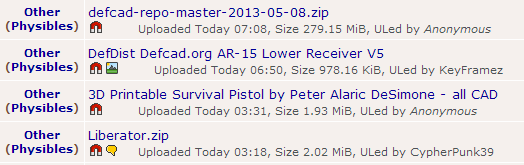
defcad-tpb

The Pirate Bay is not out to promote guns, but they do have a great interest in 3D printing.

“We think the whole idea of a printable object is interesting. You can print guns for sure, but even better you can print plowshares and other things as well. The problem is not the object but what you do with it. Just as with a cooking knife.”

The torrent site also says it welcomes Defense Distributed founder Cody Wilson to start publishing designs on The Pirate Bay. A year ago TPB launched a 3D print section where the blueprints would fit nicely.

“When Defcad is closed down there is still TPB. Cody is welcome to upload everything on Defcad to TPB as well, so the users can comment on the crap.”

“Cody Wilson’s site has been branded ‘A Pirate Bay for 3D objects’ which is kind of funny, since TPB has had its physibles section more than a year already, with lots of objects in there. And since the whole idea behind TPB is to not let outside pressure judge, TPB is prepared for things like that.”

The Pirate Bay insider welcomes a debate on gun laws and U.S. oppression of free speech. “We laugh at their gun love since it’s so obviously the wrong way to go.”

“We think that the good thing about the discussion about 3D printers and their gun laws might bring more focus on the double standards that the U.S. is having and hopefully – people will start printing signs to protest against the guns, the corruption and the threats against freedom of speech that the U.S. is pushing on us.”

For now the 3D gun links posted on The Pirate Bay are from unverified sources. Printing those might not be such a good idea, but it is clear that the original designs are not going away. All one needs in order to access these files is a hash, there is no longer a central source that can be shut down to prevent public access to these files.

This BitTorrent connection also gives the term Defense Distributed a whole new meaning.

The takedown of the blueprints could very well mark the beginning of an era where proponents of so-called cyber warfare begin using military resources in attempts to regulate a data distribution protocol which has, thus far, been impossible to regulate.

At the minimum, it’s the start of a crackdown on 3D blueprints, which will undoubtedly become more common as technology advances.

Ryan Smith contributed to the article.

Source: Pirate Bay Takes Over Distribution of Censored 3D Printable Gun

10 May 16:17

US State Department orders removal of Defense Distributed's printable gun designs

by Cory Doctorow

The US State Department has ordered Defense Distributed to take down the designs for a working 3D printed gun, citing export control rules set out in the International Traffic in Arms Regulations. Defense Distributed's Cody Wilson is appealing, and says that ITAR does not apply to "non-profit public domain releases of technical files designed to create a safe harbor for research and other public interest activities" -- though this carve out is for works stored in a library. Wilson's appeal may turn, then, on whether the Internet is a library for the purposes of this regulation. In the meantime, the designs are still up on The Pirate Bay, and are for sale in printed form in an Austin bookseller. More than 100,000 copies of the designs were downloaded from Defense Distributed's servers in the brief time that they were online.

“Until the Department provides Defense Distributed with final [commodity jurisdiction] determinations, Defense Distributed should treat the above technical data as ITAR-controlled,” reads the letter, referring to a list of ten CAD files hosted on Defcad that include the 3D-printable gun, silencers, sights and other pieces. “This means that all data should be removed from public acces immediately. Defense Distributed should review the remainder of the data made public on its website to determine whether any other data may be similarly controlled and proceed according to ITAR requirements.”

Wilson, a law student at the University of Texas in Austin, says that Defense Distributed will in fact take down its files until the State Department has completed its review. “We have to comply,” he says. “All such data should be removed from public access, the letter says. That might be an impossible standard. But we’ll do our part to remove it from our servers.”

Wilson's project is raising some important legal questions, such as whether design files can be considered expressive speech under the First Amendment, and whether the Internet is a library. The question of code-as-speech was famously considered in the Bernstein case, where strong crypto was legalized. However, as we discovered in the 2600 case, judges are less charitably inclined to code-as-speech arguments when they're advanced by non-academics, especially those with counter-culture stances.

Impact litigation -- where good precedents overturn bad rules -- is greatly assisted by good facts and good defendants. I would much rather the Internet-as-library question be ruled on in a less emotionally overheated realm than DIY guns.

State Department Demands Takedown Of 3D-Printable Gun Files For Possible Export Control Violations [Andy Greenberg/Forbes]

(Thanks to everyone who sent this in!)


09 May 20:26

The History of Typography Told in Five Animated Minutes

by Bill Crider
09 May 20:24

Locus Awards 2013 ballot announced: a guide to the best sf/f in 2013

by Cory Doctorow

The 2013 Locus Awards final ballot has been announced, and as ever, it is a fabulous guide signposting some of the very best work published science fiction and fantasy in the past year -- a perfect place to start your explorations of the year's books.

I am very honored to have been included on the ballot; my novel Pirate Cinema made the Best Young Adult novel list, which is a particularly strong category this year:

See the full ballot after the jump.

2013 Locus Awards Finalists


SCIENCE FICTION NOVEL


    * The Hydrogen Sonata, Iain M. Banks (Orbit US; Orbit UK)
    * Captain Vorpatril’s Alliance, Lois McMaster Bujold (Baen)
    * Caliban’s War, James S.A. Corey (Orbit US; Orbit UK)
    * 2312, Kim Stanley Robinson (Orbit US; Orbit UK)
    * Redshirts, John Scalzi (Tor; Gollancz)

FANTASY NOVEL


    * The Killing Moon, N.K. Jemisin (Orbit US; Orbit UK)
    * The Drowning Girl, Caitlín R. Kiernan (Roc)
    * Glamour in Glass, Mary Robinette Kowal (Tor)
    * Hide Me Among the Graves, Tim Powers (Morrow; Corvus)
    * The Apocalypse Codex, Charles Stross (Ace; Orbit UK)

YOUNG ADULT BOOK


    * The Drowned Cities, Paolo Bacigalupi (Little, Brown; Atom)
    * Pirate Cinema, Cory Doctorow (Tor Teen)
    * Railsea, China Miéville (Del Rey; Macmillan)
    * Dodger, Terry Pratchett (Harper; Doubleday UK)
    * The Girl Who Fell Beneath Fairyland and Led the Revels There, Catherynne M. Valente (Feiwel and Friends; Much-in-Little ’13)

FIRST NOVEL


    * Throne of the Crescent Moon, Saladin Ahmed (DAW; Gollancz ’13)
    * vN, Madeline Ashby (Angry Robot US; Angry Robot UK)
    * Seraphina, Rachel Hartman (Random House; Doubleday UK)
    * The Games, Ted Kosmatka (Del Rey; Titan)
    * Alif the Unseen, G. Willow Wilson (Grove; Corvus)

NOVELLA


    * “In the House of Aryaman, a Lonely Signal Burns”, Elizabeth Bear (Asimov’s 1/12)
    * On a Red Station, Drifting, Aliette de Bodard (Immersion)
    * After the Fall, Before the Fall, During the Fall, Nancy Kress (Tachyon)
    * “The Stars Do Not Lie”, Jay Lake (Asimov’s 10-11/12)
    * The Boolean Gate, Walter Jon Williams (Subterranean)

NOVELETTE


    * “Faster Gun”, Elizabeth Bear (Tor.com 8/12)
    * “The Girl-Thing Who Went Out for Sushi”, Pat Cadigan (Edge of Infinity)
    * “Close Encounters”, Andy Duncan (The Pottawatomie Giant & Other Stories)
    * “Fake Plastic Trees”, Caitlín R. Kiernan (After)
    * “The Lady Astronaut of Mars”, Mary Robinette Kowal (Rip-Off!)

SHORT STORY


    * “The Deeps of the Sky”, Elizabeth Bear (Edge of Infinity)
    * “Immersion”, Aliette de Bodard (Clarkesworld 6/12)
    * “Mantis Wives”, Kij Johnson (Clarkesworld 8/12)
    * “Elementals”, Ursula K. Le Guin (Tin House Fall ’12)
    * “Mono No Aware”, Ken Liu (The Future Is Japanese)

ANTHOLOGY


    * After, Ellen Datlow & Terri Windling, eds. (Hyperion)
    * The Year’s Best Science Fiction: Twenty-ninth Annual Collection, Gardner Dozois, ed. (St. Martin’s Griffin; Robinson as The Mammoth Book of Best New SF 25)
    * The Future Is Japanese, Nick Mamatas & Masumi Washington, eds. (Haikasoru)
    * Edge of Infinity, Jonathan Strahan, ed. (Solaris US; Solaris UK)
    * The Best Science Fiction and Fantasy of the Year: Volume Six, Jonathan Strahan, ed. (Night Shade)

COLLECTION


    * The Best of Kage Baker, Kage Baker (Subterranean)
    * Shoggoths in Bloom, Elizabeth Bear (Prime)
    * At the Mouth of the River of Bees, Kij Johnson (Small Beer)
    * The Unreal and the Real: Selected Stories Volume One: Where on Earth and Volume Two: Outer Space, Inner Lands, Ursula K. Le Guin (Small Beer)
    * The Dragon Griaule, Lucius Shepard (Subterranean)

MAGAZINE


    * Asimov’s
    * F&SF
    * Tor.com
    * Clarkesworld
    * Subterranean

PUBLISHER


    * Tor
    * Subterranean Press
    * Orbit
    * Baen
    * Angry Robot

EDITOR


    * John Joseph Adams
    * Ellen Datlow
    * Gardner Dozois
    * Jonathan Strahan
    * Ann & Jeff VanderMeer

ARTIST


    * Donato Giancola
    * Stephan Martiniere
    * John Picacio
    * Shaun Tan
    * Michael Whelan

NON-FICTION


    * An Exile on Planet Earth, Brian Aldiss (Bodleian Library)
    * Science Fiction: The 101 Best Novels 1985-2010, Damien Broderick & Paul Di Filippo, eds. (NonStop)
    * Distrust That Particular Flavor, William Gibson (Putnam)
    * The Cambridge Companion to Fantasy Literature, Edward James & Farah Mendlesohn, eds. (Cambridge University Press)
    * Some Remarks, Neal Stephenson (Morrow)

ART BOOK


    * Spectrum 19: The Best in Contemporary Fantastic Art, Cathy Fenner & Arnie Fenner, eds. (Underwood)
    * Trolls, Brian Froud & Wendy Froud (Abrams)
    * Tarzan: The Centennial Celebration, Scott Tracy Griffin (Titan)
    * J.R.R. Tolkien: The Art of The Hobbit by J.R.R. Tolkien, Wayne G. Hammond & Christina Scull, eds. (Houghton Mifflin Harcourt)
    * Steampunk: An Illustrated History, Brian J. Robb (Aurum)


09 May 20:24

Megaupload Asks Court to Dump The “Baseless” Criminal Case

by Ernesto

megaEarlier this week Megaupload’s lawyers released a white paper accusing the Obama administration of being corrupted by Hollywood and other major corporations, and detailing how the entire criminal case against Megaupload is baseless.

In addition to this public attack, Megaupload’s legal team is also building up pressure in court.

In a new brief they argue that the case against the company should be thrown out, since the Government has more or less admitted that there is no legal basis to keep the company in criminal limbo.

The two parties have a standoff about “Rule 4” of criminal procedure, which requires the authorities to serve a company at an address in the United States. According to Megaupload this is impossible since the company is based in Hong Kong. The U.S. Government disagreed and said that it could find a way to serve the company, but this is yet to happen.

What followed was a back and forth exchange, with Megaupload requesting an end to the case and the U.S. arguing against it. In an unexpected move last week, the Government stressed the importance of the pending decision by pointing out that the wrong choice could put an end to the case.

In a brief filed yesterday evening, Megaupload’s lawyers respond to these claims by pointing out that without a dismissal “Megaupload will be indefinitely stuck in criminal limbo.”

This would mean that the company’s rights will continue to be violated by the current stalemate.

“As a result, Megaupload is trapped in a state of criminal limbo, where it is subjected to daily, irreparable harm from criminal indictment and the seizure of its assets, while being denied the benefits of the adversarial process and protections,” the lawyers write.

According to Megaupload’s legal team the Government appears to be contradicting itself. The lawyers note that the Government first argued that Megaupload can be served when Kim Dotcom and the other defendants are extradited from New Zealand, but that it now appears to be backing away from this stance.

“The Government has now changed its tune, claiming that because of delays in the extradition process, ‘it is likely that any ‘temporary’ dismissal would be permanent and contrary to the interests of justice’,” the lawyers write.

“The Government thus seems to confirm what this Court has already observed—namely, ‘that the individual defendants may never be extradited’ and criminal proceedings may therefore never commence. Given this reality, due process demands that the Superseding Indictment be dismissed.”

The recent briefs from the U.S. Government and Megaupload show that District Court Judge Liam O’Grady’s decision will be a pivotal one.

Source: Megaupload Asks Court to Dump The “Baseless” Criminal Case

09 May 20:23

YouTube launches paid channels starting at $0.99 per month

by Adi Robertson
2q6tz_large

As long-rumored, YouTube is launching paid channels in a pilot program starting today. A small number of shows, including Sesame Street and UFC, will begin offering channels that can only be accessed after paying an apparently variable subscription fee, which starts at $0.99 per month. A full list of channels can be found on YouTube's Channels page, including offerings from film distributors Magnet and comedy channel Laugh Factory.

Some channels will offer yearly discounts, and all will come with a 14-day free trial. For now, the program is apparently quite small, but YouTube will be rolling it out in the coming weeks for current qualifying partners. Paid channels are an expansion of YouTube's partner channel program, which launched in...

Continue reading…

09 May 20:21

Google's New “Save To Drive” Button Lets Website Visitors Save Files To Google's Online Storage

by Sarah Perez
delta

Google announced today an expansion of its online storage efforts with the release of a “Save to Drive” button that can be added to any website, allowing visitors to click and save files hosted on the site to their personal Google Drive accounts. The button is already being used by BigstockDelta DentalFotoliaO’ReillyOutbox and Zen Payroll, Google notes.

To use the new feature as a website owner, it’s only a matter of pasting a couple of lines of code into your site’s HTML. The button is configured with a few attributes in a “div” tag, similar to how Google’s +1 button is created, the company says. There are a number of more advanced configurations, which Google explains in technical detail here, including support for the Save to Drive button’s JavaScript API, which allows for programmatic and more flexible control of the buttons on your web pages.

The button works in the context of the user’s browser, allowing visitors to save files that require some form of HTTP authentication. After clicking the button, the file is first downloaded to the user’s browser, then uploaded to Google Drive.

It’s a small utility, but it addresses a larger issue with using cloud storage: Often, to move files found on the web to your personal online storage site, you first have to save those items to the desktop in an intermediary step. But in Google’s vision, the desktop is fading away, and everything will be built on top of the web’s platform instead.

This is most apparent in Google’s efforts with its Chrome OS and Chromebook devices, including the newer, high-end Chromebook Pixel, a flagship device meant to demonstrate the potential in a web-only machine.

Google has already made it easier for users to forgo saving files to their computers in a number of products, including within Gmail, where optional links have long since allowed you to open standard file types without first downloading them. That feature today supports all the major attachments that people send (e.g. .pdf, .doc, .xls, .ppt, .rtf, .sxw, .sxc, .sxi, .sdw, .sdc, .sdd and .wml). Google Drive, however, supports an even wider range of file types, which will make the button useful for sharing the kinds of files that a website owner may want to share, such as videos, graphics, archives (.zip and .rar), markup and code and more.


09 May 20:21

Facebook Previews New Features For Home, Which Is Near 1M Downloads And Increases Users' Time Spent On Facebook By 25%

by Josh Constine
photo (77)

“Home is the first product we’ve released that’s really about ‘mobile-best’ and the transition beyond ‘mobile first’” said Facebook’s Cory Ondrejka. To further that, Facebook previewed some new features Home will get eventually including a “Dash Bar” buddy list for starting chats, an improved “Dock” for your favorite apps, and a better “new user experience” onboarding flow.

Later today around 3pm PST, Facebook will release its first update for Home in the form of a Google Play update to Facebook For Android (which hosts some nuts and bolts of Home). The update is predominantly performance and bug fixes, and doesn’t include these new features mentioned above. Dash Bar, Dock, and NUX will come in future monthly updates, but no specific schedule has been revealed.

As for ads in Home, Ondrejka says there’s no timetable for that yet either. “We know we’re going to do ads in Home, but there are steps we need to take before we do that so they fit into Home’s aesthetic and they’re beautiful. We’re not ready yet” said Ondrejka.

Home Makes People Use Facebook 25% More

Ondrejka gave a momentum update at the “Home Whiteboard Session” today at Facebook’s headquarters in Menlo Park. He explained that Home is nearing 1 million downloads, and users’ favorite features are Cover Feed and Chat Heads. Those who download Home spend 25% more time on Facebook as a whole. That stat alone could mean Home is a success. Home also increases the number of comments and Likes someone leaves on the news feed by 25% too. Ondrejka also said that Chat Heads increases participation, or the raw percentage of people who use Facebook Chat, by 7%, and it increases messages sent by 10%.

However, there were a few main complaints in Home, which I detailed on Tuesday. Specifically, people don’t like losing the personalization they’ve already done on their phone. They don’t want to lose their widgets, app dock, and folders. Users also said it’s too difficult to start a Chat Heads conversation. Finally, some users get confused about where their old Android app launcher went. Facebook will address these with a few new features.

Future Changes To Home

NUX

Facebook will add a better “NUX” or new user experience that it internally refers to as “Blue’s Clues”. When users first install Home, they’ll get a deeper walkthrough of how to use gestures to reveal their app launcher, chat, and use other features. This should reduce confusion and frustration.

Here’s a Vine previewing the new onboarding experience.

Dock

A new app dock will be added to Facebook Home’s app launcher. Android users gave feedback saying they enjoyed the tray of favorite apps that always sits at the bottom of the launcher. Home got rid of that, but in future versions, users will be able to build a similar Home dock. You’ll be able to toss the Home navigator icon downward to reveal the dock.

Dash Bar

To make starting a conversation fast, Facebook will add a Buddy List into Home. You’ll be able to open this bubble to get an instant look at all your friends and see which ones are online to chat with. Then you can initiate a conversation with them instantly. Before, you had to open the full Facebook Messenger app to start a new conversation.

Respecting Your Old Phone

Facebook seems to have realized that people spend time customizing their phone experience. They don’t want to sacrifice it for Facebook Home. They want both. This previewed slate of changes will help Facebook respect the phone you already personalized. This is a shift from Facebook as a homescreen replacement to a homescreen layer. This way users can have their Home, and


09 May 15:35

Flipboard brings iOS magazine features to Android

by Nathan Ingraham
Flipboard_2

Flipboard's CEO called version 2.0 of the hugely popular news-aggregating app "the most epic release we've ever done" when it launched on iOS in late March, and now Flipboard 2.0 has finally arrived for Android devices. In functionality, the Android app is now on par with what was released for iOS — the new magazine curation feature is the major draw here. Flipboard 2.0 lets users add any item of content they find (either on the app or through a browser, if you use the Flipboard bookmarklet) to a custom, curated magazine that other users can subscribe to. Subscribers will see any new content you add to the magazine, and you can share it across a variety of social networks or via email. All of those features are on full display in...

Continue reading…

09 May 14:06

ITV Player for Android exclusive to Samsung devices until Aug. 31

by Alex Dobie

ITV Player

Samsung announces deal to bring the UK TV streaming app exclusively to its devices

Samsung has announced that it's scored exclusive rights to the ITV Player app for Android until Aug. 31, giving users of its phones and tablets access to the British broadcaster's streaming content. The ITV Player app allows Brits to stream the past 30 days of TV content from ITV, ITV 2, ITV 3, ITV 4 and CITV, and so until September the only way to do that on Android will be on a Samsung device.

The strangest part of the deal is that the ITV Player app itself isn't new at all. The app debuted back in mid-2011 for all devices running Android 2.2 and up, though the Samsung deal seems to have put an end to that. A quick glance over its Play Store listing reveals that as of the latest update on May 7 it's "incompatible" with non-Samsung phones and tablets. 

Samsung says the new app is optimized for the Galaxy S4, Galaxy Mega, Galaxy S III, Galaxy SII, Galaxy Note II, OG Note and Galaxy Note 10.1. The Google Play Store listing shows compatibility for a wide range of other Samsung devices, including the Galaxy Nexus, Galaxy Tab 7 Plu,s and even the Galaxy Camera.

ITV Player for Android is available from Google Play (linked above) and Samsung Apps on supported devices.


09 May 14:05

Welcome to the all-new Android Central app!

by Phil Nickinson

Android Central App

Get the latest news, reviews, forum posts, podcasts, wallpapers and more, all from the Android Central App!

Ladies and gentlemen, boys and girls! Behold, the all-new Android Central application. Known as an "app" on the streets, this is a long overdue endeavor for us. We've been testing internally for some time now, and it's been floating around our forums for a week or so, and now we've officially gone public, for Android 4.0.3 and up.

So what's in the app? We'll have posts detailing the features over the next few weeks, but here are the broad strokes:

  • All the posts from the blog side of things. News. Reviews. Apps. Accessories. Editorials. It's all there.
  • Plus, you can comment on posts directly from the app.
  • Access to our Android forums. If you've used Tapatalk or our dedicated Android Forums app, you'll be used to things here. (We've still got some bugs to iron out on this one, but a good bit of functionality is there.)
  • Podcasts. We're big fans of the major podcatcher apps out there. But why not bake it into our app as well? You can stream or download all of our episodes right from the app.
  • Wallpapers. Downloading from our Wallpaper Gallery is easier than ever. Browse and install, all from the app.
  • Accessories. We've got direct access to ShopAndroid.com, right in the app. 
  • Videos. You can check out everything that hits our YouTube channel -- often before it hits the blog.

That's quite a few features for a v1.0 release. But we've still got work to do.

read more


09 May 14:04

Using the HTC First without Facebook Home

by Andrew Martonik

HTC First

Just a few taps in the settings turns the First into an entirely new device

When we reviewed the HTC First, we found the hardware and performance to be decidedly top-notch considering its pricing and placement in AT&T's lineup. For $100 on-contract -- or $449 off -- you could have a phone with a great screen, acceptable specs and a form factor that fits in your hand without contortion. Discussion of the HTC First then took a turn towards intrigue when it was discovered that you could quickly and permanently turn off the Facebook Home software. It continued when we then saw that sitting underneath Home was something that genuinely looked like stock Android 4.1.

Just like any other Android launcher, there are no strings attached here -- turning off Facebook Home disables it until you choose to turn it back on. A small, well-built device that can simply be changed over to run a more vanilla Android experience is something that many have been looking for as average screen sizes have ballooned in the last couple of years. So what's it like to use the HTC First with Facebook Home permanently turned off? Well, it's actually a generally great experience. Stick around after the break and see some of the details.

read more


09 May 14:02

The 10 Best “Credit Cookies” in Movie History

by Bill Crider
09 May 14:01

Why a grand, unified theory of artificial intelligence may be a pipe dream

by Maggie Koerth-Baker
A computer scientist and a psychology professor analyze Entropica — the artificial intelligence system that's been getting major buzz in the blogosphere. Quick version: It's a good idea, but it underestimates the complexity of the real world. Sure, you could create an AI that can play chess, but that same bot won't necessarily have the skills it needs to also be capable of understanding grammar and sentence structure.


09 May 14:00

Google Play Shows You Why an App Is Incompatible with Your Device

by Eric Ravenscraft

At some point, you're going to encounter an app that won't run on your Android device. If you want to find out why, Google Play actually tells you—it's just a little bit hidden.

The web-based Play Store is already a great tool to install apps remotely. However, if it says an app is incompatible, you can actually click the tiny plus sign next to that message to see why. For example, it might be that your carrier blocks the app, that your phone lack the required version of Android, or something similar. You can also see OS requirements, maturity ratings, and more information along the right hand side.

It isn't a new feature, but if you didn't know it was there, it can be pretty helpful to see.

Find out why apps are incompatible with your Android device | Ghacks

09 May 14:00

How to Turn YouTube Channels into Subscribable Podcasts

by Alan Henry

YouTube is home to a ton of great videos and amazing channels, but if you want to enjoy them without obviously spending all day on YouTube, it can be a bit of a hassle. Thankfully, it's not difficult to turn those videos into podcasts that you can get in iTunes or any other podcast manager you choose. Here's how.

I subscribe to a lot of YouTube channels. Some are news, some are just entertaining, but they're all fun to watch. I also subscribe to video podcasts in iTunes that I like to keep up on during the day. Those podcasts get watched, but the YouTube channels can go weeks before I catch up on them. It's just easier to click start a playlist in my media player than it is for me to dedicate a browser window to a YouTube channel, full-screen, set to HD, and play the videos I want to see in order, one after the other. Some of those annoyances are easy to fix, but not all of them.

There are a number of reasons why you might consider subscribing to a YouTube channel as a podcast. Perhaps YouTube is blocked where you work, but you can use iTunes or another podcast manager just fine. Maybe your boss doesn't care if you're watching downloaded videos, but keeping a browser window up at YouTube all day looks like you're slacking. Maybe you just want to download them in a format you choose so you can enjoy them offline. Whatever the reason, here are some ways to do it.

Subscribe to the Channel's Hidden RSS Feed

Most YouTube channels have RSS feeds. I've seen a number of channel owners say that you "can't subscribe via RSS, but you can subscribe to the channel via YouTube," mostly because YouTube doesn't exactly publicize the fact that every channel has a feed. The URL is usually something like this:

http://gdata.youtube.com/feeds/api/user...

Just replace the "xxxx" with the name of the YouTube user (for example. the Lifehacker channel is just "lifehacker") and you have an RSS feed with the latest uploads, ready to add to whatever podcast manager or feed reader you use. As long as your feed reader can understand video, or your podcast catcher accepts RSS, this works like a charm.

If yours doesn't and you need an app that works well with this method, try Reeder (which is free on the Mac and iPad for now) or Feedly, or even the self-hosted Tiny Tiny RSS. Even mobile feed readers and podcast managers like our favorites, DoggCatcher (Andrdoid), BeyondPod (Android), and DownCast (iOS) support video-based feeds.

Use YTPodcaster to Subscribe Directly in iTunes (or Any Other Podcast App)

YTPodcaster is a combination AIR utility and webapp that work together to turn any YouTube channel into a feed that automatically launches, subscribes itself, and updates with the latest episode in iTunes. Here's how to set it up:

  1. Visit YTPodcaster and download the AIR helper app.
  2. Install the app, and launch it. Make sure it's running whenever you attempt to subscribe to or update one of your YouTube subscriptions.
  3. Go back to YTPodcaster, and type in the name of the channel you want to subscribe to in iTunes (or any other podcast manager, but you'll need iTunes for this step).
  4. Select whether you want the subscription in SD, HD, or Full HD, and click "Get It."
  5. The webapp will launch (or prompt you to launch) iTunes, immediately subscribe to the YouTube channel as "[Channel Name] from YTPodcaster.com," and start downloading the most recent episode.

If you use iTunes to manage your podcasts, you're all done. If you don't, grab the podcast URL by right-clicking the channel name in iTunes and selecting "Copy Podcast URL." Then paste that URL into any other podcast catcher you choose. You'll still need the helper app running, but it only needs to be active when you subscribe to or download new episodes. This means mobile podcast managers are out (unless you sync them with your desktop first), but it's still the easiest way to turn any YouTube channel into a video podcast you can watch in your favorite desktop media player.

The biggest benefit of this method is that you can use it on your HTPC if you prefer to download videos on your own time instead of stream them from YouTube and wait for them to load in full HD, if you want to use your own media player instead of a YouTube plugin or app, or if you just want to be able to subscribe, download, and watch offline.

Use RSS Handler to Convert YouTube Channels and Playlists into Feeds that Work Anywhere

RSS Handler is probably the most powerful of the three methods, but it's not without its compromises. Like YTPodcaster, the RSS Handler app (open source and maintained at Google Code) can convert a YouTube podcast into a subscribable feed that works in any podcast catcher. Unlike YTPodcaster, RSS Handler can grab playlists too, so you can subscribe to a specific user's daily updates without all of the other things they upload, or make your own playlists and subscribe to those.

The RSS Handler app requires Java to run, so make sure you have it installed first. You can go to Java's install checker to make sure. Then, just download the launcher file, and it'll open the application.

From there, you can select whether you want to subscribe to a user, a playlist, or your own favorites list. Select the video format you prefer, how many items you want in the feed, how much information you want included, and so on. Then, paste in the "ID" for the YouTube user or playlist you're interested in (a username will be simple, like "lifehacker," but a playlist will be a string of letters and numbers, like "288B4A1BBFEF7424"). If you want to subscribe to your favorites (or another users favorites, if they're public) just type in your username. Click "Generate podcast URL" and you're all done. You can even have the app copy the URL to your clipboard for you.

Now you can take that URL and paste into any podcast manager you want to use, on any operating system. You'll still need the Java application running when you want to update or subscribe, because the app—like YTPodcaster—acts as a server to facilitate new downloads. It's easier to just make sure you open the RSS Handler helper app whenever you open your media player.

Like we mentioned, RSS Handler is more powerful than YTPodcaster, and has more options, but it comes at the significant drawback that it's Java, and it requires Java running on your system while the app is running, and you know how we feel about Java.


With luck, one of these methods will work well for you and the way you prefer to enjoy your podcasts. All of them give you control over when and where you enjoy your favorite YouTube channels, and set you free of having to actually go to YouTube to enjoy them.

That said, remember the single most important metric for the success of a YouTube channel (and its appeal to advertisers) is its number of subscribers on the site. Its next more important metric is the number of likes the channel's videos get. Do your favorite YouTube content producer a favor, and even if you use one of these above methods, go like their videos and subscribe to their channel, they'll appreciate it.

09 May 13:59

Bing’s brand problem: People prefer Google regardless of search results

by Brad Reed
Google Bing User SurveyHere's some disconcerting news for Microsoft: It may not matter how good Bing really is because most consumers will always assume it's not as good as Google. Search Engine Land reports that a new study conducted by SurveyMonkey has found that most consumers will prefer any search results that have the Google label on top of them, even if they're actually the search results pulled up by Bing. When given a choice between Bing search results that are labelled as Google and Google search results labeled as Bing, respondents chose the Google-labeled results by a ratio of roughly 2 to 1. When users were presented with the search results without any labels on them, Google's lead over Bing shrinks dramatically as 57% chose Google and 43% chose Bing. The study concludes that consumers are "biased toward Google as a result of the brand," which has been a major reason that Bing has not yet made significant inroads against it.
09 May 13:59

Sony posts first full-year profit in five years, sees smartphone sales rising 27% in FY2013

by Zach Epstein
Sony Earnings 2013Sony on Thursday posted its full-year financial results for the fiscal year ended March 31st, 2013. The struggling Japan-based consumer electronics giant managed to eke out its first full-year profit in five years, posting net income of 43 billion yen, or approximately $458 million for fiscal 2012. Smartphone sales into channels came in at 33 million units while LCD TV sales fell 38% to 13.5 million units. Combined sales of the PlayStation 3 and PlayStation 2 fell to 16.5 million units in fiscal 2013, and Sony shipped a total of 7 million handheld Vita consoles. In fiscal 2013, Sony expects TV sales to rebound to 16 million units while smartphone shipments grow 27% to 42 million handsets.
09 May 13:56

Yahoo trying to wiggle out of its Bing search deal with Microsoft

by Brad Reed
Yahoo Microsoft Search DealYahoo has apparently had enough of Bing powering its searches. An unnamed source tells The Wall Street Journal that Yahoo has been "quietly trying to find a way out of its struggling Web-search partnership with Microsoft... but has so far failed in that effort." The Journal's source says that Yahoo CEO Marissa Mayer, a former Google executive, has been trying to free the company from the search deal ever since she took over last year but that Microsoft has been unwilling to cooperate. Mayer wants to scrap Yahoo's Bing deal because "Yahoo's revenue per search has been worse under the Microsoft deal than when it operated its own Web-search technology and advertising system," the Journal writes.
08 May 16:40

Graphic design legend Saul Bass celebrated with Google Doodle honoring iconic title sequences

by Dante D'Orazio
2ir3il57idie_large

Google has set a high bar for its Doodles in the past, but today the company has outdone itself. Fittingly, the subject is graphic design legend Saul Bass, the man behind iconic film title sequences and movie posters — not to mention some of the most well-known corporate logos of the '60s, '70s, and '80s. Today's front page of Google features a nearly minute-and-a-half video that nods to the work he did for films like Anatomy of a Murder, North by Northwest, West Side Story, Spartacus, and Vertigo. The imagery is so inextricably linked to these films that, even decades later, most should have no trouble identifying which movie goes with each title sequence. Today would have been Saul Bass' 93rd birthday.

Continue reading…

08 May 16:39

Amazing treehouses

by Rob Beschizza
Leslie Horn collects some of the most ingenious, Myst-tastic treehouses on the planet. [Gizmodo]


08 May 11:57

Security Firm: “Syria Has Largely Disappeared From The Internet”

by Gregory Ferenstein
google-syria

Page views served to #Syria via @CloudFlare over a 15-minute period an hour ago: 6628. Page views served in the last 15 minutes: 3.


Matthew Prince (@eastdakota) May 07, 2013

War-torn Syria is reportedly experiencing massive Internet outages. Both Google’s transparency monitor and security firm Cloudflare are reporting near zero levels of traffic out of the area. This isn’t the first time the beleaguered nation has experienced Intenet issues. Back in 2012, the Syrian government, in attempt to paralyze opposition rebels, cut the entire country off from the rest of the world.


“Syria has largely disappeared from the Internet,” writes security firm, Umbrella, about the abrupt traffic stop today.

Umbrella describes how such a cutoff is possible, “Routing on the Internet relies on the Border Gateway Protocol (BGP). BGP distributes routing information and makes sure all routers on the Internet know how to get to a certain IP address.” Continuing, ” Shutting down Internet access to and from Syria is achieved by withdrawing the BGP routes from Syrian prefixes.”

Last December, we interviewed Cloudflare about how exactly a government can cut off its citizens from the web. Watch the interview below:

This is a breaking story and we will update readers as more information comes in.


08 May 11:55

White House close to backing FBI's wiretap backdoor proposal, says NYT

by Jeff Blagdon
Fbi2_large

The White House is reportedly close to backing an FBI plan that would simplify online wiretapping by providing for significant fines against web services that refuse law enforcement requests. The New York Times reports that companies could face fines of up to $25,000 day if they fail to comply with judge-issued wiretap orders.

Continue reading…

08 May 11:53

Don't ever speak to the FBI without a tape recorder running and a lawyer present

by Mark Frauenfelder

Civil liberties and civil rights attorney Harvey Silverglate made this video to show you how to protect yourself from FBI agents who will interview you, then claim you lied so they can threaten you with imprisonment unless you become their puppet.

The message from Robel’s prosecution and Silverglate’s advice is clear: do not talk to the FBI without your lawyer present. If Harvey’s decades long experience is any indication, chances are that the agents will politely decline to interview you if you and your attorney insist on creating an accurate record of an FBI interrogation.

Robel Phillipos, 19, faces eight years in jail if convicted of making false statements to FBI agents in wake of the bombing

(Thanks, Tim!)