Shared posts

04 Oct 16:55

Automate All The Things: How To Get Started With IFTTT

by Taylor Hatmaker

If This Then That, better known as IFTTT is an amazing tool, though one a bit tricky to explain—namely because it's so versatile. Many things to many people, IFTTT offers a flexible, powerful platform for productivity that just about anyone can come to love. 

Want to get a text every time it's supposed to rain? How about auto-archiving all of your Flickr photos to Evernote or Dropbox? At its core, IFTTT lets you connect the services, apps and accounts that you use the most. It's a robust, API-powered platform for creative lifehacks, letting you effortlessly stitch together services that otherwise would never talk to each other. The result is as fun as it is useful, so let's get started. 

First, Channels

At the time of writing, IFTTT boasts 71 "channels". A channel is anything that plugs into IFTTT, literally any service that you can put in a side of the site's "If x then y" formulation. To activate a channel, you'll need to grant IFTTT permission to interact with it, which is a simple one-click process.

You can start by browsing channels or by jumping right into recipes, which we'll get to. What channels are available? Some of the most common include Twitter, Facebook, Gmail, Google Calendar, SMS (your phone number), Evernote, any RSS feed, Google Drive, Flickr and well, you get the idea—IFTTT has just about everything a productivity lover could ask for. Check out the full channel list and start scheming.

Second, Recipes

Channels are the building blocks of IFTTT and recipes let you click them together, Lego-style. It's that easy, and that's a beautiful thing. You can fire up a recipe in IFTTT two ways, either by creating your own, or by choosing existing recipes. Any user can make a recipe, and these are all listed in IFTTT's "browse" tab. A good starting place is to pick a curated option from the featured section, or to try out something from the list of the recipes that are hot right now. New channels are being added all the time, so checking back on this page often pays off.

IFTTT's possibilities are pretty much endless, so seeing what others come up with can be useful for inspiration too. For example, the New York Times just launched an IFTTT channel with some really cool options that go above and beyond what the super-flexible RSS channel makes possible.

Finally, Do It Yourself: Triggers

The real fun starts when you go rogue and build your own recipes—and really, thanks to the "If X the Y" structure of the service, it couldn't be easier. To make your own recipe, you'll want to point yourself toward the "create" portion of the site. You'll then be prompted to choose a "this" for your personal formulation. The "this" is the prompting event, so pick your channel accordingly and then drill down to a specific "trigger" within the channel.

Say you're notoriously late on mailing a rent check and your normal calendar and reminders aren't cutting it. Choose the "date and time" channel and choose the "Every month on the..." trigger. Plug in the trigger's details with the date you need a rent due reminder.

Now, you'll select the "that" portion of the recipe. How do you want to be reminded? What's a way you absolutely won't ignore? If you're better at checking your texts than checking your calendar, pick the SMS channel. Activate it and you'll get a text every month reminding you to put the rent check in the mail. Still forgot to mail the check? Tweak your recipe to email you, instant message you or actually call your phone with a reminder. 

Remember, you can have as many recipes active as you'd like. Each channel has specific triggers, but they can work together in interesting ways once you start linking services through your own recipes. Some channels offer fewer triggers (i.e., prompting events) than others, but others, like RSS and email, become more flexible when you start tinkering around. 

IFTTT is best explored by diving right in. The site is clean, the set up is dead-simple and the result is remarkably powerful and infinitely customizable—especially if you get creative. And if you can't get enough, there's an IFTTT companion app for iOS (we hope an Android version isn't too far behind).

We all have different habits, and crafting good productivity rituals means harnessing the power of habit (after all, it's what we're already doing). IFTTT is the simplest, most powerful tool around to tap into those habits or hack them altogether. Streamline your workflow, supercharge it or build a new one from the ground up—you really can't go wrong exploring the possibilities. 

04 Oct 11:34

London School of Economics: piracy isn't killing big content; government needs to be skeptical of entertainment industry claims

by Cory Doctorow


Copyright and Creation, a policy brief from a collection of respected scholars at the rock-ribbed London School of Economics, argues that the evidence shows that piracy isn't causing any grave harm to the entertainment industry, and that anti-piracy measures like the three-strikes provision in Britain's Digital Economy Act don't work. They call on lawmakers to take an evidence-led approach to Internet and copyright law, and to consider the interests of the public and not just big entertainment companies looking for legal backstops to their profit-maximisation strategies.

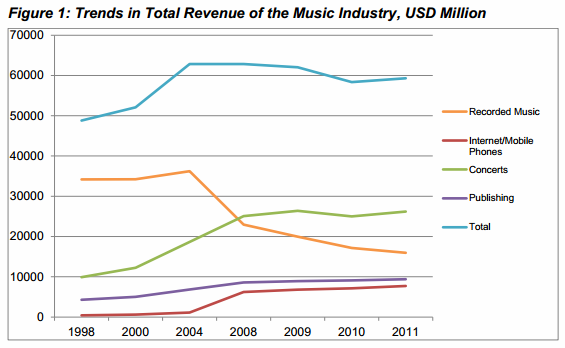
“Contrary to the industry claims, the music industry is not in terminal decline, but still holding ground and showing healthy profits. Revenues from digital sales, subscription services, streaming and live performances compensate for the decline in revenues from the sale of CDs or records,” says Bart Cammaerts, LSE Senior Lecturer and one of the report’s authors.

The report shows that the entertainment industries are actually doing quite well. The digital gaming industry is thriving, the publishing sector is stable, and the U.S. film industry is breaking record after record.

“Despite the Motion Picture Association of America’s (MPAA) claim that online piracy is devastating the movie industry, Hollywood achieved record-breaking global box office revenues of $35 billion in 2012, a 6% increase over 2011,” the report reads.

Even the music industry is doing relatively well. Revenue from concerts, publishing and digital sales has increased significantly since the early 2000s and while recorded music revenues show a decline, there is little evidence that piracy is the lead cause.

“The music industry may be stagnating, but the drastic decline in revenues warned of by the lobby associations of record labels is not in evidence,” the report concludes.

Piracy Isn’t Killing The Entertainment Industry, Scholars Show [Ernesto/TorrentFreak]


04 Oct 11:33

Top 10 Android games this week: Pocket Trains, Arrow Mania, Transport Tycoon

by Steve Raycraft

Welcome back to Android Gaming Weekly, our weekly recap on new game releases. We still plan to cover upcoming releases and games we’re playing, but this column is dedicated to new games you can install and start playing right now. Check out our top picks and let us know if you have any suggestions for next week in the comments below.

Gangster Granny

Description: Follow Gangster Granny on her journey to rob the biggest bank in city and defeat anyone who tries to stop her! Someone once told me, that some time ago in some place far away, there was this Old Granny. For some reason she was called Gangster Granny. Not so much for her connection with mafia families, but for her terrible deeds.

Sir! I’d Like To Report A Bug!

Description: After some new prototype tech goes screwy and causes bugs to escape into the world, only one man can save the day. That man is a Reggie! An average, couch potato QA Tester with no talents what so ever!

Super Crossfire

Description: Old-school action meets dazzling graphic and energetic beats in Super Crossfire. Blast alien invaders while warping across the screen with an effortless tap. Unlock upgrades and acquire advanced power-ups as you seek to obliterate wave after wave of enemies.

Look Out Below!

Description: A retro 1950s styled, side scrolling 2.5D test of reactions, timing and tactics, ‘Look Out Below!’ sets the challenge of keeping a damaged plane in the air by dumping its cargo in mid-air. Land the different types of cargo in safe spots whilst maintaining altitude to avoid low-lying obstacles!

Arrow Mania

Description: A new free original crossbow archery shooting game with birds you really don’t want to shoot; they get angry! Fun and addicting with puzzles and arcade action. Move your crossbow through the scrolling levels, aiming and shooting arrows at targets, planes, balloons and more.

Offroad Kings

Description: One of the most addictive physics-based driving games is finally here! Offroad Kings gives you a challenge like you’ve never seen before, thanks to dynamically adjusting terrain to maximize your experience. With all the cool stuff and features, you will never end up getting enough!

Pocket Trains

Description: From the creators of Pocket Planes comes Pocket Trains! Manage and grow multiple railroads by hauling important cargo around the world. Collect parts to construct all the different train types from Steamers to Diesels, and complete daily events to unlock special trains beyond imagination!

Mazes & Monsters

Description: Take control of the Hero of destiny and explore Dungeons, fight monsters and collect treasures! As you progress you’ll gather new weapons and items to help you on your quest. Not up for fighting through a dungeon? No problem, get yourself a fishing pole or a Bow and take part in some of the mini games in town.

Transport Tycoon

Description: Transport Tycoon contains everything that made the original PC game an all-time classic, plus a whole host of brilliant new features – bigger, richer worlds, deeper simulation and a huge variety of land, sea and air vehicles. The intuitive new touch screen interface makes it easier than ever to build and maintain your transport network.

Split My Brain

Description: Two cubes In Split My Brain represent of your left and right brain lobs. If necessary, in order to reach to the finish, you can split your brain from each other, and control them one by one or coordinated together.

COMING SOON

03 Oct 22:07

Facebook Home opens up to show media from Flickr, Tumblr and others

by Andrew Martonik

Facebook Home

Multiple content sources can now populate your home or lock screens

Facebook is rolling out a new feature to its Android beta testing group that enables the ability to add other media content sources to Facebook Home or your lock screen. The ability to set Facebook Home as just your lock screen and not primary launcher isn't new, but being able to customize what media sources populate it is. Now when setting up Home, you can choose to sign in and add Flickr, Pinterest, Tumblr and Instagram accounts to the service.

After setting up your accounts, you will now see a mixture of photos from all of the services you've selected on your lock or home screens, rather than just content from your Facebook friends. You'll be able to "like" or comment on the pictures and simply hit the "view on" button to open the media in your browser as well.

read more


03 Oct 22:00

Twitter Files For $1 Billion IPO, Will List As TWTR

by Matthew Panzarino
Screen Shot 2013-10-03 at 2.23.43 PM

Twitter has just filed for its long-anticipated IPO. The company is looking to raise $1 billion in this initial offering, which is set to mint many millionaires among shareholders and founders like Ev Williams, Jack Dorsey and Biz Stone. Currently, the filing does not list a valuation, and sources are saying that’s because they have yet to determine one.

Twitter’s revenues have been revealed for the first time, as well. Revenues for 2012 were $316.9 million, for a loss of $79.4 million and in the first half of 2013 they’ve already earned $253.6 million for a loss of $69.3 million. That’s just above estimates from last year but well below tracking of over $600 million for the year. Overall, Twitter has lost $418.6 million since it began.

Twitter will be offering up 472,613,753 shares of stock in this initial release. Twitter says that it currently has 218.3 million monthly active users, and those users have created over 300 billion tweets. That MAU number is significantly lower than many had expected at this point as they announced that they had 200 million MAUs in December. Twitter says that it delivers over 200 billion tweets per day.

Twitter says that 75 percent of its MAUs access the service from mobile devices (that’s 161.25 million) and that 65 percent of all of its ad revenues come from mobile. This marks a big contrast to Facebook, which had no revenues in mobile at all when it filed for IPO.

Twitter says that in the second quarter of 2013 there were approximately 30 billion ‘online impressions’ of tweets off of its properties. The companies’ current estimates put spam accounts at under 5 percent of MAUs, but says that this may not be accurate.

On the employment front, Twitter says that it has gained over 900 employees in the year since June 2012, an increase of 90 percent. It currently employs over 2,000 people.

Twitter’s IPO has been a hotly anticipated event for some months now, with news of Twitter’s “secret” filing coming via a tweet last month. The stealth filing was made possible by the JOBS (Jumpstart Our Business Startups) act, which allows companies with less than $1 billion in revenue to file for an IPO without exposing the details immediately.

Twitter lists a number of risk factors in the filing, noting that the business could be harmed if “influential users, such as world leaders, government officials, celebrities, athletes, journalists, sports teams, media outlets and brands or certain age demographics” conclude that an alternative product or service is more relevant; they are unable to convince potential new users of the value and usefulness of our products and services; or they are unable to combat spam or other hostile or inappropriate usage on the platform.

Image Credit: Lisa Cee


03 Oct 16:51

The iPhone 5S Motion Sensors Are Totally Screwed Up

by Mario Aguilar on Gizmodo, shared by Whitson Gordon to Lifehacker

The iPhone 5S Motion Sensors Are Totally Screwed Up

Since the iPhone 5S landed in the hands of new owners a few weeks ago, there have been reports that on-board sensors like the gyroscope, compass, and accelerometer haven't been working properly on some devices. We've confirmed the new iPhone's failings on our own. It's not just off. It's embarrassing.

We tested two iPhone 5S units running the latest version of iOS 7 against the iPhone 5, as well as against real-world measuring tools to find out if the new iPhone's sensors are off, and if they are, by how much. In most cases, we used the iPhone's built-in iOS 7 apps for measurements, working under the assumption that Apple would properly calibrate its hardware to work with the software of its own design. We were wrong.


Level

The iPhone 5S Motion Sensors Are Totally Screwed Up

In the GIF and still image above, you see a pretty dramatic illustration of the difference between the iPhone 5S internal inclinometer readings and a real measurement of inclination. A simple Stanley spirit level tells the whole story: The iPhone 5S level readout in the iOS 7 compass software read 2-3 degrees off in our tests, while other users are reporting that the level is off by as many as 4-6 degrees. We performed the same test with an iPhone 5, and readout was almost perfect, indicating that hardware is at least partly the culprit. That also means a fix might not be as easy as an OTA firmware update.

The iPhone 5S Motion Sensors Are Totally Screwed Up

We also tested the level using the free iHandy Level app to similar results. In all cases, we were sure to keep the side of the iPhone flush to the level.

Two degrees might not seem like much, but it's actually a reasonably big deal. If you use this level to set up shelves (or tackle any other home improvement gig) you'd end up with a mess.


Gyroscope

The iPhone 5S Motion Sensors Are Totally Screwed Up

As with the simple inclinometer measurements, the iPhone 5S gyroscope readings show a discrepancy between the iPhone 5 and iPhone 5S. This shouldn't be a surprise since it's the same piece of hardware as the inclinometer, just with an added third dimension. Above is what happened when I tossed both phones on a level table. The iPhone 5 reads level, while the iPhone 5S reads -3 degrees off level.

The iPhone 5S Motion Sensors Are Totally Screwed Up

Why does this matter? Because a wonky gyroscope is going to totally screw up gaming. Check out the drift when I'm playing EA's Real Racing 3. The green light flashes, the car goes left. The phone is still and level.


Compass

The iPhone 5S Motion Sensors Are Totally Screwed Up

The compass is a little more challenging to test, because the numbers on both the iPhone 5 and iPhone 5S tended to jump around bit. After getting the readings steady, though the two phones consistently measured 8-10 degrees apart. It's also worth noting that on the iPhone 5S, the compass application was prone to either freezing up or giving wonky readings that could only be fixed by killing and restarting the app.

The iPhone 5S Motion Sensors Are Totally Screwed Up

When comparing the measurements against an actual compass, neither iPhone's compass points to the same magnetic north as the real tool; however, the iPhone 5 clearly has a more accurate measurement.

This compass shortfall won't have you confusing east from west when you get out of the subway. But for more detailed mapping and way-finding apps, a 10 degrees disparity could impact what an app thinks you're doing and which way you're going. You probably shouldn't be using an iPhone compass to navigate the woods or set your course at sea anyway—but, yeah, don't do that.


Accelerometer

The iPhone 5S Motion Sensors Are Totally Screwed Up

We did a brief test on the new iPhone's accelerometer data, and preliminary results seem to indicate that the 5S is registering way more latent motion than the iPhone 5. The above images show the readouts from the accelerometers of both phones sitting flat on a level desk. Our testing isn't conclusive here, but it's worth noting because the discrepancy is in line with those seen in tests of the other sensors.

Again, you can expect this to screw up gaming as well as readings on motion-based exercise apps, an especially unfortunate byproduct given how heavily Apple hyped its activity-tracking M7 processor (more on the hardware implications below).


What's going on, and what's the fix?

The faulty measurements from the iPhone 5S could either be a hardware problem or a software problem, and if you read through the experiences of users in the extensive MacRumors thread on the topic, there's an argument to be made for both.

The problem seems to be incredibly widespread, but it also affects different phones in different ways. If it were consistent across the board—for example if the compass was 2-degrees off for everyone—then it would be easier to pin the blame on iOS 7. The solution to the current sensor woes, then, could be as simple as a firmware fix to make the calibration more accurate.

As richard371 in the MacRumors thread points out, though, the inconsistency of the problem suggests—and the fact that it doesn't show up on an iPhone 5 running iOS 7—that the hardware isn't being properly calibrated in the factory, and that means that there are millions of phones out there that might never be exactly right. That's a huge problem. (Some users have reportedly had luck taking their phones back and swapping them for others—but just as many users report making the exchange and getting another malfunctioning unit.)

If it's indeed an underlying hardware problem, Apple will probably quietly resolve the issue with a tweak on future production units of the 5S, which still leaves millions of potentially defective units in circulation. It's possible that Apple could push a calibration tool or software fix that accounts for the inconsistent hardware performance in existing handsets, but it's very unlikely that the company will take all of these phones back (or that enough people will notice/care enough to get a new one.

Either way, it's a problem, whether you're a gamer, a home-improver, or someone who just wants their phone to work as advertised out of the box.

Photos by Nick Stango

03 Oct 13:16

[New Game] Transport Tycoon Pulls Into The Google Play Station Right On Time

by Ryan Whitwam

xThe trains are running like clockwork today with the release of Transport Tycoon exactly as promised last month. This touch-friendly update of the classic PC simulation title gives you the opportunity to become the transit baron you always knew you could be. All it takes is $6.99 to get started.

The Android port of Transport Tycoon is a faithful remake of the PC game originally released in 1994. It all starts in the 1930s with a couple old steam engines and a dream.

Done With This Post? You Might Also Like These:

[New Game] Transport Tycoon Pulls Into The Google Play Station Right On Time was written by the awesome team at Android Police.


03 Oct 13:15

TunnelBear Adds Privacy Protection, Always On Security for PC and Mac

by Alan Henry

TunnelBear Adds Privacy Protection, Always On Security for PC and Mac

Windows/OS X: Tunnelbear, one of our favorite VPN services for accessing blocked content overseas, just updated to roll in new security tools that protect your privacy and stops everyone from tracking you, as well as get you around location restrictions on streaming media.

The new Tunnelbear takes a page from our favorite privacy protecting browser extension, Disconnect, and now gives you control over the tracking cookies, scripts, and other elements on the sites you visit and whether they're active or disabled. You can see what's on every site browse to, disable trackers and buttons or widgets for Facebook, Twitter, Google+, or LinkedIn, and more. Even third-party applications are blocked—or allowed, whichever you prefer.

TunnelBear also now keeps an eye on your browser security. If your VPN connection drops, the app acts like a mini version of HTTPS Everywhere and shunts all of your traffic to HTTPS so anyone snooping on your network (especially useful if you're using open public Wi-Fi and TunnelBear is your VPN) can't get access to it. In addition to all of these new features, the TunnelBear team note their tool is faster to start up and connect, and blend in with your everyday activities—plus, even though there are tons of new features, there's still a simple "on/off" switch you can use to connect to or disconnect the VPN. Hit the link below to give the new version a try.

TunnelBear

03 Oct 13:13

Top 10 Android apps from last week

by Steve Raycraft

Every week we cover new Android apps with Fresh Meat on Wednesday, followed by Android Gaming on Thursday and Top 10 app updates on Friday. On Mondays we look back to see which ones were the most crowd-pleasing among our audience. Read on for the 10 most popular Android apps among your peers from last week.

1. SAO Launcher

SAO Launcher

SAO Launcher is a unique system menu that resides over your apps to provide quick access to applications.

2. Frozen LED

Frozen LED

Frozen LED changes the color of your notification light based on the type of notification.

3.  Focal(Beta)

Focal

Focal is the official version of the former Cyanogenmod camera app.

4. Moves

Moves

Moves is another great app for tracking your daily activity including steps taken and distance traveled.

5. Quickoffice

Quickoffice

Quickoffice is now free to all Android users and includes additional Google Drive integration.

6. Today

Today

Today is a beautiful set of calendar widgets for your device including Agenda and Month views.

7. Evomail

Evomail

Evomail is an alternative to the stock mail client with support for Gmail, Yahoo and other email accounts.

8. LG G2 Emulator

LG G2 Emulator

Those of you debating about purchasing an LG G2 can get a peek at the interface with the LG G2 Emulator.

9. Autodesk FormIt

Autodesk FormIt

Autodesk FormIt is a great tool to digitally capture building design ideas.

10. Anchor by Tomfoolery

Anchr by Tomfoolery

Anchor is a solid app to help your organize team projects.

Note:  To ensure apps receive a fair chance to make the list, we will retire any app that has made the list for 3 consecutive weeks and will place it in our Android and Me App Hall of Fame. We will post this Hall of Fame list every 3 months in a dedicated series.

03 Oct 13:13

Fresh Meat: 10 new Android apps worth checking out

by Steve Raycraft

New apps need lovin’ too, right? Every day there are thousands of new entries on the Google Play store, but many go unnoticed and never receive the attention they deserve. We’ve shown in the past that this community can discover great apps and launch them to new heights. Our weekly column Fresh Meat highlights new apps with less than 100k installs. Browse our new Android app picks below and let us know which ones you enjoy.

Camera Block

Camera Block

Description: Camera Block • Simple one click blocking / protection of your phone camera. App temporary turn off or register and block all camera resources and disable access to camera to other apps and whole Android system. [sic]

Quicken 2014

Quicken 2014

Description: Quicken 2014 is the free companion app to Quicken 2014 for Windows desktop software. The Quicken app syncs your Quicken 2014 desktop information to your Android mobile and tablets, so you can make smart decisions about your money no matter where you are.

Edge: Quick Actions

Edge_QuickActions

Description: Discover the power of multitasking with Edge quick actions! Access quick settings and toggles and switch between recent apps, all with a single touch.

Chronus

Chronus

Description: Functionally the same as the Cyanogenmod cLock widget and brought to you by the same developer, this independently released, standalone widget takes back its original name, Chronus, and brings the same elegant look and feel to the broader Android community.

AOL: News, Mail & Video

AOL_News

Description: Browse the latest news stories and top videos along with quick access to your AOL Mail inbox. Stay up-to-date with everything that matters most to you.

PaperBoy – Feedly News Reader

PaperBoy

Description: Paperboy is designed keeping one thing in mind – “Make reading enjoyable”. With over 25 million feeds to choose from , you’ll always be able to find what you are looking for. It also lets you add your own sources.

Mobie

Mobie

Description:  Mobie is a powerful yet simple application that delivers a new level of self-care and resolves most Android device health and performance problems leading to a better overall user experience.

Receipts

Receipts

Description: The app Receipts makes it easy for you to organize and store your receipts neatly, and it also helps you keep track of the money you spend.

To.Do

To_Do

Description: To.Do is the easiest way to keep track of your repetitive daily, weekly, monthly or one-off tasks.

Price Reminder

Price Reminder

Description:  Price Reminder stores product prices so you can recall prices at a later date. Price Reminder is based on crowdsourcing where prices entered by you are shared with other users and vice versa, so everyone benefits. Price Reminder can also be used as a shopping list.

03 Oct 13:12

My Color Screen’s Themer enters closed beta, we go hands on

by Dustin Earley

When My Color Screen announced Themer, its new app aimed at taking care of all the heavy lifting when applying in-depth themes to your Android device, it received a lot of attention. If anyone could make customizing your phone better, it would be My Color Screen. Well Themer has finally entered closed beta on Google Play, and we’ve had a chance to play around with to see just how good it is.

Before we get into actually using Themer, let’s talk for a very brief second on how it works. Themer essentially operates as a replacement launcher — much like Nova or Apex. Nothing is changed on the default launcher when applying themes. In order to make these crazy themes work, Themer uses a bunch of custom widgets made up of different fonts and pictures, full of different links and buttons.

The Themer launcher takes care of all the widgets, icons and wallpapers in a couple seconds from start to finish. You don’t have to do anything. You can export the themes to do some intense tinkering, or you can edit them as they currently sit as your new theme. You can customize a lot from the theme, but it’s really unnecessary. Since this app is already tailor-made for the lazy customizer in all of us, everything is set up to go.

Now, on to using Themer to customize your device. I’ll make this painfully simple: Themer is so easy to use, anyone could do it. I could end the hands-on here. All you do is pick a theme from a visual list, apply it, and you’re done. Every theme I tried worked well right from the get-go. In fact, I’d almost recommend not messing around with anything. Things get overly complicated when you start to mess with the custom widgets and the layout. Besides, if you wanted to do all that, you’d just make these themes by yourself, right?

As for the rest of the app, there’s not a whole lot to talk about. The settings menu is pretty limited, though is it easy to edit icons from there. You can favorite themes or search for themes. You can mess with folders, the desktop and the dock. But again, all of that’s unnecessary. If you take away one thing from this brief hands-on, make it this: Themer is very easy to use. It works exactly like you think. Apply the theme, and use it. I know I keep repeating myself on this, but it’s all I can think about while using the app. “I can’t believe how easy this is! It really does work.”

If you can get in on the beta, I highly recommend it. If you can’t, don’t worry, we’ll let you know when it’s available for everyone. With how well it works, I wouldn’t be surprised if that was sooner than later.

Gallery

themer-featured Screenshot_2013-10-02-13-25-03 Screenshot_2013-10-02-13-25-06 Screenshot_2013-10-02-13-25-10 Screenshot_2013-10-02-13-25-13 Screenshot_2013-10-02-13-25-17 Screenshot_2013-10-02-13-25-28 Screenshot_2013-10-02-13-25-34 Screenshot_2013-10-02-13-28-21

03 Oct 13:02

Patent troll Lodsys backs out of lawsuit at last minute to avoid a ruling on its claims

by Casey Newton

Notorious patent troll Lodsys abandoned a lawsuit on the eve of a trial rather than face the possibility of losing on the merits of his claims, according to the defendant in the case. Security firm Kaspersky Labs, one of dozens of defendants in Lodsys' two-year-old lawsuit over claims related to in-app purchases, said in a blog post today that Lodsys settled its claims without winning any concessions from Kaspersky. "Churchill was right: 'Never give up,'" company founder Eugene Kaspersky wrote. "We’ve followed his advice in our fight against a particular troll. As a result the troll gave up and ran away with nothing and its tail between its legs."

Continue reading…

02 Oct 19:29

Samsung's Clone Of Google's App Store Now Takes PayPal

by Dan Rowinski

Samsung has tapped PayPal to process payments for apps, music, books and video through Samsung Hub, the company’s clone of Google's own app-and-media store, Google Play. PayPal will be an option for both developers and consumers on Samsung devices.

The companies present the partnership as a meeting of behemoths. Samsung touts its 30% global market share in smartphones while PayPal claims that it will do $20 billion in “mobile” payments this year, up from $14 billion last year.

PayPal, however, likes to stretch the definition of mobile payments with these types of numbers. PayPal’s mobile payments are more like online payments that originate on a mobile device, not so much smartphone-based payments for physical goods in brick-and-mortar stores. (Though it's trying hard to expand on the latter.)

Samsung also has its own digital wallet—the Samsung Wallet—that's similar to the PayPal app, the Square Wallet and Apple’s Passport app, that can store tickets or membership cards.

Samsung continues to try to differentiate its App and Hub products on its devices. Developers can port their existing Android apps from Google Play to the Samsung Hub or build apps directly for Samsung. Samsung is holding a developer conference later this month in San Francisco for app makers interested in building specifically for its devices. 

PayPal for Samsung Apps and Samsung Hub will launch first in Australia, Italy, France, Germany, Malaysia, Singapore, Spain, United Kingdom. Integration for the United States is promised soon. 

02 Oct 16:23

Author Tom Clancy dead at age 66

by Adi Robertson

Tom Clancy, the bestselling author whose works were the basis for countless film and video game adaptations, has died at age 66, The New York Times' Julie Boseman reports.

Continue reading…

02 Oct 11:45

Banksy launches New York City street art show with satirical cellphone audio tour

by Jacob Kastrenakes

New works from the legendary street artist Banksy are on their way to New York City. Beginning today, Banksy will be holding a month-long show — which he's calling Better Out Than In — on the city's streets. His first painting is already up, and features two young boys reaching into a sign that reads, "graffiti is a crime." According to the Village Voice, the work is located in Chinatown. Those who can't make it into the city can see the painting up on Banksy's website though.

Continue reading…

01 Oct 12:45

GoPro debuts smaller, more wearable cameras with improved optics

by Aaron Souppouris

GoPro has refreshed its line of wearable, mountable cameras, making them smaller, lighter, and generally improving their specs across the board. The new Hero3+ series consists of a trio of cameras, all three of which are smaller than the outgoing Hero3 cameras. The Hero3+ Black Edition is the company's new flagship. Priced at $399, it features reworked optics for what GoPro calls a "far sharper" picture, a new 16:9 SuperView mode, and faster wireless connection.

GoPro also claims improved low-light performance with the Black Edition thanks to a new feature that automatically adjusts the frame rate while you film. It's 20 percent smaller than the Hero3 Black Edition, and battery life — an important spec given the camera's use-case —...

Continue reading…

01 Oct 12:32

43 Best (And 1 WTF) New Android Games From The Last 2 Weeks (9/17/13 - 9/30/13)

by Jeremiah Rice

gameroundup_icon_largeWelcome to the roundup of the best new Android applications, games, and live wallpapers that went live in the Play Store or were spotted by us in the previous 2 weeks or so.

This edition focuses only on new games. The app roundup is coming up soon.

Please wait for this page to load in full in order to see the AppBrain widgets, which include ratings and pricing info.

Looking for the previous roundup editions?

Done With This Post? You Might Also Like These:

43 Best (And 1 WTF) New Android Games From The Last 2 Weeks (9/17/13 - 9/30/13) was written by the awesome team at Android Police.


01 Oct 12:31

Samsung Galaxy Note 3 review (European version)

by Alex Dobie

Galaxy Note 3

Samsung’s beastly third-generation Note handset is everything a big-screened Android phone should be

For better or worse, we’re now surrounded by Android smartphones with enormous displays. Most of the major manufacturers have flagship phones with screens measuring around, or slightly above, the five-inch mark. But it wasn’t always this way. Thinking back to our time with the first Galaxy Note some two years ago, what stood out was just how weird it felt to use such a large, unwieldy handset. The original Note was brilliant from a technical standpoint, but also expensive, bulky and the wrong shape for comfortable one-handed use. Not to mention the fact that the Android of 2011 simply wasn’t ready for this kind of device. We weren’t convinced this new category of smartphone-tablet hybrids would take off. How wrong we were.

The Galaxy Note sold tens of millions of units, and so did the Note 2. And today Samsung’s Note series phones can be spotted in public just as frequently as many others. So as another year of the smartphone release cycle draws to a close, it’s time for a third Galaxy Note. This year devices like the Galaxy Mega and Xperia Z Ultra have challenged the boundaries of what can reasonably be called a smartphone, and so you might think that Samsung would drift towards the six-plus-inch mark. However what we saw at IFA 2013 a few weeks ago wasn’t some pocket-stretching behemoth. The Galaxy Note 3 was thinner and lighter than the Galaxy Note 2, with a larger screen in the same physical footprint. It seemed a measured response to a market obsessed with ever-increasing screen sizes.

But other manufacturers have taken notice of Samsung’s success in this area, and there’s more competition than ever for the Galaxy Note this time around. Sony and LG already have devices on the market, and HTC is widely expected to launch a 5.9-inch phone of its own in the weeks ahead. So is the Note still the best device out there for buyers seeking that perfect balance between smartphone and tablet? Find out after the break, in our definitive review of the Samsung Galaxy Note 3.

read more


30 Sep 20:38

IKEA selling solar panels

by David Pescovitz
IKEA has now started selling solar panels in the UK. According the Associated Press, "a standard, all-black 3.36 kilowatt system for a semi-detached home will cost 5,700 British pounds ($9,200) and will include an in-store consultation and design service as well as installation, maintenance and energy monitoring service." Feel free to suggest funny faux-Swedish product names in the comments.


30 Sep 11:43

Tesco Hudl tablet now available in the UK

by Alex Dobie

Hudl

£119 budget tablet launches on supermarket's online store

The Hudl, UK supermarket Tesco's low-cost Android tablet, is now available to buy from the official website, at tesco.com/hudl. The tablet sells for £119, packs a 1.5GHz quad-core CPU, a 1440x900-resolution display and Android 4.2.2 Jelly Bean — in addition to coming in four color options.

In accordance with last week's announcement, the Hudl should also start popping up in brick-and-mortar Tesco stores from today. For more info on the tablet, check out our hands-on coverage from last week's launch event.

Source: Tesco


30 Sep 11:34

What Games Are: Steam's Big Bet

by Tadhg Kelly
Screen Shot 2013-09-29 at 11.12.11 AM

Editor’s note: Tadhg Kelly is a veteran game designer and the creator of leading game design blog What Games Are. You can follow him on Twitter here.

There had long been hints that Valve was up to something. Hints like Gabe Newell decrying the state of Windows 8 and speaking in favor of Linux. Hints like Big Picture, the TV-like dashboard. Hints like the Xi3′s boxy little machine. With new consoles and microconsoles starting to pop into existence, this week Valve finally revealed its answer: SteamOS. Steam Machines. Steam Controllers. Boom. Its ambitions are not to launch a console but a whole solution for home gaming entertainment.

In a sense it has to.

Valve’s Problems

For Valve and many other studios the decline and fall of the PC is a slowly dawning apocalypse. Sales of gaming PCs may be up while the rest of the market is down but there’s a point at which the support that comes from the wider PC ecosystem starts to dwindle. Perhaps video cards start not keeping pace. Perhaps driver software becomes less updated. Perhaps commoditized components stop being cheap and PCs become much more expensive. The knock-on effects of this decline could wipe out Valve, Blizzard and a number of others.

However Valve’s second, and largely unique, problem is that a recovery in the PC space implies tighter integration of the platform by Microsoft. With the purchase of most of Nokia and a search for new leadership underway the Wyrm may finally be starting to turn at Big-M. Windows 9 (or 8.5, or whatever) may well turn things around. If it does though it will be for a Microsoft that’s far more interested in device-and-service thinking. It will mean more prominence for the Windows Store. It doesn’t compete much with Steam today but one day it will.

Finally Valve’s third problem is its ecosystem. It has a massive following of both players and developers. Steam is perceived as art house venue of games and every indie wants to be there. That ecosystem has evolved hand-in-hand with the PC paradigm since its inception and is resistant to fundamental change. Steam’s adoption took forever and required deeply discounted sales to overcome suspicions. Nowadays it’s huge but that doesn’t mean its audience is ready for a big shift.

These problems have essentially defined Valve’s next generation solution, but they breed problems of their own.

SteamOS

A few weeks ago at LinuxCon 2013, Gabe Newell gave a talk about the future of Linux as a gaming system. Obviously this was something of a preach-to-the-choir crowd and so the talk was warmly received, but outside of its domain does anyone really care? Linux may be powerful but it’s also geeky. Getting into it requires rolling up your sleeves and doing some digging. It’s cool for motivated people but for everybody else (even the comparatively savvy gamer crowd) it’s a chore. This is why, although it has had Linux support for a while, Steam is still largely a Windows client in most people’s eyes. It’s just easier to make and run games in Microsoft’s house.

With SteamOS Valve is trying to be the Android of the game consoles, to do the hard work of taking a cool kernel and make it user-friendly. The company sees itself as providing a nexus solution to everyone’s problems, and maybe even harboring hopes of Android-sized success. Manufacturers can use SteamOS as the core of a gaming deck that they would then sell, creating a class of home-hub devices that would be a bit like consoles but also their own thing. There would be choice and range in the market yet a common platform to power them all, much like today’s PC. And there would be neat features like streaming games across your home network. Like an Apple TV and iTunes.

Sure, but the big problem with that vision is developer support. The majority of games in the Steam catalog are old, all created for the Windows PC paradigm. They’re built to work with mouse, keyboard, DirectX or OpenGL and so on. Support for updating them to work on modern Windows machines is hard enough, but to shift platform? Many don’t.

As an anecdotal example, I own about 150 games through my Steam account. Only about half of them work with Mac. The other half are either pending support or simply won’t ever have it. The Mac is arguably much more stable and better supported than Linux PCs tend to be, and yet plenty of game makers are not bothered. They can’t make the business case for it to be worth the effort. So what hope does Valve have of convincing risk-averse game developers to create full ports of existing games for SteamOS? Or even convincing them to make original games designed specifically for the OS?

On the face of it, very little. Game makers tend to be look-before-you-leap types (as I have often argued, to their cost) which means new platforms often have to deal with chicken/egg paradoxes. You can’t get interest in your platform without great games, and you can’t get great games on your platform without proving it has significant interest.

For non-dedicated gaming platforms like PCs, iPhones and Facebook this problem tends to resolve on its own because so many people buy into the platform for other reasons that game makers overcome their skepticism. However dedicated platforms usually have to solve it by opening their wallets. That billion dollars that Microsoft is ploughing into Xbox One for game development? This is why.

If a platform essentially offers to pay game makers enough to make it worth their while, they’ll dive in. But is Valve really willing to do that? Sure it has its own key franchise in Half Life 3, but I seriously doubt it will make the mistake of making that game Steam Machine exclusive. If it is relying on providing the platform and then hoping developers will support it, it will need to sweeten that deal somehow.

Steam Machines

Irrespective of the support question, the strategy of being the Android of game consoles reminds me of Microsoft’s Windows Media Center adventure. The basic gist of WMC was a mini-PC sitting under your TV and acting as a powerful hub for all your entertainment. It was primarily for movies and recording TV but had other conceivable uses too, such as games.

This idea has always been compelling to some people yet it’s never really taken off. One reason is that the hardware has sucked. It’s been expensive, underpowered and far more fiddly than it was supposed to be. The living room is not the desktop and does not induce nearly as much tolerance for messing around to make something work. Does anyone really want to have to faff about with their home hub while their family looks on? People want a product that they are confident will not be like that.

Existing console platform manufacturers tend to shy away from multiple-manufacturer ideals for precisely this reason. Similar to the difference between today’s iPhone and Android, working with partners tends to detract from control over the user experience and leads to fragmentation. Standards can not be enforced nor compliance ensured. The cognitive load that this places on the user is high, which the user then finds discouraging. The guarantee that every game will just work can not be assured.

So one of my big fears for Steam Machines is that the balance of power between Valve and its partners will favor the partners. The partners may want, for example, to bundle their own dashboards in their machines and develop their own brand relationship with their customers. We see that happening all the time on Android, so why not SteamOS? All that deluded cruftware that you get when you buy an OEM PC? Imagine that under your TV.

My second fear is that Steam Machines will turn out underpowered. Valve may want them to be top-notch but partner manufacturers often have to rationalize the cost of production and shave a bit here and there to make a profit. Ecosystem-led approaches tend to result in halting periods of innovation as a result. For some audiences this wouldn’t be a problem, but for PC gamers it is. The perception of being behind is not one they enjoy.

Look at Microsoft’s attempts to make Windows-powered tablets and phones work. For years the idea was to partner with everyone and let hardware sort it out, as it had in PC. The result was years of bad Windows Mobile phones and awful touch PCs. Instead the company had to pivot from software to devices and just make the units themselves (or with Nokia). It had to because it’s in the nature of OEMs to sit back and make smaller innovations with low-powered (and often just crappy) tech. But to compete with iPad Microsoft needed something much bolder.

While they may have their flaws, one thing that Xbox One and PlayStation 4 will be good at is delivering super-lush (and reliably so) games. Like the Surface or the iPad, the vertical control over the platform has a lot to do with that. I suspect a similar story will play out for Steam Machines, and that Valve will eventually conclude that it should just make its own. It goes against the DNA of the company in many ways (it’s used to working with lots of others) but still.

My biggest fear for Steam Machines, however, is price. Sony is able to sell PlayStation 4′s for $400 because it’s taking a significant cut from each game. The console is probably being sold at cost price, or even below, because higher prices tend to make customers queasy. Unless a platform has a deeply held marketing story of being much better (say Mac vs PC) then it can be very hard to make a case to customers that they should pay more.

I just have a hard time believing that there are many gamers out there willing to spend $900 on a console, when one of the big cheering points of PS4 vs Xbox One was the $400 vs $500 starting price. Gamers who want big games will be able to buy a dedicated console for half my guesstimated price of a good Steam Machine. Meanwhile the ones who want indie or casual games will be able to buy something an OUYA for $100. All in all I think this hub strategy means Valve’s primary customers for Steam Machines will be the people who are already invested in Steam, and only a subset of those who haven’t already shelled out a couple of grand on a big PC gaming rig.

Which leads me to…

Steam Controller

For a long time I’ve wondered who would properly reinvent the modern joypad and do something cool with it. Joypads have been ungainly multi-pad multi-button affairs for a long time, holding on to legacy features like D-pads long past their sell-by date. So I love the idea of the Steam Controller. While the initial renders of it look kinda kooky, I’m excited.

And yet: Do PC gamers want to move away from their mice and keyboards? Irrespective of the problems looming over the PC landscape and how they might be an issue for game makers down the tracks, don’t people who go out and buy gaming computers do so because they like to game on computers? Do they actually want to go console at all? Joypads have been available for PC forever yet haven’t ever really made the leap into being considered a part of the default spec. They still lack support in many games, and there’s a strong resistance to them from the pre-existing community. It simply believes M+K to be best, and for many types of game it is.

And also: Do PC gamers want to move out of their bedrooms and into the communal living room? The guy who plays MMOs night after night in private doesn’t necessarily want to do that in shorter bursts on TV because his family wants to be able to watch Netflix. The quirky indie fan might prefer the experience of being absorbed in Amnesia: A Machine for Pigs by a screen close to her face. Closer screens blot out the world more effectively than the at-a-distance feel of TV gaming.

Admittedly that’s a somewhat archaic view of modern family life, yet one that still makes me ponder. While it is possible to cross-sell users from one platform to another (Apple and Nintendo do it all the time), with PC gamers there’s often a component of the deliberate choice. They have often played many a console game (such as the good folks at Rock Paper Shotgun) but ultimately decided they preferred computer gaming. They are the reason why gaming PCs boom as all other PCs fall.

So I just don’t know that joypad gaming will ever be for them.

Streaming and Funding

Valve’s biggest asset is the legion of fans willing to give Gabe the benefit of the doubt. That’s no small thing. It’s other big asset is its methodical approach and willingness to keep driving at a problem until it’s solved. It did it with Steam, turning a much-hated e-commerce barrier into a thriving community over the course of half a decade. So while I may have questions over what the company has recently announced, I firmly believe that it will answer them in the long term.

Steam Machine’s likely success comes down to the price of the consoles and the support of game makers. This is why perhaps the most interesting announcement from all of this week’s news was game streaming. You’ll be able to stream your Steam games to your SteamOS console under your TV and play them across your local network. Hopefully that won’t be as laggy as remote solutions like OnLive turned out to be.

While customers might struggle to buy into the idea of a $900 console, they’d be much more amenable to a $100 Apple TV-sized streaming unit. I could, for example, see a partnership with folks like OUYA to develop a SteamOS player. I could see something similar for Android tablets, particularly if the Steam Controller could be made to work with those systems. Perhaps by doing something in that vein the company could get access to the living room without all the overhead.

And then what about the actual PC? If Windows is slowly sunsetting that doesn’t necessarily mean that the PC form factor will go with it. The PC game player will still want a gaming computer to enjoy her MMOs in her bedroom. While SteamOS has been pitched as more for the living room than the desktop, why not also have a desktop edition?

As for game support Valve has one big advantage that it’s not yet using well. Through efforts like Steam Greenlight Valve has brought its community into the publishing process, which has given many indies exposure. The missing piece, which I’ve previously argued, is crowdfunding. There’s no good reason other than reticence why Steam isn’t essentially the Kickstarter of games (even more so than Kickstarter itself), and if it were then the resulting funds would encourage game makers to get on board with Steam Machine.

If Valve could pin crowdfunding to its new console platform together then the sky could be the limit. However it remains to be seen whether the company is willing to take that step.


29 Sep 20:03

The amazing products of Weird Sony

by Chris Ziegler

For all its successes (and failures) over the decades as a mainstream consumer electronics company, Sony has always cultivated an alter ego — a weird place where crazy, off-kilter designs and product ideas have been allowed to come to market, even when they're anything but a guaranteed commercial success. This is Weird Sony.

To commemorate the launch of Weird Sony's latest products — the QX10 and QX100 lens cameras — we wanted to take a walk back through some of the most amazing, bizarre, and unlikely devices that the company has ever made. Some have helped shape the industry, some have helped shape Sony, and some have simply come and gone. All, needless to say, are weird.

Continue reading…

29 Sep 17:01

Five Best USB Hubs

by Alan Henry

Five Best USB Hubs

There comes a time in everyone's life when they look over their desk for a place to plug in their phone, a new wireless mouse, a portable hard drive, or some other peripheral, only to discover they're out of USB ports. When that happens, it's time to buy a hub—but some hubs are definitely better than others. This week we're looking at five of the best, based on your nominations.

USB hubs come in all shapes, sizes, and types. You can spend a ton and get a high-end USB 3.0 hub with lights and tons of powered ports, or spend next to nothing on a portable USB 2.0 hub you can take with you in your pocket or your go bag. Earlier in the week we asked you which hubs you thought were the best, and here's what you said:

Anker 7-Port and 9-Port Powered USB 3.0 Hubs

Five Best USB Hubs

Anker, the company that earned your praise when we asked about external battery packs, also makes powered USB 3.0 hubs, and they're some of the most highly regarded available. The Anker 9-Port Powered USB 3.0 Hub (shown above) just got a new design, is small enough to go with you in your laptop bag, is backwards compatible with USB 2.0 devices, looks sharp, and sports an additional port just for charging your devices over USB. The hub is also powered, so if you have devices like external hard drives that use USB for juice, they'll work without issue.

However, you'll pay for the good looks and for USB 3.0. The 9-port will set you back $60 at Amazon, and the 7-port model is $50. Make sure you have USB 3.0 devices (and most importantly, a USB 3.0 port on your desktop or laptop) before going in on these ones—they're well designed, portable, and sturdy, but if you're using them for USB 2.0 (and you're not planning an upgrade soon), you're paying for a benefit you won't get. If you like Anker's approach but don't like these models, you can check out all of their hubs here.


Belkin 2-in-1 7-Port USB 2.0 Hub

Five Best USB Hubs

Belkin doesn't list this 2-in-1 USB hub on their site anymore, but it's still widely available. People love it, and for good reason—for your $17, you actually get two USB hubs: a portable 4-port unpowered hub that's perfect for mice, wireless device receivers, USB keys, and other light devices, and then a full 7-port powered hub you get when you dock the 4-port hub into its powered base. The powered base adds three more ports, and even has a little storage up front for paper clips or change, or a place to rest your devices while they're charging or connected to your hub.

The 2-in-1 is a USB 2.0 hub, so you should expect slower speeds if you connect USB 3.0 devices, but if you don't have (or care) about USB 3.0, it's a great and affordable investment. Even the full body, complete with powered base, is small enough to toss in a laptop bag or a suitcase and take on the road with you, but once disconnected, the 4-port mini-hub is small enough to slip into a pocket.


Macally Mini 7-Port USB 2.0 Hub

Five Best USB Hubs

This pyramid-shaped USB hub is simple, affordable, and pretty much delivers what you'd want if you wanted a cheap USB hub that gave you plenty of room to connect dongles, drives, receivers, and other devices. It rests on its side, is small enough to fit in a corner of your desk or right under your monitor, and it'll only set you back $23 at Amazon. If you don't need so many ports, there's a 4-port model for $18. Both models even separate out some of the ports to accommodate large USB devices with a big footprint, so they don't get in the way of the other ports. They each come with their own external power adapter, and can be used in both powered or unpowered mode, depending on what you need.

The Macally Mini 7-Port USB 2.0 Hub is actually a rebranded Trust Pyramid 7-port USB 2.0 Hub, but since it's not widely available anymore under its own name, we decided to stick with Macally's name, especially since you can actually buy the Macally branded version at Amazon. They're simple, space-saving, and they get the job done. Sure, there are no fancy lights or indicators, and they don't support USB 3.0, but they're a great option.


Plugable 10-Port Powered USB 2.0 and 7-Port USB 3.0 Hubs

Five Best USB Hubs

Plugable makes a wealth of PC peripherals, including docking stations, USB hubs, external graphics adapters, and more, and they're almost all budget-friendly for what you get. In this case, the Plugable 10-Port powered USB 2.0 hub earned multiple nominations for being affordable (it's only $25 at Amazon), but also for being portable, and easy to use in small spaces. Two of the four rear ports flip up from the rear of the hub into a vertical position for easy use. Six front-facing ports keep the look slim, and while the hub is powered, Plugable doesn't recommend charging your gear with it. Still, it's a space-saving way to add a ton of USB ports—all powered—to your PC without spending a ton of money.

If you have more dollars to spend and you need USB 3.0 compatibility, a few of you called out Plugable's 7-port USB 3.0 hub, which ships with a 4 Amp power adapter and is ready to fire up your USB 3.0 hard drives and peripherals without hassle. It'll set you back $35 at Amazon, but that's still pretty affordable for a USB 3.0 hub, and as a result it's one of the most popular USB 3.0 hubs at Amazon. Both models are simple black boxes that are small enough to toss in a bag with your laptop, and have blue LED indicators for power or active ports.


Monoprice USB Hubs

Five Best USB Hubs

Monoprice is great for a lot of unexpected things, and USB hubs are certainly one of them. They make a wide array of USB hubs, several of which earned nominations here and there from some of you. I specifically called out the four dollar 4-port USB 2.0 Cube (10065), but others of you mentioned the $14 Aquagate 7-port USB 2.0 powered hub (5328) instead. Both models are tiny enough to go anywhere with you, and while the Aquagate is a powered model, it's still small enough to slip in a pocket without its associated cables.

If you have more to spend, their $27 circular 12-port powered USB 2.0 hub and $40 circular 24-port powered USB 2.0 hub are both perfect for connecting tons of devices to the same PC, and they're still small enough to take with you, even if odds are you won't be taking the devices along with.


That's all there is this week! Now it's time to put them to a vote to determine the Lifehacker favorite.

Honorable mentions this week go out to Dr. Who Tardis 4-port USB 2.0 Hub, which earned a ton of nominations, which we can totally appreciate. There's a special place in my heart for novelty USB hubs and other desk toys, and when we talked about it around Lifehacker HQ, more than a few of us noted that we'd rather have a novelty hub on our desks than a plain black box with nothing visually special about it. Besides, this one's bigger on the inside.

Also worth a mention if you have the type of desk that can support it is the simple grommet USB hub. They come in different types, prices, and from different brands. The one specifically nominated is a USB 3.0 grommet hub that's currently unavailable, but if you have a desk with those circular slots for cable management, a grommet hub may be right for you.

Have something to say about one of the contenders? Want to make the case for your personal favorite, even if it wasn't included in the list? Remember, the top five are based on your most popular nominations from the call for contenders thread from earlier in the week. Don't just complain about the top five, let us know what your preferred alternative is—and make your case for it—in the discussions below.

The Hive Five is based on reader nominations. As with most Hive Five posts, if your favorite was left out, it's not because we hate it—it's because it didn't get the nominations required in the call for contenders post to make the top five. We understand it's a bit of a popularity contest, but if you have a favorite, we want to hear about it. Have a suggestion for the Hive Five? Send us an email at tips+hivefive@lifehacker.com.

Title photo by Clive Darra.

29 Sep 12:59

Legal Movie Site Founder: Don’t Punish Pirates, Serve the Customer

by Andy

Internet users in Spain are very happy to download music and movies without permission, a situation which has led the country to be admonished by entertainment companies and even the United States government.

Recently Spain has been trying to repair its image and last week the government approved a new bill which if passed will see operators of file-sharing sites jailed for up to six years.

While the U.S. will welcome any kind of clampdown, many believe that there is no legislative way out of the problem. Spaniards are used to the culture of copying and site admins will be able to sidestep the new law by moving their operations overseas.

Recently a new and interesting voice has entered the debate. Carles Pastor, a film and TV producer for many years, recently launched a brand new search engine designed to direct Internet users towards legal video content.

At first glance Beodee looks very much like the new wave of torrent and streaming sites, but this site is financially supported by Spain’s Ministry of Education, Culture and Sports. During its launch earlier this month, Pastor expressed confidence that by catering to the needs of the many thousands currently downloading movies for free, the site can help in the fight against piracy.

beodee

In an interview yesterday, Pastor expressed optimism that things can move forward but stressed a need to “totally reinvent” the movie business model to reintroduce those currently using unauthorized sources, adding that chasing down pirates and passing new legislation is not the answer.

“The whole sector cannot be dying at the same time as you see more movies [being produced] than ever,” he noted. “We should instead maximally conform to consumer needs.”

Pastor is hoping to achieve the above through his new platform. Beodee currently indexes around 6,700 feature films, TV shows and documentaries and offers a price comparison service for users looking to find content right now at the cheapest possible price.

The producer acknowledges that things won’t be easy. Spaniards aren’t exactly famous for willingly paying for content but he hopes that with a good service and fair price matters will improve. There are, however, further significant obstacles to overcome, such as restrictions on offering movies still in cinemas and pricing interference from “large North American producers” which limits competition.

Nevertheless, Pastor hopes that with increased marketing and competition, Internet download platforms and search engines like his will help bring an end to the monopoly. Beodee currently has expansion plans for France, Germany, Holland and several Latin American countries. To our knowledge no comparable service operates in the United States.

Source: Legal Movie Site Founder: Don’t Punish Pirates, Serve the Customer

29 Sep 12:58

First Windows 8.1 ad features the return of the Start button

by Tom Warren

The removal of the Windows 8 Start button last year turned out to be a hot-button issue for users of Microsoft's latest operating system. Following a range of feedback from customers, Microsoft is now preparing to release Windows 8.1 on October 18th with a Start button. The latest OS update also includes optional changes to boot to desktop and disable hot corners, but the Start button is a permanent addition that users can not switch off.

Ad also highlights boot to desktop

Microsoft is choosing to highlight the button return in a new Windows 8.1 ad. After launching a "Windows Everywhere" campaign back in June, the latest Windows 8.1 ad follows a similar pattern. It highlights the ability to start up to the desktop (boot to desktop)...

Continue reading…

29 Sep 08:57

Search and Stream Torrents From The Cloud, For Free

by Ernesto

logo-streamzaBitTorrent streaming services have been around for a few years already, but newcomer Streamza is without doubt one of the most impressive we’ve seen thus far.

The service was recently launched by Polish developer and Wikidot CEO Michal Frackowiak. Michal came up with the idea a while ago when he was looking for a convenient way to watch torrents on his iOS devices and TV without all the hassle of converting files and connecting cables.

“Watching movies on a laptop on a couch sucks, so I made a small script that uses EC2 and S3 to download and encode torrents so that I could stream these to my devices,” Michal tells TorrentFreak.

“I showed this to my friends and they wanted the same thing. So there was a thought: why not to build a web app that does exactly this?”

Fast forward a few months and Streamza was born. While the idea started as a simple home-brew solution to a common problem, the end result is a professional service that easily matches up with the competition.

Streamza works pretty straightforward. It downloads torrents instantly and supports streaming playback on laptops, desktops and iOS devices. In addition it also allows users to stream content directly to their TV via Apple TV. A lot of work has gone into the user interface which looks stunning on all devices.

streamzz

Rather than a lengthy summary of Streamza’s features which includes subtitle support, or underlying technology such as the multi-bitrate HLS streaming, it’s probably best if people just give it a try.

And that’s where another advantage comes in – Streamza gives free accounts with one download slot and a maximum file size of a gigabyte. No credit card needed, no strings attached.

Another feature that will be appreciated by many users is the built-in torrent search. This is particularly handy on mobile devices where it can be quite cumbersome to add torrent files manually.

search-streamza

In the near future Streamza plans to add support for more devices and platforms. This includes support for Android devices, Roku, Chromecast, XBMC and opening up an API to allow third-party apps.

While the service will be expanded, the main focus of Streamza will remain “simplicity” and “accessibility” according to the developer.

“I definitely want to make the Streamza experience the best ever, so even my mom could use it. It’s the primary goal. It should work and make you say ‘wow’,” Michal says.

Those interested can sign up for a free account at the Streamza site. Users temporarily get 3 download slots and can earn additional ones by inviting friends, or by buying a paid account which also allows for torrents up to 30 gigabyte.

Source: Search and Stream Torrents From The Cloud, For Free

28 Sep 19:30

NSA Uses Facebook And GPS Data To Identify Suspects In Networks Of Americans

by Gregory Ferenstein
FILE PHOTO  NSA Compiles Massive Database Of Private Phone Calls

The National Security Agency has slowly been mapping it’s own massive network of suspects with associations to US citizens. The New York Times obtained documents that reveals how the NSA is utilizing social data to map intelligence connections.

From the report: “Since 2010, the National Security Agency has been exploiting its huge collections of data to create sophisticated graphs of some Americans’ social connections that can identify their associates, their locations at certain times, their traveling companions and other personal information, according to newly disclosed documents and interviews with officials.”

Since data leaker Edward Snowden originally revealed the NSA dragnet phone record and Internet surveillance program, it has been known that the government looks at citizens that are 3 network “hops” away from a suspect (a friend of a friend of a friend). It’s never been revealed what types of data the NSA used to prioritize which targets were most valuable until this NYT story. However, it’s no surprise that intelligence analysts use public and private data., including that from social sources.

Specifically, the data includes “bank codes, insurance information, Facebook profiles, passenger manifests, voter registration rolls and GPS location information, as well as property records and unspecified tax data, according to the documents.”

In response to the story, the NSA says that all mining “queries must include a foreign intelligence justification, period.”

There are several surveillance reforms packages proposed in congress. However, all reform will likely wait until President Obama’s NSA task force issues reform recommendations.


28 Sep 19:29

FBI: We know you're innocent, but you're not getting off the No-Fly list unless you rat out your friends

by Cory Doctorow

An ACLU report on the FBI called Unleashed and Unaccountable details how three ACLU clients were added to the no-fly list, and were told by FBI agents that though they were understood to be innocent of any wrongdoing, they would not be taken off the list unless they agreed to inform on their friends. In one case, the FBI waiting until their victim was in Yemen before sticking him on the no-fly list; they told him he would be stranded there until he agreed to act as an informant.

FBI agents put this pressure on ACLU clients Abe Mashal, a Marine veteran; Amir Meshal; and Nagib Ali Ghaleb. Each of these Americans spoke to FBI agents to learn why they were suddenly banned from flying and to clear up the errors that led to that decision. Instead of providing that explanation or opportunity, FBI agents offered to help them get off the No-Fly List—but only in exchange for serving as informants in their communities.Our clients refused.

The ACLU's report,Unleashed and Unaccountable: The FBI's Unchecked Abuse of Authority, explains what happened to Nagib Ali Ghaleb. Nagib was denied boarding when trying to fly home to San Francisco after a trip to visit family in Yemen. Stranded abroad and desperate to return home, Nagib sought help from the U.S. embassy in Yemen and was asked to submit to an FBI interview. FBI agents offered to arrange for Nagib to fly back immediately to the United States if he would agree to tell the agents who the "bad guys" were in Yemen and San Francisco. The agents insisted that Nagib could provide the names of people from his mosque and the San Francisco Yemeni community. The agents said they would have Nagib arrested and jailed in Yemen if he did not cooperate, and that Nagib should "think about it." Nagib, however, did not know any "bad guys" and therefore refused to spy on innocent people in exchange for a flight home.

Nagib's experience is far from unique. After Abe Mashal was denied boarding at Chicago's Midway Airport, FBI agents questioned him about his religious beliefs and practices.The agents told Abe that if he would serve as an informant for the FBI, his name would be removed from the No-Fly List and he would receive compensation. When Abe refused, the FBI promptly ended the meeting.

Neither Nagib nor Abe present a threat to aviation security. But FBI agents sought to exploit their fear, desperation, and confusion when they were most vulnerable, and to coerce them into working as informants. Moreover, the very fact that FBI agents asked Nagib and Abe to spy on people for the government is yet another indication that the FBI doesn't actually think either man is a suspected terrorist. This abusive use of a government watch list underscores the serious need for regulation, oversight, and public accountability of an FBI that has become unleashed and unaccountable.

The No-Fly List: Where the FBI Goes Fishing for Informants (via Interesting People)


28 Sep 16:59

Soften Butter To Room Temperature in Seconds With A Warm Glass

by Mihir Patkar

Forgot to take the butter out of the fridge? We’ve shown you how to soften butter with a Ziploc bag and a rolling pin, but that requires some muscle power and only gives you soft butter, not room temperature butter. The One Pot Chef’s shares an easier, quicker method.

Cut the amount of butter you want to use and put it on a plate. Grab a glass and fill it with hot water. Let it rest for a minute or till the glass outside is warm. In quick succession, tip the water out of the glass, dry it and invert it over the chunk of butter. In a minute or so, you’ll have beautifully soft butter. Check out the video above to see it in action.

Quick Tips: Softening Butter in Moments | OnePotChefShow

28 Sep 09:26

FBI targeted Snowden's email provider Lavabit a day after his identity went public

by Nathan Ingraham

During the summer, secure email provider Lavabit — the preferred email service for PRISM leaker Edward Snowden — decided to shut down after 10 years to avoid being "complicit in crimes against the American people." It became clear pretty quickly that his service was the subject of an investigation by the US government; founder Ladar Levison said that "the government tried to bully me" and that it was "amazing the lengths they've gone to to accomplish their goals." Much of the specifics have been kept under wraps, even as his legal battle to appeal a surveillance order went underway earlier this month. Now, Wired has confirmed that the FBI targeted Lavabit immediately — it served the company with a court order the day after Snowden...

Continue reading…