Shared posts

12 Nov 14:11

Apple patent may reveal the next big step in touchscreens’ evolution

by Brad Reed
Apple Pressure Sensitive Touch Screen PatentWhat's next for Apple now that it's released a smartphone with a fingerprint scanner? According to one patent spotted by AppleInsider, it looks like Apple is planning to build devices that can perform different functions based on how hard users press down on their screens. The patent describes a pressure-sensitive touch "button" that has three different levels of touch sensitivity that each execute a different command when reached.

Continue reading...
12 Nov 14:11

DIY Bluetooth Arcade Stick Pairs with Any PC, Plays All Your Games

by Alan Henry

DIY Bluetooth Arcade Stick Pairs with Any PC, Plays All Your Games

There's something great about using an arcade stick for retro games, and even newer titles like fighting games and arcade-style shooters. If you don't want to drop a ton of cash on one, the folks at Adafruit have a guide to building your own on the cheap—and connecting it wirelessly to your PC via Bluetooth.

The whole process takes a little electronics knowhow to get going, but the tutorial below walks you through the process and has a full parts list on the side, so you can customize your arcade stick with as many buttons as you want (in the colors you want). At the heart of the whole thing is the Bluefruit Bluetooth HID Keyboard Controller, which allows you to essentially wire up any device as a Bluetooth keyboard or other interface for a computer or other device. They have a tutorial on how to build a basic keyboard with one that'll be helpful for the arcade stick build, too.

For the enclosure, they used a simple wooden box from Amazon that was large enough for all of the components to be securely mounted to the inside (with plenty of wiggle room to work inside). The finished product looks great, is completely wireless, and can be paired to other devices as well as a PC. Hit the link below for the full walkthrough.

Bluetooth Arcade Stick | Adafruit Learning System

12 Nov 13:31

24 Best New Android Games From The Last 2 Weeks (10/29/13 - 11/11/13)

by Jeremiah Rice

gameroundup_icon_largeWelcome to the roundup of the best new Android applications, games, and live wallpapers that went live in the Play Store or were spotted by us in the previous 2 weeks or so.

Please wait for this page to load in full in order to see the widgets, which include ratings and pricing info.

Looking for the previous roundup editions? Find them here.

Featured App

Strategy & Tactics:USSR vs USA

Today's roundup is presented by Strategy & Tactics:USSR vs USA from HeroCraft.

Done With This Post? You Might Also Like These:

24 Best New Android Games From The Last 2 Weeks (10/29/13 - 11/11/13) was written by the awesome team at Android Police.


12 Nov 13:30

BBC iPlayer Radio app updated with Playlister feature

by Alex Dobie

BBC iPlayer Radio

Regular iPlayer app also updated with KitKat fixes

The BBC has updated its iPlayer Radio app for Android with support for the Playlister feature. When listening to any BBC radio broadcast through the app, users can tap the "plus" icon to add the current track to their own custom playlist, which is saved to their BBC ID account. Playlists can later be exported to music services such as Deezer, Spotify and YouTube, and Playlister also allows listeners to discover new music by following BBC presenters' playlists.

The update is rolling out through Google Play today, and in related news the regular BBC iPlayer app has also been updated with compatibility fixes for the new Android 4.4 KitKat.


12 Nov 13:22

The Easiest Way to Roll or Fold the Perfect Omelet

by Alan Henry

Omelets are delicious, but rolling them up the French way or even folding them over the traditional American way isn't always an easy task, especially when they're stuffed with filling. This video from America's Test Kitchen will help you master the omelet fold for a picture perfect (and delicious) breakfast.

The secret to the French method, which involved a thinner omelet that's rolled over itself into a cylinder, is to put a paper towel on the plate and use the paper towel as leverage to get the perfect roll. Touching it directly would be slippery, and you can't roll the whole thing with just your fingers, so a paper towel helps you roll it evenly. The American style is a bit easier, and just requires a good determined flip when you slide the omelet out of the pan.

Of course, the flipping methods are all well and good, but it's also important to make sure you don't put more filling into your omelet than you can safely fold it over top of. Go light on your stuffing, and you won't have a catastrophic omelet breach on the folded end when you serve it. Hit the link below to see the video at America's Test Kitchen.

How to Roll and Fold the Perfect Omelete | America's Test Kitchen

11 Nov 22:43

Silence obnoxious tabs with the latest Google Chrome beta

by Ellis Hamburger

Not since the days of MySpace has it been stylish to embed auto-playing music into your website, yet today, the web is still a very noisy place. Between YouTube, SoundCloud, Spotify, and Vevo, we're bound to have a handful of audio and video tabs open at any given time, and it's not always clear which tab sound is coming from. In the latest beta version of Chrome, Google has made a useful tweak to help users identify noisy tabs. You'll now find a speaker icon next to the name of any tab playing audio, so you can easily find the disturber of the peace. Further, you'll also see corresponding icons on tabs using your webcam, or tabs you're casting to a Google Chromecast.

Continue reading…

11 Nov 21:55

Humble Bundle Goes Head To Head Against Steam With The New Humble Store

by Romain Dillet
Humble Store

Slowly but surely, Humble Bundle is expanding its offering to cover all your indie gaming needs. After the indie bundles and the smaller weekly bundles, the startup just opened the Humble Store. As the name suggests, the new store allows you to purchase individual games just like you would on Steam or gog.com - but there's a twist.

There are only nine games currently available on the store. Every 24 hours, you will get a brand new set of games from the company's catalog. All of these games are on sale with a fixed price that is between 50 and 75 percent off.

Humble Bundle has always been about indie games. Even though the company released a couple of bundles with major publishers like EA, small developers and publishers are still on center stage. The first titles on the Humble Store include Don't Starve, Prison Architect and Rogue Legacy.

Before today, Humble Bundle had already partnered with hundreds of developers through the Humble Widget. The company provided a tiny embeddable all-in-one store for the official game website. Then, Humble Bundle handles payment processing and downloads in exchange for a 5 percent fee.

So the Humble Store provides a central location to see some of the games already available through the Humble Widget. Yet, developers will only get 75 percent of the revenue through the new channel, while charities, such as the American Red Cross, Child's Play Charity, the Electronic Frontier Foundation, World Land Trust and Charity Water, will receive 10 percent of the proceedings - Humble Bundle keeps 15 percent.

While the Humble Store keeps the flash sale aspect of the Humble Bundles, Humble Bundle has never been so close to competing directly with Steam. As always with Humble Bundle games, in addition to DRM-free downloads, you often get a Steam key. From the outside, Valve and Humble Bundle are still partners, but it looks a lot like asymmetric competition after today's update. If the Humble Store becomes more popular, the relationship between the two companies could change at the same time.


11 Nov 21:31

Take even more actions right from your inbox

by The Gmail Team
Posted by Claudio Cherubino, Developer Programs Engineer

From holiday shopping and booking flights home to dinners out with friends and family, life gets busy this time of year. The last thing you need to spend your time doing is digging through an email for relevant information, such as links for tracking packages or flight check-ins. Gmail’s quick action buttons help you stay on top of your busy schedule by surfacing important information as “buttons” that appear in your inbox, and now, you’ll see even more buttons to get you through this action-packed season.

For example, you can rate and review restaurants you ordered from on Seamless and even modify OpenTable reservations—all without opening an email. And for the deal lovers out there, you can conveniently save a promotion from Google Offers with one click, making it easy to find and buy it when you’re ready.
If you’re an avid uploader of YouTube and Vimeo videos, you can view finished uploads with a single click with the new “View video” button. Similarly, you can also speedily open a Dropbox folder or Google Docs, Sheets, and Slides that have been shared with you.

The list goes on, and we’re continuing to add even more buttons to make it easier for you to get things done in Gmail. If you’re a developer looking to add this feature to emails you send, check out our Developers site to learn more.
11 Nov 21:30

Top 10 Android apps from last week.

by Steve Raycraft

Every week we cover new Android apps with Fresh Meat on Wednesday, followed by Android Gaming on Thursday and Top 10 app updates on Friday. On Mondays we look back to see which ones were the most crowd-pleasing among our audience. Read on for the 10 most popular Android apps among your peers from last week.

1. True Launcher

True Launcher

2.  Power-Grid

Power-Grid

3. Google Maps Engine

Google Maps Engine

4. Google Keyboard

Google Keyboard

5. Hangouts

Google Hangouts

6. Google Opinion Rewards

Google Opinion Rewards

7. Switchr

Switchr

8. Grand Theft Auto: iFruit

iFruit

9. CalculatorNg

Calculatorng

10. Call of Duty®

Call of Duty Companion

Note:  To ensure apps receive a fair chance to make the list, we will retire any app that has made the list for 3 consecutive weeks and will place it in our Android and Me App Hall of Fame. We will post this Hall of Fame list in a dedicated series.

11 Nov 21:29

How I Finally Paid Off a Lifetime of Credit Card Debt

by Catherine Fitzgerald, as told to Ronda Kaysen

How I Finally Paid Off a Lifetime of Credit Card DebtCatherine Fitzgerald* had been in debt all of her life—to the tune of $100,000. Here, she explains how she got there in the first place, and how she paid off her last credit card by age 40.

This post originally appeared on LearnVest.

I've been a debtor all my life. My parents first met at a financial loan office—my dad issued loans, my mom worked in the office. They divorced when I was 10 and my mother was left to raise two daughters in Cincinnati, Ohio on a $20,000 a year salary. Money—or the fact that we didn't have any—was a constant topic of conversation. My mother turned to credit cards to feed, clothe, and house her daughters.

So when I was a 19-year-old freshman at Ohio University, I didn't see the danger of debt. When a credit card company arrived on campus to sign students up for cards, I grabbed a clipboard, filled out the paperwork and got my first card on the spot. My only income was a campus job that paid minimum wage—$3.85 an hour in 1992. I also had student loans since I was paying my way through college. But I didn't see the potential trouble of having a credit card of my own. To me, credit meant power.

In my skewed, adolescent logic I decided I would pay for food with cash and everything else with my credit card. I lived in a student dorm and so bought things like a crock-pot with my card, inching closer to my initial $10,000 limit.

By the time I graduated in 1995, with a degree in social work,I had $15,000 in credit card debt and owed $52,000 in student loans. As the first person in my family to graduate from college, I was proud of my accomplishment. I moved to New York City to start my life. That first year, I earned $21,000 working three jobs, one at Old Navy. The credit card company bumped up my limit to $20,000.

Living My 20s in the Red

How I Finally Paid Off a Lifetime of Credit Card Debt

The debt didn't worry me. At 22, I decided would be just like my mother and live my life in the red. Looking back on it now, I realize I was rationalizing self-destructive behavior. I was blaming the universe for my own decisions. But I also have compassion for that younger me. I had never had a good, financial role model—I didn't know another life.

In 1996, I started graduate school at Hunter College in Manhattan, taking out $13,000 in student loans to pay for a Master's in social work. My 20s became a blur of debt. I was working two or three jobs at a time just to pay my credit card bills. I was juggling multiple credit cards, moving debt whenever I would get a 0% interest teaser offer. By my late 20s, I owed $50,000 in student loans and $25,000 in credit card debt.

I also smoked, drank too much, and gained weight. On top of that, I found myself in a bad marriage (I had even paid for the $8,000 wedding on my credit card). I paid my $1,200 attorney fee for the divorce with a credit card, too. But what difference did another thousand dollars make? I could never live the life I really wanted anyway because I had this albatross hanging around my neck. I was a slave to a big, red number that just kept growing and I didn't feel able to control it.

Signing a Contract With Myself

By 2000, debt was no longer the empowering liberator I had once imagined it to be. Instead, it had become my prison. And my job in social work had shown me that I didn't want a long-term sentence. All day long I worked with homebound elderly patients; I saw what it was like to be old and poor, and I didn't want that future for myself.

So, one day, at age 29, I took out a piece of paper and wrote a promise to myself: By my 32nd birthday, I would have a job that would earn $50,000 a year so I could begin to crawl out from under the weight of all my debt. I would not just work to live, but find work that was rewarding, both financially and personally. Writing that pledge made it real. Accidentally, I had a signed a contract with myself and I didn't want to break it.

At the time, I was making $37,000 a year working in direct social services. It was difficult work that didn't pay well, and it was emotionally taxing. I began looking for a new job. That's when I landed my first job in New York City government, making $41,000 a year. Within nine months, I got a $6,000 raise. And, a few months later—by the time I turned 32—I got assigned onto a new project with a salary of $51,000 a year.

I was determined to pay the debt down. I took out a $10,000 personal loan through Bank of America with a locked in interest rate of 0.9%. I consolidated my high interest credit cards into that loan and paid it off in three years. That loan was a turning point. I acknowledged that debt was money that had been leant to me and it needed to be repaid. I not only owned the debt, but surrendered to it, too. At the end of the loan, my total debt, including student loans, fell to $55,000.

By 2006, my financial life was improving. I was making $60,000 a year when I decided to take a job in Washington, D.C. working on national health policy. Two years later, I returned to New York with national credentials, which meant an improved earning power. At my new job, I earned about $70,000 a year. One day soon, I would pay off my debt for good.

The Slip That Set Me Back

How I Finally Paid Off a Lifetime of Credit Card Debt

And then life took a turn for the worse. At work one day in 2012, I slipped on a marble floor, injuring my hip. The injury affected my gait, making it difficult to stand, sit, or walk. Because the injury happened at work, I went on Worker's Compensation, so all medical expenses relating to the injury were paid through the program.

But my out-of-pocket medical expenses were huge. In one year, I spent $2,000 for chiropractor co-pays and deductibles; $1,000 for acupuncture; and $4,000 for physical therapy. It was tough to find doctors who would care for me on Worker's Comp, so I was forced to pay out of pocket. And there were unforeseen (and uncovered) costs, too, like the additional taxicab rides I took because I could no longer stand on the subway or walk long distances.

My mother's troubles had also grown. Over the previous two years, she had a stroke and her third husband left her for another woman. She was $300,000 in debt and facing foreclosure on her home. I found myself flying back and forth to visit her in South Carolina, putting airline tickets on my credit card. I sent her what money I could and helped her to refinance her mortgage, although it is unlikely she can make the new payments and may still lose her home.

I watched my credit card bills creep back up, despite my $85,000 a year salary. And then, finally, I received a court settlement for my injury. I took the $51,000 and immediately paid off all of my credit cards—a total of $24,000. I sent my mother $5,000 to help her with her bills. I put $10,000 in a 0.9% interest savings account, the highest I could find. Another $5,000 went to a new Roth IRA. I put $500 into a new credit union account. Finally, I bought tickets to San Diego for a vacation with my mom. I expect the entire holiday to cost $3,000.

How I Finally Got Debt-Free at 40

At the age of 40, I am free of credit cards. I still owe $37,000 in student loans, but those $212 monthly payments are locked at 4.5% interest with a graduated repayment plan. I now make $80,000 in a new job where I work from home, meaning I spend less money on transportation, lunches out, and work clothes. My partner of over ten years is the superintendent of our building, which means our rent is included in his salary.

Rather than paying a credit card bill every month, I am now putting $1,600 a month into a rainy day fund. I recently began doubling my student loan payments, paying $420 a month toward the total. I hope to finish paying it off in less than 10 years. I've become much more frugal—my apartment is furnished with furniture that neighbors have left on the street for pick up. I love the found furniture for what it didn't cost me—in money, stress, and anxiety.

I'm just now beginning to find out what kind of person I am without the burden of debt. My career, working on implementing the Affordable Care Act, is just beginning to take off, and I'm excited to see where it will take me. But mostly, I find it easier to breathe. Now, when I look at my paychecks and bills, I know how it will all get paid. Finally, I can plan for my future and not just pay for my past.

*Name has been changed.

How I Finally Paid Off a Lifetime of Credit Card Debt | LearnVest


LearnVest Planning Services is a registered investment adviser and subsidiary of LearnVest, Inc. that provides financial plans for its clients. Information shown is for illustrative purposes only and is not intended as investment advice. Please consult a financial adviser for advice specific to your financial situation. The author of this piece is not a client of LearnVest Planning Services. LearnVest Planning Services and any third parties listed in this message are separate and unaffiliated and are not responsible for each other's products, services, or policies.

Illustration by Nick Criscuolo.

Want to see your work on Lifehacker? Email Tessa.

11 Nov 17:37

Astonishing tabletop photography of miniature landscapes

by David Pescovitz
10731870384 d1b0866752 z

Photo? No. Painting? No. CGI? No. This is an astonishing example of Matthew Albanese's tabletop photography of his incredibly detailed miniature landscapes. Below is a "behind-the-scenes" shot that will surprise and amaze.

10732070443 4240f48181 z

"Incredibly Realistic and Detailed Miniature Landscapes by Matthew Albanese" (Hi-Fructose)


11 Nov 17:34

Video: Here’s the first official PlayStation 4 unboxing

by Jacob Siegal
Official PlayStation 4 Unboxing VideoThis Friday, the next-generation of video game consoles will finally be upon us, and in order to celebrate, Sony has released a ridiculously overwrought PlayStation 4 unboxing video. Included in the surprisingly thin box are the three vouchers Sony revealed last week, a tiny pamphlet that will serve as the Quick Start Guide, one DualShock 4 controller, an HDMI cable, an AC power cord (sans power brick!), a mono headset, a USB cable for charging the controller and the PS4 itself. Microsoft put its own Xbox One unboxing video online back in August, a slightly more tame and informative display than the leather glove light show that Sony has put on in its own video. Watch the official PS4 unboxing below. 

Continue reading...
11 Nov 17:34

CONFIRMED: Apple will launch completely redesigned 4.7-inch and 5.5-inch iPhones next year

by Zach Epstein
iPhone 6 Specs

Apple has said on several occasions that it doesn't offer an iPhone with a larger display because such devices require too many user experience compromises. According to a new report, either Apple stopped caring about those compromises or it found ways around them. Numerous news organizations and analysts have claimed over the past few months that Apple is testing larger displays of varying sizes for its next-generation iPhone. The Wall Street Journal said Apple is testing displays up to 6 inches, Jefferies & Co. analyst Peter Misek said the iPhone 6 will sport a 4.8-inch display, DisplaySearch's David Hsieh said Apple was toying with a 4.7-inch screen and a 5.7-inch screen, and the latest report suggested that Apple's next-generation iPhone will feature a 5-inch 1080p display. Well, it looks like they were all wrong.

Continue reading...

11 Nov 17:29

Flipboard launches shopping catalogs

by Jacob Kastrenakes

There’s something curiously addictive about skimming through catalogs of the latest fashions and electronics sales when they arrive at your door each weekend, and Flipboard is now trying to tap into that very experience. In an update today on both iOS and Android, Flipboard will begin to allow users and companies to create shopping catalogs complete with bright red price tags that link directly to where an item can be purchased. When a product is added to Flipboard, the service will now begin trying to detect what its price is, and it'll automatically display that information right beside it on the page.

Continue reading…

11 Nov 17:28

The MPAA wants schools to teach first-graders the dangers of digital piracy

by Russell Brandom

The copyright lobby hasn't been shy about pressing the anti-piracy case, but a new LA Times report suggests they're taking the battle to a place it's never been before: schools. A group called the Center for Copyright Information — backed by copyright groups like the Motion Picture Association of America and the Recording Industry Association of America, among others — is currently developing a curriculum in California to teach elementary schoolers the value of copyright and the dangers of piracy.

Continue reading…

11 Nov 12:42

How to Make an Android Tablet Work More Like a PC

by Eric Ravenscraft

How to Make an Android Tablet Work More Like a PC

Android tablets have gotten better over the years, but it's still hard to be very productive with them out of the box (though they have certain advantages). However, with a couple accessories and a few apps, you can make them feel a lot more like a laptop.

If you're looking for an Android tablet to use this guide on, our old collection of the best Android tablets from almost a year ago still holds up pretty well. Ten inch tablets are typically better for getting work done as they provide more space for windowed apps, but that's largely up to personal preference. Also, be sure to check out our essential pack of Android tablet apps.

Connect a Keyboard and Mouse

How to Make an Android Tablet Work More Like a PC

Most tablets are pitched as simple touchscreen devices that don't require peripherals, so you'd be forgiven for not realizing that Android includes support for Bluetooth keyboards and mice out of the box. A couple of the keyboards in our iPad keyboard Hive Five will also work with Android devices, but there is no shortage of options at a variety of price points.

If you prefer to use USB peripherals, you can use a USB OTG adapter to plug . These are typically very cheap, though not all Android tablets support USB peripherals via this method, so be sure to check on your specific model first. Assuming your device supports USB OTG, your keyboard or mouse shouldn't require any additional configuration.

Multitask with Floating Apps

How to Make an Android Tablet Work More Like a PC

Of course, your peripherals are only part of the equation. There are a number of floating apps you can download that allow you to multitask in much the same way you can on a full laptop or desktop. While there are many out there, here are just a few of the best:

Overskreen Floating Browser

How to Make an Android Tablet Work More Like a PC

One of the most important apps on any device is the browser. While Chrome is fine for most leisurely browsing, Overskreen allows you to create a floating browser window that will hover over your regular apps, allowing you to take notes or get things done while you take browse.

Tiny Apps

How to Make an Android Tablet Work More Like a PC

Tiny Apps is actually a suite of mini apps that fill a variety of basic needs like a calculator, note pad, music player controls, and even a rudimentary paint window for scribbling down miscellaneous doodles. While there are many other floating apps that can perform these same functions (and in some cases slightly better), Tiny Apps puts them all in one place and will do the job well enough for most people.

Floating YouTube Popup Video

How to Make an Android Tablet Work More Like a PC

Floating YouTube is an app we've featured before that allows you to play a YouTube video over whatever you're doing. This functionality is similar to what the YouTube app does natively, though it works outside of the app as well.

AirTerm (Terminal)

How to Make an Android Tablet Work More Like a PC

It's no secret that we love the terminal, so why should Android miss out on all the fun? AirTerm creates a floating command line window. While the app itself doesn't require root, it's worth pointing out that you may be pretty limited in what you can accomplish without it.

Quickly (Widgets)

How to Make an Android Tablet Work More Like a PC

Previously mentioned Quickly was originally designed to add rows of shortcuts to your notification shade, but a recent update brought the ability to create floating versions of your regular home screen widgets. Any widget can be launched directly from your shade, which means you can have a floating version of a calculator, to-do list, device settings, email, RSS, calendar, or any of the other incredibly versatile widgets that are available to your Android phone or tablet.

Do Everything with Remote Desktop

How to Make an Android Tablet Work More Like a PC

Of course, sometimes a couple extra floating apps won't really do the job. If you need a proper laptop operating system, you can use a remote desktop application to log in to your existing Windows machine. Microsoft actually has its own version of remote desktop for Android which is free.

If you prefer something with more options, there are plenty of other remote desktop applications that will allow you to use your tablet to work on your Windows machine. PocketCloud was our pick for best VNC app, but many others like Teamviewer and Splashtop have seen substantial development.

Your Android tablet probably won't be replacing your laptop any time soon. However, with much better battery life, more portability, and features like a touch screen, built-in voice transcription, and deep integration with all your online services, there are plenty of reasons why you should give tablets a try as a real productivity tool.

11 Nov 12:22

How skydiving, surfing, and kittens have made GoPro the best-selling camera on the planet

by Rich McCormick

The GoPro is now the world's best-selling camera according to the NPD Group and GoPro's internal sales data. The waterproof, mountable device can shoot video and stills, and has rapidly become the go-to tool for adrenaline sports fans, allowing point-of-view footage by affixing a GoPro to an opportune body part.

Continue reading…

11 Nov 12:20

EE 4G LTE network extends into rural Cumbria

by Alex Dobie

EE

Promotional mobile broadband price plans to offer 20GB for £25 per month

UK mobile operator EE, currently the country's most widespread 4G LTE network, has announced that it's switched on 4G service in parts of rural Cumbria as part of its latest network expansion. The carrier says this gives 2,000-plus residents and businesses in the area access to its 4G LTE services, and it's launching new promotional prices for 4G mobile broadband designed to let Cumbrians use LTE as their main means of connectivity.

read more


11 Nov 00:05

All-purpose apology for corrupt, inept, thieving, substance-abusing Canadian politicians

by Cory Doctorow


It's not just Toronto mayor Rob "Laughable Bumblefuck" Ford: Canada's politicians at all levels are in trouble, though senators, mayors and the Prime Minister and his cronies are leading the pack for corruption, scandal, thieving, criminality, and prevarication. And none of them, not one, knows how to say sorry. Noting this, Andrew Coyne has penned an all-purpose apology for Canadian pols to use as a template when the inevitable comeuppance arrives:

About my expense claims. We're still trying to piece together what happened, but it seems that, yes, in the crush of a very busy schedule, some receipts marked "personal" or "private" may have been inadvertently mixed in with some other receipts marked "business" or "naughty." And I pledge to you today that every penny of these expenses will be repaid, with interest, out of the proceeds of future expense claims.

Second, with regard to my alleged drug use. I can't lie to you: When I told you I couldn't lie to you before, I wasn't telling the whole truth. But that's because you didn't ask the right questions. When I said "I do not do drugs," you didn't specifically ask, "are you lying to us?" But let's not overstate this. I am not "addicted" to drugs. If I did drugs, it was only while filling out my expenses.

As for the rest - the conflict of interest, the drunk and disorderly, the theft under, the driving while, not to mention tariff items 13485 through 13496: I am sorry. I am so sorry. I am just so sorry. I am sorry in a hundred inadmissible ways. To my family, my constituents, and most of all, to my dealers, I want to say: I am sorry. I know I've let you down. Worse, I've let myself down. I have not lived up to the standards I set for myself, which were pretty much non-existent to begin with.

Stop me if you've heard this one before [Andrew Coyne/Postmedia News]

(via William Gibson)


10 Nov 21:55

Nonplussed

by Devin Coldewey
mandatory

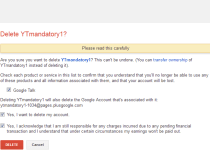
I sat down to write up the new YouTube comment system earlier this week, and before I finished the article, I had deleted my Google+ account - my real one, not the joke one that you acquire during the YouTube signup process. The labyrinth of settings and accounts involved struck me as so absurd, and the process so hostile to comprehension, that they needed to be described as they might have been experienced by an ordinary user, and not from the more meta perspective of a tech writer or web designer. Here's how it felt like it would go for your average YouTube visitor.


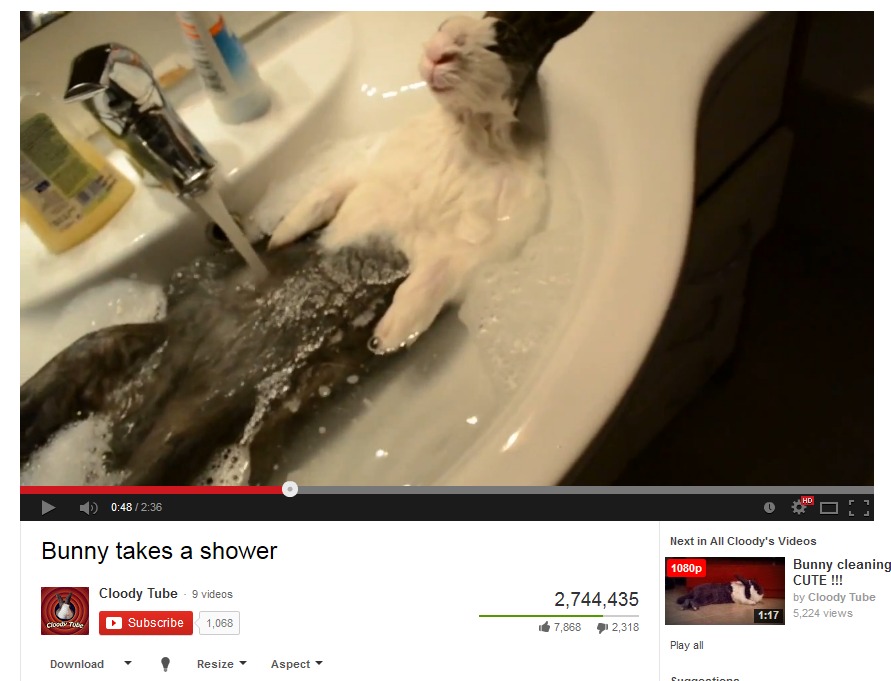
Ah, yes. That was a quality YouTube video. I've never felt the need to comment before, but this bathing rabbit deserves my approbation like none other!

Wait, my name is up there in the bar, and my face is next to the comment field. Ah, it would be a comment with my real name… curses. For reasons I do not care to explain (you can imagine compelling circumstances on your own) I would rather not use my real name or associate this particular video with my official identity or Gmail address.

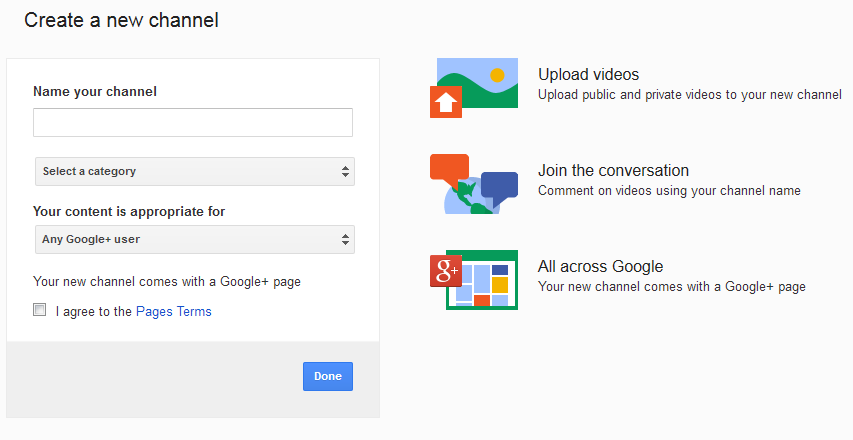
But I heard there's a new system. I'll sign up for an account! Probably I can just click the comment field to - Oh. It wouldn't have let me comment on the field even though my face was next to it, huh? Weird. Instead, it wants to know whether I want to use my Google+ account with my real name or “create a new channel.” Are those really my only options if I just want to comment? Very well, YouTube, I'll create a new “channel.”

Ah, now you tell me. This new channel “comes with a Google+ page.” Why do I need another one? I already have one, and it's because I didn't want to use it that I clicked this button in the first place! Okay, well, I guess it can't be helped. I can always delete it later.

Great, now I have a channel. I'll just check the options just in case - I see I've been opted into a number of ads and newsletters! And even though this is a separate account with its own Google+ account, those will go to my Gmail address, I'm sure. Would have been nice to hear about this up front, but no use crying over spilt permissions. Uncheck, uncheck.

On, then, to Google+. Pretty sure this new one is redundant so we'll just do away with it. Oh, it's a “page”? How is that different from my profile “page,” or a photo “page”? And why is it associated with my real name account? Never mind, it won't live long enough to matter. Dashboard, settings… scroll past a dozen or so notifications and other things I've been opted into without my knowledge… here we are: the tiniest option. “Delete this page.” Goodbye, page!

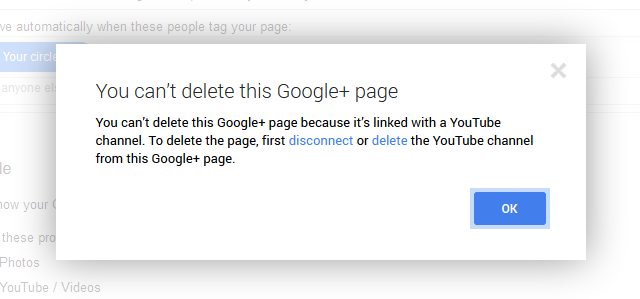
What, I can't delete it? I have to delete the YouTube channel first? Why would I do that? Why wasn't this mentioned before? I don't want some random accounts I don't use or care about! Wouldn't it have been more accurate to say I was making a Google+ page that “comes with” the ability to comment on YouTube? But the YouTube channel has its own inbox and notification settings and stuff. I don't need both, do I?

Oh, it says I just have to disconnect it first, that's fine. Just one more step, and there's even a link. Clicking that should… nope. This is just the basic settings page. Well, it has to be here somewhere. Ah, “Connected accounts.” Not for long, poor things!

Damn, not there either. Where would I disconnect except in “Connected accounts?” Advanced settings? I see “delete” but not disconnect. More features? If I search exhaustively through these, it will surely appear. No… no….

You know what? Forget it, I don't even want to comment any more. It was a dumb video anyway. I'll just post it on Facebook and put my comment there, where my friends will actually see it. Delete… yes, I'm sure. You may have just been a baby, but you had it coming, YouTube channel.

Now for that pesky G+ page, since its lifeline is gone. There's no link to it anywhere on YouTube that I can see, but luckily, I know that I can go to plus.google.com to manage this stuff, something that wouldn't be obvious if you weren't already a Google+ user. Manage, settings, and delete, and yes, damn it, I'm sure - boom.

Back to square one. What was that other video I wanted to watch anonymously? Oh yeah, the dog. Okay, so now it says “Log in” up there, so I'm definitely logged out. That's fine, I'll just watch stuff, that's what YouTube is for anyway. And I can back out even if I were to accidentally click the comment button or something, like so…

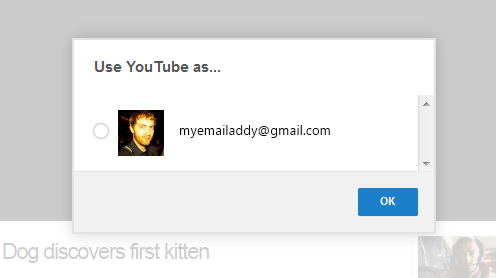
“Use YouTube as…” And the only option is my email address? Not likely, kemosabe! Not even going to click! No x to close this thing, thanks a lot… but I can sure close the tab! Nice knowing you, login box!

Let's try this again. I desperately need to see that ex-military dog nuzzle its first kitten.

What?! Why is my face next to the comment box! I'm logged in with my email address? I never did that! Sign out.

Hey - why did my Gmail and chat sign out? Get back in there.

All right, one more time. Video URL pasted, and… I can hear the video but can't see it? It's just a login screen with one option! Is that a bug? Reload… and I'm logged in again? So wait, signing in and out of Gmail signs me in and out of YouTube and vice versa? In what world does that make sense? For god's sake!


It turns out you can view YouTube privately and without logging in only from an “incognito” or “private” browsing window, or if you are not logged into any other services. You can also block cookies on YouTube, though that's not something most users would think of. But fiddling around with Google+ and finding how often things I thought were disabled were not, how many settings I thought I'd changed had reverted, and how many accounts were being linked into the service for reasons I found pointless… I just decided to end it.

I don't mean to rag on Google+, as some people find it useful as a social network, and it's not as if signing up for an extra account and ignoring it is some huge chore. But its growing position as a sort of hub to be conflated with unrelated services like YouTube is distasteful to me.

It's not that I find Google or even Google+ itself bad. But the connections between the channel, the pages, the Google+ profile, the Google account, the various websites and contact lists, to say nothing of interdependencies with Android - it's becoming stifling. This little fracas around YouTube comments, and my inability to use the website as I please except by using Google's own identity-hiding techniques against it reminded me of that. When I imagine my parents or less wary friends undertaking the process, I shudder to think how little they would bother diverging from Google's ideal plan for a good data-producing consumer, because they would not have the patience to dig through settings, search after orphan accounts, and so on. Google has chosen the method and degree to which these things are connected, and few will have the wherewithal to resist. Sure, it's their prerogative, but we don't have to like it, and we don't have to dislike it in silence.

Simplify, simplify. My online life is already cluttered enough, and I never did like Google+, so I deleted it, and perhaps you should, too. Now there's one less egg in my Google basket, and I never have to pay attention to anything that has the word “Google+” in it again - just like I did with LinkedIn (stop inviting me, everyone in the world), Pinterest, and a number of other things I had no use for.

My worry is that I'm going to have to double back on my tracks in a year or so when the next few services coalesce under the Google+ umbrella. Hopes that it will be done well no longer seem realistic, so anyone who shares a similar low-key dread about the impending changes would do best to take matters into their own hands.


10 Nov 21:47

British intelligence reportedly intercepted LinkedIn and Slashdot traffic to plant malware

by T.C. Sottek

German newspaper Der Spiegel reports that British spy agency GCHQ set up fake LinkedIn and Slashdot pages to plant malware within Belgacom, a Belgian telecommunications company. Using a method called "quantum insert," the GCHQ was reportedly able to preempt legitimate access to the websites, redirecting the employees to fake sites that compromised their computers. Der Spiegel reports that the GCHQ and NSA were also able to infiltrate the Vienna headquarters of the Organization of Petroleum Exporting Countries (OPEC). The report is the latest based on documents provided by whistleblower Edward Snowden.

On September 20th, Der Spiegel reported that the GCHQ hacked Belgacom under a project codenamed "Operation Socialist," in order to...

Continue reading…

10 Nov 12:36

Jeph Loeb on Agents of S.H.I.E.L.D. and the future of Marvel television.

http://www.aintitcool.com/node/64954

This was conducted before the recent announcement of the Marvel deal with Netflix.

10 Nov 10:02

Muzzling Canadian scientists: Comparing US and Canadian routine scientific secrecy

by Cory Doctorow


Canada's Conservative government has become notorious for muzzling government scientists, requiring them to speak through political minders (often callow twentysomethings with no science background who received government jobs in exchange for their work on election campaigns). Government scientists are not allowed to speak to the press alone no matter how trivial the subject, and the default position when reporters seek interviews is to turn them down. (Much of Canada's state-funded science pertains to the climate and the environment; Canada's Tories were elected with strong backing from the dirty tar sands and other polluting industries)

A group of University of British Columbia students decided to measure just how extraordinarily secretive science has become in Stephen Harper's Canada. Dave Ng writes:

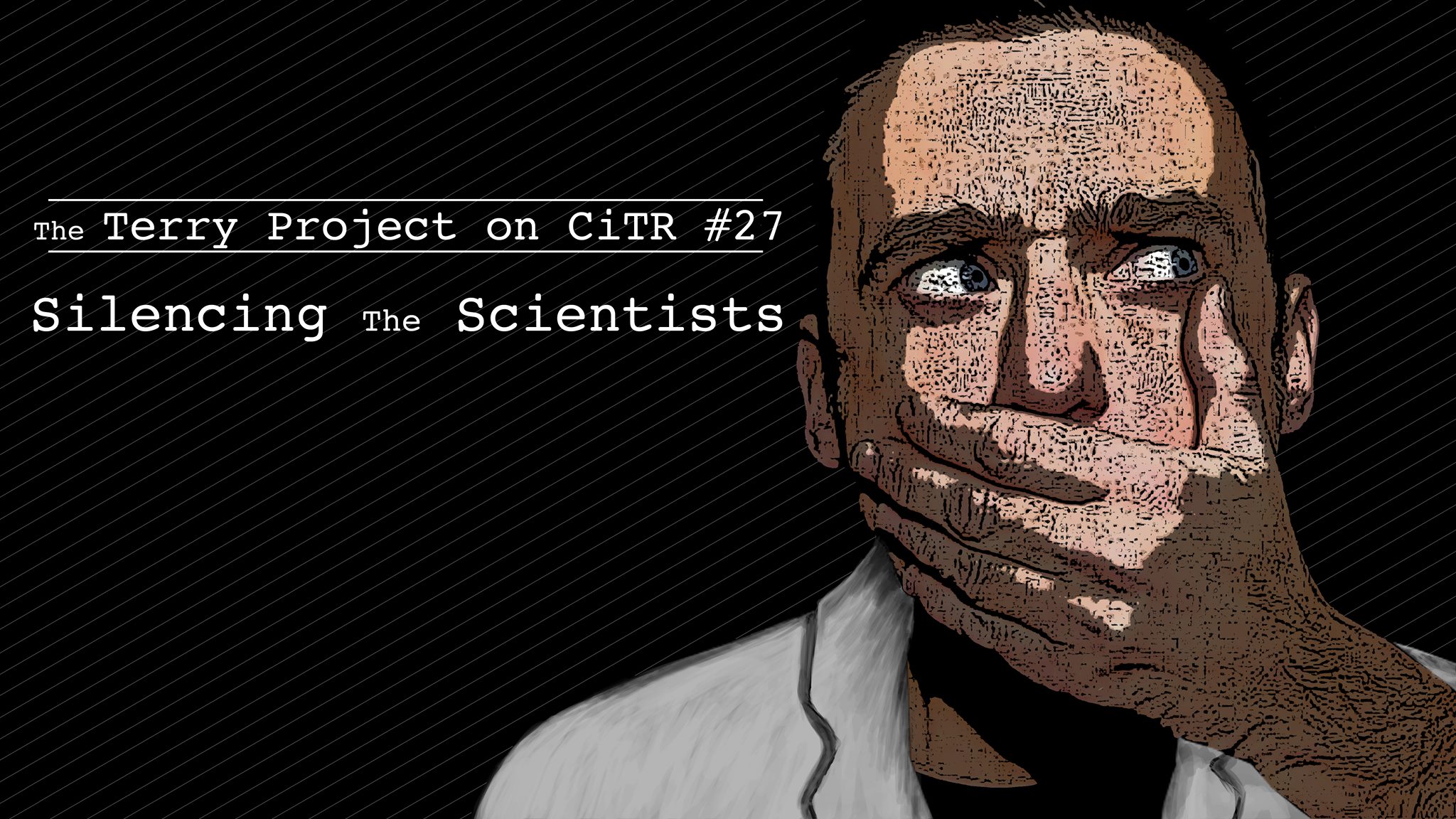
What if there was a non-political research project that involved a collaboration between NASA scientists and Environment Canada scientists? How easy would it be for a journalist to talk to the scientists involved? It turns out it would take only 15 minutes for something to be arranged with NASA. With Environment Canada, however, it would take the activities of 11 media relations people, sending over 50 pages of internal emails, before a list of irrelevant information was finally sent back - all of this long after the deadline had passed. This is what happened to journalist Tom Spears in April 2012. With this, this Terry Podcast episode asks a simple question: If it was this difficult to get interviews for a positive science story, what would happen if a journalist needed to actually ask some tough questions? Please take a listen as this episode of the Terry Podcast examines the relationship between media and Canadian Government scientists, and questions whether the Harper government has politicized science.

The Terry Project on CiTR #27: Silencing the Scientists

Podcast feed

MP3 link

(Image: Talal Al Salem/Terry Project)


09 Nov 21:53

This Cats Got Game

by McCullough
The Amazing Jumping Cat
09 Nov 09:58

Talk to Docs Quickly Answers Your Common Health Questions

by Adam Dachis

Talk to Docs Quickly Answers Your Common Health Questions

Android and iOS: While you generally don't want to turn to the internet for help fixing your body, if you can connect with an actual doctor you can get usable advice. Talk to Docs offer just that, allowing you to ask a question aloud and receive an answer just moments later.

Talk to Docs provides a very simple interface at the start. You can type your question, but it seeks to simplify the process by listening to you speak and then turning that question into text on your behalf. Once it detects the question you've asked, you get a series of related responses from actual doctors. In many cases, those responses were vetted by other doctors so you have multiple opinions. While a brief answer can't replace actual medical treatment, when you want to try and figure out what might be wrong with you in a hurry it's nice to get a quick answer.

Talk to Docs ($1) for Android and iOS | Google Play Store / iTunes App Store

09 Nov 09:54

Lenovo’s smartphone plan: Do what Apple failed to do with iPhone 5c

by Brad Reed
Lenovo Smartphone Strategy iPhone 5cOne of the biggest surprises in the tech world this year came when Apple decided that it wouldn't try to attract consumers in emerging markets by releasing a truly low-cost iPhone. Instead, the iPhone 5c that the company launched in September is mostly another high-end smartphone that's slightly less expensive than the iPhone 5s off-contract because of its older hardware and cheaper plastic casing. Chinese manufacturer Lenovo, which has been the one company to actually thrive during the great PC sales collapse of 2013, now sees an opportunity to deliver to consumers in emerging markets and is planning to target consumers whom Apple has failed to reach with the iPhone 5c.

Continue reading...
08 Nov 17:10

Will the global NSA backlash break the internet?

by Amar Toor

The NSA's ongoing surveillance has spurred many governments to pursue stronger data-protection laws, but there are growing concerns that this backlash could divide the internet along national borders, threatening the principles of openness and fluidity that it was founded upon.

In September, Brazil announced plans to build a fiber-optic cable that would route internet traffic away from US servers, theoretically keeping its citizens’ data away from the NSA. The policy has yet to be implemented, and many question whether it will actually be effective, but others appear to be following Brazil’s lead.

In Germany, telecommunications companies are working to create encrypted email and internet services that would keep user data within...

Continue reading…

08 Nov 17:08

Phones 4u offering free Samsung Galaxy Gear with Note 3 on contract

by Alex Dobie

Galaxy Gear, Galaxy Note 3

Galaxy S4 Zoom​ customers also getting free accessory pack

UK retailer Phones 4u has announced that it's running a week-long promotion, starting today, to give away free Samsung Galaxy Gear smartwatches to customers who buy the Galaxy Note 3. The Gear, which usually sells for £299 in the UK, will be offered for free to customers who buy the Note 3 on-contract from brick-and-mortar Phones 4u stores (excluding Dixons) from today until next Thursday, Nov. 14.

In addition, the retailer is today kicking off a similar promotion for the Galaxy S4 Zoom — Samsung's phone-camera hybrid with 10X optical zoom. Buy the imaging-centric device online or in-store between now and the end of the year and you'll receive a free GS4 Zoom accessory pack, featuring a flip case, tripod and "charging unit."

The Galaxy Gear in its current incarnation isn't perfect, and we've said as much in our review of the device. Nevertheless, you can't argue with free.

More: Galaxy Note 3 review, Galaxy Gear review, Galaxy S4 Zoom review


08 Nov 17:04

Prevent Blisters in New Shoes with Gel Deodorant

by Eric Ravenscraft

Prevent Blisters in New Shoes with Gel Deodorant

It's not uncommon for new shoes to rub your feet the wrong way at first and cause a few blisters. As home blog Real Simple suggests, a bit of gel deodorant on key friction locations can reduce the stress.

The gel acts as a moderate lubricant, which can obviate the need to buy dedicated blister blockers. It should be noted, though, if you're a runner, this method probably isn't for you as deodorant can prevent sweating, which is essential to staying cool. If you're trying to make new shoes a bit more comfortable until they're worn in, however, that gel deodorant you have lying around is an excellent substitute.

Deodorant as Blister Preventer | Real Simple via BuzzFeed

Photo by rachel_pics.

08 Nov 16:57

50 Essential Graphic Novels

by Bill Crider
The Contract with God Trilogy by Will EisnerAbeBooks: 50 Essential Graphic Novels: While the term 'graphic novel' only entered common usage as recently as the late 1970's, novel-lenth works in either pictures-only forms or pictures in combination with text have existed since the 19th century. Baby boomers who haven't picked up a comic book since childhood will most likely associate the term with the Classics Illustrated series, which does not quite fit the modern definition.